Newsletter
Want to keep up to date with all our latest news and information?


ResidentialBusiness
Administrators
-
Joined
-
Last visited
Everything posted by ResidentialBusiness
-
Want to get yourself verified on Bluesky? The company just made a verification form available to the public, and you can use it to submit a request to get yourself a shiny blue check mark. This comes about a month after Bluesky first launched its verification program, which focused primarily on verification from third-parties and Bluesky itself. This latest change, however, allows you to apply for verification directly with Bluesky. The different types of Bluesky verificationUnlike X and Instagram, Bluesky doesn't charge you for verification. However, there are three different kinds of verification on the service and it can get a bit confusing. The first and easiest type of verification is self-verification on Bluesky. This is open to anyone who owns a domain name. You can easily link your Bluesky account to the domain, which changes your handle to the domain name. Self-verification doesn't come with a blue check, however. Credit: Pranay Parab There are two types of blue checks: a scalloped blue check and a simple circular one. The scalloped blue check is for organizations designated as trusted verifiers. These include Bluesky itself, and a select few third-party organizations. When these trusted verifiers assign blue checks to an account, that account gets a circular blue check. Bluesky says it reviews all accounts verified by third-party organizations. Who can get verified on BlueskyAccording to a post by the Bluesky Safety account, you need to have an account that's "active and secure, authentic, and notable," if you want to get verified. The company defines these things quite clearly in the verification form. You need to have a complete bio, show regular activity on the platform, and have a profile photo. Bluesky recommends enabling two-factor authentication as well. To meet the "authentic" criterion for verification you need to be a "real person, registered business, organization, or legitimate entity." Your handle and display name should align with who you really are (or your business), as your account "must be the unique presence of the person or business it represents." You also want to add a link to your Bluesky account on your official website, since this is also checked for verification. Finally, to qualify as a "notable" account, your account should be important in your field or geographic region, the company says. To determine notability, Bluesky says it looks at things like "professional recognition, media coverage in established publications, presence on credible reference platforms, or other evidence of public interest." How to get verified on BlueskyIf you haven't been verified yet on Bluesky, then you can go right ahead and fill out this form to request it. Once you do that, sit tight until you hear from Bluesky. If you receive no response at all, it probably means that your request wasn't approved. You'll hear back from the company if your account is selected for verification, and Bluesky may request an ID to verify your identity. Once you get your account verified, the blue check may be revoked if you violate community guidelines. You can also hide your verification badge by going to Bluesky Settings > Moderation > Verification Settings > Hide verification badges. View the full article
-
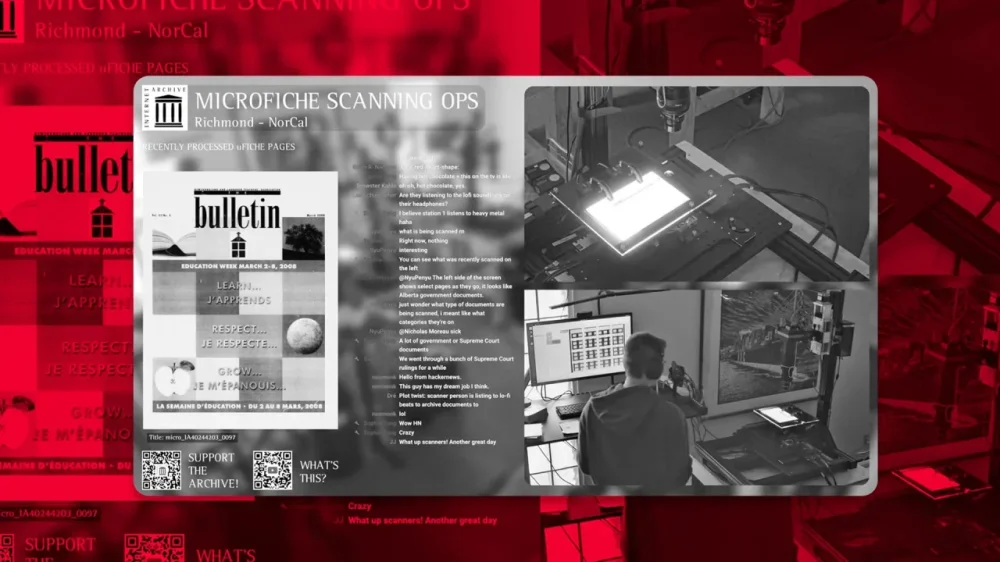
Want to watch history being preserved in real-time? The Internet Archive, the digital library of Internet sites and other cultural artifacts, has started live streaming on YouTube from its scanning center in California for anyone to watch. Monday through Friday, from 10:30 a.m. ET to 6:30 p.m. ET, viewers can tune in and watch live as fragile film cards are turned into searchable public documents, soundtracked to relaxing lo-fi beats. This work is part of Democracy’s Library, a global initiative to digitize and make publicly available millions of government records. “This livestream shines a light on the unsung work of preserving the public record, and the critical infrastructure that makes democracy searchable,” said Brewster Kahle, founder of the Internet Archive. “Transparency can’t be passive—it must be built, maintained, and seen. That’s what this live stream is all about.” If you’re confused about what exactly you’re watching on the livestream, scanning operators are specifically working with documents on microfiche, a flat piece of film containing microphotographs of the pages of documents. This format dates all the way back to the 20th century, and has been used to archive newspapers, court documents, government records, and more. “The livestream features five active microfiche digitization stations, with a close-up view of one in action,” Chris Freeland, the Internet Archive’s director of library services, explains in a blog post on the site. “Operators feed microfiche cards beneath a high-resolution camera, which captures multiple detailed images of each sheet. Software stitches these images together, after which other team members use automated tools to identify and crop up to 100 individual pages per card.” “Each page is then processed, made fully text-searchable, and added to the Internet Archive’s public collections—completed with metadata—so that researchers, journalists, and the general public can explore and download them freely,” the blog post adds. This livestream was brought to life by Sophia Tung, a software engineer and app developer. She is also behind the 24/7 livestream of a Waymo parking lot that went viral last year. In off hours, the Internet Archive livestream turns into a stream of silent films and historical images from NASA to keep viewers entertained. There is also a live chat. “This is such a good vibe to work on research,” one viewer commented. “I hope your work is as mysterious and important as this,” Tung replied. View the full article
-
In recent years, TikTok has become a prime target for scammers and cyber attackers spreading various forms of malware, and the latest shady campaign promotes instructional videos that trick users into downloading infostealers to their devices via ClickFix attacks. The scheme, identified by Trend Micro and reported by Bleeping Computer, instructs users to execute commands to activate Windows and Microsoft Office or premium features in CapCut and Spotify. One video is captioned "Boost Your Spotify Experience Instantly — Here's How!" and has nearly half a million views. These videos seem to be AI generated and, while the software they discuss is legitimate, the activation steps they outline are not, and will ultimately lead users to infect their devices with Vidar and StealC malware. TikTok's engagement algorithm makes it easy for such malicious videos to spread. In the past, cybercriminals have used TikTok's trending "Invisible Challenge" to spread WASP Stealer malware, which can steal Discord accounts, passwords, credit cards, and crypto wallets. Fake cryptocurrency giveaways posted on TikTok used deepfakes of Elon Musk (and themes around SpaceX and Tesla) to scam users into paying "activation" deposits using Bitcoin. How TikTok ClickFix attacks workClickFix is a social engineering tactic that uses fake error messages or CAPTCHA prompts to trick users into executing a command with malicious code. Users will see a pop-up notification about a technical problem with instructions to copy and run a command (commonly a PowerShell script) to "fix" the issue. The attack most often targets Windows users, but it has been employed on macOS and Linux too. In the current TikTok campaign, the instructional videos prompt users to run a PowerShell command that installs Vidar or StealC information-stealing malware. The former can take desktop screenshots and harvest data ranging from login credentials and cookies to credit cards and crypto wallets. The latter targets web browsers and crypto wallets. Once run, the script will download a second PowerShell script allowing it to launch automatically upon device startup. It also saves in a hidden directory and deletes temporary folders so it can evade detection. How to spot malicious TikTok videosBe wary of following instructional videos you're served on TikTok (as well as unsolicited technical content in general). Check the source, and only engage with those that are legitimate, like from the developer itself. You should also look for signs of AI-generated content, which may be used to spread malware widely and rapidly. There's no malicious code actually embedded in or delivered by these instructional videos—the scheme is dependent on social engineering via verbal directions—making the threat technically harder to detect. View the full article
-
Ever since Apple made it easy to change certain default apps on your iPhone, it's become quite convenient to switch away from the company's apps whenever there's a third-party option you prefer. With iOS 18.4, Apple made it possible to change your default translation app as well. First spotted by MacRumors, you can officially set Google Translate as the default app for translation, in case you prefer it over Apple Translate. Make Google Translate the default translation app on your iPhoneThere are a couple of ways to go about this, but I recommend the easiest method. If you never use it, just delete Apple's Translate app from your iPhone, and the device will automatically select Google Translate as the default translation app—assuming you're running the latest version of Google's app. This isn't ideal for people who occasionally rely on Apple Translate, but if you know you don't need it, you might as well save the time and storage space. You can also do make the switch without deleting any apps. On your iPhone, go to Settings > Apps > Default Apps > Translation and select Google Translate from the list. If you use any other translation apps that support Apple's default apps feature, they should also show up on this page, and you can use your preferred app as the default option. Credit: Pranay Parab You can use this feature in any iPhone app that lets you select text. Tap the Translate button in the popover menu above selected text, and you'll see Google Translate's translation in the lower half of your iPhone's screen. It does a good job at detecting the language of selected text and offering a translation in your preferred language (which is picked up from your iPhone's language settings), but there's an option to change languages easily, without leaving whichever app you're using. Until this feature showed up, you could still use Google Translate on your iPhone, but it required a few extra taps. This is a small but helpful way to streamline the process. View the full article
-
Prime minister’s move to appease Labour MPs could create a £3bn conundrum for Rachel Reeves in the Autumn BudgetView the full article
-
We may earn a commission from links on this page. Deal pricing and availability subject to change after time of publication. As the weather warms up, it's a great time to get out for a run or a bike ride—but if you need some music to keep you motivated, it's crucial to have headphones that won't entirely shut out the outside world. A good bop is a wonderful thing; not being able to hear traffic and nearby cyclists is not. Earphones like the Anker Soundcore C40i, on sale for $89.99 (originally $119.99), are a good option because they clip onto the ear and don't entirely fill the ear canal. Anker Soundcore C40i Open Earbuds $89.99 at Amazon $119.99 Save $30.00 Get Deal Get Deal $89.99 at Amazon $119.99 Save $30.00 Unlike higher-priced models with touch controls, these earbuds feature only button controls. This is ideal for individuals who prefer a more tactile and precise approach and want to avoid the accidental inputs that touch controls can cause. Additionally, the Soundcore app allows users to personalize button functions and EQ settings, although going ad-free is only available with a paid subscription. Despite these features, battery life and sound quality receive mixed reviews on Amazon. One reviewer describes the sound output as “tinny” and notes the lack of rich, bass-driven sound. While you won’t get the same quality as Bose headphones, if you’re in the market for budget-friendly wireless earbuds with an open style that cost less than $100, the Anker Soundcore C40i open earbuds might be a good option. View the full article
-
Three years after suing to block Microsoft from buying one of the biggest names in video games, the U.S. government is finally giving up. The FTC announced plans Thursday to drop a Biden-era case against Microsoft over its $69 billion acquisition of game maker Activision Blizzard, a decision the regulator said now best serves the public interest. In 2022, the FTC first announced that it would try to kill Microsoft’s planned acquisition of the gaming giant, which makes hit games like Call of Duty and World of Warcraft. The following year, after the FTC failed to secure a preliminary injunction to stop it, Microsoft actually finalized the massive deal, but the regulator vowed to continue appealing that decision. Earlier this month, the 9th Circuit Court of Appeals upheld the lower court’s order denying the injunction, ruling that the FTC’s claims that the deal would limit competition in the gaming industry were weak. The acquisition was destined for intense scrutiny from day one, both for its size and its potential to totally reshape the landscape for one of tech’s hottest sectors. Microsoft swooped in to save Activision Blizzard from itself When Microsoft announced its plan to buy Activision Blizzard in January 2022, the smaller company had been rocked by emerging allegations of systemic sexual harassment and discrimination in the workplace. Those ongoing scandals eventually forced longtime CEO Bobby Kotick out of the company as Microsoft cleaned house leading into the merger. Microsoft also had to clear major regulatory hurdles in the U.K., resolving antitrust concerns there over its cloud gaming services before getting the green light to close the deal. That bit of regulatory maneuvering resulted in an unusual arrangement to offload cloud streaming rights for its games to competitor Ubisoft in order to appease the Competition and Markets Authority, the U.K.’s powerful trust buster. (This portion of the deal isn’t great news for anyone who’s wrestled with Ubisoft’s awkward online gaming service over the years.) A boost to Microsoft’s online gaming roadmap By bringing Activision Blizzard under its wing, Microsoft can also bring the company’s many hit titles into the popular Xbox Game Pass service, which gives players unlimited access to games for a monthly subscription fee. Gaming companies have increasingly turned to monthly subscriptions and live service games over the last decade and many of Activision Blizzard’s hit franchises revolve around online multiplayer, including Call of Duty, Overwatch, Diablo and World of Warcraft. Activision Blizzard also owns Candy Crush, a colorful tile-matching game that’s still synonymous with mobile gaming almost a decade after Activision Blizzard bought its developer King for a then whopping $5.9 billion. Microsoft President Brad Smith described his company as “grateful” to the FTC for its decision to allow the acquisition to settle. “Today’s decision is a victory for players across the country and for common sense in Washington, D.C.,” Smith said. View the full article

-
We may earn a commission from links on this page. Having your car stolen is a traumatic experience—and a depressingly common one. Although car thefts nationwide are trending downward, there were still more than 850,000 vehicles stolen in 2024. If you’ve ever woken up to find your car missing from its spot (and I have!) you know it’s not fun. But thieves don’t always target the entire car. It’s often easier and less risky to steal a specific part from your car or truck. Many of these parts are relatively easy to access, remove, and sell, and the profit margin can be very lucrative for a busy and organized criminal. If your car is ever parked out in the open (especially overnight), it could be targeted for a surprisingly long list of specific parts. The good news is that you can protect every bit of your vehicle with a little foresight and a few security gadgets. Catalytic convertersEver since catalytic converters entered widespread use in the 1970s, thieves have targeted them. They’re a perfect storm for thieves: Accessible, relatively easy to remove, and valuable due to the mix of precious metals inside them (including palladium, platinum, and rhodium). Thieves know they can get between $250 and $800 for a catalytic converter, depending on the vehicle it was taken from. That’s why about 64,000 catalytic converter were stolen in 2022 alone. How to stop thieves: The best thing you can do is to install an anti-theft device like a Catstrap. This is a band of strip steel that is adhered to the length of your exhaust system, making it almost impossible for thieves to cut through the pipes to steal the converter. You can also consider etching identifying information on the converter to make it difficult to sell on the black market. The downside of this approach is that thieves may not notice the etching until after they’ve removed the converter. WheelsYour car's wheels and tires are prime targets for theft. Tires can be stripped off your car in a very short period of time, and they can be sold very easily, especially since tires—especially high-end tires—can run as much as $1,000 each. How to stop thieves: Your best bet is to install model-appropriate locking lugnuts like these. These will make it very difficult for thieves to use standard tools to remove your wheels. With a lot of effort and some specialized tools, they can be defeated, but chances are your thief will just move on to a different car with wheels that are easier to steal. BatteriesA standard car battery in a gas-powered vehicle isn’t worth much—typically less than 20 cents per pound. But batteries are also incredibly easy to steal, so thieves will sometimes make a sweep of an area to steal as many batteries as possible in order to make the payout worth their time. The batteries in a hybrid vehicle can be worth more, and the batteries in an electric vehicle can be very, very valuable—but also a lot harder to steal. How to stop thieves: Adding a battery lock bracket is easy, cheap, and pretty effective. Since battery thieves don’t make much per battery, any additional barrier will probably deter them pretty effectively. TailgatesYes, believe it or not, thieves are after your truck’s entire tailgate. This is especially true if you own a Toyota Tacoma, because the tailgates on that model are incredibly easy to detach—they’re literally engineered to be removed easily. But any truck tailgate is a target because they’re all relatively easy to remove, and these days your tailgate contains a bunch of high-tech gear (cameras, sensors, etc.) that can be stripped out for resale. How to stop thieves: You can install a tailgate lock for your make and model (like this one for suffering Tacoma owners). AirbagsIt’s estimated that about 50,000 airbags are stolen annually in the U.S. They’re valuable, fetching up to $200 on the black market, which makes them attractive to thieves. Thieves usually target dealerships or other places where cars are left unattended in accessible lots, but cars parked on the street are also hit. How to stop thieves: The best ways to stop airbag theft is to lock your car when you park it and park it inside a secured area, like a garage. If that’s not possible, using a steering wheel lock using the “club” design can be effective, as it physically makes it difficult to access the driver’s-side airbag. This won’t stop thieves from grabbing the passenger-side airbag, of course, but cutting their profit in half might inspire them to move on. License platesThieves steal license plates because it’s an easy way to cloak a vehicle. Sometimes they’re put on stolen vehicles, sometimes they’re used to evade tolls—but the fact that they’re generally easy to steal and very difficult to track makes them popular targets. In fact, the National Insurance Crime Bureau (NICB) notes that license plate theft has been rising rapidly—by 45% between 2019 and 2022 alone. How to stop thieves: Swapping out the rusty, standard screws holding your plates on for some tamper-proof screws will do the job. These screws require a special fastener to attach or detach, and the kits come with screw covers to make it even more difficult to access. Side mirrorsYou might think your side mirrors are just mirrors, and who would bother stealing those? Ah, but modern-day side mirrors have a lot of technology inside them, especially on luxury vehicles, including blind spot sensors, defrosting systems, and cameras. Believe it or not, some mirrors can command upwards of $2,000 each! How to stop thieves: If your side mirrors are motorized, turning them in when you park can make it more difficult for thieves to access them. You can also look for anti-theft mirror guards (like this one) for your make and model, which add a layer of security to the mirror to deter thieves. Third row seatsIf you have a truck or SUV with a removable third-row seat, you should know that it’s increasingly popular to steal them. The reason third-row seats are targeted is the universal reason anything gets stolen: These seats cost thousands of dollars to replace. How to stop thieves: The best way to prevent theft of your truck’s third-row seat is to secure it with a bike lock. The specific lock that will work depends on how your third-row seat attaches and detaches, but all you need to do is secure it in place. It removes some of the convenience, but it’s a lot better than having your kids roll around in the cab while you drive. BadgesPeople have been stealing car badges and hood ornaments for decades, often just to collect them or as petty acts of vandalism. But these days those emblems can actually contain a lot of expensive technology. Modern Volkswagens, for example, often tuck cruise control sensors into the hood emblem. That makes those badges a lot more valuable than you might think, and thieves are definitely aware of their added value. How to stop thieves: It’s very difficult to stop someone from removing an emblem, badge, or ornament from your car. If you can access the back where it’s attached, you can try using wire or zipties to secure it more firmly—but if you can access it, so can thieves. Your best defense is to park the vehicle in a secure area whenever possible. View the full article
-
Sachin Dev Duggal has recently approached multiple investors View the full article
-
For the first time in a generation, its monopoly is under threat. After two years of false starts, the company is trying to regain the initiative View the full article
-
Starbucks in South Korea has barred customers from using the names of South Korea’s six presidential candidates in their orders ahead of next month’s presidential election. A Starbucks Korea spokesperson told NBC News the policy was introduced “in order to prevent inappropriate and abusive use of the names.” The decision comes as South Koreans have increasingly used their Starbucks’ orders to make a political statement—ordering via app under presidential candidates’ names, and using phrases in support of or to oppose them, forcing baristas to call them out for pickup, per NBC. Some examples of those orders include: “arrest Yoon Suk Yeol” and “[opposition leader] Lee Jae-myung is a spy,” per the BBC. According to Starbucks, the company needs to “maintain political neutrality during election season,” and will lift the ban on June 3 after the election, the BBC reported. Like many South Korean businesses, Starbucks is seeking neutrality amid the charged political atmosphere around the election, stemming from former President Yoon Suk Yeol’s brief martial law declaration and subsequent impeachment trial, which has deeply divided the East Asian democracy. Similarly, Naver, South Korea’s biggest search engine, has disabled autocomplete on search for the candidates, a common practice for the tech giant during an election cycle, according to the BBC. The six presidential candidates’ names that Starbucks has banned are: Lee Jae-myung, from the country’s liberal Democratic Party (DP); Kim Moon-soo, from former president Yoon Suk Yeol’ conservative People Power Party (PPP); and Lee Jun-seok, Kwon Young-kook, Hwang Kyo-ahn, and Song Jin-ho. As Fast Company previously reported, Starbucks recently posted “disappointing” earnings results for the second quarter of fiscal 2025, ending on March 30. Unlike in the previous quarter, Starbucks did not beat analyst revenue expectations, of $8.83 billion and an adjusted earnings per share (EPS) of 49 cents, according to Yahoo Finance, instead posting a revenue of $8.76 billion and an adjusted EPS of 41 cents. One key metric, U.S. comparable store sales, declined 2% in Q2. Shares in Starbucks Corporation (NASDAQ:SBUX) were trading up about 1% on Friday. View the full article

-
Potential loosening of Black ownership rules came after billionaire said his satellite internet group would not complyView the full article
-
The first Mission: Impossible film came out in 1996 when star Tom Cruise was 34 years old. Fast-forward to Memorial Day weekend 2025: Cruise is 62 and there’s speculation that Mission: Impossible – The Final Reckoning could be the last movie in the franchise. Is this just a marketing ploy to get fans in theaters to kick off the summer blockbuster season? Who knows. Let’s take a look at the history of these films, their box-office earning power, and what Cruise himself has said about the movies over the years. A brief history of the Mission: Impossible franchise The Mission: Impossible films are based on the 1966 TV series of the same name, which was created by Bruce Geller. Peter Graves, who played Jim Phelps on the series, didn’t appear in the first film and was in fact very disappointed with it because his character was made to be the villain in the story, as CNN reported. Actor Jon Voight took the role. Even though this move upset other actors from the series and some fans, the box office numbers proved that fans soon got over this reversal of the source material. The franchise’s first four installments had different directors, while the last four were helmed by Christopher McQuarrie. Cruise has been among the producers of the films from the beginning. How does it stack up against other action franchises? The Mission: Impossible films continue to jockey for the title of highest-grossing Tom Cruise movie, according to Screen Rant. Each new installment tends to beat the previous contender. According to Box Office Mojo, the seven films in the franchise have earned a domestic lifetime gross of $1.3 billion, making Mission: Impossible the 23rd most-valuable movie franchise by that measure. To put that in perspective, the Marvel super hero franchise—No. 1 on the list—has earned $12.8 billion, followed by Star Wars ($5.1 billion), Disney live-action reimaginings ($3.5 billion), and Spider-Man ($3.3 billion). Compared to pure action-movie franchises, Mission: Impossible falls below James Bond ($2.3 billion) and the cars and costars of The Fast and the Furious ($2 billion), but it beats out Indiana Jones ($1.1 billion) and Tom Cruise’s own Top Gun franchise ($899 million). Why do fans think this might be the last Mission: Impossible movie? Originally, the latest two Mission: Impossible films were supposed to be a two-part story shot back-to-back. The second film was initially called Mission: Impossible – Dead Reckoning Part Two, with the name change being announced in October 2023. Part One was loved by critics but had a disappointing box office return. Further complicating the matter, Final’s budget kept growing because of delays due to the Covid-19 pandemic and the actors’ and writers’ strikes. These setbacks caused tension in the production process and may have even accelerated conversations of the film becoming a more definitive conclusion to the franchise. While the creative team has not publicly spoken out about the stress of the delays, the title change signals to fans this might be the last time Ethan Hunt saves the world. “It is, I hope, the satisfying conclusion to a 30-year story arc,” director McQuarrie said in an interview with Empire in February. “I’m pretty confident that people are going to feel that the title was appropriate.” Cruise also seemed to confirm the end of an era on the red carpet at the New York premiere. “It’s the final! It’s not called ‘final’ for nothing,” he commented to the Hollywood Reporter. Two years ago he told the same publication he would make Mission: Impossible movies into his 80s. When asked about this, he clarified: “I actually said I’m going to make movies into my 80s; actually, I’m going to make them into my 100s.” Since everything eventually seems to get a reboot these days, it is not far-fetched to believe audiences might see Ethan Hunt again, especially if the box office numbers are impressive. No spoilers but several reviewers, including Clint Gage for IGN, point out that the plot of the film leaves room for future storytelling opportunities. Cruise has several film projects in development over the next several years so it does appear that it is goodbye—at least for now—to the beloved franchise. Mission: Impossible – The Final Reckoning hits theaters in the United States on Friday, May 23. View the full article

-
The 1.2 gigawatts infrastructure project will be one of the largest in the worldView the full article
-
We may earn a commission from links on this page. Garmin has launched a new feature in its Connect app (the companion app you use when you sync your watch to your phone). It’s called Garmin Trails, and it purports to help you find hiking trails near you. With a Connect+ subscription, you can even sync courses for those trails to your map-enabled watch. It sounds pretty great. Unfortunately, its selection of trails is pretty disappointing at launch—it doesn't even suggest I try out my own favorite trails. How to access Garmin TrailsYou don’t need a Connect+ subscription to search for trails, filter for features, and look at the routes and reviews of trail—all of that comes free with the regular Connect app, whether on your phone or through the Connect Web interface. If you have a Garmin device, you already have a login for these services. To find it Garmin Trails from within Connect, tap the More menu in the app, find and tap Training and Planning, and then scroll to Garmin Trails. You'll be given a map of suggested trails. Zoom the map and tap on the little hiker icons to see each individual trail, or search by name in the search bar above. Unfortunately, the search results aren’t sorted in any logical way, such as by distance. If I search for the name of a trail near me in Pennsylvania, I see results from Maine and Maryland before the Pennsylvania ones. There’s also a filter icon, which you can use to limit your results by distance from your current location, the amount of ascent in the trail, as well as rating, difficulty, trail type, and features. The features you can filter for include: Dog friendly No dogs Waterfalls Lakes Rivers Oceans Mountaineering Steep sections Forest Flowers Kid friendly Permit required Water sources Reaches peaks Rough road Only the U.S. and a few European countries are supported right nowAt launch, trails are only available in the U.S. and in four European countries: Austria, Germany, Lichtenstein, and Switzerland. “New trails in different regions will be added periodically,” says a Garmin support page. Garmin’s original announcement didn’t mention this restriction, so much of the chatter I'm seeing about this online involves disappointment from users outside this handful of countries. This writer in the U.K., for example, calls the feature “NoTrails” (referencing competitor AllTrails, get it?) In the U.S., I’m definitely seeing some trails, but not enough to make the feature particularly useful. I’m just not seeing a lot of trailsI like to run and hike on trails, and I live near a county park that is absolutely riddled with hikeable, runnable, and mountain bike-able trails. There’s a local trail running group that meets six times a week, seemingly always at a different spot (I’m sure they repeat their favorites, but there is plenty of variety on offer). So what does Garmin Trails have in its database for my area? Here’s Garmin on the left, and the county trails website on the right: Garmin, left; Allegheny County website, right. Credit: Beth Skwarecki/Garmin/Allegheny County Kudos to Garmin for knowing about the Rachel Carson trail, that long one that appears as a black line. It’s 46 miles long and quite well-known in the area. Garmin has it listed as a series of short segments. They are correctly labeled as “hard” difficulty. But the entire North Park area has two trails? I’m not even sure how a person would find out about the Orange and Green trails without learning about all the others in the park. Where is the Red trail, with its red-and-blue branch with all the switchbacks? Where is the flat half-mile trail by the nature center that I always took my kids on when they were little? Where is the White trail that circles the baseball fields? As for those Orange and Green trails, both are labeled with their correct distance, but they’re also both marked as “easy,” which they are definitely not. I did a trail run last week that included the whole Orange trail and part of the Green. It was about five miles and had 800 feet of elevation gain. That’s not an easy trail at all. I asked a Garmin rep where the trail data comes from, and was told Garmin used, “a variety of sources and our in-house cartography team.” As far as I can tell, they aren’t copied from AllTrails or any other source, or at least not directly. (Might be better if they were; AllTrails has the Green trail more reasonably labeled as moderate rather than easy.) Browsing through other areas I’m familiar with, it seems that the most iconic trails in any spot are in the database, so this tool isn’t useless, just incomplete (hopefully temporarily). A few of the gorge trails I remember most fondly from Ithaca, NY are in there. Yellowstone National Park has plenty of labeled trails. I asked fellow Lifehacker writer Daniel Oropeza to look for trails in areas he was familiar with, and he compared the Three Sisters Waterfall area in Garmin and AllTrails. Garmin has one trail to the waterfall, while there are actually four; the wider area has 19 trails in the Garmin database, but 143 in AllTrails. Garmin, left; AllTrails, right. Credit: Beth Skwarecki/Garmin, Daniel Oropeza/AllTrails It’s free to browse trails, but you must pay to send them to your watchGarmin Trails seems to be a pot-sweetener for the new Connect+ subscription tier. The Trails feature itself is free, but only subscribers to Connect+ (or Maps+, another Garmin offering) can send trail courses from this database to their devices. Compatible devices include anything that supports courses, like most recent Fenix, Forerunner, and Instinct watches (and Edge cycling computers). A watch that supports maps, like the new Forerunner 970, would be a natural pairing with this new feature. Trails also seems to be a slightly different version of the Courses feature that Garmin has had for a while. (You can find Courses at this link, if you have a Garmin login). Courses can be private or user-created; there’s currently no way for users to create a trail. That means there can be multiple versions of the same trail, and courses that don’t correspond to a specific trail—somebody who ran part of the Orange and part of the Green, let’s say, because that happened to be convenient for them on the day they created that course. If more trails get added to Garmin Trails, it could eventually be a useful feature. The trail ratings, comments, and filters are handy to have. But AllTrails already has those features, and you can load AllTrails routes to your Garmin watch if you subscribe to AllTrails Plus, which is $35.99/year—cheaper than Garmin Connect+, which will cost you $6.99/month or $69.99/year. View the full article
-
On TikTok, soup is getting a rebrand. It’s now water-based cooking, to you. “Pov you started water based cooking and now your skin is clear, your stomach is thriving and you recover from illness overnight,” one TikTok post reads. Others claim the method is making them age backwards. But a quick scroll through the comments has many pointing out the obvious: “bro invented soup,” one commenter wrote. Another added, “As an asian, what’s new.” The post made its way to Bluesky, where one user joked, “I need to start jumping on these phony trends. Get a water based cookbook self-published by tomorrow. Hit tiktok running.” They added, “Send me soup recipes. Let’s all get rich,” to which one user replied, “I have one that involves chicken and noodles,” or as they called it: “chicken noodle water-based meal.” While this cooking method predates TikTok by at least 50,000 years, it has been recently popularized on TikTok and Instagram by scientist and registered dietician Dr. Michelle Davenport, whose work focuses on slowing the deleterious effects of aging. She argues that cooking mostly with broth and water can help slow aging by reducing the amount of advanced glycation end products (AGEs), the compounds that attach to our DNA and cells. These are formed when food is cooked at high dry temperatures and contribute to various health issues. On her Instagram page, which has over 250,000 followers, you’ll find recipes for dishes like water eggs and breakfast soup. (“Dr michelle davenport the woman you are,” the caption of the original TikTok post reads.) “Water-based cooking—like steaming or simmering—is a simple way to get more out of your food,” dietitian Kouka Webb, MS, RD, CDN, told Fast Company. “It helps preserve delicate nutrients that are often lost with high-heat methods, and it cuts back on the need for heavy oils. As a dietitian, I’ve seen how small shifts like this can support things like blood sugar balance, better digestion, and even lower inflammation over time.” But while the health benefits of water-based cooking are plenty, clearly not everyone is here for the TikTokification of recipes and cooking methods that have existed for generations. And on TikTok, food trends come and go quicker than you can say, “lemony miso gochujang brown butter gnocchi.” Last year, there was the “dense bean salad” trend—which is exactly what it sounds like: a bean salad. There was also the “tadpole water” trend (just add chia seeds to a glass of water), and of course, who could forget the classic “girl dinner.” May I interest you in a delicious bowl of alphabet soup? View the full article

-
We may earn a commission from links on this page. Deal pricing and availability subject to change after time of publication. When it comes to speakers, Sonos has the best reputation and the best companion app on the market. If you're interested in seeing what the hype is all about, it's a great time to test the waters, as Sono's entry-level speaker, the Sonos Roam 2, has reached a record low price, according to price tracking tools. The portable, waterproof device is on sale for $134 (originally $179) at Amazon, part of a small Sonos sale that also includes the a discount on the larger Sonos Move 2 (also currently at its lowest price ever). Sonos Roam 2 Connectivity Technology: Bluetooth, Wi-Fi, Audio Output Mode: Mono $134.00 at Amazon /images/amazon-prime.svg $179.00 Save $45.00 Get Deal Get Deal $134.00 at Amazon /images/amazon-prime.svg $179.00 Save $45.00 The Roam 2 is Sonos' addition to the portable outdoor speaker market, and like most Sonos speakers, it integrates seamlessly into the Sonos ecosystem so you can use it to play multi-room media. If you get more than one speaker, you can pair them to create true stereo sound as well. This speaker can also double as a speakerphone. There's an in-app EQ for you to fiddle around with, it has wireless charging, is waterproof with an an IP67 rating, and offers support for both Alexa and the Sonos voice assistant. (You can learn more in PCMag's "good" review.) The defining characteristic of this speaker is its great audio quality despite its small size (2.4 by 6.6 by 2.4 inches) and light weight (0.95 pounds). The Trueplay feature, which uses microphones to gauge your surroundings and adjust the audio accordingly, gives it an edge over the competition. Note that while Sonos has traditionally been praised for its speakers' companion app, people have recently complained about the app dropping some features. However, the company appears to be trying to rectify their issues, and it's still the best app for speakers I have used. At this price, it's a great opportunity to try your first Sonos speaker, or add a portable one to your existing Sonos ecosystem. View the full article
-
President Donald The President is threatening Apple with a 25% tariff if the tech giant doesn’t start producing iPhones in the U.S. In a post on Truth Social, his social media platform, The President said he had “long ago informed Tim Cook of Apple that I expect their iPhone’s that will be sold in the United States of America will be manufactured and built in the United States, not India, or anyplace else.” “If that is not the case, a Tariff of at least 25% must be paid by Apple to the U.S.” he added. An Apple spokesperson didn’t immediately respond to Fast Company‘s request for comment. It’s the latest company to be caught up in the administration’s aggressive tariff policies. Walmart, for example, drew the president’s ire after it warned consumers last week that it may have to raise prices due to cost pressures. For its part, Apple has been working to diversify its production for the more than 60 million iPhones it sells in the U.S. annually. The vast majority of Apple products are made in China, though the company is reportedly working to move production for most of its U.S.-bound iPhones to India. Still, The President’s threat spooked investors. Shares of Apple fell more than 2% on the news, as iPhones could become incredibly pricey. Wedbush Securities managing director Dan Ives said in a note to clients that it would take five to 10 years to shift production to the U.S. and phones could end up costing $3,500. New iPhones, without all the bells and whistles, currently go for around $800. “We believe the concept of Apple producing iPhones in the US is a fairy tale that is not feasible,” Ives wrote. View the full article
-
Two Florida men have pleaded guilty to federal charges for their roles in a years-long off-the-books payroll scheme that resulted in nearly $10 million in tax losses and enabled the illegal employment of undocumented workers in the construction industry. Michael Mayorga and Francisco Alvarez entered guilty pleas before Magistrate Judge Leslie Hoffman Price of the Middle District of Florida. The pleas must still be accepted by a U.S. district court judge. According to court documents and statements made in court, from 2015 to 2022, Mayorga and Alvarez, along with unnamed co-conspirators, created a network of shell companies through which they operated an unlicensed check-cashing and cash courier business. These shell entities cashed approximately $89 million in checks from construction subcontractors, who in turn used the cash to pay workers off the books—many of whom were undocumented immigrants working illegally in the United States. Mayorga provided bookkeeping and tax preparation services to some of the shell companies, while Alvarez and others handled the physical distribution of the cash to subcontractors. In addition to the unreported cash payments, both men were involved in preparing and submitting false tax returns and documents, concealing the scheme from both the IRS and insurance companies. Mayorga’s actions caused a tax loss of $8,647,824 to the IRS. Alvarez’s role resulted in an additional $2,331,731 in lost tax revenue. Beyond the tax fraud, Alvarez filed a false worker’s compensation insurance application, securing artificially low insurance premiums for the shell companies. He then “rented” this insurance coverage to subcontractors, enabling them to falsely claim valid insurance when bidding on construction jobs. Mayorga also supplied fraudulent documents to insurance companies during audits to cover up the scheme. The charges against the two men carry a maximum penalty of five years in prison, along with supervised release, restitution, and monetary fines. Sentencing will be determined by a federal district court judge based on U.S. Sentencing Guidelines and other statutory factors. The investigation was conducted by IRS Criminal Investigation and Homeland Security Investigations. The case is being prosecuted by Senior Litigation Counsel Sean Beaty, Trial Attorneys Kavitha Bondada and Rebecca A. Caruso of the Justice Department’s Tax Division, and Assistant U.S. Attorney Amanda Daniels for the Middle District of Florida. The charges and guilty pleas reflect the Department of Justice’s ongoing efforts to combat employment tax evasion and insurance fraud within the construction industry, particularly schemes that involve the use of shell companies and the exploitation of undocumented labor. This article, "Two Florida Men Plead Guilty in $89M Off-the-Books Payroll and Tax Fraud Scheme" was first published on Small Business Trends View the full article
-
Two Florida men have pleaded guilty to federal charges for their roles in a years-long off-the-books payroll scheme that resulted in nearly $10 million in tax losses and enabled the illegal employment of undocumented workers in the construction industry. Michael Mayorga and Francisco Alvarez entered guilty pleas before Magistrate Judge Leslie Hoffman Price of the Middle District of Florida. The pleas must still be accepted by a U.S. district court judge. According to court documents and statements made in court, from 2015 to 2022, Mayorga and Alvarez, along with unnamed co-conspirators, created a network of shell companies through which they operated an unlicensed check-cashing and cash courier business. These shell entities cashed approximately $89 million in checks from construction subcontractors, who in turn used the cash to pay workers off the books—many of whom were undocumented immigrants working illegally in the United States. Mayorga provided bookkeeping and tax preparation services to some of the shell companies, while Alvarez and others handled the physical distribution of the cash to subcontractors. In addition to the unreported cash payments, both men were involved in preparing and submitting false tax returns and documents, concealing the scheme from both the IRS and insurance companies. Mayorga’s actions caused a tax loss of $8,647,824 to the IRS. Alvarez’s role resulted in an additional $2,331,731 in lost tax revenue. Beyond the tax fraud, Alvarez filed a false worker’s compensation insurance application, securing artificially low insurance premiums for the shell companies. He then “rented” this insurance coverage to subcontractors, enabling them to falsely claim valid insurance when bidding on construction jobs. Mayorga also supplied fraudulent documents to insurance companies during audits to cover up the scheme. The charges against the two men carry a maximum penalty of five years in prison, along with supervised release, restitution, and monetary fines. Sentencing will be determined by a federal district court judge based on U.S. Sentencing Guidelines and other statutory factors. The investigation was conducted by IRS Criminal Investigation and Homeland Security Investigations. The case is being prosecuted by Senior Litigation Counsel Sean Beaty, Trial Attorneys Kavitha Bondada and Rebecca A. Caruso of the Justice Department’s Tax Division, and Assistant U.S. Attorney Amanda Daniels for the Middle District of Florida. The charges and guilty pleas reflect the Department of Justice’s ongoing efforts to combat employment tax evasion and insurance fraud within the construction industry, particularly schemes that involve the use of shell companies and the exploitation of undocumented labor. This article, "Two Florida Men Plead Guilty in $89M Off-the-Books Payroll and Tax Fraud Scheme" was first published on Small Business Trends View the full article
-
Netanyahu’s war isn’t about protecting Israelis. It’s about protecting himselfView the full article
-
I really like the iPhone's Dynamic Island, the pill-shaped cutout near the top of the device's screen. It's an aesthetically pleasing way to check your battery percentage, record voice notes, and control music playback, among many other things. Since many MacBooks have a display notch too, you can use an app to bring an iPhone-like Dynamic Island to your laptop. Doing this makes the cutout look like a useful design feature rather than an abrupt gap in the screen, and some apps even let you move the giant volume and brightness adjustment popups to the Dynamic Island. Alcove brings the Dynamic Island to your Mac Credit: Pranay Parab I've been using Alcove on a MacBook without a notch and I'm still finding it pretty useful. This app's developer is known to focus on design, just as they did with Klack—an app that makes your Mac's keyboard sound vintage. Alcove's neat status updates highlight useful information in a slick interface. It takes over your Mac's volume and brightness adjustment popups and moves those to the notch. This is a better implementation than Apple's giant popups, which hide a significant part of the screen temporarily—a problem they've since fixed on iOS. You can also use Alcove to keep a tab on Focuses, changes in songs, and access playback controls. The app can even show some of these changes on your Mac's lock screen. I also like the app's animations, from the small visualizer that shows up when you play music to the different themes of the brightness and volume sliders. If you choose the Glow theme for the volume slider, the color of the slider changes from green to red when you exceed 80% volume. Credit: Pranay Parab This app supports gestures, so you can use horizontal two-finger swipes on your MacBook to skip to the next song or go back to the previous song. You can use vertical swipes to expand playback controls or to dismiss live activities that show up in the notch. You can try all of the app's features for a couple days without paying, and once the free trial is over, you'll have to pay $17 to continue using the app. The price may be a bit steep for someone who just wants music playback controls and nothing else, but Alcove is among the few apps that truly recreates the iPhone's Dynamic Island on your Mac, right down to all the delightful animations. Other useful notch appsThere are lots of other apps that make good use of the MacBook's notch, but these are my favorites: Notchnook ($25): This is another well-designed app and offers a few more features than Alcove and costs a bit more. You get more widgets, shortcuts, and even a mirror that lets you check your frame before a video call. Notchnook's file tray lets you quickly AirDrop files or store them in a temporary shelf, which makes it easy to move files around. Mediamate (€7): You can use this app for music controls, to slim down the massive brightness and volume controls, and to choose where to place those control sliders. You can place them in the notch or use slimmer sliders in the middle of the screen. Tuneful ($4): This one is a music-focused notch app, which lets you connect to both Apple Music and Spotify. You can use it to show playback controls and the currently playing song in the notch, but it also includes gesture-based playback controls. In case you don't want it in the notch, you can enable its mini player to show the album art and playback controls in other areas of the display. View the full article
-
The number of domestic travelers in the U.S. is expected to break a record for Memorial Day weekend that was set in 2005. AAA anticipates that 45.1 million people will travel 50 miles or more from home over the weekend, an increase of 1.4 million travelers compared to last year. Those traveling by car see the biggest difference, with more than a million extra travelers expected on the roads compared to last year. While 87% of travelers choose to take road trips during Memorial Day weekend, this year, they’re also aided by the lower crude oil prices making gasoline cheaper nationwide. (Typically, gas prices will peak in the summer as the busy travel season commences. You can avoid price hikes by staying away from the gas stations closest to the interstate, and optimizing your fuel economy.) As for traffic, AAA expects peak congestion in the afternoons all weekend, with the best travel times in the mornings. Get out early if you can, and on Monday, try to get back home before 2 p.m. Airports will also see a more crowded weekend than last year, with AAA projecting 3.61 million air travelers. In 2024, 3.55 million passengers chose flight as their preferred mode of travel, a difference of nearly 2% compared to the projection for this year. However, flights are more expensive than last year, with the average roundtrip ticket price costing $850. Popular destinations include Chicago, New York, Orlando, Denver, and Seattle. (If you’re planning to travel by air, follow the recommended airport arrival time of at least two hours before your domestic flight.) Other modes of transportation travelers are utilizing this weekend include trains, buses, and cruises. Those have increased 8.5% compared to last year’s numbers, with cruises seeing a high demand for Alaskan destinations for Memorial Day weekend, including Fairbanks, Anchorage, and Juneau. View the full article
-
Federal Reserve Gov. Lisa Cook said in a speech Friday that the market's response to recent volatility shows resilience, but more study is needed about the financial stability implications of business relationships between banks and nonbanks. View the full article

-
I don't mean to be alarmist, but I do think it's time to start assuming everything you see online is fake. The internet is full of content produced by real people, of course (this article included). But AI-generated media is getting so realistic, that it almost puts you at a disadvantage to presume the content you're scrolling past on your feeds is legitimate. Don't skip this article because you know what AI content looks like—the current stuff your algorithm delivers to your social media feeds is easy to spot if you know what you're looking for. But even if you can identify AI slop the second it hits your eyeballs, you need to know you're not ready for the next wave of AI-generated videos. That wave isn't just on its way—it's already here. AI content is already fooling peopleMost of us are acutely aware of the "AI video" look: This "tragic" video of a cat parent saving their kitten by throwing it out of a burning airplane is obvious AI slop to most who watch it. You probably know The President isn't working this construction site, and you most assuredly can understand this family of cat farmers is, in fact, AI-generated. But there are the videos that aren't so obvious, especially to those of us not quite so in tune with AI, or technology in general. You might know this video of babies dancing in a circle is AI, but plenty of the people in the comments didn't (assuming they aren't bots, either). You might also be able to tell that this family of pets isn't really watching a bird investigate a toy alligator, but, again, plenty can't. And there is no end to the America's Got Talent videos that feature "realistic" yet impossible visuals—that still capture the hearts of hundreds of thousands, if not millions of people. (I weep.) But I'm not writing this piece today because I'm concerned about how many of these "believable" AI videos are tricking way too many people into thinking they're real. I am worried about that, but those worries pale in comparison to my new fears. So far, most of the AI videos taking over social media feeds rely mainly on their visuals and background sounds to sell their alleged authenticity. You'll notice none of the characters in any of these videos actually speak. If they do, it's immediately off-putting, with out of sync lip movements and, typically, robotic voices. It's been easier for AI creators to put the emphasis on the realism of the people and animals in their videos, and hope you're wowed enough by a baby dancing with a lion to not think, "this is bullshit, right?" Even OpenAI's Sora video model, which shocked me with its quality in February of last year, was working off of its realistic visuals. A video of woman "filming" her reflection through a train window too real for comfort, but Sora wasn't spitting out fully-rendered conversations. If you see such a scene on your feeds, you probably assume, of course, it's a real video—or at least one generated by humans. AI video is about to change completelySomething happened this week that only made me more pessimistic about the future of truth on the internet. During this week's Google I/O event, Google unveiled Veo 3, its latest AI video model. Like other competitive models out there, Veo 3 can generate highly realistic sequences, which Google showed off throughout the presentation. Sure, not great, but also, nothing really new there. But Veo 3 isn't just capable of generating video that might trick your eye into thinking its real: Veo 3 can also generate audio to go alongside the video. That includes sound effects, but also dialogue—lip-synced dialogue. In order to demonstrate Veo 3's audio/video capabilities, Google showed off a clip of an old sailor at sea. The video quality is sharp and realistic, and the words the man speaks are synced to his lip movements. Of course, knowing the video is AI, you notice quirks that give away the game (to my eye, this looks like a high quality animation more than a live action shot) but I am quite confident this video would fool a lot of fans of fake AGT videos. But even this clip wasn't what inspired my newfound fears—it was the videos that users started making once they got their hands on Veo 3. PetaPixel has a great roundup of some of the "best" Veo 3 videos people have made so far, but I'll highlight some of the ones that should scare you most. This clip shows a streamer playing Fortnite. Everything, including the game footage, was generated with Google's AI: This Tweet is currently unavailable. It might be loading or has been removed. This clip shows three concerts that never happened, featuring musicians and crowds that do not exist. The music isn't good, but that's not the point. The music, from the vocals to the instrumentals, was generated entirely by the AI, and then synced to lips, drums, guitars, and strings: This Tweet is currently unavailable. It might be loading or has been removed. But this clip is, without a doubt, the one that should sound the alarm for each and every one of us. Someone generated a fake video of a fake car show, featuring fake interviews with fake attendees. It's far from perfect, but any AI quirks are totally overshadowed by the surface-level realism here. Not only would the AI's Got Talent fans buy this, I would buy this, especially if I wasn't looking out for it: This Tweet is currently unavailable. It might be loading or has been removed. It's the visuals; it's the dialogue; it's the crowds; it's the lighting; it's the candid laughter at "mistakes;" it's the sound of the mic being "bumped" into. Congratulations on noticing the dialogue often doesn't make sense, or that the people in the background defy the laws of physics—you won't notice it when it hits mid-scroll on TikTok or Instagram. Even Veo 2, which isn't as powerful as Veo 3, now offers tools for realism, like the ability to dictate how you want the camera to move. And both models are available in Flow, Google's AI video editor of sorts. Creators now have the ability to generate highly realistic AI content that feels like it was filmed in-person, and the tech is only getting better. This Tweet is currently unavailable. It might be loading or has been removed. Google's best AI video generator tools cost $250 a month through its new AI Ultra subscription plan. That's expensive, but not out of reach for plenty of people interested in making AI-generated content. But the $20 per month plan, AI Pro, still comes with Veo 2 and Flow access. The rate limits are lower, but I wouldn't be shocked to see some realistic slop come out of those limitations, too. It's time to be a full-time skepticNone of this tech is perfect. I'm not here to tell you that everything Veo 3 spits out is indistinguishable from real content, or that the videos are absent any of the usual AI tells. In fact, there's clearly something up with Veo 3's training data: As 404 Media reports, the model continuously generates the same weird "dad joke" whenever you ask for a generation of a comedian performing standup. What I'm saying is, it's time to turn on your bullshit detectors and keep them active full time. When engaging with videos on the internet—especially short-form algorithmic clips—you might be safer operating under the assumption the content is fake from the jump, and require proof beyond a reasonable doubt that what you're seeing wasn't generated with a simple prompt and a $250 budget. That feels extreme, but after what I've seen this week, I don't really see another way to engage with this content going forward. We're in scary territory now. Today, it's demos of musicians and streamers. Tomorrow, it's a politician saying something they didn't; a suspect committing the crime they're accused of; a "reporter" feeding you lies through the "news." I hope this is as good as the technology gets. I hope AI companies run out of training data to improve their models, and that governments take some action to regulate this technology. But seeing as the Republicans in the United States passed a bill that included a ban on state-enforced AI regulations for ten years, I'm pretty pessimistic on that latter point. In all likelihood, this tech is going to get better, with zero guardrails to ensure it advances safely. I'm left wondering how many of those politicians who voted yes on that bill watched an AI-generated video on their phone this week and thought nothing of it. View the full article