Newsletter
Want to keep up to date with all our latest news and information?


ResidentialBusiness
Administrators
-
Joined
-
Last visited
Everything posted by ResidentialBusiness
-
For over 40 years, “Mac vs. PC” has been technology’s most iconic rivalry. Yet in many ways, it’s been an indirect one. Apple, being Apple, has mostly stuck to computers with four-digit price tags—a rarefied territory where it can make the products it wants to make, not just the ones a given price point allows. Meanwhile, one of the best things about Windows PCs is that there’s something for everyone, including folks who don’t have a ton of money to spend. Every once in a while, though, Apple does ship something whose identity is defined by its attractive cost. I can’t think of any example more potentially impactful than its latest laptop, the MacBook Neo. It goes on sale tomorrow, in two versions whose prices—$599 and $699—are both unprecedented for a new Apple portable. I’ve been spending a few days with a review unit supplied by the company. Though the cheapest Windows laptops are still far cheaper, the Neo makes the Mac vs. PC debate relevant to a much wider swath of computer shoppers than before. According to third-party research, the Mac presently accounts for a little under 9% of computer shipments, a share that has grown but not exploded over the past decade. By putting a Mac within reach of more people, the arrival of the MacBook Neo could goose that figure in a way that few other developments could. Already, the Neo answers a question that people have been wondering about for eons: If Apple were to build a MacBook on a tighter budget, how would it turn out? It’s no shocker that it’s less lavishly equipped than its pricier stablemates, sometimes in totally obvious ways. On the Neo, MacBook features we thought were standard—like MagSafe and a backlit keyboard—aren’t available at all. But even if the MacBook Neo is a tad basic by Apple standards, it retains the overarching virtue that makes a MacBook a MacBook: niceness. In no way does it look or feel like a cheap laptop. The attributes that shape the experience most—screen quality, keyboard and trackpad comfort, audio fidelity—retain a premium feel. MacOS has sufficient processing power from the A18 Pro CPU (formerly an iPhone Pro chip) and 8 GB of RAM to perform everyday tasks well. There are certainly competent Windows laptops in the same price range as the MacBook Neo, many of which have more storage, larger screens, or features wholly unavailable on a Mac, such as touchscreens. Niceness, however, is harder to come by in Windowsland—especially since plastic, rather than the Neo’s aluminum, is the case material of choice. The Neo’s closest counterpart might be Microsoft’s 13″ Surface Laptop, but it’s a $900 computer, not a $600 or $700 one. Different yet familiar When Apple offers multiple variants of a product at different price points, the dividing lines can get murky. For example, the iPad Air—which I think of as the iPad Almost Pro—starts at $400 less than the iPad Pro. But it tops out at $1,099, which is $100 more than the base Pro. By contrast, the MacBook Neo is not a MacBook Almost Air. With a price differential of $400 between the most expensive Neo and cheapest Air, there’s no way it could be. I can’t imagine many people who can reasonably afford a MacBook Air opting for a Neo on the grounds that the differences between the two computers are insignificant. That’s probably good news for Apple, which would not benefit if MacBook Air buyers migrated en masse to the Neo. Then again, Apple smartly didn’t go out of its way to make the Neo feel like a lesser computer. It’s slightly chunkier than the smaller Air model, and its 13″ screen shaves off .6″ of display real estate, which is enough to notice without turning the Neo into a mini-laptop like the old 11.6″ MacBook Air or 12″ MacBook. But the 2.7-pound weight is identical to the 13.6″ Air, the industrial design is comfortably familiar, and the claimed battery life—up to 16 hours—is only a little less epic. The big differences are visual: The Neo comes in a slightly more playful selection of colors, with matching almost-white keyboards rather than the Air’s black one. My review unit is “Citrus,” which seemed to vamp between being a pale yellow and various subdued shades of green depending on lighting conditions. When it comes to features and tech specs, Apple appears to have worked its way through a list of the MacBook Air’s capabilities and asked itself: Which of these might a relatively casual, cost-conscious user be willing to live without, or maybe not even notice is missing? For example, the Neo’s display, though pleasing, lacks advanced features such as True Tone technology, which adjusts color temperature on the fly. The Neo uses an older version of Wi-Fi, and one of its two USB-C ports runs at only USB 2.0 speed, a 26-year-old standard. It lacks MagSafe charging and has a camera that doesn’t support the Center Stage subject-centering technology. These all strike me as eminently sensible compromises to grind down the Neo’s component costs. I was, however, bugged by the absence of Touch ID on the $599 unit I tried. Reacquainting myself with the need to type my password again and again wasn’t fun, and I kept absent-mindedly jabbing at the key where the Touch ID sensor would be if it were available. (The $699 model adds the feature and doubles the storage to 512 GB.) As someone who spends too much time computing when I should be sleeping, I also winced a little at Apple’s decision to omit keyboard backlighting. Of course, you may have an entirely different set of items you deem essential or utterly dispensable. Apple was never going to please everyone. But it’s struck a reasonable balance, and given itself a few logical ways to upgrade any future generations of the Neo that may come along. As for what it feels like to run macOS on a laptop with a smartphone-class chip and a modest amount of RAM, Apple seems to have provided the MacBook Neo with sufficient oomph to get by. I’ve been using a bunch of apps I depend on for real work, such as Microsoft Teams, Airtable, Microsoft Excel, and Hey email. I also performed some light image editing in Photoshop. The Neo was never overwhelmed. If I’d tried to push it to its limits, it might have been—but if you’re the kind of person who’s likely to push a computer to its limits, the Neo is not for you in the first place. The Neo may also not be ideal if you’re the type of person who thinks of a new computer as a long-term investment. Typically, I recommend that people buy machines they can grow into, with a bit more RAM and storage space than their present needs absolutely demand. The $699 Neo’s 512 GB of storage is worth the $100 premium, but neither version provides much headroom for tomorrow’s needs. If Apple comes up with some sensational Apple Intelligence feature a few years hence—one involving AI that runs on-device—will the Neo be able to handle it as well as an Air, or at all? I’m not sure, and Apple might not be, either. Overall, though, the MacBook Neo is one of Apple’s best recent products, even though its innovation is all about thoughtful cost control, not new features. Along with being a compelling option for anyone shopping for a laptop in its price range, it’s the perfect Mac for kids and other loved ones who might otherwise have inherited a dented, poky hand-me-down. I would not be startled to see it fly off shelves. If it’s a hit, makers of Windows PCs will surely take notice. Historically, they’ve done some of their best work when they’ve felt Apple’s competition most keenly, which is one reason why Windows laptops magically get slicker when they hit the MacBook Air’s price zone. Similarly, the Neo’s influence could lead to more polished Windows portables in the $600-$700 range. It would be a win for everyone concerned if the whole category got a little less plasticky and a little more, well, nice. View the full article

-
Tribunal kicks off hearing of hedge fund founder’s appeal against UK financial watchdogView the full article
-
Today Adobe is launching the public beta of its new AI assistant for Photoshop Web and Photoshop Mobile. The company’s impressive new assistant technology enables anyone to do seemingly flawless photo editing—Nano Banana style—by prompting the apps. Then it ups its power by giving you easy and precise ways to interact with that software—whether it’s via voice or using your finger to navigate the interface. Photoshop Mobile and Web have included AI features for a while. The web version already had Adobe Firefly generative AI features like generative fill and generative expand. The previous mobile version of Photoshop became truly usable because it smartly integrated AI to allow for making accurate object selections with your fat finger. This new AI assistant integration removes any lingering difficulty from image editing, putting it in competition with popular AI image generators like Google’s Nano Banana, OpenAI GPT-Image, or ByteDance’s Seedream. Unlike those models, however, combining the new Adobe AI assistant with Photoshop Mobile and Web gives users a lot more image editing precision through its new tools. Plus, it adds the possibility of “upstreaming” results beyond posting an edited image on social media. Users will be able to move the AI-edited files into the full Adobe creative app workflows, to go full Photoshop, integrate into a Premiere project, or publish a book in Acrobat. How the new Photoshop web and mobile workWhen you click on the assistant icon, the model first analyzes the raw pixels on your screen. The assistant essentially scans the image to identify both the overall context and the specific objects within the frame—recognizing the difference between a human subject in the foreground, all the different objects present, and a chaotic crowd in the background. Once it maps out the “reality” in the image, the app provides you with proactive recommendations. The assistant suggests edits, which can be any number of things, depending on the nature of the image, from removing “scattered objects to tighten the composition” to refining the lighting to adjust the color palette or anything in between. If you prefer to be hands-off, you can tell the machine to do it for you, or you can choose to bypass the automation and do your own thing. Taking the manual route means you can use your voice or text prompts to manipulate the image while retaining granular control over the assistant’s actions. In the mobile app, for instance, you can issue a vocal command to alter a specific object—like removing the cropped head of a dude in the background—and the assistant will automatically isolate that element and place the changes on a dedicated layer. Think of layers as transparent sheets of acetate stacked on top of each other; you can shuffle them around, duplicate them, or delete the background from the top sheet without permanently destroying the original photograph at the bottom of the pile. You can even sandwich generated typography securely behind a subject but in front of a newly created background. You just have to talk to the assistant to add the text wherever you want, even specifying the typography, color, size, and then move it or manipulate it using your fingers. All very cool and Minority Report-ish. Over on the web version, the new assistant introduces a feature called AI Markup to give users absolute precision over image alterations. Located within a contextual task bar, this tool lets you use your finger, mouse, or stylus to draw directly on the image, effectively outlining a digital quarantine zone for the artificial intelligence. By physically marking up the canvas and adding text prompts, you establish strict borders that control exactly where the computational changes happen. It allows you to draw rough shapes to integrate entirely new objects into the scene, or to generate specific adjustment layers that fine-tune the contrast, shadows, and highlights of an isolated element in the image. Adobe’s demonstration of the web platform illustrates how this localized editing works in practice. Using the AI Markup tool, a user highlighted specific fruits on a table to execute hyper-targeted commands. By drawing over the objects, the user was able to completely erase a pineapple from the composition, transmute a pomegranate into an apple, and shift an item’s color to blue. Because the artificial intelligence is confined to the marked boundaries, the rest of the image’s lighting, shadows, and surrounding elements remain untouched. This is a big difference from the latest AI image editing models, which will change the image, even slightly, no matter how many times you tell them not to touch one single pixel of the image and just remove the damn banana from the fruit bowl. This happens because image editors have to “re-imagine” the entire image again, without the element, and generative AI always makes mistakes and hallucinates a bit, no matter how hard you try to avoid it. Photoshop’s assistant, however, only changes the marked area in a new transparent layer, avoiding touching the rest of the image. The mobile application’s voice- and text-activated capabilities are equally utilitarian. In one demo, a user commanded, “Remove the person in the foreground.” The app instantly identified the human shape, excised it, and—understanding the context of the remaining image—suggested a logical follow-up at the bottom of the screen: “remove background people.” Other voice commands ranged from “Turn this into a night scene with polar lights” to asking the app to “Make the Bridge darker.” When the latter command was issued, the software automatically generated a digital mask around the architectural structure and applied a targeted brightness and contrast adjustment layer. Users can also dictate text generation—saying “Add text that says Kyoto in white” or “Add text, Golden Gate”—and then manually tweak the font, size, position, and color. Access to the beta depends on your subscription tier. Through April 9, users paying for Photoshop on the web and mobile, along with current Firefly customers, get unlimited AI generations. Free users on web and mobile, meanwhile, are capped at 20 free generations to get started. View the full article

-
Donald The President has said the conflict will be over ‘very soon’. How can he stop it?View the full article
-
We may earn a commission from links on this page. Deal pricing and availability subject to change after time of publication. If you're seeking the signature noise cancellation, sleek look, and premium sound of a pair of Beats Studio Pro over-ear headphones but don’t want to pay full price, today is your day: Right now, you can grab a "grade A" refurbished pair for $129.99 from Woot. That's $220 off the original $349.99 price and $20 less than you'll pay for a renewed pair on Amazon. These durable, comfortable headphones are a great choice is you're an Apple user, as Apple owns Beats, but they work well with Android devices too. In any case, a pair of Studio Pros for under $150 is a pretty rare find. Grade A Refurbished Beats Studio Pro Headphones $129.99 at Woot $349.99 Save $220.00 Get Deal Get Deal $129.99 at Woot $349.99 Save $220.00 PCMag's review praises these headphones for their signature Beats audio quality, highlighting their “boosted low and sculpted highs.” They have three preset EQ modes, though there’s no manual EQ option, and those presets only work when connected via USB-C—not over Bluetooth. There are also some codec support limitations, which means Android users miss out on higher-quality options like AptX or LDAC. And while the ANC reliably blocks out low-frequency noise, it may not block out all sound in very noisy and crowded environments as well as competitors like Bose and Sony, with some faint hissing sounds happening in the background, according to PCMag. Those tradeoffs aside, the headphones' build is sturdy, with plenty of padding to keep them comfortable even after you've been wearing them for a few hours. Expect around 24 hours of battery life with noise-cancellation on, or up to 40 hours with it off. Although these refurbished headphones may show minimal signs of wear and tear, they’re covered by a one-year eReplacements Limited Warranty. If you have Amazon Prime, you get free shipping; otherwise, these headphones will cost $6 to ship. If you want better audio customization and ANC, you may need to step up to a more premium brand, but if you’re an everyday listener (and especially if you're in the Apple ecosystem), the Beats Studio Pro over-ear headphones are a solid choice at 63% off. Our Best Editor-Vetted Tech Deals Right Now Apple AirPods 4 Active Noise Cancelling Wireless Earbuds — $153.99 (List Price $179.00) Samsung Galaxy S26 512GB + $100 Amazon Gift Card (Black) — $899.99 (List Price $1,099.99) Samsung Galaxy Buds 4 AI Noise Cancelling Wireless Earbuds + $20 Amazon Gift Card — $179.99 (List Price $199.99) Google Pixel 10a 128GB 6.3" Unlocked Smartphone + $100 Gift Card — $499.00 (List Price $599.00) Apple iPad 11" 128GB A16 WiFi Tablet (Blue, 2025) — $329.99 (List Price $349.00) Apple Watch Series 11 (GPS, 42mm, S/M Black Sport Band) — $299.00 (List Price $399.00) Amazon Fire TV Soundbar — $99.99 (List Price $119.99) Deals are selected by our commerce team View the full article
-
U.S. President Donald The President said Monday that the war against Iran could be short-lived, but he left open the possibility of an escalation in fighting if global oil supplies are disrupted by the Islamic Republic, which chose a new hard-line supreme leader. Oil prices briefly shot to their highest level since 2022 a day after Iran selected Ayatollah Mojtaba Khamenei to succeed his late father as Iran’s supreme leader. Investors saw it as a signal that Iran was digging in 10 days into the war launched by the United States and Israel. But prices later fell and U.S. stocks rose on hopes that the war with Iran may not last much longer. “We took a little excursion” to the Middle East “to get rid of some evil. And, I think you’ll see it’s going to be a short-term excursion,” The President told Republican lawmakers at his golf club near Miami. Hours later, The President posted on social media: “If Iran does anything that stops the flow of Oil within the Strait of Hormuz, they will be hit by the United States of America TWENTY TIMES HARDER than they have been hit thus far.” In an apparent response to The President’s remarks published in Iranian state media, a spokesperson for the paramilitary Revolutionary Guard, Ali Mohammad Naini, said “Iran will determine when the war ends.” The war has choked off major supplies of oil and gas to world markets and sent fuel prices rising across the U.S. The fighting has also led foreigners to flee from business hubs and prompted millions to seek shelter as bombs hit military bases, government buildings, oil and water installations, hotels and at least one school. The President also had a call Monday with Russian President Vladimir Putin to discuss the war and other issues. Putin’s foreign affairs adviser, Yuri Ushakov, said Putin “voiced a few ideas regarding a quick political and diplomatic settlement” of the conflict following his conversations with Gulf leaders and Iranian President Masoud Pezeshkian. Khamenei, a secretive 56-year-old cleric, is only the third supreme leader in the history of the Islamic Republic. He has close ties to the paramilitary Revolutionary Guard, which has been firing missiles and drones at Israel and Gulf Arab states since his father, Ayatollah Ali Khamenei, who had ruled since 1989, was killed during the war’s opening salvo. Multiple strikes shake Tehran Dozens of explosions were heard in Tehran in what was considered the heaviest air raid on the capital since the war started Feb. 28. Iranian media did not report on damages and casualties. Israel said Monday that it was carrying out “a wide-scale wave of strikes” on the Iranian city of Isfahan, as well as Tehran and in southern Iran. The Israeli military said it hit dozens of infrastructure sites, including the drone headquarters of the Revolutionary Guard. Meanwhile, Israel’s military alerted the population throughout the day about incoming missiles from Iran. From Lebanon, Iran-backed Hezbollah also fired rockets into Israel on Monday. The President said the United States was nearing its goal to eliminate Iran’s ballistic missile stockpile and its ability to produce and launch them. The administration has offered shifting rationales and timelines since the start of the conflict. He also talked about “building a new country,” a comment that seemed to suggest the U.S. might be engaged in the building of a new Iran. The President likes idea of another ‘internal’ candidate to lead Iran Thousands poured into a central square in the capital, Tehran, and other locations in a show of allegiance to the new supreme leader, waving flags and shouting phrases like “Death to America” and “Death to Israel.” The younger Khamenei, who has not been seen in public since the war started, was long considered a potential successor — even before the killing of his 86-year-old father. The President told reporters that he was “disappointed” that Mojtaba Khamenei was picked and that he liked “the idea” of a leader drawn from an “internal” group of candidates, saying that worked well with Venezuela. The younger Khamenei is seen as even less compromising than his late father. As supreme leader, he has the final say on all major policies, including Tehran’s disputed nuclear program. Though Iran’s key nuclear sites are in tatters after the U.S. bombed them during the 12-day Israel-Iran war in June, it still has highly enriched uranium that’s a technical step away from weapons-grade levels. Khamenei could choose to do what his father never did — build a nuclear bomb. The President told reporters the war with Iran started because that country was working on a new site for developing material for nuclear weapons to replace one bombed last year by the U.S. Israel has already described Khamenei as a potential target. The President said Monday it “would be inappropriate” to say whether he would be targeted. US market seesaws over uncertainty of war The U.S. stock market careened through a manic Monday, going from a steep early loss to a solid gain as worries turned into hope that the war with Iran may not last that long. Oil prices whipped from nearly $120 per barrel, the highest since 2022, back toward $90. Iran’s attacks in the Strait of Hormuz have all but stopped tankers from using the shipping lane through which a fifth of the world’s oil is carried, and Iranian drones and missiles have targeted oil and gas infrastructure in major producers. Attacks on merchant ships near the strait have killed at least seven mariners, according to the International Maritime Organization. Kamal Kharazi, foreign policy adviser to the office of the supreme leader, told CNN on Monday that Iran is prepared for a long war. He said he sees no “room for diplomacy anymore” unless economic pressure prompts other countries to intervene and stop the “aggression of Americans and Israelis against Iran.” Turkey, meanwhile, said NATO defenses had intercepted a ballistic missile that entered the country’s airspace for the second time since the war started. Arab states decry Iran’s drone strikes Saudi Arabia lashed out at Iran following a drone attack on its massive Shaybah oil field, saying Tehran would be the “biggest loser” if it continues to attack Arab states. The attacks continued Monday night with a dozen drones downed by Saudi Arabia. In the United Arab Emirates, home to the futuristic city of Dubai, authorities said two people were wounded by shrapnel from the interception of Iranian missiles over the capital, Abu Dhabi. The Emirati Defense Ministry said 15 ballistic missiles and 18 drones were fired at the country on Monday. Early Tuesday, the UAE said a drone attack targeted its consulate in the Kurdish region of Iraq, causing damage but no injuries. The statement from the foreign affairs ministry did not blame the attack on anyone but decried it as “a dangerous escalation and a threat to regional security and stability.” Iran also attacked Kuwait, Qatar and Bahrain, where the government said that a person was killed and others injured in an Iranian attack targeting a residential building in the capital, Manama. Several U.S. diplomatic missions have ordered all but key staff to leave. The war has killed at least 1,230 people in Iran, at least 397 in Lebanon and 11 in Israel, according to officials. A total of seven U.S. service members have been killed. The President said Monday that family members of the soldiers told him during the transfer of their remains over the weekend in Dover, Delaware: “Make sure you win, sir.” Magdy reported from Cairo, and Weissert reported from Washington. Associated Press journalists around the world also contributed to this report. —Jon Gambrell, Will Weissert and Samy Magdy, Associated Press View the full article

-
An effective customer retention plan is vital for any business aiming to improve loyalty and reduce churn. It hinges on five fundamental elements: a strong onboarding process, proactive engagement, personalized interactions, incorporation of feedback, and continuous monitoring of metrics. Each element plays a significant role in creating a seamless experience that keeps customers satisfied. Comprehending how to implement these strategies can make a notable difference in your retention efforts and overall success. What strategies have you considered for your plan? Key Takeaways Implement a strong onboarding process to reduce buyer regret and enhance customer satisfaction from the start. Engage proactively with customers to anticipate their needs and provide timely solutions, boosting retention rates. Personalize customer interactions through tailored communications to increase repurchase likelihood and satisfaction. Regularly gather and analyze customer feedback to identify areas for improvement and reinforce customer loyalty. Continuously monitor retention metrics to identify trends and make data-driven adjustments to retention strategies. Strong Onboarding Process To guarantee your customers feel confident in their purchasing decisions, a strong onboarding process is essential. It greatly reduces buyer regret by providing clear guidance and support, ensuring customers comprehend their investment from day one. This structured onboarding experience is one of the most effective client retention strategies available, as it prevents early contract cancellations and sets a positive tone for long-term relationships. Companies that prioritize onboarding report 50% higher customer satisfaction, which directly impacts their customer retention plan. Addressing potential issues like hidden costs and slow implementation can prevent negative perceptions, as personalizing the onboarding experience improves engagement. By tailoring content to meet individual customer needs, you nurture loyalty right from the start. In the end, grasping how to retain customer loyalty hinges on creating a seamless onboarding process that makes your customers feel valued and supported throughout their experience. Proactive Customer Engagement After establishing a strong onboarding process, the next step in enhancing customer retention is proactive customer engagement. This approach involves anticipating your clients’ needs and providing solutions or relevant content before issues arise. By implementing proactive engagement strategies, you could see up to a 20% increase in client retention rates, as your customers will feel more valued and understood. Utilizing automated tools can help identify common queries, allowing you to create targeted help articles that minimize the need for support interactions. Furthermore, regularly reaching out with personalized messages, like reminders for renewals or relevant updates, can markedly boost customer engagement and reinforce brand loyalty. Investing in these proactive support measures can lead to a 30% reduction in customer inquiries, enabling your teams to focus on more complex issues and improving overall efficiency. Personalization of Customer Interactions Personalization of customer interactions is vital for enhancing retention, as studies show it can lead to a 78% increase in the likelihood of repurchases. By customizing communications based on individual preferences, you can greatly boost customer satisfaction. In fact, 89% of support leaders emphasize that personalization is important for growth. Utilizing customer data, such as names and interests, allows you to create more engaging interactions that promote loyalty. Automation and AI technologies facilitate real-time personalized experiences, ensuring customer needs are met swiftly and effectively. Consistent personalization across various touchpoints builds stronger connections, finally driving loyalty and long-term retention. Aspect Benefit Customized Communication Increases customer satisfaction Real-Time Interaction Meets customer needs swiftly Consistency Builds stronger connections Incorporation of Customer Feedback Incorporating customer feedback into your retention strategy can greatly improve your comprehension of customer experiences and preferences. Regularly gathering feedback through surveys and polls is essential, as it provides direct insights that can improve your retention efforts. By implementing a feedback loop, you can collect, analyze, and act on these insights, nurturing a sense of involvement and loyalty among your customers. Analyzing feedback can reveal trends and highlight areas for improvement, allowing you to address concerns proactively and boost satisfaction. Engaging customers in dialogue through feedback mechanisms reinforces their value, making them feel heard and appreciated. Furthermore, sharing changes made based on their feedback showcases your commitment to continuous improvement, reinforcing the relationship between your business and its customers. This proactive approach not only improves customer loyalty but creates a more responsive and customer-centric organization. Continuous Monitoring of Retention Metrics To effectively improve your customer retention strategies, continuous monitoring of retention metrics is essential. By regularly evaluating key indicators like Customer Retention Rate (CRR) and Customer Churn Rate (CCR), you can gauge the success of your retention efforts. This ongoing analysis helps you identify trends, allowing for timely adjustments to your strategies. Data-driven insights from these metrics enable you to gain a deeper comprehension of customer behavior and preferences. This comprehension makes it easier to tailor your engagement efforts to meet customer needs. High retention rates often lead to increased Customer Lifetime Value (CLV), highlighting the importance of consistent metric evaluation to maintain revenue growth. Moreover, continuous monitoring uncovers potential issues early, allowing you to take corrective actions before customers decide to leave. By preserving these valuable relationships, you can guarantee long-term success for your business. Frequently Asked Questions What Are the 4 Pillars of Retention? The four pillars of retention are Customer Experience, Customer Engagement, Customer Loyalty, and Customer Feedback. Customer Experience emphasizes delivering exceptional interactions at every touchpoint, whereas Customer Engagement focuses on regular communication and personalized outreach. Customer Loyalty involves creating programs that reward repeat purchases, nurturing a sense of belonging among customers. Finally, Customer Feedback helps you understand client needs and preferences, allowing you to adapt and improve your offerings based on direct insights. What Are the 8 C’s of Customer Retention? The 8 C’s of customer retention are Clarity, Consistency, Communication, Convenience, Connection, Commitment, Customer Experience, and Community. Clarity helps you understand product benefits, whereas Consistency guarantees a reliable experience. Effective Communication keeps you informed, reducing churn. Convenience simplifies interactions, enhancing satisfaction. Building Connection nurtures emotional engagement, and Commitment secures loyalty. A focus on Customer Experience improves overall satisfaction, and cultivating Community encourages advocacy among customers, driving repeat business. What Are the 4 C’s of Customer Loyalty? The 4 C’s of customer loyalty are Commitment, Care, Consistency, and Communication. Commitment reflects the emotional connection you have with a brand, enhancing repurchase likelihood. Care involves comprehension and addressing your needs, which builds trust. Consistency guarantees you receive reliable and high-quality experiences every time you interact with the brand, reinforcing your loyalty. Finally, Communication keeps you informed and engaged, strengthening your connection to the brand and increasing overall loyalty. What Are the Three R’s of Customer Retention? The three R’s of customer retention are Retention, Related sales, and Referrals. Retention focuses on keeping your existing customers satisfied to minimize churn. Related sales capitalize on established relationships by upselling and cross-selling, increasing revenue per customer. Referrals leverage the satisfaction of your current customers to attract new clients, as happy customers are more likely to recommend your brand. Together, these elements improve customer loyalty and drive overall profitability for your business. Conclusion In summary, implementing these five crucial elements in your customer retention plan can greatly improve your business’s success. A strong onboarding process sets the foundation, whereas proactive engagement and personalization strengthen relationships with clients. Incorporating customer feedback guarantees they feel valued, and continuous monitoring of retention metrics allows for timely strategy adjustments. By focusing on these areas, you can create a seamless experience that not just cultivates loyalty but likewise maximizes customer lifetime value, ultimately benefiting your bottom line. Image via Google Gemini and ArtSmart This article, "5 Essential Elements for an Effective Customer Retention Plan" was first published on Small Business Trends View the full article
-
An effective customer retention plan is vital for any business aiming to improve loyalty and reduce churn. It hinges on five fundamental elements: a strong onboarding process, proactive engagement, personalized interactions, incorporation of feedback, and continuous monitoring of metrics. Each element plays a significant role in creating a seamless experience that keeps customers satisfied. Comprehending how to implement these strategies can make a notable difference in your retention efforts and overall success. What strategies have you considered for your plan? Key Takeaways Implement a strong onboarding process to reduce buyer regret and enhance customer satisfaction from the start. Engage proactively with customers to anticipate their needs and provide timely solutions, boosting retention rates. Personalize customer interactions through tailored communications to increase repurchase likelihood and satisfaction. Regularly gather and analyze customer feedback to identify areas for improvement and reinforce customer loyalty. Continuously monitor retention metrics to identify trends and make data-driven adjustments to retention strategies. Strong Onboarding Process To guarantee your customers feel confident in their purchasing decisions, a strong onboarding process is essential. It greatly reduces buyer regret by providing clear guidance and support, ensuring customers comprehend their investment from day one. This structured onboarding experience is one of the most effective client retention strategies available, as it prevents early contract cancellations and sets a positive tone for long-term relationships. Companies that prioritize onboarding report 50% higher customer satisfaction, which directly impacts their customer retention plan. Addressing potential issues like hidden costs and slow implementation can prevent negative perceptions, as personalizing the onboarding experience improves engagement. By tailoring content to meet individual customer needs, you nurture loyalty right from the start. In the end, grasping how to retain customer loyalty hinges on creating a seamless onboarding process that makes your customers feel valued and supported throughout their experience. Proactive Customer Engagement After establishing a strong onboarding process, the next step in enhancing customer retention is proactive customer engagement. This approach involves anticipating your clients’ needs and providing solutions or relevant content before issues arise. By implementing proactive engagement strategies, you could see up to a 20% increase in client retention rates, as your customers will feel more valued and understood. Utilizing automated tools can help identify common queries, allowing you to create targeted help articles that minimize the need for support interactions. Furthermore, regularly reaching out with personalized messages, like reminders for renewals or relevant updates, can markedly boost customer engagement and reinforce brand loyalty. Investing in these proactive support measures can lead to a 30% reduction in customer inquiries, enabling your teams to focus on more complex issues and improving overall efficiency. Personalization of Customer Interactions Personalization of customer interactions is vital for enhancing retention, as studies show it can lead to a 78% increase in the likelihood of repurchases. By customizing communications based on individual preferences, you can greatly boost customer satisfaction. In fact, 89% of support leaders emphasize that personalization is important for growth. Utilizing customer data, such as names and interests, allows you to create more engaging interactions that promote loyalty. Automation and AI technologies facilitate real-time personalized experiences, ensuring customer needs are met swiftly and effectively. Consistent personalization across various touchpoints builds stronger connections, finally driving loyalty and long-term retention. Aspect Benefit Customized Communication Increases customer satisfaction Real-Time Interaction Meets customer needs swiftly Consistency Builds stronger connections Incorporation of Customer Feedback Incorporating customer feedback into your retention strategy can greatly improve your comprehension of customer experiences and preferences. Regularly gathering feedback through surveys and polls is essential, as it provides direct insights that can improve your retention efforts. By implementing a feedback loop, you can collect, analyze, and act on these insights, nurturing a sense of involvement and loyalty among your customers. Analyzing feedback can reveal trends and highlight areas for improvement, allowing you to address concerns proactively and boost satisfaction. Engaging customers in dialogue through feedback mechanisms reinforces their value, making them feel heard and appreciated. Furthermore, sharing changes made based on their feedback showcases your commitment to continuous improvement, reinforcing the relationship between your business and its customers. This proactive approach not only improves customer loyalty but creates a more responsive and customer-centric organization. Continuous Monitoring of Retention Metrics To effectively improve your customer retention strategies, continuous monitoring of retention metrics is essential. By regularly evaluating key indicators like Customer Retention Rate (CRR) and Customer Churn Rate (CCR), you can gauge the success of your retention efforts. This ongoing analysis helps you identify trends, allowing for timely adjustments to your strategies. Data-driven insights from these metrics enable you to gain a deeper comprehension of customer behavior and preferences. This comprehension makes it easier to tailor your engagement efforts to meet customer needs. High retention rates often lead to increased Customer Lifetime Value (CLV), highlighting the importance of consistent metric evaluation to maintain revenue growth. Moreover, continuous monitoring uncovers potential issues early, allowing you to take corrective actions before customers decide to leave. By preserving these valuable relationships, you can guarantee long-term success for your business. Frequently Asked Questions What Are the 4 Pillars of Retention? The four pillars of retention are Customer Experience, Customer Engagement, Customer Loyalty, and Customer Feedback. Customer Experience emphasizes delivering exceptional interactions at every touchpoint, whereas Customer Engagement focuses on regular communication and personalized outreach. Customer Loyalty involves creating programs that reward repeat purchases, nurturing a sense of belonging among customers. Finally, Customer Feedback helps you understand client needs and preferences, allowing you to adapt and improve your offerings based on direct insights. What Are the 8 C’s of Customer Retention? The 8 C’s of customer retention are Clarity, Consistency, Communication, Convenience, Connection, Commitment, Customer Experience, and Community. Clarity helps you understand product benefits, whereas Consistency guarantees a reliable experience. Effective Communication keeps you informed, reducing churn. Convenience simplifies interactions, enhancing satisfaction. Building Connection nurtures emotional engagement, and Commitment secures loyalty. A focus on Customer Experience improves overall satisfaction, and cultivating Community encourages advocacy among customers, driving repeat business. What Are the 4 C’s of Customer Loyalty? The 4 C’s of customer loyalty are Commitment, Care, Consistency, and Communication. Commitment reflects the emotional connection you have with a brand, enhancing repurchase likelihood. Care involves comprehension and addressing your needs, which builds trust. Consistency guarantees you receive reliable and high-quality experiences every time you interact with the brand, reinforcing your loyalty. Finally, Communication keeps you informed and engaged, strengthening your connection to the brand and increasing overall loyalty. What Are the Three R’s of Customer Retention? The three R’s of customer retention are Retention, Related sales, and Referrals. Retention focuses on keeping your existing customers satisfied to minimize churn. Related sales capitalize on established relationships by upselling and cross-selling, increasing revenue per customer. Referrals leverage the satisfaction of your current customers to attract new clients, as happy customers are more likely to recommend your brand. Together, these elements improve customer loyalty and drive overall profitability for your business. Conclusion In summary, implementing these five crucial elements in your customer retention plan can greatly improve your business’s success. A strong onboarding process sets the foundation, whereas proactive engagement and personalization strengthen relationships with clients. Incorporating customer feedback guarantees they feel valued, and continuous monitoring of retention metrics allows for timely strategy adjustments. By focusing on these areas, you can create a seamless experience that not just cultivates loyalty but likewise maximizes customer lifetime value, ultimately benefiting your bottom line. Image via Google Gemini and ArtSmart This article, "5 Essential Elements for an Effective Customer Retention Plan" was first published on Small Business Trends View the full article
-
Multiyear partnership includes a further ‘significant’ investment from Nvidia into one-year-old AI start-upView the full article
-
We may earn a commission from links on this page. Deal pricing and availability subject to change after time of publication. Portable Bluetooth speakers usually force a trade-off. The smallest ones are easy to carry but sound thin; the bigger ones sound better but take up more space in a bag. The JBL Grip Bluetooth Speaker, currently $77.36 on Amazon (down from $99.95), sits right in the middle. Price trackers show this is just a dollar above its lowest recorded price so far, and Amazon is also bundling 90 days of Amazon Music with the purchase, which gives you something to actually play on it right away. It is small enough to slide into a backpack pocket where a water bottle would normally sit, and a nylon loop on the back lets you clip it to a carabiner or hang it from a hook. Plus, it carries an IP68 rating, so it can deal with dust and even survive being submerged in nearly five feet of water for about 30 minutes. JBL also says it can take a three-foot drop onto concrete, so tossing it into a backpack or beach bag isn’t likely to hurt it. JBL Grip Compact Bluetooth Speaker $77.36 at Amazon $99.95 Save $22.59 Get Deal Get Deal $77.36 at Amazon $99.95 Save $22.59 In everyday use, the Grip focuses more on portability and durability than on huge sound. Inside is a 43mm by 80mm full-range driver that covers frequencies from 70Hz to 20kHz, connected through Bluetooth 5.4. It’s a mono speaker, so it doesn’t produce stereo sound on its own, but you can pair it with another JBL speaker if you want that wider effect. In practice, it handles podcasts, playlists, and casual listening well. Voices come through clearly and the midrange stays balanced, though the bass lacks the deeper rumble you would get from a larger speaker like the JBL Flip series, and the high-end detail can sound slightly subdued, notes this PCMag review. Still, the sound has enough body for a speaker this size. JBL includes a few ways to adjust the audio through the JBL Portable app, including four EQ presets and a simple seven-band equalizer. The controls on the speaker itself are straightforward, with power, Bluetooth, and Auracast buttons on top and volume and playback controls on the front. There’s also a small LED light strip on the back that cycles through lighting effects and can act as a soft light source in a dark room or tent. As for its battery life, it is rated for up to 14 hours at moderate volume, which should get through a full day outdoors without needing a recharge. When it does run out, the speaker charges through a USB-C port and takes about three hours to reach full power. Just keep in mind that JBL doesn’t include the USB-C cable, so you’ll need to use one you already have. Our Best Editor-Vetted Tech Deals Right Now Apple AirPods 4 Active Noise Cancelling Wireless Earbuds — $153.99 (List Price $179.00) Samsung Galaxy S26 512GB + $100 Amazon Gift Card (Black) — $899.99 (List Price $1,099.99) Samsung Galaxy Buds 4 AI Noise Cancelling Wireless Earbuds + $20 Amazon Gift Card — $179.99 (List Price $199.99) Google Pixel 10a 128GB 6.3" Unlocked Smartphone + $100 Gift Card — $499.00 (List Price $599.00) Apple iPad 11" 128GB A16 WiFi Tablet (Blue, 2025) — $329.99 (List Price $349.00) Apple Watch Series 11 (GPS, 42mm, S/M Black Sport Band) — $299.00 (List Price $399.00) Amazon Fire TV Soundbar — $99.99 (List Price $119.99) Deals are selected by our commerce team View the full article
-
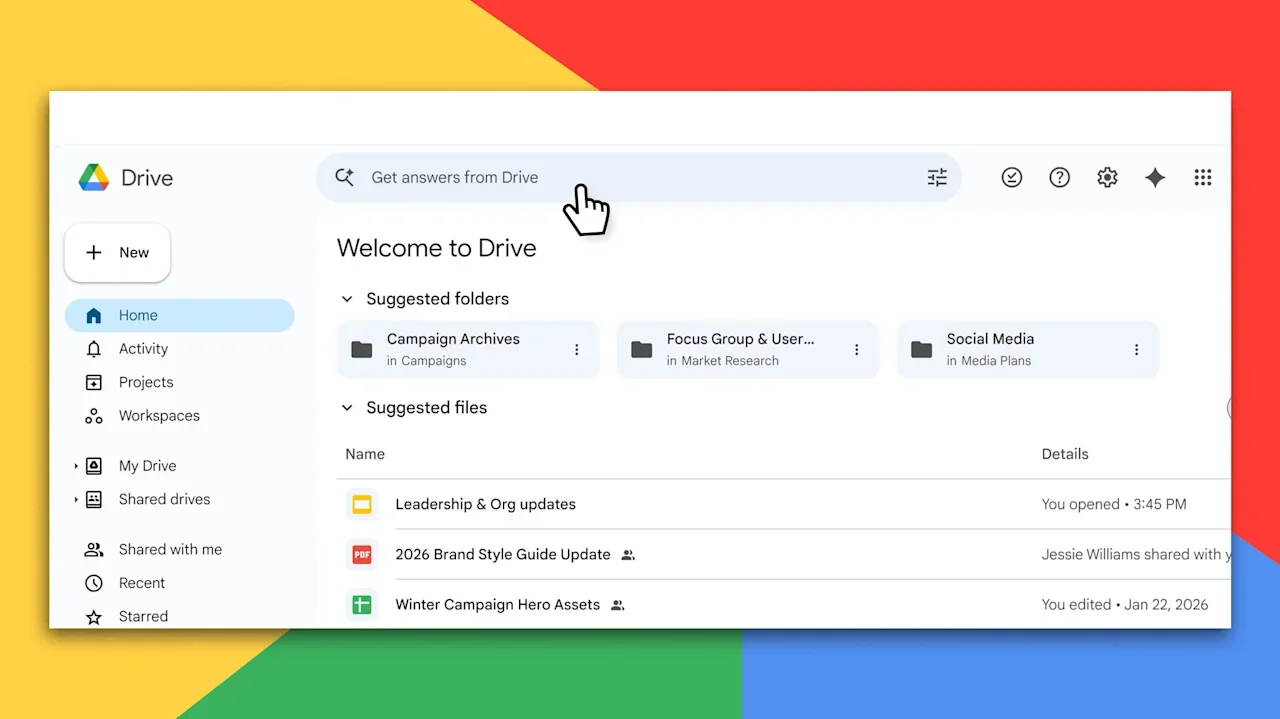
Google is rolling out new AI features designed to quickly flesh out Google Docs, Sheets, and Slides using data from the web and your existing Google files. The overall aim is to eliminate much of the busywork involved in filling out templated documents, transferring data from saved files or internet sources into spreadsheets, and tweaking slide presentations to add new facts and figures—all while reflecting the personal and professional preferences expressed in people’s previous work. “It’s not enough to simply generate a generic email or brief,” says Yulie Kwon Kim, VP of product for Google Workspace. “People want AI to understand your specific context, delivering results that are deeply personalized to them and their organization.” In Google Docs, that means being able to instruct Google’s Gemini AI to generate a document mimicking the layout or writing style of another document, fleshed out with content from additional sources stored on Google Drive. Already, says Google Docs product lead Frank Tisellano, more than a third of Docs are created as copies of another document, and the AI features are intended to let users create at least a first draft of their new files close to instantaneously. When it comes to Google Sheets, the AI is able to translate plain language requests into detailed execution plans to filter, transform, and analyze data. In a streamed demonstration, Eric Birnbaum, who leads the product team for Google Sheets, showed how the new AI could quickly filter through a complex spreadsheet of property data, finding real estate matching certain parameters in a certain neighborhood and generating relevant bar and pie charts. “The Gemini agent, just like a human would, goes back and checks its work and fixes anything it might have gotten wrong,” Birnbaum says. Birnbaum also used a new AI drag-and-drop feature to automatically fill out a spreadsheet of data about a set of major corporations, populating fields for headquarters city, revenue, and market capitalization based on information from the web. “Just by looking at the column headers, Gemini can figure out how to go find what you need,” he says. And by generating a plan users can examine and ask the AI to tweak, Google may be able to assuage concerns about AI inaccuracy. Gemini can similarly populate Google Sheets presentations based on existing data, even tweaking existing slides to add new information without users needing to tediously resize existing text and graphics. And Gemini can also help search through and pull information from Google Drive files, like compiling a table of purchased items from a folder of PDF receipts, without actually crafting a new document. The new AI features will be available first to subscribers of Google’s AI Pro and Ultra plans, along with businesses in the Gemini Alpha program. In general, makers of business software from Microsoft and Google to Adobe and Canva have added increasingly far-reaching artificial intelligence features to their product suites in recent years, hoping to reach AI-curious customers where they’re already working. At the same time, AI labs like Anthropic and OpenAI have rolled out a growing assortment of ways to do work from within their AI platforms. Google, which says it serves more than 3 billion users and 11 million paying customers through its Workspace tools, hopes many of those people will prefer to use AI features in the software they’re already familiar with rather than turning to external AI tools. “You don’t need to go and learn a new app,” says Kim. “You can go and get the assistance from Gemini right where you are in your familiar place where you’re doing your everyday work.” View the full article
-
Few brands can point to a specific date for their downfall. For Sonos—once the darling of home audio—that date is May 7, 2024, when it rolled out a disastrous app update that left many of its 15 million customers confused by hardware and software features that were suddenly unusable. When all was said and done, more than a decade of brand trust was flipped like an off switch. Now Sonos is taking its first major steps to earn back trust and audiophile stature with a new brand strategy and the launch of two new speakers: the Sonos Play and Era 100 SL. The Sonos Play is framed as a “callback” to the original Play:1 speaker that invented the smart wireless speaker category 13 years ago. The portable speaker, which retails for $299, features 24 hours of battery life in a durable, waterproof design, and a built-in power bank to charge your phone. The second speaker—the Era 100 SL—is a new, cost-efficient entry point into the Sonos system. At $189 retail, it features wide stereo separation and balanced, natural bass while removing built-in microphones to focus on essential listening. Tom Conrad, who took over as CEO in 2025 after the app debacle, says the company is no longer in the audio hardware arms race with companies like Bose, JBL, and Apple. Instead, he’s steering Sonos back to founder John McFarland’s original vision: creating a system for sound at home. “I think we really just make one product and that product is called Sonos,” Conrad says. “Sonos is a sound system for the home, and any individual device that we make is just a way into the system or a way to deepen your engagement with the system. But the system is the product.” Eras Tour The Sonos comeback path hasn’t been smooth. After its app disaster, revenue dropped 16% in fiscal Q4 2024. Former CEO Patrick Spence stepped down in January 2025, and Conrad was named interim CEO (becoming permanent in July). In August 2024, the company laid off about 100 employees, then another 200 in February 2025, totaling about 18% of its workforce. Revenue began to stabilize by early 2026, but the company still showed a consecutive three-year decline in performance. Conrad says the company was in “triage mode,” having cut R&D spending by 26%, and sales and marketing by 25%. Part of the turnaround plan hinges on resetting the brand’s narrative, so in November 2025 Sonos named Colleen DeCourcy—former Snapchat chief creative officer and Wieden+Kennedy exec—CMO. Conrad sees the story of Sonos as having three distinct eras. The first being its decade under founder McFarland, and what he describes as being “relentlessly focused on this idea of filling every home with music, with a system for sound.” He says the second era under Spence was defined by “developing the muscle of building great new hardware” every year. He believes this era had an “unintended consequence” in that the company began to view itself as a seller of stand-alone devices like soundbars and headphones that competed directly with rivals like Sony and Bose. Now, in the third era of Sonos, Conrad’s goal is to merge the best parts of the first two. “I’m bringing the focus of the company back to this idea that everything we do is grounded in enhancing the Sonos system, and that our new product introductions are kind of like grace notes on that symphony,” he says. Brand over time The brand challenges for Sonos are crystal clear, but newly minted CMO DeCourcy sees a silver lining. One of the lessons she learned while working with ad agency legend Dan Wieden was knowing how to answer the question, “If your product disappeared overnight, what would people be missing?” The app breakdown in 2024 provided the answer. It quickly became apparent that millions of people were pissed off at the brand—but the upside is that they cared at all. “It was clear that there was a super deep connection to, fundamentally, not that speaker, but that system,” DeCourcy says. A primary pillar of DeCourcy’s strategy involves activating the roughly 17 million existing households with Sonos through word-of-mouth and grassroots engagement rather than traditional ad campaigns. She plans to leverage the “Sonos Soundboard”—a group of influential music and film creators—to remind users of the brand’s creative roots through social and other content. Details on executing the brand strategy are pretty thin, because this is all still very much in its infancy. Before any major brand work launches to the public, the priority is to sell the vision to the company’s 1,300 employees at its Santa Barbara, California, headquarters. “The first thing that’s on my bucket list to get done is to internally rearticulate . . . and pull people along on this vision of why we are getting up and doing this every day,” DeCourcy says. “And then letting that spill out into the community.” Now they just have to hope people are ready to turn up the volume and listen. View the full article

-
A streamlined application makes it easier than ever to apply to Fast Company’s Best Workplaces for Innovators. Here are six reasons why you should apply to our eighth annual BWFI program. 1. Brand exposure. Every ranked company and all those earning honoree status in a category will appear in the fall (September) issue of the magazine and on fastcompany.com. 2. Talent retention. Public recognition as a Best Workplace for Innovators honoree provides powerful third-party validation that enhances your ability to recruit and retain top talent. 3. Editorial access. Fast Company editors will review all applications; the application represents an opportunity to highlight individuals and projects that showcase your company’s innovation prowess. The insight Fast Company editors glean from judging applications informs our ongoing coverage, often leading to stories. 4. Credibility. Fast Company‘s reputation for writing about innovation is unparalleled in business media. Inclusion on the list is a powerful stamp of approval of your company’s efforts. 5. Employee recognition. The program honors an Innovative Team of the Year as well as an Innovative Leader of the Year, along with finalists in each category. 6. A level playing field. Every company is unique, so the Best Workplaces for Innovators application is structured to allow your company to focus on whatever particular initiatives and programs you’ve established to cultivate innovative work across your organization. There are different categories for different size companies, as well as companies from different regions and sectors. For more than 15 years, Fast Company has been recognizing outstanding achievement in business innovation with its annual awards programs. In addition to Best Workplaces for Innovators, Fast Company’s Most Innovative Companies, Innovation by Design, World Changing Ideas, Brands That Matter, and the Next Big Thing in Tech lists have celebrated thousands of organizations transforming industries and shaping society through paradigm-shifting products, insights, or services. What differentiates Best Workplaces for Innovators from existing best-places-to-work lists is that it goes beyond benefits, competitive compensation, and collegiality (mere table stakes in today’s competitive talent marketplace) to identify which companies are actively creating and sustaining the kinds of innovative cultures that many top employees value even more than money. These are the places where people can do the best work of their careers and improve the lives of hundreds, thousands, even millions of people around the world. Best Workplaces for Innovators is the most authoritative list of companies cultivating an organization-wide commitment to innovation. We hope you’ll submit your company today. For more information on applying, see the FAQs. But don’t delay too long—the final deadline is March 27. View the full article
-
How one London trading floor coped with a record swing in pricesView the full article
-
In 2012, NASA launched two probes into space: Van Allen Probe A and Van Allen Probe B. Their goal was to collect data on charged particles passing through Earth’s magnetic field. Those particles can wreak havoc on communications and other technologies on our planet, so understanding them is important. In 2019, the Van Allen Probes’ mission ended. With its fuel spent, the “A” probe is set to reenter Earth’s atmosphere today, and the parts of it that are not burned up upon reentry may crash onto our planet in the next 24 hours. Here’s what you need to know. Which probe is crashing? Thankfully, we only need to worry about one probe crashing into Earth today. That one is the Van Allen Probe A. The Van Allen Probe B isn’t scheduled to reenter Earth’s atmosphere until at least 2030. Still, that means there is one 1,323-pound space object expected to hit Earth within the next 24 hours. The good news is that NASA says much of the probe is expected to burn up upon reentry. However, the space agency does caution that “some components are expected to survive re-entry” as well. When will the probe hit Earth? NASA says the Van Allen Probe A is expected to reenter the Earth’s atmosphere at around 7:45 p.m. EDT on March 10—“with an uncertainty of +/- 24 hours.” That means that you can likely expect the probe to hit anytime between today and tomorrow. Where will the probe crash? That’s the million-dollar question. As of right now, NASA can’t determine exactly where the remains of the 1,323-pound space tech will land. You can check out a real-time map of where Van Allen Probe A is currently orbiting on N2YO.com, a satellite tracking service. As you can see from the map, the probe’s current route shows it passing over the northern tip of South America, Central Africa, and Indonesia. The good news is that 70% of the Earth is covered in water, so, as the Times of India points out, there’s a roughly 70% chance that any debris will land in one of Earth’s oceans. NASA says it will continue to monitor the probe and update its predictions as it becomes more certain. But what are the chances the probe will land on me? Pretty minuscule. NASA says the risk of any harm coming to any person on Earth as a result of the falling probe is about 1 in 4,200. But that’s the risk of the probe hitting any earthling. That chances of it hitting you, specifically, then, are so much lower as to be minuscule. Then again, nothing can ever be certain, so if you’re overly cautious, it doesn’t hurt to keep an eye on the sky today. View the full article

-
The parents of a girl critically wounded in a school shooting in Canada alleged in a civil lawsuit Monday that ChatGPT-maker OpenAI knew the shooter was planning a mass attack. OpenAI has said it considered but didn’t alert police about the activities of the person who months later committed one of Canada’s worst school shootings in Tumbler Ridge, British Columbia, on Feb. 10. OpenAI came forward to police after Jesse Van Roostselaar killed eight people and then herself last month, saying the attacker’s ChatGPT account had been closed but that she evaded the ban by having a second account. The legal claim filed in the British Columbia Supreme Court alleged that OpenAI had “specific knowledge of the shooter utilizing ChatGPT to plan a mass casualty event like the Tumbler Ridge mass shooting.” The lawsuit said OpenAI’s chatbot ChatGPT was used by the shooter as a trusted confidante, collaborator and ally, and it behaves willingly to assist users such as the shooter to plan a mass casualty event. A spokeswoman from OpenAI didn’t immediately respond to a message seeking comment on the lawsuit. The lawsuit said that as a result of the company’s conduct Maya Gebala was shot three times at close range, with one bullet hitting her head, another her neck and the third grazing her cheek. It said she has a catastrophic brain injury that will leave her with permanent cognitive and physical disabilities. —Associated Press View the full article

-
The US president has already done lasting damage to international trust in AmericaView the full article
-
High-energy laser weapons are often touted as offering decisive advantages over conventional kinetic systems, from speed-of-light engagement to a comparatively low cost per shot. But no claimed strength is more misleading than the promise of an “infinite magazine.”1 A fixture of military talking points and defense contractor briefings on directed energy for years, the appeal is simple: unlike conventional air defense assets like guns, missiles, and other kinetic interceptors, lasers do not run out of ammunition or require physical reloads in the middle of a firefight. As long as a laser weapon can draw power from a reliable source, the logic goes, it can keep shooting. While this framing is technically accurate in a narrow sense, it is also operationally misleading. Laser weapons do not defeat targets by expending discrete rounds, but by occupying time—and time, in combat, is always finite. Dwell Time as the Limiting Factor The vast majority of military laser weapons currently in development or operationally deployed are continuous wave systems, which disable or destroy incoming threats by focusing energy on a single point long enough to inflict catastrophic damage.2 This requires consistent and sustained contact between a laser beam and its intended target, typically measured in seconds. Because each laser engagement requires prolonged and uninterrupted dwell time, the system cannot counter another target—and until that engagement ends, the system’s effective fire rate is zero. In a defensive context, that constraint matters as much as whether the system has physical ammunition to reload. Unlike, say, a Terminal High Altitude Area Defense (THAAD) missile battery, which can launch multiple interceptors in rapid succession, a single-beam laser weapon must queue its engagements and commit several seconds to defeat each incoming target, leaving it unavailable to address other threats. Adding more power can certainly shorten dwell time under ideal conditions, but it does not allow simultaneous engagements unless the system is specifically designed with multiple independent beams and tracking channels. In saturation attacks like those that have defined the rise of drone warfare, these delays compound quickly. When multiple threats arrive at once, the laser must sequence engagements as incoming targets continue to close, straining air defense capacity. Each additional second spent on one target reduces the available margin for the next one. Missiles can be launched in parallel, but lasers cannot unless duplicated at significant cost and complexity. The result: laser defenses scale poorly against drone swarms. Combat Environment as a Hidden Tax Environmental conditions also erode the theoretical advantages of laser weapons. Atmospheric turbulence, humidity, fog, smoke, aerosols, and other obscurants all reduce the amount of focused energy that actually reaches a target. As conditions degrade, lasers require longer dwell times to achieve the same effect, or fail to achieve it at all. As I have noted before, these effects are especially pronounced for naval lasers, which operate in some of the most challenging environments for optical systems. This phenomenon effectively shrinks a laser weapon’s magazine before the system actually fires a shot. A laser that can defeat a drone in three seconds in clear air may require significantly longer in maritime haze or coastal humidity; in some conditions, it may not be able to maintain sufficient beam quality to engage at useful ranges. These charts from a 2014 analysis for the U.S. Naval Postgraduate School illustrate this nicely: (US Naval Postgraduate School/Chris Fussman) A Finite Magazine by Another Name Despite the ubiquity of the infinite magazine talking point, some high-energy laser weapon manufacturers are explicit about the real-world limits of their systems. Australian defense contractor Electro Optic Systems, for example, states that its 150 kilowatt ‘Apollo’ high-energy laser weapon can achieve “unlimited shots with external power,” but just “more than 200 stored engagements when isolated” on its own power source. But even with an unlimited power source, laser weapons face limits imposed by heat. Continuous wave systems generate and absorb significant thermal loads, particularly in their optics and beam-control components; after a series of engagements, they must reduce output or pause entirely to protect hardware and maintain beam quality. (On surface warships in particular, this thermal management competes with other demands on power and cooling systems from propulsion, sensors, and electronic warfare systems.) These inevitable pauses function as a form of reload even if they are not labeled as such, further complicating claims of unlimited fire. And even with advances in engineering, thermal management constraints appear unavoidable at the power levels required for meaningful defensive effects. Consider the draft requirements for the U.S. Army’s proposed Enduring High Energy Laser (E-HEL) effort, which stipulate that any proposed system must have a recharge cycle of no more than four minutes to “recover the magazine to original conditions.” EOS and the Army’s willingness to articulate limits on real-world engagement capacity highlight what the “infinite magazine” shorthand obscures: real laser weapons always operate within measurable physical bounds. In that way, a laser weapon is just like an M4 carbine: fire one long enough and you’ll likely be able to cook bacon on it. Power Generation Does Not Eliminate Engagement Limits It is tempting to assume that sufficiently large power generation solves these problems—that more megawatts translate directly into more defensive capacity. If a warship like the U.S. Navy’s Zumwalt-class destroyers can produce enormous amounts of electricity to power laser weapons, why not simply overwhelm dwell-time constraints with brute force? In practice, power availability does not translate directly into engagement capacity. Engagement capacity is governed by how quickly a system can process targets, not by how much raw power it can generate. Beam quality, pointing stability, atmospheric effects, and fire-control limits cap how much energy can be applied to any single threat at a given moment. A megawatt of available electricity does not become a megawatt applied to multiple targets simultaneously. Consider a laser that requires five seconds to defeat a small drone under ideal conditions. Ten drones arriving within thirty seconds demand fifty seconds of uninterrupted engagement time. Unless multiple independent beams are available, some threats will penetrate regardless of how much electricity sits unused in reserve. As a result, claims that lasers provide infinite defensive depth conflate endurance with throughput. Lasers can remain available longer than missile batteries in some scenarios, but they cannot process unlimited numbers of threats in a given time window. Why the Myth Persists The infinite magazine claim endures because it offers a compelling contrast to the missile shortages and high interceptor costs that advanced militaries are grappling with amid the rise of low-cost weaponized drones. Not only does it fit neatly into defense budget calculations and public narratives about technological advantage, but it’s also far easier to explain than the realities of beam physics, thermal management, and environmental constraints. Yes, laser weapons extend defensive endurance and provide new options against certain threats—a valuable addition to the vision of a layered defense that has defined U.S. air defense doctrine in recent years. But they do not remove the fundamental limits imposed by time, environment, and system architecture. In combat, magazines are not just what’s strapped to a service member’s MOLLE system, or packed away in an ammo can. They are what a weapon can process before the fight moves on. By that measure, laser weapons have magazines after all—measured not in rounds, but in seconds. This article is republished with permission from Laser Wars, a newsletter about military laser weapons and other futuristic defense technology. View the full article

-
The 30-year fixed-rate mortgage fell below 6% at the end of last month for the first time since 2022, bringing purchase borrowers back to the market. View the full article
-
Starbucks customers who love collecting the company’s loyalty rewards stars for each dollar they spend are in for a change this morning. America’s No. 1 coffee chain is launching its revamped rewards program today, March 10. With it comes a tiered loyalty membership program and a new structure for earning stars and new rewards. Here’s what you need to know. The former Starbucks loyalty rewards system is no more Before today’s launch of the new rewards program, Starbucks’s previous loyalty system was more straightforward. Under the old system, which was in place from around 2019 until yesterday, there were no membership tiers. In that program, all Starbucks customers were equal because they earned the same number of stars for dollars spent. Under the old system, rewards members earned 1 star for every $1 spent or 2 stars for every $1 spent when paying with a pre-loaded Starbucks Card. Stars could be redeemed for rewards, such as a free extra shot of syrup (25 stars), free drinks (100 to 200 stars), and even free merch (400 stars). However, no matter how many stars a person earned, they needed to redeem those stars within six months, or they expired. But in January, Starbucks announced it was doing away with its reward program, which had treated every member equally. In its place, the company said it would launch a new rewards program that had three tiers of membership. Under the new program, the more loyal you are to the company (i.e., the more you spend), the greater your rewards will be. At the time of the announcement, Tressie Lieberman, Starbucks global chief brand officer, explained that the company’s Starbucks Rewards program has “always been about creating connection, and we’re evolving the program based on what our members told us matters most, offering faster, more meaningful benefits that make them feel appreciated.” That new program launches today. How is Starbucks new rewards program different? The main difference between the new Starbucks loyalty program launching today and the previous one is that the new program works on a tiered membership. Starbucks Rewards members are now grouped into three tiers based on the amount of stars they have earned (in other words, the amount of money they have spent). When a Starbucks Rewards member earns enough stars, they move into a higher tier, unlocking more rewards. The new tiers and stars structures are as follows: Green Member: This is the entry-level tier that every Starbcuks Rewards member starts at. Green members will receive 1 star for every $1 spent (so 10 stars for $10 spent). Gold Member: Once a Green Member collects 500 stars, they are promoted to a Gold Member. Gold Members earn 1.2 stars for every $1 spent (so 12 stars for $10 spent). Reserve Member: This is the highest level you can achieve under the new Starbucks Rewards program. Once you earn 2,500 stars, you are promoted from a Gold to a Reserve Member. Reserve members earn 1.7 stars for every $1 spent (so 17 stars for every $10 spent). No matter which membership tier you fall into, these stars can be redeemed for the same freebies. For example: a free shot of syrup (25 stars) up to $2 off any item (60 stars) free drinks (100-200 stars) free food (300 stars) free merch (400 stars) However, there are additional rewards unique to the new membership tiers. For example, while Green Members can keep their stars from expiring at the six-month mark by making eligible purchases, Gold and Reserve Members never see their stars expire as long as they maintain those membership tiers. Additionally, the higher your membership level, the more double-star days you get per year, and the longer you have to redeem your free birthday treat (1 day for Green, 7 days for Gold, and 30 days for Reserve). How do I know what membership tier I’m in? The good news for existing Starbucks Rewards members is that they do not start from scratch today. Starbucks is grandfathering existing rewards members into the new program based on the number of stars they accumulated between January 2025 and December 2025. This means that if you accumulated under 500 stars, you’ll be a Green Member today. If you accumulated between 500 and 2,499 stars during the period, you’ll be a Gold Member. And if you accumulated more 2,500 or more stars during the period, you’ll be a Reserve Member today. To see your new membership level under the revamped Starbucks Rewards program, simply open up your Starbucks app. Starbucks has also said it will alert Rewards members to their new status via email. In January, Starbucks said it had 35.5 million active Starbucks Rewards members in the United States. Why is Starbucks doing this? Clearly the company hopes the new system will boost loyalty and therefore sales. Brian Niccol, who took over as CEO of Starbucks in 2024, has been executing an aggressive turnaround plan, in part aimed at improving the in-store experience. Starbucks Corporation stock (Nasdaq: SBUX) is up over 18% year to date. In January, the company posted its first U.S. sales growth in two years. View the full article

-
Manufacturing and trade figures dating from before Iran war disappointView the full article
-
German group says it must ‘rigorously’ cut costs as conflict and tariffs cloud outlookView the full article
-
Mortgage servicing rights are one of the most notoriously volatile assets in financial markets. The Federal Reserve's plan to loosen their capital treatment could foretell major problems in the future. View the full article

-
In any workplace, fun group games can considerably improve morale and cultivate a more cohesive team environment. These activities, ranging from trivia quizzes to scavenger hunts, not merely promote friendly competition but additionally encourage communication and collaboration among employees. As you explore various game options, consider how each can strengthen relationships and reduce stress. Comprehending the impact of these games is essential, especially as you aim to improve overall job satisfaction and productivity. What types of games might work best for your team? Key Takeaways Group trivia and problem-solving games foster teamwork, enhancing communication and innovative thinking among employees. Office competitions like scavenger hunts promote mental focus, reduce stress, and strengthen relationships in a fun environment. Quick games, such as Office Bingo, encourage team bonding and engagement during breaks, boosting overall morale. Icebreaker activities, like Two Truths and a Lie, facilitate personal connections, promoting open dialogue among colleagues. Collaborative games, such as Human Knot, improve communication skills and enhance teamwork, leading to a more effective workplace. Strengthen Morale Through Team Building Activities To strengthen morale in the workplace, incorporating team building activities can be highly effective. Engaging in office party games not only boosts trust and support among employees but additionally increases job satisfaction and commitment to the organization. When you participate in fun group games, you encourage creativity and problem-solving skills, helping your team tackle challenges in innovative ways. Collaboration during these activities improves communication skills, which can greatly improve team dynamics and productivity. Studies indicate that organizations with strong team-building initiatives experience a 36% higher employee retention rate, eventually reducing turnover costs. Moreover, team-building activities can yield a 14% to 30% increase in productivity, showcasing their considerable impact on business outcomes. Fun Office Activities to Boost Morale Engaging in team competitions and creative collaborative challenges can greatly improve workplace morale. By participating in activities like group trivia or problem-solving games, you not just encourage teamwork but additionally promote innovative thinking among colleagues. These fun office activities lead to stronger relationships and a more connected work environment, in the end boosting productivity and job satisfaction. Engaging Team Competitions Though many workplaces prioritize productivity, integrating team competitions can greatly improve both morale and collaboration among employees. Engaging team competitions, such as trivia quizzes and office scavenger hunts, encourage communication, creating a more cohesive work environment. Activities like sports days and fitness contests boost morale and improve mental focus, thanks to the spirit of friendly competition. Fun group games for the office, including the “Do Not Smile Challenge” and “Human Snake Game,” promote laughter and interaction, reducing stress and strengthening workplace relationships. Moreover, creative contests, such as “Pitch a Desk Item” or “Childhood Photo Guessing Game,” allow employees to showcase their talents, boosting team spirit. In the end, these engaging competitions can lead to a significant increase in productivity. Creative Collaborative Challenges Creative collaborative challenges serve as effective tools for enhancing workplace morale and communication. These activities nurture teamwork and camaraderie, making them ideal office games for large groups. Here are some engaging options to evaluate: Team Trivia – Boosts knowledge and encourages friendly competition. Scavenger Hunts – Promotes problem-solving and collaboration among colleagues. Desk Safari Photo Challenge – Sparks creativity and strengthens connections. Compliment Circle – Cultivates kindness and a supportive culture. Implementing these challenges can lead to a 36% higher employee retention rate by nurturing meaningful connections and a sense of belonging. Encouraging your team to participate in these creative activities will improve communication skills and overall workplace morale, making your office a more enjoyable environment. Games to Play at Work During Your Break During your breaks, playing games at work can greatly improve team dynamics and boost overall morale. Quick games like Office Bingo encourage team bonding and engagement, promoting interaction among employees. Activities such as Two Truths and a Lie advance knowledge sharing, allowing colleagues to connect on a personal level in a relaxed environment. The Childhood Photo Guessing Game serves as an enjoyable way for team members to learn about each other through storytelling. Engaging in games like Pictionary or Charades stimulates creativity and teamwork, helping everyone unwind before returning to work tasks. Furthermore, quick contests like Office Typing Races improve typing skills while nurturing a spirit of friendly competition. These fun office party games not only make break times more enjoyable but also strengthen relationships among coworkers, leading to a more cohesive work atmosphere. Incorporating such activities can greatly improve workplace satisfaction and productivity. Games for Breaking the Ice and Bonding Icebreaker games play an important role in nurturing connections among team members, especially in environments where collaboration is crucial. By participating in these activities, you’re not just having fun; you’re building a foundation for stronger workplace relationships. Here are some effective icebreaker games to reflect on: Two Truths and a Lie: Share two truths and one lie about yourself, and let others guess which is which. Getting to Know You Bingo: Create bingo cards with personal traits or experiences and mingle to find colleagues who match. Common Ground: Form small groups and find three things all members have in common. Desert Island: Discuss which three items you’d take to a deserted island and why. Incorporating icebreaker games into meetings encourages open dialogue, enhancing creativity and productivity as well as making employees feel more connected and valued. Regular engagement can lead to improved job satisfaction and employee retention. Games That Encourage Teamwork When you engage in team-building games, you improve communication skills among your colleagues, which can lead to increased productivity levels. Activities that promote collaboration, like problem-solving games, help teams work better together and tackle challenges more effectively. Enhanced Communication Skills Office games intended to improve communication skills play a crucial role in promoting teamwork among employees. Engaging in corporate party games encourages collaboration and idea-sharing, which improves workplace interactions. Here are some effective activities to contemplate: Human Knot: Participants untangle themselves as they communicate clearly. Blind Drawing: One person describes an image while the other draws it, refining active listening. Escape Room Challenges: Teams delegate tasks to solve puzzles, utilizing individual strengths. Structured Problem-Solving: Engaging in these activities has been shown to markedly boost communication effectiveness. Regular participation in these games can lead to a 27% increase in employees’ likelihood of performing their best, all driven by improved communication and collaboration skills. Increased Productivity Levels Boosting productivity in the workplace often starts with nurturing teamwork, and engaging in team-building games is an effective strategy for achieving this goal. Research shows that team games can raise productivity levels by 14% to 30%, creating a more efficient work environment. When you incorporate office party game ideas that promote cooperation, you encourage a climate where employees communicate better and work collaboratively toward shared objectives. Connected employees are 27% more likely to perform at their best, greatly impacting overall productivity. Collaborative Problem-Solving Activities Collaborative problem-solving activities are vital tools for nurturing teamwork and improving communication within your organization. Engaging in these company party games helps cultivate a cooperative climate and can lead to significant benefits, including: Improved communication skills among team members. Increased productivity and creativity through shared perspectives. Identification of potential leaders during task delegation. Clearer work objectives that align efforts and boost performance. These activities not only elevate employee morale but contribute to a stronger commitment to the organization, resulting in lower turnover rates. By incorporating collaborative problem-solving games into your team-building exercises, you create an environment that promotes growth and unity, eventually leading to a more effective workplace. Embrace these strategies for a more engaged and productive team. Zoom & Online Fun Office Games to Boost Morale While remote work has become the norm for many teams, finding ways to maintain engagement and connection can be challenging. Incorporating online games into your routine can greatly improve morale. Popular games like Pictionary and 20 Questions encourage interactive engagement, nurturing camaraderie among remote colleagues. You might as well consider Remote Work Bingo, which highlights common virtual behaviors, promoting friendly competition and shared experiences. These games can easily adapt to platforms like Zoom, Slack, or Microsoft Teams, making them versatile tools for team bonding. Regularly integrating these games into meetings can create light-hearted interactions that contribute to a positive work culture. Engaging in virtual team-building activities improves communication skills and strengthens team dynamics, finally leading to improved productivity and collaboration. When looking for games to play at office parties, keep in mind that these online options can keep your team connected, even when working from a distance. Measure the Effectiveness of Your Efforts To effectively measure the impact of your morale-boosting efforts, it’s essential to utilize various assessment methods that provide clear insights into employee engagement and satisfaction. Start by implementing the following strategies: Employee Surveys: Gauge satisfaction and engagement levels before and after fun party games for work to measure effectiveness. Track Participation: Monitor attendance and engagement rates during group games to evaluate employee interest. Productivity Metrics: Assess changes in output or project completion rates to quantify the impact of morale-boosting activities. Retention Rates: Analyze employee turnover post-activities to see if improved morale correlates with increased loyalty. Incorporating qualitative feedback through interviews or focus groups can further improve your comprehension of the fun group games’ effectiveness. Frequently Asked Questions What Are Fun Games for Work Team? You can improve team dynamics with various engaging games. Consider trivia quizzes to test knowledge, or scavenger hunts that encourage collaboration. Icebreaker activities like “Two Truths and a Lie” promote personal sharing. For problem-solving, try team-building exercises such as the “Human Knot” or “Escape Rooms.” Incorporating outdoor physical activities in addition elevates energy and teamwork. Each game nurtures communication, strengthens relationships, and finally contributes to a more cohesive work environment. What Are Morale Booster Activities? Morale booster activities are crucial for enhancing workplace satisfaction and engagement. You can implement team-building exercises, social events, and employee recognition programs to encourage a positive environment. These activities promote camaraderie, strengthening relationships among colleagues. Research shows that engaged employees are more productive and likely to stay with the organization. What’s the Most Fun Game to Play With a Group? The most fun game to play with a group often depends on the participants’ preferences, but Trivia Games consistently engage everyone. You can tailor questions to interests or themes, encouraging teamwork and friendly competition. Pictionary is another engaging option, where creativity shines as you illustrate concepts for teammates to guess. Furthermore, Scavenger Hunts can add excitement, prompting collaboration and problem-solving. Each game nurtures interaction, making them ideal choices for any group setting. How to Get 100% Team Morale? To achieve 100% team morale, focus on nurturing open communication and collaboration. Regularly recognize individual and team achievements, which boosts motivation and retention. Encourage participation in team-building activities that promote creativity and problem-solving, as these can improve teamwork and connection. Furthermore, create an environment where employees feel valued and included, addressing any barriers that hinder engagement. Conclusion Incorporating fun group games into the workplace can greatly improve morale and promote a positive work environment. By engaging in activities that promote teamwork, creativity, and communication, you’ll not just improve employee relationships but likewise boost overall productivity. Whether through in-person activities or virtual games, these initiatives can effectively reduce stress and create a sense of belonging among team members. Regularly measuring the impact of these games will help maintain their effectiveness and guarantee continued employee satisfaction. Image via Google Gemini and ArtSmart This article, "Fun Group Games to Boost Office Morale" was first published on Small Business Trends View the full article
-
In any workplace, fun group games can considerably improve morale and cultivate a more cohesive team environment. These activities, ranging from trivia quizzes to scavenger hunts, not merely promote friendly competition but additionally encourage communication and collaboration among employees. As you explore various game options, consider how each can strengthen relationships and reduce stress. Comprehending the impact of these games is essential, especially as you aim to improve overall job satisfaction and productivity. What types of games might work best for your team? Key Takeaways Group trivia and problem-solving games foster teamwork, enhancing communication and innovative thinking among employees. Office competitions like scavenger hunts promote mental focus, reduce stress, and strengthen relationships in a fun environment. Quick games, such as Office Bingo, encourage team bonding and engagement during breaks, boosting overall morale. Icebreaker activities, like Two Truths and a Lie, facilitate personal connections, promoting open dialogue among colleagues. Collaborative games, such as Human Knot, improve communication skills and enhance teamwork, leading to a more effective workplace. Strengthen Morale Through Team Building Activities To strengthen morale in the workplace, incorporating team building activities can be highly effective. Engaging in office party games not only boosts trust and support among employees but additionally increases job satisfaction and commitment to the organization. When you participate in fun group games, you encourage creativity and problem-solving skills, helping your team tackle challenges in innovative ways. Collaboration during these activities improves communication skills, which can greatly improve team dynamics and productivity. Studies indicate that organizations with strong team-building initiatives experience a 36% higher employee retention rate, eventually reducing turnover costs. Moreover, team-building activities can yield a 14% to 30% increase in productivity, showcasing their considerable impact on business outcomes. Fun Office Activities to Boost Morale Engaging in team competitions and creative collaborative challenges can greatly improve workplace morale. By participating in activities like group trivia or problem-solving games, you not just encourage teamwork but additionally promote innovative thinking among colleagues. These fun office activities lead to stronger relationships and a more connected work environment, in the end boosting productivity and job satisfaction. Engaging Team Competitions Though many workplaces prioritize productivity, integrating team competitions can greatly improve both morale and collaboration among employees. Engaging team competitions, such as trivia quizzes and office scavenger hunts, encourage communication, creating a more cohesive work environment. Activities like sports days and fitness contests boost morale and improve mental focus, thanks to the spirit of friendly competition. Fun group games for the office, including the “Do Not Smile Challenge” and “Human Snake Game,” promote laughter and interaction, reducing stress and strengthening workplace relationships. Moreover, creative contests, such as “Pitch a Desk Item” or “Childhood Photo Guessing Game,” allow employees to showcase their talents, boosting team spirit. In the end, these engaging competitions can lead to a significant increase in productivity. Creative Collaborative Challenges Creative collaborative challenges serve as effective tools for enhancing workplace morale and communication. These activities nurture teamwork and camaraderie, making them ideal office games for large groups. Here are some engaging options to evaluate: Team Trivia – Boosts knowledge and encourages friendly competition. Scavenger Hunts – Promotes problem-solving and collaboration among colleagues. Desk Safari Photo Challenge – Sparks creativity and strengthens connections. Compliment Circle – Cultivates kindness and a supportive culture. Implementing these challenges can lead to a 36% higher employee retention rate by nurturing meaningful connections and a sense of belonging. Encouraging your team to participate in these creative activities will improve communication skills and overall workplace morale, making your office a more enjoyable environment. Games to Play at Work During Your Break During your breaks, playing games at work can greatly improve team dynamics and boost overall morale. Quick games like Office Bingo encourage team bonding and engagement, promoting interaction among employees. Activities such as Two Truths and a Lie advance knowledge sharing, allowing colleagues to connect on a personal level in a relaxed environment. The Childhood Photo Guessing Game serves as an enjoyable way for team members to learn about each other through storytelling. Engaging in games like Pictionary or Charades stimulates creativity and teamwork, helping everyone unwind before returning to work tasks. Furthermore, quick contests like Office Typing Races improve typing skills while nurturing a spirit of friendly competition. These fun office party games not only make break times more enjoyable but also strengthen relationships among coworkers, leading to a more cohesive work atmosphere. Incorporating such activities can greatly improve workplace satisfaction and productivity. Games for Breaking the Ice and Bonding Icebreaker games play an important role in nurturing connections among team members, especially in environments where collaboration is crucial. By participating in these activities, you’re not just having fun; you’re building a foundation for stronger workplace relationships. Here are some effective icebreaker games to reflect on: Two Truths and a Lie: Share two truths and one lie about yourself, and let others guess which is which. Getting to Know You Bingo: Create bingo cards with personal traits or experiences and mingle to find colleagues who match. Common Ground: Form small groups and find three things all members have in common. Desert Island: Discuss which three items you’d take to a deserted island and why. Incorporating icebreaker games into meetings encourages open dialogue, enhancing creativity and productivity as well as making employees feel more connected and valued. Regular engagement can lead to improved job satisfaction and employee retention. Games That Encourage Teamwork When you engage in team-building games, you improve communication skills among your colleagues, which can lead to increased productivity levels. Activities that promote collaboration, like problem-solving games, help teams work better together and tackle challenges more effectively. Enhanced Communication Skills Office games intended to improve communication skills play a crucial role in promoting teamwork among employees. Engaging in corporate party games encourages collaboration and idea-sharing, which improves workplace interactions. Here are some effective activities to contemplate: Human Knot: Participants untangle themselves as they communicate clearly. Blind Drawing: One person describes an image while the other draws it, refining active listening. Escape Room Challenges: Teams delegate tasks to solve puzzles, utilizing individual strengths. Structured Problem-Solving: Engaging in these activities has been shown to markedly boost communication effectiveness. Regular participation in these games can lead to a 27% increase in employees’ likelihood of performing their best, all driven by improved communication and collaboration skills. Increased Productivity Levels Boosting productivity in the workplace often starts with nurturing teamwork, and engaging in team-building games is an effective strategy for achieving this goal. Research shows that team games can raise productivity levels by 14% to 30%, creating a more efficient work environment. When you incorporate office party game ideas that promote cooperation, you encourage a climate where employees communicate better and work collaboratively toward shared objectives. Connected employees are 27% more likely to perform at their best, greatly impacting overall productivity. Collaborative Problem-Solving Activities Collaborative problem-solving activities are vital tools for nurturing teamwork and improving communication within your organization. Engaging in these company party games helps cultivate a cooperative climate and can lead to significant benefits, including: Improved communication skills among team members. Increased productivity and creativity through shared perspectives. Identification of potential leaders during task delegation. Clearer work objectives that align efforts and boost performance. These activities not only elevate employee morale but contribute to a stronger commitment to the organization, resulting in lower turnover rates. By incorporating collaborative problem-solving games into your team-building exercises, you create an environment that promotes growth and unity, eventually leading to a more effective workplace. Embrace these strategies for a more engaged and productive team. Zoom & Online Fun Office Games to Boost Morale While remote work has become the norm for many teams, finding ways to maintain engagement and connection can be challenging. Incorporating online games into your routine can greatly improve morale. Popular games like Pictionary and 20 Questions encourage interactive engagement, nurturing camaraderie among remote colleagues. You might as well consider Remote Work Bingo, which highlights common virtual behaviors, promoting friendly competition and shared experiences. These games can easily adapt to platforms like Zoom, Slack, or Microsoft Teams, making them versatile tools for team bonding. Regularly integrating these games into meetings can create light-hearted interactions that contribute to a positive work culture. Engaging in virtual team-building activities improves communication skills and strengthens team dynamics, finally leading to improved productivity and collaboration. When looking for games to play at office parties, keep in mind that these online options can keep your team connected, even when working from a distance. Measure the Effectiveness of Your Efforts To effectively measure the impact of your morale-boosting efforts, it’s essential to utilize various assessment methods that provide clear insights into employee engagement and satisfaction. Start by implementing the following strategies: Employee Surveys: Gauge satisfaction and engagement levels before and after fun party games for work to measure effectiveness. Track Participation: Monitor attendance and engagement rates during group games to evaluate employee interest. Productivity Metrics: Assess changes in output or project completion rates to quantify the impact of morale-boosting activities. Retention Rates: Analyze employee turnover post-activities to see if improved morale correlates with increased loyalty. Incorporating qualitative feedback through interviews or focus groups can further improve your comprehension of the fun group games’ effectiveness. Frequently Asked Questions What Are Fun Games for Work Team? You can improve team dynamics with various engaging games. Consider trivia quizzes to test knowledge, or scavenger hunts that encourage collaboration. Icebreaker activities like “Two Truths and a Lie” promote personal sharing. For problem-solving, try team-building exercises such as the “Human Knot” or “Escape Rooms.” Incorporating outdoor physical activities in addition elevates energy and teamwork. Each game nurtures communication, strengthens relationships, and finally contributes to a more cohesive work environment. What Are Morale Booster Activities? Morale booster activities are crucial for enhancing workplace satisfaction and engagement. You can implement team-building exercises, social events, and employee recognition programs to encourage a positive environment. These activities promote camaraderie, strengthening relationships among colleagues. Research shows that engaged employees are more productive and likely to stay with the organization. What’s the Most Fun Game to Play With a Group? The most fun game to play with a group often depends on the participants’ preferences, but Trivia Games consistently engage everyone. You can tailor questions to interests or themes, encouraging teamwork and friendly competition. Pictionary is another engaging option, where creativity shines as you illustrate concepts for teammates to guess. Furthermore, Scavenger Hunts can add excitement, prompting collaboration and problem-solving. Each game nurtures interaction, making them ideal choices for any group setting. How to Get 100% Team Morale? To achieve 100% team morale, focus on nurturing open communication and collaboration. Regularly recognize individual and team achievements, which boosts motivation and retention. Encourage participation in team-building activities that promote creativity and problem-solving, as these can improve teamwork and connection. Furthermore, create an environment where employees feel valued and included, addressing any barriers that hinder engagement. Conclusion Incorporating fun group games into the workplace can greatly improve morale and promote a positive work environment. By engaging in activities that promote teamwork, creativity, and communication, you’ll not just improve employee relationships but likewise boost overall productivity. Whether through in-person activities or virtual games, these initiatives can effectively reduce stress and create a sense of belonging among team members. Regularly measuring the impact of these games will help maintain their effectiveness and guarantee continued employee satisfaction. Image via Google Gemini and ArtSmart This article, "Fun Group Games to Boost Office Morale" was first published on Small Business Trends View the full article