Newsletter
Want to keep up to date with all our latest news and information?


ResidentialBusiness
Administrators
-
Joined
-
Last visited
Everything posted by ResidentialBusiness
-
A federal appeals court agreed to have the full bench rehear arguments by the Consumer Financial Protection Bureau's union about whether the The President administration planned to gut the agency through mass firings. View the full article

-
The AI wars continue to heat up. Just weeks after OpenAI declared a "code red" in its race against Google, the latter released its latest lightweight model: Gemini 3 Flash. This particular Flash is the latest in Google's Gemini 3 family, which started with Gemini 3 Pro, and Gemini 3 Deep Think. But while this latest model is meant to be a lighter, less expensive variant of the existing Gemini 3 models, Gemini 3 Flash is actually quite powerful in its own right. In fact, it beats out both Gemini 3 Pro and OpenAI's GPT-5.2 models in some benchmarks. Lightweight models are typically meant for more basic queries, for lower-budget requests, or to be run on lower-powered hardware. That means they're often faster than more powerful models that take longer to process, but can do more. According to Google, Gemini 3 Flash combines the best of both those worlds, producing a model with Gemini 3's "Pro-grade reasoning," with "Flash-level latency, efficiency, and cost." While that likely matters most to developers, general users should also notice the improvements, as Gemini 3 Flash is now the default for both Gemini (the chatbot) and AI Mode, Google's AI-powered search. Gemini 3 Flash performanceYou can see these improvements in Google's reported benchmarking stats for Gemini 3 Flash. In Humanity's Last Exam, an academic reasoning benchmark that tests LLMs on 2,500 questions across over 100 subjects, Gemini 3 Flash scored 33.7% with no tools, and 43.5% with search and code execution. Compare that to Gemini 3 Pro's 37.5% and 45.8% scores, respectively, or OpenAI's GPT-5.2's scores of 34.5% and 45.5%. In MMMU-Pro, a benchmark that test a model's multimodal understanding and reasoning, Gemini 3 Flash got the top score (81.2%), compared to Gemini 3 Pro (81%) and GPT-5.2 (79.5). In fact, across the 21 benchmarking tests Google highlights in its announcement, Gemini 3 Flash has the top score in three: MMMU-Pro (tied with Gemini 3 Pro), Toolathlon, and MMMLU. Gemini 3 Pro still takes the number one spot on the most tests here (14), and GPT-5.2 topped eight tests, but Gemini 3 Flash is holding its own. Google notes that Gemini 3 Flash also outperforms both Gemini 3 Pro and the entire 2.5 series in the SWE-bench Verified benchmark, which tests the model's coding agent capabilities. Gemini 3 Flash scored a 78%, while Gemini 3 Pro scored 76.2%, Gemini 2.5 Flash scored 60.4%, and Gemini 2.5 Pro scored 59.6%. (Note that GPT-5.2 scored the best of the models Google mentions in this announcement.) It's a close race, especially when you consider this is a lightweight model scoring alongside these company's flagship models. Gemini 3 Flash costThat might present an interesting dilemma for developers who pay to use AI models in their programs. Gemini 3 Flash costs $0.50 per every million input tokens (what you ask the model to do), and $3.00 per every million output tokens (the result the models returns from your prompt). Compare that to Gemini 3 Pro, which costs $2.00 per every million input tokens, and $12.00 per every million output tokens, or GPT-5.2's $3.00 and $15.00 costs, respectively. For what it's worth, it's not as cheap as Gemini 2.5 Flash ($0.30 and $2.50), or Grok 4.1 Fast for that matter ($0.20 and $0.50), but it does outperform these models in Google's reported benchmarks. Google notes that Gemini 3 Flash uses 30% fewer tokens on average than 2.5 Pro, which will save on cost, while also being three times faster. If you're someone who needs LLMs like Gemini 3 Flash to power your products, but you don't want to pay the higher costs associated with more powerful models, I could image this latest lightweight model looking appealing from a financial perspective. How the average user will experience Gemini 3 FlashMost of us using AI aren't doing so as developers who need to worry about API pricing. The majority of Gemini users are likely experiencing the model through Google's consumer products, like Search, Workspace, and the Gemini app. Starting today, Gemini 3 Flash is the default model in the Gemini app. Google says it can handle many tasks "in just a few seconds." That might include asking Gemini for tips on improving your golf swing based on a video of yourself, or uploading a speech on a given historical topic and requesting any facts you might have missed. You could also ask the bot to code you a functioning app from a series of thoughts. You'll also experience Gemini 3 Flash in Google Search's AI Mode. Google says the new model is better at "parsing the nuances of your question," and thinks through each part of your request. AI Mode tries to return a more complete search result by scanning hundreds of sites at once, and putting together a summary with sources for your answer. We'll have to see if Gemini 3 Flash improves on previous iterations of AI Mode. I'm someone who still doesn't find much use for generative AI products in their day-to-day lives, and I'm not entirely sure Gemini 3 Flash is going to change that for me. However, the balance of performance gains with the cost to process that power is interesting, and I'm particularly intrigued to see how OpenAI responds. Gemini 3 Flash is available to all users starting today. In addition to general users in Gemini and AI Mode, developers will find it in the Gemini API in Google AI Studio, Gemini CLI, and Google Antigravity, the company's new agentic development platform. Enterprise users can use it in Vertex AI and Gemini Enterprise. View the full article
-
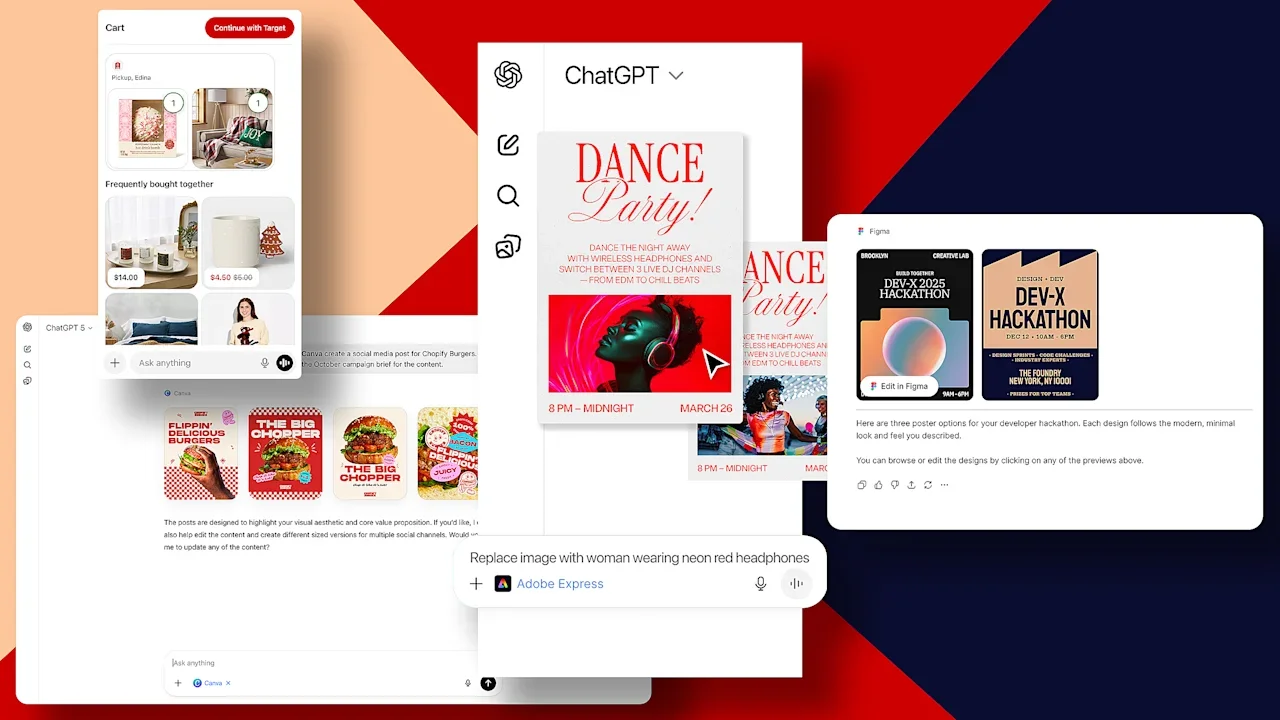
When Apple launched the App Store in 2008, it was impossibly influential to the future of the internet. The all-powerful world wide web was sliced and diced into bite-sized apps oft-dubbed Web 2.0. What followed was not just software that fit in your pocket. From TikTok to Uber, these camera-wielding, GPS-integrated, cloud-connected platforms changed the way we lived. Now, in the wake of AI, the app store is arising anew. But instead of being built as tappable icons inside a mobile OS, they are plugging directly into the conversations of LLMs like Microsoft CoPilot and Anthropic’s Claude. Today, OpenAI—the largest AI platform with 800 million weekly users—is opening ChatGPT for any developer to integrate their app right into the flow of conversation. Following a pilot earlier this year, now any developer can plug in their own apps to be suggested contextually during any chat, or summoned by a user by @’ing their specific name. Early partners like Adobe will let you edit images right in the flow of conversation (complete with sliders to tweak them), while Target will pull up any manner of product to buy. No matter your feelings on AI, the tools seemed destined to change the way we think about apps and even multitasking, by shifting us from software based upon nouns (Canva, Figma) to verbs (“build a slide deck”). “It’s not going to feel like you’re entering through a front door anymore. You’re kind of meeting these [users] at a very specific moment in time,” says Bryant Jow, a designer at OpenAI overseeing app integration. “I really think one of the most important things is that it should not feel like there’s a learning curve or that you have to re-anchor yourself. It should just kind of feel like immediately and instantly intuitive.” Indeed, the promise from all the partner companies I spoke to is to fulfill what LLMs generally only tease. We brainstorm all sorts of ideas inside AI chats, but when it’s time to bring them to life, we can hit a wall. This is where integrated apps can show up, offering their finer tuned services. But the devil is in the details. And very few of the details have been fully worked out. “If you remember the first apps that people made on the App Store, like the beer drinking app [iBeer], they were like, whatever, right? A lot of people took a moment to figure out how do we behave in this ecosystem? What do we build? How do we provide utility? And how do we optimize for that?” says Gui Seiz, who leads product design on the AI team at Figma. “I think we’re still at that stage.” What ChatGPT apps can actually do, and how they do it To be entirely frank, the AI model providers are creating something of an ouroboros with connected apps. You talk to ChatGPT. It recommends you connect with an app. That app, however, is likely powered by AI models that could be from OpenAI. And so its part-OpenAI-powered agent, filled with specialized knowledge, then shows back up on OpenAI’s platform ChatGPT. It’s our agents-talking-to-agents future, happening now. However, the secret sauce to these connections isn’t merely your typical pile of APIs that have been used to connect apps for years. It’s a rapidly growing new standard called MCP (Model Context Protocol). Originally developed by Anthropic in 2024, it’s now open source under Linux. When a company runs an MCP server, it’s essentially opening a door to make everything it wants grockable by AI—sharing data, tools, and memory—all in one consolidated, automated process. While model companies originally brute forced their way across the internet, smashing and grabbing the data sets needed to build their systems, MCP is the equivalent of a butler asking them to wipe their feet and welcoming the AI in. For Target, MCP meant that its initial launch on ChatGPT happened fast—a mere four weeks from when discussions with OpenAI kicked off and Target was selling on its platform. But what’s it like to shop Target on an LLM? At the moment, you can type @target, and ask to shop, in my case, “lego deals for xmas.” It generates a thumbnail grid of options, all with prices. Tap one, and you’re ushered to a new page with more info, just like you’re on its website. There, you can add it to your cart. Target, like all of the partners I spoke to, promised more features will arrive fast—more at the scale of weeks than months. Canva and Figma have both offered tools to create slide decks, turning a brainstorm or pretty much anything you want to paste into ChatGPT into a presentation. Both services are dipping into their own templates to build visual assets previewed as thumbnails. From there, you can tap into any preview to see the whole slideshow. The catch is that, in either case, you can’t really edit these slides further through conversation—the app integration kind of kicks you back to stock ChatGPT following the query. Instead, the preview, like Target, refers you back to their respective apps. It’s why the most ambitious integration seems to be that of Adobe, which integrated tools from Adobe Express, Photoshop, and Acrobat. Adobe actually built out its own, lightweight front end experience into ChatGPT, so if you ask it to brighten a photo, a few sliders will appear on the screen that only control exposure and black and white levels. That way you can get the image exactly as bright as you like, rather then telling the AI, “a little brighter, wait, no, a little darker.” This UI is intentionally granular, built to surface only what you need for a task and nothing more. “That’s what makes this incredibly exciting,” argues Govind Balakrishan, SVP and GM on Adobe Express. “You’re no longer dealing with the the entirety of the Photoshop interface. You’re just dealing with those sliders that give you what you’re trying to do.” Discovering new apps will be the new SEO App discoverability could still use work, though. And this represents both a short term and long term challenge for the company. In the short term, conversational discovery just stinks. To be honest, summoning these apps can be frustrating and buggy. OpenAI needs to do some clean up work on their front end, too, adding the creature comforts we expect. For instance, when you @ any available app, it autofills that app like an Instagram handle—but only after you paired the app successfully once already. In the case of Adobe, this gets extra tricky, as you summon specific functions via their separate apps like @Photoshop and @AdobeAcrobat (and don’t ask to build a PDF in Photoshop). That’s unnecessarily messy and should be sorted by the LLM, not the user. Meanwhile, you aren’t even supposed to be forced to call out apps all the time, as they are supposed to be suggested casually by the LLM in what the company calls “indirect invocation.” I’m not seeing much, if any, of that working yet. When I’m too casual, saying “I’d like to shop at Target” instead of “@target find me X,” it listed nearby Target stores and then offered me shopping advice. When I said I was “hoping to work with the Target app on ChatGPT right now,” it explained I could do that, along with everything I could do in Target. But it was always up to me to invoke the aforementioned secret code—@Target in this case—to make my query. It’s an easy enough affordance people will learn that’s no different than using X or Threads, but the whole point of a friendly conversational interface is that it isn’t a speakeasy. I was continuously surprised by the lack of contextual understanding. But this feels rapidly fixable. The greater existential question for OpenAI is how and why it would recommend one app over another app that offers similar features with similar quality. Make no mistake, each company wants to be the app that’s summoned on command. I myself wondered why some companies would even bother to plug into ChatGPT. As soon as they hand over their capabilities to a generalized AI, aren’t they diluting their own value? Target makes money with every sale, sure, and Canva still carefully offers its free items for free and its paid items for subscription. But Adobe, for instance, is offering all of its ChatGPT tools for free rather than upselling you to a subscription. “At some level, we believe that the more users we have…leveraging the breadth and strength of our applications, the better off we will be over time,” says Balakrishan. “Monetization will sort of work in its way out.” For now, it helps that all of these media generation services link you back to their respective apps, with full interfaces, to finish work you may only start on ChatGPT. Indeed, Canva shared early data from running its own MCP servers to field Claude, CoPilot, and ChatGPT requests since July. They’ve served 2.6 million users who’ve created more than 11 million designs, and it’s been working as a tool to attract attention. Canva notes that referral traffic from LLMs is rising at a faster rate than any other source. But bigger picture, everyone seems to agree that baking apps into LLMs should be about more than just porting an app to a chat interface. It should unlock new workflows, functions, and UIs we haven’t imagined yet. “There’s some stuff that, for whatever reason, the modality that Figma offers isn’t ideal to do that specific thing,” says Seiz. “I wonder what kind of new use cases or new things people are going to be trying to do.” Finding AI’s next big modality For Target, which launched just in time for Black Friday, one of its biggest surprises was a new shopping behavior. People uploaded handwritten lists instead of typing things in. That was interesting, and Target doesn’t know what’s possible from that, yet, but it’s one of many data points that could inform their future thinking. “We wanted to be early and have a role in how that path evolves,” says Purvi Shah, VP of UX Design, Research and Accessibility at Target. The greater concern for companies I talked to was not if they would be commoditized by plugging into a vast AI platform, but how they would be discovered in all that noise. It’s no secret that Adobe, Canva, and Figma are each competitors, much like Target and Walmart (which was also was early to integrate shopping with ChatGPT]. Suggesting any of them contextually, in conversation, means that OpenAI needs to make a decision of which competing service is right for any given moment. Naturally, they all want to own that moment. When I ask OpenAI how they will manage this issue, Jow admits, it’s “definitely one of the hardest challenges” facing the team. When I ask if we’ll see paid placement, like the search ads that have driven Google’s business for years, he says, “We’ll see.” In the meantime, app developers shared their own nervousness about how this will develop, and agree we are likely to see a era of AI platform optimization—much like sites classically optimized themselves to be discovered by Google—in order to rise to the top of ChatGPT and other LLMs. For now, all developers can do is serve “quality and relevant” responses to any prompt, according to Seiz, so that OpenAI is incentivized to keep recommending one’s service. “It’s certainly inevitable that there will be multiple adjacent experiences that offer a really great tool for that use case,” says Jow. “And I do think that what we want to really ensure is that those options are displayed to the user in a very transparent way, so the user can decide which tool is best suited for them.” View the full article
-
From Saudi Arabia’s crown prince to California tech moguls, key players in the fight for a celebrated Hollywood institutionView the full article
-
In a seismic shift for one of television’s marquee events, the Academy Awards will depart ABC and begin streaming on YouTube beginning in 2029, the Academy of Motion Picture Arts and Sciences announced Wednesday. ABC will continue to broadcast the annual ceremony through 2028. That year will mark the 100th Oscars. But starting in 2029, YouTube will retain global rights to streaming the Oscars through 2033. YouTube will effectively be the home to all things Oscars, including red-carpet coverage, the Governors Awards, and the Oscar nominations announcement. “We are thrilled to enter into a multifaceted global partnership with YouTube to be the future home of the Oscars and our year-round Academy programming,” said academy chief executive Bill Kramer and academy president Lynette Howell Taylor. “The Academy is an international organization, and this partnership will allow us to expand access to the work of the Academy to the largest worldwide audience possible — which will be beneficial for our Academy members and the film community.” While major award shows have added streaming partnerships, the YouTube deal marks the first of the big four — the Oscars, Grammys, Emmys, and Tonys — to completely jettison broadcast television. It puts one of the most watched non-NFL broadcasts in the hands of Google. YouTube boasts some 2 billion viewers. The Academy Awards will stream for free worldwide on YouTube, in addition to YouTube TV subscribers. It will be available with audio tracks in many languages, in addition to closed captioning. Financial terms were not disclosed. “The Oscars are one of our essential cultural institutions, honoring excellence in storytelling and artistry,” said Neal Mohan, chief executive of YouTube. “Partnering with the academy to bring this celebration of art and entertainment to viewers all over the world will inspire a new generation of creativity and film lovers while staying true to the Oscars’ storied legacy.” The Walt Disney Co.-owned ABC has been the broadcast home to the Oscars for almost its entire history. NBC first televised the Oscars in 1953, but ABC picked up the rights in 1961. Aside from a period between 1971 and 1975, when NBC again aired the show, the Oscars have been on ABC. “ABC has been the proud home to The Oscars for more than half a century,” the network said in a statement. “We look forward to the next three telecasts, including the show’s centennial celebration in 2028, and wish the Academy of Motion Picture Arts and Sciences continued success.” The 2025 Academy Awards were watched by 19.7 million viewers on ABC, a slight increase from the year before. That remains one of the biggest TV broadcasts of the year, though less than half of Oscar ratings at their peak. In 1999, more than 55 million watched James Cameron’s “Titanic” win best picture. The film academy, in choosing YouTube over other options such as Netflix or NBC Universal/Peacock, selected a platform with a wide-ranging and massive audience but one without as much of an established production infrastructure. Still, more people — especially young people — watch YouTube than any other streaming platform. According to Nielsen, YouTube accounted for 12.9% of all television and streaming content consumed in November. Netflix ranked second with an 8.3% market share. —Jake Coyle, AP film writer View the full article

-
Gen Z is never beating the “unemployable” allegations. For Gen Z, a growing confidence crisis means common workplace interactions are now a major source of anxiety. Working with unfamiliar colleagues, making small talk, using the phone, and waking up early were among the biggest anxieties for young workers, according to new research from Trinity College London. These fears have also been echoed online. “Can we talk about the fear of having to make a phone call in a dead silent office of cubicles,” one TikTok creator recently posted. “When you finally finish sending that email that’s been giving you anxiety and they respond with ‘are you free for a quick call?’” another viral post reads. “The trick is to send this email a few minutes before you go home and then you have valid excuse for “not seeing” the response,” one commenter suggested. In two national surveys of 1,538 people aged 16 to 29 across the U.K., 42% said they feel anxious about working with others, 38% find small talk anxiety-inducing, and 30% report phone anxiety. Notably, respondents were more worried about everyday office interactions than about their jobs becoming redundant because of AI. Presenting work (25%) and accepting criticism (22%) were also major concerns. “POV: you’re presenting on a work call, but your anxiety thinks you’re being hunted for sport,” one TikTok creator summed it up. More than half of respondents (59%) said they find it difficult collaborating with older colleagues. That may be tied to changing office culture and norms. Over half felt that traditional workplace banter can be inappropriate or offensive, while 42% said they’d had a negative interaction with a colleague or boss. One TikTok creator claimed, “You’ve never really experienced jealousy until you’ve worked at a corporation where there’s some old coworker who hates you for just being young, skinny and hot.” A sentiment echoed by others online. The poll also found 21% had or were dreading entering the workplace for the first time, while 33% of those already in employment said it was challenging. Starting out at work has never been an easy transition, but shifting workplace norms seem to be dialling up the anxiety for the youngest workers. (And honestly, many of the things on the list stress out workers of all ages, too.) So what can employers do to help mitigate the anxiety? Asked what they would change about the workplace, 32% said mental health days should be standard, while 28% would scrap the 9-to-5 in favor of flexible hours. Early mornings and strict start times, many said, filled them with dread. “Am I the only one who contemplates quitting their job when I keep having to wake up early and am really tired” one TikTok post read. Or as one creator summed up the general mood: “The concept of waking up early (which I hate) to go to work (which I hate) to be there ALL day (which I hate) to get off and go home (which I love) and to have to rinse & repeat literally everyday for the rest of ur life (which I hate).” View the full article

-
Concerns about an AI bubble and increased competition are weighing on Nvidia as the stock fell to a three-month low on Wednesday. Shares of the Santa Clara, California-based company tumbled more than 3% amid a broader decline for those chipmakers that are key to the artificial intelligence boom. Shares of Advanced Micro Devices and Broadcom were also down 4% and 5%, respectively. In recent weeks, a slew of companies have made moves that could chip away at Nvidia’s domination as the go-to maker of chips for the AI industry. One such company, MetaX Integrated Circuits of China, debuted an initial public offering on Wednesday and surged nearly 700%. BEHIND NVIDIA’S DECLINE Once a darling among stock market investors, the hits keep coming for Nvidia lately. Some of its chips are effectively banned in China, while the company has also become a poster child for concerns of a bubble in the AI industry that some investors worry is reminiscent of the dot-com bubble about 25 years ago. In late October, Nvidia became the first stock to be valued at more than $5 trillion. Even though enthusiasm has cooled since then, some investors still worry that the stock prices of AI-related companies are completely disconnected from reality. And the constant rumblings of skepticism don’t show any sign of letting up as Nvidia has become a popular target for short-sellers. Some prominent investors who have successful track records of calling other market declines have become vocal critics of the AI boom. Michael Burry and Jim Chanos are both shorting Nvidia stock, meaning they will make money if the price goes down further. ANALYSTS SIGNAL OPTIMISM Even so, UBS strategists this week put out a report projecting that global capital expenditure on AI could surge nearly 35% next year to $571 billion. And the bank is projecting further gains through the end of the decade. “We do not see evidence of an investment bubble,” Mark Haefele, chief investment officer at UBS Global Wealth Management, wrote in a research note Tuesday, as reported by Barron’s.. “As AI adoption expands from consumer chatbots to broader enterprise and industry use cases, we estimate that the required compute capacity could be orders of magnitude greater than today’s installed base,” Haefele wrote. What’s more, Bank of America analysts similarly say that the AI boom is still in its early days and has more runway for growth. Nvidia even tops the bank’s recommended list of AI stocks to buy in 2026, according to The Street. But such positive reports did little to counter the negative sentiment surrounding Nvidia. The stock has tumbled more than 16% in the span of about two months. View the full article

-
In the months following 2023’s Writers Guild of America (WGA) and Screen Actors Guild–American Federation of Television and Radio Artists (SAG-AFTRA) strikes, film-industry workers adopted a refrain: “Survive ‘til ‘25” — a meager goal reflecting industry reality. The strikes came shortly after the Covid-19 pandemic ground production to a halt. The dream factory had become a nightmare. The pandemic-inflicted production pause bled workers’ savings, forcing many to seek income outside the industry. Once work restarted, those who wanted to return to work — grips, camera operators, writers, directors, administrative staff, the Teamsters who ferry cast and crew to film sets — found some of those jobs never came back — the new normal of smaller, leaner Hollywood, had arrived. While union members voted almost unanimously in favor of the twin writers’ and actors’ strike, it dragged on, and the industry contraction continued. Two years after the end of those strikes, production is still down. When news broke that Netflix sought to purchase Warner Bros. Discovery for $83 billion, a deal that includes its sprawling Burbank studio lots, and HBO Max (WBD’s cable channels would be spun off into a separate entity), the industry’s workers were quick to voice their opposition. “The world’s largest streaming company swallowing one of its biggest competitors is what antitrust laws were designed to prevent,” the WGA-West and WGA-East said in a statement urging the deal be blocked. “The outcome would eliminate jobs, push down wages, worsen conditions for all entertainment workers, raise prices for consumers, and reduce the volume and diversity of content for all viewers.” The DGA released a similar statement; Director James Cameron frankly warned that the buyout would be “a disaster.” SAG-AFTRA was slightly more measured. “A deal that is in the interest of SAG-AFTRA members and all other workers in the entertainment industry must result in more creation and more production, not less,” the union said in a statement. Netflix CEO Ted Sarandos sees only upside, describing the merger as “pro-consumer, pro-innovation, pro-worker” as well as “pro-creator” and “”pro-growth.” Prospects for the streaming giant appear rosy: On Tuesday, Bloomberg reported that WBD is rejecting Paramount Skydance’s attempt at a hostile takeover, stemming in part from concerns over the deal’s financing. Netflix’s bid, the board believes, still offers greater shareholder value. David Ellison, the CEO of Paramount-Skydance, has tried to assuage criticism of his proposed takeover by stating that a combined Paramount-WBD would have more than 30 theatrical releases per year, a slight increase over the current output of the two studios. But skepticism among the industry’s workers comes from precedent. When companies merge, it means job losses and fewer projects. IATSE, the union of “below the line” film workers–camera operators and technicians, makeup and costume artists, grips, electricians, and the like–noted the deleterious consequences that follow from such deals in a recent issue of its bulletin. “Unfortunately, when large entities merge, they don’t continue producing the same amount of content as when they were two separate companies,” the union wrote. (IATSE has not yet commented on the Netflix-WBD deal.) Bleeding jobs In April 2020, the Bureau of Labor Statistics recorded a loss of 217,000 jobs in the motion-picture and sound-recording industry — its biggest single-month drop ever. Even as the pandemic receded, production didn’t return. FilmLA, a nonprofit set up by the City and County of Los Angeles, found the LA metro area lost nearly 19.7 percent of its share of first-run scripted television projects between 2022 and 2023, one of the largest drops since the organization began tracking the data. The number translates to thousands of lost jobs. In 2023, workers struck to secure more sustainable wages and benefits and protections against the threats posed by artificial intelligence. But strikes are an economic disruption (indeed, therein lies their power) and studios’ decision to downsize following the recent ones may prove permanent. A 2025 report from Otis College of Art and Design found that California’s film, television, and sound sector is roughly one-quarter smaller than in 2022. FilmLA’s 2025 Q2 report logged 5,394 on-location shoot days, down 6.2 percent from the previous year and more than 30 percent below the five-year average. Productions continue chasing tax incentives abroad (you might be surprised how much unscripted television is shot in Ireland for this reason), further cratering domestic production. By the end of 2024, the BLS recorded 100,000 jobs in the industry in the greater Los Angeles area, down from 142,000 two years earlier. When one considers freelancers and adjacent industries–the city’s service sector, for instance, is inextricably tied to cinema–the losses are even higher. There is plenty of evidence to support that contention. When Disney merged with 21st Century Fox in 2021, 3,000 people lost their jobs amid downsizing, delayed or permanently shelved projects. Disney shuttered Blue Sky Studios (best known for the Ice Age franchise) the same year, eliminating 450 animation jobs. WBD’s merger with Cartoon Network Studios eliminated axed departments. NBCUniversal, Lionsgate, and Netflix have all carried out company-wide layoffs in recent years. Ellison, son of billionaire Larry Ellison, laid off 1,000 people at Paramount after purchasing the company earlier this year. The CEO has stated that he plans to reduce the workforce by a further 2,000 — numbers that are sure to weigh on WBD employees’ minds should Ellison’s attempted hostile takeover of WBD succeed. Uncertain future The Netflix-WBD deal is expected to face regulatory scrutiny over its potential consequences for consumers: Netflix is already the leading streaming-video-on-demand (SVOD) company, with 300 million subscribers; adding HBO Max to its base would make that 430 million. Antitrust regulations require investigation for any deal that would allow a single entity to control more than 30 percent of a market; this one would give Netflix a 43 percent share of the SVOD market. But it’s not only the potential for subscription price hikes and the continued decimation of the moviegoing experience that are at issue. Worker opposition can also cause the Department of Justice to block the merger, as it did with Penguin Random House’s $2 billion bid to purchase Simon & Schuster. Authors, including Stephen King, testified that the merged super-publisher would mean lower advances for their books, with dire consequences. A combined Netflix-WBD poses the same risks. A writer or director hoping to get a project greenlit by a studio will have one fewer potential buyer. The megacorporation may ultimately constitute a monopsony employer, able to dictate the standards of employment across the industry by dint of its size. The imperious studio executive declaring “You’ll never work in this town again!” to an underling is a familiar trope in Hollywood; Netflix-WBD executives will hold such power. Fewer companies means fewer people deciding what art you can see, what options the viewer has. It means greater sidelining of visionary work, the type that executives dismiss as too weird, not marketable, or politically inconvenient. It’s too soon to say how this will all shake out. Netflix and WBD believe it will take eighteen months to complete the deal and clear all regulatory hurdles. WBD’s rejection of Ellison’s counter-bid may not put an end to hish campaign to turn the public and regulators against Netflix’s purchase. Yet Ellison’s proposed purchase of WBD has its own problems, from its conglomeration of financial backers whose ties to the The President administration will alarm many in the industry, to its own possible antitrust obstacles. For Sarandos, Ellison, and WBD CEO David Zaslav, making quality films that pay workers enough to keep them in the industry, is of course, not the goal. Maximizing shareholder value remains the priority. No matter what the executives say, neither potential merger is likely to be good for the worker. And so it’s up to them to look out for their own — and by extension, film itself. Even in the most unfavorable labor market, there is a power in such clarity of vision. View the full article

-
We may earn a commission from links on this page. America is a car-centric culture—more than 90% of U.S. households have at least one vehicle. There are a lot of different kinds of cars, from old classics being maintained with love, to snazzy new electric rides, or luxury cruisers filled with cutting-edge tech. Whichever kind you drive, getting the most out of your vehicle demands regular maintenance and sensible driving practices, but you can also goose just a bit more out of any vehicle with these universal car hacks. Throw some anti-seize lubricant in your trunkIf you’ve been driving for a while, you know that flat tires only come at the worst possible times. Sunny days when you have plenty of time? Those tires are infallible. Whiteout conditions and you’re racing to a job interview? Guaranteed flat—and you will discover that your lug nuts have fused and become absolutely impossible to shift. One way to prevent this is the judicious use of a little anti-seize lubricant, which is designed to prevent rust and other corrosion. Mechanics argue about this, to be fair—some professionals believe that using anti-seize on lug nuts changes the required torque, which can loosen them over time. But plenty of folks have used a small amount of anti-seize lubricant to make changing or rotating tires a lot easier without any adverse effects. The key is to use a very small amount—just enough to protect the threads. Add silicone lubricant to your door gasketsThe seals around your car’s doors help to insulate the interior. Over time, these seals can become stiff and begin to fall apart, which makes your vehicle unattractive and less comfortable to ride in. You can prevent this with a simple hack: Grab some silicon lubricant and apply thin layer onto the rubber gaskets around your doors, trunk, and windows. It’ll save you a bit of frustrating maintenance in the future—and can prevent doors from freezing closed in winter. (An oft-repeated version of this hack is to use petroleum jelly, which is OK in a pinch, but it can cause rubber to degrade over time, which silicone lubricants won't.) Track your tire tread wear with a quarterTire tread is essential for the safe and efficient operation of your car. Bald tires not only make it more likely you’ll hydroplane or otherwise lose control of the vehicle, they also make your car burn more fuel to overcome their rolling resistance, lowering your vehicle’s fuel efficiency. Tire tread is measured in 32nds of an inch—new tires typically have a tread depth of 10/32” or 11/32”, and you should replace your tires when the tread is eroded to about 4/32” or less. You can track this easily with a quarter—find the most worn-down spot on your tire, slide an upside-down quarter into the tread. If you can see the top of Washington’s head, you should replace the tire. You can also use a penny to see if you can still see the top of Lincoln’s head, but this measures 2/32” of tire tread, which means you should replace the tire immediately. The quarter test warns you to replace your tire before it’s a dangerous situation. Prevent small window cracks from spreading with nail polishA cracked windshield is ugly, and even a tiny crack will probably spread, slowly but inexorably, until you have no choice but to replace the glass entirely. If you have a noticeable crack in your windshield, you should replace it—but if that’s not possible right away, there’s a short-term hack you can use: Nail polish. This isn’t a permanent repair, but it will buy you some time by slowing down the crack’s spread. Clean the damaged area thoroughly, then coat the exterior and interior of the cracked area with clear nail polish. Let it dry, and go about your business. You'll still eventually need to replace the windshield (or have a more permanent repair job done to it), but this hack will let you plan for the work instead of having to deal with it as an emergency. Stop stuff from falling between the seats with pipe insulationHave you ever lost your keys, phone, or anything else between the seats in your car? If so, you know it’s like Mission: Impossible to reclaim your property. Those spaces were just not designed for human beings to get into. An easy hack to prevent the situation from happening in the first place is to close off those gaps (this also prevents crumbs and other dirt from filling those spaces). Pipe insulation is the perfect material for this: Cut a piece to length and jam it between the seats (or the seats and the console), and never lose anything ever again. In a pinch, the ever-useful pool noodle could be used as well. Alternatively, you can buy storage organizers designed to fit in those gaps, which solve the problem while giving you some extra space for stuff. Use a plunger to fix minor dentsA dent in your car is annoying—and potentially expensive to fix. For minor cosmetic dents, you don’t need any special tools or professional help. All you need is a heat source and a common bathroom plunger. For the heat source, you can boil some water, pour it over the dent, then use the plunger to pull the dent out. You can also use a heat gun or a hair dryer, though the water might help the plunger get a nice seal on the car body. Put socks on your wiper bladesNothing’s more fun than fighting your way through frigid cold to your car, only to discover that the wiper blades have frozen to your windshield. Sure, your car will eventually heat up enough to free the wipers, but if you’d prefer not to have to wait for that miracle to happen, keep an old pair of tube socks in the glove compartment. On cold nights when frozen wipers are a good probability, cover your wiper blades with the socks. This will protect them from damage as well as prevent them from freezing onto your windshield. Try to always turn right to save money on gasThis is one of those amazing tricks that people have difficulty believing, but it actually works: To save money on gas, always make right turns unless a left turn is absolutely necessary—yes, even if that makes your trip longer. UPS put this policy into its vehicle routing software, instructing their drivers to avoid left turns as much as algorithmically possible, and it claims to use about 10 million fewer gallons of gas every year as a result. In fact, our greatest repository of scientific knowledge, Mythbusters, once did a segment proving that they used about 3% less fuel by avoiding as many left turns as possible while driving a fake delivery truck. Note, this doesn’t mean never making a left turn. It means prioritizing right turns when planning your route, even if it makes your trip longer. Whether the extra time involved is worth saving a little gas money is a whole other decision. Use hand sanitizer on frozen locksAnother annoyance on cold winter mornings? Frozen car locks and doors. While most newer cars have keyless entry these days, you can still find yourself dealing with a frozen door, and if your battery has died due to the cold, you might need to use a physical key to gain entry to the car. When that happens, a simple hack is to whip out the hand sanitizer you probably have in your coat pocket. Squirt some into the lock (or coat your physical key before you insert it) or around the edge of the door. After a few seconds, the alcohol in the sanitizer will have melted the ice and you’ll be able to easily open everything up. Get a glovebox organizer to maximize your storage spaceNo one has used a car’s glovebox to store gloves in a long time. What most of us do is jam things in there on the theory that we might need them someday, then forget what’s in there and go a decade or two without actually opening it. Instead, hack that space with an organizer. You can find some molded plastic organizers designed to fit specific models (like this one for a Toyota Tacoma, or this one for Tesla Model 3s), or you can find wallet-style organizers that will keep your documentation and other items neatly stored, making the glove box actually useful for a change. View the full article
-
When you’re contemplating conducting a background check on someone, it’s vital to follow a structured approach to guarantee accuracy and legality. Start by obtaining written consent, as required by the Fair Credit Reporting Act. Then, choose a dependable service and gather necessary details like their full name and date of birth. This process will help you uncover significant information, but comprehending the legal implications is just as important. What comes next may surprise you. Key Takeaways Obtain written consent from the individual to comply with the Fair Credit Reporting Act (FCRA) before conducting any background check. Choose a reputable background check service to ensure accurate and reliable information is gathered about the individual. Gather necessary personal information, such as full name and date of birth, to facilitate the background check process effectively. Review the background check report carefully for findings related to criminal records, employment history, and educational credentials. Communicate transparently with the individual about the background check process and their right to dispute any inaccuracies found. Understanding Background Checks: An Overview When you’re considering hiring someone, comprehension of background checks is crucial to making informed decisions. A background check verifies an individual’s character and history using public data sources, encompassing criminal records, employment history, and educational credentials. If you’re unsure how to do a background check on someone for free, start by utilizing online databases and public records available through government websites. Checking criminal records for free can often be done at your local courthouse or through state-specific resources. Remember, it’s important to comply with federal and state laws, including the Fair Credit Reporting Act (FCRA), which requires obtaining written consent before conducting checks. You should likewise understand what you’re looking for; knowing how to run a background check on someone for free can help assess their qualifications and mitigate hiring risks. Why Conduct a Background Check? Conducting a background check is crucial for ensuring safety and security in any organization. It helps you verify credentials and experience, making sure candidates truly meet the requirements for the role. Furthermore, background checks can mitigate legal and financial risks by identifying potential issues before they become a problem. Ensure Safety and Security Background checks play a vital role in ensuring safety and security within the workplace, as they help identify any criminal history that might pose a risk to employees and vulnerable populations. By conducting a thorough background check, you can assess a candidate’s past behavior and character, which gives you valuable insights into their work ethic and fit within your organization. This process not only mitigates liability risks by ensuring compliance with hiring laws but also cultivates trust among employees and clients. If you’re wondering how to do a background check on someone, there are resources available, and you might ask, “how can I get my background check for free?” Taking these steps promotes a safer work environment and improves your organization’s reputation. Verify Credentials and Experience To guarantee you’re making informed hiring decisions, verifying credentials and experience is essential. Studies reveal that 78% of candidates might misrepresent their education on applications. Employment verification confirms prior job positions, employment dates, and rehire eligibility, protecting you from hiring individuals with falsified work histories. Moreover, professional license verification guarantees candidates possess the necessary qualifications, particularly in regulated industries like healthcare. Background checks can also uncover criminal records that may impact a candidate’s suitability, helping maintain a safe workplace environment. Thorough checks not only mitigate hiring risks but further improve your organization’s reputation by guaranteeing quality hires. Type of Verification Importance Outcome Educational Credentials Confirms accuracy of qualifications Reduces misrepresentation Employment History Validates previous roles and tenure Prevents hiring of unqualified individuals Professional Licenses Guarantees compliance with industry standards Lowers risk of negligent hiring lawsuits Criminal Records Assesses candidate’s suitability Promotes a safe work environment Overall Background Check Provides thorough candidate profile Improves hiring decisions Mitigate Legal and Financial Risks When you hire new employees, it’s crucial to evaluate the legal and financial implications of your decisions. Conducting background checks can greatly mitigate these risks by: Ensuring compliance with the Fair Credit Reporting Act (FCRA), reducing the chance of lawsuits from rejected candidates. Uncovering criminal histories that could pose safety concerns, thereby promoting a secure environment for everyone. Verifying professional credentials to avoid hiring unqualified individuals, which protects against financial losses and reputational damage. Identifying discrepancies in employment and education history, maintaining the integrity of your hiring process. Types of Background Checks Available When you consider the types of background checks available, criminal record checks and employment verification processes are among the most common. Criminal record checks reveal any past misdemeanors or felonies, helping you assess potential safety risks in candidates. Meanwhile, employment verification processes confirm a candidate’s work history and qualifications, ensuring they’re a good fit for the position. Criminal Record Checks Criminal record checks play a crucial role in the background screening process, as they provide insight into an individual’s legal history, including any misdemeanor or felony convictions, arrests, and pending charges that may affect their eligibility for employment. These checks can reveal various offenses, such as: Violent crimes Fraud Substance abuse Other relevant criminal activity In Texas, the Texas Mini-FCRA limits reporting of conviction records to those occurring within the last seven years for jobs with salaries under $75,000. Employers must likewise comply with the Fair Credit Reporting Act (FCRA), which requires obtaining written consent from candidates before conducting these checks. You can choose from local, state, or federal searches to tailor the depth of the investigation based on job requirements. Employment Verification Processes Employment verification processes are vital components of background checks, as they help confirm candidates have accurately represented their work history and qualifications. Various checks serve specific purposes: Type of Check Purpose Employment Verification Confirms job titles, dates of employment, and rehire eligibility. Educational Verification Validates academic credentials to address misrepresentation. Professional License Makes certain candidates hold necessary licenses for their roles. Additional checks like criminal record and driving record checks can further improve your assessment. Criminal checks reveal any offenses that might pose risks, whereas driving records are fundamental for roles involving vehicles. By conducting thorough employment verification, you’re protecting your organization from potential liabilities and guaranteeing a qualified workforce. How to Run a Background Check on Someone Running a background check on someone can be a straightforward process if you know the right steps to follow. First, make sure you obtain written permission from the individual, as required by the Fair Credit Reporting Act (FCRA). Then, you can utilize consumer reporting agencies (CRAs) like Checkr to streamline the process. Here’s how to get started: Choose a Background Check Service: Select a reputable service that specializes in background checks. Gather Information: Collect the individual’s full name, date of birth, and any other relevant details. Run the Check: Submit the information through the service and wait for the report. Review Findings: Analyze the report for criminal records, employment history, and educational credentials. Legal Considerations and Compliance Conducting background checks isn’t just about gathering information; it furthermore involves maneuvering a complex terrain of legal requirements and compliance issues. Before you begin, keep in mind the Fair Credit Reporting Act (FCRA) mandates obtaining written consent from the candidate. If you decide not to hire someone based on their background check, you must follow the adverse action process, which includes notifying the candidate and providing them with a copy of the report. State-specific regulations, like Texas’s Mini-FCRA, can limit how far back you can look at criminal convictions, especially for lower-salaried positions. Moreover, Title VII of the Civil Rights Act prevents discrimination based on protected statuses, requiring you to assess criminal history individually rather than applying blanket exclusions. Legal Requirement Key Points FCRA Obtain written consent; follow adverse action process. State Regulations Limit reporting for older convictions in certain states. Title VII Avoid discrimination; conduct individualized assessments. “Ban the Box” Regulations Restrict inquiries about criminal history early on. Compliance Responsibility Stay updated on local laws affecting hiring practices. Best Practices for Conducting Background Checks In relation to background checks, implementing best practices can greatly improve the reliability and fairness of your hiring process. Here are four crucial steps to follow: Select a qualified provider: Choose a background check provider that complies with the Fair Credit Reporting Act (FCRA) for legally compliant results. Establish a clear policy: Develop a background check policy that details the types of checks performed and the process for obtaining written consent from candidates. Conduct individualized assessments: When negative information arises, assess its relevance to the job responsibilities rather than applying blanket exclusions. Communicate transparently: Keep candidates informed about the background check process, their rights, and offer them a chance to dispute any inaccuracies in their reports. Resources and Tools for Background Checks In regards to background checks, having the right resources and tools at your disposal can make a significant difference in the effectiveness and efficiency of the process. Utilizing online public records databases can provide access to crucial information like criminal history and driving records. Consumer reporting agencies (CRAs) like Checkr and GoodHire offer streamlined services, guaranteeing compliance with regulations during delivering fast reports. Here’s a quick comparison of some useful resources: Resource Type Example Key Features Online Databases Public Records Access to criminal and civil records Consumer Reporting Checkr Aggregates data and guarantees compliance Management Software Case IQ Tracks results and identifies trends Local courthouses can likewise be valuable for obtaining specific public records not available online, enhancing the thoroughness of your background checks. Common Questions About Background Checks What do you need to know about background checks before you undergo one? Comprehending the process can help you navigate it more effectively. Here are some common questions you might have: What does a background check include? Typically, it covers criminal records, employment verification, education verification, professional licenses, and identity verification. Do I need to give consent? Yes, the Fair Credit Reporting Act (FCRA) requires written consent before conducting a background check. Are there legal limitations? Absolutely. Employers must follow federal, state, and local laws regarding what can be reported, especially concerning criminal records based on the position. Can I check my own background? Yes, you can perform a self-background check through consumer reporting agencies (CRAs) to prepare for potential employer screenings. Being informed about these aspects will help you grasp the implications of a background check. Frequently Asked Questions How Can You Run a Background Check on Somebody? To run a background check on someone, start by obtaining their written consent, as required by law. Then, you can use consumer reporting agencies like Checkr or GoodHire for a thorough screening. These services typically check criminal records, employment history, and educational qualifications. On the other hand, you can search public records through local courthouses, but this may take longer and mightn’t provide complete information. Always check state-specific regulations for compliance. Can Anyone Do a Background Check on Someone Else? Yes, anyone can perform a background check on someone else. You can access public records through consumer reporting agencies (CRAs) or search independently, though the latter may lack thoroughness. If you’re checking someone for employment, you’ll need their written consent because of the Fair Credit Reporting Act (FCRA). Keep in mind that certain jurisdictions may restrict access to specific information, such as criminal history, so always guarantee compliance with local laws. What Is a Red Flag in a Background Check? A red flag in a background check indicates concerning information that might affect a person’s suitability for a role. This could include criminal records, gaps in employment history, or inconsistencies in a resume. Poor credit history may raise questions about trustworthiness, especially for financial positions. Furthermore, negative references can highlight behavioral issues. Identifying these red flags helps you assess potential risks and make informed decisions during the hiring process. How Much Does It Cost to Do a Full Background Check on Someone? The cost of a full background check typically ranges from $30 to $200. This variation depends on the depth of the search and the type of information included, like criminal or employment records. Subscription models are additionally available, costing between $20 to $50 monthly for multiple reports. Whereas some free options exist through public records, they often lack the thoroughness of paid services. Specialized checks, such as credit reports, may incur higher fees based on industry requirements. Conclusion In summary, conducting a background check is a crucial process that guarantees informed decision-making. By obtaining consent, using reputable services, and adhering to legal guidelines, you can effectively verify a candidate’s history. Remember to communicate openly throughout the process to cultivate trust. Following best practices and utilizing available resources will improve your background check efforts, allowing you to mitigate risks and make confident choices. Always stay compliant with local laws to protect yourself and your organization. Image via Google Gemini This article, "Your Ultimate Guide to Doing a Background Check on Someone" was first published on Small Business Trends View the full article
-
When you’re contemplating conducting a background check on someone, it’s vital to follow a structured approach to guarantee accuracy and legality. Start by obtaining written consent, as required by the Fair Credit Reporting Act. Then, choose a dependable service and gather necessary details like their full name and date of birth. This process will help you uncover significant information, but comprehending the legal implications is just as important. What comes next may surprise you. Key Takeaways Obtain written consent from the individual to comply with the Fair Credit Reporting Act (FCRA) before conducting any background check. Choose a reputable background check service to ensure accurate and reliable information is gathered about the individual. Gather necessary personal information, such as full name and date of birth, to facilitate the background check process effectively. Review the background check report carefully for findings related to criminal records, employment history, and educational credentials. Communicate transparently with the individual about the background check process and their right to dispute any inaccuracies found. Understanding Background Checks: An Overview When you’re considering hiring someone, comprehension of background checks is crucial to making informed decisions. A background check verifies an individual’s character and history using public data sources, encompassing criminal records, employment history, and educational credentials. If you’re unsure how to do a background check on someone for free, start by utilizing online databases and public records available through government websites. Checking criminal records for free can often be done at your local courthouse or through state-specific resources. Remember, it’s important to comply with federal and state laws, including the Fair Credit Reporting Act (FCRA), which requires obtaining written consent before conducting checks. You should likewise understand what you’re looking for; knowing how to run a background check on someone for free can help assess their qualifications and mitigate hiring risks. Why Conduct a Background Check? Conducting a background check is crucial for ensuring safety and security in any organization. It helps you verify credentials and experience, making sure candidates truly meet the requirements for the role. Furthermore, background checks can mitigate legal and financial risks by identifying potential issues before they become a problem. Ensure Safety and Security Background checks play a vital role in ensuring safety and security within the workplace, as they help identify any criminal history that might pose a risk to employees and vulnerable populations. By conducting a thorough background check, you can assess a candidate’s past behavior and character, which gives you valuable insights into their work ethic and fit within your organization. This process not only mitigates liability risks by ensuring compliance with hiring laws but also cultivates trust among employees and clients. If you’re wondering how to do a background check on someone, there are resources available, and you might ask, “how can I get my background check for free?” Taking these steps promotes a safer work environment and improves your organization’s reputation. Verify Credentials and Experience To guarantee you’re making informed hiring decisions, verifying credentials and experience is essential. Studies reveal that 78% of candidates might misrepresent their education on applications. Employment verification confirms prior job positions, employment dates, and rehire eligibility, protecting you from hiring individuals with falsified work histories. Moreover, professional license verification guarantees candidates possess the necessary qualifications, particularly in regulated industries like healthcare. Background checks can also uncover criminal records that may impact a candidate’s suitability, helping maintain a safe workplace environment. Thorough checks not only mitigate hiring risks but further improve your organization’s reputation by guaranteeing quality hires. Type of Verification Importance Outcome Educational Credentials Confirms accuracy of qualifications Reduces misrepresentation Employment History Validates previous roles and tenure Prevents hiring of unqualified individuals Professional Licenses Guarantees compliance with industry standards Lowers risk of negligent hiring lawsuits Criminal Records Assesses candidate’s suitability Promotes a safe work environment Overall Background Check Provides thorough candidate profile Improves hiring decisions Mitigate Legal and Financial Risks When you hire new employees, it’s crucial to evaluate the legal and financial implications of your decisions. Conducting background checks can greatly mitigate these risks by: Ensuring compliance with the Fair Credit Reporting Act (FCRA), reducing the chance of lawsuits from rejected candidates. Uncovering criminal histories that could pose safety concerns, thereby promoting a secure environment for everyone. Verifying professional credentials to avoid hiring unqualified individuals, which protects against financial losses and reputational damage. Identifying discrepancies in employment and education history, maintaining the integrity of your hiring process. Types of Background Checks Available When you consider the types of background checks available, criminal record checks and employment verification processes are among the most common. Criminal record checks reveal any past misdemeanors or felonies, helping you assess potential safety risks in candidates. Meanwhile, employment verification processes confirm a candidate’s work history and qualifications, ensuring they’re a good fit for the position. Criminal Record Checks Criminal record checks play a crucial role in the background screening process, as they provide insight into an individual’s legal history, including any misdemeanor or felony convictions, arrests, and pending charges that may affect their eligibility for employment. These checks can reveal various offenses, such as: Violent crimes Fraud Substance abuse Other relevant criminal activity In Texas, the Texas Mini-FCRA limits reporting of conviction records to those occurring within the last seven years for jobs with salaries under $75,000. Employers must likewise comply with the Fair Credit Reporting Act (FCRA), which requires obtaining written consent from candidates before conducting these checks. You can choose from local, state, or federal searches to tailor the depth of the investigation based on job requirements. Employment Verification Processes Employment verification processes are vital components of background checks, as they help confirm candidates have accurately represented their work history and qualifications. Various checks serve specific purposes: Type of Check Purpose Employment Verification Confirms job titles, dates of employment, and rehire eligibility. Educational Verification Validates academic credentials to address misrepresentation. Professional License Makes certain candidates hold necessary licenses for their roles. Additional checks like criminal record and driving record checks can further improve your assessment. Criminal checks reveal any offenses that might pose risks, whereas driving records are fundamental for roles involving vehicles. By conducting thorough employment verification, you’re protecting your organization from potential liabilities and guaranteeing a qualified workforce. How to Run a Background Check on Someone Running a background check on someone can be a straightforward process if you know the right steps to follow. First, make sure you obtain written permission from the individual, as required by the Fair Credit Reporting Act (FCRA). Then, you can utilize consumer reporting agencies (CRAs) like Checkr to streamline the process. Here’s how to get started: Choose a Background Check Service: Select a reputable service that specializes in background checks. Gather Information: Collect the individual’s full name, date of birth, and any other relevant details. Run the Check: Submit the information through the service and wait for the report. Review Findings: Analyze the report for criminal records, employment history, and educational credentials. Legal Considerations and Compliance Conducting background checks isn’t just about gathering information; it furthermore involves maneuvering a complex terrain of legal requirements and compliance issues. Before you begin, keep in mind the Fair Credit Reporting Act (FCRA) mandates obtaining written consent from the candidate. If you decide not to hire someone based on their background check, you must follow the adverse action process, which includes notifying the candidate and providing them with a copy of the report. State-specific regulations, like Texas’s Mini-FCRA, can limit how far back you can look at criminal convictions, especially for lower-salaried positions. Moreover, Title VII of the Civil Rights Act prevents discrimination based on protected statuses, requiring you to assess criminal history individually rather than applying blanket exclusions. Legal Requirement Key Points FCRA Obtain written consent; follow adverse action process. State Regulations Limit reporting for older convictions in certain states. Title VII Avoid discrimination; conduct individualized assessments. “Ban the Box” Regulations Restrict inquiries about criminal history early on. Compliance Responsibility Stay updated on local laws affecting hiring practices. Best Practices for Conducting Background Checks In relation to background checks, implementing best practices can greatly improve the reliability and fairness of your hiring process. Here are four crucial steps to follow: Select a qualified provider: Choose a background check provider that complies with the Fair Credit Reporting Act (FCRA) for legally compliant results. Establish a clear policy: Develop a background check policy that details the types of checks performed and the process for obtaining written consent from candidates. Conduct individualized assessments: When negative information arises, assess its relevance to the job responsibilities rather than applying blanket exclusions. Communicate transparently: Keep candidates informed about the background check process, their rights, and offer them a chance to dispute any inaccuracies in their reports. Resources and Tools for Background Checks In regards to background checks, having the right resources and tools at your disposal can make a significant difference in the effectiveness and efficiency of the process. Utilizing online public records databases can provide access to crucial information like criminal history and driving records. Consumer reporting agencies (CRAs) like Checkr and GoodHire offer streamlined services, guaranteeing compliance with regulations during delivering fast reports. Here’s a quick comparison of some useful resources: Resource Type Example Key Features Online Databases Public Records Access to criminal and civil records Consumer Reporting Checkr Aggregates data and guarantees compliance Management Software Case IQ Tracks results and identifies trends Local courthouses can likewise be valuable for obtaining specific public records not available online, enhancing the thoroughness of your background checks. Common Questions About Background Checks What do you need to know about background checks before you undergo one? Comprehending the process can help you navigate it more effectively. Here are some common questions you might have: What does a background check include? Typically, it covers criminal records, employment verification, education verification, professional licenses, and identity verification. Do I need to give consent? Yes, the Fair Credit Reporting Act (FCRA) requires written consent before conducting a background check. Are there legal limitations? Absolutely. Employers must follow federal, state, and local laws regarding what can be reported, especially concerning criminal records based on the position. Can I check my own background? Yes, you can perform a self-background check through consumer reporting agencies (CRAs) to prepare for potential employer screenings. Being informed about these aspects will help you grasp the implications of a background check. Frequently Asked Questions How Can You Run a Background Check on Somebody? To run a background check on someone, start by obtaining their written consent, as required by law. Then, you can use consumer reporting agencies like Checkr or GoodHire for a thorough screening. These services typically check criminal records, employment history, and educational qualifications. On the other hand, you can search public records through local courthouses, but this may take longer and mightn’t provide complete information. Always check state-specific regulations for compliance. Can Anyone Do a Background Check on Someone Else? Yes, anyone can perform a background check on someone else. You can access public records through consumer reporting agencies (CRAs) or search independently, though the latter may lack thoroughness. If you’re checking someone for employment, you’ll need their written consent because of the Fair Credit Reporting Act (FCRA). Keep in mind that certain jurisdictions may restrict access to specific information, such as criminal history, so always guarantee compliance with local laws. What Is a Red Flag in a Background Check? A red flag in a background check indicates concerning information that might affect a person’s suitability for a role. This could include criminal records, gaps in employment history, or inconsistencies in a resume. Poor credit history may raise questions about trustworthiness, especially for financial positions. Furthermore, negative references can highlight behavioral issues. Identifying these red flags helps you assess potential risks and make informed decisions during the hiring process. How Much Does It Cost to Do a Full Background Check on Someone? The cost of a full background check typically ranges from $30 to $200. This variation depends on the depth of the search and the type of information included, like criminal or employment records. Subscription models are additionally available, costing between $20 to $50 monthly for multiple reports. Whereas some free options exist through public records, they often lack the thoroughness of paid services. Specialized checks, such as credit reports, may incur higher fees based on industry requirements. Conclusion In summary, conducting a background check is a crucial process that guarantees informed decision-making. By obtaining consent, using reputable services, and adhering to legal guidelines, you can effectively verify a candidate’s history. Remember to communicate openly throughout the process to cultivate trust. Following best practices and utilizing available resources will improve your background check efforts, allowing you to mitigate risks and make confident choices. Always stay compliant with local laws to protect yourself and your organization. Image via Google Gemini This article, "Your Ultimate Guide to Doing a Background Check on Someone" was first published on Small Business Trends View the full article
-
Team building events play an essential role in enhancing workplace morale and dynamics. Consider implementing activities like themed dress days, where employees express individuality and spark conversations. Office trivia challenges can encourage collaboration and friendly competition among team members. Furthermore, collaborative workshops can address real-world issues as they strengthen relationships. These events not just improve morale but likewise create a more cohesive work environment. Explore how these activities can transform your team’s dynamics. Key Takeaways Organize themed dress days to encourage creativity and bonding among team members while breaking the routine. Host office trivia challenges to foster friendly competition and improve collaboration through shared knowledge. Conduct collaborative workshops that engage employees in problem-solving and enhance communication skills through teamwork. Plan community service projects to strengthen team bonds while making a positive impact on the community. Arrange virtual game nights featuring online board games to nurture relationships and alleviate stress in remote settings. Themed Dress Days Themed dress days are an effective way to break the routine in your workplace, allowing employees to express their individuality through creative attire. These events, like Culture Day or Superhero Day, encourage bonding among colleagues, promoting teamwork and enhancing team spirit. By participating, employees feel more valued, which contributes to a positive atmosphere. Themed dress days additionally provide light-hearted conversation starters, improving communication and interaction during meetings or teamwork events. You can tie these days to special occasions, creating excitement and anticipation within the team. When implemented alongside teamwork conferences, these dress days can reinforce the values of collaboration and creativity, making them a beneficial addition to your team-building events and overall workplace morale. Office Trivia Challenges Office trivia challenges are an excellent way to improve team collaboration and encourage friendly competition among employees. By testing knowledge about the company and colleagues, these events not merely strengthen bonds through shared experiences but likewise create a fun atmosphere that boosts morale. Furthermore, they serve as effective icebreakers, encouraging communication and knowledge sharing, especially for new team members. Enhance Team Collaboration Engaging in trivia challenges can greatly improve team collaboration by encouraging a friendly competitive spirit among employees. These challenges involve groups of 5-20 participants, which makes them adaptable to various team sizes. As coworkers pool their knowledge to answer questions about the company and each other, they promote teamwork and boost communication. Incorporating fun facts about team members adds a personal touch, enhancing insight and appreciation within the group. The shared experiences and laughter during these events strengthen bonds, creating a sense of belonging and camaraderie. Foster Friendly Competition Encouraging friendly competition through office trivia challenges offers an effective way to improve teamwork and collaboration among employees. These events not just engage participants but also create a fun atmosphere conducive to learning and bonding. Here are three key benefits of implementing trivia challenges in your workplace: Team Engagement: Trivia can accommodate 5-20 participants, allowing for interactions across departments, enhancing relationships among employees. Company Culture: Questions can focus on company history, policies, and even colleagues, reinforcing a shared culture and collective experiences. Boosted Morale: As employees share knowledge and learn about each other, they feel valued, nurturing a sense of belonging and camaraderie that ultimately enhances workplace morale. Collaborative Workshops Collaborative workshops play a crucial role in enhancing teamwork within organizations, as they provide a structured environment where employees can tackle real-world challenges together. By engaging in collective brainstorming sessions, you’ll encourage problem-solving and creativity vital for innovative solutions. These hands-on activities improve communication skills and promote idea-sharing, which can greatly address workplace issues. Furthermore, participating in these workshops strengthens relationships among team members, as shared tasks require trust and cooperation. They likewise serve as effective onboarding tools, helping new hires acclimate to the company culture and connect with colleagues. Research shows that organizations conducting regular collaborative workshops enjoy increased employee morale and job satisfaction, as team members feel more valued and engaged in their work. Community Service Projects Community service projects offer a unique opportunity for you and your team to make a meaningful impact as well as promote teamwork. By participating in activities like food drives, park clean-ups, or mentoring youth, you not just improve collaboration but additionally build stronger bonds with your colleagues. These experiences can greatly improve your company culture and boost morale, creating a more engaged and productive workplace. Community Impact Involvement How can participating in community service projects improve your team’s performance and morale? Engaging in community service cultivates teamwork and collaboration among employees, leading to stronger relationships and a shared sense of purpose. Here are three key benefits: Enhanced Employee Engagement: About 70% of employees feel more connected to their workplace when involved in social responsibility initiatives, boosting productivity. Increased Morale: Companies that promote community involvement often see a 25% increase in employee morale and job satisfaction, as team members find their contributions meaningful. Improved Retention: Approximately 60% of workers are more likely to stay with a company that actively supports charitable causes, reducing turnover rates. Team Bonding Experience Engaging in community service projects offers a unique team bonding experience that goes beyond traditional workplace interactions. By working together toward a common, altruistic goal, you improve collaboration and unity among team members. These initiatives not only boost morale—64% of employees feel more motivated when giving back—but likewise strengthen relationships through shared experiences. Furthermore, 75% of employees express greater loyalty to companies that support social causes, reflecting positively on your organization’s image. Benefit Statistic Impact Improved Morale 64% feel motivated Increased productivity and positivity Enhanced Loyalty 75% loyal Strengthened company reputation Increased Employee Engagement 91% less stress Better workplace relationships Friendly Competitions Friendly competitions play a crucial role in improving team dynamics within the workplace, as they create a platform for employees to interact in a relaxed environment. Engaging in friendly competitions, like trivia games or office Olympics, can greatly boost morale and encourage collaboration. Here are three types of friendly competitions you might consider: Trivia Games: These stimulate teamwork and communication as employees strategize to answer questions correctly. Employee Sports Days: Incorporating physical activities can improve mental focus and promote a healthy lifestyle. Office Olympics: Fun challenges break the monotony of daily tasks and energize the workforce. Regularly scheduled friendly competitions strengthen workplace relationships, build a positive team culture, and in the end improve employee satisfaction and retention rates. Outdoor Team Retreats Outdoor team retreats offer a unique opportunity for employees to step away from the usual office environment, which can lead to improved creativity and problem-solving skills. Being in nature reduces stress levels, enhancing overall well-being and contributing to a more positive workplace atmosphere. Activities such as hiking, team sports, or trust-building exercises encourage collaboration and communication, nurturing stronger team dynamics. Studies indicate that teams participating in outdoor retreats experience a 25% increase in job satisfaction and camaraderie. Incorporating team-building exercises during these retreats can likewise streamline onboarding for new hires, helping them connect with colleagues and integrate into the company culture more effectively. Virtual Game Nights As teams increasingly work remotely, finding effective ways to maintain connections and encourage collaboration has become a priority. Virtual game nights are an excellent solution, nurturing team bonding and enhancing morale. They provide a fun platform for employees to engage, regardless of location. Here are three engaging activities to take into account: Trivia: Create teams and test knowledge on various topics, encouraging friendly competition. Scavenger Hunts: Design a list of items for team members to find in their homes, promoting teamwork and creativity. Online Board Games: Use platforms that allow multiple players to join and compete in classic board games. These activities not only alleviate stress but likewise contribute to a positive work environment, strengthening team cohesion. Frequently Asked Questions What Are Some Unique Team Building Ideas? You can consider several unique team building ideas to improve collaboration and engagement. Organizing an employee sports day promotes friendly competition and physical fitness. A scavenger hunt encourages teamwork and problem-solving skills. Hosting a family picnic strengthens workplace relationships by allowing employees to connect with each other’s families. Furthermore, escape rooms challenge teams to work together under pressure, whereas wellness programs like yoga promote health and well-being, ultimately benefiting team dynamics. What Games at Work Boost Morale? Games at work can greatly boost morale by promoting collaboration and engagement. Trivia games encourage friendly competition, whereas icebreakers like “Two Truths and a Lie” promote personal connections. Office challenges, such as The Marshmallow Challenge, improve creativity and problem-solving skills under pressure. Scavenger hunts stimulate communication and teamwork, breaking daily monotony. Furthermore, implementing monthly recognition games can create a culture of appreciation, leading to increased employee satisfaction and motivation. What Are Gen Z Team Building Activities? For Gen Z team building activities, consider virtual bingo, scavenger hunts, or icebreaker games like “Two Truths and a Lie.” These activities improve engagement and nurture connections among team members. Incorporating technology is crucial; online trivia platforms and skill-sharing workshops cater to their digital preferences. Unique experiences, such as escape rooms or outdoor challenges, encourage creativity and problem-solving, helping strengthen team bonds during the promotion of a collaborative and inclusive environment. What Are Fun Team Activities for Employees? You can engage employees in fun team activities like trivia games, which encourage collaboration and healthy competition. Organizing sports days promotes physical activity as well as building team spirit through enjoyable challenges. Scavenger hunts break routine and cultivate teamwork, making tasks more engaging. Family picnics can improve workplace relationships, allowing employees to bond with colleagues and their families in a relaxed setting. Finally, wellness programs, such as yoga, show care for employees’ health, boosting morale. Conclusion Incorporating unique team-building events can greatly improve workplace morale and collaboration. By organizing themed dress days, trivia challenges, or community service projects, you’ll cultivate a sense of belonging and teamwork. Outdoor retreats and virtual game nights likewise provide opportunities for connection, whether in-person or remotely. These activities not solely improve relationships among team members but additionally contribute to a more positive and productive work environment. Implementing such initiatives can lead to lasting benefits for your organization. Image via Google Gemini This article, "7 Unique Team Building Events to Boost Morale" was first published on Small Business Trends View the full article
-
Team building events play an essential role in enhancing workplace morale and dynamics. Consider implementing activities like themed dress days, where employees express individuality and spark conversations. Office trivia challenges can encourage collaboration and friendly competition among team members. Furthermore, collaborative workshops can address real-world issues as they strengthen relationships. These events not just improve morale but likewise create a more cohesive work environment. Explore how these activities can transform your team’s dynamics. Key Takeaways Organize themed dress days to encourage creativity and bonding among team members while breaking the routine. Host office trivia challenges to foster friendly competition and improve collaboration through shared knowledge. Conduct collaborative workshops that engage employees in problem-solving and enhance communication skills through teamwork. Plan community service projects to strengthen team bonds while making a positive impact on the community. Arrange virtual game nights featuring online board games to nurture relationships and alleviate stress in remote settings. Themed Dress Days Themed dress days are an effective way to break the routine in your workplace, allowing employees to express their individuality through creative attire. These events, like Culture Day or Superhero Day, encourage bonding among colleagues, promoting teamwork and enhancing team spirit. By participating, employees feel more valued, which contributes to a positive atmosphere. Themed dress days additionally provide light-hearted conversation starters, improving communication and interaction during meetings or teamwork events. You can tie these days to special occasions, creating excitement and anticipation within the team. When implemented alongside teamwork conferences, these dress days can reinforce the values of collaboration and creativity, making them a beneficial addition to your team-building events and overall workplace morale. Office Trivia Challenges Office trivia challenges are an excellent way to improve team collaboration and encourage friendly competition among employees. By testing knowledge about the company and colleagues, these events not merely strengthen bonds through shared experiences but likewise create a fun atmosphere that boosts morale. Furthermore, they serve as effective icebreakers, encouraging communication and knowledge sharing, especially for new team members. Enhance Team Collaboration Engaging in trivia challenges can greatly improve team collaboration by encouraging a friendly competitive spirit among employees. These challenges involve groups of 5-20 participants, which makes them adaptable to various team sizes. As coworkers pool their knowledge to answer questions about the company and each other, they promote teamwork and boost communication. Incorporating fun facts about team members adds a personal touch, enhancing insight and appreciation within the group. The shared experiences and laughter during these events strengthen bonds, creating a sense of belonging and camaraderie. Foster Friendly Competition Encouraging friendly competition through office trivia challenges offers an effective way to improve teamwork and collaboration among employees. These events not just engage participants but also create a fun atmosphere conducive to learning and bonding. Here are three key benefits of implementing trivia challenges in your workplace: Team Engagement: Trivia can accommodate 5-20 participants, allowing for interactions across departments, enhancing relationships among employees. Company Culture: Questions can focus on company history, policies, and even colleagues, reinforcing a shared culture and collective experiences. Boosted Morale: As employees share knowledge and learn about each other, they feel valued, nurturing a sense of belonging and camaraderie that ultimately enhances workplace morale. Collaborative Workshops Collaborative workshops play a crucial role in enhancing teamwork within organizations, as they provide a structured environment where employees can tackle real-world challenges together. By engaging in collective brainstorming sessions, you’ll encourage problem-solving and creativity vital for innovative solutions. These hands-on activities improve communication skills and promote idea-sharing, which can greatly address workplace issues. Furthermore, participating in these workshops strengthens relationships among team members, as shared tasks require trust and cooperation. They likewise serve as effective onboarding tools, helping new hires acclimate to the company culture and connect with colleagues. Research shows that organizations conducting regular collaborative workshops enjoy increased employee morale and job satisfaction, as team members feel more valued and engaged in their work. Community Service Projects Community service projects offer a unique opportunity for you and your team to make a meaningful impact as well as promote teamwork. By participating in activities like food drives, park clean-ups, or mentoring youth, you not just improve collaboration but additionally build stronger bonds with your colleagues. These experiences can greatly improve your company culture and boost morale, creating a more engaged and productive workplace. Community Impact Involvement How can participating in community service projects improve your team’s performance and morale? Engaging in community service cultivates teamwork and collaboration among employees, leading to stronger relationships and a shared sense of purpose. Here are three key benefits: Enhanced Employee Engagement: About 70% of employees feel more connected to their workplace when involved in social responsibility initiatives, boosting productivity. Increased Morale: Companies that promote community involvement often see a 25% increase in employee morale and job satisfaction, as team members find their contributions meaningful. Improved Retention: Approximately 60% of workers are more likely to stay with a company that actively supports charitable causes, reducing turnover rates. Team Bonding Experience Engaging in community service projects offers a unique team bonding experience that goes beyond traditional workplace interactions. By working together toward a common, altruistic goal, you improve collaboration and unity among team members. These initiatives not only boost morale—64% of employees feel more motivated when giving back—but likewise strengthen relationships through shared experiences. Furthermore, 75% of employees express greater loyalty to companies that support social causes, reflecting positively on your organization’s image. Benefit Statistic Impact Improved Morale 64% feel motivated Increased productivity and positivity Enhanced Loyalty 75% loyal Strengthened company reputation Increased Employee Engagement 91% less stress Better workplace relationships Friendly Competitions Friendly competitions play a crucial role in improving team dynamics within the workplace, as they create a platform for employees to interact in a relaxed environment. Engaging in friendly competitions, like trivia games or office Olympics, can greatly boost morale and encourage collaboration. Here are three types of friendly competitions you might consider: Trivia Games: These stimulate teamwork and communication as employees strategize to answer questions correctly. Employee Sports Days: Incorporating physical activities can improve mental focus and promote a healthy lifestyle. Office Olympics: Fun challenges break the monotony of daily tasks and energize the workforce. Regularly scheduled friendly competitions strengthen workplace relationships, build a positive team culture, and in the end improve employee satisfaction and retention rates. Outdoor Team Retreats Outdoor team retreats offer a unique opportunity for employees to step away from the usual office environment, which can lead to improved creativity and problem-solving skills. Being in nature reduces stress levels, enhancing overall well-being and contributing to a more positive workplace atmosphere. Activities such as hiking, team sports, or trust-building exercises encourage collaboration and communication, nurturing stronger team dynamics. Studies indicate that teams participating in outdoor retreats experience a 25% increase in job satisfaction and camaraderie. Incorporating team-building exercises during these retreats can likewise streamline onboarding for new hires, helping them connect with colleagues and integrate into the company culture more effectively. Virtual Game Nights As teams increasingly work remotely, finding effective ways to maintain connections and encourage collaboration has become a priority. Virtual game nights are an excellent solution, nurturing team bonding and enhancing morale. They provide a fun platform for employees to engage, regardless of location. Here are three engaging activities to take into account: Trivia: Create teams and test knowledge on various topics, encouraging friendly competition. Scavenger Hunts: Design a list of items for team members to find in their homes, promoting teamwork and creativity. Online Board Games: Use platforms that allow multiple players to join and compete in classic board games. These activities not only alleviate stress but likewise contribute to a positive work environment, strengthening team cohesion. Frequently Asked Questions What Are Some Unique Team Building Ideas? You can consider several unique team building ideas to improve collaboration and engagement. Organizing an employee sports day promotes friendly competition and physical fitness. A scavenger hunt encourages teamwork and problem-solving skills. Hosting a family picnic strengthens workplace relationships by allowing employees to connect with each other’s families. Furthermore, escape rooms challenge teams to work together under pressure, whereas wellness programs like yoga promote health and well-being, ultimately benefiting team dynamics. What Games at Work Boost Morale? Games at work can greatly boost morale by promoting collaboration and engagement. Trivia games encourage friendly competition, whereas icebreakers like “Two Truths and a Lie” promote personal connections. Office challenges, such as The Marshmallow Challenge, improve creativity and problem-solving skills under pressure. Scavenger hunts stimulate communication and teamwork, breaking daily monotony. Furthermore, implementing monthly recognition games can create a culture of appreciation, leading to increased employee satisfaction and motivation. What Are Gen Z Team Building Activities? For Gen Z team building activities, consider virtual bingo, scavenger hunts, or icebreaker games like “Two Truths and a Lie.” These activities improve engagement and nurture connections among team members. Incorporating technology is crucial; online trivia platforms and skill-sharing workshops cater to their digital preferences. Unique experiences, such as escape rooms or outdoor challenges, encourage creativity and problem-solving, helping strengthen team bonds during the promotion of a collaborative and inclusive environment. What Are Fun Team Activities for Employees? You can engage employees in fun team activities like trivia games, which encourage collaboration and healthy competition. Organizing sports days promotes physical activity as well as building team spirit through enjoyable challenges. Scavenger hunts break routine and cultivate teamwork, making tasks more engaging. Family picnics can improve workplace relationships, allowing employees to bond with colleagues and their families in a relaxed setting. Finally, wellness programs, such as yoga, show care for employees’ health, boosting morale. Conclusion Incorporating unique team-building events can greatly improve workplace morale and collaboration. By organizing themed dress days, trivia challenges, or community service projects, you’ll cultivate a sense of belonging and teamwork. Outdoor retreats and virtual game nights likewise provide opportunities for connection, whether in-person or remotely. These activities not solely improve relationships among team members but additionally contribute to a more positive and productive work environment. Implementing such initiatives can lead to lasting benefits for your organization. Image via Google Gemini This article, "7 Unique Team Building Events to Boost Morale" was first published on Small Business Trends View the full article
-
In a rapidly evolving digital landscape, where artificial intelligence is reshaping consumer interactions, small business owners face both exciting opportunities and daunting challenges. Stripe, the renowned financial services company, recently launched the Agentic Commerce Suite, a solution designed to help businesses navigate this new frontier of sales through AI agents. This offering not only simplifies integration but also positions small businesses to engage with customers in innovative ways. The Agentic Commerce Suite emerges at a crucial moment, as companies like Coach, Kate Spade, and Anthropologie prepare to embrace a future dominated by AI-driven interactions. With the rise of agentic commerce, which allows AI to assist in purchasing decisions, leveraging AI agents is becoming a vital strategy as consumer preferences shift. A key benefit of Stripe’s new suite is its low-code functionality that facilitates seamless integration across various AI platforms. Small business owners often grapple with the complexities of onboarding onto multiple platforms; each AI agent typically has its own requirements. However, Agentic Commerce Suite allows businesses to connect with various agents through a single integration, eliminating the fragmentation that usually hampers efficiency. Moreover, the Suite incorporates Shared Payment Tokens that allow AI agents to securely transmit buyer payment information to businesses. This not only accelerates the checkout process—it also enhances security, ensuring sensitive information remains protected. Quotes from industry leaders illustrate the potential impact of this solution. Amit Sagiv and Volodymyr Tsukur from Wix explain, “By integrating Stripe’s Agentic Commerce Suite, we’re providing merchants a simple, seamless way to tap into agentic commerce as it emerges, unlocking new opportunities to reach customers, drive conversion, and fuel sustainable growth.” This sentiment is echoed by Rafe Colburn of Etsy, who emphasizes that the Suite enhances the discoverability of sellers’ unique products, enabling them to thrive across platforms. The implications for small business owners are substantial. The transition toward agentic commerce signifies a shift in how consumers engage with products—moving from traditional browsing to a more interactive, personalized shopping experience. Businesses that integrate AI-driven solutions effectively stand to benefit from improved customer engagement, increased sales conversions, and competitive advantage in an increasingly digital marketplace. However, while the Agentic Commerce Suite presents promising advantages, small business owners should also consider potential challenges. Dependency on AI technologies means that businesses must stay abreast of changes within these platforms. The initial integration may require dedicated resources, including time and possibly additional staffing, to ensure a smooth transition. Moreover, while maximizing opportunities through agentic commerce, businesses must maintain robust customer relationships amid machine-driven interactions. The authenticity and personal touch that small businesses often pride themselves on could be overshadowed if not carefully managed. As Stripe continues to build the economic infrastructure for AI-enabled commerce, small business owners have the chance to capitalize on this transformative moment. With the Agentic Commerce Suite, they are equipped to traverse the complexities of AI integration while unlocking fresh avenues for growth. For those looking to explore this further, more information can be found on Stripe’s blog here. As the digital marketplace continues to evolve, staying ahead of trends will be key for small businesses intent on thriving in an increasingly automated world. Image via Google Gemini This article, "Stripe Launches Agentic Commerce Suite to Simplify AI-Driven Sales" was first published on Small Business Trends View the full article
-
In a rapidly evolving digital landscape, where artificial intelligence is reshaping consumer interactions, small business owners face both exciting opportunities and daunting challenges. Stripe, the renowned financial services company, recently launched the Agentic Commerce Suite, a solution designed to help businesses navigate this new frontier of sales through AI agents. This offering not only simplifies integration but also positions small businesses to engage with customers in innovative ways. The Agentic Commerce Suite emerges at a crucial moment, as companies like Coach, Kate Spade, and Anthropologie prepare to embrace a future dominated by AI-driven interactions. With the rise of agentic commerce, which allows AI to assist in purchasing decisions, leveraging AI agents is becoming a vital strategy as consumer preferences shift. A key benefit of Stripe’s new suite is its low-code functionality that facilitates seamless integration across various AI platforms. Small business owners often grapple with the complexities of onboarding onto multiple platforms; each AI agent typically has its own requirements. However, Agentic Commerce Suite allows businesses to connect with various agents through a single integration, eliminating the fragmentation that usually hampers efficiency. Moreover, the Suite incorporates Shared Payment Tokens that allow AI agents to securely transmit buyer payment information to businesses. This not only accelerates the checkout process—it also enhances security, ensuring sensitive information remains protected. Quotes from industry leaders illustrate the potential impact of this solution. Amit Sagiv and Volodymyr Tsukur from Wix explain, “By integrating Stripe’s Agentic Commerce Suite, we’re providing merchants a simple, seamless way to tap into agentic commerce as it emerges, unlocking new opportunities to reach customers, drive conversion, and fuel sustainable growth.” This sentiment is echoed by Rafe Colburn of Etsy, who emphasizes that the Suite enhances the discoverability of sellers’ unique products, enabling them to thrive across platforms. The implications for small business owners are substantial. The transition toward agentic commerce signifies a shift in how consumers engage with products—moving from traditional browsing to a more interactive, personalized shopping experience. Businesses that integrate AI-driven solutions effectively stand to benefit from improved customer engagement, increased sales conversions, and competitive advantage in an increasingly digital marketplace. However, while the Agentic Commerce Suite presents promising advantages, small business owners should also consider potential challenges. Dependency on AI technologies means that businesses must stay abreast of changes within these platforms. The initial integration may require dedicated resources, including time and possibly additional staffing, to ensure a smooth transition. Moreover, while maximizing opportunities through agentic commerce, businesses must maintain robust customer relationships amid machine-driven interactions. The authenticity and personal touch that small businesses often pride themselves on could be overshadowed if not carefully managed. As Stripe continues to build the economic infrastructure for AI-enabled commerce, small business owners have the chance to capitalize on this transformative moment. With the Agentic Commerce Suite, they are equipped to traverse the complexities of AI integration while unlocking fresh avenues for growth. For those looking to explore this further, more information can be found on Stripe’s blog here. As the digital marketplace continues to evolve, staying ahead of trends will be key for small businesses intent on thriving in an increasingly automated world. Image via Google Gemini This article, "Stripe Launches Agentic Commerce Suite to Simplify AI-Driven Sales" was first published on Small Business Trends View the full article
-
Last month, Believer Meats was basking in acclaim. The startup had just secured final U.S. government approval for what it billed as Earth’s largest cultivated-meat facility, a $125 million complex near Raleigh, North Carolina. Boosters hailed the plant’s role in strengthening U.S. competitiveness in the race to grow meat from cells—a sector long dominated by Israel. Sen. Thom Tillis (R-NC) called it “a major economic win for the state and region.” Believer Meats CEO Gustavo Burger said he was thrilled about the facility’s opening, calling it a “major milestone” that would redefine the future of food. “Boom,” he wrote on LinkedIn, announcing that the company was set to begin commercial production of its flagship lab-grown chicken. “Here’s to the next chapter!” That chapter lasted roughly two weeks. Today, the 200,000-square-foot facility’s fancy bioreactors and centrifuges sit quiet. In an all-hands meeting over Microsoft Teams on December 1, a tearful Burger informed staff that Believer was ceasing operations and laying everybody off. “The worst day of my career,” he told employees, according to people on the call who spoke with me under anonymity so as not to harm their future work prospects. A major financial backer had pulled out, leaving management scurrying to secure a last-ditch loan, which was also denied. The startup, valued at $600 million in 2021, would be closing shop before putting a single lab-grown chicken strip into a consumer’s hand. It had just posted an ad for a new plant manager. It is a stunning collapse for one of the sector’s most promising players. Founded by Hebrew University biomedical engineer Yaakov Nahmias, Believer rose on the promise of being the first company to turn cell-based meat into a low-cost commodity. By 2021, it had raised $347 million from giants like Archer Daniels Midland and Tyson Foods. After opening what it called the world’s first commercial cultured-meat factory in Rehovot, close to Tel Aviv, the company began scouting U.S. sites for a far larger facility. Additional money came from the prominent food investment firm S2G Ventures; Neto Group, one of Israel’s largest food conglomerates; and Bits x Bites, a Chinese foodtech accelerator. In 2024, Jeff Bezos donated $30 million to help Believer create the North Carolina State University Bezos Center for Sustainable Protein. This past summer, Believer became the fifth cultured-meat startup to secure a “no questions” safety letter from the U.S. Food and Drug Administration, putting it alongside Upside Foods, cell-based salmon maker Wildtype, Mission Barns (whose pork meatballs just became the first cultured meat sold in U.S. grocery stores), and Eat Just (which five years ago sold the world’s first cultured chicken, in Singapore). In September, Believer announced that it had completed the plant’s construction. The facility boasted a bioreactor that it said would revolutionize animal biomass in the same way Ford’s assembly line revolutionized automobiles. For phase one of operations, the plant would be able to produce 21 million pounds of chicken per year, at a cost of $8.50 to $10 a pound. “Hundreds of thousands of people could potentially try it,” Believer’s chief product and growth officer Heather Hudson said, “making it more accessible not just for a certain demographic, but for most people.” Capacity was designed to double, eventually, to 42 million pounds, and Believer claimed that a price point of under $7 per pound was in view. Believer Meats comes to an end The alternative meat protein industry has long operated in a Silicon Valley–style reality distortion field, one that ignores the stubborn physics of the real world. Eat Just founder Josh Tetrick, who built the eggless mayonnaise brand Just Mayo, told Better Meat Co. founder Paul Shapiro, for his 2018 bestselling book Clean Meat, that Eat Just—Just Mayo’s parent company—would be “the world’s largest meat company” by the year 2030. A think tank predicted that demand for cow products would fall by 70% by that same year. Believer had made bold statements of its own, particularly about its own success with reducing costs, the biggest hurdle standing in lab-made meat’s way. In 2021, Nahmias noted that Believer was cultivating chicken breast for $7.70 per pound, down from $18 six months earlier—a price decrease that seemed to validate the sector’s meteoric hype. It was a massive improvement from 2013, when a team of scientists led by Mark Post, founder of Leonardo DiCaprio-backed Mosa Meat, served the first cultured burger through the help of an eye-popping $330,000 investment from Google’s Sergey Brin. At the time, Nahmias called Brin’s $330,000 hamburger “probably the silliest idea I’ve ever heard.” Last month, Nahmias’s lab published a study in Nature Food outlining a new method for dividing cow cells that doesn’t require gene-editing. Estimating that beef produced this way would cost in the range of $7 to $10 per pound, Nahmias declared it “a true ‘eureka’ moment,” overturning decades of assumptions about bovine cell biology. Believer ran out of cash two weeks later. According to insiders, the company is currently seeking a buyer or some alternative structure that would allow the business to continue in some form. It’s unclear if any top level executives remain. But some people in senior management, like chief product and growth officer Heather Hudson, reportedly left Believer just weeks before the layoffs. Believer employees were not offered severance. Worse, the final pay period passed without them receiving paychecks. By law, employers laying off their workforce with a headcount of at least 100 must either warn employees 60 days in advance, or pay them for 60 additional days. Interview requests I sent in early December to the Believer communications department and to CEO Gustavo Burger have gone unreturned, including queries about the company’s actual headcount at the time of its collapse. Believer had said that the North Carolina facility would employ 100 people, and additional team members worked from its Chicago headquarters. The company’s LinkedIn page listed the workforce as being between 50 and 200. Big tours and taste tests Built by Gray Construction—a firm that has handled warehouses for Mercedes-Benz, Caterpillar, and Walmart—Believer’s North Carolina facility had been in its windup phase, called “commissioning” in industry-speak. Former employees tell me that the target date for shipping the first finished chicken products to Believer’s co-packer had been tentatively set for early spring. The initial customers were going to be wholesale restaurant partners. But the plant reportedly ran into operational issues. Former employees describe glycol leaks, improperly welded pipes, and cooling problems that delayed the timeline by weeks at a time. Believer reportedly hired an outside contractor to fix issues more quickly. Two sources told me that construction delays were a significant obstacle to progress. In November, Believer held a town hall meeting during which attendees say executives hinted at financial trouble. A funding round deemed “mission-critical” was underway, they explained; much suddenly seemed to hinge on its success. Former workers say that in recent months, big tours and taste tests had been organized for well-dressed groups of prospective financial suitors. On December 1, Burger told the staff via Teams that the company was kaput. The evening, an outsider who’d been rooting for the company’s success reached out to me to share that Believer had closed the plant. A few days later, Gray filed a legal complaint demanding $34 million for the outstanding debt that Believer owes for the facility. The brutal efficiency of the bird In the meantime, the faucet that practically gushed money has slowed to a drip. According to the alt-protein trade group Good Food Institute, funding to cultivated-meat companies has shrunk from $1.38 billion in 2021 to just $139 million in 2024. Upside Foods suffered two rounds of layoffs in 2024, and a third major restructuring in March. A decade after also encountering labeling disputes, regulatory setbacks, and other problems with Just Mayo, Eat Just switched the chicken it’s selling in Singapore to a 3% cultivated chicken, 97% plant-based protein hybrid product, and meanwhile got sued for more than $100 million by bioreactor partner ABEC for unpaid bills. ABEC alleges that Eat Just was “woefully undercapitalized from the beginning.” Even cultured meat’s most vocal cheerleader, Paul Shapiro, has staked his company Better Meat Co.’s future not on lab-grown cells, but on a “complete protein” made from mycelium. Then there is Meati, which by 2025 had secured $400 million in funding and was selling its alt-steaks in 7,000 stores nationwide. It was reportedly headed toward bankruptcy by last spring (after a protracted IP dispute, incidentally, with Better Meat Co.). Yasir Abdul—an infomercial entrepreneur who made his fortune selling belts, car dash cams, shoe insoles, and Drain Buddy hair catchers on late-night TV—took control of the company in a fire sale. In a press release, he asserted that “when startups and founders build a brand, they have tunnel vision,” but Meati would tap into new growth by harnessing the power of direct-to-consumer sales: “As Seen On TV products are available in all major retailers across the world.” And yet cultured-animal players are hardly the only names struggling in alt-meat. Beyond Meat once traded at $230 a share after its 2019 IPO, with a market cap of $14 billion. This summer, CEO Ethan Brown told me that the company was reorienting the brand to highlight vegetables as pure, clean ingredients instead of existing as a sort of not-meat—to the point of dropping “Meat” from the name. But after reporting a $100 million loss for the third quarter of 2025, Beyond’s stock price slid to less than $1 a share. In June, Impossible Foods CEO Peter McGuinness warned his company was mulling a burger that was half real beef. For the past decade, the percentage of Americans identifying as vegetarian and vegan largely hasn’t changed. Yet during this same period, spending on plant-based foods doubled, from less than $4 billion in the mid-2010s to more than $8 billion today. The gap is explained by meat eaters behaving like vegans part-time. But this group is less ethically bound to the diet. Externalities like taste, price, and cultural trends can push these consumers back to more conventional meat options. In fact, amid continued inflation, sales of plant-based foods fell in 2024. Cultured meat, in particular, is crashing into the brutal efficiency of the bird. Chicken is the most common meat to try to cultivate, and the modern broiler chicken is the cheapest form of animal muscle meat. Disruptors like Believer are asking consumers to pay $8 per pound for a product that tastes and looks different, while a rotisserie chicken at Costco costs $4.99. Meanwhile, mainstream consumers are pursuing “natural” products more than ever. Food has landed in the crosshairs of a growing cultural pushback against artificial slop. Products that veer into an Uncanny Valley of food are therefore at a special risk. Impossible Foods CEO McGuinness captured this well at the recent World Economy Summit in October. He acknowledged that the industry’s high-concept pitch was becoming a losing proposition and recast the sector’s origins as a tactical error. “People don’t want to eat tech food or climate food—they just want to eat delicious, nutritious food,” he said. “That’s what we’re trying to get back to.” View the full article

-
AirDrop is one of Apple's best features. I use it on a daily basis to share files between my various Apple devices, but it really shines when I'm sharing stuff with other people, or vice versa. It can be tricky to find a quick solution to send larger files. Emails have too low a file size limit, chat apps can compress files, and cloud storage can fill up fast, but AirDrop is simple, built-in, and reliable. It even works with Android now, albeit just the Pixel 10. If AirDrop has one flaw, it's that it's not particularly easy to use with strangers. Apple has changed how this side of AirDrop works over the years. For the longest time, you had two AirDrop settings: "Contacts Only," which only lets your saved contacts find your device for AirDropping files, and "Everyone," which leaves your AirDrop open to anyone with an iPhone to send you stuff. This was convenient when you needed to share files with strangers, but inconvenient if you left it on: Anyone with an iPhone could see your iPhone and send you anything—like, say, a bomb threat while on an airplane. Not good. Then, Apple changed this latter functionality to "Everyone for 10 Minutes." Ever since, if you want to open up your AirDrop to people outside your contacts, you have to manually enable this toggle, which will only stay open for, well, 10 minutes. After that, it switches back to "Contacts Only." That's an improvement in security, but not in convenience. If you're ever in a situation where you need to AirDrop something to someone relatively frequently but you don't want to add their contact to your iPhone, you'll be switching back to "Everyone for 10 Minutes" every 10 minutes. iOS 26.2, Apple's newest iPhone update at the time of this writing, introduces a solution—AirDrop codes. This feature forces anyone not saved in your contacts who wants to share something with you via AirDrop to ask for a one-time code first. Once you share that code, that user is temporarily saved on your iPhone for 30 days, allowing you to AirDrop repeatedly without issue. After those 30 days are up, the user leaves your iPhone, and you don't need to worry about pruning your Contacts app down the line. (This same functionality also applies to AirDrop on iPadOS 26.2 and macOS 26.2.) How to AirDrop with strangers using AirDrop codesHere's how this new AirDrop experience works with strangers going forward. Let's say you're at a conference and you meet someone who wants to send you some relevant materials via AirDrop. You set your AirDrop settings to "Everyone for 10 Minutes," they see your contact, and attempt to send you the file. On your end, you see the request, with a "Continue" option: Once you tap it, you'll see the AirDrop code on your iPhone, iPad, or Mac. You can tell the code to the sender, who can enter it on their device. If successful, the file will be shared like any other AirDrop interaction. As stated above, this allows you to AirDrop with this contact for 30 days without needing to bother with another AirDrop code. But if you're done sharing with the stranger for good, you can remove their temporary contact early. Head to the Contacts app, hit the back button in the top left if applicable to head to Lists, then choose Other Known. Here, you'll see any temporary contacts generated from previous AirDrop sessions, which you can delete ahead of that 30 day deadline. Otherwise, your device will take care of it once that timeframe has elapsed. View the full article
-
Welcome to exhausted America 2025: Most adults are more than a little fine with doling out cash as gifts, and many plan to be asleep before midnight on New Year’s Eve, according to a new AP-NORC poll. About 6 in 10 Americans say cash or gift cards are “very” acceptable as holiday presents, but they’re much less likely to say that about a gift that was purchased secondhand or re-gifted, according to a new poll from The Associated Press-NORC Center for Public Affairs Research. “Cash is OK for the grandkids I guess,” said Nancy Wyant, 73, in rural central Iowa. “But I’m a gift giver.” Come New Year’s Eve, she’ll be fast asleep before 2026 rolls around. “At our age, we don’t do anything,” the retired bus driver said with a laugh of herself and her live-in partner. “He’s set in his ways.” They’ll be joined by the 44% of Americans who say they won’t stay up to greet 2026, according to the poll. About half of U.S. adults age 45 or older won’t make it to midnight, compared with around one-third of adults under age 45. Consider 23-year-old Otis Phillips in Seattle, an outlier for his age. He, too, will turn in early. “It’s one of the holidays that doesn’t really feel special to me,” said the master’s student. Most say cash makes an acceptable holiday gift Cash is a safer gift for younger adults. The poll found about two-thirds of Americans under 45 say cash is a “very” acceptable holiday gift, compared with 55% of adults age 45 or older. “Everything’s too expensive nowadays. And I don’t want to go buy a gift for somebody and then it turns out they don’t like it. So cash,” said Gabriel Antonucci, 26, a ski resort cook in Alaska, about an hour outside of Anchorage. Most people at least grudgingly accept various gift types, with about 9 in 10 saying cash or gift cards are at least “somewhat” acceptable and about 6 in 10 saying the same for secondhand gifts and re-gifted items. Teresa Pedroza, a 55-year-old mom of two adult sons in central Florida, is mostly not on board. “I don’t like it when kids say they want cash, or I should get teenagers gift cards,” she said. “It kind of takes some of the charm away from gift giving.” But she acknowledged reaching for cards a time or two out of convenience. About three-quarters of adults under age 45 say secondhand gifts are at least “somewhat” acceptable, compared with about 6 in 10 adults age 45 or older. About 4 in 10 adults age 45 or older say secondhand gifts are “somewhat” or “very” unacceptable. Many keep holiday decor up beyond the new year It’s not just your pesky neighbors who leave their holiday decorations up into January. About one-third of U.S. adults say they’ll leave them up after New Year’s Day. It’s more common for people to leave their decorations up after the holiday season than to put them up early, according to the poll. About 2 in 10 Americans say they put up holiday decorations before Thanksgiving. “I just had my husband bring down the bins. If we weren’t expecting company, I wouldn’t even bother to decorate, honestly. I’m tired of doing that,” said Pedroza, the Florida mom of two. Many will celebrate Christmas Day with sports About one-quarter of U.S. adults say they’re planning to watch sports on Christmas Day, while only 5% will head for a movie theater. Men are much likelier than women to say they’ll watch sports on Christmas, and older Americans are much more likely than younger Americans to tune in. About 2 in 10 adults under age 45 say they plan to watch sports on Christmas, compared with about 3 in 10 adults age 45 or older. Phillips does plan to break out his red sweater with the green Christmas tree that one of his grandmothers knitted for him a couple of years ago. “She made all kinds of things for me growing up,” he said. “This is by far my favorite.” Phillips has it in rotation for his part-time job as a grocery checkout clerk. He’s the outlier once again. Women are much likelier than men to say they’ll wear a holiday sweater or accessories. Gifts for pets and Elf on the Shelf About 3 in 10 U.S. adults say they will give a gift to their pet this year. In Iowa, Wyant’s nearly 3-year-old boxer-Great Dane mix named Indy is among them. “She’s a very spoiled dog,” Wyant said. “She’s got too many toys, so she’s getting treats this year. She loves her treats.” And the red felt elf that parents move around the house every night as a Santa spy to see which kids have been naughty or nice? Only about 1 in 10 U.S. adults say they’ll do Elf on the Shelf. “Noooo,” Pedroza said when asked if she’d ever done the elf for her kids. “My younger son was very well-behaved. I didn’t have to use any kind of tactics.” ___ The AP-NORC poll of 1,146 adults was conducted Dec. 4-8 using a sample drawn from NORC’s probability-based AmeriSpeak Panel, which is designed to be representative of the U.S. population. The margin of sampling error for adults overall is plus or minus 4 percentage points. —Leanne Italie and Amelia Thomson-Deveaux, Associated Press View the full article

-
When you’re looking to create impressive video montages without spending a dime, you’ll find several free software options at your disposal. Each tool offers unique features customized for different skill levels. For instance, Adobe Premiere Rush provides quick editing capabilities, whereas DaVinci Resolve caters to advanced users with robust tools. As you explore these options, you’ll discover how each can improve your creative projects effectively. But which one will best suit your needs? Key Takeaways Look for software with drag-and-drop functionality to simplify arranging elements in your montage effortlessly. Ensure the platform supports 4K video to produce high-quality, professional-looking projects. Choose options with built-in effects and transitions to enhance creativity without needing additional plugins. Select tools offering free plans with no watermarks for 4K downloads, maximizing project visibility. Explore software with extensive online tutorials to help beginners quickly learn and apply editing techniques. Adobe Premiere Rush: Quick and Effective Editing If you’re looking for a video editing solution that balances speed with effectiveness, Adobe Premiere Rush might be just what you need. It’s among the best free software for video editing for YouTube, combining a user-friendly interface with robust features. You can easily drag and drop your clips, and the automatic assembly feature speeds up the editing process considerably. The free version supports exports at 1080p and 60fps, ensuring your videos look professional. Although it’s limited to single-track editing and lacks advanced tools like chroma keying, it still offers a solid foundation for creating polished content quickly. For beginners or anyone searching for good free software, Adobe Premiere Rush is an excellent choice for efficient video production. Clipchamp: Versatile Web-Based Editor Clipchamp is a user-friendly web-based video editor that you can access from any device using Chrome or Edge. With its multi-track editing capabilities, you can easily layer videos, audio, and images to create intricate montages. Furthermore, the platform offers a variety of free templates and assets, allowing you to improve your projects without starting from scratch. User-Friendly Interface When you’re looking for a video editing tool that’s easy to navigate, Clipchamp stands out with its user-friendly interface. This versatile web-based editor is among the top free software for creating engaging montages. Here’s what makes it a great choice: Seamless Access: Works flawlessly on Chrome and Edge, so you can edit anywhere. Drag-and-Drop Functionality: Import and arrange clips effortlessly, saving you time. Free Templates and Assets: Begin your projects with a variety of ready-made options. Smooth Performance: It runs well with compatible internet speeds and devices. These features make Clipchamp one of the good apps to edit, ensuring a straightforward editing experience for users at any skill level. Multi-Track Editing Capabilities For those looking to create more intricate video montages, multi-track editing capabilities are a significant advantage offered by Clipchamp. This affordable editing software allows you to layer multiple video and audio tracks, enabling complex montages that improve storytelling. Its user-friendly interface simplifies the arrangement, trimming, and manipulation of clips across various tracks simultaneously, making it accessible for beginners and experienced editors alike. Nevertheless, keep in mind that Clipchamp’s performance can depend on your internet speed, potentially influencing the responsiveness of real-time multi-track editing. With the free version, you’ll still be able to export your projects in 1080p resolution, ensuring high-quality outputs without watermarks, which is a valuable feature for any creative project. Free Templates and Assets During the creation of a video montage, having access to free templates and assets can greatly streamline the editing process. Clipchamp offers a wealth of options that cater to your creative needs, making it one of the best video editing software for music videos. Here are some key features: Free Templates: Choose from various pre-designed templates to kickstart your project. Stock Footage: Access a library of stock videos to improve your montage without any extra cost. Transitions and Overlays: Utilize different transitions and overlays to create seamless effects between clips. High-Quality Exports: Export your final video in 1080p resolution, ensuring your content looks professional on any platform. With these free templates and assets, your editing experience will be both efficient and enjoyable. Imovie: User-Friendly Experience for Mac Users iMovie offers an intuitive and user-friendly experience for Mac users, making it an excellent choice for those looking to create video montages without a steep learning curve. As one of the best free movie editing software options, iMovie features a straightforward interface with drag-and-drop functionality, which is perfect for beginners. You can easily access footage stored in iCloud, streamlining your editing process. The software in addition includes advanced editing tools like chroma keying and video stabilization, allowing you to improve your projects effectively. With the ability to export videos in up to 4K resolution, you’ll achieve high-quality results. Plus, iMovie supports direct sharing to social media platforms, making it convenient to publish your completed montages. Kdenlive: Comprehensive Open-Source Solution Kdenlive stands out as a thorough open-source video editing solution that caters to both novices and seasoned editors alike. It’s a top contender among the best free video montage software options owing to its robust features. Here are four key aspects that make Kdenlive exceptional: Multi-track Editing: Work with multiple video and audio tracks simultaneously for complex projects. Built-in Effects: Access a variety of effects and transitions, eliminating the need for third-party plugins. GPU Rendering: Enjoy improved performance during editing and rendering, even though this feature is still experimental. User-Friendly Interface: Benefit from extensive online tutorials and community support, making it approachable for beginners. With these features, Kdenlive competes well with pro video editing programs, offering versatility and creativity. DaVinci Resolve: Powerful Tools for Advanced Editing DaVinci Resolve is a standout choice among video editing software, particularly for those seeking advanced tools and capabilities. Known as one of the best video grading software options, it offers exceptional color correction and grading tools that help you achieve cinematic quality. The software supports multi-user collaboration, enabling teams to work on projects together in real-time. With its free version, you get robust features without watermarks or project duration limits, making it accessible to both beginners and experienced users. Furthermore, DaVinci Resolve includes over 100 GPU-accelerated effects and extensive audio post-production capabilities. Its HDR support allows you to work with high-resolution formats, meeting the demands of modern filmmaking, solidifying its reputation as top rated movie editing software. CapCut: Feature-Rich Interface for All Skill Levels In relation to user-friendly video editing, CapCut stands out as a versatile, free multi-platform app that caters to creators at all skill levels. This app is especially popular among those searching for the top iPad video editing apps or good music video editing software. Here are some key features that make CapCut a great choice: Intuitive interface for easy navigation. One-tap aspect ratio adjustments for social media optimization. Regularly updated templates and effects to stay trendy. Robust editing tools like auto-captioning and text-to-speech. Completely free with no watermarks, CapCut enables influencers and content creators to produce engaging short-form videos effortlessly, whether they’re on mobile or desktop. Adobe Express: Simple Drag-and-Drop Editing For those seeking an easy-to-use video editing software, Adobe Express offers a simple drag-and-drop interface that makes video montage creation straightforward for users of all skill levels. You can easily import and arrange clips, images, and audio tracks, streamlining your editing experience. Adobe Express also provides various pre-designed templates and assets, improving your montages without extensive design skills. With support for 4K video downloads without watermarks, it’s one of the best video software for music videos. Furthermore, built-in tools for text overlay and motion effects allow you to create engaging montages quickly. Feature Benefit Note Drag-and-Drop Easy arrangement of elements User-friendly interface 4K Video Support High-quality outputs No watermarks in free plan Pre-designed Assets Improve creativity No design skills needed Text Overlay Add context and engagement Customizable options Motion Effects Dynamic presentations Quick implementation Frequently Asked Questions What Is the Best Free Editing Software for Montages? When you’re looking for the best free editing software for montages, consider options like DaVinci Resolve for its professional features, including color grading and effects. HitFilm Express is great for dynamic montages, offering an extensive effects library. OpenShot allows unlimited layers for complex edits, whereas Shotcut supports various formats and is user-friendly. Finally, Blender combines 3D capabilities with video editing, making it perfect for creative projects requiring unique visual elements. Which Is the Best Video Editor for Free? When you’re looking for the best free video editor, consider DaVinci Resolve for its professional features, including advanced color correction and no export watermark. HitFilm Express offers visual effects alongside editing capabilities, making it versatile. Lightworks provides robust tools but limits exports to 720p. For beginners, OpenShot is user-friendly and supports unlimited layers. Finally, Shotcut allows for various video formats and customization, catering to a wide range of editing preferences without any cost. What Do Youtubers Use to Edit for Free? YouTubers often turn to YouTube for free video editing tools to create their content. Popular choices include DaVinci Resolve, known for its professional-grade features without watermarks, and HitFilm Express, which offers over 400 visual effects and helpful tutorials. iMovie appeals to Apple users for its straightforward interface, whereas Kdenlive provides advanced options for open-source enthusiasts. Clipchamp is favored for its web-based platform, allowing easy editing and direct exporting to YouTube from any device. What Is the Free Video Compilation App? A free video compilation app allows you to merge various video clips, images, and audio into one cohesive montage without spending any money. These apps typically feature user-friendly interfaces with drag-and-drop functionality, making them accessible for beginners. Many offer templates, transitions, and effects to improve your project. Nonetheless, be aware that some may impose limitations like watermarks or export quality restrictions, which can affect the final output of your video. Conclusion In conclusion, choosing the right free video montage software can greatly improve your creative projects. Each of the options discussed—Adobe Premiere Rush, Clipchamp, iMovie, Kdenlive, DaVinci Resolve, CapCut, and Adobe Express—offers unique features customized to different skill levels and editing needs. By evaluating your specific requirements and preferences, you can select the software that best fits your workflow, allowing you to produce high-quality video montages without incurring costs. Image via Google Gemini This article, "Top 7 Best Free Video Montage Software Options for Creative Projects" was first published on Small Business Trends View the full article
-
When you’re looking to create impressive video montages without spending a dime, you’ll find several free software options at your disposal. Each tool offers unique features customized for different skill levels. For instance, Adobe Premiere Rush provides quick editing capabilities, whereas DaVinci Resolve caters to advanced users with robust tools. As you explore these options, you’ll discover how each can improve your creative projects effectively. But which one will best suit your needs? Key Takeaways Look for software with drag-and-drop functionality to simplify arranging elements in your montage effortlessly. Ensure the platform supports 4K video to produce high-quality, professional-looking projects. Choose options with built-in effects and transitions to enhance creativity without needing additional plugins. Select tools offering free plans with no watermarks for 4K downloads, maximizing project visibility. Explore software with extensive online tutorials to help beginners quickly learn and apply editing techniques. Adobe Premiere Rush: Quick and Effective Editing If you’re looking for a video editing solution that balances speed with effectiveness, Adobe Premiere Rush might be just what you need. It’s among the best free software for video editing for YouTube, combining a user-friendly interface with robust features. You can easily drag and drop your clips, and the automatic assembly feature speeds up the editing process considerably. The free version supports exports at 1080p and 60fps, ensuring your videos look professional. Although it’s limited to single-track editing and lacks advanced tools like chroma keying, it still offers a solid foundation for creating polished content quickly. For beginners or anyone searching for good free software, Adobe Premiere Rush is an excellent choice for efficient video production. Clipchamp: Versatile Web-Based Editor Clipchamp is a user-friendly web-based video editor that you can access from any device using Chrome or Edge. With its multi-track editing capabilities, you can easily layer videos, audio, and images to create intricate montages. Furthermore, the platform offers a variety of free templates and assets, allowing you to improve your projects without starting from scratch. User-Friendly Interface When you’re looking for a video editing tool that’s easy to navigate, Clipchamp stands out with its user-friendly interface. This versatile web-based editor is among the top free software for creating engaging montages. Here’s what makes it a great choice: Seamless Access: Works flawlessly on Chrome and Edge, so you can edit anywhere. Drag-and-Drop Functionality: Import and arrange clips effortlessly, saving you time. Free Templates and Assets: Begin your projects with a variety of ready-made options. Smooth Performance: It runs well with compatible internet speeds and devices. These features make Clipchamp one of the good apps to edit, ensuring a straightforward editing experience for users at any skill level. Multi-Track Editing Capabilities For those looking to create more intricate video montages, multi-track editing capabilities are a significant advantage offered by Clipchamp. This affordable editing software allows you to layer multiple video and audio tracks, enabling complex montages that improve storytelling. Its user-friendly interface simplifies the arrangement, trimming, and manipulation of clips across various tracks simultaneously, making it accessible for beginners and experienced editors alike. Nevertheless, keep in mind that Clipchamp’s performance can depend on your internet speed, potentially influencing the responsiveness of real-time multi-track editing. With the free version, you’ll still be able to export your projects in 1080p resolution, ensuring high-quality outputs without watermarks, which is a valuable feature for any creative project. Free Templates and Assets During the creation of a video montage, having access to free templates and assets can greatly streamline the editing process. Clipchamp offers a wealth of options that cater to your creative needs, making it one of the best video editing software for music videos. Here are some key features: Free Templates: Choose from various pre-designed templates to kickstart your project. Stock Footage: Access a library of stock videos to improve your montage without any extra cost. Transitions and Overlays: Utilize different transitions and overlays to create seamless effects between clips. High-Quality Exports: Export your final video in 1080p resolution, ensuring your content looks professional on any platform. With these free templates and assets, your editing experience will be both efficient and enjoyable. Imovie: User-Friendly Experience for Mac Users iMovie offers an intuitive and user-friendly experience for Mac users, making it an excellent choice for those looking to create video montages without a steep learning curve. As one of the best free movie editing software options, iMovie features a straightforward interface with drag-and-drop functionality, which is perfect for beginners. You can easily access footage stored in iCloud, streamlining your editing process. The software in addition includes advanced editing tools like chroma keying and video stabilization, allowing you to improve your projects effectively. With the ability to export videos in up to 4K resolution, you’ll achieve high-quality results. Plus, iMovie supports direct sharing to social media platforms, making it convenient to publish your completed montages. Kdenlive: Comprehensive Open-Source Solution Kdenlive stands out as a thorough open-source video editing solution that caters to both novices and seasoned editors alike. It’s a top contender among the best free video montage software options owing to its robust features. Here are four key aspects that make Kdenlive exceptional: Multi-track Editing: Work with multiple video and audio tracks simultaneously for complex projects. Built-in Effects: Access a variety of effects and transitions, eliminating the need for third-party plugins. GPU Rendering: Enjoy improved performance during editing and rendering, even though this feature is still experimental. User-Friendly Interface: Benefit from extensive online tutorials and community support, making it approachable for beginners. With these features, Kdenlive competes well with pro video editing programs, offering versatility and creativity. DaVinci Resolve: Powerful Tools for Advanced Editing DaVinci Resolve is a standout choice among video editing software, particularly for those seeking advanced tools and capabilities. Known as one of the best video grading software options, it offers exceptional color correction and grading tools that help you achieve cinematic quality. The software supports multi-user collaboration, enabling teams to work on projects together in real-time. With its free version, you get robust features without watermarks or project duration limits, making it accessible to both beginners and experienced users. Furthermore, DaVinci Resolve includes over 100 GPU-accelerated effects and extensive audio post-production capabilities. Its HDR support allows you to work with high-resolution formats, meeting the demands of modern filmmaking, solidifying its reputation as top rated movie editing software. CapCut: Feature-Rich Interface for All Skill Levels In relation to user-friendly video editing, CapCut stands out as a versatile, free multi-platform app that caters to creators at all skill levels. This app is especially popular among those searching for the top iPad video editing apps or good music video editing software. Here are some key features that make CapCut a great choice: Intuitive interface for easy navigation. One-tap aspect ratio adjustments for social media optimization. Regularly updated templates and effects to stay trendy. Robust editing tools like auto-captioning and text-to-speech. Completely free with no watermarks, CapCut enables influencers and content creators to produce engaging short-form videos effortlessly, whether they’re on mobile or desktop. Adobe Express: Simple Drag-and-Drop Editing For those seeking an easy-to-use video editing software, Adobe Express offers a simple drag-and-drop interface that makes video montage creation straightforward for users of all skill levels. You can easily import and arrange clips, images, and audio tracks, streamlining your editing experience. Adobe Express also provides various pre-designed templates and assets, improving your montages without extensive design skills. With support for 4K video downloads without watermarks, it’s one of the best video software for music videos. Furthermore, built-in tools for text overlay and motion effects allow you to create engaging montages quickly. Feature Benefit Note Drag-and-Drop Easy arrangement of elements User-friendly interface 4K Video Support High-quality outputs No watermarks in free plan Pre-designed Assets Improve creativity No design skills needed Text Overlay Add context and engagement Customizable options Motion Effects Dynamic presentations Quick implementation Frequently Asked Questions What Is the Best Free Editing Software for Montages? When you’re looking for the best free editing software for montages, consider options like DaVinci Resolve for its professional features, including color grading and effects. HitFilm Express is great for dynamic montages, offering an extensive effects library. OpenShot allows unlimited layers for complex edits, whereas Shotcut supports various formats and is user-friendly. Finally, Blender combines 3D capabilities with video editing, making it perfect for creative projects requiring unique visual elements. Which Is the Best Video Editor for Free? When you’re looking for the best free video editor, consider DaVinci Resolve for its professional features, including advanced color correction and no export watermark. HitFilm Express offers visual effects alongside editing capabilities, making it versatile. Lightworks provides robust tools but limits exports to 720p. For beginners, OpenShot is user-friendly and supports unlimited layers. Finally, Shotcut allows for various video formats and customization, catering to a wide range of editing preferences without any cost. What Do Youtubers Use to Edit for Free? YouTubers often turn to YouTube for free video editing tools to create their content. Popular choices include DaVinci Resolve, known for its professional-grade features without watermarks, and HitFilm Express, which offers over 400 visual effects and helpful tutorials. iMovie appeals to Apple users for its straightforward interface, whereas Kdenlive provides advanced options for open-source enthusiasts. Clipchamp is favored for its web-based platform, allowing easy editing and direct exporting to YouTube from any device. What Is the Free Video Compilation App? A free video compilation app allows you to merge various video clips, images, and audio into one cohesive montage without spending any money. These apps typically feature user-friendly interfaces with drag-and-drop functionality, making them accessible for beginners. Many offer templates, transitions, and effects to improve your project. Nonetheless, be aware that some may impose limitations like watermarks or export quality restrictions, which can affect the final output of your video. Conclusion In conclusion, choosing the right free video montage software can greatly improve your creative projects. Each of the options discussed—Adobe Premiere Rush, Clipchamp, iMovie, Kdenlive, DaVinci Resolve, CapCut, and Adobe Express—offers unique features customized to different skill levels and editing needs. By evaluating your specific requirements and preferences, you can select the software that best fits your workflow, allowing you to produce high-quality video montages without incurring costs. Image via Google Gemini This article, "Top 7 Best Free Video Montage Software Options for Creative Projects" was first published on Small Business Trends View the full article
-
Hollywood studio wants Larry Ellison to offer an airtight personal guarantee, like the Tesla boss did with TwitterView the full article
-
Warner Bros. is telling shareholders of the company that it believes a $72 billion buyout offer from Netflix is superior, and to reject a hostile takeover bid from Paramount Skydance. Paramount went hostile with its bid last week, asking shareholders to reject the deal with Netflix favored by the board of Warner Bros. Paramount is offering $30 per Warner share, or $77.9 billion, to Netflix’s $27.75 per share. A Warner Bros. merger with either company would alter the landscape in Hollywood and will face intense scrutiny from U.S. regulators as it would impact movie making, consumer streaming platforms, and, in Paramount’s case, a major source of news for millions of people. The competing offers set the stage for combining some of the most beloved entertainment properties. Netflix’s vast library includes “Stranger Things” and “Squid Game,” while the much smaller Paramount owns its Hollywood studio and major TV networks like CBS and MTV. Both covet Warner, which owns Warner Bros. Pictures, HBO, and the Harry Potter franchise. “Whichever media company, if any, ultimately secures (Warner), controls the calculus of the streaming wars and so much more,” said Mike Proulx, vice president and research director at research firm Forrester. Both offers will face regulatory scrutiny, an issue President Donald The President has already weighed in on. Here’s what to know about the three players and what the bids mean for the entertainment industry. A look at the offers CEO David Zaslav has been seeking offers for Warner Bros. Discovery since at least October, when he said the company might be open to selling all or parts of its business. Paramount said Monday it had submitted six proposals to Warner over a 12 week period before its offer was rejected in favor of Netflix. So Paramount decided to go straight to Warner shareholders with a bid it says is worth about $79.9 billion, or $30 per share in cash. Paramount, unlike Netflix, is also offering to buy the cable assets of Warner, and asking shareholders of the company to reject the Netflix bid. Paramount CEO Larry Ellison said the offer is worth about $18 billion more in cash than the competing cash-and-stock bid from Netflix. The Paramount deal includes help from investors such as The President’s son-in-law Jared Kushner and funds controlled by the governments of Saudi Arabia and Qatar, according to a regulatory filing. Netflix is offering a combination of cash and stock valued at $27.75 per Warner share. Its offer values Warner at $72 billion, excluding debt, but it is not bidding on Warner-owned networks such as CNN and Discovery. Before Paramount’s bid, the Netflix deal was expected to close in the next 12 to 18 months, after Warner completes its previously announced separation of its cable operations. Competing bids make an eventual deal more likely Matthew Dolgin, senior equity analyst at research firm Morningstar, said there are still many unknowns, including whether Netflix will now sweeten its bid. But, he said, a competing offer makes it more likely that Warner will eventually be acquired. “With Paramount now also being involved formally with an offer to shareholders, it’s even more likely to us that Warner gets acquired, because it’s no longer a single decision that may or may not hinge on regulatory approval,” he said. Shareholders have until Jan. 8, 2026, to vote on Paramount’s tender offer. Donald The President weighed in earlier Another wild card could be President The President. He already weighed in on the deal, saying that the Netflix offer to buy Warner “could be a problem” because of the size of the potential size of the audience. The Republican president said he will be involved in the decision about whether the federal government should approve the deal. Paramount’s CEO is the son of Oracle founder Larry Ellison, an ally of The President. Federal regulators under The President approved Paramount’s $8 billion merger with Skydance in July. Regulatory scrutiny awaits either deal On the Netflix offer, state or federal regulators could be most concerned about the massive size of a combined Netflix and Warner subscription service, said Morningstar’s Dolgin. Netflix is already the world’s largest streaming service. That’s less of a concern with the Paramount deal, because its streaming service is smaller and has as smaller international footprint than Netflix. But regulators may raise red flags over the combination of the Paramount and Warner film and television studios, because relatively few of those remain, Dolgin said. A pattern of media acquisitions As streaming platforms have matured, more media companies are seeking growth through acquisitions. Warner Bros. Discovery itself was created in 2022 when U.S. telecom giant AT&T Inc. spun off and then combined its WarnerMedia operations with Discovery Inc. In 2021, Amazon said it would buy MGM, the movie and TV studio behind James Bond, “Legally Blonde” and “Shark Tank.” Disney bought Fox’s entertainment service in 2019. “Technology always faces this pattern of startups, lots of different players, legacy companies getting in on the action, and then ultimately lots of consolidation,” said Forrester’s Proulx. “And this is the state that we’re in right now in the streaming wars saga, and in 2026 we’ll see continued consolidation.” —Mae Anderson, AP business writer View the full article

-
Another PayPal phishing scam is circulating, this time with email notifications about recurring or automatic payments. The messages originate from a legitimate PayPal address, allowing them to evade some security filters and leave recipients worried that their accounts have been compromised—perhaps just enough to ignore the obvious red flags and call or email scammers back. I personally have been targeted by this scam with at least five separate emails, though all have gone straight to my spam folder. Here's how scammers are exploiting PayPal settings to land in your inbox. How the PayPal scam worksIf you're targeted by this campaign, you may receive an email with the subject line "Your automatic payment status has changed" or "Recurring Payment Reactivated." The layout imitates a real PayPal notification and includes a message about a high-dollar payment being "successfully processed" along with a customer service email and phone number to contact PayPal support. The email is full of red flags: It is addressed to a random name (or, in one of the messages I received, "Hello Update Invoice"), has poor spelling and wonky formatting, and simply doesn't make sense. You can easily spot oddities like bold text and Unicode characters, which BleepingComputer notes is a trick used to bypass spam filters and keyword detection. Credit: Emily Long Where the trick lies is in the sender field, as the email comes from service[at]paypal[dot]com, a legitimate PayPal address, and paypal.com is in the signed-by field. As Malwarebytes Labs describes, this is likely an abuse of PayPal's subscription billing feature. If a merchant pauses a customer subscription, the user will receive an automatic email from PayPal notifying them that their payment is no longer active. Scammers are likely setting up fake subscriber accounts using Google Workspace mailing lists, so automatic emails being generated are sent to everyone on those lists. If you look at the "To:" field, you'll see that the message isn't actually addressed to your email. Exploiting these types of loopholes to make phishing emails seem legit is a common tactic, and I've covered several similar PayPal phishing campaigns already this year. According to a statement provided to BleepingComputer, PayPal is working on mitigating this specific flaw. Ignore PayPal payment notificationsIf one of these PayPal messages lands in your inbox, don't engage with it. Scammers frequently use emails, texts, and calls about account security and financial transactions to scare you into action, and the impersonation of trusted institutions is often pretty convincing. If you are concerned about activity on your PayPal account, go directly to the app or website and log in to view alerts and check transactions. Do not use contact information or click any links in the original notification, as this increases the chances of compromising your information or downloading malware to your device. View the full article
-
Warner’s recommendation to reject Ellison offer adds twist to takeover saga that could reshape HollywoodView the full article
-
Legislation commits to minimum troop numbers on the continent and continued assistance to Ukraine View the full article