Newsletter
Want to keep up to date with all our latest news and information?


ResidentialBusiness
Administrators
-
Joined
-
Last visited
Everything posted by ResidentialBusiness
-
What’s one thing every leader can do to make sure employees are happy at work and engaged with their jobs? Make sure they can trust in you, your organization, and one another. That’s the finding in a 2024 meta-analysis of studies with more than 1 million participants. When leaders seek to improve employee well-being, they typically think about things like remote work, flexible schedules, and wellness offerings such as gym memberships. But trust may be the most valuable perk of all. A 2024 meta-analysis by an international research team led by Minxiang Zhao and Yixuan Li of the Renmin University of China psychology department examined 132 studies on trust from around the world. The studies had a total of more than 1 million participants. The researchers focused on two types of trust, interpersonal trust and institutional trust, exactly the two types that can occur in workplaces. They found that both types of trust correlate with social, psychological, and to a lesser extent, physical well-being. If trust is so important, how do you get more of it? Unlike some other things, you can’t mandate trust, and you can’t demand that employees trust you, your company, or one another. But you can provide a workplace culture where trust can flourish. Here are some ways to do that. 1. Be transparent If you want employees to trust you and your company, it’s obviously important to treat them fairly. But it’s almost as important to let them know what’s going on. You may have to find a delicate balance between sharing competitive information and keeping too much to yourself. But half the employees in a recent survey said lack of information about what was going on at their companies was their biggest source of stress. Keep that in mind when considering whether to share bad news. 2. Be predictable Many years ago, a CEO known for turning troubled companies around told me that his employees should never have to guess how he would answer a question. He told them his top priorities so they could always predict what he would say. He never wavered from those priorities. We may be fascinated with leaders like Elon Musk who often change their minds. But we trust those like Warren Buffett, who consistently say the same things year after year. The more they can predict what you will say and do, the easier it is for employees to trust you. 3. Be trusting yourself It may be hard for employees to trust you if, say, they know you’re using software to monitor their keystrokes. Admittedly, treating employees with trust can backfire in the short term if you trust the wrong person. But in the long term, research shows that more trusting organizations tend to perform better, even in the often mistrustful retail industry. I believe the reason for this is that, while we can easily see the cost of employee dishonesty when it happens, we don’t always recognize that our mistrust comes at a high cost as well. If an employee has their bag searched every time they leave work, they won’t feel the same trust or affection for the company that they otherwise might. And it’s human nature for them to try to figure out a way to sneak items out despite the search. 4. Help employees trust one another Setting up competitions that pit employees against each other for important things like compensation can bring about acrimony and mistrust among them. Here again, the short-term gain may not be worth the long-term loss. Employees who trust their coworkers are more likely to collaborate effectively with them. They’re also likely to be happier, and to stay in their jobs. Relationships at work are often the biggest deterrent to leaving a company. You can help foster those relationships by asking people to collaborate on important projects and letting them share the credit equally. You can also create teams across different functions so that employees get to know their colleagues outside their immediate areas. And of course, any opportunity for employees to socialize, get together outside of work, or work together on community projects can help create those relationships and that trust. In my book Career Self-Care, I explore workplace happiness, and how relationships at work can contribute to that happiness or detract from it. The more employees can trust in you, your company, and one another, the happier and less burned out they’ll be. It’s your job as a leader to make that happen. Like this column? Sign up to subscribe to email alerts and you’ll never miss a post. The opinions expressed here by Inc.com columnists are their own, not those of Inc.com. —Minda Zetlin This article originally appeared on Fast Company’s sister publication, Inc. Inc. is the voice of the American entrepreneur. We inspire, inform, and document the most fascinating people in business: the risk-takers, the innovators, and the ultra-driven go-getters that represent the most dynamic force in the American economy. View the full article

-
It’s happened to you countless times: You’re waiting for a website to load, only to see a box with a little mountain range where an image should be. It’s the placeholder icon for a “missing image.” But have you ever wondered why this scene came to be universally adopted? As a scholar of environmental humanities, I pay attention to how symbols of wilderness appear in everyday life. The little mountain icon—sometimes with a sun or cloud in the background, other times crossed out or broken—has become the standard symbol, across digital platforms, to signal something missing or something to come. It appears in all sorts of contexts, and the more you look for this icon, the more you’ll see it. CC BY-SA You click on it in Microsoft Word or PowerPoint when you want to add a picture. You can purchase an ironic poster of the icon to put on your wall. The other morning, I even noticed a version of it in my Subaru’s infotainment display as a stand-in for a radio station logo. So why this particular image of the mountain peaks? And where did it come from? Arriving at the same solution The placeholder icon can be thought of as a form of semiotic convergence, or when a symbol ends up meaning the same thing in a variety of contexts. For example, the magnifying glass is widely understood as “search,” while the image of a leaf means “eco-friendly.” It’s also related to something called “convergent design evolution,” or when organisms or cultures—even if they have little or no contact—settle on a similar shape or solution for something. In evolutionary biology, you can see convergent design evolution in bats, birds, and insects, which all utilize wings but developed them in their own ways. Stilt houses emerged in various cultures across the globe as a way to build durable homes along shorelines and riverbanks. More recently, engineers in different parts of the world designed similar airplane fuselages independent of one another. For whatever reason, the little mountain just worked across platforms to evoke open-ended meanings: Early web developers needed a simple shorthand way to present that something else should or could be there. Depending on context, a little mountain might invite a user to insert a picture in a document; it might mean that an image is trying to load, or is being uploaded; or it could mean an image is missing or broken. Down the rabbit hole on a mountain But of the millions of possibilities, why a mountain? In 1994, visual designer Marsh Chamberlain created a graphic featuring three colorful shapes as a stand-in for a missing image or broken link for the web browser Netscape Navigator. The shapes appeared on a piece of paper with a ripped corner. Though the paper with the rip will sometimes now appear with the mountain, it isn’t clear when the square, circle, and triangle became a mountain. Althepal/Wikimedia CommonsCC BY Users on Stack Exchange, a forum for developers, suggest that the mountain peak icon may trace back to the “landscape mode” icon on the dials of Japanese SLR cameras. It’s the feature that sets the aperture to maximize the depth of field so that both the foreground and background are in focus. The landscape scene mode—visible on many digital cameras in the 1990s—was generically represented by two mountain peaks, with the idea that the camera user would intuitively know to use this setting outdoors. Another insight emerged from the Stack Exchange discussion: The icon bears a resemblance to the Microsoft XP wallpaper called “Bliss.” If you had a PC in the years after 2001, you probably recall the rolling green hills with blue sky and wispy clouds. The stock photo was taken by National Geographic photographer Charles O’Rear. It was then purchased by Bill Gates’ digital licensing company Corbis in 1998. The empty hillside in this picture became iconic through its adoption by Windows XP as its default desktop wallpaper image. Mountain riddles “Bliss” became widely understood as the most generic of generic stock photos, in the same way the placeholder icon became universally understood to mean “missing image.” And I don’t think it’s a coincidence that they both feature mountains or hills and a sky. Mountains and skies are mysterious and full of possibilities, even if they remain beyond grasp. Consider Japanese artist Hokusai’s “36 Views of Mount Fuji,” which were his series of paintings from the 1830s—the most famous of which is probably “The Great Wave off Kanagawa,” where a tiny Mount Fuji can be seen in the background. Each painting features the iconic mountain from different perspectives and is full of little details; all possess an ambiance of mystery. I wouldn’t be surprised if the landscape icon on those Japanese camera dials emerged as a minimalist reference to Mount Fuji, Japan’s highest mountain. From some perspectives, Mount Fuji rises behind a smaller incline. And the Japanese photography company Fujifilm even borrowed the namesake of that mountain for their brand. The enticing aesthetics of mountains also reminded me of the environmental writer Gary Snyder’s 1965 translation of Han Shan’s “Cold Mountain Poems.” Han Shan—his name literally means “Cold Mountain”—was a Chinese Buddhist poet who lived in the late eighth century. “Shan” translates as “mountain” and is represented by the Chinese character 山, which also resembles a mountain. Han Shan’s poems, which are little riddles themselves, revel in the bewildering aspects of mountains: Cold Mountain is a house Without beams or walls. The six doors left and right are open The hall is a blue sky. The rooms are all vacant and vague. The east wall beats on the west wall At the center nothing. The mystery is the point I think mountains serve as a universal representation of something unseen and longed for—whether it’s in a poem or on a sluggish internet browser—because people can see a mountain and wonder what might be there. The placeholder icon does what mountains have done for millennia, serving as what the environmental philosopher Margret Grebowicz describes as an object of desire. To Grebowicz, mountains exist as places to behold, explore, and sometimes conquer. The placeholder icon’s inherent ambiguity is baked into its form: Mountains are often regarded as distant, foreboding places. At the same time, the little peaks appear in all sorts of mundane computing circumstances. The icon could even be a curious sign of how humans can’t help but be “nature-positive,” even when on computers or phones. This small icon holds so much, and yet it can also paradoxically mean that there is nothing to see at all. Viewing it this way, an example of semiotic convergence becomes a tiny allegory for digital life writ large: a wilderness of possibilities, with so much just out of reach. Christopher Schaberg is a director of public scholarship at Washington University in St. Louis. This article is republished from The Conversation under a Creative Commons license. Read the original article. View the full article

-
Activist investor encouraged by idea that the miner could split into two companies under new bossView the full article
-
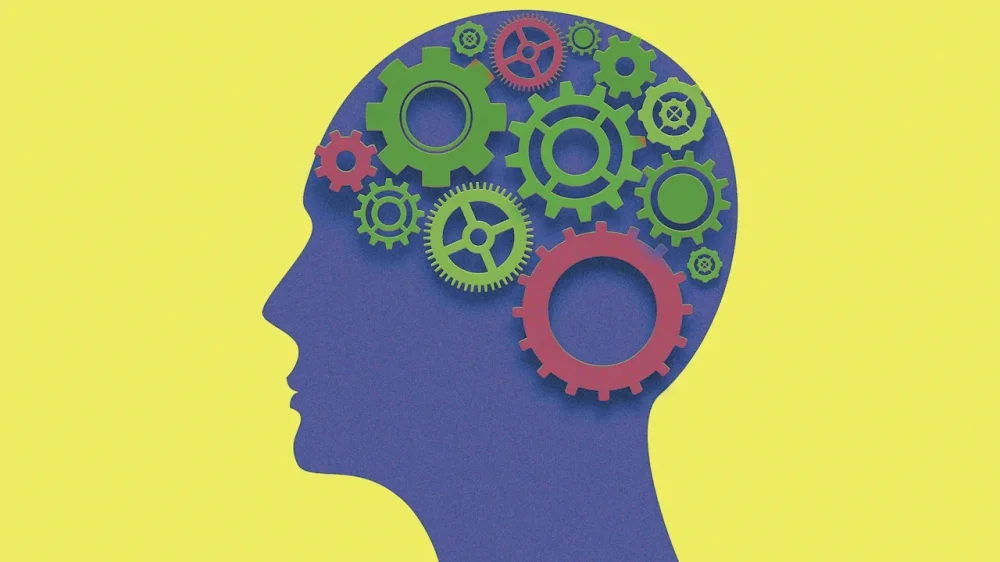
What does it mean to be “smart” or “dumb”? Few questions are more deceptively complex. Most of us have strong opinions about what those words mean, but scratch the surface and it becomes clear that “smart” and “dumb” are slippery, subjective constructs. What seems smart to one person may strike another as naive, arrogant, or shortsighted. Worse still, our own perception of what’s smart can shift over time. Yesterday’s clever decision can look like today’s regrettable blunder. Take Jay Gatsby, for instance. His grand plan to reinvent himself, amass a fortune, and win back Daisy once seemed like the height of romantic intelligence; but in the end, it revealed itself as delusional folly, built on illusions as fragile as the dream he chased. For a famous path reversal (from allegedly dumb to obviously smart), consider Forrest Gump, whose simple, seemingly naive choices (e.g., running across America or investing in “some fruit company”) looked foolish to everyone around him. Yet his lack of overthinking and unpretentious sincerity led him to happiness, wealth, and a kind of quiet genius that outsmarted all the so-called smart people. In hindsight, we often discover that our supposed genius was merely luck, and our “dumb” mistakes were actually learning opportunities in disguise. In short: Being smart isn’t a fixed trait; it’s a moving target defined by outcomes, context, and time. In line with that, we tend to withhold judgment until we’ve seen enough evidence. After all, anyone can have flashes of brilliance or moments of foolishness—what matters is the overall pattern. That’s why we evaluate intelligence not by a single act, but by the consistency of choices and behaviors over time. The science of adaptability Charles Darwin famously noted, “It is not the strongest of the species that survives, nor the most intelligent, but the one most adaptable to change.” Along the same lines, psychologists (who are often largely footnotes to Darwin) have a relatively simple and more objective way to define smart versus dumb behavior: adaptability. In that sense, what we call “intelligence” is largely the capacity to adjust one’s behavior to achieve desired outcomes in a changing environment. In other words, smart behavior increases your chances of success, survival, or well-being. Dumb behavior does the opposite. When faced with different options, the smartness of your choice can be judged by its consequences. If your decision enhances your opportunities, relationships, reputation, or resilience, it’s smart. If it narrows your prospects or makes your life worse, it’s dumb. Crucially, this definition also accommodates social consensus. One person’s opinion may be biased, but when many independent observers agree that an action was wise (or foolish), that consensus is usually a good proxy for truth. You can fool some people some of the time, but not everyone all the time. IQ vs. EQ: 2 pathways to smart behavior When it comes to predicting whether people will behave intelligently or not, two psychological constructs stand out: IQ and EQ. IQ (intelligence quotient) reflects cognitive ability—that is, how effectively you learn, reason, and solve abstract problems. It’s the single best predictor of performance in well-defined, rule-bound contexts such as school exams, technical analysis, programming, or chess. People with higher IQs tend to make better decisions when the problem has a right answer. EQ (emotional quotient), on the other hand, captures the capacity to understand and manage emotions, both your own and others’. It predicts success in less structured, interpersonal domains: leading teams, negotiating, managing conflict, or handling stress. In these fuzzy, ambiguous situations, there are rarely clear “right” answers, and emotional intelligence helps navigate the gray zones. Both forms of intelligence matter. IQ helps you see patterns; EQ helps you see people. False stereotypes: book-smart vs. street-smart Part of the reason people resist IQ is that they equate it with cold, academic, or impractical intelligence: the “book-smart but clueless” archetype. Think of high-IQ figures who made disastrous real-world choices: the Enron executives with MBAs from top schools who engineered their own collapse, or Nobel laureates who lost fortunes day-trading because they overestimated their models. Brilliant analysts but poor decision-makers. Conversely, high-EQ individuals (likable, empathetic, persuasive) are often celebrated as “street-smart.” They can read a room, defuse tension, and influence others. Yet this doesn’t mean they always make wise choices either. Importantly, research shows that IQ and EQ are largely uncorrelated. You can be high on both, low on both, or excel in one and lag in the other. They’re complementary tools—like having both a hammer and a screwdriver. One won’t replace the other, but together they let you handle a wider range of problems. Why high-IQ people do dumb things So why do objectively intelligent people sometimes behave foolishly? A few recurring patterns explain it. Overconfidence in reasoning. High-IQ individuals often trust their logic too much, ignoring emotional or contextual cues. This “cognitive arrogance” leads to blind spots, especially in social or moral dilemmas. Complexification. Smart people can overcomplicate simple problems, mistaking verbosity or abstraction for insight. They build intricate arguments to justify poor decisions. True intelligence is making complex things simple, rather than vice versa. Confirmation bias. The cleverer you are, the better you become at rationalizing your mistakes. Intelligence amplifies self-deception when ego is at stake. Too often, smart people are more interested in lubricating their egos than in making the right decision—their desire to feel smart may surpass their appetite for getting to the solution of a problem. Risk illusion. Intelligent people often feel they can “outsmart” uncertainty, taking reckless bets (financial, professional, or personal) under the illusion of control. In particular, when intelligence combines with narcissistic tendencies, it may lead to intellectual underperformance at the expense of grandiosity. Narrow optimization. They focus on optimizing a specific variable (e.g., efficiency, profit, prestige) while ignoring broader consequences. A “smart” business strategy that erodes trust or well-being isn’t smart in the long run. In short, high IQ can make you better at justifying dumb ideas, as well as defending your arguments and actions against others, leading to the “smartest person in the room” syndrome. When emotional intelligence backfires EQ provides no immunity against stupidity either. In fact, its virtues can become liabilities when taken too far. Empathy surplus. Being too attuned to others’ emotions can make you overly accommodating or reluctant to deliver hard truths. Agreeableness overdrive. High-EQ people often avoid conflict, even when confrontation is necessary to prevent bigger problems later. And people who focus on avoiding conflict end up causing a great deal of conflict in the long run. Emotional manipulation. The dark side of EQ is Machiavellian charm, using emotional awareness to manipulate rather than connect. Compassion fatigue. Caring too much can lead to burnout, especially in leadership or caregiving roles. In any job or organization, especially in competitive settings, if you optimize for getting along, you will impair people’s appetite for getting ahead. Emotional suppression. Some emotionally “mature” individuals regulate so well that they disconnect from their authentic feelings, losing spontaneity and creativity. In essence, EQ without boundaries can make you a “nice fool”—liked by everyone, exploited by many. The meta-skill: coachability and learning If IQ and EQ help you make smart choices, what helps you stay smart? The answer is coachability, the willingness and ability to learn from mistakes. This meta-skill distinguishes the chronically dumb from the progressively smart. Everyone makes errors; only the adaptable learn from them. Here are five evidence-based ways to improve your decision-making intelligence. Seek feedback relentlessly. Smart people solicit criticism before failure makes it unavoidable. The goal isn’t to be right; it’s to actually get better (evolve, develop, grow, etc.). Distinguish process from outcome. A good decision can lead to a bad result, and vice versa. Evaluate how you decided, not just what happened. Question your certainties. Treat your beliefs as hypotheses to test, not truths to defend. Balance emotion and logic. Before major decisions, ask: Am I thinking clearly and feeling right about this? IQ and EQ can actually work together to improve outcomes, but you will need to manage this tension and turn them into allies. Study your own patterns. Keep a decision diary, record choices, predictions, and outcomes . . . or at least reflect, get feedback, assess, and recalibrate. Over time, you’ll see which biases or emotions trip you up. In short, the smartest people aren’t those who never err; they’re the ones who systematize their learning from errors. What ultimately separates wisdom from folly isn’t intellect or emotion alone, but the capacity to adapt—to learn, recalibrate, and improve. As author and Harvard professor Amy Edmondson compellingly illustrates: In the end, smartness is less about having the right answers and more about asking better questions after you’ve been wrong. The truly intelligent person is not the one who avoids dumb mistakes, but the one who refuses to repeat them. View the full article
-
It’s been 70 years since Douglas McGregor sketched a management theory at MIT Sloan that leaders still ignore—and their teams pay the price. Known as Theory X and Theory Y, McGregor’s framework built on Abraham Maslow’s work on employee self-actualization, and it quickly became one of the foundational texts of modern management thinking. In McGregor’s theory, leaders fall into two camps. Theory X managers assume that employees are inherently lazy, need constant supervision, and would rather coast along than contribute. Theory Y managers, by contrast, see employees as self-motivated, responsible, and capable of growth if given the right environment. And the kicker is that both kinds of managers usually get exactly the employees they expect, no matter who they originally hired. What McGregor was tapping into was the fact that certain beliefs have an uncanny way of turning into real, measurable effects on human behavior. Whether it’s placebo studies in medicine or examining how teachers’ expectations impact classroom performance, the science is unambiguous about how far-reaching effects simple expectations can have. The psychology behind high expectations Psychologists were among the first to observe and take note of the feedback loops that expectations set off. Take the now-famous study by Rosenthal and Jacobson in 1968. Elementary school teachers were told that a group of randomly selected students had been identified as “late bloomers” who were about to show remarkable academic growth. The result surprised even the researchers themselves. Those students did indeed outperform their peers, in part because the teachers, subconsciously or not, started treating them differently by offering more encouragement, more patience, and more challenging material. The students responded in kind, rising to the challenge now that someone in authority believed them capable of meeting it. The only thing that had changed was the expectations. Journalist David Robson chronicles just how far this phenomenon goes in The Expectation Effect, a book that should be required reading for leadership. From placebo heart surgeries that deliver real relief to workouts that burn more fat just because people believe they’re working harder, Robson lays out the scientific evidence showing how our expectations construct reality around us. The psychology behind the effect is simple: Your brain doesn’t sit around waiting for input like a neutral recordkeeper. It ceaselessly guesses and simulates what might happen so that you can be prepared for whatever comes across your desk. At each moment, the brain is busy constructing an internal map of what’s likely to happen, and then it updates that map based on whatever comes next. It’s no surprise to find that our expectations prime the brain’s sensory and emotional circuits almost as if it’s already happening. If you are expecting pain, the amygdala lights up before you even stub your toe. If you expect failure, your cortisol rises, your attention narrows, and your working memory takes a hit before you’ve even started the task. Expect a sense of existential dread and meaninglessness at work? Here you go, says the brain, lowering your dopamine levels until motivation plummets because your brain’s prediction model no longer sees a reason to invest cognitive effort. That’s why a sugar pill can relieve chronic pain, why sham surgeries produce real outcomes, and why a warm-up jog feels harder if you think it’s the workout. The experience conforms to the prediction, and belief becomes biology. When leaders talk about “setting the tone” or “creating a culture of excellence,” they’re not that far from hitting upon something truly powerful. If we accept that expectations change biology, cognition, and motivation, then leveling them appropriately becomes one of leadership’s central tasks. Be careful what you expect, because you might get it If you walk into a boardroom assuming your team lacks ambition, you’ll subconsciously act like it by designing processes that assume failure. Your team, in turn, will rise—or in this case, sink—to the level you’ve set. Welcome to management by cynicism. Nelson Repenning, an MIT Sloan School of Management professor and coauthor of the new book There’s Got to Be a Better Way, has spent his career helping leaders break out of this cycle. He advises leaders to expect more—and better—from their people as a starting point. “When people fail, we treat it like a character flaw. But in most organizations, failure is a design problem,” he says. “The question every leader should ask isn’t ‘why did they screw up?’ It’s ‘what about our system made it easy to screw up?’” Repenning and his longtime collaborator Don Kieffer argue that modern management has become too disconnected from the work itself. “You’d be amazed how many executives can’t describe how the work actually gets done,” Kieffer says. “It’s like trying to fix a car without opening the hood. These leaders can’t set a good expectation because they’re so far removed from reality to begin with.” Without that intimacy, leaders default to assumptions, not expectations. Before long, you’re managing caricatures of your team instead of the real people doing the work. “Anyone can ask for a 17% increase in revenue and expect it to happen,” Repenning says. “But that’s not a healthy way to set goals, let alone a culture of expectations. Leaders need to know what they are asking for, and they need to understand how powerful the expectations they set are.” This is where too many leaders trip over their own lofty visions. They expect more, but enable less. Perhaps some even care less. Repenning calls this the paradox of servile leadership: “Great leaders don’t set expectations and step back. They ask, ‘What do you need from me to get there?’ Then they go and move those boulders.” The accompanying leadership model isn’t that much more complicated. Set the target, communicate belief, and then roll up your sleeves to start fixing what’s broken—whether it’s systems, workflows, org charts, tools or, yes, your assumptions. McGregor and Maslow would be nodding along if they were still with us. Decades before we started talking about psychological safety and employee empowerment, they argued that the job of management was to unlock people’s natural drive. Give them autonomy and show them how their work connects to a bigger picture. Eliminate the “management by the stopwatch,” and start practicing management by the soul. Expectation is free—disappointment is expensive If you expect your team to take shortcuts, you’ll create a culture of cutting corners. If you expect your team to challenge ideas, they’ll innovate. If you expect mediocrity, you’ll be surrounded by it. And the inverse holds, too. When leaders believe in their people, when they really believe in their capacity to achieve, something remarkable happens. People stretch to meet the expectations, and trust begins to compound. “Done right, simply expecting greatness might do more than any retreat or bonus ever could,” Repenning says. “But expecting isn’t enough. You still have to earn it.” That’s the fine print of McGregor’s theory, and the trap too many leaders fall into. They want the results of Theory Y, but still manage like they believe in Theory X. The message that sends is: “I don’t really think you’ve got it in you. But prove me wrong.” That’s not leadership. That’s abdication. And now you know how to do better. View the full article

-
The most enduring leaders aren’t the ones with flawless résumés. They’re the ones who’ve been tested, humbled, and reshaped by failure. From an early age, I trained intensively to become a professional ballet dancer. Ballet wasn’t just a passion. It was my identity, my future, my entire world. Until an audition in Vienna changed everything. A sudden injury ended the career I had spent years building. That moment could have marked the end of my story. Instead, it became the beginning of a new one. I pivoted into finance and marketing, building a career at American Express and Amazon. Today, I advise boards and CEOs on succession, governance, and talent strategy at Egon Zehnder, one of the world’s preeminent global leadership advisory firms. One truth has stayed with me throughout this journey. Setbacks aren’t detours. They’re gifts. And if you haven’t failed in a meaningful way, you may not be ready to lead yet. Setbacks clarify what matters When things don’t go as planned, it’s a moment that forces reflection. Perhaps you’ve been passed over for a promotion, convinced you were the most qualified candidate. Or the product you thought would set a new sales record didn’t perform as well as expected, and customers were underwhelmed. Suddenly, you start asking different questions. Are you communicating your impact clearly? Have you built strong sponsorship? Are you recognized as a leader or just as someone who executes well? Can you pivot quickly and creatively based on changing circumstances? Failure shakes our sense of certainty and exposes how fragile our narratives about ourselves can be. It reminds us that success isn’t always linear, and performance doesn’t speak for itself. These moments are hard, but they also teach us the difference between doing good work and being seen as ready to lead. Resilience isn’t built in moments of triumph. It’s forged by challenges Mary Barra, now CEO of General Motors, rose through engineering and manufacturing at a time when few women held those roles. Her experience proved essential in 2014, when GM faced a major crisis over ignition-switch failures. Barra didn’t deflect blame. She addressed Congress directly, took responsibility, and began reshaping the company’s culture. That could have been a defining failure. Instead, it became a defining moment. Barra’s story is a reminder that leadership isn’t about never being questioned. It’s about responding to challenges with clarity, consistency, and a willingness to grow. Ultimately, resilience is built in the quiet, difficult moments when no one is cheering you on. Conviction without listening is arrogance Jeff Bezos once said Amazon succeeds by being “stubborn on vision, flexible on details.” That mindset helps explain how even a product like the Fire Phone, a commercial failure, still served a strategic purpose. Rather than doubling down on a misfire, Amazon listened to customer feedback, learned from the experience, and used those insights to develop Alexa. The distinction matters: Conviction without listening is arrogance. But conviction that adapts based on what customers are telling you? That’s leadership. Passion, unfortunately, doesn’t replace market truth. Tenacity can easily turn into tunnel vision. As leaders, our job is not just to have ideas. It’s to make sure those ideas matter to someone else. If we’re not listening—to our teams, to our customers, to the world around us—then we’re building in a vacuum. Ideas only matter if others believe in them In my work advising CEOs and boards, I meet leaders with really good ideas who struggle to influence others. They know what needs to be done, but they can’t bring people along. That’s not a strategic problem. It’s a leadership problem. Influence starts with empathy. The ability to see what others value, where they hesitate, and how to connect with them. Often, that empathy is forged through failure. When leaders fall short, they’re forced to see blind spots, hear hard truths, and confront the real impact of their decisions. Consider Microsoft CEO Satya Nadella. After early stumbles in Microsoft’s mobile strategy, he leaned into a more collaborative, learning-oriented culture that valued listening over ego. That shift helped him rebuild trust internally and reposition Microsoft as a more agile, empathetic company. Nadella’s story is a powerful reminder that failure isn’t just a test of resilience. It’s a chance to become the kind of leader others actually want to follow. Failure builds humanity. And humanity builds leadership Many of today’s most respected leaders have careers marked by public missteps and personal reinventions. In the process, they’ve developed resilience and deeper empathy—the foundations of strong leadership. Because setbacks don’t just humble you, they humanize you. And leadership without humanity doesn’t last. Ballet is still a part of me. I attend performances. Some of my closest friends are dancers and choreographers. In a twist of life’s full circle, I now have a daughter who is already a more talented dancer than I ever was. Watching her on stage reminds me that what I once thought was the end of my story was really the beginning of hers. That’s the unexpected gift of setbacks. They don’t just close doors. They open better ones. But only if you’re willing to walk through them without the armor of perfection. Your best chapter may begin in your hardest moment As I advise CEOs and boards navigating complexity, I see a clear pattern. The most effective leaders are the ones who’ve been tested by hardship and hold their conviction while remaining open to challenge. They’re the ones who understand that every stumble is an opportunity to rethink, reframe, and reemerge more strongly. In a world of relentless disruption, we need leaders who can metabolize failure into progress. We need leaders who understand that credibility isn’t built on being right all the time, but on how you respond when you’re wrong. So if you’re facing a setback, don’t rush to move past it. It could very well be the greatest gift you receive on your leadership journey. Embrace it, learn from it, and let it remake you. Because the story you planned might not be the story you’re meant to live. And your best chapter may be the one that begins right after your biggest setback. View the full article

-
And suddenly, there may be a reverse Midas at the centre of AI’s circular economyView the full article
-
It should be shocking to nobody that we’re dealing with an absolute surplus of AI consumables. Breakthroughs. Policy changes. New tools that promise to “10x your productivity.” Most of it is either too technical, too abstract, or just plain filler. You don’t need another wall of text, you need the signal. Luckily, there are a handful of AI newsletters that consistently deliver real value without taking up half your morning. (My editor wanted to make sure you knew about Fast Company’s own such newsletter, by senior reporter Mark Sullivan: AI Decoded. You can sign up for it here.) The Rundown AI: The Daily Scan If you have exactly five minutes between pouring your coffee and jumping on your first call, The Rundown AI is for you. All business, no fluff, it gives you the full, daily landscape in a highly digestible format. If something major drops from OpenAI, Google, or Meta, you’ll know about it. This is best for the busy professional or anyone who just wants the highlights without having to chase links all day. Superhuman AI: The Productivity Power-Up The Superhuman AI newsletter runs the gamut from grand philosophical debates of AI to the tools that make your job easier. At its best, it’s practical, actionable, and focused on handing you the tools, tips, and tutorials to integrate AI into your daily tasks. Think prompt engineering tips and how to use the latest AI to automate something you hate doing. This one is ideal for individuals looking to boost their personal productivity and executives focused on operational efficiency. The Neuron: Connecting the Dots If The Rundown is the summary, The Neuron is the analysis—the one that tells you what the news means. Expect a thoughtful analysis with a touch of dry humor. The Neuron is excellent at connecting the technical developments to the real-world impact. This is excellent for strategy leaders and those who need to understand the implications of AI for their industry. Ben’s Bites: For the Builders Ben’s Bites is less about the press releases and more about what the AI community is actually building right now. Curated by Ben Tossell, it’s a daily digest packed with new tools, product launches, and startup funding news. If you’re a founder, developer, or just love being the first to try a new app, this is your resource. The Batch: The Educational Authority When you need to go beyond the chatter and understand the foundational elements of AI, The Batch is authoritative, educational, and reliable. This weekly digest strikes a nice balance, covering the major research breakthroughs alongside the applied use cases. It keeps you current without oversimplifying the complex subject matter. This is best for anyone transitioning into a technical AI role or the leader who needs to speak confidently about AI. View the full article

-
Bitcoin drops 28% in six weeks as worries over AI stocks spill into digital assets and high-octane bets backfireView the full article
-
Politics today is about ‘open vs closed’, but the UK government’s approach risks appeasing no oneView the full article
-
Huge improvements in the decades since are a reminder that even really knotty problems can get betterView the full article
-
The property in One Hyde Park had been held via a trust of which Natalia Rozhkova is listed as the beneficiaryView the full article
-
The President-supporting billionaire narrows EIT’s ambitions by cutting initiatives and tightening controlView the full article
-
Europe wrestles with crumbling bridges, narrow tunnels and red tape as it plans how to move an army eastward View the full article
-
Bank’s leadership differs on who has necessary finance experience and Asia knowledgeView the full article
-
Resolution is first step in complex, multiphase plan for the enclaveView the full article
-
Populist party claims chancellor Rachel Reeves can avoid tax rises at the Budget View the full article
-
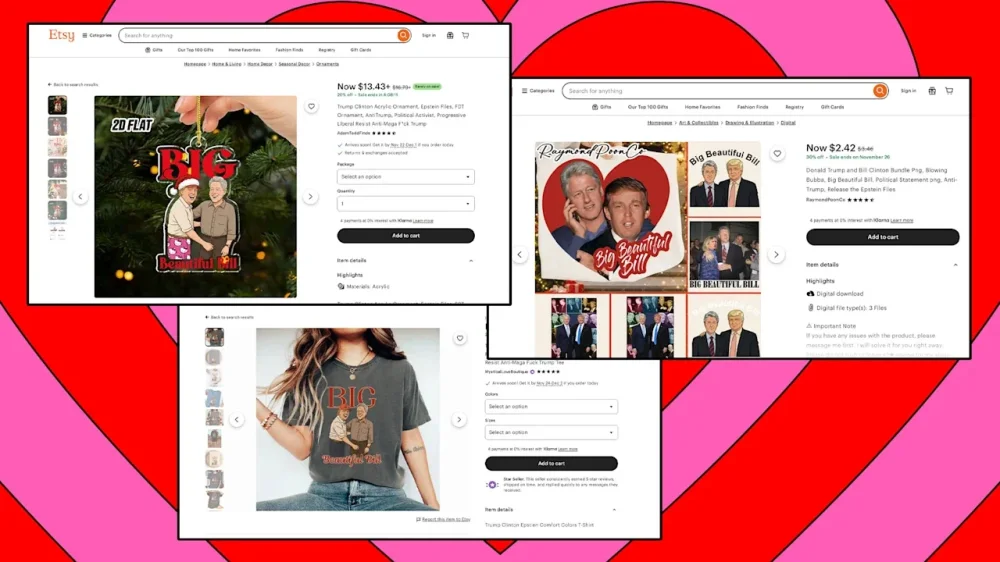
Last week, Congress released more than 23,000 pages of documents from the late convicted sex offender Jeffrey Epstein’s estate to the public. Since then, the bombshell release has garnered commentary from the The President administration, thousands of internet users, Saturday Night Live and, now, merch sellers on Etsy. In recent years, a certain contingent of ultra-niche online merch sellers (and, most likely, drop shippers) have decided that any notable event is fodder for potential T-shirts, mugs, and bumper stickers. In recent months alone, sellers have profited from merchandise designed to covertly signal anti-The President messaging; merch promoting “Alligator Alcatraz,” the The President administration’s migrant detention facility in the Florida Everglades; and merch based on a series of New Jersey drone sightings that spawned conspiracy theories across the internet. Just days after the new Epstein documents were released, merch sellers on sites including Etsy and Amazon have already turned the disclosures into NSFW statements. Etsy and Amazon flooded with merch inspired by the Epstein emails Of all the information included in the documents revealed by Congress (including one message in which Epstein claimed that The President “knew about the girls”), most merch sellers are focusing on a specific email exchange in March 2018 that’s become a major subject of internet scrutiny. In the exchange, Epstein’s brother, Mark Epstein, asks Epstein how he’s doing. When Epstein responds that he’s with Steve Bannon—The President’s former White House chief of staff—Mark Epstein follows up with: “Ask him if Putin has the photos of The President blowing Bubba?” Given that “Bubba” is a well-known nickname for former President Bill Clinton, netizens have begun speculating that the comment might refer to a sex act between The President and Clinton. The comment even got some national airtime on Saturday as part of SNL’s cold open on November 15. (Both The President and Clinton have denied any knowledge of Epstein’s abuse or sex-trafficking operations, and neither appears to have been explicitly implicated in wrongdoing in the emails.) Mark Epstein has since gone on record to multiple publications claiming that he was just joking—but that’s not stopping merch sellers from capitalizing on the theory. A look into the NSFW merch designs Out of the dozens of new Etsy and Amazon listings that have popped up since the files were released, one of the most common themes is a riff on the phrase “big, beautiful bill,” which The President used to describe a major tax and spending law that he signed in July. In these merch items, however, the “bill” in question is Clinton. The items, many of which are not safe for work and potentially offensive, feature President The President and former President Clinton along with a variety of suggestive phrases. (See here, here, here, and here for examples, but click at your own risk.) While most of the merch is fairly predictable, a few sellers have opted for more creative designs—including one image of The President and Clinton inspired by the iconic film Brokeback Mountain. Etsy and Amazon did not immediately respond to Fast Company’s request for comment on whether it’s aware of an uptick in merch in this vein, and whether the merch fits within their terms for seller designs. View the full article
-
Federal Reserve Gov. Christopher Waller said in a speech Monday that private and public-sector data suggests that the labor market is continuing to weaken, making a 25 basis point rate cut in December a prudent choice. View the full article

-
We may earn a commission from links on this page. I fell in love with cold weather running while I was training for a spring marathon. It wasn’t a choice at first: Some weeks, the weather was bad for days on end, and if I stayed home I would fall behind in my training. Everybody else in my training group was braving the elements, so I did too—with no regrets. I got to run on quiet mornings while snow was softly falling. I signed up for a winter race that herded finishers into a heated barn for hot chocolate and soup. I set a personal record at a spring race, during which I pushed myself hard without breaking a sweat. I now find it sad when somebody tells me they’re afraid of running in the cold, or that they would run in the winter but don’t know what to wear. No, cold weather doesn’t have to stop you from running, but getting dressed can be a puzzle: How do you keep from freezing your butt off at first and avoid overheating once you start to sweat? Fortunately, it isn’t as tough as it looks. With the right gear, your fingers and ears can stay toasty while you jog through a winter wonderland. Below, I’ll give you a temperature-by-temperature running cheat sheet, and then dive into the specifics on how to buy the best socks, shirts, and more. Use the"feels like" temperature and the 20 degree rule When I get dressed to run in winter, I take a look at the “feels like” temperature, not the actual high or low. I also make sure to check the weather for the time I’ll go running, not for the whole day. It doesn’t matter how warm it will be at 2 p.m. if my run will be happening at 6 a.m., before the sun is up. The simplest way to figure out what to wear is with the 20 degree rule. Imagine that the temperature is 20 degrees (Fahrenheit) warmer than it really is. What would you wear then? Well, if it’s 50 degrees out, you’d dress as if it were 70: in a T-shirt and shorts, most likely. If it’s 30 degrees, you’d dress as if it were 50: long pants and maybe a light jacket. Get the idea? Everybody has their own preferences. Some people dress in shorts even when it’s snowing, while others will pop a beanie on as soon as there’s a detectable chill in the air. I’m a pretty middle-of-the-road runner when it comes to keeping warm, so here’s what I wear at each “feels like” temperature, starting with warmer weather and working our way colder. I'll give a guide to each type of garment or accessory at the end. What to wear if it's 50 degrees or warmerAt 50+ degrees Fahrenheit, I’m wearing basically the same things I would for a summer run. Bottoms: shorts or light leggings. Top: A tank top or T-shirt. Head and hands: Nothing special. No gloves and no hat, unless it’s a baseball cap to shade my eyes from the sun. What to wear if it's in the 40sWe’re starting to feel the first bit of a chill. This is where I may start bringing gloves, although they’ll probably get stuffed into a pocket by the end of the run. Remember, with the 20 degree rule, it will feel like 60 degrees by the time you're warmed up. Bottoms: Leggings, lightweight long pants, or shorts. Top: Something with long sleeves, but ideally made of thin material (think long-sleeved T-shirt, not a full on sweatshirt or jacket). If you wore a sun shirt in the summer, that's a good layering option for these cool temps. I like my REI Sahara Shade hoodie here, but any long sleeve will do. If you run fall and winter races, you'll probably be handed a free long-sleever at some point. Hands: I usually just pull my shirt's sleeves over my hands, but you could wear knit gloves if you want. Consider something like Flipmits for an intermediate option (they can be folded down into a wrist cuff when your hands warm up). Head: A headband if you need protection for your ears. adidas Alphaskin Headband – Performance Workout Ear & Sweat Band $15.99 at Amazon $22.00 Save $6.01 Get Deal Get Deal $15.99 at Amazon $22.00 Save $6.01 What to wear if it's in the 30sYou may see a few snowflakes drifting down, but don’t bundle up in a snowsuit. Once you’re warmed up, it will only feel like 50 degrees—so go for something in “light jacket” territory. Bottoms: Leggings or running tights. The fleece-lined kind can be nice. (I have these.) Top: You’ll want some kind of jacket or sweatshirt. A lightweight, reflective rain jacket is great here, or just throw on a regular hoodie over your T-shirt. (I go with cotton sweats in dry weather or light snow, but I'd go for synthetics or wool if there's rain or sleet.) Hands: Definitely wear gloves. The cheap knit ones are usually good enough, but consider treating yourself to a nice pair of running gloves. Head: Your choice of hat or headband; I’d stick with the headband. Feet: This is around the temperature you may start to want warmer socks. That goes double if snow is in play: snow that falls onto your shoes will work its way through the mesh, melt, and make your feet wet. Wool is a good material here, so consider something like these from Smartwool. baleaf Women's Fleece Lined Leggings Thermal Warm Winter Tights High Waisted Thick Yoga Pants Cold Weather with Pockets Black L $36.99 at Amazon Get Deal Get Deal $36.99 at Amazon What to wear if it's in the 20sThis is where I’ll officially say it’s “cold.” Whatever warm-weather gear you were getting away with at warmer temps, you’ll probably have to swap it out now. Shorts people will break out their long pants. Headband people will wear a real hat. Bottoms: Leggings and shorts. I don’t care if you think it looks goofy to wear both, this is an A+ hack. Men, if you weren’t already wearing pants with a windproof panel in front, you might want to look into those now. Top: It’s definitely jacket weather. Rather than getting a warmer jacket, I like to wear the same light jacket as I did at 30 degrees, but this time with a long-sleeved, fleece or wool base layer underneath. Hands: Real gloves, please. You can keep wearing your little knit gloves if you’re able to tuck your hands inside your jacket sleeves, or if you have a pair of mittens to wear over top; otherwise, get windproof gloves. Head: A hat, and maybe also a buff for your nose and mouth. (If you have any cloth masks still hanging around from the COVID days, they’re perfect for cold weather runs.) Feet: Warm socks for sure. If you’ll be doing a lot of running in these temperatures, you may want shoes that are specialized for the elements. Look for ones with Gore-Tex uppers, like the Brooks Ghost GTX. What to wear in the teens and colderThis is where I tap out. If a run is just barely in the teens, I’ll make do with the 20-degree items I mentioned above (maybe wearing an extra layer if needed). You certainly can run in this weather if you are determined. You’ll want windproof everything, some kind of face covering, and you may need eye protection such as goggles. Whenever the weather gets to your own personal “too cold” temperature, remember that you still have options. The early afternoon is often the warmest part of the day, so a run may be tolerable then. There’s also no shame in using a treadmill (even if you have to join a cheap gym for this reason alone). Everybody has different preferences, and with practice you’ll figure out if you’re the kind of person who wears three shirts before it hits freezing or the type to run through the snow in shorts. But this should give you a starting point when you head out for your first (or next) cold weather run. How to buy the best cold-weather running gear (without breaking the bank)As you continue on your cold weather running journey, you may need to buy some new gear or repurpose things from elsewhere in your closet. And yes, the first few minutes of your run will feel chilly. But if you’re wearing the right shoes and clothes (and planning routes with a few extra factors in mind, which I’ll discuss below) winter running is not just feasible, it’s actually fun. So here are the items you may want to consider SocksYour feet need to be warm and, if possible, dry. Warm socks go without saying, but there are some extra considerations when you’re picking socks to run in. Wool socks are ideal because they keep your feet warm even when they get wet. You may not think of winter as a wet time, but any snow that meets up with your body heat will turn into water. If you don’t have wool socks, synthetic wicking fabrics are a good second choice. Cotton is a no-no First, the socks have to be able to fit into your shoes. If you’ve been running in super thin cotton or synthetic socks all summer, thick socks may not fit. Smartwool run socks are available in a thin version that can fit no problem—but in colder weather you’ll want some thickness for extra warmth. That thickness, in turn, may mean that your winter running shoes need to be roomier than the shoes you wear in summer. If you’re buying a new pair, make sure to try them on with the type of socks you intend to run in. ShoesIf your warm socks fit, you can make do with the same shoes you wore in the summer. Your feet will stay dry if the weather is dry and you stay out of puddles. If you encounter snow and slush, though, your feet will have to endure warm-but-wet conditions for the rest of your run. That can be okay for short runs, but for serious winter running, consider upgrading your shoes. Some running shoes are available with water-resistant uppers. This level of water resistance will keep stray snowflakes out of your socks, but it isn’t reliable if you’ll be stepping in slush puddles. In that case, you’ll want something more waterproof, like Gore-Tex shoes, many of which are made for running trails. Brooks Women’s Ghost 17 GTX Waterproof Supportive Running & Walking Shoe - Coconut/Oyster/Blue - 5 Medium $169.95 at Amazon Shop Now Shop Now $169.95 at Amazon If you expect to run on a lot of ice or packed snow, especially on trails, spikes can give you a little extra grip. Yaktrax makes a rubber harness that stretches to fit your shoe, with steel coils and small spikes, for about $35. Microspikes are a notch up from there, costing around $75 for what look like a miniature version of the chains you’d put on car tires. And if you’re really dedicated—and are seeking a purpose-built pair of snow shoes—you can attach individual spikes: either these traction spikes from IceSpike, or via a DIY approach using sheet metal screws. (There’s a tutorial here.) The versions that include rubber, like Yaktrax, can wear out quickly on pavement, so it’s best to save these for runs on trails or on unplowed paths. You’ll also want to be careful about the fit. I tried a pair that were similar to Yaktrax, but they were a tad too big. Shortly into my run, I found that the rubber stretched enough to pull the front set of spikes up over the top of my shoe. I've since gotten better-fitting ones, and they work great. Spikes and specialized shoes help you go more places, in worse weather—but remember that they’re not required to just head out on a chilly day. Regular shoes are fine if the weather is cold but dry, or if you’re willing to put up with a little moisture. Shirts and jacketsOn a chilly day—say, in the 50s—a long sleeved T-shirt is probably all you need. Wear it over your regular tee or tank, and you can take it off and tie it around your waist once you warm up. For colder weather, you’ll want to break out a light jacket or sweatshirt. This is when you experience one of the hidden perks of winter running: extra pockets! By the time temps dip into the 20s or below, you’ll be doing some serious layering: for example, an undershirt, a long-sleeved warm layer, and a jacket. A great option for that warm layer is a wool base layer like this one. (Don’t worry, it’s not itchy). If you can’t wear wool, there are synthetic ones as well. Before you run out to buy all new clothes, experiment with what’s in your closet. Try fleece or a repurposed thin sweater, for example. Some people would never wear cotton for running (it can be cold when wet), but I wear it as my undershirt layer and have lived to tell the tale. The jacket is the most important layer. You can grab a sweatshirt in a pinch, but to be really well-equipped for nasty weather, you’ll want a jacket that is windproof and water-resistant. Jackets made for running are lightweight, for layering. Consider ones that are visible at night, with bright colors and reflective areas, and that come with zippered pockets. BALEAF Mens Cycling Rain Jacket Windbreaker Waterproof Running Gear Golf Mountain Biking Hood Lightweight Reflective Yellow XL $55.99 at Amazon $59.99 Save $4.00 Shop Now Shop Now $55.99 at Amazon $59.99 Save $4.00 Leggings, tights, and pantsOnce it’s too cold for shorts, you’ll want to start layering your bottoms, too. Women are at an advantage here, since most of us already have leggings in our closet. (It’s fine to wear cotton if it’s dry out, but go for synthetics if it’s snowing.) Pants that aren’t form-fitting tend to let cold air in. That’s why leggings or “running tights” like these are standard winter wear for both men and women. Running tights come in different thicknesses; go for something fleece-lined for cold weather, or layer two pairs. And if your butt gets cold—or if you just want to be modest—feel free to wear a pair of shorts on top. And if you want more protection, consider underwear with a windproof panel on the front. One Amazon reviewer quips: “If you have ever run, even for a little, with your hand down the front of your pants for fear of frostbite, you need these.” AccessoriesYou need to keep your ears warm, but don’t reach for a winter hat right away: an earwarmer or headband can cover your ears while still letting heat escape from the top of your head. And if anything is falling from the sky (say, snow), a baseball cap will keep it out of your eyes. ZYXBBD Ear Warmers for Women and Men-Fleece Winter Ear Warmer Headband Ear Muffs for Jogging Running Hiking Cycling Skiing (Black+Red) $9.97 at Amazon Shop Now Shop Now $9.97 at Amazon Fleece or knit hats are great for cold enough days, of course. The dividing line between earwarmer weather and hat weather is a personal one, and depends on whether you’re overheating. If you’re wearing a hat but sweating into your base layers, the hat is probably overkill. Gloves, however, are essential. I keep a pair of cheap knit gloves in my jacket pockets, but windy or very cold days call for something stronger. You can layer gloves; I find gloves under mittens work well. You can also get windproof insulated gloves, which are warmer than any number of layers of hole-y knit gloves. Your face will freeze on windy or very cold days, so this is where your stash of pandemic face masks really shines. Any mask will help to protect your face, even if you’re on your own outdoors and don’t need it for infection control. In that case, go for comfort: consider a balaclava or even a fleece-lined bandana. A neck gaiter stays on better than a scarf, if your neck is cold. At this point, every inch of you is covered but your eyes. Sunglasses can take care of that. How to stay safe in the dark and the coldThe winter world can be dark, slippery, and (surprise!) cold. Here are some tips for dealing with some of the likely hazards. It gets dark earlier in the winter, so you’ll need to make adjustments to your evening or early-morning runs. Either switch to midday runs, or prepare to spend a lot of time running in the dark. That will require, at minimum, wearing reflective clothing and carrying a flashlight. (Better to wear a headlamp.) Plan routes where you feel safe even in the dark. In the winter I spend less time on trails and more time on the local school’s well-lit running track. We have tips to find a track near you. PETZL TIKKINA Headlamp - Compact, Easy-to-Use 300 Lumen Headlamp, Designed for Hiking, Climbing, Running, and Camping - Grey $39.33 at Amazon Shop Now Shop Now $39.33 at Amazon Slipping on ice sucks. Some ice you can see at a distance, but some you can’t. And remember that you won’t have your ice spikes if you’re running on paved, plowed surfaces. So keep a close eye out, and don’t be afraid to slow down to a penguin walk on areas you’re unsure about. Running a short loop multiple times lets you watch for ice on the first lap and put your mind at ease a little bit the next few times. The track probably won’t be plowed. If you depend on a track for speedwork, and it’s unavailable or impassible, you’ll have to make other arrangements. The easiest adjustment is to convert your usual intervals into time: If you normally run your 400-meter laps in two minutes, do intervals of two minutes at a time while running on a road or on the treadmill. (Then again, if you showed up to the track with a shovel, probably nobody would stop you, and it would be a great workout.) Busy roads may become unrunnable. If you normally run on the shoulder, be aware that snowplows will deposit piles of snow, which then solidify into little ice mountains, right in your running zone. If that leaves nowhere to run except in traffic, you’ll have to change your route. Water fountains may be turned off. This one is a warning for those of us that run in parks: If you depend on outdoor water fountains, they may not be available, so pack your own water bottle or detour to another source of water. Bathrooms, or seasonal businesses whose bathrooms you’ve used, may also be closed. Porta-potties may disappear for the season. You may not be able to drive. If you usually drive to the start of your running route or the place you meet up with a running group, some days may be too snowy to get there safely—even if you’re well equipped for the run itself. Make a backup plan by scouting out some routes in walking distance of your home. Know when to take it insideWhile you can mitigate winter running’s hazards, you can’t make them go away: even the most intrepid runners have to take a treadmill day every now and then. A little flexibility in your training plan can help you stay safe without feeling guilty about skipped workouts. Being in the cold and wet for too long can lead to hypothermia or frostbite, so pay attention to the conditions you’re heading out in. That includes checking the weather forecast and having a backup plan in case the weather gets too dangerous. For example, running a series of loops instead of one longer route lets you easily cut a run short. Or, you could plan long runs in areas that have plenty of buildings you could duck into to wait for a bus or an Uber car. On days you just can’t run outside, go to an indoor track if there’s one in your area. Sometimes gyms or YMCAs will have a tiny track that’s better than nothing—the one near me has 13 laps to a mile. Then there’s always the trusty treadmill. Intervals keep things interesting, or you can try these tips to survive a long treadmill run. And finally, staying safe is more important than any one workout—so be smart and stay home if the weather is too bad to run and too bad to drive to the gym. But on those beautiful winter days, when perhaps the snow is falling but the wind is gentle, layer up and enjoy. View the full article
-
Tories seek to draw up battle lines over the Budget as Reeves prepares to lift the two child benefit capView the full article
-
We may earn a commission from links on this page. The holidays are the perfect time to settle into your couch and check out a classic Christmas movie or 12. Streaming services have made just about any of them available at will, from traditional classics like Miracle on 34th Street, to potential future classics like Hot Frosty. That said, choosing what to watch (and finding where it's available) can be a chore, so I've compiled the best 50 Christmas movies and specials in an alphabetical list. Revisit an old favorite, or check out a classic you've never seen before (preferably with a nice cup of cocoa at hand). Bad Santa (2003) Cut through the treacle of the season with this classic Christmas-themed black comedy starring Billy Bob Thornton as a very bad Santa. This could have been a purposefully "offensive" comedy, but the holiday-centric redemption arc raises it above the muck. Where to stream: HBO Max The Best Man Holiday (2013) When a movie gets a Christmas-themed sequel, it's usually a bad sign, but Best Man Holiday is better than the original. This ensemble comedy's charismatic cast and relaxed vibe turn Christmas cliches into something that feels fresh. Where to stream: Hulu, Peacock Carol (2015) This soft, beautiful, layered film proves that the holiday movies don't have to be lightheaded fluff. Based on Patricia Highsmith's seminal lesbian novel The Price of Salt, Carol tells a story of love and loneliness perfect for thoughtful holiday viewing. Where to stream: HBO Max A Charlie Brown Christmas (1965) A Charlie Brown Christmas is an enduring classic because it doesn't shy away from real pathos. It doesn't try to protect its child audience from the sadder, bleaker side of life, so the holiday redemption ending is actually earned. Where to stream: Apple TV+ A Christmas Carol (many) There are too many "traditional" re-tellings of Charles Dickens' A Christmas Carol to list individually, and everyone has their personal favorite, but I've watched every single one, and ranked them. Where to stream: Various Christmas Evil (1980) Christmas Evil is the weird, sleazy story of an unbalanced man's murderous obsession with Christmas. It's better than it has any right to be and features the best twist ending in cinema history. Plus, it's one of John Waters' favorite holiday movies, and that's good enough for me. Where to stream: Prime, Tubi Christmas in Connecticut (1945) 1940s Hollywood's vision of Christmas reaches its reassuring zenith with Christmas in Connecticut, a romantic comedy starring Barbara Stanwyck that can be watched over and over again and never stop being delightful. Where to stream: Digital rental A Christmas Story (1983) Packed with quotable lines and unforgettable moments, A Christmas Story is battling It's a Wonderful Life for the title of most iconic American Christmas movie ever. I'm sure you've seen it before, and I'm also sure you watch the whole thing whenever it happens to be on. Where to stream: HBO Max, Hulu Christmas With the Kranks (2004) In Christmas With the Kranks, a family throws together a last-minute Christmas for their grown-up child. It's very dumb, and critics hated it, but it seems to get better and better every year. Where to stream: Netflix, Philo The Christmas Setup (2020) Lifetime's first LGBTQ+ Christmas movie has an 85% audience score on Rotten Tomatoes and it stars Fran Drescher—both positive markers—so if you're looking for a lightweight movie to put on when you're wrapping gifts, give this one a shot. Where to stream: Philo National Lampoon’s Christmas Vacation (1989) It's not deep. It's not important. But Christmas Vacation is funny enough to watch and light enough to ignore when you're wrapping presents. It's like a comfortable old slipper of a movie, perfect for the slowed down time of the holidays. Where to stream: HBO Max Die Hard (1988) Die Hard is a Christmas movie, no question. It's also the most action-packed film in the entire genre. Bruce Willis is amazing, and the "average Joe who gets into a huge situation" plot goes down smooth. Where to stream: Hulu, Disney+, Prime Eight Crazy Nights (2002) There aren't many movies about Hanukkah, so this animated Adam Sandler vehicle is a bit of a classic by default. But it's a fun little movie anyway. Where to Stream: Hulu, Disney+ Elf (2003) Appropriate for kids and hilarious for adults, you just can't beat Elf when you're looking for a holiday comedy. Will Ferrell is amazing as Buddy, the fish-out-of-water elf at the center of this story, whose wide-eyed optimism and unwavering belief will melt even the coldest heart. Where to stream: HBO Max Emmet Otter’s Jug Band Christmas (1977) The fact that the Riverbottom Nightmare Band was robbed at the battle of the bands isn't enough to ruin this puppet-based Christmas awwww-fest. Where to stream: Xumo, Tubi, Prime Video Ernest Saves Christmas (1988) Time has been strangely kind to Ernest movies (turns out slapstick ages better than any other form of comedy). If you haven't seen this one, check it out. It's delightfully stupid Christmas fun. Where to stream: Disney+ Friday After Next (2002) Friday After Next isn't usually thought of as a Christmas movie, but the holiday is integral to the plot: The third flick in Ice Cube's Friday series begins with Craig and Day-Day's apartment being robbed by a guy in a Santa suit, setting in motion a slew of Friday style antics centered on Christmas. Where to stream: Tubi Frosty the Snowman (1969) Frosty came out in a time when there were only three channels, so kids liked things on TV because they were the only things that were on the TV. But it rises far over this low bar through the naturalistic performances of its child actors—a rarity at the time. Where to stream: Hulu, Peacock, Disney+ Gremlins (1984) Joe Dante's horror-comedy isn't afraid to satirize Christmas movies and Christmas itself, and sometimes you need that during the holiday season. Where to stream: HBO Max Happiest Season (2020) Happiest Season breathes new life into the stilted holiday romantic comedy genre by removing the heterosexuality but keeping the Christmas magic intact. It's my pick for a future classic. Where to stream: Hulu, Disney+ The Holiday (2006) Like the best Christmas movies, this frothy, appreciate-what-you-got romantic comedy will charm you, even if you're desperately trying to prevent yourself from being charmed. Where to stream: Digital rental Holiday Affair (1949) Robert Mitchum plays against type by not being creepy in this lighthearted romantic comedy from the golden age of Hollywood. Where to stream: Digital rental Home Alone (1990) The story of eight-year-old Kevin McCallister being abandoned by his parents and stalked by hardened criminals could easily have been a horror movie, but instead, it's a Christmas classic. Movies are wild like that. Where to stream: Disney+ Hot Frosty (2024) This Netflix original holiday rom-com asks the question: "What if Frosty the Snowman was a hot dude?" I was expecting so-bad-it's-good, but it's actually good-good. Lacey Chabert is great as a widow in need of some Christmas magic, and the jokes are actually funny. Where to stream: Netflix How the Grinch Stole Christmas (1966) I love any Christmas movie that acknowledges the misanthropes out there, and the Grinch is so hateful, his name has become synonymous with disdain for the holidays. It's a shame he has to be redeemed in the end—but hey, it's Christmas. Where to stream: Peacock It’s a Wonderful Life (1946) There's nothing that hasn't already been said about It's a Wonderful Life, the ultimate Christmas movie. You know you're going to watch it, so just give in. Where to stream: Prime Jack Frost (1998) Holiday classics get that way either because they're great movies, or you happened to see them at the right time in your life. Jack Frost seems more like the latter to me, but it's a lot of people's go-to sentimental Christmas flick, so who am I to argue? Where to stream: Digital rental Jingle All the Way (1996) Arnold Schwarzenegger drops the action-hero act in this fast-paced, slapstick comedy about consumerism and the holidays. It's not going to change anyone's life, but it's a perfectly paced and seamlessly constructed artifact from big 1990s Hollywood. Where to stream: Tubi, Disney+ Klaus (2019) Christmas stories about "How Christmas came to be the way it is" seem very 1960s, but this beautifully animated Netflix feature brings the genre back in a big way by telling the story of Santa's team-up with an unlikely ally. Where to stream: Netflix Last Holiday (2006) Driven by the star power of Queen Latifah, LL Cool J, and Timothy Hutton this Christmas movie extols the virtues of living for the moment. Queen Latifah's performance as a woman who reacts to a terminal diagnosis by saying, "I guess I'll have fun until I die" is amazing. Where to stream: Hulu, Paramount+ Let It Snow (2019) This movie breaks the mold by mashing up the teen-romance genre with the snow and tinsel tropes of the holiday movie genre. It works surprisingly well, largely due to its talented young cast. Where to stream: Netflix Love Actually (2003) Despite appearances, good holiday movies and romantic comedies have to be subtle, otherwise they descend into cheap sentiment. Love Actually manages to navigate the tightrope between mawkishness and real emotions as well as any movie ever made. Where to stream: Hulu, Peacock, Meet Me in St. Louis (1944) Before she descended into an alcoholic abyss, Judy Garland was as big a star as you could be, and this is Garland at the height of her power. Meet Me in St. Louis is a singing, dancing holiday delight. Where to stream: Tubi A Miracle on 34th Street (1947) A Miracle on 34th Street's tale of Santa Claus's reality being put on trial is sentimental, cloying hogwash, but so is Christmas, so just sit back and take it. (But don't watch the version from the 1990s. There's a limit.) Where to stream: Disney+, Prime Video The Muppet Christmas Carol (1992) Like Bill Murray's Scrooged, The Muppet Christmas Carol is different enough from other film adaptations of Dickens' tale to not be lumped in with the others, mainly because most of the cast is made of felt. Other than that, the movie plays it pretty straight, but if you have kids, they'll like this better than some dusty old black-and-white Dickens adaptation. Where to stream: Disney+ The Night Before Christmas in Wonderland (2024) This mash-up of Santa lore with Alice in Wonderland features charming animation and a soulful, gentle style. It holds its own with Christmas classics like Rudolf and How the Grinch Stole Christmas. Where to stream: Prime Night of the Hunter (1955) The genre of "classic Christmas movie" is broad enough to include both Jingle all the Way and Night of the Hunter, an unsettling tale of a murderous preacher with "love" tattooed on one hand and "hate" on the other. Hunter's portrayal of Christmas as a brief moment of joy and imagination in the lives of joyless children makes it one of the most honest holiday films ever made. Where to stream: Tubi, Prime The Nightmare Before Christmas (1993) You get two holidays for the price of one in this stop-motion animation classic where Jack Skellington, the King of Halloween Town tries to take over Christmas to bring some much-needed spookiness to the holiday. (Too bad he didn't succeed.) Where to stream: Disney+ The Polar Express (2004) The Polar Express adds a new wrinkle to the hoary legend of Santa Claus by imagining a ghost train that takes children on an express trip to the North Pole to meet the man himself. The dead-eyed animation and too-much-ness of the movie creates a sense of mystery and otherworldliness that's a little unsettling, but so is Santa Claus. Where to stream: HBO Max Prancer (1989) Prancer, a movie about a little girl who saves Christmas by nursing an injured reindeer back to health, could easily be a forgotten piece of kiddie trash, but it's better than it has any right to be. It stays realistic and reveals a deeper story about the nature of faith instead of falling into sentimentality. Where to stream: Tubi, MGM+ The Preacher's Wife (1996) Pitch-perfect performances from Denzel Washington and Whitney Houston take The Preacher's Wife from a by-the-numbers holiday rom-com into a watch-every-year comfort movie of the highest order. Where to stream: Sling Rare Exports: A Christmas Tale (2010) Maybe Rare Exports is only a perennial holiday classic at my house, but this horror take on the nature of Santa is pure cinematic inventiveness and a delightful skewering of Christmas mythology—but don't watch it with your children. Where to stream: Xumo, Tubi, Plex Rudolph, The Red-Nosed Reindeer (1964) Rudolph will never be beaten when it comes to perfect Christmas entertainment. The animation is amazing, the songs are unforgettable, and the story has the kind of power usually reserved for myths—it's like Christmas itself condensed into 55 minutes. Where to stream: Digital purchase Santa Claus Conquers the Martians (1964) Christmas is for everyone, even weird freaks who enjoy gutter cinema the rest of the world ignores. For them (us, really) an annual viewing of Santa Claus Conquers the Martians is as much of a holiday tradition as It's a Wonderful Life is for normal people. Where to stream: Tubi, Prime The Santa Clause (1994) Tim Allen stars in this tale of a curmudgeonly guy who kills Santa and must take over the office himself. He learns something about himself, strengthens his bond with his family, and gives in to holiday magic—you know the drill. Where to stream: Disney+, Scrooged (1988) Bill Murray really sells this reworking of Dickens' A Christmas Carol with his perfect portrayal of a 1980s-cynical TV executive's capitulation to Christmasness. It's not better than Dickens, but it's close. Where to stream: PlutoTV, Paramount+, Prime The Shop Around the Corner (1940) There's something about Jimmy Stewart and movies about Christmas. Like It's a Wonderful Life, The Shop Around the Corner isn't strictly a Christmas movie, but the climactic events take place during the holidays, so it's close enough. Where to stream: Digital rental A Very Harold & Kumar Christmas (2011) Some Christmas movies take themselves very seriously. This is not one of those movies. It's dumb fun from start to finish, and Neil Patrick Harris is a national treasure. Stoners need Christmas movies too, right? Where to stream: Digital rental Violent Night (2022) In this not-for-kids Christmas flick, a team of mercenaries takes a family hostage on Christmas Eve, and Santa arrives to save the day. Made by the producers of John Wick and Nobody, Violent Night promises "season's beatings" and delivers. Where to stream: Peacock White Christmas (1954) Closing out the list is White Christmas, a perennial Christmas classic featuring Bing Crosby and Rosemary Clooney crooning their way through a breezy musical that's perfect holiday escapism. Where to stream: Hoopla, Fawesome View the full article
-
It’s not just executives or knowledge workers in offices who are using artificial intelligence. It’s being adopted in fields like healthcare, retail, hospitality, and food services, too. But frontline workers often aren’t prepared for AI adoption. In fact, many are completely unaware that it’s being implemented in their workplaces at all. Workplace management platform Deputy surveyed 1,500 frontline workers across the U.S., U.K., and Australia for its “2025 Better Together Survey: How AI and Human Connection Will Transform Frontline Work.” The survey found that nearly half of workplaces (48%) use AI. However, only 1 in 4 workers say they regularly interact with it. But, surprisingly, 10% don’t know if their workplace is even using the technology to begin with. That could be due to the fact that employers aren’t being totally transparent about whether their companies have adopted AI. Just 17% of shift workers say their employer was open about the company’s AI use. Likewise, only 15% say they were consulted about new AI tools in the workplace—even though they want to be—with 63% of frontline workers saying that communication about AI is essential. “Employees are sending a clear message: They want to be part of the conversation about how AI is used and introduced in their organizations,” Dan Schawbel, managing partner at research and advisory firm Workplace Intelligence, said in a press release. “When workers feel informed and included, trust grows—and that’s what unlocks the full potential of AI. Empathy, transparency, and inclusion aren’t just soft skills; they’re the foundation of successful AI adoption.” While AI’s role in the workplace isn’t always clear, what is clear is that the workers using it are having positive experiences with the technology. In fact, 96% of shift workers say they are happy with the technology’s role, which shows up in tasks like scheduling, in AI-powered kiosks for ordering, as well as streamlining administrative tasks, and more, in their workplace. Likewise, 94% say it makes their job easier. That’s likely why nearly one in four employees who were surveyed said they’d rather have more AI support than an extra week of PTO (23%) or even a promotion (24%). And that’s likely why workers want to be in-the-know when it comes to how their organization is using the technology. 27% say they desire more transparency and communication about the technology and how it’s being used. “New tech arrives. We’re supposed to just figure it out,” one food worker who took part in the survey said. In retail, the statistic is even higher, with 31% saying more communication is needed, likely because the technology is so visible to customers. “They put in self-checkout without even telling us why,” one retail worker explained. “Customers ask us questions we can’t answer.” Interestingly, while workers report positive experiences with AI, only 37% feel optimistic about the technology’s future at their workplace, which could point to how the technology is implemented — often with little communication. As another worker put it, employees can’t integrate AI properly if it’s never been introduced to them, which leaves employees feeling the need to push back, rather than use the tools to their advantage. “If you explain it, we’ll accept it,” they said. “If you don’t, we’ll resist.” View the full article

-
When you open Microsoft Excel to review quarterly results or check Waze to optimize your route to the office, you’re tapping into technologies born not in corporate boardrooms, but in university labs. Thinking of innovation, our minds often jump to the titans of tech: Jobs, Musk, Altman, Gates, Bezos. But behind everyday tech innovations and healthcare breakthroughs are academic researchers whose work catalyzed billion-dollar industries. The unsung heroes of the lab and lecture hall have laid the groundwork for some of the most transformative technologies of our time. A few make celebrity status as Nobel prize winners, but the glory of most academics is poorly understood for its formative early impact on products now essential to our lives—civic, commercial, and medical. As we gather for the World Changing Ideas Summit on November 19 in Washington, DC, cohosted by Fast Company and Johns Hopkins University, we shine a spotlight on those whose curiosity-driven research has sparked breakthroughs that quietly shaped the world around us. ACADEMICS AND THE INNOVATION ECONOMY Here are four ways academic researchers have quietly shaped America’s innovation economy and impacted daily life. 1. GPS: The backbone of modern logistics You have probably tried to optimize your driving time and cherished every minute saved from your commute. Google Maps has over 2.2 billion monthly active users, and 71% of U.S. smartphone users rely on it weekly. At the root of this technology is the global positioning system (GPS), whose origins trace back to 1957. When Sputnik launched, two young physicists at the Johns Hopkins Applied Physics Laboratory (APL)—William Guier and George Weiffenbach—driven by the national urgency of the Cold War and scientific curiosity, used the Doppler shift of Sputnik’s radio signals to determine its orbit. They and others at APL soon realized the inverse was also true. Their breakthrough inspired the world’s first global satellite navigation system, sponsored by DARPA and the U.S. Navy. This innovation, aimed at solving national security challenges for the U.S. government, became the foundation for modern GPS, revolutionizing navigation and telecommunications for military, government, and civilian applications—from global defense operations to everyday delivery routes. 2. Spreadsheets: A new language for business According to a survey, 84% of office workers use Microsoft Excel daily. Thank you, Bill Gates, right? Not so fast. The spreadsheet was not actually born in the Seattle tech scene; that credit goes to Dan Bricklin and Bob Frankston, students at Harvard and MIT. VisiCalc, the first spreadsheet software, was thought of as a “magic blackboard,” revolutionizing business modeling. The two weren’t aiming for market disruption, but simply trying to make homework easier. Bricklin was frustrated by tediously recalculating financial models by hand; Frankston, an experienced coder, helped bring it to life. VisiCalc launched in 1979 from a shared belief that computers should empower people. Their work was nurtured in university settings, supported by federal research grants and computing infrastructure. What began as an academic collaboration became the backbone of how we financially model today—from managing family budgets to forecasting industry trends. One could argue that this technology catalyzed our data-driven economy. 3. Self-driving cars: Autonomy realized Science fiction has arrived! That’s what I was thinking as I stepped into my first self-driven Jaguar in San Francisco, courtesy of Waymo. Waymo alone operates over 1,500 robotaxis across major U.S. cities, with plans to expand to 3,500 vehicles by 2026. The roots of this revolution trace back to Sebastian Thrun, a German-born scientist, whose childhood love of robotics and desire to reduce traffic fatalities led him to Stanford. There, he directed the Artificial Intelligence Lab and spearheaded a team that won the DARPA Grand Challenge, a competition funded by the U.S. Department of Defense. That success caught Google’s attention and ultimately led to the creation of Waymo and a multi-billion-dollar industry. 4. Cancer detection: Learning what to look for Cologuard has been used over 16 million times. detecting more than 623,000 cancers and precancers, with 80% caught in the early stages. This technology started with the journey of Bert Vogelstein, a Johns Hopkins oncology researcher fixated on a simple scientific question: Why do some cells become cancerous? At Johns Hopkins, supported by sustained federal funding from agencies like the National Institutes of Health, Vogelstein, Ken Kinzler, and colleagues spent decades unraveling the genetic mutations behind tumor development. Their work led to the discovery of p53, a key tumor suppressor gene, and laid the foundation for our modern understanding of cancer as a genetic disease. Researchers’ insights into cancer cell origins enabled industry to develop methods for detecting disease. Today, we rely on genetic tests for early cancer detection, prenatal screenings, and personalized medicine. IT TAKES THREE PARTS So how do ideas from a university lab end up in your pocket or your car? It’s a well-tested recipe. American innovation thrives on a three-part formula: federal investment, university research capabilities, and private sector development. Federal funding fuels foundational science, long before there’s a market. Universities cultivate talent and ideas, allowing researchers to follow where the science leads rather than what a corporate budget dictates. Once science shows promise, the private sector tailors the science toward specific applications and scales those ideas into products and companies. Since 1980, federally funded academic research has resulted in over 17,000 startups and $1.9 trillion in economic output. But as global competition intensifies, the U.S. must double down on its research ecosystem. This tripartite innovation ecosystem is not just a source of economic strength. It’s a reflection of our American values: open inquiry, public good, and the belief that big ideas can come from anywhere. This three-pronged approach unleashed a century of American technological leadership. At a time when federal research funding is being severely cut, we are wise to remember its central role in our economy—and its promise for American leadership throughout this century. Christy Wyskiel is senior advisor to the president for innovation and entrepreneurship, and executive director of Johns Hopkins Technology Ventures. View the full article

-
Former US Treasury secretary sought paedophile’s advice over relationship he was pursuing View the full article