Newsletter
Want to keep up to date with all our latest news and information?


ResidentialBusiness
Administrators
-
Joined
-
Last visited
Everything posted by ResidentialBusiness
-
General Motors lifted its financial outlook for the year and slightly lowered its expected hit from tariffs, as the automaker awaits expected relief on tariffs in the U.S. while confronting a weakening market for electric vehicles. The company now expects its annual adjusted core profit to be between $12.0 billion to $13.0 billion, compared with its prior estimate of $10.0 billion to $12.5 billion. The Detroit automaker said tariffs would hit its bottom line less than anticipated, lowering its updated impact to a range of $3.5 billion to $4.5 billion, from a previous $4 billion to $5 billion. Shares rose about 8% in premarket trading. GM’s outlook hike lifted crosstown peer Ford and U.S.-listed shares of Stellantis nearly 2% each in premarket trade. EARNINGS TOP WALL ST EXPECTATIONS GM’s quarterly adjusted earnings per share dropped to $2.80, beating LSEG analysts’ expectation of $2.31. The auto giant earlier this month took a $1.6 billion charge from changes to its EV strategy. At the end of September, a $7,500 tax credit on battery-powered models went away, and there has been further loosening of regulations around vehicle emissions. In a letter to shareholders, GM CEO Mary Barra said she expects the company to incur future charges related to EVs. “By acting swiftly and decisively to address overcapacity, we expect to reduce EV losses in 2026 and beyond,” she said. Revenue for the quarter ended September marginally fell to $48.6 billion from a year earlier. U.S. car sales have stayed strong despite uncertainty around the tariffs, rising 6% in the third quarter. While automakers have largely avoided raising sticker prices to offset their tariff costs, American car shoppers have continued to opt for pricier models and added features. TARIFF RELIEF FOR U.S. AUTO INDUSTRY GM said it plans to mitigate 35% of its anticipated tariff hit. There is relief on the horizon for many U.S. automakers, after U.S. President Donald The President approved an order to expand credits for U.S. auto and engine production, allowing companies to receive a credit equal to 3.75% of the suggested retail price for U.S. assembled vehicles through 2030 to offset import tariffs on parts. “I also want to thank the President and his team for the important tariff updates they made on Friday. The MSRP offset program will help make U.S.-produced vehicles more competitive over the next five years,” Barra said in a letter to shareholders. Global companies have flagged more than $35 billion in costs from U.S. tariffs heading into third-quarter earnings. Investors are still waiting on trade deals to be ironed out with Mexico and Canada, analysts noted, as well as with South Korea, a major exporter of cars for GM. Automakers have been ramping up U.S. investments to offset The President’s levies. GM announced in June that it would invest $4 billion at three U.S. facilities in Michigan, Kansas, and Tennessee. The automaker imports about half of the vehicles it sells in the U.S., mainly from Mexico and South Korea. Stellantis earlier this month said it plans to invest $13 billion in the U.S. over the next four years. GM SCALES BACK EV AMBITIONS Barra in 2021 announced the company’s ambition to produce only EVs by 2035, a goal she has since stopped referencing publicly, instead saying customer demand will guide the automaker’s lineup. Sales of EVs were strong for GM and across the industry in the third quarter, as shoppers raced to take advantage of the tax credit, but they still comprised less than 10% of the company’s overall sales. To spur consumer demand, GM planned to offer a program that would have allowed its dealers to continue offering the tax credit on EV leases. It has since backtracked on the initiative following backlash from lawmakers, including Republican Senator Bernie Moreno of Ohio, a former car dealer. Ford also scrapped its program with the same aim. Other automakers, including Hyundai and Stellantis, are offering incentives to slash the prices consumers pay for their EVs. —Nora Eckert and Nathan Gomes, Reuters View the full article

-
We may earn a commission from links on this page. The Kindle Colorsoft is Amazon's most expensive e-reader (technically, the Kindle Scribe is more of an e-note), but that doesn't automatically make it the best Kindle. In fact, if you mostly use your Kindle for novels or even black-and-white manga rather than color comics or picture books, the Colorsoft will actively make that content look worse. While I've been banging this drum about color e-readers for a while, you don't have to take my word for it: Amazon actually used to warn buyers about this too, but has since taken that warning down. As far back as February, according to a page saved by The Internet Archive, Amazon's FAQ for the Kindle Colorsoft included the following frank commentary on the device's shortcomings: "The Colorsoft display is distinct from the Paperwhite display. The Kindle Colorsoft is designed to provide a high-quality reading experience in both color and black and white. You may notice that the texture or brightness of the display looks different than the Kindle Paperwhite display. That’s because of the color filter layer that creates the easy on the eyes color reading experience on Kindle Colorsoft. If you are looking for a slightly crisper black and white reading experience, you may want to check out Kindle Paperwhite, which has the fastest page turns and highest contrast ratio of any 2024 Kindle device." While not outright derogatory towards the company's color products, the explanation was a noteworthy in that it did admit that the Kindle Paperwhite, despite being less expensive, offers a crisper black and white experience. (Why? Because the color filter in the Colorsoft, which is there whether it's actively being displayed or not, lowers the contrast and can add unwanted texture and shine to text even when you're reading reading black-and-white content). Apparently someone at Amazon corporate thought it was time for a change, and one at the expense of prospective buyers. Over the weekend, the company changed the Colorsoft FAQ once again, and it now reads as follows: The Colorsoft display is distinct from the Paperwhite display, and includes a fully optimized display stack to deliver high quality color reading. The black and white resolution (300ppi) is the same across devices. That's much less clear. While not outright lying, the new disclaimer sidesteps the device's shortcomings, instead simply acknowledging that the Colorsoft has a "high quality" color experience while bringing up an unrelated note about black-and-white resolution. That's a misdirect—the Colorsoft's issues with contrast and artifacts remain, despite matching the Paperwhite in black-and-white resolution, as seen in the picture below. "Dune" on the Kindle Colorsoft (left) vs. Kindle Paperwhite (right) Credit: Michelle Ehrhardt It's an understandable move from a marketing perspective, but also a disappointing deletion of a rare moment of honesty from a big brand, while emphasizing the larger anxiety behind color e-Ink. (I reached out to Amazon for comment, and will update this story if I hear back.) Color e-ink isn't really ready for the marketFrankly, I don't think most adults have a need for color e-Ink. Unless you're a big comic book reader, there's a good chance that what you're reading on your Kindle is in black-and-white. And if that's the case, you're going to get a better experience by paying less for a device without a color filter. I can see why Amazon would be cagey about it. Credit: Amazon But with charts and pricing like the above, that's not strictly intuitive, and it's why I appreciated the clarification provided on the old FAQ page so much, especially because it was willing to direct users looking for a specific experience towards a better product for them, even at the expense of profit for Amazon. The new description instead seems tailor made to make it seem like the Paperwhite and Colorsoft are about on par for black-and-white content, but that the Colorsoft also has color, which is just not true. It's actually the misconception I always correct first when writing about this product category, and I'm disappointed to see Amazon change its messaging to spread it. While color e-Ink has a niche appeal, trickery and obfuscation is not the way to sell it. View the full article
-
Disney+ and Hulu subscription cancellations rose during the month that ABC briefly cancelled “Jimmy Kimmel Live!,” according to data from subscription analytics company Antenna. Walt Disney Co. owns the streaming platforms and ABC. ABC pulled the show off the air for less than a week in September in the wake of criticism over his comments related the killing of conservative activist Charlie Kirk. Antenna estimates total cancellations in September were 4.1 million for Hulu and 3 million for Disney+. The “churn rate,” or the percentage of customers that cancel their subscriptions in a specific month, jumped from 5% in August to 10% in September for Hulu. That figure jumped 4% in August to 8% in September for Disney+. However, signups were higher in September for both Hulu and Disney+ than the prior five months. Antenna is a subscription analytics company that tracks U.S. consumer data. The data excludes subscribers in bundle deals. In its most recent earnings report for the quarter ended June 28, Disney reported 183 million Disney+ and Hulu subscriptions. Disney declined to comment. —Associated Press View the full article

-
Members hit out at handling of national investigation, citing concerns over its leadership shortlistView the full article
-
We may earn a commission from links on this page. Deal pricing and availability subject to change after time of publication. If you’ve ever wanted to bring festival energy to your living room or backyard, the JBL PartyBox 110 comes pretty close. Right now, a restored, like-new unit is available at Walmart for $299.96. This professionally refurbished version still comes backed by Walmart’s 90-day free return policy. It has been inspected, tested, and cleaned by a certified Walmart seller to meet strict performance standards. You might see tiny cosmetic marks, but functionally, it works just like new and delivers the same punchy sound JBL’s known for. JBL PartyBox 110 Speaker $299.96 at Walmart $420.00 Save $120.04 Get Deal Get Deal $299.96 at Walmart $420.00 Save $120.04 It’s a 160W Bluetooth speaker designed to fill big spaces with sound and light. You get four customizable RGB light rings that sync to the beat and two side strobes that add club vibes to any setup. It’s large, yes, but two built-in handles make hauling it to a poolside party or rooftop hangout manageable. Once upright, it’s rated IPX4 water-resistant, meaning light splashes won’t ruin the night. Sound-wise, JBL’s Bass Boost feature adds satisfying low-end thump without muddying vocals, and the mid-range stays clear enough for guitars, synths, and voices to shine. It can get loud—loud enough to make small speakers sound like background noise—but expect a bit of compression at max volume. There’s also an EQ in the PartyBox app for anyone who likes fine-tuning the mix. It reportedly lasts up to 15 hours with lights off and about 12 hours with them on—plenty for all-day events or long studio sessions. You can connect a mic or guitar directly for karaoke or jam nights, daisy-chain another PartyBox for stereo sound, or even charge your phone from its USB port. The only notable drawbacks are that it’s heavy, has no built-in voice assistant, and some Bluetooth latency can make it less ideal for movie nights. But as a restored buy for $300 with full functionality, solid construction, and those hypnotic light shows, the PartyBox 110 feels like a no-brainer for anyone chasing big sound on a smaller budget. Our Best Editor-Vetted Tech Deals Right Now Apple AirPods Pro 2 Noise Cancelling Wireless Earbuds — $169.99 (List Price $249.00) Samsung Galaxy S25 Edge 256GB Unlocked AI Phone (Titanium JetBlack) — $799.99 (List Price $799.99) Apple iPad 11" 128GB A16 WiFi Tablet (Blue, 2025) — $299.00 (List Price $349.00) Blink Mini 2 1080p Indoor Security Camera (2-Pack, White) — $69.99 (List Price $69.99) Ring Battery Doorbell Plus — $149.99 (List Price $149.99) Blink Video Doorbell Wireless (Newest Model) + Sync Module Core — $69.99 (List Price $69.99) Ring Indoor Cam (2nd Gen, 2-pack, White) — $79.99 (List Price $99.98) Amazon Fire TV Stick 4K (2nd Gen, 2023) — $49.99 (List Price $49.99) Shark AV2501S AI Ultra Robot Vacuum with HEPA Self-Empty Base — $359.89 (List Price $549.99) Amazon Fire HD 10 (2023) — $139.99 (List Price $139.99) Deals are selected by our commerce team View the full article
-
Chair and six directors to leave as Danish drugmaker grapples with slowing growth and falling share priceView the full article
-
A major Amazon Web Services outage disrupted scores of online platforms on Monday — leaving people around the world unable to access some banks, chatting apps, online food ordering and more. History shows these kinds of system outages can be short-lived, and are often minor inconveniences — such as placing a lunch order in person or waiting a few hours for a gaming platform to come back online — than long-term problems, but recovery can be a bumpy road. And for people trying to move money, communicate with loved ones or work using impacted services, disruptions are especially stressful. Consumers may not realize how many platforms they use rely on the same back-end technology. AWS is one of only a handful of major cloud service providers that businesses, governments, universities and other organizations rely on. Monday’s outage is an important reminder of that — and experts stress it’s important to diversify our online lives where we can, or even have some “old school” alternatives to turn to as a backup plan. “Don’t put all your eggs in one digital basket,” said Lee McKnight, an associate professor at Syracuse University’s School of Information Studies, noting these kinds of outages aren’t going away anytime soon. So what, if anything, can you do to prepare for disruptions? Here are a few tips. Keep your money in more than one place During Monday’s AWS disruptions, users on outage tracker Downdetector reported problems with platforms like Venmo and online broker Robinhood. Banks such as Halifax and Lloyds also said some of their services were temporarily affected, although some customers continued to report lingering issues. Even if short-lived, outages that impact online banking and other financial services can be among the most stressful, particularly if a consumer is waiting on a paycheck, trying to pay rent, checking on investment funds or making purchases. While much of your stress will depend on the scope and length of disruptions, experts say a good rule of thumb is to park your money in multiple places. “I’m a big fan of holding multiple accounts that can give us access, to some degree, of funds at any given time,” said Mark Hamrick, senior economic analyst at Bankrate. This underlines the importance of having an emergency savings account, he explains, or other accounts separate from something like day-to-day checking account, for example. Keeping some cash in a safe place is also a good idea, he adds — and emergency preparedness agencies similarly recommend having physical money on hand in case of a natural disaster or power failures. Still, it’s important to keep hoarding in moderation. “We shouldn’t go overboard, because we can lose cash — it can be stolen or misplaced,” Hamrick said. And in terms of prudent financial practices overall, he explains, you also don’t want to have lots of money “stored under a mattress” if it could instead be earning interest in a bank. Depending on the scope of the outage, some other options could still be available. If digital banking apps are offline, for example, consumers may still be able to visit a branch in person, or call a representative over the phone — although wait times during widespread disruptions are often longer. And if the disruptions are tied to a third-party cloud services provider, as seen with AWS on Monday, it’s not always something a bank or other impacted business can fix on its own. Have backup communication channels Monday’s AWS outage also impacted some communications platforms, including social media site Snapchat and messaging app Signal. In our ever-digitized world, people have become all the more reliant on online channels to call or chat with loved ones, communicate in the workplace and more. And while it can be easy to become accustomed to certain apps or platforms, experts note that outages serve as an important reminder to have backup plans in place. That could take the form of simply making sure you can reach those who you speak to regularly across different apps, again depending on the scope of disruption. If broader internet and cloud services that smartphones rely on are impacted, you may need to turn to more traditional phone calls and SMS text messages. SMS texting relies on “an older telecom infrastructure,” McKnight explains. For that reason, he notes that it’s important to have contacts for SMS texting up to date, “and not just the fancier and more fun services that we use day to day” in case of an emergency. Meanwhile, there can also be outages that specifically impact phone services. For non-cloud service outages in the past, impacted carriers have suggested users try Wi-Fi calling on both iPhones and Android devices. Save your work across multiple platforms — and monitor service updates Overall, McKnight suggests “building out your own personal, multi-cloud strategy.” For online work or projects, that could look like storing documents across multiple platforms — such as Google Drive, Dropbox and iCloud, McKnight explains. It’s important to recognize potential security risks and make sure all of your accounts are secure, he adds, but “having some diversity in how you store information” could also reduce headaches when and if certain services are disrupted. Many businesses may also have their own workarounds or contingency plans in case the technology they use goes offline. While a wider recovery from Monday’s outage is still largely reliant on Amazon’s wider mitigation efforts, individual platforms’ social media or online status pages may have updates or details about alternative operations. You can also check outage trackers like Downdetector to see if others are experiencing similar problems. Even after recovery, experts also suggest checking payments, online orders and messages you may have sent during or close to the outage — in case something didn’t go through. Is there a tech topic that you think needs explaining? Write to us at onetechtip@ap.org with your suggestions for future editions of One Tech Tip. —Wyatte Grantham-Philips, AP Business Writer View the full article

-
YouTube may have been the official partner at MIPCOM this year, but AI was the unofficial winner. I attended MIPCOM in Cannes, France this year for the first time, and as someone who doesn't use generative AI in my daily life, let alone my writing or storytelling, the message to me was clear: Get on board or be left behind. AI is coming for television whether I like it or not. MIPCOM, the long-running annual global trade show for television and digital media, celebrated its 40th year last week in partnership with YouTube, furthering the bridge between the creator economy and traditional TV shows. Many influencers have already made the jump to our living room TVs—MrBeast, Lilly Singh, and others have leveraged YouTube fame as a springboard to more mainstream TV shows—and it's clear the industry sees them as light bearers for acquiring YouTube talent with built-in audiences. But AI feels different. While the gates are opening for content creators to reach wider audiences, AI can play a different kind of numbers game: Like a podcast company churning out 3,000 episodes of AI-generated content per week, most episodes can fail and it could still be a worthwhile return on the investment. One talk I attended, titled "Infinite Creativity: Storytelling in the Imagination Age," put it this way: Even if 99.99% of AI-generated videos are poorly received slop, the remaining .01% is still more content hours than Hollywood can produce each year. Other panels echoed the same sentiment, with session titles like "Monetizing Content in the Age of AI," "Next in AI: Creative Innovation Showcase," and "Nurturing Future Creative Leaders With AI." One company, LoglineAI, described as an "AI-led creative studio," invited me in an email to "explore the future of storytelling." Their value proposition is using AI to "deliver character consistency, multi-lingual dubbing with adaptive lip-sync, and emotion-aware visual storytelling, enabling faster, smarter, and scalable content production." I would have considered it bunk had I not attended so many sessions highlighting the success of AI-generated content. Like me, you may not know that "slopcore" content could be so popular. Vertical video—that is, anything meant to be viewed on a smartphone, like TikTok or Reels—is where AI-generated content has seen most of its success, and vertical micro dramas are already taking off in international markets. These short series typically run one to two minutes, with fast-paced drama often meant to be over-the-top and easy to digest. In one example, I saw a screening of a Turkish series called "Legacy of Blood," a 300-style AI-generated micro drama that followed an obscenely ripped Spartan training his son to be a warrior. Another example, "Nine-Tailed Fox Demon Falls for Me" lives in the pre-mainstream gray area where it's both unknown and extremely popular: I had never heard of it and would bet you haven't either, but it's racked up over 200 million views. The plot is incomprehensible, but its nonsense is part of the appeal. In other countries like Colombia, micro dramas have become the most-watched form of TV, beating out both traditional television and streaming services. Whether AI-generated content will reserve its lane in vertical video or bleed into traditional TV is yet to be decided. You may remember Quibi as an example of micro dramas failing to gain traction, but numbers suggest that dismissing vertical videos would be a mistake. The trajectory of micro dramas in the Chinese market challenged many of my own assumptions: Vertical dramas bring five billion dollars in annual revenue, driven initially by middle-aged and older audiences before expanding in popularity on its way to catching up with the standard box office. Credit: Jordan Calhoun / Lifehacker So should we expect a fall TV lineup to one day feature an AI-generated Spartan falling in love with a nine-tailed fox? How soon until we see AI slop served on our HBO or Netflix homepages? While micro dramas and AI-generated content will increasingly flood our phones, what I expect for TV is more indirect. The TV industry is relying on content creators telling stories, and many content creators are increasingly relying on AI. As TV networks continue to leverage online creator content as a sourcing pool for fresh programming, a growing number of creators are leveraging AI tools to keep up with the churn needed to be consistent and competitive. "Storytelling in the Imagination Age" means AI platforms are able to create videos of practically anything, and even if 99.99% of those videos are incomprehensible nonsense that fails, networks may rely on the remaining .01% that gains mainstream attention, like when Hollywood hoped to capitalize on Emojis or Angry Birds. The difference is that AI-based storytelling may not be so obvious. The future of TV won't be nonsensical AI slop, but it may be AI-inspired, and certainly AI aided. And I won't be surprised when I see a trailer one day from something as silly as the nine-tailed fox falling in love, and you shouldn't be either. Maybe the best we can do, then, is learn to recognize AI-written stories. Or learn to care less. View the full article
-
The lender, which reported over $200 million in home equity line of credit volume in the recent quarter, suggests the business can deliver massive scale. View the full article
-
The White House on Monday started tearing down part of the East Wing, the traditional base of operations for the first lady, to build President Donald The President’s $250 million ballroom despite lacking approval for construction from the federal agency that oversees such projects. Dramatic photos of the demolition work showed construction equipment tearing into the East Wing façade and windows and other building parts in tatters on the ground. Some reporters watched from a park near the Treasury Department, which is next to the East Wing. The President announced the start of construction in a social media post and referenced the work while hosting 2025 college baseball champs Louisiana State University and LSU-Shreveport in the East Room. He noted the work was happening “right behind us.” “We have a lot of construction going on, which you might hear periodically,” he said, adding, “It just started today.” The White House has moved ahead with the massive construction project despite not yet having sign-off from the National Capital Planning Commission, which approves construction work and major renovations to government buildings in the Washington area. Its chairman, Will Scharf, who is also the White House staff secretary and one of The President’s top aides, said at the commission’s September meeting that agency does not have jurisdiction over demolition or site preparation work for buildings on federal property. “What we deal with is essentially construction, vertical build,” Scharf said last month. It was unclear whether the White House had submitted the ballroom plans for the agency’s review and approval. The White House did not respond to a request for comment and the commission’s offices are closed because of the government shutdown. The Republican president had said in July when the project was announced that the ballroom would not interfere with the mansion itself. “It’ll be near it but not touching it and pays total respect to the existing building, which I’m the biggest fan of,” he said of the White House. The East Wing houses several offices, including those of the first lady. It was built in 1902 and and has been renovated over the years, with a second story added in 1942, according to the White House. Karoline Leavitt, the White House press secretary, said those East Wing offices will be temporarily relocated during construction and that wing of the building will be modernized and renovated. “Nothing will be torn down,” Leavitt said when she announced the project in July. The President insists that presidents have desired such a ballroom for 150 years and that he’s adding the massive 90,000-square-foot, glass-walled space because the East Room, which is the largest room in the White House with an approximately 200-person capacity, is too small. He also has said he does not like the idea of hosting kings, queens, presidents and prime ministers in pavilions on the South Lawn. The President said in the social media announcement that the project would be completed “with zero cost to the American Taxpayer! The White House Ballroom is being privately funded by many generous Patriots, Great American Companies, and, yours truly.” The ballroom will be the biggest structural change to the Executive Mansion since the addition in 1948 of the Truman Balcony overlooking the South Lawn, even dwarfing the residence itself. At a dinner he hosted last week for some of the wealthy business executives who are donating money toward the $250 million construction cost, The President said the project had grown in size and now will accommodate 999 people. The capacity was 650 seated people at the July announcement. The White House has said it will disclose information on who has contributed money to build the ballroom, but has yet to do so. The President also said at last week’s event that the head of Carrier Global Corp., a leading manufacturer of heating, ventilation and air conditioning systems, had offered to donate the air conditioning system for the ballroom. Carrier confirmed to The Associated Press on Monday that it had done so. A cost estimate was not immediately available. “Carrier is honored to provide the new iconic ballroom at the White House with a world-class, energy-efficient HVAC system, bringing comfort to distinguished guests and dignitaries in this historic setting for years to come,” the company said in an emailed statement. The clearing of trees on the south grounds and other site preparation work for the construction started in September. Plans call for the ballroom to be ready before The President’s term ends in January 2029. —Darlene Superville, Associated Press View the full article

-
US vice-president joins Steve Witkoff and Jared Kushner as Israeli premier Netanyahu comes under pressure to restart warView the full article
-
Shares in GSI Technology, Inc. (Nasdaq: GSIT) are soaring for the second day in a row. The company, which specializes in semiconductor memory solutions, saw its stock price skyrocket 155% yesterday. Today, GSIT shares are up another 39% in premarket trading as of the time of this writing. But why? Here’s what you need to know. What is GSI? GSI Technology is a provider of semiconductor memory solutions. That means it specializes in developing memory chips and products that help process data. Though the company isn’t as well-known as the bigger semiconductor memory solutions giants like Micron or Intel, it has been a staple of the semiconductor industry for three decades now. GSI was founded in 1995 and is headquartered in Sunnyvale, California. According to the company’s website, it has 158 employees and more than 120 granted patents. The company’s most recent products of note are the Gemini-I and Gemini-II associative processing units (APUs). These APUs use Compute-In-Memory (CIM) architectures, which can process tasks inside the memory itself without the need to transfer the data to an external processor. Why are GSI shares surging? Shares in GSI Technology surged 155% yesterday after the company announced the publication of a paper by researchers at Cornell University. This paper, titled “Characterizing and Optimizing Realistic Workloads on a Commercial Compute-in-SRAM Device,” found that the company’s associative processing units’ CIM architecture can match GPU-level performance of certain AI workloads but at a fraction of the energy consumption. And that energy consumption reduction is significant—up to 98% less energy is required compared to GPUs. Additionally, the company’s APU allow for the processing of retrieval tasks faster than traditional CPUs, which can reduce processing time by up to 80%. What’s so important about the Cornell paper? Like all companies, GSI Technologies makes claims about their products, which boast of their superior performance. But a company’s claims need not be backed up by independent research or scientific rigor. Cornell’s research paper effectively verifies large parts of GSI’s claims about its Gemini-I and Gemini-II associative processing units, which should give potential customers a lot more faith in the product—not to mention the company’s investors, too. The research was presented at the IEEE/ACM International Symposium on Microarchitecture, aka “Micro 2025.” What is the potential impact of GSI’s breakthrough? AI computing is a very intensive task, requiring powerful GPUs and/or CPUs. Because these tasks are so compute-intensive, they require a lot of energy to carry out. More energy means higher costs. But if GSI’s associative processing units can deliver the same AI performance at a fraction of the energy expenditure required over traditional means, one of the largest costs of computing AI tasks drops tremendously. This is good not only for a customer’s bottom line but for the environment as well. GSIT shares have had a stellar 2025 so far Upon GSI’s announcement yesterday of the publication of the Cornell paper, the company’s stock skyrocketed. GSIT shares closed up a staggering 155.32% yesterday to $12.97 per share. As of the time of this writing, in premarket trading this morning, GSIT shares are up another another 39% to $18.15 per share. However, this stellar performance of GSIT shares is nothing new for the company’s stock price in 2025. As of yesterday’s close, GSIT shares have surged 328% since the year began. Over the past 12 months, the company’s stock price has grown 239%. View the full article

-
Andrew Bailey draws parallel with practices before 2008 financial crisisView the full article
-
Government confirms country will not be reimbursed for loss of jewels from Paris museum heistView the full article
-
A recent study from SurveyMonkey shines a spotlight on emerging workplace trends that small business owners must navigate to foster a productive and engaged workforce. Conducted between July 25 and August 3, 2025, the survey sampled 3,573 full-time workers across the U.S., offering a snapshot of sentiments and preferences that can help businesses adapt their strategies in this evolving landscape. The findings underscore a significant shift in employee expectations and workplace culture, driven by the ongoing effects of the pandemic and shifts in work dynamics. Small business owners need to stay attuned to these trends to not only retain talent but also enhance overall employee satisfaction. Flexible Work Environment: A Must-Have One of the standout revelations from the SurveyMonkey study is the increasing demand for flexible work arrangements. Nearly 50% of respondents indicated that the option to work remotely is a critical factor in their job satisfaction. This trend underscores the importance of offering flexibility, particularly as many employees have grown accustomed to hybrid work models that blend remote and in-office hours. “Flexibility in the workplace is no longer a perk; it’s an expectation,” said a spokesperson from SurveyMonkey. For small business owners, adapting to this trend may involve rethinking traditional office space allocations or investing in remote collaboration tools. Employee Well-being Takes Center Stage Mental health and well-being emerged as crucial areas of focus. Workers noted a desire for employers to prioritize mental health resources and create an environment where employees feel safe to discuss their challenges. More than 60% of respondents expressed that supportive workplace cultures significantly improve their job performance. Small business owners looking to harness this trend might consider implementing employee assistance programs or regular check-ins to ensure their staff feels supported. “Invest in initiatives that promote well-being, and you’ll likely see productivity increases alongside improved morale,” the SurveyMonkey spokesperson added. The Importance of Career Development Another key takeaway from the study is the growing appetite for career development opportunities. Employees voiced a need for training and advancement programs. More than half indicated that access to professional development significantly influences their job satisfaction and retention. For small businesses, this presents a dual opportunity: not only can they cultivate talent from within, but they can also enhance their reputation as desirable employers. Offering workshops, mentorship programs, or online courses can be effective strategies for fostering a culture of growth. Navigating Potential Challenges Despite these clear benefits, small business owners face challenges when adapting to these evolving expectations. Implementing flexible work arrangements, for instance, may require an upfront investment in technology and infrastructure. Additionally, ensuring mental health resources are both accessible and impactful can be a complex task. Moreover, while the focus on career development is beneficial, small businesses must balance these offerings with budget constraints. Prioritizing which initiatives to implement based on available resources and employee needs will be crucial in ensuring sustainability and effectiveness. Fostering an Inclusive Culture Diversity and inclusion remain at the forefront of workplace discussions, with employees increasingly seeking organizations that reflect their values. The data reflects that diverse workplaces are more innovative and attract a broader talent pool. Small business owners should consider implementing inclusive hiring practices and fostering a welcoming environment to meet these expectations. Employees want to know that their voices are heard, and that they can contribute to a workplace that values varied perspectives. Initiatives like employee surveys, feedback loops, and outreach programs can help small businesses engage effectively with their workforce. The ongoing evolution of the workplace landscape presents both opportunities and challenges for small business owners. By integrating flexible work arrangements, prioritizing mental health, and investing in professional development, businesses can align with the shifting priorities of their employees. Those who respond proactively to these trends will not only maintain a competitive edge but also create a thriving workplace culture conducive to long-term success. For more insights from the SurveyMonkey study, visit SurveyMonkey’s report. Image via Envato This article, "New SurveyMonkey Study Reveals Key Insights on U.S. Workplace Culture" was first published on Small Business Trends View the full article
-
A recent study from SurveyMonkey shines a spotlight on emerging workplace trends that small business owners must navigate to foster a productive and engaged workforce. Conducted between July 25 and August 3, 2025, the survey sampled 3,573 full-time workers across the U.S., offering a snapshot of sentiments and preferences that can help businesses adapt their strategies in this evolving landscape. The findings underscore a significant shift in employee expectations and workplace culture, driven by the ongoing effects of the pandemic and shifts in work dynamics. Small business owners need to stay attuned to these trends to not only retain talent but also enhance overall employee satisfaction. Flexible Work Environment: A Must-Have One of the standout revelations from the SurveyMonkey study is the increasing demand for flexible work arrangements. Nearly 50% of respondents indicated that the option to work remotely is a critical factor in their job satisfaction. This trend underscores the importance of offering flexibility, particularly as many employees have grown accustomed to hybrid work models that blend remote and in-office hours. “Flexibility in the workplace is no longer a perk; it’s an expectation,” said a spokesperson from SurveyMonkey. For small business owners, adapting to this trend may involve rethinking traditional office space allocations or investing in remote collaboration tools. Employee Well-being Takes Center Stage Mental health and well-being emerged as crucial areas of focus. Workers noted a desire for employers to prioritize mental health resources and create an environment where employees feel safe to discuss their challenges. More than 60% of respondents expressed that supportive workplace cultures significantly improve their job performance. Small business owners looking to harness this trend might consider implementing employee assistance programs or regular check-ins to ensure their staff feels supported. “Invest in initiatives that promote well-being, and you’ll likely see productivity increases alongside improved morale,” the SurveyMonkey spokesperson added. The Importance of Career Development Another key takeaway from the study is the growing appetite for career development opportunities. Employees voiced a need for training and advancement programs. More than half indicated that access to professional development significantly influences their job satisfaction and retention. For small businesses, this presents a dual opportunity: not only can they cultivate talent from within, but they can also enhance their reputation as desirable employers. Offering workshops, mentorship programs, or online courses can be effective strategies for fostering a culture of growth. Navigating Potential Challenges Despite these clear benefits, small business owners face challenges when adapting to these evolving expectations. Implementing flexible work arrangements, for instance, may require an upfront investment in technology and infrastructure. Additionally, ensuring mental health resources are both accessible and impactful can be a complex task. Moreover, while the focus on career development is beneficial, small businesses must balance these offerings with budget constraints. Prioritizing which initiatives to implement based on available resources and employee needs will be crucial in ensuring sustainability and effectiveness. Fostering an Inclusive Culture Diversity and inclusion remain at the forefront of workplace discussions, with employees increasingly seeking organizations that reflect their values. The data reflects that diverse workplaces are more innovative and attract a broader talent pool. Small business owners should consider implementing inclusive hiring practices and fostering a welcoming environment to meet these expectations. Employees want to know that their voices are heard, and that they can contribute to a workplace that values varied perspectives. Initiatives like employee surveys, feedback loops, and outreach programs can help small businesses engage effectively with their workforce. The ongoing evolution of the workplace landscape presents both opportunities and challenges for small business owners. By integrating flexible work arrangements, prioritizing mental health, and investing in professional development, businesses can align with the shifting priorities of their employees. Those who respond proactively to these trends will not only maintain a competitive edge but also create a thriving workplace culture conducive to long-term success. For more insights from the SurveyMonkey study, visit SurveyMonkey’s report. Image via Envato This article, "New SurveyMonkey Study Reveals Key Insights on U.S. Workplace Culture" was first published on Small Business Trends View the full article
-
We may earn a commission from links on this page. Whether it's the start of a new semester, midway through one you don't feel you're doing great in, finals season, or just an era of your life where you want to learn something new, studying is the only way to truly retain information. There are all kinds of ways to study, but cramming won't cut it if you're genuinely trying to add something to your long-term memory. Here are the best methods and techniques to help you learn. A heads up, though: Most of these work best when you're writing things down. Don't try to do these in your head or even digitally on your computer if you can help it; writing with a pen and paper gives your memory and retention an extra boost. The best study methods for reading comprehensionThe first step to studying is taking in new information. You can’t interrogate or grasp something you’ve never even read or heard before. Even on your first read-through (or your first time reviewing the material outside of class), you should be strategic. Try these methods. The THIEVES method: For when you have little subject familiarityThe THIEVES method helps you figure out what a chapter is about before you even start reading it, which is why it's especially useful for courses where you don't have a firm grasp of the concepts. It helps you start to think in a new way before you ever crack open a book or start reviewing notes. "THIEVES" stands for title, headings, introduction, every first sentence in a paragraph, visuals/vocabulary, end-of-chapter questions, and summary. Create a chart or write down each of those categories on a piece of paper, then look at each one in order, starting with the title. What can you guess the chapter is about, based on the title? Write that down, along with anything else you glean from the title. What do the headings suggest the subsections are about and why might the author have separated them that way? Make your way through the list before and while you read, taking note of the elements outlined by the acronym. It will help you feel more engaged with the material when you eventually read it in full. The REAP method: For when you have no subject familiarityTHIEVES works when you know a little, not a lot, about something—but what about when you know absolutely nothing, like when you have to take a random required class that has nothing to do with your major? Then, you call in REAP. REAP is an acronym that stands for “read, encode, annotate, and ponder.” Unlike the techniques below, you start by acknowledging that you don’t know much about the subject at all, and set out to learn more about it. You first read the passage, chapter, or section of text on your own. Don’t think too hard here; the goal of a reading-first approach is not to read overly critically, but to absorb the information as a whole. Then you encode the information by putting it in your own words, maybe writing or speaking out loud. Next, annotate the text by writing down only the main ideas—whether in the form of keywords, pieces of data, quotes, or standout elements of the introduction or conclusion. When it’s time to ponder, review the text, your summary, and your high-level notes as you develop additional research questions sparked by what you’ve read. This is when you can begin to make connections between the information and real-world applications, plus compare what you wrote to the original material. From there, with your basic understanding, go back and read it again. The SQ3R method: For deeply interrogating contentUse the SQ3R method when you’re taking in unfamiliar information or reviewing information you didn’t quite get enough context for in class. "SQ3R" stands for survey, question, read, recite, and review. You first survey your text (ideally a single chapter in your book, but if that's not possible, any relatively short bit instead of a bigger volume) and come up with questions based on the headings, captions, titles, or other notable elements. These questions should be about what you’d like to know and what the titles appear to promise you’ll learn. Then, you read closely, looking for the answers to your questions, and recite by rewriting what you’ve learned in your own words, taking care to answer your own questions. Finally, review your own notes and the material itself. It's best to write this all down as you go, not try to keep in your head. You can use a regular notebook, but I do recommend a specialty notebook designed for use with this technique, just to make a difficult task a little easier. The KWL method: For simple engagementKWL is similar to SQ3R, but a little simpler: You make a chart with three labeled columns: Know, Want to Know, and Learn. It’s better to make a separate chart for each chapter or chunk of information you’re tackling. The goal of this technique is to keep you engage with the material as you hunt for the answers to your "want to know" questions. In the "Know" column, write what you already know about the topic. In the "Want to Know" column, write down what you’d like to learn (based on a survey of the material, including titles, heading, captions, charts, and summary paragraphs, just like SQ3R). As you take a second, more thorough read, write down what you’re learning in the "Learn" column, taking care to mark down any answers to questions you posed in "Want to Know." Elaborative interrogation: For making connections between conceptsAnother reading technique that can help you make sense of and retain what you're going over is elaborative interrogation. It's typically used when reading literature, but it comes in handy for all kinds of subjects, so don't let that stop you from trying it out. Think of this one like being nosy. You come across a fact in your reading—like that Lewis and Clark had to explore the Louisiana Purchase and Pacific Northwest—and instead of glossing over it and breezing onto the next thing, you stop and think about it. You ask the basic questions: Who? What? Where? When? Why? How? Who were Lewis and Clark? Who else was with them? Who told them to go? What did they do? What was the result? What could have gone differently? What were the historical factors that led to their expedition? Where were they from? Where did they have to explore? When did they start? When did they end? Why did they go? Why did they choose that route? How did they get around? How do we remember them today? The more of those questions you ask and answers you find—either in your text or outside sources—the more the original fact will start to make sense and the deeper it'll stick. After you've figured all that out, of course it'll be obvious that Lewis and Clark had to explore the Louisiana Purchase and Pacific Northwest. The best ways to memorize what you studyMemorization is pretty key to doing well on a test, but it's also how you retain information long-term. The below methods are more about straight memorization and test prep, but they will help you lodge nuggets of info in your brain, too, which is the starting point for longer retention. The Method of Loci: For true memory retrievalThe Method of Loci is a solid option if you’re going to be taking your test in the same location where you learned what’s on it, whether that’s in a specific classroom or in your own bedroom for an online class. You can think of the location you’ll be in for the test or just a place you know well, but there have to be some defining features present, like a room with a lot of items or a street you visit frequently. When studying a bunch of things you have to remember, imagine yourself placing them, one by one, in one of those little loci. One topic can go in the tray that holds whiteboard markers, another on the professor’s desk, and another in the windowsill, for instance. When you want to retrieve or recall the information, imagine yourself walking through the area again, picking up what you need to remember from its proper place. Association: For memorizing difficult thingsUse association to help you remember big chunks of information, too. Whether you prefer mnemonic devices like acronyms or painting a “mental picture” of something silly to represent the information you need to know, these associations can stick a fact or idea in your brain well enough for you to recall it at test time. This is the technique I used in high school, college, and grad school and it always worked perfectly for me. My personal trick is to create sentences that feature words that start with the same letter as the words I need to recall for a test. If you learned the order of the planets, pre-Pluto ousting, with the phrase, "My very educated mother just sat upon nine pizzas," or something similar, you already know how this works. It worked when we were six and it works now. The Leitner system: To commit information deep in your memoryThe Leitner system is the best way to incorporate active recall into your studying, but it does take some time. You create flashcards, then drill them on a schedule, sorting them into one of five categories every time you get them right or wrong. Every time you get a card from Stack 1 right, move it to Stack 2, which you won’t study as often as your Stack 1 cards. Click through to the link above for a full explanation, but know that this is the best way to memorize anything you need to know. Like with SQ3R, you can do this on your own with flashcards you have, but I recommend getting ones that come ready to group, like these that have holes for a binder ring, just to make your life simpler. Then again, this is one time I recommend bending the rules on handwriting and, instead, calling in some tech backup. There are a lot of apps out there that can help you create, generate, find, and/or drill flashcards. Many are bad, some are great, and a handful of standouts incorporate the Leitner system. Those are the ones you want. I made a list of the best ones here, but the benefits of any of these are that you can practice on the go and you don't waste a bunch of time creating cards by hand. Dual coding: For double the effectiveness Dual coding is a popular learning technique that doubles up what you're doing and what you're retaining. The mind can process new information verbally and visually, either one at a time or simultaneously. If processing both together, the mind will process more. There’s been a lot of research that has found that item recall does increase when you use two methods of processing at once. How do you do it? Combine verbal and visual materials. You can draw doodles to represent what you're hearing in a lecture or while listening to a podcast, draw a mind map to represent the interlinking concepts in a chapter you just read, or incorporate images into your flashcards. Some of the flashcard apps in the list I linked above allow for that. There are a lot of ways to do this, but your main goal is just to find a way to blend the visual and the audio. 2357: To remember long-termNo matter how you're studying, you need some kind of structure and schedule. Consider incorporating 2357, which has you review and revise your materials on the second, third, fifth, and seventh day after first going over them. Each time you revise, you should identify and expand upon key facts that you need to remember, so this is where you can start mixing in the other methods on this list. If you usually take notes by hand, digitizing them can serve as your first revision. Conversely, you can play around with note types. On Day 2, you can redo your notes using the Cornell method, for instance, then make a mind map on Day 3. Taking a slightly different approach each time will force you to reconsider the material, identify elements you can expand on or you're not quite grasping, and think a little differently about how it all fits together. By the time you have completed that final revision on day seven, the content should be easy to retrieve from your memory with minimal effort. Days 5 and 7 should also focus a little more on reviewing, not just revising. That brings us to our next section, which is all about truly understanding your material. The best study methods for grasping conceptsIf you have the time, it’s always worth endeavoring to fully understand your material rather than just memorize it. That’s where these techniques come in: They enable you to dig in on subjects, making real-world connections and cementing the information in your brain. The Feynman method: To check your understandingUse the Feynman method when you’ve finished reading, reviewing, and memorizing. It calls on you to explain the topic at hand to someone who knows nothing about it, like your mom or your roommate. Explain it as basically as possible and give them the opportunity to ask follow-up questions when you’re done. If you can explain it simply and answer their questions, you genuinely know your stuff. If you can’t, it’s back to studying until you get it down. If you can't find anyone to do this with, don't despair. This is a solid example of a time when studying with ChatGPT or another AI tool is actually ethical. Tell the bot you want to use the Feynman method and to give you feedback on how well you explain your concept, plus ask you follow-up questions. I've done this a few times and it works well. Here are a few other times when studying with ChatGPT is useful (and, just in case, here's a list of ways your teacher can bust you if you choose to use ChatGPT unethically). Blurting: To check your recallBlurting is similar to the Feynman method, except you can do it on your own. After reading and reviewing, hide your notes and texts, then write down everything you can remember on a blank piece of paper. Explain the topic as best as you can, then use your materials to check for anything you missed. This helps with memory retrieval, but also gives you an easy way to see exactly what you’re missing, so you can double down on studying the specific elements that are tripping you up. You can also try speaking out loud. You won't have notes to compare to your original materials, but you'll be studying another way: You'll be using the production effect. By verbalizing your blurt, you're tapping into the memory-enhancing power of hearing information. Your memory favors words you hear out loud more than ones you read, so try this if you're certain you have a grasp of the material. (Avoid it if you're not, since you don't want to be entrenching incorrect info in your memory.) View the full article
-
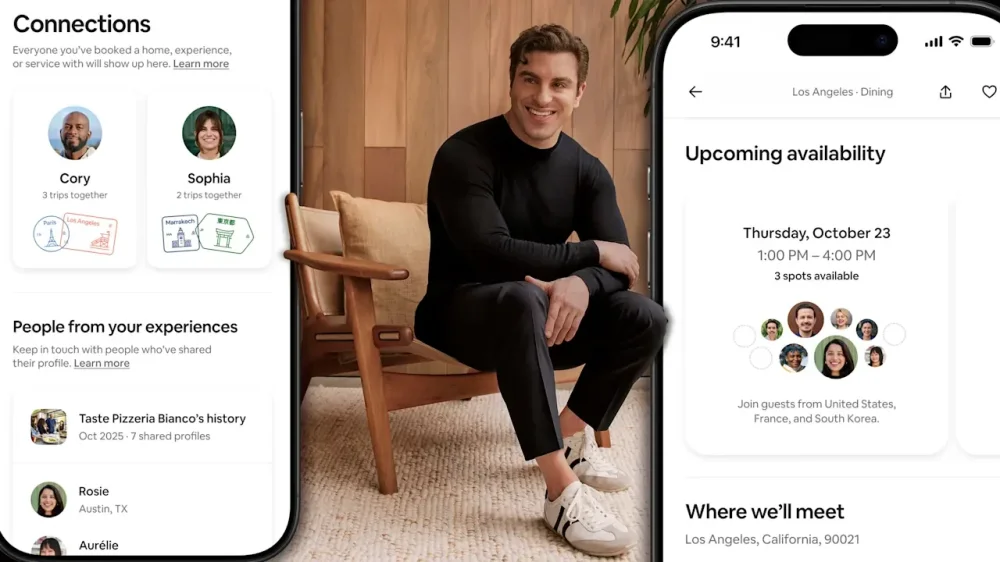
Brian Chesky, the CEO of Airbnb, still admires Facebook. Not the Facebook of today, but the Facebook circa 2005. When it pretty much just told you someone’s birthday and let you poke ’em. “It would still be a great product!” exclaims Chesky. “We’re not going to be that company [making it], but there’s still a need for it.” But while Chesky doesn’t want to build Facebook 2.0, he is laying the groundwork for Airbnb to become something much closer to a social network. Airbnb’s fall updates launching today are but the first steps in a significant reframe of the experience of using Airbnb—one that is moving it closer to social networking, and another that embeds it far more intimately with AI. The social aspects arrive through the introduction of “Connections.” Basically, when you book an experience with Airbnb, you will be able to opt in to share yourself. When other people book the experience, they will see your face. Then after the experience, they can see your greater profile—and slide into your DMs to keep the discussion going. Beyond that, Airbnb is also doubling down on using AI agents for support processes—in a move that Chesky claims speeds up the service, from roughly three-hours in phone calls to solve problems, to a few seconds. While introduced earlier this year for generic answers, now Airbnb support agents will be able to know deeper details about your trips—so they can respond with personalized answers: like if you are allowed to bring a dog to that apartment in Mexico City. These updates might seem minor or iterative, but to Chesky, a designer-entrepreneur with a penchant for extracting deep narratives from his own product, they are the first stages into redefining what Airbnb is—something of an AI-driven life experience platform that pushes you to meet others IRL. This conversation has been condensed and edited. I’d like to kick things off talking about the social networking you’re building into Airbnb. I think I see some original intent: I wouldn’t want to sign up for an Experience if I don’t know who else is going. But how much of this update came from that problem, and then how much of it was born from other ambitions? So there’s two reasons we’re doing the social features on Experiences. The first is, we just noticed that a lot of guests use it to meet people. So yes, they want to get a vibe for who’s coming. We just show their profile avatars, but it gives a little bit of a sense of aliveness, a sense of, “Oh yeah, they’re kind of people my age, or kind of cool-looking people.” We also notice a lot of people create WhatsApp groups after the experience is over, because they may want to hang out after. It’s kind of difficult [to set that up]. So we wanted to make that easier. Part of it was just responding to how people were using it. That was the tactical reason to do it. There’s a much more strategic reason, which is, I don’t want Airbnb just to be a marketplace. I want it to be a community. A marketplace just sells you stuff. A community connects you to other people, other places, other cultures. And I think this is the beginning of us shifting from a marketplace to a community. Now, admittedly, these are modest features. I’m not saying this is, overnight, a social network in the real world. But we’re going to be announcing a lot more social features next year, and even more the year after. I think pretty soon it’s going to be a very social platform. Not like Facebook, social. Social in the real world. It’s interesting you put it that way. I feel cautious about Airbnb social features, because the social aspects of Airbnb can already be so hit or miss. And so I find wondering if I’ll want to engage that much with a more social Airbnb. I think everything will be very personalized in the future. And part of our AI strategy is that no one sees the same homepage, no one sees the same app. So the first thing we need to do is learn more about you. Like, do you want to be social? Not everyone does. If you don’t want to be social, you don’t have to opt into the social features, and we can show you things that are just less social. Not everyone wants the same level of social features. I’ll give you an example. We’re going to offer hotels in Airbnb. Some people will never stay in a hotel on Airbnb. We’re never going to show them hotels . . . we need to get more personalized. I guess the second thing, though, is that we do think human connection can be great, but you’re right. It’s hit and miss. So I think a bunch of what we want to do is do more verification and better matching of the kind of people that you might be inclined to want to meet. So it’s kind of a two-fold approach to personalization: Do you even want to meet people? And if you do, do we match you to the right people? With your initial launch, really, all I’m sharing is my avatar when I register for an Experience. It’s not until after the Experience that people can be like, “Oh, there’s Mark’s profile. I can scope him out, learn who he is.“ Yep. And you can opt out of the avatar and opt out of people messaging you. Longer term, I’ve heard you frame Airbnb as a unifier during a time when the world is really divided. Is that too much weight to put on the platform? I feel like that’s a lot of weight to put on the platform! I think it’s a good mission. I don’t think it’s too much weight to put on the platform. I think what would be too much weight is us trying to solve a global problem on our own. That would be unreasonable. But if you think about the scale of the platform, nearly four million people a night stay in someone’s home, we’re probably already one of the biggest unifiers in the world. It is like the United Nations at kitchen tables. During the election, millions of The President supporters were staying in the homes of Kamala Harris supporters and vice versa. And most of the time, they didn’t even realize that. So I think if there was ever a company to bring the world together, it would be a company like Airbnb that brings them together in the real world. But we’re under no delusion that we’re going to be the ones solving this problem. I do think there needs to be more unity in the world . . . and I want to be part of the solution, not part of the problem. I want to be the kind of company that helps get people off the phone, into the real world, and exposes other people to their cultures. It’s getting increasingly difficult to meet people. And increasingly, when people are colliding, they’re typically colliding with people they’re very similar to because [they’re in] these hermetically sealed social media bubbles. Or they collide, argue with each other on the internet, but they never change each other’s mind. So this is what we’re trying to do. And by the way, this is a multi-decade [ambition]. I’ve been doing this for 18 years. I would like to do this for another 18 years, or whatever. These are long-term views we’re taking. But I have to have a point of view. In the age of AI, what’s our purpose? I think our purpose is to help bring people together. As you’re approaching social networking, you have seen a lot go wrong in the industry. Are there things that are off the table right now for you? Are there things that you’re marking as guideposts to make sure you do it the right way? Yes. Well, number one, not having an ad-driven model. I think the business model needs to be aligned with the customer’s interest. And so that’s number one. Number two, I think there’s an expectation of safety on Airbnb, which I think there isn’t necessarily with social media. Parents want social media to be safe for their kids; I don’t know if the kids are asking for social media to be safe. But I think everyone that uses Airbnb has an expectation of safety. On social media, it’s kind of viewed as, like, safe and unsafe content. Safe speech is kind of political. Safety and everything else [on Airbnb] is not really a political issue. People expect it. And the reason people are okay with us holding them to safety standards is they want us to hold everyone else to safety standards. So I think the other thing is we want to do our best to design social interactions that we think are enriching to people and, I don’t want to make this interview about social media, but I think it’s safe to say that some social media improves my life, and some use of social media does not improve my life. And probably the biggest problem with social media is just the amount of time most of us use it. So not to say it’s good or bad, but it is probably bad if you’re using it many hours a day, because life should be experiencing the real world. Maybe that’s the biggest change of all, which makes this not social media or social networking: it primarily happens in the real world. We’re just the portal. By the way, one last point [on] social media: Notice the word “social media.” It used to be called “social networking,” but eventually your friends became your followers, intimacy became performing, and so really, there’s not much social networking anymore. As an aside, the old Facebook would still be a great product! I wish I had one product, and I knew what everyone’s birthday was, and I knew when somebody had a baby and they posted. But like, the old Facebook doesn’t even exist. No one’s on it, and it’s been optimized to be like a marketplace and other things. We’re not going to be that company, but there’s still a need for it. I know you don’t want this to be a social media discussion, but I think we’re already there. One other thing that occurs to me is that a lot of apps are pushing new social features lately. I made a short list before our call: Spotify, WhatsApp, Strava, Substack, Robinhood, and even Grindr have expanded social tools. Why do you think so many companies are doing this? I get your point about mission, but for most it feels like an engagement play. We’re doing social to the extent that we think it may enrich the experience for people that are looking for it. We’re not really doing it to engage people. We have a lot of traffic. We do need to convert more traffic to bookings to grow revenue, but we don’t really care how much time people spend on the app. We’re not really focused on how many times you open the app, because we’re not paid that way. We’re not paid for engagement with an advertising based model. Our incentives are a little bit different. And also, I don’t see social as primarily a revenue driver. I think it can be, but I’m primarily focused on something I think is far more important, which is making sure people have great experiences, or said differently, it’s great long-term revenue. People love Airbnb because they have great social experiences. Social features are not a way to make a quick buck in Airbnb. If I wanted to make quick bucks, you know, we would just go guns blazing on hotel expansion. I’ve been thinking a lot about the two economies that we live in: which is basically everyone feeling pinched from the upper middle class downward. And then the upper echelon, the 1%. We’re seeing more businesses catering to the higher end. You launched Reserve Now, Pay Later earlier this year in the U.S. 60% of customers are using it. How much is that about keeping Airbnb accessible to most people? And how are you thinking about that income divide right now when designing your platform? Let me start by saying, we had a choice to charge for Reserve Now, Pay Later. We could have charged interest, we could have charged fees, and we decided not to do that. It could have either been a way to be affordable and increase bookings, or it could have been a way to increase monetization. We chose to make it more affordable because we want as many people to use the feature as possible. And there are downsides! There’s revenue opportunities that we missed out on. We also don’t have as much of a flow if people don’t prepay, we don’t hold as much money, we don’t make as much interest. So there is a cost. We think it’s worth the cost. I think Airbnb needs to remain a great, affordable brand and a value-based brand. I think we started off as a great brand. I think we lost some ground, especially during the pandemic. So there’s no cleaning fees in Airbnb any longer. All prices shown are the prices you get. We’re offering a lot of new pricing features. We’re trying to really make Airbnbs affordable. We measure the price increase of Airbnb versus hotels. For the last few years, hotel prices have appreciated faster than Airbnb, so we really myopically quickly focus on this. A lot of what we’re trying to do is just make Airbnb more affordable, more accessible. You’re right, in the Silicon Valley bubble, you’re surrounded by really, really wealthy people, and you can forget what life is like for everyday people. I mean, I grew up an everyday person. I grew up in upstate New York. My mom and dad were social workers. We lived in a $200,000 house. They made like $40,000 a year. And so I’ve got to build a product for that Brian, not just today’s Brian or this little bubble that I live in now. And you know, we have luxury Airbnbs and all that, but the vast majority of our service has to be for everyday people, for middle class people. You’ve talked about AI and your plan for Airbnb to evolve so the app is essentially just an assistive AI agent. How important is it for you to own the agentic experience? I think it’s really important. I mean, there’s many ways this whole thing could play out. I’m not opposed to a platform like ChatGPT becoming a platform where a lot of activity happens if the SDK is extremely robust. For example, the App Store: Apple does not make most of these apps in the App Store, and that’s because one company can’t make every app. But it’s okay that we’re inside of the App Store, because the SDK is so robust that we can do whatever we want. If the SDK is not very broad, then it’s probably not good. And we generally do want people to start on Airbnb. I think it’s important to note something. Almost all the technology in ChatGPT is now widely available to every other app in the world by API, so this technology is not proprietary. Now, maybe one day, the frontier companies might reserve the best models only for them and not make them available with APIs. But I don’t think travel ever needs the highest frontier model, and open source models are only three to six months behind a frontier model. And the average person using a travel application cannot discern the difference between a frontier model and a model three months behind. Plus you generally don’t want to use the frontier model for search anyway, but it is just too expensive and not optimized from a latency standpoint. So those models are for hardcore physics and research. They’re not for travel and lifestyle. I don’t think the frontier model is even the best model for it because of cost and latency. Also, we do want to be an AI company. In five years, or maybe seven years or however long it’s gonna take, every tech company is going to be an AI company. At some point, we won’t even ever use the word “AI.” It’s just software. AI will just mean technology. In 1999 everyone said “internet,” and these were “internet companies.” And no one says “internet company” now. Everything’s on the internet. So I think AI is going to be so ubiquitous that everyone will be an AI company. Because you’ll have to be. If you’re not an AI company, it’s like, not using electricity, you’re just probably not going to exist. So the question is, who gets there first, and who’s the best at it? We want to be world-class at it. It’s really just about getting the best people of our generation. So we have some big hires that we’re making, really good talent that’s coming into Airbnb. I think what we want to do is we want to start with customer service. We made it personalized. We expanded action cards [to do things with a tap from the AI conversation], then we’re going to make it agentic. Agentic means it can take more than one action on your behalf. Then we’re going to bring it into [Airbnb] search. And then we’re going to connect the customer service and search into one app, under one agent and then, at that moment, the interface is essentially AI-native. So we design a new interface for [Airbnb], then it’s essentially an AI native app and an AI native company. And our goal is to become an AI company in, you know, the next few years. I think it’s interesting that you’re broadcasting the exact UX evolution that you’re planning. I mean, I don’t think it’s a secret. The only people I’d be worried about knowing it would be our competitors, but they chose a different strategy. View the full article
-
Russia bets it can gain in US negotiations what it cannot win on the battlefield View the full article
-
Though many companies are still in the early days of AI adoption, one thing is clear: Many of our interactions—between employees and even organizations—are already being carried out entirely by agentic technology. As this trend increases, the need for leaders to keep humanity at the core of their businesses is critical. That’s why this year’s annual meeting of the Fast Company Impact Council was centered on the theme of “Maintaining a Human Touch in a Digital World.” In May, 123 of the Impact Council’s 422 members gathered in New Canaan, Connecticut, at the 80-acre headquarters of humanitarian nonprofit Grace Farms. In panels and roundtables held across the organization’s buildings—designed by Pritzker Prize–winning architecture firm SANAA—attendees explored how businesses can center innovation around real-world needs and values, even as they navigate the AI revolution. Here are some insights from the event. Lauren Tamaki How to Lead With a Mission “The DEI backlash is short-term thinking. This is a time to stick to your values—it will yield better results than if you hadn’t.” —Sharon Prince, Founder and CEO, Grace Farms Foundation “Your message supports your mission. When you’re doing it right, both of those things are working together. But when those elements get muddied, brands run into problems.” —Celia Jones, Global Chief Marketing Officer, Finn Partners How To Lead Like A Human “Many leaders ask employees how they are but don’t leave space for a real response. It’s about providing space and being prepared for the answer so you can be supportive.” —Elyse Cohen, Chief Impact Officer, Rare Beauty “People like the freedom of remote work, but we also hear from younger employees that they’re struggling with the lack of human contact and learnings they’d get in person—because Zoom doesn’t cut it.” —David Ko, CEO, Calm What Role Does Your Company Play in a City? “One of the core principles of our practice is to create shelters for those in need, but also to elevate the presence of those shelters so that residents feel good about their environment. It’s a little easier for us as architects because it is a built environment, but we are able to project our creativity and social awareness literally onto our city.” —Nerin Kadribegovic, Founder and Principal, Kadre Architects “More public art increases our quality of life. Why wouldn’t every city want some type of focus and intentionality behind what art can do and bring to the city?” —Alan Bacon Jr., Cofounder and Chief Strategist, Ganggang Putting the Customer Back in Customer Experience “Unlike product design, which focuses on unmet user needs, with immersive experiences, you can’t really ask someone what they want from an experience they’ve never had. That’s why an ideation process—with teams that are cross-disciplinary—relies on the alchemy of bringing different people together.” —Andrew Zimmerman, CEO, Journey “A lot of companies are too worried about getting everyone on board with a decision. if you have clear values and a point of view, people will come along.” —Barbara Bouza, Executive Director—Live, Work, Play, CannonDesign Improv For Authentic Connection “What are organizations doing with the time freed up by AI? Are we adding more tasks to people’s workload, or are we giving them space to connect with other humans?” —Tyler Dean Kempf, Creative Director, Second City Works Ensuring Tech for Good is Good for Humanity “We are starting to experience a cognitive industrial revolution. But technology is never neutral. Alone, it won’t make the world better—we have to do that.” —Hala Hanna, Executive Director, MIT Solve “Most nonprofits have a deficit when it comes to tech expertise and capital, and most companies have those things. If you can put those two together, there’s tremendous opportunity, even as tech companies keep their heads down on mission-driven work.” —Tom Subak, Founder, Re/Imagination Lab Beauty And Logic: Music and the Advent of AI “At the base level, human capacity is what we are able to do, imagine, experience, and share that really comes from us. In this moment, it’s worthwhile to advocate for the development and expansion of human capacity—regardless of what the market conditions are.” —Marcus Garrick Miller, Music Director, Grace Farms Leading The Next Generation With Empathy and Purpose “There are so many stereotypes about Gen Z that it can be easy to misinterpret their intentions. So focusing on communication is key to avoiding intergenerational conflict—which you don’t need in the workplace.” —Christina Elson, Executive Director, Center for the Study of Capitalism at Wake Forest University “Graduates face a harsh job market, and many see entrepreneurship as a path to wealth and impact. To turn founder abundance into lasting success, we must scale up support systems and resources for these founders.” —Andrea Carafa, Director of the Blackstone Launchpad Powered by Techstars, QB3 Entrepreneur in Residence, and Lecturer, University of California, Santa Cruz View the full article

-
Yelp users looking to learn more about restaurants, businesses, and other locations on the platform can now get information from an AI-powered Yelp Assistant. When logged-in users on Yelp’s iOS and Android apps visit particular business pages, they can now ask specific questions ranging from where to park to whether a restaurant offers vegan options. The answers are generated based on facts from reviews posted on Yelp, information provided to the platform by businesses, and businesses’ own websites, with relevant sections and even photos from Yelp reviews highlighted in the AI response. The assistant also provides a list of suggested questions to ask about a particular business. In addition, a new AI-powered feature called Popular Offerings separately highlights goods and services frequently mentioned and photographed in a business’s Yelp reviews. In a demonstration for Fast Company, Akhil Kuduvalli Ramesh, Yelp senior vice president of product, highlighted how the Yelp Assistant could answer questions about a restaurant’s cuisine, parking, dog-friendly seating, and even the best times to avoid a long wait. The AI surfaced information from reviews and even user-submitted photos of canine-compatible outdoor tables. “This isn’t an AI that’s hallucinating,” says Kuduvalli Ramesh. “This is an AI that is providing me answers, evidence first.” Tapping into a rich vein of contentThe expansion of the Yelp Assistant, which launched last year with a focus on helping consumers find services from home repair to haircuts, comes as other tech companies from longtime rival Google to startups like Perplexity promote AI options for finding and booking tables at local restaurants, which has long been a key part of Yelp’s mission. But Yelp cofounder and CEO Jeremy Stoppelman says the company’s wealth of business data, long trusted by consumers and partner services like Apple Maps, enables it to deliver reliable answers in an age of hallucinating AI. “We’re now at the point where you will be able to ask detailed questions about nearly every business on Yelp,” he says. “And it’s able to tap into the rich content, the reviews, and all of the survey information—everything that we’ve been able to gather about that business.” Stoppelman anticipates the Yelp Assistant will continue to grow more powerful, able to offer more detailed, personalized recommendations across businesses and categories. Already, thanks to Yelp’s AI advances, users can also now type or speak more involved natural language queries into Yelp’s search interface, with the AI able to parse requests like “need help fixing a leaking faucet” or “dog-friendly brunch spot that’s good for groups” instead of simply matching on keywords. “We would like people to basically query Yelp as though they’re talking to it,” says Kuduvalli Ramesh. And when Yelp users visit a particular restaurant, they can also now use the service to quickly find information about particular dishes by using the Yelp app to scan the menu with a new feature called Menu Vision. It can offer quick links to reviews and photos of Yelp-reviewed dishes, and the company plans to continue to expand the feature to include more options and information over time. Growing competitionYelp’s push into AI is far from the first time the company has incorporated new technology to meet new consumer tastes. In the heyday of Foursquare, Yelp added location check-in features. And as TikTok and other video platforms became increasingly important tools for restaurant discovery, Yelp enabled users to post short-form videos alongside text reviews and photos. The company, which for its most recent quarter reported $44 million net income on a record net revenue of $370 million, has also expanded into home services in recent years, taking on rivals like Angi and Thumbtack with its increasingly sophisticated tools to request quotes and communicate with home professionals. And in November 2024, Yelp also acquired RepairPal, which connects users with auto repair shops, and has been integrating its offerings into the core Yelp product. Yelp’s AI also now offers guidance to service professionals on responding to customer requests—and awards visible badges to those with a pattern of helpful responses. A pair of paid AI phone tools, called Yelp Host and Yelp Receptionist, are now also rolling out to restaurants and other businesses, respectively, to field calls from customers. Yelp Host is able to book and modify reservations, including fielding special requests, while Yelp Receptionist can capture contact info and full call transcripts, then summarize the relevant information needed to get back to a potential customer. “By the time the local business gets a lead, it’s a fully vetted lead, and it’s got an AI summary,” says Craig Saldanha, Yelp’s chief product officer. “They can listen to the transcript, but they can also read the summary in 30 seconds and essentially call you back with all of the information.” Yelp Host and Receptionist are designed to let busy restaurants and businesses actually process phone calls, rather than simply amassing voicemails, while they’re closed for the day or assisting other customers. And those services, too, are enabled by the detailed information Yelp has amassed over more than two decades about specific businesses and different types of local merchants, Stoppelman says. “It is grounded in the same underlying infrastructure,” he says. “And so, when you do sign up, we have a very good understanding of businesses, both in that category and then your business specifically.” View the full article
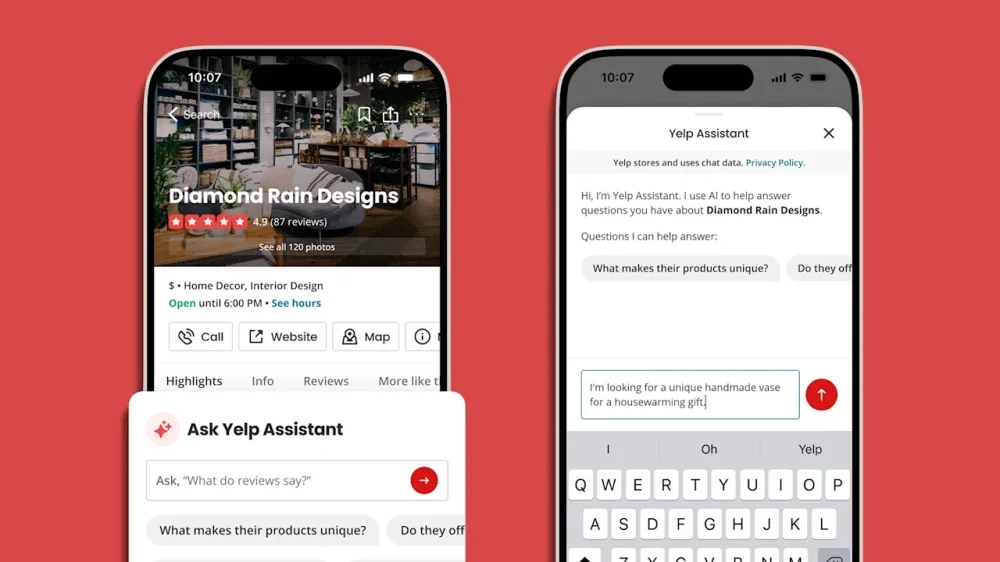
-
Not long ago, one of our coaching clients called us in a panic. His team was floundering, his peers were keeping their distance, and the feedback from HR was . . . not glowing. He was baffled. “I’m hitting the numbers,” he said. “What else do they want from me?” We’ve had this conversation more times than we can count, and this is what we’ve learned: Leaders rarely fall short because they lack intelligence, but because they lack emotional intelligence. The emotional gaps are what bruise egos, stall progress, and erode trust until there’s nothing left to stand on. Research supports this: High emotional intelligence in leaders is linked to stronger team communication, performance, and innovation, while low-EQ environments see more burnout, conflict, and turnover. The good news? Emotional intelligence is a muscle you can strengthen with feedback and practice. Here’s how: 1. REFLECT ON YOUR IMPACT You can’t improve what you don’t notice. Self-awareness isn’t just about identifying your strengths but recognizing your impact. Harvard Business Publishing reports that 56% of employees say their immediate supervisor demonstrates self-awareness, which means nearly half of leaders may be unaware of how they’re coming across. When a team isn’t responding the way you expect, something in your approach may need adjusting. The question becomes: Are your intentions aligning with your impact? One executive we coached realized his “high standards” came across as micromanagement. Once he saw it, he was able to shift from scrutinizing details to building trust. The action here is simple, but not easy: Ask for feedback. Reflect without defensiveness. Consider not just what you do, but how you do it. Most executives avoid feedback because they’re afraid of what they’ll hear. But pretending you already know how people see you is the fastest route to losing their confidence. In leadership, perception is reality, and you can’t afford to ignore it. 2. HIT PAUSE BEFORE YOU REACT When stress spikes, so do reactions. That’s where self-regulation, the ability to manage your emotions before they manage you, comes in. One emotional outburst can undo months of goodwill. People will forget your PowerPoint. They won’t forget how it felt to be on the receiving end of your anger. EQ isn’t about suppressing emotion, but harnessing it in a way that commands respect instead of fear. We’ve coached leaders who prided themselves on being “straight shooters.” But there’s a difference between candor and emotional impulsivity. One client, after a tense leadership meeting, told us he “blew up because nobody else seemed to care.” The fallout? Silence from his peers for days. Through coaching, he learned to spot his triggers and hit pause. Sometimes that meant walking away for five minutes. Sometimes it meant writing the email, then deleting it. Over time, he rewired his instincts from reacting to responding. 3. REPLACE RESISTANCE WITH ADAPTABILITY Change is hard. But adaptability is a defining trait of emotionally intelligent leadership. One leader we worked with described herself as “decisive, to a fault.” That fault became clear when her team avoided decisions, fearing her inflexibility. What shifted her mindset was honest feedback about how her rigidity was stalling innovation. Adaptable leaders adjust their strategies when new information emerges. That means listening more than talking, asking better questions, and being open to different ways of getting to the goal. Executives often equate adaptability with weakness, but the truth is, rigidity is what makes leaders fragile. In a world where market shifts and disruptions are the norm, adaptability is survival. And your team is watching closely. If you resist change, they’ll resist you. 4. LEAD WITH EMPATHY TO BUILD REAL CONNECTION Empathy isn’t weakness. It’s strategic, ranking second only to integrity as the most valued leadership trait, according to the Harvard Business Publishing report. Yet only 58% of employees say their manager consistently shows empathy, which leaves a gap between what teams need and what they’re getting. When you tune into what others are feeling and respond authentically, you create the conditions for motivation, creativity, and collaboration. One executive we coached led a team through a massive reorg. Technically, she handled it well. But it wasn’t until she started checking in emotionally—asking people how they were really doing and making space for honesty—that engagement began to recover. Many executives fear that showing empathy will make them look “soft.” But who would you rather follow into uncertainty—the leader who makes you feel invisible, or the one who makes you feel human? 5. USE RELATIONSHIPS TO INFLUENCE Some leaders influence with data. Others connect through stories. The best do both. They know when to persuade with logic, when to listen with empathy, and when to lead with conviction. We’ve seen leaders transform simply by becoming better at conflict resolution, and by learning to address issues head-on with respect instead of avoidance. Others learned how to rally a cross-functional team by genuinely valuing diverse input instead of tolerating it. Here’s the leadership edge most miss: Relationships are currency. Ignore them, and your political capital evaporates. Nurture them, and you gain influence that outlasts any quarterly metric. This starts with relational intelligence—reading the room, adjusting your approach, and showing others they matter. The bottom line? In today’s climate, EQ isn’t a “bonus skill.” It’s the differentiator between leaders who merely survive and leaders who truly transform organizations. Ignore it, and you’ll plateau. Embrace it, and you’ll leave a legacy. View the full article

-
As small business owners, we often hear about the importance of innovation and adaptability—but sometimes, the most powerful examples come from unexpected places. At SuiteWorld 2025, I had the chance to speak with Claudia Freed, President and CEO of EALgreen, a nonprofit that’s rethinking how to fund higher education through the principles of the circular economy. Her organization doesn’t just hand out scholarships; it transforms surplus inventory that might otherwise go to waste into life-changing financial aid for students. That’s an idea any small business owner can appreciate—turning inefficiency into opportunity. Whether it’s unused products, outdated processes, or legacy systems, every organization faces the challenge of doing more with less. EALgreen’s story proves that innovation doesn’t have to be confined to tech startups or massive corporations. It can come from a mission-driven nonprofit that has sustained itself for over 40 years without outside funding. In our conversation, Claudia shared how EALgreen evolved from a grassroots idea into a model of operational efficiency and purpose-driven leadership. She also discussed how NetSuite’s cloud ERP system helped modernize their operations, eliminate risk, and unlock new growth opportunities—all while staying true to their mission of helping students succeed. Here’s my full conversation with Claudia Freed at SuiteWorld 2025. Leland McFarland All right, I am here at Oracle’s NetSuite’s uh SuiteWorld 2025 with Claudia Freed, President and CEO of EALgreen. So, Claudia, thanks for coming on and uh doing this interview. So, first of all, for those who are maybe not that familiar, uh can you start by telling us what EALgreen does and who you serve? Claudia Freed We are a non-profit organization founded over 40 years ago and what we do is give students scholarships so that they can go to college and fulfill their own human potential. What we do that is so unique is how we do the funding of the scholarships, which is in the space of the circular economy and reverse logistics. We convert donated inventory into financial aid. We serve a population of college students that would love to go to college but sometimes are limited with regards to their finances. We also serve corporate donors that have a supply chain challenge of product that they perhaps would have had to send to the landfill. And ultimately, uh we feel that we serve the world and society so that everyone has an opportunity to go to school. Leland McFarland So similar to like consignment shops that utilize um donations to uh support local uh charities but instead or you utilize um objects that may go to the landfill or even surplus to be able to uh donate to uh college students, right? Claudia Freed In fact, let me help you with an analogy. We think of a college as a small city. So a small city uses products for transportation, equipment, supplies to maintain their infrastructure. Therefore, we work with corporations that have that type of product to donate. And then we evaluate three different channels where we can either reuse the product on a college campus. If the product cannot be reused because it may not be in the right place or in the right condition, we will either try to repair, or if it has to be resold, the funds that we raise fund additional scholarships. And ultimately, if it cannot be reused or repaired, it will be recycled. The brilliant model that we inherited from our founders from 1982 is that when that snowblower, let’s say, went to a college campus, the university generates operational savings. That means that those savings are then transferred to a student to lower their financial aid costs. The cool thing about my story is that I was the very first student that they ever helped in 1982. And I have felt the impact of the work that we do in my own life. And that is what is a large motivator for continuing that legacy. Leland McFarland So what inspired the founding of it? So original founders and and you you were the like the first recipient, so you can you can really attest to this. Claudia Freed The the the great question, you know, what inspired an engineer and a businessman that were friends um in 1982? And there was the perfect storm of ideas and opportunity. What inspired them was the thing they had in common: both gentlemen had gone to college with the financial aid help of a scholarship. So that is what they had in common. And they were really ambitious. And they said to themselves, “Not if, but when we become successful, we want to pay it forward.” So what is the principle behind the founding of EAL? Is this concept of paying it forward and giving back. And that has been the core value of EAL that despite technology changes 40-some years in business, uh we hold very dear. Leland McFarland Great. Uh what challenges or pain points led you to start looking for a solution like NetSuite? Claudia Freed Great question. Part of being successful in business is managing risk very well, recognizing when you have an exposure, managing the risk and taking mitigating actions. A few years ago, we began to look at a potential single point of failure. We were looking at outdated technology. We had gone from pencil and paper to digital, then to um a point where if we hadn’t made the decision of updating our technology, we were going going to probably not be able to continue to grow and thrive. We also had a very fragile system of volunteers and IT personnel that were either going to be retiring or transitioning. So we recognized that as a single point of failure. Our motivation was to save the business from becoming obsolete. And that is the point at which we then began the journey to look for a partner. Leland McFarland Okay. Um, how were you managing operations before NetSuite? Now, you you did cover that. You you said pen and paper and so, yeah. Um, can you share how NetSuite has changed your day-to-day operations? Claudia Freed NetSuite has changed our day-to-day operations in ways that has made in some ways life a little bit simpler. And how? By giving us tremendous visibility into the organization, and giving us mobility, and giving us the safety of our data in the cloud to have a backup. So, specifically how it has changed: at any one point, anyone in my team has been able to develop their own KPIs and their own dashboard. So whatever their area of operation or responsibility, at a moment note—at a moment’s notice, they see data real-time. When we had five different systems, we had to be jumping from one to another. So it has changed the efficiency with which we arrive at data, empower decisions. We can now make decisions much faster. We don’t have to wait for five reports. If we have to pivot, if we have to offer a different solution, the ability for NetSuite to provide that data to us more quickly, more clearly, uh in a reporting format that can be communicated, uh that has been a tremendous boost to the operations of a small organization with 12 employees. Leland McFarland So drilling down a little bit, was there like a aha that like that that that moment where you just go, “Wow, this thing works and this thing is going to save us money”? Was there that defining moment? Claudia Freed Well, yes, and it continues, right? The moment for me, because I am responsible for finance on top of the uh mission, uh was really when we declared that we were going live. And we had to transfer data, so we had to bring data from other systems. The process took a few months, but the aha moment for us was when we recognized our own data in the new shiny model. So for us, it was the ability to trust the data the moment that it landed there. Those were our numbers, that was our P&L, those were our scholarships. I think if we had not been successful in that transition, you cannot accelerate the change the way that we have done it. But we made a very good first step. From there, we can build out from it. The second aha moment is really coming now as we are playing and demo um AI solutions to see the way that AI is expanding our ability to analyze the scenario, the ability to think about potential risks and potential opportunities for us to create more scholarships. You mentioned about, you know, how does the business measure its success in terms of how can you be more financially successful. For us, success is measured by the number of students we can help. And NetSuite has enabled us to measure those uh lives as well. Leland McFarland Great. You’ve already answered some questions that were down here too. So, but um which NetSuite models or tools are you most criti— or are most critical uh to your organization’s success today? Claudia Freed Great question in terms of pairing your business to the right solution. We, as I have said, are a non-profit organization. NetSuite does have a module called Social Impact. Social Impact is designed for non-profit organizations that operate a more traditional fundraising model, where perhaps you are tracking grants, you are tracking ticket sales to a gala or an event. That is not the EALgreen business model. We live in the world of reverse logistics and operations. So for us, what was most attractive was the wholesale distribution model. So we use wholesale distribution to track a catalog that has about 1.5 million SKUs, through which we then fulfill orders. The second module that we use out of NetSuite is SuiteCommerce Advanced. And SuiteCommerce Advanced is, of course, the more advanced version of SuiteCommerce. And why we need that? Because our model is predicated on an object, a piece of inventory, a tool, becoming a scholarship. And when you are under an integrated system, as NetSuite is, that transaction will end up on your general ledger to feed into your financials. And SuiteCommerce Advanced allows us to do that. Leland McFarland That’s great. Um, you already talked about like measurable results and and and the efficiencies that you’ve already um achieved through uh NetSuite. Um, how has having real-time data through NetSuite influenced your decision-making uh um decision-making um as a uh CEO? Claudia Freed It enables me to communicate to my board of directors the impact of their support. So their decision to support a digital journey a few years ago, before this was even a known a known frontier, we said, “We recognize a risk. We need to make an investment. Trust us, we are going to find the right partner.” And the ability to now demonstrate success, not only to the board, but also to donors. How are we measuring success? Over the years, we have converted over $40 million worth of donated inventory into over 30,000 scholarships. Those are real students that have gone to college. Year over year, just in the last year, because of the new tools that we have implemented in NetSuite, we have seen a 55% increase in the scholarships that are being awarded to students. The average scholarship is $3,000. We are on our way to award 1,000 scholarships this year alone. In SuiteCommerce, the platform, through an implementation of AI, which is intelligent item recommendation, our customers, who are physical plant directors of colleges and universities looking for that snowblower, a hard hat, tools to complete their work, they can log onto the system and be provided recommendations. That has increased engagement with our own partners by over 13%. And as a CEO, having data very quickly that you can follow through and investigate why is that happening, why is it 13% and not 15, or what made it go from 10 to 13, it gives you the power of analytics very quickly. Leland McFarland That’s great to hear. Um, as a leader, how do you balance EALgreen’s social mission with the need to stay operati— operationally efficient? Claudia Freed Many, many years ago, I had to come up with a metaphor for that question. Because in life and in business, it’s always about a trade-off. We’re trading off a benefit and a cost. And so for us, it’s always been the idea of flying a twin-engine plane. We need the mission to attract the support. And without the support, we really, what’s the point of a mission? So for us, they they matter in equal measure. And one of the things that we are very proud of is that when we speak to our donors, some of whom have been with us from day one, they funded the very first scholarship and they’re still our donor without interruption. One of the words that are used to describe EAL is that we’re a thoughtful organization. And I believe that that comes from that idea that you have to always be mindful, what’s the mission of EAL? To help students go to college. And what is the business model? We are self-funded. We rely in absolutely no outside funding. We don’t have grants. That’s why we don’t use the Social Impact model, but we use the wholesale distribution. And every aspect from the board of directors on down, we know that what we do every day matters to that student that one day may be sitting here with you speaking because we do change lives. Leland McFarland All right, final question. Uh, if you were to describe your NetSuite experience in one sentence, what would it be? Claudia Freed In one sentence. Um, challenging but rewarding. Challenging and rewarding. I I wouldn’t say but. Challenging and rewarding. Rewarding because uh we are now on the other side. But better yet, let me uh share with you, just before coming here, I’m the CEO, I call Greg at one of our fulfillment centers on a Thursday afternoon at 2:30. He was understandably nervous. Why is the CEO calling me unannounced at 2:30 in the afternoon? And I said, “Greg, I’m preparing for this event in Las Vegas. Would you describe for me a couple of good things about NetSuite and a couple of not-so-good things about NetSuite? What has been your experience?” And he was so quick to enumerate, “Well, Claudia, we now have a lot of visibility. I know where all the snowblowers are.” Great. “Some things that are not so good.” And I heard nothing. Silence for a couple seconds. And I was like, “Greg, are you there?” And he said, “Well, I have to think about it. However, if you had asked me that question two years ago, the list would have been flipped. I would have only bad things to say. It was challenging. We didn’t have the right systems. We had the right data, but we had to put better Wi-Fi in the system, in the warehouse. Um, we had to uh acquire different type of equipment for them to do their job.” So there were some pain points. But with anything, with anything in life that is a change or an improvement, um, it’s difficult. Even if you are trying to be more fit in your own life, um, this is bringing fitness into our operations. And therefore now we are completely reliant on our data that comes from NetSuite. So for us, it has been challenging and rewarding and the proof is that we are here today as their guest, showcasing and sharing the benefit of EAL being a customer, and we believe in that. Leland McFarland Great. Well, thank you uh for your insight. Uh, it speaking with you has been really great. And I I love seeing what you’ve been able to do with NetSuite and and being able to accelerate your growth and and yeah, it’s it’s it’s truly amazing. Thank you. Claudia Freed Thank you, Leland. I I appreciate your curiosity and the questions and, you know, I could talk all day about EAL. I love what I do, but I know we have things to do. So thank you very much. Speaking with Claudia reminded me that technology, at its best, isn’t just about automation—it’s about amplification. It amplifies impact, efficiency, and the reach of a good idea. What EALgreen has done through its partnership with NetSuite isn’t just a story about software implementation; it’s a blueprint for resilience and reinvention. Small businesses can learn a great deal from EALgreen’s journey. Claudia’s focus on managing risk, eliminating single points of failure, and aligning mission with metrics reflects the same balancing act entrepreneurs face every day. Her metaphor of “flying a twin-engine plane”—keeping both the mission and operations in harmony—resonates deeply in an era when many small organizations struggle to grow sustainably without losing their purpose. Even more inspiring is the measurable impact: converting $40 million in donated inventory into 30,000 scholarships, and seeing a 55% increase in awards after modernizing with NetSuite. That’s proof that efficiency and empathy aren’t opposites—they’re partners in long-term success. For small business owners, the takeaway is clear: digital transformation isn’t just for big enterprises. With the right mindset and tools, it’s possible to scale impact, make smarter decisions, and ensure that every ounce of effort drives both profit and purpose. EALgreen’s story shows that meaningful growth starts with a clear mission—and the courage to evolve. This article, "Interview with Claudia Freed, President and CEO, EALgreen" was first published on Small Business Trends View the full article
-
As small business owners, we often hear about the importance of innovation and adaptability—but sometimes, the most powerful examples come from unexpected places. At SuiteWorld 2025, I had the chance to speak with Claudia Freed, President and CEO of EALgreen, a nonprofit that’s rethinking how to fund higher education through the principles of the circular economy. Her organization doesn’t just hand out scholarships; it transforms surplus inventory that might otherwise go to waste into life-changing financial aid for students. That’s an idea any small business owner can appreciate—turning inefficiency into opportunity. Whether it’s unused products, outdated processes, or legacy systems, every organization faces the challenge of doing more with less. EALgreen’s story proves that innovation doesn’t have to be confined to tech startups or massive corporations. It can come from a mission-driven nonprofit that has sustained itself for over 40 years without outside funding. In our conversation, Claudia shared how EALgreen evolved from a grassroots idea into a model of operational efficiency and purpose-driven leadership. She also discussed how NetSuite’s cloud ERP system helped modernize their operations, eliminate risk, and unlock new growth opportunities—all while staying true to their mission of helping students succeed. Here’s my full conversation with Claudia Freed at SuiteWorld 2025. Leland McFarland All right, I am here at Oracle’s NetSuite’s uh SuiteWorld 2025 with Claudia Freed, President and CEO of EALgreen. So, Claudia, thanks for coming on and uh doing this interview. So, first of all, for those who are maybe not that familiar, uh can you start by telling us what EALgreen does and who you serve? Claudia Freed We are a non-profit organization founded over 40 years ago and what we do is give students scholarships so that they can go to college and fulfill their own human potential. What we do that is so unique is how we do the funding of the scholarships, which is in the space of the circular economy and reverse logistics. We convert donated inventory into financial aid. We serve a population of college students that would love to go to college but sometimes are limited with regards to their finances. We also serve corporate donors that have a supply chain challenge of product that they perhaps would have had to send to the landfill. And ultimately, uh we feel that we serve the world and society so that everyone has an opportunity to go to school. Leland McFarland So similar to like consignment shops that utilize um donations to uh support local uh charities but instead or you utilize um objects that may go to the landfill or even surplus to be able to uh donate to uh college students, right? Claudia Freed In fact, let me help you with an analogy. We think of a college as a small city. So a small city uses products for transportation, equipment, supplies to maintain their infrastructure. Therefore, we work with corporations that have that type of product to donate. And then we evaluate three different channels where we can either reuse the product on a college campus. If the product cannot be reused because it may not be in the right place or in the right condition, we will either try to repair, or if it has to be resold, the funds that we raise fund additional scholarships. And ultimately, if it cannot be reused or repaired, it will be recycled. The brilliant model that we inherited from our founders from 1982 is that when that snowblower, let’s say, went to a college campus, the university generates operational savings. That means that those savings are then transferred to a student to lower their financial aid costs. The cool thing about my story is that I was the very first student that they ever helped in 1982. And I have felt the impact of the work that we do in my own life. And that is what is a large motivator for continuing that legacy. Leland McFarland So what inspired the founding of it? So original founders and and you you were the like the first recipient, so you can you can really attest to this. Claudia Freed The the the great question, you know, what inspired an engineer and a businessman that were friends um in 1982? And there was the perfect storm of ideas and opportunity. What inspired them was the thing they had in common: both gentlemen had gone to college with the financial aid help of a scholarship. So that is what they had in common. And they were really ambitious. And they said to themselves, “Not if, but when we become successful, we want to pay it forward.” So what is the principle behind the founding of EAL? Is this concept of paying it forward and giving back. And that has been the core value of EAL that despite technology changes 40-some years in business, uh we hold very dear. Leland McFarland Great. Uh what challenges or pain points led you to start looking for a solution like NetSuite? Claudia Freed Great question. Part of being successful in business is managing risk very well, recognizing when you have an exposure, managing the risk and taking mitigating actions. A few years ago, we began to look at a potential single point of failure. We were looking at outdated technology. We had gone from pencil and paper to digital, then to um a point where if we hadn’t made the decision of updating our technology, we were going going to probably not be able to continue to grow and thrive. We also had a very fragile system of volunteers and IT personnel that were either going to be retiring or transitioning. So we recognized that as a single point of failure. Our motivation was to save the business from becoming obsolete. And that is the point at which we then began the journey to look for a partner. Leland McFarland Okay. Um, how were you managing operations before NetSuite? Now, you you did cover that. You you said pen and paper and so, yeah. Um, can you share how NetSuite has changed your day-to-day operations? Claudia Freed NetSuite has changed our day-to-day operations in ways that has made in some ways life a little bit simpler. And how? By giving us tremendous visibility into the organization, and giving us mobility, and giving us the safety of our data in the cloud to have a backup. So, specifically how it has changed: at any one point, anyone in my team has been able to develop their own KPIs and their own dashboard. So whatever their area of operation or responsibility, at a moment note—at a moment’s notice, they see data real-time. When we had five different systems, we had to be jumping from one to another. So it has changed the efficiency with which we arrive at data, empower decisions. We can now make decisions much faster. We don’t have to wait for five reports. If we have to pivot, if we have to offer a different solution, the ability for NetSuite to provide that data to us more quickly, more clearly, uh in a reporting format that can be communicated, uh that has been a tremendous boost to the operations of a small organization with 12 employees. Leland McFarland So drilling down a little bit, was there like a aha that like that that that moment where you just go, “Wow, this thing works and this thing is going to save us money”? Was there that defining moment? Claudia Freed Well, yes, and it continues, right? The moment for me, because I am responsible for finance on top of the uh mission, uh was really when we declared that we were going live. And we had to transfer data, so we had to bring data from other systems. The process took a few months, but the aha moment for us was when we recognized our own data in the new shiny model. So for us, it was the ability to trust the data the moment that it landed there. Those were our numbers, that was our P&L, those were our scholarships. I think if we had not been successful in that transition, you cannot accelerate the change the way that we have done it. But we made a very good first step. From there, we can build out from it. The second aha moment is really coming now as we are playing and demo um AI solutions to see the way that AI is expanding our ability to analyze the scenario, the ability to think about potential risks and potential opportunities for us to create more scholarships. You mentioned about, you know, how does the business measure its success in terms of how can you be more financially successful. For us, success is measured by the number of students we can help. And NetSuite has enabled us to measure those uh lives as well. Leland McFarland Great. You’ve already answered some questions that were down here too. So, but um which NetSuite models or tools are you most criti— or are most critical uh to your organization’s success today? Claudia Freed Great question in terms of pairing your business to the right solution. We, as I have said, are a non-profit organization. NetSuite does have a module called Social Impact. Social Impact is designed for non-profit organizations that operate a more traditional fundraising model, where perhaps you are tracking grants, you are tracking ticket sales to a gala or an event. That is not the EALgreen business model. We live in the world of reverse logistics and operations. So for us, what was most attractive was the wholesale distribution model. So we use wholesale distribution to track a catalog that has about 1.5 million SKUs, through which we then fulfill orders. The second module that we use out of NetSuite is SuiteCommerce Advanced. And SuiteCommerce Advanced is, of course, the more advanced version of SuiteCommerce. And why we need that? Because our model is predicated on an object, a piece of inventory, a tool, becoming a scholarship. And when you are under an integrated system, as NetSuite is, that transaction will end up on your general ledger to feed into your financials. And SuiteCommerce Advanced allows us to do that. Leland McFarland That’s great. Um, you already talked about like measurable results and and and the efficiencies that you’ve already um achieved through uh NetSuite. Um, how has having real-time data through NetSuite influenced your decision-making uh um decision-making um as a uh CEO? Claudia Freed It enables me to communicate to my board of directors the impact of their support. So their decision to support a digital journey a few years ago, before this was even a known a known frontier, we said, “We recognize a risk. We need to make an investment. Trust us, we are going to find the right partner.” And the ability to now demonstrate success, not only to the board, but also to donors. How are we measuring success? Over the years, we have converted over $40 million worth of donated inventory into over 30,000 scholarships. Those are real students that have gone to college. Year over year, just in the last year, because of the new tools that we have implemented in NetSuite, we have seen a 55% increase in the scholarships that are being awarded to students. The average scholarship is $3,000. We are on our way to award 1,000 scholarships this year alone. In SuiteCommerce, the platform, through an implementation of AI, which is intelligent item recommendation, our customers, who are physical plant directors of colleges and universities looking for that snowblower, a hard hat, tools to complete their work, they can log onto the system and be provided recommendations. That has increased engagement with our own partners by over 13%. And as a CEO, having data very quickly that you can follow through and investigate why is that happening, why is it 13% and not 15, or what made it go from 10 to 13, it gives you the power of analytics very quickly. Leland McFarland That’s great to hear. Um, as a leader, how do you balance EALgreen’s social mission with the need to stay operati— operationally efficient? Claudia Freed Many, many years ago, I had to come up with a metaphor for that question. Because in life and in business, it’s always about a trade-off. We’re trading off a benefit and a cost. And so for us, it’s always been the idea of flying a twin-engine plane. We need the mission to attract the support. And without the support, we really, what’s the point of a mission? So for us, they they matter in equal measure. And one of the things that we are very proud of is that when we speak to our donors, some of whom have been with us from day one, they funded the very first scholarship and they’re still our donor without interruption. One of the words that are used to describe EAL is that we’re a thoughtful organization. And I believe that that comes from that idea that you have to always be mindful, what’s the mission of EAL? To help students go to college. And what is the business model? We are self-funded. We rely in absolutely no outside funding. We don’t have grants. That’s why we don’t use the Social Impact model, but we use the wholesale distribution. And every aspect from the board of directors on down, we know that what we do every day matters to that student that one day may be sitting here with you speaking because we do change lives. Leland McFarland All right, final question. Uh, if you were to describe your NetSuite experience in one sentence, what would it be? Claudia Freed In one sentence. Um, challenging but rewarding. Challenging and rewarding. I I wouldn’t say but. Challenging and rewarding. Rewarding because uh we are now on the other side. But better yet, let me uh share with you, just before coming here, I’m the CEO, I call Greg at one of our fulfillment centers on a Thursday afternoon at 2:30. He was understandably nervous. Why is the CEO calling me unannounced at 2:30 in the afternoon? And I said, “Greg, I’m preparing for this event in Las Vegas. Would you describe for me a couple of good things about NetSuite and a couple of not-so-good things about NetSuite? What has been your experience?” And he was so quick to enumerate, “Well, Claudia, we now have a lot of visibility. I know where all the snowblowers are.” Great. “Some things that are not so good.” And I heard nothing. Silence for a couple seconds. And I was like, “Greg, are you there?” And he said, “Well, I have to think about it. However, if you had asked me that question two years ago, the list would have been flipped. I would have only bad things to say. It was challenging. We didn’t have the right systems. We had the right data, but we had to put better Wi-Fi in the system, in the warehouse. Um, we had to uh acquire different type of equipment for them to do their job.” So there were some pain points. But with anything, with anything in life that is a change or an improvement, um, it’s difficult. Even if you are trying to be more fit in your own life, um, this is bringing fitness into our operations. And therefore now we are completely reliant on our data that comes from NetSuite. So for us, it has been challenging and rewarding and the proof is that we are here today as their guest, showcasing and sharing the benefit of EAL being a customer, and we believe in that. Leland McFarland Great. Well, thank you uh for your insight. Uh, it speaking with you has been really great. And I I love seeing what you’ve been able to do with NetSuite and and being able to accelerate your growth and and yeah, it’s it’s it’s truly amazing. Thank you. Claudia Freed Thank you, Leland. I I appreciate your curiosity and the questions and, you know, I could talk all day about EAL. I love what I do, but I know we have things to do. So thank you very much. Speaking with Claudia reminded me that technology, at its best, isn’t just about automation—it’s about amplification. It amplifies impact, efficiency, and the reach of a good idea. What EALgreen has done through its partnership with NetSuite isn’t just a story about software implementation; it’s a blueprint for resilience and reinvention. Small businesses can learn a great deal from EALgreen’s journey. Claudia’s focus on managing risk, eliminating single points of failure, and aligning mission with metrics reflects the same balancing act entrepreneurs face every day. Her metaphor of “flying a twin-engine plane”—keeping both the mission and operations in harmony—resonates deeply in an era when many small organizations struggle to grow sustainably without losing their purpose. Even more inspiring is the measurable impact: converting $40 million in donated inventory into 30,000 scholarships, and seeing a 55% increase in awards after modernizing with NetSuite. That’s proof that efficiency and empathy aren’t opposites—they’re partners in long-term success. For small business owners, the takeaway is clear: digital transformation isn’t just for big enterprises. With the right mindset and tools, it’s possible to scale impact, make smarter decisions, and ensure that every ounce of effort drives both profit and purpose. EALgreen’s story shows that meaningful growth starts with a clear mission—and the courage to evolve. This article, "Interview with Claudia Freed, President and CEO, EALgreen" was first published on Small Business Trends View the full article
-
Former prime minister gives evidence to official inquiry and defends his government’s response to pandemicView the full article