Newsletter
Want to keep up to date with all our latest news and information?


ResidentialBusiness
Administrators
-
Joined
-
Last visited
Everything posted by ResidentialBusiness
-
Substack and Patreon are vying to become creators’ primary revenue stream. For most influencers, payouts from platforms like Meta or Google aren’t enough to build a sustainable career. Rather than spending their days hawking products, many creators are turning to direct fan support, and two companies dominate that space: Patreon and Substack. Patreon’s latest move targets streamers. Its native livestreaming feature, currently in demo and set for a broad rollout this summer, could attract gamers and broadcasters alike. But Substack beat them to it, launching a similar live video tool just three months earlier. As the two platforms expand their offerings, the rivalry for creator loyalty is heating up. The market for creator livestreams Video already performs well on the platform: It’s Patreon’s second-highest-earning media category after podcasting. Many Twitch streamers rely on Patreon as a more stable source of subscription revenue, preferring it to Twitch’s unpredictable payouts. With the addition of live video, Patreon is betting that more of these streamers will shift even larger parts of their operations to its platform. “Creators can use livestreams to attract new free members, but they can also use it to encourage free members to pay to ‘upgrade to unlock’ a Live so that creators are earning the most from their fans,” writes Drew Rowny, Patreon’s VP of Product, in an email to Fast Company. “Native livestreams will also be a part of our existing ticketed events experience on Patreon. Live will become a part of our tools that already convert 700,000 free memberships to paid each month.” But Substack, which was founded four years after Patreon, already has the upperhand. The platform introduced livestreaming to top-performing creators in September, then expanded access sitewide in January. Video is now central to Substack’s strategy: 82% of its 250 highest-earning creators are using audio and video in their work. Since its inception, Substack has been a refuge for journalists leaving legacy media—and its live video feature is now drawing in television anchors as well. Don Lemon and Jim Acosta both stream on Substack—and sometimes, they stream together. As of 2025, roughly one in three live videos on the platform are cohosted with another Substack creator. Earlier this month, former MSNBC host Chris Matthews announced he’ll be streaming there, too. “The important thing about live video, community features, or any other publishing tools is that they aren’t just standalone features—they’re connected to a network that helps publishers grow both audience and revenue,” Substack cofounder Hamish McKenzie writes in an email to Fast Company. “That’s what Substack does exceptionally well.” Who will win the creator subscription market? Second-stream creator revenue has been Patreon’s domain for over a decade. But Substack has recently inched its way, courting TikTok creators with big-money incentives. To some extent, the budding strategy has worked. When Hannah Neeleman, the infamous trad wife behind Ballerina Farm, wanted to venture outside of TikTok, she started a Substack newsletter. So have a good many shopping influencers, wanting to more easily insert affiliate links. Not long ago, Patreon would have been these creators’ only option. Of course, Substack doesn’t think of itself as a Patreon competitor. It wants to be known as a wider social media platform, and not just a subscription service—even if it continues to tout its five million paid subscriptions. “Substack is a destination people visit specifically to discover new voices and find creators to subscribe to,” McKenzie says. “Users willingly engage with all content forms while there, whether it’s livestreaming, reading, watching videos, or listening to podcasts. In that sense, Substack is truly a 360-degree platform, offering creators everything they need. It’s more comparable to YouTube than to Patreon.” That doesn’t mean Patreon is losing its grip. The company emphasizes that more than half of the $290 billion creator economy comes from direct-to-fan paid programs. The growth of other platforms could just be a sign of an expanding industry. “We’re seeing more and more platforms helping creators to connect directly with their fans—which is a great thing for the creator economy,” Patreon’s Rowny writes. “Creators can build tighter communities, grow their audience more, and earn more income on Patreon. We’re laser-focused on helping creators manage and grow their direct-to-fan businesses.” View the full article

-
When it opened in 2001, watchmaker Timex’s new headquarters building in Middlebury, Connecticut, was an architectural wonder. Its all-glass walls and open floor plan put the entire 275-person company in one big, light-filled workspace, covered by a swooping arched roof. It was a radical embrace of the ideals of openness, collaboration, and anti-hierarchical social interaction. On top of all this, the award-winning building had one additional—and unique—feature: a hole in the top that shines sunlight down on an ancient time-marking device known as a meridian line. Covering the building at the time, Fast Company noted “the building itself is a watch.” But now the building is on the verge of being demolished, decades earlier than most buildings of its generation would be threatened. A distribution center has been proposed for development on the site, and Timex, which is now majority owned by a hedge fund, is planning to move out. About the only thing standing in the way of the wrecking ball is a man named Nicholas Stuller. In 2020, the 61-year-old and his family moved to Middlebury, where he runs a financial technology startup. The town of about 8,000 people sits 25 miles outside of New Haven, and is mostly green and bucolic. It’s the kind of place where not much changes. So in 2023, many residents were surprised to learn of plans for a speculative 670,000-square-foot distribution center that a group of developers wanted to build there, not far from Interstate 84. Part of the complex, named Southford Park, would sit right on the footprint of the Timex building, known as Watch Hill. To build the distribution center, the Timex building would have to be torn down. Stuller learned the news at the same time as the rest of the community, but he was even more in the dark: Still relatively new to the town, he didn’t know Timex was located there, or about its unique headquarters. Curious, he took a detour one morning in October 2023 on the way to dropping his daughter off at grade school. Stuller and his daughter pulled up to the building and walked in the front door to take a look. They ended up going on an impromptu tour led by a group of eager company employees. “They rolled out the red carpet. An hour and 15 minutes later, I had to take my daughter to school, but they kept on talking about the building, about the company,” Stuller says. “[It’s] a magnificent building,” he adds. “It’s so unusual. I’ve been in a lot of buildings around the country and the world, and this is a really unique building. I walked out of there saying, wow, something’s got to get done. Irrespective of the distribution center, this building needs to be preserved.” So Stuller launched a nonprofit called Save Historic Middlebury with the goal of creating preservation laws in the town, which currently has none. The intent is to establish the legal framework to stop the demolition of the Timex building. For now, there’s little to prevent the building’s owners from knocking it down. Save Historic Middlebury is trying to get the building recognized as a significant historic property. “It’s the only building, we think, in the world, let alone the U.S., where the building itself is a working example of the product the company makes,” Stuller says. His group has gathered support from a range of preservation groups, including the Sierra Club of Connecticut, the Cultural Landscape Foundation, and Docomomo US. Former Timex employees are also supportive of the preservation effort. Lou Nugai worked in computer operations for Timex from 1968 until his retirement in 2012, spending time both in the company’s previous headquarters in an office park on the edge of town and in the current building from 2001 onward. “It was nice. The floor plan was open. There was good visibility. I liked it quite a bit,” he says, noting it was a particular improvement on the previous headquarters. “They were completely opposite. I wouldn’t say it was a dungeon, but it wasn’t as bright or cheerful as Watch Hill.” Last August Save Historic Middlebury made a formal application to the Connecticut State Historic Preservation Office to have the building added to the National Register of Historic Places. “When we applied to put the building on the register, not surprisingly the developer who owns the building said, ‘no, we don’t want you to put it on,’” Stuller says. But because anybody can apply for a building to be included on the National Register, Stuller and his group moved forward. In December, the application was denied at the state level, ostensibly because the building is not at least 50 years old, a general guideline often used to gauge a building’s historic character. “It’s one particular person at the state level who just doesn’t like new buildings,” Stuller says. Save Historic Middlebury is amending its application and plans to reapply. (The group also briefly filed a lawsuit under the Connecticut Environmental Policy Act to stave off demolition, but withdrew the suit in December.) Timex plans to vacate the building this spring and move into another office building in nearby Shelton. “Once it’s vacant, theoretically the property developer could knock it down,” Stuller says. Timex did not respond to requests for comment. In the meantime, other groups in Middlebury have lobbied to stop the development project that would result in the Timex building’s demolition. The Middlebury Small Town Alliance has led a lawsuit against the distribution center’s developers. “It doesn’t match our community,” says Jennifer Mahr, president of the alliance. Her organization is opposed to the distribution center, but is also in favor of preserving the Timex building. “A lot of us agree that something else could be done on that property as is,” says Mahr, who was subsequently elected to the town’s governing Board of Selectmen. “It’s a perfectly fine building.” In January, the group got a favorable ruling from the local superior court judge, who decided that permits issued to the developers were in violation of the town’s wetlands and zoning regulations, effectively halting the project. But an appeal is now being prepared. Lawyers for the developer declined to comment. “I’ll be surprised if the appellate court takes the case,” Mahr says. “I do think that their appeal has run out of steam.” Even if the distribution center project falls through, Stuller and his group of volunteer preservationists are concerned that the Timex building is still in danger. He says the group plans to filed its amended National Register application directly to the National Park Service within the next month or two. They’re hoping for a positive response the second time around, but aren’t relying on protection from the top down. Stuller says the building’s fate may hinge on how much support he can gather from the local community and beyond. “Once we continue to beat this drum and get the word out,” he says, “I think there’s decent odds we can convince the people that do control the building to change their plans.” View the full article

-
Reading just got a whole lot cooler. Online Ceramics, a cult East L.A. clothing brand that makes hand-dyed apparel for artists like the Grateful Dead and André 3000 and helped A24 win the movie merch game, has a new capsule collection with the biggest trade publisher in the world that celebrates the freedom to read. The “Reading Is a Right” collaboration with Penguin Random House comes against a backdrop of increasing book bans across the country. Penguin Random House is among the publishers suing states like Idaho and Florida over recent laws they say are onerous and could lead to public and school library bans on books by beloved authors like Maya Angelou, Ernest Hemingway, George R. R. Martin, and Toni Morrison. The collaboration is an attempt to fight back through merch, raising awareness, and fundraising. The collection includes Online Ceramics cream and tie-dyed T-shirts with the publisher’s penguin mascot and an opened book that says “Practice Magic: Read.” Prices range from $5 for a “Read a Banned Book” bumper sticker to $35 for “Reading Is a Right” socks. Hoodies are priced as high as $135, but 100% of Penguin Random House’s net proceeds will be donated to the nonprofit American Library Association (ALA). The gesture is welcomed. “This message is incredibly timely in this climate when censorship is rampant and federal funding for libraries has been gutted,” ALA’s president, Cindy Hohl, said in a statement. There were book challenges against 2,452 unique titles in 2024, according to ALA data, a figure far above the average 273 unique titles challenged annually over the period from 2001 to 2020. And President Donald The President signed an executive order cutting the Institute of Museum and Library Services, which provides federal funding to libraries. Penguin Random House publishes more than 14,000 new works annually. It’s the parent company to subsidiaries that have published bestsellers like former First Lady Michelle Obama’s Becoming and classics from George Orwell’s 1984 to Eric Carle’s The Very Hungry Caterpillar. Online Ceramics cofounder Elijah Funk called Penguin Random House “the absolute epicenter of all things books” in a statement, and for him, teaming up for “Reading Is a Right” was a long time coming. “I’ve always wanted to partner with them, and once I found out about their work standing up for the freedom to read, I knew we needed to highlight their efforts as a positive force for good and bring more visibility to this issue,” Funk said. “There’s a reason books are usually one of the first things to be burned or banned from communities. Books are about justice, freedom, history, and imagination: some of the most powerful tools a person or community can have. And the library makes them free and accessible for every person.” With book bans on the rise, “Reading Is a Right” gives people a new way to show their love of reading on their sleeves and raise some money to support U.S. libraries in the process. View the full article

-
Coral reefs are vital to the health of the oceans, but in recent years they’ve been decimated by climate change, pollution, and overfishing. While this has been widely covered, a new documentary sheds light on the groundbreaking efforts to restore these fragile ecosystems, and the scientists and communities working to bring them back to life. Reef Builders showcases the work of the Sheba Hope Grows initiative, part of one of the largest coral reef restoration efforts globally, led by Mars Sustainable Solutions. Sheba, a cat food brand owned by global conglomerate Mars Inc., has been supporting reef restoration through its Hope Grows program since 2019. Threats Endangering Coral Reefs As environmental disasters intensify in a warming climate, the destruction of coral reefs can be overlooked. Oceans are key to world health as they regulate the climate and weather, provide food, and support billions of people around the globe. “Coral reefs are probably the most important ecosystem that drives the health of oceans. A quarter of all marine life is found on coral reefs, although they occupy a very small percentage of the ocean surface,” says David Smith, chief marine scientist and senior director at Mars Sustainable Solutions, a program run by Mars Global, which tackles environmental threats through science-based actions. “The other side of the story, unfortunately, is that they’re on the edge of extinction. The best science that we have today suggests that we could lose up to 95% of coral reefs in the next 20 years.” Destructive fishing practices, water pollution, and land development all contribute to reef degradation, while climate change intensifies natural threats like ocean acidification and marine heat waves, which lead to coral bleaching, according to Smith. Just this week, the International Coral Reef Initiative announced that 84% of the world’s coral reefs have been affected by the worst bleaching event ever. Work Behind the Restoration MSS has worked on coral reef restoration since 2006, investing millions in research, builds, and community engagement. It says approximately 1.3 million coral fragments and 87,000 “reef stars” (metal structures designed to support coral growth) have been installed, all using locally sourced materials. In collaboration with local communities, organizations, and stakeholders, restoration sites are carefully chosen based on both need and feasibility. Teams then deploy reef stars to create expansive, interconnected webs across degraded reef areas. This approach enables coverage of an area the size of a basketball court within days, with dozens of reef stars installed each hour. These structures help stabilize loose coral rubble and provide a solid foundation for coral to grow. After a few years, corals colonize the reef stars, eventually integrating them into the natural reef. The result is a restored habitat for fish and invertebrates, alongside the return of native coral species. “Many coral reefs around the world have got to a stage where they’re not able to recover without any assistance, and that’s where restoration comes in to aid the recovery in those systems that have lost their ability to recover naturally,” Smith says. The first Sheba Hope Grows project was launched in 2019 in Salisi’ Besar, a reef off the coast of Sulawesi, Indonesia. Within five years, the reefs had grown back. The organization now uses it as a model to show the impact reef stars can have. “That success proves that large-scale restoration is possible,” says Mindy Barry, Sheba’s global VP of marketing. “That’s what gives you hope, and that’s what ideally will inspire consumers to say this is an issue that not only matters, that I need to care about, but there are things that can be done.” The Making of Reef Builders Reef Builders follows coastal communities in Indonesia, Hawaii, Kenya, and Australia that are working to restore their disappearing coral reefs, essential for their food and livelihood. “There’s a huge science program that underpins the restoration,” Smith says. “But actually what was unique, and one of the most rewarding parts of my job, is when you have that knowledge, you’ve done that research, but then you talk to the people who are at the coral face, which is actually in the local community with harbors that depend on that reef.” This intersection of science and community was at the heart of the project featured in Reef Builders, which now spans 72 restoration sites across the world. Coral reefs form a natural belt around the planet stretching across the world’s oceans, but they’re concentrated most heavily in the Indo-Pacific. Within this belt, distinct regions emerge, each with its own unique ecological and social characteristics. The team selected sites to ensure broad representation of these different regions, focusing on areas where strong local community involvement could drive meaningful restoration. “It’s not us necessarily restoring. It’s those communities that are restoring,” Smith says. “What we can do, and what we’ve done, is demonstrate that it’s possible to restore a reef effectively, rapidly, in a way that’s accessible to local communities around the world.” While each region has its own environmental challenges, the human stories remain strikingly similar. “The emotion of the individuals, of those local members whose lives were being impacted by the loss really shines through,” Smith says. “It’s that beautiful combination between, yes, you’ve got all the white-coated science and numbers and spreadsheets but actually, ultimately, it’s people’s problems. People are there to try and find a solution for it.” Call to Action People often underestimate the crisis facing coral reefs. According to a Sheba survey conducted by Wakefield Research, 70% of people believe that coral reefs have little to no impact on their daily lives. But reefs are essential ecosystems that support a wide variety of fish species, many of which are commercially valuable and eaten by people around the world. Reefs also play a crucial role in producing a substantial amount of the oxygen humans rely on. Between 1957 and 2007, research shows that more than 50% of coral reefs vanished. But the crisis is escalating, and so is the need for action. Barry says that through the documentary Sheba aims to rally people to recognize that saving coral reefs is not a solitary mission but a collective effort. Smith echoes that goal. “Who’s going to start to make those first steps on that journey? And then who can you bring along with you?” he asks. “I hope that people feel that’s a trajectory that we can get on together.” Reef Builders is available to stream worldwide on Prime Video. Through June 29, Amazon will donate $1 for every hour of the documentary that’s streamed in the U.S.—up to $100,000—to the Kuleana Coral Restoration foundation in Hawaii. View the full article

-
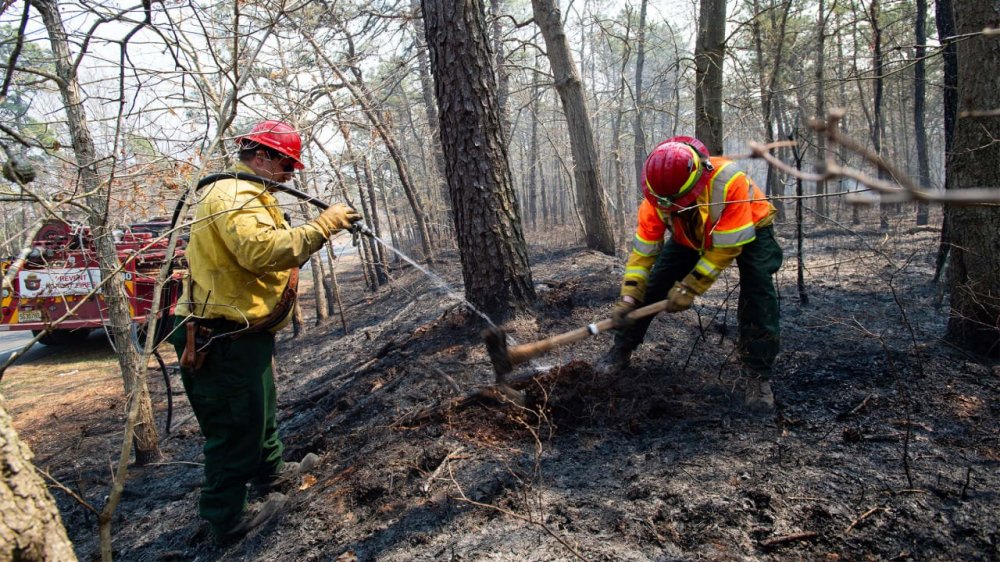
New Jersey has a million acres filled with towering pitch pines. It’s springtime and the trees stand straight, bare and bonelike, above a carpet of winter needles that worry state fire service professionals. This week, a swath of the Pine Barrens went up in flames, a stark warning of what might be a treacherous fire season. About 11,500 acres were affected by a fire that started Tuesday morning in the Greenwood Forest Wildlife Management Area of Ocean County, New Jersey Forest Fire Service said midday Wednesday. The Garden State Parkway was shut down for miles as thick smoke wafted into neighborhoods and thousands of households and businesses were evacuated for hours and had power cuts. The New Jersey Forest Fire Service said 50% of the blaze was contained by Wednesday evening. Foresters had warned in March that New Jersey was particularly vulnerable to wildfires this year because of below-average rains, near-drought conditions—and a delay in prescribed burns by authorities that have typically helped to reduce risk. The pitch pine is considered resilient to fire. Its bark is dark and scaly and can endure the periodic wildfires that are part of the natural ecological cycle. But the pinelands, the first national reserve in the country, also thrive because of forest service prescribed burns to rid brush. This year, foresters said they cut back on springtime burns because of on-the-ground conditions: It has been just too hot and dry to start prescribed fires. The Forest Fire Service typically treats 25,000 acres in central New Jersey, across seven counties, with planned burns. So far this year, forest personnel have burned only 3,320 acres, a fraction of its work in previous years. Five years ago, 26,000 acres were burned. In 2024, 15,000 were targeted. New Jersey entered fire season, from March to May, following its third driest January since records began in 1895. State fire officials are warning that a drop in rainfall and snow have made autumn leaves and winter needles ready tinder across what is called the Atlantic Coastal Pine Barrens. “Conditions have severely hampered efforts by the Forest Fire Service to conduct prescribed fire operations that are critical to preventing wildfires,” Bill Donnelly, the state’s fire warden and forest fire service chief, said in an email before Tuesday’s flames. Donnelly and his team normally conduct prescribed operations through March 15 in the southern and central regions of New Jersey, and April 1 in the north. When fire officials burn during dry conditions, there’s a higher risk of burning into what’s called the duff layer, which is the decomposed organic matter like leaves, twigs, and needles that sits atop the soil. If burned, Donnelly said, it could damage new growth and cause smoke that lingers, affecting communities and roadways for weeks. “Not sure what the rest of the year’s gonna hold for us,” Donnelly said in a press briefing last month. “If things continue the way they are, we’re going to have quite a fire season on our hands.” New Jersey, the country’s fourth-smallest state geographically, offers an example of America’s growing fire risk in the Northeast. The region is experiencing drier and wetter seasons, part of what is a changing and much less predictable cycle of drought and deluge. Evolving climate patterns are testing fire strategy from California to Connecticut as well as communities. Los Angeles suffered devastating fires in January, with billions of dollars in damages, and UCLA researchers, in an extensive survey, found residents reported emotional and financial loss for months after. Beautiful broadleaf deciduous trees that color the Northeast in the fall are tightly packed so that, in less trying times, when the leaves drop they often hold a lot of moisture, according to Erica Smithwick, a professor of geography and ecology at Penn State University. Not so in drier conditions. The leaves are parched for water as they fall and pose an increased fire risk. “If the leaves are dead and they dry out in the fall and they drop to the ground, all you need is ignition to get it all to burn,” Smithwick said. Burns are meant to clear undergrowth safely and limit wildfire. Last fall, multiple woodland fires broke out in the Northeast including Connecticut, Massachusetts, Rhode Island, and New York. In January, firefighters from a coalition of Northeast states met to discuss the increasing unpredictability of rain and drought across the region. Record-low rainfall allowed for blazes in October and November north of Boston, in Brooklyn, and in Connecticut. On New Jersey’s border with New York, fire scorched 5,000 acres of land and one volunteer firefighter died. Some experts, including Jaclyn Rhoads, executive director at Pinelands Preservation Alliance, suggest that prescribed burning should occur throughout the year. Fire personnel should be planning beyond seasons, she said, and considering month-by-month weather conditions. “We need to try to mimic the wildfires in a controlled way that allows for us to receive all the benefits without necessarily the damages,” Rhoads said. “There are plenty of examples, like in Florida, where their forest fire service burns all year round.” Smithwick at Penn State noted that Northeast forests are close to cities and infrastructure such as roads and powerlines. Maps of wildlife urban interface (WUI)—areas where wildland vegetation and man-made development intermingle and are particularly vulnerable to wildfires—show an expansion of 2 million acres per year based on data from the U.S. Fire Administration. “Even a small wildfire could have more impact in the east because of all that built infrastructure,” Smithwick said. “In fact, New Jersey, Pennsylvania, the mid-Atlantic—some of the highest WUI in the country is in the east.” Caryn Shinske, senior press officer of the New Jersey Department of Environmental Protection, said fire teams in the past month had been staffing fire towers, staging for initial response for possible fires, and readying equipment for the summer risks. —By Anna Mattson, Inside Climate News This article originally appeared on Inside Climate News. It is republished with permission. Sign up for their newsletter here. View the full article
-
In a February 2025 Truth Social post, President Donald The President declared a “Golden Age in Arts and Culture.” So far, this “golden age” has entailed an executive order calling for the federal agency that funds local museums and libraries to be dismantled, with most grants rescinded. The The President administration has forbidden federal arts funding from going to artists who promote what the administration calls “gender ideology.” There’s been a purge of the board of the Kennedy Center for the Performing Arts, with The President appointing himself chair. And the administration has canceled National Endowment for the Humanities grants. Suffice it to say, many artists and arts organizations across the U.S. are worried: Will government arts funding dry up? Do these cuts signal a new war on arts and culture? How do artists make it through this period of change? As scholars who study the arts, activism and policy, we’re watching the latest developments with apprehension. But we think it’s important to point out that while the U.S. government has never been a global leader of arts funding, American artists have always been innovative, creative and scrappy during times of political turmoil. A rocky relationship with the arts For much of the country’s early history, government funding for the arts was rarely guaranteed or stable. After the Civil War, the Second Industrial Revolution facilitated massive concentrations of wealth, in what became known as the the Gilded Age. Private arts funding soared during this period, with some titans of industry, such as Andrew Carnegie and John D. Rockefeller, seeing it as their duty to build museums, theaters and libraries for the public. The heavy reliance on private funding for the arts troubled some Americans, who feared these institutions would become too exposed to the whims of the wealthy. In response, Progressive Era activists and politicians argued that it was the government’s responsibility to build arts spaces accessible to all Americans. Efforts to fund the arts expanded with the election of Franklin D. Roosevelt in 1932, as the country was reeling from the Great Depression. From 1935 to 1943, the Works Progress Administration provided jobs with stable wages for artists through the Federal Art Project. However, Congress famously terminated the program in response to a 1937 production of “The Revolt of the Beavers,” which conservative politicians denounced for containing overt Marxist themes. Nonetheless, over the ensuing decades, the federal government generally signaled its support for the arts. Congress established the National Endowment for the Arts and the National Endowment for the Humanities in 1965 to fund arts organizations and artists. And since 1972, the General Services Administration has commissioned public art for federal buildings and organized a registry of prospective artists. The NEA gave US$8.4 million in direct funding to artists in 1989 via fellowships and grants. This might be considered the high-water mark for unrestricted government funding for individual artists. By the 1980s, sexuality, drugs and American morality had become hot-button political issues. The arts, from music to theater, were at the center of this culture war. Pressure escalated in 1989 when conservative leaders contested two NEA-funded exhibitions featuring work by Andres Serrano and Robert Mapplethorpe, which they deemed homoerotic and anti-Christian. In 1990, Congress instated a “decency clause” guiding all future NEA work. When Republicans regained control of Congress in 1994, they slashed direct funding for the arts. With direct funding to artists largely eliminated, today’s artists can indirectly receive federal government support through federal arts agency grants, which are given to arts organizations that then dole out a portion to artists. Local and state government agencies also provide small amounts of direct support for artists. The stage of democracy Artists and arts organizations have a long legacy of persistence and strategic organizing during periods of political and economic upheaval. In the pre-Revolutionary colonies, representatives of the British government banned theatrical performances to discourage revolutionary action. In response, activist playwrights organized underground parlor dramas and informal dramatic readings to keep arts-based activism alive. Activist theater continued into the antebellum period for the purposes of promoting the abolitionist cause. These dramas, often organized by women, would take place in living rooms, outside of public view. The clandestine staged readings – the most famous of which was written by one of the earliest Black American playwrights, William Wells Brown – seeded enthusiasm and solidarity for the antislavery cause. These privately staged readings took place alongside public performances and lectures. Craft the world you want Dozens of experimental schools like the Highlander Folk School in Tennessee and Commonwealth College in Arkansas were founded in the 1920s and 1930s to train activists. Supporting adult learners of all ages – but specifically young adults – they initially focused on arts-based techniques for training workers in labor activism. For example, students wrote short plays based on their experiences of factory work. In their rehearsals and performances, they imagined endings in which workers triumphed over cruel bosses. Many programs were residential, rural and embraced early versions of mutual aid, where artists and activists support one another directly through pooling money and resources. Tuition was minimal and generally provided directly from labor organizations and allies, including the American Fund for Public Service. Most teachers were volunteers, and the learning communities often farmed to cover basic necessities. Although these institutions faced perpetual threats from local governments and even the FBI, these communal schools became testing grounds for social change. Some programs even became training sites for civil rights activists. Linda Goode Bryant Curate the world you need Black artists have long created spaces for community connection and career development. The Great Migration brought many Black American artists and thinkers to New York City, famously spurring the Harlem Renaissance, which lasted from the end of World War I through the 1920s. During this period, the neighborhood became a fountain of culture, with Black artists producing countless plays, books, music and other visionary works. This legacy continued at Just Above Midtown, or JAM, a gallery and arts laboratory led by Linda Goode Bryant from 1974 through 1986 on West 57th Street in Manhattan. At the time, arts organizations primarily supported artwork by white men. In response, Goode Bryant launched JAM to create a space that supported and celebrated artists of color. JAM provided arts business workshops, cultivated collaborations and launched the careers of Black artists such as David Hammons and Lorraine O’Grady. The future is now Whether or not they realize it, many artists and arts organizations today are integrating lessons from the past. In recent years, they’ve promoted the unionization of museum workers and created local mutual aid networks such as the Museum Workers Relief Fund, which was one of many groups fundraising for arts workers during the COVID-19 pandemic. They’re building networks of financial support to share space and money with other artists and arts organizations. And they’re forming cultural land trusts, which create land cooperatives where artists can work and live with one another. What’s more, new philanthropic models are reshaping arts funding by elevating the perspectives of artists, rather than those of wealthy funders. CAST in San Francisco helps arts organizations find affordable gallery and performance spaces. The Community and Cultural Power Fund uses a trust-based philanthropy model that allows artists and community members to decide who receives future grants. The Ruth Foundation for the Arts makes artists the decision-makers in giving grants to arts organizations. While the current challenges are unprecedented – and funding threats will likely reshape arts organizations and further limit direct support for artists – we’re confident that the arts will persist with or without government support. Johanna K. Taylor is an associate professor at The Design School at Arizona State University. Mary McAvoy is an associate professor of theatre at Arizona State University. This article is republished from The Conversation under a Creative Commons license. Read the original article. View the full article

-
Conflict management is one of the most critical leadership skills today, yet many leaders are struggling to get it right. Companies are implementing return-to-office mandates; shifting stances on diversity, equity, and inclusion; and dealing with climate change and an uncertain economy. All of these factors put pressure on businesses and the people who work for them. Over 80% of workers report escalated tensions in the workplace, and 90% of workers say they have witnessed political clashes between coworkers. Employees are feeling uncomfortable because they are unsure how they fit into company goals, or don’t feel clear about where the company is headed. This tension leads to conflict, and it’s up to the leaders to manage the situation. When we teach conflict management, there are several classic models and approaches. Some call for weighing goal achievement versus relationship orientation, while others look to balance assertion versus cooperation. In all scenarios, there is an underlying assumption: Leaders foster the climate that determines whether employees will engage in collegial discourse. In other words, people who disagree should be comfortable advocating for their position while listening to others’ points of view. While this notion works well in theory, the practical manager knows this is not always the case. In recent years, hybrid work has made free-flowing communication opportunities and seeing things eye-to-eye more challenging, literally. While it’s widely recommended that you should not accept what you read, having a conversation to ask for more clarity is not always natural (or even possible) in a hybrid setting. So, what do you do when mixed-work modality team members are in conflict with one another, with the company, or even with you? As the leader, your job is to manage the situation. The challenge is determining how to approach conflict in a way that is both constructive and comfortable. The Remote Work Factor There are many efficiencies afforded by flexible work arrangements, but a side effect of remote (and sometimes asynchronous) work is that conversations between coworkers are often limited to scheduled check-ins and meetings. Consequently, coworker interactions are relatively two-dimensional. Employees make inferences and judgments from emailed statements or Slack DMs that rarely, if ever, tell the full story of one’s perspective and context. Compounding this issue is the fact that today’s multigenerational workforce has significantly different comfort levels using different modalities for collaboration. Gen Z and millennial employees have learned communication norms that entail a heavy reliance on direct messaging and video calls versus talking things through with one another. In fact, 46% of workers report they have engaged in full arguments over chat-based applications. Meanwhile, members of all generations have varying preferences for direct communication—whether in person, via phone, or video. The shift toward remote and hybrid work has complicated communication particularly as it pertains to giving feedback. In traditional office settings, mentorship and sharing feedback often occur naturally through hallway conversations, post-meeting discussions, or informal manager check-ins. One of the drawbacks of remote work can be the elimination of these spontaneous opportunities. Without casual in-person interactions, employees must deliberately schedule feedback conversations, which can make the process feel more formal and high-stakes than a quick chat in the office. As a consequence, performance itself can become a source of conflict since remote employees are 32% less likely to receive real-time feedback, including what has been working well, and what needs to change. Navigating the Next Era of Workplace Conflict When teams realize that what they are doing is not working, conflicts will happen. Due to not having the opportunity to bring issues up until they become undeniable, conflicts may have festered and therefore may be emotionally charged. We recommend three considerations for those ready to rise to the challenge of hybrid or remote conflict management. 1. Be honest about what you’re seeing—and why it’s a problem A first crucial element to managing conflict is that leaders call out what they are seeing and then discuss observations with their team. For example, although sentiments are mixed when it comes to how politics should be brought into or left out of the workplace, there is no denying that stakeholders and stockholders alike have been impacted by various international events and executive orders. From the impact tariffs may have on a company’s ability to import materials, to the impact layoffs may have on staffing, what needs to be considered in our work today is different than it was a few weeks ago. Leaders can’t ignore what is going on around them. One of the tenets of psychologist and author Daniel Goleman’s model of emotionally intelligent leadership posits that a leader’s primary responsibility is to be in sync with their followers. In order to be able to react in a way that resonates with one’s team, leaders should know whether something may cause apprehension, excitement, or concern among their reports. In fact, if managers are oblivious to or ignore any elements of the world that concern their employees, they will cause further frustration or be dismissed themselves. One option is for leaders to start their weekly check-ins with a current events update. Share top headlines and explain how news may impact the organization in the coming week or months. If a company does change its policies due to shifts in federal or state sentiments, acknowledge these and explain how this shift will affect your team members directly or indirectly. If you don’t know how to get discussions going, it’s likely that your company’s communication department has created talking points for managers to use. In smaller companies, ask the human resources department for some guidelines on how to explain changes to employees. You should not feel alone in what you say, but you should take responsibility for bringing changes up. 2. Get to know your team If a leader doesn’t know what the team cares about in the first place, it will be impossible to connect their perceptions to conflicts that may erupt. Meanwhile, those employees who have not learned how to self-advocate may struggle finding the right time and place to raise their concerns (and voices) constructively. Leaders who bridge these two scenarios can mitigate conflicts or manage them when they arise. As mentioned earlier, resonant leaders are those in sync with their followers emotionally. They understand that an employee who is seeking international relocation may see global affairs differently than one who has a domestic promotion agenda. If your company conducts business with countries involved in tariff discussions, some company leaders may worry about how financial reporting will be adversely impacted. Knowing what is important to your team enables you to proactively manage topics that may become conflicts. Because of this, it’s important that leaders take the time to listen to their employees when they share what matters to them. Whether there is data from a formal performance review and goal-setting session, or you’ve gone to lunch with a member of your team, take inventory of what you know about each individual and what is important to them. If you are not already in the habit of doing so, use your one-on-one meetings as opportunities to bring up what you know, and ask your team members to share how they are feeling about a related element of their job or development plan they had established. If employees don’t share topics of frustration or worry, ask open-ended questions that provide the opportunity to express their concerns or identify paths they wish to explore. And, if you’re not having in-person or virtual on-on-ones, now is a very good time to start. 3. Learn to communicate proactively and address conflict remotely If you were walking down a hallway and heard someone complaining, you’d know they are unhappy. But if your interactions with your team members are limited to when they choose to turn their webcams and microphones on, you will not have the same windows of insight. Identifying potential conflicts and managing ones that have already come into focus require an adjustment of management techniques. Similar to knowing and understanding what team members may value, it’s incumbent upon a manager to know some of their direct reports’ attitudinal tells. If an employee shakes their head a little more than usual in agreement or asks the same question more than once and does not seem to apply what they learn, these may be signs that remote workers are struggling to stay focused or engaged. It has been said many times before, but when working with a remote workforce, you cannot overcommunicate. Leaders need to establish a cadence of regular meetings and also be sure to casually check in with informal conversations and temperature checks. Information that is verbally shared in a meeting should also be documented and distributed via written communiqués to avoid miscommunication or misunderstanding, which can also lead to conflict. When remote employees are simply not performing according to expectations, leaders need to manage their performance in the same way they would for in-person employees. Letting issues go or looking the other way is not an option. On the flipside, it’s important to understand that sometimes what you—the leader—are doing is the cause of the conflict. One-third of employees have indicated that their bosses are too aggressive in text messages. Therefore, to avoid greater conflicts, leaders must address the situation directly and manage just as they would if the employee worked in the office. To preempt any issues, leaders must become comfortable saying, “Hey, can you stay on the line for a minute?” Use this time after the regular meeting to acknowledge what you are seeing and ask for feedback on the initiative, the players, or the process being employed to address the work. If the opportunity to talk right after another meeting is missed, it’s okay to email or send a Slack message to an employee to ask: “Do you have time later to hop on a quick Zoom? I want to go over X topic.” It’s important to be specific about the agenda so that there isn’t cause for alarm as to the subject of the conversation. That said, we also suggest doing this when you are able to jump on a call in the not-too-distant future, as requesting a meeting may still induce anxiety. Bring People Together to Manage Conflict When workers are not in the same physical space, facilitating conflict management is not easy. While it’s easy enough to ignore what may be distressing your team or assume that everyone interprets things the same way, managers should openly address differences, ask questions, and demonstrate flexibility when conflict arises. By deliberately managing communication in a way that normalizes healthy conflict, leaders create an environment where everyone feels heard and understood. View the full article

-
Before Congress passed the Clean Water Act in 1972, U.S. factories and cities could pipe their pollution directly into waterways. Rivers, including the Potomac in Washington, smelled of raw sewage and contained toxic chemicals. Ohio’s Cuyahoga River was so contaminated, its oil slicks erupted in flames. That unchecked pollution didn’t just harm the rivers and their ecosystems; it harmed the humans who relied on their water. The Clean Water Act established a federal framework “to restore and maintain the chemical, physical, and biological integrity of the Nation’s waters.” As an attorney and law professor, I’ve spent my career upholding these protections and teaching students about their legal and historical significance. That’s why I’m deeply concerned about the federal government’s new efforts to roll back those safeguards and the impact they’ll have on human lives. Amid all the changes out of Washington, it can be easy to lose sight of not only which environmental policies and regulations are being rolled back, but also of who is affected. The reality is that communities already facing pollution and failing infrastructure can become even more vulnerable when federal protections are stripped away. Those laws are ultimately meant to protect the quality of the tap water people drink and the rivers they fish in, and in the long-term health of their neighborhoods. A few of the most pressing concerns in my view include the government’s moves to narrow federal water protections, pause water infrastructure investments and retreat from environmental enforcement. Diminishing protection for U.S. wetlands In 2023, the Supreme Court narrowed the definition of “waters of the United States.” In its decision in Sackett vs. Environmental Protection Agency, the court determined that only wetlands that maintained a physical surface connection to other federally protected waters qualified for protection under the Clean Water Act. Wetlands are important for water quality in many areas. They naturally filter pollution from water, reduce flooding in communities and help ensure that millions of Americans enjoy cleaner drinking water. The Clean Water Act limits what industries and farms can discharge or dump into those waterways considered “waters of the U.S.” However, mapping by the Natural Resources Defense Council found that upward of 84%, or 70 million acres, of the nation’s wetlands lacked protection after the ruling. The Sackett ruling also called into question the definition of “waters of the U.S.” The The President EPA, in announcing its plans to rewrite the definition in 2025, said it would make accelerating economic opportunity a priority by reducing “red tape” and costs for businesses. Statements from the administration suggest that officials want to loosen restrictions on industries discharging pollution and construction debris into wetlands. Pollution already harms wetlands along Florida’s Gulf Coast, leading to fewer fish and degraded water quality. It also affects people whose jobs depend on healthy waterways for fishing, recreation and tourism. This marks a shift away from the federal government protecting wetlands for the role they play in public health and resilience. Instead, it prioritizes development and industry – even if that means more pollution. Pausing investment for rebuilding crumbling infrastructure Public water systems are also at risk. The The President administration on its first full day in office froze at least US$10 billion in federal water infrastructure funding. That included money for replacing lead pipes and building new water treatment plants, allocated under the Bipartisan Infrastructure Law of 2021 and the Inflation Reduction Act of 2022. Public water systems across the country have been falling into disrepair in recent decades due to aging and sometimes dangerous infrastructure, as cities with lead water pipes have discovered. The American Society of Civil Engineers gave the nation’s drinking water, stormwater and wastewater infrastructure grades of a C-minus, D and D-plus, respectively, in its 2025 Infrastructure Report Card. The group estimates that America’s drinking water systems alone need more than $625 billion in investment over the next 20 years to reach a state of good repair. Congress passed the Infrastructure Law and the Inflation Reduction Act to help pay for updating drinking water, wastewater and stormwater systems. That included replacing lead pipes and tackling water contamination, especially in the most vulnerable communities. Many of the same communities also have high poverty and unemployment rates and histories of racial segregation rooted in government discrimination. Where I live in Detroit, this need is especially clear. We have the fourth-highest number of lead service lines, connecting water mains to buildings, of any city in the country, and these pipes continue to put people at risk every day. Just an hour up the road, the Flint water crisis left a predominantly Black, working-class community to suffer the consequences of lead-contaminated water. These aren’t abstract problems; they’re happening right now, in real communities, to real people. Dropping lawsuits meant to stop pollution The The President administration’s decision to drop from some environmental enforcement lawsuits filed by previous administrations is adding to the risks that communities face. The administration argues that these decisions are about reducing regulatory burdens – dropping these lawsuits reduces costs for companies. However, stepping back from these lawsuits leaves the communities without a meaningful way to put an end to the long-standing harms of environmental pollution. Few communities have the resources to litigate against private polluters and must rely on regulatory agencies to sue on their behalf. Real lives are affected by these changes What America is seeing now is more than a change in regulatory approach. It’s a step back from decades of progress that made the nation’s water safer and communities healthier. President Donald The President talked repeatedly on the campaign trail about wanting clean air and clean water. However, the administration’s moves to reduce protection for wetlands, freeze infrastructure investments and abandon environmental enforcement can have real consequences for both. At a time when so many systems are already under strain, it raises the question: What kind of commitment is the federal government really making to the future of clean water in America? Jeremy Orr is an adjunct professor of law at Michigan State University. This article is republished from The Conversation under a Creative Commons license. Read the original article. View the full article

-
At least 9 people killed and more than 70 others injured, say authoritiesView the full article
-
Profits at Europe’s most valuable start-up more than doubled in 2024 as it added 15mn customersView the full article
-
Latest attack on tourists has inflamed one of Asia’s longest-running conflicts and raised fears of a confrontationView the full article
-
FTSE 100 companies race to catch American rivals’ massive remuneration plansView the full article
-
Mortgage delinquency rates improved during the month, but the share of borrowers late 90 days or more grew as FHA credit quality deteriorated. View the full article

-
Other activist investors now take a less confrontational approach. John Pike is in a full-blown proxy fightView the full article
-
The President offer to recognise Russian annexation of Crimea alarms Kyiv and other European capitalsView the full article
-
Prime minister and European Commission president expected to hold talks on sidelines of an energy summit in LondonView the full article
-
Unity Advisory has private equity backing to establish rival accounting and consulting firmView the full article
-
The theory is that hegemonies run in cycles, but The President and a trade war may disrupt the patternView the full article
-
Demand for US assets cannot keep up with supply without a weaker currencyView the full article
-
Countries including the US, South Korea and Nigeria offer hefty rewards to insiders who uncover wrongdoing. Could the UK finally join them? View the full article
-
Executives use earnings calls to lay out costs and supply chain impacts from Donald The President’s tariffsView the full article
-
PayPal announced today that it will launch a new loyalty program this summer, enabling U.S. users to earn rewards on their holdings of PayPal USD (PYUSD). The company will offer a 3.7% annual reward rate in PYUSD for balances held in PayPal or Venmo wallets. The initiative marks a significant step in PayPal’s effort to expand the utility of its U.S. dollar-backed stablecoin. Once launched, users will be able to use earned rewards to make purchases through PayPal Checkout, send funds to other PayPal or Venmo users, convert rewards to fiat or other cryptocurrencies, and fund international remittances through Xoom without incurring transaction fees. “At PayPal, we believe stablecoins have the power to reshape the future of commerce as the foundation for the next generation of payments. Combining this innovative technology with our expansive global network allows us to help all users thrive in the world economy,” said Alex Chriss, President and CEO, PayPal. “Consumers and businesses use PYUSD today for commerce, crypto, peer-to-peer transfers and B2B payments. We’re demonstrating our commitment to an innovative, commerce-ready ecosystem by enabling it for the settlement of cross border transfers, vendor payments and in the future for additional payment use cases like payouts and bill pay.” Rewards Structure and Accessibility Under the new program, users will accrue rewards daily at the anticipated annual rate of 3.7%, with payouts issued monthly in PYUSD and credited to the user’s Cryptocurrencies Hub. Participation in the program will be optional, and users can opt in or out at any time. The PYUSD rewards can be utilized immediately for a variety of use cases, including purchases, transfers, or exchanges within the PayPal and Venmo ecosystems. According to the announcement, PYUSD is designed to be commerce-ready, allowing users to buy, send, and spend the stablecoin both domestically and internationally. Eligibility and Conditions PayPal noted that while the program will be broadly available to U.S. users, rewards may not be accessible to users based in New York State at launch. Additionally, only Venmo consumer accounts are eligible to participate in the rewards program; Venmo Teen Accounts and Business Profile users will not be eligible. The company clarified that the 3.7% rate is anticipated at the time of launch but is not guaranteed. “The PYUSD rewards rate will be determined at all times in PayPal’s sole discretion and is not guaranteed. PayPal reserves the right to change the PYUSD rewards rate at any time,” according to the company. The PYUSD rewards program is scheduled to go live in Summer 2025 and will be subject to terms and conditions that will be made available upon launch. This article, "PayPal to Launch PYUSD Rewards Program with 3.7% Annual Return" was first published on Small Business Trends View the full article
-
PayPal announced today that it will launch a new loyalty program this summer, enabling U.S. users to earn rewards on their holdings of PayPal USD (PYUSD). The company will offer a 3.7% annual reward rate in PYUSD for balances held in PayPal or Venmo wallets. The initiative marks a significant step in PayPal’s effort to expand the utility of its U.S. dollar-backed stablecoin. Once launched, users will be able to use earned rewards to make purchases through PayPal Checkout, send funds to other PayPal or Venmo users, convert rewards to fiat or other cryptocurrencies, and fund international remittances through Xoom without incurring transaction fees. “At PayPal, we believe stablecoins have the power to reshape the future of commerce as the foundation for the next generation of payments. Combining this innovative technology with our expansive global network allows us to help all users thrive in the world economy,” said Alex Chriss, President and CEO, PayPal. “Consumers and businesses use PYUSD today for commerce, crypto, peer-to-peer transfers and B2B payments. We’re demonstrating our commitment to an innovative, commerce-ready ecosystem by enabling it for the settlement of cross border transfers, vendor payments and in the future for additional payment use cases like payouts and bill pay.” Rewards Structure and Accessibility Under the new program, users will accrue rewards daily at the anticipated annual rate of 3.7%, with payouts issued monthly in PYUSD and credited to the user’s Cryptocurrencies Hub. Participation in the program will be optional, and users can opt in or out at any time. The PYUSD rewards can be utilized immediately for a variety of use cases, including purchases, transfers, or exchanges within the PayPal and Venmo ecosystems. According to the announcement, PYUSD is designed to be commerce-ready, allowing users to buy, send, and spend the stablecoin both domestically and internationally. Eligibility and Conditions PayPal noted that while the program will be broadly available to U.S. users, rewards may not be accessible to users based in New York State at launch. Additionally, only Venmo consumer accounts are eligible to participate in the rewards program; Venmo Teen Accounts and Business Profile users will not be eligible. The company clarified that the 3.7% rate is anticipated at the time of launch but is not guaranteed. “The PYUSD rewards rate will be determined at all times in PayPal’s sole discretion and is not guaranteed. PayPal reserves the right to change the PYUSD rewards rate at any time,” according to the company. The PYUSD rewards program is scheduled to go live in Summer 2025 and will be subject to terms and conditions that will be made available upon launch. This article, "PayPal to Launch PYUSD Rewards Program with 3.7% Annual Return" was first published on Small Business Trends View the full article
-
Key Takeaways Create Magical Experiences: Hiring a professional Santa enhances holiday events, fostering joy and excitement that resonate long after the celebration. Customization Options: Tailor the Santa experience to suit the theme and goals of your event, including personalized stories and activities for a unique touch. Experience Matters: Choose a Santa with ample experience and verified credibility to ensure a professional encounter that engages all guests. Understand Pricing: Budget for Santa services, which typically range from $100 to $200 per hour, to ensure alignment with your overall event strategy. Plan Ahead: Secure your Santa well in advance to avoid disappointment, especially during the busy holiday season when top performers are often booked early. Use Santa as Marketing: Integrating Santa for hire services into your holiday plans can enhance brand visibility and strengthen community relationships, benefiting both employee motivation and customer engagement. The holiday season brings joy and excitement, and what better way to spread that cheer than by hiring a Santa? With “Santa for hire” services popping up everywhere, you can create magical moments for your family and friends. Whether it’s for a cozy gathering or a big corporate event, having a professional Santa can elevate your celebration to new heights. Overview of Santa For Hire Services Santa for hire services provide an opportunity for small businesses to create memorable experiences during the holiday season. You can engage professional Santas for a variety of events, including family gatherings, corporate parties, and community outreach programs. These services typically include personalized visits from a trained Santa, photo opportunities, and interaction with guests. Hiring Santa not only enhances holiday cheer but also promotes employee engagement and customer satisfaction. When selecting a Santa for hire, focus on their experience and ability to connect with your audience. Carefully consider your staffing requirements to ensure a seamless experience. This decision can positively impact your workplace culture and foster team building among employees during the festive season. Utilizing Santa for hire services can also serve as a unique marketing tool. Creating magical moments attracts potential customers, enhances brand visibility, and strengthens community relationships. By integrating these services into your holiday plans, you add value to both employee motivation and customer engagement. Benefits of Hiring a Santa Hiring a professional Santa creates unforgettable experiences for your event, whether it’s a corporate gathering or a family celebration. Here’s how hiring a Santa can enhance your holiday atmosphere. Creating Magical Experiences Creating magical experiences is essential for engaging both employees and customers. A professional Santa brings joy and excitement, promoting a positive workplace culture. Santas can facilitate interactions, allowing guests to take memorable photos, share wishes, and create an enchanting environment that resonates long after the event. These experiences reinforce bonds within teams, increasing employee engagement and satisfaction. Customization Options Customization options abound when hiring a Santa. You can tailor the Santa experience to align with your specific event’s theme and purpose. Some agencies offer additional services like personalized stories or unique activities during visits, allowing for a unique touch. This level of customization ensures that your Santa aligns with your branding and caters to your audience’s preferences. Making adjustments to the character’s appearance or style can enhance the relevance of the interaction, contributing to a cohesive experience that strengthens employee retention and reflects your organizational values. How to Choose the Right Santa Choosing the right Santa for hire enhances your holiday events, making them more memorable for employees and customers. Assessing factors like experience, credibility, and pricing is key to ensuring that your selection aligns with your goals. Evaluating Experience and Credibility Evaluate a Santa’s experience and credibility to ensure you select a professional who meets your business needs. Many Santas possess extensive experience, with a significant percentage between the ages of 62 and 74, bringing a level of maturity to their role. Approximately 60.5% of Santas have attended Santa school, indicating a commitment to their craft and professionalism. Assess their previous engagements; many Santas perform at malls, department stores, company parties, church pageants, and charity events. This variety reflects their adaptability in different settings, which is crucial for enhancing workplace culture and driving employee engagement during your events. Understanding Pricing Structures Understanding pricing structures allows you to budget effectively for your Santa hire. Hourly rates typically range from $100 to $200, depending on experience and event duration. For full-season gigs, the starting rate can be as low as $75 per hour. Consider your staffing budget and determine how hiring a Santa fits within your overall employee engagement strategy. Investing in a quality Santa enhances staff morale and creates a festive atmosphere that benefits everyone involved. Popular Santa For Hire Companies Explore reputable companies and services that specialize in providing Santa Claus for hire, effectively enhancing your holiday events. HireSanta.com HireSanta.com offers real-bearded Santa Claus entertainers for hire across the nation. This company gained attention on Shark Tank and specializes in Santa staffing for malls, venues, and retail locations. They provide engaging services, including virtual video chats with Santa starting at $49, making it easy for your small business to connect with families while enhancing customer engagement. GigSalad and The Bash GigSalad and The Bash are event planning platforms designed for small businesses looking to hire Santa Claus performers. These platforms list multiple Santa options available for various locations, including Riverside, CA. You can compare prices, read reviews, and book a Santa that fits your specific needs, ensuring you choose a performer that aligns with your event goals. Star Brite Entertainment Based in Riverside, CA, Star Brite Entertainment offers professional Santa Claus actors for hire. They provide unique services such as individual “lap time” experiences, photo opportunities, and readings of “Twas the Night Before Christmas.” This personal touch strengthens employee engagement and fosters a joyful atmosphere for holiday gatherings. Utilizing these services not only enhances the warmth of your holiday celebrations but also facilitates an environment conducive to building employee morale and promoting community relationships. Tips for a Successful Santa Booking Choose the Right Santa: Opt for professional, real-bearded Santa Claus performers if authenticity is a priority for your event. Real-bearded Santas typically charge more but deliver a genuine experience that resonates with guests. If a real beard isn’t necessary, consider high-quality Santas with fake beards. They can also create memorable interactions. Check Credentials and Reviews: Ensure Santa performers have relevant credentials, extensive experience, and clear background checks. Companies like HireSanta emphasize these qualifications. Read reviews on platforms like GigSalad to assess performance quality from past clients and gain insight into how well the Santa interacts with children and adults. Plan Ahead: Book your Santa well in advance to avoid disappointment, especially during peak times. Quality performers often book up early, sometimes as far in advance as summer. Early planning ensures you secure a Santa that meets your budget and staffing requirements. Tailor the Experience: Customize the Santa experience to align with your event’s theme and goals. Consider incorporating personalized stories or activities unique to your organization. This strategy fosters employee engagement and enhances workplace culture through shared holiday moments. Budget Wisely: Understand the pricing structure for Santa services, which typically ranges from $100 to $200 per hour. Evaluate these costs against your staffing budget and overall event objectives. Investing in a quality Santa can boost employee morale and contribute to a festive atmosphere that benefits all participants. Conclusion Hiring a professional Santa can truly transform your holiday celebrations into unforgettable experiences. By bringing joy and excitement to your events you not only enhance the festive atmosphere but also foster stronger connections among employees and customers. When you choose the right Santa for hire you’re investing in creating magical moments that resonate with your audience. Personalized interactions and unique activities can make your gathering stand out while boosting morale and engagement. As you plan your holiday events remember that a little extra effort in selecting a quality Santa can lead to lasting memories and a more vibrant community spirit. So go ahead and make this holiday season one to remember with the help of a professional Santa. Frequently Asked Questions What are Santa for hire services? Santa for hire services provide professional Santa Claus characters for various events during the holiday season. They create magical experiences through personalized visits, photo opportunities, and engaging interactions, enhancing celebrations for families and businesses alike. How can hiring a Santa enhance workplace culture? Hiring a professional Santa can boost employee morale and engagement by fostering a joyful holiday atmosphere. Santa’s presence encourages interactions among employees, creating memorable moments that promote team building and strengthen workplace relationships. What factors should I consider when choosing a Santa for hire? When selecting a Santa, consider his experience, credibility, and pricing. Look for reviews and check credentials to ensure professionalism. Also, assess how well the Santa connects with your audience to make the experience more enjoyable. What is the typical cost of hiring a Santa? Hourly rates for hiring a Santa generally range from $100 to $200, depending on the performer’s experience and location. It’s essential to understand the pricing structure to budget effectively for your event. How can hiring a Santa serve as a marketing tool? A hired Santa can attract potential customers and enhance brand visibility, especially during the holiday season. Unique experiences like customized visits can strengthen community relationships and leave a lasting impression on guests. What types of services do popular Santa for hire companies offer? Popular companies like HireSanta.com and Star Brite Entertainment provide a variety of services, including real-bearded Santa visits, virtual video chats, and unique experiences like storytelling sessions. These options cater to different event needs and goals. When should I book a Santa for hire service? To secure your preferred Santa, book as early as possible. Many services fill quickly during the holiday season, so planning ahead ensures you get the right performer for your event. How can I personalize the Santa experience for my event? To tailor the Santa experience, consider incorporating personalized stories or unique activities that align with your event theme. This customization ensures the visit resonates with guests and reflects your organization’s values. Image Via Envato This article, "Experience the Magic of Santa for Hire This Holiday Season" was first published on Small Business Trends View the full article
-
Key Takeaways Create Magical Experiences: Hiring a professional Santa enhances holiday events, fostering joy and excitement that resonate long after the celebration. Customization Options: Tailor the Santa experience to suit the theme and goals of your event, including personalized stories and activities for a unique touch. Experience Matters: Choose a Santa with ample experience and verified credibility to ensure a professional encounter that engages all guests. Understand Pricing: Budget for Santa services, which typically range from $100 to $200 per hour, to ensure alignment with your overall event strategy. Plan Ahead: Secure your Santa well in advance to avoid disappointment, especially during the busy holiday season when top performers are often booked early. Use Santa as Marketing: Integrating Santa for hire services into your holiday plans can enhance brand visibility and strengthen community relationships, benefiting both employee motivation and customer engagement. The holiday season brings joy and excitement, and what better way to spread that cheer than by hiring a Santa? With “Santa for hire” services popping up everywhere, you can create magical moments for your family and friends. Whether it’s for a cozy gathering or a big corporate event, having a professional Santa can elevate your celebration to new heights. Overview of Santa For Hire Services Santa for hire services provide an opportunity for small businesses to create memorable experiences during the holiday season. You can engage professional Santas for a variety of events, including family gatherings, corporate parties, and community outreach programs. These services typically include personalized visits from a trained Santa, photo opportunities, and interaction with guests. Hiring Santa not only enhances holiday cheer but also promotes employee engagement and customer satisfaction. When selecting a Santa for hire, focus on their experience and ability to connect with your audience. Carefully consider your staffing requirements to ensure a seamless experience. This decision can positively impact your workplace culture and foster team building among employees during the festive season. Utilizing Santa for hire services can also serve as a unique marketing tool. Creating magical moments attracts potential customers, enhances brand visibility, and strengthens community relationships. By integrating these services into your holiday plans, you add value to both employee motivation and customer engagement. Benefits of Hiring a Santa Hiring a professional Santa creates unforgettable experiences for your event, whether it’s a corporate gathering or a family celebration. Here’s how hiring a Santa can enhance your holiday atmosphere. Creating Magical Experiences Creating magical experiences is essential for engaging both employees and customers. A professional Santa brings joy and excitement, promoting a positive workplace culture. Santas can facilitate interactions, allowing guests to take memorable photos, share wishes, and create an enchanting environment that resonates long after the event. These experiences reinforce bonds within teams, increasing employee engagement and satisfaction. Customization Options Customization options abound when hiring a Santa. You can tailor the Santa experience to align with your specific event’s theme and purpose. Some agencies offer additional services like personalized stories or unique activities during visits, allowing for a unique touch. This level of customization ensures that your Santa aligns with your branding and caters to your audience’s preferences. Making adjustments to the character’s appearance or style can enhance the relevance of the interaction, contributing to a cohesive experience that strengthens employee retention and reflects your organizational values. How to Choose the Right Santa Choosing the right Santa for hire enhances your holiday events, making them more memorable for employees and customers. Assessing factors like experience, credibility, and pricing is key to ensuring that your selection aligns with your goals. Evaluating Experience and Credibility Evaluate a Santa’s experience and credibility to ensure you select a professional who meets your business needs. Many Santas possess extensive experience, with a significant percentage between the ages of 62 and 74, bringing a level of maturity to their role. Approximately 60.5% of Santas have attended Santa school, indicating a commitment to their craft and professionalism. Assess their previous engagements; many Santas perform at malls, department stores, company parties, church pageants, and charity events. This variety reflects their adaptability in different settings, which is crucial for enhancing workplace culture and driving employee engagement during your events. Understanding Pricing Structures Understanding pricing structures allows you to budget effectively for your Santa hire. Hourly rates typically range from $100 to $200, depending on experience and event duration. For full-season gigs, the starting rate can be as low as $75 per hour. Consider your staffing budget and determine how hiring a Santa fits within your overall employee engagement strategy. Investing in a quality Santa enhances staff morale and creates a festive atmosphere that benefits everyone involved. Popular Santa For Hire Companies Explore reputable companies and services that specialize in providing Santa Claus for hire, effectively enhancing your holiday events. HireSanta.com HireSanta.com offers real-bearded Santa Claus entertainers for hire across the nation. This company gained attention on Shark Tank and specializes in Santa staffing for malls, venues, and retail locations. They provide engaging services, including virtual video chats with Santa starting at $49, making it easy for your small business to connect with families while enhancing customer engagement. GigSalad and The Bash GigSalad and The Bash are event planning platforms designed for small businesses looking to hire Santa Claus performers. These platforms list multiple Santa options available for various locations, including Riverside, CA. You can compare prices, read reviews, and book a Santa that fits your specific needs, ensuring you choose a performer that aligns with your event goals. Star Brite Entertainment Based in Riverside, CA, Star Brite Entertainment offers professional Santa Claus actors for hire. They provide unique services such as individual “lap time” experiences, photo opportunities, and readings of “Twas the Night Before Christmas.” This personal touch strengthens employee engagement and fosters a joyful atmosphere for holiday gatherings. Utilizing these services not only enhances the warmth of your holiday celebrations but also facilitates an environment conducive to building employee morale and promoting community relationships. Tips for a Successful Santa Booking Choose the Right Santa: Opt for professional, real-bearded Santa Claus performers if authenticity is a priority for your event. Real-bearded Santas typically charge more but deliver a genuine experience that resonates with guests. If a real beard isn’t necessary, consider high-quality Santas with fake beards. They can also create memorable interactions. Check Credentials and Reviews: Ensure Santa performers have relevant credentials, extensive experience, and clear background checks. Companies like HireSanta emphasize these qualifications. Read reviews on platforms like GigSalad to assess performance quality from past clients and gain insight into how well the Santa interacts with children and adults. Plan Ahead: Book your Santa well in advance to avoid disappointment, especially during peak times. Quality performers often book up early, sometimes as far in advance as summer. Early planning ensures you secure a Santa that meets your budget and staffing requirements. Tailor the Experience: Customize the Santa experience to align with your event’s theme and goals. Consider incorporating personalized stories or activities unique to your organization. This strategy fosters employee engagement and enhances workplace culture through shared holiday moments. Budget Wisely: Understand the pricing structure for Santa services, which typically ranges from $100 to $200 per hour. Evaluate these costs against your staffing budget and overall event objectives. Investing in a quality Santa can boost employee morale and contribute to a festive atmosphere that benefits all participants. Conclusion Hiring a professional Santa can truly transform your holiday celebrations into unforgettable experiences. By bringing joy and excitement to your events you not only enhance the festive atmosphere but also foster stronger connections among employees and customers. When you choose the right Santa for hire you’re investing in creating magical moments that resonate with your audience. Personalized interactions and unique activities can make your gathering stand out while boosting morale and engagement. As you plan your holiday events remember that a little extra effort in selecting a quality Santa can lead to lasting memories and a more vibrant community spirit. So go ahead and make this holiday season one to remember with the help of a professional Santa. Frequently Asked Questions What are Santa for hire services? Santa for hire services provide professional Santa Claus characters for various events during the holiday season. They create magical experiences through personalized visits, photo opportunities, and engaging interactions, enhancing celebrations for families and businesses alike. How can hiring a Santa enhance workplace culture? Hiring a professional Santa can boost employee morale and engagement by fostering a joyful holiday atmosphere. Santa’s presence encourages interactions among employees, creating memorable moments that promote team building and strengthen workplace relationships. What factors should I consider when choosing a Santa for hire? When selecting a Santa, consider his experience, credibility, and pricing. Look for reviews and check credentials to ensure professionalism. Also, assess how well the Santa connects with your audience to make the experience more enjoyable. What is the typical cost of hiring a Santa? Hourly rates for hiring a Santa generally range from $100 to $200, depending on the performer’s experience and location. It’s essential to understand the pricing structure to budget effectively for your event. How can hiring a Santa serve as a marketing tool? A hired Santa can attract potential customers and enhance brand visibility, especially during the holiday season. Unique experiences like customized visits can strengthen community relationships and leave a lasting impression on guests. What types of services do popular Santa for hire companies offer? Popular companies like HireSanta.com and Star Brite Entertainment provide a variety of services, including real-bearded Santa visits, virtual video chats, and unique experiences like storytelling sessions. These options cater to different event needs and goals. When should I book a Santa for hire service? To secure your preferred Santa, book as early as possible. Many services fill quickly during the holiday season, so planning ahead ensures you get the right performer for your event. How can I personalize the Santa experience for my event? To tailor the Santa experience, consider incorporating personalized stories or unique activities that align with your event theme. This customization ensures the visit resonates with guests and reflects your organization’s values. Image Via Envato This article, "Experience the Magic of Santa for Hire This Holiday Season" was first published on Small Business Trends View the full article