ResidentialBusiness
Administrators
-
Joined
-
Last visited
Everything posted by ResidentialBusiness
-
A Service Strategy Plan outlines how IT services align with your organization’s long-term goals, ensuring effective management and delivery. It’s crucial for optimizing resource allocation, enhancing customer satisfaction, and adapting to changing market demands. By defining service portfolios and financial management practices, this plan cultivates continuous improvement. Comprehending its components and development steps can greatly impact your business’s growth and resilience. So, what specific elements should you focus on to create an effective Service Strategy Plan? Key Takeaways A Service Strategy Plan is a blueprint that aligns IT services with long-term business objectives for effective delivery and management. It optimizes technology investments to ensure they contribute to overall organizational goals and enhance resource allocation. The plan includes components like service portfolio management, demand management, and financial management to streamline operations. It nurtures a culture of continuous improvement, enhancing customer satisfaction and retention rates through adaptive service delivery. By managing risks and forecasting demand, the plan provides a competitive advantage and agility in response to market changes. Definition of a Service Strategy Plan A Service Strategy Plan serves as a vital blueprint for how IT services are delivered and managed within an organization. This all-encompassing framework outlines the alignment of IT services with your organization’s long-term business objectives. It includes key components such as service portfolio management, demand management, and financial management, ensuring that resources are effectively allocated as meeting customer needs. The plan establishes clear goals and performance metrics, like KPIs, which measure the effectiveness of IT services in relation to business results. Developing a robust Service Strategy Plan is significant for steering digital transformation and promoting continuous improvement. It improves customer satisfaction by ensuring services are consistently delivered at expected quality levels. Additionally, a well-defined service strategy plan supports strategic decision-making, helping you prioritize technology investments and manage the risks associated with service delivery, ultimately contributing to overall organizational success through the itil service strategy framework. Importance of a Service Strategy Plan Comprehending the importance of a Service Strategy Plan is crucial for organizations aiming to optimize their IT services in alignment with business goals. This plan helps you guarantee that your technology investments contribute directly to achieving your organizational objectives. By providing a structured approach to managing services throughout their lifecycle, it enables effective prioritization and resource allocation, leading to improved operational efficiency. Moreover, a Service Strategy Plan nurtures a culture of continuous improvement, allowing your organization to adapt to changing market conditions and customer needs through regular assessments and updates. Implementing this plan improves customer satisfaction, assuring your services meet or exceed expectations, which can result in higher retention rates and loyalty. Finally, a well-defined Service Strategy Plan facilitates better risk management by identifying potential threats and establishing mitigation strategies, ensuring compliance with relevant regulations and industry standards. Key Components of a Service Strategy Plan When developing a Service Strategy Plan, several key components are significant for guaranteeing effective service delivery and alignment with business goals. First, a clear service portfolio is fundamental; it defines the types of services offered, their lifecycle management, and their contributions to business outcomes. This clarity helps all stakeholders understand what to expect. Next, financial management plays an important role, encompassing budgeting, accounting, and funding clarity for services, which secures cost-effective delivery. Furthermore, demand management is necessary; it analyzes customer usage patterns and anticipates future needs, optimizing service consumption and resource allocation accordingly. Finally, business relationship management is critical, as it helps maintain positive connections with stakeholders and aligns service delivery with customer expectations, eventually enhancing satisfaction. Steps to Develop a Service Strategy Plan To effectively develop a Service Strategy Plan, you must first assess the current state of your IT services and infrastructure. Analyze your existing capabilities and identify areas that need improvement. Next, define a clear IT service vision and set SMART objectives that align with your broader business goals. Conduct a gap analysis to pinpoint the discrepancies between your current capabilities and desired objectives; this will guide your strategic planning process. After identifying gaps, create a thorough roadmap that outlines actionable steps for addressing these issues. This roadmap should include resource allocation and timelines for implementation. Finally, regularly review and assess the effectiveness of your strategy against the defined objectives. This guarantees ongoing alignment with business needs and facilitates continuous improvement. Impacts of a Service Strategy Plan on Business Growth A well-executed service strategy plan greatly impacts business growth by aligning IT services with overarching business objectives. This alignment improves operational efficiency, ensuring resources are allocated effectively to meet customer needs. By forecasting demand and analyzing service usage, your organization can optimize service delivery, which increases customer satisfaction and loyalty, eventually leading to higher revenue generation. Implementing a structured service strategy plan as well provides you a competitive advantage, allowing for swift adaptation to market changes and industry trends. This positioning helps you stay ahead of competitors. In addition, continuous improvement initiatives embedded within the plan encourage innovation and agility, empowering you to evolve services based on customer feedback and changing market demands. Finally, leveraging a robust service strategy plan equips your organization to manage risks associated with service failures and operational disruptions, supporting sustained business growth and resilience in the face of challenges. Frequently Asked Questions What Are the 4 P’s of Service Strategy? The 4 Ps of service strategy are essential for effective service delivery. First, Perspective defines your guiding view, ensuring alignment with business objectives. Next, Position involves tailoring services to meet specific needs, enhancing your competitive edge. Then, Plan outlines the necessary actions and policies for executing the strategy throughout the service lifecycle. Finally, Pattern represents the consistent behaviors in service management, promoting reliability and consistency. Together, they create a robust framework for success. What Is a Strategic Plan and Why Is IT Important? A strategic plan is a structured document that outlines your organization’s long-term goals and the necessary actions to achieve them. It’s essential as it aligns resources and efforts across departments, ensuring everyone works toward common objectives. By analyzing your current situation, including strengths and weaknesses, you create measurable goals. A solid plan helps you navigate market changes, respond to competition, and adapt to customer needs, in the end enhancing growth and sustainability. Why Is a Service Strategy Important? A service strategy is important since it aligns IT services with your business goals, ensuring technology investments support your objectives. It improves operational efficiency, reduces costs, and boosts customer satisfaction by consistently meeting service expectations. By promoting continuous improvement, a solid service strategy allows you to adapt to market changes and improve resource management. This structured approach likewise helps you navigate digital transformation challenges, making your organization more resilient and competitive. What Is a Service Strategy Example? A service strategy example could involve a cloud service provider targeting specific industries, evaluating their unique challenges, and personalizing a service portfolio. For instance, they might offer scalable storage and improved cybersecurity features designed to meet business needs. Similarly, a retail company might analyze customer data to optimize inventory and personalize marketing efforts, ensuring they meet demand efficiently. These strategies illustrate how organizations align their services to address specific market requirements effectively. Conclusion In conclusion, a Service Strategy Plan is essential for aligning IT services with business objectives, enhancing efficiency, and improving customer satisfaction. By incorporating key components like service portfolios, financial management, and demand management, you can develop a robust framework that promotes continuous improvement. Following a structured approach to create this plan can greatly impact your organization’s growth and adaptability in a dynamic market. Implementing a well-defined strategy finally supports your long-term business goals and resilience. Image via Google Gemini This article, "What Is a Service Strategy Plan and Why Is It Needed?" was first published on Small Business Trends View the full article
-
U.S. markets are poised to open with gains on Wednesday as bond yields slipped and oil prices fell. Futures for the S&P 500 rose 0.4% while futures for the Dow Jones Industrial Average edged 0.2% higher and Nasdaq futures jumped 0.7%. The yield on the 10-year Treasury eased overnight to 4.64% from 4.66% late Tuesday, but are up from less than 4% before the war with Iran began. That’s a notable increase and part of the reason that stock prices look even more expensive while threatening to slow the economy. Higher yields can drive up rates for mortgages and loans going to companies to build AI data centers, which has been a big source of growth for the economy. There was also some relief from higher energy prices, which can hamper growth as well. Early Wednesday, U.S. benchmark crude oil fell $2.65 to $101.50 per barrel. Brent crude, the international standard, lost $2.89 to $108.39 per barrel. But gasoline prices in the U.S. continued to rise. The average price for a gallon of gasoline rose 3 cents overnight to $4.56, according to the AAA motor club, or about 43% more than it cost last year at this time. In equities trading, Target rose 2% after the Minneapolis retailer reported a jump in first quarter sales and raised its annual revenue outlook. Target, which embarked on a turnaround plan under its new CEO earlier this year, said it expects the momentum to continue through 2026. Attention Wednesday will be focused on Nvidia’s quarterly results due after the closing bell. The chip company has routinely blown past analysts’ expectations each quarter and provided forecasts for future growth that have consistently topped Wall Street’s. How it does could determine whether technology stocks and the larger U.S. stock market can maintain their rally. Nvidia fell 0.8% Tuesday and was one of the heaviest weights on the S&P 500 because of its immense size. Its shares were up 1.8% in premarket trading Wednesday. Many big U.S. companies have been reporting stronger-than-expected profits for the latest quarter thanks in part to their customers continuing to spend despite high gasoline prices and other challenges. That’s helped vault U.S. stock indexes to records, but disquiet in the bond market is threatening that. At midday in Europe, Germany’s DAX rose 0.5%, while the CAC 40 in Paris was up 0.6%. Britain’s FTSE 100 was effectively unchanged. In Japan, the Nikkei 225 lost 1.2% to 59,804.41. The yield on the 10-year Japanese government bond slipped to just below 2.8% but remained at its highest level since 1997. Chinese shares also fell, with Hong Kong’s Hang Seng losing 0.6% to 25,656.12. The Shanghai Composite index shed 0.3% to 4,162.10. Australia’s S&P/ASX 200 dropped 1.3% to 8,496.60. In South Korea, the Kospi dropped 0.9% to 7,208.95 after a broad sell-off a day earlier. Taiwan’s Taiex gave up 0.4%. —Elaine Kurtenbach and Matt Ott, AP Business Writers View the full article

-
We may earn a commission from links on this page. Deal pricing and availability subject to change after time of publication. A good set of cordless tools will give your DIY projects polish, save you time, and make your life easier. But quality tools can be expensive. I use Milwaukee 18-volt tools in my personal tool kit and I’ve used them for everything from fixing my bathroom sink to building a deck. The batteries last at least 10 years without needing to be replaced, and the tools are comfortable to grip for long periods of time. There are some good Memorial Day deals at Home Depot on the tools I swear by. This Milwaukee six-tool bundle is 50% off right nowIf you’re starting a cordless tool set from scratch, a bundle will save you money and set you up with all the basics you need. Because these sets usually come with batteries and chargers as well as tools, they’re a good choice to begin a cordless tool set. The Milwaukee 18-volt, six-tool set is now $499, 50% off its regular price. The bundle comes with a drill, an impact driver, an oscillating multitool, a circular saw, an angle grinder, a work light, two four-amp-hour batteries, a charger, and a tool bag. These tools can be used for basic projects, like hanging shelves, and for more advanced projects like cutting and building your own shelves. These Milwaukee cutting and shaping tool deals are worth exploringMost DIY home improvement projects, from installing molding to repairing a deck will involve some cutting. Depending on what the scope of your project is, different types of cutting and shaping tools will be useful for different applications. There are a few good deals on cutting tools that will come in handy if you’re doing any building, patching, or rebuilding. The 18-volt Milwaukee sawzall is $269, 51% off its usual price. This saw comes with a five-amp-hour battery, a charger, and a stacking case that’s compatible with the Milwaukee system. A sawzall is good for making rough cuts and trimming small to medium branches on trees and shrubs. The 18-volt Milwaukee oscillating multitool is $119, 40% off its typical price. It comes with a two-amp-hour battery and a charger. This is the most versatile tool out there: It can be used to plunge cut, trim plaster and drywall, cut wood, PVC, metal, and foam, and can be adapted for sanding and buffing. I use my oscillating multitool on nearly every project I work on. The Milwaukee 18-volt angle grinder is $299, 47% off its regular price. This tool comes with two six-amp-hour batteries and a charger. You can use an angle grinder for cutting metal, grinding welds, polishing metal, cutting off screw and nail tips that poke through, and for cleaning and buffing your surfaces. Some people use angle grinders for cutting tile and removing grout, but if you use yours for this, it’s important to make sure that the tile you’re cutting isn’t made from stone, that your material is wet, and that you wear proper safety gear like safety goggles and a respirator. The dust from masonry and tile can contain silica dust that's quite dangerous to inhale. This Milwaukee drill and driver are both on saleA drill and driver are the most basic tools in a cordless set. Both the Milwaukee 18-volt, ½-inch chuck cordless drill and the 18-volt cordless impact driver are $129, 35% off their usual price. These tools will allow you to drive screws and bolts and drill holes for projects like mounting a flat screen TV or swapping out hardware on your cabinets. These Milwaukee bits and extras are on sale, tooMilwaukee makes a wide range of tools to fit their 18-volt batteries, and one of my favorite surprise tools is on sale right now. There’s also an excellent deal on a hole saw set from Milwaukee. The Milwaukee 18-volt cordless inflator is $299, 45% off its typical price. This tool comes with two six-amp-hour batteries and a charger. It can be really handy to have in your emergency roadside kit to inflate a tire and you can also use it for rafts or other inflatables. The inflator tool has a pressure gauge, an auto-shut-off feature, and three-foot hose for easy reach. The Milwaukee eight-piece hole saw kit is $29.97, 40% off its regular price. The set comes with four sizes of hole saw blades, three drill bits, an arbor, and case. Hole saws can be used for cutting larger sized holes for passing wiring through timber, installing some types of door latches and knobs, and for creating cable pass-throughs in desktops. View the full article
-
Management and union leaders at Samsung Electronics failed to reach a last-minute deal over wages Wednesday, raising prospects for a strike at the South Korean electronics giant that could rattle global semiconductor supplies and the country’s trade-dependent economy. Government officials have threatened to invoke rarely used emergency powers to force a settlement at Samsung, where the union, which represents more than 70,000 workers, says the company has failed to offer adequate compensation despite its soaring profits fueled by the global boom in artificial intelligence. After the latest round of talks ended without a breakthrough on Wednesday, union leader Choi Seung-ho told reporters that unionized workers will begin an 18-day strike from Thursday. Both the union and the management held each other responsible for a failure to reach a deal. Choi accused management of refusing to accept a government-mediated proposal whose details he refused to disclose. The management accused the union of calling for excessive compensation packages for workers at loss-making units. The two sides said they will continue efforts to reach a deal. The two sides met again Wednesday afternoon at the arrangement of Labor Minister Kim Younghoon, according to Kim’s ministry. Samsung and its cross-town rival, SK Hynix, together produce about two-thirds of the world’s memory chips, which are seeing surging demand driven by AI. Samsung said last month its operating profit for the January-March quarter jumped eightfold to a record 57.2 trillion won ($38 billion). Union leaders have demanded a compensation structure in which Samsung would commit to spend 15% of its annual operating profit on employee bonuses and scrap bonus caps, which are currently set at 50% of annual salaries. The company says the demands are excessive, citing the highly cyclical nature of the semiconductor business. Prime Minister Kim Min-seok, the government’s No. 2 official after President Lee Jae Myung, said in a televised statement Sunday that the strike could cause up to 100 trillion won ($66 billion) in economic damage by disrupting Samsung’s highly complex semiconductor manufacturing processes. The planned strike also has a potential global impact. Given that supply in the global memory semiconductor market is struggling to keep up with demand, the Samsung strike was expected to further drive up prices and push back AI infrastructure investments in other countries, said Lee Jun, an expert at the Korea Institute for Industrial Economics and Trade. The strike was expected to hurt operations of Samsung’s production of smartphones and other consumer electronics as well, observers say. A local court on Monday partially granted the company’s request for an injunction against the planned strike, ruling that the union must maintain certain staffing levels to prevent damage to facilities and materials and ensure safe operations. The Suwon District Court also barred unionists from occupying key facilities and offices. —Kim Tong-Hyung and Hyung-Jin Kim, Associated Press View the full article

-
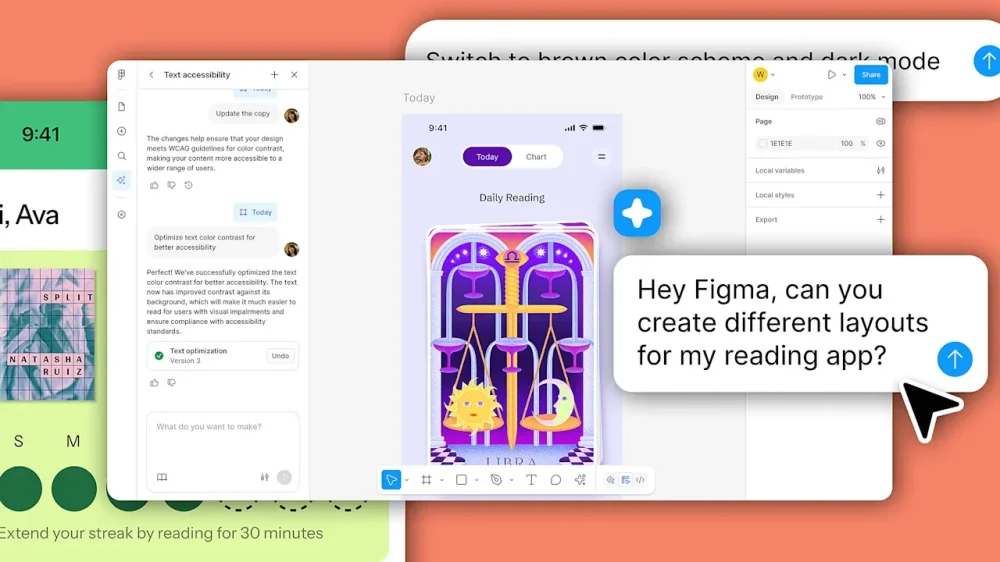
Today, Figma announced an AI agent built natively inside its collaborative environment. Forget the disconnected, floating prompt boxes we’ve grown so tired of; this system gives you multiple digital assistants right on your digital drafting board in Figma Design. According to the company, it is capable of churning out interface elements and banishing the mindless drudgery of pixel-pushing, while keeping creators locked in their creative zone. With the update, Figma is fundamentally reengineering the digital drafting board into an autonomous engine. By throwing the gates wide open—inviting the marketing department, code-wranglers, and project supervisors to play architect—the company is reshaping the very definition of who gets to be a creator. Powered by a bespoke cocktail of algorithms educated specifically on UI architecture and the platform’s proprietary frameworks, this agentic system bridges the perilous gap between an abstract vision and a concrete, functional prototype. How do Figma’s agents work? Unlike other AI-powered UX exploration tools that create user interfaces using an isolated, sterile chat window that results in different screens for your app, Figma’s agentic design product is much more granular and offers what appears to be full control of individual elements down to every radial button and icon. The natural language tool is embedded directly into Figma’s workspace and its elements. When you click on an app screen in your canvas, a star appears next to it, signaling that you can adjust the visuals with natural language. You just tell it what to do on the interface element you are working on. It’s not only about making incremental adjustments, however. You can prompt the agent to generate initial design layers, explore multiple visual directions, change color palettes to one element or screen, or many, globally. It can handle the tedious work of formatting components, sometimes in bulk, like changing the spacing in the progress bar mentioned before and all the progress bars in your app. Teams can deploy multiple agents simultaneously alongside their human colleagues, all of them working in tandem, controlled by different users. And crucially, the AI continuously reads the room, which means that it is constantly referencing your existing design system logic and the ongoing conversations right on the canvas, while you seamlessly toggle between typing commands and manually manipulating the design. The agent tradeoff The tool will undoubtedly be a time saver for seasoned designers. It will also be a way for non-designers to start designing. In theory, that’s awesome. Yet, this democratization is as terrifying as it’s exciting. Much like generative video, handing AI design powers to non-creatives could lead to brilliant creations by those with a clear idea, but no skills or money to pay someone to execute it. But also it could be a fast track to a reality where the delicate art and science of product design is diluted into an endless ocean of sanitized, algorithmic sludge. I brought this existential dread straight to Figma’s chief design officer, Loredana Crisan. She vehemently pushed back, arguing that automation doesn’t erase the artisan; it isolates their true value. “When an agent can take you 80% of the way, that last 20% is how you stand out,” Crisan told me. To her, true distinction requires human taste. She insists that while automation undeniably raises the baseline quality for novices, “it also brings up the ceiling of what designers can envision. In the end, the more people who care about design—and the further we can help them push it—the better.” The secret ingredient Crisan says the key to Figma’s agent product is its “local context.” She told me that Figma doesn’t just rely on an omniscient, generalized oracle. “Under the hood, we use a variety of models for different tasks, some off the shelf and some we’ve fine-tuned ourselves,” she says. More importantly, she stressed that “the ability to connect your own design libraries and reference other context on the canvas is what will make the agent outputs feel unique and relevant to your team.” The AI isn’t meant to operate in a vacuum. “AI can help spark new ideas . . . but the designer is the one who picks the direction,” Crisan said. Still, a beautiful concept on a canvas often shatters when it hits the brutal wall of engineering reality. Figma’s recent advancements for the Model Context Protocol (MCP) server promise a seamless trip from design to code, but I questioned how an AI resolves the inherent friction when a hallucinated layout defies the laws of Cascading Style Sheets (CSS) or backend constraints. Crisan didn’t shy away from this harsh truth. “It’s true that sometimes visual concepts don’t translate well to engineering constraints. AI doesn’t change that dynamic entirely, but it does offer more tools to close the gap,” she says. That gap closure, Crisan points out, relies on the broader ecosystem, noting that Figma Make, Figma’s ‘vibecoding’ tool, allows teams to instantly convert raw layouts into interactive, programmable applications. “With our MCP server, you can bring context in and out of Figma to generate design-informed code without losing intent and fidelity,” she says. Ultimately, Figma’s agent isn’t a magic wand that absolves us of critical thought. “AI is a tool, and the output depends on how you drive it,” Crisan says. If we treat this technology as a one-shot solution, we will drown in mediocrity. But if we use it to handle the grunt work, we might just reclaim the time needed to master the final, most crucial 20% of the craft. View the full article
-
The Target boycott is ongoing but it might be having less of an impact. On Wednesday, the company reported first-quarter earnings that included successes like a 6.7% increase in net sales year-over-year (YOY). The $25.4 billion in net sales included a 24.5% jump in non-merchandise sales, like Target Circle 360 membership revenues and the Target+ marketplace. In that vein, Target saw its digital comparable sales rise by 8.9% thanks to a 27% jump in same-day delivery with Target Circle 360. The retailer also reported earnings per share of $1.71, surpassing Wall Street’s predicted EPS of $1.46, according to consensus estimates cited by CNBC. “There is much more work in front of us” “First quarter financial results were stronger than expected, providing encouraging early signs that our clarified strategy is resonating with our guests and driving broad-based growth across our business,” Target CEO Michael Fiddelke said in a statement. Fiddelke continued: “While we’re pleased with our quarter one performance, our focus remains on building consistent, long-term growth, and we recognize there is much more work in front of us.” This is Fiddelke’s first earnings report as CEO; the former COO took over the head job in February after 20 years at the retailer. Shares of Target Corporation (NYSE: TGT) are up 30.17% since 2026 began and have outperformed the S&P 500. The stock was up 2% in premarket trading as of this writing. Why are consumers boycotting Target? Factors such as a cost-of-living crisis and rising tariffs have hurt Target in recent years. But the company has also faced calls to boycott since early 2025 when it donated $1 million to the The President Inaugural Committee and cut back on its diversity, equity, and inclusion (DEI) commitments. Originally, Target appeared to be on the side of racial justice. In 2020, the Minneapolis-based retailer took significant positive steps after George Floyd was murdered 10 minutes from its headquarters. The retailer committed to putting over 500 Black-owned brands on its shelves through a spend of $2 billion on Black-owned businesses. Yet, when Donald The President returned to the White House with his anti-DEI crusade, Target got rid of programs geared toward increasing its Black-owned brands and Black workforce. Minnesota civil rights activists Nekima Levy Armstrong, Monique Cullars-Doty, and Jaylani Hussein organized a national boycott against Target—one that is still ongoing. A separate boycott was led by Atlanta-based pastor Jamal Harrison Bryant. However, Bryant called it off in March, citing “productive” conversations with Target’s leadership. These discussions brought no notable changes to Target’s DEI policies. Target’s turnaround plan is ongoing, too Just after Fiddelke started as chief executive in February, Target announced that it was laying off 500 corporate workers. The company said it would use some of the savings to improve in-store experiences, including more front-line in-store staffing. View the full article

-
We may earn a commission from links on this page. Deal pricing and availability subject to change after time of publication. The Insta360 Ace Pro 2 (Dual Battery Bundle) has dropped to $329.99 on Amazon from its usual $419 price, and according to price trackers, it’s just 99 cents above its all-time low. That makes it one of the more compelling alternatives to the GoPro Hero 13 Black right now, especially for people who want usable 4K footage rather than headline-grabbing 8K specs. The good news is that the camera is genuinely very good at that—it can record 4K at up to 120fps for smooth slow-motion clips, and the footage looks sharp without going overboard on artificial sharpening. The stabilization is also excellent for biking, travel, skiing, or handheld walking shots, where shaky footage usually ruins the experience. Insta360 Ace Pro 2 $329.99 at Amazon $419.00 Save $89.01 Get Deal Get Deal $329.99 at Amazon $419.00 Save $89.01 The camera itself remains compact and rugged, with waterproofing and support for the huge ecosystem of mounts and accessories already available for action cameras. Its 1/1.3-inch sensor handles low light better than many rivals, so indoor footage, evening city shots, and cloudy outdoor clips have more detail and less noise than you might expect from a camera this small. Insta360 also includes an I-log profile, which gives experienced editors more flexibility with color grading and dynamic range during post-production. At the same time, beginners can simply use the standard modes and let the camera handle everything automatically. And, unlike the dual-display setup on DJI and GoPro cameras, the Ace Pro 2’s larger front-facing flip-up 2.5-inch touchscreen makes framing yourself much easier when filming solo or recording vlog-style clips. The bundle includes two batteries, which is helpful because action cameras burn through power quickly when recording high-resolution video. You also get a standard mount, USB-C cable, wind guard, and microphone cap. That said, the Ace Pro 2 has no built-in storage and relies on external storage for most of your recordings, so you will need to buy a microSD card separately (the bundle does not include one). It supports cards up to 1TB, which is useful if you shoot a lot of footage, but it is still an extra cost to factor in. Our Best Editor-Vetted Memorial Day Deals Right Now Apple AirPods 4 Active Noise Cancelling Wireless Earbuds — $148.99 (List Price $179.00) Apple Watch Series 11 (GPS, 42mm, S/M Black Sport Band) — $329.00 (List Price $399.00) Apple iPad 11" A16 128GB Wi-Fi Tablet (Silver, 2025) — $299.00 (List Price $349.00) Fire TV Stick 4K Plus Streaming Player With Remote (2025 Model) — $29.99 (List Price $49.99) Sonos Move 2 — $399.00 (List Price $499.00) Dell 15 DC15250 (Intel Core i7 13th Gen, 512GB SSD, 8GB RAM, Touch Display) — $599.99 (List Price $839.99) Sony WH1000XM6- Best Wireless Noise Canceling Headphones — $398.00 (List Price $459.99) Ring 2nd Gen 2K Wired Video Doorbell (2026 Release) — $49.99 (List Price $79.99) Deals are selected by our commerce team View the full article
-
Prices are rising again, and by some measures, consumer sentiment is as low as it’s ever been. That makes it an opportune time for some Americans to perhaps get a boost to their credit scores if they’re able to. Now they might be able to. Last fall, FICO announced a new generation of its UltraFICO Score—an upgrade to its existing scoring model—infusing it with real-time cashflow data (with consumer permission, of course) from fintech company Plaid. The new and improved model is now live and available to lenders. FICO’s leadership says it could help lenders make better decisions about creditworthiness and, in most cases, consumers could see a boost to their credit scores. What’s up with the new UltraFICO Score? The new model looks at transactions going in and out of an applicant’s bank accounts, such as a checking account or savings account. Plaid’s infrastructure allows users to integrate their bank accounts with certain financial apps and platforms. In this case, the goal is to give lenders a deeper understanding of their financial picture, thereby letting them extend credit offers or approve credit for those individuals, accordingly. Of course, for some, the new score could also ding them a bit—for instance, if they’re experiencing cashflow difficulties, such as being between jobs. Further, consumers are not automatically opted-in. They consent to share their information, through Plaid, when navigating a lender’s portal. If they opt not to share their data, the lender can’t calculate an UltraFICO Score. What makes this score different? “The old UltraFICO Score was trailblazing,” says Julie May, vice president and general manager of B2B Scores at FICO, about the original model that debuted in 2018. “But how we built this with Plaid is different.” She adds that “the model itself is built to utilize credit bureau data and cashflow data to make an assessment of risk, and it’s ‘bureau-agnostic,’” meaning that “irrespective of which credit bureau a lender is using to make decisions, you can also pull an UltraFICO score.” Previously, only one credit rating agency, Experian, worked in conjunction with the UltraFICO model. Now, Experian, Equifax, and TransUnion are all in the mix. As a result, May says that almost 80% of non-prime credit applicants with a history of positive account balances “will see higher scores.” “It helps us target the thin-file population, individuals who are new to credit, or not active credit users,” she says. Adam Yoxtheimer, head of partnerships at Plaid, says “it’s very exciting to be able to go to market with FICO,” and that it’s interesting to see the inclusion of cashflow data into credit scoring models—something that, at one time, was considered a tad controversial. “Ten years ago, we would’ve talked about this as an ‘alternative’ data source, thinking that it might, one day, become mainstream,” he says. “This new model is far enough afield to be considered innovative, but not too far afield to be scary and unadoptable.” View the full article

-
AI is everywhere these days. Try as you might to avoid it, you’re not likely to succeed. LinkedIn, though, is attempting to draw a line in the sand and, if not completely eliminate the AI slop on its pages, at least cut back on it. The company plans to target low-quality AI posts that distract its users from finding value on the platform. That has been a growing problem in recent months as people have trawled LinkedIn for engagement among professional users. The company’s VP of product, Laura Lorenzetti, says LinkedIn isn’t banning all posts generated by artificial intelligence. Some, she concedes, actually have some value. Others, though? Those need to go. They won’t be vanishing anytime soon, however. As the company refines the tools that will hunt out the offending posts, it will be rolling things out slowly—and it could be several months before all users see less slop in their feeds. The new systems will target three types of AI content: generic AI-generated posts and comments, attention-bait videos, and automation tools that create AI content. Hunting the robots LinkedIn isn’t offering a lot of in-depth details about how it plans to scrub this content, but Lorenzetti says the company is using an “AI solving AI” approach. Newly built systems will parse posts and determine which of those offer original thinking and which lack substance. The systems are designed to learn over time, using the engagement patterns of users and identifying language that adds perspective versus simply regurgitating existing ideas. Human editors will be involved as well, labeling thousands of posts as original or generic to help teach the AI which posts to flag and which to leave alone. Similarly, the company is putting together a list of markers that are common among low-quality, AI-composed comments to purge those from the system in the future. Identifiers such as word patterns and the volume of comments are key to that hunt. (An AI tool, for instance, can compose and post something much faster than a human.) Once the offending posts are identified, they won’t appear in other users’ recommendations. They will, however, still be viewable to a person’s direct connections and followers. So it’s not a perfect solution. AI proliferation AI comments, it’s worth noting, are already a violation of LinkedIn’s terms of service. But that hasn’t stopped many users from utilizing tools to create them, often to game the system’s algorithm and increase the visibility of a post. It’s also worth pointing out that LinkedIn itself hasn’t been afraid to incorporate AI into its workflow. The company offers a number of generative AI tools, including one that helps you “enhance” your profile, refining your profile’s Headline, About, and Experience sections. AI will also help job seekers with their search. And the company uses AI to help advertisers plan, launch, and optimize their campaigns. That said, the problem of AI-generated content on the web is fast reaching a critical level. A report from Graphite, from the first quarter of 2026, found that the number of articles published online that are generated by an AI system are now equal to the number written by humans. The only upside is that, for now, that number seems to have hit a plateau, with no notable rise in the AI-to-human ratio in the past year. The study did not examine whether the AI stories receive as much traffic as human-generated ones. A separate study found that AI-generated stories do not perform as well in search engines. LinkedIn’s feed, though, doesn’t follow the same patterns as a search engine. Engagement and familiarity (or possible familiarity) are, in part, what make up what you see on the home page. In the future, the company hopes more of that content will be from real people. View the full article

-
Areaware, the 22-year-old design brand, announced its closure back in February, bidding farewell to its dedicated fan base and selling off the last of its quirky home goods in a series of final sales. Just three months later, though, the brand is getting a surprising second chance: Today, the puzzle company Piecework is announcing its acquisition of Areaware for an undisclosed sum. Piecework, founded in 2019 by Rachel Hochhauser and Jena Wolfe, plans to keep Areaware’s name, website, and socials separate, and will maintain the two as distinct sister brands. According to Hochhauser, who will serve as Areaware’s chief brand officer, the idea to acquire Areaware was completely serendipitous. “It stemmed half from our genuine enthusiasm for Areaware and what it means to the design community. The other half was that there’s a genuine business case for it on our end,” Hochhauser says. Piecework, she explains, is in a growth phase—and it’s been looking to build out its SKUs beyond puzzles. Areaware’s existing brand platform, relationships with independent artists, and manufacturers will give Piecework a solid foundation to pursue that goal—but hopefully in a more sustainable format. “I think it’s one of those really nice small business stories of something that happened really fluidly,” Hochhauser says. “It’s not part of a broader rollup strategy for us—it’s just something that felt like kismet.” Keep the creative. Rework how it’s made After Areaware announced its closure, the brand went through all the motions of shutting down: The company laid off its staff, wrote a farewell post on Instagram, and held multiple sales to move out final inventory. Areaware’s cofounder, Noel Wiggins, explained to Fast Company at the time that the closure came due to difficulties with its business model and the added strain of tariffs. Areaware primarily operated by licensing and manufacturing pieces from independent designers. That offered smaller artists major exposure, but, because the company produced such a variety of materially different goods in small batches, it was difficult to scale. Product development was time consuming and expensive, profits vacillated wildly, and, ultimately, tariffs were the final straw. “It is not a great business model. It’s a wonderful creative model,” Wiggins said at the time. Hochhauser in contrast believes she has a fairly straightforward plan for improving Areaware’s operational model: manufacturing more products at once. In the past, Areaware often partnered with artists on one to three products at a time, which were then made in small batches. Most of these pieces sold in the hundreds or thousands. This system meant high production and manufacturing costs for sometimes minimal profits. In the future, Hochhauser wants to borrow from Piecework’s model and prioritize designing entire collections in tandem with artists and partnering with manufacturers who can then produce those lines in one place. (Say, for instance, a series of tomato-themed items and puzzles.) By placing larger product orders and having them shipped from one location, she says, the business can avoid extra production costs accrued along the way. Wholesalers prefer this model too, because it allows them to increase the size of their purchases, Hochhauser says, and it also encourages customers to pick up a few extra items. “We want to apply that same approach to Areaware,” Hochhauser says. “Rather than a buyer coming in and saying, ‘I’m going to get this one salt and pepper shaker set,’ they’ll be able to say, ‘We’re going to get this, but it merchandises really well with all of these other products.’” That said, Piecework won’t actually receive any Areaware product through its acquisition. Instead, the company will gain access to Areaware’s branding, IP, fan base, and numerous relationships with artists, manufacturers, and distributors. Hochhauser’s team is in contact with some of Areaware’s former artist partners and is working to get some of its popular lines back up and running by the fall. She believes this system will also help Areaware factor in additional tariff costs at the early stages of creative concepting, given that certain products cost more to ship than others. “It’s a really challenging climate at the moment for small retail brands, and it’s no surprise that companies are struggling,” Hochhauser says. “Piecework seems to have found a model that, despite the odds, is really working and thriving—but it’s really specific.” Building on a model that works In its first six months of business back in 2019, Hochhauser says, Piecework got off of the ground through strong media coverage. Then, when the pandemic hit and puzzles took off, the brand’s business skyrocketed—and it needed to start scaling, fast. Operating primarily through an in-house design team, Piecework began to expand its puzzle offerings. Then, it branched out further into other design-centric, gift-ready goods, like a fish-shaped carafe, maraschino cherry-inspired matches, and funky toothbrush holders. Its themed linen cocktail napkins, which range from tennis to martini and sardine prints, became a core driver for the business. In 2025, the company grew by 60% year-over-year. This year, it’s already on track to grow by another 40% before the fourth quarter. Hochhauser says a good chunk of that growth has been driven by lifestyle products like its napkins and decor, exactly the kind of quirky fare that one might have found on Areaware’s website. On the user end, she wants the brand to feel like the same Areaware that fans know and love—while, behind the scenes, the brand’s operations can stand on more solid ground. “The changes that we’ll be making will be largely invisible to the consumer, and, if they are [visible], we think they’ll be positive,” Hochhauser says. View the full article

-
Across job listing sites over the past few months, you might have noticed something curious. Alongside traditional titles like “designer,” “engineer,” and “product manager,” a new crop of roles is appearing. They have names like “designer engineer,” “builder,” or “design crafter,” and they represent a tipping point in the design industry that’s just beginning to play out. That tipping point is captured in the second annual AI in Design report, published by the investor firm Designer Fund and the venture capital firm Foundation Capital. This year’s report draws on a survey of over 900 designers across 60+ countries, including partners like Stripe, Framer, Linear, Notion, Sierra, Shopify, and Anthropic. According to Ben Blumenrose, the managing partner of Designer Fund, last year’s inaugural survey showed that designers were beginning to experiment with artificial intelligence. Just a year later, it’s become integral in nearly every designers’ workflow—and it’s rewriting the definition of “designer.” “For the past two decades, the way we built software was the same for the most part,” Blumenrose says. “Someone came up with a concept of what they wanted to build, they’d work with a PM [project manager] to figure that out, they’d bring on a designer to give the visuals to that thing, then pass it to the engineer to build.” Today, he explains, AI is rewriting the process. “We’ve started seeing that there’s a shift. It’s happening quickly, and it’s quite big,” he says. Ultimately, Blumenrose says the data shows that the concept of a “designer” is getting blurrier, but at the same time, it’s a role that’s more important than ever. New year, new tools Over the past year, the design industry has undergone a paradigm shift in how it views the utility of AI. Where AI tools were once viewed as assistants for brainstorming and ideation, they’re now integrated into nearly every part of the design process. In the 2025 report, only 54% of AI in Design survey respondents said that they were using AI more than once a week. This year, 91% of respondents reported using it multiple times a week or every day. “I think we almost forget how quickly this has taken over and become a staple of our day-to-day work,” Blumenrose says, adding, “AI shifted from enhancing a few parts of the process to being instrumental in almost every part of it.” A greater reliance on AI tools among designers has also meant that tool stacks are becoming more complex. Whereas designers in 2025 used an average of three AI tools, that figure more than doubled to seven in 2026. And, following the release of Anthropic’s Claude Code last October, Claude overtook ChatGPT as designers’ favorite general AI tool: 78% of respondents used Claude, compared with 65% for ChatGPT. Almost two-thirds of overall respondents—65%—reported using Claude Code, which due to its recent debut wasn’t even a part of the 2025 survey. Other popular tools include Figma (a favorite for design-specific tasks), Cursor (for coding), and AI notetakers like Otter and Fathom. Many design teams are moving beyond the existing tools on the market and opting to build their own bespoke, internal AI systems. The survey data shows that 63% of designers at enterprises reported using internal company-built AI tools, compared with just 13% of designers at startups. Robyn Park, Designer Fund’s head of platform, says her team has found that these types of niche investments in AI are leading teams to begin instituting new learning rituals to keep up with the pace of change. That could mean more weekly check-ins, specific mentorship programs, and devoted AI-centric days (Stripe calls these “AI-cation days”). “Inevitably, if you just keep going this direction, more designers are going to spend time building their own stuff in their own tools,” Park says. “I think a lot of design leaders are realizing that and creating more space to get together.” How AI is changing what it means to be a designer As use of AI tools broadens among designers, so does the definition of “designer.” Today, the survey found, many designers are using AI to expand into areas of software development that would previously have been categorized as work for engineers. Fully 50% of designers reported shipping AI-generated code to production. Park explains that they’re using tools like Figma or Claude Code to code elements like motion graphics, back-end systems, and in-app tools that are making it into their products’ final interfaces. For context, Blumenrose says, that would’ve been almost unheard of two years ago, when coding and visual design were considered distinctly siloed skill sets. “If you told someone at a tech company two years ago that half of working designers would ship code to production, they couldn’t even fathom it,” Blumenrose says. “They’d say, ‘What are you talking about?’ It used to be that only the top 0.1%, 0.5% of designers that were truly, truly technical and very savvy could do that. For the most part, 99% of designers didn’t even have the login credentials to do that.” Steve Vassallo, general partner at Foundation Capital, says he’s noticed that at the hiring stage, Foundation Capital’s companies are now looking for designers who show up with prototypes built through AI. They want to see that candidates are able to implement these skills right away, not just via mock-ups. Park at Designer Fund adds that companies may also be seeking candidates with side projects where they’ve demonstrated “AI fluency” by using multiple tools throughout their AI workflows, often including shipping code to production. As expectations for designers become more all-encompassing, organizational structures are lagging to catch up. Only 28% of leaders surveyed for AI in Design said they’d implemented formal changes in their organizations, while just 13% of leader respondents had updated their performance review metrics or hiring practices. The rise of AI design Frankenjobs Blumenrose predicts that the broadening and blurring of “designer,” “engineer,” and “product manager” categories will mean individuals have to become domain experts who master a niche in their category to guide the rest of the team. Motion designers, for example, will need to dive even deeper into the craft of motion elements while also adopting a wider AI-based toolset. At the same time, he says, the AI-powered design shift is likely to spawn its own new batch of position titles. This is a shift that’s in its early stages, but already appears to be emerging in glimpses. The report found that positions like “UX designer” or “UI designer” have faded out in favor of descriptors like “product designer” or “designer engineer” that indicate a broader skillset. Some companies, Blumenrose explains, are also considering design-centric positions dedicated to streamlining a company’s AI workflows and building bespoke tools—a concept he calls the “AI imagineer.” “We’re already seeing titles like ‘deployed engineer,’ ‘designer engineer,’ ‘design builder,’ or just ‘builder,’” Blumenrose says. “We’re going to come up with terms for someone who has depth in one thing, but also these two or three other skills, in the next three, six, nine, 12 months.” Why designers are more important today than ever before In an era when the definition of “designer” is blurring and broadening, some have argued that the entire role is becoming obsolete. But Blumenrose believes the data from AI in Design tells the opposite story. As AI tools make it easier to bring an idea from prototype to production, the role of the designer becomes even more integral. “Designers were starting to question, ‘Where in this process do I fit?’” Blumenrose says. “What we saw was that the designer becomes more important in this world, because there’s more software.” With more software comes a need for more systems thinking, more empathy, and more taste-making—essentially, more guardrails to ensure that the final software is genuinely helpful for the end user. “What you are responsible for as a designer is shifting and changing,” Blumenrose says. “But that does not mean that we need fewer designers. We need more designers, and they need to do things differently than they did. If we evolve, we should be a very key part of building software for the next 10, 15 years.” View the full article

-
The Eva Longoria Foundation announced a $1 million investment in UCLA’s Latino Policy and Politics Institute (LPPI) to support long-term, data-driven solutions that integrate leadership development and narrative change within Latino communities. “This grant is going to fund a lot of the economic research and policy work for Latina entrepreneurs, because we need to know what our economic power is,” Longoria said at the Inc. Founders House Los Angeles. Through this partnership, the foundation will fund a three-year initiative aimed at advancing Latina economic mobility by generating data on Latina entrepreneurs and workers and the barriers they face to building wealth, while also training leaders and shifting public understanding of Latina economic power. Additionally, LPPI plans to establish a Latina Entrepreneurship Advisory Group and host Policy Pláticas to connect research with community leaders and decision-makers, while also supporting the next generation through fellowships, mentorship, graduate research opportunities, and communications training. Longoria is an actress, producer, and entrepreneur best known for her breakout role on Desperate Housewives. She’s become a prominent advocate for the Latino community and was among Inc.’s 2023 Female Founders honorees. In 2012, she founded the Eva Longoria Foundation to support innovative solutions that accelerate economic opportunity, civic participation, and cultural influence for Latinas. Its work spans expanding access to careers, creating pathways in the entertainment industry, and building a world where Latinas are equitably represented both on and off screen. While its programs are tailored specifically for Latina women, the foundation believes that empowering them creates a ripple effect that benefits their families and broader communities. She is no stranger to this work, having long sought out ways to uplift her community. “My master’s degree thesis was the basis of the foundation, which is helping Latinas reach their full potential through entrepreneurial programs,” she said. Her dedication has not gone unnoticed, as she was also the recipient of the Jeff Bezos Courage and Civility $50 million award. Investing in people over products When it comes to investing, Longoria has said she bets on people rather than products. Her investment in Siete Foods, for instance, was driven by a personal connection to the family behind the brand and a shared Mexican American heritage. This same instinct guided her partnership with LPPI, whose director, Amada Armenta, PhD, is also Mexican American—a connection that felt natural to Longoria. Additionally, the institute is currently entering a new chapter under Armenta’s leadership alongside deputy director Lila Burgos. Despite driving significant economic growth and contributing $4.1 trillion to U.S. GDP in 2023, the Latino community continues to face steep barriers around wages, wealth, and opportunity. According to the LPPI, Latinas are the lowest-paid workers in the country, and Latino households hold a disproportionately small share of U.S. wealth relative to their roughly 20 percent share of the population. Longoria says she is focused on filling these gaps, and those left by the current administration’s cutbacks, to ensure that vulnerable communities don’t get left behind in the process. “A lot of DEI programs are gone. A lot of programs for women are gone,” she said. “And these were viable pipelines for people to gain access to, to jobs and job training. And so using that money through all the programs that I’ve talked about, but also to make sure that nobody falls through the cracks.” Securing a seat at the table for 2026 and beyond With major economic events on the horizon—specifically the 2027 Super Bowl, the 2028 Los Angeles Olympics, and the 2026 FIFA World Cup—the initiative aims to ensure Latinas are not sidelined from the economic opportunities these moments will generate. That urgency is what drives the partnership, Longoria said: “Trying to understand and research this juggernaut of an economic force and really hoping to turn this study into tools for economic mobility for Latinos.” —Amaya Nichole This article originally appeared on Fast Company’s sister website, Inc.com. Inc. is the voice of the American entrepreneur. We inspire, inform, and document the most fascinating people in business: the risk-takers, the innovators, and the ultra-driven go-getters that represent the most dynamic force in the American economy. View the full article

-
In today’s competitive environment, managing finances and inventory efficiently is essential for small businesses. Choosing the right accounting and inventory management software can streamline operations, reduce errors, and save time. With a variety of options available, it’s important to understand what each software offers and how it fits your specific needs. From robust features to user-friendly interfaces, you’ll want to explore the top contenders that can enhance your business operations. Let’s examine these standout solutions. Key Takeaways Intuit QuickBooks Online offers robust inventory management and customizable reporting, making it ideal for small businesses needing comprehensive accounting solutions. FreshBooks provides easy invoicing and expense tracking at competitive prices, perfect for service-based small businesses. Wave delivers strong accounting capabilities for free, though users should be aware of transaction fees on payments. Zoho Books is an affordable option with generous automation features, catering to small businesses looking for efficiency. EasyReplenish enhances inventory management with AI-powered demand forecasting, making it suitable for businesses focusing on stock optimization. Best Accounting Software for Small Businesses When searching for the best accounting software for small businesses, what features should you prioritize? It’s essential to contemplate an accounting and inventory management software for small business that integrates both functions seamlessly. Intuit QuickBooks Online is a top choice, offering robust inventory management features and customizable reports, perfect for businesses selling products and services. If you’re focused on service-based work, FreshBooks provides easy invoicing and expense tracking at a competitive price. For those on a tight budget, Wave offers strong accounting capabilities for free, though it has transaction fees. On the other hand, Zoho Books is affordable with generous automation features. If advanced inventory tracking is your priority, Sage 50 Accounting stands out, though it may be complex for smaller businesses. In the end, prioritize solutions that streamline inventory tracking software for small business needs while additionally offering simple inventory management software functionalities to improve efficiency. Top Inventory Management Software Options Selecting the right inventory management software is crucial for small businesses aiming to streamline operations and improve efficiency. For the best inventory management software for small businesses, consider EasyReplenish, which stands out with AI-powered demand forecasting and automated replenishment features. Zoho Inventory is a budget-friendly choice, offering a free plan that covers basic inventory tracking and integrates seamlessly with other Zoho apps. If you prefer a user-friendly interface, inFlow Inventory provides a versatile stock management system for small business, available in both desktop and cloud formats, complete with barcode scanning and reporting capabilities. Square for Retail is another affordable option customized for Square POS users, featuring a free plan that addresses vital inventory needs. Finally, free inventory control software options like Odoo Community Edition provide basic tracking but may lack advanced features necessary for scaling your business effectively. Features to Look for in Accounting Software After exploring top inventory management software options, it’s important to contemplate the features that Intuit accounting software should offer to support your small business. Look for solutions that automate income and expense tracking, giving you real-time visibility without the hassle of manual data entry. Customizable invoicing and online payment options are important, as they speed up payments and improve client relationships. Prioritize software with robust reporting capabilities, providing insights into cash flow and profitability, even if you’re not an accounting expert. Confirm the software supports multi-currency transactions and integrates well with other tools, like CRM and simple inventory tracking software, to streamline your operations. Moreover, mobile access is crucial for on-the-go invoicing and expense tracking, allowing you to manage your finances anytime, anywhere. This will help you choose the best inventory management system for small business needs while simplifying your accounting processes. Benefits of Inventory Control Software Effective inventory control software is essential for small businesses looking to improve their operational efficiency. By enhancing stock visibility across multiple sales channels, you can track inventory levels in real-time, preventing stockouts or overstocking. The best inventory control software for small business often includes automated reordering features, streamlining your inventory management and reducing the risk of human error in manual tracking processes. With data-driven insights and demand forecasting, this software supports better cash flow management, helping you optimize stock levels to meet customer demand. Many systems integrate seamlessly with POS systems and e-commerce platforms, creating a cohesive operational workflow that simplifies order fulfillment and tracking. Implementing simple inventory control software or a barcode inventory system for small business can greatly improve overall efficiency, allowing you to focus on growth during minimizing losses from misplaced or double-sold items. How to Choose the Right Software for Your Business How can you guarantee you choose the right software for your business? Start by evaluating your business size and specific needs, as different inventory programs for small businesses cater to various industries. Compare pricing structures and features to find solutions within your budget—options like Zoho Books and FreshBooks offer flexible plans. Evaluate the integration capabilities of the software, ensuring it connects seamlessly with your existing sales channels and payment processors. Look for user-friendly interfaces, especially if you prefer simple stock management software, as well as considering customer support options. Free trials, such as a 30-day trial for FreshBooks, allow you to test functionality before committing. In the end, selecting the best inventory control software involves balancing your operational requirements with available features, ensuring you choose an effective invoice and inventory software solution that fits your business model. Frequently Asked Questions Which Accounting Software Is Best for Inventory Management? When considering accounting software for inventory management, it’s crucial to evaluate features like real-time tracking, multi-currency support, and integration capabilities. Xero stands out with its collaboration features and extensive app integrations, whereas QuickBooks Online offers advanced tracking across various sales channels. Zoho Books, paired with Zoho Inventory, provides automation at an affordable price. For more complex needs, Sage 50 Accounting is thorough. Finally, Wave is a cost-effective solution for freelancers and smaller operations. What Is the Best Inventory Management Software for Small Business? When choosing the best inventory management software for your small business, consider your specific needs. EasyReplenish stands out with AI-driven forecasting and automation. If budget’s a concern, Zoho Inventory offers a free plan and integrates well with other apps. For simplicity, inFlow Inventory is user-friendly, whereas Square for Retail provides a free option for Square POS users. Be cautious, though; free software often lacks advanced features necessary for growing businesses. What Is the Best Software to Use for a Small Business? For small businesses, the best software depends on your specific needs. If you focus on accounting, Intuit QuickBooks Online offers robust features and customization for $38/month. For service-oriented businesses, FreshBooks is user-friendly and starts at $19/month. If you want a free option, consider Wave, which provides basic accounting tools. Xero and Zoho Books likewise offer solid features, with plans starting at $25 and $15/month, respectively, and are great for growing businesses. What Is Better and Easier Than Quickbooks? If you’re looking for alternatives to QuickBooks that are easier to use, consider FreshBooks for its user-friendly interface and strong customer support. Wave is a budget-friendly option, especially for microbusinesses, offering crucial features at no cost. Zoho Books stands out with its automation tools and generous free plan. Xero’s flexibility with unlimited users and extensive app integrations makes it a great choice for collaborative teams. Each of these options has unique strengths customized to different business needs. Conclusion Choosing the right accounting and inventory management software is essential for your small business’s success. Each option, from QuickBooks Online to inFlow Inventory, offers unique features customized to different needs. By identifying the specific requirements of your business, such as invoicing capabilities or inventory tracking, you can select software that improves efficiency and accuracy. Investing time in this decision will ultimately lead to enhanced financial management and streamlined operations, setting a solid foundation for your business’s growth. Image via Google Gemini This article, "Top 5 Accounting and Inventory Management Software for Small Businesses" was first published on Small Business Trends View the full article
-
In today’s competitive environment, managing finances and inventory efficiently is essential for small businesses. Choosing the right accounting and inventory management software can streamline operations, reduce errors, and save time. With a variety of options available, it’s important to understand what each software offers and how it fits your specific needs. From robust features to user-friendly interfaces, you’ll want to explore the top contenders that can enhance your business operations. Let’s examine these standout solutions. Key Takeaways Intuit QuickBooks Online offers robust inventory management and customizable reporting, making it ideal for small businesses needing comprehensive accounting solutions. FreshBooks provides easy invoicing and expense tracking at competitive prices, perfect for service-based small businesses. Wave delivers strong accounting capabilities for free, though users should be aware of transaction fees on payments. Zoho Books is an affordable option with generous automation features, catering to small businesses looking for efficiency. EasyReplenish enhances inventory management with AI-powered demand forecasting, making it suitable for businesses focusing on stock optimization. Best Accounting Software for Small Businesses When searching for the best accounting software for small businesses, what features should you prioritize? It’s essential to contemplate an accounting and inventory management software for small business that integrates both functions seamlessly. Intuit QuickBooks Online is a top choice, offering robust inventory management features and customizable reports, perfect for businesses selling products and services. If you’re focused on service-based work, FreshBooks provides easy invoicing and expense tracking at a competitive price. For those on a tight budget, Wave offers strong accounting capabilities for free, though it has transaction fees. On the other hand, Zoho Books is affordable with generous automation features. If advanced inventory tracking is your priority, Sage 50 Accounting stands out, though it may be complex for smaller businesses. In the end, prioritize solutions that streamline inventory tracking software for small business needs while additionally offering simple inventory management software functionalities to improve efficiency. Top Inventory Management Software Options Selecting the right inventory management software is crucial for small businesses aiming to streamline operations and improve efficiency. For the best inventory management software for small businesses, consider EasyReplenish, which stands out with AI-powered demand forecasting and automated replenishment features. Zoho Inventory is a budget-friendly choice, offering a free plan that covers basic inventory tracking and integrates seamlessly with other Zoho apps. If you prefer a user-friendly interface, inFlow Inventory provides a versatile stock management system for small business, available in both desktop and cloud formats, complete with barcode scanning and reporting capabilities. Square for Retail is another affordable option customized for Square POS users, featuring a free plan that addresses vital inventory needs. Finally, free inventory control software options like Odoo Community Edition provide basic tracking but may lack advanced features necessary for scaling your business effectively. Features to Look for in Accounting Software After exploring top inventory management software options, it’s important to contemplate the features that Intuit accounting software should offer to support your small business. Look for solutions that automate income and expense tracking, giving you real-time visibility without the hassle of manual data entry. Customizable invoicing and online payment options are important, as they speed up payments and improve client relationships. Prioritize software with robust reporting capabilities, providing insights into cash flow and profitability, even if you’re not an accounting expert. Confirm the software supports multi-currency transactions and integrates well with other tools, like CRM and simple inventory tracking software, to streamline your operations. Moreover, mobile access is crucial for on-the-go invoicing and expense tracking, allowing you to manage your finances anytime, anywhere. This will help you choose the best inventory management system for small business needs while simplifying your accounting processes. Benefits of Inventory Control Software Effective inventory control software is essential for small businesses looking to improve their operational efficiency. By enhancing stock visibility across multiple sales channels, you can track inventory levels in real-time, preventing stockouts or overstocking. The best inventory control software for small business often includes automated reordering features, streamlining your inventory management and reducing the risk of human error in manual tracking processes. With data-driven insights and demand forecasting, this software supports better cash flow management, helping you optimize stock levels to meet customer demand. Many systems integrate seamlessly with POS systems and e-commerce platforms, creating a cohesive operational workflow that simplifies order fulfillment and tracking. Implementing simple inventory control software or a barcode inventory system for small business can greatly improve overall efficiency, allowing you to focus on growth during minimizing losses from misplaced or double-sold items. How to Choose the Right Software for Your Business How can you guarantee you choose the right software for your business? Start by evaluating your business size and specific needs, as different inventory programs for small businesses cater to various industries. Compare pricing structures and features to find solutions within your budget—options like Zoho Books and FreshBooks offer flexible plans. Evaluate the integration capabilities of the software, ensuring it connects seamlessly with your existing sales channels and payment processors. Look for user-friendly interfaces, especially if you prefer simple stock management software, as well as considering customer support options. Free trials, such as a 30-day trial for FreshBooks, allow you to test functionality before committing. In the end, selecting the best inventory control software involves balancing your operational requirements with available features, ensuring you choose an effective invoice and inventory software solution that fits your business model. Frequently Asked Questions Which Accounting Software Is Best for Inventory Management? When considering accounting software for inventory management, it’s crucial to evaluate features like real-time tracking, multi-currency support, and integration capabilities. Xero stands out with its collaboration features and extensive app integrations, whereas QuickBooks Online offers advanced tracking across various sales channels. Zoho Books, paired with Zoho Inventory, provides automation at an affordable price. For more complex needs, Sage 50 Accounting is thorough. Finally, Wave is a cost-effective solution for freelancers and smaller operations. What Is the Best Inventory Management Software for Small Business? When choosing the best inventory management software for your small business, consider your specific needs. EasyReplenish stands out with AI-driven forecasting and automation. If budget’s a concern, Zoho Inventory offers a free plan and integrates well with other apps. For simplicity, inFlow Inventory is user-friendly, whereas Square for Retail provides a free option for Square POS users. Be cautious, though; free software often lacks advanced features necessary for growing businesses. What Is the Best Software to Use for a Small Business? For small businesses, the best software depends on your specific needs. If you focus on accounting, Intuit QuickBooks Online offers robust features and customization for $38/month. For service-oriented businesses, FreshBooks is user-friendly and starts at $19/month. If you want a free option, consider Wave, which provides basic accounting tools. Xero and Zoho Books likewise offer solid features, with plans starting at $25 and $15/month, respectively, and are great for growing businesses. What Is Better and Easier Than Quickbooks? If you’re looking for alternatives to QuickBooks that are easier to use, consider FreshBooks for its user-friendly interface and strong customer support. Wave is a budget-friendly option, especially for microbusinesses, offering crucial features at no cost. Zoho Books stands out with its automation tools and generous free plan. Xero’s flexibility with unlimited users and extensive app integrations makes it a great choice for collaborative teams. Each of these options has unique strengths customized to different business needs. Conclusion Choosing the right accounting and inventory management software is essential for your small business’s success. Each option, from QuickBooks Online to inFlow Inventory, offers unique features customized to different needs. By identifying the specific requirements of your business, such as invoicing capabilities or inventory tracking, you can select software that improves efficiency and accuracy. Investing time in this decision will ultimately lead to enhanced financial management and streamlined operations, setting a solid foundation for your business’s growth. Image via Google Gemini This article, "Top 5 Accounting and Inventory Management Software for Small Businesses" was first published on Small Business Trends View the full article
-
The persuasive power of platforms like YouTube has long been apparent. It’s why the The President campaign, for instance, bought out the masthead ad space at the top of YouTube 20 times during the 2020 election cycle, including an audacious buyout on Election Day. But the platform’s algorithm can also be politically persuasive. A new study published in the Cornell University repository arXiv suggests YouTube’s recommendation system actively directs male and female users into vastly different political information environments, even when their initial political interests are identical. Researchers deployed 160 automated social bots: 80 programmed with what the researchers called male-coded viewing habits like sports and gaming, and 80 with female-coded habits like style and vlogs. Both groups were given the exact same baseline interest in YouTube’s News & Politics category. (The authors did not respond to an interview request; among the questions we would have asked was how reliable it is to stereotype viewing habits this way.) The bots then completed 150 consecutive interaction steps so that researchers could track where the recommendation algorithm led them. While female-coded accounts actually encountered a higher overall volume of political videos, the kinds of issues recommended diverged sharply depending on whether the account displayed male- or female-coded habits. Male-coded profiles were disproportionately funneled toward a narrow set of confrontational domestic issues, including law, crime, and defense. They were also pushed heavily toward state-power entities like Immigration and Customs Enforcement and the Department of Justice. In contrast, female-coded accounts were presented with a broader, more moderate mix of macroeconomic and lifestyle-related public policy topics, including international affairs, culture, and the arts. Female-coded profiles also received significantly more neutral political content, while male-coded profiles were shown more polarizing videos. “YouTube is one of the most widely used platforms on the planet, yet its algorithms remain opaque and poorly understood,” says Jonathan Gray, codirector of the Center for Digital Culture at King’s College London. Gray was not involved in the study but reviewed its findings. The recommendation system also trapped male-coded profiles in a highly concentrated network of overlapping videos, creating a cohesive echo chamber in which they repeatedly encountered the same content. Female-coded profiles, meanwhile, experienced a far more diffuse and differentiated information network. “For many it is a primary source for news, advice, and guidance,” Gray says. “In a moment where platforms are promoting increasingly misogynistic and extremist content, this study contributes to a growing body of work investigating the role that their algorithms play in shaping society, culture, and politics, highlighting an urgent need for greater public scrutiny and oversight.” View the full article

-
We need to have a blunt conversation about the word empowerment. In the majority of companies, the lie behind the word “empowerment” becomes apparent in familiar ways: job descriptions that promise autonomy, leaders who proudly talk about their empowered teams, and meetings that end with “you’ve got this.” Reality though strips away the veneer of this lie: that same work still runs through a gauntlet of approvals, sign-offs, and second-guessing. The language suggests freedom. The system reinforces control. The result is not empowerment. It is dependence with better branding. In our work at Amazon helping Fortune 500 leaders understand how to dismantle their rigid bureaucracies, and previously driving large scale change at companies like DHL and McDonald’s, we see the same patterns. Organizations say they want people to act like owners. They encourage initiative and accountability. But when they maintain top-down control over decisions, people adjust their behavior accordingly. They stop acting like owners and start acting more like renters. Here is what we mean. Think about how you treat a rental car. You don’t worry about long-term maintenance. You don’t take extra care beyond what is required. You use it, then move on. That’s how people behave at work when they do not feel true ownership. When every meaningful decision still needs approval, even high performers begin to operate within the limits of the system instead of pushing beyond it. They wait. They hedge. They protect themselves. Over time, this creates an invisible friction. Work slows down. Initiative fades. Curiosity narrows. Leaders become the bottleneck without realizing it, spending their time reviewing, approving, and correcting work that should never have needed their involvement. The issue is not a lack of motivation or talent. It is the system itself. Most organizations were designed for control, not ownership. That made sense in a world where work needed to be standardized and predictable. But in a world where speed and adaptability matter more than ever, those same structures quietly undermine performance. Leaders try to compensate with words and direction. They say be more proactive. They say take initiative. They say act like an owner. But people cannot act like owners if the system is rigged against allowing them to own anything. True ownership is a condition you must actively create. At its simplest, ownership is responsibility paired with authorship, the ability to decide how the work gets done. Most organizations give people responsibility. The outcome is theirs to deliver. But they hold onto the authorship of the decision-making path, of how to deliver the outcome. That gap is where ownership breaks down. Leaders who create real ownership operate as system architects rather than micromanagers, designing environments where better decisions happen without them. This requires providing clarity over giving instructions, defining the outcomes, and providing context on what success looks like, while trusting people to navigate the path to get there. It also means favoring guardrails over approvals, replacing rigid checkpoints with clear boundaries within which teams move faster and with greater confidence without requiring explicit decisions and approvals. It entails letting people make reversible decisions with roughly 70% of the information they wish they had. This drives speed and low-stakes learning. When leaders insert themselves into these low-risk choices, they slow the organization down and signal a lack of trust. If your team still needs your approval to move forward on most decisions, they don’t have true ownership. They are waiting. And if they are waiting, you are the bottleneck. Try a simple thing: For the next 48 hours, do not make a single decision your team could reasonably make themselves. You will feel the instinct to step in. That is the habit of control. But if you hold the line, something else happens: your team starts stepping up. They make decisions. They take responsibility. They move faster. That is not “empowerment.” That is ownership. View the full article

-
Canva just pulled off a clean sweep in the AI design world that’s about to make AI-generated branding a lot more common. On May 19, the company announced that it’s partnering with Google Gemini to bring its Canva Design platform directly to Gemini users. Once Gemini users enable Canva in their app settings, they’ll be able to search their Canva content from within the chatbot, generate designs based on the context of their chat history, and easily take designs into Canva to edit them. The move means that Canva has successfully integrated its design tools with every major AI player in the game: Claude, ChatGPT, Copilot, and, now, Gemini. Canva’s aggressive integration strategy with AI giants is making AI design tools accessible to almost anyone—and netting a major payoff in reach for the brand. Inside Canva’s frontier model clean sweep As major AI models become more and more integral to the daily workflows of individuals and companies, Canva’s integrations with those models allow the brand to reach customers where they’re already working. Whereas before users might have needed to seek out a separate AI-centric platform, like Figma, Adobe Firefly, or Canva’s own platform to create AI-generated assets, now they can complete those tasks from whichever frontier model they already use. For brands, the tie-in has the added advantage of Canva’s proprietary Brand Kit function, which sets guidelines around AI-generated assets to ensure they meet existing brand standards. “The biggest friction in AI-powered creative work for companies has always been the gap between AI output and brand-ready asset,” says Anwar Haneef, Canva’s general manager and head of ecosystem. “Teams get a draft or an image, and then spend time manually applying the right fonts, color palette, and visual standards before it’s usable. Bringing the Canva Design Engine and Canva Brand Kits into AI tools removes that step. Every design generated inside Gemini already can reflect the organization’s visual guidelines from the first prompt, no tedious corrections needed.” Typically, Haneef says, Canva sees its users generate initial designs from within partner apps before refining and publishing from within Canva’s own platform. “This isn’t about replacing Canva as the destination; it’s about making Canva the creative engine of AI-powered work,” he explains. These functions mean that going forward, any brand already using a frontier AI model has automatic access to fairly advanced branding capabilities. The core tools needed to create a branded asset are also more accessible and easy to use than ever before, especially for non-designers who lack formal training but who might have an AI app installed on their phone (whether that’s a positive development remains up for debate in the design community). Essentially, Canva is making its AI design capabilities an expected component of working with any chatbot—and, as a result, AI-generated brand assets are about to become a lot more commonplace across the board. That ubiquity is translating into some fairly significant business outcomes for the company. According to Haneef, millions of people are coming to Canva through its apps in AI assistants. In all, use of Canva’s AI products has tripled over the past year, bolstered by sustained growth in connector app usage, which has been consistently increasing at about 30% to 40% per month. As Fast Company has previously reported, AI frontier model companies and incumbents like Canva are currently operating like frenemies: While many offer products that directly compete with each other, they also stand to find mutual benefit in select collaborations. And right now, Canva stands to gain quite a lot from making its tech as widely available as possible. View the full article
-
Firefox is the browser that, statistically speaking, more people remember using than use today. Its market share in most countries is now just a sliver of what it once was. In 2011, it held more than a quarter of the U.S. desktop market. That many former users still remember it fondly may be a point of pride for the San Francisco-based nonprofit foundation behind the browser that broke Internet Explorer’s mediocre monopoly. But nostalgia alone doesn’t pay for the continued development of Firefox’s in-house Gecko rendering engine, along with versions of the browser for every major desktop and mobile operating system. “Anyone who was using the internet 15 years ago was probably using Firefox at some point,” says Ajit Varma, head of Firefox at Mozilla, speaking on the sidelines of Web Summit Vancouver. His theory for why Firefox users become former Firefox users is simple: The largest browser developers benefit from inertia, and from avoiding the kinds of mistakes that once pushed Internet Explorer users toward alternatives. “There’s just never a reason to question the default because it’s kind of just good enough,” he suggests. A choice in AI tools, including none of them Of course, Mozilla isn’t alone in adding AI features to its browser. But unlike Apple, Google, and Microsoft, it isn’t weaving a proprietary AI assistant throughout the browsing experience. “We’re not an AI company,” says Varma. “That’s a really great place for us to be in, where we’re just trying to create the best browser and [considering] how does AI improve those browser paths.” Firefox’s most prominent AI implementation so far is an optional sidebar that connects users to a range of chatbots: Google’s Gemini, Microsoft’s Copilot, OpenAI’s ChatGPT, Anthropic’s Claude, and the French startup Mistral’s Le Chat. (Most people haven’t tried it. Varma says Mozilla’s telemetry shows that just 5% of users have experimented with the sidebar.) Another opt-in feature uses on-device AI to suggest and name tab groups. Firefox’s settings menu also includes an “AI Controls” pane with a “Block AI enhancements” toggle that hides all of these tools entirely. Mozilla is now slowly rolling out a more ambitious AI feature: Smart Window, an on-device browsing assistant that can summarize web pages and provide recommendations based on a model of the user’s interests generated from browsing history. “We’re trying to do everything as locally as possible,” Varma explains. “We don’t send to the cloud unless you explicitly ask a query.” He’d like to see AI go farther in offering browsing help in response to plain-language queries—for example, finding every tab about an upcoming trip to Japan and putting them in a group to share with a family member, or having an agent do a daily search for suitable job listings. “These are all things that we’re looking at as the positive side of AI,” he says, noting later that some of these AI services might have to come with a price tag for users. Privacy, please Firefox’s emphasis on employing on-device AI models instead of enlisting cloud services—most notably, if not most visibly, in its language-translation feature—fits with Mozilla’s longstanding focus on privacy. The company began blocking tracking cookies by default in 2019, following Apple’s lead. (Chrome, meanwhile, still defaults to allowing ad networks, including Google’s own, to track users across the web.) Firefox now also blocks social-media trackers and fingerprinting, a technique that attempts to identify users based on the unique characteristics of their browser and device setup. It has also introduced containers, a middle ground between standard browsing and private windows that keeps isolated tab groups separate from the rest of a user’s browsing activity while still allowing them to persist across sessions. The newest addition to Firefox’s privacy toolkit is a free built-in VPN (subject to a 50 GB monthly usage cap) to cloak your browsing from the operator of your internet connection by routing it through proxy servers run by Mozilla’s partner Fastly. The feature reflects a broader shift in the browser wars: Privacy tools once reserved for power users willing to pay for third-party services are increasingly being folded directly into mainstream browsers themselves. “We have tens of thousands of people who are signing up every day,” Varma says, declining to provide a total figure. “It’s probably the most successful feature we’ve launched in a couple of years.” Mozilla has spent the past few years pulling back from sprawling side projects and refocusing its attention on Firefox itself. The company still resells the standalone VPN service from the Swedish firm Mullvad, but it has wound down other attempts to build subscription products, including the Pocket read-it-later bookmarking service. “In the past, Mozilla tried some really ambitious projects that were very noble in spirit,” Varma says. “We’re almost getting back to our roots; how do we just make Firefox the best browser?” Mozilla itself, however, continues to depend heavily on Google’s paying to be the default search engine in Firefox. “Revenue diversification is important to us, for a lot of reasons,” Varma says, echoing previous statements by prior Mozilla executives. He cited the new-tab screen, filled with suggested news and entertainment sites and the occasional ad, as one revenue-improvement opportunity. Some of those recommendations can veer into low-quality clickbait. Varma says he notices it too: “Every time I see something, I send it to the team: why are we showing this?” A helping hand from European regulators One of Firefox’s biggest problems is visibility. Many Windows users never reconsider their browser choice after using Microsoft Edge to download Google Chrome. But in the European Union, mobile users are now required to make that choice directly, thanks to the browser-selection screen mandated under the Digital Markets Act (DMA). That has made the EU, where Varma says concerns around privacy and digital sovereignty already create a more favorable environment for Firefox, a bright spot for Mozilla. “The big reason is DMA,” he says. “Our growth is about 115% higher in iOS.” In May, Mozilla reported more than six million new installs via the choice screen, with those users five times as likely than others to stick with that choice. But Firefox’s desktop market share in Europe remains far stronger than its mobile footprint. In Germany, for example, Firefox accounts for just 1.59% of the mobile browser market, according to Cloudflare data, but 19.4% of desktop browsing. In the U.S., its share is far smaller: 0.97% on mobile and 5.4% on desktop. The DMA also requires Apple to allow third-party browser developers to use their own rendering engines instead of basing their iOS and iPadOS browsers on Apple’s own WebKit. Mozilla has not yet taken advantage of that EU-only policy shift. “We are still trying to figure out how much investment to put into this,” Varma says, suggesting that a more widespread adoption of this rule would help. “We basically want stability in these laws.” Maintaining its own browser engine instead of using Chrome’s Blink or Apple’s WebKit does, however, require Mozilla to shoulder additional effort. “We spend a lot of effort to ensure that there’s Web compatibility,” Varma underscores. “If the site doesn’t work, someone’s not going to use the browser.” A sales pitch with as much ‘who’ as ‘what’ Like many Mozilla executives before him, Varma ultimately frames Firefox’s value proposition around ownership and incentives as much as product features. “If you are a multi-trillion-dollar, publicly traded company, your motivation is to your shareholders in maximizing value,” he says. Firefox’s parent organization, the Mozilla Foundation, has no stock price to defend or venture investors demanding returns. Founded as a nonprofit in 2003, Mozilla, Varma argues, is structured around the broader goal of maintaining an open, user-focused internet rather than maximizing shareholder value. The newer element of Mozilla’s pitch is that Firefox represents an alternative to an internet increasingly overwhelmed by AI-generated content, something Varma says has begun to dominate his own online experience. “I’m convinced 80% of what I say on Instagram is ‘this is AI,’” Varma laments. “That’s a sad state for the world, because you’re building something that’s optimizing for not humans. You’re building something that optimizes for corporate profits.” Harry McCracken contributed to this report. View the full article

-
If you’re exploring alternatives to QuickBooks for your accounting needs, you’ve got several strong options to evaluate. Each software comes with unique features customized for different business types and sizes. From user-friendly interfaces to advanced automation capabilities, these alternatives can streamline your financial processes. Comprehending their specific strengths can help you make an informed decision. Let’s take a closer look at these seven top contenders in the accounting software market. Key Takeaways Zoho Books: Offers affordable plans with automation features and robust reporting at prices ranging from free to $60/month. FreshBooks: User-friendly for freelancers, featuring strong invoicing capabilities and expense management, with a 30-day free trial available. Xero: Starts at $13/month, supports unlimited users, and integrates with over 800 applications, providing project management and advanced reporting. Quicken: Focused on personal finance, with low pricing but lacks essential business features like payroll and time tracking. NetSuite: A comprehensive ERP solution for larger businesses, offering automation and customization, but may be complex for smaller companies. Zoho Books When you’re looking for an affordable accounting solution, Zoho Books stands out as a practical choice for small to medium businesses. With pricing plans ranging from free to $15-$60 per month when billed annually, it’s one of the best QuickBooks alternatives available. The free plan allows you to manage up to 1,000 invoices annually, making it suitable for freelancers or very small teams, though it’s limited to 15 users. Compared to other accounting programs like QuickBooks, Zoho Books offers seamless integration with other Zoho applications, enhancing its overall functionality. Moreover, it supports automation features for recurring invoices and payment reminders, which streamline your billing process. You’ll likewise appreciate its robust reporting capabilities, enabling you to generate detailed financial insights and track your performance efficiently. FreshBooks FreshBooks serves as an excellent choice for freelancers and small businesses seeking a user-friendly accounting solution. This accounting software other than QuickBooks offers a straightforward interface, making it easy to navigate, with pricing ranging from $21 to $65 per month based on selected features. FreshBooks boasts strong invoicing capabilities, including customizable templates and automated reminders, which help you manage payments efficiently. Moreover, it integrates time tracking and expense management, streamlining your financial processes. In addition to allowing unlimited invoicing, be aware that lower-priced plans have client limits, making it best for those with fewer clients. A free 30-day trial is available, giving you the chance to explore its features before making a commitment. FreshBooks furthermore integrates with Gusto for payroll, further enhancing its functionality as a QuickBooks online alternative. This makes FreshBooks a robust quick book alternative for managing your small business finances effectively. Xero Xero offers a range of pricing plans, starting as low as $13 per month, making it accessible for various business sizes. Its project management features allow you to track project status and costs efficiently, with options for advanced tracking at an additional cost. Additionally, with the ability to integrate over 800 third-party applications, Xero improves your workflow and meets diverse business needs effectively. Pricing Plans Overview Xero provides three distinct pricing plans designed to meet a variety of business needs, allowing you to choose the level of service that aligns with your requirements. Each plan offers unique features, making Xero a strong contender among programs similar to QuickBooks. Plan Monthly Cost Features Early $13 Basic invoicing & reconciliation; 5 invoices/month Growing $37 Unlimited invoicing, quotes, and bills Established $80 Advanced features like project tracking & multi-currency invoicing With all plans supporting unlimited users, you can improve collaboration across your team without incurring extra fees. This flexibility allows you to scale your accounting solutions as your business grows. Project Management Features With various pricing plans available, the project management features in Xero stand out as a strong tool for businesses looking to improve their operational efficiency. You can track project expenses, time, and profitability, ensuring thorough visibility over performance. Xero allows you to create and manage projects directly within the platform, assigning tasks and tracking progress in real-time, which boosts collaboration among your team members. Significantly, all pricing plans support unlimited users, making it easy for everyone to collaborate on project-related tasks without extra costs. Furthermore, Xero integrates seamlessly with over 800 third-party applications, augmenting your project management capabilities. Finally, advanced reporting features enable you to generate customized reports, helping you make informed decisions based on real-time data. QuickBooks Online QuickBooks Online stands out as a cloud-based accounting solution that offers a range of features customized for businesses of various sizes. With plans starting at $35 per month, you can access functionalities like invoicing, payroll, and real-time collaboration among your team. In this section, we’ll explore its key features, compare pricing options, and share insights on user experience to help you determine if it’s the right fit for your accounting needs. Key Features Overview In relation to cloud-based accounting solutions, QuickBooks Online stands out for its robust features designed to streamline your financial management. This platform allows you to work collaboratively with your team in real-time, accessible from any device with internet connectivity. Here are some key features that cater to your accounting needs: Income and expense tracking to monitor your finances. Invoicing and payment acceptance for efficient billing. Tax deduction handling and receipt/mileage tracking for expense management. Customizable permissions and multiple logins for secure access. Additionally, advanced tiers offer functionalities like bill management, time tracking, and workflow automations, making it suitable for businesses of varying sizes. Pricing Comparison When evaluating your options for cloud-based accounting solutions, pricing plays a significant role in your decision-making process. QuickBooks Online starts at $35 per month for its basic plan, which includes crucial features like income tracking and invoicing. Nevertheless, since 2017, the subscription fees for its Plus plan have increased by up to 125%, making it costlier than some competitors. Higher-tier plans can reach $200 per month, providing advanced features that smaller businesses may not need. Conversely, alternatives such as AccountEdge start at $20 per month, offering thorough accounting without hidden fees. Moreover, options like Wave provide free plans with vital features, enabling you to manage your accounting without recurring costs associated with QuickBooks. User Experience Insights Although many accounting software options exist, users often find QuickBooks Online to be a robust choice for managing their financial tasks. This cloud-based solution improves collaboration, allowing multiple users to access financial data simultaneously. Here are some key user experience insights: Comprehensive Features: It includes invoicing, payroll management, and expense tracking. User-Friendly Interface: The design simplifies accounting tasks, making it accessible for users without extensive knowledge. Customizable Permissions: You can control who accesses sensitive information, improving security. Flexible Pricing Plans: Starting at $35 per month, you can choose plans that fit your business needs, including advanced features for larger organizations. Quicken Quicken is a popular software choice for individuals and small businesses looking to manage their finances effectively. With pricing plans ranging from $5.99 to $10.99 per month, it offers a cost-effective solution for personal finance management. Unlike traditional accounting software, Quicken primarily focuses on expense tracking and managing home finances, which makes it less suited for thorough business accounting. It lacks vital features like payroll and time tracking, potentially limiting its appeal for businesses needing more robust capabilities. On the other hand, Quicken shines in tracking spending, managing bills, and generating financial reports, which are fundamental for budgeting and cash flow management. Furthermore, it provides specialized tools for rental property management, helping you track income and expenses related to real estate investments. NetSuite NetSuite stands out as a robust Enterprise Resource Planning (ERP) solution, seamlessly integrating accounting with critical business functions like customer relationship management (CRM) and inventory management. This all-encompassing platform is designed for larger enterprises, offering automated processes that notably streamline financial operations. Here are some key features of NetSuite: Automated invoicing and bill payments: Simplify your financial transactions. Tax code management: Guarantee compliance with minimal effort. Customizable solutions: Tailor the software to fit your specific business needs. Starting price: Begins at $99 per month, with pricing usually customized based on requirements. While it’s highly beneficial for Microsoft businesses and enterprises, its complexity might be a drawback for smaller companies. You may find the lack of transparent pricing and the need for substantial implementation resources challenging. Overall, NetSuite can be an excellent choice if you need extensive financial management integrated with other business functions. Sage Intacct Sage Intacct offers a strong cloud-based accounting solution that’s particularly customized for small to medium-sized businesses, making it an ideal choice for those seeking robust financial management tools. Endorsed by the AICPA, this software provides a scalable solution with customizable pricing based on the modules you choose, allowing you to tailor the system to your specific needs. One of its standout features is advanced reporting capabilities, which include multi-dimensional financial analysis and real-time visibility into your business performance. Sage Intacct supports automation for various accounting processes, such as billing, revenue recognition, and expense management, enhancing efficiency for your finance team. Additionally, it integrates seamlessly with other business applications, ensuring a thorough approach to financial management and operational efficiency. Frequently Asked Questions What Is the Best Software to Replace Quickbooks? To find the best software to replace QuickBooks, consider options like AccountEdge, Xero, FreshBooks, Wave, and Zoho Books. AccountEdge offers local data ownership, whereas Xero provides unlimited users and strong reports. FreshBooks shines in invoicing for freelancers, and Wave is a free choice for budget-conscious users. Zoho Books integrates well with its other applications, making it versatile. Evaluate your business needs and budget to determine which software suits you best. Why Do CPAS Not Like Quickbooks Online? Many CPAs find QuickBooks Online challenging because of its confusing pricing structure, which can lead to higher costs over time. The user interface often feels overwhelming for managing complex tasks, making simpler software more appealing. Furthermore, concerns about data security arise from its reliance on cloud storage, and some CPAs criticize its limited reporting capabilities. Finally, QuickBooks Online may lack advanced features needed for larger businesses, pushing professionals toward alternatives. Who Is Intuit’s Biggest Competitor? Intuit’s biggest competitor in the accounting software market is often considered to be Xero. It offers strong project tracking features and allows unlimited users across all plans, appealing to small businesses that need extensive solutions. Other notable competitors include FreshBooks, which focuses on ease of use for freelancers, and Wave, which provides free core accounting features. Each alternative has unique strengths, catering to various needs in the small business sector. Conclusion To sum up, as QuickBooks is a popular choice for accounting software, several alternatives can meet your business needs effectively. Zoho Books, FreshBooks, and Xero offer unique features and pricing structures that can cater to various users, from freelancers to larger enterprises. Quicken focuses on personal finance, whereas NetSuite and Sage Intacct provide robust solutions for businesses seeking advanced capabilities. Evaluating these options can help you find the right fit for your financial management requirements. Image via Google Gemini This article, "7 Top Software Alternatives for Accounting Similar to QuickBooks" was first published on Small Business Trends View the full article
-
If you’re exploring alternatives to QuickBooks for your accounting needs, you’ve got several strong options to evaluate. Each software comes with unique features customized for different business types and sizes. From user-friendly interfaces to advanced automation capabilities, these alternatives can streamline your financial processes. Comprehending their specific strengths can help you make an informed decision. Let’s take a closer look at these seven top contenders in the accounting software market. Key Takeaways Zoho Books: Offers affordable plans with automation features and robust reporting at prices ranging from free to $60/month. FreshBooks: User-friendly for freelancers, featuring strong invoicing capabilities and expense management, with a 30-day free trial available. Xero: Starts at $13/month, supports unlimited users, and integrates with over 800 applications, providing project management and advanced reporting. Quicken: Focused on personal finance, with low pricing but lacks essential business features like payroll and time tracking. NetSuite: A comprehensive ERP solution for larger businesses, offering automation and customization, but may be complex for smaller companies. Zoho Books When you’re looking for an affordable accounting solution, Zoho Books stands out as a practical choice for small to medium businesses. With pricing plans ranging from free to $15-$60 per month when billed annually, it’s one of the best QuickBooks alternatives available. The free plan allows you to manage up to 1,000 invoices annually, making it suitable for freelancers or very small teams, though it’s limited to 15 users. Compared to other accounting programs like QuickBooks, Zoho Books offers seamless integration with other Zoho applications, enhancing its overall functionality. Moreover, it supports automation features for recurring invoices and payment reminders, which streamline your billing process. You’ll likewise appreciate its robust reporting capabilities, enabling you to generate detailed financial insights and track your performance efficiently. FreshBooks FreshBooks serves as an excellent choice for freelancers and small businesses seeking a user-friendly accounting solution. This accounting software other than QuickBooks offers a straightforward interface, making it easy to navigate, with pricing ranging from $21 to $65 per month based on selected features. FreshBooks boasts strong invoicing capabilities, including customizable templates and automated reminders, which help you manage payments efficiently. Moreover, it integrates time tracking and expense management, streamlining your financial processes. In addition to allowing unlimited invoicing, be aware that lower-priced plans have client limits, making it best for those with fewer clients. A free 30-day trial is available, giving you the chance to explore its features before making a commitment. FreshBooks furthermore integrates with Gusto for payroll, further enhancing its functionality as a QuickBooks online alternative. This makes FreshBooks a robust quick book alternative for managing your small business finances effectively. Xero Xero offers a range of pricing plans, starting as low as $13 per month, making it accessible for various business sizes. Its project management features allow you to track project status and costs efficiently, with options for advanced tracking at an additional cost. Additionally, with the ability to integrate over 800 third-party applications, Xero improves your workflow and meets diverse business needs effectively. Pricing Plans Overview Xero provides three distinct pricing plans designed to meet a variety of business needs, allowing you to choose the level of service that aligns with your requirements. Each plan offers unique features, making Xero a strong contender among programs similar to QuickBooks. Plan Monthly Cost Features Early $13 Basic invoicing & reconciliation; 5 invoices/month Growing $37 Unlimited invoicing, quotes, and bills Established $80 Advanced features like project tracking & multi-currency invoicing With all plans supporting unlimited users, you can improve collaboration across your team without incurring extra fees. This flexibility allows you to scale your accounting solutions as your business grows. Project Management Features With various pricing plans available, the project management features in Xero stand out as a strong tool for businesses looking to improve their operational efficiency. You can track project expenses, time, and profitability, ensuring thorough visibility over performance. Xero allows you to create and manage projects directly within the platform, assigning tasks and tracking progress in real-time, which boosts collaboration among your team members. Significantly, all pricing plans support unlimited users, making it easy for everyone to collaborate on project-related tasks without extra costs. Furthermore, Xero integrates seamlessly with over 800 third-party applications, augmenting your project management capabilities. Finally, advanced reporting features enable you to generate customized reports, helping you make informed decisions based on real-time data. QuickBooks Online QuickBooks Online stands out as a cloud-based accounting solution that offers a range of features customized for businesses of various sizes. With plans starting at $35 per month, you can access functionalities like invoicing, payroll, and real-time collaboration among your team. In this section, we’ll explore its key features, compare pricing options, and share insights on user experience to help you determine if it’s the right fit for your accounting needs. Key Features Overview In relation to cloud-based accounting solutions, QuickBooks Online stands out for its robust features designed to streamline your financial management. This platform allows you to work collaboratively with your team in real-time, accessible from any device with internet connectivity. Here are some key features that cater to your accounting needs: Income and expense tracking to monitor your finances. Invoicing and payment acceptance for efficient billing. Tax deduction handling and receipt/mileage tracking for expense management. Customizable permissions and multiple logins for secure access. Additionally, advanced tiers offer functionalities like bill management, time tracking, and workflow automations, making it suitable for businesses of varying sizes. Pricing Comparison When evaluating your options for cloud-based accounting solutions, pricing plays a significant role in your decision-making process. QuickBooks Online starts at $35 per month for its basic plan, which includes crucial features like income tracking and invoicing. Nevertheless, since 2017, the subscription fees for its Plus plan have increased by up to 125%, making it costlier than some competitors. Higher-tier plans can reach $200 per month, providing advanced features that smaller businesses may not need. Conversely, alternatives such as AccountEdge start at $20 per month, offering thorough accounting without hidden fees. Moreover, options like Wave provide free plans with vital features, enabling you to manage your accounting without recurring costs associated with QuickBooks. User Experience Insights Although many accounting software options exist, users often find QuickBooks Online to be a robust choice for managing their financial tasks. This cloud-based solution improves collaboration, allowing multiple users to access financial data simultaneously. Here are some key user experience insights: Comprehensive Features: It includes invoicing, payroll management, and expense tracking. User-Friendly Interface: The design simplifies accounting tasks, making it accessible for users without extensive knowledge. Customizable Permissions: You can control who accesses sensitive information, improving security. Flexible Pricing Plans: Starting at $35 per month, you can choose plans that fit your business needs, including advanced features for larger organizations. Quicken Quicken is a popular software choice for individuals and small businesses looking to manage their finances effectively. With pricing plans ranging from $5.99 to $10.99 per month, it offers a cost-effective solution for personal finance management. Unlike traditional accounting software, Quicken primarily focuses on expense tracking and managing home finances, which makes it less suited for thorough business accounting. It lacks vital features like payroll and time tracking, potentially limiting its appeal for businesses needing more robust capabilities. On the other hand, Quicken shines in tracking spending, managing bills, and generating financial reports, which are fundamental for budgeting and cash flow management. Furthermore, it provides specialized tools for rental property management, helping you track income and expenses related to real estate investments. NetSuite NetSuite stands out as a robust Enterprise Resource Planning (ERP) solution, seamlessly integrating accounting with critical business functions like customer relationship management (CRM) and inventory management. This all-encompassing platform is designed for larger enterprises, offering automated processes that notably streamline financial operations. Here are some key features of NetSuite: Automated invoicing and bill payments: Simplify your financial transactions. Tax code management: Guarantee compliance with minimal effort. Customizable solutions: Tailor the software to fit your specific business needs. Starting price: Begins at $99 per month, with pricing usually customized based on requirements. While it’s highly beneficial for Microsoft businesses and enterprises, its complexity might be a drawback for smaller companies. You may find the lack of transparent pricing and the need for substantial implementation resources challenging. Overall, NetSuite can be an excellent choice if you need extensive financial management integrated with other business functions. Sage Intacct Sage Intacct offers a strong cloud-based accounting solution that’s particularly customized for small to medium-sized businesses, making it an ideal choice for those seeking robust financial management tools. Endorsed by the AICPA, this software provides a scalable solution with customizable pricing based on the modules you choose, allowing you to tailor the system to your specific needs. One of its standout features is advanced reporting capabilities, which include multi-dimensional financial analysis and real-time visibility into your business performance. Sage Intacct supports automation for various accounting processes, such as billing, revenue recognition, and expense management, enhancing efficiency for your finance team. Additionally, it integrates seamlessly with other business applications, ensuring a thorough approach to financial management and operational efficiency. Frequently Asked Questions What Is the Best Software to Replace Quickbooks? To find the best software to replace QuickBooks, consider options like AccountEdge, Xero, FreshBooks, Wave, and Zoho Books. AccountEdge offers local data ownership, whereas Xero provides unlimited users and strong reports. FreshBooks shines in invoicing for freelancers, and Wave is a free choice for budget-conscious users. Zoho Books integrates well with its other applications, making it versatile. Evaluate your business needs and budget to determine which software suits you best. Why Do CPAS Not Like Quickbooks Online? Many CPAs find QuickBooks Online challenging because of its confusing pricing structure, which can lead to higher costs over time. The user interface often feels overwhelming for managing complex tasks, making simpler software more appealing. Furthermore, concerns about data security arise from its reliance on cloud storage, and some CPAs criticize its limited reporting capabilities. Finally, QuickBooks Online may lack advanced features needed for larger businesses, pushing professionals toward alternatives. Who Is Intuit’s Biggest Competitor? Intuit’s biggest competitor in the accounting software market is often considered to be Xero. It offers strong project tracking features and allows unlimited users across all plans, appealing to small businesses that need extensive solutions. Other notable competitors include FreshBooks, which focuses on ease of use for freelancers, and Wave, which provides free core accounting features. Each alternative has unique strengths, catering to various needs in the small business sector. Conclusion To sum up, as QuickBooks is a popular choice for accounting software, several alternatives can meet your business needs effectively. Zoho Books, FreshBooks, and Xero offer unique features and pricing structures that can cater to various users, from freelancers to larger enterprises. Quicken focuses on personal finance, whereas NetSuite and Sage Intacct provide robust solutions for businesses seeking advanced capabilities. Evaluating these options can help you find the right fit for your financial management requirements. Image via Google Gemini This article, "7 Top Software Alternatives for Accounting Similar to QuickBooks" was first published on Small Business Trends View the full article
-
Last week, I whooshed into a Luckin coffee shop in Lower Manhattan, snatched my mobile order off the counter, and was back on the street within eight seconds—as if I’d run upstairs to grab my keys. The fact that this required zero human interaction barely registered, especially because I was too giddy about the deal I’d scored on the app. My iced coconut latte cost a mere $1.99—a full 69% off the regular price, after I used one of the six active coupons that appeared on the screen. I had officially gotten myself swept up in America’s latest fast-food trend: cheap, flavorful drinks ready in an instant, sold by Chinese chains on apps where the coupons give hourly countdowns. I took a sip and enjoyed the coconut latte Luckin is pushing for all of May, a drink it claims has been sold more than 2 billion times worldwide since April 2021. Chinese chains—Luckin Coffee, Mixue Ice Cream & Tea, Cotti Coffee, and Chagee among them—feel built for this moment, when Americans are pinched for cash and spending is tilting hard toward bargains and little treats. Their success here may determine whether habits forged in China’s brutal consumer economy will reshape how the rest of the world buys and sells fast food. Chinese fast food colonizes the U.S. China has a head start on dealing with the “down economy.” The country has been hit hard. Spending is projected to drop 18 points in 2026, trapping its food-and-beverage sector in what analysts call an acute oversupply problem. China now has roughly three times more outlets than the U.S. per capita, a saturation level that has triggered a profit-killing race to the bottom. The country is in its third year of the so-called coffee wars, where chains like Luckin (the biggest, with 33,000 stores) and Cotti (a distant second, at 16,000) drove prices as low as 40 cents a cup last summer. There are too many stores chasing too few customers. So now the biggest players are migrating here. In the past year, U.S. consumers have gotten their first Luckin outposts and their first taste of Mixue, the world’s largest food-and-beverage chain, which sells cheese-foam tea and $1 soft serve. They have witnessed the openings of Cotti coffee shops and Chagee teahouses, and a twentyfold jump in Heytea cafés. They have also seen the arrival of food chains like Wallace, China’s 20,000-unit KFC rival, which offers Californians a three-for-$10 chicken sandwich deal. Mainly, though, the influx is being driven by a flood of beverage joints hawking cheap coffee, tea, ice cream, and sweets. The influx marks a striking reversal from the ’90s, when American fast-food companies began pouring into China, lured by the irresistible pull of a billion new customers—and the turnabout has happened with remarkable speed. Just a few years ago, U.S.-based coffee chains still eyed China as their great untapped frontier. In this subscriber-exclusive story, you’ll learn: What Starbucks taught Chinese entrepreneurs about fast food—and how it’s now being sold back to Americans Why beverages are key to winning over customers in the U.S. Which marketing agency is influencing Chinese brands’ strategy The one big thing that could trip up Chinese chains How Starbucks taught China Three and a half years ago, I reported on Starbucks’s aggressive growth strategy in China. Starbucks was opening a new café every nine hours in the country, a pace so aggressive, it left some analysts puzzled. Experts I interviewed saw a company working hard to appease the Communist Party. Founder Howard Schultz thought China represented the future: a vast middle class hungry for the “affordable luxury” of Starbucks coffee and his version of modern community, even though coffee was still a largely unfamiliar drink there. By the 2010s, China had become Starbucks’s second-biggest market, and Schultz declared it would overtake the U.S. for the top spot by 2025. Instead, the opposite happened. Consumers proved reluctant to pay Starbucks prices when the homegrown rivals that popped up offered cheap drinks, hassle-free mobile orders, quick delivery, and endless viral menu stunts. Starbucks pursued a pickup-only format in the U.S. after the pandemic (an ill-fated move that the company is just now rectifying), but was committed to maintaining the brand’s high-end coffeehouse image in China. The company’s share of China’s coffee market fell from a high of 42% in 2017 to 14% by 2024, even as its store count doubled. A latte that cost $4.25 at Starbucks went for $2.25 at Luckin and $1.75 at Cotti. In April of this year, under new CEO Brian Niccol’s leadership, Starbucks finally cut its losses and sold the China operation to Boyu Capital, a private-equity firm cofounded by the grandson of former Chinese president Jiang Zemin. Boyu got a favorable deal: It paid $4 billion to operate roughly 20% of Starbucks’s 40,000 global stores. And it wasn’t just Starbucks: Tim Hortons, the only other Western coffee chain in China with more than 1,000 stores, saw sales fall 5.4% last year and posted $62 million in losses. Meanwhile, the American coffee menu was evolving. A decade ago, iced was enough. “Millennials love cold brew,” Dunkin’ CEO Nigel Travis said after a menu revamp. Around the same time, Schultz insisted the market for cold coffee drinks was “limitless.” Today, everywhere from Starbucks and Dunkin’ to Panera and Dutch Bros., you find dragonfruit refreshers with boba pearls, fruit-flavored cold foam, teas stuffed with fruit slices, ube macchiatos, and yuzu-filled croissants. America’s fast-food chains spent years trying to teach China to drink coffee. Now, back home, it’s starting to feel like it’s Shanghai’s turn to teach Seattle. Luckin and Starbucks square off in the U.S. For its first U.S. location, Luckin chose Lower Manhattan, setting up in a shuttered Body Shop on Broadway near Astor Place. The heavy foot traffic and proximity to NYU’s campus made it appealing. But really, this seemed like a way to mock Starbucks. Once a hangout for East Village characters near The Village Voice offices, Astor Place had for three decades been the site of a Starbucks that was briefly the largest in the U.S.—a popular study spot, date meetup, and de facto public restroom overlooking the square. The café closed unexpectedly in 2024. Store management blamed an “astronomically high” rent hike, though the landlord countered that rent stayed the “exact same.” Starbucks cited “the needs of our customers.” Months later, in June 2025, Luckin opened what it labeled store No. U.S. 00001 a block away. (Yes, Luckin’s numbering system for U.S. locations goes up to 99,999.) It’s more of a beverage dispensary, accepting no orders in person and featuring just three small tables—and it would probably have popped a vessel in a younger Howard Schultz’s forehead. (A side note: While it marked Luckin’s physical arrival to the U.S., the company wasn’t a stranger to American markets. From mid-2019 to mid-2020, it traded on the Nasdaq, reaching a valuation of $12 billion before regulators accused it of inflating revenue by 45%. Luckin paid the Securities and Exchange Commission $180 million to settle fraud charges, and it was delisted.) On the corner across from the new Luckin sat a vacant storefront. Following the grand opening, Starbucks rented the window space on both exposures and hung ads. It also bought a video ad at the intersection’s subway entrance. When I swung by, I could see Luckin customers being greeted in two directions by a model smiling with her Starbucks iced coffee. The ads seemed to telegraph some anxiety. Luckin couldn’t seriously eat into Starbucks’s market share on its home turf, right? Well, maybe it could. Last year, Starbucks closed 42 New York cafés as part of a U.S. restructuring plan focused on reviving its “third place” model. It shuttered 400 underperforming stores nationwide, about 1% of its global footprint. Around 100 were mobile-order-only locations. Asked whether Luckin’s arrival had factored into this, Starbucks told the Financial Times that it was simply “doubling down on what customers have always loved about Starbucks—a warm and welcoming coffeehouse with high-quality beverages crafted by a skilled barista.” Meanwhile, since its first U.S. store opened, Luckin has added 15 more Manhattan locations, with at least three more on the way. Store No. 00002, in Chelsea, faces a Starbucks, as do three of its other sites. Eight more are located within a two-block walk. But stalking Starbucks would only do so much. I wanted to understand the actual strategy for winning over American coffee drinkers. I tried to meet with corporate Luckin representatives, but a meeting scheduled at the Financial District’s Fulton Street store (around the corner from a Starbucks) fell through twice. I was also told to presubmit my questions, because they needed “approval from China” first. The U.S. team later explained that the topics I had asked to discuss were “outside of their current communications parameters.” They did, however, offer me a 700-word pre-written Q&A where they answered questions they wrote themselves. One prompt read, “How the brand is approaching localization from a product/marketing perspective, without getting into business strategy or expansion planning.” They responded: “For Luckin, localization is about understanding how coffee and beverage culture fit into local customers’ daily lives, not simply translating a brand from one market to another.” What Luckin has offered investors isn’t any more illuminating. CEO Jinyi Guo has called the U.S. “strategically important” to the growing brand (its global store count has increased 39% in the past year, to 33,596 units) and believes that “Luckin’s unique value propositions and customer experience” are ready to compete in even a “highly developed” coffee market like the United States. The most direct comment was probably one in an Instagram post addressed to customers after the Astor Place grand opening: “This is just the beginning. NYC, we’re here.” The Washington Post Mixue sings an American tune Mixue—a Chinese ice cream and tea chain founded in 1997 that has dethroned McDonald’s as the world’s largest food and beverage chain—arrived in the U.S. six months ago in a bicoastal strike, opening locations in Los Angeles and New York at the same time. On a recent afternoon at the New York City flagship by Herald Square, people were queued on a red carpet (as happens often) for their turn to get boba and ube soft serve in a conspicuously Barney shade of purple. The storefront, two stories of all red, features the friendly, cape-wearing mascot, a snowman named Snow King, perched over the phrase “I LOVE YOU 🖤 YOU LOVE ME”—the lyrics to its world-famous jingle, which plays from loudspeakers effectively nonstop. One pedestrian sang along as he passed by. The Washington Post The Mixue motto, as founder Zhang Hongchao relayed it to Chinese state media, is: “Let people around the world eat well and drink well for just two American dollars.” Since December, New Yorkers have indeed been paying $1.99 for fresh lemonade and $1.19 for soft serve—half the price of a McDonald’s cone, and likely the cheapest in Manhattan. (Prices are slightly higher at L.A.’s Hollywood location.) Fruit teas and sundaes round out the menu, but one thing every customer takes home is the Mixue theme song, lodged in their head. That is because the brand took “Oh! Susanna”—the 180-year-old American folk song about coming from Alabama with a banjo on the knee—and replaced every line of its melody with the same 11-word phrase: “I love you, you love me, Mixue ice cream and tea.” The marketing agency behind this relentlessly cheerful earworm, Hua & Hua, works with several top Chinese food and beverage chains. In China, it’s known for creating the Super Sign, a method arguing that the most brilliant marketing is often the least creative. Instead of inventing something new, a brand should look for a universal symbol already hardwired into culture—a folk tune, a clown, a mermaid—and claim it as its own. Brother duo Sam and Nan Hua termed this “cultural copyright” in a 2013 book. Decades ago, American brands pulled similar moves in China, where Ronald McDonald mugged for photos with party officials, and KFC swapped a chicken mascot, Chicky, for the all-American Colonel. Hua & Hua had this to pull from, and considers Mixue its magnum opus. Its AABA melody (found in “Twinkle, Twinkle, Little Star,” “Over the Rainbow,” “Every Breath You Take,” and many Beatles songs) is one of the catchiest types of music. And because “Oh! Susanna” entered the public domain long ago, Mixue paid nothing for it. At December’s Herald Square grand opening, customers who sang the jingle got a free ice cream. TikTok and Instagram are full of American influencers singing it into their camera, often mangling the name as “Micks-yoo” or “Micks-oo–eey” instead of the correct “Mee-shweh.” Earlier this year, Mixue opened its 60,000th global location. The majority of stores—more than 55,000—are still in mainland China. But lines are now forming in Bangkok, Jakarta, and Los Angeles to experience buying tea in Mixue’s carnival atmosphere of animated menu screens, workers dancing in Snow King costumes, machines whirring, and the never-ending jingle. The future of Chinese chains in America Not long ago, the consensus among Westerners about Chinese retail brands was they were “good, but not great, and definitely not cool,” argues Chris Pereira, CEO of iMpact, a firm that helps Chinese companies expand into Western markets. He says that American consumers’ openness, at least to unusual beverages, is something Chinese brands themselves “are still trying to figure out what to do about.” It took American chains decades to acculturate themselves to Chinese customs and palates when they entered the country in the ’80s and ’90s. At first, KFC and McDonald’s charged too much: a little over $1 for a burger, 50 cents for a Coke in a society where monthly wages were $17 to $35. This was purposeful, to market Western fast food as a “treat.” Often, these were family outings that everybody dressed up for; it’s why McWeddings remain a thing. But as incomes rose and local rivals flooded the market with cheaper burgers and pizza, the luxury aspect waned. By the late ’90s, both chains were starting to become dependable family restaurants. Starbucks arrived in 1999, securing coveted space in Beijing’s China World Trade Center. Its aim to give Chinese consumers a modern, upscale spin on their traditional teahouse turned its “third places” into a status symbol for a certain type of social striver and a punch line for others. A source I interviewed in 2022 recalled satirical advice being passed around the internet in the 2010s about how to “act cool at Starbucks”: Order an espresso, carry The Economist, and leave coins on the table so you could wave at staff and say, “I’m used to tipping in America. Keep it.” Yet Starbucks seemed to relish the image. “We don’t run a discount company,” Schultz said in 2024 as rivals were practically giving coffee away. “We’ve already established a premium brand image in the market.” The tension between what a brand is at home and what it becomes abroad is the trap laid by expansion, Pereira argues. It plays out in menu design, cultural signaling, workforce practices, even naming conventions. “Get the balance wrong in any of these directions and you lose,” he says. When I think of Chinese chains selling their translation of American culture back to Americans, nothing comes to mind faster than the insidious Mixue jingle. “Oh! Susanna” has a complicated history in the United States. Its national popularity turned Stephen Foster into America’s first professional songwriter. But the song is rooted in blackface minstrel traditions, and was only later rewritten to strip out explicit racism. What remains is a vaguely Southern-sounding ditty that many people can sing just a few words of. Whether Mixue knew about this tangled history, I couldn’t tell you. Company representatives didn’t respond in time to my inquiries. But one thing is certain. Since hearing it, I can’t get the blasted song out of my head. “I love you, you love me, Mixue ice cream and tea.” Does it even matter that it makes no sense? It taps into something basic and global—our appetite for things that are simple, sweet, and easy to consume without thinking. View the full article

-
Bill Winters says cutting almost 8,000 jobs reflects changing work practices and not ‘value of our people’View the full article
-
Beijing aims to support domestic players including Huawei and Cambricon as they catch up to US rivalsView the full article
-
Buyer fails to raise funds for €850mn acquisition of Frankfurt’s OpernTurm from JPMorgan and GICView the full article
-
Work is the closest thing most adults have to a full-time identity. Strip away sleep, and roughly half of our waking lives are spent working. If you take a conservative estimate—40 to 50 hours a week, across four to five decades—you end up with well over 80,000 hours on the job. And yet, the most salient feature of work is not how many hours we devote to it, but rather how we experience it, which varies wildly. For some, it resembles what the sociologist Max Weber once described as a “calling,” a source of meaning and even a kind of secular transcendence. For others, it’s closer to what Karl Marx labeled alienation: a draining, joyless routine that disconnects effort from purpose. Modern psychology adds its own spectrum, from engagement and flow—terms popularized by Mihaly Csikszentmihalyi—to burnout, now formally recognized by the World Health Organization as an occupational phenomenon. What explains this gap? Compensation matters, though far less than we think. So does the nature of the work itself (whether it feels inherently meaningful or merely transactional, whether it involves creating or complying, autonomy or routine, prestige or drudgery, and so on). But there is one universal factor that always impacts how happy you are at work, namely the person you report to. How your boss affects your job satisfaction, job performance, and career success Decades of research in organizational psychology show that managers account for a disproportionate share of variance in employee engagement, performance, and well-being. A landmark meta-analysis found that managers account for around 20% of the variance in team engagement scores. In line, experimental and longitudinal studies demonstrate that when employees switch managers—holding role and organization constant—their performance and satisfaction often change accordingly. In plain English: Bosses matter, and they matter more than most people think, especially compared with the factors people tend to obsess over, like the company brand, the role title, or the job’s surface features. The mechanism is not mysterious. Managers control resources, set expectations, provide feedback, and shape the psychological climate of work. They are gatekeepers of opportunity and, just as importantly, narrators of your competence. A good boss acts less like a supervisor and more like a coach: someone who stretches you, supports you, and, crucially, makes you look good. A bad boss does the opposite, often with remarkable efficiency. This is why choosing a boss is one of the most consequential career decisions you’ll ever make. It doesn’t just determine your current job satisfaction. It shapes your future employability. A strong manager amplifies your skills, gives you visible wins, and builds your reputation. A weak one can stall your development or, worse, quietly undermine it. The uncomfortable implication is that loyalty to a role or even an organization is often misplaced. If you want to optimize your career, you should be thinking about upgrading bosses. So how do you know when it’s time to change yours? The first sign is relational: The chemistry is off, or has deteriorated. This is not about occasional disagreements. In fact, productive conflict is often a feature of high-performing teams. The problem is persistent tension, lack of trust, or a sense that interactions are performative rather than genuine. You find yourself second-guessing how every message will land. Meetings feel like interrogations rather than conversations. Or worse, your boss has become indifferent, which is often more damaging than overt hostility. Relationships at work are not a “nice to have.” They’re the medium through which everything else flows. When that medium is contaminated, even straightforward tasks become cognitively and emotionally taxing. Over time, this erodes both performance and well-being. The second sign is the absence of meaningful feedback and direction. You’re either flying blind or being micromanaged in trivial ways while strategic guidance is missing. Good managers calibrate challenge and clarity. They tell you what success looks like, give you regular input on how you’re tracking, and adjust their guidance as you grow. When this is absent, two things happen. First, your learning curve flattens. Without feedback, improvement becomes guesswork. Second, your anxiety increases. Humans are remarkably tolerant of hard work, but far less tolerant of ambiguity about whether that work is valued. Research on goal-setting theory and feedback interventions consistently shows that clear, timely feedback is one of the most reliable drivers of performance. Its absence is not neutral. It is actively harmful. The third sign is more blunt: Your boss lacks competence. This is awkward to admit, but surprisingly common. Perhaps they were promoted for technical skills that don’t translate into leadership. Perhaps they’re politically adept but operationally weak. Or perhaps they are simply out of their depth in a rapidly changing environment. You see it in inconsistent decisions, poor prioritization, or an inability to articulate a coherent strategy. The impact is predictable. Teams under incompetent leaders waste time, duplicate effort, and drift. Worse, they often internalize the chaos, leading to confusion about standards and expectations. There is also a reputational spillover. Being associated with a weak leader can diminish how others perceive your own capabilities, regardless of your actual performance. The fourth sign is subtle but decisive: Your boss doesn’t make you shine. They may even do the opposite. This includes taking credit for your work, failing to advocate for you in promotion discussions, or distributing opportunities based on politics rather than merit. Organizations are, despite their best intentions, social systems. Visibility matters. Sponsorship matters. If your boss is not actively helping you build both, you are at a structural disadvantage. Studies on career progression repeatedly highlight the role of sponsorship (distinct from mentorship) in accelerating advancement. A mentor gives advice. A sponsor uses their capital to create opportunities for you. If your boss is neither, or worse, an obstacle, your trajectory will reflect that. At this point, many people entertain a comforting fantasy: Perhaps the boss will change. After all, feedback is a two-way street. Maybe a candid conversation will reset the relationship. Sometimes, this works. Often, it doesn’t. Personality traits, which heavily influence managerial behavior, are relatively stable over time. Research on the Big Five shows that while people can adapt at the margins, deep-seated tendencies—such as low conscientiousness or high narcissism—are not easily reengineered. In other words, hoping your boss will undergo a personality transformation is not a strategy. It’s a gamble. How to upgrade If you decide to move, the goal should not simply be to escape a bad situation, but to upgrade. This requires more deliberate planning than most career advice suggests. Start by diagnosing what you want (and especially need) in a boss. Do not default to vague preferences like “supportive” or “nice.” Translate these into observable behaviors. For example: gives regular, specific feedback; delegates meaningful responsibility; advocates for team members in senior forums; demonstrates domain expertise. Next, gather data. This is where many candidates underperform. They interrogate the role and the company but treat the boss as a black box. Reverse that. Speak to current and former team members. Ask about turnover rates, promotion patterns, and how credit is allocated. During interviews, ask your prospective boss to describe how they develop talent and handle underperformance. Then listen carefully, not just to what they say, but how concretely they say it. You can also look for indirect signals. High-performing teams tend to leave trails: strong alumni, internal promotions, and reputations for excellence. Weak leaders, by contrast, often preside over revolving doors or stagnant teams. Even in a tight labor market, these signals are usually visible if you know where to look. Finally, remember that the best bosses are not those who make your life easiest in the short term, but those who make you better in the long term. There is a difference. A demanding but fair manager who pushes you to grow is often a better investment than a congenial but disengaged one. The former compounds your capabilities. The latter simply preserves your comfort. Work will always occupy a central place in our lives, whether we like it or not. The real question is what kind of experience it will be. In an era when companies compete aggressively on perks, purpose statements, and flexible policies, the most important variable remains stubbornly analog: the quality of your boss. Choose wisely. Or, when necessary, choose again. View the full article