Newsletter
Want to keep up to date with all our latest news and information?


ResidentialBusiness
Administrators
-
Joined
-
Last visited
Everything posted by ResidentialBusiness
-
When considering the key differences between an LLC and an EIN, it’s important to comprehend their distinct roles in business operations. An LLC, or Limited Liability Company, serves as a legal entity that protects its owners from personal liability, whereas an EIN, or Employer Identification Number, is a tax identification number issued by the IRS. Knowing how these two elements interact can impact your business strategy considerably. Let’s explore why grasping these differences is essential for your business success. Key Takeaways An LLC is a business entity providing liability protection, while an EIN is a tax identification number issued by the IRS. LLCs are formed at the state level, whereas EINs are assigned by the IRS for tax purposes. An LLC can have one or more members, while an EIN is issued to any business entity, regardless of its structure. Single-member LLCs may not need an EIN unless they hire employees, while multi-member LLCs must obtain one for tax compliance. An LLC offers operational flexibility and liability protection, whereas an EIN helps separate business and personal financial identities for tax purposes. What Is an LLC and How Does It Function? An LLC, or Limited Liability Company, serves as a versatile business structure that combines the benefits of both corporations and partnerships. This classification provides personal liability protection for its members, meaning you won’t be personally liable for business debts. LLCs additionally offer tax flexibility; you can choose to be taxed as a sole proprietorship, partnership, or corporation, potentially saving money. Forming an LLC involves a formal registration process governed by state laws, requiring you to file Articles of Organization. You can have one or multiple members, and the management can be either member-managed or manager-managed, providing operational flexibility. Compared to LLCs, LLCs have fewer formalities, making them easier for small business owners to maintain and operate efficiently. Understanding the Purpose of an EIN Comprehending the purpose of an Employer Identification Number (EIN) is essential for any business owner. An EIN, assigned by the IRS, serves to identify your business for tax purposes, separating your financial identity from your personal one. If you’re a sole proprietor, you might wonder, “Do I need an EIN as a sole proprietor?” The answer can depend on your business activities. Even though you can use your Social Security number for tax filings, obtaining an EIN can protect your personal assets and simplify hiring employees. If you’re running an LLC, you might likewise ask, “Does an LLC need a 1099?” Yes, for certain payments. In the end, having an EIN facilitates business growth and compliance with tax regulations. Key Distinctions Between LLC and EIN Comprehending the key distinctions between an LLC and an EIN is crucial for anyone traversing the business environment. Here are the primary differences to evaluate in the LLC vs EIN discussion: Nature: An LLC, or limited liability company, is a legal business entity providing liability protection, whereas an EIN is a federal identification number for tax purposes. Formation: LLCs can be formed by individuals or groups at the state level; EINs are issued by the IRS. Requirements: Most single-member LLCs don’t need an EIN except for hiring employees, whereas multi-member LLCs must obtain one for tax compliance. Function: An EIN aids in separating personal and business finances, whereas an LLC establishes a legal business presence. When Is an EIN Required for an LLC? When considering whether your LLC needs an EIN, it’s essential to understand the specific circumstances that require this federal identification number. If you manage a multi-member LLC, you’re required to obtain an EIN for tax identification. Even though you have a single-member LLC, you’ll need an EIN if you choose to be taxed as an S Corporation or a corporation, rather than as a disregarded entity. If you plan to hire employees, you must likewise acquire an EIN for payroll tax reporting. Furthermore, if your LLC’s activities involve federal tax reporting, such as alcohol or firearms sales, you’ll need an EIN. Finally, remember, changes in ownership or restructuring may require obtaining a new EIN. Benefits of Forming an LLC When you form an LLC, you gain several key benefits that can simplify your business experience. You’ll enjoy personal liability protection, which keeps your personal assets safe from business-related debts and legal issues. Moreover, LLCs offer tax flexibility and fewer administrative requirements, making them an attractive option for many entrepreneurs. Liability Protection Advantages Forming an LLC offers significant liability protection advantages, making it a popular choice for many business owners. As a limited liability company, your personal assets are typically safeguarded from business debts and legal responsibilities. This separation of personal and business finances helps minimize risk, especially in lawsuits or financial obligations. Here are some key liability protection benefits of an LLC: Protection of personal assets from business debts. Shielding members from liability for actions of others. Improved credibility with clients and vendors. Avoidance of double taxation on profits during enjoying liability protection. Understanding the sole MBR meaning is essential, as it allows single-member LLCs to benefit from the same protections, even if you still need to take into account the LLC self-employment tax. Tax Flexibility Options Beyond liability protection, one of the standout benefits of forming an LLC is the tax flexibility it offers. As a limited liability company, you can choose how your business is taxed. You might opt for pass-through taxation, reporting profits on personal tax returns, or elect to be taxed as an S Corporation or C Corporation. Unlike corporations, LLCs avoid double taxation, allowing you to distribute income without corporate-level tax implications. Moreover, you can withdraw profits anytime, enhancing your financial flexibility. You likewise have the ability to deduct business expenses easily and allocate profits and losses strategically. If you’re wondering, can a sole proprietor have an EIN? The answer is yes, and with an LLC, do you pay self-employment tax? Typically, yes. Administrative Simplicity Benefits Even though many business structures come with a host of administrative obligations, an LLC stands out for its simplicity in this regard. Here are some key benefits of forming a limited liability company: Fewer formalities: LLCs don’t require annual meetings or extensive record-keeping like corporations do. Flexible management: You can manage the LLC directly without needing a board of directors, making it easier for you and others—yes, two people can start an LLC. Less stringent regulations: LLCs face fewer regulatory requirements, simplifying compliance. Simplified taxation: With pass-through taxation, profits are reported on personal tax returns, easing limited liability company accounting and avoiding double taxation. If you’re looking to convert a sole proprietorship to LLC, these administrative simplicity benefits make it an attractive option. Advantages of Obtaining an EIN Obtaining an Employer Identification Number (EIN) offers several significant advantages for business owners. First, an EIN helps distinguish your business’s identity from your personal identity, reducing the risk of identity theft and personal liability. It’s crucial for opening a business bank account, allowing you to separate personal and business finances—important for managing taxes effectively. If you plan to hire employees, having an EIN guarantees compliance with federal tax regulations and facilitates payroll processing. Additionally, an EIN is necessary for establishing business credit, which can help secure financing and loans for growth. Finally, using your EIN instead of your Social Security Number (SSN) in transactions improves your privacy. Remember to reflect on how to fill out a W9 for an LLC, especially if you’re a single member LLC. The Application Process for EIN and LLC Formation Before you can apply for an Employer Identification Number (EIN), you need to complete the formation of your Limited Liability Company (LLC) by registering it with your state. Here’s how to proceed: Choose a unique business name and confirm its availability. File your Articles of Organization with the state. Obtain any required licenses or permits. After your EIN is formed, fill out the SS-4 form for your EIN. If you’re shifting from a sole proprietorship and wondering, “how do I change from sole proprietor to LLC?” make sure to update your business name and apply for a new EIN, as your sole proprietorship EIN won’t suffice for your LLC. Common Misconceptions About LLCs and EINs Many people have misconceptions about LLCs and EINs that can lead to confusion. It’s not true that every LLC needs an EIN; single-member LLCs without employees can use their Social Security Number instead. Furthermore, whereas an EIN serves as a tax identification number, it’s important to understand that it doesn’t define your business structure like an LLC does. EIN Not Required Always Although it’s a common misconception that every Limited Liability Company (LLC) is required to obtain an Employer Identification Number (EIN), this isn’t always the case. Sole proprietorships and single-member LLCs without employees can often use their Social Security Number instead. Here are key points to reflect on: Multi-member LLCs usually need an EIN. LLCs planning to hire employees must obtain one. Changes to business structure, like adding partners, require a new EIN. Even though not required, having an EIN offers benefits, such as privacy and easier banking. LLC Is Not EIN When starting a business, it’s essential to understand that an LLC and an EIN serve different purposes and aren’t interchangeable. An LLC, or limited liability company, is a legal entity that provides liability protection to its owners. The single-member LLC agreement helps clarify the operating structure. Conversely, an EIN, or Employer Identification Number, is primarily used for tax reporting. You might wonder, do you have to have LLC in your EIN? The answer is no; single-member LLCs without employees can use their Social Security Number instead. Nevertheless, obtaining an EIN can improve privacy and professionalism, regardless of whether it’s legally required, especially for multi-member LLCs or those opting to be taxed as corporations. Single-Member Exceptions Exist Grasping the nuances surrounding single-member LLCs and EINs can clarify common misconceptions that may lead to confusion. Here are some key points to contemplate: You can use your Social Security Number (SSN) for tax purposes unless you elect S Corporation status, which requires an EIN. Single-member LLCs are classified as disregarded entities by the IRS, meaning income is reported on your personal tax return unless you obtain an EIN. If you hire employees or file specific tax returns, you’ll need an EIN, in spite of being a disregarded entity. Some banks or creditors may require an EIN to open a business account or establish credit, making it beneficial to obtain one. If you’re looking to change your sole proprietorship to LLC, think about drafting a single member LLC operating agreement, and be prepared to fill out a W9 form LLC if necessary. Frequently Asked Questions Do I Need an LLC or Just an EIN? You need an LLC if you want liability protection for your business, as it separates your personal assets from business risks. An EIN, conversely, is necessary for tax purposes, especially if you plan to hire employees or open a business bank account. If you’re a single-member LLC without employees, you mightn’t need an EIN, but having one can simplify banking and improve privacy. Assess your business needs carefully. Can I Use My Existing EIN Number for My LLC? You can’t use your existing EIN for your LLC if you’ve changed your business structure. Each LLC requires its own EIN for tax and legal purposes, especially if it’s a multi-member LLC. If you formed an LLC after previously operating as a sole proprietorship, you’ll need to apply for a new EIN. This guarantees compliance with IRS regulations and avoids potential legal complications related to identity and taxation for different business entities. Does an EIN Make You a Business Owner? An EIN doesn’t make you a business owner; it’s simply a tax identification number assigned by the IRS. You need to formally register a business entity, like an LLC, to establish ownership. As an EIN is crucial for activities such as hiring employees and filing taxes, it doesn’t provide the legal protections or structure that come with being a registered business. Without this registration, you’re not recognized as a business owner. Should Each LLC Have Its Own EIN? Yes, each LLC should have its own EIN. This is especially true if the LLC has multiple members or hires employees, as it’s required for tax identification. Even single-member LLCs benefit from an EIN for privacy and to separate personal and business finances. Moreover, if an LLC is owned by another LLC or undergoes structural changes, obtaining a new EIN is necessary to comply with IRS regulations. Conclusion In conclusion, grasping the differences between an LLC and an EIN is vital for effective business management. An LLC offers liability protection and operational flexibility, whereas an EIN serves as a tax identification number necessary for separating personal and business finances. Forming an LLC often requires obtaining an EIN for tax purposes. By recognizing these distinctions, you can better navigate the intricacies of business formation and compliance, ensuring your venture operates smoothly and legally. Image via Google Gemini This article, "Key Differences Between LLC Vs EIN" was first published on Small Business Trends View the full article
-
When considering the key differences between an LLC and an EIN, it’s important to comprehend their distinct roles in business operations. An LLC, or Limited Liability Company, serves as a legal entity that protects its owners from personal liability, whereas an EIN, or Employer Identification Number, is a tax identification number issued by the IRS. Knowing how these two elements interact can impact your business strategy considerably. Let’s explore why grasping these differences is essential for your business success. Key Takeaways An LLC is a business entity providing liability protection, while an EIN is a tax identification number issued by the IRS. LLCs are formed at the state level, whereas EINs are assigned by the IRS for tax purposes. An LLC can have one or more members, while an EIN is issued to any business entity, regardless of its structure. Single-member LLCs may not need an EIN unless they hire employees, while multi-member LLCs must obtain one for tax compliance. An LLC offers operational flexibility and liability protection, whereas an EIN helps separate business and personal financial identities for tax purposes. What Is an LLC and How Does It Function? An LLC, or Limited Liability Company, serves as a versatile business structure that combines the benefits of both corporations and partnerships. This classification provides personal liability protection for its members, meaning you won’t be personally liable for business debts. LLCs additionally offer tax flexibility; you can choose to be taxed as a sole proprietorship, partnership, or corporation, potentially saving money. Forming an LLC involves a formal registration process governed by state laws, requiring you to file Articles of Organization. You can have one or multiple members, and the management can be either member-managed or manager-managed, providing operational flexibility. Compared to LLCs, LLCs have fewer formalities, making them easier for small business owners to maintain and operate efficiently. Understanding the Purpose of an EIN Comprehending the purpose of an Employer Identification Number (EIN) is essential for any business owner. An EIN, assigned by the IRS, serves to identify your business for tax purposes, separating your financial identity from your personal one. If you’re a sole proprietor, you might wonder, “Do I need an EIN as a sole proprietor?” The answer can depend on your business activities. Even though you can use your Social Security number for tax filings, obtaining an EIN can protect your personal assets and simplify hiring employees. If you’re running an LLC, you might likewise ask, “Does an LLC need a 1099?” Yes, for certain payments. In the end, having an EIN facilitates business growth and compliance with tax regulations. Key Distinctions Between LLC and EIN Comprehending the key distinctions between an LLC and an EIN is crucial for anyone traversing the business environment. Here are the primary differences to evaluate in the LLC vs EIN discussion: Nature: An LLC, or limited liability company, is a legal business entity providing liability protection, whereas an EIN is a federal identification number for tax purposes. Formation: LLCs can be formed by individuals or groups at the state level; EINs are issued by the IRS. Requirements: Most single-member LLCs don’t need an EIN except for hiring employees, whereas multi-member LLCs must obtain one for tax compliance. Function: An EIN aids in separating personal and business finances, whereas an LLC establishes a legal business presence. When Is an EIN Required for an LLC? When considering whether your LLC needs an EIN, it’s essential to understand the specific circumstances that require this federal identification number. If you manage a multi-member LLC, you’re required to obtain an EIN for tax identification. Even though you have a single-member LLC, you’ll need an EIN if you choose to be taxed as an S Corporation or a corporation, rather than as a disregarded entity. If you plan to hire employees, you must likewise acquire an EIN for payroll tax reporting. Furthermore, if your LLC’s activities involve federal tax reporting, such as alcohol or firearms sales, you’ll need an EIN. Finally, remember, changes in ownership or restructuring may require obtaining a new EIN. Benefits of Forming an LLC When you form an LLC, you gain several key benefits that can simplify your business experience. You’ll enjoy personal liability protection, which keeps your personal assets safe from business-related debts and legal issues. Moreover, LLCs offer tax flexibility and fewer administrative requirements, making them an attractive option for many entrepreneurs. Liability Protection Advantages Forming an LLC offers significant liability protection advantages, making it a popular choice for many business owners. As a limited liability company, your personal assets are typically safeguarded from business debts and legal responsibilities. This separation of personal and business finances helps minimize risk, especially in lawsuits or financial obligations. Here are some key liability protection benefits of an LLC: Protection of personal assets from business debts. Shielding members from liability for actions of others. Improved credibility with clients and vendors. Avoidance of double taxation on profits during enjoying liability protection. Understanding the sole MBR meaning is essential, as it allows single-member LLCs to benefit from the same protections, even if you still need to take into account the LLC self-employment tax. Tax Flexibility Options Beyond liability protection, one of the standout benefits of forming an LLC is the tax flexibility it offers. As a limited liability company, you can choose how your business is taxed. You might opt for pass-through taxation, reporting profits on personal tax returns, or elect to be taxed as an S Corporation or C Corporation. Unlike corporations, LLCs avoid double taxation, allowing you to distribute income without corporate-level tax implications. Moreover, you can withdraw profits anytime, enhancing your financial flexibility. You likewise have the ability to deduct business expenses easily and allocate profits and losses strategically. If you’re wondering, can a sole proprietor have an EIN? The answer is yes, and with an LLC, do you pay self-employment tax? Typically, yes. Administrative Simplicity Benefits Even though many business structures come with a host of administrative obligations, an LLC stands out for its simplicity in this regard. Here are some key benefits of forming a limited liability company: Fewer formalities: LLCs don’t require annual meetings or extensive record-keeping like corporations do. Flexible management: You can manage the LLC directly without needing a board of directors, making it easier for you and others—yes, two people can start an LLC. Less stringent regulations: LLCs face fewer regulatory requirements, simplifying compliance. Simplified taxation: With pass-through taxation, profits are reported on personal tax returns, easing limited liability company accounting and avoiding double taxation. If you’re looking to convert a sole proprietorship to LLC, these administrative simplicity benefits make it an attractive option. Advantages of Obtaining an EIN Obtaining an Employer Identification Number (EIN) offers several significant advantages for business owners. First, an EIN helps distinguish your business’s identity from your personal identity, reducing the risk of identity theft and personal liability. It’s crucial for opening a business bank account, allowing you to separate personal and business finances—important for managing taxes effectively. If you plan to hire employees, having an EIN guarantees compliance with federal tax regulations and facilitates payroll processing. Additionally, an EIN is necessary for establishing business credit, which can help secure financing and loans for growth. Finally, using your EIN instead of your Social Security Number (SSN) in transactions improves your privacy. Remember to reflect on how to fill out a W9 for an LLC, especially if you’re a single member LLC. The Application Process for EIN and LLC Formation Before you can apply for an Employer Identification Number (EIN), you need to complete the formation of your Limited Liability Company (LLC) by registering it with your state. Here’s how to proceed: Choose a unique business name and confirm its availability. File your Articles of Organization with the state. Obtain any required licenses or permits. After your EIN is formed, fill out the SS-4 form for your EIN. If you’re shifting from a sole proprietorship and wondering, “how do I change from sole proprietor to LLC?” make sure to update your business name and apply for a new EIN, as your sole proprietorship EIN won’t suffice for your LLC. Common Misconceptions About LLCs and EINs Many people have misconceptions about LLCs and EINs that can lead to confusion. It’s not true that every LLC needs an EIN; single-member LLCs without employees can use their Social Security Number instead. Furthermore, whereas an EIN serves as a tax identification number, it’s important to understand that it doesn’t define your business structure like an LLC does. EIN Not Required Always Although it’s a common misconception that every Limited Liability Company (LLC) is required to obtain an Employer Identification Number (EIN), this isn’t always the case. Sole proprietorships and single-member LLCs without employees can often use their Social Security Number instead. Here are key points to reflect on: Multi-member LLCs usually need an EIN. LLCs planning to hire employees must obtain one. Changes to business structure, like adding partners, require a new EIN. Even though not required, having an EIN offers benefits, such as privacy and easier banking. LLC Is Not EIN When starting a business, it’s essential to understand that an LLC and an EIN serve different purposes and aren’t interchangeable. An LLC, or limited liability company, is a legal entity that provides liability protection to its owners. The single-member LLC agreement helps clarify the operating structure. Conversely, an EIN, or Employer Identification Number, is primarily used for tax reporting. You might wonder, do you have to have LLC in your EIN? The answer is no; single-member LLCs without employees can use their Social Security Number instead. Nevertheless, obtaining an EIN can improve privacy and professionalism, regardless of whether it’s legally required, especially for multi-member LLCs or those opting to be taxed as corporations. Single-Member Exceptions Exist Grasping the nuances surrounding single-member LLCs and EINs can clarify common misconceptions that may lead to confusion. Here are some key points to contemplate: You can use your Social Security Number (SSN) for tax purposes unless you elect S Corporation status, which requires an EIN. Single-member LLCs are classified as disregarded entities by the IRS, meaning income is reported on your personal tax return unless you obtain an EIN. If you hire employees or file specific tax returns, you’ll need an EIN, in spite of being a disregarded entity. Some banks or creditors may require an EIN to open a business account or establish credit, making it beneficial to obtain one. If you’re looking to change your sole proprietorship to LLC, think about drafting a single member LLC operating agreement, and be prepared to fill out a W9 form LLC if necessary. Frequently Asked Questions Do I Need an LLC or Just an EIN? You need an LLC if you want liability protection for your business, as it separates your personal assets from business risks. An EIN, conversely, is necessary for tax purposes, especially if you plan to hire employees or open a business bank account. If you’re a single-member LLC without employees, you mightn’t need an EIN, but having one can simplify banking and improve privacy. Assess your business needs carefully. Can I Use My Existing EIN Number for My LLC? You can’t use your existing EIN for your LLC if you’ve changed your business structure. Each LLC requires its own EIN for tax and legal purposes, especially if it’s a multi-member LLC. If you formed an LLC after previously operating as a sole proprietorship, you’ll need to apply for a new EIN. This guarantees compliance with IRS regulations and avoids potential legal complications related to identity and taxation for different business entities. Does an EIN Make You a Business Owner? An EIN doesn’t make you a business owner; it’s simply a tax identification number assigned by the IRS. You need to formally register a business entity, like an LLC, to establish ownership. As an EIN is crucial for activities such as hiring employees and filing taxes, it doesn’t provide the legal protections or structure that come with being a registered business. Without this registration, you’re not recognized as a business owner. Should Each LLC Have Its Own EIN? Yes, each LLC should have its own EIN. This is especially true if the LLC has multiple members or hires employees, as it’s required for tax identification. Even single-member LLCs benefit from an EIN for privacy and to separate personal and business finances. Moreover, if an LLC is owned by another LLC or undergoes structural changes, obtaining a new EIN is necessary to comply with IRS regulations. Conclusion In conclusion, grasping the differences between an LLC and an EIN is vital for effective business management. An LLC offers liability protection and operational flexibility, whereas an EIN serves as a tax identification number necessary for separating personal and business finances. Forming an LLC often requires obtaining an EIN for tax purposes. By recognizing these distinctions, you can better navigate the intricacies of business formation and compliance, ensuring your venture operates smoothly and legally. Image via Google Gemini This article, "Key Differences Between LLC Vs EIN" was first published on Small Business Trends View the full article
-
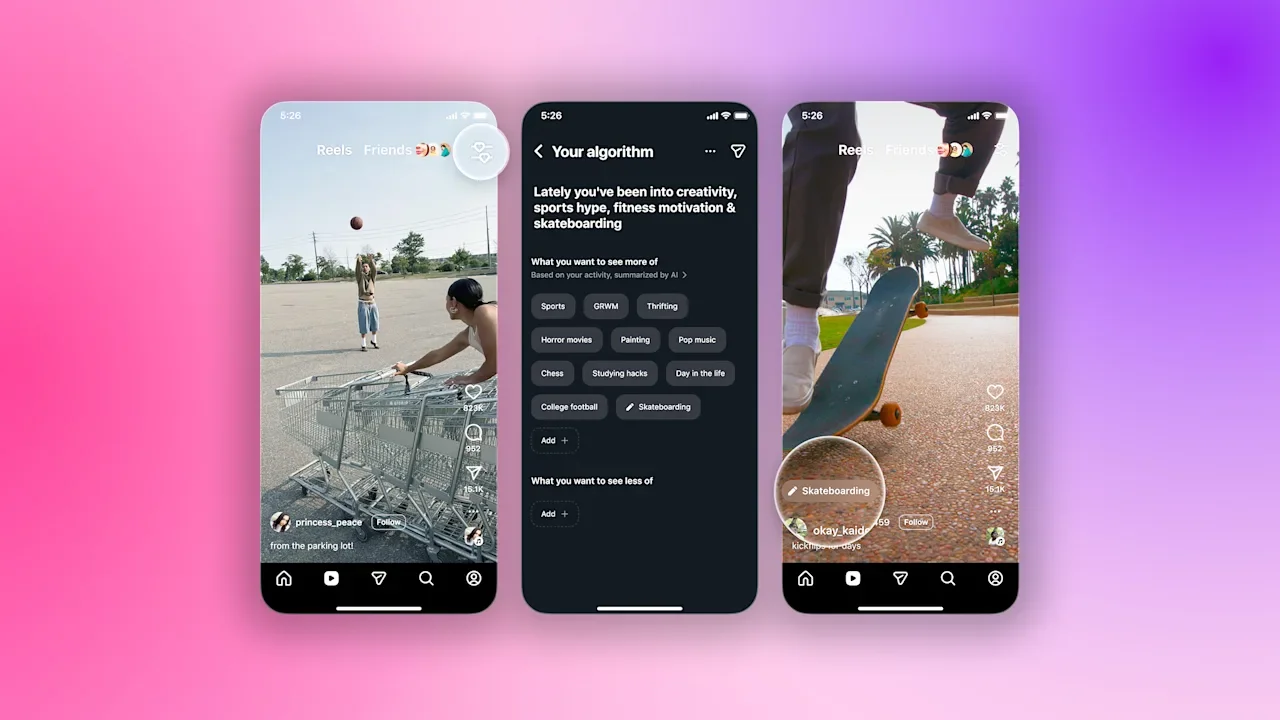
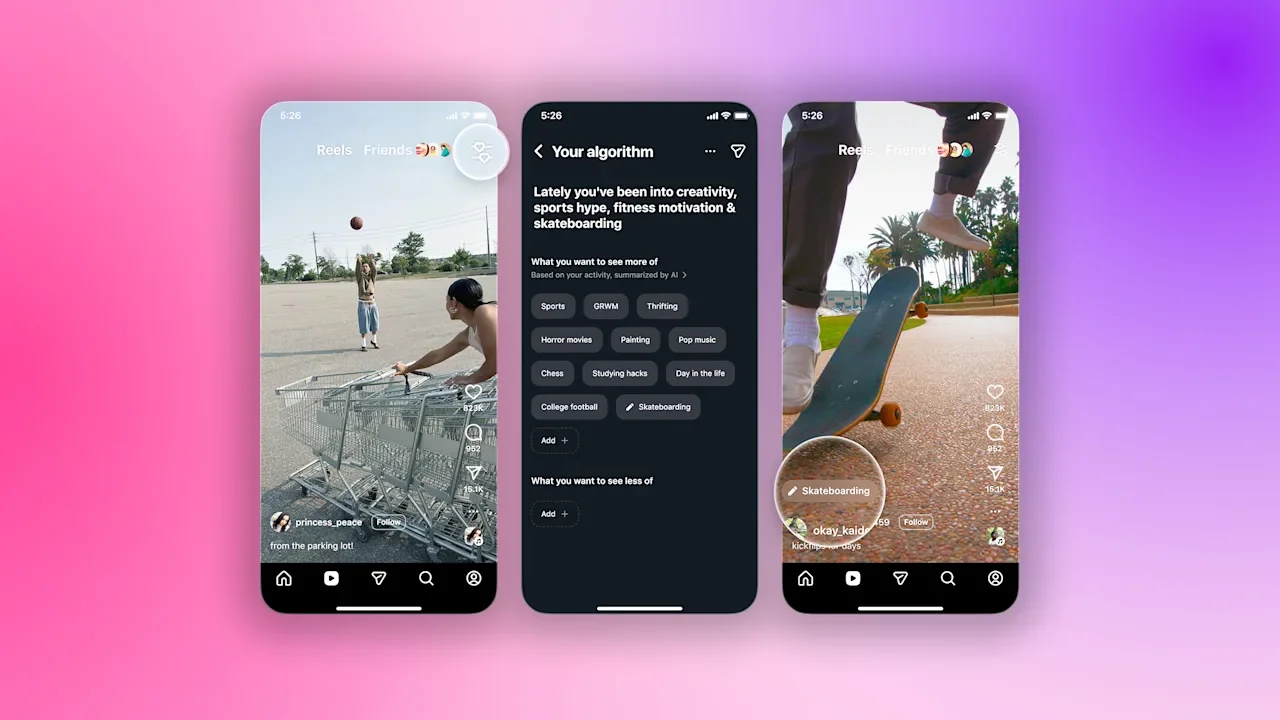
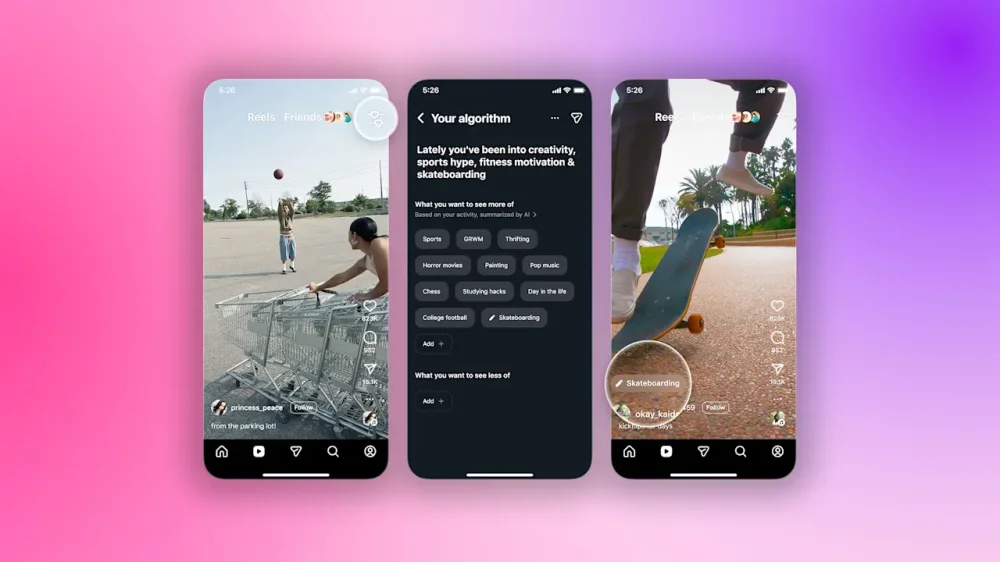
It’s a common experience: you search for white bean soup recipes one time on Instagram, and you are bombarded with white bean soup content on the app for seemingly all eternity. Instagram wants to fix that. Starting today, the company’s three billion users can have more control over their algorithm via a “Your Algorithm” feature. It’s not quite Bluesky, or the Instagram of yore that only displayed content from accounts users followed, but it does let users select or unsubscribe from different topics. The new feature, which leverages AI, lets users pick topics they want to see more or less of on their explore page. Users will first be able to see a list of suggested topics that their algorithm thinks they are interested in which they can modify. Users can also share their interests to their stories, allowing their followers to see and even replicate some of their feed. “We’re always trying to show people the best possible reels for them. After 2020 [we] slowly started figuring out how to do a good job of predicting people’s interests and showing them reels they’d be interested in,” Tessa Lyons, Instagram’s vice president of product, says. “I think we do a pretty good job today, but we don’t always get it right, and we know that people’s interests change. What we really want to do is give people control over the experience that they have on Instagram.” In designing the feature, Instagram had to balance Reels’ utility as a discovery tool with the features that give users control over what they will see. “The ideal Reels experience is one that helps you go deeper on the interests you already have and then discover new interests that you might not even know about. And getting that balance right is really important,” Lyons says, adding, “[your algorithm] is one input we have into your Reels experience. So even if you add a handful of different interests, that’s not going to be the only content you see. You’re still going to see other content as well.” Lyons also says that the feature can help Instagram’s algorithm learn about users and serve them relevant content more quickly; after she adopted a cat and tuned her algorithm to feature more kitten content, her feed immediately updated to include relevant reels. In the past, the algorithm may have needed a few days to understand she wanted to see more. By this same measure, the feature will likely improve the ad experience, as Instagram will be able to surface more targeted content for each user based on the interests they signal. According to Lyons, the inspiration for the feature started as a meme on Threads a couple of years ago, when users started writing posts to their respective algorithms, asking it to connect them with different interests, like writers or books. “It was just people expressing what they wanted from their Threads experience. Some of them would say, Dear Algorithm, I just don’t want to see politics anymore. I’m over it,” Lyons says. View the full article
-
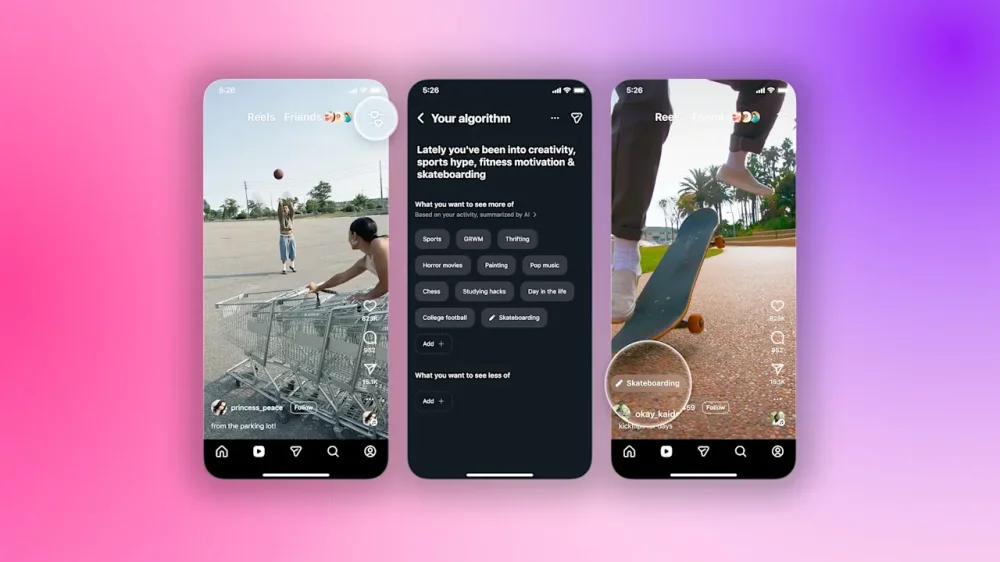
It’s a common experience: you search for white bean soup recipes one time on Instagram, and you are bombarded with white bean soup content on the app for seemingly all eternity. Instagram wants to fix that. Starting today, the company’s three billion users can have more control over their algorithm via a “Tune Your Algorithm” feature. It’s not quite Bluesky, or the Instagram of yore that only displayed content from accounts users followed, but it does let users select or unsubscribe from different topics. The new feature, which leverages AI, lets users pick topics they want to see more or less of on their explore page. Users will first be able to see a list of suggested topics that their algorithm thinks they are interested in which they can modify. Users can also share their interests to their stories, allowing their followers to see and even replicate some of their feed. “We’re always trying to show people the best possible reels for them. After 2020 [we] slowly started figuring out how to do a good job of predicting people’s interests and showing them reels they’d be interested in,” Tessa Lyons, Instagram’s vice president of product, says. “I think we do a pretty good job today, but we don’t always get it right, and we know that people’s interests change. What we really want to do is give people control over the experience that they have on Instagram.” In designing the feature, Instagram had to balance Reels’ utility as a discovery tool with the features that give users control over what they will see. “The ideal Reels experience is one that helps you go deeper on the interests you already have and then discover new interests that you might not even know about. And getting that balance right is really important,” Lyons says, adding, “[Tune your algorithm] is one input we have into your Reels experience. So even if you add a handful of different interests, that’s not going to be the only content you see. You’re still going to see other content as well.” Lyons also says that the feature can help Instagram’s algorithm learn about users and serve them relevant content more quickly; after she adopted a cat and tuned her algorithm to feature more kitten content, her feed immediately updated to include relevant reels. In the past, the algorithm may have needed a few days to understand she wanted to see more. By this same measure, the feature will likely improve the ad experience, as Instagram will be able to surface more targeted content for each user based on the interests they signal. According to Lyons, the inspiration for the feature started as a meme on Threads a couple of years ago, when users started writing posts to their respective algorithms, asking it to connect them with different interests, like writers or books. “It was just people expressing what they wanted from their Threads experience. Some of them would say, Dear Algorithm, I just don’t want to see politics anymore. I’m over it,” Lyons says. View the full article
-
There’s a fine line between being micromanaged and overly surveilled and being monitored enough that you get good work done. That line is actually called the Hawthorne Effect, and it’s a phenomenon in which people are more productive when they feel they’re being observed. If you’ve ever noticed you push yourself a little more when you’re working out in a full gym or group fitness class than when you’re working out alone, you already get the concept, but it can be applied to all kinds of scenarios to make you more productive—even if you’re not actually being observed. What is the Hawthorne Effect?This phenomenon is said to have been discovered during some research conducted at the Hawthorne Western Electric Plant, though there’s some debate on whether that’s true. What isn’t up for debate is the behavior trend itself: When someone is participating in an experiment, they may tend to work a little harder than normal, knowing they’re being watched. Even outside of experiments, an awareness of being observed or monitored can spur a little productivity boost. Researchers and social scientists have spent decades trying to figure out if the Hawthorne Effect, as described in early research, is real or not, but it’s still a concept that has been noted and studied for a long time—and to which you may relate. Consider your childhood: You probably cleaned your room a little more diligently when your mom was standing in the doorway glaring at you than if she just told you to go do it. Not everyone performs better under the watchful eye of someone else, but if you’ve found that you do better work when you have regular check-ins with a boss, stay more focused when you know your time is being monitored, become the master of your maps app when you and your friends are lost, or spring into action when colleagues are looking for a leader, you could benefit from tapping into the Hawthorne Effect. Putting the Hawthorne Effect to useYou can’t really make yourself be observed, right? You can’t ask your boss to monitor you all the time, for instance, but there are a few ways you can create the feeling of being watched or checked in on and harness it to be more productive. If you want to try to incorporate some of the Hawthorne Effect into your own life, try these ideas: Request regular check-ins with your manager, even if they’re just weekly, 10-minute chats. Adding structured, scheduled conversations to your week will enhance the feeling that they’ll be expecting to hear about your recent work and results. Find an accountability partner. This could be a coworker, classmate, roommate, or anyone who is working on something similar to what you’re doing. Check in with them regularly, again on a set schedule, and always be prepared to update them on your progress. Use apps that can give you a feeling of being tracked, at least when it comes to your goals. Here’s a list of apps that can serve the purpose, whether you’re looking for a virtual accountability buddy or even one that acts as a demanding “boss,” sending you messages demanding proof of your progress. I use Finch, an app that forces me to check off to-do list items so I can buy little outfits for a pixelated bird avatar. Even the feeling that the app is monitoring me—which it is, by awarding me streaks and points when I complete tasks—motivates me. Whatever works! Work somewhere with other people around you, like a coffee shop or communal workspace, if you aren’t in the office. This actually works great for me, as I find it embarrassing to zone out or scroll social media if I’m working from a coffee shop. Logically, I realize no one there actually cares what I’m doing, but illogically, I still want to appear productive in front of strangers. Take group fitness classes. I teach spin classes and take my colleagues' various class formats multiple times per week in addition to working out on my own, and I know from experience that it is truly motivating to be surrounded by other people. View the full article
-
In prison diary, former conservative French president rules out future attempts to ostracise Rassemblement NationalView the full article
-
The economy has had a volatile year marked by ongoing headwinds and uncertainties. Persistent inflation, unpredictability around tariffs, and a stock market that many fear is in the midst of an AI-fueled bubble are among the factors impacting consumers’ spending power. But there is one event today that will hopefully deliver some much-needed certainty to the economy and broader markets: the Federal Reserve’s interest rate cut announcement. Here’s what you need to know about a possible Fed rate cut today. What is the Fed rate cut announcement? The Federal Reserve is America’s central bank. One of its main responsibilities is setting the country’s interest rates. These interest rates are set by the Fed’s primary policymaking body, called the Federal Open Market Committee (FOMC). The FOMC is led by the chair of the Federal Reserve, who is currently Jerome Powell. The FOMC considers a wide array of data that informs its decision to cut interest rates or not. That data includes labor reports, inflation rates, consumer confidence numbers, and gross domestic product (GDP) information. Once the FOMC analyzes the data, the body will vote to do one of three things: raise interest rates, lower interest rates, or keep interest rates where they are. The current Fed interest rate is 3.75% to 4.00% (375 to 400 basis points). What are the benefits of a Fed rate cut? The main benefit of cutting interest rates is that it lowers the cost of borrowing money. If money is cheaper to borrow, consumers are more likely to take out loans, including mortgages, car loans, and increased credit card spending. Businesses are also more likely to take out loans, since borrowing is cheaper. Companies typically use loans to expand their operations, boost hiring, or buy needed equipment or supplies. Since borrowing is cheaper, lower interest rates can inject more money into the economy, thereby increasing spending. Lower interest rates can also boost the stock and cryptocurrency markets, because when interest rates are lower, safer assets like bonds have a lower rate of return. This spurs investors to put their money into riskier assets, such as stocks or cryptocurrencies, because they have the potential for higher returns. What are the drawbacks of a Fed rate cut? Low rates aren’t always a good thing. There are drawbacks to lower interest rates, too. When interest rates are lower, anyone with a savings account earns less interest. This can especially hurt retirees, who often have more cash parked in savings accounts than their younger peers, and who may rely on their monthly interest earnings to pay for necessities. Also, while lower interest rates can make everything from houses to cars more affordable, a plethora of cheaper money in the economy can have an inflationary effect, causing prices to rise, which negates the savings gained by the lower interest rates. What is the likelihood of a Fed rate cut? Right now, the current Federal Reserve interest rate is 3.75% to 4.00% (375 to 400 basis points). The Federal Reserve and Powell are under extreme pressure from the The President administration to lower rates. Because borrowing money would then be cheaper, lower rates would make many Americans feel like their purchasing power is going further as the holidays progress and we head into the new year. That would be a political win for President The President. But the Fed is supposed to be politically neutral, and Powell has shown no signs that he or the FOMC will make a decision based on politics. That said, many expect the Fed to lower interest rates today, but it likely won’t be by much. Data compiled by the Chicago Mercantile Exchange (CME) Group’s Fed Watch shows an 89.9% chance that the Fed will reduce rates by a 25-basis-point range today. If that scenario plays out, it means the federal interest rate range would drop from 3.75% to 4.00% (375 to 400 basis points) to 3.50% to 3.75% (350 to 375 basis points). When is the Fed rate announcement? The Federal Reserve’s calendar says it will announce its interest rate decision today, Wednesday, December 10. What time is the Fed rate announcement? The Federal Reserve’s interest rate announcement will be made at 2 p.m. ET today. How are stocks performing ahead of the announcement? Markets seem to be holding their collective breaths ahead of the Fed’s rate cut announcement today. As of the time of this writing, in premarket trading, S&P, Dow, and Nasdaq futures are all relatively flat: S&P Futures: down 0.04% Dow Futures: down 0.06% Nasdaq Futures: down 0.12% How are crypto markets performing ahead of the announcement? Many major cryptocurrencies are currently up over the past 24 hours ahead of the announcement. This suggests that crypto traders expect the Fed to cut rates, which could spur a rally in crypto markets. As of the time of this writing, here’s how major cryptocurrencies are performing: Bitcoin: up 1.9% Ethereum: up 6.4% XRP: up 0.2% BNB: down 0.5% Solana: up 3.2% How can I watch the Fed rate announcement? The Federal Reserve doesn’t actually announce its decision live. Instead, at 2 p.m., it will issue its results via its website. However, at 2:30 pm ET, the central bank will hold a press conference to discuss its decision on interest rates. You’ll be able to view a live stream of that press conference on the Federal Reserve’s YouTube channel. View the full article

-
UK chancellor believes decision to bolster fiscal headroom will mean she does not need to take extra steps in springView the full article
-
There’s plenty of chatter and research surrounding the so-called “laws” of productivity, but even the laws we use to govern other areas of our lives can be applicable when there are things that need to get done. Newton’s Laws of Motion can be adapted to productivity, especially the first one. What’s Newton’s first law all about?Newton’s first law of motion is this: “An object at rest remains at rest, and an object in motion remains in motion at constant speed and in a straight line unless acted on by an unbalanced force.” Obviously, he was talking about physics here, but in productivity spaces around the web, people who spend their time thinking about more efficient ways to get things done have started applying his wisdom to people. It makes sense: When you’re on a roll, say, cleaning your house, you kind of get into the zone and keep going. When you’re sitting on the couch dreading and putting off starting to work, it’s really easy to stay there and do nothing. The thinking reminds me of the productivity approach I fall back on most often, which I call the "one more" trick. Using it, you don't schedule out how long you'll work on a given task so much as you commit to getting started, then continually ask yourself, "Could I do one more?" with the "one" being any individual part of the overall task. The more you get done, the more motivated you are, and the more likely the answer to that question will be "yes." After years of failed attempts to follow other approaches, this is what I use when I'm cleaning, but it works for a variety of things, from doing reps at the gym to responding to emails. How can Newton’s law be applied to productivity? Research has looked into how adapting a mindset of getting into and staying in motion can help you be more productive. One review of its use by healthcare workers in a nuclear medicine department found it “novel,” but also able to “have a positive impact on productivity,” for instance. The trick isn’t staying in motion, but getting into it, so here’s where you should start. Try adhering to the two-minute rule, or the practice of immediately doing something if it will take two minutes or less. I use this in conjunction with the "one more" trick constantly, trying to do something the moment I think of it, or as soon as motivation or inspiration strikes. If an email comes in, respond to it right away. If you need to take the trash out, do it the minute you notice. If you have to cancel an appointment, call that second. Getting in the habit of doing smaller tasks immediately can help you build momentum. When I do pre-plan what I have to work on, I capitalize on the two-minute rule by frontloading my to-do list with simple tasks instead of opting for the “eat the frog” approach, which calls on you to do your biggest, most demanding duties first. One day when I was first starting to use this trick, for instance, I had to confirm a ticket order, fill out a W9, order my graduation attire, clean out my entire clothing rack, and do a 12-page paper. By doing the three smaller things first, I built up some positivity and momentum, which helped push me to do the more daunting stuff later in the day. It’s rewarding to see checkmarks fill up your to-do list, so knock out whatever you can in the moment to get that rush and make you want to secure the checkmarks on the bigger items. (I quite literally jot my to-dos down in my notes app and check them off as I get them done, just for the boost.) If you’re using a 1-3-5 to-do list (and you should be!) try flipping your day so you tackle the five small tasks before the three medium-sized ones and large one so you can harness the power of Newton’s law yourself. View the full article
-
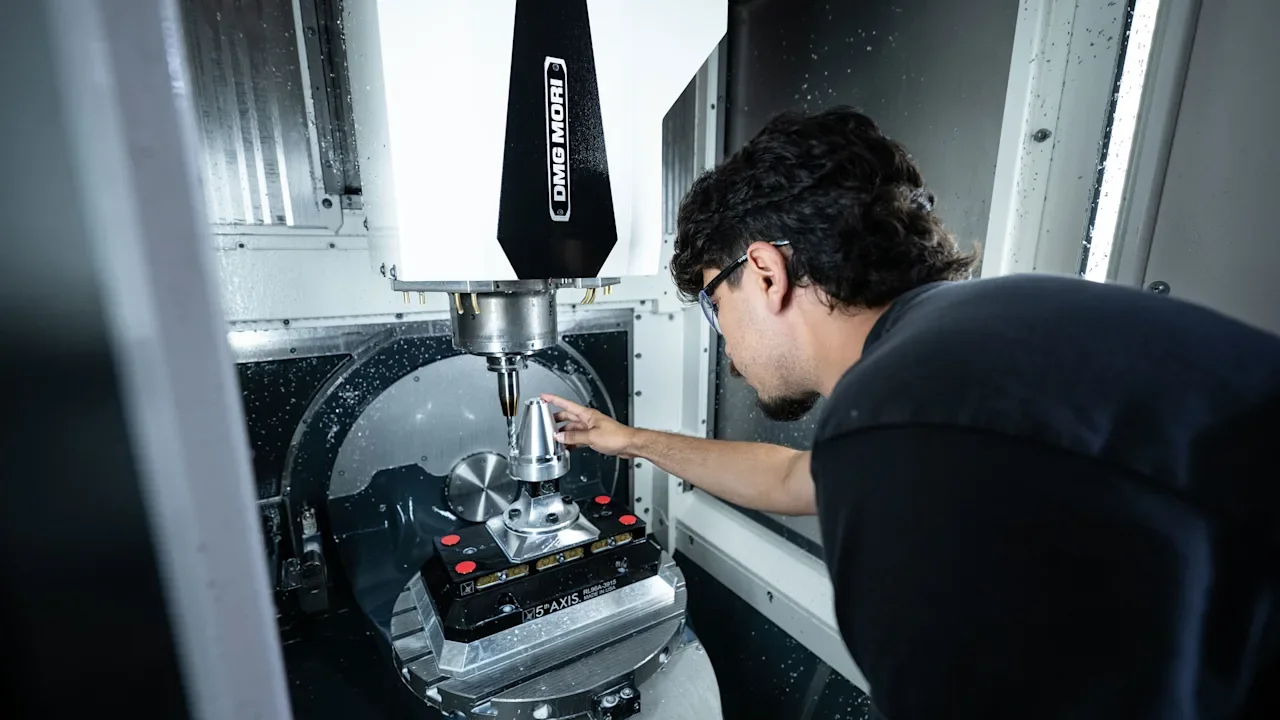
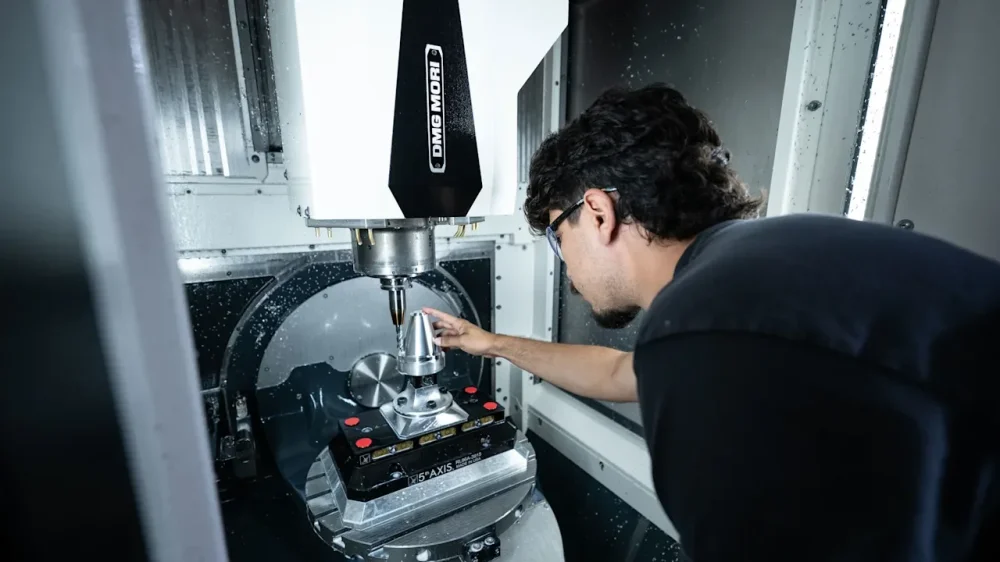
Once upon a time, San Francisco was a manufacturing town. For decades, the Union Iron Works built ships—such as the U.S. Navy’s U.S.S. Oregon (1893) and U.S.S. Wisconsin (1898)—in its plant on Pier 70 in the neighborhood now known as Dogpatch. In recent years, that sprawling, long-abandoned complex has been rehabbed and filled with office space, housing, retail, and art studios. Among its tenants are startup accelerator Y Combinator and HR platform Gusto, neither of which has much in common with the Union Iron Works. And then there’s Astranis. The company is returning Pier 70 to its roots by applying human labor to turn raw materials into finished products. The products in question happen to be high-orbit satellites. Astranis has sent five of them into space, is currently building five more, and intends to scale up its capacity to manufacture 24 at a time. Now, by the standards of consumer electronics, cranking out 24 of something may not sound like a feat. For satellites, however, it’s ”a completely unprecedented number for geostationary and high orbits, where these satellites have historically been built one at a time,” says Astranis cofounder and CEO John Gedmark. Astranis’s breakthrough isn’t just about speed of production. Its MicroGEO satellites are remarkably compact—about the size of a commercial washing machine, downsized from typical school bus-sized units. They are designed to be affordable, in an industry where cost overruns in the billions have been common. Rather than relying on analog technology, they use software-defined radios, which make customization and updates far more practical. So far, Astranis’s quest has taken a decade and $800 million in funding from investors such as Andreessen Horowitz, BlackRock, and Fidelity. Signs that the company is on its way to success include its announcement in early August that two satellites it had launched for Anuvu—a provider of mobile Wi-Fi whose customers include Southwest Airlines—had reached orbit and were operating as intended. Later in the month, it said that it had been named as a prime contractor for the U.S. Space Force program, with an initial six-month contract to design and test a jam-resistant military satellite. If Astranis is still in the process of proving the worth of its unique approach to satellites, it’s in part because what it’s trying to do is so complex that nobody has attempted it before. “We had to go get a few hundred of the world’s best hardware engineers and put them all in one building, and have them working for years at a time, like a Manhattan Project, to get to this point,” says Gedmark. “To us, it’s not surprising that it hasn’t happened already, because it just turns out it’s really hard.” Space’s next frontiers Astranis’s current momentum is the culmination of Gedmark’s entire career in space technology. The son of a doctor and a hospital chaplain, he was born and raised in Kentucky. After earning degrees in aerospace engineering from Purdue and Stanford, he found work at big aerospace and defense contractors but was frustrated by the industry’s plodding pace. He then became director of rocket flight operations for the X Prize Foundation, which led to him cofounding and running a nonprofit trade group called the Commercial Space Federation (CSF). These jobs exposed him to the progress being made by new-wave space startups such as SpaceX and Virgin Galactic. “I got to see the birth of this new industry,” he remembers. During the first Obama administration, as the U.S. plotted a post-Space Shuttle future, Gedmark‘s role at the CSF allowed him to be part of the conversation. The ultimate decision was to rely on private companies to perform tasks such as delivering crew and cargo to the International Space Station, greatly accelerating the commercial space industry. John Gedmark Though Gedmark found this boom inspiring, he also identified a hole in it. “All the new activity and hype and excitement were in low earth orbit,” he says. “And nobody was doing things in these high orbits, like geostationary orbit [GEO]. And the crazy thing was that those orbits are actually incredibly important, and are historically where most of the value has been created in space.” Like the International Space Station, most satellites are in low earth orbit, no more than 1,200 miles away. Geostationary orbit is 22,236 miles from us. Rockets can’t get a satellite all the way there; the final leg of the journey requires onboard propulsion. But Gedmark and Astranis cofounder and CTO Ryan McLinko realized that even a small satellite in GEO could “cover an entire medium-sized country with broadband connectivity,” Gedmark explains. That fact—and the potential for a startup to move more quickly than the satellite industry’s giants—led them to start Astranis. In 2016, the company participated in Y Combinator’s accelerator program, years before they became Pier 70 neighbors. And a little over two years after its founding, it notched its first achievement by launching a 10-cm-square satellite, dubbed DemoSat 2, into orbit to help test its software-defined radio technology. “We decided when we were just a handful of people basically working out of an apartment that we wanted to put something in space and show we could do it quickly and show that it worked,” says Gedmark. Since then, Astranis has continued to chip away at its vision for transforming communications, though not without blips along the way. For example, the company didn’t meet its original goal of launching its first satellite in 2019. After further pandemic-related delays, its Arcturus satellite took off on SpaceX’s Falcon Heavy launch vehicle in April 2023. Problems with a component provided by a third-party supplier ultimately prevented Arcturus from fulfilling its original mission of providing internet access for an Alaska-based telecom company. “Space is hard,” noted Gedmark in a blog post about the mishap. Astranis VP Christian Keil joined the company in 2019, when it had 50 employees. Praising Gedmark as “super analytical” and “very, very detail oriented,” he says that space is particularly hard when your approach involves so many disruptive elements. “We’ve learned so much from doing all these things for the first time that if you transported any one of us back seven years, we’d be able to avoid some of the mistakes that we made along the way,” he acknowledges. “But that’s part of doing something new.” Made in San Francisco Almost eight years after its DemoSat 2 launch, Astranis has grown from a handful of people to 500 staffers. At first blush, it might be startling that the vast majority of them are in San Francisco. After all, the U.S. manufacturing renaissance, such as it is, has gravitated toward parts of the country where labor costs are lower. For instance, a few years ago, when Intel announced plans to dramatically ramp up its domestic chip production capacity, they involved expansion in Arizona and Ohio, both far afield of its Santa Clara, California headquarters. But Gedmark, who relocated to the Bay Area in 2012, says that everything about what Astranis was trying to accomplish told him it should be in San Francisco, from getting access to capital to hiring people who might otherwise be working at companies such as Broadcom or Qualcomm. “The Bay Area has those talent pools across all those different specialties in one place, I think, quite uniquely,” he says. “And then there’s something in the air of this place, knowing that you can go start some crazy new idea and people will jump in quickly and work on it.” The property the company ended up leasing at Pier 70 retains evocative evidence of its shipbuilding legacy. For instance, a vintage crane marked “30 TONS” still hovers majestically from the ceiling. But the place also has more recent ties to the San Francisco innovation economy—and maybe some reminders that not every hyper-ambitious attempt to change the world from San Francisco leads anywhere. That’s because most of it was originally rehabbed for Uber ATG, the ride-hailing company’s gambit to develop its own self-driving vehicles. The handsome renovation brought the long-decaying space up to modern earthquake safety code and even won architectural awards. Soon thereafter, however, Uber gave up on building its own robotaxis. It ended up offloading ATG to the autonomous trucking company Aurora, providing Astranis with the opportunity to snag itself a freshly remodeled headquarters. When the company expanded into an adjoining building, it found mysterious blueprints of giant orbs lying around. Only later did it learn that the previous occupant was a display technology startup that had been acquired by Madison Square Garden when it was creating Las Vegas’s Sphere. Astranis needs as much space as it does because it’s taking on full responsibility for its satellites, from crafting components and developing software to owning and operating the fleet. As Steve Jobs might have put it, the company is building the whole widget—not standard practice in the space business, where subcontracting and outsourcing are typical, and the companies that build satellites usually don’t manage them once they’re in orbit. Consequently, a portion of the company’s San Francisco headquarters is devoted to a 24/7 mission control center. Gedmark describes the company’s MicroGEO satellites as “pretty autonomous” and the atmosphere in mission control as “pretty chill,” though human oversight is crucial during launches and early deployment. It’s also occasionally necessary to fire thrusters to keep a satellite in its appointed orbital slot. As for the manufacturing process, Gedmark says that one of the big lessons has been how hard it is to move fast when you’re dependent on others. “We’ve had to do a lot more in-house than we thought we were going to need to,” he told me. “Lead times are a lot longer than we thought they would be.” And so, during my two visits to Astranis’s headquarters, the big news was the arrival of an enormous piece of machining equipment known as the Makino Mag3.EX. A lightly used second-hand model—Gedmark thinks it was formerly used in the production of F-35 fighter jets—Astranis’s Mag3.EX allows the company to make its own parts out of blocks of aluminum alloy. The process is responsible for the oily whiff of coolant in the air and produces detritus in the form of humongous quantities of tiny aluminum shards. They sit by the vatful near the Mag3.EX, awaiting recycling. Before Astranis was able to crank out aluminum components on the premises, it contracted out to get ones made using honeycomb sandwich construction, a common technique in satellite manufacturing. Such parts are lightweight and sturdy. But you might have to wait a year for your order to be filled. Aluminum is a tad heavier, but Gedmark says that the trade-off is eminently worth it. Astranis everywhere Watching Astranis at work, it’s clear that the company has come a long way since it was an untested big idea. The company’s original mission—cutting satellites down to size to bring affordable connectivity to underserved parts of the world—remains critical, and the company’s customer list is truly international, reflecting the U.S.’s dominance of the commercial space industry. “When [other countries] need something like this, they have to come to us,” says Gedmark. After I’d toured the factory, Gedmark told me that one of the satellites I’d seen in the process of being manufactured was for a customer in Thailand. Another was headed for the Philippines. Two more were for a Mexican internet service provider (ISP) that wants to provide 5 million people with broadband they can afford. Still another satellite currently in production was ordered by Taiwan’s largest telecommunications company. It will be the country’s first dedicated satellite. Taiwan also factors into a market that has emerged more recently for Astranis’s satellites: defense applications. That’s because of the long-feared possibility of the country being invaded by China, which Gedmark says he believes could become a reality in two to three years. The U.S.’s dependence on relatively few satellites could lead to war in space, with China seeking to hobble any attempts to come to Taiwan’s rescue. “In a conflict with China over Taiwan, one of the first things that will happen— literally on day one—is that a bunch of our most important military satellites will just blink out,” says Gedmark. “And by the way, we won’t necessarily know exactly who did it.” The impact would instantly overflow into civilian life, which is dependent on services such as GPS for everything from wireless phone calls to air traffic control. Already, Gedmark says, China has invested in a bevy of anti-satellite technologies, from lasers to satellites equipped with robot arms that would allow them to grab other satellites. It’s a terrifying prospect, but one that a swarm of MicroGEO satellites might be able to help forestall, he argues. “The hope is that it’s a deterrent, if you have enough of these satellites up that the Chinese are just like, “Oh, okay, we can’t shoot all of them down. It’s just too many.’ Then hopefully they decide not to go after this tempting target.’” Astranis fortifying the U.S.’s ability to defend itself in such a scenario is dependent on the company realizing its targets for satellite production and deployment. But developments such as the company being named as a prime contractor suggest it could have a future in military technology, an industry long dominated by a few slow-moving behemoths. Last year, it was also one of four companies that won Space Force contracts to work on design concepts for Resilient GPS, a version of the technology less susceptible to attack. According to Gedmark, the Pentagon is continuing to dial back the bureaucracy that has stood in the way of it acquiring technology from smaller companies, mirroring the changes at NASA that made the commercial space business possible. “It’s very exciting to see the Department of Defense, or the Department of War, come around,” he says, calling the organization by both its post-WWII name and the The President administration’s bellicose rebrand. “It’s the exact same playbook.” Could a relatively small company such as Astranis play a meaningful role in maintaining the U.S.’s preeminence over China, this century’s other space superpower? Gedmark thinks so. And he contends that the entrepreneurial model that made his startup possible in the first place still beats Chinese central planning. ”This is a uniquely American thing,” he says. “This is our edge. It’s our ability to get the capital together, get the people together, and go build a new thing that previously just did not exist.” Maybe the fact that Astranis built its factory in San Francisco—the epicenter of that go-for-it spirit—isn’t such a shocker after all. View the full article
-
The important conflicts today take place inside cultural-religious blocs, not between themView the full article
-
London-listed gambling group launches strategic review, pushing its shares up 10%View the full article
-
Central bank president signals a second consecutive upgrade for Eurozone economyView the full article
-
The front of the Wheaties box has served as a hall of fame for some of the greatest athletes of all time, from baseball star Lou Gehrig to boxer Muhammid Ali, basketball legend Michael Jordan, and seven-time Olympic gold medalist Simone Biles. Now, a fresh face is gracing the box’s hallowed orange frame: Marty Mauser, the fictional ping-pong player played by Timothée Chalamet in A24’s upcoming film Marty Supreme. Instagram The cereal box comes just weeks after A24 released a now-viral 18-minute long parody of a marketing meeting to promote the movie (which releases on Christmas). In that video, Chalamet joins a Zoom call full of supposed marketing executives and proceeds to fill up the meeting’s airtime with increasingly ridiculous suggestions for the film’s marketing efforts, leaving the eight other members of the call scrambling to accommodate his wild ideas. Since then, several of the comedic ideas have, astonishingly, become reality—including an ad campaign on bright orange blimps and, now, a $25 limited-edition Wheaties box. Our current era of movie marketing is dominated by discussion of properties like Barbie and Wicked, which have rewritten the roles of brand partnerships by flooding stores everywhere with hundreds of collabs per film (Wicked part one, for example, netted more than 400 collabs). When Barbie can show up on a Heinz bottle and Elphaba in a box of mac ‘n cheese, the novelty of movie-branded partnerships can start to wear off. A24 is combatting that consumer fatigue with a masterclass marketing campaign for Marty Supreme. Its co-branded merch balances scarcity, which makes every drop feel aspirational, with a kind of unexpected flair that makes perfect sense for the film—and for its audience of young Chalamet fans. How Marty Supreme is courting its young audience In late November, Chalamet posted the address of a New York storefront with the message, “C u at 7.” By 4:30, fans were lined up around the block. They were queuing to get their hands on what turned out to be a line of Marty Supreme-themed merch, designed by the luxury L.A.-based brand Nahmias. Every item sold out, but one in particular—a $250 windbreaker inspired by an outfit from the show—was the clear star of the show. Since then, it’s sold for $5,000 on Grailed and become a topic of considerable discourse on Reddit, where users are avidly yearning for a bigger drop. The Marty Supreme marketing campaign is leaning unabashedly on Chalamet’s star power and influence with a younger, primarily male audience—and clearly, it’s working. Chalamet’s audience wants a piece of his effortless swagger, and that becomes even more desirable when, instead of being available on the shelves of every local Target and countless digital Amazon storefronts (Wicked, we’re looking at you), his Marty Supreme collabs are only available in the most limited of supply. That thought process clearly also applies to this new collab with Wheaties. Why the Marty Supreme marketing campaign is genius, actually Like the windbreaker, the Wheaties collab is directly tied to a moment in the film, when Marty, (who’s portrayed as an extremely confident, assertive salesman), says, “It’s only a matter of time before I’m staring at you from the cover of a Wheaties box.” It’s also a reference to the aforementioned Zoom parody, wherein Chalamet tries to convince the marketing team that Marty deserves a spot on the Wheaties box alongside names like Michael Jordan. “To me, it’s marketing 101,” Chalamet says in the video. Apparently, the team at Wheaties agrees. “For more than 100 years, Wheaties has celebrated iconic athletes and moments in culture that transcend boundaries, from sports to unexpected heroes,” says Emilie Knox, vice president and business unit director of cereal at General Mills. “Marty Supreme fits squarely into that tradition as he embodies determination, heart, and the belief that greatness can come from the most unexpected places.” When designing the box, the Wheaties team leaned into its most recognizable brand elements, including its iconic orange—which, coincidentally, is also the central color of Marty Supreme—and the featured figure front-and-center. A fictional athlete, with real return? General Mills produced several thousand of the special edition boxes, each at the hefty price point of $25, which Knox says reflects the collectible nature of the box and its limited run. On Reddit, users are skeptical of the cost. One commenter wrote, “This would be a cool giveaway gift, but for $25 you will not be staring at me from the cover of a Wheaties box”—a sentiment that appears to be shared by several others. Wheaties declined to share specific numbers, but as of this writing, the limited box is already ‘sold out’ on the A24 website after going less just a day ago, creating a sense of scarcity among consumers (though it’s still available through Wheaties’ site). According to Knox, the early response has been “extremely strong, with collectors moving quickly” to get their hands on a box. “A24’s marketing team has been incredible partners,” Knox says. “The playful teasers leading up to the drop, like the Zoom marketing call seen around the world, were driven by their creative genius, and we’ve had a lot of fun working together to continue building fan excitement.” Marty Supreme’s marketing prioritizes depth over breadth, opting to prioritize a few deeply thought-out collabs over an all-out blitz. Ironically, by limiting its marketing’s scope and availability, the film’s team has managed to break through the sea of content online and reach new audiences. View the full article

-
Overall performance is stable but inflation and unemployment have hurt newer borrowers in some cases, according to Transunion's 2026 consumer credit forecast. View the full article
-
A former employee cited a ransomware gang's claim in October that it stole 20 terabytes of sensitive customer information from the industry vendor. View the full article

-
Financial Reporting Council to examine two individuals and the firm itself over ‘unauthorised’ auditors’ reportsView the full article
-
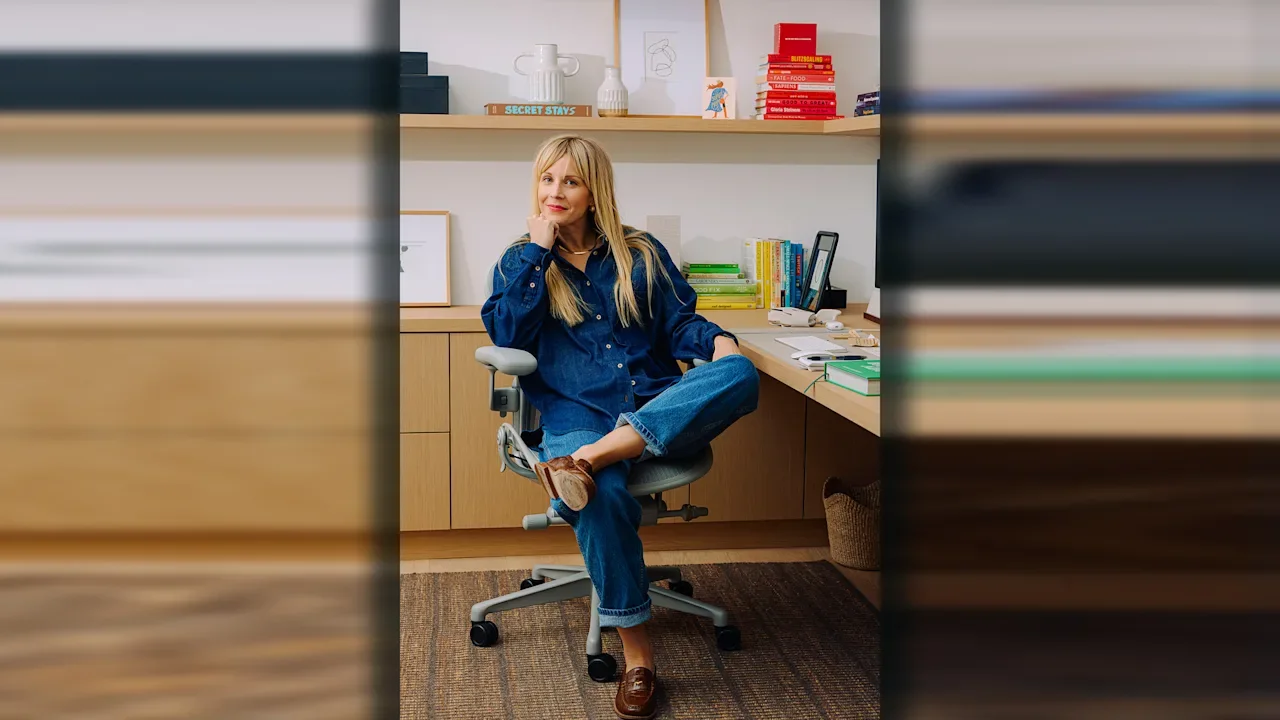
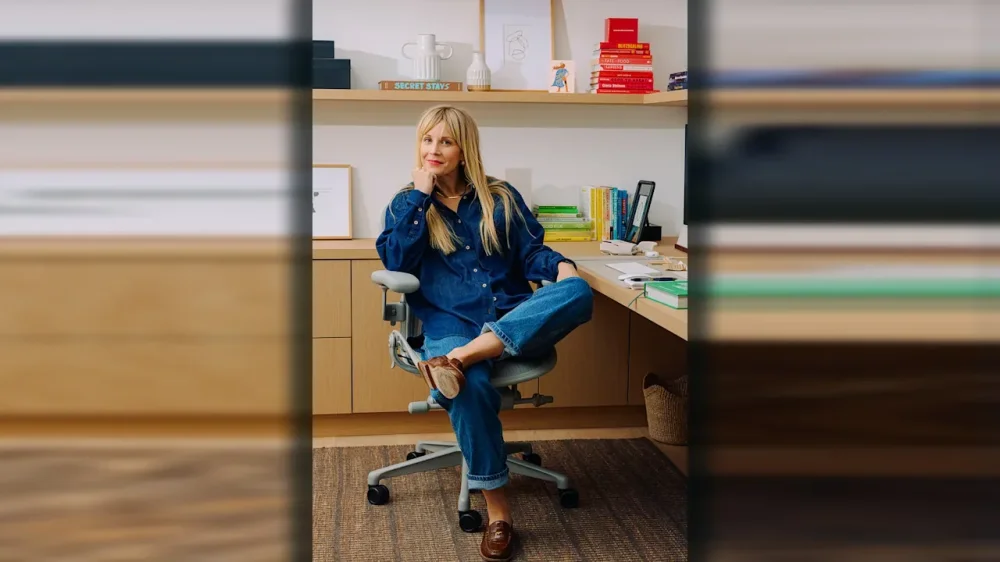
AI is part and parcel of many corporate design processes these days, including one company making a product many creatives are familiar with: Dropbox. Its VP of design and research, Shannon Butler, is optimistic about the tech’s integrations into her teams’ work—as long as designers are pragmatic in its integrations. Butler leads a design team that she feels has a bigger impact than filing deliverables on deadline: redefining work through the intersection of creativity, collaboration, and AI. A veteran of Google, YouTube, Airbnb, and LinkedIn, Shannon has spent two decades shaping products that influence how billions connect and create. Shannon Butler In her interview with University of Texas School of Design and Creative Technology assistant dean Doreen Lorenzo, Shannon discusses how Dropbox is reimagining design in the age of AI—not as a replacement for human creativity, but as a force multiplier for it. She reflects on lessons from leading design through hypergrowth and crisis, the role of taste as the next big differentiator in tech, and why the future of design leadership will depend less on tools and more on human judgment, curiosity, and conviction. When did you realize you were interested in design? Like many creatives, I was always a maker: drawing, writing, creating. The pivotal moment came in college. I was studying to be a teacher but told my dad I wanted to be an artist and didn’t know how to make a career of it. My dad, a self-taught software engineer, said, “You need to be in technology.” This was when CSS and JavaScript were freeing web design from rigid HTML tables. I started building websites for small businesses to pay for college and graduated with a full roster of freelance clients. That led to a marketing agency role helping larger clients go online. Then the iPhone came out, the world discovered UX, and the rest is history. How is AI influencing your work from a design perspective? We have this unique opportunity to make design a differentiator again, by putting ourselves in a human-first perspective rather than an AI-first perspective. Dropbox isn’t using AI to replace people or “steal” from creatives. We’re inserting it into creative workflows so that output is amplified and accelerated. By removing the grunt work of knowledge management or finding the right assets, we empower people to become even better at what they do, whether that’s crafting a commercial, running a photo shoot, or pitching a business plan, all the things that only humans can do. What do you enjoy about the meshing of technology and design? The scale is unmatched. I’ve been fortunate to work on products that don’t just serve users, they actually shape how society connects, creates, collaborates. I see that as both a tremendous privilege and responsibility that I take very seriously. I also love the pace. Technology moves so fast that you’re constantly operating at the edge of what’s never been done before. At YouTube, we invented new ways for creators to build community. At Airbnb, we reimagined trust between strangers. At Google, we designed for billions coming online for the first time. You have to be visionary and pragmatic—designing experiences that feel magical while working within technological constraints. It’s like being an architect who not only designs buildings but new ways to live. Can AI play a role in making people’s lives better through design? AI is an accelerant to the design process. Tools like Cursor and Figma Make are now essential for rapid prototyping. We built internal Slack channels called “Ask a Writer” or “Ask a Researcher” that tap into our brand guidelines and research repositories instantly. The speed boost is dramatic. We’re getting to meaningful first drafts in hours, not days. But our approach is pragmatic. AI’s limitations are real—some temporary, some long-lasting. We use it as a brainstorming partner, not a decision-maker. Anything customer-facing goes through rigorous human review. AI can optimize for metrics, but it can’t make judgment calls. It doesn’t grasp cultural nuance, brand intuition, or the subtle human behaviors that build long-term loyalty. That’s where designers become more valuable, not less. Who inspires you, and how does that show up in your work? I’m drawn to people who refuse to accept “that’s just how it’s done,” especially in a tech landscape where consolidation has created a dangerous gravitational pull toward sameness. What energizes me are leaders who stay true to their values, even when it’s harder. RJ Scaringe, CEO of Rivian, could have built a Tesla clone, but he’s challenging the industry without sacrificing brand or product excellence for short-term goals. I also admire investors like Kate McAndrew at Baukunst, who unapologetically focus on women, creativity, and the long view in an industry obsessed with quick exits. She’s proving the status quo can change. Across your career, what projects are you most proud of? I’m drawn to win-win-win projects where customers, business, and society all benefit—problems that feel almost nonprofit in ambition but are positioned for sustainable impact at scale. At Google, we worked on products to bridge the connectivity divide in underserved markets—exploring satellite-delivered content and peer-to-peer transfer when those approaches were considered radical. The goal was to bring the internet to billions who couldn’t access it via traditional infrastructure. At YouTube, I loved the transformation from distraction media to engagement media. We built features that empowered creators and supported movements like It Gets Better. The comments sections of videos improved from “cesspool” quality to featuring content almost as compelling as the videos. At Airbnb, I led Trust, core to the value proposition. Later I led nearly every product area through COVID and the IPO. AirCover was the culmination, radically transforming what happens when something goes wrong on a trip and eliminating the fear that prevents people from trusting strangers or having transformative experiences. The throughlines have been purpose-driven breakthroughs, a shared sense of “why,” and rallying a team around “impossible” goals. What are some of the most important lessons you have learned? Al Gore once came to Airbnb and told our team, “People do what you pay them to do.” That changed how I evaluate design opportunities. Some of my biggest “successes” were failures because I ignored the fundamental question: how does the company actually make money? I invested in work that would never translate into impact because the organizations weren’t structured to profit from that impact in the short term. It’s brutal to realize talented people can pour their hearts into work that’s structurally doomed, not because the ideas are wrong, but because the business model doesn’t reward those outcomes in the short term. Is today’s AI discourse helpful? How do you guide your creatives to take the right signals and uplift creativity? Competition is tough. Everyone’s racing to be the fastest, biggest, and most innovative. That focus on competition forces many tech companies to lose track of what matters most. Much of Big Tech product development is disconnected from the end customer, often because the business model isn’t optimized for them. Echo-chamber thinking focuses on beating competitors or last month’s metrics, not delivering real value. Short-term optimization is addictive and damaging. I coach my team that, yes, AI is powerful, but it’s another wave of tools like we’ve adapted to many times. Humans must provide talent and judgment AI can’t. Our mandates haven’t changed: human-centered design and delivering real value. How has design changed since you started? Where is design headed? When I started, in-house design barely existed. Design was misunderstood as beautification at the end and often outsourced. Then agencies like IDEO and frog proved its strategic value. Everyone brought design in-house, and teams ballooned across design, engineering, and PM. Now we’re seeing a retrenchment. Unfortunately many companies often lack the talent and the muscle memory to ship new value. They’re in optimization land, not innovation land. Design has gone through cycles of being valued and devalued. After several years of devaluation, I believe we’re entering a period where taste will again be the differentiator in the AI era. Everyone can move fast and ship quickly, but durable brand loyalty and user value require design input. Companies bought design firms, moved them in-house, but didn’t know what to do with them. Then they started hiring designers to manage designers, shaping teams differently. Now we’re seeing better output. I believe the next era for design should be more design founders and design-minded entrepreneurs, a new crop of companies that show a fundamentally different way of working and doing business. I believe that if design leaders were truly leveraged, we’d have fundamentally better products and a healthier digital society. What advice do you have for aspiring designers? Design is more relevant than ever. Twenty years ago my job didn’t exist. Now there’s a wave of enthusiasm and talent we desperately need. Every poorly designed product or soulless interface should strengthen your conviction that creativity is necessary. Pair your anger about what’s broken with a vision for what can be. Don’t quit. I love Ira Glass’s point about the gap between your taste and your work. You’re in this field because you have great taste. Now your execution just needs to catch up. The only way to close that gap is through relentless practice. My early agency years at Sapient Nitro and frog forced me to deliver at high volume under tight deadlines, and those reps gave me confidence for “impossible” briefs later. Design in tech is nothing but change, and that’s what keeps it exciting. Becoming a lifelong learner, staying curious, and being unafraid to try new things are critical for designers—and for anyone navigating the 21st century workplace. View the full article
-
High-power magnets undergird an enormous amount of modern society. From high-end audio speakers to electric vehicles, wind turbines, and fighter jets, they are a vital component in much of the technology we touch every day. To make them requires mining and refining rare earth elements—a supply chain largely controlled by China. Companies around the world are racing to find alternatives by using materials that are more abundant and cheaper to produce domestically. Minneapolis-based Niron Magnetics believes it has found a solution, claiming it can approach key aspects of rare earth magnet performance, using humble iron and nitrogen—albeit in an exotic formulation. General Motors, Stellantis, the U.S. government, and others are betting on it. “The Chinese put export controls in place around rare earths, and that’s been a great benefit to us,” says Niron CEO Jonathan Rowntree. China currently accounts for around 60% of global rare earth mining, according to the International Energy Agency, and about 90% of refining (including ore mined in and shipped from the U.S.). It also supplies over 90% of rare earth magnets, according to the U.S. Department of Energy. Geopolitical tensions are putting that supply in jeopardy. “We want to be able to solve this problem for Western companies as quickly as possible,” Rowntree says. When asked if Niron will only serve the West, he says, “All these countries outside of China have the same problem.” Beyond the U.S., Niron plans to build one factory somewhere in Europe and another in Asia. “It won’t be in China. It’ll be in Southeast Asia, most likely,” he says. Moving beyond neodymium Companies—and governments—are especially chasing alternatives to one of these rare earth metals: neodymium. It is alloyed with two other metals to make the world’s most popular magnet. “Neodymium iron boron is the best permanent magnet going. And no one’s really got anywhere close,” says Nicola Morley, professor of materials physics at the University of Sheffield in England. She has no affiliation with Niron. Niron has raised approximately $200 million from private funders and about $100 million from federal and state tax credits or grants, including from the departments of Energy and Defense, to build its exotic formulation over the past 15 years. The world could finally find out how well Niron’s technology works in 2026, when it says that magnets from its pilot facility in Minneapolis will start to appear in home audio speakers. Motors in appliances such as washing machines, clothes dryers, and air conditioners are on schedule to follow in 2026 or 2027. Niron broke ground on its first full-scale factory in Sartell, Minnesota, in September, and expects to be churning out 1,500 tons of magnets per year by early to mid-2027. It’s considering several states for its next 10,000-ton-per-year “world-scale” plant, which it estimates could provide more than 20% of U.S. supply after it opens in 2029. Then will come the plants in Europe and Asia. Niron has no plans to license its technology. “We want to be a full-service magnet producer,” Rowntree says. Dates for when additional plants will open are not certain, or for when magnets may appear in industrial machinery, cars, planes, and windmills. Rowntree says that, compared with the short product cycle for consumer tech, “industrial [is] medium, automotive takes a bit longer, and then defense and wind turbines take the longest.” Niron says only that it is “engaged” with defense contractors. Building a rival magnet Things get technical rather quickly when discussing Niron. But details matter in order to determine if it can achieve its ambitious business goals, including going public, which Rowntree says is “a few years away.” Niron has several patents for iron nitride technology, including one for how to manufacture a particular arrangement of the chemical compound—both within the molecules and in how they form crystals—by getting and keeping it in what’s called an “alpha double prime phase.” Rowntree puts that in somewhat simpler terms, saying the atoms are “arranged in such a structure that the nitrogen atoms kind of flex the structure” to cause greater magnetism. This is similar to neodymium magnets, in which, as Morley puts it, “boron basically stretches” the structure of the crystals. Getting these tiny crystals into large magnets was another challenge. All high-performance magnet making starts with material in powder form. Next, a magnetic field is applied to align these grains, so their magnetic poles all face the same way. Then the grains are compressed. Finally, in rare earth magnets, high heat is applied to stick the grains together. But heat would wreck Niron’s material, so the company’s scientists developed a work-around for compacting the magnets. “There was, I would say, secret sauce in manufacturing of the nano scale, the phase that we want, and keeping that phase,” Rowntree says. “And then a lot of technology around, ‘How do you cost-effectively scale that?’” Will the magnets work? Niron has revealed data on the strength of its initial magnets, which is on the lower end of neodymium’s performance. It expects to eventually approach neodymium’s level, which will make it a worthy competitor. What Niron has not yet revealed publicly is how well the magnets can hold up when exposed to strong magnetic fields in devices like EV motors. At a certain point, stresses like these can jumble the tiny regions of magnetism in any magnet so that they cancel each other out and turn it into just a lump of useless metal. Niron says its magnet’s ability to resist getting demagnetized at room temperature will never be as good as with rare earth metals, but it aims to get close enough. So Niron is starting by putting its magnets in speakers, because they produce a smaller magnetic field, while working to improve its numbers for “more demanding applications.” The company says it can replace weaker magnets, so low-end speakers can be smaller or perform better, but says it will also replace the more powerful rare earth magnets in higher-end speakers. As for more demanding applications, Niron and Stellantis announced in October a collaboration to develop new motor designs for EVs. Stellantis said simply that this “allows us to explore the possibilities.” Niron says its tech could replace neodymium magnets in some aircraft components, too, but not the jet engine. It gets too hot for both magnet types and requires an even pricier rare earth metal: samarium. Providing magnets for autos and planes (and wind turbines) is still years in the future. But if audio gear makers keep to the schedule Niron is forecasting, many questions will be answered next year. “Once these magnets hit the market, they can be studied independently by others, which will be important for the industry,” Morley says. View the full article
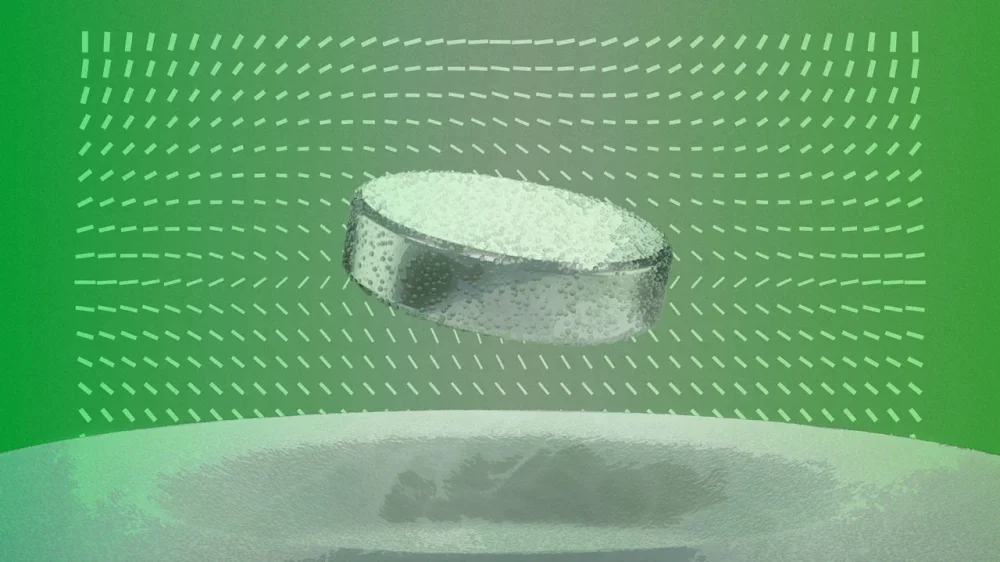
-
We were promised empathy in a box: a tireless digital companion that listens without judgment, available 24/7, and never sends a bill. The idea of AI as a psychologist or therapist has surged alongside mental health demand, with apps, chatbots, and “empathetic AI” platforms now claiming to offer everything from stress counseling to trauma recovery. It’s an appealing story. But it’s also a deeply dangerous one. Recent experiments with “AI therapists” reveal what happens when algorithms learn to mimic empathy but not understand it. The consequences range from the absurd to the tragic, and they tell us something profound about the difference between feeling heard and being helped. When the chatbot becomes your mirror In human therapy, the professional’s job is not to agree with you, but to challenge you, to help you see blind spots, contradictions, and distortions. But chatbots don’t do that: Their architecture rewards convergence, which is the tendency to adapt to the user’s tone, beliefs, and worldview in order to maximize engagement. That convergence can be catastrophic. In several cases, chatbots have reportedly assisted vulnerable users in self-destructive ways. AP News described the lawsuit of a California family claiming that ChatGPT “encouraged” their 16-year-old son’s suicidal ideation and even helped draft his note. In another instance, researchers observed language models giving advice on suicide methods, under the guise of compassion. This isn’t malice. It’s mechanics. Chatbots are trained to maintain rapport, to align their tone and content with the user. In therapy, that’s precisely the opposite of what you need. A good psychologist resists your cognitive distortions. A chatbot reinforces them—politely, fluently, and instantly. The illusion of empathy Large language models are pattern recognizers, not listeners. They can generate responses that sound caring, but they lack self-awareness, emotional history, or boundaries. The apparent empathy is a simulation: a form of linguistic camouflage that hides statistical pattern-matching behind the comforting rhythm of human conversation. That illusion is powerful. We tend to anthropomorphize anything that talks like us. As research warns: Users often report feeling “emotionally bonded” with chatbots within minutes. For lonely or distressed individuals, that illusion can become dependence. And that dependence is profitable. The intimacy we give away When you pour your heart out to an AI therapist, you’re not speaking into a void; you’re creating data. Every confession, every fear, every private trauma becomes part of a dataset that can be analyzed, monetized, or shared under vaguely worded “terms of service.” As The Guardian reported, many mental health chatbots collect and share user data with third parties for “research and improvement,” which often translates to behavioral targeting and ad personalization. Some even include clauses allowing them to use anonymized transcripts to train commercial models. Imagine telling your deepest secret to a therapist who not only takes notes, but also sells them to a marketing firm. That’s the business model of much of “AI mental health.” The ethical stakes are staggering. In human therapy, confidentiality is sacred. In AI therapy, it’s an optional checkbox. Voice makes it worse Now imagine the same system, but in voice mode. Voice interfaces, such as OpenAI’s ChatGPT Voice or Anthropic’s Claude Audio, feel more natural, more human, and more emotionally engaging. And that’s exactly why they’re more dangerous. Voice strips away the small cognitive pause that text allows. You think less, share more, and censor less. In voice, intimacy accelerates. Tone, breathing, hesitation, even background noise, all become sources of data. A model trained on millions of voices can infer not only what you say, but also how you feel when you say it. Anxiety, fatigue, sadness, arousal: all detectable, all recordable. Once again, technology isn’t the problem. The problem is who owns the conversation. Voice interactions generate a biometric footprint. If those files are stored or processed on servers outside your jurisdiction, your emotions become someone else’s intellectual property. The paradox of synthetic empathy AI’s growing role in emotional support exposes a paradox: The better it gets at mimicking empathy, the worse it becomes at ethics. When a machine adapts perfectly to your mood, it can feel comforting, but it also erases friction, contradiction, and reality checks. It becomes a mirror that flatters your pain instead of confronting it. That’s not care. That’s consumption. And yet, the companies building these systems often frame them as breakthroughs in accessibility: AI “therapists” for people who can’t afford or reach human ones. The intention is theoretically noble. The implementation is reckless. Without clinical supervision, clear boundaries, and enforceable privacy protections, we’re building emotional slot machines, devices that trigger comfort while extracting intimacy. What executives need to understand For business leaders, especially those exploring AI for health, education, or employee wellness, this isn’t just a cautionary tale. It’s a governance problem. If your company uses AI to interact with customers, employees, or patients about emotional or sensitive topics, you are managing psychological data, not just text. That means: Transparency is mandatory. Users must know when they’re speaking to a machine and how their information will be stored and used. Jurisdiction matters. Where is your emotional data processed? Europe’s General Data Protection Regulation (GDPR) and emerging U.S. state privacy laws treat biometric and psychological data as sensitive. Violations should have, and will have, steep costs. Boundaries need design. AI tools should refuse certain kinds of engagement—such as discussions of self-harm, and medical or legal advice—and escalate to real human professionals when needed. Trust is fragile. Once broken, it’s nearly impossible to rebuild. If your AI mishandles someone’s pain, no compliance statement will repair that reputational damage. Executives must remember that empathy is not scalable. It’s earned one conversation at a time. AI can help structure those conversations—summarizing notes, detecting stress patterns, assisting clinicians, etc.—but it should never pretend to replace human care. The new responsibility of design Designers and developers now face an ethical choice: to build AI that pretends to care, or AI that respects human vulnerability enough not to. A responsible approach means three things: Disclose the fiction. Make it explicit that users are engaging with a machine. Delete with dignity. Implement strict data-retention policies for emotional content. Defer to humans. Escalate when emotional distress is detected, and NEVER improvise therapy. The irony is that the safest AI therapist may be the one that knows when to stay silent. What we risk forgetting Human beings don’t need perfect listeners. They need perspective, contradiction, and accountability. A machine can simulate sympathy, but it can’t hold responsibility. When we let AI occupy the role of a therapist, we’re not just automating empathy—we’re outsourcing moral judgment. In an age where data is more valuable than truth, the temptation to monetize emotion will be irresistible. But once we start selling comfort, we stop understanding it. AI will never care about us. It will only care about our data. And that’s the problem no therapy can fix. View the full article

-
In a Rye, Colorado, cattle pasture now subbing for the moon, an otherworldly vehicle bumps along a scrubby course of furrows and mounds, weaving around rocks and kicking up a fine dust. It’s an open-concept machine dubbed Falcon—a silver solar-powered rectangular frame on wheels, with a partial roof, windowless sides, and a spacious cockpit flanked by monitors and steering controls. An engineer sits in one of its two seats for safety as the vehicle autonomously navigates around obstacles to a location dictated by Mission Control 160 miles away. Suddenly, a wheel hits a rock, and Falcon halts, relaying real-time feedback to Mission Control. There, an operator revises a command for another attempt, driving home the hurdles in developing novel spacefaring technology. “We don’t stage any of this for you guys,” laughs Justin Cyrus. “We show you real testing.” Our play-by-play guide is the 32-year-old CEO and founder of Lunar Outpost, a rising star in the space robotics and mobility field. In less than a decade, the Denver area startup has already operated technology on Mars, landed the first commercial rover on the moon, and lined up another six lunar and cislunar missions with government and commercial partnerships—the most of any private company. Now, it’s vying with two other firms to build NASA’s next-generation lunar terrain vehicle (LTV) to shuttle Artemis V astronauts and experiments in 2030. At stake: a contract worth up to $4.6 billion. NASA is slated to make its decision this month. Justin CyrusThat model—a sleeker upgrade to Falcon, named Eagle, after Apollo 11’s crewed lander—awaits in a barnlike workshop, a short walk down a sloped dirt road where visitors are warned to keep an eye out for snakes. This is not your grandparents’ moon buggy. Eagle reaches speeds up to 25 mph (compared to Apollo’s 11 mph) for emergencies, though astronauts will stick to under 15 mph for safety. It can also climb 25-degree slopes, which engineers test on a nearby shale rock ridge, and carry more than 2.4 tons of cargo. It will operate in four driving modes: manually, assisted autonomy, teleoperated from Earth, and full autonomy with preprogrammed missions. And it’s crafted to run for years in the lunar south pole’s punishing radiation levels, abrasive dust, severe lighting, and temperature extremes ranging from 130 ºF in sunlight to—334 ºF in permanently shaded craters. This 1,000-acre patch of the Cyrus family ranch seems an unexpected Lunar Vehicle Test Site, as announced by a nearby sign. But the rugged landscape surrounding futuristic machines and a CEO decked out in black jeans and cowboy boots implies a fitting message: the adventurous spirit of the American West vaulting into the space age. “For the space economy, you need a robotic workforce,” says Cyrus. “So, the idea behind Lunar Outpost—let’s make that robotic workforce for extreme environments—evolved over the years into a robotic workforce on other planetary bodies. We want to be the company that makes outposts on the moon and cities on Mars.” Eagle in the lunar economy NASA’s Artemis missions seek to return humans to the moon and establish a sustainable lunar base and economy as a springboard to crewed missions to Mars. As part of it, the space agency last year awarded contracts to Lunar Outpost, Venturi Astrolab in Hawthorne, CA, and Intuitive Machines in Houston to design LTVs to shuttle astronauts, transport equipment, and conduct sample gathering and analysis. Regardless of NASA’s choice, the Eagle is still headed to the moon. Last year, it secured a commercial agreement with SpaceX to use its Starship to deliver Eagle to the lunar surface, where it can be used commercially when not needed by NASA. Eagle is a feat of engineering. It boasts a sensor suite of 360-degree stereoscopic cameras, LIDAR, and an electrodynamic dust system (EDS) that clears particulates off solar panels and lenses. Its sides contain MOLLE panels with quick-connect grips for utility tools (an idea borrowed from the team’s off-roading vehicles), flaps that open into workstations, pop-out drawers for thermally controlled sample storage, and radiators that dispel heat from motors and avionics. The energy system includes dual-sided solar panels to ensure one always faces the sun, and an advanced version of General Motors’ high-nickel lithium-ion battery cells that, with additional heating and insulation, can survive the 14-day lunar night and operate even if individual cells fail. An open cockpit with inlaid lighting and oversize control switches enables two astronauts, regardless of size, to easily access and operate in bulky spacesuits and gloves. Engineers incorporated feedback from astronauts who test-drove LTV simulators and prototypes. “That was critical to evolving our design,” says AJ Gemer, Lunar Outpost’s CTO and cofounder. “We get used to moving here in this one-g Earth environment. When you translate that into a big, pressurized suit and one-sixth gravity, all your motions become different. Things that your gut and intuition tell you would be a nice, simple maneuver suddenly become more difficult.” A 6.5-foot extendible robotic arm that attaches to the back of the vehicle can autonomously switch tool ends for tasks ranging from solar panel cleaning to sample extraction and handling to construction. “All of the payloads on board need zero human interaction,” says Cyrus. “So, you can accomplish a lot of science and exploration objectives, even without astronauts on board.” But the niftiest technology is the Goodyear-designed wheels—36-inch metal mesh tires with a little give and bounce for better traction, shock-absorption, and longevity. “This has a lot of advantages over other types of tires, which only have so many thermal cycles before they become brittle and crack,” says Cyrus. “If a spring comes loose or a section breaks, it doesn’t unravel the whole tire. These are better for vehicle dynamics at higher speeds, because they disperse the energy better when you hit obstacles.” But space isn’t necessarily the limit. Cyrus envisions future Earthbound applications for Eagle technology, most notably in the electric farm and self-driving car markets, with lunar-grade batteries that can operate in any Earth winter, and autonomy and localization that can navigate without GPS. “That is probably the most under-our-hat technology,” Cyrus says of the latter. “Because if we’re able to do that, what it offers is self-driving cars to go anywhere in the world and still know where you’re at without supporting infrastructure.” An impassioned rise Cyrus was still a kid when he first learned about the concept of sustainability in space. He’d grown up around the space industry, thanks to a dad who worked at NASA’s Johnson Space Center and later, Lockheed Martin. When JSC ran a competition for employee children to fashion new Lego space station designs, Cyrus’s entry missed the top spot, but yielded some serious inside baseball tips. “’That’s cool that it unfolds and folds back up, but what are you gonna do with all the oxygen? How are you gonna refill the volatiles that you need for humans to survive?'” Cyrus recalls one engineer’s critique. “That was the first time I remember being passionate about figuring out where resources come from in space.” The passion stuck. Later, while working as a Lockheed Martin engineer and pursuing graduate degrees at the Colorado School of Mines, he founded Lunar Outpost in 2017 to develop mobility and infrastructure for a sustainable human presence in space. He amassed a robust leadership team: older brother Julian, an aerospace engineer who now serves as COO; AJ Gemer, a dust science expert with eight space missions under his belt, as CTO; and Forrest Meyen as chief strategy officer. Meyen codesigned MOXIE (short for Mars Oxygen In-Situ Resource Utilization Experiment), a NASA demonstration technology on the Perseverance rover that produced oxygen from the carbon dioxide in the Martian atmosphere. “It’s very rare to have cofounders with that much experience at this stage,” says Cyrus. Potential backers were less enthusiastic. “I pitched 300 investors; not a single one said `yes,’” Cyrus laughs. “They’re like, `You’re crazy! Why would I invest in a lunar company?’” So, the team pivoted to commercializing an air quality monitor, called Canary, that the company had designed for the International Space Station and NASA’s Lunar Gateway, a planned lunar-orbiting space station for the Artemis missions. Canary detects and analyzes pollutants, including methane, carbon dioxide, and carbon monoxide. It was a hit with the oil and gas industry and the U.S. Forest Service, selling some 5,000 units in more than 35 states and 14 countries to monitor forest fire emissions, air pollution, and industrial leaks. “That gave us the revenue to invest in some of this advanced and deep technology,” says Cyrus. “Our revenue’s grown over two times every single year since 2017 to the point that these investors are like,`Alright, there’s something there.’ From 2017 to 2021, they saw us evolve and do exactly what we said we were gonna do. And that’s a rare thing in space.” Since 2022, it’s raised $23.6 million, per market insight platforms Traxn and CB Insights, and grown to 140 employees in Colorado, Luxembourg, and Australia. (The staff also includes the youngest Cyrus brother, Austin, now a program manager.) As a private company, Lunar Outpost doesn’t disclose its revenues, though platforms such as Growjo estimate they’re just north of $50 million. It developed the LTV through partnerships with Leidos, MDA Space, Goodyear, and General Motors, while Castrol collaborated on its state-of-the-art mission control at its Golden, CO headquarters, which also includes design, manufacturing, and additional testing facilities. The last four years have seen two space ventures. From 2021–23, Lunar Outpost operated MOXIE on Mars. Last March, its Mobile Autonomous Prospecting Platform (MAPP) rover flew aboard the Intuitive Machines Athena lander as part of a mission to collect regolith samples and assist with the first lunar communications network. Unfortunately, Athena fell onto its side, trapping MAPP and preventing its deployment. Despite the setback, “we were able to do a full checkout in space and get a lot of data down,” says Cyrus. That journey will be chronicled in a 2026 documentary, Drive Me to the Moon. Meanwhile, the company has another six lunar and cislunar missions planned. The company is developing Mobile Autonomous Robotic Swarms (MARS) software for the U.S. Air Force and U.S. Space Force, which it will test next year in low-Earth orbit. And four of its rovers are headed back to the moon. Next year, one MAPP will fly aboard a third Intuitive Machines lunar lander to investigate a magnetic anomaly at Reiner Gamma as part of the NASA/Johns Hopkins University Lunar Vertex mission. In 2027, one MAPP will ride a fourth Intuitive Machines lander to the lunar south pole, while an exploration class rover, dubbed Roo-ver, will carry scientific and commercial payloads for the Australian Space Agency’s first lunar mission. In 2028, another MAPP will join NASA’s Artemis IV DUSTER mission (short for DUst and plaSma environmenT survEyoR) to carry instruments that will characterize landing-site dust and plasma. Then there’s another mission the company can’t announce just yet. The advancements from each mission inform the others. “We have spent about a decade developing critical technologies that we’re going to test on many missions before it ever gets to a lunar terrain vehicle,” says Cyrus. “So that way, we have a high degree of confidence that the astronauts are safe, and we can reliably perform the services that NASA needs. We are a lunar mobility company, so regardless of what happens with the LTV, we’ll keep moving.” Another long-term vision is creating a legal and economic framework for mining space resources. Five years ago, NASA contracted with Lunar Outpost, among other companies, to purchase regolith samples for $1 to set legal and procedural precedents for private companies to own and sell what they mine on celestial bodies. (Had it been able to deploy, the initial MAPP rover would have provided the first such exchange.) Considering the investment cost and potential rewards—helium-3, for example, is abundant on the moon but among the most expensive substances on Earth due to its scarcity—this step gives companies more confidence that they won’t be legally challenged before spending billions to extract resources on a large scale. Engaging the public A fully spacefaring existence will require all aspects of humanity. To that end, Lunar Outpost is tapping artistic imagination and STEM learning by collaborating with artists, designers, and toy companies. On its last lunar mission, the company teamed with MIT Media Lab on two art tie-ins: a mock ground control to track the mission and a rover payload—a Voyager Golden Record-inspired two-inch silicon wafer containing etched recordings of voices describing what space means for humanity. And last summer, in a full-circle moment, it released a Lunar Outpost Moon Rover Space Vehicle set for young STEM enthusiasts. Its call for future payloads welcomes pitches from the creative community. “NASA’s still a public organization,” says Cyrus. “The art, toys, and stories are critical to getting the public aware of what’s going on. Getting them interested in the new cis-lunar economy is important to the long-term sustainability.” Perhaps no one is more excited than Cyrus’s father, now watching his sons carry the torch. “He’s thrilled—this is what he wanted to see back in the `90s and early 2000s—that sustainable presence on the moon,” he says. “He wants to see humanity get out in space. And that’s why he let me dig up a test site in front of his ranch.” View the full article

-
Chancellor to face questions over impact of leaks and tax and spending plansView the full article
-
Most people think of solopreneurs as a one-person machine. The solopreneur (according to social media) sends invoices, juggles client calls, manages marketing campaigns, and troubleshoots their own website—all before lunch. It’s a compelling narrative because it celebrates endless hustle and grit. But it’s also a myth. Solopreneurship simply means you make the business decisions. You don’t have to consult anyone else or wait for approval. It doesn’t mean you’re the only person doing the work. Most solopreneurs eventually bring in support (including me, in my solo business). Hiring help doesn’t mean you’re “no longer a real solopreneur.” It’s a sign that your business is growing. You recognize the value of your time or the limitations of your skill set. Smart solopreneurs hire help as an investment. Outsourcing work or projects can expand your bandwidth while still allowing you to maintain full control over the direction of your business. When to bring in professional support One of the hardest parts of running a solo business is deciding when to get help. Many solopreneurs wait too long because they assume they should be able to do everything themselves. But if you feel like you’re working endless hours or you’re spending too much time on tasks, it’s probably time to hire. Think of hiring as a strategic business decision, not a financial “splurge.” – Accounting or legal help The first category many solopreneurs consider is financial and legal support. They recognize that they don’t have the expertise needed—and financial or legal mistakes can be costly. An accountant or bookkeeper can manage tax compliance, keep your books clean, and help you understand your cash flow. Their jobs are to be familiar with accounting and tax laws, so you don’t have to stress. Typically, accountants or bookkeepers provide ongoing (monthly) support. Legal help becomes important as your business grows in complexity. A lawyer might review your client contracts or help you navigate trademarks if you’re developing a brand. Depending on your legal structure, you may also need a lawyer to help with documentation like Articles of Organization (for an LLC). You don’t need a lawyer on retainer. Even a few hours of legal support per year can prevent legal problems later. – A virtual assistant A virtual assistant (VA) is often the first hire for solopreneurs who are stretched thin. A VA can manage your inbox, follow up with clients, organize your files, or complete other organizational tasks that eat up hours of your time each week. I rely on a lot of automation in my business. Tasks are completed automatically in the background between apps (using Zapier). But eventually, I reached a point where I couldn’t automate anymore. Some work needs a human touch. It was either me, or a virtual assistant. I chose to hire a VA so I could focus on the more strategic/creative parts of my business. Most VAs work on an hourly, project-based, or monthly retainer model. With the right VA, you can start small and expand later if needed. Even a few hours per week can give you breathing room and help you stay focused on the work that generates revenue. – Project-based work Not every type of help needs to be ongoing. You might hire a specialist when you’ve hit the limits of what you can do yourself. For example, for a long time, I created my own brand assets. Eventually, I hit the limits of what I could do in Canva and wanted a more professional look for my business. I hired a brand designer to create my logo, choose fonts, and clarify my brand messaging. He gave me hundreds of Canva templates for various purposes. If you need a website, a brand refresh, or automation support, a temporary engagement with an expert might make sense. That way, you don’t have to spend your time acquiring skills you don’t otherwise need and can start using the “finished product” quickly. Building a team that supports your business Before I started my own business, I was a manager in the corporate world. Being responsible for other people’s career success was hard for me, and I don’t think I was particularly good at it. Bringing on help as a solopreneur doesn’t mean you have to become a “manager” in the traditional sense. Often, you’re hiring other independent professionals, like you. With the exception of a virtual assistant (who has to learn your systems/processes), the people you hire may not need a ton of oversight or hand-holding. Bringing in help doesn’t have to mean building a team in the traditional sense. But before you hire, you should consider these three things: Revenue stability: Can your income support this additional expense? ROI: Will freeing up your time allow you to earn more or reduce stress in a meaningful way? Alignment: Does delegating this work directly support your business and create value? If the answer to any of these questions is “no,” you may not be ready to hire yet. Solopreneurship doesn’t mean doing everything alone Your business works best when you’re working to your strengths. The rest can be delegated or outsourced. I’m not a designer, so I hired someone to help me with design. I’m not an accountant, so I hired someone to help with my bookkeeping. You’ve got to know which parts of your business you should hand off so your business can thrive. The goal isn’t to grow headcount, like a traditional business would grow. It’s about protecting your time and energy — the greatest assets your solo business has. View the full article

-
Under President The President, it’s becoming clear that doing business with China is fine — under the right, lucrative conditions. In a post on Truth Social, the president said this week that his administration will allow Nvidia to sell one of its most powerful AI chips, the H200, to China. The H200 is said to be up to six times more powerful than the H20, the most powerful chip Nvidia had won approval to sell to China. Washington and Beijing are currently in a tight race to lead AI and robotics research, and are locked in direct competition to apply the technologies in defense and intelligence. The Biden administration and much of Silicon Valley agreed that limiting sales of the most powerful AI chips to China was one lever the U.S. could pull to give it an advantage, and protect its own security. But Nvidia and its ally, AI czar David Sacks, have been lobbying the The President administration all year to remove restrictions on chip sales to China, whose economy is the second-largest in the world — and a huge chip market. Now, The President has been persuaded to sell H200s to China — provided that the chips are routed through the U.S. for a “security review” and that the U.S. gets a 25% cut of the sales. “I have informed President Xi of China that the United States will allow Nvidia to ship its H200 products to approved customers in China and other countries under conditions that allow for strong national security,” the president posted to Truth Social. Notably, the agreement won’t apply to Nvidia’s most powerful chips, The President says: the new Blackwell GPUs and the forthcoming Rubin GPUs. The Wall Street Journal reports that The President’s decision came following a meeting last week with Nvidia CEO Jensen Huang, where they reportedly discussed H200 chip sales. “It’s representative of The President policy, which seems to be based on whomever was in his ear last and not part of a coherent strategy,” says Alex Jacquez, who was special assistant to President Biden for economic development and industrial strategy at the National Economic Council. Huang reportedly speaks to The President regularly. Earlier this year, he talked to the president about selling Blackwell GPUs to China. But when the president raised the issue with his cabinet, the idea was shut down over national security concerns. In August, Huang agreed to give the U.S. a 15% percent cut in exchange for permission to sell a lower-performing chip, the H20, to China; Xi soon advised Chinese tech companies not to use the chips, citing security concerns. Coming at a cost Even factoring the 25% U.S. cut on H200 sales, the agreement is likely a huge win for both Nvidia and China. And the win could come at a cost to the U.S. Jacquez says that selling the H200 chips will give China a technological advantage that it wouldn’t have gained on their own for at least two to three years, meaning that Chinese chip makers such as Huawei would need that much time to develop chips as performant as Nvidia’s. “On the U.S. side, every chip that we sell, every chip that we export, is a chip that’s not going to a U.S. company to continue to drive forward on our own AI capabilities,” he says. And the Chinese could use the powerful H200s to supercharge some of the forms of aggression in which it’s already engaged. For example, in November Anthropic discovered that a Chinese state-sponsored attacker manipulated its Claude AI coding tool to carry out a large-scale cyberattack. “Those chips are going to go into AI systems that are going to look for weaknesses in U.S. cyber security,” Jacquez says. They might be used by Chinese state-affiliated groups to scrape sensitive data from U.S. businesses or consumers, he adds — or they could be built into weapons that the Chinese sell to Russia who are fighting Ukrainians. “The Administration’s licensing process will ensure that sales of H200 to authorized customers worldwide do not deprive U.S. customers of anything,” says an Nvidia spokesperson, “and will in fact benefit American national and economic security.” “Offering H200 to approved and known commercial customers, vetted by the Department of Commerce, raises no cybersecurity risk and strikes a thoughtful balance that is great for America,” the spokesperson added. The H200 deal shows that Huang’s charm offensive convinced the The President administration that the U.S.’s technological, economic, and national security goals are best served when the world’s AI models and apps are built to run on chips made by U.S.-based companies — like Nvidia. View the full article
-
While American workers face “forever layoffs” and struggle to find work in today’s tumultuous job market, some are reframing this era of unemployment and finding a silver lining in their personal economic meltdowns. “Laid off in June and the job market is so bad I decided to have a funemployed summer,” one TikTok creator posted earlier this year. Another wrote: “a weekday as a funemployed millennial.” In the video they wake up at 11 a.m. and scroll TikTok for an hour; after breakfast at 1 p.m., they journal, read, think about life, hit the gym, and then call it a day. Some funemployed were laid off. Some quit, lured by voluntary buyout programs. Some simply crave a career break or are in-between jobs. “I got laid off four months ago, y’all wanna know what I learned,” one TikTok creator posted. “Life goes on.” Instead of spending their days poring over job listings or firing out résumés, they’re embracing the time off and using it to travel, pursue a passion project, or simply rest. (At least until the severance pay runs out.) As workers are currently in the thick of end-of-year layoff season, more of them may well find themselves in a funemployment era of their own. Especially as layoff announcements now surpassed 1.1 million this year, the most since 2020 pandemic, consulting firm Challenger, Gray & Christmas reported Thursday. The concept of a gap year, or a sabbatical, has been around for years, and even the label funemployement is nothing new: Urban Dictionary defines funemployed as “The condition of a person who takes advantage of being out of a job to have the time of their life. I spent all day Tuesday at the pool; funemployment rocks!” Also, when it comes to younger generations, work is less central to their lives and sense of self. Studies have shown that across the board employees are more disengaged than ever. Many are using the extra free time to help pursue passions they may not otherwise have time for, or create social media content to bring in some extra funds. Besides, humor is Gen Z’s go-to defense mechanism. “Question: how can I stay funemployed (from a financial standpoint) forever,” one TikTok creator posted earlier this year. “I swear I’m hardworking but even the thought of going back to a traditional in-office 9-5 starts to suck the soul out of me.” A period of unemployment, while it might hurt financially, is no longer seen as the moral failing it used to be. Résumé gaps no longer carry the same stigma and people can make extra cash through side hustles or gig work while they figure out their next move. It’s worth noting, those posting about funemployment are often young and single, unburdened by the costs of children or a mortgage. Of course, if you’re buoyed by savings, severance pay, or have parents to help you out, you might have the luxury of not having to rush into another job for the sake of a paycheck. The entry-level job market is also the toughest it’s been in years, with only 30% of 2025 graduates finding jobs in their fields. Considering more than 1 in 4 workers without jobs have been unemployed for at least half a year, might as well try to have some fun in the meantime. (Until the mental gymnastics kick in, anyway.) View the full article