Newsletter
Want to keep up to date with all our latest news and information?


ResidentialBusiness
Administrators
-
Joined
-
Last visited
Everything posted by ResidentialBusiness
-
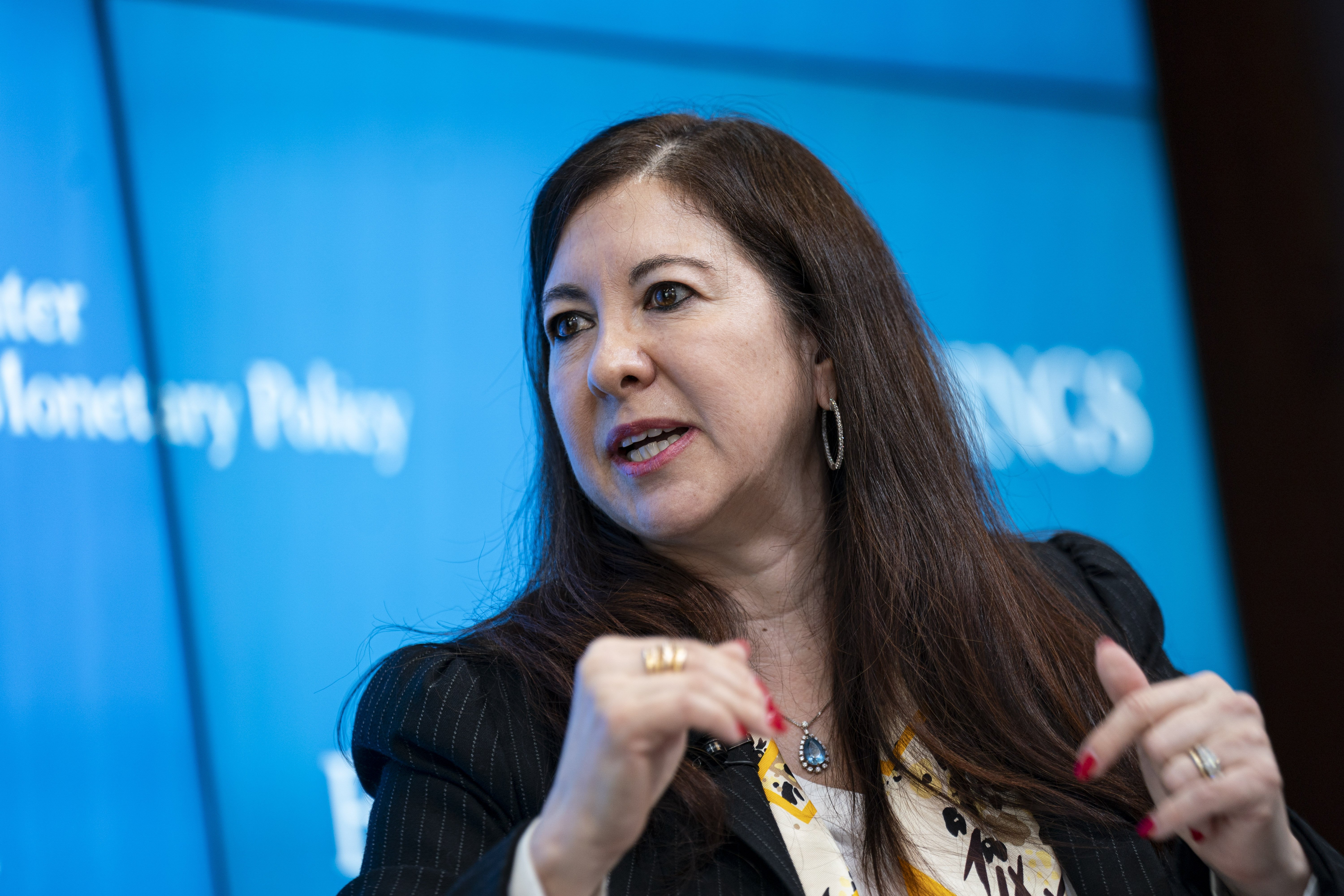
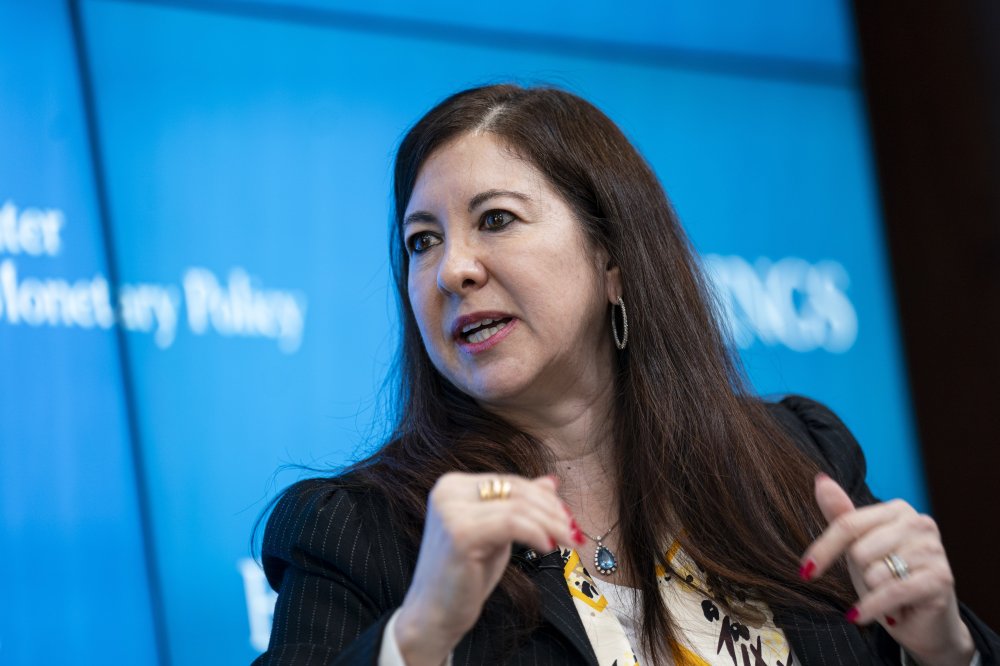
Recent high-profile ethics violations by senior Federal Reserve officials, including new revelations concerning stock trades by former Fed Gov. Adriana Kugler, have sparked debate over the effectiveness of the central bank's oversight, even as some observers stress such cases remain rare. View the full article
-
For now Rachel Reeves appears to have reassured many fractious backbench MPsView the full article
-
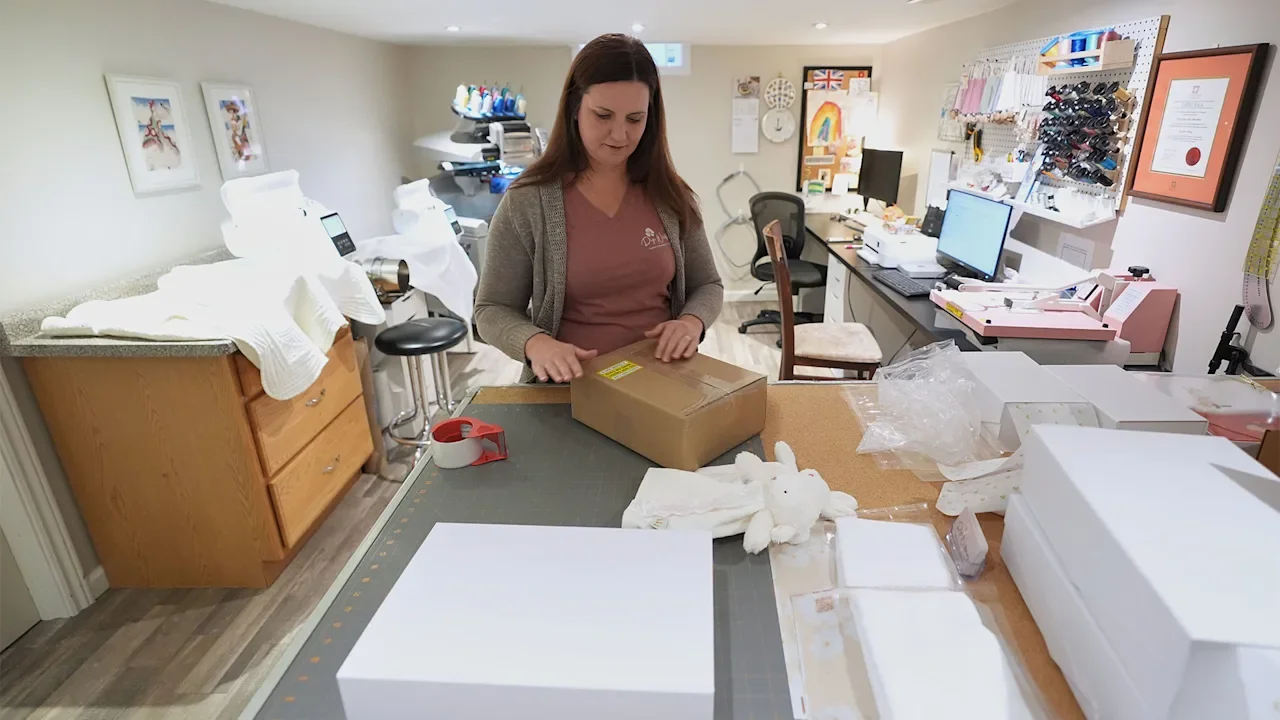
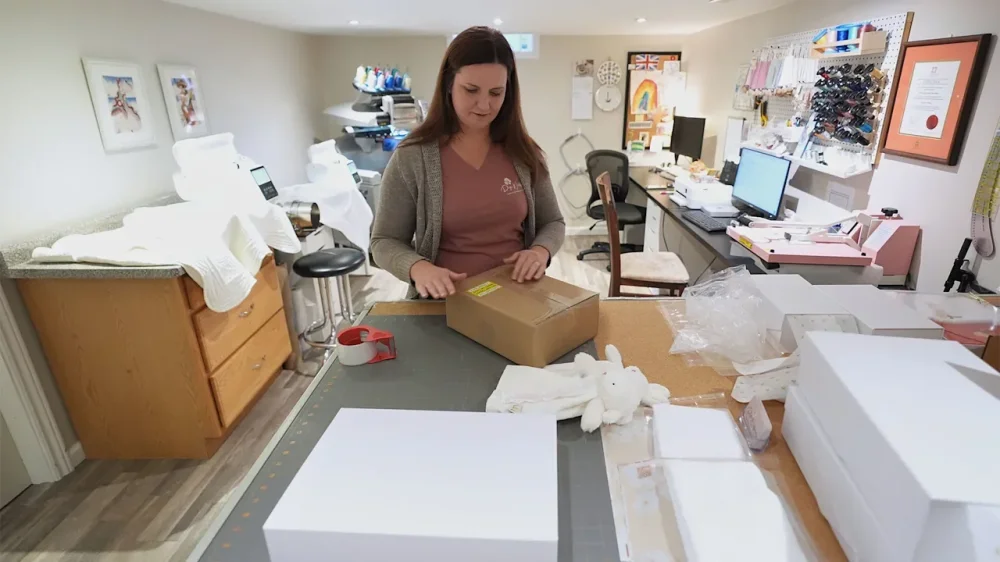
At Fleece & Harmony, a woolen mill and yarn shop in bucolic Belfast, Prince Edward Island, in Canada, owner Kim Doherty used to be able to send yarn skeins to U.S. customers across the border with little fanfare. The yarn orders usually met an import tax exemption for packages valued at under $800, meaning it could be imported tariff-free and avoid the customs process. But ever since the The President administration eliminated the exemption as of Aug. 29, the cost to send yarn to U.S. customers has skyrocketed. The bill for a $21 ball of yarn now includes $12 to $15 in brokerage fees that her shipper UPS charges, plus state taxes and a 6.5% tariff, all of which almost doubles her costs. “We had orders that have reached the customers and they’re in shock about the fact that they have to pay,” she said. “And it’s amazing how many people really didn’t know what the impact was going to be.” Getting rid of the so-called de minimis exemption was meant to curb drug trafficking and stop low-quality goods from discount sellers like Temu and Shein flooding the U.S. market. But as the all-important annual holiday shopping season kicks off, it is putting a crimp on small businesses and shoppers now facing higher costs. Chad Lundquist in Fort Lauderdale, Florida, ordered fragrance oil from a site called Oil Perfumery in October, but he didn’t realize the business was based in Toronto, Canada. His total was $35.75, which included an $8 standard shipping fee. But when his package arrived, he was hit with a $10.80 tariff bill from FedEx. “It wasn’t worth the $10 tariff for a $27 purchase,” Lundquist said. Oil Perfumery did not respond to a request for comment. He’s not the only skittish shopper. Three months after the exemption ended, sellers abroad are reporting drastic declines in U.S. sales. Some are paying the duties themselves instead of passing them to consumers. They are also trying to focus on domestic customers to replace U.S. ones and adjusting product lineups to feature best selling items to try to goose sales. Martha Keith, founder of British stationery brand Martha Brook, which is based in London with a small office in Melbourne, Australia, said U.S. sales from her Etsy store — her main e-commerce channel in addition to her own website — were up 50% for the year before the exemption ended. But sales fell dramatically when the tariffs hit, and continue to drop even though she’s paying the import taxes and customs fees herself so customers aren’t impacted. Sales are down about 30% year-over-year. “The issue seems to be in customer confidence hitting the desire to order from businesses outside of the U.S., because of confusion about how the tariffs will affect them,” Keith said. She’s also in a bind because she sold a £109 ($144) stationery advent calendar to about 200 U.S. customers ahead of the tariffs, and now she has to ship them. Shipping and tariffs will cost a combined £25 ($33), meaning Keith will have to find an additional £5,000 ($6,583) to cover shipping the advent calendars already sold. “The whole thing has been a bit of a nightmare for businesses like ours, and such a huge shame, as the U.S. market was such a valuable growth area for us, particularly through Etsy,” she said. The timing was particularly bad for Sue Bacarro, who along with her sister co-owns Digi Wildflowers, an Etsy shop that sells embroidered baby blankets, gifts and custom quilts for wedding and anniversaries, located across the border from Detroit in Windsor, Ontario. Before the announcement of the removal of the de minimis exemption, they placed a large inventory order to prepare for the holiday season and early 2026 demand. But when the de minimis exemption ended, “inventory wasn’t moving as expected, and we suspected customers were hesitant to purchase due to potential duty charges,” Bacarro said. Sales — 70% of which come from Americans — finally started to rebound when Digi Wildflowers prominently added a banner on its site that said, “U.S. Import Duties On Us.” “Heading into this holiday season, we’re keeping that message front and center through banners, social media, and direct communication,” said Bacarro, who is also expanding their product line. But not all businesses can — or want to — pick up the tariff tab. Kim Doherty, who runs the woolen mill on Prince Edward Island, doesn’t plan to pay the tariff and fees for her customers. “I’m not in a position as a small business owner to do that. The profit margins are already rather thin,” said Doherty, adding that “on principle,” she shouldn’t have to do it. Right now, her shipments to U.S. customers are about 10% of what they were. Instead, she’s working on expanding her fiber offerings to Canadian customers at her brick-and-mortar store and fiber festivals. “We’ll see what happens,” she said. “I’m pretty sure that my U.S. customers were shopping and not even thinking about it, but now they’ll be evaluating the purchases that they’re making, knowing that they are going to have the extra fees on top of whatever they see.” Some Etsy businesses have been stymied by international postal services temporarily halting deliveries to the U.S. because of the confusion around the ending of de minimis. Selene Pierangelini’s business, Apricot Rain Creations, based in Brisbane, Australia, which sells crystals, candles, and spiritual wellness products on Etsy, depended on the Australia Post to get deliveries to U.S. customers. More than three-fourths of her customer base comes from the U.S. Australia Post suspended service to the U.S. for about a month, resuming on Sept. 22. She temporarily switched to FedEx and UPS — private shippers that are more expensive than Australia Post. Since it resumed, Australia Post is working with Zonos, a provider of cross-border shipping technology, to offer a shipping calculator that lets her prepay duties and fees. They themselves charge a fee of $1.69 plus 10% of the total duty fee. So far, the items she ships from Australia have been tariffed at a 10% rate, the baseline tariff for the country. She increased her shipping costs to help cover the expense. It is manageable, but tricky, she said. “You don’t really know how much (the cost) is going to be until the package clears custom in the U.S., and you get an invoice which is automatically paid out of your account,” she said. And her sales have not recovered. Before the tariffs, her U.S. sales were about 85% of her total sales, and now they’re around 35%. She’s hopeful people are just holding off until Black Friday and Cyber Monday holiday sales. In the meantime, she has restarted sales to Europe, which she had paused in 2024 due to increased regulations. And she’s launched a Facebook marketing campaign and is exploring print-on-demand services from U.S.-based providers for production and fulfillment. “This situation highlights how fragile small businesses can be when dependent on one market,” Pierangelini said. “While it has been a shock, it’s also pushed me to diversify — something that will hopefully make my business stronger and more resilient in the long run.” —Mae Anderson, AP Business Writer View the full article
-
When you’re maneuvering through the crafting industry, knowing the right suppliers can greatly influence your success. Major players like Notions Marketing and Michaels Wholesale provide extensive product catalogs and competitive pricing, whereas companies like Arteza Wholesale focus on high-quality, trend-driven materials. Furthermore, regional distributors and niche suppliers offer unique items customized to specific markets. Comprehending these options will help you make informed decisions about your inventory and sourcing strategies. Let’s explore these suppliers further. Key Takeaways Notions Marketing is the largest distributor in the arts and crafts industry, offering over 150,000 items for a one-stop shopping experience. Michaels Wholesale provides bulk pricing on popular craft brands, ensuring affordability and cash flow management with long-term payment plans. Arteza Wholesale focuses on high-quality art supplies and appeals to younger crafters with innovative and contemporary products. Discount School Supply offers competitive pricing on essential materials for educational environments, making it ideal for beginners and workshops. Regional craft distributors provide fast shipping and niche products, fostering personal relationships that enhance inventory decisions for local craft stores. Notions Marketing When you’re looking for a reliable source of arts and crafts supplies, Notions Marketing stands out as the largest wholesale distributor in the industry. Established in 1938, they offer an impressive catalog with over 150,000 items, making it easy for you to find the craft supplies you need. Notions Marketing simplifies the procurement process for retailers by providing a one-stop shopping experience. Their partnership with Rain POS allows for easy catalog imports and reorder alerts, greatly enhancing inventory management. This means you can efficiently meet diverse customer needs without hassle. With their extensive knowledge and reliable service, Notions Marketing is a go-to choice among craft suppliers, helping independent stores thrive in a competitive market. Michaels Wholesale Michaels Wholesale offers significant benefits for craft retailers by providing bulk pricing on popular brands, which helps you keep costs low during maintaining a diverse inventory. With a proven track record in the arts and crafts industry, they guarantee a reliable supply of mainstream craft supplies that meet customer demand. Bulk Pricing Benefits Accessing bulk pricing through Michaels Wholesale can greatly benefit craft retailers looking to optimize their inventory and boost profit margins. By purchasing supplies at competitive wholesale rates, you can markedly reduce costs, allowing for higher profit margins when reselling popular craft supplies. Michaels Wholesale offers a variety of reliable craft supplies suppliers, ensuring you’ll have access to proven demand products from craft catalogs. This means you can stock fundamentals without straining your financial resources. Moreover, long-term payment plans available through Affirm make it easier to manage cash flow during purchasing in bulk. By leveraging these bulk pricing benefits, you can amplify your inventory diversity and effectively meet the varied needs of your customers, including those in the woodturners supply market. Popular Brand Access For independent craft retailers, securing access to popular brands can greatly improve product offerings and attract a loyal customer base. Michaels Wholesale stands out as a dependable source, providing bulk access to recognized craft brands, which includes crucial woodturning accessories. This wholesale pricing markedly cuts costs, allowing you to stock up on sought-after items without straining your budget. With a reliable supply chain, you can count on consistent availability of high-demand products, ensuring you meet your customers’ needs effectively. Furthermore, Michaels Wholesale offers long-term payment plans through Affirm, which can help you manage cash flow as you broaden your inventory. Strengthening your store with these popular brands can elevate customer satisfaction and boost sales in the competitive craft market. Arteza Wholesale/Plaid When you’re searching for high-quality art supplies that cater to serious crafters, Arteza Wholesale/Plaid stands out as a reliable choice. This brand prioritizes quality over quantity, offering a curated selection of professional-grade materials designed for dedicated artists. With a contemporary aesthetic, Arteza’s products are particularly appealing to younger demographics, making them ideal for social media sharing. They focus on specialized tools and materials that aren’t typically available from general distributors, ensuring you have access to unique items for your projects. Arteza additionally emphasizes innovation, frequently updating their product lines to align with emerging trends in the crafting community. Their widespread distribution allows craft stores to improve inventory with high-quality, on-trend items that attract discerning customers. Discount School Supply Discount School Supply started by serving the educational market, but now it offers a variety of basic craft supplies that meet the needs of craft retailers. With competitive pricing, you can stock your inventory affordably as you ensure you have reliable staples for workshops and classes. Their extensive catalog provides vital materials, making them a top choice for stores catering to schools, camps, and beginners. Educational Market Focus As educators and parents increasingly seek engaging resources for children, the educational market has seen a significant shift in the direction of integrating basic craft supplies into learning environments. Discount School Supply, originally focused on educational materials, has expanded its offerings to include a versatile range of craft supplies. This makes it an excellent choice for stores catering to schools, camps, or beginners who need fundamental crafting tools. Their product line features staples like construction paper, markers, and glue, which are crucial for both classroom activities and craft projects. Competitive Pricing Strategy To maintain a competitive edge in the craft supply market, Discount School Supply has adopted a pricing strategy that prioritizes affordability and accessibility. By offering bulk access to basic craft supplies and educational materials, they cater to schools and camps at attractive rates. Their reliable staples for workshops guarantee customers receive crucial products without overspending. Feature Details Bulk Discounts Promotions for large orders Target Audience Schools, camps, craft stores Affordability Focus Competitive prices for beginners Basic Craft Supplies Availability Craft supply availability at Discount School Supply has greatly broadened, making it a reliable source for vital materials needed for various creative projects. Initially focused on the educational market, they now offer a competitive range of basic craft supplies. You’ll find key items like construction paper, glue, and scissors, which are perfect for schools, camps, and beginners. Their commitment to providing reliable staples guarantees consistent quality for workshops and crafting classes. Furthermore, with an emphasis on affordability, Discount School Supply caters to budget-conscious buyers seeking value in their craft supplies. Although their product range has expanded, they specialize in foundational materials, making them an ideal choice for your crafting needs. Regional Craft Distributors Regional craft distributors play a crucial role in the supply chain for many craft store owners, especially when speed and cost-effectiveness are paramount. Distributors like Thomasnet in Michigan and Ecstasy Crafts in Ontario offer faster shipping and lower costs because of their proximity to local markets. By nurturing personal relationships with sales representatives, they improve communication and provide better support for store owners. Their valuable local market knowledge greatly influences inventory decisions, helping you align product offerings with customer preferences. Although the selection may be more limited compared to larger wholesalers, these distributors excel in providing niche products or backup supplies. Utilizing regional craft distributors can greatly enhance supply chain efficiency by reducing lead times and ensuring timely restocking of crucial items. Specialty Suppliers by Category Specialty suppliers focus on niche crafting categories, offering expertise and customized products that cater directly to your needs as a crafter. For example, Moda Fabrics specializes in fabric and quilting supplies, whereas Premier Yarns provides high-quality yarn and needlework materials. Niche Product Expertise When you explore niche product expertise, you’ll find that specialty suppliers play a crucial role in the crafting industry by providing customized knowledge and high-quality products for specific categories. For instance, Moda Fabrics specializes in fabric and quilting, whereas Premier Yarns focuses on yarn and needlework. These suppliers allow retailers to offer specialized selections, which can help capitalize on emerging trends and cater to dedicated crafters seeking unique materials. In addition, specialty suppliers often feature exclusive items not available through general distributors, enhancing a store’s product offerings and customer appeal. Category-Specific Sourcing Craft stores looking to improve their inventory should consider category-specific sourcing, which allows you to tap into the expertise of suppliers who specialize in particular craft areas. Specialty suppliers focus on niche markets, providing curated products that cater to dedicated crafters. For instance, Moda Fabrics stands out in fabric and quilting, Premier Yarns specializes in yarn and needlework, and Artbeads targets jewelry-making materials. By sourcing from these suppliers, you gain access to unique, high-quality products often unavailable through general distributors, enhancing your store’s variety. This strategy not only differentiates your offerings but also addresses your customers’ specific needs effectively. Supplier Specialty Product Type Moda Fabrics Fabric & Quilting Quilting Fabrics Premier Yarns Yarn & Needlework Specialty Yarns Artbeads Jewelry-Making Beads & Findings Tandy Leather Leather Crafting Leather Supplies Plaid Paint & Stencils Craft Paints Trend-Driven Offerings Comprehending the latest trends in crafting is essential for any store looking to stay relevant and attract customers. Specialty suppliers focus on specific craft categories, like Moda Fabrics for fabric and quilting or Premier Yarns for yarn and needlework supplies. By partnering with these suppliers, you gain access to exclusive products and curated selections that appeal to dedicated crafters and emerging trends. Their offerings often feature contemporary branding, resonating with younger demographics who are increasingly drawn to crafting. These suppliers can help you enhance your inventory with unique products not available from general distributors, allowing you to capitalize on the latest trends and cater to niche markets effectively, ensuring your store stands out in a competitive environment. Direct-From-Manufacturer Relationships Establishing direct-from-manufacturer relationships can greatly boost your retail business, particularly by increasing profit margins and access to exclusive products. By cutting out middlemen, you can negotiate better pricing, which improves your bottom line. These partnerships often grant access to unique items that can differentiate your store from competitors. Nonetheless, you may encounter challenges like higher minimum order quantities and longer lead times, which necessitate careful inventory management. To effectively navigate these factors, it’s essential to have predictable sales in specific categories, as this reduces associated risks. Furthermore, direct connections can streamline logistics, boosting your supply chain management. Online Wholesale Marketplaces How can online wholesale marketplaces transform your sourcing strategy? These platforms give you access to a vast range of craft supplies from various suppliers, allowing you to source products at competitive prices without hefty upfront investments. You can purchase in bulk, which helps you stock up on popular and seasonal items efficiently. Furthermore, many online marketplaces offer integrated logistics services, simplifying shipping and reducing delivery times. You’ll likewise find user reviews and ratings, enabling you to make informed decisions about suppliers. Plus, these marketplaces frequently host promotional events, offering discounts that can improve your profit margins. By leveraging these tools, you can streamline your sourcing process and boost your overall business efficiency. Craft Store Inventory Management Solutions Effective inventory management is essential for craft stores looking to optimize their operations and meet customer demand. Implementing modern inventory solutions can streamline your processes and improve your decision-making. By utilizing advanced POS systems, you can automate supplier management and access real-time sales data. This helps in efficiently reordering stock and tracking vendor performance. Here are some key benefits of these solutions: Fractional Inventory Management: Systems like Rain POS allow you to manage fractional inventory, ensuring you never run out of popular items. Analytics Streamlining: These solutions help identify best-selling products, so you can optimize stock levels accordingly. Timely Alerts: You’ll receive alerts for inventory needs, reducing operational headaches and improving efficiency. Trends in Craft Supply Distribution As the craft supply distribution environment evolves, you’re likely to notice significant shifts driven by e-commerce and changing consumer preferences. Suppliers are now leveraging online platforms to reach a wider audience and streamline order fulfillment, making it easier for you to access the products you need. Many are adopting just-in-time inventory practices, which helps them manage seasonal demand and minimize excess stock. Moreover, direct-from-manufacturer relationships are becoming more common, allowing stores to secure better pricing and exclusive items. You’ll likewise observe an increase in eco-friendly products, reflecting a consumer shift in the direction of sustainable crafting options. Finally, technology-driven solutions, like modern POS systems, improve supplier management by automating inventory tracking and enhancing vendor performance analytics, ensuring a smoother shopping experience. Frequently Asked Questions What Is the Hottest Selling Craft Right Now? The hottest selling craft right now is resin art, known for its versatility and ability to create custom pieces. DIY home decor projects, especially macrame and wall hangings, are likewise trending, allowing you to personalize your space. Furthermore, scrapbooking remains popular, with unique stickers and patterned papers enhancing storytelling. Eco-friendly materials, like recycled paper, are gaining traction, alongside the lively medium of alcohol ink painting, which appeals to both novice and experienced artists. What Are the Best Crafting Supplies for Beginners? For beginners, a basic set of supplies is crucial. You’ll need scissors, glue, colored paper, and markers to start experimenting. Consider a versatile craft kit that includes a cutting mat, craft knife, and various adhesives, which can help with different projects. Investing in quality materials, like acrylic paints and watercolor sets, improves your experience. Furthermore, joining local workshops or online communities offers valuable resources, techniques, and inspiration customized to your skill level. Is Michaels or Hobby Lobby Better for Craft Supplies? When deciding between Michaels and Hobby Lobby for craft supplies, consider your priorities. Michaels offers a broader selection with over 50,000 products, ideal for diverse crafting needs. If you’re budget-conscious, Hobby Lobby frequently provides larger discounts, sometimes up to 40% off. Michaels additionally stands out in online shopping, with a user-friendly site and same-day delivery. On the other hand, Hobby Lobby is known for its extensive seasonal items, making it great for themed decorations. Choose based on your needs. Who Is the Largest Manufacturer of Art Supplies? The largest manufacturer of art supplies is Faber-Castell, a company founded in 1761. It produces about 2 billion wooden-cased pencils yearly and operates on multiple continents, including North America and Europe. Other significant players in the market include Crayola, known for crayons and markers, and Staedtler, which focuses on technical drawing tools. These companies collectively dominate the art supplies industry, ensuring a wide range of products for artists and hobbyists alike. Conclusion In conclusion, grasping the top craft suppliers is crucial for retailers aiming to improve their inventory. By partnering with established companies like Notions Marketing and Michaels Wholesale, or exploring niche options such as Moda Fabrics, you can access a diverse range of products. Furthermore, leveraging online marketplaces and maintaining direct relationships with manufacturers can further streamline your supply chain. Staying informed about trends in craft supply distribution will help you make strategic decisions that benefit your business. Image via Google Gemini This article, "10 Top Craft Suppliers You Should Know" was first published on Small Business Trends View the full article
-
When you’re maneuvering through the crafting industry, knowing the right suppliers can greatly influence your success. Major players like Notions Marketing and Michaels Wholesale provide extensive product catalogs and competitive pricing, whereas companies like Arteza Wholesale focus on high-quality, trend-driven materials. Furthermore, regional distributors and niche suppliers offer unique items customized to specific markets. Comprehending these options will help you make informed decisions about your inventory and sourcing strategies. Let’s explore these suppliers further. Key Takeaways Notions Marketing is the largest distributor in the arts and crafts industry, offering over 150,000 items for a one-stop shopping experience. Michaels Wholesale provides bulk pricing on popular craft brands, ensuring affordability and cash flow management with long-term payment plans. Arteza Wholesale focuses on high-quality art supplies and appeals to younger crafters with innovative and contemporary products. Discount School Supply offers competitive pricing on essential materials for educational environments, making it ideal for beginners and workshops. Regional craft distributors provide fast shipping and niche products, fostering personal relationships that enhance inventory decisions for local craft stores. Notions Marketing When you’re looking for a reliable source of arts and crafts supplies, Notions Marketing stands out as the largest wholesale distributor in the industry. Established in 1938, they offer an impressive catalog with over 150,000 items, making it easy for you to find the craft supplies you need. Notions Marketing simplifies the procurement process for retailers by providing a one-stop shopping experience. Their partnership with Rain POS allows for easy catalog imports and reorder alerts, greatly enhancing inventory management. This means you can efficiently meet diverse customer needs without hassle. With their extensive knowledge and reliable service, Notions Marketing is a go-to choice among craft suppliers, helping independent stores thrive in a competitive market. Michaels Wholesale Michaels Wholesale offers significant benefits for craft retailers by providing bulk pricing on popular brands, which helps you keep costs low during maintaining a diverse inventory. With a proven track record in the arts and crafts industry, they guarantee a reliable supply of mainstream craft supplies that meet customer demand. Bulk Pricing Benefits Accessing bulk pricing through Michaels Wholesale can greatly benefit craft retailers looking to optimize their inventory and boost profit margins. By purchasing supplies at competitive wholesale rates, you can markedly reduce costs, allowing for higher profit margins when reselling popular craft supplies. Michaels Wholesale offers a variety of reliable craft supplies suppliers, ensuring you’ll have access to proven demand products from craft catalogs. This means you can stock fundamentals without straining your financial resources. Moreover, long-term payment plans available through Affirm make it easier to manage cash flow during purchasing in bulk. By leveraging these bulk pricing benefits, you can amplify your inventory diversity and effectively meet the varied needs of your customers, including those in the woodturners supply market. Popular Brand Access For independent craft retailers, securing access to popular brands can greatly improve product offerings and attract a loyal customer base. Michaels Wholesale stands out as a dependable source, providing bulk access to recognized craft brands, which includes crucial woodturning accessories. This wholesale pricing markedly cuts costs, allowing you to stock up on sought-after items without straining your budget. With a reliable supply chain, you can count on consistent availability of high-demand products, ensuring you meet your customers’ needs effectively. Furthermore, Michaels Wholesale offers long-term payment plans through Affirm, which can help you manage cash flow as you broaden your inventory. Strengthening your store with these popular brands can elevate customer satisfaction and boost sales in the competitive craft market. Arteza Wholesale/Plaid When you’re searching for high-quality art supplies that cater to serious crafters, Arteza Wholesale/Plaid stands out as a reliable choice. This brand prioritizes quality over quantity, offering a curated selection of professional-grade materials designed for dedicated artists. With a contemporary aesthetic, Arteza’s products are particularly appealing to younger demographics, making them ideal for social media sharing. They focus on specialized tools and materials that aren’t typically available from general distributors, ensuring you have access to unique items for your projects. Arteza additionally emphasizes innovation, frequently updating their product lines to align with emerging trends in the crafting community. Their widespread distribution allows craft stores to improve inventory with high-quality, on-trend items that attract discerning customers. Discount School Supply Discount School Supply started by serving the educational market, but now it offers a variety of basic craft supplies that meet the needs of craft retailers. With competitive pricing, you can stock your inventory affordably as you ensure you have reliable staples for workshops and classes. Their extensive catalog provides vital materials, making them a top choice for stores catering to schools, camps, and beginners. Educational Market Focus As educators and parents increasingly seek engaging resources for children, the educational market has seen a significant shift in the direction of integrating basic craft supplies into learning environments. Discount School Supply, originally focused on educational materials, has expanded its offerings to include a versatile range of craft supplies. This makes it an excellent choice for stores catering to schools, camps, or beginners who need fundamental crafting tools. Their product line features staples like construction paper, markers, and glue, which are crucial for both classroom activities and craft projects. Competitive Pricing Strategy To maintain a competitive edge in the craft supply market, Discount School Supply has adopted a pricing strategy that prioritizes affordability and accessibility. By offering bulk access to basic craft supplies and educational materials, they cater to schools and camps at attractive rates. Their reliable staples for workshops guarantee customers receive crucial products without overspending. Feature Details Bulk Discounts Promotions for large orders Target Audience Schools, camps, craft stores Affordability Focus Competitive prices for beginners Basic Craft Supplies Availability Craft supply availability at Discount School Supply has greatly broadened, making it a reliable source for vital materials needed for various creative projects. Initially focused on the educational market, they now offer a competitive range of basic craft supplies. You’ll find key items like construction paper, glue, and scissors, which are perfect for schools, camps, and beginners. Their commitment to providing reliable staples guarantees consistent quality for workshops and crafting classes. Furthermore, with an emphasis on affordability, Discount School Supply caters to budget-conscious buyers seeking value in their craft supplies. Although their product range has expanded, they specialize in foundational materials, making them an ideal choice for your crafting needs. Regional Craft Distributors Regional craft distributors play a crucial role in the supply chain for many craft store owners, especially when speed and cost-effectiveness are paramount. Distributors like Thomasnet in Michigan and Ecstasy Crafts in Ontario offer faster shipping and lower costs because of their proximity to local markets. By nurturing personal relationships with sales representatives, they improve communication and provide better support for store owners. Their valuable local market knowledge greatly influences inventory decisions, helping you align product offerings with customer preferences. Although the selection may be more limited compared to larger wholesalers, these distributors excel in providing niche products or backup supplies. Utilizing regional craft distributors can greatly enhance supply chain efficiency by reducing lead times and ensuring timely restocking of crucial items. Specialty Suppliers by Category Specialty suppliers focus on niche crafting categories, offering expertise and customized products that cater directly to your needs as a crafter. For example, Moda Fabrics specializes in fabric and quilting supplies, whereas Premier Yarns provides high-quality yarn and needlework materials. Niche Product Expertise When you explore niche product expertise, you’ll find that specialty suppliers play a crucial role in the crafting industry by providing customized knowledge and high-quality products for specific categories. For instance, Moda Fabrics specializes in fabric and quilting, whereas Premier Yarns focuses on yarn and needlework. These suppliers allow retailers to offer specialized selections, which can help capitalize on emerging trends and cater to dedicated crafters seeking unique materials. In addition, specialty suppliers often feature exclusive items not available through general distributors, enhancing a store’s product offerings and customer appeal. Category-Specific Sourcing Craft stores looking to improve their inventory should consider category-specific sourcing, which allows you to tap into the expertise of suppliers who specialize in particular craft areas. Specialty suppliers focus on niche markets, providing curated products that cater to dedicated crafters. For instance, Moda Fabrics stands out in fabric and quilting, Premier Yarns specializes in yarn and needlework, and Artbeads targets jewelry-making materials. By sourcing from these suppliers, you gain access to unique, high-quality products often unavailable through general distributors, enhancing your store’s variety. This strategy not only differentiates your offerings but also addresses your customers’ specific needs effectively. Supplier Specialty Product Type Moda Fabrics Fabric & Quilting Quilting Fabrics Premier Yarns Yarn & Needlework Specialty Yarns Artbeads Jewelry-Making Beads & Findings Tandy Leather Leather Crafting Leather Supplies Plaid Paint & Stencils Craft Paints Trend-Driven Offerings Comprehending the latest trends in crafting is essential for any store looking to stay relevant and attract customers. Specialty suppliers focus on specific craft categories, like Moda Fabrics for fabric and quilting or Premier Yarns for yarn and needlework supplies. By partnering with these suppliers, you gain access to exclusive products and curated selections that appeal to dedicated crafters and emerging trends. Their offerings often feature contemporary branding, resonating with younger demographics who are increasingly drawn to crafting. These suppliers can help you enhance your inventory with unique products not available from general distributors, allowing you to capitalize on the latest trends and cater to niche markets effectively, ensuring your store stands out in a competitive environment. Direct-From-Manufacturer Relationships Establishing direct-from-manufacturer relationships can greatly boost your retail business, particularly by increasing profit margins and access to exclusive products. By cutting out middlemen, you can negotiate better pricing, which improves your bottom line. These partnerships often grant access to unique items that can differentiate your store from competitors. Nonetheless, you may encounter challenges like higher minimum order quantities and longer lead times, which necessitate careful inventory management. To effectively navigate these factors, it’s essential to have predictable sales in specific categories, as this reduces associated risks. Furthermore, direct connections can streamline logistics, boosting your supply chain management. Online Wholesale Marketplaces How can online wholesale marketplaces transform your sourcing strategy? These platforms give you access to a vast range of craft supplies from various suppliers, allowing you to source products at competitive prices without hefty upfront investments. You can purchase in bulk, which helps you stock up on popular and seasonal items efficiently. Furthermore, many online marketplaces offer integrated logistics services, simplifying shipping and reducing delivery times. You’ll likewise find user reviews and ratings, enabling you to make informed decisions about suppliers. Plus, these marketplaces frequently host promotional events, offering discounts that can improve your profit margins. By leveraging these tools, you can streamline your sourcing process and boost your overall business efficiency. Craft Store Inventory Management Solutions Effective inventory management is essential for craft stores looking to optimize their operations and meet customer demand. Implementing modern inventory solutions can streamline your processes and improve your decision-making. By utilizing advanced POS systems, you can automate supplier management and access real-time sales data. This helps in efficiently reordering stock and tracking vendor performance. Here are some key benefits of these solutions: Fractional Inventory Management: Systems like Rain POS allow you to manage fractional inventory, ensuring you never run out of popular items. Analytics Streamlining: These solutions help identify best-selling products, so you can optimize stock levels accordingly. Timely Alerts: You’ll receive alerts for inventory needs, reducing operational headaches and improving efficiency. Trends in Craft Supply Distribution As the craft supply distribution environment evolves, you’re likely to notice significant shifts driven by e-commerce and changing consumer preferences. Suppliers are now leveraging online platforms to reach a wider audience and streamline order fulfillment, making it easier for you to access the products you need. Many are adopting just-in-time inventory practices, which helps them manage seasonal demand and minimize excess stock. Moreover, direct-from-manufacturer relationships are becoming more common, allowing stores to secure better pricing and exclusive items. You’ll likewise observe an increase in eco-friendly products, reflecting a consumer shift in the direction of sustainable crafting options. Finally, technology-driven solutions, like modern POS systems, improve supplier management by automating inventory tracking and enhancing vendor performance analytics, ensuring a smoother shopping experience. Frequently Asked Questions What Is the Hottest Selling Craft Right Now? The hottest selling craft right now is resin art, known for its versatility and ability to create custom pieces. DIY home decor projects, especially macrame and wall hangings, are likewise trending, allowing you to personalize your space. Furthermore, scrapbooking remains popular, with unique stickers and patterned papers enhancing storytelling. Eco-friendly materials, like recycled paper, are gaining traction, alongside the lively medium of alcohol ink painting, which appeals to both novice and experienced artists. What Are the Best Crafting Supplies for Beginners? For beginners, a basic set of supplies is crucial. You’ll need scissors, glue, colored paper, and markers to start experimenting. Consider a versatile craft kit that includes a cutting mat, craft knife, and various adhesives, which can help with different projects. Investing in quality materials, like acrylic paints and watercolor sets, improves your experience. Furthermore, joining local workshops or online communities offers valuable resources, techniques, and inspiration customized to your skill level. Is Michaels or Hobby Lobby Better for Craft Supplies? When deciding between Michaels and Hobby Lobby for craft supplies, consider your priorities. Michaels offers a broader selection with over 50,000 products, ideal for diverse crafting needs. If you’re budget-conscious, Hobby Lobby frequently provides larger discounts, sometimes up to 40% off. Michaels additionally stands out in online shopping, with a user-friendly site and same-day delivery. On the other hand, Hobby Lobby is known for its extensive seasonal items, making it great for themed decorations. Choose based on your needs. Who Is the Largest Manufacturer of Art Supplies? The largest manufacturer of art supplies is Faber-Castell, a company founded in 1761. It produces about 2 billion wooden-cased pencils yearly and operates on multiple continents, including North America and Europe. Other significant players in the market include Crayola, known for crayons and markers, and Staedtler, which focuses on technical drawing tools. These companies collectively dominate the art supplies industry, ensuring a wide range of products for artists and hobbyists alike. Conclusion In conclusion, grasping the top craft suppliers is crucial for retailers aiming to improve their inventory. By partnering with established companies like Notions Marketing and Michaels Wholesale, or exploring niche options such as Moda Fabrics, you can access a diverse range of products. Furthermore, leveraging online marketplaces and maintaining direct relationships with manufacturers can further streamline your supply chain. Staying informed about trends in craft supply distribution will help you make strategic decisions that benefit your business. Image via Google Gemini This article, "10 Top Craft Suppliers You Should Know" was first published on Small Business Trends View the full article
-
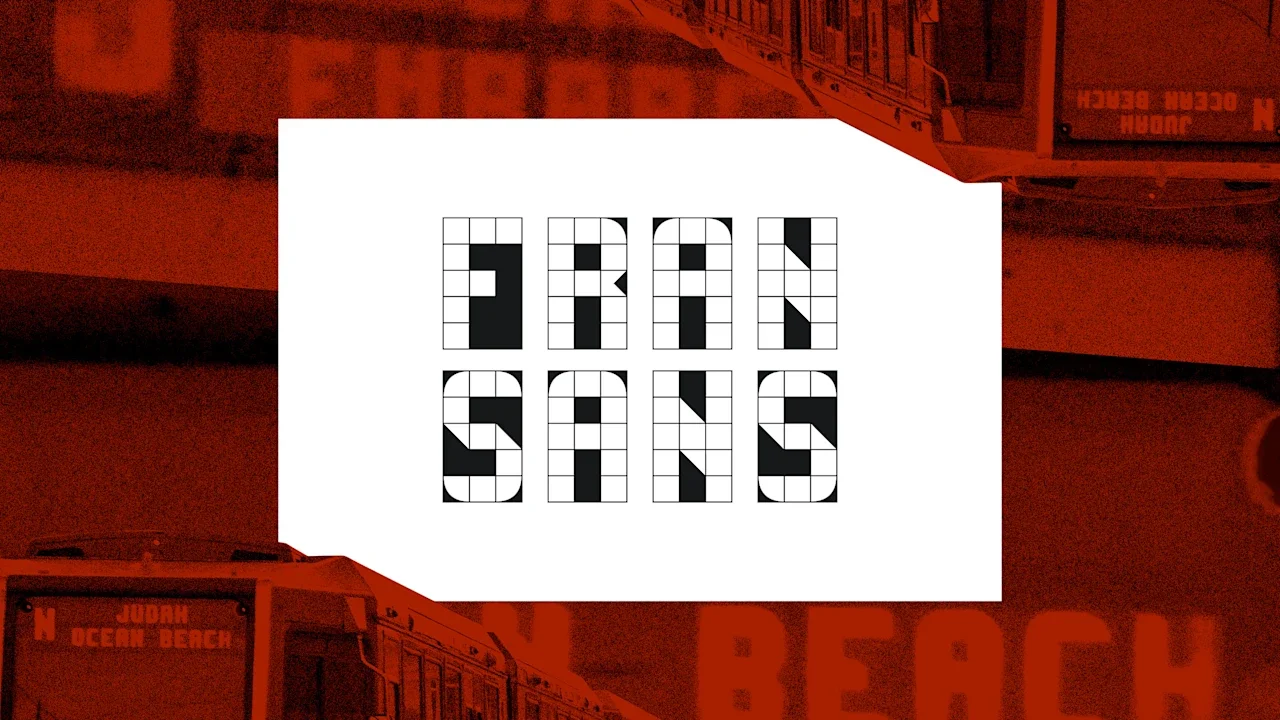
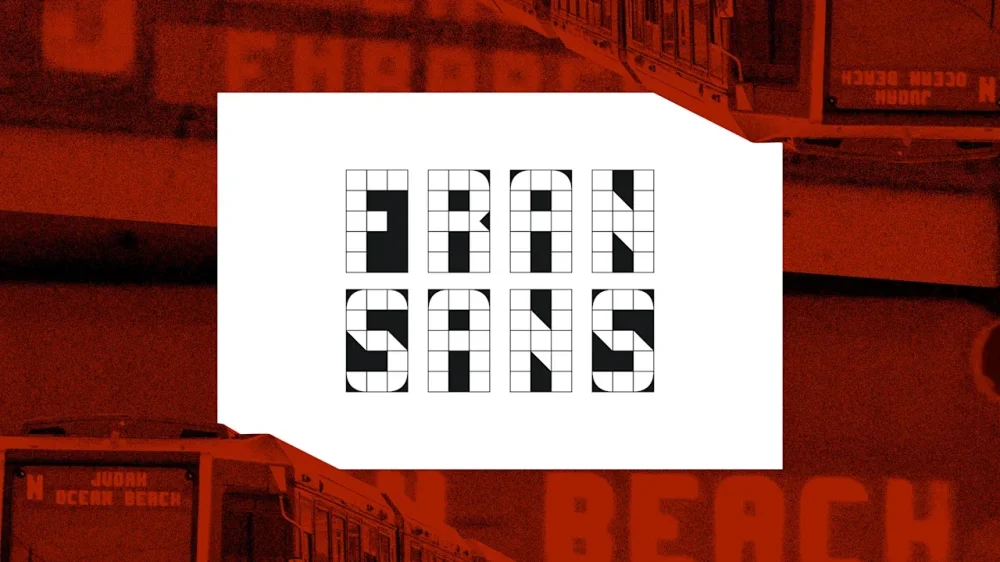
Most people don’t give the display screens on their commuter trains a second thought, but for designer Emily Sneddon, they’ve proved to be a well of inspiration. Sneddon lived in San Francisco, where she worked at the design agency Collins, from 2021 until this year when she moved back to her home country of Australia. She designed Fran Sans, her first ever font, after noticing the display on San Francisco Municipal Transportation Agency’s (SFMTA) recently retired Muni Metro Breda Light Rail Vehicle. Unlike New York City, which handles its public transit through a single agency, the Metropolitan Transportation Authority (MTA), public transportation in San Francisco and the Bay Area is split between multiple independent public agencies, like SFMTA, Bay Area Rapid Transit (BART), and Caltrain, a commuter rail. That means there’s no de facto official font for public transportation in the Bay Area as there is in New York City with Helvetica, the official font of the city’s unified Metropolitan Transportation Authority (MTA). So Sneddon made her own. The font that became Fran Sans started first as a project documenting sans typography around San Francisco. The lettering from the train car display was supposed to be used on a zine cover—then it turned into a full-blown font. Sneddon designed Fran Sans on a 3×5 grid after a monthslong research project that included a visit to SFMTA’s Electronics Shop at Balboa Park, consultation with Gary Wallberg, a senior engineer who designed the display signs in 1999, and a survey of modular typography curated by Letterform Archive, which is based in San Francisco. “For me it wasn’t enough simply to create a 1:1 without digging further to find out more about the original designer that inspired this work,” says Sneddon. “It’s a myth that we’ve all seemed to have subscribed to that everything you’d want to know about is available online. But so many stories are all around us, and they haven’t been documented anywhere. The story of these displays was one of them.” The original lettering on the displays didn’t have all the characters, as Muni had no need for Qs, Xs, exclamation points, or semicolons, so Sneddon had to make her own. For now there are no lowercase letters, as that would require a different grid, and she also hasn’t managed to come up with a suitable “@” sign yet. Fran Sans comes in three styles: solid, tile, and panel. SFMTA finished replacing the Breda car with a new model this month that uses LED dot-matrix destination displays, which to Sneddon lack the character of the Breda car lettering. Fran Sans reintroduces some of those typographic quirks, like thin diagonals on the Z, 7, and M. Although those particularities can make the M look like an H at small sizes, they’re also what gives the font its charm. There’s a perception that San Francisco is a place where people come to make their bread and leave, Sneddon says, from the gold rush in the 1800s to AI today, but moving to San Francisco taught her that there’s “a lot of community, a lot of love for the arts, and a lot of generosity” in the city. View the full article
-
We may earn a commission from links on this page. Deal pricing and availability subject to change after time of publication. Black Friday sales officially start Friday, November 28, and run through Cyber Monday, December 1, and Lifehacker is sharing the best sales based on product reviews, comparisons, and price-tracking tools before it's over. Follow our live blog to stay up-to-date on the best sales we find. Browse our editors’ picks for a curated list of our favorite sales on laptops, fitness tech, appliances, and more. Subscribe to our shopping newsletter, Add to Cart, for the best sales sent to your inbox. Sales are accurate at the time of publication, but prices and inventory are always subject to change. One of my favorite affordable running watches just got even more budget-friendly. The Suunto Run is on sale for $199, down from its usual $249 price tag. That's a solid 20% discount (or $50 off) for Black Friday. Suunto Run $199.00 at Amazon $249.00 Save $50.00 Get Deal Get Deal $199.00 at Amazon $249.00 Save $50.00 My colleague Beth Skwarecki reviewed the Suunto Run and really enjoyed it. She found it to be lightweight, with a bright display and excellent GPS and heart rate accuracy. As a big runner myself, I know the Suunto is something of a cult classic: a niche pick for runners who want simplicity without sacrificing quality. For runners who want reliable tracking and solid performance without breaking the bank, this is an excellent option. More Suunto deals for Black FridayIf you're looking at other models in the Suunto lineup, several are discounted right now: Suunto Race S: $279 (normally $349) Suunto Vertical: $339.15 (normally $399) Each of these watches offers different features depending on your training needs, but the Run remains my top pick for a quality budget option. If you've been holding off on upgrading your running watch (or finally investing in your first one), this Black Friday discount makes the Suunto Run one to consider. At $199, you're getting a capable, reliable running companion. How long do Black Friday deals really last?Black Friday sales officially begin Friday, November 28, 2025, and run throughout “Cyber Week,” the five-day period that runs from Thanksgiving through Cyber Monday, December 1, 2025. But Black Friday and Cyber Monday dates have expanded as retailers compete for customers. You can get the same Black Friday sales early, and we expect sales to wind down by December 3, 2025. Are Black Friday deals worth it?In short, yes, Black Friday still offers discounts that can be rare throughout the rest of the year. If there’s something you want to buy, or you’re shopping for gifts, it’s a good time to look for discounts on what you need, especially tech sales, home improvement supplies, and fitness tech. Of course, if you need to save money, the best way to save is to not buy anything. Are Cyber Monday deals better than Black Friday?Black Friday used to be bigger for major retailers and more expensive tech and appliances, while Cyber Monday was for cheaper tech and gave smaller businesses a chance to compete online. Nowadays, though, distinction is almost meaningless. Every major retailer will offer sales on both days, and the smart move is to know what you want, use price trackers or refer to guides like our live blog that use price trackers for you, and don’t stress over finding the perfect timing. Our Best Editor-Vetted Early Black Friday Deals Right Now Apple AirPods Pro 3 Noise Cancelling Heart Rate Wireless Earbuds — $219.99 (List Price $249.00) Apple iPad 11" 128GB A16 WiFi Tablet (Blue, 2025) — $274.00 (List Price $349.00) Amazon Fire HD 10 (2023) — $69.99 (List Price $139.99) Sony WH-1000XM5 — $248.00 (List Price $399.99) Blink Outdoor 4 1080p Wireless Security Camera (5-Pack) — $159.99 (List Price $399.99) Amazon Fire TV Stick 4K Plus — $24.99 (List Price $49.99) NEW Bose Quiet Comfort Ultra Wireless Noise Cancelling Headphones — $298.00 (List Price $429.00) Shark AI Ultra Matrix Clean Mapping Voice Control Robot Vacuum with XL Self-Empty Base — $249.99 (List Price $599.00) Apple Watch Series 11 (GPS, 42mm, S/M Black Sport Band) — $339.00 (List Price $399.00) WD 6TB My Passport USB 3.0 Portable External Hard Drive — $138.65 (List Price $179.99) Deals are selected by our commerce team View the full article
-
Tax squeeze set to hit higher-earning young professionals at key point in their careersView the full article
-
Half a million families on universal credit will gain an average £5,000 a year each due to abolition of two-child limitView the full article
-
Hooboy, here we go again. Chevrolet has once more rolled out a tearjerker ad for the holidays. Created by ad agency Anomaly, “Memory Lane” follows an older couple on their annual holiday drive to the family cottage in their well-loved 1987 Suburban. The trip takes them back to holiday memories and moments of years past that helped build their family. We see the kids go from babies and toddlers to bickering back-seat siblings to near-silent teens, all on the way to meeting them again as adults. For just about any parent, this is an absolute field-goal kick to the cryballs. It’s a story that is specific to this fictional group, but a sentiment that will touch on similar memories for many viewers. It’s also continuing the brand’s streak of delivering an emotional, well-told family tale for the holidays since 2021. Chevrolet CMO Steve Majoros told Ad Age that the strategy is not the hard sell, but rather to steer into the brand’s 114-year history. “I’m sure people are going to say, ‘Oh, it’s the same formula and the same whatever,’” Majoros said. “You know what? They’d die to have the brand we have, and they would die to have the kind of connection we have with people, the legitimacy and credibility of our brand. So I’m not going to apologize one bit.” And why should he? Let other brands that desperately need awareness go full brain rot on TikTok. Here, Chevy is aiming to reinforce a reputation and legacy built over the past century with a creative strategy as solid as the classic cars and trucks featured in these spots. The brand’s emotional connection lives on through an ’87 Suburban, a ’78 Silverado truck (2024), ’72 Suburban (2023), ’57 Chevy Nomad (2022), and ’66 Chevy Impala (2021). If I were ranking Chevy’s top three tearjerker holiday ads, this year’s would be a close third. In second is 2023’s “A Time to Remember,” which the brand created in partnership with the Alzheimer’s Association. It follows a granddaughter’s drive to bring back some memories for her grandmother with a cruise around town. And in first place, last year’s “The Sanctuary.” Clocking in at more than five minutes, it’s a generational tale of fathers and sons that didn’t feel overly sappy but definitely got some tough guys choked up. Now, who’s cutting the onions? View the full article

-
Tucked in a two-sentence footnote in a voluminous court opinion, a federal judge recently called out immigration agents using artificial intelligence to write use-of-force reports, raising concerns that it could lead to inaccuracies and further erode public confidence in how police have handled the immigration crackdown in the Chicago area and ensuing protests. U.S. District Judge Sara Ellis wrote the footnote in a 223-page opinion issued last week, noting that the practice of using ChatGPT to write use-of-force reports undermines the agents’ credibility and “may explain the inaccuracy of these reports.” She described what she saw in at least one body camera video, writing that an agent asks ChatGPT to compile a narrative for a report after giving the program a brief sentence of description and several images. The judge noted factual discrepancies between the official narrative about those law enforcement responses and what body camera footage showed. But experts say the use of AI to write a report that depends on an officer’s specific perspective without using an officer’s actual experience is the worst possible use of the technology and raises serious concerns about accuracy and privacy. An officer’s needed perspective Law enforcement agencies across the country have been grappling with how to create guardrails that allow officers to use the increasingly available AI technology while maintaining accuracy, privacy and professionalism. Experts said the example recounted in the opinion didn’t meet that challenge. “What this guy did is the worst of all worlds. Giving it a single sentence and a few pictures — if that’s true, if that’s what happened here — that goes against every bit of advice we have out there. It’s a nightmare scenario,” said Ian Adams, assistant criminology professor at the University of South Carolina who serves on a task force on artificial intelligence through the Council for Criminal Justice, a nonpartisan think tank. The Department of Homeland Security did not respond to requests for comment, and it was unclear if the agency had guidelines or policies on the use of AI by agents. The body camera footage cited in the order has not yet been released. Adams said few departments have put policies in place, but those that have often prohibit the use of predictive AI when writing reports justifying law enforcement decisions, especially use-of-force reports. Courts have established a standard referred to as objective reasonableness when considering whether a use of force was justified, relying heavily on the perspective of the specific officer in that specific scenario. “We need the specific articulated events of that event and the specific thoughts of that specific officer to let us know if this was a justified use of force,” Adams said. “That is the worst case scenario, other than explicitly telling it to make up facts, because you’re begging it to make up facts in this high-stakes situation.” Private information and evidence Besides raising concerns about an AI-generated report inaccurately characterizing what happened, the use of AI also raises potential privacy concerns. Katie Kinsey, chief of staff and tech policy counsel at the Policing Project at NYU School of Law, said if the agent in the order was using a public ChatGPT version, he probably didn’t understand he lost control of the images the moment he uploaded them, allowing them to be part of the public domain and potentially used by bad actors. Kinsey said from a technology standpoint most departments are building the plane as it’s being flown when it comes to AI. She said it’s often a pattern in law enforcement to wait until new technologies are already being used and in some cases mistakes being made to then talk about putting guidelines or policies in place. “You would rather do things the other way around, where you understand the risks and develop guardrails around the risks,” Kinsey said. “Even if they aren’t studying best practices, there’s some lower hanging fruit that could help. We can start from transparency.” Kinsey said while federal law enforcement considers how the technology should be used or not used, it could adopt a policy like those put in place in Utah or California recently, where police reports or communications written using AI have to be labeled. Careful use of new tools The photographs the officer used to generate a narrative also caused accuracy concerns for some experts. Well-known tech companies like Axon have begun offering AI components with their body cameras to assist in writing incident reports. Those AI programs marketed to police operate on a closed system and largely limit themselves to using audio from body cameras to produce narratives because the companies have said programs that attempt to use visuals are not effective enough for use. “There are many different ways to describe a color, or a facial expression or any visual component. You could ask any AI expert and they would tell you prompts return very different results between different AI applications, and that gets complicated with a visual component,” said Andrew Guthrie Ferguson, a law professor at George Washington University Law School. “There’s also a professionalism questions. Are we OK with police officers using predictive analytics?” he added. “It’s about what the model thinks should have happened, but might not be what actually happened. You don’t want it to be what ends up in court, to justify your actions.” —Claudia Lauer, Associated Press View the full article

-
A business service franchise is a unique model that provides specialized professional services, such as consulting or marketing, under a well-known brand. This structure allows franchisees to benefit from a tested business plan, thorough support, and training, which can greatly lower startup costs compared to traditional franchises. Comprehending how these franchises operate, along with their advantages and potential drawbacks, is vital for anyone considering this investment opportunity. What should you know before making a decision? Key Takeaways A business service franchise is a structured model providing specialized services like consulting, marketing, and administrative support under a recognized brand. Franchisees benefit from a proven business model, operational support, and training, allowing for lower startup costs compared to traditional franchises. Franchise agreements define the responsibilities of both the franchisee and franchisor, including initial fees and ongoing royalties. Access to proprietary tools and ongoing training enhances efficiency and service delivery while adapting to local market needs. Franchisees face advantages like brand recognition and demand for services, but must also consider ongoing royalty fees and limited customization options. Defining a Business Service Franchise When you think about a business service franchise, it’s important to understand that it’s more than just a brand; it’s a structured model that delivers professional services to other companies. This type of franchise focuses on providing specialized services like consulting, marketing, and administrative support. By operating under an established brand, franchisees benefit from a pre-existing business model, which includes operational support and training, making it easier for you to offer these services effectively. Startup costs are typically lower than traditional retail franchises, making it an attractive option for entrepreneurs with moderate capital. Furthermore, as demand grows for external expertise, investing in a business services franchise could be a strategic move for future success in the business environment. Key Features of Business Service Franchises Comprehending the key features of business service franchises can help you appreciate their unique advantages. These franchises offer specialized services like consulting, marketing, and professional support, catering to diverse industries. One significant benefit is the lower startup costs compared to traditional retail franchises, making them appealing for franchisees with moderate capital. You’ll also discover that established brand recognition aids in building customer trust and speeding up customer acquisition. Furthermore, ongoing support from franchisors often includes training and marketing assistance, ensuring high service standards and operational efficiency. Finally, the flexible operational model allows you to adapt services based on local market needs as you follow the franchisor’s proven business system, enhancing your chances for success. How Business Service Franchises Operate Business service franchises operate by providing franchisees with a well-established brand and a blueprint for success, which includes proven operational systems and thorough training. You’ll typically pay an initial franchise fee and ongoing royalties, possibly contributing to a marketing fund. The franchise agreement clearly outlines both your responsibilities and those of the franchisor, ensuring consistency and quality of service. Access to proprietary tools for streamlined operations Ongoing training to improve your skills A supportive network of fellow franchisees for collaboration Many service franchises leverage technology and digital platforms, enabling you to efficiently manage your operations and engage clients effectively. This all-encompassing support helps you deliver services like consulting and marketing across various industries successfully. Types of Business Service Franchises In the domain of service-oriented franchises, you’ll find a diverse array of options that cater to various operational needs and industries. Business service franchises encompass consulting, marketing, IT support, and professional services, offering specialized solutions in the B2B sector. Popular examples include Regus, which provides office space and coworking; Fastsigns, known for sign and graphics solutions; and Midas, specializing in automotive services. These franchises typically require lower startup costs compared to retail franchises, making them accessible for many aspiring franchisees. Furthermore, franchisees benefit from robust training programs and ongoing support from franchisors, ensuring they maintain high service standards and build customer trust. This structure enables effective delivery of services under a recognized brand, contributing to overall market success. Advantages of Investing in a Business Service Franchise Investing in a business service franchise presents several compelling advantages that can make it an attractive option for aspiring entrepreneurs. With lower startup costs compared to traditional retail franchises, you can enter the market with moderate capital. Furthermore, these franchises benefit from proven business models, which minimize risks and build customer trust. Access to extensive training and ongoing support Growing demand for business services, like consulting Rapid customer base establishment through brand recognition Moreover, mobile franchise business opportunities enable flexibility and adaptability in response to market needs. The established marketing strategies of recognized brands help you generate revenue quickly, making it easier to achieve profitability and explore further market expansion. Disadvantages of Running a Business Service Franchise Though owning a business service franchise can offer several benefits, there are also notable disadvantages that potential franchisees should consider. High initial startup costs, ongoing royalty fees, and limited operational flexibility can hinder your profitability and growth potential. Here’s a quick look at some of the main drawbacks: Disadvantage Description Ongoing Royalty Fees Fees range from 4.6% to 12.5% of sales. Limited Flexibility Restrictions on customizing services for local needs. High Initial Costs Startup fees can exceed $100,000. Brand Dependence Your success is tied to the franchisor’s reputation. In mobile franchise opportunities, these factors can particularly affect your ability to adapt and thrive in changing markets. Choosing the Right Business Service Franchise Selecting the right business service franchise requires careful reflection and a clear comprehension of your own skills and interests. Start by evaluating how well you align with the franchise’s operational requirements. Here are key points to take into account: Research available franchise options using databases to compare costs. Engage with current franchise owners for insights on daily operations. Review the Franchise Disclosure Document (FDD) for financial commitments. If you’re interested in a mobile franchise, assess the level of support and training provided by the franchisor, as ongoing assistance in marketing and operations is crucial for success. Frequently Asked Questions What Is a Business Franchise and How Does It Work? A business franchise allows you to operate under an established brand, using its business model and systems. You’ll pay an initial franchise fee and ongoing royalties, which typically range from 4% to 8% of your gross sales. The Franchise Disclosure Document (FDD) provides essential information about the franchise, including financial performance and support. This structure reduces risks compared to starting independently, making it an appealing option for aspiring entrepreneurs. Why Does It Only Cost $10k to Own a Chick-Fil-A Franchise? It costs only $10,000 to own a Chick-fil-A franchise since the company covers most startup expenses, including construction and equipment, which can exceed $1 million. This low initial fee allows franchisees to focus on managing their restaurants rather than worrying about hefty investments. Nevertheless, you’ll need to commit to operating for at least 15 hours daily and align with the brand’s values, as Chick-fil-A retains ownership of the restaurant property. What Is the Downside to a Franchise? The downsides to a franchise can be significant. You’ve got high startup costs, often ranging from thousands to millions, depending on the brand. Ongoing royalty fees cut into your profits, typically between 4.6% and 12.5%. You’ll furthermore face limited control over operations, as you must follow the franchisor’s rules. Moreover, securing financing can be challenging, and inaccurate information from the franchisor might impact your franchise’s success and value. Do I Need an LLC to Open a Franchise? You don’t need an LLC to open a franchise, but it’s highly recommended. Forming an LLC protects your personal assets from business liabilities, which is essential in the service industry. It furthermore improves your credibility with clients and vendors. In addition, operating as an LLC can offer tax benefits by passing profits and losses through to your personal tax return. Conclusion In conclusion, a business service franchise offers a structured approach to providing professional services under a recognized brand, benefiting from established operational frameworks and support. By comprehending the various types, advantages, and challenges associated with these franchises, you can make informed decisions about your investment. Choosing the right franchise aligns with your skills and market opportunities, allowing you to leverage the franchisor’s expertise for growth. Overall, this model can be a viable option for aspiring entrepreneurs. Image via Google Gemini This article, "What Is a Business Service Franchise and How Does It Work?" was first published on Small Business Trends View the full article
-
A business service franchise is a unique model that provides specialized professional services, such as consulting or marketing, under a well-known brand. This structure allows franchisees to benefit from a tested business plan, thorough support, and training, which can greatly lower startup costs compared to traditional franchises. Comprehending how these franchises operate, along with their advantages and potential drawbacks, is vital for anyone considering this investment opportunity. What should you know before making a decision? Key Takeaways A business service franchise is a structured model providing specialized services like consulting, marketing, and administrative support under a recognized brand. Franchisees benefit from a proven business model, operational support, and training, allowing for lower startup costs compared to traditional franchises. Franchise agreements define the responsibilities of both the franchisee and franchisor, including initial fees and ongoing royalties. Access to proprietary tools and ongoing training enhances efficiency and service delivery while adapting to local market needs. Franchisees face advantages like brand recognition and demand for services, but must also consider ongoing royalty fees and limited customization options. Defining a Business Service Franchise When you think about a business service franchise, it’s important to understand that it’s more than just a brand; it’s a structured model that delivers professional services to other companies. This type of franchise focuses on providing specialized services like consulting, marketing, and administrative support. By operating under an established brand, franchisees benefit from a pre-existing business model, which includes operational support and training, making it easier for you to offer these services effectively. Startup costs are typically lower than traditional retail franchises, making it an attractive option for entrepreneurs with moderate capital. Furthermore, as demand grows for external expertise, investing in a business services franchise could be a strategic move for future success in the business environment. Key Features of Business Service Franchises Comprehending the key features of business service franchises can help you appreciate their unique advantages. These franchises offer specialized services like consulting, marketing, and professional support, catering to diverse industries. One significant benefit is the lower startup costs compared to traditional retail franchises, making them appealing for franchisees with moderate capital. You’ll also discover that established brand recognition aids in building customer trust and speeding up customer acquisition. Furthermore, ongoing support from franchisors often includes training and marketing assistance, ensuring high service standards and operational efficiency. Finally, the flexible operational model allows you to adapt services based on local market needs as you follow the franchisor’s proven business system, enhancing your chances for success. How Business Service Franchises Operate Business service franchises operate by providing franchisees with a well-established brand and a blueprint for success, which includes proven operational systems and thorough training. You’ll typically pay an initial franchise fee and ongoing royalties, possibly contributing to a marketing fund. The franchise agreement clearly outlines both your responsibilities and those of the franchisor, ensuring consistency and quality of service. Access to proprietary tools for streamlined operations Ongoing training to improve your skills A supportive network of fellow franchisees for collaboration Many service franchises leverage technology and digital platforms, enabling you to efficiently manage your operations and engage clients effectively. This all-encompassing support helps you deliver services like consulting and marketing across various industries successfully. Types of Business Service Franchises In the domain of service-oriented franchises, you’ll find a diverse array of options that cater to various operational needs and industries. Business service franchises encompass consulting, marketing, IT support, and professional services, offering specialized solutions in the B2B sector. Popular examples include Regus, which provides office space and coworking; Fastsigns, known for sign and graphics solutions; and Midas, specializing in automotive services. These franchises typically require lower startup costs compared to retail franchises, making them accessible for many aspiring franchisees. Furthermore, franchisees benefit from robust training programs and ongoing support from franchisors, ensuring they maintain high service standards and build customer trust. This structure enables effective delivery of services under a recognized brand, contributing to overall market success. Advantages of Investing in a Business Service Franchise Investing in a business service franchise presents several compelling advantages that can make it an attractive option for aspiring entrepreneurs. With lower startup costs compared to traditional retail franchises, you can enter the market with moderate capital. Furthermore, these franchises benefit from proven business models, which minimize risks and build customer trust. Access to extensive training and ongoing support Growing demand for business services, like consulting Rapid customer base establishment through brand recognition Moreover, mobile franchise business opportunities enable flexibility and adaptability in response to market needs. The established marketing strategies of recognized brands help you generate revenue quickly, making it easier to achieve profitability and explore further market expansion. Disadvantages of Running a Business Service Franchise Though owning a business service franchise can offer several benefits, there are also notable disadvantages that potential franchisees should consider. High initial startup costs, ongoing royalty fees, and limited operational flexibility can hinder your profitability and growth potential. Here’s a quick look at some of the main drawbacks: Disadvantage Description Ongoing Royalty Fees Fees range from 4.6% to 12.5% of sales. Limited Flexibility Restrictions on customizing services for local needs. High Initial Costs Startup fees can exceed $100,000. Brand Dependence Your success is tied to the franchisor’s reputation. In mobile franchise opportunities, these factors can particularly affect your ability to adapt and thrive in changing markets. Choosing the Right Business Service Franchise Selecting the right business service franchise requires careful reflection and a clear comprehension of your own skills and interests. Start by evaluating how well you align with the franchise’s operational requirements. Here are key points to take into account: Research available franchise options using databases to compare costs. Engage with current franchise owners for insights on daily operations. Review the Franchise Disclosure Document (FDD) for financial commitments. If you’re interested in a mobile franchise, assess the level of support and training provided by the franchisor, as ongoing assistance in marketing and operations is crucial for success. Frequently Asked Questions What Is a Business Franchise and How Does It Work? A business franchise allows you to operate under an established brand, using its business model and systems. You’ll pay an initial franchise fee and ongoing royalties, which typically range from 4% to 8% of your gross sales. The Franchise Disclosure Document (FDD) provides essential information about the franchise, including financial performance and support. This structure reduces risks compared to starting independently, making it an appealing option for aspiring entrepreneurs. Why Does It Only Cost $10k to Own a Chick-Fil-A Franchise? It costs only $10,000 to own a Chick-fil-A franchise since the company covers most startup expenses, including construction and equipment, which can exceed $1 million. This low initial fee allows franchisees to focus on managing their restaurants rather than worrying about hefty investments. Nevertheless, you’ll need to commit to operating for at least 15 hours daily and align with the brand’s values, as Chick-fil-A retains ownership of the restaurant property. What Is the Downside to a Franchise? The downsides to a franchise can be significant. You’ve got high startup costs, often ranging from thousands to millions, depending on the brand. Ongoing royalty fees cut into your profits, typically between 4.6% and 12.5%. You’ll furthermore face limited control over operations, as you must follow the franchisor’s rules. Moreover, securing financing can be challenging, and inaccurate information from the franchisor might impact your franchise’s success and value. Do I Need an LLC to Open a Franchise? You don’t need an LLC to open a franchise, but it’s highly recommended. Forming an LLC protects your personal assets from business liabilities, which is essential in the service industry. It furthermore improves your credibility with clients and vendors. In addition, operating as an LLC can offer tax benefits by passing profits and losses through to your personal tax return. Conclusion In conclusion, a business service franchise offers a structured approach to providing professional services under a recognized brand, benefiting from established operational frameworks and support. By comprehending the various types, advantages, and challenges associated with these franchises, you can make informed decisions about your investment. Choosing the right franchise aligns with your skills and market opportunities, allowing you to leverage the franchisor’s expertise for growth. Overall, this model can be a viable option for aspiring entrepreneurs. Image via Google Gemini This article, "What Is a Business Service Franchise and How Does It Work?" was first published on Small Business Trends View the full article
-
We may earn a commission from links on this page. Deal pricing and availability subject to change after time of publication. Black Friday sales officially start Friday, November 28, and run through Cyber Monday, December 1, and Lifehacker is sharing the best sales based on product reviews, comparisons, and price-tracking tools before it's over. Follow our live blog to stay up-to-date on the best sales we find. Browse our editors’ picks for a curated list of our favorite sales on laptops, fitness tech, appliances, and more. Subscribe to our shopping newsletter, Add to Cart, for the best sales sent to your inbox. Sales are accurate at the time of publication, but prices and inventory are always subject to change. Black Friday is already in full swing, with many tech products hitting record low prices. A surprising deal is on the latest AirPods Max, which were refreshed last year during the Apple Event in September. Apple has updated them with personalized spatial audio support, new colors, and a USB-C port. The latest AirPods Max offers one of the highest-tier listening experiences but is also one of the most expensive headphones you can buy, normally at half a grand. This update was long-awaited, and now you can get them for $399 (originally $449), a record-low price according to price-checking tools. Apple AirPods Max Wireless Over-Ear Headphones, Pro-Level Active Noise Cancellation, Transparency Mode, Personalized Spatial Audio, USB-C Charging, Bluetooth Headphones for iPhone - Midnight $399.99 at Amazon $549.00 Save $149.01 Get Deal Get Deal $399.99 at Amazon $549.00 Save $149.01 When the AirPods Max came out in 2020, there wasn't a lot of competition for headphones that could do active noise-cancelling (ANC) and ambient awareness and provide top-tier audio as well. These days, there's stiff competition in all of those categories, especially at this price point. However, buying AirPods Max is a statement. Even though they don't have the Apple logo, you're paying a premium price for the recognition. If that's what you're after, these headphones are it. When it comes to features, the AirPods Max aren't jam-packed. But the few they do have are excellent quality (on-brand from Apple's minimalist standard). They are one of the best ANC headphones you can buy (they don't give you that weird pressure sensation when you turn them on), have very good ambient awareness to hear your surroundings well, have adaptive EQ and spatial audio, which adjusts the audio automatically to you and your environment, and hands-free Siri, according to PCMag's "excellent" review. Some of the downsides are that they are heavier than regular headphones, at 13.6 ounces. This comes from the use of metal for the design material. You also can't manually adjust the EQ to your liking, so if you don't like the sound signature, you're out of luck. Finally, the smart case it comes with is ugly and doesn't protect the mesh that rests on your head (a delicate part of the headphones). You also need that smart case to put your headphones in "sleep" mode so your 20 hours of battery aren't drained. Does Apple do Black Friday?Yes, Apple participates in Black Friday, though you may want to compare their sales with other retailers like Best Buy and Walmart. Apple is offering an exclusive $250 gift card for eligible purchases, but so far, the best Black Friday sale on an Apple product is the M4 MacBook on sale for cheaper than ever. Does Amazon have Black Friday deals?Yes, Amazon has Black Friday sales, but prices aren’t always what they seem. Use a price tracker to make sure you’re getting the best deal, or refer to guides like our live blog that use price trackers for you. And if you have an Amazon Prime membership, make the most of it. What stores have the best sales on Black Friday?Nowadays, both large retailers and small businesses compete for Black Friday shoppers, so you can expect practically every store to run sales through Monday, December 1, 2025. The “best” sales depend on your needs, but in general, the biggest discounts tend to come from larger retailers who can afford lower prices: think places like Amazon, Walmart, Target, Best Buy, and Home Depot. You can find all the best sales from major retailers on our live blog. Our Best Editor-Vetted Early Black Friday Deals Right Now Apple AirPods Pro 3 Noise Cancelling Heart Rate Wireless Earbuds — $219.99 (List Price $249.00) Apple iPad 11" 128GB A16 WiFi Tablet (Blue, 2025) — $274.00 (List Price $349.00) Amazon Fire HD 10 (2023) — $69.99 (List Price $139.99) Sony WH-1000XM5 — $248.00 (List Price $399.99) Blink Outdoor 4 1080p Wireless Security Camera (5-Pack) — $159.99 (List Price $399.99) Amazon Fire TV Stick 4K Plus — $24.99 (List Price $49.99) NEW Bose Quiet Comfort Ultra Wireless Noise Cancelling Headphones — $298.00 (List Price $429.00) Shark AI Ultra Matrix Clean Mapping Voice Control Robot Vacuum with XL Self-Empty Base — $249.99 (List Price $599.00) Apple Watch Series 11 (GPS, 42mm, S/M Black Sport Band) — $339.00 (List Price $399.00) WD 6TB My Passport USB 3.0 Portable External Hard Drive — $138.65 (List Price $179.99) Deals are selected by our commerce team View the full article
-
Indian tycoon defending $600mn lawsuit brought by commodities house in LondonView the full article
-
Fields connected to existing rigs and pipelines will be explored following consultation on future of industryView the full article
-
In a year characterized by transformative fashion statements and cultural shifts, eBay has unveiled its Watchlist trend report, providing valuable insights for small business owners navigating the dynamic fashion landscape. The report reveals how shopping habits reflected in buying behaviors and search trends for various fashion brands and styles in 2025, which can directly impact inventory decisions for small businesses. Brie Welch, eBay’s stylist, emphasized the relevance of pre-loved items, stating, “This season, people are embracing the beauty of pre-loved style by choosing pieces that feel personal, meaningful, and sustainable.” With eBay spotlighting the allure of second-hand shopping, small business owners can consider integrating vintage or pre-loved items into their offerings to attract an increasingly eco-conscious consumer base. Key insights emerging from the report indicate that brands like Louis Vuitton and Gucci maintain tremendous popularity, with 13 Louis Vuitton items listed every minute. Meanwhile, up-and-coming brands like KidSuper and LUAR reported extraordinary growth year-over-year, showing that diverse inventory choices can appeal to both established luxury seekers and more avant-garde shoppers. For small businesses, keeping an eye on these trends can guide strategic purchasing and inventory diversification. One fascinating trend is the impact of pop culture on shopping behaviors. For example, Taylor Swift’s recent engagement photos sent Cartier Santos Demoiselle searches soaring by 194%. Small business owners should consider how relevant cultural moments might influence purchasing trends, as leveraging such events in marketing strategies can engage potential buyers effectively. As the year approaches holiday peak shopping, eBay’s report identifies several compelling fashion themes that could shape holiday offerings. The “High Shine” trend is marked by increased interest in metallic and embellished pieces, with searches for Seiko rhinestone watches soaring by 983%. This shift towards standout accessories presents an opportunity for retailers to highlight similar items, significantly enhancing their appeal to customers looking for festive and eye-catching gifts. In terms of practicality, trends like “Cozy Luxury” showcase a blend of comfort with sophistication. Searches for items like suede penny loafers and embellished slippers grew by 47% and 98%, respectively. For small business owners, stocking versatile products that resonate with this trend could meet growing consumer demand for stylish yet comfortable options, particularly relevant during the colder months. Moreover, as bright coats and funnel-neck jackets surged in popularity by 365% and 136%, respectively, the “Loud Layers” trend indicates a desire for outerwear that makes a statement. Small retailers might find success by curating bold outerwear selections, positioning them as essential purchases for the season. Rich jewel tones also emerged as popular choices, with searches for colors reflective of gemstones on the rise. Involving these hues in holiday collections could resonate well with shoppers, as many start their gift shopping during this period. Small business owners should monitor these color trends closely to ensure their product ranges align with customer interests. Despite the potential benefits, small business owners should also consider challenges that may arise from the evolving market conditions illustrated in the eBay report. The notable growth of established brands might pose competition, leading small businesses to differentiate themselves through unique offerings or customizations. Understanding the balance between popular items and distinctive choices will be critical in this competitive landscape. Ultimately, eBay’s Watchlist trend report is not just a reflection of 2025’s fashion narrative—it serves as a resource for small business owners looking to refine their strategies. By harnessing insights from consumer trends, seasonality, and cultural milestones, smaller retailers can adapt their approaches to meet emerging demands while capturing the essence of what makes each sale special. For a deeper dive into the trends that defined 2025 and what’s upcoming, eBay encourages interested parties to explore the full report at eBay Watchlist trend report. Image via Google Gemini This article, "eBay Unveils 2025 Fashion Trends: Vintage Revivals and Holiday Styles" was first published on Small Business Trends View the full article
-
In a year characterized by transformative fashion statements and cultural shifts, eBay has unveiled its Watchlist trend report, providing valuable insights for small business owners navigating the dynamic fashion landscape. The report reveals how shopping habits reflected in buying behaviors and search trends for various fashion brands and styles in 2025, which can directly impact inventory decisions for small businesses. Brie Welch, eBay’s stylist, emphasized the relevance of pre-loved items, stating, “This season, people are embracing the beauty of pre-loved style by choosing pieces that feel personal, meaningful, and sustainable.” With eBay spotlighting the allure of second-hand shopping, small business owners can consider integrating vintage or pre-loved items into their offerings to attract an increasingly eco-conscious consumer base. Key insights emerging from the report indicate that brands like Louis Vuitton and Gucci maintain tremendous popularity, with 13 Louis Vuitton items listed every minute. Meanwhile, up-and-coming brands like KidSuper and LUAR reported extraordinary growth year-over-year, showing that diverse inventory choices can appeal to both established luxury seekers and more avant-garde shoppers. For small businesses, keeping an eye on these trends can guide strategic purchasing and inventory diversification. One fascinating trend is the impact of pop culture on shopping behaviors. For example, Taylor Swift’s recent engagement photos sent Cartier Santos Demoiselle searches soaring by 194%. Small business owners should consider how relevant cultural moments might influence purchasing trends, as leveraging such events in marketing strategies can engage potential buyers effectively. As the year approaches holiday peak shopping, eBay’s report identifies several compelling fashion themes that could shape holiday offerings. The “High Shine” trend is marked by increased interest in metallic and embellished pieces, with searches for Seiko rhinestone watches soaring by 983%. This shift towards standout accessories presents an opportunity for retailers to highlight similar items, significantly enhancing their appeal to customers looking for festive and eye-catching gifts. In terms of practicality, trends like “Cozy Luxury” showcase a blend of comfort with sophistication. Searches for items like suede penny loafers and embellished slippers grew by 47% and 98%, respectively. For small business owners, stocking versatile products that resonate with this trend could meet growing consumer demand for stylish yet comfortable options, particularly relevant during the colder months. Moreover, as bright coats and funnel-neck jackets surged in popularity by 365% and 136%, respectively, the “Loud Layers” trend indicates a desire for outerwear that makes a statement. Small retailers might find success by curating bold outerwear selections, positioning them as essential purchases for the season. Rich jewel tones also emerged as popular choices, with searches for colors reflective of gemstones on the rise. Involving these hues in holiday collections could resonate well with shoppers, as many start their gift shopping during this period. Small business owners should monitor these color trends closely to ensure their product ranges align with customer interests. Despite the potential benefits, small business owners should also consider challenges that may arise from the evolving market conditions illustrated in the eBay report. The notable growth of established brands might pose competition, leading small businesses to differentiate themselves through unique offerings or customizations. Understanding the balance between popular items and distinctive choices will be critical in this competitive landscape. Ultimately, eBay’s Watchlist trend report is not just a reflection of 2025’s fashion narrative—it serves as a resource for small business owners looking to refine their strategies. By harnessing insights from consumer trends, seasonality, and cultural milestones, smaller retailers can adapt their approaches to meet emerging demands while capturing the essence of what makes each sale special. For a deeper dive into the trends that defined 2025 and what’s upcoming, eBay encourages interested parties to explore the full report at eBay Watchlist trend report. Image via Google Gemini This article, "eBay Unveils 2025 Fashion Trends: Vintage Revivals and Holiday Styles" was first published on Small Business Trends View the full article
-
Years ago, the Federal Housing Administration helped finance thousands of loans for manufactured housing. An effort to restart that program would help millions of Americans afford their own homes. View the full article

-
With Thanksgiving just around the corner, a time when we give thanks and practice gratitude for what we have, we turned to neuroscience to find out if doing so actually makes us happier and healthier. Here’s what we found. Is gratitude actually good for your health? “People who are grateful live longer, are happier, and also tend to hit workplace markers like [making] more money, and [getting] promoted more frequently,” Emiliana Simon-Thomas, Ph.D., science director at U.C. Berkeley’s Greater Good Science Center, tells Fast Company. “But the key is not a fake-it-till-you-make-it approach—no, it’s real gratitude, real contentment, based on an accurate assessment of things, not through rose-colored glasses.” Practicing gratitude—in other words, not taking things for granted, but appreciating the good and bad in everyday life—creates a heightened awareness of your values and strengths, plus a greater understanding of others. Plus, it creates greater emotional intelligence by increasing emotional regulation, empathy, and resilience. In general, grateful people are more satisfied with their lives, less materialistic, and less likely to suffer from burnout, according to the Greater Good Science Center’s white paper, The Science of Gratitude. What other kinds of health benefits come from being grateful? A 2021 University of California, San Francisco (UCSF) study by David Newman and Wendy Mendes found that people who were deemed highest in gratitude reported lower heart rates, better sleep, less fatigue, a greater appreciation toward others, and overall feelings of pleasantness when reflecting on the best part of the day. How does gratitude work in the brain? “Expressing gratitude can positively change your brain,” Kristin Francis, M.D., a psychiatrist at Huntsman Mental Health Institute, says in the University of Utah’s Health blog HealthFeed. “It boosts dopamine and serotonin, the neurotransmitters in the brain that improve your mood immediately, giving you those positive feelings of pleasure, happiness, and well-being.” What’s the best way to start practicing gratitude? Studies show writing gratitude letters can significantly improve the mental health of people with depression and anxiety. In one study, individuals were asked to either write a gratitude letter, keep a journal, or do neither. Those who wrote gratitude letters reported significantly better mental health at 4 and 12 weeks following the study. Simon-Thomas recommends what she calls “Gratitude 1-2-3” to express gratitude this upcoming holiday: Be specific about what you’re grateful for: Instead of saying, “Thanks for coming to dinner,” say, “Thanks for coming to my house for this Thanksgiving meal.” Acknowledge the effort: “I know it took some effort to pack up the car and sit in traffic, so I am acknowledging effort.” Share how what they did benefitted you: “Having you for Thanksgiving dinner made me so happy. It was a treat to see you after all these years.” If you’re wondering how you’re doing, or looking for more suggestions, you can also take this gratitude quiz, based on a scale developed by psychologists Mitchel Adler and Nancy Fagley. View the full article

-
We may earn a commission from links on this page. Deal pricing and availability subject to change after time of publication. Black Friday sales officially start Friday, November 28, and run through Cyber Monday, December 1, and Lifehacker is sharing the best sales based on product reviews, comparisons, and price-tracking tools before it's over. Follow our live blog to stay up-to-date on the best sales we find. Browse our editors' picks for a curated list of our favorite sales on laptops, fitness tech, appliances, and more. Subscribe to our shopping newsletter, Add to Cart, for the best sales sent to your inbox. Sales are accurate at the time of publication, but prices and inventory are always subject to change. Wifi is vital in a modern home, and you'll struggle to beat the Eero Max 7 mesh system for reaching all corners of your property with the fastest possible speeds. Even better, it's down by $510 right now. Eero Max 7 $1,189.99 at Amazon $1,699.99 Save $510.00 Get Deal Get Deal $1,189.99 at Amazon $1,699.99 Save $510.00 It's still a lot of money to be spending, but if you think about how long these units are going to last you and how often you'll be enjoying the benefits of a top-tier Wi-Fi 7 system, the investment does seem worth it—especially at 30% off. I was able to test the Eero Max 7 mesh a few months ago and it's an impressive system: Everything from the simplicity of the setup to the speed of the tri-band connections is fantastic. This three-pack is able to support more than 750 devices across 7,500 square feet, so it's a substantial upgrade over most routers and mesh packs. The Eero Max 7 won't improve the broadband speed actually coming into your home, but it will make sure that as much of that speed is carried over to your devices, no matter which room they're in. From 8K video to online gaming, this pack is transformative in terms of getting online. Does Amazon have Black Friday deals?Yes, Amazon has Black Friday sales, but prices aren’t always what they seem. Use a price tracker to make sure you’re getting the best deal, or refer to guides like our live blog that use price trackers for you. And if you have an Amazon Prime membership, make the most of it. Are Black Friday deals worth it?In short, yes, Black Friday still offers discounts that can be rare throughout the rest of the year. If there’s something you want to buy, or you’re shopping for gifts, it’s a good time to look for discounts on what you need, especially tech sales, home improvement supplies, and fitness tech. Of course, if you need to save money, the best way to save is to not buy anything. Are Cyber Monday deals better than Black Friday?Black Friday used to be bigger for major retailers and more expensive tech and appliances, while Cyber Monday was for cheaper tech and gave smaller businesses a chance to compete online. Nowadays, though, distinction is almost meaningless. Every major retailer will offer sales on both days, and the smart move is to know what you want, use price trackers or refer to guides like our live blog that use price trackers for you, and don’t stress over finding the perfect timing. Our Best Editor-Vetted Early Black Friday Deals Right Now Apple AirPods Pro 3 Noise Cancelling Heart Rate Wireless Earbuds — $219.99 (List Price $249.00) Apple iPad 11" 128GB A16 WiFi Tablet (Blue, 2025) — $274.00 (List Price $349.00) Amazon Fire HD 10 (2023) — $69.99 (List Price $139.99) Sony WH-1000XM5 — $248.00 (List Price $399.99) Blink Outdoor 4 1080p Wireless Security Camera (5-Pack) — $159.99 (List Price $399.99) Amazon Fire TV Stick 4K Plus — $24.99 (List Price $49.99) NEW Bose Quiet Comfort Ultra Wireless Noise Cancelling Headphones — $298.00 (List Price $429.00) Shark AI Ultra Matrix Clean Mapping Voice Control Robot Vacuum with XL Self-Empty Base — $249.99 (List Price $599.00) Apple Watch Series 11 (GPS, 42mm, S/M Black Sport Band) — $339.00 (List Price $399.00) WD 6TB My Passport USB 3.0 Portable External Hard Drive — $138.65 (List Price $179.99) Deals are selected by our commerce team View the full article
-
We may earn a commission from links on this page. Deal pricing and availability subject to change after time of publication. Black Friday sales officially start Friday, November 28, and run through Cyber Monday, December 1, and Lifehacker is sharing the best sales based on product reviews, comparisons, and price-tracking tools before it's over. Follow our live blog to stay up-to-date on the best sales we find. Browse our editors’ picks for a curated list of our favorite sales on laptops, fitness tech, appliances, and more. Subscribe to our shopping newsletter, Add to Cart, for the best sales sent to your inbox. Sales are accurate at the time of publication, but prices and inventory are always subject to change. It’s nice to have dreams that you can actually achieve. Mine is owning an M4 Mac Mini home server setup, which has now become even more realistic thanks to Amazon’s Black Friday sale. The already affordable base M4 Mac Mini is discounted by $120 for Black Friday, and can now be yours (and mine) for just $479. The M4 chip in the Mac Mini is no joke. My daily driver is the 14-inch M4 Pro MacBook Pro, and I love the thing. I love the power, the screen, the whole package. But now that my wife and I have moved into a new place and we have a nice entertainment area set up, I really want a dedicated home computer there for both of us. A home computer would be a great place to attend to our weekly meditation sessions and daily browsing sessions, plus it could serve as a media server and a place for my wife to take a look at scans and plan out her cases (she is a dentist). Apple Mac Mini M4 10-Core CPU 10-Core GPU Desktop (16GB/256GB) $479.00 at Amazon $599.00 Save $120.00 Get Deal Get Deal $479.00 at Amazon $599.00 Save $120.00 Because the Mac Mini is small and cheap, it’s the perfect candidate. We considered getting an iMac, but at the $1,299 starting price, that’s a lot to ask. Plus, we already have a monitor, keyboard, and mouse to go along with the Mac Mini. The 5-inch by 5-inch footprint makes it small enough that I can hide it in my TV console. The base configuration isn't quite as strong as an M4 Pro model would be, but it's more than powerful enough for our needs, and that's probably true for most home users. The M4 chip packs a 10-core CPU (with a mix of performance and efficiency cores), a 10-core GPU, and a 16-core Neural Engine (NPU). There’s also 16GB RAM standard across all base Mac computers, which bodes well for longevity. And because it’s powered by an ARM chip, it’s a lot more power efficient than Intel or AMD CPUs, which means I won’t feel guilty for running it 24/7 as my media center, hosting movies on my Jellyfin server with it. The 256GB SSD is quite small, I’ll be honest, but it’s really easy to extend the storage using USB-C storage drives. If you want more power (something that matches my MacBook Pro), you can also take a look at the M4 Pro Mac Mini with 24GB RAM and 512GB storage, which is down from its usual price of $1,399 to $1,199. Does Apple do Black Friday?Yes, Apple participates in Black Friday, though you may want to compare their sales with other retailers like Best Buy and Walmart. Apple is offering an exclusive $250 gift card for eligible purchases, but so far, the best Black Friday sale on an Apple product is the M4 MacBook on sale for cheaper than ever. What stores have the best sales on Black Friday?Nowadays, both large retailers and small businesses compete for Black Friday shoppers, so you can expect practically every store to run sales through Monday, December 1, 2025. The “best” sales depend on your needs, but in general, the biggest discounts tend to come from larger retailers who can afford lower prices: think places like Amazon, Walmart, Target, Best Buy, and Home Depot. You can find all the best sales from major retailers on our live blog. Are Black Friday deals worth it?In short, yes, Black Friday still offers discounts that can be rare throughout the rest of the year. If there’s something you want to buy, or you’re shopping for gifts, it’s a good time to look for discounts on what you need, especially tech sales, home improvement supplies, and fitness tech. Of course, if you need to save money, the best way to save is to not buy anything. Our Best Editor-Vetted Early Black Friday Deals Right Now Apple AirPods Pro 3 Noise Cancelling Heart Rate Wireless Earbuds — $219.99 (List Price $249.00) Apple iPad 11" 128GB A16 WiFi Tablet (Blue, 2025) — $274.00 (List Price $349.00) Amazon Fire HD 10 (2023) — $69.99 (List Price $139.99) Sony WH-1000XM5 — $248.00 (List Price $399.99) Blink Outdoor 4 1080p Wireless Security Camera (5-Pack) — $159.99 (List Price $399.99) Amazon Fire TV Stick 4K Plus — $24.99 (List Price $49.99) NEW Bose Quiet Comfort Ultra Wireless Noise Cancelling Headphones — $298.00 (List Price $429.00) Shark AI Ultra Matrix Clean Mapping Voice Control Robot Vacuum with XL Self-Empty Base — $249.99 (List Price $599.00) Apple Watch Series 11 (GPS, 42mm, S/M Black Sport Band) — $339.00 (List Price $399.00) WD 6TB My Passport USB 3.0 Portable External Hard Drive — $138.65 (List Price $179.99) Deals are selected by our commerce team View the full article
-
A health care proposal circulated by the White House in recent days is running into the reality of Republican divisions on the issue — a familiar struggle for a party that has been trying to scrap or overhaul the Affordable Care Act for the past 15 years. The tentative proposal from President Donald The President would extend expiring ACA subsidies for two years while adjusting eligibility requirements for recipients. The plan has so far been met with a stony silence on Capitol Hill as Republicans debate among themselves whether to overhaul the law, tweak it or simply let the subsidies expire. It’s unclear now when the White House plan might be released, or if it will be released at all. The Republican indecision comes as the COVID-era tax credits are set to expire Jan. 1, creating sharp premium increases for millions of Americans. Democrats who shut down the government for six weeks over the issue are demanding a straight extension with no changes, though some indicated they could support a plan similar to the one circulated by the White House. But support may be harder to find in the GOP conference, where many lawmakers say costs are still too high and have been eager to make another run at repealing the ACA. The last effort in 2017 failed when Republicans couldn’t decide on how to provide coverage to millions of Americans who depend on government-run marketplaces for their health care. It’s a dilemma that persists for the party after record numbers signed up for coverage this year. Senate Majority Leader John Thune, R-S.D., promised a group of moderate Democrats a vote on the ACA tax credits by mid-December in exchange for their votes to end the government shutdown. But it’s unclear, so far, whether that arrangement will lead to a solution. Bipartisan compromise? Health care has long been one of the most politically fraught topics on Capitol Hill, so a bipartisan compromise seems unlikely. But the coming price spikes have motivated some lawmakers to look for points of agreement. Republican Sen. Thom Tillis of North Carolina said last week that he hopes the subsidies are extended. “I’m sure some of my colleagues will be mad at me for saying this — if we don’t address the subsidies issue in December, I don’t think it’s going to get addressed next year,” Tillis said, adding that Democratic campaigns will be “just churning up all the very sympathetic stories” if it isn’t fixed. The draft White House proposal would put new income limits on the tax credits — at 700 percent of the federal poverty level, according to two people with knowledge of the proposal who requested anonymity to discuss it. The White House would also require those on Obamacare, regardless of the type of coverage, to pay some sort of premium for their plans. That would effectively end zero-premium plans for those with lower incomes, addressing a concern from Republicans who say the program has enabled fraud. Some Democrats have suggested they are open to those ideas as a part of broader negotiations. “I’m glad the president is reportedly considering a serious proposal,” said New Hampshire Sen. Jeanne Shaheen, one of the Democrats who voted to end the shutdown. Some Republicans have signaled support as well. Nebraska Rep. Mike Flood, the chairman of the business-oriented Republican Main Street Caucus, said in a statement that the group supports “President The President’s ongoing efforts to address the ACA tax credit cliff with an extension.” Several bipartisan bills in the House would extend the ACA credits for two years, with changes such as income limits for the enhanced credit. “I think two years is really the sweet spot where everybody is OK,” said Pennsylvania Rep. Brian Fitzpatrick, a co-chair of the bipartisan Problem Solvers Caucus. Premium spikes on Jan. 1 Still, House Speaker Mike Johnson, R-La., has declined to say whether he will allow a vote on a health care bill. Many other members of his GOP conference want to see the subsidies eliminated or the underlying law overhauled. In addition, Thune and other Republicans have said they want new language on abortion restrictions if they pass an extension — a dealbreaker for Democrats. If Congress doesn’t act, the enhanced premium tax credits that have helped many Americans pay for Affordable Care Act health insurance plans will disappear. And premiums could more than double for subsidized enrollees, according to an analysis by the health care research nonprofit KFF. Signups for next year’s insurance began on Nov. 1, meaning that many Americans are already planning for the higher costs. Democrats who forced the shutdown at the beginning of October had hoped to negotiate an extension before open enrollment began. “When people’s monthly payments spike next year, they will know it was Republicans that made it happen,” Senate Democratic leader Chuck Schumer said last week. Republicans could go at it alone As Democrats elevated the health care issue during the shutdown, some Republicans saw an opportunity to renew their efforts to overhaul the law. GOP lawmakers in the House and Senate have been meeting to find consensus, though they haven’t found it yet. Among the GOP ideas are separate proposals from Florida Sen. Rick Scott and Louisiana Sen. Bill Cassidy to use savings accounts to either shop for insurance or defray out-of-pocket costs. Scott’s legislation would create what he called “The President Health Freedom Accounts” and make some changes to the health care law, including by allowing consumers to shop across state lines. Cassidy’s narrower bill would create new savings accounts just to replace the enhanced subsidies that are expiring. The draft of the White House plan, meanwhile, would allow those in lower-tier plans, such as the bronze-level or catastrophic plans, to put money into health savings accounts. Those proposals are unlikely to win over Democrats. Schumer said last week that the savings accounts “will go nowhere in the Senate.” Skeptical that the two parties will ever agree, some Republicans have suggested that they try to pass a health care package using budget maneuvers similar to The President’s ” Big Beautiful Bill ” of tax and spending cuts. If it worked, they could pass the legislation with zero Democratic votes — a politically risky strategy that could take months, well into the midterm election year. It all depends on The President Some Republicans may be waiting for clear direction from The President, who has been sending mixed signals about what he wants. For several weeks, The President appeared to be backing the savings accounts on social media, posting as recently as Nov. 18 that “THE ONLY HEALTHCARE I WILL SUPPORT OR APPROVE IS SENDING THE MONEY DIRECTLY BACK TO THE PEOPLE, WITH NOTHING GOING TO THE BIG, FAT, RICH INSURANCE COMPANIES, WHO HAVE MADE $TRILLIONS, AND RIPPED OFF AMERICA LONG ENOUGH.” He added: “Congress, do not waste your time and energy on anything else.” The President reiterated that message Tuesday evening. “Don’t give the money to the insurance companies,” he told reporters Tuesday evening. “You give the money to the people.” Associated Press writers Seung Min Kim, Joey Cappelletti, Kevin Freking in Washington and Ali Swenson in New York contributed to this report. —Mary Clare Jalonick, Associated Press View the full article

-
New policies affect taxes, pensions, council tax and savings View the full article
-
From April 2027, a 2 percentage point increase will be applied to basic, higher and additional ratesView the full article