All Activity
- Today
-
 It’s four answers to four questions. Here we go… 1. My coworker comes to work high I work in an animal care setting and overheard a coworker casually mention that they had taken an edible about an hour before the end of their shift. They said it didn’t fully hit them until the last few minutes of work, but during that time they were asked to help restrain a patient. They weren’t administering medication in this instance, but they were still performing tasks while impaired. They also mentioned that there have been a few times when they’ve come to work slightly under the influence. I know some coworkers use substances on their own time, and our workplace doesn’t test or screen for this. I don’t have an issue with what people do off the clock, but using anything before or during a shift — especially in a role involving patient care — feels unsafe to me. At the same time, I don’t want to create problems for others or inadvertently push the workplace toward testing policies that impact everyone. I’m not sure what the right step is. Should I say something, leave it alone, or approach the situation in another way? This wouldn’t be the case with all jobs, but because of the nature of this one, it’s a safety issue — for the animals and for your coworkers. You should say something. That would be true even if it had just happened once, but they’re apparently doing it repeatedly. Talk to your boss about what you heard. It sucks that you have to, but that’s on your coworker, not on you. 2. Interviewer was upset I wouldn’t tell him whether I was married I’m a female physician. I had a call with a recruiter, and the second question he asked me was, “Are you married?” And then, “What kind of work do they do?” When I asked neutrally, “Oh, why do you ask?” he got very upset that I didn’t want to answer the question and said, “No one has ever done this (refused to answer) in my 25 years of recruiting.” I tried to smooth things over, but then he hung up on me. Unfortunately I don’t know which organization he is representing and I think he may be the head of his recruiting group so I had no one to report his behavior to. This is unfortunately a question I get asked a lot, and just to avoid this kind of scenario I’ll answer, but I hate having to do that! Is there anything else I can say? “Oh, why do you ask?” is the exact right response to this kind of question. It’s not illegal for them to ask (a common misconception), but it’s illegal for them to factor in your answer in any way so there’s no reason they need to ask, and it’s a good way to instantly make candidates uncomfortable. One alternative is to answer what you think they’re really getting at, which in this case was probably something about whether you would be able to devote enough time and focus to the job. So for example, you could say, “Oh, I have great family support for my career, that’s never been an issue.” And if he responded to that by again asking if you were married, at that point I might say, “I’ve never been asked that in an interview before (even though you have) — why do you ask?” But also, this particular recruiter sounds like a massive tool. 3. My boss says she wants to accommodate immunocompromised people, but won’t hold hybrid staff meetings I work at a public institution of higher education. I’m immunocompromised, which my managers knows (although she does not know the exact condition). On the days I’m in-person at work (we all work a hybrid schedule), I consistently mask and am very careful about protecting my health. Our quarterly all-staff meetings have been hybrid for several years now, after being totally online during Covid. These have never been particularly fruitful meetings, neither informationally nor for team-building, though my manager wants to make them more useful. At a meeting last year, she brought up the idea of making our next meeting in-person only. I mentioned that we have immunocompromised and medically vulnerable people on staff (I’m not the only one, but I have tenure and can more easily speak out) and suggested considering ways to make the meetings less risky — like at least making the winter meetings fully online. She asked to meet with me one-on-one to discuss ideas for making the meetings safer and I shared other ideas too, like holding our September and June meetings in a space with windows that open. We have two campus spaces like that where we’ve held all-staff meetings in the past so this doesn’t seem a huge ask. My manager seems to have taken none of what I said to heart. Our September meeting was in-person only and was in a space where no windows or doors could be opened, though she did have a couple of HEPA filters in the space. But now she is proposing making our February meeting every year all-day and in-person only and making our fall and spring meetings half-day and hybrid. I’m at a loss as to why she would make the meeting during the height of flu and norovirus season in-person and why she asked for my suggestions in the first place if she was going to ignore them. I know being immunocompromised is a real disability, but I feel like it’s treated like it isn’t because, unlike being a wheelchair user faced with a space only accessible by stairs, I physically can go to these meetings. It’s just at tremendous risk to my health. And I have some colleagues who go to work sick all the time, which makes it even more risky. I’ve already brought this up in meetings with others present and in that one-on-one meeting and it clearly had no effect. Should I just tell her I can’t attend? Talk to HR, which is notoriously unhelpful and their ADA coordinator left last spring? Keep pushing back? I’m already dealing with an illness that gets worse when I’m stressed and I wonder if it’s easier to just take a sick day and skip the meeting to avoid the whole thing. I feel so demoralized at this point. At a minimum, tell her you can’t attend. Sample language: “I can’t safely attend an all-day in-person meeting, so would it be better for me to call in or skip this one?” But you could also say, “I know you’d asked for ideas to make these safer for immunocompromised employees, and one thing would be — if one of these has to be full-day and in-person — to make it the fall or spring one, not the February one, since that’s the height of flu season.” Or even: “I know you’d asked for ideas to make these safer for immunocompromised employees, and I’m curious if you ran into obstacles doing that. I might be able to better tailor ideas if I know more about the constraints we need to work within.” 4. I was laid off and still have my laptop — is there a point where it becomes mine? I got laid off mid-November, and HR said we’d receive instructions for returning our equipment. While my company access was cut off, and my laptop was remotely wiped, it’s now mid-January and I haven’t heard anything about returning it. I emailed last week asking, and haven’t gotten a response. I live near an office, but the implication during layoffs was that they don’t want laid off employees coming back to the building, understandably. Is there a point at which the equipment is mine? I’ve seen some advice that at some point you’re within your rights to notify the company that you’ll be disposing of the equipment if you don’t hear from them in X amount of time, but what if you wanted to use it instead of dispose of it? First, try calling them instead of emailing — just on the principle that if one method of communication doesn’t work, you should try a second method before giving up. But if you still don’t get a response, contact them and say, “I have not heard back from you about how to return my equipment, despite asking on (date) and (date), so this is notice that I plan to dispose of the equipment unless you arrange otherwise by (date).” If you really want to be safe, you can send that by certified mail. In most jurisdictions, 30-60 days will be considered a reasonable window to offer, and after that you are free to dispose of the equipment as you wish (which you don’t need to volunteer will mean “now it’s for personal use”). The post interviewer was upset I wouldn’t tell him whether I was married, my coworker comes to work high, and more appeared first on Ask a Manager. View the full article
 -
If you’re looking to enhance your Instagram presence, motivational captions can make a significant impact. These concise phrases not just inspire your followers but likewise nurture a sense of community and positivity. From daily motivation to overcoming challenges, each caption serves a unique purpose. You can easily incorporate them into your posts to engage your audience and promote growth. Curious about how to craft the perfect motivational message? Here are ten captions to reflect on. Key Takeaways Use concise phrases like “You got this!” or “Keep going!” to inspire and uplift your followers. Incorporate engaging emojis to enhance the visual appeal of your motivational captions. Emphasize the importance of consistency with phrases like “No pain, no gain” to encourage fitness and health goals. Highlight personal growth by sharing experiences of overcoming challenges and cultivating resilience. Utilize hashtags like #DailyInspiration to improve engagement and reach a wider audience. Short Motivational Captions Short motivational captions serve as strong tools for inspiration and encouragement in daily life. These concise phrases can easily resonate with your audience, making them perfect for social media platforms like Instagram. Incorporating short motivational captions such as “You got this!” or “Keep going!” can uplift followers and promote a positive mindset. Furthermore, using emojis improves the visual appeal of your posts, making them more engaging. Daily Motivation Captions Daily motivation captions play a crucial role in cultivating a positive online environment, as they provide followers with concise, impactful messages to inspire action and focus on their goals. By posting daily motivation captions, you can remind your audience to maintain a growth mindset and embrace new challenges. Use motivational captions for Instagram that resonate with various themes—like personal growth and self-confidence—to cater to diverse audiences. Incorporating hashtags such as #DailyInspiration can improve engagement and reach. Quotes for Instagram bio or good vibe captions can uplift your followers, as well as good captions for happiness encourage sharing personal experiences. In the end, the best positive caption nurtures a supportive community where everyone feels empowered to succeed. Fitness Motivation Captions Fitness motivation captions serve as effective tools to keep you focused on your health and workout goals. These captions remind you of the importance of consistency in achieving success, encouraging a positive mindset and perseverance throughout your fitness expedition. Phrases like “No pain, no gain” highlight the need to push through challenges during emphasizing dedication to your routine. Using motivational Instagram captions can likewise help you document your progress, inspiring others along the way. Incorporating visually engaging emojis, such as or , improves your posts, attracting more followers. Success Motivation Captions Utilizing the strength of success motivation captions can greatly influence your course toward achieving personal and professional goals. These captions encourage you to focus on your aspirations, emphasizing that persistence and hard work are essential. Phrases like “Success doesn’t come from what you do occasionally; it comes from what you do consistently,” remind you of the importance of regular effort. Incorporating hard quotes for Instagram or motivational quotes for IG, such as “Don’t stop until you’re proud,” can inspire confidence. You can likewise include inspirational quotes for Instagram bio, providing relatable perspectives on achievement. Engaging with success motivation captions nurtures a supportive community, helping you and your followers share in the expedition of working for success with good captions for life and cool life captions. Inspirational Captions Inspirational captions play an essential role in shaping a positive online community by uplifting and motivating your followers. Utilizing impactful quotes that ignite action can resonate deeply, encouraging engagement and personal growth. Power of Positive Thinking When you embrace the strength of positive thinking, you’re not merely altering your mindset; you’re actively improving your mental health and overall well-being. Positive thinking can greatly reduce stress and anxiety, boosting your resilience in the face of setbacks. By maintaining an optimistic outlook, you increase your confidence and self-esteem, setting the stage for greater life satisfaction and happiness. Practicing gratitude shifts your focus toward the positive aspects of life, allowing you to appreciate what you have. Incorporating positive affirmations into your daily routine can further motivate you to pursue your goals. This proactive approach not only improves your performance but also helps you achieve higher levels of success in both personal and professional endeavors. Quotes That Ignite Action Quotes that ignite action serve as impactful tools for motivating individuals to pursue their goals and dreams. Using motivational quotes in your inspirational captions can greatly influence your audience, nurturing self-belief and perseverance. These quotes resonate with personal experiences, evoking emotional responses that improve community engagement. When you share relatable quotes, you not just inspire your followers but additionally encourage a proactive mindset, prompting them to take tangible steps toward their aspirations. Effective quotes often highlight key values, making them more meaningful for those seeking encouragement. By incorporating these influential quotes into your posts, you create a brand voice that feels relatable, ultimately driving engagement and motivating your audience to act on their dreams. Daily Affirmations for Growth Daily affirmations can play a crucial role in promoting personal growth and enhancing self-esteem. By integrating daily affirmations into your routine, you can boost self-esteem and nurture a positive mindset. Research shows that regularly practicing affirmations helps reframe negative thoughts, building resilience and encouraging personal growth. This practice activates the brain’s reward centers, making it easier to pursue your goals and overcome challenges. With consistent use, affirmations can improve motivation, helping you maintain focus on your aspirations. Furthermore, incorporating daily affirmations encourages a growth mindset, allowing you to embrace challenges and learn from failures. In the end, these affirmations contribute to improved mental well-being, equipping you to navigate life’s ups and downs with confidence and clarity. Positive Vibes Captions When you choose positivity daily, you not merely uplift yourself but additionally influence those around you. Captions like “Good vibes only” serve as potent reminders to spread joy and encouragement, making them perfect for your social media presence. Choose Positivity Daily Choosing positivity daily isn’t merely a feel-good mantra; it has tangible benefits that can improve your mental and physical well-being. When you choose positivity daily, you can reduce stress and strengthen your resilience against life’s challenges. Incorporating positive vibes captions into your social media posts helps cultivate a supportive online community, where followers share uplifting messages and engage actively. Consistently sharing motivational quotes and positive affirmations boosts your personal brand presence, making your account relatable and inspiring. Research shows that maintaining a positive mindset can lead to healthier lifestyle choices and better coping mechanisms. By focusing on positivity, you not only strengthen your mental well-being but likewise encourage those around you to adopt a similar outlook. Spread Good Vibes Only Spreading good vibes only through your Instagram captions can greatly influence both your personal outlook and the attitudes of your followers. By using positive vibes captions, you cultivate an uplifting atmosphere that encourages others to focus on the good in life. Phrases like “Good vibes only” or “Radiate positivity” can inspire others to adopt a cheerful outlook. Incorporating emojis for engagement, like and , improves visual appeal and nurtures community among followers. Consistently sharing these captions helps develop a personal brand based on positivity and encouragement. Positive Vibes Captions Impact Good vibes only Uplifting atmosphere Radiate positivity Inspire others Cheerful outlook Community among followers Self-Motivation Captions Self-motivation serves as the internal drive that pushes you toward achieving your goals and aspirations, highlighting the importance of personal responsibility in your quest for success. To improve your self-motivation, set clear and achievable goals while maintaining a positive mindset. Daily affirmations can reinforce your belief in your abilities, making it easier to stay focused on your objectives. Incorporating motivational captions and self-love quotes into your daily routine can provide inspiration and remind you of your potential. Furthermore, journaling about your progress allows you to track growth and identify areas for improvement. Surrounding yourself with positive influences and inspirational content can greatly boost resilience, helping you stay committed to achieving your goals in spite of challenges. Overcoming Challenges Captions When you face challenges, you’re not just overcoming obstacles; you’re likewise discovering strength within yourself. Embracing these difficult moments can lead to personal growth, allowing you to understand your capabilities better. Embracing Difficult Moments Embracing difficult moments is essential for personal growth, as confronting challenges often leads to valuable lessons that improve resilience. When you face obstacles, consider these key points: Acknowledge your feelings: Validating your emotions helps you navigate through tough situations more effectively. Share your path: Inspiring others with your experiences nurtures community and support, reminding you that you’re not alone. Utilize motivational captions: Using attitude captions for Instagram or short deep captions can serve as daily reminders to stay positive and persistent. Finding Strength Within Finding strength within yourself during challenging times is a crucial part of personal development. Overcoming challenges often leads to personal growth and resilience, as each struggle builds your strength and character. The transformative influence of adversity reveals that “The struggle you’re in today is developing the strength you need for tomorrow.” Embracing obstacles can turn them into opportunities for growth, motivating you to shift perspectives. Recognize that “Challenges are what make life interesting,” and adopt a mindset where every challenge is an opportunity to grow. By maintaining hope and positivity, you can rise above difficulties. Growth Through Adversity Overcoming challenges is a fundamental part of personal growth, illustrating how adversity can serve as a catalyst for development. Embracing difficulties not just encourages a growth mindset but also improves your personal development and resilience. Here are three key benefits of facing challenges: https://www.youtube.com/watch?v=zOQeHUl-pO8 Increased Self-Efficacy: Successfully steering through hardships boosts your confidence in your abilities to tackle future obstacles. Improved Problem-Solving Skills: Adversity forces you to think critically and creatively, developing your capacity to find solutions. Valuable Learning Opportunities: Viewing setbacks as learning experiences allows you to grow from them, transforming failures into stepping stones. Use inspirational captions and motivational quotes to remind yourself that growth often emerges from discomfort, reinforcing your commitment to overcoming challenges. Goal-Setting Captions Setting goals effectively can greatly improve your voyage toward personal and professional success. Engaging in goal-setting means creating specific, measurable, achievable, relevant, and time-bound (SMART) objectives that guide your passage. This structured approach increases your likelihood of success by providing clarity. Writing down your goals boosts commitment and accountability, making it easier to track progress. Regularly reviewing and adjusting your goals guarantees they align with your personal values and current circumstances. As you work toward these objectives, don’t forget to celebrate small achievements along the way; they cultivate a sense of accomplishment and keep you motivated. By sharing your passage, you can inspire followers to initiate their own goal-setting adventures. Empowerment Captions Empowerment captions serve as a strong tool for nurturing confidence and self-worth among individuals. They encourage you to embrace your unique qualities and strengths, promoting a sense of independence. Here are three crucial elements to reflect on when crafting empowerment captions: Use Strong Language: Assertive words resonate deeply, promoting solidarity and resilience. Share Personal Experiences: Authentic anecdotes can improve relatability, making your message more impactful. Highlight Key Themes: Focus on self-love and overcoming adversity, motivating your followers to take control of their lives. Incorporating these elements into your posts can lead to effective empowerment captions. Whether you’re using self-love quotes for Instagram or confident IG captions, guarantee your visuals complement the message, creating a beautiful caption about life that inspires and engages. Frequently Asked Questions What Is the Best Caption for Motivation? The best caption for motivation often combines brevity and impact. Phrases like “Keep going” or “You got this!” resonate well. To improve engagement, consider incorporating emojis, such as “Stronger every day. ”. Famous quotes, like “Believe you can and you’re halfway there,” add depth. Regularly using these concise yet strong captions can help establish a personal brand focused on positivity, encouraging both reflection and action among your audience, in the end nurturing a supportive community. How Do I Caption Followers on Instagram? To caption followers on Instagram effectively, focus on clarity and engagement. Use relatable language to connect with your audience. Incorporate popular quotes to add depth and credibility. Pose thought-provoking questions that encourage reflection on personal goals. Utilize relevant hashtags to increase visibility and reach a broader audience. Consistent posting at ideal times helps maintain engagement, nurturing a supportive community around your content. Always keep your captions concise, informative, and aligned with your message. What Are Good Instagram Captions? Good Instagram captions should be clear and engaging, capturing your audience’s attention. Focus on being concise during conveying your message effectively. Use relatable language that resonates with your followers, and consider adding emojis for visual appeal. Incorporate relevant hashtags to increase discoverability of your content. Finally, a strong call-to-action, such as asking a question or inviting comments, can greatly improve engagement and build a sense of community among your followers. What Is the Best Caption for Transformation on Instagram? The best caption for transformation on Instagram should encapsulate your experience during emphasizing growth. Consider phrases like “Progress, not perfection” or “Every step counts.” These highlight both struggles and achievements. Pair your caption with before-and-after images for visual impact, and engage your audience by asking questions about their own transformations, such as “What’s one change you’re proud of?” Furthermore, use relevant hashtags like #TransformationTuesday to expand your reach within the personal development community. Conclusion Incorporating motivational captions into your Instagram posts can greatly improve engagement and inspire your followers. By selecting from various categories such as daily motivation, fitness, and empowerment, you can tailor your message to resonate with your audience. These concise yet impactful phrases serve not just to uplift but also to nurture a sense of community. Consistently sharing such content can lead to personal growth and reinforce a positive atmosphere within your online presence. Start inspiring today. Image via Google Gemini and ArtSmart This article, "10 Motivational Instagram Captions to Inspire Followers" was first published on Small Business Trends View the full article
-
If you’re looking to enhance your Instagram presence, motivational captions can make a significant impact. These concise phrases not just inspire your followers but likewise nurture a sense of community and positivity. From daily motivation to overcoming challenges, each caption serves a unique purpose. You can easily incorporate them into your posts to engage your audience and promote growth. Curious about how to craft the perfect motivational message? Here are ten captions to reflect on. Key Takeaways Use concise phrases like “You got this!” or “Keep going!” to inspire and uplift your followers. Incorporate engaging emojis to enhance the visual appeal of your motivational captions. Emphasize the importance of consistency with phrases like “No pain, no gain” to encourage fitness and health goals. Highlight personal growth by sharing experiences of overcoming challenges and cultivating resilience. Utilize hashtags like #DailyInspiration to improve engagement and reach a wider audience. Short Motivational Captions Short motivational captions serve as strong tools for inspiration and encouragement in daily life. These concise phrases can easily resonate with your audience, making them perfect for social media platforms like Instagram. Incorporating short motivational captions such as “You got this!” or “Keep going!” can uplift followers and promote a positive mindset. Furthermore, using emojis improves the visual appeal of your posts, making them more engaging. Daily Motivation Captions Daily motivation captions play a crucial role in cultivating a positive online environment, as they provide followers with concise, impactful messages to inspire action and focus on their goals. By posting daily motivation captions, you can remind your audience to maintain a growth mindset and embrace new challenges. Use motivational captions for Instagram that resonate with various themes—like personal growth and self-confidence—to cater to diverse audiences. Incorporating hashtags such as #DailyInspiration can improve engagement and reach. Quotes for Instagram bio or good vibe captions can uplift your followers, as well as good captions for happiness encourage sharing personal experiences. In the end, the best positive caption nurtures a supportive community where everyone feels empowered to succeed. Fitness Motivation Captions Fitness motivation captions serve as effective tools to keep you focused on your health and workout goals. These captions remind you of the importance of consistency in achieving success, encouraging a positive mindset and perseverance throughout your fitness expedition. Phrases like “No pain, no gain” highlight the need to push through challenges during emphasizing dedication to your routine. Using motivational Instagram captions can likewise help you document your progress, inspiring others along the way. Incorporating visually engaging emojis, such as or , improves your posts, attracting more followers. Success Motivation Captions Utilizing the strength of success motivation captions can greatly influence your course toward achieving personal and professional goals. These captions encourage you to focus on your aspirations, emphasizing that persistence and hard work are essential. Phrases like “Success doesn’t come from what you do occasionally; it comes from what you do consistently,” remind you of the importance of regular effort. Incorporating hard quotes for Instagram or motivational quotes for IG, such as “Don’t stop until you’re proud,” can inspire confidence. You can likewise include inspirational quotes for Instagram bio, providing relatable perspectives on achievement. Engaging with success motivation captions nurtures a supportive community, helping you and your followers share in the expedition of working for success with good captions for life and cool life captions. Inspirational Captions Inspirational captions play an essential role in shaping a positive online community by uplifting and motivating your followers. Utilizing impactful quotes that ignite action can resonate deeply, encouraging engagement and personal growth. Power of Positive Thinking When you embrace the strength of positive thinking, you’re not merely altering your mindset; you’re actively improving your mental health and overall well-being. Positive thinking can greatly reduce stress and anxiety, boosting your resilience in the face of setbacks. By maintaining an optimistic outlook, you increase your confidence and self-esteem, setting the stage for greater life satisfaction and happiness. Practicing gratitude shifts your focus toward the positive aspects of life, allowing you to appreciate what you have. Incorporating positive affirmations into your daily routine can further motivate you to pursue your goals. This proactive approach not only improves your performance but also helps you achieve higher levels of success in both personal and professional endeavors. Quotes That Ignite Action Quotes that ignite action serve as impactful tools for motivating individuals to pursue their goals and dreams. Using motivational quotes in your inspirational captions can greatly influence your audience, nurturing self-belief and perseverance. These quotes resonate with personal experiences, evoking emotional responses that improve community engagement. When you share relatable quotes, you not just inspire your followers but additionally encourage a proactive mindset, prompting them to take tangible steps toward their aspirations. Effective quotes often highlight key values, making them more meaningful for those seeking encouragement. By incorporating these influential quotes into your posts, you create a brand voice that feels relatable, ultimately driving engagement and motivating your audience to act on their dreams. Daily Affirmations for Growth Daily affirmations can play a crucial role in promoting personal growth and enhancing self-esteem. By integrating daily affirmations into your routine, you can boost self-esteem and nurture a positive mindset. Research shows that regularly practicing affirmations helps reframe negative thoughts, building resilience and encouraging personal growth. This practice activates the brain’s reward centers, making it easier to pursue your goals and overcome challenges. With consistent use, affirmations can improve motivation, helping you maintain focus on your aspirations. Furthermore, incorporating daily affirmations encourages a growth mindset, allowing you to embrace challenges and learn from failures. In the end, these affirmations contribute to improved mental well-being, equipping you to navigate life’s ups and downs with confidence and clarity. Positive Vibes Captions When you choose positivity daily, you not merely uplift yourself but additionally influence those around you. Captions like “Good vibes only” serve as potent reminders to spread joy and encouragement, making them perfect for your social media presence. Choose Positivity Daily Choosing positivity daily isn’t merely a feel-good mantra; it has tangible benefits that can improve your mental and physical well-being. When you choose positivity daily, you can reduce stress and strengthen your resilience against life’s challenges. Incorporating positive vibes captions into your social media posts helps cultivate a supportive online community, where followers share uplifting messages and engage actively. Consistently sharing motivational quotes and positive affirmations boosts your personal brand presence, making your account relatable and inspiring. Research shows that maintaining a positive mindset can lead to healthier lifestyle choices and better coping mechanisms. By focusing on positivity, you not only strengthen your mental well-being but likewise encourage those around you to adopt a similar outlook. Spread Good Vibes Only Spreading good vibes only through your Instagram captions can greatly influence both your personal outlook and the attitudes of your followers. By using positive vibes captions, you cultivate an uplifting atmosphere that encourages others to focus on the good in life. Phrases like “Good vibes only” or “Radiate positivity” can inspire others to adopt a cheerful outlook. Incorporating emojis for engagement, like and , improves visual appeal and nurtures community among followers. Consistently sharing these captions helps develop a personal brand based on positivity and encouragement. Positive Vibes Captions Impact Good vibes only Uplifting atmosphere Radiate positivity Inspire others Cheerful outlook Community among followers Self-Motivation Captions Self-motivation serves as the internal drive that pushes you toward achieving your goals and aspirations, highlighting the importance of personal responsibility in your quest for success. To improve your self-motivation, set clear and achievable goals while maintaining a positive mindset. Daily affirmations can reinforce your belief in your abilities, making it easier to stay focused on your objectives. Incorporating motivational captions and self-love quotes into your daily routine can provide inspiration and remind you of your potential. Furthermore, journaling about your progress allows you to track growth and identify areas for improvement. Surrounding yourself with positive influences and inspirational content can greatly boost resilience, helping you stay committed to achieving your goals in spite of challenges. Overcoming Challenges Captions When you face challenges, you’re not just overcoming obstacles; you’re likewise discovering strength within yourself. Embracing these difficult moments can lead to personal growth, allowing you to understand your capabilities better. Embracing Difficult Moments Embracing difficult moments is essential for personal growth, as confronting challenges often leads to valuable lessons that improve resilience. When you face obstacles, consider these key points: Acknowledge your feelings: Validating your emotions helps you navigate through tough situations more effectively. Share your path: Inspiring others with your experiences nurtures community and support, reminding you that you’re not alone. Utilize motivational captions: Using attitude captions for Instagram or short deep captions can serve as daily reminders to stay positive and persistent. Finding Strength Within Finding strength within yourself during challenging times is a crucial part of personal development. Overcoming challenges often leads to personal growth and resilience, as each struggle builds your strength and character. The transformative influence of adversity reveals that “The struggle you’re in today is developing the strength you need for tomorrow.” Embracing obstacles can turn them into opportunities for growth, motivating you to shift perspectives. Recognize that “Challenges are what make life interesting,” and adopt a mindset where every challenge is an opportunity to grow. By maintaining hope and positivity, you can rise above difficulties. Growth Through Adversity Overcoming challenges is a fundamental part of personal growth, illustrating how adversity can serve as a catalyst for development. Embracing difficulties not just encourages a growth mindset but also improves your personal development and resilience. Here are three key benefits of facing challenges: https://www.youtube.com/watch?v=zOQeHUl-pO8 Increased Self-Efficacy: Successfully steering through hardships boosts your confidence in your abilities to tackle future obstacles. Improved Problem-Solving Skills: Adversity forces you to think critically and creatively, developing your capacity to find solutions. Valuable Learning Opportunities: Viewing setbacks as learning experiences allows you to grow from them, transforming failures into stepping stones. Use inspirational captions and motivational quotes to remind yourself that growth often emerges from discomfort, reinforcing your commitment to overcoming challenges. Goal-Setting Captions Setting goals effectively can greatly improve your voyage toward personal and professional success. Engaging in goal-setting means creating specific, measurable, achievable, relevant, and time-bound (SMART) objectives that guide your passage. This structured approach increases your likelihood of success by providing clarity. Writing down your goals boosts commitment and accountability, making it easier to track progress. Regularly reviewing and adjusting your goals guarantees they align with your personal values and current circumstances. As you work toward these objectives, don’t forget to celebrate small achievements along the way; they cultivate a sense of accomplishment and keep you motivated. By sharing your passage, you can inspire followers to initiate their own goal-setting adventures. Empowerment Captions Empowerment captions serve as a strong tool for nurturing confidence and self-worth among individuals. They encourage you to embrace your unique qualities and strengths, promoting a sense of independence. Here are three crucial elements to reflect on when crafting empowerment captions: Use Strong Language: Assertive words resonate deeply, promoting solidarity and resilience. Share Personal Experiences: Authentic anecdotes can improve relatability, making your message more impactful. Highlight Key Themes: Focus on self-love and overcoming adversity, motivating your followers to take control of their lives. Incorporating these elements into your posts can lead to effective empowerment captions. Whether you’re using self-love quotes for Instagram or confident IG captions, guarantee your visuals complement the message, creating a beautiful caption about life that inspires and engages. Frequently Asked Questions What Is the Best Caption for Motivation? The best caption for motivation often combines brevity and impact. Phrases like “Keep going” or “You got this!” resonate well. To improve engagement, consider incorporating emojis, such as “Stronger every day. ”. Famous quotes, like “Believe you can and you’re halfway there,” add depth. Regularly using these concise yet strong captions can help establish a personal brand focused on positivity, encouraging both reflection and action among your audience, in the end nurturing a supportive community. How Do I Caption Followers on Instagram? To caption followers on Instagram effectively, focus on clarity and engagement. Use relatable language to connect with your audience. Incorporate popular quotes to add depth and credibility. Pose thought-provoking questions that encourage reflection on personal goals. Utilize relevant hashtags to increase visibility and reach a broader audience. Consistent posting at ideal times helps maintain engagement, nurturing a supportive community around your content. Always keep your captions concise, informative, and aligned with your message. What Are Good Instagram Captions? Good Instagram captions should be clear and engaging, capturing your audience’s attention. Focus on being concise during conveying your message effectively. Use relatable language that resonates with your followers, and consider adding emojis for visual appeal. Incorporate relevant hashtags to increase discoverability of your content. Finally, a strong call-to-action, such as asking a question or inviting comments, can greatly improve engagement and build a sense of community among your followers. What Is the Best Caption for Transformation on Instagram? The best caption for transformation on Instagram should encapsulate your experience during emphasizing growth. Consider phrases like “Progress, not perfection” or “Every step counts.” These highlight both struggles and achievements. Pair your caption with before-and-after images for visual impact, and engage your audience by asking questions about their own transformations, such as “What’s one change you’re proud of?” Furthermore, use relevant hashtags like #TransformationTuesday to expand your reach within the personal development community. Conclusion Incorporating motivational captions into your Instagram posts can greatly improve engagement and inspire your followers. By selecting from various categories such as daily motivation, fitness, and empowerment, you can tailor your message to resonate with your audience. These concise yet impactful phrases serve not just to uplift but also to nurture a sense of community. Consistently sharing such content can lead to personal growth and reinforce a positive atmosphere within your online presence. Start inspiring today. Image via Google Gemini and ArtSmart This article, "10 Motivational Instagram Captions to Inspire Followers" was first published on Small Business Trends View the full article
-
Stocks tumble despite strong earnings reports from most Silicon Valley heavyweightsView the full article
- Yesterday
-
State department grants to spread ‘American values’ are part of Washington’s 250th anniversary celebrations View the full article
-
The distance between a world-changing innovation and its funding often comes down to four minutes—the average time a human reviewer tends to spend on an initial grant application. In those four minutes, reviewers must assess alignment, eligibility, innovation potential, and team capacity, all while maintaining consistency across thousands of applications. It’s an impossible ask that leads to an impossible choice: either slow down and review fewer ideas or speed up and risk missing transformative ones. At MIT Solve, we’ve spent a year exploring a third option: teaching AI to handle the repetitive parts of review so humans can invest real time where judgment matters most. WHY AI, AND WHY NOW In 2025, Solve received nearly 3,000 applications to our Global Challenges. Even a cursory four-minute review per application would add up to 25 full working days. Like many mission-driven organizations, we don’t want to trade rigor for speed. We want both. That led us to a core question many funders are now asking: “How can AI help us evaluate more opportunities, more fairly and more efficiently, without compromising judgment or values?” To answer this question, we partnered with researchers from Harvard Business School, the University of Washington, and ESSEC Business School to study how AI could support early-stage grant review, one of the most time-intensive and high-volume stages of the funding lifecycle. WHAT WE TESTED AND WHAT WE LEARNED The research team developed an AI system (based on GPT-4o mini) to support application screening and tested it across reviewers with varying levels of experience. The goal was to understand where AI adds value and where it doesn’t. Three insights stood out: 1. AI performs best on objective criteria. The system reliably assessed baseline eligibility and alignment with funding priorities, identifying whether applications met requirements or fit clearly defined geographic or programmatic focus areas. 2. AI is more helpful to less experienced reviewers. Less experienced reviewers made more consistent decisions when supported by AI insights, while experienced reviewers used AI selectively as a secondary input. 3. The biggest gain was standardization at scale. AI made judgments more consistent across reviewers, regardless of their experience, creating a stronger foundation for the second level of review and human decision-making. HOW THIS TRANSLATES INTO REAL-WORLD IMPACT At Solve, the first stage of our review process focuses on filtering out incomplete, ineligible, or weak-fit applications, freeing human reviewers to spend more time on the most promising ideas. We designed our AI tool with humans firmly in the loop, focused on the repetitive, pattern-based nature of initial screening that makes it uniquely suited for AI augmentation. The tool: Screens out applications with no realistic path forward. Supports reviewers with a passing probability score, a clear recommendation (Pass, Fail, or Review), and a transparent explanation. When the 2025 application cycle closed with 2,901 submissions, the system categorized them as follows: 43% Pass; 16% Fail; and 41% Review. That meant our team could focus deeply on just 41% of the applications—cutting total screening time down to ten days—while maintaining confidence in the quality of the results. THE BIGGER TAKEAWAY FOR PHILANTHROPY Every hour saved during the early stages of evaluation is an hour redirected toward the higher-value work that humans excel at: engaging more deeply with innovators and getting bold, under-resourced ideas one step closer to funding. Our early results show strong alignment between AI-supported screening and human judgment. More importantly, they demonstrate that it’s possible to design AI systems that respect nuance, preserve accountability, and scale decision-making responsibly. The philanthropic sector processes millions of applications annually, with acceptance rates often below 5%. If we’re going to reject 95% of ideas, we owe applicants—especially those historically excluded from funding—a genuine review. Dividing responsibility, with humans making decisions and AI eliminating rote review, makes it that much more possible at scale. It’s a practical step toward the thoroughness our missions demand. Hala Hanna is the executive director and Pooja Wagh is the director of operations and impact at MIT Solve. View the full article
-
Planned layoffs have now reached their highest rate since 2009’s Great Recession. The data comes from Challenger, Gray & Christmas’ new layoffs report, which revealed that U.S.-based employers announced 108,435 job cuts in January, marking the highest rate to start a year since 2009. Also notable, in the same month, just 5,306 planned hires were announced—the lowest total on record for January. According to the data, that means layoffs are up a staggering 118% from the same period a year ago, and 205% from December 2025. “Generally, we see a high number of job cuts in the first quarter, but this is a high total for January,” Andy Challenger, workplace expert and chief revenue officer for the firm, said in the report. “It means most of these plans were set at the end of 2025, signaling employers are less-than-optimistic about the outlook for 2026.” The most hard-hit sectors for layoffs are transportation, technology, and health care industries. According to a Reuters report, 31,243 planned cuts came from United Parcel Service (UPS). UPS plans to close 24 facilities in 2026, as part of a major restructuring effort. On the tech side, 22,291 tech job cuts, most came from Amazon, as the company announced plans to lay off 16,000 corporate employees. “Some of you might ask if this is the beginning of a new rhythm—where we announce broad reductions every few months,” wrote Beth Galetti, senior vice president of people experience and technology at Amazon, in an announcement last week. “That’s not our plan. But just as we always have, every team will continue to evaluate the ownership, speed, and capacity to invent for customers, and make adjustments as appropriate.” Meanwhile, the healthcare sector has been battling as a result of federal funding cuts with 17,107 job cuts announced in January, making it the largest cut since April 2020. “Healthcare providers and hospital systems are grappling with inflation and high labor costs,” Challenger said. “Lower reimbursements from Medicaid and Medicare are also hitting hospital systems. These pressures are leading to job cuts, as well as other cutting measures, such as some pay and benefits. It’s very difficult for leaders of these companies to tighten budgets while not sacrificing patient care.” Additionally, the Labor Department reported that job openings are down to the lowest rate since September 2020, as vacancies fell to 6.5 million in December. Of course, many have been quick to blame AI for a surging number of layoffs. But some experts say that it has more to do with current economic conditions, and that AI could be being used as a mere scapegoat. In a post on BlueSky responding to the new data, CNBC journalist Carl Quintanilla shared a quote attributed to market researcher Renaissance Macro Research (RENMAC), referencing the Challenger report and explaining the real reasons behind the downslide: “…While there is quite a bit of attention on AI driving layoffs, most of the reasons cited in this data set are about ‘closing,’ ‘economic conditions,’ ‘restructuring,’ and ‘loss of contract.’ AI is a comparatively small factor behind the January jump in layoff news.” That aligns with data from entities like the Brookings Institution and Yale University, which found that sectors (including ones especially susceptible to AI) haven’t seen drastic changes in the amount of available jobs since ChatGPT debuted in 2022. Still, other experts continue to believe that AI’s toll on the job market will be crushing. “We are at the beginning of a multi-decade progress development that will have a major impact on the labor market,” said Gad Levanon, chief economist at the Burning Glass Institute, a workforce research firm, told CNBC last year. “There’s probably much more in the tank,” he said. View the full article

-
We may earn a commission from links on this page. Deal pricing and availability subject to change after time of publication. TCL makes incredible budget QLED TVs. I've been using TCL's QM6K since its release last year, and I frequently recommend it to anyone looking for a QLED TV for a great price. Right now, Best Buy has the 65-inch TCL QM5K (a slightly less expensive model than the one I have) for $449.99 (originally $899.99) after a 50% discount. TCL 65" Class QM5K 4K UHD QD-Mini LED Smart TV with Google TV (2025) $449.99 at Best Buy $899.99 Save $450.00 Get Deal Get Deal $449.99 at Best Buy $899.99 Save $450.00 The QM5K is an exclusive model made for Best Buy that's nearly identical to the QM6K, but it has fewer gaming-centric features. The QM5K caps at a refresh rate of 60Hz at the native 4K resolution—it's still great for casual gamers, but hardcore players who want top-of-the-line specs might want shell out $80 for the next model up. opt for the QM6K. This TV supports Dolby Vision HDR and HDR10+, making streaming movies or shows with HDR formats look great. The blacks on the TV are deep because of the Mini LED technology, giving it a picture quality that belies its low price. It's also very bright in SDR, making it great to watch broadcast TV. If you're going to watch HDR for movies and shows, the brightness might not be as strong. Our Best Editor-Vetted Tech Deals Right Now Apple AirPods 4 Active Noise Cancelling Wireless Earbuds — $139.99 (List Price $179.00) Apple Watch Series 11 [GPS 46mm] Smartwatch with Jet Black Aluminum Case with Black Sport Band - M/L. Sleep Score, Fitness Tracker, Health Monitoring, Always-On Display, Water Resistant — $329.00 (List Price $429.00) Apple iPad 11" 128GB A16 WiFi Tablet (Blue, 2025) — $299.99 (List Price $349.00) Blink Mini 2 1080p Security Camera (White) — $23.99 (List Price $39.99) Ring Outdoor Cam Pro Plug-In With Outdoor Cam Plus Battery (White) — $189.99 (List Price $259.99) Amazon Fire TV Stick 4K Plus — $29.99 (List Price $49.99) Deals are selected by our commerce team View the full article
-
Have you seen larger-than-life depictions of your friends lately? They might have been sucked into the latest social trend: creating AI-generated caricatures. The trend itself is simple. Users input a common prompt: “Create a caricature of me and my job based on everything you know about me,” and upload a photo of themself, and, voila! ChatGPT (or any AI-image platform) spits out an over-the-top, cartoon-style image of you, your job, and anything else it’s learned about you. This ability is predicated on a robust ChatGPT (or other AI) chat history. Those who don’t have a close, personal relationship with the AI might need to give additional information to get a more accurate depiction. But notably, that’s yet another instance of potential AI privacy concerns. It’s not the first AI image trend. Other social media challenges have had users posting themselves as AI-generated cartoons, Renaissance paintings, or fantasy characters. AI’s image capabilities have gone in a few different directions. Some of them, like with this trend, or the meme-ification of Sora, are seemingly harmless fun. However, Sora has started to see issues with bad-faith individuals being able to create AI deepfakes (see also: Grok porn). Meanwhile, even as the trend continues to rise, more than 13,000 ChatGPT users reported issues on Thursday, according to outage tracking website Downdetector.com. View the full article

-
We may earn a commission from links on this page. If you're like most people in 2026, you don't have cable and only miss it occasionally—mostly when there's a specific live sporting event taking place and you need a way to catch it. What if you could get cable for a single day, then ditch it? That's the basic idea behind Sling's 1 Day Pass. For $5, you can get a day's access to ESPN, ESPN2, TNT, and a few more channels besides. That array will cover quite a few nationally broadcast sporting events. Unfortunately, like most everything related to watching live television in the age of streaming, this is more complicated than I'd like. A 1 Day Pass is only available for Sling Orange, which includes just a subset of Sling's overall offers. On top of that, Sling has always been a little bit confusing—an attribute it shares with the legacy cable companies still standing. But if you need one of the channels offered on Sling Orange, it's theoretically a good deal. Credit: Sling Given it's February, and you might be wondering whether you can use a 1 Day Pass to watch the Super Bowl without cable. Sadly, the answer is no: The big game is on NBC this year, and while Sling does offer NBC in a few markets, local channels aren't covered by Sling Orange The same goes for the winter Olympics, which will air on NBC and USA; you'll have to make a different plan to watch the Winter Games. But March Madness is coming up too, and quite a few of those games are going to be available via a 1 Day Pass, so keep this service in mind if there's a single sporting event you want to watch, especially if you notice it's on ESPN, TBS, or TNT. Now, could one argue that it's easier to install an ad blocker and search the internet for a pirated stream than it is to figure out how to legally watch something? Yes. Yes one could. But a Sling 1 Day Pass can save you from that temptation (not to mention accidentally downloading malware) for just $5. View the full article
-
Tech workers have been worried for years now about the AI tidal wave coming for their jobs, but their bosses are starting to worry too. Stocks plunged this week as fears escalated that AI advancements will take a bite out of business for many software and services companies. The market losses are tied to updates to Anthropic’s AI-powered workplace productivity suite, Claude Cowork, which threatens to replace some software tools ubiquitous in the professional world. Companies with business in research and legal software like Thomson Reuters and LegalZoom dropped dramatically on the Anthropic news, with a wide swath of software stocks following suit. Intuit, PayPal, Equifax all dropped by over 10%, with enterprise software companies like Atlassian and Salesforce deepening their own losses, which started well before the latest AI news. The S&P North American software index also slid further this week, worsening a recent losing streak punctuated by a 15% decline in January – the index’s worst month in nearly two decades. Unlike Claude Code, a coding tool designed for developers, Anthropic built Claude Cowork as a powerful, general purpose AI agent for non-coders. Available to Anthropic’s $100-per-month premium subscribers, Claude Cowork can knock out easier tasks like searching, collecting and organizing files, but it’s also capable of taking on much bigger challenges like making slide decks, producing reports and pulling and synthesizing information from other business software tools, like Zendesk and Microsoft Teams. Claude’s ability to execute complex tasks with dedicated software sub-agents prompted plenty of nervous jokes about humans being replaced by C-suites full of AI. And that was before a new Anthropic update introduced powerful new plugins designed to automate tasks across domains like finance, legal, sales, data, marketing, and customer support. The market is still digesting those new agentic AI capabilities, which could pose an existential threat to the software-as-a-service companies that undergird big chunks of the economy. Fears of a zero sum software game grow Anthropic co-founder and CEO Dario Amodei has made his own ominous predictions about AI displacing human workers. Last year, Amodei predicted that AI could vaporize half of entry-level white collar roles, sending unemployment as high as 20% within five years. He pointed to losses in industries like tech, law, consulting and finance, specifically. “We, as the producers of this technology, have a duty and an obligation to be honest about what is coming,” Amodei told Axios. “I don’t think this is on people’s radar.” Not everyone deeply invested in AI agrees. Nvidia CEO Jensen Huang swatted away worries that AI would eat the traditional software industry after the stock bloodbath that began on Tuesday. “There’s this notion that the tool in the software industry is in decline, and will be replaced by AI,” Huang said, emphasizing that relying on existing software tools makes more sense than reinventing the wheel. “It is the most illogical thing in the world, and time will prove itself.” View the full article

-
Android Auto users are reporting a bug that is making their cars disappear from the road—ok, not literally, but within Google Maps. On both Reddit and Google's own support forums, drivers now say their car icons are sporadically disappearing from their navigation screens while using the Google Maps app through Android Auto. Some users have discovered workarounds, but the fixes don't appear to be consistent for everyone. Here's what's happening, and what you can do to try to fix it. Why are car icons disappearing in Google Maps in Android Auto?The news first started popping up six days ago, on a Reddit thread where multiple users reported problems with their car icons disappearing while using the Google Maps app through Android Auto. According to these drivers, when the bug was triggered, the map would move around normally, and traffic data and navigation instructions continued to display as expected. However, the icon indicating their car's position would suddenly disappear from their screen, making it difficult to know where exactly they were in comparison to the road. That's not ideal if you're trying to judge when your next turn is coming up. According to the thread's original poster, the issue popped up for them on the Android Auto version 16.1 release, although others mentioned the issue occurring as far back as version 15.9. The bug doesn't appear to happen all the time, but "reliably" appears when leaving Google Maps, opening another app in fullscreen, and either returning to Google Maps in fullscreen or pulling it up alongside the new app in a splitscreen view. To get their icon back, the original poster had to force quit Google Maps on their phone, but this wouldn't stop the bug from occurring again in the future. Google itself has not yet offered public comment on the issue, although I've reached out to the company and will update this post when I hear back. How to fix Google Maps in Android Auto If you're encountering a disappearing car icon while using Google Maps through Android Auto, there are a few fixes that have worked for community members, although whether they'll work for everyone appears to be inconsistent. Try updating or downgrading your Android Auto versionThe timing of this bug appears to line up with the Android Auto v16.1 release, which launched last week. While the bug has been reported appearing on older versions of the app, like Android Auto v15.9, it could be worth trying out another version of Android Auto to see if it clears up the issue. For instance, one user mentioned that installing Android Auto V16.0.66 fixed the issue for them. If you're on an older version, you can update to a newest one from the Android Auto listing on the Play Store. If you're on a newest version and want to try an older one, though, you'll need to uninstall your Android Auto app and manually sideload the older version using a trusted APK file. Because these can be tricky to verify, this might not be the best option for most people. Try changing your Android Auto car iconMultiple users in the original Reddit thread, including the original poster, pointed out that the bug only seems to affect them when using a non-default car icon. Until Google issues a fix, one solution might be to change your car icon back to the standard white arrow within a blue circle. To change your car icon in Google Maps, open the app on your phone while not connected to Android Auto. Start navigating to a location. Tap on your car icon, and swipe left or right to adjust the icon until you land on the default white arrow within a blue circle. The next time you connect your Google Maps app to Android Auto, your car's icon should be updated. Note that this isn't a guaranteed fix. One user on a Google support forum, for instance, said that their arrow icon also disappeared from Google Maps in Android Auto when returning from another app. Avoid triggering the bug, or use an alternative navigation appIf there is one saving grace to this bug, it's that the circumstances for triggering it seem to be pretty consistent. That means you can largely avoid it if you simply don't leave the Google Maps app once you open it. But while that might be OK for short trips, it's not ideal for longer ones, where you might want to adjust a podcast or playlist during your drive. You can manually restart your Google Maps app on your phone every time the bug pops up, but not only is that annoying, it's possibly dangerous if you're in the middle of a drive. If none of the above fixes work for you and you want to retain the ability to exit your fullscreen navigation app without losing your car icon, it might be worth putting Google Maps to bed for now and using an alternative navigation app. Google's own Waze app, for instance, works with Android Auto and does not seem to have this bug right now. Alternative navigation apps do have their own pros and cons, as Waze focuses less on comprehensive mapping and more on real-time crowdsourced traffic information when determining routes. However, it might be worth a shot. If Waze doesn't work for you, other popular navigation apps compatible with Android Auto include Sygic GPS and TomTom - Maps & Traffic (formerly TomTom AmiGo). View the full article
-
Capital expenditure forecasts for 2026 were a third higher than Wall Street’s expectationsView the full article
-
The federal agency that enforces anti-discrimination laws in the workplace made an unexpected disclosure this week: Nike was under investigation for its approach to diversity, equity, and inclusion, due to claims that the company had discriminated against white employees and job applicants. The investigation suggests that Nike’s diversity goals and other DEI initiatives led the company to hire non-white workers to meet quotas or award them with more opportunities for career advancement, thereby discriminating against white workers. It is notable as the first major legal undertaking by Andrea Lucas, who President The President installed as the chair of the Equal Employment Opportunity Commission (EEOC) last year. But it also indicates that Lucas is serious about targeting corporate employers over alleged discrimination against white workers, which she has clearly signaled is a priority for the agency under the The President administration. “It is designed to instill fear into the hearts of large companies,” says Chai Feldblum, a former EEOC commissioner and a member of EEO Leaders, a group of former senior officials who worked at the EEOC and Department of Labor under multiple administrations. “If they’re afraid, then small companies will be afraid. And the point is to chill any form of equity and diversity efforts, even legal ones.” An unusual investigation The investigation into Nike is unusual for a few reasons: It is, of course, the first inquiry into what the agency has called “DEI-related discrimination.” But it is also rare that the EEOC’s investigations into employers become public before they have concluded, since the process is supposed to be confidential. An EEOC investigation typically either ends in a dismissal or, if the agency finds reasonable cause and concludes there was discrimination, results in a conciliation process that allows an employer to resolve the issue in private, with both parties coming to an agreement. If conciliation fails, the agency would then decide whether or not to bring a lawsuit, which is considered a last resort and happens infrequently. The EEOC does often use subpoenas to force employers to comply with their requests for information. According to Feldblum, subpoenas can be a useful tool for the agency to extract information from a company that might be stonewalling or only offering partial responses to its inquiries. In the case of Nike, however, the EEOC went to court to enforce the subpoena, thrusting the investigation into the public record. “What is unusual about this is the publicity,” Feldblum says. “Which is what chair Lucas wants. She’s doing that by suing on a subpoena. I think it’s a question whether EEOC is following its normal process for enforcing subpoenas.” Nike seemed to suggest as much in a statement to Fast Company. “This feels like a surprising and unusual escalation,” a company spokesperson said. “We have had extensive, good-faith participation in an EEOC inquiry into our personnel practices, programs, and decisions and have had ongoing efforts to provide information and engage constructively with the agency. We have shared thousands of pages of information and detailed written responses to the EEOC’s inquiry and are in the process of providing additional information.” The statement continued: “We are committed to fair and lawful employment practices and follow all applicable laws, including those that prohibit discrimination . . . We will continue our attempt to cooperate with the EEOC and will respond to the petition.” A possible new precedent Feldblum argues the EEOC’s approach to this investigation could set a precedent of taking companies to court over what the agency perceives to be insufficient cooperation with its requests for information. The press release put out by the EEOC makes evident that the agency had requested extensive details about Nike’s employment decisions, including its criteria for layoffs, the use of demographic data and how it was tied to executive compensation, and specifics about 16 programs that offered mentoring, leadership, or career development opportunities to underrepresented employees. Unlike many of the cases the EEOC investigates, this one was not initiated by a complaint from a worker alleging discrimination; Lucas herself brought the charge against Nike in 2024. But it’s not clear exactly what prompted the investigation. The EEOC claims to be looking into “systemic allegations of DEI-related intentional race discrimination” at Nike that have targeted white workers. By Lucas’s own admission, per a statement in the EEOC release, this investigation seems to have been prompted by Nike’s public disclosures about its DEI programs. (When Lucas sent letters to 20 law firms last year requesting details on their DEI practices—a move that drew widespread criticism—she had relied on public statements.) “You sign a commissioner charge under penalty of perjury,” Feldblum says. “You need to have at least some evidence of discrimination to sign that charge. Now if you believe that simply having a [diversity] goal is reasonable evidence of discrimination, then you’ll go ahead and sign that.” The future of DEI Like many companies at the time, Nike set ambitious DEI goals after the murder of George Floyd sparked a racial reckoning across corporate America. (The company has also grappled with broader culture issues over the years, including allegations of sexual harassment and gender discrimination.) In 2021, Nike tied executive compensation to DEI commitments that were intended to increase the share of women in leadership and boost representation of racial and ethnic minorities to 35% across its workforce. In the time since, however, Nike has cycled through five chief diversity officers; the company also declined to put out a corporate sustainability report last year, which typically documents its progress on DEI—though Nike claimed it had not wavered from its diversity commitments. Depending on how the EEOC investigation unfolds, Nike could face significant repercussions. The court will likely uphold the subpoena, according to Feldblum, which means Nike will likely have to produce reams of additional information. If the EEOC decides to make an example of Nike, the investigation could ultimately result in a lawsuit—which would have far-reaching consequences for other employers and potentially set a precedent for subsequent investigations. “I think we all—employers, employees, the general public—have got to assume there will be a continued onslaught of attacks on DEI,” Feldblum says, urging companies to “review, not retreat” from their diversity programs and position on DEI. “The EEOC is trying to stop employers from doing anything to increase diversity and equity, and they are stretching their own procedures, as well as the law . . . And that is a very sad day for an agency entrusted with enforcing employment civil rights laws.” View the full article

-
Google's John Mueller offered a simple solution to the question of whether a passage is indexed and is ready to rank. The post Google Shows How To Check Passage Indexing appeared first on Search Engine Journal. View the full article
-
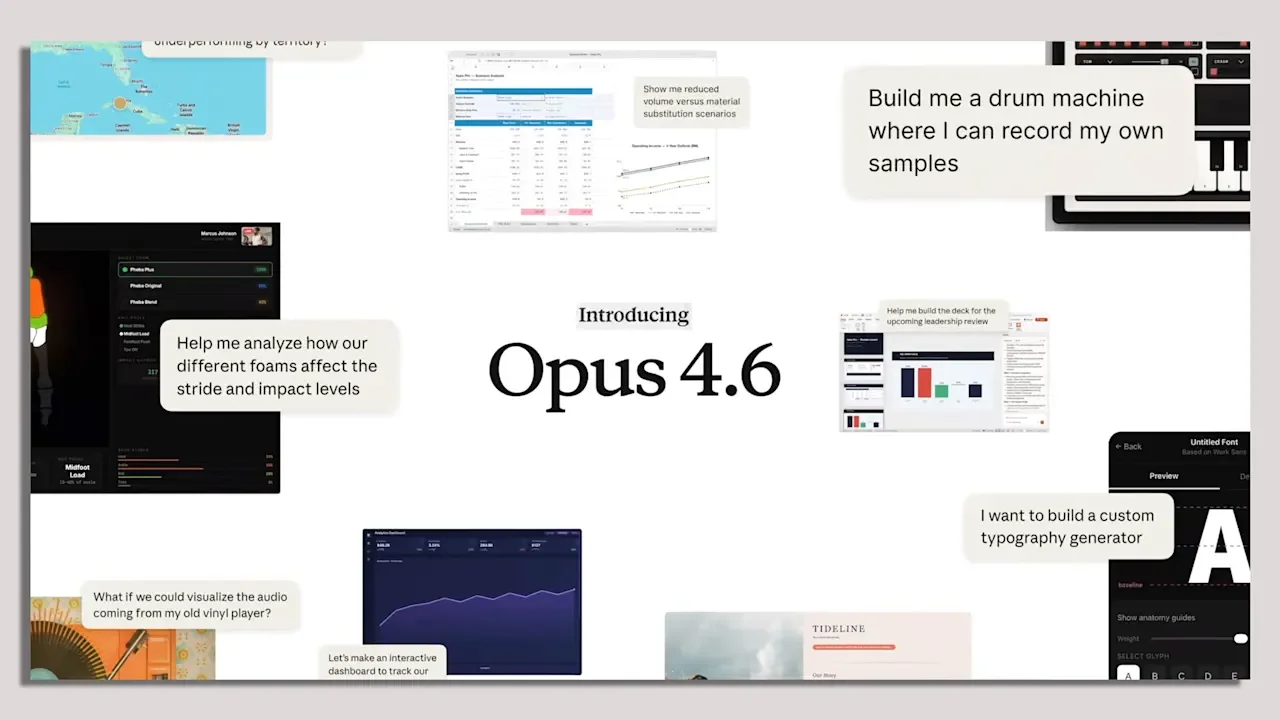
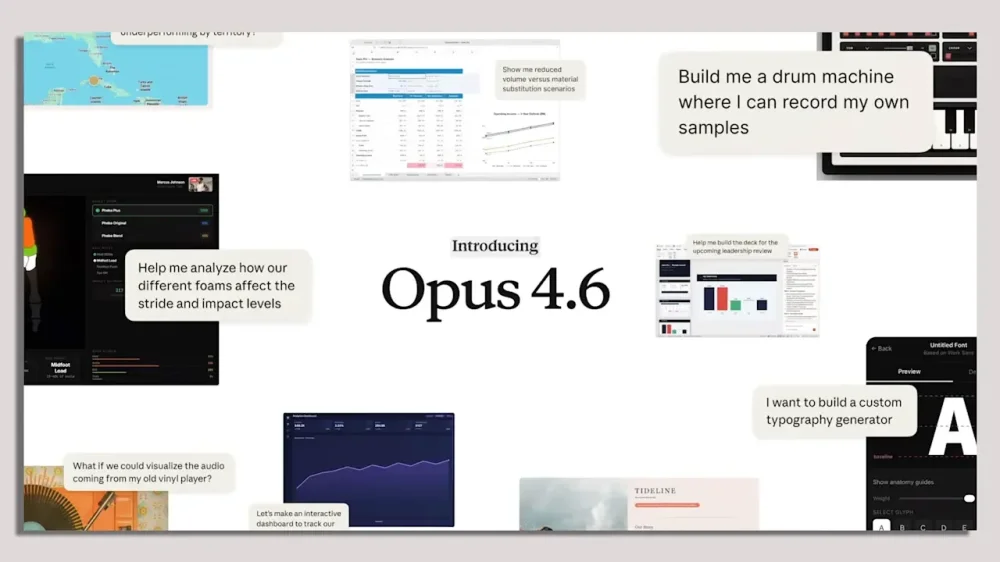
Anthropic is out with a new model called Claude Opus 4.6, an upgrade to its top-of-the-line Opus 4.5 model that launched in November. The new release could add new capabilities to Anthropic’s Claude Code coding assistant, which is facing growing competitive pressure from OpenAI’s Codex. Anthropic says Opus 4.6 improves on its predecessor’s coding skills, planning, and, perhaps most importantly, its ability to reason more clearly when handling large amounts of information. When Opus 4.6 powers Claude Code, the coding agent can comprehend larger codebases and make more thoughtful decisions about how and where to add new code, the company says. More long-term memory AI labs have been racing to build models with longer context windows, meaning the amount of information a model can consider for a given task. But models have often struggled to use that information effectively in their outputs, a limitation Anthropic acknowledges. “Previously, we would see things like, maybe the model gets lost in the middle, or it might forget details,” Opus product manager Dianne Penn tells Fast Company. “I wouldn’t say Opus 4.6 is perfect—humans or other past models aren’t perfect—but we think that the quality improvement is pretty significant.” Opus’s longer memory also allows it to work on complicated tasks for extended periods, enabling Claude Code users to assemble teams of agents that collaborate on tasks. Anthropic also says the tool offers improved code review and debugging capabilities, helping it catch its own mistakes. Opus 4.6 arrives as the use of AI coding tools continues to surge, and as competition between Anthropic and OpenAI for software developers intensifies. OpenAI’s Codex coding tool recently launched as a standalone app, powered by the GPT-5.2 model, and has received largely enthusiastic reviews from developers. A model for everyday work tasks Beyond coding, the new Anthropic model is designed to improve performance on everyday work tasks such as running financial analyses, conducting research, and creating or using documents, spreadsheets, and presentations. Opus 4.6 will also power Anthropic’s general-purpose work tool, CoWork, enabling it to multitask with minimal human supervision. Anthropic says Opus 4.6 achieved top scores across several industry benchmark tests, reaching the highest results so far on multiple evaluations. These include Humanity’s Last Exam, a complex multidisciplinary reasoning test; Terminal-Bench 2.0, an agentic coding evaluation; and GDPval-AA, which measures performance on economically valuable knowledge-work tasks in finance, legal, and other domains. Anthropic also says Opus 4.6 outperforms all other models on OpenAI’s BrowseComp, which measures a model’s ability to locate difficult-to-find information online. Anthropic says the Opus 4.6 model is available to developers using Claude Code for the same price per million tokens as Opus 4.5. The new model is now the default for Claude Code Pro subscribers, and is available as an option for all other subscribers. View the full article
-
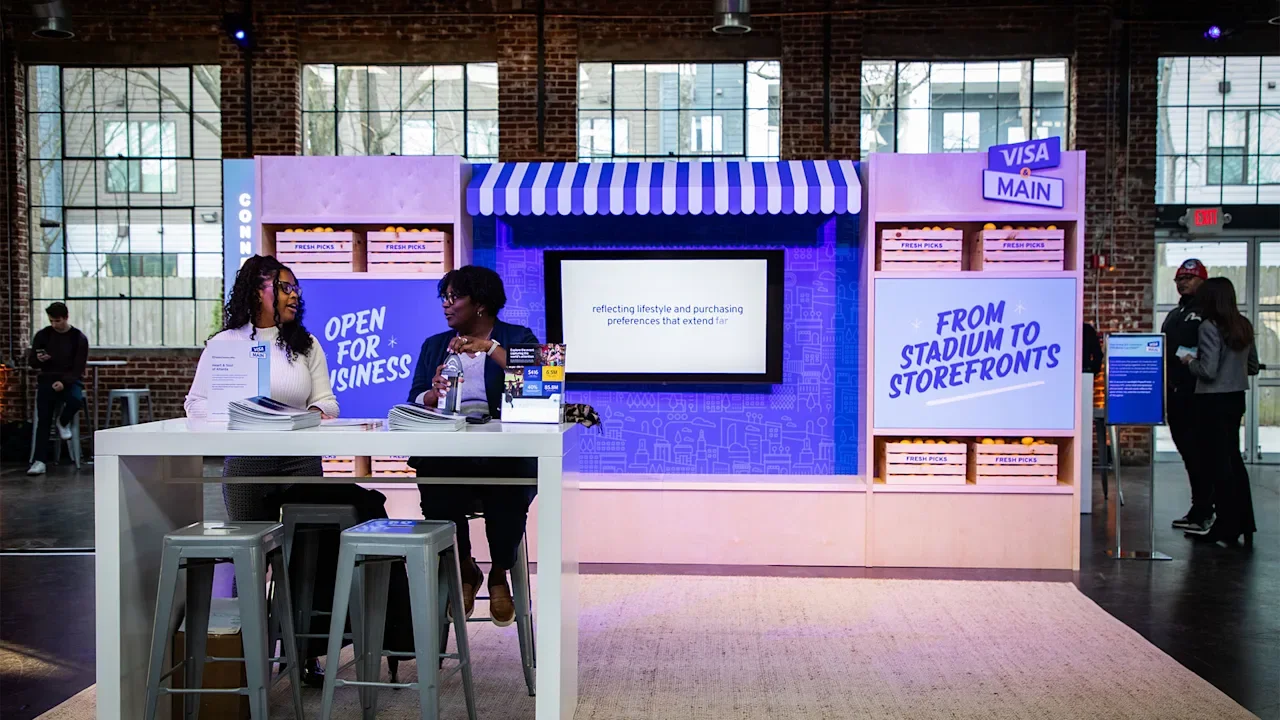
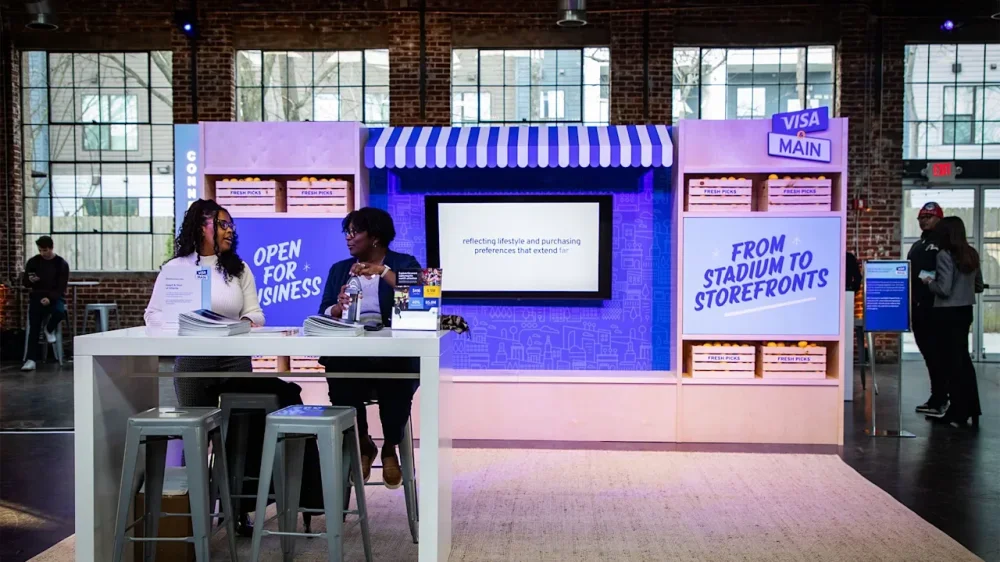
Visa announced a new platform designed to stimulate small businesses through a variety of tools and network opportunities on Thursday in advance of major sporting events this year. The program, Visa & Main, identifies and is built around helping address what Visa calls the most pressing challenges that entrepreneurs face: access to capital, reaching customers, and adopting modern business tools. That starts with a $100 million partnership with small business lender Lendistry, with Visa saying it would continue to provide “additional grants and financial support programs” as part of Visa & Main. Additionally, Visa & Main connects Visa’s small business members with its corporate sponsors, identifying opportunities through major events like Super Bowl LX and this summer’s FIFA World Cup. It launched the “Square Stops Here” hop-on, hop-off bus tour in San Francisco during Super Bowl week designed to “support and spotlight” local businesses. The company is using its platform to help direct potential customers to its small business members, also hosting workshops for entrepreneurs to help them convert a short-term gain into long-term sustainability. “Heartbeat of local communities” Visa & Main also intends to make it easier for small businesses to adopt AI in the workplace, noting that small businesses have adopted the new technology at a rate less than half that of bigger businesses. The program attempts to close that gap by making tools such as expense management and fraud protection easier to access. “Small businesses are the heartbeat of local communities and represent nearly half of our country’s economic activity,” Kim Lawrence, Visa’s North America regional president, said in a release. “With Visa & Main, we’re connecting Visa’s products and in-house knowledge with the expertise of our clients and partners to provide small businesses with flexible financing opportunities and customer acquisition and technology support.” The move expands Visa’s investment into small businesses, an area where credit card companies have long competed for marketshare. For example, Small Business Saturdays was launched 15 years ago as a marketing push from American Express, and it has since become an annual Thanksgiving weekend event. Visa held a launch event in Atlanta on January 21 for Visa & Main, where members worked directly with the Visa team to get hands-on experience with the product. View the full article
-
In January, the FBI made headlines after it raided the home of Washington Post reporter Hannah Natanson. It was a shocking case of law enforcement not just overriding one journalist's privacy, but the integrity of the entire news organization. The devices the FBI seized—which included personal devices as well as a Washington Post-issued laptop—contained Natanson's personal contacts, correspondences, and the Slack channels of the Washington Post itself. But while the FBI was able to access some of the devices, it was not able to access Natanson's iPhone. That's because the device was in Lockdown Mode, which prevented the FBI's Computer Analysis Response Team (CART) from breaking into it. This isn't a setting that is exclusive to journalists: You have this option baked into your iPhone as well, and can choose to turn it on at any time. The thing is, unless you're a high-profile target, you probably don't want to. How does Lockdown Mode work? Lockdown Mode is an option on iPhones, iPads, Apple Watches, and Macs, designed for users who could be the target of sophisticated cyberattacks. Think politicians, businessmen, activists, and, of course, journalists—really, anyone high-profile that works or takes action in a way that could draw the ire of powerful organizations or governments. Because attackers target devices with spyware, the goal of Lockdown Mode is to reduce the attack surface of your device in order to prevent potential cyberattacks from working. Attackers can install spyware on a target's device in a number of ways, through links, attachments, wired connections, and file downloads, the same way you can install malware by clicking a malicious link in an email, or downloading a corrupt extension from the web. Lockdown Mode locks down these vulnerabilities and eliminates as many potential attack routes as possible. To achieve this, Lockdown Mode severely impacts a number of functions you may use on your device every day. According to Apple, that includes the following: Messages: Lockdown Mode will block most message attachment types, other than "certain images, video, and audio." Links and link previews are blocked. Web browsing: The feature blocks "complex web technologies," which could impact how certain websites load or function. You may not see certain web fonts, and you may see missing image icons in place of pictures. FaceTime: Incoming FaceTime calls are blocked, except for contacts you have called within the past 30 days. You can't use SharePlay or take Live Photos in FaceTime calls. Apple services: Invitations to Apple services like invites to manage a smart home are blocked, unless you have previously invited that person. GameCenter will not work, and Focuses will not work "as expected." Photos: Lockdown Mode strips photos of their location data when you share them, and shared albums are taken out of your Photos app. You won't be able to receive new shared album invites. You can still see shared albums on devices that don't have Lockdown Mode enabled. Device connections: Your device needs to be unlocked before it can communicate with another computer. In addition, your Mac also requires your explicit approval before the connection can be made. Wireless connectivity: You won't automatically join non-secure wifi networks, and you will disconnect from existing non-secure wifi networks. Lockdown Mode also blocks 2G and 3G cellular support. Configuration profiles: You can't install configuration profiles, and the device can't enroll in Mobile Device Management. Apple makes a point to say that phone calls and "plain text messages" will work as normal, however incoming calls won't ring on your Apple Watch. Emergency SOS also will continue to work. These restrictions make it much more difficult for a bad actor to install spyware on your device, though it also makes it more difficult to use your device. A shared album invite could contain malware, but by removing the feature entirely, you miss out on photos from friends and family. Any spyware coming from a malicious link or image will be blocked, but if you frequently send photos, videos, and other attachments in Messages, you'll miss out. That's why these measures are really designed only for individuals who think they'll be targeted by sophisticated actors. It seems that could include governments secretly installing spyware on targets' devices, or the FBI stealing your device in a raid. It's worth noting that the FBI was able to access Natanson's other devices, including a MacBook Pro that unlocked with her fingerprint. The agency's warrant compelled Natanson to unlock her devices with biometrics if they were enabled. Lockdown Mode could not have prevented that, so it's not clear why the FBI didn't force Natanson to unlock the iPhone in question, too. How to turn on Lockdown Mode If you understand the restrictions, but still want to try Lockdown Mode, you'll need to be running the following software version on each of the Apple devices you want to use Lockdown Mode with: iPhone: iOS 16 or later iPad: iPadOS 16 or later Apple Watch: watchOS 10 or later Mac: macOS Ventura or later Apple says "additional protections" are available for iOS 17, iPadOS 17, or macOS Sonoma or later. In addition, you should update your device to the latest software version before turning on Lockdown Mode if you want all the latest protections. You can turn on Lockdown Mode on any of your Apple devices, but you must do so individually on each. You'll find the option at the bottom of the "Privacy & Security" section in Settings (System Settings on Mac). Hit "Turn On Lockdown Mode," then review the pop-up that appears and choose "Turn On Lockdown Mode" again. You'll need to choose to "Turn On & Restart," then enter your device's password or passcode for the feature to take effect. View the full article
-
Bowing to industry pressure, the Consumer Financial Protection Bureau is warning consumers with notices on its complaint portal not to file disputes about inaccurate information on credit reports, among other changes. View the full article

-
The mortgage technology unit at Intercontinental Exchange posted a profit for the third straight quarter, even as lower minimums among renewals capped growth. View the full article
-
Join Jeff Hirz as he unveils key insights on growth and efficiency based on data from 1,000 businesses planning for 2026. The post What 1,000 Businesses Reveal About Growth in 2026 [Webinar] appeared first on Search Engine Journal. View the full article
-
We may earn a commission from links on this page. Deal pricing and availability subject to change after time of publication. Not everybody needs, wants, or can afford the "best" headphones available, especially when they can easily cost half a grand. If the Sony XM6, which I called the best over-ear headphones of 2025 (and 2026 so far), are not in your budget, then perhaps the more affordable Sony WH-CH720N could be. While they're not quite as premium, they're significantly cheaper and offer good enough quality for most people. You can get them for $97 (originally $179.99) on Amazon right now. Sony WH-CH720N Noise Cancelling Wireless Headphones $98.00 at Amazon $179.99 Save $81.99 Get Deal Get Deal $98.00 at Amazon $179.99 Save $81.99 Sony WH-CH720N headphones $98.00 at Amazon $179.99 Save $81.99 Get Deal Get Deal $98.00 at Amazon $179.99 Save $81.99 Sony WH-CH720N headphones $98.00 at Amazon $179.99 Save $81.99 Get Deal Get Deal $98.00 at Amazon $179.99 Save $81.99 SEE 0 MORE These are Sony's entry-level over-ear headphones, and Sony mostly made cuts in the design and build. When you hold them, they might feel hollow and light, but they're still comfortable since the earcups are well-cushioned, according to CNET's review. However, Sony did not make a lot of sacrifices in the audio or ANC department, which, at the end of the day, is what's most important. While they've dropped below $100 before, all three colorways have not been available at their current price at the same time—until now. These headphones use the same Sony Sound Connect app as the flagship models and share some of the same features, like multipoint technology to connect to up to two devices. They also come with Google Fast Pair and Find My Device support, nice features to have for convenience, and if you misplace them. You can get 35 hours of battery life with ANC on and 50 hours with ANC off, and the charging is quick, with three minutes giving you three hours of juice. The ANC is not as good as the latest XM6, but it works great for under $100, according to Mashable's review and they'll block most ambient noise outdoors or indoors. Transparency mode is also great, allowing you to have conversations and hear bikes or cars passing by. The adjustable EQ in the app means you can tweak the crisp and vibrant sound of the WH-CH720N to your liking. View the full article
-
Managing payroll can be an intimidating task for small business owners because of various intricacies, including tax calculations and compliance requirements. Fortunately, several free payroll services can streamline this process, accommodating different needs and preferences. From user-friendly interfaces to mobile access, these tools can help you manage payroll efficiently without incurring additional costs. As we explore these options, you’ll find solutions customized to your specific business requirements. Key Takeaways Payroll4Free offers essential features for up to 25 employees, including automated tax calculations and pay stub generation at no cost. HR.my provides a multilingual payroll solution with unlimited user access, enhancing collaboration in diverse teams without any fees. TimeTrex is a cloud-based solution with effective time tracking, suitable for growing businesses with no employee limits and automated tax compliance. ExcelPayroll serves as an offline payroll tool for basic management, generating pay stubs but lacking integrated features like direct deposits. HelloPaid is a mobile-friendly app that streamlines payroll processing with automated calculations and easy access to employee pay stubs from smartphones. Why Payroll Management Is Challenging for Small Business Owners Managing payroll can be a challenging task for small business owners, especially since many of you might be handling it without specialized training. You’re likely facing a significant time commitment during trying to navigate complex tax regulations and deduction rules. An IRS study shows that about one-third of employers make payroll errors each year, leading to costly penalties and compliance issues. As your business grows, payroll complexity increases, requiring more detailed attention to tax calculations and employee classifications. This administrative burden can distract you from focusing on core business operations and growth strategies. Many of you still rely on manual processes, with 51% of organizations using spreadsheets for payroll management. This reliance results in inefficiencies and a heightened risk of mistakes. To alleviate some of this pressure, considering free payroll services could be a beneficial step, as they often simplify the process and reduce the likelihood of errors. Core Functions of Payroll Software Though payroll software can greatly simplify your payroll process, comprehending its core functions is vital for maximizing its benefits. Free payroll software automates key tasks like calculating wages based on hours worked or salaries, greatly reducing manual effort and minimizing errors. It likewise manages tax deductions by automatically withholding federal income tax, Social Security, and Medicare, helping you stay compliant with tax regulations. In addition, payroll software generates pay stubs or pay summaries for your employees, providing them with required documentation of their earnings and deductions. Most payroll systems operate on a regular schedule, whether weekly, biweekly, or monthly, which streamlines the process and guarantees your employees are paid on time. Features like automatic tax calculations and employee record maintenance further improve organization and compliance, allowing you to focus on growing your business as well as making sure your payroll remains accurate and up to date. Payroll4Free: Best Overall Free Payroll Software When running a small business, finding reliable and cost-effective payroll software can be a challenge, but Payroll4Free stands out as the best overall free option. This free payroll service is ideal for businesses with up to 25 employees, offering vital features without any cost. Here’s what you can expect: Automated Tax Calculations: Payroll4Free automatically calculates federal, state, and local taxes, ensuring compliance. Payroll Document Generation: The software generates pay stubs and W-2s, simplifying record-keeping. User-Friendly Interface: Designed for small business owners, it allows quick input of payroll information. Additionally, Payroll4Free is funded by ads, keeping your costs at zero as long as you stay within the employee limit. The service includes an employee portal for transparency, allowing your team to access their payroll information easily. With these features, Payroll4Free is a thorough solution for your payroll needs. HR.my: Best Multilingual Payroll Solution If you’re managing a diverse team, HR.my offers a fantastic multilingual payroll solution that caters to your needs without costing a dime. With unlimited user access and extensive payroll features, this platform simplifies your HR management as it accommodates various administrative roles. Plus, its ad-supported model guarantees you can enjoy all the benefits without worrying about hidden fees or employee limits. Multilingual Support Availability How can a payroll solution improve communication in a multilingual workplace? Utilizing a service like HR.my, which offers multilingual support, can considerably improve your team’s communication. Here are three key benefits: Seamless Language Switching: Employees can easily switch to their preferred language, ensuring everyone understands payroll information. Reduced Language Barriers: By accommodating various languages, HR.my promotes better engagement and collaboration among diverse teams. Compliance and Inclusivity: Supporting multiple languages helps your business comply with local regulations, creating a more inclusive workplace environment. As a result, when you choose free payroll programs like HR.my, you’re not just managing payroll; you’re additionally building a stronger, more connected workforce. This approach is vital for businesses with international teams or multilingual employees. Unlimited User Access Unlimited user access is a standout feature of HR.my that improves the management of payroll in small businesses. With this free payroll solution, you can add as many administrators as you need, enhancing collaboration without incurring extra costs. This flexibility is particularly beneficial in small business environments where teamwork is essential. Plus, HR.my’s multilingual interface guarantees that every team member can navigate the system in their preferred language, promoting inclusivity. The platform supports an unlimited number of employees, making it suitable for businesses of any size. Furthermore, you can manage various HR functions, such as expense claims and time-off requests, through an integrated employee portal, streamlining operations during remaining completely free of charge. Comprehensive Payroll Features When managing payroll for your small business, having extensive features at your disposal can make a significant difference in efficiency and accuracy. HR.my is a free payroll application that’s perfect for small businesses and startups. Here are three key features it offers: Multilingual Support: It accommodates diverse teams by supporting multiple languages and currencies, making global operations smoother. Employee Portal: Staff can manage time-off requests and track their PTO balances, enhancing self-service capabilities. Expense Claim Management: This feature streamlines the approval process for expense claims, saving time for both employees and HR. With no employee limits and an ad-supported model, HR.my provides a thorough solution to meet your payroll needs without any costs. TimeTrex: Best for Time Tracking and Scheduling TimeTrex stands out as an excellent choice for small businesses seeking effective time tracking and scheduling solutions. This free payroll app offers an open-source Community Edition that allows you to manage unlimited employees, making it suitable for businesses of any size. With automated scheduling features, you can efficiently oversee employee time and attendance during processing payroll seamlessly. TimeTrex likewise automates federal, state, and local tax calculations, ensuring compliance without the hassle of manual entry. Being a cloud-based solution, it provides flexibility and accessibility, letting you manage payroll and scheduling from anywhere, which is ideal for today’s remote work environment. Unlike many other free payroll services, TimeTrex imposes no limits on the number of employees, making it a fantastic option for growing businesses. ExcelPayroll: Best Free Excel-Based Solution For small businesses seeking a straightforward and cost-effective payroll solution, ExcelPayroll offers a free, Excel-based tool that streamlines payroll calculations as it requires only basic spreadsheet knowledge. This software is especially beneficial for those who prefer manual payroll management without the intricacies of cloud-based solutions. With ExcelPayroll, you can: Efficiently calculate wages and tax deductions. Generate pay stubs and necessary tax forms. Maintain full control over your payroll data and processes. Although all features of this small business payroll software are free, you do need Microsoft Excel installed on your device to utilize it effectively. ExcelPayroll is ideal for businesses that want an offline solution for payroll management, but it may not suit those needing integrated features like direct deposits or automated tax filing. HelloPaid: Best Mobile-Friendly Payroll App If you’re looking for a payroll app that fits right in your pocket, HelloPaid is worth considering. With its user-friendly mobile interface, you can easily manage crucial payroll features like automated calculations and tax deductions, all during your travels. This app not just streamlines your payroll process but additionally guarantees you have the tools you need, making it a great choice for small business owners. User-Friendly Mobile Interface Many small business owners find it challenging to manage payroll as they juggle various responsibilities. HelloPaid offers a user-friendly mobile interface that makes it easier for you to handle payroll on-the-go, ensuring you never miss a beat. Here are three key features that improve your experience: Automated calculations for wages and taxes streamline the payroll process for easy payroll management. You can access and track employee pay stubs and tax forms directly from your smartphone, promoting transparency. The app supports various payment methods, including direct deposits, so you can pay employees without delay. With its intuitive design, HelloPaid reduces the learning curve, allowing you to navigate payroll tasks efficiently without extensive training. Experience the convenience today! Essential Payroll Features Included When managing payroll, having the right features can make a significant difference in efficiency and accuracy. HelloPaid stands out as an excellent mobile-friendly payroll app, offering crucial features that simplify your payroll process. It includes automated tax calculations, ensuring compliance with federal and state regulations, so you avoid costly errors. You can likewise provide employees with direct deposit options and easy access to pay stubs and tax forms, making your payroll system more transparent. For businesses with hourly employees, HelloPaid’s scheduling and time-tracking capabilities streamline payroll processing. Best of all, it functions as paycheck software free, making it accessible for small business owners who may lack extensive payroll experience. This combination of features improves overall payroll management. Esmart Paycheck: Best Simple Payroll Calculator Esmart Paycheck stands out as an efficient tool for small business owners who need to simplify payroll calculations. This free payroll calculator helps you easily calculate federal and state payroll taxes, including retirement deductions. Here’s what makes it a go-to choice: User-Friendly Interface: You’ll find the platform easy to navigate, making payroll calculations straightforward. Essential Tax Forms: eSmart Paycheck generates necessary forms like W-2s, simplifying tax filing for you. One-Time Calculation: It’s ideal for freelancers or small businesses needing quick, one-off payroll calculations without the bells and whistles. While eSmart Paycheck offers these advantages, keep in mind that it lacks a direct deposit option, requiring you to manage payments manually. Furthermore, the free version has limited data-saving capabilities, which might restrict your ability to store extensive payroll information. This tool remains a solid option among free payroll packages for those seeking simplicity. Limitations of Free Payroll Software When you consider free payroll software, you might face significant limitations that could impact your business. Many options cap the number of employees you can manage, often restricting you to just a handful, which can be a problem as you grow. Furthermore, these free services often have limited tax filing options, potentially leading to unexpected fees that can affect your overall budget. Employee Limits Imposed In the process of selecting payroll software, it’s crucial to take into account the employee limits imposed by various free options, as these restrictions can greatly influence your business’s growth. Many free payroll solutions set limits typically between 5 to 25 employees, which may hinder scalability. Here are some key points to evaluate: Employee Limits: Solutions like Payroll4Free allow up to 25 employees, whereas HR.my has no limit but is ad-supported. Feature Compromises: Larger teams often face reduced features, such as limited tax filing or no direct deposit. Hidden Restrictions: Some free software might’ve undisclosed limits that impact overall functionality. When exploring options, contemplate taking advantage of a payroll free trial to assess if the software can meet your future needs. Limited Tax Filing Options Though many small business owners might be drawn to free payroll software due to its cost-effectiveness, they often overlook one significant drawback: limited tax filing options. Many paycheck programs free don’t include tax filing services, leaving you to handle submissions manually, which increases the risk of errors. Some options, like Payroll4Free, charge extra for tax filing, whereas others may lack this feature entirely. Geographic limitations can likewise restrict tax filing capabilities, making certain software unsuitable for your region. Without automated updates on tax regulations and deadlines, you might struggle to stay compliant. Consequently, it’s vital to recognize these hidden limitations when choosing free payroll software to guarantee your business remains compliant and efficient. How to Choose the Right Free Payroll Software How do you guarantee that free payroll software meets your small business needs? Start by evaluating your specific payroll requirements to make certain the software can handle your employee count and tax intricacies. Next, contemplate your future growth plans; choosing scalable software helps accommodate increasing payroll demands. Finally, review the software’s usability and security features. Here are three key factors to contemplate: Essential Features: Look for automated tax calculations, free direct deposit for small businesses, and employee access to pay stubs. User-Friendliness: A straightforward interface is crucial for efficient payroll management. Costs and Limitations: Be cautious of hidden fees associated with tax filing or direct deposits that could affect overall usability. Frequently Asked Questions Is There Free Payroll Software for Small Businesses? Yes, there’s free payroll software available for small businesses. Options like Payroll4Free allow you to manage payroll for up to 25 employees at no cost. HR.my offers unlimited employee management without a paid version, whereas TimeTrex provides a free open-source solution that supports unlimited employees but doesn’t handle tax filings directly. These tools typically include fundamental features like tax calculations and direct deposits, but they may have limitations compared to paid options. Is Payroll4free Really Free? Yes, Payroll4Free is genuinely free for small businesses with nine or fewer employees. It offers crucial features like payroll processing and automated tax calculations at no cost. Nonetheless, if you need direct deposit or tax filing services, there are fees capped at $30 per month for those add-ons. Funded through ads, the platform guarantees you can manage payroll without direct costs, provided you stay within the employee limit. What Is the Best Payroll Program for Small Businesses? When choosing the best payroll program for small businesses, consider factors like employee count, budget, and required features. Payroll4Free suits up to 25 employees but has limitations, whereas HR.my offers a entirely free solution with no employee cap. TimeTrex allows unlimited management but requires manual tax filings. If you prefer spreadsheets, ExcelPayroll could work well. For a low-cost option, Wave Payroll provides thorough services at $40/month, making it ideal for growing businesses. What Is the Easiest Way to Do Payroll for a Small Business? The easiest way to do payroll for a small business is by using payroll software that automates key tasks. These platforms handle calculations and tax deductions, minimizing manual errors, which can affect a third of employers annually. With user-friendly interfaces, they simplify management and guarantee compliance with regulations. Setting up is usually quick, granting immediate access to features like direct deposit, ultimately preserving you time and enhancing employee satisfaction with timely payments. Conclusion Selecting the right free payroll service can greatly alleviate your administrative burden during ensuring compliance and efficiency. Each option offers unique features customized to specific needs, from multilingual support to mobile accessibility. By assessing your business’s size, workforce diversity, and specific payroll requirements, you can choose a solution that simplifies your processes without incurring costs. In the end, investing time in research will help you find a service that aligns with your operational goals and improves your overall productivity. Image via Google Gemini This article, "10 Best Free Payroll Services for Small Businesses" was first published on Small Business Trends View the full article
-
Managing payroll can be an intimidating task for small business owners because of various intricacies, including tax calculations and compliance requirements. Fortunately, several free payroll services can streamline this process, accommodating different needs and preferences. From user-friendly interfaces to mobile access, these tools can help you manage payroll efficiently without incurring additional costs. As we explore these options, you’ll find solutions customized to your specific business requirements. Key Takeaways Payroll4Free offers essential features for up to 25 employees, including automated tax calculations and pay stub generation at no cost. HR.my provides a multilingual payroll solution with unlimited user access, enhancing collaboration in diverse teams without any fees. TimeTrex is a cloud-based solution with effective time tracking, suitable for growing businesses with no employee limits and automated tax compliance. ExcelPayroll serves as an offline payroll tool for basic management, generating pay stubs but lacking integrated features like direct deposits. HelloPaid is a mobile-friendly app that streamlines payroll processing with automated calculations and easy access to employee pay stubs from smartphones. Why Payroll Management Is Challenging for Small Business Owners Managing payroll can be a challenging task for small business owners, especially since many of you might be handling it without specialized training. You’re likely facing a significant time commitment during trying to navigate complex tax regulations and deduction rules. An IRS study shows that about one-third of employers make payroll errors each year, leading to costly penalties and compliance issues. As your business grows, payroll complexity increases, requiring more detailed attention to tax calculations and employee classifications. This administrative burden can distract you from focusing on core business operations and growth strategies. Many of you still rely on manual processes, with 51% of organizations using spreadsheets for payroll management. This reliance results in inefficiencies and a heightened risk of mistakes. To alleviate some of this pressure, considering free payroll services could be a beneficial step, as they often simplify the process and reduce the likelihood of errors. Core Functions of Payroll Software Though payroll software can greatly simplify your payroll process, comprehending its core functions is vital for maximizing its benefits. Free payroll software automates key tasks like calculating wages based on hours worked or salaries, greatly reducing manual effort and minimizing errors. It likewise manages tax deductions by automatically withholding federal income tax, Social Security, and Medicare, helping you stay compliant with tax regulations. In addition, payroll software generates pay stubs or pay summaries for your employees, providing them with required documentation of their earnings and deductions. Most payroll systems operate on a regular schedule, whether weekly, biweekly, or monthly, which streamlines the process and guarantees your employees are paid on time. Features like automatic tax calculations and employee record maintenance further improve organization and compliance, allowing you to focus on growing your business as well as making sure your payroll remains accurate and up to date. Payroll4Free: Best Overall Free Payroll Software When running a small business, finding reliable and cost-effective payroll software can be a challenge, but Payroll4Free stands out as the best overall free option. This free payroll service is ideal for businesses with up to 25 employees, offering vital features without any cost. Here’s what you can expect: Automated Tax Calculations: Payroll4Free automatically calculates federal, state, and local taxes, ensuring compliance. Payroll Document Generation: The software generates pay stubs and W-2s, simplifying record-keeping. User-Friendly Interface: Designed for small business owners, it allows quick input of payroll information. Additionally, Payroll4Free is funded by ads, keeping your costs at zero as long as you stay within the employee limit. The service includes an employee portal for transparency, allowing your team to access their payroll information easily. With these features, Payroll4Free is a thorough solution for your payroll needs. HR.my: Best Multilingual Payroll Solution If you’re managing a diverse team, HR.my offers a fantastic multilingual payroll solution that caters to your needs without costing a dime. With unlimited user access and extensive payroll features, this platform simplifies your HR management as it accommodates various administrative roles. Plus, its ad-supported model guarantees you can enjoy all the benefits without worrying about hidden fees or employee limits. Multilingual Support Availability How can a payroll solution improve communication in a multilingual workplace? Utilizing a service like HR.my, which offers multilingual support, can considerably improve your team’s communication. Here are three key benefits: Seamless Language Switching: Employees can easily switch to their preferred language, ensuring everyone understands payroll information. Reduced Language Barriers: By accommodating various languages, HR.my promotes better engagement and collaboration among diverse teams. Compliance and Inclusivity: Supporting multiple languages helps your business comply with local regulations, creating a more inclusive workplace environment. As a result, when you choose free payroll programs like HR.my, you’re not just managing payroll; you’re additionally building a stronger, more connected workforce. This approach is vital for businesses with international teams or multilingual employees. Unlimited User Access Unlimited user access is a standout feature of HR.my that improves the management of payroll in small businesses. With this free payroll solution, you can add as many administrators as you need, enhancing collaboration without incurring extra costs. This flexibility is particularly beneficial in small business environments where teamwork is essential. Plus, HR.my’s multilingual interface guarantees that every team member can navigate the system in their preferred language, promoting inclusivity. The platform supports an unlimited number of employees, making it suitable for businesses of any size. Furthermore, you can manage various HR functions, such as expense claims and time-off requests, through an integrated employee portal, streamlining operations during remaining completely free of charge. Comprehensive Payroll Features When managing payroll for your small business, having extensive features at your disposal can make a significant difference in efficiency and accuracy. HR.my is a free payroll application that’s perfect for small businesses and startups. Here are three key features it offers: Multilingual Support: It accommodates diverse teams by supporting multiple languages and currencies, making global operations smoother. Employee Portal: Staff can manage time-off requests and track their PTO balances, enhancing self-service capabilities. Expense Claim Management: This feature streamlines the approval process for expense claims, saving time for both employees and HR. With no employee limits and an ad-supported model, HR.my provides a thorough solution to meet your payroll needs without any costs. TimeTrex: Best for Time Tracking and Scheduling TimeTrex stands out as an excellent choice for small businesses seeking effective time tracking and scheduling solutions. This free payroll app offers an open-source Community Edition that allows you to manage unlimited employees, making it suitable for businesses of any size. With automated scheduling features, you can efficiently oversee employee time and attendance during processing payroll seamlessly. TimeTrex likewise automates federal, state, and local tax calculations, ensuring compliance without the hassle of manual entry. Being a cloud-based solution, it provides flexibility and accessibility, letting you manage payroll and scheduling from anywhere, which is ideal for today’s remote work environment. Unlike many other free payroll services, TimeTrex imposes no limits on the number of employees, making it a fantastic option for growing businesses. ExcelPayroll: Best Free Excel-Based Solution For small businesses seeking a straightforward and cost-effective payroll solution, ExcelPayroll offers a free, Excel-based tool that streamlines payroll calculations as it requires only basic spreadsheet knowledge. This software is especially beneficial for those who prefer manual payroll management without the intricacies of cloud-based solutions. With ExcelPayroll, you can: Efficiently calculate wages and tax deductions. Generate pay stubs and necessary tax forms. Maintain full control over your payroll data and processes. Although all features of this small business payroll software are free, you do need Microsoft Excel installed on your device to utilize it effectively. ExcelPayroll is ideal for businesses that want an offline solution for payroll management, but it may not suit those needing integrated features like direct deposits or automated tax filing. HelloPaid: Best Mobile-Friendly Payroll App If you’re looking for a payroll app that fits right in your pocket, HelloPaid is worth considering. With its user-friendly mobile interface, you can easily manage crucial payroll features like automated calculations and tax deductions, all during your travels. This app not just streamlines your payroll process but additionally guarantees you have the tools you need, making it a great choice for small business owners. User-Friendly Mobile Interface Many small business owners find it challenging to manage payroll as they juggle various responsibilities. HelloPaid offers a user-friendly mobile interface that makes it easier for you to handle payroll on-the-go, ensuring you never miss a beat. Here are three key features that improve your experience: Automated calculations for wages and taxes streamline the payroll process for easy payroll management. You can access and track employee pay stubs and tax forms directly from your smartphone, promoting transparency. The app supports various payment methods, including direct deposits, so you can pay employees without delay. With its intuitive design, HelloPaid reduces the learning curve, allowing you to navigate payroll tasks efficiently without extensive training. Experience the convenience today! Essential Payroll Features Included When managing payroll, having the right features can make a significant difference in efficiency and accuracy. HelloPaid stands out as an excellent mobile-friendly payroll app, offering crucial features that simplify your payroll process. It includes automated tax calculations, ensuring compliance with federal and state regulations, so you avoid costly errors. You can likewise provide employees with direct deposit options and easy access to pay stubs and tax forms, making your payroll system more transparent. For businesses with hourly employees, HelloPaid’s scheduling and time-tracking capabilities streamline payroll processing. Best of all, it functions as paycheck software free, making it accessible for small business owners who may lack extensive payroll experience. This combination of features improves overall payroll management. Esmart Paycheck: Best Simple Payroll Calculator Esmart Paycheck stands out as an efficient tool for small business owners who need to simplify payroll calculations. This free payroll calculator helps you easily calculate federal and state payroll taxes, including retirement deductions. Here’s what makes it a go-to choice: User-Friendly Interface: You’ll find the platform easy to navigate, making payroll calculations straightforward. Essential Tax Forms: eSmart Paycheck generates necessary forms like W-2s, simplifying tax filing for you. One-Time Calculation: It’s ideal for freelancers or small businesses needing quick, one-off payroll calculations without the bells and whistles. While eSmart Paycheck offers these advantages, keep in mind that it lacks a direct deposit option, requiring you to manage payments manually. Furthermore, the free version has limited data-saving capabilities, which might restrict your ability to store extensive payroll information. This tool remains a solid option among free payroll packages for those seeking simplicity. Limitations of Free Payroll Software When you consider free payroll software, you might face significant limitations that could impact your business. Many options cap the number of employees you can manage, often restricting you to just a handful, which can be a problem as you grow. Furthermore, these free services often have limited tax filing options, potentially leading to unexpected fees that can affect your overall budget. Employee Limits Imposed In the process of selecting payroll software, it’s crucial to take into account the employee limits imposed by various free options, as these restrictions can greatly influence your business’s growth. Many free payroll solutions set limits typically between 5 to 25 employees, which may hinder scalability. Here are some key points to evaluate: Employee Limits: Solutions like Payroll4Free allow up to 25 employees, whereas HR.my has no limit but is ad-supported. Feature Compromises: Larger teams often face reduced features, such as limited tax filing or no direct deposit. Hidden Restrictions: Some free software might’ve undisclosed limits that impact overall functionality. When exploring options, contemplate taking advantage of a payroll free trial to assess if the software can meet your future needs. Limited Tax Filing Options Though many small business owners might be drawn to free payroll software due to its cost-effectiveness, they often overlook one significant drawback: limited tax filing options. Many paycheck programs free don’t include tax filing services, leaving you to handle submissions manually, which increases the risk of errors. Some options, like Payroll4Free, charge extra for tax filing, whereas others may lack this feature entirely. Geographic limitations can likewise restrict tax filing capabilities, making certain software unsuitable for your region. Without automated updates on tax regulations and deadlines, you might struggle to stay compliant. Consequently, it’s vital to recognize these hidden limitations when choosing free payroll software to guarantee your business remains compliant and efficient. How to Choose the Right Free Payroll Software How do you guarantee that free payroll software meets your small business needs? Start by evaluating your specific payroll requirements to make certain the software can handle your employee count and tax intricacies. Next, contemplate your future growth plans; choosing scalable software helps accommodate increasing payroll demands. Finally, review the software’s usability and security features. Here are three key factors to contemplate: Essential Features: Look for automated tax calculations, free direct deposit for small businesses, and employee access to pay stubs. User-Friendliness: A straightforward interface is crucial for efficient payroll management. Costs and Limitations: Be cautious of hidden fees associated with tax filing or direct deposits that could affect overall usability. Frequently Asked Questions Is There Free Payroll Software for Small Businesses? Yes, there’s free payroll software available for small businesses. Options like Payroll4Free allow you to manage payroll for up to 25 employees at no cost. HR.my offers unlimited employee management without a paid version, whereas TimeTrex provides a free open-source solution that supports unlimited employees but doesn’t handle tax filings directly. These tools typically include fundamental features like tax calculations and direct deposits, but they may have limitations compared to paid options. Is Payroll4free Really Free? Yes, Payroll4Free is genuinely free for small businesses with nine or fewer employees. It offers crucial features like payroll processing and automated tax calculations at no cost. Nonetheless, if you need direct deposit or tax filing services, there are fees capped at $30 per month for those add-ons. Funded through ads, the platform guarantees you can manage payroll without direct costs, provided you stay within the employee limit. What Is the Best Payroll Program for Small Businesses? When choosing the best payroll program for small businesses, consider factors like employee count, budget, and required features. Payroll4Free suits up to 25 employees but has limitations, whereas HR.my offers a entirely free solution with no employee cap. TimeTrex allows unlimited management but requires manual tax filings. If you prefer spreadsheets, ExcelPayroll could work well. For a low-cost option, Wave Payroll provides thorough services at $40/month, making it ideal for growing businesses. What Is the Easiest Way to Do Payroll for a Small Business? The easiest way to do payroll for a small business is by using payroll software that automates key tasks. These platforms handle calculations and tax deductions, minimizing manual errors, which can affect a third of employers annually. With user-friendly interfaces, they simplify management and guarantee compliance with regulations. Setting up is usually quick, granting immediate access to features like direct deposit, ultimately preserving you time and enhancing employee satisfaction with timely payments. Conclusion Selecting the right free payroll service can greatly alleviate your administrative burden during ensuring compliance and efficiency. Each option offers unique features customized to specific needs, from multilingual support to mobile accessibility. By assessing your business’s size, workforce diversity, and specific payroll requirements, you can choose a solution that simplifies your processes without incurring costs. In the end, investing time in research will help you find a service that aligns with your operational goals and improves your overall productivity. Image via Google Gemini This article, "10 Best Free Payroll Services for Small Businesses" was first published on Small Business Trends View the full article
-
We may earn a commission from links on this page. January 2026's ten most-streamed TV series are a balanced group, including six reality-based dramas and four fantasy/sci-fi hits. One the side of realism, we've got medical drama vérité The Pitt, a pair of spy shows (The Night Manager and Ponies), and a gay hockey romance in Heated Rivalry. The fantasy side includes the post-apocalyptic black humor of Fallout, the suburban supernatural series Stranger Things, and a trip back to Westeros with A Knight of the Seven Kingdoms. A more important running theme this month: These shows are all critical darlings, including a couple perfect Rotten Tomatoes 100% winners (The Night Manager and Pluribus) and five other shows above 95% (The Pitt, Fallout, Heated Rivalry, Ponies, and A Knight of Seven Kingdoms). Even the "worst" of the bunch, Landman, is sitting at a solid 78%. Good job watching good shows, America! Here's the full list of the top 10 most-streamed shows of January 2026 across all major streaming services, as compiled by JustWatch. The Night Manager If you're into high-stake international espionage, you have to check the most-streamed series this week. The Night Manager is based on John le Carre's best-selling novel and stars Tom Hiddleston as Jonathan Pine, an MI-6 agent whose mission is to infiltrate the inner circle of dangerous arms trader Richard "Dickie" Onslow Roper, played by Hugh Laurie. It has been ten long years since the show first premiered, but both seasons of this BBC-made series are available in full as of Feb. 1, so binge it up, man. Stream The Night Manager on Prime Video. The Night Manager at Amazon Get Deal Get Deal at Amazon The Pitt HBO's gritty, hyper-realistic medical drama has earned acclaim from critics and audiences for its relentless pace, following a single 15-hour shift at the Pittsburgh Trauma Medical Center. Starring Noah Wyle as Dr. Michael Robinavitch, The Pitt ditches the "disease-of-the-week" format of many medical shows in favor of a study of the toll the modern medical system places on everyone involved. Season one earned five Emmy awards, and judging from the first few episodes, season two might win more. Stream The Pitt on HBO Max. The Pitt at HBO Max Get Deal Get Deal at HBO Max Fallout Post-apocalyptic action-comedy Fallout is like nothing that’s been on TV before. Staying true to the gritty, gruesome, and irreverent spirit of the video games upon which it is based, it follows naive former vault dweller Lucy MacLean (Ella Purnell) as she leaves her protected bunker to track down her father in the irradiated Wasteland. The show’s standout characters include Lucy’s duplicitous pop (Kyle MacLachlan), conflicted mech-warrior Maximus (Aaron Moten), and The Ghoul (Walton Goggins), the walking, talking, noseless, undead remains of a pre-apocalypse Hollywood cowboy. Season one earned a staggering 17 Emmy nominations in 2024, and the just-finished season two earned even greater critical acclaim for its expansion into the iconic ruins of New Vegas. Stream Fallout on Prime Video. Fallout - Season 1 at Amazon Get Deal Get Deal at Amazon Heated Rivalry If you want explicit hockey player-on-hockey player action with a 98% "fresh" rating on Rotten Tomatoes, HBO's Heated Rivalry is a must-watch. Set against the hyper-masculine, hyper-homophobic world of professional sports, the series brings emotional depth to the story of a years-long secret romance between Canadian "golden boy" Shane Hollander (Hudson Williams) and Russian bad boy Ilya Rozanov (Connor Storrie). Stream Heated Rivalry on HBO Max. Heated Rivalry at HBO Max Get Deal Get Deal at HBO Max A Knight of the Seven Kingdoms A Knight of the Seven Kingdoms takes fans back to Westeros, 100 years before the events of Game of Thrones. Based on George R.R. Martin’s Tales of Dunk and Egg novellas, the series is less about world-spanning politics and more about smaller, character driven moments in the lives of humble, towering knight Ser Duncan the Tall (Peter Claffey) and his diminutive, mysterious squire Egg (Dexter Sol Ansell). It's shorter, lighter, and funnier than its forebears (but not too light—this is still Westeros, after all). Stream Knights of the Seven Kingdoms on HBO Max. A Knight of the Seven Kingdoms at HBO Max Get Deal Get Deal at HBO Max Stranger Things A veritable streaming institution, Stranger Things reached its end with season five. Set in November 1987, the final chapter follows the Hawkins gang in a mission to find and kill Vecna (Jamie Campbell Bower) while navigating a town under strict military quarantine. From Eleven (Millie Bobby Brown) evading a new government threat to Will Byers (Noah Schnapp) unlocking his psychic potential to protect his friends, the series remains an emotional masterclass in supernatural sci-fi horror—despite a divisive finale. Stream Stranger Things on Netflix. Stranger Things at Netflix Get Deal Get Deal at Netflix Pluribus Creator and executive producer Vince Gilligan takes a hard turn from Breaking Bad and Better Call Saul with Pluribus, a slow-burn post-apocalyptic sci-fi series starring Rhea Seehorn as Carol Sturka, a stubborn and irascible novelist in Albuquerque who finds herself one of the last 13 individuals on Earth in the wake of viral outbreak that has turned the rest of the species into a hive mind. "They" aren't (isn't?) exactly evil, but they are extremely persistent about trying to get the mysteriously immune Carol to join their ranks (as nicely but firmly as possible). Stream Pluribus on Apple TV+. Pluribus at Apple TV+ Get Deal Get Deal at Apple TV+ Landman Yellowstone creator Taylor Sheridan's Landman is is a gritty modern Western set in the oil fields of West Texas. Billy Bob Thornton stars as Tommy Norris, a "crisis executive" for an oil company who must navigate a law-light landscape of roughnecks, billionaires, and dangerous drug cartels in order to make sure fuel keeps getting dug out of the ground. Stream Landman on Paramount+. Landman at Paramount+ Get Deal Get Deal at Paramount+ His & Hers Based on the 2020 novel by Alice Feeney, His & Hers is a twisty mystery thriller series that stars Tessa Thompson as Anna Andrews, a disgraced Atlanta journalist who returns to her small Georgia hometown to cover a brutal murder, only to find her estranged husband, Detective Jack Harper (Jon Bernthal), leading the investigation. As the former couple competes to solve the case, each grows more suspicious that the other is the killer. The six-episode run makes it a great series if you're longing for an engaging drama with a definite conclusion. Stream His & Hers on Netflix. His & Hers at Netflix Get Deal Get Deal at Netflix Ponies In international espionage parlance, "ponies" are "persons of no interest." In this case, that Bea (Emilia Clarke) and Twila (Haley Lu Richardson), two American women in Cold War Moscow whose "normal" lives are upended when their CIA agent husbands die in a mysterious plane crash. The pair convince the U.S. government to let them try to infiltrate the KGB and find out the truth of what happened, using their ordinariness as the ultimate cover. Boasting a 96% "Fresh" rating on Rotten Tomatoes, the eight-episode season balances steamy romance with intense espionage. Stream Ponies on Peacock. Ponies at Peacock Get Deal Get Deal at Peacock View the full article