All Activity
- Past hour
-
Your paid social operation is on fire. You know how your audience thinks, the creative process is dialed in, and the results get better every year. Leadership greenlights an expansion to Google Ads — a new channel and, critically, a new source of revenue. As it turns out, applying that same strategy really just buys you an express ticket to a very difficult conversation. Google rewards a different kind of thinking. Intent signals and campaign logic are different, and the mistakes that eat at your budget don’t always make themselves clear. Brands that apply their existing Meta playbook often find themselves looking at shiny dashboards and dull balance sheets. These six common mistakes tend to do the most damage before anyone realizes what’s happening. They’re what we see most often when ecommerce brands come to us after making the move to Google — and they can all be reversed. Mistake 1: Treating Google like a retention channel You can definitely use Google Ads to support retention and brand defense. The problem is when that becomes your whole strategy. We see this regularly with brands new to the platform who launch directly into Performance Max. Early ROAS looks strong, and everyone’s happy. But a few months in, someone asks the right question: Are we actually growing, or paying to capture purchases that were going to happen anyway? One client we worked with came to us with branded search and retargeting doing the heavy lifting inside PMax – essentially a tax on demand that had already been created elsewhere. Revenue flatlined because, while the ad spend was real, growth was not. Net-new customer acquisition requires a different setup. Shopping campaigns structured to surface products to people who have never heard of the brand. Search campaigns built around non-branded, high-intent keywords. Layered PMax configurations that limit the system from defaulting to the easiest conversions. When Google has enormous reach into new audiences, treating it purely as a closing channel leaves most of that opportunity untouched. Dig deeper: Ecommerce PPC: 4 takeaways that shape how campaigns perform Your customers search everywhere. Make sure your brand shows up. The SEO toolkit you know, plus the AI visibility data you need. Start Free Trial Get started with Mistake 2: Not knowing how to get the most out of Google’s core levers Paid social experience transfers to Google in some ways, but there are four areas where we see the biggest knowledge gaps. Search intent Ads on social media are an interrupting moment. Ads in search engines meet people as they’re looking for something you offer. This changes so much about campaign structure, ad copy, and keyword targeting. Upper-funnel terms and lower-funnel terms require different approaches, bids, and landing pages. Collapsing them into a single campaign structure is one of the fastest ways to dilute intent and waste budget on traffic that was never going to convert. Data feed optimization For ecommerce brands running Shopping and retail Performance Max, the product feed is the foundation everything else is built on. Weak titles, missing attributes, and poor categorization limit how often your products show up and who sees them. Most brands (including Google-native ones) underinvest here because the work is unglamorous. But a well-optimized feed consistently outperforms one that’s neglected after setup. Keyword research Paid search is a keyword-driven channel, which makes keyword strategy its own discipline. Understand match types, search volume, commercial intent, and the relationship between what people type and what they actually want. This takes time to develop, but brands that skip this step usually over-restrict their reach or bleed spend on irrelevant traffic. Landing pages Sending high-intent but unfamiliar visitors straight to a product page on Google often underperforms. A more engaging landing page format, like an advertorial, puts that traffic in front of context and trust before asking for the sale. Brands coming from paid social often overlook this because the funnel architecture they’re used to doesn’t require it. Dig deeper: 7 Google Ads search term filters to cut wasted spend Mistake 3: Letting operational issues interrupt campaign momentum Google’s algorithms need consistent data to make the best decisions for your account. But every time a campaign goes dark — for a day or a week — there’s a risk that the learning resets. What feels like a minor admin issue can mean weeks of degraded performance and wasted ad spend. Two types of disruption come up more than any other. Payments: Brands switching to invoice billing or changing card details mid-flight will sometimes see campaigns pause without realizing it until the damage is done. A lapsed payment that takes three days to resolve can cost far more than the bill itself once you factor in recovery time. Tracking and feed integrity: A broken pixel means no conversion data, and forces Smart Bidding to optimize blind. A feed error in Merchant Center means products disappear from Shopping and Performance Max. Neither of these failures are loud, and they tend to surface slowly as declining performance that gets misattributed. They are both preventable with automated alerts, weekly feed audits, and a person or AI agent responsible for monitoring account health between reporting cycles. The cost of oversight is low compared to what happens if you only discover issues after the fact. Get the newsletter search marketers rely on. See terms. Mistake 4: Building a campaign structure that’s too granular The instinct among detail-oriented advertisers is to segment everything because it feels like control on the surface. One campaign per product category. One ad group per keyword. Separate budgets for every audience. But Google’s automation needs data to make good decisions. When you spread your budget across too many campaigns, each one operates on thin resources and even thinner information. Smart Bidding can’t optimize effectively without sufficient conversion volume, so campaigns stuck below that threshold tend to underperform and stay there. By over-segmenting, you’ve created the appearance of precision while actually limiting the system’s ability to learn. The same logic applies to budget. Ten campaigns with a modest shared budget will almost always produce worse results than three well-funded ones. Google needs room to test, adjust, and find the traffic worth paying for. Fragmented budgets don’t allow it to do that. Build a tighter structure with fewer campaigns, clearly defined goals, and enough budget to compete. This gives the algorithm what it needs while keeping the account manageable enough to oversee effectively. Dig deeper: How to find and fix the root cause of low conversions Mistake 5: Leaving campaigns on Max Conversion Value with no ROAS targets Max Conversion Value is a Smart Bidding strategy that tells Google to spend your budget in whatever way generates the highest total conversion amount – no ceiling, no floor, no efficiency guardrail. Left unsupervised, it will find conversions, but won’t care what it costs to get them. For brands new to Google Ads, this setting can trick you into thinking you’re crushing it. Conversion value shoots up in the right direction, making the account appear healthy. The problem surfaces when you look at what you actually spent to generate that value. Without a target ROAS, Google has no efficiency quotient, and optimizes for volume, not profitability. But the fix is straightforward. Once you have enough conversion data, set a realistic target. A ROAS goal gives the algorithm a constraint, and shifts the objective from spending budget to spending it well. Targets set too aggressively too early can starve campaigns of traffic before they’ve had a chance to learn. Exercise patience, and a willingness to adjust gradually rather than chasing the ideal number from day one. Dig deeper: How each Google Ads bid strategy influences campaign success Mistake 6: Underfunding campaigns and keeping them stuck in learning When you launch a Google campaign or make a significant change (like doubling the budget), it enters a new learning period. This is the window for gathering data, testing different auctions, and calibrating toward the conversion patterns you’ve defined. It’s a normal part of how the platform works, and every campaign goes through it. But the learning period requires a minimum volume of conversions to complete. Google typically needs around 30-50 conversion events in a short window before bidding stabilizes. A campaign that’s underfunded for this milestone will stay in learning indefinitely. It’s a common trap for brands being cautious when testing Google. You run your first campaign on a small budget. CPAs are inflated, and data is inconclusive, so you don’t invest more or cut it entirely. In reality, the campaign never had what it needed to graduate out of the learning phase. You walk away from net new revenue before you’ve even scratched its surface. Funding a new campaign adequately from the start — even if it means consolidating into fewer campaigns and chasing fewer goals — gives it the best chance of learning fast and delivering accurate results sooner. See the complete picture of your search visibility. Track, optimize, and win in Google and AI search from one platform. Start Free Trial Get started with Adding Google to the mix is the right call: Here’s what to do next Diversifying away from a single ad platform is one of the smartest moves an ecommerce brand can make once it’s mature enough to fight on two fronts. It removes growth from the anchor of one platform’s algorithm changes, auction dynamics, seasonality, terms of service, etc. Adding Google to Meta also gives you access to a different kind of demand that is actively expressed rather than passively targeted, which is a meaningful advantage worth building on. These six mistakes are not reasons you should avoid Google, but a preventative guide to help you approach it with realistic expectations and enough patience to let the system learn. Treating it like a direct analog of what you’re already doing on Meta will make you leave before seeing what’s truly possible. If you’re still in the early stages of making this move, my guide on how to expand from Meta Ads into Google Ads is a practical place to start. If you’ve seen early success and are now looking for the next layer of optimization, find out how to avoid getting sucked into Google’s many automation traps. View the full article
-
President Donald The President said U.S. forces will keep hitting Iran “very hard” in the next two or three weeks and bring the country “back to the Stone Ages,” even as he touted the success of U.S. operations and argued that all of Washington’s objectives have so far been met or exceeded. The President said Iran would continue to face a barrage of attacks in the short term. “We are going to hit them extremely hard over the next two to three weeks,” The President said. “We’re going to bring them back to the Stone Ages, where they belong.” The President didn’t say anything about negotiations with Iran or bring up the April 6 deadline he set for Iran to open the Strait of Hormuz, the critical waterway for global oil and gas transport. He has threatened to attack Iran’s energy infrastructure if the strait was not reopened. The President also did not offer a clear path to end the supply disruptions that have sent energy prices soaring. He did not mention the possibility of sending U.S. ground troops into Iran, or NATO, the trans-Atlantic alliance he has railed against for not helping the U.S. secure the waterway. Oil rose more than 7% and Asian stocks fell after the comments. Oil prices were sharply higher following The President’s remarks. Brent crude, the international standard, jumped 7.4% to $108.69. per barrel. Benchmark U.S. crude rose 7.1% to $107.24 a barrel. In early European trading, Britain’s FTSE 100 was down 0.2% to 10,342.28. France’s CAC 40 was 0.8% lower at 7,917.81, and Germany’s DAX lost 1.6% to 22,935.01. U.S. gas prices jumped past an average of $4 a gallon for the first time since 2022 on Tuesday, as the Iran war continues to push fuel prices higher worldwide. Analysts say those high fuel costs will trickle into groceries as businesses’ transportation and packaging costs pile up. —Associated Press View the full article

-
Google launched a new channel performance timeline view inside Performance Max, giving advertisers a clearer breakdown of how individual channels — Search, YouTube, Display, and others — are contributing to campaign results over time. What’s new. A timeline graph now shows channel-level contributions over a selected period, paired with investment and performance filters. Advertisers can see at a glance which channels are pulling their weight — and which aren’t. Yellow box – Channel Performance Evolution Over Time Pink box (right) – All Ads, Ads Using Product Lists, Ads Using Video Why we care. Performance Max campaigns span multiple channels simultaneously, which makes it genuinely difficult to know where budget is being spent most effectively. This update gives advertisers a timeline view of channel-level contributions — so if YouTube is underperforming while Search is driving most conversions, that’s now visible without having to dig through export data or rely on guesswork. This allows you to spot channel-level trends earlier and adjust asset strategy or budget accordingly. The big picture. The view gives advertisers a more actionable way to evaluate PMAX performance without having to rely solely on Google’s automated decisions. If YouTube is consistently underdelivering while Search drives the bulk of conversions, that’s now visible — and can inform budget and asset strategy going forward. The bottom line. It’s not full transparency, but it’s a meaningful step in the right direction. Advertisers have a cleaner way to spot PMax trend anomalies early and adjust accordingly. First spotted. This update was first spotted by Head of Search at Le Mage du SEA, Axel Falck, who shared spotting this update on LinkedIn. View the full article
-
We may earn a commission from links on this page. Deal pricing and availability subject to change after time of publication. DJI built its reputation on drones and creator gear, but the brand has been making serious moves in the portable power space. The DJI Power 2000 is the company's most capable standalone power station yet. Think of it as a large rechargeable battery you can take anywhere—camping, a job site, an outdoor movie night, or just kept in the garage for when the power goes out. At $799, it's currently down $500 from its original $1,299 price tag. That's a solid discount for something that sits in the higher end of this category. DJI Power 2000 Portable Power Station Electric generator for home, camping & RVs $799.00 at Amazon $1,299.00 Save $500.00 Get Deal Get Deal $799.00 at Amazon $1,299.00 Save $500.00 It's about the size of a carry-on suitcase and weighs close to 50 pounds, so it's not something you'd strap to your back, but it fits easily in a car trunk. The battery itself is built to last, rated for 4,000 charges before it starts losing any noticeable capacity. Performance-wise, DJI says the 2,048Wh capacity can keep a refrigerator running for up to 40 hours during a home power outage, charge a laptop 18 times, or power a projector for 18 hours. Those numbers line up with what you’d expect from a unit this size, and they make it useful for both emergencies and planned outdoor use. You also get a solid mix of ports—there are three AC outlets, a 30-amp port for heavier appliances or RV setups, multiple USB-C ports (including a 140W option for laptops), and DJI’s own SDC ports for direct drone charging. If you use DJI gear, that alone makes life easier in the field, notes this Mashable review. Recharging is also fast for a battery this size. Plugged into a wall outlet, it can go from empty to full in about 90 minutes. You can also top it up with solar panels or from your car, which makes it workable for longer trips. Rounding out its features is its companion app, which lets you check its battery level from your phone without having to walk over to it, a small thing that turns out to be pretty convenient. Note that this unit has no built-in light, which is something many competing power stations include. Our Best Editor-Vetted Tech Deals Right Now Apple AirPods Pro 3 Noise Cancelling Heart Rate Wireless Earbuds — $199.00 (List Price $249.00) Apple iPad 11" 128GB A16 WiFi Tablet (Blue, 2025) — $299.00 (List Price $349.00) Samsung Galaxy Tab A11+ 128GB Wi-Fi 11" Tablet (Gray) — $202.00 (List Price $249.99) Apple Watch Series 11 (GPS, 42mm, S/M Black Sport Band) — $329.00 (List Price $399.00) Sony WH-1000XM5 — $298.00 (List Price $399.99) Deals are selected by our commerce team View the full article
-
Private credit firm caps withdrawals after investors attempted to pull more than 40% from one fundView the full article
-
Most of the markets are down today after President The President’s address to the nation last night failed to alleviate fears about America’s war with Iran dragging on. But one relatively small tech company is bucking the downward trend in premarket trading this morning: Globalstar. The satellite communications company is reportedly an acquisition target for Amazon, yet its relationship with Apple could complicate any potential deal. Here’s what you need to know. What’s happened? Shares in the relatively small satellite communications company Globalstar, Inc. (Nasdaq: GSAT) are rising today after a Financial Times report yesterday said the ecommerce giant Amazon was in talks to acquire the company. As of the time of this writing, GSAT shares are up nearly 14% to around $78 apiece—making it one of the only tech companies to see significant gains this morning in premarket trading. The company’s share price closed yesterday at $68.53, putting its valuation at around $9 billion. While Globalstar is not a household name, the company has been in operation for over 35 years. It is the operator of a network of low Earth orbit satellites that provide communication services to companies across industries, from defense to Big Tech. Why does Amazon want to buy Globalstar? It’s important to note that while Amazon is rumored to be in negotiations with Globalstar, a deal could still fail to materialize, according to the FT. That being said, the obvious main driver behind Amazon’s interest in Globalstar would be to gain access to its network of satellites so Amazon can better compete with Elon Musk’s Starlink satellite internet service, which is operated by Musk’s company, SpaceX. Amazon is currently building out its competing high-speed satellite internet service, Leo, which aims to challenge Starlink’s dominance in the space. However, Leo currently lags significantly behind Starlink in the number of satellites each company operates. While SpaceX has over 10,000 satellites in its Starlink network, Amazon’s Leo has a constellation of less than 200. By acquiring Globalstar, Amazon could play catchup not just by adding the company’s satellites to its existing fleet, but by acquiring the technology, talent, and expertise that the 35-year-old company possesses. That’s something Amazon needs as it expands its Leo service. Yesterday, the company announced that Leo would power in-flight Wi-Fi for Delta Air Lines in 2028. Apple’s relationship with Globalstar could complicate things Unfortunately for Amazon, if it wants to acquire Globalstar, it doesn’t only need to negotiate with the satellite provider itself. Amazon also needs to deal with Apple. That’s because Apple actually owns 20% of Globalstar. The iPhone giant made a $1.1 billion investment in the satellite firm in 2024, giving it partial ownership of the company as part of the deal. As 9to5Mac reported at the time, Apple made the investment to help Globalstar expand its infrastructure, which Apple uses to power its “Emergency SOS” features on the iPhone and Apple Watch. The feature allows iPhone and Apple Watch users to make emergency phone calls and send emergency texts from their devices, even when they have no standard cellular signal. This is possible due to the satellite connectivity Globalstar provides. The Financial Times reported that Apple’s 20% ownership of Globalstar was a “complicating factor” in the current negotiations. Fast Company has reached out to Amazon, Apple, and Globalstar for comment. GSAT stock jumps while AAPL and AMZN fall It’s little surprise that GSAT is surging on rumors that the deep-pocketed Amazon was in talks to acquire Globalstar. As of this writing, it is up 14% in premarket trading. That’s on top of yesterday’s 3% gain for GSAT. And even before today’s premarket price jump of nearly 14%, GSAT shares have been on a roll. As of yesterday’s close, GSAT shares were up more than 12% for the year, and over the past 12 months, they have risen an astounding 230%. Globalstar’s stock price gain contrasts starkly with the fall in Apple Inc. (AAPL) and Amazon.com, Inc. (AMZN) shares today. The stock prices of both tech giants are down in the low single digits as of the time of this writing. But those price declines likely are a reflection of the broader market selloff after The President’s address to the nation on Wednesday, which did not alleviate fears about the Iran war dragging on. And as for Starlink, Reuters reported yesterday that SpaceX, the Amazon Leo competitor’s parent company, has confidentially filed for its initial public offering, which is expected in June. View the full article

- Today
-
US authorities warned the banks of potential security threatsView the full article
-
UK roadside recovery business attracts multiple suitors as owners seek exitView the full article
-
This week's Ask A PPC dives into how to identify and solve click fraud in paid media to optimize your advertising efforts. The post How To Identify And Solve Click Fraud In Paid Media – Ask A PPC appeared first on Search Engine Journal. View the full article
-
You may have heard dumbbell exercises are better than barbell ones because they work more of your “stabilizers,” or that free weights are better than machines for the same reason. But what are stabilizer muscles? And do you really need specific exercises to train them? It turns out there are a lot of misconceptions around this term, so let me set things straight. What are stabilizer muscles?This is going to get fuzzy, because there isn’t really agreement on what stabilizer muscles even are. This 2014 study searched the literature for mentions of stabilizer muscles and attempted to put together a definition. Here’s what they came up with: "muscles that contribute to joint stiffness by co-contraction and show an early onset of activation in response to perturbation via either a feed-forward or a feedback control mechanism." Okay, stabilizer muscles are muscles that, well, stabilize. Which muscles are those? That’s a harder question. A muscle might stabilize a joint while doing one type of exercise or motion, but that doesn't mean it always acts as a stabilizer. Just as an actor can play a supporting role in one movie and a starring role in another, muscles don't have to be limited to just a "stabilizer" role. Stabilizers thus aren't a type of muscle, but rather a role that a muscle may or may not play in a given context. Taking this back to the scientific literature: you can find plenty of research on “lumbar [lower back] stabilizers” or “trunk [core] stabilizers” or “knee stabilizers.” But these don’t turn out to be specific muscles that only stabilize joints. This study on knee stabilizers names four muscles that are part of the quadriceps and hamstring muscle groups (the big muscle groups on the front and back of the thigh, respectively). Are those stabilizers, or are they simply muscles that move the legs? One exercise’s stabilizers may be another’s main moversThis is why I don’t worry too much about a certain exercise routine (say, one that sticks to weight machines) neglecting “stabilizing” muscles. If you do a variety of quad exercises and a variety of hamstring exercises, you’re pretty much guaranteed to hit the quad and hamstring muscles that act as knee stabilizers when you’re running and jumping. Or to use another example: Single-leg exercises like step-ups and lunges are great for working your abductors (hip muscles) and adductors (inner thigh muscles) because those muscles work to keep your leg steady as you put weight on it. But if a person never did single leg exercises, they could still hit those muscles by doing exercises that target them as main movers, like the adductor and abductor machines. Being stable is about coordination, not just strengthIf we look again at research on knee stabilizers, scientists have a theory that it’s good for injury prevention if your body uses those stabilizer muscles while running and jumping. This isn’t just about the strength of those muscles, but also your ability to activate them when they’re needed. So the way you keep your knees stable is not just by doing free weight exercises—although those are great—but also by doing running, jumping, pivoting, and cutting exercises. (Think soccer players running around cones and rope ladders.) In other words, practice is important to joint stability, not just strength. If you want to be steady and stable while performing certain motions, you’ll need to train your brain to drive those muscles at the right time and in the right order. Strength and stability are sometimes at oddsSo what should you do in the gym? You may notice that strong people usually train with a mix of exercises. They might squat and bench with a barbell, but finish off their sessions with a dumbbell bench press or the leg extension machine. There is a continuum to working out, with strength on one end and stability on the other, and each of those exercises falls at a different point on that continuum. Let’s use bench press as our example. In a barbell bench press, you need to use your legs to stabilize your torso, your torso to make a stable platform for your arms, and your arms to move the weight. Even though you’re training your pecs and triceps as the main movers, you’re getting a lot of shoulder, core, back, and leg muscles involved as stabilizers. We can involve our stabilizers more if we were to do something like a dumbbell bench press with our back on a yoga ball. We would have to work harder to keep everything steady, but as a result, we wouldn’t be able to use nearly as much weight. We would be training stabilizers more but the main movers (chest and triceps) less. The opposite end of that spectrum would be a chest press machine. There, you don’t have to do much stabilizing at all—just whatever it takes to sit in the chair without falling out. The pecs and triceps are no longer limited by what our stabilizers can handle, so we can “lift” even more weight. (That of course comes with the caveat that you can’t compare machine labels to barbell or dumbbell weights; the mechanics are different.) So do you need to “train” your stabilizers?My take is this: If you train every part of your body, no matter how you do it, you will end up training all your stabilizer muscles. Yes, even if you do an all-machine routine. The routine only has to be well-rounded. If you’ve been sticking with “functional” exercises that require a lot of stabilization, you are probably doing plenty for your stabilizers without really thinking about it. The tradeoff is that you may not be giving the main movers of each exercise as much work. You can easily get the best of both worlds by doing a variety of exercises. If you never do anything that makes you feel unstable, add some single-leg exercises, carries, or other slightly unstable work to your routine. (No need to stand on a bosu, although you can if you want, I guess.) And if you do a lot of stability work, try out some machines or barbell exercises once in a while to make sure you’re building strength too. View the full article
-
Tracking your brand’s visibility in AI-powered search is the new frontier of SEO. The tools built to do this are expensive, often starting at $300 to $500 per month and quickly rising from there. For many, that price is a nonstarter, especially when custom testing needs go beyond what off-the-shelf software can handle. I faced this exact problem. I needed a specific tool, and it didn’t exist at a price I could afford, so I decided to build it myself. I’m not a developer. I spent a weekend talking to an AI agent in plain English, and the result was a working AI search visibility tracker that does exactly what I need. Below is the guide I wish I’d had when I started: a step-by-step playbook for building your own custom tool, covering the technology, the process, what broke, and how to get it right faster. The problem: A custom tool for a complex landscape My goal was to automate an AI engine optimization (AEO) testing protocol. This wasn’t just about checking one or two models. To get a full picture of AI-driven brand visibility, I knew from the start that we had to track five distinct, critical surfaces: ChatGPT (via API): The most well-known conversational AI. Claude (via API): A major competitor with a different response style. Gemini (via API): Google’s direct, developer-facing model. Google AI Mode: Google’s AI search experience, which uses Gemini 3 for advanced reasoning and multimodal understanding. Google AI Overviews: The summary boxes that appear at the very top of the SERP for many queries, which by late 2025 were appearing in nearly 16% of all Google searches. On top of that, I needed to score the results using a custom 5-point rubric: brand name inclusion, accuracy, correctness of pricing, actionability, and quality of citations. No existing SaaS tool offered this exact combination of surfaces and custom scoring. The only path forward was to build. Here are a few screenshots of the internal tool as it stands. You can see some of my frustration in the agent chat window. The method: Using vibe coding to build the tool This project was built using vibe coding, a way of turning natural language instructions into a working application with an AI agent. You focus on the goal, the “vibe,” and the AI handles the complex code. This isn’t a fringe concept. With 84% of developers now using AI coding tools and a quarter of Y Combinator’s Winter 2025 startups being built with 95% AI-generated code, this method has become a viable way for non-developers to create powerful internal tools. Dig deeper: How vibe coding is changing search marketing workflows Your customers search everywhere. Make sure your brand shows up. The SEO toolkit you know, plus the AI visibility data you need. Start Free Trial Get started with Your tech stack: The three tools you’ll need You can replicate this entire project with just three things, keeping your monthly cost under $100. Replit Agent This is a development environment that lives entirely in your web browser. Its AI agent lets you build and deploy applications just by describing what you want. You don’t need to install anything on your computer. The plan I used costs $20/month. DataForSEO APIs This was the backbone of the project. Their APIs let you pull data from all the different AI surfaces through a single, unified system. You can get responses from models like ChatGPT and Claude, and pull the specific results from Google’s AI Mode and AI Overviews. It has pay-as-you-go pricing, so you only pay for what you use. Direct LLM APIs (optional but recommended) I also set up direct connections to the APIs for OpenAI (ChatGPT), Anthropic (Claude), and Google (Gemini). This was useful for double-checking results and debugging when something seemed off. The playbook: A step-by-step guide to building your tool Building with an AI agent is a partnership. The AI will only do what you ask, so your job is to be a clear and effective guide. Here’s a repeatable framework that will help you avoid the biggest mistakes. Step 1: Write a requirements document first Before you even open Replit, create a simple text document that outlines exactly what you need. This is your blueprint. Include: The core problem you’re solving. Every feature you want (e.g., CSV upload, custom scoring, data export). The data you’ll put in, and the reports you want out. Any APIs you know you’ll need to connect to. Start your conversation with the AI agent by uploading this document. It will serve as the foundation for the entire build. Step 2: Ask the AI, ‘What am I missing?’ This is the most important step. After you provide your requirements, the AI has context. Now, ask it to find the blind spots. Use these exact questions: “What am I not accounting for in this plan?” “What technical issues should I know about?” “How should data be stored so my results don’t disappear?” That last question is critical. I didn’t ask it, and I lost a whole batch of test results because the agent hadn’t built a database to save them. Step 3: Build one feature at a time and test it Don’t ask the AI to build everything at once. Give it one small task, like “build a screen where I can upload a CSV file of prompts.” Once the agent says it’s done, test that single feature. Does it work? Great. Now move to the next one. This incremental approach makes it much easier to find and fix problems. Dig deeper: How to vibe-code an SEO tool without losing control of your LLM Get the newsletter search marketers rely on. See terms. Step 4: Point the agent to the documentation When it’s time to connect to an API like DataForSEO, don’t assume the AI knows how it works. Find the API documentation page for what you’re trying to do, and give the URL directly to the agent. A simple instruction like, “Read the documentation at this URL to implement the authentication,” will save you hours of frustration. My first attempt at connecting failed because the agent guessed the wrong method. Step 5: Save working versions Before you ask for a major new feature, save a copy of your project. In Replit, this is called “forking.” New features can sometimes break old ones. I learned this when the agent was working on my results table, and it accidentally broke the CSV upload feature that had been working perfectly. Having a saved version makes it easy to go back and see what changed. Dig deeper: Inspiring examples of responsible and realistic vibe coding for SEO What will break: A field guide to common problems Nearly everything will break at some point. That’s part of the process. Here are the most common issues I ran into, and the lessons I learned, so you can be prepared. ProblemThe lesson and how to fix it1. API authentication failsThe agent will often try a generic method. Fix: Give the agent the exact URL to the API’s authentication documentation.2. Results disappearThe agent may not build a database by default, storing data in temporary memory instead. Fix: In your first step, ask the agent to include a database for persistent storage.3. API responses don’t show upYou might see data in your API provider’s dashboard, but it’s missing in your app. This is usually a parsing error. Fix: Copy the raw JSON response from your API provider, and paste it into the chat. Say, “The app isn’t displaying this data. Find the error in the parsing logic.”4. Model responses are cut shortAn LLM like Claude might suddenly start giving one-word answers. This often means the token limit was accidentally changed. Fix: After any update, run a quick test on all your connected AI surfaces to ensure the basic parameters haven’t changed.5. API results don’t match the public versionChatGPT’s public website provides web citations, but the API might not. Fix: Realize that APIs often have different default settings. You may need to explicitly tell the agent to enable features like web search for the API call.6. Citation URLs are unusableGemini’s API returned long, encoded redirect links instead of the final source URLs. Fix: Inspect the raw data. You may need to ask the agent to build a post-processing step, like a redirect resolver, to clean up the data.7. Your app isn’t updatedYou build a great new feature, but it doesn’t seem to be working in the live app. Fix: Understand the difference between your development environment and your production app. You need to explicitly “publish” or “deploy” your changes to make them live. The real costs: Is it worth it? Building this tool saved me a significant amount of money. Here’s a simple cost comparison against a mid-tier SaaS tool. ItemDIY tool (My project)SaaS alternativeSoftware subscription~$20/month (Replit)$500/monthAPI usage~$60/month (variable)IncludedTotal monthly cost~$80/month$500/month The biggest cost is your time. I spent a weekend and several evenings building the first version. However, I now have an asset that I can modify and reuse for any client without my costs increasing. The hidden costs are real: there’s no customer support, and you are responsible for maintenance. But for many, the savings and customization are worth it. Dig deeper: AI agents in SEO: A practical workflow walkthrough See the complete picture of your search visibility. Track, optimize, and win in Google and AI search from one platform. Start Free Trial Get started with Should you build your own tool? This approach isn’t for everyone. Here’s a simple guide to help you decide. Build your own if: You need a custom testing method that no SaaS tool offers. You want a white-labeled tool for your agency. Your budget is tight, but you have the time to invest in the process. Stick with a SaaS tool if: Your time is more valuable than the monthly subscription fee. You need enterprise-level security and dedicated support. Standard, off-the-shelf features are good enough for your needs. For many SEOs, the answer is clear. The ability to build a tool that works exactly the way you do, for less than $100 a month, is a game-changer. The process will be frustrating at times, but you will end up with something that gives you a unique advantage. The era of the practitioner-developer is here. It’s time to start building. View the full article
-
Burritos should be celebrated, because they are ingenious inventions that wrap deliciousness in a handy tortilla for extra convenience. National Burrito Day (today, Thursday, April 2, 2026) was created to do just that. Here’s a little history about the origins of the yumminess before we dive into the freebies and deals to observe this glorious unofficial holiday. A brief history of burritos Burritos hail from Northern Mexico and were invented in the early 20th century. The region’s climate was ideal for wheat, so larger tortillas were made out of the crop. This bigger vessel set the scene for a new culinary delight. The first burritos contained meat, beans, and cheese. The word “burrito” in Spanish literally means “little donkeys.” In Northern Mexico, donkeys were used to carry people and important cargo, much like the tortilla carries the filling of the burrito. It is believed that this is where the name comes from. The burrito was especially popular in California. America put its own stamp on the dish, adding ingredients such as sour cream, guacamole, rice, and more. In 1960s San Francisco, the “mission burrito” was popular among workers. Decades later, this same dish would inspire Steve Ells, founder of Chipotle Mexican Grill, to open the first store in Denver, Colorado, in 1993. These days, it’s fair to say the burrito is fully immersed in the cultural zeitgeist. List of National Burrito Day 2016 freebies and deals The best way to celebrate National Burrito Day is through your stomach, of course. Lots of restaurants have deals to help you do just that. Chipotle Mexican Grill rewards members have the opportunity to get free delivery on the big day via the restaurants’ website or app. Use the code DELIVER for the burritos to come to you. El Pollo Loco wants you to celebrate with friends. It has a buy one, get one free (BOGO) burrito deal. At Del Taco, reward members are eligible for a free classic burrito with a $3 purchase. Margaritas Mexican Restaurant rewards members will get 50% off of any burrito. This includes the El Jefe Burrito, which includes three different meats, and the Burrito Vegetariano, which has none. If you are craving a breakfast burrito, head to Torchy’s Tacos. It is offering a $5 option until 2 p.m. for customers who dine in. Red Sox Fans can even get in on the action. David “Big Papi” Ortiz has teamed up with Anna’s Taqueria to create the Big Papi Burrito, which will debut on the big day. This burrito gives back, as $1 from each burrito sold will be donated to the David Ortiz Children’s Fund. This organization helps provide “lifesaving heart surgeries and care to children in the Dominican Republic and New England.” Wherever you decide to celebrate, enjoy your burrito! View the full article

-
What if you didn’t actually decide to buy that last thing in your cart? A report from Visa released on Thursday suggests that, in some cases, you might not have. According to a survey from the financial services company, artificial intelligence is no longer just helping people shop. In many cases, AI is starting to shape what people buy, and in some cases, even act on their behalf. The research is based on surveys of both U.S. consumers and business decision-makers. It shows that AI systems are moving from assistants to participants in commerce. That influence is already showing up in everyday behavior. Nearly 40% of Americans say they have made a purchase they would not have otherwise considered because of an AI tool. The impact tends to happen early in the shopping process, where AI surfaces options, compares products, and narrows choices before a person checks out. AI becomes a new kind of customer For Visa, this shift represents a new type of customer. “AI is not just technology. It’s a new customer segment. Your next cancelation or your your next review or your next booking of travel will increasingly be made by an agent, or at least with the help of an agent,” Visa CMO Frank Cooper III tells Fast Company. As that dynamic takes hold, companies are no longer just competing for human attention. They are also competing for machine selection. The report refers to this next phase as “B2AI,” where companies are selling not just to people but also to AI agents acting on their behalf. Businesses are already preparing More than half of business leaders surveyed say they would allow AI systems to negotiate prices or terms directly with other AI systems. Many are also willing to share data, such as pricing and inventory, to support those interactions. At the same time, most organizations say they are already using AI in some capacity or testing it across functions like marketing, e-commerce, and payments. The shift is also changing how companies think about persuasion. Traditional approaches that rely on emotion or limited attention don’t translate the same way when the “customer” is a machine. “Well, the machine has no emotions, right?,” says Cooper. Instead, companies are focusing more on making information clear, structured, and easy for algorithms to process. Consumers are on board, but cautious Consumers are open to using AI in shopping, but with limits. According to the report, most people are comfortable letting AI handle tasks like comparing prices or applying discounts. More than half say they are okay with those uses. That comfort level drops pretty dramatically when it comes to AI actually spending money. Only about a third are comfortable with AI completing a purchase, and fewer are willing to let it spend without approval. That gap points to a broader issue: trust. “Agentic commerce does not scale unless consumers cross that trust threshold,” says Cooper. While 53% of consumers are already using AI to help them shop, only 27% are comfortable with fully autonomous behavior. The hesitation often comes down to control, visibility, and risk. Trust is the sticking point Trust is likely to determine how quickly this type of commerce grows. “That trust is the scarce commodity in this new AI agentic commerce environment,” Cooper says. Similar patterns have played out in earlier shifts in financial technology, where adoption picked up once systems became more familiar and widely used. “And so we think something similar is happening here,” he says. Consumers say they want the ability to intervene, reverse transactions, and control spending. They also tend to trust AI systems tied to financial institutions or payment networks more than independent tools. Brand still plays a role in that environment. “Brand is always important because it’s shorthand for something meaningful to people,” says Cooper. That matters especially when people are unsure how systems work or what happens if something goes wrong. Humans still shape the experience The report also suggests AI is unlikely to fully replace human-driven shopping—at least not for a while. “I do not believe, and we’ve seen no evidence, that people, consumers, want exclusively an experience where AI agents are buying everything,” says Cooper. Instead, different types of purchases may be handled differently. Routine or low-stakes items may be delegated to AI more often, while more personal decisions remain hands-on. “The more it’s just a basic commodity with no emotional energy in it . . . the more the machine or the agent will buy it,” he says. So while you might use AI to buy your next bottle of laundry detergent, you might be less likely to have it buy your summer wardrobe without okaying the purchase. For now, businesses are building toward a future where AI plays a larger role in transactions, while consumers are gradually deciding how much control they are comfortable handing over. View the full article

-
Competition watchdog singles out advertisements suggesting customers could trade with no commission View the full article
-
Cloudflare's WordPress competitor EmDash may be the future of CMSs, but there are six reasons why it's not that CMS today. The post 6 Reasons Why Cloudflare’s EmDash Can’t Compete With WordPress appeared first on Search Engine Journal. View the full article
-
Banks have a lot to celebrate in the operational risk framework, but advocates warn it cuts capital too far. View the full article
-
Ali Hewson, like many women, was unprepared for the intensity of perimenopause. “I initially thought I would just grin and bear it, as my mother did,” she says. But the symptoms piled on: brain fog, hot flashes, mood swings, dryness, exhaustion. “One minute you are happy and content, then suddenly you are anxious and irritable followed by intense heat and sweating,” Hewson says. At their worst, her hot flashes were happening hourly. The symptoms began to take a toll on her rich and varied responsibilities as a humanitarian activist, fashion entrepreneur, mother of four, daughter to aging parents, and wife to world-famous rock star Bono. Even after deciding to seek relief, Hewson faced challenges in finding the right care. She visited four different gynecologists, each of whom prescribed a different version of hormone replacement therapy, or HRT. “It was a journey over 10 years to find the best doctor and formula that works for me,” she says. “I felt like an experiment.” It’s this very scenario that inspired the development of a new wearable for women in perimenopause, dubbed Peri, which Hewson has backed as an angel investor. (In 2023, I wrote about the booming business of menopause and the ways in which entrepreneurs were pursuing the $16 billion opportunity.) Launching stateside this week, Peri attaches to the torso and uses proprietary algorithms to monitor—in a first for a wearable—hot flashes and night sweats. The device, which is about the size of a flattened AirPods case, stays in place with a sticker and is designed to be worn all day, night, and even in the shower. In addition to perimenopause’s signature vasomotor symptoms, it also captures sleep, exercise, anxiety, and periods. In a companion app, women can log lifestyle variables, like caffeine and alcohol consumption, as well as supplement use and medication. Over time, Peri packages this data into insights designed to help women as they progress toward menopause itself, which is defined as 12 consecutive months without a period. “When I heard about Peri, it was a light bulb moment,” Hewson says. “Of course busy women can’t be expected to record every single anxiety attack, hot flash, or sleep disturbance accurately.” Instead of guesswork, she imagined that Peri would be able to provide individualized answers to the question of how hormones, lifestyle, and symptoms interact. That same vision is what brought together Ireland-based Peri cofounders Heidi Davis and Donal O’Gorman, experienced scientists with a shared interest in women’s health and longevity. “For us, it was all about getting real data for women to navigate [perimenopause] with more confidence, and to not waste their money on things that aren’t working for them,” says Davis, who is CEO. Demand for wearables continues to grow, thanks to consumers’ interest in optimizing their health and wellness. Whoop, the wristband wearable built for fitness, raised $575 million at a $10.1 billion valuation earlier this week. Last fall, Oura, which makes a ring wearable, raised $900 million at an $11 billion valuation. Oura, like some other wearables, offers some data related to women’s health, such as period and peak fertility prediction. Peri aims to capture a more mature consumer market: the estimated 1.3 million to 2 million women in the U.S. who enter perimenopause each year, with their symptoms lasting as long as a decade. Wearables like Whoop, endorsed by star athletes, promise performance maxxing; most women in the perimenopause demographic, in contrast, would be happy to just feel like themselves again. New research, old problem Once considered an afterthought, perimenopause is now believed by scientists to set the stage for risk factors later in life, with severe vasomotor symptoms like hot flashes correlated with cardiovascular and other diseases. That shift in thinking is shaping new research, but reciprocal changes to clinical practice have been slow, at best. “Women are quite intuitive, they know something is not right, but they’re not getting the help they need,” Davis says. She and O’Gorman hypothesized that personalized data could bridge the gap between women’s experiences and their clinicians’ recommendations. Thus far, personalization has played little role in the booming menopause market, which is expected to grow from $18 billion in 2024 to $27 billion in 2030, according to Straits Research. Much of that growth has come from menopause influencers peddling lotions, serums, lubes, and supplements. But there are signs that women are eager for solutions that integrate with providers, particularly as interest in HRT continues to rise. In the U.S., women’s telehealth startup Midi Health raised $100 million in Series D funding at a $1 billion valuation in February. Peri has been operating lean. To date, the startup has raised 3 million euros (roughly $3.5 million) from Hewson, other angels and strategic investors, and Ireland-based impact fund WakeUp Capital. Davis and O’Gorman started testing an early version of Peri six years ago. “We had done the science and believed that if we had sensors in the right location, we could build algorithms for hot flashes and night sweats,” Davis says. They approached hardware specialist Analog Devices, which sent them a sensor circuit. “It was big and clunky and really ugly,” Davis says, but the data was “really good.” A first prototype followed a month later, setting the stage for Davis and O’Gorman to partner with Ireland’s Health Innovation Hub, which helps startups run trials. A WEARABLE FOR WOMEN Peri contains four sensors: motion, optical, electrodermal, and temperature. The noisy data that they generate can be used to infer heart rate variability and a host of other data points, using a methodology now common to Oura rings, Apple Watches, and other devices. To meet women’s specific needs and offer value beyond established wearables, Davis and O’Gorman decided to first isolate night sweats. Women in Peri’s trial manually logged their night sweats while wearing the prototype, and then Peri built algorithms capable of identifying the symptom’s biosignature. Crucially, Peri needed to be able to distinguish between symptoms and activities like exercise or household chores. “People sweat, their temperature goes up, their heart rate might change: Was that exercise or not?” says O’Gorman, who serves as COO. Initially, O’Gorman and Davis envisioned that Peri would function as a medical device delivered to patients through clinicians. But the trials changed their plans. Among the women participating, “the frustration was palpable,” O’Gorman says. They wanted a direct understanding of their own symptoms and the chance to regain a sense of control. The data “has clinical utility,” O’Gorman says. “But it will actually have a more impactful utility if it is put in the hands of women who can then decide what they want to do with that information.” PUTTING PERI TO THE TEST Last month I tried Peri for myself. At 42, I’m starting to think about perimenopause and regularly hearing from friends who have started on HRT. Earlier this year I wondered if I was having a first hot flash. At first glance, Peri is larger than wearables like a ring or the face of a watch. But once on, it’s almost invisible. The device is incredibly light and thin enough to seamlessly fit under most clothes. At bedtime one night, it nudged against my ribs when I rolled over and I realized I had forgotten about it entirely. If my symptoms were to progress, I can imagine wearing it for long stretches of time, as Peri advises. It’s safe to wear the device while showering or bathing, and the sticker that holds it in place can last up to two weeks. Many wearables require a subscription, but Peri is opting for a different model. The device costs a onetime fee of $449 (it’s HSA and FSA eligible), and it comes with two rechargeable batteries, a charger, and enough stickers for several months of wear. Simple charts in the app summarize symptom incidents each day and over time. In particular, I liked a feature that would allow me to compare my symptom incidence to that of the Peri population. For example, a symptom like anxiety can be difficult to pin down and quantify. With Peri, data enters the picture: Is my anxiety low or high compared to my peers? Has it increased over time? Without that contextualized information, I might feel hesitant to seek help from a clinician. As Peri goes live in the U.S., with Ireland and the U.K. to follow later this year, Davis is already looking ahead. She would like to make the device even smaller, in keeping with her mantra of helping women live their lives as normal while Peri works in the background. She’s also eager to refine the tailored insights that Peri plans to provide about when and why symptoms might be changing. “We’re building a database that doesn’t exist, and this database is going to help women overall,” she says. View the full article

-
Simon Dudley’s remarks provoked anger from bereaved familiesView the full article
-
Deal for Providence House in central London marks capital’s most expensive house saleView the full article
-
A newsletter about the state of the product job market recently went viral in the design corner of the internet. It’s exposing a widespread debate about whether the role of the designer is narrowing in the age of AI. On March 24, Lenny Rachitsky, a former Airbnb product developer and author of the business Substack Lenny’s Newsletter, published an article featuring exclusive data on the state of tech hiring in early 2026. The data was collected by TrueUp, a tech job marketplace tracker. Overall, it paints a positive picture for the tech job market. But for designers it points to a moment of hiring uncertainty. TrueUp found that design roles have plateaued since early 2023, and ever since then, demand for product managers (PMs), the professionals who help guide a product from ideation to completion, has risen. These findings have ignited a debate online about how AI might be fundamentally changing the organizational chart at tech companies—and whether it’s making designers obsolete. Everyone from tech CEOs to designers at AI companies and Marc Andreessen, the cofounder of one of the world’s largest venture capital firms, are weighing in. Here’s what you need to know about the data and the larger debate. Inside the data: Design roles are hitting a plateau TrueUp’s data is collected by tracking job openings at “the majority of tech companies and top startups,” which includes more than 9,000 companies (not including consultancies or non-tech companies). According to Rachitsky, who has analyzed that data for the past four years, 2026’s outlook is, “surprisingly, the most optimistic” so far. To start, open PM jobs are at the highest levels they’ve reached since 2022: around 7,300 roles globally. Software engineer jobs are also trending up since a recent low in 2023, with 67,000 jobs available globally and 26,000 in the U.S. alone. “We don’t know if there would have been more open roles if not for AI or if AI is actually leading to more open roles, but since the start of this year, the increase in open eng roles is accelerating even more,” Rachitsky’s newsletter reads. And “AI jobs,” which include open roles at AI-driven companies as well as AI-specific roles at non-AI companies, are skyrocketing. There are currently 36,686 open AI jobs, compared to sub-10,000 numbers in early 2023. Amidst this general upturn, design jobs are having a less optimistic moment. Unlike PM and engineering, Rachitsky’s analysis notes that open design jobs have been relatively flat since early 2023. At the time of the newsletter’s release, TrueUp found just 5,700 roles available globally. From a macro perspective, the ratio of demand for PMs versus designers has flipped: In mid-2023, open PM roles overtook open designer roles, and the disparity has been increasing ever since. “I don’t know exactly what’s going on here, but it does feel AI-related,” Rachitsky writes in his newsletter. “Unlike PM and eng, which started growing in 2024 (two years post-ChatGPT), design didn’t. If I had to venture a theory, I’d say that because AI is allowing engineers to move so quickly, there’s less opportunity—and less desire—to involve the traditional design process.” How the design community is responding In the week following Rachitsky’s post on X, his analysis has been reposted hundreds of times and attracted an influx of discourse from the online community of designers, PMs, and engineers. Some responders see this industry data as a signal that AI is fundamentally changing designers’ workflows, and those who fail to adapt to the times are getting left behind. “Designers have designed themselves out of the equation because of design systems,” Roger Wong, head of design at BuildOps, commented under Rachitsky’s original post. “But, IMHO, the secret sauce has never been the UI. It was the workflows and looking across the experience holistically.” Claire Vo, founder of the AI copilot ChatPRD, added, “Often design teams & designers are the most resistant to change org in the EPD triad, with highly vocal AI opponents, and little skill or interest in the art of campaigning for influence or resources.” Most teams, she continued, treat design “like a tax they don’t want to pay.” “If a PM or engineer can get 85% there with tailwind and a dream, you better come to the table with more than ‘I represent the user,’” she concluded. Others believe that, in the long run, a greater reliance on AI tools will make human designers more important as tastemakers. “Design seems to be viewed as dispensable in this very moment,” wrote Jordan Singer, CEO of the computing company Mainframe. “But the reality that will become clear, as time has shown, is that design is what will make you rise above the rest.” On March 30, Rachitsky followed up on his newsletter through an interview with Andreessen, cofounder of Andreessen Horowitz. Andreessen likened the current atmosphere to a three-way standoff among product engineers, designers, and coders: each side of the triad believes that AI has given them enough tools to subsume the roles of the other two. “What’s so interesting about this Mexican stand-off is that they’re all kind of correct,” Andreessen said. “AI is actually now a really good coder, a really good designer, and a really good product manager.” While the future of this stand-off remains murky, it seems clear that the industry is currently in the middle of an organizational flux. New AI tools are constantly blurring the lines between these three roles, creating new positions that blend elements of each. In the future, there will almost definitely still be need for human coding, designing, and product managing skills—but we may not define each of those jobs the same way. In a recent interview for the Fast Company podcast By Design, Anthropic’s chief design officer, Joel Lewenstein, summed up this shift: “I think there’s a lot of role collapse at the very beginning, but there are still pretty clear swim lanes as things get into the later stages of product development.” PMs are still the best at figuring out a product’s business case; engineers are still the best at deploying those products; and designers are still the best at tackling bigger human-computer interaction questions, he said. “It’s like a Venn diagram that’s coming closer together.” View the full article

-
Maga leaders obsess over an imagined version of a long-lost BritainView the full article
-
Recent double-pledging scandals in auto lending and the U.K. put U.S. mortgage lenders on alert. Here's what to watch and how MERS, e-notes and electronic vaults can help. View the full article
-
With last weekend’s opening of World of Frozen in the renamed Disney Adventure World park, Paris became the new leader in advanced technology among the company’s theme parks. It’s a title that shifts hands frequently, but with its robotic Olaf and a new nighttime show that blends airborne and water drones with fountains, fire, and water walls, Adventure World is a technological marvel. Disney tends to downplay the focus on technology in its park attractions. Workers and executives at Walt Disney Imagineering (WDI) see the technology as a way to evoke emotion, their primary goal. And with a growing arsenal of tools at their disposal, from AI to powerful game engines (along with plenty of homegrown methods), all of the parks have a lot of ways to summon feelings from guests. Disneyland Paris has an additional advantage up its sleeve: It sits just a few hours from Disney’s R&D hub in Zurich, where much of the company’s robotics work is happening. That proximity helped shape the new Olaf. The project began with StellaLou, a theme-park-exclusive character popular in Asia, whose ballerina persona led the team to build a robot capable of a full pirouette. But Imagineers decided she wouldn’t resonate as broadly as Olaf, so they shifted the work onto a more widely recognized character and kept pushing the technology forward. Homecoming The Olaf robot shares the same distinctive walk and mannerisms as he does in the Frozen films. He’s the latest advance from the division that was the birthplace of the BDX droids that debuted two years ago (and now are appearing at most of the company’s parks) and the real-world Herbie robot inspired by Fantastic Four. He represents more than a shift from the audio animatronics the company is famous for. He’s also emblematic of a new type of thinking at Disney Imagineering. That shift starts at the top. Bruce Vaughn was named president and chief creative officer of Walt Disney Imagineering three years ago. Before that, he spent 22 years as an Imagineer, taking a seven-year break between stints with the company to explore the entrepreneurial world. Once he was lured back to Disney, he says, he brought the startup culture with him. “We’ve actually culturally shifted Imagineering by . . . celebrating anybody who finds opportunities and creates opportunities,” he tells Fast Company. “Just because we’ve spent 74 years . . . doing things one way, that doesn’t mean it’s the best way, especially given [the] new tools.” And make no mistake, Disney is leaning into those tools heavily. AI and Imagineering AI critics might cringe at the thought of the technology being incorporated into the very heart of Disney’s experiential creativity unit. Vaughn says it has served as a tremendous asset for his team, but only as a supplement to the team’s inherent creativity. “We did a side-by-side test internally to see if AI could generate anything that we would build,” he says. “It sparked ideas. Then, when we went one step further and we put it in the hands of someone who can actually sketch and draw, they at first were like, ‘I don’t know if this would be useful.’ Very quickly, they were like, ‘Oh my god, what I can do now in days used to take me months.’” The tech industry is currently facing supply chain issues with RAM and tremendous demand for GPU chips, which is threatening to slow the progress of some AI companies. Vaughn, though, says Disney’s unique position in the entertainment and technology worlds minimizes those industry headaches. “We have a very tight relationship with Jensen [Huang, CEO of Nvidia], quite frankly,” Vaughn says. “I think it’s partly because of the competitive advantage that we have at Disney and Imagineering.” Reinforcement Learning For Olaf and other robotics, AI has been especially useful. To ensure Olaf doesn’t fall flat on his snowy face while ambling around, Imagineers relied on reinforcement learning, an AI-driven tool that lets robotic units make optimal decisions through trial and error. It’s a way for AI to learn without having to constantly tweak programming—and without it, Disney’s robotics unit wouldn’t be anywhere close to where it is now. Over the long term, says Kyle Laughlin, SVP of Walt Disney Imagineering R&D, the advances you’re seeing with robotics will be incorporated into newer animatronics on rides. “Our robotic characters and our animatronic characters are going to begin to merge,” he says. Most animatronics are bolted to the ground, but there’s a growing interest at Disney in expanding their range of motion. For example, an animatronic of founder Walt Disney unveiled at Disneyland in California last year takes a few steps onstage in his show. And there are plenty of Star Wars droids that would be hard to re-create in a character costume. The future of Olaf Olaf, for now, appears only at World of Frozen in Paris and Hong Kong. And visitors might be upset to learn that at present, they’ll primarily see him at a show in the lagoon of both parks. Kids who want to give him a warm hug won’t get the opportunity. That’s not expected to be permanent, though. “He’s so popular that we have to ensure, both from a security perspective as well as an operational one, that we can ease him into the park,” Laughlin says. “You’ll absolutely see him roaming the park in the future.” Will there be meet and greets with Olaf? “Yes. I mean, absolutely yes,” he says. “The North Star goal that we have is to be able to have that huggable moment.” Olaf won’t remain geographically inconvenient for Americans, either. Just as it did with its BDX droids, which started at one park and spread, Imagineering plans to roll out Olaf robots to parks and cruise ships globally, though there’s no timeline for that just yet. “He’s one of our most popular characters, so domestically you’ll also see him as well,” says Laughlin. “That’s really kind of the important point: We really are building these now for operations, and to ensure that they’re everywhere.” Expect more robots as well. A Lion King area is currently under construction at Disney Adventure World—and putting people in a lion costume could be underwhelming. Laughlin also mused about the possibility of a robotic Sven, Kristof’s reindeer companion in Frozen. From their early days in the Tiki Room and the Carousel of Progress, robotics have been a critical part of Disney’s competitive advantage in the theme park space. With the rollout of these new robotic characters, the company is looking to stay at the head of the pack. “All of our innovation [follows] a planned, critical path where it goes into the product,” Vaughn says. “It isn’t just, ‘Hey, we’re an experiment. Maybe we’ll end up doing something.’ We literally commit to an early idea. And since we can move much more quickly now, based on our relationships with companies like Nvidia and Unreal Engine, we can move an order of magnitude faster.” View the full article

-
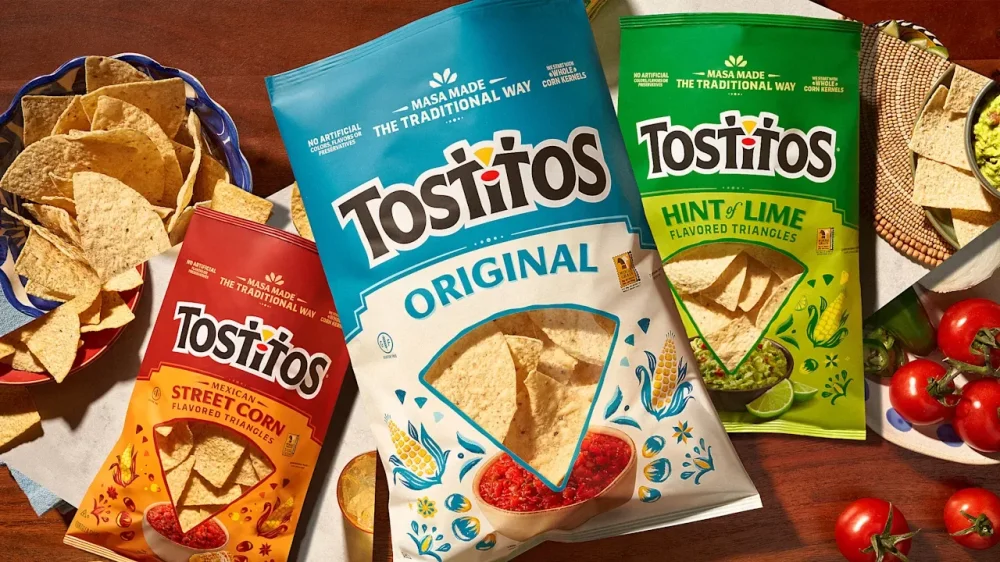
Last year, PepsiCo started printing real potatoes onto every bag of Lay’s. The reason? In a world where people are increasingly concerned about the provenance of their food, 42% of the population didn’t realize that the world’s most popular potato chip was made from potatoes. So they put a potato on the packaging. And now, the company is updating Tostitos bags—the most popular plain tortilla chip in the world—with a similar strategy. While Lay’s got a dose of potatoes, naturally, all Tostitos bags feature corn. “We started by being really honest with ourselves. The research was telling us that the old packaging wasn’t working—it was actually reinforcing a lot of the wrong perceptions,” writes Hernán Tantardini, CMO of PepsiCo Foods, over email. “People saw Tostitos as a party brand. The quality and craft story wasn’t coming through at all.” Technically speaking, Tostitos are classified as an ultra processed food, due to their use of refined seed oils. But they still feature a stupid simple and clear ingredient list: Corn, oil, and salt. 71% of consumers are reading labels more closely than before, and the front of the bag is a gateway to the back. The bags used to read “no artificial flavors, colors, or preservatives” right up top. Now they promise “Masa made in the traditional way,” with these other notes sidelined. The result is repositioning Tostitos as a more authentic and culturally-born product, anchoring Tostitos in the old way of doing things—which aside from signaling quality and cachet, tends to be more natural. As for the actual corn, that’s presented in an entirely different way than Lay’s. For Lay’s, PepsiCo photographed countless real potatoes in different presentations. For Tostitos, it opted for illustration—to tie it back to that idea of masa production, a complex process known as nixtamalization in which corn is treated with lime to make it more digestible and nutritious for consumption in tortillas, sopes, and other Mexican delicacies. “We looked at photography, but the more we explored it, the more it felt like it belonged to a different brand,” says Tantardini. “Tostitos has this warmth to it—this sense of joy and togetherness that’s been a part of its DNA forever. Photography felt too polished, too literal. It would’ve flattened something that’s actually quite live.” The illustration has an imperfect, hand painted feel—and your eye reads a human touch beneath the perfectly machined Tostitos wordmark. I find myself wishing that PepsiCo went even further, and embraced xilografía (the woodblock printing out of Mexico) with elements like the window frame or even subheading labels. But the two tone kernels and cobs of corn on Scoops and Street Corn varieties really are quite pretty for a mass market snack chip. While many of the colors are technically the same on the old and new packages, the chosen hues are softer and intentionally read warmer, with a basis in earth tones, according to the company. That said, Tostitos doesn’t read like some half-apologetic Trader Joe’s snack brand, unsure if it’s there to party or to apologize for the indulgence. The bags still read like a celebration. In a final, playful twist, the front window—which reveals the actual chips through the bag—now dips itself right into a large bowl of salsa or guacamole sitting below. (The old version featured photorealistic jarred Tostitos salsa on the side, like an overzealous advertisement.) This entire approach to craft could help Tostitos—which has ceded a few percentage points in sales volume since raising prices in 2022/23—compete with smaller batch brands that have cut ever so slightly into its market share. PepsiCo did validate the approach in test stores, while consumers will see the new rollout over the coming months. “From a business perspective, this is really about changing perception where it matters most,” says Tantardini. “If we can use packaging to clearly signal craft, quality, and care, we can rebuild confidence in the brand and lower the barrier for people who’ve drifted away because they didn’t realize the craft and care that goes into our chips and dips. That’s the opportunity. And that’s what we designed for.” View the full article
-
“And a cascade of lace here, here, and here.” I thwacked my pen against the notepad to emphasize each word while my cousin nodded vigorously. At 8 and 10, we carefully reviewed our wedding dress designs as if our big days were just moments away. While our parents prepped dinner, we rehearsed our grand bridal entry in painstaking detail. I’m probably not the only person who had this fantasy when I was little, but what I didn’t realize was just how that role-play would translate into the career that I have right now. It all started with my own elopement in 2021, and the subsequent blow-out bash a year later. My husband and I juggled countless chaotic spreadsheets, email chains, invoices, journals, and Post-its. I felt overwhelmed by the lack of tools to orchestrate this complex logistical feat, and I realized that I could make a living by fixing this chaos. My unconventional career path What I loved about weddings were the systems and the operational aspect. But in addition to planning a wedding, it took me a few jobs to understand that. The summer after I graduated from college, I worked as a tutor for middle and high school kids while I looked for a full-time job. Just days in, it became clear that the tutoring company was in full operational shambles. I started mapping out a plan to transition the company to electronic records, using homework assignments and practice flashcards. My next job was at a boutique marketing firm. A few months on the job, I realized it was on the scrappier end of the spectrum than I initially expected. Soon, the quirky operational novelties I had loved at first were starting to make me itch. I started to scheme to make things more efficient again. My next role allowed my skills to find a true home. I was leading a team of operations specialists at the unicorn startup, Carta. This experience would end up being crucial to my wedding planning business that I’d later start. Doing my best work in chaos The refrain that continued in my mind over the many months of wedding planning was, ‘Why is this so hard?’ When about 2.5 million people get married in the United States every year, it felt like I (and every engaged person I knew) had to reinvent the wheel while undergoing a deeply frustrating and time-consuming exercise. And as my husband and I lived through the organizational chaos of our wedding planning journey, I began to think to myself, ‘someone should really fix this problem. Someone who is obsessed with the details, thinks like an operator and a consumer, and someone who loves bringing clarity to chaos.’ That was the moment I began to connect the dots together. Without any context, someone can look at my professional history and feel disconnected. But at that moment, I’d realized that all my personal and professional experiences up to this point had led me to this challenge, and that I was ready to meet it head-on. Your interests can provide career clues Before I knew what careers existed, the common threads of how I thought and how I solved problems were there right in front of me. I took the concept of loving systems and organization as a personal interest rather than a professional secret weapon. At times, I interpreted my drive to improve operational circumstances as a distraction to the job at hand. There were also instances where it felt like an inconvenience to my managers (who weren’t always receptive to it). My previous roles didn’t grant me authority or purview over the messy systems or inefficient processes, but I couldn’t stop engaging with it. I didn’t realize how unique my perspective was. Identifying inefficiency came naturally and easily to me, so I naturally assumed that it was the same for other people. Why it’s important to pay attention to what you think When deciding how to approach the professional world, people ask us, ‘What are you passionate about?’ or ‘What do you want to be?’ We build resumes and write cover letters, highlighting the projects we led and the metrics we moved. But in the process, we overlook what feels natural. We’ve placed ourselves in organizations and teams and roles, but never stopped to ask ourselves the critical question: How do I think? What challenges are my brain hard-wired to solve? What is the recurring thread in my life that I haven’t paused long enough to see? The throughline is usually there. We just don’t think to look for it. I close my crisp notebook with a satisfying snap. I’ve just finished explaining to my cousin that the processional music must begin exactly as Mr. Bear arrives at the steps, so that it will reach the perfect crescendo as he reaches the altar. The chairs are straight. The timing is perfect. The experience unfolds exactly as planned. In hindsight, I wasn’t pretending to be a bride. I was designing flow, sequencing emotion, and building structure around what is supposed to be a joyful and effortless moment. Long before I had the language for systems, operations, or user experience, I was already drawn to the architecture beneath the celebration. Maybe you had your version of playing wedding as a child, and it looks completely different from mine. Look closely and think about what it is about that scenario that interests you. Because if you look closely, you might just have been rehearsing what you’re meant to do all along. View the full article