All Activity
- Past hour
-
 Olympians aren’t just physically exceptional—they’re masters at managing where their attention and energy go. Cognitive research finds a key link between working memory and performance: elite athletes are better able to regulate their memory and attention than their less-trained peers, and this ability predicts better performance under pressure. What separates peak performers isn’t just effort, but also the discipline to balance their mental load. In other words: their “thoughtload.” Consider thoughtload the invisible tax on your ability to perform. It consists of three problems that erode your effectiveness: The cognitive demands of competing priorities The emotional burdens of uncertain times The depleted energy reserves that make everything feel more difficult When thoughtload is high, even talented, motivated people underperform. But Olympians succeed because they refuse to carry unnecessary thoughtload. So how do you begin to reduce your own load? Four strategies can help. 1. Flip your focus Olympians know that keeping their attention focused on performance is critical to achievement. Take the U.S. figure skating team, who had more than a few members skip this year’s opening ceremonies to stay locked in. At work, we tend to do the opposite. Instead of starting the day with our eyes on the prize, we let our inbox and calendar dictate our priorities, hoping that enough activity will lead to success. Lowering your thoughtload means flipping that logic. Begin with the outcome you’re being rewarded for: more paid users, lower churn, a better accounts receivable balance. Then identify the few outputs that will move the needle and the activities that will get you there. 2. Budget your attention Elite athletes also dedicate consistent hours to training, no matter how assured their place is as a champion: practice is always on the calendar. But at work, we frequently allow ourselves to switch priorities or allocate our time in the wrong places. Think of your time as a finite resource to spend. Pick one critical outcome and decide how much of your attention it deserves; only after that, allocate your remaining time for other important outputs and even a few side pursuits. Defer, decline, or delegate everything else that doesn’t fit in your attention budget. 3. Use an emotion track Even with your gaze locked in, emotional distractions can come from within. For an athlete, it might be a fall in practice or a menacing new competitor. For you, it’s a missed target, a tense exchange, or an unwelcome piece of feedback. Emotions are unavoidable, but unprocessed emotions slow you down. Olympians understand that emotional baggage from yesterday’s disappointment can sabotage today’s performance; take the many that use sports psychologists to work through poor performances and devastating crashes. You can reduce the hold of your feelings with an emotion track, which helps pinpoint and reroute distracting emotions. It consists of four simple steps: place, name, question, act. Notice the place you’re experiencing the feeling, like sweaty palms or a racing heart. Name the feeling you’re experiencing precisely, like frustration or anxiety. Question the story you’re telling yourself about why you’re feeling that way, and if it’s rational. Choose one action that helps you move forward, whether it addresses the issue directly or just helps you get in a better headspace. 4. Hold an energy audit Energy management isn’t about indulgence or self-care. It’s about making the right investments, so you have the physical, mental, and emotional energy when you need it most. Olympians plan exertion and recovery with rigor. But at work, we often treat energy as unlimited until it suddenly runs out. There are back-to-back meetings, deadlines strung one after the next, new change initiatives starting before you’ve had the chance to embed the previous ones. All that adds up to fatigue that leads to poor decisions. Instead, try an energy audit. List three activities that reliably energize you and three that inevitably drain you. Then make small shifts to increase your investment in the first group and reduce your exposure to the second. Even minor changes can make your thoughtload feel much lighter over time. Elite performance isn’t reserved for elite athletes. It’s available to anyone willing to carry less so they can accomplish more. View the full article
-
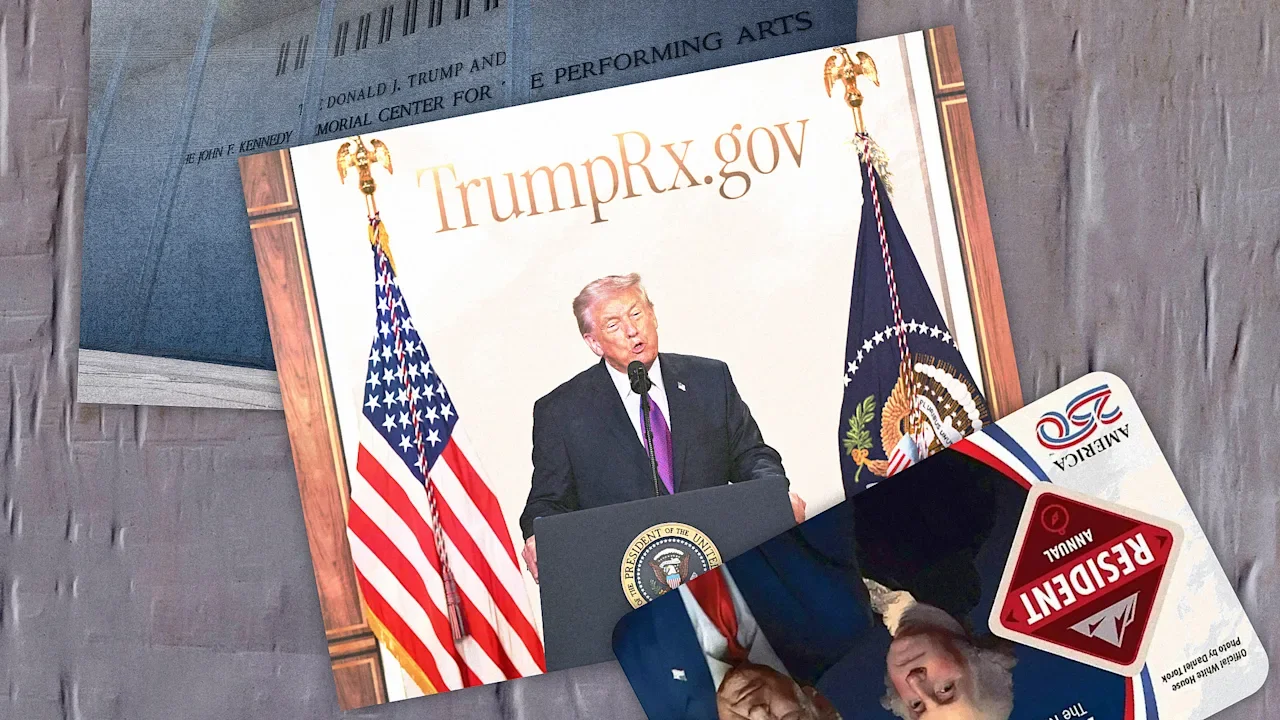
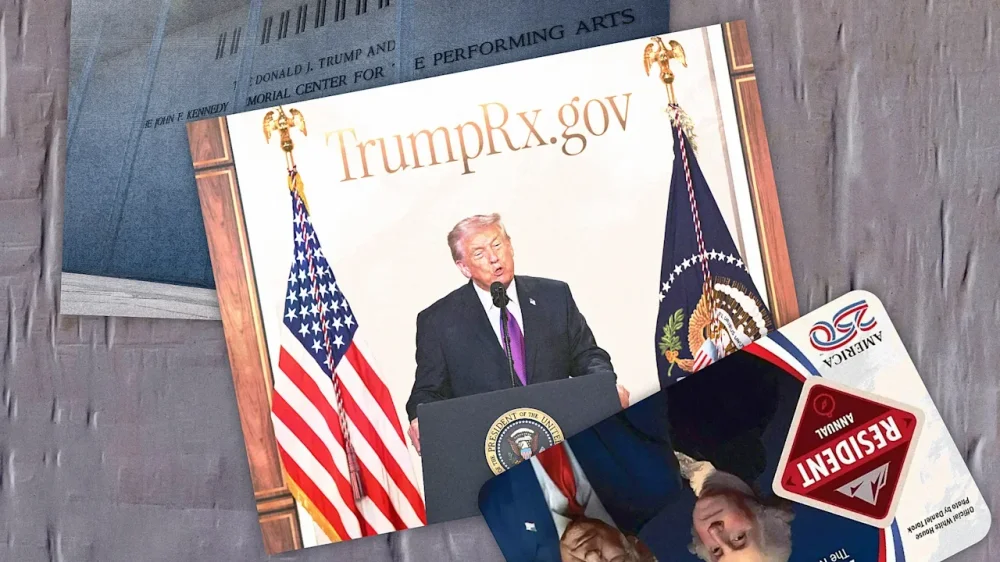
In November 2025, the The President administration announced a special park pass commemorating the nation’s 250th anniversary that featured images of two presidents: George Washington and Donald The President. Featuring the current president—in place of the National Park Service’s usual landscape pictures—triggered both a lawsuit and a social media movement to put stickers over The President’s face. As a businessman, The President has frequently emblazoned buildings and consumer products—shoelaces, an airline, an edition of the Bible, among many others—with his own name. During his current presidential term, his administration has put his name on numerous government properties—perhaps most famously the Kennedy Center, but also money, monuments, and military equipment. In January 2026, The President floated the idea Congress would rename both New York’s Penn Station and Washington’s Dulles International Airport after him. With Florida lawmakers considering renaming the airport near Mar-a-Lago after the president, the The President Organization has filed an application to trademark his name for use in airports and ancillary activities, although the company said it would not charge a fee in the case of the Palm Beach airport. As a communication professor who studies the First Amendment, I was intrigued by the federal actions and the protests they’ve triggered. Citizens certainly have the right to protest these decisions, like any government action. The First Amendment prevents the government from making laws that abridge freedom of speech. But does the federal government itself have freedom of speech? And can a president put his name and image wherever he wants? Free speech for government The answer to the first question has already been answered. In a series of rulings, the Supreme Court has upheld the government speech doctrine, which allows the government as speaker to say whatever it wants. Moreover, if the forum is governmental, the government may even be able to compel people to express its messages—for example, with public employee speech that is part of job duties. The 2006 Supreme Court decision establishing that principle involved a deputy district attorney who’d questioned the validity of a warrant, but the rule applies to other employees, such as teachers who have to offer instruction in state-mandated curricula. The court’s decisions in government speech cases imply that if people do not like the government speech, they should change the government with their votes. However, some scholars and advocates argue that this relatively new constitutional doctrine gives the government too much power to drown out other viewpoints in the marketplace of ideas. In most instances, the government cannot compel speech or force citizens to express a certain message. Compelled speech is not allowed when the government is forcing a citizen to endorse an ideological message. For example, the Supreme Court allowed a Jehovah’s Witness to cover the words “or Die” on his license plate, which included the New Hampshire state motto, “Live Free or Die.” The First Amendment is not absolute, and some government regulations will infringe on speech. The federal government has strict regulations on how the American flag should be disposed of, but it cannot punish someone who is burning a flag as a form of political protest. Government control of its own products What happens when the government itself hosts forums for citizen speech, such as placing monuments in a park or flying flags on government property? Can the government deny certain speech based on the speaker or message? In such cases, courts have had to decipher whether the forum was purely governmental. To do so, they examine the history of the forum in which the contested speech takes place, who controls the forum, and the public perception of who controls it. This brings us back to the question of The President’s name and likeness. As a constitutional matter, the The President administration can express itself as it sees fit under the government speech doctrine. But in some cases, the administration may be bound by statute or formal contracts, as with the legal battle over the naming of the Kennedy Center, which was named by an act of Congress. The lawsuit over the National Park passes claims that the administration is violating a federal law requiring that the winning entry in a public lands photo contest be used for the passes. Still, I believe it would be difficult to win a lawsuit claiming that the new passes are a form of compelled speech, with bearers of the pass arguing they are being forced, in effect, to endorse The President. Most people would likely see the park passes’ artwork as being controlled by the government and therefore a form of government expression, not a form of private expression. Can people cover up The President? But the The President administration may not be able to defend its policy of declaring passes null and void if the president’s image is covered by a sticker. Citizens protesting The President’s appearance by covering up the president’s image is protected speech, in my view. The government’s action to void the passes is likely a violation of the First Amendment. On the face of it, placing stickers on passes would appear to violate the long-standing Interior Department rule that passes are “void if altered.” Those regulations were content neutral and incidental to any particular message or cardholder. However, the updated policy, voiding the pass if The President’s image is covered or marred, is more suspect. The new rules seem to be a direct response to the protesters’ political speech and, as applied, primarily aim to affect these stickers and speakers. With an administration known for its social media savviness, it may not be convincing for officials to argue they did not know about the protest or that the policy was not a direct attempt to chill such speech. The government will have the right to put The President’s name and images on more government property in many cases, but most resulting political protests, in my view, will also be protected speech. Jason Zenor is an associate professor of mass communication at the State University of New York Oswego. This article is republished from The Conversation under a Creative Commons license. Read the original article. View the full article
-
The world of Wi-Fi never stands still. Here's what we've picked as the past week's most important Wi-Fi news - enjoy. The post Roundup: News from Synaptics, Cognitive Systems, WorldVue, and Bouygues Telecom appeared first on Wi-Fi NOW Global. View the full article
-
Many in Iran’s capital think it is only a matter of time until war returns to their livesView the full article
- Today
-
Building teamwork skills is vital for any organization, as collaboration and communication drive success. Engaging in fun games can greatly improve these skills among team members. From icebreakers that encourage sharing to problem-solving activities that promote critical thinking, these games cultivate trust and camaraderie. Comprehending the types of activities available is fundamental. So, which games can you implement to strengthen your team’s dynamics and enhance overall productivity? Key Takeaways “Human Knot” requires teamwork to untangle without breaking handholds, enhancing collaboration and communication skills. “Group Juggle” encourages coordination and engagement, promoting teamwork through a fun, fast-paced activity. “Trust Fall” builds reliance on team members, fostering trust and strengthening interpersonal bonds. “Two Truths and a Lie” allows personal sharing, helping team members learn about each other and build rapport. Problem-solving challenges stimulate critical thinking and creativity, enhancing collaboration under pressure while improving team cohesion. Why Team Bonding Matters Team bonding matters since it directly influences how well a team functions together. Engaging in team building activities for PE class can improve team cohesion, leading to a 21% increase in productivity when team members connect on a personal level. These activities promote a deeper appreciation for each other’s unique perspectives, which strengthens interpersonal relationships. Regular participation in team bonding exercises not merely improves communication but also builds trust, resulting in better overall team performance and morale. When you engage consistently in these activities, you boost collaboration and problem-solving skills, creating a more effective team dynamic. Furthermore, cultivating a positive work culture through team bonding greatly increases employee satisfaction and retention rates. In the end, prioritizing team bonding activities can lead to a more harmonious and productive environment, benefiting both individual team members and the organization as a whole. Icebreaker Team Bonding Games Engaging in icebreaker team bonding games can greatly boost communication and connection among team members. These activities, such as “Two Truths and a Lie,” encourage personal sharing, nurturing trust and openness vital for team cohesion. Similarly, games like “Human Knot” promote effective collaboration, as participants must work together to untangle without breaking their hold. Incorporating icebreakers into team gatherings can elevate morale and satisfaction, providing opportunities to learn about each other in a fun environment. This is particularly beneficial for teams involving elementary students, as it lays the groundwork for future collaboration. Game Purpose Benefits Two Truths and a Lie Build trust and openness Encourages sharing personal stories Human Knot Promote teamwork and problem-solving Improves communication skills Trust Fall Cultivate reliance on team members Strengthens bonds and reduces anxiety Group Juggle Improve coordination and teamwork Boosts engagement and cooperation Problem-Solving Team Bonding Games Even though icebreaker activities lay the foundation for team bonding, problem-solving team bonding games take collaboration to a new height by challenging participants to work together under pressure. These games improve critical thinking skills, requiring teams to tackle complex scenarios collectively. As you engage in these activities, you’ll find that they encourage creativity and innovation, pushing you to think outside the box and develop unique approaches to problem-solving. Effective communication becomes essential, as team members must articulate their ideas clearly and listen actively. By working together to overcome obstacles, you’ll build trust and strengthen interpersonal relationships, which leads to improved overall team dynamics. Additionally, participating in problem-solving team bonding games has been shown to increase team cohesion and productivity, contributing to a more positive work environment. In-Person Team Bonding Activities In-person team bonding activities play a crucial role in nurturing effective communication and building trust among team members. These gatherings promote face-to-face interactions, which are fundamental for enhancing collaboration. Engaging in physical games during these events, such as team building PE games like the Human Knot or the Marshmallow Challenge, energizes participants. These activities encourage a sense of community through shared experiences, which can greatly boost employee morale and satisfaction. Regularly scheduled in-person events make team members feel valued and connected, leading to improved productivity. Studies show that meaningful connections can increase productivity by up to 21%. Virtual Team Bonding Strategies As remote work becomes increasingly common, finding effective ways to encourage teamwork in a virtual environment is crucial. Virtual team bonding strategies adapt activities for online participation, ensuring engagement among remote team members. Utilizing video conferencing tools promotes communication and collaboration, connecting everyone in spite of physical distance. Regularly scheduled virtual bonding activities, like team vs team games, maintain morale and strengthen interpersonal relationships, contributing to a positive work culture. Incorporating digital platforms for interactive sessions encourages creativity and inclusivity, allowing all team members to participate irrespective of location. Creative online challenges and games, such as trivia contests or escape rooms, promote problem-solving skills and trust among team members. These activities not only improve team dynamics but likewise boost overall performance. By prioritizing these strategies, you can cultivate a cohesive and productive team, even in a virtual setting. Frequently Asked Questions What Are Some Games That Encourage Teamwork? To encourage teamwork, you can engage in several effective games. The Marshmallow Challenge has teams construct a tall structure from limited materials, promoting collaboration and creativity. In the Human Knot, participants untangle themselves as they hold hands, nurturing communication. Blind Drawing requires clear verbal instructions for drawing an object. Two Truths and a Lie helps team members learn about each other, whereas a Scavenger Hunt encourages strategic planning and cooperation in finding items. What Are Some Fun Team Building Activities for Work? When considering fun team-building activities for work, you might explore options like the Marshmallow Challenge, where you build a structure using limited materials, promoting creativity. Icebreaker games, such as “Two Truths and a Lie,” help team members share personal stories, enhancing trust. Furthermore, activities like “Human Knot” require collaboration to untangle, whereas scavenger hunts encourage strategic planning and teamwork, allowing colleagues to bond as they work toward common goals in a competitive atmosphere. What Is the 30 Seconds Game for Team Building? The 30 Seconds Game is a fast-paced activity where you and your team have 30 seconds to describe words or phrases without using the actual terms. This game improves your communication skills and quick thinking, as teammates must interpret your descriptions. It’s adaptable for various group sizes and can be played in different settings. What Is the 20 Questions Game for Team Building? The 20 Questions game involves one person thinking of an object as others ask yes-or-no questions to guess it within 20 questions. This activity promotes critical thinking, as you need to formulate clear questions based on the answers given. It improves communication skills, encourages collaboration, and nurtures teamwork, as participants share insights and strategies. Adaptable for in-person or virtual settings, the game likewise serves as an icebreaker, helping team members understand each other better. Conclusion Incorporating fun games into your team’s routine is essential for enhancing teamwork skills. By participating in icebreakers and problem-solving activities, you nurture communication, trust, and collaboration among members. Whether in-person or virtual, these games provide opportunities for employees to engage meaningfully, ultimately resulting in a more cohesive work environment. By prioritizing these activities, you invest in stronger interpersonal relationships that can greatly improve productivity and morale in the workplace. Image via Google Gemini This article, "Fun Games to Build Teamwork Skills" was first published on Small Business Trends View the full article
-
Building teamwork skills is vital for any organization, as collaboration and communication drive success. Engaging in fun games can greatly improve these skills among team members. From icebreakers that encourage sharing to problem-solving activities that promote critical thinking, these games cultivate trust and camaraderie. Comprehending the types of activities available is fundamental. So, which games can you implement to strengthen your team’s dynamics and enhance overall productivity? Key Takeaways “Human Knot” requires teamwork to untangle without breaking handholds, enhancing collaboration and communication skills. “Group Juggle” encourages coordination and engagement, promoting teamwork through a fun, fast-paced activity. “Trust Fall” builds reliance on team members, fostering trust and strengthening interpersonal bonds. “Two Truths and a Lie” allows personal sharing, helping team members learn about each other and build rapport. Problem-solving challenges stimulate critical thinking and creativity, enhancing collaboration under pressure while improving team cohesion. Why Team Bonding Matters Team bonding matters since it directly influences how well a team functions together. Engaging in team building activities for PE class can improve team cohesion, leading to a 21% increase in productivity when team members connect on a personal level. These activities promote a deeper appreciation for each other’s unique perspectives, which strengthens interpersonal relationships. Regular participation in team bonding exercises not merely improves communication but also builds trust, resulting in better overall team performance and morale. When you engage consistently in these activities, you boost collaboration and problem-solving skills, creating a more effective team dynamic. Furthermore, cultivating a positive work culture through team bonding greatly increases employee satisfaction and retention rates. In the end, prioritizing team bonding activities can lead to a more harmonious and productive environment, benefiting both individual team members and the organization as a whole. Icebreaker Team Bonding Games Engaging in icebreaker team bonding games can greatly boost communication and connection among team members. These activities, such as “Two Truths and a Lie,” encourage personal sharing, nurturing trust and openness vital for team cohesion. Similarly, games like “Human Knot” promote effective collaboration, as participants must work together to untangle without breaking their hold. Incorporating icebreakers into team gatherings can elevate morale and satisfaction, providing opportunities to learn about each other in a fun environment. This is particularly beneficial for teams involving elementary students, as it lays the groundwork for future collaboration. Game Purpose Benefits Two Truths and a Lie Build trust and openness Encourages sharing personal stories Human Knot Promote teamwork and problem-solving Improves communication skills Trust Fall Cultivate reliance on team members Strengthens bonds and reduces anxiety Group Juggle Improve coordination and teamwork Boosts engagement and cooperation Problem-Solving Team Bonding Games Even though icebreaker activities lay the foundation for team bonding, problem-solving team bonding games take collaboration to a new height by challenging participants to work together under pressure. These games improve critical thinking skills, requiring teams to tackle complex scenarios collectively. As you engage in these activities, you’ll find that they encourage creativity and innovation, pushing you to think outside the box and develop unique approaches to problem-solving. Effective communication becomes essential, as team members must articulate their ideas clearly and listen actively. By working together to overcome obstacles, you’ll build trust and strengthen interpersonal relationships, which leads to improved overall team dynamics. Additionally, participating in problem-solving team bonding games has been shown to increase team cohesion and productivity, contributing to a more positive work environment. In-Person Team Bonding Activities In-person team bonding activities play a crucial role in nurturing effective communication and building trust among team members. These gatherings promote face-to-face interactions, which are fundamental for enhancing collaboration. Engaging in physical games during these events, such as team building PE games like the Human Knot or the Marshmallow Challenge, energizes participants. These activities encourage a sense of community through shared experiences, which can greatly boost employee morale and satisfaction. Regularly scheduled in-person events make team members feel valued and connected, leading to improved productivity. Studies show that meaningful connections can increase productivity by up to 21%. Virtual Team Bonding Strategies As remote work becomes increasingly common, finding effective ways to encourage teamwork in a virtual environment is crucial. Virtual team bonding strategies adapt activities for online participation, ensuring engagement among remote team members. Utilizing video conferencing tools promotes communication and collaboration, connecting everyone in spite of physical distance. Regularly scheduled virtual bonding activities, like team vs team games, maintain morale and strengthen interpersonal relationships, contributing to a positive work culture. Incorporating digital platforms for interactive sessions encourages creativity and inclusivity, allowing all team members to participate irrespective of location. Creative online challenges and games, such as trivia contests or escape rooms, promote problem-solving skills and trust among team members. These activities not only improve team dynamics but likewise boost overall performance. By prioritizing these strategies, you can cultivate a cohesive and productive team, even in a virtual setting. Frequently Asked Questions What Are Some Games That Encourage Teamwork? To encourage teamwork, you can engage in several effective games. The Marshmallow Challenge has teams construct a tall structure from limited materials, promoting collaboration and creativity. In the Human Knot, participants untangle themselves as they hold hands, nurturing communication. Blind Drawing requires clear verbal instructions for drawing an object. Two Truths and a Lie helps team members learn about each other, whereas a Scavenger Hunt encourages strategic planning and cooperation in finding items. What Are Some Fun Team Building Activities for Work? When considering fun team-building activities for work, you might explore options like the Marshmallow Challenge, where you build a structure using limited materials, promoting creativity. Icebreaker games, such as “Two Truths and a Lie,” help team members share personal stories, enhancing trust. Furthermore, activities like “Human Knot” require collaboration to untangle, whereas scavenger hunts encourage strategic planning and teamwork, allowing colleagues to bond as they work toward common goals in a competitive atmosphere. What Is the 30 Seconds Game for Team Building? The 30 Seconds Game is a fast-paced activity where you and your team have 30 seconds to describe words or phrases without using the actual terms. This game improves your communication skills and quick thinking, as teammates must interpret your descriptions. It’s adaptable for various group sizes and can be played in different settings. What Is the 20 Questions Game for Team Building? The 20 Questions game involves one person thinking of an object as others ask yes-or-no questions to guess it within 20 questions. This activity promotes critical thinking, as you need to formulate clear questions based on the answers given. It improves communication skills, encourages collaboration, and nurtures teamwork, as participants share insights and strategies. Adaptable for in-person or virtual settings, the game likewise serves as an icebreaker, helping team members understand each other better. Conclusion Incorporating fun games into your team’s routine is essential for enhancing teamwork skills. By participating in icebreakers and problem-solving activities, you nurture communication, trust, and collaboration among members. Whether in-person or virtual, these games provide opportunities for employees to engage meaningfully, ultimately resulting in a more cohesive work environment. By prioritizing these activities, you invest in stronger interpersonal relationships that can greatly improve productivity and morale in the workplace. Image via Google Gemini This article, "Fun Games to Build Teamwork Skills" was first published on Small Business Trends View the full article
-
US infrastructure investor hopes to use Southern Marinas as launch pad for further acquisitions in sectorView the full article
-
Airline has offered to upgrade rival carrier’s members to a higher status during February campaignView the full article
-
Most work in tech sector with top destinations the UAE, followed by Spain and the US, according to RathbonesView the full article
-
An employee payroll system is a vital tool for managing payroll tasks efficiently. It automates wage calculations based on hours worked or salaries, applies tax deductions, and generates detailed pay statements. This system operates in three key phases: pre-payroll, actual payroll, and post-payroll. Each phase guarantees accurate employee payments and compliance with regulations. Comprehending how these systems function can help you make informed decisions about payroll management, which is fundamental for any organization. Key Takeaways An employee payroll system automates the management of payroll tasks, ensuring accurate and timely payments to employees. It calculates wages, tracks hours worked, and manages tax deductions and other withholdings. The payroll process consists of pre-payroll, actual payroll, and post-payroll phases to ensure compliance and accuracy. Payroll systems can be manual, software-based, online, or outsourced, each with unique benefits and challenges. Key features include automation, tax compliance, integration capabilities, and employee self-service portals for transparency. Definition of an Employee Payroll System An employee payroll system serves as an important tool for businesses, automating various aspects of payroll management. This software application streamlines how you process pay for your workforce by calculating wages, tracking hours worked, and managing deductions for taxes and other withholdings. By providing detailed pay statements, or workforce paystubs, it guarantees employees receive accurate and timely payments. The system’s flexibility accommodates various pay structures, including hourly, salary, commission, and piece rate, which is crucial for different employment types. Furthermore, it helps maintain compliance with federal, state, and local labor laws, automatically updating tax rates and regulations to reduce the risk of penalties. Many employee payroll systems additionally feature self-service portals, empowering employees to access their pay information and manage personal details efficiently. Importance of Payroll Systems Payroll systems play a crucial role in the smooth operation of any business by guaranteeing that employees are paid accurately and on time. Their importance extends beyond simple payments, impacting various aspects of your organization: Enhanced Morale: Timely payments build trust and boost employee morale. Tax Compliance: Automated tax calculations help you adhere to local, state, and federal laws, preventing costly penalties. Streamlined Processes: By reducing administrative burdens, payroll systems free up HR teams to focus on strategic initiatives. Transparency: Self-service portals allow employees to track attendance, access pay statements, and manage benefits, encouraging engagement. Furthermore, payroll systems facilitate compliance with labor laws and recordkeeping regulations, protecting your organization from legal issues and wage claims. How Payroll Systems Benefit Employees Payroll systems play an essential role in ensuring you receive your payments on time and accurately, which can greatly reduce your financial stress. With features like self-service portals, you can easily track your hours and access important pay information, promoting transparency in your compensation. This level of clarity not merely builds trust but additionally improves your overall job satisfaction and morale. Timely Payments Assurance When employees can rely on timely payments, their trust in the employer strengthens considerably. Payroll systems automate wage calculations and adhere to set schedules, ensuring that you receive your paycheck on time. This reliability boosts your satisfaction and confidence in your workplace. Here’s how timely payments benefit you: Accurate Tracking: Your hours worked are recorded accurately, preventing delays in salary distribution. Direct Deposit: Funds transfer quickly and securely to your bank account, eliminating manual check processing. Automatic Tax Deductions: Payroll systems handle tax withholding, avoiding complications at year-end. Financial Peace of Mind: You gain reassurance knowing your payments are consistent and compliant with regulations. With these features, you can focus on your work, knowing your compensation is managed effectively. Transparency in Compensation Grasping your compensation is crucial for building trust and satisfaction in the workplace, especially since transparency in payroll systems plays a significant role in this process. Payroll systems offer self-service portals, letting you view pay stubs, tax deductions, and benefits. This transparency helps you understand your financial situation better. Automated tax withholding prevents year-end surprises, enhancing your confidence. Accurate and timely payroll processing guarantees you receive your wages on schedule, boosting job satisfaction. Detailed records are accessible to both you and management, promoting accountability. Regular reporting features allow you to track earnings and benefits over time, showcasing your financial growth. Feature Benefit to You Emotional Impact Self-service portal Easy access to pay info Empowerment Automated deductions Avoid surprises Security Timely payments Reliability Trust Detailed records Clarity in compensation Confidence Overview of Payroll Management Software In an increasingly complex business environment, utilizing payroll management software can greatly streamline your payroll processes. This software automates essential tasks, ensuring accuracy and compliance. Here are some key features you can expect: Automated Calculations: It calculates employee wages during considering deductions for federal, state, and local taxes, minimizing manual errors. Time Tracking Integration: Accurate recording of hours worked allows for proper pay calculations, whether hourly, salary, or commission-based. Employee Self-Service Portals: Staff can view pay statements, track attendance, and access tax documents, enhancing transparency. Detailed Reporting: Generate reports on labor costs and payroll expenses, aiding in financial planning and compliance with reporting requirements. Additionally, this software often includes automated alerts for changes in tax regulations, helping you adapt quickly and avoid potential penalties. How Payroll Systems Work Comprehending how payroll systems function is crucial for precise employee compensation. These systems calculate wages based on hours worked or set salaries, meanwhile managing employee data effectively. Payroll Calculation Process To guarantee accurate payroll calculations, the process begins with gathering essential input data, such as hours worked and pay rates, along with any applicable deductions. This data must be validated against company policies before processing. The payroll system then calculates gross pay by: Multiplying hours worked by the pay rate. Including bonuses or commissions applicable for the pay period. Deducting required taxes like federal, state, and local taxes. Subtracting other deductions, such as Social Security and retirement contributions, to arrive at net pay. Once calculations are complete, the system verifies them through reconciliation processes, ensuring accuracy and compliance. Finally, it facilitates timely payments to employees, maintaining detailed records for future audits and reporting. Employee Data Management Effective employee data management is vital for the smooth operation of payroll systems, as it assures that accurate and up-to-date information is always available for processing payroll. This process involves collecting and maintaining important employee details, such as personal information, tax forms, and compensation agreements. Below is a table summarizing key aspects of employee data management: Data Type Purpose Importance Personal Details Identifies employees Guarantees accurate record-keeping Time Tracking Data Calculates gross pay Assures fair compensation Deductions Complies with regulations Guarantees legal adherence Employee Portals Provides access to pay stubs, updates Improves employee engagement Reporting Data Generates compliance reports Supports labor law adherence Accurate management of this data streamlines payroll processing and assures compliance with labor laws. Types of Payroll Systems When considering the various types of payroll systems, it’s essential to recognize that each option offers distinct advantages and drawbacks, depending on your organization’s size and specific needs. Here are four common payroll systems you might explore: Manual Payroll System: A low-cost option using spreadsheets, but it’s prone to errors and time-consuming, making it less suitable for larger organizations. Payroll Software System: This automated solution minimizes calculation errors and streamlines processes, requiring an upfront investment and regular updates for compliance. Online Payroll Services: Cloud-based systems provide accessibility from anywhere and integrate with other software, though they need a stable internet connection and may incur subscription costs. Outsourced Payroll Systems: Hiring third-party providers to manage payroll can save time, but it may raise concerns about data security and could be more expensive than in-house solutions. Phases of the Payroll Process Comprehending the phases of the payroll process is crucial for guaranteeing accurate and timely employee compensation. The payroll process consists of three main phases: pre-payroll, actual payroll, and post-payroll activities. Each phase demands careful management and attention to detail. Phase Key Activities Pre-Payroll Gather and validate data like hours worked Actual Payroll Calculate gross pay, deduct taxes, verify data Post-Payroll Process deductions, maintain records, generate reports In the pre-payroll phase, you’ll collect input data to guarantee accuracy. The actual payroll phase focuses on calculations and deductions, making certain everything is correct before distribution. Finally, the post-payroll phase involves compliance with statutory requirements, which includes maintaining records and generating reports for management review. Effective payroll management integrates these phases, guaranteeing timely compensation during adherence to legal obligations. Pre-Payroll Activities Before plunging into payroll processing, it’s essential to outline company policies related to pay, leave, benefits, and attendance. Establishing clear guidelines sets the stage for smooth operations. Here are the key pre-payroll activities you need to focus on: Define Policies: Document your company’s stance on pay rates, leave entitlements, and employee benefits. Gather Input Data: Collaborate with various departments to collect accurate salary and attendance information. Conduct Input Validation Checks: Verify that all data aligns with company policy, ensuring employee status is correct before payroll is processed. Utilize Payroll Software: Implementing software can streamline managing leave, attendance, and improve employee self-service. Ensuring that these pre-payroll activities are thoroughly executed helps maintain compliance and efficiency, paving the way for a successful actual payroll process. Actual Payroll Process In the actual payroll process, you calculate employee wages based on hours worked and salary agreements, making certain to apply the necessary deductions to arrive at net pay. Verification is essential here, as it helps you reconcile payroll values to catch any potential errors before payments are issued. Timely processing is additionally important; completing payroll on schedule not merely cultivates employee trust but likewise guarantees smooth operations. Payroll Calculation Steps Comprehension of the payroll calculation steps is vital for accurate and timely payment of employees. The actual payroll process involves several key steps: Input Data: Gather hours worked and salary agreements to calculate gross pay. Deductions: Calculate applicable taxes and deductions, such as federal, state, and local taxes, along with Social Security and Medicare. Net Pay: Subtract these deductions from gross pay to arrive at the employee’s net pay. Timeliness: Confirm processing aligns with the established payroll schedule to maintain employee trust and satisfaction. Verification Process Importance Though the verification process may seem like an extra step in the payroll expedition, it plays a crucial role in guaranteeing the accuracy of employee payments. This critical step involves reconciling payroll calculations with input data, allowing you to double-check entries related to hours worked, pay rates, and deductions before finalizing payments. Timely verification helps maintain employee trust by making sure payroll is processed correctly, minimizing discrepancies in paychecks. By utilizing payroll systems, you can automate many verification tasks, greatly reducing the risk of human error and providing real-time alerts for inconsistencies. A thorough verification process additionally guarantees compliance with tax regulations, as inaccuracies can lead to penalties and issues with government reporting, safeguarding your organization’s financial health. Timely Processing Necessity Timely processing of payroll is vital for sustaining employee trust and satisfaction, as delays can create financial stress for staff members. To guarantee that payroll is processed efficiently and correctly, consider these fundamental steps: Calculate employee wages accurately, considering hours worked and pay rates. Deduct taxes and other contributions, guaranteeing compliance with regulations. Determine net pay, which is the amount employees will actually receive. Verify all calculations to prevent errors and reconcile figures before issuing payments. Using an automated payroll system can streamline these processes, reducing manual errors and enhancing timeliness. Furthermore, maintaining confidentiality of payroll information is paramount, as secure handling of sensitive data protects employee privacy and meets regulatory requirements. Post-Payroll Activities Once payroll is completed, several important post-payroll activities must take place to guarantee compliance and financial accuracy. First, you need to process necessary deductions like EPF, TDS, and ESI, ensuring these are reported to the relevant government agencies. This step is essential for meeting statutory requirements. Next, maintain accurate payroll accounting by recording all transactions in your company’s accounting system, which supports financial transparency and is critical during audits. Salaries are commonly distributed through direct deposit, checks, or cash, with direct deposit being the most efficient option. After payroll processing, generate a bank advice statement to provide a detailed account of employee salary payments, aiding in record-keeping. Finally, compile reports on employee costs for management review; this information is crucial for making informed decisions about budgeting and resource allocation in your organization. Pros and Cons of Payroll Systems When you consider payroll systems, it’s essential to weigh their advantages against potential challenges. Conversely, these systems can save you time and reduce errors, enhancing employee satisfaction with timely payments. However, you may encounter issues like inaccurate data entry and compliance risks if your system isn’t flexible enough to adapt as your business grows. Advantages of Payroll Systems Payroll systems offer substantial benefits for businesses looking to streamline their payroll processes. By automating calculations and wage distribution, you can save significant time and reduce manual effort. Here are some key advantages: Enhanced Accuracy: Minimizes human errors, reducing costly payroll mistakes. Integration Potential: Works seamlessly with time tracking tools, ensuring precise wage calculations based on actual hours. Compliance Support: Facilitates timely tax deductions, helping you maintain compliance with various labor laws and avoiding penalties. Efficiency Boost: Streamlines payroll operations, allowing you to focus on core business activities rather than administrative tasks. These advantages make payroll systems a valuable asset for businesses seeking efficiency and reliability in their payroll management. Challenges of Payroll Systems Though payroll systems offer numerous advantages, they likewise come with their own set of challenges that businesses must navigate. One major issue is the reliance on accurate input data; even minor data entry errors can lead to significant payroll inaccuracies and compliance problems. You’ll need thorough verification processes to catch these mistakes. Furthermore, payroll systems must keep up with ever-changing tax laws and regulations, which can complicate compliance and require regular updates to guarantee accuracy. Scalability is another concern; some systems may struggle to accommodate a growing workforce or diverse pay structures, potentially hindering your business’s growth. Staying aware of these challenges can help you choose the right payroll system for your needs. Common Challenges in Payroll Management Managing payroll can be a complex task, especially as businesses face numerous challenges that can affect their efficiency and compliance. Here are some common hurdles you might encounter: Tax Regulation Updates: Keeping up with frequent changes can lead to compliance issues if not properly monitored. Integration Issues: When payroll systems aren’t compatible with your existing business software, data sharing becomes complicated and prone to errors. Payroll Accuracy: Bugs in the system or incorrect data entry can result in overpayments or underpayments, which can damage employee trust and satisfaction. Data Security: Handling sensitive employee information increases the need for robust security measures to prevent breaches and protect privacy. Navigating these challenges requires diligence and effective strategies to guarantee your payroll process runs smoothly and complies with regulations. Key Features to Consider When Choosing a Payroll System When selecting a payroll system, it’s important to contemplate various key features that can greatly improve your payroll management process. Automation is crucial, as it streamlines operations and reduces manual tasks, minimizing calculation errors. Look for tax compliance capabilities, which guarantee the system automatically calculates and withholds federal, state, and local taxes, helping you avoid penalties and stay compliant with regulations. Integration with time tracking tools is another significant feature, as it directly pulls employee hours into the payroll system, eliminating manual entry errors. Furthermore, consider employee self-service portals that improve transparency; these allow employees to access their pay information, track leave balances, and download tax documents, leading to enhanced satisfaction. Finally, robust reporting features are critical for generating detailed payroll reports, assisting in budgeting and compliance, whilst providing management insights into labor costs. Next Steps for Implementing a Payroll System Implementing a payroll system requires careful planning and execution to guarantee it meets your organization’s needs. Start by evaluating your business needs, like employee count and payroll complexity. Next, research and compare different payroll systems to find one that fits your requirements. Here are the next steps to follow: Evaluate Options: Decide between in-house payroll, software solutions, or outsourcing payroll services based on your evaluation. Establish a Payroll Policy: Create a clear policy that outlines compensation, pay schedules, and employee benefits. Gather Employee Information: Collect crucial details such as tax documents and direct deposit information to guarantee accurate processing. Train Staff: Provide training for HR personnel and staff on the chosen system to maximize functionality and guarantee compliance with labor laws. Frequently Asked Questions What Is an Employee Payroll System? An employee payroll system automates wage calculations and guarantees employees receive timely payments. It handles various payment types like salaries and bonuses, whereas it too calculates deductions for taxes and Social Security. You benefit from features like self-service portals, allowing you to view pay statements and access tax documents easily. These systems help businesses comply with labor laws, making it easier to track payroll data and avoid legal issues or penalties. How Does Employee Payroll Work? Employee payroll works by calculating gross wages based on hours worked or salaries, incorporating overtime, bonuses, and commissions. It automatically deducts taxes and other contributions, guaranteeing compliance with legal requirements. You receive your net pay through direct deposit or checks on scheduled paydays. The system additionally maintains detailed records for audits and compliance. Regular updates are vital to reflect changes in tax rates, labor laws, and employee statuses to guarantee ongoing accuracy. What Are the Three Types of Payroll? There are three main types of payroll systems you can choose from: Manual Payroll, Payroll Software, and Outsourced Payroll. Manual Payroll involves spreadsheets and calculations done by hand, which can be time-consuming and error-prone. Payroll Software automates these processes, reducing mistakes but requiring an upfront investment. Outsourced Payroll relies on third-party providers to handle everything, offering expertise but potentially raising data security concerns and costs. Each option has specific advantages and challenges to evaluate. How Do You Set up a Payroll System? To set up a payroll system, you’ll first need to obtain an Employer Identification Number (EIN) from the IRS. Next, gather crucial employee tax documents, like Form W-4, for accurate withholding. Choose a payroll schedule that suits your cash flow, such as weekly or bi-weekly. Decide whether to manage payroll in-house or outsource it, considering costs and workforce size. Finally, document compensation terms and guarantee employees understand these details for compliance. Conclusion In conclusion, an employee payroll system is crucial for managing payroll efficiently and accurately. By automating calculations and deductions, it streamlines the payroll process and guarantees employees are paid on time. Although there are pros and cons to evaluate, the benefits often outweigh the challenges. When selecting a payroll system, focus on key features that meet your organization’s needs. Implementing a reliable payroll system can improve compliance, boost financial transparency, and eventually contribute to a more organized workplace. Image via Google Gemini This article, "What Is an Employee Payroll System and How Does It Work?" was first published on Small Business Trends View the full article
-
An employee payroll system is a vital tool for managing payroll tasks efficiently. It automates wage calculations based on hours worked or salaries, applies tax deductions, and generates detailed pay statements. This system operates in three key phases: pre-payroll, actual payroll, and post-payroll. Each phase guarantees accurate employee payments and compliance with regulations. Comprehending how these systems function can help you make informed decisions about payroll management, which is fundamental for any organization. Key Takeaways An employee payroll system automates the management of payroll tasks, ensuring accurate and timely payments to employees. It calculates wages, tracks hours worked, and manages tax deductions and other withholdings. The payroll process consists of pre-payroll, actual payroll, and post-payroll phases to ensure compliance and accuracy. Payroll systems can be manual, software-based, online, or outsourced, each with unique benefits and challenges. Key features include automation, tax compliance, integration capabilities, and employee self-service portals for transparency. Definition of an Employee Payroll System An employee payroll system serves as an important tool for businesses, automating various aspects of payroll management. This software application streamlines how you process pay for your workforce by calculating wages, tracking hours worked, and managing deductions for taxes and other withholdings. By providing detailed pay statements, or workforce paystubs, it guarantees employees receive accurate and timely payments. The system’s flexibility accommodates various pay structures, including hourly, salary, commission, and piece rate, which is crucial for different employment types. Furthermore, it helps maintain compliance with federal, state, and local labor laws, automatically updating tax rates and regulations to reduce the risk of penalties. Many employee payroll systems additionally feature self-service portals, empowering employees to access their pay information and manage personal details efficiently. Importance of Payroll Systems Payroll systems play a crucial role in the smooth operation of any business by guaranteeing that employees are paid accurately and on time. Their importance extends beyond simple payments, impacting various aspects of your organization: Enhanced Morale: Timely payments build trust and boost employee morale. Tax Compliance: Automated tax calculations help you adhere to local, state, and federal laws, preventing costly penalties. Streamlined Processes: By reducing administrative burdens, payroll systems free up HR teams to focus on strategic initiatives. Transparency: Self-service portals allow employees to track attendance, access pay statements, and manage benefits, encouraging engagement. Furthermore, payroll systems facilitate compliance with labor laws and recordkeeping regulations, protecting your organization from legal issues and wage claims. How Payroll Systems Benefit Employees Payroll systems play an essential role in ensuring you receive your payments on time and accurately, which can greatly reduce your financial stress. With features like self-service portals, you can easily track your hours and access important pay information, promoting transparency in your compensation. This level of clarity not merely builds trust but additionally improves your overall job satisfaction and morale. Timely Payments Assurance When employees can rely on timely payments, their trust in the employer strengthens considerably. Payroll systems automate wage calculations and adhere to set schedules, ensuring that you receive your paycheck on time. This reliability boosts your satisfaction and confidence in your workplace. Here’s how timely payments benefit you: Accurate Tracking: Your hours worked are recorded accurately, preventing delays in salary distribution. Direct Deposit: Funds transfer quickly and securely to your bank account, eliminating manual check processing. Automatic Tax Deductions: Payroll systems handle tax withholding, avoiding complications at year-end. Financial Peace of Mind: You gain reassurance knowing your payments are consistent and compliant with regulations. With these features, you can focus on your work, knowing your compensation is managed effectively. Transparency in Compensation Grasping your compensation is crucial for building trust and satisfaction in the workplace, especially since transparency in payroll systems plays a significant role in this process. Payroll systems offer self-service portals, letting you view pay stubs, tax deductions, and benefits. This transparency helps you understand your financial situation better. Automated tax withholding prevents year-end surprises, enhancing your confidence. Accurate and timely payroll processing guarantees you receive your wages on schedule, boosting job satisfaction. Detailed records are accessible to both you and management, promoting accountability. Regular reporting features allow you to track earnings and benefits over time, showcasing your financial growth. Feature Benefit to You Emotional Impact Self-service portal Easy access to pay info Empowerment Automated deductions Avoid surprises Security Timely payments Reliability Trust Detailed records Clarity in compensation Confidence Overview of Payroll Management Software In an increasingly complex business environment, utilizing payroll management software can greatly streamline your payroll processes. This software automates essential tasks, ensuring accuracy and compliance. Here are some key features you can expect: Automated Calculations: It calculates employee wages during considering deductions for federal, state, and local taxes, minimizing manual errors. Time Tracking Integration: Accurate recording of hours worked allows for proper pay calculations, whether hourly, salary, or commission-based. Employee Self-Service Portals: Staff can view pay statements, track attendance, and access tax documents, enhancing transparency. Detailed Reporting: Generate reports on labor costs and payroll expenses, aiding in financial planning and compliance with reporting requirements. Additionally, this software often includes automated alerts for changes in tax regulations, helping you adapt quickly and avoid potential penalties. How Payroll Systems Work Comprehending how payroll systems function is crucial for precise employee compensation. These systems calculate wages based on hours worked or set salaries, meanwhile managing employee data effectively. Payroll Calculation Process To guarantee accurate payroll calculations, the process begins with gathering essential input data, such as hours worked and pay rates, along with any applicable deductions. This data must be validated against company policies before processing. The payroll system then calculates gross pay by: Multiplying hours worked by the pay rate. Including bonuses or commissions applicable for the pay period. Deducting required taxes like federal, state, and local taxes. Subtracting other deductions, such as Social Security and retirement contributions, to arrive at net pay. Once calculations are complete, the system verifies them through reconciliation processes, ensuring accuracy and compliance. Finally, it facilitates timely payments to employees, maintaining detailed records for future audits and reporting. Employee Data Management Effective employee data management is vital for the smooth operation of payroll systems, as it assures that accurate and up-to-date information is always available for processing payroll. This process involves collecting and maintaining important employee details, such as personal information, tax forms, and compensation agreements. Below is a table summarizing key aspects of employee data management: Data Type Purpose Importance Personal Details Identifies employees Guarantees accurate record-keeping Time Tracking Data Calculates gross pay Assures fair compensation Deductions Complies with regulations Guarantees legal adherence Employee Portals Provides access to pay stubs, updates Improves employee engagement Reporting Data Generates compliance reports Supports labor law adherence Accurate management of this data streamlines payroll processing and assures compliance with labor laws. Types of Payroll Systems When considering the various types of payroll systems, it’s essential to recognize that each option offers distinct advantages and drawbacks, depending on your organization’s size and specific needs. Here are four common payroll systems you might explore: Manual Payroll System: A low-cost option using spreadsheets, but it’s prone to errors and time-consuming, making it less suitable for larger organizations. Payroll Software System: This automated solution minimizes calculation errors and streamlines processes, requiring an upfront investment and regular updates for compliance. Online Payroll Services: Cloud-based systems provide accessibility from anywhere and integrate with other software, though they need a stable internet connection and may incur subscription costs. Outsourced Payroll Systems: Hiring third-party providers to manage payroll can save time, but it may raise concerns about data security and could be more expensive than in-house solutions. Phases of the Payroll Process Comprehending the phases of the payroll process is crucial for guaranteeing accurate and timely employee compensation. The payroll process consists of three main phases: pre-payroll, actual payroll, and post-payroll activities. Each phase demands careful management and attention to detail. Phase Key Activities Pre-Payroll Gather and validate data like hours worked Actual Payroll Calculate gross pay, deduct taxes, verify data Post-Payroll Process deductions, maintain records, generate reports In the pre-payroll phase, you’ll collect input data to guarantee accuracy. The actual payroll phase focuses on calculations and deductions, making certain everything is correct before distribution. Finally, the post-payroll phase involves compliance with statutory requirements, which includes maintaining records and generating reports for management review. Effective payroll management integrates these phases, guaranteeing timely compensation during adherence to legal obligations. Pre-Payroll Activities Before plunging into payroll processing, it’s essential to outline company policies related to pay, leave, benefits, and attendance. Establishing clear guidelines sets the stage for smooth operations. Here are the key pre-payroll activities you need to focus on: Define Policies: Document your company’s stance on pay rates, leave entitlements, and employee benefits. Gather Input Data: Collaborate with various departments to collect accurate salary and attendance information. Conduct Input Validation Checks: Verify that all data aligns with company policy, ensuring employee status is correct before payroll is processed. Utilize Payroll Software: Implementing software can streamline managing leave, attendance, and improve employee self-service. Ensuring that these pre-payroll activities are thoroughly executed helps maintain compliance and efficiency, paving the way for a successful actual payroll process. Actual Payroll Process In the actual payroll process, you calculate employee wages based on hours worked and salary agreements, making certain to apply the necessary deductions to arrive at net pay. Verification is essential here, as it helps you reconcile payroll values to catch any potential errors before payments are issued. Timely processing is additionally important; completing payroll on schedule not merely cultivates employee trust but likewise guarantees smooth operations. Payroll Calculation Steps Comprehension of the payroll calculation steps is vital for accurate and timely payment of employees. The actual payroll process involves several key steps: Input Data: Gather hours worked and salary agreements to calculate gross pay. Deductions: Calculate applicable taxes and deductions, such as federal, state, and local taxes, along with Social Security and Medicare. Net Pay: Subtract these deductions from gross pay to arrive at the employee’s net pay. Timeliness: Confirm processing aligns with the established payroll schedule to maintain employee trust and satisfaction. Verification Process Importance Though the verification process may seem like an extra step in the payroll expedition, it plays a crucial role in guaranteeing the accuracy of employee payments. This critical step involves reconciling payroll calculations with input data, allowing you to double-check entries related to hours worked, pay rates, and deductions before finalizing payments. Timely verification helps maintain employee trust by making sure payroll is processed correctly, minimizing discrepancies in paychecks. By utilizing payroll systems, you can automate many verification tasks, greatly reducing the risk of human error and providing real-time alerts for inconsistencies. A thorough verification process additionally guarantees compliance with tax regulations, as inaccuracies can lead to penalties and issues with government reporting, safeguarding your organization’s financial health. Timely Processing Necessity Timely processing of payroll is vital for sustaining employee trust and satisfaction, as delays can create financial stress for staff members. To guarantee that payroll is processed efficiently and correctly, consider these fundamental steps: Calculate employee wages accurately, considering hours worked and pay rates. Deduct taxes and other contributions, guaranteeing compliance with regulations. Determine net pay, which is the amount employees will actually receive. Verify all calculations to prevent errors and reconcile figures before issuing payments. Using an automated payroll system can streamline these processes, reducing manual errors and enhancing timeliness. Furthermore, maintaining confidentiality of payroll information is paramount, as secure handling of sensitive data protects employee privacy and meets regulatory requirements. Post-Payroll Activities Once payroll is completed, several important post-payroll activities must take place to guarantee compliance and financial accuracy. First, you need to process necessary deductions like EPF, TDS, and ESI, ensuring these are reported to the relevant government agencies. This step is essential for meeting statutory requirements. Next, maintain accurate payroll accounting by recording all transactions in your company’s accounting system, which supports financial transparency and is critical during audits. Salaries are commonly distributed through direct deposit, checks, or cash, with direct deposit being the most efficient option. After payroll processing, generate a bank advice statement to provide a detailed account of employee salary payments, aiding in record-keeping. Finally, compile reports on employee costs for management review; this information is crucial for making informed decisions about budgeting and resource allocation in your organization. Pros and Cons of Payroll Systems When you consider payroll systems, it’s essential to weigh their advantages against potential challenges. Conversely, these systems can save you time and reduce errors, enhancing employee satisfaction with timely payments. However, you may encounter issues like inaccurate data entry and compliance risks if your system isn’t flexible enough to adapt as your business grows. Advantages of Payroll Systems Payroll systems offer substantial benefits for businesses looking to streamline their payroll processes. By automating calculations and wage distribution, you can save significant time and reduce manual effort. Here are some key advantages: Enhanced Accuracy: Minimizes human errors, reducing costly payroll mistakes. Integration Potential: Works seamlessly with time tracking tools, ensuring precise wage calculations based on actual hours. Compliance Support: Facilitates timely tax deductions, helping you maintain compliance with various labor laws and avoiding penalties. Efficiency Boost: Streamlines payroll operations, allowing you to focus on core business activities rather than administrative tasks. These advantages make payroll systems a valuable asset for businesses seeking efficiency and reliability in their payroll management. Challenges of Payroll Systems Though payroll systems offer numerous advantages, they likewise come with their own set of challenges that businesses must navigate. One major issue is the reliance on accurate input data; even minor data entry errors can lead to significant payroll inaccuracies and compliance problems. You’ll need thorough verification processes to catch these mistakes. Furthermore, payroll systems must keep up with ever-changing tax laws and regulations, which can complicate compliance and require regular updates to guarantee accuracy. Scalability is another concern; some systems may struggle to accommodate a growing workforce or diverse pay structures, potentially hindering your business’s growth. Staying aware of these challenges can help you choose the right payroll system for your needs. Common Challenges in Payroll Management Managing payroll can be a complex task, especially as businesses face numerous challenges that can affect their efficiency and compliance. Here are some common hurdles you might encounter: Tax Regulation Updates: Keeping up with frequent changes can lead to compliance issues if not properly monitored. Integration Issues: When payroll systems aren’t compatible with your existing business software, data sharing becomes complicated and prone to errors. Payroll Accuracy: Bugs in the system or incorrect data entry can result in overpayments or underpayments, which can damage employee trust and satisfaction. Data Security: Handling sensitive employee information increases the need for robust security measures to prevent breaches and protect privacy. Navigating these challenges requires diligence and effective strategies to guarantee your payroll process runs smoothly and complies with regulations. Key Features to Consider When Choosing a Payroll System When selecting a payroll system, it’s important to contemplate various key features that can greatly improve your payroll management process. Automation is crucial, as it streamlines operations and reduces manual tasks, minimizing calculation errors. Look for tax compliance capabilities, which guarantee the system automatically calculates and withholds federal, state, and local taxes, helping you avoid penalties and stay compliant with regulations. Integration with time tracking tools is another significant feature, as it directly pulls employee hours into the payroll system, eliminating manual entry errors. Furthermore, consider employee self-service portals that improve transparency; these allow employees to access their pay information, track leave balances, and download tax documents, leading to enhanced satisfaction. Finally, robust reporting features are critical for generating detailed payroll reports, assisting in budgeting and compliance, whilst providing management insights into labor costs. Next Steps for Implementing a Payroll System Implementing a payroll system requires careful planning and execution to guarantee it meets your organization’s needs. Start by evaluating your business needs, like employee count and payroll complexity. Next, research and compare different payroll systems to find one that fits your requirements. Here are the next steps to follow: Evaluate Options: Decide between in-house payroll, software solutions, or outsourcing payroll services based on your evaluation. Establish a Payroll Policy: Create a clear policy that outlines compensation, pay schedules, and employee benefits. Gather Employee Information: Collect crucial details such as tax documents and direct deposit information to guarantee accurate processing. Train Staff: Provide training for HR personnel and staff on the chosen system to maximize functionality and guarantee compliance with labor laws. Frequently Asked Questions What Is an Employee Payroll System? An employee payroll system automates wage calculations and guarantees employees receive timely payments. It handles various payment types like salaries and bonuses, whereas it too calculates deductions for taxes and Social Security. You benefit from features like self-service portals, allowing you to view pay statements and access tax documents easily. These systems help businesses comply with labor laws, making it easier to track payroll data and avoid legal issues or penalties. How Does Employee Payroll Work? Employee payroll works by calculating gross wages based on hours worked or salaries, incorporating overtime, bonuses, and commissions. It automatically deducts taxes and other contributions, guaranteeing compliance with legal requirements. You receive your net pay through direct deposit or checks on scheduled paydays. The system additionally maintains detailed records for audits and compliance. Regular updates are vital to reflect changes in tax rates, labor laws, and employee statuses to guarantee ongoing accuracy. What Are the Three Types of Payroll? There are three main types of payroll systems you can choose from: Manual Payroll, Payroll Software, and Outsourced Payroll. Manual Payroll involves spreadsheets and calculations done by hand, which can be time-consuming and error-prone. Payroll Software automates these processes, reducing mistakes but requiring an upfront investment. Outsourced Payroll relies on third-party providers to handle everything, offering expertise but potentially raising data security concerns and costs. Each option has specific advantages and challenges to evaluate. How Do You Set up a Payroll System? To set up a payroll system, you’ll first need to obtain an Employer Identification Number (EIN) from the IRS. Next, gather crucial employee tax documents, like Form W-4, for accurate withholding. Choose a payroll schedule that suits your cash flow, such as weekly or bi-weekly. Decide whether to manage payroll in-house or outsource it, considering costs and workforce size. Finally, document compensation terms and guarantee employees understand these details for compliance. Conclusion In conclusion, an employee payroll system is crucial for managing payroll efficiently and accurately. By automating calculations and deductions, it streamlines the payroll process and guarantees employees are paid on time. Although there are pros and cons to evaluate, the benefits often outweigh the challenges. When selecting a payroll system, focus on key features that meet your organization’s needs. Implementing a reliable payroll system can improve compliance, boost financial transparency, and eventually contribute to a more organized workplace. Image via Google Gemini This article, "What Is an Employee Payroll System and How Does It Work?" was first published on Small Business Trends View the full article
-
We may earn a commission from links on this page. The scarcity of RAM brought on by the artificial intelligence boom, dubbed RAMageddon, is affecting more than just the price of PCs. AI could make new televisions more expensive too—as well as—game consoles, cell phones, high-tech coffee makers, and anything else with memory and a processor. But if you're in the market for a new TV, you might be better off buying sooner rather than later. As Axios reports, televisions generally require 1GB to 8GB of RAM to run "smart TV" features and to process video and data, and the memory units widely found in 4K TVs have more than quadrupled in price over the last year. That extra cost could be passed on to consumers: Analyst TrendForce said last month that a price hike on TVs was "unavoidable," while Samsung acknowledged it may need to reprice its products. That said, a typical television uses less memory, and less advanced memory, than some other key devices, so a potential price-spike is likely to be less dramatic than it is for things like PCs and smartphones. We'll see for sure when manufacturers announce the prices of their 2026 models. What's causing the RAM shortage?Companies like Microsoft, Google, and Nvidia are scooping up memory supply to run AI data centers, and most TV makers don't have the market power of these gigantic corporations. "When memory tightens, prices rise, product launches shift...margins compress and smaller companies struggle more than large tech giants," Marco Mezger, executive vice president of memory tech company Neumonda, told Axios. There is good news for consumers, however. Why right now is a good time to buy a new televisionHigher RAM prices have yet to hit the retail TV market, making now an unusually good time to buy a television. Overall, the price of smart TVs decreased by 15% between 2024 and the start of 2026, so you're starting from a good place. In addition, manufacturers generally offer lower prices at this time of year to clear shelf space ahead of new model releases. While more expensive RAM could be baked into the price of 2026 televisions, sets on the shelves now were priced before the effects of the shortage hit the retail market. Plus, some companies price their TVs lower because they make a lot of money collecting your data—unless you do you what you can to stop them, of course. All of which leads to ridiculously good deals, like $900 for a 65-inch OLED TV from Samsung. Bottom line: if you're in the market for a new TV, don't wait. (Though, chances are, you might not need a new TV.) Samsung - 65" Class S84F OLED 4K UHD Vision AI Smart Tizen TV (2025) $899.99 at Best Buy $1,999.99 Save $1,100.00 Get Deal Get Deal $899.99 at Best Buy $1,999.99 Save $1,100.00 How long is the RAM shortage likely to last?No one can say for sure how long the memory shortage will last, but the consensus of industry analysts is that we likely won't see a return to anything we'd consider normal before 2028. AI demand is projected to consume 70% of all high-end DRAM in 2026, so manufacturers are prioritizing it over the less advanced, less in-demand memory chips used for TVs and appliances. While investors are sinking billions into ramping up memory manufacturing, it takes around 19 months to get a factory up and running in Taiwan, and even longer in the U.S., so TV prices will likely remain high into 2028. View the full article
-
This comment section is open for any non-work-related discussion you’d like to have with other readers, by popular demand. Here are the rules for the weekend posts. We fostered and then quickly adopted Laurie in 2020, during the first week of the pandemic. He hid behind some books on a bookcase for three days, but he relaxed once he discovered there were other cats in the house. It turned out he loved other cats. We had named him after the neighbor boy from Little Women before realizing that, just like his namesake, he yearned to be part of a big family. Fortunately, he was! He was an aggressive cuddler; he loved being in my lap, but his favorite thing in the world was cuddling with other cats. If he saw a cat looking cozy, he immediately snuggled up with them. He slept in a ball with Wallace every night. We lost him to lymphoma this week. He was full of love and joy. The post weekend open thread – February 21-22, 2026 appeared first on Ask a Manager. View the full article
- Yesterday
-
The Milan Cortina Winter Olympics may be winding down, but the memories will linger for years to come. The competition began on Wednesday, February 4, with the official opening ceremony on Friday, February 6. A little more than two weeks later, the Games will conclude with an epic closing ceremony on Sunday, February 22. So much action was packed into the event that it was a full-time job keeping up. Since a lot of people have actual full-time jobs, here’s a look back at the highlights, endearing moments, and heartbreaks of the XXV Olympic Winter Games. How can I track 2026 Winter Olympics medals? First things first. You can stay up to date with all of the medals and medalists who have emerged victorious this winter with this handy medal count tracker on Olympics.com. Now for the highlights. The first gold medal of the Games While it is quite an impressive accomplishment to even qualify for the Olympic Games, let’s be real—most athletes want to win it all. Franjo von Allmen got to live out his wildest dreams when he took home the first medal of the Games for Switzerland in the men’s downhill alpine skiing event. He liked winning gold so much that he did it again two more times. His story off the slopes highlights the power of community. When von Allmen lost his father when he was just 17 years old, it appeared that his skiing aspirations might have to be put on hold because of finances. Instead, those around him crowdfunded so the young athlete could continue to pursue his dreams. Team USA’s first gold medal The first gold medal for Team USA came in the women’s alpine skiing downhill event. Breezy Johnson’s time of 1 minute, 36.10 seconds, bested Germany’s Emma Aicher by a mere 0.04 seconds. Johnson is now one of only two American women to win the Olympic downhill. Her gold medal? Well, it broke shortly after Johnson was presented it. Thankfully, she eventually got a replacement. Lindsey Vonn’s Crash The other American woman to win a gold medal in Alpine downhill skiing is Lindsay Vonn—she won it in 2010. She also has two bronze medals, one for the Super-G (2010) and the other also in Alpine downhill (2018). On the same day of Johnson’s win (February 8), Vonn’s 2026 Olympic medal dreams came to an unfortunate end when she crashed and fractured her left leg. Curling baby A happier Olympic moment involves the one-and-a-half-year-old son of Swiss curlers Briar Schwaller-Huerlimann and Yannick Schwaller. After his parents won their opening game in overtime, River took to the ice to get in on the action. Fans thought he looked adorable with the curling broom. It’s never too early to begin your Olympic dreams. A shirtless celebration On the opposite side of the age spectrum, Austrian Benjamin Karl could not contain his excitement after winning gold in the men’s parallel giant slalom snowboard event. After the medal ceremony, he ripped off his shirt to celebrate the achievement. It was his second consecutive win in the event having taken home gold in 2022. Karl proves that age is just a number as his latest victory makes him the oldest individual gold medalist in Winter Olympic history at 40 years and 115 days old. This title was short-lived as Elana Meyers Taylor’s life experience uncrowned Karl shortly after. Favorite foods of Olympic athletes No matter how old a competitor is, they have to fuel their bodies to compete. Communal meals in the athlete village are there to help. In Paris, chocolate muffins were all the rage. Meanwhile, several social media posts have celebrated different cuisines in Milano Cortina: Lava Cake and tiramisu seem to be the sweet treat favorites of the 2026 games. For carb loading purposes, pasta was served in the shape of the Olympic rings. This meal was a triple threat: delicious, pretty, and practical. Ilia Malinin’s backflip Backflips were once a no-no in the figure skating world. American Terry Kubicka made history at the 1976 Innsbruck Olympics successfully landing the move in competition for the first time. The next year, the International Skating Union banned it citing safety and technical reasons. Backflips both take off and land on two feet, whereas other jumps only utilize one. The move didn’t disappear from figure skating completely even though it was outlawed. Many athletes chose to execute the move in exhibition skates. In the 1998 Nagano Games French skater Surya Bonaly added it to her routine. Last year, the International Skating Union reversed the ban, paving the way for American skater Ilia Malinin to do his thing in 2026. Malinin was dubbed the “Quad God” because of his ability to land a quadruple Axel in competitions while continuing to raise the technical stakes even higher. He was the clear favorite to win gold in men’s singles figure skating. After the short program, he was even 5 points ahead of the pack but fell twice during the long program resulting in a 8th-place finish. Despite his heartbreak, he immediately congratulated gold medalist Mikhail Shaidorov teaching the world how to lose with grace. Additionally, Malinin did take home a gold medal from the team skating event and it’s doubtful the Olympics have seen the last of him. American women’s hockey takes home gold Things have long been tense between the United States and Canada, and we are not talking tariffs. The long-lasting rivalry between the women’s hockey teams was on full display in the 2026 Winter Games. This time around, Team USA took home the gold after a nail-biting final matchup. American captain Hilary Knight scored the goal tying the game and forcing an overtime battle. This set up Megan Keller to net the final nail in Canada’s defeat. The crowd went wild. Among the loudest supporters of the women were Haley Winn’s older brothers: Casey, Ryan, and Tommy Winn. This trio went viral for wearing over-the-top matching outfits and posting their support on social media. The Winn family’s home videos also show how Haley’s brothers were instrumental in teaching her the love of the game. Figure skating gold medal More good news on the ice: Team USA’s 24-year gold medal drought in women’s figure skating was put to an end by Alysa Liu. This 20-year-old actually walked away from the sport when she was 16 because she was burnt out. After the short program in Milano Cortina, she was in third place. Her impressive performance to Donna Summer’s “MacArthur Park” focused on joy. This propelled her to win that gold medal. A Canadian curling scandal A less joyous occasion occurred when two Canadian curlers were accused of cheating. The first incident took place on Friday, February 13, when Canada was up against Sweden. Canadian Marc Kennedy was accused of double touching the stone, which is against the rules. He had some heated words for his opponent Oskar Eriksson. The following day, a similar incident happened when Canadian women’s captain Rachel Homan faced more cheating accusations. These events caused the World Curling governing body to further explain the rules of the game. The sport does not use video playback, so no retroactive penalties are added as on-ice calls are considered final. Wolfdog gets in on the action Who said humans get to have all the fun at the Winter Olympics? Not this four-legged friend. During the women’s cross-country skiing team sprint, Nazgul wanted to play. This two-year-old Czechoslovakian wolfdog may not have won a gold medal but it sure stole everyone’s hearts. Sturla Holm Lægreid’s confession They say cheaters never prosper but Sturla Holm Lægreid has won five medals as of publication, three silver and two bronze. While Lægreid’s athletic feats are impressive, he went viral for another dramatic reason instead. During a live on-camera interview, he admitted to cheating on his ex-girlfriend—in an attempt to get her back. While this could be considered a grand romantic gesture, his ex does not appear to think so and issued a statement saying she wishes she wasn’t in the spotlight. Elana Meyers Taylor’s bobsled victory Elana Meyers Taylor, 41, is no stranger to Olympic competition. She debuted in 2010 and has medaled in all five of her appearances. Milano Cortina was her retirement year, and boy did she go out on top, winning her first gold medal. She was victorious in the monobob, a one-person bobsled event. Her triumph was earned by being 0.04 seconds faster than Germany’s Laura Nolte. This mother of two almost gave up feeling guilty about the time the sport took her away from her family. This makes the viral moment of her signing to her boys that she won even sweeter. Chloe Kim’s sportsmanship American Chloe Kim is the golden girl of snowboarding. She was heavily favored to win gold in this year’s games, defending her 2022 win. This was not how it went down on the halfpipe. Instead, South Korea’s Gaon Choi took home gold, with Kim taking home silver. In a wonderful display of sportsmanship (instead of getting angry), Kim immediately went over to celebrate with her 17-year-old rival. The sweetness didn’t start there. Even before the games, Kim’s family helped bring Choi to the United States to train after seeing her potential, despite playing for different countries and teams. Kim saw herself in Choi and acted as a mentor. Perhaps that’s the true meaning of the games after all. View the full article

-
US president lashes out at ‘disloyal’ justices after stinging blow to his flagship economic policyView the full article
-
Alysa Liu, who quit skating at 16, didn’t ‘need’ a gold medal, she told reporters in Milan—she had already found joy. The 20-year-old from California, who won the first individual Olympic gold in women’s figure skating for the U.S. after 24 years, didn’t need to be champion. She says she was just thrilled to perform. “I don’t need this [medal],” Liu said right after winning, full of joy, while cheering on her competitors. “But what I needed was the stage and I got that, so I was all good. No matter what happened.” Liu isn’t feigning enthusiasm for the cameras. You can feel it radiating from her body when watching her skate—which she did, flawlessly, when performing to Donna Summer’s “MacArthur Park” this week in the long program routine that ultimately won her first place. “That’s what I’m f—ing talking about!” she could be heard saying as she skated off the ice, knowing she’d just done something magical. Later, standing on the podium, she adorably jumped for joy, squealed, and hugged her competitors. It felt like she was sharing her bright light with them, and everyone watching in the audience, and at home. The moment was truly special. Mainly, because one thing was made crystal clear: Alysa Liu came to the Olympics for the love of the sport—not for a bronze, silver, or gold medal. It goes without saying that most athletes love their sport. But they also want to win. However, Liu’s journey has been different from that of most young athletes’, in more ways than one. Just four years ago, the skater quit, citing burnout after a sixth place finish at the Beijing Winter Games. Burnout easily comes with the territory when you’re a professional athlete. However, Liu focused on herself—on being a teenager—and finding joy outside of the rink. “I was going to concerts, which I never could have done before,” she told NBC Sports. “I also got my driver’s license. I did a whole year at college. I went on vacation for the first time. I went skiing. I went snowboarding. I got to do so many different things that I never would have done had I stayed in the sport.” The step back was crucial for many reasons, like saving the Olympian’s mental health. But it’s also likely what saved her from quitting skating forever, because she was able to invest in herself in other ways. . .and simply be a kid for a while. At the end of the day, Liu returned to competing because she simply loved skating too much to stay away. One of her coaches, Phillip DiGuglielmo, even tried to talk her out of it, but her spirit was unstoppable. “Alysa is different,” said DiGuglielmo, who coaches Liu alongside Massimo Scali, per NBC. “We know she wasn’t here to win a medal. She was here to skate and to enjoy it.” “These titles are huge, but I don’t want them to overshadow who I am and what I do and what I am all about,” Liu said. “Winning isn’t all that, and neither is losing.” All you have to do is watch Liu perform to know that the most important thing to the spirited athlete is not medals. It’s her true love of the sport and a profound joy at getting to keep doing it. And that was something she found before setting one skate on the ice in Milan. View the full article

-
Boaz Weinstein’s investment vehicle launches offer as private credit group is seeking to shore up investor confidenceView the full article
-
In a letter to regulators, the consortium of organizations recommended regulatory changes affecting a range of rules from risk weights to warehouse financing. View the full article
-
The Ohio Supreme Court nixed a consumer's attempt to secure relief for over 1,000 borrowers, regarding fines the lender owed them over late paperwork. View the full article
-
As major employers have slashed jobs over the last year, many of them have cited artificial intelligence or automation to justify the cuts. AI was referenced in nearly 55,000 layoffs in 2025, according to outplacement firm Challenger, Gray & Christmas—and the latest figures suggest that trend is continuing into this year alongside a record-high surge in job cuts, which crossed 108,000 in January alone. But economists and experts have repeatedly said that employment data does not indicate AI is replacing jobs en masse at the moment. And it seems even OpenAI CEO Sam Altman shares this skepticism over whether AI is actually responsible for the layoffs roiling the workforce. “I don’t know what the exact percentage is, but there’s some AI washing where people are blaming AI for layoffs that they would otherwise do, and then there’s some real displacement by AI of different kinds of jobs,” Altman said in an interview during the AI Impact Summit in New Delhi this week. “I expect we’ll see more of the latter over time.” There are plenty of potential explanations for ongoing layoffs, from immigration policy to broader economic uncertainty, but business leaders have been quick to cite AI. Companies like Citigroup have claimed AI will “reshape how work gets done” and have alerted employees to additional layoffs in the coming months. UPS has cut tens of thousands of jobs over the last year, and CEO Carol Tomé claimed automation is a core part of the business becoming more efficient. Tech companies like Amazon and Microsoft have declared AI will revolutionize how they work, all the while trimming headcount under the guise of becoming leaner. Despite what business leaders say about the promise of AI, however, research shows that the labor market has not yet seen a dip in employment across the jobs that are most likely to be disrupted. Unemployment figures also do not indicate that workers are being replaced by AI in significant numbers just yet. Altman noted, as many experts have, that AI would likely disrupt more jobs over time. “Of course we’ll find new kinds of jobs, as we do with every tech revolution,” he told CNBC’s India affiliate, TV18. Altman added that the impact of AI will be “palpable” in the coming years. Some AI leaders have been more forceful than Altman: Anthropic CEO Dario Amodei has said AI could eliminate half of all entry-level white-collar jobs as soon as five years from now. It is true that AI adoption is starting to affect more junior roles, particularly in the spheres of tech and finance. Early-career workers in sectors like software engineering and customer service have, in fact, seen a 13% decline in employment since 2022, and unemployment among recent college graduates is on the rise. And while it’s more difficult to quantify how AI is changing the nature of work, it is clear that the technology is transforming how people do their jobs, particularly across HR and software engineering. But Altman argues it’s not just entry level jobs or engineering roles that might be on the chopping block soon. Altman went so far as to say that CEOs could eventually lose jobs to AI, too—including himself—if superintelligence becomes a reality and AI can perform at a level that outpaces humans. “AI superintelligence at some point on its development curve would be capable of doing a better job being the CEO of a major company than any executive—certainly me,” he said. In other words, the CEOs who are currently using AI as a rationale for layoffs might find themselves out of a job for that very reason in the not too distant future. View the full article

-
The The President Administration proposed banning investors with more than 100 single-family homes from purchasing more, the Wall Street Journal reported. View the full article

-
The Supreme Court struck down President Donald The President’s far-reaching global tariffs in a 6-3 decision on Friday, handing him a stinging loss on an issue crucial to his economic agenda. Furious about the defeat, The President said he will impose a global 10% tariff as an alternative while pressing his trade policies by other means. The new tariffs would come under a law that restricts them to 150 days. He made that announcement after lashing out at the Supreme Court for striking down much of his sweeping tariff infrastructure as an illegal use of emergency power. The President said he was “absolutely ashamed” of justices who voted to strike down his tariffs and called the ruling “deeply disappointing.” “Their decision is incorrect,” he said. “But it doesn’t matter because we have very powerful alternatives.” The Latest: Reaction from Europe focuses on renewed upheaval, confusion The initial reaction from Europe focused on renewed upheaval and confusion regarding costs facing businesses exporting to the US. The European Commission had reached a deal with the The President administration capping tariffs on European imports at 15%. The deal gave businesses certainty that helped them plan, a factor credited with helping the 21 countries that use the euro currency skirt a recession last year. “Uncertainty remains high for German enterprises doing business in the US,” said the German Chamber of Commerce and Industry. “Because there are other instruments for trade limitations in the hands of the US administration that German companies must prepare themselves for.” The President could resort to laws permitting more targeted tariffs that could hit pharmaceuticals, chemicals and auto parts, said Carsten Brzeski, global head of macro at ING bank: “Europe should not be mistaken, this ruling will not bring relief. … The legal authority may be different, but the economic impact could be identical or worse.” Brazil celebrates US Supreme Court’s decision Brazil will continue trade negotiations with the United States regardless. The South American nation’s leading negotiator on the topic, Vice President and Industry Minister Geraldo Alckmin, told journalists in Brasilia on Friday that the ruling “strengthens the trade negotiations between his country and the U.S.,” but added the two “will carry on with their dialogue” on the tariffs. “The 10% (tariffs imposed later) are for all. We don’t lose competitiveness if it is 10% for all. What was happening was Brazil getting a 40% tariff that no one else had,” the Brazilian said. Alckmin added Brazil’s President Luiz Inácio Lula da Silva and The President are expected to further discuss trade during a meeting sometime in March. Michigan business owner says prices will have to be raised Linda Schlesinger-Wagner, owner of Birmingham, Michigan-based skinnytees, didn’t get overly excited after initially hearing about the Supreme Court’s ruling. “He’ll find some way to get around this,” Schlesinger-Wagner said. Schlesinger-Wagner estimates that the tariffs, so far, have cost her women’s apparel business about a $1 million. She says 100% of her garments come from China. “I don’t know what I’m going to do,” she said Friday afternoon. “I never raised my prices. Now, with another 10% I’m going to be forced to.” The tariffs have “affected every business I know because everybody gets something from somewhere,” Schlesinger-Wagner added. “We’re supposed to be global unity. He’s just alienating everyone from us.” Argentina’s VP says the Supreme Court decision is a blow to production policies In Argentina, a key South American ally of the The President administration, Vice President Victoria Villarruel characterized the U.S. Supreme Court’s decision as “a blow to production policies and business establishment.” While serving as acting President during Javier Milei’s trip to the inaugural Board of Peace meeting in Washington, Villarruel argued on X that “the total and unrestricted opening of imports only favors dependence on China.” She warned that such policies would deepen “economic and social emergencies.” The Vice President framed the conflict as a choice between “Nationalism or Globalism.” Steelmakers’ groups say key tariff is unaffected by court ruling Steelmaking industry groups say the Supreme Court’s decision on Friday didn’t affect tariffs on steel imports put in place under national security provisions. The tariffs on foreign steel were enforced under a law that grants the president broad authority to address threats to U.S. national security, Kevin Dempsey, president and CEO of the American Iron and Steel Institute, said in a statement. The Steel Manufacturers Association’s president, Philip Bell, said the Supreme Court decision doesn’t undo the steel tariff that “is revitalizing the American steel industry, strengthened our national security, and fueled the creation of high-quality American jobs.” Mexico’s economy secretary on tariffs: ‘I don’t know how it will end’ Mexican Economy Secretary Marcelo Ebrard, speaking at a public event in parallel with The President’s comments, was cautious about the effects of the Supreme Court’s decision. “I don’t know how it will end,” he said, adding: “In the case of Mexico, only some of the tariff measures have to do with that legal provision, others do not.” However, he said that Mexico’s government still plans to move forward this year depending on the “strength of trade between the two countries,” and recalled that just a year ago, Mexico was facing a 25% tariff on all its exports, “and today, as you can see, most of my exports do not have those burdens.” It remains unclear what The President’s announcement of 10% generalized tariffs will mean for Mexico’s economy, but it’s among the countries that could be hit the hardest as the U.S. and Mexican economies are inextricably intertwined from decades of free trade. Ebrard and other officials have been locked in negotiations with the The President administration for months in an effort to offset wider tariffs. Bessent says he was ‘a little surprised’ by the decision “I was a little surprised because I was in the Supreme Court hearing,” Bessent said when asked about his reaction to the SCOTUS decision at the Economic Club of Dallas, Friday. “I think what we saw was just a very narrowing of the definition of the president’s ability to use IEPPA powers.” He added, “the look forward — no one should expect that tariff revenue will go down.” “The total amount of revenue that Treasury will collect this year will be little changed” Bessent says alternative tariff plan will lead to ‘virtually unchanged tariff revenue’ in 2026 Treasury Secretary Scott Bessent says the Supreme Court “did not rule against President The President’s tariffs,” rather “Six Justices simply ruled that IEEPA authorities cannot be used to raise even one dollar of revenue.” In a prepared speech to the Economic Club of Dallas delivered Friday afternoon, Bessent says the The President administration “will invoke alternative legal authorities to replace the IEEPA tariffs.” “Treasury’s estimates show that the use of Section 122 authority, combined with potentially enhanced Section 232 and Section 301 tariffs will result in virtually unchanged tariff revenue in 2026,” he says. The President wraps up news briefing after more than 40 minutes The president wrapped on a positive note, saying that with the ruling, “great certainty has been brought back to the economy of the United States and actually the economy of the world.” He repeated one of his favorite lines, saying that the U.S. is “the hottest country in the world,” and added: “We’re going to keep it that way.” The President ‘couldn’t care less’ if justices who opposed his tariffs attend State of the Union address The President said the justices who voted in the majority against his tariffs are still “barely” invited to Tuesday’s State of the Union address. But he added that “honestly I couldn’t care less if they come, OK?” The president gives the State of the Union before a joint session of Congress. But the chief executive doesn’t issue invitations to the speech, aside from his own special guests. The House speaker actually invites the president to give the address in the first place, and while there is always reserved seating for members of the court, Chief Justice John Roberts has previously said it’s up to individual justices if they want to attend. The President: Gorsuch, Barrett’s families should be embarrassed The president is clearly fuming at two of the justices he nominated in his first term who sided against his tariff policy. “I think it’s an embarrassment to their families, if you want to know the truth. The two of them,” The President said of Gorsuch and Barrett. He said, “their decision was terrible.” Still, he declined to say whether he regretted nominating them. The President says his reading prowess is above reproach “I read very well. Great comprehension,” The President said. The president said that, when it came to the tariffs case, “I read everything there is to read. And I said, ‘Can’t lose this case.’” But the Supreme Court did in fact rule against The President’s sweeping tariff policy — an outcome The President suggested was only possible because “judges want to be political, they want to be politically correct.” Italian winemakers remain skeptical despite Supreme Court ruling Italian winemakers greeted the decision with skepticism, warning that the ruling “may ultimately deepen uncertainty rather than deliver immediate relief to transatlantic trade.” The U.S. is Italy’s largest wine market, with sales having tripled in value over the past 20 years. In 2024, shipments to the U.S. reached a value of €1.93 billion, accounting for 24% of Italy’s total global wine exports, according to Unione italiana vini, or UIV, which represents more than 800 winemakers. New tariffs on the EU, which the The President administration initially threatened would be 200%, had sent fear throughout the industry, which remained even after the U.S. reduced, delayed and negotiated down. “Paradoxically, the wine industry cannot welcome the Court’s decision as a clear victory,” said Lamberto Frescobaldi, president of the UIV trade association. “There is a more than likely risk that tariffs will be reimposed through alternative legal channels, compounded by the uncertainty this ruling may generate in commercial relations between Europe and the United States.” The President is offering mixed messages about the importance of the tariffs the court struck down For months, the president has warned that if these tariffs were struck down, it would be a “disaster” for the country and it “would literally destroy the United States of America.” But as he faced questions about the ruling, The President repeatedly projected a sunny future for the U.S. and dismissed the idea that the country would face ruin. He said the ruling gave “certainty” and said “I think you’re going to see the country get much stronger because of it.” The President also said the alternative paths he will pursue to try to impose tariffs, while a much more drawn out process, will “get us more money. And I think it’s going to be great.” The President dismisses Congress’ role in tariffs Despite the rebuke from the Supreme Court, the president is scoffing at the need to get Congress involved in enacting tariff policy. “I don’t have to,” The President said when asked why wouldn’t he just work with lawmakers on tariffs. “I have the right to do tariffs, and I’ve always had the right to do tariffs.” The majority ruled that Congress has the power to write tax policy, which includes tariffs. Senate Majority Leader John Thune calls on White House to work with Congress on tariff policies “Tariffs can be an important and effective tool to address unfair trade practices and help level the playing field with foreign competitors,” the Senate Republican leader wrote on social media. The South Dakota Republican added: “Senate Republicans will continue working with the administration and our colleagues in the House to advance our shared goal to strengthen rural America, including South Dakota’s farm and ranch communities, and the broader U.S. economy.” The President to impose new tariff, but it’s temporary On the heels of his Supreme Court defeat, the president says he’ll sign an executive order that would impose a 10% global tariff under federal law known as Section 122. The catch is that those tariffs would be limited to just 150 days, unless they are extended legislatively. The president also said he is exploring other tariffs through other avenues, such as Section 232, which would require an investigation through the Commerce Department. The President says he has ‘great alternatives’ to tariffs the high court opposed The President says “other alternatives will now be used to replace” his sweeping tariffs that the Supreme Court rejected. “We have alternatives. Great alternatives,” The President said. He said the ruling opened the door to allow him to go in “probably a direction that I should have gone in the first time.” The President also suggested the ruling may not “substantially constrain” tariffs going forward and mentioned using the Trade Expansion Act and other past laws, including the Tariff Act of 1930 going forward. He said those alternatives would simple mean a “little bit longer” process. The President also scoffed at his ability to order full economic embargoes against countries, but not raise tariffs. “How ridiculous is that?” he asked. The President calls GOP-appointed justices who supported tariff ruling ‘fools and lapdogs’ By name The President thanked Justices Clarence Thomas, Samuel Alito and Brett Kavanaugh “for their strength and wisdom and love of our country” in dissenting from the majority to uphold his tariff policies. And of the more liberal justices who opposed him, The President said “you can’t knock their loyalty,” even though he disagrees with their views. But of more conservatives justices who voted to knock down his tariffs — Chief Justice John Roberts and Justices Amy Coney Barrett and Neil Gorsuch — The President said, “they’re just being fools and lapdogs for the RINOs and radical left Democrats.” Without naming them, The President referred to the jurists by their action as “very unpatriotic and disloyal to our Constitution.” The President says he will rely on other laws to continue his tariffs The president cited other sections of federal law that give him clearer power to impose tariffs, though those methods involve a more complex and bureaucratic process to impose the taxes on imports instead of the way The President was quickly firing them off. “Their decision is incorrect. But it doesn’t matter because we have very powerful alternatives,” The President said. He called it, “a little bit longer process,” and said his first attempt to impose tariffs was to try to “make things simple. But they didn’t let us do that. Which of The President’s tariffs are being struck down by the Supreme Court? Friday’s decision upends a core set of tariffs that The President imposed using the 1977 International Emergency Economic Powers Act, or IEEPA. That includes the “Liberation Day” tariffs the president slapped on nearly every country in the world last spring — as well as other IEEPA-based levies he imposed on Canada, Mexico and China. The President also cited IEEPA to impose additional tariffs on Brazil over the trial of former President Jair Bolsonaro, and on India over its purchases of Russian oil. Despite Friday’s ruling, other sweeping levies remain in place. The President used another law — Section 232 of the 1962 Trade Expansion Act — to slap sectoral tariffs on steel and aluminum, cars, copper, lumber and products like kitchen cabinets worldwide. And the president has plenty of other options to keep taxing imports aggressively. Republican senators praise Supreme Court decision against The President’s tariff policies, call for Congress to reassert role “As a matter of policy, the empty merits of sweeping trade wars with America’s friends were evident long before today’s decision,” Sen. Mitch McConnell, R-Ky., said in a statement. “But as a matter of Constitutional authority, there is now no room for doubt: the use of IEEPA to circumvent Congress in the imposition of tariffs — already without precedent — is also illegal.” “If the executive would like to enact trade policies that impact American producers and consumers, its path forward is crystal clear: convince their representatives under Article 1,” said the former Republican Senate leader. Other senators also chimed in approvingly after the court’s decision. “Today’s Supreme Court ruling reaffirms that only Congress has the constitutional authority to impose tariffs, and the President can only do so under a clear and limited delegation of authority from Congress,” Republican Sen. Susan Collins of Maine wrote on social media. Republican Sen. John Curtis of Utah declared “that the Founders’ system of checks and balances remains strong nearly 250 years later.” But Curtis noted that the tariff saga may not be over. “Several questions remain unanswered, including what happens to the revenue already collected and how the administration may use alternative authorities to impose tariffs,” said Curtis. National trade advocacy group applauds the ruling and urges the administration to refund tariff revenues The National Foreign Trade Council applauded the court ruling and urged the The President administration to refund tariff revenue and change its approach. “It’s a relief to see the Supreme Court unequivocally decide that IEEPA did not provide the authority for the administration to impose more than $133 billion in tariffs on American businesses and consumers,” said Jake Colvin, president of the council. “We hope the administration will seize this opportunity to recalibrate its approach rather than rushing to replicate some or all of the tariffs through other means.” The council urged the administration to “identify a low-burden and automated administrative process to return tariff revenue to U.S. importers quickly and efficiently.” The President calls ruling ‘deeply disappointing’ The President told a news conference he’s “absolutely ashamed” of justices who voted to strike down his tariffs, calling the decision “deeply disappointing.” It’s the first major piece of The President’s broad agenda to come squarely before the nation’s highest court, which he helped shape with the appointments of three conservative jurists in his first term. The President called the majority decision “a disgrace” when he was notified during his morning meeting with several governors, according to someone with direct knowledge of the president’s reaction who spoke on the condition of anonymity to discuss the private conversation. The President was meeting privately with nearly two dozen governors from both parties when the decision was released. The White House did not immediately respond to a request for comment. Speaker Johnson says Congress and The President to find path forward on tariffs in ‘coming weeks’ House Speaker Mike Johnson backed The President’s use of tariffs in a post on social media after the Supreme Court ruling, saying they had “brought in billions of dollars and created immense leverage for America’s trade strategy.” In the Supreme Court ruling, the majority found that it’s unconstitutional for the president to unilaterally set and change tariffs because taxation power clearly belongs to Congress. “Congress and the Administration will determine the best path forward in the coming weeks,” Johnson wrote on X. Some GOP welcome the decision, but may back The President on future tariffs A GOP Congressman who voted for to impeach The President says the Supreme Court decision rightly takes back power from the executive branch on tariffs. Washington Republican Rep. Dan Newhouse said in a statement that the ruling “restores balance between the legislative and executive branches,” adding that he’s committed to working with The President on targeted tariffs “to secure trade deals that put American farmers, businesses, and consumers first.” Washington state is home to the headquarters of Costco, one of the companies most critical of the tariffs. Newhouse is one of the two GOP representatives to vote to impeach President The President during his first term and be reelected. Earlier this year, he welcomed the The President administration’s move to effectively lower wages for immigrant farmworkers. Newhouse announced that he is not seeking reelection. —Associated Press View the full article
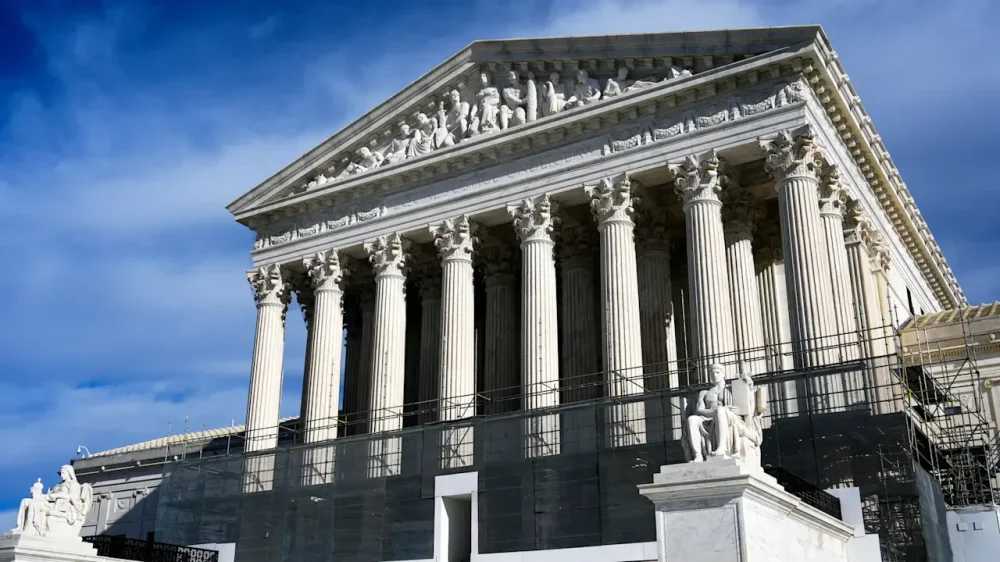
-
Research from Andrew Davidson claims a significant number of mortgage borrowers would have a wide variance in credit score if less than three pulls are used. View the full article
-
Treasury Secretary Scott Bessent said in a public appearance in Dallas Friday that the administration will seek alternative means of enacting the White House's tariff agenda after the Supreme Court struck down the tariffs as outside the bounds of the law. View the full article

-
Donald The President warns Tehran to make a ‘fair deal’ after Abbas Araghchi expresses optimism over a swift agreementView the full article