All Activity
- Past hour
-
So you've bought yourself a brand new Samsung Galaxy S26. How do you make the most of it? The latest flagship phones from Samsung come with One UI 8.5 installed on board, and there's plenty you can do with both the software and some of the hardware upgrades that Samsung has put in place. Here are 10 ways you can make your Galaxy S26 more useful than it is out of the box: Use DeX to turn your Galaxy phone into a computerI've covered Samsung DeX in the past: It's a desktop interface for your phone that activates when you plug your handset into a monitor, and it means you can more or less use your Galaxy device like a PC if you hook up a mouse and keyboard. DeX isn't new, but with One UI 8.5 models it features up to four separate desktop spaces, which can each hold five apps—so there's more room to work with. There are also additional options for positioning the extended display in DeX mode. To get started, head to Connected devices > Samsung DeX from Settings. Use your Galaxy S26 as a high-quality webcamPixel phones have been able to double up as webcams since Android 14, and with the Galaxy S26 series, Samsung finally joins in as well. This should work on Windows and macOS: Just connect your phone to your computer via a USB-C cable, open the notification that shows on the Galaxy screen, and pick Webcam as the mode. The next time you load up an app that can utilize a webcam, the Galaxy S26 Ultra should appear as an option in the camera picker. If you have a laptop with a built-in webcam, you may wonder why you need to use your phone as a webcam, but it's a good option if you're using a desktop setup which doesn't have a webcam, or if your integrated webcam isn't very good. A phone also gives you a lot more flexibility when it comes to the position and angle of the camera too, so this really can come in handy. Use "Privacy Shield" to hide your Galaxy's display from onlookers The Galaxy S26 feature that seems to have attracted the most attention so far is the Privacy Display, though sadly it's only available on the Ultra model. It makes it virtually impossible for anyone who's near you to see what's on screen, with some clever display trickery. You'll find the Privacy Display option under Display in Settings (it's also available on the Quick Settings panel), and you can choose to enable it manually or have it turn on automatically (when you're entering a PIN or password, for example). There's also the option to only enable the Privacy Display feature for notifications on screen, as well as a Maximum privacy protection setting. This dials up the obfuscation as far as possible, but "may affect normal viewing" as well, Samsung says. The Privacy Display setting on the S26 Ultra. Credit: Lifehacker Use "Inactivity restart" to automatically protect your Galaxy from hackersDelve into the One UI 8.5 Settings page on the Galaxy S26, and you'll find a new option under Security and privacy > More security settings. It's called Inactivity restart, and it means your phone will automatically reboot if you don't use it for 72 hours straight. When it restarts, it'll be in a more secure mode than it was before. Incoming notifications and calls won't be shown on the screen, and an unlock (via PIN, password, or pattern) will be required for the device to become usable again. This might not sound too different to your phone simply being locked as normal, but a reboot activates what's known as a Before First Unlock (BFU) state. This BFU state adds a few more protections to a standard lock, including the blocking of notifications, full data encryption, and the temporary disabling of biometrics. Customize the Quick Panel to find your most-used features fastOne UI 8.5 on the Galaxy S26 series gives you more control over the Quick Panel that appears when you swipe down from the top-right corner of the screen: You can edit buttons individually as well as in groups now, and staples like the brightness and volume sliders can be resized and repositioned. You can customize the Quick Panel with the exact layout that works best for you, and include all the settings and functions you use most. To get started, swipe down from the top right to find the panel, then tap the pen icon at the top. Use Edit on the main panel to change the shortcut buttons, and Add a control to drop in something new. You can reposition elements by tapping and holding on them, resize them using the handles around the sides, and remove them by tapping the - (minus) icons. Use this setting to automatically switch between wifi and cellular when neededOne of Samsung's more subtle implementations of AI can be found in Connections > Wi-Fi from the Settings page on your Galaxy S26. If you then choose Switch to mobile data with AI, you get options for intelligently switching over to a cellular network if your wifi coverage has become unstable or non-existent. It should mean fewer interruptions if you're on the move and switching between multiple networks as you go. Use "Audio Eraser" to reduce background noise in any videoWith the Galaxy S25, Samsung introduced a feature called Audio Eraser: It meant you could isolate different sounds from the videos you recorded (such as background crowd noise, music, or someone speaking), and boost certain sounds while lowering others. That way, your videos don't have to be ruined by background wind noise or other distractions. With One UI 8.5 and the Galaxy S26 series, Audio Eraser gets an upgrade. It can now work in real time with any video and app you want. This implementation is simpler than it is with your own videos, but it's effective: You get two sliders for reducing background noise and boosting voice dialog or music vocals. With a video playing on screen, swipe down from the top right corner to access Quick Settings, then choose Audio Eraser to find the sliders. Audio eraser now works across a broader range of videos. Credit: Lifehacker Detect scams in real timeAs I previously reported, the Pixel's real-time scam detection technology is now available on the Galaxy S26 series. In fact, it's built right into the Samsung Phone app. To enable the feature from the Phone app, tap the three dots (top right), then choose Settings and Scam Detection. All of the incoming audio is processed locally by Gemini, and nothing is recorded or sent back to the cloud. Scam Detection isn't 100% accurate, but if the on-board AI thinks that the words you're hearing match the patterns often used by fraudsters, you'll see an on-screen message and get haptic feedback to that effect. You can then choose to end the call or stay on the line. Use "Private album" to hide your sensitive photosFor your most sensitive photos and videos, there's now a private album built right into the Samsung Gallery app in One UI 8.5. You can hide images and clips away without creating a separate folder for them, and you don't even need to sign up for a Samsung account. With a photo or video open on screen, tap the three dots (top right), then choose Move to private album. A link to the album is shown if you tap the Menu button in the Gallery app, but you need your screen unlock method (such as a fingerprint) to access it. Use "Horizon Lock" to automatically stabilize all your videosIf you've gone for the most expensive Samsung Galaxy S26 Ultra model, you also get access to a rather clever camera trick called Horizon Lock. It means when you're shooting video, you can lock it to the original orientation—portrait or landscape—no matter how much you subsequently twist and turn your phone. You need to select Super Steady Video as your shooting mode to access Horizon Lock, from the Camera app. While some video stabilization was available on previous Samsung phones, this really does take it to the next level. View the full article
-
A reader writes: My manager, Athena, has pretty poor soft skills and often comes across as aggressive, interrogating, micromanaging, and dismissive. This happens both in person and over email and instant message. In writing, her spelling and grammar are also inconsistent and her phrasing is often curt or abrupt. Lately, my coworkers and I have noticed a huge improvement in some of her emails and chat messages. Emails and messages that previously would have been curt and aggressive are now warmer and softer, with perfect spelling and grammar. It’s theoretically the exact change her direct reports have all been desperately wishing for, except that her in-person communication has not changed. Her tone is still angry, her approach is still aggressive, and feedback discussions still feel like an interrogation. We’re pretty sure she’s using AI to rephrase her written communication, because she’s talked openly about using Claude to help with writing emails and project reports. It’s also not consistent — most of her text communication is the same as before, with maybe 30-40% being the new and improved version. Even though it’s technically better to be getting at least some non-aggressive emails from our boss, it feels weird and disingenuous. On one hand, it’s good that she recognizes a need for improvement, and it’s a relief that some of her emails sound like they come from the pleasant, patient manager we wish we had. On the other hand, the contrast is so obvious that it feels like putting a false veneer over the deeper problem of what she’s really like. As one coworker said, “I get email from Athena or I get email from Claude.” I know there’s not much we can do either way, but are my coworkers and I justified in feeling creeped out and vaguely insulted by the clearly AI-generated emails and texts we’ve been getting? Would love to hear your take on the ethics and optics of this sort of AI use. I don’t know, this feels like at least a partial win to me. You used to get emails from negative, dismissive Athena but now you (at least sometimes) get emails from kinder, more socially appropriate Claude. The problem is that negative, dismissive Athena is still manages you the rest of the time. I’m actually really interested to know if people like Athena who use AI this way will over time start to learn how to adopt a warmer tone themselves. I have long been convinced that people who default to Athena-like communication genuinely don’t know how to envision what different language or a different tone would sound like. They think being warmer means making lots of disingenuous chit-chat (when that’s not at all what it needs to mean) or that they’d have to sugarcoat everything to the point of it becoming meaningless (also not what it means). And so over time, there might be significant learning advantages to her seeing what Claude does to her communications. Or not, who knows. But I’d be really interested to watch how that plays out. You see the opposite of this, too: people who are very passive and indirect in their communications can’t picture a healthy, assertive version of their communications; instead, what they picture in their heads feels confrontational (often because the models they had for conflict growing up were very bad ones). It’s one reason why I try so much to give sample language here, because I think there’s real value in saying, no, it could just sound like this. I have many, many ethical issues with generative AI, but since it’s here, I am very interested to see if using it in this way over time can help people envision better language on their own at some point. Anyway … is it disingenuous of Athena to be using AI to revise her emails? I don’t know that it is! I’d call it that if she were rolling her eyes while sending them and thinking, “These delicate flowers require such careful handling.” But if she’s running her language through AI and thinking, “Okay, that sounds good, I’ll send that,” I don’t think it is disingenuous. But I can also understand why it feels that way to you, especially since the rest of her communications have remained the same old dismissive Athena. Ultimately, your problem is that you have a manager who’s angry, interrogating, micromanaging, and dismissive, not that she sometimes uses a tool to improve her tone. Is there anything you can do about that, like having a discreet word with someone above her? If not, I’d try to embrace the times where she’s at least letting Claude help her — or, if that’s not possible, at least see the humor in the extreme contrast between her and her robot assistant. The post my angry boss uses AI to write kinder emails … and it feels weird appeared first on Ask a Manager. View the full article
-
Advocacy groups and experts condemned YouTube for serving up low-quality artificial intelligence-generated videos to its most vulnerable audience: children. In a letter to YouTube CEO Neal Mohan and Sundar Pichai, the CEO of YouTube’s parent company Google, children’s advocacy group Fairplay expresses “serious concern” about the spread of AI-generated videos on both YouTube and YouTube Kids. The letter, which was sent on Wednesday morning, was signed by more than 200 organizations and individual experts such as child psychiatrists and educators. “This ‘AI slop’ harms children’s development by distorting their sense of reality, overwhelming their learning processes and hijacking their attention, thereby extending time online and displacing offline activities necessary for their healthy development,” the letter reads. “These harms are particularly acute for young children.” The letter calls on YouTube to clearly label all AI-generated content and ban any AI-generated content on YouTube Kids. They also propose barring AI-generated videos from being recommended to users under 18 and implementing an option for parents to turn off AI-generated content even if their child searches for it. The letter is signed by 135 organizations including the American Federation of Teachers and the American Counseling Association, and around 100 individual experts like “The Anxious Generation” author Jonathan Haidt. The letter is part of a larger campaign from Fairplay that also includes a petition. Much of this AI-generated content is fast-paced with bright colors, lively music and clickbait titles that work to grab the attention of young viewers, the letter outlines. There has been a growing movement online against AI-generated content, particularly when it looks or feels low quality or leans into the meaninglessness of ” brainrot.” Spokesperson Boot Bullwinkle said in a statement that YouTube has “high standards for the content in YouTube Kids, including limiting AI-generated content in the app to a small set of high-quality channels.” “We also provide parents the option to block channels. Across YouTube, we prioritize transparency when it comes to AI content, labeling content from our own AI tools, and requiring creators to disclose realistic AI content,” Bullwinkle said. “We’re always evolving our approach to stay current as the ecosystem evolves.” YouTube’s current policy regarding AI-generated content requires creators to disclose when content that’s “realistic” is made with altered or synthetic media, including generative AI. Creators are not required to disclose when generative AI is used to create content that is clearly unrealistic, including animated videos and those with special effects. YouTube said it is actively working on developing labels for YouTube Kids. In its letter, Fairplay argues that voluntary disclosure policy and what it sees as an “extremely limited” definition of altered and synthetic content mean kids still see a flood of AI-generated videos that are not labeled as such. They also argue that many children who watch YouTube videos are not yet able to read or to comprehend something like an AI disclosure. That leaves children “to fend for themselves or their parents to play whack-a-mole,” the letter reads. Fairplay’s campaign comes shortly after Google’s AI Futures Fund invested $1 million into Animaj, an AI animation studio that makes videos for kids and draws in staggeringly high viewership numbers, according to Bloomberg. The campaign follows a landmark verdict in a social media addiction trial in which a California jury found that YouTube designed its platform to hook young users without concern for their well-being. Meta was also found liable on the same counts as YouTube in the same case. “Pushing AI slop onto young children is just another testament to how YouTube and YouTube Kids are designed to maximize children’s time online — including babies. AI slop hypnotizes young children, making it hard for them to get off their screens and move onto essential activities like play, sleep and social interaction,” said Rachel Franz, the director of Fairplay’s Young Children Thrive Offline program, in a statement. “What’s more, YouTube’s algorithm makes it impossible for kids to avoid AI slop.” Earlier this year, YouTube head Mohan listed out “managing AI slop” as one of the company’s priorities for 2026. In a January blog post, he wrote that the company was “actively building on our established systems that have been very successful in combatting spam and clickbait, and reducing the spread of low quality, repetitive content.” —Kaitlyn Huamani, AP Technology Writer View the full article

-
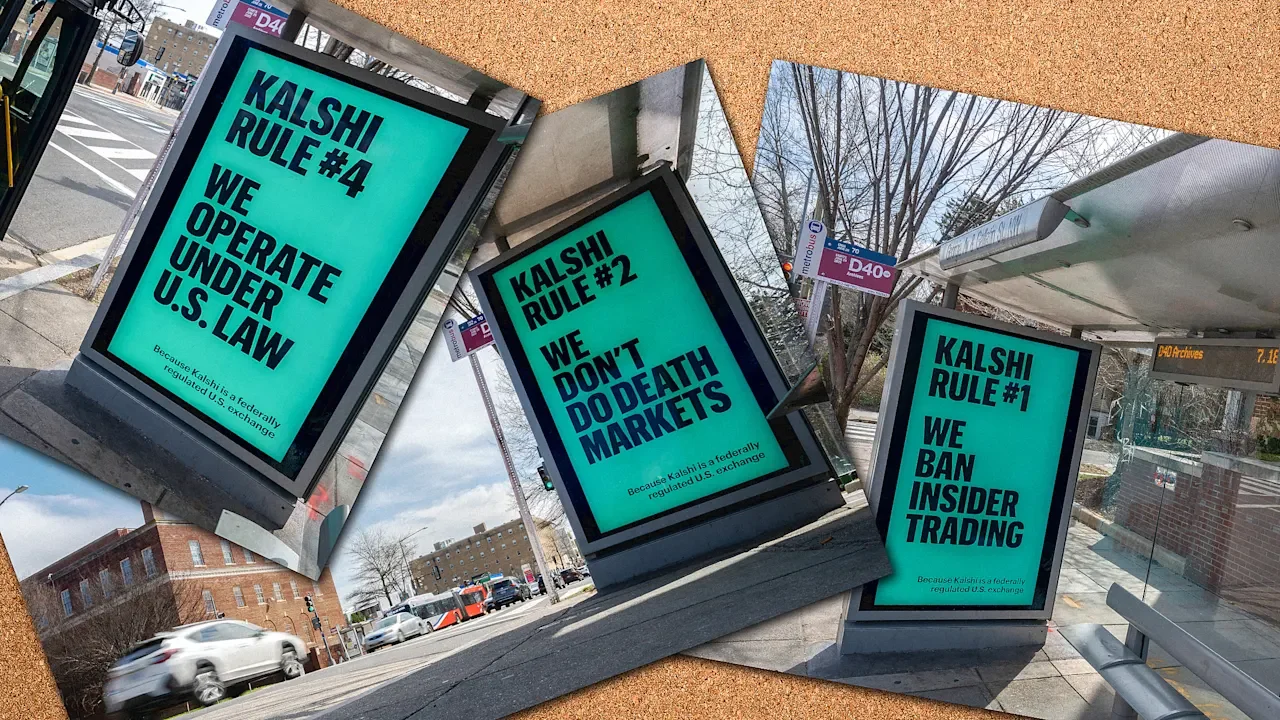
Usually, when Washington, D.C., commuters are inundated with mint green-tinted ads in March, it means the Shamrock Shake is back at McDonald’s. This year, the eye-catching color instead appears in a full-court-press ad campaign for prediction market platform, Kalshi, which uses that shade in all its branding. Unlike seasonal milkshake ads, though, the targeted barrage of billboards, bus stop signs and metro station posters isn’t meant to reach all residents within the nation’s capital; just lawmakers and their staffers. It’s all part of a big bet by Kalshi to avoid regulation—one that seems destined to not pay out. Kalshi has launched an advertising blitz in DC as Congress focuses more on prediction market regulation pic.twitter.com/1XUS9zxxPv — Spencer Allan Brooks (@SpencerSays) March 26, 2026 Each variation of these ads touts a different “Kalshi Rule” meant to reassure observers that absolutely nothing shady is going on in this market, despite whatever they may have heard. Worried about recent reports of anonymous traders making a mint from suspiciously timed, ghoulish bets related to the war in Iran? Well, you must be thinking of unenlightened competitor Polymarket, because Kalshi bans insider trading and doesn’t “do” death bets. (In a bit of moral housekeeping, after the initial strikes on Iran, Kalshi froze all its traders’ wagers on when Ayatollah Khamenei would be killed, while Polymarket did not.) In fact, you might even say, as one of the ads rather defensively does, that Kalshi “operate[s] under U.S. law”—a claim generally just assumed of most publicly operated businesses. Our “we operate under US law” ad is raising a lot of questions already answered by the ad pic.twitter.com/dJxosEjuhD — shreya (@shreyabasu003) March 30, 2026 Given all the bad publicity around prediction market trades involving the Iran War, Kalshi is currently hoping to decouple itself from Polymarket (despite the two sharing strategic advisor Donald The President Jr.) in the public imagination. Or at least the public imagination in Washington D.C., where people who might regulate these markets live and work. From bets to “event contracts” Ever since its 2018 founding, Kalshi has attempted to help shape the regulations around U.S. prediction markets. The company’s executives were careful early on to present Kalshi not as a betting site, but rather a financial exchange offering “event contracts.” In 2020, Kalshi secured approval from the Commodity Futures Trading Commission (CFTC) as a Designated Contract Market, giving it a sheen of federal regulation before officially launching in 2021. By getting licensed right out of the gate, Kalshi could argue its trades amounted to derivatives on the national stage—rather than bets whose legality might be challenged from state to state. Then, just in time for the 2024 election cycle, the company triumphed over the CFTC’s eventual efforts to block traders from making political event contracts, opening up a Donald The President-shaped can of worms. All hot streaks come to an end, though, and some chilly weather may be headed for Kalshi. The company is now staring down a blizzard of bills aiming to further regulate it. A trio of U.S. states—Washington, Nevada, and Arizona—are currently suing Kalshi, alleging the company breaches state gambling laws by running prediction markets. On the national stage, Sen. Jeff Merkley and Rep. Jamie Rask recently introduced a bicameral bill that would ban betting on prediction markets for elections, government and military acts, and sports. Meanwhile Sens. Adam Schiff and John Curtis are pushing bipartisan legislation to amend the Commodity Exchange Act, redefining platforms like Kalshi as a mode of gambling. (Someone unfamiliar with the byzantine nuances of prediction markets might note that placing a wager on how long a government shutdown will last sure looks an awful lot like gambling.) Given all this recent legislation, Kalshi’s poster bonanza in D.C. seems more akin to lobbying than marketing. Either way, it will probably backfire. Beating the odds Assuming the average politician who sees the ads isn’t one of the 40 Democratic lawmakers who just sent a letter to the Office of Government Ethics about insider trading, what will they think about the platform’s claim of having banned insider trading? Perhaps they will think to take a look at Kalshi’s website for an explanation of its approach to the matter. If they did, they would find a glaring loophole or two. While Kalshi does prevent certain “high-risk individuals,” including politicians and staffers, from trading in specific markets, it says nothing about how Kalshi might prevent friends and family of high-risk individuals placing bets on their behalf. No wonder Reps. Adrian Smith and Nikki Budzinski just introduced a bipartisan House bill that would bar the president, members of Congress, senior federal officials—and all of their families—from making trades in prediction markets. If Kalshi had intentionally designed an ad campaign meant for inviting further scrutiny into its practices, it scarcely could have made one more effective than what’s currently on display. The list of Rules invites observers to think deeply about the shockingly few guardrails already placed on Kalshi, which of them could be easily circumvented, and how hard the company is working to avoid any further guardrails—all in the guise of being proudly compliant. It’s certainly possible that lawmakers will be moved by these ads’ claims and decide to help guide Kalshi to its least regulated potential future. But I wouldn’t bet on it. View the full article
- Today
-
The lender claims an originator ambushed executives in a negotiation with the confidential company financials and claimed to have shared them with competitors. View the full article
-
Losses by football club owned by Todd Boehly and Clearlake come despite revenues increasing to £491mnView the full article
-
With a portion of the White House demolished and site preparation underway, President Donald The President’s planned ballroom extension on the White House grounds has been ordered to halt construction. Ruling on a lawsuit filed by the National Trust for Historic Preservation, U.S. District Court Judge Richard J. Leon granted a request for a preliminary injunction against the White House ballroom, finding that The President exceeded his authority in pursuing the project without congressional approval. Leon gave the White House—along with lead defendants the National Park Service and six other parties—14 days to appeal. The The President administration has already appealed the ruling, and the case is almost certainly headed to the Supreme Court. The ruling is significant, affecting one of the most controversial and high-profile construction projects in the nation. The ruling is also notable for its expressive and sometimes sassy prose. While most court rulings naturally contain a lot of legalese and case references, Leon’s 35-page ruling on the White House ballroom leans into bombast, using an exclamation point 17 times, plus one more time in a footnote. (This tally does not include a 19th exclamation point, in a quote from The President.) The first usage comes in just the second sentence of the ruling, which notes that The President is the steward of the White House, “not, however, the owner!” Four times in the ruling, Leon responds with exasperation and astonishment to the assertions of the defense in arguing The President did not violate the law, using the sarcastic and memorable phrase, “Please!” One of the defense’s assertions is that a certain section of the law shouldn’t be read as to limit this type of construction without a clear statement or prohibition from Congress. To that, Leon writes: “Please! A clear statement rule makes sense when Congress is legislating in an area where the President exercises overlapping constitutional authority.” Another of the defense’s assertions is that delaying the already-started construction project could make the construction site a safety hazard that undermines national security. Leon strenuously counters. “Please! While I take seriously the Government’s concerns regarding the safety and security of the White House grounds and the President himself, the existence of a ‘large hole’ beside the White House is, of course, a problem of the President’s own making!” he writes. Other instances of his sarcastic “Please!” are in sections perhaps only lawyers could truly appreciate. One focuses on what does and does not belong as a precedent reference in a review known as ultra vires, or a test of whether an action is “beyond the powers” of an official. The other attempts to make the point that other donor-funded construction projects have gone ahead without formal congressional approval. As Leon writes: “Please!” The tone here is uncommon in federal court rulings, and hard to separate from that frequently used in written communications and social media posts by The President himself. Leon, who was appointed to his role in 2002 by then-President George W. Bush, was previously in private practice and served as counsel to Congress in the investigations of three sitting presidents. The White House ballroom project was set to face a vote for official approval at the April 2 meeting of the National Capital Planning Commission. Its short-term future has been complicated by this ruling. “Where does this leave us? Unfortunately for Defendants, unless and until Congress blesses this project through statutory authorization, construction has to stop!” Leon writes in his ruling. Leon notes that it is not too late for the project to move ahead in compliance with the law. “The President may at any time go to Congress to obtain express authority to construct a ballroom and to do so with private funds. Indeed, Congress may even choose to appropriate funds for the ballroom,” he writes. That, his ruling notes, is the heart of the White House ballroom’s legal question. By rushing ahead with the demolition of the East Wing of the White House and launching into construction of the ballroom without congressional approval, The President and his administration violated the law. Should this ruling survive its likely appeal from the defendants, the ballroom would be required to follow the formal process such a project requires. The plaintiff’s “interests in a constitutional and lawful process will be vindicated,” Leon writes. “And the American people will benefit from the branches of Government exercising their constitutionally prescribed roles. Not a bad outcome, that!” View the full article

-
Anthropic’s Claude chatbot has opinions of its own, and it’s not afraid to share them. “It should be a sparring partner with you,” says Joel Lewenstein, Anthropic’s design chief. “It shouldn’t take your thoughts verbatim. It should push back.” Perhaps this is predictable from a product carrying the slogan “keep thinking.” But Claude’s quirky (and, at times, passive-aggressive) personality sets it apart from the competition. That’s on purpose, Lewenstein explains. “I find that to be a truly astonishing experience where I’m like, ‘Oh, you are not a sort of slavish executor of my vision. We are coproducing this outcome together.’ I think that’s really powerful.” On the latest episode of By Design, Lewenstein, one of AI design’s most influential leaders, gives an exclusive, lengthy interview on all things Claude, Anthropic, and the role of designers in AI. Below are a few excerpts from the podcast, which have been edited for length and clarity. Check out the full episode on Apple Podcasts, Spotify, or YouTube. Why do I need to prompt Claude to double-check its work? Why isn’t that built in? “ I don’t have a super definitive answer. I do think it’s probably a combination of cost and capacity and response time. In an ideal world, we would just never give you a wrong fact. Claude should be right and should know when it’s right or wrong. There are practical reasons why it is hard to guarantee that, and guaranteeing that imposes other costs that we don’t want to bear.” On Claude’s linguistic and personality quirks “They are very much an intentional part of the Claude character work that we do and that our research team does, trying to create an entity that does push back, that does challenge a little bit, that isn’t sycophantic, that is something that is really engaging. It should be a sparring partner with you. It shouldn’t take your thoughts verbatim. It should push back.” When did you accept that AI tools might have better ideas than you? “This started happening maybe like the middle of last year. My creative process is falling in love with my own ideas, sharing it with a coworker, having them point out the obvious flaw, the sort of embarrassing hole in my logic or whatever, sheepishly going back to a V2. “I know that process now. I aggressively share my first drafts with people because I know I need a first set of eyes. I started doing that with Claude, and Claude would find the logical holes in my documents, proposals, and mockups very consistently. The first step wasn’t actually having better ideas than me, although I’ve started to see that sometimes. Now it is finding the holes in my own ideas. And because it saved me from humiliating myself in front of coworkers, I was delighted.” Where is design in Anthropic’s organizational structure? “Working prototypes—actual usable software—is just the lingua franca of Anthropic. Whoever can make that is the one who drives decision-making and ideation and road maps. For a long time, it was engineering and research, obviously. “Most of the most innovative ideas we’ve had were engineering-led because they were the ones who could bring nascent concepts into an actual working thing. Some of the designers who were deeply code-native . . . were also able to do that a year or two ago. “Other people were downstream of engineering. That is really changing, and this democratization of the ability to make working stuff, we feel it. I think engineers and designers are both looking at the same problem and running roughly the same process of, ‘I’m gonna build something.’” On flattening of design jobs “Anthropic is in the top three organizations globally of AI-native work, frontier ways of working. We live in the future, and I’m doubling the product design team. Every team that I have designers on is understaffed, is asking me for more designers, is saying, ‘These products aren’t good yet until I can get a human designer to come sit with me for days and weeks to make this good.’” View the full article

-
Here is a recap of what happened in the search forums today, through the eyes of the Search Engine Roundtable and other search forums on the web. Going offline for Passover tonight through Saturday night...View the full article
-
The U.S. and China are racing to define the future of technology, with very different ideas about how fast it should arrive and how tightly it should be controlled. The urgency is no longer abstract. In recent weeks, China approved the world’s first commercial brain-computer interface medical device and unveiled a five-ton class electric vertical takeoff and landing aircraft that has already completed a public flight. At the same time, U.S. agencies are scrambling to speed up approvals in areas like aviation and biotech, even as layoffs and political pressure threaten to thin out oversight. In both Washington and Beijing, senior officials are no longer hedging: This is, they openly say, a race for technological supremacy. Last year, Michael Kratsios, the science advisor to the president, called China the U.S.’s “most formidable technological and scientific competitor.” More recently, the White House’s Office of Science and Technology Policy has similarly described a global race for tech supremacy. Beijing sees the same contest. During a February visit to an information technology innovation park, Xi Jinping said self-reliance and strength in science and technology are “key” to building China into a modern socialist power. The country, he added, must “seize the commanding heights in sci-tech competition and future development.” The competition is already playing out across multiple fronts. The U.S. and China continue trading the lead in AI, with successive model releases displacing one another. But the real divide is emerging in how each country approaches risk. One system is willing to move faster and sort out consequences later. The other moves more cautiously, with heavier guardrails that can slow deployment. That difference carries real stakes. It shapes which technologies reach the public first, how safely they are introduced, and who ultimately sets the global standards that other countries follow. “Most Americans do not realize that by multiple different metrics, China already exceeds the United States in a number of different fields, in terms of science and technology, artificial intelligence, quantum internet and biomanufacturing,” says Margaret Kosal, a professor in technology strategy at the Georgia Institute of Technology. Part of the answer comes down to approach. “While the U.S. focuses on advancing the cutting edge and Europe on regulations, China’s view on new technology is very pragmatic,” says Chengyi Lin, professor of strategy at INSEAD. It boils down to two words, he explains: “Market adoption.” China’s industrial policy also imagines broader applications for emerging tech, including surveillance uses for BCI. Lin recounts a case in which a European industrial tech company found a Chinese firm using its intellectual property without authorization. The firm’s response, he says, framed the technology as underused and offered to license it retroactively, an example of the kind of pragmatic, speed-first approach that sets China apart. “It is very distinct from U.S. and European practices,” he says. Regulation is another fault line. Kendra Schaefer, a partner at Beijing-based consultancy Trivium China, notes that while Chinese regulators can be cautious, “they’re already faster than U.S. regulators by a mile.” In the U.S., that contrast is becoming harder to ignore. The Federal Aviation Administration has launched a program to accelerate the safe deployment of eVTOL aircraft, while Joby has only recently begun flying its first FAA-conforming production aircraft. Meanwhile, recent federal layoffs hit Food and Drug Administration staff reviewing Neuralink, potentially giving Musk’s BCI company more room to move. “We have in the United States a rhetoric of complaints about regulation, some that are valid, some that are very not valid, that are driving to reduce regulation,” warns the Georgia Institute of Technology’s Kosal. China is not operating without rules. Samm Sacks, a research scholar at Yale Law School’s Paul Tsai China Center, says Beijing is “not monolithic” in how it approaches the risk of a race to the bottom. Instead, she describes a government trying to “thread a needle,” balancing pressure to compete in AI with a parallel push to introduce regulations that address emerging risks. Speed, in other words, comes with tradeoffs. Rapid innovation can deliver short-term gains, but it may complicate global competition. “Counterintuitively, the heavy regulations have more than protected many western companies as they make it harder for Chinese companies to enter European markets,” Lin says. Which leaves a final tension hanging over the race: If both sides feel pressure to move faster, who decides where the limits are? View the full article

-
If you’re a lawyer, college administrator, or financial services provider, you’ve likely seen the frustrating “Eligible (Limited)” status in your Google Ads account. It can feel like you’re fighting Google with one hand tied behind your back when your remarketing lists, exact match keywords, and more don’t work as intended. While it might feel like Google Ads is out to get you when you operate in a so-called “sensitive interest category,” there are specific reasons for these rules. More importantly, there are specific ways to succeed despite them. This article will cover what the personalized advertising policies are, what they mean for your account, and five specific tactics you can use to succeed with Google Ads. Why does Google have personalized advertising policies? Google provides detailed explanations in its official policy documentation, but it comes down to two things: legal requirements and ethical standards. In the United States, for example, the Fair Housing Act and employment laws prevent discrimination based on age, gender, or location. If you’re advertising a job opening or a new apartment complex, Google can’t allow you to exclude people based on those demographics because doing so would be against the law. Then there’s the ethical side. Imagine you’re running a rehab center. If someone visits your site, Google’s “sensitive interest” policy prevents you from following them around the internet with targeted banner ads like, “Still struggling with addiction? Come to our clinic.” That kind of remarketing is intrusive and, frankly, predatory when it targets someone’s health and struggles. To protect the user experience and maintain a sense of privacy, Google limits how personal data can be used in these high-stakes industries. What can’t you do in a sensitive interest category? If you fall into one of these categories — housing, employment, credit, healthcare, or legal services — the biggest impact is usually on your audience targeting. Here’s what you can’t use: Website or App Remarketing Lists, including the Google-engaged audience: You can’t target people who have previously visited your website or used your app. Customer Match: You can’t upload your own email lists or phone numbers to target existing clients. YouTube Audiences: You can’t target people based on how they’ve interacted with your videos. Custom Segments: You aren’t allowed to build specialized audiences based on specific search terms or types of websites people visit For certain categories in certain countries, like housing, credit, and employment in the United States, there’s further “demographic stripping” — you can’t target by age, gender, parental status, or ZIP code. Your Smart Bidding strategies won’t use these signals as inputs either. The good news: What can you do in a sensitive interest category? It’s easy to focus on what’s gone, but what still works is a much longer list. Even in a restricted industry, you still have access to the core engine of Google Ads. You can still use: Keywords, feeds, and keywordless technology: These rely on intent (queries) rather than identity, so they are perfectly fine in Search, Shopping, and Performance Max. Google’s audiences: Affinities, In-Market, Detailed demographics, and Life Events segments are still fully at your disposal, where eligible, in Demand Gen, Display, Video, Search, and Shopping. Optimized targeting: Google’s AI can still find people likely to convert based on your historical converters, in Demand Gen, Display, and Performance Max. Content Targeting: You can choose to show your ads on specific keywords, topics, and placements in Display and Video campaigns. Conversion tracking: Yes, you can still track conversions and use features like Enhanced Conversions, Offline Conversion Import, and Consent Mode. While your internal legal team may have reservations or restrictions around your website tracking, Google’s Personalized advertising policy doesn’t restrict any conversion tracking. 5 strategies to win in sensitive categories If you want to move the needle without relying on remarketing, you need to rethink your account structure and messaging. Here are five things you can do right now. 1. The “Separate Domain” strategy If your business offers a mix of services — some sensitive, some not — don’t let the sensitive ones “poison” your whole account. Think of a spa that offers haircuts, pedicures, and Botox. Haircuts are fine; Botox is a medical procedure that triggers sensitive category restrictions. If you put them all on one site, your entire remarketing capability might get shut down. Consider putting the sensitive service on a separate domain and a separate Google Ads account. This lets you use every available tool for your main business while the sensitive portion operates under the necessary restrictions. 2. Choose Demand Gen over Display If you want to use image or video ads, use Demand Gen instead of the standard Display Network. In my experience, Demand Gen delivers higher-quality audiences and tends to perform better in restricted niches. 3. Lean into phrase and broad Match You might be tempted to stick to Exact Match keywords to keep things tight. However, in sensitive categories, Google may restrict ads on very narrow, specific queries for privacy reasons. If your Exact Match keywords aren’t getting impressions, try Phrase or Broad Match. This gives the algorithm more room to find users searching for the same thing with slightly different phrasing that may be less restricted. Think of it like fishing: if you can’t use a spear, use a net. You’ll catch some fish you don’t want, but that tradeoff helps you catch the ones you do want more easily. 4. Feed the AI with offline conversion tracking Most businesses in these categories, such as law firms or banks, don’t make sales on their websites. The website generates a lead, and the sale happens over the phone or in an office. If you want Google to find better users, you must feed that real-world data back into the system. Use Offline Conversion Tracking (OCT) to show Google which leads became customers. Even if you must navigate HIPAA or other privacy regulations, there are ways to do this safely. Consult your legal team, but don’t skip this step. It’s the best way to train the algorithm when you can’t use your own audiences and to ensure Smart Bidding works at its full potential. 5. Creative-Led targeting When you can’t tell Google who to target with a list, you have to tell the user who the ad is for through your creative. Your headlines and images should qualify the lead. Be specific in your copy. For example, instead of “Need a Lawyer?” try “Defense Attorney for Small Business.” This attracts your target audience and encourages people who aren’t a fit to scroll past, saving you money and improving your conversion rate. Running Google Ads in a sensitive category is a challenge, but it’s far from impossible. By shifting your focus from who the person is to what they’re looking for and how you speak to them, you can still drive incredible results. This article is part of our ongoing Search Engine Land series, Everything you need to know about Google Ads in less than 3 minutes. In each edition, Jyll highlights a different Google Ads feature, and what you need to know to get the best results from it – all in a quick 3-minute read. View the full article
-
The contract rate on a 30-year mortgage increased 14 basis points to 6.57% in the week ended March 27, according to Mortgage Bankers Association data released Wednesday. View the full article
-
Global leaders have been scrambling to contain the rising cost of oil and gasoline since the start of the Iran war, which took a record amount of oil off the market when tankers full of crude were stranded in the Persian Gulf and military strikes damaged refineries, pipelines and export terminals. Hoping to ease some pain for consumers, President Donald The President and other heads of state have been pulling on various levers, launching more oil on the market in a bid to calm the chaos. A group of 32 nations that are members of the International Energy Agency began releasing the largest volume of emergency oil reserves in its history: 400 million barrels. The President is tapping into oil from the Strategic Petroleum Reserve while lifting sanctions on Russian and Iranian crude and temporarily waiving the Jones Act, a maritime law that requires ships carrying goods between U.S. ports to be U.S.-flagged. But despite those maneuvers, crude oil surpassed $100 a barrel and gasoline is selling for $4.06 a gallon on average in the U.S. While the stopgaps are helping, they’re not adding up to enough oil to replace what’s stranded, experts say. “They’re all incremental,” said Mark Barteau, professor of chemical engineering and chemistry at Texas A&M University. “You’re talking about these different patches being at the level of maybe 1 to 2 million barrels a day each, and you’ve got to get to 20, so it’s hard to see those actually adding up to the numbers that are needed. And then the question is, how long can you sustain those?” Trapped oil Before the war began, roughly 15 million barrels of crude oil and 5 million barrels of oil products passed daily through the Strait of Hormuz, the narrow mouth of the Persian Gulf, amounting to about 20% of global oil consumption, according to the International Energy Agency. In addition to that loss, some oil producing nations in the Middle East have halted oil production because they can’t ship fuel out of the Gulf and their storage tanks are full. That’s taken about 10 million more barrels per day off the market, the IEA said. Then there are the eight countries around the Persian Gulf that together hold about 50% of global oil reserves. Under normal circumstances, they coordinate closely to raise or lower their output to keep prices steady, said Jim Krane, energy research fellow at Rice University’s Baker Institute. Usually Saudi Arabia steps in to bring spare oil to market and calm things down, he said. “But all of that spare capacity is also bottled up inside the Persian Gulf right now and it can’t get to market either,” Krane said. “So the main emergency response system that we have is also blocked.” The IEA said in its recent report that “the resumption of transit through the Strait of Hormuz is the single most important action to return to stable oil and gas flows and reduce the strains on markets and prices.” Barring that, world leaders are grasping for ways to free up more oil. Limitations of short-term fixes Some nations have found workarounds to move oil out of the Gulf. Saudi Arabia is using its East-West pipeline, which stretches from the Persian Gulf to the Red Sea, to transfer about 5 million barrels per day out of the Gulf, said Michael Lynch, distinguished fellow at Energy Policy Research Foundation, a non-partisan institution focused on energy and economics. But the nation was already using that pipeline to transport oil, so it doesn’t have a lot of spare room to move oil from stranded tankers. The President also temporarily lifted sanctions on approximately 140 million barrels of Iranian oil that was already in transit. But that didn’t add oil to the market — it just widened the pool of potential buyers, said Daniel Sternoff, senior fellow at the Columbia Center on Global Energy Policy. Typically, most Iranian oil was bought by private refiners in China, who purchased it at a steep discount, Sternoff said. But with sanctions lifted, others could scramble to buy the oil, which in turn raises its price to the benefit of Iran, he said. “As soon as you are moving to waive sanctions on your adversary with whom you’re fighting a military conflict, to do something in their benefit, it just shows you that you are running out of options to try to prevent a rise in the price of oil,” Sternoff said. The decision to lift sanctions on Russian oil could have more impact, because Russia had been storing unpurchased oil in tankers, Sternoff said. “By waiving sanctions, it will allow those barrels to clear.” The President’s temporary waiver of the Jones Act to allow foreign ships to temporarily transport goods between U.S. ports could potentially help ease natural gas prices by enabling companies to more efficiently ship liquefied natural gas from the Gulf Coast to New England. But experts don’t expect the waiver to significantly impact the price of oil or gasoline. “It’s helpful, but not a game changer,” Lynch said. Why U.S. oil production can’t solve the problem The U.S. is a major oil producer, and exports more oil than it imports. But like any other oil producing nation, it can’t just ramp up production instantly to fill the void. “If the U.S. were to try to make up the global shortfall, we would need to nearly double our production,” Barteau said. “We couldn’t drill wells that fast even if we wanted to.” Increasing domestic production by even 1 million barrels per day, a feat the U.S. accomplished during the shale boom, would be hard to duplicate, Lynch said. “If we run every drilling rig right now, what happens a week from now when the war is over and the price goes back down $20?” Lynch asked. “People don’t want to develop long-term production based on a short-term price spike.” Halting exports and using that oil within the U.S. wouldn’t bring down gasoline prices either, experts say. For one, oil is traded on a global market, so events happening halfway around the globe impact prices for everyone. In addition, the U.S. doesn’t produce enough of the type of oil its refineries process. It produced about 13.7 million barrels per day of oil at the end of 2025, according to the Energy Information Administration. And refineries processed about 16.3 million barrels per day that year, relying on imports to fill in the gaps, according to the American Fuel and Petrochemical Manufacturers (AFPM), a trade association. That’s because nearly 70% of U.S. refineries are set up to process heavy, sour crude, according to AFPM. But much of the oil produced in the U.S. is light, sweet crude, which was unlocked during the shale revolution. “They need different crudes than the ones that are being produced right next to them now,” Krane said. As a result, just 60% of the crude oil processed in U.S. refineries is extracted domestically, according to the AFPM. And retooling domestic refineries would cost billions of dollars, the group said. It also would require shutting down the refinery for a period of time, which generally raises gasoline prices. “A lot of people like the IEA are making the point that this is the biggest oil crisis ever, which is partly true, partly an exaggeration, depending on how you count things,” Lynch said. “A lot of it has to do with how long does this last … if it goes on for another six weeks we get to be in some serious trouble.” —Cathy Bussewitz, Business Writer View the full article

-
This month presents several attractive promotions and coupons that can greatly reduce your spending. For instance, Yogurtland‘s BOGO deal on yogurt cups, Kohl’s Black Friday sale with up to 70% off, and discounted board games at Target are just a few highlights. Moreover, you can find important home items like a Shark vacuum and Ninja air fryer at reduced prices. These offers could make a real difference in your shopping experience, especially as the holidays approach. Key Takeaways Enjoy a Buy One Get One deal on yogurt or ice cream cups at Yogurtland on October 27, perfect for a fun outing. Save up to 70% on selected items during Kohl’s Black Friday Sale, with great deals on gifts and personal treats. Get the Shark Cyclone Pet Handheld Vacuum for $25 at HSN, designed for quick clean-ups of pet hair and debris. Purchase Miracle-Gro Indoor Plant Food on Amazon for $9.39, a budget-friendly option for healthy indoor gardening. Grab discounted board games at Target, with prices starting as low as $7.50 during their Black Friday promotions. BOGO Yogurt or Ice Cream Cups at Yogurtland on Oct. 27 On October 27, Yogurtland is offering a Buy One Get One (BOGO) deal on yogurt or ice cream cups, allowing you to enjoy twice the treats for the price of one. This promotion is an excellent way to indulge in delicious frozen desserts while saving money. Yogurtland features a variety of flavors and toppings, so you can customize your yogurt or ice cream to your liking. Whether you’re using coupons for food or looking for promotions and coupons, this limited-time BOGO deal is a great opportunity. Accessible to users on both iOS and Android devices, participating is convenient and straightforward. It’s a perfect reason to invite friends or family, making it a fun outing to celebrate the end of October. If you’re searching for offers near me, don’t miss out on this chance to satisfy your sweet cravings without overspending. Shark Cyclone Pet Handheld Vacuum for $25 at HSN For just $25, you can grab the Shark Cyclone Pet Handheld Vacuum at HSN, a significant discount from its regular price of $70. This vacuum is designed particularly for pet owners, making it an ideal choice for tackling pet hair and debris. It’s lightweight and compact, perfect for quick clean-ups around your home or in your car. Here’s what makes the Shark Cyclone stand out: Powerful suction that captures even the finest pet hair User-friendly design for effortless handling Versatile use for various surfaces, from carpets to upholstery Limited-time offer, ensuring you save big To take full advantage of this deal, consider using the best digital coupon app to find additional savings or learn how to get manufacturer coupons and printable coupons for future purchases. Don’t miss out on this opportunity to invest in a reliable cleaning solution suited to your needs. Vera Bradley Throw Blankets Discounted to $12.34 at Target Currently, you can snag Vera Bradley throw blankets for just $12.34 at Target, marking a remarkable drop from their original price of $65. This promotion offers over 80% in savings, making it an excellent opportunity to improve your home decor as the colder months approach. The discounted price applies to a selection of styles, perfect for gifting or personal use. To explore your options, check availability and designs online at Target.com. If you’re interested in maximizing your savings further, you might be wondering where to find manufacturer coupons. You can often find these on Vera Bradley’s official website or through coupon sites. Furthermore, consider signing up for newsletters, as they often provide exclusive offers. So, how can I get manufacturer coupons? Keep an eye on promotions and consider joining loyalty programs for potential discounts on future purchases. Miracle-Gro Indoor Plant Food 2-Pack for $9.39 on Amazon If you’re looking to improve your indoor gardening experience, the Miracle-Gro Indoor Plant Food 2-Pack is now available on Amazon for just $9.39. This recent promotion offers a budget-friendly option for plant enthusiasts who want to nourish their indoor plants effectively. Each pack is designed to promote lively growth and guarantee the health of your houseplants. Here’s what you can expect from this product: Nourishment: Provides crucial nutrients for robust plant growth. Convenience: Easy-to-use formula that fits into any plant care routine. Savings: Significant cost reduction compared to typical retail prices. Versatility: Suitable for a variety of indoor plants, from flowers to greens. Don’t miss out on this deal as it may not last long. Enhance your indoor gardening experience as you enjoy the benefits of healthy, thriving plants. Ninja Foodi Smart XL Air Fryer for $129.99 on Amazon The Ninja Foodi Smart XL Air Fryer, now available for $129.99 on Amazon, represents a considerable discount from its regular price of $250, making it an appealing choice for those looking to improve their cooking experience. This versatile appliance features Smart Cook System technology, ensuring consistent cooking results with precise temperature control. With a generous 5-quart capacity, it’s perfect for preparing meals for families or gatherings. The Ninja Foodi Smart XL combines multiple cooking functions, including air frying, roasting, baking, and dehydrating, which provides diverse meal preparation options. Customers appreciate its easy-to-use interface and efficient cooking capabilities, making it a popular addition to any kitchen. Whether you’re air frying crispy vegetables or roasting a chicken, this air fryer simplifies the cooking process as it delivers delicious results. At this price point, investing in the Ninja Foodi Smart XL Air Fryer could greatly enhance your culinary skills. Kohl’s Black Friday Sale – 70% Off Selected Items Kohl’s Black Friday Sale offers you huge discounts of up to 70% off on selected items, making it an ideal time for your holiday shopping. You’ll find popular brands included in these limited-time offers, such as Hamilton Beach Appliances for just $15 and Barebells Protein Bars at $1.39 each with free shipping. Be sure to check Kohls.com regularly, as these deals can change quickly, and you wouldn’t want to miss out on the best savings. Huge Discounts Available Now Get ready to take advantage of some outstanding savings during Kohl’s Black Friday Sale, which offers a remarkable 70% off selected items across the store. This is the perfect time to grab vital products at incredible prices. Here are some highlights you won’t want to miss: Hamilton Beach appliances for just $15, down from $40 Barebells Protein Bars available at $1.39 each, with free shipping Additional discounts on various items, encouraging exploration Limited-time offers available on Kohls.com, so check for availability These discounts provide substantial savings for shoppers, making it an ideal opportunity to stock up on gifts or treat yourself. Don’t wait, as these deals won’t last long! Popular Brands Included Shoppers can expect a diverse selection of well-known brands during Kohl’s Black Friday Sale, featuring discounts of up to 70% off on selected items. This year, you’ll find Hamilton Beach appliances priced at just $15, down from their usual $40, making it a great time to upgrade your kitchen. Moreover, the sale includes a significant deal on Barebells protein bars, offering 20g bars for only $1.39 with free shipping, perfect for health-conscious consumers. In addition, Kohl’s provides extra discounts on various products, encouraging you to explore the extensive range available. Be sure to check Kohls.com for availability and keep an eye on expiration dates, so you don’t miss out on these substantial savings. Limited Time Offers This year’s Black Friday Sale at Kohl’s presents an excellent opportunity for savvy shoppers looking to save considerably on a variety of items. You can take advantage of impressive discounts, including: 70% off on selected apparel and home goods Hamilton Beach Appliances for just $15, reduced from $40 Barebells Protein Bars at only $1.39 each, with free shipping Additional discounts on various products, maximizing your savings These limited-time offers are perfect for stocking up on gifts or treating yourself. Make sure to check availability and expiration dates on Kohls.com, as these deals won’t last long. Up to 50% Off Board Games at Target Target is currently offering up to 50% off on select board games, making it a prime opportunity to improve your game collection or find gifts for friends and family. With popular titles starting at just $7.50, you can enjoy significant savings as you cater to both casual gamers and enthusiasts alike. Just remember, these deals are for a limited time, so check your local store for availability and expiration dates to make the most of this sale. Popular Games on Sale Are you looking for great deals on popular board games? Target’s current sale offers up to 50% off on a selection of best-selling games, making this the perfect time to stock up. You can find games starting as low as $7.50, providing budget-friendly options for everyone. Here are some notable titles you won’t want to miss: Hasbro‘s Guess Who? Board Game for $7.50 Monopoly, perfect for family game night Stratego, ideal for those who enjoy tactical play Catan, a modern favorite among strategy enthusiasts To explore the full range of discounted games and additional promotions, check out Target.com. Don’t wait too long—these deals are part of Target’s Black Friday sales and won’t last forever. Limited Time Offers Limited time offers at Target make now an ideal moment to grab board games at significant discounts. With up to 50% off, you can find a variety of titles perfect for family game nights or holiday gifts. Best-selling games start as low as $7.50, ensuring options fit every budget. These promotions are part of Target’s special offerings for Black Friday shoppers, providing excellent savings during the holiday season. Since these deals are limited time, check Target.com regularly for expiration dates and product availability. Game Title Original Price Discounted Price Monopoly $15.00 $7.50 Scrabble $20.00 $10.00 Ticket to Ride $40.00 $20.00 Catan $35.00 $17.50 Codenames $25.00 $12.50 Frequently Asked Questions Which Coupon Finder Is the Best? Determining the best coupon finder depends on your specific needs. If you prioritize cash back, CouponCabin might be your top choice. For automatic savings, consider Honey or Rakuten, which apply codes at checkout. RetailMeNot excels in assisting you find targeted offers by store or category. Each platform has user ratings to guide your decision. Explore these options to see which aligns with your shopping habits and offers the greatest savings potential. Is Extreme Couponing Illegal Now? Extreme couponing isn’t illegal, but it can lead to issues if you use counterfeit coupons or exceed store limits. Retailers have tightened policies to prevent abuse, so it’s essential to understand specific store rules and local laws. Although some cashiers may push back, as long as you follow the guidelines, you can save considerably. What Is the TRIPLE10 Promo Code? The TRIPLE10 promo code provides a 10% discount on select purchases at participating retailers. You’ll need to enter this code in the designated promo code field during checkout to redeem it. Keep in mind that it’s usually valid for a limited time and may have specific terms, such as minimum purchase requirements or exclusions on certain items. Often, you can combine TRIPLE10 with other sales for additional savings, maximizing your discount. Which App Gives the Highest Discount? In terms of finding the highest discounts, the Groupon app often stands out, offering savings of up to 90% on various services and experiences. Nevertheless, Kohl’s and Target likewise provide substantial discounts during sales events, with Kohl’s featuring up to 70% off and Target offering up to 50% off on specific items. It’s crucial to compare these options based on what you’re looking to purchase, as each app caters to different needs. Conclusion This month presents numerous opportunities for significant savings across a variety of products. Whether you’re interested in tasty treats at Yogurtland, crucial home appliances, or holiday shopping at Kohl’s, these promotions cater to diverse needs. You can additionally find great deals on board games and plant care products, making it a smart time to shop. By taking advantage of these offers, you can effectively manage your budget during still acquiring quality items for yourself and your loved ones. Image via Google Gemini and ArtSmart This article, "7 Best Promotions and Coupons to Save Big This Month" was first published on Small Business Trends View the full article
-
This month presents several attractive promotions and coupons that can greatly reduce your spending. For instance, Yogurtland‘s BOGO deal on yogurt cups, Kohl’s Black Friday sale with up to 70% off, and discounted board games at Target are just a few highlights. Moreover, you can find important home items like a Shark vacuum and Ninja air fryer at reduced prices. These offers could make a real difference in your shopping experience, especially as the holidays approach. Key Takeaways Enjoy a Buy One Get One deal on yogurt or ice cream cups at Yogurtland on October 27, perfect for a fun outing. Save up to 70% on selected items during Kohl’s Black Friday Sale, with great deals on gifts and personal treats. Get the Shark Cyclone Pet Handheld Vacuum for $25 at HSN, designed for quick clean-ups of pet hair and debris. Purchase Miracle-Gro Indoor Plant Food on Amazon for $9.39, a budget-friendly option for healthy indoor gardening. Grab discounted board games at Target, with prices starting as low as $7.50 during their Black Friday promotions. BOGO Yogurt or Ice Cream Cups at Yogurtland on Oct. 27 On October 27, Yogurtland is offering a Buy One Get One (BOGO) deal on yogurt or ice cream cups, allowing you to enjoy twice the treats for the price of one. This promotion is an excellent way to indulge in delicious frozen desserts while saving money. Yogurtland features a variety of flavors and toppings, so you can customize your yogurt or ice cream to your liking. Whether you’re using coupons for food or looking for promotions and coupons, this limited-time BOGO deal is a great opportunity. Accessible to users on both iOS and Android devices, participating is convenient and straightforward. It’s a perfect reason to invite friends or family, making it a fun outing to celebrate the end of October. If you’re searching for offers near me, don’t miss out on this chance to satisfy your sweet cravings without overspending. Shark Cyclone Pet Handheld Vacuum for $25 at HSN For just $25, you can grab the Shark Cyclone Pet Handheld Vacuum at HSN, a significant discount from its regular price of $70. This vacuum is designed particularly for pet owners, making it an ideal choice for tackling pet hair and debris. It’s lightweight and compact, perfect for quick clean-ups around your home or in your car. Here’s what makes the Shark Cyclone stand out: Powerful suction that captures even the finest pet hair User-friendly design for effortless handling Versatile use for various surfaces, from carpets to upholstery Limited-time offer, ensuring you save big To take full advantage of this deal, consider using the best digital coupon app to find additional savings or learn how to get manufacturer coupons and printable coupons for future purchases. Don’t miss out on this opportunity to invest in a reliable cleaning solution suited to your needs. Vera Bradley Throw Blankets Discounted to $12.34 at Target Currently, you can snag Vera Bradley throw blankets for just $12.34 at Target, marking a remarkable drop from their original price of $65. This promotion offers over 80% in savings, making it an excellent opportunity to improve your home decor as the colder months approach. The discounted price applies to a selection of styles, perfect for gifting or personal use. To explore your options, check availability and designs online at Target.com. If you’re interested in maximizing your savings further, you might be wondering where to find manufacturer coupons. You can often find these on Vera Bradley’s official website or through coupon sites. Furthermore, consider signing up for newsletters, as they often provide exclusive offers. So, how can I get manufacturer coupons? Keep an eye on promotions and consider joining loyalty programs for potential discounts on future purchases. Miracle-Gro Indoor Plant Food 2-Pack for $9.39 on Amazon If you’re looking to improve your indoor gardening experience, the Miracle-Gro Indoor Plant Food 2-Pack is now available on Amazon for just $9.39. This recent promotion offers a budget-friendly option for plant enthusiasts who want to nourish their indoor plants effectively. Each pack is designed to promote lively growth and guarantee the health of your houseplants. Here’s what you can expect from this product: Nourishment: Provides crucial nutrients for robust plant growth. Convenience: Easy-to-use formula that fits into any plant care routine. Savings: Significant cost reduction compared to typical retail prices. Versatility: Suitable for a variety of indoor plants, from flowers to greens. Don’t miss out on this deal as it may not last long. Enhance your indoor gardening experience as you enjoy the benefits of healthy, thriving plants. Ninja Foodi Smart XL Air Fryer for $129.99 on Amazon The Ninja Foodi Smart XL Air Fryer, now available for $129.99 on Amazon, represents a considerable discount from its regular price of $250, making it an appealing choice for those looking to improve their cooking experience. This versatile appliance features Smart Cook System technology, ensuring consistent cooking results with precise temperature control. With a generous 5-quart capacity, it’s perfect for preparing meals for families or gatherings. The Ninja Foodi Smart XL combines multiple cooking functions, including air frying, roasting, baking, and dehydrating, which provides diverse meal preparation options. Customers appreciate its easy-to-use interface and efficient cooking capabilities, making it a popular addition to any kitchen. Whether you’re air frying crispy vegetables or roasting a chicken, this air fryer simplifies the cooking process as it delivers delicious results. At this price point, investing in the Ninja Foodi Smart XL Air Fryer could greatly enhance your culinary skills. Kohl’s Black Friday Sale – 70% Off Selected Items Kohl’s Black Friday Sale offers you huge discounts of up to 70% off on selected items, making it an ideal time for your holiday shopping. You’ll find popular brands included in these limited-time offers, such as Hamilton Beach Appliances for just $15 and Barebells Protein Bars at $1.39 each with free shipping. Be sure to check Kohls.com regularly, as these deals can change quickly, and you wouldn’t want to miss out on the best savings. Huge Discounts Available Now Get ready to take advantage of some outstanding savings during Kohl’s Black Friday Sale, which offers a remarkable 70% off selected items across the store. This is the perfect time to grab vital products at incredible prices. Here are some highlights you won’t want to miss: Hamilton Beach appliances for just $15, down from $40 Barebells Protein Bars available at $1.39 each, with free shipping Additional discounts on various items, encouraging exploration Limited-time offers available on Kohls.com, so check for availability These discounts provide substantial savings for shoppers, making it an ideal opportunity to stock up on gifts or treat yourself. Don’t wait, as these deals won’t last long! Popular Brands Included Shoppers can expect a diverse selection of well-known brands during Kohl’s Black Friday Sale, featuring discounts of up to 70% off on selected items. This year, you’ll find Hamilton Beach appliances priced at just $15, down from their usual $40, making it a great time to upgrade your kitchen. Moreover, the sale includes a significant deal on Barebells protein bars, offering 20g bars for only $1.39 with free shipping, perfect for health-conscious consumers. In addition, Kohl’s provides extra discounts on various products, encouraging you to explore the extensive range available. Be sure to check Kohls.com for availability and keep an eye on expiration dates, so you don’t miss out on these substantial savings. Limited Time Offers This year’s Black Friday Sale at Kohl’s presents an excellent opportunity for savvy shoppers looking to save considerably on a variety of items. You can take advantage of impressive discounts, including: 70% off on selected apparel and home goods Hamilton Beach Appliances for just $15, reduced from $40 Barebells Protein Bars at only $1.39 each, with free shipping Additional discounts on various products, maximizing your savings These limited-time offers are perfect for stocking up on gifts or treating yourself. Make sure to check availability and expiration dates on Kohls.com, as these deals won’t last long. Up to 50% Off Board Games at Target Target is currently offering up to 50% off on select board games, making it a prime opportunity to improve your game collection or find gifts for friends and family. With popular titles starting at just $7.50, you can enjoy significant savings as you cater to both casual gamers and enthusiasts alike. Just remember, these deals are for a limited time, so check your local store for availability and expiration dates to make the most of this sale. Popular Games on Sale Are you looking for great deals on popular board games? Target’s current sale offers up to 50% off on a selection of best-selling games, making this the perfect time to stock up. You can find games starting as low as $7.50, providing budget-friendly options for everyone. Here are some notable titles you won’t want to miss: Hasbro‘s Guess Who? Board Game for $7.50 Monopoly, perfect for family game night Stratego, ideal for those who enjoy tactical play Catan, a modern favorite among strategy enthusiasts To explore the full range of discounted games and additional promotions, check out Target.com. Don’t wait too long—these deals are part of Target’s Black Friday sales and won’t last forever. Limited Time Offers Limited time offers at Target make now an ideal moment to grab board games at significant discounts. With up to 50% off, you can find a variety of titles perfect for family game nights or holiday gifts. Best-selling games start as low as $7.50, ensuring options fit every budget. These promotions are part of Target’s special offerings for Black Friday shoppers, providing excellent savings during the holiday season. Since these deals are limited time, check Target.com regularly for expiration dates and product availability. Game Title Original Price Discounted Price Monopoly $15.00 $7.50 Scrabble $20.00 $10.00 Ticket to Ride $40.00 $20.00 Catan $35.00 $17.50 Codenames $25.00 $12.50 Frequently Asked Questions Which Coupon Finder Is the Best? Determining the best coupon finder depends on your specific needs. If you prioritize cash back, CouponCabin might be your top choice. For automatic savings, consider Honey or Rakuten, which apply codes at checkout. RetailMeNot excels in assisting you find targeted offers by store or category. Each platform has user ratings to guide your decision. Explore these options to see which aligns with your shopping habits and offers the greatest savings potential. Is Extreme Couponing Illegal Now? Extreme couponing isn’t illegal, but it can lead to issues if you use counterfeit coupons or exceed store limits. Retailers have tightened policies to prevent abuse, so it’s essential to understand specific store rules and local laws. Although some cashiers may push back, as long as you follow the guidelines, you can save considerably. What Is the TRIPLE10 Promo Code? The TRIPLE10 promo code provides a 10% discount on select purchases at participating retailers. You’ll need to enter this code in the designated promo code field during checkout to redeem it. Keep in mind that it’s usually valid for a limited time and may have specific terms, such as minimum purchase requirements or exclusions on certain items. Often, you can combine TRIPLE10 with other sales for additional savings, maximizing your discount. Which App Gives the Highest Discount? In terms of finding the highest discounts, the Groupon app often stands out, offering savings of up to 90% on various services and experiences. Nevertheless, Kohl’s and Target likewise provide substantial discounts during sales events, with Kohl’s featuring up to 70% off and Target offering up to 50% off on specific items. It’s crucial to compare these options based on what you’re looking to purchase, as each app caters to different needs. Conclusion This month presents numerous opportunities for significant savings across a variety of products. Whether you’re interested in tasty treats at Yogurtland, crucial home appliances, or holiday shopping at Kohl’s, these promotions cater to diverse needs. You can additionally find great deals on board games and plant care products, making it a smart time to shop. By taking advantage of these offers, you can effectively manage your budget during still acquiring quality items for yourself and your loved ones. Image via Google Gemini and ArtSmart This article, "7 Best Promotions and Coupons to Save Big This Month" was first published on Small Business Trends View the full article
-
A customer experience pathway map is a visual representation of the interactions customers have with your business from initial awareness through to post-purchase. This tool is important as it helps identify key touchpoints and potential friction points that can affect customer satisfaction. By comprehending these interactions, you can improve customer experiences and drive loyalty. So, how exactly do you create an effective pathway map, and what specific components should you consider? Key Takeaways A customer experience journey map visually represents customer interactions with a business, outlining key touchpoints and stages of engagement. It categorizes interactions into awareness, consideration, purchase, and post-purchase, highlighting opportunities for improvement. Mapping enhances customer satisfaction and loyalty, potentially increasing satisfaction by 20% and revenue by 15%. It identifies pain points and emotional responses, guiding businesses in refining their engagement strategies. Continuous improvement through mapping fosters long-term growth and competitive advantage by enhancing customer retention and satisfaction. Definition of a Customer Experience Journey Map A customer experience path map serves as a crucial tool for comprehending the interactions customers have with your business. This visual representation outlines the steps and touchpoints customers encounter, providing insight into their experiences and emotions throughout their expedition. A customer expedition map categorizes these interactions into stages like awareness, consideration, purchase, and post-purchase, helping you grasp customer behavior and preferences. By highlighting friction points and opportunities for improvement, expedition maps enable you to improve customer satisfaction and loyalty. The process of creating an expedition map involves collaboration across departments, nurturing a customer-centric culture and shared comprehension of customer needs. Research shows that Gartner companies focusing on customer experience mapping can boost satisfaction by up to 20% and improve revenue by around 15%. Importance of Customer Experience Journey Mapping Comprehending the significance of customer experience pathway mapping is vital for any business aiming to improve its customer interactions. Customer experience experience mapping plays a pivotal role in driving customer satisfaction and loyalty. Here are some key benefits: It provides a visual representation of customer interactions, helping you identify key touchpoints. By pinpointing gaps and friction points, you can proactively improve customer interactions and boost retention rates. Organizations using experience mapping can see a 20% increase in customer satisfaction and a 15% rise in revenue. Understanding these aspects can help you align your business strategies with customer expectations, eventually leading to a better overall experience for your customers. Prioritizing customer experience mapping is important for long-term success. Differences Between Customer Journey Maps and Marketing Funnels Understanding the differences between customer experience maps and marketing funnels is crucial for businesses seeking to optimize their interactions with customers. A customer experience map focuses on the user’s experience and emotions throughout various touchpoints, offering a thorough view of customer behavior. In contrast, marketing funnels are more business-centric, guiding prospects through defined stages like awareness, consideration, and decision-making. While funnels simplify the experience into distinct stages, customer experience maps capture the intricacies and nuances of customer interactions. Key Components of a Customer Experience Journey Map Key components of a customer experience progression map include vital touchpoints where customers engage with a brand, such as awareness, contemplation, purchase, and post-purchase stages. An effective customer progression map analyzes each touchpoint to uncover customer emotions, motivations, and pain points. This analysis helps in tailoring experiences to improve satisfaction. Here are three fundamental elements to take into account: Customer Personas: Represent different segments to address varied needs. Data Sources: Use both solicited (surveys) and unsolicited (behavioral analytics) data for a thorough view. Gap Identification: Highlight areas needing improvement to elevate customer satisfaction and retention. Incorporating these components guarantees a well-rounded comprehension of the customer experience progression map. Benefits of Creating a Customer Experience Journey Map Creating a customer experience path map offers several significant benefits that can transform your approach to engagement. By identifying pain points along the customer path, you can refine strategies that improve satisfaction and loyalty. Furthermore, these maps promote improved team collaboration, ensuring all departments work together effectively to elevate the overall customer experience. Enhanced Engagement Strategies A customer experience path map serves as a crucial tool for enhancing engagement strategies by providing a clear visual representation of customer interactions. This map allows you to understand and improve how customers feel at each touchpoint, leading to better communication and greater satisfaction. Here are some key benefits: Increased Satisfaction: Customized strategies can boost customer satisfaction by 20%. Consistent Experiences: A unified view across channels guarantees personalized interactions, improving retention rates. Reduced Friction: Effective path mapping can decrease cart abandonment rates by 20%, enhancing conversion rates through proactive solutions. Identifying Pain Points Identifying pain points in the customer experience is essential for businesses aiming to improve satisfaction and loyalty. By leveraging a customer experience map, you can visualize customer interactions and pinpoint areas of friction. This process allows you to analyze each touchpoint, uncovering specific obstacles that hinder customer satisfaction. For instance, research indicates that Bain & Company focusing on optimizing customer experiences can boost satisfaction by up to 20%. Additionally, addressing these pain points can improve conversion rates; an ecommerce company, for example, reduced cart abandonment by 20% after implementing targeted strategies to alleviate customer frustrations. In the end, a well-constructed customer experience map guarantees your marketing strategies align with customer needs, effectively addressing pain points across various channels. Improved Team Collaboration When teams collaborate on developing a customer experience pathway map, they establish a shared visual framework that aligns departments around customer interactions and expectations. This collaborative effort promotes improved teamwork, making it easier to identify pain points and improve customer experiences. Benefits of a customer experience map include: Encouraging cross-functional discussions, breaking down silos and promoting a unified comprehension of customer needs. Involving diverse team members, leading to innovative solutions and strategies that boost engagement. Improving accountability by clearly defining roles and responsibilities related to customer interactions. Enhancing Omnichannel Marketing Through Journey Mapping Improving omnichannel marketing through experience mapping enables businesses to create a more integrated approach to customer interactions across various platforms. By utilizing a customer experience map, you gain a unified view of how customers engage with your brand, allowing for cohesive and personalized experiences. This process helps identify friction points that could hinder customer satisfaction, enabling you to address specific pain points effectively. As a result, businesses that implement experience mapping can see a 20% boost in engagement and a 15% increase in revenue. Furthermore, these maps promote alignment among marketing teams, encouraging collaboration and a shared insight of customer needs, which in the end improves the effectiveness of your omnichannel strategies. Understanding Your Audience With Customer Journey Maps Comprehension of your audience is fundamental to delivering effective marketing strategies, and customer experience maps serve as a potent tool in that process. By utilizing a customer experience map, you can visually represent customer interactions, allowing you to grasp various touchpoints and emotional responses. This comprehension helps you: Identify pain points that may hinder customer satisfaction. Tailor messaging to align with customer needs and motivations. Improve trust and loyalty among your audience. Data shows that organizations prioritizing experience mapping can improve customer satisfaction by up to 20% and revenue by 15%. With insights from experience maps, you can refine your strategies, ultimately improving the overall customer experience and increasing retention rates. Steps to Create a Customer Experience Journey Map To create an effective customer experience path map, you need to start by defining clear objectives that align with your business goals. Next, identify key touchpoints where customers interact with your brand, such as social media, website visits, or customer service calls. Finally, analyze the emotional responses customers have at each touchpoint to uncover pain points and areas for potential improvement. Define Clear Objectives Establishing clear objectives for your customer experience exploration map is crucial for aligning the mapping process with your business goals. This focus helps you implement targeted improvements in customer interactions and satisfaction. Consider these key aspects when defining your objectives: Identify Specific Customer Experiences: Focus on areas like onboarding, purchasing, or support interactions. Involve Cross-Functional Teams: Gather diverse perspectives to improve the map’s effectiveness. Utilize Customer Personas: Tailor the exploration map to represent the unique needs of various customer segments. Identify Key Touchpoints Identifying key touchpoints is a fundamental step in creating a customer experience voyage map, as these moments represent vital interactions between customers and your business. To do this effectively, gather data from various channels, such as social media, email, and in-store experiences. This thorough view allows you to pinpoint important stages like awareness, consideration, purchase, and post-purchase support. Engaging different departments in this process guarantees diverse perspectives, enriching your comprehension of customer experiences. Regularly update your customer journey map based on feedback and market changes, as 91% of customers are likely to repurchase after a positive experience. Optimizing these touchpoints can greatly improve overall customer satisfaction and loyalty, making it critical for your business’s success. Analyze Emotional Responses After pinpointing key touchpoints in the customer experience progression, the next step involves analyzing emotional responses at each stage. Comprehending how customers feel can provide critical insights into their satisfaction levels and highlight areas for improvement. Here are some key aspects to focus on: Identify feelings at each touchpoint to reveal significant moments of delight or frustration. Document emotional responses alongside customer actions for a thorough view. Utilize techniques like surveys and interviews to gather qualitative data. Incorporating this emotional analysis into your customer experience path is vital. Research shows that emotionally engaged customers are 2.5 times more likely to repurchase and 3 times more likely to recommend your brand, making this analysis essential for enhancing customer interactions. Setting Clear Goals for Mapping Setting clear goals for customer experience mapping is crucial since it aligns your efforts with overarching business objectives. When you define specific goals, like improving conversion rates or reducing customer churn, your customer experience map becomes a strategic tool. This focus allows you to identify key performance indicators (KPIs) to measure success effectively. By prioritizing customer pain points, you streamline the mapping process, leading to a more effective customer experience. Clear goals likewise facilitate collaboration across departments, ensuring that everyone understands their roles in achieving a unified customer experience. Establishing measurable objectives improves accountability and allows for ongoing assessments based on real-time customer feedback and data, eventually driving enhancements in satisfaction and revenue. Identifying Customer Touchpoints Identifying customer touchpoints means pinpointing the specific moments when customers interact with your brand, whether online or offline. You’ll want to map out these engagement stages, like browsing your website, contacting customer service, or visiting a store, to understand how customers experience your offerings. Defining Interaction Points Comprehending customer touchpoints is vital for mapping out the customer odyssey effectively, as these interaction points represent the various channels through which customers engage with your brand. Identifying these touchpoints is fundamental for an accurate customer expedition definition, revealing how customers progress from awareness to purchase and beyond. Consider the following key touchpoints: Social media interactions Email communication In-person experiences Understanding these touchpoints helps you tailor your marketing strategies and communications, ensuring you meet customer needs at each stage. Additionally, analyzing touchpoints can provide insights into customer behavior and preferences, allowing you to identify gaps and opportunities for enhancing overall customer experience—pivotal for driving satisfaction and loyalty. Mapping Engagement Stages When you map engagement stages in the customer experience expedition, you’re fundamentally creating a blueprint that highlights the various interactions customers have with your brand. This process involves identifying customer touchpoints across all customer experience phases, such as pre-purchase, purchase, and post-purchase. By recognizing these touchpoints, you gain insights into how customers perceive your brand and what influences their satisfaction. This identification likewise helps pinpoint critical moments where friction may occur, allowing you to address pain points proactively. For example, if customers frequently abandon their carts, you can streamline the checkout process. Ultimately, optimizing these touchpoints can lead to improved customer loyalty and retention, as 80% of customers prioritize their overall experience over the product itself. Analyzing Touchpoint Effectiveness Analyzing touchpoint effectiveness involves a systematic review of the interactions customers have with your business at various stages of their expedition. By focusing on these touchpoints, you can improve the overall experience reflected in your customer journey map. Consider the following aspects: Identify critical moments that drive customer satisfaction. Analyze both online and offline interactions, such as websites, social media, and in-store experiences. Use customer feedback and performance data to uncover friction points. Research shows that 84% of customers value experience as much as products. By strategically addressing touchpoints, you could see a 20% boost in customer satisfaction. Effective touchpoint analysis not just enhances customer experience but also cultivates loyalty and engagement with your brand. Analyzing Pain Points and Emotions Identifying pain points and emotions within the customer experience path is vital for improving overall satisfaction and loyalty. When you analyze the customer experience map, you can pinpoint obstacles that hinder satisfaction, allowing you to address these issues proactively. Comprehending emotions at each touchpoint provides insights into your customers’ motivations and frustrations, informing customized solutions that elevate their overall experience. Research indicates that 91% of customers are likely to repurchase after a positive experience, underscoring the importance of addressing emotional responses to improve loyalty. Visualizing the Customer Journey Visualizing the customer path is a pivotal step in comprehending how customers interact with your business across various stages. A customer experience map visually represents these steps and touchpoints, helping you identify key moments of engagement and emotional responses. Consider these crucial aspects: Stages: It categorizes touchpoints into awareness, consideration, purchase, and post-purchase. Techniques: Effective visualization methods, like sticky notes or mapping software, organize the customer experience. Optimization: By illustrating the ideal path, you can uncover obstacles that hinder satisfaction and retention. Research indicates that brands focusing on customer experience mapping can boost customer satisfaction by 20% and drive revenue growth by 15%. Therefore, visualizing the customer experience is critical for strategic planning and enhancing overall business performance. Validating and Refining the Journey Map Validating and refining your customer exploration map is vital for accurately capturing the nuances of customer experiences, as it relies on both solicited data from surveys and unsolicited data gathered from actual interactions. Involve a diverse team from various departments during this process to improve accuracy through multiple perspectives. Testing changes on smaller customer segments lets you validate hypotheses before broader implementation, ensuring modifications positively impact experiences. Regular updates are fundamental, keeping pace with evolving customer behaviors and market trends, so your customer exploration map remains relevant. Implementing customer feedback loops allows you to continuously refine the map based on real-time insights, eventually leading to improved customer satisfaction and higher retention rates. Leveraging Customer Journey Maps for Continuous Improvement As you leverage customer experience maps for continuous improvement, grasping where friction points occur in customer interactions becomes essential for enhancing satisfaction. By identifying these pain points, you can proactively address issues and refine your engagement strategies. Consider focusing on: Analyzing customer emotions at each touchpoint to tailor experiences. Utilizing both solicited and unsolicited data for an all-encompassing insight into behaviors. Regularly updating your customer experience map to align with evolving expectations. Implementing these strategies can lead to significant increases in customer retention rates. Some companies have reported improvements of up to 20% after making targeted changes. In the end, continuous improvement driven by experience mapping encourages greater customer loyalty and boosts conversions in a competitive market. Frequently Asked Questions What Is a Customer Journey Map and Why Are They Important? A customer experience map visually outlines the steps you take during your interactions with a business. It’s important as it helps identify key touchpoints and emotional responses throughout your experience. By pinpointing friction points, businesses can implement targeted improvements, increasing customer satisfaction. Moreover, experience maps promote a customer-centric culture, aligning marketing strategies with your needs, which can improve relevance and build trust, ultimately driving revenue growth for the business. Why Is CJM Important? CJM is essential since it helps you understand your customers’ experiences at every touchpoint. By visualizing interactions, you can identify pain points that may hinder satisfaction and loyalty. When you prioritize CJM, you can improve customer retention rates considerably. Moreover, it nurtures a customer-centric culture within your organization, driving engagement and higher conversion rates. What Are the 5 A’s of Customer Journey Map? The 5 A’s of the customer expedition map are Awareness, Appeal, Ask, Action, and Advocacy. In the Awareness stage, you first discover a brand through advertising or recommendations. During Appeal, you assess whether the Appeal meets your needs. In the Ask phase, you gather more information and clarify any questions. The Action stage involves making a purchase, whereas Advocacy occurs when you share your positive experiences, influencing others to evaluate the brand. What Are the 4 Stages of the Customer Experience Journey? The customer experience pathway consists of four key stages: Awareness, Consideration, Purchase, and Post-Purchase. In Awareness, you engage potential customers through effective messaging. During Consideration, they evaluate options, so providing clear information is essential. The Purchase stage is where they decide, and a seamless transaction boosts the likelihood of repeat business. Finally, in Post-Purchase, maintaining satisfaction through excellent support helps build loyalty and encourages future interactions with your brand. Conclusion In conclusion, a customer experience journey map is an essential tool that outlines customer interactions and identifies areas for improvement. By comprehending the journey, you can improve customer satisfaction, cultivate loyalty, and drive revenue growth. Differentiating it from marketing funnels, this mapping process focuses on the emotional and experiential aspects of the customer’s path. Regularly analyzing and refining your journey maps not just addresses pain points but additionally supports continuous improvement, ensuring a better overall experience for your customers. Image via Google Gemini This article, "What Is a Customer Experience Journey Map and Why Is It Important?" was first published on Small Business Trends View the full article
-
A customer experience pathway map is a visual representation of the interactions customers have with your business from initial awareness through to post-purchase. This tool is important as it helps identify key touchpoints and potential friction points that can affect customer satisfaction. By comprehending these interactions, you can improve customer experiences and drive loyalty. So, how exactly do you create an effective pathway map, and what specific components should you consider? Key Takeaways A customer experience journey map visually represents customer interactions with a business, outlining key touchpoints and stages of engagement. It categorizes interactions into awareness, consideration, purchase, and post-purchase, highlighting opportunities for improvement. Mapping enhances customer satisfaction and loyalty, potentially increasing satisfaction by 20% and revenue by 15%. It identifies pain points and emotional responses, guiding businesses in refining their engagement strategies. Continuous improvement through mapping fosters long-term growth and competitive advantage by enhancing customer retention and satisfaction. Definition of a Customer Experience Journey Map A customer experience path map serves as a crucial tool for comprehending the interactions customers have with your business. This visual representation outlines the steps and touchpoints customers encounter, providing insight into their experiences and emotions throughout their expedition. A customer expedition map categorizes these interactions into stages like awareness, consideration, purchase, and post-purchase, helping you grasp customer behavior and preferences. By highlighting friction points and opportunities for improvement, expedition maps enable you to improve customer satisfaction and loyalty. The process of creating an expedition map involves collaboration across departments, nurturing a customer-centric culture and shared comprehension of customer needs. Research shows that Gartner companies focusing on customer experience mapping can boost satisfaction by up to 20% and improve revenue by around 15%. Importance of Customer Experience Journey Mapping Comprehending the significance of customer experience pathway mapping is vital for any business aiming to improve its customer interactions. Customer experience experience mapping plays a pivotal role in driving customer satisfaction and loyalty. Here are some key benefits: It provides a visual representation of customer interactions, helping you identify key touchpoints. By pinpointing gaps and friction points, you can proactively improve customer interactions and boost retention rates. Organizations using experience mapping can see a 20% increase in customer satisfaction and a 15% rise in revenue. Understanding these aspects can help you align your business strategies with customer expectations, eventually leading to a better overall experience for your customers. Prioritizing customer experience mapping is important for long-term success. Differences Between Customer Journey Maps and Marketing Funnels Understanding the differences between customer experience maps and marketing funnels is crucial for businesses seeking to optimize their interactions with customers. A customer experience map focuses on the user’s experience and emotions throughout various touchpoints, offering a thorough view of customer behavior. In contrast, marketing funnels are more business-centric, guiding prospects through defined stages like awareness, consideration, and decision-making. While funnels simplify the experience into distinct stages, customer experience maps capture the intricacies and nuances of customer interactions. Key Components of a Customer Experience Journey Map Key components of a customer experience progression map include vital touchpoints where customers engage with a brand, such as awareness, contemplation, purchase, and post-purchase stages. An effective customer progression map analyzes each touchpoint to uncover customer emotions, motivations, and pain points. This analysis helps in tailoring experiences to improve satisfaction. Here are three fundamental elements to take into account: Customer Personas: Represent different segments to address varied needs. Data Sources: Use both solicited (surveys) and unsolicited (behavioral analytics) data for a thorough view. Gap Identification: Highlight areas needing improvement to elevate customer satisfaction and retention. Incorporating these components guarantees a well-rounded comprehension of the customer experience progression map. Benefits of Creating a Customer Experience Journey Map Creating a customer experience path map offers several significant benefits that can transform your approach to engagement. By identifying pain points along the customer path, you can refine strategies that improve satisfaction and loyalty. Furthermore, these maps promote improved team collaboration, ensuring all departments work together effectively to elevate the overall customer experience. Enhanced Engagement Strategies A customer experience path map serves as a crucial tool for enhancing engagement strategies by providing a clear visual representation of customer interactions. This map allows you to understand and improve how customers feel at each touchpoint, leading to better communication and greater satisfaction. Here are some key benefits: Increased Satisfaction: Customized strategies can boost customer satisfaction by 20%. Consistent Experiences: A unified view across channels guarantees personalized interactions, improving retention rates. Reduced Friction: Effective path mapping can decrease cart abandonment rates by 20%, enhancing conversion rates through proactive solutions. Identifying Pain Points Identifying pain points in the customer experience is essential for businesses aiming to improve satisfaction and loyalty. By leveraging a customer experience map, you can visualize customer interactions and pinpoint areas of friction. This process allows you to analyze each touchpoint, uncovering specific obstacles that hinder customer satisfaction. For instance, research indicates that Bain & Company focusing on optimizing customer experiences can boost satisfaction by up to 20%. Additionally, addressing these pain points can improve conversion rates; an ecommerce company, for example, reduced cart abandonment by 20% after implementing targeted strategies to alleviate customer frustrations. In the end, a well-constructed customer experience map guarantees your marketing strategies align with customer needs, effectively addressing pain points across various channels. Improved Team Collaboration When teams collaborate on developing a customer experience pathway map, they establish a shared visual framework that aligns departments around customer interactions and expectations. This collaborative effort promotes improved teamwork, making it easier to identify pain points and improve customer experiences. Benefits of a customer experience map include: Encouraging cross-functional discussions, breaking down silos and promoting a unified comprehension of customer needs. Involving diverse team members, leading to innovative solutions and strategies that boost engagement. Improving accountability by clearly defining roles and responsibilities related to customer interactions. Enhancing Omnichannel Marketing Through Journey Mapping Improving omnichannel marketing through experience mapping enables businesses to create a more integrated approach to customer interactions across various platforms. By utilizing a customer experience map, you gain a unified view of how customers engage with your brand, allowing for cohesive and personalized experiences. This process helps identify friction points that could hinder customer satisfaction, enabling you to address specific pain points effectively. As a result, businesses that implement experience mapping can see a 20% boost in engagement and a 15% increase in revenue. Furthermore, these maps promote alignment among marketing teams, encouraging collaboration and a shared insight of customer needs, which in the end improves the effectiveness of your omnichannel strategies. Understanding Your Audience With Customer Journey Maps Comprehension of your audience is fundamental to delivering effective marketing strategies, and customer experience maps serve as a potent tool in that process. By utilizing a customer experience map, you can visually represent customer interactions, allowing you to grasp various touchpoints and emotional responses. This comprehension helps you: Identify pain points that may hinder customer satisfaction. Tailor messaging to align with customer needs and motivations. Improve trust and loyalty among your audience. Data shows that organizations prioritizing experience mapping can improve customer satisfaction by up to 20% and revenue by 15%. With insights from experience maps, you can refine your strategies, ultimately improving the overall customer experience and increasing retention rates. Steps to Create a Customer Experience Journey Map To create an effective customer experience path map, you need to start by defining clear objectives that align with your business goals. Next, identify key touchpoints where customers interact with your brand, such as social media, website visits, or customer service calls. Finally, analyze the emotional responses customers have at each touchpoint to uncover pain points and areas for potential improvement. Define Clear Objectives Establishing clear objectives for your customer experience exploration map is crucial for aligning the mapping process with your business goals. This focus helps you implement targeted improvements in customer interactions and satisfaction. Consider these key aspects when defining your objectives: Identify Specific Customer Experiences: Focus on areas like onboarding, purchasing, or support interactions. Involve Cross-Functional Teams: Gather diverse perspectives to improve the map’s effectiveness. Utilize Customer Personas: Tailor the exploration map to represent the unique needs of various customer segments. Identify Key Touchpoints Identifying key touchpoints is a fundamental step in creating a customer experience voyage map, as these moments represent vital interactions between customers and your business. To do this effectively, gather data from various channels, such as social media, email, and in-store experiences. This thorough view allows you to pinpoint important stages like awareness, consideration, purchase, and post-purchase support. Engaging different departments in this process guarantees diverse perspectives, enriching your comprehension of customer experiences. Regularly update your customer journey map based on feedback and market changes, as 91% of customers are likely to repurchase after a positive experience. Optimizing these touchpoints can greatly improve overall customer satisfaction and loyalty, making it critical for your business’s success. Analyze Emotional Responses After pinpointing key touchpoints in the customer experience progression, the next step involves analyzing emotional responses at each stage. Comprehending how customers feel can provide critical insights into their satisfaction levels and highlight areas for improvement. Here are some key aspects to focus on: Identify feelings at each touchpoint to reveal significant moments of delight or frustration. Document emotional responses alongside customer actions for a thorough view. Utilize techniques like surveys and interviews to gather qualitative data. Incorporating this emotional analysis into your customer experience path is vital. Research shows that emotionally engaged customers are 2.5 times more likely to repurchase and 3 times more likely to recommend your brand, making this analysis essential for enhancing customer interactions. Setting Clear Goals for Mapping Setting clear goals for customer experience mapping is crucial since it aligns your efforts with overarching business objectives. When you define specific goals, like improving conversion rates or reducing customer churn, your customer experience map becomes a strategic tool. This focus allows you to identify key performance indicators (KPIs) to measure success effectively. By prioritizing customer pain points, you streamline the mapping process, leading to a more effective customer experience. Clear goals likewise facilitate collaboration across departments, ensuring that everyone understands their roles in achieving a unified customer experience. Establishing measurable objectives improves accountability and allows for ongoing assessments based on real-time customer feedback and data, eventually driving enhancements in satisfaction and revenue. Identifying Customer Touchpoints Identifying customer touchpoints means pinpointing the specific moments when customers interact with your brand, whether online or offline. You’ll want to map out these engagement stages, like browsing your website, contacting customer service, or visiting a store, to understand how customers experience your offerings. Defining Interaction Points Comprehending customer touchpoints is vital for mapping out the customer odyssey effectively, as these interaction points represent the various channels through which customers engage with your brand. Identifying these touchpoints is fundamental for an accurate customer expedition definition, revealing how customers progress from awareness to purchase and beyond. Consider the following key touchpoints: Social media interactions Email communication In-person experiences Understanding these touchpoints helps you tailor your marketing strategies and communications, ensuring you meet customer needs at each stage. Additionally, analyzing touchpoints can provide insights into customer behavior and preferences, allowing you to identify gaps and opportunities for enhancing overall customer experience—pivotal for driving satisfaction and loyalty. Mapping Engagement Stages When you map engagement stages in the customer experience expedition, you’re fundamentally creating a blueprint that highlights the various interactions customers have with your brand. This process involves identifying customer touchpoints across all customer experience phases, such as pre-purchase, purchase, and post-purchase. By recognizing these touchpoints, you gain insights into how customers perceive your brand and what influences their satisfaction. This identification likewise helps pinpoint critical moments where friction may occur, allowing you to address pain points proactively. For example, if customers frequently abandon their carts, you can streamline the checkout process. Ultimately, optimizing these touchpoints can lead to improved customer loyalty and retention, as 80% of customers prioritize their overall experience over the product itself. Analyzing Touchpoint Effectiveness Analyzing touchpoint effectiveness involves a systematic review of the interactions customers have with your business at various stages of their expedition. By focusing on these touchpoints, you can improve the overall experience reflected in your customer journey map. Consider the following aspects: Identify critical moments that drive customer satisfaction. Analyze both online and offline interactions, such as websites, social media, and in-store experiences. Use customer feedback and performance data to uncover friction points. Research shows that 84% of customers value experience as much as products. By strategically addressing touchpoints, you could see a 20% boost in customer satisfaction. Effective touchpoint analysis not just enhances customer experience but also cultivates loyalty and engagement with your brand. Analyzing Pain Points and Emotions Identifying pain points and emotions within the customer experience path is vital for improving overall satisfaction and loyalty. When you analyze the customer experience map, you can pinpoint obstacles that hinder satisfaction, allowing you to address these issues proactively. Comprehending emotions at each touchpoint provides insights into your customers’ motivations and frustrations, informing customized solutions that elevate their overall experience. Research indicates that 91% of customers are likely to repurchase after a positive experience, underscoring the importance of addressing emotional responses to improve loyalty. Visualizing the Customer Journey Visualizing the customer path is a pivotal step in comprehending how customers interact with your business across various stages. A customer experience map visually represents these steps and touchpoints, helping you identify key moments of engagement and emotional responses. Consider these crucial aspects: Stages: It categorizes touchpoints into awareness, consideration, purchase, and post-purchase. Techniques: Effective visualization methods, like sticky notes or mapping software, organize the customer experience. Optimization: By illustrating the ideal path, you can uncover obstacles that hinder satisfaction and retention. Research indicates that brands focusing on customer experience mapping can boost customer satisfaction by 20% and drive revenue growth by 15%. Therefore, visualizing the customer experience is critical for strategic planning and enhancing overall business performance. Validating and Refining the Journey Map Validating and refining your customer exploration map is vital for accurately capturing the nuances of customer experiences, as it relies on both solicited data from surveys and unsolicited data gathered from actual interactions. Involve a diverse team from various departments during this process to improve accuracy through multiple perspectives. Testing changes on smaller customer segments lets you validate hypotheses before broader implementation, ensuring modifications positively impact experiences. Regular updates are fundamental, keeping pace with evolving customer behaviors and market trends, so your customer exploration map remains relevant. Implementing customer feedback loops allows you to continuously refine the map based on real-time insights, eventually leading to improved customer satisfaction and higher retention rates. Leveraging Customer Journey Maps for Continuous Improvement As you leverage customer experience maps for continuous improvement, grasping where friction points occur in customer interactions becomes essential for enhancing satisfaction. By identifying these pain points, you can proactively address issues and refine your engagement strategies. Consider focusing on: Analyzing customer emotions at each touchpoint to tailor experiences. Utilizing both solicited and unsolicited data for an all-encompassing insight into behaviors. Regularly updating your customer experience map to align with evolving expectations. Implementing these strategies can lead to significant increases in customer retention rates. Some companies have reported improvements of up to 20% after making targeted changes. In the end, continuous improvement driven by experience mapping encourages greater customer loyalty and boosts conversions in a competitive market. Frequently Asked Questions What Is a Customer Journey Map and Why Are They Important? A customer experience map visually outlines the steps you take during your interactions with a business. It’s important as it helps identify key touchpoints and emotional responses throughout your experience. By pinpointing friction points, businesses can implement targeted improvements, increasing customer satisfaction. Moreover, experience maps promote a customer-centric culture, aligning marketing strategies with your needs, which can improve relevance and build trust, ultimately driving revenue growth for the business. Why Is CJM Important? CJM is essential since it helps you understand your customers’ experiences at every touchpoint. By visualizing interactions, you can identify pain points that may hinder satisfaction and loyalty. When you prioritize CJM, you can improve customer retention rates considerably. Moreover, it nurtures a customer-centric culture within your organization, driving engagement and higher conversion rates. What Are the 5 A’s of Customer Journey Map? The 5 A’s of the customer expedition map are Awareness, Appeal, Ask, Action, and Advocacy. In the Awareness stage, you first discover a brand through advertising or recommendations. During Appeal, you assess whether the Appeal meets your needs. In the Ask phase, you gather more information and clarify any questions. The Action stage involves making a purchase, whereas Advocacy occurs when you share your positive experiences, influencing others to evaluate the brand. What Are the 4 Stages of the Customer Experience Journey? The customer experience pathway consists of four key stages: Awareness, Consideration, Purchase, and Post-Purchase. In Awareness, you engage potential customers through effective messaging. During Consideration, they evaluate options, so providing clear information is essential. The Purchase stage is where they decide, and a seamless transaction boosts the likelihood of repeat business. Finally, in Post-Purchase, maintaining satisfaction through excellent support helps build loyalty and encourages future interactions with your brand. Conclusion In conclusion, a customer experience journey map is an essential tool that outlines customer interactions and identifies areas for improvement. By comprehending the journey, you can improve customer satisfaction, cultivate loyalty, and drive revenue growth. Differentiating it from marketing funnels, this mapping process focuses on the emotional and experiential aspects of the customer’s path. Regularly analyzing and refining your journey maps not just addresses pain points but additionally supports continuous improvement, ensuring a better overall experience for your customers. Image via Google Gemini This article, "What Is a Customer Experience Journey Map and Why Is It Important?" was first published on Small Business Trends View the full article
-
Alongside the new emojis, AI playlists, and other goodies that rolled out with iOS 26.4, Apple included a less-welcome upgrade for users in the UK: age verification. Once the update has been installed, anyone in the UK with an iPhone has to verify how old they are. There'll be a prompt to do this, and if that's dismissed, there's a persistent reminder in Settings. The same change is happening with iPads and iPadOS 26.4, but not with Macs. If you're in the UK and aren't 18 or over (or can't prove you are), then certain restrictions get applied—including filters on the kind of websites you can access and the content you can send in messages. It's an enforced requirement that hasn't gone down well with users, but it's something we might be seeing more of in the future. Whether or not you're a UK user, here's what you need to know. Why this is happening If you can't confirm your age, restrictions will come into place. Credit: Lifehacker Apple hasn't said anything publicly about the new feature, but the messages inside iOS 26.4 say the age verification is required by UK law—though that's not technically true (which is why we haven't yet seen anything similar on Android). On the relevant Apple support page, the message is simply that age checks are now required for Apple accounts in the UK. The UK government has enacted an Online Safety Act which came into force last year. This requires websites and apps containing adult content to verify the age of their users—but the burden for this currently falls on the sites and apps themselves. There's no legislation that device makers have to apply checks too. Having age checks at a device level would be a more straightforward approach to this (and is something sites like Pornhub have called for). Apple is likely trying to stay ahead of any future restrictions, too: Social media access for under-16s has already been banned in Australia, and the UK is currently trialing a similar idea. How age verification works The age of your account can be used as verification. Credit: Lifehacker The age verification process can be launched from Settings in IOS, and will work with a credit card, driver's license, or certain kinds of ID card. What you can't use are passports or debit cards (which in the UK are much more common than credit cards), leaving some users unable to prove they're over 18. As a Brit, I've already verified my age—or had it verified for me, anyway. After tapping Confirm You Are 18+ in Settings and then Continue, I was told that "the length of time you have had an Apple account was used to confirm you are 18+" (and now I feel old). There was no need to scan an ID or register any credit card details. For others, the process hasn't been quite so smooth. Even those who do have a credit card or the right ID are experiencing problems with the scanning process, while non-drivers who have the financial sense not to spend on credit are pretty much stuck at this point. If Apple is testing the waters with this in the UK, it needs to reconsider how it's implemented from a user-experience perspective. What could be next The reminder in iOS. Credit: Lifehacker Despite the inconvenience and privacy implications for users, there's no doubt this is the direction we're going in at this moment in time. Last month there was a landmark decision that ruled that Meta, Google, and other tech companies could be held responsible for mental health harms suffered by young users, and concluding that more needs to be done to protect children on these platforms. Meanwhile, age authentication laws are spreading across states in the U.S., and it's possible that Apple (and Google) will soon put the same age checks in place globally. There's now growing concern over children accessing harmful content, and tech companies are rushing to protect themselves from accusations of negligence. Groups such as the Electronic Frontier Foundation are against age verification, arguing that it hands over yet more personal and sensitive data to entities that may not keep it safe or use it ethically. Others believe this is absolutely necessary, with UK regulator Ofcom calling Apple's iOS 26.4 move "a real win for families and children." View the full article
-
Why traditional evergreen SEO content is losing impact and how to reframe it around information gain, audience value, and business outcomes. The post How To Do Evergreen Content In 2026 (And Beyond) appeared first on Search Engine Journal. View the full article
-
Warren called the administration's approach to the issue a "dereliction of its duty" and said she remained concerned for Americans at risk of losing their houses to debt collectors that revive the loans. View the full article
-
American Express is expanding its airport lounge network with a new Centurion Lounge planned for Boston, a second Sidecar concept coming to Charlotte, and a major expansion of its existing space at Dallas-Fort Worth International Airport. The moves highlight how the credit card and financial services company is investing in both larger flagship lounges and smaller spaces designed for travelers with limited time before boarding. “American Express has long been at the forefront of the airport lounge experience, and we continue to build on that legacy and raise the bar as we grow our network,” Audrey Hendley, president of American Express Travel, said in a press release announcing the updates. Bigger lounges in key airports One of the biggest additions is a new Centurion Lounge at Boston Logan International Airport, expected to open in 2029. The two-story space will be one of the largest in the network and will include an outdoor terrace with views of the airfield. The design will reflect Boston’s identity, with elements inspired by its coastal setting, green spaces, and academic history. The lounge will include workstations, high-speed Wi-Fi, and a full food and beverage program. At Dallas Fort Worth International Airport, American Express is expanding one of its earliest Centurion Lounge locations. The updated space will be nearly 50% larger, with more seating, a new dining area, a second full-service bar, and a walk-up ice cream window for travelers looking for something quick before boarding. A smaller lounge built for quick stops At the same time, American Express is also going smaller. The company plans to open a new Sidecar by The Centurion Lounge at Charlotte Douglas International Airport in 2027. The concept is designed for travelers who have less time but still want a lounge experience. The idea builds on what American Express has already tested in Las Vegas, where it opened its first Sidecar location last month. “When we looked at customers’ behavior of the lounges, there are a lot of customers who come on their own or with two people with shorter time available but they still want to experience a lounge,” Hendley said in an interview around the Las Vegas opening. “We designed the lounge in a smaller space to really suit the needs of those types of customers,” Hendley said. “They want to come, they want an elevated experience, they want something to eat, they probably want something to drink and get themselves on their way.” Unlike traditional lounges, Sidecar is set up more like a small restaurant. Travelers order food and drinks through a QR code, and items are brought directly to their seats. “We are really trying to lean into restaurants and create a good experience for customers to maximize their time when they are in the space,” Hendley said. The space also operates with tighter timing rules, allowing entry within 90 minutes of departure. “If you have a longer time, you are probably better off in the other lounge where there is more space,” Hendley said. Food, wine, and design still lead the experience Food and drink remain central to the Centurion Lounge experience. Menus are developed through the Culinary Collective by The Centurion Lounge, while wine programs are curated to match the overall experience. “I created over 200 different wines nationwide for the launch,” said sommelier Helen Johannesen in an interview last month. “The Centurion Lounge and Sidecar are such an elevated experience. The wine should match that and go with the food.” Her goal was to make the wine program feel intentional. “When you are sitting in a gorgeous space like this and drinking a beautiful glass of wine, you should not feel like someone barely thought about it,” Johannesen said. “You should feel like there is intention behind it.” A growing battleground for credit cards Airport lounges have become one of the most competitive areas for premium credit cards. American Express helped set the standard with its Centurion Lounge network, which now includes 32 locations worldwide. At the same time, competitors are investing heavily in their own lounge concepts, with a focus on food, design, and local partnerships. “We learn from all of them,” Hendley said in an interview last month. “They all have different personalities and different customers who go through them.” What stands out in American Express’s latest round of updates is how much the strategy is splitting in two directions at once. On one end, the company is building larger lounges to handle demand in busy hubs. On the other, it is rolling out smaller spaces like Sidecar that are built for speed and shorter visits. Together, those changes suggest the company is no longer designing for one kind of traveler, but for several. Whether someone has three hours to spare or just enough time for a quick drink before boarding, the goal is to keep them inside the American Express ecosystem. View the full article

-
We may earn a commission from links on this page. Deal pricing and availability subject to change after time of publication. The Eufy ExpertSecure System E10 is down to $899.99 from $999.99. Unlike a single camera or doorbell, this is a full home security bundle meant to cover multiple entry points right out of the box. You get a video doorbell, a 360-degree outdoor camera, an indoor camera, motion and entry sensors, plus a keypad and key fob. That means you can set up coverage for your front door, yard, and inside the house without piecing together different products. It also leans toward a plug-and-play setup, with devices pre-configured so you’re not spending hours pairing everything. Eufy ExpertSecure System E10 Home security center with 4G connectivity and battery backup $899.99 at Amazon $999.99 Save $100.00 Get Deal Get Deal $899.99 at Amazon $999.99 Save $100.00 What makes this system more practical than most DIY kits is how it handles outages. It includes 4G connectivity and a built-in battery that lasts up to 24 hours, so it keeps recording even if your wifi or power goes down. That’s not something you get with many home setups in this price range. Video is capped at 1080p, which is fine for identifying faces and movement, though it doesn’t have the sharper detail of some newer 2K or 4K cameras. Alerts are motion-based, and you can check everything through the app or use the keypad and key fob for quick control. The system also runs on local storage. It comes with 32GB built in, and you can expand it up to 16TB. That means no monthly subscription fees and faster access to footage, but it also means you’re responsible for managing your storage if you record a lot. There’s also a clear focus on keeping everything within a single ecosystem. The system works with other Eufy cameras, sensors, and doorbells, so you can expand later without starting over. The local AI handles detection and video processing without sending everything to the cloud, which is a plus if privacy is a concern. That said, it’s still a fairly large upfront investment, even at this discounted price, and the 1080p video may feel limiting if you expect higher resolution across all cameras. Our Best Editor-Vetted Amazon Big Spring Sale Deals Right Now Apple AirPods Pro 3 Noise Cancelling Heart Rate Wireless Earbuds — $199.00 (List Price $249.00) Apple iPad 11" 128GB A16 WiFi Tablet (Blue, 2025) — $299.00 (List Price $349.00) Samsung Galaxy Tab A11+ 128GB Wi-Fi 11" Tablet (Gray) — $202.00 (List Price $249.99) Apple Watch Series 11 (GPS, 42mm, S/M Black Sport Band) — $329.00 (List Price $399.00) Sony WH-1000XM5 — $298.00 (List Price $399.99) Deals are selected by our commerce team View the full article
-
AI has changed how I work after nearly two decades in digital marketing. The shift has been meaningful, freeing up time, reducing the grinding parts of the job, and making some genuinely hard tasks faster. That doesn’t mean it does the work for you, transforms everything overnight, or saves you 40 hours a week. In real-world SEO, with real clients and real deadlines, it’s a tool that makes parts of the job easier, not something that replaces the work itself. Here are 20 ways I actually use it. Some are specific to SEO. Some are broader, but relevant to anyone working in the industry. All of them are practical, tested, and honest about their limitations. Content creation and copywriting 1. Writing first drafts The single best way to use AI for content is to stop expecting it to produce something publishable and start treating it as a very fast first-draft machine. Feed it your brief, your target keyword, your audience, and your angle. Get a structure back. Then rewrite it in your voice. Add in the expertise that only you know, not a vanilla version of what’s online. The content AI produces out of the box is average. Your job is to make it good. Reference real-life stories, case studies, and statistics, and showcase your personal viewpoint and expertise. The time savings are in not starting from a blank page. Your customers search everywhere. Make sure your brand shows up. The SEO toolkit you know, plus the AI visibility data you need. Start Free Trial Get started with 2. Generating meta title and description variations Give Claude or ChatGPT your target keyword, page topic, and character limits. Ask for 10 variations of your meta title and descriptions. You’ll use one, maybe combine two, but the process takes two minutes instead of 20. For large sites with hundreds of pages, this alone is worth the subscription. Many tools allow you to upload CSV files, add AI’s suggested ideas, and download them for review. Don’t skip this step. A human eye is where the value sits 3. Refreshing underperforming content Paste an existing page or blog post that has dropped in rankings. Ask AI to identify what’s missing, what could be expanded, and what feels outdated. It won’t always be right, but it gives you a starting point instead of reading the whole thing yourself with fresh eyes you don’t have at 4 p.m. on a Thursday. Make sure to give context. Long prompts with lots of detail will produce much better results than pasting a page in cold. 4. Generating FAQ sections Prompt AI to generate the 10 most common questions for your target keyword. Cross-reference with People Also Ask and your own research. Answer them, and you now have an FAQ section, featured snippet opportunities, and a content gap analysis in about 10 minutes. 5. Writing alt text at scale Nobody enjoys writing alt text for 200 product images. Describe the image, give it the context of the page it sits on, and include the target keyword. Then ask for alt text that’s descriptive and naturally includes the term where relevant. It’s not glamorous, but it’s necessary and faster. You can also run a website through Screaming Frog, export it to a CSV file, upload it to your AI of choice, and ask it to write the alt text. This only works well if the file names are descriptive, and again, a human eye is key. This is about increasing speed, rather than handing it over to AI completely. Dig deeper: How to use AI for SEO without losing your brand voice Technical SEO 6. Understanding error messages and log files Not everyone working in SEO has a developer background. AI is useful for: Translating technical error messages. Explaining what a server log is telling you. Helping you understand why a page is excluded from indexing. Paste in the output, ask it to explain it in plain English, and then ask what the fix should be. Verify the answer, but it gets you most of the way there. 7. Writing schema markup Schema is one of those things everyone knows they should be doing more of, and nobody finds especially enjoyable. Describe the content of your page to your AI of choice, tell it what schema type is relevant (FAQ, Article, LocalBusiness, Product, etc.), and ask it to generate the JSON-LD. Check it in Google’s Rich Results Test before implementation. This used to take me 20 minutes per page type. Now it takes five. 8. Creating regex for Google Search Console If you use regex in GSC filters and you’re not a developer, AI is your new best friend. Describe what you’re trying to filter, for example, all URLs containing a specific subfolder, or all queries including a particular term, and ask for the regex string. It gets it right more often than not, and you can ask it to explain the logic so you actually understand what you’re implementing. 9. Analyzing crawl data with prompts If you export a crawl from Screaming Frog or Sitebulb and you’re not sure what to prioritize, paste the summary data into your AI tool and ask it to help you identify the highest-priority issues based on the site’s goals. It won’t replace your expertise, but it’s a useful sounding board when you’re staring at a spreadsheet with 47 issues and a client call in an hour. Dig deeper: 6 tactical ways to responsibly use AI for everyday SEO Reporting and analysis 10. Writing the narrative around the numbers This is one of the most underrated uses of AI in SEO work. You have the data. You have the graphs. What takes time is writing the commentary that explains what happened, why, and what comes next. Feed AI your key metrics and the context of what was happening that month (algorithm updates, campaign launches, seasonality), and ask it to draft the narrative section of your report. Edit it, add your actual insight, but stop writing it from scratch every month. You can even upload reports from various data sources and ask it to combine and summarize them. This saves me hours every month when I’m putting together reports. 11. Summarizing long reports for clients Not every client wants to read a 12-page report. Ask AI to summarize your report into a five-bullet executive summary. Give it to clients at the top of the document. The ones who want details will read on. The ones who don’t will feel informed without asking you to talk them through every chart on the next call. Ask AI to create the executive summary for someone who doesn’t know anything about SEO, and it’ll give you something simple and easy to understand. 12. Identifying anomalies in data Paste a table of your keyword rankings or traffic data, and ask AI to flag anything that looks unusual, including significant drops, unexpected gains, or patterns that don’t match the previous period. It won’t replace proper analysis, but it’s a useful first pass when you’re managing a large amount of information and can’t give every dataset the attention it deserves. Dig deeper: How to build AI confidence inside your SEO team Get the newsletter search marketers rely on. See terms. Research and competitor analysis 13. Conducting competitor content gap analysis List your top three competitors and your own site. Ask AI to help you think through what content topics they’re likely covering that you’re not, based on their positioning and audience. Then, validate that with actual keyword research tools. AI can’t see competitor data directly, but it’s useful for hypothesis generation before you do the manual work. 14. Understanding a new industry quickly When you take on a client in an industry you don’t know well, you need to get up to speed fast. Ask your AI to give you a primer on the industry: Key terminology. The main players. The buying cycle. How people typically search for solutions in this space. What the common pain points are. It saves you an embarrassing amount of time in discovery calls. 15. Identifying search intent mismatches Paste a list of your target keywords and ask AI to categorize them by search intent: informational, navigational, commercial, and transactional. Then compare that against the page type you’re targeting them with. You’ll almost certainly find mismatches. This is a task that’s straightforward to describe, but tedious to do manually across hundreds of keywords. Dig deeper: How to use AI response patterns to build better content Client communication and account management 16. Drafting difficult client emails Everyone has had to write a difficult email, whether it’s explaining why rankings have dropped, why a deadline was missed, or why they need to do something you know they don’t want to do. These emails take a disproportionate amount of emotional energy to write. Give your AI the situation, the context, and what you need the client to understand or do, and ask for a draft that’s clear, professional, and honest. Edit it. Send it. Move on. 17. Writing SOPs and process documentation If you’ve been meaning to document your processes and just haven’t gotten around to it, AI removes the excuse. Describe a process out loud (or in rough notes), paste it in, and ask for a structured SOP with numbered steps, decision points, and notes. The first version will need editing, but having a framework to work from is the difference between getting it done and it sitting on the to-do list for another quarter. 18. Preparing for client calls Before a client call, paste in your recent report data, any issues from the previous month, and what you need to cover. Ask your AI to help you structure the agenda and anticipate questions the client might ask based on the data. You’ll go into the call more prepared and less likely to be caught off guard. Productivity and admin 19. Processing your own thinking This one sounds vague, but it’s one of the ways I use AI most. When I have a problem I can’t get clear on, a strategy decision I’m going back and forth on, or a piece of work I can’t find the right angle for, I talk it through with Claude (my AI buddy of choice) to clarify my own thinking. It asks questions, reflects things back, and helps me arrive at a point of view faster than I would staring at a blank document. Ask your AI to be brutally honest with you. Otherwise, it’ll just keep agreeing with you and telling you that you’re truly an expert on every topic. 20. Building prompts you actually reuse The biggest productivity gain from AI isn’t any individual use. It’s building a library of prompts that work for your specific workflow and reusing them consistently. Every time you get a good result from an AI tool, save the prompt. Over time, you build a system, rather than starting from scratch every time. This is the thing most people skip, and it’s the thing that compounds. Top tip: In the paid version of many AI tools, you can create projects and have specific instructions for each one. This is invaluable for saving time by not having to include all of this information in every prompt you use. Dig deeper: Why SEO teams need to ask ‘should we use AI?’ not just ‘can we?’ See the complete picture of your search visibility. Track, optimize, and win in Google and AI search from one platform. Start Free Trial Get started with What these use cases don’t replace None of these tips replace the expertise, judgment, and client relationships that make a good SEO professional. AI doesn’t know the business the way you do. It doesn’t understand the nuance of an industry, the history of an account, or the particular quirks of a contact you deal with regularly. AI reduces the time spent on tasks that don’t require that expertise, so you have more of it available for the work that does. Use AI as a tool. Stay skeptical of the hype. And for the love of good search results, edit everything before it goes anywhere near a client. Dig deeper: Could AI eventually make SEO obsolete? View the full article
-
Those refinancing a five-year fix face paying an extra £395 a month on average — but will still be paying less than those who fixed two years ago View the full article
-
U.S. President Donald The President said the military could end its Iran offensive in two to three weeks and will shift responsibility for the Strait of Hormuz to countries that rely on it for oil and shipping as the White House announced a prime-time presidential address Wednesday evening on the war. The President expressed frustration Tuesday with allies who have been unwilling to do more to support the U.S. war effort, telling them to “go get your own oil.” The President recently has vacillated between insisting there is progress in diplomatic talks with Iran and threatening to widen the war. In an interview with pan-Arab broadcaster Al Jazeera, Iranian Foreign Minister Abbas Araghchi acknowledged receiving direct messages from U.S. Mideast envoy Steve Witkoff. He insisted, however, that there were no direct negotiations and said Iran has no faith that talks with the U.S. could yield any results, saying “the trust level is at zero.” The President said the U.S. “will not have anything to do with” what happens next in the vital waterway that has been closed by the Islamic Republic. Instead, he told reporters, the responsibility for keeping the strait open will rest with countries that rely on it. Gulf states rely on the waterway for both exports and imports, including food, and 20% of the world’s oil supply flows through it. U.S. gas prices jumped past an average of $4 a gallon for the first time since 2022 on Tuesday, as the Iran war continues to push fuel prices higher worldwide. Analysts say those high fuel costs will trickle into groceries as businesses’ transportation and packaging costs pile up. —Associated Press View the full article