All Activity
- Today
-
Operational consistency rarely happens by accident; it requires structure, discipline and visibility into daily practices. A well-designed 5S Audit helps teams identify inefficiencies, enforce standards and sustain improvements over time. Using a 5S checklist brings clarity to evaluations, making it easier to align teams, support continuous improvement and maintain organized, high-performing work environments. What Is a 5S Audit? A 5S audit is a structured evaluation process within lean manufacturing that assesses how effectively a workplace follows the five principles of sort, set in order, shine, standardize and sustain. It functions as a control mechanism, characterized by routine inspections, visual checks and scoring systems, often driven by the need to maintain discipline and consistency. In practice, teams use audits to verify adherence to standard operating procedures, uncover gaps and trigger corrective actions that reinforce continuous improvement. ProjectManager is an award-winning project management software that is equipped with tools that allow manufacturers to plan, schedule and monitor their projects from start to finish. Use Gantt charts to make production roadmaps, manage workflows with kanban boards, allocate resources with workload charts, track costs with timesheets and monitor your projects with real-time dashboards and reports. Get started for free today. /wp-content/uploads/2024/03/Manufacturing-gantt-chart-light-mode-costs-exposed-cta-e1712005286389.jpgProjectManager is a powerful manufacturing project management solution. Learn more Originally developed in Japan, the five elements of a 5S Audit come from workplace organization practices refined within the Toyota Production System. Each term—Seiri, Seiton, Seiso, Seiketsu and Shitsuke—captures a specific discipline. Over time, these concepts became foundational to lean manufacturing, shaping how teams approach efficiency, order and continuous improvement. Sort (Seiri) Within a 5S Audit, Sort focuses on separating what is necessary from what is not in a workspace. It emphasizes removing excess materials, tools or information that do not directly support current operations. By eliminating clutter, teams reduce distractions, improve safety and create a more controlled environment for executing operating procedures effectively. Set in Order (Seiton) Set in Order centers on arranging tools, materials and equipment so they are easy to access, use and return. During a 5S Audit, this principle evaluates how well items are organized to support workflow efficiency. Clear placement, labeling and visual cues help reduce wasted motion and ensure tasks follow a consistent, logical sequence. Shine (Seiso) Shine represents the practice of cleaning and inspecting the workplace regularly to maintain optimal conditions. In a 5S Audit, it goes beyond appearance by identifying sources of dirt, wear or malfunction. Clean environments support preventive maintenance, allowing teams to detect issues early and maintain equipment reliability without disrupting operations. Standardize (Seiketsu) Standardize focuses on creating consistent methods to maintain the first three S practices across teams and shifts. A 5S Audit evaluates whether standard operating procedures, visual controls and routines are clearly defined and followed. Establishing consistency ensures improvements are repeatable and reduces variability in how workspaces are organized and maintained. Sustain (Shitsuke) Sustain reinforces discipline by ensuring that 5S practices become part of everyday work rather than one-time efforts. During a 5S Audit, this principle examines accountability, training and adherence to established routines. Strong sustainment supports continuous improvement by embedding habits that prevent regression and keep workplace standards consistently applied over time. Purpose of a 5S Audit At its core, a 5S Audit exists to verify that workplace organization practices are consistently applied across production environments. It helps teams identify deviations from standard operating procedures, enforce discipline and ensure that lean manufacturing principles translate into repeatable, measurable operational performance on the shop floor. /wp-content/uploads/2025/09/banner-ad-manufacturing-ebook.jpg Benefits of a 5S Audit Beyond maintaining order, a 5S Audit creates visibility into how work actually happens. It gives manufacturing teams a practical way to spot inefficiencies, reinforce accountability and support continuous improvement without relying on assumptions or inconsistent observations across departments or shifts. Improves workplace organization by removing unnecessary items and optimizing layouts for smoother workflows. Enhances safety conditions by identifying hazards, reducing clutter and enforcing clear operating procedures. Supports preventive maintenance by promoting regular cleaning and early detection of equipment issues. Strengthens standard operating procedures through consistent audit reporting and enforcement across teams. Reduces waste in motion, time and materials by aligning tasks with lean manufacturing principles. Drives accountability by assigning ownership of corrective actions and tracking follow-through over time. Creates a foundation for continuous improvement by providing structured data for ongoing process refinement. What Is a 5S Checklist? A 5S checklist is a document used to organize and capture all the criteria reviewed during a 5S audit. It outlines specific inspection points, helping teams standardize evaluations, guide audit reporting and ensure consistency across different areas, shifts or auditors within a lean framework. What Should Be Included in a 5S Checklist? Now it’s time to move from concepts into execution. A 5S checklist breaks down exactly what needs to be reviewed during a 5S audit, giving teams a practical manufacturing checklist to assess conditions, identify gaps and document findings through structured audit reporting. Scoring System To make audits actionable, teams need a clear scoring system that translates observations into measurable results. Most 5S audits use a scale, typically zero to five, to rate each item based on compliance. These scores highlight gaps, prioritize corrective actions and support consistent audit reporting across departments. Sort (Seiri) Unnecessary tools, materials or documents are identified and removed from work areas. Obsolete inventory is clearly separated and tagged for disposal or corrective actions. Only items required for current production tasks are kept within immediate reach. Redundant equipment is evaluated and either reassigned, stored or eliminated properly. Workstations are free of excess items that do not support operating procedures. Storage areas are reviewed to ensure no accumulation of unused or outdated materials. Temporary items are clearly labeled with defined timelines for removal or reassessment. Personal items are limited and do not interfere with production workflows or safety. Clear criteria exist to distinguish necessary items from unnecessary workplace clutter. Audit reporting captures identified waste and assigns corrective actions for removal. Set in Order (Seiton) Tools and equipment are stored in designated locations with clear labeling systems. Visual controls indicate proper placement and make missing items immediately noticeable. Frequently used items are positioned to minimize motion and improve workflow efficiency. Storage layouts align with process flow and reduce unnecessary movement across workstations. Shadow boards or markings clearly define where each tool should be returned. Pathways, aisles and access points remain unobstructed and clearly marked for safety. Inventory locations are organized to support quick retrieval and accurate stock management. Color coding or signage is used consistently across departments and operating procedures. Workstations are arranged to support ergonomic use and reduce operator fatigue risks. Manufacturing checklist verifies that placement standards are consistently followed across shifts. Related: 23 Free Manufacturing Excel Templates Shine (Seiso) Work areas are cleaned regularly according to defined preventive maintenance schedules. Equipment surfaces are free of dirt, oil or debris that could affect performance. Cleaning responsibilities are assigned and clearly documented within operating procedures. Inspection routines identify leaks, wear or abnormalities during routine cleaning activities. Cleaning tools are readily available, properly stored and maintained in good condition. Waste disposal processes are followed consistently to maintain a clean environment. Lighting conditions are adequate to support visibility during cleaning and inspection tasks. Floors, walls and work surfaces are maintained to prevent safety hazards or contamination. Audit reporting captures recurring cleanliness issues and assigns corrective actions accordingly. Continuous improvement efforts address root causes of dirt, buildup or equipment contamination. 5S Audit Template This 5S audit template provides a structured format to evaluate workplace organization using a clear scoring system, defined inspection criteria and space for audit reporting. It helps manufacturing teams assess compliance, document findings and assign corrective actions across all five 5S categories. /wp-content/uploads/2026/04/5S-Audit-Template-for-Excel.png 5S Audit Checklist Example The best way to understand how a 5S audit should be conducted is to look at it in a real-world setting. Consider a manufacturing company that produces industrial components and is running a routine 5S audit on one of its assembly lines to evaluate workplace organization, reinforce lean manufacturing standards and identify areas requiring corrective actions and continuous improvement. Overall, the audit revealed a generally well-managed workspace with strong adherence to standard operating procedures and visible lean framework practices. However, inconsistencies in labeling, minor cleanliness issues and gaps in documentation highlighted opportunities for corrective actions, reinforcing the need for more consistent audit reporting and continuous improvement across the assembly line. 5S Audit Information Field Value Facility / Site Houston Plant – Assembly Line 2 Date of Audit 3/15/26 Shift Day Shift Auditor Name Ryan Coleman Supervisor / Area Owner Carlos Mendez Audit Type Routine 5S Scoring System Score Description Criteria 5 Excellent Fully compliant with 5S standards. No issues observed. Area is clean, organized and consistently maintained with clear visual controls. 4 Good Minor issues present but do not impact operations or safety. Standards are generally followed with only small improvements needed. 3 Average Noticeable inconsistencies in applying 5S practices. Some clutter, disorganization or lack of standardization present. 2 Poor Frequent deviations from 5S standards. Work areas are disorganized, inefficient or missing key controls. 1 Unacceptable Serious lack of 5S implementation. Unsafe, cluttered or unmanaged environment requiring immediate corrective action. 1. Sort (Seiri) Item Score Notes Unnecessary tools, materials or documents are identified and removed from work areas 4 Most unnecessary items removed, but some old fixtures still stored near workbench Obsolete inventory is clearly separated and tagged for disposal 3 Obsolete parts identified but not consistently tagged across all storage areas Workstations are free of excess items that do not support operating procedures 5 All workstations clean and contain only required tools for current tasks 2. Set in Order (Seiton) Item Score Notes Tools and equipment are stored in designated locations with clear labeling systems 4 Labeling present but faded in some areas, needs replacement Frequently used items are positioned to minimize motion and improve workflow efficiency 5 High-use tools placed within reach, layout supports efficient workflow Pathways, aisles and access points remain unobstructed and clearly marked for safety 3 One aisle partially blocked by temporary material storage 3. Shine (Seiso) Item Score Notes Work areas are cleaned regularly according to defined preventive maintenance schedules 4 Cleaning performed daily but checklist not always signed off Equipment surfaces are free of dirt, oil or debris that could affect performance 3 Minor oil residue found on two machines in assembly area Cleaning tools are readily available, properly stored and maintained in good condition 5 Cleaning stations fully stocked and well organized 4. Standardize (Seiketsu) Item Score Notes Standard operating procedures clearly define expectations for sorting, organizing and cleaning tasks 5 SOPs clearly documented and accessible at all workstations Visual controls are consistently applied to reinforce correct practices across all work areas 4 Visual guides present but inconsistent between departments Documentation reflects current processes and is updated after process changes or corrective actions 3 Some documents outdated after recent layout changes 5. Sustain (Shitsuke) Item Score Notes Regular audits are scheduled and conducted to reinforce adherence to 5S standards 4 Audits conducted monthly but not always on schedule Employees receive ongoing training to maintain awareness of lean framework expectations 3 Training provided, but no recent refresher sessions completed Leadership demonstrates commitment by participating in audits and reinforcing expectations regularly 5 Supervisors actively involved in audits and follow-up actions Free Lean Manufacturing Templates We’ve created dozens of free manufacturing templates for Excel, Word and Google Sheets. Here are some of them. Gemba Walk Template This template structures shop floor observations across safety, work process, quality, flow, 5S and teamwork, helping teams capture issues, assign corrective actions and support continuous improvement through consistent follow-up. Standard Operating Procedure Template This template organizes standard operating procedures with sections for process overview, step-by-step tasks, resources, frequency and approvals, ensuring consistent execution, clear responsibilities and accurate documentation across operational workflows. SIPOC Template This template maps suppliers, inputs, process steps, outputs and customers, providing a high-level view of workflows while helping teams define scope, identify dependencies and improve process clarity within a lean framework. How ProjectManager Helps Manufacturing Businesses Manufacturing project management becomes far more manageable when teams can plan, monitor and adjust work within a single platform. ProjectManager combines production scheduling, resource planning and performance tracking so teams stay aligned and make quicker decisions on the shop floor. Using interactive Gantt charts, manufacturing teams can create detailed schedules, link task dependencies, define milestones and update timelines as conditions evolve. Resource management tools help allocate labor, equipment and materials effectively, while tracking resource availability to prevent bottlenecks. Real-time timesheets, dashboards and reports offer immediate insight into progress, costs and workload, enabling teams to catch issues early and maintain control over operations. With these tools and features, ProjectManager helps manufacturing businesses boost efficiency, minimize delays and deliver more consistent outcomes. Watch the video below to learn more! ProjectManager is award-winning software for managing any project. Our collaborative platform connects your teams and gives you access to the manufacturing floor no matter where you are or what time it is. Get started with ProjectManager today for free. The post 5S Audit: Checklist, Example & Free Template appeared first on ProjectManager. View the full article
-
If you're a frequent Gemini user, and you happen to have a Mac, good news: Google just launched a dedicated Gemini app for macOS. It's a long time coming, seeing as Google's rivals, like OpenAI and Anthropic, have had dedicated Mac apps for ChatGPT and Claude for some time. Gemini's Mac app appears to come with many of the same benefits as other desktop AI apps. For most queries, the experience is about the same as it is on the web app: You ask Gemini a question or make a request, and it responds appropriately. But there are two keys advantages to breaking out of the web app. Summon Gemini with a keyboard shortcutFirst, Gemini can be called up at any time using a keyboard shortcut. (By default, Option + Space, so rather than pull up the Mac app (or the web app, for that matter) whenever you have a question or a request for Gemini, you can hit the keyboard shortcut for quicker access. This makes using the chatbot more convenient when you're bouncing around tasks on your Mac, without having to switch between different apps or windows. Alternatively, Gemini can live in your menu bar, so you can access it there as well. Ask Gemini questions about your MacThe second benefit is that Gemini for Mac can answer questions about your Mac with contextual clues. In other words, you can ask a question about something happening on your screen (e.g. "what are the three most notable trends in this chart?") and Gemini can answer, without you having to take a screenshot and share to the app directly. This isn't quite as seamless as just pulling up Gemini and asking it a question, however: If you want to try it out, you'll need to click the "Add files and tools" option in Gemini, choose "Share window," then select the window you want to share. From here, Gemini will have access, and can answer questions—assuming you have the proper settings enabled in System Settings > Privacy & Security. This is definitely the move from a privacy perspective, but it does add friction to the experience for users who would otherwise feel comfortable letting Gemini access the screen. The Gemini Mac app can't do things for youSpeaking of access, Gemini for Mac does not appear to have agentic features, such as Claude's "Computer Use." As such, you won't be able to have Gemini take over your computer and perform tasks on your behalf—though that's not necessarily a bad thing, seeing as these tools are vulnerable to link injection. In addition, Google says that Gemini for Mac also works with Nano Banana, the company's AI image model, and Veo, the company's AI video model, so users can generate images and videos without leaving the app. Gemini is available for free to all Gemini users on Macs running macOS 15 and up. You can download it here. View the full article
-
Truce could assist with broader efforts to reach a peace deal between the US and IranView the full article
-
The world can’t seem to escape the Brooklyn-based Gen Z band Geese. Some call them “America’s Most Thrilling Young Rock Band,” while the band and their frontman, Cameron Winter, are drawing endless comparisons to their predecessors the Strokes and Julian Casablancas. Just last week, the band took the stage at Coachella as they gear up for an already sold-out tour. But as Geese finds their footing in the limelight, suspicion is mounting over their relatively quick rise to fame—and now some are saying the seemingly indie artists might have fallen into our laps on purpose all along. In a now viral story by Wired, the publication reveals that Geese hired digital marketing company Chaotic Good Projects to engineer campaigns for the band and its lead singer. The campaigns can take the form of various social media profiles operating as a network, creating content using an artist’s music to boost them on the algorithm. “Whole ecosystems of interactions can be fabricated out of digital cloth, stoking—and in some cases, completely manufacturing—discourse around an artist,” Wired explained. “We can drive impressions on anything at this point,” Chaotic Good cofounder Andrew Spelman told Billboard‘s On The Record podcast. “We know how to go viral. We have thousands of pages.” The story then ignited discourse online, validating users who were skeptical of the band’s meteoric rise, despite the fact that Geese had projects out before getting involved with the agency. And still, the marketing firm’s work has been undoubtedly successful, including with clients such as Alex Warren and Sombr. Plant politics Commentators are now taking the moment as a chance to discuss whether turning to robust digital-first marketing in the age of algorithms and social platforms counts as a psyop—or warrants the label “industry plant.” “Blaming Geese for hiring a TikTok marketing firm is like blaming a cereal brand for paying for shelf space at eye level,” entertainment publication Consequence Sound argues. “Every supermarket charges for placement, and it means the brand with less money ends up on the bottom shelf. That’s a legitimate problem, but the answer is to fix how shelves work, not to accuse Cheerios of fraud.” A user on X echoed the sentiment, pointing that the practice is now standard in the industry, as have been others in the past. “It’s understandable why this is all touching a nerve in the current day and age but this is basically the equivalent of someone in the 90s writing an exposé about how labels are paying groups called street teams to cover downtowns with posters promoting a band’s new album,” the user wrote. Resorting to engineered campaigns might feel disingenuous to fans, but according to Chaotic Good, it is not the same as artificially inflating social media pages or streaming numbers—often done through bot farms—which streaming services are said to be actively combating. Adam Tarsia, Chaotic Good cofounder, denied to Wired the use of bots or any other forms of artificially inflating social media pages or streaming numbers when working with Geese. “[Geese] worked hard building a real grassroots community to achieve all their recent success,” Tarsia told Wired. “We’re protective and aware of the relationship between fan community and artist and want to aid that connection, not force it.” Tarsia went on to say that the marketing company is “vehemently opposed to the use of bot farms.” What is bot farming? The practice that is garnering much attention and criticism in the wake of this controversy is not only the coordination of accounts to drive the algorithm but using bots to drive listens and views. Platforms like Fingerprint use software to track such activity to prevent fraud. “Bot farming is essentially a multi-accounting fraud scheme,” Dan Pinto, CEO and cofounder at Fingerprint, told Fast Company. “A single fraudster uses automated scripts and bots or AI agents to create and manage thousands of fake listener accounts. These accounts then ‘listen’ to specific tracks or playlists on a loop, tricking the platform.” Pinto explains that, while bot farming is a widespread issue, it is difficult to detect, making users mostly unaware of whether or not their favorite artists are artificially inflating their metrics. “For the average listener, there is no surefire way to know whether an artist has used bots to grow their following or listeners,” he explains. “Most platforms only share high-level streaming numbers, making it difficult to distinguish between a viral moment and a coordinated bot attack.” Bot farm or no, the story is sure to leave many musicians even more frustrated by an industry in which success is seemingly built on insurmountable marketing investments. “I just think it sucks that you have to hire a firm that creates 200 TikTok accounts to boost your stuff as an indie musician to get anywhere. It requires having money,” one user said on X. “I’m giving up on the notion that I’ll ever get to quit my day job I think.” View the full article

-
Dozens of plaintiffs say they still haven't received a full explanation over the mass termination announced last April by FHFA Director Bill Pulte. View the full article
-
We may earn a commission from links on this page. Deal pricing and availability subject to change after time of publication. The best value OLED TV is always going to be last year's model: still recent enough to have most of the latest technology and features, but sold at a discount compared to the latest and greatest—especially when you can score a deal. Right now, the 55-inch version of the LG B5 OLED TV, released in July 2025, is marked down to $799.99 on Amazon, a nearly 50% drop from its $1,491 launch price. And if you're looking for a bigger size, Best Buy is offering the LG B5 77-inch for $1,499.99 (originally $2,999.99)—and it'll throw in a 43-inch LG 4K TV for free with your purchase (a $250 value). Dolby Atmos, Dolby Vision, HDR10, AI Super Upscaling 4K, Filmmaker Mode, Wow Orchestra, Alexa Built-in (OLED55B5PUA.AUSZ, 2025) LG 55-Inch Class OLED AI 4K B5 Series Smart TV $799.99 at Amazon $896.99 Save $97.00 Get Deal Get Deal $799.99 at Amazon $896.99 Save $97.00 Free LG 43" class TV LG 77-Inch Class OLED AI 4K B5 Series Smart TV $1,499.99 at Best Buy $2,999.99 Save $1,500.00 Get Deal Get Deal $1,499.99 at Best Buy $2,999.99 Save $1,500.00 SEE -1 MORE The B5 is LG's entry-level OLED TV, meaning it's the company's most budget-friendly option. Regardless, it's uncommon to see any 55-inch or larger OLED TV under $1,000 (55 inches is the smallest standard size OLED TV are sold in). The LG B5 is a great first OLED for people who have never had an OLED before, since there is a bit of a learning curve with the tech. Not only does it offer the virtually infinite contrast ratio that OLEDs are known for—making colors really pop—but it also adds Dolby Vision and 120Hz gaming support, which the previous B4 model did not have. The set also supports HDR10 Pro, Dolby Atmos, and Filmmaker Mode (no HDR10+). Since it's from 2025, you'll get AI features that improve picture processing (thanks to the α8 AI Processor 4K Gen2). View the full article
-
After introducing a new strategy for performance reviews to include evaluations of how effectively workers use AI, Duolingo founder and CEO Luis von Ahn said employees started questioning the decision: “For a while,” von Ahn said, AI usage was a metric of company performance reviews. But it won’t be anymore, once employees pushed back. Now, Duolingo has backtracked on using AI use as a performance metric. Employees had asked if they were simply using AI for AI’s sake. “At the end, we backtracked, and we said, ‘No, look. The most important thing in your performance is you are doing whatever your job is as well as possible,’” von Ahn said in a recent episode of the “Silicon Valley Girl” podcast. “A lot of times AI can help you with that, but if it can’t, I’m not going to force you to do that. […] It felt like rather than being held accountable for the actual outcome, we were trying to push something that in some cases did not fit.” It’s not the first time the company has backtracked on its AI policies. Last April, von Ahn announced that Duolingo would become an “AI-first” company, even urging teams against hiring more employees unless the team could not automate their work. With the use of AI tools, Duolingo was able to introduce 148 new language courses. But a week and some major social media backlash later, von Ahn backtracked on those comments, and wrote in a LinkedIn post that he doesn’t view AI as a replacement for Duolingo employees. In the recent podcast episode, von Ahn seemed to maintain that belief. “Despite what the internet may think, we’ve never done a layoff here,” he said. “The way I see it, a single employee is just way more productive now than they used to be.” While von Ahn said that Duolingo staff have become better at leveraging AI, there are some cases in which AI does the opposite of boosting productivity. For example, AI tools are not all that great at generating a large number of narratives, often coming up with things that don’t make any sense, he said. Additionally, von Ahn said that “it’s not yet the case” that AI can code better than humans. In many cases, the tech doesn’t always work well when it comes to programming and when mistakes are inevitably made, they take longer to identify and debug. “The happy path is really fast,” von Ahn said. “But the unhappy path makes it so that it takes so long that you end up spending more effort on that than the time you saved on the other thing.” Duolingo did not respond to Fast Company’s request for comment. Duolingo stock (Nasdaq: DUOL) experienced a high point in 2025, but fell earlier this year. While the company crossed the $1 billion revenue mark last year, Duolingo said it expects 25% revenue growth in Q1 to $288.5 million—which falls well below Wall Street estimates. The company announced in a press release that it would announce its first quarter results on May 4. View the full article

-
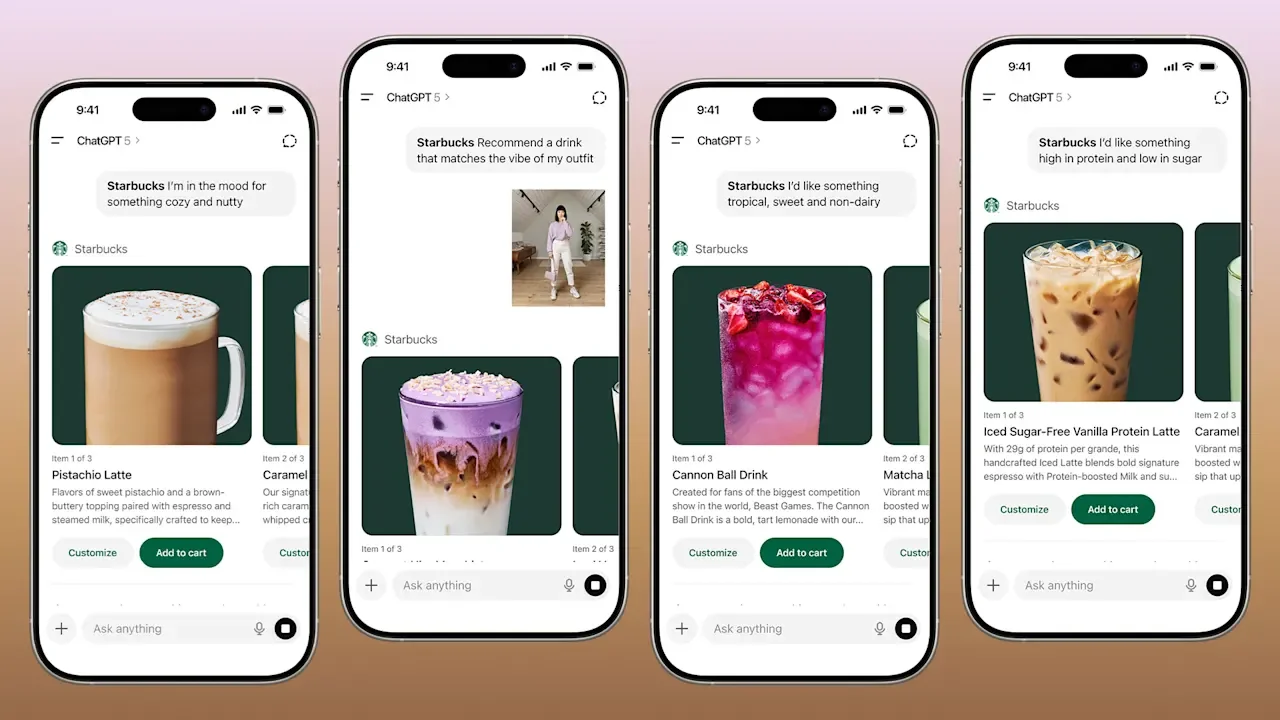
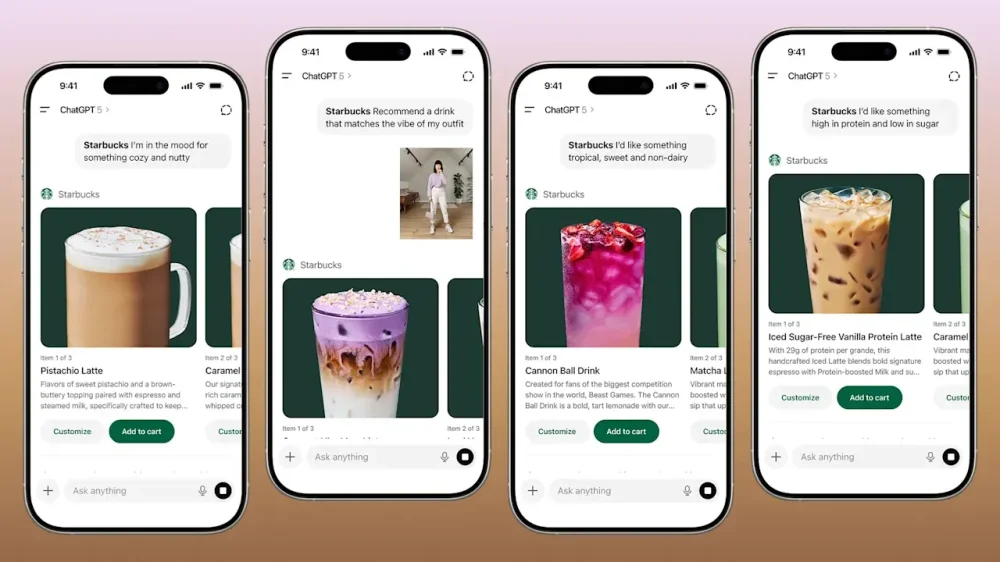
Not sure what to order on your next Starbucks run? Now ChatGPT can help. Starting April 15, users will be able to turn to ChatGPT for help deciding on their next Starbucks order through a new integration with the coffee chain. To activate the feature, users simply tag @starbucks within a chat with the AI agent to trigger the new in-platform beta Starbucks app. Users will be able to prompt ChatGPT to offer drink order advice based on mood, cravings, or even an image. For instance, a user might prompt ChatGPT with “@starbucks I’m looking for an iced pick me up,” with the LLM then suggesting an Iced Dragon Energy Drink alongside 5 additional options. “Over the past year, one thing has become clear: customers aren’t always starting with a menu. They’re starting with a feeling,” Paul Riedel, senior vice president, digital & loyalty at Starbucks wrote in a blog post announcement. While helping users decide on what to order, the ChatGPT app will also fuel discovery by suggesting niche menu items that users might be unaware of. Users can then pick one of the AI suggestion and customize in ChatGPT, with then the option to add to order and buy directly from the Starbucks app. The decision to tap into ChatGPT follows a other retailers integrating with AI platforms including Etsy and Walmart, as more and more customers turn to LLMs for product discovery. “People open chat tools to think out loud – to describe the kind of moment they’re in, or imagine something they want to create,” Riedel said. “We want to meet customers right in that moment of inspiration and make it easier than ever to find a drink that fits.” The new beta rollout is a part of the coffee chain’s “Back to Starbucks” turnaround strategy to boost sales and bring back customers. The strategy has proven relatively successful, with the company posting its first U.S. growth in 2 years. Additionally, the ChatGPT integration also follows Starbucks’ ongoing investment in AI announced earlier this year. Still, not everyone online is thrilled about the Starbucks announcement. “One problem with this, the app-less ChatGPT can already give you advice on which Starbucks drink to order. Why would you to inject Starbucks into that conversation? Second, why would I do this more than once or twice? Does Starbucks’ menu change that often?,” a user said on X. Another added, “you gotta have dangerously low brain activity to need a computer program to tell you how to customize your latte.” View the full article
-
Office of Management and Budget Director Russell Vought told the House Budget Committee Wednesday that the Community Development Financial Institutions Fund is still a target for elimination by the administration because it promotes "woke" ideology. View the full article
-
It’s a brutal hiring market for new grads. Hiring has slowed across multiple industries and competition is especially fierce given AI has recently begun to take on tasks usually associated with entry-level roles. According to a recent analysis from the Federal Reserve Bank of New York, the unemployment rate for college graduates ages 22 to 27 is up, hitting 5.8 percent at the end of 2025. Overall, hiring is down 7% year over year, and still well below pre-pandemic levels, says Kory Kantenga, LinkedIn’s Head of Economics. In an effort to help new graduates manage the intimidating start to their career journey, LinkedIn just released its 2026 Grad Guide, which analyzed millions of LinkedIn profiles to find which jobs were hiring new grads, which industries are growing the fastest, and the best cities to find jobs. The 5 fastest-growing roles for new grads: 1. AI Engineer 2. Marketing Coordinator 3. Recruitment Assistant 4. Legal Specialist 5. Human Resources Operations Specialist The 5 fastest-growing industries for new grads: 1. Technology, information, and media 2. Real Estate 3. Financial Services 4. Utilities 5. Construction As far as where grads should be looking for jobs, tech hubs like San Francisco and Seattle are still hot spots. However, a few more surprising cities, like Orlando, which was recently ranked in the number two slot on WalletHub’s best cities to start a career in 2026, given it has the second-highest number of entry-level job openings per capita, a low unemployment rate. The top 5 cities for new grads: 1. San Francisco 2. Orlando 3. Atlanta 4. Charleston 5. Tampa However, some new workers are eschewing traditional jobs entirely. “We’re seeing a lot of new grads turning to more alternative types of employment, whether they do gig work or work in retail or a restaurant,” says career strategist Hanna Goefft. “There’s more scrappiness in Gen Z and more visibility online of people taking different paths.” According to the report, a separate LinkedIn survey found that 68% of Gen Zers in the U.S. are considering starting their own business. Likewise, more than half of Gen Zers surveyed said they’re pursuing freelance or contract roles, rather than more traditional fulltime gigs. Kory Kantenga, says the pivot is “a reflection of how early careers are evolving, with Gen Z adapting quickly and finding opportunity where it exists.” While there’s a ton that’s changing about the job market and where the youngest generation of workers are finding jobs, some sage advice still holds up, the report explains. Building connections, focusing on your skills, and learning as you go are all important parts of eventually landing a job post-college, it says. However, there’s one skill that job-seekers may not want to overlook, because companies certainly won’t. That, of course, is the ability to use AI to improve work, solve problems, and “build something tangible.” View the full article

-
It's one of the most annoying things a website can do: You visit a page, take a look, and decide for whatever reason you need to head back to the previous page you were on. Only when you click the back button, or you use a keyboard shortcut to go back a page, the current site simply reloads. So, you try again, only to reload the site once more. What gives? This is back button hijacking. Back button hijacking is an aggressive tactic websites can use to try to keep you browsing their pages for longer. By taking over your ability to go back a page, they can keep you on the same page, redirect you to other pages, or present you with ads you normally wouldn't have seen. It's a scummy thing to do, though it isn't reserved to "malicious" websites—I've experienced it on websites big and small. It's an effective tactic for any website that wants to inflate its sessions. The rest of us hate it. Including Google, it seems. Back button hijacking's days are numberedGoogle is now doing something about this practice. In a Monday post on its Google Search Central Blog, Google officially labeled it an explicit violation of the "malicious practices" section of its spam policy, placing it alongside malware and unwanted software downloads as examples of practices Google says "create a mismatch between user expectations and the actual outcome, leading to a negative and deceptive user experience, or compromised user security or privacy." You bet it does. When it comes to back button hijacking, Google says that users who experience the practice feel manipulated, and are less likely to visit unfamiliar sites in the future. In short, it's not just annoying; it interrupts the overall experience of surfing the web, and makes the internet a worse place to explore. Google is warning website owners that instances of back button hijacking may result in manual spam actions, which require users to fix the issue (in this case, back button hijacking) and request a manual review by Google before the it can be marked resolved. Google says these sites may also be subject to automated demotions. Both of these actions can affect how sites are ranked in Google search results. Google advises all website owners to carefully review their sites to remove or disable any code, imports, or configurations that result in back button hijacking—even if those instances came from ad platforms or existing libraries, not just the site owner's intended design. If you know your site is using a script to prevent users from returning to the previous page, you must remove it. When will back button hijacking rules be enforced?Unfortunately, you may not see back button hijacking disappear overnight. Google is giving website owners a two month head start before the policy is put in place—but as of June 15, back button hijacking will be prohibited, and will result in consequences from Google. View the full article
-
Performing a criminal background check on yourself is an important step for comprehending what potential employers or landlords might see. It involves gathering personal information like your full name and past addresses, then accessing various records through state or online databases. Identifying any errors in your report is vital, as these inaccuracies can affect your opportunities. By knowing how to navigate this process, you can guarantee your records accurately reflect your history. What should you do next? Key Takeaways Gather your personal information, including full name, date of birth, and previous addresses for accurate results. Choose a reliable background check service or use the Texas Department of Public Safety’s online portal. Input the required data into the chosen service and generate your background check report. Review the report for any discrepancies or inaccuracies and gather documentation to contest them if necessary. Regularly perform background checks to stay informed about your legal status and manage your social media presence effectively. Why You Should Conduct a Self Background Check Conducting a self-background check is vital, especially since it allows you to see what potential employers or landlords might uncover about your history. You might wonder, “how do I perform a background check on myself?” Start by gathering your personal information, like your Social Security number, and then utilize professional services such as Checkr. These services provide detailed reports, including criminal records and driving history, giving you a thorough view of your background. Identifying any inaccuracies or errors in your personal records is important, as these could stem from misreporting or even identity theft. By addressing these issues proactively, you can prevent them from affecting your job or housing applications. Moreover, knowing your criminal history, including any felony or misdemeanor convictions, allows you to prepare for potential questions during interviews. A self-background check not only offers peace of mind but also boosts your confidence as you navigate the application process. Understanding the Components of Your Background Check Even though you may not think about it often, comprehending the components of your background check is essential for grasping how your past can impact your future opportunities. When you learn how to get a criminal record report, you’ll find that it typically includes: Felony and misdemeanor convictions at national, state, and county levels. Pending charges and arrest records that can affect your employability. Social Security number (SSN) traces to validate your identity and related names. Driving records showing traffic violations or accidents relevant to specific jobs. Understanding these elements helps you identify potential red flags before they hinder your chances. Many background check services comply with the Fair Credit Reporting Act (FCRA), ensuring the information is accurate and protects your rights. Gathering Necessary Personal Information To gather necessary personal information for your criminal background check, start by collecting key identification documents like your driver’s license or state ID. You’ll likewise need to note relevant dates and locations, such as your birthdate and any previous addresses, to guarantee accurate record searches. This information helps link potential records to your identity, making the process smoother and more reliable. Personal Identification Documents When you’re ready to perform a criminal background check, gathering the right personal identification documents is vital for ensuring accuracy in your search. To answer the question, “how can I get a background check on myself?”, start with these key items: Your driver’s license or state ID to verify identity. Your Social Security card for accurate record retrieval. Any government-issued ID that further confirms your identity. Legal documents related to past criminal cases, like court records. These documents help you compile significant information like your full name, date of birth, and any aliases. Relevant Dates and Locations Gathering relevant dates and locations is vital for performing an accurate criminal background check on yourself. Start by collecting your full name, date of birth, and Social Security number, as these details are important for accurate searches. Don’t forget to gather past addresses, since they’re often needed to access local and county criminal records effectively. It’s wise to note any aliases or maiden names, as records might appear under those names. Furthermore, prepare identification documents, like a driver’s license, to verify your identity when requesting records. Finally, if you’re wondering how can I find my criminal record for free, keep in mind that different state and county agencies, along with online databases, may have specific requirements for accessing your criminal history records. Accessing State and Local Criminal Records When you want to access state and local criminal records, start with the Texas Department of Public Safety‘s online portal, where you can find criminal history information for a fee. For local records, visit your county courthouse or check their online database, keeping in mind that availability and costs might differ. Gathering necessary personal details, like your full name and date of birth, will help guarantee you get accurate records during your search. Texas Department of Public Safety Accessing your criminal history in Texas is a straightforward process, thanks to the Texas Department of Public Safety (DPS). Here’s how you can obtain your criminal history records: Complete a request form. Submit a fingerprint card. Pay a fee of $25 via check or money order. Use the DPS online portal to check your request status. The DPS provides an extensive report including arrests, charges, and convictions, which can be essential for job or housing applications. If you need more information beyond what the DPS offers, you can additionally contact local law enforcement or county courts. Local Courthouse Records Access To obtain state and local criminal records, you can visit your local courthouse or utilize online databases provided by the state’s judicial system. Many courthouses offer public access terminals where you can search for criminal case information using your name and date of birth. In Texas, for instance, the Texas Department of Public Safety provides an online service to request criminal history records. Fees may apply, so check the courthouse or state website for costs. You can likewise request your records by mail, submitting a completed form along with identification and payment. Access Method Details In-Person Search Use public terminals at the courthouse. Online Database Check the state’s judicial website. Mail Request Send a form with ID and fees. Utilizing Online Databases for Background Checks How can you effectively utilize online databases for conducting a criminal background check? Start by accessing reputable online resources customized for this purpose. Here’s a simple guide to help you navigate these tools: Visit the National Sex Offender Public Website for specific records. Check your state’s online portal for criminal history; you’ll need personal info like your Social Security number and date of birth. Explore PACER (Public Access to Court Electronic Records) for federal court cases that could reveal federal criminal history. Consider third-party services like iprospectcheck for detailed reports, ensuring they comply with FCRA regulations. These steps will help you answer the question, “how can I check my background check?” Regularly reviewing your online presence and public records is essential to identify any discrepancies that might impact your results, keeping your background check accurate and up-to-date. Requesting Your Driving Records Requesting your driving records is a straightforward process that can provide valuable insights into your driving history. In Texas, you can easily access your records through the Texas Department of Motor Vehicles (DMV) website. This online service allows for a quick and convenient request. Typically, you’ll need to pay a fee, usually around $10 for a standard copy, though this can vary based on the type of record you request. Alternatively, you can submit a request by mail by completing the necessary application form and sending it, along with the fee, to the DMV. Your driving records will detail your license status, driving history, and any violations or accidents. Regularly checking your driving records is crucial, especially if you’re conducting a criminal background check on myself, as inaccuracies could impact your employment opportunities or insurance rates. Reviewing Employment and Education Verification Comprehending your driving records is just one part of guaranteeing your background is accurate when you’re preparing for a job search or other opportunities. Reviewing your employment and education verification is vital for validating your claims. You can learn how to run a background check on yourself for free, and here are key steps to follow: Confirm your past employment details, including employer names and job titles. Verify your academic enrollment and degrees earned. Utilize services like GoodHire or iprospectcheck for streamlined verification processes. Address any inaccuracies in your reports proactively. Employers often rely on these checks to assess qualifications, making it important to verify your records are accurate. Analyzing Your Social Media Presence When you’re analyzing your social media presence, start by evaluating your privacy settings to control who sees your content. Next, perform a content consistency check by reviewing your posts for professionalism and deleting any inappropriate material. This process not only safeguards your online image but additionally guarantees that your profiles align with the professional standards many employers expect. Assessing Privacy Settings Evaluating your privacy settings on social media is crucial for maintaining control over your personal information and online reputation. Here are some steps to reflect on: Regularly review your privacy settings to restrict access to your information. Use platform-specific tools to limit visibility of your posts and details. Search your name online to identify what’s publicly accessible and address privacy concerns. Monitor tagged photos and posts, requesting removals if they don’t align with your professional image. Content Consistency Check To maintain a professional online presence, it’s important to conduct a content consistency check across your social media accounts. Many employers and landlords now review online profiles when making decisions. Start by guaranteeing your accounts are set to private, limiting access to potentially damaging content. Regularly search your name on various platforms to spot any posts or comments that may not reflect your desired image. If you find anything questionable, consider curating your profiles by removing or editing those posts. Utilize privacy settings effectively to control who sees your personal information. By managing your online reputation proactively, you can better prepare for questions such as, “how can I find my criminal record?” and guarantee your social media aligns with your professional goals. Deleting Inappropriate Posts Maintaining a polished online presence often requires you to take a closer look at your social media profiles, especially regarding deleting inappropriate posts. Start by evaluating your content to guarantee it aligns with your professional image. Here’s a quick checklist: Review all posts for offensive language or images. Adjust privacy settings to limit post visibility to trusted connections. Use social media management tools to monitor your online reputation. Conduct regular audits every few months to keep your profiles updated. Identifying Potential Errors or Inaccuracies Have you ever wondered what might be lurking in your criminal background check? Conducting a free criminal history check is a proactive step to uncover any inaccuracies that could affect your life. Errors in your report may include outdated information, incorrect personal identifiers, or even records that should have been expunged. These inaccuracies can arise from misreporting or identity theft, which is why it’s crucial to regularly review your background check. Services like Checkr or iprospectcheck provide easy online access to your personal background reports, allowing you to scrutinize them for discrepancies. Under the Fair Credit Reporting Act (FCRA), you have the right to dispute any incorrect information you find. Identifying these potential errors early can help you avoid complications with job applications or housing leases, ensuring your records accurately reflect your history. Taking the time to check your background can save you from future obstacles. Taking Action on Discrepancies Found Finding discrepancies in your criminal background check can be unsettling, but taking action is key to rectifying any inaccuracies. Here’s how you can address those discrepancies effectively: Gather supporting documentation: Collect court records or proof of expunction to contest inaccuracies. Contact the reporting agency: Dispute the findings directly, as the Fair Credit Reporting Act (FCRA) allows you to challenge incorrect data. File a formal dispute: Reach out to the original source of the information, like a court or law enforcement agency, to request corrections to your criminal record check. Document everything: Keep detailed records of all communications and responses to maintain a clear trail of your actions. After filing your dispute, follow up within 30 days to verify the information has been corrected and updated reports are sent to relevant parties. Taking these steps can help you regain control over your criminal background check. Considering Professional Background Check Services When considering a professional background check service, it’s essential to understand the benefits these platforms offer. Services like iprospectcheck provide extensive, FCRA-compliant reports that adhere to legal standards for employment-related screenings. You can expect fast turnaround times, with basic checks available for as low as $39.95 and reports typically ready within an hour. These professional background check services compile data from various sources, including criminal records, employment history, and education verification, giving you a thorough overview of your background. Utilizing these services saves you time and effort, as they leverage industry expertise and vast databases. Furthermore, companies such as iprospectcheck empower individuals by providing tools to correct errors proactively. This can boost your confidence during job applications or interactions with landlords. In the end, choosing a professional background check service can help you navigate the intricacies of your personal history more efficiently. Legal Rights and Regulations Regarding Background Checks Comprehending your legal rights and the regulations surrounding background checks is essential, especially if you’re engaging with professional services or seeking employment. Here are some key points to remember: Under the Fair Credit Reporting Act (FCRA), you have the right to access your background check reports and dispute any inaccuracies. Employers must provide written notice and obtain your consent before conducting background checks, ensuring transparency. Laws like Ban the Box prevent employers from asking about criminal history until a conditional job offer is made, protecting your chances. The FCRA limits reporting negative information, such as criminal convictions, to seven years for most employment types. If you want to review your information, you can request an identity history summary. Familiarizing yourself with these legal rights and regulations regarding background checks helps you navigate the process with confidence. Frequently Asked Questions Can You Get a Criminal Background Check on Yourself? Yes, you can get a criminal background check on yourself. Various services, like iprospectcheck, offer thorough reports, including criminal history and employment verification. Furthermore, state and local agencies, such as the Texas Department of Public Safety, allow you to request your records. Conducting a self-background check helps you identify inaccuracies and prepares you for potential employer inquiries, promoting transparency in the hiring process. It’s a proactive step toward managing your personal information. How Much Does a Background Check Cost in Alaska? In Alaska, the cost of a criminal background check varies depending on the type you choose. A standard check through the Department of Public Safety costs $20, whereas fingerprint-based checks may reach up to $60. Private services typically charge between $30 and $100, based on report depth. Online options start around $25 but can increase with complexity. If you’re an employer, keep in mind that you’re responsible for covering these costs for potential employees. What Is the Best Way to Do a Criminal Background Check? To do a criminal background check, start by using reputable third-party services like Checkr or iProspectCheck, which provide thorough reports compliant with FCRA regulations. You can additionally access your state’s Department of Public Safety for direct records, though this may require a fee. Don’t forget to conduct an SSN trace for identity verification and check your driving records through the DMV, especially if relevant to your job applications or responsibilities. Can a Normal Person Run a Background Check? Yes, a normal person can run a background check on themselves. You can utilize various online services or access public records through government websites. Many states provide free criminal history records via local law enforcement. For a more thorough check, consider third-party services that charge a fee. Furthermore, you can review your personal credit report annually for insights into your financial history. Comprehending your rights under the Fair Credit Reporting Act is crucial before starting. Conclusion Conducting a self background check is a proactive step in managing your personal information and ensuring accuracy in your records. By comprehending the components of your background check and knowing how to access state and local records, you can identify any discrepancies. Taking corrective action is crucial for protecting your reputation and legal rights. Whether you choose to utilize online databases or professional services, being informed empowers you to maintain an accurate and up-to-date record. Image via Google Gemini and ArtSmart This article, "How to Perform a Criminal Background Check on Myself" was first published on Small Business Trends View the full article
-
Performing a criminal background check on yourself is an important step for comprehending what potential employers or landlords might see. It involves gathering personal information like your full name and past addresses, then accessing various records through state or online databases. Identifying any errors in your report is vital, as these inaccuracies can affect your opportunities. By knowing how to navigate this process, you can guarantee your records accurately reflect your history. What should you do next? Key Takeaways Gather your personal information, including full name, date of birth, and previous addresses for accurate results. Choose a reliable background check service or use the Texas Department of Public Safety’s online portal. Input the required data into the chosen service and generate your background check report. Review the report for any discrepancies or inaccuracies and gather documentation to contest them if necessary. Regularly perform background checks to stay informed about your legal status and manage your social media presence effectively. Why You Should Conduct a Self Background Check Conducting a self-background check is vital, especially since it allows you to see what potential employers or landlords might uncover about your history. You might wonder, “how do I perform a background check on myself?” Start by gathering your personal information, like your Social Security number, and then utilize professional services such as Checkr. These services provide detailed reports, including criminal records and driving history, giving you a thorough view of your background. Identifying any inaccuracies or errors in your personal records is important, as these could stem from misreporting or even identity theft. By addressing these issues proactively, you can prevent them from affecting your job or housing applications. Moreover, knowing your criminal history, including any felony or misdemeanor convictions, allows you to prepare for potential questions during interviews. A self-background check not only offers peace of mind but also boosts your confidence as you navigate the application process. Understanding the Components of Your Background Check Even though you may not think about it often, comprehending the components of your background check is essential for grasping how your past can impact your future opportunities. When you learn how to get a criminal record report, you’ll find that it typically includes: Felony and misdemeanor convictions at national, state, and county levels. Pending charges and arrest records that can affect your employability. Social Security number (SSN) traces to validate your identity and related names. Driving records showing traffic violations or accidents relevant to specific jobs. Understanding these elements helps you identify potential red flags before they hinder your chances. Many background check services comply with the Fair Credit Reporting Act (FCRA), ensuring the information is accurate and protects your rights. Gathering Necessary Personal Information To gather necessary personal information for your criminal background check, start by collecting key identification documents like your driver’s license or state ID. You’ll likewise need to note relevant dates and locations, such as your birthdate and any previous addresses, to guarantee accurate record searches. This information helps link potential records to your identity, making the process smoother and more reliable. Personal Identification Documents When you’re ready to perform a criminal background check, gathering the right personal identification documents is vital for ensuring accuracy in your search. To answer the question, “how can I get a background check on myself?”, start with these key items: Your driver’s license or state ID to verify identity. Your Social Security card for accurate record retrieval. Any government-issued ID that further confirms your identity. Legal documents related to past criminal cases, like court records. These documents help you compile significant information like your full name, date of birth, and any aliases. Relevant Dates and Locations Gathering relevant dates and locations is vital for performing an accurate criminal background check on yourself. Start by collecting your full name, date of birth, and Social Security number, as these details are important for accurate searches. Don’t forget to gather past addresses, since they’re often needed to access local and county criminal records effectively. It’s wise to note any aliases or maiden names, as records might appear under those names. Furthermore, prepare identification documents, like a driver’s license, to verify your identity when requesting records. Finally, if you’re wondering how can I find my criminal record for free, keep in mind that different state and county agencies, along with online databases, may have specific requirements for accessing your criminal history records. Accessing State and Local Criminal Records When you want to access state and local criminal records, start with the Texas Department of Public Safety‘s online portal, where you can find criminal history information for a fee. For local records, visit your county courthouse or check their online database, keeping in mind that availability and costs might differ. Gathering necessary personal details, like your full name and date of birth, will help guarantee you get accurate records during your search. Texas Department of Public Safety Accessing your criminal history in Texas is a straightforward process, thanks to the Texas Department of Public Safety (DPS). Here’s how you can obtain your criminal history records: Complete a request form. Submit a fingerprint card. Pay a fee of $25 via check or money order. Use the DPS online portal to check your request status. The DPS provides an extensive report including arrests, charges, and convictions, which can be essential for job or housing applications. If you need more information beyond what the DPS offers, you can additionally contact local law enforcement or county courts. Local Courthouse Records Access To obtain state and local criminal records, you can visit your local courthouse or utilize online databases provided by the state’s judicial system. Many courthouses offer public access terminals where you can search for criminal case information using your name and date of birth. In Texas, for instance, the Texas Department of Public Safety provides an online service to request criminal history records. Fees may apply, so check the courthouse or state website for costs. You can likewise request your records by mail, submitting a completed form along with identification and payment. Access Method Details In-Person Search Use public terminals at the courthouse. Online Database Check the state’s judicial website. Mail Request Send a form with ID and fees. Utilizing Online Databases for Background Checks How can you effectively utilize online databases for conducting a criminal background check? Start by accessing reputable online resources customized for this purpose. Here’s a simple guide to help you navigate these tools: Visit the National Sex Offender Public Website for specific records. Check your state’s online portal for criminal history; you’ll need personal info like your Social Security number and date of birth. Explore PACER (Public Access to Court Electronic Records) for federal court cases that could reveal federal criminal history. Consider third-party services like iprospectcheck for detailed reports, ensuring they comply with FCRA regulations. These steps will help you answer the question, “how can I check my background check?” Regularly reviewing your online presence and public records is essential to identify any discrepancies that might impact your results, keeping your background check accurate and up-to-date. Requesting Your Driving Records Requesting your driving records is a straightforward process that can provide valuable insights into your driving history. In Texas, you can easily access your records through the Texas Department of Motor Vehicles (DMV) website. This online service allows for a quick and convenient request. Typically, you’ll need to pay a fee, usually around $10 for a standard copy, though this can vary based on the type of record you request. Alternatively, you can submit a request by mail by completing the necessary application form and sending it, along with the fee, to the DMV. Your driving records will detail your license status, driving history, and any violations or accidents. Regularly checking your driving records is crucial, especially if you’re conducting a criminal background check on myself, as inaccuracies could impact your employment opportunities or insurance rates. Reviewing Employment and Education Verification Comprehending your driving records is just one part of guaranteeing your background is accurate when you’re preparing for a job search or other opportunities. Reviewing your employment and education verification is vital for validating your claims. You can learn how to run a background check on yourself for free, and here are key steps to follow: Confirm your past employment details, including employer names and job titles. Verify your academic enrollment and degrees earned. Utilize services like GoodHire or iprospectcheck for streamlined verification processes. Address any inaccuracies in your reports proactively. Employers often rely on these checks to assess qualifications, making it important to verify your records are accurate. Analyzing Your Social Media Presence When you’re analyzing your social media presence, start by evaluating your privacy settings to control who sees your content. Next, perform a content consistency check by reviewing your posts for professionalism and deleting any inappropriate material. This process not only safeguards your online image but additionally guarantees that your profiles align with the professional standards many employers expect. Assessing Privacy Settings Evaluating your privacy settings on social media is crucial for maintaining control over your personal information and online reputation. Here are some steps to reflect on: Regularly review your privacy settings to restrict access to your information. Use platform-specific tools to limit visibility of your posts and details. Search your name online to identify what’s publicly accessible and address privacy concerns. Monitor tagged photos and posts, requesting removals if they don’t align with your professional image. Content Consistency Check To maintain a professional online presence, it’s important to conduct a content consistency check across your social media accounts. Many employers and landlords now review online profiles when making decisions. Start by guaranteeing your accounts are set to private, limiting access to potentially damaging content. Regularly search your name on various platforms to spot any posts or comments that may not reflect your desired image. If you find anything questionable, consider curating your profiles by removing or editing those posts. Utilize privacy settings effectively to control who sees your personal information. By managing your online reputation proactively, you can better prepare for questions such as, “how can I find my criminal record?” and guarantee your social media aligns with your professional goals. Deleting Inappropriate Posts Maintaining a polished online presence often requires you to take a closer look at your social media profiles, especially regarding deleting inappropriate posts. Start by evaluating your content to guarantee it aligns with your professional image. Here’s a quick checklist: Review all posts for offensive language or images. Adjust privacy settings to limit post visibility to trusted connections. Use social media management tools to monitor your online reputation. Conduct regular audits every few months to keep your profiles updated. Identifying Potential Errors or Inaccuracies Have you ever wondered what might be lurking in your criminal background check? Conducting a free criminal history check is a proactive step to uncover any inaccuracies that could affect your life. Errors in your report may include outdated information, incorrect personal identifiers, or even records that should have been expunged. These inaccuracies can arise from misreporting or identity theft, which is why it’s crucial to regularly review your background check. Services like Checkr or iprospectcheck provide easy online access to your personal background reports, allowing you to scrutinize them for discrepancies. Under the Fair Credit Reporting Act (FCRA), you have the right to dispute any incorrect information you find. Identifying these potential errors early can help you avoid complications with job applications or housing leases, ensuring your records accurately reflect your history. Taking the time to check your background can save you from future obstacles. Taking Action on Discrepancies Found Finding discrepancies in your criminal background check can be unsettling, but taking action is key to rectifying any inaccuracies. Here’s how you can address those discrepancies effectively: Gather supporting documentation: Collect court records or proof of expunction to contest inaccuracies. Contact the reporting agency: Dispute the findings directly, as the Fair Credit Reporting Act (FCRA) allows you to challenge incorrect data. File a formal dispute: Reach out to the original source of the information, like a court or law enforcement agency, to request corrections to your criminal record check. Document everything: Keep detailed records of all communications and responses to maintain a clear trail of your actions. After filing your dispute, follow up within 30 days to verify the information has been corrected and updated reports are sent to relevant parties. Taking these steps can help you regain control over your criminal background check. Considering Professional Background Check Services When considering a professional background check service, it’s essential to understand the benefits these platforms offer. Services like iprospectcheck provide extensive, FCRA-compliant reports that adhere to legal standards for employment-related screenings. You can expect fast turnaround times, with basic checks available for as low as $39.95 and reports typically ready within an hour. These professional background check services compile data from various sources, including criminal records, employment history, and education verification, giving you a thorough overview of your background. Utilizing these services saves you time and effort, as they leverage industry expertise and vast databases. Furthermore, companies such as iprospectcheck empower individuals by providing tools to correct errors proactively. This can boost your confidence during job applications or interactions with landlords. In the end, choosing a professional background check service can help you navigate the intricacies of your personal history more efficiently. Legal Rights and Regulations Regarding Background Checks Comprehending your legal rights and the regulations surrounding background checks is essential, especially if you’re engaging with professional services or seeking employment. Here are some key points to remember: Under the Fair Credit Reporting Act (FCRA), you have the right to access your background check reports and dispute any inaccuracies. Employers must provide written notice and obtain your consent before conducting background checks, ensuring transparency. Laws like Ban the Box prevent employers from asking about criminal history until a conditional job offer is made, protecting your chances. The FCRA limits reporting negative information, such as criminal convictions, to seven years for most employment types. If you want to review your information, you can request an identity history summary. Familiarizing yourself with these legal rights and regulations regarding background checks helps you navigate the process with confidence. Frequently Asked Questions Can You Get a Criminal Background Check on Yourself? Yes, you can get a criminal background check on yourself. Various services, like iprospectcheck, offer thorough reports, including criminal history and employment verification. Furthermore, state and local agencies, such as the Texas Department of Public Safety, allow you to request your records. Conducting a self-background check helps you identify inaccuracies and prepares you for potential employer inquiries, promoting transparency in the hiring process. It’s a proactive step toward managing your personal information. How Much Does a Background Check Cost in Alaska? In Alaska, the cost of a criminal background check varies depending on the type you choose. A standard check through the Department of Public Safety costs $20, whereas fingerprint-based checks may reach up to $60. Private services typically charge between $30 and $100, based on report depth. Online options start around $25 but can increase with complexity. If you’re an employer, keep in mind that you’re responsible for covering these costs for potential employees. What Is the Best Way to Do a Criminal Background Check? To do a criminal background check, start by using reputable third-party services like Checkr or iProspectCheck, which provide thorough reports compliant with FCRA regulations. You can additionally access your state’s Department of Public Safety for direct records, though this may require a fee. Don’t forget to conduct an SSN trace for identity verification and check your driving records through the DMV, especially if relevant to your job applications or responsibilities. Can a Normal Person Run a Background Check? Yes, a normal person can run a background check on themselves. You can utilize various online services or access public records through government websites. Many states provide free criminal history records via local law enforcement. For a more thorough check, consider third-party services that charge a fee. Furthermore, you can review your personal credit report annually for insights into your financial history. Comprehending your rights under the Fair Credit Reporting Act is crucial before starting. Conclusion Conducting a self background check is a proactive step in managing your personal information and ensuring accuracy in your records. By comprehending the components of your background check and knowing how to access state and local records, you can identify any discrepancies. Taking corrective action is crucial for protecting your reputation and legal rights. Whether you choose to utilize online databases or professional services, being informed empowers you to maintain an accurate and up-to-date record. Image via Google Gemini and ArtSmart This article, "How to Perform a Criminal Background Check on Myself" was first published on Small Business Trends View the full article
-
The organizer behind SantaCon, a Santa-themed crawl that raises money for local charities, is being charged with defrauding ticket-buyers and establishment owners. On Wednesday, 50-year-old Stefan Pildes was arrested in New York and charged with wire fraud, which carries a maximum sentence of twenty years in prison. Prosecutors claim Pildes, who served as the president of and controlled the nonprofit entity that organizes the event called Participatory Safety, Inc. (“PSI”), diverted funds that were meant to go to charity to his own accounts. Per the indictment, from November 2019 through April 2026, Pildes allegedly defrauded tens of thousands of participants who bought tickets to SantaCon. “As alleged, Stefan Pildes promoted SantaCon as an event grounded in charitable giving, but instead of donating the millions of dollars he raised, he ran his own con game,” U.S. Attorney Jay Clayton said in a press release. “He took advantage of New Yorkers’ generous holiday spirit to finance his lifestyle through personal expenses, big and small,” Clayton continued. “No matter how you dress it up, fraud is fraud. We are committed to protecting New Yorkers from those who exploit their enthusiasm and generosity.” According to prosecutors, Pildes took most of the event’s earnings, which come primarily from selling tickets, as well as from establishments that host the event, for himself. The organizer promoted the event on SantaCon’s website, which explained that donations would be split between various charities. Contributions from establishments were categorized as a “charitable commission” or “donation” of around 10% and 25% of sales. The complaint alleges that Pildes donations accrued from 2019 to 2024 added up to $2 million in ticket sales and over $675,000 in charitable commissions, but that Pildes used the money to fund his own luxurious lifestyle. It alleged he diverted funds to pay for renovations on his lakefront New Jersey property, vacations, a luxury vehicle, and more. FBI Assistant Director in Charge James C. Barnacle, Jr. said, “Stefan Pildes, the president of SantaCon, allegedly pocketed over half of the proceeds generated by his nonprofit to make personal purchases. Pildes allegedly stole Christmas from tens of thousands of victims and deprived local charities of more than one million dollars. The FBI continues to root out scrooges that greedily exploit the goodwill of New Yorkers.” Interestingly, it’s not the first time SantaCon has raised eyebrows. A 2023 Gothamist investigation revealed that from 2014 to 2022, less than a fifth of the event’s earnings went to charity. It also found that more than a third of the money went to people and groups connected to the annual Burning Man festival. At the time, Pildes confirmed the expenditures, telling the outlet that the funds were part of a zero-interest loan which was repaid. “Our mission is to bring more art out into the world,” Pildes said. “I want to continue to see more creative outlets and opportunities and more people in costume and more cheer being spread.” View the full article

-
Explore the impact of AI search on SEO roles and how brands can manage their online presence in AI outputs effectively. The post How To Become The AI Search Authority In Your Company [Webinar] appeared first on Search Engine Journal. View the full article
-
Small business owners are often on the lookout for new ways to connect with their customers and drive sales. The recent integration of TikTok with HubSpot’s Marketing Hub presents a golden opportunity, particularly as TikTok continues to rise as a powerful platform for engaging audiences. This new feature aims to streamline the process of turning social media interactions into tangible revenue for small and medium-sized businesses (SMBs). This integration marks a significant milestone, enabling marketers to manage and measure both TikTok ads and organic content from within HubSpot. According to Lorry Destainville, Global Head of Monetization Product Partnerships at TikTok, “TikTok has become a powerful engine for business growth, and our goal is to make that growth easier to unlock.” With this integration, business owners can blend creativity with audience insight and performance metrics, potentially speeding up the journey from discovery to customer engagement. The seamless onboarding process allows SMBs to leverage the full context of their customer relationships. Insights gathered from HubSpot’s Smart CRM provide a robust backdrop for campaigns, allowing businesses to target specific segments based on lifecycle stages, deal history, and purchasing behavior. This is particularly advantageous for businesses aiming to create personalized campaigns that resonate more deeply with their target audience. Angela DeFranco, VP Product and GM of Marketing Hub at HubSpot, emphasizes, “By bringing TikTok natively into HubSpot, businesses can now manage campaigns informed by everything they already know about their customers, and that context is what makes them more impactful.” The integration features several user-friendly functionalities that small business owners can practically apply to their marketing strategies. For one, marketers can sync CRM contact segments to TikTok, enabling targeted ads tailored to individual customer profiles. They can also build lookalike audiences based on existing customer data, effectively replicating successful engagement strategies with new prospects. The TikTok Pixel, when deployed and managed within HubSpot, facilitates real-time tracking of ad interactions linked back to specific contacts. This means SMBs can automate follow-up processes based on how potential customers engage with their TikTok content. Marketers can refine their campaigns over time, continuously improving based on feedback and conversion data pulled into HubSpot. Not only does this integration simplify ad management, but it also allows businesses to effortlessly schedule and publish TikTok content from HubSpot’s social tool. Users can generate captions and hashtags using HubSpot’s AI capabilities, and manage comments and mentions from TikTok all in one place, streamlining daily social media operations. However, small business owners should consider potential challenges as they adopt this integration. The initial learning curve associated with new software features can be daunting, especially for teams that may already be stretched thin. Adequate training and a strategic approach to integration will be necessary to maximize benefits. Moreover, while TikTok offers a rich opportunity for engagement, its effective use requires a commitment to creating high-quality, engaging content that speaks to the platform’s unique audience. Many businesses may need to either invest in additional creative resources or upskill current team members to meet the platform’s expectations. Nevertheless, the advantages appear to outweigh the hurdles. The combined power of HubSpot and TikTok can provide small businesses with a versatile toolkit for customer engagement, ensuring they stay competitive in an increasingly digital marketplace. For existing HubSpot customers, enabling this integration is simple, and it opens up a realm of potential for customer acquisition and brand growth. Interested businesses can find out more through the official announcement on HubSpot’s website: HubSpot and TikTok Integration. As TikTok continues to capture the attention of a diverse audience, small business owners who leverage this integration stand to reap significant benefits, translating social media clicks into profitable customer relationships. Image via Google Gemini This article, "HubSpot Integrates TikTok for Streamlined Marketing Insights and Actions" was first published on Small Business Trends View the full article
-
Small business owners are often on the lookout for new ways to connect with their customers and drive sales. The recent integration of TikTok with HubSpot’s Marketing Hub presents a golden opportunity, particularly as TikTok continues to rise as a powerful platform for engaging audiences. This new feature aims to streamline the process of turning social media interactions into tangible revenue for small and medium-sized businesses (SMBs). This integration marks a significant milestone, enabling marketers to manage and measure both TikTok ads and organic content from within HubSpot. According to Lorry Destainville, Global Head of Monetization Product Partnerships at TikTok, “TikTok has become a powerful engine for business growth, and our goal is to make that growth easier to unlock.” With this integration, business owners can blend creativity with audience insight and performance metrics, potentially speeding up the journey from discovery to customer engagement. The seamless onboarding process allows SMBs to leverage the full context of their customer relationships. Insights gathered from HubSpot’s Smart CRM provide a robust backdrop for campaigns, allowing businesses to target specific segments based on lifecycle stages, deal history, and purchasing behavior. This is particularly advantageous for businesses aiming to create personalized campaigns that resonate more deeply with their target audience. Angela DeFranco, VP Product and GM of Marketing Hub at HubSpot, emphasizes, “By bringing TikTok natively into HubSpot, businesses can now manage campaigns informed by everything they already know about their customers, and that context is what makes them more impactful.” The integration features several user-friendly functionalities that small business owners can practically apply to their marketing strategies. For one, marketers can sync CRM contact segments to TikTok, enabling targeted ads tailored to individual customer profiles. They can also build lookalike audiences based on existing customer data, effectively replicating successful engagement strategies with new prospects. The TikTok Pixel, when deployed and managed within HubSpot, facilitates real-time tracking of ad interactions linked back to specific contacts. This means SMBs can automate follow-up processes based on how potential customers engage with their TikTok content. Marketers can refine their campaigns over time, continuously improving based on feedback and conversion data pulled into HubSpot. Not only does this integration simplify ad management, but it also allows businesses to effortlessly schedule and publish TikTok content from HubSpot’s social tool. Users can generate captions and hashtags using HubSpot’s AI capabilities, and manage comments and mentions from TikTok all in one place, streamlining daily social media operations. However, small business owners should consider potential challenges as they adopt this integration. The initial learning curve associated with new software features can be daunting, especially for teams that may already be stretched thin. Adequate training and a strategic approach to integration will be necessary to maximize benefits. Moreover, while TikTok offers a rich opportunity for engagement, its effective use requires a commitment to creating high-quality, engaging content that speaks to the platform’s unique audience. Many businesses may need to either invest in additional creative resources or upskill current team members to meet the platform’s expectations. Nevertheless, the advantages appear to outweigh the hurdles. The combined power of HubSpot and TikTok can provide small businesses with a versatile toolkit for customer engagement, ensuring they stay competitive in an increasingly digital marketplace. For existing HubSpot customers, enabling this integration is simple, and it opens up a realm of potential for customer acquisition and brand growth. Interested businesses can find out more through the official announcement on HubSpot’s website: HubSpot and TikTok Integration. As TikTok continues to capture the attention of a diverse audience, small business owners who leverage this integration stand to reap significant benefits, translating social media clicks into profitable customer relationships. Image via Google Gemini This article, "HubSpot Integrates TikTok for Streamlined Marketing Insights and Actions" was first published on Small Business Trends View the full article
-
What do you primarily use Spotify for? Enjoying music? Keeping up with your favorite podcasts? Listening to audiobooks? Well, the next time you open it (at least on Android) you might just use it to shop for a book—not just an ebook, mind you, but a physical book. Spotify is officially a bookseller As reported by TechCrunch, Spotify is now selling physical books on its Android app to users in the U.S. and the U.K., with plans to roll out the feature to iPhones next week. The company first announced the initiative back in February, revealing that it was partnering with Bookshop.org to facilitate the transactions. This isn't your typical corporate agreement, either: Bookshop.org is designed to connect buyers to their local independent bookstores, rather than some enormous conglomerate or distributor. Bookshop says that 50% of the book sale price goes directly to the publisher (who then pays the author), while 30% goes to the bookstore you choose upon purchase. Another 10% goes towards a profit-sharing fund that is distributed among all the bookstores the site works with. It might seem a bit silly to think of buying a book through Spotify, an app originally meant solely for music. But like many platforms, Spotify has adapted and grown its offerings over the years. It already sold audiobooks, so why not print and e-books? In effect, Spotify is now directly competing with Amazon as a place you can go for all your literary needs, whether you prefer to read or listen to your books. Maybe a Spotify-branded e-reader is up next—though the last time Spotify tried to sell its own device, it didn't end up working out too well. Note that there isn't a dedicated storefront for buying books on Spotify. Instead, you'll see a “Get a copy for your bookshelf" button appear under individual audiobooks. When you choose this, you'll be taken to that book's Bookshop.org page. Spotify's "Page Match" and "Audiobook Recaps" are getting updates tooIn addition to this news, Spotify also announced an update to Page Match, its feature that lets you sync your place in a book using your phone's camera. Now the feature supports over 30 languages, including French, German, and Swedish. Spotify's audiobook summarization feature, "Audiobook Recaps," is also now accessible on Android. Previously, this feature was exclusive to iOS, and let users listen to a summary of what they had already listened to in an audiobook. There have also been updates to audiobook charts across the app, which show customers which books are currently the top sellers. Audiobook charts recently launched in Germany, and users in the U.S. and U.K. now have a dedicated chart for the most popular kids and family-oriented audiobooks, too. View the full article
-
Marketing services firm LeadPoint said it thought it had gained compliance after Connecticut officials issued a prior consent order and penalty in 2020. View the full article
-
Using a video maker to upload images is a practical way to create engaging content. You’ll want to choose a platform that simplifies the process with drag-and-drop features, making it easy to arrange your photos. With various templates available, customizing your video to fit your needs becomes straightforward. Plus, you can improve your project by adding text and music. Comprehending these steps will help you produce polished videos, but there’s more to explore in maximizing your creative potential. Key Takeaways Access the video maker platform and select the option to create a new project. Use drag-and-drop tools to easily upload and arrange your images in the desired order. Choose from a variety of editable templates that suit your video’s theme or occasion. Enhance your video by adding text, animations, and music from the extensive media library. Download your finished video in high-resolution mp4 format for sharing or distribution. Free Photo Video Maker A free photo video maker can greatly simplify the process of creating engaging videos from your images. With Canva’s user-friendly platform, you can effortlessly upload photos and utilize intuitive drag-and-drop tools to arrange them on a video timeline. The variety of editable templates available caters to different occasions and social media platforms, making video creation accessible for everyone. You can improve your videos further with music and sound effects from Canva’s extensive library, adjusting audio lengths to fit your timeline seamlessly. Plus, with Magic Studio, you gain access to AI-powered tools and ready-made templates customized for popular platforms like YouTube, Instagram, and TikTok. This guarantees that you can create and edit photo videos anytime inspiration strikes, even on-the-go. Create Videos From Photos for Any Platform Creating videos from photos for any platform has never been easier, thanks to tools like Canva’s photo video maker. With its user-friendly interface, you can effortlessly create a video from images. Here’s how you can maximize the platform: Upload and Arrange: Use the intuitive drag-and-drop tools to upload and arrange your photos. Choose Templates: Select from a wide-ranging library of editable templates, perfect for occasions and platforms like YouTube or Instagram. Enhance Your Video: Add dynamic elements such as text, graphics, and sound effects from Canva’s extensive media library. Optimize for Platforms: Utilize the Magic Studio feature to resize videos according to specific platform requirements. How to Make a Photo Video Making a photo video involves several straightforward steps that can transform your collection of images into an enchanting visual story. Start by uploading your desired images to a video maker like Canva, then drag them onto your video draft for seamless assembly. Utilize beginner-friendly templates to compile and arrange your photos into a cohesive presentation. Improve your photo to video experience by adding text elements, animations, and shifts from the video maker’s library, creating engaging visual storytelling. You can additionally incorporate music and sound effects by selecting audio tracks that align with your video’s length, ensuring a polished finish. Finally, download your completed high-resolution photo video in mp4 format to share on social media, boosting engagement and visibility. Meet Magic Studio: All the Power of Canva’s AI Efficiency in video creation has reached new heights with Magic Studio, an innovative tool from Canva that leverages artificial intelligence to simplify the design process. As an image to video maker, it empowers you to create stunning videos effortlessly. Here’s what makes Magic Studio stand out: AI-Powered Design: Streamlines the design process for users of all skill levels. Ready-Made Templates: Customized for platforms like YouTube, Instagram, Facebook, and TikTok. Magic Switch Feature: Easily resizes videos for multiple platforms without quality loss. Comprehensive Media Library: Access graphics, illustrations, and audio tracks to enrich your videos. With these features, you can improve your content as you maintain brand consistency and professionalism. Add Your Stamp on Your Video Content When creating video content, incorporating your unique branding elements can greatly improve its impact. You can choose engaging visuals and graphics from Canva’s library, or upload your own assets like logos and images for a professional touch. Furthermore, customizable text options allow you to effectively convey your message during ensuring your videos resonate with your audience. Unique Branding Elements To effectively establish your unique branding elements in video content, you should integrate your logo and other personalized assets directly into the video maker. This guarantees consistent branding across all your content. Here are four key steps to reinforce your brand identity: Add logo to video by uploading it directly to boost recognition. Utilize graphic illustrations and stickers from the library to make your videos visually appealing. Add text and captions with easy-to-read fonts that align with your brand’s style. Animate elements and personal assets for a dynamic presentation that captures attention. Engaging Visuals and Graphics Engaging visuals and graphics are essential for making your video content stand out in a crowded digital environment. To improve your videos, consider utilizing a library of free media elements, including graphics, illustrations, and stickers, which can capture viewer attention effectively. When you want to add image to video, you can also upload personal assets like logos and images to reflect your brand’s identity. Furthermore, animating elements within your video can create a dynamic experience that keeps audiences interested. Don’t forget to incorporate stock images, videos, and sounds from Canva’s extensive library to enrich your content and boost overall production quality. By doing so, you’ll guarantee your videos are visually appealing and engaging for your viewers. Customizable Text Options Customizable text options are crucial for personalizing your video content, as they allow you to effectively convey your message whilst aligning with your brand’s identity. By utilizing these features, you can improve viewer engagement and clarity. Here are some key aspects to take into account: Choose from a wide selection of easy-to-read fonts. Adjust text size, color, and background effects for better visibility. Incorporate text animations to capture your audience’s attention effectively. Upload personal assets and branding elements for a professional touch. These customizable text options not just make your videos visually appealing but also guarantee your message stands out. Edit Videos Wherever Inspiration Strikes With Canva’s video editing platform, you can edit videos whenever inspiration strikes, whether you’re at home or on the go. The seamless experience across desktop and mobile devices allows you to switch from your laptop to your smartphone without missing a beat. This convenience means you can easily upload images and make edits wherever creativity hits you, ensuring your projects reflect your ideas in real time. Mobile Editing Convenience Editing videos on the go has never been easier, thanks to the convenience of mobile apps like Canva. With this app, you can effortlessly utilize your creativity whenever inspiration strikes. Here’s why mobile editing is a game-changer: Upload images directly from your smartphone, making video creation spontaneous. Drag and drop photos into your video drafts with a user-friendly interface. Access a vast library of media elements and templates right from your phone. You can convert image to video online free, allowing for quick edits without a computer. This mobile convenience guarantees you can start a project anywhere and finish it whenever you’re ready, keeping your creative flow uninterrupted. Cross-Device Seamless Experience As you explore the domain of video creation, you’ll find that a cross-device seamless experience greatly enhances your ability to edit and share content whenever inspiration strikes. With Canva’s video editing platform, you can access your projects on both desktop and mobile devices, making it easy to upload images and videos from anywhere. The Canva app allows you to edit videos on-the-go, guaranteeing you can craft and share video compilations anytime, whether you’re using a laptop, tablet, or smartphone. This functionality assures that edits made on one device sync instantly to another, maintaining a consistent workflow across platforms. With its user-friendly interface, Canva empowers you to compile and customize video content, regardless of your location or device in use. Enhancing Your Photo Videos To create enthralling photo videos, consider enhancing them with various elements that improve storytelling and viewer engagement. Here are some effective ways to turn photos into video: Add Text Elements: Customize size, color, and background effects to convey your message clearly. Utilize Graphics and Animations: Use Canva’s library to infuse visual interest and keep your audience engaged. Experiment with Changes: Smooth changes between images can create a seamless flow, enhancing viewer experience. Preview Your Video: Before finalizing, check that all audio and visual elements are well-aligned for maximum impact. Adding Music and Sound Effects Adding music and sound effects to your photo video can raise its overall appeal. Start by selecting background music that fits your theme, and remember to adjust the audio length so it syncs well with your visuals. You can likewise improve the experience by incorporating sound effects, creating a more immersive environment for your viewers. Selecting Background Music Selecting the right background music is crucial for enhancing your video’s overall impact, since it can greatly affect viewer engagement. Here’s how to choose the perfect soundtrack: Tap the plus icon and select Audio from the menu to explore free tracks and subscriber-exclusive options. Confirm the music length aligns with your video timeline for a seamless viewing experience. Consider adding sound effects, like waves or seagulls, from the same Audio section to enrich your video’s ambiance. Preview your video to check that the audio and visuals sync well, guaranteeing a polished presentation. Adjusting Audio Length Adjusting audio length is vital for creating a cohesive video experience, as mismatched audio can distract viewers from your content. Start by tapping the plus icon in your video project and selecting Audio to add music to your desired page within the video timeline. You can choose from a selection of free tracks or premium audio for subscribers, enhancing the mood of your video. Once you’ve selected your music, adjust the length of the track to align perfectly with your video segments. This step is fundamental when using an image to video converter, ensuring seamless shifts. Always preview your video after adding audio to check that the music syncs well with the images and maintains the overall flow. Adding Sound Effects Sound effects play a crucial role in enhancing the overall quality of your video, providing an auditory backdrop that complements the visuals. To effectively add sound effects in Canva, follow these steps: Select the desired page and tap the plus icon. Choose the Audio option from the menu. Browse the selection of free music tracks and sound effects available. Adjust the length of the music to align perfectly with your video timeline. You can additionally incorporate ambient sound effects, like waves or seagulls, to create a more immersive atmosphere when you add pic on video. Finally, always preview your video after adding audio to verify that the sound aligns well with the visuals and the overall flow of your presentation. Applications for Business and Beyond In today’s competitive environment, leveraging a video maker can greatly improve your business’s outreach and effectiveness. You can create professional-looking safety training videos that boost employee learning through dynamic visuals and audio. By using a video maker to upload images, you can incorporate your company logo into photo videos, ensuring consistent branding across all marketing materials. These photo videos are particularly effective for product promotion on social media, increasing engagement and visibility, which often leads to higher conversion rates. Moreover, you can share video content via download or View Only links, making it easier to distribute important information. Tailoring content for various platforms optimizes messaging for each audience, improving overall communication efforts. Tips for Engaging Photo Videos Creating engaging photo videos requires a strategic approach that captures and retains viewer attention. To effectively turn pics into video, consider these tips: Utilize Canva’s templates: Access customizable templates designed for platforms like YouTube, Instagram, and TikTok to make your content stand out. Incorporate dynamic elements: Use animations and transitions to improve visual appeal, making your photo video more enchanting. Add text overlays: Use easy-to-read fonts for captions that convey messages and provide context, increasing viewer engagement. Improve with audio: Include background music and sound effects; videos can gain 38% more engagement on social media when audio is present. Frequently Asked Questions How to Make a Video With Loads of Pictures? To make a video with loads of pictures, start by selecting your images. Use a video maker that offers templates and drag-and-drop features for easy arrangement. Organize your photos into a slideshow or video format, and improve it with text, animations, and changes for better flow. Add music or sound effects to enrich the experience. Finally, export your video in high resolution and share it on social media or your website for wider reach. How Do I Insert an Image in a Video? To insert an image in a video, start by uploading your desired photos to the platform’s upload section. Once uploaded, drag the images onto your video draft. If you want to replace existing content, select the “Replace” option after tapping the canvas. You can customize each image’s size and position, and apply effects for improvement. Don’t forget to preview your video to check that everything integrates well before finalizing your project. How to Generate Images Into Video? To generate images into a video, upload your photos into a video maker like Canva. Drag and drop them onto your timeline, arranging them in your desired order. You can improve your video by choosing templates, adding animations, and incorporating shifts between images for a smoother flow. Don’t forget to select background music from available tracks. Finally, export your video in a high-resolution format to guarantee quality when sharing across platforms. How to Make Images Move in Video Editing? To make images move in video editing, use keyframe animations to establish starting and ending points for your images. This allows them to slide, zoom, or rotate. Incorporate motion effects from your editing software, like Canva, to create dynamic changes. Use the “Animate” feature for predefined animations, and adjust duration and timing for synchronization with music. Combining multiple images with various movements improves engagement and visually narrates your story effectively. Conclusion Using a video maker to upload images simplifies your video creation process, allowing you to produce professional-looking content quickly. By selecting a user-friendly platform, you can easily arrange photos, add text, and incorporate music. Whether you’re creating videos for personal use or business, leveraging tools like Magic Studio improves your projects with AI-driven features. With these tips, you can create engaging photo videos that capture attention and deliver your message effectively. Start exploring your options today. Image via Google Gemini This article, "How to Use a Video Maker to Upload Images Easily" was first published on Small Business Trends View the full article
-
Using a video maker to upload images is a practical way to create engaging content. You’ll want to choose a platform that simplifies the process with drag-and-drop features, making it easy to arrange your photos. With various templates available, customizing your video to fit your needs becomes straightforward. Plus, you can improve your project by adding text and music. Comprehending these steps will help you produce polished videos, but there’s more to explore in maximizing your creative potential. Key Takeaways Access the video maker platform and select the option to create a new project. Use drag-and-drop tools to easily upload and arrange your images in the desired order. Choose from a variety of editable templates that suit your video’s theme or occasion. Enhance your video by adding text, animations, and music from the extensive media library. Download your finished video in high-resolution mp4 format for sharing or distribution. Free Photo Video Maker A free photo video maker can greatly simplify the process of creating engaging videos from your images. With Canva’s user-friendly platform, you can effortlessly upload photos and utilize intuitive drag-and-drop tools to arrange them on a video timeline. The variety of editable templates available caters to different occasions and social media platforms, making video creation accessible for everyone. You can improve your videos further with music and sound effects from Canva’s extensive library, adjusting audio lengths to fit your timeline seamlessly. Plus, with Magic Studio, you gain access to AI-powered tools and ready-made templates customized for popular platforms like YouTube, Instagram, and TikTok. This guarantees that you can create and edit photo videos anytime inspiration strikes, even on-the-go. Create Videos From Photos for Any Platform Creating videos from photos for any platform has never been easier, thanks to tools like Canva’s photo video maker. With its user-friendly interface, you can effortlessly create a video from images. Here’s how you can maximize the platform: Upload and Arrange: Use the intuitive drag-and-drop tools to upload and arrange your photos. Choose Templates: Select from a wide-ranging library of editable templates, perfect for occasions and platforms like YouTube or Instagram. Enhance Your Video: Add dynamic elements such as text, graphics, and sound effects from Canva’s extensive media library. Optimize for Platforms: Utilize the Magic Studio feature to resize videos according to specific platform requirements. How to Make a Photo Video Making a photo video involves several straightforward steps that can transform your collection of images into an enchanting visual story. Start by uploading your desired images to a video maker like Canva, then drag them onto your video draft for seamless assembly. Utilize beginner-friendly templates to compile and arrange your photos into a cohesive presentation. Improve your photo to video experience by adding text elements, animations, and shifts from the video maker’s library, creating engaging visual storytelling. You can additionally incorporate music and sound effects by selecting audio tracks that align with your video’s length, ensuring a polished finish. Finally, download your completed high-resolution photo video in mp4 format to share on social media, boosting engagement and visibility. Meet Magic Studio: All the Power of Canva’s AI Efficiency in video creation has reached new heights with Magic Studio, an innovative tool from Canva that leverages artificial intelligence to simplify the design process. As an image to video maker, it empowers you to create stunning videos effortlessly. Here’s what makes Magic Studio stand out: AI-Powered Design: Streamlines the design process for users of all skill levels. Ready-Made Templates: Customized for platforms like YouTube, Instagram, Facebook, and TikTok. Magic Switch Feature: Easily resizes videos for multiple platforms without quality loss. Comprehensive Media Library: Access graphics, illustrations, and audio tracks to enrich your videos. With these features, you can improve your content as you maintain brand consistency and professionalism. Add Your Stamp on Your Video Content When creating video content, incorporating your unique branding elements can greatly improve its impact. You can choose engaging visuals and graphics from Canva’s library, or upload your own assets like logos and images for a professional touch. Furthermore, customizable text options allow you to effectively convey your message during ensuring your videos resonate with your audience. Unique Branding Elements To effectively establish your unique branding elements in video content, you should integrate your logo and other personalized assets directly into the video maker. This guarantees consistent branding across all your content. Here are four key steps to reinforce your brand identity: Add logo to video by uploading it directly to boost recognition. Utilize graphic illustrations and stickers from the library to make your videos visually appealing. Add text and captions with easy-to-read fonts that align with your brand’s style. Animate elements and personal assets for a dynamic presentation that captures attention. Engaging Visuals and Graphics Engaging visuals and graphics are essential for making your video content stand out in a crowded digital environment. To improve your videos, consider utilizing a library of free media elements, including graphics, illustrations, and stickers, which can capture viewer attention effectively. When you want to add image to video, you can also upload personal assets like logos and images to reflect your brand’s identity. Furthermore, animating elements within your video can create a dynamic experience that keeps audiences interested. Don’t forget to incorporate stock images, videos, and sounds from Canva’s extensive library to enrich your content and boost overall production quality. By doing so, you’ll guarantee your videos are visually appealing and engaging for your viewers. Customizable Text Options Customizable text options are crucial for personalizing your video content, as they allow you to effectively convey your message whilst aligning with your brand’s identity. By utilizing these features, you can improve viewer engagement and clarity. Here are some key aspects to take into account: Choose from a wide selection of easy-to-read fonts. Adjust text size, color, and background effects for better visibility. Incorporate text animations to capture your audience’s attention effectively. Upload personal assets and branding elements for a professional touch. These customizable text options not just make your videos visually appealing but also guarantee your message stands out. Edit Videos Wherever Inspiration Strikes With Canva’s video editing platform, you can edit videos whenever inspiration strikes, whether you’re at home or on the go. The seamless experience across desktop and mobile devices allows you to switch from your laptop to your smartphone without missing a beat. This convenience means you can easily upload images and make edits wherever creativity hits you, ensuring your projects reflect your ideas in real time. Mobile Editing Convenience Editing videos on the go has never been easier, thanks to the convenience of mobile apps like Canva. With this app, you can effortlessly utilize your creativity whenever inspiration strikes. Here’s why mobile editing is a game-changer: Upload images directly from your smartphone, making video creation spontaneous. Drag and drop photos into your video drafts with a user-friendly interface. Access a vast library of media elements and templates right from your phone. You can convert image to video online free, allowing for quick edits without a computer. This mobile convenience guarantees you can start a project anywhere and finish it whenever you’re ready, keeping your creative flow uninterrupted. Cross-Device Seamless Experience As you explore the domain of video creation, you’ll find that a cross-device seamless experience greatly enhances your ability to edit and share content whenever inspiration strikes. With Canva’s video editing platform, you can access your projects on both desktop and mobile devices, making it easy to upload images and videos from anywhere. The Canva app allows you to edit videos on-the-go, guaranteeing you can craft and share video compilations anytime, whether you’re using a laptop, tablet, or smartphone. This functionality assures that edits made on one device sync instantly to another, maintaining a consistent workflow across platforms. With its user-friendly interface, Canva empowers you to compile and customize video content, regardless of your location or device in use. Enhancing Your Photo Videos To create enthralling photo videos, consider enhancing them with various elements that improve storytelling and viewer engagement. Here are some effective ways to turn photos into video: Add Text Elements: Customize size, color, and background effects to convey your message clearly. Utilize Graphics and Animations: Use Canva’s library to infuse visual interest and keep your audience engaged. Experiment with Changes: Smooth changes between images can create a seamless flow, enhancing viewer experience. Preview Your Video: Before finalizing, check that all audio and visual elements are well-aligned for maximum impact. Adding Music and Sound Effects Adding music and sound effects to your photo video can raise its overall appeal. Start by selecting background music that fits your theme, and remember to adjust the audio length so it syncs well with your visuals. You can likewise improve the experience by incorporating sound effects, creating a more immersive environment for your viewers. Selecting Background Music Selecting the right background music is crucial for enhancing your video’s overall impact, since it can greatly affect viewer engagement. Here’s how to choose the perfect soundtrack: Tap the plus icon and select Audio from the menu to explore free tracks and subscriber-exclusive options. Confirm the music length aligns with your video timeline for a seamless viewing experience. Consider adding sound effects, like waves or seagulls, from the same Audio section to enrich your video’s ambiance. Preview your video to check that the audio and visuals sync well, guaranteeing a polished presentation. Adjusting Audio Length Adjusting audio length is vital for creating a cohesive video experience, as mismatched audio can distract viewers from your content. Start by tapping the plus icon in your video project and selecting Audio to add music to your desired page within the video timeline. You can choose from a selection of free tracks or premium audio for subscribers, enhancing the mood of your video. Once you’ve selected your music, adjust the length of the track to align perfectly with your video segments. This step is fundamental when using an image to video converter, ensuring seamless shifts. Always preview your video after adding audio to check that the music syncs well with the images and maintains the overall flow. Adding Sound Effects Sound effects play a crucial role in enhancing the overall quality of your video, providing an auditory backdrop that complements the visuals. To effectively add sound effects in Canva, follow these steps: Select the desired page and tap the plus icon. Choose the Audio option from the menu. Browse the selection of free music tracks and sound effects available. Adjust the length of the music to align perfectly with your video timeline. You can additionally incorporate ambient sound effects, like waves or seagulls, to create a more immersive atmosphere when you add pic on video. Finally, always preview your video after adding audio to verify that the sound aligns well with the visuals and the overall flow of your presentation. Applications for Business and Beyond In today’s competitive environment, leveraging a video maker can greatly improve your business’s outreach and effectiveness. You can create professional-looking safety training videos that boost employee learning through dynamic visuals and audio. By using a video maker to upload images, you can incorporate your company logo into photo videos, ensuring consistent branding across all marketing materials. These photo videos are particularly effective for product promotion on social media, increasing engagement and visibility, which often leads to higher conversion rates. Moreover, you can share video content via download or View Only links, making it easier to distribute important information. Tailoring content for various platforms optimizes messaging for each audience, improving overall communication efforts. Tips for Engaging Photo Videos Creating engaging photo videos requires a strategic approach that captures and retains viewer attention. To effectively turn pics into video, consider these tips: Utilize Canva’s templates: Access customizable templates designed for platforms like YouTube, Instagram, and TikTok to make your content stand out. Incorporate dynamic elements: Use animations and transitions to improve visual appeal, making your photo video more enchanting. Add text overlays: Use easy-to-read fonts for captions that convey messages and provide context, increasing viewer engagement. Improve with audio: Include background music and sound effects; videos can gain 38% more engagement on social media when audio is present. Frequently Asked Questions How to Make a Video With Loads of Pictures? To make a video with loads of pictures, start by selecting your images. Use a video maker that offers templates and drag-and-drop features for easy arrangement. Organize your photos into a slideshow or video format, and improve it with text, animations, and changes for better flow. Add music or sound effects to enrich the experience. Finally, export your video in high resolution and share it on social media or your website for wider reach. How Do I Insert an Image in a Video? To insert an image in a video, start by uploading your desired photos to the platform’s upload section. Once uploaded, drag the images onto your video draft. If you want to replace existing content, select the “Replace” option after tapping the canvas. You can customize each image’s size and position, and apply effects for improvement. Don’t forget to preview your video to check that everything integrates well before finalizing your project. How to Generate Images Into Video? To generate images into a video, upload your photos into a video maker like Canva. Drag and drop them onto your timeline, arranging them in your desired order. You can improve your video by choosing templates, adding animations, and incorporating shifts between images for a smoother flow. Don’t forget to select background music from available tracks. Finally, export your video in a high-resolution format to guarantee quality when sharing across platforms. How to Make Images Move in Video Editing? To make images move in video editing, use keyframe animations to establish starting and ending points for your images. This allows them to slide, zoom, or rotate. Incorporate motion effects from your editing software, like Canva, to create dynamic changes. Use the “Animate” feature for predefined animations, and adjust duration and timing for synchronization with music. Combining multiple images with various movements improves engagement and visually narrates your story effectively. Conclusion Using a video maker to upload images simplifies your video creation process, allowing you to produce professional-looking content quickly. By selecting a user-friendly platform, you can easily arrange photos, add text, and incorporate music. Whether you’re creating videos for personal use or business, leveraging tools like Magic Studio improves your projects with AI-driven features. With these tips, you can create engaging photo videos that capture attention and deliver your message effectively. Start exploring your options today. Image via Google Gemini This article, "How to Use a Video Maker to Upload Images Easily" was first published on Small Business Trends View the full article
-
When Pokémon launched in 1996, the brand offered just a pair of video games, a single region within its world for players to explore, and 151 creatures for them to capture and train. 30 years later, Pokémon mania is stronger than ever. The most recent mainline games in the series, Pokémon Scarlet and Violet, sold 10 million copies in their first three days, while the accompanying Pokémon Trading Card Game printed 10.2 million new cards between 2024 and 2025. The franchise now features 1,025 Pokémon across its more than a hundred video game titles under the Pokémon umbrella, including the mobile gaming phenomenon Pokémon Go, which ranks among the highest-grossing mobile games. Pokémon has even gotten the Hollywood blockbuster treatment, thanks to 2019’s Detective Pikachu. But the pull of its earliest iteration remains an appealing and accessible way into the franchise for nostalgic and new fans alike. That’s why it served as the inspiration for an officially licensed limited-time collection from Target. The collection, unveiled Wednesday, is the only U.S. retailer collaboration with Pokémon for the brand’s 30th anniversary, and launches initially in May. The collection could help bring fans into stores as the retailer looks to improve its sales, which were down 1.7% year-over-year in 2025 on a net basis and 2.6% on a comparable-store basis. The Pokémon x Target collection features more than 100 unique pieces of merchandise, from apparel and home goods to tech accessories and bags. From the collection’s conception, Target has been centering the franchise’s diehard fans—from its own vice president of marketing to superstar singer Joe Jonas, who’s the face of the collection. A time machine to the ‘90s Even with more than 100 items, Target’s Pokémon collection barely scratches the surface of the franchise’s universe. Distilling 30 years into one collection was the challenge faced by Gigi Guerra, Target’s vice president of marketing, who brought her perspective as a diehard fan to the process. To pare down the Pokédex, Target chose to lean into the occasion for the collection and looked to where it all began, basing all of its new products on Pokémon from the original Pokémon Red and Blue. “If you took a time machine back to 1996, what would be there?” Guerra says she and her team asked themselves. “And it was the Kanto region. It was the original 151.” The products and their accompanying campaign lean into the era’s aesthetic, too. The red, blue, and yellow color scheme that defined the first Pokémon generation is all over the collection, along with holographic packaging details reminiscent of holofoil Pokémon cards. That ‘90s nostalgia extends to the other brands Target got involved in the collaboration, many of which immediately evoke the aesthetics of the era. There’s a Trapper Keeper designed to hold Pokémon cards, a Caboodle tailor-made for other Pokémon merchandise, and a Starter jacket representing the Kanto region. “That’s going to be an instant collector’s item,” Guerra says of the jacket, noting easter eggs like Pokémon symbols on the inside of the pocket. Pokémon x Target will release in two drops, with the first in-store on May 2 and online on May 3. The rest of the collection will release in June. Guerra says she hopes the collection connects with Pokémon fans, no matter how or when they got into the franchise. “Pokémon connects people from all over,” Guerra says. “No matter where you started Pokémon or how old you are, everyone knows and loves that first-gen nostalgia.” And though the collection can appeal to new fans, it’s especially made to satisfy longtime fandom fanatics—and was made with their input. For fans, by fans On paper, Target and Pokémon make the perfect collaborators. Target says that 1 in 18 of its shoppers buy Pokémon in some capacity. But marketing a collection to a specific fandom, even one as massive as Pokémon, is a tightrope walk: If a brand’s investment in the community feels surface-level, it can quickly be written off as pandering and decried by the very audience it’s trying to reach. “The problem with that is fandom, by its very nature, isn’t just a number,” creator economy analyst and anime expert Ben Woods says. “It has its own nuances. It has its own in-jokes. It has its own key figureheads and celebrated characters.” From the outset of this effort, Target worked to avoid this pitfall by letting genuine Pokémon fans steer the collection. It didn’t have to look far to find them. Guerra herself is the biggest fan in her family, even though she got into the world by picking up Pokémon Go to connect with her kids. She even attends annual Pokémon conventions in cosplay, including dressing as her favorite Pokémon, fairy-type Eeveelution Sylveon. The rest of the team, around 20 Target employees who offered input, came together like a game of telephone at HQ. “Everyone knew of someone that was a Pokémon fan,” Guerra says. “It was almost like we had this internal sounding board and filter for everything in how we’re picking products, picking colors, picking Pokémon.” That insider perspective led to countless “if you know, you know” details throughout the collection, she says, from blind-box water bottles featuring beloved water-type Pokémon to puzzles with 151 pieces. That fandom is also reflected in how Guerra is marketing the collection. Poster boy Joe Jonas is a lifelong fan of the franchise known for his unboxing livestreams of Pokémon cards (he has a tattoo of mythical Pokémon Mew, No. 150 of the original 151). “He’s been a fan since he was a kid, so for him, it was like a real full-circle moment,” Guerra says, teasing forthcoming Pokemon content from the pop star. The collection’s campaign also features superfans, with Pokémon influencers including Sydeon, PhillyBeatzU and Stephosaurawr and Aspen modeling products like Butterfree-shaped hair clips, Magikarp tank tops, and kickballs patterned like Pokéballs. “To be able to do a Pokémon collaboration—I’ve worked at Target for more than a decade,” Guerra says. “I’ve been waiting for this day for years.” View the full article

-
The fall of former direct-to-consumer darling Allbirds has taken a very weird turn. Allbirds, the sustainable shoemaker that caught fire with the Silicon Valley set about a decade ago, will start selling silicon itself. The company said in a press release that it will transform itself into a business focused on leasing GPUs – the powerful graphics chips underpinning the AI boom that are in short supply and high demand, much to the chagrin of gamers and tech CEOs. The husk of the shoe company that once was will “pivot its business to AI compute infrastructure, with a long-term vision to become a fully integrated GPU-as-a-Service (GPUaaS) and AI-native cloud solutions provider.” The announcement does little to address the unprecedented weirdness of going from selling minimalist wool boots to hawking AI hardware-as-a-service. Allbirds says it will soon rebrand itself as “NewBird AI,” a venture being funded by $50 million in convertible debt from an undisclosed investor. Allbirds plans to use the funds to buy a bunch of high-end hardware which it will then loan out to customers hurting for computing power in long-term leases. All of this is part of a grand vision for a “neocloud platform” which will somehow rise out of the ashes of a once-great retailer of, it must be emphasized, cute little shoes. Allbirds loses its wings During its heyday, Allbirds was synonymous with a Bay Area aesthetic that emphasized simplicity and eco-awareness over conspicuous consumption. With shoes made from natural fibers and more sustainable materials, a pair of Wool Runners bundled environmental virtue signaling with comfortable, everyday designs much simpler than what an athlete-focused sneaker giant like Nike would dream up. As Allbirds gained traction, the company went public and plunged into the brick-and-mortar world with a rapidly-expanding footprint of physical locations. Two years ago, Allbirds began scaling back its retail presence “opportunistically” before eventually announcing that nearly all locations would shutter their doors earlier this year to lower costs and set up the business for long term stability. “This is an important step for Allbirds, as we drive toward profitable growth under our turnaround strategy,” Allbirds CEO Joe Vernachio said in late January. In February, Allbirds pointed to a more palatable pivot to high fashion, but that turnaround plan was short-lived and by the following month the company announced that it would sell its assets for a mere $39 million, a fraction of the $4 billion it was once worth. American Exchange Group (AXNY), which owns brands like Aerosoles and Ed Hardy, would pick up the pieces. “This next chapter with AXNY builds on the foundational work already completed and sets up the brand to thrive in the years ahead,” Vernachio said – a normal statement for a company in peril and one without even a hint of the deeply strange plot twist ahead. Recalling a more bizarre pivot requires some work. Once upon a time, RadioShack pivoted to cryptocurrency, offering up its own altcoin ($RADIO) and issuing a blitz of edgy tweets for attention. The inherent insanity of Allbirds’ shoes-to-GPUs pivot easily bests the spectacle of RadioShack’s sad devolution, but is it the weirdest pivot of all time? That honor might still belong to the Long Island Iced Tea Corp, which in 2017 changed its name to Long Blockchain, sending its price sky-high – an event that eventually resulted in the SEC charging three people with insider trading. View the full article

-
FundingShield's latest report notes the improvement in remediation efforts among lenders, but closing protection lenders remain a key source of file problems. View the full article
-
How many new oil wells did you drill this year? Did your oil and gas reserves deplete? Do you operate your pipelines through a Master Limited Partnership? Those questions likely don’t mean anything to the average person. They’re only relevant to Big Oil companies, which can get tax breaks for such actions. The questions appear on “The Presidento Tax,” a satire website (a nod to Intuit’s tax-preparation software TurboTax) created by United to End Polluter Handouts (UTEPH), a coalition of climate groups that highlights how Americans’ tax dollars fund oil and gas corporations. On Tax Day, (Wednesday, April 15), a “The Presidento Tax” kiosk is also on the streets of Washington, DC, with someone dressed as Donald The President giving out tax advice—for Big Oil companies, that is. A century-old American tradition The U.S. has been subsidizing the fossil fuel industry for nearly a century. Oil and gas companies get tax breaks when their reserves deplete, for example, and can write off expenses related to drilling new oil wells. Under President The President—who has been a champion for fossil fuel companies—those subsidies have increased: His 2025 reconciliation bill, also called the One Big Beautiful Bill Act, granted $40 billion in new subsidies to the oil and gas industry. “We’re looking at a timeline right where scientists globally have said we have very little time left to drastically change our global economic system and to get off of fossil fuels if we want to have a present and future that is really livable,” says Jamie Minden, executive director of Zero Hour, a global youth climate justice organization and UTEPH coalition member. “And unfortunately,” she adds, “we have an economic system in this country right now that is extremely beneficial to the industries that are making that future look pretty bad.” The Presidento Tax On the The Presidento Tax website, answering the questions like a regular person—by picking responses like “No—I don’t have oil reserves” and “I’m a normal person and I’m confused by all this,”—prompts the page to flash red. “LIB ALERT!” it reads. “Suspected non-fossil-fuel insider detected.” You can also answer like a Big Oil company. To the question “When you earn more money, what happens to your taxes?” one optional answer reads “I pay less in taxes, because I pay $445 million for lobbyists.” Do that, and the site will tally up the industry’s federal subsidies: $35 billion a year, according to Oil Change International and the Congressional Budget Office. That works out to roughly $280 per American household (and doesn’t include any state or local subsidies). Occasionally, an animated The President also appears on the site, holding signs that say things like “They pay at the pump, we pocket billions. It’s not FRAUD. It’s ENERGY DOMINANCE!” The The Presidento Tax website and the kiosk in Washington are meant to highlight, as Fletcher Harper of GreenFaith says in a statement, that “The The President tax code has a preferred customer, and it’s not you.” Those subsidies are keeping the fossil fuel industry running even when it doesn’t make economic sense, climate groups say. Every new oil company drilling project is “a gamble,” economics and earth system science researchers wrote in 2022. That’s because thousands of oil and gas assets are at risk of becoming stranded, meaning they could become unprofitable or be forced to shut down years earlier than planned because of future policies designed to slow climate change. It’s also cheaper to build new renewable energy projects like wind and solar than to build natural gas plants. “These billionaires are profiting off of the backs of struggling Americans,” Minden says. “It’s a really clear example of how the oil and gas industry is really not in anyone’s best interest.” View the full article