All Activity
- Past hour
-
We’ve all been there: You need something at this exact moment—maybe toilet paper, staples, or ibuprofen—but you also can’t be bothered to run out to the local store for it. Enter Amazon’s newest solution: 1-hour and 3-hour delivery. It sounds good until you see the final bill. Here’s what you need to know. Amazon announces new 1-hour and 3-hour deliveries Today, Amazon announced that it will offer new 1-hour and 3-hour delivery options for 90,000 products, including everyday essentials such as health and beauty items, cleaning products, over-the-counter medications, and more. The new super-quick delivery windows won’t be available to every Amazon customer in America. Instead, the 1-hour and 3-hour delivery options will be limited to customers in over 2,000 cities and towns across the country. Amazon says you can check the availability of 1-hour and 3-hour delivery options in your area via this link: www.amazon.com/getitfast. The company has also listed specific locations that are covered by the new delivery options, including major cities like Chicago, Los Angeles, and Washington, D.C., as well as smaller ones like American Fork, Utah; Boise, Idaho; and Des Moines, Iowa. Amazon will even offer the new short delivery windows to customers in suburbs like those of Harrah, Oklahoma, and Cornwall, Pennsylvania. However, there is a huge catch to getting the items so quickly. You’re going to pay a lot for Amazon’s latest convenience It’s no secret that many people are willing to pay for convenience, but when it comes to Amazon’s new 1-hour and 3-hour delivery options, the price of convenience is high. If you aren’t a Prime subscriber, Amazon will charge you $19.99 for 1-hour delivery and $14.99 for 3-hour delivery. Yes, for the price of a 1-hour delivery from Amazon, you could get a month of Netflix. Prime members get slightly better pricing: 1-hour delivery will cost $9.99, while 3-hour delivery will cost $4.99. What this means is that if you are out of an everyday essential like toilet paper, Amazon can get you it in a hurry, but instead of paying around $4 for a pack, you’ll be paying $24. That’s a crazy high premium. View the full article

-
At SEJ Live, we sorted Q1's AI search changes into what's hot and what's not. Here's what we covered and where to watch it. The post What’s Hot, What’s Not: AI Search Changes In Q1 2026 [Recap] appeared first on Search Engine Journal. View the full article
-
Search strategy once meant ranking on Google. We optimized websites and invested heavily in organic visibility. Entire marketing strategies were built around capturing demand from Google search results. But search behavior doesn’t live on a single platform. Today, people search on TikTok for recommendations, YouTube for tutorials, Reddit for honest opinions, and Amazon for product validation. Search behavior now spans a much wider set of platforms, creating one of the most overlooked opportunities in digital marketing. Search behavior is diversifying Recent research from SparkToro and Datos analyzed search behavior across 41 major platforms, including traditional search engines, ecommerce platforms, social networks, AI tools, and reference sites. The findings reinforce something many marketers are beginning to notice. Search is no longer confined to traditional search engines. While Google still dominates search activity, a growing share of discovery now happens across a wider collection of platforms — a search universe, if you will. The research suggests search activity is roughly distributed as follows: Traditional search engines: ~80% of searches, with Google alone at ~73.7% Commerce platforms (Amazon, Walmart, eBay): ~10% Social networks: ~5.5% AI tools (ChatGPT, Claude, etc.): ~3.2% Consumers search directly on platforms where they expect to find the most useful answers, in the formats they prefer, rather than relying on Google to send them elsewhere. Dig deeper: Discoverability in 2026: How digital PR and social search work together Your customers search everywhere. Make sure your brand shows up. The SEO toolkit you know, plus the AI visibility data you need. Start Free Trial Get started with The industry is focused on AI and missing the bigger mainstream shift Much of the search industry conversation today is focused on AI. Questions like: How do I rank in ChatGPT? How do I optimize for AI search? Will AI replace Google? They’re constantly being posed, debated, and answered by SEO professionals on platforms like Search Engine Land. I want to be clear, these are important questions. But the data within this study tells a more grounded story, especially when thinking about strategy over the next 12 months. AI search tools currently account for roughly 3.2% of search activity, per SparkToro research. That’s meaningful. It will almost certainly reshape how people search and discover information in the future. But today, AI search is still smaller than many established discovery platforms with far broader adoption. For example: Amazon receives more searches than ChatGPT. YouTube receives more searches than ChatGPT. Even Bing receives more search activity. Yet many brands are pouring disproportionate attention into AI visibility while overlooking platforms where millions of searches are already happening every day. Social platforms are now search engines For many users, social platforms are now core search destinations. People look to: TikTok for recommendations, restaurants, travel ideas, and products. YouTube for tutorials, reviews, and problem-solving. Reddit for honest discussions and community opinions. Pinterest for inspiration and visual discovery. Each platform plays a different role in the discovery journey. PlatformWhat people search forTikTok/InstagramDiscovery and recommendationsYouTubeLearning, tutorials, and reviewsRedditReal opinions and community discussionsPinterestInspiration and planning These platforms are more than entertainment destinations. Users head to them with real intent to find a solution to a problem, need, or desire. Social content is now appearing directly in Google results As users adopt social platforms for search, Google has begun aggregating and organizing information right within its SERPs. So yes, social and creator content appears directly inside Google search results. Over the past year, Google has significantly expanded how it surfaces social content within SERPs. Search results now frequently include TikTok videos, YouTube Shorts, Reddit threads, Instagram posts, and forum discussions. Google even partnered with platforms like Reddit to ensure that community discussions appear more prominently in search results. This means social content can now influence discovery in multiple ways: Direct searches on social platforms. Visibility within Google search results. Influence within AI-generated answers. Dig deeper: Social and UGC: The trust engines powering search everywhere Get the newsletter search marketers rely on. See terms. Social content is also powering AI search Social platforms are also important sources for AI-generated answers. AI systems rely on content that reflects real-world experiences, discussions, and opinions. That’s why platforms such as Reddit, YouTube, Quora, forums, and creator-led content (i.e., Instagram, TikTok, and YouTube Shorts) are frequently cited in AI-generated responses. Google’s AI Overviews often reference Reddit threads and YouTube videos. Other AI tools regularly draw insights from community discussions, reviews, and creator content when generating answers. This means content created for social discovery can influence visibility across multiple layers of search, including social platforms, Google search results, and AI-generated responses. A single piece of content can now travel much further across the universe, consistently providing signals to audiences, developing a preference toward one brand over another. The compounding discoverability effect When brands invest in social search visibility, they unlock a powerful compounding effect. For example, a useful YouTube tutorial could: Rank in YouTube search. Appear in Google search results. Be referenced in AI-generated answers. Be shared across social platforms. Spread through private messaging and dark social channels. Unlike traditional website content, social content can move across platforms, dramatically expanding its reach. This creates an entirely new layer of discoverability. And at a time when marketing budgets are under increasing scrutiny, the ability for content to generate visibility across multiple platforms makes the ROI of content strategies far more compelling. Dig deeper: The social-to-search halo effect: Why social content drives branded search Most brands still follow the old search playbook Despite these shifts, most search strategies still revolve around Google SEO, paid search, website content, and AI/LLM interfaces. Few brands have structured strategies for TikTok search optimization, YouTube search visibility, Reddit community engagement, and creator-led discovery strategies. While Google SEO is incredibly competitive, social search remains relatively under-optimized. Brands that move early can capture visibility (presence) in spaces where demand already exists, thereby developing preference for their brand. When brands invest in social search visibility, they aren’t just unlocking the 5.5% of searches happening directly on social platforms. They’re also influencing traditional search results, AI-generated answers, and wider discovery across the web. See the complete picture of your search visibility. Track, optimize, and win in Google and AI search from one platform. Start Free Trial Get started with Search everywhere: A new model for discoverability Search is more than a channel. It’s a behavior that happens across a developing and evolving search universe. Your audience searches wherever they believe they’ll find the best answer in the most useful format — whether that’s Google, TikTok, YouTube, Reddit, Amazon, Pinterest, or increasingly, AI interfaces. Winning search today means being discoverable wherever those searches happen. The brands that win won’t be the ones that rank in just one place, even as traditional SEO remains an important part of the mix. They’ll be the ones that are discoverable wherever their audience searches. That is the future of search. That is “search everywhere.” Dig deeper: ‘Search everywhere’ doesn’t mean ‘be everywhere’ View the full article
-
Along with the AI tools, ICE Mortgage Technology also added 16 exception-based automation servicing agents with directly integration to its servicing platform. View the full article
-
Web browsers love the theme of navigation. Safari is clearly a compass. Chrome appears to be an all-seeing cyborg eye. But Firefox? It’s comparatively unhinged: a wild animal made of flame. It’s like a beast out of Pokémon, Digimon, or Chinese mythology. And now, for the first time, the fox is breaking out of the Firefox logo to become a full-blown corporate mascot ready to protect its customers. In an era when AI companions are quickly becoming commonplace, the fox named Kit is a keen-nosed scout, helping you navigate a world filled with unprecedented surveillance. “Kit is really like your companion for this internet era,” says Amy Bebbington, global head of brand at Mozilla, the nonprofit makers of Firefox. “We want people to feel that Firefox has their back.” Developed in conjunction with Jones Knowles Ritchie (JKR), which worked on Mozilla’s larger rebrand in 2024, Mozilla is launching Kit at a critical time. Firefox drives the group’s mission and revenue, but it’s lost around 25% of its market share since 2020. It currently commands 5% of the global desktop browser market, and just 0.5% of the mobile market. People prioritize Firefox for its privacy features, but it faces an uphill battle when platform holders like Google and Apple prioritize their own browsers, and AI companies like OpenAI lure people with automation to browse the web. “It’s really important that we convey that we are here for humanity, and you should be able to have choice and control over the way that you use the internet,” says Bebbington. “If we didn’t remind people at this moment in time, it’s almost like a kind of missed opportunity for us.” Designing the new Firefox mascotSo Kit has arrived as a carefully groomed brand ambassador, born straight from the Firefox logo, as if he broke out of the browser’s app icon to run free. He won’t ever be re-skinned in different styles (you’ll never see Kit with kawaii eyes, or sketched in black and white). The strategy reminds me quite a bit of the publisher Penguin Random House’s new brand, which breaks the bird out of its stoic silhouette to become less of a logo stamp and more of a living character. “It’s really trying to hit that sweet spot between characterization and immediate recognition,” says Stuart Radford, executive creative director at JKR. Kit features a similar visual treatment to the core Firefox logo, with the same flame-inspired gradient and minimal faceting that lands it somewhere between a 2D and 3D figure. Getting his personality just right was the biggest part of the challenge. Early renditions of Kit had a spikier look and came across as too sly. So the team domesticated Kit a bit. Adding a bit of roundness to his whiskers and “chubbiness” to his legs was key to softening the vibe, and the approach was to make Kit less fox and more pup. The team also worked quite a bit on the expressiveness of Kit’s eyes, so that the character could convey curiosity or intelligence. That approach seems to work. At times, Kit looks sweet enough to pet. During others, Kit appears to be standing watch. Starting today, Kit will show up across Firefox marketing, and within the onboarding of new users. Over time, however, Kit could very well become an active element of the user interface. Bebbington imagines that Kit might cover their eyes during private browsing, or chomp down on a cookie to convey how Firefox is preventing tracking. Even Kit’s tail is a strong opportunity for wayfinding, as its infinite length allows it to drape and point its way across other graphics and UI. “The next phase of this work is to really make sure that we can bake that brand experience into the product so it feels seamless,” says Bebbington. And no doubt, in an era when every site and service seems to be developing half-sentience to extract even more from us, the prospect of having a flaming spirit animal nipping at malicious AIs is more than a little appealing. View the full article

-
Robocalls, texts, and phishing emails from scammers are up this tax season compared to previous years, with artificial intelligence likely increasing fraud attempts, according to the consumer protection bureau of the Federal Trade Commission. Consumer advocates and government officials urge the public to stay wary, to stop and think before engaging with phone or text messages, and to remember the IRS will not contact you directly by text or phone. Here’s what to know. ‘Tis the season for tax scams Each year, the IRS releases its “Dirty Dozen” of tax scams that target taxpayers. At the top of the list is impersonation of the agency by email, text, and phone. The IRS reported over 600 social media impersonators during fiscal year 2025, and urges people not to “click links or open attachments from unexpected messages.” The IRS also reminds taxpayers it “does not leave urgent, threatening prerecorded messages, call to demand immediate payment, or threaten arrest.” Scammers often use alarming language and QR codes to send people to fake websites where they ask the taxpayer to “verify” accounts or enter personal information, according to the IRS. Links may also install malware or malicious software, such as ransomware, which could prevent access to files and private information. “AI-enabled IRS impersonation by phone (robocalls, voice mimicry, and spoofed caller ID),” is also increasing, according to the agency. As phone scams evolve, AI provides new computer-generated tactics and spoofed caller identification to look legitimate. In this vein, identity theft is one of the most common forms of fraud around tax season, according to Rosario Mendez, an attorney for the bureau of consumer protection at the FTC. Mendez defines this type of theft as the misuse of one’s social security number or other personal information, often to collect a tax refund. “People usually discover this when they go to file their tax returns and discover someone else has already filed,” she said. “For the records of the IRS, that is, it’s already happened. But it’s not the person — it’s an identity thief.” A deluge of scams Eva Velasquez, CEO of the Identity Theft Resource Center, said the ITRC has also tracked an increase in scams and identity theft attempts over the past several years, likely aided by AI-generated messages. “We’re seeing an uptick in phishing emails, fake texts, and even phone calls,” Velasquez said. “Scammers are trying to get you to engage in any manner — talk to them, click the link, share your personal data, or share access to your devices or accounts.” The “sheer volume and level of sophistication” suggests AI is being leveraged, according to Velasquez. “‘Deluge’ is the best word I can think of, because it’s relentless,” she said. “Type, don’t tap.” Whenever possible, according to Velasquez, the best practice when receiving any of these messages is, “Type, don’t tap.” That is, rather than tapping on any link sent in any kind of message, type in the URL of the official website for the IRS (IRS.gov), or whichever agency is supposedly contacting you. “Go to the source. Don’t click any of those links,” she said. “If you didn’t initiate the contact, don’t engage.” Scammers hit all ages According to Kathy Stokes, director of fraud prevention programs for the AARP, younger people more frequently file reports stating they’ve been scammed, but older individuals report losing more money than younger consumers. “That’s because they have more money to lose,” she said. If you suspect fraud, or a message seems suspicious, Stokes emphasized the importance of slowing down and talking to someone. When someone receives a notification that sounds strange, scary or urgent, if they stop to talk to a friend or family member or someone they trust, they can typically figure out it’s a scam. “That’s also going to inoculate the people you share it with from falling for the scam,” she said. Ask for help if your identity is compromised If someone has already used your social security number to file a tax return before you, it’s important to let the IRS know. You should also go to IdentityTheft.gov to report the theft, according to Mendez. At the end of that reporting process, the government will give you a personal recovery plan. “If a scammer has used your social security number to file a tax return, it’s possible the same thief could use it to open bank accounts, credit cards, or file for unemployment,” she said. “Another worthwhile step is to monitor your credit report and freeze credit accounts so they can’t be misused.” Alan Butler, executive director of the Electronic Privacy Information Center, echoed this, encouraging victims of scams to seek identity theft monitoring going forward as well. That said, he warns people not to pay high costs for these services, which are sometimes shady themselves, but to thoroughly vet the offerings. “People can be victimized not only once with the theft of their identity, but a second time, because the monitoring services are trying to up-sell them,” he said. Filing a police report is also an option If you’ve been the victim of a scam and you’ve lost money, you may also want to file a report with local police, according to Stokes. “Even if you get pushback from local law enforcement, you should insist on the report,” she said. “There may be a means of restitution for fraud victims down the road, and they would want that as a point of proof of what happened.” — The Associated Press receives support from the Charles Schwab Foundation for educational and explanatory reporting to improve financial literacy. The independent foundation is separate from Charles Schwab and Co. Inc. The AP is solely responsible for its journalism. —Cora Lewis, Associated Press View the full article

-
In recent years, news around women at work has been bleak—especially for Black women. Unemployment for Black women rose significantly in 2025, moving from 5.4% to a rate of 7.3% by December, as federal job cuts disproportionately hit them. And, according to U.S. Bureau of Labor Statistics data, over 300,000 Black women either left the workforce or were laid off in a period of just three months last year. However, there is a silver lining: Black women are becoming the fastest-growing group of entrepreneurs in the United States. According to recent data from Wells Fargo, between 2024 and 2025, Black women-owned employer businesses grew by 13% and their revenue was up almost 6%. Black women-owned businesses without employees grew by 13% and revenue surged by 8%. By comparison, female-owned businesses grew at a rate of 4.4% during the same period of time. The growth is impressive, but it is driven by a lack of opportunities inside corporations. Aside from current economic woes, AI fears, and rising rates of job insecurity, Black women also face unique challenges—many of which have reached new heights as diversity, equity, and inclusion (DEI) efforts have dimmed significantly since the 2024 election. Per a previous Wells Fargo report from 2025, Black women earn just 70% as much as white men (white women earn 83%). Similarly, per McKinsey’s 2025 Women in the Workplace report, Black women receive fewer promotions than men. For every 100 men promoted to a manager role, 93 women are promoted, but Black women see the lowest number of promotions. Only 60 Black women are promoted for every 100 men. By comparison, 82 Asian women and 82 Latina women are promoted. “You don’t see that same loss with Black men, you don’t see that same loss with other groups of women,” Valerie Wilson, a labor economist, told the New York Times of the drastic change. “It was a sharp and unique decline in employment for Black women,” Wilson added. Krista Norris, PhD, a marriage and family therapist who owns Conscious Connection Therapy Services, LLC and specializes in working with individuals of color, tells Fast Company that Black women are facing major challenges in today’s corporate world, and that, for many, entrepreneurship feels like a saving grace. Norris says it gives Black women, in particular, back their “agency” and “financial mobility” when the “traditional system” fails them. Norris continues, noting that “many corporate environments are unsafe when it comes to expressing diversity” and says that entrepreneurship can be a place where “cultural identity, authenticity, wellness, and purpose-driven work are embraced.” Black women have made major strides when it comes to owning businesses. Still, per the recent Wells Fargo report, they still face financial barriers and fewer funding opportunities. “Most women-owned businesses, especially those owned by minorities, are smaller and more likely to be sole proprietorships, which limits their capacity to absorb shocks or pivot quickly,” the report explains. “These trends underscore the need for targeted financial and technical support for women-owned businesses in vulnerable industries, particularly those led by women of color.” Meanwhile, last year’s Wells Fargo report noted it would take about forty years for Black women business owners to be on par with their male counterparts. View the full article

- Today
-
Financial services entrepreneur wins auction that drew interest from wealthy individuals, family offices and media groupsView the full article
-
Google is expanding capabilities in Google Ads Editor to give advertisers more creative flexibility, automation control, and budget precision — especially as AI-driven campaign types continue to evolve. What’s new. The 2.12 release introduces a wide set of updates across Performance Max, Demand Gen, and video campaigns, with a clear focus on scaling creative assets and improving workflow efficiency. Creative expansion. Performance Max campaigns now support up to 15 videos per asset group, allowing advertisers to feed more variations into Google’s AI for testing. The addition of 9:16 vertical images also reflects growing demand for mobile-first formats, particularly across surfaces like short-form video. Campaign upgrades. Demand Gen campaigns get several enhancements, including new customer acquisition goals, brand guideline controls, and hotel feed integrations. A new minimum daily budget and a streamlined campaign build flow aim to improve stability and setup. Video & AI control. Updates to non-skippable video formats and real-time bid guidance give advertisers more control over performance, while new text and brand guidelines help ensure AI-generated assets stay on-brand and compliant. Budgeting shift. A new total campaign budget feature allows advertisers to set a fixed spend across a defined period — ideal for promotions or seasonal bursts — with Google automatically pacing delivery. Workflow improvements. Account-level tracking templates, better visibility into Final URL expansion performance, clearer campaign status filters, and bulk link replacement tools are designed to reduce manual work and improve account management at scale. Why we care. This update to Google Ads Editor gives them more creative flexibility and control over AI-driven campaigns, especially in Performance Max and Demand Gen. Features like increased video limits, vertical assets, and total campaign budgets help you test more, scale faster, and manage spend more efficiently. It also improves workflows and brand safeguards, making it easier to guide automation while maintaining consistency and performance across Google Ads. Between the lines. The update continues a broader trend: as automation increases, Google is giving advertisers more ways to guide AI rather than manually control every input. The bottom line. Google Ads Editor 2.12 is less about one standout feature and more about incremental gains across creative, automation, and control — helping advertisers better manage increasingly AI-driven campaigns within Google Ads. View the full article
-
Flexibility is an underrated aspect of fitness, especially since we tend to lose some of our mobility as we get older—how many of the older folks in your life can comfortably reach overhead? But whether you’re doing it for lifestyle improvements or athletics, stretching can be boring, and progress can be slow. How do you know if you’re stretching enough? Fortunately, a study has given us some guidelines. These guidelines are for static stretching, which is the traditional kind where you hold a position. (Other mobility work, including dynamic stretching, is still good for you, but it wasn’t included in this study.) For immediate improvement, stretch for 4 full minutesStretching has both short-term and long-term effects. We often think of flexibility as a long-term journey (we are becoming a more flexible person over time)—but there is also a more dramatic temporary effect that occurs during and right after the stretching session. Let’s talk about that first. You may remember that when I did a three-minute video with toe touching exercises, I couldn’t quite touch the ground at the start. By the end, I had my palms flat on the ground. This short-term effect is an excellent way to unlock flexibility that you need to use for a given purpose. For example, dancers will stretch right before a practice or performance. And if you need a little extra ankle mobility to get the most out of your squats, or some extra shoulder mobility to do overhead lifts, that’s a great reason to do some stretches for those body parts in your warmup. According to the study, you can maximize the short-term benefits of stretching from four total minutes of stretching for that muscle. That doesn’t have to mean a single four-minute stretch; it could be 30 seconds, eight times, or one minute four times. And they don’t have to be the same type of stretch, so long as they hit the same muscle. Less than four minutes will still give you some benefit, but four minutes is the most that the researchers found to help. For long-term improvement, stretch for 10 minutes per week (per muscle)If you’re looking to get more flexible in the long term, the number to aim for is 10 minutes, per muscle, per week. Again, this can be broken up. If you have a routine that stretches each muscle for two total minutes (4 sets of 30 seconds, for example), doing that routine five days a week will get you there. Or perhaps you’re already interested in those short-term benefits I mentioned above, so you’re doing a warmup session that racks up three or four minutes per muscle. Those count toward your ten minutes for the week, so you may not need to do any extra stretching sessions beyond those warmups—as long as those warmups include all the muscles you are targeting. You don’t have to do every stretch in existence; just pick a few muscles or body parts that you’d like to make more flexible. Pick a favorite stretch or two for each, and get into the habit of performing those stretches for a minute each day. Here are some of my favorite stretches to get you started: The best stretches for calves and ankles (especially good for squatting) The best stretches for your shoulders The best stretches for hamstrings The best stretches for your lower back The best stretches for your neck and upper back Should stretching hurt? Don’t fall into the trap of thinking that stretching is more effective the harder you do it. Stretching doesn’t need to be painful to be effective. The recent study found that hard stretching and gentle stretching both worked about equally well. Flexibility trainers often say that your best bet is gentle stretching, where you can feel the stretch but it’s not painful. Being gentle about it lets you stretch longer and more often (and enjoy the process more!), which are the factors that really help you to make progress. View the full article
-
See how PPC automation layering helps marketers shape automated campaign performance instead of relying on a single feature. The post PPC Automation Layering: How Smart Advertisers Combine Automation With Strategy appeared first on Search Engine Journal. View the full article
-
As Google rolls out AI Overviews, AI Mode in Search, and the Gemini ecosystem, we face a growing challenge: what happens when users get answers — and soon complete purchases — without leaving Google’s interfaces? Enter Google’s Universal Commerce Protocol (UCP), now in beta. UCP is designed to help brands to sell to consumers without leaving the Gemini or LLM experience. Consumers can check out within the LLM, add rewards points, and fully execute the transaction. Here’s an example flow: How Google’s Universal Commerce Protocol works At its core, UCP standardizes how consumer AI interfaces communicate with merchant checkout systems. When a user tells Gemini, “Find me a highly rated, waterproof hiking boot in size 10 under $200 and buy it,” UCP is the invisible bridge that allows the AI to securely fetch inventory, process the payment, and confirm the order. While Google’s developer documentation leans into technical jargon like “Model Context Protocol (MCP)” and “Agent2Agent (A2A) interoperability,” the implications are remarkably straightforward: It uses your existing feeds: UCP plugs directly into your existing Google Merchant Center (GMC) shopping feeds. The inventory data you’re already managing for your campaigns is the same data that will power these AI transactions. You keep the data: Unlike selling on some third-party marketplaces, where you lose the customer relationship, UCP ensures you remain the merchant of record. You process the transaction, you own the first-party customer data, and you control the post-purchase experience. Frictionless checkout: By enabling checkouts directly within Google’s AI ecosystem, UCP can reduce cart abandonment and increase conversion rates among high-intent shoppers. Dig deeper: How Google’s Universal Commerce Protocol changes ecommerce SEO Your customers search everywhere. Make sure your brand shows up. The SEO toolkit you know, plus the AI visibility data you need. Start Free Trial Get started with Best practices for Google’s UCP Like many LLM optimization recommendations, these steps come down to the fundamentals of managing your shopping feed and Merchant Center account. Google outlined a few best practices. If you follow these four steps, you’ll be well-positioned for success. 1. Master your feed data hygiene In an agentic commerce environment, your product feed is your primary sales tool. To ensure the AI accurately matches your products to highly specific user queries, you need to enrich your feed with granular details. Write product titles that are 30 or more characters long. Expand product descriptions to 500 or more characters. Include Global Trade Item Numbers (GTINs), where relevant, to ensure accurate product matching. Include three or more additional images alongside your primary product photo to engage visual shoppers. Use lifestyle images, not just standard product shots on white backgrounds. Ensure your image quality meets the standard of 1,500×1,500 pixels. Categorize your inventory by product type and share key product highlights. Prepare specific feed attributes required for UCP, such as returns, support information, and policy information. Support Google’s Native Checkout when possible (checkout logic integrated directly into the AI interface). Google also offers another option called Embedded Checkout (an iframe-based solution for highly bespoke branding). This will work, but is suboptimal at this time. Dig deeper: Google publishes Universal Commerce Protocol help page 2. Highlight convenience and trust signals To set your brand apart when AI is helping consumers make immediate, confident purchasing decisions, you must pass trust and convenience signals directly through your feed. The data shows that these elements directly impact the bottom line: Indicate clearly if your brand offers free shipping. Share your shipping speed (next day, two-day, etc.). Display your return policy. Submit sale prices when available. Regardless, ensure the feed represents the most accurate pricing details. Include product ratings. Get the newsletter search marketers rely on. See terms. 3. Upgrade your technical infrastructure and SEO The shift to UCP requires foundational updates to how your backend systems interact with Google. You must work hand in hand with their development and SEO teams to prepare for these AI search experiences. Migrate from the Content API to the Merchant API to enable real-time inventory updates and programmatic access to data and insights. Upgrade your tag in Data Manager and implement Conversion with Cart Data to effectively use first-party data in your campaigns. Prioritize content-rich pages for indexing and crawling, and ensure structured data is always supported by visible content. Create your Business Profile and claim your Brand Profile to highlight your business information and brand voice on Google platforms. Have your development team explore and prototype with UCP open source on GitHub to map APIs for checkout, session creation, and order management. 4. Additional features and tools beyond UCP to consider Google is actively rolling out pilot programs designed specifically for the agentic era. Be proactive in adopting these new solutions rather than waiting for wide release: Prepare for the “Business Agent,” a virtual sales associate that acts like a brand representative to answer product questions right on Google. Consider the “Direct Offers Pilot,” a new way for advertisers to present exclusive discounts directly in AI Mode. Inquire about the “Conversational Attributes Pilot,” which introduces dozens of new Merchant Center attributes designed to enhance discovery in the conversational commerce era. Dig deeper: Are we ready for the agentic web? The future of search will happen within LLMs The launch of Google’s Universal Commerce Protocol signals a significant shift. The SERP is becoming a transactional engine that increasingly operates within large language models. UCP presents a meaningful opportunity. By removing friction between discovery and purchase, conversion rates could increase. However, taking advantage of this requires stepping outside the Google Ads interface and working directly in your feed data and technical integrations, much like with Google Shopping. While this isn’t new, it’s becoming more important. Ultimately, this comes down to the quality of your product data. View the full article
-
The doughnut chain that hardly needs an excuse to give away free doughnuts is, you guessed it, giving away more free doughnuts today. In honor of St. Patrick’s Day 2026, America’s favorite doughnut chain, Krispy Kreme, is giving away green doughnuts to those wearing the right colors. Here’s what you need to know. Get green for green Krispy Kreme usually has fun holiday-themed doughnuts for holidays throughout the year, and today, Tuesday, March 17—aka St. Patrick’s Day—is no different. The doughnut chain has been selling a selection of assorted St. Patrick’s Day-themed treats for the past week. But today, customers can get a Patty’s Day-themed doughnut at no cost, provided they meet certain requirements. The free doughnut to be had is the company’s iconic Green O’riginal Glazed Doughnut, which Krispy Kreme releases every year at this time. But in order to get a free green glazed, you’ll need to meet some requirements. First, the free doughnut offer is available only to customers who shop in-store or at a store’s drive-thru. It is not available to those using the Krispy Kreme app or online ordering service. And that limitation is understandable when you find out the second requirement: In order to get the free Green O’riginal Glazed doughnut, you’ll need to be wearing something green. Krispy Kreme doesn’t specify how much green is required, so it’s reasonable to assume that a green shamrock pin or a green hat is just as good as a green sweater. Krispy Kreme St. Patrick’s Day full lineup Of course, one of the reasons why Krispy Kreme gives away so many free doughnuts is because the company knows you’re likely to buy other items when you come in for your free treat. And Krispy Kreme has other Patty’s Day-theme doughnuts ready to tempt you today. Those doughnuts include: the Shooting Shamrock, a glazed doughnut with vanilla-creme-filled flavoured icing the Over the Rainbow, a creme-filled doughnut with shamrock rainbow sprinkles the Plaid Party, a glazed doughnut with green icing drizzles the Chocolate Iced with St. Patrick’s Sprinkles, a glazed doughnut with chocolate icing All doughnuts are available at participating Krispy Kreme locations through March 17. DNUT stock is seeing red While Krispy Kreme may be embracing green today, the company’s stock price is more familiar with the color red lately. Shares in Krispy Kreme Inc. (Nasdaq: DNUT) are down more than 14% year-to-date. Over the past 12 months, the company’s share price has declined more than 35%. The company is facing struggles on many fronts, including a failed McDonald’s partnership, high debt loads, and the popularity of GLP-1 anti-obesity drugs, which many see as a threat to companies whose business models rely on the consumption of high-sugar treats. As of yesterday’s closing bell, DNUT shares were trading at $3.44, which was up over 5% for the day. However, that price is a far cry from the above $10 range that the company’s shares traded at before 2025. View the full article

-
The US president has a better chance of cajoling help from Nato partnersView the full article
-
Markets left with ‘few places to hide’ from disruption caused by conflictView the full article
-
Veteran conservative Ali Larijani was one of regime’s key leaders after assassination of Ayatollah Ali KhameneiView the full article
-
Over the weekend, the The President administration threatened the broadcast licenses of news organizations that it claims are reporting unfair or distorted news about the war in Iran. On March 15, the president himself backed up Brendan Carr, chair of the Federal Communications Commission, who made the initial threats. “I am so thrilled to see Brendan Carr, the Chairman of the Federal Communications Commission (FCC), looking at the licenses of some of these Corrupt and Highly Unpatriotic ‘News’ Organizations,” The President wrote in a Truth Social post. “They get Billions of Dollars of FREE American Airwaves, and use it to perpetuate LIES, both in News and almost all of their Shows, including the Late Night Morons, who get gigantic Salaries for horrible Ratings, and never get, as I used to say in The Apprentice, ‘FIRED.’” During a Pentagon briefing on March 13, Secretary of War Pete Hegseth took aim at CNN, saying, “The sooner David Ellison takes over that network, the better,” referring to the recent acquisition of CNN’s parent company, Warner Bros. Discovery, by Paramount. Ellison is Paramount’s CEO and a The President ally. But coverage of the Iran war has clearly struck a nerve with the administration, which is now making large and broad threats against news organizations in a markedly unprecedented way. The question: Do those threats carry any weight? Not really, experts say. Do the threats actually carry legal weight? “Carr’s threats don’t have much legal teeth,” says Tara Puckey, president and CEO of the Radio Television Digital News Association. “The FCC regulates obscenity and technical operations, not editorial decisions. Courts have been clear on that for decades. If [Carr] tries to pull a license over news coverage, he’s going to lose. And he knows that.” Puckey says that doesn’t necessarily mean there won’t be a downstream effect of the threats. “The chilling effect is the strategy. If local stations start pulling punches on stories—especially smaller [stations] that can’t afford a prolonged legal fight—Carr wins without ever setting foot in a courtroom. You don’t need a legal victory when fear does the work for you.” Why local broadcasters are most vulnerable Local TV stations are the ones on the front lines of the FCC’s war against broadcasters. Despite the administration’s aversion to news organizations like CNN, the FCC’s reach applies only to over-the-air broadcasters, like local news affiliates, rather than cable networks. “We’re just talking about over-the-air broadcasters using the public spectrum—that’s the basis of their threats,” says David B. Hoppe, founder and managing partner at San Francisco-based Gamma Law. “CNN is not within the jurisdiction of the FCC.” Hoppe adds that the FCC is leaning on “the news distortion” policy—a rule that could kick in “if there is an intentional distortion of news concerning a significant event and that results in direct and immediate public harm, then, in that case, the FCC could exercise its authority to suspend or revoke a broadcaster’s license.” That policy, however, is not a law. And as it relates to recent events that have sparked the administration’s fury? “The critical thing here is that the internal policy says that it has to be an intentional statement and cause direct and immediate public harm,” Hoppe says. “I just don’t see how that could apply in this particular case.” Lee Rowland, executive director of the National Coalition Against Censorship, says Carr and The President are simply using the power of the federal government to silence dissent. First Amendment concerns take center stage “Chairman Carr’s threats are astonishingly unconstitutional and should have no purchase whatsoever. But unfortunately, we are living in a world where we have already seen broadcasters comply with unconstitutional demands precisely because they know that their licenses are at their mercy,” says Rowland, who has extensive experience as a First Amendment litigator, having worked with the American Civil Liberties Union and the Brennan Center for Justice, among others. “Everything that the chairman of the FCC says, and while implying that licenses are at stake, is inherently coercive and fundamentally undermines the basics of a free press,” she says. As for what comes next? Rowland says the public needs to speak up, just as they did last year when the The President administration pulled strings to dismiss late-night hosts Jimmy Kimmel and Stephen Colbert. For example, Kimmel was suspended indefinitely in September 2025 by ABC for his comments about the assassination of Charlie Kirk, but then reinstated after massive public backlash against Disney, ABC’s parent company. “Broadcasters don’t have much of a spine,” Rowland adds. “What comes next will be determined by the public.” View the full article

-
Learn 6 ways to do keyword research to find relevant terms you can use on your site to grow visibility. View the full article
-
Knowledge panels show up in Google SERPs and can help you increase brand trust. Here’s how to earn one. View the full article
-
When Andrey Khusid cofounded Miro in 2011, the idea was simple: bring a whiteboard into the browser, and let people collaborate visually, not just with text. Now that digital canvas is evolving into what the CEO calls an “AI Innovation Workspace.” More than 100 million people use Miro these days, so the company’s ventures into AI are quickly reaching more than 250,000 organizations, including GitHub, Prudential, and Cisco. To serve those Fortune 500 companies, Miro now offers a platform for collaborative AI workflows with Sidekicks that work alongside teams on the canvas, and tools for turning rough sketches into clickable prototypes. The company, which sported a $17.5 billion valuation when it raised $400 million in 2022, recently acquired Butter, a workshop facilitation platform, to tackle what Khusid sees as broken meetings. Fast Company spoke with Khusid about why he believes AI’s real value lies in teams rather than individuals, how Miro can compete in an increasingly crowded software arena, and what he learned from scaling the company from 200 to 1,600 employees. The conversation has been edited for length and clarity. You’ve said AI’s biggest opportunity lies in teamwork, not individual productivity. Why is focusing on solo work a mistake? When you work in a company, the company moves not with the speed of every individual. The company moves with the speed of the outcome that those individuals produce together. If I boost my individual productivity but I still wait two weeks between my milestone and the next person’s milestone, it doesn’t matter if I accomplish the task in one hour instead of one week. Before, you would do a workshop, then someone needs to summarize action items—that takes a week. Someone comes back, the group forgot what was discussed, you chase people—another week or two. Then someone breaks it down into tasks, someone builds a prototype. What AI allows you to do is see the final output in the first workshop. You brainstorm ideas, turn them into a project brief, a project plan, a prototype—and you see it immediately. You work backwards and iterate on the inputs. That’s a completely different game. With Flows and Sidekicks, you’re embedding agentic AI directly on the canvas. How do you see AI tools working alongside human teams? We are creative creatures. We like to think about things and come up with things. We’re less into executing repeatable tasks. So even if work can be fully automated, I don’t believe it should be—because what else will we do? In areas where it’s more defined and predictable, you can do more human-in-the-loop. In areas where you want to explore, you make it human-in-the-lead. It depends on the preferences of the organization and the type of project. We try to build a product that accommodates both. Miro Prototypes lets teams turn sticky notes into clickable prototypes. What are unexpected examples of how people are using that? One big unlock is that you don’t need to learn a design tool to express yourself visually. You put several stickies with your ideas and turn them into a prototype. That’s magical because you remove the friction of the learning curve. Another interesting use case: A lot of internal tooling was built 10 or 20 years ago with no design system. People take a screenshot of an existing product, add a button in one click, then use a Sidekick to validate it with a synthetic persona, check accessibility guidance—all without expensive resources or delays. Before, you’d need an outsourcing company to validate accessibility. Now you can do it with a Sidekick. The most interesting examples are at the intersection of prototyping and the validation work that happens before and after. You acquired Butter and launched Miro Engage. What’s broken about how teams run workshops and meetings? What we’re trying to solve is engagement in a distributed setting. When everyone’s in the room, you can observe the audience, call out things. In a digital setting, it’s a completely different challenge. You need to create an environment where people lean in, provide inputs, speak up—even if they’re off camera. Our vision is combining human intelligence and artificial intelligence together. Miro Engage is focused on collecting human intelligence in the most engaging way, then combining it with AI to synthesize and bring out the best insights. Apple launched Freeform, Figma has FigJam, Microsoft has Whiteboard, and project management tools are adding visual features. What keeps you up at night competitively? I focus on what we are uniquely positioned to solve. But you do need to navigate the marketplace—you have usage and budgets that can move to other platforms. I’m focused on how we progress toward our mission to empower teams to create the next big thing, not how we stick to the canvas. We may abstract from the canvas, double down on the canvas—whatever it takes. Innovation velocity matters. We’re building journeys, not features. And then taste—how we stand out in design, in storytelling, in helping companies transform. Because I don’t think we’re in a delivery competition anymore. Software development is so commoditized. It’s brand, taste, transformation partnership, thought leadership that will differentiate. Some argue horizontal platforms lose to vertical ones that go deeper. What’s your take? I totally agree we’ll see more consolidation. Our strategy is what I call T-shaped: how do you provide an experience accessible to everyone, but solve certain problems deeply that horizontal tools won’t go after because it’s too small for them, but sizable for us. Those jobs need to be connected to one platform, not separate tools creating more silos. You grew from 200 to 1,600 employees. What was the hardest lesson about scaling that fast? We had values, but we didn’t translate those values into behaviors. Tightening that up earlier would have helped a lot. The biggest unlock was bringing more hands-on players—what I call super ICs, super individual contributors. Leaders who know how to do the work end-to-end, not just sit and wait while people bring the job. Today, every manager should manage an army of agents, not just humans. That’s a new skill we’re looking for: hands-on with the craft, but also able to deliver work through both people and agents. What leaders do you admire or learn from? Brian Halligan—how he transformed HubSpot several times without fundamentally changing the core business. Jensen Huang—the journey he’s on is impressive. Des Traynor and the Intercom team, how they changed the business from major decline into a new rocket ship. Anton Osika from Lovable—he’s building from scratch with a very new approach to the operating model. For me, the most interesting are people who did a hard job—escape velocity from the ground up, or transforming the biggest companies into something completely new. The CEO of Axa went from 80% B2C to 80% B2B in a few years. Satya Nadella did an incredible job transforming Microsoft. I’m trying to learn as much as possible from those doing it in 2025 and 2026, not just those who transformed before. What’s in your personal tool kit? I spend my entire day in Gmail, Slack, Google Meet, and, of course, Miro. That’s my stack. I’m using Miro more and more because now we have all the AI models available—OpenAI, Anthropic, Google—inside the platform. So I do a lot of work inside Miro instead of context-switching between tools. For agentic stuff, I’m playing with Claude’s computer use and other tools to experiment with automating offline work. It’s too early to say it’s my tool, but I believe that’s the next horizon of experiences we’ll all bet on. View the full article

-
One of Hollywood’s highest earners stands to reap huge rewards from Paramount’s $111bn takeover of Warner Bros DiscoveryView the full article
-
The North and South Porticoes of the White House are lined by Ionic columns, a style recognized by its elegant scroll-shaped capitals, or ornaments, at the top. That could change if Rodney Mims Cook Jr., chair of the Commission of Fine Arts, gets his way. Cook recently suggested the columns should be changed to the ornate Corinthian style seen on the U.S. Capitol and Supreme Court buildings (not to mention on some The President properties and in the latest plans for the president’s proposed White House ballroom). Cook explained his recommendation as a matter of matching and taste. “Corinthian is the highest order [of column], and that’s what our other two branches of government have,” Cook told The Washington Post, which first reported the proposal. “Why the White House didn’t originally use them, at least on the north front, which is considered the front door, is beyond me.” For now, the White House doesn’t seem poised to redesign its famous front and back doorways, telling The Post there are no plans to change the White House columns. Shalom Baranes Associates, the architectural firm behind the ballroom design, did not respond to an email request for its thoughts on Cook’s proposal. Still, the recommendation is an example of an anticipatory architectural proposal, like the recent bid for a federal contract to build a new terminal at Washington Dulles International Airport by a pair of architectural firms that named the terminal after The President in renderings without being asked. Knowing The President’s tastes—like that he favors putting his name on buildings and tends toward the style of columns at his Mar-a-Lago property in Florida—can help get his attention and win his approval. (The argument about columns matching the buildings of the other branches of government, however, might be less convincing to an administration that seems uninterested in architectural balance.) The porticoes weren’t part of the original White House, but the South Portico, completed in 1824, was designed by the original White House architect, James Hoban, who also led reconstruction efforts after the building was destroyed by the British in the War of 1812. The North Portico was added in 1829. Cook said he hadn’t yet talked to the president about his idea to change the columns. The President named Cook and others to the commission’s board for four-year terms in January, after firing the entire board last year as part of an effort to install loyalists at an organization that could stymie him from making sweeping changes to the White House campus. Although a National Park Service report found The President’s plan for a White House ballroom would alter and disrupt the grounds, and a preservationist group filed suit over the president’s ambitious plans, the The President-appointed Commission of Fine Arts approved the ballroom plans last month. If The President takes up Cook’s idea to remodel the White House columns next, the construction zone at the People’s House will continue to expand. View the full article

-
Cursive handwriting is making a big comeback in schools for students of the Gen Alpha generation (born between 2010 and 2025). New Jersey and Pennsylvania are the most recent in a growing number of states to bring old-fashioned penmanship back into the classroom, with governors in both states enacting legislation this year requiring schools to teach it. New Jersey had stopped requiring it in 2010—but new legislation now mandates schools there to teach cursive to kids ages 8 to 11, in third to fifth grades. The Garden State follows about two dozen states in mandating that cursive handwriting be taught. Those states include California, which signed a law in 2024 requiring first through sixth graders to learn to write in cursive as part of the public school curriculum. Now, over half the states in the U.S. either require or strongly encourage schools to teach students to read and write in cursive, per Education Week. That’s a reversal of the trend of the last decade or so, in which the rise of computers emphasized typing—which made handwriting somewhat of a lost art for many young students, as Common Core standards focused on math, English proficiency, and keyboard skills. Handwriting activates the brain differently than typing One benefit of cursive writing is the effect it has on the brain. A recent study in the journal Nature found that handwriting and typing activate brain regions associated with motor control, sensory perception, and higher-order cognitive functions differently. “Handwriting activates a broader network of brain regions involved in motor, sensory, and cognitive processing,” the study reports. “Typing engages fewer neural circuits, resulting in more passive cognitive engagement.” It goes on to conclude that “despite the advantages of typing in terms of speed and convenience, handwriting remains an important tool for learning and memory retention, particularly in educational contexts.” In short, handwriting activates memory and language centers in the brain that are needed for neural development, according to the University of California, Riverside. Handwriting could help stave off Alzheimer’s and dementia Additional research shows handwriting may help stave off Alzheimer’s disease. According to research from Rush University Medical Center that was published in the medical journal Neurology, handwriting (not typing), along with reading and playing games, can delay the onset of Alzheimer’s disease by up to five years. Researchers followed 1,903 participants with an average age of 80, who were asked about activities such as visiting a library, writing letters, doing puzzles, and playing checkers or board games. “Our study shows that people who engage in more cognitively stimulating activities may be delaying the age at which they develop dementia,” study author Robert S. Wilson said. “Our research suggests that the link between cognitive activity and the age at which a person develops dementia is mainly driven by the activities you do later in life.” View the full article

-
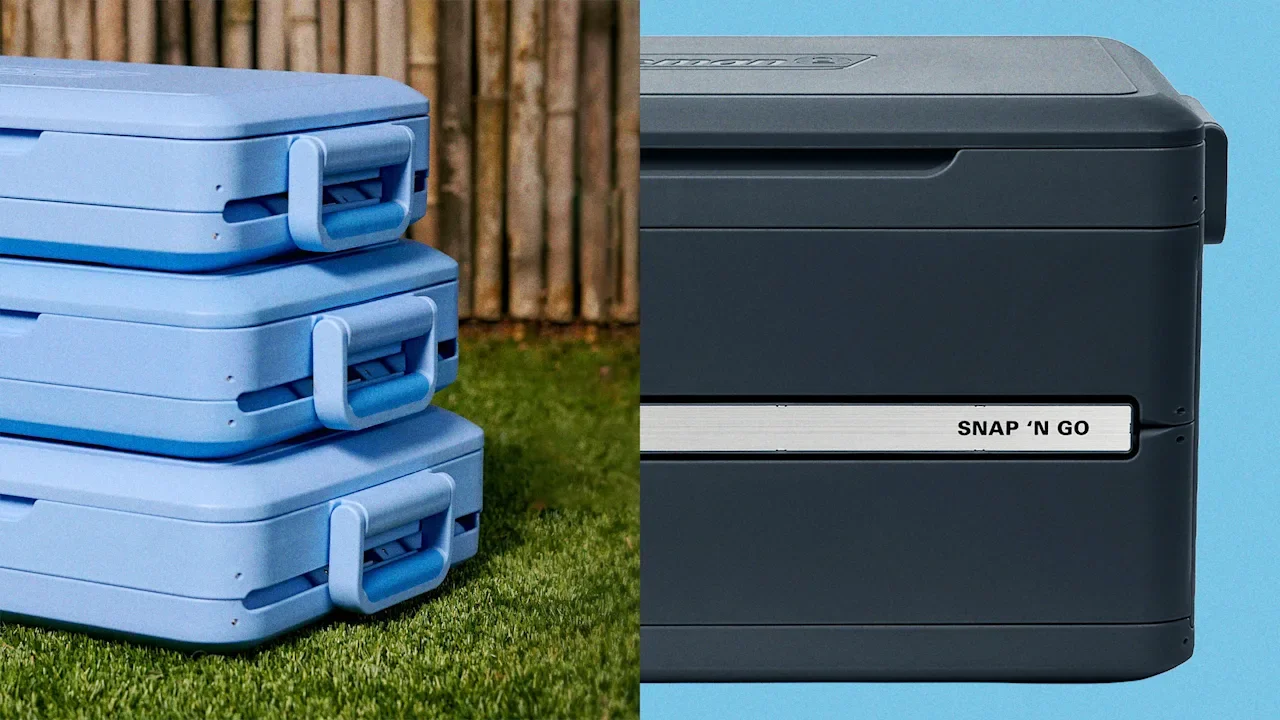
Coleman just invented a hard cooler that can collapse in on itself like an accordion, shrink to one-third of its full size, and slot neatly onto a storage shelf. The cooler, called the Snap ’N Go, officially launched on March 17 in three sizes, with prices ranging from $199.99 to $239.99. It’s a first of its kind in the world of food and beverage insulation: While companies like REI, Yeti, and Coleman itself have created large soft cooler bags that can be compressed for storage, no one has ever manufactured a collapsible hard-sided cooler. That’s somewhat surprising, given that hard coolers are often more durable, more insulated, and easier to clean than their soft counterparts, making them the preferred choice for many consumers. The main issue with hard coolers, of course, is that when they’re not in use, they’re essentially a bulky box of air taking up room in storage. But according to Nicolas Duran, Coleman’s president of outdoor and recreation, there are a few good reasons why no one else has cracked the code on a collapsible hard cooler. “It’s a problem that’s really difficult to solve for,” Duran says, noting that you’re not only attempting to take a cooler from a bulky box to a unit “that replicates the size of a laptop case,” but you’re also seeking a way to maintain cold and prevent leaks. After 18 months of development, the Coleman team finally solved this design puzzle using a clever external structure, several hidden internal details, and a very intensive testing process. A cooler that folds like an accordion The crux of Coleman’s new collapsible cooler design is its external plastic shell. Unlike a typical hard cooler’s sealed edges, the Snap ’N Go relies on multiple separate panels that bend and fold together. The cooler’s final design has front and back panels set on a series of hinges that allow them to fold in the middle, stacking their top and bottom halves together. Meanwhile, the two smaller side panels are hinged to flip fully upward. When the cooler is compressed, these pieces slide like origami until the small side panels are nestled on top of the larger front and back panels. Luke Eck, Coleman’s director of R&D, says this system technically worked in early prototypes—but it presented a pretty major problem for users. “On the initial hinges, you would have to hold it to manually set it down,” Eck says. “But what was happening was your hands were in an improper position and you would risk almost smashing your fingers.” To fix that issue, Eck’s team resituated the cooler’s handles so they don’t interfere with the closing process, formatting them to snap outward when the cooler is opened and fold downward to its sides when it’s closed. Then, they created an internal tab mechanism that shuts the cooler without requiring any downward force or manual folding from the user. Pulling upward on this tab releases the cooler’s two smaller sides, allowing the rest of the structure to collapse smoothly on its hinges. Innovating in a stale category While the Snap ’N Go’s shell is the most obviously innovative element of its design, Eck says it wasn’t the most difficult part of the prototyping process. That came when his team had to design the cooler’s internal waterproof liner, which is the component of the cooler that keeps it insulated and leak-proof. “In the first concepts, we were folding it kind of like a bed sheet,” Eck says. “It was very cumbersome.” Each time the liner needed to be expanded or tucked away, he explains, the user had to do it manually. That added step made the design feel less elegant and more time-consuming. After plenty of concepts, the solution finally arrived during a team meeting. “Someone walked in with an iPad, and they unfolded their case and set it up to work,” Eck recalls. “We all just kind of looked at that person and were like, ‘Oh, that’s it.’” Like a standard iPad case, the insulated liner comes with predetermined creases set into the fabric. When the cooler’s internal tab is pulled, these creases allow the liner to fold neatly under its own weight. As a final step in the R&D process, Eck’s team subjected the Snap ’N Go to a series of trials in Coleman’s Wichita, Kansas, testing facility that read like medieval torture. The cooler was put on a machine that opened and closed it tens of thousands of times to ensure that its hinges and plastic would hold their form; left in a hot, temperature-controlled room to gauge its insulation; and tossed out the back of a moving vehicle and over the side of a building to test its durability. Eck’s team left no stone unturned in ensuring that the design would hold up to extensive use. The result is a cooler that can keep drinks cold for up to 64 hours (that’s around 80% as efficient as Coleman’s other hard coolers), folds to a third of its original size, and, the company claims, has the highest size-to-volume efficiency of any cooler on the market. It’s a rare innovation in an industry that has basically operated under the same design constraints for decades. “We’re creating value in a category that, in many instances, was stale,” Duran says. “If you think about it, some of the innovation that’s come into the category lately is low on the scale of true innovation. We are really resetting the expectation for the consumer.” View the full article

-
Has an event outside of work ever made you stop and realize that work has taken over more of your life than you realized? These events are called crossover jolts. They often sneak up on us after we’ve been in a job for a while. When we begin a new role, we start by mastering the tasks in our job description. But then we start taking on more responsibilities. There’s a name for this phenomenon—job creep. Tasks that were once above and beyond our job duties slowly become the norm. Imagine working toward the deadline on a big project. During the final week, we respond to emails at night after the kids have gone to bed (even though we promised ourselves we would never be a person who does that). In doing so, we’ve sent a signal to our coworkers that we’ll respond at night. So even after the big project is done, we feel the need to occasionally check our email before bed and respond. Without realizing it, our work life has annexed a small part of our personal life. We’ve chosen to go beyond our job description on behalf of the company. When job creep turns from good to bad When we love our job and are advancing in our careers, job creep isn’t bad. It’s how we develop as employees and climb the organizational ladder. Because it happens gradually, we often don’t notice this ballooning. Until it causes an event that disrupts our well-being or relationships outside of work. At that point, job creep becomes a potential barrier to our pursuit of the good life. So why do so many of us unwittingly give in to job creep? Because companies reward this behavior. What motivates us at work To truly understand the roots of crossover jolts, we need to take a journey into our motivation at work. We also need to examine the good, the bad, and the ugly of being seen as a good “organizational citizen.” Think for a moment about what being a good citizen in society means to you. You’ll probably imagine someone who helps neighbors in need. Picks up trash on the sidewalk. Attends community meetings. Similarly, acts of citizenship at work refer to the positive things you do, often of your own accord, that are above and beyond your job description. When you manage this well, citizenship behaviors can be part of a healthy cycle between you and your company. Let’s spend a minute talking about this cycle, because one of the neatest discoveries ever made in organizational psychology had to do with it, citizenship, and our relationship with work. It began with a big question: Are happy employees more productive than unhappy employees? The relationship between happy employees and productivity For a long time, researchers tried to find a clear answer to this question. If employee satisfaction leads to higher performance, companies would be wise to spend big to make and keep employees happy, which ends up driving higher performance. To many of us, it makes intuitive sense that satisfied employees would perform better at their jobs than disgruntled ones. The only problem is that the relationship between worker happiness and worker performance proved difficult to find. It’s not that happiness lowered productivity. But in a lot of jobs, how happy employees were at work had no relationship with their job performance. This led some to conclude that how employees feel at work doesn’t matter, leaving leaders to question how important it is to invest in employee satisfaction. (For context, this was back in the late ’70s and early ’80s, an era that gave us the start of mass corporate layoffs and the phrase “greed is good.”) Worker satisfaction and productivity It was during this time that an organizational researcher named Dennis Organ made an astute observation. In many jobs, employees don’t have much influence over their job performance. Think of an assembly line. Whether a worker is happy or not about their work probably has minimal bearing on how the line runs on an average day. When they’re dissatisfied, they really can’t slow down much. But if they’re feeling great about their job, it’s not like they can speed up the line. When you look at the core of many jobs, you see that a good chunk of worker performance is determined by things outside the worker’s direct control. As a result, whether workers are happy or dissatisfied often has little effect on their output. The true impact of worker satisfaction So, does that mean that worker satisfaction doesn’t matter to the bottom line? Here’s where Organ made his brilliant prediction. Workers’ happiness may have a limited effect on performance in the core aspects of their jobs. But whether workers are satisfied at work should predict whether they engage in good deeds at work beyond their required duties. Per Organ’s reasoning, when workers are happy at work, they’ll be more likely to help coworkers who need a hand, to stay late and arrive early if needed, and go to optional meetings. The downside of being a good corporate citizen Workers have control over whether they engage in these extra behaviors. All these things, which he labeled organizational citizenship behaviors, should contribute to higher company performance. In essence, Organ predicted that companies that invest in employees’ happiness will outperform those that do not, because happier employees lead to greater citizenship, which provides a competitive advantage. Research has gone on to support Organ’s prediction. When employees have positive job attitudes or when the company invests in them, they become more likely to engage in citizenship. In turn, when a company invests in employees, it makes their workers happy and willing to reciprocate by engaging in citizenship behaviors, and they are rewarded for doing so. That’s a happy story, right? But citizenship behaviors are a double-edged sword for employees. Sure, they can be a ticket to career satisfaction and success. But they also have a darker side and can be a source of harm. By definition, citizenship behaviors involve employees spending energy above and beyond that required by their normal tasks. In many cases, that extra effort leaves people depleted when they get home from work. The evidence is clear that if left unchecked, being a good citizen at work can lead to being a bad citizen at home (even as you are praised for it at work). The signs of job creep To assess whether job creep is taking over your life, look to “the how” and “the who” of your time and energy outside of work. Most of us have an idea of the ideal activities that would make up our mornings, evenings, and weekends. Perhaps a slow cup of coffee after waking up, some reading time in the evening, and a long bike ride on the weekend. Often, when we realize our ability to engage in these desired nonwork activities has slipped away, we blame ourselves or just tell ourselves that we’re in a busy period, and put it out of mind. But there’s a good chance that job creep is at work. In terms of the who, you could probably easily list the small or big handful of relationships that are most important in your personal life. If you’re increasingly chiding yourself for either not spending enough time with these folks or not showing up for them with the best version of yourself (or they’re telling you these things directly), job creep is a likely culprit. How to mitigate job creep A key to mitigating job creep is having regular “check-ins” with your job. Every six months or so, track your time closely for one week. Record how you spend your minutes and hours inside and outside of work. You can then compare that to your last check-in. Or, for the first time, compare it to the mental image of your ideal workweek, and identify any areas where work has crept up around your personal life. If you find that it has, the next step is to look for opportunities to either prune back those areas or keep the creep but pinpoint other areas you can trim to reclaim your personal time. This could involve delegating some tasks to others or outsourcing some duties to AI. Or simply stopping activities that don’t create value for you or the company, like listening to a coworker’s repeated venting. The idea here is not to avoid being a good citizen, but to develop a rhythm of letting go of low-value tasks as you pick up new ones, rather than simply letting it all creep up over time. This is an excerpt from JOLTED: Why We Quit, When to Stay, and Why It Matters. It is reprinted and adapted with permission from Viking. Copyright © 2026. View the full article