All Activity
- Today
-
This week, the labor movement in architecture scored a win. Sage & Coombe Architects, a women-led firm based in New York City, unanimously approved a collective bargaining agreement. It’s the second American practice to ratify a contract, after Bernheimer Architecture in 2024. “This contract, the second in the industry, sets a standard for workers at Sage and Coombe and beyond,” Architectural Workers United (AWU), a group that has been helping firms organize, announced on April 1 via Instagram. The agreement’s details have yet to be made public. The milestone marks a significant move in the design industry’s unionizing efforts, especially after high-profile setbacks. In 2022, the New York-based firm SHoP abandoned its unionizing efforts following what AWU called a “powerful anti-union campaign.” Then in 2023, the American arm of the multidisciplinary design firm Snøhetta voted against unionizing. In January, the National Labor Relations Board filed a formal complaint against Snøhetta, alleging the firm illegally dismissed eight employees in relation to organizing. Architecture—a field known for long hours and low pay—has historically been difficult to unionize in the United States. “It’s oddly different than other industry,” Andrew Daley, a staff organizer at the International Association of Machinists and Aerospace Workers, told Fast Company back in 2023. “There’s literally no proliferation of unions in any way, shape, or form. Like, zero density when we started.” Sage & Coombe’s contract comes after three years of unionizing efforts. In 2023, employees at the firm formed a union, which the office’s managerial team voluntarily recognized. “We are pleased to announce that we have signed a collective bargaining agreement with the International Association of Machinists and Aerospace Workers,” Sage & Coombe said in an Instagram post. “We respect the efforts of our colleagues who initiated this process, and we believe the agreement will affirm the workplace conditions we established over the last 30 years and contribute to our continuing success in delivering great projects for our clients.” View the full article

-
Most organizations think they have a productivity problem. They don’t. They have a work design problem. I’ve spent decades studying how people solve problems and take action, and the same pattern keeps showing up. Productivity dips, so leadership responds the way they always do: new tools, redesigned workflows, and an engagement initiative with a catchy name. And it works, but only for a while. Teams rally around the new process. Leaders feel good about the momentum. Then, a few months later, the same questions come back. Why does the work still feel harder than it should? Why are capable, committed people running on fumes? And typically, motivation isn’t the issue. But the actual work itself is in conflict with how people naturally approach problem-solving. What leaders miss when they evaluate employees Leaders typically evaluate performance in two ways. Does the person have the skills? And are they motivated enough to use them? Both matter. But there’s a third factor that quietly determines whether individuals and teams sustain high performance over time. It’s the one most leaders skip right past (even though the concept has existed since Plato). It’s how people instinctively approach getting work done. Some people gather a great deal of information before moving forward. Others cut straight to the bottom line. Some naturally build systems and structures. Others adapt on the fly. You’ve seen this in meetings. The moment you brainstorm an idea, one person starts testing it out loud and adjusting as the conversation unfolds. Another might be outlining the steps, organizing details, and making sure there’s a clear sequence. Neither approach is wrong. But they’re fundamentally different, and those differences shape how companies make decisions and how projects move. It can also determine whether or not people are aligned with their roles. Why productivity systems create more friction than they solve There’s a flawed assumption that underpins most productivity systems, which is that everyone approaches work roughly the same way. That a single planning method can work for all, and that people process information and problem-solve in the same ways. In practice, teams almost never operate like that. I worked with a leadership team that spent months building out a detailed project planning process. It was thorough, well-documented, genuinely thoughtful work. But within weeks, half the team had quietly abandoned it. It wasn’t resistance. The structure just clashed with how several of them naturally approached their work. Someone who instinctively moves to the bottom line is going to slow down in an environment that demands constant deep analysis and 20-page reports. The same way that someone who naturally creates structure will struggle when processes and priorities shift every day. Pushing against your natural way of taking action takes far more energy than most people realize. Over time, that friction compounds. A recent workplace survey found that 42 percent of employees lose roughly a full workday each week working against their natural strengths. Think about that. One day a week, gone. Not to poor skills or lack of effort. To friction. No engagement initiative is going to fix that. Why productivity is an energy problem Most productivity conversations obsess over time. But energy is almost always the real constraint. People have a finite amount of mental energy each day for decisions, problem-solving, and moving work forward. Where that energy goes makes a huge difference. I worked with a team leader who had two employees with similar experience and a strong work ethic. One was the person she called when a project was still messy, when the team needed to test ideas, make quick calls, and figure things out in real time. The other was most effective once the direction was clear. He’d organize the steps, build the process, and keep the work moving in a steady sequence. When each person worked in those conditions, they were great. But when the leader reversed their roles, the difference was immediate. The fast mover slowed to a crawl when asked to document detailed processes. The systems builder struggled when the project demanded constant improvisation. They had the same skill level and the same motivation—but a completely different experience of the work, because one version aligned with how they naturally take action and the other didn’t. When work fits someone’s instincts, they can make decisions faster. Their efforts also go further. But when it doesn’t, even routine tasks start consuming far more energy than they should. What leaders can do instead Fixing productivity and creating productive teams rarely starts with another tool or training program. It starts with understanding how people actually work. Leaders who get this right tend to focus on three things: 1. Clarity Get a real picture of how people on your team naturally approach problems. When employees understand their own strengths and the strengths of their colleagues, dividing roles and responsibilities becomes a lot easier. 2. Commitment Teams perform best when people can invest most of their energy in work that fits how they naturally take action. Sometimes that means adjusting responsibilities, redesigning workflows, or shifting task ownership so people spend more time where they’re actually effective. 3. Collaboration The strongest teams aren’t made up of people who all approach work the same way. Progress comes from combining different strengths. One person digs into the details. Another simplifies the path forward. Someone else builds the structure that carries the idea through execution. When teams work this way, you no longer need to force productivity improvements. They happen because individuals can naturally leverage their strengths to get things done. Rethinking productivity Organizations love to solve productivity problems by turning up the pressure. More tools, more processes, and creating additional expectations piled on top of existing expectations. But productivity doesn’t improve when everyone’s pushed to work the same way. It improves when leaders recognize that people approach problems differently and design work around those differences instead of against them. After all, when work fits how people naturally take action, high performance stops being something you have to force. It becomes something you can sustain. View the full article

-
A few days ago, the electric grid in California hit a new milestone: At 7pm on March 29, batteries provided 12.3 gigawatts of power—roughly as much as six Hoover Dams, or around 43% of the total demand on the grid. Nearly all of that battery storage was built in the last five years. “Until 2020 or 2021, battery storage was still quite expensive, but we’ve seen huge price drops over the last few years,” says Nicolas Fulghum, senior energy and climate data analyst at Ember, a global energy think tank. When it’s paired with solar power, it can “bring some of that excess generation in the middle of the day to where it’s really needed, which is during the peak demand in the evening and morning,” he says. The cost of batteries has dropped 99% over the last three decades. Over the last few years alone, the cost fell by about a third. The cost of solar panels has also fallen by more than 90%. By 2024, new solar projects were an average of 41% cheaper than fossil fuel alternatives. By using batteries to make use of extra solar power in the middle of the day in the evening, California’s grid, called CAISO, can rely less both on energy imported from other states as well as “peaker” gas plants that are used to meet peak demand. Those gas plants “are usually quite expensive,” says Fulghum. “And batteries can reduce the impact of those high power prices during that time, especially when you have a heat wave like we had a few weeks ago. That’s where they’re most effective at keeping prices down.” Gas electricity generation in the state is responsible for around 30 to 40 million metric tons of CO2 emissions a year. Around half of the peaker plants are in low-income communities of color, where the air pollution contributes to health problems like asthma. California has always been a leader in solar power, and had actually installed so much solar that it began to strain the grid. But that’s changed now. “Because California can move so much of that midday solar generation, it means that there’s a lot less wasted solar in the middle of the day,” says Fulghum. “But it also means that now it’s opened up the opportunity to actually increase solar generation again—build more solar, and move it to ‘shoulder’ hours. That’s what’s going to reduce gas generation in the short and long term.” Virtual power plants— using home batteries, EV batteries, or managing demand with tech like smart thermostats—are also helping shrink the need to use fossil fuels to generate electricity. Other technology, like advanced geothermal power, can also help provide clean power for the grid around the clock. But that will take time to build, and batteries can help immediately. At the moment that the California grid broke a battery record on March 29, around 20% of the grid’s output was coming from gas. But the share of power coming from fossil fuels will continue to drop. (Already, the use of gas has declined by 20% over the last few years.) California’s grid now has 17 gigawatts of battery storage; the state is aiming for more than 50 gigawatts. “There’s a huge, huge additional amount that’s still going to come online over the next few years,” says Fulghum, “especially as costs are going to continue to drop.” View the full article

-
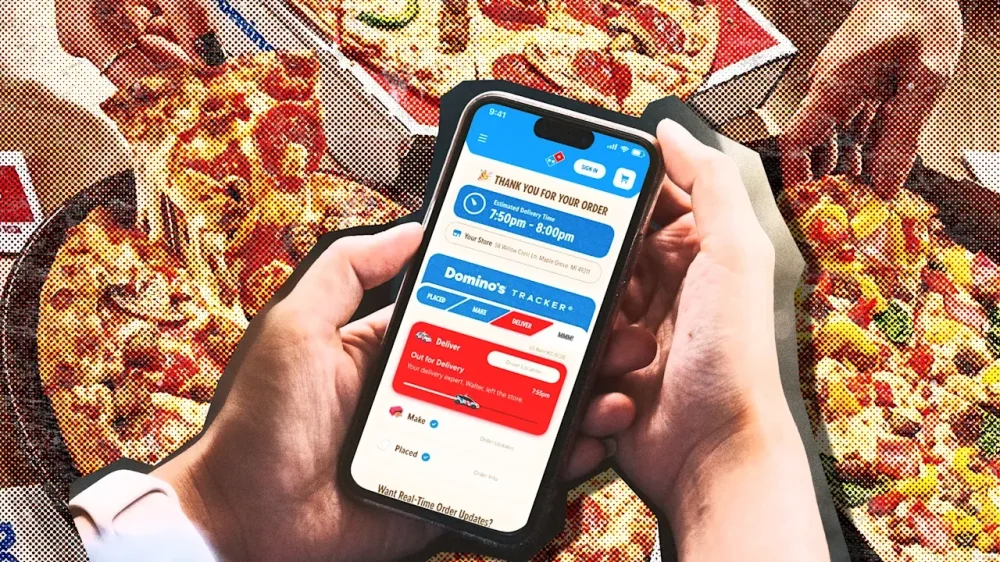
While companies cram artificial intelligence features you never asked for into their apps, Domino’s seems to have found a valid use case for the technology: more accurate tracking of when your pizza will be ready. When Domino’s launched its pizza tracker in 2008, it was a marvel of UX. The tracker gave customers a lens into when their pizza would be ready through a simple interface that lit up as the pizza progressed from ordered to baked to delivered. The tool turned Domino’s into a tech company, and inspired industries (and governments) to adopt the same UX for their own needs. Now, Domino’s made the biggest update to its pizza tracker in years. The new tracker features a simplified progress bar that shows just four stages of pizza creation. The new design was rolled out to all platforms, and there’s also new Lock Screen widgets for iOS that bring the pizza chain’s most famous tech feature to the Liquid Glass age. Behind it all is an AI model that the company says will give users the most accurate time estimates. Domino’s improved tracker uses a proprietary operating system it calls “DomOS” to better estimate orders through machine learning models that track real-time inputs, like what’s being ordered, how busy a store is at the time, how orders tend to cluster (like during a big sports game or commercial break), and what’s happening on the delivery side. “AI helps by looking at these signals together instead of isolation,” Domino’s vice president of global digital marketing Mark Messing tells Fast Company. “It learns from patterns we’ve seen before and continuously adjusts in real time as conditions change.” The company is promising more precise times for when pizzas will be ready for pickup or arrive for delivery. A rideshare-style interface shows a delivery driver as a car icon on a map like Uber that users can track in real time. For iOS users, the app’s Lock Screen widgets appear as Domino’s Tracker progress bar with an estimated delivery time. When an order is out for delivery, the progress bar becomes a car to show your pizza is mobile and delivery is imminent. The redesign was done by Dominio’s digital experience team in partsnership with their agency WorkInProgress. Domino domination Domino’s is the leading pizza chain nationally in the U.S. at a time when pizza sales are struggling. Pizza Hut’s parent company is considering a sale and announced the closure of 250 stores in February. Meanwhile Domino’s chief financial officer Sandeep Reddy said on the company’s last earnings call that Domino’s retail sales had grown 5.5% thanks to same-store sales, a promotion, and new specialty pizza flavors. Domino’s refreshed its brand last year with a new font, brightened color palette, and redesigned pizza boxes that play off the domino theme with dots. It also introduced what it calls a “cravemark,” or its tagline “mmm” expressed audibly through a jingle recorded by Shaboozey. Like its overhauled visual brand, the revamped pizza tracker shows that Domino’s is doubling down on what it’s best known for. Since the company introduced its tracker in 2008, it has tracked more than 2.5 billion orders. Domino’s original tracker was the first web-based pizza tracker in the industry, and it had a futuristic, skeuomorphic style with segments for each stage that lit up red or blue as a consumer’s order went from prep to delivery. The company gave users the options to customize their trackers in 2010 with six themes that they could use to reskin the progress bar. The company added GPS delivery tracking to the feature in 2019. The new tracker reduces the number of stages to just four—named “Placed,” “Make,” Deliver,” and “MMM”—while old names for stages like “Bake” and “Quality Check” are now gone. While the main progress bar is simplified, inside the app, there’s more specific information, like what time their order was placed in the oven and what time a delivery driver left the store. “The goal was flexibility without complexity,” Messing says. It’s an update that helps Dominos make the most of AI to be more dependable for customers. And at a time when delivery pizza sales are under pressure, that gives the company an edge with one of its best-ever marketing tools. View the full article
-
United Wholesale Mortgage lost ground to RKT in one category but held onto a healthy lead in another, an analysis of Home Mortgage Disclosure Act data shows. View the full article
-
Finance of America has not disclosed any incident, but a consumer filed an immediate lawsuit over a lone report of a ransomware gang's recent hack. View the full article
-
In female-driven industries, leadership misalignment shows up in the numbers long before it shows up in headlines. The aesthetics industry is built on women. It is fueled by their research, their spending, their vulnerability, and their trust. Yet the leadership shaping products, messaging, and capital allocation rarely reflects the consumer driving its growth. That structural gap compounds over time. Emotionally invested and financially decisive A 2024 Advanced Dermatology survey found women spend more than $1,000 per year on their appearance. The core aesthetics consumer researches cosmetic treatments for months, compares risks, reads reviews obsessively, and arrives at consultations informed and skeptical. She is emotionally invested and financially decisive. In most cases, the provider treating her will be male. Fewer than 20 percent of board-certified plastic surgeons in the United States are women. Within academic plastic surgery, female surgeons fill far fewer leadership roles, with only around 8 percent of departmental chairs held by women, reflecting persistent gaps in senior influence. These gaps distort how risk is communicated, misread cultural shifts, and quietly erode consumer trust. The disconnect becomes visible at global aesthetics conferences, where ballrooms filled with capital allocators, device manufacturers, founders, and surgeons look nothing like the consumer driving demand. Over dinner at one conference, I listened to a group describe a menopause panel moderated entirely by men. Men discussing hormone shifts, aging, and quality of life for women without a single woman with lived experience guiding the conversation. The unfamiliarity of female authority surfaces in subtler ways. On an early introductory call in my current role, a male client asked, “How did you get this job?” The tone reflected disbelief. It underscored how unusual female leadership can still feel in parts of this industry and how much energy women spend establishing credibility before focusing on execution. That energy has a cost. We see similar patterns beyond aesthetics. Even championship-winning women’s hockey teams are still treated as exceptions instead of authorities. Performance alone does not always translate into legitimacy when representation remains limited. Market reality Against that backdrop, RealSelf’s board made a deliberate decision. When they hired me as the first woman to lead a company that has served women for two decades, they were responding to a market reality. As the $44 billion aesthetics industry continues to scale, leadership alignment with the consumer becomes increasingly strategic. The decision came at an inflection point. RealSelf was 20 years old with significant brand authority, but revenue had plateaued and strategy lacked clarity. The company had history and recognition, yet it needed sharper direction. We rebuilt around clearer positioning and stronger operating discipline, expanded operating leverage, and returned the business to profitability. The balance sheet strengthened. The posture of the company shifted. With greater financial stability came the ability to invest decisively rather than defensively. Leadership alignment also affects internal momentum. When you occupy one of the rare seats at the table, awareness of that rarity sharpens focus. There is urgency to grow, to execute, and to outperform expectations. That competitive drive is visible across our leadership bench. Many of our strongest hires are exceptional operators who simply needed the opportunity to lead at scale. Given meaningful responsibility, they move quickly and build with conviction. We rebranded RealSelf to reflect the emotional and cultural reality of the consumer. In a category that has often leaned clinical in tone, we built a platform that feels informed, direct, and human. Consumers can ask, “Is this normal?” and expect clarity grounded in real experience. The results followed. Conversion is up 36 percent. Our brand partnerships pipeline has nearly tripled. We’ve added more than 317,000 email subscribers and 26,000 new social followers. Growth has been driven by resonance rather than heavy paid amplification. The cost of misalignment In trust-based industries, representation in leadership functions as infrastructure. Teams that mirror their market make more precise decisions about tone, risk, and long-term positioning. Misalignment tends to accumulate quietly through missed cultural cues and subtle erosion of credibility before it ever appears as a crisis. If you’re a board member or founder scaling a female-driven business, here’s the question worth considering: when did you last audit your leadership team against the consumer you’re building for? Not as a diversity exercise, but as a risk assessment. As aesthetics continues to grow, the companies that lead will be those whose leadership understands the lived complexity of their audience. Structural blind spots carry measurable consequences. In a $44 billion industry built on women’s trust, leadership alignment shapes outcomes. Representation at the top functions as a growth lever and a competitive advantage. View the full article

-
Donald The President renews threat to attack Iranian infrastructureView the full article
-
Google's John Mueller answers question of whether splitting a sitemap is worth the extra work. The post Google Answers Why Some SEOs Split Their Sitemap Into Multiple Files appeared first on Search Engine Journal. View the full article
-
The Artemis II mission now underway aims to send three Americans and one Canadian back to and around the moon, a journey that will mark humans’ farthest trek into space in decades. The program is one of a series of endeavors, including next-generation space stations, a lunar habitat, and even a manned Mars mission, that will vastly expand human presence in outer space. Critically, these missions are all certain to involve spacey versions of consumer technologies, which have now become a fixture of life in space. (Astronauts aboard the International Space Station use laptops and smartphones.) Yet such modern conveniences also create a host of IT issues. On the latest Artemis II mission, astronauts—again, also with smartphones—had to reach out to mission controllers experiencing issues on their systems. The culprit: Microsoft Outlook. Indeed, making computers work in space can be difficult. This includes issues related to the microgravity environment, as well as challenges related to communication networks, since signals back to Earth can be limited—and slow. There is, after all, no live tech support when you’re on the moon, or even Mars. “When we’re colonizing something like the moon or eventually going to Mars, I think it brings in lots of complexities,” Manoj Leelanivas, who serves as president of HP Solutions, which frequently works with NASA on in-space hardware, explains. “In the computer environment, typically you assume liquid cooling or air cooling. You look at the standard principles of convection, which don’t really apply in space. You have to deal with the radiation.” Fast Company chatted with Leelanivas about what it takes to build computers for space, and how that work might change as manned missions take on even more ambitious efforts. This interview has been edited for length and clarity. How is designing a workstation for space, or microgravity, different from designing a workstation for Earth? Let me start with, first of all, addressing unreliability and connectivity. In space, connectivity is not super reliable, which means compute has to really be close to data in supporting real-time decisions. You’ve got to add the compute horsepower and the GPU horsepower to make AI-based decisions locally, even without connectivity. That’s one of the capabilities that our flow workstations provide. They have huge elements of GPU capabilities, and you can even run 200-billion-parameter models. Some of them can even go higher than that. So that allows you to work in a non-connectivity environment. That’s important for flagging anomalies—quicker and faster—without waiting for the delay all the way to come back to Earth and whatnot. It’s not just about space, but down in the control room and beyond, you need to have data gathered in real time and have quick decisions made. What about computers on the moon? One of the biggest challenges the moon poses to us is that you can’t just quickly go and solve a problem. . . . You have to really plan, which means that you have more self-reliant systems—meaning systems that can break and recover. We think about: How can you actually process things as locally as possible? That’s slightly different from the Earth world, where we assume a lot of things in terms of redundancy and capabilities. How does HP see its relationship with private space companies? We are engaged with most of these companies without actually going into a specific name, because you’re not allowed to do that. Our workstations are the No. 1 workstations in these activities. The deep compute that is needed, and the modeling that is needed, and the history of looking at large amounts of telemetry data—those all put HP in a great position to work with many of these companies. . . . The only thing we are publicly talking about is this NASA relationship we have. What about orbital data centers? It’s always a good idea to think of new ways to solve problems in a business. . . . Energy is a big requirement for data centers. . . . If you go to space with the independent power of the sun, that can be harnessed. The energy may not be that difficult a problem in terms of energy-generation. But then it creates other problems, like: How do you cool your systems in an environment where convection doesn’t really work? It is definitely an aspirational idea, but at the same time, it’s a very meaningful one, because if we can solve data centers in space, it’ll solve a huge energy crisis, which is going to come in our future on Earth. How do you design AI for space? AI actually creates the opportunity for self-sustaining systems in space. . . . Machines are able to perform a lot of functions autonomously. We sometimes are injecting the human in the middle to make sure that certain things are done the right way, ethically. Sometimes, too much human intervention actually can slow down the AI process a little bit. . . . Sometimes, a high-powered, autonomous system within the guardrails is the right way to go. . . . You don’t have time for the back and forth. I do believe the work we’re doing, and the work a lot of other companies are doing, is enabling speed for the agents, with the models below [them]. . . . We are not only building great hardware and compute systems. We are also building technologies to bring them together quickly. View the full article

-
When the server walked past our table, my hand shot upward like a high schooler eager to answer the teacher’s question. “Can we get two more of the same, please?” I asked upon getting his attention. “Another round of espresso martinis? I got you, boss.” Leona grinned and nodded in approval, as expected. We go back like four flats on a Cadillac. From study buddies back at the G.O.A.T. HBCU to marketing professionals putting in work for thriving companies, we’ve remained a two-person support system. It’s a celebration every time we link up. So it’s only right that we throw back a few cocktails while getting our yap on. Sipping a boozy, caffeinated concoction at 2 p.m. on a Tuesday has a way of making me chatty. It also makes me wonder why more of my peers don’t observe the same tradition. Weeks before this rendezvous, Leona and I both planned to burn a day of PTO, coordinating our schedules like a couple of executives setting off for a retreat. Except the only agenda on this outing was tacos and real talk. We call it the skip day. The premise is simple: You and a friend both call out from your respective gigs for a workday hangout. This is not earmarked time for errands or spent couch rotting in solitude. It’s two (or more!) friends sharing a mental health day while the rest of Corporate America clocks in. Skip day is the adult version of faking sick in grade school, except you don’t have to fake anything. You just make sure you’re anywhere but your workplace. The skip day didn’t start as a formal thing. It evolved—the way most good traditions do—out of necessity. After weeks of failed meetups and playing calendar tag, we decided to multitask by coworking from a local Seattle café. We locked in, knocked off to-do lists, and squeezed in some kikis between tasks. It became a regular thing every few weeks. Eventually, we decided to cut the work part out altogether. For Leona and me, it has become a seasonal ritual, and this latest skip day reminded me why it’s so important. It’s a moment to mute Slack messages and email notifications while pouring into each other (and each other’s glasses). There, at that trendy Mexican restaurant, we traded career updates and inside jokes. Leona vented about her condescending-ass manager and celebrated the large-scale project she recently headed, wondering aloud what future opportunities it could unlock. My updates were familiar: the steady, sustaining drip of contractor work and the draining hunt for a full-time role. These topics are difficult to explain for people who haven’t lived it, but require no translation between us. We started with drinks and guacamole, but skip days have a way of extending themselves. One spot becomes two, two become three. By the time we sat down for dessert, the conversation had shifted from light stuff like weekend plans and what we’d been watching to the real stuff: politics, family, the future, the past. It was the kind of conversation that makes you feel like yourself again, without the need for corporate speak or code-switching. And something about doing that when you would otherwise be on your fourth Zoom meeting of the day makes it feel even more fulfilling. Skip day doesn’t have to be spent eating or drinking. Take a hike or a day trip. Go see a matinee. Do some window shopping. Hit up a botanical garden. The only limits are your imagination or budget. The magic is as much about where you’re not as where you are. Long ago, United Negro College Fund commercials taught me that a mind is a terrible thing to waste. The same could be said for PTO days spent on obligation or isolation (or even worse, not taken at all). Find that person who you vibe with like no other, someone who gets it, someone who fills you up. Pick a day you’re both free, outside of intense deadlines or work duties. And just show up for each other. You probably need it more than you think. View the full article

-
Amid the usual barrage of new launches around this time of year from the likes of Samsung and Xiaomi, I’ve been checking out the highest-end device yet from a manufacturer many readers won’t have heard of—but it’s one that marks an unusual collaboration with another brand that might be more familiar. Infinix is a sub-brand of Chinese company Transsion, which also owns the smartphone maker Tecno. The manufacturer is particularly successful in developing smartphone markets like Africa and the Middle East; across all of its brands, Transsion accounts for about half of Africa’s smartphone market share, according to figures from Canalys last year. Infinix largely targets young consumers in the markets where it operates. Its ultra-popular Hot series is designed to be affordable and stylish, while the Note is a step up in performance and functionality. The new Note 60 Ultra, however, is Infinix’s first attempt to compete in truly premium terms. The spec sheet By global standards, the Note 60 Ultra doesn’t really justify the “Ultra” designation if you look at its spec sheet, though it’s certainly at the high end of what Infinix typically produces. It’s based on a midrange MediaTek Dimensity 8400 Ultimate system-on-chip, topping out at 512GB of storage and 12GB of RAM. The camera setup, meanwhile, is capable but cuts corners. The main camera uses a reasonably sized 200-megapixel sensor, backed by a 50-megapixel 3.5x telephoto and a pokey 8-megapixel ultrawide. Results are fine for the price point, but you might expect more from something with Ultra in the name. It’s harder to pick nits with the display—you get a 6.78-inch 144Hz 2644-by-1208 OLED panel, which looks great in any environment. There’s also a very high-capacity silicon-carbon battery at 7,000mAh (milliampere-hours) that can be charged at up to 100 watts, getting you a 50% charge in about 18 minutes, and there’s support for wireless charging at 50 watts. Stand-out design But where Infinix is really aiming to stand out is with the design. The company partnered with Pininfarina, the Italian car design house that’s probably best known for its collaborations with Ferrari—including the iconic F40 and Enzo. This is the first time Pininfarina has worked with a smartphone brand, and you can see the evidence of supercar styling all over the Note 60 Ultra. The most conspicuous element is the “uni-chassis” camera bump that stretches across the entire top third of the phone. The whole construction is covered by a single opaque piece of glass, obscuring the actual camera hardware. The bottom edge of the camera module is highlighted by a red LED that flashes on for notifications and is reminiscent of sports car taillights. The right side of the camera module houses another surprise: a low-resolution monochrome active-matrix display. This can be used to display the time, the weather, battery charging status, basic minigames or simply a cute pixel-art pet on the back of your phone. It’s similar to what Nothing has done with some of its recent devices, but rather than being the focal point of the industrial design, the display is completely invisible when not in use. The rest of the Note 60 Ultra’s back panel is finished off in Kevlar-style fiberglass, which would not be my first pick on another device but feels appropriate enough here given the car influence. The overall effect of the phone’s construction is remarkably sleek and coherent. Charger as paperweight Perhaps the most ostentatious result of the Pinanfirina collaboration—yes, even more so than the camera bump taillight—is the bundled wireless charger. This is a weighty slab of vaguely car-shaped metal that would effectively serve as a classic desktop paperweight. It has a little more utility than that, though, housing an included magnetic wireless charging puck. It might not be the most efficient use of desk space but I admit it does look quite cool. Overall, Infinix has proven that it can produce a well-made flagship-adjacent device with the help of Pinanfirina. The Italian firm’s contributions to the Note 60 Ultra go well beyond previous automotive collaborations we’ve seen in the industry, like OnePlus with McLaren or Huawei with Porsche Design. The question, though, is whether anyone will actually buy it. Right now the Note 60 Ultra is available only in Malaysia for an equivalent price of around $750, far beyond what people are normally willing to pay in Infinix’s strongest markets. Even outside of those, it’s getting into iPhone territory, and the Android competition is fierce at this pricing tier. It seems unlikely that Infinix ever intended to ship the Note 60 Ultra in large volumes; the wireless charging stand alone means it comes in an impractically huge box. Instead, it’s probably best thought of as a Pinanfirina design study that serves as a halo device for a brand with higher aspirations. Taken on those terms, it’s surprisingly effective; I’ll be watching to see whether Infinix can bring some of this design sensibility to more mass-market products. View the full article

-
In today’s marketing environment, visual content plays a vital role in capturing and retaining audience attention. By utilizing examples like infographics, engaging videos, and interactive content, you can simplify complex ideas and encourage user participation. Moreover, incorporating memes, user-generated content, and personalized visuals improves relatability and drives engagement. Comprehending how each format can impact your strategy is fundamental, as it allows you to strengthen your brand’s presence. Let’s explore these effective visual content types further. Key Takeaways Infographics simplify complex information and enhance retention, making them ideal for conveying data-driven insights in marketing strategies. Engaging videos boost conversion rates and viewer retention, capturing attention faster than text and driving higher engagement on social media. Interactive content, like visual checklists and choose-your-own-adventure formats, significantly increases user interaction and retention rates. Memes and user-generated content enhance brand relatability and authenticity, particularly appealing to younger demographics and driving social media engagement. Social media stories utilize disappearing content to increase user interest, with interactive features boosting participation and engagement significantly. Infographics: Simplifying Complex Information Infographics are strong tools that can simplify complex information, making it easier for audiences to understand and retain essential data. In visual content creation, infographics effectively combine visuals, colors, and layouts, guiding viewers through intricate topics. Research shows they’re 30 times more likely to be read than text-only content, improving audience comprehension. With a 94% increase in views compared to text-heavy formats, infographics are particularly valuable in digital marketing, where attention spans are short. Additionally, they’re shared on social media three times more often than other visual content examples, boosting brand visibility. When designed effectively, infographics can establish trust and strengthen brand authority, showcasing data-driven insights that resonate with your audience. Engaging Videos: Capturing Attention In relation to capturing attention in today’s fast-paced digital environment, engaging videos stand out as one of the most effective tools available. They can boost conversion rates by up to 80%, making them crucial for influencing purchasing decisions. Research highlights that 85% of consumers are more likely to buy after watching a product video. Moreover, social media posts with videos generate 1200% more shares than those with just text and images. Considering that video content is processed 60,000 times faster by the brain than text, it’s clear why incorporating videos into your marketing strategy is key. Benefit Statistic Increased Conversion Rates Up to 80% Purchase Likelihood 85% after watching a video Shareability 1200% more than text/images Information Processing Speed 60,000 times faster Interactive Content: Encouraging Participation When you incorporate interactive content into your marketing strategy, you greatly improve user engagement and participation. Research indicates that interactive elements like quizzes and polls can increase user interaction by up to 80%. These visuals often generate twice the engagement compared to static content, leading to more shares on social media. By utilizing formats like choose-your-own-adventure, you allow users to tailor their experiences, which strengthens their connection to your brand. Brands that leverage interactive content report a 70% increase in user retention, as participants are more likely to return for new experiences. Furthermore, visual checklists and interactive infographics simplify complex information, promoting active engagement and ensuring users understand and retain your key messages effectively. Memes: Adding a Relatable Touch Memes have become a substantial component of modern marketing strategies, as they effectively connect brands with their audiences in a relatable manner. By incorporating memes into your marketing, you can achieve notable benefits, such as: Increased engagement by up to 60% compared to standard content. Improved brand personality, making your brand more relatable and humanized. Greater visibility, as memes are shared 2.5 times more often than text-only content. Stronger appeal to younger demographics, with 75% of Gen Z and millennials enjoying brands that use memes. When selecting or crafting memes, make certain they align with your brand’s voice, as 78% of consumers prefer brands that reflect their sense of humor. This approach can greatly amplify your marketing efforts. User-Generated Content: Building Community User-generated content (UGC) plays an important role in building community around your brand by strengthening loyalty and encouraging authentic engagement. When you showcase community stories through UGC, you not only improve relatability but additionally promote a sense of belonging among your audience. This strategy can greatly boost engagement and conversion rates, making UGC a vital component of your marketing efforts. Strengthening Brand Loyalty Incorporating user-generated content (UGC) into your marketing strategy can greatly improve brand loyalty by nurturing a sense of community among consumers. Here are key benefits to evaluate: Increased authenticity: Campaigns featuring UGC resonate as more genuine, with 79% of people acknowledging this reflection of brand authenticity. Higher engagement: UGC boosts social media interaction by 28%, enhancing your brand’s visibility. Stronger connection: Brands that engage with UGC experience a 20% increase in customer retention, making consumers feel valued. Cost-effective content: Utilizing UGC can cut content creation costs by up to 50%, allowing for better resource allocation. Encouraging Authentic Engagement When brands encourage authentic engagement, they create an environment where customers feel empowered to share their personal experiences, nurturing a deeper connection to the brand community. User-generated content (UGC) plays a crucial role in this process. By featuring real customers, you not just improve brand visibility but also cultivate trust and loyalty. UGC Benefits Impact on Engagement Increased trust 79% of consumers influenced More visibility 4.5x more likes Higher engagement rates 28% increase Improved community feeling 6.9x more comments Incorporating UGC in your marketing strategy can greatly influence purchasing decisions and strengthen community ties, making your brand more relatable and accessible. Showcasing Community Stories Showcasing community stories can greatly boost a brand’s connection with its audience, as it allows customers to see themselves reflected in the brand’s narrative. By incorporating user-generated content (UGC) into your marketing strategy, you can improve authenticity and drive engagement. Here are some key benefits of showcasing community stories: Boosts Authenticity: 79% of consumers feel UGC influences their purchasing decisions. Increases Engagement: UGC leads to a 28% higher engagement rate on social media. Fosters Loyalty: 79% of customers are more likely to support brands that highlight community stories. Improves Conversion: Brands using UGC can see a 4.5% increase in conversion rates. Utilizing community stories effectively can greatly strengthen your brand’s online presence. Motion Graphics: Enhancing Information Delivery Motion graphics serve as a strong tool for simplifying complex concepts, allowing you to present information in a visually engaging way. By incorporating dynamic elements and storytelling techniques, you can boost audience retention rates markedly, making your content more memorable. Whether you’re using them in social media, websites, or videos, motion graphics can effectively improve your message and keep viewers interested. Simplifying Complex Concepts Visual content plays a crucial role in simplifying complex concepts, particularly through the use of motion graphics. By combining dynamic visuals with text, motion graphics can make intricate ideas more engaging and comprehensible. Here are some key benefits of using motion graphics: Increased Retention: People retain 65% of information presented through visuals versus just 10% from text alone. Enhanced Engagement: Videos with motion graphics draw up to 50% higher engagement rates on platforms like YouTube. Improved Comprehension: Motion graphics reduce cognitive load, allowing viewers to process information more easily. Boosted Effectiveness: Incorporating motion graphics can increase viewer retention by 80%, enhancing your overall communication strategy. Utilizing these techniques can greatly enhance your marketing efforts. Engaging Visual Storytelling Techniques When you want to communicate complex ideas effectively, engaging visual storytelling techniques can be your best ally. Motion graphics combine animated visuals and text, simplifying information and enhancing comprehension. They increase viewer retention by up to 95% compared to text-only content. By incorporating motion graphics in your presentations, you can boost audience engagement by as much as 80%. Furthermore, these visuals can lead to a 50% increase in conversion rates, capturing attention more effectively than static images. Brands using motion graphics experience sharing rates up to 1200% higher than traditional formats. Benefit Percentage Increase Viewer Retention 95% Audience Engagement 80% Conversion Rates 50% Sharing Rates 1200% Boosting Audience Retention Rates Incorporating engaging elements like motion graphics can greatly improve audience retention rates. By adding dynamic visuals, you capture attention and boost comprehension. Here are some benefits of using motion graphics: Increased Retention: Motion graphics can boost retention by up to 80% compared to static images. Visual Learning: With 65% of people being visual learners, it effectively conveys complex information. Higher Engagement: Presentations with motion graphics see a 70% rise in viewer engagement. Improved Shareability: Videos featuring motion graphics are shared 1200% more than text and images combined. Social Media Stories: Creating Urgency and Engagement Social media stories have emerged as a potent tool for brands looking to create urgency and boost engagement with their audience. With 62% of users expressing increased interest after viewing stories, these formats drive higher interaction rates. The ephemeral nature of stories encourages immediate engagement, as 58% of users prefer content that disappears within 24 hours. Brands leveraging stories can experience a 33% increase in engagement compared to traditional posts. Incorporating interactive features like polls and quizzes can improve participation by up to 50%. A vast majority, around 86% of marketers, recognize stories as an essential part of their strategy. Engagement Factor Percentage Increase User Interest 62% Immediate Engagement 58% Interactive Features Boost 50% Data Visualization: Presenting Insights Clearly Data visualization plays a crucial role in transforming complex datasets into clear, accessible graphics that help audiences grasp insights quickly. Using effective data visualization techniques can greatly improve your marketing strategy. Here are some key benefits: Infographics can boost information retention rates by 70% compared to text-only formats. Charts and graphs simplify comparisons and trends, as people remember 80% of what they see and do. Interactive visualizations, like dashboards, increase user engagement and comprehension by 60%. Articles with relevant visuals attract 94% more views than text-only content. Incorporating these strategies into your marketing materials guarantees your audience understands and retains important insights, ultimately enhancing your overall effectiveness in communicating key messages. Visual Checklists: Guiding Decision-Making Visual checklists can profoundly improve your decision-making clarity by presenting vital information in an organized manner. By streamlining complex processes, these tools help you comprehend key points quickly and effectively, making it easier to retain important details. Incorporating visual checklists into your marketing strategy can’t merely enhance audience engagement but likewise facilitate a more efficient comprehension of your content. Enhancing Decision-Making Clarity In an era where information overload can hinder effective decision-making, visual checklists emerge as a potent tool to simplify complex processes. By presenting information in a digestible format, these checklists can improve comprehension and retention by up to 60%. Here’s how you can leverage visual checklists for clarity: Incorporate visuals to boost engagement; visually-driven content is shared 40 times more frequently than text. Use color-coding to prioritize tasks and guide you through steps, reducing cognitive overload. Tailor checklists to your audience for focused relevance, especially in fields like healthcare. Follow clear, actionable steps to increase task completion rates by 28%. Utilizing visual checklists can greatly improve your decision-making clarity. Streamlining Complex Processes Effective decision-making often requires maneuvering through layers of complexity, and visual checklists serve as a practical solution to streamline these processes. By breaking down tasks into clear, actionable steps, these checklists improve clarity and focus, making it easier for you to navigate complex decisions. Research shows that incorporating visuals can boost memory retention by 65% and improve task completion rates by up to 30%. Using color coding and icons further enhances usability, facilitating quick recognition. Visual checklists are especially effective in digital environments, allowing for easy sharing and collaboration. Here’s a quick overview of their benefits: Benefit Description Improved Clarity Breaks down tasks into manageable steps Increased Engagement Visuals boost retention and interest Higher Completion Rates Improves task completion by up to 30% Quick Recognition Color coding aids in navigation Collaborative Sharing Easy access across platforms for teams Personalized Visuals: Tailoring Messages for Impact Even though many brands use standard images in their marketing campaigns, incorporating personalized visuals can dramatically improve audience engagement. By tailoring your visuals, you can create messages that resonate more effectively with your audience. Here are some strategies to contemplate: Leverage Audience Data: Use demographics and preferences to craft relevant images. Include Interactive Elements: Add quizzes or personalized recommendations to boost interaction. Utilize High-Quality Graphics: Invest in custom visuals to stand out and capture attention. Encourage Social Sharing: Design shareable content that resonates, increasing your reach considerably. Personalized visuals lead to higher click-through rates and are preferred by 91% of consumers, making them essential for effective marketing. Tailoring your visuals not only improves engagement but also nurtures deeper connections with your brand. Frequently Asked Questions How Does Visual Content Enhance Marketing? Visual content improves marketing by increasing engagement and comprehension. When you use images, your posts can receive 150% more interactions than text-only ones. Infographics break down complex information, making it easier for your audience to understand. Videos boost conversion rates by summarizing product features quickly, leading to more shares. High-quality visuals likewise reflect your brand’s identity, nurturing trust and loyalty among consumers. Engaging visuals can humanize your brand and broaden its reach. How to Visualise a Marketing Strategy? To visualize a marketing strategy, you can use various tools like flowcharts to outline the customer path, highlighting key touchpoints. Infographics simplify complex data, allowing stakeholders to quickly grasp insights. Mind maps help you brainstorm and organize ideas hierarchically, encouraging collaboration. Visual timelines track milestones and deadlines, keeping your team aligned. Moreover, data visualizations such as charts and graphs present performance metrics, enabling you to analyze results and adjust strategies effectively. What Is a Visual Content Strategy? A visual content strategy is a plan that aligns your visual storytelling with marketing goals. It defines the purpose of each content piece and guarantees it resonates with your target audience. By setting clear metrics, like engagement rates, you can measure effectiveness. Incorporating various formats, such as infographics and videos, helps cater to audience preferences. Consistency in branding elements strengthens recognition and trust, as audience insights guide your creative process for improved relevance. What Is a Visual Representation of Marketing Strategy? A visual representation of a marketing strategy includes tools like infographics, flowcharts, and data visualizations that simplify and convey complex information. These visuals clarify the customer path, illustrating each touchpoint effectively. You can likewise use charts to showcase performance metrics, helping to evaluate campaign success. Furthermore, storyboards map out content ideas cohesively, whereas interactive visuals engage your audience, nurturing deeper connections with your brand and enhancing their overall experience. Conclusion Incorporating diverse visual content into your marketing strategy can greatly improve your effectiveness. By using infographics, engaging videos, and interactive elements, you can simplify complex information and boost audience participation. Memes and user-generated content nurture community, as social media stories create urgency. Furthermore, data visualization and visual checklists help present insights clearly, guiding decision-making. Personalized visuals guarantee your messages resonate with individual preferences. Overall, these strategies can improve engagement, comprehension, and brand visibility in a competitive environment. Image via Google Gemini and ArtSmart This article, "10 Visual Content Examples to Elevate Your Marketing Strategy" was first published on Small Business Trends View the full article
-
In today’s marketing environment, visual content plays a vital role in capturing and retaining audience attention. By utilizing examples like infographics, engaging videos, and interactive content, you can simplify complex ideas and encourage user participation. Moreover, incorporating memes, user-generated content, and personalized visuals improves relatability and drives engagement. Comprehending how each format can impact your strategy is fundamental, as it allows you to strengthen your brand’s presence. Let’s explore these effective visual content types further. Key Takeaways Infographics simplify complex information and enhance retention, making them ideal for conveying data-driven insights in marketing strategies. Engaging videos boost conversion rates and viewer retention, capturing attention faster than text and driving higher engagement on social media. Interactive content, like visual checklists and choose-your-own-adventure formats, significantly increases user interaction and retention rates. Memes and user-generated content enhance brand relatability and authenticity, particularly appealing to younger demographics and driving social media engagement. Social media stories utilize disappearing content to increase user interest, with interactive features boosting participation and engagement significantly. Infographics: Simplifying Complex Information Infographics are strong tools that can simplify complex information, making it easier for audiences to understand and retain essential data. In visual content creation, infographics effectively combine visuals, colors, and layouts, guiding viewers through intricate topics. Research shows they’re 30 times more likely to be read than text-only content, improving audience comprehension. With a 94% increase in views compared to text-heavy formats, infographics are particularly valuable in digital marketing, where attention spans are short. Additionally, they’re shared on social media three times more often than other visual content examples, boosting brand visibility. When designed effectively, infographics can establish trust and strengthen brand authority, showcasing data-driven insights that resonate with your audience. Engaging Videos: Capturing Attention In relation to capturing attention in today’s fast-paced digital environment, engaging videos stand out as one of the most effective tools available. They can boost conversion rates by up to 80%, making them crucial for influencing purchasing decisions. Research highlights that 85% of consumers are more likely to buy after watching a product video. Moreover, social media posts with videos generate 1200% more shares than those with just text and images. Considering that video content is processed 60,000 times faster by the brain than text, it’s clear why incorporating videos into your marketing strategy is key. Benefit Statistic Increased Conversion Rates Up to 80% Purchase Likelihood 85% after watching a video Shareability 1200% more than text/images Information Processing Speed 60,000 times faster Interactive Content: Encouraging Participation When you incorporate interactive content into your marketing strategy, you greatly improve user engagement and participation. Research indicates that interactive elements like quizzes and polls can increase user interaction by up to 80%. These visuals often generate twice the engagement compared to static content, leading to more shares on social media. By utilizing formats like choose-your-own-adventure, you allow users to tailor their experiences, which strengthens their connection to your brand. Brands that leverage interactive content report a 70% increase in user retention, as participants are more likely to return for new experiences. Furthermore, visual checklists and interactive infographics simplify complex information, promoting active engagement and ensuring users understand and retain your key messages effectively. Memes: Adding a Relatable Touch Memes have become a substantial component of modern marketing strategies, as they effectively connect brands with their audiences in a relatable manner. By incorporating memes into your marketing, you can achieve notable benefits, such as: Increased engagement by up to 60% compared to standard content. Improved brand personality, making your brand more relatable and humanized. Greater visibility, as memes are shared 2.5 times more often than text-only content. Stronger appeal to younger demographics, with 75% of Gen Z and millennials enjoying brands that use memes. When selecting or crafting memes, make certain they align with your brand’s voice, as 78% of consumers prefer brands that reflect their sense of humor. This approach can greatly amplify your marketing efforts. User-Generated Content: Building Community User-generated content (UGC) plays an important role in building community around your brand by strengthening loyalty and encouraging authentic engagement. When you showcase community stories through UGC, you not only improve relatability but additionally promote a sense of belonging among your audience. This strategy can greatly boost engagement and conversion rates, making UGC a vital component of your marketing efforts. Strengthening Brand Loyalty Incorporating user-generated content (UGC) into your marketing strategy can greatly improve brand loyalty by nurturing a sense of community among consumers. Here are key benefits to evaluate: Increased authenticity: Campaigns featuring UGC resonate as more genuine, with 79% of people acknowledging this reflection of brand authenticity. Higher engagement: UGC boosts social media interaction by 28%, enhancing your brand’s visibility. Stronger connection: Brands that engage with UGC experience a 20% increase in customer retention, making consumers feel valued. Cost-effective content: Utilizing UGC can cut content creation costs by up to 50%, allowing for better resource allocation. Encouraging Authentic Engagement When brands encourage authentic engagement, they create an environment where customers feel empowered to share their personal experiences, nurturing a deeper connection to the brand community. User-generated content (UGC) plays a crucial role in this process. By featuring real customers, you not just improve brand visibility but also cultivate trust and loyalty. UGC Benefits Impact on Engagement Increased trust 79% of consumers influenced More visibility 4.5x more likes Higher engagement rates 28% increase Improved community feeling 6.9x more comments Incorporating UGC in your marketing strategy can greatly influence purchasing decisions and strengthen community ties, making your brand more relatable and accessible. Showcasing Community Stories Showcasing community stories can greatly boost a brand’s connection with its audience, as it allows customers to see themselves reflected in the brand’s narrative. By incorporating user-generated content (UGC) into your marketing strategy, you can improve authenticity and drive engagement. Here are some key benefits of showcasing community stories: Boosts Authenticity: 79% of consumers feel UGC influences their purchasing decisions. Increases Engagement: UGC leads to a 28% higher engagement rate on social media. Fosters Loyalty: 79% of customers are more likely to support brands that highlight community stories. Improves Conversion: Brands using UGC can see a 4.5% increase in conversion rates. Utilizing community stories effectively can greatly strengthen your brand’s online presence. Motion Graphics: Enhancing Information Delivery Motion graphics serve as a strong tool for simplifying complex concepts, allowing you to present information in a visually engaging way. By incorporating dynamic elements and storytelling techniques, you can boost audience retention rates markedly, making your content more memorable. Whether you’re using them in social media, websites, or videos, motion graphics can effectively improve your message and keep viewers interested. Simplifying Complex Concepts Visual content plays a crucial role in simplifying complex concepts, particularly through the use of motion graphics. By combining dynamic visuals with text, motion graphics can make intricate ideas more engaging and comprehensible. Here are some key benefits of using motion graphics: Increased Retention: People retain 65% of information presented through visuals versus just 10% from text alone. Enhanced Engagement: Videos with motion graphics draw up to 50% higher engagement rates on platforms like YouTube. Improved Comprehension: Motion graphics reduce cognitive load, allowing viewers to process information more easily. Boosted Effectiveness: Incorporating motion graphics can increase viewer retention by 80%, enhancing your overall communication strategy. Utilizing these techniques can greatly enhance your marketing efforts. Engaging Visual Storytelling Techniques When you want to communicate complex ideas effectively, engaging visual storytelling techniques can be your best ally. Motion graphics combine animated visuals and text, simplifying information and enhancing comprehension. They increase viewer retention by up to 95% compared to text-only content. By incorporating motion graphics in your presentations, you can boost audience engagement by as much as 80%. Furthermore, these visuals can lead to a 50% increase in conversion rates, capturing attention more effectively than static images. Brands using motion graphics experience sharing rates up to 1200% higher than traditional formats. Benefit Percentage Increase Viewer Retention 95% Audience Engagement 80% Conversion Rates 50% Sharing Rates 1200% Boosting Audience Retention Rates Incorporating engaging elements like motion graphics can greatly improve audience retention rates. By adding dynamic visuals, you capture attention and boost comprehension. Here are some benefits of using motion graphics: Increased Retention: Motion graphics can boost retention by up to 80% compared to static images. Visual Learning: With 65% of people being visual learners, it effectively conveys complex information. Higher Engagement: Presentations with motion graphics see a 70% rise in viewer engagement. Improved Shareability: Videos featuring motion graphics are shared 1200% more than text and images combined. Social Media Stories: Creating Urgency and Engagement Social media stories have emerged as a potent tool for brands looking to create urgency and boost engagement with their audience. With 62% of users expressing increased interest after viewing stories, these formats drive higher interaction rates. The ephemeral nature of stories encourages immediate engagement, as 58% of users prefer content that disappears within 24 hours. Brands leveraging stories can experience a 33% increase in engagement compared to traditional posts. Incorporating interactive features like polls and quizzes can improve participation by up to 50%. A vast majority, around 86% of marketers, recognize stories as an essential part of their strategy. Engagement Factor Percentage Increase User Interest 62% Immediate Engagement 58% Interactive Features Boost 50% Data Visualization: Presenting Insights Clearly Data visualization plays a crucial role in transforming complex datasets into clear, accessible graphics that help audiences grasp insights quickly. Using effective data visualization techniques can greatly improve your marketing strategy. Here are some key benefits: Infographics can boost information retention rates by 70% compared to text-only formats. Charts and graphs simplify comparisons and trends, as people remember 80% of what they see and do. Interactive visualizations, like dashboards, increase user engagement and comprehension by 60%. Articles with relevant visuals attract 94% more views than text-only content. Incorporating these strategies into your marketing materials guarantees your audience understands and retains important insights, ultimately enhancing your overall effectiveness in communicating key messages. Visual Checklists: Guiding Decision-Making Visual checklists can profoundly improve your decision-making clarity by presenting vital information in an organized manner. By streamlining complex processes, these tools help you comprehend key points quickly and effectively, making it easier to retain important details. Incorporating visual checklists into your marketing strategy can’t merely enhance audience engagement but likewise facilitate a more efficient comprehension of your content. Enhancing Decision-Making Clarity In an era where information overload can hinder effective decision-making, visual checklists emerge as a potent tool to simplify complex processes. By presenting information in a digestible format, these checklists can improve comprehension and retention by up to 60%. Here’s how you can leverage visual checklists for clarity: Incorporate visuals to boost engagement; visually-driven content is shared 40 times more frequently than text. Use color-coding to prioritize tasks and guide you through steps, reducing cognitive overload. Tailor checklists to your audience for focused relevance, especially in fields like healthcare. Follow clear, actionable steps to increase task completion rates by 28%. Utilizing visual checklists can greatly improve your decision-making clarity. Streamlining Complex Processes Effective decision-making often requires maneuvering through layers of complexity, and visual checklists serve as a practical solution to streamline these processes. By breaking down tasks into clear, actionable steps, these checklists improve clarity and focus, making it easier for you to navigate complex decisions. Research shows that incorporating visuals can boost memory retention by 65% and improve task completion rates by up to 30%. Using color coding and icons further enhances usability, facilitating quick recognition. Visual checklists are especially effective in digital environments, allowing for easy sharing and collaboration. Here’s a quick overview of their benefits: Benefit Description Improved Clarity Breaks down tasks into manageable steps Increased Engagement Visuals boost retention and interest Higher Completion Rates Improves task completion by up to 30% Quick Recognition Color coding aids in navigation Collaborative Sharing Easy access across platforms for teams Personalized Visuals: Tailoring Messages for Impact Even though many brands use standard images in their marketing campaigns, incorporating personalized visuals can dramatically improve audience engagement. By tailoring your visuals, you can create messages that resonate more effectively with your audience. Here are some strategies to contemplate: Leverage Audience Data: Use demographics and preferences to craft relevant images. Include Interactive Elements: Add quizzes or personalized recommendations to boost interaction. Utilize High-Quality Graphics: Invest in custom visuals to stand out and capture attention. Encourage Social Sharing: Design shareable content that resonates, increasing your reach considerably. Personalized visuals lead to higher click-through rates and are preferred by 91% of consumers, making them essential for effective marketing. Tailoring your visuals not only improves engagement but also nurtures deeper connections with your brand. Frequently Asked Questions How Does Visual Content Enhance Marketing? Visual content improves marketing by increasing engagement and comprehension. When you use images, your posts can receive 150% more interactions than text-only ones. Infographics break down complex information, making it easier for your audience to understand. Videos boost conversion rates by summarizing product features quickly, leading to more shares. High-quality visuals likewise reflect your brand’s identity, nurturing trust and loyalty among consumers. Engaging visuals can humanize your brand and broaden its reach. How to Visualise a Marketing Strategy? To visualize a marketing strategy, you can use various tools like flowcharts to outline the customer path, highlighting key touchpoints. Infographics simplify complex data, allowing stakeholders to quickly grasp insights. Mind maps help you brainstorm and organize ideas hierarchically, encouraging collaboration. Visual timelines track milestones and deadlines, keeping your team aligned. Moreover, data visualizations such as charts and graphs present performance metrics, enabling you to analyze results and adjust strategies effectively. What Is a Visual Content Strategy? A visual content strategy is a plan that aligns your visual storytelling with marketing goals. It defines the purpose of each content piece and guarantees it resonates with your target audience. By setting clear metrics, like engagement rates, you can measure effectiveness. Incorporating various formats, such as infographics and videos, helps cater to audience preferences. Consistency in branding elements strengthens recognition and trust, as audience insights guide your creative process for improved relevance. What Is a Visual Representation of Marketing Strategy? A visual representation of a marketing strategy includes tools like infographics, flowcharts, and data visualizations that simplify and convey complex information. These visuals clarify the customer path, illustrating each touchpoint effectively. You can likewise use charts to showcase performance metrics, helping to evaluate campaign success. Furthermore, storyboards map out content ideas cohesively, whereas interactive visuals engage your audience, nurturing deeper connections with your brand and enhancing their overall experience. Conclusion Incorporating diverse visual content into your marketing strategy can greatly improve your effectiveness. By using infographics, engaging videos, and interactive elements, you can simplify complex information and boost audience participation. Memes and user-generated content nurture community, as social media stories create urgency. Furthermore, data visualization and visual checklists help present insights clearly, guiding decision-making. Personalized visuals guarantee your messages resonate with individual preferences. Overall, these strategies can improve engagement, comprehension, and brand visibility in a competitive environment. Image via Google Gemini and ArtSmart This article, "10 Visual Content Examples to Elevate Your Marketing Strategy" was first published on Small Business Trends View the full article
-
Emily, the Chief Revenue Officer at a global financial services company, learned something about her CEO she cannot unknow. She recently discovered that her CEO is having an affair. The relationship appears private and consensual. It does not violate company policy. She knows his spouse well; their children play on the same basketball team, and his spouse coaches it. The proximity is unavoidable. On Monday morning, she listens as he outlines priorities for the quarter. The strategy is sound. The numbers are holding. But she hears him differently now. This is the same CEO who regularly speaks about integrity and trust. As he reinforces the company’s values, Emily feels a quiet but persistent dissonance. When she considers recruiting senior talent or standing before her sales and marketing organization to reinforce those same values, she hesitates. Nothing in the strategy has changed. But her willingness to attach her credibility to it has. Research shows that when employees perceive a disconnect between leaders’ stated values and their behavior, trust declines. Employees are less willing to speak up, challenge decisions, and surface risks later. What begins as a private fracture at the top can quietly reshape how work gets done throughout the organization. Similar fractures can emerge when a CEO takes a visible political stance that an employee disagrees with, joins a controversial board, or publicly aligns with causes that clash with their convictions. When senior leaders privately lose confidence in a CEO’s character, the damage rarely appears immediately in financial results. Instead, it surfaces in subtler ways: cautious language, reduced candor, and leaders who comply with decisions rather than champion them. When you strongly disagree with your CEO’s personal choices, how do you protect your effectiveness without compromising your integrity? In my executive and team coaching work, I see this pattern more often than it is openly discussed. When leaders fail to assess the impact intentionally, it doesn’t resolve on its own. The following three strategies will help you assess the impact on your leadership, decide how you will operate within this reality, and define your threshold before inaction determines the outcome. 1. Assess the Impact on Your Leadership The question is not what your CEO has done. It is what has changed in you. At the senior level, leadership is not just about implementing strategy; it is about standing visibly behind it. You lend your reputation and authority to decisions made at the top. When conviction weakens, reinforcement often becomes more measured, and the effects rarely stay contained. For Emily, the difference shows up in her language. Where she once said, “This is the direction we need to take,” she now says, “This is the direction the company has set.” She reinforces priorities but no longer defends them as her own. A deeper tension begins to surface. If the CEO is willing to deceive in his personal life, Emily considers what else she may not know. To her, the issue is not about the affair itself. It is what it signals about judgment and credibility. Assess your own behavior: Has your language shifted from ownership (“This is the right call”) to distance (“This is the direction we’ve been given”)? Are you doing what is required, but no longer going beyond? Are you pressing less forcefully in critical debates or defending difficult decisions with less conviction? The early indicators are rarely dramatic. Goals may still be met. Meetings may still run. But in the long term, leaders do what’s required and little beyond it. If your ability to lead with full ownership has shifted, the issue is no longer personal. It is operational. 2. Decide How You Will Lead Within This Reality Recognizing the problem is not enough. You must determine how you will lead within this reality. When leaders face incompatible expectations, such as enforcing values while quietly questioning them, strain rises and leadership effectiveness declines unless the conflict is addressed directly. For some leaders, deliberate compartmentalization is viable. They acknowledge the internal conflict, define clear boundaries, and consciously recommit to the organization’s direction. When done intentionally, compartmentalization can preserve both integrity and performance. In other cases, a direct conversation can clarify expectations, values alignment, and the implications for leadership credibility. But when the issue is personal and not likely to change, that conversation may not be viable. Emily does not raise it. She decides it’s not her place and not worth risking her role. But she sees him differently now. He promotes himself as a leader of integrity. Now it feels disingenuous, and she wonders where else that might show up. As a result, she becomes more careful about where she attaches her credibility. The key is intentionality. As long as you remain in the role, define how you will operate. · Will you fully support the direction? · Will you narrow your role to execution alone? · Will you establish conditions under which your leadership can remain intact? Operating by default is not neutral. It allows erosion to happen gradually, often before leaders recognize the cost. 3. Define Your Threshold, Before it Defines You Not every situation is sustainable. That line is rarely about outrage. It is about durability, whether you can continue lending your credibility to decisions you no longer fully trust. Ask yourself: At what point does supporting this leader’s direction compromise my own standards? Can I continue to be associated with these decisions without it costing me? If nothing changes, is this a leadership environment I can sustain for the next 12 to 24 months? For Emily, that means defining her boundary before circumstances define it for her. She knows she can’t work long-term for someone she doesn’t respect and starts thinking about what comes next. In the meantime, she notices how she leads and accepts the reality of the situation she didn’t create. The key is to define that boundary before it defines you. Leaders who fail to articulate the point at which their leadership becomes unsustainable often discover it only after resentment has built, influence has weakened, or performance has suffered. You do not control your CEO’s choices. But you do control how long and under what conditions you are willing to attach your credibility to them. View the full article

-
It’s four answers to four questions. Here we go… 1. Should my boss message me before calling on Teams? My boss recently called me very early in the morning (7:50 am) through Teams without notice. I was working already; I got online at 7 (my work hours are 7 am – 4 pm) but it bothered me and got me a little anxious. I let it go as a missed call and wrote to her immediately after saying that I was ready now. Was that okay or is it okay for her to call without messaging me first to ask if I’m available? Or just because she’s the boss is accepted? The fact that was so early caught me by surprise, because she’s usually online later, but I think it would have bothered me regardless of the time because she didn’t message me first. Many offices have a cultural expectation that people will message first to check if you’re available before calling, but even then there are still times where your boss may need to just call you and won’t message first. If it’s during your work hours, that’s not an overstep. The assumption isn’t necessarily that you’ll be available on the spot (you might be on another call or away from your desk), but it’s not wrong or inappropriate for her to call without warning. (That would also be true if she were a peer, not your boss, but your boss in particular has the leeway to do it.) 2. How to accommodate people who have outbursts for medical reasons I’m asking a question on behalf of my community of autistic folks. Some people with autism experience violent panic attacks when exhausted or profoundly overstimulated. Within the autism community, these attacks are called “meltdowns.” Most people with relatively mild autism don’t suffer from these attacks to a debilitating extent, but some autistic people, especially those who are more profoundly impacted by their autism, do. These attacks are involuntary and often cannot be controlled. Sometimes they can sometimes be lessened or managed with therapy or medication, but not always. Because these attacks are violent and potentially dangerous, and because there is so much misunderstanding around them, people who experience regular meltdowns are frequently unable to work, even if they are otherwise highly qualified. Autism community boards often feature posts by people with meltdowns trying to figure out how to make a living in spite of these attacks. What advice would you give people in this situation? Is it legitimate to ask for accommodations to deal with these attacks–perhaps remote work, or off-hours/night work? Are there any other accommodations that might be possible? Is there anything else to suggest? It’s absolutely legitimate to ask for accommodations, and remote work sounds like it could be one of them if it’s feasible for the job. Also, if a person’s meltdowns are likely to be triggered by something in the work environment, an effective accommodation could be minimizing or removing that trigger (for example, if a noisy environment or disruption to routine can cause them, you could look at accommodations geared toward avoiding those triggers — like a quieter workspace or at least a more sensory-friendly space you can move to when needed, the understanding that you sometimes may simply need to get up and leave, or advance notice when there will be changes to a routine). Not every accommodation will be possible for every job, but an employer should be willing to enter into the ADA-mandated interactive process to try to find a solution, and there are lots of options between the extremes of “coworkers are exposed to violent outbursts” and “otherwise qualified person who has autistic meltdowns just can’t work.” 3. Mentioning in an interview that a good friend works on the team My partner was invited to an interview for a supervisory position in their field with a new organization where a mutual friend of ours also works. As it happens, we both know this friend from a previous job all three of us worked at about eight years ago. The role would make my partner and friend co-supervisors to a shared pool of employees, which actually kind of mirrors the job situation we were in all those years ago (it’s a small industry!). Should my partner disclose the friendship to the hiring committee? On one hand, this doesn’t seem like it raises any conflict of interest issues, it’s just a job where they’d be working with a good friend. On the other hand, would a hiring committee think it weird if they don’t mention it at all, and it comes out on the first day of work that two of the supervisors are good friends and have known each other all along? To be clear, we haven’t sought out our friend’s advice on how to prepare for the interview, or asked anything of them to help my partner out in any way, so we’re wondering what you would recommend as the safest choice in this situation. It should really come from the friend — because it would be pretty weird if your partner’s friend knows their good friend is interviewing for a job where they would be co-managers and doesn’t mention that to anyone else involved in the hiring. The hiring committee deserves the opportunity to be aware of the dynamic and think about how it might impact things, and if the friend has any input into the hiring decision, it would be a problem not to acknowledge a personal relationship with one of the candidates. So it’s primarily the friend who should be doing this. But your partner should also find an opportunity to mention in the interview that they worked closely in a similar role with Valentina Warbleworth eight years ago. 4. I work different hours than my boss My job doesn’t pay very well for my skills. It is sales and I have good results, but my company doesn’t make enough money to pay me accordingly. I put in an honest effort, and try to limit my time at work to what is reasonable given my salary. As a result, I leave work to work out earlier than others. I arrive around 8-8:30 and leave around 3:30-4. I probably work a little less than others, though am typically the first in the office and I don’t know when others leave. I have a new manager, and he comes to the office 1 to 1.5 hours later than I do. This results in me leaving way earlier than he presumably does. I’ve been honest about my salary and time approach (I actually have discussed with my former and new bosses that I don’t think I should be working full-time given my pay, and they didn’t object), but I don’t want to look like I leave ludicrously early. How can I get credit for the time and effort I put in earlier in the day? Or should I just get a new job that I can feel good about putting more effort into? I generally like what I do, and less working out isn’t an option. People work different schedules, so the fact that you’re in earlier and leaving earlier than others shouldn’t be an issue as long as your boss is fine with your hours. If you’re working less overall, that could be an issue, but it sounds like you’ve been straightforward with your boss about your schedule and the reasons for it and he hasn’t objected. You can certainly make a point of ensuring he knows you’re there at 8-8:30 even if he’s not — like by sending timestamped messages around 8 and so forth. But it sounds like you have reasons for what you’re doing, you’ve laid them out, and you can continue on with it until and unless he expresses concern. (Of course, it’s possible that he doesn’t like it and just hasn’t told you — and that you won’t find out until you’re suddenly on a layoff list or something like that — but you could also ask him directly if he foresees your schedule being an issue or not.) Whether you should get a different job is a whole different question but, based on what you’ve said, it doesn’t sound like this schedule would need to be a reason to. The post should my boss message me before calling on Teams, how to accommodate an autistic meltdown, and more appeared first on Ask a Manager. View the full article
-
Elite law firm and consultancy among those where disparity rose last yearView the full article
-
Scarce cargoes have boosted European diesel futures to equivalent of $211 a barrel, almost double the price of crude oilView the full article
-
‘Swap’ trades by hedge funds have exploded recentlyView the full article
-
EU energy commissioner says bloc is assessing ‘all possibilities’ including fuel rationing and releasing more oil from strategic reserves View the full article
-
AI disruption and war in the Middle East send market towards Treasuries and investment-grade debt View the full article
-
Residents are left guessing which regime target might live alongside them as strikes rain down on Iran’s capitalView the full article
-
After sharp market sell-off, debt investors shift focus from inflation fears to likely damage to economiesView the full article
-
As new bettors flock to platforms such as Kalshi and Polymarket, some make easy prey for trading firms and professional gamblers View the full article
-
In the fast-paced world of human resources, utilizing the right software can greatly affect your organization’s efficiency and employee satisfaction. Key applications, such as recruitment software and onboarding platforms, streamline talent acquisition processes. Performance management systems help track employee goals, whereas benefits administration tools simplify managing employee perks. Comprehending each application’s role is vital, as it can improve both HR functions and overall workplace productivity. So, what are the specific benefits of these fundamental tools? Key Takeaways Recruitment software automates job postings and applicant tracking, enhancing the recruitment experience and reducing time-to-hire with AI-driven screening. Onboarding platforms streamline the onboarding process, improving new hire integration and enhancing employee retention through seamless logistical notifications. Performance management systems facilitate employee evaluations and development through automated appraisals and 360-degree feedback tools aligned with organizational goals. Employee engagement tools support continuous communication and real-time feedback, fostering a positive workplace culture and improving overall employee satisfaction. Benefits administration tools simplify the enrollment process and integrate with payroll systems, enhancing employee satisfaction with easy access to benefits information. Recruitment Software Recruitment software plays a crucial role in today’s hiring environment by streamlining various aspects of the recruitment process. This human resources software solution automates job postings, applicant tracking, and initial candidate screening, allowing you to focus on strategic hiring decisions instead of administrative tasks. Many platforms, like Greenhouse and Lever, improve candidate relationships through nurturing, which enhances the overall recruitment experience. Advanced recruitment tools also integrate with social media platforms, such as LinkedIn, facilitating broader talent sourcing and engagement. Features like talent pooling enable you to build a database of potential candidates for future vacancies, ensuring a proactive approach to recruitment. Furthermore, utilizing AI-driven applicant screening can greatly reduce your time-to-hire by efficiently identifying qualified candidates based on predefined criteria. Onboarding Platforms Onboarding platforms are vital tools that streamline the integration of new employees into an organization. These systems automate the onboarding and induction processes, markedly reducing the administrative burden on HR teams and managers. They introduce recruits to key personnel and important company information, guaranteeing a smoother shift. Many onboarding systems send automatic notifications regarding building access and user accounts, improving logistical efficiency. Here’s a quick overview of the key features of onboarding platforms: Feature Benefit Example of Use Automation of Processes Reduces HR administrative tasks Automatic document collection Introduction to Key Personnel Cultivates early connections Virtual meet-and-greet sessions Logistical Notifications Streamlines access management Alerts for building entry Integration with HRMS Systems Guarantees cohesive employee development Links to performance management Improved Employee Experience Augments retention rates Personalized onboarding experiences With the best human resource management system, organizations can raise their onboarding experience effectively. Performance Management Systems Performance management systems play a crucial role in optimizing employee performance within organizations. These human resources software applications automate appraisal processes and track employee objectives, facilitating regular feedback and structured reviews. By incorporating 360-degree feedback tools, these systems enable a thorough assessment of performance from various perspectives, guaranteeing a well-rounded evaluation. Furthermore, performance management systems often include competency frameworks and job standards that align evaluations with organizational goals and expectations. The data collected can be analyzed to identify trends, empowering HR teams to make informed decisions regarding talent development and succession planning. In addition, these systems integrate seamlessly with other HR functions, such as learning and development, allowing for targeted training plans based on performance outcomes. This integration not only improves employee growth but also guarantees that your organization’s workforce is aligned with its strategic objectives, finally driving overall success. Benefits Administration Tools Benefits administration tools serve as essential resources for managing employee benefits and healthcare options, making the enrollment process more efficient and user-friendly. These tools streamline the online open enrollment process, allowing employees to easily navigate their options. With plan comparison features, you can make informed choices about your benefits, guaranteeing you select the best options for your needs. Moreover, these tools automate the event management of the benefits life cycle, maintaining compliance with relevant legislation throughout the process. By integrating with payroll systems, they assure accurate deductions and reporting of employee benefits, reducing administrative errors. As a result, utilizing benefits administration tools can improve employee satisfaction by providing easy access to benefits information and simplifying enrollment. In the end, these tools not just save time for HR departments but empower employees to take charge of their benefits, leading to a more engaged workforce. Workforce Management Solutions Effective workforce management solutions are crucial for aligning employee schedules with business needs, ensuring that you have the right people in the right positions at the right times. These tools primarily focus on scheduling and shift management, optimizing staff allocation based on both business requirements and employee availability. They integrate closely with time and attendance systems, allowing you to track employee hours in real time and maintain compliance with labor regulations. Management dashboards provide critical data and metrics, enabling you to monitor workflow efficiency and make informed staffing decisions. Many workforce management solutions additionally include leave management features, automating the process of allocating, booking, and approving employee leave requests. Moreover, integration capabilities with business intelligence systems, like ERP and CRM, improve functionality, offering deeper insights into labor costs and productivity, helping you make strategic decisions that drive business performance. Payroll Software Payroll software streamlines the payroll process by automating calculations and ensuring employees are paid accurately and on time. With built-in compliance features, these systems help you navigate tax regulations and generate crucial reports, reducing your risk of penalties. Automated Payroll Processing Automated payroll processing software greatly simplifies the management of employee compensation, as it accurately calculates wages, taxes, and deductions, ensuring that payments are both timely and precise. By integrating with time tracking systems, this software eliminates manual data entry errors, which improves payroll accuracy. Most payroll solutions likewise include features like direct deposit and automated tax calculations, considerably reducing the administrative workload for your HR team. Furthermore, generating payslips becomes effortless, enhancing communication with employees. In addition, these systems often adapt to changes in tax laws and labor regulations, helping you stay compliant without constant oversight. Compliance and Reporting Features Managing payroll doesn’t just stop at processing payments; compliance and reporting are equally important aspects that guarantee your organization operates within legal boundaries. Compliance features in payroll software automate adherence to local labor laws, helping you maintain accurate records and minimizing the risk of penalties. These systems provide automated updates for legal changes, ensuring your HR team stays compliant with evolving regulations. By integrating with time and attendance systems, payroll software supports accurate calculations related to work hours and overtime laws. Extensive reporting capabilities allow you to generate necessary payroll reports for regulatory compliance, making audits and financial assessments easier. Built-in compliance management tools further simplify reporting and documentation, enhancing overall efficiency for your HR team. Employee Engagement Applications Employee engagement applications play a crucial role in promoting a productive workplace environment by facilitating continuous communication between employees and management. These tools help nurture a positive culture and enable organizations to gather valuable insights on employee satisfaction. Here are some key features you can expect from these applications: Feedback mechanisms for real-time employee insights Performance tracking tools aligning individual goals with company objectives Integration with other HR functions for cohesive management Automated surveys to regularly measure engagement levels Recognition features to celebrate employee achievements Frequently Asked Questions What Software Is Used in Human Resources? In human resources, various software solutions streamline processes such as recruitment, onboarding, and payroll. Popular options include BambooHR, which outperforms in applicant tracking, and Rippling, offering an all-encompassing suite for HR and finance. Most systems incorporate automation and analytics to improve efficiency, though many HR leaders feel current tools don’t fully meet evolving needs. Pricing varies widely, with platforms like Gusto and SAP SuccessFactors catering to different organizational sizes and budgets. What Are the 5 Types of HRIS Systems? You’ll find five main types of HRIS systems. First, Core HR Systems handle fundamental functions like payroll and employee data management. Next, Talent Management Systems focus on recruitment and employee development. Third, Applicant Tracking Systems streamline the hiring process by tracking candidates. Fourth, Time and Attendance Systems monitor employee hours and manage leave requests. Finally, Learning Management Systems provide training resources, ensuring employees develop required skills effectively. Each type serves a unique purpose in HR operations. What Is the Most Used HR Software? The most used HR software often varies by company size and needs. Rippling is popular for small to medium-sized businesses, whereas ADP Workforce Now caters to midsized firms with robust features. For larger enterprises, SAP SuccessFactors HCM stands out because of its advanced capabilities. Gusto appeals to startups with its user-friendly interface, and BambooHR is favored for its applicant tracking and feedback systems. Your choice should align with your organization’s specific requirements. What Are the 7 HR Basics? The seven HR basics you need to know are recruitment, onboarding, performance management, benefits administration, workforce management, compliance management, and payroll management. Recruitment helps you source candidates effectively, whereas onboarding guarantees new hires integrate smoothly. Performance management tracks employee progress and aligns goals. Benefits administration manages employee perks, and workforce management optimizes staffing. Compliance management keeps you aligned with regulations, and payroll management automates salary processing to guarantee accuracy and timely payments. Conclusion In summary, adopting these seven crucial human resources software applications can greatly improve your organization’s efficiency and employee experience. By streamlining recruitment, onboarding, performance management, benefits administration, workforce management, payroll, and employee engagement, you create a more cohesive HR function. Integrating these tools not just optimizes operations but also provides valuable insights into your workforce. In the end, leveraging these technologies can lead to improved productivity and a more engaged workforce, positioning your organization for long-term success. Image via Google Gemini This article, "7 Essential Human Resources Software Applications" was first published on Small Business Trends View the full article