All Activity
- Past hour
-
AI-powered digital assistants continue to expand into new areas and add more capabilities at a rapid pace, and alongside the big names in the business, there are also some independent projects worth keeping an eye on. Case in point: Clicky, a lightweight, versatile AI bot that floats right next to your cursor on macOS (via XDA Developers). In return for your email address, you can have Clicky keep you company while you do whatever it is you're doing on your Mac, and via some smart screen capture tech, it can give you context-sensitive help whenever it's required. It's the work of Farza Majeed, and runs on Claude AI. The code has even been open-sourced, so you can play around with it yourself and adapt it to suit your needs—or just download and run the regular version for normal people. Getting to know Clicky You can speak or type to Clicky. Credit: Lifehacker Once you've set up Clicky on your Mac, you'll get a brief introduction from Majeed. It explains how Clicky works, introduces the default keyboard shortcut (Ctrl+Option), and takes you through the necessary steps of giving Clicky permission to access your screen. These permissions are required for Clicky to see what you're doing, but Majeed says screen capture is only enabled when you press the shortcut keys, and is only used temporarily to give you relevant responses. You can also quit Clicky at any time: Click its menu icon, then the cog icon, then Quit Clicky. The same menu bar panel reminds you of the keyboard shortcut you need to activate it (which you can't change at the moment), and lets you cycle between four different colors for the Clicky flag. This flag floats next to the macOS cursor at all times. This does take some getting used to, but it didn't take long before I stopped really noticing it. During the Clicky intro, you're encouraged to introduce yourself to the AI tool. You can chat with it in the same way you'd chat to Claude on the web or in a mobile app: You can explain who you are, ask questions about anything you like, and get Clicky to look up the latest news headlines on the web, for example. The context-sensitive help functions are where Clicky really shines. As the tool is always with you whatever you're doing, you can get instant assistance on a task, whether you're trying to find something on the web or manipulate photos. And if you don't want to talk, just double-tap Ctrl to type and get text responses instead. What Clicky can do Clicky will point out menus, dialogs, and options. Credit: Lifehacker I've been trying Clicky with all kinds of commands, and it's been excellent so far: It's quick, to the point, and friendly. Ask a question like "how do I change my desktop wallpaper?" and Clicky will not only tell you the steps, it'll move your cursor to the starting point so all you have to do is click. To continue the wallpaper example, you're able to query anything on System Settings—such as the Clock Appearance button—and have Clicky explain to you what the button means and how you can use it. I asked about a toggle switch on these dialogs, and Clicky gave me a brief primer on it, as well as reasons why I might or might not want to have it enabled. I also tried a bit of image manipulation in Photoshop, and Clicky worked very well here, too. It remembers where you're up to in a task, will point out the menus, buttons, and sliders you need to use on screen, and can give advice about the best way to get a particular result—all powered by Claude's knowledge base. Clicky comes in handy when browsing the web as well. You can ask everything from "is this a trustworthy website?" (it decided Lifehacker is), to "can you summarize this website for me?" and the AI assistant obliges. Clicky will also help if you need to know how to do something in your browser (like clear your browsing history). These are early days for Clicky, and I wonder how it might work with less well-known apps and workflows. Some extra customizations would also be welcome. But I've already found it to be genuinely useful, especially when it comes to finding out how to learn to do something inside an app, without having to look up the answer online. It's easy to see how Apple and Microsoft might eventually add tools like this of their own. View the full article
-
You can go through most of your life without worrying about whether and how you’re breathing, but as soon as somebody mentions that you’re supposed to breathe a certain way in the gym, it’s easy to get tripped up. Out when? In when? Oops, I held my breath instead—is that bad? As with anything else in the exercise world, there are different recommendations for different people doing different things. If you’ve heard conflicting advice, don’t worry, we’ll sort it out. First I'll address whether you should breathe during lifts, and then we'll talk about how to breathe. Should I hold my breath when I’m lifting weights?I don’t breathe during most of my lifts. I spend most of my time in the gym doing big compound lifts: squats, deadlifts, snatches, cleans. I wear a belt for most of them. And I brace my core hard while I do them. For these lifts, the valsalva maneuver is a powerful tool. That’s the fancy name for building pressure in your torso by holding your breath. You’ve probably done it on the toilet at some point. Between my belt, my braced core, and the pressure of the air in my lungs, I’m doing a lot to stabilize my torso and protect my spine from injury. I’m also able to lift more weight this way than if I didn’t brace or hold my breath. Watch any competitive powerlifter’s face turn tomato-red during a squat, and you’ll know they’re doing it, too. While this is safe for most people, most of the time, some people shouldn’t hold their breath while lifting for safety reasons. The valsalva can increase blood pressure temporarily, and it can result in dizziness and even blacking out, especially if you hold the pressure for more than a few seconds. The American Heart Association recommends that beginners and people with cardiovascular disease not hold their breath during lifting. The valsalva is also not recommended during pregnancy, because the increased pressure poses risks to the placenta. (If you have any questions about whether you personally shouldn’t hold your breath while lifting, talk to your medical provider.) If you do use the valsalva, you’ll hold your breath during each rep, and you’ll stop to exhale and inhale between reps (for example, when you’re standing up in between squats). One way to remember this is to pretend that you're squatting in a pool of water that comes up to your chest. You hold your breath while you're "underwater," and take your next breath once you're standing up again. If I breathe while lifting weights, how should I do it?First, there’s not really a wrong answer to how to breathe, but there is a rule of thumb that will help most of the time. You’ll want to breathe out during the hardest part of the exercise, and breathe in when the exercise is easier. This generally means exhaling during the concentric contraction (lifting the weight) and inhaling during the eccentric (lowering it down). If you forget, just ask yourself which part of the exercise is hardest. So let’s say you’re squatting. You can breathe in while you’re lowering yourself down, and then breathe out while you’re on the way up. The hardest part of the squat—the sticking point, it’s often called—is just after you start going up. How about a deadlift? The hardest part of the movement is while you’re lifting the bar up, so exhale there. You can inhale while you’re lowering the bar down. View the full article
-
Demand Gen campaigns have high visibility across YouTube, Discover, and Gmail. However, they pose a key challenge: the “attribution illusion.” You’ll often question whether reported conversions in the platform are truly incremental or if these users would’ve converted through search either way. That’s why in November, Google launched asset uplift experiments, giving you the ability to measure the impact of Demand Gen creative through an A/B split test. This means you can replace assumptions with a clearer view of what’s actually driving incremental results. Relying too heavily on creative instinct or default reporting can lead you down an inefficient path and divert valuable creative resources toward poor-performing assets. Using Google’s A/B testing capabilities helps you isolate the impact of individual assets and avoid that outcome. Why attribution doesn’t equal incrementality If a user views a Demand Gen ad on YouTube and doesn’t click but then searches for the brand and converts, Google may attribute partial or full credit to the Demand Gen campaign and creative. This attribution more so reflects correlation rather than causation. Accurate measurement and the scientific method show the need to understand the scenario in which the creative isn’t shown. By withholding the test assets from a segment of the target audience, it’s possible to establish a baseline. The difference in conversion rates or any primary KPI between the treatment group — those who were exposed to the ad — and the control group — those who weren’t exposed — shows the actual incremental lift the creative is driving. Dig deeper: Why incrementality is the only metric that proves marketing’s real impact Your customers search everywhere. Make sure your brand shows up. The SEO toolkit you know, plus the AI visibility data you need. Start Free Trial Get started with What you need before testing creative uplift One common mistake is launching experiments without enough data to reach statistical significance. To avoid inconclusive or invalid results, make sure your campaign meets these prerequisites before setting up the test. Conversion volume Google recommends having at least 50 conversions across treatment and control arms during the experiment to measure lift accurately. If your primary conversion doesn’t receive this volume, consider optimizing the test around high-intent micro-conversion actions, such as “Add to Cart.” Budget minimums Experiments should run with continuous, uninterrupted spending. If your Demand Gen campaign is limited by budget and stops early each day, the control group data will be skewed. The campaign must have a sufficient budget to run for at least four weeks, or until a statistically significant result is achieved. Creative isolation Test only one new variable at a time. To determine if a specific video asset drives uplift, keep all other campaign elements, such as audience, bidding, and standard image assets, unchanged. Dig deeper: Why Demand Gen is the most underrated campaign type in Google Ads Get the newsletter search marketers rely on. See terms. How to run an asset uplift test in Google Ads Setting up a creative uplift test is now more streamlined within Google Ads. To build a valid experiment, follow these steps. 1. Define a clear hypothesis Every valid scientific test begins with a clear hypothesis. Avoid running tests without a defined objective. For example: Bad hypothesis: “Let’s see if our new video works.” Good hypothesis: “Adding user-generated content (UGC) to our Demand Gen asset group will drive a 10% incremental lift in ‘purchase’ conversions compared to standard static image carousels.” Navigate to the Experiments interface Log in to your Google Ads account and navigate to the left menu. Select Campaigns > Experiments. Click the plus (+) button to create a new experiment, choose Asset tests provided by you, and make it a Demand Gen campaign experiment. Configure a 50/50 split Google will prompt you to define your split. To set up statistically sound results, use a 50/50 cookie-based split. This ensures both control and treatment groups have equal historical data and algorithmic weighting, and prevents users from ending up in both arms of the test. Assign your existing campaign as the control, and the duplicated campaign with new assets as the treatment. Lock your variables Once the experiment begins, you must practice extreme discipline. Don’t change audiences or targeting, and avoid drastic bid and budget changes. Any adjustment made to either campaign during the testing window will introduce noise and could invalidate the statistical significance of your results. Set the duration Run the experiment for at least four weeks. Week 1 serves as a learning period while the algorithm adjusts to the audience split, new creative, and bid model learning (especially if leveraging smart bidding). Weeks 2 to 4 provide actionable performance data. For longer conversion cycles, such as B2B SaaS, consider extending the test to six or eight weeks. Dig deeper: What it takes to make demand gen work for B2B and ecommerce What your experiment results actually mean When the experiment concludes, review results in the Experiments dashboard, where a report showing the performance of each arm and its confidence interval across metrics is available. Interpret the outcomes as follows to validate your hypothesis made earlier. Outcome 1: Positive lift (statistically significant) If the treatment group shows a positive lift with 95% confidence, your creative asset has been proven to drive incremental conversions. From there, you can calculate incremental cost per acquisition (iCPA) by dividing the treatment group’s total ad spend by the incremental conversions above the control arm. Use this iCPA as your benchmark for scaling the campaign going forward. Outcome 2: Negative lift Occasionally, a new creative asset may suppress performance. It may be too disruptive, or the video may have a high skip rate, causing the algorithm to reduce delivery to high-intent users. Pause the treatment asset immediately. This allows you to let data guide your budget decisions vs. preference. Outcome 3: Inconclusive result If the difference between groups is negligible and the system cannot confidently attribute conversions to the ad after four weeks and adequate conversion volume, consider extending the test for two more weeks to collect additional data. If results are still inconclusive, it could be that creatives are too similar. Test a significantly different creative asset, as small changes rarely produce a statistically significant lift in Demand Gen. Prove creative impact with incrementality testing Creative is a key remaining lever and differentiator you can pull to drive performance. Producing high-quality video or UGC is just the first step in this world, where creative bandwidth and impact must be proven as a driver of results. Demand Gen is a powerful tool for visual storytelling, but justifying its budget to stakeholders requires rigorous, scientific evidence of its impact. Asset uplift experiments enable just that. Begin your first holdout test, establish a baseline, and let data guide your creative decisions and roadmap. Dig deeper: The Google Ads Demand Gen playbook View the full article
- Today
-
Google's John Mueller said the other day that "SEO is not belief-based, nobody knows everything, and it changes over time." Super true, I've been covering SEO changes over the years and I spot this all the time.View the full article
-
Starting today, McDonald’s U.S. customers will finally have access to the newest McValue platform, an updated menu that the burger chain has touted as offering more flexibility and better deals. Don’t be surprised if your next trip to the drive-thru isn’t meaningfully cheaper as a result. Announced earlier this month, the new menu offers an array of breakfast, lunch, and dinner items for under $3. While that’s an attractive price point to be sure, it’s not quite as attractive to some customers as what was on offer with the original McValue menu when it was introduced last year. That menu, you might recall, allowed customers to add various items for just $1 if they purchased a full-priced item of equal or lesser value. With the updated version, McDonald’s is doing away with the buy-one, add-one for $1 option—much to the chagrin of customers who adored it. So in the end, the price difference between the two menus will depend on how you prefer to mix and match your burgers, chicken nuggets, and fries. Whereas you used to get a second item for $1, now you get one item for under $3. Cheaper? Maybe, or maybe not. Experts say the true value of promotional menus is often determined by a range of factors, including location. McDonald’s pricing can vary greatly, even at restaurants within the same market. In fact, depending on where you live, some items that are now part of the new under $3 deals may have already been available at that price point, according to fourth-quarter data from Technomic, which tracks menu prices. “McDonald’s is always experimenting with the architecture of their value offerings,” Heather Nelson, senior director of syndicated research at Technomic, told Fast Company. “As a marketing tactic, this is designed to draw more attention to the value they were providing.” Asked about how the new McValue menu might save customers money versus the previous iteration, a spokesperson for McDonald’s said the refreshed version better reflects the flexibility that customers prefer. “The Under $3 Menu delivers on what [customers have] told us matters most: consistently great prices on their favorite items and the freedom to order what they want, when they want – no bundling required,” the spokesperson said. “Alongside other everyday value offerings like Meal Deals, customers now have more options to choose from – whether they’re looking for a quick snack or a complete meal.” Still, the menu change has been a topic of robust discussion on forums like Reddit, where many customers are lamenting the loss of the buy-one, add-one offers. On one extensive thread in the r/fastfood subreddit, some said the new menu’s math will leave them worse off at their own local McDonald’s. However, others in that same thread have countered that the under $3 will work out better for them. The new McValue menu also retains the $5 Meal Deal that McDonald’s announced to much fanfare in 2024, when inflation-driven menu price hikes had become front page news. But notably, the McDouble version of that deal is now priced at $6, which many markets had already been charging due to higher operating costs. On menus and marketing In the world of fast food, menus are marketing, and good marketing relies on the promise of newness. As the industry leader, McDonald’s extensively researches the impact of its menu pricing on consumer behavior, meaning however you feel about its new price promotions, it doesn’t arrive at them by accident. But the basic rule of upward pressure means that some of its catchiest promotions have had to go extinct by necessity. That’s not just true for McDonald’s, but for all fast food brands. Consider the long-defunct Dollar Menu, a concept so alluring that it still holds sway in certain nostalgic circles. As that price point became untenable, McDonald’s in 2013 reimagined the idea as the Dollar Menu & More, pitching it as at the time as offering “more choices.” A few years later, it came out with the $1 $2 $3 Dollar Menu, again offering all of its beloved staples, but now at an even wider range of tiers. That menu, too, eventually went by the wayside, and the burger giant has more recently emphasized the value of its $5 (or maybe $6) Meal Deals. Dressing up the same food with different pricing schemes every few years might remind one of that old adage about rearranging the deck chairs on the Titanic, except McDonald’s is hardly sinking. Its restaurants generated $139 billion in global sales last year. This is in no small part due to the perception of affordability that McDonald’s has perfected over the decades. But these days, the country is in the throes of a full-blown affordability crisis. As a brand built on value, McDonald’s has had to put even more focus on its “core customer” in the lower- and middle-income class categories, according to Darren Tristano, CEO FoodserviceResults, a consulting firm. “Sometimes these ‘deals’ are nothing more than a small discount or focusing [a] spotlight on already lower-cost menu products,” Tristano says. “McDonald’s likely adds items with lower costs so operating profits don’t take a big hit.” Kristin Toussaint contributed reporting. View the full article

-
Google's John Mueller said that since SEO is complex, multifaceted, and resilient, you "can do a lot of things that don't work & still do ok." Meaning, you can mess up on several SEO things and still do well with search rankings.View the full article
-
Google is reportedly showing shopping ads in the free listing grid in the Google Shopping tab. Previously, Google was better at showing more free listings but that seems to have changed.View the full article
-
A Chart of Accounts (CoA) is an essential tool for organizing an organization’s financial information. It categorizes accounts into balance sheet and income statement sections, allowing for clear tracking of assets, liabilities, equity, revenues, and expenses. This structured approach not only assists in compliance with accounting standards but furthermore improves decision-making and simplifies audits. Comprehending its importance could greatly improve your financial management strategy. So, how do you effectively implement and maintain a Chart of Accounts? Key Takeaways A Chart of Accounts (CoA) is a structured list of financial accounts essential for managing an organization’s financial information. It categorizes transactions into balance sheet and income statement accounts for better tracking and reporting. The CoA ensures compliance with accounting standards and simplifies data retrieval for audits and regulatory requirements. It supports informed decision-making and enhances overall financial management through access to accurate financial information. Regular updates and a clear structure in the CoA promote consistency and clarity in financial data presentation. Definition of a Chart of Accounts A Chart of Accounts (CoA) serves as a fundamental tool for managing a company’s financial information. This organized list includes all financial accounts within a company’s general ledger, effectively categorizing transactions. The CoA is structured into main sections, such as balance sheet accounts—assets, liabilities, and equity—and income statement accounts, which cover revenue and expenses. Each account in your CoA is assigned a unique identification number, typically using a numbering system that reflects its category, like 1XXX for assets and 2XXX for liabilities. The structure of a CoA varies by industry and business type, ensuring that the accounts are relevant for customized financial reporting. Maintaining a well-organized CoA is essential for accurate financial reporting and compliance with accounting standards, such as GAAP or IFRS. Fundamentally, a well-structured chart of accounts supports effective financial management in any coa business. Importance of a Chart of Accounts A Chart of Accounts is fundamental for maintaining financial organization and clarity within your business. It guarantees compliance with reporting standards and simplifies the process of retrieving important data, which is critical for audits and regulatory requirements. In addition, having a well-structured CoA supports informed decision-making by giving you easy access to accurate financial information, in the end enhancing your overall financial management. Financial Organization and Clarity Financial clarity is crucial for effective management, and a well-structured Chart of Accounts (CoA) plays a pivotal role in achieving this. It provides a framework that organizes financial transactions, ensuring oversight across all categories. Here’s how a CoA improves financial organization and clarity: Streamlined Bookkeeping: It consolidates accounts into a unified system, simplifying the recording process. Accurate Reporting: A well-structured CoA enhances the accuracy of financial reports, aiding decision-making. Quick Data Access: It allows for easy retrieval and analysis of accounts, vital for audits. Error Reduction: The systematic arrangement helps prevent missed records and inaccuracies, minimizing risks during tax filings. Compliance and Reporting Standards During the process of maneuvering through the intricacies of financial compliance and reporting standards, having a well-structured Chart of Accounts (CoA) is vital. A CoA guarantees you categorize financial transactions correctly, aligning with standards like GAAP or IFRS. This organization aids in accurately preparing key financial statements, such as the balance sheet and income statement, which are crucial for regulatory compliance and external audits. Informed Decision-Making Support Having a well-organized Chart of Accounts (CoA) greatly improves your ability to make informed decisions regarding your business’s financial health. A structured CoA categorizes financial data, allowing you to: Quickly assess financial health by consolidating assets, liabilities, equity, revenue, and expenses. Identify areas for improvement through clear visibility of financial performance. Ensure compliance with financial reporting standards, providing accurate data for decision-making. Adapt to changing circumstances by regularly reviewing and updating the CoA, which facilitates strategic planning. With a simplified CoA, you reduce complexity, enabling stakeholders to interpret financial information more easily. This clarity supports timely, data-driven decisions, eventually enhancing your business’s overall effectiveness and adaptability. Structure of the Chart of Accounts A well-structured Chart of Accounts (COA) is vital for any business, as it serves as the backbone of financial tracking and reporting. The COA is typically divided into two primary sections: balance sheet accounts and income statement accounts. Balance sheet accounts include assets, liabilities, and equity, whereas income statement accounts consist of revenue and expenses. Each account is assigned a unique identification code based on a structured numbering system, where assets start with ‘1’, liabilities with ‘2’, equity with ‘3’, revenue with ‘4’, and expenses with ‘5’. This organization allows you to categorize financial transactions effectively by function, product line, or division, enhancing your financial analysis. Accounts are arranged in the order they appear on financial statements, promoting clarity. Furthermore, the flexible structure enables you to adjust and add accounts as your business grows, ensuring the COA remains relevant and aligned with your operational needs. Balance Sheet Accounts Balance sheet accounts play a crucial role in presenting a company’s financial position, providing a snapshot that reflects its resources, obligations, and ownership interest at a specific point in time. Comprehending these accounts helps you evaluate the financial health of a business effectively. They’re categorized into three main types: Assets (1XXX): These are resources owned by the company, such as cash, inventory, and property, reflecting their value and liquidity. Liabilities (2XXX): This category represents the company’s financial obligations to creditors, including accounts payable and loans, indicating how much the business owes. Equity (3XXX): Equity accounts reflect the ownership interest in the company, encompassing owner’s equity and retained earnings, indicating the residual interest after liabilities are deducted from assets. Importance: The information from balance sheet accounts is vital for evaluating liquidity, solvency, and overall financial health, enabling stakeholders to make informed decisions. Income Statement Accounts Income statement accounts are vital for comprehending a company’s financial performance over a specific period, typically a fiscal year. These accounts primarily include revenue and expense categories, which help you gauge profitability and operational efficiency. Type Account Examples Revenue (4XXX) Sales Revenue, Service Income Expense (5XXX) Cost of Goods Sold, Operating Expenses Expense (6XXX) Interest Expense Expense (7XXX) Depreciation Expense Revenue accounts capture all income generated from business operations, whereas expense accounts categorize outflows of resources. Regularly reviewing and updating these accounts is fundamental for accurate financial reporting and compliance with accounting standards, as they directly influence net income calculations. By organizing these accounts effectively, you can identify trends in income and expenditure, ultimately aiding in better decision-making for your business. Setting Up the Chart of Accounts When setting up the chart of accounts, it’s essential to identify and list all the financial accounts that accurately represent your business operations. This guarantees they align with your reporting needs and legal requirements. To streamline the setup process, consider these key steps: Gather necessary financial information: Collect data on all accounts relevant to your business, such as assets, liabilities, equity, revenues, and expenses. Utilize accounting software: Leverage software that automates account creation, helping you establish a structured chart efficiently. Align with budget categories: Confirm your chart relates to budget categories for a thorough overview of financial performance. Review regularly: Adjust your chart as your business grows, accommodating changes in operations to maintain its relevance and effectiveness. How a Chart of Accounts Works A Chart of Accounts organizes your financial accounts into clear categories, helping you manage and reference them easily. Each account gets a unique identifier, which usually starts with a digit that represents its category, ensuring consistency across your accounting system. This structured approach aligns with the layout of your financial statements, making it simpler to track and report your financial activities accurately. Account Organization Process Organizing accounts within a chart of accounts is vital for maintaining clarity in financial reporting, as it lays the foundation for how financial data is structured and accessed. Here’s how you can effectively organize your accounts: Start with Balance Sheet Accounts: List assets, liabilities, and equity first. Include Income Statement Accounts: Follow with revenue and expenses. Use Unique Identification Codes: Assign codes reflecting account categories, like 1XXX for assets and 4XXX for revenue. Categorize Further: Break down accounts by function, product line, or division for detailed performance analysis. This well-structured chart facilitates easy navigation and retrieval of financial data, ensuring you can maintain compliance with accounting standards and adapt to your business’s evolving needs. Regular updates are important for relevance. Unique Identifier System The unique identifier system within a Chart of Accounts (CoA) acts as a critical framework for organizing financial data. This structured numbering system helps you categorize accounts effectively. Each account has a unique identifier, simplifying navigation and ensuring consistency in financial reporting. The organization typically mirrors the order on financial statements, starting with balance sheet accounts followed by income statement accounts. Account Type Identifier Assets 1XXX Liabilities 2XXX Equity 3XXX Revenue 4XXX Expenses 5XXX – 7XXX Utilizing this clear identification code system supports adherence to accounting standards, ensuring accurate reporting and compliance with regulations. Financial Statement Alignment Building on the unique identifier system, a well-structured Chart of Accounts (CoA) plays a significant role in aligning financial data with financial statements. It organizes accounts in the order they appear on reports, starting with balance sheet accounts and followed by income statement accounts. This organization facilitates the accurate reflection of financial activities. Key benefits of a well-maintained CoA include: Simplified Reporting: Helps in preparing balance sheets and income statements. Trend Analysis: Enables easy comparison of financial results over periods. Compliance: Regular alignment with standards like GAAP or IFRS guarantees reliability. Efficient Navigation: The unique identification codes allow for quick retrieval of financial data. In essence, the CoA improves clarity and organization in financial reporting. Adjusting the Chart of Accounts Adjusting your Chart of Accounts (CoA) becomes crucial as your business evolves, since it allows you to add new accounts that accurately represent your current operations without disrupting your existing records. Regular reviews of your CoA help you identify outdated or redundant accounts, streamlining your structure for better financial reporting and decision-making. When considering deletions, aim to perform these at the end of the fiscal year to maintain data integrity, guaranteeing historical data remains intact for reporting purposes. Modern accounting software can greatly ease the process of updating the CoA, automating changes and reducing the need for extensive manual data entry. Furthermore, implementing intuitive spend management tools can help guarantee that new accounts align with your budget categories and overall financial strategy. Common Challenges With Chart of Accounts When managing your Chart of Accounts, you might face several common challenges that can impact your financial processes. Overcomplication can slow down data entry and muddy your reports, whereas a lack of standardization can lead to reconciliation issues and inaccuracies. Furthermore, duplicate account categories can confuse your financial analysis, making it harder to get a clear picture of your business’s performance. Overcomplication of Accounts Overcomplicating the Chart of Accounts can create significant challenges for businesses, as excessive account categories often result in a confusing structure that hinders efficient navigation and information retrieval. This complexity can lead to several specific issues, such as: Reconciliation Problems: You may struggle to align accounts, causing discrepancies in financial reports. Duplicate Accounts: Having similar accounts can complicate financial analysis and obscure insights. Slow Data Entry: Overly detailed accounts may slow down processing, impacting overall financial efficiency. Increased Complexity: As your organization grows, the need for regular reviews and updates becomes crucial to maintain clarity. Lack of Standardization A lack of standardization in a chart of accounts can create significant challenges for businesses, as it often leads to inconsistent account naming conventions that complicate financial analysis. When account coding isn’t standardized, you may struggle to reconcile accounts, resulting in inaccuracies that can affect financial reporting and compliance. This inconsistency can likewise confuse your staff, as different teams might interpret categories differently, leading to misclassified transactions. Furthermore, a non-standardized structure can hinder the integration of accounting software, making data entry more complicated and increasing the risk of errors. To address these issues, regular reviews and updates are vital for maintaining a standardized chart of accounts that aligns with your evolving business needs and accounting practices. Duplicate Categories Issues Duplicate categories in a chart of accounts pose significant challenges for businesses, as they can lead to confusion that complicates accurate tracking of financial performance across similar transactions. This ambiguity can obscure your true financial status, causing misinterpretations by stakeholders. Moreover, you might face complications during reconciliation, making it hard to determine which account reflects the correct balance. To avoid these issues, consider the following: Regularly review your chart of accounts to identify duplicates. Standardize naming conventions to prevent similar accounts. Train staff on proper data entry to reduce errors. Implement a clear process for account creation and modification. Best Practices for Managing a Chart of Accounts Managing a chart of accounts (CoA) effectively is essential for maintaining accurate financial records, especially since a well-organized CoA provides clarity and structure for your accounting processes. First, make certain your CoA follows a logical structure, listing balance sheet accounts before income statement accounts for easy navigation. Regularly review and update your CoA to keep it accurate and relevant, aligning it with your current business operations and accounting standards. Avoid deleting accounts mid-year to maintain data integrity; instead, think about consolidating accounts at fiscal year-end. Implement a standardized naming convention and account coding system to improve clarity, making it easier for users to locate financial information. Finally, train your staff on effective CoA usage and encourage their feedback. This can lead to continuous improvements, guaranteeing your CoA remains a valuable tool for your financial management needs. Recommended Software for Chart of Accounts Management Selecting the right software for managing your Chart of Accounts (CoA) can greatly improve your financial management process. With various options available, it’s crucial to choose one that fits your needs. Here are four recommended software solutions: QuickBooks – Offers customizable pricing and strong reporting capabilities, making it a popular choice for many businesses. Sage Intacct – This option, priced between $15,000 and $35,000 annually, is customized for larger organizations and provides extensive features. NetSuite – Charging between $100 to $300 per user per month, it’s known for its all-inclusive suite of financial management tools. Xero – With plans ranging from $15 to $78 monthly, it caters to small businesses with user-friendly features for CoA management. Choosing the right software can streamline your accounting processes, ensuring accurate financial reporting and management. Frequently Asked Questions What Is a Chart of Accounts and Why Is It Important? A Chart of Accounts (CoA) is crucial for organizing a company’s financial records. It lists all accounts, categorizing them into assets, liabilities, equity, revenues, and expenses, which helps you track transactions accurately. What Are the Three Types of COA? The three types of Chart of Accounts (CoA) are Balance Sheet Accounts, Income Statement Accounts, and Equity Accounts. Balance Sheet Accounts track assets, liabilities, and equity, showing your company’s financial health at a specific moment. Income Statement Accounts summarize revenue and expenses, reflecting performance over time. Finally, Equity Accounts represent ownership interests. Each account type has a unique code, ensuring organized and accurate financial reporting, essential for compliance with accounting standards. What Are the 5 Charts of Accounts? The five main categories of a chart of accounts are Assets, Liabilities, Equity, Revenue, and Expenses. Assets include items like cash and inventory, whereas Liabilities cover debts such as loans. Equity represents ownership interests, including retained earnings. Revenue tracks income from sales or services, and Expenses document operational costs. Each category has a designated account number range, making it easier to organize and classify financial data for effective tracking and reporting. What Is the Primary Objective of the Chart of Accounts in Accounting? The primary objective of the chart of accounts (CoA) is to organize financial transactions into a structured framework. It serves as a detailed index of all accounts within your general ledger, making it easier for you to prepare financial statements like the balance sheet and income statement. Conclusion To summarize, a Chart of Accounts is essential for effective financial management, providing a clear structure for categorizing transactions. By distinguishing between balance sheet and income statement accounts, it aids in compliance, decision-making, and reporting. Regularly adjusting and managing your CoA can address common challenges as you adopt best practices that guarantee accuracy and efficiency. Utilizing specialized software can further streamline this process, making it easier to maintain an organized financial framework that supports your organization’s goals. Image via Google Gemini This article, "What Is a Chart of Accounts and Its Importance?" was first published on Small Business Trends View the full article
-
Google Search Console seems to have a bug with the performance report, specific to the jobs listing and jobs search appearance filter. The report is showing zero impressions and clicks since the 16th of this month.View the full article
-
Bumper IPO would trigger increased stake for founder Nik Storonsky but group has no plans to float shares before 2028 View the full article
-
Several months after Google launched the Read more links within the Google search results snippets, Google decided to post some best practices how Read more links work. These should help you encourage Google to show the read more links and thus help increase click-through rates from Google Search.View the full article
-
At the Adobe Summit in Las Vegas, Adobe unveiled a groundbreaking brand visibility solution designed to help businesses navigate the complexities of customer experience in an increasingly AI-driven world. With AI-powered chat services and search engines now playing a crucial role in how consumers interact with brands, ensuring that a company’s visibility is accurate and trustworthy has become essential for small business owners. The new solution tackles the dual challenge of maintaining brand visibility while enhancing direct customer engagement. Adobe’s recent data highlights a staggering 269% year-over-year increase in AI traffic to U.S. retail sites, underscoring the urgency for brands to optimize their presence on these AI discovery platforms. Small business owners should take note: brands that effectively integrate AI discovery with human engagement are positioned to gain significant competitive advantages. Loni Stark, Adobe’s Vice President of Strategy and Product, emphasized the shift in brand-customer dynamics, stating, “There is a new intermediary between brands and their customers, and unlike every one that came before it, this has the ability to reason.” This shift necessitates that brands not only manage content but also the context in which that content is presented. The brand visibility solution aims to address these challenges, providing a framework for businesses to manage their brand perception in a way that resonates with both AI systems and human consumers. The solution operates on a continuous model comprising four key components: sense, generate, reach, and learn. This “experience flywheel” allows brands to continuously refine their strategies based on interactions across AI-driven platforms and their owned properties. Small business owners can leverage these insights to enhance their customer experiences by ensuring that every piece of content is accurate, compliant, and aligned with their brand identity. Adobe Experience Manager (AEM) enhances this approach by facilitating the management of brand truth, permissions, and content across platforms. The introduction of new agentic authoring capabilities means that employees involved in brand visibility can utilize AI-first tools that streamline content creation and governance. This democratization of technology empowers small businesses to maintain consistency in their brand messaging while leveraging AI capabilities. The offerings that support this experience flywheel are particularly relevant for small businesses looking to optimize their operations in a competitive landscape. The Sense component includes Adobe LLM Optimizer and enhancements to Adobe Commerce, which help businesses understand how their products and content are perceived by AI systems. This visibility is critical as it allows small businesses to identify gaps in their AI-driven shopping experiences. In the Generate phase, AEM Sites provides a robust content management system that enables the creation of tailored experiences for both consumers and AI agents. The introduction of three new agents—Brand Experience Agent, Content Advisor Agent, and Brand Governance Agent—streamlines the process of content production, ensuring that it aligns with brand policies and enhances engagement. The Reach component focuses on optimizing product visibility during AI-driven shopping experiences. Updates to Adobe Commerce will enhance catalog enrichment and product page optimization, while the new LLM Apps feature allows brands to create branded experiences within AI interfaces, extending their reach across various digital platforms. Finally, the Learn aspect equips businesses with tools to measure their performance across AI surfaces and owned properties. By analyzing engagement metrics and refining strategies based on human feedback, small businesses can continuously improve their customer interactions and boost customer lifetime value. While the benefits of Adobe’s brand visibility solution are compelling, small business owners should also be mindful of potential challenges associated with integrating new technologies. The complexity of managing both AI-driven and human engagement channels may necessitate additional training or resources. Moreover, ensuring compliance with brand policies and maintaining accurate content across platforms can be resource-intensive. As the landscape of customer engagement evolves, small business owners must stay informed about these advancements. Adobe’s brand visibility solution presents a significant opportunity to enhance brand presence and customer experience, ultimately helping businesses thrive in an increasingly digital marketplace. The integration of AI into customer interactions is no longer optional; it is essential for those looking to build lasting relationships with their customers. You can find the original release at Adobe’s Newsroom. Image via Adobe This article, "Adobe Unveils AI-Powered Solution to Enhance Brand Visibility and Engagement" was first published on Small Business Trends View the full article
-
Public opinion and elite sentiment has turned decisively against NetanyahuView the full article
-
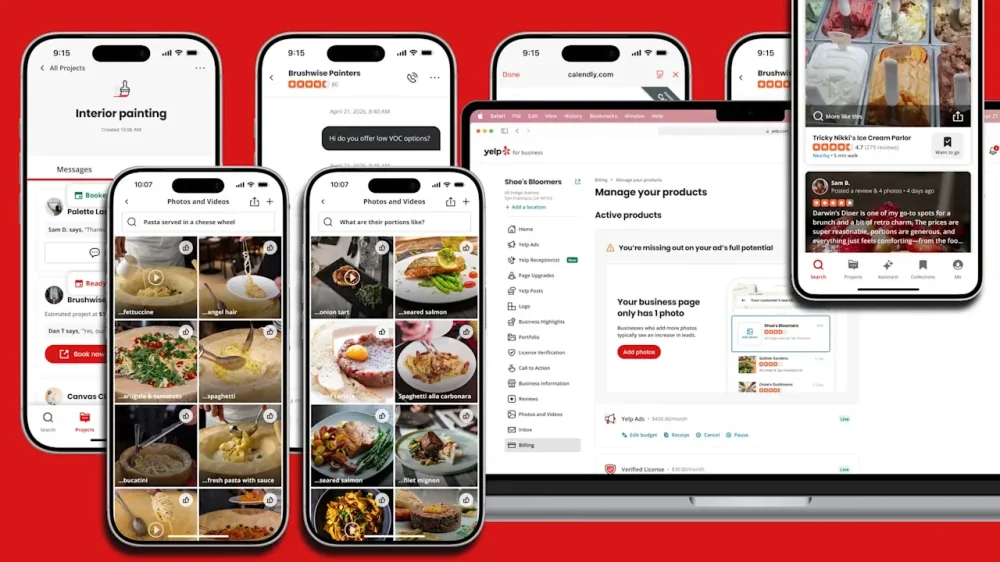
Yelp is rolling out its most significant AI update yet, centered on a new conversational “Yelp Assistant” designed to move users from searching to actually booking, ordering, and scheduling — all in one flow. What’s new. Yelp Assistant sits at the center of the update, acting as a chatbot that can answer complex queries, recommend businesses, and complete actions like reservations or appointments without leaving the app. Zoom in. The assistant pulls from Yelp’s massive base of user reviews and photos to generate tailored recommendations, explain why a business fits, and let users refine results conversationally. It can then take the next step — booking a table, ordering food, or requesting a quote — directly within the same interaction. What else is new. Yelp is expanding integrations with platforms like Vagaro, Zocdoc, and Calendly to streamline bookings across categories like beauty, healthcare, and home services, while deepening delivery ties with DoorDash. Also notable. An upgraded “Menu Vision” feature uses AI and visual overlays to show dishes, reviews, and photos in real time when scanning a menu, helping users decide what to order faster. Why we care. Yelp is shifting from a discovery platform to a transaction-driven experience powered by AI. With Yelp Assistant handling recommendations and bookings in one flow, visibility alone may not be enough — businesses will need to be optimized for conversion within the platform. The update also signals more competition for high-intent users as Yelp tightens control over the path from search to purchase. Between the lines. Yelp is leaning into AI not just for discovery, but for conversion — turning intent into transactions without sending users elsewhere. What’s next. The assistant is live on iOS and Android with broader expansion across categories and desktop coming later this year. Bottom line. Yelp wants to own the full local journey — from “where should I go?” to “it’s booked.” View the full article
-
For 20 years, Google Ads management has followed the same basic model: you log in, review performance, make changes, and hope they work before the next check-in. Agencies, freelancers, and in-house teams all work this way, even as the tools have changed. Spreadsheets gave way to scripts, and scripts gave way to automated bidding, but the core loop never changed — someone still had to sit in the account. groas aims to change that model by introducing a system designed to automate campaign execution end-to-end. Our company announced today it has developed a fully end-to-end autonomous system that’s designed to match or exceed PPC performance benchmarks observed in internal testing. It’s designed to operate without routine manual approvals or constant dashboard monitoring. From campaign creation through bid management, ad copy generation, keyword expansion, negative keyword pruning, budget allocation, and dynamic landing page deployment — along with everything else you can do in the Google Ads console and beyond — the entire workflow now runs autonomously, 24/7. The system runs on a distributed network of specialized AI agents that handle different parts of campaign management and communicate in real time. We didn’t start here. A year ago, groas launched as a lightweight product that surfaced optimization recommendations for you to review and implement. The same model most PPC products still follow. By the founder’s own admission, it was a fairly unremarkable v1. But what it lacked in sophistication, it made up for in something more valuable: real data from large volumes of real campaigns at scale. Hundreds of early customers across the world signed up and connected their Google Ads accounts, representing a wide range of ad spend levels, campaign structures, and conversion goals. These weren’t a narrow slice of one vertical. They spanned dozens of industries and niches — from local service businesses spending a few thousand a month to large agencies managing seven-figure monthly budgets across full client portfolios. That diversity became the most important asset groas built. The custom-trained, fine-tuned models that now power the system were shaped by this breadth — not a static dataset or simulation, but live campaigns with real money on the line across every industry and budget tier. Without that base of early adopters, what groas is today couldn’t exist. The training data that enables autonomous management came from actively managing real dollars across real campaigns, learning what worked and what didn’t in conditions no synthetic environment could replicate. David Pourquery, founder and CEO of groas, said: “We kept seeing the same pattern. We’d surface a recommendation that would clearly improve performance, and it would sit there for days or weeks because the account manager was busy, or the client needed to approve it, or someone was on vacation. The insight had a shelf life, and by the time it got implemented, the data had moved on. So we stopped recommending and started doing.” That realization drove a complete six-month rebuild. The result is a system of interconnected AI agents, each specialized in a different part of campaign management, collectively processing over 100,000 data points per hour per campaign. The network handles a wide range of tasks typically performed inside the Google Ads console without the limits of working hours, cognitive load, or the tradeoffs that come with managing multiple accounts. The system automates most day-to-day campaign management tasks that would typically require manual input. If you wouldn’t have time to do it, the agents would. From day one, groas built dynamic landing pages into the system, deployed and continuously A/B tested to find winning combinations of messaging, layout, and calls to action for every campaign. groas deploys them with a single line of JavaScript on your existing site — no developer resources, no new hosting, no CMS changes. The system tests and iterates 24/7, designed to improve conversion rates through continuous testing. There’s a full undo capability for each agent action, but the point is you don’t need to regularly check into groas or Google Ads. Weekly reports are emailed, summarizing what was done, while a dedicated human PPC account manager oversees everything groas does around the clock. Onboarding is fully hands-off. After sign-up, your groas account manager learns your business, audits your existing Google Ads accounts, and delivers a detailed action plan within 24 hours. From there, they implement everything across groas and Google Ads with zero work on your side. In less than a year since shifting to full autonomy, groas now manages eight figures in monthly ad spend across its client base. Every account came through organic discovery or direct referrals — the company hasn’t spent anything on paid acquisition to date. The client base has consolidated around two profiles: Businesses moving away from agency relationships where results haven’t kept pace with cost. These are companies paying $5,000 to $15,000 per month and looking for more consistent performance and transparency. groas provides an alternative by automating day-to-day execution while reducing management overhead. Agencies. This is now the larger segment. Agencies plug groas into their clients’ accounts behind the scenes, bundle the cost into your existing fees, and let the agent network handle day-to-day execution while their teams focus on strategy, creative direction, and client relationships. The implementation runs behind the scenes within agency workflows. groas turns a labor-intensive, low-margin service into something that scales without added headcount. groas offers a 30% lifetime recurring commission for referrals, but most of you choose to pay for it yourselves and keep the margin. Google’s automation — from Performance Max to AI Max to broad match expansion — has pushed the industry toward more black-box control for years. Many advertisers feel they are losing visibility into what’s actually happening inside their campaigns. Meanwhile, agencies and recommendation-based products still run the old loop: review, recommend, wait for approval, implement, repeat. groas occupies a category that didn’t exist. Instead of helping you manage campaigns better or relying on Google’s automation, it removes you from the execution loop while keeping you in the strategic loop through a dedicated account manager. The PPC industry has spent two decades debating how much to automate. groas is the first to answer “everything” and back it up with eight figures in managed spend. The growth points to something the industry has been circling for years without arriving at. The bottleneck in Google Ads performance has often been the limits of manual execution — constrained by time, attention, and the volume of data modern campaigns generate. groas didn’t build a better recommendation engine — it reduced the need for traditional recommendation-based workflows. groas starts at $999 per month for up to $15,000 in managed ad spend, scaling to $6,999 per month for up to $150,000. No contracts, lock-ins, or setup fees. The only requirement is at least $2,000 per month in Google Ads spend — below that, there isn’t enough data for the agents to optimize effectively. Learn more about how groas works at groas.ai. Watch this video on YouTube View the full article
-
You can now book haircuts, doctors’ appointments, and food deliveries through Yelp. The business search and review platform has rolled out integrations with providers including DoorDash, Zocdoc, and Vagaro, letting users book appointments and order food directly from a Yelp listing or through the AI-powered Yelp Assistant. Users could already request quotes from businesses ranging from home and auto repair professionals to beauty experts. The Yelp Assistant is also getting its own tab in the app, as the company aims to become a destination not just for its hundreds of millions of user-contributed reviews but for answering questions about local businesses and booking their services. “We would like consumers to reconceive Yelp not just as a place where they read reviews,” says Akhil Kuduvalli Ramesh, SVP of product, “but as a place where they can actually find answers and complete their actions.” In a demo for Fast Company, Kuduvalli showed how the Yelp Assistant can locate specific businesses and other places that meet user needs, like a park suitable for walking a dog off-leash or a restaurant fit for date night. The assistant returns a list similar to Yelp’s standard search results, but adds a brief explanation of why each result matches the query, highlighting relevant details from reviews and, in some cases, company websites. It can also handle follow-up questions, such as parking at a dog park or vegetarian options at a restaurant, pulling in details from reviews and photos. “What’s particularly interesting to a consumer about it is the fact that every answer has a narrative,” Kuduvalli says. “The narration brings a sense of transparency, and it also gives the user confidence as to why they’re seeing what they’re seeing, and it gets them excited.” Yelp saw net revenue rise 4% year-over-year last year to a record $1.46 billion, with net income of $146 million, the company said in February regulatory filings. Advertising from services businesses makes up the bulk of Yelp’s revenue, bringing in $948 million last year compared to $444 million for Yelp’s “restaurants, retail & other” category. But as Yelp faces new forms of competition with some consumers increasingly turning to AI for questions about home repair projects or where to get a quick meal—or following the advice of influencers on TikTok and Instagram—the company is betting that its wealth of information from reviews and businesses themselves will continue to make it a trusted destination. Yelp points to a recent survey it conducted with Morning Consult: while 65% of Americans have used AI search tools in the last six months, just over half say those tools can feel like a “walled garden” that makes results hard to verify. About 63% say they double-check AI answers with other sources, including review platforms and news sites. That matters especially for local businesses, Kuduvalli says, where users want confidence that hours and services are up to date. In theory, then, the Yelp Assistant can offer the best of both worlds, using AI to answer questions and provide citations and photos from Yelp reviews to back their claims. And once people find a business they like, they’ll increasingly be able to reserve a table or book an appointment directly from Yelp. Integrations with Vagaro and Zocdoc are already live on iOS, and the company plans to make them available through Android and desktop versions of its platform later this year, along with a Calendly integration for businesses that take appointments through that scheduling tool. Yelp can even provide cited information as users look at menus in restaurants. A Menu Vision feature that debuted in October can pop up dish photos, highlight popular items, and link to reviews when diners scan menus through the Yelp app. Yelp has continued to enhance Menu Vision since its launch, Kuduvalli says. “It will identify far more dishes than it did before,” he says. Yelp’s AI model still depends in part on user contributions, and reviewing remains active: Users submitted 22 million new reviews in 2025, up 7% from the prior year, according to the company. Yelp is also rolling out an AI-personalized home feed on iOS, with more tailored content and updates from people users know, as it leans into its core strengths in the AI era. View the full article
-
Power has a way of narrowing progress—and the narrowing follows a pattern. Early in my career, a senior colleague took credit for ideas and work I had shared while onboarding him to the team. It wasn’t subtle: same thinking, same framework, different owner. When I raised it, I was told to assume good intentions. When I pushed for accountability, I was told I was being “testy.” The behavior was never examined. The outcome was never corrected. I have since seen the same logic repeat across organizations: good intent is treated as a substitute for accountability. This is not a rare story. This is a system caught in the act. Women now earn the majority of college degrees in the United States and enter the workforce at near parity with men. Yet they hold only about 29% of C-suite roles in corporate America. McKinsey’s Women in the Workplace research shows the gap begins much earlier: for every 100 men promoted from entry level to manager, only 87 women are promoted. The gap compounds at every subsequent level until, by the time leadership roles narrow into P&L ownership and executive authority, women are significantly underrepresented. The problem is not awareness. It is permission for inequity to persist. The Inequity Awareness–Accountability Gap What’s happening is a structural breakdown that I think of as an Awareness–Accountability Gap. Organizations develop awareness of inequity but fail to translate it into results. The gap persists through three recognizable and reinforcing patterns. The first is the empathy ceiling, in which empathy comes to function as an endpoint rather than a baseline for leadership. Once a leader expresses awareness through language, identity, or stated intent, scrutiny recedes. Leaders perceived as “getting it” are questioned less, even when hiring and promotion outcomes for women remain unchanged. The second is intent inflation. Organizations routinely over-credit leaders for intent while under-pricing the cost of inaction. Leaders earn credit for expressing the right values even when advancement outcomes remain flat. When intent is rewarded without regard to outcome, intervention becomes optional. The third and most operationally consequential pattern is ambiguity transfer: when unclear ownership gets converted into invisible cleanup labor and pushed onto those without the formal authority to assign, decline, or be rewarded for it. In practice, this burden often settles in middle management and below—the layers expected to translate strategy into execution while managing interpersonal fallout, timeline drift, and cross-functional confusion. That matters because management is also where women’s advancement often starts to stall. At the same time, women in these layers are too often excluded from the business development conversations, strategic calls, and opportunities that generate the sponsorship required to move up. According toMcKinsey’s research, only 31% of entry-level women report having had a sponsor, compared with 45% of men. How the Gap Recruits Its Defenders As a Go-to-Market (GTM) and marketing leader, I work regularly with a concept called the growth loop—a behavior that is rewarded, reinforced, and normalized until it becomes self-sustaining. The Awareness–Accountability Gap works the same way. When leaders perform empathy and express good intent, they receive immediate positive reinforcement: trust, goodwill, credibility. That reinforcement lowers scrutiny, which reduces pressure for action. Over time, even the people most harmed by the system can begin to favor awareness because it preserves stability. For women already navigating higher qualification thresholds and narrower margins for error, insisting on accountability can register as friction rather than leadership. In those conditions, accommodation becomes easier than escalation. The rise of the “girl dad” as a workplace identity captures this dynamic neatly. In some workplaces, being a “girl dad” has become shorthand for progressive intent—a signal that a leader “gets it.” But understanding inequity and interrupting it are not the same act. When organizations accept identity as evidence of commitment, they complete the loop: awareness signals virtue, virtue generates protection, and the demand for measurable outcomes quietly dissolves. The “girl dad” is not the problem. The organization that treats the identity as proof of action is. The path toward closing the gap is accountability First, track advancement velocity: time to first P&L role, promotion rates relative to male peers, and retention of high-performing women at key inflection points. What gets measured with consequences gets changed. Second, stop awarding credit for awareness alone. Leaders should be evaluated not on whether they say the right things, but on whether women advance, stay, gain authority, and receive credit under their leadership. Third, make sponsorship visible. Political capital is finite, and where it is deployed reveals more about leadership than any expressed value. When a leader sponsors someone, record the outcome: Did the person get the role? The visibility? The credit? Fourth, assign ownership to ambiguity. When decisions are delayed, deferred, or left intentionally vague, organizations should ask a simple question: who is absorbing the downstream cost? Who is aligning stakeholders, repairing fallout, updating timelines, and carrying unresolved work forward? Proximity to women is not the same as stewardship of women. Accountability, by contrast, requires leaders to redistribute power, absorb conflict, and make loss visible. Avoiding that disruption is not harmless. It produces stagnation and, over time, compounds into poorer leadership decisions, diminished performance, and weaker organizational capacity. The cost is not abstract. Research points to trillions of dollars in lost productivity and reduced economic potential when poor leadership drives disengagement. Organizations that claim ownership of culture must also own who gains power as that culture hardens into structure. Until awareness is paired with accountability for outcomes that are measurable, tracked, and consequential, inequity will persist behind the language of progress. View the full article

-
As inflation causes prices to rise, there is a cost that disproportionately impacts women—the “egg freezing tax.” In 2023, over 40,000 women froze their eggs—a safe, proven way to invest in more control over the timing of one’s family—which has grown in popularity for many reasons: general declines in fertility rates, delayed family building, and increasing numbers of women choosing to become a single mom by choice. Despite having founded three companies, one of the hardest things I’ve ever done was freeze my eggs. In my early thirties, while building my first startup in San Francisco, my nights were a blur of teaching myself to self-inject and tracking complex medication dosages, all while trying to keep my new company afloat. Four rounds later, paid entirely out of pocket, I had seen the reality of the system. At approximately $20,000 per cycle, the cost of preserving one’s eggs is a luxury few can afford. Women are gambling over $50,000 to keep their dreams of a biological family alive. Ironically, the time when egg freezing is the most effective is the same time as when career-driven individuals are focused on climbing the corporate ladder with the least amount of disposable income. A $50,000 out-of-pocket cost in your early thirties isn’t just $50,000. Invested over 30 years at typical market returns, that same money could grow to roughly $400,000 to $800,000 by retirement. America’s Population Decline The “silent tax” of egg freezing is not just a private burden on individual women. It’s a public-policy failure lacking corporate attention, and one with macroeconomic consequences. When fertility preservation and treatment are financed out of pocket, the people most likely to delay or forgo family-building are also the people the economy most depends on keeping in the labor force: educated, urban, high-skill workers facing the steepest career penalties for mistimed childbearing. Data shows fertility is now below replacement in nearly every OECD country, and the organization explicitly warns that sustained low fertility poses risks to future prosperity, labor supply, and public finances. Birth rates are at record lows, and for the first time in U.S. history, more women are having babies in their 40s than as teenagers. A low-birth-rate environment is a workforce issue: population aging raises the old-age dependency ratio, shrinking the future labor pool and putting pressure on tax bases and care systems. That makes egg freezing an integral part of family-formation infrastructure, along with childcare and paid leave. Fertility preservation allows for an investment in American families at a time when working women most need support. If governments and employers support only the back end of family formation and ignore the front end, they leave a major timing problem unsolved. Freezing Eggs and Debt These costs disproportionately impact certain groups. LGBTQIA+ families, for example, may start their career knowing they’ll need medical support to have biological children, but usually do not have workplace benefits to freeze eggs, sperm, or embryos. As individuals early in their careers struggle to pay the “egg freezing tax,” they take on debt. Options to pay for egg freezing include fertility-focused loans and payment plans, which tend to come with more educational support, or simply using a high-interest credit card. This means that the women and families who want the option to become parents later in life are forced to burden the investment in future American families on their own. Women already face lower wages, carry 64% of the country’s student loan debt, and now, a new tax on their careers. This impact further compounds for women of color: black women are twice as likely to experience infertility and less likely to seek treatment. The Gap in Family Building Infrastructure Having spent the past two decades working in New York and Silicon Valley, I’m familiar with seeing how quickly solutions emerge for expensive pain points. But the U.S. is unique among developed countries in terms of how fragmented fertility access is. Coverage for egg freezing is usually only included in health insurance if there is a specific health need, such as a cancer diagnosis. Only 16% of employers covered egg freezing in 2024. What’s needed is a major investment by policymakers, business leaders, and technology innovators to address this problem. The evidence suggests that when women can delay motherhood until they are more established, they earn more and stay more attached to the workforce. In a 2024 survey of more than 1,200 HR leaders and 3,000 employees in the U.S. and U.K., 75% of employers said reproductive health benefits matter for retention, 57% of employees said they have taken or might take a job because it offered family or reproductive health benefits, and 46% of Gen Z said these benefits influence whether they stay or leave. Investing in fertility preservation and family-building flexibility is important economic infrastructure, and young women should not be forced to bear this silent tax alone. We’ve built systems to support every other major life decision: 401(k)s to plan for retirement, mortgages and digital platforms to buy homes, robo-advisors to grow wealth. But we have failed to build comparable infrastructure for family formation. I’ve been supporting aspiring parents for years now, currently as CEO of Sunfish, a tech company that supports fertility solutions, and previously as a Director at one of the largest fertility companies. What I see consistently is not a lack of awareness, but a lack of access. Women understand the tradeoffs and know it’s not a guarantee. A system that requires individuals to sacrifice hundreds of thousands of dollars in long-term wealth to preserve the option of having children is not a system designed for a competitive, modern workforce. If we want to sustain talent, productivity, and population growth, fertility preservation has to become a structured part of our infrastructure. View the full article

-
SEO in 2026 is expanding, not changing. Traditional search still matters, but now SEO also includes AI-driven discovery, social platforms, and chatbots. The principles are the same, like clarity, structure, authority, and relevance, but the platforms are multiplying. We surveyed 59 SEOs to see how they’re handling these changes. Table of contents Download the PDF report now 1. SEO isn’t dying, but evolving 2. Keep the name Search Engine Optimization 3. Good SEO is LLM optimization 4. Rankings still matter, but not like they used to 5. Organic traffic is still king, but for how long? 6. Content saturation is a big threat 7. Most SEOs are ignoring a fast-growing search channel What Yoast’s experts really think Do you want to read the full story? Some have less than a year of experience. Others have been in the field for over a decade. Their answers show an industry figuring things out. A few are ahead of the curve, but most are still catching up. The best SEOs aren’t just reacting to AI. They’re using it to strengthen what already works: technical foundations, high-quality content, and real authority. Others are stuck debating whether SEO should even keep its name. Here’s what stood out, and where Yoast fits into the conversation of what SEO means in 2026. You can find the full results, with more questions and deeper insights from Yoast’s principal SEOs, Carolyn Shelby and Alex Moss, in a downloadable PDF. Sign up below! Download the PDF report now Enter your email address below. We’ll send you a download link to the full Yoast Perspective PDF report. Check your inbox, as it’ll arrive in minutes. Privacy policy 1. SEO isn’t dying, but evolving 51% of respondents consider SEO to be “evolving”. 33% say it’s “thriving”. Only 10% think it’s “declining”. This is an interesting divide, but it’s not random. In the results, those with 10+ years of experience say SEO is thriving, while newcomers say it is not. It might be that experts know the landscape better and see change as a constant. Alex Moss’s take: “SEO has always adapted to changes in the SERP, and now it’s adapting again. The traditional SERP is gone, but SEO isn’t.” Carolyn Shelby’s take: “SEO is evolving, but not because its fundamentals are breaking. The interfaces between users and information are changing. Search is no longer confined to ten blue links, but the need for structured, relevant, trustworthy content hasn’t diminished.” The Yoast Perspective: We think SEO isn’t going anywhere, but there are changes happening. Traditional search from Google and Bing still drives traffic, but AI-driven discovery from LLM-powered assistants shapes perception and discovery. Therefore, the best SEOs don’t choose sides in this fight; they are mastering both directions. 2. Keep the name Search Engine Optimization 39% say SEO should be relabeled “Search Everywhere Optimization”. Only 32% want to keep “Search Engine Optimization”. Big support for relabeling SEO, and even among veterans, 41% prefer Search Everywhere Optimization. Of course, this doesn’t mean that we should do this. Alex Moss’s take: “The term ‘SEO’ will stay. The role will widen to include AI and other disciplines, but the name doesn’t need to change.” Carolyn Shelby’s take: “The term ‘SEO’ still holds shared meaning, credibility, and market recognition. There’s no strong evidence that rebranding the discipline itself is necessary or beneficial. Responses favoring ‘Search Everywhere Optimization’ reflect where SEO outcomes now surface, not a fundamentally different practice.” The Yoast Perspective: We at Yoast don’t think the term SEO is broken. Yes, there is a lot of change happening, especially in search, with AI overviews, chatbots, and social media platforms, but what about the core SEO work? You still have to focus on technical foundations, content quality, brand building, and authority. ‘Search Everywhere Optimization’ might describe where SEO happens, but it doesn’t change what SEO is. The name ‘SEO’ still works, but we just need to explain how it applies to AI and social platforms. 3. Good SEO is LLM optimization 64% agree LLM optimization is essentially the same as traditional SEO. 59% aren’t even actively optimizing for LLMs. You might call this laziness, but you could also call it efficiency. It oftentimes comes down to the same thing. There’s also the 9% who strongly disagree with this statement. These respondents say LLMs prioritize synthesis over rankings, so focusing on structured data and brand mentions makes more sense for them. Of course, they are not wrong, but they don’t contradict what others have said. LLMs don’t require new tactics; they just reward the same SEO principles more strictly. Alex Moss’s take: “If you’re undertaking good SEO, you’re already optimizing well for LLMs. The tactics don’t change—just the audience.” Carolyn Shelby’s take: “The same practices that make content discoverable and trustworthy for search engines also make it usable for LLMs. The confusion arises when people treat LLMs as a completely separate system. In reality, LLM visibility rewards clarity, relevance, and authority—all long-standing SEO principles.” LLM optimization isn’t a separate discipline because it’s SEO for AI. The same principles apply: clarity, structure, and authority. The difference? AI systems are less forgiving of mediocre content, so the bar for quality is higher. 4. Rankings still matter, but not like they used to 52% say rankings are “equally important” as before. 30% say they’re “less important”. This is a sensible shift. Google’s AI overviews and other zero-click results mean visibility does not equal traffic. For AI systems, rankings are still an authority signal. Alex Moss’s take: “Traditional rankings are still important because agents still search the web to ingest information. If you aren’t visible there, it’s less likely an agent will identify and select you into their responses.” Carolyn Shelby’s take: “Rankings still matter, but they are no longer the end goal. They are a proxy for visibility, not a guarantee of impact.” The Yoast Perspective: We need to stop obsessing over ranking number one, so start tracking visibility and presence. Check whether you are cited in AI-driven answers, and try to be mentioned in industry discussions. AI visibility and citations are the new rankings. 5. Organic traffic is still king, but for how long? 55% say “organic traffic” is their top metric. Yet 49% cite “reducing organic clicks” as their biggest challenge. We see this as the great paradox of 2026. Traffic is down, but the value of that traffic could be up. You might get less traffic, but the clicks that do happen have a better intent. Carolyn Shelby’s take: “As AI reduces the need for some visits, success looks like being represented correctly rather than merely visited. Visibility in AI overviews doesn’t always drive clicks, but it builds legitimacy. Being included signals that you’re a credible source, even when users don’t click.” Our advice: Work on AI visibility, as this is the new SEO metric. Just as rankings show your visibility in traditional search, citations in AI overviews show your authority in AI-driven discovery. Track it alongside rankings and traffic Keep an eye on branded search volume to learn whether people are looking for you by name Monitor citations to see if others are referencing your content online 6. Content saturation is a big threat 39% say “competing with AI-generated content” is their top challenge. Only 4% cite a “talent gap.” We know AI can write bad content. But it’s a bigger challenge when AI writes good enough content at scale. This will flood the web with noise, making it hard to penetrate. Alex Moss’s take: “AI-generated content is artificial. Humans connect with stories, not regurgitated lists.” Carolyn Shelby’s take: “AI doesn’t change what good content is, but just raises the bar. Mediocrity doesn’t just rank lower; it disappears.” Our advice: Focus on building your EEAT, because AI can’t fake real-world expertise and authority Prioritize quality over quantity, as a single great piece of content can beat ten average ones Use AI, but be careful and always use it as a tool, not as a replacement 7. Most SEOs are ignoring a fast-growing search channel Traditional search (Google/Bing) is still #1. But TikTok search ranks #5, lower than Amazon. This might be something of a blind spot for many. Younger generations use TikTok and other video platforms for entertainment, recommendations, tutorials, and even B2B advice. Alex Moss’s take: “Social platforms influence how LLMs perceive freshness and authority. Ignoring them means missing out on signals that AI systems value.” Carolyn Shelby’s take: “You don’t need to rank on TikTok, but you do need to be discoverable there. LLMs scrape social platforms for real-world signals.” The Yoast Perspective: SEO now includes social platforms like TikTok. You don’t need to rank there, but you do need to be discoverable, because LLMs scrape these platforms for fresh, authoritative content. A great video channel can boost your authority in AI responses. Our advice: Repurpose content for video platforms like TikTok and YouTube Check brand mentions in these platforms Improve your video SEO in general What Yoast’s experts really think The data shows trends, but the real wisdom comes from Yoast’s SEO leaders, Carolyn Shelby and Alex Moss. Here is a small peek at the insights they share about the various debates: On “Search Everywhere Optimization”: Alex: “The term ‘SEO’ will stay. The role will widen, but the name doesn’t need to change.” Carolyn: “Rebranding risks fragmenting understanding. ‘SEO’ is already well-established outside the industry.” On the future of SEO metrics: Alex: “As we move from being seen to being selected, visits don’t hold the same value they used to. The business goal should be the most important metric.” Carolyn: “Visibility in AI overviews doesn’t always drive clicks, but it builds legitimacy. Being included signals that you’re a credible source.” On rankings vs. influence: Alex: “Rankings still matter because agents search the web to ingest information.” Carolyn: “Rankings are a proxy for visibility, not a guarantee of impact. Focus on presence.” On the role of SEOs in 2026: Alex: “100% all three: marketers, brand builders, and SEO specialists. Brand and marketing have become intertwined with SEO as our role expands.” Carolyn: “A blended mindset is essential. SEO can’t operate in isolation from brand, product, or communications.” Do you want to read the full story? These insights are just a small taster for you. In the full Yoast SEO report, you’ll find much more: Includes the full answers to all 25 questions In-depth commentary from Yoast’s SEO experts, Carolyn Shelby and Alex Moss Learn which metrics really matter in 2026 Why backlinks are losing ground to citations Sign up and download it right away! The post The Yoast Perspective 2026: 7 things we learned from the SEO industry appeared first on Yoast. View the full article
-
Sacked head of Foreign Office says there was ‘dismissive attitude’ to security vetting of former ambassadorView the full article
-
Two teen chat sites also being probed by watchdogView the full article
-
First Mortgage Co., a long-defunct lender led by convicted executive Ron McCord, blamed the advisory firm for his failure to accept a $20 million offer. View the full article
-
The annual Lyrid meteor shower is back, reaching its peak on Tuesday evening and at predawn on Wednesday. On average, 10 to 20 meteors are produced per hour during a Lyrid shower. But, in some rare occasions “outbursts” can occur, with up to 100 meteors produced in an hour. According to the American Meteor Society, Lyrids will be mostly visible in the Northern hemisphere at dawn, although limited availability will also be available to those in the Southern Hemisphere. The Lyrid shower is among the oldest recorded meteor showers, dating back as far as 2,700 years. The meteor shower is visible when Earth travels through the path of Comet Thatcher, rendering a trail of the comet’s remnants visible to skywatchers. The comet’s crumbs create a bright streak in the sky as they burn up on Earth’s atmosphere, becoming what most refer to as a shooting star. “When comets come around the sun, the dust they emit gradually spreads into a dusty trail around their orbits,” the National Aeronautics and Space Administration (NASA) says. “Every year the Earth passes through these debris trails, which allows the bits to collide with our atmosphere where they disintegrate to create fiery and colorful streaks in the sky. How to watch the Lyrid meteor shower Meteors will appear to be coming from Vega, one of the brightest starts in the Lyra constellation. According to experts, its best to look slightly away from the radiant point to spot some of the meteors with the longest tails. In order to identify the radiant point, stargazing apps can guide users towards Vega. According to NASA, stargazers should look towards the east starting April 21 at 10 pm onwards. While the shower runs through April 16 to 25, its peak visibility will arrive midweek, and does not require equipment to spot. In order to gain visibility, experts suggest moving away from areas with high brightness like city lights or even the moon. This year, the moon is not expected to interfere with visibility. Experts recommend spending at least an hour meteor watching, as eyes can take up to 20 minutes to fully adjust to the darkness—and longer viewing windows help account for natural lulls in activity. Stargazers should also dress warmly and bring hot drinks, as late-night temperatures can dip significantly depending on location. View the full article

-
Grocery stores waste around four million tons of food in the U.S. each year—mostly fresh food, since it’s hard for store managers to know exactly how many cartons of strawberries or pounds of beef to keep in stock to meet demand. Until fairly recently, most of that planning happened manually. But AI tools from the startup Afresh are helping stores cut waste by as much as 25%. The company announced $34 million in new funding today to expand, co-led by Just Climate and High Sage Ventures. A decade ago, when Afresh cofounders Matt Schwartz and Nathan Fenner were MBA students at Stanford and looked at the challenge of food waste, they started visiting grocery stores and saw produce managers using printed spreadsheets to estimate inventory and write orders. While some stores used software to track and order packaged food, fresh food still relied on basic methods and educated guesses. “It was ultimately a pen and paper process,” Schwartz says. Schwartz and Fenner started building a tool that could more accurately estimate how much food was in the store—a complicated challenge. Produce that’s sold by weight might literally be evaporating as it loses water. Customers in the self-checkout aisle might be paying for a non-organic apple when they’re actually buying organic. Food that goes bad on the shelf, from raspberries to salmon fillets, often isn’t accurately counted when it’s thrown away. The software uses data from each grocer—in some cases, hundreds of billions of transactions—and looks at pricing, promotions, where the food shipped from, and other factors to understand the perishability of each product. Deep learning models also forecast demand based on another range of factors, from the timing of food stamps to the weather. Then an optimization algorithm suggests how much of each product to order. Over time, the models continue to learn and improve. The company often begins with a test in 10 to 20 stores in a chain, and then compares that performance to a control group of stores during the same time period. “We typically see 20% to 25% reduction in shrink when we go live with our system,” says Schwartz. It’s now in use more than 12,500 grocery store departments nationally, including Safeway and Albertsons. Stores can use the data in other ways—in some stores, for example, Afresh has flagged that produce displays are too large so stores can resize them or use “dummy” displays to make piles look bigger with less actual fruit. Grocers can also use fruit and vegetables that are about to go bad in prepared products, such as repurposing avocados in guacamole. (Afresh also recently rolled out another tool to help grocers accurately forecast demand for prepared food in store delis.) By better predicting how much can sell in the store, it helps reduce waste in other parts of the supply chain. “When you clean up store ordering, it makes it easier for distribution centers to buy the right amount,” Schwartz says. “Then, ideally, if DCs are buying the right amount, that gives a cleaner demand signal to growers, who can better react and fulfill demand to the grocers.” As stores have the right amount of food at the right time, they can also get customers fresher food that lasts longer in the fridge. There’s a clear environmental win to reducing the waste; food waste from retail stores was responsible for around 16 million tons of CO2-equivalent emissions in 2024. But there’s also an obvious financial incentive for stores, who lost $26.9 billion in sales the same year. “If you can avoid a dollar of food waste, you’re creating a dollar profit for a grocer,” Schwartz says. “And for a 1-3% net margin business, that’s a profound impact on their bottom line.” View the full article

-
The last time I set foot in this historic Chicago mansion built in the heart of Michigan Avenue, I’d been served one less-than-generous slice of lukewarm prime rib. This is back when it was a Lawry’s steakhouse. I remember white tablecloths, silver serving trays, one decent staircase, and just the stodgiest of old rooms that felt less like I was in the Gilded Age than at a funeral parlor. Now, when I step inside the lobby, a large wooden door slides open in front of me. I enter a room with a ringing telephone. And when I pick it up, my journey begins . . . With the help of the architecture firm Rockwell Group and the design firm Pentagram, the McCormick mansion has been transformed into The Hand & The Eye, the largest magic venue in the world at 35,000 square feet. The overall vision—and $50 million investment behind it—comes from Glen Tullman, who is both a Chicago-based venture capitalist and a lifelong magic enthusiast. His bet is that locals and tourists will spend $225 for a three-hour, no-cameras-allowed experience (with $75 in credits for food and drink) as they bounce from intimate rooms to larger theaters—seeing more magic at every turn in a setting that’s as much of a spectacle as the illusions themselves. “We built this to be a 100-year venture from every little aspect of what we’ve done,” says Tullman, as he excitedly gives me a tour through the space. “We built it to be for the performers and for the guests. We didn’t build it to say, ‘Let’s maximize profits.’ [Though] sometimes when you do that, you actually maximize profits, because people say, ‘This is so special.’” What is The Hand & The Eye? The Hand & The Eye is a theater, club, school, and networking spot for the magic-inclined. But ultimately, it’s an ode to mid-century Chicago-style magic: point-blank, reality-shattering card tricks that filled the city’s taverns as magicians walked from table to table, casually blowing people’s minds with nothing more than 52 small pieces of waxed paper. The mansion is designed to transport you out of any particular place and time, with a mishmash of motifs pulled from the 1870s to 1930s, the golden age of magic. Rich wallpapers, marble bars, careful carpentry, custom brass plaques, and copious amounts of fringe and velvet serve as a baseline across a space where no two rooms are alike. And since the mansion has few windows, it feels like a permanent 10:30 p.m. inside. I can see how the environment could make time disappear. The careful ode to magic never feels like kitsch, largely due to the fact that, ironically, most of what you’re looking at is real. This isn’t an escape room or some Disneyland ride. A mix of antique and custom-built furniture fills the space, and a museum’s worth of art and ephemera are staged everywhere you look—ranging from one of Harry Houdini’s milk cans (he’d lock himself inside and escape from the roughly 36-by-26-inch steel churn) to Alexander Herrmann’s “Chinese rings” and decapitation cloth. Many are sourced right from Tullman’s own collection. Both the space and service are architected to create an unpredictable night. When you arrive, you’re given a schedule for a three-hour experience (and one you don’t need to follow to the minute—color-coded pins ensure that staff know to signal you when it’s time to move on, should you lose track of time). You may be ushered from communal bars and two large dining rooms into cozy spaces that squeeze in maybe a dozen people for close-up work, and then into one of four auditoriums for larger stage shows. I was particularly taken by a safe room lined with shining safety deposit boxes that belong to VIP members, who can bring their keys to unlock the occasional surprise. A séance room features one large table . . . but I’m told that when the lights go low, you never know what spirits might show up. The mansion contains too many rooms to fully enjoy in one night. So the club saves your journey, and it will never schedule you the same path through the space twice. I hear there are secret passages and rooms—none of which are revealed to me during my visit. In fact, even as a member of the media, I’m not allowed to photograph my tour. My phone’s camera, like everyone else’s who visits, is covered with a sticker upon arrival. “Today you go to a concert, and if you’re not in the front row, you mostly see it through the back of someone’s phone,” Tullman says. “Here, you’re in the moment and people walk out, and they’re, like, ‘That’s just the best evening I’ve had.’ Some of them don’t even think about why it was so good. And it’s because you were totally focused on enjoying it with people next to you.” Building the brand So much of the vibe—from the name and the logo to the signage and the merch—was developed alongside a 12-person team from Pentagram with support from Paper Tiger. The club was originally named “Metamorphosis,” after one of Houdini’s most famous tricks. Finding that a little too on-the-nose, the team went through a vast branding process to rename it. What they landed on—The Hand & The Eye—is stately, mysterious, and descriptive. “We wanted a name that wasn’t just a pun or had the word ‘magic’ in it,” Pentagram partner Emily Oberman says. “The hand is about how all the magicians perform their magic, and then the eye is how the audience experiences it.” Visually, the team wanted to avoid magical tropes—no rabbits or top hats, no wands, no lightning scars. For the logo, Pentagram went literal, drawing a slightly curled hand with a floating eyeball between the thumb and index finger. When the team first showed Tullman the idea for the logo over a Zoom call, he surprised the team by making a ball float between his fingers. Oberman calls the project “a love letter to Chicago.” It incorporates the city’s stars and brass signage found around town. The color system—a rich, rotating mix of seasonal colors—pulls in a soft blue that locals might not even realize is straight from the Chicago flag. Meanwhile, the filigree and patterns used across Pentagram’s brand design—and gosh, there is so much intricate work—were pulled from the facade of the mansion itself. I can’t help but feel that the brand is so rich and retro because it’s not overly scripted or matchy-matchy. “It’s kind of like a mix of styles; all the filigree is a little bit different, too, and unique to the piece that it’s on,” notes Mira Khandpur, associate partner at Pentagram and lead designer on the project. You’ll find all of that branding across the typical touchpoints you’d expect, but also across magic tricks and card decks the team designed to be sold at the venue’s store (which, yes, is staffed by a magician who will gladly teach you a thing or two). I imagine it will be impossible to visit without at least buying a deck of cards to bring home. For Chicago, the investment is a boon to revitalizing its Mag Mile, which has faced challenges with vacancy since COVID—and Tullman claims that since he bought the building, it’s attracted other business owners to the block. But for the wider world of magic, it’s something more: It’s a space where mind-bending tricks—honed over endless hours in solitary confinement—can be put on a pedestal and shared with the world. View the full article