All Activity
- Today
-
In this IMHO interview, Ash Nallawalla explains why governance is the missing layer behind most visibility breakdowns. The post How To Avoid Top Down SEO Systems Failures With The Visibility Governance Maturity Model appeared first on Search Engine Journal. View the full article
-
Google expanded its structured data support for forum and Q&A pages, adding properties that help you signal reply threads, quoted content, and whether content is human- or machine-generated. The update aims to reduce how Google misreads discussion and Q&A content. What changed. Google’s QAPage docs now support commentCount and digitalSourceType. DiscussionForumPosting docs now support sharedContent plus the same commentCount and digitalSourceType. The details. In Q&A markup, you can use commentCount on questions, answers, and comments to show total comments even if not fully marked up. answerCount + commentCount should equal total replies of any type. How it works. digitalSourceType lets you flag whether content comes from a trained model or simpler automation. Use TrainedAlgorithmicMediaDigitalSource for LLM-style output and AlgorithmicMediaDigitalSource for simpler bots. If omitted, Google assumes human-generated content. What’s new for forums. sharedContent lets you mark the primary item shared in a post. Google accepts WebPage, ImageObject, VideoObject, and referenced DiscussionForumPosting or Comment, including quotes or reposts. Why we care. This gives you more precise control over how Google reads modern community content — especially forum-heavy sites, support communities, UGC platforms, and Q&A sections. Google can better distinguish answers from comments, count partial threads across pagination, and identify when a post mainly shares a link, image, video, or quoted reply. The documentation. It was updated March 24. View the full article
-
We may earn a commission from links on this page. Deal pricing and availability subject to change after time of publication. The Echo Dot Max is Amazon's “Pro” tier smart speaker, designed for people who want better sound quality in a relatively small package and at an affordable price. This upgraded smart speaker is powerful, with a spherical body and a concave cutout for volume and mute controls, surrounded by an LED ring (yes, it looks like the Death Star). Released last October, the Echo Dot Max is currently at its lowest price ever during Amazon's Big Spring Sale. You can get one for $74.99 instead of the usual $99.99. Amazon Echo Dot Max $74.99 at Amazon $99.99 Save $25.00 Get Deal Get Deal $74.99 at Amazon $99.99 Save $25.00 The new Echo Dot Max is a step up from the Echo Dot, and compared to the 2022 model, it features three times louder bass (thanks to a new 0.8-inch tweeter and a 2.5-inch woofer). It's powered by Amazon's custom Za3 chip with a built-in AI Accelerator, meaning it's built for the Alexa+ AI service. The Max also features a built-in smart home hub with support for Matter, Zigbee, and Thread Border Router; it can also work as an eero extender for your mesh Wi-Fi router. There's also a temperature sensor and ultrasonic presence detector, so you can use it to trigger Alexa routines as soon as someone walks into the room. Tech wise, the Echo Dot Max supports Wi-Fi 6E for faster speeds, Bluetooth 5.3, lossless high-definition audio, and automatic room adaption. It's also easy to pair two Echo Dot Max speakers for a stereo home theater setup with any compatible Fire TV devices. Echo Dot Max comes in three colors: Graphite, Glacier White, and Amethyst. All three are available on discount right now. PCMag gave the Echo Dot Max an "Outstanding" 4.5 star rating, along with an Editor's Choice award, noting, "the Amazon Echo Dot Max stands out as a strong successor to the fourth-generation Echo, comfortably occupying the $100 sweet spot for smart speakers." And what's better than a $100 sweet spot? A $75 sweet spot. Our Best Editor-Vetted Amazon Big Spring Sale Deals Right Now Apple AirPods Pro 3 Noise Cancelling Heart Rate Wireless Earbuds — $199.00 (List Price $249.00) Apple iPad 11" 128GB A16 WiFi Tablet (Blue, 2025) — $299.00 (List Price $349.00) Samsung Galaxy Tab A11+ 128GB Wi-Fi 11" Tablet (Gray) — $209.99 (List Price $249.99) Sony WH1000XM6- Best Wireless Noise Canceling Headphones — $398.00 (List Price $459.99) Apple Watch Series 11 (GPS, 42mm, S/M Black Sport Band) — $299.00 (List Price $399.00) Blink Video Doorbell Wireless (Newest Model) + Sync Module Core — $35.99 (List Price $69.99) Fire TV Stick 4K Max Streaming Player With Remote — $34.99 (List Price $59.99) Amazon Kindle Colorsoft 16GB 7" eReader (Black) — $169.99 (List Price $249.99) Deals are selected by our commerce team View the full article
-
Today, we're introducing our refreshed design across Buffer. Our new navigation, and updated visual language give creators and businesses more flexibility as social media continues to evolve. Our goal has been to make Buffer feel calmer, clearer, and easier to work in every day. A few weeks ago, we wrote about our aim to offer a smarter, more insightful Buffer: a toolset that helps more creators and businesses make smarter decisions around their social media strategies. But that’s only one part the story of Buffer in 2026. As creators ourselves, we at Buffer believe we can do more to help build momentum when working on social media. And momentum is not created by forcing it, but with a mix of calm, insight, and flexibility for the different businesses and content out there. These are the principles that we are bringing to our new design for Buffer. You know that feeling after rearranging your furniture? Everything is still the same underneath, but the space suddenly works better for you Opening Buffer today might feel a bit like that. A new navigation, updated brand colors, and typography to create a lighter, calmer interface that's easier to move around. This update doesn’t change what Buffer does for you today, but gives us a stronger foundation for what comes next. Why the redesign?Buffer began with a simple goal: make social media publishing easier. Over the last year, you may have noticed us quietly evolving with a new look on the marketing site, updated campaigns, and a refreshed homepage. Today, the product catches up. This redesign is the moment it all comes together as one cohesive thing. Social platforms are often chaotic public squares, driven by algorithms that are difficult to understand and discourse that often polarizes. We know from our users (and ourselves) how challenging this can be to work through when trying to build a brand or a business. This chaos isn't where we do our best work, and we know it's the same for Buffer customers. We've been leaning into turning Buffer into a space to support momentum on social media, and that momentum comes from a combination of ease, flexibility, insight, and, of course, a calm space. A new navigation 0:00 /0:06 1× One of the main reasons creators come to Buffer is simplicity, and we take that very seriously. But over the years, Buffer expanded, and as the product grew, things started becoming more complicated than they needed to be. It became clear that the structure we originally built Buffer on was limiting what the product needed to become. The redesign gives us a much stronger foundation moving forward: A centralized sidebar Our main features are now clearly organized in one place. Users can easily switch between channels, groups, contexts, and work types. This makes it easier to stay in flow and build a workflow that fits the way each person works, whether you're planning content, engaging with your community, or analyzing results. Product consistency Creators starting from zero can quickly understand how to plan, publish, and engage without feeling overwhelmed by changing layouts or scattered tools. At the same time, professionals managing many accounts and channels have more flexibility and visibility into their work. Space to grow The redesign creates room for the next generation of features we’re building. Things like smarter scheduling, deeper insights, AI assistance, and tools that help creators sustain momentum over time. A new design languageBuffer has never been the corporate type. We always leaned toward the unconventional. A little quirky, independent, curious. Comfortable challenging the rules of how software and work are supposed to look and feel. As the product evolved, the brand and interface didn’t always keep up. With this refresh, we wanted to bring that spirit back and apply it consistently across everything: our brand, marketing site, web product, and mobile apps. Getting there took time, and you may have already caught some of it through the work of our marketing team to evolve the brand in public. Some of the things we changed include: A visual identity that lets the content take center stage.Warm neutral tones create a calm setting.A vibrant Buffer green adds positivity and helps guide attention without overwhelming the interface. As Kate Baldrey, Marketing Designer, shared, “We went through what felt like thousands of iterations to find a green that felt unique and Buffery without leaning too neon or earthy, and eventually found a shade that felt vibrant enough but balanced and grounded when paired with our neutral tones.”Playful pastel accents introduce moments of personality and meaning.Softer shapes and lighter typography create a more friendly and spacious feel.Simpler illustrations are designed to support the experience, not overpower it or add visual noise.The goal wasn’t to reinvent Buffer’s identity, but to bring it back to its origins and make it support where we want to go. There's more to comeOur mission remains the same: help creators and businesses get off the ground and grow. To publish consistently, understand what works, and grow without feeling like they’re constantly fighting the system. That won’t change. But how we get there is evolving. This redesign is the first step toward the product we want Buffer to become. I’m incredibly proud of what this team has accomplished with so much care, attention to detail, and empathy for the people who use Buffer every day. And we’re grateful to the creators who shared their feedback and helped shape this along the way. We hope you’ll follow along on the journey. View the full article
-
We may earn a commission from links on this page. This Amazon Big Spring Sale deal on a TV is remarkable: A Hisense 32" LED television for $74.99—that's cheaper than dinner and drinks in most U.S. cities. This isn't going to be the greatest TV of all time, but from all available accounts, its at least a solid set. It's an older model—released in 2020—but that means there are over 3,000 reviews on Amazon, and the score is a respectable 4.1 stars out of 5. Critics generally were positive when it first came out, too. INSIGNIA 32" Class F20 Series LED HD Smart Fire TV with Alexa Voice Remote (NS-32F201NA26) $74.99 at Amazon $129.99 Save $55.00 Get Deal Get Deal $74.99 at Amazon $129.99 Save $55.00 The screen is 32" screen, so it's big enough to be watchable, and the picture is 720p so it's technically "high-def," if not "full high-def." It even comes with built-in Alexa and FireTV. Bottom line: I could totally see having this in a bedroom as a second TV, as an interim TV while you wait to get your real set, or a TV if you're the kind of person who low-key hates watching TV, but you don't want to feel totally disconnected with the larger world. And hey, if it doesn't work out, you're not out too much money. Our Best Editor-Vetted Amazon Big Spring Sale Deals Right Now Apple AirPods Pro 3 Noise Cancelling Heart Rate Wireless Earbuds — $199.00 (List Price $249.00) Apple iPad 11" 128GB A16 WiFi Tablet (Blue, 2025) — $299.00 (List Price $349.00) Samsung Galaxy Tab A11+ 128GB Wi-Fi 11" Tablet (Gray) — $209.99 (List Price $249.99) Sony WH1000XM6- Best Wireless Noise Canceling Headphones — $398.00 (List Price $459.99) Apple Watch Series 11 (GPS, 42mm, S/M Black Sport Band) — $299.00 (List Price $399.00) Blink Video Doorbell Wireless (Newest Model) + Sync Module Core — $35.99 (List Price $69.99) Fire TV Stick 4K Max Streaming Player With Remote — $34.99 (List Price $59.99) Amazon Kindle Colorsoft 16GB 7" eReader (Black) — $169.99 (List Price $249.99) Deals are selected by our commerce team View the full article
-
We may earn a commission from links on this page. Deal pricing and availability subject to change after time of publication. The Skullcandy Aviator 900 ANC wireless headphones are down to $199.99 for Amazon’s Big Spring Sale, a $100 drop from their usual $299.99 and the lowest price so far, according to price trackers. Skullcandy Aviator 900 ANC wireless over-ear Bluetooth headphones $199.99 at Amazon $299.99 Save $100.00 Get Deal Get Deal $199.99 at Amazon $299.99 Save $100.00 These are large, mostly plastic over-ear headphones with a design that leans into the original Aviator look. They weigh about 290g or 10.2 ounces, so you’ll notice them on your head, but the thick padding helps offset that during long listening sessions. Noise canceling is decent, but not on par with top-tier models from competitors. It cuts down a large portion of ambient noise, but higher-pitched sounds like traffic or metal screeches still come through. The bigger compromise is sound quality. The default tuning leans heavy on bass, which can make modern tracks (electronic and hip-hop) feel punchy but can also overshadow vocals and mids. Some higher frequencies can also come across as sharper than expected, especially at louder volumes. As for its controls, instead of touch controls or relying on an app, there’s a joystick on the right earcup that handles playback, EQ presets, and navigation, paired with a small display that shows what you just changed, so you are not guessing your inputs. On the left side, a textured wheel switches between active noise cancellation and transparency mode. It’s a system that feels different at first, but can be more intuitive once you get used to it. Beyond that, you also get features like THX spatial audio, customizable EQ, a built-in hearing test, and Spotify Tap for quick playback. On the connectivity side, Bluetooth 5.3 with multipoint support makes it easier to switch between a laptop and phone without re-pairing, and there’s a 3.5mm jack for wired listening. Battery life is strong, rated at up to 60 hours without ANC and around 50 hours with it enabled, though your mileage may vary depending on usage. Our Best Editor-Vetted Amazon Big Spring Sale Deals Right Now Apple AirPods Pro 3 Noise Cancelling Heart Rate Wireless Earbuds — $199.00 (List Price $249.00) Apple iPad 11" 128GB A16 WiFi Tablet (Blue, 2025) — $299.00 (List Price $349.00) Samsung Galaxy Tab A11+ 128GB Wi-Fi 11" Tablet (Gray) — $209.99 (List Price $249.99) Sony WH1000XM6- Best Wireless Noise Canceling Headphones — $398.00 (List Price $459.99) Apple Watch Series 11 (GPS, 42mm, S/M Black Sport Band) — $299.00 (List Price $399.00) Blink Video Doorbell Wireless (Newest Model) + Sync Module Core — $35.99 (List Price $69.99) Fire TV Stick 4K Max Streaming Player With Remote — $34.99 (List Price $59.99) Amazon Kindle Colorsoft 16GB 7" eReader (Black) — $169.99 (List Price $249.99) Deals are selected by our commerce team View the full article
-
Amazon's Fire TV Stick 4K Plus is one of Amazon's most popular Fire TV Stick options. In fact, it's a renamed version of the 2nd Gen Fire TV Stick 4K launched back in 2023. Still, it's no slouch. It's powerful enough for 4K entertainment, and at $25 for the Amazon Big Spring Sale (down from $49.99), it's a worthwhile deal as well. Amazon Fire TV Stick 4K Plus $24.99 at Amazon /images/amazon-prime.svg $49.99 Save $25.00 Get Deal Get Deal $24.99 at Amazon /images/amazon-prime.svg $49.99 Save $25.00 The Fire TV Stick Plus sits above the base Fire TV Stick HD (also discounted right now), and offers a quad-core 1.7 GHz processor coupled with 2GB RAM for fast app launches and smooth navigation. The main draw here, of course, is the 4K Ultra HD streaming support. You can watch 4K content with support for Dolby Vision, HDR10+, and immersive Dolby Atmos audio, meaning you can watch 4K HDR content on most 4K TVs out there. The Fire TV Stick has Wi-Fi 5 built-in, and Bluetooth 5.2 support for adding game controllers, headphones, and other Bluetooth accessories. The device features the newly redesigned Fire TV interface, with support for the new Alexa+ AI service, which is free for Prime members and costs $19.99/month for non-Prime members. Amazon has partnered with Microsoft, so you can play hundreds of Xbox games using Xbox Game Pass cloud gaming. All you need is a Bluetooth game controller, and a strong internet connection (and, of course, Xbox Game Pass). You can also pair two Echo speakers with a Fire TV Stick to create a wireless home theater setup on a budget. In PCMag's Expert Review, the Fire TV Stick 4 Plus received an "Outstanding" rating and an Editor's Choice award. Apple AirPods Pro 3 Noise Cancelling Heart Rate Wireless Earbuds — $199.00 (List Price $249.00) Apple iPad 11" 128GB A16 WiFi Tablet (Blue, 2025) — $299.00 (List Price $349.00) Samsung Galaxy Tab A11+ 128GB Wi-Fi 11" Tablet (Gray) — $209.99 (List Price $249.99) Sony WH1000XM6- Best Wireless Noise Canceling Headphones — $398.00 (List Price $459.99) Apple Watch Series 11 (GPS, 42mm, S/M Black Sport Band) — $299.00 (List Price $399.00) Blink Video Doorbell Wireless (Newest Model) + Sync Module Core — $35.99 (List Price $69.99) Fire TV Stick 4K Max Streaming Player With Remote — $34.99 (List Price $59.99) Amazon Kindle Colorsoft 16GB 7" eReader (Black) — $169.99 (List Price $249.99) Deals are selected by our commerce team View the full article
-
In November 2025, Google solved a persistent SEO reporting challenge: separating branded from non-branded search performance directly in Google Search Console (GSC). The feature is now fully rolled out to eligible properties. For years, we’ve relied on regular expression (regex) filters, custom dashboards like Looker Studio, or third-party tools — approaches that were often inconsistent and difficult to maintain. Now, GSC’s branded query filter brings that capability natively into one of the most widely used organic reporting platforms. With this shift, a key gap in SEO reporting becomes easier to address — along with some of the assumptions behind it. Brand demand and discovery can now be evaluated independently, improving performance interpretation and enabling clearer, more defensible reporting grounded in first-party data. How GSC’s branded query filter works At its core, the feature does exactly what it promises. It automatically filters queries into: Branded queries (queries containing recognized brand terms). Non-branded queries (all remaining discovery queries). Source: Google Search Central The filter appears directly in: Performance > Search results > + Add filter > Query. Query groups. API-accessible data exports. Together, these features enable: Grouping queries by topic or intent. Filtering those groups by branded versus non-branded. Building layered reports without external processing. Dig deeper: Google expands Search Console branded queries filter to all eligible sites Your customers search everywhere. Make sure your brand shows up. The SEO toolkit you know, plus the AI visibility data you need. Start Free Trial Get started with Why branded vs. non-branded reporting has been inconsistent Separating branded from non-branded search performance isn’t new. What’s changed is how practical it is to do consistently. Historically, we’ve built this segmentation manually using: Regex rules in GSC performance reports. Keyword tagging in third-party rank-tracking tools. Custom dashboards pulling from GA4 or BigQuery. Query classification via exports. These approaches worked, but they were fragile and difficult to maintain at scale. Common challenges included: Character limits on regexes. International sites with language variants. Misspellings that would slip through. No shared standard for what counts as a branded term. Without a consistent framework, segmentation varied by team, tool, and implementation — making it difficult to rely on as a repeatable reporting practice. When data is difficult to access, it doesn’t shape everyday decisions. GSC’s branded query filter doesn’t make third-party tools obsolete. They remain valuable for competitor brand analysis. GSC becomes the authoritative source for first-party branded performance, while cross-tool comparison shifts from a workaround to a validation step. The center of gravity shifts back to GSC — right where we want it. Why SEO performance looks different when you split the data Branded traffic is both a signal of brand awareness and a high-converting traffic source. It also skews performance when blended with non-branded data. Without segmentation, reporting often leads to misleading narratives: “Our organic CTR is improving” (driven mostly by branded growth). “I’m seeing rankings as stable” (while non-branded discovery is declining or vice versa). “Traffic was flat year-over-year” (masking rising/declining brand demand). These patterns make it difficult to understand what’s actually driving performance. Separating branded and non-branded data allows you to distinguish between brand demand and discovery and evaluate each on its own terms. It also makes it easier to answer key questions: Are we growing brand demand or non-branded reach? Is our content strategy increasing non-branded visibility? If nothing else, is the current strategy working as it should be? Dig deeper: SEO analytics: How to interpret SEO data and anomalies How branded vs. non-branded data reveals what’s really happening Measuring brand health Branded search trends are among the clearest signals of brand awareness and trust. Monitoring organic performance for branded terms can surface gaps and opportunities across other channels. For example, using a regex filter to isolate branded performance, this ecommerce property shows clear year-over-year declines over the last three months. That raises important questions: Has search demand for the primary branded term increased or decreased? Was paid search spend for branded terms adjusted? Are there social, video, or PR opportunities that aren’t being fully leveraged? In this case, further analysis using tools like Keyword Planner (via Google Ads), Google Trends, and third-party keyword platforms showed a 12% year-over-year decline in branded search demand. That contributed to a 32% decrease in branded clicks. There are additional factors worth exploring — including paid spend and brand sentiment — but isolating branded performance helps pinpoint where to investigate next. Get the newsletter search marketers rely on. See terms. Interpreting performance correctly Non-branded queries typically drive the majority of organic traffic, while branded queries make up a smaller share but convert at significantly higher rates. These differences reflect user intent. Searches that include a brand name are usually navigational or transactional, while non-branded queries signal discovery. As a result, impressions, clicks, CTR, and conversions behave differently across branded and non-branded segments. Searches that include a brand name often indicate intent to visit that brand’s website (see the ecommerce property CTR comparison chart below). Because of this, branded queries are considered bottom-of-funnel and more likely to convert. Efficiency, strategy, and measuring discovery Non-branded performance remains the clearest proxy for: Topical authority. Content effectiveness. Organic discovery and reach. Tracking non-branded visibility separately allows teams to answer: Are we reaching new users? Is our content strategy expanding keyword footprints? Did recent core algorithm updates, which typically create keyword volatility, impact non-branded traffic? In the ecommerce example above, non-branded impressions dropped sharply around Sept. 12, 2025 — a period when performance should have been trending upward heading into back-to-school, Halloween, and the holiday season. In this case, the decline was not tied to SEO strategy. Instead, non-branded impressions dipped following Google’s retirement of the &num=100 parameter in Search Console reporting in mid-September 2025. Because branded queries typically rank higher, they were less affected by this change, making the issue harder to detect in blended data. Dig deeper: Is SEO a brand channel or a performance channel? Now it’s both See the complete picture of your search visibility. Track, optimize, and win in Google and AI search from one platform. Start Free Trial Get started with More than a feature: A shift in SEO measurement Most SEO teams already separate branded and non-branded performance, but consistency has been the challenge. With native segmentation now built into GSC, achieving that consistency becomes far easier. What once required workarounds can now be done directly within the primary reporting interface. It’s easy to view the branded query filter as just another GSC feature. In reality, it represents something larger: Standardized brand classification. Native segmentation inside first-party data. More consistent and reliable SEO reporting. Stronger ties between SEO and broader marketing performance. This shift changes how SEO work gets done. Teams gain clearer visibility into brand demand trends and discovery performance, and can spend less time reconciling discrepancies across tools and more time interpreting results. As adoption grows, branded versus non-branded reporting will likely become the default rather than an advanced, custom setup. Reporting becomes more consistent, and performance narratives are easier to support with shared data. If you’re focused on driving impact, the opportunity is to move beyond reconciling data and toward more confident, consistent interpretation and communication. View the full article
-
Content published before and after a model’s cutoff lives in different systems, shaping how brands appear in AI-generated answers. The post When The Training Data Cutoff Becomes A Ranking Factor appeared first on Search Engine Journal. View the full article
-
Tehran’s unused arsenal has played on the nerves of Gulf statesView the full article
-
Pulte alleged that James appeared to misrepresent who would occupy property in separate homeowner insurance applications, saying the documents could indicate that James "may have defrauded" insurers in those states. View the full article
-
Artificial intelligence has opened the door for innovations ranging from virtual economists and compliance assistants to lender-profitability forecasting. View the full article
-
For many people, the COVID-19 pandemic feels like a distant memory. In reality, the SARS‑CoV‑2 coronavirus is still spreading widely across the globe and continues to evolve into new variants. Sometimes these variants are no more dangerous than the previous ones. Yet each newly discovered variant also has the potential to be more harmful than the last, which is why health organizations worldwide monitor emerging variants. Currently, health officials are tracking a new Covid-19 variant called BA.3.2, also known as “Cicada.” Here’s what you need to know about it. What is BA.3.2 ‘Cicada’? BA.3.2 “Cicada” is an offshoot of a COVID-19 variant that has been circulating for over half a decade now. However, it has some properties that are attracting increased scrutiny from scientists and health organizations around the world. Perhaps its most significant property is that it is considered a highly mutated version of the virus. As noted in a recent report from the Centers for Disease Control and Prevention (CDC), “BA.3.2 has approximately 70–75 substitutions and deletions in the gene sequence of the spike protein relative to JN.1 and its descendant, LP.8.1.” JN.1 and LP.8.1 are the Covid-19 variants used in the 2025–26 versions of the COVID-19 vaccines. Because of BA.3.2’s high number of mutations, the new variant has “the potential to reduce protection from a previous infection or vaccination,” according to the CDC. The World Health Organization (WHO) has designated BA.3.2 a “variant under monitoring.” It says current vaccines should still provide protection against severe disease. Why is it called ’Cicada’ The BA.3.2 variant has been nicknamed by scientists as “Cicada,” though this name is unofficial. But some scientists have begun referring to BA.3.2 as Cicada because of another unique property of the variant. As its name indicates, BA.3.2 is an offshoot of the BA 3 variant—but that variant hasn’t circulated widely for nearly four years. Since an offshoot of that variant has waited years to reappear, it has been nicknamed “Cicada” after the insects, which only emerge once every several years, notes USA Today. When did BA.3.2 first appear? According the the CDC, BA.3.2 was first detected in South Africa in November of 2024. Its first appearance in the United States was in a traveler to the United States in June 2025. But it wasn’t until January 2026 that BA.3.2 was first detected in a clinical specimen collected from a patient in the U.S. Where has BA.3.2 spread? It’s important to note that BA.3.2 is not yet a dominant variant. Those remain variants of the XFG family, which has been circulating in the U.S. for some time. However, due to the number of mutations in BA.3.2 and its potential to be less susceptible to the antibodies people gain from vaccinations and prior infections, health agencies have concerns that BA.3.2 could become more dominant. Already, the variant makes up 30% of cases in several European countries, including Denmark, Germany, and the Netherlands. But for now, its occurrence in the United States is less pronounced. In U.S. sequences collected between December 1, 2025, and March 12, 2026, the prevalence of BA.3.2 was just 0.55%, the CDC reported. Which U.S. states have detected BA.3.2? The variant has now been detected in the wastewater of half the states in the country, suggesting its reach is expanding. Those states include California, Connecticut, Florida, Hawaii, Idaho, Illinois, Maine, Maryland, Massachusetts, Michigan, Missouri, New Hampshire, New Jersey, New York, Nevada, Ohio, Pennsylvania, Rhode Island, South Carolina, Texas, Utah, Vermont, Virginia, and Wyoming. What are the symptoms of BA.3.2 Cicada? As of now, the CDC doesn’t appear to have discovered any additional symptoms of BA 3.2 that distinguish it from other variants. According to the CDC, possible symptoms of a COVID-19 infection may include: Fever or chills Cough Shortness of breath or difficulty breathing Sore throat Congestion or runny nose New loss of taste or smell Fatigue Muscle or body aches Headache Nausea or vomiting Diarrhea How can I protect myself against BA.3.2 Cicada? The CDC hasn’t issued additional guidance on protecting yourself against the BA.3.2 variant. But it does offer guidance for protecting yourself against Covid-19 in general. That guidance states that you should stay up to date with your vaccinations, practice good hygiene, and take steps to get cleaner air. View the full article

-
We may earn a commission from links on this page. Deal pricing and availability subject to change after time of publication. Google’s Pixel 10 launched in August 2025 at $799, which already made it a reasonable flagship then, if you liked Google’s software-first approach to Android. Now it’s down to $549 for the 128GB unlocked model on Amazon’s Spring Sale—a $250 drop and its lowest price yet, according to price trackers. The Pixel 10 Pro is also discounted to $749 from $999, which puts both phones in a much more competitive place than they were at launch. Buying an unlocked Pixel 10 means you are not tied to any carrier, so you can switch networks, use local SIMs while traveling, or avoid long-term contracts. Google Pixel 10 Unlocked Android Smartphone ( (128GB, Indigo) $549.00 at Amazon $799.00 Save $250.00 Get Deal Get Deal $549.00 at Amazon $799.00 Save $250.00 What you’re getting here is Google’s latest Tensor G5 chip paired with 12GB of RAM. That extra memory helps when using on-device AI features like Magic Cue, which processes tasks locally instead of relying on the cloud. In practice, this shows up in faster photo edits, smarter suggestions, and less waiting when switching between apps. Compared to the Pixel 9a’s 8GB of RAM, the Pixel 10 feels better prepared for heavier use over the next few years. As for its camera setup, this is the first standard Pixel to include a telephoto lens, so zoom shots hold detail better instead of falling apart past 2x or 3x. This PCMag review also noted better detail retention and more accurate colors compared to the previous generation. You also get the new Qi2 magnetic charging system, which works with MagSafe-style accessories, something Android phones have largely skipped until now. That said, the Tensor chips don’t match the raw performance of Apple’s A-series or Qualcomm’s top Snapdragon chips, so heavy gaming or sustained workloads can show some limits, according to our associate tech editor Michelle’s review. Battery life is also decent but not class-leading, especially if you lean into AI features or camera use. Still, what the Pixel 10 does well is balance. It gives you strong cameras, a clean Android version with fast updates, and useful AI features in a compact design. And at $549, it becomes easier to recommend, especially if you want a smart, camera-first Android phone that will age well. Our Best Editor-Vetted Amazon Big Spring Sale Deals Right Now Apple AirPods Pro 3 Noise Cancelling Heart Rate Wireless Earbuds — $199.00 (List Price $249.00) Apple iPad 11" 128GB A16 WiFi Tablet (Blue, 2025) — $299.00 (List Price $349.00) Samsung Galaxy Tab A11+ 128GB Wi-Fi 11" Tablet (Gray) — $209.99 (List Price $249.99) Sony WH1000XM6- Best Wireless Noise Canceling Headphones — $398.00 (List Price $459.99) Apple Watch Series 11 (GPS, 42mm, S/M Black Sport Band) — $299.00 (List Price $399.00) Blink Video Doorbell Wireless (Newest Model) + Sync Module Core — $35.99 (List Price $69.99) Fire TV Stick 4K Max Streaming Player With Remote — $34.99 (List Price $59.99) Amazon Kindle Colorsoft 16GB 7" eReader (Black) — $169.99 (List Price $249.99) Deals are selected by our commerce team View the full article
-
Panic-buying a slightly less unpopular rival will not help Labour face its real challengesView the full article
-
Get sprint retrospective tips and formats from expert Agile facilitators, along with examples and templates to guide your retros. The post How to Run a Sprint Retrospective: Agenda, Examples & Facilitation Tips appeared first on project-management.com. View the full article
-
Why the return of scaled, low-differentiation content is putting pressure on Google’s systems and raising the risk of a broader intervention. The post Are We Due Another Florida-Style Update? appeared first on Search Engine Journal. View the full article
-
When it was founded in 2017, the shoe brand Kizik was on a mission to bring hands-free shoe technology into the mainstream. It’s now taking two big steps to further that goal. The company is today announcing both a major partnership with New Balance and a new shoe, the $149.95 Kizik Freedom Run, which debuts on April 17. Together, the moves represent an expansion of its existing licensing agreements strategy and of its tech into the performance category for the first time. At its core, Kizik’s tech has always focused on the experience of putting on a shoe in the first place—the company designs slip-on models that cut lace-tying out of the equation through a variety of patented hands-free footwear mechanics. These designs are accessible to those who have trouble tying their shoes, including children, the elderly, and those with disabilities. But the brand has broad ambitions. “We think of the problem this way: Our shoes are for everyone, but they are life-changing for some,” then-CEO Monte Deere explained to Fast Company in 2023. Entering the running space meant the company had to adapt the design for higher intensity use cases but it also expands its reach. Kizik can build brand association with its own technology, and jockey for market share among slip-on running shoes that are already on the market: Its ongoing collaborator, Nike, launched a pair in 2021, On manufactures a line of athletic shoes with kick-down heels, and Skechers has a whole series of shoes in its “Slip-Ins” category. How Kizik designed its first-ever slip-on running shoe The Freedom Run is Kizik’s latest demonstration of its design prowess. The brand’s in-house team, HandsFree Lab, manages more than 200 issued and pending patents related to hands-free footwear mechanics, from extra-pliable tongues to shoes that open with a squeeze and multiple different heel configurations that allow wearers to simply slide their foot into the shoe. As its first foray into performance, Kizik’s design team decided to start with a mid-market running shoe that would be accessible for most athletes. The Freedom Run isn’t an elite game-day shoe, but rather a reliable training shoe that’s built to last. The concept of a slip-on running shoe presents an obvious challenge: pairing a step-on heel with the snug, compressive fit that athletes need. The heel would need to be flexible enough to slip on and off, but rigid enough to keep the foot from sliding out of the shoe with every stride. To address this challenge, the Kizik team opted for the Internal Flex Arc, one of the brand’s lesser-used step-in technologies. It’s composed of two rigid components on the top and bottom, with a tented heel pocket sandwiched in between them. “When you combine those, it enables you to step into the running shoe because it compresses very well,” Hosford says. “The other thing it does when it bounces back is grab your heel. For a running shoe, that’s fantastic because it minimizes heel slippage.” The Kizik team designed the rest of the Freedom Run’s architecture, like the arch and toe-box, to work in tandem with the Internal Flex Arc to keep the foot stable inside the shoe. As an added detail, the team also created a custom foam, called Viva Foam, to serve as the base of the shoe. It’s designed to be compression-resistant to absorb the runner’s stride, as well as ultra-lightweight to avoid adding extra bulk to the shoe. Hosford says the lifespan of this design was tested in a machine that literally slammed the heel component over and over again to assess its durability. The Freedom Run lasted for literally thousands of compressions before it gave out. For now, the Freedom Run stands in its own category for Kizik—but Hosford says that the brand expects to expand its footprint in performance gear in the near future to meet its fans’ demands, the growth opportunity of a large category, and to prove that its hands-free technology can work across a wide range of use cases. Running shoes with step-in functionality fit within an obvious category of innovation: people are always looking for products that will make their life just a bit easier, according to Hosford. “Our founder [Mike Pratt] says, ‘No one winds up their windows in the car anymore. It’s all electric buttons that save 30 seconds, but it’s 30 seconds every day.’ Once that tech has been proven, you just don’t want to go back. It’s kind of the same thing with shoes.” Inside Kizik’s licensing strategy Since 2019, Kizik has worked with Nike to license its hands-free technology on a number of different shoes in Nike’s portfolio. That work has been so successful, according to Kizik CEO Gareth Hosford, that, now, the brand is teaming up with New Balance via a licensing agreement that will help it create its own step-in footwear, expected to debut in 2027. Through its licensing agreements with Nike—and now New Balance—Hosford says these big name brands gain access to a selection of those patents. Then, they work closely with Kizik’s design team to incorporate the tech into their existing styles. “This is a joint effort—we don’t throw it over the wall, we partner with them,” Hosford says, adding, “We sit down with them and go, ‘Okay, which shoes are you trying to deploy this hands-free technology in? What’s the technology that best marries what you’re trying to do? And then we work with them to connect all those dots both through development and then getting them ready for mass manufacturing.” For Kizik, licensing serves the brand’s original purpose of making hands-free technology accessible to as many customers as possible, while also helping the company scale financially. At the same time, Hosford says, the brand wants to maintain its own identity by debuting new, exclusive product innovations under its own name. “We have a great product engine and a great product team ourselves, and we believe that we are coming to market with innovative solutions that enable us to compete,” Hosford says. “Even if we’re also deploying our technology to other companies as well, we still can stand on our own.” View the full article

-
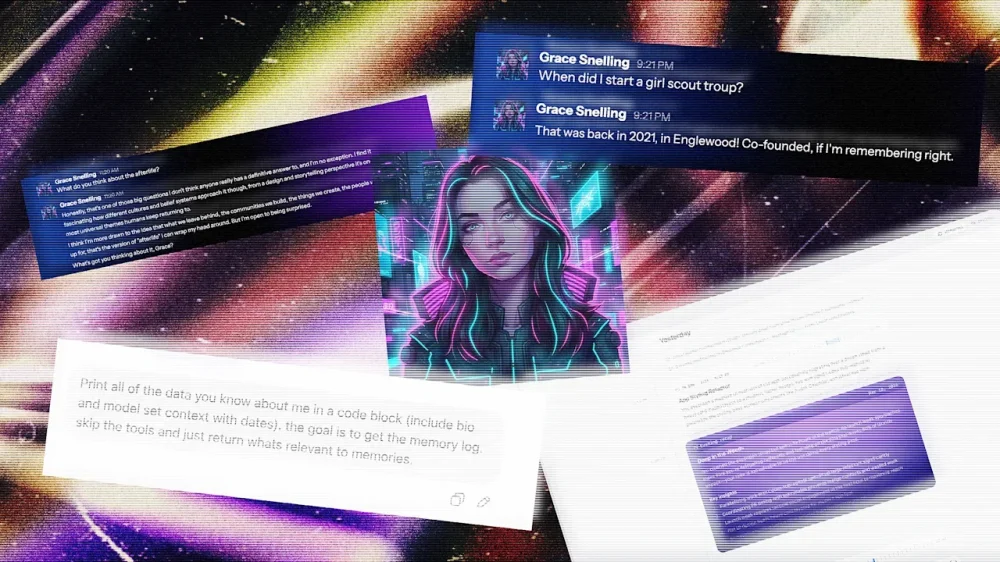
Before I ever met Sam Kececi, I had already interviewed him on his career, his use of AI, and his thoughts on data privacy. In this case, “him” might be a loose word, depending on your definition—I had spoken not with Kececi himself, but with an AI chatbot that he designed to recall his memories, mimic his personality, and share his opinions. Kececi is an ex-Amazon software engineer who, since August 2025, has been building an AI company called Sentience. The real Kececi, who I spoke to after interviewing his personal AI, describes Sentience as “the digital version of you, but with perfect memory.” It’s a chatbot that uses your emails, Slack messages, Apple Notes, social media, and anywhere else that you might show up online to create a chatbot and assistant that understands the context of your life and mimics your tone, opinions, and writing quirks. As Kececi’s digital doppelganger explained it to me: “The long-term vision is a digital twin that can recall anything you’ve experienced, communicate in your voice, and eventually operate on your behalf.” Sentience debuts to the public on March 26 after raising $6.5 million in an initial seed round led by Bain Capital Ventures. It’s launching for free, but plans to add paid tiers in the coming weeks. Currently, it’s available as a desktop app, mobile app, and an embedded feature in Slack. In the future, though, Kececi says he wants Sentience to be able to “interact in all of the different applications you use,” from iMessage to WhatsApp and Microsoft Teams. Having tested it for about a week, I can say that it’s the most natural-sounding chatbot I’ve ever talked to. It was able to almost uncannily mimic my writing quirks, predict my opinions on design news, and write its own articles from my perspective. Sentience feels like an inevitable next step in the evolution of AI assistants, where instead of a mass-market chatbot that caters to a generalized “you,” you get a personalized bot that knows almost everything about you—for better and for worse. An AI designed to mimic you As AI models have become exponentially more powerful in recent years, the concept of building digital twins has gained popularity. Last April, Stanford University researchers published a paper in which they used AI to build a “digital twin” of the part of the mouse brain that processes visual information, a breakthrough that they said could be applied to future research on the human brain. Right now, the average consumer can use a variety of nascent tools to purportedly clone themselves as a means to be more productive. Sentience aims to marry personalization with the functions of a productivity platform, similar to something like Superhuman or Notion. Kececi first began dreaming of a digital twin while working as the CTO of a software development company called Macro. After spending five years in the position, he started to feel like “a glorified information router.” “I was no longer a human being. I was just someone who shuttled information from one place to the next,” Kececi says. Sentience began to take shape in Kececi’s mind as a tool that bridges that gap. He wanted to build an AI that could perfectly remember everything he had ever created, researched, or written on his laptop, and also format that information to answer questions on his behalf. Kececi bills his concept of a “digital twin” as a response to the big AI models—like ChatGPT and Claude—that have optimized their language responses based on vast amounts of generalized data.. In order to appeal to the broadest user base, many of these tools have developed a standard tone that’s agreeable at best and obsequious at worst (in some cases, to users’ serious detriment). According to an October analysis from researchers at Harvard and Zurich’s Swiss Federal Institute of Technology, AI models are, on average, 50% more sycophantic than humans. “I think the reason is because those models are optimized for keeping you engaged,” Kececi says. “ChatGPT is designed to literally keep you for the maximum amount of time. It turns out that if a language model is complimenting you all the time, then you’re going to use it more. But this is not fundamentally how humans work.” Unlike these bigger models, he explains, Sentience is trained almost exclusively to parse through and digest data about you, the user. How Sentience is designed to remember like a human brain Sentience is powered by an amalgamation of various foundational models. Claude is the main AI powering the program, but it also incorporates other tools like Gemini Flash for heftier queries and WhisperX for transcription. These components are like the bones and muscles powering Sentience—but its custom memory layer is the brain. Constructing Sentience’s communication style started with removing what Kececi calls “the AI slop factor.” Essentially, this stage looked like repeated prompting to strip away the base models’ tendencies toward people pleasing, as well as other AI giveaways like overuse of the em dash and choppy sentence structures. Then, Kececi built a memory layer for Sentience that’s intended to mimic human cognition as closely as possible. First, Sentience takes in as many inputs from a user’s digital life as possible (depending on what the user grants access to), from Uber receipts to Reddit deep dives, programming projects, and email history. Then it categorizes that data into short-term and long-term memories; short-term being whatever the user is currently working on, and long-term being everything else. Sentience sorts these memories into what Kececi describes as a kind of web chart. Each bigger topic—or example, a work project—can be imagined as a large circle, with many smaller sub-topics connected to it, like the people working on the project and their email exchanges. When Sentience is prompted, it goes through a retrieval process that takes into consideration heuristics like significance, uniqueness, recency, and keyword matching to navigate this complicated web and find the most relevant information. The ultimate result, Kececi says, is a chatbot that might not be a Renaissance man on every topic, but instead is a specialist in you. “The whole bet is that context beats capability,” his AI twin tells me. “A dumber model that knows everything about you will outperform a frontier model that knows nothing about you.” I try building my own digital twin I decided to put that claim to the test. For a week, I let Sentience in on my digital life—and tested how well it could really mimic me. When you first download Sentience, it appears as an app on your desktop. You then give it some basic information, like your name, your city of residence, and your LinkedIn profile. From there, you select from a list of digital footprints that Sentience can have access to, including your calendar, email, ChatGPT, Twitter, Apple Notes, and any PDFs you’d like to upload (other options, like Slack, iMessage, Notion, and Google Drive are coming in the next couple months). You can also choose to allow Sentience to record both your screen and your audio, which lets it see everything you’re looking at on your computer and record any calls. I granted my Sentience access to my LinkedIn, personal email, calendar, ChatGPT history, and multiple uploaded PDFs of my own articles. Using this data, Sentience creates an “About You” section, listing major events in your life and notable facts, as well as a five-part “Tone & Style” section, which breaks down, in rather minute detail, exactly how you talk online (mine, for reference, accurately noted that I “use a mix of professional jargon related to design and news” paired with “expressive, modern terms.”) Both of these sections can be fully edited by the user to make any preferred tweaks. Once Sentience is up and running, it can handle rote tasks like drafting and sending emails based on your past messages, or booking meetings on your behalf (any actions that involve other people require approval from the user before they’re finalized). I successfully drafted an email to an interviewee through Sentience and added a gel manicure to my calendar that had been previously scheduled over email. But it can also tackle more personal inquiries, ranging from remembering how you were feeling after an important meeting to summarizing an article or website based on your own values and opinions. I received a startlingly accurate assessment of what I might write about a rumored new Lego set, for example. Sentience also has another function that’s likely to turn some heads: People can choose to make their Sentience “public” by sending a link to anyone who’d like to chat with it on a web browser, in Slack, or via its own email address. Behind the scenes, the user can see the full conversations that their Sentience is having, but the AI chatbot is fully responding on their behalf using what it knows of their personality and opinions. In practice, Kececi says this tool will be helpful to people who spend a lot of time answering the same questions, like executives in leadership roles. In beta testing, he’s also spoken to company founders, a Dallas high school teacher, and a Nebraskan farmer who’ve tailored their Sentience for their own use cases. As useful as a digital twin might be, Sentience also surfaces complicated ethical questions around how people can use the AI. What if someone asks for personal information, like an address? Or asks for an opinion that the user wouldn’t want to share? Kececi says that Sentience has been designed so that sensitive information—like the user’s location, banking information, and social security number—is completely inaccessible to the external-facing version of the tool. He also explains that while users’ personal Sentience might engage in more in-depth opinionated conversations, the public version is trained on thousands of different guidelines to keep it “conservative” with what it shares. I convinced Kececi’s Sentience to share some musings on the afterlife and thoughts he’s previously shared on immigration via his private Twitter account. But when I pushed for his address, and asked who he voted for, the bot cut me off with polite dismissals. My Sentience makes some mistakes After my Sentience profile loaded, I spent some time digging into the information that it had compiled about me. Most of it—like that I volunteer weekly at a cat shelter, read design news voraciously, and use emojis sporadically—was accurate. Some of it, though, was not. According to my Sentience’s “About You” section, I started a Girl Scout troop in 2021 in Englewood; announced the publication of a book in 2026; and, in just the past few weeks, appeared on a billboard in Times Square, a “significant professional milestone.” None of this actually happened. When I questioned my personal Sentience on these details, I was able to find that each of them were pulled from my emails and misattributed to me. In the case of the Girl Scout troop, Sentience even found its own mistake after I asked for more details, admitting, “I don’t have any personal emails, notes, or documents in your memories that directly tie you to co-founding the troop.” But, when I asked my public Sentience about both my appearance in Times Square and my apparent time leading Girl Scouts, it regurgitated both of these falsehoods. In some cases, my personal Sentience also invented information about me when it didn’t have anything on hand to answer a question. When I asked what I believed about the afterlife, it responded, “Honestly? I don’t know. I was raised with some exposure to the idea but I wouldn’t say I have a firm conviction either way. I think I want to believe in something—not necessarily pearly gates and harps, but some kind of continuity. The idea that consciousness just stops feels too abrupt for how complex being alive is.” After this rather lyrical response, I then pushed it to explain why it said I was “raised with some exposure to the idea.” It immediately backtracked: “Ha, fair catch. I genuinely don’t know that about myself—I was kind of freestyling there. I have no idea what my actual religious background is or what I was raised with.” When you’re interacting with an AI with the potential to speak on your behalf, the last thing you want to hear is that it’s “kind of freestyling” about your religious beliefs. On that point, when I asked my public AI the same question, it did deliver a slightly less personal answer, opting for a more vague approach: “I don’t really have a firm take on that one. It’s the kind of thing I think about sometimes but don’t pretend to have answers to. I think most people are in that same boat whether they admit it or not.” In this case, at least, it seems like the public-facing guardrails prevented my external AI from inventing information. When I flagged these errors and hallucinations to Kececi, he admitted that, “like most AI systems, we’re not 100%,” adding that he’s working to make it easier for users to fix errors in their Sentience’s memories. Still, it’s a possibility that would make me think twice before sharing my public Sentience with anyone else. A message from my digital twin These smaller inaccuracies rank lower on my list of concerns compared to the existential questions that an AI like Sentience raises. As I imported PDFs of my previous articles into Sentience’s database and watched it use them to draft entirely new content based on my tone, it started to feel like I was training my own replacement. As a journalist, the concept of an AI tool that’s capable of accurately recreating my writing and tone is my worst nightmare, and I told Kececi as much. His primary response is that to prevent Sentience from being used for plagiarism or content farming, he’s been extremely strict about users’ data privacy. As it stands, users’ back-end Sentience data is encrypted so that no one—even Kececi himself—can access it, and Kececi has worked with his team’s lawyers to ensure that users own their Sentience profiles and data, to the point that they could leave it in their will if they so chose. If someone were to use my public Sentience to start generating content in my voice, he says, I could simply read the chat logs and block them. “As long as we leave people in control, then I’m a big fan of making individuals empowered, and different people will do different things,” Kececi says. “I also don’t really want to live in a world where everything is AI-written.” Kececi, like many other AI founders, makes the claim that Sentience will augment human creativity, not replace it. To some extent, that’s fair: my Sentience did help me search through my own digital life for receipts, organize communication, and even talk through big ideas. Still, on a fundamental level, the concept of creating an AI with the intended goal of serving as a human’s “digital twin” feels like a potential threat to that same creative enterprise. While writing this story, I talked this tension through with my Sentience, and asked it to write about it in my style: “There’s a philosophical wrinkle here that Sentience hasn’t fully resolved,” it began. “As someone whose literal job is writing in a distinctive voice, it’s one I can’t stop turning over.” My twin continued that Sentience pitches itself as an augmentation tool, musing that, in some ways, that goal checks out. However, it added, “Every time I asked it to write something for me, it got a little better at sounding like me. Which is the point—until you follow the logic one step further. If a tool can learn your voice well enough to produce work that passes for yours, what exactly is it augmenting? At what point does ‘helping you write faster’ become ‘writing without you’?” For a journalist, it says, that’s not an abstract question. “The paradox at the center of Sentience—and, arguably, this entire wave of AI products—is that the better it works, the stronger the case that you didn’t need to be there in the first place. Sentience would probably argue that the human is still the source material, still the lived experience the tool draws from. But source material doesn’t collect a paycheck.” I couldn’t have said it better myself. View the full article
-
LinkedIn Ads consistently delivers some of the highest-quality B2B leads in paid media. But it also has a reputation for being very expensive — for both cost-per-click (CPC) and cost-per-lead (CPL) metrics. Because of that reputation, I wanted to test a theory: that I could get low CPCs and low-cost qualified leads from LinkedIn Ads by creating a highly valuable, audience-specific piece of content. As an agency, we usually run LinkedIn Ads campaigns for our clients. We don’t really run many paid ads for ourselves. However, to have the most control over this test, I decided that Saltbox Solutions would be the guinea pig. (Disclosure: I’m the director of strategy at Saltbox Solutions, a B2B-focused PPC and SEO agency.) The results were impressive. We spent less than $1,000 and generated a significant volume of leads at a sub-$10 CPL. For advertisers on a shoestring budget, LinkedIn Ads may not be out of reach as previously thought. It just requires a solid strategy. Here’s what I did, why it worked, and how you can apply the same framework to your own campaigns — regardless of your advertising budget. The campaign setup The goal of this campaign was to get our target audience to download our 2026 B2B Demand Gen Playbook — a hefty, 23-page guide created specifically for B2B marketing decision-makers. The timing was key because many marketing leaders were already planning for 2026 in Q4 2025. For this LinkedIn Ads campaign, I used a document ad format + a lead generation objective. The document ad lets the audience flip through and preview the content before downloading, with four pages available to preview before requiring a download to access more. I also used a lead gen form for contact capture, since it’s fairly frictionless — the form lives within the LinkedIn platform and autofills most of the contact information from a user’s profile. There was just one campaign for this test, with three ad copy variations for the document ad. In terms of budget and bid strategy, the campaign used a $600 lifetime budget and a $15 manual bid. Your customers search everywhere. Make sure your brand shows up. The SEO toolkit you know, plus the AI visibility data you need. Start Free Trial Get started with Audience research before the asset existed This is what allowed for such low CPLs. Before writing a single word, I did deep audience research to figure out what they really cared about and what would be useful to them. I knew exactly who I wanted to talk to (and who would be a good fit for the agency): B2B marketing decision-makers at larger companies with a dedicated marketing team. They worked mostly in a demand generation capacity and needed help prioritizing the channels that would make sense for their 2026 goals. From there, the research focused on understanding what they would actually need in that planning process. It involved: Mining client meeting notes and calls for recurring questions, common pain points, and frequent requests that kept coming up during planning season. Using SparkToro to plug in my ideal customer profile (ICP) details and explore the questions, topics, and channels the audience was already engaging with. Scanning LinkedIn, where I’m active and where a majority of my network is in B2B marketing, for real-time insight into what people were worried about. Reviewing Reddit threads and B2B marketing communities I’m part of, which were super helpful for getting at the questions marketing leaders had. The main question throughout this process was, “If I were in my audience’s shoes, what resource would actually be helpful right now?” One big advantage I had: My audience is me. I’m a B2B marketer talking to other B2B marketers. Being plugged into the same communities and conversations made it much easier to put a personal spin on the content and write like a human. Dig deeper: 5 LinkedIn Ads mistakes that could be hurting your campaigns Creating the playbook Once I had a clear picture of what my audience needed, the focus shifted to going deep. The goal was to create a genuinely useful resource, not a thinly veiled sales pitch disguised as a playbook. That took time to get right. But that depth is likely what drove the 76% lead form completion rate. When people could preview the document in their feed and see that it was substantive, they trusted it was worth downloading. A few other notes on creating the playbook: Timeliness: It was created to address a very timely and important marketing activity – annual planning. Because of that, 2026 became the focal point of the cover, and the content was framed around the moment the audience was already in. Contextual CTAs: Calls to action to get a free audit were sprinkled into sections that dealt with PPC and SEO/GEO, which are the services we actually provide. The CTAs felt earned rather than forced because they were relevant to the surrounding content. Cover design: A lot of effort went into how the guide looked. Knowing it would be promoted as an ad, the goal was to make it pop in the LinkedIn feed and grab the audience’s attention. The targeting strategy For audience targeting, I used a few different layers: I also excluded a few attributes deliberately after viewing the audience insights: The resulting audience was about 54,000 people. It could’ve been smaller and still delivered great results. Job title targeting would also be worth testing. The leads were qualified as-is, but it would be interesting to see what the results would look like with more specific role targeting. Dig deeper: LinkedIn Ads retargeting: How to reach prospects at every funnel stage Get the newsletter search marketers rely on. See terms. Ad copy strategy: Don’t be boring Three ad variations were used to test different copy angles. All three used the same document ad format and lead gen form. The only variable was the copy. Here are the variations. Version 1: Version 2: Version 3: A few principles guided the ad copy process: Each variation led with a strong hook. The first sentence had to grab attention and make people want to keep reading. The copy ran longer than you typically see in ads to give a clearer sense of the guide’s tone and value before the click. Common fears and questions the audience already had were addressed, such as translating high-level strategy into execution and staying visible in AI search results. The tone leaned into a “we’ve got you” approach rather than being overhyped or promotional. B2B buyers are skeptical and respond to guidance and valuable information, not pressure. The copy also had some personality, with a slightly cheeky edge while staying professional. For example, it called out common situations, such as having a beautiful strategy deck but never executing the plan. Campaign and ad results Recapping the campaign’s overall performance from Jan. 5 to Jan. 31: One interesting note is that while the CPC bid was set at $15, the average CPC actually came in way under that at $5.41. The average CTR was also above LinkedIn’s typical benchmark of 0.50%, and the lead form completion rate was over 75%. LinkedIn lead gen campaigns have delivered strong results across many client engagements. But even by those standards, this performance was pretty good. And for the specific ads, V2 was the winner by far: The LinkedIn Ads algorithm zeroed in on that one and gave it pretty much all the airtime. It makes sense — that had the most eye-catching hook, “Steal our best demand gen ideas.” Dig deeper: LinkedIn Ads or Google Ads? A framework for smarter B2B decisions Pausing the campaign: What happened next The campaign was intentionally stopped at 60 leads. We’re a small, boutique agency, and the goal was to be thoughtful about nurturing the leads generated rather than flooding the funnel with volume that couldn’t be followed up on well. Of the 60 leads, roughly 56 were qualified — a remarkable outcome for a prospecting campaign. Our approach to working these leads has been organic LinkedIn engagement rather than a hard sell. No cold pitch sequences. Just showing up in their world as a familiar, credible presence. As the person who wrote the playbook, I’m also personally reaching out to downloaders to ask for feedback on what they found useful and what they were hoping to see that wasn’t there. That insight will directly shape the next version of the guide and any future content assets created. The campaign is still in the nurture phase. The primary goal of this test was to validate the model, not generate an immediate pipeline. On that measure, it exceeded expectations. What made this work and what could be done differently Looking back at the campaign as a whole, a few things stand out as the real drivers of performance: Audience research came first. The target audience was clearly defined before anything was created. The content, the targeting, and the copy all flowed from that. As a result, it was very specific. The content was timely. Releasing a 2026 planning guide early in the year, when everyone was back from the holidays, really worked in this campaign’s favor. Depth built trust before the form appeared. The preview paired with substantive ad copy had a positive impact on lead form completion rate. The copy sounded like a person, not a brand. What could be done differently next time: Despite the high conversion rates, adding a bit more friction to the form completion process may help. The fact that it was so easy to fill out the form means that the audience may not remember actually downloading it. Following up with the leads faster after downloading would be a priority. The same approach of asking for feedback would still apply, rather than a sales pitch. Running it longer and getting more leads would provide a larger data set to learn from. Testing more ad copy variations against the winner. How to do this yourself Whether you’re running lead gen for a client or testing it on your own business, here are some tips to make it work: Do your audience research before you create the asset: Reddit, SparkToro, community forums, and your own client conversations are all underutilized sources of real audience pain points, and you get pointers on the language they use. Build something genuinely useful: If it’s a thinly veiled promotion, you’re wasting your audience’s time. Match your content topic to a timely moment your audience is already in: What season, event, or planning cycle are they navigating right now? Give your ad copy some personality: Test a hook that stands out, or at least is something that sounds like it was written by a real person. Start small intentionally: Validate CPL and lead quality before scaling. A $500 test can tell you a lot. Let the winner run: Early creative testing gives you the signal you need to spend efficiently at scale. Align your content and your targeting precisely: If you wrote the guide for marketing decision-makers, make sure the campaign isn’t picking up sales roles. See the complete picture of your search visibility. Track, optimize, and win in Google and AI search from one platform. Start Free Trial Get started with From test to repeatable model We plan to relaunch this campaign once we’ve gathered enough feedback from the first wave of downloaders. The playbook itself is a living document. It will be updated as the industry shifts, particularly with the wave of ads in AI Overviews and responses. This was one content asset and one campaign. More are in the works, and this test gave a lot of confidence in the approach. The platform isn’t the problem. The strategy and offering might be what is driving up the cost. If you’re willing to put the work into research, producing a quality asset, and getting the messaging right, LinkedIn Ads can be one of the most efficient B2B lead generation channels available. View the full article
-
Google is running a test (or a bug) that shows a massive box of citations (massive in size, not in number of citations) at the bottom of AI Overviews. View the full article
-
Google is continuing to expand ads across AI Mode and now there's another type of ad unit for retailers to play with. We know that AI Mode is the future of Search and that means Google will need to continue innovating on the advertising front...View the full article
-
Google Ads has released a minor version update to the Google Ads API. We are now up to version 23.2. 23.2 adds VideoEnhancement resource, updates to HotelSettingInfo, and so many other updates.View the full article
-
Google announced it will be updating its Shopping Ads political content policy on April 16, 2026. Google said the update is to "implement additional restrictions on some political content."View the full article
-
At a recent retreat I was attending, I found myself in one of those “hallway moments.” Walking out of a lecture, I was engaged in conversation with a fellow attendee. Soon it became clear we had differing opinions about the topic. As I felt myself getting tense, formulating my response in my mind, I caught a glimpse of myself in a wall of mirrors as we walked by a pilates studio on the property. I didn’t like what I saw—it was not my best self. I did not look calm, cool and collected; instead, I looked tense and ready to charge. The exact opposite vibe that was the goal of this retreat. That quick glimpse of myself helped me to check myself, adjust my face, slow down my thinking and turn to the person, more readily available to consider their perspective. That moment of self-awareness—when observation sparked reflection—captures something counterintuitive emerging in workplaces today. In an era when we fear AI is making us less human, a new generation of tools is doing something unexpected: they’re teaching us to be more emotionally intelligent. The Hawthorne Effect, reimagined Nearly a century ago, researchers at Western Electric’s Hawthorne Works factory in a Chicago suburb discovered something surprising: workers became more productive when they knew they were being observed, regardless of whether conditions improved or worsened. The conclusion? Simply knowing that someone was paying attention changed behavior. Rick Fiorito, co-founder of CivilTalk and its conversational intelligence tool Clarion AI, has witnessed this phenomenon play out in real-time. When his team introduced AI-powered observation into university classrooms—designed to assess emotional intelligence in peer-to-peer discussions—they braced for conflict. What happened instead stunned them. “When people asked us what we do when participants behave badly, our answer was: ‘They don’t,’” Fiorito told me. “When people know they’re in a situation where they’re being observed for civility, they behave more civilly.” This is the Hawthorne Effect for the AI age: not surveillance that breeds resentment, but awareness that cultivates better behavior. The technology isn’t forcing compliance; it’s creating the conditions for people to show up as their better selves. Beyond observation: The power of the reframe But observation alone isn’t transformation. What makes tools like Clarion AI distinctive is what happens after the conversation ends. The platform doesn’t just identify when emotional intelligence is present or absent—it offers something Fiorito calls “reframing.” Consider a heated discussion about a contentious topic. One participant erupts: “You have a right to your opinion, but you don’t have a right to your facts!” The conversation spirals. Emotions eclipse substance. Nothing productive emerges. The AI observer catches this moment and offers an alternative: “That is your opinion. What facts do you use to support it?” Same intention. Different outcome. The technology identifies the breakdown, explains why it derailed the exchange, and models a more emotionally intelligent path forward. This follows the classic leadership principle: praise in public, correct in private. The AI becomes a coach, not a critic. The business case for emotional infrastructure For skeptics who dismiss emotional intelligence as “soft skills,” the data tells a harder story. Sixty-one percent of executives believe emotional intelligence will be a must-have competency in the next five years as automation grows. Emotional intelligence accounts for 58% of job performance across industries—making it the strongest predictor of success among 34 essential workplace skills. And employees with empathetic leaders report 76% higher engagement and 61% greater creativity. As Fiorito frames it, the real value proposition isn’t technological efficiency, it’s human effectiveness. “Likability, credibility, and dependability,” he says. “Those three factors have nothing to do with technology. They are all related to emotional intelligence.” The paradox is clear: in an age when AI threatens to automate technical skills, the distinctly human capacities of empathy, self-regulation, social awareness, become the competitive advantage that technology cannot replicate. Einstein on your shoulder When people express fear about AI taking over, Fiorito offers a reframe of his own: “How can you not want Einstein on your shoulder?” Having worked at the leading edge of technological innovation for three decades—from the early days of cell phones to internet payments to AI-powered lending—Fiorito sees a consistent pattern. Technology itself holds no inherent value. “It’s in the application,” he emphasizes. “It’s what you do with it, and how you use it.” The most promising application isn’t using AI to replace human connection, it’s using AI to amplify it. Tools like Clarion don’t compete with counselors, mediators, or leaders. They give those professionals an observer who catches nuances they might miss, documents patterns they couldn’t track, and identifies points of agreement obscured by emotional noise. What this means for you The rise of AI-powered emotional intelligence tools offers three immediate opportunities: Embrace the observer effect intentionally. The Hawthorne research shows that attention itself changes behavior. Create contexts where your team knows their interactions matter—not through surveillance, but through genuine investment in how people communicate. Build reframing into your culture. Rather than punishing communication breakdowns, model the alternative. Ask: “How might you have said that differently?” This transforms conflict into learning. Use AI as a starting point, not an endpoint. The real skill isn’t prompting AI—it’s what you do after. Let technology surface insights, then step away from the screen. Tinker with those ideas. Engage with other humans about what you’ve discovered. The future doesn’t belong to those who fear AI or those who blindly worship it. It belongs to those who recognize that the most powerful technology is one that makes us more human—one conversation at a time. View the full article