All Activity
- Past hour
-
WordStream by LocaliQ’s 2025 benchmarks show nearly 87% of industries saw year-over-year CPC increases. The cross-industry Google Ads average reached $5.26 per click. High-intent verticals are higher: legal services average $8.58, and the most competitive B2B categories approach or exceed $8 to $9 per click. These increases reflect structural shifts in how search results pages are designed, how auctions are optimized, and how inefficiencies compound across paid search accounts. Many remain invisible until a structured PPC audit uncovers them. Protecting the budget you already have — starting with your branded terms — is where recovery begins. Here are the five trends every advertiser needs to understand right now. What’s driving your CPC More advertisers are chasing the same finite inventory Search advertising is, at its core, an auction. When more advertisers compete for the same keywords, prices rise. Global PPC spend continues to surge (Quantumrun Research), while available click slots on results pages haven’t grown at the same rate. More money chasing the same inventory yields higher prices. The pandemic permanently accelerated this shift—brands that hadn’t invested seriously in paid search entered Google’s auction and didn’t leave. Google’s AI Overviews are squeezing in One of the most consequential structural changes in paid search over the past decade is the SERP itself. Google’s AI Overviews now occupy prominent space for informational and exploratory queries. As they expand through 2024 and 2025, they reduce the number of organic and paid listings visible above the fold. A late-2025 Seer Interactive analysis of 3,119 search terms across 42 organizations found paid CTR on queries with AI Overviews dropped 68%—from 19.7% to 6.34%. The mechanism is straightforward: as AI Overviews take more real estate (Skai), fewer paid placements appear above the fold. Impression share tightens. Automated bidding competes more aggressively for what remains, and prices rise. The nuance: users who click past an AI Overview tend to be further along in the buying journey. WordStream’s data shows roughly 65% of industries saw higher conversion rates despite rising CPCs. The implication is clear: shift budget toward high-intent transactional queries where AI Overviews are less likely, and away from informational queries where they dominate. Smart bidding is making the whole auction more expensive Modern Google Ads campaigns increasingly rely on automated bidding strategies, such as maximizing conversions or target CPA. Per Google’s Smart Bidding documentation, the system sets a precise bid for each auction based on predicted conversion likelihood — prioritizing performance over cost control. When nearly every competitor uses the same logic, it creates a self-reinforcing loop of rising bid pressure. This is a market-wide dynamic you can’t reverse — only adapt to. Unauthorized brand bidding is inflating your costs from the inside While you can’t control platform algorithms or the macroeconomy, one major driver of CPC inflation is within your control. When affiliates, partners, or competitors bid on your trademarked keywords, they enter an auction that should be nearly uncontested. Each additional bidder drives your branded CPC up, and you pay twice: once to create the demand, and again when a third party captures that same searcher at the bottom of the funnel. The effects compound. AI Overviews have already compressed available click inventory; unauthorized brand bidding then inflates the cost of the inventory you win. Detecting violations requires more than manual SERP checks. Unauthorized bidders often use cloaking—geotargeting away from your headquarters or dayparting outside business hours—to evade detection. With a self-service platform like Bluepear, you can run automated 24/7 monitoring across search engines, geographies, and devices—capturing ad copy and landing page evidence to dispute invalid affiliate commissions and enforce trademark guidelines at scale. Fewer bidders on your branded terms mean less auction pressure and lower CPCs on traffic you already own. It’s one of the few paid search levers that doesn’t require a broader strategy overhaul to move. What to do about it: three priorities for advertisers The data points to three clear priorities as you navigate this environment: Protect your branded baseline. Branded keywords reflect demand you already created. Systematically monitor who else is in that auction and remove unauthorized bidders with automated brand protection tools — one of the highest-leverage actions available right now. Anchor optimization to cost per acquisition. WordStream’s 2025 benchmarks show a higher CPC can deliver a higher-quality, further-down-funnel user and a lower CPA. The headline CPC number is increasingly a poor proxy for campaign health. Build first-party data infrastructure. You’re best insulated from continued CPC inflation when your bidding algorithms use high-quality, proprietary conversion signals — reducing reliance on the platform’s broad audience approximations. Average CPCs are at their highest levels in years, and that trend is unlikely to reverse. Advertisers who manage costs most effectively have adapted their strategies accordingly. Not sure how many unauthorized bidders are in your branded auction right now? Register with promo code BRANDAUDIT: Bluepear team will deliver a customized audit of your branded search landscape within 48 hours! For the latest insights on branded search and paid search protection, follow Bluepear on LinkedIn. View the full article
-
One of the most distinctive features of the U.S. military’s high-energy laser weapon of choice isn’t the system itself—it’s how operators control it. In a 60 Minutes segment on military laser weapons that aired on March 15, CBS News correspondent Lesley Stahl traveled to Albuquerque for an up-close look at defense contractor AV’s 20-kilowatt LOCUST Laser Weapons System, which has been watching over U.S. service members abroad (and triggering occasional airspace shutdowns near the U.S.-Mexico border at home) in recent years. With Iranian Shahed now pummeling the Middle East and the U.S. Defense Department racing to field inexpensive countermeasures to address the ever-expanding threat of low-cost weaponized drones, Stahl explores the advantages (and limits) of laser weapons and how they fit into the evolution of modern warfare. But my favorite part of the 60 Minutes segment is when Stahl takes a LOCUST for a spin and discovers that the futuristic laser weapon is operated with a tried-and-true Xbox controller, an interface AV bills as “a natural fit to today’s warfighter.” For years, U.S. service members have relied on Xbox controllers to operate everything from small unmanned systems like airborne drones, explosive ordnance disposal robots, and experimental ground vehicles to larger assets like the U.S. Army’s M1075 Palletized Loading System logistics vehicle, remote-controlled weapon stations, and even the photonics mast that has replaced the traditional periscope on the U.S. Navy’s new Virginia-class submarines. The logic of embracing the handset simple: If the vast majority of Americans grow up playing video games and even continue playing into adulthood, why not adopt a control system that capitalizes on U.S. troops’ preservice experience and reduce the training timelines for advanced weapons systems? “The gaming companies spent millions of dollars developing an optimal, intuitive, easy-to-learn user interface, and then they went and spent years training up the user base for the U.S. military on how to use that interface,” military technologist Peter Singer previously old me of the Pentagon’s Xbox fixation. “These designs aren’t happenstance, and the same pool they’re pulling from for their customer base, the military is pulling from . . . and the training is basically already done.” Xbox controllers and high-energy laser weapons in particular appear to be a match made in heaven, and not just with LOCUST. More than a decade ago, the beam director on the U.S. Army’s truck-mounted 10-kilowatt High Energy Laser Mobile Demonstrator (HEL MD) was operated using an Xbox handset. So is the 10-kilowatt High-Energy Laser Weapon System (HELWS) from Raytheon that both the U.S. and U.K. militaries have tested in recent years, according to a 2018 video published to the U.S. military’s Defense Visual Information Distribution Service (DVIDS). So too is Boeing’s 5-kilowatt Compact Laser Weapon System (CLaWS) that the U.S. Marine Corps began evaluating in 2019. And at the 2026 Singapore Airshow defense exposition in early February, American laser company IPG Photonics showed off its new Crossbow Mini—a 3-to-8-kilowatt laser weapon billed as a compact air defense option for U.S. and allied forces—alongside a similarly styled Xbox controller. Even laser weapons that don’t use Xbox’s proprietary controllers themselves still rely on their familiar ergonomics. As I previously reported, the U.S. military has its own ruggedized handset, the Freedom of Movement Control Unit (FMCU), that’s based on the tried-and-true dual-grip video game controller and used to operate several advanced weapons systems, including the Navy’s 30-kilowatt AN/SEQ-3 Laser Weapon System (also known as the XN-1 LaWS) that was previously installed aboard the Austin-class amphibious transport dock USS Ponce, the U.S. Air Force’s laser-equipped Recovery of Air Bases Denied by Ordnance (RADBO) truck, and the U.S. Marine Corps’s Humvee-mounted High Energy Laser-Expeditionary (HELEX) demonstrator. While Xbox-style controllers may make laser weapons easier and more intuitive to operate, they don’t solve a larger problem facing the U.S. military: With the rapid proliferation of autonomous weapons systems across the modern battlefield, combat now occurs at machine speed, with tactical decisions unfolding in mere seconds—and sometimes milliseconds. By the time a human operator can visually confirm a target, slew a controller’s joystick, fine-tune their aim, and fire off a laser beam, the engagement window may already have closed. The “human weapon system” can be just as much a bottleneck to swift and decisive action as the design of a human-machine interface. Video game controllers have lowered the training barrier, but it’s artificial intelligence that may prove decisive in squeezing every last iota of “lethality” out of laser weapons. With the right computer vision and machine learning software, an AI-powered weapon system can ostensibly identify and track targets faster and, with the appropriate control surfaces, more precisely than even the most skilled U.S. service member can muster manipulating a physical joystick—precision that’s essential for laser weapons that must maintain a stable beam on a single weak spot for several seconds to inflict catastrophic damage. Indeed, AV’s LOCUST system relies on its AI-enabled “Wisard” acquisition, tracking, and pointing software to lock on to fast-moving threats with uncanny precision to purportedly deliver maximum damage in minimal time. The result, company executives previously told me, is a 20-kilowatt laser weapon that can deliver effects equivalent to a 100-kilowatt system without piling on additional power. AI is slowly creeping into other military laser weapons. As of February 2025, the Navy was actively working to integrate AI into the Marine Corps HELEX demonstrator ahead of live-fire testing. The Pentagon has been testing the autonomous Archimedes Laser Sentinel developed by startup Aurelius Systems for the past year. And this logic extends beyond the U.S. military: Israeli defense firm Rafael plans on adding AI to its operational Iron Beam laser air defense system so operators can shoot down drones with enough precision to at least somewhat control the disabled target’s descent, according to company CEO and President Yoav Tourgeman. “For example, if it’s an airplane and you cut the right wing, [it will] flip over and come to the right. If you cut the left wing, you will fall to the left. You have a kind of a control where, how to intercept it, where you will be landing,” Tourgeman told Breaking Defense at the Association of the U.S. Army annual expo in October 2025. “You understand that there is room [for] the system to learn and improve itself. And now we have the capability of every target, to work on several interception methods that will give different results.” The argument for marrying AI and laser weapons is persuasive: when engaging small, fast-moving drones, especially in swarms, maintaining a laser’s dwell time is a punishing task, and algorithms ostensibly don’t get tired or distracted and let their aim slip in scenarios where even a instant off target can break an engagement. In that sense, the Xbox controller may ultimately become less a tool of direct control and more a supervisory interface, an intuitive way for a human operator to authorize or abort decisions already generated by software. The Xbox controller makes laser weapons easy to operate for generations of U.S. service members who grew up on video games. But as AI enables these systems to move at the speed of the threat, the big question is how long humans will remain in the loop at all. This article is republished with permission from Laser Wars, a newsletter about military laser weapons and other futuristic defense technology. View the full article

- Today
-
Why Google's recently finished Spam Update could be the beginning of something bigger that is yet to come. The post Google’s March Spam Update Felt Muted But May Signal Bigger Changes appeared first on Search Engine Journal. View the full article
-
Middle East war to push American price growth to ‘highest in G7’View the full article
-
Outlook underscores economy’s exposure to conflict through reliance on energy importsView the full article
-
The remains of the East Wing of the White House could one day be buried under a golf course designed by the president who ordered its demolition in the first place. As President Donald The President seeks to physically remake the U.S. capital city to an extent never before seen in the modern presidency, the rubble from the construction site of one of his most visible projects has been trucked to the site of one of the least: a public golf course that sits on a stretch of land in the middle of the Potomac River between Washington, D.C., and Virginia. The East Potomac Park Golf Links at Hains Point, currently open to the public, is one of three Washington, D.C., golf courses overseen by the National Park Service that The President hopes to remodel. But in the meantime, it’s become a dumping ground: Construction workers have been disposing of dirt and rubble from the demolished East Wing there since The President ordered its teardown last fall. The debris can then be used to fill in the golf course above the flood plain, as recommended by Interior Secretary Doug Burgum, per The Wall Street Journal. It also serves as a fitting metaphor for The President’s D.C. redesign ambitions. The President’s effort to replace the site of the East Wing with an oversize ballroom and to install an arch two and a half times taller than the Lincoln Monument outside Arlington National Cemetery are his largest proposed D.C. redesign projects, while the placement of his name on building facades and his likeness on currency and banners in D.C. are perhaps his most vain. The golf course, however, might be the closest to his heart. In his first year back in office, The President made 106 visits to one of his golf properties. And in The Art of the Comeback, his 1997 ghostwritten memoir published following a string of bankruptcies in the ’90s, he listed “Play Golf” as his top comeback tip because it helped him relax, concentrate, take his mind off his problems, and make money. “I only thought about putting the ball in the hole,” he wrote. “And, the irony is, I made lots of money on the golf course—making contacts and deals and coming up with ideas.” Golf course designer Tom Fazio, who has designed The President-owned courses in the past, is now reportedly overseeing the East Potomac redesign after having toured the course last November under an alias, according to Golf Digest. The magazine also reported that some in The President’s orbit see the Langston Golf Course, a municipal course near the future site of the new Washington Commanders football stadium, as a prime site for commercial and retail development. The reported plan is to rename East Potomac Park “Washington National,” giving the course the naming convention of The President properties like the The President National Golf Clubs located in Potomac Falls, Virginia, and in Rancho Palos Verdes, California, respectively. (It also sounds like the name of D.C.’s Major League Baseball team.) Work is expected to break ground in July on an 18-hole championship-level course that could host tournaments. For now, East Potomac remains open seven days a week, and players can hit the course (up to 18 holes) for less than $50 or practice on the driving range from 8 a.m. to 8 p.m. every day but Wednesday (when it opens at 11 a.m.). No word on how much a redesigned course would cost under The President, but a source told Golf Digest that locals could get a discount. If The President’s White House redesign aim is to turn the People’s House into Florida Man’s McMansion, his plans for a proposed golf course suggest a wider ambition to make D.C into a The President-branded compound—and to give public lands the look and feel of a The President property, too. View the full article

-
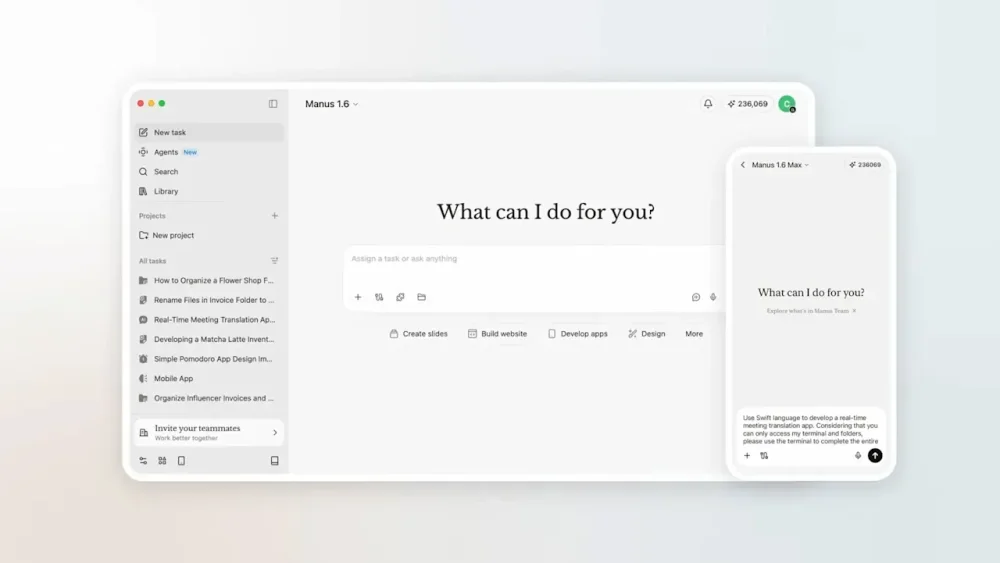
With help from AI, I finally tackled some computer chores that I’ve been putting off for months. My Downloads folder is cleaner than it’s been in ages. The photos that OneDrive blandly sorted by month are now arranged into folders by event. The obscure, unpurchasable jazz album I ripped from YouTube ages ago is now properly sliced into separate tracks, tagged with metadata, and sitting inside my media server at last. Instead of spending hours on those tedious tasks myself, I delegated them to Manus, an AI assistant whose desktop app is free to download for Mac and Windows. Manus launched in March of last year with an emphasis on being able to accomplish tasks autonomously, and last week it gained the ability to work with files on your computer. (Meta acquired the startup in December, reportedly for more than $2 billion.) Alongside Claude Cowork, Perplexity’s Personal Computer, and the virally popular OpenClaw (whose creator was acqui-hired by OpenAI last month), it’s one of several AI tools that promise to take control of your computer to get things done. When they work, these agents can be pretty satisfying and can save a lot of time. But just like my experience with OpenClaw, using Manus is a reminder of how expensive artificial intelligence can get when it’s aggressively metering your usage. Getting Manus to do much of anything could easily cost more than several typical software subscriptions combined. Cleaning and sorting files Like AI in general, Manus is largely what you make of it. The app presents you with a blank text box and a button for choosing which folders it’s allowed to access, and it’s on you to think about what AI might do with this capability. Cleaning my Downloads folder was a logical first step. Manus suggested some obvious files to delete—things like old installer files—and with some extra prompting, I had it sort everything else into folders based on file type, which helped me sort and delete the unnecessary stuff. Dealing with that YouTube album download was even more satisfying. With just a single prompt, Manus figured out how to reference the track timings on Discogs, wrote a Python script to split the 45-minute MP3 file without re-compressing it, and tagged the resulting files with titles and cover art. From there I moved onto something more ambitious: I pointed Manus at a year’s worth of photos in my OneDrive folder and asked it to sort them into new folders for things like trips and special occasions. Through a combination of metadata and computer vision, Manus correctly recognized my annual trip to cover the CES trade show, a variety of family vacations, and even my nephew’s bar mitzvah. It only took a couple follow-up commands to get the sorting just right. Working with documents In addition to pushing files around, I decided to have Manus work with my notes from Obsidian. Because Obsidian’s underlying notes are just Markdown files in a folder on my computer, Manus can easily extract data from them and make edits. I started by just having Manus summarize and add to my weekly agenda, but then I noticed Manus can also connect to external services like Gmail and Google Calendar. After setting up those connections, I had Manus look through my inbox and flag important emails as tasks to complete, while adding work-related calendar events to the agenda as well. And while I’m still not keen on having AI write for me, I decided to have Manus take a crack at a first draft for this story, using my drafts folder in Obsidian as a reference for my writing style. The results were mostly garbage, but I’ll begrudgingly admit that the first few paragraphs were decent and gave me some ideas on how to get started. Credit catches and security worries While I’m pretty satisfied with what Manus was able to do, I probably won’t continue to use it. That’s partly because I’m worried about the security implications, especially when connecting to apps like Gmail and Google Calendar. Prompt injection remains an unsolved problem in AI, and the risk is that an attacker could embed secret instructions in a calendar invite or email designed to steal personal data. I’m not comfortable letting Manus access this data without making it read-only, which doesn’t seem to be possible. As a piece of productivity software, Manus also just becomes wildly expensive the more you use it. While the app itself is free to download, you only get 300 free “credits” to use per day. Paid plans come in increments of roughly $20 per month, each giving you 4,000 extra monthly credits. After just a couple days of using Manus, I was already halfway through that monthly allotment, plus the 1,000 bonus credits Manus provided at sign-up. Adding items to my agenda—including data from Google Calendar and Gmail—cost about 300 credits. Organizing a single year’s worth of photos cost about 1,000 credits. Managing my Downloads folder—including the MP3 file I needed to split up—cost another 1,000 credits. I also asked Manus to work on a bespoke tool for deleting similar or duplicate photos. This ate up nearly 1,400 credits before I realized my allotment would be better spent trying other things. Once those 4,000 credits expire, the only options are to wait until the monthly limit resets, make do with the meager 300 daily credits Manus offers, or upgrade to a pricier subscription tier. It didn’t help that Manus kept pushing me toward its “Max” model for certain tasks, allowing it to burn through credits even faster. As with OpenClaw, I imagine there’s a category of AI enthusiast that thinks nothing of such expenditures. But I’m used to paying in the range of $5 to $10 per month for productivity software, and that’s for things I consider indispensable. I can’t justify paying $20 to $40 per month (or more) for something I’m still figuring out how to use. If I’m going to keep using AI to control my computer, I’ll likely do it through Claude and its Cowork feature, which requires a $20 per month Claude Pro subscription. While its usage meter is more opaque, at least it resets on a weekly basis instead of a monthly one. But as someone who tries to get by with the free versions of AI tools whenever possible, I’ll also probably just wait for more computer chores to pile up before spending any more money to get rid of them. View the full article
-
The most impressive move by three-time world surfing champ John Florence in his new video series isn’t riding a wave; it’s flying across open ocean on a catamaran while holding his puking 1-year-old son over a bucket. The new six-part series called Vela, directed by Florence and produced with outdoor gear and apparel company Yeti, embodies a broader shift in how the iconic surfer is approaching both his career and the goal behind his namesake brand, Florence. After winning his third World Surf League title in September 2024, Florence chose to leave the pro surfing tour to sail around the world with his wife, Lauryn, and son, Darwin. They lived off the grid, explored remote corners of the Pacific Ocean, and searched for new waves and adventure. Vela was shot over 18 months and also features his brothers (and fellow pro surfers) Nathan and Ivan in Florence’s high-performance sailing catamaran called Vela. All YouTube proceeds will support ocean-minded causes in the locations visited in each episode. The first episodes are already online, and the remaining ones will drop weekly through mid-April. Surfing has a long tradition of competitive surfers swapping contest heats for the travel and adventure of what’s known as free-surfing. Names like Rob Machado, Dane Reynolds, Mick Fanning, and Mikey February have made the swap from winning prize money to making a living off sponsors and video content at various points in their careers. Expanding the scope of his career beyond contest waves also embodies Florence’s broader outdoor aspirations for the Florence brand, which he founded in 2021. That goal is to get people outside, no matter what form. “If you have a really great piece of Patagonia or Yeti gear or whatever it is, you look at it, and it makes you want to go do that trip or [be] outside doing something,” Florence says. “I always thought that was so cool, and it is a big part of Florence. Helping to inspire you to get out and do things, whether it’s in the ocean or not.” Go with the flow The new series is a follow-up to a similar series produced with Yeti back in 2022, long before toddler sea sickness was a factor. Florence says his creative process has evolved since his first solo film project in 2015, View From a Blue Moon, directed by Blake Vincent Kueny (which became the best-selling surf movie of all time). “That was a big surf movie project we worked on for a couple of years, where I knew going in I was going to spend two or three years wanting to get the best waves and the best surf footage possible,” Florence says. “Now, when I know I want to do something, I don’t really know what it is at the start—let’s just go with the flow.” I spoke to Yeti’s head of marketing, Bill Neff, at SXSW (listen to the whole interview on Fast Company’s Brand New World podcast) about the value a series like Vela brings to the brand, and why it was important to be patient for the four years between the two editions. “In a world where people want to cut things down to six seconds for an impression, there is no real value to the end consumer—it’s just a swipe,” Neff said. “If you can actually get someone to sit down and watch an episodic 30-minute show, that is the true value of a relationship. We believe long-form content inspires people or gets them excited about what they love, and that has long-lasting effects on the brand.” Surf-based, outdoor overall Just as Florence has left the WSL tour to do more sailing and experience new adventures, his goals for the brand Florence have also begun to branch out beyond his surf-specific audience. “It just felt like these last two years have really opened up my mind more to what I want to do,” he says. “I’m inspired to go do these other things, and I really do think it allows more room for my brand to go outside of just surfing competition, too.” There’s a delicate balance in creating content that can feel both relatable and aspirational. Not everyone is a world champion surfer, nor can they just jump on a performance catamaran and take off. That’s the aspirational part. What makes this new series so relatable is how Florence is balancing that part with the realities of family life and fatherhood in its midst. “That’s the goal for us,” he says. “And the biggest part is just realizing that everyone’s adventure is slightly different.” View the full article

-
A new browser extension just debuted that’s designed to be used in tandem with an AI chatbot. Its goal is to make the experience worse. “Are you concerned that you or your loved ones might be experiencing a LLM-induced psychosis? Or participating in a massive de-skilling event? Or outsourcing cognitive and emotional functions to auto-complete?” designer Sam Lavigne asks in a YouTube video introducing his new product. “Then you should install ‘Slow LLM’ on your computer.” Lavigne is an assistant professor of synthetic media and algorithmic justice at Parsons School of Design, as well as an artist and web designer. Slow LLM is his latest creation, and its entire purpose is to make using AI chatbots as excruciating as possible. Whereas ChatGPT might answer a simple prompt such as “What day is it?” in a matter of milliseconds, Slow LLM intervenes to stretch that out to the nails-on-a-chalkboard pace of 30 seconds or more. Slow LLM is a small yet eye-catching act of digital protest against the proliferation of AI tools, and it joins a growing catalog of similar efforts like “Your AI slop bores me,” a human-powered chatbot, and “Slop Evader,” a Chrome extension built to turn back the clock to the days before AI-generated search summaries. Those behind these projects, which Lavigne describes as “tiny tools for digital sabotage,” know that they’re not exactly combating the wave of artificial intelligence and large language models. Instead, they’re asking users to reconsider how they’re using AI tools—and what they might be missing out on in the process. Designing a tiny tool of digital rebellion Lavigne is no stranger to creating tools of digital sabotage. His past projects have included “Slow Hot Computer,” a website that does exactly what the name suggests; “Zoom Escaper,” a tool to help you escape Zoom meetings by self-sabotaging your audio stream; and “The Good Life,” an email service that sends you 225,000 emails from the Enron email archive in chronological order. For Lavigne, these sites are all about turning the mission of most web developers on its head by creating more friction rather than removing it. In the case of Slow LLM, Lavigne explains: “Like many other people, I’ve been thinking a lot lately about the political, financial, ecological, and emotional effects of LLMs. I became interested in exploring ways to disrupt their usage, either as something that people might wish to do to themselves, or as a kindness to others.” He decided that, to achieve this goal, it would be best to take a softer approach—making LLMs worse, rather than blocking them altogether. In a matter of days, he pulled together Slow LLM. The browser extension, available for Chrome and Firefox, currently works to stunt both OpenAI’s ChatGPT and Anthropic’s Claude. It functions like a football player intercepting a ball mid-pass. Typically, when a user chats with an LLM in a web browser, it sends that prompt to a server using a built-in JavaScript function named “fetch.” Slow LLM replaces fetch with Lavigne’s own version that buffers all network requests, making them appear to run at a trickle. AI adoption feels effortless when it’s fast, easy, and convenient. Slow LLM invites reluctant users to reconsider their choices while watching ChatGPT painstakingly thread together a response that they could have just Googled. View the full article

-
Below, coauthors Blythe Harris and Mallory May share five key insights from their new book, Daily Creative: The 5-Minute Habit to Rewire Your Brain. Harris is an artist and entrepreneur, and for many years was the cofounder and chief creative officer of Stella & Dot. Today, she runs Daily Creative with her partner, May, where they focus on creativity as a daily wellness practice—not an artistic achievement. What’s the big idea? Creativity is a natural human capacity that grows stronger with use. When we treat creativity as a small daily practice rather than a high-stakes performance, it becomes a powerful tool for well-being, flexibility, and feeling more alive. Listen to the audio version of this Book Bite—read by Harris—in the Next Big Idea app, or buy the book. 1. Creativity isn’t a talent—it’s a practice. One of the most persistent myths about creativity is that you either have it or you don’t. But creativity works much more like a muscle than a trait. Just as your body needs movement to stay strong, creativity needs regular use to stay alive. Creativity is innate, but it requires nourishment and practice. When we don’t use it, it doesn’t disappear; it simply goes dormant. Many people who say, “I’m not creative,” didn’t lose creativity. They adopted a fixed mindset after an early experience of judgment or shame. Maybe a teacher frowned at your poem. Or maybe your horse looked like a hamburger in drawing class, and you decided to never try again. Over time, creativity stopped feeling safe, so you opted out. What we’ve seen is that when creativity is reintroduced as a practice—something small, playful, and low-pressure—people reconnect quickly. Confidence doesn’t come from being good at creativity. It comes from using it regularly, without fear. 2. Small creative acts create meaningful shifts. We often assume that meaningful change requires large amounts of time or effort. But the brain frequently responds more to consistency and novelty than to duration. Brief creative engagement—especially when it’s playful and nonjudgmental—can interrupt habitual thinking and invite new perspectives. The goal isn’t to do more or to do it perfectly. It’s simply to engage often enough to stay mentally flexible. We hear people say things like, “I didn’t make anything good, but I felt different afterward.” That feeling—slightly more open, more awake—is the shift that matters. Creativity doesn’t have to be impressive to be effective. 3. Creativity supports well-being. Creativity is often framed as self-expression, but it also plays a powerful role in mental and emotional health. Engaging in creative activity has been shown to increase brain plasticity, reduce stress and anxiety, and support cognitive flexibility and open-mindedness. Over time, creative engagement is also associated with improved memory and may even play a role in protecting against cognitive decline. What’s especially interesting is that many of the benefits of creativity mirror those of meditation—greater calm, presence, and emotional regulation—but creativity often feels more playful and accessible. You don’t have to quiet your mind. You just have to engage it differently. Many people feel calmer, clearer, or more grounded after creative engagement, even when nothing particularly successful comes out of it. Creativity allows us to process experience indirectly, without needing to explain, analyze, or fix everything. In that way, creativity becomes less about output and more about care. 4. Perfectionism blocks creativity. Perfectionism narrows attention and increases self-monitoring, both of which make creative thinking harder. One of the most effective ways to restore creativity is to lower the stakes. Simple constraints, repetition, or clear starting points shift the focus from outcome to process. Instead of asking, “Is this good?” the brain starts asking, “What happens if I try this?” We’ve seen this again and again: When people are given a simple rule—like drawing with their nondominant hand or working within a grid—the pressure drops immediately. They begin experimenting, laughing, and surprising themselves. Letting go of perfection isn’t a personality change. It’s a skill you can practice. 5. Creativity is about aliveness, not output. At its core, creativity isn’t about what you produce—it’s about how you engage with the world. People often describe feeling more alive after creative moments: more present, more connected, more themselves. That sense of aliveness doesn’t require talent or training. It comes from allowing curiosity and attention back into daily life. Creativity, in this sense, isn’t something you earn. It’s something you allow. Enjoy our full library of Book Bites—read by the authors!—in the Next Big Idea app. This article originally appeared in Next Big Idea Club magazine and is reprinted with permission. View the full article

-
Google recently added Google-Agent to its user-triggered fetchers documentation, hinting at the future. View the full article
-
The automotive industry is driving toward an electric future, and one Montreal-based company is determined to tow the recreational vehicle market along with it. Taiga Motors has spent the last decade building out production capacity to deliver fully electric snowmobiles and Jet Ski-like personal watercraft that they believe can go toe-to-toe with gas-powered alternatives. As with electric cars, the ride is designed to feel smoother, faster, and whisper-quiet, filling an unaddressed niche in the motor sports vehicle category. “If you’re on the water, all you hear is the wind and the waves. And if you’re on the snow, you hardly hear anything—just that track spinning through the snow at incredible speeds,” says Taiga Motors cofounder and CEO Sam Bruneau. The company itself, however, has had anything but a smooth journey. After riding the wave of the SPAC boom in 2021—when hundreds of companies went public by merging with publicly listed shell companies, bypassing the traditional IPO process—which put its value into the hundreds of millions of dollars, pandemic-related manufacturing delays pushed it to the cliff’s edge. Taiga has been only able to traverse the many economic and technical rough patches it’s faced, according to Bruneau, because the market is so eager for a smoother, quieter, and cleaner alternative to the noisy, polluting, gas-guzzling recreational vehicles on the snow and water today. Silent Engine, Invisible Barriers By designing their snowmobiles and watercraft from scratch, the company is able to introduce a few game-changing features that make the ride not only smoother, but also safer and more accessible. For example, they can be monitored by a mobile app that allows owners and fleet operators to manage battery life, set speed limits, and map out precise geographical boundaries. If riders venture beyond those invisible borders, the vehicle automatically slows to a crawl until it’s back in the designated zone. As a result, fleet operators and resort owners from the Caribbean Sea to the Italian Alps are reversing existing bans on recreational vehicles in areas that were previously too close to ecologically protected zones and heavily populated areas. “If you think of beachfronts and keeping safe distances from swimmers, or just at home, if you have a teenager that’s going out in the watercraft, [owners] can create speed-limiting zones and keep them away from dangerous areas,” Bruneau says. “If you’re a tour operator, you can do the same with your customers to prevent, for example, collisions between snowmobilers and skiers at mountain resorts.” Saving Money by Saving the Environment Taiga’s Nomad Sport edition snowmobile offers 90 horsepower, starting at about $19,000, while its Nomad Performance model offers 120 horsepower, starting at about $22,000. Both offer 62 miles of range and can be recharged using conventional home or public EV-charging stations. Gas-powered alternatives, by comparison, typically range from about $12,000 to $22,000, putting Taiga’s electric offering on par with other premium products in the category. “There’s also major cost savings in these vehicles on fuel and maintenance,” Bruneau says. “We work with over 100 ski resorts around the world, and they’ll break even compared to lower-cost gas models within two years—so they’re saving several thousands of dollars by switching to electric.” Given the long-term cost savings potential for vehicles that are in heavy use, the company has unsurprisingly found a bigger market among resorts and tour operators than individual customers. One of those tour operators, based in the Italian Alps, recently partnered with Uber to offer snowmobile rides between venues during the recent Olympic Games in Cortina, including an electric snowmobile option that features Taiga’s products. “It’s pretty cool, and something that we want to explore and maybe replicate in other areas, because part of our mission is to make snowmobiles more accessible,” Bruneau says. Small Vehicles, Large Footprint Though recreational products represent a small fraction of the overall vehicle market, the smaller scale has allowed the industry to avoid many of the regulations that limit vehicle emissions. As a result, some snowmobiles and recreational watercraft engines spew up to 40 times more pollutants than the average gas-powered car, according to some estimates, and those pollutants often go directly into waterways and groundwater deposits. “A big ski resort with a tour operation might have 200 snowmobiles operating all winter-round, which is [the same emissions as] 8,000 cars operating day in and day out,” Bruneau says. “To electrify 8,000 cars in one town is a pretty ambitious mandate. To electrify 200 snowmobiles that you’ll save money on and provide a better user and guest experience is a lot easier.” Taiga has also introduced three electric watercraft, which start at about $21,000. Its highest-end model, the limited-edition Orca Carbon, features 160 horsepower, with two hours of run time on a single charge. Its price starts at about $26,000. All of the company’s products also feature bidirectional charging, meaning that its high-capacity battery packs can sell unused energy back to the grid. “We’re going to soon have a standard outlet on the vehicle so you can plug in any appliance,” Bruneau says. “That’s a pretty big game changer, especially for the snowmobile, because you suddenly have this large mobile battery pack that you can drive into the mountains or a cottage—even [use for] backup power for your house—without needing a gas generator.” Stalling Out Bruneau and two McGill University classmates, Paul Achard and Gabriel Bernatchez, founded Taiga in 2015 and modeled it after Tesla—which didn’t just replace the combustion engine, but reinvented vehicle manufacturing from the ground up. “It’s a lot of extra front-end work,” Bruneau says. “But there’s a bigger payoff in the long term if you can vertically integrate, develop everything from a clean sheet to really offer the best performance at the best cost, and be built out efficiently at scale.” After designing and building a prototype electric snowmobile from their shared Montreal apartment and hauling it to ski resorts around North America in a rented pickup truck, the cofounders secured their first orders and set up production in Quebec. As it gained momentum, Taiga was approached by a special purpose acquisition company (SPAC) that offered to take the company public in 2021, which put its market capitalization at more than $350 million. “We hit some supply chain disruptions right after going public,” Bruneau says. “We were working with some big automotive suppliers for some of our key chips, and we just got a call one day saying: ‘Hey, Ford is taking these, because you can’t really compete with [their volume], and we had to adapt.’” In the ensuing years, consumer spending on both electric vehicles and recreational vehicles went downhill: Brands like Yamaha exited the snowmobile market entirely, and automakers like GM and Ford have since watered down their prior EV commitments. In early 2024, Taiga was forced to cut all but 70 of its staff—down from a peak of about 300—and file for creditor protection, leaving its early investors and deposit-paying customers in the lurch. In October of that year, the brand was pulled from the brink by British electric boat entrepreneur and investor Stewart Wilkinson. “In the startup and EV hardware space, a lot of it is just about timing, persistence, and the perseverance to weather any storm,” Bruneau says. “If you can build the best product that people really want, you’ll be able to shift the market eventually.” View the full article

-
Meetings look neutral on the calendar. Everyone’s calendar is stamped with the same blue 30-minute block. Everyone gets a seat at the table, and—supposedly—the same shot to contribute. But the moment you click “Join,” the pecking order kicks in. Meetings are where power is put on display, credit is scooped up, and the rules of who speaks and who doesn’t are enforced. If you want to understand how inequality festers inside an organization, start watching what happens in your meetings. At a time when women’s representation in the workplace has stagnated and their presence in senior leadership positions is slipping, we need to look closer at the everyday behaviors that keep the deck stacked. Meetings are one of the biggest offenders. They impose hidden taxes on women that chip away at influence, visibility, and career advancement. 1. The labor tax: Who gets stuck with the grunt work? Someone has to do the grunt work that keeps meetings running: book the room, chase down agenda items, take notes, and send the recap. It’s important work. It’s also often low-status, mostly invisible, and rarely rewarded. It probably won’t get you promoted or make you look strategic. Too often, women are the ones expected to pick it up. Research shows that in mixed-gender groups, women volunteered for these “non-promotable tasks” 48% more often than men. But in single-gender groups, the gap disappeared, and men and women volunteered at equal rates. It’s not that women are drawn to grunt work. It’s that the expectation kicks in when men are in the room. Every time a woman takes notes or sends the follow-up, she’s doing the work that keeps the meeting on track while someone else gets the airtime, the visibility, and the career upside. That’s the labor tax: invisible, unpaid, and piling up throughout a woman’s career. 2. The visibility tax: Who gets seen as a leader? Meetings have a nasty habit of confusing airtime with leadership. Researchers call it the Babble Hypothesis. One study found that for every additional 39 seconds of speaking, the speaker earned an extra “vote” as the group’s leader. Men got a bonus just for being male—roughly one additional vote. But the problem goes beyond hogging airtime. Women get interrupted, talked over, or ignored. Men interrupt 33% more often when speaking with a woman than with another man. Even female Supreme Court justices are three times more likely to be interrupted by their male colleagues. And when women do break through, their ideas can get repackaged and credited to someone else, a move so common it has its own name: bro-propriation. Women aren’t just fighting to get a word in. They’re fighting to keep what they said from being claimed by whoever says it louder, says it later, or simply has more status in the room. 3. The cognitive tax: Who leaves the meeting depleted? Women walk a tightrope in meetings: be confident, but not too confident. Assertive, but not abrasive. Warm, but still authoritative. For women, every meeting comes loaded with mental gymnastics. How direct can I be? Should I push back? Am I being ignored, or should I say it again? They’re not just doing the work of the meeting. They’re managing tone, reading power dynamics, and dodging penalties. That double duty drains the attention and energy that should go to the real work. Virtual meetings add to the cognitive tax. Women are more than twice as likely to experience Zoom fatigue. One of the biggest culprits is what researchers call “mirror anxiety,” or the strain of staring at your own face on screen. For many women, who are more likely to be judged on how they look than on what they say, they’re not showing up to one meeting. They’re showing up to two: one with their colleagues, and one with their own hypercritical reflection. Stop taxing women for bad meeting design The lazy “solution” is to shove the burden back on women. Speak up more. Push back when interrupted. Claim your ideas. But that doesn’t fix the meeting. It just makes women work harder inside a broken one. The better answer is to redesign the meeting itself. Start by cutting the number of meetings. Executives say that nearly half could be eliminated with no negative consequences. Every unnecessary meeting is another chance for women to get stuck taking notes, get interrupted, or burn through another hour of Zoom fatigue. Fewer meetings mean fewer opportunities for the taxes to pile up. For the meetings that survive, fix what they reward. Build more written and asynchronous communication into your communication system. Jeff Bezos banned PowerPoint from Amazon’s senior leadership meetings and replaced decks with six-page memos read silently before discussion. A big motivation was to curb sloppy thinking. He once said, “There is no way to write a six-page, narratively structured memo and not have clear thinking.” A strong writing culture also neutralizes the fastest talkers and the smoothest ones. Too many meetings reward speed, charisma, and volume. Better ones reward preparation, idea quality, and clarity. Then look hard at who is doing the invisible work. Stop asking for volunteers. Women are more likely than men to step forward and pick up the grunt work, especially in mixed-gender groups. Rotate the invisible work instead. And recognize and reward it. Work that your organization can’t function without shouldn’t come with a career penalty. Finally, consider who gets the airtime in your meetings. Most meetings have an informal pecking order that settles within the first few minutes: who sits at the head of the table, who speaks first, who gets eye contact from the leader, who gets asked for input. Invite women to speak first. Go around the room so contributions aren’t driven by confidence or status. Encourage the meeting leader to name the source of ideas in real time (“That builds on Sarah’s point from earlier”). When credit is claimed out loud and in the moment, it’s less likely to drift toward the highest-status person in the room. And try leveraging AI to monitor airtime, not as surveillance, but as a learning tool. When teams understand who’s gobbling up airtime and who isn’t, the patterns become harder to ignore and harder to excuse. Remember, your meetings aren’t neutral. Until leaders stop assuming their meetings are fair, women will keep paying the tax—and your organization will pay for it, too. View the full article

-
With the high career costs associated with motherhood, and in a challenging economy, more young women are choosing to put work ahead of love and family. According to a recent survey of 1,000 American working mothers by online resume builder Zety, 76% have been explicitly advised to delay having children until they’re more established in their careers, and 57% postponed motherhood for that reason. “I hate that advice, because we should be living in a world where no matter what you’re doing outside of work, you should be able to achieve your career goals,” says Zety career expert Jasmine Escalera. “Yes, it is sound advice, but it’s advice people feel they need to give because of the work culture we have here in the United States.” The study found that working moms face a slew of career challenges that prevent them from achieving their career potential while starting a family. For example, 84% said their pregnancy was seen as an inconvenience at work, and 81% were asked to return from maternity leave early. The vast majority, 87%, say that becoming a mother negatively impacted their careers. Furthermore, 59% say it altered their career path and 31% say it inspired them to find a job with more flexibility or reduced hours. Half also chose not to have more than one child due to the work challenges they confronted having their first, and another 37% delayed having more children for the same reason. “For women in particular, becoming pregnant, having children, starting a family significantly negatively impacts their careers,” Escalera says. “The data we saw was incredibly staggering in terms of how women are implicitly—and in many cases explicitly—being told that being a mom is going to negatively impact them in the workplace, and they have to choose one.” A Clear Choice for Most Young Women For as long as women have been in the workforce, they’ve been told they can’t “have it all,” and need to choose between career and family. Gen Z, however, may be the first to come to a broad consensus, with the majority picking economic independence over love, marriage and parenthood. In a recent survey of 2,000 women aged 20 to 28 by essay writing service EduBirdie, 59% ranked professional and financial success ahead of finding love and starting a family. Furthermore, 88% of respondents considered themselves ambitious, and 25% believed they had to choose between their professional ambitions and love life. Overall, 30% said they either didn’t want kids in the future or weren’t sure. “This generation does not pursue family as the main goal, but sees the financial aspect and their career as the first step towards settling down and starting a family,” says EduBirdie data lead Ksenia Hubska. “These young women have the choice, and they decide to focus on their careers first, and only if they feel financially secure do they think about starting families.” Hubska explains that in today’s world—and economy—financial independence is a key consideration for young women. “They don’t co-depend, they’re not looking for a husband that takes care of them and their kids,” she says. “It’s about me creating my own life with a partner who has their own life.” More Anxieties, and Options Young women are struggling to establish their careers in a challenging job market and are concerned that their love or family lives could exacerbate that challenge, with 48% citing financial stress as a major concern. However, many are also choosing to delay starting a family because they have options that didn’t exist for women of prior generations, with advancements in fertility treatment enabling them to hit snooze on the biological clock. According to the survey 11% have or plan to freeze their eggs, and another 20% are saving up to do so. “It’s genius, if you ask me,” says Hubska. “I never thought of it as an option at that age, but now girls are saving for it.” Hubska explains that many Gen Z women grew up watching their mothers struggle to balance their careers and caregiving responsibilities. As they enter adulthood, many are looking for an alternative that doesn’t rely on others. In fact, 71% of respondents admitted to judging those who rely on others for financial support, and a third said they would not ask a loved one for financial assistance during an emergency. “It’s a different approach to the same challenge, and a more creative one,” Hubska says. “It’s about financial independence, which they value a lot.” American women face more obstacles America may be the world’s biggest economy, but it’s trailing peer nations when it comes to extending those opportunities to female workers—especially those that want to start a family. In a global ranking of 16 advanced economies conducted by gender equality data provider Equileap—which analyzes gender-related policies at nearly 3,400 public companies with revenues over $2 billion—the United States placed second last, ahead of only Japan. The study evaluated companies across 21 gender equity indicators, including gender balance at various levels of leadership, the gender pay gap, freedom from abuse and sexual harassment, flexibility and parental leave policies. In 2023, the United States had 17 companies featured in the annual ranking’s top 100. Last year, the country had just 11 top 100 honorees. Now there are just 7 spots occupied by American brands. “There are two reasons; one is that the threshold to make the top 100 list has gone up,” says the report’s co-author and the corporate communication and insights manager for Equileap parent company Denominator, Clara Sánchez. “But also, because U.S. companies are decreasing their gender equality scores.” The top ranked country in 2026 was Spain, whose companies averaged a score of 60 out of 100, followed by France at 59, with Italy and Norway tying for third at 58. American businesses, meanwhile, achieved an average score of 45, down from 44 in 2025. “We talk about the leaking pipeline, and we see at different layers in the workplace,” Sánchez says. “In the U.S. 32% of workers are women, but just 25% are executives, and the research says that maternity leave makes a big impact.” The lack of women in executive leadership in the United States, the gender wage gap, the lack of paid maternity leave and the career penalties that come with starting a family has broader implications. According to a study conducted by Denominator, companies that provide at least 14 weeks of paid maternity leave generate 21% higher revenues, have 13% higher market capitalizations, and earn 9% greater net incomes. “In a country like the U.S., where there’s no statutory parental leave, and where job security is not guaranteed by the state,” says Sánchez, “I’m not surprised that women are thinking twice [about motherhood].” View the full article

-
Voice of the Customer (VoC) analysis is a method for gathering and interpreting customer feedback from various channels, like surveys and social media. It transforms this feedback into useful insights that can drive product and service improvements. Comprehending VoC is crucial, as it helps businesses align their offerings with customer expectations, enhancing satisfaction and loyalty. As you explore this topic, you’ll discover key strategies for implementing effective VoC programs and the impact they can have on business success. Key Takeaways Voice of the Customer (VoC) analysis captures and transforms customer feedback into actionable insights for product and service enhancements. It helps businesses identify customer pain points, aligning offerings with expectations to boost satisfaction and retention. VoC programs can lead to significant improvements in customer retention, with studies showing up to a 55% increase. Utilizing structured surveys and sentiment analysis tools allows for effective data collection and interpretation of customer sentiments. Proactively addressing customer feedback can reduce complaints by up to 30%, enhancing overall customer satisfaction and loyalty. Understanding Voice of the Customer Analysis Voice of the Customer (VoC) analysis is a crucial process that helps organizations grasp customer feedback from various interactions, such as surveys, interviews, and social media. This analysis encompasses diverse data sources, transforming unstructured input into actionable insights that improve products and services. By utilizing voice of customer analytics, businesses gain a thorough view of customer sentiments and experiences, allowing them to identify pain points effectively. Systematically collecting voice of customer feedback enables organizations to prioritize improvements that greatly impact the customer experience. The insights derived from VoC analysis play a critical role in boosting customer satisfaction, loyalty, and retention. Companies that implement effective VoC programs often witness a 55% boost in customer retention and experience faster revenue growth. The Importance of Customer Feedback Customer feedback is crucial for making informed business decisions and identifying areas for improvement. By actively seeking input from your clients, you can uncover valuable insights that drive advancements in your products and services. This process not merely boosts customer satisfaction but likewise helps you stay competitive in a swiftly changing market. Enhancing Business Decisions Effective business decisions hinge on comprehension of what customers truly want, which is where customer feedback comes into play. By utilizing VoC analytics and voice of customer metrics, you can capture valuable insights that reveal customer sentiments and expectations. This data helps align your product and service offerings with what your customers desire, leading to improved satisfaction. Companies that act on this feedback often experience a 55% boost in customer retention, as engaged customers feel valued. Additionally, integrating these insights improves customer satisfaction scores (CSAT) and drives higher sales and profitability. By addressing root causes of customer pain points, you can proactively mitigate issues that might lead to churn, eventually accelerating your revenue growth. Identifying Improvement Opportunities Although businesses often rely on their internal assessments to gauge performance, tapping into customer feedback is crucial for pinpointing improvement opportunities. Voice of the customer analysis (VoC) reveals pain points and areas where your products or services fall short, enabling you to prioritize upgrades effectively. Companies that actively seek and act on VOC feedback can see a retention boost of up to 55%, highlighting the significance of customer insights on loyalty. This analysis uncovers hidden friction points that traditional methods might miss, allowing for thorough improvements. By systematically tracking sentiment shifts over time, you can adapt your strategies to meet evolving customer needs, eventually driving satisfaction and revenue growth when you leverage VoC data effectively. How VoC Enhances Customer Experience Grasping customer feedback is essential for any business aiming to improve its customer experience. By implementing a robust voice of the customer program, you can effectively capture insights across various channels. This feedback helps you identify pain points and prioritize high-impact improvements, such as user interface upgrades that directly influence customer satisfaction and loyalty. Companies that actively use VoC metrics, like Net Promoter Score (NPS) and Customer Satisfaction Score (CSAT), can track improvements over time, nurturing long-term loyalty among customers. Strong VoC programs have been linked to significant increases in customer retention and faster revenue growth, highlighting the importance of acting on customer insights. Additionally, by comprehending what your customers value most, you can tailor your products and services, finally resulting in higher satisfaction scores and a better overall experience for your clientele. Key Methods for Collecting VoC Data To effectively collect Voice of the Customer (VoC) data, you can utilize a mix of structured surveys and unstructured insights. Effective survey techniques, like NPS and CSAT, help you gather quantitative feedback, whereas analyzing unstructured insights from social media and customer conversations can reveal deeper customer sentiments. Effective Survey Techniques Collecting Voice of the Customer (VoC) data effectively hinges on employing the right survey techniques that provide meaningful insights into customer experiences. Utilizing various voice of customer methods is vital; for instance, post-interaction surveys can gauge satisfaction immediately after customer service engagements. A balanced mix of closed-ended questions, like Net Promoter Score, and open-ended questions can yield both quantitative metrics and qualitative insights. Consider implementing mobile-friendly surveys, as over 50% of responses come from mobile devices. Keep surveys short, ideally 5-10 questions, to avoid respondent fatigue. Moreover, leveraging voice of the customer software and social media listening tools enables you to capture unsolicited feedback and real-time sentiments, offering a thorough view of customer experiences beyond formal surveys. Analyzing Unstructured Insights Though traditional surveys provide valuable data, analyzing unstructured insights is crucial for gaining a deeper comprehension of customer sentiments. By collecting qualitative feedback from sources like open-ended survey responses, social media comments, and call transcripts, you can capture the true emotions of your customers. Techniques such as sentiment analysis and text analytics help identify common themes and emotional tones within this unstructured data, revealing pain points and expectations more thoroughly. Voice of customer tools, including social listening platforms, enable real-time monitoring of opinions across various channels. Furthermore, customer interviews and focus groups gather rich qualitative insights that structured surveys might overlook. Integrating findings from both structured and unstructured VoC data allows you to improve your products and services effectively. Analyzing Customer Sentiment Comprehending customer sentiment is crucial for businesses aiming to improve their service and products. Analyzing customer sentiment involves evaluating feedback to gauge the emotional tone of interactions. This data can be classified as positive, negative, or neutral, providing insights into overall customer satisfaction. By employing sentiment analysis tools that utilize Natural Language Processing (NLP), companies can identify patterns in customer emotions over time. Here’s a quick overview of key aspects of sentiment analysis: Aspect Description Impact Definition Evaluates emotional tone of customer feedback Guides service improvements Tools Used Natural Language Processing (NLP) Detects sentiment patterns Key Metrics Net Promoter Score (NPS), Customer Satisfaction Score (CSAT) Correlates feelings with loyalty Benefits Increases customer satisfaction by addressing concerns Reduces churn by up to 15% Strategy Integration Aligns with voice of the customer strategy Improves overall customer experience Identifying Customer Needs and Pain Points To improve customer satisfaction and loyalty, identifying their needs and pain points is key. Utilizing voice of customer techniques like surveys, interviews, and social media feedback, you can systematically gather insights about customer experiences and expectations. This approach reveals common themes and recurring issues, enabling you to prioritize improvements based on what matters most to your customers. The benefits of voice of customer analysis are significant; a well-executed program can lead to a 55% increase in customer retention by addressing the main frustrations your customers face. By conducting effective customer needs assessments, you can pinpoint key product attributes that boost satisfaction and align your offerings with customer expectations. Additionally, incorporating sentiment analysis tools allows you to quantify customer emotions, providing a deeper comprehension of how these pain points impact loyalty and retention. The Role of VoC in Brand Loyalty Brand loyalty emerges from a deep comprehension of customer experiences and expectations, which is precisely where Voice of the Customer (VoC) analysis comes into play. A well-structured VoC program captures valuable feedback, allowing you to address concerns effectively, which can lead to a remarkable 55% increase in retention rates. When you actively engage in VoC initiatives, you demonstrate responsiveness to customer needs, thereby enhancing trust and increasing repeat business likelihood. Using voice of customer management software, you can systematically analyze insights that reveal pain points in the customer experience, reducing churn rates and nurturing a more loyal customer base over time. Organizations that act on these insights often see improved Net Promoter Scores (NPS), indicating customers are more likely to recommend your brand. By cultivating brand advocates through effective VoC strategies, you set the stage for accelerated revenue growth, as satisfied customers are enthusiastic to promote your brand within their networks. Measuring the Impact of VoC Programs When businesses implement Voice of the Customer (VoC) programs effectively, they can quantify the direct impact on customer loyalty and retention. By addressing customer feedback, organizations can achieve a 55% increase in retention rates. Engaged customers, who feel their voices are heard, are more likely to renew and even expand their business relationships, leading to faster revenue growth. Integrating VoC analysis with metrics like Net Promoter Score (NPS) and Customer Satisfaction Score (CSAT) allows you to measure improvements more accurately. Prioritizing high-impact areas, such as user interface advancements, can considerably reduce customer churn rates. Furthermore, leveraging voice of customer research helps proactively address pain points, resulting in up to a 30% reduction in complaints. In the end, these measures can boost your VoC sales, showcasing the tangible benefits of implementing well-structured VoC programs in your organization. Challenges in Implementing VoC Analysis Implementing Voice of the Customer (VoC) analysis presents several challenges, including data fragmentation issues and budget constraints. You might find that different departments within your organization collect and store customer feedback separately, making it hard to get a thorough view of customer sentiment. Furthermore, limited budgets can restrict your ability to gather extensive insights, in the end hindering your VoC efforts and their effectiveness. Data Fragmentation Issues Data fragmentation poses significant challenges for organizations working to implement effective Voice of the Customer (VoC) analysis, as it complicates the process of gathering and interpreting customer feedback. When feedback comes from multiple channels without a centralized system, it becomes difficult to form a thorough view of customer sentiment. This fragmentation can lead to inconsistencies and missed actionable insights in your voice of client management program. To tackle these issues, you need to implement centralized systems that aggregate feedback from various sources. Challenge Solution Disparate data sources Centralized feedback systems Lack of visibility Cross-departmental collaboration Inconsistent insights Unified data analysis Poor metric tracking Effective VoC tools Budget Constraints Challenges Budget constraints greatly impact organizations aiming to implement effective Voice of the Customer (VoC) analysis. Limited budgets can restrict the scope of VoC programs, making it tough to collect and analyze data across all customer touchpoints. You might find it challenging to allocate resources for advanced analytics tools, which are essential for interpreting customer feedback accurately. As a result, relying on outdated voice of the customer tools can lead to incomplete data, ultimately hindering your ability to derive actionable insights. Financial constraints often push companies to prioritize short-term gains over long-term VoC initiatives, which can undermine customer satisfaction and loyalty. To address these challenges, consider leveraging existing resources, such as low-cost survey tools, and focus on high-impact areas for improvement based on prioritized customer feedback. Best Practices for Effective VoC Programs A robust Voice of the Customer (VoC) program is essential for organizations looking to improve customer experience and drive business success. To implement effective VoC programs, you should utilize multiple feedback channels, such as surveys, social media, and customer interviews, to gather both quantitative and qualitative insights. Establish a structured voice of the customer framework that follows the Listen → Act → Analyze cycle, guaranteeing feedback is collected, acted upon, and analyzed for strategic improvements. Prioritize insights based on their impact on customer satisfaction and business goals, focusing on issues causing friction for many customers. Use data visualization tools to present VoC findings in an accessible format, helping teams identify trends and prioritize actions. Finally, secure cross-departmental collaboration by sharing VoC insights across teams, preventing data silos and promoting a company-wide commitment to addressing customer needs. These voice of the customer solutions will improve your organization’s overall effectiveness. Integrating Voc Insights Into Business Strategy Voice of the Customer (VoC) insights play a pivotal role in shaping business strategies that truly resonate with customers. By integrating these insights, you can align your products and services with customer needs, potentially increasing retention by 55% and driving revenue growth. VoC insights help you prioritize improvements that matter most, ensuring you tackle high-impact areas effectively and reduce churn risk. Regularly acting on feedback cultivates a culture of responsiveness, elevating trust and loyalty as customers witness their input leading to real changes. Companies utilizing a voice of client management platform often see improved customer satisfaction scores, with direct links between actionable insights and higher Net Promoter Scores (NPS). A structured VoC program promotes cross-departmental collaboration, ensuring feedback insights are shared across teams for a cohesive customer experience. Benefit Impact on Business VoC Integration Method Increased Customer Retention Up to 55% Regular feedback analysis Reduced Churn Risk Focus on high-impact areas Prioritization of improvements Enhanced Customer Satisfaction Higher NPS Cross-departmental sharing Future Trends in Voice of the Customer Analysis As organizations look to the future, the evolution of Voice of the Customer (VoC) analysis is set to transform how businesses engage with their customers. AI-driven tools will enable real-time feedback gathering, improving service delivery and customer experiences. By 2025, significant growth in automated feedback mechanisms will likely replace traditional surveys, giving companies a competitive edge. Innovative methods like social listening and sentiment analysis will help capture unfiltered customer opinions, leading to personalized interactions. Advanced data analytics capabilities, such as Natural Language Processing (NLP), will allow businesses to explore deeper into customer sentiment, providing a more nuanced comprehension of needs and preferences. As organizations implement a thorough voice of customer framework, they’ll establish voice of customer benchmarks that reflect evolving customer expectations. This emphasis on customer-centric approaches will drive market share growth, ensuring businesses adapt to changing behaviors effectively. Case Studies Demonstrating VoC Success Organizations that effectively implement Voice of the Customer (VoC) analysis can see substantial improvements in customer satisfaction and retention. Here are some case studies that illustrate VoC’s impact: A retail chain reduced checkout times with mobile options, boosting customer satisfaction scores by 25%. An Samsung manufacturer redesigned a product feature based on VoC insights, achieving a 15% reduction in customer churn rates. A telecom company improved response times for inquiries using VoC data, decreasing complaints by 30%. A hotel chain improved guest experiences through service enhancements driven by VoC feedback, leading to higher retention rates. An online retailer addressed shipping complaints highlighted in customer feedback, resulting in increased repeat purchases. These examples show how comprehending the voice of the customer defined through effective voice of client management software can lead to tangible business success. Frequently Asked Questions What Is Voice of Customer Analysis? Voice of Customer analysis is the process of gathering and interpreting customer feedback to gain insights into their experiences and expectations. You collect data from various sources, like surveys and social media, to understand customer opinions better. This analysis helps identify pain points and areas needing improvement, guiding business decisions effectively. Why Is the Voice of the Customer Important? The voice of the customer is essential as it provides direct insights into customer preferences and pain points. By actively listening to feedback, you can address issues before they escalate, improving customer satisfaction and loyalty. This proactive approach not only increases retention rates but also informs product and service improvements. Moreover, integrating these insights into your decision-making cultivates a culture of continuous improvement, ensuring your business remains competitive and aligned with customer expectations. Why Is Customer Analysis Important? Customer analysis is essential for improving satisfaction and loyalty. By comprehending customer needs and behaviors, you can make informed decisions that elevate products and services. It helps you identify pain points and key attributes that matter to buyers, ensuring your offerings align with market demands. Effective analysis additionally supports targeted customer experience improvements, leading to better retention and a competitive advantage. In the end, it drives growth by adapting to evolving customer expectations and preferences. What Is the Voice of the Customer Analyst? A Voice of the Customer Analyst collects and interprets customer feedback to improve products and services. You utilize surveys, interviews, and social media to gather valuable insights about customer experiences. Conclusion In summary, Voice of the Customer analysis is crucial for grasping customer needs and experiences. By systematically capturing feedback, you can identify pain points and improve offerings, leading to higher satisfaction and loyalty. Implementing effective VoC programs involves diverse data collection methods and thorough sentiment analysis. Integrating these insights into your business strategy not merely boosts customer experience but also drives revenue growth. As trends evolve, staying updated on VoC practices can guarantee your business remains competitive and responsive to customer expectations. Image via Google Gemini and ArtSmart This article, "What Is Voice of the Customer Analysis and Why It Matters?" was first published on Small Business Trends View the full article
-
Voice of the Customer (VoC) analysis is a method for gathering and interpreting customer feedback from various channels, like surveys and social media. It transforms this feedback into useful insights that can drive product and service improvements. Comprehending VoC is crucial, as it helps businesses align their offerings with customer expectations, enhancing satisfaction and loyalty. As you explore this topic, you’ll discover key strategies for implementing effective VoC programs and the impact they can have on business success. Key Takeaways Voice of the Customer (VoC) analysis captures and transforms customer feedback into actionable insights for product and service enhancements. It helps businesses identify customer pain points, aligning offerings with expectations to boost satisfaction and retention. VoC programs can lead to significant improvements in customer retention, with studies showing up to a 55% increase. Utilizing structured surveys and sentiment analysis tools allows for effective data collection and interpretation of customer sentiments. Proactively addressing customer feedback can reduce complaints by up to 30%, enhancing overall customer satisfaction and loyalty. Understanding Voice of the Customer Analysis Voice of the Customer (VoC) analysis is a crucial process that helps organizations grasp customer feedback from various interactions, such as surveys, interviews, and social media. This analysis encompasses diverse data sources, transforming unstructured input into actionable insights that improve products and services. By utilizing voice of customer analytics, businesses gain a thorough view of customer sentiments and experiences, allowing them to identify pain points effectively. Systematically collecting voice of customer feedback enables organizations to prioritize improvements that greatly impact the customer experience. The insights derived from VoC analysis play a critical role in boosting customer satisfaction, loyalty, and retention. Companies that implement effective VoC programs often witness a 55% boost in customer retention and experience faster revenue growth. The Importance of Customer Feedback Customer feedback is crucial for making informed business decisions and identifying areas for improvement. By actively seeking input from your clients, you can uncover valuable insights that drive advancements in your products and services. This process not merely boosts customer satisfaction but likewise helps you stay competitive in a swiftly changing market. Enhancing Business Decisions Effective business decisions hinge on comprehension of what customers truly want, which is where customer feedback comes into play. By utilizing VoC analytics and voice of customer metrics, you can capture valuable insights that reveal customer sentiments and expectations. This data helps align your product and service offerings with what your customers desire, leading to improved satisfaction. Companies that act on this feedback often experience a 55% boost in customer retention, as engaged customers feel valued. Additionally, integrating these insights improves customer satisfaction scores (CSAT) and drives higher sales and profitability. By addressing root causes of customer pain points, you can proactively mitigate issues that might lead to churn, eventually accelerating your revenue growth. Identifying Improvement Opportunities Although businesses often rely on their internal assessments to gauge performance, tapping into customer feedback is crucial for pinpointing improvement opportunities. Voice of the customer analysis (VoC) reveals pain points and areas where your products or services fall short, enabling you to prioritize upgrades effectively. Companies that actively seek and act on VOC feedback can see a retention boost of up to 55%, highlighting the significance of customer insights on loyalty. This analysis uncovers hidden friction points that traditional methods might miss, allowing for thorough improvements. By systematically tracking sentiment shifts over time, you can adapt your strategies to meet evolving customer needs, eventually driving satisfaction and revenue growth when you leverage VoC data effectively. How VoC Enhances Customer Experience Grasping customer feedback is essential for any business aiming to improve its customer experience. By implementing a robust voice of the customer program, you can effectively capture insights across various channels. This feedback helps you identify pain points and prioritize high-impact improvements, such as user interface upgrades that directly influence customer satisfaction and loyalty. Companies that actively use VoC metrics, like Net Promoter Score (NPS) and Customer Satisfaction Score (CSAT), can track improvements over time, nurturing long-term loyalty among customers. Strong VoC programs have been linked to significant increases in customer retention and faster revenue growth, highlighting the importance of acting on customer insights. Additionally, by comprehending what your customers value most, you can tailor your products and services, finally resulting in higher satisfaction scores and a better overall experience for your clientele. Key Methods for Collecting VoC Data To effectively collect Voice of the Customer (VoC) data, you can utilize a mix of structured surveys and unstructured insights. Effective survey techniques, like NPS and CSAT, help you gather quantitative feedback, whereas analyzing unstructured insights from social media and customer conversations can reveal deeper customer sentiments. Effective Survey Techniques Collecting Voice of the Customer (VoC) data effectively hinges on employing the right survey techniques that provide meaningful insights into customer experiences. Utilizing various voice of customer methods is vital; for instance, post-interaction surveys can gauge satisfaction immediately after customer service engagements. A balanced mix of closed-ended questions, like Net Promoter Score, and open-ended questions can yield both quantitative metrics and qualitative insights. Consider implementing mobile-friendly surveys, as over 50% of responses come from mobile devices. Keep surveys short, ideally 5-10 questions, to avoid respondent fatigue. Moreover, leveraging voice of the customer software and social media listening tools enables you to capture unsolicited feedback and real-time sentiments, offering a thorough view of customer experiences beyond formal surveys. Analyzing Unstructured Insights Though traditional surveys provide valuable data, analyzing unstructured insights is crucial for gaining a deeper comprehension of customer sentiments. By collecting qualitative feedback from sources like open-ended survey responses, social media comments, and call transcripts, you can capture the true emotions of your customers. Techniques such as sentiment analysis and text analytics help identify common themes and emotional tones within this unstructured data, revealing pain points and expectations more thoroughly. Voice of customer tools, including social listening platforms, enable real-time monitoring of opinions across various channels. Furthermore, customer interviews and focus groups gather rich qualitative insights that structured surveys might overlook. Integrating findings from both structured and unstructured VoC data allows you to improve your products and services effectively. Analyzing Customer Sentiment Comprehending customer sentiment is crucial for businesses aiming to improve their service and products. Analyzing customer sentiment involves evaluating feedback to gauge the emotional tone of interactions. This data can be classified as positive, negative, or neutral, providing insights into overall customer satisfaction. By employing sentiment analysis tools that utilize Natural Language Processing (NLP), companies can identify patterns in customer emotions over time. Here’s a quick overview of key aspects of sentiment analysis: Aspect Description Impact Definition Evaluates emotional tone of customer feedback Guides service improvements Tools Used Natural Language Processing (NLP) Detects sentiment patterns Key Metrics Net Promoter Score (NPS), Customer Satisfaction Score (CSAT) Correlates feelings with loyalty Benefits Increases customer satisfaction by addressing concerns Reduces churn by up to 15% Strategy Integration Aligns with voice of the customer strategy Improves overall customer experience Identifying Customer Needs and Pain Points To improve customer satisfaction and loyalty, identifying their needs and pain points is key. Utilizing voice of customer techniques like surveys, interviews, and social media feedback, you can systematically gather insights about customer experiences and expectations. This approach reveals common themes and recurring issues, enabling you to prioritize improvements based on what matters most to your customers. The benefits of voice of customer analysis are significant; a well-executed program can lead to a 55% increase in customer retention by addressing the main frustrations your customers face. By conducting effective customer needs assessments, you can pinpoint key product attributes that boost satisfaction and align your offerings with customer expectations. Additionally, incorporating sentiment analysis tools allows you to quantify customer emotions, providing a deeper comprehension of how these pain points impact loyalty and retention. The Role of VoC in Brand Loyalty Brand loyalty emerges from a deep comprehension of customer experiences and expectations, which is precisely where Voice of the Customer (VoC) analysis comes into play. A well-structured VoC program captures valuable feedback, allowing you to address concerns effectively, which can lead to a remarkable 55% increase in retention rates. When you actively engage in VoC initiatives, you demonstrate responsiveness to customer needs, thereby enhancing trust and increasing repeat business likelihood. Using voice of customer management software, you can systematically analyze insights that reveal pain points in the customer experience, reducing churn rates and nurturing a more loyal customer base over time. Organizations that act on these insights often see improved Net Promoter Scores (NPS), indicating customers are more likely to recommend your brand. By cultivating brand advocates through effective VoC strategies, you set the stage for accelerated revenue growth, as satisfied customers are enthusiastic to promote your brand within their networks. Measuring the Impact of VoC Programs When businesses implement Voice of the Customer (VoC) programs effectively, they can quantify the direct impact on customer loyalty and retention. By addressing customer feedback, organizations can achieve a 55% increase in retention rates. Engaged customers, who feel their voices are heard, are more likely to renew and even expand their business relationships, leading to faster revenue growth. Integrating VoC analysis with metrics like Net Promoter Score (NPS) and Customer Satisfaction Score (CSAT) allows you to measure improvements more accurately. Prioritizing high-impact areas, such as user interface advancements, can considerably reduce customer churn rates. Furthermore, leveraging voice of customer research helps proactively address pain points, resulting in up to a 30% reduction in complaints. In the end, these measures can boost your VoC sales, showcasing the tangible benefits of implementing well-structured VoC programs in your organization. Challenges in Implementing VoC Analysis Implementing Voice of the Customer (VoC) analysis presents several challenges, including data fragmentation issues and budget constraints. You might find that different departments within your organization collect and store customer feedback separately, making it hard to get a thorough view of customer sentiment. Furthermore, limited budgets can restrict your ability to gather extensive insights, in the end hindering your VoC efforts and their effectiveness. Data Fragmentation Issues Data fragmentation poses significant challenges for organizations working to implement effective Voice of the Customer (VoC) analysis, as it complicates the process of gathering and interpreting customer feedback. When feedback comes from multiple channels without a centralized system, it becomes difficult to form a thorough view of customer sentiment. This fragmentation can lead to inconsistencies and missed actionable insights in your voice of client management program. To tackle these issues, you need to implement centralized systems that aggregate feedback from various sources. Challenge Solution Disparate data sources Centralized feedback systems Lack of visibility Cross-departmental collaboration Inconsistent insights Unified data analysis Poor metric tracking Effective VoC tools Budget Constraints Challenges Budget constraints greatly impact organizations aiming to implement effective Voice of the Customer (VoC) analysis. Limited budgets can restrict the scope of VoC programs, making it tough to collect and analyze data across all customer touchpoints. You might find it challenging to allocate resources for advanced analytics tools, which are essential for interpreting customer feedback accurately. As a result, relying on outdated voice of the customer tools can lead to incomplete data, ultimately hindering your ability to derive actionable insights. Financial constraints often push companies to prioritize short-term gains over long-term VoC initiatives, which can undermine customer satisfaction and loyalty. To address these challenges, consider leveraging existing resources, such as low-cost survey tools, and focus on high-impact areas for improvement based on prioritized customer feedback. Best Practices for Effective VoC Programs A robust Voice of the Customer (VoC) program is essential for organizations looking to improve customer experience and drive business success. To implement effective VoC programs, you should utilize multiple feedback channels, such as surveys, social media, and customer interviews, to gather both quantitative and qualitative insights. Establish a structured voice of the customer framework that follows the Listen → Act → Analyze cycle, guaranteeing feedback is collected, acted upon, and analyzed for strategic improvements. Prioritize insights based on their impact on customer satisfaction and business goals, focusing on issues causing friction for many customers. Use data visualization tools to present VoC findings in an accessible format, helping teams identify trends and prioritize actions. Finally, secure cross-departmental collaboration by sharing VoC insights across teams, preventing data silos and promoting a company-wide commitment to addressing customer needs. These voice of the customer solutions will improve your organization’s overall effectiveness. Integrating Voc Insights Into Business Strategy Voice of the Customer (VoC) insights play a pivotal role in shaping business strategies that truly resonate with customers. By integrating these insights, you can align your products and services with customer needs, potentially increasing retention by 55% and driving revenue growth. VoC insights help you prioritize improvements that matter most, ensuring you tackle high-impact areas effectively and reduce churn risk. Regularly acting on feedback cultivates a culture of responsiveness, elevating trust and loyalty as customers witness their input leading to real changes. Companies utilizing a voice of client management platform often see improved customer satisfaction scores, with direct links between actionable insights and higher Net Promoter Scores (NPS). A structured VoC program promotes cross-departmental collaboration, ensuring feedback insights are shared across teams for a cohesive customer experience. Benefit Impact on Business VoC Integration Method Increased Customer Retention Up to 55% Regular feedback analysis Reduced Churn Risk Focus on high-impact areas Prioritization of improvements Enhanced Customer Satisfaction Higher NPS Cross-departmental sharing Future Trends in Voice of the Customer Analysis As organizations look to the future, the evolution of Voice of the Customer (VoC) analysis is set to transform how businesses engage with their customers. AI-driven tools will enable real-time feedback gathering, improving service delivery and customer experiences. By 2025, significant growth in automated feedback mechanisms will likely replace traditional surveys, giving companies a competitive edge. Innovative methods like social listening and sentiment analysis will help capture unfiltered customer opinions, leading to personalized interactions. Advanced data analytics capabilities, such as Natural Language Processing (NLP), will allow businesses to explore deeper into customer sentiment, providing a more nuanced comprehension of needs and preferences. As organizations implement a thorough voice of customer framework, they’ll establish voice of customer benchmarks that reflect evolving customer expectations. This emphasis on customer-centric approaches will drive market share growth, ensuring businesses adapt to changing behaviors effectively. Case Studies Demonstrating VoC Success Organizations that effectively implement Voice of the Customer (VoC) analysis can see substantial improvements in customer satisfaction and retention. Here are some case studies that illustrate VoC’s impact: A retail chain reduced checkout times with mobile options, boosting customer satisfaction scores by 25%. An Samsung manufacturer redesigned a product feature based on VoC insights, achieving a 15% reduction in customer churn rates. A telecom company improved response times for inquiries using VoC data, decreasing complaints by 30%. A hotel chain improved guest experiences through service enhancements driven by VoC feedback, leading to higher retention rates. An online retailer addressed shipping complaints highlighted in customer feedback, resulting in increased repeat purchases. These examples show how comprehending the voice of the customer defined through effective voice of client management software can lead to tangible business success. Frequently Asked Questions What Is Voice of Customer Analysis? Voice of Customer analysis is the process of gathering and interpreting customer feedback to gain insights into their experiences and expectations. You collect data from various sources, like surveys and social media, to understand customer opinions better. This analysis helps identify pain points and areas needing improvement, guiding business decisions effectively. Why Is the Voice of the Customer Important? The voice of the customer is essential as it provides direct insights into customer preferences and pain points. By actively listening to feedback, you can address issues before they escalate, improving customer satisfaction and loyalty. This proactive approach not only increases retention rates but also informs product and service improvements. Moreover, integrating these insights into your decision-making cultivates a culture of continuous improvement, ensuring your business remains competitive and aligned with customer expectations. Why Is Customer Analysis Important? Customer analysis is essential for improving satisfaction and loyalty. By comprehending customer needs and behaviors, you can make informed decisions that elevate products and services. It helps you identify pain points and key attributes that matter to buyers, ensuring your offerings align with market demands. Effective analysis additionally supports targeted customer experience improvements, leading to better retention and a competitive advantage. In the end, it drives growth by adapting to evolving customer expectations and preferences. What Is the Voice of the Customer Analyst? A Voice of the Customer Analyst collects and interprets customer feedback to improve products and services. You utilize surveys, interviews, and social media to gather valuable insights about customer experiences. Conclusion In summary, Voice of the Customer analysis is crucial for grasping customer needs and experiences. By systematically capturing feedback, you can identify pain points and improve offerings, leading to higher satisfaction and loyalty. Implementing effective VoC programs involves diverse data collection methods and thorough sentiment analysis. Integrating these insights into your business strategy not merely boosts customer experience but also drives revenue growth. As trends evolve, staying updated on VoC practices can guarantee your business remains competitive and responsive to customer expectations. Image via Google Gemini and ArtSmart This article, "What Is Voice of the Customer Analysis and Why It Matters?" was first published on Small Business Trends View the full article
-
Premium manufacturers keep delivering to lucrative customers despite sea freight disruption View the full article
-
Discussions took place before the FT reported that the site’s former CEO had raised concerns about valuationsView the full article
-
US president appears to make abrupt policy pivots based on swings in crude pricesView the full article
-
War in Iran threatens to hit growth and confidence, deepen governments’ unpopularity and hurt public financesView the full article
-
Have you considered simply doing less?View the full article
-
Conversations come at time when Donald The President has launched assault on US central bankView the full article
-
In the rush to adopt artificial intelligence, many employers are now requiring that employees use AI tools. Fully 64% of employers are encouraging the use of AI, according to Owl Labs, and 58% are requiring its use, according to HRTech Edge. How should you get started? And how can you make your best human contribution while also adopting AI? CLARIFY EXPECTATIONS AND EXPERIMENT One of the most important starting points is to clarify your employer’s expectations. Are they demanding that you use AI for certain parts of your work? Are they requiring new levels of output based on AI? Or are they just seeking to build a tech-forward culture of learning? Clear expectations can guide you in how (and how fast!) you can incorporate AI into your daily tasks. From there, use AI to test, learn, and experiment. According to the Owl Labs data, there is a wide range of employee acceptance for AI, with 27% of people using it daily, and roughly 20% who aren’t using it at all. When you use AI effectively, you have the opportunity to optimize your skills and set yourself apart. As you’re using AI, be aware of your organization’s policies for security and protection of intelIectual property. Use approved systems, or if you’re using your own preferred platform, be sure you don’t input the company’s confidential information. Implement it into your work strategically As you’re using AI, be intentional and selective. It’s critical that you know yourself. Research published in Management Science found that AI is most valuable for people who understand their own abilities and limitations. Assess yourself, so you can factor this into your process for incorporating AI into your work. With this in mind, use AI in these ways. Learn the tools and what they can do. Take advantage of tutorials. If you’re using an AI assistant or generative AI tool, you can explain your role and your tasks and ask the AI to provide ideas about how it can help you. Consider how you’ll use AI. Prioritize experimenting with work that you find tedious. For some this will be detail-oriented work; for others it might be analytical work or writing. Also experiment with work that takes you a lot of time or that creates bottlenecks. When you invest in tasks that you enjoy, you’ll increase satisfaction and fulfillment. Also experiment with using AI to manage your work, whether it’s scheduling, managing task lists, or orchestrating projects. Identify ways you don’t want to use AI. If you have the choice, it’s also wise to protect the elements of your job you love most. If you adore writing, then pass up AI’s offers to help you write. If you thrive on data analysis, avoid using AI for these kinds of tasks. A study published in the British Journal of Educational Technology found that when people use AI more frequently, they experience reduced interest and motivation in their topics. They also feel more dependent on AI. With that in mind, aim to retain the parts of your job you find most rewarding. Be sure that you own your work and take accountability for it. AI can make mistakes. It can also hallucinate (answering questions confidently but with information that is fabricated or unverified). You’ll want to check AI output for accuracy and ensure that what you present as your work product has your own tone and measures up to your quality of work. Importantly, you’ll want to obtain feedback regularly from your boss and internal customers, so you can understand the impact of AI on your output and look for ways to improve on an ongoing basis. The bottom line is to be intentional about using AI to enhance your work, not to replace it. LEAD THE WAY BY BUILDING COMMUNITY Another great way to leverage your use of AI is to lead the way for others and build community around it. Form a learning group where you exchange ideas. Share how you’re using AI and what’s working for you as well as what’s not. The Owl Labs data found that 90% of managers are using AI, but only 55% of individual contributors are using it, so you can demonstrate leadership by connecting, sharing, and catalyzing learning for others. Interestingly, research from BCG Institute at Columbia Business School found that when organizations are more employee-centric—listening to employees, acting on feedback, demonstrating respect, and providing career advancement—they are seven times more successful with their AI impact. No matter what your role, you can be part of a culture of learning by encouraging others and being open about your own processes and learning. As AI takes over more technical tasks, you can make a big impression by maintaining and expanding your people skills. These will be increasingly in demand by employers. Enhance your ability to present your ideas, interact with team members, manage disagreements, get things done, and collaborate effectively. AI is here to stay, and you’re best served by understanding how to take advantage of the opportunities it offers. View the full article

-
Before there was an iPod, an iPhone, an iPad, or an Apple Watch—before there was a Macintosh or Apple II or even an Apple-1—there were a couple of kids who came of age in Silicon Valley in the late 1960s and early 1970s. Steve Jobs and Steve Wozniak were brought together by a shared fascination with electronics. Supported by friends, family, and a burgeoning community of hobbyists, technologists, and entrepreneurs, just as the microprocessor was ushering in a new era, they channeled their strikingly different skills into joint projects. On April 1, 1976, along with Jobs’s former coworker Ronald Wayne, the two Steves formed a partnership to market Wozniak’s latest invention, a microcomputer kit for electronics hobbyists. They called it Apple Computer Company. Today, as Apple turns 50, its presence in our lives is so pervasive—2.5 billion of the company’s devices are in active use—that its unlikely origin story is more resonant than ever. To tell it, I turned to the people who lived it: Apple’s two living cofounders, Wozniak and Wayne Mike Markkula, the early retiree from Intel whose guidance and money turned the garage startup into a company Some of Apple’s earliest staffers, including Bill Fernandez, its first full-time employee, and Chris Espinosa, who’s still there today Regis McKenna, the Silicon Valley marketing guru who established Apple as a brand Liza Loop, the educator who became Apple’s first user Ron Rosenbaum, the Esquire writer whose article inspired Wozniak and Jobs’s first business venture Nolan Bushnell, whose Atari provided Jobs with most of his pre-Apple work experience Lee Felsenstein, moderator of the Homebrew Computer Club, the user group that prompted Wozniak to build Apple’s first machine Dan Bricklin and Bob Frankston, the creators of VisiCalc, the spreadsheet that gave the Apple II its killer app And many others Their memories show that both pluck and luck played a part in Apple’s initial success. But so did an unshakable faith in the transformative power of personal computers—a vision that set the company on a course to change history. Comments have been edited for length and clarity. Steve JobsSteve Wozniak 1. Born in Cupertino As Jobs, Wozniak, and other members of their junior high and high school circles become obsessed with electronics, Silicon Valley is not yet known as Silicon Valley. Still, these young geeks are definitely in the right place at the right time. Bill Fernandez, Apple’s first full-time employee: When Steve Jobs moved into the area and started going to the same junior high school as me, Cupertino Junior High School, we became friends. We were in the eighth grade, class of 1968. I got him interested in electronics. We would bicycle over to each other’s houses and work in each other’s garages on pretty trivial electronics projects—buzzers, flashing lights, sirens, and so forth. I was also going across the street to ask questions of—and get mentored by—Steve Wozniak’s father, Jerry Wozniak [an engineer at Lockheed]. I knew of Steve Wozniak, but he was four years older than I was, so there was no real social contact until the middle of high school at Homestead High School. Steve “Woz” Wozniak, cofounder, Apple: I told my dad when I was in high school, “I’m going to own a computer someday.” My dad said, “It costs as much as a house.” And I sat there at the table—I remember right where we were sitting—and I said, “I’ll live in an apartment.” I was going to have a computer if it was ever possible. I didn’t need a house. [paywall_insert] Steve JobsSteve WozniakBill FernandezJobsWozniakFernandez Fernandez: All of these electronics companies had bins full of reject parts. The pins were bent, or the part number on top was smudged, or a part didn’t pass some critical test. It was possible to contact these people and say, “Hey, I’m studying electronics. Do you have any spare parts? And they’d reach into a bin and grab a handful and give them to you. Woz came over one day, and he had a half a shoebox of integrated circuits from Signetics, which at that time was one of the major manufacturers of small-scale and medium-scale integrated circuits. He dumped them out on the living room carpet, and we got out the Signetics catalog and looked up the part numbers. We started sorting them into little manila envelopes that my mom had hanging around. Woz says, “We’ve got the parts here. We need to build a computer.” Wozniak and Fernandez do build a computer, though an ill-fated one. Wozniak: I designed a fresh one, not from anybody else’s design, or from a manual. And Bill was one of those kids that could use a soldering iron, that was electronics oriented. Fernandez: I had a workbench in my garage that my parents had set up for me, and that’s where I did all my electronics projects. So I’d work on it, and Woz would come over and look at it, and we’d make decisions. I’d be down there with a soldering iron and he’d come up behind me and clap real loud to try to shock me, because Woz has always been a prankster. And I’d turn around and say, “How would you like one nostril to be larger than the other from a hot soldering iron?” The computer was very basic. It was working, and we were starting to talk about how we could hook a teletype up to it. Mrs. Wozniak called a reporter from the San Jose Mercury, and he came over with a photographer. We set up the computer on the floor of Steve Wozniak’s bedroom. Well, the core integrated circuit that ran the power supply that I built was an old reject part. We turned on the computer, and the power supply smoked and burnt out the circuitry. So we didn’t get our photos in the paper with an article about the boy geniuses. Wozniak: We were proud of having done it. The doing is the important part. Electronics as a shared interest continues to fuel Wozniak’s social life, in ways that would prove fateful. Wozniak: I was too shy to talk to people. The only way I could communicate was to design something cool. And people, other geeks, would talk to me about it. Allen Baum, another classmate, who later roomed with Steve Jobs, helped with the Apple-1 and Apple II, and became an official Apple employee a decade later: I was at Homestead High School, and I walked through the library one morning. There was a guy [Wozniak] sitting in a corner with a pile of papers, and he’s drawing these pictures. I was curious, and went over to look. I said, “What are you doing?” And he said, “Oh, I’m designing this computer.” I went, “That’s really cool. I want to do that.” He taught me. Fernandez: Around 1971, Steve Jobs bicycled over to my house, and we were going to hang out. Steve Wozniak was out in front of his house washing his car. And I thought to myself, Well, Steve Jobs is an electronics buddy and Steve Wozniak is an electronics buddy. Maybe they’d like to know each other. And so out there on the street, I introduced them. Wozniak and Jobs bond over not just their mutual electronics hobby but also a love of mischief. One early collaboration is inspired by an October 1971 Esquire article by Ron Rosenbaum, “Secrets of the Little Blue Box.” It chronicles the shadowy exploits of geeks known as phone phreaks—some of them blind—who’d figured out how to place free calls and otherwise hack the phone system using homemade tone-generation gadgets called blue boxes. Fernandez: They started doing some projects together, like the blue boxes, for example. Ron Rosenbaum: Doing the blue box story was maybe the most fun I’ve had as a writer, and I’m still a bit stunned at the impact it had. And also the trust that the blind phone phreaks had put in me, as well as characters like Captain Crunch and the still mysterious “Midnight Skulker,” the Johnny Appleseed of the whole West Coast phreakdom. It was all, looking back, about more than free calls. It was about freedom. That box seemed to attract some of America’s most idiosyncratic geniuses. Wozniak: My mom and dad had Esquire. I was home for a day and picked up this magazine that I never read and flipped through it. “Secrets of the Little Blue Box” sounded like an interesting story. And as I read it, it was obviously fiction—these engineers running around, setting up their own networks, and taking over Ma Bell. Halfway through the article, I had to call Steve Jobs, my technical friend that I met that summer. I just started reading it to him, and I said, “The trouble is, it sounds too real.” I didn’t know it was written by Ron Rosenbaum. Later on, he was a little upset that I thought it was fiction. Fernandez: Woz read the Esquire article that talked about this technology. He started working on a design for it. I was working on my own design. Mine was going to be based upon phase-lock loops, which is a hybrid analog-digital solution, and his was totally digital. Wozniak: Every tone was exactly precise and accountable, and I was so proud of that. Matter of fact, that was maybe a more clever design than I ever did with my Apple stuff. Fernandez: He got his done first, and it worked really well, so I just gave up on mine. And then, after he got one working, he started experimenting with it, making free long-distance phone calls and doing pranks and things. Wozniak: I would do it just to show off when I called my relatives down in Southern California. I made sure that I paid for my long-distance calls from my dorm phone. Fernandez: Steve Jobs and [Wozniak] started building a small number of blue boxes to sell to people. That was their first business venture. Wozniak: Steve designed a little printed circuit board himself, probably with a pen. We got a number of sales in the dorms. Daniel Kottke, who accompanied Jobs on a life-changing trip to India in 1974, assembled the Apple-1, and became Apple employee No. 12: Steve and I became friends as freshmen at Reed College in 1972. Our friendship developed over many, many books that we were interested in, including Ram Dass’s Be Here Now; Carlos Castaneda; Zen Macrobiotics, about diet; and The Secret Life of Plants, about biology and technology. Steve was secretive. He was already an entrepreneur when he showed up at Reed College, and that whole topic never came up at all, which is just curious. I was the closest friend he had. I was walking across campus one day, and he introduced me to his friend Woz, who had driven all the way up from Silicon Valley, which was a very long drive. I had no clue that the two of them were doing these blue boxes and selling them. Wozniak: I was never secretive, and I thought that Steve Jobs did tell people like Dan Kottke. Maybe I just assumed. I was so enamored by it. 2. Gadget freaks In 1973, Wozniak gets a job as an engineer in Hewlett-Packard’s calculator division, though he funnels much of his ingenuity into personal engineering projects of increasing ambition, culminating in a full-blown microcomputer. Meanwhile, Jobs finds work as a video game technician at Atari in 1974. Baum: I was working at HP at the time. I think I got Steve Wozniak his job at HP. Wozniak: I told everyone that I was going to be an engineer for life at a company where you could be an engineer for life, Hewlett-Packard, and never move up the org chart. If you move up in org charts, you get a little bit political. I just didn’t like that whole side of life. Nolan Bushnell, cofounder, Atari: We felt that excellence sometimes came from outliers, that there are brilliant minds who don’t come as a whole package, that sometimes people who are personally objectionable, rude, impolite, and stinky can be really capable. Steve Jobs basically showed up and said, “I’m not leaving until you hire me. You’ve got a really cool company.” Jobs wasn’t a good engineer, but he was a great technician. He was pristine in his ability to solder, which was actually important in those days. I liked how Steve thought—he was an out-of-the-box thinker from day one that I knew him. Some of the people he worked for didn’t like him that much, but it was a time when we needed any warm body that we could get. After he came back from India, I hired him again [as a consultant]. I put him on the engineering night shift, which didn’t exist. Fernandez: Atari had come out with a Pong game that you’d find in arcades and pizza parlors. Woz designed his own version. He figured out a way to interface it with a TV set, because there were no computer monitors in those days. And so he was able to play Pong on his own TV set. Nolan BushnellTed DabneyFred MarincicAl Alcorn Captain Crunch, one of the phone phreaks who’d inspired Wozniak’s blue box, resurfaces to provide inspiration for a new project. Wozniak: I saw John Draper—“Captain Crunch”—typing on a teletype in an engineer’s basement in Cupertino. John was playing chess with a computer in Boston, and he told me about this thing called the Arpanet [later better known as the internet]. I had to be on it. So I built a TV terminal. You could type on a keyboard and, on your TV, talk to a computer far away on the Arpanet. As Wozniak gins up his TV terminal, a community of kindred spirits is forming in Silicon Valley. One gathering place is People’s Computer Co. in Menlo Park, where anyone can walk in and use a terminal hooked up to a Digital PDP-8 minicomputer. Liza Loop, founder of Lo*op Center: As far as I know, it was the first storefront public access computer center in the world, and Lo*op Center was the second. Baum: I heard about it, and went over to see what it was like. There was a poster on the wall or on a telephone pole nearby that said something like, “Hey hackers, if you’re interested in homebrew computing, come over to this address at this time and this date.” I told Woz about it. The poster promotes a new organization called the Homebrew Computer Club. Formed in response to the January 1975 cover story of Popular Electronics on the MITS Altair 8800—a do-it-yourself microcomputer kit at an unheard-of price—the group first meets in a garage. Soon, it’s convening twice monthly in an auditorium at the Stanford Linear Accelerator Center. Lee Felsenstein, computer designer and moderator of the Homebrew Computer Club: Steve Wozniak was at the very first meeting in [engineer and programmer] Gordon French’s garage on March 5, 1975. Wozniak: Allen said, “This club is starting for people who design things like TV terminals.” I wasn’t even aware of other ones, but I took mine down to the club thinking, Good, I’ll show it off and I’ll be real important. But no, they were all talking about the Altair computer, and there was so much interest: “You can have your own computer for 400 bucks.” It wasn’t really a computer. It was kind of a processor with switches and lights. All the excitement over the Altair moves Wozniak to begin turning his TV terminal into a true computer. He also begins coding his own version of the microcomputer world’s most popular language, BASIC. Eventually, the machine will be dubbed the Apple Computer and then the Apple-1, and his BASIC will be known as Integer BASIC. Wozniak: The Homebrew Computer Club totally inspired me to build a computer. Steve Jobs was not around. People were talking about great things that would happen to society, that we would be able to communicate like we never did [before] and educate in new ways. And being a geek would be important and have value. Baum: Woz’s stockroom at HP wasn’t as complete as my stockroom at HP. And HP had a deal that employees were allowed to take parts out of the stockroom for private projects because they figured, well, that’ll help them be better engineers. When he needed some parts, even if we didn’t have them, I could order them. It’s not like they were super expensive. We were talking about $2 and $3 parts. Fernandez: There were things like the Intel 8080, an 8-bit microprocessor chip, but they were hundreds of dollars per chip, and Woz couldn’t afford that. But when MOS Technology came out with the 6502 chip that had roughly the same characteristics, Woz could go down to the local surplus store, Halted Specialties, and buy one for under $30. Baum: Woz said, “Well, all I have to do is attach the microprocessor, and I’m done.” And there was a serial/parallel chip, and he just sort of plugged that onto the bus, and it all worked. And, of course, there was a simple matter of software, and I actually helped with that. Bob Reiling Felsenstein: At Homebrew meetings, Wozniak always sat in the same seat, which had access to an electrical outlet. That’s a strange thing to say, because today every seat has electrical outlets, for laptops. But the electrical outlet in that room was only for the floor polisher. He grabbed it, because he needed power for a soldering iron and test equipment, as well as for the unit under development. At first, the Apple-1 is not a product—just a set of schematics that Wozniak happily shares with other Homebrew attendees. Wozniak: I wanted these people to help create the revolution. And so I passed out my designs with no copyright notices—public domain, open source, everything. A couple of other people in the club did build it. Felsenstein: You may ask, where was Steve Jobs in all this? He did not show up until the spring of 1976, when they were just about ready to introduce the Apple-1. I knew what Jobs looked like, because I had applied for a job at Atari in 1974, and he was the young man in a thin beard and a thin tie and white shirt who conducted me back to [Atari chief engineer] Al Alcorn’s office and immediately right back again, because Al wasn’t looking for design engineers. He had not yet gone to India and become Steve Jobs. Randy Wigginton, Apple employee No. 6: Steve wasn’t a regular Homebrew Computer Club attendee. He would go occasionally, but mainly he was interested in the business side of it, not the nerd side. Wozniak: It’s the opposite of the movie with Ashton Kutcher [2013’s Jobs]. That movie shows Steve Jobs finding me in a basement on the computer and he says, “Take it down to the club and show it off.” What? He’d never been to the club. I’d been there every time since it started, and it was the most important thing in my life. So I took him down and showed him all the interest. And he saw people gathering around my computer. Felsenstein: Jobs turned up standing behind Wozniak in the Homebrew audience and never raised his hand. When we broke up into random access [a period of mingling and information exchange], he frantically ran around the floor of the auditorium trying to listen in on all of the discussions that were going on. Nobody else had done this that I knew of. As Wozniak makes progress with his computer and Jobs engages with the project, they realize that it has potential to be more than a free set of schematics for do-it-yourselfers. Wozniak’s employer, however, remains unconvinced. Wozniak: I wanted Hewlett-Packard to have the personal computer. I showed them what it would cost and how it would work and what it could do with my little demos. They had all the engineering people and the marketing people, and they turned me down. That was the first of five turndowns from Hewlett-Packard. Steve Jobs and I had to go into business on our own. 3. The partnership Wozniak has built a personal computer. Jobs wants to build a company. The result: Apple. Wozniak: I never, ever once tried to start a business or an industry. I just wanted other engineers to look at my designs and say, “Whoa, he thinks differently. He has a clever mind.” By contrast, Jobs had been hatching ideas for businesses for years, one of which springs from a summer job he had at HP as a high schooler. Baum: He had worked on assembling HP frequency counters. He wasn’t completely devoid of engineering talent—it wasn’t his strong suit, but he wasn’t an idiot. So he kind of understood how this stuff worked. He said, “Hey, we can design something to do this, and sell it super cheap.” And so we started to design it, and we would say, “Oh, if we just add this one chip, we could have it be a timer as well as a frequency counter.” I call that engineers’ disease, where you just say, “Oh, I could do this one more thing.” And we never finished it. At Atari, Jobs befriends Ronald Wayne, a colleague more than 20 years his senior. Wayne had wound up at the company after his own startup, which manufactured slot machines, had collapsed. Bushnell: Ron Wayne was a circuit board layout maven, and that was a term of art at the time, because it really tested your topological skills. Ronald Wayne, cofounder, Apple: Steve Jobs came in a couple of months after I went to work for Atari and looked at me as kind of a mentor. We had interesting conversations and chats and lunch and dinner. One day, he walks into my office and says, “You used to build slot machines?” I said, “Yes, I did.” He says, “Well, look, I can get my paws on $50,000. Why don’t we go into the slot machine business?” I said, “That would be the quickest way I could think of to lose $50,000.” Jobs soon lands on a different venture: selling Wozniak’s computer, initially as a bare circuit board to techies who’d install their own chips. Funding the project requires a sacrifice that would become the stuff of Silicon Valley legend: the sale of his Volkswagen bus and Wozniak’s HP calculator. Wozniak: Steve Jobs came up with an idea for this computer of mine. If we make printed circuit boards and build them for $20 each, we can sell them for $40 each. And we might not get our money back, ever. But we sold our most valuable possessions. I sold my HP 65 calculator for 500 bucks, and I only got paid half of it. Wayne: Jobs came to me and said he and Steve Wozniak were going to go into business manufacturing personal computers. I told him, “That’s a pretty good idea. I can’t see why that wouldn’t work.” Wozniak: When you don’t have money, you look for the cheapest way to do things. That was a partnership. Though Wayne’s previous foray into entrepreneurship had ended badly, the 41-year-old has far more business experience than Jobs and Wozniak, who are 21 and 25, respectively. Wayne: We sat down and talked. I think it took me about 25 minutes to get Woz to understand the importance of having his circuit designs be a part of the company after he had created them. Jobs said he and Woz would have 45% each. And to my astonishment, he says, “Wayne’s going to have 10% as a tiebreaker,” in case they had any disputes. I typed up three copies of the founding contract for Apple, and the three of us signed all three copies. And Apple was born. Wigginton: I witnessed the signing of those papers, which is pretty funny, because I was 15 at the time. I asked, “Is it okay that I’m only 15?” Everybody goes, “I guess so.” I didn’t understand what was going on. I mean, what 15-year-old does? Wayne: Wozniak was a very whimsical character, and I caught a bit of that when I designed the first logo for the company. It wasn’t a 20th-century logo. It was a 19th-century logo. But it just fit the whole situation: Newton under the apple tree with the apple ready to fall, and underneath a line that says, “A mind forever voyaging through strange seas of thought . . . alone.” That’s a line from Wordsworth. Kottke: When it was time to make the first Apple-1 flyer, Steve and I sat at the kitchen table and crafted the wording together, with him supplying the technical specs, written by hand on a yellow tablet. I never saw Steve using a typewriter, so maybe he took the handwritten copy directly to a typesetter. Still shaken by his previous startup’s failure and uncertain about Apple’s prospects, Wayne quickly reconsiders his commitment. Twelve days after the partnership’s formation, he signs an amendment stating that he will receive $800 for his 10% ownership—though today he denies giving up his share. Wayne: I was there at the beginning. I played a significant part. I was doing all sorts of work for them over a span of a few weeks. And that was about it as far as my involvement with them. But all along, from then to now, I still held and now hold, as far as I’m concerned, a 10% stake. I never sold my interest in Apple to anyone at any time for any amount of money whatsoever. 4. The making of the Apple-1 Contrary to conventional wisdom, Apple does not quite start in a garage. But as the company ramps up operations and begins assembling Apple-1 boards, it does rapidly take over the Jobs household in Los Altos, with the assistance of Steve’s parents, Paul and Clara, and sister Patty. Fernandez: They had to form a company. That kind of happened in Steve Jobs’s bedroom. Kottke: When the Apple-1 boards first arrived in spring 1976, they were all stacked in Patty’s bedroom, since she was living elsewhere. So really, Apple started in her bedroom, not the garage. Fernandez: Woz did a lot of his work in his apartment or after hours in the Hewlett-Packard engineering lab, where engineers were allowed to do personal projects. Wozniak also continues to demo and tinker with his machine at the Homebrew Computer Club, which leads to Apple finding its first user and first dealer. Gradually, the Apple-1 evolves from a kit for the nerdiest of electronics enthusiasts into a slightly more approachable product. Felsenstein: [Wozniak] had two high school kids, his acolytes, Chris Espinosa and Randy Wigginton, accompany him. Chris Espinosa, Apple employee No. 8, still at the company today as a tvOS software engineer: I couldn’t drive. Randy didn’t have a car yet. So Woz would drive us back and forth to Homebrew, and then we’d hang out in the Denny’s or Bob’s Big Boy in Cupertino afterwards. Wigginton: We would carry his monitor and equipment up to the meeting for him to set up and use. He was a touch typist, and would type in probably 2,000 bytes of hex code before the meeting so that he could demonstrate Integer BASIC. Once he got the cassette working [for software storage], then he would just use that to read it in. Loop: Woz was sitting in the corridor writing BASIC for his prototype Apple-1. And he came in for the sharing session to say he was building this new personal computer. I stood up and said, “I’m taking computers into schools.” So Woz came to me and said, “If I gave you one of my computers, would you take it into schools?” And I said, “Of course.” Wozniak: I had two principal interests in life. I told my dad in sixth grade that first, I was going to be an electrical engineer, and second, I was going to be a fifth grade teacher. So when [Loop] said she was taking computers into schools, I drove for two and a half hours with Steve Jobs to visit her in Cotati, California. And she explained that she’d gotten a grant for a minicomputer that she’d wheel into schools. All the way back home, I pleaded with Steve Jobs to give her the first Apple-1. He wouldn’t do that. But he let me buy the first one for $300 so that I could give it to her. Loop: He brought Apple-1 number one to the Sonoma County Computer Club. He had it in a pizza-like box. It was not literally a pizza box. And he opened it up, and here’s this motherboard. There was no case. I said, “Okay, what do I do with it? And he said, “Well, you get one of these guys to build you a case, and you get somebody else to build you a power supply. And I can give you the specs for the power supply.” So my computer club members came together and built the Apple-1. I got in touch with the math teacher at Windsor Junior High School, who asked me to come and teach BASIC in his class. If you unplugged the power supply, you had to reload the operating system and BASIC from a cassette tape. It took 20 minutes to do that. I finally went back to Woz and said, “I really appreciate you giving me this computer, but I cannot use it in schools, and here’s why. It crashes too often, and has no battery.” Paul Terrell, cofounder, the Byte Shop, the first chain of computer stores: Steve Wozniak was showing off his Apple-1 prototype at the Homebrew Computer Club. It was running in the foyer outside the auditorium, hooked up to a monitor and keyboard. I mentioned to Steve Jobs that I was interested in buying some of them. We made arrangements to meet at my Byte Shop computer store the following day. When Steve Jobs came over, he wanted to know what kind of deal we could put together. I wasn’t interested in getting another kit product like his board. I was interested in getting a completely assembled and tested computer. I had a lot of potential customers coming in who wanted to buy a personal computer, but they wanted it already built. They didn’t have the ability to solder the components on it like some of the more electronic-technician-type customers that I had. Paul TerrellByte Wozniak: The Homebrew Computer Club was a community. But the store was an even bigger step. “They’re really willing to sell these, and maybe it’ll sell someday. Maybe we’ll even get our money back.” Terrell: I ordered 50 units and offered them $500 a unit. So my purchase order was for $25,000, cash on delivery. They felt that they could build the computers in a 30-day time frame. And the standard terms of sales in those days was net 30 days. So they could go out and purchase component parts to build the computers and then within 30 days build the computers, deliver them to me, and have $25,000 to pay the distributors for the component parts that they needed to do that. The computers Terrell ordered may have been assembled and tested, but they were still far from plug and play. Wozniak: Paul probably wanted something you could pull out of the box and use, like today’s computers. But we had no money, no resources, no business experience. So Steve worked out a deal. It was sort of an Ikea computer. You got the board with all the parts in it from us to put in your store. We’d put you in touch with people that had wooden cases, and you had to buy a keyboard and attach it. And you had to have a certain power supply from Radio Shack, and a monitor. Or a regular TV if you had a little modulator that would put the video on channel 3. With Terrell’s promised payment, Apple can acquire parts and ramp up production. Soon thereafter, as it’s making its second batch of computers, a modest infusion of cash from Allen Baum’s father, Elmer—later Apple employee No. 34—also proves crucial. Terrell: I was at a conference in Pacific Grove, and the person at the podium asked if Paul Terrell was in the audience. I raised my hand, and the person at the podium said, “You have a telephone call.” I was married and had four kids, and thought there must be a problem at home. It turned out that it was the corporate controller for Cramer Electronics calling me that Steve Jobs and Steve Wozniak were there with a purchase order for $25,000, and he wanted to know if it was valid or not. I told him that it was. Baum: They didn’t have the money to actually buy the parts. They needed, basically, just a bridge loan. I don’t remember if I had to convince my father to do it, or I just said, “Hey, Dad, let’s do this—it’s a no-brainer.” We loaned them $5,000. They paid it off about a month later. Once Apple has computers to build and orders to fulfill, the Jobs garage becomes a production facility. Kottke: The day I arrived at Steve’s house, in June 1976, Patty was sitting on the couch watching TV while she plugged chips into Apple-1 printed circuit boards on the coffee table. Steve was paying her $1 a board. Steve offered me $3 an hour to do it instead—a cost reduction for him, since I could do more than three boards an hour. Steve’s parents were so supportive. His mother was a wonderful lady who did payroll at Varian, the microwave company. His father was a machinist for Spectra-Physics, where he was making the spinning mirror balls for the very first laser barcode readers. He was a very prolific tinkerer, and emptied out all his stuff from the garage in support of his son to get started with the Apple-1. Daniel KottkeSteve Jobs Baum: Paul’s hobby was rebuilding cars, so he had a lot of stuff he had to move out. Kottke: I didn’t have to set up anything. The lab bench was there, and there was an oscilloscope and power supplies and monitors and so on. Baum: Paul built a burn-in rack out of wood so that they could burn in the Apple-1s before they shipped them to make sure they worked. Before they shipped any, they were going to put them in boxes, and Steve wasn’t sure they would survive the postal service. So he put a board in a box, went out to the middle of the street, and threw it as high up in the air as he could. And it survived just fine. Kottke: I slept on the couch the entire summer. I was pretty much the only person who worked in the garage. You’ve got to take care not to bend the pins and make sure the chip’s not backwards, and make sure the right chip is in the right socket. And there were like 60 chips on that board. When Woz came over, there would be a few boards that didn’t work, and he and Steve would look at them together and see if they could find the problem. Woz still had a full-time job at Hewlett-Packard, and Steve was pretty much always on the phone in the kitchen. On the rare occasion when someone came to the house, they wouldn’t come to the front door. We left the garage door open a little bit. Somebody would knock on the garage door. 5. Serious business The Apple-1 gets Apple up and running, but it doesn’t become a breakout hit, even by 1976 standards. It does, however, give the company enough momentum to start thinking bigger. Lee Felsenstein Felsenstein: In 1976, I was developing the Sol-20 terminal computer. [The Apple-1] could only display 60 characters a second, because of the architecture. It was uppercase only. It would never do graphics. I didn’t consider it to be a significant competitor to what I was working on. Wigginton: People were amazed at how few chips it had. But it wasn’t exactly consumer-friendly, even for the nerds who were there. And there were lots of other computers. David H. Ahl, founder, Creative Computing magazine, which began publishing in 1974: It wasn’t seen to be any more important than the SWTPC 6800, Heathkit H8 and H11, KIM-1, or Sphere 310. Still, the Apple-1 gets some attention—including a February 1977 magazine feature by Kilobaud magazine’s Sheila Craven, née Clarke, “The Remarkable Apple Computer.” It’s the first article about Apple that’s more than a few paragraphs long. Sheila Craven: I flew to San Jose, where the two Steves picked me up in a little truck. We tossed my bag into the truck’s bed and off we went to lunch, me with my camera and tape recorder. After lunch, I was driven to the garage. There was a workbench in a dark corner where sat a printed circuit board. Above that, a 13-inch TV perched on a shelf. Jobs asked Woz to start it up. I think he probably joined two hot wires, and the TV screen flickered to some imagery. Okay, so what? Well, Jobs was so excited, and, while bouncing on his tippy-toes in his tennies, shared his dreams of the future of Apple Computer. By the time the article appears, Apple’s future centers on the Apple II, which is already deep into development. Wozniak: Even while designing the Apple-1, I had this idea in my head of a way to get color onto a television signal for free. But you’d have to design it from the ground up. Fernandez: Jobs wanted the Apple II to be fully integrated—one unit, as much as possible. Very consumer-friendly from a purchase, operational, and visual standpoint. Woz always wanted to make things easy to use, so people were able to sit down, turn it on, and start running BASIC. Terrell: Shortly after I got my first 50 Apple-1 computers, Wozniak was showing up in my Mountain View computer store with his Apple II design. It was going to be a color computer versus the [monochrome] Apple-1. Color monitors were very expensive in those days. They were being used in high-end applications like medical electronics. We had some, and Woz would come over and plug in his prototype and work with it. Wozniak: Nobody in those days would’ve taken the computer into the home as a computer. It had to play games. Building the Apple II in color was a huge step. As Wozniak engineers the Apple II, Jobs looks to give Apple’s brand a sheen befitting a far larger company. Espinosa: [Jobs] aspired from the very beginning to be a Disney, to be a Mercedes, to be a Sony—to be an incredibly respected brand from day one. Kottke: When Steve was looking for an ad agency, he was flipping through some computer mag looking at ads and came across an Intel ad that had colorful graphics with some kind of flowchart imagery. He just called Intel asking for the marketing department, and managed to get the referral to Regis McKenna, who’d come up with the ad. Regis McKenna, founder, Regis McKenna Inc.: He heard “Regis McKenna” and thought that there was a Regis and a McKenna. Kottke: Regis turned Steve down at first. Bob Martinengo, Apple employee No. 21: My mother, Gloria Martinengo, worked for Regis McKenna. She was the office manager and was tasked with keeping Steve at bay. McKenna: I didn’t turn them down. But I had so much work. Steve kept calling me, and he became insistent on talking. He and Woz came to see me. They were in Birkenstocks and beards. It’s not that they were strange. The tech industry has always been sort of strange. Woz had written an article on the Apple II, and he wanted it placed in Byte magazine. I had long conversations with Steve about that, because Byte was more for hobbyists, and I thought he wanted to expand to different audiences, maybe consumers. And that’s really when Steve started perking up. Even after McKenna agrees to take on Apple as a client, it isn’t obvious how to market a computer to the masses. Terrell: Apple was positioning their Apple II computer to become a personal computer rather than a hobby computer. McKenna: The Apple II was different than Tide. Steve and I talked about someday having Apple stores. That was a natural, because we were going to get into the consumer business, and it was going to be cheap enough and reliable enough. I thought, Well, people are carrying their own tape recorders and typewriters and everything else now. Courting the investors whose money Apple needs to bring the Apple II to market proves even tougher than getting McKenna on board. Daniel Kottke Kottke: When Steve was in New Jersey for the Atlantic City show [PC ’76], I brought him up to New York. He stayed overnight at my parents’ house, and I took him into Manhattan to meet my uncle, who was a big bigwig banker. Steve is giving my uncle this pitch that we’re looking for funding for this computer startup company, but he had really no demo. We had a one-page flyer, and that was it. My uncle was very polite and said, “Okay, we’ll get back to you,” which he never did, of course. Both Bushnell and McKenna remember brokering introductions between Apple’s founders and Don Valentine of Sequoia Capital. However the meeting transpires, Valentine is skeptical about what he sees. Bushnell: One of my major regrets in life was turning down a third of Apple Computer for 50 grand. I had the money, but I didn’t think that Jobs could succeed as a CEO. But I introduced him to Don Valentine. He was probably the most important mentor that I ever had, and was on my board. McKenna: Don hired me at National Semiconductor, and we became very close friends. Don could be terse and he could be insulting. But he was very bright. Bushnell: Don had the ability, in the Socratic method, to ask me a question that I couldn’t answer. And the minute I heard the question, I knew that I should know the answer. As a result, I used to cram before the board meeting. I’d say, “That bastard’s not going to get me this time.” And he always would. McKenna: I sent Steve and Woz to see him. He called me back and he said, “Why did you send me these renegades from the human race?” Unconvinced that Apple is investment-worthy, Valentine suggests that Jobs and Wozniak seek advice from Mike Markkula, a 33-year-old early retiree from Intel. After visiting the Jobs garage and seeing the Apple II in prototype form, Markkula gradually turns from adviser to partner. He invests $91,000 in Apple, guarantees a $250,000 loan, and convinces Wozniak to quit his HP job. On January 3, 1977, Apple incorporates, with Markkula as chairman. Wozniak: Mike Markkula came in. He invested enough money to make a thousand Apple IIs. He believed there was a vision. Mike Markkula: What struck me immediately was that Steve Jobs understood how to package advanced technology for the next generation of consumers, while Steve Wozniak had already demonstrated extraordinary technical creativity. I was watching two hobbyists rapidly evolve into world-class innovators and future cornerstone employees. Equally memorable was the team itself: brilliant, demanding, unrefined, sometimes difficult, but relentlessly focused on building the best, most reliable product, with the most intuitive user interface. My entire professional life had been centered on microcomputing and semiconductor technology, so I recognized immediately where this was headed. The technical foundation, market timing, and team capability all aligned. It was one of those rare moments where the trajectory was unmistakable. Mike Markkula Espinosa: The thing that got Markkula engaged was that he was one of our customers. He wanted [an Apple computer] for himself. So he wasn’t just the marketing guy or money guy or venture capital guy. But he also had worked at Intel. He knew people in the industry. He was highly respected. Terrell: He came in and wrote the business plan for Apple. He also talked his friend Mike Scott into coming on board as the president of Apple. The two of them became the management. Woz, of course, was always the engineering guy. And Steve Jobs took on the role of marketing. Espinosa: Everybody talks about the two Steves, but the two Mikes made it a company. The growing startup finally inspires confidence in investors other than Markkula. In January 1978, Arthur Rock—a founding father of venture capital in the 1950s who’d helped catalyze Fairchild Semiconductor and Intel (Markkula’s former employers), puts in $57,600. The round also includes funds from the Rockefeller family’s Venrock Associates and Valentine’s Sequoia. Arthur Rock: The people looked like winners. 6. Hello, Apple II In 1977, as Apple finishes designing the Apple II and brings it to market, the new machine becomes part of a wave of user-friendly personal computers—and goes head-to-head with Tandy/Radio Shack’s TRS-80 and Commodore’s PET 2001. Jonathan Rotenberg, who cofounded the Boston Computer Society in 1977 at age 13: Prior to 1977, the only person who could realistically buy a personal computer was a very skilled engineer ready to undertake a homebrew project. With the Apple II, TRS-80, and PET, any nontechnical consumer could now buy a real computer, plug it in, and have it work. That may seem so obvious today. But it was world-changing at the time. Steve Leininger, who designed the TRS-80: My chore, and that of Steve Wozniak and [Commodore PET designer] Chuck Peddle, was to provide all of the parts in one device. The list looked something like this: a keyboard, a video display, the microprocessor, RAM, a programming language (BASIC was our go-to at the time), a power supply, and usually a cassette tape interface for which there were few real standards at the time, so each machine had its own design. Ahl: Probably the biggest factor was that two of the three computers were brought out by well-established companies, Tandy and Commodore. Wozniak hasn’t forgotten about the flaky Apple-1 that Liza Loop had deemed unusable for education. His quest to get her a working computer leads to her becoming one of the first Apple II users. Loop: For five to seven months, [Wozniak] had the Apple-1 and was trying to fix it. Then he said, “I have something else for you.” He sent the Apple II, serial number 10. When I said, “What do I do with that?” he said, “It’s another motherboard. You just unscrew the Apple-1 from the case and drop in the Apple II, and all the cards will work in it.” One of the Apple II’s defining features, however, is that it will come in a slick custom case of its own. Though no longer an active partner, Ron Wayne pitches in. Wayne: Jobs asked me to design the enclosure for the Apple II. He failed to tell me that they had come upon a stack of money, and I thought that they were, as I had met them, two kids without two nickels to rub together. So I came up with a design that required no tooling whatsoever. I set the circuit board logic electronics horizontally and put an integral keyboard into the cabinet itself. I designed it so that a monitor would sit on top, so it was monitor, keyboard, and circuit board, all in one cabinet, getting rid of all those external wires. Bill Fernandez Fernandez: I remember being outside of Jobs’s bedroom in this little hallway. There were three renderings up on the wall that Ron Wayne did of potential cases for the Apple II. Jobs was always picking at little details: “What is this for? What do you want this for?” And I remember one of them had an escutcheon and it had some little mechanical detail, a shape or something, and Jobs says, “What is that for?” And Ron Wayne says, “It legitimizes my escutcheon.” [Wayne’s case designs] were all beautiful, but Jobs wasn’t satisfied. He eventually cast about and found this freelance industrial designer who had been at Hewlett-Packard and had set up his own design shop. That was Jerry Manock, who ran Manock Comprehensive Design. He’s the one who designed the case that Jobs was satisfied with. Manock’s case accommodates seven slots for add-ons such as input-output cards, extra memory, and storage—making it more readily expandable than the TRS-80 or PET—and an advanced power supply. The Apple II also comes with BASIC burned into ROM, eliminating the need to laboriously load it from cassette tape. Baum: One of the things that made the Apple II compelling was you could plug boards into it, which Steve Jobs didn’t want at all. I’m the one who suggested the way of doing that to Woz—how the slots were decoded and the ROM driver built in and the chip to use to decode it. All because somebody had come out with this new chip which was absolutely perfect for this kind of thing. Leininger: I liked the Apple case. Jealous, actually. The expansion slots were a nice addition. Fernandez: Jobs had been talking with Rod Holt, the engineering manager at Atari [and later Apple employee No. 5]. He designed a switching power supply for us that used a small amount of circuitry and was highly efficient, so it generated very little heat and didn’t need a big transformer. It was very small, very light, very cool running, inexpensive to make, and could be put in this little box that we could screw into the Apple II case. Espinosa: I was sitting there in the Byte Shop in Palo Alto on an Apple-1 writing BASIC programs, and this guy with a scraggly beard and no shoes came in and looked at me and conducted what I later understood to be the standard interview, which was “Who are you?” I said, “I’m Chris.” And he said, “What are you doing?” I said, “I’m writing BASIC programs on this Apple-1 for the owner.” And he said, “Are you any good?” I showed him my BASIC programs on the Apple-1. He told me, “I’ve seen you around Homebrew. Woz is working on this second-generation computer, and instead of loading BASIC from cassette tape, we want to put it in ROM. And so it has to be perfect. I want you to come and test Woz’s BASIC, and I’ll give you 4K of RAM for that when you build your own computer. ”That sounded like a good deal. Steve Jobs’s idea back then of recruiting was to grab a random-ass 14-year-old off the streets. The Apple II also represents the debut of McKenna’s firm’s single best-known contribution to the Apple brand: the familiar, rainbow-striped apple. McKenna: One of the guys who worked for me, Tom Kamifuji, was an artist who did kabuki figures in multiple colors all through that psychedelic age in the ’60s. He came over when [designer Rob Janoff] was working on [a logo]. Basically he drew the apple with a bite in it, and he put the name of the company, Apple, halfway in. Tom says, “That needs some color,” and so he stripped in all the colors. The next thing was to sell it to Steve. I showed it to him for the first time on my kitchen table, and he loved it. He said—and this is, again, him thinking ahead—“We’ve got to be able to print that on metal.” And so we had to find a metalworking shop and get them to print it out. It represented vitality and life. It certainly caught everybody’s attention. Mark JohnsonElmer BaumMike MarkkulaGary MartinAndre SousanSteve JobsSue CabannisMike ScottDon Bruener As the Apple II nears production, Apple finally proves too big to run from the Jobs home and Wozniak’s apartment. It moves into its first corporate headquarters, in a Cupertino office park on Stevens Creek Boulevard. Martinengo: I started at the original office, not the garage. It was extremely modest. We’d assemble the Apple IIs and put them on these racks—the kind you would have in a bakery. Mark Johnson, Apple employee No. 13: The first room was all business, and the back room was testing and final assembly. At first, we were only producing 13 units a week. In April 1977, Apple shows off the still-unreleased Apple II at the first West Coast Computer Faire in San Francisco. Memories vary on how much of an impact it made. Ahl: They got their share of attention, but no more or less than any of the other exhibitors. Their display was nice, but didn’t stand out. Espinosa: I worked the booth. I was there in my three-piece rust-brown Levi’s panatela suit, wide-wale corduroy. I mean, it was 1977. It was a huge splash. We secured a double booth right at the front entrance. We weren’t two guys at a card table anymore. We had these giant Lucite signs, “Apple Computer Inc.,” on three sides of the booth elevated up high, and it just looked sharp. Markkula had worked with Regis McKenna’s exhibits group to put together something that looked like we had a million bucks behind us, when we actually didn’t yet. Steve JobsSteve Wozniak Felsenstein: The Apple booth had a color projection display. Nobody else had that. There was a crowd around it all the time. It was very clear to me that what they were making was a media machine, which no one else was doing. They wanted something that would sort of give the user the equivalent of television, and the ability to program for it. Markkula: I advocated for the use of color graphics displayed on standard consumer television sets as the primary interface, a radical idea at the time that dramatically lowered cost and expanded accessibility. Wozniak: Basically, I said, “The computer has to be fun, or else nobody would want it.” That’s even why I wrote the BASIC language. Young people had to be able to write their own programs and move things on a screen. 7. Enter the killer app The Apple II ships in June 1977, but is dependent on balky cassette storage. A year later, Apple beats other computer manufacturers to market with its first floppy disk drive. The company closes out the 1970s on a high note when the most important piece of personal computer software released thus far debuts on its computer. Wigginton: We had a party up at Mike Markkula’s. I think it was our first $250,000 quarter. In other words, we’d shipped over 250 Apple IIs. Growth prompts the company to relocate again, just a year after moving into its first real headquarters. Johnson: It was just half a mile down the road from the old Stevens Creek office to the new Bandley Drive office, which was massive. We played Frisbee in it. Wigginton: It seemed to be going well. But the big inflection point was the disk drive, that’s for sure. Without those, the Apple II would’ve been a fun hobbyist machine for people like me, but it never would have gone into the classroom or all the businesses that it did. The first thing about the cassette drive is it’s slow. Secondly, you can’t really find things. Imagine an old mixtape. How would you ever find the Donna Summer song that you wanted? You would forward 10 minutes in and try and find it. Kottke: There was, I would almost call it, a fatal error in Woz’s cassette interface. He should have put in a couple of LEDs to say if it was too loud or not loud enough. Because if you’re swapping tapes between players, you could get all the way through the loading process and it would fail. Wigginton: The floppy allowed actual bulk storage, so you could boot up and have a full program loaded into memory and running. Wozniak: Apple was going to be allowed into the Consumer Electronics Show in Las Vegas. I’d never been there, but anybody who read stories about the great new things introduced in televisions and hi-fis wanted to go to CES. Apple was only going to send three marketing people. I’d never done any work with disk hardware or software in my life, but I raised my hand and said, “If we have a floppy disk drive in two weeks, can we show it at CES?” Mike Markkula said, “Yes.” Bushnell: Computers are little transmitters. And so in order for us to sell the Atari 800, we felt we needed to pass FCC [Federal Communications Commission] inspection. Woz, in his brilliance, was able to get the floppy disk drive to work on the Apple II in three days. He pulled two all-nighters, and put [the interface] onto a board that fit into one of the slots. It took Atari a year and a half, but Apple couldn’t pass the FCC on its best day. We did it right, but they did it smart. Wigginton: We launched the drive at CES in January of ’78. Most people didn’t even know what the heck it was. Those who did would look at it and say, “Well, where’s the rest of the drive?” Because there were a bunch of wires sticking out from the drive that weren’t connected to anything. We had basically bypassed a lot of the integrated circuits that were on the drive. Wozniak: That was one of the neatest designs in my life. Felsenstein: I was shocked to see how few chips there were on it. Everybody else knew what a disk controller board had to have, and their thinking was constrained by that. With the floppy drive’s arrival, it becomes practical to distribute and run more sophisticated Apple II software—a crucial element in making the computer broadly useful. Bushnell: Nobody buys hardware. They buy software, and they reluctantly have to buy the hardware to run the software. And the killer app was the spreadsheet. That spreadsheet is VisiCalc, which Dan Bricklin conceives as a student at Harvard Business School and then turns into a product in collaboration with Bob Frankston. It ships for the Apple II—and only the Apple II—in October 1979. Dan Bricklin: My finance professor looked up from his Fortran listing and said, “Dan, there already are financial forecasting tools. Why would anybody want yours? But I have a second-year student named Dan Fylstra who is working with personal computers. He’ll tell you why real estate agents won’t buy a personal computer to use your thing.” And the rest is, well, history. Fylstra’s firm, Personal Software, signs a deal to publish Bricklin and Frankston’s software. Rotenberg: Dan Fylstra started advertising it in all the computer magazines months before it was introduced. They ran 1/8th-page ads that just said: “VisiCalc: How did you ever do without it?” I started asking at a Boston Computer Society meeting: “Hey, does anyone know what VisiCalc is? They’re running ads everywhere.” Some guy in front of me turned around and said: “Yeah, I wrote it!” It was Dan Bricklin. The next week, I went to Dan’s apartment in Arlington to get a demo. It was amazing. Bricklin: There were three machines to deal with, and we had to choose one of them to do first. Daniel Fylstra: There’s a slightly humorous reason, and a real business reason, why VisiCalc came to ship first on the Apple II. At the time we had just one Commodore PET, one Radio Shack TRS-80, and one Apple II at Personal Software. But we were using the PET and TRS-80 to duplicate cassettes for software products we were already shipping, while the Apple II was relatively free. So I could allow Dan Bricklin to “borrow it”—we never got it back—and take it home to prototype his ideas for the spreadsheet. The real business reason was that Apple was first to introduce, and ship in volume, a disk drive for the Apple II, as well as more RAM than 4 KB, and we were convinced those would be key capabilities for business use. Bricklin: The other reason is that Bob Frankston knew how to program the 6502 [the Appple II’s processor], because he’d worked at a company in the Boston area called ECD that made a personal computer. It was basically a board, but it was very, very capable. Bob Frankston: The reason for the choice of the Apple II was simple—Apple had cornered the market on floppy drives. It was a fortunate coincidence that I had had extensive 6502 experience at ECD. Bricklin: A lot of people bought the Apple II to play Space Invaders, but they used VisiCalc as the excuse to buy it. Frankston: The dealers had no idea what VisiCalc was. But accountants would come in. Bricklin: It ended up taking about a year before VisiCalc came out on all the other machines. Rotenberg: What most people don’t realize is that the Apple II was not the most popular personal computer in 1977-1978. VisiCalc stimulated the sale of hundreds of thousands of Apple IIs into business. You had to buy an Apple II in order to use VisiCalc. It was wildly popular in financial forecasting, budgeting, and finance. It absolutely revolutionized public accounting. But if Dan Bricklin had decided to develop VisiCalc for the Radio Shack TRS-80 or Commodore PET instead, it’s not clear that Apple would have had enough critical mass to survive as a mainstream personal computer company. Markkula: It transformed the computer from a hobby device into a practical business tool. 8. 50 years later Trying to connect every dot between Apple, the tiny, dirt-poor 1970s startup, and Apple, the $3.7 trillion 21st-century global colossus, is impossible. But this much is clear: The company has always been at its best when its original quirky humanity and willingness to be an outlier shine through. Johnson: I was in Cupertino just yesterday. It’s totally different. They own Cupertino now. Rotenberg: People want to hate Apple, because it is big and powerful. But Apple has an underlying moral purpose that is immensely deep and expansive. Espinosa: Markkula gave everybody who arrived in ’78 and ’79 this one-pager he wrote on the Apple marketing philosophy, which was three points. One was empathy for the customer, which you can still see in Apple’s values. The second was ruthless focus—do fewer things better, which you can also see in our company philosophy today. And the third was impute value. Do everything well—not just the product, but everything related to it. Markkula: The culture mattered. People were there for the right reasons—to build something transformative—not just to make money. That alignment produced extraordinary results. Martinengo: They’re not perfect, but it does seem like they still strive for that. It’s not just window dressing. It’s better than “Don’t be evil,” right? Espinosa: I bought a new iPad yesterday. Just unboxing it with the zip strips and not having to get scissors out and cut through shrink wrap—that goes back to Markkula’s original memo. And I’m over the moon about the MacBook Neo. It’s the culmination of what we started out to do in ’76, and it’s a straight line. Wigginton: The initial DNA of Apple was very much one of happiness, of trying to help other people. And I think if you fast-forward to today, you still see that focus on individual people. Wozniak: Everything you do in life should have some element of joy in it. Even your work should have an element of joy. Felsenstein: For the first couple of years, it was relatively chaotic, but they had a product that could survive that. And they had Jobs. They had a design-oriented and marketing-oriented person there who was in charge. That’s why I’m looking at an Apple Macintosh today and not an IBM anything. Espinosa: We tried with the Macintosh to be the alternative to the IBM PC in business. That generated billions of dollars for us, but billions of dollars as the alternative. There’s always room for an alternative. And we’ve usually played that, because better necessarily means different. Wozniak: When you’re about to die, you have certain memories. And for me, it’s not going to be Apple going public or Apple being huge and all that. It’s really going to be stories from the period when humble people spotted something that was interesting and followed it. I’ll be thinking of that when I die, along with a lot of pranks I played. The important things. View the full article

-
It’s five answers to five questions. Here we go… 1. I don’t want to stay in a haunted hotel on a work trip I’m a junior employee at a smaller firm (100-200 employees). I travel about once a month for work and typically stay in generic hotels. I’m heading to a small town on my next trip and the project manager suggested we stay at a cute old historic property. Not a problem, I go to book, and it says the hotel has a friendly ghost. I am absolutely petrified of ghosts and paranormal things — think years and years of weekly therapy. The two people I’m traveling with are more senior than I am, and I’m a little embarrassed to say, “Hey, I know you’ve stayed here before but actually I will be an absolutely terrified mess throughout the entire trip.” Thoughts on how to approach this? Just own it and be matter-of-fact and breezy about it (even though that’s probably the last way you’re feeling): “I’m really freaked out by places that say they’re haunted and I saw the hotel advertises that way. Could we stay somewhere else? Or would you mind if I did?” That should be all it takes! But if they blow off your concerns, then you could say, “I know it’s not rational, but I want to make sure I can focus during this trip so I’m going to make a separate booking somewhere else for me.” 2. How do I tell interviewers I’m looking for a quieter work environment? I am looking to move on from my current job, because I can no longer tolerate the noise level of my working environment. I work in an open plan lab with a number of people who all want music playing or have no preference. This used to come from a small radio in to corner of the lab, which was annoying but tolerable, but now it is a speaker box design that also connects to people’s phones and can be loud enough to make conversation difficult, depending on who last set it and their taste in music. I find this incredibly distracting and very unpleasant. I have no problem with sound caused by normal activities or conversation, but I can’t cope with this. I am trying to set up and run complex analysis where a moment’s inattention can ruin days of work (and trigger weeks of investigations) while unable to hear myself think because I have music I would never choose to listen to continually intruding on my thoughts. I seem to have no ability to shut this out and I am making an above average number of errors because of this. This has lead to me being put on a PIP focused on reducing my number of errors, which I would consider fair except that no effort is being made to mitigate the cause of the problem. Conversations with my manager have gone nowhere. She believes it is something the lab workers should sort out ourselves, and my coworkers seem to be operating on majority rules. If the radio is off, it is not long before someone switches it back on. There is nothing quite like having thrash metal suddenly switched on at full volume when you are pouring out measures of neat sulphuric acid. Earbuds or noise-cancelling gear are banned due to health and safety requirements that we be able to hear alarms, I can’t work anywhere but the lab most of the day, and I was recently restricted in the number of breaks I can take. I finish almost every day stressed out, exhausted, and paranoid about the errors I may have made, which makes relaxing and recovering at home much harder than it should be. The rare exceptions when I have a quiet day, I finish my tasks early with far fewer errors and walk out of work feeling relaxed and confident instead of dreading the next day. I am now trying to search for a job where this will not be an issue, but I am having difficulty with motivation, partly because of the exhaustion but mainly because there is no way to guarantee I will not encounter the same problem in a new job. I am also concerned that prospective employers will not consider this a good reason for moving on and may regard me as potentially unreliable or not a team player because of this. Are there any good ways to discuss this at interview or answer the question “why are you leaving your current job?” that will let me weed out similar situations without hurting my application with other employers? I just want to work in a lab and not a disco. First, it’s ridiculous that your manager won’t do anything about this when your work is suffering from it. Is there any way you can escalate the situation, either over her head or to HR? The company’s interest should be in work getting done correctly and people being able to work comfortably, not in prioritizing music above that. It’s true that some people work better with music, but I doubt the effect on them of removing the music would equal the effect on you of leaving it on. But as for job-searching, you don’t need to get into this at all. Focus on what interests you about the job you’re applying for, not what’s driving you to leave the current one. The exception to this is if you haven’t been there long enough for that to work (like if you’ve only been there six months and so you’d look flaky for wanting to leave so fast with no explanation), in which case you could say, “Kind of a weird issue, but the lab is really loud — there’s a loud radio playing all day long and I’ve found it’s hard to focus.” That’s not going to make you look unreliable. 3. My intern is terrible and my manager won’t do anything I work in a technology for education company and my job involves data analysis, customer support, and project strategies. I am not in the U.S., if it’s relevant. Because we’ve had many new projects thrown on us, we hired two interns to help with daily activities. One of these interns, Peter, took some time to get used to the routine, but now he’s great and we trust him fully. He’s also leaving by the end of this week, which is why I’m so worried. The other intern, who I’ll call Jane, is much younger and very immature. Jane thinks it’s more important to be fast than to be correct. She thinks that if she can do all her tasks in two hours, she’ll have two more hours to do nothing, since she works four hours a day, four days a week. She also does customer support, but she’s terrible at it. She’ll give wrong answers to our customers and not think about it. She’s rude when a client calls and doesn’t say the right things either. She often just doesn’t do what she’s supposed to do and leaves her work to me or Peter. She asks basic questions about our projects that she’s supposed to know, given she’s been with us for almost a year now. Last week, she asked me if she could share a spreadsheet we use that contains all students’ information with one student because he asked for the certificate of his course. The spreadsheet doesn’t even have certificates in it! When I try to talk to her about these things, she just doesn’t respond. I’ve taken this to our manager and our project manager a million times, but every time they talk to her she says things are great and she’s happy to be learning. Except she’s not learning anything! It’s driving me and my other colleagues crazy. Is there something else I can do while my manager evaluates the situation? I feel like half the time I’m working I’m just fixing her mistakes and I’m close to burning out due to how exhausted I am. You need to say clearly to your manager that the issue isn’t whether Jane feels things are great and is happy to be learning; it’s that she’s rude to customers, gives them wrong info, doesn’t complete her work, and isn’t responsive to feedback, and you’re spending hours fixing her mistakes. If you’ve already said that clearly … well, then your manager is actually the bigger problem than Jane and is wildly inept! You can try saying it again, spelling it out very, very clearly and emphasizing the impact on you. But if that doesn’t work, are you able to just not pick up Jane’s slack? Right now, because you’re doing all the work of fixing Jane’s messes, your manager isn’t feeling the pain of the situation the way you are. Try dropping your end of that rope and see if that makes the situation feel more urgent for your boss. (And yes, it can be painful to do that if you’re a conscientious person! But it doesn’t make sense to care about fixing these problems more than your boss does, and letting him see the issues more clearly might be the only thing that will make this better.) 4. I dropped my badge in the toilet I just dropped my badge in the toilet. I have been on back-to-back calls and ran to the bathroom before my next one, heard a fling-clink right as I sat down and … well, nature called before I could get it, if you catch my drift. WHAT DO I SAY WHEN REQUESTING A NEW ONE? There is no amount of cleaning that is going to make me be able to wear it again. “I accidentally dropped my badge in the toilet.” You don’t need to explain anything further than that. The details here are entertaining for us but unnecessary for your office. 5. How long should it take for HR to fix a payroll mistake? I just realized that job I’ve been on unpaid leave of absence from for the past few months has continued to pay me via direct deposit this whole time. I should have realized sooner, especially since HR kept doing / asking / sending me weird things (they initially refused to confirm my past employment for my employer during the leave and seemed to think that doing so would make me lose something, they’ve sent me updates on raises which they should only do for people currently on payroll, etc.) and HR has a history of screwing up, but I didn’t, so now I’m left holding the bag and needing to fix this mess. Thanks to your column, I know I owe them this money back (five figures). I’d rather pay it in one lump sum to get this fixed as quickly as possible, and thankfully I do have it liquid, so I have made sure the same account they were direct depositing to has enough money for them to claw it back without overdrafting. I asked them for an estimate of when they will do so, when they will fix my assorted withholding (such as state tax, federal tax, and union dues), and an estimate of when they will send my corrected W2. Is there anything else I need to be doing or asking them for? How long is this likely to take a competent HR department, and how long for an incompetent HR? It’d be nice to have a check on whatever they say. You have all the correct questions covered. You should expect them to fix it by the next payroll, two payrolls at most. If it takes longer than that (particularly since you need a corrected W2 to file your taxes next month), you should escalate it. (To be clear, if they owed you money, they should fix it by the next payroll, period.) The post haunted hotel on a work trip, my intern is terrible, and more appeared first on Ask a Manager. View the full article