All Activity
- Today
-
If your organic traffic is down but impressions are up, AI is likely citing your content without sending clicks. If both are down, you’re being ignored. Either way, the search behavior your marketing strategy was built on has changed, and waiting for traffic to rebound isn’t a strategy. This is the reality you’re facing in 2026. According to KEO Marketing: 73% of B2B websites saw significant traffic losses between 2024 and 2025, with an average 34% year-over-year decline. The impact isn’t evenly distributed. If your content is primarily informational, you’ve likely been hit harder, with some sectors seeing organic traffic drop 15% to 64% since AI Overviews launched. News publishers are especially exposed, with Google referrals down 33% globally in the 12 months ending November 2025. These aren’t normal fluctuations. They reflect a structural shift in how people find information online, disrupting business models built on website traffic at the foundation. What is driving the shift in organic discovery? Organic clicks are declining for two overlapping reasons. You need to understand both because each requires a different response: Google has engineered zero-click behavior for years through featured snippets and knowledge panels. These SERP features answer queries directly on the results page, so you don’t need to click through to get an answer. Ten years ago, about 25% of searches ended without a click. Today, it’s more than 65%. AI Overviews — now appearing in ~16% of desktop searches and ~41% of mobile searches — have dramatically accelerated this trend. A growing share of users is bypassing traditional search entirely. Nearly 52% of U.S. adults now use AI tools regularly, and about 28% of employed Americans use AI at work. When someone asks ChatGPT or another LLM a question, they usually get an answer without visiting any website. Your content may inform that answer, but you get no traffic and no attribution. What metrics should I consider when measuring AEO? Traditional content marketing KPIs (impressions, clicks, CTR, sessions, bounce rate, and page views) no longer show you how discoverable your brand is. They measure behavior on your site, not how you perform in AI answers that now intercept much of your traffic upstream. Five metrics matter most for AI visibility: Citations in AI responses measure how often your owned content is directly cited when an LLM answers a query. A citation signals three things: your content is relevant, it’s structured so LLMs can parse and retrieve it efficiently, and your domain has enough authority to be trusted. Brand mentions are different from citations. LLMs often mention brands without citing owned content, pulling from review sites, forums, third-party articles, and competitor content. A mention without a citation means the broader web is talking about you, but your content isn’t the source. That distinction helps you decide where to invest. Share of voice compares your citation and mention frequency against competitors across a defined set of category-relevant prompts. Brand sentiment tracks whether AI responses frame you favorably, neutrally, or negatively. AI-influenced traffic measures how much of your traffic comes from LLM referrals. Early data suggests this traffic converts three to five times higher than other sources, making it worth tracking even at low volume. Several tools now let you track these metrics at scale without manually prompting LLMs. They’re worth exploring. But even a simple benchmark — prompting major LLMs with your target queries and tracking where and how you appear — is better than not measuring at all. How should I optimize my content for AEO? Winning visibility in AI search doesn’t require an entirely new content playbook. But it requires retiring practices that no longer work and doubling down on principles that matter more than ever. E-E-A-T remains the foundation Experience, Expertise, Authoritativeness, and Trustworthiness were dominant signals in Google SEO before AI Overviews, and they remain dominant in AEO. LLMs prioritize sources that show real expertise and are trusted by other authoritative sources. If you earn citations from credible sites, publish content written by clear subject matter experts, and cover topics with depth and specificity, you’ll consistently outperform content that doesn’t — regardless of how well it’s optimized for other factors. Structure and clarity have become non-negotiable LLMs retrieve content by identifying passages that directly answer questions. If you organize content around clear questions and direct answers, use structured bullet summaries, and avoid dense paragraphs, you’re more retrievable than if you bury answers in narrative prose. This means making your information architecture legible to both human readers and LLM retrieval systems. Adding a Q&A section to existing content — or restructuring posts around clear question-and-answer pairs — is one of the highest-leverage updates you can make right now. Human-written, human-led content has a measurable advantage After Google’s latest core update, mass-produced AI content saw an 87% drop in rankings and citation frequency, and keyword-optimized content fell 63%. LLMs are getting better at detecting AI writing patterns and deprioritizing that content. The pressure you felt in 2025 to produce volume with AI created a quality problem that’s now visible in performance data. The strongest strategy is quality over quantity. If you use AI, use it to draft and edit—not to generate final content. Add a review step to flag generic phrasing or a synthetic tone, whether through AI-detection tools or human editors. Recency matters for AI citation Answer engines look at publication and update dates when choosing sources. A well-structured, authoritative piece from 2022 can be overlooked in favor of an updated version from 2025. Audit your high-traffic pages and hero assets for outdated content, and refresh them with current data and examples. It’s a quick win many teams miss. Pitchy language will not get cited If your content reads as promotional — leading with product claims and brand-forward language — answer engines will often deprioritize it in favor of more objective sources. That doesn’t mean you can’t mention your product or brand. It means you should write about it the way a neutral third party would: acknowledge tradeoffs, provide context, and let the facts make the case. Listicles and comparison articles work especially well here. AI systems respond to structured, objective comparisons—even when one option is clearly favored. Outside of my owned channels, what content performs well in AEO? One clear pattern in how LLMs decide which brands to mention: they look for consensus across multiple sources, not just your content. If you appear only on your own blog, you’ll lose to a brand with fewer owned assets but stronger third-party coverage. That makes your external content ecosystem a strategic priority. Reviews on G2, Capterra, Google, and similar platforms are often used in AI training. User-generated content on Reddit and other forums is heavily indexed. Third-party articles, tutorials, YouTube videos, and newsletter mentions all build the multi-source consensus that gets you cited in AI answers. Content partnerships deserve focused attention. When you sponsor articles or newsletter placements with relevant publications, you do two things: drive referral traffic outside search and earn trusted external citations that boost AI visibility. Newsletter readership is growing as audiences seek curated, human-authored content. YouTube citations are especially strong and increasing, and ChatGPT shows a documented preference for citing authoritative video creators. The goal isn’t to manufacture mentions. It’s to tell a consistent story about your brand across credible external sources so LLMs encounter that story repeatedly. Consistency across partners, review platforms, and third-party content compounds your AI share of voice. How do I build landing pages that convert traffic better? With organic traffic down 30% or more, the visitors who reach your site are more valuable and more intentional than in past years. That makes conversion optimization on key landing pages more important. The principle is simple: one offer, one message, minimal copy. Each landing page should have a single call to action and a single argument. If you have multiple conversion goals, create multiple landing pages — not one page trying to do everything. Your header should capture the full value proposition. Supporting points should be brief. A visitor should understand the offer and act without scrolling. This differs from blog and thought leadership content, which should be detailed, well sourced, and structured for LLM retrieval. The two serve different purposes and require different standards. Conversion-focused landing pages aren’t the place for nuance or extended prose. The takeaway The traffic decline isn’t a temporary setback that will correct itself. Users are getting answers from AI instead of clicking through to websites, and that behavior will intensify. A content strategy built only around ranking for clicks is no longer enough. What replaces it is a dual mandate: optimize to be cited by answer engines and build the external brand presence that gives LLMs reason to mention you consistently. These goals align with what you should’ve been doing all along — publishing clear, authoritative, well-structured content grounded in real expertise. The brands that will win in AI-driven discovery are the ones doing the fundamentals well: building real credibility, earning trusted external mentions, and writing for readers instead of algorithms. That was always the right approach. AI search has simply made it mandatory. Written by Tim Burke and Lauren Yanez View the full article
-
Hello and welcome to Modern CEO! I’m Stephanie Mehta, CEO and chief content officer of Mansueto Ventures. Each week this newsletter explores inclusive approaches to leadership drawn from conversations with executives and entrepreneurs, and from the pages of Inc. and Fast Company. If you received this newsletter from a friend, you can sign up to get it yourself every Monday morning. In today’s business environment, uncertainty is the new norm: 70% of current CEOs surveyed by management consulting firm AlixPartners say their companies face high levels of disruption. To lead through such terrain, boards and recruiters searching for future CEOs need to focus less on a candidate’s résumé and start asking whether an executive has the capacity to be agile. “When you’re working on CEO succession, with the clients we serve, there’s less of a debate about whether people are qualified,” says David Lange, a managing director and member of Russell Reynolds Associates’s (RRA) Global Board & CEO Advisory Practice. “It’s much more about: ‘Can they scale; can they adapt; can they evolve?’” Measuring pivot potential RRA has developed a methodology for measuring what it describes as a “leader’s dynamic quality to continue evolving and leading through change.” The firm does so through its Leadership Portrait, an assessment model it has been refining over the last 26 years. The portrait endeavors to quantify factors such as curiosity, drive, resilience, and social intelligence. It more recently has sought to measure “potential realization” by evaluating an executive’s values, desire to have an impact, and self-awareness of their strengths and limitations. Indeed, Margot McShane, co-lead of RRA’s Global Board & CEO Advisory Practice, notes that a leader’s willingness to say, “I don’t know,” and seek answers from their team is an asset in a rapidly changing business environment. “We think some self-doubt with a CEO can be a very helpful thing, because it keeps them curious and aware of blind spots which can derail them and organizations,” she says. Evaluating candidates on potential realization can lead boards to consider and anoint candidates who might have been passed over in a previous era. In an insight report on its Leadership Portrait, RRA shared the example of a client that passed over its chief operating officer (COO) and elevated its chief financial officer (CFO) to CEO. What the former CFO lacked in traditional operating experience, he made up for in a leadership portrait that showed he had courage, the potential to learn, and the ability to navigate risk. RRA says under the new CEO, the company’s stock price increased 60% over two years. Meanwhile, the traditional CFO skill set—including mastery of financial data to make airtight decisions—may not necessarily signal agility. “That is no longer actually as important as the ability to make sense fast,” Lange says. Measurement’s impact One unknown: whether this uncertain environment will make directors impatient with new CEOs. In an interview for Stanford Business School’s View From the Top speaker series, former Walmart CEO Doug McMillon—whose 12-year tenure at the retail giant is widely considered a success because of how he embraced technology and led the company through the pandemic—confessed that when he first became CEO he was repeatedly told that he took too long to make decisions. “As the years went, that stopped being on my [reviews] because I think I got more confident and more self-aware that sometimes decisions just needed to be made,” he said. Interestingly, McMillon’s statement welcoming his successor John Furner highlighted a few traits that suggest the new CEO’s potential realization. “His curiosity and digital acumen combined with a deep commitment to our people and culture will enable him to take us to the next level,” McMillon said. I asked RRA’s McShane if there are things aspiring CEOs can do to increase their chances of getting the top job, given that boards are now looking for candidates who display values, impact, and self-awareness. “Don’t think about what your next job is; think about what your last job would be—and what [you] need to do, personally and professionally, to make that happen,” she says. “What we know about any CEO candidate is that they have to own their ambition.” How do you measure agility? CEOs need to be agile, but so do team members. Are there agility indicators you seek when hiring? How do you know if they can realize their potential? I’d like to hear your thoughts. Send me an email at stephaniemehta@mansueto.com. Read more: leadership acumen Adapting to change is the most critical professional skill today How to drive business agility and accelerate growth The CEO pipeline is running dry View the full article

-
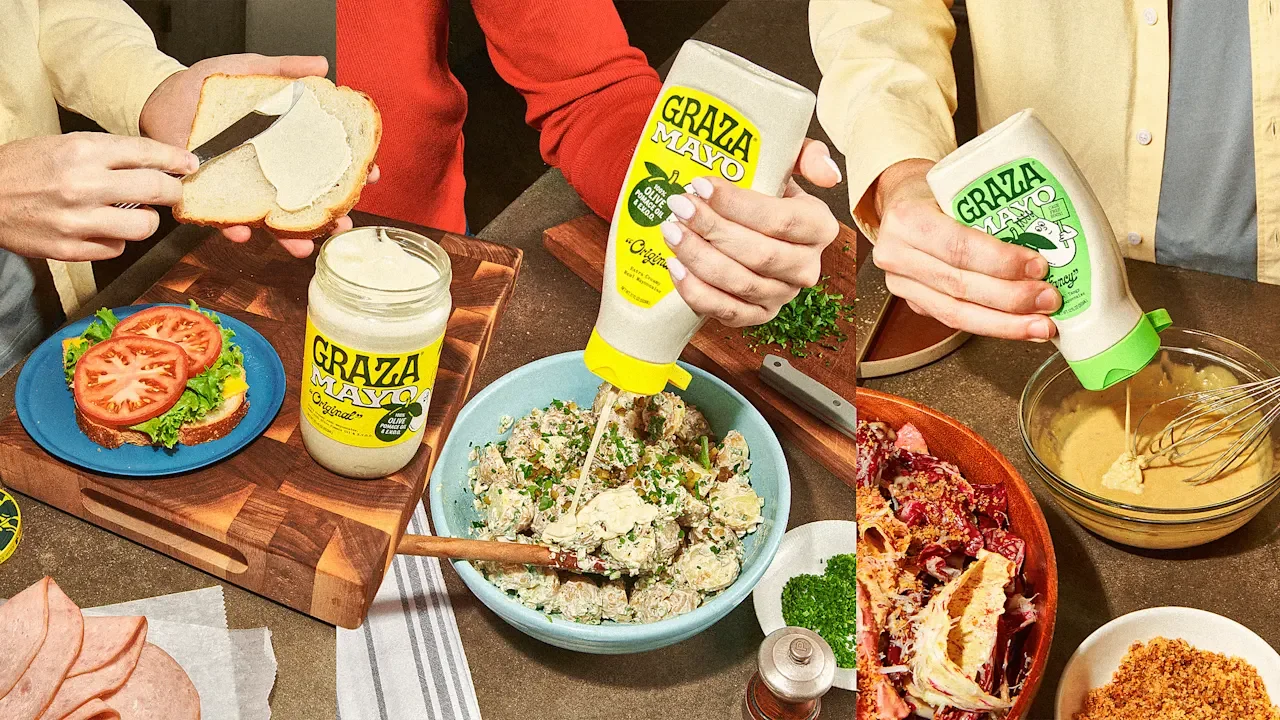
You know Graza—or, at least, you’ve probably seen its squeeze bottles of extra-virgin olive oil (EVOO) on grocery store shelves. They’re green, opaque to protect the contents, and sold in two variations: Sizzle, for cooking, and Drizzle, for finishing. Since the brand launched its direct-to-consumer site in 2021, it’s become a staple of the olive oil aisle. With national distribution across stores like Whole Foods, Kroger, and Costco, its squeeze bottles (sometimes accompanied by its beer-can refills) are sold in more than 28,000 stores. It has also been making small excursions into other parts of the store, with Ithaca using Graza oil for a co-branded hummus. But now Graza is planting its flag in the condiment aisle with three new mayonnaise variants: Original, Fancy, and Garlic Aioli—all of which are available in plastic squeeze bottles and glass jars. It started rolling out to Whole Foods locations and other retailers in January. Though company cofounder and CEO Andrew Benin acknowledges that “in some situations, you shouldn’t reinvent the wheel,” Graza still wanted to make its mark. Its mayo is the first commercial mayonnaise made with 100% unrefined oils, and he said he wanted the Garlic Aioli to taste “like your Spanish mother-in-law’s aioli.” (Considering Benin has a Spanish mother-in-law, he’s a relatively trustworthy source on that one.) As when Graza broke into the olive oil category, its launch of a mayo amid booming demand for condiments will be an uphill battle for the company. But Benin relishes the opportunity to make his mark—again. “Olive oil was exciting to us because there’s so much longevity to it—we’re a part of a really big whole with a lot of history,” he says. “We feel the same way about mayonnaise.” Mayo the Graza way Because of the popularity of its original two olive oils, last year Graza introduced a high-heat variant made of pomace oil (the pulp remnants of an EVOO pressing). “We had a lot of pressure to expand,” Benin says, adding that he was slow to settle on an expansion because things like vinegar or salt “weren’t actually connected to olive oil.” That’s where mayo—which is made of up to 65% oil—felt like a natural way to use its existing product in a new way. Graza’s classic mayo uses a combination of its EVOO and pomace oil, while Fancy and Garlic varieties use 100% EVOO. For each iteration of the products, Benin says Graza got input from condiment experts and Graza employees. Each new version was set up in the kitchen of Graza’s Domino Park office in the Williamsburg neighborhood of Brooklyn, New York, with a sheet of paper for notes and a pile of spoons (plus a bowl for the dirty ones). “If you think about all the small adjustments we made, all the formulas, I think we tasted mayo over 20,000 times in this office,” Benin says. “A lot of mayo, a lot of full bellies being, like, ‘I don’t want lunch because I think I just had mayo for lunch.’” Though the products satisfied Graza employees, they now have to cut the mustard with consumers who are currently inundated with condiments, especially mayo. The condiment craze Graza’s mayo faces competition that includes not just legacy giants like Kraft and Unilever’s Best Foods and Hellmann’s, but also a growing slate of celeb-backed products. Last year, actor Glen Powell launched his Walmart condiment line Smash Kitchen, which features an organic mayo. And chef-influencer Molly Baz’s brand Ayoh Mayo—with retro-inspired branding that rivals Graza’s in its distinctiveness—rolled out nationwide at Target in January, after having launched online in 2024. The surge in brands is responding to a larger boom in consumer demand, according to Claire Dinhut, a former TV producer and an author whose Instagram @condimentclaire focuses on sauces. She says the “Mayo-sance” got its start during the early days of the pandemic. “Especially during lockdown, people’s outing of the day was going to the grocery store,” Dinhut says, adding that people were looking for simple ways to spice up their home cooking. That was beneficial to the condiments retail market. In 2020, McCormick—a global sauce manufacturer of staples like Frank’s RedHot, Cholula, and French’s mustard—saw a 5% rise in sales over the previous year, driven by growth in consumer purchases. Since then, demand hasn’t slowed down, and neither has growth. The global condiments market is projected to grow from $106.37 billion in 2026 to $176.53 billion by 2034. The U.S. market alone is projected to reach $32.84 billion by 2032. The prospect of Graza shaving off even a little bit of the mayo giants’ sales means big money, and the brand is benefitting from a swing in consumer sentiment from “mayo hate” in the 2010s to a renewed ardor. “It was apparently cool to hate mayo for some reason,” Dinhut says. “But I think the same thing has happened with butter. It’s anything that maybe has a little bit more fat content or is a little bit heartier—people have preconceived notions about them, and it’s cool to not like that thing.” But now, the Make America Healthy Again (MAHA) movement—and broad consumer interest in less processed products (whole milk and all)—could help Graza pull in customers from its more processed rivals. “So many brands are coming out with condiments, and I think they’re a really easy way to make that brand’s taste resonate through other people’s dishes and cooking,” Dinhut says. “I think it’s really smart from a brand perspective.” Playing to its strength Though Graza’s mayo comes with claims of being unrefined, its success will also rely on its recognizable packaging and branding. CEO Benin hopes that using its recognizable brand will help do with mayo what it did for oil. “We’ve been trying to get more people to understand that Graza is much more about what’s inside its packaging than the outside,” he says. Graza’s mayonnaise packaging sticks true to the OG bright and playful style, reminiscent of its olive oil. The containers feature a joyful olive and egg duo (or a smiling garlic bulb on the aioli package). The labels feature an illustrated olive, and the lids of its glass jars have a repeating olive and vine motif. For as much as Benin doesn’t want Graza to be known simply for its packaging innovation, the company’s branding is one of its strongest assets. With the mayo, as with the olive oil, its packaging is something of a Trojan horse to get people to look at it, and then to try it. He knows he probably won’t convert the most fervent mayonnaise haters, but he’s hoping to intrigue mayo apologists enough to try Graza’s version. “We get excited when there’s this big pool that we can plug into and say, ‘How are we going to make it better? How are we going to stand out? Where can we do things the Graza way?’” Benin says. View the full article

-
In the past few years, while navigating the streets of San Francisco, bus and trolley operators have documented a growing presence on the city’s streets: Waymo robotaxis, often devoid of any front-seat human driver, causing problems. Sometimes, they report the cars for signs of an illegal maneuver, like when in September, a driver operating the city’s 45 electric bus noticed a Waymo trying to pass on double solid yellow lines at Stockton and Columbus, an intersection along its route. Or for a near miss—like, when, last December, a Waymo was caught by a city light rail train’s video camera making a dangerous left turn at “high speed.” Very often, transit operators flag a stalled robotaxi, or several, blocking a public street. Clearing the vehicle might require a transportation official to reach out to a Waymo call center, or even the cops, for help. This process, which involves the city’s Traffic Management Center (TMC), can take as long as an hour to resolve. Back in 2024, the city’s MTA even created a new dedicated dispatch category to log these reports: “Driverless Car Incident.” The sight of a stalled Waymo isn’t new. But a TMC database, obtained by Fast Company via a public records request, suggests that reports of problematic robotaxis are being filed more often, and that the procedure for handling stalled vehicles is not yet seamless. Fixing the robotaxi blockage can involve waiting for a remote Waymo assistance team helping the vehicle’s AI get moving again, a transit dispatcher complaining to a Waymo call center, or even a cop taking control of the vehicle themselves and driving it away. When the smart city goes dark Last December, Waymo and the city’s approach to this problem was pushed to the brink when a partial blackout in San Francisco knocked out city traffic lights—and left Waymos across the city in a confused standstill and government officials on hold with the company’s call center in the middle of an emergency. Concern that Waymos can disrupt public services came up again recently, after one of the robotaxis was recorded briefly blocking an ambulance in the aftermath of the Austin mass shooting. “In recent years we implemented new reporting mechanisms for our operators to report incidents that involve driverless vehicles,” the San Francisco Metropolitan Transportation Authority tells Fast Company. “By doing so, we’re adapting to the evolving landscape in San Francisco and making sure that we can provide the best service possible for our customers.” “Waymo is committed to continuous improvement,” Lety Cavalcante, who serves as Waymo’s director of operations and head of its operators center, tells Fast Company. “We established even closer communication with San Francisco emergency officials, and are developing additional capabilities to facilitate smoother interactions between our operations and transit workers when on-road issues arise.” The company says it’s also implemented changes to ensure that both first responders and transit operators are prioritized when they call Waymo for help. Still, Waymo disputes the descriptions of some of the events described in documents, and says the public transit operators’ reports are not a useful way of characterizing how their vehicles actually behave on the road. In regards to the first case—the robotaxi that allegedly passed on solid yellow—Waymo said its car was actually waiting behind the bus while it picked up passengers, and that the car was slowly trying to pass around the left side of the bus. Before the car was actually next to the bus, the public transit vehicle began to move, and the Waymo returned to its original lane. In regards to the second incident—the dangerous left turn near a train—Waymo says the train was in an opposing lane and the car was about 100 feet away. Of course, the promise of self-driving cars is that they’re supposed to be safer than human drivers. Indeed, some of the issues documented in the database, like Waymos allegedly cutting off buses, or parking in areas reserved for public transit, are infractions that humans also commit, and possibly far more often. Research suggests that autonomous cars can outperform human drivers, and are even less likely to be involved in serious accidents. Waymo says it’s reduced serious crashes, airbag deployments, and collisions involving pedestrians. (It was also spotlighted as one of Fast Company‘s Most Innovative Companies last year.) But self-driving cars are also a different sort of beast: They are powered via AI, deployed as a coordinated fleet that’s monitored by a single company. And they’re growing evermore popular: Waymo, which raised $16 billion earlier this year, is now successfully operating across the U.S., including in Phoenix, Arizona, and Atlanta. Meanwhile, competing AV companies like Tesla and Zoox are also operating, though they all remain far behind Waymo in San Francisco: Tesla vehicles don’t operate without human drivers yet, and Zoox only has a small number of cars on the road. Waymo’s success has made the once-futuristic idea of autonomous vehicles relatively commonplace in cities. But next-generation cars also introduce next-generation traffic jams. Which means interactions that once felt surreal—“honking at a driverless car makes me feel insane,” as one constituent, in an email obtained through a public records request, recently wrote to the San Francisco MTA—are poised to become a routine, and increasingly consequential, part of everyday life. Waymo’s trolleycar problem Waymo acknowledges its self-driving cars sometimes cause issues for public transit operators. This is where the company’s event response team, which Waymo describes as a specialized subunit within a larger remote assistance team, comes in: First responders and transit operators have access to a hotline number that reaches this team. That team is then supposed to help get a vehicle moving again, which might involve having Waymo personnel come physically drive the car away. Waymo says that, at the request of law enforcement, police officers and other first responders also have the ability to manually take over its robotaxis. On the ground, resolving these issues, and getting public transit moving again, can sometimes take a while, according to an analysis of the data obtained by Fast Company. The city’s Traffic Management Center (TMC), which receives calls about roadway obstructions from public transit operators, can take about 20 minutes, on average, and haven’t significantly improved between 2024 and 2025, according to an analysis by Mary Cummings, an engineering professor who studies autonomous vehicles at Carnegie Mellon University. In busy cities, delays can slow down dozens of public transit riders, and other cars, too. The TMC database shows complaints of blocked vehicles date back to at least 2023. The SF MTA has, for years, flagged its concerns about hazardous “unplanned stops,” including to the California Public Utilities Commission, the state’s main autonomous vehicle regulator. In 2024, the MTA began tracking a new dispatch category called “Driverless Car Incident.” That decision was made a few months after Waymo started pulling its precautionary safety drivers from its cars, and truly driverless service began, an official at the MTA tells Fast Company. It was at that point, they say, that the transportation agency started seeing the real challenges introduced by AVs. “Robotaxis impose burdens on other road users that are not there with human drivers,” argues Philip Kooperman, another engineering professor at Carnegie Mellon. “Now, maybe the benefits outweigh the burdens, but you have to recognize the burdens are being posed.” City streets are chaotic places, and Waymos are only a tiny fraction of the problems that get reported to San Francisco’s traffic control center. Also, incidents involving Waymos aren’t always the fault of Waymo. The reports appear to reflect preliminary descriptions, and aren’t the results of full investigations. Still, they reveal what can be a convoluted workflow. When public transit drivers encounter a Waymo problem, they report it to the city’s traffic control center, an SF MTA official explains. Traffic controllers can then contact Waymo’s call center for the event response team, which may help guide the vehicle away remotely or dispatch an employee to move it manually. But, in the case of a delay, or if they’ve had difficulty reaching Waymo, they may also call a first responder. Several of the reports include complaints about the quality of the Waymo call center. “Waymo contacted and was ZERO help,” noted one complaint, which came after a public transit operator reported a robotaxi blocking the street in both directions. “Waymo was attempted but kept being routed to a call center that was no help,” noted another report, which came at an intersection where traffic signals needed to be reset. Several reports discuss cops getting involved. This is not something police should be involved in, but sometimes the situation requires it, the San Francisco MTA official says. One report references a separate Waymo call center number that reaches an enterprise support team. Waymo did not explain why the number was referenced in the report, but says it’s for a team that supports it for Waymo test drivers—not first responders or transit operators. For now, Waymo transit operators are supposed to contact the same first responder number that police use, though it’s working on creating a separate hotline for transit operators and government officials. The San Francisco Police Department, which is referenced repeatedly in the document, did not respond to a request for comment. Blackout blues On December 20 of last year, a circuit breaker at an indoor substation operated by California utility provider, PG&E ignited, sparking a fire that knocked out power across much of San Francisco. This mass outage caused serious problems for the city’s Waymo fleet. When Waymos encountered the temporarily disabled traffic lights, many stalled, waiting for confirmations from the company’s remote assistance team. In some areas, squads of robotaxis sat with their hazard lights flashing, clogging streets, according to footage later uploaded online. Some incidents were reported to the Traffic Management Center, including one trolleybus driver who was blocked by four stalled Waymos. The city’s traffic control office contacted Waymo support but was unable to resolve the situation, the report noted, and a city inspector eventually showed up to clear the scene. Overall, there were more than 42 reported incidents involving autonomous vehicles between 2 p.m. and midnight on the day of the blackout, according to a city filing viewed by Fast Company. Firefighters also needed to move a robotaxi blocking them from the very substation fire that originally caused the blackout. One Waymo delayed an ambulance by 40 minutes, the city says. There were other problems: The Department of Emergency Management, the city’s 911 service, did try to engage Waymo, but the company was unresponsive, a city official tells Fast Company. Eventually, San Francisco Mayor Daniel Lurie both called and texted Tekedra Mawakana, co-CEO of the company, about the issue. In the messages, which were viewed by Fast Company, he flagged all the locations where the cars had caused problems, which she subsequently thumbs up. “All cars are pulled over or actively headed back to base,” she later wrote. “Trips are done—no hailing.” The issues continued even after service was suspended, the filing states. Ultimately, the city’s 911 service placed more than 31 calls to Waymo’s first responder hotline and spent more than two hours and 36 minutes of call time trying to contact the company. “While we cannot document this in detail, a large majority of this time was spent on hold; one SFDEM staff person remained on the Waymo first responder hotline for 53 minutes—most of that time on hold,” noted the city. Though many were resolved quickly, Waymo has said that there were ultimately more than 1,500 stoppage events during the blackout. Pete Wilson, president of TWU Local 250A, which represents the city’s transit workers, said robotaxis repeatedly stalled when traffic lights failed, causing them to stack up and block streets, buses, and rail lines. “During the blackout they did not know what to do when the stop lights went out, so they just stopped,” he tells Fast Company. “Then another Waymo would come and pull up next to the first one and stop.” Relying on the mayor to text a company’s CEO is not a great emergency response plan, and other municipalities don’t necessarily have leaders as connected to Big Tech as Lurie. Waymo has since promised to be more responsive in future emergencies, a city official told Fast Company, and the Department of Emergency Management says it’s since had “productive” conversations with the company. The wait time experienced by emergency dispatchers was unacceptable, Waymo told Fast Company, and the company plans to improve its emergency operations. “We’re encouraged by our recent preparedness performance demonstrated during subsequent power outages, city-wide protests, and other large scale events in San Francisco, including the Super Bowl,” adds Cavalcante, from the company. Waymo says it’s briefed a bevy of agencies, as well as the Governor’s office, since the blackout, and says it will deploy dedicated incident management personnel on site in the future. Communication overload As Waymo explains it, when the company’s robotaxis encounter trouble or a confusing situation, they’re supposed to seek confirmation from a team of remote assistant agents staffed by humans. But, as first reported by Fast Company, the December blackout highlighted a gap in defenses: When communications networks and systems are overwhelmed—which often happens during emergencies—vehicles can’t quickly connect to the remote teams that help the cars’ software navigate confusing situations. There can also be challenges with reaching the specific team that helps first responders. The company tells Fast Company that it’s making improvements to the Waymo Driver that will enable more decisive and efficient navigation during future events. Still, the emergency has raised questions about who should pick up the slack when a Waymo stalls, whether it’s confused by a troubling intersection, and blocking a bus, or because it can’t make out the traffic lights during a blackout. Critically, Waymo maintains that its cars are autonomous, so even when the remote assistant agents are called into help, they are simply advising the car, and not remotely driving the vehicle. Some lawmakers have raised concerns that some of these workers are based in the Philippines. Several people affiliated with Waymo are mentioned by name in the MTA reports, but Waymo did not comment on where, specifically, they were based. Waymo says that employees on the event response team, which interfaces directly with first responders, are based in the U.S. The California DMV is currently developing regulations for remote drivers and remote assistance, a spokesperson says, and the agency is still engaging AV manufacturers on emergency response. In the aftermath of that blackout, the San Francisco MTA has urged the California Public Utilities Commission, which serves as the main regulator of the technology in the state, to consider how autonomous vehicle providers approach disaster preparedness, especially in a case of “fleet-wide failure.” Terrie Prosper, a spokesperson for the California Public Utilities Commission, says the agency “continues to gather information from Waymo related to the power outage in San Francisco.” The SF County Transportation Authority has called for more transparency into the frequency of AV stoppages, but has since deferred conversations to Bilal Mahmood, a San Francisco city supervisor. Mahmood, for his part, recently compared the robotaxis to the carriage from Cinderella. “Just like in the fairy tale, we can now see that those carriages can turn into pumpkins at the drop of a hat,” he said during his introductory remarks at a city hearing focused on the blackout’s impact on AVs. There, Mary Ellen Caroll, the head of the city’s emergency response office, said she remains concerned about the impact of Waymos on first responders who have to remove vehicles, and about what might happen in a future emergency, including a cyber outage. Offshore remote control The public still doesn’t know how often Waymos block traffic. While Waymo publicly reports a range of data to the California Public Utilities Commission, the company reports stoppage data, along with other trip detail data, to the agency confidentially. At a public hearing in January, an attorney representing the company claimed that the stoppage data could inadvertently reveal data about “fleet utilization” and, if shared publicly, could reveal trade secrets. Indeed, the numbers obtained by Fast Company only tell part of the story. It’s possible that some public transit operators don’t even file these reports. These operators are a minority of the drivers on San Francisco streets. When asked whether it seemed like Waymo cared about the impact its vehicles might have on public transit, the official at the San Francisco MTA said it was difficult to tell. They recalled a social media post from a while back, which saw customers on the phone with Waymo—reporting on their car inferring with public transit—and receiving remarkable service. But it’s hard to tell if that’s the norm, the official tells Fast Company, since that’s data the city just doesn’t have. Waymo did not tell Fast Company how often its cars stall or block transit, but said its robotaxis have completed 40 million miles of autonomous driving throughout the three years covered by the TMC reports. There’s little the SF MTA can do to change this workflow, the city agency says. “California law gives permitting authority over AVs to the California Department of Motor Vehicles (DMV) and the California Public Utilities Commission (CPUC),” the transportation agency tells Fast Company in a statement. “San Francisco does not regulate AVs or set conditions on their operations – either day to day or in relation to disaster and emergency response.” Still, Waymo behavior is a big enough problem that, inside the San Francisco MTA—which maintains oversight of the city’s streets—even staffers sometimes grumble about them. In one December email obtained via public records request, Ricardo Olea, a city traffic engineer, remarked on one recent email, complaining that Waymos had been stopping in a no-stopping lane. “[N]ot a good place to block traffic,” wrote Olea. “The bigger problem is that Waymo has decided that the NO STOPPING signs don’t apply to them, so who knows what other bad places they stop at.” View the full article

-
Version 4.6 of Yoast Duplicate Post is here, and it’s all about making your editing experience feel more natural in WordPress’s Block Editor, and making sure “Rewrite & Republish” works reliably every time you need it. A more modern editing experience Everything where you’d expect it. The Duplicate Post controls now sit in the Block Editor’s sidebar, right alongside WordPress’s own settings, no more hunting around. If you’re still on the Classic Editor, nothing changes for you. Buttons that look the part. The “Copy to a new draft” and “Rewrite & Republish” actions are now proper bordered buttons, consistent with the rest of the WordPress interface. Cleaner, clearer, and easier to use. Built for the future. Under the hood improvements ensure Duplicate Post stays stable and compatible as WordPress continues to evolve, so you don’t have to think about it. Yoast Duplicate Post has always been about reliability. While the plugin has served millions of you faithfully since our last release, we’re excited to bring you version 4.6. This update is packed with long-awaited fixes and thoughtful interface refinements that ensure the plugin stays modern, stable, and ready for the future of WordPress. Enrico Battocchi – Plugin team lead and creator of Duplicate Post More reliable “Rewrite & Republish” workflows Your posts won’t get stuck. If something goes wrong mid-process, like a redirect being interrupted, the plugin now handles it gracefully and cleans up automatically. Your content will never be left in a stuck state. Attachments copied completely. All attachment metadata, including captions and descriptions, is fully preserved when you duplicate a post. Nothing gets left behind. International & security improvements The right words, in your language. Buttons and notices in the Block Editor are now correctly translated across all languages, with none of the behind-the-scenes errors that some locales were seeing. Consistent styling, always. Buttons display correctly regardless of your admin configuration, including when the WordPress admin bar is turned off. Version 4.6 is available now. As always, we recommend testing in a staging environment before updating your live site. The post New: Yoast Duplicate Post 4.6 appeared first on Yoast. View the full article
-
On March 21, 2006, founder Jack Dorsey set up his “twttr”: Since then, some of the most important, world-changing moments have unfolded on Twitter in real-time for all to see, react to, and engage with. A lot has changed since those early days, including the platform’s name. When Elon Musk officially acquired Twitter on October 27, 2022, for $44 billion, he renamed it X. Almost four years later, people are still calling the platform Twitter, so, in this article, we’ll jump around between the two names or use both. just setting up my twttr — jack (@jack) March 21, 2006 If you’re new to X, or feel like you’re no longer sure how to use Twitter after all the changes, this article has you covered with everything you need to know. Jump to a section: Why use Twitter/X? How to set up your Twitter account Optimize your Twitter/X profile Build your Twitter/X marketing strategy How to post on Twitter/X Create content for your Twitter/X account Popular X features to use in your social media marketing Best practices to grow your following Feeling confident that you now know how to use Twitter/X? Your quick guide to Twitter/X terminology FAQ about how to use Twitter More Twitter/X resources Why use Twitter/X?You might have heard that X isn’t what it (and by “it”, I mean Twitter) used to be — and in some ways, that’s true. The platform has changed a lot. But it’s far from irrelevant. X still sees around 557 million active users per month, which is more than competing platforms like Bluesky (41 million) and Threads (400 million). In other words, the audience is still very much there. And, according to our research, they’re highly engaged. X has always been the place where conversations happen in real time. News breaks, trends start, and industry debates unfold. If you want to be part of the conversation, X is still one of the fastest-moving platforms around. Here are some other reasons why people are on X: It’s still one of the best platforms for visibilityUnlike some platforms that prioritize content from people you already follow, X makes it easier for your posts to reach beyond your immediate audience. A thoughtful reply in the right thread can get you in front of thousands of people, or a well-timed post about a trending topic can spark meaningful engagement. It’s evolving beyond short postsWhen he acquired the platform, Elon Musk’s vision was to evolve the social networking site into a broader “everything app,” encompassing much more than simple messaging and tweeting. Some of the new features include different account types (we’ll get into those later), longer posts, enhanced video sharing, and limited (but developing) digital transactions and possibly e-commerce functionalities. It’s a strong platform for personal brandsIf you’re building a personal brand, X offers something unique: proximity. You can: Reply directly to industry leadersJoin public conversations with decision-makersBuild credibility by consistently sharing insights in your nicheAnd because posts move quickly, you can experiment often. The feedback loop is fast, which makes it a great platform for learning what resonates. Twitter/X is not for everyone — and that’s OKX isn’t the most visual platform. It’s not built around highly curated feeds. And it can feel noisy at times. But if you enjoy conversation, commentary, sharp insights, and real-time interaction, X still offers a lot of value. The key is understanding what it does best and using it intentionally. So, is X on your list? In the next section, we’ll look at how to set up your account for success from day one. How to set up your Twitter account OK, X marks the spot. Now, it’s time to set up your account. Before you do so, it’s helpful to have an idea of which kind of account will work best for you. Should I use a personal or professional account on X?If you’re using X to grow a brand, build an audience, or market a business, using a professional account instead of a personal account is usually the smart move. It’s free, and you can switch back at any time. A personal account works well if you’re posting casually, engaging in conversations, or simply exploring the platform. You still get access to core features like posts, threads, replies, and polls.A professional account unlocks business-focused features. You can add a category label to your profile, access profile spotlight options (such as linking to a newsletter), and — if eligible — showcase products through a shop module. In short: If you’re building something on X, go pro. If you’re just participating socially, a personal account is perfectly fine. Which Twitter/X subscription tier is right for me?One of the biggest changes on X in recent years is that the platform now offers four major account tiers: FreeBasicPremiumPremium+Each tier comes with different features — and, as we’ve discovered, different levels of visibility. More on this in a few. Comparing different X subscription optionsThe free account If you’re just getting started, the free tier is still a solid option. You can: Post up to 280 charactersShare images and videosBuild an audienceJoin conversationsFor many casual users or early-stage creators, this is more than enough to test the waters and see whether X is a good fit. If your goal is to learn the platform, experiment with your voice, and engage consistently, you don’t need to pay to do that. X Premium If you’re serious about growth, X Premium is where things start to get interesting. Premium includes: The ability to post longer contentPost editingA verification checkmarkFewer adsPotential favor with the algorithmA recent study by Buffer’s data scientist, Julian Winternheimer, found that Premium accounts get around 10x more reach per post than regular accounts. Buffer’s own Tami Oladipo tested the impact of upgrading and saw a noticeable shift. After subscribing to X Premium, she published less frequently, but her reach and engagement stayed steady. In other words, performance didn’t dip with lower output. “X Premium immediately seems like a great fit for anyone looking to grow an engaged audience, especially if your content is primarily text-driven,” she said. “Features like editing and the ability to make longer form content are invaluable for maintaining quality and depth in content. Some of my best-performing posts were longer, and they did pretty well.” That’s an important takeaway. If your strategy relies on thoughtful threads, nuanced takes, or educational content, the ability to go long can make a real difference. Basic and Premium+ Basic and Premium+ sit on either side of Premium in terms of features and pricing. Basic offers some enhancements over the free tier, but without full verification benefitsPremium+ typically includes the highest level of ad reduction and additional prioritization in replies and searchSo, which one should you choose? Here’s a simple way to think about it. For creators and business owners who rely on X for visibility, Premium or Premium+ may feel like an investment in distribution. For casual users, it may not be necessary. Exploring or posting occasionally? Free is fine.Building a personal brand or growing an audience? Premium is worth considering.Using X as a core marketing channel? Premium or Premium+ may give you an edge.Also remember that you don’t have to decide forever. You can start free, learn the platform, and upgrade later if you feel limited. So even if you’re not quite sure which account or subscription you need just yet, we can go ahead and get set up. How to set up Twitter/X on mobileDownload and open the app. Click on Continue with Google (to sign in with Google) or Create Account.Add your details.You’ll be sent a verification code via SMS or email, depending on your preference.Verify using the code, set up your password, and hit Sign up.Add a profile picture.Create a username.Set your notification and contact preferences.Follow one or more accounts.You’re in. How to set up Twitter/X on desktopHead over to x.com and click on Continue with Google (to sign in with Google) or Create Account.Add your details.You’ll be sent a verification code via SMS or email, depending on your preference.Verify using the code, set up your password, and hit Sign up.Add a profile picture.Create a username.Choose some topics that interest you.Follow one or more accounts.You’re ready to explore.Optimize your Twitter/X profileBefore you post a single update, take 10 minutes to set up your profile properly. Think of it as your digital storefront — when someone clicks through from a post, this is what convinces them to follow (or not). Here’s how to make sure your profile works for you. Upload a profile pictureYour profile picture may be small in size, but it makes a big first impression. If someone sees your reply in a busy thread, your profile photo is often the first thing they notice. Use a high-quality, well-lit headshot or your brand logo. The recommended size is 400 pixels x 400 pixels. A few quick tips: Faces tend to build trust faster than logos (especially for creators and founders)Keep it simple — avoid busy backgroundsMake sure it’s clearly visible in a small circle⚡Find yourself constantly Googling the right image sizes for different platforms? Here’s an up-to-date list of all the image specs you’ll need for the major social media networks. Add a cover photo Your cover photo is valuable real estate. Because your bio is limited to 160 characters, your header image can help tell the rest of your story. Consider using it to: Highlight what you doShowcase your product or workShare social proof (like “Helping 10K+ creators grow”)Add a bold call-to-action (CTA)Keep the design clean and easy to read on mobile, as most people will visit your profile on their phone. Write your bio You’ve only got 160 characters, so make them count. A strong bio answers three simple questions: Who are you?What do you do?Why should someone follow you?Keep it clear, not clever. You can tag brands you’ve worked with (when relevant) to add credibility — just don’t overdo it. If you’re stuck, try this formula: I help [specific audience] achieve [specific result] using [your method]. Add your website or Buffer Start PageYou only get one link in your bio, so if you have multiple things to share (like a newsletter, YouTube channel, and services page), a link-in-bio tool can help. Buffer’s Start Page is a free option that lets you create a simple landing page with multiple links. On your Start Page, you might include: Your latest workYour main websiteA lead magnetOther social profilesBooking linksThe goal is simple: Make it easy for people to take the next step. Pinned tweetIf someone new visits your profile, your pinned post is your first impression. Think of it as your highlight reel. If someone only reads one thing on your profile, make sure it represents you well. You could pin: Your most engaging tweet or threadA “Start here” introduction postA summary of what you shareA big win or announcementFollow relevant accountsWho you follow matters more than most people realize. A few things to keep in mind: Follow people in your nicheEngage with accounts that inspire or educate youAvoid following spam or inactive accounts.Also, pay attention to your follower-to-following ratio. While it’s not everything, new visitors often glance at it. If you have 500 followers and follow 50K accounts, it can send the wrong signal. It may suggest you’re following people simply to get a follow back — even if that’s not your intention. Instead of mass-following, focus on building real connections. Here’s a great X profile example from Neil Patel: Build your Twitter/X marketing strategyPosting randomly on X and hoping something goes viral isn’t much of a strategy. Growth on X comes from knowing why you’re showing up, who you’re speaking to, and how you’ll measure progress. Here’s a simple three-step process to build your X marketing strategy: Step 1. Set clear and measurable goalsStart with the big question: Why are you on X? Do you want to grow your audience and build authority in your niche? Drive traffic to your website? Generate leads? Support customer service? Once you know the answer, you need to set metrics to measure that you’re on track — think of them as your KPIs (key performance indicators). For example: If your goal is brand awareness, you’ll focus on impressions, reach, and profile visitsIf your goal is community building, you’ll track replies, reposts, and engagement rateIf your goal is website traffic, link clicks and conversions become your priorityKeep your goals specific and measurable. Instead of “grow our presence on X,” aim to “increase profile visits by 25% in three months” or “gain 1,000 relevant followers this quarter.” Step 2. Create a content plan On X, consistency builds familiarity, and familiarity builds trust. A content plan outlines: What you’ll post (content pillars)How often you’ll postWhen you’ll postThe formats you’ll useStart by defining three to five content pillars. For example: Educational threadsIndustry commentaryBehind-the-scenes updatesCustomer stories or case studiesCurated resourcesThis prevents the “What should I post today?” scramble and helps you build a recognizable voice. Next, decide on a cadence you can keep up with. That might be: One to two posts per dayThree to five posts per weekOne in-depth thread per week plus shorter daily postsThe key is sustainability. Posting consistently for six months beats posting 10 times a day for two weeks and burning out. To stay organized, use a social media management tool like Buffer to plan and schedule your X posts in advance. With Buffer, you can: Schedule posts across multiple platformsVisualize your content calendarCollaborate with your teamRefine copy with AITrack performance in one dashboardStep 3. Engage intentionallyX is built for conversation. If you’re posting and ghosting, you’re missing the biggest growth lever on the platform. Replies, quote posts, and thoughtful interactions often drive more visibility than standalone posts. Build engagement into your strategy by: Replying to comments on your posts (one of Buffer's latest studies shows it can boost engagement by 8% on X)Starting conversations with questionsEngaging with creators and brands in your nicheParticipating in relevant trending discussions (when they align with your brand)Pro tip: You can use Buffer’s Community to respond to replies in one place, track sentiment, and make sure nothing slips through the cracks. Strategy sorted? If so, you’re ready to go. The next section covers how to post on Twitter. How to post on Twitter/X Whether you’re on desktop or on your mobile, it’s pretty straightforward to post to X. Here’s how. How to post to X on desktopOpen X.You can post directly at the top of the page, or choose the Post button on the left to create your content in a pop-up window.You can use the little buttons at the bottom to add images, GIFs, polls, or emojis. You can also choose to schedule your post for a later time and use Grok as an AI Assistant. Add your content, and hit Post. Simple as that.How to post to X on mobileOpen your X app.Click on the + button.Choose Post from the options.Add your content and tap the blue Post button.Note: Native scheduling isn’t available in the standard Twitter/X mobile app. If you need to schedule Tweets from your phone, you can use a third-party social media management tool like Buffer. Create X-cellent content for your Twitter/X accountNow that your profile is set up and you know how to post, it’s time to focus on what everyone’s here for: the engaging content you’re about to create. Let’s walk through a few practical ways to create posts that spark conversation, build visibility, and help you grow on X. What is the best content format on Twitter/X?Our analysis of the best content for major social media platforms found that text-based posts receive the most engagement on X (30% more engagement than videos, 37% more than pictures, 53% more than link posts, and 113% more than retweets). While there is certainly a place for video on X (the runner-up), it is fundamentally a text-first platform. Your real-time news, hot takes, and punchy one-liners are most welcome. That said, if you have videos or photos that add depth and context to your content, go ahead and post those too. At the end of the day, the best content format is the one that works best for you. Pro tip: Keep an eye on your analytics to identify patterns over time and see what content formats perform best. 💡Stumped on what to tweet? Here are 30+ ideas for your next post.Should I include links in my posts?According to our data, it’s a hard no, unless you’re in the Premium tier. Posts with links perform significantly worse than other content types: Since March 2025, link posts from non-Premium accounts have seen dramatically reduced visibility, with median engagement rates hovering at 0% (again, you read that right). This means that newsletters, product pages, and blog posts shared directly in the timeline aren’t getting the same results as they once did on Twitter. Pro tip: Instead of leading with a link, lead with value: share the insight, spark conversation, and make the link a secondary step (for example, placing it in a reply or directing people to your bio). Be smart about hashtagsX has put the record straight: Using multiple hashtags can get you penalized by the algorithm. That said, hashtags still help categorize your posts and make them discoverable in search, so here’s how to use them well: Stick to one or two hashtags max. Choose keywords that genuinely describe your post.Don’t use spaces or punctuation (#SocialMediaTips works. #Social Media Tips doesn’t)Place them naturallyType a hashtag into the search bar to see how active and relevant it is before using itPopular X features to use in your social media marketing X offers more than just posts and replies — it’s packed with features that can help you grow, connect, and even convert. Here are some of the most useful X tools to incorporate into your social media marketing strategy. Feed customizationYour feed is the stream of posts you see when you log in. Here, you can toggle between For You and Following. The For You feed is algorithm-driven and surfaces content based on your activity, which makes it great for discovering trends and conversations in your niche.The Following feed shows posts in chronological order from accounts you follow, which is helpful for staying close to peers, customers, or competitors. SpacesSpaces are live audio conversations hosted on X. They’re powerful for thought leadership, community building, product launches, or live Q&As. You can invite speakers, bring listeners on stage, and record your sessions for replay. Pro tip: This is great content for repurposing, so turn one conversation into a bank of content. CommunityCommunities are topic-based groups within X where people share posts around a specific interest. Posting in relevant Communities can help your content reach a more targeted audience, especially if you’re building authority in a niche. Twitter ListsLists let you create curated feeds of specific accounts. Marketers often use lists to monitor competitors, industry leaders, customers, or media contacts without cluttering their main feed. In my opinion, it’s one of the most underrated research and engagement tools on the platform. PollsPolls are simple, interactive posts that allow followers to vote on predefined options. They’re excellent for sparking engagement, gathering quick insights, validating ideas, or encouraging low-friction interaction, especially when you’re testing messaging or content themes. Long-form posts (Premium feature)Premium users can publish longer posts beyond the standard character limit — a lot longer. While standard accounts only get 280 characters, Premium accounts can go up to 25K characters. This can be useful for deeper storytelling or thought leadership without needing a full thread. ThreadsIf you don’t have a Premium account, one workaround for longer content is to use threads. Threads are a series of connected posts that expand on a single idea. They’re ideal for storytelling, teaching, sharing frameworks, or breaking down complex topics step by step. Here’s an example from Buffer’s Twitter account: Buffer is built by a fully remote global team, and we bring everyone together once a year for a working retreat. Our expected budget for our April retreat is $332,127.74. It’s not a small expense, but we’re big on investing in our team. Here’s why it’s worth it: — Buffer (@buffer) March 17, 2025 Digital transactions and ecommerceX is gradually expanding into ecommerce. Features like the profile shop allow eligible businesses with a professional account to showcase products directly on their profile, while product drops help build anticipation around upcoming launches with reminder notifications. Combined with creator monetization tools like subscriptions and paid content, X is evolving from a traffic-driving platform into a potential conversion touchpoint. Creator subscriptions Creator subscriptions are available to eligible creators who want to monetize their audience directly on X. This feature allows you to offer exclusive content — such as subscriber-only posts, replies, or Spaces — in exchange for a monthly fee. You don’t need a separate creator account type to use subscriptions, but you do need to meet X’s eligibility requirements and typically be on a paid tier. Best practices to grow your followingGrowing on X doesn’t happen overnight — but with the right habits, good things happen. Here are a few practical, proven best practices to help you build momentum and attract the right audience. 📈Here are nine tried-and-tested strategies to help you grow on X.Join trending hashtags and topicsTo find what’s trending, click on the Explore page and click the Trending tab. You can explore trending hashtags in your region, or select different categories from the Global Trending menu. Post consistentlyIf you want to grow on X, consistency matters more than almost anything else. The algorithm tends to favor recency and active participation, so showing up regularly gives your content more chances to be seen. If you can manage it, a sustainable sweet spot is around three to five posts per day, spaced out over time. That doesn’t mean churning out content for the sake of it. It means staying present in the conversation with a mix of original posts, thoughtful replies, and occasional reshares. Pro tip: If that sounds like a lot, a simple content calendar and scheduling tool can make it far more manageable — helping you stay consistent without burning out. Schedule your tweets in advanceShowing up consistently takes planning, especially when you consider that the X/Twitter algorithm loves fresh content and rewards accounts that post regularly. Scheduling your tweets helps with that. It lets you create your best content when it works for you, then automatically publish it when your audience is online and scrolling. You get to stay visible and consistent without being glued to your phone all day. That's a win-win in my books. CALLOUT: Here’s a step-by-step guide on how to schedule your tweets, both on the platform and using Buffer. Post at the best timeAlthough X no longer has a chronological feed, the times you post still seem to affect the performance of your content. Our analysis of more than 1 million tweets found that the best time to post on X is 9 a.m. on Wednesday. The next best times to post are Tuesday at 8 a.m., followed by Monday at 8 a.m. In general, tweeting during mid-morning every weekday tends to yield solid engagement. Overall, the best time to post is when your audience is online and engaged. While this general data provides a helpful starting point, it’s not one-size-fits-all. The real insight lives in your own context. For example, a B2B founder sharing insights on startup growth might see stronger engagement early in the morning on weekdays, when their audience is commuting or catching up on industry news. On the other hand, a gaming creator could find their posts gain more traction late at night or over the weekend, when their community is actively playing and scrolling between sessions. Monitor your analyticsEvery post on X tells a story in the data. Behind every impression, reply, repost, and follow is a clue about what resonates and why. These metrics reveal patterns in attention, timing, and momentum. Over time, they show you what sparks conversation, what builds credibility, and what quietly falls flat. For creators, marketers, and small business owners, that clarity can shape not just what you post next, but how you approach your entire strategy. Use your analytics to: Look for patterns across post impressions to see which ones perform betterUse audience insights to check if you’re reaching the right peopleIdentify what’s driving follower growthCompare your average tweet performance for this month with the previous month to see if your performance has improvedIdentify patterns that show you which kinds of posts drive the most engagementEvaluate engagement rate over time CALLOUT: Here are 7 ways to use Twitter analytics to help you make smarter decisions and grow your following. Actively engage with your audience On X, replying to comments won’t magically double your reach, but it does make a difference. Our research found that creators who replied to comments saw about an 8% lift in engagement. What’s more compelling is how consistent that pattern was: more than half the accounts we analyzed performed above their own baseline when they engaged back, regardless of account tier or shifting visibility rules. Here’s something fascinating I found out when X open-sourced parts of its algorithm: Not all engagement carries the same weight. A reply you respond to can be weighted up to 75× more than a like — and a like alone barely moves the needle. What does that mean in practice? Posting and ghosting doesn’t just stall relationships; it can limit your reach significantly. Pro tip: If you want your content to travel further, prioritize real conversations. Set aside time to respond to thoughtful replies, answer questions, and join conversations under your own posts. 💡We built the Community hub in Buffer for this exact reason: One calm inbox to reply to all your comments and stay on top of conversations, without getting buried in notifications. Feeling confident that you now know how to use Twitter/X?I hope this guide has given you a clear, practical starting point — and maybe even a few ideas you’re excited to test. Like any platform, growth on X comes down to showing up consistently, sharing ideas that spark conversation, and staying engaged with your audience. You don’t need to do everything at once. Start small, experiment, learn from what works, and build from there. And if staying consistent feels like the hardest part, having the right tools can make a real difference. Planning, scheduling, and analyzing your posts in one place can free you up to focus on what matters most: Creating content your audience cares about. Create your free Buffer account. Your quick guide to Twitter/X terminologyPost: The official term for what used to be called a tweet. Posts can include text, images, videos, GIFs, polls, and links. Repost: The equivalent of a retweet. A repost shares someone else’s post with your followers. Quote: Short for “quote post.” This lets you repost someone else’s content while adding your own commentary. Reply: A response to someone else’s post. Replies create threaded conversations. Thread: A series of connected posts from the same account, usually used to share longer thoughts or storytelling. Handle: Your username, preceded by the “@” symbol (e.g., @buffer). Display name: The name that appears at the top of your profile. This can differ from your handle. Feed: The stream of posts you see when you log in. This can be sorted by For You or Following. For You: An algorithmically curated feed that surfaces posts based on your activity and interests. Following: A chronological feed showing posts only from accounts you follow. Blue check: A verification badge available through X Premium subscriptions. Pinned post: A post fixed to the top of your profile. Like: A quick way to show appreciation for a post. Mention: Tagging another account using their handle (e.g., @username). Trending: Topics or hashtags gaining rapid traction across the platform. FAQ about how to use TwitterHow do beginners use Twitter/X?If you’re brand new, start simple. Set up your profile with a clear photo, short bio, and link, then follow a handful of people in your industry. Spend a few days observing how others post, what gets engagement, and how conversations unfold. When you’re ready, share a short post introducing yourself or offering a helpful insight. You don’t need a viral thread on day one — consistency and curiosity will take you further than perfection. How often should I post on Twitter/X?There’s no magic number, but most growth-focused accounts benefit from posting multiple times per week — and often multiple times per day. X moves quickly, so showing up regularly helps you stay visible. A sustainable starting point is three to five posts per day, spaced out over time, mixing original posts with replies and reshares. The key is choosing a cadence you can maintain. What should I post on Twitter/X?The best content on X is clear, concise, and conversational. Educational tips, industry commentary, behind-the-scenes updates, lessons learned, and thoughtful replies all perform well. If you’re stuck, answer common questions your audience asks or share a quick takeaway from something you’re learning. Do hashtags help on Twitter/X?Hashtags can help categorize your posts and improve discoverability in search, but more isn’t better. In fact, using too many can hurt performance. Stick to one or two relevant hashtags, and use them intentionally. If the keyword fits naturally into your sentence, even better. Should I include links in my posts?You can, but be strategic. Posts with links often see lower engagement, especially from non-Premium accounts. A better approach is to lead with value — share the key insight in the post itself — and make the link a secondary step, such as placing it in a reply or directing people to your bio. How do I get more followers on Twitter/X?Growing on X is less about hacks and more about habits. Post consistently, engage in conversations, reply to comments, and contribute thoughtfully to discussions in your niche. A single helpful reply in the right thread can introduce you to hundreds — sometimes thousands — of new people. Is Twitter good for business?It can be, especially if your business benefits from conversation, thought leadership, or real-time engagement. X is particularly strong for personal brands, founders, consultants, SaaS companies, and media-driven businesses. Do I need X Premium to grow?Not necessarily. You can absolutely grow on a free account by posting consistently and engaging intentionally. That said, Premium tiers offer additional features like longer posts, editing, and potential visibility advantages. Start with your goals, test the platform, and upgrade only if the additional tools support your strategy. More Twitter/X resources The Best Time to Post on Twitter/X: Based on Data from 1 Million PostsDo Posts with Links Affect Content Performance on X?Does X Premium Really Boost Your Reach? An Analysis of 18M+ PostsHow to Schedule Tweets: When to Post, What to Use, and How to Do It RightWe Analyzed 1.7M Posts from X, Threads, and Bluesky: Here’s What We LearnedHow to Get Your First 1,000 Followers Across All Major Social Media Platforms: The Ultimate GuideAds on X (Formerly Twitter) Are an Untapped Opportunity. Here’s How to Make the Most of ThemView the full article
-
Issey Miyake’s latest design is a pair of sunglasses inspired by the art of pottery. The glasses, called “Uroko,” are part of Miyake‘s Spring Summer 2026 collection, Dancing Texture. Rather than the typical two-lens structure, they feature eight separate lenses that curve around the temples like a trippy optical illusion. While the design itself reads futuristic, the texture of the frames is almost organic—like a relic of an ancient advanced society. They’re set to debut on Miyake’s website in mid-March for $680. Each piece of the Dancing Texture collection, which includes structured garments alongside billowing, patterned textiles, pulls inspiration from the work of the late potter Kamoda Shōji, who’s considered to be one of Japan’s most influential ceramic artists of the 20th century. The Uroko glasses are not only based on a common motif found in Kamoda’s work, but also mimic the finishing process of his clay pottery, making each pair a one-of-one. A combination of 3D printing and Japanese craftsmanship Kamoda, who died in 1983, rose to national popularity in the 1970s thanks to his approach to pottery that blended attention to Japan’s ceramic history and his own innovative concepts. He used local clay from the small town of Tōno, which was typically used for roof tiling, making it unusually rough. Instead of relying on a potter’s wheel, he preferred to hand-coil the clay, which meant a distinctly labor-intensive process. Per a 2022 exhibition at the Minneapolis Institute of Art, every one of Kamoda’s pieces was designed to be both functional and aesthetically pleasing. To capture that ethos of texture, function, and aesthetics, Miyake’s team started with a design that’s an ode to one of Kamoda’s signature patterns. The Uroko’s eight lenses are a reference to a swath of finely detailed scales, which Kamoda often returned to in his ceramic work, frequently as an intricate web that would cover an entire vase or bowl. Miyake’s team created a custom 3D-printed template for the frames, which includes two lens spaces for the eyes and six more spaces that circle around to the ears. Given the unusual shapes of the glasses, mass-produced lenses were out of the question. Instead, Miyake’s team designed lenses with a specially engineered concave cut to fit within the compact frame. “Each lens is cut into a scale-like shape so that it fits precisely into its corresponding frame,” a brand spokesperson explains. “Because the frames are small and uniquely shaped, we went through many rounds of prototyping to refine the lens geometry. Through this process, we developed a lens shape that can be fitted seamlessly into the frame without any gaps.” Once the lenses were finished, craftsmen on Miyake’s design team assembled each component by hand. As a final detail, they hand-finished the frames, purposefully accentuating their textured surfaces to reveal subtle variations in the 3D-printed material. This step, like the glazing of a series of ceramics, ensures that no two pairs of glasses are the same—and makes any imperfections an intentional part of the design. View the full article

-
John Mueller from Google said you can block a complete TLD, top-level-domain, using the link disavow tool. He said it is not something Google documents because “Given how big of a hammer it is, I don’t know if it’s something we should really suggest in the docs.” How does it work. All you need to do is use the syntax “domain:abc” in the disavow file. John posted this one Bluesky saying: “If you’re sure that it’s what you want to do, you can use “domain:abc” in the disavow file. Keep in mind that you can’t carve out specific domains if you like some, but if you find the TLD is almost only annoying spammers, it’ll save you time.” He later added: “Given how big of a hammer it is, I don’t know if it’s something we should really suggest in the docs. I’m sure all TLDs have some good sites.” Why we care. If there is on TLD that is concerning to you, sure, you can go ahead and disavow the whole TLD. But it might be better to be more selective of how you use the disavow file and don’t just block TLDs at a whole. For more on the disavow link file, see this help document. View the full article
-
Borrowers or lenders could use the prediction markets as a hedging tool, although experts noted the lack of trading volume as cause for caution. View the full article

-
Silicon Valley is rallying around a new extinction narrative. Agentic AI, autonomous systems capable of executing workflows on their own, could make traditional software-as-a-service (SaaS) applications obsolete. Big Tech investors worldwide argue that if artificial intelligence agents can update customer relationship management (CRM) records, create project tickets, and resolve support requests autonomously, companies may soon question whether to continue to pay per-seat subscription fees for software designed primarily for human operators. Public markets have reacted as if that future is already underway. Since early 2026 (January to February), the S&P 500 Software and Services Index has fallen roughly 30%, wiping out nearly $1 trillion to $2 trillion in market value amid fears driven by agentic AI. The sell-off hit many of the SaaS pioneers, including Salesforce, ServiceNow, and Snowflake. The iShares Expanded Tech-Software exchange-traded fund (ETF) dropped more than 20% as investors began pricing in what some industry experts now call the “SaaSpocalypse.” The launch of Anthropic’s Claude Cowork in late January amplified investor fears. The agentic AI platform introduced a “computer-using agent” (CUA) capable of autonomously operating desktop software across multiple applications, allowing it to complete complex workflows without requiring human interaction with traditional interfaces. In early enterprise tests, Claude Cowork demonstrated the ability to handle tasks typically performed inside specialized SaaS tools. Inside SAP, one of the largest enterprise software companies in the world, however, the narrative looks very different. Christian Klein, SAP’s CEO, believes the industry is misreading the moment. He says AI agents will not eliminate enterprise applications. They will make them more important than ever. “What we are seeing is the market over-rotating on the belief that AI agents will replace every application and every seat license overnight. And that’s simply not how enterprise technology works,” Klein tells Fast Company in an exclusive conversation. “The breakthroughs are real, no question. But the sell-off conflates the disruption of lightweight, stand-alone tools with the disruption of deeply integrated systems that actually run businesses.” Klein, who joined SAP as an intern in the late 1990s, has witnessed multiple waves of disruption across enterprise software—from the dot-com collapse to the emergence of subscription pricing. He says each transition brought predictions that traditional enterprise software would disappear. Each time, software ultimately became more valuable. From his perspective, agentic AI does not eliminate the need for systems that manage enterprise truth. “While building agents is becoming easier by the day, deploying them across end-to-end supply chains or financial close processes, with full compliance and audit trails, is much more complex. That’s where 90% of the effort has to be invested,” he notes. Why the SaaS Boom Is Facing Investor Doubt The SaaS model, built on recurring subscriptions tied to employee head count, rests on a simple assumption: As companies grow, the number of software seats they purchase grows with them. Agentic AI challenges that premise directly. Instead of logging in to a dozen enterprise applications and assigning work to multiple teams, a single employee can prompt an autonomous agent to complete a task. The seat-based subscription model that powered the SaaS boom over the past two decades is beginning to look fragile in a world where software no longer depends on human seats to generate value. Early enterprise deployments are already showing signs of that shift. Some companies report declining seat demand in categories such as project management, CRM administration, and customer support workflows—areas where automation can quickly replace repetitive human tasks. Atlassian shares plunged roughly 35% earlier this year after the company reported its first meaningful decline in enterprise seat growth. Investor anxiety that AI agents could bypass traditional workflow interfaces also sent ServiceNow stock down about 11%—even after the company reported earnings that beat market expectations—triggering broader panic across the enterprise software sector. Meanwhile, a new generation of venture-backed startups such as Adept.ai and Replicate.dev are building what some investors call “service-as-software” or “SaaS 2.0” companies. Instead of selling application licenses, these firms deploy autonomous agents that complete entire business tasks and charge customers based on outcomes rather than user seats. Klein, however, argues that most discussions about the “death of SaaS” overlook a crucial distinction. Agents still need systems of record. Even the most advanced AI agents depend on structured business data, governance policies, and access controls to operate safely. “An agent that doesn’t understand how your business actually runs will quietly cascade errors into wrong decisions and real financial losses,” Klein says. However, he adds that as agents take on workloads, pricing will evolve toward usage-based or outcome-based models. “This shift will favor platforms with deep workflow integration over solutions that sell licenses to individual users. The value will move to whoever owns the business context, the data, and the governance that make that agent reliable.” According to the research and advisory firm Forrester, global SaaS spending is projected to grow from $318 billion in 2025 to $576 billion by 2029, a trajectory that suggests the enterprise software core is not disappearing. SAP’s recent financial results offer some support for that thesis. The company reported 30% growth in total cloud backlog in fiscal year 2025, reaching €77 billion ($88.7 billion), while cloud revenue rose 23% during the same period. Its cloud enterprise resource planning (ERP) suite grew nearly 28%. Perhaps more tellingly, SAP Business AI was included in about two-thirds of its fourth-quarter cloud deals. The Future of AI Agents Lies Inside Enterprise Software SAP has largely weathered the SaaSpocalypse, with its stock falling only modestly (about 13% through mid-February 2026), while maintaining a market capitalization of roughly $235 billion as of March. That performance has significantly outpaced many pure-play SaaS peers, including ServiceNow. Klein says that of SAP’s 50 largest deals in Q4, about 90% included either AI capabilities or Business Data Cloud, the company’s unified data layer. “Customers want AI deeply embedded in the systems their operations already depend on, powered by data they can actually trust,” he notes. The company’s flagship platform is Joule, a generative AI copilot and orchestration layer integrated across SAP’s enterprise software suite, along with a growing ecosystem of autonomous “Joule agents” designed to automate complex workflows for finance, procurement, supply chain management, and human resources. Instead of navigating software interfaces externally, these agents rely on the company’s existing business logic, process expertise, and data models. SAP’s internal data infrastructure also plays a key role. SAP Knowledge Graph organizes relationships across enterprise data, enabling AI systems to reason about how business processes connect across departments. The goal, Klein explains, is to transform enterprise systems with AI into what he calls “operating systems for autonomous work.” The company’s current hybrid model, combining RISE subscriptions with embedded AI orchestration, positions it as a platform adapting to the emerging service-as-software era. However, industry experts note that SAP software can still be complex to implement, and many customers remain in the middle of lengthy migrations from legacy on-premise systems to the company’s cloud platforms. A Competitive Reset Across Enterprise Software SAP is not alone in making this bet. Major cloud platforms are racing to embed agentic AI directly into enterprise data environments. Databricks, Google BigQuery, AWS Redshift, and Microsoft’s enterprise software stack are all integrating autonomous agents that operate within governed data layers. The competitive battleground has shifted from building better models to controlling enterprise context. “The current AI moment is different in speed and scale. Whoever owns the business logic, the process orchestration, and the governed data layer wins. AI agents don’t float above enterprise systems. They need them as their operating foundation,” Klein says. Some of the most vulnerable companies in the SaaS sector are narrow point-solution vendors. Applications that perform a single function, such as ticket management or basic analytics, face greater risk from automation. Dan Faulkner, CEO of SmartBear, says platforms that manage entire enterprise workflows appear more defensible. “Many SaaS products have been accessible via API [application programming interface] for years. The agents aren’t bypassing the software; they’re just using the API to work with it, rather than the human-oriented GUI [graphical user interface] people use,” Faulkner says. “Enterprise software will undoubtedly have to adapt to accommodate the growing population of agentic versus human users. Agents will have different constraints and capabilities than humans, so we may start to think of agent-forward work streams and human-forward work streams.” He explains that companies that fail to tap into the AI-oriented enterprise IT budget will struggle. Likewise, Kate Leggett, VP and principal analyst at Forrester, says that enterprises often spend $10 million a year on CRM and $100 million a year on ERP to support business-critical operations. These systems are deeply integrated into their operations and designed to support workflows that adhere to country-dependent regulatory compliance standards. “Companies are not risking regulatory penalties and ripping out these deep investments right now and substituting them for AI agents,” she says. “AI consumption-based pricing will increase over time. Some of these vendors offer flex credits to preserve overall spend for a customer, where seats can be converted to consumption credits.” Leggett explains that while “vibe coding” and DIY software development are gaining attention, enterprises still need the expertise to build, maintain, and scale that code over time while ensuring it remains secure and compliant. For core business workflows, that remains far from a trivial task, she notes. If SAP’s Klein is right, the future may look different. Instead of eliminating enterprise software, agentic AI could transform it into the infrastructure that governs autonomous work. The SaaSpocalypse may not signal the death of enterprise software. It may mark the beginning of its next evolution. “Enterprise software isn’t just code. It’s knowledge of how the businesses worldwide actually operate—the processes, the rules, the edge cases, plus the hard-won trust that comes from keeping mission-critical processes running at scale. You can’t vibe-code that in a garage,” Klein says. “Speed matters, but depth wins.” View the full article

-
Walt Disney Imagineering has revealed the inner workings of its latest creation: a real-life 3D version of Olaf, the funny snowman from Frozen, complete with a detachable carrot nose that kids can steal. According to Disney Parks, creating the snowman was a far greater challenge than standard bipedal humanoids, which rely on symmetrical weight distribution to stay upright. Olaf is a physical anomaly: He has a massive, heavy head perched on a remarkably slim neck, with two floating snowballs for feet and arms as thin as literal tree branches. This introduced equilibrium, mechanical, and thermal problems that the team had to solve. Adding to these design and technological difficulties, the robot also had to capture its soul through motion, which is one of the biggest challenges that roboticists face today. As David Müller and his team from Walt Disney Imagineering reveal in a newly published research paper about Olaf: “This isn’t just about replicating the animation; it’s about emulating the creators’ intent.” To bridge the gap between a CGI (computer-generated image) snowman and reality, the team had to invent new technologies in the field of legged robotics—cramming a bizarre skeleton into an incredibly tight space—and rely on deep reinforcement learning so the machine didn’t face-plant or literally melt its own hardware. Announced back in November 2025, Olaf will interact with guests when the World of Frozen officially opens at Disneyland Paris on March 29. Backwards anatomy Robo-Olaf is a 34.9-inch-tall, 32.8-pound machine, featuring a custom exterior made with iridescent fibers to mimic the animated Olaf’s “snow-like shimmer that catches the light just like fresh snow” in the real world. The most complex mechanical problem was hiding the machine’s legs. In the films, Olaf’s feet just glide under his body like slick snowballs. To replicate that effect in our three-dimensional reality, Disney engineers had to dump traditional robot design entirely. Instead, according to their research paper, they engineered “a novel asymmetric six-degrees-of-freedom leg design.” Essentially, they built the legs backwards to each other. The left leg features a backward-facing hip motor and a forward knee, while the right leg uses a forward hip motor and a backward knee. This bizarre layout ensures the metal joints don’t collide inside the snowman’s constrained lower body when it walks. All that internal machinery is masked by a flexible polyurethane foam skirt that looks like a snowball but deflects enough to allow the robot to take wide, stumbling recovery steps if it loses its balance. Space inside the torso was so tight that engineers couldn’t even fit motors inside the shoulder joints. As one of the robot’s inventors explained in the presentation: “Since there is not enough space for actuators at the joint, we place them inside the torso and drive the arms using a spherical five-bar linkage.” The rest of his features—arms, eyebrows, hair, and that iconic carrot nose—are attached with magnets, allowing them to snap off during a fall in order to prevent damage (and be used for some great jokes). But building a weird skeleton is useless if it can’t walk. To nail the specific, goofy gait of the character, human coding simply wasn’t enough. Disney turned to reinforcement learning, an artificial intelligence technique that works like an evolutionary sandbox. In a virtual simulation, the software was fed the exact animation files from Walt Disney Animation Studios and tasked with figuring out how to fire the motors to balance the heavy head and match those movements without real-world Olaf face-planting every few steps. Through relentless trial and error, the AI discovered the precise mathematical inputs needed. That AI training also saved the robot from destroying itself. Olaf’s massive head is controlled by tiny motors packed inside a narrow, heavily insulated costume neck. The large head, driven by small actuators, creates a high risk of overheating, Müller says in the video introducing Olaf’s robotic guts. So they augmented the motion and talking AI model simulation with an additional thermal model. That model tracked the temperature of each part, feeding the resulting actuator temperatures into the AI motion engine. The neural engine then got a reward whenever it achieved a motion that kept the temperature within safe parameters, effectively mitigating heat buildup. If the neck motors approach their 176-degree Fahrenheit limit, the AI subtly adjusts Olaf’s posture on the fly, reducing the torque required to hold his head up and letting the hardware cool down without breaking character. Silencing the machine When the engineers first translated the Olaf’s CGI walk into physical motion, they realized that the footfalls sounded too loud. Walking robots naturally hit the floor hard in order to stabilize themselves, but the sound of heavy robotic footsteps would immediately shatter the idea of a weightless snowman gliding across a room. To solve this, Disney’s team returned to the AI simulation and coded an impact reduction reward. Müller and his team essentially taught the software to prioritize putting its feet down gently, forcing the algorithm to dramatically decelerate the mechanical feet right before they struck the floor. The research data proves that this single algorithm tweak drops the footstep noise by 13.5 decibels, making Olaf walk much more quietly while still maintaining the character’s signature heel-toe strut. It’s not silent, like the animated version, but it’s also not like the Terminator is coming to kill a bunch of kids. While AI controls the robot itself, the actual performance is “puppeteered via a remote interface.” An operator offstage triggers a specific gesture or a line of dialogue, and the AI seamlessly blends that commanded animation into its active balancing calculations. The result of all this mechanical and cleverly engineered AI is the most realistic and lively robot I’ve ever seen. The thing feels so amazingly alive that I want to go party with the little guy, and I don’t even like Frozen. View the full article

-
I recently heard from a historian of science at All Souls College, Oxford. He forwarded me an essay he wrote about Nicolaus Steno, a seventeenth-century anatomist and geologist who was later ordained as a Catholic Bishop. Steno’s training as a scholar unfolded in a period challenged by a novel problem: information overload. Here’s how the essay describes it: “Books were a leading distraction in the early modern period—and how envious we should be of those times. From the 1500s onward, with the development of the printing press and the humanist revival of ancient philosophies, knowledge became available at a much greater pace than ever before.” This created pressing questions for aspiring thinkers, including: “How do we decide what to read? How long should we read it for? Must every single chapter be excerpted?” Part of the solution was the development of “new note-taking techniques,” including the copying of excerpts into a master notebook called a book of commonplaces. (For more on this technique, I recommend William Powell’s delightful 2010 techno-history, Hamlet’s Blackberry). But as the essay on Steno elaborates, better notes weren’t enough on their own, as there were simply too many good books available. In response to this reality, Steno, during his university studies in the 1650s, innovated some more advanced attention management strategies: “[H]e learned to focus on specific themes, rather than letting his mind read multiple things quickly. A ‘harmful hastening should be avoided’ as he put it. His solution was to ‘stick to one topic.’ In practice, that meant blocking specific moments of time to go through the hardest tasks. As he wrote in his personal notebook, ‘before noon nothing must be done except medical things.’ … As Steno told a friend, he took ‘almost all the morning hours’ to read the works of the Church Fathers and old biblical manuscripts available at the Medici library.” In other words, Steno created a method that combines what we might now call slow productivity, deep work, and time blocking. The lessons here are clear. The use of our brains to think deeply about meaningful ideas isn’t new. It’s been at the core of the human experience since the early modern period, when access to sophisticated information first became somewhat widespread. The best practices developed back then remain the best practices today: avoid overload, focus on one thing at a time, and block off specific hours in your day for your most mentally demanding efforts. AI Reality Check: Two weeks ago, a small financial services firm, Citrini Research, published an essay describing a bleak scenario in which AI agents destroy the white-collar job market in the near future. The piece went viral and was cited as a factor in a modest decline of the S&P 500 the next day. The Citrini essay wasn’t the first to float this scenario. In recent weeks, there have been multiple credulous articles and op-eds in major publications proposing similar outcomes (e.g., 1, 2, and 3). But the negative impact on the stock market seems to have been the last straw for serious economists who began to push back on these technological ghost stories last week. (I particularly enjoyed a Deutsche Bank analyst who, perhaps borrowing some of my terminology, told the Times that the Citrini article had a “vibes-to-substance ratio” that was “undeniably high.”) If you’re looking to reduce your blood pressure about this idea that AI is about to unravel the economy, I suggest reading a detailed response article published by an analyst from the Global Macro Strategies group at Citadel. It begins with a bit of finance geek sarcasm: “Despite the macroeconomic community struggling to forecast 2-month-forward payroll growth with any reliable accuracy, the forward path of labor destruction can apparently be inferred with significant certainty from a hypothetical scenario posted on Substack…” It then continues to systematically destabilize the economic naivety of these breathless op-eds and viral essays about how AI will dismantle the economy all at once. It certainly made me feel better. (If you’re looking for additional soothing of your AI anxiety, then you should also check the first episode of my new AI Reality Check podcast series, which I published last Thursday. I have a new episode of the series coming out this upcoming Thursday as well.) The post The Original Attention Crisis appeared first on Cal Newport. View the full article
-
I recently heard from a historian of science at All Souls College, Oxford. He forwarded me an essay he wrote about Nicolaus Steno, a seventeenth-century anatomist and geologist who was later ordained as a Catholic Bishop. Steno’s training as a scholar unfolded in a period challenged by a novel problem: information overload. Here’s how the essay describes it: “Books were a leading distraction in the early modern period—and how envious we should be of those times. From the 1500s onward, with the development of the printing press and the humanist revival of ancient philosophies, knowledge became available at a much greater pace than ever before.” This created pressing questions for aspiring thinkers, including: “How do we decide what to read? How long should we read it for? Must every single chapter be excerpted?” Part of the solution was the development of “new note-taking techniques,” including the copying of excerpts into a master notebook called a book of commonplaces. (For more on this technique, I recommend William Powell’s delightful 2010 techno-history, Hamlet’s Blackberry). But as the essay on Steno elaborates, better notes weren’t enough on their own, as there were simply too many good books available. In response to this reality, Steno, during his university studies in the 1650s, innovated some more advanced attention management strategies: “[H]e learned to focus on specific themes, rather than letting his mind read multiple things quickly. A ‘harmful hastening should be avoided’ as he put it. His solution was to ‘stick to one topic.’ In practice, that meant blocking specific moments of time to go through the hardest tasks. As he wrote in his personal notebook, ‘before noon nothing must be done except medical things.’ … As Steno told a friend, he took ‘almost all the morning hours’ to read the works of the Church Fathers and old biblical manuscripts available at the Medici library.” In other words, Steno created a method that combines what we might now call slow productivity, deep work, and time blocking. The lessons here are clear. The use of our brains to think deeply about meaningful ideas isn’t new. It’s been at the core of the human experience since the early modern period, when access to sophisticated information first became somewhat widespread. The best practices developed back then remain the best practices today: avoid overload, focus on one thing at a time, and block off specific hours in your day for your most mentally demanding efforts. AI Reality Check: Two weeks ago, a small financial services firm, Citrini Research, published an essay describing a bleak scenario in which AI agents destroy the white-collar job market in the near future. The piece went viral and was cited as a factor in a modest decline of the S&P 500 the next day. The Citrini essay wasn’t the first to float this scenario. In recent weeks, there have been multiple credulous articles and op-eds in major publications proposing similar outcomes (e.g., 1, 2, and 3). But the negative impact on the stock market seems to have been the last straw for serious economists who began to push back on these technological ghost stories last week. (I particularly enjoyed a Deutsche Bank analyst who, perhaps borrowing some of my terminology, told the Times that the Citrini article had a “vibes-to-substance ratio” that was “undeniably high.”) If you’re looking to reduce your blood pressure about this idea that AI is about to unravel the economy, I suggest reading a detailed response article published by an analyst from the Global Macro Strategies group at Citadel. It begins with a bit of finance geek sarcasm: “Despite the macroeconomic community struggling to forecast 2-month-forward payroll growth with any reliable accuracy, the forward path of labor destruction can apparently be inferred with significant certainty from a hypothetical scenario posted on Substack…” It then continues to systematically destabilize the economic naivety of these breathless op-eds and viral essays about how AI will dismantle the economy all at once. It certainly made me feel better. (If you’re looking for additional soothing of your AI anxiety, then you should also check the first episode of my new AI Reality Check podcast series, which I published last Thursday. I have a new episode of the series coming out this upcoming Thursday as well.) The post The Original Attention Crisis appeared first on Cal Newport. View the full article
-
A recent Wall Street Journal survey found a 38-point gap between how executives and employees experience AI at work. C-suite leaders report saving eight or more hours weekly. Two-thirds of front-line workers say the tools save them less than two hours—or nothing at all. Most leaders read that as a rollout problem. A training problem. A communication problem. It’s none of those things. This month, a National Bureau of Economic Research study of 6,000 executives confirmed what the WSJ data was already pointing to: the vast majority are seeing no measurable productivity gains from AI. Not a small shortfall. A near-total disconnect between investment and results. Here’s what I keep seeing when I work with leadership teams navigating this: the technology isn’t the problem. The problem is what organizations do—and don’t have—to absorb it. Organizational immunity Every organization has what I’d call an immune system. Embedded processes, governance structures, risk practices, cultural norms—all built to protect the existing operation. They do exactly what they were designed to do: reject things that don’t fit. AI doesn’t fit most existing operating models. Not because it’s bad technology. Because the organizational architecture wasn’t built to run it. Think about what happens when a company deploys AI. The pilot succeeds. Everyone celebrates. Someone gets budget to scale. And then—quietly, slowly—it stalls. Leaders say the technology underperformed. Or the team wasn’t ready. Or the timing was off. What really happened: the organization lacked the mindsets, skillsets, and operating conditions to absorb what the pilot proved could work. The gap isn’t in the tools. It’s in the internal architecture required to put them to use at scale. The potential The evidence that this works when those conditions exist is real. EY’s 2025 Work Reimagined Survey, which drew on 15,000 employees across 29 countries, found that when AI is integrated properly—into actual workflows, with training, clear use cases, and psychological safety—productivity gains of up to 40% are achievable. The potential is there. For most organizations, the conditions for realizing it are not yet in place. What makes the current moment particularly costly is that many organizations are actively dismantling what little absorption capacity they had. The financial logic seems clean: cut headcount to fund AI investment. Reduce labor costs while increasing the capability of automated tools. Except the people being cut are often the judgment layer—mid-level managers and senior individual contributors who know the context, catch the errors, translate AI outputs into actual decisions, and course-correct when something goes sideways. These are exactly the people whose expertise makes AI useful rather than risky. You can’t automate judgment. And you can’t rebuild it quickly once it’s gone. IBM’s chief human resources officer said recently that the company is tripling its entry-level hires in 2026. The reasoning was direct: eliminating early-career roles to fund AI creates a leadership pipeline problem that shows up years later. It’s a longer view than most organizations are currently taking—and it’s the right one. The 38-point perception gap makes complete sense once you see this pattern. Executives use AI primarily as a thinking and communication tool. It genuinely helps at that level. Front-line employees are being asked to use it to do more work, faster, in environments where they’re already stretched—where no one has shown them what good looks like, and where a failed experiment feels career-threatening rather than instructive. The conditions for finding value don’t exist. So, no surprise, they don’t find it. The plan What should leaders actually do with this? Three questions I’d be asking about your organization before the next planning cycle closes: Are you measuring the right thing? Most AI ROI metrics track usage—licenses deployed, training hours logged, features activated. None of that measures whether your organization can absorb what it’s deploying. The better question: can your people make better decisions, faster, because of AI? If you can’t answer that with specific evidence, you’re measuring the tool, not the outcome. Have you built the conditions for honest feedback? When employees fear that surfacing problems signals incompetence or redundancy, you lose the signal that would tell you what’s working. Resistance isn’t obstruction. It’s usually the most accurate diagnostic information you have. Organizations that treat it as intelligence—rather than an obstacle to manage—tend to catch implementation problems before they become write-offs. Does someone own the capability — not just the technology? Most organizations have a clear owner for AI infrastructure. Very few have someone accountable for building the organizational capability to use it well. Those are different problems. Confusing them is expensive. The companies that will see real returns from AI in the next three years aren’t necessarily the ones investing the most. They’re the ones building the internal architecture to absorb what they deploy. That’s not a technology decision. It’s a leadership one. View the full article

-
You can save considerably today with some excellent retailer coupons. For instance, Yogurtland has a BOGO offer on yogurt and ice cream cups via their app, which is ideal for a treat. At HSN, the Shark Cyclone Pet Handheld Vacuum is just $25, a notable drop from its original price. Target‘s Vera Bradley throw blankets are now $12.34, whereas Amazon features a Miracle-Gro Indoor Plant Food 2-Pack for $9.39 and the Ninja Foodi Smart XL Air Fryer for $129.99. More savings await you. Key Takeaways Yogurtland App: Enjoy a BOGO offer on yogurt or ice cream cups exclusively through the Yogurtland app on October 27. Shark Cyclone Vacuum: Purchase the Shark Cyclone Pet Handheld Vacuum for $25 with free shipping, reduced from $70. Vera Bradley Throw Blankets: Grab Vera Bradley throw blankets at Target for just $12.34, originally priced at $65. Miracle-Gro Indoor Plant Food: Buy a 2-pack of Miracle-Gro Indoor Plant Food on Amazon for as low as $9.39, with potential digital coupons. Ninja Foodi Smart XL Air Fryer: Get the Ninja Foodi Smart XL Air Fryer for $129.99, down from $250, with options for additional savings. BOGO Yogurt or Ice Cream Cups at Yogurtland On October 27, Yogurtland is rolling out an enticing buy one, get one (BOGO) promotion on yogurt or ice cream cups, available exclusively through their app on iOS and Android devices. This BOGO deal lets you enjoy a second cup at no extra cost, making it a perfect opportunity to explore new flavors or share a treat with a friend. Yogurtland’s extensive variety of flavors and toppings means there’s something for everyone. To maximize your savings, consider looking for Yogurtland coupons or other food shopping coupons that can improve your dessert experience. Whether you’re searching for digital coupons or printable coupons for food, knowing where to get coupons can save you money. You might additionally check grocery shopping coupons or supermarket coupons for additional deals. Don’t miss out on this fantastic chance to indulge in delicious ice cream or yogurt during taking advantage of this great promotion. Shark Cyclone Pet Handheld Vacuum for $25 Shipped at HSN The Shark Cyclone Pet Handheld Vacuum, now priced at just $25 with free shipping at HSN, presents a notable opportunity for pet owners seeking effective cleaning solutions. This vacuum is designed to tackle pet hair and dirt, making it an ideal addition to your cleaning arsenal. With robust suction and a lightweight design, you can easily maneuver it around your home. Feature Benefit Price $25 with free shipping Design Lightweight for easy handling Suction Strength Effective on various surfaces Pet Hair Specific Customized for pet owners Regular Price Originally $70, now considerably reduced While you’re at it, consider exploring grocery store discounts. Learn how to find coupons for groceries, including free digital coupons for Walmart or where to get grocery coupons. You can likewise check for printable grocery coupons and digital grocery coupons to cut costs on household supplies. Vera Bradley Throw Blankets for $12.34 at Target Currently, you can snag Vera Bradley Throw Blankets for just $12.34 at Target, a substantial drop from their original price of $65. This offer represents significant savings of over 80%, making it a fantastic deal for anyone looking to improve their home decor as colder months approach. Target discounts like this one encourage you to act quickly, as the promotion may be available for a limited time. If you’re interested in maximizing your savings, consider using grocery store digital coupons or exploring where to find coupons for groceries to complement your shopping trip. Many stores with coupon apps also provide additional savings opportunities. Printable coupons for grocery shopping can further improve your overall experience. As you shop, keep an eye on the best stores to coupon for more home decor deals, ensuring you enjoy great savings on items like the stylish Vera Bradley blankets. Miracle-Gro Indoor Plant Food 2-Pack for as Low as $9.39 on Amazon If you’re looking to boost the health of your indoor plants, the Miracle-Gro Indoor Plant Food 2-Pack is now available on Amazon for as low as $9.39. This recent deal provides crucial nutrients, promoting ideal growth for your plants. The convenience of purchasing a 2-pack not merely saves money but guarantees you have enough food on hand for continued care. Features Benefits Pricing Crucial Nutrients Promotes Healthy Growth As low as $9.39 Convenient 2-Pack Saves Money Significant Discount Available Recent Availability Urgent Purchase Recommended Check for Digital Coupons For those interested in savings, consider looking into where can I find grocery coupons or how to get grocery coupons. Utilize grocery coupon codes and manufacturer coupons app to maximize your savings during purchasing. You can pull up coupons online or check a coupon database for additional deals. Ninja Foodi Smart XL Air Fryer for $129.99 on Amazon For those seeking a versatile kitchen appliance, the Ninja Foodi Smart XL Air Fryer is available on Amazon for $129.99, a significant drop from its regular price of $250. This air fryer is perfect for everyone, whether you’re cooking for yourself or a large family. Here are three key features you’ll love: Multi-Functionality: Air fry, bake, roast, and dehydrate all in one appliance. Smart Cooking System: Automatically adjusts time and temperature for ideal results. Large Capacity: Easily accommodates meals for gatherings, making meal prep a breeze. If you’re additionally wondering, “where do I find coupons for groceries?” or “how can I get grocery coupons?”, consider using a free coupons app or clip coupons online. You can also pull up coupons and look for free digital coupons for Walmart today. Enjoy your new kitchen gadget and the convenience it brings! Frequently Asked Questions What’s the Best Store to Coupon At? When deciding the best store to coupon at, consider factors like discounts and policies. Target often offers promotions like up to 50% off on seasonal items. Amazon can provide savings of up to 70%, particularly for Prime members. Kohl’s is known for extensive coupons, especially during Black Friday, with sales reaching 70% off. Walmart’s digital coupons and price matching make it competitive, whereas Best Buy thrives in electronics discounts during major sales events. Can You Do Extreme Couponing Now? Yes, you can still do extreme couponing today. With digital coupons available through retailer apps, stacking discounts has become easier. Retailers often provide exclusive coupons for both new and existing customers, enhancing your savings potential. Nevertheless, successful couponing requires planning, like tracking weekly ads and comprehending store policies on coupon usage. Keep in mind that some stores limit the number of coupons per transaction, so familiarize yourself with these rules to maximize your savings effectively. What Is the Temu $100 off Code for Existing Customers? To access the Temu $100 off code for existing customers, log into your Temu account and check your account settings for available promotions. This code often comes with specific terms, like a minimum purchase requirement or an expiration date, so review those details carefully. Furthermore, keep an eye on your email or the Temu app for other discounts or promotions customized for you, as they frequently update their offers. Which Coupon Finder Is the Best? When considering which coupon finder is the best, it depends on your shopping habits. Honey and Rakuten excel at automatically applying discounts during checkout, whereas RetailMeNot offers an extensive database of promo codes. If you prefer cashback options, CouponCabin may suit you. For bridging traditional and digital couponing, SnipSnap is effective, and Coupons.com provides printable coupons for in-store use. Evaluate these options based on your preferences and shopping style to maximize your savings. Conclusion To summarize, today’s retailer coupons offer significant savings across various products. You can enjoy a BOGO deal on yogurt at Yogurtland, snag a Shark Cyclone Pet Vacuum for just $25 at HSN, or find Vera Bradley throw blankets at Target for only $12.34. Amazon features a 2-Pack of Miracle-Gro Indoor Plant Food for as low as $9.39 and the Ninja Foodi Smart XL Air Fryer for $129.99. Take advantage of these deals to maximize your savings. Image via Google Gemini and ArtSmart This article, "5 Best Retailer Coupons You Can Use Today" was first published on Small Business Trends View the full article
-
You can save considerably today with some excellent retailer coupons. For instance, Yogurtland has a BOGO offer on yogurt and ice cream cups via their app, which is ideal for a treat. At HSN, the Shark Cyclone Pet Handheld Vacuum is just $25, a notable drop from its original price. Target‘s Vera Bradley throw blankets are now $12.34, whereas Amazon features a Miracle-Gro Indoor Plant Food 2-Pack for $9.39 and the Ninja Foodi Smart XL Air Fryer for $129.99. More savings await you. Key Takeaways Yogurtland App: Enjoy a BOGO offer on yogurt or ice cream cups exclusively through the Yogurtland app on October 27. Shark Cyclone Vacuum: Purchase the Shark Cyclone Pet Handheld Vacuum for $25 with free shipping, reduced from $70. Vera Bradley Throw Blankets: Grab Vera Bradley throw blankets at Target for just $12.34, originally priced at $65. Miracle-Gro Indoor Plant Food: Buy a 2-pack of Miracle-Gro Indoor Plant Food on Amazon for as low as $9.39, with potential digital coupons. Ninja Foodi Smart XL Air Fryer: Get the Ninja Foodi Smart XL Air Fryer for $129.99, down from $250, with options for additional savings. BOGO Yogurt or Ice Cream Cups at Yogurtland On October 27, Yogurtland is rolling out an enticing buy one, get one (BOGO) promotion on yogurt or ice cream cups, available exclusively through their app on iOS and Android devices. This BOGO deal lets you enjoy a second cup at no extra cost, making it a perfect opportunity to explore new flavors or share a treat with a friend. Yogurtland’s extensive variety of flavors and toppings means there’s something for everyone. To maximize your savings, consider looking for Yogurtland coupons or other food shopping coupons that can improve your dessert experience. Whether you’re searching for digital coupons or printable coupons for food, knowing where to get coupons can save you money. You might additionally check grocery shopping coupons or supermarket coupons for additional deals. Don’t miss out on this fantastic chance to indulge in delicious ice cream or yogurt during taking advantage of this great promotion. Shark Cyclone Pet Handheld Vacuum for $25 Shipped at HSN The Shark Cyclone Pet Handheld Vacuum, now priced at just $25 with free shipping at HSN, presents a notable opportunity for pet owners seeking effective cleaning solutions. This vacuum is designed to tackle pet hair and dirt, making it an ideal addition to your cleaning arsenal. With robust suction and a lightweight design, you can easily maneuver it around your home. Feature Benefit Price $25 with free shipping Design Lightweight for easy handling Suction Strength Effective on various surfaces Pet Hair Specific Customized for pet owners Regular Price Originally $70, now considerably reduced While you’re at it, consider exploring grocery store discounts. Learn how to find coupons for groceries, including free digital coupons for Walmart or where to get grocery coupons. You can likewise check for printable grocery coupons and digital grocery coupons to cut costs on household supplies. Vera Bradley Throw Blankets for $12.34 at Target Currently, you can snag Vera Bradley Throw Blankets for just $12.34 at Target, a substantial drop from their original price of $65. This offer represents significant savings of over 80%, making it a fantastic deal for anyone looking to improve their home decor as colder months approach. Target discounts like this one encourage you to act quickly, as the promotion may be available for a limited time. If you’re interested in maximizing your savings, consider using grocery store digital coupons or exploring where to find coupons for groceries to complement your shopping trip. Many stores with coupon apps also provide additional savings opportunities. Printable coupons for grocery shopping can further improve your overall experience. As you shop, keep an eye on the best stores to coupon for more home decor deals, ensuring you enjoy great savings on items like the stylish Vera Bradley blankets. Miracle-Gro Indoor Plant Food 2-Pack for as Low as $9.39 on Amazon If you’re looking to boost the health of your indoor plants, the Miracle-Gro Indoor Plant Food 2-Pack is now available on Amazon for as low as $9.39. This recent deal provides crucial nutrients, promoting ideal growth for your plants. The convenience of purchasing a 2-pack not merely saves money but guarantees you have enough food on hand for continued care. Features Benefits Pricing Crucial Nutrients Promotes Healthy Growth As low as $9.39 Convenient 2-Pack Saves Money Significant Discount Available Recent Availability Urgent Purchase Recommended Check for Digital Coupons For those interested in savings, consider looking into where can I find grocery coupons or how to get grocery coupons. Utilize grocery coupon codes and manufacturer coupons app to maximize your savings during purchasing. You can pull up coupons online or check a coupon database for additional deals. Ninja Foodi Smart XL Air Fryer for $129.99 on Amazon For those seeking a versatile kitchen appliance, the Ninja Foodi Smart XL Air Fryer is available on Amazon for $129.99, a significant drop from its regular price of $250. This air fryer is perfect for everyone, whether you’re cooking for yourself or a large family. Here are three key features you’ll love: Multi-Functionality: Air fry, bake, roast, and dehydrate all in one appliance. Smart Cooking System: Automatically adjusts time and temperature for ideal results. Large Capacity: Easily accommodates meals for gatherings, making meal prep a breeze. If you’re additionally wondering, “where do I find coupons for groceries?” or “how can I get grocery coupons?”, consider using a free coupons app or clip coupons online. You can also pull up coupons and look for free digital coupons for Walmart today. Enjoy your new kitchen gadget and the convenience it brings! Frequently Asked Questions What’s the Best Store to Coupon At? When deciding the best store to coupon at, consider factors like discounts and policies. Target often offers promotions like up to 50% off on seasonal items. Amazon can provide savings of up to 70%, particularly for Prime members. Kohl’s is known for extensive coupons, especially during Black Friday, with sales reaching 70% off. Walmart’s digital coupons and price matching make it competitive, whereas Best Buy thrives in electronics discounts during major sales events. Can You Do Extreme Couponing Now? Yes, you can still do extreme couponing today. With digital coupons available through retailer apps, stacking discounts has become easier. Retailers often provide exclusive coupons for both new and existing customers, enhancing your savings potential. Nevertheless, successful couponing requires planning, like tracking weekly ads and comprehending store policies on coupon usage. Keep in mind that some stores limit the number of coupons per transaction, so familiarize yourself with these rules to maximize your savings effectively. What Is the Temu $100 off Code for Existing Customers? To access the Temu $100 off code for existing customers, log into your Temu account and check your account settings for available promotions. This code often comes with specific terms, like a minimum purchase requirement or an expiration date, so review those details carefully. Furthermore, keep an eye on your email or the Temu app for other discounts or promotions customized for you, as they frequently update their offers. Which Coupon Finder Is the Best? When considering which coupon finder is the best, it depends on your shopping habits. Honey and Rakuten excel at automatically applying discounts during checkout, whereas RetailMeNot offers an extensive database of promo codes. If you prefer cashback options, CouponCabin may suit you. For bridging traditional and digital couponing, SnipSnap is effective, and Coupons.com provides printable coupons for in-store use. Evaluate these options based on your preferences and shopping style to maximize your savings. Conclusion To summarize, today’s retailer coupons offer significant savings across various products. You can enjoy a BOGO deal on yogurt at Yogurtland, snag a Shark Cyclone Pet Vacuum for just $25 at HSN, or find Vera Bradley throw blankets at Target for only $12.34. Amazon features a 2-Pack of Miracle-Gro Indoor Plant Food for as low as $9.39 and the Ninja Foodi Smart XL Air Fryer for $129.99. Take advantage of these deals to maximize your savings. Image via Google Gemini and ArtSmart This article, "5 Best Retailer Coupons You Can Use Today" was first published on Small Business Trends View the full article
-
Deal for fledgling data centre provider is among the largest of its kind for a European tech start-upView the full article
-
Google's John Mueller shared the Disavow File Domain Directive which disavows entire Top Level Domains (TLDs) but cautioned about using it. The post Google: You Can Disavow Entire TLDs Like .XYZ With Domain Directive appeared first on Search Engine Journal. View the full article
-
Reform UK leader invests £215,000 in Stack BitcoinView the full article
-
UK government bond market under renewed pressure as oil surpasses $100 a barrelView the full article
-
It sounds like an obvious business decision: cut headcount, reduce costs, and signal efficiency to the market. When Block CEO Jack Dorsey eliminated more than 4,000 jobs—nearly half the company’s workforce—citing AI-driven efficiency gains, the company’s stock rose more than 20% within hours. Citigroup is executing CEO Jane Fraser’s plan to cut 20,000 roles by the end of 2026. Morgan Stanley recently reduced its workforce by 2,500 positions across its major business divisions, despite posting record revenues in 2025. The announcements are framed as strategic resets. The market often rewards them. But the real consequences rarely show up in the stock price. They show up the following Monday morning, when the people still there sit down at their desks and try to figure out what just changed. What many executives discover is that the organization doesn’t simply continue with fewer people. Work that once moved quickly begins to encounter friction. Teams grow more cautious about acting. Momentum slows. This pattern isn’t a sign of disengagement. It’s structural. When headcount changes quickly, the informal systems that allowed teams to operate efficiently disappear with the people who carried them. Authority becomes unclear, risk tolerance drops, and people wait for signals before acting. The organization is left operating with less context, less coordination, and less slack in the system—while leadership still expects full-speed performance. Through our work advising and coaching senior leaders—Kathryn as an executive and team coach and Jenny as an executive advisor and leadership development expert—we’ve seen this dynamic repeat through restructurings, mergers, and strategic pivots. Layoffs don’t just remove people. They also remove the informal networks, unwritten decision rules, and the institutional memory that help work move forward. What remains is a workforce operating with less psychological and operational fuel—while leadership still expects full-speed performance. Restoring momentum requires more than reassurance. Here are five actions leaders can take to help teams regain traction. 1. Name the Loss Most leaders try to move quickly past the pain after layoffs. They schedule an all-hands, announce the new org chart, and immediate pivot to the next set of priorities. But moving on too quickly often backfires. When Citi CEO Jane Fraser told employees, “We are not graded on effort. We are judged on our results,” the business message was clear. But for those remaining, the emotional subtext—grief, guilt, fear—had nowhere to land. People who just watched colleagues lose jobs at a company posting record revenues often experience survivors’ guilt alongside deep uncertainty about what comes next. Acknowledging that reality does not require performative optimism. It means creating space for honest conversation. Leaders demonstrate appropriate vulnerability help teams process what happened and begin rebuilding trust. Within 48 hours of a layoff announcement, hold a small-group conversation (no more than 15 people) with remaining team members. Come prepared to listen rather than present. Two questions can open the conversation: 1) What are you most worried about right now? 2) What do you need from me? Capture themes and reflect them back through town halls and written updates so employees see their concerns shaping leadership’s response. Acknowledging the loss doesn’t slow recovery. It clears the emotional static that prevents teams from moving forward. 2. Reset Decision Ownership One of the least visible consequences of layoffs is how quickly decision ownership becomes blurred. When teams shrink, responsibilities rarely disappear—they are redistributed quickly and often informally. Projects lose clear owners. Decisions begin climbing the chain of command. People become less certain about who is empowered to act. The leaders who shorten the distance between questions and answers move quickly to re-establish decision clarity by answering three questions for every major workstream: Who owns the decision? Who should contribute input? Who is responsible for execution once the decision is made? After layoffs, teams rarely slow down because they have lost capability alone. More often, they slow down because the organization’s decision architecture has quietly shifted—and no one has rebuilt it. 3. Rebuild the Psychological Contract After the initial shock passes, many teams enter a second phase: recalibration. Employees begin reassessing their relationship with the organization, and what they owe it in return. The implicit agreement that once shaped how people approached their work—how much effort to invest, how much risk to take, how secure the future feels—has shifted. In one recent survey of layoff survivors, 65% said they’d made a costly mistake or felt hesitant to act at work after layoffs due to lack of training, and nearly half reported a drop in morale and engagement. People often become more cautious in meetings, less willing to challenge ideas, and more focused on protecting their own role than helping the broader team succeed. Some companies are experimenting with ways to preserve that contract even as technology reshapes roles. JPMorgan Chase offers one model for rebuilding that contract. Rather than eliminating workers displaced by AI, JPMorgan Chase CEO Jamie Dimon has said the firm redeploys them into other roles with retraining, relocation assistance, and income support. “We have displaced people from AI,” Dimon noted, “and we offer them other jobs.” Signals like this shape how employees interpret the organization’s commitment to them. Rebuilding trust requires more than reassurance. Leaders must demonstrate through consistent decisions and clear communication that initiative and judgment are still valued—and that employees will be supported when they exercise them. Without that reset, employees often remain in a holding pattern, waiting for the next change rather than investing fully in the work ahead. 4. Narrow Priorities to What Actually Matters When teams suddenly shrink, expectations rarely do. The strategy may remain the same, but the organization’s capacity to execute it rarely does. When priorities remain unchanged while resources decline, teams face a different problem: too many demands competing for limited attention. Instead of moving faster, people spend more time trying to determine where to focus. The result isn’t acceleration—it’s paralysis disguised as busyness. Restoring momentum requires strategic simplification. That means identifying what truly matters in the next phase of the organization’s work and being explicit about what can wait. Projects that once seemed essential may need to pause. Initiatives that were previously “nice to have” may no longer fit the organization’s capacity. Hold a priority reset session within two weeks of any significant headcount reduction. Ask: If we could only accomplish three things this quarter, what would they be? Then make those three things visible, repeated, and properly resourced. Clarity about priorities reduces hesitation. When people understand where to focus, they are far more likely to move forward with confidence. 5. Deliver a Visible Win After major workforce changes, teams often enter a holding pattern. People hesitate to move forward while they wait to see whether more disruption is coming. The leaders who help teams regain momentum don’t rely on messaging alone. They create an early, visible win—resolving a long-standing operational issue, delivering a delayed milestone, or launching a small improvement that had previously stalled. It doesn’t need to be large to matter. Small wins matter because they reset the story teams tell themselves about what’s possible. Instead of focusing on what was lost, people begin to see that the organization can still move forward. Confidence doesn’t return through reassurance alone. It returns when people see momentum being restored. Layoffs may reset strategy and costs. They also quietly disrupt how work actually gets done—and in the current wave of AI-driven workforce reductions, that disruption is happening at a scale and speed that most organizations are not built to absorb. The executives who navigate this moment well are not simply pushing for results. They are also rebuilding the conditions that allow performance to return: clear authority, rebuilt trust, narrowed priorities, and visible proof that forward motion is possible. The stock price reflects the announcement. What follows is a leadership problem—and it requires a leadership solution. View the full article

-
Middle East war has triggered surge in crude prices that threatens global economyView the full article
-
Loyalty rewards applications can considerably improve your shopping experience by helping you save money and track your spending. These apps allow you to manage points, cashback offers, and personalized deals all in one place. With features like real-time notifications and digital card storage, you can streamline your savings efforts. As you explore the top seven applications designed to maximize your savings, you’ll discover which ones align best with your shopping habits and preferences. Key Takeaways Choose loyalty apps that align with your shopping habits for targeted savings and rewards. Utilize mobile wallet integration to easily manage and access multiple loyalty cards in one place. Track points and cashback in real-time to stay informed about your savings opportunities. Participate in referral programs to earn additional rewards by sharing the app with friends. Regularly check for personalized offers and redeemable rewards to maximize your savings potential. What Is a Loyalty Rewards Application? A loyalty rewards application is a digital tool that streamlines the process of earning rewards for your purchases. These apps replace traditional loyalty cards, allowing you to manage your rewards conveniently from your smartphone. With good reward apps, you can accumulate points, receive discounts, or access special offers, enhancing your engagement with brands. The best reward apps offer real-time notifications about your rewards status and feature user-friendly interfaces for easy navigation. Research indicates that mobile loyalty programs are increasingly preferred, as personalized offers lead to higher customer retention rates. Furthermore, a rewards program app helps businesses collect valuable data on purchasing behavior, informing their marketing strategies and improving your overall experience. Key Features of Top Loyalty Rewards Applications When you explore top loyalty rewards applications, you’ll notice several key features that improve your experience. Digital interaction and accessibility allow you to manage your loyalty cards effortlessly through mobile wallets, as personalized rewards and offers cater to your shopping preferences. Furthermore, real-time notifications keep you updated on your point status and available rewards, ensuring you never miss an opportunity to benefit. Digital Interaction and Accessibility Digital interaction and accessibility play crucial roles in the functionality of top loyalty rewards applications, allowing you to manage your rewards seamlessly. These applications enable you to access loyalty cards through mobile wallets like Google Pay and Apple Wallet, boosting convenience. With point accumulation features, you can earn and track points for every dollar spent, redeemable directly through the app. Real-time notifications keep you updated on point status and exclusive offers, promoting engagement. A user-friendly interface simplifies navigation, making it easier to maximize savings. Feature Description Benefit Mobile Wallet Access Integrates with digital wallets Improved convenience Point Tracking Earn points for dollars spent Easy redemption Real-Time Notifications Updates on points and offers Ongoing engagement User-Friendly Interface Simplified navigation Maximized savings Referral Programs Share with friends to earn more rewards Increased retention Personalized Rewards and Offers Personalized rewards and offers form a key component of top loyalty rewards applications, enhancing the user experience by tailoring incentives to individual shopping habits. These applications utilize customer data to create customized deals and discounts, which increases user engagement. Many apps incorporate gamification strategies, presenting achievable goals and tiered rewards that encourage continued participation and spending. With automated systems tracking points accumulation and redemption, managing your rewards becomes effortless, showing clear benefits for your loyalty. Furthermore, integrated referral programs allow you to share the app with friends, broadening your network and providing personalized rewards for both you and new users. This level of personalization makes every shopping experience more rewarding and engaging. Real-Time Notifications and Alerts Real-time notifications and alerts are essential features of top loyalty rewards applications, designed to keep you informed about your rewards status and opportunities to save. These notifications help you track point accumulation, ensuring you maximize your savings potential. With push notifications achieving a click-through rate of 17%-20%, they’re far more effective than traditional email marketing. You’ll receive alerts about personalized offers and time-sensitive promotions, driving immediate action. Furthermore, reminders about expiring rewards promote a sense of urgency for timely redemption. Overall, these features streamline your shopping experience and improve your satisfaction with the loyalty program. Feature Benefit Impact Point Accumulation Alerts Stay informed Maximize savings Personalized Offers Increased engagement Immediate action Expiration Reminders Urgency to redeem rewards Timely spending Benefits of Using Loyalty Rewards Applications Loyalty rewards applications offer numerous advantages that can greatly improve your shopping experience. By using these apps, you can earn points or cashback on purchases, potentially saving over $120 monthly through personalized deals. Many applications send real-time notifications about your point accumulation and exclusive offers, ensuring you never miss out on savings. Programs like Spendgo and FiveStars automatically track your spending and rewards, making the process effortless and encouraging repeat purchases through gamification. Moreover, mobile loyalty apps eliminate the hassle of carrying physical cards, allowing you to manage your rewards conveniently from your smartphone, accessing loyalty information anytime, anywhere. Furthermore, the data collected through these apps provides valuable insights into your purchasing patterns, enabling businesses to tailor rewards that improve customer satisfaction. In the end, this leads to increased retention rates and a more rewarding shopping experience for you. How to Choose the Best Loyalty Rewards Application for You How do you find the best loyalty rewards application for your unique shopping habits? Start by evaluating your shopping habits to identify which application aligns with your spending patterns. Look for apps that offer a variety of rewards customized to your needs. Consider these factors: Compatibility with your favorite stores, like Kroger for fuel savings or Target Circle for discounts. A diverse range of rewards, such as points or cashback options. User-friendly features, including mobile wallet integration and real-time alerts. Additional program perks, like tiered memberships or personalized deals. The ability to stack savings by comparing multiple programs for overlapping offers. Top 7 Loyalty Rewards Applications to Maximize Your Savings With a clear comprehension of your shopping habits, you can now explore some of the top loyalty rewards applications that can help you maximize savings. Spendgo tracks rewards based on spending thresholds, allowing you to engage both online and in-store through QR code scanning. Loopy Loyalty offers customizable digital loyalty cards stored in mobile wallets, simplifying reward issuance with a single scan. FiveStars automates tracking your spending and sends rewards automatically, concurrently providing a dashboard to monitor program performance. Rakuten gives you cashback from thousands of retailers, making it effortless to earn money on everyday purchases. Finally, Honey by PayPal not only applies promo codes at checkout but likewise features a rewards program, letting you redeem points for gift cards. Each of these applications offers unique features that can improve your savings strategy effectively. Tips for Maximizing Savings With Loyalty Rewards Applications To maximize savings with loyalty rewards applications, start by choosing programs that fit your shopping habits, ensuring you get the most relevant benefits. Utilize mobile features to track your points and receive notifications about exclusive offers, which helps you stay informed and engaged. Finally, consistently monitor and redeem your rewards to take full advantage of the savings available to you. Choose Relevant Programs Choosing relevant loyalty programs can greatly improve your savings, especially if you align them with your shopping habits. By selecting programs that match what you frequently buy, you can maximize your rewards. Here are some tips to keep in mind: Look for points-based or cashback programs that fit your spending patterns. Take advantage of tiered memberships for exclusive discounts and benefits. Combine multiple loyalty programs to stack your savings effectively. Regularly check for personalized offers and promotions that suit your needs. Bear in mind that 43% of Gen-Z rely on these programs, highlighting their role in budgeting. Use Mobile Features Using mobile features of loyalty rewards applications can greatly improve your savings and streamline your shopping experience. By utilizing these apps, you can conveniently track your rewards balances and check for exclusive offers in real-time. This keeps you informed about accumulating points, increasing your chances of redeeming rewards effectively. Engaging with referral programs within the apps allows you to earn extra rewards by sharing them with friends, leading to a higher retention rate. Moreover, mobile loyalty apps analyze customer data to provide personalized offers that align with your shopping habits. Finally, features like ordering ahead and skipping lines save you time, further enhancing your overall shopping convenience and maximizing your savings potential. Track and Redeem Rewards Though many people enjoy the benefits of loyalty rewards applications, effectively tracking and redeeming your rewards is essential to maximizing your savings. Here are some tips to help you: Use mobile loyalty apps to track your points in real-time, keeping you updated on potential savings. Enable personalized notifications to remind you of expiring rewards and exclusive offers. Combine cashback extensions with loyalty apps to stack discounts at checkout. Regularly check the rewards catalog for redeemable options like discounts or free products. Engage with programs by participating in referral incentives and social media sharing to earn additional points. Future Trends in Loyalty Rewards Applications As consumers increasingly turn to their smartphones for everyday tasks, the future of loyalty rewards applications is set to evolve considerably. Mobile platforms will see heightened adoption, as users prefer managing loyalty programs through convenient apps. Personalization will become more sophisticated, using data analytics to tailor offers based on individual shopping behaviors, enhancing customer engagement. Integration with payment platforms is expected to streamline the earning and redemption of rewards directly at checkout, making the purchasing process seamless. Moreover, gamification techniques like tiered rewards and trackable achievements will motivate you to engage actively with loyalty programs, encouraging repeat business. Brands will likewise focus on community-building features within their apps, creating social elements that promote a shared experience among members. This collaborative engagement will strengthen brand loyalty and encourage consumers to connect with each other, making loyalty programs more interactive and appealing. Frequently Asked Questions What Is the Most Successful Rewards Program? Determining the most successful rewards program often depends on customer preferences and spending habits. Programs like Sephora‘s offer tiered benefits, whereas Starbucks focuses on engagement through personalized rewards. Target Circle attracts shoppers with cash back, and myWalgreens appeals to health-conscious consumers with unlimited rewards. Kohl’s stands out by providing a higher earning rate on purchases. Each program effectively improves customer loyalty, but the best choice varies based on individual shopping priorities. What Are the 3 R’s of Loyalty? The 3 R’s of loyalty are Rewarding, Retaining, and Referring customers. Rewarding involves providing incentives, like points or discounts, for purchases. Retaining focuses on keeping customers engaged through personalized offers, enhancing satisfaction and loyalty. Referring encourages satisfied customers to share their experiences, which can attract new clients. Programs that effectively implement these elements not just boost customer retention rates but additionally nurture long-term relationships, in the end contributing to increased sales and brand loyalty. What Is the Best App to Earn Rewards? The best app to earn rewards depends on your shopping habits. For in-store and online tracking, consider Spendgo, which helps monitor your rewards easily. If you frequent specific brands, apps like Starbucks Rewards or Sephora Beauty Insider can improve your experience with exclusive deals and birthday gifts. For cashback, Rakuten and Honey are excellent choices, as they provide savings through cash rewards and price comparisons, maximizing your overall benefits from purchases. How Do Effective Loyalty Programs Maximize Motivation? Effective loyalty programs maximize motivation by offering diverse earning opportunities, encouraging consistent engagement beyond just purchases. When you find rewards that are both desirable and attainable, you’re more likely to feel valued and stay engaged. Gamifying the experience, with tiered rewards, creates a sense of competition and urgency. Furthermore, timely push notifications remind you of expiring rewards, enhancing participation. Monitoring key metrics guarantees these programs resonate with your preferences, nurturing continued loyalty. Conclusion In summary, loyalty rewards applications can considerably improve your savings by streamlining the tracking of points, cashback, and personalized offers. By comprehending the key features and benefits of these apps, you can select the one that best fits your shopping habits. As you explore the top options available, remember to utilize strategies that maximize your rewards potential. Staying informed about future trends will additionally help you adapt and continue benefiting from these valuable resources in your everyday purchases. Image via Google Gemini This article, "Maximize Savings With Top 7 Loyalty Rewards Applications" was first published on Small Business Trends View the full article
-
Loyalty rewards applications can considerably improve your shopping experience by helping you save money and track your spending. These apps allow you to manage points, cashback offers, and personalized deals all in one place. With features like real-time notifications and digital card storage, you can streamline your savings efforts. As you explore the top seven applications designed to maximize your savings, you’ll discover which ones align best with your shopping habits and preferences. Key Takeaways Choose loyalty apps that align with your shopping habits for targeted savings and rewards. Utilize mobile wallet integration to easily manage and access multiple loyalty cards in one place. Track points and cashback in real-time to stay informed about your savings opportunities. Participate in referral programs to earn additional rewards by sharing the app with friends. Regularly check for personalized offers and redeemable rewards to maximize your savings potential. What Is a Loyalty Rewards Application? A loyalty rewards application is a digital tool that streamlines the process of earning rewards for your purchases. These apps replace traditional loyalty cards, allowing you to manage your rewards conveniently from your smartphone. With good reward apps, you can accumulate points, receive discounts, or access special offers, enhancing your engagement with brands. The best reward apps offer real-time notifications about your rewards status and feature user-friendly interfaces for easy navigation. Research indicates that mobile loyalty programs are increasingly preferred, as personalized offers lead to higher customer retention rates. Furthermore, a rewards program app helps businesses collect valuable data on purchasing behavior, informing their marketing strategies and improving your overall experience. Key Features of Top Loyalty Rewards Applications When you explore top loyalty rewards applications, you’ll notice several key features that improve your experience. Digital interaction and accessibility allow you to manage your loyalty cards effortlessly through mobile wallets, as personalized rewards and offers cater to your shopping preferences. Furthermore, real-time notifications keep you updated on your point status and available rewards, ensuring you never miss an opportunity to benefit. Digital Interaction and Accessibility Digital interaction and accessibility play crucial roles in the functionality of top loyalty rewards applications, allowing you to manage your rewards seamlessly. These applications enable you to access loyalty cards through mobile wallets like Google Pay and Apple Wallet, boosting convenience. With point accumulation features, you can earn and track points for every dollar spent, redeemable directly through the app. Real-time notifications keep you updated on point status and exclusive offers, promoting engagement. A user-friendly interface simplifies navigation, making it easier to maximize savings. Feature Description Benefit Mobile Wallet Access Integrates with digital wallets Improved convenience Point Tracking Earn points for dollars spent Easy redemption Real-Time Notifications Updates on points and offers Ongoing engagement User-Friendly Interface Simplified navigation Maximized savings Referral Programs Share with friends to earn more rewards Increased retention Personalized Rewards and Offers Personalized rewards and offers form a key component of top loyalty rewards applications, enhancing the user experience by tailoring incentives to individual shopping habits. These applications utilize customer data to create customized deals and discounts, which increases user engagement. Many apps incorporate gamification strategies, presenting achievable goals and tiered rewards that encourage continued participation and spending. With automated systems tracking points accumulation and redemption, managing your rewards becomes effortless, showing clear benefits for your loyalty. Furthermore, integrated referral programs allow you to share the app with friends, broadening your network and providing personalized rewards for both you and new users. This level of personalization makes every shopping experience more rewarding and engaging. Real-Time Notifications and Alerts Real-time notifications and alerts are essential features of top loyalty rewards applications, designed to keep you informed about your rewards status and opportunities to save. These notifications help you track point accumulation, ensuring you maximize your savings potential. With push notifications achieving a click-through rate of 17%-20%, they’re far more effective than traditional email marketing. You’ll receive alerts about personalized offers and time-sensitive promotions, driving immediate action. Furthermore, reminders about expiring rewards promote a sense of urgency for timely redemption. Overall, these features streamline your shopping experience and improve your satisfaction with the loyalty program. Feature Benefit Impact Point Accumulation Alerts Stay informed Maximize savings Personalized Offers Increased engagement Immediate action Expiration Reminders Urgency to redeem rewards Timely spending Benefits of Using Loyalty Rewards Applications Loyalty rewards applications offer numerous advantages that can greatly improve your shopping experience. By using these apps, you can earn points or cashback on purchases, potentially saving over $120 monthly through personalized deals. Many applications send real-time notifications about your point accumulation and exclusive offers, ensuring you never miss out on savings. Programs like Spendgo and FiveStars automatically track your spending and rewards, making the process effortless and encouraging repeat purchases through gamification. Moreover, mobile loyalty apps eliminate the hassle of carrying physical cards, allowing you to manage your rewards conveniently from your smartphone, accessing loyalty information anytime, anywhere. Furthermore, the data collected through these apps provides valuable insights into your purchasing patterns, enabling businesses to tailor rewards that improve customer satisfaction. In the end, this leads to increased retention rates and a more rewarding shopping experience for you. How to Choose the Best Loyalty Rewards Application for You How do you find the best loyalty rewards application for your unique shopping habits? Start by evaluating your shopping habits to identify which application aligns with your spending patterns. Look for apps that offer a variety of rewards customized to your needs. Consider these factors: Compatibility with your favorite stores, like Kroger for fuel savings or Target Circle for discounts. A diverse range of rewards, such as points or cashback options. User-friendly features, including mobile wallet integration and real-time alerts. Additional program perks, like tiered memberships or personalized deals. The ability to stack savings by comparing multiple programs for overlapping offers. Top 7 Loyalty Rewards Applications to Maximize Your Savings With a clear comprehension of your shopping habits, you can now explore some of the top loyalty rewards applications that can help you maximize savings. Spendgo tracks rewards based on spending thresholds, allowing you to engage both online and in-store through QR code scanning. Loopy Loyalty offers customizable digital loyalty cards stored in mobile wallets, simplifying reward issuance with a single scan. FiveStars automates tracking your spending and sends rewards automatically, concurrently providing a dashboard to monitor program performance. Rakuten gives you cashback from thousands of retailers, making it effortless to earn money on everyday purchases. Finally, Honey by PayPal not only applies promo codes at checkout but likewise features a rewards program, letting you redeem points for gift cards. Each of these applications offers unique features that can improve your savings strategy effectively. Tips for Maximizing Savings With Loyalty Rewards Applications To maximize savings with loyalty rewards applications, start by choosing programs that fit your shopping habits, ensuring you get the most relevant benefits. Utilize mobile features to track your points and receive notifications about exclusive offers, which helps you stay informed and engaged. Finally, consistently monitor and redeem your rewards to take full advantage of the savings available to you. Choose Relevant Programs Choosing relevant loyalty programs can greatly improve your savings, especially if you align them with your shopping habits. By selecting programs that match what you frequently buy, you can maximize your rewards. Here are some tips to keep in mind: Look for points-based or cashback programs that fit your spending patterns. Take advantage of tiered memberships for exclusive discounts and benefits. Combine multiple loyalty programs to stack your savings effectively. Regularly check for personalized offers and promotions that suit your needs. Bear in mind that 43% of Gen-Z rely on these programs, highlighting their role in budgeting. Use Mobile Features Using mobile features of loyalty rewards applications can greatly improve your savings and streamline your shopping experience. By utilizing these apps, you can conveniently track your rewards balances and check for exclusive offers in real-time. This keeps you informed about accumulating points, increasing your chances of redeeming rewards effectively. Engaging with referral programs within the apps allows you to earn extra rewards by sharing them with friends, leading to a higher retention rate. Moreover, mobile loyalty apps analyze customer data to provide personalized offers that align with your shopping habits. Finally, features like ordering ahead and skipping lines save you time, further enhancing your overall shopping convenience and maximizing your savings potential. Track and Redeem Rewards Though many people enjoy the benefits of loyalty rewards applications, effectively tracking and redeeming your rewards is essential to maximizing your savings. Here are some tips to help you: Use mobile loyalty apps to track your points in real-time, keeping you updated on potential savings. Enable personalized notifications to remind you of expiring rewards and exclusive offers. Combine cashback extensions with loyalty apps to stack discounts at checkout. Regularly check the rewards catalog for redeemable options like discounts or free products. Engage with programs by participating in referral incentives and social media sharing to earn additional points. Future Trends in Loyalty Rewards Applications As consumers increasingly turn to their smartphones for everyday tasks, the future of loyalty rewards applications is set to evolve considerably. Mobile platforms will see heightened adoption, as users prefer managing loyalty programs through convenient apps. Personalization will become more sophisticated, using data analytics to tailor offers based on individual shopping behaviors, enhancing customer engagement. Integration with payment platforms is expected to streamline the earning and redemption of rewards directly at checkout, making the purchasing process seamless. Moreover, gamification techniques like tiered rewards and trackable achievements will motivate you to engage actively with loyalty programs, encouraging repeat business. Brands will likewise focus on community-building features within their apps, creating social elements that promote a shared experience among members. This collaborative engagement will strengthen brand loyalty and encourage consumers to connect with each other, making loyalty programs more interactive and appealing. Frequently Asked Questions What Is the Most Successful Rewards Program? Determining the most successful rewards program often depends on customer preferences and spending habits. Programs like Sephora‘s offer tiered benefits, whereas Starbucks focuses on engagement through personalized rewards. Target Circle attracts shoppers with cash back, and myWalgreens appeals to health-conscious consumers with unlimited rewards. Kohl’s stands out by providing a higher earning rate on purchases. Each program effectively improves customer loyalty, but the best choice varies based on individual shopping priorities. What Are the 3 R’s of Loyalty? The 3 R’s of loyalty are Rewarding, Retaining, and Referring customers. Rewarding involves providing incentives, like points or discounts, for purchases. Retaining focuses on keeping customers engaged through personalized offers, enhancing satisfaction and loyalty. Referring encourages satisfied customers to share their experiences, which can attract new clients. Programs that effectively implement these elements not just boost customer retention rates but additionally nurture long-term relationships, in the end contributing to increased sales and brand loyalty. What Is the Best App to Earn Rewards? The best app to earn rewards depends on your shopping habits. For in-store and online tracking, consider Spendgo, which helps monitor your rewards easily. If you frequent specific brands, apps like Starbucks Rewards or Sephora Beauty Insider can improve your experience with exclusive deals and birthday gifts. For cashback, Rakuten and Honey are excellent choices, as they provide savings through cash rewards and price comparisons, maximizing your overall benefits from purchases. How Do Effective Loyalty Programs Maximize Motivation? Effective loyalty programs maximize motivation by offering diverse earning opportunities, encouraging consistent engagement beyond just purchases. When you find rewards that are both desirable and attainable, you’re more likely to feel valued and stay engaged. Gamifying the experience, with tiered rewards, creates a sense of competition and urgency. Furthermore, timely push notifications remind you of expiring rewards, enhancing participation. Monitoring key metrics guarantees these programs resonate with your preferences, nurturing continued loyalty. Conclusion In summary, loyalty rewards applications can considerably improve your savings by streamlining the tracking of points, cashback, and personalized offers. By comprehending the key features and benefits of these apps, you can select the one that best fits your shopping habits. As you explore the top options available, remember to utilize strategies that maximize your rewards potential. Staying informed about future trends will additionally help you adapt and continue benefiting from these valuable resources in your everyday purchases. Image via Google Gemini This article, "Maximize Savings With Top 7 Loyalty Rewards Applications" was first published on Small Business Trends View the full article
-
British populist politician aimed to reinforce his view about the UK’s Chagos Islands deal in conversation with US presidentView the full article