All Activity
- Past hour
-
 When creating a return policy template, it’s important to include several key components to guarantee clarity. Start with eligibility criteria, outlining acceptable item conditions and specific time frames for returns. You’ll additionally need to detail required documentation, the return process, and refund options. Don’t forget to address shipping fees and any exchange policies for defective items. Comprehending these elements is essential, as they can greatly impact customer satisfaction and retention. What else should you consider? Key Takeaways Clearly outline the time frame for returns, typically within 30 days from purchase or delivery. Specify eligibility criteria, including conditions for acceptable items and any exclusions. Detail the refund process, including types of refunds and time frames for processing. Include instructions for initiating returns and exchanges, including required documentation and customer communication channels. Communicate any applicable shipping fees, restocking fees, and conditions surrounding these charges. Overview of the Return Policy When you purchase an item, comprehending the return policy is vital, as it outlines the specific conditions under which you can return items. Your return policy overview should clearly specify the time frames for returns, eligibility criteria, and the condition of acceptable items. For instance, you might include whether customers can expect full refunds, partial refunds, or store credit as options, helping to manage expectations effectively. It’s important to indicate if proof of purchase, such as a receipt, is required and clarify any documentation needed for processing returns. Providing a clear timeline for how long customers have to initiate returns and how quickly refunds will be processed improves transparency. Furthermore, mentioning any exclusions, such as non-returnable items, can prevent misunderstandings. Using a refund policy template can guide you in creating a thorough return and refund policy example that meets customer needs and protects your business interests. Eligibility Criteria for Returns When considering a return, it’s vital to understand the eligibility criteria that apply. You’ll need to make certain that items are unused, in their original condition, and include all packaging for a successful return. Furthermore, be aware of any time frame limitations and specific exclusions, such as sale items or certain categories that aren’t eligible for return at all. Condition of Items To be eligible for a return, items must be unused and in their original condition, ensuring they can be resold or reused. This is essential for any return policy on clothes, as it maintains product integrity. Original packaging is typically required, as it protects the item during transit and preserves its resale value. Certain products, like opened personal care items or custom-made goods, may not qualify for returns because of hygiene regulations or specific safety concerns. Furthermore, you’ll need proof of purchase, such as a receipt or order confirmation, to process returns effectively. When drafting your product return policy template, be clear about these conditions to avoid confusion and improve customer satisfaction, referencing a return and refund policy sample for guidance. Time Frame Limitations Establishing a clear return window is vital for your return policy, as it sets expectations for customers regarding when they can initiate a return. A standard practice is to implement a 30-day return policy, starting from the date of purchase or delivery. During this period, customers can return eligible items, provided they’re unused and in original condition with all packaging intact. It’s important to specify that certain items, like sale or clearance products, may not be eligible for returns, ensuring transparency. Moreover, customers must present a receipt or proof of purchase within this timeframe to facilitate the return process. Communicating any limitations, such as issues with damaged or missing parts, further clarifies your return policy for online purchases. Exclusions and Exceptions Even though many items are eligible for return, certain exclusions and exceptions apply that you should be aware of. Under most return policies, items must be unused and in their original condition, including packaging. Personal care products, undergarments, and custom-made goods typically fall under no refund policy because of hygiene and safety regulations. Furthermore, sale items often aren’t eligible for refunds or exchanges, so it’s vital to clarify this in your return policy. You’ll likewise need to provide a receipt or proof of purchase to initiate any return. If items are damaged or missing parts upon return, they may be deemed ineligible for refunds, highlighting the significance of maintaining product integrity throughout the return process. Time Frame for Returns When considering a return, it is crucial to be aware of the specific time frame allowed for initiating the process. A well-defined return policy can greatly impact customer satisfaction. Typically, you’ll find that most online return policies permit returns within 30 days of delivery, even though some businesses extend this to 60 or even 90 days. Here’s a quick reference table for typical return time frames: Time Frame Common Practices 14 Days Standard for many retailers 30 Days Commonly used by most businesses 60 Days Customer-friendly extension 90 Days Rare, but improves satisfaction Clearly communicating the time frame in your return refund policy template helps set expectations and minimizes confusion. It is advisable to display this information prominently on your website and in purchase confirmations to make sure your customers are informed before completing their transactions. Required Documentation Returning items typically requires specific documentation to guarantee the process goes smoothly. A well-structured return policy template should clearly state that customers need to provide a receipt or proof of purchase to initiate a return or refund. This validates claims are legitimate and traceable. Although some businesses may allow exchanges without a receipt, having clear documentation is essential to streamline the return exchange policy and maintain inventory accuracy. In your product return policy sample, specify acceptable formats for documentation, such as email confirmations or order numbers. This clarity helps prevent fraudulent claims and facilitates faster processing of returns and refunds. Return Process Steps To start the return process, you’ll first need to submit a return request, usually by contacting customer support for authorization. After your return is approved, the item will undergo an inspection to verify it meets the eligibility criteria. Once everything checks out, you can expect your refund to be processed within a week after the returned item arrives back at our facility. Return Request Submission How can you guarantee a smooth return process? Start by following your online store return policy. First, contact customer service via email or phone to initiate your return request. They’ll guide you through the necessary steps and may provide a return authorization number, which is crucial for processing. Confirm the product is in original condition, securely packaged, and includes all original documentation. Depending on your product refund policy, you might receive a return shipping label, or you may need to cover the shipping costs yourself. After sending the item, you’ll receive an email notification regarding the approval or rejection of your return, outlining the next steps in the refund process. Item Inspection Procedure Once you’ve notified the business of your intent to return an item, the next step involves an inspection process to verify if the returned product meets the eligibility criteria outlined in the return policy. This item inspection procedure is essential in ensuring that returns are handled effectively. Here’s what you can expect: Condition Check: The item must be unused and in its original packaging. Documentation Review: Proof of purchase should accompany the return. Acknowledgment: You’ll receive a confirmation email upon receipt of the item. Decision Notification: If approved, expect your refund within 7-14 business days; if not, you’ll be informed of the rejection and options available under the ecommerce return policy. Refund Processing Timeline The refund processing timeline begins after the seller receives and inspects the returned item, which typically takes up to 7 business days. Once the inspection is complete, you’ll receive an email notifying you of your refund approval or rejection within a few days. If approved, the refund will be processed back to your original payment method within 3 to 5 business days, depending on your Bank of America or credit card company. If there are delays, you should follow up with customer service to track your refund status. It’s important to note that some policies may include a refund policy no refunds clause, so always consult the refund or exchange policy in your ecommerce return policy template to understand your rights clearly. Refund Information When considering a refund, it’s important to understand the specific criteria and processes involved. Clear refund information is essential for your store return policy and can improve customer satisfaction. Here are key points to remember: Processing Time: Refunds are typically processed within 7 to 14 business days after receipt and inspection of the returned item. Eligibility Criteria: Items must be unused, in original condition, and accompanied by a receipt or proof of purchase for a refund. Types of Refunds: You may offer full refunds, partial refunds for opened items, or store credit for returns outside the standard policy. Deductions: Be transparent about any deductions, such as shipping costs or restocking fees, to set clear expectations. Exchange Policy Details Comprehending the exchange policy is important for ensuring a smooth process if you receive a defective or damaged item. Your exchange policy details need to be precise, stating that only defective or damaged items qualify for an exchange. To initiate the process, customers must email your designated contact, which helps keep communication organized. Specify the address where items should be sent for exchanges to prevent any confusion. It’s essential to clarify that exchanges will only be for the same item, ensuring customers know they can’t swap for different products. Furthermore, emphasize that items not meeting these criteria—such as those that are used or lack original packaging—will not be eligible for an exchange. This clarity helps maintain a consistent retail return policy and can be effectively included in your store policy template, ensuring customers understand the rules and procedures for exchanges. Shipping and Handling Fees Grasping shipping and handling fees is crucial for maneuvering the return process effectively. Your shipping and return policy should be transparent about these costs to avoid confusion. Here are four key points to include: Return Shipping Costs: Clearly state whether customers are responsible for paying return shipping fees. This impacts their decision to return an item. Non-refundable Shipping Fees: Indicate if shipping fees are non-refundable, meaning they’ll be deducted from any approved refund amount. Restocking Fees: Mention any applicable restocking fees, detailing the conditions under which these charges will apply. Exchange Shipping Costs: Clarify if customers will need to pay for shipping on replacement items during exchanges. Frequently Asked Questions What to Include in a Return Policy? To create an effective return policy, start by specifying the eligibility criteria for returns, like requiring items to be unused and in original packaging. Clearly define the return window, typically around 30 days. Outline the refund process, including how customers will be notified and the expected timeline for refunds. Don’t forget to mention any non-returnable items and provide detailed instructions on how customers can initiate a return. What’s the Big 5 Return Policy? The Big 5 Return Policy includes crucial components that guarantee a smooth return experience for customers. It typically outlines eligibility criteria, stating items must be unused and in original condition within a specified timeframe, often 30 days. It details the return process, including required documentation like receipts, and clarifies refund timelines. Furthermore, it specifies non-returnable items and who covers return shipping costs, which improves transparency and builds customer trust. How Do You Write a Simple Return Policy? To write a simple return policy, start by stating the timeframe for returns, typically 30 days from purchase. Specify eligibility criteria, such as items needing to be unused and in original packaging. Provide clear instructions on how customers can initiate returns, like contacting support or filling out a form. Mention any exclusions, like sale items or personal care products, and outline the refund process, including who covers return shipping costs. What Is an Example of a Return Policy? A return policy example might allow returns within 30 days of purchase, requiring items to be unused and in original condition. You’ll need to provide the receipt for processing returns. The policy should specify that refunds are issued to the original payment method, with notifications sent upon approval or rejection. Furthermore, clarify which items are non-returnable, such as personal care products or sale items, to set proper expectations for customers. Conclusion In conclusion, a well-crafted return policy template is vital for any business. It should clearly outline eligibility criteria, time frames, and required documentation to streamline the return process. Furthermore, detailing refund options, exchange policies, and shipping fees guarantees transparency for customers. By incorporating these elements, you create a clear framework that not just protects your business but also improves customer trust and satisfaction. An all-encompassing return policy eventually promotes a positive shopping experience for everyone involved. Image via Google Gemini This article, "What to Include in a Return Policy Template?" was first published on Small Business Trends View the full article
 -
A social media content calendar template is a structured framework that helps you plan and manage your online content effectively. It includes crucial details like publication dates, content types, and post titles, ensuring that your messaging aligns with marketing objectives. By organizing your content in this way, you can improve team collaboration and maintain a consistent brand voice. Comprehending how to create and utilize this tool can greatly impact your social media strategy moving forward. Key Takeaways A social media content calendar template organizes and strategizes your online presence for upcoming posts across various platforms. It specifies essential details like publication dates, content types, links, and media to streamline posting. The template helps maintain consistent posting aligned with your marketing goals and brand voice. It enhances collaboration among team members and ensures quality control, avoiding last-minute rushes. By using a content calendar, you can make data-driven decisions for future content strategies and engagement tracking. Definition and Purpose of a Social Media Content Calendar Template A social media content calendar template serves as a vital tool for organizing and strategizing your online presence. This template helps you outline upcoming posts across various platforms, specifying publish dates, content types, and important details like links and media. By utilizing a social media content calendar template, you can plan and schedule content effectively, ensuring consistent posting that aligns with your marketing goals. This consistency improves your brand’s visibility. In addition, these templates save time and boost collaboration among team members, providing a clear overview of content across multiple channels. Many templates likewise include features for tracking performance and managing approval workflows, allowing you to optimize your social media campaigns based on audience engagement and performance metrics. Key Components of an Effective Content Calendar Creating a well-structured content calendar involves several key components that contribute to its effectiveness. A solid calendar template should include: Content Types: Specify the formats, like images or videos, to diversify your posts. Post Titles and Links: Clearly define what you’re sharing and where to find it for easy reference. Publication Dates: Schedule when each piece will go live to maintain consistency. Target Audience: Identify demographics to tailor your content for better engagement. Additionally, include sections for content approvals, notes for team collaboration, and metrics for tracking performance. These elements guarantee a cohesive strategy, streamline communication, and allow for data-driven adjustments, optimizing your overall effectiveness. Benefits of Using a Social Media Content Calendar Using a social media content calendar brings numerous benefits that can greatly improve your marketing efforts. It streamlines the planning process, allowing you to organize posts by publish date, platform, and content type, enhancing overall efficiency. By maintaining a consistent posting schedule, your content aligns with your brand voice and marketing goals, leading to improved audience engagement. A customizable calendar app for personal use facilitates better cross-functional collaboration, providing visibility into upcoming posts and responsibilities. Proactive scheduling guarantees quality control, protecting your brand reputation by avoiding last-minute rushes. Furthermore, a well-structured content calendar supports data-driven decision-making, enabling you to analyze past performance and optimize future content strategies based on audience engagement metrics. How to Create Your Own Content Calendar To effectively manage your social media presence, begin by downloading a customizable content calendar template that suits your business needs. A calendar program free can be a great starting point. Follow these steps to create your own content calendar: Enter crucial details like post titles, content types, links, images, and intended publish dates. Adjust the template’s columns to align with your marketing goals and planning across multiple platforms. Utilize the content repository feature to track previously created content for easy reuse. Schedule posts in advance to maintain a consistent posting cadence, ensuring timely delivery and alignment with your overall marketing objectives. Popular Social Media Calendar Templates to Consider When managing your social media strategy, selecting the right content calendar template can make a significant difference in your planning and execution. Some popular options include HubSpot’s Social Media Content Calendar, which allows for extensive posting strategies across various platforms and can be customized to fit your needs. HootSuite offers a Google Sheet format with an evergreen content library, helping you avoid last-minute scrambles. CoSchedule provides a centralized view of marketing activities, enhancing collaboration. Smartsheet‘s template supports detailed daily breakdowns for six posts, including engagement tracking. Finally, Buffer‘s user-friendly calendar integrates with multiple platforms, offering visual planning and performance analytics. These templates can inspire your social media content calendar ideas and streamline your workflow. Frequently Asked Questions What Is a Social Media Content Calendar? A social media content calendar is a strategic tool that helps you plan and organize upcoming posts across various platforms. It details publish dates, content types, and media assets, allowing for a consistent posting schedule. By using a calendar, you can guarantee your content aligns with marketing objectives and brand voice, whilst additionally improving team collaboration. This approach saves time, reduces last-minute scrambles, and helps you track performance metrics for better engagement analysis. How Do You Create a Social Media Content Calendar? To create a social media content calendar, start by selecting a template that fits your needs. Customize it by adding columns for content types, post titles, links, and publish dates. Schedule your posts in advance, aligning them with your marketing goals. Track performance using engagement metrics to refine your strategy. Finally, share the calendar with your team to guarantee everyone stays informed and aligned, enhancing collaboration and efficiency in your content planning. What Is a Content Calendar Template? A content calendar template is a structured tool that helps you plan and manage your content across different platforms. It outlines when and what to post, including fields for titles, links, and images. By using this template, you can maintain a consistent posting schedule and prioritize quality content. You can customize it to fit your specific needs, ensuring that your content strategy aligns with your overall business goals as you improve audience engagement. What Is Social Media Content Scheduling? Social media content scheduling involves planning and organizing your posts ahead of time across different platforms. By scheduling, you can identify the best times to post based on when your audience engages most. This practice improves visibility and interaction rates as well as streamlining your workflow, reducing last-minute content creation. It furthermore helps maintain brand consistency and allows for content review, leading to better overall management of your social media presence. Conclusion In conclusion, a social media content calendar template is a crucial tool for organizing and scheduling your online presence. By incorporating key components like publication dates and content types, you can improve collaboration and maintain brand consistency. Utilizing this tool not merely streamlines your content strategy but likewise enables data-driven decision-making for future posts. Whether you create your own or choose from popular templates, implementing a content calendar can greatly enhance your social media effectiveness. Image via Google Gemini This article, "What Is a Social Media Content Calendar Template?" was first published on Small Business Trends View the full article
-
The contract rate on a 30-year mortgage dropped 8 basis points to 6.09% in the week ended Feb. 20, according to Mortgage Bankers Association data released Wednesday. View the full article

-
Social media’s next chapter moves beyond feeds and platforms toward decision-making moments powered by behavior, trust, and machine interpretation. The post New Platforms Won’t Save Social Media: Here’s What’s Actually Shifting appeared first on Search Engine Journal. View the full article
- Today
-
Every week, thousands of media buyers perform the same ritual, opening Meta Ads Manager, scanning metrics, and deciding which campaigns and ads were winners and which were losers. If ROAS is positive, they’re pleased. If not, the mouse quickly heads toward the toggle button to disable the asset. This is the scoreboard trap some advertisers fall into. When you treat metrics like a scoreboard, you’re looking at the outcome without understanding the full picture or how to improve going forward. The score of the game doesn’t include the fact that your strikers aren’t getting any passes from midfield. To scale performance, it’s important to move from reporting to diagnosing the issues at hand. Start looking at your metrics as independent KPIs and as a system of interdependent signals to better tell the story of what’s happening in your account and accurately inform your next optimization steps. The dashboard illusion Meta’s interface is designed as a linear grid, which can create a false sense of clarity. It may suggest that a high CPM is the problem in one column and, in another, that a low CTR is the culprit. In reality, these metrics are deeply intertwined. A high CPM might not mean your audience is expensive. It may indicate your creative is low quality, so Meta is charging you more for a poor user experience on its platform. Conversely, a high CTR might look like a win at first glance, but if your CVR is plummeting, it’s not a win, and you’re paying for high-intent customers your landing page can’t close. The dashboard tells you what happened, and the system tells you why. A visual of an example of Meta Ads Manager CTR and CPM reporting columns. Dig deeper: Inside Meta’s AI-driven advertising system: How Andromeda and GEM work together The team metrics framework To better understand the system, let’s think of metrics as a sports team. Each player has a specific role. If the team loses, you don’t bench the whole team. You review the play to see what happened so you can improve your chances of winning next time. The scouts: CPM and reach CPM is the auction’s feedback on your total value. It’s a combination of your bid, estimated action rates, and value to the user. Together, their role is market resonance. If CPM spikes relative to your historical average, these metrics signal the market is either too crowded or your creative isn’t effective enough to maintain volume. The midfielders: CTR and hook rate Their role is to move the ball from the ad placement in Meta’s ecosystem to your website. If you have a high hook rate but a low CTR, your ad is great at getting attention but terrible at passing the ball. You’re stopping the scroll effectively, but your content isn’t enticing people to click. The strikers: CVR and AOV These metrics are the final step in the journey and rely on your website. If CTR is high and CPC is low, but ROAS is low, something is amiss. Your ad did its job well, but your landing page or offer didn’t because people aren’t converting. Dig deeper: Rethinking Meta Ads AI: Best practices for better results Your customers search everywhere. Make sure your brand shows up. The SEO toolkit you know, plus the AI visibility data you need. Start Free Trial Get started with Diagnosing system gaps The real diagnosis happens between the columns you see in Ads Manager. Hook vs. hold rates Quickly diagnose creative fatigue before it impacts ROAS by looking at the ratio between hook rate and hold rate. If you have a high hook rate and a low hold rate, your ad is successfully grabbing attention but then losing interest. This is a good opportunity to adjust the latter portion of your ad, make it more compelling, and end it with a clear, strong CTA. If you have a low hook rate but a high hold rate, you’re losing most people at the beginning, but those who stay are likely to convert. This presents a good opportunity to test new hooks that fit with the rest of your video to grab more attention up front and help drive more conversions. Link clicks vs. landing page views The gap between these two metrics is important and often overlooked. If you have 1,000 clicks but only 450 landing page views, you may have a technical leak somewhere. Check your page speed and whether your tracking is working properly. It’s unlikely this is a creative issue, as a significant drop-off rate like this is likely caused by a slow server. People expect a site to load quickly. If it doesn’t, they’ll bounce, and your budget will be wasted. CPA vs. frequency If a rising CPA feels like a mystery, look at frequency. If both metrics are increasing, your audience is likely seeing the same ad too often and getting fatigued. A tired audience and system need something fresh, not just a bid or budget increase. Swap out creative assets or expand your targeting if it’s too narrow. A visual of an example of Meta Ads Manager reporting columns. Dig deeper: Meta Ads for lead gen: What you need to know Get the newsletter search marketers rely on. See terms. From reporting to diagnosing When a campaign or creative underperforms, ask yourself: Is volume constant? Has spend or impressions decreased? The system may have devalued or rejected your ad, specifically the creative. Where is the friction taking place? Follow the ball down the field. Is it hook rate, CTR, or CVR? Once you identify the bottleneck, change only that variable. If you change too many variables, you won’t clearly understand which part was broken. If CVR is low, don’t change the ad. Instead, improve the landing page experience. Are you sending people to a product detail page while showcasing numerous products in a single creative? Remove the friction and create a product collection landing page instead, so everyone interested in a component of your ad can seamlessly and intuitively shop once they click. Becoming a media architect With Meta’s AI taking the lead in targeting, it’s now our job as media buyers to evolve into system architects. A scoreboard tells you something isn’t winning. A system map tells the full story, like when site speed is tanking ROAS or creative is hooking the wrong people. Next time you look at your account, ignore the ROAS column at first glance. Instead, look at the ratios, trace the user’s path through your metrics, and unlock the story of the journey from ad to website. When you stop looking for winners and start looking for friction points, you’ll begin engineering more meaningful growth. Dig deeper: 4 Facebook ad templates that still work in 2026 (with real examples) View the full article
-
Some time ago, Google updated the flow for the Google Business Profile verification. And the issue is, if you fill it out wrong, it can have consequences for that Google business listing in the future.View the full article
-
Google is showing a "See more" button in some of the AI Mode results. This has been happening for almost the past month on desktop and probably mobile. It seems to come up more often for shopping related results, to load more products from the Google Shopping Graph.View the full article
-
Anthropic updates its crawler documentation explaining what its crawlers do, and what blocking them will result in. Anthropic has three primary bots and they include ClaudeBot, Claude-User and Claude-SearchBot.View the full article
-
Google's AI Shopping tab is now pushing shoppers and searchers to find more products. The prompt responses to your queries can display "Show more products" and other links to get you to view more products.View the full article
-
Google had a brief issue with serving search results this morning, February 25th. Google documented the issue at around 1:30 am ET on Wednesday, February 25th and said it was resolved a minute later.View the full article
-
Google confirmed it had an issue serving search results earlier this morning at around 1:30 am ET on Wednesday, February 25th. The issue seemed to be fixed very quickly and we didn’t see a huge number of complaints about the issue. Google posted a notice saying, “We fixed the issue with serving search results. There will be no more updates.” Why we care. If your website noticed a drop in traffic around midnight last night, it may be related to this serving issue. Again, it seems the serving issue was discovered and fixed very quickly but just because Google posted the issue and resolved it within a minute, it does not mean the serving issue was only a minute. Rather, this is when Google posted the notices. Here is a screenshot of the status dashboard notice: View the full article
-
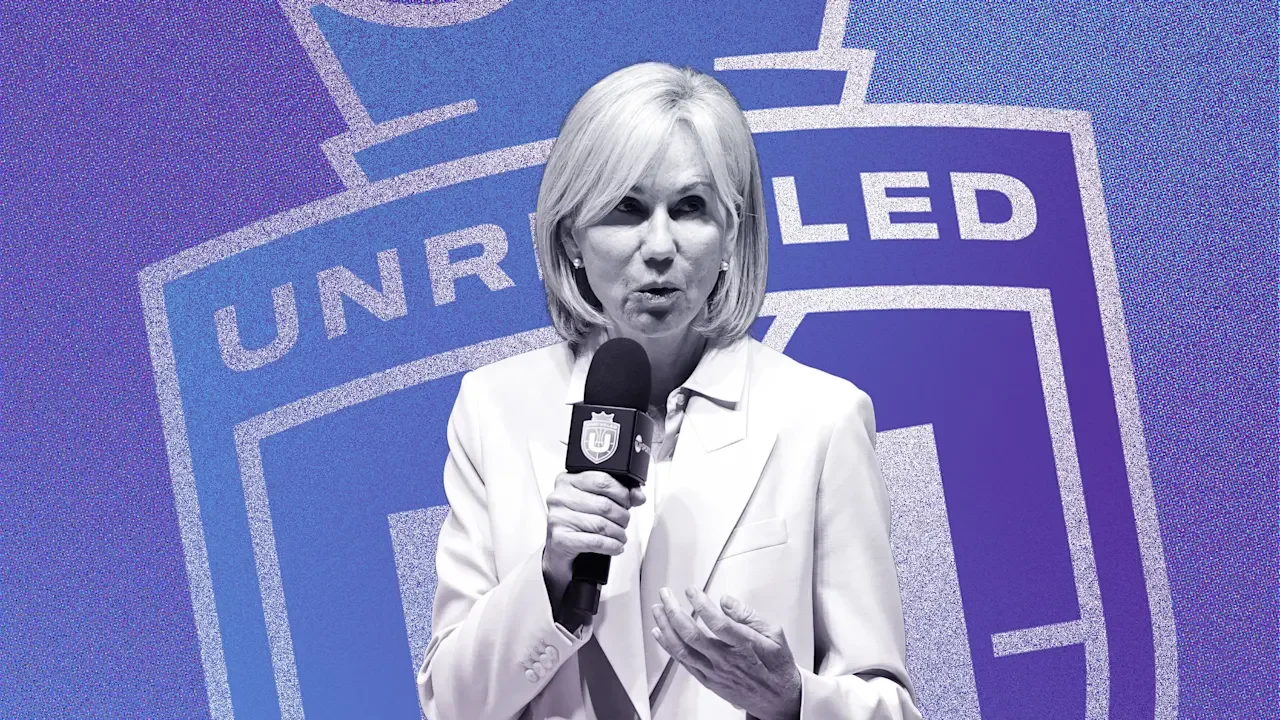
Women’s sports continue to thrive. Record-breaking WNBA viewership, a flood of new brand investment, and now Unrivaled: the women’s basketball league built by players, for players. Commissioner Micky Lawler pulls back the curtain on what it really takes to launch a high-stakes sports startup in the full glare of the public eye. The question is no longer whether women’s sports can compete. It’s how fast they can grow. This is an abridged transcript of an interview from Rapid Response, hosted by the former editor-in-chief of Fast Company Bob Safian. From the team behind the Masters of Scalepodcast, Rapid Responsefeatures candid conversations with today’s top business leaders navigating real-time challenges. Subscribe to Rapid Responsewherever you get your podcasts to ensure you never miss an episode. I first came upon Unrivaled last year around this time. I’m a basketball fan, but other 3-on-3 leagues didn’t really connect for me. But Unrivaled, it grabbed my attention right away. The format, the players, the model of playing in one location in Miami, adopting what the WNBA did during the pandemic bubble, it’s fun. You felt what I felt when I first heard about it. I loved it from the start. I could see it, I could feel it. And what’s not to like about the name, Unrivaled? And the timing for the league when it came out was great. It was just as the Caitlin Clark mania was surging, although I know Caitlin hasn’t competed on Unrivaled. But women’s leagues overall were accelerating, the WNBA, the NWSL. How much did that timing matter for you? Look, I’ve spent a lifetime working in professional sports, and in particular in tennis, most of it in women’s tennis, and so I could see the momentum. And sometimes the world has a way of working in mysterious ways, because the timing was also perfect for me, having just retired from the WTA. Were you into basketball before this? I mean, your life was obviously tennis, so that was where your time and your energy was focused. When you work in sports, it’s your microcosm, so I was very familiar with the opportunity of women’s basketball, and I always loved it. When my kids played sports, basketball was my favorite season because it’s so much fun to watch. And I did play in high school, very badly, so basketball was not entirely foreign to me, but it’s like you lived in San Francisco and now you’re moving to New York. It’s the same country, but it’s two very different cities. Does that make sense? Yeah. Part of Unrivaled’s appeal for the players is financial. WNBA salaries remain modest. Players generally have to look for other paying gigs in the off-season. It’s why Brittney Griner went to Russia. You’re offering sort of an alternative to going overseas. Your salary pool isn’t enormous, but there are other benefits, including equity. This is part of the selling point to the players is the financial opportunity, and I guess the vibe in Florida where Unrivaled happens. As a professional athlete, when you are competing six months of the year, you need to have another source of competition. Income, yes, but also competition. You need to stay sharp, you need to stay in shape, you need to keep working on your craft, on your game. So both Breanna and Napheesa are mothers, and for them it was increasingly difficult to go overseas for three months, and also for their own brand exposure in the market. So we looked at this as a way to really build the entire ecosystem of women’s basketball and support what clearly is a very interesting league, which is the WNBA. SAFIAN: Yeah. You’re separate from the WNBA, right? LAWLER: Yes. Yes. But as you say, you travel in these concentric circles with players and media partners and sponsors. How do you approach that relationship? Well, we have 54 WNBA players here in-house, so our approach is to really deepen the focus on players, getting them into the public eye. And so, we hope that this is all very, very positive and good for the environment in which the WNBA operates. So the relationship is complimentary. You’re deep into Unrivaled’s second season. The playoffs start February 28th, the end of the month. The business of the league keeps evolving. More sponsors, more facilities, more teams. You added the 1-on-1 tournament mid-season, took the league on the road to Philadelphia, and the semi-finals will be right near me at the Barclays Center in Brooklyn. This sort of business roadmap, how does it compare to your efforts growing the WTA? How much do you look at and focus on, what’s the lowest hanging fruit, what’s easiest to get versus long shot plans? At the WTA, you have a structure where owners, tournaments, and players sit on the same board. There’s a 50/50 ownership. The players, they’re not contracted by the WTA, so they are self-employed and they have their own commercial rights. So the tour has to try to elevate the whole thing with limited assets, getting to a point that perfects the pressure on the players, not overstressing them, but you also have to answer to players number one to 250. And the number one is going to play many more matches. But in any case, it’s a lot to juggle. Over here you’ve got a clean slate and you’re giving players real equity from the start. So the players were very, very fast to understand that the more Unrivaled grew, the better for them from every angle. The more that they could participate in telling brand stories, the more their own story would be relevant. So it’s completely different because you don’t have to argue about the value of social media like we did with the WTA many years ago. We need to change the media requirements from a post-match interview to giving some time to the social side. In tennis, that took a long time. Here it’s front and center. They want to be doing it. They understand the holistic side to the business, that it’s not just about being a phenomenal basketball player. You have to be good at social. You have to serve the press, serve all your fans, create an environment that is community. If I had any doubt that this was going to work, well, that was quickly gone because of the intensity of the fans and the intimacy. Sephora Arena is a place where you come to be very happy and entertained, and you see just stellar performances. The players are aware that it’s a start-up, but they’re also aware that everything goes to serve them. We are highly, highly focused on making sure that they have everything that they need. Having two player founders in Breanna and Napheesa, we know they need a glam room. They need, of course, a weight room. They need training, and a very good training room and a training team. The best childcare. Saunas. Infrared for inflammation and recovery. I can’t do it justice. I loved the 1-on-1 tournament that happened. Yeah. When you go to the players and you say, “Hey, what about doing a 1-on-1 tournament?” Are they like, “Oh, that’s great. We play 1-on-1 against each other all the time,” or are they like, “Oh, I don’t know. It’s more work for me”? Both. You have the players that shy away from it a little bit, but once they play, they’re all-in. And it is, again, the crowd was so into it. The men talk about it, how much they would love it, and so we did it. And these women, they leave no stone unturned. They fight. Well, that was part of what I loved about it. They looked exhausted. You could physically see they’re not dogging this. Sometimes in an all-star game, you can tell the players are a little sort of – they’re in it. Totally in. Personally, in year one I thought, “Oh my gosh, this is starting to look like a tennis tournament. Is this the right place?” But it has been a big success. Players love it. View the full article
-
Some bad news for all the mutual fund managers out there: A new study from researchers at Harvard Business School seems to support the fear that artificial intelligence and machine learning could do their jobs. But here’s the catch—with only about 71% accuracy, depending on how predictable their trades are. The working paper “Mimicking Finance” from Lauren Cohen, Yiwen Lu, and Quoc H. Nguyen, published this month by the National Bureau of Economic Research, finds “that 71% of mutual fund managers’ trade directions can be predicted in the absence of the agent making a single trade.” The paper goes on to say, “For some managers, this increases to nearly all of their trades in a given quarter. Further, we find that manager behavior is more predictable and replicable for managers who have a longer history of trading and are in less competitive categories.” What does that mean? Basically, that the trades of more senior managers, especially those who are in less competitive areas, are easier to mimic (and thereby, those jobs might be easier to replace with AI). The findings are based on data the researchers analyzed from 1990 to 2023 that took into account the size of the fund, the broader economic indicators, and investor flows. Perhaps what’s most alarming for mutual fund managers, though, is the paper’s conclusion: “For some managers,” AI predicted “nearly all of their trades in a given quarter”—which is the equivalent of a mic drop. However, there are a few big caveats. The paper finds that the larger the ownership stake of the manager in the fund, the less predictable their behavior. It also found less predictable managers strongly outperform their peers, while the most predictable managers significantly underperform. Even within each manager’s portfolio, the research shows “those stock positions that are more difficult to predict strongly outperform those that are easier to predict” (a bright spot for fund managers who want to keep their jobs). The study is significant because it explores which tasks could be automated using AI, and how that could affect jobs in the financial sector. It estimates the U.S. asset management industry to be worth about $54 trillion. View the full article

-
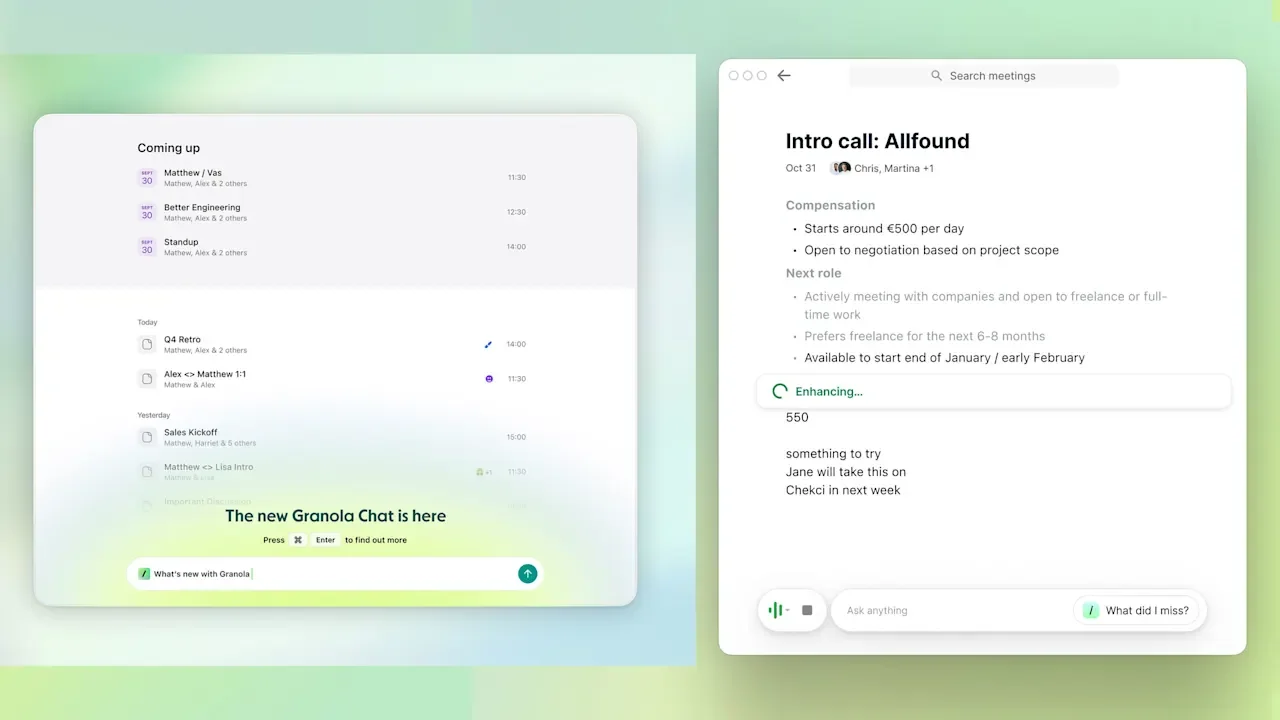
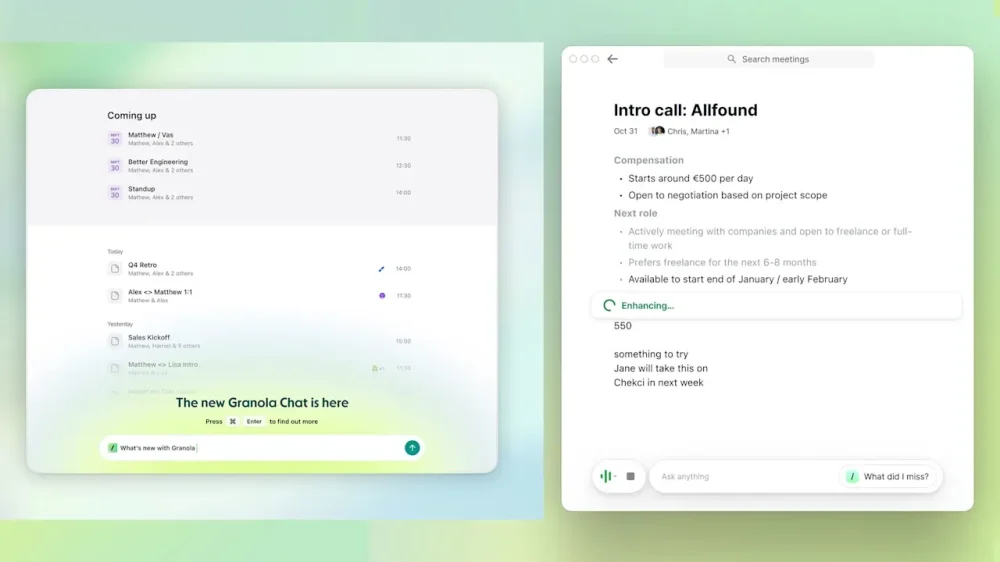
Early drivers steered cars by pushing a lever left and right. That was fine at slow speeds, but disastrous when you accelerated. It took years before the steering wheel arrived. Granola CEO Chris Pedregal says AI interfaces are still in the lever era. Pedregal, who in 2019 sold the edtech startup Socratic to Google, says we’re just beginning to figure out how humans should interact with AI. Three years after the launch of ChatGPT, people still associate AI with typing into a chat box. Granola is betting on a new approach to AI-enhanced note-taking. The London-based startup doesn’t record audio or video or send bots into your meetings. Instead, its tool sits on your computer or phone, transcribing in real time while you maintain control. Chris Pedregal You can jot notes alongside its transcription, building a personal knowledge base instead of a raw archive of recordings. The viral spread of its tool helped the company raise $43 million last year, bringing its total funding to $67 million at a valuation of $250 million. It’s also grown from a team of 4 to 35. Fast Company spoke with Pedregal about the “steering wheel moment” still ahead for AI interfaces and the surprising ways people are using Granola to take notes on everything from therapy to vet visits. The conversation has been edited for length and clarity. You’ve described Granola as a steering wheel for large language models. What do you mean by that? I think it’s very, very early days in this new wave of AI, particularly on the user interface interaction side of things. The technology developed very quickly, but it takes human time to figure out the right interaction patterns. I looked it up—it was over three years from when the iPhone came out to when Instagram launched. I think we’re in that time period right now. People might be like, ChatGPT has been out for three years, and we’re still just dealing with chatbots. Is that the end of it? I think it’s just early days. Early cars were driven with a lever, literally a stick that you’d move left and right to steer. It was fine if you’re going slowly, but the moment you started going quickly, it was easy to go off the road. It took quite a while for them to develop the steering wheel. Once they figured out the steering wheel, it became very natural and it stuck. AI interfaces are still in their lever era. Granola deliberately doesn’t record audio. Why make that choice when competitors do? Granola doesn’t record audio by design, which is probably annoying if you ever try to use Granola for interviews. But it makes it less invasive for work conversations, because really what you want are the notes. The goal is not to have an audio recording. The way I think about it is: What’s the minimum amount of invasiveness for the most value? That’s how you have to thread the needle. AI is here, we’re all going to be using tools like this in the future because they’re so useful. But what are the norms? What’s the thoughtful, ethical design of these tools so that we maximize the gains for the cost? How is Granola different from Otter, Fathom, and other meeting notetakers? It all really comes down to this: Granola feels like a tool that lets you be your best self in meetings. The operative word there is tool, and that means you control it. You can write your own notes. When the AI generates notes, you can edit them. The AI is subservient, augmenting your abilities. It’s your personal place where you have all this information. I think a lot of the other tools—Otter is like 9 years old at this point—are really about meeting capture, meeting recording. You log in and here’s all your meeting recordings. That’s useful, but it feels very different than when you open Granola. It’s like, here’s my personal context where I can ask questions. It’s not really about the meetings. It’s about the notes, the knowledge inside of it. As we look towards the future, Granola and those other tools are going to look more and more different. I see Granola as being much more of a contextual workspace where Granola has all this helpful context about you. Now if I need to go write an article or a blog post, or institute some process changes inside the company, I will go into Granola and write that first draft because it has all that context. I can’t imagine doing that in Otter or Fireflies—it just doesn’t feel like the right place for it. You’ve found that mixing work and personal contexts in Granola is actually more useful. Why? Right now, I use Granola for all my work meetings, therapy sessions, and logistics conversations about my life. If you had sat me down two years ago and asked if that’s really useful, I would have said no—I want those things separate. It turns out when you’re asking Granola questions, it having a 360-degree view of different things that are going on in your life is very useful. When you’re making decisions, you’re weighing all those constraints and priorities—not just the ones tied to this specific project at work. I was just at the vet this morning, and I used Granola because it’s my mom’s cat and I’m not going to remember exactly what the vet says. Moments like going to the doctor, parent-teacher conferences, talking to a construction worker or plumber—any situation where there’s sometimes technical language that’s really important to get right, that you’re not familiar with—are incredibly valuable to capture accurately. There’s a different question around data ownership. I don’t necessarily want my company to have my therapy notes. But as models get better, the AI having access to the right context makes all the difference in terms of the quality of the response. What’s appropriate etiquette around recording conversations with Granola? I think right now, the etiquette is simple: Ask. I imagine that the norms around this will change quickly, but it will remain very situation-dependent. Inside our company, it’s expected that meetings are Granola’d unless someone asks not to be. But in social environments the norms will be very different. I’ve tried some of these pendants that record everything, and the idea of wearing those at a party just makes me feel a bit icky. I also think the video conference providers will adapt and make it easy to show meeting participants that you are using something like Granola, so you won’t have to think about it. I think it really comes down to the social nuances of the situation. I usually frame it simply: Talk about it in terms of notes and transcription. “Is it okay if I take notes? This thing will transcribe so I don’t forget the important stuff you say.” That’s basically what I say. What’s been your biggest mistake as you’ve grown Granola? The biggest mistake I’ve made so far was that we didn’t grow the team fast enough. We had product-market fit in a fast-moving space, and I didn’t recognize that early enough. By the time I did, we were drowning in user tickets, requests for billing—all the kinds of stuff that happens when you grow. There were only four of us on the team when we launched the product. I was trying to use my playbook from my last startup—keep the team super small, grow slow and steady. [I realized] that’s great, Chris, but actually the world wants this and you have to respond. I thought growing quickly meant sacrificing how thoughtful we could be about product, and I wasn’t reactive enough. We’re 35 people now, and most of that has happened in the last couple of months. What are some surprising ways people are using Granola? All the personal stuff was surprising at first—therapy, vet visits, parent-teacher conferences. Then there were these founders early on who used Granola as their collective brain. They logged in with the same account and would record every conversation they had because they were early in their startup—every brainstorm, every argument. It became a single shared memory between the two of them. One user followed this famous sales methodology where every conversation falls into one of 14 buckets. He created very specific templates for each bucket, and at the end of the meeting he’d select the right one. Granola would basically spit out all the next steps to win that deal based on that framework. He encoded his entire sales process into it—super intricate. I didn’t see that coming. View the full article
-
Ten years ago, I ended a meeting at WeWork with an offer to grab a free beer on tap. Last week, I ended it with a similar offer, except this time the beverage on offer was kombucha. The seemingly innocuous shift is symbolic of a bigger evolution underway at the coworking giant: less coolness, more functionality. WeWork is growing up, and its newest location in downtown Manhattan is the most visible proof yet: 250 Broadway, which opened in January, is WeWork’s first outpost in the city since 2019—the year WeWork abandoned its initial public offering and ousted cofounder Adam Neumann as CEO. The space adds 60,000 square feet to the company’s New York portfolio, which already exceeds 3 million square feet. And it’s yet another outpost in a global network that now spans 600 locations worldwide. Except this isn’t WeWork as you might remember it: There are no neon signs, no beer o’clock, and no ping-pong tables. Instead, the walls are hung with paintings sourced through ArtLifting, an art consultancy that works with artists living with homelessness or disabilities. The bar is stocked with kombucha and espresso machines. And the once-labyrinthine corridors you could navigate only by asking for directions are now marked with pristine wayfinding signs. This is WeWork 2.0, and it’s already a hit: 250 Broadway is 94% occupied across five floors—including one that won’t open until spring. The rise and fall (and rise again) of WeWork WeWork’s story is by now a familiar parable of Silicon Valley excess. Founded in 2010 by Neumann and Miguel McKelvey, the company spent a decade expanding on billions from SoftBank’s Vision Fund—a Saudi-backed mega-fund that poured tens of billions into high-growth tech startups like WeWork—along with a cultish faith in Neumann’s vision of community as business model. Then came the botched IPO in 2019, a belated stock market debut that failed to turn the tide, and, in November 2023, a Chapter 11 bankruptcy filing. By the time WeWork reemerged in June 2024, it had shed roughly $4 billion in debt, closed hundreds of locations, and installed global commercial real estate firm Cushman & Wakefield veteran John Santora as its new CEO. WeWork 2.0: From cool to functional The seeds for WeWork 2.0 were sown in 2019, but according to its chief design officer, Ebbie Wisecarver, the company hadn’t reset its design values until last year. Today the goal is for WeWork locations to feel familiar and engaging. But where previous locations stuck to a recognizable WeWork brand (think: industrial loft meets Brooklyn coffee shop), new locations are designed to feel timeless rather than trendy. “WeWork’s culture and what it stands for has evolved,” Wisecarver told me during a tour of 250 Broadway. “I don’t think it’s diminished this idea of community and connection, I just think we’ve adapted in a lot of ways to providing more spaces that are more suitable for what people are doing there.” Before 2019, every location had to conform to a prescribed aesthetic, “and I think that actually restricted some locations from really being what they could be,” she said. Now the design team isn’t afraid to go slightly off-brand if the building calls for it. At 250 Broadway, the team drew from the history of Lower Manhattan itself. The iconic Woolworth Building—visible from nearly every office window—is echoed in the space’s stone tile floors and its art deco-style reeded glass dividers. The sconces lighting up the lounge area were sourced from Brooklyn-based lighting design studio In Common With, while much of the furniture was made by New Jersey millwork firm Bestmark. The upgrades, however, go deeper than aesthetics. Private offices, once outfitted with wooden floors that members complained amplified noise, are now carpeted. The mothers’ room—historically a corporate afterthought—has been given a window with a view of Manhattan. Even the phone booths, supplied by office design company Room, have been rethought and positioned in clusters near lounge areas rather than scattered across the floor. According to Wisecarver, that was a direct response to members asking for quiet spaces adjacent to communal ones. A flexible workspace for the post-COVID era The 250 Broadway location came about in part by necessity: WeWork’s lease next door, at 222 Broadway, was expiring as the building converted to residential. But the timing of what WeWork has built there speaks to something bigger than a single office move. Since the pandemic, the way we work has fundamentally changed—perhaps permanently. The old WeWork, with its beer taps and open-plan optimism, was a result of working styles before COVID-19. Now hybrid schedules have made flexibility a baseline expectation rather than a perk. Workers want spaces that are quiet when they need focus and communal when they need connection—sometimes within the same hour. WeWork’s new design strategy is a response to that shift. Today WeWork’s numbers suggest the office isn’t as dead as some proclaimed it would be. Across New York City, WeWork’s occupancy sits at 82%, with Midtown running at 90%. Globally, the company has climbed from 70% to 77% occupancy and is targeting 80% this year. Several markets are already well past that threshold: Dublin’s One Central Plaza is at 100%, Barcelona and Milan are both north of 90%, and Toronto has jumped from 73% to 85%. (San Francisco sits at 76%, up from 64%). The problem is, while WeWork once revolutionized coworking, competition has never been stiffer. Industrious, acquired by CBRE for $400 million in early 2025, has built a premium alternative that competes directly for enterprise clients. IWG, the parent company of Regus and Spaces, has long been profitable where WeWork was not. And in WeWork’s own backyard in New York City’s financial district, WSA has bet that blending coworking with arts programming and cultural events is the next frontier of flexible work. Which may be exactly why 250 Broadway feels more like a thesis statement. This summer, WeWork is opening a new location at 245 Fifth Avenue in Manhattan’s NoMad neighborhood. A new floor is being added to its 1 University Avenue location in Toronto. Upgraded offices are also coming to 1201 Wilson in Washington, D.C. Underpinning all of it is a commitment to reinvest roughly $80 million annually in modernizing its portfolio—a figure the company spent in 2025 and is repeating again in 2026. Only time will tell if the thesis will prove out across these future locations. View the full article

-
Lindsay Hoyle admitted his tip to police prompted arrest of Lord Peter MandelsonView the full article
-
Deal to collaborate on atomic energy, AI and quantum computing was paused as part of wider trade wrangling View the full article
-
Through the end of the 2010s, people were a company’s infrastructure. Large workforces provided the scaffold upon which a business could build capacity for complexity: hire more people, take on more work. Artificial intelligence has upended this relationship, decoupling a company’s potential productivity from its headcount and redefining which businesses will fare best. As a result, America’s mid-sized companies are disappearing: the number of businesses with between 250 and 499 employees has fallen by 22.5% since 2020. Meanwhile, the independent professional economy is quickly growing to take their place: 30.4 million U.S. solopreneurs (businesses with a single employee) now collectively generate over $1.75 trillion in output, rivaling that of larger firms. As mid-size companies dwindle, their economic role will be replaced by individuals using AI as their infrastructure. The next five years will see the rise of an entirely new model of work, one in which savvy service professionals—from lawyers to plumbers—will operate at a scale previously possible only for mid-sized or even larger companies. EXPANDING SOLO WORK When surveyed, entrepreneurs note that they spend 36% of their working hours on administrative tasks, leaving little capacity to think about business growth or transformation. Single process automations have historically helped to free up some of this brain space, but AI does this on an entirely different level. Pearl’s proprietary research shows 50% of white-collar workers believe AI could handle over half of their job responsibilities in the next five years. For a new crop of solopreneurs, AI will completely assume their burdensome administrative work. But AI won’t be just another “force multiplier” akin to digitizing invoices in QuickBooks or tracking a customer’s status in Salesforce. For solopreneurs, AI will add entirely new forces, equipping them with super agents to expand their business to the heft of a mid-sized firm while leaving them room to focus on mastering their craft. Middle-sized companies used to occupy a protected niche, gathering trusted groups of professionals to offer formalized work too specialized for large enterprises and too complicated for solo workers. Now, a solopreneur can harness the power of a 250-person firm, not by replacing hundreds of employees but by using AI to replicate the coordination that previously made this size staff necessary. THE DIGITAL WORKFORCE Solopreneurs will match the quantity and quality of work of a mid-sized business by assembling a digital workforce to coordinate across five distinct categories: Sales and Marketing The solopreneur already has a distinct advantage over mid-size companies in acquiring customers: their singular voice. AI helps them extend this voice to find new leads far beyond their network and maintain sales relationships at a capacity far higher than what one person can manage alone. Businesses are currently using AI to make faster marketing decisions and even automate entire workflows, such as sending tailored emails to capture a potential customer who has abandoned their cart and tracking the results. Future sales and marketing will hand off even more of the strategic work to AI, allowing it to lead entire accounts, negotiate pricing, and derive new messaging based on real-time customer signals, all to extend a professional’s personal reach. Research For client work already secured, solopreneurs are using tools like Perplexity’s Deep Research to create expert-level briefs in minutes, earning the company an $18 billion valuation from investors betting on AI-driven knowledge work. From synthesizing multiple earnings call transcripts to surfacing the latest news on competitors and novel techniques, AI is giving sole proprietors access to an exponentially wider breadth of knowledge and eliminating the fluff so they can absorb only the most consequential information. As AI matures, it will help solopreneurs continually update a research memory bank, question initial output for factuality, and flag missing data. Execution For a legal issue, for example, customers would rather avoid paying for the overhead of a large firm and work solely with the most experienced lawyer. AI’s execution power finally enables this, connecting trusted experts directly with customers. The most advanced sole proprietors today compete with mid-size companies by running multiple specialized agents, automating workplace tasks like drafting informed email responses, summarizing meetings through different expert lenses, and preparing tailored reports. Already, U.K. civil servants have reported that they save an average of two weeks per year with similar AI automations. In the next five years, AI will evolve from requiring explicit instructions to only needing intent. Instead of requesting email drafts for review, a solo lawyer might ask AI to “keep a client warm” or “move this deal forward” and let an agent do the rest. Humans will still play the most important role, consulting on nonnegotiable accuracy checks and strategy decisions. Compliance Though famously unsexy, compliance is essential to company growth and what keeps many smaller firms from venturing outside their core pursuits. With AI anticipating compliance issues, solopreneurs can more quickly expand into new areas of business, rivaling larger firms whose governance teams protect them in these pivots. AI compliance platforms already track and map relevant changing regulations, allowing solopreneurs to keep up with shifting legal obligations without a large compliance team. What will come next is AI-generated audit trails and compliance assessments for real-time operations, shifting the work of keeping a company in line completely into the background. Management Coordinating an entire infrastructure of autonomous agents will be essential to scaling a business with only one human employee. The startup period will likely be much more extensive than for a human-staffed company, with the solopreneur needing to define a vision for the business and reiterate it to management agents to get processes right. When management agents are finally aligned with the company leader, they’ll be able to predictively schedule subordinate agents, balance workloads, and uplevel important considerations before they turn into problems. Today, an AI agent can launch tens of others to complete a complex process. Tomorrow, a network of management agents will continuously reprioritize work to meet the solopreneur’s long-term goals. SCRAMBLING THE PROFESSIONAL FIELD Rather than a distant vision, the multi-million-dollar solo business is already here. In just six months, Maor Shlomo alone built vibe coding platform Base44. He garnered tens of thousands of customers and sold it to Wix for $80 million. Meanwhile, 50% of global freelancers are already earning more on projects when they use AI tools. 62% of GenZers are interested in starting their own business so America can expect a continuing increase in sole-proprietor firms from the next generation of knowledge workers. However, not every professional will be equipped to immediately become a solopreneur. They will still need training grounds like enterprises, continuing education programs, and peer mentorship to hone the expertise necessary to justify staking out on their own. What AI has changed is that anyone in the professional sphere can now go solo, they just have to choose the right moment in their career. Even as more Americans consult AI for advice, they will continue to seek out human experts for the best service. Increasingly, however, these professionals will be powered by AI infrastructures complex enough to rival mid-sized firms. View the full article

-
Say what you will about business and media mogul Kim Kardashian, but if there’s one thing she undoubtedly excels at, it’s building a personal brand so recognizable that all of her ventures scream “Kim.” She’s done it once again with her new energy drink brand Update, which looks like it could’ve organically spawned in the walk-in fridge of her sleek Los Angeles home. Update is a four-year-old energy drink brand founded by CEO Daniel Solomons. On February 24, the brand revealed a full packaging and design overhaul and introduced Kardashian as a cofounder in its new era. In an interview with Fast Company, Solomons said that Kardashian had been a steady customer since 2023 and began offering feedback on the brand’s formula and packaging, which ultimately led to her formally joining the team. In addition to Kardashian’s sign-on, Update also announced a 4,000-store distribution deal with Walmart, which will begin on March 1. This isn’t just a celebrity brand endorsement. Since joining Update, Kardashian has worked closely with the team to completely rethink Update’s branding, taking it from what Solomons describes as a “masculine tech bro” look to a can that feels perfectly natural in Kardashian’s hand. This shift taps into the refined personal brand that Kardashian has built over the past several years—one that’s perhaps most exemplified by her ultra-successful apparel company Skims, which embraces simple, minimalist shapes; a color palette of neutrals offset by pops of pastels; and a futuristic yet grounded ethos. For Kardashian, Update is essentially Skims in a can: a drinkable version of the aspirational aesthetic that’s at the core of all of her business ventures. Onboarding the right agency for the jobDesigning a modern energy drink is no small task. The energy drink aisle is notoriously crowded, and it’s only getting busier as functional beverages take off among wellness-focused young consumers. According to the agency Grand View Research, the global energy drinks market was estimated at $79.39 billion in 2024 and is projected to reach $125.11 billion by 2030. To design a beverage that would actually stand out on shelves, Update turned to an agency with a healthy background in thinking up breakout brands for saturated markets: Day Job, the design wizards behind brands like Fly by Jing, the adaptogen drink Recess, and the viral protein bar brand David, which recently exploded in popularity in no small part due to its ultra-minimalist, refined look. “The lesson we take from the success of naming and branding David is that a brand doesn’t need to be your friend,” says Rion Harmon, Day Job’s executive creative director. “It just needs to be very, very good. People want excellent products. And it’s okay for your branding to reflect that.” For Update, that meant leaning into Kardashian’s tonal, minimalist aesthetic that aspirational shoppers are already familiar with, rather than attempting to design an energy drink for the everyman. Designing a drink that “feels like Kim, without saying Kim”Update’s original branding included a palette of bright (almost neon) metallic hues, paired with a stenciled wordmark and some highlighted nutrition info. The overall look was akin to a beverage one might expect to see in the Tron universe or in a gamer’s stream—needless to say, it was far off base from something Kardashian might design. “The category of energy drinks is extremely loud,” Harmon says. “Lots of color, lots of neons, lots of overlapping graphics, lots of chaos.” But, according to Harmon, Kardashian had a vision for the brand as soon as she joined the team. She wanted it “to express a clean, premium futurism to reflect the innovative approach to energy,” he says. (Update’s formulation relies on the ingredient paraxanthine, a molecule that the body naturally converts into caffeine—which the brand says gives its products a less jittery feeling.) Day Job took this concept and spun it into a variety of different cans, all totally different in their approach to logo, layout, type, and color. Kardashian then selected her top cans and provided the team with specific notes for each. “She was very involved, from initial vision to minor refinements, creative directing all along the way,” Harmon says. “She has a very sharp eye, her feedback is always clear, she has real aesthetic vision, but she’s collaborative as well.” The final design brings together a palette of muted metallic blue, pink, maroon, and yellow, all of which look like they could star in the next NikeSkims collection. As it did with the packaging for the protein bar David, Day Job minimized any text on the cans to the barest of bones, leaving only subtle notes on flavor, calories, and sugar content. They replaced the techy logo font with a bolded sans serif. Harmon calls it a “nearly non-logo”—something simple and default, but with a reflective materiality to evoke futurism. In sum, Update is a beverage that would look perfectly natural next to a pair of ballet-core joggers—or nestled in Kim Kardashian’s expertly manicured hand. “Kim’s body of work has a recognizable quality, and that’s something we wanted to inform the brand identity,” Harmon says. “It needed to feel like Kim, without saying Kim. We wanted to find the line between something that fits in her fridge, and the fridges of Walmart.” View the full article

-
As the Barack Obama Presidential Center takes shape ahead of its June 2026 opening, some observers have pointed feedback about an element of the building’s design. The Chicago tower features all-caps lettering that wraps around two sides of the building. But for many people, the text—an excerpt from the former president’s speech in 2015, on the 50th anniversary of the marches from Selma to Montgomery, Alabama—is nearly impossible to read. Its designers say legibility isn’t the only—or even the primary—function of the lettering. “One of the key questions I asked at the beginning was, are people supposed to read this?” says designer Micheal Bierut, who typeset the lettering with a team at Pentagram, led by designer Britt Cobb. “Is legibility the primary goal here? Do we want people to be able to stand on the ground, look up at this tower, and read those words? And that was discussed on the client end, and the answer came back, ‘No, it should have the promise of meaning, it should be decipherable, everything should be spelled right and it should make sense.’” Letters as texture Early concepts of the Obama Presidential Center designed by Tod Williams Billie Tsien Architects (TWBTA) showed a perforated upper section depicted in drawings as an abstract, irregular pattern. At one point, architects considered filling the space with a bunch of words, like a word cloud, though that idea didn’t feel quite dignified enough for a presidential library. Instead, they decided to use an excerpt from one of Obama’s speeches. “Just as a million people go to the Lincoln Memorial, some of them will stand and read every word of the second inaugural; some people will just admire the statue in the building and kind of take it in, and a couple of words will jump out, but not the whole thing,” Bierut tells Fast Company. “It’s in that tradition that I think we were operating.” The function of the feature is to serve as a space on the building that would be illuminated to the outside at night; from the inside, it’s a viewing area. Bierut says it was “never intended to look or feel or communicate as an applied sign stuck on the building.” It’s part of the architecture, not separate from it. Not everyone is a fan, though. Chicago Sun-Times architecture critic Lee Bey wrote on X that the text was “tough to read to me, giving off the lorem ipsum vibes,” referring to the Latin dummy text designers use as a placeholder when typesetting, while other X users joked the full quote can only be fully read by a drone as a dual dig against the design and against the Obama administration’s drone warfare program. Chicago Tribune Typesetting an architectural feature The words are load-bearing, which added an element of complexity to the design process. “We’re moving around typography, adjusting letter sizes and letter spacing, and suddenly you’re typesetting 5-foot letters that are bearing tons of weight,” Cobb says. “It gets to a point where it becomes [more] about structural design. . . . I might say how I wish that letter could be three inches closer, but no, sorry, it’s bearing all this weight. It’s got to be here instead of there.” The letters are set in an adapted version of Gotham, Obama’s presidential campaign font, and the excerpt comes from one of Obama’s most famous speeches as president. Given at the Edmund Pettus Bridge, the National Historic Landmark where police attacked civil rights marchers on Bloody Sunday 1965, Obama tied Selma to the broader American story in his speech. The excerpt reads: “You are America. Unconstrained by habit and convention. Unencumbered by what is, ready to seize what ought to be. For everywhere in this country, there are first steps to be taken, there is new ground to cover, there are more bridges to be crossed. America is not the project of any one person. The single most powerful word in our democracy is the word ‘We.’ ‘We the People.’ ‘We Shall Overcome.’ ‘Yes We Can.’ That word is owned by no one. It belongs to everyone. Oh, what a glorious task we are given to continually try to improve this great nation of ours.” The text as it appears on the building wasn’t designed to be a billboard or read as a speech. It’s a pep talk to America. You are America. We the people. Yes we can. Even if glanced only in snippets, these words still hold power. View the full article

-
The impact of GLP-1 medications on weight loss is undeniable, but emerging research suggests the results may only be temporary. A growing body of evidence shows that when patients stop taking GLP-1 drugs, much of the weight they lost returns—and so do the medical complications that may have prompted treatment in the first place. “The only way that they work is if you keep taking them,” Scott Isaacs, an endocrinologist at the Grady Health System in Atlanta, told Market Watch. “And when people stop taking them, they have a lot of weight regain, and the medical problems that went away tend to come back.” New research from the University of Oxford found that weight is projected to return to pretreatment levels within about 1.7 years after stopping medications. Improvements in cardio-metabolic markers—including blood pressure, cholesterol, and diabetes-related indicators—also trend back toward baseline within about 1.4 years after cessation. The recognition that long-term benefits depend on a patient’s willingness to remain on the medication has become increasingly widespread, both as patients experience these changes firsthand and as more research emerges. Oprah Winfrey has spoken publicly about regaining weight after stopping treatment, later saying that using a GLP-1 “is going to be a lifetime thing,” according to an interview with People. However, not everyone is willing—or able—to indefinitely commit to GLP-1s. In a study published last year, researchers analyzed the health records from 77,310 adults in Denmark—where Novo Nordisk, a major developer of GLP-1 drugs, is based—who used Wegovy for the first time. The researchers found that 52% of people stopped taking the drug within a year, pointing to cost and side effects, which have become growing concerns for users worldwide. Patients can expect to pay at least $4,200 out of pocket annually for drugs like Zepbound and Wegovy, an unsustainable expense for many. As it becomes clearer that GLP-1s may represent a lifelong financial and medical commitment, researchers and clinicians are increasingly evaluating more permanent weight-loss interventions, like bariatric surgery and endoscopic sleeve gastroplasty (ESG), according to Market Watch. ESG typically costs around $12,000, while bariatric surgery can cost roughly $17,000. Though still expensive, the one-time nature of these procedures may make them a more appealing option for patients seeking lasting results, according to Bariendo, a network of weight-loss surgery clinics. As evidence continues to surface, patients pursuing weight-loss solutions are facing a central question: whether they are prepared not just to lose weight but to commit to using a medication for life, too. —By Leila Sheridan This article originally appeared on Fast Company’s sister website, Inc.com. Inc. is the voice of the American entrepreneur. We inspire, inform, and document the most fascinating people in business: the risk-takers, the innovators, and the ultra-driven go-getters that represent the most dynamic force in the American economy. View the full article

-
Phoebe Gates, the youngest daughter of billionaire Microsoft founder Bill Gates and philanthropist Melinda French Gates, has a low-key terrifying question she throws at those interviewing for a role at her startup. The 23-year-old recently raised a $35 million Series A for Phia, the AI shopping agent she cofounded in April 2025 with her Stanford University roommate Sophia Kianni. The startup, which has since garnered more than 1 million users and grown revenue elevenfold, is currently valued at around $185 million. Gates recently joined Brian Sozzi, Yahoo Finance executive editor, on the Opening Bid Unfiltered podcast and revealed her go-to interview question for prospective candidates. “I stole this from another founder,” she said. “‘How much do you think California state spends on healthcare? And do a bottoms-up approach for how you would build that out.’” She told Sozzi, “I’ll ask that for every single role. I’ll ask that for sales, I’ll ask that for marketing, I’ll ask that for engineering.” It’s not because she expects candidates to know the answer off the top of their head. Instead, she said it highlights “how someone goes through a logical approach to solving that question.” Curveball interview questions, designed to surprise candidates and test problem-solving ability or performance under pressure, are famously beloved by founders. Microsoft apparently posed the question “Why are manhole covers round?” to interviewees. Elon Musk asked, “You’re standing on the surface of the Earth. You walk 1 mile south, 1 mile west, and 1 mile north. You end up exactly where you started. Where are you?” Many will relate to the panicked feeling that arises upon being asked to sell a pen or divulge their greatest weakness. As entry-level roles become scarcer and the competition for top talent grows fiercer, hiring managers are increasingly getting creative to single out the cream of the crop. Still, researchers have questioned the usefulness of trick questions against other evidence-based assessments. As Phia continues to grow, it’s not the only question Gates has up her sleeve. When it comes to hiring salespeople, she asks candidates the craziest thing they’ve done to close a deal. “That teaches you a lot about how far they’ll go, how dedicated they are to do something,” she said. While Phia has accepted no money from Gates’s parents—“I have a chip on my shoulder,” she admitted on the podcast—she did share one of the most important lessons she’s learned from her parents about entrepreneurship. “From my dad, I’ve really learned that your team is the core of what you’re building,” she said. “You can’t do anything without an incredible team.” View the full article

-
Being a freelance designer has its perks, but pay transparency is not one of them. Designers are constantly forced to second-guess themselves: Should you charge a day rate or a project fee? Are you earning as much as your peers? Is AI taking work/jobs away from you? Today we’re launching a new, data-driven effort in partnership with the American Institute of Graphic Arts to help you answer those questions and more with confidence. It’s called the Design Pricing Transparency Project, and it’s dedicated to helping freelance designers understand how much they should be charging for their work. We’re asking designers across the industry—graphic designers, UX professionals, art directors, and others—to help us gather information by taking a short survey. We want to know what kind of projects you’re working on, how you price that work, and how you’re feeling about the general state of freelancing in 2026. If you’re a full-time or part-time freelance designer (yes, even if you have a full-time job!) we want to hear from you. And we know that getting paid is not a one-way street. That’s why we’re also asking companies that hire freelance designers to tell us what they pay, what they’re projecting for the coming year, and how AI factors into all of it. Our goal is to create a detailed snapshot of the freelance financial landscape. We’ll share the results later this year in a special report. You can take the survey here. View the full article
-
When I worked a corporate job, I was often in charge of purchasing decisions. At one company, my team had inherited a lot of homegrown solutions. I saw the limitations of these products and was quick to replace them if the budget allowed. In corporate settings, “build vs. buy” is a well-known decision framework. Companies weigh the cost of developing something in-house against purchasing an outside solution. It’s often simple math: how much time and resources does it take to maintain this internally versus what does it cost to buy or outsource? Solopreneurs face the same decision constantly. However, the stakes are a lot higher when it’s your own time and own money as decision factors. Knowing when to DIY and when to hire out is one of the most important operational decisions a solopreneur makes—and one that’s hard to figure out until you’ve been through it a few times. When to DIY Not everything needs to be outsourced. Some tasks or projects are worth learning yourself, even if the learning curve is steep at first. The strongest case for DIY is when you’ll repeat the task often, and it touches a core part of your business. Updating the basics on your own website or maintaining your project management tool—these are things you’ll do over and over. If you outsource them, you’ll either keep paying someone else or find yourself stuck when you need to make a quick change. There’s also value in the learning itself because figuring something out makes you a better operator. An example of this might be understanding your business’s financials. Even if you pay a bookkeeper to prepare them, you still need baseline knowledge about your numbers. If you outsource and don’t take the time to understand the output, you’ve created a blind spot in your business. And sometimes, the budget just isn’t there yet. That’s a valid reason to DIY, especially when you’re starting out. But it helps to set a time limit, especially for one-off projects. If you’ve spent a few weeks trying to make something work and you’re no closer to a result you can actually use, that’s a signal to stop and reassess. When to hire it out When I first started my solo business, I created all kinds of assets in Canva. Banners, social graphics—you name it, I made it. But eventually I realized that I’d hit the limit of my design abilities. There was no easy way for me to learn those skills, nor were they a core part of my regular business. So I hired someone to do a design overhaul and create everything for me. Hiring help is a trade. You’re exchanging money to gain back your time (and, quite possibly, your sanity). Often, for a better result than you’d produce on your own. The clearest case for hiring is one-time, high-skill tasks where quality matters. In addition to design, you might hire for legal contracts or tax setup. These aren’t things most solopreneurs will do repeatedly, and the cost of getting them wrong can be higher than the cost of hiring a professional. It’s also worth hiring when a poor DIY result could cost you credibility or clients. A clunky website or an amateur-looking proposal might turn away the exact opportunities you’re working to attract. Here’s a quick filter you can use. Ask yourself: How often will I do this? Does quality matter a lot? Could I earn more in the time it would take me to learn? If the answer to that last question is yes, hiring almost always makes sense. The real cost of ‘I’ll just figure it out’ When you’re solo, your time has a direct dollar value. Every hour you spend learning website design or wrestling with accounting software is an hour you’re not doing client work. That’s a real cost, even if it’s not reflected in your business’s financials. Of course, solopreneurs sometimes can’t afford the upfront cost to hire. That’s a very real consideration, especially in the early days. There’s no universal right answer to DIY versus hiring. But being intentional about the decision—rather than defaulting to “I’ll just figure it out”—is what separates solopreneurs who stay stuck from those who move their businesses forward. View the full article

-
In a time when hiring has slowed dramatically, layoffs have become the norm, and AI has flattened early differentiation, even job titles have blurred. The problem is that capable, experienced people increasingly describe feeling stalled, unseen, or interchangeable in today’s workforce. Consider the current landscape of advice to understand the dilemma. People are encouraged to stand out, but without guidance on how to do so. They’re told to pick a lane and niche down, while careers are becoming more nonlinear. What’s missing is a true strategy that reflects how work actually functions today. That’s where optimal distinctiveness becomes an advantage. Social psychologist Marilynn Brewer introduced optimal distinctiveness theory to explain a fundamental human need: to belong and be ourselves at the same time. People do their best when they feel included, safe, and distinctly valuable. When either side of that equation is neglected, performance and well-being suffer, along with employability. Excessive sameness leads to conformity, disengagement, and muted creativity. Excessive difference leads to isolation, friction, or marginalization. In the middle is optimal distinctiveness: where individuality strengthens the group, rather than competing with it. And it’s a career strategy that meets this moment. Why the Old Career Playbook No Longer Fits the Market The labor market has shifted, but traditional career strategies haven’t. Job growth is uneven and cautious. Early-career workers are being hit hardest, while senior leaders face roles that are broader, less defined, and more fluid than before. In a 2025 Chief x Harris Poll of women leaders, 83% reported that the career success playbook they were handed early in their careers no longer applies to them. Nearly all described making career moves that defied traditional ideas of safety and linear progression. Across levels, the same concern keeps surfacing in different forms. Early-career professionals wonder how to break through. Mid-career professionals worry about staying relevant. Senior leaders ask how to evolve without losing themselves in the process. Beneath these questions is a shared dilemma: People either generalize themselves so much that they become forgettable, or they describe their work in ways so complex that others can’t place them. Neither approach helps in a job market that increasingly rewards clarity and recognizability. Lin-Manuel Miranda, Virgil Abloh, and Staying Distinctive A widely recognized example of optimal distinctiveness in action is Lin-Manuel Miranda. He didn’t succeed by blending into Broadway norms or rejecting them outright. Instead, he fused hip-hop, history, and musical theater in a way that was legible to the industry yet unmistakably his own. His work was distinct without being alienating—and that balance is what made it resonate so widely. A less obvious but equally instructive example is Virgil Abloh. Trained as an architect, Abloh moved fluidly between streetwear, luxury fashion, art, and design. Rather than positioning himself as a traditional designer—or an outsider disrupting fashion from the margins—he articulated a clear intersectional identity. His work was understandable within established systems yet distinguished by his integration of disciplines that rarely spoke to one another. That clarity made him not only recognizable but also referable. People knew when to call him in, and why his perspective mattered. Together, these examples point to the same lesson: Career advantage today doesn’t come from fitting neatly into existing boxes or standing so far outside them that others don’t know what to do with you. It comes from being distinct in a way others can recognize, remember, and place. Optimal Distinctiveness as a Career Strategy At work, optimal distinctiveness means being recognizable enough to be relatable and differentiated enough to be memorable. And it matters more as AI accelerates sameness. Human decisions—whether someone is hired, referred, trusted, or remembered—still hinge on whether someone is easy to understand and clearly valuable. Optimal distinctiveness means using language that’s clear and specific, and often at the intersection of multiple roles or domains. Sarabeth describes herself as a creative disruptor. The phrase is familiar enough to feel accessible, yet specific enough to signal how she works. It gives people an intuitive sense of when and why to engage with her. She sees similar shifts with clients who initially describe themselves through job titles and role-based summaries. One of Sarabeth’s clients was a senior professional with experience spanning strategy, operations, and organizational development. On paper, her profile looked impressive but interchangeable. But when she reframed her work around the intersection of those domains, her positioning became clearer and more distinct. Instead of being “experienced in many things,” she became known as an opportunity-spotter who creates sustainable human systems. Once that intersection was articulated, conversations changed, referrals became easier, and the work itself felt more energizing because the language finally reflected how she experienced her contribution. Connecting Identity to Impact This is where optimal distinctiveness aligns closely with my illumination process. Across leadership development and career transitions, the same pattern shows up repeatedly. People create more impact when they reclaim what makes them distinct, clarify which aspects of that distinctiveness matter now, and express it in service of the collective rather than at odds with it. One of my clients, a senior leader at a global life sciences company, approached me about feeling invisible despite a strong track record. She had been rewarded for reliability and execution, but over time had muted the part of herself that excelled at talent development. Through our work, she reframed her role around that strength and intentionally redesigned how she showed up in meetings and strategic conversations. She didn’t change jobs, but she changed how she was understood, and her influence expanded almost immediately. Innovation doesn’t come from blending in completely, nor from separating yourself entirely. It emerges when people feel secure enough to belong and confident enough to contribute something uniquely their own. Finding Your Optimal Distinctiveness Optimal distinctiveness rarely arises from credential stacking or clever titles. It tends to surface at the intersection of a few core professional identities that you consistently draw on. When people map those identities and ask who they are at the overlap, a form of hybrid expertise often becomes visible—something that doesn’t fit neatly into a single category but feels accurate and grounding. Naming that expertise usually starts with a core noun that reflects how you operate at work—architect, builder, connector, translator, catalyst—followed by language that adds precision rather than complexity. The strongest signals narrow understanding instead of expanding it. Pressure-testing that language in conversation is essential. When it fits, people lean in with curiosity rather than confusion. When it doesn’t, the awkwardness is usually immediate. In a labor market defined by uncertainty, clarity becomes a form of agency. Optimal distinctiveness gives people a way to shape how they’re understood without contorting themselves to meet outdated expectations. The future of work is unlikely to reward those who conform most smoothly or perform uniqueness most loudly. It will favor those who can articulate who they are, how they create value, and why that combination matters now. If multidimensionality is the reality of modern careers, optimal distinctiveness is a practical way to navigate it—staying visible, relevant, and human in systems that increasingly struggle to see people clearly. View the full article