Newsletter
Want to keep up to date with all our latest news and information?


ResidentialBusiness
Administrators
-
Joined
-
Last visited
Everything posted by ResidentialBusiness
-
Since assuming office, the The President administration has upended diversity, equity, and inclusion programs with startling efficiency. Over his first 100 days, President Donald The President has taken a multipronged approach to derailing DEI initiatives across the federal government, academic institutions, and even the private sector. Through an array of executive actions, The President has targeted federal anti-discrimination measures that date back 60 years and threatened to withhold funding from public schools and universities that maintain DEI programs. By explicitly directing federal agencies to investigate private employers, The President’s orders have also had a chilling effect across corporate America—leading a number of companies to cut back on DEI initiatives or at least create the illusion of doing so. As each day seems to bring a new DEI-related action or court ruling, it’s clear that undoing the progress many employers and federal institutions have made on equity and inclusion continues to be a core priority for this government. Here’s a closer look at how The President has chipped away at DEI programs during just his first few months in office: The federal workforce The President has moved swiftly to eliminate DEI programs that are squarely within his purview—namely, reversing the equity requirements that President Joe Biden had put in place during his term. One of The President’s first edicts was an executive order that forced agencies to eliminate all “illegal DEI” efforts. The order explicitly noted that DEI offices would have to be disbanded and roles like chief diversity officer would have to be terminated. The The President administration also told federal workers they were required to report anyone who tried to continue DEI work under a different name—or risk “adverse consequences.” Since The President handed down this order in January, federal agencies have cut at least 428 DEI roles and put those workers on administrative leave, according to The New York Times. (That figure only includes data from the agencies that have publicly reported those job cuts.) Some federal workers who were affected by the cuts claimed their roles had little to do with DEI. Others have said that even their employee resource groups were affected as agencies cracked down on DEI to comply with the executive order. Through other executive actions, The President reiterated the importance of merit-based hiring across the federal government, and that it “should not be based on impermissible factors, such as one’s commitment to illegal racial discrimination under the guise of ‘equity,’ or one’s commitment to the invented concept of ‘gender identity’ over sex.” By rescinding an executive order that dates back to 1965, The President also took aim at a key policy that has been critical to promoting racial equity and curtailing discriminatory hiring practices among federal contractors. For decades, this order has forced the hand of companies that do business with the federal government, compelling them to adopt affirmative action plans that diversified the workforce. With The President’s action, some of the largest employers in the country are no longer subject to those requirements. The education system In recent weeks, The President has ramped up pressure on the education system, fixing his sights on some of the most elite universities in the country. The administration is currently in the midst of a very public fight with Harvard University, stripping the school of billions of dollars in federal funding, in part because of its refusal to amend its DEI policies and admissions practices. (A number of other universities have also been singled out by The President over DEI-related issues and face similar threats to their funding.) Last week, The President pushed through an executive action aimed at college accreditors, who he argues have helped impose DEI requirements on universities. The President’s actions have already pushed many colleges to revise their DEI programs, regardless of whether they have been explicitly targeted: A recent Politico analysis found that more than 30 public universities have either closed their DEI offices or restructured them over the past few years—including the University of Michigan, which was once known for its robust DEI program. While The President’s ongoing battle with higher education has garnered more attention, other academic institutions have not escaped scrutiny over their DEI efforts. In a memo earlier this month, the The President administration ordered all public schools to eliminate DEI programs, again threatening to rescind federal funding. For now, this directive has been blocked by federal judges—and a coalition of attorneys general in Democratic states have brought a lawsuit against the The President administration. Since taking office, The President has also mounted investigations into the public school systems in California, Colorado, and Maine over DEI-related concerns like gender-neutral bathrooms and the rights of transgender students. The private sector Beyond the executive order targeting federal contractors, the The President administration has attempted to exert its influence over the private sector in other ways. In the same action, The President clearly directed federal agencies to investigate private-sector companies over any DEI programs that “constitute illegal discrimination or preferences.” This edict has sparked fear and confusion among corporate leaders, with many executives reportedly losing sleep over the threat of federal investigations. Experts say that a major source of concern has been the lack of clarity around what might be considered “illegal DEI.” The President’s orders have accelerated a shift in corporate America that had already been underway for some time. In the years since the racial reckoning of 2020, many companies have quietly backed away from the DEI initiatives they had seemingly embraced at the time. Since the Supreme Court overturned affirmative action in 2023, however, employers have taken more drastic action in response to conservative activists like Robby Starbuck, who has waged social media campaigns to pressure companies into cutting their DEI programs. Companies like Walmart and McDonald’s have eliminated certain DEI policies and pulled out of the Human Rights Commission’s Corporate Equality Index, an annual benchmarking survey that measures workplace inclusion for LGBTQ+ workers and is often touted by employers. Even tech giants like Meta and Google have made notable changes to representation goals, which had become common practice across the industry. Some DEI experts argue that not all of these changes should be seen as a full-throated rebuke of diversity work. In some cases, employers are merely folding DEI work into other teams or tweaking programs to ensure they are legally sound—not to mention evaluating whether they continue to be effective. “If you see that there’s no longer a DEI title at this company, I think that could be bad news,” Joelle Emerson, the cofounder and CEO of culture and inclusion platform Paradigm, previously told Fast Company. “Or it could be that the company is actually very strategically embedding some of this expertise in ways that are going to have more impact on the business.” In fact, a survey recently conducted by Paradigm found that only a fraction of companies—19%—had actually reduced funding for DEI programs. Still, plenty of companies are now operating from a place of fear, carefully calibrating their external messaging on DEI and in some cases overcorrecting to avoid litigation or excessive scrutiny from The President. The administration’s anti-DEI agenda also seems to be shaping the Equal Employment Opportunity Commission’s priorities under new acting chair Andrea Lucas, who has issued guidance on what the agency considers “unlawful DEI-related discrimination.” In March, Lucas made a controversial decision to send letters to 20 prominent law firms requesting details on their DEI-related practices—four of which have already reached settlement agreements with the EEOC and agreed to drop the term DEI. View the full article

-
The first 100 days of The President’s second presidential term have included a surprising player that doesn’t seem likely to go away anytime soon: Signal. The encrypted messaging platform wasn’t necessarily in the public conscious until last month when top government officials discussed details of an impending military attack in Yemen in a group chat on the platform that inadvertently included The Atlantic‘s Jeffrey Goldberg. The editor-in-chief published a piece called “The The President Administration Accidentally Texted Me Its War Plans” about his shocking inclusion, and quickly set off national interest in Signal. Signal subsequently told Wired that the incident led to a huge uptick in downloads of the app on top of what had already been a “banner year.” Critics argued that if the nation’s top officials were talking about war plans in one chat, there must be other unreported chats. And just a few weeks later, another chat was revealed by The New York Times. Defense Secretary Pete Hegseth, who was on that original Signal thread, also was reported to have shared detailed information about those same forthcoming strikes in another Signal chat that—for some reason—included his wife, brother, and personal lawyer. Signal itself collects virtually no user data on its 30 million monthly users. But it’s still an unsecured consumer platform, often operated on a user’s personal phone, that’s vulnerable to hacks and surveillance. The Associated Press reported last week that Hegseth had an unsecured internet connection set up in his office so that he could use the Signal app on his computer. The app has a feature that allows users to set messages to automatically delete after a set period of time. That’s given some a false sense of security, but this week’s Semafor report on the massive right-leaning Signal group that’s attracted billionaires has reiterated that people can leak messages, and phones can always take screenshots. Turns out, what happens on Signal doesn’t always stay on Signal. View the full article

-
Cancer research in the U.S. doesn’t rely on a single institution or funding stream—it’s a complex ecosystem made up of interdependent parts: academia, pharmaceutical companies, biotechnology startups, federal agencies, and private foundations. As a cancer biologist who has worked in each of these sectors over the past three decades, I’ve seen firsthand how each piece supports the others. When one falters, the whole system becomes vulnerable. The United States has long led the world in cancer research. It has spent more on cancer research than any other country, including more than US$7.2 billion annually through the National Cancer Institute alone. Since the 1971 National Cancer Act, this sustained public investment has helped drive dramatic declines in cancer mortality, with death rates falling by 34% since 1991. In the past five years, the Food and Drug Administration has approved over 100 new cancer drugs, and the U.S. has brought more cancer drugs to the global market than any other nation. But that legacy is under threat. Funding delays, political shifts and instability across sectors have created an environment where basic research into the fundamentals of cancer biology is struggling to keep traction and the drug development pipeline is showing signs of stress. These disruptions go far beyond uncertainty and have real consequences. Early-career scientists faced with unstable funding and limited job prospects may leave academia altogether. Mid-career researchers often spend more time chasing scarce funding than conducting research. Interrupted research budgets and shifting policy priorities can unravel multiyear collaborations. I, along with many other researchers, believe these setbacks will slow progress, break training pipelines, and drain expertise from critical areas of cancer research—delays that ultimately hurt patients waiting for new treatments. A 50-year foundation of federal investment The modern era of U.S. cancer research began with the signing of the National Cancer Act in 1971. That law dramatically expanded the National Cancer Institute, an agency within the National Institutes of Health focusing on cancer research and education. The NCI laid the groundwork for a robust national infrastructure for cancer science, funding everything from early research in the lab to large-scale clinical trials and supporting the training of a generation of cancer researchers. This federal support has driven advances leading to higher survival rates and the transformation of some cancers into a manageable chronic or curable condition. Progress in screening, diagnostics and targeted therapies—and the patients who have benefited from them—owe much to decades of NIH support. But federal funding has always been vulnerable to political headwinds. During the first The President administration, deep cuts to biomedical science budgets threatened to stall the progress made under initiatives such as the 2016 Cancer Moonshot. The rationale given for these cuts was to slash overall spending, despite facing strong bipartisan opposition in Congress. Lawmakers ultimately rejected the administration’s proposal and instead increased NIH funding. In 2022, the Biden administration worked to relaunch the Cancer Moonshot. This uncertainty has worsened in 2025 as the second The President administration has cut or canceled many NIH grants. Labs that relied on these awards are suddenly facing funding cliffs, forcing them to lay off staff, pause experiments, or shutter entirely. Deliberate delays in communication from the Department of Health and Human Services have stalled new NIH grant reviews and funding decisions, putting many promising research proposals already in the pipeline at risk. Philanthropy’s support is powerful—but limited While federal agencies remain the backbone of cancer research funding, philanthropic organizations provide the critical support for breakthroughs—especially for new ideas and riskier projects. Groups such as the American Cancer Society, Stand Up To Cancer, and major hospital foundations have filled important gaps in support, often funding pilot studies or supporting early-career investigators before they secure federal grants. By supporting bold ideas and providing seed funding, they help launch innovative research that may later attract large-scale support from the NIH. Without the bureaucratic constraints of federal agencies, philanthropy is more nimble and flexible. It can move faster to support work in emerging areas, such as immunotherapy and precision oncology. For example, the American Cancer Society grant review process typically takes about four months from submission, while the NIH grant review process takes an average of eight months. But philanthropic funds are smaller in scale and often disease-specific. Many foundations are created around a specific cause, such as advancing cures for pancreatic, breast, or pediatric cancers. Their urgency to make an impact allows them to fund bold approaches that federal funders may see as too preliminary or speculative. Their giving also fluctuates. For instance, the American Cancer Society awarded nearly $60 million less in research grants in 2020 compared with 2019. While private foundations are vital partners for cancer research, they cannot replace the scale and consistency of federal funding. Total U.S. philanthropic funding for cancer research is estimated at a few billion dollars per year, spread across hundreds of organizations. In comparison, the federal government has typically contributed roughly five to eight times more than philanthropy to cancer research each year. Industry innovation—and its priorities Private-sector innovation is essential for translating discoveries into treatments. In 2021, nearly 80% of the roughly $57 billion the U.S. spent on cancer drugs came from pharmaceutical and biotech companies. Many of the treatments used in oncology today, including immunotherapies and targeted therapies, emerged from collaborations between academic labs and industry partners. But commercial priorities don’t always align with public health needs. Companies naturally focus on areas with strong financial returns: common cancers, projects that qualify for fast-track regulatory approval, and high-priced drugs. Rare cancers, pediatric cancers, and basic science often receive less attention. Industry is also saddled with uncertainty. Rising R&D costs, tough regulatory requirements, and investor wariness have created a challenging environment to bring new drugs to market. Several biotech startups have folded or downsized in the past year, leaving promising new drugs stranded in limbo in the lab before they can reach clinical trials. Without federal or philanthropic entities to pick up the slack, these discoveries may never reach the patients who need them. A system under strain Cancer is not going away. As the U.S. population ages, the burden of cancer on society will only grow. Disparities in treatment access and outcomes persist across race, income, and geography. And factors such as environmental exposures and infectious diseases continue to intersect with cancer risk in new and complex ways. Addressing these challenges requires a strong, stable, and well-coordinated research system. But that system is under strain. National Cancer Institute grant paylines, or funding cutoffs, remain highly competitive. Early-career researchers face precarious job prospects. Labs are losing technicians and postdoctoral researchers to higher-paying roles in industry or to burnout. And patients, especially those hoping to enroll in clinical trials, face delays, disruptions and dwindling options This is not just a funding issue. It’s a coordination issue between the federal government, academia, and industry. There are currently no long-term policy solutions that ensure sustained federal investment, foster collaboration between academia and industry, or make room for philanthropy to drive innovation instead of just filling gaps. I believe that for the U.S. to remain a global leader in cancer research, it will need to recommit to the model that made success possible: a balanced ecosystem of public funding, private investment, and nonprofit support. Up until recently, that meant fully funding the NIH and NCI with predictable, long-term budgets that allow labs to plan for the future; incentivizing partnerships that move discoveries from bench to bedside without compromising academic freedom; supporting career pathways for young scientists so talent doesn’t leave the field; and creating mechanisms for equity to ensure that research includes and benefits all communities. Cancer research and science have come a long way, saving about 4.5 million lives in the U.S. from cancer from 1991 to 2022. Today, patients are living longer and better because of decades of hard-won discoveries made by thousands of researchers. But science doesn’t run on good intentions alone. It needs universities. It needs philanthropy. It needs industry. It needs vision. And it requires continued support from the federal government. Jeffrey MacKeigan is a professor of pediatrics and human development at Michigan State University. This article is republished from The Conversation under a Creative Commons license. Read the original article. View the full article

-
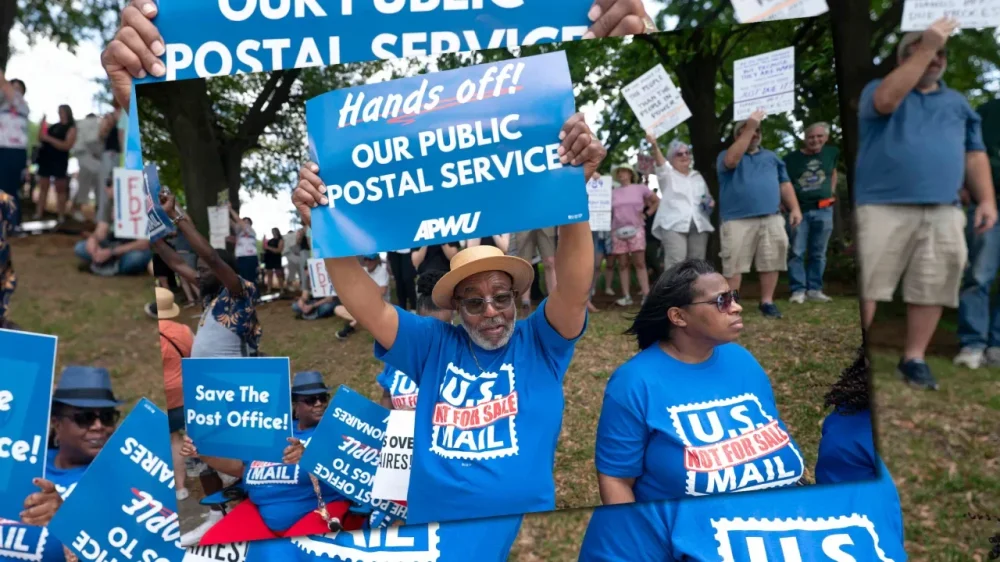
Whatever else Donald The President intends with his assault on the federal workforce, labor unions, and the National Labor Relations Board, one potential effect is clear: a devastating blow to Black Americans who for decades have used public-sector jobs to move up from subsistence living and toward the middle class. “Federal employment has been a pathway to the middle class for African American workers and their families since Reconstruction, including postal work and other occupations,” explained Danielle Mahones, director of the leadership development program at the University of California, Berkeley, Labor Center. “[Now y]ou’re going to see Black workers lose their federal jobs.” Black people are the only racial or ethnic group to be “overrepresented” in government jobs. Data analysis by the Pew Research Foundation shows that while Black people make up 12.8% of the nation’s population, they account for 18.6% of the federal workforce. At the U.S. Postal Service, Black workers comprised 30% of the total workforce in fiscal year 2022. Although the U.S. Government Accountability Office found that African Americans are still underrepresented in executive positions within the postal service, the overall numbers reflect a robust history of Blacks seeking out USPS jobs to move their lives forward. California has the second-largest population of federal workers outside the Washington, D.C., area. Deep federal job cuts will affect the state’s roughly 150,000 workers, and Black employees make up more than 10% of that total. Historically, Black workers have used federal positions, many of them union represented, as “pathways to homeownership, higher education for their children, and retirement savings—opportunities that were not widely available to previous generations,” said Andrea Slater, director of the Center for the Advancement of Racial Equity at Work at the University of California, Los Angeles, Labor Center. Those opportunities didn’t insulate Black families from the decades-old practices of redlining housing policies, wage theft, and other inequities, Slater said, but a government job usually meant dependable employment and some form of pension. “Federal jobs and government contracts have helped build and establish cohesive Black middle-class communities from the Bay Area to San Diego,” Slater added. * * * Postal workers nationwide have publicly protested a proposed cut of 10,000 jobs, which they consider a step toward an Elon Musk-led attempt to privatize the postal service. At a Los Angeles rally in March, Brian Renfroe, president of the National Association of Letter Carriers, told the crowd, “We had an election in November, and some people voted for President The President, and some people voted for Vice President Harris, some people voted for other candidates. But you know what none of them voted for? To dismantle the Postal Service.” Still, a sense of unease hangs over the process. Asked for comment this week, a union representative in Northern California, who said the situation had their colleagues worried about losing jobs and civil service careers, refused to be quoted or identified. The President’s true motives for clear-cutting federal jobs and going after the unions aren’t known, but his animus toward union labor is no secret. During his first term, the president’s policymakers acted to weaken or abandon regulations that protected workers’ pay and safety, and The President directed particular force against federal workers, more than a third of whom are covered by union contracts. Many workers and their unions were caught flat-footed by the scale and intensity of The President 2.0’s effort to decimate their ranks. “Nobody was ready for this,” UC Berkeley’s Mahones said. “This is part of a long-term project to eliminate the labor movement and unions. What is new, though, is the acceleration—doing something so massive, so quickly and chaotically, with no regard to the law nor humanity.” The President signed an order in March directing 18 departments to terminate contracts it had already signed with unions representing federal workers, and to shutter the process through which employees could file job-related grievances. The President cited a 1978 law that makes exceptions from collective bargaining for departments that have national security missions. The American Federation of Government Employees, which represents 820,000 federal and D.C. government workers, said The President has abused that narrow cutout in the law to go after multiple departments that are heavily unionized—and an accompanying fact sheet distributed by the White House all but confirmed that. The release claimed that “certain federal unions have declared war on President The President’s agenda,” adding that The President “refuses to let union obstruction interfere with his efforts to protect Americans and our national interests.” The AFGE and several other unions filed suit in federal district court in Northern California seeking a temporary restraining order to prevent The President’s mandate from taking effect. Caught in the middle, meanwhile, are hundreds of thousands of federal employees whose jobs are on the line, including Black workers who may have spent their entire careers in a single area of public-sector service. “The specific requirements of government sector positions will likely require Black displaced workers to acquire new job skills—and ageism and racism continue to influence hiring practices, even in California,” Slater said. This piece was originally published by Capital & Main, which reports from California on economic, political, and social issues. View the full article
-
Dive into the exhilarating world of innovation with FC Explains, a video series that spotlights the game changers and visionaries from Fast Company’s prestigious Most Innovative Companies list. This annual ranking celebrates the trailblazers who are reshaping industries and cultures, pushing boundaries, and transforming the world. First up is Bluesky. View the full article

-
FTSE 100 group plans to sell at least $3bn-$4bn of assets this year as it seeks to reduce debtsView the full article
-
Bank announces $3bn share buyback programme that will begin next monthView the full article
-
Germany’s largest lender boosted by strong performance in investment bankingView the full article
-
Train connections being gradually restored but no cause established for outage that paralysed Iberian peninsulaView the full article
-
Tariffs, spending cuts and concerns of immigration over-reach drag on the president’s approval ratings in his first 100 daysView the full article
-
The US president’s popularity has fallen along with the S&P 500 and American consumer sentimentView the full article
-
Debt-laden utility was a ‘better business after our stewardship’, says executive from Australian groupView the full article
-
UK’s largest bakery chain is not curtailing its ambitious growth plans despite investor worriesView the full article
-
Staying on top of new funding opportunities is key to growing and sustaining your small business. Grants can help you cover costs, fuel innovation, or simply provide some breathing room—without the pressure of repayment. Each week, we search for the most current small business grant programs available, so you don’t have to. Whether you’re just getting started or looking to scale, these grants could be the opportunity you’ve been waiting for. Check out this week’s list of active small business grants: Fund Your Growth with the Latest Small Business Grant Opportunities Finding reliable funding can be one of the biggest challenges for entrepreneurs and small business owners. Whether you’re launching a startup, expanding your team, or investing in new technology, securing a grant can offer the boost you need—without taking on debt. That’s why we’re here every week with the latest verified small business grant opportunities from across the country. Flint Launches Rescue Fund for Small Businesses Recovering from Pandemic The City of Flint, in partnership with LISC Flint, has launched the Flint Small Business Rescue Fund, a one-time grant initiative aimed at supporting local businesses still recovering from the economic impacts of the COVID-19 pandemic. Funded by American Rescue Plan Act (ARPA) dollars, the program will provide reimbursement grants of up to $20,000 to 20 eligible small businesses located within Flint city limits. The application period opens April 18 and runs through April 30, 2025. NJEDA to Open Applications for Route 80 Business Assistance Grant Program The New Jersey Economic Development Authority (NJEDA) will begin accepting applications next week for the Route 80 Business Assistance Grant Program, a financial aid initiative designed to support small businesses impacted by lane closures on Route 80 in Morris County. Applications open Tuesday, April 22, 2025, at 10:00 a.m. Gran Coramino Expands Small Business Grant Program to $1.5 Million, Adds AI Training Through New Partnership Gran Coramino Tequila, co-founded by comedian Kevin Hart and tequila maker Juan Domingo Beckmann, has announced a new round of $10,000 grants for small businesses in under-resourced communities. The expansion brings the total amount awarded through The Coramino Fund to over $1.5 million, benefiting more than 150 entrepreneurs across the United States. Applications for this latest round of grants are now open. Optimum Business Launches $125K Grant Program for Kanawha County Small Businesses Optimum Business and the Charleston Area Alliance have announced the opening of applications for the Lifting Up Small Businesses Grants, a new initiative aimed at bolstering small business growth in Kanawha County. As part of the program, 25 small businesses will each receive a $5,000 grant, totaling $125,000 in funding to support long-term economic prosperity in the region. Comcast RISE to Award $3 Million in Support to Small Businesses in Grand Rapids and Muskegon Comcast announced Thursday that 100 small businesses in Grand Rapids, Muskegon, and surrounding communities will receive comprehensive grant packages through the Comcast RISE program. The initiative is part of a broader $3 million national effort aimed at supporting 500 small businesses across five U.S. regions. This article, "The Latest Small Business Grants Available to Entrepreneurs in the US" was first published on Small Business Trends View the full article
-
Staying on top of new funding opportunities is key to growing and sustaining your small business. Grants can help you cover costs, fuel innovation, or simply provide some breathing room—without the pressure of repayment. Each week, we search for the most current small business grant programs available, so you don’t have to. Whether you’re just getting started or looking to scale, these grants could be the opportunity you’ve been waiting for. Check out this week’s list of active small business grants: Fund Your Growth with the Latest Small Business Grant Opportunities Finding reliable funding can be one of the biggest challenges for entrepreneurs and small business owners. Whether you’re launching a startup, expanding your team, or investing in new technology, securing a grant can offer the boost you need—without taking on debt. That’s why we’re here every week with the latest verified small business grant opportunities from across the country. Flint Launches Rescue Fund for Small Businesses Recovering from Pandemic The City of Flint, in partnership with LISC Flint, has launched the Flint Small Business Rescue Fund, a one-time grant initiative aimed at supporting local businesses still recovering from the economic impacts of the COVID-19 pandemic. Funded by American Rescue Plan Act (ARPA) dollars, the program will provide reimbursement grants of up to $20,000 to 20 eligible small businesses located within Flint city limits. The application period opens April 18 and runs through April 30, 2025. NJEDA to Open Applications for Route 80 Business Assistance Grant Program The New Jersey Economic Development Authority (NJEDA) will begin accepting applications next week for the Route 80 Business Assistance Grant Program, a financial aid initiative designed to support small businesses impacted by lane closures on Route 80 in Morris County. Applications open Tuesday, April 22, 2025, at 10:00 a.m. Gran Coramino Expands Small Business Grant Program to $1.5 Million, Adds AI Training Through New Partnership Gran Coramino Tequila, co-founded by comedian Kevin Hart and tequila maker Juan Domingo Beckmann, has announced a new round of $10,000 grants for small businesses in under-resourced communities. The expansion brings the total amount awarded through The Coramino Fund to over $1.5 million, benefiting more than 150 entrepreneurs across the United States. Applications for this latest round of grants are now open. Optimum Business Launches $125K Grant Program for Kanawha County Small Businesses Optimum Business and the Charleston Area Alliance have announced the opening of applications for the Lifting Up Small Businesses Grants, a new initiative aimed at bolstering small business growth in Kanawha County. As part of the program, 25 small businesses will each receive a $5,000 grant, totaling $125,000 in funding to support long-term economic prosperity in the region. Comcast RISE to Award $3 Million in Support to Small Businesses in Grand Rapids and Muskegon Comcast announced Thursday that 100 small businesses in Grand Rapids, Muskegon, and surrounding communities will receive comprehensive grant packages through the Comcast RISE program. The initiative is part of a broader $3 million national effort aimed at supporting 500 small businesses across five U.S. regions. This article, "The Latest Small Business Grants Available to Entrepreneurs in the US" was first published on Small Business Trends View the full article
-
Key Takeaways Importance of Senior-Level Roles: Senior-level positions significantly influence a company’s success through strategic planning, team building, and employee management. Effective Job Descriptions: Clear and detailed job descriptions are essential for attracting the right candidates, highlighting specific skills and qualities needed for success. Robust Candidate Screening: Implement a thorough screening process, including structured interviews and cultural fit assessments, to identify candidates who align with your organization’s values. Evaluating Skills and Leadership: Focus on assessing candidates’ relevant skills, experience, and leadership qualities through targeted questions and practical simulations. Interview Techniques: Utilize both behavioral interviews and a mix of panel and one-on-one formats for comprehensive evaluations, ensuring a well-rounded understanding of each candidate. Attractive Offers and Onboarding: Present competitive compensation packages and develop structured onboarding strategies to enhance employee retention and engagement from day one. Hiring for a senior-level position can feel like a daunting task. You’re not just looking for someone with the right skills; you need a leader who can drive your organization forward. The stakes are high, and the right choice can make all the difference in your team’s success. In today’s competitive job market, attracting top talent requires a strategic approach. You must create a compelling job description, leverage your network, and assess candidates effectively. Understanding what to prioritize during the hiring process will help you find the perfect fit for your organization’s culture and goals. Let’s dive into the essential steps for successfully hiring senior-level talent. Understanding Senior Level Positions Senior-level positions play a crucial role in a small business’s success, requiring experienced leaders who can drive strategic initiatives. Leaders not only influence company culture but also ensure that employee engagement and retention remain high. Definition and Importance Senior-level positions typically refer to roles such as executives, directors, or managers, responsible for overseeing key functions within the organization. These roles demand a comprehensive skill set that includes effective decision-making, strategic planning, and team leadership. The importance of hiring for these positions lies in their ability to steer the business towards achieving its goals, navigating challenges, and fostering a productive workplace culture. Effective hiring in this area contributes to improved employee motivation, increased satisfaction, and overall organizational growth. Key Responsibilities Leaders in senior-level positions handle various key responsibilities, including: Strategic Planning: Formulating long-term goals and developing strategies to meet them. Team Building: Creating cohesive teams that align with business objectives and enhance collaboration. Employee Management: Overseeing employee performance, conducting performance reviews, and ensuring compliance with HR policies. Talent Acquisition: Leading efforts in recruitment processes, including job postings, candidate screening, and onboarding procedures. Workforce Planning: Analyzing staffing requirements and making necessary adjustments to the workforce. Employee Development: Implementing programs to support employee growth, engagement, and wellness. Focusing on these responsibilities ensures the selection of candidates who can meet the demands of your small business while enhancing productivity and morale. The Hiring Process Effective hiring processes are vital for small business staffing. A strategic approach helps you attract top talent and build a strong workforce. Preparing Job Descriptions Clarity is crucial when crafting job descriptions. Specify role definitions, responsibilities, reporting lines, and the team dynamics for senior-level positions. Clear descriptions streamline the recruitment process and attract suitable candidates. Align stakeholders before posting job descriptions. Gather input from decision-makers regarding role expectations and the skills necessary for success. This ensures your small business recruits individuals who can meet specific staffing requirements. Detail specific skills, qualities, and experience in the job description. A well-defined skill set helps you attract candidates who closely match your needs. Consider including keywords from your industry to optimize job postings for search engines. Screening Candidates Implement a robust candidate screening process. This process should involve reviewing resumes, conducting initial interviews, and assessing candidates’ past performance. A thorough review helps ensure you identify individuals who align with your workplace culture. Use structured interviews to evaluate candidates effectively. Consistent questions allow for better comparisons across job candidates. Focus on inquiries that reveal their problem-solving abilities and management style. Assess candidates’ potential for employee development. Look for individuals who show a commitment to growth and can contribute to employee motivation and satisfaction. Consider using HR tools for tracking performance and fit. Evaluate cultural fit during the screening process. Understanding how a candidate aligns with your small business values can enhance employee engagement and retention. Aim for a diverse talent pool to foster an inclusive work environment. Engage a staffing agency if necessary. They can assist you in navigating hiring trends and expanding your reach in the job market. A staffing agency can save time and ensure compliance with labor laws, reducing your administrative burden. Evaluating Candidates Evaluating candidates for senior-level positions requires a strategic approach to ensure you select the right leader for your small business. Focus on key areas such as skills, experience, cultural fit, and leadership qualities. Skills and Experience Assessment Assess candidates’ skills and experience by creating a clear job description that outlines necessary competencies. Identify specific skills relevant to the role, such as strategic planning, employee management, and talent acquisition. During the interview process, ask targeted questions that allow candidates to demonstrate their expertise and past achievements relevant to your business operations. Utilize structured interviews to ensure consistent evaluation across all candidates. Incorporate assessment tools or simulations to gauge practical skills effectively. Reviewing candidates’ previous roles and responsibilities also provides insight into how their experiences align with your staffing requirements and job expectations. Cultural Fit and Leadership Qualities Evaluate candidates’ cultural fit by considering your small business’s values and workplace culture. Define the leadership qualities that align with your vision, such as the ability to foster employee engagement, drive team building, and promote employee development. During interviews, include questions that reveal candidates’ approaches to employee relations and how they might enhance workplace motivation and satisfaction. Look for evidence of past success in creating collaborative and diverse teams, as this will contribute to a positive company culture. Additionally, assess how candidates approach compliance with labor laws and HR policies, ensuring they understand the importance of maintaining an inclusive and supportive work environment. Interview Techniques Effective interview techniques enhance the recruitment process for senior-level positions in small businesses, allowing you to identify the right candidate. Here’s how to strategically approach interviews to ensure alignment with your company’s goals. Behavioral Interviews Behavioral interviews focus on how candidates handled situations in the past to predict their future performance. This technique encourages you to ask about specific scenarios related to employee management, team building, and problem-solving. Ask candidates to describe experiences where they demonstrated leadership, managed conflict, or achieved objectives. Use prompts such as “Tell me about a time when you had to motivate your team” to gauge how they inspire employee engagement. Evaluate their responses for evidence of compliance with labor laws and commitment to workplace culture. Employing behavioral interviews helps you drill down into candidates’ skill sets, ensuring they can contribute positively to your business’s environment. Panel vs. One-on-One Interviews Deciding between panel and one-on-one interviews impacts the effectiveness of your recruitment strategy. Panel Interviews: Multiple interviewers assess the candidate simultaneously. This approach encourages diverse perspectives and comprehensive evaluations. It streamlines candidate selection and can reveal how they handle pressure from multiple decision-makers. One-on-One Interviews: This format allows for deeper discussions, fostering a personal connection. You can explore the candidate’s values, goals, and fit for your company’s dynamic. This method is beneficial for assessing cultural alignment and employee relations in a more intimate setting. Utilizing both interview formats offers unique advantages that can enhance your overall candidate screening process. Choose the one that best suits your circumstances and the specific characteristics of your business. Making the Offer Presenting an attractive offer is vital in securing top talent for senior-level positions within your small business. Salary Negotiation Engage in salary negotiation with transparency and flexibility. Research industry standards for similar roles to determine a competitive compensation package. Consider not just the base salary but also essential employee benefits such as health insurance, retirement plans, and performance bonuses. Demonstrate openness to discuss adjustments based on the candidate’s unique skill set and experience. Addressing compensation early fosters trust and establishes a positive tone for future employee relations. Onboarding Strategies Effective onboarding strategies enhance employee retention and engagement. Develop a structured onboarding plan that introduces new hires to your company’s culture, policies, and procedures. Schedule training sessions tailored to their roles to accelerate their learning process. Implement mentorship programs to support new employees, helping them build connections within the team. Providing a roadmap for their development during the first few months can significantly boost their motivation and satisfaction, ensuring they feel valued from day one. Conclusion Hiring for a senior-level position is a strategic endeavor that requires careful planning and execution. By focusing on clear job descriptions and thorough candidate assessments, you can attract leaders who align with your company’s vision and culture. Utilizing effective interview techniques and engaging stakeholders throughout the process ensures you’re making informed decisions. Remember that the right hire not only drives organizational success but also fosters a positive workplace environment. Investing time in hiring and onboarding will pay off in employee motivation and retention, ultimately contributing to your business’s long-term growth and stability. Prioritize these aspects to build a strong leadership team that can propel your organization forward. Frequently Asked Questions What are the key responsibilities of senior-level leaders? Senior-level leaders are responsible for strategic planning, team building, employee management, talent acquisition, and workforce planning. They play a crucial role in driving organizational initiatives and fostering a positive company culture. Why is hiring for senior positions challenging? Hiring for senior positions is challenging due to the competitive job market and the need for candidates who align with the organization’s values and culture. Attracting top talent requires a strategic approach and thorough screening processes. How can I craft a compelling job description? To craft a compelling job description, clearly define the role, responsibilities, and necessary skills. Ensure that it aligns with organizational goals and engages potential candidates by highlighting opportunities for growth and impact. What interview techniques should I use for senior candidates? Effective techniques include behavioral interviews that focus on past experiences, scenario-based questions to assess leadership and conflict management skills, and a mix of panel and one-on-one interviews for diverse perspectives. How can I assess cultural fit during the hiring process? Assess cultural fit by asking candidates questions related to their values and approaches to employee relations. Ensure their leadership style aligns with your organization’s culture and promotes a positive workplace environment. What strategies can enhance candidate retention during onboarding? Effective onboarding strategies include structured plans, tailored training sessions, and mentorship programs. These initiatives help new hires feel valued and supported, enhancing their motivation and satisfaction within the organization. Why should we consider using a staffing agency for hiring? A staffing agency can help navigate hiring trends, ensure compliance with labor laws, and access a wider talent pool. They bring expertise that can streamline the hiring process and improve the chances of securing top talent. How important are salary negotiations in hiring senior talent? Salary negotiations are crucial for attracting top talent. Engaging in transparent discussions about compensation and benefits, while considering industry standards, is essential to secure the best candidates for senior-level positions. Image Via Envato This article, "Effective Strategies for Hiring for a Senior Level Position in Today’s Competitive Market" was first published on Small Business Trends View the full article
-
Key Takeaways Importance of Senior-Level Roles: Senior-level positions significantly influence a company’s success through strategic planning, team building, and employee management. Effective Job Descriptions: Clear and detailed job descriptions are essential for attracting the right candidates, highlighting specific skills and qualities needed for success. Robust Candidate Screening: Implement a thorough screening process, including structured interviews and cultural fit assessments, to identify candidates who align with your organization’s values. Evaluating Skills and Leadership: Focus on assessing candidates’ relevant skills, experience, and leadership qualities through targeted questions and practical simulations. Interview Techniques: Utilize both behavioral interviews and a mix of panel and one-on-one formats for comprehensive evaluations, ensuring a well-rounded understanding of each candidate. Attractive Offers and Onboarding: Present competitive compensation packages and develop structured onboarding strategies to enhance employee retention and engagement from day one. Hiring for a senior-level position can feel like a daunting task. You’re not just looking for someone with the right skills; you need a leader who can drive your organization forward. The stakes are high, and the right choice can make all the difference in your team’s success. In today’s competitive job market, attracting top talent requires a strategic approach. You must create a compelling job description, leverage your network, and assess candidates effectively. Understanding what to prioritize during the hiring process will help you find the perfect fit for your organization’s culture and goals. Let’s dive into the essential steps for successfully hiring senior-level talent. Understanding Senior Level Positions Senior-level positions play a crucial role in a small business’s success, requiring experienced leaders who can drive strategic initiatives. Leaders not only influence company culture but also ensure that employee engagement and retention remain high. Definition and Importance Senior-level positions typically refer to roles such as executives, directors, or managers, responsible for overseeing key functions within the organization. These roles demand a comprehensive skill set that includes effective decision-making, strategic planning, and team leadership. The importance of hiring for these positions lies in their ability to steer the business towards achieving its goals, navigating challenges, and fostering a productive workplace culture. Effective hiring in this area contributes to improved employee motivation, increased satisfaction, and overall organizational growth. Key Responsibilities Leaders in senior-level positions handle various key responsibilities, including: Strategic Planning: Formulating long-term goals and developing strategies to meet them. Team Building: Creating cohesive teams that align with business objectives and enhance collaboration. Employee Management: Overseeing employee performance, conducting performance reviews, and ensuring compliance with HR policies. Talent Acquisition: Leading efforts in recruitment processes, including job postings, candidate screening, and onboarding procedures. Workforce Planning: Analyzing staffing requirements and making necessary adjustments to the workforce. Employee Development: Implementing programs to support employee growth, engagement, and wellness. Focusing on these responsibilities ensures the selection of candidates who can meet the demands of your small business while enhancing productivity and morale. The Hiring Process Effective hiring processes are vital for small business staffing. A strategic approach helps you attract top talent and build a strong workforce. Preparing Job Descriptions Clarity is crucial when crafting job descriptions. Specify role definitions, responsibilities, reporting lines, and the team dynamics for senior-level positions. Clear descriptions streamline the recruitment process and attract suitable candidates. Align stakeholders before posting job descriptions. Gather input from decision-makers regarding role expectations and the skills necessary for success. This ensures your small business recruits individuals who can meet specific staffing requirements. Detail specific skills, qualities, and experience in the job description. A well-defined skill set helps you attract candidates who closely match your needs. Consider including keywords from your industry to optimize job postings for search engines. Screening Candidates Implement a robust candidate screening process. This process should involve reviewing resumes, conducting initial interviews, and assessing candidates’ past performance. A thorough review helps ensure you identify individuals who align with your workplace culture. Use structured interviews to evaluate candidates effectively. Consistent questions allow for better comparisons across job candidates. Focus on inquiries that reveal their problem-solving abilities and management style. Assess candidates’ potential for employee development. Look for individuals who show a commitment to growth and can contribute to employee motivation and satisfaction. Consider using HR tools for tracking performance and fit. Evaluate cultural fit during the screening process. Understanding how a candidate aligns with your small business values can enhance employee engagement and retention. Aim for a diverse talent pool to foster an inclusive work environment. Engage a staffing agency if necessary. They can assist you in navigating hiring trends and expanding your reach in the job market. A staffing agency can save time and ensure compliance with labor laws, reducing your administrative burden. Evaluating Candidates Evaluating candidates for senior-level positions requires a strategic approach to ensure you select the right leader for your small business. Focus on key areas such as skills, experience, cultural fit, and leadership qualities. Skills and Experience Assessment Assess candidates’ skills and experience by creating a clear job description that outlines necessary competencies. Identify specific skills relevant to the role, such as strategic planning, employee management, and talent acquisition. During the interview process, ask targeted questions that allow candidates to demonstrate their expertise and past achievements relevant to your business operations. Utilize structured interviews to ensure consistent evaluation across all candidates. Incorporate assessment tools or simulations to gauge practical skills effectively. Reviewing candidates’ previous roles and responsibilities also provides insight into how their experiences align with your staffing requirements and job expectations. Cultural Fit and Leadership Qualities Evaluate candidates’ cultural fit by considering your small business’s values and workplace culture. Define the leadership qualities that align with your vision, such as the ability to foster employee engagement, drive team building, and promote employee development. During interviews, include questions that reveal candidates’ approaches to employee relations and how they might enhance workplace motivation and satisfaction. Look for evidence of past success in creating collaborative and diverse teams, as this will contribute to a positive company culture. Additionally, assess how candidates approach compliance with labor laws and HR policies, ensuring they understand the importance of maintaining an inclusive and supportive work environment. Interview Techniques Effective interview techniques enhance the recruitment process for senior-level positions in small businesses, allowing you to identify the right candidate. Here’s how to strategically approach interviews to ensure alignment with your company’s goals. Behavioral Interviews Behavioral interviews focus on how candidates handled situations in the past to predict their future performance. This technique encourages you to ask about specific scenarios related to employee management, team building, and problem-solving. Ask candidates to describe experiences where they demonstrated leadership, managed conflict, or achieved objectives. Use prompts such as “Tell me about a time when you had to motivate your team” to gauge how they inspire employee engagement. Evaluate their responses for evidence of compliance with labor laws and commitment to workplace culture. Employing behavioral interviews helps you drill down into candidates’ skill sets, ensuring they can contribute positively to your business’s environment. Panel vs. One-on-One Interviews Deciding between panel and one-on-one interviews impacts the effectiveness of your recruitment strategy. Panel Interviews: Multiple interviewers assess the candidate simultaneously. This approach encourages diverse perspectives and comprehensive evaluations. It streamlines candidate selection and can reveal how they handle pressure from multiple decision-makers. One-on-One Interviews: This format allows for deeper discussions, fostering a personal connection. You can explore the candidate’s values, goals, and fit for your company’s dynamic. This method is beneficial for assessing cultural alignment and employee relations in a more intimate setting. Utilizing both interview formats offers unique advantages that can enhance your overall candidate screening process. Choose the one that best suits your circumstances and the specific characteristics of your business. Making the Offer Presenting an attractive offer is vital in securing top talent for senior-level positions within your small business. Salary Negotiation Engage in salary negotiation with transparency and flexibility. Research industry standards for similar roles to determine a competitive compensation package. Consider not just the base salary but also essential employee benefits such as health insurance, retirement plans, and performance bonuses. Demonstrate openness to discuss adjustments based on the candidate’s unique skill set and experience. Addressing compensation early fosters trust and establishes a positive tone for future employee relations. Onboarding Strategies Effective onboarding strategies enhance employee retention and engagement. Develop a structured onboarding plan that introduces new hires to your company’s culture, policies, and procedures. Schedule training sessions tailored to their roles to accelerate their learning process. Implement mentorship programs to support new employees, helping them build connections within the team. Providing a roadmap for their development during the first few months can significantly boost their motivation and satisfaction, ensuring they feel valued from day one. Conclusion Hiring for a senior-level position is a strategic endeavor that requires careful planning and execution. By focusing on clear job descriptions and thorough candidate assessments, you can attract leaders who align with your company’s vision and culture. Utilizing effective interview techniques and engaging stakeholders throughout the process ensures you’re making informed decisions. Remember that the right hire not only drives organizational success but also fosters a positive workplace environment. Investing time in hiring and onboarding will pay off in employee motivation and retention, ultimately contributing to your business’s long-term growth and stability. Prioritize these aspects to build a strong leadership team that can propel your organization forward. Frequently Asked Questions What are the key responsibilities of senior-level leaders? Senior-level leaders are responsible for strategic planning, team building, employee management, talent acquisition, and workforce planning. They play a crucial role in driving organizational initiatives and fostering a positive company culture. Why is hiring for senior positions challenging? Hiring for senior positions is challenging due to the competitive job market and the need for candidates who align with the organization’s values and culture. Attracting top talent requires a strategic approach and thorough screening processes. How can I craft a compelling job description? To craft a compelling job description, clearly define the role, responsibilities, and necessary skills. Ensure that it aligns with organizational goals and engages potential candidates by highlighting opportunities for growth and impact. What interview techniques should I use for senior candidates? Effective techniques include behavioral interviews that focus on past experiences, scenario-based questions to assess leadership and conflict management skills, and a mix of panel and one-on-one interviews for diverse perspectives. How can I assess cultural fit during the hiring process? Assess cultural fit by asking candidates questions related to their values and approaches to employee relations. Ensure their leadership style aligns with your organization’s culture and promotes a positive workplace environment. What strategies can enhance candidate retention during onboarding? Effective onboarding strategies include structured plans, tailored training sessions, and mentorship programs. These initiatives help new hires feel valued and supported, enhancing their motivation and satisfaction within the organization. Why should we consider using a staffing agency for hiring? A staffing agency can help navigate hiring trends, ensure compliance with labor laws, and access a wider talent pool. They bring expertise that can streamline the hiring process and improve the chances of securing top talent. How important are salary negotiations in hiring senior talent? Salary negotiations are crucial for attracting top talent. Engaging in transparent discussions about compensation and benefits, while considering industry standards, is essential to secure the best candidates for senior-level positions. Image Via Envato This article, "Effective Strategies for Hiring for a Senior Level Position in Today’s Competitive Market" was first published on Small Business Trends View the full article
-
Former Bank of England governor capitalises on anti-The President sentiment to win new mandateView the full article
-
Key Takeaways Refine Your Business Idea: Begin by clearly understanding and refining your business concept to align with market needs and personal skills, which sets a solid foundation for your venture. Conduct Thorough Market Research: Analyze consumer behavior, identify competitors, and gather insights about your target audience to tailor your offerings effectively. Develop a Comprehensive Business Plan: Create a detailed business plan outlining your mission, market analysis, operational strategy, and financial projections to guide your startup and attract potential investors. Choose the Right Legal Structure: Evaluate and select a suitable legal structure (e.g., LLC, corporation) for your business, as this impacts taxes, liability, and operational strategy. Explore Funding Options: Identify various funding sources, such as personal investments, loans, or crowdfunding, to ensure you have the necessary capital for launching and growing your business. Implement a Marketing Strategy: Focus on building an online presence and a robust marketing strategy that engages your target audience and promotes customer acquisition effectively. Starting a business can feel like a daunting journey, but it’s one filled with exciting possibilities. Whether you’ve got a brilliant idea or a passion you want to turn into profit, taking those first steps is crucial. You’re not just launching a venture; you’re creating your future. Understanding the essential steps to start your business will set you on the path to success. From refining your concept to navigating legal requirements, each phase plays a vital role in building a solid foundation. Get ready to transform your dreams into reality and embrace the entrepreneurial spirit that awaits you. Understanding Your Business Idea Understanding your business idea is a crucial step in your entrepreneurial journey. This phase focuses on refining your concept to align with market needs and your personal abilities. Identifying Market Needs Identifying market needs involves conducting thorough market research. You should analyze customer preferences, gaps in the market, and current trends. Surveys, focus groups, and online tools can help gather insights. Assess your target audience’s pain points to tailor your products or services effectively. Addressing these needs can define your business model and drive customer acquisition strategies. Evaluating Your Passion and Skills Evaluating your passion and skills is essential for long-term success. You must reflect on what you enjoy and excel at, as this often influences your business direction. Your expertise can help shape product development and marketing strategies. Consider how your unique qualifications can differentiate your startup in a competitive landscape. Mentorship or business coaching can further enhance your strengths while providing guidance in areas you may need to improve. Conducting Market Research Market research plays a vital role in the journey of starting a small business. Understanding market dynamics, consumer behavior, and competition can shape your business model and growth strategy. Analyzing Your Competition Analyzing your competition involves assessing their strengths and weaknesses. Review their products, pricing, marketing strategies, and customer feedback. Consider the following steps: Identify Competitors: List direct and indirect competitors in your niche. Research local businesses and online platforms to capture a comprehensive view of the market. Evaluate Offerings: Examine the products or services competitors provide. Note their unique selling propositions and how they attract customers. Assess Pricing: Analyze pricing structures. Understanding how competitors price their offerings aids in establishing your own competitive pricing strategy. Gather Feedback: Read customer reviews and testimonials. This information reflects areas where competitors excel or fall short, highlighting potential opportunities for your business. Understanding Your Target Audience Understanding your target audience ensures that your business meets their needs and preferences. Take these steps to gain deeper insights: Define Demographics: Identify key demographic factors, such as age, gender, location, and income level. This helps narrow down your ideal customer profile. Conduct Surveys: Utilize surveys or questionnaires to gather feedback directly from potential customers. Ask about their preferences, buying habits, and pain points. Create Buyer Personas: Develop detailed profiles for different segments of your target audience. Include their motivations, challenges, and behaviors to tailor your marketing strategies effectively. Analyze Trends: Stay updated on industry trends that influence customer decisions. This knowledge allows for timely adjustments to your business practices and product development. Engaging in thorough market research empowers you to make informed decisions, ensuring your small business aligns with customer demands and competitive pressures. Creating a Business Plan A solid business plan outlines how to structure, run, and grow your venture. It provides you with a roadmap for success, detailing every aspect from market analysis to financial projections. Components of a Business Plan Executive Summary: Summarize your business idea, mission statement, and objectives. This section should grab attention and provoke interest in potential investors or partners. Business Description: Describe your startup, including its legal structure (e.g., LLC, sole proprietorship, corporation) and business model. Outline your products or services and how they meet market needs. Market Research: Present data from your market research, highlighting your target audience and competitor analysis. Clearly define trends, customer demographics, and pain points that your business addresses. Marketing Strategy: Include details about branding, digital marketing approaches (e.g., SEO, content marketing, social media), and customer acquisition strategies. Explain how you plan to promote your business and attract customers. Operational Plan: Outline the day-to-day operations, including location, equipment, and human resources. This section provides insights into how you’ll deliver your products or services effectively. Financial Plan: Present your budget, funding needs, and funding sources like angel investors or loans. Include cash flow projections, profit margins, and strategies for managing expenses. Growth Strategy: Define your long-term goals and scalability plans. Discuss potential partnerships and innovations that might contribute to future success. Setting Financial Goals Establishing clear financial goals is crucial for your small business. Begin by identifying key performance indicators (KPIs) that align with your overall business objectives. Revenue Goals: Set specific sales targets based on market research and competition. Consider how many units you’ll need to sell to achieve profitability. Budget Planning: Create a detailed budget that addresses expenses like marketing, employee benefits, and operational costs. This helps in managing cash flow and ensuring sustainability. Funding Options: Explore various funding sources such as crowdfunding, business grants, or loans. Having a financial cushion can support your operations and allow for scalability. Monitoring & Adjusting: Regularly monitor your financial performance against your goals. Adjust your strategies as needed to ensure growth and remain adaptable in a changing market. Establishing a comprehensive business plan not only clarifies your vision but also enhances your credibility with investors and stakeholders. Legal Structure and Registration Choosing the right legal structure and registering your business are vital steps in starting a small business. These decisions impact taxes, liability, and your operational framework. Choosing the Right Legal Structure Selecting a legal structure determines how your venture operates and is taxed. Here are the most common types: Sole Proprietorship: This is the simplest structure. You and your business are one entity. This means personal assets are at risk if debts arise. Limited Liability Company (LLC): An LLC protects personal assets from business liabilities. It provides flexibility in taxes, allowing for pass-through taxation options. Partnership: In a partnership, two or more people manage and operate the business. Each partner shares profits, losses, and liabilities as outlined in a partnership agreement. Corporation: Corporations can be structured as C-Corps or S-Corps. C-Corps face double taxation on earnings, while S-Corps benefit from pass-through taxation. Evaluating these options with legal advice can ensure you select the most suitable structure for your business model and growth strategy. Registering Your Business Name After deciding on a legal structure, register your business name to establish its identity. This process involves several key steps: Choose a Unique Name: Select a name that reflects your brand and is not already in use. Conduct a name search through state business registries. File for a DBA: If you plan to operate under a name different from your legal business name, file a “Doing Business As” (DBA) application. This is crucial for branding and marketing purposes. Check Trademark Availability: Ensure your business name does not infringe on existing trademarks. You can check databases like the United States Patent and Trademark Office (USPTO) for this. Register with the State: File your business formation documents with the state where you operate. This typically includes articles of incorporation or organization, depending on your structure. Obtain Necessary Permits and Licenses: Research local laws to identify needed permits or licenses relevant to your business type and industry. Proper registration protects your brand and enhances credibility with customers while facilitating activities like e-commerce and digital marketing. Registering effectively supports your growth strategy and positions you for success in the competitive market. Funding Your Business Funding your business is a pivotal step in transforming your idea into a reality. You must thoroughly assess how much funding you need and explore various financing options to ensure your venture has the necessary capital for growth. Exploring Funding Options You’ll encounter several funding sources to consider: Personal Investment: Bootstrap your business by using your own savings. This approach provides full control and avoids debt but exposes you to personal financial risk. Love Money: You might borrow funds from friends and family. Although repayment terms may be flexible, approach this option thoughtfully to maintain your relationships. Angel Investors: Seek out individual investors who provide capital in exchange for equity. These investors often bring valuable mentorship and connections to your business. Venture Capital: Larger funding rounds may attract venture capitalists looking for high-growth opportunities. Prepare a strong pitch and a detailed business plan to appeal to these investors. Crowdfunding: Platforms like Kickstarter or Indiegogo allow you to gather small amounts from many people through an online campaign. This method can also serve as a marketing tool to validate your business idea. Business Grants: Research grant opportunities specific to your industry or demographic. Grants do not require repayment, making them a favorable option. Loans: Traditional bank loans provide a structured way to secure funds but might involve lengthy application processes. Focus on presenting your business plan and financial projections. Preparing a Financial Plan You must prepare a comprehensive financial plan to guide your business operations and funding requirements. This financial roadmap should include: Startup Costs: List all initial expenses including equipment, permits, and marketing. Accurate estimations prevent funding shortages. Ongoing Expenses: Identify monthly costs like rent, utilities, salaries, and insurance. Define your operating budget to achieve financial stability. Revenue Projections: Estimate potential earnings based on market research and sales strategies. Being realistic helps in assessing viability and attracting investors. Cash Flow Management: Create a plan to monitor cash flow, ensuring that your business maintains adequate liquidity for day-to-day operations. Profit Margin Analysis: Calculate the difference between your costs and revenue to ensure profitability. Regularly review this metric to adjust pricing and marketing strategies. Financial Goals: Set specific, measurable objectives for growth and profitability. Align these with your overall business goals to maintain focus and direction. A robust financial plan not only demonstrates credibility to potential investors but also lays the foundation for strategic decisions and your overall growth strategy. Launching Your Business Launching your business involves critical steps to transform your idea into a venture that thrives in a competitive market. Focus on developing your marketing strategy and building an online presence to connect with your target audience effectively. Developing a Marketing Strategy Establish a marketing strategy that enhances customer acquisition and aligns with your overall business goals. Identify Your Target Audience: Understand demographics, preferences, and pain points to tailor your product development and marketing messages. Conduct Market Research: Analyze competitors and market trends to position your product uniquely, ensuring a clear value proposition. Utilize Multiple Channels: Engage in digital marketing, content marketing, and social media to reach potential customers across different platforms. Create a Sales Funnel: Develop a systematic approach that guides prospects from initial contact to conversion, enhancing sales opportunities. Measure Performance: Use analytics tools to evaluate the effectiveness of your marketing campaigns, adjusting strategies to optimize results. Building an Online Presence An online presence is crucial for small businesses today. It increases visibility and supports growth strategies. Develop a Website: Create a professional website that showcases your brand, product offerings, and expertise. Ensure it’s optimized for search engines (SEO) to enhance visibility. Leverage E-commerce Platforms: If applicable, set up e-commerce functionality to facilitate online sales, reaching customers beyond physical locations. Engage on Social Media: Use platforms like Facebook, Instagram, or Twitter to connect with your audience, share updates, and build brand loyalty. Implement Email Marketing: Develop an email marketing strategy to nurture leads and communicate regularly with customers about products, promotions, and news. Focus on Customer Service: Prioritize customer support through available channels, ensuring timely responses to inquiries or concerns, which builds trust and encourages repeat business. Implementing these steps helps you create a solid foundation for your business’s success and sustainability in the marketplace. Conclusion Starting a business is an exciting journey filled with potential. By taking the right steps you can transform your ideas into a thriving venture. Remember to refine your concept understand your market and create a solid business plan. Choosing the right legal structure and securing funding are crucial for laying a strong foundation. Don’t overlook the importance of building an online presence and developing a marketing strategy to connect with your audience. With determination and the right resources you can navigate the challenges and set your business up for long-term success. Embrace the process and keep moving forward. Your entrepreneurial dreams are within reach. Frequently Asked Questions What are the first steps to starting a business? Starting a business involves identifying your idea, refining it for market needs, and conducting comprehensive market research. Assess your passion and skills, consider mentorship, and outline your business goals. How important is market research? Market research is crucial as it helps you understand customer behavior, competition, and industry trends. This knowledge allows you to make informed decisions and tailor your offerings to meet market demands effectively. What should be included in a business plan? A business plan should contain an executive summary, business description, market research findings, marketing strategy, operational plan, financial plan, and growth strategy. This document guides your business and helps attract investors. How do I choose the right legal structure for my business? Selecting a legal structure, such as a sole proprietorship, LLC, or corporation, depends on factors like liability, taxes, and operational needs. Consult legal advice to determine which structure aligns with your business model. What are my funding options for starting a business? Funding options include personal investment, loans from family or friends, angel investors, venture capital, crowdfunding, business grants, and traditional loans. Each option has its pros and cons, so choose wisely based on your needs. Why is building an online presence important? An online presence enhances visibility and customer engagement. By developing a professional website and utilizing social media, you can effectively connect with your target audience and support your business growth. How can I ensure my business idea is viable? To validate your business idea, conduct thorough market research to assess customer needs, preferences, and existing gaps. Gather feedback and test your concept to refine it before launch to ensure its potential success. Image Via Envato This article, "Essential Steps Towards Starting a Business for Aspiring Entrepreneurs" was first published on Small Business Trends View the full article
-
Key Takeaways Refine Your Business Idea: Begin by clearly understanding and refining your business concept to align with market needs and personal skills, which sets a solid foundation for your venture. Conduct Thorough Market Research: Analyze consumer behavior, identify competitors, and gather insights about your target audience to tailor your offerings effectively. Develop a Comprehensive Business Plan: Create a detailed business plan outlining your mission, market analysis, operational strategy, and financial projections to guide your startup and attract potential investors. Choose the Right Legal Structure: Evaluate and select a suitable legal structure (e.g., LLC, corporation) for your business, as this impacts taxes, liability, and operational strategy. Explore Funding Options: Identify various funding sources, such as personal investments, loans, or crowdfunding, to ensure you have the necessary capital for launching and growing your business. Implement a Marketing Strategy: Focus on building an online presence and a robust marketing strategy that engages your target audience and promotes customer acquisition effectively. Starting a business can feel like a daunting journey, but it’s one filled with exciting possibilities. Whether you’ve got a brilliant idea or a passion you want to turn into profit, taking those first steps is crucial. You’re not just launching a venture; you’re creating your future. Understanding the essential steps to start your business will set you on the path to success. From refining your concept to navigating legal requirements, each phase plays a vital role in building a solid foundation. Get ready to transform your dreams into reality and embrace the entrepreneurial spirit that awaits you. Understanding Your Business Idea Understanding your business idea is a crucial step in your entrepreneurial journey. This phase focuses on refining your concept to align with market needs and your personal abilities. Identifying Market Needs Identifying market needs involves conducting thorough market research. You should analyze customer preferences, gaps in the market, and current trends. Surveys, focus groups, and online tools can help gather insights. Assess your target audience’s pain points to tailor your products or services effectively. Addressing these needs can define your business model and drive customer acquisition strategies. Evaluating Your Passion and Skills Evaluating your passion and skills is essential for long-term success. You must reflect on what you enjoy and excel at, as this often influences your business direction. Your expertise can help shape product development and marketing strategies. Consider how your unique qualifications can differentiate your startup in a competitive landscape. Mentorship or business coaching can further enhance your strengths while providing guidance in areas you may need to improve. Conducting Market Research Market research plays a vital role in the journey of starting a small business. Understanding market dynamics, consumer behavior, and competition can shape your business model and growth strategy. Analyzing Your Competition Analyzing your competition involves assessing their strengths and weaknesses. Review their products, pricing, marketing strategies, and customer feedback. Consider the following steps: Identify Competitors: List direct and indirect competitors in your niche. Research local businesses and online platforms to capture a comprehensive view of the market. Evaluate Offerings: Examine the products or services competitors provide. Note their unique selling propositions and how they attract customers. Assess Pricing: Analyze pricing structures. Understanding how competitors price their offerings aids in establishing your own competitive pricing strategy. Gather Feedback: Read customer reviews and testimonials. This information reflects areas where competitors excel or fall short, highlighting potential opportunities for your business. Understanding Your Target Audience Understanding your target audience ensures that your business meets their needs and preferences. Take these steps to gain deeper insights: Define Demographics: Identify key demographic factors, such as age, gender, location, and income level. This helps narrow down your ideal customer profile. Conduct Surveys: Utilize surveys or questionnaires to gather feedback directly from potential customers. Ask about their preferences, buying habits, and pain points. Create Buyer Personas: Develop detailed profiles for different segments of your target audience. Include their motivations, challenges, and behaviors to tailor your marketing strategies effectively. Analyze Trends: Stay updated on industry trends that influence customer decisions. This knowledge allows for timely adjustments to your business practices and product development. Engaging in thorough market research empowers you to make informed decisions, ensuring your small business aligns with customer demands and competitive pressures. Creating a Business Plan A solid business plan outlines how to structure, run, and grow your venture. It provides you with a roadmap for success, detailing every aspect from market analysis to financial projections. Components of a Business Plan Executive Summary: Summarize your business idea, mission statement, and objectives. This section should grab attention and provoke interest in potential investors or partners. Business Description: Describe your startup, including its legal structure (e.g., LLC, sole proprietorship, corporation) and business model. Outline your products or services and how they meet market needs. Market Research: Present data from your market research, highlighting your target audience and competitor analysis. Clearly define trends, customer demographics, and pain points that your business addresses. Marketing Strategy: Include details about branding, digital marketing approaches (e.g., SEO, content marketing, social media), and customer acquisition strategies. Explain how you plan to promote your business and attract customers. Operational Plan: Outline the day-to-day operations, including location, equipment, and human resources. This section provides insights into how you’ll deliver your products or services effectively. Financial Plan: Present your budget, funding needs, and funding sources like angel investors or loans. Include cash flow projections, profit margins, and strategies for managing expenses. Growth Strategy: Define your long-term goals and scalability plans. Discuss potential partnerships and innovations that might contribute to future success. Setting Financial Goals Establishing clear financial goals is crucial for your small business. Begin by identifying key performance indicators (KPIs) that align with your overall business objectives. Revenue Goals: Set specific sales targets based on market research and competition. Consider how many units you’ll need to sell to achieve profitability. Budget Planning: Create a detailed budget that addresses expenses like marketing, employee benefits, and operational costs. This helps in managing cash flow and ensuring sustainability. Funding Options: Explore various funding sources such as crowdfunding, business grants, or loans. Having a financial cushion can support your operations and allow for scalability. Monitoring & Adjusting: Regularly monitor your financial performance against your goals. Adjust your strategies as needed to ensure growth and remain adaptable in a changing market. Establishing a comprehensive business plan not only clarifies your vision but also enhances your credibility with investors and stakeholders. Legal Structure and Registration Choosing the right legal structure and registering your business are vital steps in starting a small business. These decisions impact taxes, liability, and your operational framework. Choosing the Right Legal Structure Selecting a legal structure determines how your venture operates and is taxed. Here are the most common types: Sole Proprietorship: This is the simplest structure. You and your business are one entity. This means personal assets are at risk if debts arise. Limited Liability Company (LLC): An LLC protects personal assets from business liabilities. It provides flexibility in taxes, allowing for pass-through taxation options. Partnership: In a partnership, two or more people manage and operate the business. Each partner shares profits, losses, and liabilities as outlined in a partnership agreement. Corporation: Corporations can be structured as C-Corps or S-Corps. C-Corps face double taxation on earnings, while S-Corps benefit from pass-through taxation. Evaluating these options with legal advice can ensure you select the most suitable structure for your business model and growth strategy. Registering Your Business Name After deciding on a legal structure, register your business name to establish its identity. This process involves several key steps: Choose a Unique Name: Select a name that reflects your brand and is not already in use. Conduct a name search through state business registries. File for a DBA: If you plan to operate under a name different from your legal business name, file a “Doing Business As” (DBA) application. This is crucial for branding and marketing purposes. Check Trademark Availability: Ensure your business name does not infringe on existing trademarks. You can check databases like the United States Patent and Trademark Office (USPTO) for this. Register with the State: File your business formation documents with the state where you operate. This typically includes articles of incorporation or organization, depending on your structure. Obtain Necessary Permits and Licenses: Research local laws to identify needed permits or licenses relevant to your business type and industry. Proper registration protects your brand and enhances credibility with customers while facilitating activities like e-commerce and digital marketing. Registering effectively supports your growth strategy and positions you for success in the competitive market. Funding Your Business Funding your business is a pivotal step in transforming your idea into a reality. You must thoroughly assess how much funding you need and explore various financing options to ensure your venture has the necessary capital for growth. Exploring Funding Options You’ll encounter several funding sources to consider: Personal Investment: Bootstrap your business by using your own savings. This approach provides full control and avoids debt but exposes you to personal financial risk. Love Money: You might borrow funds from friends and family. Although repayment terms may be flexible, approach this option thoughtfully to maintain your relationships. Angel Investors: Seek out individual investors who provide capital in exchange for equity. These investors often bring valuable mentorship and connections to your business. Venture Capital: Larger funding rounds may attract venture capitalists looking for high-growth opportunities. Prepare a strong pitch and a detailed business plan to appeal to these investors. Crowdfunding: Platforms like Kickstarter or Indiegogo allow you to gather small amounts from many people through an online campaign. This method can also serve as a marketing tool to validate your business idea. Business Grants: Research grant opportunities specific to your industry or demographic. Grants do not require repayment, making them a favorable option. Loans: Traditional bank loans provide a structured way to secure funds but might involve lengthy application processes. Focus on presenting your business plan and financial projections. Preparing a Financial Plan You must prepare a comprehensive financial plan to guide your business operations and funding requirements. This financial roadmap should include: Startup Costs: List all initial expenses including equipment, permits, and marketing. Accurate estimations prevent funding shortages. Ongoing Expenses: Identify monthly costs like rent, utilities, salaries, and insurance. Define your operating budget to achieve financial stability. Revenue Projections: Estimate potential earnings based on market research and sales strategies. Being realistic helps in assessing viability and attracting investors. Cash Flow Management: Create a plan to monitor cash flow, ensuring that your business maintains adequate liquidity for day-to-day operations. Profit Margin Analysis: Calculate the difference between your costs and revenue to ensure profitability. Regularly review this metric to adjust pricing and marketing strategies. Financial Goals: Set specific, measurable objectives for growth and profitability. Align these with your overall business goals to maintain focus and direction. A robust financial plan not only demonstrates credibility to potential investors but also lays the foundation for strategic decisions and your overall growth strategy. Launching Your Business Launching your business involves critical steps to transform your idea into a venture that thrives in a competitive market. Focus on developing your marketing strategy and building an online presence to connect with your target audience effectively. Developing a Marketing Strategy Establish a marketing strategy that enhances customer acquisition and aligns with your overall business goals. Identify Your Target Audience: Understand demographics, preferences, and pain points to tailor your product development and marketing messages. Conduct Market Research: Analyze competitors and market trends to position your product uniquely, ensuring a clear value proposition. Utilize Multiple Channels: Engage in digital marketing, content marketing, and social media to reach potential customers across different platforms. Create a Sales Funnel: Develop a systematic approach that guides prospects from initial contact to conversion, enhancing sales opportunities. Measure Performance: Use analytics tools to evaluate the effectiveness of your marketing campaigns, adjusting strategies to optimize results. Building an Online Presence An online presence is crucial for small businesses today. It increases visibility and supports growth strategies. Develop a Website: Create a professional website that showcases your brand, product offerings, and expertise. Ensure it’s optimized for search engines (SEO) to enhance visibility. Leverage E-commerce Platforms: If applicable, set up e-commerce functionality to facilitate online sales, reaching customers beyond physical locations. Engage on Social Media: Use platforms like Facebook, Instagram, or Twitter to connect with your audience, share updates, and build brand loyalty. Implement Email Marketing: Develop an email marketing strategy to nurture leads and communicate regularly with customers about products, promotions, and news. Focus on Customer Service: Prioritize customer support through available channels, ensuring timely responses to inquiries or concerns, which builds trust and encourages repeat business. Implementing these steps helps you create a solid foundation for your business’s success and sustainability in the marketplace. Conclusion Starting a business is an exciting journey filled with potential. By taking the right steps you can transform your ideas into a thriving venture. Remember to refine your concept understand your market and create a solid business plan. Choosing the right legal structure and securing funding are crucial for laying a strong foundation. Don’t overlook the importance of building an online presence and developing a marketing strategy to connect with your audience. With determination and the right resources you can navigate the challenges and set your business up for long-term success. Embrace the process and keep moving forward. Your entrepreneurial dreams are within reach. Frequently Asked Questions What are the first steps to starting a business? Starting a business involves identifying your idea, refining it for market needs, and conducting comprehensive market research. Assess your passion and skills, consider mentorship, and outline your business goals. How important is market research? Market research is crucial as it helps you understand customer behavior, competition, and industry trends. This knowledge allows you to make informed decisions and tailor your offerings to meet market demands effectively. What should be included in a business plan? A business plan should contain an executive summary, business description, market research findings, marketing strategy, operational plan, financial plan, and growth strategy. This document guides your business and helps attract investors. How do I choose the right legal structure for my business? Selecting a legal structure, such as a sole proprietorship, LLC, or corporation, depends on factors like liability, taxes, and operational needs. Consult legal advice to determine which structure aligns with your business model. What are my funding options for starting a business? Funding options include personal investment, loans from family or friends, angel investors, venture capital, crowdfunding, business grants, and traditional loans. Each option has its pros and cons, so choose wisely based on your needs. Why is building an online presence important? An online presence enhances visibility and customer engagement. By developing a professional website and utilizing social media, you can effectively connect with your target audience and support your business growth. How can I ensure my business idea is viable? To validate your business idea, conduct thorough market research to assess customer needs, preferences, and existing gaps. Gather feedback and test your concept to refine it before launch to ensure its potential success. Image Via Envato This article, "Essential Steps Towards Starting a Business for Aspiring Entrepreneurs" was first published on Small Business Trends View the full article
-
Increase in price of essential items comes as retailers grapple with higher employment costs View the full article
-
After Pope Francis’ funeral was held over the weekend, attention has now turned to the papal conclave to choose the next Pope. If you’re Catholic—or if you recently watched Conclave—you might be hedging your bets on who will next be seated at the Vatican. While the process usually happens behind closed doors, one TikTok user has created a “Fantasy Pope League,” in a similar style to fantasy football, an online game in which players collect points based on how real-life footballers perform each week, allowing people to play along at home and win points based off the real-life conclave. “There are ten times the number of people in this sweepstake as there are cardinals in the Catholic Church,” says @itismaxhooray. “Making it bigger and therefore more legitimate than the real conclave.” Although sign-ups have now closed, those playing along will be assigned a cardinal via sweepstake from the College of Cardinals. “If they do well in the voting, you do well in the pope league,” @itismaxhooray explains. Players must also answer extra questions when they sign up to score “pope points,” which apparently will prove vital when it comes to the final leaderboard. There may even be a prize. The original post has over 100,000 views at the time of writing and reportedly saw 2,000 sign-ups on its first day. “I’m a normal girl who can be trusted not to get too intense about the fantasy pope league,” one person commented. “Immediately signed up,” wrote another. “15 years of Catholic school have prepared me for this.” Cardinals are now on their way to everyone who registered. Today, the Vatican announced May 7 as the start date for the official conclave. The last two conclaves, held in 2005 to elect Pope Benedict XVI and in 2013 to elect Pope Francis, each lasted two days. Currently, there are 135 cardinals eligible to participate. “My cardinal is 40/1 according to Oddschecker, not awful,” one player commented. “Just me and 99-year-old Angelo Acerbi against the world,” wrote another. View the full article

-
Martinelli’s, the apple juice brand that has previously gone viral for its apple-shaped packaging, has issued a voluntary recall of more than 170,000 bottles of juice. The recall comes due to potential patulin contamination. Patulin is a byproduct of mold that’s commonly found in rotten apples. Here’s what to know. What is the reason for the recall? According to an enforcement report by the U.S. Food and Drug Administration (FDA), Martinelli’s voluntarily initiated the recall on March 18. The FDA then classified the recall as Class II on April 22, meaning it is considered a situation in which exposure to the product may cause “reversible adverse health consequences,” or where the probability of serious health consequences is “remote.” Fast Company has reached out to Martinelli’s for comment. The FDA notice says no press release was issued for the recall. According to a statement sent by Martinelli’s to NBC News: “In 2024, the Food and Drug Administration (FDA) routine testing indicated that one lot of 10-ounce Martinelli’s Apple Juice glass bottles (in 4-packs only) produced in December 2023 may contain elevated levels of patulin, a naturally occurring substance produced by molds that can grow in apples.” The company added that it has reached out to retailers that received the recalled product, and that any remaining items from the batch in its inventory have been removed. In all, the potential patulin contamination impacted 7,234 cases of apple juice, which equals about 170,000 individual bottles. What product is being recalled? The recall notice is for Martinelli’s apple juice, packaged in four-packs of 10-ounce cans. Here are the details, according to the FDA’s description: Product Description: Apple Juice; clear/translucent bulbous/round glass bottle with white metal screw top lid; (4 10-oz. bottles per pack; 6 packs per case) Package size: 200g package Company Name: S. Martinelli & Company Recall number: F-0734-2025 UPC barcode: 0 41244 04102 2 Best by date: 05DEC2026 Where was the recalled product sold? The affected apple juice was distributed in 28 states: Alabama Arizona Arkansas California Connecticut Delaware Florida Georgia Illinois Indiana Iowa Kansas Kentucky Louisiana Michigan Mississippi Missouri New Hampshire New Jersey New York North Carolina Ohio Pennsylvania South Carolina Texas Utah Virginia Wisconsin What is patulin? Per the National Library of Medicine, patulin is a mycotoxin produced by a variety of molds, and it’s most commonly found in rotting apples. “It is not a particularly potent toxin, but a number of studies have shown that it is genotoxic, which has led to some theories that it may be a carcinogen, though animal studies have remained inconclusive,” the National Library of Medicine notes. Side effects of consuming apples or apple juice contaminated with patulin can include stomach irritation, nausea, and vomiting. Has anyone been harmed by the recall? So far, no health issues related to the recall have been reported. What should I do if I have the recalled product? If you have the recalled apple juice, you should not consume. Instead, throw it away. According to the Martinelli’s website, concerned customers can contact the company through an online form. View the full article

-
Google I/O, the company's annual developer conference, is nearly here. The show kicks off May 20, and will likely center around Google's plans for its services and products for the coming year. Android, of course, is a huge Google service that is usually highlighted at each I/O. This year, however, it appears the company is taking a different approach; rather than feature Android as part of the general I/O presentation, Google is giving Android its own event, called, appropriately, "The Android Show: I/O Edition." "The Android Show" itself isn't something new for this year's I/O. It's actually an existing Google podcast that covers new features and changes surrounding the mobile OS. However, for I/O, Google is rolling out a special edition of its podcast that acts like the Android portion of any given I/O presentation—it's just a week early. The Android Show: I/O Edition will air on May 13, and although we don't know exactly what Google will discuss, we do know the official reason Android is getting its own day of announcements outside of I/O. According to Google, there are just “so many new things to share” regarding Android that there just isn't enough time to include the OS alongside other I/O news. That might be true: Android 16 will likely be the focus of this special edition podcast, which is currently in beta testing. So far, the software has added new features like media and camera updates, power button shortcuts, upgrades to user switching, among others. It's possible the company has a number of new announcements in store for Android 16 and Android devices as a whole, and wants to make sure the platform gets its time in the spotlight. However, it's also possible that there is a standard amount of Android news to share, and the real cause for the split is AI. Google, like other big tech companies, is all in on AI, issuing new updates to Gemini seemingly daily. I/O will likely be focused on these AI developments, highlighting the company's voice mode Gemini Live, its video generator Veo 2, as well as the latest updates to the Gemini AI model. Hopefully for Android's sake, the company has plenty of announcements to go around. But don't be surprised if I/O in general is more focused on artificial intelligence than anything else. View the full article
-
The Wisconsin class action would retroactively award relief to some former homeowners and comes two years after a Supreme Court ruling in a similar case. View the full article