Newsletter
Want to keep up to date with all our latest news and information?


ResidentialBusiness
Administrators
-
Joined
-
Last visited
Everything posted by ResidentialBusiness
-
HSBC’s sacking of bankers without a payout is part of a wider reset of incentivesView the full article
-
Centre-right premier of Saxony latest to question curbs on Russia over Ukraine invasionView the full article
-
Law school applications typically spike in times of financial and labor market distress, but a significant recent surge may be more driven by other factors. According to the Law School Admissions Council (LSAC)—which, among other things, administers the law school admissions test (LSAT)—application volume for the 2025 school year is up 20.5% compared to last year. “When we ask test takers and applicants ‘Why are you applying to law school?,’ the primary reason is ‘to make a difference,’” says LSAC’s interim president and CEO Susan Krinsky. As a result, she attributes the latest increase to “the world around us,” explaining “there have been a few very interesting Supreme Court cases, and then we’ve got the political environment.” Krinsky adds that election years often see somewhat higher law school applicant numbers, but such a significant jump is usually only typical in times of severe economic distress, like the 2008 financial crisis or the early pandemic. “We will often see at least a small bump in U.S. presidential election years, but not like this one. This one is unique,” she says, adding that while financial motivations are likely still a significant motivator they now appear to be “secondary.” The increase in law school applications also follows a similar spike in business school applications this year, which experts also believe was more divorced from underlying economic conditions than is typical. Like law school hopefuls, many business school applicants said they wanted the degree to make a greater impact, as well as to achieve greater work-life balance, and to guard themselves against the unpredictable effects of artificial intelligence. Competition is heating up Not only is the number of law school applicants up this year, but LSAC data suggests each is also applying to more programs, suggesting significant competition for limited spots. “The number of people applying is up about 20%. The [number of] applications they’re submitting, however, is up more like 23%,” Krinsky says. “I don’t think law schools are going to enlarge the size of their classes, given that it’s very important to law schools that their students get jobs at the other end, and it’s hard to predict what the market will look like three years from now.” According to The Wall Street Journal, the 166 year-old University of Michigan Law School recently reached a new application volume record, while Creighton University School of Law reported a 25% increase. A spokesperson from Columbia Law School also confirmed to Fast Company that their law school, too, has seen an increase in application volume for its incoming cohort. “Having done this for a long time, most of these increases and decreases are plus or minus 5%—when it’s a big moment, it’s maybe 10%,” says Georgetown Law School dean of admissions Andy Cornblatt. “For it to be up 20% nationally, and 25% at Georgetown, is highly unusual.” Prior to the fall of 2021 Cornblatt says no U.S. law school had surpassed about 12,600 applicants in a single academic year. During the pandemic, applications for Georgetown’s 650-person law school hit a new record of 14,000 applications, and Cornblatt says this year is on pace to match or surpass that figure. “In recessions, applications go up every time. That’s not this,” he says. “If you go back over time, these presidential election years—particularly recently—generate an enormous amount of interest in law and politics and policy and the courts; all of those things become front and center.” Cornblatt adds that some economic uncertainty, looser policies around entrance exam requirements, and the heightened visibility of legal decisions in the social media age are all contributing factors, but none alone would explain such a significant surge. “I tell students the playing field used to be boardrooms—that’s your grandparents’ generation,” he says. “The playing field now is the courtroom, and that’s where this new surge of applicants wants to be, because that’s where the action is.” What an historically competitive year means for applicants The significant and widely unexpected increase in interest has forced law schools like Georgetown to take a somewhat different approach to their admissions process this year, Cornblatt says, with significant implications for applicants. “People who last year would have been admitted are now probably sitting on a waitlist, and people who would have been wait-listed were probably denied,” he explains. “The good news is I am being very conservative with the number of people I’ve admitted, and as a result, I think we will be much more active on the waiting list than we have been in the past.” In other words, being wait-listed in this highly competitive year should be taken as a more encouraging sign than in a typical year. Applicants competing for those limited spots are also encouraged to apply at more schools than they might otherwise, a trend already emerging in the LSAC data. “Part of it is having a really high LSAT score—more competitive than the average of the school,” says Claudia Nelson, the director of operations and client relations at higher education admissions consulting firm Admit Advantage. “If you want to be seen as a competitive applicant you need to also have really excellent materials—personal statements, diversity statements, other addendum—and apply early.” The start of a four-year trend? Though applicants are probably too late to start their application for the 2025 school year, Nelson advises those seeking admissions in future years to get started as soon as essay questions are made public, typically in mid-to-late-summer. After all, if application volume is indeed being driven by political turmoil, Nelson says law school admissions are likely to remain highly competitive in the years ahead. “We’ve seen a lot of applicants report that they want to go into civil rights and human rights—and I want to say that [the repeal of] Roe v. Wade was probably a big wake-up call for people—so it’s about more than just what’s happening in the [labor and financial] markets,” she says. “If all else stays consistent, we’ll probably see an increase throughout this [presidential] administration.” View the full article
-
Have you ever wanted to sign up for an online service but you didn’t want to provide your real email address as part of the process? There’s a good chance your email address has your actual name in it. Or perhaps you want to avoid the risk of getting spammed. What if you’d rather just sign up privately and have a quick “no more emails please” button? That’s precisely where a reliable email forwarding service can save the day. It empowers you to create a special disguised email address and then use it when signing up with a new app, services, or website. You’ll still get any emails sent to the anonymous email address in your normal email inbox—but the service you sign up with won’t ever see your real address, and you can turn off the incoming emails whenever you like. Most such services require a payment, and they aren’t all trustworthy. But I’ve got a great exception to recommend. Unearth all sorts of fantastic tech treasures with my free Cool Tools newsletter from The Intelligence. A useful new discovery in your inbox every Wednesday! Protect your privacy with anonymous email addresses The best email-masking service for casual, everyday purposes is SimpleLogin. It’s owned by Proton—a reputable company with a history of trust around the privacy-focused ProtonMail and ProtonVPN services. ➜ With a free SimpleLogin account, you can create up to 10 disguised email aliases for free. You can then use them wherever you want online to shield your real email address. ⌚ You can get started in about 30 seconds: Go to the SimpleLogin website and sign up for an account. Just provide your real email address (here, at least, lest you be unable to receive any of your fake-address forwarding messages)—then choose a password and click a link sent to your real email account to confirm. Click “Random Alias” on the SimpleLogin dashboard to create your first new random email alias. (There are other options, too—and a nice little tutorial.) Provide that email alias to any website while creating an account instead of your actual, real address. ~ simplelogin.png SimpleLogin makes it easy to create and copy privacy-minded masked addresses. ~ That’s it! You can manage email addresses on the SimpleLogin site—for example, you can click a switch and stop receiving new emails sent to the alias. It’s very helpful for avoiding spam. SimpleLogin is available on the web as well as through an Android app and iPhone app, if you’d rather. The service is free for up to 10 aliases. For $36 per year, you can get unlimited aliases and more features, including the premium version of the Proton Pass password manager. SimpleLogin’s privacy policy looks great. The service says it never keeps your emails, and it does not log your IP address. Treat yourself to even more tech treasures with my free Cool Tools newsletter—one new off-the-beaten-path gem in your inbox every Wednesday and an instant introduction to an exceptional audio tool to start! View the full article
-
Military government has lost control of much of country riven by armed conflict and crime View the full article
-
APG boss says largest part of investment to be within bloc owning to ‘attractive valuations’View the full article
-
Did everyone get the Microsoft 365 rate-hike notice? The personal plan is going from $70 a year to $100 a year. According to the email, my financial commitment is getting me “secure cloud storage, advanced security for your data and devices, and cutting-edge AI-powered features,” among other goodies. But the real reason I subscribe? Microsoft Word. We’ve all used it and many of us rely on it. But many people even aren’t using all the bells and whistles that come with Word and the larger Microsoft 365 package. So as Microsoft hits us with a price hike to go along with all the other price hikes consumers have been facing in the past year, now might be the perfect time to explore some excellent—and completely free—alternatives. Google Docs [Photo: Google] You probably already have a Google account, which means you already have access to Google Docs. That’s likely the most frictionless switch from Word. And just because Google Docs is free and easy doesn’t mean its a slouch. It’s cloud-based, has excellent collaboration features, plus real-time editing, voice typing, auto-saving, and seamless integration with other Google services. If you’re looking for collaboration, sharing documents with multiple people, and quick document creation that won’t feel vastly different from Word, this is it. LibreOffice Writer [Photo: LibreOffice] If you prefer a desktop application, need advanced formatting options, and want a powerful, feature-filled Word replacement, check out LibreOffice Writer. It’s part of the LibreOffice suite, an open-source alternative to Microsoft Office, so if you’re also looking to replace the desktop versions of Excel, PowerPoint, and the like, you’re covered. Though LibreOffice Writer can feel a bit outdated compared to some modern options and there’s an initial learning curve for those used to Word’s interface, this is a tried-and-true alternative for grizzled word-processing pros. WPS Office Writer [Photo: WPS] If you’re looking for a Word-like experience without the price tag and don’t mind occasional ads, give WPS Office Writer a look. It’s got a similar interface to Microsoft Word, good compatibility with Microsoft Word formats, and nice extras such as free templates, cloud saves, and mobile apps. And though it contains ads in the free version, there’s an affordable $36 per year premium subscription that removes ads and throws in some extra features you may or may not use. Give the free version a fair shake first, though: The ads aren’t super intrusive and the feature list is plenty full for what you get. View the full article
-
Opposition leader vows to overturn rule barring $1.8tn fund from holding stakes in defence sector if her party wins electionView the full article
-
From Turkey to Israel, leaders make the most of a world without US censureView the full article
-
Shops, restaurants and gyms are popping up in historically poor areas which serve as recruiting pools for Moscow’s armyView the full article
-
Support often comes too late — after workers have left jobs and when they have little chance of going backView the full article
-
Marketers want to avoid being seen as boycotting billionaire’s social media platformView the full article
-
A stop in fighting would give Moscow time to re-arm and redeploy troops northView the full article
-
Analysis shows three out of 62 companies have made any coupon repayments since 2021 under restructuring dealsView the full article
-
ACHM 2025-HE1 will repay notes using a pro-rata, sequential pay structure that must satisfy an overcollateralization test, and cumulative loss and delinquency triggers. View the full article

-
As Spring Break kicks off across the U.S., drivers are seeing a modest but expected rise in gas prices, according to AAA. The national average for a gallon of gas has climbed three cents since last Thursday, now sitting at $3.15. Gas prices typically begin their seasonal climb in spring and tend to peak during the summer months. However, despite the recent uptick, the national average remains about 40 cents lower than the same time last year. AAA attributes the lower year-over-year average to weak crude oil prices and subdued gasoline demand. Data from the U.S. Energy Information Administration (EIA) indicates that gasoline demand fell slightly, from 8.81 million barrels per day to 8.64 million barrels per day. Domestic gasoline supply also dipped, decreasing from 240.6 million barrels to 239.1 million barrels. Gasoline production averaged 9.2 million barrels per day last week, showing a decrease in output. Compared to a month ago, today’s national average is three cents higher. On a year-over-year basis, it is 38 cents lower. Oil Market Trends Crude oil prices also saw movement. At the close of trading on Wednesday, West Texas Intermediate (WTI) crude rose 65 cents to settle at $69.65 per barrel. EIA data showed a 3.3 million barrel decline in U.S. crude oil inventories from the previous week. Total inventories now stand at 433.6 million barrels, which is about 5% below the five-year average for this time of year. EV Charging Rates Remain Stable AAA also reported that the average national rate for public electric vehicle (EV) charging remained steady over the past week, holding at 34 cents per kilowatt hour. Gas Price Extremes by State California continues to lead the nation with the highest average gas price at $4.66 per gallon. It is followed by Hawaii ($4.52), Washington ($4.13), Nevada ($3.77), Oregon ($3.76), Illinois ($3.44), Alaska ($3.40), Arizona ($3.33), Idaho ($3.32), and Pennsylvania ($3.25). Meanwhile, the least expensive gasoline markets are found in Mississippi ($2.68), Oklahoma ($2.72), Louisiana ($2.75), Texas ($2.76), Alabama ($2.77), Tennessee ($2.81), South Carolina ($2.81), Kentucky ($2.82), Kansas ($2.83), and Arkansas ($2.83). Public EV Charging Costs by State Among states, Hawaii tops the list with the highest per kilowatt hour rate for public EV charging at 56 cents. Other expensive states include West Virginia (46 cents), Montana (44 cents), South Carolina (42 cents), Tennessee (42 cents), Idaho (42 cents), Alaska (41 cents), Kentucky (41 cents), New Hampshire (40 cents), and Louisiana (39 cents). The least expensive states for EV charging include Kansas (22 cents), Missouri (25 cents), Nebraska (26 cents), Iowa (26 cents), North Dakota (26 cents), Delaware (27 cents), Michigan (29 cents), Texas (29 cents), Utah (29 cents), and Washington, DC (30 cents). Image: AAA This article, "Gas Prices Rise as Spring Travel Begins" was first published on Small Business Trends View the full article
-
As Spring Break kicks off across the U.S., drivers are seeing a modest but expected rise in gas prices, according to AAA. The national average for a gallon of gas has climbed three cents since last Thursday, now sitting at $3.15. Gas prices typically begin their seasonal climb in spring and tend to peak during the summer months. However, despite the recent uptick, the national average remains about 40 cents lower than the same time last year. AAA attributes the lower year-over-year average to weak crude oil prices and subdued gasoline demand. Data from the U.S. Energy Information Administration (EIA) indicates that gasoline demand fell slightly, from 8.81 million barrels per day to 8.64 million barrels per day. Domestic gasoline supply also dipped, decreasing from 240.6 million barrels to 239.1 million barrels. Gasoline production averaged 9.2 million barrels per day last week, showing a decrease in output. Compared to a month ago, today’s national average is three cents higher. On a year-over-year basis, it is 38 cents lower. Oil Market Trends Crude oil prices also saw movement. At the close of trading on Wednesday, West Texas Intermediate (WTI) crude rose 65 cents to settle at $69.65 per barrel. EIA data showed a 3.3 million barrel decline in U.S. crude oil inventories from the previous week. Total inventories now stand at 433.6 million barrels, which is about 5% below the five-year average for this time of year. EV Charging Rates Remain Stable AAA also reported that the average national rate for public electric vehicle (EV) charging remained steady over the past week, holding at 34 cents per kilowatt hour. Gas Price Extremes by State California continues to lead the nation with the highest average gas price at $4.66 per gallon. It is followed by Hawaii ($4.52), Washington ($4.13), Nevada ($3.77), Oregon ($3.76), Illinois ($3.44), Alaska ($3.40), Arizona ($3.33), Idaho ($3.32), and Pennsylvania ($3.25). Meanwhile, the least expensive gasoline markets are found in Mississippi ($2.68), Oklahoma ($2.72), Louisiana ($2.75), Texas ($2.76), Alabama ($2.77), Tennessee ($2.81), South Carolina ($2.81), Kentucky ($2.82), Kansas ($2.83), and Arkansas ($2.83). Public EV Charging Costs by State Among states, Hawaii tops the list with the highest per kilowatt hour rate for public EV charging at 56 cents. Other expensive states include West Virginia (46 cents), Montana (44 cents), South Carolina (42 cents), Tennessee (42 cents), Idaho (42 cents), Alaska (41 cents), Kentucky (41 cents), New Hampshire (40 cents), and Louisiana (39 cents). The least expensive states for EV charging include Kansas (22 cents), Missouri (25 cents), Nebraska (26 cents), Iowa (26 cents), North Dakota (26 cents), Delaware (27 cents), Michigan (29 cents), Texas (29 cents), Utah (29 cents), and Washington, DC (30 cents). Image: AAA This article, "Gas Prices Rise as Spring Travel Begins" was first published on Small Business Trends View the full article
-
The U.S. Small Business Administration (SBA) has reinstated lender fees for its 7(a) loan program, reversing a Biden-era policy that the agency said contributed to financial instability and undermined the program’s zero-subsidy requirement. The action was announced Thursday as part of a broader effort to address what the SBA described as “gross financial mismanagement” under the previous administration. “Since its inception, the SBA’s 7(a) loan program has launched millions of small businesses, driving economic growth and job creation. But the Biden Administration’s actions to undermine the financial integrity of the program now threaten to leave taxpayers on the hook,” said SBA Administrator Kelly Loeffler. “To safeguard taxpayer-backed capital and small business formation, the SBA is taking immediate action to reverse these policies, starting with the restoration of lender fees to protect the future of the program.” The SBA’s 7(a) loan program, which offers federally guaranteed loans through private lending institutions to qualified small businesses, is required by law to operate at zero cost to taxpayers. This zero-subsidy mandate is maintained through the collection of lender fees. According to the SBA, the elimination of these fees under the Biden Administration, combined with looser underwriting standards, resulted in significant losses. From 2022 to 2024, the SBA estimates that more than $460 million in lender fees went uncollected due to the fee waiver. At the same time, the agency experienced rising loan defaults and delinquencies, a trend the SBA attributed to new underwriting guidelines such as “Do What You Do” and the inclusion of non-regulated, non-bank lenders in the program. These factors contributed to a projected $397 million negative cash flow in Fiscal Year 2024, marking the first deficit for the 7(a) loan program in over thirteen years. The SBA cited this financial shortfall as a key reason for the immediate reinstatement of lender fees, which take effect this week for Fiscal Year 2025. The agency emphasized that this move is essential to protect both taxpayers and the long-term viability of the program. “Waiving lender fees was one of the Biden-era practices that reduced the financial integrity of SBA lending programs at the expense of small businesses and taxpayers,” the SBA stated in its announcement. The 7(a) loan program serves as the SBA’s primary mechanism for supporting small businesses that cannot access capital through conventional means. The agency said it will unveil additional changes in the coming weeks to reinforce the program’s financial foundation and restore its zero-subsidy status. By reintroducing lender fees, the SBA aims to curb mounting losses and reaffirm its commitment to sustainable small business support. According to the agency, these steps are critical for ensuring that the program remains a dependable resource for entrepreneurs nationwide. This article, "SBA Reinstates Lender Fees to Restore Financial Integrity of 7(a) Loan Program" was first published on Small Business Trends View the full article
-
The U.S. Small Business Administration (SBA) has reinstated lender fees for its 7(a) loan program, reversing a Biden-era policy that the agency said contributed to financial instability and undermined the program’s zero-subsidy requirement. The action was announced Thursday as part of a broader effort to address what the SBA described as “gross financial mismanagement” under the previous administration. “Since its inception, the SBA’s 7(a) loan program has launched millions of small businesses, driving economic growth and job creation. But the Biden Administration’s actions to undermine the financial integrity of the program now threaten to leave taxpayers on the hook,” said SBA Administrator Kelly Loeffler. “To safeguard taxpayer-backed capital and small business formation, the SBA is taking immediate action to reverse these policies, starting with the restoration of lender fees to protect the future of the program.” The SBA’s 7(a) loan program, which offers federally guaranteed loans through private lending institutions to qualified small businesses, is required by law to operate at zero cost to taxpayers. This zero-subsidy mandate is maintained through the collection of lender fees. According to the SBA, the elimination of these fees under the Biden Administration, combined with looser underwriting standards, resulted in significant losses. From 2022 to 2024, the SBA estimates that more than $460 million in lender fees went uncollected due to the fee waiver. At the same time, the agency experienced rising loan defaults and delinquencies, a trend the SBA attributed to new underwriting guidelines such as “Do What You Do” and the inclusion of non-regulated, non-bank lenders in the program. These factors contributed to a projected $397 million negative cash flow in Fiscal Year 2024, marking the first deficit for the 7(a) loan program in over thirteen years. The SBA cited this financial shortfall as a key reason for the immediate reinstatement of lender fees, which take effect this week for Fiscal Year 2025. The agency emphasized that this move is essential to protect both taxpayers and the long-term viability of the program. “Waiving lender fees was one of the Biden-era practices that reduced the financial integrity of SBA lending programs at the expense of small businesses and taxpayers,” the SBA stated in its announcement. The 7(a) loan program serves as the SBA’s primary mechanism for supporting small businesses that cannot access capital through conventional means. The agency said it will unveil additional changes in the coming weeks to reinforce the program’s financial foundation and restore its zero-subsidy status. By reintroducing lender fees, the SBA aims to curb mounting losses and reaffirm its commitment to sustainable small business support. According to the agency, these steps are critical for ensuring that the program remains a dependable resource for entrepreneurs nationwide. This article, "SBA Reinstates Lender Fees to Restore Financial Integrity of 7(a) Loan Program" was first published on Small Business Trends View the full article
-
Proxy adviser calls for shareholders to reject chief executive David Solomon and president John Waldron’s $80mn awardsView the full article
-
The US president has billed April 2 as the moment for a sweeping escalation of his tariff policyView the full article
-
Swedish krona and Norwegian krone are best-performing of G10 group of developed market currenciesView the full article
-
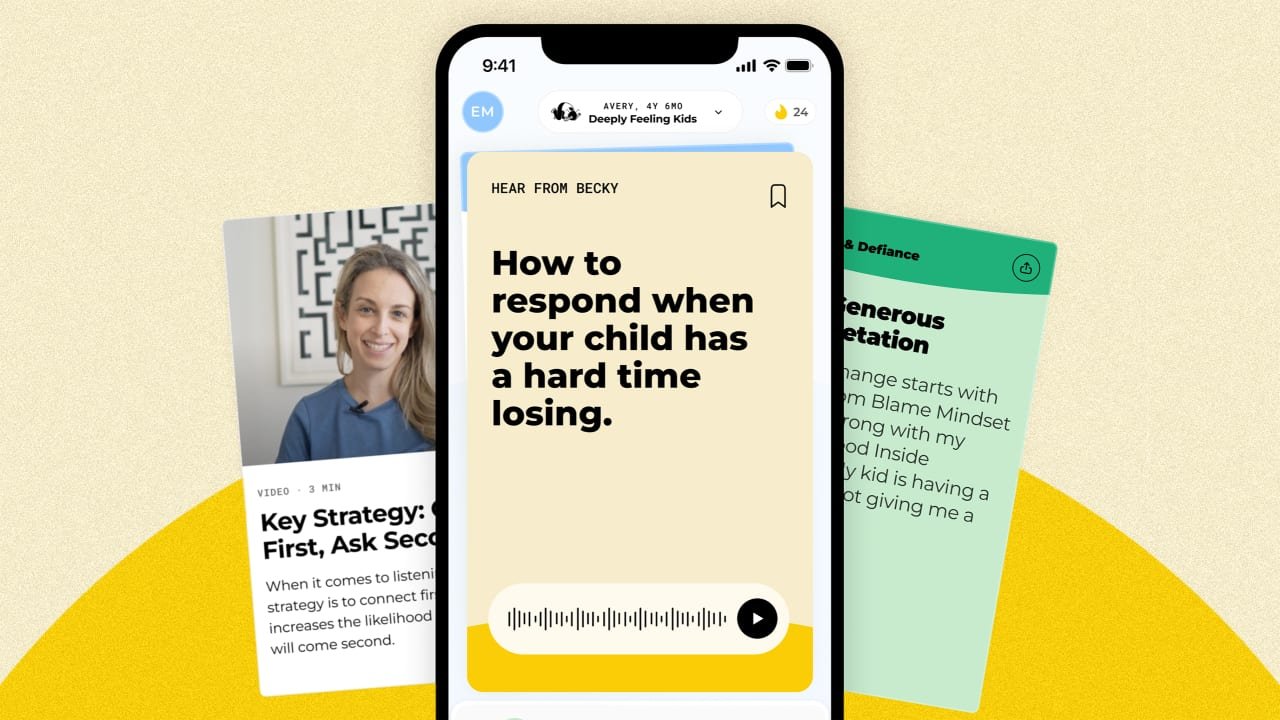
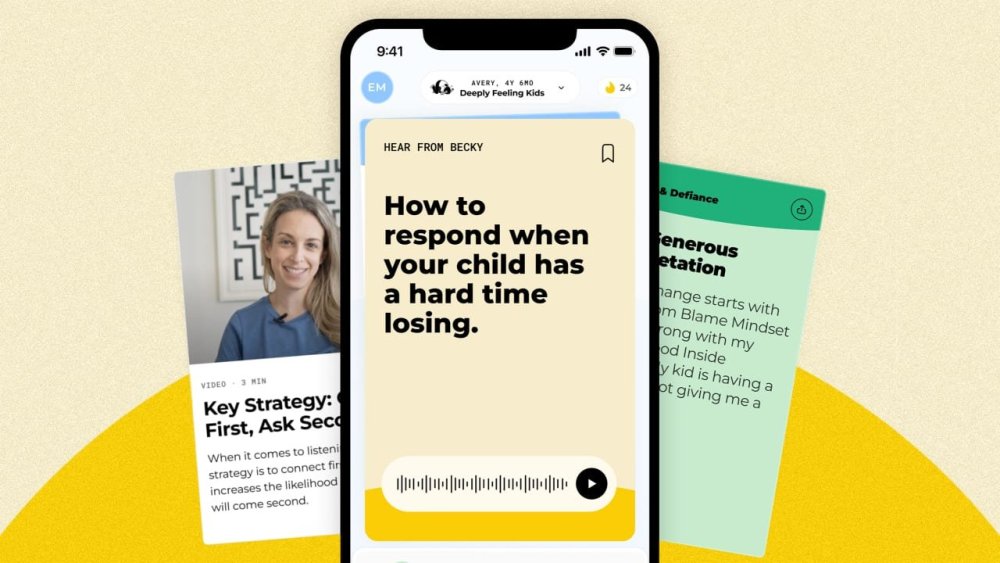
Dr. Becky Kennedy, a New York City-based clinical psychologist who coaches parents through difficult moments with their kids, has created a booming business centered on the notion that kids are, essentially, good people. The idea sounds simple, but to Kennedy, it’s profound—the key to unlocking healthy parent-child relationships. And that insight, which Kennedy has developed into the Good Inside method, has turned “Dr. Becky” from prominent psychologist into a celebrity-status parenting guru. [Image: Dr. Becky] Early in her career, Kennedy embraced what she calls a “behavior-first, reward-and-punishment” approach to parenting. But she came to understand that the method, which emphasizes discipline and consequences, doesn’t help children develop the skills they need to handle complicated emotional situations. So, Kennedy came up with an entirely new framework. The basic idea of Good Inside is that children act out when they feel misunderstood or their needs aren’t being met—that their bad behavior doesn’t reflect their inherent character. And parents who approach them through this perspective are better able to set boundaries and develop healthy relationships with their children. When COVID-19 hit in 2020, Kennedy joined Instagram to dispense advice to parents struggling with their suddenly trapped-at-home children. Dr. Becky soon became a social media sensation: She currently has more than 3 million Instagram followers and a growing presence on TikTok. In the meantime, she’s spun her Good Inside brand into a bestselling book, a podcast, and a subscription-based app, which launched last year and uses generative AI trained on Kennedy’s writing and videos to give parents personalized, specific advice to deal with situations in real time. The Good Inside app, which costs $276 a year, now counts more than 50,000 members. Fast Company spoke to Kennedy about her approach to empowering parents, using generative AI and social media to spread her message, and growing the Good Inside brand. What made you join Instagram in 2020? I started to see that we create issues in childhood and then we try to solve them in adulthood. When I noticed this, I couldn’t unthink it. I’m always focused on efficiency. I think what led me to Instagram was the thought that more people need to know this. More people need access to the type of education that you get in every other job. Parenting is the hardest job in the world, and we are sold this bullshit narrative that we should have a maternal instinct and that it should come naturally. The only thing that comes naturally in parenting is how you were parented. Technology is now being used to solve a lot of the world’s struggles and make certain things easier. Where’s the education and the technology for parents? I want parents to say, “I feel like I have the best parenting coach in the world in my pocket. I shouldn’t spiral after I yell at my kid. It shouldn’t be a mystery what to say when my kid comes home after getting in trouble at school.” [Image: Dr. Becky] Is that why you developed the Good Inside app? We grew completely organically on Instagram. Parents have basically told us along the way what they want, and we’re just serving it up for them. They want education. They want access to experts and access to each other so they know they’re not alone. With that kind of insight we’re like, okay, we are going to create this ongoing experience. The app has a subscription model because if you’re a parent with kids, they are often living in your home for 18 years. We just want to be with people on their journey. We have more than 50,000 members in over 108 countries, even though we’re still just English-speaking. We heard from parents during [the pandemic] that they wanted longer content. But now they are on the go and need advice for very specific situations, so it needs to be personalized. So when someone only has five minutes, they can feel productive. This is really a digital product, just like Duolingo. We want parents to have a way to learn the language of parenting. Parents can type in a specific situation, and get practical advice on what they can do tailored to them using generative AI. They can also delve deeper and learn more if they want to. What is the overarching theory behind Good Inside, and how did you come to it? This all came together in my private practice. I’d work with adults, and I felt like there was one thing that was true about everyone, regardless of what they came to talk about. It’s that the patterns and the circuitry that were put in our bodies to protect us and help us adapt early on in life start to work against us in adulthood. A lot of our early childhood adaptations ironically become symptoms in adulthood. [People wonder], Why don’t I trust people? I’m so hypervigilant. I don’t think I was born that way. So what did I learn early on that made me untrusting? I used to tell adults that the circuits that were put in place to protect us are hard to unwind because our body thinks it’s helping us. So I’d work with adults in helping them understand why they do things they do. That’s the first step, because we can’t intervene before we understand. How does this theory apply to parenting? I’d see parents of a four-year-old, they’d be like, “My kid is hitting, and I don’t know what to do.” I’d say to them what I was taught, which was to tell their kid, “We’re going to do a timeout.” Then take away their dessert and give them a sticker every time they don’t hit their friend. But then I pictured doing this with the adults I’d see in my practice: Them saying, “I yelled at someone at work,” and me being like, “Give me your phone, and by the way, you didn’t hit someone yesterday, so here’s a sticker.” In that scenario, they’d reply, “Why would taking away my phone help me stay calm? I think you just made me feel worse.” Nobody would come back to my office. No good CEOs make employees better by punishing them. But we’ve been doing this to kids for generations. We think, I’m punishing my kid and I tell myself that’s being in charge. But punishing is a sign of desperation, not authority. Good Inside is an approach for someone who can say, “I need to own my parental authority.” What do you advise parents to do in this scenario instead? First, I have to set a true boundary. I would go to my kid and say, “I’m not going to let you hit.” When I did that, I’d actually hold their wrist or get in between them and the other kid. This is the opposite of what a lot of us do as parents. Many parents might say, “Okay, stop hitting,” or we do something weird and say, “I’m going to count to three.” It doesn’t make any sense. I would never say, “I’m going to count to three and I hope you don’t run into oncoming traffic.” I would just not let my kid run into oncoming traffic. That is what I call setting a boundary and embodying your authority. After I set a boundary, I’d say something to stay connected to my kid and see the good inside them. Something like, “Hey, you’re allowed to be mad. Your sister’s playing with your favorite truck. But let’s figure out another way you can communicate that.” [Image: Dr. Becky] What does this method teach kids? Big picture: Nobody learns skills for better behavior by going to their room. I don’t know a four-year-old who’s like, “Oh, let me search on the internet what to do the next time I’m mad so I don’t hit.” A four-year-old is feeling ashamed. They feel like a bad kid. Ironically, their feelings are going to be harder to manage and they’re more likely to hit tomorrow. Good Inside separates who you are from what you do—not to let you off the hook, but to provide a foundation to build skills and to improve behavior. What if parents say, “I have a four-year-old, they’re not going to understand that”? They will understand. They’ll understand that you set a boundary to stop them from acting out. They finally feel like they have an adult in the room keeping them safe. And they’ll understand that you’re looking at them. They’re a good person having a hard time, not a bad kid doing bad things. That difference is massive. People often use the word “boundary” to express something that others should react to. But in your definition, it sounds like a boundary is something that requires nothing of the other person. Often we say we’re setting a boundary when in fact we’re just making a request. Parents say, “I set a boundary, and my kid’s not respecting it.” Whenever I hear that, I think someone has an incorrect definition of a boundary. My definition of a boundary, whether you’re a parent or not, is something you tell someone you will do. It requires the other person to do nothing. A boundary might look like you saying to your kid, “Hey, I’m going to walk over to you, and if things aren’t calm by the time I get there, I’m picking you up and I’m carrying you to your room. Because my No. 1 job is to keep you safe, and hitting isn’t safe and you’re clearly not capable of making good decisions right now.” When a parent says, “I’m going to literally hold you to stop hitting your friend,” other parents on the playground might watch that and think, what the hell are they doing? What’s the best way to respond in that scenario? I think you’re asking a bigger question: How much of my time do I spend in other people’s brains thinking about what they think about me? And how much of my time do I spend in my own brain gazing in and thinking about what I want and need? What’s really sad—and this is what happens to a lot of women because we’re trained to gaze out before we gaze in—is we don’t even really know what we want to do anymore. One of the biggest things we do at Good Inside is empower parents to be the sturdiest, most healed version of themselves, which is the most important thing they can do to help their kids. [Image: Dr. Becky] So how do parents use the app? For instance, what if I had a kid, and they spilled a glass or water and screamed about it for an hour. How would the app help me? Let’s do it right now. I’m typing the scenario into the app. Want me to read to you what it said? That sounds really intense. Kids often have big reactions to small accidents because they feel overwhelmed, and don’t know how to manage that. Your kid probably felt a mix of surprise, frustration, and maybe even fear of the mess, which led to that hour-long scream fest. In moments like this, start by just acknowledging what’s happening, acknowledge the surprise, not just the feeling, wow, that was a surprise. Then they’ll probably start to calm down and you can guide them through cleaning up together. This not only helps them learn to manage the situation, it also reinforces that mistakes happen and it’s okay to feel upset. Remember, you’re really helping your kid learn how to navigate big feelings. Then we have the next step for you if you want it. We have a primer to kids who are overly emotional. It’s a little bit longer, but it’ll take you one level deeper if that’s what you’re looking for. How did you develop AI tools that can deliver these kinds of responses? It took a year. I worked with an amazing clinical team of people who are trained in the Good Inside approach and our amazing machine-learning engineers. In terms of the content itself, I have a produced a lot, so it’s trained on that. The app costs almost $25 a month. How did you think about that pricing strategy? We think about things as expensive or cheap relative to what we’re comparing it to. If people compare our app to free reels on Instagram, they’d think it’s expensive. We have a lot of members who say, “This is transforming my life at $25 a month. I pay way more than that in copays for my in-network therapist. My copays add up to over a hundred dollars a month.” So, this actually feels incredibly reasonable. Nobody values their own mental health or their kids’ mental health as low on their list, and yet sometimes I think when we look at where we invest money, there’s a lot of other things we place above that. When you compare the price point to anything else that involves mental wellness, I think the value you get far exceeds the value you’re investing. Is it ever too late for someone to change their parenting style? Everything in our app, in our membership, in our company is based on the belief that it is not too late. We underestimate how much our bodies accept repair. We are all looking for the compassion and understanding that we never got. I think when parents say, “Is it too late?” They’re kind of saying, “Have I lost the ability to stay calm, to feel good about myself, to feel confident that I can handle hard challenges with uncertainty?” I want to give that person a hug. I know it sounds cheesy, but I want them to feel the strength of my conviction in saying, “No.” Will the journey be easy? Will everything change tomorrow? No way. But as long as it takes for our circuitry to build, it doesn’t take that same amount of time for it to unwind. We need a guide, we need some powerful ideas. We definitely need some practical, actionable strategies and many experiments. I think that’s what I’m most proud of. At Good Inside, we change a parent even more than their parenting. View the full article
-
Disney might tout its rides and character IP when it looks to lure people to its theme parks around the world, but once visitors get there, the draw is an escape from reality. Fans call it the “Disney Bubble”: The day-to-day world melts away and you’re immersed in an environment that is carefully crafted (and controlled) by Disney. The Disney Bubble is designed to let vacationers to take one step away from the real world for the length of their stay. Distractions are minimized. You don’t even need to pull out your wallet. Paying for things like a souvenir or a snack can be done with just the tap of your phone or Magic Band. The Bubble is why many guests prefer to stay within the Disney ecosystem for the entirety of their trip, shopping, eating and sleeping at Disney-operated stores rather than less-expensive options just a few miles away. Disney’s customer service is an essential part of creating that Bubble, say executives. Interactions with staff, which Disney calls “cast members”— can make visitors feel appreciated, whether it’s the Disney bus driver or a costumed character in the park. “Our cast are the heart of the magic at Walt Disney World,” says Jason Kirk, senior vice president of operations, who oversees all four Disney theme parks in Orlando. “Of course, guests love the fireworks. Of course, they love Space Mountain. But those moments with the cast are the things that create lifetime memories.” The Bubble starts with ensuring guests have a seamless experience throughout their stay, says Allison Armor, vice president of resorts operations at Walt Disney World. In other words, the check-in process at the hotel can’t be separate from the park experience. The same level of service and helpfulness needs to be pervasive. The cleaning staff at hotels provide “hallway hospitality,” which covers everything from a smile and a greeting to guests to helping them solve any problem or fulfilling a request. And the park’s transportation workers, from bus drivers to boat captains, interact with guests, offering park tips and collectible trading cards. (Bus drivers, in fact, receive the highest ratings of any cast members, Kirk says.) [Photo: Gary Hershorn/Getty Images] “[Guests] walk away with a feeling of immersion from beginning to end,” says Armor. “It has to be cohesive and an elevated interaction. … Every cast member at every moment has to own that vacation experience for the guest.” Creating pixie dust moments One of the most important ways Disney creates its Bubble is by giving every employee the decision-making power to enhance a guest’s stay, even if it’s just in a small way. This can range from the “pixie dust” moments (where a food service worker announces that a Dole Whip or churro is “on Mickey” and free to guests or a ride operator asks if you had fun and, if so, offers to let you ride again without a wait in line) to attending to any challenges guests encounter. If the cast member can’t solve the problem, they’re trained to elevate it to someone who can. Customer service is one of the most-frequently cited perks of the parks. Part of creating the Bubble is ensuring that guest experiences while they’re at the parks are as smooth as possible. To ensure this, Disney leaders study guest feedback to streamline and upgrade systems that customers interact with. For example, after the parks reopened from the pandemic closure, Chelsea Filley, vice president of customer experience and commercial strategy, and her division launched a customer experience team, to understand and correct things that were making the Disney planning process complex for potential visitors. That led to a variety of changes, from how dining availability was displayed to the renaming of the Genie+ reservation system, which had been criticized as overly complex. Subsequent work by the company’s team of analytical engineers resulted in further refinement of that skip-the-line reservation system. Lightning Lane selection, for example, was recently changed from the day of a person’s park visit to prior to their arrival, letting them plan their trips in advance. “That was based on [guest] feedback … and it has played out so well,” says Kirk. “It has taken the stress out of the day for our guests, but also our guest are getting more out of Lighting Lane. They’re able to experience more attractions.” The Disney Bubble has become a big thing to maintain–and will get even bigger with upcoming park expansions. Walt Disney World, in Orlando, spans nearly 30,000 acres, houses 25 hotels, offers more than 115 attractions, over 40 forms of entertainment (including parades, fireworks and live performances) and more than 50 character experiences. By creating the Bubble, execs say they hope to make that choice not only less intimidating, but more welcoming. “Our breadth is our superpower,” says Filley. “The Bubble is what makes the magic, but you want that magic to feel like ‘I am making the most of my time here’.” View the full article

-
Copenhagen points out that America has significantly pared back its military presence in the Arctic View the full article