Newsletter
Want to keep up to date with all our latest news and information?


ResidentialBusiness
Administrators
-
Joined
-
Last visited
Everything posted by ResidentialBusiness
-
The world of popular psychological ideas, which is largely the self-help industry, is not short of contradictions. For instance, it simultaneously promotes the benefits of emotional intelligence (the ability to empathize with others and engage in strategic impression management) and authenticity (the tendency to express what you really feel and think without much consideration for others’ opinions). It also frequently celebrates self-acceptance and constant self-improvement (“love yourself as you are”… but also “become the best version of yourself”), mindfulness and relentless ambition (“stay in the zone, present and serene”… while hustling aggressively toward big goals), and even self-awareness and self-belief, which pull in opposite psychological directions. Self-awareness requires confronting your flaws, limitations, and blind spots with brutal honesty; self-belief requires ignoring at least some of that evidence to maintain high-levels of confidence, optimism, and drive. One asks you to see yourself clearly; the other asks you to believe in yourself despite what you see. Yet this isn’t a logical flaw so much as a reflection of our human tendency to categorize things as either fully good or fully bad, when in reality most psychological qualities operate in a yin–yang balance. As Aristotle argued in his doctrine of the golden mean, virtue itself sits at the midpoint between two vices — courage between cowardice and recklessness, generosity between stinginess and extravagance, confidence between timidity and hubris. In other words, even the qualities we most admire become dysfunctional when taken too far, and even the traits we distrust can be valuable in moderation. Human behavior functions the same way: most psychological strengths aren’t inherently good or bad, they’re dose-dependent. In line, emotional intelligence isn’t inherently superior to authenticity; self-awareness isn’t automatically better than self-belief. They each contain the seed of their opposite, and their value depends on the situation, dosage, and context. In fact, one of the most established findings in personality and organizational psychology is the “too-much-of-a-good-thing” effect: virtually any trait or competency becomes dysfunctional when taken to an extreme. Confidence turns into arrogance, humility into self-doubt, authenticity into impulsive oversharing, and EQ into manipulative charm. Every strength has a shadow side, every virtue has a saturation point, and every desirable trait comes bundled with its own trade-offs. The goal, then, is not to pick one pure ideal — authenticity or impression management, self-awareness or self-belief — but to learn to calibrate them, blending them in ways that make us more effective, rather than more extreme. Hidden drawbacks At times, even traits that seem to have no downside, such as self-awareness, come with hidden drawbacks. Intuitively, one would assume that we are generally better off knowing ourselves, understanding how others perceive us, and being aware of our strengths, limitations, biases, and blind spots. After all, entire leadership models, coaching programs, and HR philosophies rest on the idea that insight precedes improvement. If you don’t know what’s broken, how can you fix it? If you don’t know how others experience you, how can you expect to lead them? And if you don’t understand your own motives, how can you trust your decisions? To be sure, this intuition is backed by a substantial body of research. For example, many scientific studies show that: 1) Self-awareness predicts better job performance. Employees with higher self-insight (as measured through multisource or “360-degree” feedback assessments) tend to show greater effectiveness at work, including when they are managers and leaders. 2) Self-awareness enhances leadership effectiveness. Leaders who are more attuned to their strengths and weaknesses receive higher performance ratings and foster better team climates (note, however, that underestimating your skills and leadership talents is also linked to higher leadership effectiveness compared to people who overestimate themselves). 3) Self-awareness improves interpersonal relationships. Individuals who understand their emotional patterns and their impact on others display higher empathy and lower conflict. It’s simple: if you know how you impact others, which equates to knowing how others see you, it will be easier for you to adjust your behavior to make a desired impact on others (this is what David Brent and Michael Scott fail to do, which makes The Office great comedy value but their characters an absolute nightmare archetype of a boss). The value of selective ignorance However, there are also well-documented benefits to poor self-awareness — or, more precisely, benefits to selective ignorance, including being unaware of your limitations or unjustifiably pleased with yourself. Think of people with the arrogance or confidence of Kanye West, Cristiano Ronaldo, or Muhammad Ali… but without the talents to back it up! Consider the following findings: First, people with inflated self-views tend to be more resilient and less affected by stress, being able to bounce back faster and stronger from setbacks. Along the same lines, decades of research on positive illusions shows that overly optimistic people cope better with adversity and maintain higher motivation. Second, self-deception can make individuals more persuasive: people who genuinely believe they are more competent than they are often appear more confident and convincing to others. If you can fool yourself, you are much more likely to fool others, since you don’t even have to pretend or lie. Third, low self-awareness can fuel ambition. Many entrepreneurs, athletes, and leaders overestimate their odds of success — and this unrealistic optimism propels them to attempt things that a more accurate self-assessment would quickly veto. The world’s innovations are not driven by people with perfectly calibrated self-views, but by those who believed they could fly even when the evidence suggested otherwise. All of which is to say: the self-help promise of clean, linear psychological virtues overlooks how messy human functioning actually is. A bit like nutrition advice that alternates between demonizing carbs, demonizing fat, and demonizing sugar (sometimes all three, and at times none), the self-help world tends to spotlight traits in isolation, ignoring the context in which they operate. Authenticity is wonderful… until it’s not. Confidence is powerful… until it becomes delusion. Empathy is admirable… until it becomes people-pleasing. Even mindfulness has a dark side when it becomes an excuse for avoidance or emotional disengagement. A tool box A more realistic (and scientifically grounded) way of thinking about psychological qualities is to view them as tools in a repertoire. A hammer is useful, but not if you treat every situation as a nail. Emotional intelligence is helpful, but not if it turns into strategic manipulation. Authenticity is refreshing, but not if it comes at the expense of tact, professionalism, or prosocial self-regulation. And self-awareness is enlightening, but not if it becomes rumination, self-criticism, or paralysis by analysis. The true art of psychological competence, especially in leadership, is not picking the “right” trait but deploying the right trait at the right time. It’s knowing when to believe in yourself fiercely, and when to question your assumptions. When to be transparent, and when to filter. When to push ruthlessly, and when to pause reflectively. When to take a risk, and when to seek feedback. Most importantly, it’s recognizing that every psychological asset becomes a liability when unbounded, and every liability contains the seed of an asset when calibrated properly. If the self-help industry were more honest, it would sound far less like a collection of tidy commandments and far more like a user manual for a complex operating system: one with settings, thresholds, sliders, and context-specific modes. But “it depends” will never be a bestseller, and “everything in moderation” is hardly a motivational tagline. So instead, we get a contradictory buffet of directives — be yourself, but improve yourself; relax, but hustle; speak your truth, but avoid offending anyone; know your flaws, but never doubt your greatness. The irony, of course, is that mature psychological functioning lies precisely in reconciling these tensions. Not by choosing sides, but by developing the agility to move fluidly between them. In the end, the real contradiction is not in the advice we receive, but in our desire for simple answers to complex questions. Human nature is too nuanced for single-variable solutions, and the qualities that make us effective are rarely pure. They are contradictions held in balance (the yin and yang of psychological functioning) and the leaders who thrive are those who learn to navigate this paradox elegantly, not dogmatically. View the full article

-
The drop in mortgage rates as measured by Freddie Mac, came about even as the 10-year Treasury yield used to price loans moved higher since Thanksgiving. View the full article

-
Of the 50 highest risk markets in the country, 16 reside in California, followed by New Jersey with nine, Attom found. View the full article

-
The rise of artificial intelligence is transforming every industry, but it also creates enormous demand for digital infrastructure and natural resources. Data centers, the engines of this transformation, consume vast amounts of water and energy. A single hyperscale data center consumes up to 5 million gallons of potable water every day. In Phoenix, 58 centers together demand more than 170 million gallons daily, enough to serve up to several hundred thousand households. This is the internet’s hidden water footprint, amplified by AI, cloud computing, and data-heavy services. Training a single large AI model in a Microsoft data center can require about 185,000 gallons of clean water. By 2027, AI-related data centers could consume 1.7 trillion gallons annually, nearly matching the domestic water use of some developed nations. Most data centers still rely on evaporative cooling, which consumes massive volumes and discharges chemical-laden wastewater. The challenge is not only scale but also geography. More than 40% of U.S. data centers are located in water-stressed basins. AI’s rapid growth demands a new approach. Water cannot become the bottleneck to the next chapter of human progress. FROM COMMUNITY PUSHBACK TO BUSINESS RISK Public concerns are already reshaping the industry: Oregon: Google faced lawsuits over water secrecy. Indiana: Amazon’s Project Rainier is under state scrutiny for allegedly draining wells while pumping millions of gallons per hour. Georgia: Families near Meta’s complex report unusable wells. Virginia: Utilities now require new data centers to secure their own water sources or adopt closed-loop systems. Investors are paying attention. Water use per AI training cycle is emerging as a core accountability metric, alongside carbon intensity. Communities are responding with moratorium requests. THE CALL FOR INDUSTRY LEADERSHIP The industry can no longer rely on incomplete data, inconsistent reporting, or distant offsetting schemes. Declaring a “water positive” target by some far-off date is no longer enough. Communities demand tangible action where the water is drawn. The technology exists today. Around the world, data center and cloud providers are proving that sustainability and scalability can coexist, with each breakthrough setting a new benchmark for what is possible. Microsoft has deployed closed-loop systems in Arizona and Wisconsin, saving up to 125 million liters per site. Google used reclaimed wastewater at 22% of its campuses as of 2023. Amazon is building new centers with closed-loop treatment, recycling every drop used for cooling. NVIDIA is partnering with Singtel to deploy next-generation liquid and immersion cooling systems designed to achieve industry-leading water efficiency in Singapore’s new AI data centers. The opportunity is clear: Water must be engineered into AI’s growth, not treated as an afterthought. THE TECHNOLOGIES DRIVING SUSTAINABLE AI Building a sustainable digital future requires bold adoption of both proven and emerging solutions that reduce environmental impact while enabling continued growth. The tools already exist. What we need now is the conviction to scale them. Smarter cooling technologies Closed-loop and liquid cooling: Advanced systems can reduce water consumption by as much as 30 to 50% while maintaining the high-performance environment that AI workloads demand. Water recycling at scale: Leaders like AWS plan to deploy treated wastewater at more than 120 data centers by 2030, setting a new baseline for responsible water use. AI-Driven optimization Smart workload scheduling: By applying AI to manage computing loads, operators have shown they can cut water consumption by a third without increasing carbon emissions. This type of efficiency breakthrough makes sustainability scalable. Alternative water sources Seawater desalination: In coastal or arid regions, seawater offers an abundant alternative. Advanced desalination technologies convert it into a reliable cooling supply without burdening municipal drinking water systems. High-value water reuse: Modern treatment technologies can transform sewage, brackish groundwater, and industrial effluent into high-quality process water, eliminating dependence on limited freshwater supplies. This is our approach at Gradiant, where our feedwater-agnostic treatment systems enable data centers to operate using seawater, wastewater, or other unconventional sources, reducing dependence on fresh supplies. By recycling blowdown and cooling tower reject, we achieve zero-liquid discharge and drastically reduce freshwater withdrawals, even in the largest hyperscale AI facilities. With the right technologies, sustainable AI data center growth can align with both environmental and business imperatives. AI’S GROWTH HINGES ON WATER The next era of AI will be defined by those who treat water as critical infrastructure. Companies that lead will gain faster permitting, avoid regulatory shocks and operational disruptions, and build lasting trust with the communities that host them. Water is not compliance. It is resilience. It is innovation. It is license to operate. AI’s future depends on leadership that recognizes water as the defining resource of our digital age, one that must be safeguarded through innovation rather than depletion. Advanced recycling, seawater desalination, and next-generation water treatment will be the pillars of responsible growth. The companies that act now will determine not only how AI grows but whether it grows responsibly, securing both digital progress and planetary resilience. Prakash Govindan and Anurag Bajpayee are the cofounders of Gradiant. View the full article

-
The Bronx stands apart from New York City’s four other boroughs in stark ways. Home to 1.4 million residents and the nation’s poorest congressional district, it once flourished as fertile farmland. Today, we’re restoring this land—not to its agricultural roots, but as fertile ground for raising healthy, happy, and prosperous children. And in the process, we’re cultivating opportunity for a new generation of citizens. My wife Lizette and I founded and run Green Bronx Machine (GBM). Our nonprofit is dedicated to rewriting the narrative about the Bronx and its residents. Inside Community School 55, just across the tracks from rows of dilapidated public housing towers, sits an unexpected oasis: a thriving garden where fruits and vegetables grow alongside young dreams and possibilities. All year long, grandmothers find respite in the greenery while children eagerly plant seeds, harvest crops, raise chickens, and gather eggs. But this transformation didn’t begin outdoors—it started in a classroom. AN “UNEMPLOYED” TEACHER I playfully call myself an “unemployed teacher.” An educator/administrator since 1984, I left formal employment determined to launch a program that has now spread to more than 1,000 schools across the United States and a dozen countries—with ambitious plans to scale that impact. Dubbed “A Miracle in the Bronx,” we combine urban agriculture, project-based learning, and community engagement that transforms educational outcomes in areas where success seems improbable, if not impossible. GBM’s classroom model began almost by accident. When struggling to engage my students, I received a box of daffodil bulbs. Instead of discarding them, I tucked them behind a radiator. Weeks later, the bulbs sprouted and bloomed, and with them, a change in students’ engagement and attendance. These kids, who wouldn’t come to school to see me, were suddenly showing up to see plants. That was my a-ha moment. We planted 25,000 bulbs all across NYC that year. [Photo: Green Bronx Machine] Today, the program features indoor Tower Gardens and Babylon Micro-Farms, where students grow vegetables year-round in classroom settings, along the way learning math, English, biology, even phys. ed. The results extend far beyond agriculture. Participants show improved academic performance, higher attendance rates, better nutritional habits, and increased environmental awareness. Teachers are similarly inspired and engaged. Meanwhile, the produce students grow is sold to provide much-needed jobs and income, or taken home by students to feed their families. I learned that when a child plants a seed and nurtures that plant to harvest, they never go hungry again—not intellectually, emotionally, or physically. THE VISION DEFICIT IN AMERICAN SCHOOLS It is common to think that America’s educational challenges stem primarily from limited funding. But the more fundamental issue is a clear vision of what’s possible in today’s schools—something increasingly scarce in an environment dominated by misinformation, politics, and eroding social cohesion. For children growing up today, the harsh reality is that in America, despite our cherished narrative of meritocracy and individualism, one’s ZIP code remains the primary determinant of social, educational, and health outcomes. That’s exemplified in marginalized areas like the South Bronx. This geographical determinism is driven by many things. That includes schools in low-income areas being starved for funding, experienced teachers, and enrichment opportunities. Students also face additional barriers such as food insecurity, housing instability, and exposure to environmental hazards—all impacting their ability to learn effectively. END ZIP CODE DESTINY By transforming schools into centers of community wellness, individual excellence, and environmental stewardship, we’ve demonstrated that innovative approaches can overcome systemic barriers. We’re growing high performing schools, engaged citizens, responsible neighbors, vibrant communities, jobs, and we’re growing healthy food—all together. The program has driven impact across a wide variety of communities, national and international, and that impact is captured in a documentary, Generation Growth, which highlights the program’s success and led to GBM being named a 2024 Most Innovative Company by Fast Company. SCALE A TRANSFERABLE MODEL What makes GBM’s method so impactful is its transferability across states and international borders. Schools in diverse settings, from rural Alabama to suburban Colorado, have successfully adapted it to local needs while maintaining core principles. We’re projected to impact 30,000 schools in the United States by 2030. This isn’t just about the Bronx. There is a Bronx in every American city and around the world; we’ve built a turn-key program that serves all of them. This is about transforming how we think about education, community, sustainability, poverty, and progress everywhere. [Photo: Green Bronx Machine] Many think I have a larger-than-life personality, but you don’t need that to be effective. It’s about community engagement. Ana Christina Garcia of Sloan Kettering and a GBM board member notes that “Green Bronx Machine capitalizes on community assets and unlocks the potential, desire, and passion that children, principals, and teachers already have. Community engagement is about making organizational resources more accessible to unlock people’s existing talents and power. It’s a two-way street where everyone benefits from sharing their wonderful talents as human beings and creating stronger community connections.” I call this social vitamins fortified with human capacity. We’re not just growing plants, we’re growing hope. And hope is the most powerful seed we can plant. In 2026 I’d like to shake hands with other thought leaders to continue bringing this proven program across the country. It takes a village, of course, but it also takes an inspiring vision. Join me please. The author thanks Joel Makower and Jeff Senne for their contributions to this article. Stephen Ritz is founder of Green Bronx Machine. View the full article

-
The update screen is a normal occurrence on Windows machines, so of course hackers are now manipulating it to sneak malware onto devices. The scheme, a recent iteration of a ClickFix attack, is designed to trick you into executing a dangerous command under the guise of completing a "critical security update." But what you're actually doing is installing an infostealer that hands data over to bad actors. When a Windows update pop-up is actually a ClickFix attackClickFix is a social engineering ploy that uses tactics like fake error messages, CAPTCHA forms, and command prompts to deliver malware to your device. As PCMag reports, the Windows update scam is a pop-up that looks like a standard Windows blue screen but is actually a full screen browser page being displayed from a malicious domain. The ClickFix element is a set of keystrokes—not part of the real update interface—that have the user paste and execute a malicious command, ultimately delivering malware to their device. These instructions have an air of urgency, which is a common element of a scam. Researchers at cybersecurity firm Huntress have detailed the exact mechanism behind this attack, including an iteration in which users are prompted to verify they are human (rather than complete a security update). As Bleeping Computer outlines, the malicious code is embedded into the pixel data of PNG images, and the final payload is one of two known infostealers. According to the Huntress analysis, following a recent law enforcement operation, fake Windows update pages continue to exist across multiple domains, but those domains no longer seem to host the malware payload. That doesn't mean, however, that this attack, or some version of it, won't pop up elsewhere. How to stay safe from this ClickFix attackIf you run Windows on your device, you've probably seen a blue or black update or error screen many times, and you may not be suspicious if your computer randomly begins an update or prompts you to take an extra step to confirm it. But while a legitimate update screen will have a progress indicator and instructions not to turn off your computer, you should never need to input manual commands. This is a red flag of a ClickFix attack and not something a trusted service will require. Of course, it's important to keep your computer up to date. Microsoft releases security updates on the second Tuesday of the month, known as Patch Tuesday, and you can enable automatic updates on your machine to ensure you get fixes as soon as they're available. If you want to take additional steps to prevent ClickFix attacks on Windows, you can disable the Windows Run box to prevent unauthorized access to commands. View the full article
-
Twilio’s latest research sheds light on an increasingly pressing issue for small businesses: the digital overload many mid-career professionals face. The findings from Twilio’s “Age of Distraction” report reveal that adults aged 36 to 50 are grappling with an average of 2,228 unread personal emails—more than double the UK national average. As small business owners look to connect with this demographic, these insights can guide how they shape their customer engagement strategies. The report notes that mid-career adults, who are often juggling demanding professional and family lives, report an overwhelming pressure to stay online. Surprisingly, 44% of those aged 36 to 50 feel this pressure, compared to just 28% of younger adults aged 18 to 25. Yet, this group experiences lower emotional fulfillment from digital communications, with only 36% indicating an emotional uplift from video calls and messaging. For small business owners, these findings present both opportunities and challenges. On one hand, understanding this demographic’s struggles with digital noise allows businesses to tailor their approaches. Sam Richardson, Director of Executive Engagement at Twilio, emphasizes, “To win their attention, brands must respect boundaries and build trust.” By creating meaningful engagements rather than bombarding potential customers with messages, small businesses can stand out amid the clutter. Moreover, the report highlights a growing desire for digital detoxes among this age group. One in five UK adults have attempted a digital detox in the past year, with 83% believing that time spent alone helps recharge their energy. Brands that offer solutions catering to these needs can foster genuine connections with their audience. Companies like Posh, an events platform, demonstrate how to implement these strategies. According to Eli Taylor-Lemire, Co-Founder and CPO at Posh, “People don’t need more notifications, they need more meaningful moments.” Posh has leveraged Twilio’s programmable messaging to facilitate over a million real-time updates daily, encouraging users to participate in events that matter. This case shows how businesses can use technology as a bridge to deeper connections rather than just a source of digital noise. However, small business owners should be mindful of potential pitfalls. As they adapt to these new insights, the risk of overloading customers with attempts to engage or inform remains high. The key lies in adopting a quality-over-quantity approach, delivering content that resonates without overwhelming the audience. Catherine Knibbs, a human behavior technologist, emphasizes the significance of adopting considered approaches to technology usage. She states, “Modern life doesn’t allow for us to totally turn our back on technology,” suggesting that while businesses must engage digitally, they should also foster environments that allow for meaningful human connections. For small businesses looking to implement these strategies, here are a few actionable insights: Focus on Personalization: Use data intelligently to craft personalized messaging that resonates with the audience. Tailored connections can significantly increase engagement while reducing the feeling of overload. Offer Value, Not Just Messages: Concentrate on delivering solutions that genuinely benefit the customer, rather than simply trying to sell a product. This creates trust and fosters stronger relationships. Incorporate Opportunities for Offline Engagement: Facilitate in-person interactions when possible. This can help cut through the digital noise and create lasting customer loyalty. Be Mindful of Frequency: Understand the right balance in communication. In a world where customers are already juggling numerous digital obligations, too many interactions can push them away. The digital landscape is evolving, and small business owners need to navigate it thoughtfully. By recognizing the challenges faced by mid-career professionals and responding with empathy and strategic engagement, businesses can not only capture attention but also build lasting connections. To explore the full findings of Twilio’s research, visit Twilio’s Age of Distraction Report. Image via Google Gemini This article, "Mid-Career Adults Overwhelmed by Digital Noise, Seek Real Connections" was first published on Small Business Trends View the full article
-
Twilio’s latest research sheds light on an increasingly pressing issue for small businesses: the digital overload many mid-career professionals face. The findings from Twilio’s “Age of Distraction” report reveal that adults aged 36 to 50 are grappling with an average of 2,228 unread personal emails—more than double the UK national average. As small business owners look to connect with this demographic, these insights can guide how they shape their customer engagement strategies. The report notes that mid-career adults, who are often juggling demanding professional and family lives, report an overwhelming pressure to stay online. Surprisingly, 44% of those aged 36 to 50 feel this pressure, compared to just 28% of younger adults aged 18 to 25. Yet, this group experiences lower emotional fulfillment from digital communications, with only 36% indicating an emotional uplift from video calls and messaging. For small business owners, these findings present both opportunities and challenges. On one hand, understanding this demographic’s struggles with digital noise allows businesses to tailor their approaches. Sam Richardson, Director of Executive Engagement at Twilio, emphasizes, “To win their attention, brands must respect boundaries and build trust.” By creating meaningful engagements rather than bombarding potential customers with messages, small businesses can stand out amid the clutter. Moreover, the report highlights a growing desire for digital detoxes among this age group. One in five UK adults have attempted a digital detox in the past year, with 83% believing that time spent alone helps recharge their energy. Brands that offer solutions catering to these needs can foster genuine connections with their audience. Companies like Posh, an events platform, demonstrate how to implement these strategies. According to Eli Taylor-Lemire, Co-Founder and CPO at Posh, “People don’t need more notifications, they need more meaningful moments.” Posh has leveraged Twilio’s programmable messaging to facilitate over a million real-time updates daily, encouraging users to participate in events that matter. This case shows how businesses can use technology as a bridge to deeper connections rather than just a source of digital noise. However, small business owners should be mindful of potential pitfalls. As they adapt to these new insights, the risk of overloading customers with attempts to engage or inform remains high. The key lies in adopting a quality-over-quantity approach, delivering content that resonates without overwhelming the audience. Catherine Knibbs, a human behavior technologist, emphasizes the significance of adopting considered approaches to technology usage. She states, “Modern life doesn’t allow for us to totally turn our back on technology,” suggesting that while businesses must engage digitally, they should also foster environments that allow for meaningful human connections. For small businesses looking to implement these strategies, here are a few actionable insights: Focus on Personalization: Use data intelligently to craft personalized messaging that resonates with the audience. Tailored connections can significantly increase engagement while reducing the feeling of overload. Offer Value, Not Just Messages: Concentrate on delivering solutions that genuinely benefit the customer, rather than simply trying to sell a product. This creates trust and fosters stronger relationships. Incorporate Opportunities for Offline Engagement: Facilitate in-person interactions when possible. This can help cut through the digital noise and create lasting customer loyalty. Be Mindful of Frequency: Understand the right balance in communication. In a world where customers are already juggling numerous digital obligations, too many interactions can push them away. The digital landscape is evolving, and small business owners need to navigate it thoughtfully. By recognizing the challenges faced by mid-career professionals and responding with empathy and strategic engagement, businesses can not only capture attention but also build lasting connections. To explore the full findings of Twilio’s research, visit Twilio’s Age of Distraction Report. Image via Google Gemini This article, "Mid-Career Adults Overwhelmed by Digital Noise, Seek Real Connections" was first published on Small Business Trends View the full article
-
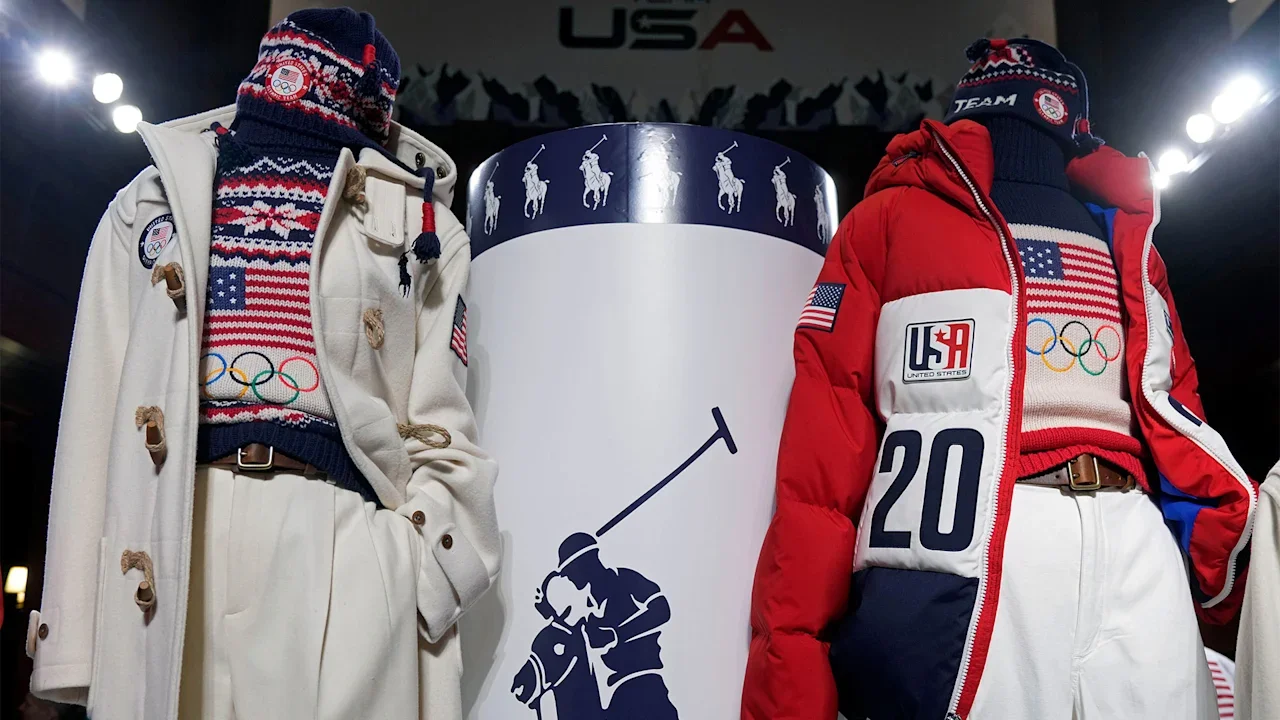
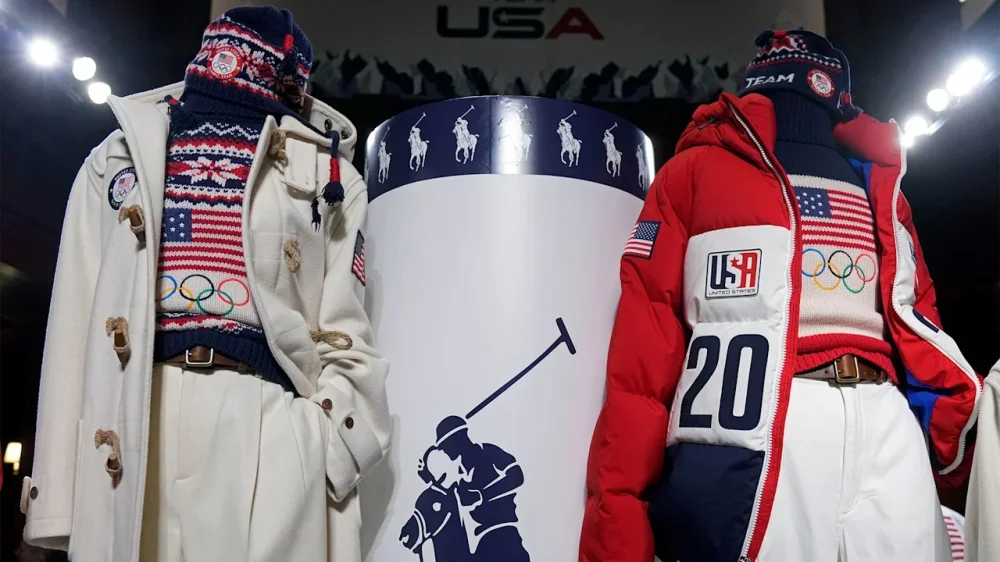
Ralph Lauren revealed Team USA’s Milan Cortina Winter Olympics looks Thursday, complete with Americana knit sweaters and plenty of vintage call-backs. The formal opening ceremony look pairs a patterned red, white and blue knit sweater with tailored cream trousers and a matching wool coat. Moving sportier, the closing ceremony outfit features a graphic puffer coat inspired by vintage ski kits over a color-blocked sweater. “We are creating something that we know has to become timeless and has to be something that people will wear forever and appreciate forever,” said David Lauren, the Chief Branding and Innovation Officer at Ralph Lauren. “So in creating jackets like this and creating things, we’re looking at the things that we most cherish. Things that are already enduring parts of the Ralph Lauren lexicon, and then we’ll build on that.” Beyond the ceremony looks, a Team USA collection, which will also be given to athletes as Olympic village wear, became available to public Thursday. The collection follows similar design themes as the opening and closing ceremony looks, with classic red, white and blue patterning on lots of knits, and includes Ralph Lauren’s versions of winter staples like bomber jackets and hockey jerseys. The process of creating these looks is a long one. The Ralph Lauren team, which has been designing Team USA’s Olympic apparel since 2008, starts on each Olympics’ looks about 2 1/2 years out from the Games, meeting with athletes and brainstorming ideas for the kits. As Milan-Cortina’s looks are unveiled, Lauren said the looks for the 2028 Los Angeles games are already months in the making. He knows the cultural importance each Olympics’ outfits holds, and the attention they garner in the fashion world and among American consumers. “The fact that we know people will want them and collect them and chase them down across eBay, is just an exciting part of the game,” he said. Sometimes, even international Olympic athletes are on the lookout for them. Beyond being an addition to an American athlete’s Olympic wardrobe, the pieces are also sometimes used as bargaining tokens in the Olympic village. Para snowboarder Brenna Huckaby and snowboarder Red Gerard explained to The Associated Press that there’s a tradition of swapping team sweaters and jackets with other nations at the Olympics, if there’s a certain country’s design that catches an athlete’s eye. That’s only if there’s a piece of their collection that they’re willing to let go of, that is. “I rarely trade, because I almost always love every single piece of Team USA stuff,” said Huckaby, modeling the color-blocked closing ceremony sweater that she said “is going to be on rotation after.” “But every now and then there will be some random thing that another country has. And it’s so hard to sit with all my bags, all my stuff open, like, ‘OK, what am I willing to part with?’ That is probably, aside from competing, the hardest part of the Games,” she said. AP Olympics: https://apnews.com/hub/milan-cortina-2026-winter-olympics —Alyce Brown, AP Sports Writer View the full article
-
We may earn a commission from links on this page. Deal pricing and availability subject to change after time of publication. Earbuds don’t usually get major design overhauls, but the Samsung Galaxy Buds 3 Pro make a clear break from earlier models. This new version leans into a more angular, stemmed shape that feels closer to the AirPods silhouette, complete with small customizable LEDs that add a bit of personality. With today’s drop to $159.99 from $249.99, you’re getting a premium pair for $90 off its regular price. Samsung Galaxy Buds 3 Pro AI True Wireless Bluetooth Earbuds $159.99 at Amazon $249.99 Save $90.00 Get Deal Get Deal $159.99 at Amazon $249.99 Save $90.00 Samsung uses a 10.5mm dynamic driver paired with a 6.1mm planar driver, which gives the buds a wider, more layered sound than you’d expect from something this size. Music comes through with good depth and detail, but this PCMag review notes that active noise cancellation can soften the treble a little. You can fine-tune that through Samsung’s EQ, though only Galaxy phone users get the full set of audio tools and support for Samsung’s Seamless Codec for 24-bit audio. Living with the Buds 3 Pro feels different depending on the device you pair them with. Galaxy users get the complete experience: auto-pairing, in-depth customization, and access to features like Interpreter Mode, which handles real-time translation during conversations. Android users outside the Samsung ecosystem still get most core features through the Wear app, with some limitations—no 24-bit audio and fewer advanced controls. iPhone users get the shortest end of the stick, as the buds function as regular Bluetooth headphones with no app support at all. That means no EQ tuning, no control customization, and no access to Samsung’s smart extras. The saving grace here is that the hardware itself holds up well on any device. Calls come through clearly, ANC works well for everyday noise, and the earbuds stay comfortable enough for long listening sessions. Durability is another bright spot. The IP57 rating puts these buds ahead of many competitors in this price range, making them solid for workouts, commutes, and even rainy runs. The case is compact, and the buds snap into place securely without fuss. Battery life is solid, though not chart-topping, and you can stretch it further by toggling between ANC modes. The lack of LDAC support might disappoint Android audiophiles looking for maximum bitrate playback, but for most listeners, the combination of comfort, sound quality, and smart features will outweigh that gap. Our Best Editor-Vetted Tech Deals Right Now Apple AirPods Pro 3 Noise Cancelling Heart Rate Wireless Earbuds — $249.00 (List Price $249.00) Apple iPad 11" 128GB A16 WiFi Tablet (Blue, 2025) — $353.00 (List Price $353.00) Amazon Fire HD 10 (2023) — $69.99 (List Price $139.99) Sony WH-1000XM5 — $278.00 (List Price $399.99) Blink Outdoor 4 1080p Wireless Security Camera (5-Pack) — $399.99 (List Price $399.99) Ring Floodlight Cam Wired Plus 1080p Security Camera (White) — $99.99 (List Price $179.99) Amazon Fire TV Stick 4K Plus — $24.99 (List Price $49.99) NEW Bose Quiet Comfort Ultra Wireless Noise Cancelling Headphones — $329.00 (List Price $429.00) Shark AI Ultra Matrix Clean Mapping Voice Control Robot Vacuum with XL Self-Empty Base — $249.99 (List Price $599.00) Apple Watch Series 11 (GPS, 42mm, S/M Black Sport Band) — $329.00 (List Price $399.00) Deals are selected by our commerce team View the full article
-
Welcome to AI Decoded, Fast Company’s weekly newsletter that breaks down the most important news in the world of AI. I’m Mark Sullivan, a senior writer at Fast Company, covering emerging tech, AI, and tech policy. This week, I’m focusing on the increasing pressure on the AI industry’s wunderkind, OpenAI. I also look at the change in AI leadership at Apple, and at the music industry’s new cooperation with AI music generation apps. Sign up to receive this newsletter every week via email here. And if you have comments on this issue and/or ideas for future ones, drop me a line at sullivan@fastcompany.com, and follow me on X (formerly Twitter) @thesullivan. Is OpenAI still the king? The AI industry has always been very competitive, and it’s getting even more so. A relatively small group of AI labs are slugging it out to release the smartest models, and, by extension, the smartest chatbots. Ever since OpenAI released its ChatGPT chatbot three years ago, the upstart company has been seen as the leader, but that status has been called into serious question by Google’s new Gemini 3 Pro model (and the Gemini app). ChatGPT has grown quickly. The official number is 800 million weekly active users. Google’s number is 650 million monthly active users for the Gemini chatbot. So, apples and oranges. SimilarWeb provides a somewhat better comparison, saying that Gemini’s share of web traffic grew from 5.7% a year ago to more than 15% today. Meanwhile, ChatGPT’s 87% share a year ago shrunk to 71.3% today. OpenAI is feeling the pressure from Gemini (and probably from Anthropic’s new Claude Opus 4.5 model). CEO Sam Altman sent a memo to staff Monday declaring a “code red” effort to improve ChatGPT, according to The Information and other outlets. The effort includes reducing investments in enhancing the health information available on ChatGPT, as well as reducing work on the shopping experience, and the advertising that could go around that. “Our focus now is to keep making ChatGPT more capable, continue growing, and expand access around the world—while making it feel even more intuitive and personal,” ChatGPT product lead Nick Turley tweeted Monday. In a wider sense, OpenAI is losing billions, and spending billions, a fact that must make its investors both nervous and curious. Leaked documents and analyst estimates show OpenAI will lose between $9 billion and $11 billion in 2025 (spending roughly $22 billion while bringing in about $13 billion in revenue). The company recently told investors that its spending through 2029 could rise to $115 billion. Altman has said his company, partners, and investors will commit as much as $1.4 trillion to infrastructure (chips, data centers, etc.) in the next eight years. OpenAI is an aggregator, as the analyst Ben Thompson points out. The fact that it’s willing to de-emphasize its shopping and advertising experiences, which are potential revenue generators, shows that it’s still in the mode of growing users, and not yet in the mode of growing revenue. And the way that aggregators (like Facebook) grow is by becoming more things to more people in order to maximize attention and engagement on its platform, regardless of whether the users are paid subscribers. In the aggregator model, actually monetizing all those eyeballs comes later. The confidence in that model, which requires constant growth toward a critical mass of users, has afforded OpenAI a certain swagger, and even a cavalier attitude about making returns for its investors. One of those investors, Altimeter Capital’s Brad Gerstner, asked Sam Altman during an October podcast (12:30 mark) how he explains to the markets spending more than a trillion on infrastructure when his company is operating deep in the red. Altman was exasperated. “Brad, if you want to sell your shares, I’ll find you a buyer,” he said. “I just . . . enough.” But it’s no longer clear that OpenAI has the best models and the go-to chatbot. Setting aside the shopping and advertising work, OpenAI is right to reassign its talent to work on new models and new skills for ChatGPT. This also might mean taking talent off “fun” projects like the Sora app, which seems far afield from the mission of making ChatGPT the highest performing chatbot available. On the other hand, things can change very quickly in the AI world. Reports say OpenAI is already set to release a new reasoning model codenamed “Garlic” that will overtake Gemini 3 on a number of key benchmarks. We’ll see if Garlic gets a better reception than GPT-5. Apple must keep publishing AI research under Subramanya This week Apple announced that its AI boss, John Giannandrea, will be leaving the company. Giannandrea had been a successful AI leader at Google, but his name is linked to Apple’s failure to seize on generative AI to improve its Siri voice assistant and make the iPhone and other iDevices smarter and more personalized. He’ll be handing the reins to another Google vet, Amar Subramanya, who once led engineering on Google’s Gemini chatbot, and is stepping down after seven years on the job. Apple’s stock price got a slight boost on the news, as some investors saw Apple signaling a new urgency to bring AI to its devices. Subramanya’s remit will be restoring Apple to some kind of parity with its peers in developing AI models and applying them in meaningful ways. As Mark Zuckerberg can attest, achieving that goal will depend on recruiting and retaining top-shelf AI researchers. Giannandrea’s AI/ML group saw a lot of churn and lost a number of top shelf researchers to Meta and others, including Ruoming Pang and Robby Walker. One reason for this was the group’s habit of investing time and labor in technical approaches to problems only to see them scrapped. Another was the slow pace of developing and releasing new AI features for products like Siri. Another problem is publishing. Apple is famously secretive about its R&D in all areas of the company. The company likes to talk about customer-facing products, and dislikes talking publicly about the technology that makes them work. AI researchers aren’t OK with that. They want to publish their research. They want the exposure and influence that can bring within an ultra-competitive industry. When Giannandrea came to Apple, the company began allowing its AI talent to publish more of their research—to the extent they could do so without revealing trade secrets. Apple now has a “Apple Machine Learning Research” web page that lists published papers, technical reports, and conference submissions. It will be crucial that Subramanya keeps this practice going, or expands it. Otherwise Apple risks losing key researchers to competitors. Record Labels are having their iTunes moment with AI The Music Industry has stopped suingAI music generation apps—instead, it’s making deals with them: The three major record labels have now signed licensing agreements with AI music startups. Warner Music Group, Universal Music Group, and Sony Music Entertainment have made licensing deals with an AI music startup called Klay Vision. The agreements grant Klay Vision permission to train its music generation models on music catalogs owned by the labels, replacing previous models that relied on scraped or unauthorized data. AI-generated music is getting more popular. An AI-generated song using a simulation of a real human country singer’s voice recently hit number one on the Billboard Country Digital Song Sales ranking. Suno, another AI music company that previously faced lawsuits from major labels, has signed what it calls a “first-of-its-kind partnership” with Warner Music. The deal moves the company toward licensed, artist-opt-in AI models. The moment feels similar to the record labels’ decision in the early 2000s to sell digital music on Apple’s iTunes platform. The labels saw CD sales tank as consumers downloaded free MP3s from sites like Napster and Limewire. More AI coverage from Fast Company: The The President administration keeps taking stakes in chipmakers — it may come back to haunt them Will chatbots ever be funny? Why these comedians aren’t worried about an AI takeover, yet Can your AI adapt to multiple cultures? 10 ways I use AI to be a better journalist Want exclusive reporting and trend analysis on technology, business innovation, future of work, and design? Sign up for Fast Company Premium. View the full article

-
Gallego introduced legislation to amend the EB-5 immigrant investor visa program in order to funnel more money into the construction and rehabilitation of homes. View the full article

-
From reality TV to fashion and beauty and everywhere in between, you’ve unmistakably heard of Kim Kardashian. Critics may talk, but there’s no denying she’s one of the most influential and accomplished women of our time—with a net worth of $1.7 billion. And she’s still expanding. Now, after building a multibillion-dollar empire, Kardashian is taking on a new role: instructor. Her new MasterClass, “The New Rules of Business: The Ten Kimmandments with Kim Kardashian,” launches today. “Master them and you’ll create marketing that commands attention and build businesses that will scale,” Kardashian says. The tenets cover a range of 10 lessons, but Kimmandment #8—“Know Your Worth. Then Add Tax.”—stands out as one of the most misunderstood. While it often gets reduced to monetary value, Kardashian stresses it’s about more than that. “It’s really about understanding the value you bring that no one else can and protecting that value,” she explains. “Experiences early in my career taught me that if you don’t set your own standard first, you can’t grow a brand or business. That’s why it’s so important for anyone just starting—knowing your value is the foundation for everything else.” When Fast Company asked what inspired the Kimmandments, Kardashian pointed to her own unconventional career path. Her foray into entrepreneurship came long before Keeping Up With the Kardashians. At 16, Kardashian had her first work experience as an aspiring closet organizer. “[I got the job] not because I had to, but because I wanted independence and I really wanted to earn my own money,” she explains. Not long after, she ran a thriving eBay business flipping designer pieces, and even operated a successful closet-organizing venture for both celebrities and everyday clients. Over time, her visibility became her advantage. In 2017, Kardashian launched KKW Beauty, now partly owned by Coty. Building on that momentum, in 2019 she cofounded SKIMS with Jens Grede—today valued at $5 billion. “I never had a traditional business background, so everything I know came from learning on the job,” says Kardashian. “I noticed that I kept coming back to the same principles. They were guiding every decision I made.” “When the MasterClass team and I started talking, I realized these weren’t just habits—they were my rules,” she adds. “They’ve helped me build my brands, stay focused, and stay resilient. I want to give the tools that have worked for me throughout my career so far.” By the end of the class, Kardashian wants students to walk away with more than just tactics. “I want members to take away a mindset: Stay resilient, trust your instincts, and keep building even when others doubt you,” she shares. “You’ll face setbacks, criticism, and moments where you feel stuck—but those are just part of the process.” View the full article

-
From reality TV to fashion and beauty and everywhere in between, you’ve unmistakably heard of Kim Kardashian. Critics may talk, but there’s no denying she’s one of the most influential and accomplished women of our time—with a net worth of $1.7 billion. And she’s still expanding. Now, after building a multibillion-dollar empire, Kardashian is taking on a new role: instructor. Her new MasterClass, “The New Rules of Business: The Ten Kimmandments with Kim Kardashian,” launches today. “Master them and you’ll create marketing that commands attention and build businesses that will scale,” Kardashian says. The tenets cover a range of 10 lessons, but Kimmandment #8—“Know Your Worth. Then Add Tax.”—stands out as one of the most misunderstood. While it often gets reduced to monetary value, Kardashian stresses it’s about more than that. “It’s really about understanding the value you bring that no one else can and protecting that value,” she explains. “Experiences early in my career taught me that if you don’t set your own standard first, you can’t grow a brand or business. That’s why it’s so important for anyone just starting—knowing your value is the foundation for everything else.” When Fast Company asked what inspired the Kimmandments, Kardashian pointed to her own unconventional career path. Her foray into entrepreneurship came long before Keeping Up With the Kardashians. At 16, Kardashian had her first work experience as an aspiring closet organizer. “[I got the job] not because I had to, but because I wanted independence and I really wanted to earn my own money,” she explains. Not long after, she ran a thriving eBay business flipping designer pieces, and even operated a successful closet-organizing venture for both celebrities and everyday clients. Over time, her visibility became her advantage. In 2017, Kardashian launched KKW Beauty, now partly owned by Coty. Building on that momentum, in 2019 she cofounded SKIMS with Jens Grede—today valued at $5 billion. “I never had a traditional business background, so everything I know came from learning on the job,” says Kardashian. “I noticed that I kept coming back to the same principles. They were guiding every decision I made.” “When the MasterClass team and I started talking, I realized these weren’t just habits—they were my rules,” she adds. “They’ve helped me build my brands, stay focused, and stay resilient. I want to give the tools that have worked for me throughout my career so far.” By the end of the class, Kardashian wants students to walk away with more than just tactics. “I want members to take away a mindset: Stay resilient, trust your instincts, and keep building even when others doubt you,” she shares. “You’ll face setbacks, criticism, and moments where you feel stuck—but those are just part of the process.” View the full article

-
If you’re looking for affordable craft supplies, exploring wholesale craft stores can be a smart choice. Stores like Joann Fabric and Craft Stores, Michaels, and Hobby Lobby offer a wide selection and frequent discounts. Online retailers such as CraftOutlet.com and Little Craft Place likewise provide competitive pricing on customizable products. Comprehending which stores near you offer the best deals can improve your crafting experience considerably. Let’s take a closer look at the top options available to you. Key Takeaways CraftOutlet.com offers a vast selection of affordable supplies with same-day shipping from Ohio, making it a top choice for online shopping. Little Craft Place features premium customizable items and unique crafting supplies at competitive prices, with a Project Library for inspiration. Joann Fabric and Craft Stores provides an extensive inventory, frequent discounts, and a loyalty program for budget-conscious shoppers. Michaels is well-known for its wide range of crafting supplies, frequent sales, and hands-on workshops to enhance crafting skills. Dollar Tree offers budget-friendly crafting essentials priced at $1.25 or less, perfect for seasonal projects and bulk purchases. CraftOutlet.com CraftOutlet.com is a premier destination for crafters seeking wholesale-priced supplies designed for customization projects. This online store features a vast selection of tumblers, keychains, and apparel, perfect for sublimation, vinyl, and painting. You’ll appreciate the high-quality materials they offer, especially if you’re in search of craft supplies in Los Angeles, CA, or if you’re exploring arts and crafts stores in Chicago. CraftOutlet.com additionally stocks various crafting necessities like silicone beads, DTF transfers, and resin materials, catering to diverse styles. With detailed video guidance linked to various projects, both beginners and experienced crafters can find what they need. Plus, orders placed by 2 PM EST ship the same day from their Ohio warehouse, ensuring quick delivery. Little Craft Place When you’re looking for a wide selection of craft supplies, Little Craft Place stands out with its extensive inventory. You’ll find everything from wholesale-priced tumblers and keychains to non-toxic silicone beads in lively colors, all at competitive prices. Moreover, their unique offerings, like DTF Transfer and resin crafting supplies, make it easy for you to tackle any DIY project. Extensive Craft Inventory Little Craft Place stands out for its extensive inventory of crafting supplies, ensuring you have everything you need for your next project. As a premier art supply store in Los Angeles, it offers premium tumblers, keychains, and apparel at wholesale prices, perfect for customization. You’ll find a lively selection of silicone beads, ideal for DIY keychains, pacifier clips, and jewelry making. If custom apparel is your focus, Little Craft Place provides various DTF transfers, sublimation sheets, and craft vinyl supplies compatible with Cricut machines and heat presses. Moreover, their resin crafting supplies include high-quality silicone molds and pigments, ensuring smooth, bubble-free pours. This store collaborates with wholesale art distributors to maintain its diverse offerings, catering to all crafting needs. Competitive Pricing Options For those seeking competitive pricing on crafting supplies, the offerings at Little Craft Place provide an excellent solution. This art supply store in Brooklyn offers wholesale-priced tumblers, keychains, and apparel, allowing you to save on vital materials. With a focus on quality, you’ll find premium cups and tumblers particularly designed for customization, ensuring a great crafting experience. Furthermore, the store simplifies your shopping by offering all necessary supplies in one place, catering to both beginners and seasoned crafters. To improve your crafting expedition, you can access linked video guidance for projects. Here’s a quick overview of pricing options: Item Type Standard Price Wholesale Price Tumblers $15 $10 Keychains $5 $3 Apparel $20 $15 Craft Kits $25 $18 Unique Product Offerings Craft enthusiasts will appreciate the unique product offerings available at Little Craft Place, which cater to a variety of creative projects. This art supply store in Brooklyn features wholesale-priced tumblers, keychains, and apparel ideal for customization using sublimation and vinyl techniques. You’ll find premium, non-toxic silicone beads in lively colors, perfect for trendy keychains and jewelry. Furthermore, high-quality DTF transfers and craft vinyl supplies allow for personalized designs on shirts, tumblers, and mugs utilizing Cricut or heat press tools. If you’re into resin crafting, the store provides crucial supplies like silicone molds and pigments. Plus, their thorough Project Library offers tutorials and project ideas, making it easier to find inspiration and resources for your crafting endeavors. Joann Fabric and Craft Stores Joann Fabric and Craft Stores is a go-to destination for anyone looking for a wide selection of crafting supplies, from fabrics to home décor materials. With competitive pricing options and frequent discounts, you can find great deals that suit your budget. Their extensive inventory guarantees that you’ll have everything you need for your next project, making crafting accessible and enjoyable. Extensive Product Selection With regard to finding an extensive selection of crafting supplies, few places match the offerings of Joann Fabric and Craft Stores. As you explore their aisles, you’ll discover a vast array of fabrics, yarns, and seasonal décor, catering to every crafting need. Whether you’re into sewing, knitting, or scrapbooking, Joann covers all bases. Plus, their online inventory allows for convenient browsing and ordering, with options for in-store pickup or delivery. Category Examples Availability Fabrics Cotton, Fleece, Denim In-store & Online Yarns Acrylic, Wool, Blends In-store & Online Seasonal Décor Holidays, Events In-store & Online Visit Joann as your go-to art supply store near me or wholesale and supply store for all your crafting needs in Houston, Texas. Competitive Pricing Options When you’re looking for affordable crafting supplies, Joann Fabric and Craft Stores stands out with its competitive pricing options that cater to budget-conscious shoppers. You’ll find regular sales, promotions, and a price matching policy that guarantees you get the best deals. Moreover, their loyalty program rewards frequent shoppers with exclusive offers. Discounts on seasonal and bulk items help you save considerably. An extensive selection of wholesale options is perfect for both individual crafters and small business owners. Joann’s competitive pricing rivals other art supply stores in Kansas City, MO, craft stores in Los Angeles, CA, and even art supply stores in New Haven. This makes Joann a top choice for your crafting needs. Michaels Michaels stands out as a premier arts and crafts retail chain, offering an extensive range of craft supplies that cater to various needs and preferences. Whether you’re searching for fabric, floral arrangements, or home décor items, you’ll find competitive prices and frequent sales that make it a top choice for budget-conscious crafters. For those in areas like San Diego, CA, Kansas City, MO, or Brooklyn, NY, Michaels serves as a reliable art supply store, providing crucial DIY project materials. You can also join their rewards program to earn points on purchases, redeemable for future discounts. Furthermore, Michaels hosts workshops and classes, giving you hands-on experience in various crafting techniques, perfect for both beginners and seasoned creators. Hobby Lobby Hobby Lobby is a well-regarded wholesale craft store that offers an extensive range of arts and crafts supplies, home décor, and seasonal items, making it a go-to destination for crafters of all skill levels. You’ll find everything you need, from fabric and floral supplies to painting materials and DIY project kits. With weekly promotional discounts, you can save considerably on your purchases, especially if you’re buying in bulk. Quality products at affordable prices User-friendly website for browsing and project ideas Online coupons for additional savings Whether you’re in Studio City, Downtown LA, or anywhere in Los Angeles, CA, Hobby Lobby has you covered for all your crafting needs. Dollar Tree When you’re looking for affordable craft supplies, Dollar Tree is a great option with everything priced at just $1.25. You can find a variety of products, from foam sheets and stickers to seasonal decorations, making it easy to tackle any DIY project. Plus, many locations have expanded their craft selections to include floral arrangements and home décor, allowing you to enjoy brand-name items without breaking the bank. Affordable Craft Supplies If you’re looking for affordable craft supplies, Dollar Tree is an excellent option, as everything in the store is priced at $1.25 or less. This budget-friendly store offers a variety of necessities that cater to your crafting needs, making it a reliable choice for crafters in cities like Kansas City, MO, and Baltimore, MD. You can find: Seasonal decorations to improve your home Adhesive materials for all your project needs DIY kits that simplify crafting With frequent inventory updates, Dollar Tree guarantees you’ll discover trendy items and specialty supplies, such as foam sheets and beads, without overspending. Plus, their bulk purchasing options allow you to stock up on supplies for larger projects as you keep costs low, making sure you can craft effectively. Variety of Products Dollar Tree stands out for its impressive variety of crafting products that cater to all types of projects. With items priced at just $1.25, you can stock up on crucial supplies like seasonal décor, DIY kits, and crafting tools, including paintbrushes and adhesives. Whether you’re searching for art supplies in Portland, Maine, or visiting a craft store in Los Angeles, you’ll find familiar Dollar Tree offerings. The store frequently updates its inventory, ensuring fresh options for your creative endeavors. Furthermore, many locations have bulk purchasing options, making it easy to gather materials for larger projects or group activities. For crafters exploring arts and craft stores in Houston, TX, Dollar Tree is a reliable and budget-friendly choice. AC Moore AC Moore was a prominent name in the arts and crafts retail sector, known for its extensive selection of crafting supplies, which included everything from scrapbooking materials to fabrics and home décor items. Even though it closed in 2020, its influence remains strong. You might remember the rewards program that allowed you to earn points on purchases, providing great savings. Competitive prices and frequent sales made it a favorite among crafters. Classes and workshops encouraged community engagement and skill development. Many of AC Moore’s products can still be found at craft stores in Houston, art supply stores in Miami, FL, and craft stores in Seattle, WA. This legacy continues to shape the crafting environment today. Blick Art Materials Blick Art Materials stands out as a premier supplier of art supplies, offering an impressive array of products that caters to artists of all levels. Whether you’re searching for an art supply store in Baltimore or looking for art supply stores in Portland, Oregon, or Seattle, Blick has you covered. With bulk purchasing options, it’s perfect for schools and individual artists wanting to stock up affordably. Check out their promotions and discounts on select items to save even more. Plus, their extensive online catalog allows you to shop conveniently from home, often with same-day shipping available. Product Category Price Range Availability Paints $5 – $50 In-store/Online Brushes $2 – $30 In-store/Online Canvases $10 – $70 In-store/Online The Paper Mill Store The Paper Mill Store serves as a crucial resource for anyone involved in crafting, offering an extensive selection of paper products customized to meet the needs of both individual crafters and businesses. This art supply store specializes in providing high-quality craft supplies, including: Cardstock in various colors and weights Specialty papers like textured and patterned options Envelopes suitable for all your mailing needs With competitive wholesale pricing, you can save money during purchasing in bulk. The store likewise features fast shipping and a user-friendly online shopping experience, complete with detailed product descriptions and images. You’ll find reliable materials sourced from reputable manufacturers, ensuring you receive the best supplies for your projects. Walmart Craft Supplies When you’re looking for affordable craft supplies, Walmart stands out as a convenient option that caters to a wide array of crafting needs. This store offers an extensive selection of items for sewing, painting, scrapbooking, and DIY projects, all at competitive prices. You’ll find a dedicated craft section featuring popular brands and various materials like fabrics and yarns. Walmart frequently runs promotions, helping you save even more on your crafting necessities. Furthermore, many locations stock seasonal supplies for holidays, ensuring you can find what you need year-round. You can likewise take advantage of Walmart’s online shopping platform for easy ordering, with options for in-store pickup or home delivery, making it a great alternative to craft supplies downtown Los Angeles or a craft store DTLA. Frequently Asked Questions What Is the Most Popular Craft Store? When considering the most popular craft store, many crafters often choose Michael’s for its vast selection of supplies, including seasonal items and home décor. Hobby Lobby follows closely, known for its competitive pricing and frequent sales. Joann Fabrics and Crafts is another favorite, especially for fabric and sewing materials, offering a diverse range. Each store has unique strengths, so you might want to explore them based on your specific crafting needs. What’s the Other Store Like Michaels? If you’re looking for stores similar to Michaels, consider Joann Fabrics and Hobby Lobby. Joann offers a variety of fabrics, crafts, and home décor, often with discounts. Hobby Lobby features a wide selection of craft supplies and regular sales, like 40% off one item. Both stores provide a great shopping experience for craft enthusiasts. Moreover, Discount School Supply focuses on affordable art materials, catering particularly to educators and parents. Does the Range Have a Craft Section? Yes, The Range does have a dedicated craft section that offers a wide variety of supplies. You’ll find items like paints, yarn, and scrapbooking materials, along with seasonal crafting products that change for holidays. The store frequently provides discounts on these supplies, making it a budget-friendly choice. Whether you’re a beginner or more advanced, The Range stocks kits and tools like glue guns and scissors to support your crafting projects. Are Craft Supply Stores Profitable? Yes, craft supply stores can be profitable. With the growing interest in DIY projects, the market is developing swiftly. By sourcing materials wholesale, stores often enjoy higher profit margins. Seasonal trends drive sales spikes, especially during holidays, which boosts revenue. Furthermore, offering workshops can attract customers, creating extra income as well as promoting supplies. E-commerce has further broadened reach, allowing stores to tap into a larger customer base, enhancing overall profitability. Conclusion To sum up, exploring these top wholesale craft stores can greatly improve your crafting experience without straining your budget. Whether you choose online retailers like CraftOutlet.com and Little Craft Place or visit physical stores such as Joann, Michaels, and Hobby Lobby, you’ll find a wide range of affordable supplies. Furthermore, options like Blick Art Materials and The Paper Mill Store cater to specialized needs, ensuring you have access to quality materials for all your creative projects. Image via Google Gemini This article, "Top 10 Wholesale Craft Stores Near Me for Affordable Supplies" was first published on Small Business Trends View the full article
-
If you’re looking for affordable craft supplies, exploring wholesale craft stores can be a smart choice. Stores like Joann Fabric and Craft Stores, Michaels, and Hobby Lobby offer a wide selection and frequent discounts. Online retailers such as CraftOutlet.com and Little Craft Place likewise provide competitive pricing on customizable products. Comprehending which stores near you offer the best deals can improve your crafting experience considerably. Let’s take a closer look at the top options available to you. Key Takeaways CraftOutlet.com offers a vast selection of affordable supplies with same-day shipping from Ohio, making it a top choice for online shopping. Little Craft Place features premium customizable items and unique crafting supplies at competitive prices, with a Project Library for inspiration. Joann Fabric and Craft Stores provides an extensive inventory, frequent discounts, and a loyalty program for budget-conscious shoppers. Michaels is well-known for its wide range of crafting supplies, frequent sales, and hands-on workshops to enhance crafting skills. Dollar Tree offers budget-friendly crafting essentials priced at $1.25 or less, perfect for seasonal projects and bulk purchases. CraftOutlet.com CraftOutlet.com is a premier destination for crafters seeking wholesale-priced supplies designed for customization projects. This online store features a vast selection of tumblers, keychains, and apparel, perfect for sublimation, vinyl, and painting. You’ll appreciate the high-quality materials they offer, especially if you’re in search of craft supplies in Los Angeles, CA, or if you’re exploring arts and crafts stores in Chicago. CraftOutlet.com additionally stocks various crafting necessities like silicone beads, DTF transfers, and resin materials, catering to diverse styles. With detailed video guidance linked to various projects, both beginners and experienced crafters can find what they need. Plus, orders placed by 2 PM EST ship the same day from their Ohio warehouse, ensuring quick delivery. Little Craft Place When you’re looking for a wide selection of craft supplies, Little Craft Place stands out with its extensive inventory. You’ll find everything from wholesale-priced tumblers and keychains to non-toxic silicone beads in lively colors, all at competitive prices. Moreover, their unique offerings, like DTF Transfer and resin crafting supplies, make it easy for you to tackle any DIY project. Extensive Craft Inventory Little Craft Place stands out for its extensive inventory of crafting supplies, ensuring you have everything you need for your next project. As a premier art supply store in Los Angeles, it offers premium tumblers, keychains, and apparel at wholesale prices, perfect for customization. You’ll find a lively selection of silicone beads, ideal for DIY keychains, pacifier clips, and jewelry making. If custom apparel is your focus, Little Craft Place provides various DTF transfers, sublimation sheets, and craft vinyl supplies compatible with Cricut machines and heat presses. Moreover, their resin crafting supplies include high-quality silicone molds and pigments, ensuring smooth, bubble-free pours. This store collaborates with wholesale art distributors to maintain its diverse offerings, catering to all crafting needs. Competitive Pricing Options For those seeking competitive pricing on crafting supplies, the offerings at Little Craft Place provide an excellent solution. This art supply store in Brooklyn offers wholesale-priced tumblers, keychains, and apparel, allowing you to save on vital materials. With a focus on quality, you’ll find premium cups and tumblers particularly designed for customization, ensuring a great crafting experience. Furthermore, the store simplifies your shopping by offering all necessary supplies in one place, catering to both beginners and seasoned crafters. To improve your crafting expedition, you can access linked video guidance for projects. Here’s a quick overview of pricing options: Item Type Standard Price Wholesale Price Tumblers $15 $10 Keychains $5 $3 Apparel $20 $15 Craft Kits $25 $18 Unique Product Offerings Craft enthusiasts will appreciate the unique product offerings available at Little Craft Place, which cater to a variety of creative projects. This art supply store in Brooklyn features wholesale-priced tumblers, keychains, and apparel ideal for customization using sublimation and vinyl techniques. You’ll find premium, non-toxic silicone beads in lively colors, perfect for trendy keychains and jewelry. Furthermore, high-quality DTF transfers and craft vinyl supplies allow for personalized designs on shirts, tumblers, and mugs utilizing Cricut or heat press tools. If you’re into resin crafting, the store provides crucial supplies like silicone molds and pigments. Plus, their thorough Project Library offers tutorials and project ideas, making it easier to find inspiration and resources for your crafting endeavors. Joann Fabric and Craft Stores Joann Fabric and Craft Stores is a go-to destination for anyone looking for a wide selection of crafting supplies, from fabrics to home décor materials. With competitive pricing options and frequent discounts, you can find great deals that suit your budget. Their extensive inventory guarantees that you’ll have everything you need for your next project, making crafting accessible and enjoyable. Extensive Product Selection With regard to finding an extensive selection of crafting supplies, few places match the offerings of Joann Fabric and Craft Stores. As you explore their aisles, you’ll discover a vast array of fabrics, yarns, and seasonal décor, catering to every crafting need. Whether you’re into sewing, knitting, or scrapbooking, Joann covers all bases. Plus, their online inventory allows for convenient browsing and ordering, with options for in-store pickup or delivery. Category Examples Availability Fabrics Cotton, Fleece, Denim In-store & Online Yarns Acrylic, Wool, Blends In-store & Online Seasonal Décor Holidays, Events In-store & Online Visit Joann as your go-to art supply store near me or wholesale and supply store for all your crafting needs in Houston, Texas. Competitive Pricing Options When you’re looking for affordable crafting supplies, Joann Fabric and Craft Stores stands out with its competitive pricing options that cater to budget-conscious shoppers. You’ll find regular sales, promotions, and a price matching policy that guarantees you get the best deals. Moreover, their loyalty program rewards frequent shoppers with exclusive offers. Discounts on seasonal and bulk items help you save considerably. An extensive selection of wholesale options is perfect for both individual crafters and small business owners. Joann’s competitive pricing rivals other art supply stores in Kansas City, MO, craft stores in Los Angeles, CA, and even art supply stores in New Haven. This makes Joann a top choice for your crafting needs. Michaels Michaels stands out as a premier arts and crafts retail chain, offering an extensive range of craft supplies that cater to various needs and preferences. Whether you’re searching for fabric, floral arrangements, or home décor items, you’ll find competitive prices and frequent sales that make it a top choice for budget-conscious crafters. For those in areas like San Diego, CA, Kansas City, MO, or Brooklyn, NY, Michaels serves as a reliable art supply store, providing crucial DIY project materials. You can also join their rewards program to earn points on purchases, redeemable for future discounts. Furthermore, Michaels hosts workshops and classes, giving you hands-on experience in various crafting techniques, perfect for both beginners and seasoned creators. Hobby Lobby Hobby Lobby is a well-regarded wholesale craft store that offers an extensive range of arts and crafts supplies, home décor, and seasonal items, making it a go-to destination for crafters of all skill levels. You’ll find everything you need, from fabric and floral supplies to painting materials and DIY project kits. With weekly promotional discounts, you can save considerably on your purchases, especially if you’re buying in bulk. Quality products at affordable prices User-friendly website for browsing and project ideas Online coupons for additional savings Whether you’re in Studio City, Downtown LA, or anywhere in Los Angeles, CA, Hobby Lobby has you covered for all your crafting needs. Dollar Tree When you’re looking for affordable craft supplies, Dollar Tree is a great option with everything priced at just $1.25. You can find a variety of products, from foam sheets and stickers to seasonal decorations, making it easy to tackle any DIY project. Plus, many locations have expanded their craft selections to include floral arrangements and home décor, allowing you to enjoy brand-name items without breaking the bank. Affordable Craft Supplies If you’re looking for affordable craft supplies, Dollar Tree is an excellent option, as everything in the store is priced at $1.25 or less. This budget-friendly store offers a variety of necessities that cater to your crafting needs, making it a reliable choice for crafters in cities like Kansas City, MO, and Baltimore, MD. You can find: Seasonal decorations to improve your home Adhesive materials for all your project needs DIY kits that simplify crafting With frequent inventory updates, Dollar Tree guarantees you’ll discover trendy items and specialty supplies, such as foam sheets and beads, without overspending. Plus, their bulk purchasing options allow you to stock up on supplies for larger projects as you keep costs low, making sure you can craft effectively. Variety of Products Dollar Tree stands out for its impressive variety of crafting products that cater to all types of projects. With items priced at just $1.25, you can stock up on crucial supplies like seasonal décor, DIY kits, and crafting tools, including paintbrushes and adhesives. Whether you’re searching for art supplies in Portland, Maine, or visiting a craft store in Los Angeles, you’ll find familiar Dollar Tree offerings. The store frequently updates its inventory, ensuring fresh options for your creative endeavors. Furthermore, many locations have bulk purchasing options, making it easy to gather materials for larger projects or group activities. For crafters exploring arts and craft stores in Houston, TX, Dollar Tree is a reliable and budget-friendly choice. AC Moore AC Moore was a prominent name in the arts and crafts retail sector, known for its extensive selection of crafting supplies, which included everything from scrapbooking materials to fabrics and home décor items. Even though it closed in 2020, its influence remains strong. You might remember the rewards program that allowed you to earn points on purchases, providing great savings. Competitive prices and frequent sales made it a favorite among crafters. Classes and workshops encouraged community engagement and skill development. Many of AC Moore’s products can still be found at craft stores in Houston, art supply stores in Miami, FL, and craft stores in Seattle, WA. This legacy continues to shape the crafting environment today. Blick Art Materials Blick Art Materials stands out as a premier supplier of art supplies, offering an impressive array of products that caters to artists of all levels. Whether you’re searching for an art supply store in Baltimore or looking for art supply stores in Portland, Oregon, or Seattle, Blick has you covered. With bulk purchasing options, it’s perfect for schools and individual artists wanting to stock up affordably. Check out their promotions and discounts on select items to save even more. Plus, their extensive online catalog allows you to shop conveniently from home, often with same-day shipping available. Product Category Price Range Availability Paints $5 – $50 In-store/Online Brushes $2 – $30 In-store/Online Canvases $10 – $70 In-store/Online The Paper Mill Store The Paper Mill Store serves as a crucial resource for anyone involved in crafting, offering an extensive selection of paper products customized to meet the needs of both individual crafters and businesses. This art supply store specializes in providing high-quality craft supplies, including: Cardstock in various colors and weights Specialty papers like textured and patterned options Envelopes suitable for all your mailing needs With competitive wholesale pricing, you can save money during purchasing in bulk. The store likewise features fast shipping and a user-friendly online shopping experience, complete with detailed product descriptions and images. You’ll find reliable materials sourced from reputable manufacturers, ensuring you receive the best supplies for your projects. Walmart Craft Supplies When you’re looking for affordable craft supplies, Walmart stands out as a convenient option that caters to a wide array of crafting needs. This store offers an extensive selection of items for sewing, painting, scrapbooking, and DIY projects, all at competitive prices. You’ll find a dedicated craft section featuring popular brands and various materials like fabrics and yarns. Walmart frequently runs promotions, helping you save even more on your crafting necessities. Furthermore, many locations stock seasonal supplies for holidays, ensuring you can find what you need year-round. You can likewise take advantage of Walmart’s online shopping platform for easy ordering, with options for in-store pickup or home delivery, making it a great alternative to craft supplies downtown Los Angeles or a craft store DTLA. Frequently Asked Questions What Is the Most Popular Craft Store? When considering the most popular craft store, many crafters often choose Michael’s for its vast selection of supplies, including seasonal items and home décor. Hobby Lobby follows closely, known for its competitive pricing and frequent sales. Joann Fabrics and Crafts is another favorite, especially for fabric and sewing materials, offering a diverse range. Each store has unique strengths, so you might want to explore them based on your specific crafting needs. What’s the Other Store Like Michaels? If you’re looking for stores similar to Michaels, consider Joann Fabrics and Hobby Lobby. Joann offers a variety of fabrics, crafts, and home décor, often with discounts. Hobby Lobby features a wide selection of craft supplies and regular sales, like 40% off one item. Both stores provide a great shopping experience for craft enthusiasts. Moreover, Discount School Supply focuses on affordable art materials, catering particularly to educators and parents. Does the Range Have a Craft Section? Yes, The Range does have a dedicated craft section that offers a wide variety of supplies. You’ll find items like paints, yarn, and scrapbooking materials, along with seasonal crafting products that change for holidays. The store frequently provides discounts on these supplies, making it a budget-friendly choice. Whether you’re a beginner or more advanced, The Range stocks kits and tools like glue guns and scissors to support your crafting projects. Are Craft Supply Stores Profitable? Yes, craft supply stores can be profitable. With the growing interest in DIY projects, the market is developing swiftly. By sourcing materials wholesale, stores often enjoy higher profit margins. Seasonal trends drive sales spikes, especially during holidays, which boosts revenue. Furthermore, offering workshops can attract customers, creating extra income as well as promoting supplies. E-commerce has further broadened reach, allowing stores to tap into a larger customer base, enhancing overall profitability. Conclusion To sum up, exploring these top wholesale craft stores can greatly improve your crafting experience without straining your budget. Whether you choose online retailers like CraftOutlet.com and Little Craft Place or visit physical stores such as Joann, Michaels, and Hobby Lobby, you’ll find a wide range of affordable supplies. Furthermore, options like Blick Art Materials and The Paper Mill Store cater to specialized needs, ensuring you have access to quality materials for all your creative projects. Image via Google Gemini This article, "Top 10 Wholesale Craft Stores Near Me for Affordable Supplies" was first published on Small Business Trends View the full article
-
We may earn a commission from links on this page. Opening presents is supposed to be fun. And while everyone has their own idea of what constitutes fun, no one likes a gift that is too functional or boring. This may be why you don't often consider gifting educational goods. However, there are plenty of gifts that are can challenge or enrich your giftee in some way—and which are decidedly not boring. Here are 10 suggestions to get you started. The best educational gifts for kidsGetting an educational gift for a kid is tricky business. When I was about six, my mom kept hyping up a Christmas present she was so excited for me to open, she actually made me open it early, on the afternoon of Christmas Eve. It turned out to be a CD-ROM "game" called Mavis Beacon Teaches Typing, which she gleefully installed on our clunky old PC before we left for mass. I was furious. I had been dreaming of colorful gifts, gifts with pizzazz, gifts a 6-year-old might actually want. But I did end up playing those typing games, and by the next year, I was a whiz on the QWERTY keys, outpacing my classmates and maybe even setting myself up for my current career. At the very least, I type much faster and more efficiently than any of my friends. All of that is to illustrate the fact that as much as I didn't appreciate Mavis Beacon in the moment, the way it gamified learning for me was the real gift. So when looking for educational gifts for kids, remember: Learning should be fun. Here are some that will make it that way. ThinkFun Gravity Maze Marble Run STEM Toy $18.39 at Amazon $29.99 Save $11.60 Shop Now Shop Now $18.39 at Amazon $29.99 Save $11.60 PlayShifu Educational Globe for Kids - Orboot Earth $31.49 at Amazon $59.99 Save $28.50 Shop Now Shop Now $31.49 at Amazon $59.99 Save $28.50 Doctor Jupiter My First Science Kit for Kids $32.99 at Amazon Shop Now Shop Now $32.99 at Amazon Root Viewer for Kids $14.24 at Amazon $14.99 Save $0.75 Shop Now Shop Now $14.24 at Amazon $14.99 Save $0.75 Ant Farm Castle $29.99 at Amazon $33.99 Save $4.00 Shop Now Shop Now $29.99 at Amazon $33.99 Save $4.00 ELEGOO Tumbller Self-Balancing Robot Kit $55.99 at Amazon $84.99 Save $29.00 Shop Now Shop Now $55.99 at Amazon $84.99 Save $29.00 SEE 3 MORE A marble gravity maze teaches practical lessons about physics and is a fun way for kids to learn about building while using their hands, while this interactive globe toy strikes me as especially cool and useful because it requires additional tech, like a tablet or phone, to scan the globe and get information about different countries—I love the way it blends old-fashioned materials with new tech, teaching kids the value of using both to seek out information. Honestly, anything that retains some of those practical, hands-on elements is a good gift. Kids have access to tons of information via the internet, but there's something foundational about learning through actually building or creating. While everyone else is giving them super tech-forward gifts, consider giving them this mini chemistry set, or a root viewer. Just do me a favor and ask your giftee's parents whether an ant farm will be a welcome present. I had one as a child and enjoyed the hell out of it, but that outcome will vary depending on the whims of the kid and the patience of the parents involved. And that's a good rule of thumb for any educational gifts you're considering: Remember to keep the actual interests of the kid in mind when choosing one. Back in the '90s, my mom knew that I was interested in computers (and made a smart bet that they'd only be more relevant and important as I got older), which is why she got me the typing game. If the kid you're shopping for isn't into motors of vehicles, forego a hands-on robot kit; it's only educational if they actually use it. The best educational gifts for adultsThe goal of getting kids into learning is to prepare them for adulthood, right? Ideally, they become lifelong learners—and hopefully you know a few of those yourself. If you're seeking cool educational gifts for a grown-up, try one of these. Build-Your-Own Bluetooth Speaker $12.74 at Amazon $15.99 Save $3.25 Shop Now Shop Now $12.74 at Amazon $15.99 Save $3.25 Countries of the World Flashcards $39.99 at Amazon Shop Now Shop Now $39.99 at Amazon ROBOTIME Motorized Wooden Spaceport Puzzle $59.99 at Amazon Shop Now Shop Now $59.99 at Amazon Bonsai Starter Kit $19.99 at Amazon $26.99 Save $7.00 Shop Now Shop Now $19.99 at Amazon $26.99 Save $7.00 SEE 1 MORE I love learning new things, taking random classes, and throwing myself into new hobbies—just because I don't know anything about, say, Brazilian martial arts doesn't mean I can't figure it out after purchasing a month-long class pass. I also love making things with my hands. Last year, for reasons unclear, I decided to learn how to do a hard gel manicure on my own nails. I didn't care about saving money; I just wanted to see if I could do it. I couldn't! But I had fun trying, just as I've enjoyed building my own shelving and learning to paint different types of surfaces while redecorating my apartment. So when you're buying an educational gift for an adult, the same rules apply as when shopping for kids: Figure out what they are already interested in, or might be open to learning about. Personally, I'd be delighted to receive a build-your-own bluetooth speaker kit or some countries of the world flashcards. I don't know anything about audio or nearly enough about geography—but I'd like to. Any gift that has to be built or worked on is ideal for an adult, because half the present is the effort to create it, but the other half is the physical item they'll be left with as a result. A motorized marble maze puzzle or mini bonsai garden are both great options there—and bonus points if you offer to work on it with them, and build a lasting holiday memory too. View the full article
-
But just three of the 150 most populous ZIP codes have a mortgage debt-to-income ratio below the conforming threshold of 28%, Movingplace found. View the full article

-
Mark Zuckerberg’s social media company considers cutting unit’s budget by as much as 30% View the full article
-
Adidas defeated an appeal on Wednesday by U.S. shareholders who said the footwear and apparel maker fraudulently concealed antisemitic and other improper behavior by Ye, formerly known as Kanye West, before its partnership with the rapper and fashion designer imploded in 2022. The 9th U.S. Circuit Court of Appeals in San Francisco said Adidas did not mislead shareholders in its annual reports by saying improper behavior by partners from the entertainment industry could have a negative spill-over effect on business. “A reasonable investor would know that a partnership with a celebrity partner like Ye would come with inherent risks relating to improper behavior,” a three-judge panel said. The panel also found no intent to defraud, and said Adidas’ disclosure “presents the hypothetical risk as the negative effect of improper behavior, not the improper behavior itself.” Lawyers for the lead plaintiff HLSA-ILA Funds, which serve maritime workers in southeast Virginia, did not immediately respond to requests for comment. Adidas did not immediately respond to similar requests. Ye was not a defendant. Shareholders in the proposed class action said they lost money because Adidas’ stock price fell after antisemitic rants led the German company to sever ties with Ye in October 2022, ending a nine-year partnership that in 2021 generated about 1.5 billion euros ($1.75 billion) of sales. The shareholders said Adidas continued the partnership despite being “fully aware” since at least 2018 that Ye routinely made improper comments to its employees and employees at his Yeezy design shop. Adidas began selling leftover Yeezy sneakers in May 2023, pledging to donate some proceeds to groups combating antisemitism, and finished late last year. The company’s sales in North America fell 2% in 2024, “solely due to significantly lower Yeezy sales,” Adidas said in March. Wednesday’s decision upheld an August 2024 dismissal by a federal judge in Portland, Oregon, where Adidas’ North American headquarters are located. —Jonathan Stempel, Reuters View the full article

-
We may earn a commission from links on this page. Deal pricing and availability subject to change after time of publication. What if you make this the year you don't fill all the stockings with candy or socks? Both have their place, but if you want to really make this the best Christmas ever, you have to shove some tech in those stockings. The good news: tech gifts don’t have to be expensive to be impressive. No matter who you're shopping for, there are tons of affordable gizmos that are some combination of cool and useful and that feel pricier than they are. Here are 20 cool tech stocking stuffers to light up any holiday morning, all of which cost less than $50. This handheld retro gaming consoleIf there's an old-school gamer on your list, their Christmas morning will be extra merry if it includes a tiny video game emulator. R36T Retro Gaming Console ($47.50) puts over 18,000 video games in the palm of your hand. It has a 3.5" screen, so whether they like arcade classics or consoles-of-the-past, they can fit 'em all in a pocket. You can even network up with another emulator for head-to-head action. R36T Retro Gaming Console $47.49 at Amazon $49.99 Save $2.50 Shop Now Shop Now $47.49 at Amazon $49.99 Save $2.50 A teeny tiny e-readerThe Xteink X4 is an e-reader that's smaller than your phone. It uses e-ink like an Amazon Kindle, so you can whip a glare-free screen out of your pocket and start reading anywhere there's a light source. The X4 is a no-frills gadget—there's no lighting, touchscreen, or apps—but if you want a cheap, convenient way to read for around $50, it's perfect. Xteink X4 $48.04 at AliExpress $69.00 Save $20.96 Shop Now Shop Now $48.04 at AliExpress $69.00 Save $20.96 An electric air dusterThose disposable cans of compressed air with the red straws are so 2015. Blow the dust off your electronics with an SDFM Electric Air Duster ($32.99) instead. With an engine that moves at 150,000 RPM, it shoots air such high speeds, the dust doesn't stand a chance. It's also cordless and comes with a variety of cleaning attachments to keep your gear in top shape. SDFM Compressed Air Duster $32.99 at Amazon $49.99 Save $17.00 Shop Now Shop Now $32.99 at Amazon $49.99 Save $17.00 These sleep headphonesIf your giftee likes to listen to music or podcasts while drifting off to sleep, there's no gift better than a pair of sleep headphones; except two pairs of sleep headphones! This two-pack retails for $29.99 and contains two headbands with built in speakers you can pair with your phone or other device easily. You could buy a single pair, but these things break fairly regularly, so a backup is good. Mixiba 2-Pack Sleeping Headphones, Headband Headphones with Ultra-Thin HD Stereo Speaker, Bluetooth Headband for Sports, Workouts, Insomnia, Yoga, Air Travel, Meditation - Black&Grey $24.99 at Amazon $29.99 Save $5.00 Get Deal Get Deal $24.99 at Amazon $29.99 Save $5.00 These colorful smart LED light barsYour giftee may have the tech side of their battle station/home office locked down, but I bet they don't have the aesthetics dialed in. Govee Smart LED Light Bars ($33) are programmable, colorful light bars work with Alexa and Google Assistant and can display light effects created from 16 millions colors. It even syncs with your music to provide trippy visuals. Govee Smart LED Light Bars $32.99 at Amazon $49.99 Save $17.00 Shop Now Shop Now $32.99 at Amazon $49.99 Save $17.00 A mini chainsawMy lifestyle doesn't involve cutting down trees, but I still need one of these miniature chainsaws. I mean, it's a chainsaw, and it's only six-inches long. This Dodowin mini chainsaw ($40) is battery powered, so no one will be accidentally cutting the cord. According to listing, it's suitable for tree pruning, garden artistry, shrub trimming, forest logging, and wood cutting. They don't mention it, but it's also perfect for tiny Texas massacres. Dodowin 6-Inch Mini-Chainsaw $39.99 at Amazon Shop Now Shop Now $39.99 at Amazon A programmable macro keyboardYou know what computer fiends are missing in their lives? Knobs. This little $36 gadget lets you assign functions to four external knobs and 12 push buttons, so you can finally have a decent volume control, scrub through video smoothly, skip music tracks with a button push, and control any other function easily and physically. Perfect for gamers. Programmable Macro Keyboard $36.19 at Amazon Shop Now Shop Now $36.19 at Amazon A laser measuring toolYou could use a tape measure like a caveman, or you could measure things with a frickin' laser that fits in your pocket. This $40 gadget has an LED screen that's easy to read and it doubles as a cat toy. But does it measure things? Goddamn right it measures things—big things, little things, middle-sized things—it doesn't give a shit what you put in front of it, it will measure the hell out of it! (Up to 98 feet, anyway.) HOTO 98ft Laser Distance Measurer $39.99 at Amazon $45.99 Save $6.00 Shop Now Shop Now $39.99 at Amazon $45.99 Save $6.00 The X10 MAX Bluetooth speakerThis compact bluetooth speaker has an Amazon rating of 4.7 stars out of 5, and it's cheap—just $32. It's waterproof, it sounds great, and it features a built-in light show with six different settings so you can check out cool visuals with your tunes. X10 MAX Bluetooth speaker $31.99 at Amazon $49.99 Save $18.00 Shop Now Shop Now $31.99 at Amazon $49.99 Save $18.00 These Bluetooth trackersKeep track of the things in your life with these miniature tracking tags. Slip one in your wallet or your keys, and if you misplace them, you can hit a button and it will play a sound and/or give you a map that will lead you exactly to your missing item. Plus, it works in reverse, so you can hit a tag and it will ring your lost phone. I rely on these; no joke. [iOS Only] Tukio Air Tracker Tags 4 Pack Black, [Apple MFi Certified] Bluetooth Key Finder & Smart Item Locator Work with Apple Find My for Keys/Luggage/Bags/Suitcases/Car, 365-Day Replaceable Battery $39.99 at Amazon $49.99 Save $10.00 Get Deal Get Deal $39.99 at Amazon $49.99 Save $10.00 This wearable heating pad If you want to keep warm during the holidays, you could do a lot worse than this portable neck, shoulder, and back warmer. There are three temperature settings and a safety shut-off feature, and it heats up really fast. Tovve Heating Pad for Back, Neck, and Shoulders $21.10 at Amazon $32.99 Save $11.89 Get Deal Get Deal $21.10 at Amazon $32.99 Save $11.89 A desktop vacuum cleanerThis tiny little vacuum will keep your desktop dustfree. It sucks at 1000Pa of suction power for 400 minutes off a single charge, and it's very easy to use: You put it in the palm of your hand and push it around. Cool! ODISTAR Desktop Vacuum Cleaner, Mini Table dust Sweeper Energy Saving,High Endurance up to 90 mins,Cordless&360º Rotatable Design for Keyboard/Home/School/Office(White) $12.98 at Amazon $15.98 Save $3.00 Get Deal Get Deal $12.98 at Amazon $15.98 Save $3.00 This USB endoscope cameraIt's not like most people need an endoscope camera every day, but if the need for a tiny camera does arise—if you need to see why the engine isn't working or if your wedding ring falls behind the oven or something—you'll be glad you have this Anykit USB Endoscope Camera. It plugs right into your Android or iPhone and captures HD photos and video. Anykit USB Endoscope Camera with 8 Adjustable LED Lights, Borescope with Semi-Rigid Snake Camera, IP67 Waterproof Inspection Cam Compatible with iPhone and Android Devices (9.8 ft) $25.19 at Amazon $27.99 Save $2.80 Get Deal Get Deal $25.19 at Amazon $27.99 Save $2.80 A foldable mini Bluetooth keyboardWhy have you been carrying your laptop around to coffeehouses like a chump when you can just connect this foldable mini Bluetooth keyboard from iClever to your phone, turning it into an ultra-portable productivity device? It even has a little trackpad! iClever Portable Foldable Bluetooth Keyboard (IC-BK03) $39.99 at Amazon $43.99 Save $4.00 Get Deal Get Deal $39.99 at Amazon $43.99 Save $4.00 A portable HD mini projectorProjectors have gotten really good over the last few years, and they prices have come down massively too. This mini projector costs only $40 and projects a 1080p image up to 201" and even comes with a remote control and a projection screen. Mini Projector HY300 PRO, Portable Projector with Dual-Band WIFI6 5G Wireless 5.4 Bluetooth, Smart Projector Support 4K 1080P, Auto Keystone Correction 35"-130" Screen Video Projector $39.99 at Amazon Get Deal Get Deal $39.99 at Amazon The Amazon Echo DotIf your giftee is into house automation within the Amazon ecosystem, you can't go wrong with an Echo Dot. This compact smart speaker packs a surprisingly nice sound along with built-in Alexa, so it can be used for for playing music, setting timers, and controlling your smart devices. Amazon Echo Dot (5th Generation) $49.99 at Amazon Shop Now Shop Now $49.99 at Amazon The Roku Streaming Stick 4KAlright, most people already have a media streamer attached to their televisions, but in case you're gifting someone who doesn't, the Roku Streaming Stick 4K is a solid choice. This no-frills device serves up 4K HD video, gives you access to hundreds of free and premium channels, and is easy to setup. Roku Streaming Stick 4K $29.99 at Amazon $49.99 Save $20.00 Get Deal Get Deal $29.99 at Amazon $49.99 Save $20.00 A wireless transmitter for your earbuds The Twelve South AirFly SE is an ultra-compact Bluetooth transmitter lets you plug into any device with a 3.5 mm jack, like in-flight entertainment systems, gym machines, or TVs, and stream audio wirelessly to your Bluetooth earbuds or headphones. Leave those accursed wired headphone in the drawer where they belong! AirFly Pro Bluetooth Wireless Audio Transmitter $34.97 at Amazon $39.99 Save $5.02 Shop Now Shop Now $34.97 at Amazon $39.99 Save $5.02 This portable tire inflatorA portable inflator is perfect for car emergencies or keeping your bike tires plump, and this one from Slime is a steal at only $50. It's rechargeable, has an onboard pressure guage, an LED flashlight, and can inflate a car tire in only eight minutes. You will never go back to a manual air pump, I promise. Slime 40084 Tire Inflator, Cordless, Portable Air Compressor Pump, Lithium Ion Battery and LED Light, Rechargeable, 8 min Inflation $49.49 at Amazon Get Deal Get Deal $49.49 at Amazon This versatile Anker Nano II USB chargerI am 100% sure whoever you're giving a gift to will be able to use this compact, high‑power Anker charger. It has two USB‑C ports plus one USB‑A, letting you power up your laptop, phone, and tablet all at once, from one plug. Anker Nano II 65W 3-USB Port Wall Charger $23.99 at Amazon $39.99 Save $16.00 Shop Now Shop Now $23.99 at Amazon $39.99 Save $16.00 View the full article
-
There’s a very common question asked of people working in space exploration: Why explore space when we have so many problems on Earth? From Wi-Fi, to satellite images of real estate, to matters of national security, much of our daily lives has been made possible by policy changes in the 1990s that permitted the deployment of low-Earth-orbit satellites. But the tangible benefits to space exploration may not always be obvious, according to Jack Kilray, director of government relations for The Planetary Society, a nonprofit dedicated to advancing space science and exploration. “What we discover in space invariably helps life on Earth,” Kilray said at last month’s World Changing Ideas Summit, cohosted by Fast Company and Johns Hopkins University in Washington, D.C. “These investments in fundamental research—although maybe you don’t see those direct comparisons to your life immediately—have these knock-on effects for decades after you make that initial discovery and revolutionize the economy, national security, and just our fundamental understanding of the cosmos.” And space has evolved to become a critical infrastructure, said Rich Cooper, vice president of strategic communications for the Space Foundation, a nonprofit advocating for space education and exploration. More than 90 countries now have active space operations, and hundreds of companies are operating business interests in space—which is why policy efforts must focus on balancing the needs of these various interests, he added. Dealing with space traffic and litter In space, one of the biggest policy challenges right now is managing all of the traffic. Finding the place for a satellite or other instrument, so it doesn’t impact any other operations, is “literally threading quite the needle,” Cooper said. The policies about how to deal with space litter have improved—governments and companies are now required to have a plan in place to prevent the creation of more orbital debris, though more work is still required. “Countries as well as companies are looking to be much, much more responsible, but we still have other players that need to be far more responsible than they’ve been,” Cooper said. The next era of human exploration Finally, policies must adapt amid the race that’s underway to send humans to the moon once again, and eventually to Mars. The good news is that this next era of space exploration is likely to unite people around the globe, Kilray said. “It’s no longer just a flags-and-footprints approach, but a sustainable approach to whether it be lunar exploration with crew or scientific exploration of the outer planets or the building of the next great observatory to image habitable worlds around other star systems—like that’s all within our grasp as a species, which is truly amazing,” Kilray said. “We couldn’t have imagined what was possible today 60 years ago.” View the full article
-
If you’re considering a franchise investment, you’ll want to explore the top seven franchises recognized for their strong performance and growth potential. Brands like McDonald’s and Chick-fil-A are known for their impressive sales figures, whereas Dunkin’ and 7-Eleven offer accessible investment options. The UPS Store capitalizes on the increasing demand for e-commerce services, and franchises like Superior Insurance provide flexible business models. Comprehending these options can help you make an informed decision. What factors matter most to you in a franchise investment? Key Takeaways McDonald’s offers a globally recognized brand with high sales potential and extensive corporate support, making it a reliable investment choice. Dunkin’ provides an accessible investment range with strong customer loyalty and profitable opportunities in the coffee market. The UPS Store benefits from the e-commerce boom, offering diverse services and strong corporate support for franchisees. Chick-fil-A features a low initial investment, exceptional corporate training, and high sales per location, appealing to dedicated individuals. 7-Eleven’s scalable model operates 24/7, attracting consistent customer visits and leveraging strong brand recognition for increased sales opportunities. McDonald’s – A Classic Choice for Consistent Returns When considering franchise opportunities, McDonald’s stands out as a classic choice for consistent returns in the fast food sector. Whereas the initial investment ranges from $1 million to $2.3 million, it’s important to note that franchisees benefit from a globally recognized brand with strong customer loyalty. This gives you access to a massive customer base right from the start. McDonald’s refined business model has been tested and optimized over decades, ensuring operational success. Furthermore, extensive corporate support, including training and marketing, helps you maximize profitability. Even though McDonald’s investment is higher than some top franchises under 50k, the potential for high sales per location makes it a compelling option for anyone looking for reliable returns in the fast food industry. Superior Insurance Franchise – The Best Franchise to Own in Texas As you explore various franchise opportunities, the Superior Insurance Franchise emerges as a standout option, particularly for those looking to invest in Texas. With low startup costs, it provides an accessible entry point for aspiring franchisees. The growing demand for insurance services positions this franchise for profitability and long-term success. You’ll benefit from strong support and extensive training programs aimed at improving your operational efficiency and customer service skills. The business model’s flexibility allows you to adapt to changing market conditions and customer needs effectively. Additionally, Superior Insurance focuses on high-profit margins, giving franchisees the potential for substantial returns on investment. This makes it a compelling choice among franchise opportunities in AZ and beyond. Dunkin – Profitable and Expanding Rapidly Dunkin’ stands out as one of the leading coffee and bakery franchises, making it a profitable option for investors looking to enter a thriving market. As a member of the top 500 franchises, Dunkin’ offers several advantages: Investment Flexibility: With an investment range of $395K to $1.6M, it’s accessible for various investors. Strong Customer Loyalty: Dunkin’ enjoys a loyal customer base, enhancing revenue potential. Operational Support: The franchise provides a well-established operational system and effective marketing strategies, ensuring steady income. Dunkin’s commitment to innovation, alongside its broadening menu, keeps it relevant and profitable. For those considering a franchise, Dunkin’ represents a lucrative opportunity in the competitive coffee sector, ensuring growth and sustainability. The UPS Store – A Reliable and In-Demand Business The UPS Store franchise is an attractive option for those looking to invest in a reliable and in-demand business, with an investment range of $247K to $500K that appeals to various financial situations. This franchise benefits from the e-commerce boom, ensuring a steady demand for shipping and related services. Service Type Description Target Audience Shipping Reliable delivery options Individuals & Businesses Printing Custom printing solutions Students & Professionals Packing Secure packing services E-commerce sellers Mailing Various mailing options Local residents & Companies Business Services Administrative support services Small business owners With strong corporate support and a proven business model, The UPS Store is a solid choice on the list of franchises. Anytime Fitness – Growing Demand for Health & Wellness With the increasing focus on health and wellness, Anytime Fitness emerges as a prime opportunity for those looking to invest in the fitness franchise sector. This franchise is an attractive option on any franchise list for several reasons: Investment Range: Requiring between $381K and $783K, it positions itself as a mid-range choice for potential franchisees. 24/7 Access: Operating a gym model that’s open around the clock maximizes facility usage and caters to members’ convenience. Strong Support: The brand offers robust training programs, equipping franchisees with vital resources to guarantee successful operations. With a consistent membership revenue stream and a high customer retention rate, Anytime Fitness effectively capitalizes on the growing demand for health and wellness services. Chick-fil-A – One of the Most Successful Fast-Food Franchises Chick-fil-A stands out as one of the most successful fast-food franchises because of its strong brand recognition and dedicated customer base. With thorough training programs, franchisees receive the support they need to thrive, enhancing their chances for high returns. This combination of factors makes Chick-fil-A a compelling option for anyone considering a franchise investment. Strong Brand Recognition Recognized as one of the most successful fast-food franchises, Chick-fil-A stands out due to its strong brand recognition and impressive sales performance. Here’s why it’s a top choice in the franchise directory: High Sales Per Location: Chick-fil-A consistently reports high sales figures, demonstrating its strong market position. Low Initial Investment: With an initial investment of just $10, potential franchisees find it accessible, which helps attract dedicated individuals. Customer Loyalty: The franchise enjoys a loyal customer base, thanks to its commitment to quality and exceptional service. These factors contribute to Chick-fil-A’s reputation as a leading franchise, making it a desirable option for investors looking for strong brand recognition and profitability in the competitive fast-food market. Comprehensive Training Programs A robust training program plays a crucial role in the success of any franchise, and Chick-fil-A surpasses in this area. As one of the largest franchises in America, Chick-fil-A provides an initial two-week training course at its headquarters, equipping you to manage your location effectively. The program focuses on operational excellence, customer service, and leadership development, which contributes to the franchise’s high sales per location and strong brand loyalty. Furthermore, you’ll receive ongoing support, including access to online training modules and regional sessions, ensuring you stay updated on best practices. Mentorship opportunities with experienced operators create a supportive community, enhancing your success and reducing the likelihood of failure in this competitive market. High Return Potential When considering investment opportunities in the fast-food industry, the high return potential of Chick-fil-A stands out due to its impressive financial performance and unique business model. As one of the largest franchises in the world, Chick-fil-A offers several benefits for franchisees: Low initial investment of just $10,000, making it an accessible option. High sales per location, with many units generating over $5 million annually. Strong brand loyalty, consistently ranking high in customer satisfaction. Moreover, Chick-fil-A employs a strict selection process for franchisees, ensuring quality and consistency. Their exceptional corporate support, including thorough training and marketing assistance, further contributes to franchisee success, making it a compelling investment choice in the fast-food sector. 7-Eleven – A Convenient and Profitable Franchise When considering a 7-Eleven franchise, you’ll find prime location opportunities that can greatly enhance your visibility and sales. The store’s diverse product offerings, ranging from snacks to household necessities, cater to a wide customer base, making it a versatile choice for investors. With the support of the franchise’s corporate resources, you can effectively tap into these advantages to maximize your success. Prime Location Opportunities Prime location opportunities are one of the key advantages of investing in a 7-Eleven franchise. These stores are often located in high-traffic areas, ensuring maximum customer accessibility. With over 9,000 franchises in the U.S., 7-Eleven’s strategic placements help increase potential sales. Here are three key reasons to contemplate: 24/7 Operation: The franchise operates around the clock, catering to customer needs at any time, thereby enhancing sales potential. Flexible Investment: The investment requirement ranges from $125K to $1M, offering various entry points for franchisees. Strong Brand Recognition: Being one of the most recognized convenience store brands, 7-Eleven nurtures customer loyalty, leading to steady revenue streams. Diverse Product Offerings Diverse product offerings are a significant advantage of investing in a 7-Eleven franchise, providing numerous options that cater to a wide range of customer preferences. The brand thrives in offering snacks, beverages, and crucial groceries available 24/7, ensuring constant accessibility. This model drives foot traffic and sales, making it a leading contender when considering what is the biggest franchise in the world. Product Category Examples Snacks Chips, candy, cookies Beverages Soft drinks, coffee, tea Groceries Bread, milk, toiletries With an investment between $125K and $1M, 7-Eleven’s scalable model and strong customer loyalty make it a profitable venture for franchisees. Frequently Asked Questions What Is the Most Profitable Franchise? Determining the most profitable franchise involves analyzing various factors, including initial investment, customer base, and business model. McDonald’s stands out with its high profitability and extensive customer reach, whereas Chick-fil-A impresses with low startup costs and sturdy sales per location. Dunkin’ benefits from strong brand loyalty and a growing menu, whereas UPS Store thrives in e-commerce. Anytime Fitness offers consistent revenue through its 24/7 model, making it a strong contender as well. What Are the Most Profitable Franchises in 2025? In 2025, the most profitable franchises will likely include established names like McDonald’s and Dunkin’, known for their strong brand loyalty and consistent returns. Companies that adapt to market trends, like Anytime Fitness, will thrive because of the increased focus on health. E-commerce growth will help franchises like The UPS Store remain in demand. Finally, Chick-fil-A’s low investment and high sales per location will continue to attract interest from potential franchisees. What’s the Fastest Growing Franchise? The fastest growing franchise as of 2025 is projected to be in the home services sector. This growth is driven by increasing demand for crucial services like plumbing and cleaning. Mr. Rooter stands out as a leading player, showcasing impressive sales and expansion. Successful franchises typically embrace consumer trends, such as eco-friendly practices and technology integration, as well as providing strong support systems and innovative business models to attract and retain franchisees effectively. What Is the #1 Franchise in the US? The #1 franchise in the U.S. is typically McDonald’s, known for its strong brand and consistent revenue. To invest, you’ll need between $1 million and $2.3 million. McDonald’s has a vast customer base and a proven business model, resulting in high sales per location. As a franchisee, you’ll receive extensive corporate support, including training and marketing resources, which are crucial for achieving operational success in the fast-food industry. Conclusion To conclude, investing in a franchise can provide a solid path to financial success. Options like McDonald’s and Chick-fil-A offer proven sales potential, whereas Dunkin’ and 7-Eleven present accessible investment opportunities. The UPS Store leverages the growing e-commerce sector, and franchises like Superior Insurance cater to flexible business models. Furthermore, Anytime Fitness capitalizes on the health trend. Each franchise has its unique strengths, so consider your goals and resources carefully before making a decision. Image via Google Gemini This article, "List of Top 7 Franchises to Invest" was first published on Small Business Trends View the full article
-
If you’re considering a franchise investment, you’ll want to explore the top seven franchises recognized for their strong performance and growth potential. Brands like McDonald’s and Chick-fil-A are known for their impressive sales figures, whereas Dunkin’ and 7-Eleven offer accessible investment options. The UPS Store capitalizes on the increasing demand for e-commerce services, and franchises like Superior Insurance provide flexible business models. Comprehending these options can help you make an informed decision. What factors matter most to you in a franchise investment? Key Takeaways McDonald’s offers a globally recognized brand with high sales potential and extensive corporate support, making it a reliable investment choice. Dunkin’ provides an accessible investment range with strong customer loyalty and profitable opportunities in the coffee market. The UPS Store benefits from the e-commerce boom, offering diverse services and strong corporate support for franchisees. Chick-fil-A features a low initial investment, exceptional corporate training, and high sales per location, appealing to dedicated individuals. 7-Eleven’s scalable model operates 24/7, attracting consistent customer visits and leveraging strong brand recognition for increased sales opportunities. McDonald’s – A Classic Choice for Consistent Returns When considering franchise opportunities, McDonald’s stands out as a classic choice for consistent returns in the fast food sector. Whereas the initial investment ranges from $1 million to $2.3 million, it’s important to note that franchisees benefit from a globally recognized brand with strong customer loyalty. This gives you access to a massive customer base right from the start. McDonald’s refined business model has been tested and optimized over decades, ensuring operational success. Furthermore, extensive corporate support, including training and marketing, helps you maximize profitability. Even though McDonald’s investment is higher than some top franchises under 50k, the potential for high sales per location makes it a compelling option for anyone looking for reliable returns in the fast food industry. Superior Insurance Franchise – The Best Franchise to Own in Texas As you explore various franchise opportunities, the Superior Insurance Franchise emerges as a standout option, particularly for those looking to invest in Texas. With low startup costs, it provides an accessible entry point for aspiring franchisees. The growing demand for insurance services positions this franchise for profitability and long-term success. You’ll benefit from strong support and extensive training programs aimed at improving your operational efficiency and customer service skills. The business model’s flexibility allows you to adapt to changing market conditions and customer needs effectively. Additionally, Superior Insurance focuses on high-profit margins, giving franchisees the potential for substantial returns on investment. This makes it a compelling choice among franchise opportunities in AZ and beyond. Dunkin – Profitable and Expanding Rapidly Dunkin’ stands out as one of the leading coffee and bakery franchises, making it a profitable option for investors looking to enter a thriving market. As a member of the top 500 franchises, Dunkin’ offers several advantages: Investment Flexibility: With an investment range of $395K to $1.6M, it’s accessible for various investors. Strong Customer Loyalty: Dunkin’ enjoys a loyal customer base, enhancing revenue potential. Operational Support: The franchise provides a well-established operational system and effective marketing strategies, ensuring steady income. Dunkin’s commitment to innovation, alongside its broadening menu, keeps it relevant and profitable. For those considering a franchise, Dunkin’ represents a lucrative opportunity in the competitive coffee sector, ensuring growth and sustainability. The UPS Store – A Reliable and In-Demand Business The UPS Store franchise is an attractive option for those looking to invest in a reliable and in-demand business, with an investment range of $247K to $500K that appeals to various financial situations. This franchise benefits from the e-commerce boom, ensuring a steady demand for shipping and related services. Service Type Description Target Audience Shipping Reliable delivery options Individuals & Businesses Printing Custom printing solutions Students & Professionals Packing Secure packing services E-commerce sellers Mailing Various mailing options Local residents & Companies Business Services Administrative support services Small business owners With strong corporate support and a proven business model, The UPS Store is a solid choice on the list of franchises. Anytime Fitness – Growing Demand for Health & Wellness With the increasing focus on health and wellness, Anytime Fitness emerges as a prime opportunity for those looking to invest in the fitness franchise sector. This franchise is an attractive option on any franchise list for several reasons: Investment Range: Requiring between $381K and $783K, it positions itself as a mid-range choice for potential franchisees. 24/7 Access: Operating a gym model that’s open around the clock maximizes facility usage and caters to members’ convenience. Strong Support: The brand offers robust training programs, equipping franchisees with vital resources to guarantee successful operations. With a consistent membership revenue stream and a high customer retention rate, Anytime Fitness effectively capitalizes on the growing demand for health and wellness services. Chick-fil-A – One of the Most Successful Fast-Food Franchises Chick-fil-A stands out as one of the most successful fast-food franchises because of its strong brand recognition and dedicated customer base. With thorough training programs, franchisees receive the support they need to thrive, enhancing their chances for high returns. This combination of factors makes Chick-fil-A a compelling option for anyone considering a franchise investment. Strong Brand Recognition Recognized as one of the most successful fast-food franchises, Chick-fil-A stands out due to its strong brand recognition and impressive sales performance. Here’s why it’s a top choice in the franchise directory: High Sales Per Location: Chick-fil-A consistently reports high sales figures, demonstrating its strong market position. Low Initial Investment: With an initial investment of just $10, potential franchisees find it accessible, which helps attract dedicated individuals. Customer Loyalty: The franchise enjoys a loyal customer base, thanks to its commitment to quality and exceptional service. These factors contribute to Chick-fil-A’s reputation as a leading franchise, making it a desirable option for investors looking for strong brand recognition and profitability in the competitive fast-food market. Comprehensive Training Programs A robust training program plays a crucial role in the success of any franchise, and Chick-fil-A surpasses in this area. As one of the largest franchises in America, Chick-fil-A provides an initial two-week training course at its headquarters, equipping you to manage your location effectively. The program focuses on operational excellence, customer service, and leadership development, which contributes to the franchise’s high sales per location and strong brand loyalty. Furthermore, you’ll receive ongoing support, including access to online training modules and regional sessions, ensuring you stay updated on best practices. Mentorship opportunities with experienced operators create a supportive community, enhancing your success and reducing the likelihood of failure in this competitive market. High Return Potential When considering investment opportunities in the fast-food industry, the high return potential of Chick-fil-A stands out due to its impressive financial performance and unique business model. As one of the largest franchises in the world, Chick-fil-A offers several benefits for franchisees: Low initial investment of just $10,000, making it an accessible option. High sales per location, with many units generating over $5 million annually. Strong brand loyalty, consistently ranking high in customer satisfaction. Moreover, Chick-fil-A employs a strict selection process for franchisees, ensuring quality and consistency. Their exceptional corporate support, including thorough training and marketing assistance, further contributes to franchisee success, making it a compelling investment choice in the fast-food sector. 7-Eleven – A Convenient and Profitable Franchise When considering a 7-Eleven franchise, you’ll find prime location opportunities that can greatly enhance your visibility and sales. The store’s diverse product offerings, ranging from snacks to household necessities, cater to a wide customer base, making it a versatile choice for investors. With the support of the franchise’s corporate resources, you can effectively tap into these advantages to maximize your success. Prime Location Opportunities Prime location opportunities are one of the key advantages of investing in a 7-Eleven franchise. These stores are often located in high-traffic areas, ensuring maximum customer accessibility. With over 9,000 franchises in the U.S., 7-Eleven’s strategic placements help increase potential sales. Here are three key reasons to contemplate: 24/7 Operation: The franchise operates around the clock, catering to customer needs at any time, thereby enhancing sales potential. Flexible Investment: The investment requirement ranges from $125K to $1M, offering various entry points for franchisees. Strong Brand Recognition: Being one of the most recognized convenience store brands, 7-Eleven nurtures customer loyalty, leading to steady revenue streams. Diverse Product Offerings Diverse product offerings are a significant advantage of investing in a 7-Eleven franchise, providing numerous options that cater to a wide range of customer preferences. The brand thrives in offering snacks, beverages, and crucial groceries available 24/7, ensuring constant accessibility. This model drives foot traffic and sales, making it a leading contender when considering what is the biggest franchise in the world. Product Category Examples Snacks Chips, candy, cookies Beverages Soft drinks, coffee, tea Groceries Bread, milk, toiletries With an investment between $125K and $1M, 7-Eleven’s scalable model and strong customer loyalty make it a profitable venture for franchisees. Frequently Asked Questions What Is the Most Profitable Franchise? Determining the most profitable franchise involves analyzing various factors, including initial investment, customer base, and business model. McDonald’s stands out with its high profitability and extensive customer reach, whereas Chick-fil-A impresses with low startup costs and sturdy sales per location. Dunkin’ benefits from strong brand loyalty and a growing menu, whereas UPS Store thrives in e-commerce. Anytime Fitness offers consistent revenue through its 24/7 model, making it a strong contender as well. What Are the Most Profitable Franchises in 2025? In 2025, the most profitable franchises will likely include established names like McDonald’s and Dunkin’, known for their strong brand loyalty and consistent returns. Companies that adapt to market trends, like Anytime Fitness, will thrive because of the increased focus on health. E-commerce growth will help franchises like The UPS Store remain in demand. Finally, Chick-fil-A’s low investment and high sales per location will continue to attract interest from potential franchisees. What’s the Fastest Growing Franchise? The fastest growing franchise as of 2025 is projected to be in the home services sector. This growth is driven by increasing demand for crucial services like plumbing and cleaning. Mr. Rooter stands out as a leading player, showcasing impressive sales and expansion. Successful franchises typically embrace consumer trends, such as eco-friendly practices and technology integration, as well as providing strong support systems and innovative business models to attract and retain franchisees effectively. What Is the #1 Franchise in the US? The #1 franchise in the U.S. is typically McDonald’s, known for its strong brand and consistent revenue. To invest, you’ll need between $1 million and $2.3 million. McDonald’s has a vast customer base and a proven business model, resulting in high sales per location. As a franchisee, you’ll receive extensive corporate support, including training and marketing resources, which are crucial for achieving operational success in the fast-food industry. Conclusion To conclude, investing in a franchise can provide a solid path to financial success. Options like McDonald’s and Chick-fil-A offer proven sales potential, whereas Dunkin’ and 7-Eleven present accessible investment opportunities. The UPS Store leverages the growing e-commerce sector, and franchises like Superior Insurance cater to flexible business models. Furthermore, Anytime Fitness capitalizes on the health trend. Each franchise has its unique strengths, so consider your goals and resources carefully before making a decision. Image via Google Gemini This article, "List of Top 7 Franchises to Invest" was first published on Small Business Trends View the full article
-
We may earn a commission from links on this page. Watching Clark Griswold fail at hanging up Christmas lights in National Lampoon’s Christmas Vacation may be a hilarious annual holiday tradition, but in real life, decorating failure is no laughing matter. According to the Consumer Product Safety Commission, around 15,000 people in the U.S. go to the emergency room every year for holiday decorating-related injuries. And no one is keeping statistics on the countless serious injuries my eyes suffer when I see neighbors with a half-ass light display. So let's avoid all that unpleasantness with this ultimate guide to Christmas lights, from planning, to tools, tips, safety, and storage. Make a Christmas light hanging planThe time to think about how you're going to hang your holiday lights is not when you're up on the ladder, so first, sit down and make a comprehensive plan for lights before you do anything else. Here are some steps and things to keep in mind: Assess your space: Consider your roofline, windows, trees, shrubs, and walkways and decide what you're going to light up. Then develop an overall vision for your light display. How much is enough: Decide whether you'd like a maximalist, minimalist, or traditionalist display. Choose a color scheme: A coherent look to your holiday lights is so important, I made a whole section about it below. Skip ahead if needed. Highlight architectural details: You want the lights to go around windows, roofs, and doorways. Decide on your lights: Do you want string lights, icicle lights, net lights, projectors? Props and other decorations: There are so many outdoor decorations available for all styles, from fairly understated displays to Santa in a pickup truck, that you kind of have to have something. Just make sure it fits in with the overall vibe. We're going for coherence here. Measure it: Now that you know what you're going for, it's time to measure. The first step to measuring is to throw away your old tape measures and get a laser. Here's a laser measurer for less than $30. Get something like this and you won't have to climb a ladder to know how long your roofline is. Consider the power: Make sure you know where the outlets are and whether you have enough extension cords. Check your older lights: Part of planning is checking if the gear you already have is still working, so mix up some eggnog and make sure those old strings of lights still function. Choose your color palette wiselyAnyone can throw some lights up, but throwing up lights with intention is what separates us from chimpanzees. Here's some color theory for your Christmas light display: Pick a palette: The most obvious choice is red, green, and white, but consider other options like white, blue, and silver for a winter wonderland look, or red, white, and pink for candy cane vibes. Limit your colors: You could go for a maximalist, every color look, but it's hard to pull-off without it looking like a Christmas thrift store. Be careful with the flair: If you're going to have lights that twinkle, chase, or change color, make sure it's part of an overall cohesive look. One flashing light amongst a bunch of static strings is not what you want. Remember that LED Christmas lights are superiorIf you’re still using those old-school incandescent mini bulbs, shame on you. Stop being a caveman. LED lights are better than incandescent in all of these ways: They're cool: LED lights run at about half the heat of older style bulbs, so they are unlikely to set anything on fire, even if you try. They last forever: LEDs can run for tens of thousands of hours. They'll outlive you. They use less energy: LEDs use about 10% of the energy that old school bulbs use. They are independent: Remember back in the day, when your whole string of lights was shot if one bulb went out? That's the past, man. LEDs don't care whether other LEDs are dead or not. They're versatile: LEDs can be super bright or subdued. You can get LEDs that change color, blink, simulate a meteor shower, and other special effects. You can get LED lights that are controlled from your phone and powered by batteries. They're just better. Gather your supplies and toolsHaving followed these steps, you should know exactly how many feet of lights you need and what color they should be, but that's not the whole story. You need tools and other supplies, too. A decent ladder: Make sure your ladder is safe. Clips: You'll need a ton of clips and hooks. Extension cords Gloves and zip ties How to hang Christmas lightsHere's some tips for actually hanging the lights: Safety first: Hanging holiday lights is the most embarrassing way to injure yourself. It's just not worth it, so make doubly sure you have a plan for everything, don't take any risks, and get a helper to hold the ladder. Start at the power source: Always begin where your lights will plug in. Starting elsewhere is a Griswold move that will ruin Christmas. Work outward from the outlet so you don’t run out of cord length mid-roofline. Re-test your lights: You should have already tested them, but test each string again before you string 'em up. It's much easier to deal with a loose connection on the ground than up on a ladder. Use clips and hooks instead of nails: Nails can damage your house or even cause electrical fires, so don't nail anything. Bonus: Hooks make taking everything down in January much easier. Hang lights evenly: Space out the bulbs so you don't end up with a spaghetti look. Follow the lines of your house for the best looking display. Wrap trees and shrubs neatly: For trees, start at the trunk and work outward. For small bushes, wrap in a spiral pattern from bottom to top. How to remove and store Christmas lightsWhen the holidays are over, it's time to put everything back until next year. Resist the temptation to just clump everything up and throw it in boxes—you will not be happy with yourself next year. Do not just leave everything strung up either; you're a civilized person. Reverse the installation: Do it all backwards. Remove lights starting from the farthest point from the outlet. Remove lights from trees from the outside-in and from the bottom up. Wrap carefully: To avoid a "ball of despair" next Christmas, wrap your lights around something—a makeshift spool or just a piece of cardboard work wonders. Label each strand: Denote where it went (roofline, bushes, tree, etc.) with a piece of masking tape and a Sharpie. Store hooks and clips: A dedicated container for hooks and clips is a must. Fishing tackle boxes work great for this. Store securely: Keep all your gear in a cool, dry place, in a plastic storage bin, so you can be ready for next year. Do not use cardboard boxes. Instead, get something like these Rubbermaid tubs. View the full article