ResidentialBusiness
Administrators
-
Joined
-
Last visited
Everything posted by ResidentialBusiness
-
 On Friday, Google announced a number of updates around translation, language, audio, voice interactions and thus Search Live. Google said it released a more "fluid and expressive conversations when you go Live with Search."View the full article
 -
Google's John Mueller said that it is impossible for Google to pre-announce quality improvements to Google Search, including core updates. He said, "having quality changes ready for a specific date/time is never a given, and pre-announcing for a fixed date isn't possible."View the full article
-
Microsoft is testing a "see more" button in the Bing Search results, which, when you click on it, loads more search results in the middle section.View the full article
-
AI mentions are references to your brand in ChatGPT, Google AI Overviews, etc. Learn why they‘re important. View the full article
-
Most “AI hallucinations” trace back to broken data hygiene. This guide shows how to clean, test, and own your data before it derails ROI. The post Why Your AI Agent Keeps ‘Hallucinating’ (Hint: It’s Your Data, Not The AI) appeared first on Search Engine Journal. View the full article
-
Your brand is no longer just what you say to your audiences. If you’re not actively managing your algorithmic footprint, AI systems will define your brand for you. And it may not be accurate—or favorable. View the full article
-
Google is testing showing full detailed property sale listings within the Google Search results. This is getting a lot of interest from those in the real estate business.View the full article
-
For the first time in eight years, pay TV is rising. According to the latest Cord-Cutting Monitor report from analyst firm MoffettNathanson, the number of subscriptions to linear video packages actually rose during the third quarter of 2025. The estimates, which include subscriptions to virtual multichannel video programming distributors (vMVPDs) like YouTube TV, show that the pay-TV industry had 303,000 subscriber additions in the third quarter, marking the first quarterly gain since 2017. However, the research notes that the increase was “reasonably small” and seasonal given that it happened during the quarter when the NFL season began, meaning it could potentially see subscribers drop out again at the beginning of Q1 next year. While much of the sequential growth came from the vMPVD segment, traditional video subscriptions via cable TV were down. Gains led by YouTube TV and Charter The research overall found that the vMVPD category has been led by YouTube TV, which added an estimated 750,000 subscribers in the third quarter. MoffettNatanson emphasizes that its estimate is a conservative one and could even be an undercount. According to the firm, the bigger takeaway is that Charter Communications has seen significant improvements in pay TV subscriptions, especially after it secured a partnership with the Walt Disney Company two years ago. The deal gave the House of Mouse streaming rights to Charter’s video subscribers at no extra cost. It came after similar agreements with Warner Bros. Discovery, Paramount, and NBCUniversal. These deals also allowed for Charter to market its video offerings again, promoting it as “free live TV,” with a discount on bundled streaming services like the Disney+ and Hulu bundle, ESPN Unlimited, HBO Max Basic with Ads and more, to reach young viewers. The research also suggests that since Charter renewed its commitment to video, the company has been able to cut its quarterly subscriber losses by two-thirds. Charter is also likely to bring its new video packaging strategy as well as its agreements to Cox Communications when the two finally close their merger next year. Though Charter’s improvements stood out the most, MoffettNatanson’s monitor also found that Comcast has seen some improvements for the last eight quarters where decline has been the “slowest,” meaning that cord-cutting is happening at a slower rate. Meanwhile, satellite TV providers like DirecTV and EchoStar have also seen some minor improvements, the report found. MoffettNatanson points out that while traditional distributors are still declining, vMVPDs are continuing to grow at an annual rate of 4.6%. Over the past 15 years, the shift in cord-cutting has been dramatic. As cited in a report by S&P Global last month, households that subscribe to traditional cable TV peaked in 2012 at 101 million, but the figure is now less than half that. The rise of live-TV streaming bundles with services like Sling—which launched in 2015—have traditionally not been enough to offset that decline. View the full article

-
Google confirmed it is essentially removing the Q&A feature within Google Maps, and instead, searchers can use the new AI-powered Ask button on a Google Business Profile to get the answers they are looking for.View the full article
-
Maroš Šefčovič says bloc must not delay vote on pact with Argentina, Brazil, Paraguay and UruguayView the full article
-
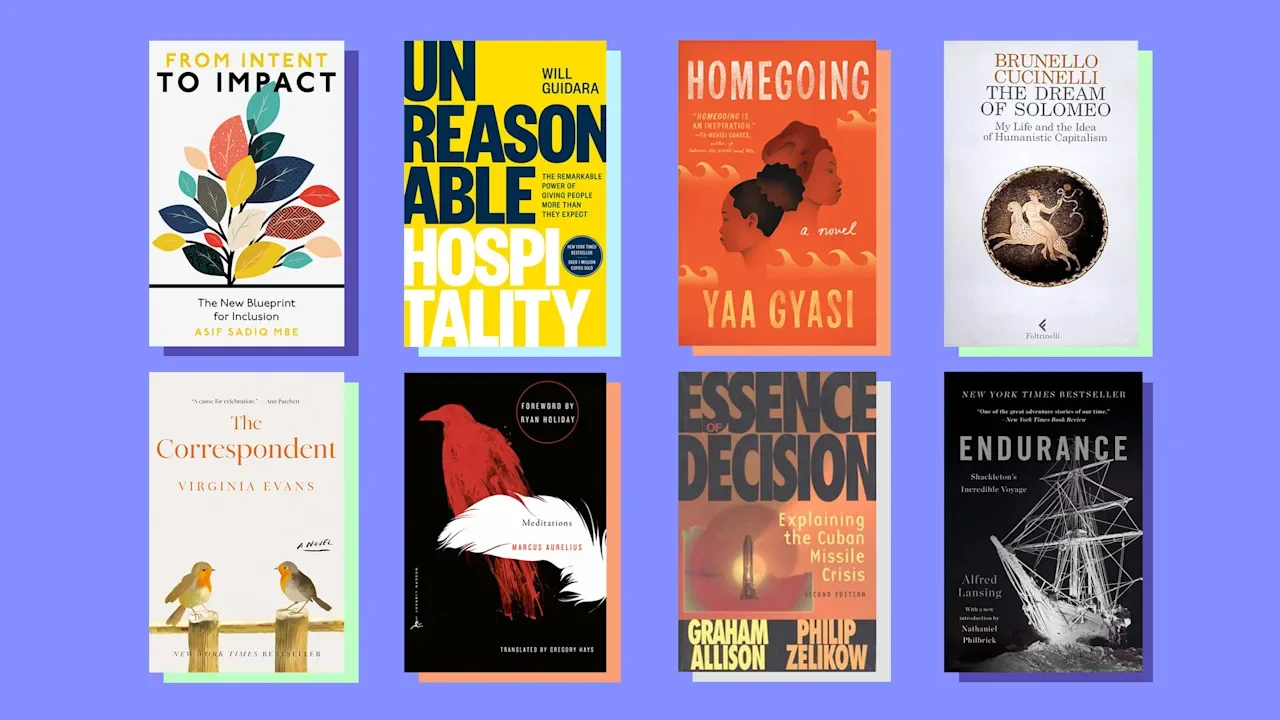
Hello and welcome to Modern CEO! I’m Stephanie Mehta, CEO and chief content officer of Mansueto Ventures. Each week this newsletter explores inclusive approaches to leadership drawn from conversations with executives and entrepreneurs, and from the pages of Inc. and Fast Company. If you received this newsletter from a friend, you can sign up to get it yourself every Monday morning. The authors of the most powerful memoirs, self-help books, and leadership bibles combine deep research and self-reflection—in the same way today’s executives need to blend data insights with emotional intelligence. As we look ahead to 2026, I asked eight authors of recent business and business-adjacent books to share their recommendations for books (not their own) that will help you lead in the year to come. Here are their picks, in their own words: Maha Aboulenein, CEO, Digital and Savy, and author, 7 Rules of Self-Reliance The Correspondent by Virginia Evans Hands down the book I am gifting to everyone this year is The Correspondent by Virginia Evans. The protagonist, Sybil Van Antwerp, is witty, sharp, and just like us—she has lived a life of triumphs, love, tragedies, and regrets. The book is a series of letters that she writes to family, friends, politicians, and strangers. She reminds us that, in the art of letter writing, there is no gray, just black and white, and that is where the most beautiful and honest stories unfold. I devoured the book and hope everyone reads it. They will be utterly delighted they did. This book will help business leaders think clearly about the power of storytelling. When we look at consumer behavior and how [people] are choosing more long-form content, this book gave me perspective. [How will] letter writing in the age of AI matter? How can we go back to thinking about what connects us as audiences? It’s about the power of building a relationship directly: the one-to-one (versus the spray-and-pray approach). Building trust with your audience is not about influence. It’s about connecting over a story that moves us. Paul Achleitner, former chair, Deutsche Bank, and author, Accelerate Your Experience Essence of Decision: Explaining the Cuban Missile Crisis by Graham Allison In this 1971 classic, the author uses the events of the Cuban Missile Crisis to demonstrate a key theme: The traditional approach of interpreting political outcomes as the consequence of rational action by individuals falls short of reality. Instead, internal organizational processes working hand in hand with bureaucratic power politics may have just as much to do with the results. I have always felt that applying different perspectives generates better explanations—as well as outcomes—in business as well. As Austrian philosopher Friedrich Hayek stated, many events are the “consequence of human action but not human design.” Kevin Boehm, cofounder and co-CEO, Boka Restaurant Group, and author, The Bottomless Cup The Dream of Solomeo: My Life and the Idea of Humanistic Capitalism by Brunello Cucinelli There are so many lessons in that book that echo my own life and my evolving ethos: that success in business is noble only if it lifts the human spirit. The way Cucinelli resurrected Solomeo while building his empire gave his purpose a kind of dignity that is aspirational. Blind ambition was lauded as admirable for generations but is often detrimental to an entrepreneur’s development as a human. In today’s more enlightened world, making sure there is nobility behind the purpose allows us to sidestep the potholes that leaders like Steve Jobs were never able to evade. You can be a capitalist and a kind human. Jon Gluck, senior editor, Fast Company, and author, An Exercise in Uncertainty Endurance: Shackleton’s Incredible Voyage by Alfred Lansing Endurance tells the story of the ill-fated 1914–1917 expedition led by the British Antarctic explorer Sir Ernest Shackleton. The expedition’s ship, the Endurance, was trapped in the Antarctic ice and crushed. After surviving for months on ice floes, the crew undertook a grueling 1,000-mile journey in an open boat, then traversed glaciers and scaled mountains before finding help. Never mind that Endurance is a gripping and inspiring read. The story offers a master class in navigating every manner of crisis and every type of uncertainty, which leaders will encounter in abundance in 2026. If nothing else, it makes business challenges seem manageable by comparison. Mita Mallick, workplace strategist, and author, The Devil Emails at Midnight Unreasonable Hospitality: The Remarkable Power of Giving People More Than They Expect by Will Guidara As our lives get even more digital, more seamless, with just a few clicks or a touch of a button, we will crave human interaction. This is why Unreasonable Hospitality, about extraordinary service delivered by and for human beings, should be on every leader’s reading list. In a rapid race to embrace AI, we get personalization at scale: We can anticipate what customers need and want based on the data we collect on their behaviors. But how about a human being noticing your needs at a particular moment, offering a spontaneous, heartfelt gesture? Noticing and connecting with one another is becoming an underrated superpower. The companies that thrive will not only treat their customers with unreasonable hospitality, but hospitality [will] become the new leadership imperative. Forget the oversize hoodies, fancy snacks, and another free meditation app. Treating your employees with care will become the biggest retention tool we have at our disposal. Leila McKenzie-Delis, CEO, Dial Global, and author, The CEO Activist From Intent to Impact: The New Blueprint for Inclusion by Asif Sadiq Asif Sadiq’s From Intent to Impact is a must-read for 2026 because it gives leaders a practical, no-nonsense blueprint for turning inclusion from well-meaning intentions into real, measurable change. Rather than offering theory, it delivers actionable frameworks that help organizations build inclusive cultures, design inclusive products, and create sustainable impact. With Sadiq’s deep global experience and timely relevance in a rapidly shifting social and business landscape, the book stands out as an essential guide for anyone serious about meaningful progress. Kurt Strovink, senior partner and global head of CEO practice, McKinsey, and coauthor, A CEO for All Seasons Meditations by Marcus Aurelius A book I return to often is Marcus Aurelius’s Meditations. Written nearly 2,000 years ago, it remains one of the clearest guides for navigating the tensions and responsibilities of leadership. What makes the book enduring is its integration of the inner and outer dimensions of leadership. Aurelius believed in the power of stoicism to accept what was uncontrollable and work productively on what was controllable. Leaders today face pressures Aurelius himself could never have imagined, yet the fundamentals he wrestled with—clarity of thought in the face of change, humility of perspective, and the discipline to separate what can be controlled from what cannot—are strikingly timeless. In a world defined by rapidly evolving markets, geopolitical uncertainty, AI innovation, and a growing disparity between signal and noise, having the temperament to absorb change is essential to today’s leadership. Meditations doesn’t offer outright solutions; it offers ways of thinking that help leaders stay grounded while making consequential decisions, leading through others, preparing institutions for change, and renewing one’s energy as a protagonist in life’s journey. Aurelius’s reflections compose what we might call an “ethic of leadership”—the standards leaders must hold themselves to in both the inner game and the outer game of their roles. Angela Williams, president and CEO, United Way Worldwide, and coauthor, Navigating the Age of Chaos Homegoing by Yaa Gyasi Yaa Gyasi’s Homegoing is one of those books that stays with you long after you close it. The story follows two branches of a family across generations, and it shows how connection and resilience thread through even the hardest histories. Working with communities every day, I’m reminded of how much we all inherit: grief, strength, possibility, and most importantly, the power to heal together. Leaders today can take that same lesson to heart. Seeing people fully and honoring the shared histories is how we build trust, collaboration, and stronger communities. Heading into 2026, with all the uncertainty around us, it feels urgent to remember that real community begins when we refuse to give up on one another. Homegoing is a beautiful reminder that hope is a practice that grows every time we reach across difference and walk alongside our neighbors anyway. What Are Your Top Book Picks? What books do you think leaders should read to get ready for 2026? Please send your picks—new books and classics alike are welcome—to me at stephaniemehta@mansueto.com, and we’ll publish your recommendations in an upcoming newsletter. Read more: reading is fundamental 4 reasons reading for pleasure can make you a better person How reading rewires your brain, according to neuroscience Modern CEO’s summer 2024 reading list View the full article
-
When you’re trying to snazz up your emails with a signature at the bottom, it’s all too easy to overthink it. Gmail’s signature tool offers extensive formatting options. (Want to sign off in Comic Sans? Go for it.) And typical signature-builder sites can get even more complex, with seemingly endless fonts, buttons, and shiny doodads to choose from. The truth is, you don’t need all that to sign your emails in a presentable way. Just an image and a handful of descriptive lines should do the trick, and this free tool will give you just that without tempting you to go overboard. This tip originally appeared in the free Cool Tools newsletter from The Intelligence. Get the next issue in your inbox and get ready to discover all sorts of awesome tech treasures! A simpler email signature To create a slick email signature in seconds, check out Simple Signature. ➜ Simple Signature is a free email signature builder with minimal formatting options. ⌚ It’ll take about five minutes to get your signature looking just-so. ✅ The site’s signatures are intended to work with a wide range of email providers. When you’re finished, just copy and paste it into your email site’s signature editor. Simple Signature starts you off with a “John Doe” template that includes a placeholder image at the top. You can add your own image by clicking the “Upload Logo or Image” button, or click the little eye icon to hide it. You can also use the other icons in this section to resize or reposition the image. From there, it’s just a matter of adding, removing, or modifying the other fields in the template. The site lets you choose from just a few different field types: Text fields are for things like your name, title, address, and phone number. Link fields are for things the recipient can click on, like a website, social media account, or email address. Space fields are for adding a visual buffer between parts of your signature. ☝️ For links, you’ll see two fields to fill out side-by-side. The first is for the text that appears in your signature, and the second is for the page that loads when someone clicks the link. Make sure to use the format “mailto:youraddress@email.com” for email addresses. Simple Signature’s font options are intentionally limited. You can either choose Helvetica, Arial, Mono, or nothing (which will just use the email provider’s default font). Once you’re finished, just click the “Copy Signature” button in the top-right corner. This will add the signature to your clipboard, so you can paste it into your email app’s signature form. The site even offers instructions for adding the signature to Gmail as well as Outlook or Apple Mail. If all that seems a little too basic, well, that’s the point. Other signature editors might let you do more, but this is the only one I’m aware of with a manifesto on why you shouldn’t. Simple Signature works in any web browser, though you should probably use it on a computer instead of a phone, as you may have difficulty pasting the signature into your email provider’s mobile app. The site is free to use with no ads for creating a single signature. There’s an optional $99 per year “Pro” version for business users who want to create lots of signatures and share them with team members. No sign-up is required unless you want to start editing a signature on one device and finish up on another. The site’s privacy policy is easy to understand and makes clear that your data isn’t used for any purpose but to provide the signature builder. Treat yourself to all sorts of brain-boosting goodies like this with the free Cool Tools newsletter—starting with an instant introduction to an incredible audio app that’ll tune up your days in truly delightful ways. View the full article

-
This season, Google Search and Shopping Ads are expected to surge past $70 billion in holiday spending. But there’s a hidden flaw in the auction system — one most advertisers don’t realize is costing them money even when competitors aren’t in the game. BrandPilot calls this the Uncontested Google Ads Problem, and it’s becoming one of the most overlooked sources of wasted ad spend in peak retail season. During SMX Next, John Beresford, Chief Revenue Officer at BrandPilot, unpacked how a little-known behavioral quirk in Google’s auction logic can cause advertisers to overspend on their own brand terms, their Shopping placements, and even their category keywords — simply because Google doesn’t automatically reduce your CPC when competition disappears. Instead of paying less when you’re the only bidder, you may be paying the same high rate you’d pay when rivals are active… without realizing it. It’s a phenomenon happening thousands of times a day across major brands, and many marketers never notice it’s occurring. In his session, Beresford discussed: Why “competition gaps” happen far more often than advertisers think. How uncontested moments distort CPCs, even on brand keywords. What real-time auction visibility makes possible — and why AI is changing the game. He also shared examples of how advertisers are reclaiming wasted spend and reinvesting it into growth – without sacrificing impression share, traffic, or revenue. Watch BrandPilot’s session now (for free, no registration required) to learn how to: Pinpoint why your CPCs are being artificially inflated when competitors are absent. Estimate the true financial impact of the Uncontested Ads Problem across your annual budget. Implement AI-driven bidding and suppression strategies that prevent self-bidding and boost ROAS. If you’re running Google Search or Shopping campaigns this holiday season, you can’t afford to miss this session. Learn how to stop the Google Grinch from stealing your budget — and start turning those savings into real performance gains. View the full article
-
LinkedIn used to be the place you'd dust off your resume and hunt for your next job. Today, that’s just a sliver of how people are using the social platform. A quick scroll now throws up founders building in public, creators sharing their wins, and hot takes on everything from positioning to pricing to — of course — AI. And while businesses are still hiring on LinkedIn, many are also pulling back the curtain to show what life inside their company really looks like. This evolution has opened up serious opportunities for both brands and creators. With over 1 billion users, LinkedIn has grown into a place where B2B professionals, creators, and businesses alike can grow their presence, find new opportunities, and connect with people who care about their work. In this guide, I’ll cover: why LinkedIn has become the platform for B2B creators and businesseshow both businesses and creators can use LinkedIn effectivelywhat content actually gets engagement on the platform, and six practical steps to build your LinkedIn marketing strategy.Ready? Let’s begin. What is LinkedIn marketing?LinkedIn marketing is the practice of using LinkedIn to build your brand, cultivate relationships with potential customers or collaborators, attract talent, and create opportunities for your business or career. The platform gives both creators and businesses plenty of tools to make this happen. If you're a creator, you can set up a profile that showcases your expertise, share posts that get people talking, start a newsletter to build a regular audience, and publish longer-form articles when you have something more in-depth to say. Businesses can do the same through posts, newsletters, and articles — plus other tools specifically for brands, like company pages, events, ads, and job listings. Is LinkedIn marketing right for your business or brand?LinkedIn calls itself “the world's largest professional network on the internet,” and this captures why it feels different from every other social network: It’s more than another feed to scroll through. LinkedIn is where people go to talk shop, share ideas with others in their field, and build relationships that move their careers or businesses forward. B2B brandsLinkedIn is where most of the B2B players are already paying attention. In a 2025 global survey from Social Media Examiner, 87% of B2B marketers said they use LinkedIn for marketing, and more than half said it’s the single most important social platform for their business. If you're selling to other businesses, LinkedIn puts you in front of decision-makers when they're already in a professional mindset. B2C companiesLinkedIn hasn’t been the go-to platform for B2C brands in the past, but that’s changing. More consumer brands today are using LinkedIn as a brand awareness channel to share what they stand for and stay visible. It’s not the strongest channel for direct consumer sales — unless your target audience is professionals, or your product fits into how they work — but it is becoming a powerful place to attract talent, highlight partnerships or find new ones, and show your impact to potential collaborators or investors. B2B creatorsFor creators who work in B2B industries, LinkedIn can be the launchpad for new opportunities. By sharing your expertise on the platform, you open doors to prospective clients, recruiters, collaborations, and speaking opportunities that might never have found you otherwise. And because LinkedIn is global, your networking opportunities with brands, peers, and industry leaders extend far beyond your local circle. Sophie Miller, founder of Pretty Little Marketing, sees LinkedIn becoming a big stage for B2B creators. “We're about to see B2B creators absolutely explode on LinkedIn in ways we haven't seen before!” says Sophie. “Brands are finally realizing that people connect with people, not logos.” Getting started with LinkedIn marketingIf LinkedIn is where you’d like to build your personal brand or business, you’ll need the right kind of presence. Businesses can set up a LinkedIn Company Page, while creators start with a personal profile. Let’s take a closer look at both. Company Pages for businessesA LinkedIn Company Page acts as your brand’s headquarters on the platform. Every post, comment, and reaction from a company page is on behalf of the business — not an individual — which means the voice and values you share reflect your brand as a whole. With 40% of users engaging with a LinkedIn Page every week, keeping yours active is a great way to help your brand stay visible and relevant. If someone wants to know what your business does, what your workplace is really like, who works at your company, and what principles drive your decisions, your company page is where they’ll go to get these details. How to optimize your LinkedIn Company PageIt’s worth it to take the time to get your LinkedIn Page set up right. A complete, well-optimized LinkedIn presence allows your target audience to easily find you on and off LinkedIn (meaning on search engines like Google). This should be your first port of call when it comes to LinkedIn best practices. 1. Add a clear profile picture and cover image Use your logo as the profile picture so visitors can connect the dots between your LinkedIn presence and your business website, store signage, other social media accounts, or anywhere else they can find you. The cover image gives you more flexibility — it could show your team, your product, campaign artwork, event photo, or something else that reflects what your company does. 2. Complete your business information LinkedIn requires you to fill in some parts of your company page — like the overview, industry, and company size — before the page can go live. Others, like your tagline, services, specialties, and contact details are optional, and filling them in gives visitors extra ways to understand what you do. LinkedIn Pages with complete information get 30% more weekly views, so filling out every section helps more potential customers, partners, or future employees discover your business. 3. Use SEO keywords LinkedIn also recommends using search phrases and keywords in your page to help people find you. This practice, known as LinkedIn SEO (search engine optimization), helps your page rank higher in search results on the platform. There are two places on your LinkedIn Page where you can insert keywords: your company description and specialties. You can find these by navigating to your Company Page > Edit Page > Details. Pro tip: Add a link to your LinkedIn Page from your website. LinkedIn calls this “an easy win” to help boost search ranking on the platform. On the Buffer website, we link to all our social media profiles, including our LinkedIn Company Page. 4. Set up call-to-action (CTA) buttons and forms You can customize your page with CTAs that invite users to take the next step. LinkedIn offers different options to fit different goals. Invite allows people to invite their connections to follow your page.Message lets people send you a DM on the platform.Visit website, Visit portfolio, Sign up, Register, Visit More, Contact us, and Learn more all let you send people to a URL of your choice.You can also add a form to collect leads directly from your LinkedIn Page for a sale, demo, free trial, or to get started with your product or service. 5. Share your company’s hiring policies If you use LinkedIn for recruitment, the Workplace module and Commitments section can help future employees understand what it’s like to work at your company. The Workplace module highlights where and how your team works — on-site, hybrid, or fully remote — along with the benefits that support each setup. The Commitments section focuses on what your company values most, like career growth, learning opportunities, sustainability, or work-life balance, and the perks that go with them. Personal profiles for creatorsA LinkedIn personal profile acts as your professional identity, showing your experience, achievements, and what you post. For Callie Schweitzer, Head of Premium Content and Community Strategy at LinkedIn, personal branding starts here. “You have full control over that on your LinkedIn profile and how you really want to show up authentically,” she says. 📚Read more: How to Build a Personal Brand on LinkedIn (+ Why You Should)Your LinkedIn profile is also where new opportunities start, from recruiters reaching out to clients discovering your work. For some creators, having an active LinkedIn presence can even lead to unexpected opportunities beyond the platform. “One thing that’s been surprising is how much LinkedIn has opened doors outside of LinkedIn,” says Tami Oladipo, Senior Content Writer at Buffer. “My posts there have led to speaking gigs, podcast invites, and brand partnerships — not (always) because I was chasing those things directly, but because showing up consistently made me discoverable.” I asked creators on LinkedIn why they post, and three themes stood out: building a personal brand, networking and community, and marketing their business or services. Having a strong profile is where all of that begins. How to optimize your LinkedIn profileYour profile is often the first place people look before they reach out. “Whether it’s thinking about a hiring manager or a brand manager looking at your profile, that’s your digital resume, that’s where people are going,” says Callie. Staying optimized also means you’ll show up in more searches and make it easier for LinkedIn users to find you. Here’s what LinkedIn recommends people do. Build out every section of your profile and continue to optimize it regularly.Update your profile with new projects, skills, and milestones so it reflects what you’re doing right now.Let your personality come through alongside your experience.💡Read more: 20+ LinkedIn Profile Tips (Guaranteed Ways to Stand Out)1. Use a standout profile image, banner, and headline First impressions on LinkedIn start with your photos and headline. A clear, high-quality headshot is always a good place to start for your profile photo. Some industries — like finance or law — often expect a photo on the formal end of the spectrum. If you work in a creative or laid-back field, you have more room to be relaxed and show more of your personality. Either way, choose a photo that represents how you show up at work. Your banner is another chance to show personality and context. It could feature your work, contact details, a snapshot of you speaking at an event, or a short line that sums up what you do — there’s plenty of room to get creative. Freelance writer Stephanie Trovato uses hers for social proof, showcasing client logos to highlight who she’s worked with. Your headline tells people what you do, who you help, and the skills you bring. It also follows you on LinkedIn, appearing below your name when someone sees a post or comment. Laura Lorenzetti, Senior Director and Executive Editor at LinkedIn News, says this is one part of your profile you should really pay attention to. “If people don’t know you, they’ll look at your name and headline, and they’ll match that to what you’re saying,” says Laura. “They’re trying to understand your credibility and expertise, so the more thoughtful you are of how that headline reflects that credibility and expertise and what you want to speak to the better.” You’ve got 220 characters to work with, so make them count. Laura recommends being descriptive about your value and expertise — instead of just listing your title — to give people context that makes them trust you. You should also try to include keywords people may search for when they’re looking for someone with your skills or experience. 2. Add keywords to your profile Your headline, job title, About section, and even your LinkedIn URL are all searchable. Using the right keywords — whether it’s your specialty, industry, or target clients — gives your profile a better chance to show up in search results. Freelance designer Franziska Böttcher nails this: her headline and About section both feature high-impact keywords that make her easier to discover. ⚡ Pro tip: To change your URL, visit https://www.linkedin.com/public-profile/settings and then click on Edit your custom URL on the right. Remember to update it wherever it’s saved, such as your website, resume, or other social media. 3. Share your best work The Featured section is prime space to spotlight the wins, moments, and projects that make up your professional highlights. Think of it as a curated mini-portfolio: new visitors see your achievements right up top, without having to dig. Here’s what you can add to the Featured section: Published LinkedIn posts, newsletters, or articlesLinks to any URL off LinkedIn, like a landing page, blog post you wrote, or article that featured youMedia including images, graphics, and PDFsThere’s no hard limit for what you can add here, but less is more. This is your greatest hits, not the whole back catalog. 4. Add important details to your Experience section The Experience section of your LinkedIn profile is your online resume that people scan to get a sense of your work history and experiences. Treat it like a real resume — instead of focusing on responsibilities, show the impact you’ve had in different roles. Keywords belong here, too. Add them to job titles, skills, tools, and industry terms to help your profile show up in more searches and make it clearer how your background fits what people are looking for. 5. Showcase licenses and certifications The certifications you’ve earned add weight to your profile and show that you’ve invested in your skills. You can add any formal credentials and specialized training to the Licenses and Certifications section on your LinkedIn profile. You can also add supporting media if you’d like to share the work you created as part of that certification, like a website you built, a final project, or a video presentation. Plus, many programs let you link directly to an online certificate, which helps others verify your achievement. ⚡Pro tip: Keep an eye on expiration dates. Some certifications need to be renewed, so review your profile periodically to remove expired credentials or retake the exam to keep them current. What are the best performing content formats on LinkedIn?LinkedIn offers you many ways to get your message out there, whether you’re posting from a Page as a business or your profile as a creator. Text posts work well when you want to share a quick update or tell a longer story. Images and graphics catch someone’s eye as they scroll. Videos let people see your face and hear your voice, which helps build a connection. So how do you choose the right format for your audience? “It’s all about experimenting,” says Callie Schweitzer. “The perfect balance of a LinkedIn presence is a mix of formats and what your audience wants to see.” Let’s look at the options available. CarouselsCarousels consistently rank among the top-performing post types on LinkedIn. Buffer’s data shows that they get a massive 278% more engagement than video posts, 303% more than image posts, and 596% more than text-only posts. Carousels invite people to stop, swipe, and spend more time with your LinkedIn content. They’re visual, meaning they catch the eye as users scroll, and they’re flexible. You can use them to: Turn a long post into bite-sized slidesHighlight key takeaways from an article or reportWalk through a tutorial or step-by-step guideShowcase before-and-after results or client projectsPretty Little Marketer regularly uses carousels to make it easier for people to digest how social media works. If you’re looking for more ideas and examples of how to put carousels to work, this guide walks through 11 different ways to use them. VideoVideo takes the second spot for engagement on LinkedIn. Video posts earn 7% more interaction than image posts and 84% more than text-only posts — and the format is still gaining momentum. Lakshman Somasundaram, Senior Director of Product at LinkedIn, shared that video is growing 1.6x faster than all other types of content combined. Creators who use video see up to 3x growth in followers, which means more visibility and more opportunities to build personal connections. There are two main kinds of videos on LinkedIn: short-form and LinkedIn Live. Short-form video Short-form videos are designed to grab attention quickly and deliver value fast. LinkedIn recommends keeping them concise at around 60 to 90 seconds. That gives you enough time to deliver something useful without losing someone’s attention. Brands can use short-form videos to share snippets from longer content like podcast episodes, demo new features, walk through tutorials, or showcase video testimonials from customers. For creators, it’s also a chance to make content that feels personal and relatable. Kirsti Lang, Senior Content Writer at Buffer, regularly shares videos about remote work and life at Buffer that give people a behind-the-scenes look at her professional life. Lakshman shared a few quick tips to help short-form videos perform better. Open with a short on-screen text hook that tells people what they’re about to watch — something that grabs attention in the first second or two. Add captions so that people who are watching on mute can follow along instead of scrolling past. Eighty-five percent of LinkedIn videos are viewed without sound, so captions can make a big difference. Use visual and audio elements like sound effects, B-roll, and graphics to keep the video dynamic.LinkedIn LiveLinkedIn Live allows you to broadcast in real time to your followers and network. These sessions are public and automatically saved to your profile or Page once the stream ends, so people can rewatch them later. Live video tends to get a lot more people reacting and commenting than short-form video — 7x more reactions and 24x more comments. They’re ideal for product launches, Q&As, panels, fireside chats, and other moments where real-time interaction adds value. To go live on LinkedIn, you’ll need: A profile or page with at least 150 followers or connections.A record of following LinkedIn’s Professional Community Policies.An account or page that’s at least 30 days old.✒️LinkedIn Live isn’t currently available for members or pages based in mainland China.ImagesImage posts come in third for LinkedIn engagement — they get about 72% more interactions than text-only posts. Posts with images see twice as many comments, so if you're looking to start conversations, images can help get that going. Both businesses and creators can use images to bring work to life: product photos, behind-the-scenes moments, announcements, or previews of what’s coming next. The Women in Tech SEO community often shares screenshots from its newsletter to highlight articles written by its members. It’s a simple way to give non-subscribers a peek at the kind of content they’ll find inside while celebrating the voices within its community. For creators, those behind-the-scenes glimpses can include everyday life as well as work, helping followers see the person behind the posts. To keep your visuals looking their best, use LinkedIn’s recommended image sizes: between 1080 x 1350 pixels (vertical image) and 1080 x 360 pixels (horizontal image). If your text or main visual is centered, most sizes will display without awkward cropping. Text postsText posts work well for almost any kind of idea you want to share on LinkedIn. They can be short and conversational — a quick thought, lesson, or question for your audience — or dive deeper into something you’ve been reflecting on. If you have something you’d like to go really in-depth into, you can always expand a post into a full LinkedIn article. They’re a good fit for sharing career tips, personal reflections, or lessons from your work. You can also use them to weigh in on industry news, walk people through your process, or share moments from your day-to-day that others might relate to. Text posts are my go-to LinkedIn content format as a creator. The things I post about — freelancing, content creation, and the processes that make both easier — lend themselves to stories, and writing is still the best way I know to tell them. LinkedIn newslettersNewsletters are LinkedIn’s way of letting you share long-form content with an audience that subscribes to hear from you. Subscribers get in-app and email notifications about each new edition, helping you stay top of mind while building credibility and trust over time. Newsletters can also work beyond LinkedIn — they show up in Google search results, giving you another opportunity to use SEO keywords to get noticed. If you write long-form content on other platforms — say your company blog or creator Substack — newsletters give you a way to share it with your LinkedIn audience without doubling your workload. You can simply repurpose what you’ve already written and link back to the original source to bring people over. Any creator can start a LinkedIn newsletter, but businesses need to meet a few requirements before they can publish through their page: Have more than 150 followersA track record of creating original content on LinkedIn, like posts, videos, or articlesA page and admin (person managing the page) in good standing with LinkedIn’s community policiesYou can have up to five LinkedIn newsletters. Buffer currently runs two. Bottom Line is a monthly look at the company’s key financial metrics and trends, and Open Blog shares lessons from trying new approaches to work, growth, and company culture. PollsPolls are a simple way to learn from your audience. They take only a couple of minutes to set up and can reveal what your community’s interested in or needs help with. You can ask people what topics they want to hear more about, which format they prefer for content, or what challenges they’re dealing with right now. The answers can shape what products you build, what blog posts you write, or what you talk about in your next video. They’re also a low-lift way to encourage engagement. Staffing and recruiting company Hays got nearly 6,000 votes and 50 comments on their poll asking about the role of soft skills in landing a job. What are the different types of content to post on LinkedIn?Once your profile or Page is ready, it’s time to start sharing. LinkedIn content helps brands and creators build authority, form authentic connections, and open doors for new customers or partnerships. Here’s something worth knowing as you think about what to post: LinkedIn doesn’t reward virality, it rewards value. So if you’ve noticed older posts resurfacing in your feed weeks later, that’s intentional. Gyanda Sachdeva, LinkedIn’s VP of Product Management, explained to Business Insider that they’ve adjusted the algorithm to prioritize relevance. “Our goal is to strike that balance of always showing you the most relevant updates from your network and from the people who can help you grow,” Gyanda says, “even if we have to tweak the recency algorithm every now and then.” What does that mean for businesses and creators? Focus on creating content that teaches, informs, or inspires — something that offers a clear takeaway. “When planning your content, always share a key insight or a key takeaway,” says Callie Schweitzer. “Think about what that value add is for your audience, because that’s what people are expecting on LinkedIn.” Rishi Jobanputra, Senior Director of Product Management at LinkedIn, shared a few types of content that perform especially well on the platform. Insights: Share your experience or perspective. Posts that show how you think, not just what you know, help your audience see your expertise in action.News: Talk about what’s happening in your industry, and explain why it matters. Adding your context turns it from a news bulletin to a unique point of view.Day in the life: Offer a behind-the-scenes look at your work — what a typical day involves, what tools you rely on, or what problems you’re solving.Let’s dig into these and more. 💡Unsure what to post about? Learn more about how to get unstuck: How I Created My LinkedIn Content Buckets and What I Use Them For Thought leadershipScroll through LinkedIn for a bit and you’ll see people share their take on a trend, weigh in on a news story, or explain how they approach challenges at work. That’s thought leadership, and it tends to get noticed, earning 6x more engagement than job posts. Its value also goes deeper than likes or comments. According to Edelman, 73% of decision-makers say they trust an organization’s thought leadership content more than its marketing materials when they’re trying to understand if the company can solve their problem. And more than 75% said that a single thought leadership content led them to explore a product or service they hadn’t considered before. Sharing what you know — and how you think — can open doors that pure promotion can’t. LinkedIn has also been pretty direct about what works on the platform. “While it can be tempting to sell your audience on the benefits of your product or service, ‘salesy’ content doesn’t generally perform well on LinkedIn,” the company notes. “If there’s one thing LinkedIn members find engaging, it’s a fresh idea.” Educational content Educational content on LinkedIn is the how-to guides, the tips, the problem-solving posts that give people clear, practical takeaways they can apply right away. If you’re a business, this is the perfect kind of content to show people how to achieve something using your product. Glide, a no-code app building platform, shares tutorials that show how to do specific things in the app. But here’s where they do something interesting — they don’t just post their own tutorials. They also share videos created by experts in their community, which gives people an outside perspective on how to make the most of the tool without it feeling like a sales pitch. For creators, this kind of content can show your process in action. Walk people through how you do something — oversee a project, organize your workflow, use a specific tool — instead of how to do it. AMAs (Ask Me Anything)AMAs are a content format I haven’t seen much on LinkedIn, and they present a real opportunity for engaging your audience and generating ideas. You post that you’re opening the floor for questions — about your work or product, a project or launch, or a specific topic — people ask what’s on their mind, and you answer. Replying to comments helps keep the conversation going and engagement numbers high: Buffer’s analysis of 72,000 LinkedIn posts found that posts where the creator replies to comments saw an average of 30% higher engagement! If keeping up with comments feels like it’ll be overwhelming, tools like Buffer’s Community feature help make it easier. You can reply to your audience from within Buffer itself without wondering if you missed a conversation. You could even turn their questions into separate posts, like music executive Olivier Robert-Murphy does. This gives you fresh content to share and keeps the conversation going beyond that original thread. A win-win! They’re also a smart way to highlight the people behind your business. If you have team members or employees with interesting roles or perspectives, hand them the mic to share their expertise, talk about what they’re working on, or connect with others in their field. It gives people a chance to connect with the humans behind the company. AMAs are interactive by design, so they tend to drive more engagement than a standard post. And because they don’t get used much on LinkedIn, they’re a great way to stand out and connect with your community. Behind-the-scenes and story-driven contentPeople connect with people, not logos. Behind-the-scenes content shows the humans behind the work — whether that’s your team, your process, or what a project looks like from the inside. “Company Pages can leverage organic CEO, executive, or employee content to tell the story of what’s happening at the company,” says Callie Schweitzer. “Activating your employees beyond just the C-suite and having them share an experience or the project they’re working on — we’re starting to see so much more of that [behind-the-scenes content], and that’s an opportunity for companies to say, ‘come along with one of our employees’.” The team behind podcast marketing agency B2B Better puts this into practice. They post about what the day-to-day of building an agency and producing podcasts looks like, giving followers a glimpse into what that really involves. For creators, it’s an opportunity to show what goes into your work, or the messy middle before something comes together. You could share how you landed a client, what your creative setup looks like, or what a typical day looks like. These moments help people see the real person behind your brand and your content, and that’s what makes them stick around. User-generated content, memes, and trends LinkedIn isn’t all serious business talk. You can post user-generated content (UGC), memes, GIFs, and ride pop culture trends doing the rounds across different social media platforms — if you’re selective about when and how you do it. Not every meme or viral moment will align with your target audience or message, and forcing it can make your content feel out of touch instead of relevant. If you’re unsure of whether it may work for your audience or not, let your brand tone and style guide you. “Understand who you are to your audience first, then decide if the trend fits that role,” says Sophie Miller. “Are you the trusted adviser? The industry disruptor? The relatable expert? Your content needs to match those expectations, even when you’re jumping on trends.” If a meme or trend aligns with how your audience sees you, go for it. If it doesn’t, it’s better to skip it and wait for something that does. When used thoughtfully — like Gong did with the Destiny’s Child reunion — memes and trends can make your content relatable. There’s also user-generated content as a way to bring your customers into the conversation. You can share posts or videos they’ve made on their own, or team up to create something together. It makes your audience part of what you’re building instead of people watching from the sidelines. Buffer often teams up with community members to create content for LinkedIn and other platforms. It gives us an opportunity to share content that speaks to and sounds like our audience — because it comes from them. Testimonials and case studiesYou know how people connect with people, not logos? People also trust people — and social proof works just as well on LinkedIn as it does anywhere else. Sharing a graphic with a quote from a happy customer, or a video testimonial like Todoist did, gives people a reason to trust what you’re offering. It shows your impact through someone else’s words, not your own. The same idea applies for creators. You can highlight a client win, a collaboration that turned out great, or feedback from someone who’s used your work. You don’t need a full-fledged video case study. Even a screenshot of a Slack message shows the impact of your work in a way that’s more convincing than you listing your accomplishments. RoundupsRoundups work well on LinkedIn when you want to keep people in the loop without them having to hunt for information. You can pull together industry news, interesting reads, tool updates, or job openings that your community would want to know about. They show that you’re paying attention, not just to your own work, but to what’s useful for your audience. Two Buffer teammates post weekly job roundups every week. Brandon Lucas Greene, Staff Product Manager, shares remote product jobs. Simon Heaton, Director of Growth Marketing, shares remote marketing jobs. Simon shares these roles every week because he wants his posts to be helpful to his audience, not just visible. “I believe deeply that remote work works, and I want to help people access great roles at forward-thinking companies,” he says. “LinkedIn is still, in many ways, a job marketplace layered with a social network. Sharing roles where people already look for opportunities just makes sense. “This also gives me a recurring series that helps me grow reach, build relationships, and deliver consistent value without turning content into noise.” If you post your roundups on the same day each week, people will come to know when to expect them. That regular cadence means they don’t have to scroll through multiple feeds or newsletters to find what they need. And when people know they can count on you to deliver valuable content, they’ll keep coming back for it. How to create your LinkedIn marketing strategyNow that you know the types of content you can post — and how each one performs — the next step is to turn that knowledge into a plan. A LinkedIn marketing strategy brings together three things: your goalsyour audienceyour contentWhen those pieces line up, you can build a repeatable process that helps you stay consistent, use your time well, and actually see what’s working. Think of your LinkedIn strategy as a roadmap for showing up with purpose. It’s how you decide what to post, who it’s for, and how you’ll measure success so that your content moves you closer to your goals. 1. Define your goalsEvery successful LinkedIn marketing strategy starts with clear goals: What do you actually want to achieve on the platform? Your answer will shape everything that follows, from the topics you post about to the kind of conversations you join. Companies may want to use LinkedIn marketing to recruit new talent, generate leads, build brand awareness, or increase brand visibility. Your LinkedIn marketing goals should align with your business objectives. For creators, the goals look a little different — they often center on visibility and opportunities like landing clients, growing a personal brand, or getting a new job. Once your goals are clear, every post has direction and it becomes much easier to see what’s moving you forward. 2. Identify your target audience and content pillarsIf you’re a business owner or social media marketer, you probably already have a clear picture of your target audience from your ideal customer profile (ICP). If that’s not locked in yet, our guide to marketing personas can help you get there. For creators building a personal brand on LinkedIn, our personal brand framework walks through the same process from a different angle. Once you know who you’re talking to, your LinkedIn content should focus on creating value for them. In my experience, this starts with understanding their pain points and tapping into your expertise to help solve them. This applies whether you’re a business with a team of specialists or a creator working on your own. And you don't need a corporate job or a fancy title to have expertise worth sharing. “A lot of people would often ask me, ‘I’ve never had a corporate job, what should I be posting?’” says Callie Schweitzer. “You are an expert in your life experience. We’ve seen so many creators on the platform embrace that and recognize that the word ‘professional’ means so many different things right now.” Laura Lorenzetti also recommends looking at what other people in your industry or niche are talking about and building on ideas. “Everyone’s starting a conversation, and it’s great when communities come and continue to build on that conversation,” she says. “We shouldn’t be afraid of [doing] that. Reference it, give that person credit, build on that idea, and add your examples. 3. Create a content calendarA social media content calendar is what keeps your LinkedIn marketing strategy organized. It gives you a clear view of your week (or month) so you can see how your posts connect and keep everyone on the same page. Here’s why you need one: It keeps your content organized: You’ll always know what’s coming up and what still needs to be created.It makes it easier to plan campaigns: Campaigns make more sense when you can see how posts connect over time. You'll spot where something doesn’t line up, when a post needs to move, and how the whole thing flows before it goes live.It helps you plan ahead: With a view of what’s coming over the next few weeks, you can create posts in advance and save time.It keeps your posting consistent: A calendar helps you stick to a regular rhythm on LinkedIn. That consistency builds momentum and keeps you visible to your target audience.How often should you post on LinkedIn?A calendar packed with posts might feel like progress, but remember to be realistic with what you can actually keep up with. “If you’ve never posted or have posted zero times in the last month, don’t set a New Year's resolution that you're going to post every day,” says Callie. “That’s unrealistic, and it’s going to feel forced. Think about what’s reasonable for you and take it from there.” If once a week is all you can manage, that’s better than not posting at all. But if you can post more, LinkedIn rewards it. More posts mean more chances for your content to surface, and the effect compounds over time. Here’s what Buffer’s data shows from an analysis of more than 2 million posts. Posting 2 to 5 times per week gives you an extra 1,182 impressions per post on average, with engagement rates climbing 0.23 percentage points.Posting 6 to 10 times per week brings 5,001 additional impressions per post and a 0.76 percentage point lift in engagement.Posting 11 or more times per week delivers massive gains: 16,946 extra impressions per post, engagement up 1.40 percentage points, and 3x more engagements overall.Your follower count doesn’t change how this works. Whether you have 500 people following you or 50,000, posting more often makes each individual post perform better. How often you post from your LinkedIn Page also impacts follower growth. Companies that post weekly grow followers 7x faster than those that post monthly. Post daily, and you can grow followers 8x faster than posting weekly. That said, frequency alone won’t carry you. Watch how people engage with your posts and let that guide how often you show up. “Daily posting is optimal to maintain consistent engagement with your audience, but be sure not to overdo it and avoid overwhelming your audience,” Hien Mai, Product Marketing Manager, Creator Growth at LinkedIn, told Buffer. “If your comments and engagement on a post remains consistent, that’s a good sign that your content is engaging.” What you need to set up your content calendarOnce you know how often you’ll post, the next step is setting up a system to plan and organize it all. Topics or types of content: Map out what you’ll post: industry or company news, educational posts, behind-the-scenes stories, evergreen tips, Q&As — whatever fits your LinkedIn strategy. Add placeholders for upcoming campaigns, launches, or events so nothing gets missed.Posting frequency and schedule: Plan when you’ll post — the specific days or times of the week. We’ll cover how to find the best posting times a little later.Social media platforms you’ll post on: Even though this guide focuses on LinkedIn, your calendar should ideally show the full picture across all the social platforms you use. This allows you to easily see your entire social media marketing strategy in play, not just your LinkedIn marketing efforts. You can do that using a social media management tool like Buffer.Content calendar tool: You can build your calendar in a spreadsheet, a diary or planner, a project management tool, or a social media management tool. ⚡Want a head start? Grab a template. Here are 13+ Free Social Media Calendar Templates to Help You Plan Your Content.You can set up your content calendar directly in Buffer. Connect your channels, invite your team, and you’re already on the way. You can capture ideas, draft posts, add media, get approvals, and publish to multiple channels without switching tools, all from within Buffer. 4. Schedule your LinkedIn postsScheduling your content is one of the easiest ways to stay consistent without needing to stop what you’re doing every time a post needs to go live. With a social media management tool like Buffer, you can plan and queue content ahead of time so it goes live exactly when you want, whether you’re in a meeting, on vacation, or just offline for the day. It’s worth noting that scheduling doesn’t hurt your reach. You may have seen claims that using third-party tools limits visibility, but let’s clear that up: it’s a myth. LinkedIn itself recommends scheduling posts with tools like Buffer as a best practice for sharing content. If you’re wondering when to post for the best results, there’s data to guide you. Buffer analyzed more than a million LinkedIn posts and found weekdays generally perform best, with Thursday taking the top spot, followed closely by Wednesday and Tuesday. On those days, engagement tends to peak at 10 a.m. on Tuesday and Thursday, and 3 p.m. on Wednesday. These times make a great starting point if you’re still testing your LinkedIn strategy. Once you’ve been posting for a while, you’ll want to refine your timing based on what works for your specific audience. LinkedIn’s native analytics don’t show you exactly when you posted something — neither the date nor the time — and a tool like Buffer can help fill that gap. Here’s what you can learn from Buffer analytics: LinkedIn Pages: Buffer shows you which day of the week your posts get the most engagement. This data comes directly from how your audience interacts with your content, so it’s specific to you.LinkedIn profiles: You can see metrics for each individual post from the scheduler — data like impressions, reach, and engagement, plus both the date and time the post went live. Look for patterns in this data to figure out when your audience is most likely to engage.5. Track your content’s performanceSetting up a social media content calendar for LinkedIn isn’t a one-and-done job. It’s an ongoing process where you’ll check in on your LinkedIn analytics regularly to double down on what’s working and tweak what’s not. LinkedIn profile analyticsCreators have access to a detailed set of LinkedIn analytics that can help guide what to post next. To find them, click on Me in the top menu, go to View profile, and scroll to Analytics. Then select Show all analytics. You’ll find data on four main social media metrics: Post impressions: How many times your posts showed up on someone’s screen. Followers: How many people currently follow you, whether they’re connections or not. Profile viewers: How many people stopped by your profile. Search appearances: How often your profile appeared in LinkedIn search results. Each metric offers a deeper view if you click through. Rishi Jobanputra shared a few ways to use these insights: Comments: The best way to tell if your content is connecting is to look at the conversations it starts. “Conversations are a great way to understand if your content is working and if our members are finding it helpful,” he says. “Are people adding their own insights or asking questions in the comments? Are people messaging you directly to learn more?”Who's viewing your profile: Look at what industries your viewers are in and the seniority levels they hold. “Knowing who is seeing your content can help you better tailor future posts to your audience's interests,” he says.Profile viewers and new followers from a post: Rishi adds that steady growth here is a good signal. “If the number of people viewing your profile and following you is increasing each time you post, that signals that your content is heading in the right direction,” he says.The specific metrics you focus on will depend on your goals. “Engagement is a huge success metric for me,” says Tami Oladipo. “Do people like the content? Going a step further, do they say things about it? “I have a pretty clear idea of who my audience is, so I try to get in their shoes and mindset with each piece of content I make. So if they like and respond to it, that means I've done my job.” LinkedIn profile analytics with Buffer While LinkedIn’s profile analytics show your core metrics, Buffer adds post-level details like the exact date and time alongside impressions, reach, and engagement, so it’s easier to spot timing patterns and compare performance over any window. Sabreen Haziq, Senior Brand and Community Manager at Buffer, uses analytics to spot patterns in what performs best. “Some of the posts that travel the farthest for me are the simplest, quick thoughts that start real conversation — not the polished pieces I expect to shine,” says Sabreen. “The data helps cut through assumptions and gives me the confidence to keep showing up.” LinkedIn Page analyticsBesides measuring your LinkedIn marketing performance, your LinkedIn analytics works as feedback from your audience: what’s working, what people are responding to, and where to tweak. You’ll find them by heading to your Page and selecting Analytics from the left-hand menu. Here’s what you’ll see: Content: How all your posts perform, which you can filter by impressions, unique impressions, clicks, reactions, comments, reposts, and engagement rate.Visitors: How many people are viewing your page, which can be filtered by both page views and unique visitors.Followers: An overview of your total and new followers in the past 30 days, plus insights into follower demographics.Leads: Details on potential customers gathered through LinkedIn Lead Gen Forms.Competitors: Track and benchmark competitor performance on LinkedIn. You’ll see an overview of their follower metrics, organic content performance, and trending posts. You can add one competitor if you have a free Company Page, and up to nine if you have Premium.Employee advocacy: Gauge trends in employee and member engagement with content recommended to employees on the My Company tab.I get it: this is a lot of data, and it may be overwhelming if you’re new to LinkedIn marketing. Start by focusing on two areas: Understand what content performs best To find out what LinkedIn content your followers like, go to Analytics > Content and scroll to the engagement table. Look for posts with much higher (or lower) impressions and clicks than the rest. Use those insights to experiment. If the post fell flat, try to pinpoint why. Was it a bad time to post, or was the format something that didn’t resonate with your audience? Do the same for your top performers and experiment with replicating different elements in new posts to see if you can nail down why the post was such a success. Learn about your followers and visitors Under Analytics > Followers, explore demographics like location, job function, company size, industry, and seniority. You can also see similar data for people visiting your Page but not following yet under the Visitors section. This data can be immensely helpful in creating new content that speaks to a large chunk of your audience. At Buffer, we use this information to shape what we share. We tailor our posts for the right audience by sharing content relevant to their job functions. This could include content on marketing (which we write a lot about), startups, and technology. LinkedIn Page analytics with Buffer When you manage your LinkedIn Page through Buffer, you get detailed analytics on how your content is performing and how your audience is growing. To access it, log into your Buffer account and click on the Analyze tab at the top. From there, choose LinkedIn from the channels list on the left. Buffer tracks data on number of posts, impressions, clicks, likes, comments, shares, total followers, and new followers. Beyond the raw numbers, you get personalized recommendations based on your own data, including: Which types of posts — like carousels, images, or videos — perform best for your Page.The best day of the week to post on LinkedIn based on your audience’s engagement patterns. You can turn these insights into custom analytics reports, making it easy to show what’s working and demonstrate the impact of your LinkedIn marketing efforts. 5. Engage with your audienceWhether you manage a LinkedIn Company Page or a personal profile, this advice applies. The LinkedIn algorithm prioritizes engagement — likes, comments, and reposts — so the more interaction your posts get, the more the algorithm learns who else might find them valuable. And if you need another reason to engage, LinkedIn has given us a clear signal that it values conversations by displaying comment impressions. Here’s how to thoughtfully engage with your audience on LinkedIn. Create compelling content that invites engagementSophie Miller says the biggest shift she’s seen on LinkedIn is that audiences don’t just want to consume content anymore — they want to participate in it. “So instead of asking ‘What should I say?’ start asking ‘What conversation am I trying to start?’ and most importantly ‘How do I make it easy for people to join in?’” she says. “Create content that invites real responses rather than just collecting likes.” This doesn't mean every post needs to be a deep thought leadership piece. Sophie also loves creating what she calls ‘thin content’ — posts that don’t sell or educate heavily, but give people something easy to engage with first, she says. “Simple calls to action like ‘drop a 👋 if you’ve been there’ or sharing a relatable struggle that makes people think ‘can she see inside my brain?’,” says Sophie. “The goal isn’t deep engagement immediately. It’s building the habit of interaction. Once people get comfortable engaging with your content in small ways, they’ll start trusting you with bigger conversations.” Keep the momentum going by responding to commentsMake some time to respond to comments on your posts. It pays off. In Buffer’s analysis, posts where creators replied to comments outperformed their usual engagement, with roughly 83% of profiles seeing higher engagement when they turned comments into conversations. Brands that treat LinkedIn marketing like a one-way street often struggle to see results. The fix is simple, says Sophie: start talking back. “Get involved in comment sections, reply to people, start conversations,” she says. “Spend as much time engaging with other people’s content as you do creating your own.” Take it further by commenting on other people’s postsIt helps to look beyond your own content and get involved in conversations happening across your network. Many creators find their follower count grows faster when they actively comment on other people’s posts and take part in meaningful discussions. “Focus on the compounding actions that make your content stronger over time,” says Sabreen. “That means engaging with other creators in your niche, taking the time to respond thoughtfully to people who follow you, giving shoutouts, and making it a habit to connect with more folks in your industry each week. “It’s those small, interlocking actions that widen your network, build community, and ultimately lift your content performance.” A quick note for businesses: While this makes sense for creators building their personal brands on LinkedIn, it might be a little tricky with LinkedIn Company Pages. Jumping into the thread as a brand might come across as pushy or sales-y. On the other hand, if someone has mentioned your brand in their post, don’t leave them hanging! LinkedIn offers you an easy way to keep up with mentions, too. Just head over to your page, click Activity on the left-hand side, then choose Mentions. 6. Support employee advocacyIf you run a LinkedIn Page, one of the best groups of people who can help with your LinkedIn marketing is your colleagues or employees. When they engage with your company’s content and build their own presence on LinkedIn, they amplify your reach in ways that ads never could. “We’re in a new era where people want to hear from people,” says Laura Lorenzetti. “The faces behind a business are the business. And that’s what people care about and [who] they want to hear from.” The numbers back this up. Dave Yang, Head of APAC – SMB and Mid Market at LinkedIn, shared data that shows the impact of employee voices: 87% of buyers trust content from real buyers over adsEmployee posts get 12x more reach than brand pages Execs get 7x more engagement than brand pagesThree out of four decision makers say thought leadership is more valuable than traditional marketingHere at Buffer, we’re putting programs in place to empower the whole team to become creators (on any platform/s), and many of the team are regular LinkedIn creators. “The point of building creators is to build people up and help them grow their own voice and perspective,” says Sabreen. “When that happens, any time they do talk about the company organically, the impact stretches much farther than scripted marketing ever could.” 💡Learn more about how we’re empowering the entire Buffer team to become creators.How to help your team help you: Encourage them to engage with your posts: Make it easy for your colleagues to engage with the content. Send them links every time you post or when important updates go live. Sometimes, a quick message asking for engagement is all it takes.Encourage them to fill out their LinkedIn profiles: LinkedIn explains how your team’s individual LinkedIn profiles influence your brand: “Keeping your profile up to date is one of the most impactful ways to improve your contact rate. People do business with other people, so profiles matter.” Besides that, it’s just a wonderfully simple way to spread brand awareness. If you have a company of 50 people, that’s 50 profiles with your company’s name and a quick link to your Page. According to LinkedIn, this makes your company more visible in search results both on and off the platform. Help them build their personal brand on LinkedIn: This one takes a bit more effort, but you’ll see the return on investment in spades. Plus, creating company thought leaders is a win for both the business and the employee: LinkedIn says that content posted by employees has a click-through rate twice as high as brand accounts. There's another benefit worth mentioning: employee advocacy builds internal team engagement, not just external reach. When your team is active on LinkedIn, they become more invested in the company's direction. According to LinkedIn, these employees are 27% more likely to feel optimistic about where the company is headed and 15% more likely to feel connected to colleagues outside their immediate team. Empower employees to build their personal brandsEmployee advocacy works best when it starts from the top, and getting clear leadership buy-in is the first step. “Personal brand building has to be a core company initiative, not just a bonus project,” says Sabreen. “It won't take off if it’s treated as reactive or ‘just another idea’ — it has to be reinforced by the CEO, founders, and managers, with a clear connection to long-term growth and company-wide impact.” So, where should you start? We’ve got a thorough guide to empowering your employees to build their personal brands on LinkedIn, but here’s a quick summary: Help them find their niche: Help your team find topics they’re passionate about and know well. Our guide on how to find your niche can help. Provide guidelines: Share best practices for LinkedIn posts, focusing on content that fits your brand without putting their voice in a box.Support them where possible: Whether that’s an in-depth personal branding course or occasional guidance, both go a long way!Celebrate their wins: Give a shoutout to your team for their achievements, whether that’s sharing valuable insights, reaching follower milestones, or just consistently showing up on LinkedIn.Lead by example: If company leadership also creates and shares content, it might feel more accessible to them. Give them the time and tools they need: Building a presence on LinkedIn takes time and effort. Encourage your team to engage during their working hours. Tools like Buffer make it easier to plan, post, and stay consistent.Tips and tools for staying consistent on LinkedInIf there’s one thing our data makes clear, it’s this: consistency wins. Whether you post once a week or several times, staying consistent week after week can help grow your LinkedIn profile or page. We’ve run the numbers on consistency, and the results show exactly how much it matters. Buffer users who showed up highly consistently saw around five times more engagement per post than those who posted inconsistently. Meanwhile, consistent users still saw more than triple the engagement of the inconsistent group. And behind every data point, there’s a real story. Sabreen posted every day for a year and grew her audience by 684%. Buffer teammates Tami and Hailley Griffis, and creators Aarushi Singh and Sweta Sharma have all seen consistency turn into growth — not because they followed the same formula, but because they found a cadence they could stick with. According to Tami, the real barrier is the unrealistic expectations creators often set around consistency. “Consistency is one of those unglamorous truths that growth is built on, but people often overcomplicate it,” she says. “They imagine it means posting daily at the same time with a content calendar planned six months out. “What I’ve learned, and what Buffer’s data confirms, is that consistency just means setting a cadence you can sustain and sticking with it.” Let’s look at a few systems and tools that can help you stay consistent — and keep ideas flowing without burning out. 💡Work smarter, not harder: 7 Simple Habits to Help You Get Better at Creating Content More Consistently1. Capture content ideasIdeas don’t stick to a content creation schedule. They often show up at the most inconvenient times, like when you’re in line for coffee or halfway through another task. The easiest way to hold on to them is to capture them right when they happen. I use Buffer’s Create space to do this. I’ll record a quick voice note to jot down the idea instead of typing, and Superwhisper pastes the transcript directly into Buffer. There are many AI dictation tools that can get the job done, or you can use your phone’s built-in transcription tool if you’re using the mobile app. And if speaking (or thinking) aloud isn’t for you, you can also type them into the Create space or your notes app. Once the idea is saved, it sits in a bank of content ready to add to my calendar whenever I need it. If you’re strapped for ideas, you can tap into your community and add those insights to your Create Space. Sabreen uses AI to build on posts that have already performed well. “One of my favorite uses of AI is idea extension,” she says. “If a post performs well, I ask what else I can write to build on the theme, or what natural sequel might deepen the conversation. That curiosity loop helps me create momentum at scale without reinventing the wheel.” 2. Set aside time to batch create your contentIt’s no secret that creating content takes time and focus. And when you’re juggling everything else that comes with managing social media, it’s easy to get sidetracked and lose momentum. There’s a solution: create content in batches. Put it on your calendar — no plans or meetings to derail you! — and you have focused blocks of time to work without distractions. Every social media manager and content creator works differently, and your content calendar will probably look different from week to week too. This means there’s no single formula for how to do it. Shooting and editing a single video might take as long as drafting a few text posts. You might want to knock out several carousels in one go or spread them across a few sessions. The goal is to block time that feels realistic — a focused afternoon, a few hours each week, or short sessions spread across your calendar — and helps you stay consistent without burning out. This is where the work you did earlier pays off. “Having a bank of ideas makes batching so much easier, because there's already good material to work with,” says Sabreen. “When I've built up a pool of ideas in my Buffer Create space, I’ll set aside time to polish them, add depth, and bulk create.” You can bring AI tools into that process, too. Sabreen uses ChatGPT for brainstorming, while I use Descript to edit video and Gamma to design carousels. They help speed up production once your ideas are ready to go. And like everything else in social media, it’s fine to stay flexible. “When time is tight, I’ll post on the fly,” she says. “I just make sure to flesh out the narrative before hitting publish.” 💡If you’re looking to explore AI tools for your social media content, here are our picks for the best AI chatbots, image generators, video editors for creators.3. Repurpose contentYou don't have to start from scratch every time you’re posting content on LinkedIn. Many of your followers haven’t seen your older posts — and new connections definitely haven’t — so repurposing content gives your best work a second life without requiring you to create something entirely new. An even bigger bonus: it’s a good idea because it brings consistency in what you talk about, says Laura. “The more you’re associated with an idea and expertise the better,” says Laura. “You can go deeper into that. I wouldn’t be afraid of repeating [myself], because people don’t see every single post. But they still get value out of another way of phrasing it or a new context or example that adds on to that expertise.” Pull your best performing posts and share them again in new ways. You can: Try a new format: Turn a thread into a carousel, or a text post into a video.Shift the focus: Approach the same idea from a different angle or expand on a point you only mentioned before. The way Sabreen uses AI for idea extension can work well here too.Experiment with timing: Posting at a different day or time can help you reach new segments of your target audience. If it’s been a while since you last shared this post, check your Page data in Buffer analytics to see what’s working best for your audience right now.Repurposing content means you don't have to constantly chase new ideas, because you’re building on what’s already performed well. “There’s knowledge, examples, and learning that are evergreen, but when they’re rephrased, refreshed, or new in your feed, people can engage with that again,” says Laura. “They can have a new conversation, make new connections, and bring that to the forefront of the ‘now,’ because there are learnings that become more resonant over time.” It’s also great for visibility. You give your evergreen content an extra SEO boost and another shot at ranking on Google to send people to your profile. Pro tip: You’re not limited to repurposing from older LinkedIn posts. Pull highlights from your blog, newsletter, podcast, past interviews, or even a research paper, and turn them into LinkedIn content. That way, each piece of content keeps working harder for you across multiple platforms. I’ve done this myself, taking one of my best-performing X/Twitter posts and re-sharing it on LinkedIn (twice, two years apart). The post reached a completely different audience on LinkedIn than it did on Twitter. And the second time, it saw a higher engagement rate than the original repurposing. You can also set up automations to make repurposing easier. When you publish something new — like a blog post or podcast — create an automation that reminds you to turn it into a LinkedIn post a few weeks later. It keeps your content loop running smoothly without adding too much work to your plate. 💡Did you know Buffer has an integration with Zapier? Connect your Buffer account to Zapier to easily set up automations.Monetizing your LinkedIn presenceIf you’re a creator, partnering with brands can turn your LinkedIn presence into a revenue stream. The brands that work best are the ones that align with your niche and share your values, so your audience sees the partnership as a natural fit rather than a forced promotion. Here’s how to start: Get clear on your niche: Brands want to work with creators who have a defined audience. It’s fine if you cover multiple topics, but be specific about who you reach and what you talk about. This makes it easier for potential partners to see the overlap between your audience and theirs.Post about brands you already love: Don’t wait for a brand to reach out. When you share posts about tools or products you genuinely use, it shows both your expertise and credibility — and sometimes gets you noticed by the brands themselves.Be as professional as you would in your day job: LinkedIn is a professional platform, and the way you present yourself matters. Keep communication clear, meet deadlines, and deliver what you promised. This shows the brand you take the relationship seriously, and it could even lead to future collaborations, like it did with Buffer’s Senior Content Writer (and nano-creator) Kirsti Lang.Try a creator marketplace: Platforms that connect creators with brands can simplify the whole process. They handle the matching, contracts, and briefs so you can focus on creating content.If you’re a business, working with creators gives you access to audiences you might not reach through your own Company Page. It may seem obvious for B2B brands, but this is one area of LinkedIn marketing where B2C brands can also shine with authentic sponsored content instead of traditional LinkedIn ads. “Cookie company Sweet Loren’s is sending people actual cookies and positioning them as part of a treat or pick-me-up in someone’s day,” says Sophie Miller. “They’re not just talking about their product. They’re literally placing it into people’s real moments and letting creators share how it fits into their daily routine. “It’s so good because it feels natural and genuine rather than like a forced product placement.” With the right tools, steady LinkedIn marketing becomes second natureLinkedIn marketing isn’t about quick wins. Growth compounds when you show up regularly, share posts, engage with others, and stay part of meaningful conversations. Over time, that steady activity builds visibility, brand awareness, and real connections that translate into lasting results. Tools like Buffer make it easier to stay consistent. You can plan your LinkedIn content in advance, schedule posts across Linked (and other platforms you’re on), and track performance all in one place. Sign up for Buffer today for free and stay on top of your LinkedIn marketing efforts. View the full article
-
Staying consistent on TikTok sounds simple enough. But coming up with video ideas, filming, editing, writing captions, and posting nearly every day? That’s a full-time job — with overtime. That is, unless you work smart. Scheduling your TikTok videos ahead of time is like unlocking the “easy mode” of consistency — giving you more breathing room and better results. In this guide, I’ll walk you through exactly how to schedule TikTok posts (on both desktop and mobile) and help you find the best method for your workflow. Jump to a section: How to schedule TikTok posts on desktop How to schedule TikToks on desktop using the TikTok web browser How to schedule TikTok videos on desktop using Buffer How to schedule TikTok posts on mobile How to schedule TikTok posts on mobile using the TikTok Studio app How to schedule TikTok posts on mobile using Buffer 3 best practices for scheduling TikTok posts More TikTok resources to help you grow How to schedule TikTok posts on desktopThere are two ways to schedule TikTok videos using your desktop: Schedule TikTok posts from your desktop using the TikTok web browser or PC appSchedule TikTok posts from your desktop using BufferThe following sections will guide you through the process step-by-step and help you weigh the pros and cons of each option. How to schedule TikToks on desktop using the TikTok web browserTikTok has made it easy to schedule TikTok videos directly from your account on the web browser or the PC app (the process remains the same). Before getting into the steps, make sure you have a creator or business account on TikTok. You can’t schedule TikTok videos using a personal TikTok account. Here’s how you can switch to a creator or business profile from a personal TikTok account: 1. Log in to your TikTok account and tap the profile icon. 2. Click on ‘Menu’ and tap ‘Settings and privacy.’ 3. Tap ‘Account’ and you’ll find the option to ‘Switch to Business Account.’ SourceOnce you’ve done that, here’s how to schedule TikToks from the browser or PC app: 1. Log in to your TikTok account and click on the ‘Upload’ button on the left side menu or the right-hand corner. A screenshot of TikTok in browser with the upload button on the left hand side highlighted2. Upload your TikTok video, write your caption, choose your cover photo, and your location. You also get the option to edit your TikTok video — add music, use TikTok templates, etc. You can also see how your video appears on the feed, on your profile, and on the web. 3. Scroll down to find ‘Settings.’ Here, you can tap the ‘Schedule’ button to schedule your TikTok post in advance. You can choose your preferred time and date. Advanced settings also allow you to select whether everyone can watch your video, whether users can comment/duet/stitch, and disclose branded or AI-generated content. 4. Once your post is scheduled, you’ll find it on your TikTok profile and TikTok Studio. Now, while native desktop scheduling is pretty neat, it’s not without its disadvantages: You can’t schedule posts more than 30 days in advance. This can be a hurdle if you’re a social media manager or a content creator batching content (even a few posts) months in advance.You can’t edit anything once the post is scheduled. If you want to make even minor changes to the caption, audio, or scheduled time, you’ll need to delete the scheduled post and re-upload it with the corrections you need.You can’t crosspost to other social media platforms. TikTok’s native scheduling only allows you to post on your TikTok account. If you repost the same videos on Instagram Reels or YouTube Shorts, you can't schedule them together using this method.If these drawbacks are a dealbreaker for you, a better option is to use a social media management tool like Buffer as a TikTok scheduler — here’s how to do just that. How to schedule TikTok videos on desktop using BufferBuffer is a super flexible social media management platform. It allows you to posts for months in advance, make any minor edits you need even after scheduling, and crosspost to other social media sites. Here’s what you need to do before you begin: 1. Convert your personal TikTok account to a business or creator account (if you haven’t already). Scroll up a smidge for a quick guide to doing that. 2. Sign up for Buffer. Buffer’s free-forever plan allows you to connect up to three social media channels (including TikTok). Hello, free TikTok scheduler! 👋 But if you want to use advanced features and add more channels to manage your social media strategy effectively (from one centralized dashboard) all our paid plans have a 14-day free trial. 3. Connect your TikTok account to Buffer. You’ll be prompted to add a new channel as soon as you sign up, but you can also find the ‘Connect TikTok’ button on the bottom left. ⚡️ Pro tip: Log in to your TikTok account from the same browser to make the process super simple. Buffer will automatically choose to connect to the TikTok account already logged in on your desktop browser. Once you click on ‘Finish connection,’ you’re all set to start scheduling TikTok posts using Buffer. Once you’ve done the above, setting up your TikTok content calendar in Buffer is easy! There are two ways to schedule TikTok posts on Buffer: Automatic publishing: Your videos will be automatically published at your chosen date and time.Notification publishing: You’ll get a notification on your phone when it’s time to publish your TikTok content. Tap on that notification to finish posting on the TikTok app.Notification publishing is an excellent option when you want to add some last touches to your TikTok posts (like trending sounds). You follow the same steps to schedule TikTok content on Buffer, regardless of which route you choose: 1. Click on the ‘+ New’ button at the right-hand corner and choose ‘Post.’ 2. Select your TikTok account at the top of the post composer. (You can select more channels here to crosspost your TikTok content elsewhere, too.) 3. Upload your TikTok video and add your caption in the Buffer composer. If you’re in a creative rut, try Buffer’s AI assistant to brainstorm and/or refine your video caption. You also have the option to add relevant TikTok hashtags right from the composer. Buffer also shows your video preview on the right side so you can see what your TikTok content will look like live. After uploading your video, you can customize your cover image by clicking on ‘Edit Thumbnail’. 4. You’ll find the option to auto-publish at the bottom right corner of the Buffer composer. By default, the option is set to ‘Automatic.’ You can tap and choose ‘Notify Me’ if you want to get a notification when the time comes to post. 5. Click on the ‘Next available’ button to post your video in the next available queue slot. Choose the ‘Prioritize’ option to bump your video to the top of the queue or select the ‘Set Date and Time’ option to choose a specific day and time. Clicking on the ‘Now’ button will post the video right away. 6. If you’ve chosen the ‘Notify Me’ option, you will get a push notification on your phone (remember to enable them if your default setting doesn’t allow push notifications!) when the time comes to post. Once you tap on it, you’ll be taken to the Buffer composer with the caption and video you added earlier. Double check everything looks good, make any changes you need, and post your TikTok content. Scheduling via a desktop is a great way to plan TikTok videos in advance. But sometimes, you need the flexibility of scheduling content using your phone. It’s super handy if you need to schedule a post while you’re on the go, post time-sensitive trending content, or even edit a scheduled post. The next section will cover two ways to schedule TikTok posts using a mobile device. How to schedule TikTok posts on mobileYou can schedule TikTok posts using your mobile in two ways: Schedule your posts via the TikTok Studio appSchedule your posts using BufferHow to schedule TikTok posts on mobile using the TikTok Studio appThe TikTok mobile app doesn’t allow you to schedule posts (though the feature is in the works — watch this space for more!). But that doesn’t mean you can’t schedule TikTok posts on your phone — you’ll just need the companion TikTok Studio app for now. 1. Log in to the TikTok Studio app and log in to your TikTok account. 2. Click on the ‘Upload’ button and add your video. 3. You’ll find the option to ‘Schedule post’ where you can select a specific date and time for your post to go live. ⚠️ Note: TikTok Studio mobile app is still a relatively new TikTok scheduler. Many users report unsuccessful attempts. While the mobile access feature is convenient, try using your browser to schedule content as much as possible. If you use the mobile app, be sure to create backups for your scheduled content to avoid losing edits, captions, and other important details. Want a more reliable way to schedule TikTok posts from mobile? Use the Buffer mobile app. How to schedule TikTok posts on mobile using BufferHere’s how you can use the Buffer mobile app as a TikTok scheduler: 1. Log in with your Buffer account and click on ‘Create’ or the ‘+’ icon at the bottom center. 2. Upload your video, write your caption, edit the thumbnail, and add relevant hashtags. You can also choose between auto-publish and notification publish here. 3. Click on ‘Next’ and find similar options to schedule your post for a specific time, add/prioritize it in your queue, or share it right now. Using Buffer (or other TikTok scheduling tools) is often a more productive way to schedule posts across platforms. Here’s why: You can see all your posts in a centralized dashboard. Viewing all your posts visually across a calendar helps you spot gaps in your schedule and post consistently. Native scheduling doesn’t offer this view. Plus, Buffer also serves as your TikTok content calendar. It can help you stay on top of multiple TikTok accounts and other social media platforms, too.You can manage multiple accounts at once. You can manage multiple TikTok accounts (or multiple accounts across other platforms) using a social media management tool. This isn’t possible with native scheduling, where your post is tied to one account and you can’t crosspost to other social media sites, like Instagram or YouTube.You can work collaboratively with social media teams. Many scheduling tools allow you to add your team members so you can work together to create and maintain your content calendar. You can’t add a social media team using native scheduling features.⚡Not convinced? Check out the benefits of using Buffer over native scheduling.3 best practices for scheduling TikTok postsHere are some TikTok scheduling best practices you can follow to ensure your posts get the maximum reach: 1. Post when your audience is onlineYour TikTok analytics can do more than help you keep an eye on your TikTok performance — it can help you understand when your target audience is the most active, too. Scheduling your TikTok posts for the periods your audience is most active is a must. The more of your followers are online, the more engagement your content is likely to get (and the better your chances of showing up in more FYPs!). If you’re new to TikTok, you might not have this data handy in your TikTok analytics just yet — which is why we did a little digging into Buffer data. Our study of over one million TikTok posts found the best time to post on TikTok is Sunday at 8 p.m., followed by Tuesday at 4 p.m., and Wednesday at 5 p.m. 💜Want to learn more about the best times to post on TikTok? Read our study or check out the video below.2. Reply to TikTok commentsSocial media is a two-way street. Engage with your audience using TikTok comments once your posts go live. This will also improve the reach of your post as the TikTok algorithm loves early engagement. 3. Double-check video formattingYour scheduled videos or carousels must follow TikTok’s video specs (vertical format, up to 10 mins, under 10GB). This ensures no content that doesn’t fit the ratio goes live. If you’re using the native TikTok scheduler, be sure to keep a backup of your videos and captions, because you can’t edit them once scheduled. More TikTok resources to help you growPlanning your posts in advance on TikTok— on any social media platform, really — is a great way to post consistently and grow your following. Want more guidance? Here are more resources to help you grow your TikTok account: 📚 14 Ways to Get More Followers on TikTok in 2025📚 15 Trending Songs on TikTok in 2025 (+ How to Use Them)📚 How to Make Money on TikTok: 10 Ways to Earn in 2025 (With or Without a Huge Following)📚 How to Go Viral on TikTok: 10 Actionable Tips (With Examples)📚 TikTok for Business: The Ultimate Playbook for 2025View the full article
-
In 2021, two people you’ve probably never heard of—FaZe Rug and Adin Ross—faced off in a one-on-one basketball game at a Los Angeles gym. Winner gets $25,000. Sam Gilbert led a two-person team that streamed it live on YouTube from a single iPhone. The players weren’t professional athletes, and it was, Gilbert says, “a very below average basketball game.” Still, nearly 80,000 people tuned in live, most of them under 34 years old. “That was the biggest eye opener to me,” says Gilbert, director of content for Bleacher Report’s House of Highlights. “That’s when I knew there was something here.” Gilbert saw that something fundamental had shifted in sports consumption. The names mattered in the same way fans tune in to watch Luka Doncic or Victor Wembanyama. But personality and creator fandom The Presidented talent and quality of play. FaZe Rug and Adin Ross command audiences of millions across YouTube and Twitch—deeply engaged fans who, when the two faced off in real time, showed up. It was a test, Gilbert says. And its success became the foundation for Bleacher Report’s Creator League, a sports league where social media’s biggest personalities compete in basketball, dodgeball, and flag football for cash prizes that can stretch well into six figures. Young viewers are tuning in. A dodgeball match at DreamCon in 2022 generated over 80 million views with 7 million engagements and climbed as high as the No. 2 trending video on YouTube. In 2025 alone, the league generated 606 million views—a 60% increase from the previous year. So how does a made-up sports league that features average, amateur athletes regularly outperform mainstream sports and entertainment on social media, all while reaching the seemingly unreachable Gen Z demographic? Meeting them where they are isn’t enough Drew Muller had a numbers problem that didn’t make sense. As Vice President and GM of House of Highlights—Bleacher Report’s social-first sports vertical founded in 2014 and acquired in 2015—he watched highlight consumption explode year over year. The brand was on its way to over 100 million followers across platforms, driving billions of monthly views. But Muller also saw the other side of the equation. As part of Turner Sports (now TNT and part of Warner Bros. Discovery), he had a front-row seat to traditional sports broadcasting, and the data showed that the under-34 live sports viewing audience was collapsing. According to Bleacher Report’s research, Major League Baseball’s median viewer is 56 years old. The NHL’s is 52. The NBA’s is 49. Even NFL viewers skew older—47% are 55 and over, and only 17% are under 35. “Something doesn’t add up here,” Muller recalls thinking back in 2020. House of Highlights’ numbers kept climbing. Gen Z’s appetite for sports content was undeniable. Yet they wouldn’t watch live games on TV. But they would, Muller noticed, enthusiastically watch a four-hour livestream of a YouTube creator playing video games. The solution to bridge that gap and satisfy that audience was the Creator League. And the hypothesis was simple: Meet Gen Z where they are—on YouTube, Twitch, and TikTok. But also meet them with people they care about, and in formats they understand. Creator League built rosters for reality TV, not sports To build a sports league out of thin air, you have to start with the games, right? “No,” says Gilbert. “I think the creator content is first and foremost. We know the space we’re playing in. We’re leveraging the biggest names in the creator space, so we always have to stay true and authentic to that space.” It makes sense. Traditional sports leagues have built fandom over generations through geographic loyalty and decades-long story arcs. It’s why leagues like the XFL and USFL, which lack that history, continually sprout up and fold. So, rather than fight that same battle—and risk the same fate—Gilbert and Muller dug into years of YouTube beef, Twitch streams, and TikTok drama. This is the new generation’s mythology, and the Creator League is built on it. “You’re almost like a casting director for a Survivor-style show where you’re trying to introduce different personalities that could lead to controversy,” Muller explains. “You want someone that’s going to be the shit-talker—the villain. You want the good guy. You want the underdog. You really need to cast for every role.” Casting creators goes beyond beef and personality. The league also needed creators who could actually move audiences. This meant targeting creators not with the largest followings, but with the most rabid, most engaged fans. “A lot of times,” Muller says, “we’ll prioritize working with someone who might have a fraction of the followers of someone else—if we see they can move 15,000 people to a video in an instant if they want to.” How Creator League works The 2025 season featured four team owners who exemplified this approach: JasonTheWeen, a 21-year-old FaZe Clan member known for viral IRL stunts; RayAsianBoy, who rose to fame after linking with Kai Cenat in Japan; YourRAGE, a veteran creator known for raw humor and live-streaming dominance; and Mark Phillips, the creative force behind RDCWorld1, the viral sketch comedy crew with over 1.7 billion YouTube views. Each owner assembles a roster of fellow creators to compete across five sports from May through November—dodgeball, slamball (trampoline basketball), flag football, knockout basketball, and five-on-five basketball—with a $500,000 prize pool on the line. The rosters feature creators from each owner’s network: friends, collaborators, and fellow content creators who bring their own followings to their team. The competition unfolds like a season-long reality show where creators compete, trash-talk across platforms between events, and rally their fanbases to vote for in-game advantages. They may not appear to be household names. But to Gen Z, they’re as recognizable as LeBron James and Lionel Messi. These selections weren’t random, either. Gilbert and Muller looked for creators with strategic platform diversity—mixing Twitch stars with YouTube and TikTok personalities—all while hunting for preexisting storylines. “Mark Phillips and YourRAGE have been talking trash for years about who’s more athletic—who’s better at this, who’s better at that,” Gilbert says. “We were able to leverage that to give a history to something that was basically still brand new.” Fast-paced, fluid rules, no dead air Casting solved the who. The harder question was how—how do you design competitions that keep a digital audience locked in when it has infinite options to click away? They started with a constraint: No inventing new sports. “They had to be familiar,” Gilbert says, “because we knew that with this generation, you only have such a short amount of time to clearly articulate what you’re trying to get them to come and watch.” They settled on basketball, dodgeball, and flag football—sports everyone recognizes and understands. But understanding doesn’t equal engagement. For that, Gilbert’s team had to strip away everything that makes traditional sports drag so the pacing mirrors the live streams Gen Z already consumes—constant action, no lulls, face-forward intensity. One timeout instead of three. Running clocks. No halftime. Creators addressing the camera directly between plays. “We’re not trying to make any of these moments a dead period where we know the audience can look on the side of the screen, find another video, and click off pretty easily,” Gilbert says. Even the rules themselves stay fluid. When a three-point conversion felt clunky during flag football’s regular season, Gilbert met with the creators, and they decided to pivot to a painted area—a conversion zone—for the championship instead. Problem solved. “It’s our league,” Gilbert says. “We’ll change up rules as much as we need to to make it entertaining for the audience.” The proof of concept came through incremental tests. In 2020 and 2021, House of Highlights created shows tied to major events like The Match, then tried standalone basketball knockout games. The FaZe Rug versus Adin Ross experiment in 2021 validated the core thesis. By 2022, they were ready for more structure: a one-on-one basketball tournament that culminated at the Final Four in New Orleans. The format kept evolving—two-on-two basketball at the 2023 Final Four, a one-on-one flag football season, and massive five-on-five events at DreamCon. “It really evolved from big event to big event into something that could feel bigger or have this continuity and through line,” Muller says. The tentpole strategy became crucial. By tying Creator League events to TNT Sports’ biggest moments—March Madness, MLB playoffs, major soccer tournaments—they gained access to production infrastructure and built-in audience attention. Bennett Spector, General Manager of Bleacher Report, saw the strategic advantage: “When TNT Sports is covering the college football playoff or Roland Garros or the MLB playoffs,” he says, “we thought that being able to power up Creator League events as a property and component of what those weekends feel like is where this could really blow up and grow from.” Giving the fans—and the creators—control The Creator League breaks a lot of rules that anchor traditional sports league models—focusing on creators instead of athletes being chief among them. But perhaps the biggest rule they’ve cast aside is not in how they’ve built the league, but in what they have given away. Control. Fans can vote in real-time on game-changing advantages. Which team gets an extra player in dodgeball? Fans vote. Who gets a power-up that makes all their baskets count for double the points for two full minutes? Viewers decide. Which team’s two-point conversion will be worth four points?—You get it. Gilbert admits it’s “one of the most fun but most stressful parts of each live event” because outcomes become genuinely unpredictable. But that chaos creates the engagement that traditional sports can’t replicate. If enough supporters show up in the live chat at a given time, they can make sure that the creator they love—whose team they support—gets a power-up or a boost that could help them win the game, and the prize money. This means the creators themselves become recruiters. During voting windows, team owners lean into their cameras, practically pleading: “Go vote, go vote, go vote!” This is not a brand begging for eyeballs or a commentator asking for engagement. It’s someone fans have watched for years, with whom they feel they have a relationship, asking for help—and the fans respond. Control isn’t all the Creator League has given away. It’s given away some power, too—over both distribution and monetization. For 2025, team owners secured revenue-sharing deals and IP rights to create their own team merchandise. “We really wanted to change the feeling of, ‘Here’s a check, come and show up for a couple of hours,’” Muller says. “If we’re going to have you put your name on this team and your face and the logo, we want you to feel both incentivized and proud to be a part of it.” And while most media companies would lock down their intellectual property, the Creator League encourages co-streaming. Creators stream the events on their own channels simultaneously alongside House of Highlights and Creator League channels, so fans can watch the main broadcast on one screen and Mark Phillips’s handheld sideline stream on another. The key is that, to participate in polls and voting, users need to migrate to the main Creator League stream. The result is “a uniquely complementary distribution model,” Gilbert says, where multiple streams amplify each other rather than cannibalize. And it’s working. In 2025 alone, the Creator League generated 606 million views. Events averaged 123,606 concurrent viewers, with 81% of that live audience under 34. On House of Highlights’ channel, Creator League content averaged 2.9 million cross-platform views per post—outperforming both college football and NHL content, and nearly matching NBA and NFL highlights. That reach has attracted big brand partners. Pizza Hut signed a seven-figure deal to sponsor three events, joining a roster that includes Nissan, Apple, Samsung, Netflix, PlayStation, and Corona. The insight: Giving away control doesn’t dilute the product. It multiplies it. Bleacher Report systematized disruption The Creator League is not a one-off success story. It’s the latest example in a pattern that Bleacher Report has repeated for nearly two decades: identify where audiences are going before they get there, build for that future, and don’t bind yourself to what worked yesterday. “Bleacher has a rich history of disrupting itself,” Spector says. “You have to accept fate, that this is a reality. People have gone off-platform, and this is what fans want. And once you accept the reality that you might not have all of the ingredients owned, your world looks much more free. It’s not only okay to disrupt yourselves, it’s actually encouraged within these walls.” The company’s late-2015 acquisition of House of Highlights, which has grown to 100 million followers across platforms, has given it an invaluable lab in which to make and test assumptions. The Bleacher Report brand caters to current consumption trends while House of Highlights operates as “a speedboat out in front,” Spector says, focused on young and emerging audiences. With access to the younger demo, House of Highlights tests. When something works, it scales. The Creator League itself is proof. What started as a two-person iPhone stream in 2021 grew into a multi-event franchise that now, in 2025, generates more than 600 million views. This, combined with access to TNT Sports’ infrastructure and a long-standing tradition of hiring from within target demographics—people solving problems for themselves and their peers, not from textbooks or in theory—positions Bleacher Report to make big bets, which they often win. In 2014, Spector greenlit Game of Zones, an animated NBA parody of Game of Thrones pitched by two freelance animators. At the time, no major sports media company had ventured into fictional, comedy-driven animation. Bleacher Report did, timing the show’s release to run alongside TNT’s NBA coverage, using the network’s reach to amplify the digital series. The show earned multiple Emmy nominations and ran for seven seasons. Four years later, Bleacher Report launched The Champions, an animated series about UEFA Champions League players, strategically timed to Turner’s acquisition of Champions League broadcast rights. It became the publisher’s most-watched show ever. That formula—bold, creative bets paired with TNT’s tentpole events—became a blueprint for the Creator League. The validation for the Creator League is in the competitors and copycats. The NBA has launched its own Creator Cup. The NFL brought creators to the Super Bowl. In Europe, Gerard Piqué’s Kings League and the Baller League are selling out stadiums—taking what Bleacher Report has proven digitally and translating it to physical venues packed with fans. Which is exactly where Spector sees this heading. The Creator League has captured the digital, at-home audience traditional sports are losing. The next frontier, according to Spector, is bringing those 123,000 concurrent viewers—81% of them under 34—into actual arenas. Building the merchandise ecosystems. Creating destination events around TNT Sports’ biggest weekends that feel less like marketing activations and more like Coachella for sports fans raised on YouTube. “Money follows,” Spector says. “I think that is often the mantra—the ethos—that we try and apply to our content strategy and programming philosophy. If you can scale an engaged, scaled audience, the money will follow. Start with the audience problem. Solve that, and the business will take care of itself.” View the full article

-
Burnout and boredom are the two dreaded b-words of the modern workplace. We fear one, dismiss the other, and often fail to see how easily they trade places. Too often, boredom masquerades as burnout. To the untrained eye, exhaustion and disengagement can look identical. Boredom is typically a form of cognitive under-stimulation, while burnout is emotional and physical overextension. Both can leave people feeling unmotivated and fatigued. But here’s the twist: in cultures that tend to glamorize busyness, many employees feel safer saying they’re burned out than bored. Burnout signals you worked “too hard.” Bored, on the other hand, signals the opposite. Recent reports show 82% of knowledge workers across North America, Asia, and Europe have varying degrees of burnout. And if you’re in Australia, welcome to the burnout capital of the world. Burnout has a costly link to organizational issues such as attrition, absenteeism, lower engagement, and decreased productivity. But don’t underestimate the grim impact of a bored workforce either. When you don’t address it, it metastasizes into cynicism and passive sabotage. Given the higher prevalence of bored employees than burned-out ones, the distinction between burnout and boredom is too important to ignore. Why does this matter? Because when we mistake boredom for burnout, we prescribe rest, when what we really need is challenge. We pull the wrong levers. We give rest to those who crave renewal and pressure to those who need pause. If you can’t figure out whether you’re experiencing burnout or boredom in disguise, the following are five signs to be aware of: 1. You’re feeling fatigued, but not stressed Feeling constantly fatigued, even when sleeping and eating well? Irritated but not exactly stressed? That’s a boredom clue. If your fatigue is tinged by feelings of resentment or dread, you might be experiencing burnout. But if it’s laced with numbness, clock-watching, or a nagging wish for a fire drill just to break the monotony, that’s boredom. Both are crises of connection that are likely related to purpose, people, or growth. 2. Busy yet unfulfilled Your calendar is filled to the brim with meetings, and the emails never end. Even when sleeping, your remit seems to increase exponentially, and there are endless deliverables. You keep going because everyone needs you, and you don’t want to let people down. But none of it lands anymore. You don’t experience meaning and satisfaction, and you feel somehow hollow. You’re on a track to burning out. Boredom, on the other hand, may see you doing “busy work” but choosing less critical tasks. The challenge-reward loop fueling motivation has broken down, which leaves you mentally checked out. Boredom can become problematic when it’s rooted in a deeper sense of purposelessness. And if you’re easily distracted and are distracting others, that’s also boredom. 3. You crave escape (any escape) With burnout, you fantasize about quitting and disappearing. All you want is some peace and quiet. No emails, pings—zero contact. Just some silence. Even a trip to the dentist for a root canal becomes appealing if only for the escape and genuine, “out of office” experience. When you’re bored, the escape looks different. You want a thrill. You scroll job ads, online shopping, airline specials, anything just to feel a flicker of excitement. Either way, you’re forming an exit strategy. 4. Quality of work slips Maybe you’re noticing that your quality of work is slipping. With constantly increasing workloads and being overwhelmed for prolonged periods, it’s inevitable. That’s a clear sign of burnout, especially if it’s not your normal state of play. What if the decreased quality of work is due to procrastination? Maybe it’s a missed deadline here and there. It’s not quite enough effort to make it a killer presentation, but it was passable. That’s boredom. It’s also a precursor to quiet-quitting, doing the bare minimum of one’s job and putting in no more time, effort, or enthusiasm than necessary. 5. Emotionally flatlined You used to get excited, be passionate, even push back. Now it’s just neutral, no irritation and no excitement. The highs don’t lift you, and the lows don’t move you. You stop reacting because it takes energy that you no longer have. It feels a bit like emotional autopilot. In burnout, that numbness is self-protection. When you are bored, it’s detachment, not from energy depletion, but lack of stimulation. There is no challenge to rise to, no cause to push for, so you quietly disconnect. When disconnection feels better than engagement, that is a sign that something deeper needs your attention. The key to distinguishing between burnout and boredom lies in tuning into the disengagement and understanding its source. For bored employees, it’s about restoring agency, novelty, inspiration, and purpose: Ask better questions: What parts of the job feel under-stimulating or misaligned with their skills? Curate challenge: Provide opportunities for responsibility and problem–solving, not just task execution. Reinforce relevance: Help them see the impact of their work. Strong leadership modeling: It always comes back to who manages and leads. Purpose–driven leaders and relatable managers engage, connect, and inspire. Burnout says, “I gave too much.” Boredom says, “I stopped giving at all.” One makes you feel overdone, while the other makes you feel underwhelmed. Either way, it’s a signal that we’ve drifted from meaning, and it’s time to get back to being View the full article

-
WooCommerce announces plans to roll out support for agentic shopping across its merchant ecosystem. The post WooCommerce Is Integrating Agentic AI Capabilities appeared first on Search Engine Journal. View the full article
-
I was taught to use a so-called “feedback sandwich” to give constructive feedback: lead with a positive, share the negative, finish with a positive. The idea was . . . well, I don’t know what the idea was. I guess to soften the “room for improvement” blow? All I know is that the feedback sandwich rarely worked. Especially on me. Take the time a boss told me, “I really appreciate how you always come prepared to the supervisor meetings. But you sometimes run over people with all your facts, and figures, and productivity results. Even so, you’re a valuable member of the team.” The meat of the sandwich, the “you sometimes run over people with your facts and figures,” was admittedly true. But the bread, the two positives, didn’t soften the blow. In fact, the bread made me feel manipulated. And kind of pissed me off. That’s because a sandwich in effect says, “I need to give you negative feedback . . . but first I’ll say something nice so you won’t think I hate you. And then I’ll say something nice so you won’t be mad at me when you leave.” That’s the problem with the feedback sandwich. The recipients feel manipulated. And even if at first they don’t, give it time: Since our positive qualities tend to stay consistent, the same bread eventually starts to taste stale. And as for the likelihood of positive change? According to research published in Learning and Motivation, the feedback sandwich almost always fails to correct negative or subpar behaviors if only because—as in my case—I focused more on how the feedback was delivered, than on the quality and accuracy of the feedback itself. The better approach is what the authors of a study published in Management Review Quarterly call benevolent honesty. As the researchers write: We propose that that a better approach is benevolent honesty, in which communicators focus on delivering negative information truthfully and directly, but also employ additional strategies to ensure that their words actually lead to long-term improvement. For example, a professor might emphasize that a student is capable of achieving high standards when giving critical feedback. Though this strategy might seem intuitive, communicators often fail to make their benevolent intentions clear— they seem to forget (at least in the moment) that (others) do not have access to that same information. Their findings dovetail nicely with a Journal of Experimental Psychology study that shows including one sentence can make feedback up to 40% more effective: “I’m giving you these comments because I have very high expectations and I know that you can reach them.” According to Culture Code author Daniel Coyle, that phrase contains three distinct signals: You are part of this group. This group is special; we have higher standards here. I believe you can reach those standards. Instead of a feedback sandwich, the result is more like a relationship sandwich. No manipulation. No platitudes. Not irrelevant compliments. No false hope. Just clear, direct feedback, delivered inside a message of connection, belonging, and trust. That’s the real difference between a feedback sandwich and benevolent honesty. The feedback sandwich theoretically helps the feedback giver reduce the likelihood of conflict during a tough conversation. (“If I throw in a few compliments, maybe he won’t get mad.”) But how a difficult conversation might feel to the person giving feedback doesn’t matter. The only thing that matters is whether the feedback helps the recipient improve his or her performance. And that’s something a feedback sandwich is terrible at producing. The next time you need to have a difficult conversation with an employee, or with anyone, forget the feedback sandwich. Forget leading and closing with a compliment. Instead, just be direct and truthful, while showing that you care about that person’s performance or well-being because you care about them: that you want things to be better for them as a result of the conversation. Not just to be easier for you. —Jeff Haden This article originally appeared on Fast Company’s sister publication, Inc. Inc. is the voice of the American entrepreneur. We inspire, inform, and document the most fascinating people in business: the risk-takers, the innovators, and the ultra-driven go-getters that represent the most dynamic force in the American economy. View the full article

-
If you’re planning on buying a PC, laptop, or cell phone in the coming months, a word of advice for you before Christmas: Buy now, not later. Prices are likely set to spike in the new year—due to a shortage of memory chips. Memory and storage for DRAM and NAND, two major types of computer memory, have seen costs rise between 30 and 40%, year-on-year—in some cases, they’re even doubling. This impacts the bill of materials (BOMs), or the cost of individual items to make, PCs, and especially low-end smartphones, where margins are thin and the proportional cost increase is more severe. The sudden spike in memory prices is part of a decades-long pattern of semiconductor supply cycles—but this one is coming unusually fast, driven by unexpected demand from big tech companies building data centers for AI training and inference. “There is an occasional cycle of supply shortages or some high demand bridges coming in once or twice a decade—it goes about 40 years back,” says Runar Bjørhovde, research analyst at Canalys. He estimates that we’ve experienced seven “steep” cycles so far. What’s different now, he says, is the speed and the cause. “This has developed really, really quickly.” As a result, the foundries manufacturing chips and memory are prioritizing the high-performance compute chips needed for data centers, as well as higher-paying customers like Microsoft, Google, and Amazon Web Services, because scarce raw materials and limited capacity force them to funnel resources to the most profitable segments. “As memory components become more limited and more expensive, manufacturers face increasing pressure to raise prices,” says Anthony Scarsella, research director at IDC, which tracks cell phone shipments and sales. “While some OEMs will inevitably be forced to raise prices, others will adjust their portfolio towards pricier models with higher margins to absorb some of the memory impact on BOM,” he says. “Next year will be a challenging time for the industry.” Because of that, the average price of a smartphone will rise to around $465 next year, up from $457 in 2025 according to IDC data, even as total shipments in 2026 dip slightly because some buyers are priced out or delayed by component shortages. The biggest squeeze is expected in the low-to-mid range Android segment, where customers are most sensitive to price rises and vendors have the least room to absorb higher memory costs. On PCs, the picture is similar. “A PC makes up about 15 to 18% of the bill of materials … that goes in putting together a PC,” says Bjørhovde of the memory and storage share. “It entirely seems to be driven by the extreme data center demand that’s happening currently,” says Runar Bjørhovde, research analyst at Canalys. So a lot of Nvidia investments are really pushing a lot of companies doing semiconductors forward.” Bjørhovde isn’t convinced that there’ll be “ludicrous” price rises, estimating that costs to end users could rise by 10% or 20%. Nevertheless, on a several-hundred-dollar device, that can make an impact. Some of that could be mitigated by smartphone companies stomaching some of the rise and reducing their margins, Bjørhovde says. That shift could also change what you actually get when you unbox a device. In some categories, especially budget phones, vendors are more likely to hold the price and trade down the quality of other parts outside of the memory, such as their camera, display, or processor. But there’s only so much they can trim before the device becomes so outmoded that it’s not worth buying. “The list of components that can be downgraded is extensive,” Scarsella reckons. Most buyers may not notice the trade-offs. “I think the average smartphone is upgraded every three years or so,” Bjørhovde says. He suggests that at the point of upgrade, you might well have forgotten what you paid for your last device. But if you’re the kind of customer who buys the latest iPhone Pro or top-end Android, you’re likely to end up paying a little more, or getting slightly less storage for the same sticker price. For now, prices have held steady, with the cost increase not yet feeding through to end-user pricing. But that will soon change, warn the experts. So if you’re looking to upgrade your PC or phone, bringing that purchase forward could save money. Industry executives are warning the memory crunch has only just started. View the full article

-
Financial Conduct Authority wants to boost lending and make market more flexible View the full article
-
The conversation about AI in the workplace has been dominated by the simplistic narrative that machines will inevitably replace humans. But the organizations achieving real results with AI have moved past this framing entirely. They understand that the most valuable AI implementations are not about replacement but collaboration. The relationship between workers and AI systems is evolving through distinct stages, each with its own characteristics, opportunities, and risks. Understanding where your organization sits on this spectrum—and where it’s headed—is essential for capturing AI’s potential while avoiding its pitfalls. Stage 1: Tools and Automation This is where most organizations begin. At this stage, AI systems perform discrete, routine tasks while humans maintain full control and decision authority. The AI functions primarily as a productivity tool, handling well-defined tasks with clear parameters. Examples are everywhere: document classification systems that automatically sort incoming correspondence, chatbots that answer standard customer inquiries, scheduling assistants that optimize meeting arrangements, data entry automation that extracts information from forms. The key characteristic of this stage is that AI operates within narrow boundaries. Humans direct the overall workflow and make all substantive decisions. The AI handles the tedious parts, freeing humans for higher-value work. The primary ethical considerations at this stage involve ensuring accuracy and preventing harm from automated processes. When an AI system automatically routes customer complaints or flags applications for review, errors can affect real people. Organizations must implement quality controls and monitoring to catch mistakes before they cause damage—particularly for vulnerable populations who may be less able to navigate around system errors. Stage 2: Augmentation and Advice As organizations grow comfortable with AI systems, they typically progress to models where AI not only executes tasks but provides analysis and recommendations that inform human decision-making. At this stage, predictive analytics tools might identify emerging patterns in customer behavior, enabling more proactive business strategies. Risk assessment systems might analyze historical data to flag potential compliance issues. AI-powered diagnostics might suggest possible causes for equipment failures or patient symptoms. The critical distinction is that while AI can generate insights humans couldn’t produce alone by finding patterns in datasets too large for any person to analyze, human judgment remains the final authority for interpreting and acting on these insights. This is where new risks emerge. Over-reliance on AI recommendations becomes a real danger. Confirmation bias can creep in, with humans selectively accepting AI insights that align with their preexisting views while dismissing those that challenge their assumptions. The responsible approach at this stage requires humans to understand how the AI arrived at its recommendations—what data it was trained on, what might have changed since training, whether there is any reason to suspect bias. It can be just as problematic when humans reject good AI advice because they don’t understand or trust it as when they blindly accept bad advice. Stage 3: Collaboration and Partnership This stage represents a more fundamental shift. Rather than a clear delineation between machine tasks and human decisions, humans and AI work as teams with complementary capabilities and shared responsibility. The relationship becomes fluid and interactive. AI systems actively adapt based on human feedback, while humans modify their approaches based on AI-generated insights. The boundary between “AI work” and “human work” blurs. Consider emergency response scenarios in which human teams work alongside AI systems during crises. The AI continuously monitors multiple data streams—weather patterns, traffic conditions, resource availability, historical response data—and suggests resource allocations. Humans accept, modify, or override these suggestions based on contextual knowledge not available to the system. The AI learns from these human interventions, improving its future recommendations. The humans develop intuitions about when to trust the AI and when to rely on their own judgment. This is where accountability becomes genuinely complicated. When outcomes result from human–AI teamwork, who bears responsibility for errors? If an AI recommends a course of action, a human approves it, and things go wrong, the question of fault is far from straightforward. Organizations operating at this stage need new governance frameworks that maintain clear lines of human accountability while enabling productive partnerships. This goes beyond the need to determine legal responsibility; it is fundamental to maintaining trust, both within the organization and with external stakeholders. Stage 4: Supervision and Governance The most advanced relationship model involves humans establishing parameters, providing oversight, and managing exceptions while AI systems handle routine operations autonomously. This represents a significant evolution from earlier stages. Humans shift from direct task execution or decision-making to a role focused on setting boundaries, monitoring performance, and intervening when necessary. An AI system might autonomously process insurance claims according to established policies, with humans reviewing only unusual cases or randomly sampled decisions to ensure quality control. A trading algorithm might execute transactions within defined parameters, with human supervisors monitoring for anomalies and adjusting constraints as market conditions change. The efficiency gains can be enormous. But so can the risks. The danger of “automation complacency” grows substantially at this stage. Human overseers may fail to maintain appropriate vigilance over AI systems that usually perform correctly. When you are supervising a system that makes the right call 99% of the time, it is psychologically difficult to stay alert for the 1% of cases that require intervention. Organizations must therefore implement robust oversight mechanisms that keep humans meaningfully engaged rather than performing a purely nominal supervisory role. Gamification of error identification and correction may offer a valuable path forward here, with a game layer of errors to catch “sleeping” overseers overlaid onto highly reliable systems that rarely err. Navigating the Progression Not every organization needs to progress through all four stages, and not every function within an organization should be at the same stage. The appropriate level of human–AI collaboration depends on the stakes involved, the maturity of the AI technology, and the organization’s capacity for governance. High-stakes decisions—those affecting people’s rights, safety, or significant financial interests—generally warrant more human involvement than routine administrative tasks. Novel applications of AI, where the technology’s limitations are not yet well understood, require closer human oversight than established applications with proven track records. But regardless of where your organization sits on this spectrum, certain principles apply universally: Understand the AI’s capabilities and limitations. At every stage, effective collaboration requires humans who grasp not just what the AI can do, but where it is likely to fail. This understanding becomes more important, not less, as AI systems take on greater autonomy. Maintain meaningful human accountability. The fundamental principle that humans must remain accountable for consequential decisions does not change as AI becomes more capable. What changes is how that accountability is structured and exercised. Design for evolution. The relationship between humans and AI systems isn’t static. Organizations should build governance frameworks that can adapt as AI capabilities advance and as they develop greater understanding of how human–AI collaboration works in their specific context. Invest in the human side. The most sophisticated AI system delivers limited value if the humans working with it don’t understand how to collaborate effectively. Training, cultural development, and organizational design are as important as the technology itself. The organizations that thrive in the AI era won’t be those that simply deploy the most advanced systems. They will be those who master the art of human-AI collaboration—understanding when to rely on AI capabilities, when to assert human judgment, and how to create partnerships that leverage the distinctive strengths of both. Adapted from Reimagining Government: Achieving the Promise of AI, by Faisal Hoque, Erik Nelson, Tom Davenport, et al. Post Hill Press. Forthcoming January 2026. View the full article

-
What can a pair of pants tell you about leadership? Much more than you think. How do you feel when you pull a pair of non-stretch jeans straight from the dryer? They’re stiff. Way too tight. The waistband digs into your belly. Now picture trying to work an eight-hour day in them. That discomfort—and sense of restriction—is exactly what it feels like to work for a micromanager. On the other end of your closet are those oversized sweatpants—they’re comfy, but there’s no shape (or direction) to them at all . . . kind of like a workplace where everyone might like the manager, but no one has any idea what’s actually expected or where they’re headed. Between those two extremes sits the gold standard of workplace comfort: cozy joggers. Stretchy. Supportive. They move with you, not against you. If you’ve ever worked for a leader who gives you the right balance of support and freedom, you know exactly how good that kind of fit feels. Because managers not only usually fall into one of these categories—tight jeans, oversized sweatpants or cozy joggers—but their teams respond accordingly. Here’s what those leadership styles look like, why they matter and how to move toward the “cozy joggers” approach that gets the results that every style of leader is looking for. The Tight Jeans Manager: Restrictive, Rigid and Always Tugging at the Seams We all know that manager—the one who wants to sign off on every sentence, join every meeting and get updates so frequently you spend more time summarizing your work than doing it. Tight jeans managers often don’t mean to restrict their teams. In fact, they usually come from a good place: they care deeply about the work and want to maintain high standards. But like those freshly washed jeans, this style leaves no room to move. How to spot a tight jeans manager: They jump in to “fix” work instead of guiding. They insist on approving even the smallest decisions. They monitor progress constantly. They prefer their way over any new approach. They struggle to let go of tasks they used to do themselves. And the impact on the team is real. People feel stressed and stuck. They stop speaking up or trying new things because they’re afraid of getting it wrong. Meetings turn into long status updates instead of actually solving problems. Everything slows (way) down because nothing can happen without the manager weighing in on every little thing. To loosen the metaphorical waistband, tight-jeans leaders can ask themselves: Is this about quality, or is it about control? What’s the actual risk if I step back? If I never delegate, am I prepared to own this forever? Micromanagement might feel productive in the moment, but it turns leaders into bottlenecks and employees into order-takers. Great managers recognize when they’re clinging too tightly and intentionally make space for others to stretch. The Oversized Sweatpants Manager: Comfy but Directionless If tight jeans restrict movement, oversized sweatpants eliminate shape altogether. These are the managers who pride themselves on being “hands-off,” but in their quest to avoid micromanaging, they end up providing almost no guidance at all. Once again, the intention is usually good—trust your people, give them room, empower them—but empowerment without clarity quickly turns into ambiguity. How to spot an oversized sweatpants manager: They assume teams will “figure it out.” They don’t have regular 1:1 meetings, just “find me if you need me” (but never seem to be available). They don’t set clear expectations or deadlines. They rarely give feedback—unless something goes wrong. They avoid hard conversations—so the team ends up side-texting about it. At first, this style can feel freeing, especially for high performers. But after the initial cozy comfort wears off, people get frustrated. They aren’t sure what “good” looks like. They don’t know how decisions are being made. They can’t get any (much-needed) help. Even top talent needs an idea of the what, how, and why. To add structure without sliding into micromanagement, these managers can focus on: Clear expectations: What does success look like? Lightweight checkpoints: Not every project needs a meeting—but a text, Slack message, or short huddle goes a long way. Actionable feedback: Not “looks good,” but “This direction works because . . .” It’s not about controlling every move—it’s about making sure everyone has what they need. The Cozy Joggers Manager: Flexible, Supportive, and Built for Real Work The magic of cozy joggers is their blend of stretch and structure. They hold their shape, but they don’t hold you back. They’re comfortable without being sloppy. They’re supportive without being stiff. Cozy joggers managers operate the same way. They encourage autonomy while offering guidance. They give direction but don’t dictate. They’re not hovering, but they’re not disappearing. They’re reliable, predictable and consistent—three qualities that transform team culture (and don’t require any extra budget). Signs you’re working with a cozy joggers manager: They communicate expectations clearly, including context (not just instructions). They ask questions instead of giving orders. They check in without it feeling like surveillance. They help employees grow instead of doing the work for them. They trust their teams—and their teams trust them back. Most importantly, these managers create environments where people feel both supported and capable—the real sweet spot of leadership. Managers who want to move into this style can build three simple habits: Communicate the “why”: Great managers explain the purpose behind the work. It builds alignment and better decision-making. Replace answers with questions: Guiding questions help employees think critically instead of relying on the manager for every answer. Build autonomy gradually: Start with more structure and intentionally pull back as confidence grows. This is leadership that’s effective—because it builds your people up instead of adding more to their plates. You Won’t Be Cozy Joggers Every Day—But You Can Always Adjust Managers are human. We all have tight-jeans days when stress makes us hold on too tight, and oversized-sweatpants weeks when we’re stretched thin so we can’t be as present. The goal isn’t to be perfect—it’s to be aware and make the small adjustments that matter. The question every leader should ask is: What does my team need from me right now—structure, space, or a blend of both? Effective leadership is about finding that in-between space—giving enough support to guide without taking over, and offering enough autonomy without disappearing. Your team doesn’t need “perfect”; they need steady, clear, human direction and room to do their best work. Because in the end, leadership is a lot like what we wear: The right fit changes everything. View the full article

-
Some studies show that the interview process can take up to six weeks. But there are ways that might help speed up the process and get those final hiring managers to land on you as the one they offer the job to. View the full article
-
Ahmed al Ahmed disarmed one of the shooters in deadly Sydney attackView the full article