Newsletter
Want to keep up to date with all our latest news and information?


ResidentialBusiness
Administrators
-
Joined
-
Last visited
Everything posted by ResidentialBusiness
-
Everyday Health Group, a division of Ziff Davis, announced on Wednesday that it has acquired theSkimm, the newsletter and media brand dedicated to giving women the information they need to make confident decisions. TheSkimm was cofounded by Carly Zakin and Danielle Weisberg in 2012. They met in college, and then reconnected years later while working as news producers for NBC. The company began as a daily newsletter that was an essential daily news digest for millennial women (and men). Today, it offers multiple newsletters, podcasts, and a mobile app. It also houses Skimm Studios, which creates video and audio content, as well as SKM Lab, which allows brands to engage with generations of women. According to a press release, the acquisition should allow Everyday Health Group to connect with theSkimm’s loyal audience, providing trusted, evidence-based information and services to deliver timely and valuable content in the rapidly expanding women’s health and wellness sector. Terms of the deal were not disclosed. “The creation of theSkimm marked a watershed moment in getting vital information to a highly engaged audience of female readers in an incredibly compelling format,” said Nan Forte, executive vice president and general manager of Everyday Health Consumer, in a statement. “Today, it is a multifaceted suite of products and services uniquely designed to help her solve issues and better thrive across her work, life and family goals while simultaneously connecting her to a savvy, supportive and optimistic community.” ‘You can expect the same commitment’ Everyday Health Group has an audience of over 67 million health consumers and over 890,000 U.S. practicing physicians and clinicians. Its mission is to create better clinical and health outcomes by providing highly relevant information, data, and analytics. Everyday Health Group’s portfolio includes Everyday Health, and DailyOM, as well as medical professional brands such as MedPage Today and Health eCareers. TheSkimm will now be under Everyday Health Group’s consumer portfolio, operating as a stand-alone brand, while keeping its current branding and staff, reported Axios. “You can expect the same commitment to trusted, relevant information and even more Skimm experiences,” said Zakin and Weisberg in the Daily Skimm newsletter. They echoed this sentiment on social media, assuring followers that theSkimm’s evolution would bring fresh experiences without straying from its core values. “We will continue on with theSkimm—in a way that allows us to be closer to building the brand. Get ready for the next chapter and more of what you love,” the cofounders wrote in an Instagram post. View the full article

-
We may earn a commission from links on this page. Home renovations are expensive—and exciting. It’s never cheap to rip out the old and install the brand-new, but a quality renovation can turn your house into a dream home, or at least solve some nagging problems that have bothered you for years. While not every renovation project gives you the results you’re looking for, there’s no doubt that putting some work into your home usually results in a happier, more valuable place to live. But renovation projects aren’t “set it and forget it.” You’ve hired people to come into your private space with tools and materials, to rip out old stuff (that sometimes doesn’t want to be ripped out and puts up quite a fight), and generally make an enormous mess of the place. Hiring reputable contractors will protect you from the worst-case scenarios in most renovations, but any time tools and big, heavy materials are involved there’s a chance of damage. If your contractors smash up the place, your homeowners insurance may cover the costs, but it’s best if you avoid the damage in the first place. Here are some straightforward precautions to take to protect your home during a renovation. Sequester the renovation zonesIf you’re only renovating part of your home, your first step should be encapsulating the area with plastic sheeting. This doesn’t have to be a complicated process: Apply painter’s tape around the doorway or opening that leads to the area where the renovation will occur. Cut a sheet of plastic sheeting so that it fits over the doorway or opening with margins of an inch or more all around. Tape the plastic into place with duct tape, making sure to adhere it to the painter’s tape so you don’t damage the walls or floors. Apply a tarp zipper to the plastic barrier, then slice it open to create an opening for you and your contractors to pass through. This will help contain dust and debris, preventing damage to your furniture or HVAC systems. Turn off the HVACIf your home has central heating and cooling, you should take some precautions to ensure that it isn’t affected by dust and debris, which can clog the filters and damage the unit itself: Cover vents. Use magnetic vent covers or tape down more plastic to completely cover vents within the work zone. Turn the system off. When mudding drywall or painting, some contractors want to run your HVAC system to assist with drying, but don’t let them. In fact, turn the HVAC system off (in just the affected zone, if you can) to ensure it isn’t sucking up heavy construction dust all day long. If your contractors want to speed up the drying or setting process they can bring in portable heaters or dehumidifiers to do the job without risking your home’s infrastructure. Protect important surfaces from damageNow that dust isn't going to coat your entire home in a fine layer, it's important to protect various parts of your home from scratches, dings, and dents. DoorsDoors are easy targets for damage during a renovation. Contractors carrying large, bulky items can smash into them, and tools can easily scrape and dent as they’re carried around a space. Adding some snap-on door jamb protectors and removing or covering the door with builder’s paper will protect it from these kinds of accidents. Tubs and sinksIf your workers will be anywhere near your kitchen and bathroom fixtures, you’ll want to protect them from dirt and dust as well as scratches and other damage. You can plug drains with some rags or tape them up, then cover the sinks and bathtubs with heavy-duty cardboard (or invest in an adjustable tub protector or temporary, peelable tub film). This way, when your contractor drops their hammer on your brand-new tub, you’ll be able to just shrug it off. FlooringFloors take a beating during any sort of construction. Dirt and grit can act like sandpaper on the finish, and there are endless opportunities for scrapes and scratches. Depending on the work being done, you might get away with a simple drop cloth or carpet film, but if the work is more involved, you should consider something a little tougher to protect your hardwood, tile, or laminate flooring. Floor surface protection sheets are relatively easy to install, and are very effective at protecting against damage from even the most careless contractors, and neoprene runners are a solid option for easier, more temporary protection because they can be rolled out and rolled up quickly. You could also use To protect your stairs, an easy and effective solution is a no-slip drop cloth like this that will stay in place, even on stairs. CountertopsIn kitchens and bathrooms, contractors usually can’t resist seeing countertops as extra workspace, a place to drop tools, store materials, and otherwise abuse. Covering your countertops with a dropcloth or protective film can spare them dust, dirt, and greasy spills, but won’t protect them from chips and gouges. Covering them with the same board material you use on the floors can give you that extra layer of protection that ensures you still have countertops when the work is done. View the full article
-
Elon Musk’s electric-car maker says panel may fall off pick-up truck causing a ‘road hazard’View the full article
-
The NBA’s Boston Celtics are used to packing their arena with a sea of green. Now, the company’s owners, the Grousbeck family, are seeing green. That’s because the franchise has reportedly been sold for $6.1 billion, per ESPN, to a group led by Bill Chisholm, managing partner at private equity firm Symphony Technology Group. The sale would be the largest for a sports franchise in North American history, beating out the sale of the NFL’s Washington Commanders franchise two years ago, which tallied $6.05 billion. The sale would still need to be approved by the NBA Board of Governors. Fast Company has reached out to both the Celtics and Symphony Technology Group for comment. The sale comes on the heels of the Celtics winning the NBA championship last year, the 18th in franchise history. It was announced that the Grousbeck family, the franchise’s primary owner, would seek to sell the team last summer as well. It bought the team in 2002 for $360 million, and if the $6.1 billion sale does go through, the family would see a roughly 1,700% return on investment. The sale also shows that sports franchise values are steadily increasing. In 2023, both the Phoenix Suns and Milwaukee Bucks were also sold, for $4 billion and $3.5 billion respectively. At the tail end of that year, the Dallas Mavericks were also sold for $3.5 billion. The $6.1 billion valuation would put the Celtics near the upper echelon of North American sports franchises. The most recent rankings from Forbes, which regularly publishes a list of the most valuable sports teams, ranks the NFL’s Dallas Cowboys at the top with an estimated value of more than $10 billion. Two other NBA franchises are among the top five: The Golden State Warriors are valued at $8.8 billion, and the New York Knicks are valued at $7.5 billion. View the full article

-
Gboard, the default keyboard on many Android phones, is finally getting a proper undo button. Up until now, you had to use a Japanese keyboard to access the undo button, but Google has finally addressed that gap. With Gboard 15 for Android, you'll be able to use the undo button that, thankfully, works with all languages. How to set up the undo and redo buttons in GboardFirst up, go to Google Play store and update Gboard to the latest version. After that, open any app where you can see the keyboard, such as Messages or Chrome. Fire up the keyboard and tap the four squares icon in the top-left corner of the keyboard. This will show you all the shortcuts that you can add to the suggestions row up top. Undo should be one of the shortcuts. You can drag it to the suggestions row at the top of the keyboard to make it easy to access. The redo button appears in the suggestions row, once you try to undo something using Gboard. How undo and redo work in GboardOnce you type something using Gboard, you can easily use undo and redo to, well, undo or redo things! The trick is to get the button to show up in the suggestions row, which may not happen immediately if you also have autocorrect enabled, since autocorrect suggestions populate here, too. So, to use Gboard's undo button, you can type something first, then tap the four squares button in the top-left corner. This will replace all the autocorrect suggestions with the undo button. Tap undo once, and you'll also see the redo button appear right next to it. Gboard's undo is the equivalent of hitting the delete button on the keyboard once. You can't press and hold undo to erase a bunch of words quickly, but you can press it to remove the previous thing you typed. If you regret pressing undo or if you pressed it one time too many, you can use the redo button to restore one character at a time. The good thing is that the undo/redo feature works even if you switch to another app and return to the original one. Unfortunately, if you end up force quitting an app, then your undo history is wiped and you have to start afresh. This means that after force quitting an app and opening it again, pressing undo won't do anything until you type some more words. View the full article
-
The Fed's wait-and-see approach on what will happen to the U.S. economy, while not directly impacting mortgages, will likely keep those rates elevated. View the full article

-
UK prime minister hosts meeting of senior armed forces figures from around 30 nationsView the full article
-
We may earn a commission from links on this page. Deal pricing and availability subject to change after time of publication. The Pixel Tablet didn't do too well for Google when it came out in 2023, costing more than the entry-level iPad but not offering a better experience. But with its current price of $279 (originally $399) for the 128GB storage and 8GB RAM version, it's matching its lowest Black Friday price, according to price tracking tools. This makes the tablet perhaps what it should've been in the beginning, a very well-priced Android tablet-smart display hybrid. Google Pixel Tablet 128 GB $279.00 at Amazon $399.00 Save $120.00 Get Deal Get Deal $279.00 at Amazon $399.00 Save $120.00 The ideal user for the Pixel Tablet is a person who wants a mid-range Android tablet that can also use a smart display for widgets or display photos when not in use. The smart display is meant to be used with the speaker dock, which you can get right now for $399 (originally $499). It charges the tablet, works as a stand, and packs a powerful sound. The 11-inch display has 2,560 by 1,600 pixels with a 60Hz refresh rate and a pixel density of 267ppi. It can also get bright with 500 nits of peak brightness, giving the best screen and video quality on any of the Pixel tablets or smart displays. Either version you get will come with 8GB of RAM, which for a tablet is acceptable. You can choose how much internal storage to get, starting with 128GB. As far as battery, PCMag found during their review the tablet reached five hours and 25 minutes at full brightness playing HD videos. The front and rear cameras are the same: Both capture 8MP pictures, have an 84-degree field of view, and record 1080p video at 30fps. The Pixel Tablet is a tablet first and a smart display second. Google optimized many popular apps to work well on it as a tablet. Like most Pixel devices, Google says it will provide a minimum of five years of security updates and the base. View the full article
-
Measures from the US Treasury department are latest salvo in a ‘maximum pressure’ campaign on TehranView the full article
-
Gone are the days of blaming an entire generation's money problems on avocado toast. In fact, the stereotype of "millennial money problems" may not be quite what it seems in the first palce. Millennial wealth in the U.S. has nearly quadrupled since 2019, according to Federal Reserve data. And yet, time and time again, millennials report feeling financially insecure. This disconnect between numerical wealth and actual financial wellbeing has been termed "phantom wealth—money that exists in theory, but it doesn't translate to a sense of security or freedom in daily life. Here's why millennials might still be feeling financially vulnerable, and how you can regain a sense of control with your own finances. What is "phantom wealth"You might have a substantial 401(k) balance, equity in your home, or a six-figure salary, yet still experience anxiety about your finances. The typical markers of wealth—property, retirement accounts, investments—can create an illusion of financial security that quickly evaporates when faced with monthly budget realities, debt obligations, and lifestyle expectations. Several factors contribute to this phenomenon: Illiquid assets: Much of your net worth may be tied up in retirement accounts, home equity, or other investments that aren't readily accessible without penalties or major life changes. High fixed expenses: Mortgages, car payments, student loans, and other recurring obligations can consume a surprising portion of even substantial incomes. Lifestyle inflation: As income increases, spending habits often expand to match, creating a perpetual feeling of financial constraint regardless of salary. Regional cost-of-living: A $150,000 salary might provide abundant comfort in some areas while barely covering necessities in high-cost cities. Future uncertainty: Concerns about inflation, market volatility, and potential economic downturns can undermine confidence in even substantial financial resources. What it comes down to is that feeling financial secure is about the ability to spend less than you make (even if you make a lot). When your lifestyle requires less than your income produces, you gain breathing room in your monthly budget, the capacity to handle unexpected expenses, and freedom from the anxiety of living on the financial edge. So, even if millennials have made remarkable gains the past few years, the sensation of "phantom" wealth is pretty justified. How to feel real financial securityThe first step toward converting phantom wealth into genuine financial wellbeing is understanding your current reality. I highly recommend conducting an audit on yourself—you might be surprised to discover where your money actually flows. Track your cash flowStart by reviewing three months of spending across all accounts. Categorize expenses and identify patterns without judgment. This sort of baseline awareness is essential before you can make meaningful changes. Fixed recurring expenses create the most significant drain on cash flow. Examine your: Housing costs (mortgage/rent, property taxes, insurance) Vehicle expenses (payments, insurance, maintenance) Subscription services and memberships Insurance premiums Debt payments Even small reductions in these categories can substantially improve monthly cash flow and create more financial flexibility. Create deliberate spending prioritiesRather than attempting to budget every dollar, focus on intentionality. Ask yourself: Does this expense align with my core values? Will this purchase provide lasting satisfaction? Am I spending on this out of habit, social pressure, or genuine desire? The goal isn't necessarily minimalism but mindfulness about where your money goes. Bulk up your rainy day fundWhile retirement accounts and home equity are important, having accessible cash provides immediate financial security. Aim to build: An emergency fund covering around six months of essential expenses A separate opportunity fund for potential investments or major purchases Cash reserves for expected large expenses within the next 1-3 years These liquid assets transform theoretical wealth into practical financial freedom. Develop a long-term financial roadmapSo much insecurity comes from simply not understanding where your finances stand now or what your plan is for the future. Create a simple but specific plan addressing: Your target retirement age and lifestyle Major financial milestones (education funding, home purchases, etc.) Income diversification strategies Tax optimization approaches Estate planning considerations Revisit this plan annually and adjust as circumstances change. Perhaps the most important aspect of addressing phantom wealth isn't in chasing ever-higher income or investment returns, but in creating sustainable financial habits that allow you to consistently live well within your means while steadily building true wealth. By focusing on cash flow management, intentional spending, and building liquid reserves, you can ignore the headlines and regain a sense of practical financial wellbeing. View the full article
-
The chronicle of the polygonal failure known as the Cybertruck continues as Tesla issues a new physical recall that covers all 2024 and 2025 models built between November 13, 2023 and February 27, 2024. In the announcement, Elon Musk’s company says that “the stainless steel panel of the cantrail assembly may delaminate at the adhesive joint, which may cause the panel to separate from the vehicle.” The cantrail is the portion of the roof that joins the pillars that form the vehicle’s roof structure. Tesla adds that, “if the cantrail panel separates from the vehicle while in drive, it could create a road hazard for following motorists and increase the risk of injury or a collision.” The company claims that it will replace the cantrail assembly “with one that meets durability testing requirements.” Why the one now in place doesn’t meet durability testing requirements is anyone’s guess, but Tesla is well known for using components that don’t meet durability testing, like when it implemented touchscreens in its Model S in 2012. Tesla sourced screens and electronics that were not graded for cars, so they failed. We also know that the Cybertruck’s design is so bad that it has affected the company’s ability to manufacture it properly, as Musk himself has admitted. But this is just shoddy craftsmanship. The Cybertruck has been plagued with a seemingly endless litany of construction quality problems, which we have compiled here. And for those keeping tabs and watching Tesla’s stock sink into oblivion, this recall shows that Tesla has sold far fewer than Musk would like you to believe. A punch-on-the-face contrast to what Musk was selling in the company’s October 2023 investors call: “The demand is off the charts,” he gleefully told them. “We have over 1 million people who have reserved the car.” Here is the definitive and constantly updated timeline of all Musk’s Cybermucks. Or as complete as I could make it, because I’m sure I’m missing some specific problems from some owner in the Cybertruck Owner Club forum. I’ll continue to update the list as new issues appear. November 21, 2019 Elon Musk unveils the Cybertruck for the first time. He claims its windows are made of ‘Armor Glass’, a bulletproof material that won’t even dent when you hit it, even at close range with a steel ball. Seconds later, two windows break in a live demonstration. Musk claims it will reach customers in late 2021 starting at $39,900. August 8, 2021 Tesla announces it won’t be able to get the Cybertruck out in 2021 due to production problems. The company says it will be pushing the date to early 2022. January 31, 2022 Once again, Musk announces that Cybertruck production is delayed again to late 2022 due to various design and manufacturing challenges. November 1, 2022 Unsurprisingly, Tesla says it won’t be able to meet its late 2022 release window, pushing the release once again to the end of 2023, with “early production” in mid-2023. “We’re in the final lap for Cybertruck,” Musk says on a financial conference call. January 24, 2023 In an interview with Fast Company, industry experts say they doubt that the Cybertruck’s design will allow the company to produce it in any significant numbers. Adrian Clarke—a professional car designer who now writes design critiques for The Autopian—and others in the industry believe it’s having and will have lots of problems: “As soon as we saw [the Cybertruck], everyone I know in the industry started laughing. We just thought there is no way they’re gonna be able to get that into production,” he says. Clarke believes it’s going to be extremely hard to make “those dead straight panels.” July 20, 2023 The first production prototype of the Cybertruck rolls off the production line at the Giga Texas factory, and eagle-eyed auto industry experts immediately spot one major quality mishap: the front and back passenger doors don’t align. Misalignment like this is not new to Teslas, but Elon Musk vowed to eliminate the problem back in 2021. These problems will continue in models through the entire production run. Also, during a May 2023 shareholder meeting, Musk insisted that the Cybertruck would be built as an exoskeleton, a solid steel skin design that would act as the structure—like an arthropod have—making the car virtually indestructible. But car and manufacturing experts Cory Steuben pointed out on the famous automotive video blog Munro Live, that the Cybertruck clearly does not have an exoskeleton. According to him, the Cybertruck’s assembly line pictures clearly show a regular unibody chassis, just like the one you would find on “an old Honda Ridgeline or a Model Y,” with its flat panels just acting as your usual body. August 24, 2023 It’s official. The Cybertrucks coming out of Tesla’s Texas factory are not good enough, according to Musk. The CEO writes a leaked internal email to Tesla employees, revealing his concerns in categorical terms: “Due to the nature of Cybertruck, which is made of bright metal with mostly straight edges, any dimensional variation shows up like a sore thumb.” December 1, 2023 Remember the promised $39,900 starting price tag? It was wrong. The real starting point is officially announced: $60,990. January 25, 2024 Reports of the locking differential feature being inoperational appear, displaying a “Coming Soon” message during use according to The Drive. February 2, 2024 Tesla issues an over-the-air software update recall for 2.2 million vehicles, including the Cybertruck, due to the font size of the ABS, brake, and park indicators being too small, which could increase the risk of a collision. February 22, 2024 New Cybertruck owners report rust and corrosion on the allegedly stainless-steel body of the truck, especially in vehicles exposed to rain. This was one of the biggest selling points that Musk touted when he announced the truck. February 28, 2024 Multiple owners report seeing 25 critical system errors within a few days of using the truck, including warnings from the high-voltage system, “critical steering issue” system malfunctions, and “loss of system redundancy” that alerted drivers that the “vehicle may suddenly lose electrical power, steering, and propulsion, and may be unable to apply the parking brake.” There were also alerts for degraded adaptive drive control plus automatically disabled traction, lane departure avoidance, and stability controls. Some users also report door latches that don’t work. March 12, 2024 Add another link to Elon Musk’s long chain of broken promises: He previously announced a futuristic optional camping tent that matched the polygonal shiny looks of the car but that sleek render of the future turned out to be a sad hodgepodge of flaccid fabric in real life. March 13, 2024 The Cybertruck Owners Club forum is now flowing with multitude of reported problems. Owner “cyberstank” reports how they took delivery on March 13, “made it one mile down road, started getting steering error, flashing red screen, pulled off the side of highway. Now the truck is dead and I’m waiting for a tow truck. Dealer couldn’t do anything for me. It was great for 5 minutes. I tried everything, restarting, screen is stuck black and keeps beeping”. Their message finishes with: “Tesla really rushed these trucks out, what a nightmare.” March 26, 2024 One owner reports problems with the Cybertruck’s autopilot system: “I encountered a truck on the other side of a two-lane highway. My Cybertruck suddenly made a hard brake stop when we both had a clear wide enough space between us. Luckily there is no vehicle at the back as it would have been a definite collision.” In the same thread, others report similar problems but, to be fair, users report this happens with other Tesla models. April 1, 2024 Owners all over the internet show the effects of the Cyberguillotine: Tesla didn’t include anti-pinch sensors for the Cybertruck’s frunk, which could cause severe injuries or amputations if fingers get caught. The truck will slice the hell out of your fingers—or any body appendage—that gets too near to its closing front hood. (It happens with its doors too.) April 9, 2024 Apparently, the Cybertruck’s allegedly bullet-proof and indestructible, so-called ‘Armor Glass’ can’t stand hail, as this Redditor shows. The cost for the repair, according to the owner? “Just got an estimate of $2,326.75 via app service request.” April 15, 2024 Tesla halts all Cybertruck deliveries after owners report a problem with the accelerator pedal, which could become stuck down, due to lubricant residue causing the pedal cover to shift and become lodged in place. April 19, 2024 Tesla physically recalls all its Cybertrucks. The recall notice states: “The accelerator pedal can become stuck, sending the truck accelerating beyond control, making it a danger to everyone on the road.” June 25, 2024 Tesla is forced to recall its Cybertruck for the fourth time in the US due to issues with trim pieces that can come loose and front windshield wipers that can fail. The problems announced by the National Highway Traffic Safety Administration affect over 11,000 trucks. One issue involves the windshield wiper motor controller receiving too much electrical current. This can cause wipers to fail and reduce visibility, posing a crash risk. Tesla will replace the wiper motor for free and must notify all owners by letter by August 18. The other recall concerns a trim piece along the truck bed that may come loose and become a hazard for other drivers. Tesla will fix this issue by replacing or reworking the trim piece and will notify owners on the same date. March 20, 2025 Tesla issues a new physical recall that covers all 2024 and 2025 models built between November 13, 2023 and February 27, 2024: About 46,000 units, most of the Cybertrucks ever shipped. A stainless steel may fall because it doesn’t meet durability testing requirements,, causing a risk of injury or collision. View the full article

-
I'm always looking for Mac apps that speed up repetitive tasks, and Rapidmg is my latest find. It's a neat macOS utility that speeds up the app install process for many programs outside the Mac App Store. While you can download and install apps via Homebrew for the fastest possible experience, plenty of apps are unavailable for install via the package manager. Instead, they're available for download via your favorite developers' websites, where you can download a DMG (Disk Image) file to install the app. Rapidmg automates the process of installing apps from DMG files and executes a bunch of actions that will save you a fair bit of time. What's the deal with DMG files?The Mac's DMG format is similar to the ISO format on Windows, which can be used to mount virtual volumes, clone entire discs, and much more. It's a common way to distribute Mac apps online. To you, opening a DMG file appears as if you're launching the app itself, because it uses the app's icon and name. Once you open a DMG file, you'll see a small window containing the app's icon, which you drag into the Applications folder on your Mac. The DMG format allows developers the ability to customize the size and background of this window, creating some unique install layouts. This Aymeric on Software blog post does a great job documenting the history of the DMG file, in case you want to learn more about it. How Rapidmg speeds up the install workflow Credit: Pranay Parab Once you open a DMG file, it'll be mounted as a volume, and you'll see the installation pop-up. You drag the app's icon to the Application folder to complete the installation. This installs the app, but you still have two more things to do. You need to unmount the volume (right-click it on the desktop and click Eject), and delete the unwanted DMG file, which serves no purposes after an app is installed. Rapidmg can automate this entire process for you. Once Rapidmg opens a DMG file, it'll automatically move the app to your Mac's Applications folder, unmount the volume, and delete the DMG file (if you want it to). To use it, install Rapidmg, and then right-click any DMG file. Select Get Info and under Open with:, select Rapidmg. You may click Change All to make Rapidmg the default app for opening DMG files. With this done, just double-click any DMG file and Rapidmg will handle the rest for you. To streamline the process, launch Rapidmg, then click the gear icon in the top-right corner to configure it. Select the drop-down menu next to After Expanding, and choose Delete the disk image to get rid of the install file. That's all there is to it! Rapidmg is a free download via the Mac App Store and you can use it for free for one week. After that, you can pay $1 to unlock the app forever. As always, you should be cautious when you download Mac apps from unknown developers. While macOS has security protections to keep you from launching suspicious apps, you should still only download apps from reputed developers to avoid accidentally installing malware. Using Rapidmg is safe and it doesn't make you more vulnerable to security threats, but keep your guard up when downloading any apps from the internet. View the full article
-
A random tree in Toronto—yes, a tree—has become an unlikely online sensation, racking up dozens of glowing five-star reviews on Google. Known affectionately as “Rodney the Tree,” the landmark recently gained viral attention after a screengrab of its Google Maps listing was shared on the subreddit r/MadeMeSmile. The post’s caption: “Someone marked a random tree in Toronto as a tourist attraction – and the reviews are genuinely taking me out,” alongside a handful of screengrabs of the 180 online reviews. One visitor claimed to have traveled all the way from the UK just to see Rodney, who stands proudly on a patch of grass near King Street and Strachan Avenue. “Definitely worth it,” they wrote. “We did the night tour, which I would highly recommend.” Another reviewer from nine months ago, who “traveled all the way from South Carolina”, described the tree as the “real gem of Toronto,” above the city’s other famous landmarks, notably the CN Tower, Royal Ontario Museum (ROM), and Casa Loma museum. If you are planning a visit to Rodney The Tree, however, be careful not to accidentally view the wrong tree. As one reviewer warned, “there is a similar (but far inferior) imposter nearby.” The Reddit thread quickly turned into a celebration of other hilariously overhyped attractions, including the now-infamous Bude Tunnel in the UK. Once ranked no. four on TripAdvisor in its area, the tunnel is simpley a covered walkway connecting a Sainsbury’s car park to a nearby road. But according to the 1,500-plus reviews, it’s nothing short of life-changing. One user gushed: “came here with a group of friends as it was known to be a popular destination. Drove from Preston and were not disappointed. Easy 100m long and protects you from the Cornwall sunshine. Considering going back.” Of course, not everyone was charmed. One unimpressed visitor gave the tunnel a single star: “It’s just a walkway with nothing to see… surely someone is having a joke.” Not everyone can get in a joke, apparently. View the full article

-
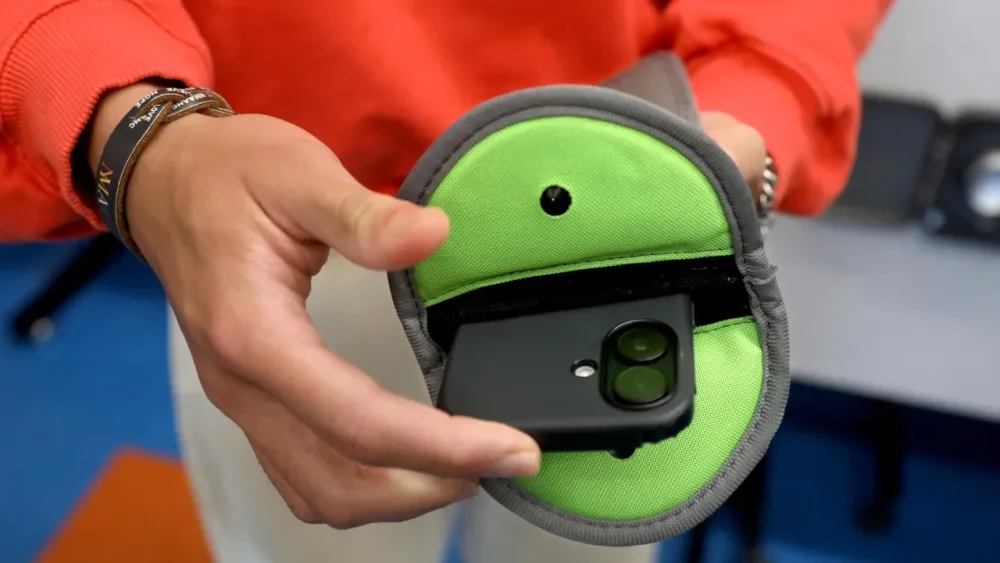
To ban or not to ban cellphones in school, that is the perennial question facing parents and educators across the country. A new study published in The Lancet lends credence to the latter camp, finding no evidence that restricting student access to cellphones improved either well-being or grades in reading and math. The study examined 30 schools in the U.K., 20 of which restricted cellphones in some capacity, 10 which did not. “In restrictive schools, phones were not allowed to be used during the school day for recreational purposes, and were required to be kept off inside bags, stored in lockers, kept in a pouch, handed into the school reception, or phones were not allowed onto the school premises altogether,” the authors wrote. “In permissive schools, phones were permitted to be used at any time or at certain times (e.g., breaks/lunch) and/or in certain zones (e.g., outside).” Contrary to popular belief, the researchers found no significant difference in the mental well-being of those students allowed to use their phones compared to those who were not. Importantly, that doesn’t mean cellphones don’t pose problems. The researchers found that the more time students spent on cellphones and social media, the lower their mental well-being. However, banning cellphones and eradicating social media isn’t the answer here. While plenty of research shows the damage phones and social media can do to our mental health and dwindling attention spans, love them or hate them, cellphones aren’t going anywhere. Educators and administrators are better off putting their energy into helping teenagers navigate a world with cellphones and social media. Learning how to focus despite the pull of a phone in their back pocket will serve students better than coming up with ways to circumvent restrictive phone policies. “Reactionary hacks have been pushing the false narrative that social media and smartphones are leading to declining literacy and mental health problems. It’s false, and it’s simply the latest iteration of a long running freak out about the technology and media that young people are using,” writes journalist Taylor Lorenz in User Mag. While no one thinks students should be allowed to scroll on their phones all day in class, banning phones outright won’t magically make all problems disappear. If you’ve ever tried to ban a child from doing literally anything, you’ll understand why. View the full article
-
After social media rattled the old gatekeepers of information, new digital ones have emergedView the full article
-
ICE Mortgage Technology announced additions for its Encompass LOS, while Mortgage Cadence is bringing out a new version of MCP aimed at mid-sized depositories. View the full article

-
A short-cut for UK debt issuanceView the full article
-
If you've ever sat in front of your Windows PC wondering exactly what is causing it to run so sluggishly, some clarity may be on the way: Microsoft is testing a new FAQ page in Windows 11 that will analyze your system specs and give you some advice about why you might not be seeing top performance speeds. The feature is currently hidden away in the preview release of Windows—it's not even active in the earliest testing version—but developer @phantomofearth.bsky.social has managed to access the relevant screens and find out how they work. The new page will apparently make its home in the System tab of Settings. As per the screens shared online, an example of a frequently asked question is: "Is my GPU sufficient for high end gaming and video experience? How can having a dedicated GPU enhance my experience and productivity?" The answer then explains that less than 4GB of memory for a GPU can lead to lower performance and visual quality. New Frequently Asked Questions list in Settings > System > About hidden in builds 26120.3576 and 22635.5090. Has some questions related to the Windows version and device specs. (vivetool /enable /id:55305888)[image or embed] — phantomofearth ⛄ (@phantomofearth.bsky.social) 17 March 2025 at 23:52 Then there's: "How does having 4-8GB of RAM impact my PC's performance? Can I run modern applications smoothly with this RAM capacity?" The response explains that you'll be fine editing documents and browsing the web, though tasks such as photo and video editing may be more of a challenge for your system. These questions and answers will apparently be tailored to each specific system, so you'll only get information that's relevant to your own setup. This could potentially be pretty useful when it comes to figuring out what's slowing down the performance of your computer, or getting advice on which component needs an upgrade. It's worth bearing in mind that a huge chunk of Windows users aren't even going to know what RAM is, let alone how it impacts the performance of their system. For those users, I could see the FAQ section being helpful—certainly more helpful than a dry list of system specs, which is all that's available right now. Right now, Windows 11 gives you a basic list of system specs. Credit: Lifehacker That said, the responses are a little on the generic side (I really hope Microsoft hasn't given Copilot the job of writing them). Information like "a high-end GPU can provide better graphics, smoother gameplay, and faster processing" isn't exactly a revelation, and doesn't really quantify how much improvement a user might see with a graphics card upgrade—so some estimates on potential performance gains would be welcome. However, the more precise these FAQs get, the greater the risk of inaccuracies: Microsoft wouldn't want a user to be in the situation of buying an expensive GPU upgrade only to see minimal performance boosts because of a slow CPU, for example. Assessing PC speeds and the contribution of each component is a complicated business, which is probably why these FAQs are rather vague at the moment. Hopefully, Microsoft can work in some more specifics before this feature actually launches without running the risk of misleading users. Of course, a lot of the details also might change between now and whenever this gets pushed to all Windows users—if indeed it ever does see the light of day. But it's a potentially useful new addition to the OS that will provide some extra context to your system specs. View the full article
-
While it's generally useful to get notifications on your phone, there are times when it's too much, too fast, such as after you disable Airplane Mode or when your family text thread is blowing up while you're in the middle of a meeting. On Android, you can turn on silent mode or snooze or disable notifications entirely—or you can rely on the new Notification Cooldown feature, which temporarily lowers the literal and figurative volume on your alerts so you don't have to manage those modes yourself. We've known this feature was coming for a while, and it finally arrived on Android 15 with the March 2025 update. How Notification Cooldown worksNotification Cooldown manages a deluge of alerts that come in over a short period of time by temporarily lowering your device's volume and minimizing on-screen pop-ups. The cooldown can last up to two minutes. Notifications don't disappear entirely when Notification Cooldown is enabled, so you don't need to worry about missing important alerts. You can still view them in the notification shade by pulling down from the top of your phone's screen. Calls, alarms, emergency alerts, and priority conversations will still come through during a cooldown. Unfortunately, there's no option to customize Notification Cooldown—such as the alert threshold that triggers it, how long it lasts, and which apps are cooled—other than turning the feature on or off. How to enable (or disable) Notification CooldownTo turn Notification Cooldown on or off on your Pixel device, open Settings and go to Notifications > Notification cooldown (under General). Use the toggle next to "Use notification cooldown" to enable or disable the feature. Notification Cooldown may be on by default, so you can opt out if you prefer not to use it. If you don't see this option in your phone's settings, make sure you've updated your device to the latest version of Android 15. View the full article
-
Consulting group says that US government purchases have slowed and global economic uncertainty has risenView the full article
-
General managers around the National Hockey League are putting some of their old roster and team management tactics on ice. That’s because NHL front offices, through a partnership with software company SAP, are now using the SAP-NHL Front Office App, bringing reams of data and information into a single all-encompassing platform. Given that so much of the sports world is driven by numbers—goals, shots, saves, salaries, and more—all the data and information can be difficult to wrangle. For those working in the front office in the NHL, it could mean “staring at eight computer screens,” and “carrying around a big binder” to make sure it’s all on-hand, as Don Waddell, GM of the Columbus Blue Jackets, tells Fast Company. But the new Front Office app brings it all onto a single dashboard. Waddell says that it was immensely helpful during the recently passed NHL trade deadline, as he was able to look at or access roster information, look at contracts for every player in the league, and even get a quick gauge on which players had no-trade clauses. While SAP has been working with the NHL since 2017, offering on-the-fly insights on the bench and generating in-game insights, the front office staff—the people running the team or organization—have had to cobble together data and information from different sources. The NHL has had that data, and the whole idea behind the Front Office app was to make it easier than ever to access for general managers and others. “It’s been in the hands of the clubs since December,” says Steve McArdle, chief operating officer at the NHL. “We’ve heard very positive feedback on the design and functionality. It’s not just an app for the sake of an app—it’s taking the best of all worlds, and changing the way information is delivered.” ‘One-stop shop’ Given that each and every NHL team relies on data to inform decisions about roster moves, contract negotiations, and more, the league wanted to make sure it was doing its best to make decision-making as efficient as possible. So by leaning into the existing relationship the NHL had with SAP, and then building an app for iPads, which were already being used in various faculties by the clubs, creating the app was a natural next step. Its designers see it evolving and becoming even more useful in the future. “The first iteration, we were focused on pulling the data together to answer core questions that GMs might have,” says Dan Fleetwood, VP of global sponsorships at SAP. “We wanted to get information to their fingertips.” Fleetwood also says that the magic of the app is its simplicity. “It’s a consumer-grade application,” he says, meaning that NHL GMs—many of whom were hockey players themselves, lacking tech-heavy backgrounds—can pick it up and use it with ease. “The beauty of it is that it’s a one-stop shop,” says Waddell. “SAP has been around for a long time,” he adds, “and though we’ve always had smart hockey people,” it’s great to add some “smart technology, too.” View the full article

-
The top five banks had a combined unpaid principal balance of more than $26 billion at the end of Q4 2024. View the full article

-
I've been trying to get back into playing guitar and I've noticed one thing: Both the App Store and Google Play are replete with guitar-tuning apps that are full of either upsells or advertisements. Isn't there any application that helps tune your guitar without bothering you? It turns out, there is. LikeTones, a music-education company, offers a guitar tuner for Android and iPhone that's both free to use and free of ads and upsells. You can open this application, play a string on your guitar, and start tuning. The application automatically detects which string you're trying to play and tells you whether to tune up or down. If you'd rather not use this automated tuning, or find that it doesn't quite work, you can tap a string to tune it specifically. This also plays the note from your phone's speakers, giving you an idea of how the string should sound. Because not every guitar is the same, this application offers support for six, seven, eight, and 12 string guitars in the settings. There's also support for various alternative tunings. You can also configure the reference frequency, if you want—this is useful if you need to tune to a piano or other instrument that isn't quite standard. Credit: Justin Pot It's a well-thought-out application, and the best I could manage to dig up in my capacity as an amateur guitarist and professional app recommender. It even has a built-in metronome. There are other solid options out there. Jon's Tuner for iPhone also works quite well, and is clean, but doesn't offer the same flexibility in terms of alternative tuning schemes. The Android version of Jon's Tuner, which I found reference to online, seems to be missing from Google Play. There is a solid Android alternative, though: Tunerly, which is completely open source. This app offers a simple user interface and settings, allowing you to choose specific tuning schemes. For most people, though, LikeTone Guitar Tuner is currently the best option. It works on both Android and iPhone, it's clean, it works well, and it stays out of your way. Try it if you're even a little unhappy with your current guitar tuning application. View the full article
-
Amid rapid technological advancements, return-to-office policies, and political and economic uncertainty, soft-skills like conflict mitigation are rising through the ranks as desirable skills for professionals. Skills needed for jobs are rapidly changing, with LinkedIn estimating that 70% job skills will change by 2030. In response, the social network identified the top 15 fastest-growing skills in the United States with its inaugural Skills on the Rise 2025 report. With a quarter of professionals planning on learning new skills, LinkedIn’s list pinpoints the most popular skills for both professionals and companies hiring. LinkedIn identified growth on skills by measuring various metrics and comparing the findings from 2024 and 2023. The metrics included the increase of a skill mentioned in paid job postings, the rate of new skills added to users’ profiles, and skills of users hired within the past year. Successful collaboration is crucial in a tension-filled world Landing second place on the list, conflict mitigation is set to become popular among various industries like higher education, consulting, and tech. By navigating workplace conflicts effectively, conflict mitigators generate successful collaborative environments. Other soft skills on the list include innovative thinking, public speaking, and adaptability, with professionals prioritizing. “You can teach technical skillsets but if you are unable to work well with others, listen effectively, collaborate with others, be respectful, be open to outside thoughts you will struggle,” one LinkedIn user commented on the list. LinkedIn’s report also notably accounts for the proliferation of AI use in the workplace, with AI Literacy landing the top spot on the list, and large language model (LLM) development and application scoring farther down the list. Here are the full 15 skills in order: AI Literacy Conflict Mitigation Adaptability Process Optimization Innovative Thinking Public Speaking Solution-Based Selling Customer Engagement and Support Stakeholder Management LLM Development and Application Budget and Resource Management Go-to-Market Strategy Regulatory Compliance Growth Strategy Risk Assessment View the full article

-
Rate-setters are grappling with combination of a sluggish economy and continuing price pressuresView the full article