ResidentialBusiness
Administrators
-
Joined
-
Last visited
Everything posted by ResidentialBusiness
-
 The relentless hype around AI makes it difficult to separate the signal from the noise. So it’s understandable if you’ve tuned out recent talk about autonomous AI agents. A word of advice: Don’t. The significance of agentic AI may actually exceed the hype. An Autonomous AI agent can interact with the environment, make decisions, take action, and learn from the process. This represents a seismic shift in the use of AI and, accordingly, presents corresponding opportunities—and risks. The P in GPT To date, generative AI tools, largely subject to human supervision, have been designed to function by being pretrained (the P in GPT) on vast amounts of data such as large language models (LLMs) or other defined data sources and then to provide responses to inputs or prompts (a question or instruction) provided by users. This has proven to be an impressive way to come up with humanlike responses to queries or prompts—like a baby imitating sounds or words without really knowing what it is saying. Kind of adorable, but unlikely to conjure Newton’s Principia or a Beethoven symphony. So, are these generative tools really functioning as creative, independent beings? Doubtful. But that may be changing dramatically. A new approach allows AI to interact directly and more autonomously with data and react in a dynamic way—a lot more like what humans do. This technology relies on autonomous AI agents, which Bill Gates believes are going to upend the software industry, bringing about the biggest revolution in computing since we went from typing commands to tapping on icons. And that may be an understatement. AI Agents AI agents are designed to make decisions without human intervention to perform predefined (for now) tasks. They can reach into the outside world, find data they hadn’t previously encountered, analyze it, then take action—far more like human interaction with the environment and less like relying on the fixed data universe of a chess program or a chatbot and an LLM that cannot go beyond its pretrained knowledge. Sounds great. What could possibly go wrong? This is a major step forward, replacing a clever statistical approach to replicating human expression with something capable of taking in previously unknown outside stimuli, processing it, and taking action without having to be pretrained or retrained. We are removing our intermediate role creating and governing AI’s conceptual and decision-making universe. That’s both the point and the problem. It’s fair to say the AI baby is not just on its way to taking a few steps; it could be speeding down the highway in your new car, music blaring, swigging a bottle of tequila. The upside is clear. Less need for specific training and oversight. Scalability is only limited by compute resources. You can remove the human intermediary and send out agents to go and complete vast amounts of tasks on their own. After all, they are agents, they have agency—the ability to make decisions and choices. And mistakes. What could possibly go wrong? As software rather than a human actor, AI agent mistakes can be instantly and almost infinitely compounded, replicated, and cascaded. It is also a target for hackers. There are obvious doomsday scenarios like a rogue AI agent improperly triggering a massive wave of securities trading or unintentionally launching a military retaliation. When it comes to decisions with potentially catastrophic consequences, human oversight is by no means perfect, but most of us feel at least a modicum of comfort knowing there’s an expert human hand hovering over the go button. There are less dramatic yet still highly impactful effects in the legal and compliance sphere that pose significant business risk. More and more companies are using AI-driven tools across the entire employee lifecycle, from selecting candidates to interviewing and hiring and continuing through performance assessment (raises, promotions, and termination). These tools are increasingly deploying AI agents. Providers often tout AI agents as supporting and improving the quality of critical HR decisions. But subtle errors in system design or implementation could lead to unfair outcomes. There’s a name for this phenomenon: algorithmic bias. At the same time, states are adopting laws penalizing both developers and users of such tools if their use results in unfair treatment of employees. And naturally, litigation is likely to follow. Risky Business It is undeniable that AI agents present a significant opportunity to increase productivity by automating routine tasks and freeing people up for more creativity and problem-solving. But the risks are just as undeniable. While jettisoning supervision and oversight may be a necessity with kids at a certain point, the metaphor only goes so far when it comes to the emancipation of AI through autonomous agents. For now, as we gleefully remove the training wheels, we should be mindful of balancing our understandable enthusiasm with reasonable caution to avoid any catastrophic crashes. View the full article
-
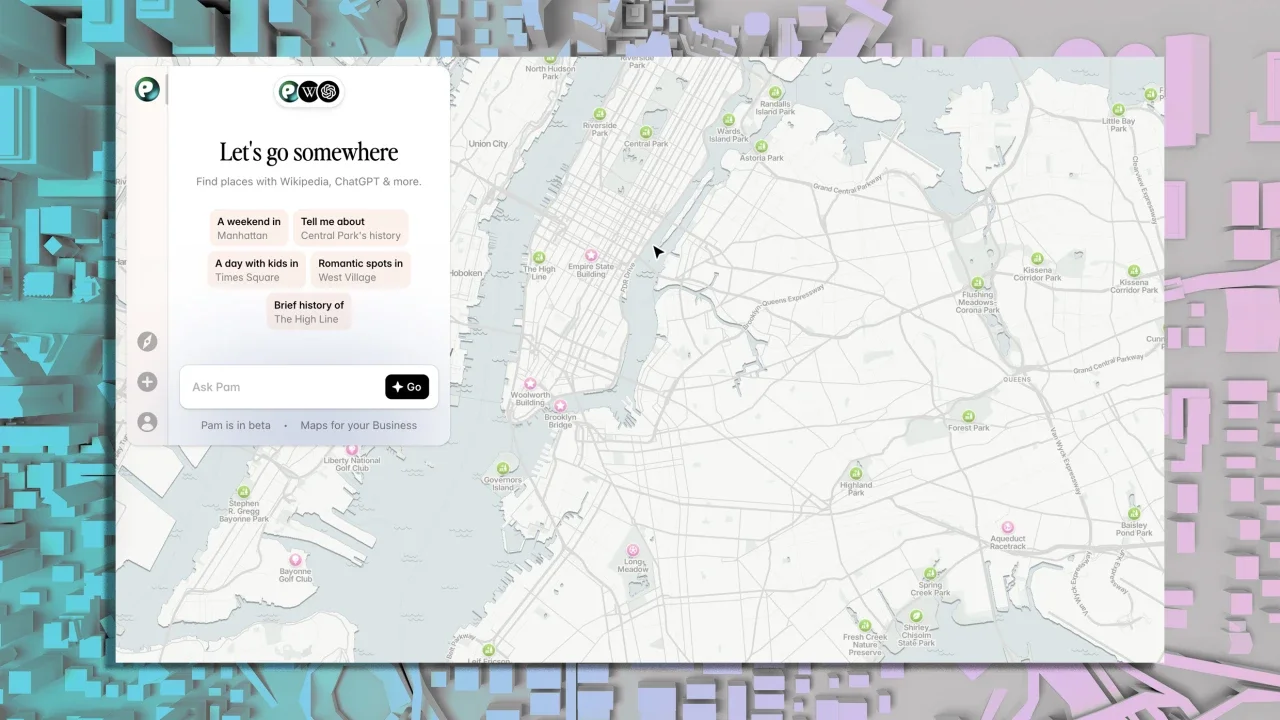
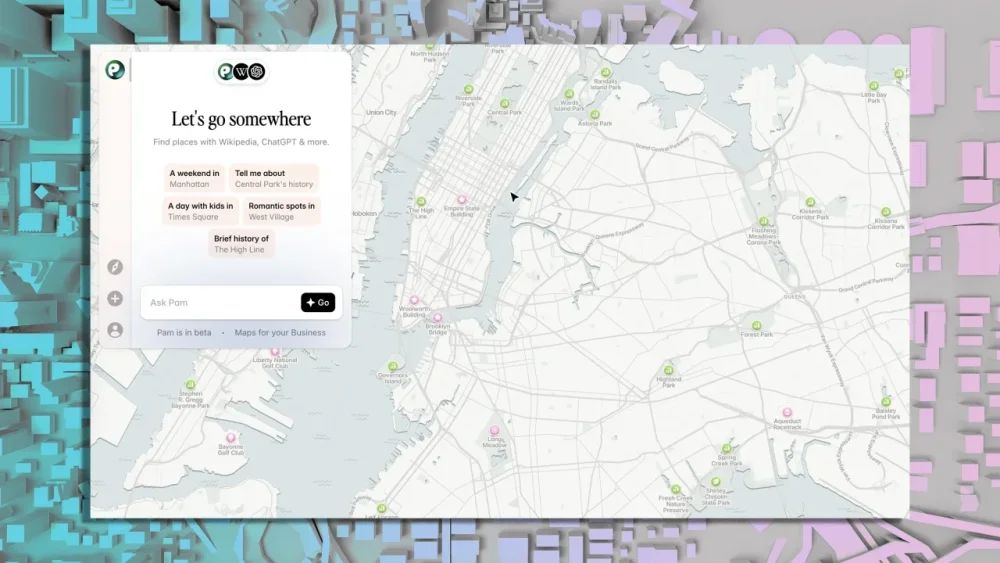
I don’t know about you, but I tend to think about my favorite tech tools as being split into two separate saucepans: the “classic” apps we’ve known and relied on for ages and then the newer “AI” apps that have shown up over the past several months to serve some super-specific purpose. More and more, though, I’m realizing that the most effective apps are the ones that seamlessly blend those two concepts and create a whole new recipe with the best of both worlds. That’s precisely what the tool I’ve got for you today manages to do. It’s a brand new app released just moments ago that’s basically Google Maps combined with ChatGPT, Perplexity, Wikipedia, and more. And goodness gracious, will it bring some fascinating new flavor into your life. Be the first to find all sorts of little-known tech treasures with my free Cool Tools newsletter from The Intelligence. One useful new discovery in your inbox every Wednesday! A modern mapping mashup Let me back up for one quick second: A moment ago, I told you today’s tool is a brand new service. And it is—just released days ago and almost certainly something you haven’t yet seen. But it’s also connected to a standout service we’ve discussed in these quarters before. ➜ The service is called PamPam, and we talked about it last May and then again in December, when I featured it as one of my favorite finds from 2024. At the time, I described it as an AI map app that’s actually worth your while—and that’s still true today. But now, PamPam is even more useful, thanks to a massive upgrade that introduces a whole new ocean of actually-handy AI possibilities. Specifically, PamPam’s gained some really slick integrations that bring data from ChatGPT, Perplexity, Wikipedia, and other smart sources into its interactive map-exploring experience. So what does that actually look like in practice? Lemme show ya. When you open up the new PamPam app, you’re prompted to describe what exactly you want to do or see. You can type out anything, in plain English and without any complicated formatting requirements. PamPam prompts you to ask anything, with a slew of new sources powering the results. By default, the service will pull info from ChatGPT and Wikipedia into its results. If you click the little pill area with the logos, though, you can also bring other info sources into the mix—including, so far, Perplexity and Foursquare. Wikipedia, ChatGPT, Foursquare, and Perplexity are now a part of the PamPam picture. For one example, I asked the service to suggest stuff to do and places to eat for a day in Pasadena with a family of four—including a seven-year-old and a nine-year-old. In a matter of seconds, it served up all sorts of thoughtful and specific suggestions, with info available in a sidebar and locations visible in a large interactive map. PamPam’s results pull data from all your selected sources into a simple, map-embedded guide. Clicking on any item in the map or the sidebar pulls up more detailed info from Wikipedia, along with more suggestions for subsequent questions from ChatGPT and any other activated sources. You can keep asking more questions from all of your selected sources as you go. Everything happens right then and there, in that same single screen and without any external windows or sign-ins. It’s about as polished and pleasant of an experience as you could ask for, with all sorts of helpful touches pulled from the different sources and presented in a sensible-seeming, streamlined setup. PamPam’s interface is a whole new experience that brings a blend of different info into a single map-centric spot. ⌚ PamPam does require you to sign in with a Google account in order to use the service, but it takes all of seven seconds to do—and you’ll be off to the races and exploring your results in another few seconds from there. The possibilities are practically endless, and best of all? It doesn’t even cost a dime to try. PamPam works entirely on the web in any browser, on any device. It’s completely free to use for these purposes, with evolving limits for the external sources. The site offers an optional “Pro” plan that raises those limits and unlocks extra features related to some of its other functions. (The company has a variety of corporate plans, too, which seem to be where the bulk of its money is made.) PamPam doesn’t require any personal info beyond your initial Google sign-in, and its privacy policy doesn’t include anything unusual about how it handles the limited amount of data involved. If you love these types of tools as much as I do, check out my free Cool Tools newsletter. I’ll introduce you to an incredible audio app that’ll tune up your days in delightful ways—then send you another new off-the-beaten-path gem every Wednesday! View the full article
-
Kate Aronowitz tells me she first set out in graphic design because it felt like a discipline that helped her bring order to things. Many years later, she has a love-hate relationship with being labeled “a creative” because the creative process, as she sees it, is not just about art and design—it’s as much about solving problems as it is building things from scratch. She also believes everyone can be creative under the right circumstances. As portfolio operations lead at Google Ventures, Aronowitz has collaborated with some of the world’s most inspiring and hardworking founders. And now she has the opportunity to shape and inspire the next generation of students at Savannah College of Design as the school’s newly minted executive in residence. I usually am the first one up. I go downstairs with my dog, George, make coffee, and we go outside. I like having quiet time outside. I’ll walk him or go to Pilates. I read the news. As much as it pains me, I like to know what’s going on. I’m not naturally an early riser, but if I approach the day with a clear mind, my work is better. I’m a big believer in reading a room. I think it’s more my predisposition. Even when I started my first design role as a junior designer, I often worked as a translator. When you get a design person and a businessperson together, they are often butting heads. I’m always the one saying, “Actually, I hear this.” Listening to what people are saying, watching their body language, seeing how much people speak up—it’s just being a very keen observer. I’m fascinated by people, and UX design is about solving real people’s needs. A lot of the time, they can’t express what they need; you have to listen for it. I don’t create well in total silence. I like a lot of white noise. If I have to write, I prefer to write on an airplane or in a café. Silence is very deafening. I go to sleep listening to podcasts. I find it hard to design and create if I put an hour on the calendar and say, “You’re sitting and doing this thing.” My best ideas come to me if I can get the questions I need to work on a week in advance. I’m good at having that run parallel; I’m processing in the background. Whether I’m at the mall or watching a movie or baking, ideas pop into my head. I find using my hands to be very helpful. Even if it’s business-case kind of stuff. I find it hard to be creative and type at the same time, so I handwrite a lot out. I find typing to be very constricting. I work with really interesting founders. And I see my role as a designer more so now almost setting the stage and curating the conversations that allow creativity to happen. I am helping make founders’ ideas real. A lot of my day is being a really good listener and figuring out what problems need to be solved and figuring out how to do it quickly. I’m an optimist. If you look at a problem long enough, you can truly come up with a solution that will delight people. I don’t believe there’s any problem that’s not solvable. I rarely get frustrated. I trust the process. If you iterate, put the right people in the room, and ask questions, you will learn something and you will move things forward. I’m interested in expanding what creativity means. Creativity has been put in this place where you either are or aren’t, or there’s creative time and there isn’t. It’s thinking about a problem in a different way. Everyone has the ability. I’m so much more open now to who is in the room. I hate when people are labeled creative. When you label a person as “a creative,” it limits it so that this is the only person in the room who can be creative. I’m a big list-maker. I break it into things. I am very strict about what fits onto my first list. I keep a running notes doc. I have a 2024 doc and it’s all the calls I was on that year. At any point in time, I can go back and pick up a thread where I left off. A lot of it for me is documenting and list-making so I don’t have to keep it in my mind. I can go back and check things. I need my alone time. Driving or walking the dog. Time with a whiteboard. If I’m really feeling lost and I’m not sure what to do, if I just put a pen in my hand and draw out what I’m thinking I find it really helpful to just get out what’s in my head. I’m very bad with distractions. I love doing the NYT crossword every day; it’s hard not to be following what’s going on [in the news]. I’m not great at tuning things out, but I have other outlets. I love baking and cooking. I started sketching again on my iPad. I have one of those expert Apple pencils. Even if it’s useless stuff like drawing a weird apple on my iPad, it centers me. If you can sit and noodle over the shades of red for an hour and a half, it’s good for your mind to be a better observer. The rut I find myself in is more like self-doubt. I am a bit of a perfectionist. That is what drew me to graphic design in the first place. I was never attracted to fine art. I liked graphic design because it brought order to things. I hold a high bar for myself and always want to make sure I’m bringing value, so I do question myself. I have to remind myself this is part of the process: Knowing that sometimes things don’t work and that’s okay, and what can you learn from it. You have to get small wins every day. A lot of what we do with founders is help them prioritize. Some problems can be pushed off. Just ask yourself, what’s keeping you up at night now? And how can you solve something immediately in front of you? A lot of it is taking big problems and breaking them down into bite-size chunks. It’s so important to close out the day and feel like you made some small steps in progress. View the full article
-
Militant group due to release a further four hostages on Saturday as part of exchange for 600 Palestinian prisonersView the full article
-
As I write this, the most pleasing sound is washing over me—gentle waves ebbing and flowing onto the shore. Sadly, I’m not actually on some magnificent tropical beach. Instead, the sounds of the sea are being generated by my Mac. Yet, more than just being pleasing to the ear, this sound, and others the Mac can generate, have helped boost my focus in recent months when I’m under deadline and trying to get work done. The feature is called “Background Sounds.” Here are some of the benefits I’ve gotten from it and how you can use it, too. The pandemic made me realize background sounds help me focus I know some writers who need absolute silence when they are working. I’ve never been one of those people. I work best when there is low-level noise from something else in the space around me—the rustling of tree branches outside a window or the indistinct murmur of other people in a cafe. I didn’t realize how much I relied on background noise to stay focused until the early days of the pandemic when lockdowns hit. Like many, I was suddenly stuck working from home, cut off from the background noises I had become accustomed to. I tried supplementing the newfound silence with music, but songs and even instrumentals were too distracting. Then, by chance, while browsing YouTube on my TV out of boredom one day, I came across an eight-hour video titled something like “Relaxing Coffee Shop Ambience.” The entire video was just an animated photo of the exterior of a visually appealing coffee house that played in a loop, but was set against a soundtrack of invisible customers murmuring, coffee mugs occasionally clacking, and autumn leaves blowing in the wind. I played it on my television that day and, I swear, I’d never focused so well on work before. Since then, I almost always play background ambience videos while I write. The cafe ones are nice, but natural ones, like rain or ocean scenes, really work for me. They seem to have a dual effect: increasing my focus while boosting my creativity. But playing those videos is not always practical if you go outside the house. At work, you don’t want your boss to think you’re wasting time watching YouTube, and playing an hours-long video on your laptop is a great way to run out of battery halfway through your workday. That’s where the Mac’s “Background Sounds” feature comes in. It doesn’t have the visual distractions or battery drain issues that YouTube ambiance videos do. And while Apple may not be the first company to bring background sounds to the masses (apps like Calm and Headspace are the leaders in the ambient sounds landscape), the big benefit of Apple’s BackGround sounds is that it’s built into macOS, and so is free to use. This is terrific for those with subscription fatigue who don’t want to shell out monthly for yet another software service. How to use Background Sounds on your Mac If you have macOS Ventura or later, you can use the Mac’s Background Sounds capabilities. But first, you need to enable the feature. To do this, open the System Settings app on your Mac, click the Accessibility options, and make sure the “Background sounds” switch is toggled on. Next, go to the Control Center options in the System Settings app and make sure under “Hearing” that “Show in Control Center” is toggled on. Once you’ve done this, you can quickly turn on the background sound of your choice. Here’s how: Click the Control Center icon in the Mac’s menu bar. Click the hearing button (the ear icon). Click Background Sounds. Now click on the background sound you want to play. The background sound you choose will now play in an infinite loop from your Mac’s speakers or through any headphones connected to your Mac. Your options include five natural sounds—ocean, rain, stream, night, and fire—and three more basic white noise sounds—balanced, bright, or dark. If you’re like me, you may soon find that enabling any of these background sounds on your Mac helps you stay focused while working. Is there any science behind the productivity benefits of white noise? I’ve met many people who are like me and say that playing background sounds helps them focus and even makes them feel more creative. But does science actually back this up? It depends. I’ve yet to find a rigorous scientific study that explored whether natural background noises, like rain or a crackling fire, actually have a measurable impact on one’s ability to focus at work. However, a 2022 study from researchers at the University of Southern California looked at the impact of white noise on neurotypical individuals. That study found that white noise played at 45 decibels resulted in “improved cognitive performance in terms of sustained attention, accuracy, and speed” as well as enhanced creativity. And when played at 65 decibels, the white noise “led to improved working memory”—but also higher stress levels. Personally, I can’t imagine working without some calming seaside background noise. It’s no day at the beach—but it’ll sound like it is. View the full article

-
Here in Atlanta, the Jimmy Carter Presidential Library and Museum has been part of my daily life for years. Parks and trails surrounding the center connect my neighborhood to the Martin Luther King Jr. National Historical Park downtown and everything in between. At the end of December 2024, thousands of people walked to the library to pay their respects to the former president as he lay in repose. The cold, snow and darkness of the evening were a stark contrast to the warmth of the volunteers who welcomed us in. Our visit spiraled through galleries exhibiting records of Carter’s life, achievements and lifelong work promoting democracy around the world. U.S. presidents have been building libraries for more than 100 years, starting with Rutherford B. Hayes. But the urge to shape one’s legacy by building a library runs much deeper. As a scholar of libraries in the Greek and Roman world, I was struck by the similarities between presidential and ancient libraries – some of which were explicitly designed to honor deceased sponsors and played a significant role in their cities. Trajan’s library The Ulpian Library, a great library in the center of Rome, was founded by Emperor Trajan, who ruled around the turn of the second century C.E. Referenced often by ancient authors, it could have been the first such memorial library. Today, someone visiting Rome can visit Trajan’s Column, a roughly 100-foot monument to his military and engineering achievements after conquering Dacia, part of present-day Romania. A frieze spirals from bottom to top of the column, depicting his exploits. The monument now stands on its own. Originally, however, it was nestled in a courtyard between two halls of the Ulpian Library complex. Trajan’s Column now stands at the center of Rome. [Photo: Olivier Giboulot/Unsplash] Most of what scholars know about the library’s architecture comes from remains of the west hall, an elongated room almost 80 feet long, whose walls were lined with rectangular niches and framed by a colonnade. The niches were lined with marble and appear to have had doors; this is where the books would have been placed. Writers from the first few centuries C.E. describe the library having archival documents about the emperor and the empire, including books made of linen and books bound with ivory. Trajan dedicated the column in 113 C.E. but died four years later, before the library was complete. Hadrian, his adoptive son and successor, oversaw the shipment of Trajan’s cremated remains back to Rome, where they were placed in Trajan’s Column. Hadrian completed the surrounding library complex in 128 C.E. and dedicated it with two identical funerary inscriptions to his adopted parents, Trajan and Plotina. Scholars Roberto Egidi and Silvia Orlandi have argued that Trajan’s remains could later have been transferred from the column into the library hall. Memorial model Either way, I would argue that Trajan’s decision to have his remains included in the library complex, instead of in an imperial mausoleum, established a model adopted by other officials at a smaller scale. In the eastern side of the Roman empire – what is now Turkey – at least two other library-mausoleum buildings have been identified. One is the library at Nysa on the Maeander, a Hellenistic city named for the nearby river. Under the floor of its entry porch is a sarcophagus with the remains of a man and a woman, possibly the dedicators, that dates to the second century C.E., the time of Hadrian’s reign. The ruins of the library at Nysa on the Maeander [Photo: Myrsini Mamoli] Another is the Library of Celsus, the most recognizable ancient library today, found in the ancient city of Ephesus. Named after a regional Roman consul and proconsul during the reign of Trajan, the building was founded by Celsus’ son, designed as both a place of learning and a mausoleum. The library’s ornate, sculpted facade contained life-size female statues, making it an immediately recognizable landmark. Inscriptions identify the statues as the personifications of Celsus’ character, elevating him into a role model: virtue, intelligence, knowledge and wisdom. Upon entering the room, the funerary character of the library became quite literal. The hall was designed like the Ulpian Library, but a door gave access to a crypt underneath. This held the marble sarcophagus with the remains of Celsus, the patron of the library. The sarcophagus itself was visible from the hall, if one stood in front of the central apse and looked down through two slits in the podium. An endowment covered the library’s operational expenses in ancient times, as well as annual commemorations on Celsus’ birthday, including the wreathing of the busts and statues and the purchasing of additional books. The life-size statues on the facade of the Library of Celsus [Photo: Myrsini Mamoli] Power and knowledge These two provincial libraries highlight how sponsors hoped to be associated with the virtues a library fosters. Books represent knowledge, and by dedicating a library, one asserted his possession of it. Providing access to learning was an instrument of power on its own. Beyond the handful of memorial libraries, many other ancient Roman public libraries were great cultural centers, including the Forum of Peace in Rome, dedicated by Emperor Vespasian; the Library of Hadrian in Athens; and the Gymnasium in Side, a city in present-day Turkey. The most magnificent libraries combined access to manuscripts and artworks with spaces for meetings and lectures. Several had great leisure areas, including landscaped sculptural gardens with elaborate water features and colonnaded walkways. Literary sources and material evidence testify to the treasures that were held there: busts of philosophers, poets and other accomplished literary figures; statues of gods, heroes and emperors; treasures confiscated as spoils of war and exhibited in Rome. A model of how Hadrian’s Library may have looked, complete with a landscaped courtyard. [Photo: Joris/Wikimedia Commons/CC BY-SA] Like the Ulpian Library itself, they continued the long tradition of Hellenistic public libraries, established by the most famous library of antiquity: the Library of Alexandria. Founded and lavishly endowed by the Hellenistic kings of Egypt, the Ptolemies, the building was meant to portray the king as a patron of intellectual activities and a powerful ruler, collecting knowledge from conquered civilizations. In ancient Greece and Rome, anybody who could read had access to public libraries. Rules of use varied: For example, literary sources imply that the Ulpian Library in Rome was a borrowing library, whereas an inscription from the Library of Pantainos in Athens explicitly forbid any book to be taken out. But these buildings were also meant to shape their sponsors’ legacies, portraying them as benevolent and learned. Presidential libraries in the United States today follow the same principle: They become monuments to the former presidents, while giving back to their local communities. Myrsini Mamoli is a lecturer of architecture at Georgia Institute of Technology. This article is republished from The Conversation under a Creative Commons license. Read the original article. View the full article

-
Sophia Rosenfeld is the Walter H. Annenberg Professor of History and Chair of the History Department at the University of Pennsylvania. Her previous books include the award-winning title Common Sense: A Political History. Her writing has appeared in scholarly journals, such as the American Historical Review and the Journal of Modern History, as well as in media publications including the New York Times, the Washington Post, and The Nation. What’s the big idea? There is such a thing as too many options. Nowhere is freedom-as-choice and choice-as-freedom more evident than in the United States. As important as the right to choose has been in various emancipation movements, there is a point at which choice can become a trap that goes too far. Below, Sophia shares five key insights from her new book, The Age of Choice: A History of Freedom in Modern Life. Listen to the audio version—read by Sophia herself—in the Next Big Idea App. 1. Having choices makes us feel free. Have you recently picked something—anything? Maybe a kind of sandwich, a political candidate, or a movie to watch from the comfort of your couch? Did you first consult a menu of options and decide which appealed to you? That answer is probably yes because this kind of choice-making is routine these days. I am also going to guess that the opportunity to make a choice was valuable to you, even if it didn’t fully register at the time. When we make a menu-based choice, most of us experience it as a kind of freedom. At that moment, no one is telling us what to do, and we get what we want. Sometimes, we even feel we are defining ourselves in the process as distinctive people with distinctive tastes: vegetarians vs. meat eaters, fans of simple fare vs. foodies, etc. The same goes for choice-making about everything from ideas and beliefs to jobs, dates, or spouses. Choice is where political life, democracy, and consumer culture converge. This is constantly being reinforced in our way of talking. Constitutions produced around the globe ever since the Second World War reflect this. You could also look at billboards and see this, too. The “right to choose” has become enshrined in everything from bills of rights to advertisements. For most of us, having options and being able to act on them in keeping with our desires is what feeling free (nowadays) is all about. 2. People always have as many choices—and they probably didn’t care. Exaltation of choice for choice’s sake, or choice as the key sign of autonomy, is relatively new. Just a few centuries ago, being at the top of the social scale meant not having to worry about what to own, where to live, whom to marry, what to believe, or who should rule. These questions were, ideally, already settled, sometimes from birth. You can probably imagine how this must have been a sort of privilege, as it meant a life without constant hustling. Choice didn’t have the special status it has today for men or, especially, women. Freedom was imagined differently. In the era of slavery and more rigid class structures, it had more to do with living without being dominated by someone else and with doing, of one’s own volition, what was right rather than wrong. We might say that the emergence of individualized and largely value-neutral choice as a stand-in for freedom is really the story of the development of modern life around much of the globe. It is the story of how we learned to shop, read selectively, choose a place of worship, pick dance partners and then life partners, vote in elections, and participate in the invention of whole fields of study—like psychology or economics—that explore how or why or when we make the choices we do. “We tend to see our attachment to choice as natural, maybe even biological, rather than something particular to our historical moment.” This story of how choice became the modern form of freedom has never been fully told or even recognized. That’s because we tend to see our attachment to choice as natural, maybe even biological, rather than something particular to our historical moment. However, once we see that we live uniquely in an age of choice as a result of historical factors, we also start to notice the many consequences of this development on how we live today. 3. Freedom of choice requires a lot of (largely invisible) rules. As choices have grown across all kinds of sectors, from romance to politics to decorating your house, they have required new technologies to make them work. Think of catalogues, sample books, ballots, surveys, and all their internet counterparts, which require a display of all the available possibilities along with ways to register one’s selections. The steady proliferation in both choice-making situations and choices themselves has demanded the invention of ever more rules about who can choose what and when and how. Selecting a sandwich off a menu posted behind a lunch counter paradoxically requires all kinds of largely invisible regulations that have also grown with time, from rules about the safety of the products one is picking amongst, to rules about what happens to the money you hand over in exchange for your turkey club, to rules about how to line up to register one’s choice in the first place. So-called “free markets” only work when laws of various kinds—themselves designed by a host of “choice architects,” in the lingo of behavioral economists—emerge to help make the whole business run smoothly. This kind of freedom to do or select what matches one’s preferences is generally only available in our hours not on the job, or so-called “free time.” It is also always restricted to some people rather than others: people with money, people of a certain age, people who are citizens or residents, people of one sex rather than the other. Choice is always a limited form of freedom insofar as it requires other constraints, formal and informal, to be operable. 4. Choice can be a trap with negative repercussions. Most of us, rightly, don’t want to relinquish any of our existing freedom to choose. There is good reason why having choices is associated with human rights protections and global happiness indexes. It is hard for most Americans to imagine the benefits of arranged marriages, or a political system without secret, individualized voting, or a world of provisioning rather than supermarkets, even though these are relatively recent developments in the broad sweep of history. But, then again, we rarely stop to look at the downsides of our reliance on and faith in choice. Humans are limited in our ability to make good choices, as psychologists often tell us, because we fail to really know our own minds. We are also made anxious by having too many choices since we can’t predict their outcomes and know we are likely to wonder if we picked wrong afterward. Who can’t relate to that feeling of slight panic and sometimes paralysis at the very 21st-century scenario of being confronted with too many options and too little guidance about how to discriminate among them, whether in real life or online? “Choice is always a limited form of freedom insofar as it requires other constraints, formal and informal, to be operable.” All this stress on individual choice means we often end up blaming people—especially disadvantaged people who face few or only bad choices—for outcomes that might not be entirely their fault. Is it really a “bad” choice, suggestive of criminality, to try crossing a border illegally if one is stuck in a war-torn nation with no other possibilities for moving elsewhere? We get so caught up in considering our own options for fulfillment that we become incapable of considering how to achieve something in our collective interest, like clean air, water, or a solution to the refugee problem. In such cases, having more choices doesn’t enhance our freedom and well-being on an individual or societal level. And for all its global appeal, not least under the guise of feminism, commitment to choice has also become a potent source of resentment in places and subcultures that do not accept that this central capitalist-democratic value should be a goal unto itself or that feel left out of its operation. That’s one reason political fights often revolve around the question of what choices should be available to whom, especially when it comes to women and their reproductive lives. 5. Knowing when to advocate for enhanced choices, and when not, could benefit us. This isn’t a brief for getting rid of choice, but we should be more attentive to when choice meets our needs and when it doesn’t or won’t. For example, we might find scenarios where we want fewer rather than more choices as consumers. Who wouldn’t prefer a single good-quality, mandated health insurance plan over picking between nine different market options, all with different contingency plans, which we have no way of foreseeing if they will match our future needs? As voters, we might want to take some options off the table entirely. I can imagine deciding we want to live in a world that doesn’t offer civilians the option of buying certain kinds of military-grade weapons, just as we prohibit the option of buying children or bodily organs or dangerous drugs or driving without passing a special test. We might even decide there are some scenarios in which we need to limit the choices of some people to increase the choices of others. Looking to history helps us see how choice came to occupy the importance and high status it has today. We can trace its development from the first want ads for spouses in the 18th century to Tinder today. History also shows where and how we risk going overboard, especially in the United States, where freedom-as-choice and choice-as-freedom are most evident. This inquiry is equally vital for ordinary people, business leaders, and policymakers. That’s especially true at this moment, when artificial intelligence is being developed to grow our choices further and also to tailor those choices to individuals—thus shaping and constraining which options we pick. We need to remain aware that the promise of choice has been critical to many emancipation movements, from abolitionism to feminism, and has given people new possibilities for how to live. Still, it is time we got past the idea that choice is either cost-free or always the solution, never the problem. Think about this fact next time you find yourself in front of any kind of menu. This article originally appeared in the Next Big Idea Club magazine and is reprinted with permission. View the full article

-
Trade tariffs grab headlines but the less-visible fight around money matters deeply to the president View the full article
-
Americans are finding a haven in Spain where their spending power goes a long wayView the full article
-
Conservatives are mistaking public dislike of the cultural left for enthusiasm for the opposite dogmaView the full article
-
Meta is updating its Facebook Live video storage policy, limiting the availability of live broadcasts to 30 days before automatic deletion. The change, which takes effect on February 19, will align Facebook’s storage policies with industry standards and streamline how live video content is managed on the platform. New 30-Day Limit for Live Videos Under the updated policy, new live broadcast videos can be replayed, downloaded, or shared for 30 days before they are automatically removed from Facebook. Previously, live videos were stored indefinitely. Additionally, all live videos older than 30 days will be deleted in phases over the coming months. Meta will notify users before deletion, giving them 90 days to download, transfer, or repurpose their content. Users will receive these notifications via email and in the app. Options for Downloading and Transferring Live Videos To assist users in preserving their content, Meta has introduced several tools to facilitate the download or transfer of live videos before they are removed. Single Video Download: Locate the Videos tab on your Facebook Page or profile. Find the live video you want to download. Open the video in full-screen mode, click […], and select “Download video.” Users can also download multiple videos via the Activity Log by selecting “Your live videos” and choosing a date range. Bulk Video Download: Users can select multiple live videos to download at once. A notification will direct users to the download interface, where they can choose a destination for the saved files. Transferring Live Videos: Users can transfer videos directly to cloud storage providers such as Dropbox or Google Drive. In the download interface, select “Transfer live videos” and choose a preferred storage location. Convert Live Videos to Reels To retain moments from past live videos beyond the 30-day limit, Meta is offering a feature that allows users to clip and convert live videos into Reels. This option enables users to share key moments on their profile pages. Postponing Deletion for Additional Time Users who need more time to manage their archived live videos can postpone deletion for up to six months. To defer deletion: Open the deletion notification. Select “Learn more” and tap “Postpone deletion.” Confirm by tapping “Postpone.” Image: Meta This article, "Meta Announces Changes to Facebook Live Video Storage Policy" was first published on Small Business Trends View the full article
-
Meta is updating its Facebook Live video storage policy, limiting the availability of live broadcasts to 30 days before automatic deletion. The change, which takes effect on February 19, will align Facebook’s storage policies with industry standards and streamline how live video content is managed on the platform. New 30-Day Limit for Live Videos Under the updated policy, new live broadcast videos can be replayed, downloaded, or shared for 30 days before they are automatically removed from Facebook. Previously, live videos were stored indefinitely. Additionally, all live videos older than 30 days will be deleted in phases over the coming months. Meta will notify users before deletion, giving them 90 days to download, transfer, or repurpose their content. Users will receive these notifications via email and in the app. Options for Downloading and Transferring Live Videos To assist users in preserving their content, Meta has introduced several tools to facilitate the download or transfer of live videos before they are removed. Single Video Download: Locate the Videos tab on your Facebook Page or profile. Find the live video you want to download. Open the video in full-screen mode, click […], and select “Download video.” Users can also download multiple videos via the Activity Log by selecting “Your live videos” and choosing a date range. Bulk Video Download: Users can select multiple live videos to download at once. A notification will direct users to the download interface, where they can choose a destination for the saved files. Transferring Live Videos: Users can transfer videos directly to cloud storage providers such as Dropbox or Google Drive. In the download interface, select “Transfer live videos” and choose a preferred storage location. Convert Live Videos to Reels To retain moments from past live videos beyond the 30-day limit, Meta is offering a feature that allows users to clip and convert live videos into Reels. This option enables users to share key moments on their profile pages. Postponing Deletion for Additional Time Users who need more time to manage their archived live videos can postpone deletion for up to six months. To defer deletion: Open the deletion notification. Select “Learn more” and tap “Postpone deletion.” Confirm by tapping “Postpone.” Image: Meta This article, "Meta Announces Changes to Facebook Live Video Storage Policy" was first published on Small Business Trends View the full article
-
President removes CQ Brown and other senior officers who he blames for pushing diversity, equity and inclusion policiesView the full article
-
President orders probes into levies imposed by EU, UK and Turkey on US companiesView the full article
-
Clearly, automation will affect labor in 2025. But we maintain that when implemented well, automation elevates our employees and empowers our American workers to make U.S. businesses more competitive on the global stage. This is our “why.” Now Chang Robotics’ president, Kate McAfoose, will address the “how.” These are remarks she shared at a recent Delaware Valley Goods Movement Task Force quarterly meeting panel. New automation brings new challenges Yes, new challenges emerge with increased automation and digitalization. As an engineering firm, our company is coming from an engineering culture into companies ranging from manufacturing to warehousing, transportation, e-commerce, healthcare, and government spaces. Many are Fortune 500; some are smaller, but the challenges they face are the same: They want to maintain staffing from within their regions, but they must be sure they’re meeting quality requirements and regulatory benchmarks. They want to build a resilient supply chain within the U.S. So how do they transition manual workers to jobs informed by digital technologies? Smart technologies and asking the right questions As part of our robotic solutions, we integrate smart sensors, internet of technology (IoT) platforms, data collection, and analysis. We also provide C-suites with a dashboard to track key metrics, and identify areas where performance may be lacking. The dashboard answers questions such as “Are we maintaining uptime?” “Are we meeting production requirements?” “Are the quality measurements in line?” Perhaps the client needs to improve operational efficiency to maintain profitability. In healthcare, nursing staff may be burned out due to a shortage, leading to physical exhaustion or extended shifts. Or a government facility might be ready—or required—to transition to autonomous shuttles. In all cases, the process involves finding the repetitive tasks that are not necessarily high skilled, then finding ways to automate those functions. Now the challenge is to upskill the staff and operators to new trades as we’re implementing the systems. Training the trainers is key Our company has a philosophy called “train the trainer.” As we implement new technology, we walk side by side with the operators for roughly 3-6 months. We make sure they understand and can operate the system; then we help them champion the system. In addition to the new level of employment, they earn the metaphorical “badge of honor” for having learned a new trade. We focus on empowering employees who can go home and say, “My job is cool. I get to work with robots.” It’s not a situation of humans being replaced by robots, but in positioning them with collaborative robots that can drive efficiency and quality but cannot function without human interaction. If we implement the change in this way, everyone wins. A new world, with room for many How many people go through high school thinking, “I want to specialize in goods movement” or “I want to work in automated transport?” This is not a career path people have considered as a “cool” future role. But as these functions become better understood, the respect for their power will grow. There will still be a range of skilled and lower-skilled positions in the automated workforce. More positions will naturally focus on the maintenance and planning of the automated facilities. People will be required to perform maintenance and testing functions and to plan and maintain the spare parts inventory. These roles are vital to the operation’s success and will naturally gain a much bigger seat at the organizational table. Automation also applies to quality control. For example, if you’re automating plasticware production, the utensils must come off the line cleanly, with no excess edges. The moment one piece fails to meet quality standards, it can cause a backup in the entire line, leading to a shutdown and requiring manual labor to resolve the issue. If you’re operating with a smaller staff, you’ll need to pull workers from other areas, further slowing down production. Everyone involved will continually learn and adapt. Jobs remain, but skillsets are shifting It’s critical to avoid the assumption that automation leads to job reduction. It’s a drive for as much production and quality enhancement as possible, but it will require a specialized team to achieve. Ideally, it’s the same team you already have, but differently trained. Traditionally, manual warehouse labor roles have very high turnover. After 6 months, many workers feel the job is repetitive and unappealing, or they leave to avoid night shifts or seek higher pay elsewhere. When this happens, the training investment is lost, and the next employee must be trained. However, when automation is implemented effectively, the need for manual labor decreases. Ideally, this reduction can occur through natural attrition—when an employee moves on rather than advancing, the company may not need to hire a replacement. Automation can streamline roles that involve heavy lifting, high workplace injury risk, and increased burnout or boredom. People will leave less often. Effective automation can reward companies and workers in new ways. Technology for a bright future What does this mean for our children’s future? Kate has a child in kindergarten right now. “I have no idea what she will do. Maybe she’ll pursue data science or data analysis, but the truth is, the roles of the future most likely don’t even exist yet. But they will be necessary. And so will she.” We will continually need to strive for the right decisions and balance, with a focus on innovation and action. This is how the next generation of companies—and employees—can continue to win. Matthew Chang is founder and Kate McAfoose is president of Chang Robotics. View the full article

-
This post was written by Alison Green and published on Ask a Manager. This comment section is open for any non-work-related discussion you’d like to have with other readers, by popular demand. Here are the rules for the weekend posts. Book recommendation of the week: The Safekeep, by Yael van der Wouden. When her brother’s girlfriend comes to stay with her in the Netherlands, a woman’s post-war life is upended. (Amazon, Bookshop) * I earn a commission if you use those links. View the full article
-
The Fast Company Impact Council is a private membership community of influential leaders, experts, executives, and entrepreneurs who share their insights with our audience. Members pay annual membership dues for access to peer learning and thought leadership opportunities, events and more. Sterile, isolating, and stressful: Today’s hospitals can kindle deep discomfort. Because they must be designed adequately for everyone, they’re designed perfectly for no one. So, what would our healthcare experience look like if physical hospitals were to disappear altogether? Artificial intelligence that is generative, predictive, and integrated, combined with the power of edge computing in every background device, will transform our very notion of hospitals. Healthcare will become a lifestyle so seamlessly woven into our daily experience that it will be invisible. Why is this the future of healthcare? The trends are already apparent: Evolving economics: As baby boomers transition to Medicare, millennials, Gen X and Gen Z are emerging as the primary healthcare consumers. These groups place an emphasis on convenience and personalization, and this social shift is influencing how we access care. Modern living: Biometric data collection is being increasingly integrated into our homes and daily routines, and predictive AI is streamlining diagnostics and preventing diseases. Converging technologies: Healthcare delivery has traditionally required specialized devices for every test and procedure, but the limitations of cost and size are fading. Advances in computation will converge functionalities, revolutionizing the patient experience in the process. Strategies for success In light of these trends, my firm has recently explored strategies for success in a changing healthcare landscape. They reflect our belief in a gradual transition toward decentralized healthcare and the integration of AI technology, celebrating our gradual societal progression towards an improved future, rather than a utopia that appears overnight. Here are some of these strategies. Lean into wearable technology. Soon, health data will be paired with pattern-recognition AI to identify and predict all risk factors for disease. This is a future inflection point where almost all healthcare becomes preventative medicine. For example, instead of learning about our heart disease after a cardiac event, AI will accurately warn us of our impending heart attack decades before it happens. Treat mental health as a community endeavor. The human body emits numerous indicators of psychological stress: elevated heart rate, tense muscles, and insomnia—which can be read by advanced biometric devices like an open book to our minds. Combined with large language model and diffusion model AI, a radical change in behavioral health could be at our fingertips. With AI-driven behavioral medicine available anywhere, anytime, communities could invest in public infrastructure—like augmenting parks to combine mental health with public green space—to increase accessibility and fight social stigma. Repurpose obsolete infrastructure: By 2051, gas stations may be obsolete, and diagnostic equipment that is expensive today will be cheaper, smaller, and more powerful. Repurposing existing gas stations—and other outdated infrastructure—into neighborhood health stations could efficiently disperse essential health services throughout communities. Create personalized care environments: Unbound by location, cost and data availability, we can enjoy more personalized healthcare. For example, combining a labor and delivery room with augmented reality will make birth more comfortable by bridging the personal environment of a home birth with the medical sophistication of a specialty clinic. Floor-to-ceiling digital screens that respond to cortisol levels to create a calming atmosphere while displaying critical health information would have positive health impacts and improve patient satisfaction. Integrate diagnostic screening into the home: Households will become data collection centers and bathrooms can become labs of the future by integrating AI into existing buildings. For example, imagine household appliances that track the type of food you keep on hand as a marker of your overall health or screen your biowaste for signs of sickness in real time. Your own digital health avatar will be updated every time you cook a meal or brush your teeth. Today, a visit to the hospital entails finding a place to park in a busy lot, picking the right door to enter, and winding your way through confusing corridors past services you don’t need, and ride elevators with people who cough without covering their mouths. Designers and architects have an opportunity to design a better way of doing things. It’s a safe bet the future of healthcare will be a messy evolution of technology, culture, and economy. Markets are demanding more personalized on-demand service, technology is getting smaller and cheaper every day, and AI continues to advance. As designers, we believe this leaves us free to envision healthcare first and foremost as experiences rather than buildings or places. By embracing solutions that are opportunistic and incremental, we can create a future where healthcare is invisible and omnipresent. As we move into a future where technology will diminish the constraining power of location, cost and data, designers must resolve to increase our commitment to human flourishing. We must work together to deliver healthcare that delights. Mike Sewell is director of innovation at Gresham Smith. View the full article

-
NEXT Insurance has launched a new multi-location workers’ compensation (WC) coverage option, allowing small business owners operating multiple locations within a single state to secure coverage under a single policy. The move positions NEXT as one of the first WC insurers to offer a fully digital solution for businesses managing multiple sites. The new coverage is designed for small businesses with multiple branches or offices, addressing the increasing complexity of insurance needs as they expand and hire more employees. With workplace accidents posing a growing risk for expanding businesses, the multi-location WC policy enables small business owners to manage their insurance across all locations through an online platform. “Until now, entrepreneurs have struggled to manage multiple locations and scale their operations with the right protection and, ultimately, the peace of mind that coverage offers,” said Jack Ramsey, VP of Agents at NEXT. “Multi-location for workers’ compensation will simplify coverage options for small businesses with multiple locations, saving them valuable time managing their policies. This new offering also gives SMBs the peace of mind that with NEXT, their coverage options will grow in tandem with their business.” NEXT’s digital platform enables real-time policy updates and self-service capabilities, allowing business owners to adjust coverage across all locations at any time. The online binding and servicing features give small business owners and insurance agents greater flexibility in managing policies. The streamlined process also facilitates the sale of policies to larger businesses needing scalable coverage. The multi-location WC policy is available through NEXT’s online platform, NEXT agents, and embedded partners. The simplified application process reduces administrative burdens, allowing business owners in industries such as food and beverage, retail, and professional services to quickly obtain coverage. With this latest offering, NEXT Insurance aims to provide a seamless, digital-first experience for small business owners, ensuring that as their businesses grow, their insurance protection can scale with them. Image: Envato This article, "NEXT Insurance Introduces Multi-Location Workers’ Compensation Coverage for Small Businesses" was first published on Small Business Trends View the full article
-
NEXT Insurance has launched a new multi-location workers’ compensation (WC) coverage option, allowing small business owners operating multiple locations within a single state to secure coverage under a single policy. The move positions NEXT as one of the first WC insurers to offer a fully digital solution for businesses managing multiple sites. The new coverage is designed for small businesses with multiple branches or offices, addressing the increasing complexity of insurance needs as they expand and hire more employees. With workplace accidents posing a growing risk for expanding businesses, the multi-location WC policy enables small business owners to manage their insurance across all locations through an online platform. “Until now, entrepreneurs have struggled to manage multiple locations and scale their operations with the right protection and, ultimately, the peace of mind that coverage offers,” said Jack Ramsey, VP of Agents at NEXT. “Multi-location for workers’ compensation will simplify coverage options for small businesses with multiple locations, saving them valuable time managing their policies. This new offering also gives SMBs the peace of mind that with NEXT, their coverage options will grow in tandem with their business.” NEXT’s digital platform enables real-time policy updates and self-service capabilities, allowing business owners to adjust coverage across all locations at any time. The online binding and servicing features give small business owners and insurance agents greater flexibility in managing policies. The streamlined process also facilitates the sale of policies to larger businesses needing scalable coverage. The multi-location WC policy is available through NEXT’s online platform, NEXT agents, and embedded partners. The simplified application process reduces administrative burdens, allowing business owners in industries such as food and beverage, retail, and professional services to quickly obtain coverage. With this latest offering, NEXT Insurance aims to provide a seamless, digital-first experience for small business owners, ensuring that as their businesses grow, their insurance protection can scale with them. Image: Envato This article, "NEXT Insurance Introduces Multi-Location Workers’ Compensation Coverage for Small Businesses" was first published on Small Business Trends View the full article
-
ChatGPT referrals to publishers increased with the introduction of web search, but remain a minor share of overall traffic. The post ChatGPT Referral Traffic To Publishers Remains Minimal appeared first on Search Engine Journal. View the full article
-
The Massachusetts attorney general noted some consumers were caught by surprise when they realized the full cost of their agreements after signing. View the full article

-
We may earn a commission from links on this page. Heart rate variability (HRV) and resting heart rate (RHR) are the metrics that most wearables' "recovery" numbers are based on. I wore five devices to bed for two weeks to see how their readings compared. Those devices were an Apple Watch Series 10, a Fitbit Charge 6, a Garmin Forerunner 265S, an Oura Ring 4, and a Whoop 4.0. Why these five? Well, they're the major brands that people tend to gravitate toward when they want to track sleep, and for each I chose the best (in my opinion) of each company's current offerings. I had most of them on hand due to testing them for recent or upcoming reviews. The Apple Watch Series 10 is the one our Associate Tech Editor Michelle Ehrhardt crowned the best Apple Watch for most people. The Charge 6 is Fitbit's standout no-nonsense fitness tracker (sorry to Fitbit smartwatch lovers, but there are better smartwatches out there.) The fourth-generation Oura ring is the company's newest and best, and Whoop's 4.0 strap is the current hardware for its subscription-based recovery and activity tracking service (which beat Oura in our head-to-head comparison). Garmin makes a multitude of watches that can track your sleep, but the one that I tested here is my personal device, a Forerunner 265S—which is, in my opinion, one of the best running watches out there. As I've discussed before, the numbers we get from our smartwatches fall into a few different categories. Many are scores or icons that we can't really verify with other devices—what does it mean to have a "sleep score" of 87, anyway? Others are measurements, and we can compare those from device to device, since they should all be measuring the same thing. Different devices may use different sensors to pick up the data and different algorithms to process and display it, but we'd expect to see similar numbers from all of the devices tested. Our HRV and resting heart rate numbers fall into this latter category, so let's see how well the devices match. WHOOP 4.0 with 12 Month Subscription – Wearable Health, Fitness & Activity Tracker $239.00 at Amazon /images/amazon-prime.svg Shop Now Shop Now $239.00 at Amazon /images/amazon-prime.svg Garmin Forerunner 265S Running Smartwatch (Black/Yellow) $449.99 at Amazon /images/amazon-prime.svg Get Deal Get Deal $449.99 at Amazon /images/amazon-prime.svg Oura Ring 4 - Black - Size 8 - Smart Ring - Size First with Oura Ring 4 Sizing Kit - Sleep Tracking Wearable - Heart Rate - Fitness Tracker - Up to 8 Days of Battery Life $349.00 at Amazon /images/amazon-prime.svg Get Deal Get Deal $349.00 at Amazon /images/amazon-prime.svg Apple Watch Series 10 (GPS, 42mm, Black, S/M 130-180mm, Sports Band) $399.00 at Best Buy Get Deal Get Deal $399.00 at Best Buy Fitbit Charge 6 Activity Tracker - Heart Rate Monitoring, 7-Day Battery, Google Apps, Maps & Wallet, Comprehensive Health Insights, Sleep & Activity Analysis, S & L Bands, (Coral/Champagne Gold) $149.00 at Amazon $179.99 Save $30.99 Get Deal Get Deal $149.00 at Amazon $179.99 Save $30.99 SEE 2 MORE What is HRV, anyway? HRV, or heart rate variability, is a measure of how steady your heartbeat is. Not how fast or how slow, but how different of a time frame passes between beats. The differences are only measurable with precise equipment, but here's the basic idea: If your heart goes “beat…beat..beat………..beat….beat..beat…….beat,” you have a high HRV (high variability), and that’s a good thing. On the other hand, if your heart goes “beat….beat….beat...beat…..beat,” that’s a low HRV. We tend to have a low HRV when we’re stressed or fatigued, and a high HRV when we’re either not stressed, or recovering well from our stressors. This may seem counterintuitive, because most of us think of an ideal heartbeat as being steady and regular, but subtle variations from one beat to another are healthy and normal. Our heart takes its orders on how fast to beat from two different parts of our nervous system (sympathetic and parasympathetic). It's thought that a high HRV indicates that the two systems are both active—balancing each other out, in a sense. Your HRV will change from day to day, and that’s where these devices come in. You’ll often see a change in your HRV numbers right after a hard workout or stressful work day, giving you an early heads up about what your body is dealing with. This information, used wisely, can help to guide your choices about how to manage your workout schedule, your stress, and your health-related habits. What counts as a “good” HRV depends on your own history; it’s not worth comparing yourself to others. (I don’t mean that in a feel-good kind of way, but literally, scientifically: your HRV only makes sense when compared to itself.) Whoop reports that the middle 50% of 20-year-olds have an HRV between about 60 and 105, with numbers declining as we get older. If you’re 60, according to that data set, you’re likely to have HRV numbers somewhere between 30 and 50. How does HRV differ from resting heart rate (RHR)?Your resting heart rate is also a number that reflects stress on your body, including fatigue and illness. Unlike HRV, where higher is "better," a higher resting heart rate means you’re more stressed, and a lower one is a sign that you’re well recovered. Resting heart rate can also change over time as you become more fit. Athletes tend to have lower RHR numbers, and people who take up an exercise habit often find that their RHR declines a bit over time. (That said, RHR isn’t a direct measure of cardio fitness; there seems to be a significant genetic component as well. Take me as an example: my RHR is always pretty low, even when my cardio fitness is crap. If I’m doing a lot of endurance training, it will drop by two to three points, but no more.) Most healthy adults have a resting heart rate of between 55 and 85 beats per minute (some sources give 60 to 100 as the typical range). It’s important to note that these numbers usually assume that you’re sitting quietly in a doctor’s office. When you’re asleep in your own bed, your heart rate can dip a bit lower. So it’s normal to see lower numbers on a wearable that records all night than you would see when you go to the doctor. How to track your HRV and resting heart rate with wearablesGone are the days when you may have charged your fitness tracker at night; now, fitness-focused wearables are expected to be worn in your sleep to track these nighttime metrics. During the night, your device monitors your heartbeat. It may sample and average different readings, and each device measures and calculates its numbers slightly differently. (That’s why I didn’t expect much agreement between the devices, but more on that in a minute.) When you wake up, you might be presented with a “readiness” or “recovery” score, but I stand by my position that HRV and RHR are the only numbers really worth paying attention to (aside from time in bed, if you want to monitor your sleep). This data on your HRV and RHR will be presented to you in the device’s companion app or, in the case of devices with a screen, on the device itself. Often the app or device will tell you how your numbers compare to your usual. What you do with that information is up to you. How I gathered my dataFor this experiment, I wore my five devices to bed every night. That meant: The Oura ring on my finger (right hand, middle finger) The Whoop band on my left bicep The Apple Watch and Fitbit on my left wrist The Garmin on my right wrist A pro tip for device testers: when you're wearing two watches on the same wrist, turn one toward the underside of your wrist. That way, the two watch bodies won't clack against each other. Also, make sure the buttons are aligned so they aren't going to bump against their neighbors in the middle of the night. I entered each day’s resting heart rate and HRV from each device into a spreadsheet. Garmin reports your seven-day rolling average as your HRV "number," but I used the nightly numbers instead, the better to match the other devices. When it comes to using this data, I already have a sense of how the numbers compare to my experience. If my HRV is high and my RHR is low, I pretty much always feel good and am ready to take on whatever the day throws at me. If my HRV is low and my RHR is high, I’m either stressed, sick, or maybe didn’t sleep enough; I may or may not do an easier workout that day, but I’ll definitely pay more attention to taking care of myself and getting plenty of sleep going forward. If my RHR and HRV are both high, that tends to mean I’m dealing with a lot of stress or fatigue but am handling it well. For this experiment, I didn’t bother tracking data on how I felt; I already know that the Oura data is good at matching how I feel, so the question was whether the other devices tracked the same trends or not. The results of my testIt was fascinating to watch the results take shape as I added more data points to the spreadsheet. The raw numbers were often pretty different: my resting heart rate on a given night might be 65 or 86 depending on which device I’m reading from. But as I logged weeks’ worth of data, the trend lines all told pretty much the same story: Credit: Beth Skwarecki For HRV, Oura almost always gives me the highest ("best" looking) readings. Whoop tends to stick pretty close, with Fitbit and Garmin not far behind. The Apple Watch, on the other hand, rides significantly lower on the chart than the other devices, and seems to disagree with their trend sometimes. For resting heart rate, things are a bit more consistent. Oura usually gives the lowest readings, flattering me again, with the other devices slightly above, and Fitbit giving the highest of the bunch. This is roughly a 10-beat difference for many of the days I charted: for example, 53 from Fitbit and 43 from Oura. It's hard to say which is right, since I'm not hiring a healthcare professional to stand by and take my pulse throughout the night. In general, the lines tend to all go up together, and all down together. (Mostly...looking at you, Apple Watch.) I'm happy to see that the devices aren't reporting drastically different readings that look like random numbers; they do all seem to be measuring the same underlying phenomenon even if they don't all agree on the exact number to label it with. Personally, when I want to look at my HRV or RHR, I tend to go with the device I'm most familiar with—in this case, the Oura ring. I've been wearing it the longest (through three generations of the product) and so I have a sense of whether a reading of 50 is high or low for me. (It's high for Oura, even though it might be a low number if I saw it on a different device.) The most important lesson I take from this, myself, is that not only is it useless to compare HRV from person to person, it's also not helpful to compare it from device to device. Just like the weight labels on the machines at the gym, the numbers give you a way to compare your progress or trends with the same equipment. Switch devices, and all bets are off. So pick a device, stick with it, and you'll probably get numbers worth paying attention to. What you do with them, of course, is another matter. View the full article
-
Siri Chilazi is a senior researcher at the Women and Public Policy Program at Harvard Kennedy School. Iris Bohnet is a professor of business and government at Harvard Kennedy School and co-director of the Women and Public Policy Program. What’s the big idea? Fairness is not merely a choice; it is a way of moving through the world. For life and work to exhibit more fairness, people need to embed fair behavior into everyday choices, routines, and systems. Everyone can show up in ways that allow for a diversity of people to be seen, heard, and valued at the table. Below, co-authors Siri and Iris share five key insights from their new book, Make Work Fair: Data-Driven Design for Real Results. Listen to the audio version—read by Siri and Iris—in the Next Big Idea App. 1. Fairness must be embedded in our systems. At some hotels, room key cards both unlock doors and control the lights. This little bit of technology makes it more likely that the lights are off when leaving the room. This is our vision for fairness as well. We want to embed it into everything we do. Fairness is not a program, it is a way of doing things, but it does not happen automatically. Only a few years ago, Swedish engineer Astrid Linder and her team developed the first crash test dummy built in the form of a woman’s body. And during COVID-19, personal protective equipment (PPE) was not made for everyone: not for those with small hands or large feet, and not for cultural dress codes that did not correspond with standard overalls. Unfairness can creep in anywhere: cars, protective gear, artificial intelligence, data for decision-making, and workplace procedures. A few years ago, we were approached by one of the largest employers in Australia. People had applied to positions of leadership at this organization and they sent those who were not chosen an email inviting them to reapply. They found that men were about twice as likely to reapply than women. Why was this and what could they do to not lose that talent? We asked the organization, who exactly are you writing to? They responded that they only asked the top 20 percent of applicants to reapply. This was our opener. Given that women have been found to be less self-confident, we suggested that we run a randomized control trial. Some applicants still got the email that was normally sent, but for others, we added one sentence sharing that they were among the top 20 percent of applicants. This edit completely closed the gender gap in reapplication rates. We fixed the system and equalized the playing field for all. 2. Make fairness count. Ros Atkins, a TV presenter at the BBC, made fairness count when he realized he had no data to know if he featured women and men with equal frequency as experts on his nightly primetime news show. Atkins and his team decided to generate that data. They began spending two minutes at the end of each night’s show counting how many women and men had appeared on screen during their one hour on air. This counting exercise illuminated that women made up only 39 percent of experts on air—a much lower share than they had anticipated. They set themselves a target of reaching 50:50 gender representation and became more thoughtful about featuring a diversity of experts on air. Within four months, they hit their target and maintained it for years. They also inspired hundreds of other BBC content-creating teams to join them in what has globally become 50:50 The Equality Project. Even though it wasn’t an organizational mandate, Ros Atkins and his team made fairness count in their work. They simply knew that for journalism to be of the highest quality, it needed to represent the world they reported on. They tweaked their everyday ways of working to better deliver on that goal. “Even though it wasn’t an organizational mandate, Ros Atkins and his team made fairness count in their work.” Another great example is Google, which discovered a few years ago that women were leaving the company at higher rates than men. A deeper dive into the data revealed that new mothers drove this pattern. Google tested a solution: increasing the length of leave available to all new parents from 12 to 18 weeks. Google continued to monitor the data and discovered that this solution worked to close the gender gap. To make fairness count, we need to use the same tools we rely on to manage our daily work on incentives and accountability. Accountability, in particular, is critical because research shows that it’s one of the most powerful influences on behavior. For the 50:50 project, this meant that all participating teams could see each other’s data. When humans know that our actions are being watched, we’re more likely to be on our best behavior. 3. Make fairness stick. For fairness to stick, we must build changes into existing practices and procedures. Consider the resume: perhaps a benign document describing our educational and work experience, but whoever decided what a resume should look like? Two of our collaborators, Ariella Kristal and Oliver Hauser, took this to heart and tested the impact of a redesigned resume. They were interested in one specific issue: how we describe work experience. They explored the impact that different ways of framing work experience on resumes have on the likelihood that an applicant will be invited to an interview. They responded to job postings by more than 9,000 employers in the United Kingdom and presented job history either by displaying a single number indicating how many years a job was held or (as it is commonly done) by indicating the dates during which the applicants worked in a given job. The change in framing made the applicant’s acquired expertise salient while obfuscating employment gaps. When prior work experience was shown by the number of years worked, without any dates, it increased the likelihood that a candidate would be invited to an interview by 15 percent. This finding held for women and men. While this reframing is gender-neutral, it will disproportionately benefit those more likely to have had career breaks: women. 4. Make fairness normal. Before the pandemic, flexible work was typically a special accommodation available only by request and not always granted. For decades, research has shown that providing flexible work options for everyone improves retention, employee satisfaction, and productivity. Studies in the U.K. and Switzerland even showed that job postings advertised as flexible received up to 30 percent more applications, especially from women. It took COVID-19 for most organizations to accept flexible work as a default option for all their workers. “Closing perception gaps shifts what people view as normal and, therefore, what they end up doing.” Employees and job seekers pay attention to company signals about their norms and culture. Drivers do the same. In Montana, 85 percent of drivers reported using seat belts, but they estimated that only 60 percent of other drivers would do so. In Saudi Arabia, married men similarly underestimated the share of other husbands who support their wives working outside the home. Eighty-seven percent of Saudi men said they were supportive, but they believed only 63 percent of their peers would be. Closing perception gaps shifts what people view as normal and, therefore, what they end up doing. Like in meetings, if your workplace has a culture of rampant interruptions, it can be hard to get the full benefit of everyone’s ideas. One simple way to shift this norm is to interrupt the interrupter like this: I look forward to hearing what you have to say, but please let Nicole finish her point first. Soon, interruptions will likely become less common because they are no longer tolerated or viewed as normal. 5. Make fairness personal. In the film Hidden Figures, Katherine Johnson, Mary Jackson, and Dorothy Vaughan were three brilliant mathematicians who worked for NASA during the space race in the 1960s. Jackson became the first female African American engineer at NASA, Vaughan was the space agency’s first African American supervisor, and Johnson conducted crucial research on flight trajectories for various space shuttle missions. Role models matter. Seeing is believing. A few years ago, India amended its constitution with the provision that a third village head position had to be held by women. Seeing women in leadership changed what women in these villages thought was possible for themselves. They became politically active, spoke up in town hall meetings, and were likelier to run for political office. The role models inspired parents who reported that one of the core career aspirations for their daughters was to become a politician. You can be one of these role models. You can also change the portraits on your office walls to ensure they represent everyone. You can inspire others to dare. The crux of making work fair is that it must be part of every single person’s job. No matter your role, seniority, or activities, there is something that you personally can do to make work more fair. We liken this to communications. Most companies have a dedicated corporate communications department that handles high-profile press releases and CEO speeches. But simultaneously, every employee writes emails, speaks in meetings, and creates slide decks daily. Make small changes in the way you work and share them with others. Shift what people see as normal or what people expect as the way to do things. Together, we can get further faster and see real results unlike ever before. This article originally appeared in Next Big Idea Club magazine and is reprinted with permission. View the full article

-
Sentiment among businesses and consumers cools sharply as tariffs and inflation take a tollView the full article
-
Salesforce is an incredibly powerful platform, able to handle most of your organization’s needs in sales, customer support, and even marketing. But while a host of automations and integrations allow Salesforce users to streamline much of their work, there’s a feature that can do much more, and do it more autonomously. Here’s your quick guide to Salesforce Agentforce and what it can do. What is Salesforce Agentforce? Agentforce is Salesforce’s AI agent functionality, which allows Salesforce users to instantly unlock more bandwidth for everything from processing incoming customer requests to booking sales meetings and managing their pipeline. More than just another chatbot or AI automation platform, Agentforce actually allows organizations to deploy independent, autonomous AI agents that are about as close to a real person as AI can get. How AI agents work Over the past few years, most professionals have become acquainted with AI tools like ChatGPT, Midjourney, and Jasper. Tools like these are used for everything from drafting emails, automatically transcribing meetings, and pulling insights from large data sets. While these tools can handle a staggering variety of tasks, they need precise direction from a user — unless that direction was already coded in by a software engineer. AI agents are self-directed and able to autonomously make decisions, take complex actions, and report on findings. Where a tool like ChatGPT processes a user’s request based solely on available training data, an AI agent can interface independently with other software tools and new data. That means Salesforce Agentforce allows users to automate far more than they could before, and even offload routine decisions to an AI agent. 5 ways to use Salesforce Agentforce You don’t need to be a software engineer to set up your first Salesforce AI Agent. That means every team can quickly deploy their first agent and see the benefits in their day-to-day operations without depending on technical help or waiting weeks for it to be deployed, as with other automation or integration solutions. Here are just a few examples of how your organization might use Agentforce agents. Optimizing self-serve customer support Most organizations use chatbots to handle simple, routine customer inquiries already. Through tools like Salesforce, they also automate ticket triaging, escalations, and more. But an AI agent can do a lot more. Chatbot conversations can be stilted, overly verbose, and rarely suited to resolving more complex issues. AI agents can actively search through your organization’s data on the fly, during a conversation with a customer, and even automatically identify tickets that need to be escalated to a human support agent. They can even pair up customers with those agents by sharing meeting links to schedule follow-ups. Automating routine support tasks Handling incoming tickets is far from the only task customer support agents are responsible for. Depending on your industry, there can be multiple requests that are common enough to be routine but complex enough that regular automations and AI tools can’t handle them. That might be because data needs to be pulled from multiple sources or an interaction with other software is actually needed. AI agents can perform many of these tasks autonomously, freeing up customer service agents to take on more important issues. Examples of these tasks include: Changing reservation information for a restaurant. Redeeming loyalty points for an e-commerce site. Canceling and refunding subscriptions for software companies. Rebooking appointments for a professional services firm. Delivering better sales experiences based on data In certain industries, salespeople get deeply involved with every customer not just before they become a customer, but throughout their relationship with a company. They might have a direct hand in onboarding, deployment, or fulfillment. They might offer exclusive offers and discounts throughout that customer’s journey, based on the customer data they have available. But at a certain scale, that becomes unsustainable, unless the organization hires a veritable army of salespeople. AI agents can handle many of these touchpoints, seamlessly pulling data from throughout your Salesforce workspace and finding opportunities to surprise and delight customers just like a human salesperson might. Kick-off workflows from your chat app How often does a project, initiative, or campaign start in your chat app? Someone has a spontaneous idea and you all agree it should be pursued. But when it’s time to actually follow through on that idea, someone has to go into Salesforce, a project management tool, or another platform to actually set the stage for the work that needs to happen. Because Agentforce can be added directly to chat apps like Slack, you can go from an idea to an initiative in a lot less time. Your AI agent goes beyond typical software integration, automatically referencing any necessary resources or tools when doing the work to set things up for your team. Supercharge sales training Sales training is essential to building a team of overachievers, but training new sales reps gets exponentially more difficult as you scale. With Agentforce, you can give sales agents a way to work on their pitches, practice dealing with common objections, and negotiate tougher deals. Your AI agent will roleplay as prospects your organization regularly deals with to prepare your salespeople for anything. Doing that with human trainers would take a massive amount of time and resources, which you’ve now freed up for other important tasks. Want to take your Agentforce agents to the next level? Check out Unito’s free ebook: 15 Ways to Integrate Salesforce in Real-Time. Deploy agents in force With Salesforce Agentforce, you can deploy AI agents that take on everything from repetitive routine tasks to entire workflows, no matter how complex. If you’ve been looking for a way to empower your sales and support teams to take on more mission-critical tasks while automating the routine, then these agents might be the way to go. FAQ: Salesforce Agentforce What is Salesforce Agentforce? Salesforce Agentforce is a built-in tool for creating and deploying AI agents in Salesforce. These agents can automate routine tasks and take on entire workflows. They’re far more advanced than chatbots like ChatGPT. Is Agentforce the same as Copilot? Agentforce is provided by Salesforce while Copilot is a Microsoft product. Beyond this, Agentforce allows for the creation and deployment of AI agents, which can perform complex tasks autonomously. Copilot is designed to assist people in their own tasks by giving insights and looking up information. Who is Agentforce for? Agentforce is for Salesforce admins who want the ability to automate even the most complex workflows for their teams. View the full article