ResidentialBusiness
Administrators
-
Joined
-
Last visited
Everything posted by ResidentialBusiness
-
 The stock prices of quantum computing companies are surging in premarket trading this morning after Microsoft unveiled a new type of quantum computing chip yesterday, the Majorana 1. Here’s what you need to know about Microsoft’s breakthrough and its impact on the stock prices of quantum computing companies. What is Microsoft’s Majorana 1 chip? Things can get very complicated when discussing anything about quantum computing because the technology involves quantum physics—never a straightforward subject to discuss. However, in brief, quantum computing is a burgeoning field of computing that uses the properties of quantum physics to carry out computations. In classical computing, classical computers—which include your Android phone, your MacBook, and today’s most powerful supercomputers that currently power AI platforms—operate using bits, each bit being a one or a zero. But Quantum computers operate using qubits. Due to the properties of quantum physics, a qubit can be a one and a zero at the same time, meaning quantum computers can carry out computations nearly infinitely faster than classical computers—provided they have enough quantum bits. Right now, most quantum computers have far fewer than 100 qubits, and experts think that a quantum computer will need to have at least a million qubits in order to easily process and solve complex problems (such as coming up with a cure for all cancers or creating self-healing materials). This current lack of qubit computing power is why many experts think practical quantum computers are still decades away—or at least they were. Yesterday, Microsoft announced that it has created a new type of quantum computing chip called the Majorana 1. The chip uses an entirely new form of matter, called a topoconductor, that makes it much easier to scale qubits. Right now, the Majorana 1 only has 8 qubits, but Microsoft says the chip’s topoconductor matter offers a path to fit a million qubits on a single chip. Because of the Majorana 1, Microsoft now says that quantum computers that can solve meaningful, large-scale problems could be on the market in years, not decades. Quantum computing stocks surge The fact that Microsoft’s breakthrough seems to suggest we are just years and not decades away from a reliable quantum computer has lit a fire under quantum computing stocks this morning. If practical quantum computers are just years away, then quantum computing companies stand to start growing revenues and making profits much sooner than expected—at least, that’s the hope. And it seems that hope is causing some investors to buy into existing quantum computing shares. At the time of this writing, D-Wave Quantum Inc. (NYSE: QBTS), Quantum Computing Inc. (Nasdaq: QUBT), and Rigetti Computing, Inc. (Nasdaq: RGTI) are all up over 10% in premarket trading. IonQ, Inc. (NYSE: IONQ) is up around 4%. While those companies aren’t directly tied to the Majorana 1, it seems that their stock price jump is a case of “a rising tide lifts all boats.” If commercial quantum computing is closer than expected, companies operating in the space have a chance to gain sooner than once thought. But the stocks remain volatile While the four major public quantum computing companies are seeing their stock prices rise today in the hope that the quantum computing world is much nearer than once believed, it’s important to note that shares in quantum computing companies have been highly volatile over the past year. For example, while shares of QBTS are up 275% over the past 12 months as of yesterday’s stock market close, its share price has dropped 22% since the beginning of the year. Likewise, QUBT shares are up 784% over the past 12 months, but they are down over 51% since 2025 began. RGTI shares are up 552% over the past 12 months but down 27% year-to-date. IONQ shares are up over 215% over the last year but down over 18% since this year began. And lately, it is not uncommon to see the share prices in these companies surge or fall by double-digit percentages in a single trading session. The point is, there is a lot of excitement around quantum computing, but also a lot of speculation. Investors are looking for the next Nvidia—a company that can quickly go from being worth billions to trillions of dollars. While Microsoft’s latest chip advancement is a huge step forward for the industry, there remains no certainty on where quantum computing goes from here, or how quickly everyday usage of quantum computers arrive. View the full article
-
Google now lets you use AI to generate backgrounds for the images you add within Google Posts in your Google Business Profiles. “When creating a post for your customers in the Maps app, you can create an engaging AI-generated background for the photos you plan to use in the post,” Victoria Kroll from Google wrote. This is similar to the AI-generation image features Google has for shopping ads, product studio, even in products in Business Profiles and more. How it works. To add an AI-generated background, tap “Transform with AI” when adding a photo to your post in Maps on iPhone, select a theme, and generate. To create a post with an AI-generated background for your image: Go to your Business Profile. Learn how to find your profile. Tap Add update Add a photo or video. On the pop-up screen, tap Transform with AI . Choose an image you want to edit. Select a theme for your image. Tap Generate. Wait for the image to generate. Review the generated image from the editor. If you’re satisfied with the image, tap Add Continue. If you choose to generate another image, tap Regenerate. Once the image is added to your post you can: Add a description. Publish or preview your post. To publish your post: At the bottom right, tap Publish. To get a preview of your changes: Tap Preview. If you need more changes, at the top left, tap Back . Edit your draft until it’s ready to publish. What it looks like. I posted screenshots of me going through this process with my own Business Profile on the Search Engine Roundtable. Here are those screenshots: Why we care. This may make it easier for small businesses to improve the images that they upload to their Posts section on their Google Business Profiles. But at the same time, does this relate authentic images from that business or does it just make your images look more professional. View the full article
-
It's been almost two weeks since I last reported on a Google Search ranking update (unconfirmed) and that may be a recent record. But that being said, I am now seeing some signs of another unconfirmed Google update. The tools are starting to spike, and I am seeing some limited chatter within the SEO community.View the full article
-
If you work a job with limited paid time off, you have to be strategic about using it, whether you want to have more short breaks throughout the year or have an extended trip planned that requires banking days and using them all at once. We've written before about how to maximize annual vacation days by stacking them up against weekends as well as federal and state holidays so your time off feels like more than it is. The Stretch My Time Off tool can actually do that for you based on the exact number of PTO days you have—whether you get a paltry two weeks or want to take several dozen days with an unlimited policy—as well as the national holidays in your country (and state-specific holidays if you're in the U.S.). The calendar gives you a visual of when your maximized vacation will fall, and you can even set it for a future year if you want to really plan ahead. Even if you don't use the tool's complete recommended schedule, it's helpful to see suggestions for extending weekends as well as where you could assign a vacation day or two during a holiday drought (in that long stretch between President's Day in February and Memorial Day in May, for example). As a self-employed worker, I don't have a set number of days off each year, but I used this tool to identify options for a week-long trip in 2026 based on my partner's anticipated PTO. How to use Stretch My Time Off to plan vacationsThe Stretch My Time Off interface is simple: Select your country (and state if in the U.S.), enter the number of days off, and choose the year you want to view. The tool will automatically block national (and state) holidays and arrange your PTO around them. You can also hide specific holidays or change your "weekends"—if you work Saturday/Sunday and have Monday/Tuesday off, for example—to further customize the suggestions. One limitation is that it won't show you more than one configuration of vacation time by rearranging your days off, but with the full calendar view, it's easy to see alternatives. For example, Stretch My Time Off placed four vacation days around Veteran's Day (in November) for a full week off, but instead of having two weeks in November (with Thanksgiving week off), those days could just as easily be used the week of July 4th or Memorial Day or for extending any other four-day week into a nine-day trip. View the full article
-
In “The Mindset of Making,” Oliver Jeffers shared a compelling invitation: “Simply make as an extension of being alive.” His wisdom ignited my imagination. Too often, we associate creativity with being an artist, when all of us are creators. What might the world look like if we tapped into our innate creativity? “The world is a result of all of us as creators and storytellers,” Jeffers shares. “All human beings are is a collection of stories: There are the stories that we’re told, the stories that are told about us, and then the stories that we tell.” “We’re all born with this sense of surviving and then making—that is the reason that civilization flourished in the first place,” he adds. “So, to say that creativity is just for artists—or it’s just decoration or entertainment—is to fundamentally misunderstand the purpose of creativity.” Jeffers is a visual artist and author, renowned across mediums from painting to performance, sculpture to bookmaking. He’s created 21 award-winning picture books, while presenting first of their kind art exhibits around the world. His answer reflected the spirit that he creates his own art with: an unafraid curiosity to explore both the beauty and complexity of our life on Earth. Then, an invitation to write a better story about it. In our conversation, Jeffers illuminates questions and a road map to begin doing so, individually and collectively. He shares how to trust yourself as a creative, master the art of simplicity, and ask questions to design a brighter future. This interview has been edited for length and clarity. [Image: Philomel books] Fast Company: You’ve described your work as “making books about what it means to be a human being.” What questions do you ask yourself every day to uncover the heart of that? What answers have you discovered? If I’m talking about me as an individual, or anybody as an individual, it’s one set of questions. If we’re talking about society at large, it’s a different set of questions. With me, it’s: What is it that I actually want? If I can answer that question honestly, then pair it with who it’s for, it’s a unique way of understanding my own set of circumstances: Why am I doing any of this? What is it for? The question that I get asked when I’m speaking at art colleges with young adult students is: What do you do when you’re trying to find your style? Or, when you face rejection or artist’s block? When you really sit down and question—Whose validation is it you’re seeking?—you probably can’t come up with an answer with a person. If you can, you probably won’t like that answer. You only get one crack at this business of being alive. So, the question to yourself is: What do you want to do with that time? What is it all for? Who is it all for? When you were talking about your books, you shared that they are “distilled down to such a pure form that I have to know what they’re saying . . . What is the fewest amount of words you can use and the sparsest artwork that fully conveys the emotion and structure of the story?” What is essential in the art of simplicity? How do you practice that discipline? By thinking a lot about: What is the why behind the why? What is the simpler way to say this? What is the feeling that I’m trying to convey, with as little information as possible, but with as little distortion as possible? There’s the classic line about storytelling: Give the audience what they want, just not the way they expect it. Whenever you pander to what you think people want, you end up making work that’s derivative or dry. Making art is effectively about being very, very openly vulnerable. When I’m thinking about the books that aren’t simple stories, but about my observations in the world, say it’s a book about greed that’s a comment on capitalism like The Fate of Fausto. It’s not really about that. It’s about: Why do we have that in the first place? Why is more always better? What is our fundamental relationship with nature all about? It’s getting deeper and simpler to the point of the cogs of the wheel—the center of the wheel so to speak—where any little movement at that zoomed-in level has a massive amplification when you magnify it. You shared a great mantra: Be the river, not the rock. What does this mean to you and how does it guide you? It’s the comparison between the river and the rock specifically, because the rock is unbending and unwilling to move. It seems strong and rigid. But, the water, in its own meandering way, will find a way around it and the rock will eventually get eroded down. Do you have other mantras? Another one is when I get creative block, how I get over it is to remember that I’ll be dead soon. That’s the creative kick in the arse that anybody ever really needs. Nobody is going to do the work for you. If you want it to happen, what are you waiting for? In describing your portraiture work, you said “every time I start a new painting or go into a direction of a body of work, I say: I’m going to be loose this time. I want to be big and loose. I invariably keep getting back to being tighter at that skill. I somehow can’t find the freedom and energy that happens intuitively with the book art on a large scale painting. I’m still learning to trust myself.” What have you learned about staying loose in the creative process, especially when you’re simultaneously trying to improve? It was a comment on when I first set off post university. In my final years at art college, I wanted to be a painter. I wanted to be in the fine art world. That’s what I set off to do. Then, the books were a tangent from that, but the books exploded. I wanted to prove to the art world: Look, I’m a real artist. So, the early paintings I was making, I discovered that I did have a talent for figurative painting. I used that to my advantage quite well. But, then I couldn’t escape from that, because I kept trying to prove to people that I can paint. The looseness and freedom is not just a visual aesthetic term. It’s about the process and the project as well. I’ve been getting that with worrying less about the outcome and enjoying the act of making. So, it’s starting to happen. A big part of it is both literally using a bigger paintbrush. But, trusting myself and trusting the right moment, because some days it flows and some days it doesn’t; And, not beating myself up on the days when it doesn’t. Let’s talk about your Dipped Painting Project: You paint a portrait of someone in your studio. Then, conduct a performance where you dip it into paint for a small audience. They’re the only people who ever see the painting. It evokes the nonattachment notions of Buddhist sand mandalas, when they create sand art and then destroy it. Tell us about the value of nonattachment in creativity and in life. How do you cultivate it? A lot of people did compare the Dipped Paintings to the monks and the sand. But, there’s one difference: They intentionally said that they destroyed the work afterwards, whereas that’s not what I’m doing. There’s a fine line between creation and destruction. What I’m actually doing is completing the creation, because it was always the intention to do that. There is still a thing that you look at. It just has a very different set of expected properties. It still looks like a beautiful object in the end, as opposed to the sand, which is scattered to the wind. I consider those paintings incomplete until they’re dipped, not completed and destroyed. It’s all about intent and motivation. Language is a funny thing. Motivation can often be the nuance in language. This question may be irrelevant, given that it’s your intention. But, after working so hard on it, does it hurt when you dip it into paint? It doesn’t, because at that point it’s a piece of performance, almost like a theatrical ceremony where there’s a lot that I’m thinking of. There’s a poem that I recite and a speech that I give. There’s a lot of choreography. I’m not thinking about the painting. I barely look at it during the ceremony. No photographs ever exist, but I have my moments with it during the process of the creation. I’ll be painting a hand, finger, or ear. I know it’s going to get covered. I’ve learned to appreciate that one little moment in that time. It’s like watching a sunset. There’s no point in taking a photograph of the sunset: A) Because they’re very hard to photograph; B) You never look at them again; C) That’s not what it’s about. It’s not about how it looks. It’s about how it feels. You talked about that earlier, where you’re trying to find these beautiful moments throughout the week. I’ve always been like this, where I see beauty all around me, all the time. There could be myriad reasons for that. I’m very comfortable with my own mortality. I’m very comfortable with having everything or having nothing. I’m very comfortable with change and other people’s expectations. Hell, I’m just along for the ride. [Image: Philomel books] Shifting gears to your mission, this Wayne Dyer quote feels reflective of your work and the questions you have us ask: “When you change the way you see things, the things you see change.” What does that mean to you and what helps you embody that? It’s absolutely right. It’s about perspective. There’s the theory of duality, which is a mathematical equation that shows that light, if it’s measured in particles, becomes a particle. If it’s measured in waves, it becomes a wave. How can light be both a particle and a wave? What this is really saying is: By how we choose to look at something, we define what it is. Perspective is everything. It reminds me of when I was doing research for Here We Are and looking into the overview effect and cosmology. The astronauts on Apollo 8—they were the ones who took that famous Earthrise photograph—when they turned the camera around and looked at Earth, what’s less talked about is that they saw this giant landmass. But, they couldn’t work out what landmass they were looking at. It was the entire bottom half of Africa, but they didn’t recognize it because it was sideways. We’ve been so conditioned to think of the map with north at the top and south at the bottom. But, that’s a perspective. The reality is that Earth is a ball floating through space. There is no up and there is no down. Therein, if you take a map of the world, turn it upside down, and label everything the right way up, which I have done, it makes everything that seems very familiar suddenly seem very foreign. It’s an exercise that you can do at any point. You described that your book Begin Again was saying: “Here’s a key. You can get inside yourself and turn the steering wheel a little bit.” Expand on that intention for us. If you go back to: What is it that you’re doing and why? If you were to take, say the division in America right now, a lot of it is about building the wall and other people—What do you want? Why do you feel that this is so important? Is it because you don’t like the people that you’ve defined as your enemy and that they might be right? Or, is this what you actually want your fight to be about? When you think about: If this is the one goal that I get of being alive, do I want to spend my time proving somebody wrong? Or, do I want to spend my time enjoying beauty? When you think about it in those simple terms, what are these fights about? That’s what I mean. It was: You alone have access to that steering wheel of what your goals and motivations are. Nobody else will ever know. What does it matter that you change that? It’s not about being right and wrong. It’s about being better. Let’s expand on that, because you created an entry point to have a different conversation about the moment that we’re in when you said: “We prioritize being right over wrong more than anything else. But, if we replace the words right or wrong in any conflict or debate with better or worse, it suddenly becomes very clear what needs to happen. It’s not about the ego, self, or justifying the past. It’s about: What do we do now? How do we make this better?” Tell us about the power of the questions that we ask to shape our conversations and the outcomes of those conversations. Most people in the USA, if you ask them what is the world that they want, without mentioning anything that they don’t want—anybody who is a Democrat, Republican, or anywhere in between. No matter where they’re from, people tend to answer the same things when they talk about what they do want, rather than what they don’t want. So, if that is where we want to be, that would be better. What are the practical ways to get there? Forgetting about right and wrong, how do we get to better? It massively changes the discourse and the route that we’re currently on. [Image: Philomel books] An important lesson you’ve learned is to ask people more questions. You said: “Ask people things about themselves and their lives, as you never know how they will reveal their story and what you might possibly learn from it.” What is your favorite question to ask people? It depends on who it is. I got to know Brandon, who started Humans of New York. He said that he can get people to sing like a canary, complete strangers, just by asking them: What’s your biggest struggle right now? People are just waiting to reveal their vulnerable underbelly in a way that they feel seen and heard. That’s a nonjudgmental way to ask that question, where I’m not trying to prove you right or wrong. I’m interested in you as a person. Let’s bring this back to something that we talked about earlier. When you think about how many people, especially children, you have the ability to influence. Then, you think about creating like an artist, where you’re creating for yourself. How do you continue to create for yourself, without thinking about what other people are going to think, when you have that platform and success? Art is the one industry where the more selfish you are, the more generous you are. I’ll take picture books, for example. If you think about—What stories do kids want to hear?—and then you try to make that story, it’s almost like what Henry Ford said about doing market research: If I’d asked people what they wanted, they would have said a faster horse. What tends to happen is if you think about: What has worked? I’ll do that again. The next big thing was never a repeat of the last big thing. You end up pandering and making work that’s derivative and dull. But, if you are being publicly vulnerable by being selfish, like: Here’s what I want to do and see. I’m going to let everybody see me do it. You end up making work that’s way more accessible than if you make work that you think people want to see, because they’re like: Yes, that’s human. There’s a human sense of motivations here that I understand. That makes sense to me now. View the full article

-
PPC automation has always been about efficiency. We’ve relied on scripts, rule-based optimizations, and APIs to manage campaigns at scale. These tools have been essential, but they all share a common limitation: they follow strict, pre-programmed logic. So people are still needed, even with simple and boring tasks. But now we’re on the cusp of a new type of automation that can further reduce our workloads and free up our brains for more engaging and strategic work. We’re close to the end of the days when a scraper breaks when a website changes its layout or a PPC script fails because it can’t determine all ways that a company’s brand might be misspelled. GPT Operator, a Computer Using Agent (CUA) from OpenAI can change how we think about automation constraints because it has the power to be more flexible than traditional automation tools. What is GPT Operator? This new AI-powered feature allows ChatGPT to browse the web and execute tasks without APIs. Unlike traditional automation, which is rigid and deterministic, GPT Operator can make dynamic decisions on the fly. Caveat: GPT Operator is only available in the U.S. and requires a subscription to the $200/month Pro plan. So, it isn’t a realistic solution for the majority of marketers today. But, as with everything in AI, GPT Operator should get cheaper and more widely accessible quickly, so consider this a glimpse into what’s possible in the near future. I started my own journey with GPT Operator with a simple task: find and book a table at a restaurant. Operator did great at this. It browsed the web, eventually booking through OpenTable’s website. If you want to see the experience, I recorded it. Theoretically, this tool could be deployed to automate complex PPC workflows that require human judgment. But theory and reality don’t always align. How well does GPT Operator actually work in PPC applications, and where does it still fall short? I tried a few scenarios. Here’s what I found. Why GPT Operator is exciting for PPC automation Automation has transformed PPC over the years, but it has always had boundaries. Rule-based systems work well when conditions are predictable. A script can lower bids if ROAS drops below a set target or add a negative keyword if a search term spends more than expected without converting. These deterministic automations ensure consistency, but they limit what can be automated when nuance is needed. In the world of PPC, which is evolving so quickly, nuanced automation would be a boon. Search behavior shifts, competitor strategies evolve, and not all decisions can be reduced to a simple if-then statement. GPT Operator represents a step toward adaptive automation – where AI doesn’t just follow a rule, but adjusts based on changing conditions. Instead of simply executing a command, GPT Operator can interpret, analyze, and make informed decisions in real time. But this raises an important question: Is rule-based automation no longer necessary? To answer that, we must understand the difference between deterministic and flexible automation. Deterministic vs. flexible automation: Why both matter After sharing my experiences testing GPT Operator, Anton Zelenin asked on LinkedIn whether it could replace tools like Zapier. It’s an interesting question, but I believe Zapier and similar deterministic automation tools still serve an important role. There are two types of processes in PPC: deterministic and non-deterministic. Deterministic processes follow predictable rules and work well when the logic is clear and repeatable. Flexible automation, on the other hand, is needed when tasks require interpretation. Deterministic automation (scripts, rules, APIs) is reliable, predictable, and efficient but fails when judgment or adaptability is required. Flexible automation (GenAI, GPT Operator) is context-aware and adaptable, capable of handling unstructured data but slower, requiring monitoring, and doesn’t always get details right. We’ve always needed both, but flexible automation has been much harder to implement — until now. To illustrate this, let’s look at a real-world example of how these two approaches differ in practice. A real-world example: The limits of deterministic automation in search term analysis I once used GPT’s Advanced Analysis (formerly Code Interpreter) for a search term audit to see how well it could automate the process. The task seemed straightforward: Identify high-volume search terms (a deterministic task). Score them for relevance (a task requiring the capabilities of an LLM). GPT’s Advanced Analysis used Python to pull search terms and rank them by data volume. This part worked flawlessly because Python is well-suited for deterministic tasks, and a basic script could have done the same. The second part failed. When GPT attempted to assess relevance, it used deterministic Python code rather than the flexible reasoning of an LLM. Relevance is subjective and context-dependent, but Python’s rigid logic forced it into a black-and-white framework that simply didn’t work. The results were worse than if I had simply asked the LLM to evaluate relevance directly. As you can see in the code above, the relevance is determined by looking for the presence of a single word in the search term, with no regard to any of the other words. Based on this rigid approach, the script believes a search term that includes a competitor along with our own brand is Very High relevance. And that may be so, but what about a search for [Optmyzr logo]? That’s not necessarily a high relevance term to advertise on even though it includes our brand name. The takeaway? Deterministic automation alone isn’t enough. But when paired with flexible AI, it becomes much more useful. What always surprised me is that ChatGPT itself, when delivering Python code, could not achieve the perfect balance of deterministic and flexible code. It uses either one or the other but can’t combine them in a way that best serves users. But now, thanks to Operator, we can ask the chatbot to use a deterministic script, like the one it helped us create in Python, by using a browser to access it, and then use its AI smarts to handle the more nuanced portions of the task. Where GPT Operator can improve PPC workflows 1. Automating tasks that previously required human flexibility One of the biggest challenges with automation is dealing with unpredictable inputs. Traditional scrapers, for example, are fragile. If a webpage layout changes even slightly, the entire automation can break. GPT Operator offers a more flexible approach by dynamically interpreting content. Instead of relying on fixed selectors, it can adjust when elements move or labels change, allowing for more robust web scraping. In effect, it reads the content of the page and finds the link or feature related to the task. If you’re interested in how this works technically, OpenAI has a great post about how Computer Using Agents (CUAs) work. Another promising application is in search term management. Traditional automation typically applies a fixed rule such as blocking a keyword that spends too much without converting, but GPT Operator could analyze context instead of just numbers. For example, a company may have specific policies around competitor brand names. GPT Operator can identify not just explicit mentions of a brand but also misspellings and variations, applying a more nuanced strategy. GPT Operator can even analyze the sentiment of a search term, making it possible to exclude only negative sentiment queries involving a brand while leaving positive sentiment queries be. Achieving this is as simple as asking Operator what you want. As with ChatGPT, you don’t need to explain what sentiment means or how it should be analyzed. The AI will automagically handle it for you. This ability to analyze intent rather than just raw metrics allows for strategy-driven automation rather than purely rule-based decisions. 2. Automating ad creation and A/B testing One of the most exciting aspects of GPT Operator is its ability to assist, actively learn, and improve in real-time. I recently tested its capabilities by asking it to use Optmyzr to launch new A/B ad tests. While it required some initial guidance, it quickly adapted — understanding character limits for ad copy and even browsing the web for creative inspiration. What’s particularly impressive is its ability to go beyond simple execution. It didn’t just generate ad ideas; it refined them based on constraints, iterated based on feedback, and ultimately successfully set up the ads in Optmyzr. This level of automation introduces a new dimension to PPC management — one where AI is not just following commands but making informed decisions along the way. 3. Automating Google Ads Scripts Beyond ad creation, I wanted to see if GPT Operator could handle a more technical task: writing, installing, testing, and scheduling a Google Ads script. The results? A mix of impressive potential and frustrating limitations. GPT Operator excelled as a learning tool, guiding me through setting up a script and showing me exactly where to paste the code. This step-by-step assistance could be a game-changer in onboarding and training for someone new to Google Ads scripts. However, things got tricky when it came to debugging. While it handled the initial setup well, its approach to fixing errors was far from smooth. It introduced duplicate lines of code, spiraling into a loop of increasingly broken fixes. Even with some nudging, GPT Operator struggled with executing the final step — scheduling the script in Google Ads. After 20 minutes of aimless attempts, I had to step in. The key takeaway? GPT Operator is like an eager junior assistant — helpful, determined, and quick to learn, but still prone to making mistakes when unsupervised. Given how fast AI improves, I wouldn’t be surprised if, in a few iterations, it becomes a reliable tool for automating Google Ads scripts with minimal intervention. 4. Automating multi-step workflows Next, I decided to test if Operator could use ChatGPT to automate how I use a multitude of custom GPTs for a single task. For example, when refining a blog post, I manually run it through different GPTs that take on specific roles: a skeptical reader, a fact-checker, and a few that simulate different personas in my target audience. Finally, an editor GPT consolidates their feedback into actionable suggestions. Here are the custom GPTs I’ve built to help me write better: This process works well but is still manual. In my experiment to test whether GPT Operator could automate this workflow by sequencing multiple GPTs to interact in a structured process, it couldn’t because it failed to log into my GPT account. This highlights a key limitation of the current version of GPT Operator: while it offers flexibility, it still struggles with automation that requires multiple steps and account access. 5. Automating auction insights analysis But here’s an area where Operator was able to do something unique and save me time. It helped unlock data that Google doesn’t expose in its Ads API for use in a visualization tool. Auction Insights is one of the most valuable but underutilized datasets in PPC, in part because it isn’t available in the API. Manually exporting reports, identifying trends, and making sense of the data takes too much time. GPT Operator could transform this process by: Fetching and interpreting Auction Insights data from Google Ads. Identifying competitive shifts and trends that might otherwise go unnoticed. Generating clear, written reports with actionable recommendations. 6. Eliminating human-in-the-loop scenarios But back to what is the most exciting part of CAUs like Operator. They can take automations that require human-in-the-loop one step closer to full automation. To test this, I asked it to optimize an account with Optmyzr Blueprints, a structured automation workflow designed to streamline PPC management by guiding users through a series of optimization steps —ranging from audits and insights to making strategic account changes. Curious to see if GPT Operator could handle one, I asked it to find and run a Blueprint from my Optmyzr account. The results? A mixed bag of promise and limitations. On the plus side, GPT Operator successfully located and initiated the right Blueprint. It navigated smoothly through steps that involved generating reports, audits, and insights—essentially anything that didn’t require account modifications. However, when it encountered steps requiring decision-making, such as selecting which low-quality score keywords to remove, it needed help. It was able to assist in the decision-making process when I gave it specific instructions — like only removing overly generic, low-QS keywords. It made reasonable choices, but not perfect ones. The back-and-forth of guiding it through each selection became tedious, and eventually, I abandoned the task. A key takeaway is that GPT Operator could be a valuable assistant for a beginner using Optmyzr, helping them understand what decisions need to be made and why. The conversational element allows users to ask clarifying questions, making it a solid learning tool. However, its memory limitations became apparent. When I asked it to review the selected keywords, it had to manually scroll through the page to check which checkboxes were selected. It couldn’t reference an internal memory of past actions, meaning it lacked an efficient way to track changes over time. Bottom line? It’s not yet capable of eliminating human-in-the-loop decision-making processes. But with further improvements, especially learning by observing a seasoned PPC expert go through a few optimizations, I can see it becoming a useful junior assistant, capable of making strategic PPC decisions with minimal supervision. The future of PPC automation: It’s still automation layering! GPT Operator is an exciting step toward more advanced automation but isn’t replacing deterministic tools yet. Instead, we need a hybrid approach: Use deterministic automation (Zapier, Optmyzr) for tasks that require strict rules and consistency. Use GPT Operator for tasks that require adaptability, contextual decision-making, and real-time flexibility. Use automation layering to combine the best of both capabilities, and don’t forget to layer in humans to make the most critical decisions. What’s next? We’re on the edge of a major shift in PPC automation, but GPT Operator isn’t a complete solution yet. Right now, GPT Operator is a promising assistant, not an autonomous manager. The real question is how soon OpenAI will push GPT Operator beyond its current limits and turn it into a true game-changer for doing work that was previously constrained to humans. I, for one, am excited at the prospect of being able to focus more on the creative side of my work when new ways to automate are perfected. View the full article
-
Mossad pager attacks inspired blasts engineered by Kyiv’s defence intelligence unitView the full article
-
Google announced a couple new Google Lens features; (1) they are expanding how AI Overviews show on Google Lens results and (2) Chrome and Google's iOS app now let you search your screen with Google Lens.View the full article
-
It’s not a terminal moral malaise that’s blighting the country, it’s an economic oneView the full article
-
Google Business Profiles now can add backgrounds to the images you upload to your Google Posts, using AI. Victoria Kroll from Google wrote that you can now "can create an engaging AI-generated background for the photos you plan to use in the post."View the full article
-
Google announced three updates to its image and assets system including its generative AI can now generate people and faces. Google also announced asset audience recommendations and asset testing for feed-only Performance Max campigns.View the full article
-
Google is showing AI-generated review summaries on some top quality store pages. So when you click on a specific retailer or merchant's top quality store link, at the top of the reviews you may see an AI-generated summary of those reviews.View the full article
-
Believe your team is too chaotic for a round of games? Think again. Even the most unruly groups can benefit significantly from well-planned team-building exercises. These exercises are ideal for businesses as they foster open communication, collaboration, and innovation. Not only will these activities enhance team productivity, but they also infuse the work environment with laughter and camaraderie. Gathering your team for some enjoyable bonding experiences could be the catalyst that elevates their performance. So, gear up for these team-building exercises; they might just hold the key to transforming your team dynamics and boosting work effectiveness. Fun Team Building Activities Now that you know the benefits of team-building activities, it’s time to get your team together for a fun team-building event! Here are some of our favorite team-building activities to get your creative juices flowing: The Human Knot The human knot is an entertaining team game in which participants are asked to link their arms and hands to form a knot. The goal is for the group to untangle themselves without breaking the link between their arms and hands. This exercise encourages problem-solving, communication, and teamwork. Trust Fall Trust fall is a good team-building exercise because it encourages trust within a team. It also helps individuals become more comfortable with trusting others, which can be beneficial in future work relationships. Pass the Ball Pass the Ball is a good team-building exercise or game because it encourages communication and cooperation. Players must work together to pass the ball around the court and score points. This game can be adapted to any number of players, making it perfect for any group size. 3-legged Race The 3-legged race is an excellent team building exercise because it necessitates cooperation and communication for success. Teams must collaborate to ensure everyone is aligned and then leverage their speed and agility to reach the finish line ahead of the competition. Simon Says Simon Says is a good team-building exercise because it encourages communication. Players must listen carefully to the instructions in order to follow the game correctly, and must also work together in order to achieve the desired outcome. Balloon Pop Balloon Pop is a great team-building exercise because it requires communication and cooperation. Players work together to pop balloons, and the team that pops the most balloons in the shortest amount of time wins. READ MORE: Virtual Team Events Ideas for Team Building Steal the Bacon Steal the Bacon is a team-building exercise where participants must work together to steal a piece of bacon from a designated person without being caught. The exercise helps to improve communication and teamwork skills. Wiffle Ball Game A Wiffle Ball game can be a fun team-building exercise. It can help break the ice, get people to know each other better, and encourage teamwork and communication to improve the odds of a successful outcome. Potato Sack Relay Race A potato sack relay race is a team-building exercise in which teams compete in a race while hopping in a potato sack. The exercise encourages teamwork and communication, as participants must work together to cross the finish line and win the race. Egg and Spoon Race An egg and spoon race is a team-building exercise in which participants must race across a finish line while carrying an egg on a spoon. The exercise encourages teamwork and cooperation, as well as strategic planning. 4-Square 4-square is a game in which players are divided into teams and must work together to conquer a series of squares. The game can be played either indoors or outdoors and can be enjoyed by people of all ages. Red Light, Green Light In the Red Light, Green Light team-building exercise, participants are divided into two teams. One team is given a green light, and the opposing team is given a red light. The goal of the game is to move across the playing field from one end to the other. The team with the green light can move freely, while the team with the red light must stop and wait for the green light. If someone from the red light team steps in front of the green light, that person is out of the game. The game continues until all players from the red light team are out, or there is only one player left on the entire team on the green side. Sharks and Minnows Swimming Game The Sharks and Minnows swimming game is a team-building exercise that divides participants into two groups: sharks and minnows. The sharks attempt to catch the minnows while the minnows work to evade capture. This game promotes teamwork and cooperation, along with encouraging quick thinking. READ MORE: Sick and Tired of Doing the Same Old Team Building Exercises? Try an Escape Game Instead More Popular Exercises for Team Members A team-building game or exercise is an ideal way to get your team bonding. Here are some popular team exercises that you can use to encourage creativity, collaboration, and communication: Brainstorming sessions A great way to brainstorm ideas and come up with creative solutions is to use a brainstorming session. In this exercise, participants are encouraged to think outside the box and come up with ideas without being judged or criticized. Telephone Pole Shuffle A Telephone Pole Shuffle team-building exercise involves players collaborating to transport a large object, like a telephone pole, from one side of a room or field to the other. Blindfolded Drawing Blindfolded Drawing is a fun team-building exercise in which participants draw an object while blindfolded. The goal of the game is to create a collective drawing with the help of their teammates. This exercise encourages collaboration and communication as team members provide verbal instructions to the blindfolded player. READ MORE: Fun Holidays Before the End of the Year to Help with Team Building in Your Business Mr./Mrs./Miss Congeniality The Mr./Mrs./Miss. Congeniality team-building exercise is a game in which participants vote for the most friendly, helpful, and supportive member of their team. This exercise helps to build trust and camaraderie within the group as well as encourages good communication. 20 questions This team-building game is a great way to get people talking, laughing, and interacting with each other. In the 20 Questions game, one person thinks of something and the other players must ask up to 20 questions to try and guess what it is. This game encourages creative thinking, communication, and problem-solving. Group Puzzle A group puzzle is a great way to get people working together to solve a problem. In this exercise, participants are divided into teams and must work together to complete a puzzle as quickly as possible. This game encourages collaboration, communication, creativity, and problem-solving. Charades Charades is a fun game of guessing and acting. In this exercise, one person acts out a phrase or word without speaking while the other players must guess what it is. Idea Building Blocks Idea Building Blocks is a team-building game in which participants must come up with creative ideas without being judged or criticized. In this exercise, each team member is given “building blocks” such as words, images, sounds, and colors to use in order to build their idea. Watch Where You Step In this team-building game, participants are blindfolded and must rely on their other team members to guide them through an obstacle course. This exercise encourages trust, communication, and cooperation. Find the Common Thread Find the Common Thread is a team-building game in which participants must find common threads between unrelated objects. This exercise encourages creative thinking, problem-solving, and communication. Scavenger Hunt A scavenger hunt is a fun team-building exercise in which participants must search for items or complete tasks as quickly as possible. This game encourages problem-solving, communication, and collaboration. Here is a table for the team-building activities mentioned if you would like to see them in a summarized organized manner. No.ActivityDescriptionSkills Enhanced 1.The Human KnotTeam members form a knot by linking arms and hands. They must untangle themselves without breaking the links.Problem-solving, Communication, Teamwork 2.Trust FallTeam members take turns falling backward into the arms of their colleagues.Trust-building 3.Pass the BallPlayers pass the ball to score points, adapting the game to various group sizes.Communication, Cooperation 4.3-Legged RacePairs race with their legs tied together.Cooperation, Communication 5.Simon SaysPlayers must follow the leader's instructions, but only when preceded by "Simon says".Listening skills, Cooperation 6.Balloon PopTeams race to pop balloons. The team that pops the most balloons in the shortest time wins.Communication, Cooperation 7.Steal the BaconTeams aim to steal the "bacon" from a designated player without being caught.Communication, Teamwork 8.Wiffle Ball GameTeams play a game of Wiffle ball, helping to break the ice and improve communication.Teamwork, Communication 9.Potato Sack Relay RaceTeams compete in a hopping race while in potato sacks.Teamwork, Communication 10.Egg and Spoon RaceParticipants race while balancing an egg on a spoon.Teamwork, Cooperation, Strategic planning 11.4-SquarePlayers work together to conquer a series of squares.Teamwork, Strategic planning 12.Red Light, Green LightOne team can move freely while the other must stop and wait for the green light. The goal is to reach the other end of the playing field.Listening skills, Strategy, Patience 13.Sharks and Minnows Swimming GameSharks try to catch minnows in a swimming game.Teamwork, Cooperation, Quick thinking 14.Brainstorming sessionsParticipants think outside the box to come up with creative ideas.Creativity, Collaboration 15.Telephone Pole ShuffleTeams work together to move a large object, such as a telephone pole, across a field.Cooperation, Communication 16.Blindfolded DrawingBlindfolded participants draw an object with the help of their team.Collaboration, Communication 17.Mr./Mrs./Miss CongenialityTeams vote for the most friendly, helpful, and supportive member of their team.Trust-building, Camaraderie, Communication 18.20 QuestionsPlayers ask up to 20 questions to guess a word or phrase thought by one person.Creative thinking, Communication, Problem-solving 19.Group PuzzleTeams work together to complete a puzzle as quickly as possible.Collaboration, Communication, Problem-solving 20.CharadesPlayers act out a word or phrase without speaking, while others guess what it is.Creativity, Communication 21.Idea Building BlocksParticipants use given building blocks to create innovative ideas.Creativity, Innovation 22.Watch Where You StepBlindfolded participants are guided by team members through an obstacle course.Trust, Communication, Cooperation 23.Find the Common ThreadTeams find common threads between unrelated objects.Creative thinking, Problem-solving, Communication 24.Scavenger HuntTeams search for items or complete tasks as quickly as possible.Problem-solving, Communication, Collaboration READ MORE: Team Building Exercise or Fight Club – You Decide! More Great Team Building Exercises and Games Picture Piece Puzzle In this team-building exercise, a picture is divided into equal parts, with each team member receiving a piece. Without seeing the other pieces, each participant must replicate their piece on a larger scale. The team then assembles the enlarged pieces to recreate the full image. This game emphasizes collaboration, attention to detail, and seeing the bigger picture. Office Trivia This game involves creating trivia questions about the company, employees, or industry. It can be played in small teams or individually. This exercise is excellent for fostering a sense of belonging and enhancing company knowledge. Storytelling Chain Begin a story and ask each team member to add a sentence or two, continuing the narrative. This activity encourages creativity, listening skills, and team cohesion as members build on each other’s ideas to create a unified story. Construct a Bridge Equip teams with essential building materials such as straws, tape, and paper. Challenge them to design and construct a bridge capable of supporting a specific weight. This activity emphasizes engineering skills, teamwork, and creative problem-solving. Recipe Roundup Each team member adds an ingredient to a “recipe” without knowing what the others will contribute. This can involve either a real dish or a fictional product. Afterward, the team discusses how these ingredients can be blended into a unified recipe or product. This game fosters creativity and showcases how varied contributions can come together to form a cohesive whole. Silent Line-Up Challenge the team to line up in order of birthdate, height, or tenure with the company, but without speaking. This game requires non-verbal communication skills and teamwork to achieve the goal. These additional exercises provide a variety of fun, engaging, and skill-enhancing activities that teams of all sizes and types can enjoy. Each game targets different aspects of team dynamics and collaboration, ensuring a well-rounded team-building experience. What Is a Team Building Exercise? A team-building exercise is a collaborative activity that encourages teamwork and communication. It can help to build trust and relationships among each team member, as well as improve problem-solving skills. Common exercises include problem-solving tasks, trust falls, and rope courses. READ MORE: Team Building Exercise or Fight Club – You Decide! Why You Should Play Team Building Exercises for Work Team building exercises for work benefit everyone involved. Here are five benefits of playing team-building games and exercises at work: Improves team communication skills. Team building exercises facilitate communication and encourage collaboration. This can only be beneficial for a team’s overall performance. Makes the workplace fun. Team building exercises boost morale and make work more enjoyable. Imagine how much more motivated your team will be if they’re having fun. Employees get to know each other. It helps employees learn about each other’s strengths and weaknesses. This knowledge can be used in the workplace to assign tasks more effectively. Stimulates creative thinking. Team building exercises encourage teams to think outside the box, leading to innovative solutions for workplace challenges and fostering the development of problem-solving skills. Improved company culture. It helps build a sense of camaraderie and trust among team members. This, in turn, can inspire loyalty and commitment to the company. READ MORE: Work Better Together” Provides a Much Needed Update to Team Building What Activities Encourage Teamwork? One enjoyable team-building exercise that promotes collaboration is a scavenger hunt. In this activity, participants form teams and receive a list of items to locate. The team that discovers the most items wins. This activity is both enjoyable and challenging, fostering teamwork as participants must collaborate to locate the items on the list. READ MORE: Extreme Team Building Puts Employees Through a — Plane Crash? What Is the Best Team Building Activity? Determining the best team-building activity is a matter of understanding the specific needs and dynamics of your team. It should also be something that is enjoyable and allows team members to get to know each other better. Here are a few of the most popular and successful ones (some familiar ones from the list and a few new ones) that have proven to be very effective in various settings: Scavenger Hunts: Scavenger hunts are a fun and engaging way to foster team collaboration. They require teams to work together to solve clues and complete a common goal, enhancing problem-solving skills and encouraging effective communication. Trust Falls: A classic team-building exercise, trust falls require team members to rely on each other physically, building a strong foundation of mutual trust and reliance. Ropes Courses: These physical challenges promote teamwork, clear communication, and collective decision-making. They also offer an adrenaline rush that can strengthen bonds among team members. Escape Room Challenges: This activity necessitates teams to work in unison to solve a series of puzzles within a time limit to “escape” from a locked room. It enhances teamwork, creative thinking, and efficient communication. Team Building Workshops: Tailored to your team’s needs, these workshops can address specific areas such as conflict resolution, trust-building, or collaboration improvement, using a variety of activities. Outdoor Adventure Activities: Engaging in activities such as rock climbing, rafting, or hiking fosters camaraderie and builds mutual trust, as successfully facing challenges necessitates effective cooperation. Charity Runs or Walks: Participating as a team in a charity event can enhance team spirit by fostering a sense of shared achievement and contributing to a good cause. Cooking Contests: Teams are required to plan, delegate tasks, and work together effectively to create a winning dish, making this an enjoyable method for promoting teamwork. Improvisational Workshops: These sessions promote quick thinking, creativity, adaptability, active listening, and clear communication, as participants need to respond swiftly and effectively to each other. Traffic Jam Game: The video below shows how to play this popular teambuilding activity. Remember, the best team-building activity is one that aligns with your team’s needs and objectives while also offering an element of fun, communication, collaboration, and relaxation. Each of these activities can provide different insights into your team’s dynamics and can be tailored to target specific areas you wish to improve or develop. Image: Envato Elements This article, "Team Building Exercises and Games Your Team Will Enjoy" was first published on Small Business Trends View the full article
-
Believe your team is too chaotic for a round of games? Think again. Even the most unruly groups can benefit significantly from well-planned team-building exercises. These exercises are ideal for businesses as they foster open communication, collaboration, and innovation. Not only will these activities enhance team productivity, but they also infuse the work environment with laughter and camaraderie. Gathering your team for some enjoyable bonding experiences could be the catalyst that elevates their performance. So, gear up for these team-building exercises; they might just hold the key to transforming your team dynamics and boosting work effectiveness. Fun Team Building Activities Now that you know the benefits of team-building activities, it’s time to get your team together for a fun team-building event! Here are some of our favorite team-building activities to get your creative juices flowing: The Human Knot The human knot is an entertaining team game in which participants are asked to link their arms and hands to form a knot. The goal is for the group to untangle themselves without breaking the link between their arms and hands. This exercise encourages problem-solving, communication, and teamwork. Trust Fall Trust fall is a good team-building exercise because it encourages trust within a team. It also helps individuals become more comfortable with trusting others, which can be beneficial in future work relationships. Pass the Ball Pass the Ball is a good team-building exercise or game because it encourages communication and cooperation. Players must work together to pass the ball around the court and score points. This game can be adapted to any number of players, making it perfect for any group size. 3-legged Race The 3-legged race is an excellent team building exercise because it necessitates cooperation and communication for success. Teams must collaborate to ensure everyone is aligned and then leverage their speed and agility to reach the finish line ahead of the competition. Simon Says Simon Says is a good team-building exercise because it encourages communication. Players must listen carefully to the instructions in order to follow the game correctly, and must also work together in order to achieve the desired outcome. Balloon Pop Balloon Pop is a great team-building exercise because it requires communication and cooperation. Players work together to pop balloons, and the team that pops the most balloons in the shortest amount of time wins. READ MORE: Virtual Team Events Ideas for Team Building Steal the Bacon Steal the Bacon is a team-building exercise where participants must work together to steal a piece of bacon from a designated person without being caught. The exercise helps to improve communication and teamwork skills. Wiffle Ball Game A Wiffle Ball game can be a fun team-building exercise. It can help break the ice, get people to know each other better, and encourage teamwork and communication to improve the odds of a successful outcome. Potato Sack Relay Race A potato sack relay race is a team-building exercise in which teams compete in a race while hopping in a potato sack. The exercise encourages teamwork and communication, as participants must work together to cross the finish line and win the race. Egg and Spoon Race An egg and spoon race is a team-building exercise in which participants must race across a finish line while carrying an egg on a spoon. The exercise encourages teamwork and cooperation, as well as strategic planning. 4-Square 4-square is a game in which players are divided into teams and must work together to conquer a series of squares. The game can be played either indoors or outdoors and can be enjoyed by people of all ages. Red Light, Green Light In the Red Light, Green Light team-building exercise, participants are divided into two teams. One team is given a green light, and the opposing team is given a red light. The goal of the game is to move across the playing field from one end to the other. The team with the green light can move freely, while the team with the red light must stop and wait for the green light. If someone from the red light team steps in front of the green light, that person is out of the game. The game continues until all players from the red light team are out, or there is only one player left on the entire team on the green side. Sharks and Minnows Swimming Game The Sharks and Minnows swimming game is a team-building exercise that divides participants into two groups: sharks and minnows. The sharks attempt to catch the minnows while the minnows work to evade capture. This game promotes teamwork and cooperation, along with encouraging quick thinking. READ MORE: Sick and Tired of Doing the Same Old Team Building Exercises? Try an Escape Game Instead More Popular Exercises for Team Members A team-building game or exercise is an ideal way to get your team bonding. Here are some popular team exercises that you can use to encourage creativity, collaboration, and communication: Brainstorming sessions A great way to brainstorm ideas and come up with creative solutions is to use a brainstorming session. In this exercise, participants are encouraged to think outside the box and come up with ideas without being judged or criticized. Telephone Pole Shuffle A Telephone Pole Shuffle team-building exercise involves players collaborating to transport a large object, like a telephone pole, from one side of a room or field to the other. Blindfolded Drawing Blindfolded Drawing is a fun team-building exercise in which participants draw an object while blindfolded. The goal of the game is to create a collective drawing with the help of their teammates. This exercise encourages collaboration and communication as team members provide verbal instructions to the blindfolded player. READ MORE: Fun Holidays Before the End of the Year to Help with Team Building in Your Business Mr./Mrs./Miss Congeniality The Mr./Mrs./Miss. Congeniality team-building exercise is a game in which participants vote for the most friendly, helpful, and supportive member of their team. This exercise helps to build trust and camaraderie within the group as well as encourages good communication. 20 questions This team-building game is a great way to get people talking, laughing, and interacting with each other. In the 20 Questions game, one person thinks of something and the other players must ask up to 20 questions to try and guess what it is. This game encourages creative thinking, communication, and problem-solving. Group Puzzle A group puzzle is a great way to get people working together to solve a problem. In this exercise, participants are divided into teams and must work together to complete a puzzle as quickly as possible. This game encourages collaboration, communication, creativity, and problem-solving. Charades Charades is a fun game of guessing and acting. In this exercise, one person acts out a phrase or word without speaking while the other players must guess what it is. Idea Building Blocks Idea Building Blocks is a team-building game in which participants must come up with creative ideas without being judged or criticized. In this exercise, each team member is given “building blocks” such as words, images, sounds, and colors to use in order to build their idea. Watch Where You Step In this team-building game, participants are blindfolded and must rely on their other team members to guide them through an obstacle course. This exercise encourages trust, communication, and cooperation. Find the Common Thread Find the Common Thread is a team-building game in which participants must find common threads between unrelated objects. This exercise encourages creative thinking, problem-solving, and communication. Scavenger Hunt A scavenger hunt is a fun team-building exercise in which participants must search for items or complete tasks as quickly as possible. This game encourages problem-solving, communication, and collaboration. Here is a table for the team-building activities mentioned if you would like to see them in a summarized organized manner. No.ActivityDescriptionSkills Enhanced 1.The Human KnotTeam members form a knot by linking arms and hands. They must untangle themselves without breaking the links.Problem-solving, Communication, Teamwork 2.Trust FallTeam members take turns falling backward into the arms of their colleagues.Trust-building 3.Pass the BallPlayers pass the ball to score points, adapting the game to various group sizes.Communication, Cooperation 4.3-Legged RacePairs race with their legs tied together.Cooperation, Communication 5.Simon SaysPlayers must follow the leader's instructions, but only when preceded by "Simon says".Listening skills, Cooperation 6.Balloon PopTeams race to pop balloons. The team that pops the most balloons in the shortest time wins.Communication, Cooperation 7.Steal the BaconTeams aim to steal the "bacon" from a designated player without being caught.Communication, Teamwork 8.Wiffle Ball GameTeams play a game of Wiffle ball, helping to break the ice and improve communication.Teamwork, Communication 9.Potato Sack Relay RaceTeams compete in a hopping race while in potato sacks.Teamwork, Communication 10.Egg and Spoon RaceParticipants race while balancing an egg on a spoon.Teamwork, Cooperation, Strategic planning 11.4-SquarePlayers work together to conquer a series of squares.Teamwork, Strategic planning 12.Red Light, Green LightOne team can move freely while the other must stop and wait for the green light. The goal is to reach the other end of the playing field.Listening skills, Strategy, Patience 13.Sharks and Minnows Swimming GameSharks try to catch minnows in a swimming game.Teamwork, Cooperation, Quick thinking 14.Brainstorming sessionsParticipants think outside the box to come up with creative ideas.Creativity, Collaboration 15.Telephone Pole ShuffleTeams work together to move a large object, such as a telephone pole, across a field.Cooperation, Communication 16.Blindfolded DrawingBlindfolded participants draw an object with the help of their team.Collaboration, Communication 17.Mr./Mrs./Miss CongenialityTeams vote for the most friendly, helpful, and supportive member of their team.Trust-building, Camaraderie, Communication 18.20 QuestionsPlayers ask up to 20 questions to guess a word or phrase thought by one person.Creative thinking, Communication, Problem-solving 19.Group PuzzleTeams work together to complete a puzzle as quickly as possible.Collaboration, Communication, Problem-solving 20.CharadesPlayers act out a word or phrase without speaking, while others guess what it is.Creativity, Communication 21.Idea Building BlocksParticipants use given building blocks to create innovative ideas.Creativity, Innovation 22.Watch Where You StepBlindfolded participants are guided by team members through an obstacle course.Trust, Communication, Cooperation 23.Find the Common ThreadTeams find common threads between unrelated objects.Creative thinking, Problem-solving, Communication 24.Scavenger HuntTeams search for items or complete tasks as quickly as possible.Problem-solving, Communication, Collaboration READ MORE: Team Building Exercise or Fight Club – You Decide! More Great Team Building Exercises and Games Picture Piece Puzzle In this team-building exercise, a picture is divided into equal parts, with each team member receiving a piece. Without seeing the other pieces, each participant must replicate their piece on a larger scale. The team then assembles the enlarged pieces to recreate the full image. This game emphasizes collaboration, attention to detail, and seeing the bigger picture. Office Trivia This game involves creating trivia questions about the company, employees, or industry. It can be played in small teams or individually. This exercise is excellent for fostering a sense of belonging and enhancing company knowledge. Storytelling Chain Begin a story and ask each team member to add a sentence or two, continuing the narrative. This activity encourages creativity, listening skills, and team cohesion as members build on each other’s ideas to create a unified story. Construct a Bridge Equip teams with essential building materials such as straws, tape, and paper. Challenge them to design and construct a bridge capable of supporting a specific weight. This activity emphasizes engineering skills, teamwork, and creative problem-solving. Recipe Roundup Each team member adds an ingredient to a “recipe” without knowing what the others will contribute. This can involve either a real dish or a fictional product. Afterward, the team discusses how these ingredients can be blended into a unified recipe or product. This game fosters creativity and showcases how varied contributions can come together to form a cohesive whole. Silent Line-Up Challenge the team to line up in order of birthdate, height, or tenure with the company, but without speaking. This game requires non-verbal communication skills and teamwork to achieve the goal. These additional exercises provide a variety of fun, engaging, and skill-enhancing activities that teams of all sizes and types can enjoy. Each game targets different aspects of team dynamics and collaboration, ensuring a well-rounded team-building experience. What Is a Team Building Exercise? A team-building exercise is a collaborative activity that encourages teamwork and communication. It can help to build trust and relationships among each team member, as well as improve problem-solving skills. Common exercises include problem-solving tasks, trust falls, and rope courses. READ MORE: Team Building Exercise or Fight Club – You Decide! Why You Should Play Team Building Exercises for Work Team building exercises for work benefit everyone involved. Here are five benefits of playing team-building games and exercises at work: Improves team communication skills. Team building exercises facilitate communication and encourage collaboration. This can only be beneficial for a team’s overall performance. Makes the workplace fun. Team building exercises boost morale and make work more enjoyable. Imagine how much more motivated your team will be if they’re having fun. Employees get to know each other. It helps employees learn about each other’s strengths and weaknesses. This knowledge can be used in the workplace to assign tasks more effectively. Stimulates creative thinking. Team building exercises encourage teams to think outside the box, leading to innovative solutions for workplace challenges and fostering the development of problem-solving skills. Improved company culture. It helps build a sense of camaraderie and trust among team members. This, in turn, can inspire loyalty and commitment to the company. READ MORE: Work Better Together” Provides a Much Needed Update to Team Building What Activities Encourage Teamwork? One enjoyable team-building exercise that promotes collaboration is a scavenger hunt. In this activity, participants form teams and receive a list of items to locate. The team that discovers the most items wins. This activity is both enjoyable and challenging, fostering teamwork as participants must collaborate to locate the items on the list. READ MORE: Extreme Team Building Puts Employees Through a — Plane Crash? What Is the Best Team Building Activity? Determining the best team-building activity is a matter of understanding the specific needs and dynamics of your team. It should also be something that is enjoyable and allows team members to get to know each other better. Here are a few of the most popular and successful ones (some familiar ones from the list and a few new ones) that have proven to be very effective in various settings: Scavenger Hunts: Scavenger hunts are a fun and engaging way to foster team collaboration. They require teams to work together to solve clues and complete a common goal, enhancing problem-solving skills and encouraging effective communication. Trust Falls: A classic team-building exercise, trust falls require team members to rely on each other physically, building a strong foundation of mutual trust and reliance. Ropes Courses: These physical challenges promote teamwork, clear communication, and collective decision-making. They also offer an adrenaline rush that can strengthen bonds among team members. Escape Room Challenges: This activity necessitates teams to work in unison to solve a series of puzzles within a time limit to “escape” from a locked room. It enhances teamwork, creative thinking, and efficient communication. Team Building Workshops: Tailored to your team’s needs, these workshops can address specific areas such as conflict resolution, trust-building, or collaboration improvement, using a variety of activities. Outdoor Adventure Activities: Engaging in activities such as rock climbing, rafting, or hiking fosters camaraderie and builds mutual trust, as successfully facing challenges necessitates effective cooperation. Charity Runs or Walks: Participating as a team in a charity event can enhance team spirit by fostering a sense of shared achievement and contributing to a good cause. Cooking Contests: Teams are required to plan, delegate tasks, and work together effectively to create a winning dish, making this an enjoyable method for promoting teamwork. Improvisational Workshops: These sessions promote quick thinking, creativity, adaptability, active listening, and clear communication, as participants need to respond swiftly and effectively to each other. Traffic Jam Game: The video below shows how to play this popular teambuilding activity. Remember, the best team-building activity is one that aligns with your team’s needs and objectives while also offering an element of fun, communication, collaboration, and relaxation. Each of these activities can provide different insights into your team’s dynamics and can be tailored to target specific areas you wish to improve or develop. Image: Envato Elements This article, "Team Building Exercises and Games Your Team Will Enjoy" was first published on Small Business Trends View the full article
-
The internet can be a great place to learn random life hacks and cry over anglerfish. But what about when it comes to managing your money? According to new data from Intuit Credit Karma, 77% of Gen Z and 61% of millennials are turning to social media for financial advice. Millennials mainly seek out YouTube, Facebook, and Instagram for information, while for Gen Z, TikTok has emerged as an unlikely hub for financial advice, under the hashtag FinTok. Here, content creators such as @YourRichBFF and @JohneFinance have combined followings of millions with videos that offer tips on everything from credit card rewards to flight costs to 401ks, crunched into less than a minute. Many finfluencers market themselves not so much on academic credentials or qualifications as on lived experience, with popular videos titles including “Money habits for a 6 figure net worth” and “How I manifested a million dollars.” Often the clips sound like solid money advice, but as is the case with anything online, if it sounds too good to be true . . . it often is. Some have discovered this lesson the hard way. Despite the popularity of online finfluencers, 39% of Gen Z and one-third (33%) of millennials say they will never take financial advice from social media or online ever again, and doing so has negatively impacted their lives. Mistakes and poor financial decisions can be costly. For 37% of Gen Z and a quarter (25%) of millennials, they have ended up in trouble (hello, IRS audit) after taking action on financial advice from social media or online. A quarter of Gen Z and 23% of millennials also admit they’ve been scammed by bad actors pretending to offer financial guidance. “While social media platforms, and the internet at large, offer easy access to a ton of useful information people can adopt in their day-to-day lives, consumers should always do their research and verify the information they find online before taking action, especially when it comes to their finances,” says Courtney Alev, consumer financial advocate at Credit Karma. “There are a lot of bad actors and information out there that can end up causing a lot of harm to peoples’ financial lives.” While it’s always best to check (and double check) the information you scroll past online, sometimes you can strike gold. In fact, 64% of Gen Z and 63% of millennials say that the financial advice they received from an influencer has made a positive impact on their lives. Just make sure to do your due diligence and don’t make a financial decision just because it is trending online. View the full article

-
Martin Split from Google said that having an audio version of a page or a blog post, does not impact your Google rankings. He said it is good for your users, but has no SEO impact.View the full article
-
Microsoft on Wednesday unveiled a new chip that it said showed quantum computing is “years, not decades” away, joining Google and IBM in predicting that a fundamental change in computing technology is much closer than recently believed. Quantum computing holds the promise of carrying out calculations that would take today’s systems millions of years and could unlock discoveries in medicine, chemistry and many other fields where near-infinite seas of possible combinations of molecules confound classical computers. Quantum computers also hold the danger of upending today’s cybersecurity systems, where most encryption relies on the assumption that it would take too long to brute force gain access. The biggest challenge of quantum computers is that a fundamental building block called a qubit, which is similar to a bit in classical computing, is incredibly fast but also extremely difficult to control and prone to errors. Microsoft said the Majorana 1 chip it has developed is less prone to those errors than rivals and provided as evidence a scientific paper set to be published in academic journal Nature. When useful quantum computers will arrive has become a topic of debate in the upper echelons of the tech industry. Nvidia CEO Jensen Huang said last month that the technology was two decades away from overtaking his company’s chips, the workhorses of artificial intelligence, reflecting broad skepticism. Those remarks prompted Google, which last year showed off its own new quantum chip, to say that commercial quantum computing applications are only five years away. IBM has said large-scale quantum computers will be online by 2033. Microsoft’s Majorana 1 has been in the works for nearly two decades and relies on a subatomic particle called the Majorana fermion whose existence was first theorized in the 1930s. That particle has properties that make it less prone to the errors that plague quantum computers, but it has been hard for physicists to find and control. Microsoft said it created the Majorana 1 chip with indium arsenide and aluminum. The device uses a superconducting nanowire to observe the particles and can be controlled with standard computing equipment. The chip Microsoft revealed Wednesday has far fewer qubits than rival chips from Google and IBM, but Microsoft believes that far fewer of its Majorana-based qubits will be needed to make useful computers because the error rates are lower. Microsoft did not give a timeline for when the chip would be scaled up to create quantum computers that can outstrip today’s machines, but the company said in a blog post that point was “years, not decades” away. Jason Zander, the Microsoft executive vice president who oversees the company’s long-term strategic bets, described Majorana 1 as a “high risk, high reward” strategy. The chip was fabricated at Microsoft labs in Washington state and Denmark. “The hardest part has been solving the physics. There is no textbook for this, and we had to invent it,” Zander said in an interview with Reuters. “We literally have invented the ability to go create this thing, atom by atom, layer by layer.” Philip Kim, a professor of physics at Harvard University who was not involved in Microsoft’s research, said that Majorana fermions have been a hot topic among physicists for decades and called Microsoft’s work an “exciting development” that put the company at the forefront of quantum research. He also said that Microsoft’s use of a hybrid between traditional semiconductors and exotic superconductors appeared to be a good route toward chips that can be scaled up into more powerful chips. “Although there’s no demonstration (of this scaling up) yet, what they are doing is really successful,” Kim said. (Reporting by Stephen Nellis in San Francisco; Editing by Peter Henderson and Jamie Freed) View the full article
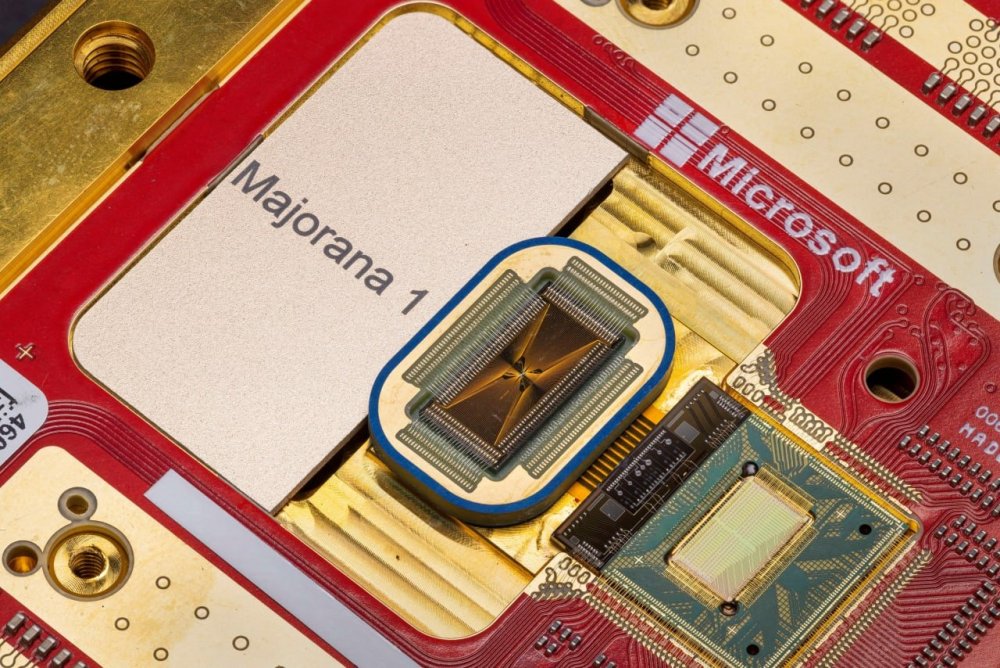
-
Explore the importance of image geolocation data for SEO. Find out how it can provide valuable information about the location and context of your images. The post Ask An SEO: Is There Any SEO Benefit To Image Geolocation Data? appeared first on Search Engine Journal. View the full article
-
Unthinking campaigns against ‘red tape’ are not the way to promote growthView the full article
-
Surprise outperformance driven by lack of day-one tariffs on EU and prospect of end to Ukraine warView the full article
-
AI chatbots like ChatGPT have become ubiquitous and vital to how many knowledge workers, content creators, and business owners operate. But as powerful as ChatGPT is, it’s not the only player in the game — and sometimes, exploring alternatives can reveal new ways to streamline your workflow. That’s where this guide comes in. Instead of just rating chatbots based on generic criteria like accuracy, speed, and creativity, I wanted to see how they perform in a real-world content workflow. So, I paid for the subscriptions (courtesy of Buffer’s AI Tools stipend that will help me recoup those costs) and fed them data from my own social media, and gave a structured challenge to each one designed to evaluate how well they take existing inputs and turn them into meaningful insights. Let’s dive into the details and determine which chatbot delivers the best results. The experiment: How I tested the chatbotsThere’s no shortage of AI chatbot comparisons online, but many focus on isolated prompts rather than real-world use cases — especially those relevant to you, our audience of creators, and small business owners. To truly test how useful these tools are for creators, I needed a challenge that mirrored how we actually use AI in a content workflow. So, instead of throwing random questions at each chatbot, I set up a structured experiment: I uploaded a CSV file with 60 days of my LinkedIn posts and their performance data—real engagement metrics from my latest posts.I gave each chatbot a series of interconnected prompts to see how well it could analyze, generate, and refine content.I kept everything within one continuous conversation, testing their ability to retain and apply context.What I was testing forThis test was designed to evaluate each chatbot across five key areas: Data analysis: Can it break down LinkedIn performance metrics and extract useful insights?Creativity & content generation: Can it generate fresh, non-generic (super important) content ideas based on real engagement data?Format adaptation: Can it transform a high-performing idea into multiple content formats (LinkedIn post, Twitter thread, short-form video script)?Strategic insights: Does it offer clear, actionable advice to improve content performance?Workflow optimization: Can it help streamline content planning, repurposing, and tracking?🚧It’s important that I clarify here: I'm no machine learning engineer, simply someone who has played around with enough chatbots, and has a decent context of different social media needs. So if you’re looking for a very technical analysis, you won’t find it here.The chatbotsI selected five leading AI chatbots for this experiment, each with different strengths, pricing, and features: ChatGPTClaudeGoogle Gemini (formerly Bard)Perplexity AIDeepSeekNow, let’s get into the challenge and see how they performed. The challengeEach chatbot was given the same structured test — a continuous conversation where they had to analyze LinkedIn performance data, generate new content ideas, adapt content across formats, offer strategic insights, and create a workflow for ongoing content success. After uploading the CSV file containing my posts and data, I asked each bot these questions: Here’s my LinkedIn performance data. What types of posts performed best and why?Based on what worked, suggest five new LinkedIn content ideas.Take the best-performing idea and turn it into a LinkedIn post, a Twitter thread, and a short-form video script.How can I improve my LinkedIn engagement rate based on this dataset?Create a content workflow that helps me repurpose high-performing content and track engagement.Here are the results. ChatGPTBest at retaining context Rating: 3.5/5 Pricing: Free with limited access; $20 per month for GPT-4 ChatGPT is OpenAI’s flagship chatbot and arguably the most well-known AI tool on this list. With its ability to generate structured responses, adapt content across formats, and provide strategic recommendations, it’s a strong contender for creators looking to streamline their workflow. ChatGPT started strong analyzing the average performance of each post type, showing that analysis, and then giving a strong, nuanced list of takeaways and recommendations. It didn’t state anything too unique (videos performed best, carousel posts had the most impressions), but the insights were good to have. However, the request for engagement rate improvement ideas showed off ChatGPT’s data analysis capabilities even better. It broke down the engagement rate data by post type, day, and even hour. Then, more impressively, it gave a list of actionable tips, including the best time to post on LinkedIn according to my data — something none of the other tools did. Other suggestions it made were to prioritize video and text posts and improve my early engagement strategy by responding to the comments in the first 30 minutes of posting. ChatGPT also really shined in delivering hyper-relevant ideas. When asked for unique content ideas, the bot gave me a list that played off my existing high-performing topics and formats. For example, it recommended I share a behind-the-scenes of my LinkedIn video process, an idea I’ll definitely be using. When asked to turn one of the ideas into different formats, it pulled from its memory of our previous chats, plus the context it had about my preferred voice and tone, to deliver well-structured and relevant results. The final request for a workflow initially seemed promising, with a clean, structured visual chart mapping out how to repurpose content. But while that was nice to look at, it wasn’t until I asked for a more practical version — something i could turn into a Notion page or Google Doc, that it became actually useful. This is something I repeatedly struggle with when using ChatGPT to kickstart a visual reference for what my templates or dashboards might look like — getting anything immediately actionable can be difficult. And that’s where the next tool on our list excels. I’ll conclude with a caveat here: I’ve had a ChatGPT account for a while now — at least a full year — so the bot had a lot of context to pull from as it can retain context from previous chats. So, that definitely influenced its performance and responses. However, I’d call that a point in its favor as it means that it will give you better responses with frequent use. 👩🏾⚖️Final verdict: ChatGPT is a strong option for content creators who need structured insights, detailed engagement strategies, and adaptable content formats. However, its responses often require additional refinement to become truly actionable. Frequent use improves its recommendations, making it a solid choice for the long term.Claude AIBest for generating workflow mockups Rating: 3.5/5 Pricing: Free with limited use; $20 per month Developed by Anthropic, Claude AI is designed to be a conversational, long-form assistant with a focus on thoughtful and structured responses. Unlike some of the other chatbots in this experiment, Claude approaches tasks with a more methodical and organized style, making it a compelling option for those who prioritize clarity in their workflows. But how well does that translate to practical scenarios? Well, instead of going through the prompts chronologically, I want to focus on Claude’s visualization capabilities and state, for the record, that they are the best of the bunch. From the first prompt, Claude translated the data into something super easy to look at, along with the recommendations that were par for the course for every chatbot tool. Having the data presented in a bar chart immediately gave me a clear understanding of my next steps. It continued this trend throughout the conversation without being prompted. My favorite thing about Claude, by far, is its ability to code and create a visual mockup of a workflow or database within the chat in a little preview window on the right. This has made it ten times easier to create Notion pages that do exactly what I need, with minimal time spent figuring out where to place which element. Claude had some interesting ideas on the content front, including a “creator tools revealed” video and a suggestion to ask a community question each week. However, interesting did not always translate to relevant, as it didn’t consider the actual content of the posts within the CSV file it had in its memory. Overall, the ideas shared weren’t as relevant to me and my content as they could have been. However, I was pleased by the formatting of the ideas that it did gave me — when asked for a LinkedIn post and short-form video script based on the first idea it shared, it delivered something that could have been pasted as-is (if not for the totally made-up information). In terms of providing a simple analysis of the data, it returned some interesting results, including a suggestion to keep posts to 600 characters or less, which I’ll be using going forward. 👩🏾⚖️Final verdict: Claude AI stands out as the best chatbot for visualization and structured formatting. If you need clear, data-driven charts and workflow previews, it’s hard to beat. However, its content generation lacks precision and relevance, requiring extra input and validation to ensure accuracy. It also doesn’t have search capabilities, which is important to consider before you subscribe.Perplexity AIBest for research and discovery Rating: 2.5/5 Pricing: Free with limited features; $20 per month Perplexity AI takes a unique approach compared to other chatbots, allowing users to select different models, including some already featured in this experiment. This flexibility makes it a strong research tool, particularly for content creators who need AI assistance in uncovering trends, following up on key insights, and gathering information. Although the consensus around Perplexity is that it’s a great tool for research, not necessarily for strategy, and I’d be inclined to agree after this experiment. To start with what was great about it, Perplexity’s ability to send you down a rabbit hole was a major plus in my book. Whenever you ask a question, it hyperlinks portions of the message that you can “follow up” on. Then, it uses the context of the message thread to create a decent follow-up. I can see this tool being useful in the research phase of working on your content strategy, especially when looking for inspiration. However, as a collaborative partner that can ideate alongside you, it didn’t perform great. The analysis it did in both analytical questions was very surface level, with good but generic recommendations on how to take action. Perplexity also returned a pretty standard “AI made this” workflow that was good, but didn’t encourage any deeper thought for me. It did generate a helpful daily workflow that can fit nicely into my current approach to content, so I gave it points for that. Its content ideas also fell short, with copy that didn’t consider my usual tone and style and felt pretty standard for most AI tools overall. Even though this is a common trait across most tools, I expected better for it having my data and content in its memory. 👩🏾⚖️Final verdict: Perplexity AI excels in research and content discovery, but it falls short in strategic execution. If you need a chatbot that helps you find sources, follow research threads, and explore ideas, Perplexity is one of the best options available. However, for content planning, engagement strategies, or workflow optimization, it doesn’t offer the depth or creativity needed to be a strong collaborative partner.DeepSeekBest for the budget-conscious user Rating: 2.5/5 Pricing: Free DeepSeek is a lesser-known AI model that positions itself as a free alternative to more widely used chatbots. While that makes it an appealing option for budget-conscious users, I was curious to see whether it could hold its own in terms of content ideation and strategic, data-driven recommendations. However, my experience with DeepSeek wasn’t the best from the start, as it kept returning a “The server is busy” message. I spent more time hopping back in to check if my prompts would go through, so keep that in mind. At first, I toggled on DeepSeek R1, the platform’s advanced-level thinking feature. However, the tool spent so much time “thinking” that I decided to run two chats: one with and one without. The results from the chat without R1 were pretty generic but not quite as generic as, say, Gemini. I’d put the experience with DeepSeek below Perplexity and above Gemini. While it caught certain topics and gave interesting ideas, it didn’t go as deep or wide as I would have liked. With R1, however (pictured on the right), its performance increased significantly as it went beyond generic observations and recommendations. The only disadvantage is, of course, its speed. DeepSeek had some interesting ideas, but nothing I hadn’t seen before. It recommended the same ideas as a couple of other chatbots, which is more of a sign that you really can’t outsource your thinking to these tools. 👩🏾⚖️Final verdict: If you’re on a budget and just need an AI for basic brainstorming and content structuring, DeepSeek in R1 mode is worth trying, but it’s not a tool to rely on for strategic content planning fully. It’s also still so new that it doesn’t quite feel fair to compare it to the other tools. For its age and speed, however, I’d say it's a solid, free option.Google GeminiBest for easy integration into your existing Google kit Rating: 2/5 Pricing: Free with limited features; $20 per month Formerly known as Bard, Google’s Gemini is positioned as a real-time AI assistant with deep integration into Google Search and other tools. Given its access to live information and Google’s vast dataset, I was curious to see whether it could provide a more data-informed and strategic approach to content planning. I also took advantage of the Buffer organization’s access to Gemini Advanced, the recently released upgrade to the tool. Since I hadn’t used Gemini much before this experiment, it was the first tool I tried — but I quickly found that its recommendations were pretty generic and also failed to go beyond surface-level analyses. For example, in the first response, it failed to recognize that though my carousel posts (the Documents) received more impressions, they didn’t get as high engagement. Gemini repeated the same weak analysis when asked for suggestions based on engagement rate data. Additionally, the suggested strategies are broad best practices that don’t tie back to the actual data I shared. Its content creation and repurposing abilities were not much better, as it only produced generic ideas that had nothing to do with my content. However, I will give it one point for getting the structure of a LinkedIn post down pat. 👩🏾⚖️Final verdict: Gemini is a quick and structured AI assistant that works in a pinch but falls short for tasks beyond surface-level requests. While it can help with basic formatting and brainstorming, it doesn’t yet have the depth and personalization needed for content optimization.Other chatbots to tryMicrosoft CopilotAlong with a dedicated website, Microsoft’s Copilot comes free with Microsoft products and has additional AI capabilities with enterprise plans. However, I didn’t include it in the main list because it runs on ChatGPT anyway, so that analysis gives a sense of what to expect from Copilot. Meta AIMeta AI is a free, conversational chatbot integrated across all Meta products. However, it didn’t make the list as you can’t upload files to it, striking it out in my book. It’s also generally less advanced in long-form content generation and is more of a true chatbot. Bizi.cxBizi is the side project of Joe Delgado, a software engineer here at Buffer. It's a self-described work in progress with some rough edges, but he shared that it has replaced his use of ChatGPT entirely. It’s currently free to use. Do your own thinkingIf there’s one takeaway from this experiment, it’s that no AI chatbot can do your thinking for you—but the right one can definitely make the process easier. Each tool on this list had its own strengths. ChatGPT and Claude handled structured insights and content adaptation well, while Perplexity excelled in research and discovery. DeepSeek showed promise, especially in R1 mode, but wasn’t the most reliable. And Gemini? Fast and easy to use, a great option if you use Google's ecosystem heavily. But here’s the thing: your needs will always determine the best tool for you. Are you looking for a chatbot to refine your content ideas? To analyze past performance? To brainstorm in a way that inspires you? AI can help — but only if you know how to prompt it, refine its responses, and guide it toward useful outcomes. At the end of the day, AI chatbots are just assistants, not replacements. The magic still comes from your strategy, creativity, and ability to execute. So, if you bring AI into your workflow, make sure it’s working for you — not the other way around. View the full article
-
The upside of friends, roommates, or family members sharing a multiline phone plan is everyone has a lower monthly bill. The downside, however, is one person is ultimately responsible for both paying that bill—and gathering what is owed to him or her from their friends each month. AT&T is offering a new way to divvy things up, though. The carrier, on Thursday, will introduce AT&T SplitPay, which will individually bill people on select shared wireless plans. The service will be available immediately. “College kids are Venmo-ing each other to share accounts,” says Erin Scarborough, AT&T’s President of Broadband & Connectivity Initiatives. “They’re having to calculate account charges per line and we’re taking that frustration out for them.” AT&T says it is patenting the technology behind SplitPay, which has been in the works for over a year. While the company plans to restrict its use to its own cellular network initially, it is considering licensing the technology to other companies (that would, as an example, let people sharing a streaming service split the cost automatically). SplitPay might make it easier for people to pay their share of a bill, but the primary account holder is still ultimately responsible for ensuring any financial obligations are met. Each person on the plan will get a text asking them to pay whatever their share of the bill is (including all fees). If they fail to do so, however, the primary account holder will receive a notification five days before the bill is due, letting them know who hasn’t yet paid. If that person neglects to make a payment, the primary account holder will be charged and will have to recover the money from their friend (or family member) separately. SplitPay will allow for recurring payments as well, to minimize this scenario. To sign up for the SplitPay service, AT&T account owners can log on to att.com/splitpay and assign a payor to each line. Several companies, from Google to Airbnb, have tested out group payment methods in the past, but AT&T says the individual billing for a shared account is an industry first. “Eighty-five percent of our customers have multiple line and we believe at least half of those are using split pay on their own in some form,” says Scarborough. “This is the first and only [payment system] of its kind in our industry. We’re happy to solve a pain point and solve it first.” View the full article

-
Ice storms, straight-line winds and tornadoes occur more frequently than hurricanes and earthquakes and those insurance claims can stack substantially. View the full article

-
These home lenders with between 100 and 499 employees are considered among their staffs the best mortgage company to work for in 2025. View the full article

-
Existing rightwing political outfit will be taken over by a newly registered business called Reform 2025 LtdView the full article