ResidentialBusiness
Administrators
-
Joined
-
Last visited
Everything posted by ResidentialBusiness
-
 This comment section is open for any non-work-related discussion you’d like to have with other readers, by popular demand. Here are the rules for the weekend posts. Book recommendation of the week: Everything Here Is Under Control, by Emily Adrian. Two estranged friends reunite when one is breaking under the strain of new motherhood. (Amazon, Bookshop) * I earn a commission if you use those links. The post weekend open thread – October 25-26, 2025 appeared first on Ask a Manager. View the full article
 -
The Arkansas-based company spent nearly four years on the M&A sidelines, grappling with asset quality issues and litigation tied to its 2022 acquisition of Texas-based Happy State Bank. Now it's signed a letter of intent to buy an unnamed bank. View the full article

-
I recently reviewed Even Realities G1 smart glasses (they're very cool) and the first real-world thing I used them for was scamming someone. I told a local bartender I had an encyclopedic knowledge of film, and I would answer the hardest movie trivia question he could come up with in exchange for a drink. After a short consultation with Google, dude came back with "Who directed 1922's Cabinet of Dr. Caligari?" I tilted my head thoughtfully and repeated the question as if verifying I heard him right. The AI agent silently did its thing, and in about three seconds, the answer was floating before my eyes, totally invisible to everyone around me. Credit: Stephen Johnson "Robert Wiene?" I asked, feigning uncertainty. Boom! Free drink. It's not the hardest trivia question, but I could have answered literally anything: the date Dr. Caligari was released, the day of the week it was, or the weather that day—all short work. Bartenders know to be wary of bar bets, so this one was watching me like a hawk to make sure I wasn't looking up the answer on my phone or something. He didn't seem to suspect my glasses, and even if he had, it wouldn't have mattered. Even inspected up close, G1s offer no indication of electronics of any kind: No USB port, no flashing light, no visible controls. The AI agent is activated with a subtle tap behind the ear. Repeating the question sends the AI off for the answer, presented in a display that's invisible to everyone but the wearer. You could do the same trick with a pair of Meta Ray-Ban Display glasses or audio-only smart glasses with AI. I don't like deceiving people, so I ended up telling the bartender what was up to and not accepting the drink, but it got me thinking about what more nefarious people than I could do (and probably already are) with AI smart glasses. Just imagine what I did on a bigger level: a team of hustlers at bar trivia silently tapping their temples whenever “which actor played…?” was asked would never lose. It's pretty small stakes, but not hard to imagine. Hypothetically, a hacked pair of smart glasses could be programmed to read the cards in your poker hand and give you the probability of winning in real time, either through the display or whispered in your ear. They could, hypothetically, make counting cards in blackjack effortless and undetectable. Stretching it out further, hypothetically, glasses could scan others players for "tells" that they're bluffing, or read micro-expressions to give a constantly updated read on opponents. Along the same lines, imagine attending a self-help meeting, and the leader, who you have never met, says, "I've had a vision about you" and begins to describe something that happened in your life exactly. All it would take would be glasses that recognize your face (supposedly coming to Meta Displays) connecting to a social media feed, which is then displayed in real time to the leader. Or you could go more subtle and engineer small "serendipities" like mentioning a movie someone recently saw and having exactly their opinion. It would only take a few of these and maybe some mystical patter to convince people you are divine being they should definitely donate to. How to spot tricky smart glassesI could go on, but you get the idea. Luckily, there are some indications when someone is using tech hidden in their eyeglasses. The most important is a general understanding of the possibilities of this technology. If someone seems to know something they shouldn't, ask yourself if their glasses could be the source of their power. Here are some more specific giveaways. Look for identifiable kinds of smart glasses Credit: Meta The most popular display style glasses, Meta Ray-Ban Displays, are distinctive looking, with a fairly obvious camera in one of the corners and a specific look and branding. But other kinds of smart glasses, like the Even Realities G1s mentioned above, are obscure enough that most won't recognize them, and so "normal" looking that most people wouldn't pick them out of lineup. Look for where the tech is hiddenMost smart glasses are still fairly bulky, so look for thick arms or frames where the wires are hidden. But again, that's only most smart glasses; some are totally sleek, with imperceptible tech. Look for a small glint In most situations, the display in display glasses is not visible to anyone but the glasses wearer, but there's still light being projected. In a dark room, you can see a green glow, and even if it's not dark, the display windows are visible if the light hits it just right, as you can see here: Credit: Stephen Johnson But honestly, it's subtle and hard to spot. Listen for the soundsOlder styles of audio-only smart glasses can feed information to wearers, but the open-air speakers mean some sound is bleeding into the atmosphere. You can definitely hear smart glasses if you're in a quiet room and you're trying to. If it's loud, operating glasses becomes problematic for the wearer. Look for the source of controlSmart glasses have to be controlled somehow. Meta Display glasses are operated with a wrist band. G1 glasses' AI agent is powered on by tapping on the frames behind your ear. Anyone who practices for a few hours could make these movements seem natural, but they're there if you know what to look for. Odd movements and speechIt doesn't take advanced stagecraft to operate these kinds of glasses imperceptibly, but it does take something. Tells might include small glances upward to see the display, tapping on glasses, stilted speech while waiting for information to come in, and a reading-a-teleprompter style of talking. Watch for people repeating questions back. But understand, it's hard to spot. When I was conning my bartender, I thought how I repeated the question back was obvious, but my wife said I just seemed a little odd, which suits the personality of a trivia whizz anyway. Smart glasses are powerful tools, like a hammer or a calculator. Like any innocent tool, they can be used for nefarious things, so until manufacturers or regulators require obvious indicators, like flashing lights or visible controls, we have to protect ourselves by paying attention to these small cues and staying skeptical when someone seems to know more than they reasonably should. View the full article
-
The company cited efforts to improve profitability behind its decision, with Popular joining a line of other banks in ending mortgage operations in 2025. View the full article

-
Measures against Gustavo Petro and his family come as rift with The President administration widensView the full article
-
For the past few years, Google's Pixel phones have had recurring problems with calling 911, and the issue has once again reared its ugly head. Over the past 24 hours, multiple users on Reddit have complained about being unable to call 911, while the Bell carrier in Canada issued a warning that the Pixel 6 and up was also having problems contacting emergency services on its network. According to user Fabulous_Disaster730, who posted yesterday about difficulties contacting emergency services during a gas leak, her Pixel 9 Pro repeatedly prompted her to turn on wifi calling or turn off airplane mode before she could call 911, despite her having full signal on both 5G and wifi. The phone would then freeze and restart. After multiple attempts, she resorted to asking a friend to place the call for her instead. Multiple replies mentioned facing similar problems yesterday as well, across multiple networks and models of Pixel. Bell, however, was the only carrier to issue an official notice. Aside from the obvious danger, the problem with this bug is that it's not consistent. Despite seemingly having had a surge yesterday, it's been a known issue as far back as 2021. However, it doesn't affect all users, nor is it entirely predictable when or how it will pop up. While recent reports are of calls simply not going through, one user posted two months ago that their call did go through, but they only heard screeching and static on the other end of the line. These recent reports are only the latest in an ever-evolving concern. It's also not clear what's causing the problem. In 2021, the problem was attributed to Microsoft Teams, but even with that error patched up, users are still facing problems. To Google's credit, Bell said it reached out to the company shortly after it learned about yesterday's uptick in cases, and afterwards said that a fix had been issued. However, no other carriers have issued similar notices, and I wouldn't be surprised to see other users making their own complaints in the future. It's worth noting that Bell mentioned that Pixel 6 users and up were the ones affected this time around, and that the Pixel 6 also happened to release in 2021, which is when the bug first started making news. Whatever is at the core of the problem here, I wouldn't be surprised if it worked its way in on the Pixel 6 and just hasn't yet been addressed. However, given the severity of the issue, it's something that needs looking at sooner rather than later. I've reached out to Google for comment on this issue, and will update if I hear back. In the meantime, it's best to be prepared in case the worst happens. If you're on a Pixel phone, here's what you can do to contact 911 in an emergency: First, try to place a 911 callIf you have time and the danger is not immediate, it's worth trying to call 911 on your Pixel despite the issues. While users reporting problems have increased as of late, it's still not an everyone or every time problem. It's possible your call will still go through without issue. You can also text 911If, however, you are unable to call 911, it's worth remembering that in certain jurisdictions (check this regularly updated list to see if where you live is supported), you can also contact 911 via text. This is a slower method of reaching out for help, but is still better than nothing. To text 911, open your texting app, put in 911 as the recipient, and write a concise message with your issue, your location, and any necessary specifics, like cross streets, landmarks, a specific hiding location, or whether you're able to talk. Use a backup phoneWhile I don't expect someone who isn't constantly reviewing tech to have multiple phones on hand, the surest method to ensure you'll be able to call 911 if you're on a Pixel is to keep a backup phone that isn't a Pixel handy. This could be a landline or another cell phone. Crucially, it can be an old cell phone, even one that isn't actively attached to a phone plan. So long as your phone is able to connect to a network, it's legally required to be able to call 911, so if you have an old phone you've upgraded from and haven't traded in laying around, it may be smart to keep it charged up in case you need it in an emergency. View the full article
-
One of Hollywood’s crown jewels is on the block: WarnerBros. Discovery, the parent company of HBO, CNN, and major movie franchises like Harry Potter and the D.C. universe, officially confirmed this week that it is open to a sale. The company has already received multiple offers, but wouldn’t disclose any of the parties bidding for its assets; potential acquirers reportedly include Paramount Skydance, Netflix, Comcast, Amazon and Apple – a who’s who of the modern streaming landscape. The disclosure followed public overtures from Paramount, which reportedly was willing to pay as much as $24 per share, or around $60 billion total, for the publicly traded media company. WarnerBros. Discovery rejected that offer as too low, and hopes to drum up additional interest by publicly putting itself up for sale. Any potential deal, regardless of the ultimate identity of the winning bidder, will almost inevitably reshape the streaming landscape, which in turn could have major consequences for consumers. The proposed sale is also a testament to how much the media landscape has changed since the pandemic, when consumers flocked in droves to streaming, abandoning traditional pay TV in the process. 83% of consumers now watch streaming TV, according to a recent Pew survey. Within just a few years, streaming has become ubiquitous – and at the same time a victim of its own success, with little room to grow any further. “A lot of the major streaming services are looking at slowing subscriber growth,” says Omdia media & entertainment analyst Paul Erickson. “If you really are looking to substantially grow your presence, you’ll have to make a big move.” Like buying a $60 billion entertainment giant, for instance. This won’t stop the decline of traditional TV Not all potential bidders are willing to pay as much as Paramount, or take over all of Warner Bros. Discovery, for that matter. “We have no interest in owning legacy media networks,” said Netflix co-CEO Ted Sarandos during his company’s earnings call this week. Sarandos didn’t directly comment on his company’s talks with WarnerBros. Discovery, but the streamer is said to be interested in getting its hands on big HBO shows and movies and the studio that produces them, not the company’s TV networks. The same is likely true for potential big tech buyers like Apple and Amazon, and for good reason. Traditional TV networks have been shedding viewers for years, and are increasingly losing advertisers to streaming as well. That’s why WarnerBros. Discovery had planned to spin off its own TV networks into a separate company next year, something that Comcast subsidiary NBCUniversal is also doing. Paramount Skydance CEO David Ellison has expressed more confidence in the future of traditional TV. “Ellison has said that he wants to revitalize the linear side of the business at Paramount,” says Erickson. But even that likely wouldn’t change the broader shifts in the entertainment industry. Media companies have already begun to consolidate and shutter a number of traditional TV networks — WarnerBros. Discovery closed four networks this summer alone. UniversalKids, a network run by Comcast subsidiary NBCUNiversal, shut down earlier this year, and Paramount will shutter five MTV channels in the UK by the end of the year. Additional closures are likely as eyeballs and investments continue to move to streaming. Apps may also start to disappear But consumers shouldn’t just get ready for TV networks to disappear from their program guide. Any acquisition of WarnerBros. Discovery will likely also lead to some streaming services consolidation, with fewer app icons vying for our attention when we turn on the TV. All of the reported bidders already operate their own streaming services. The company they’re looking to buy, WarnerBros. Discovery, not only runs HBO Max, but also Discovery+, with both services already sharing overlapping catalogs. It’s unlikely that any buyer would want to operate three or more paid services that all compete with each other. “Financially, it makes sense to not maintain development staff for separate apps,” says Erickson. “It would be better, long-term, to merge them together. If not merging the brand, at least functionally merging [the services] within a single experience, a single app.” Instead of having a separate HBO Max app on their TV, consumers may in the future find all of HBO’s content within a dedicated section of another streaming service. However, getting such integrations right can be challenging as well.“Easy to say, hard to do,” , Erickson concedes. A merger could make TV viewing more confusing WarnerBros. Discovery is itself no stranger to those challenges. Back in 2020, when the company was still known as WarnerMedia, it launched the HBO Max streaming service as a way to more directly compete with Netflix. The thinking at the time was to position HBO’s brand, and hugely successful shows like Game of Thrones, as the service’s crown jewels, while also adding a bunch of other stuff from the company’s other TV networks and massive back catalog – shows like Friends, South Park and Rick & Morty. HBO, and then some: That’s what the Max part of the branding was supposed to stand for. Following the merger with Discovery in 2022, HBO Max’s value proposition got even more muddled, as the service also started to stream reality TV fare from HGTV and TLC, documentaries from the Discovery Channel and cooking competitions from the Food Network – all formats that had little in common with HBO’s trademark high-profile dramas. The company tried to reflect that change by dropping HBO from the service’s name, rebranding it as just Max. “WarnerBros. Discovery tried to unite too many worlds,” says Tracy Swedlow, co-producer of The TV of Tomorrow Show (TVOT). “Stretched thin and without a clear vision, it became a patchwork of brands with no identity.” Consumers were extremely confused by the name change, with some wondering whether they had lost access to HBO altogether. WarnerBros. Discovery also realized that most subscribers just didn’t care all that much about the non-HBO content hosted on the service. This May, WarnerBros. Discovery backpedaled and renamed the service HBO Max again, with executives committing to refocus on HBO as its core strength. An acquirer will have to walk a fine line between maximizing the value of the HBO brand while keeping things simple for consumers. “There is considerable brand equity in the HBO brand,” says Erickson. “It could be that the HBO Max service goes away, but the HBO brand lives on.” “I am hopeful we’ll see a reinvention of this legendary brand’s remaining extraordinary assets,” Swedlow adds. Streaming is bound to get more expensive Any potential buyer will have to put up a lot of money for WarnerBros. Discovery – money that shareholders will ultimately want to see recouped. That will almost inevitably lead to further price increases for streaming services. “There’s a lot of upward pressure on pricing in streaming,” Erickson says. Consumers have already faced multiple price increases in recent months. HBO Max announced just a few days ago that it is raising the cost of its streaming plans by $1-$2 per month. Prices for Disney+ went up by $2-$3 per month this week; Apple and Netflix also increased prices for their services this year. A lot of those price increases are due to increased investments in live sports, which tends to be one of the most expensive content segments for streamers and TV networks alike. However, with streaming services reaching a point of market saturation, and consumers still feeling the pinch from inflation, there’s a limit to what any acquirer will be able to pay for a future streaming service that includes HBO’s shows. “Price rises will have to stop someplace, before they alienate consumers,” Erickson says. View the full article

-
The rules for collecting Social Security are changing in 2026. Two of the most important things to know if you’re collecting benefits: Your monthly check payments will increase, and if you’re planning on collecting benefits before retirement age and still plan to work, your checks could be reduced or even paused. For more on this, read on. The 2026 cost-of-living adjustment (COLA) will increase benefits Social Security benefits and Supplemental Security Income (SSI) payments for 75 million Americans will increase 2.8% in 2026, the Social Security Administration (SSA) announced on Friday. However, due to inflation and the skyrocketing cost of living, many retirees might not actually be getting more for their hard earned dollars. Each year the SSA announces a cost-of-living adjustment, known as COLA. Over the last decade, the COLA increase has averaged about 3.1%. This year’s increase is 0.3% greater than 2025’s 2.5% cost-of-living-adjustment, but far smaller than previous years with higher inflation, as CNN noted. So, how much does that add up to? For an average payment of $2,071, that’s an additional $56 a month, which will kick in this January, according to the SSA. “Social Security is a promise kept, and the annual cost-of-living adjustment is one way we are working to make sure benefits reflect today’s economic realities and continue to provide a foundation of security,” Social Security Administration Commissioner Frank J. Bisignano said in a statement. “The cost-of-living adjustment is a vital part of how Social Security delivers on its mission.” What other changes are coming to Social Security in 2026? Also changing in January: The maximum amount of earnings subject to the Social Security tax (taxable maximum) is slated to increase to $184,500 from $176,100. And another noticeable change is on the horizon for working seniors who are collecting Social Security. Given the high cost of living, an increasing number of older Americans are still working into their golden years. Those who have reached full retirement age (FRA) can work without penalty. However, those who have applied for Social Security before reaching full retirement age (FRA) and are still collecting a paycheck may see those payments either reduced or paused in 2026, depending on how much they earn, and at what point they reach FRA, according to The Motley Fool. In 2025, the full retirement age was 67 (for those born in 1960 or later). People collecting Social Security while working, who were under the FRA for their age, lost $1 in benefits for every $2 they earned over $23,400 (or $1 for every $3 they earned above $62,160). However, in 2026, that threshold limit is expected to slightly increase from $23,400 to $24,360, and the $62,160 limit is increasing to $64,800—meaning people can earn another $960 more next year without being penalized, per The Motley Fool. View the full article

-
Tech giants, crypto tycoons and tobacco groups want to pay for the US president’s big ballroom View the full article
-
This week, OpenAI released ChatGPT Atlas, the company's first AI web browser. Atlas lets you surf the web like any other browser, but, as you might expect, comes with ChatGPT integration. You can log into your account and tap into the assistant via the sidebar menu, which will remember not only past conversations, but your browsing history as well. Like other AI browsers—namely Perplexity Comet—the browser has an "agent mode," which can take actions on your behalf. You can ask it to order you food through DoorDash or buy you plane tickets on Kayak instead of doing those things yourself. While that might sound useful to ChatGPT fans, I had trouble recommending the browser to people, considering the security vulnerabilities AI browsers are currently facing. Any browser that has agentic features is vulnerable to prompt injection attacks: Bad actors can lace websites with hidden malicious prompts that the AI accepts as if they were written by the user. It might therefore take actions on behalf of the hacker, like opening a financial site or rooting through your email. Seems like a large risk just to outsource some basic internet tasks to an AI bot. But prompt injections aren't the only vulnerability Atlas currently faces. According to a new discovery, the browser may put the user's clipboard at risk as well. How Atlas's clipboard injection vulnerability worksAndroid Authority spotted a post on X by the ethical hacker known as Pliny the Liberator. According to Pliny, ChatGPT Atlas is vulnerable to clipboard injection, a type of attack that allows a bad actor to access your computer's clipboard. The idea is this: A bad actor can add a "copy to clipboard" feature to a button on their website. When you click the button, a malicious script runs in the background, which allows the bad actor to access your clipboard and add whatever they want to it. Maybe it's a URL to a website designed to install malware on your devices; maybe it's a URL to a site impersonating a financial site. Whatever the case, you don't know your clipboard has been hacked, so you might open a new tab and paste what you think was the last thing you copied, falling into the trap. The particular risk with ChatGPT Atlas is its agentic features: When in agent mode, Atlas might click a malicious button like this on its own, without you even knowing it. One moment, you've asked Atlas to order you lunch; the next moment, the browser accidentally set you up to be hacked. Pliny says that OpenAI has evidently trained Atlas to recognize prompt injections, but the core "copy clipboard" function is hidden away from the AI's sights. It's a clever trick: The bot can hover over the button without knowing anything is wrong with it, so it "clicks" it without triggering any red flags. For anyone that copies and pastes items frequently throughout the day, this could be quite dangerous. You might copy something in one app, then ask ChatGPT Atlas to do something on your behalf. But without knowing it, the browser clicks a malicious link that adds something to your clipboard. You then paste in your browser window, thinking you still have the original item copied, but you're taken instead to a website that claims your banking session has expired, and you need to log in. If you're multitasking quickly, you might "sign in" without thinking, handing over your bank credentials and 2FA codes without realizing it. These are hypotheticals. At this time, there haven't been documented cases of this type of malicious activity affecting ChatGPT Atlas. At the same time, ChatGPT Atlas is two days old. To me, the risk here doesn't seem worth the execution—especially since I have no issue using the internet on my own. View the full article
-
The mortgage unit of Hilltop Holdings lost $7.2 million pretax in the third quarter with lower volume, following making a small profit three months prior. View the full article

-
This week, news reports revealed that Meta would be cutting hundreds of jobs in its AI division. The layoffs will impact employees who work on AI products, research, and infrastructure. They come after Meta went on a hiring spree to shore up its AI efforts. But despite the job cuts, Meta’s chief AI officer told the Wall Street Journal that the company would, however, continue hiring “AI native” talent—a term that seems to have quietly slipped into the corporate lexicon amid the AI arms race. For the last decade, the term “digital native” has been circulating to describe Gen Z, as many of them don’t know life without the internet. The cohort following them, Generation Alpha, is already being called “generation AI.” But surely that’s not what Meta means by “AI native,” given the oldest in that group is only around 15 years old. (Meta did not respond to a request for comment.) So what exactly does “AI native” mean? “I’ve noticed that popping up more and more,” says JR Keller, a professor of human resource studies at Cornell University’s ILR School. “My sense is what these companies mean when they talk about this are workers who integrate AI into every facet of their lives,” Keller says. “It’s almost like each one of these workers has a little invisible AI companion with them at all times.” Even in a tough job market, many companies are willing to pay top dollar for young workers who are deeply familiar with AI—unlike senior employees who may need to be cajoled into adopting it. According to Keller, these workers practically speak a different language when it comes to their relationship with AI. “The way that I think of AI is: When are particular times when it would be useful?” he says. “When should I use ChatGPT? When should I allow Copilot to look at my emails? Or when should I turn Grammarly on? But it is always on with AI native people.” Jeffrey Bussgang, a general partner at the venture capital firm Flybridge, has said he frequently uses the term AI native to describe people who are “wildly adept at using a wide range of modern AI tools,” which in term enables to be far more productive than their peers. “AI-native companies are made up of a collection of AI-native employees who infuse AI into everything they do—every function, every process, and every role,” he wrote on LinkedIn. So if you’re seeing the term “AI native” circulate more and more in the discourse, it’s likely just referring to workers who look at everything through an AI lens first and foremost. And it’s not just AI startups or big tech companies like Meta who are seeking out “AI native” talent. For traditional employers who are struggling to adopt AI or use it effectively, bringing on workers with AI experience can be invaluable. And while they’re not as young as Gen Alpha, of course, they do tend to be the younger people in the workforce. Pew data released in June found that 58% of people ages 18 to 29 have used ChatGPT, the highest share of any age group. “The concept of the ‘AI native’ is increasingly real,” former Deloitte Consulting CEO Dan Helfrich said recently. “Leading organizations are empowering and unleashing AI natives—employees who, by definition, are adept with AI but are typically among companies’ less experienced and less tenured employees.” Keller says it’s just a matter of time before more workers embrace the term to better position themselves while job hunting. “As you see companies use this, many people are going to start including that terminology in their LinkedIn profile, [like] ‘I’m an AI native programmer,'” he says. ‘Because they know then they’re going to pop up to the top of the search results.” View the full article

-
Red light therapy devices are everywhere—from lamps, to full-body mats, to those glowing face masks flooding my social media feed. I usually see red light therapy advertised for "younger-looking skin," but I'm not interested in these devices as a means to slow down aging—I'm interested in them as a recovery-obsessed athlete with very sore muscles. These gadgets promise to boost athletic performance, speed muscle recovery, and reduce inflammation, all by bathing your body in specific wavelengths of red and near-infrared light. But do these trendy tools live up to the hype, especially for muscle recovery? What red light therapy advocates claimRed light therapy devices typically emit light in the red (620-670 nanometers) and near-infrared (800-850 nanometers) spectrum. Manufacturers claim these wavelengths penetrate the skin to stimulate cellular activity, specifically targeting the mitochondria (the energy-producing powerhouses inside our cells). The purported benefits include enhanced muscle recovery, reduced inflammation, improved circulation, decreased muscle soreness, and even performance gains. It all sounds scientific enough: the light supposedly helps mitochondria produce more ATP (cellular energy) and triggers the release of beneficial compounds like nitric oxide, which improves blood flow and activates repair processes throughout the body. But let's dig into what these gadgets can actually do. What the science actually saysSurprise, surprise: The science is more nuanced than marketing materials suggest. According to Dr. Wesley Buckle, a licensed naturopathic doctor, "the data on red light therapy is not definitive. Some studies show that it can help with delayed onset muscle soreness and muscle recovery. However, the evidence is mixed. Most of the studies that have found a positive benefit are small, short-term ones." While the research shows potential, there's a significant gap between what manufacturers claim and what the evidence actually supports, Buckle says he's seen "claims of enhanced performance, improved circulation, and muscle recovery" that are ultimately overblown. "The evidence supports mild improvements in muscle fatigue. It doesn't support dramatic claims of large gains and strength or performance boosts." This is a crucial distinction. If you're expecting red light therapy to transform your performance or replace proper training, you'll be disappointed. The benefits appear to be modest and supportive rather than revolutionary. Another critical factor is device quality. McCall McPherson, a physician associate and founder at Modern Thyroid Clinic and Modern Weight Loss, says that "not all devices are created equal. The effectiveness depends heavily on the wavelengths used, power output, and build quality of the device." It's important to distinguish between medical-grade panels built with specific, researched wavelengths and all the cheaper consumer devices that may not deliver the necessary light intensity or correct wavelengths to produce biological effects. There's certainly promising research, but this research is based on specific wavelengths (typically 620-670 nm for red light and 800-850 nm for near-infrared) and specific energy doses. Many budget-friendly devices don't meet these parameters, which means they're unlikely to produce the results seen in clinical studies. Should you consider red light therapy?For the average athlete, red light therapy could be a useful addition to a recovery routine—but with important caveats. Buckle advises prioritizing the fundamentals: "Sleep, nutrition, and proper training are all extremely important. Without these things, red light therapy won't help. It can't replace these practices...Red light therapy could be a good supportive recovery tool for most people. However, it's best to focus on the basics first, such as proper training." McPherson is more enthusiastic, saying, "I really do think red light therapy can be a great recovery tool for casual athletes when used correctly." She notes that for best results, athletes should look for quality medical-grade devices and use them consistently right before or after workouts on the specific muscles trained. "It's not magic," says McPherson, "but it's one of the most well-researched, noninvasive tools we have for reducing soreness and speeding up recovery between workouts." The bottom lineRed light therapy for muscle recovery isn't pure snake oil; there's legitimate science supporting its use as a supportive recovery tool. However, the benefits appear to be modest improvements in muscle soreness and recovery rather than dramatic performance enhancements. The evidence is still evolving, with many studies being small and short-term. If you're considering adding red light therapy to your recovery arsenal, remember these key points: First, nail the basics. No amount of red light will compensate for poor sleep, inadequate nutrition, or improper training. Second, invest in quality. If you decide to try red light therapy, choose a medical-grade device with the correct wavelengths and power output rather than the cheapest option on Amazon. Third, be consistent. The research shows benefits with regular use, not occasional experimentation. Finally, manage your expectations. Think of red light therapy as a potentially helpful tool for reducing soreness and supporting recovery—not a miracle device that will dramatically transform your athletic performance. View the full article
-
US steps up military presence in region after tenth strike against alleged drug trafficking boatsView the full article
-
James is contesting charges brought earlier this month by a prosecutor whom President Donald The President abruptly installed after her predecessor resigned under pressure. View the full article

-
Last week, YouTube started rolling out a new look across both the web and its various apps, promising a "more expressive and intuitive interface." In reality, the reaction has been mixed. The TV app, for instance, no longer automatically rewinds or fast forwards when you press back or forward, instead navigating between buttons including "like" or "subscribe." More than once while on TV, I've accidentally subscribed to a channel without meaning to, before realizing that I now need to press up first to get to the progress bar. Now, the changes have reached the YouTube mobile app, as first spotted by 9to5Google. While they're a bit more mild than you'll see on TV, there's still a few changes to get used to. Bigger, chunkier icons Credit: Michelle Ehrhardt By far, the most noticeable new change is YouTube's new suite of icons, which all look like they've been hit with a "Ctrl + B." Compared to the old look, the play, fast forward, and other buttons all look larger and bolder, with the idea being to make them more prominent. Some of the buttons have also been consolidated. When watching a video in landscape, buttons that don't affect playback (like, dislike, comment, etc.) all now appear together in a pill in the bottom-left corner, rather than as separate elements. New animationsNew buttons aren't the only change YouTube has in store for you. Seeking videos also has a new animation now, and on some videos, liking now comes with a bit of extra personality. Credit: Michelle Ehrhardt The first is a pretty minor change. Now, when you double tap the screen to either go forward or back 10 seconds, the video will just automatically jump to the new spot and display a big "-10" or "+10," rather than showing a quick animation of three arrows disappearing into each other with a smaller "-10 seconds" or "+10 seconds" below them. Credit: Michelle Ehrhardt The second is a bit cuter. On certain videos, tapping the "like" button will now play a custom animation, rather than simply putting some sparkles around a thumbs up. For instance, on a music video, you'll now briefly see a musical note replacing the thumbs up. Pausing no longer darkens your backgroundIt used to be that pausing a video would darken the background until you unpaused it, kind of like lights being lowered on a stage. That's no longer the case. While you'll still see the lights go slightly down while you have controls open, a paused video will now display as normal if you tap again to dismiss the controls. It's a small tweak, but could prove useful for taking screenshots. At the same time, though, I do worry that it might make it easy to think a video has frozen, if you're not paying attention. Nested comments and easier bookmarksFinally, Google has removed a few steps to saving and commenting on videos. Now, hitting the bookmark icon to save a video to a playlist has fewer steps, no longer requiring you to navigate multiple pages. Instead, it'll just pause the video and open a list of your playlists for you, where you can quickly tap the playlist you want to save your video to. Credit: Michelle Ehrhardt Additionally, comments are threaded now, easily showing who is replying to which comment. It's a great way to keep track of the flow of the conversation, although it does make each comment take up a bit of extra space. Can you get rid of the new YouTube UI?Ultimately, I'm a little torn on the new YouTube app. Certain new features, like threaded comments, just make sense to me. But the chunkier buttons do feel like they get in the way a bit to me, and I can't help but think of Fisher-Price when I see them. Unfortunately, there's not a lot you can do if you don't like the new YouTube mobile interface. It's still rolling out, so it's possible you might not see every change yet. But because it's server-side, once it hits you, that's it. Even the web player is getting these changes, so leaving the app behind isn't a viable option. That said, if you're on desktop, users on both Reddit and YouTube itself are putting together extension lists that you can mix and match to customize your experience. Technically, there are browsers for mobile that will allow you to play with these as well, with Firefox being the big one these days. However, I found that most of the suggested extensions no longer worked for me or weren't available for mobile. In that case, if you're sick of how YouTube looks now, you might want to consider an alternate player app instead, like Play. It still relies on embedded videos, so it won't save you from every change, but its overall minimalist style could offer welcome relief from YouTube's increasingly busy design language. View the full article
-
This article is republished with permission from Wonder Tools, a newsletter that helps you discover the most useful sites and apps. Subscribe here. Not everything creative needs a prompt. The Web is increasingly flooded with AI-generated images and videos, much of it aimed at kids. Sometimes it’s nice to break free of that synthetic media. As a dad of 10 and 12-year-old daughters, I appreciate resources for kids and families that celebrate human imagination, curiosity, and hands-on exploration. I had a fruitful recent conversation about resources for kids with a fellow dad, Kevin Maguire, who writes the great newsletter The New Fatherhood. If you’re a dad looking for great reads and a sense of community, check out Kevin’s newsletter. (Also read Recalculating, by Ignacio Pereyra). Kevin wrote the section below about simplifying screens and shared the tip about muted.io. The rest of the apps and resources below are ones I’ve enjoyed in recent years with my wife and daughters. From coding with visual blocks to identifying plants on nature walks, these are some of our favorite tools for sparking creativity. Building brains without bots Scratch, developed at the MIT Media Lab, is a superb program for learning to code. It’s fun and free for kids — and adults. My daughters like assembling Scratch’s visual blocks on screen to create interactive stories, games and animations. It’s designed for kids 8 to 16. ScratchJr is a great alternative for kids 5 to 7. Free Dash Robot lets kids program it to move, light up, and make sounds. It teaches block coding, like Scratch, and our daughters enjoy making up their own instructions to send Dash on creative adventures. For kids 5 to 14. $180. Seek is one of our favorite family apps. Point the app at any plant, flower, animal, or bug you see on a walk to learn more about it. It’s given us insight into much of the greenery (& critters) around us. iOS & Android. Free Sponsored message Guidde | Create how-to guides with AI Tired of explaining the same thing over and over again to your colleagues? Guidde is an AI-powered tool that helps you explain the most complex tasks in seconds with AI-generated documentation. Turn boring documentation into stunning visual guides Save valuable time by creating video documentation 11x faster Share or embed your guide anywhere Just click capture on the browser extension. The app automatically generates step-by-step video guides with visuals, voiceover, and a call to action. The best part? The extension is 100% free. Try it free Words that work wonders Libby lets you access thousands of free ebook or audiobooks with a free library card. It works for more than 90% of public libraries in North America, and Libby can be found in 78 countries worldwide. Free Khan Academy is the most robust online spot for helping kids with learning almost any school subject. It’s completely free. No ads. Khan Academy Kids has great learning activities and games for kids 2-8. It’s also free and ad-free, and it’s fun for both math and reading. Free Family screen time that actually works Common Sense Media | Wondering if a show, movie or video game is age appropriate? Get a quick sense of whether it’s a good fit for your family. Free Kanopy is a terrific free resource for educational videos, documentaries and classic films. Access it with your library card. A unique feature: watch Oscar-winning short films you won’t find on other streaming platforms. Kanopy Kids is a curated collection for learning, less commercial than the kids section on Netflix. Free JustWatch | See which platform hosts a particular movie or show. Free Nex | Like a Nintendo Wii made for 2025, this video game system gets our bodies moving with fun, non-violent, family-friendly games. It was easy to set up, pluging right into an HDMI port on our TV. It’s a little bigger than a Rubiks Cube. Nex Playground Four of us can play together. We like the sports, dancing and trivia games. Some titles are just for little kids (e.g. Elmo, Peppa Pig), but most are engaging for older kids and adults. The device costs $249 with five included games. An $89 annual subscription gets you 40+ more games. Read my Fast Company interview [gift link] with Nex’s founding CEO about how his game system has spread. Making music Chrome Music Lab Compose little tunes, even if you have no musical experience. Explore digital instruments and sound games. Save your favorite clips to share. Google’s MusicFX is a fun alternative for generating music with a prompt. Free Metronaut This sheet music app lets kids play along with an accompaniment from an phone or iPad. It supports 20+ instruments ranging from strings and woodwinds to piano, guitar, and brass. $27/year on iOS. Metronaut Tomplay is another great sheet music app that works well on Android and iOS and includes a wider range of chamber music. I pay $82/year for it. muted.io has a vibrant collection of interactive tools and visual references to help kids — or their parents — absorb music theory. Free [by Kevin Maguire] Art adventures & creative experiments Tate Kids — An Arty Playground. Play art games, watch cute videos, try out little projects, and stretch your artistic mind with this well-designed resource from one of the UK’s great art museums. Free Make an animated drawing. Turn a sketch into a playful moving image. This service from Meta lets you turn coloring into animation. Free Draw A Fish. This simple, low-fidelity game lets you draw a little fish with your computer mouse, then see it swim on screen. Free Google’s Arts & Culture Experiments include dozens of playful free apps for learning about the worlds of painting, sculpture, music, and more. Free Spark curiosity How to Raise a Reader by Pamela Paul and Maria Russo is a wonderful guide to fabulous books for kids. It grew out of this free NYTimes guide (gift link). As of this writing, it’s $9.51 on Amazon. The Week Junior is a terrific print magazine. It’s aimed at kids 8 to 14, but my wife and I also enjoy reading it. The 32 colorful pages feature short curated stories about the news of the week. It also includes puzzles, a weekly debate, and photography pages. Cost: 25 issues/year for $49, or $59 for print + digital access. (See the magazine layout design) Simplifying screens, from Kevin Maguire Consider a Light Phone. Experiment with freeing yourself (and your kids) from smartphone addiction with a full-on dumbphone. Reviews for the 3rd edition have been glowing — Wired gave it 8/10. $699 for version 3 or $299 for version 2. Try the Dumb Phone app. Simulate a simple device with an app that strips away everything but simple links to the core phone functions: camera, maps, calendar, and photos. Imitate a simple device without dropping $500 on the love child of a Nokia and a Kindle. Free or $10/annual; $30/lifetime. The Dumbest Phone Is Parenting Genius. A landline for kids? If it’s not too late, consider a tactic from Rheana Murray’s Atlantic article: install a landline. Buy that hamburger phone you always dreamed of as a kid; go with a “landline as a service” company like Tin Can and their gorgeous house phones; or if you’re more technically inclined roll your own VoIP line for a fraction of the cost. The bottom line: delay the start of smartphone life. View the full article

-
We may earn a commission from links on this page. Deal pricing and availability subject to change after time of publication. I've been seeing a lot more interior design content on my feed lately, likely because I moved to a new home this year. Most of the content advising on living rooms talks about the furniture revolving around the TV. If you're looking to wow your next guests, a TV that doubles are art will look much better than a big black rectangle. The 75-inch Samsung The Frame is the original canvas TV, and it's $1,100 off right now, currently $1,797.99 (originally $2,997.99). This is matching the lowest price it has been, according to price-tracking tools Samsung 75” Class LS03D The Frame QLED (2024) HDR 10+, Tizen OS, Dolby Atmos, QLED 4K TV. $1,897.99 at Walmart $1,299.99 Save 0.00 Get Deal Get Deal $1,897.99 at Walmart $1,299.99 Save 0.00 Samsung’s The Frame smart TVs have come a long way since their 2017 release. Launched to appeal to the crowd that wants a big TV but doesn’t want that TV to dominate their decor, one of the newer features, released last year, introduced an anti-reflection matte display that took the “framed artwork” aspect to new levels—and with 4K picture quality. As the name implies, the allure of this TV is that it can double as a digital art frame, with its anti-glare matte display and customizable frame. I first saw the 2022 version up close when it was released, admittedly having been fooled by my brother into thinking it was an actual painting (it really does look like one). The matte screen does a good job of making the TV seem like a painting, and it's great for bright rooms that might otherwise get a lot of glare from the screen. This version had an "average" review from PCMag due mainly to poor contrast and price. However, the new 2024 version is the latest generation of this series and has notable improvements. You'll get an improved refresh rate of 120Hz, the same QLED display, and 4K resolution with a Quantum 4K processor. You can buy frames separately to your taste, and even design them with a Harry Potter theme, like this guy did on TikTok. Our Best Editor-Vetted Tech Deals Right Now Apple AirPods Pro 2 Noise Cancelling Wireless Earbuds — $169.99 (List Price $249.00) Apple iPad 11" 128GB A16 WiFi Tablet (Blue, 2025) — $299.00 (List Price $349.00) Amazon Fire TV Stick 4K Plus — $29.99 (List Price $49.99) Shark AV2501AE AI XL Hepa- Safe Self-Emptying Base Robot Vacuum — $299.99 (List Price $649.99) Ring Pan-Tilt Indoor Cam, White with Ring Indoor Cam (2nd Gen), White — $59.99 (List Price $99.99) Blink Video Doorbell Wireless (Newest Model) + Sync Module Core — $29.99 (List Price $69.99) Blink Mini 2 1080p Indoor Security Camera (2-Pack, White) — $27.99 (List Price $69.99) Ring Video Doorbell Pro 2 with Ring Chime Pro — $149.99 (List Price $259.99) Introducing Amazon Fire TV 55" Omni Mini-LED Series, QLED 4K UHD smart TV, Dolby Vision IQ, 144hz gaming mode, Ambient Experience, hands-free with Alexa, 2024 release — $699.99 (List Price $819.99) Blink Outdoor 4 1080p 2-Camera Kit With Sync Module Core — $51.99 (List Price $129.99) Deals are selected by our commerce team View the full article
-
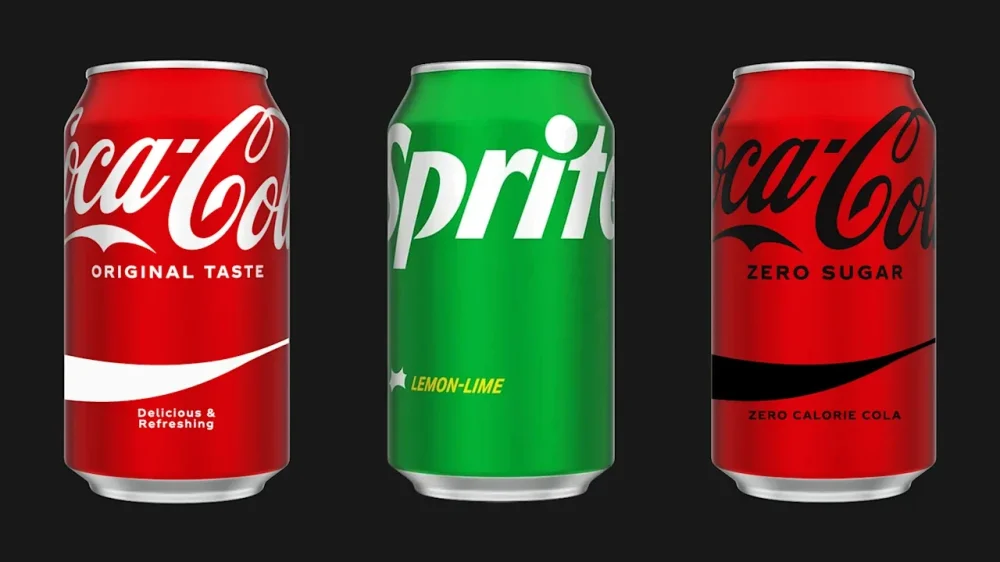
Three different Coca-Cola sodas are being recalled by the U.S. Food and Drug Administration (FDA) as a result of the “potential presence of foreign material (metal) in the product.” Coca-Cola Southwest Beverages LLC ordered the voluntary recall for cans of Coca-Cola Zero Sugar, Coca-Cola, and Sprite on October 3—which the FDA subsequently announced earlier this week on October 20. “We can confirm all recalled product has been removed from the market,” a Coca-Cola Company spokesperson told Fast Company in an emailed statement. “[We] voluntarily recalled a very limited quantity of [the] 12oz cans (12-, 24-, and 35-packs) in the state of Texas. This action was taken out of an abundance of caution due to the potential presence of foreign material. The recall was limited to McAllen/Rio Grande Valley market. It was confined to Texas.” This Class II FDA recall comes with a warning that the products “may cause temporary or medically reversible adverse health consequences,” and “the probability of serious adverse health consequences is remote.” What are the details for the recalled Coca-Cola products? Here are the specific items being recalled, along with their identifying information: Coca-Cola Zero Sugar 12oz. can 12-pack 49000042559 / FEB0226MAA Coca-Cola Zero Sugar 12oz. can 35-pack 49000058499 / FEB0226MAA Coca-Cola 12oz. can 24-pack 49000012781 / JUN2926MAA Coca-Cola 12oz. can 35-pack 49000058468 / JUN2926MAA Sprite 12oz. can 35-pack 49000058482 / JUN2926MAA Sprite 12oz. can-12 pack 49000028928 / JUN2926MAA Sprite 12oz. can-12 pack 49000028928 / JUN3026MAB What if I have these Coke products in my kitchen? “Any consumer who purchased the identified product below may return it to the place of purchase for an exchange or refund, or contact Coca-Cola’s Consumer Interaction Center at (800) 438-2653,” Coca-Cola told Fast Company. View the full article
-
FHA loans accounted for about half of the annual rise in foreclosure starts and 80% of the rise in active foreclosures in September, according to ICE. View the full article

-
We may earn a commission from links on this page. Pretty much every fitness tracker and smartwatch has an optical heart rate sensor, but they're not always perfectly accurate. Not only can you get better accuracy by wearing a chest strap heart rate monitor, you can even use a chest strap without a fitness watch—just connect it to your phone. Chest straps don't break the bank, either; my favorite is around 30 bucks. CooSpo H808S Chest Strap Heart Rate Monitor $29.87 at Amazon $36.99 Save $7.12 Shop Now Shop Now $29.87 at Amazon $36.99 Save $7.12 Why chest straps are more accurate than watchesChest straps come in two varieties: electrical and optical. When I say a chest strap is more accurate than a watch, I'm talking about the electrical kind. These use electrodes that contact your skin, and sometimes you may need to wait until you've worked up a bit of a sweat before they get a good connection (although I haven't found that to be an issue in my workouts). That makes them far more accurate than optical sensors, which are the type you'll see on the back of a smartwatch. Optical sensors are also on armbands like the Polar Verity Sense, and on some chest straps. Most chest straps are the electrical type, including the Polar H10, the Wahoo TRACKR, and the Coospo I mentioned above. You can tell an electrical sensor because it has metal connectors or contact points instead of a green light. The optical sensors in watches use a green light, and they pick up your heart rate by detecting the light that bounces off your blood vessels as the blood pulses through. Relying on light means that they don't always work as well through tattoos and may struggle with accuracy on darker skin tones. They can also be confused by outside light, which is why they aren't as accurate if your watch is worn loosely or is too large to get a good fit. Runners sometimes experience "cadence lock," where the cadence of their footsteps (170 steps per minute, let's say) causes the watch to think your heart is beating at exactly that rhythm. If your app reports a heart rate that is the same as your cadence, there's a good chance it wasn't measuring your heart rate at all. You can sidestep all of those issues by wearing a chest strap. As I've found in my device reviews, even the most accurate watches won't always record your heart rate perfectly 100% of the time. If you care a lot about your heart rate in training, just get the chest strap. Why the Coospo is my favoriteI've been wearing a cheap Coospo heart rate monitor for years. I didn't borrow it for a review, I just bought one because I wanted a cheap and easy way to track my heart rate without a watch. (I was doing a lot of kettlebell workouts, and the kettlebell rests gently on your wrist during overhead exercises, where a watch would be in the way. I've kept using it since then. It's been happily paired with an iPhone, a Peloton, an Apple Watch, a series of Garmins, and probably a bunch of others I've forgotten about. When I write the "accuracy" section in my fitness watch comparisons and reviews, I use the Coospo (either paired to my phone or to a third watch) to get a gold-standard heart rate graph to see how the tested devices stack up. The Coospo heart rate monitor I have is a slightly older version of the one linked above (since I've had it so long). It uses Bluetooth and also supports ANT+, and it gets its power from a coin cell battery that I have to change out roughly once a year. It doesn't have any on-device storage space, which I don't need, because it beams the data directly to the connected watch or phone. It's comfortable and easy to adjust. The device pops off so I can wash the strap. And even though there are more expensive straps out there (like the $100 Polar H10, which I've heard is great), I cannot think of a single chest strap feature I could possibly care about that I don't already have. How to use a chest strap without a watchOn my iPhone, I found the simplest way was to download the Polar Beat app (free on iOS and Android), which pairs with my strap over Bluetooth. If you’re going for a run or a bike ride while carrying your phone, it can also use your phone’s GPS to track your pace and record where you went on a map. I tend to use mine for indoor cycling, though, and for kettlebell workouts (which I log as “other indoor”). Using a strap without a watch is especially handy with kettlebells, since the bell otherwise knocks into the watch in certain positions. But if you have a fitness watch and you like using it, most models will allow you to pair the watch with a chest strap directly. That way you can get the most accurate readings, and be able to check the numbers from your wrist. View the full article
-
It’s time to crown the champion of America’s pastime—even if a Canadian team earned its way into the battle. The first pitch of the 2025 World Series will be thrown out tonight: Friday, October 24. The Toronto Blue Jays will try to stop the Los Angeles Dodgers from becoming the first team since the 2000 Yankees to win consecutive championships. The Blue Jays will also try to prevent Shohei Ohtani from making any baseball history. Both feats are a tall order. Let’s take a look back at how the two teams got here and speculate on Ohtani’s potential firsts before we get into how to watch the World Series. The road to the World Series Ironically, the Blue Jays represent the American League in the Series, earning 94 wins and 68 losses this season. They faced off against the Seattle Mariners to get here. George Springer’s game-winning home run in the final playoff matchup cemented their spot, as CNN reported. Toronto has not competed in a World Series game since 1993, which was the year the organization won its second consecutive championship. On the other side of the coin, the National League’s Dodgers have a regular-season record of 93-69, just one win less than the Blue Jays. The boys in blue swept the Milwaukee Brewers, who had the best regular-season record, in the playoffs. This is the franchise’s fifth appearance in the World Series in the last nine years. Ohtani already made history in Game 4 with what some are calling the greatest playoff performance in Major League Baseball history. He hit three home runs and pitched six scoreless innings, only allowing two hits. He struck out 10 batters. With this kind of momentum, it’s easy to get excited about the possibilities for the World Series. What historic feats could Ohtani accomplish? Ohtani has many opportunities to make history in the Series, as reported by MLB.com. The easiest way to do so would be by breaking any number of best offensive performance records, such as most hits or home runs by a pitcher. The record for most hits by a pitcher in a postseason game is three, while the one for most home runs by a pitcher is one. And the record for most RBIs is four, and the one for total bases is seven. These all seem easily attainable for the talented player. Instead—or additionally—Ohtani could make hitting history. He has more competition here, as all players can accomplish this, no matter their position. No one has ever hit four home runs in a postseason game. In this year’s regular season, this happened three times, which was a first—so the stage is set. Batters just have to do it during the World Series. No pressure. The least likely outcome could happen from the mound. Ohtani has the chance to become the first pitcher to throw a World Series no-hitter or perfect game since Don Larsen in Game 5 of the 1956 championship. At that point, anything at the plate would just be gravy. This accomplishment would take some cooperation from the coaching staff, as Ohtani has only pitched one full game in his career. (It is important to note this one-hit shutout against the Detroit Tigers occurred when Ohtani was still playing for the L.A. Angels in 2023.) Since recovering from Tommy John surgery on his elbow, he tends to pitch an average of six innings. How can I watch or stream the 2025 World Series? Only time will tell what Ohtani accomplishes. The best-of-seven fall classic begins on Friday, October 24, at 8 p.m. ET. The entire series will be broadcast on Fox, which means traditional cable subscribers and those with an over-the-air antenna and reception are all set. Additionally, if you have a pay-TV provider, you can stream it on FoxSports.com, the Fox Sports app, and Fox One. For those who cut the cord, try a live-TV streaming service, such as Hulu + Live TV, YouTube TV, or Fubo. Just be sure to check regional differences before committing to a new monthly charge. Here’s the full World Series Schedule. Game 1: Friday, October 24, at 8 p.m. ET (Fox) Game 2: Saturday, October 25, at 8 p.m. ET (Fox) Game 3: Monday, October 27, at 8 p.m. ET (Fox) Game 4: Tuesday, October 28, at 8 p.m. ET (Fox) Game 5: Wednesday, October 29, at 8 p.m. ET (Fox), if needed Game 6: Friday, October 31, at 8 p.m. ET (Fox), if needed Game 7: Saturday, November 1, at 8 p.m. ET (Fox), if needed View the full article

-
Caerphilly seat was won easily by left-leaning Plaid Cymru, leaving Labour trailing in third placeView the full article
-
The Federal Reserve Friday issued a set of proposed changes to its stress testing program for the largest banks that would disclose the central bank's back-end stress testing models, a move that the Fed had long opposed out of fear of making the tests easier for banks to pass. View the full article

-
In a bold move to streamline restaurant operations, Block, Inc. has announced an enhanced partnership with Grubhub aimed at simplifying how cafes and eateries manage food orders while offering customers new payment flexibility. This integration allows restaurant owners to utilize Square’s point-of-sale system alongside the popular delivery service, delivering a seamless experience for all parties involved. Understanding the daily challenges small business owners face, this partnership offers practical benefits that could transform the food service landscape. By integrating Square’s point-of-sale functionalities directly with Grubhub, restaurants can reduce the complexity of order management. Howard Migdal, CEO of Grubhub, emphasizes the importance of simplification, stating, “We’re removing friction for restaurants so they can manage all their orders in one place, streamline kitchen workflows, and keep menus up to date with ease.” Key Benefits and Practical Applications This integration comes with two standout features that significantly enhance operational efficiency. Firstly, restaurants can manage all food orders through Square’s POS system, eliminating the need for separate devices or tablets for order tracking. This not only declutters the workspace but also simplifies training for staff who only need to familiarize themselves with one system. Secondly, with the introduction of Cash App Pay, customers gain an additional payment option, enhancing their overall checkout experience. This flexibility could lead to increased sales, as diners can take advantage of special offers tailored for Cash App users. Nick Molnar, Global Head of Sales and Marketing at Block, highlights the mutual benefits for sellers and customers: “We’re creating a commerce ecosystem that benefits everyone, where restaurants can focus on delivering quality while giving customers more ways to pay.” For small business owners, the ability to control menus, modifiers, and inventory across multiple channels from a single dashboard can significantly reduce the time spent managing online and in-house orders. Additionally, the direct sending of orders to the kitchen minimizes errors and streamlines operations, ultimately leading to better customer satisfaction. Moreover, restaurants will have access to Instant Payouts, ensuring a steady cash flow that can be critical for daily operations, particularly for small businesses with tight budgets. Potential Challenges to Consider While the partnership between Square and Grubhub brings noteworthy advancements, small business owners should consider some potential challenges. Transitioning to a new system may require staff training and adaptations to existing workflows. Ensuring that employees are comfortable with the new technology is crucial for effective implementation. There may also be costs involved in integrating the systems and adjusting menus to work efficiently with both Square and Grubhub. Some restaurant owners could find that additional fees for payment processing could cut into their margins. As always, it is prudent for small business owners to conduct a thorough cost-benefit analysis before making the switch. Additionally, restaurants need to remain vigilant about maintaining operational efficiency as they scale their customer outreach through Grubhub. As traffic from new diners increases, ensuring quality service and food preparation remains a top priority. Despite these challenges, the partnership signals a promising shift in the food ordering ecosystem. With seamless integration and innovative payment solutions, small business owners can harness powerful tools to enhance efficiency and grow their customer base—an essential need in today’s competitive market. This partnership exemplifies Block’s commitment to providing innovative solutions that directly tackle the needs of small businesses. By leveraging such technologies, restaurants can not only improve their internal operations but also reach out to a broader audience of potential customers. For more details, visit the original press release here. Image via Envanto This article, "Square and Grubhub Enhance Food Ordering with Seamless Integration and Cash App Pay" was first published on Small Business Trends View the full article