ResidentialBusiness
Administrators
-
Joined
-
Last visited
Everything posted by ResidentialBusiness
-
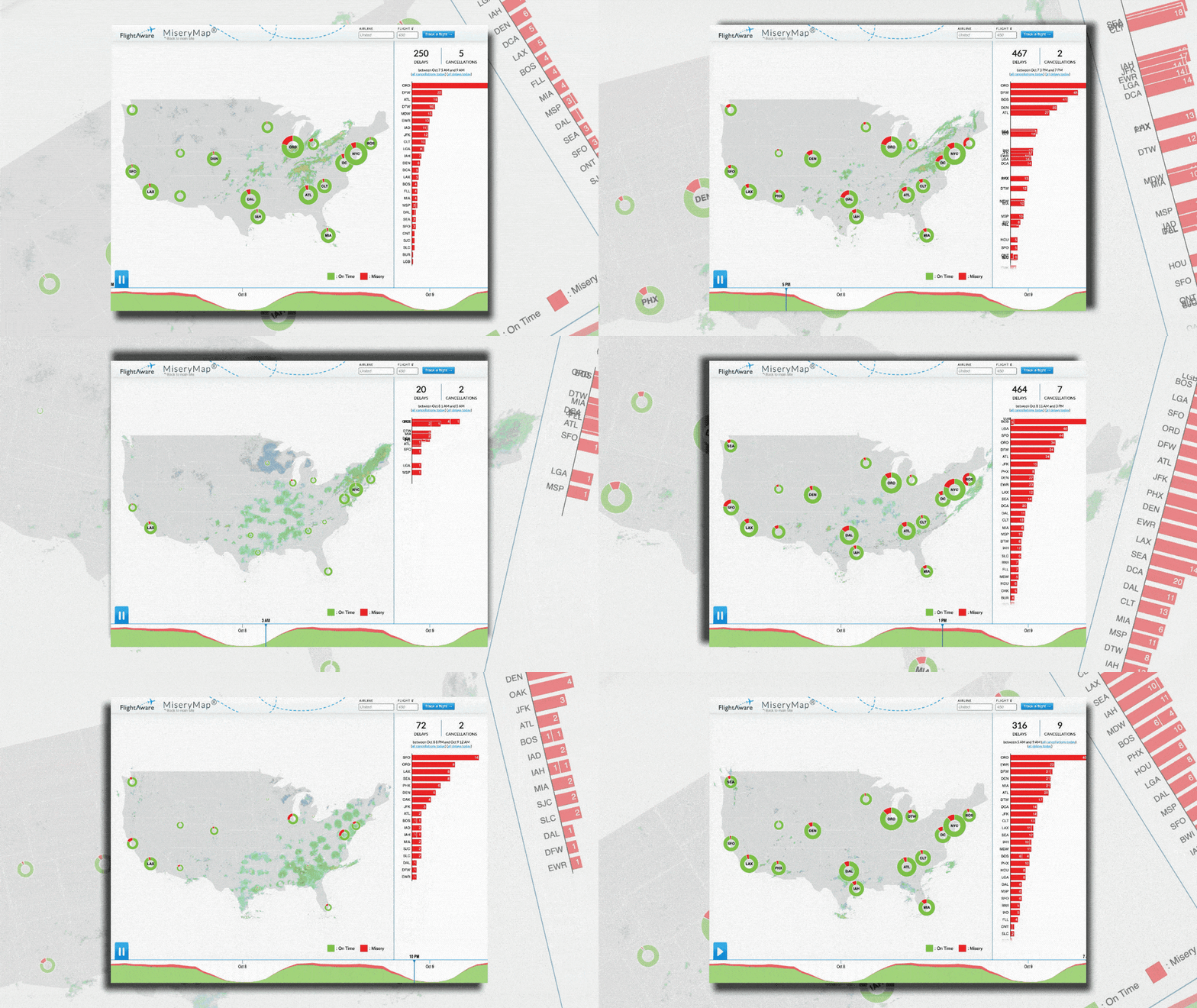
 In the midst of the current government shutdown, thousands of flights across the U.S. have been delayed or cancelled. With no clear end to the shutdown in sight, it’s time to revive a tried-and-true tool that’s dependably delivered soul-crushing news to fliers for more than a decade: the Misery Map. The Misery Map is a live tool that tracks weather across the U.S., tallies the number of delays and cancellations at every major airport in the country across 17 city hubs, and graphs popular flight destinations with the chances that upcoming flights will actually make it on time. Operated by the flight tracking website Flight Aware, the map has been delivering a no-nonsense picture of how bad your day at the airport will be since 2013—and if the last few days are anything to go by, you should probably just bookmark it now. Why is air travel so bad right now? During a government shutdown, air travel is one of the services to feel an immediate impact. That’s because, during a shutdown, air traffic controllers are considered essential workers, but not quite essential enough to receive a paycheck—meaning they have to keep showing up to work with only the promise of future retroactive pay. Back in 2019 during a partial government shutdown, rampant air traffic control and TSA agent absences were one key factor that pressured the government to reopen. And now, just nine days into the current shutdown, those absences are already putting a strain on air travel infrastructure. Over the last several days, the Federal Aviation Administration (FAA) has ordered a reduction in the number of flights in and out of Orlando International Airport in Florida and Newark Liberty International Airport due to low staffing. On the afternoon of October 6, Hollywood Burbank Airport’s control tower shut down entirely due to a lack of air controllers, forcing pilots to follow procedures typically used at small airports with no control tower. According to data from Flight Aware, total daily flight delays and cancellations averaged around 5,000 between October 6 and October 8. The FAA told NBC News on October 8 that delays have been reported at airports in Boston; Burbank, California; Chicago; Denver; Houston; Las Vegas; Nashville, Tennessee; Philadelphia; and Phoenix. As long as the government shutdown continues, delays are expected to become more common. How to use the Misery Map For anyone with an upcoming flight, the current uncertain state of air travel means that an already stressful travel day might get exponentially worse. That’s where Misery Map comes in. The beauty of the Misery Map is in its simplicity. According to this tool, a flight can only have two states of being: “on time” or “misery.” Flights in the “on time” category are noted in green, whereas “miserable” flights are recorded in red. Each of the map’s 17 hubs includes a circular graph that’s divided into red and green chunks based on how many of its flights have proceeded according to plan for that day. At a quick glance, the map dilutes the complicated flight landscape to help travelers understand their odds of a pain-free travel experience at any given time. For those looking for more details, the Misery Map includes several other helpful features. By hovering over any given city, fliers can see how other flights have fared on popular routes that day. Routes indicated in green have seen a majority of on-time flights, while those in red have already seen delays. A play button in the lower left side of the screen even lets users watch a mutli-day timelapse of the tracker to understand how flight conditions have evolved based on the day, time, and weather conditions. Travelers can also search for a specific departing flight for more details on its flight path and average delay times. We can all agree that flight delays are miserable—but at least there’s a way to see that you’re not the only one dealing with travel woes. After all, misery loves company. FlightAware View the full article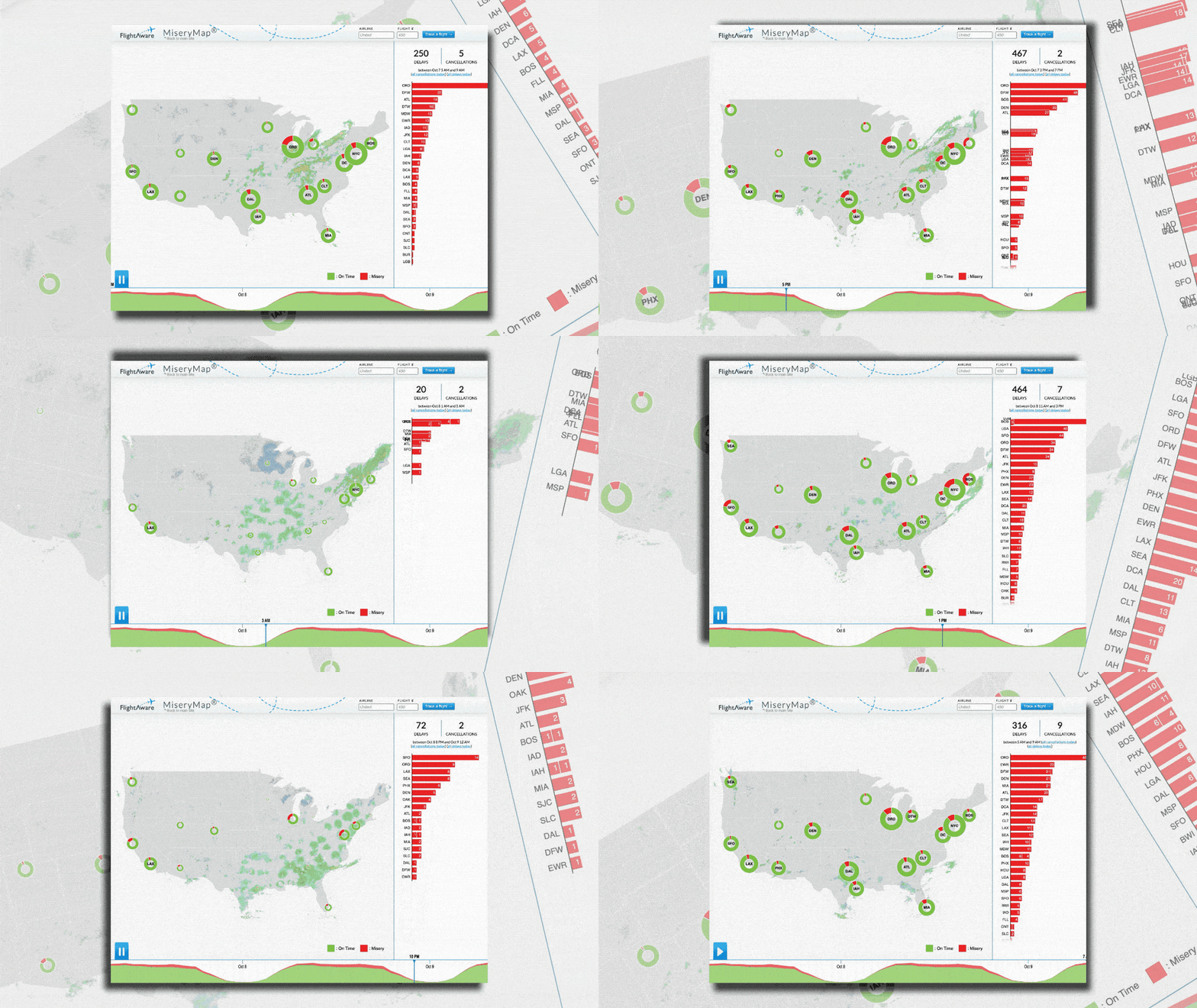
-
Federal Reserve Gov. Michael Barr said in a speech Thursday that he fears the gradual pace of price increases from tariffs being passed on to consumers may prolong the one-time inflationary effect of the tariffs to the point where it affects consumers' inflation expectations. View the full article

-
Supply chain consulting services offer a way to streamline your operations and lower costs through expert analysis and customized strategies. By identifying bottlenecks in your processes, consultants can help you optimize resource allocation and improve inventory management. This not merely leads to quicker delivery times but likewise boosts transparency and decision-making. Comprehending these benefits is vital, especially if your business faces specific challenges that could be addressed through expert guidance. What might those challenges be? Key Takeaways Supply chain consulting enhances operational efficiency by identifying bottlenecks and optimizing resources tailored to your business needs. Customized strategies can lead to significant cost savings, potentially reducing expenses by 10% to 30%. Improved visibility and real-time data access enable better decision-making and quicker issue resolution, boosting customer satisfaction by 20%. Risk management consulting prepares businesses for disruptions, ensuring operational continuity and minimizing potential revenue losses. Sustainable practices implemented through consulting enhance brand reputation and customer loyalty while adapting to regulatory changes and market demands. Understanding Supply Chain Consulting Services Comprehending supply chain consulting services is essential for businesses looking to improve their operational efficiency and reduce costs. These services involve experienced professionals who analyze and diagnose supply chain issues, providing customized strategies that address your specific needs. For example, logistics management consulting can streamline your transportation processes, whereas supply chain advisory services boost visibility and communication across your operations. Consultants often conduct diagnostic assessments and benchmark your performance against industry standards, identifying areas for improvement. Key Benefits of Supply Chain Consulting When you engage with supply chain consulting services, you gain access to specialized knowledge that can greatly improve your operational efficiency. These experts, often from leading supply chain management companies, help you identify bottlenecks, optimize resources, and implement customized solutions aligned with your specific business needs. By utilizing logistics consulting services, you can boost visibility and transparency, promoting better decision-making and collaboration among stakeholders. Furthermore, supply chain risk management consulting prepares you for unexpected disruptions, ensuring your operations remain resilient in changing market conditions. This all-encompassing approach not only leads to faster delivery times and higher customer satisfaction but likewise positions your business for long-term success in a competitive environment. Improved Efficiency and Cost Savings Improving efficiency and achieving cost savings are key outcomes of engaging supply chain consulting services. By utilizing logistics management consulting services, you can streamline your operations, cutting unnecessary costs and wasteful practices. Supply chain transformation consulting often reveals hidden cost drivers, enabling you to make informed decisions for significant savings without sacrificing quality. Furthermore, faster delivery times can improve customer satisfaction and loyalty, contributing to overall business growth. With effective supply chain risk consulting, you can mitigate disruptions and optimize inventory levels, reducing holding costs and freeing up capital for reinvestment. Customized consulting solutions encourage collaboration with your internal teams, ensuring that strategies align with your specific goals and ultimately improve operational performance. Enhanced Supply Chain Visibility and Transparency Improved supply chain visibility means you can access real-time data about your operations, which helps you make informed decisions quickly. With better traceability solutions, you can track products throughout the supply chain, ensuring transparency and reducing the risk of errors. This level of visibility not just streamlines your processes but additionally strengthens collaboration among stakeholders, leading to more effective problem-solving and a more resilient supply chain. Real-time Data Access How can real-time data access transform your supply chain operations? With improved visibility, you can track inventory levels and shipment statuses instantly, reducing the risk of stockouts or overstock situations. This access lets you quickly identify bottlenecks, enabling prompt issue resolution and minimizing operational disruptions. Better transparency through real-time insights promotes improved communication and collaboration among stakeholders, allowing for more informed decision-making. When you leverage real-time data, you can anticipate market fluctuations and adjust your strategies accordingly, improving responsiveness to changing customer demands. Working with a supply chain planning consultant or utilizing supply risk management consulting services can help integrate these capabilities, driving continuous improvement through key performance indicators that you can monitor and optimize for operational efficiency. Improved Decision-Making Processes Real-time data access sets the foundation for improved decision-making processes within supply chain operations, greatly improving visibility and transparency. By leveraging supply chain consulting procurement and expertise from a logistics consultant, you can achieve significant benefits: Identify bottlenecks and inefficiencies quickly. Build trust through accurate and timely order information. Mitigate risks proactively by adapting to market changes effectively. Encourage innovative solutions through collaboration among partners. With improved visibility, you can align your organization around common goals, promoting a culture of continuous improvement. Furthermore, pharma supply chain consulting can provide customized strategies that address specific industry challenges, ensuring you stay ahead of the competition and effectively respond to evolving demands. Enhanced Traceability Solutions In today’s complex supply chain terrain, traceability solutions play a crucial role in boosting visibility and transparency throughout the entire process, from production to delivery. By implementing advanced tracking technologies, you can monitor your products at each stage, reducing delays and increasing accountability. This real-time access to information helps identify bottlenecks, allowing for quicker issue resolution and minimizing disruptions. Improved traceability also guarantees compliance with regulatory requirements, reducing the risk of penalties and bolstering your reputation for quality. Furthermore, as consumers demand greater transparency regarding sourcing and handling, these solutions can build customer trust and satisfaction. Engaging in effective supply chain consulting can further improve your approach to implementing these critical traceability solutions. Strategic Planning and Optimization In your pursuit of effective supply chain management, focusing on strategic planning and optimization is key to reducing costs and improving inventory efficiency. By implementing customized strategies, you can identify inefficiencies that lead to unnecessary expenses, ultimately enhancing resource utilization. Furthermore, optimizing inventory levels helps you maintain a balance that minimizes excess stock, ensuring you meet customer demand without incurring waste. Cost Reduction Strategies Cost reduction strategies are essential for optimizing supply chain operations, with potential savings ranging from 10% to 30% through careful resource allocation and waste elimination. By leveraging consulting services, you can identify inefficiencies and streamline your processes effectively. Key strategies include: Reducing excessive inventory levels that tie up capital and incur holding costs. Enhancing supplier relationships to negotiate better terms, leading to 5-15% savings on procurement costs. Implementing data-driven forecasting to minimize stockouts and overstocks, improving cash flow. Engaging in continuous improvement initiatives that can boost efficiency and profitability by 15-25%. These customized strategies provide a thorough approach to achieving significant cost reductions while maintaining operational effectiveness in your supply chain. Inventory Efficiency Improvement Improving inventory efficiency is crucial for organizations looking to optimize their supply chain management and respond effectively to market demands. Consulting services can streamline your inventory processes by aligning levels with actual demand, reducing excess stock, and minimizing waste. Utilizing advanced data analytics, these consultants can lower holding costs by up to 30% through better forecasting. By identifying bottlenecks, they improve cash flow and reduce tied-up capital in unsold goods, whereas customized solutions can boost order fulfillment rates by 20%. This continuous assessment guarantees agility and responsiveness to market changes, helping maintain customer satisfaction. Strategy Benefit Impact Demand Alignment Reduces excess stock Minimizes waste Advanced Data Analytics Lowers holding costs by 30% Cost savings Bottleneck Identification Improves cash flow Frees up capital Customized Solutions Improves delivery times by 20% Boosts fulfillment Continuous Assessment Maintains agility Increases satisfaction Risk Mitigation and Resilience Recognizing potential risks within your supply chain is crucial for maintaining operational continuity and minimizing disruptions. Supply chain consulting services help you identify these risks early and develop effective strategies. By promoting better communication and collaboration with suppliers, you can improve resilience against unforeseen challenges. Key benefits include: Continuous assessment of supply chain vulnerabilities. Designing flexible models to adapt to market changes. Ensuring operational continuity during natural disasters. Maintaining customer satisfaction in spite of disruptions. Implementing these strategies not only mitigates potential losses but similarly prepares your business for market fluctuations. With the right consulting support, you can build a resilient supply chain that effectively responds to unexpected events, ensuring a sustainable competitive advantage. Tailored Solutions for Your Business Customized solutions are fundamental for addressing your unique business challenges and aligning with your strategic goals. By developing personalized strategies, you can improve operational efficiency and integrate sustainable practices that meet both market demands and environmental standards. Working closely with consultants guarantees that these solutions are practical, efficient, and seamlessly fit into your existing workflows. Customized Strategy Development When you face unique challenges in your supply chain, personalized strategy development becomes essential for achieving your business goals. Supply chain consultants work closely with you to create customized solutions that address your specific needs. Through detailed diagnostic assessments, they pinpoint inefficiencies and areas for improvement, leading to more efficient resource utilization. Key benefits of personalized strategy development include: Targeted strategies that optimize processes and reduce waste. Significant cost reductions and improved profitability. Competitive solutions informed by industry best practices and benchmarks. Seamless integration of strategies into existing workflows through collaboration with your internal teams. Enhanced Operational Efficiency To improve operational efficiency in your supply chain, it’s vital to implement personalized solutions that directly address your organization’s specific challenges. Supply chain consulting services offer customized strategies that streamline your operations, leading to significant increases in productivity. By pinpointing areas for improvement, consultants can optimize resource allocation, potentially saving you up to 20% in operational costs. These personalized strategies align with your unique business needs, ensuring that improvements resonate with your organizational goals. Collaborating closely with your internal teams, consultants promote a culture of continuous improvement, making it easier to implement new processes. Ultimately, these customized solutions can lead to faster delivery times and improved customer satisfaction, vital for maintaining your competitive edge in the market. Sustainable Supply Chain Practices Sustainable supply chain practices are fundamental for businesses aiming to minimize their environmental impact during maximizing operational efficiency. Implementing customized solutions can greatly improve your supply chain’s sustainability, leading to various benefits, such as: Cost savings of up to 30% through waste reduction strategies. Improved forecasting accuracy, reducing overstock and waste by as much as 20% with advanced analytics. Enhanced brand reputation by adopting eco-friendly sourcing practices, boosting customer loyalty. Resilience against disruptions, as sustainable practices better prepare your company for regulatory changes and market demands. Implementation and Integration Support Implementing effective supply chain solutions requires a well-structured approach to guarantee a seamless shift from existing processes to optimized strategies customized to your organization’s needs. Supply chain consulting services offer detailed implementation plans that facilitate this transition, making certain that your team is well-prepared for new procedures. Consultants work closely with your internal teams to provide training and improve employee capabilities, leading to enhanced operational efficiency. By optimizing workflows during integration, potential issues are identified and resolved early on, allowing for smoother implementation. Additionally, continuous evaluation of supply chain processes post-implementation ensures sustained improvements and adaptability to market changes. This focus on performance metrics and key performance indicators (KPIs) is integral for measuring success and guiding future upgrades. Industry-Specific and Cross-Industry Expertise Maneuvering the intricacies of supply chains requires more than just general knowledge; industry-specific and cross-industry expertise play a critical role in improving operational efficiency. Supply chain consultants bring valuable insights customized to your sector, allowing you to tackle unique challenges effectively. They can likewise leverage their cross-industry expertise to provide innovative strategies. Consider the following benefits: Access to best practices from sectors like manufacturing, retail, and healthcare. Benchmarking data that identifies performance gaps specific to your operations. Utilization of case studies that demonstrate successful strategies in real-world scenarios. Increased adaptability to market changes through proven solutions. Measurable Outcomes and ROI When you’re looking to improve your supply chain’s effectiveness, measurable outcomes and return on investment (ROI) become crucial factors to evaluate. Engaging supply chain consulting services can reduce operational costs by up to 20%, exposing inefficiencies and optimizing processes. You may additionally experience a 30% improvement in inventory turnover rates, which improves cash flow and lowers carrying costs. Furthermore, customized strategies can boost customer satisfaction scores by as much as 25%, thanks to faster delivery times and more accurate orders. Significantly, organizations typically see an ROI of 5 to 10 times their investment in the first year, translating to a 15% increase in overall profitability through improved resource allocation and strengthened supplier relationships. Signs Your Business Needs Supply Chain Consulting Recognizing the signs that your business needs supply chain consulting can be pivotal to improving operational efficiency and overall performance. If you notice any of the following issues, it may be time to seek expert assistance: Overflowing warehouses with unnecessary stock or missing crucial items indicate inventory management inefficiencies. Frequent customer complaints about late orders signal ongoing service issues. Difficulty in adapting to sudden demand spikes reveals weaknesses in supply chain flexibility. Unclear cost drivers leading to overspending on operations can be identified and analyzed for optimization. Addressing these challenges can greatly improve your supply chain’s effectiveness and responsiveness, leading to better financial outcomes and improved customer satisfaction. Why Investing in Supply Chain Consulting Is Essential Investing in supply chain consulting is essential for organizations looking to improve operational efficiency and reduce costs. By implementing customized solutions, you can achieve cost savings of up to 30%, greatly impacting your bottom line. Consultants help identify and mitigate risks, improving your supply chain’s resilience and reducing potential disruptions that could cost you up to 20% of annual revenue. Collaborating with experts can streamline your operations, improve inventory management, and optimize stock levels, leading to better cash flow. Additionally, improved visibility and communication across your supply chain can boost service performance and customer satisfaction by 20%. In the end, aligning your supply chain strategies with business goals enables you to adapt swiftly to market changes and customer demands. Frequently Asked Questions How Does Supply Chain Management Benefit Businesses? Supply chain management benefits your business by optimizing resources, reducing operational costs, and improving efficiency. You can achieve savings of 10-30% through better inventory management, which furthermore improves cash flow by minimizing excess stock. Agile supply chains enable quicker responses to market changes, potentially increasing customer satisfaction by 25% with faster deliveries. Furthermore, stronger supplier relationships lead to better pricing and quality, ultimately improving your competitiveness in the market. What Does Supply Chain Consulting Do? Supply chain consulting analyzes your operations to uncover inefficiencies, like high costs or slow deliveries. Consultants leverage industry best practices to optimize processes and redesign workflows. They implement technology solutions, such as inventory management software, enhancing visibility and decision-making. Customized strategies address your specific needs, ensuring improvements align with your organizational goals. Furthermore, they provide risk management strategies to boost resilience, helping you adapt to unexpected disruptions effectively. How Do Management Consultants Help Businesses? Management consultants help you identify inefficiencies in your operations by analyzing existing processes and recommending customized strategies. They utilize industry best practices and benchmarking data to align actionable insights with your specific goals. By implementing new technologies, like inventory management software, they streamline workflows and improve visibility. Furthermore, they promote collaboration between your internal teams and external partners, enhancing communication and building stronger supplier relationships to boost overall performance and resilience. How Can Supply Chain Management Help Business Owners Stay Profitable? Effective supply chain management can help you stay profitable by streamlining processes and reducing operational costs. By optimizing inventory levels, you can minimize excess stock, freeing up capital for reinvestment. Advanced forecasting techniques improve demand predictions, reducing stockouts and enhancing customer satisfaction. Furthermore, cultivating strong supplier relationships can lead to better pricing and terms, contributing to savings. Adopting technology-driven solutions, like Transportation Management Systems, can further boost efficiency and lower logistics costs. Conclusion In conclusion, investing in supply chain consulting services can provide significant advantages for your business. By improving efficiency, reducing costs, and enhancing visibility, these services enable you to make informed decisions. Strategic planning and industry expertise help you navigate challenges effectively, leading to measurable outcomes and a strong return on investment. If you recognize signs that your supply chain needs improvement, consider partnering with a consultant to optimize your operations and guarantee long-term success. Image Via Envato This article, "How Can Supply Chain Consulting Services Benefit Your Business?" was first published on Small Business Trends View the full article
-
Supply chain consulting services offer a way to streamline your operations and lower costs through expert analysis and customized strategies. By identifying bottlenecks in your processes, consultants can help you optimize resource allocation and improve inventory management. This not merely leads to quicker delivery times but likewise boosts transparency and decision-making. Comprehending these benefits is vital, especially if your business faces specific challenges that could be addressed through expert guidance. What might those challenges be? Key Takeaways Supply chain consulting enhances operational efficiency by identifying bottlenecks and optimizing resources tailored to your business needs. Customized strategies can lead to significant cost savings, potentially reducing expenses by 10% to 30%. Improved visibility and real-time data access enable better decision-making and quicker issue resolution, boosting customer satisfaction by 20%. Risk management consulting prepares businesses for disruptions, ensuring operational continuity and minimizing potential revenue losses. Sustainable practices implemented through consulting enhance brand reputation and customer loyalty while adapting to regulatory changes and market demands. Understanding Supply Chain Consulting Services Comprehending supply chain consulting services is essential for businesses looking to improve their operational efficiency and reduce costs. These services involve experienced professionals who analyze and diagnose supply chain issues, providing customized strategies that address your specific needs. For example, logistics management consulting can streamline your transportation processes, whereas supply chain advisory services boost visibility and communication across your operations. Consultants often conduct diagnostic assessments and benchmark your performance against industry standards, identifying areas for improvement. Key Benefits of Supply Chain Consulting When you engage with supply chain consulting services, you gain access to specialized knowledge that can greatly improve your operational efficiency. These experts, often from leading supply chain management companies, help you identify bottlenecks, optimize resources, and implement customized solutions aligned with your specific business needs. By utilizing logistics consulting services, you can boost visibility and transparency, promoting better decision-making and collaboration among stakeholders. Furthermore, supply chain risk management consulting prepares you for unexpected disruptions, ensuring your operations remain resilient in changing market conditions. This all-encompassing approach not only leads to faster delivery times and higher customer satisfaction but likewise positions your business for long-term success in a competitive environment. Improved Efficiency and Cost Savings Improving efficiency and achieving cost savings are key outcomes of engaging supply chain consulting services. By utilizing logistics management consulting services, you can streamline your operations, cutting unnecessary costs and wasteful practices. Supply chain transformation consulting often reveals hidden cost drivers, enabling you to make informed decisions for significant savings without sacrificing quality. Furthermore, faster delivery times can improve customer satisfaction and loyalty, contributing to overall business growth. With effective supply chain risk consulting, you can mitigate disruptions and optimize inventory levels, reducing holding costs and freeing up capital for reinvestment. Customized consulting solutions encourage collaboration with your internal teams, ensuring that strategies align with your specific goals and ultimately improve operational performance. Enhanced Supply Chain Visibility and Transparency Improved supply chain visibility means you can access real-time data about your operations, which helps you make informed decisions quickly. With better traceability solutions, you can track products throughout the supply chain, ensuring transparency and reducing the risk of errors. This level of visibility not just streamlines your processes but additionally strengthens collaboration among stakeholders, leading to more effective problem-solving and a more resilient supply chain. Real-time Data Access How can real-time data access transform your supply chain operations? With improved visibility, you can track inventory levels and shipment statuses instantly, reducing the risk of stockouts or overstock situations. This access lets you quickly identify bottlenecks, enabling prompt issue resolution and minimizing operational disruptions. Better transparency through real-time insights promotes improved communication and collaboration among stakeholders, allowing for more informed decision-making. When you leverage real-time data, you can anticipate market fluctuations and adjust your strategies accordingly, improving responsiveness to changing customer demands. Working with a supply chain planning consultant or utilizing supply risk management consulting services can help integrate these capabilities, driving continuous improvement through key performance indicators that you can monitor and optimize for operational efficiency. Improved Decision-Making Processes Real-time data access sets the foundation for improved decision-making processes within supply chain operations, greatly improving visibility and transparency. By leveraging supply chain consulting procurement and expertise from a logistics consultant, you can achieve significant benefits: Identify bottlenecks and inefficiencies quickly. Build trust through accurate and timely order information. Mitigate risks proactively by adapting to market changes effectively. Encourage innovative solutions through collaboration among partners. With improved visibility, you can align your organization around common goals, promoting a culture of continuous improvement. Furthermore, pharma supply chain consulting can provide customized strategies that address specific industry challenges, ensuring you stay ahead of the competition and effectively respond to evolving demands. Enhanced Traceability Solutions In today’s complex supply chain terrain, traceability solutions play a crucial role in boosting visibility and transparency throughout the entire process, from production to delivery. By implementing advanced tracking technologies, you can monitor your products at each stage, reducing delays and increasing accountability. This real-time access to information helps identify bottlenecks, allowing for quicker issue resolution and minimizing disruptions. Improved traceability also guarantees compliance with regulatory requirements, reducing the risk of penalties and bolstering your reputation for quality. Furthermore, as consumers demand greater transparency regarding sourcing and handling, these solutions can build customer trust and satisfaction. Engaging in effective supply chain consulting can further improve your approach to implementing these critical traceability solutions. Strategic Planning and Optimization In your pursuit of effective supply chain management, focusing on strategic planning and optimization is key to reducing costs and improving inventory efficiency. By implementing customized strategies, you can identify inefficiencies that lead to unnecessary expenses, ultimately enhancing resource utilization. Furthermore, optimizing inventory levels helps you maintain a balance that minimizes excess stock, ensuring you meet customer demand without incurring waste. Cost Reduction Strategies Cost reduction strategies are essential for optimizing supply chain operations, with potential savings ranging from 10% to 30% through careful resource allocation and waste elimination. By leveraging consulting services, you can identify inefficiencies and streamline your processes effectively. Key strategies include: Reducing excessive inventory levels that tie up capital and incur holding costs. Enhancing supplier relationships to negotiate better terms, leading to 5-15% savings on procurement costs. Implementing data-driven forecasting to minimize stockouts and overstocks, improving cash flow. Engaging in continuous improvement initiatives that can boost efficiency and profitability by 15-25%. These customized strategies provide a thorough approach to achieving significant cost reductions while maintaining operational effectiveness in your supply chain. Inventory Efficiency Improvement Improving inventory efficiency is crucial for organizations looking to optimize their supply chain management and respond effectively to market demands. Consulting services can streamline your inventory processes by aligning levels with actual demand, reducing excess stock, and minimizing waste. Utilizing advanced data analytics, these consultants can lower holding costs by up to 30% through better forecasting. By identifying bottlenecks, they improve cash flow and reduce tied-up capital in unsold goods, whereas customized solutions can boost order fulfillment rates by 20%. This continuous assessment guarantees agility and responsiveness to market changes, helping maintain customer satisfaction. Strategy Benefit Impact Demand Alignment Reduces excess stock Minimizes waste Advanced Data Analytics Lowers holding costs by 30% Cost savings Bottleneck Identification Improves cash flow Frees up capital Customized Solutions Improves delivery times by 20% Boosts fulfillment Continuous Assessment Maintains agility Increases satisfaction Risk Mitigation and Resilience Recognizing potential risks within your supply chain is crucial for maintaining operational continuity and minimizing disruptions. Supply chain consulting services help you identify these risks early and develop effective strategies. By promoting better communication and collaboration with suppliers, you can improve resilience against unforeseen challenges. Key benefits include: Continuous assessment of supply chain vulnerabilities. Designing flexible models to adapt to market changes. Ensuring operational continuity during natural disasters. Maintaining customer satisfaction in spite of disruptions. Implementing these strategies not only mitigates potential losses but similarly prepares your business for market fluctuations. With the right consulting support, you can build a resilient supply chain that effectively responds to unexpected events, ensuring a sustainable competitive advantage. Tailored Solutions for Your Business Customized solutions are fundamental for addressing your unique business challenges and aligning with your strategic goals. By developing personalized strategies, you can improve operational efficiency and integrate sustainable practices that meet both market demands and environmental standards. Working closely with consultants guarantees that these solutions are practical, efficient, and seamlessly fit into your existing workflows. Customized Strategy Development When you face unique challenges in your supply chain, personalized strategy development becomes essential for achieving your business goals. Supply chain consultants work closely with you to create customized solutions that address your specific needs. Through detailed diagnostic assessments, they pinpoint inefficiencies and areas for improvement, leading to more efficient resource utilization. Key benefits of personalized strategy development include: Targeted strategies that optimize processes and reduce waste. Significant cost reductions and improved profitability. Competitive solutions informed by industry best practices and benchmarks. Seamless integration of strategies into existing workflows through collaboration with your internal teams. Enhanced Operational Efficiency To improve operational efficiency in your supply chain, it’s vital to implement personalized solutions that directly address your organization’s specific challenges. Supply chain consulting services offer customized strategies that streamline your operations, leading to significant increases in productivity. By pinpointing areas for improvement, consultants can optimize resource allocation, potentially saving you up to 20% in operational costs. These personalized strategies align with your unique business needs, ensuring that improvements resonate with your organizational goals. Collaborating closely with your internal teams, consultants promote a culture of continuous improvement, making it easier to implement new processes. Ultimately, these customized solutions can lead to faster delivery times and improved customer satisfaction, vital for maintaining your competitive edge in the market. Sustainable Supply Chain Practices Sustainable supply chain practices are fundamental for businesses aiming to minimize their environmental impact during maximizing operational efficiency. Implementing customized solutions can greatly improve your supply chain’s sustainability, leading to various benefits, such as: Cost savings of up to 30% through waste reduction strategies. Improved forecasting accuracy, reducing overstock and waste by as much as 20% with advanced analytics. Enhanced brand reputation by adopting eco-friendly sourcing practices, boosting customer loyalty. Resilience against disruptions, as sustainable practices better prepare your company for regulatory changes and market demands. Implementation and Integration Support Implementing effective supply chain solutions requires a well-structured approach to guarantee a seamless shift from existing processes to optimized strategies customized to your organization’s needs. Supply chain consulting services offer detailed implementation plans that facilitate this transition, making certain that your team is well-prepared for new procedures. Consultants work closely with your internal teams to provide training and improve employee capabilities, leading to enhanced operational efficiency. By optimizing workflows during integration, potential issues are identified and resolved early on, allowing for smoother implementation. Additionally, continuous evaluation of supply chain processes post-implementation ensures sustained improvements and adaptability to market changes. This focus on performance metrics and key performance indicators (KPIs) is integral for measuring success and guiding future upgrades. Industry-Specific and Cross-Industry Expertise Maneuvering the intricacies of supply chains requires more than just general knowledge; industry-specific and cross-industry expertise play a critical role in improving operational efficiency. Supply chain consultants bring valuable insights customized to your sector, allowing you to tackle unique challenges effectively. They can likewise leverage their cross-industry expertise to provide innovative strategies. Consider the following benefits: Access to best practices from sectors like manufacturing, retail, and healthcare. Benchmarking data that identifies performance gaps specific to your operations. Utilization of case studies that demonstrate successful strategies in real-world scenarios. Increased adaptability to market changes through proven solutions. Measurable Outcomes and ROI When you’re looking to improve your supply chain’s effectiveness, measurable outcomes and return on investment (ROI) become crucial factors to evaluate. Engaging supply chain consulting services can reduce operational costs by up to 20%, exposing inefficiencies and optimizing processes. You may additionally experience a 30% improvement in inventory turnover rates, which improves cash flow and lowers carrying costs. Furthermore, customized strategies can boost customer satisfaction scores by as much as 25%, thanks to faster delivery times and more accurate orders. Significantly, organizations typically see an ROI of 5 to 10 times their investment in the first year, translating to a 15% increase in overall profitability through improved resource allocation and strengthened supplier relationships. Signs Your Business Needs Supply Chain Consulting Recognizing the signs that your business needs supply chain consulting can be pivotal to improving operational efficiency and overall performance. If you notice any of the following issues, it may be time to seek expert assistance: Overflowing warehouses with unnecessary stock or missing crucial items indicate inventory management inefficiencies. Frequent customer complaints about late orders signal ongoing service issues. Difficulty in adapting to sudden demand spikes reveals weaknesses in supply chain flexibility. Unclear cost drivers leading to overspending on operations can be identified and analyzed for optimization. Addressing these challenges can greatly improve your supply chain’s effectiveness and responsiveness, leading to better financial outcomes and improved customer satisfaction. Why Investing in Supply Chain Consulting Is Essential Investing in supply chain consulting is essential for organizations looking to improve operational efficiency and reduce costs. By implementing customized solutions, you can achieve cost savings of up to 30%, greatly impacting your bottom line. Consultants help identify and mitigate risks, improving your supply chain’s resilience and reducing potential disruptions that could cost you up to 20% of annual revenue. Collaborating with experts can streamline your operations, improve inventory management, and optimize stock levels, leading to better cash flow. Additionally, improved visibility and communication across your supply chain can boost service performance and customer satisfaction by 20%. In the end, aligning your supply chain strategies with business goals enables you to adapt swiftly to market changes and customer demands. Frequently Asked Questions How Does Supply Chain Management Benefit Businesses? Supply chain management benefits your business by optimizing resources, reducing operational costs, and improving efficiency. You can achieve savings of 10-30% through better inventory management, which furthermore improves cash flow by minimizing excess stock. Agile supply chains enable quicker responses to market changes, potentially increasing customer satisfaction by 25% with faster deliveries. Furthermore, stronger supplier relationships lead to better pricing and quality, ultimately improving your competitiveness in the market. What Does Supply Chain Consulting Do? Supply chain consulting analyzes your operations to uncover inefficiencies, like high costs or slow deliveries. Consultants leverage industry best practices to optimize processes and redesign workflows. They implement technology solutions, such as inventory management software, enhancing visibility and decision-making. Customized strategies address your specific needs, ensuring improvements align with your organizational goals. Furthermore, they provide risk management strategies to boost resilience, helping you adapt to unexpected disruptions effectively. How Do Management Consultants Help Businesses? Management consultants help you identify inefficiencies in your operations by analyzing existing processes and recommending customized strategies. They utilize industry best practices and benchmarking data to align actionable insights with your specific goals. By implementing new technologies, like inventory management software, they streamline workflows and improve visibility. Furthermore, they promote collaboration between your internal teams and external partners, enhancing communication and building stronger supplier relationships to boost overall performance and resilience. How Can Supply Chain Management Help Business Owners Stay Profitable? Effective supply chain management can help you stay profitable by streamlining processes and reducing operational costs. By optimizing inventory levels, you can minimize excess stock, freeing up capital for reinvestment. Advanced forecasting techniques improve demand predictions, reducing stockouts and enhancing customer satisfaction. Furthermore, cultivating strong supplier relationships can lead to better pricing and terms, contributing to savings. Adopting technology-driven solutions, like Transportation Management Systems, can further boost efficiency and lower logistics costs. Conclusion In conclusion, investing in supply chain consulting services can provide significant advantages for your business. By improving efficiency, reducing costs, and enhancing visibility, these services enable you to make informed decisions. Strategic planning and industry expertise help you navigate challenges effectively, leading to measurable outcomes and a strong return on investment. If you recognize signs that your supply chain needs improvement, consider partnering with a consultant to optimize your operations and guarantee long-term success. Image Via Envato This article, "How Can Supply Chain Consulting Services Benefit Your Business?" was first published on Small Business Trends View the full article
-
Mark Sedwill adds to pressure on Keir Starmer by saying he is ‘puzzled’ why a Chinese spy case collapsedView the full article
-
Flight delays and disruptions at U.S. airports have persisted for a fourth consecutive day due to staffing issues stemming from the government shutdown, which began on October 1. Air traffic controllers are expected to work without pay during the shutdown. As federal employees begin to feel the financial impact of the shutdown, many are calling out of work. And as the shutdown continues, many airports are struggling with growing staffing issues. Over 16,000 flights have been delayed since Monday According to FlightAware, which tracks flight delays, disruptions, and cancellations, as of late Thursday morning, more than 16,000 flights flying into, within, or out of the U.S. have been delayed since Monday, October 6. On Monday, October 6,154 flights were delayed and 84 were canceled. On Tuesday, October 7, 3,849 flights were delayed and 70 were canceled. On Wednesday, October 8, 4,608 flights were delayed and 60 were canceled. As of 11:50 a.m. ET today, 1,698 flights flying into, within, or out of the U.S. have been delayed, and 55 flights were canceled. Temporary ground delays have been issued to slow air traffic The FAA has issued temporary ground delays at several airports this week. Some of the impacted airports include Chicago O’Hare International Airport (ORD), Nashville International Airport (BNA), and Reagan Washington National Airport (DCA). On Monday, the FAA issued a temporary ground stop at Hollywood Burbank Airport (BUR). Reports indicate that the airport was unstaffed for several hours. An October 9 FAA operational plan notes the following airports may experience possible ground delays today: Fort Lauderdale–Hollywood International Airport (FLL) LaGuardia Airport (LGA) Miami International Airport (MIA) Newark Liberty International Airport (EWR) Orlando International Airport (MCO) What’s causing continued flight delays? Federal employees working at airports, including air traffic controllers and TSA agents, are considered essential workers. That means they must keep working without pay during the government shutdown. Airports are experiencing staffing issues as more employees call out sick. Flight disruptions are expected to continue throughout the shutdown. Here’s what to do if you’re flying soon The impact of flight delays may be more noticeable this weekend. There will likely be an increase in air travel as Monday is Indigenous Peoples’ Day, and some people may have off work and choose to travel during the long weekend. If you have a flight scheduled in the coming days, you may face disruptions. Remember to be kind to airport and airline employees. They have no control over flight delays and cancellations. It’s good practice to check your flight status before heading to the airport; you can check the status of your flight on your airline’s website or mobile app. Travelers can also check the FAA’s National Airspace System Status website for information regarding widespread delays at specific airports. FlightAware also publishes its MiseryMap, which uses recent data to compare flight delays and cancellations vs. on-time flights at major airports nationwide. If your flight is canceled or if a flight delay causes you to miss a connection, American Airlines, Delta Air Lines, and United Airlines have policies that state they’ll rebook you on the next available flight. Fast Company reached out to American Airlines, Delta Air Lines, and United Airlines for comment on the flight delays. We’ll update this story if we receive replies. View the full article

-
When a winter storm took out the grid across Texas in 2021, Matt Popovits and his family didn’t have power for four days, and didn’t have heat in the record cold. “We spent the night huddled up lying on the floor in our living room next to our gas fireplace, just desperately trying to stay warm,” he says. “And I remember looking at my wife and saying, ‘We can never let this happen again.’” They started researching whole-house generators, but the cost, at around $15,000, was prohibitive. Last year, another storm took out the family’s power again for several days. They relied on a small generator, but it didn’t work well. Now they’ve turned to a new solution: a battery backup system that they didn’t have to buy. The system was installed by Base Power, a Texas-based startup that’s trying to reinvent the power company. The two-year-old company—which announced this week that it raised $1 billion in a Series C round of funding, from sources like Addition, Thrive Capital, Andreessen Horowitz, an others—owns a fleet of large batteries that it installs at homes—both to help homeowners and to provide critical support for the electric grid. A new type of power company Instead of buying the batteries, homeowners pay an installation fee and a $19 monthly rental fee. Then they also choose Base Power as their electric company. The total monthly cost is often less than customers previously paid on their utility bill. Base Power can charge low fees because of the second part of its business model: it uses the batteries to sell power to the grid when utilities need it. The startup’s software tracks electricity prices, charging the batteries when the cost of power is low, and selling it back for a profit that it can share with homeowners. Zach_Dell “We don’t sell batteries, we sell power,” says Base Power founder Zach Dell. “We install the battery on your home. We own it. We operate it. When the grid’s up and running, we use it to support the grid. When the grid’s down, you get it to back up your home. The customer gets all the benefits of the power backup without the high upfront cost. And we get to deploy this really efficient asset class of distributed batteries.” Dell started thinking about the need for utilities to change while working in private equity at Blackstone and as an investor at the VC firm Thrive Capital. “I identified that there was a paradigm shift happening in the industry,” he says. “The last five decades of energy have been defined by coal and natural gas. And the next five decades are likely to be defined by solar and storage.” As an investor, he watched tech companies go after slow-moving industries and quickly take market share. “It occurred to me that the energy industry was really the last great part of the economy that had gone undisrupted,” Dell says. “If you look at electric utilities and the businesses in that category, they’re big, and not necessarily innovative, and not focused on technology and R&D. So the idea was okay, let’s go build the category-defining, technology-driven energy company around this paradigm shift.” A different approach to battery storage Most batteries on the grid today are utility-scale—packed in shipping containers in fields that often sit next to a solar or wind farm. Like renewable projects, they face long delays waiting for interconnection approval. Because they’re typically far from the cities that need the power, they also face challenges with congestion on the grid’s outdated wires. “Distributed batteries allow you to circumvent the two constraints,” says Dell. “You don’t have to wait in the interconnection queue, because you deploy the batteries where interconnection already exists. And the deployment are co-located with the load, so you don’t have those transmission constraints.” Other home batteries already exist, but the company wanted to offer something different. First, most home batteries are out of reach for many consumers. “The home batteries on the market today are very expensive, very premium,” he says. “They’re literally made of glass. They cost $20,000 and they look like an iPhone strapped to the wall.” Instead of a premium product, the company decided to offer something utilitarian. Unlike other sleek home batteries, it looks more like an air conditioning unit. At 25 kilowatt-hours of storage, it has around twice as much power as some other home batteries, enough to fully power a house. Some homeowners, like the Popovits family, get two units. While they’ve only had it installed for the month and the power hasn’t gone out in the neighborhood yet, they’ve run the system in test mode. “It really does run everything,” Popvits says. “It runs your air conditioner, which is a really big deal.” Over the year and a half that the company has been installing the units, Dell says that other customers have used the batteries in thousands of outages. In some parts of Texas, it’s common for the power to go out once or twice a month. A fast way to supply power to the grid Using batteries as virtual power plants is increasingly seen as a critical tool to support electric grids. In California, two large utilities recently ran a massive test with customers who signed up to let their Tesla Powerwalls and Sunrun batteries send power to the grid; together, thousands of homes delivered 535 megawatts of electricity as proof of how the system could work when the grid is under strain. In some cases, utilities are helping pay for distributed batteries. California’s PG&E offers some customers in wildfire zones free or low-cost batteries. In Minnesota, Xcel Energy plans to deploy a network of large batteries at businesses (the companies will be paid for the use of their space, but won’t use the power directly). Some other companies also try to make it as easy as possible for customers to get home battery systems. In Texas, Sonnen and Solrite offer no-money-down batteries, though customers have to commit to 25 years; Base Power has a three-year contract. Base Power’s low-friction approach could help virtual power plants grow much more quickly—and add capacity to the grid far faster than building standard solar farms or gas power plants. The company is now making plans to expand outside of Texas. “We are in an unprecedented time of electricity demand, and we need more supply,” Dell says. The company can add supply to the grid faster and more cost-effectively than any other approach, he argues. “We’re deploying hundreds of megawatts a quarter now,” he says. “Hopefully we’ll be doing hundreds of megawatts a month.” We need to rise to the occasion and meet this massive demand.” So far, the company has installed batteries in around 5,000 homes, and has more demand from homeowners than it can currently meet. “When I did my homework and I discovered that I could lower my energy bills and have power generation when I was in an outage or a storm, it just kind of seemed like a no-brainer for me,” says Popovits, who learned about the company from a friend who also has a system installed. “The lights stay on, my bills go down, and my overall cost to get whole-house generation is just really, really small.” View the full article

-
For consultants, time is quite literally money. Whether billing clients by the hour, managing multiple projects or tracking time for internal reporting, having reliable and efficient time tracking software is essential. The right tool captures billable hours accurately, streamlines invoicing, helps manage workloads and provides insights into how time is spent across clients and tasks. The best time tracking software for consultants offers features tailored to their unique workflows, like flexible time entry options, client-specific tracking, integrated invoicing and robust reporting. With mobile access, automatic timers and easy integration with accounting tools, consultants can focus more on delivering value and less on administrative tasks. What Is Time Tracking Software? Time tracking software is a digital tool designed to monitor and record the amount of time individuals or teams spend on tasks, projects or activities. It helps businesses and professionals gain visibility into how work hours are allocated, ensuring better productivity, accountability and resource management. Time tracking tools typically allow users to start and stop timers, log hours manually, assign time entries to specific projects or clients and generate detailed reports for billing or analysis. For project managers, time tracking software is vital in keeping projects on schedule and budget. By understanding how time is spent, managers can identify bottlenecks, allocate resources more effectively and make data-driven decisions. The best time tracking software also integrates with project management platforms, invoicing systems and collaboration tools, streamlining workflows and enhancing overall efficiency. Whether for internal operations, client billing or performance tracking, online time tracking software has become essential to modern project and team management. What Features Make the Best Time Tracking Software? When choosing time tracking software, look beyond basic timers. The best time tracking software offers comprehensive features that track hours, improve planning, streamline workflows and support decision-making across teams and departments. Below is a list of the key features to look for. Automated Time Tracking: Minimizes manual input by automatically recording time spent on apps, websites or tasks, helping ensure accuracy and reducing interruptions. Task & Workflow Management: Allows users to create, assign and track tasks within projects, offering visibility into who’s doing what and how long tasks are taking. Project Scheduling: Helps map out timelines, dependencies and milestones, ensuring tasks are aligned with project goals and deadlines. Project Tracking: Provides real-time progress updates and performance metrics to monitor whether projects are on schedule and within scope. Project Budgeting & Cost Tracking: Enables managers to set budgets, track labor costs and forecast financials based on time spent, helping to prevent overruns. Timesheets: Lets users log hours worked and submit them for review or approval, streamlining payroll, invoicing and compliance. Workload Management Charts: Visual tools that display team capacity and task distribution, helping to balance workloads and avoid burnout or inefficiencies. 2025 Best Time Tracking Software Rankings Now that we understand what time tracking software is and the features that potential users should look for, let’s go through a list of the best online time tracking software on the market. The following starts with our pick for the time tracking tool that meets all the criteria and then the list moves down in descending order. 1. ProjectManager /wp-content/uploads/2024/11/ProjectManager-logo.png ProjectManager is an ideal time tracking software for consultants because it seamlessly combines time logging, project planning and client management in one streamlined platform. Consultants benefit from its ability to track billable and non-billable hours in real time, link time entries directly to specific clients or projects and generate detailed reports for invoicing or performance analysis. Its online design and mobile accessibility make it easy for consultants to log hours on the go, stay updated on progress and keep clients informed—all while maintaining full visibility and control over their time and workload. Schedule Projects With Gantt Charts Scheduling projects with Gantt charts in ProjectManager is especially useful for consultants juggling multiple clients and deliverables. The intuitive drag-and-drop interface allows users to build project timelines, set all four types of task dependencies to avoid cost overruns and bottlenecks and adjust plans as priorities shift. Consultants can visualize how each project phase unfolds, share progress with clients in real time and ensure deadlines are met without overcommitting or losing track of tasks by setting a baseline to track the planned effort against the actual effort in real time. /wp-content/uploads/2025/03/gantt-light-mode-screenshot-2025-compressed.png Assign Tasks to Team Members and Track Their Work Hours Assigning tasks to team members and tracking their work hours is simple and efficient. Color-coded workload charts provide a real-time overview of resource allocation. ProjectManager enables consultants working with subcontractors or team members to delegate tasks, monitor progress and view time spent on each activity. A team page provides valuable transparency into individual contributions, helps avoid scope creep and ensures that time is spent effectively, critical for maintaining profitability and meeting client expectations. Teams can manage their work on robust task lists, add files, priority and more. /wp-content/uploads/2025/05/Marketing-project-list-view-2025.png Streamline Payroll with Online Timesheets Streamlining payroll with online and secure timesheets is another major advantage for consultants. ProjectManager automatically populates timesheets based on logged hours and assigned tasks, eliminating manual entry and reducing errors. These timesheets can be reviewed, approved and exported for payroll or client billing, ensuring faster, more accurate compensation and smoother administrative processes—all while maintaining clear records for audits or client reviews. They also track labor costs to make it easy to stay on budget. /wp-content/uploads/2024/05/timesheet-lightmode-good-version-lots-of-tasks.png It’s clear that ProjectManager checks all the boxes for the best time tracking software for consultants. Find out for yourself, get started with ProjectManager today for free. Verdict: Best Time Tracking Software for Consultants ProjectManager Pros & Key Features Combines time logging, project planning and client management Cost tracking of billable and non-billable hours in real time Mobile app for Android and iOS Task management and automated workflow with task approval settings Online, secure timesheet 30-day free trial ProjectManager Cons & Limitations Limited customization features Few native integrations No free plan ProjectManager Pricing Team: $14.00/user/month Business: $26.00/user/month Enterprise: contact sales for a custom quote ProjectManager Reviews G2 review: 4.4/5 Capterra review: 4.1/5 Highlighted User Reviews “ProjectManager works very well with both large and small-scale projects. Being able to use this with anything from a project involving only two members of staff, to hundreds, has been invaluable.” Peter W – from Capterra “We used to manage our projects, resources, and reporting in different systems. Enter ProjectManager. We have consolidated systems and work more efficiently.” Jeffrey M – from Capterra “Having the full scope of activities and who is responsible to do it, plus the time tracking is excellent.” Flavio M – from G2 “It has an excellent accounting system capable of calculating the time that a person has used to develop a task that was assigned to him. I like being able to collaborate with all my colleagues in the Finance sector through ProjectManager.” Jesus C – from G2 “The UI of the application is user-friendly, and it helps to identify what we are looking for with minimal effort.” Pavan H – from G2 2. Harvest /wp-content/uploads/2024/10/Harvest-Logo-600x338.png Harvest is a time tracking software for consultants with a clean interface, ease of use and strong invoicing capabilities. It allows consultants to track time by project, task or client, making it easy to distinguish between billable and non-billable hours. Integrated expense tracking, one-click invoicing and compatibility with tools like QuickBooks, Asana and Trello make this time tracking tool a practical choice for solo consultants and small teams who want a streamlined, no-fuss solution that handles time logging and billing in one place. /wp-content/uploads/2024/10/Harvest-screenshot.webp However, Harvest has limitations that may be restrictive for consultants managing complex or large-scale projects. It lacks robust project planning tools like Gantt charts, detailed resource management or advanced scheduling capabilities, which are essential for consultants juggling multiple deadlines and collaborators. Additionally, while it works well for straightforward time tracking and invoicing, it may fall short for those needing deeper insights into project performance or integration with broader project management workflows. As a result, it’s better suited for simpler consulting setups rather than full-service consulting firms or teams with more complex operational needs. Verdict: Best Time Tracking Software for Solo Consultants Harvest Pros & Key Features Clean interface and ease of use Easy to distinguish between billable and non-billable hours Good for small teams Harvest Cons & Limitations Not ideal for complex or large projects Lacks Gantt charts, detailed resource management and advanced scheduling Doesn’t provide deeper insights into project performance Harvest Pricing Free: for individuals Pro: $11/seat/month Premium: $14/seat/month Harvest Reviews G2 review: 4.3/5 Capterra review: 4.6/5 Highlighted User Reviews “Has a clean interface to track time with many management options that avoid you to spend excessive time on that task. I use it frequently in my daily work and it is integrated with my employer management platform.” – Diego Felipe M., from G2 “I used Harvest in the past for one of my clients with its integration with Asana and liked its simple interface. For a newbie, it is a good time tracking program but still needs more advanced functionality.” – Ankit D., from Capterra 3. Toggl Track /wp-content/uploads/2021/02/Toggl_service_Logo2.png Toggl Track is a time tracking software for consultants who value simplicity, speed, and flexibility in time tracking. Its intuitive interface allows users to start tracking time with a single click, making it ideal for fast-paced consulting work where switching between tasks and clients is common. Toggl Track supports tagging, client and project breakdowns and detailed reporting, which helps consultants understand how their time is spent and generate accurate invoices. Its mobile and desktop apps, browser extensions, and offline tracking capabilities make it accessible anytime, anywhere—perfect for consultants constantly on the move. /wp-content/uploads/2025/06/Toggle-Track-Screenshot.jpg On the downside, Toggl Track lacks deeper project management features that many consultants might need, such as task scheduling, budgeting tools or built-in invoicing. While it integrates with other platforms to fill these gaps, these can add complexity or cost for users who prefer an all-in-one solution. For consultants working on multi-phase projects or with teams requiring task coordination, Toggl Track may feel too lightweight and require supplemental tools to manage the full project lifecycle. Verdict: Best time Tracking Software for Consultants on the Move Toggl Track Pros & Key Features Simple and flexible tool Detailed reporting Client and project breakdowns Toggl Track Cons & Limitations Lacks task scheduling, budgeting tools and built-in invoicing Adding missing features through integration is complex and costly Not up to handling multi-phase projects Toggl Track Pricing Free: up to five users Starter: $10/user/month Premium: $20/user/month Enterprise: contact sales Toggl Track Reviews G2 review: 4.6/5 Capterra review: 4.7/5 Highlighted User Reviews “Full control over work hours. Both billable and non billable. Good reports, and easy to use. I’m especially happy with the calendar sync with Outlook.” – Chrisster H., from G2 “Easy to use! I like the reminder that pops up after a time. The ease of creating projects and tasks. The connectivity with the apps for phone and computer.” – Sophie J., from Capterra 4. Time Doctor /wp-content/uploads/2025/07/time-doctor-logo.png Time Doctor is ideal for consultants who need to track billable hours and productivity precisely across multiple client projects. Its automatic time capture, website and app monitoring and screenshot features provide transparency that helps consultants justify their time and improve client accountability. Integration with popular project management and invoicing tools streamlines workflows, making it easier to manage different engagements simultaneously. Detailed reports also enable consultants to analyze how their time is spent, helping optimize efficiency and accurately bill clients. /wp-content/uploads/2025/07/Time-Doctor-Screenshot.png However, Time Doctor’s heavy monitoring features might feel intrusive for consultants who value autonomy and flexibility. The software’s complexity and learning curve can be challenging, especially for solo consultants without dedicated IT support. Since Time Doctor focuses mainly on time tracking, it lacks built-in project management or collaboration tools, requiring consultants to juggle multiple apps to manage their workflow, which can reduce overall productivity and increase administrative overhead. Verdict: Best Time Tracking Software for Consultants Tracking Billable Hours Time Doctor Pros & Key Features Precise tracking of billable hours and productivity Automatic time capture, website and app monitoring 14-day free trial Time Doctor Cons & Limitations Intrusive for consultants who value autonomy and flexibility Steep learning curve, especially for those not supported by a dedicated IT team Lacks built-in project management and collaboration tools, requiring additional apps Time Doctor Pricing Basic: $6.70/user/month billed annually Standard: $11.70/user/month billed annually Premium: $16.70/user/month billed annually Enterprise: contact sales Time Doctor Reviews G2 review: 4.4/5 Capterra review: 4/5 Highlighted User Reviews “Time doctor allows me to track the hours and activity of my foreign employees. I find it incredibly useful for this purpose.” Philip S. – from G2 “We have been using Time Doctor for close to years now and it has been a great experience with the way it works and how it keeps track of everything.” Ania C. – from Capterra 5. ProofHub ProofHub is a great choice for consultants who want time tracking built directly into their project management workflows. It’s built-in time tracker lets you log billable hours in real time, add manual entries, set time estimates, and create detailed timesheets. Timesheets can be exported for invoicing or shared with clients, adding transparency to consulting projects. /wp-content/uploads/2025/06/proofhub-1600x900.webp Moreover, ProofHub makes it easy for consultancies to organize and manage multiple client projects from a single platform. You can categorize projects by client, invite clients into the workspace, and control what they see with custom roles and access permissions. This ensures clients stay informed without compromising sensitive internal information. In addition, ProofHub brings together task management, project planning, discussions, chat, file sharing, proofing, and reporting, all in one tool. Its flat-rate pricing, with no per-user charges, makes it especially cost-effective for consulting teams that scale or work with external collaborators. On the downside, ProofHub doesn’t offer built-in invoicing. However, you can seamlessly integrate it with accounting and invoicing tools like FreshBooks and QuickBooks, giving you flexibility to manage billing alongside project work. Verdict: Best time Tracking Software for Consultants managing multiple client projects ProofHub Pros & Key Features All-in-one project management and team collaboration tools Flat pricing with no per-user fee Customizable and intuitive interface ProofHub Cons & Limitations Lacks direct invoicing Not suitable for solopreneurs No free version available ProofHub Pricing Essential: Flat $45/month (billed annually) for unlimited users and up to 40 projects Premium: Flat $89/month (billed annually) for unlimited users and projects ProofHub Reviews G2 review: 4.6/5 Capterra Review: 4.5/5 Highlighted User Reviews “I really like how easy ProofHub is to use. It just makes your life easy with its intuitive and user-friendly interface. Despite a range of features for task management, project planning, resource management, time tracking, project reporting, and team communication, it does not get complex” –Alona S., from G2 “Working in ProofHub was a sensation of scaling collaboration at a known cost. With ease, I listed teammates and clients together, built task templates, and handled permission in relation to safeguard sensitive content.” –Jenifer, from Capterra. 6. Clockify /wp-content/uploads/2021/02/clockify-logo.png Clockify is a strong choice for consultants thanks to its intuitive interface, flexible time tracking options and generous free plan that supports unlimited users and projects. It enables consultants to track billable hours in real time, categorize work by client or project and generate detailed timesheets and reports for invoicing and performance analysis. This time tracking software for consultants also integrates with project management tools, streamlining workflows for consultants managing multiple clients. The platform’s ability to distinguish between billable and non-billable hours helps ensure accurate client billing and improves profitability. /wp-content/uploads/2025/07/Clockify-Screenshot.png On the downside, Clockify’s reporting and analytics tools can feel too basic for consultants who need more advanced insights or customizable dashboards. While the core time tracking features are solid, many more powerful tools—like invoicing, labor cost tracking and time audits—are locked behind paid plans. This may require consultants to upgrade sooner than expected. Additionally, this time tracking software for consultants doesn’t include built-in client communication or task management features, which means consultants often need to use separate tools to handle those aspects of their workflow. Verdict: Best Time Tracking Software for Consultants Who Want Free Tool Clockify Pros & Key Features Free for life with unlimited users and projects Tracks billable hours in real time, categorizes work by client or project Generates timesheets and reports for invoicing and performance analysis Clockify Cons & Limitations Basic reporting and analytic tools don’t provide advanced insights Invoicing, labor cost tracking and time audits are locked behind paid plans Doesn’t include built-in client communication or task management features Clockify Pricing Free Clockify Reviews G2 review: 4.5/5 Capterra review: 4.8/5 Highlighted User Reviews “Clockify is great for keeping track of projects, and total time on all projects for each client. There are simple dashboard features that keep time tracking easy and at your fingertips.” Charles H. – from G2 “They were great with the setup. We provided some functional requests and those seemed to evaporate in the void. I’m probably going to look for another solution unless our “quality of life” requests are implemented.” Michael P. – from Capterra 7. Simple Time Tracker/wp-content/uploads/2025/07/Simple-logo-600x138.webp Simple Time Tracker is a lightweight, no-frills solution that appeals to consultants who need a quick and efficient way to track time without navigating a complex interface. Its minimal setup and distraction-free environment make it easy for solo consultants or small teams to start tracking time immediately. The time tracking software for consultants supports tagging by project or task, helping consultants differentiate between clients and activities. It’s especially useful for those who prefer a straightforward tool that doesn’t overwhelm with unnecessary features, keeping the focus purely on accurate time logging. /wp-content/uploads/2025/07/image-14.png However, Simple Time Tracker lacks many advanced features consultants often need, such as detailed reporting, client invoicing or integration with project management and billing systems. This time tracking software for consultants may feel too barebones for managing multiple clients or complex billing structures. There’s limited automation or customization, and it doesn’t offer mobile apps or cloud syncing, which can be a disadvantage for consultants working remotely or across devices. As needs grow, consultants may quickly outgrow the tool and need to switch to something more robust. Verdict: Best Time Tracking Software for Consultants Wanting a Simple Interface Simple Time Tracker Pros & Key Features Lightweight, no-thrills for quick, efficient time tracking Ideal for individuals or small teams Supports tagging by project or task to differentiate between clients and activities Simple Time Tracker Cons & Limitations Lacks advanced features for detailed reporting, client invoicing and project management integration Too barebones for managing multiple clients or complex billing structures Limited automation, customization and no mobile app Simple Time Tracker Pricing Free $10/month Simple Time Tracker Reviews G2 reviews: 5.0/5 Capterra reviews: 4.4/5 Highlighted User Reviews “Simple is super easy to use, and you can create a task and start logging on it very fast! There are no overcomplicated fields to fill and options to set… Honestly it is “just” tracking your time and that’s all. It is a good choice for freelancers. The UI is also nice, there are no noises there, just your tasks.” Renata J. – from G2 “I love it because it’s user-friendly; literally anyone can use it.” Christian – from Capterra 8. Tick Time Tracker /wp-content/uploads/2025/07/Tick-Time-Tracker-logo.png Tick Time Tracker is time tracking software for consultants who manage multiple client projects and need to track time against budgets. Its simplicity and budget tracking features help consultants stay profitable by alerting them when they’re nearing project limits. The software integrates with popular tools like Basecamp, Trello and QuickBooks, making it easier to fold into an existing workflow. With reporting features tailored to billable vs. non-billable hours, Tick enables consultants to monitor efficiency and accurately invoice clients, ideal for freelancers and small consulting teams focused on staying within scope. /wp-content/uploads/2025/07/Tick-Time-Tracker-screenshot.jpg Despite its budget-awareness features, this time tracking software for consultants can feel overly simplistic for those who need advanced functionality like detailed invoicing, time audit trails or productivity monitoring. It lacks features like automatic time tracking or idle time detection, which are useful for accurately capturing all billable hours. The mobile app experience is also limited, and without offline tracking or more powerful integrations, Tick may not scale well for consultants juggling complex client needs or working in teams that require a more comprehensive time and project management solution. Verdict: Best Time Tracking Software For Freelance Consultants Tick Time Tracker Pros & Key Features Manages multiple clients and tracks time against budget Alerts when nearing project budget limits Reporting features tailored to billable vs. non-billable hours Tick Time Tracker Cons & Limitations Overly simplistic, lacking advanced functionality like detailed invoicing, time audit trails or productivity monitoring Lacks automatic time tracking and idle time detection for accurate billable hours Limited mobile app Tick Time Tracker Pricing 1 project: free 10 projects: $19/month 30 projects: $49/month 60 projects: $79/month Unlimited projects: $149/month Tick Time Tracker Reviews G2 review: 4.5/5 Capterra review: 4.5/5 Highlighted User Reviews “What I like best about Tick is the ability to track time spent on my projects. It’s a brilliant and incredible platform that supports excellent features which are very easy to use.” Genevieve M. – from G2 “I love how easy Tick is to use. The interface is streamlined for both the user and administrator. The API is simple, yet has just enough features to make it worth implementing.” Josh A. – from Capterra 9. Paymo /wp-content/uploads/2022/03/paymo-work-management-software-600x237.jpg Paymo is a good time tracking software for consultants who need more than just a stopwatch. It combines time tracking with project management, task planning, and invoicing—all in one platform. Consultants can track time per task or project, convert billable hours into branded invoices and even manage retainers and recurring clients. The visual timesheets, detailed reporting and ability to track time manually or automatically help ensure accuracy and accountability. For consultants juggling multiple clients, Paymo’s built-in tools reduce the need for additional software, streamlining administrative work and keeping projects on track. /wp-content/uploads/2023/11/paymo-my-day.webp While Paymo offers a robust feature set, its interface can be overwhelming for consultants who want straightforward time tracking without project management extras. It also lacks deeper functionality in areas like automated time capture or integrations with certain CRM or accounting tools that consultants may already use. Additionally, Paymo’s pricing tiers may not be ideal for solo consultants on a tight budget, especially compared to free or lower-cost tools focused solely on time tracking. For those who don’t need the full suite of features, Paymo may feel like more software than necessary. Verdict: Best Time Tracking Software for Consultants Juggling Multiple Clients Paymo Pros & Key Features Combines time tracking and project management Tracks time per task or project Converts billable hours into branded invoices Paymo Cons & Limitations Overwhelming interfaces for those who only want a time tracker Lacks deeper functionality like automated time capture and integrations Pricing tiers are not ideal for solo consultants or those on a tight budget Paymo Pricing Free plan: $0/user/month Starter plan: $3.90/user/month paid annually Small Office plan: $6.90/user/month paid annually Business plan: $10.90/user/month paid annually Paymo Reviews G2 review: 4.6/5 Capterra review: 4.7/5 Highlighted User Reviews “Paymo has all the capabilities that allows me to save time by automating project and task management procedures.” Larry K – from G2 “I like the way Paymo has been designed. With its straightforward menu sidebar, it’s easy to access everything your business needs quickly and easily.” Jamie Lee J – from G2 Related Content If readers want more background before deciding which time tracking software for consultants is best, check out the links below. They lead to more general articles on timesheets, time management and more. Timesheets: How to Use Project Timesheets Project Time Management: Strategies, Tips & Tools Project Tracker: The Ultimate Guide to Project Tracking ProjectManager is online project and portfolio management software that connects teams whether they’re in the office or out in the field. They can share files, comment at the task level and stay updated with email and in-app notifications. Join teams at Avis, Nestle and Siemens who are using our software to deliver successful projects. Get started with ProjectManager today for free. The post 9 Best Time Tracking Software for Consultants appeared first on ProjectManager. View the full article
-
New York prosecutors’ probe into bankrupt company is at an early stage and described as a fact-finding missionView the full article
-
Productivity begins with a to-do list. It’s the first step toward organizing your work and getting it done. To-do lists are essentially a repository of tasks, but they can be much more than that, especially if you’re using a to-do list for project management. To-do list apps can describe the work, prioritize it and more. Using a to-do list app to manage projects keeps you focused and limits distractions so you and your team can complete work in a timely manner. To-do list apps take a scrap of paper that most of us jot our tasks down on and turn into a visual task management tool for working more efficiently. What Features Make the Best To-Do List App? Let’s review the key features to look for when choosing a to-do list app or to-do list software for managing teams. User-friendly interface: To-do list apps are meant to streamline your team’s work, so they must have an easy-to-use user interface that helps both managers and team members track tasks easily. Calendars: Calendars are a must-have feature for any to-do list app. They’re mostly used to manage projects with a defined timeline. Automation for recurring tasks: Ideally, you should choose to-do list software that offers automation to manage recurring tasks, which saves time to go from planning to execution. Team collaboration features: To-do list apps should be more than mere task lists. They should come equipped with features such as file sharing and messaging at the task level so team members can collaborate as they execute work. Time tracking tools: The best to-do list software should help managers keep track of the time that each team member spends on tasks, so they can track labor costs. Some main time-tracking tools include dashboards, workload charts and timesheets. Project management tools: Project management tools like Gantt charts and kanban boards are the perfect complement to any to-do list. Most organizations execute projects big and small, so having a to-do list software with these features is ideal. What is the best to-do list app? That’s for you to decide depending on your team’s needs. We’ve tried a number of the most popular to-do list software for project management. Some of them can be accessed online, while others can be downloaded from the web, or installed in your iOS or Android devices. Best To-Do List Apps of 2025 Let’s start with the more robust to-do list apps for project management. Most of these come with free and paid versions that offer more features. 1. ProjectManager/wp-content/uploads/2022/04/PM-logo-email.png ProjectManager is award-winning software that organizes tasks and helps you work more productively. It manages your tasks (and your team’s tasks), allowing you to assign, track and drive progress. More than just a task list, it fosters collaboration, allowing users to share files and increase productivity. Best of all, it’s easy to use and there’s a free 30-day trial. With multiple project views, there’s a tool for everyone. Use calendars to see your tasks by date, task lists to collect all your work in one place and kanban boards to visualize your workflow. There’s even an in-depth Gantt chart if you want to plan and schedule your work, and turn your to-do list into a timeline. In ProjectManager, you can assign priority levels to your tasks and assign due dates to help prioritize your work. You can see this on your personal to-do list or across projects. As those tasks add up, you can filter your to-do list by the due date, owner, project and more. /wp-content/uploads/2023/01/Professional-services-task-list-150.png Keeping track of your to-do list is how you manage your time and stay on schedule. Because the to-do list app is online, it’s easy to update your progress. You can log on with any browser or operating system. If you’re working with a team, you can easily collaborate and add comments at the task level. To stay updated on progress, set up notifications and email alerts that are triggered whenever a task is updated or commented on. There are even in-app notifications, so you never have to leave the tool. /wp-content/uploads/2022/03/Notifications-CLOSEUP-CAR.jpg The wonderful thing about ProjectManager is that it can work as a great to-do list app, while also having the tools and features to manage projects, both big and small. Try it today with this free 30-day trial. ProjectManager Pros & Key Features Multiple task management tools including Gantt charts, kanban boards, task lists and more Robust resource management features Workload management dashboards Has a mobile project management app for Android and iOS Has a 30-day free trial ProjectManager Cons & Limitations Limited customization Few native integrations Doesn’t have a free plan ProjectManager Pricing Team: $14/user/month, billed annually Business: $26/user/month, billed annually ProjectManager Reviews G2 review: 4.4/5 Capterra review: 4.1/5 Highlighted User Reviews “ProjectManager works very well with both large and small-scale projects. Being able to use this with anything from a project involving only two members of staff, to hundreds, has been invaluable.” Peter W – from Capterra “We used to manage our projects, resources, and reporting in different systems. Enter ProjectManager. We have consolidated systems and work more efficiently.” Jeffrey M – from Capterra “Having the full scope of activities and who is responsible to do it, plus the time tracking is excellent.” Flavio M – from G2 “It has an excellent accounting system capable of calculating the time that a person has used to develop a task that was assigned to him, I like being able to collaborate with all my colleagues in the Finance sector through ProjectManager.” Jesus C – from G2 “The UI of the application is user-friendly, and it helps to identify what we are looking for with minimal effort.” Pavan H – from G2 2. Trello/wp-content/uploads/2022/02/trello.png Trello is a to-do list app that aims to help teams work better. It manages tasks solely with kanban boards, as it targets collaboration. It can still work as a to-do list for individuals, but since work is usually a collective effort, Trello makes a strong addition to the best to-do list app roundup. It lists tasks and organizes them by priority. Think of it as supersized Post-It notes on a bulletin board. /wp-content/uploads/2023/06/Trello-kanban-board.webp The tool allows you to add photos, notes, files, lists, labels and color codes. Like most kanban boards, the cards drag and drop from one column to the next as you move through the production cycle. This allows you to organize your work easier. Like any good to-do list app, it allows you to see all your work in one place, including due dates, comments and more. Trello is a great tool for collaborating with teams, whether they’re using Android or iOS. Trello doesn’t offer Gantt charts, but you can turn your Trello project into a Gantt chart with ProjectManager. Trello Pros & Key Features Customizable project management tool Flexible for light agile work Trello Cons & Limitations Kanban boards and calendars are its only project management features Requires users to purchase add-ons for additional features Doesn’t have Gantt charts Trello Pricing Standard: $5 user/month Premium: $10 user/month Enterprise: $17.50 user/month Trello Reviews G2 review: 4.4/5 Capterra review: 4.5/5 Highlighted User Reviews “I loved the fact that it is so easy to use, so easy that my non-tech-savvy employees were able to use it and I didn’t have to go behind them fixing mistakes.” Michelle N – from G2 “Trello’s visual simplicity and flexibility are what I like best.” Cagri M – from G2 3. Todoist/wp-content/uploads/2020/02/Todoist_logo.png Todoist is a powerhouse of a to-do list. That means it’s a to-do list app and much more. It can add tasks and due dates, and there’s an inbox that collects all your tasks as you create them—then lets you move them to whatever project they belong to. That’s on the free version. To create custom filters and labels, plus some collaboration tools, you’ll have to buy the paid version. /wp-content/uploads/2023/06/todoist-to-do-list-app-e1687275127714.webp Another selling point is that Todoist will work on almost any platform and has browser extensions, so you can use it anywhere. It integrates with Gmail and Outlook as well as Dropbox, Google Maps and more. If you’re looking for a dynamic but easy-to-use to-do list app, then Todoist checks all the boxes. Todoist Pros & Key Features Task prioritization, labels and reminders Integrates with tools such as Google Calendar, Trello and Slack Customizable task management features Free plan Todoist Cons & Limitations Many of its features are only included in the premium version Can be hard to learn for new users Requires integrations for project tracking Lacks kanban boards Todoist Pricing Beginner: Free Pro: $5/user/month, billed monthly Business: $8/user/month, billed monthly Todoist Reviews G2 review: 4.4/5 Capterra review: 4.6/5 Highlighted User Reviews “I use it everyday, I can put something in it and have it remind me or show up in my task list days later.” Soleiman B – from G2 “It allows us to effectively plan for our routine tasks by helping us break them down into to-do lists which are easier to follow.” James L – from Capterra 4. Asana/wp-content/uploads/2023/05/asana-logo.svg Asana is a to-do list app that helps teams plan online. The software lets you care to-do lists as simple or complex as you need. You can see all your tasks in one place, set due dates and time, create task dependencies and even automate routine tasks. To-do lists can be viewed as a board, timeline or calendar, plus there are collaborative features that help teams share tasks across projects. /wp-content/uploads/2023/06/asana-kanban-board.webp While the to-do list app prides itself on simplicity, it’s not that easy to use at first unless you happen to be an experienced user of project management software. More troublesome is that you can only assign one team member to a task, but many tasks are executed by multiple team members, which creates a hurdle that few users will care to clear. There’s also a pricing issue. For a to-do list app that has limitations, it’s prohibitively costly per user, per month. Asana Pros & Key Features Has recurring tasks and workflow automation features Dynamic task tracking reports Simple-to-use task scheduling tools Has a mobile project management app for Android and iOS Free plan Has a 30-day free trial Asana Cons & Limitations Ideal task management tool for smaller teams Limited project management features Gantt chart lacks advanced project planning features such as task dependencies, critical path analysis and cost tracking. Asana Pricing Premium plan: $10.99/user/month, billed annually Business plan: $24.99/user/month, billed annually Asana Reviews G2 review: 4.4/5 Capterra review: 4.5/5 Highlighted User Reviews “Asana is very easy to use, intuitive for my team members who don’t have tech backgrounds but need to start and contribute right away.” Sara G – from G2 “Overall, I had great success staying organized with this project management tool.” Mary B – from Capterra 5. ProofHub ProofHub is an easy-to-use to-do list app that helps you bring tasks, people, and documents to one place. It allows users to break a project into tasks and subtasks to create a to-do list of tasks, assign owners, and add details of the tasks, and collaborate with team members directly on tasks by sharing files and adding task comments. In addition to that, ProofHub comes with robust project management features such as a Gantt chart, calendar, time tracking and timesheets, multiple project views (table and board), project reports, and custom roles. /wp-content/uploads/2025/06/proofhub-1600x900.webp As compared to other apps in the list, ProofHub has an edge in ease of use and pricing. It does not have a steep learning curve like other apps. Users of any level of experience can learn the basics of the platform in a few hours of training. When it comes to pricing, ProofHub offers flat fee pricing. It means unlimited users can use the tool for one flat fee. Like other apps, it does not have a per-user per-month fee. However, there is one thing you need to keep in mind: pricing plans and the platform are not ideal for individual users. ProofHub Pros & Key Features Ease of use and learn for users of any level of experience with project management software Mobile app available for Android and iOS Advanced task management to streamline collaboration Powerful Gantt chart for planning, monitoring, and reallocation Online proofing to review, edit, and share feedback on digital assets ProofHub Cons & Limitations No suitable plan for individual users No free plan ProofHub Pricing Essential: $45 per month for unlimited users Ultimate Control: $89 per month for unlimited users ProofHub Reviews G2 review: 4.6/5 Capterra Review: 4.5/5 Highlighted User Reviews I love how easy it is to create tasks, set deadlines, and keep conversations focused within each project. The clean interface, minimum learning curve and flat pricing make onboarding new team members smooth. – Rahul K – from G2 There is a dedicated space within the task board to add comments and share files on tasks. This saves plenty of time. Getting all these features for unlimited users at a flat-fee pricing is a big plus for me! – Jagadeep S – from G2 6. ClickUp/wp-content/uploads/2020/02/ClickUp-logo1-e1652117646715.png ClickUp is a feature-rich to-do list app, with a variety of pricing options that allow all users to find an entry point that suits their needs. Managers can customize the app however they want, which is attractive to organizations that are looking to put their imprint on the tool. There’s also a lot of integration that connects users with the other apps they use on a daily basis. It’s not only a to-do list app, of course, but has features to build reports, collaborate and more. /wp-content/uploads/2023/06/clickup-task-list-e1687275009975.png Unfortunately, like many of the featured to-do list apps on this list, ClickUp has a steep learning curve. The advantages of many features and being fully customizable can make the app hard at first. Let’s just say you’ll have to invest time to get to know how to use it. In fact, a lot of the positives for this app are also negative. There are a good number of integrations, but not as many as other to-do list apps. The many pricing options all have different features, which can make it frustrating to choose. The mobile app is limited and the tool isn’t great for larger teams so you’re going to have to think about if this is the right fit for what you want. ClickUp Pros & Key Features Flexible for different types of businesses and teams Task management features Mobile project planning app available for Android and iOS ClickUp Cons & Limitations Cluttered user interface, the software customization process can be confusing for most users Some of its features are not designed for project management, but rather for team collaboration such as docs, whiteboards and proofing tools Files can be exported in PDF format only, which makes it hard to view, edit and share them outside of ClickUp No free trial ClickUp Pricing Unlimited: $5/user/month Business: $12/user/month Business Pro: $19/user/month ClickUp Reviews G2 review: 4.7/5 Capterra review: 4.7/5 Highlighted User Reviews “ClickUp has become an essential tool for managing error tracking, team communication, and task follow-ups.” Nebi K – from G2 “I like the design in general—crisp, and minimalistic enough.” Ole K – from G2 7. TickTick/wp-content/uploads/2023/06/ticktick-logo.jpg TickTick is a cross-platform to-do list app that fosters collaboration. It allows you to make custom task views and has a place to even add notes. One thing most potential users will respond to is the price, which is fairly low in comparison to other to-do list apps on this list. Of course, there are task management features to add due dates, assign team members and add priority. Lists can be shared to facilitate collaboration. Most interestingly, there’s a Pomodoro Technique timer, which applies to a working method that focuses on a task for only 20-25 minutes. Then you take a timed break and repeat the process. /wp-content/uploads/2023/06/ticktick-to-do-list-app.jpeg As with many other to-do list apps reviewed here, TickTick has a free version. The issue is that both the free and the premium plans have restrictions. Naturally, the free account has more restrictions and fewer features, but the premium plan restricts the number of tasks and lists you can make. This only makes sense if you think of this tool as a to-do list app for simple tasks like having a list to go grocery shopping with. Anything more advanced and you’ll want to look elsewhere. Some users have complained about poor customer service, which can be the nail that shuts the coffin of a to-do list app. TickTick Pros & Key Features Built-in Calendar tool helps with task scheduling Kanban board view which is ideal for tracking tasks and processes Recurring task management features Pomodoro timer tool helps with time management TickTick Cons & Limitations Doesn’t have a Gantt chart tool No workload balancing features Some users report sync issues across platforms Only offers an annual plan, which might not be ideal for most users TickTick Pricing Free plan: Free TickTick Premium: $35.99, one-time payment for annual subscription TickTick Reviews G2 review: 4.6/5 Capterra review: 4.7/5 Highlighted User Reviews “It has everything you need to organize your to-do lists and get them scheduled on a versatile calendar.” Erick B – from G2 “Overall, it is a well-rounded productivity app that provides most of the features I regularly use.” Rohan S – from Capterra 8. Microsoft To-Do/wp-content/uploads/2023/06/microsoft-to-do-logo.png Microsoft To-Do is a daily planner that lets you manage your to-do list online to stay organized wherever you are. It’s great for your personal life or work in that it can be shared with friends, family and coworkers. Tasks can also be broken down into steps with due dates, and you can even set reminders to keep you on track. /wp-content/uploads/2023/06/microsoft-to-do-list-app-e1687274932176.webp Naturally, it syncs with Microsoft 365, so if you’re already using that program, this is going to be a seamless transition. Microsoft To-Do can be integrated with your Outlook email, Windows desktop and more. The price is right. The app is free and works on both Android and Apple phones. Microsoft To Do Pros & Key Features Works well with other Microsoft tools such as Outlook, Teams and Microsoft 365 apps Friendly user interface facilitates onboarding team members Simple task list functionality Has a mobile project management app for Android and iOS Offers a free plan Microsoft To Do Cons & Limitations Lacks advanced task management tools such as Gantt charts or kanban boards No time tracking features Its overly simplistic feature set isn’t ideal for managing projects or complex processes Microsoft To Do Pricing Microsoft To Do is a free tool Microsoft To Do Reviews G2 review: 4.4/5 Capterra review: 4.6/5 Highlighted User Reviews “Microsoft To Do is very easy to use and flexible. Helps me to prepare a schedule for the day with plans, activities and meetings.” Akhila V – from G2 “I love To Do and use it every day for teams that I am part of, as well as managing my own daily tasks and reminders.” Paul H – from Capterra 9. WorkFlowy/wp-content/uploads/2023/06/workflowy-logo.png WorkFlowy is a simple to-do list app with an easy-to-use interface. It boils down to lists of their essentials and therefore is great for the person who lives and dies by their task lists. WorkFlowy creates bulleted lists in a web and mobile app. You can share the lists you make, and there are some basic collaboration features included in the free app (there’s also a paid version with more features). /wp-content/uploads/2023/06/workflowy-to-do-list-app.webp But don’t intend to use it for collaboration, as many other apps do that much better. The paid version of this to-do list app is a bit steep, but the free one is so streamlined it might not appeal to those who want to add due dates, reminders, set up recurring events or integrate with calendars. You can’t back up your data, either, unless you opt for the paid version, which backs up to Dropbox and has password protection. Workflowy Pros & Key Features User friendly to-do list app thanks to its minimalistic interface Available on web, iOS and Android, syncs across devices Robust search functionality helps find and filter tasks Can be used for managing tasks, brainstorming or simply taking notes Workflowy Cons & Limitations Lacks advanced task management features such as Gantt charts, kanban boards or calendars Limited team collaboration features Better suited for personal task management rather than managing teams Lack of reminders or notification features Workflowy Pricing Basic: Free Workflowy Pro: $8.99 user/month Workflowy Reviews G2 review: 4.5/5 Capterra review: 4.6/5 Highlighted User Reviews “Toodledo is suitable for basic and advanced users, customizable and full of features.” Giorgio Z – from G2 “Very easy to use, flexible, cheap – a great product.” Steve J – from Capterra 10. Toodledo/wp-content/uploads/2023/06/toodledo-logo.webp Toodledo is an online to-do list and task management app. It allows you to write long notes, customize lists, create structured outlines and even track your habits to make you more productive. Toodledo is good for personal tasks but especially for work. It allows you to assign tasks and attach files to those tasks. You can even track time spent on the project, which is key to keeping on schedule. /wp-content/uploads/2023/06/toodledo-to-do-list-app-e1687274827676.webp Speaking of schedules, it has scheduler features to help you make the most of your free time. Other features include setting up recurring tasks, getting geo-based reminders and viewing tasks on a calendar. Of course, you’ll have to pay for the better features, such as collaboration, and some have complained about the interface being unappealing. Toodledo Pros & Key Features Has features to manage recurring tasks Online team collaboration features Customizable task lists equipped with folders, tasks, priority levels and more To-do list tasks can be broken into subtasks, which facilitates progress tracking Toodledo Cons & Limitations Lacks advanced task management features such as Gantt charts, kanban boards or calendars User interface looks and feels outdated Variety of customization options can be overwhelming for new users Mobile app usability is not as feature-rich as the web version Toodledo Pricing Basic: Free Standard: $4.99 user/month Plus: $7.99, user/month Business: Contact sales for custom pricing Toodledo Reviews G2 review: 4.5/5 Capterra review: 4.6/5 Highlighted User Reviews “Toodledo is suitable for basic and advanced users, customizable and full of features.” Giorgio Z – from G2 “Very easy to use, flexible, cheap – a great product.” Steve J – from Capterra 11. Things/wp-content/uploads/2023/06/things-app-logo.png Things is a personal task manager that’s designed to be almost invisible. If you don’t want to have a fussy to-do list app and just want to get down to business, then this is the tool for you. It cuts to the chase, but not without giving you the features that help you stay organized and reach your goals. /wp-content/uploads/2023/06/things-to-do-list-app.webp There’s no learning curve, and you can open the app to get going immediately. There are lots of keyboard shortcuts, and it’s simple to copy text from other apps. The only downside is that Things works on Apple products exclusively. If you’re an Android or PC user, you’ll have to look elsewhere. But if you work on a Mac, this might be the right fit for you. Things Pros & Key Features Focus mode helps users prioritize on time-sensitive tasks Integrates with Apple’s Calendar and Reminders Offline functionality helps users keep track of tasks even without an internet connection Offers a free trial Things Cons & Limitations Doesn’t have advanced task management tools such as Gantt charts, kanban boards or workload management charts Expensive tool compared to most task management and project management software Works only on Mac and iOS devices Mac users need to buy separate versions of the tool to use it on their Iphone, Ipad or Vision Pro Things Pricing Iphone and Watch: $9.99, one-time purchase Ipad: $19.99, one-time purchase Vision Pro: $29.99, one-time purchase Mac: $49.99, one-time purchase Things Reviews G2 review: 4.4/5 Capterra review: 4.8/5 Highlighted User Reviews “Things app comes with a beautiful clean UI and simple philosophy on how to organize your tasks.” Anton K – from G2 “Easy to use, but powerful underneath. An exquisite way to organize your life.” Jason H – from Capterra Why More Power Is Better When It Comes to To-Do List Apps These are just a handful of the better to-do list apps. There are plenty more. Once you look into it, you might be overwhelmed, but don’t be. If you’re looking for a to-do list app for project or work management you want one that goes the extra mile. Your task list should be only one of a suite of features designed to plan, monitor and report on your tasks. Using a task management app with tools that help you through every phase of the project means you don’t have to jump around from one program to another. However, while to-do list apps can be very useful, you might need more robust project management software to plan, schedule and track your projects. ProjectManager is one of the best project management software for all types of projects. Everything is in one place, backing up all your data, letting you know if you’re meeting your targets with detailed reporting and reminding you of important deadlines to keep you from falling behind. ProjectManager is online project management software with robust task lists that connect to Gantt charts, kanban boards and calendars. Resource management tools ensure your workload is balanced for greater productivity. Real-time dashboards give you a high-level view and one-click reporting helps you make data-driven decisions. Try our task list app for free with this 30-day trial offer. The post 11 Best To-Do List Apps and Software for 2025 (Mobile & Desktop) appeared first on ProjectManager. View the full article
-
Here’s a question about the shutdown submitted by an Associated Press reader, Ryan S.: How might the shutdown affect the U.S. economy? Shutdowns of the federal government usually don’t leave much economic damage. But the one that started Wednesday looks riskier, not least because President Donald The President is threatening to use the standoff to permanently eliminate thousands of government jobs, and the state of the economy is already precarious. For now, financial markets are shrugging off the impasse as just the latest failure of Republicans and Democrats to agree on a budget and keep the government running. Let’s take a look at a range of possible economic effects: A couple of days: Financial markets may experience some fluctuation, but that likely won’t be significant if funding is restored before too long. Workers will get paid back, and ideally, there’s not much of an economic lag. Longer term: Federal workers get furloughed and the federal government delays some spending during a shutdown. But when the funding comes back, workers go back to their jobs and collect back pay, and the government belatedly spends the money it had withheld. It’s pretty much a wash. Very long term: If there are significant disruptions to sectors like air travel due to shutdown-related circumstances — like the security screeners and air traffic controllers who called out sick during the 2018-2019 shutdown — that can mean more trouble for industries. But even in that 35-day shutdown, the longest in U.S. history, the Congressional Budget Office estimates that just 0.02% was shaved off 2019 U.S. gross domestic product, the nation’s output of goods and services. Also: The President has threatened to permanently eliminate thousands of government jobs during this shutdown, so if that happens, and new tranches of people are immediately out of work, that can upset an already precarious economy. We just don’t know yet if those layoffs will happen. ___ Do you have a question for AP about the government shutdown? You can submit it here. —Meg Kinnard, Associated Press View the full article

-
Around 70,000 Discord users may have had images of their government IDs stolen, according to an update from the company. Last week, the popular chat platform notified users that the third-party vendor the platform uses for customer service was hacked, affecting Discord users who had interacted with the app’s customer support or trust and safety teams. Discord initially announced last week that an unauthorized group gained access to a “small number” of government ID images. That includes images of sensitive documents like driver’s licenses, passports and potentially even selfies of people holding those documents – a common way to verify identity for online accounts. On Wednesday, the company updated its blog post with the estimated number of users affected. While 70,000 users is a small sliver of the chat app’s 200 million monthly users, it’s still a large swath of people who now have very good reason to be worried about identity theft. Beyond government ID images, the hackers may have gained access to Discord users’ names, usernames, emails and contact information, the last four digits of credit cards linked to accounts, IP addresses and messages with customer service agents. Discord emphasized that full credit card numbers and CCV codes were not compromised, nor were passwords or messages on Discord that weren’t with its third-party customer support provider. “As soon as we became aware of this attack, we took immediate steps to address the situation,” Discord said in a newly updated blog post. “This included revoking the customer support provider’s access to our ticketing system, launching an internal investigation, engaging a leading computer forensics firm to support our investigation and remediation efforts, and engaging law enforcement.” The hacking group stole the documents explicitly in an effort to “extort a financial ransom,” Discord disclosed in its blog post. Age verification comes with its own risks Discord emphasizes that this wasn’t a breach of its own systems and servers, but rather one that succeeded in compromising an external vendor the company uses. That distinction is important: Discord hosts a massive trove of chat logs and private conversations for its hundreds of millions of monthly active users. This hack is still very bad news, particularly given the nature of the images that were stolen – the very images people rely on to establish the legitimacy of accounts around the web. Still, Discord users should know that server logs and private chats weren’t part of this hack. Discord says that it is in the process of contacting users affected by the ID document breach with an email from noreply@discord.com. Discord did not name the vendor in its public statements, but signs and initial reports seem to point to Zendesk, which handles customer support for the platform. In a statement to Fast Company, Zendesk said that its investigation “indicates this incident did not arise from a vulnerability within Zendesk’s platform” and that its own systems “were not compromised.” Discord also uses the age verification provider k-ID for automated facial age estimation and identity document verification, though the company states that neither company permanently stores ID documents or the video selfies users upload to verify their age. The hack is the latest example of the risks companies take on when they collect sensitive personal data from users. As age verification laws spread, companies like Discord are increasingly requiring users to upload their passports and driver’s licenses to prove that they are adults. In July, Discord announced that it would make changes to comply with the UK’s newly in effect Online Safety Act. That law requires platforms to shield young people from pornography and content promoting self harm, eating disorders or suicide through the implementation of age gates. While the Online Safety Act and similar U.S. state-specific age verification laws may have noble goals, they have faced pushback from critics concerned over their efficacy, privacy implications and the broader risk of letting governments decide what people are allowed to see online. View the full article

-
There are many reasons why someone may have a second job or some kind of side gig when they’re working for you. They may have financial needs that are greater than what you can pay. They may have expertise that enables them to consult or engage with other businesses. They may have a passion project or startup that they’re nurturing while they work for you. Whatever it is that is driving your employees, their other line of work can affect their performance for you. It is valuable to understand what your team members are doing and the impact it is having on their responsibilities for you. Some workplaces (like mine) require explicit declarations of conflicts of interest that include any outside employment. Even if that is not a requirement, you may want to encourage members of your team to keep you apprised of their other commitments (including their work with nonprofits that might burnish the image of your organization). Ultimately, it is important to know three things about any outside employment of your team members: the drawbacks, the synergies, and the potential for an exit. The real and perceived drawbacks When you find out that someone working for you has another job as well, that can be disconcerting. It may even feel like a betrayal. It is important to separate the actual drawbacks of this arrangement from your feelings. Clearly, one problem with an employee who has a second job is that they may not be spending enough time on the primary work you need them to do. If your organization has a formal policy around the number of hours an employee is working, then you need to ensure that they are actually putting in the time. This can be particularly difficult to do when your workforce is remote. But, if you have concerns about the hours and effort, then have a conversation with your employee and and develop a system for accountability. Another significant problem is the potential for conflicts of interest. For one thing, your employee may be taking information or client engagement and siphoning it off to their other venture. For another, they may want to bias their work in directions that benefit their other venture. It is important to create clear documentation of the way your team is making decisions and to require that employees be transparent about their other jobs to ensure that decisions are not being made in ways that benefit the secondary engagement of your employees. That said, you also don’t want to penalize your employees from doing other work. You don’t know their personal situation, and an extra income may be crucial for their survival. In addition, the modern workforce gives employees no reason to believe that the organization will be looking out for them if times get difficult. So, employees should not be punished for looking out for themselves. Be sympathetic to your employees’ needs and ambitions rather than taking it as a person affront. The synergies A less obvious aspect of secondary employment is that it may benefit the organization or your team members’ performance. Some industries recognize this explicitly. For example, I have been a faculty member for over three decades. Universities often encourage their faculty to consult or do work for other companies. Often, faculty can work up to one day a week for an outside entity. At times, faculty members have split appointments in which they have named roles at companies as well as faculty roles at the university. These arrangements allow knowledge and expertise developed at the university to benefit the broader community, bring prestige to the university, and can feed back positively on a faculty member’s research. These outside engagements also create opportunities for students and solidify connections between the university and prospective employers of graduates. Similarly, your employees are developing additional skills in their secondary work. These skills may help them to bring new perspectives to the work they are doing for you. You are prone to think of the ways that employees are siphoning time and ideas from their primary employment to second jobs. Don’t forget that the flow of knowledge and skills can go in the other direction as well. Is the second job an off-ramp? Another reason to track the other jobs and side-gigs of employees is that they may reflect a passion project of the employee that they are hoping will become a full-time source of income and fulfillment. Knowing your team member’s goals can help you to plan for the future. You want to hold onto your productive employees, but the more advance warning you can get of an employee’s departure, the more that you can do good succession planning. Indeed, if you suspect that one of your supervisees is working to create an alternative career path, engage them in conversation. Support their efforts in exchange for getting a longer runway to find their replacement. Having a few months before a key employee departs enables you to hire someone new and let your new team member get trained by the old one. In addition, your employees’ side gigs are often in the same neighborhood as the business you’re in. Treating your employees well gives you the best possible relationship to the new firm they join or create. You never know when that positive relationship can be turned into a mutually beneficial collaboration in the future. Give your support without expectation of a return, but recognize that your good deeds may very well pay off down the line. View the full article

-
A reader writes: I have a pretty low-stakes question but it’s been on my mind a lot lately: is it tacky to bring branded items from your old job to your new job? For context: I used to work for a big tech company, and I acquired a lot of swag over my tenure: jackets, mugs, travel cups, etc. At my old role, my colleagues and I would use branded items from competitors and no one batted an eye; lots of them would be free items from conferences and similar events, and hey, sometimes that branded travel mug from our competition is just REALLY nice. But I’ve switched to a more conservative industry (law) and I’m wondering if it would be weird to bring branded stuff from my old job into the office. I’m not planning to like, plaster my laptop with stickers from my old company or anything; I’m thinking more along the lines of bringing in a branded mug (since my new office only supplies paper coffee cups). I wouldn’t think twice about bringing random branded stuff from other companies, but I wonder about the optics of bringing stuff from my old job specifically. Is it tacky? Does it make it look like I’m pining for the past? Like I said, this is incredibly low-stakes, but I’d love your thoughts! Nah, you’re almost certainly fine. I mean, it would be weird if you were, like, fully decked out with branded items from your old job to the exclusion of having anything from your current one — like if people walked into your office and found you wearing your old company’s branded jacket, t-shirt, and hat and your mousepad and notebook had their logo — but that seems highly unlikely. A mug or a shirt? No big deal at all. The exception to this would be if there’s bad blood between the two companies or, in some industries, if they’re a direct competitor (like wearing Pepsi swag when you work at Coca-Cola, and I’d suspect wearing Nike if you work for Adidas or similar). The post is it tacky to bring branded items from your old job to your new job? appeared first on Ask a Manager. View the full article
-
Along with the company's rebranding to Lendware, a new CEO also takes the helm following allegations of financial mismanagement among some former leaders. View the full article

-
This post was produced in collaboration with Hustle Culture, a free Substack newsletter by Olivia Rockeman centered around financial and creative guidance for working writers of all genres. Subscribe here. Last summer, when I quit my corporate journalism job to freelance full time, I thought I’d be lucky to earn enough in the first year to cover my rent. I left the corporate world for the autonomy and flexibility I hoped freelancing would provide, but I worried constantly about my financial prospects. The rates for freelance journalism projects are notoriously low, and I’d heard horror stories about writers being out of work for months at a time. In the months before I quit, I squirreled away extra cash by cooking at home and unsubscribing from all shopping-related emails. By the end of it, I had enough savings to cover my expenses for at least a year. It took me three months of freelancing to gather momentum, a time in which I sent hundreds of networking emails and considered it a success when one person responded. But once I secured a few writing projects, my monthly earnings began to align with what I made as a full-time employee. Within a year of quitting, my annual income matched my corporate salary. When I reviewed the numbers with my accountant recently, I felt both proud of myself and shocked! The first year came with a lot of tears, rejection, and financial uncertainty. I hadn’t taken time to celebrate my successes. There are still times when I’m far too busy, and others when business feels slow. But as I reflect, I realize that I got a few things right in the first year that supported my earnings growth: Follow the money Even though I identify as a journalist, my income doesn’t come from journalism or personal essay writing alone. Journalism contributes to 30% or less of my annual earnings. Conversations with a handful of freelance writers taught me early on that journalism projects don’t make for a comfortable living, especially in New York. Rather than spending all of my time pitching stories to editors, I dedicate a good chunk of each week to brand work. This includes writing newsletters and blogs, creating content strategies, editing white papers, ghostwriting op-eds and more. The hard truth is that brands have much larger budgets than publications do. The time-to-earnings ratio on copywriting projects is much better than reporting and writing articles. As a result, I can be really choosy with the journalism projects I take on and I don’t worry so much when the rates are low. While the brand work doesn’t always align with my interests, it funds my creative work. Seek opportunities in unexpected places The people I thought might connect me to writing gigs early on were not the ones that ultimately landed me my first contracts. While I’ve found a brand writing job or two through LinkedIn, I’ve learned that even weak personal connections go a lot further than applying into an internet black hole. Maybe you know a small business owner in your neighborhood that needs help with their newsletter? Or a PR professional that would like to outsource their press releases? One early editing project for a brand came from a woman I met in an art class. She was the chief of staff for a major apparel brand, and I sent her a cold email to see if her team needed part-time help with content. It happened that her team needed a freelancer to edit an in-depth sustainability report, and a few weeks later we were working together. On the journalism side, my first two assignments came from editors who offered me jobs over the years that I decided not to take. I followed up with them when I started freelancing and both welcomed my pitches, which turned into repeat collaboration. Ultimately, your network runs a lot deeper than you think. The hardest part for me is swallowing my pride and conjuring up the courage to press “send” on the email. I remind myself often that there’s a lot more to gain (an interesting project) from putting yourself out there than there is to lose (the person not responding). Don’t sell yourself short Set an hourly rate and stick to it. I calculated mine by figuring out what my corporate salary was on an hourly basis, then raised it incrementally as I proved myself to clients. Journalism projects, on the other hand, typically pay by the word. For those, I figure out the number of hours I expect the assignment to take and whether the pay is aligned with my hourly rate. The hardest part is saying no to an interesting project that doesn’t align with your rates, but it’s so important to draw a line somewhere. Otherwise, you might find yourself making concessions often, which is a drag on your earnings and your time. I try to tell myself that saying no to one project makes room for the next (better) opportunity. Get the little things right Mastering your craft matters, but getting the little things right makes you stand out among your counterparts. Respond to emails promptly. File clean copy. Meet your deadlines and send invoices on time. Organization and communication is what proves to editors and brand leaders that they can rely on you. It makes them happy to refer you to folks in their network for more gigs. Find community and inspiration The stress of freelancing is even more difficult in isolation. Talking to fellow writers every month for this newsletter reminds me that I’m not the only one fighting for better rates or sending dozens of shameless follow-up emails. Last year, I joined a community on Slack called OGC where women across industries promote their work and host candid conversations about pay. I often go there when I’m looking for advice and don’t know where to turn. I also find newsletters like Long Live and the interviews published by The Creative Independent really helpful.View the full article
-
This post was produced in collaboration with Hustle Culture, a free Substack newsletter by Olivia Rockeman centered around financial and creative guidance for working writers of all genres. Subscribe here. Last summer, when I quit my corporate journalism job to freelance full time, I thought I’d be lucky to earn enough in the first year to cover my rent. I left the corporate world for the autonomy and flexibility I hoped freelancing would provide, but I worried constantly about my financial prospects. The rates for freelance journalism projects are notoriously low, and I’d heard horror stories about writers being out of work for months at a time. In the months before I quit, I squirreled away extra cash by cooking at home and unsubscribing from all shopping-related emails. By the end of it, I had enough savings to cover my expenses for at least a year. It took me three months of freelancing to gather momentum, a time in which I sent hundreds of networking emails and considered it a success when one person responded. But once I secured a few writing projects, my monthly earnings began to align with what I made as a full-time employee. Within a year of quitting, my annual income matched my corporate salary. When I reviewed the numbers with my accountant recently, I felt both proud of myself and shocked! The first year came with a lot of tears, rejection, and financial uncertainty. I hadn’t taken time to celebrate my successes. There are still times when I’m far too busy, and others when business feels slow. But as I reflect, I realize that I got a few things right in the first year that supported my earnings growth: Follow the money Even though I identify as a journalist, my income doesn’t come from journalism or personal essay writing alone. Journalism contributes to 30% or less of my annual earnings. Conversations with a handful of freelance writers taught me early on that journalism projects don’t make for a comfortable living, especially in New York. Rather than spending all of my time pitching stories to editors, I dedicate a good chunk of each week to brand work. This includes writing newsletters and blogs, creating content strategies, editing white papers, ghostwriting op-eds and more. The hard truth is that brands have much larger budgets than publications do. The time-to-earnings ratio on copywriting projects is much better than reporting and writing articles. As a result, I can be really choosy with the journalism projects I take on and I don’t worry so much when the rates are low. While the brand work doesn’t always align with my interests, it funds my creative work. Seek opportunities in unexpected places The people I thought might connect me to writing gigs early on were not the ones that ultimately landed me my first contracts. While I’ve found a brand writing job or two through LinkedIn, I’ve learned that even weak personal connections go a lot further than applying into an internet black hole. Maybe you know a small business owner in your neighborhood that needs help with their newsletter? Or a PR professional that would like to outsource their press releases? One early editing project for a brand came from a woman I met in an art class. She was the chief of staff for a major apparel brand, and I sent her a cold email to see if her team needed part-time help with content. It happened that her team needed a freelancer to edit an in-depth sustainability report, and a few weeks later we were working together. On the journalism side, my first two assignments came from editors who offered me jobs over the years that I decided not to take. I followed up with them when I started freelancing and both welcomed my pitches, which turned into repeat collaboration. Ultimately, your network runs a lot deeper than you think. The hardest part for me is swallowing my pride and conjuring up the courage to press “send” on the email. I remind myself often that there’s a lot more to gain (an interesting project) from putting yourself out there than there is to lose (the person not responding). Don’t sell yourself short Set an hourly rate and stick to it. I calculated mine by figuring out what my corporate salary was on an hourly basis, then raised it incrementally as I proved myself to clients. Journalism projects, on the other hand, typically pay by the word. For those, I figure out the number of hours I expect the assignment to take and whether the pay is aligned with my hourly rate. The hardest part is saying no to an interesting project that doesn’t align with your rates, but it’s so important to draw a line somewhere. Otherwise, you might find yourself making concessions often, which is a drag on your earnings and your time. I try to tell myself that saying no to one project makes room for the next (better) opportunity. Get the little things right Mastering your craft matters, but getting the little things right makes you stand out among your counterparts. Respond to emails promptly. File clean copy. Meet your deadlines and send invoices on time. Organization and communication is what proves to editors and brand leaders that they can rely on you. It makes them happy to refer you to folks in their network for more gigs. Find community and inspiration The stress of freelancing is even more difficult in isolation. Talking to fellow writers every month for this newsletter reminds me that I’m not the only one fighting for better rates or sending dozens of shameless follow-up emails. Last year, I joined a community on Slack called OGC where women across industries promote their work and host candid conversations about pay. I often go there when I’m looking for advice and don’t know where to turn. I also find newsletters like Long Live and the interviews published by The Creative Independent really helpful.View the full article
-
Wall Street is taking a pause on Thursday as U.S. stocks and even the price of gold pull back from record highs following their torrid runs. The S&P 500 slipped 0.2%, coming off its latest all-time high and its eighth gain in the last nine days. The Dow Jones Industrial Average was down 145 points, or 0.3%, as of noon Eastern time, and the Nasdaq composite was 0.2% lower. Gold also fell following its stellar rally this year, while Treasury yields held relatively steady in the bond market. They’re taking a moment following big runs driven in large part by expectations that the Federal Reserve will cut interest rates to support the economy. Financial markets have been so relentless, including a roughly 35% leap for the S&P 500 since a low in April, that worries are rising that stock prices may have shot too high and become too expensive. Concerns are particularly strong about the frenzy lifting stocks related to artificial-intelligence technology. Dell Technologies sank 5% for one of the market’s bigger losses, but that only trimmed its surge since talking up its AI growth opportunities earlier in the week. It’s still up 11% for the week so far. Tesla was one of the heaviest weights on the market after falling 2%. The National Highway Traffic Safety Administration opened a preliminary evaluation of its “Full Self-Driving” system due to safety concerns. Those losses helped offset a 4.9% ascent for Delta Air Lines, which reported a stronger profit for the summer than analysts expected. Delta also gave a forecast for profit over the full year that topped analysts’ estimates. Its president, Glen Hauenstein, highlighted a broad-based acceleration in sales trends over the last six weeks, including for business travel domestically. Such reports from companies are taking on more significance, offering windows into the strength of the economy. That’s because the U.S. government’s shutdown is delaying reports that would clearly show how the overall economy is doing. This is the second week where the U.S. government has not published its update on unemployment claims, for example, a report that usually guides Wall Street’s trading each Thursday. PepsiCo rose 2.1% after it delivered a better profit for the latest quarter than analysts expected, saying momentum improved for its drinks business in North America. Delivering bigger profits is one of two ways that companies can make their stock prices look less expensive following their big rallies. The other is if their stock prices fall. Akero Therapeutics leaped 16.7% after Novo Nordisk, the Danish maker of weight-loss drug Wegovy, said it would buy the South San Francisco-based drug developer. The price tag could reach $5.2 billion if Akero’s lead product candidate wins federal regulatory approval. MP Materials, a company that mines and processes rare earths in California, rose 7.1% after China announced curbs on its exports of the materials, which are critical for the making of everything from consumer electronics to jet engines. Costco Wholesale climbed 2.4% after the retailer said its revenue rose 8% in September from a year earlier. In stock markets abroad, indexes were mixed in Europe after Italy’s Ferrari tumbled 14.1% following the release of financial forecasts that some analysts said were below their expectations. Stocks in Shanghai leaped 1.3% after trading resumed there following a holiday. Japan’s Nikkei 225 jumped 1.8% for another one of the world’s bigger moves. Technology giant SoftBank Group surged 11.4% after it announced a $5.4 billion deal to acquire the robotics unit of Swiss engineering firm ABB. In the bond market, the yield on the 10-year Treasury held at 4.13%, where it was late Wednesday. —Stan Choe, AP business writer AP Writers Teresa Cerojano and Matt Ott contributed. View the full article

-
Google Analytics now lets advertisers automatically import cost data from Meta and TikTok through new native integrations, streamlining cross-channel performance tracking. Why we care. This update gives marketers a unified view of ad spend and ROI across major platforms – without relying on manual uploads or third-party connectors – helping them better compare efficiency between Google, Meta, and TikTok campaigns. The details. The integrations automatically pull up to 24 months of historical ad cost data from Meta and TikTok. Users must delete any overlapping manual imports to avoid duplicate or inflated data, as Analytics won’t de-duplicate records between methods. Once set up, the feature provides ongoing automatic updates for real-time campaign cost visibility. Bottom line. With Meta and TikTok cost imports, Google Analytics is becoming a more complete hub for paid media analysis – reducing data silos and improving cross-platform visibility for advertisers. Google’s announcement. Import cost data from Meta and TikTok ads View the full article
-
Adding fake publication dates to online content can dramatically boost its visibility across leading AI models, a team from Waseda University discovered. This seems to confirm that tools like ChatGPT systematically favor newer content over older, equally relevant material. Why we care. AI models seem to reward timestamps more than quality. That means your older high-quality content could vanish from AI search results unless it’s regularly updated – apparently, regardless of whether those updates are substantial or artificial. How they did it. Researchers added fake publication dates to passages from standardized test collections with no other changes. Then they asked seven major AI models – including GPT-4o, GPT-3.5, LLaMA-3, and Qwen-2.5 – to rank the results. Every model preferred the newer-dated text. Top-10 results shifted 1-5 years newer on average. Individual passages jumped up to 95 ranking positions. 1 in 4 relevance decisions flipped based solely on the date. The “seesaw effect.” Across all models, top-ranked content skewed younger, while older material systematically sank: Ranks 1–10: 0.8–4.8 years fresher. Ranks 61–100: up to 2 years older. Even highly authoritative older sources – academic papers, medical research, or detailed guides – lost visibility to more recent, often less credible content Bias. Here are the models that fell for it (and those that didn’t): Most biased: Meta’s LLaMA-3-8B, which showed 25% reversal rates and nearly 5-year shifts. Least biased: Alibaba’s Qwen-2.5-72B, with only 8% reversals and minimal year shifts. OpenAI’s GPT-4o and GPT-4 fell in the middle, showing measurable but smaller recency bias. The backstory. Earlier this year, independent researcher Metehan Yesilyurt found the setting “use_freshness_scoring_profile: true” in ChatGPT’s configuration files – evidence that OpenAI’s reranking system explicitly favors recent content. What’s next. Yesilyurt warned of a looming “temporal arms race”: Publishers can boost rankings by faking “Updated for 2025” labels. AI systems will respond by detecting superficial edits. Ultimately, the bias could reward receny over quality. What they’re saying. In response to the report, Chris Long, co-founder at Nectiv., wrote on LinkedIn: “What I will say is that freshness updates are probably one of the more scalable on-page improvements you can make. For years we’ve known it’s helped with traditional search. Now we can see that updating content likely impacts AI visibility as well.” Rich Tatum, fractional SEO and AI solutions architect at Edgy Labs, said on LinkedIn: “Freshness and recency make sense as a relevance signal for LLM models, and an archive of sources with high trust (academic papers) would logically make “naive” LLMs treat such freshness signals there as highly salient and trustworthy. Sadly our profession will naturally abuse those signals until future LLMs have that naïveté trained out of them. And those standard freshness signals will become mere noise.” Which spurred this interesting reply from Rand Fishkin, cofounder of SparkToro: “I don’t think it’s necessarily sad to abuse signals that llms use. I used to be very anti-spam against Google and then I saw how Google abused evil manipulative political thing in this world to gain and hold Monopoly power. The large language model AI tool providers feel no different and I see no reason why we should adopt a set of arbitrary ethics simply to acquiesce to their whims. What have the big tech companies and AI tool providers done that makes them deserving of respect for their systems? I cannot name a thing.” Bottom line. In AI search, fresh beats factual – at least for now. If your content isn’t new, it’s already invisible. The report. I Found It in the Code, Science Proved It in the Lab: The Recency Bias That’s Reshaping AI Search by Metehan Yesilyurt View the full article
-
Former prime minister becomes latest UK politician to take Silicon Valley rolesView the full article
-
We may earn a commission from links on this page. Deal pricing and availability subject to change after time of publication. Amazon Big Deal Days is over, but some deals are still active. Browse our editors’ picks for a curated list of our favorite sales on laptops, fitness tech, appliances, and more. Follow our live blog to stay up to date on the best sales we find. Subscribe to our shopping newsletter, Add to Cart, for the best sales sent to your inbox. New to Prime Day? We have a primer on everything you need to know. Sales are accurate at the time of publication, but prices and inventory are always subject to change. If you’re a content creator or enjoy capturing your adventures (and the scenery that comes with them), a durable and high-quality action camera is a must for smooth, hands-free footage. Right now, the rugged and feature-rich GoPro Hero13 Black Ultra Wide Edition is 31% off for Prime members, dropping it to its lowest price ever. GoPro Hero13 Black Ultra Wide Edition $329.99 $479.99 Save $150.00 Get Deal Get Deal $329.99 $479.99 Save $150.00 An upgrade to the Hero12 black, this model adds Wi-Fi 6 and a longer-lasting 1,900mAh battery (up from 1,720mAh), built-in GPS, an improved HDR profile, new slow-motion options, and a wider vertical FOV that will appeal to adventurers and vloggers alike. At 5.6 ounces, it’s compact enough to carry all day or mount to a vehicle, helmet, or even a pet. It has a sleek, minimalist appearance compared to its predecessor and a durable chassis that can handle being dropped, knocked around, or used underwater (up to 33 feet deep) without a case. Compared to the standard Hero13, this model comes with an ultra-wide lens for a broader field of view. It has dual LCDs (a 1.4-inch front screen and 2.3-inch rear touchscreen) with 5.3K video resolution and 27 MP sensor resolution. The rear display may feel a bit cramped, so using a selfie stick or tripod may make operation easier, but you can also control settings from the Quik app or use simple voice commands. While this cam received an Excellent rating from PCMag, the tester noted that the display isn’t bright enough to cut through glare on sunny days and struggles in low light settings. That said, the interface is still intuitive, with configurable presets for Video, Photo, and Time Lapse modes that make it easy to switch color profiles, lens views, frame rates, and more. It charges via USB-C, but has wireless features like integrated GPS, Bluetooth, and Wi-Fi 6 for smartphone pairing, and wireless file transfers. It also connects to select wireless earbuds and keeps audio separate from the built-in mic, letting creators mix ambient audio in with narration during the editing process. One standout feature is GoPro's HyperSmooth stabilization system, which makes handheld video footage look like it was shot on a powered gimbal or Steadicam. It also launched alongside an updated accessory ecosystem, adding creative flexibility, though at an extra cost. Ultimately, the GoPro Hero13 Black Ultra Wide Edition delivers impressive picture quality, durability, and video clarity. Plus, its significant updates to its predecessor make it ideal for people who haven’t owned a GoPro or are used to an older model. Looking for something else? Retailers like Walmart and Best Buy have Prime Day competition sales that are especially useful if you don’t have Amazon Prime. Walmart’s Prime Day competition sale runs from Oct. 6 at 7 p.m. ET through Oct. 12 and includes deals up to 50% off. It’s an especially good option if you have Walmart+. Best Buy’s Prime Day competition sale runs from Sept. 27 through Oct. 12, and has some of the best tech sales online. It’s an especially good option if you’re a My Best Buy “Plus” or “Total” member. Target’s Prime Day competition sale runs from Oct. 5 through Oct. 11, and it has deals going up to 50% off. You can become a Circle member for free. Our Best Editor-Vetted Prime Day Deals Right Now Apple AirPods Pro 2 Noise Cancelling Wireless Earbuds — $169.99 (List Price $249.00) Apple iPad 11" 128GB A16 WiFi Tablet (Blue, 2025) — $279.00 (List Price $349.00) Samsung Galaxy Tab A9+ 10.9" 64GB Wi-Fi Tablet (Graphite) — $148.94 (List Price $219.99) Amazon Fire HD 10 (2023) — $69.99 (List Price $139.99) Wyze Cam v4 2K Wired Wi-Fi Smart Security Camera (White) — $24.68 (List Price $35.98) Deals are selected by our commerce team View the full article
-
The shutdown halted the release of employment data, typically a driver of mortgage rate activity, likely resulting in trackers moving in varying directions. View the full article

-
Failures of two US companies reliant on asset-based lending prove ‘useful case studies’, FCA says View the full article
-
In relation to creating a logo that stands out, utilizing AI logo generators can simplify the process considerably. These tools offer various features, from hands-on customization to user-friendly interfaces, catering to both novices and experienced designers. By exploring options like LogoMakr, Looka, and Designhill, you can find the right fit for your branding needs. Each tool has unique advantages, but grasping them will help you make an informed choice for your business identity. Key Takeaways LogoMakr offers extensive customization and hands-on control, making it ideal for users seeking unique designs tailored to their brand identity. Looka simplifies logo creation with a user-friendly interface, perfect for non-designers wanting quick and tailored logo options. Designhill Logo Maker provides high-quality professional logos with extensive customization, suitable for businesses wanting strong brand alignment. Hatchful is a free logo generator focused on rapid creation, making it perfect for startups needing quick, consistent branding solutions. Tailor Brands combines an AI logo designer with a comprehensive branding suite, catering to businesses seeking ongoing branding support and tools. LogoMakr: Hands-On Control and Customization When you use LogoMakr, you’ll discover a platform that offers extensive hands-on control and customization for your logo design. This ai logo generator allows you to manipulate every aspect of your logo, ensuring it aligns perfectly with your brand vision. Although it’s one of the best ai tools for logo design, be prepared for a learning curve because of its multitude of features. The free basic download is a great starting point, but for high-resolution logos, you’ll pay a one-time fee of about $29. There are no recurring costs, making it a budget-friendly option for startups and small businesses. Nevertheless, if you need more advanced branding tools, you might want to consult a professional designer. Looka: User-Friendly Interface for Non-Designers Looka makes logo design easy for anyone, regardless of whether you don’t have design experience. You can start by entering your brand name, industry, and color choices, and then the AI quickly generates various logo options for you. With a range of customization features available, including colors and fonts, you can tailor your logo to fit your brand vision effortlessly. Intuitive Design Process Creating a logo doesn’t have to be a challenging task, especially with platforms that prioritize user-friendliness. Looka stands out as an intuitive AI design maker, allowing you to input your brand name, industry, and color preferences effortlessly. Within seconds, you can see numerous logo designs customized to your specifications. Feature Description Benefit User-Friendly Interface Simplifies the design process Accessible for non-designers Quick Generation Countless logo designs in seconds Saves time and effort Easy Downloads SVG, EPS, PNG formats available guarantees compatibility Moreover, Looka’s stellar customer support via live chat and email is always ready to assist you throughout your logo creation process. Customization Options Available Customization options are vital for tailoring a logo to fit your brand’s unique identity. With Looka, one of the best AI logo generators, you can easily adjust colors, fonts, and symbols to create a design that truly represents your vision. The platform generates countless logo variations in seconds, offering a wide range of styles to choose from. You can make real-time modifications, allowing you to see your changes immediately and fine-tune your design as needed. Once you’re satisfied with your logo, you can download it in various crucial formats like SVG, EPS, and PNG. This versatility guarantees your logo looks great across different applications, making Looka an influential tool for non-designers seeking professional results. Designhill Logo Maker: High-Quality Professional Designs Designhill Logo Maker stands out in the domain of online logo design tools, offering users a chance to create high-quality, professional logos customized to their brand identity. As one of the best AI logo generators, it provides an intuitive interface, though beginners might find the range of options slightly overwhelming at first. You can access a free trial to test the platform without commitment. High-resolution logos start at around $20, and you’ll receive files suitable for both digital and print use. The platform in addition allows extensive customization, enabling you to closely align your logo with your brand. For those seeking thorough branding solutions, full branding packages are available, though they come at a higher price. Brandmark: Extensive Customization and Support When you choose Brandmark for your logo needs, you’ll find a pricing structure that starts at just $25, making it accessible for various budgets. The platform furthermore offers extensive customization options, allowing you to tailor your logo to reflect your brand identity. In addition, you’ll benefit from design support services, ensuring you have the guidance needed throughout the logo creation process. Customization Options Available Creating a logo that accurately represents your brand requires careful attention to detail, and Brandmark makes this process straightforward with its extensive customization options. You can modify various design elements like colors, fonts, and layouts, ensuring your logo aligns with your brand identity. The platform offers useful guidelines to help you make informed choices during customization. Moreover, you can access full features through Brandmark’s subscription model, which includes generating an ai file logo for your use. This flexibility allows you to experiment with numerous design options until you find the best ai for logo design that suits your business. With these tools, you can refine your logo effectively, making it a true reflection of your brand. Design Support Services To guarantee your logo not just meets your vision but likewise resonates with your target audience, Brandmark provides robust design support services customized to your needs. With extensive customization options, you can tailor your logo to reflect your specific brand identity. The platform offers useful guidelines and context for your design choices, helping you make informed decisions throughout the process. Moreover, you’ll have access to a dedicated design team, ready to assist you in refining your logo and enhancing its overall quality. Using AI tools to create photos using your logo, you can quickly iterate and experiment with different design elements, ensuring your final product is exactly what you envisioned. Pricing Structure Overview Brandmark’s pricing structure is designed to accommodate a wide range of business needs, starting at just $25 for basic logo designs. For more thorough options, enterprise plans can go up to $175, ensuring you find a suitable fit. As one of the best AI for creating logos, Brandmark offers extensive customization options. This allows you to tailor your design precisely to your brand identity. You’ll as well receive useful guidelines and context for your design decisions, enhancing your overall experience. Furthermore, their subscription model grants access to full features and support from a design team for ongoing needs. Although the extensive options might be overwhelming, the customization and support make it a valuable tool for any logo design project. Logo.com: Simple and Quick AI-Driven Suggestions When you’re looking to create a logo quickly and efficiently, Logo.com stands out as a valuable resource that leverages AI-driven design suggestions personalized to your specific industry and preferences. This platform provides one of the best AIs for logos, ensuring you get customized options that fit your needs. You can easily customize your logo using straightforward editing tools, focusing on simplicity and speed throughout the design process. Logo.com furthermore offers a free AI design option, allowing you to download a basic logo at no cost. If you need additional files, they start at around $8, making it an affordable choice. With a one-time purchase model, you won’t face any recurring subscription fees, ensuring a hassle-free experience. Hatchful: Free and Easy Logo Creation for Beginners Hatchful serves as an excellent tool for those new to logo design, offering a free AI logo generator that emphasizes simplicity. With Hatchful, you can create logos quickly and easily, making it perfect for beginners with no design experience. The platform provides various templates and styles customized to different industries and brand aesthetics, ensuring you find something that resonates with your vision. You can generate logos in just a few clicks through its user-friendly interface, which simplifies the design process. Hatchful additionally offers social media assets alongside your logos, helping you maintain consistent branding across platforms. Although customization options are limited, this gã©nã©rateur de logo ia gratuit is ideal for quick logo creation based on straightforward logo design prompts. Tailor Brands: Comprehensive Branding Suite With Subscription Model For those looking for a more thorough approach to logo design and branding, Tailor Brands offers an AI logo designer as part of an extensive business development platform. This subscription model starts at approximately $10 per month, giving you access to various branding tools. You can crea logos con ia with options for wordmark, monogram, or icon designs. Plus, the platform allows for logo editing and provides multiple download formats, ensuring your logos fit various applications perfectly. Feature Details Pricing Starts at $10/month Customization Options Wordmark, Monogram, Icon designs Target Audience U.S.-based startups Tailor Brands is among the best AI image generator for logos, making it a solid choice for new businesses. Frequently Asked Questions What Is the Best AI Image Generator for Designers? When considering the best AI image generator for designers, focus on tools that offer advanced features and customization. Look for options like Visual Electric, which allows you to refine designs with style selectors. User-friendly tools like Canva‘s Dream Lab let you create logos quickly, even without design skills. For customized results, choose generators like Looka or Brandmark, which enable you to specify styles and colors easily, ensuring your designs reflect your unique vision. Are AI Logo Generators Better Than Human Designers? AI logo generators aren’t inherently better than human designers; it depends on your needs. If you’re looking for quick, budget-friendly options, AI tools can deliver a variety of designs swiftly. Nevertheless, they often lack the personal touch and nuanced creativity that a human designer provides. For unique branding, skilled designers excel in creating custom logos suited to your vision. Consider starting with AI for ideas, then consult a designer for refinement if necessary. What Is the Best Tool to Generate Logos? To find the best tool for generating logos, consider your specific needs and budget. Looka offers customized designs for $20, whereas LogoMakr allows extensive customization for free or around $29 for high-resolution logos. Designhill provides professional-quality options starting at $20, and Brandmark ranges from $25 to $175, depending on features. If you want to create multiple logos at no cost, Canva’s Dream Lab lets you generate up to 20 logos monthly. Conclusion In summary, choosing the right AI logo generator can greatly improve your branding efforts. Each option, from LogoMakr’s customization to Looka’s user-friendly design, offers unique features customized to different needs. Consider your skill level and specific requirements when selecting a tool. By leveraging these platforms, you can create a professional logo that reflects your brand’s identity efficiently. Explore these generators to find the best fit for your business and start building your brand recognition today. Image Via Envato This article, "7 Best AI Logo Generators for Stunning Designs" was first published on Small Business Trends View the full article