ResidentialBusiness
Administrators
-
Joined
-
Last visited
Everything posted by ResidentialBusiness
-
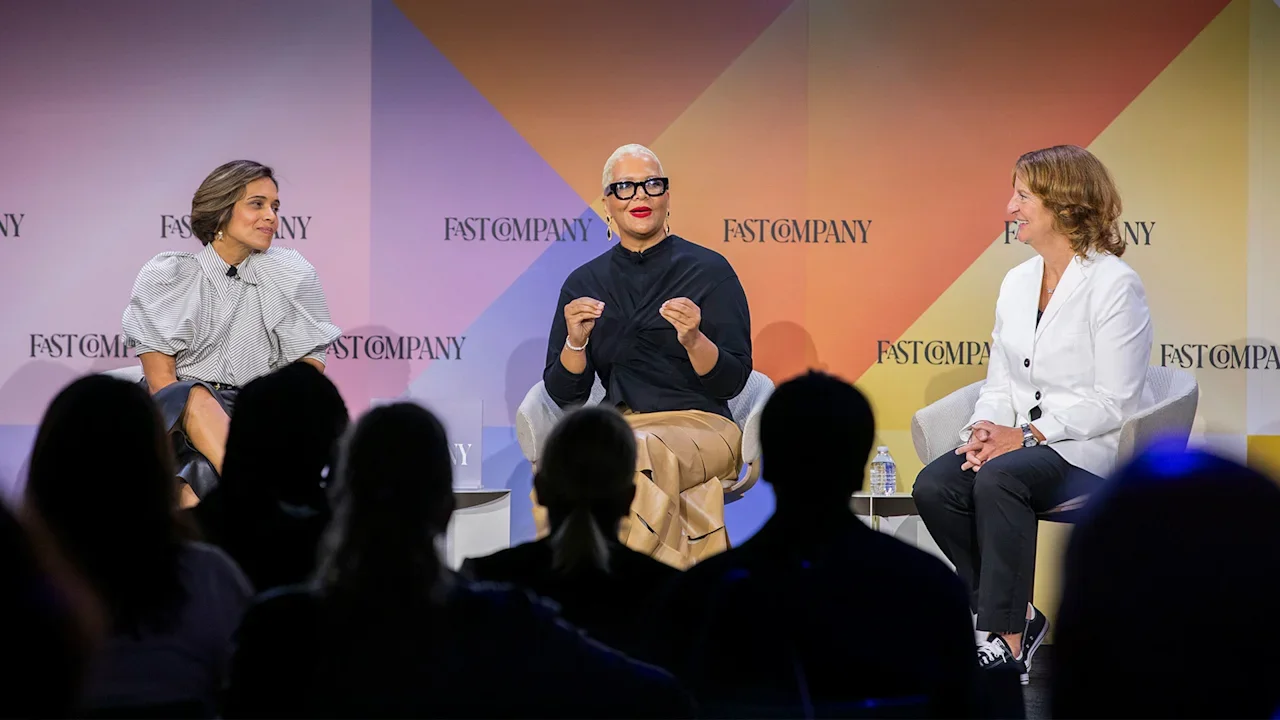
 While dozens of companies have suddenly retreated from DEI efforts this year, leaders in inclusivity say there’s reason to be hopeful that this work is continuing—albeit more quietly than before. Even as companies like Target, IBM, and Goldman Sachs have ditched their diversity, equity, and inclusion programs, other leaders still firmly believe that diverse teams offer a competitive advantage. There has been progress in the past decade-plus, but it has looked like three steps forward and two steps back—which underscores that such work has never been more important, according to Jana Rich, founder of Rich Talent Group. “What you’re seeing, I think, are some really strong leaders taking a stand as the antithesis of fear,” Rich said, speaking at the Fast Company Innovation Festival in New York last week. Leaders who have retreated on the work of inclusion are “really missing the moment,” added Daisy Auger-Domínguez, CEO of Auger-Domínguez Ventures. “What you’re seeing now is this retrenchment to try and build more status quo in organizations at a time where innovation and creativity are most needed.” Who killed DEI? The notion that DEI programs are expandable if a company’s financials are impacted or there is a different shift politically is problematic, as other key programs wouldn’t be on the chopping block in similar scenarios, Auger-Domínguez told the audience. “Why cut DEI when it is fundamental to the culture and the creativity and the innovation?” she asked. Even though there is data to support that inclusivity improves a company’s bottom line, some DEI programs were built with “zero scaffolding,” noted Cristina Mancini, CEO of Black Girls Code. Programs built on optics versus systems were bound to fail, she added. “At the first sign of a wobble, at the first sign of a wind, they come tumbling down because the intent wasn’t 100% there,” Mancini said. “My frustration with DEI programs is when the DEI programs are actually marketing versus hiring DEI practitioners to build true pipelines of talent that can, for the better, support the organization and become leaders themselves.” Banking on younger workers Even so, there’s reason to be optimistic that this retrenchment is temporary and companies will opt back in, Mancini said. While consumers have successfully boycotted companies like Target for walking back their DEI efforts, Auger-Domínguez noted that employees also need to feel empowered to create workplaces that work for everyone—and to remember that they have a choice in where they work. “We see through the B.S. of what’s being told to us, and people are voting with their feet,” Auger-Domínguez said. “The challenge here for these organizations is that you’re losing trust, you’re losing loyalty . . . many of us may still stay in organizations because we’re trying to wait this out, but I’m going to give you a lot less because I just don’t trust that you’ve got my back.” Younger generations in the workforce are being “very selective” about where they put their energy and will have the opportunity to affect change, Mancini said. And because they were raised on the idea that diversity comes in many forms, those future leaders are a beacon of hope, Rich added. “While it might take a while, I actually feel like our twentysomethings are going to change the world,” Rich said. View the full article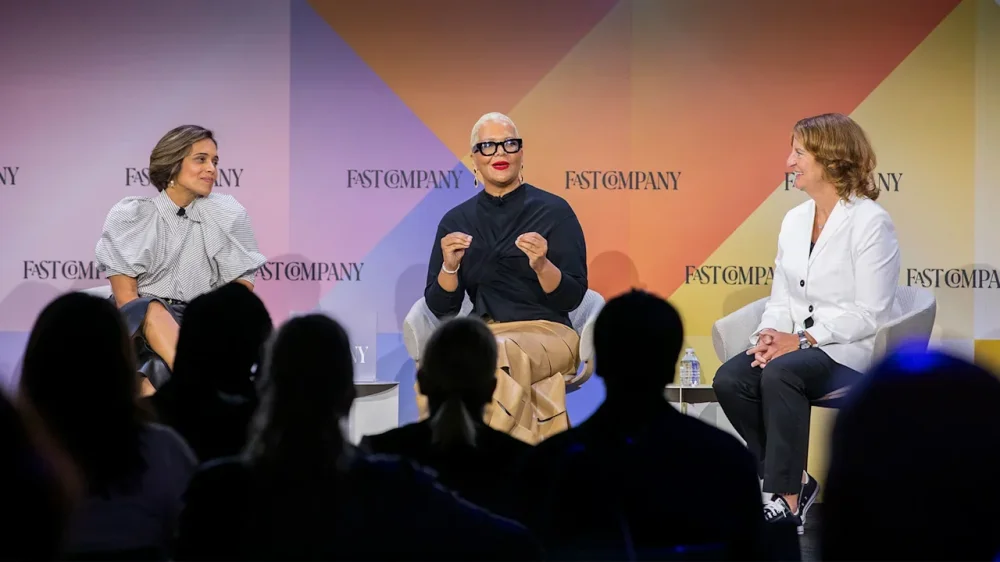
-
YouTube will offer creators a way to rejoin the streaming platform if they were banned for violating COVID-19 and election misinformation policies that are no longer in effect, its parent company Alphabet said Tuesday. In a letter submitted in response to subpoenas from the House Judiciary Committee, attorneys for Alphabet said the decision to bring back banned accounts reflected the company’s commitment to free speech. It said the company values conservative voices on its platform and recognizes their reach and important role in civic discourse. “No matter the political atmosphere, YouTube will continue to enable free expression on its platform, particularly as it relates to issues subject to political debate,” the letter read. The move is the latest in a cascade of content moderation rollbacks from tech companies, who cracked down on false information during the pandemic and after the 2020 election but have since faced pressure from President Donald The President and other conservatives who argue they unlawfully stifled right-wing voices in the process. It comes as tech CEOs, including Alphabet CEO Sundar Pichai, have sought a closer relationship with the Republican president, including through high-dollar donations to his campaign and attending events in Washington. YouTube in 2023 phased out its policy to remove content that falsely claims the 2020 election, or other past U.S. presidential elections, were marred by “widespread fraud, errors, or glitches.” The platform in 2024 also retired its stand-alone COVID-19 content restrictions, allowing various treatments for the disease to be discussed. COVID-19 misinformation now falls under YouTube’s broader medical misinformation policy. Among the creators who have been banned from YouTube under the now-expired policies are prominent conservative influencers, including Dan Bongino, who now serves as deputy director of the FBI. For people who make money on social media, access to monetization on YouTube can be significant, earning them large sums through ad revenue. House Judiciary Committee Chairman Jim Jordan and other congressional Republicans have pressured tech companies to reverse content moderation policies created under former President Joe Biden and accused Biden’s administration of unfairly wielding its power over the companies to chill lawful online speech. In Tuesday’s letter, Alphabet’s lawyers said senior Biden administration officials “conducted repeated and sustained outreach” to coerce the company to remove pandemic-related YouTube videos that did not violate company policies. “It is unacceptable and wrong when any government, including the Biden administration, attempts to dictate how the Company moderates content, and the Company has consistently fought against those efforts on First Amendment grounds,” the letter said. Meta CEO Mark Zuckerberg has also accused the Biden administration of pressuring employees to inappropriately censor content during the COVID-19 pandemic. Elon Musk, the owner of the social platform X, has accused the FBI of illegally coercing Twitter before his tenure to suppress a story about Hunter Biden. The Supreme Court last year sided with former President Joe Biden’s administration in a dispute with Republican-led states over how far the federal government can go to combat controversial social media posts on topics including COVID-19 and election security. Asked for more information about the reinstatement process, a spokesperson for YouTube did not immediately respond to a request for comment. —By Ali Swenson, Associated Press View the full article
-
Newfold Digital sells MarkMonitor, says it will "double down" on core brands like Bluehost and Network Solutions The post Newfold Digital Sells MarkMonitor As Part Of Strategic Refocus appeared first on Search Engine Journal. View the full article
-
The latest reports from ICE Mortgage Technology and VantageScore appear to be in line with hints at growing borrower pressure officials are eyeing in policy. View the full article
-
We may earn a commission from links on this page. Deal pricing and availability subject to change after time of publication. Did you know you can customize Google to filter out garbage? Take these steps for better search results, including adding my work at Lifehacker as a preferred source. Best Buy has joined the battle against Amazon's Prime Big Deals Day, the fall version of Prime Day. There will actually be two sales leading up to Best Buy's main Techtober sale, so I've rounded up all the info below to help you keep things straight. All of Best Buy's October salesBest Buy's fall sale is actually three separate sales from Sept. 27 through Oct. 12. Here are the dates of each sale and what you can expect from each: Sept. 27 to Sept. 28: A 48-hour flash sale. Sept. 28 to Oct. 5: Member deal days event. You will need to be a Best Buy Plus or My Best Total member, which starts at $49.99 per year. Oct. 6 to Oct. 12: Best Buy’s Techtober Sale. This will be Best Buy's equivalent to Amazon's Prime Big Deal Days, which is from Oct. 7 to Oct. 8. Do you need to be a member to shop for Best Buy's fall sale?Only the second event from Sept. 28 to Oct. 5 will be exclusive for paying members. The rest are for everyone, but members can get better savings throughout the sales. Keep in mind, it is free to sign up for a My Best Buy membership, which will give you free shipping. If you join one of its paid subscriptions (My Best Buy Plus for $49.99 per year or My Best Buy Total for $179.99 per year) you'll get faster free shipping, exclusive prices and deals, an extended 60-day return window on most products, and access to select sales. Paid members will also earn extra rewards from both the current sale and the upcoming Black Friday in July sale. What deals can I expect during Techtober Sale?There is no official list of deals from Best Buy yet, but in an email, the company said shoppers can expect deals on tech like laptops, TVs, headphones, video games, electric bikes, "and more." The retailer will debut new deals every day in stores, on its website, and in the Best Buy mobile app. What other retailers are competing with Amazon's October Prime Day?After Amazon's Prime Big Deal Days announcement, both Target and Walmart announced theirs. Target is having Circle Week, which will run from Oct. 5 through Oct. 11, and Walmart is having Walmart Deals from Oct. 7 to Oct. 12. View the full article
-
Kroger is celebrating National Chocolate Milk Day—which, by the way, is a real holiday that falls on September 27—in the best way. The supermarket chain is giving away free chocolate milk to loyal customers—or, at least, to customers who log on and grab the coupon in time. The Kroger Co., which serves more than 11 million customers daily through its e-commerce and retail food stores, is offering free half-gallons of Kroger’s chocolate milk over two days this month. “Chocolate milk may be the original after-school treat, but Kroger-brand chocolate milk has grown into so much more—it’s a top-rated favorite among customers of all ages,” said Ann Reed, group vice president of Our Brands at Kroger, in a press release. She added: “We’re excited to toast National Chocolate Milk Day by sharing this special delight for free with a limited-time offer.” The event kicks off this weekend. On both Friday, September 26, and Saturday, September 27, you can snag your own half-gallon free of charge. Per the release, Kroger says that customers can download a single-use digital coupon at Kroger.com to use online, or they can print it out to use in stores. But chocolate milk lovers should hurry, as the coupon will only be available for redemption on the aforementioned dates, starting at 12 a.m. ET, while supplies last. According to the announcement, the offer excludes certain divisions and stores “where dairy laws apply.” Those areas and stores include: Delta; Nashville; Mid-Atlantic; King Soopers; Ralphs; Food 4 Less in California; Louisiana (Houston and Dallas); Missouri (Dillons); and Nevada (Smith’s). However, those subject to the exclusion can still use the coupon to snag a free box of Kroger-brand cereal with a purchase of Kroger-brand chocolate milk. The giveaway comes shortly after Kroger announced it would cut nearly 1,000 jobs from its corporate workforce in August. Earlier in the year, a failed merger between Kroger and Albertsons, valued at $25 billion, was blocked by a federal judge. The company also said it would shutter around 60 stores in 2025. Kroger’s giveaway also falls within the brand’s customer appreciation week, which runs from September 24-30. The company says many grocery item prices have been knocked down in the name of saying thanks. View the full article

-
A reader writes: I’m the other side of letters you get more commonly: I am the overly talkative coworker trying to figure out how to professionally ask (read as beg) people to cut me off. I have pretty obvious/intense ADHD and do work with my doc to manage it as best we can. Unfortunately, we have not hit the magic mix yet. Since there is no hiding it for me, I am lucky to have supportive bosses who make it safe to be pretty open about it. The problem I am having is that while my current meds are really helping with most things, once I start talking, usually about something work-related, I cannot stop myself (literally screaming in my head to shut up, but hooray for executive function issues!). I have told all of my coworkers multiple times that when that happens, it is not rude to tell me to stop and that in fact I consider it a kindness so we can both get back to work. Unfortunately, they rarely take me up on this. They’re either trying to be polite or enjoying the break or the conversation evolves into other, less pressing work things, so they let me keep going. I know it is not their job to manage my issues, but I also hate dragging them down with me when I cannot make it stop. While I love that we have good relationships and I know it is my responsibility to manage my own stuff, it means a five-minute conversation can turn into an hour quickly and no one has time for that. Because of this, I try to use Teams/email, where I can have a wearable timer, but some things are better to verbally discuss, or you get caught in the hall, or I mis-estimate how long the needed part of the conversation will be and cannot really say, “Pause, I need to reset my timer.” Since we are not client-facing, I was thinking about ordering a pin to wear on really bad days that basically says, “I am having a bad day. Please tell me to hush/go away if I start going, or else I will never leave and we both have 1,000 things to do.” But I cannot think of how to say it so it does not sound ridiculous (because it is ridiculous, yet here we are). I am just at a loss and that is the best solution I have landed on for days when, despite my doctor’s and my best efforts, the spicy brain wins, and I do not want to hold anyone else hostage to my brain. Thanks for any suggestions you might have! I would not wear the pin. I see why you want to wear the pin! But it feels like Too Much for work. It’s going to be an uphill battle telling other people to feel comfortable cutting you off. Some people will be willing to, but most people will be saddled with social baggage about it being rude to do that. (For the record: it’s not rude! Particularly at work, where we all need to be able to say, “I’ve got to get back to what I’m working on” and we have the built-in excuse of our jobs. But people sometimes feel rude about it, especially in a culture where somewhat lengthy chatting is the norm.) I actually think the timer you mentioned might be the best option for helping you manage this! Can you set it up so it goes off every five minutes until you tell it to fully stop? That way if you underestimate how much time is actually needed, you’ll have another reminder coming up in a bit anyway. Or, if that’s not possible, you could say something like, “Let me reset my alarm so I make sure I don’t miss ___ (my upcoming call / a work block I’ve scheduled for myself / my deadline for X).” If you can, it might also help to pay attention to what portion of the talking you’re doing. If it’s roughly 50/50, it might be fine to continue. But if you can train yourself to notice when you’re doing 75% of the talking or more, ideally you’d see that as the equivalent of an alarm buzzing and a sign that the other person might be ready to disengage. The post can I ask my coworkers to tell me to shut up when I’m talking too much? appeared first on Ask a Manager. View the full article
-
Google launches Search Live in English in the U.S., adding real-time, camera-aware voice search to the Google app with links to the web. The post Google App Adds Search Live For Real-Time Visual Search appeared first on Search Engine Journal. View the full article
-
We may earn a commission from links on this page. Did you know you can customize Google to filter out garbage? Take these steps for better search results, including adding my work at Lifehacker as a preferred source. When the Powerbeats Pro 2 came out earlier this year, with their in-ear heart rate sensors, I had a hard time getting them to read my heart rate accurately from my ears. Now, with iOS 26, Apple and Beats are introducing some new fitness features that make these headphones work better as heart rate sensors. They also apply to the new AirPods Pro 3, which also measure heart rate. I tested the new features, and found that the experience is much improved—but still has serious problems. The heart rate feature now works on iPhones without third-party appsThis is the biggest improvement, and it’s unquestionably a good thing. In iOS 26, Apple has turned the Fitness app into a real workout-tracking app, not just a viewer for Apple Watch data. And it can pull heart rate data from Powerbeats or AirPods with heart rate sensors. Just tap the Workout tab, check the heart rate icon in the upper right corner to make sure your Powerbeats are paired, and hit the start button on the activity you want to do. It’s easy and simple—as it should have been in the first place. Previously, iPhones could only read heart rate data from the Powerbeats Pro 2 through certain third-party apps. These apps included a few popular premium and specialty apps, like Runna and Peloton, but there was no basic option. Now, with the updates to the Fitness app, you can log a workout that is just a native Apple workout, without having to create an account on a new app. None of this was ever an issue for Android users, by the way: They were always able to pair the Powerbeats Pro 2 as a Bluetooth heart rate sensor the way you would a chest strap, and can still do that. Unfortunately, iPhone users still don’t have that kind of freedom. Only some apps are supported—16 of them so far, which are listed here—but at least the main Fitness app is one of them. You can now use a single earbud (sort of)At first, the Powerbeats Pro 2 could only read your heart rate if you had both earbuds in. With the changes in iOS 26, you can now get heart rate readings with just a single earbud. I tried this out, with mixed results. On the bright side, it’s true—the Fitness app gives me heart rate data even with only one earbud in. But the downside is that accuracy is diminished. The earbuds already have an accuracy issue, as I’ll discuss below, so they lose data points when the fit isn’t perfect. Remove one earbud, and you’re taking away half your data. This is good news for people who get a good fit and good accuracy; they can choose between one and two earbuds and get a heart rate reading either way. But for those of us who can’t get a good enough fit to get good data (like me), this just gives us worse data. The algorithm is better, but maybe not good enough Powerbeats Pro 2 in orange; chest strap (for reference) in black, Credit: Beth Skwarecki Apple has said that its new heart-rate-sensing algorithm is able to sample data points faster, which should help accuracy. It can also combine data from the headphones and from your Apple Watch, rather than choosing one or the other. (Previously, if you were wearing your Apple Watch, heart rate data from your earbuds would be ignored). I took the earbuds for a few test runs (without the Apple Watch) to try the new algorithm. I do think the accuracy is a little bit improved! It’s still not great, but as long as I had both earbuds in, I can at least see the similarity between my chest strap data and what I was getting from the Powerbeats. It still tended to read high for me, though—often riding above the peaks of my intervals and never dropping down very far. This isn’t good enough to follow heart rate zone training very closely, and would likely skew heart-rate-based metrics such as estimated VO2max. But it does seem to be an improvement. My single-earbud readings were awful, though, as you can see. To Apple’s credit, I did get a poor fit notification after both the runs that produced the graphs above. New fit notification A new feature in iOS 26 is that you’ll get a notification to check the fit of your earbuds if the data seemed to be poor. That’s a helpful feature, because otherwise you wouldn’t know whether you’re getting good data or not. (I sit down at my computer and compare new devices to chest strap data, but it’s not fair to expect everyone to do that.) Based on my experience, the Powerbeats’ issue with heart rate accuracy seems to be tied to the way they fit in your ears. The optical heart rate sensor is built into the hard plastic component, and it needs to be in close contact with your skin to be able to detect your pulse. The earbuds come with different silicone tips to adjust the fit, and an “ear tip fit test” you can do in Settings to ensure that you get a good seal between your tip and your ears. If you get the notification telling you to check your fit, it directs you to this test and its associated advice about getting a good fit. But there’s still a big problem here. Apple assumes that a good fit for sound is the same as a good fit for heart rate. That’s not always the case, as my own testing showed. When I passed the fit test, I got terrible heart rate data. If I turned the earbuds backward so the ear hooks were vertical, I got good heart rate data but terrible sound quality—and failed the fit test. So these notifications can tell you that you have a problem, but they can’t solve your problem. I suspect it’s not really solvable. The plastic component only comes in one size, and if your ears are a different size or shape than what it was designed for, there’s no way to put the sensor in closer contact with your ears. iPhone users still can’t play music while broadcasting heart rate to gym equipment I almost feel embarrassed for Apple on this one. The Powerbeats Pro 2 can broadcast your heart rate data to gym equipment, but not while playing music. This still feels half-baked and I hope Apple is working on a fix for this. For now, here’s what you can expect: Android users can play music from their phone while broadcasting to gym equipment. Gym equipment that plays sound over bluetooth can play to your Powerbeats while you broadcast heart rate to that same gym equipment. iPhone users cannot play music from their iPhone while broadcasting to gym equipment. Overall, I'm pleased to see the changes Apple has made to improve the usefulness and accuracy of the Powerbeats Pro 2's heart rate monitoring feature, but I'm still disappointed in some of the ways it fails to live up to its promises. These are expensive headphones to buy without knowing whether they'll fit your ears well enough to get reliable heart rate data. The missing music when broadcasting to gym equipment is especially disappointing. But the fit notifications are a great addition so that at least people know when they're having accuracy issues, and I appreciate the more accurate data sampling—even if the result isn't perfect. View the full article
-
iOS 26 is one of Apple's biggest operating system updates in years. The new "Liquid Glass" design, while controversial, offers the first major UI overhaul since iOS 7, while new features like call screening and hold assist might change the way your make and receive phone calls. If you have an iPhone, you may be tempted to install the new update—and, seeing as it has been out for a week and a half now, you might have updated already. If you haven't installed iOS 26, yet, however, think twice before you do, because you're going to be stuck with it: Apple has made it impossible to downgrade and return to iOS 18. You can't go back to iOS 18As reported by MacRumors, Apple stopped "signing" iOS 18.6.2 on Monday. When Apple signs a particular piece of software, it means you can download that software to your compatible device. Apple stops signing software shortly after it releases a new version. It's a system meant to block users from installing old software versions on their Apple devices, intended to protect those users from insecurities in operating systems that haven't been patched. As such, now that iOS 18.6.2 is no longer being signed, there is no way to downgrade to that software version from iOS 26 if you change your mind. Though the process was tedious, previously, you could downgrade from iOS 26 by putting your iPhone in recovery mode, erasing it completely, and installing a new version of 18.6.2. Now that Apple has stopped signing 18.6.2, however, there's no way to install it, so a factory reset will only leave you with an iPhone running iOS 26, and none of your data. You might be wondering why you can't downgrade to iOS 18.7, since that's a newer version of iOS 18 than 18.6.2. As users on the MacRumors forum point out, you need an IPSW file in order to downgrade your iPhone, but Apple hasn't provided an IPSW file with iOS 18.7, as that update is only available over the air for uses already running iOS 18. That is to say: Unless your iPhone is already running 18.6.2, you can't install iOS 18.7. If you haven't updated your iPhone yet, you have two options. First, there's nothing forcing you to install iOS 26 on your device. You can keep running iOS 18.6.2 or iOS 18.7 as long as you want, and take advantage of any future security updates Apple provides to keep your iPhone protected. Alternately, you can go ahead and install iOS 26, with the understanding that you won't have the option to undo it—though you will be able to undo many of the UI changes, at least. And if your main concern is performance and battery life, it might be smart to wait for iOS 26.1, which is currently in beta testing. View the full article
-
A messaging template is an essential tool for enhancing communication within your organization. It helps guarantee your messages are consistent, clear, and aligned with your brand’s values. For instance, by defining core messages and providing context customized to different audiences, you can streamline your communication efforts. This approach not only saves time but likewise strengthens your brand identity. Nonetheless, creating an effective messaging template requires careful consideration of several key components. What exactly should you include? Key Takeaways A messaging template is a structured framework that standardizes communication within organizations for clarity and consistency. It includes a clear value proposition, core messages, and supporting messages tailored to specific audiences. Templates streamline message creation, saving time and ensuring uniformity across various communication platforms. Regular refinement of templates keeps messaging relevant to strategic goals and market trends. Implementing templates fosters collaboration and improves professionalism, enhancing overall customer engagement and brand identity. Understanding the Purpose of Messaging Templates Messaging templates serve a crucial role in enhancing communication within organizations, as they provide a structured approach that promotes consistency and clarity. By utilizing a messaging framework template, you can streamline your communication efforts, guaranteeing that your key messages remain uniform across various platforms. These templates often highlight value propositions and supporting messages, which effectively convey your brand’s identity and offerings. With messaging templates, you save time and improve efficiency, as you won’t need to create messages from scratch each time. In addition, they align team members by acting as a central reference point, enabling everyone to communicate the same core messages and maintain a consistent brand voice. Regularly updating these templates likewise guarantees they stay relevant to changing market conditions. Key Components of an Effective Messaging Template An effective messaging template contains several key components that guarantee your communication is both impactful and relevant. To align with your brand messaging framework, consider these vital elements: Clear Value Proposition: Describe the unique benefits of your brand or product succinctly to your target audience. Core Messages: These should encapsulate your brand’s beliefs and propositions, ensuring they align with your business objectives and customer needs. Supporting Messages: Reinforce your core messages with additional context, providing credibility and depth to your communication. Target Audience Identification: Utilize detailed buyer personas to tailor your messaging, ensuring it resonates with specific demographics. Regularly refining your template is critical to maintain relevance and alignment with evolving strategic goals and market trends. Benefits of Using Messaging Templates in Communication Using messaging templates in communication offers numerous advantages that can greatly improve both efficiency and effectiveness. These templates streamline your messaging efforts by providing standardized formats, saving you time and ensuring consistency. With a messaging template, you boost clarity and professionalism, making it easier for you to convey vital information without misunderstandings. Moreover, using these templates can increase customer engagement, allowing you to personalize messages in the process of maintaining a cohesive brand voice. Establishing clear guidelines with a messaging template helps you achieve specific business goals, such as promoting sales or improving customer service. In the end, consistent use of messaging templates contributes to a unified brand identity, which is fundamental for building trust and recognition among your target audience. Steps to Create a Messaging Template Creating a messaging template requires a strategic approach that aligns with your brand’s objectives. To develop an effective messaging structure, follow these steps: Define your core message, highlighting your brand’s value proposition. Identify key messaging pillars that showcase your unique selling points. Tailor messages for specific buyer personas, considering demographics and pain points. Incorporate proof points, such as testimonials or data, to improve credibility. Best Practices for Implementing Messaging Templates Implementing messaging templates effectively is crucial for maintaining consistency and clarity across your organization’s communication efforts. Start by utilizing standardized templates to streamline your messaging, guaranteeing professionalism across different channels. Pair these templates with style guides to keep your brand messaging architecture consistent in tone and language, which builds brand recognition and trust. Regularly audit your templates to identify any discrepancies and align them with your current business goals and audience needs. Encourage team collaboration during the development process, as diverse perspectives can improve the templates’ effectiveness in addressing the audience’s pain points. Finally, conduct training sessions to confirm your staff understands how to use the templates correctly, promoting alignment in your messaging strategies throughout the organization. Conclusion In summary, utilizing a messaging template can greatly improve your organization’s communication efforts. By ensuring consistency and clarity, these templates align your messaging with your brand’s values and target audiences. The key components and best practices outlined here will guide you in creating an effective template, ultimately enhancing engagement and nurturing a unified brand identity. By implementing these strategies, you can streamline your communication processes and build trust with your stakeholders effectively. Image Via Envato This article, "What Is a Messaging Template That Improves Communication?" was first published on Small Business Trends View the full article
-
A messaging template is an essential tool for enhancing communication within your organization. It helps guarantee your messages are consistent, clear, and aligned with your brand’s values. For instance, by defining core messages and providing context customized to different audiences, you can streamline your communication efforts. This approach not only saves time but likewise strengthens your brand identity. Nonetheless, creating an effective messaging template requires careful consideration of several key components. What exactly should you include? Key Takeaways A messaging template is a structured framework that standardizes communication within organizations for clarity and consistency. It includes a clear value proposition, core messages, and supporting messages tailored to specific audiences. Templates streamline message creation, saving time and ensuring uniformity across various communication platforms. Regular refinement of templates keeps messaging relevant to strategic goals and market trends. Implementing templates fosters collaboration and improves professionalism, enhancing overall customer engagement and brand identity. Understanding the Purpose of Messaging Templates Messaging templates serve a crucial role in enhancing communication within organizations, as they provide a structured approach that promotes consistency and clarity. By utilizing a messaging framework template, you can streamline your communication efforts, guaranteeing that your key messages remain uniform across various platforms. These templates often highlight value propositions and supporting messages, which effectively convey your brand’s identity and offerings. With messaging templates, you save time and improve efficiency, as you won’t need to create messages from scratch each time. In addition, they align team members by acting as a central reference point, enabling everyone to communicate the same core messages and maintain a consistent brand voice. Regularly updating these templates likewise guarantees they stay relevant to changing market conditions. Key Components of an Effective Messaging Template An effective messaging template contains several key components that guarantee your communication is both impactful and relevant. To align with your brand messaging framework, consider these vital elements: Clear Value Proposition: Describe the unique benefits of your brand or product succinctly to your target audience. Core Messages: These should encapsulate your brand’s beliefs and propositions, ensuring they align with your business objectives and customer needs. Supporting Messages: Reinforce your core messages with additional context, providing credibility and depth to your communication. Target Audience Identification: Utilize detailed buyer personas to tailor your messaging, ensuring it resonates with specific demographics. Regularly refining your template is critical to maintain relevance and alignment with evolving strategic goals and market trends. Benefits of Using Messaging Templates in Communication Using messaging templates in communication offers numerous advantages that can greatly improve both efficiency and effectiveness. These templates streamline your messaging efforts by providing standardized formats, saving you time and ensuring consistency. With a messaging template, you boost clarity and professionalism, making it easier for you to convey vital information without misunderstandings. Moreover, using these templates can increase customer engagement, allowing you to personalize messages in the process of maintaining a cohesive brand voice. Establishing clear guidelines with a messaging template helps you achieve specific business goals, such as promoting sales or improving customer service. In the end, consistent use of messaging templates contributes to a unified brand identity, which is fundamental for building trust and recognition among your target audience. Steps to Create a Messaging Template Creating a messaging template requires a strategic approach that aligns with your brand’s objectives. To develop an effective messaging structure, follow these steps: Define your core message, highlighting your brand’s value proposition. Identify key messaging pillars that showcase your unique selling points. Tailor messages for specific buyer personas, considering demographics and pain points. Incorporate proof points, such as testimonials or data, to improve credibility. Best Practices for Implementing Messaging Templates Implementing messaging templates effectively is crucial for maintaining consistency and clarity across your organization’s communication efforts. Start by utilizing standardized templates to streamline your messaging, guaranteeing professionalism across different channels. Pair these templates with style guides to keep your brand messaging architecture consistent in tone and language, which builds brand recognition and trust. Regularly audit your templates to identify any discrepancies and align them with your current business goals and audience needs. Encourage team collaboration during the development process, as diverse perspectives can improve the templates’ effectiveness in addressing the audience’s pain points. Finally, conduct training sessions to confirm your staff understands how to use the templates correctly, promoting alignment in your messaging strategies throughout the organization. Conclusion In summary, utilizing a messaging template can greatly improve your organization’s communication efforts. By ensuring consistency and clarity, these templates align your messaging with your brand’s values and target audiences. The key components and best practices outlined here will guide you in creating an effective template, ultimately enhancing engagement and nurturing a unified brand identity. By implementing these strategies, you can streamline your communication processes and build trust with your stakeholders effectively. Image Via Envato This article, "What Is a Messaging Template That Improves Communication?" was first published on Small Business Trends View the full article
-
The title industry sustained improvement first seen last year, with second-quarter premium totals up on both a quarterly and annual basis, ALTA said. View the full article
-
Google today rolled out Search Live in the U.S. Before today, Search Live was in Google Labs as an opt-in feature. Search Live, built into the Google app, lets people talk directly with Google Search in real time. Users can share their phone camera feed so Search can “see” what they’re looking at. How it works. Tap the Live icon in the Google app (Android, iOS). Ask questions. Optionally turn on the camera so Search can interpret what’s in front of you. Search responds with answers, context, and cites its sources at the bottom. What’s new: Unlike earlier testing in Labs, the full release includes both voice and camera input. Google demoed this at I/O, but only the talk-and-listen mode was live until today. What it looks like. Here’s a video Google shared of Search Live: Why we care. This is another way users can have conversations with Google’s AI instead of typing queries. Answers could increasingly bypass traditional clicks, and further erode traffic to websites. The inclusion of links (citations at the bottom) means publishers and brands could still see some benefits, but most searchers likely will have little need or desire to click on those links or dig deeper after getting their answer. Google’s announcement. 5 ways to get real-time help by going Live with Search View the full article
-
We may earn a commission from links on this page. Deal pricing and availability subject to change after time of publication. Did you know you can customize Google to filter out garbage? Take these steps for better search results, including adding my work at Lifehacker as a preferred source. Since the AirPods Pro 3 were released this September, I've been anticipating a big price drops for the older 2nd-generation AirPods Pro, and that price drop is now here: Amazon is selling refurbished 2nd Generation AirPods Pros for $139.99, down from the previous price of $209.99 for a refurbished pair and $249 for a new pair. This is the lowest price yet for this model of AirPods Pro, according to price tracking tools. Apple AirPods Pro (2nd Generation) (Renewed Premium) $139.99 at Amazon $209.99 Save $70.00 Get Deal Get Deal $139.99 at Amazon $209.99 Save $70.00 If you don't mind them being refurbished, these are great earbuds for a great price. This model, which came out in September 2023, is the first to feature charging via USB-C. They also came out with a few features that still older models didn't have, like adaptive transparency. You can expect solid battery life, with Apple claiming up to 30 hours of listening time on a single charge. The AirPods Pro offer excellent noise cancellation, plus their silicone tips provide a good seal that will naturally block a lot of background noise without the need to turn the ANC feature on. Transparency Mode lets you have a conversation with someone while your audio is still playing, and Conversation Awareness will automatically lower the volume of your media and boost the voices of the people you're talking to. The Adaptive Audio feature is also pretty cool: It reduces any loud sounds to a tolerable 85 dB, so sudden loud noises in your media don't startle or distract you. All of that to say: While they don't have all the bells and whistles of the AirPods Pro 3, these earbuds still offer many features that make them a great option in 2025—especially at their current discount. Our Best Editor-Vetted Tech Deals Right Now Apple AirPods Pro 2 Noise Cancelling Wireless Earbuds — $199.00 (List Price $249.00) Samsung Galaxy S25 Edge 256GB Unlocked AI Phone (Titanium JetBlack) — $699.99 (List Price $1,099.99) Apple iPad 11" 128GB A16 WiFi Tablet (Blue, 2025) — $299.00 (List Price $349.00) Roku Streaming Stick Plus — $29.00 (List Price $39.99) Deals are selected by our commerce team View the full article
-
A reader writes: I’ve just hired a new remote employee who is absolutely wonderful. He’s organized, driven, talented and self-starting. I feel like I’ve won the jackpot — with a catch. His internet is really, really bad. It’s almost impossible to have him share his screen with me (or vice versa) or to carry on a conversation without a very noticeable lag. Because of this, he will often call into virtual meetings from his personal phone. I can’t pretend to know anything about his personal circumstances. For all I know, he could be working through student debt and I would hate to bring up something that might be uncomfortable for him. I have mentioned in passing using alternate technology to try to improve his internet speed, but he would need to purchase this out-of-pocket and he hasn’t done so yet (it’s been a couple of months). What is the safest way to approach this? I answer this question — and two others — over at Inc. today, where I’m revisiting letters that have been buried in the archives here from years ago (and sometimes updating/expanding my answers to them). You can read it here. Other questions I’m answering there today include: Explaining to clients that I’m pregnant with someone else’s babies Job applicants contact me on LinkedIn The post my new remote employee has terrible internet appeared first on Ask a Manager. View the full article
-
The lender is seeking to dismiss the lawsuit, calling the purported scheme to also deprive its loan officers of full compensation implausible. View the full article

-
Did you know you can customize Google to filter out garbage? Take these steps for better search results, including adding Lifehacker as a preferred source for tech news. Netflix's October lineup has a little something for everyone. There are new seasons of familiar favorites, including the ninth installments of both Love Is Blind (Oct. 1), this time set in Denver, and real estate reality show Selling Sunset (Oct. 29). Nobody Wants This (Oct. 23), the rom-com series starring Adam Brody and Kristen Bell, is returning for another season, along with other Netflix originals The Diplomat (Oct. 16) and The Witcher (Oct. 30). The documentary slate this month is long: Those who liked the Emmy Award-winning Beckham may also enjoy Victoria Beckham (Oct. 9), a three-part series from the same creators. The Perfect Neighbor (Oct. 17)—a Sundance Film Festival award winner—examines the violent consequences of Florida's stand-your-ground laws. On the film side, Keira Knightley stars in The Woman in Cabin 10 (Oct. 10), a psychological thriller based on Ruth Ware's 2016 novel. Knightley plays a journalist on assignment on a luxury cruise, where she believes she witnesses a passenger being thrown overboard. A House of Dynamite (Oct. 24) is a political thriller about the U.S. government response to an unidentified nuclear missile attack. The ensemble cast includes Idris Elba, Rebecca Ferguson, Gabriel Basso, Jared Harris, Tracy Letts, and Anthony Ramos, among others. Finally, Netflix is streaming the Six Kings Slam (Oct. 15), an exhibition tennis tournament held in Saudi Arabia featuring top players like Carlos Alcaraz, Janik Sinner, and Novak Djokovic. Here's everything coming to Netflix in October, and everything that's leaving. What's coming to Netflix in October 2025Available soonPhysical: Asia—Netflix Series Available October 1Love Is Blind: Season 9—Netflix Series RIV4LRIES—Netflix Series About My Father Austin Powers in Goldmember Austin Powers: International Man of Mystery Austin Powers: The Spy Who Shagged Me Beverly Hills Cop Beverly Hills Cop II Beverly Hills Cop III Blue Crush The Book Club Murders Casper The Christmas Contract Coach Carter Coming to America Daddy Day Care Death Becomes Her Dirty Dancing Dr. Seuss' The Lorax Dracula Eddie Murphy: Raw Elysium Fifty Shades Darker Fifty Shades Freed Fifty Shades of Grey Friends with Benefits The Goonies Hacksaw Ridge Halo: Seasons 1-2 The Hurt Locker I Still Know What You Did Last Summer Law Abiding Citizen The Lincoln Lawyer The Mask Meet Joe Black Molly's Game Mr. & Mrs. Smith NCIS: Seasons 18-19 Pineapple Express Point Break Red Dragon Scarface Sinister 2 Sister Act Sister Act 2: Back in the Habit Slender Man The Strangers Taxi Driver Training Day The Way Home: Seasons 1-2 When a Stranger Calls The Wrath of Becky Available October 2Dodgeball: A True Underdog Story Dudes—Netflix Series The Game: You Never Play Alone—Netflix Series The Martian Rockstar: DUKI from the End of the World—Netflix Documentary Available October 3Genie, Make a Wish—Netflix Series Monster: The Ed Gein Story—Netflix Series The New Force—Netflix Series Old Dog, New Tricks—Netflix Series Rhythm + Flow France: After the Beat—Netflix Documentary Steve—Netflix Film Available October 4Angel Has Fallen Night of the Living Dead Ranma1/2: Season 2—Netflix Series Available October 5Despicable Me 3 Ip Man Ip Man 2 Ip Man 3 Ip Man 4: The Finale Available October 6Dr. Seuss’s Horton!—Netflix Family Available October 7Nurse Jackie: Seasons 1-7 True Haunting—Netflix Documentary We Have Always Lived in the Castle Available October 8Caramelo—Netflix Film Is It Cake? Halloween—Netflix Series Néro the Assassin—Netflix Series Available October 9Boots—Netflix Series The Maze Runner Maze Runner: The Scorch Trials Maze Runner: Death Cure The Resurrected—Netflix Series Victoria Beckham—Netflix Documentary Available October 10Kurukshetra: The War of Mahabharata—Netflix Series My Father, the BTK Killer—Netflix Documentary Old Money—Netflix Series Swim to Me—Netflix Film The Woman in Cabin 10—Netflix Film Available October 11Typhoon Family—Netflix Series Available October 14Everybody Loves Me When I'm Dead—Netflix Film Splinter Cell: Deathwatch—Netflix Series Available October 15Held Hostage in My House Inside Furioza—Netflix Film No One Saw Us Leave—Netflix Series Six Kings Slam 2025—Netflix Live Event Taken in Plain Sight Available October 16The A Team Confessions of a Shopaholic The Diplomat: Season 3—Netflix Series Romantics Anonymous—Netflix Series Starting 5: Season 2—Netflix Sports Series The Time That Remains—Netflix Film Available October 1727 Nights—Netflix Film Good News—Netflix Film The Perfect Neighbor—Netflix Documentary She Walks in Darkness—Netflix Film Teenage Mutant Ninja Turtles Teenage Mutant Ninja Turtles 2 Teenage Mutant Ninja Turtles: Mutant Mayhem Turn of the Tide: Season 2—Netflix Series Turn of the Tide: The Surreal Story of Rabo de Peixe—Netflix Documentary The Twits—Netflix Family Available October 18Don't Say a Word Available October 21Michelle Wolf: The Well—Netflix Comedy Special The Walking Dead: Daryl Dixon: Season 2 Who Killed the Montreal Expos?—Netflix Documentary Available October 22Mob War: Philadelphia vs. The Mafia—Netflix Documentary Series The Monster of Florence—Netflix Series Available October 23The Elixir—Netflix Film Nobody Wants This: Season 2—Netflix Series Available October 24A HOUSE OF DYNAMITE—Netflix Film Parish: Season 1 Available October 25The Dream Life of Mr. Kim—Netflix Series Available October 27The Asset—Netflix Series Dark Winds: Season 3 Sliding Doors Available October 28Babo: The Haftbefehl Story—Netflix Documentary Mo Amer: Wild World—Netflix Comedy Special Nightmares of Nature: Lost in the Jungle—Netflix Documentary Available October 29Ballad of a Small Player—Netflix Film NOS4A2: Seasons 1-2 Rulers of Fortune—Netflix Series Selling Sunset: Season 9—Netflix Series Available October 30Aileen: Queen of the Serial Killers—Netflix Documentary Amsterdam Empire—Netflix Series Juan Gabriel: I Must, I Can, I Will—Netflix Documentary Son of a Donkey—Netflix Series The Witcher: Season 4—Netflix Series Available October 31Bad Influencer—Netflix Series Breathless: Season 2—Netflix Series Rhythm + Flow France: Season 4—Netflix Series What's leaving Netflix in October 2025Leaving October 1A Million Ways to Die in the West A Night at the Roxbury American Graffiti American Pie American Pie 2 Antz Big Daddy Billy Madison Blades of Glory Born on the Fourth of July The Blues Brothers Dazed and Confused The Departed Dune Focus Friday Night Lights Good Burger Grown Ups Grown Ups 2 Krampus Mission: Impossible Mission: Impossible - Ghost Protocol Mission: Impossible - Rogue Nation Mission: Impossible II Mission: Impossible III Neighbors Now You See Me Now You See Me 2 Old School Road Trip Rudy Rush Hour Rush Hour 2 Rush Hour 3 Talk to Me Wayne's World Wayne's World 2 White Collar: Seasons 1-6 Zoolander Leaving October 16Circle Leaving October 20Anyone But You Leaving October 23Empire Records Leaving October 24The Family Business: Seasons 1-4 View the full article
-
... which is not to say they never work together. By August Aquila MAX: Maximize Productivity, Profitability and Client Retention Go PRO for members-only access to more August J. Aquila. View the full article
-
... which is not to say they never work together. By August Aquila MAX: Maximize Productivity, Profitability and Client Retention Go PRO for members-only access to more August J. Aquila. View the full article
-
Plus three more basic steps. By Jody Padar Radical Pricing – By The Radical CPA Go PRO for members-only access to more Jody Padar. View the full article
-
Plus three more basic steps. By Jody Padar Radical Pricing – By The Radical CPA Go PRO for members-only access to more Jody Padar. View the full article
-
A wealth of information is lurking there. By Ed Mendlowitz 77 Ways to Wow! Go PRO for members-only access to more Edward Mendlowitz. View the full article
-
A wealth of information is lurking there. By Ed Mendlowitz 77 Ways to Wow! Go PRO for members-only access to more Edward Mendlowitz. View the full article
-
After months of merchant frustration over securing the required API key for website-reported local inventory feeds via Google Tag Manager, Google has now confirmed a straightforward process: Complete setup. Request validation through a form. Once approved, a Google agent provides the API key. Why we care. This clarification makes it easier for merchants to implement local inventory feeds, stay compliant with Google’s policies, and bring in-store availability data into their Shopping presence faster. What’s next. With this streamlined process, merchants can expect smoother onboarding and more reliable integration of local inventory into their campaigns. First seen. This update was first spotted by Emmanuel Flossie, founder of FeedArmy. View the full article