ResidentialBusiness
Administrators
-
Joined
-
Last visited
Everything posted by ResidentialBusiness
-
 Higher rates and economic fears persuade retirees to opt for guaranteed incomesView the full article
 -
Cross-party committee warns agency is not ‘sufficiently curious’ about scale of illegal practiceView the full article
-
Diversity initiatives, often called DEI, are in the political and business crosshairs. In recent weeks, Meta, Walmart, Target, Ford, and McDonald’s are among global companies ending their formal DEI initiatives. Some of the bluster is performative. And yet, for many employees and global firms, there’s a sense that this is an opportunity to rebalance the goals and rethink the strategy by innovating diversity practices to better meet the global business goals. Most DEI programs were crafted years ago, and their relevance and impact has been diminishing. Many initiatives overreached and have not adequately evolved to meet the changing environment. Like with any business process, companies need to innovate their approach to global diversity initiatives. There’s no doubt international companies recognize the value of having varied perspectives, experiences, and skills in all areas of their business. The global firms we work with know that having different voices and perspectives is essential to enhancing how teams function. It improves processes, productivity, and innovation. Companies are able to better understand their global customers’ needs and expectations, ultimately leading to increased profitability. The focus is then on how to ensure that there are diverse perspectives at every stage of a business process. Diversity is defined different ways A core element of our work focuses on applying social sciences, including cultural anthropology, to understand how local factors impact how companies achieve their business objectives. This is distinctly different from diversity initiatives, which are more focused on getting everyone to follow one standardized playbook for engagement, not necessarily prioritizing business goals. In the DEI playbook, there is only one accepted definition of diversity, when in reality diversity’s definition differs across cultures. In the U.S., U.K., and Canada, for example, there’s a tendency to focus on visible characteristics given the countries’ multicultural demographics. American companies have tried to export this version of DEI, but it does not work in every culture. The way American firms approach diversity has been stuck at the visible characteristics phase. In other countries, invisible characteristics like region, rural/urban setting, income, education, religion, tribe, caste, etc. can be more relevant, impacting how people communicate, interact, operate, and manage. It’s essential to recognize that people who look different can actually think alike. And people who look alike can think differently. We already know that having people of different socioeconomic backgrounds provides more varied perspectives that can impact business objectives and innovation. For example, diversity of educational backgrounds means that companies are increasingly recognizing that they need to recruit from a wider range of colleges and universities around the world. Rethink diversity It’s time to innovate by rethinking and expanding how we talk about diversity, making sure that it’s globally relevant for all stakeholders. And in this current environment, we have a unique opportunity to innovate diversity initiatives to meet the evolving needs of employees and customers worldwide. To be effective, it’s essential to integrate cultural nuances and localize any global strategies, including diversity initiatives, to achieve business objectives. There are key points to keep in mind as global firms integrate varied perspectives, voices, and roles into their business operations and processes. First, the current DEI concept is heavily influenced by American perspectives and values and it may not translate to local cultures. Focusing on shared values and business objectives, our cultural framework uses a methodology integrating social sciences and business. Companies should focus on how to improve their stakeholder engagement—with employees, customers, and partners—to achieve business goals. Diversity as the end goal is insufficient. It has to integrate into how people communicate, interact, and manage. Integrating cultural frameworks helps focus companies on making sure their teams work more effectively across cultures to better achieve business goals. For example, global hospitality and travel firms we work with recognize that global customer engagement teams with varied experiences result in better overall customer experience and satisfaction metrics, including higher NPS (Net Promoter Score) and improved profitability. What are the company’s goals, and how can everyone collectively work together toward those goals? Starting with that premise enables teams to focus on how to communicate and interact more effectively across cultures, engaging local teams to better understand the opportunities and challenges for getting all team members involved. Share perspectives Second, ensure that everyone throughout your organization can provide their perspective wherever relevant and useful. Ensure that virtual and in-person teams are cognizant of local cultural communications patterns so all ideas and perspectives are shared. For example, our cultural framework integrates a number of cultural factors to compare and contrast cultures. Individualistic versus collective. It’s not surprising that on a comparative basis, the U.S. is the most individualistic culture in the world. American business metrics tend to reward and advocate for the individual. In contrast, Asian, Middle Eastern, African, and Latin American cultures value group goals and teamwork more. So, any diversity and business initiative that focuses on the individual ahead of the group may not work locally. It’s more valued to be respectful of the group dynamics. For example, throughout Asia, the focus is on the collective good. Highlighting individual differences—visible or invisible—is considered a negative. People from diverse backgrounds and cultures communicate differently. A fundamental concept is verbal and nonverbal communications (high-low context). People who expect direct communications and clear verbal directness—e.g., in the U.S.—will miss nonverbal cues from colleagues who are accustomed to reading the context, such as in East Asia. Add in hierarchical cultural value, where junior team members are less likely to speak up in the presence of respected senior team members. Other factors can complicate communications and team dynamics including invisible characteristics such as local income, education, caste, tribe, etc. These are simple examples of invisible characteristics, but they illustrate that companies need to be clear about diversity goal efforts. Diversity for the sake of diversity may not be as successful across cultures, but diversity as a way to achieve shared corporate values and goals is more likely to resonate. When developing a diversity program, be careful not to tell people how to be diverse but rather provide a conversation forum. We need to innovate how we view diversity, integrate invisible characteristics across cultures, and focus on shared purpose and business goals. In the long run, our goal should be to infuse diversity in every business process and team rather than a separate business unit. It will become ubiquitous. Sanjyot P. Dunung is founder and CEO of Atma Global. View the full article

-
The cost of Valentine’s Day may be a lot higher this year compared to last year. You’ve probably heard the price of eggs has skyrocketed, but if you haven’t already started shopping for your Valentine, be prepared for some sticker shock, especially for perennial favorites like roses and chocolates. Here’s why. How much will I pay for roses this year? Depending on where you live, you might be paying a hefty price. This Valentine’s Day, the average price for a dozen long-stemmed roses (red or white) is a staggering $90.50, 2% more than last year, according to FinanceBuzz as reported by CBS News. Yet a 2% hike would be getting off easy, considering that if you live in Hawaii, you’ll have to shell out $143 for that same dozen, which is 58% more expensive than the national average. Wondering where the best bargain can be found? It’s California, where you’ll pay an average of $68 for a dozen roses, compared to $110 in Texas (where the cost of living is on average much cheaper than in California). Another reason for the hefty price tag on bouquets? Inflation over multiple years. The average price went up from $80.16 in 2023 to $88.61 last year. Here are the states where roses are most expensive these days, rounded to the nearest dollar based on data from FinanceBuzz: Hawaii: $143 per dozen Texas: $110 per dozen Washington: $107 per dozen Montana: $105 per dozen Kentucky: $102 per dozen Wyoming: $102 per dozen Ohio: $102 per dozen South Carolina: $102 per dozen Kansas: $100 per dozen Iowa: $99 per dozen While erratic weather patterns can also play a role in flower production and prices, this year’s prices are mostly a result of, and in line with, inflation, as supplies remain high. In fact, some 940 million cut flower stems have already arrived in the U.S. for the holiday via Miami International Airport, mostly from Colombia and Ecuador, according to ABC News. Around 90% of holiday flowers sold in the U.S. from around the world transit through Miami, with the other 10% transiting through Los Angeles before they are distributed to stores around the country, according to ABC. What about chocolate prices? Alas, sweets for your sweet will cost you more this year, too. With the price of cocoa more than double what it was at the start of 2024, expect to pay 10% to 20% more for a box of chocolates this Valentine’s Day, according to a Wells Fargo analyst, as reported by CNN. The reason? Like eggs, cocoa production has been hit with supply chain issues stemming from COVID-19, inflation, and the weather. In West Africa, which produces 70% of the globe’s cocoa supply, extreme weather events, including El Niño, have raised temperatures in the region, created both drought conditions and flooding that led to fungus on the crops. As a result, growers have been producing fewer crops, which means fewer cocoa beans. At the time of this writing (midday on Tuesday), cocoa was trading at $10,103.13 per metric ton, up 72% in the first few months of 2025, but still down from its December high. View the full article

-
Chancellor’s headroom against her key budget rule has been wiped out, according to preliminary forecasts by watchdogView the full article
-
Plaintiffs alleging the lender manipulated home valuations ten years prior argued the interpretation of the rule cited in determining the case's standing was a stretch. View the full article

-
Wireless earbuds are great, but they can be pretty same-y from one brand to the next. Most adopt the classic AirPods design language—small buds, usually with some sort of stem, all of which travel in a charging case. Each has its own list of pros and cons, of course, but the product category has certainly homogenized. The newly announced Powerbeats Pro 2 seem a bit different, though. Of course, these new buds do all the things you'd expect from a pair of $250 headphones: They have active noise cancelling and transparency mode—the latter of which pumps in sounds from the world around you so you can hear what's going on with your earbuds in. They're IPX4 sweat- and water-resistant, and have a respectable 45-hour battery life when you consider the extra boost from the charging case. But they look different than other earbuds, thanks to the buds' "earhooks." (I'd argue the Electric Orange color also helps in this department.) If you find that traditional wireless earbuds tend to fall out of your ears, the hooks in the Powerbeats Pro 2 (carried over from the original Powerbeats Pro) might offer some extra support. But, then again, if you're used to the feeling of traditional earbuds, the extra pressure from the earhook could be different. I'd recommend trying both types of earbuds on if you're unsure. But, either way, the visual differences definitely make the Powerbeats Pro 2 stand out. Powerbeats Pro 2 can track your heart rateWhat caught my attention, however, was the built-in heart rate monitor. These sensors sit on the side of each earbud and track your heart rate through your ear. It's like having a little Apple Watch in each of your ears—which is a little weird, but also really cool. They're not the first earbuds to do this: As CNET's David Carnoy pointed out, Sennheiser's Momentum Sport Earbuds came with similar sensors. Those heart rate monitors were fairly accurate in Carnoy's experience, as are the ones on the Powerbeats Pro 2. Beats says that the heart rate monitors in its new buds work across a number of platforms, including Apple, Android, and other Bluetooth-enabled fitness equipment. However, it's worth noting that if you use the Powerbeats Pro 2 with an Apple Watch, the Health app on your iPhone will pull from the watch rather than your earbuds. You'll have to take off your Apple Watch or disable the heart tracker on the watch if you want to rely on the heart rate monitors on your Powerbeats. If you don't like the earhooks on the Powerbeats Pro 2, or you're just a dedicated AirPods fan, don't worry: This tech is coming to Apple's flagship earbuds as well—just not immediately. According to Bloomberg's Mark Gurman, these new AirPods are "still many months away," so the Powerbeats Pro 2 will remain the only Apple-produced earbud with heart rate tracking for a bit longer. Other Powerbeats Pro 2 perksWhile Powerbeats work with many platforms, they're definitely designed for Apple's own ecosystem. If you have other Apple devices, your Powerbeats will switch between each device as you play an audio source, just like other Apple earbuds. There's also Personalized Spatial Audio, audio sharing (RIP headphone splitters), and hands-free Siri, if you like to ping the assistant while wearing your earbuds. The buds also have physical playback controls through the "b" button on each bud, as well as volume rockers on both. As someone who still uses a first-gen pair of AirPods Pro, physical controls embedded onto the buds is very tempting. In Carnoy's review for CNET, he found the Powerbeats Pro 2 to be quite similar to the AirPods Pro 2 in audio quality and noise cancellation performance, although he thought the AirPods had a more consistent performance overall. The Powerbeats Pro 2 are missing some AirPods Pro 2 features, such as Adaptive Audio, which automatically blocks out noises over a certain decibel, or Conversation Awareness, which lowers the volume when it detects you're talking to someone. View the full article
-
In the Northern Hemisphere, February is the middle of winter. According to NASA, this is why Native American tribes named this month’s full moon the Snow Moon. Historically, the shortest month of the year was also the coldest because of the heavy snowfall that occurred. Another name for this lunar display of grandeur is the Hunger Moon. That name also makes historical sense because of how the snowiest month made hunting and gathering more difficult. If you didn’t plan ahead properly, your stomach was bound to rumble. Let’s take a deeper look at the winter of it all, and when to best peep up at the night sky for optimal full moon viewing. When exactly is the middle of winter? Many people believe that Groundhog Day marks the middle of winter. It’s a close approximation, but not always 100% accurate. If you want to get technical, according to the Farmer’s Almanac, the middle of winter varies from year to year. Groundhog Day always falls on February 2, and this year, the following day was actually the halfway mark between the Winter Solstice and the Spring Equinox. Winter takes the prize for both the coldest and shortest season of the year. It lasts 88.99 days on average. Its brevity is due to perihelion, the point in the Earth’s orbit that it is closest to the sun. The cold is caused by Earth’s axial tilt, or obliquity. In the Northern Hemisphere, from December to February, the earth is tilted away from the sun, which means less direct sunshine and chillier days. The tilt overrides the nearness of the sun. What’s a groundhog got to do with it? Groundhog Day was created by German-speaking immigrants in the United States, who became known as the Pennsylvania Dutch because of a misinterpretation of the word “Deutsch.” It was based on the Christian tradition of Candlemas, a feast celebrating the day that Jesus was presented at Temple by Joseph and Mary. The early Christian church incorporated pagan traditions into its calendar. For Candlemas, one of these was weather-predicting folklore. In Germany, a bear or badger was used, but in the United States, groundhogs took center stage. The best known groundhog these days is Punxsutawney Phil, who calls Punxsutawney, Pennsylvania home. This year, he predicted six more weeks of winter after seeing his shadow. How to see the full snow moon In parts of the country, such as the Midwest and Mid-Atlantic, snow storms may prevent one from catching the snow moon. Talk about irony. The rest of the country will also experience cloudy skies amid potential rainstorms. If you want to try your luck, according to EarthSky, the full moon will reach peak illumination on Wednesday morning (February 12) at 8:53 a.m. ET. The celestial orb will also appear full Thursday and Friday. View the full article

-
An apparent bug in Google's Sitelinks algorithm is showing links to unhelpful pages. The post Google Sitelinks Algorithm Bug Shows Wrong Links appeared first on Search Engine Journal. View the full article
-
CSV, or Comma Separated Values, are files used for all kinds of things, from managing large datasets to exporting data to move it between web services. You might think CSV files are just spreadsheets, similar to Excel files, but it's a lot more interesting than that: Open any CSV file in a text document and you'll learn that the "comma separated" thing is literal. Really, these files are just text documents—every line break is a row in the table, and columns are the items in each row, all separated by commas. There is nothing stopping you from editing the values right there in your text editor of choice, but doing so would be extremely annoying. And while you can import CSV files into Excel and work with them there, it can get confusing—you have to keep track of which Excel features work in CSV files, and which do not. That's why, if you have to work in a CSV file, it's best to have a dedicated tool. A better tool for editing CSV filesModernCSV, an indie app for Linux, Mac, and Windows computers, is the best tool I've come across for this purpose. If you work with CSV files frequently, or just need to edit one quickly, it's worth checking out. This application is built specifically with CSV files in mind and makes working with them simple. For example: you can double-click the column number to re-order all items in the list based on that row. To test it, I downloaded a CSV breaking down all U.S. counties by population. The original file was organized by population; by double-clicking the state ID column I could quickly sort by state. After saving, the CSV itself was changed. Credit: Justin Pot That's just one example. It also offers complete find-and-replace, which is perfect for cleaning up corrupted files. It supports filtering, and lets you edit multiple cells at once: just select all the cells you want to edit and start typing, everything highlighted will be affected. There's even a command bar, triggered with the keyboard shortcut CLTR/CMD-L. This lets you quickly use any of the commands offered by the application without needing to learn the dedicated keyboard shortcut—just type what you want to do and hit enter. Credit: Justin Pot The app also offers support for quick pivot tables, which helps provide greater insight into the data. Case in point: I was able to use my information about U.S. counties to extrapolate U.S. state populations. Credit: Justin Pot There are more features worth digging into, but I recommend you check out the documentation if you want to learn more—there' a lot there. Free or paid versionsModernCSV offers a free version that includes many of the best features discussed above. There are two paid versions: Premium Personal for $39—adding features like filtering and date conversions—and Premium Business for $59, which offers pivot tables and other advanced reporting features. I think the free version is worth having on hand for anyone who even occasionally needs to edit CSV files, while the paid versions are great if you're a power user. View the full article
-
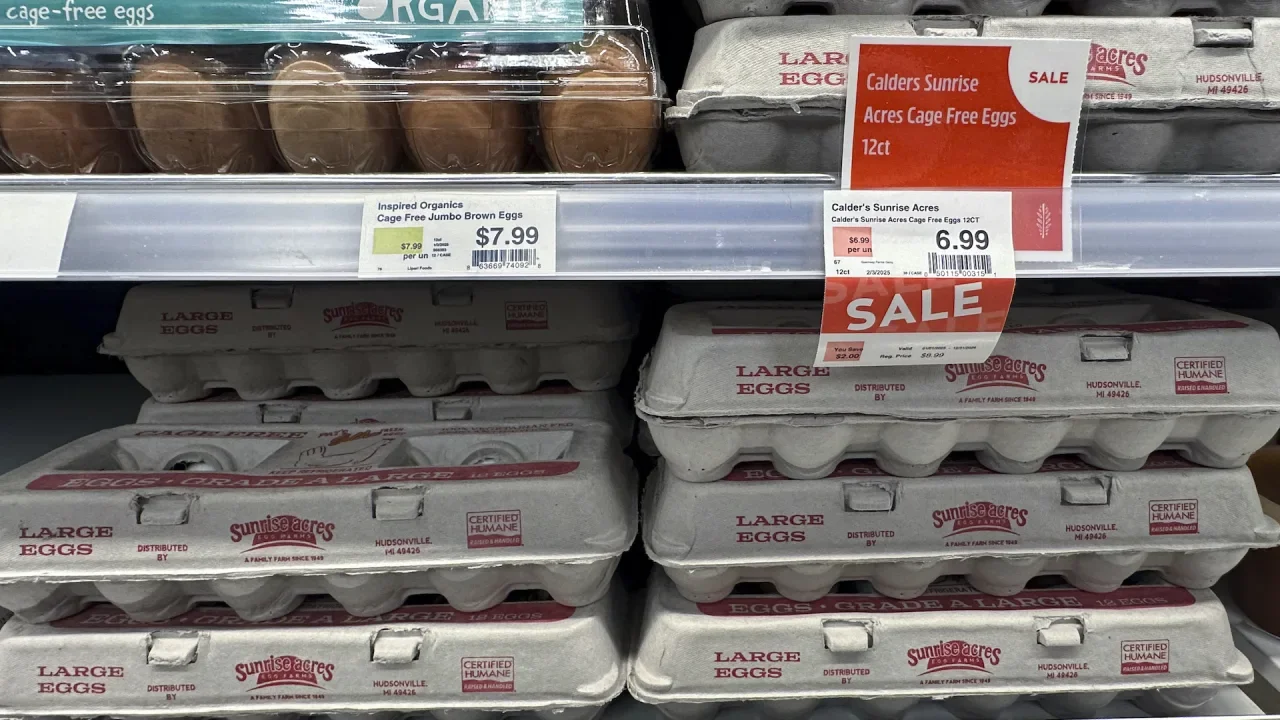
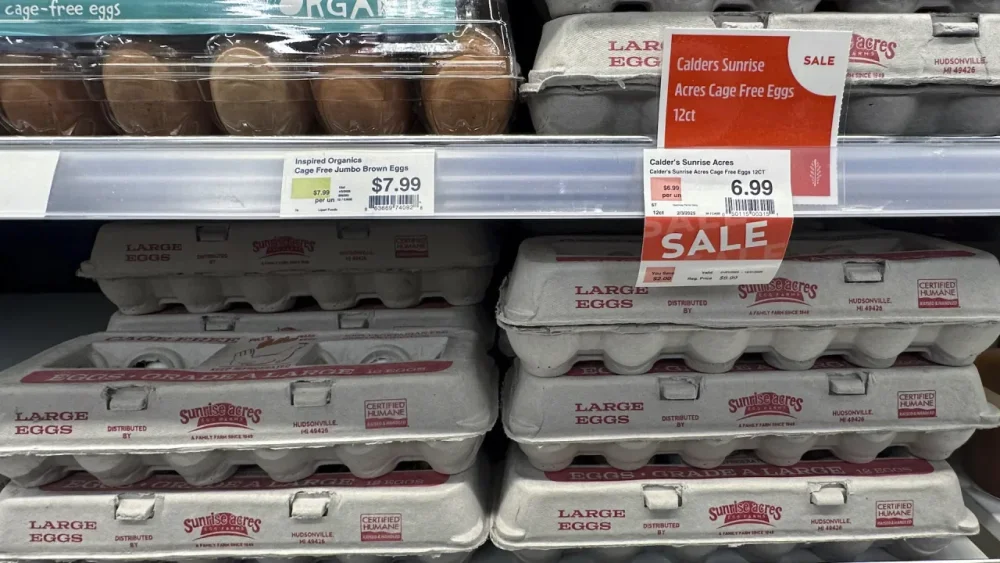
Trader Joe’s and other grocers are limiting the number of eggs customers can buy across the U.S., citing limited supply caused by the ongoing bird flu outbreak. Trader Joe’s is capping purchases to one carton per customer each day, the Monrovia, California-based chain confirmed. That limit applies to all of Trader Joe’s locations across the country. “We hope these limits will help to ensure that as many of our customers who need eggs are able to purchase them when they visit Trader Joe’s,” the company said in a statement sent to The Associated Press Tuesday. Photos of in-store notices about eggs purchase limits at retailers nationwide have swirled around online in recent weeks. In addition to Trader Joe’s, consumers and several local media outlets have also reported varying limits seen at stores like Costco, Whole Foods, Kroger and Aldi locations. When each limit went into effect is unclear, however. And not all are being implemented nationally. A spokesperson for Kroger, for example, confirmed that the supermarket giant doesn’t currently have “enterprise-wide limits” in place — but said some of regional divisions and store banners are asking customers to cap egg purchases to two dozen per trip. Walmart says it also hasn’t imposed national limits — expect for bulkier purchases of 60-count cartons, which have been capped to two per purchase, the Bentonville, Arkansas-based retail giant confirmed Tuesday. “Although supply is very tight, we’re working with suppliers to try and help meet customer demand, while striving to keep prices as low as possible,” Walmart said in an emailed statement. Costco, Whole Foods and Aldi did not immediately respond to requests for comment on Tuesday. But Costco confirmed to CNN that the chain was limiting its customers to three packages of eggs, which are typically sold in two-dozen or four-dozen cartons. Meanwhile, notices previously seen in some Target locations have warned about supplier shortages, but don’t indicate specific purchase limits. The AP reached out to the retailer for further information. Avian flu is forcing farmers to slaughter millions of chickens a month, pushing U.S. egg prices to more than double their cost in the summer of 2023. The average price per dozen nationwide hit $4.15 in December — and it appears there may be no relief in sight, with the Agriculture Department predicting prices will soar another 20% this year. Retailers could notably feel added pressures with Easter demand fast approaching. Beyond grocery stores limits, U.S. consumers are also facing more expensive eggs in some restaurants. Last week, Waffle House, for example, said it would be adding a 50-cent surcharge per egg on all of its menus. —Wyatte Grantham-Philips, Associated Press View the full article
-
In comments to reporters, Sen. Elizabeth Warren, D-Mass., underscored what she said was a conflict of interest between Elon Musk's DOGE's actions at the Consumer Financial Protection Bureau and his business interests with X Money. View the full article

-
Joseph Otting, who is leading Flagstar's turnaround, said potential buyers may be interested in acquiring the regional bank once it gets past certain challenges. View the full article

-
Neo Home Loans, the business at the center of the trade secrets suit, has always maintained its independence in its lender partnerships, its co-creator claims. View the full article

-
Google will soon fully transition to automatically generated publication pages next month, in March. Back in April 2024, Google told us Publisher Center will soon stop allowing you to add publications and now this is the next step. This means that all publication pages in Google News will be generated automatically by Google. What Google said. Google wrote: Following our announcement in April 2024 last year, Google News will fully transition to automatically generated publication pages in March. This change improves our existing publisher workflow and simplifies our current product experience. Moving forward, all publication pages in Google News will be generated automatically. As a result, publication pages that had been created by publishers manually will no longer appear to users in Google News. Publisher Center will discontinue customization features for publication pages in Google News, and the Google News tile will no longer appear in Publisher Center. What is not changing. Google said this has no impact on what content is eligible to appear in Google News or other Google News related surfaces. “Content from publishers that adheres to our content policies is automatically eligible for consideration in Google News and across news surfaces,” Google wrote. Google will still use its confusing automated methods for determining what is included and not included in Google News. Also, for Google News Showcase and Reader Revenue Manager, publishers will continue to submit logos through Publisher Center. What is changing. Here is what is changing: Custom sections that were previously created in Google Publisher Center will no longer appear on publisher Google News landing pages. Publishers will no longer be able to use Google Publisher Center to customer their logos and publication titles. Google News will use a site’s favicon for the publisher logo instead. Google News will use the site names for publication titles instead. Why we care. Google Publisher Center, which was once a really great place for news publishers to control and maintain their publications in Google News, is becoming less and less value to news publishers. Google wants to automate the process and claims, “This change improves our existing publisher workflow and simplifies our current product experience.” However, I know that news publishers continue to miss the old method for Google News and Publisher Center. View the full article
-
Lenders increased offerings in jumbo and non-QM segments as the industry focuses on customers with strong credit, the Mortgage Bankers Association said. View the full article
-
We may earn a commission from links on this page. Deal pricing and availability subject to change after time of publication. Presidents Day is not until Feb. 17, 2025, but as is often the case, retailers have started their sales well in advance. Best Buy has the best sale I've seen so far, with great deals on major appliances and tech products, including headphones, TVs, soundbars, washers, and more. Here are my favorite deals from the sale worth considering. Resolution: 4K, Size: 55 inches, Display: LED, Backlight: Edge Lit, Voice Assistant: Alexa. 55” Samsung The Frame (LS03D, 2024) $899.99 at Best Buy $1,499.99 Save $600.00 Get Deal Get Deal $899.99 at Best Buy $1,499.99 Save $600.00 Wireless Connectivity: Bluetooth, Maximum Frequency Response: 20 kilohertz, Peak Power: 550 Watts JBL Soundbar with Wireless Subwoofer 5.1-Channel $259.99 at Best Buy $599.99 Save $340.00 Get Deal Get Deal $259.99 at Best Buy $599.99 Save $340.00 Noise Cancelling (Active): No, Wireless Connectivity: Bluetooth, Water Resistant: Yes. Apple - AirPods 4 $99.99 at Best Buy $129.99 Save $30.00 Get Deal Get Deal $99.99 at Best Buy $129.99 Save $30.00 Capacity: 4.5 cubic feet, High-Efficiency: Yes, Washer Load Type: Front load, App Compatible: Yes. Samsung 4.5 Cu. Ft. Smart Front Load Washer $699.99 at Best Buy $1,034.99 Save $335.00 Get Deal Get Deal $699.99 at Best Buy $1,034.99 Save $335.00 Processor Model: i7, Graphics: Intel Iris Xe, RAM: 16 GB, Display Type: LED, Screen Size: 15.6 in. HP 15 (Intel Core i7 12th Gen, 512GB SSD, 16GB RAM, Touch Display, 2024 Model) $499.99 at Best Buy $799.99 Save $300.00 Get Deal Get Deal $499.99 at Best Buy $799.99 Save $300.00 Screen Size: 40 millimeters, Operating System: watchOS, App: Yes, Built-in Storage: 32 GB. Apple Watch SE 2nd Generation $169.00 at Best Buy $249.00 Save $80.00 Get Deal Get Deal $169.00 at Best Buy $249.00 Save $80.00 SEE 3 MORE A Samsung washer with a $335 discountIf you're looking for a washer, peep this Samsung 4.5 Cu. Ft. Smart front load washer for $699.99 (originally $1,034.99), the lowest price it has been over the last few months, according to price-tracking tools. If you need other major appliances and like free TVs (who doesn't?), Best Buy is offering a free 75-inch Samsung Crystal UHD TV when you buy two or more appliances and they total at least $2,499.99. Very doable if you need a stove or fridge. The Frame TV is $600 offSamsung's The Frame is perfect for those who don't want an ugly TV to be the centerpiece of their living room. The matte and anti-reflective screen truly makes it look like you have a piece of art hanging on your wall (I've been fooled by them before). You can get the 55-inch The Frame for $899.99 (originally $1,499.99), the lowest price it's been over the last few months. A JBL soundbar and subwoofer combo over 50% offBuck for buck, there's nothing that elevates a home theater setup like getting a soundbar and subwoofer combo. The JBL 5.1 Channel Soundbar and Subwoofer combo is $259.99 (originally $599.99), a killer deal and the cheapest it has been over the last few months. You can read more about the PCMag review here. A powerful HP laptop for less than $500An HP laptop with an i7 processor with 16GB of RAM, and 512GB of storage for $499.99 (originally $799.99) is impressive. Make sure you're OK having a 15.6-inch screen, which is definitely on the bigger end of the spectrum. The resolution isn't 4K (only Full HD) with an LED display, but if you care about performance over design and aesthetics, it's a good choice. Apple Watch and AirPods up to $80 offApple users will enjoy the budget Apple Watch SE 2nd Generation for $169 (originally $249) and the new AirPods 4 for $99.99 (originally $129.99). Both of these are at the lowest price they've been over the last few months. Finally, a note of caution: If you've been eyeing that Google Pixel 7 Pro deal at Best Buy, don't buy it. It's much cheaper over at Woot with more storage. You're welcome. View the full article
-
For a decade, Dr. Bronner’s has been a certified B Corp, a designation issued by the nonprofit B Lab that confirms a company has met certain environmental, social, and governance standards. But now the soap company is dropping its B Corp certification without plans to renew. Dr. Bronner’s says B Lab’s standards are weak, and that some multinational corporations are now using its seal—an encircled B, which became a symbol that businesses can be “a force for good”—as a form of greenwashing. Dr. Bronner’s mainly takes issue with B Lab’s increasing certifications of multinational corporations like Unilever Australia, Nespresso, and Nestle Health Science—and the fact that these businesses are not required to provide third-party certifications on the humans rights or environmental impacts of their supply chains. Instead, a business can still get a B Corp certification by scoring high in other assessment areas, like if it monitors waste or has a certain percentage of management from underrepresented populations. To Dr. Bronner’s, this means B Lab is failing to ensure that its certification “won’t be used to mislead consumers,” David and Michael Bronner, CEO and President of Dr. Bronner’s, said in a joint statement. “Sharing the same logo and messaging regarding being of ‘benefit’ to the world with large multinational CPG companies with a history of serious ecological and labor issues, and no comprehensive or credible eco-social certification of supply chains, is unacceptable to us.” A B Lab spokesperson says the nonprofit remains “deeply committed” to its mission, and that “catalyzing business as a force for good is a journey rather than a destination.” It has been working with its member businesses, advocacy groups, and independent experts to strengthen its standards, and in early 2025 will publish new requirements. These updated standards, the spokesperson says, “address today’s most urgent social and environmental challenges, providing clear, impactful requirements that companies must meet in order to deliver leadership and systemic change.” Dr. Bronner first became a certified B Corp in 2015, the same year it became a benefit corporation—a separate, unrelated legal designation that allows companies to pursue social good instead of simply profit. In the years since, it’s become one of the top-scoring B Corps. The company currently has an overall score of 206.7, while the B Corp website notes that the median score for “ordinary businesses” is 50.9. (It’s also reportedly the highest score ever awarded by the nonprofit). The minimum score to become a certified B Corp is 80 points over five areas: governance, workers, community, environment, and customers. B Corp’s logo has graced thousands of brands, including notably progressive ones like Patagonia and Ben & Jerry’s. Dr. Bronner’s says its B Corp fee is paid through September 2025, but that the company won’t renew after that point. It’s also begun removing the B Corp logo from branding and marketing materials. For the past few years, Dr. Bronner’s has been pushing B Lab to improve its standards—especially after larger companies joined the B Corp community. In 2022, the Nestlé-owned coffee company Nespresso announced that it received B Corp certification, setting off a wave of backlash from other B Corps. Just two months after that announcement, 30 certified B Corps—including Dr. Bronner’s—signed an open letter to B Lab protesting the certification, pointing to the history of child labor and wage theft on farms that grew Nespresso’s beans. B Lab’s standards have been questioned before, especially as the number of certification submissions has surged. And B Lab has taken action against some companies for behaviors that go against its ethos. In 2022, Scottish brewery BrewDog announced it was no longer a certified B Corp—though they said their status wasn’t revoked, just that they withdrew after B Lab “requested additional measures” that they couldn’t fulfill. (BrewDog received scrutiny after its certification from former employees who said the company’s culture compromised their health and safety.) In 2024, B Lab stripped Havas, a French public relations company, of its certification because of the agency’s relationship with Shell. But it’s mostly B Lab’s certification of multinational companies that has received the most criticism, especially from its own B Corp community. It’s these large companies that are using their B Corp certification as a marketing ploy, Dr. Bronner’s says in its statement. Dr. Bronner’s has been pushing B Lab to require companies, especially those multinational corporations, to certify all major supply chains. “The raw agricultural materials a company uses—whether meat, milk, eggs, palm oil, cocoa, coffee, cotton, and any others—are often produced in terrible ways in terms of social and environmental impact, “ the Bronners said. Requiring third party eco-social certification for major multinational supply chains would, they added, “protect against the B Corp Certification being misused by companies to hide these unsustainable and unjust corporate practices.” They acknowledged that some certified B Corps do already practice this, including Patagonia, another prominent example of a purpose-driven business. But, they said, “they are unfortunately a minority and this is not required by B Lab, most glaringly in the case of large multinational companies and their enormous supply chains.” View the full article

-
It turns out that getting your news from robots playing telephone with actual sources might not be the best idea. In a BBC study of OpenAI, Google Gemini, Microsoft Copilot, and Perplexity’s news prowess, the news organization found that “51% of all AI answers” about news topics had “significant issues of some form.” The study involved asking each bot to answer 100 questions about the news, using BBC sources when available, with their answers then being rated by “journalists who were relevant experts in the subject of the article.” A few examples of issues include Gemini suggesting that the UK’s NHS (National Health Service) does not recommend vaping as a method for quitting smoking (it does), as well as ChatGPT and Copilot saying politicians who had left office were actually still serving their terms. More concerning, Perplexity misrepresented a BBC story on Iran and Israel, attributing viewpoints to the author and his sources that the article does not share. Regarding its own articles specifically, the BBC says 19% of AI summaries introduced these kinds of factual errors, hallucinating false statements, numbers, and dates. Additionally, 13% of direct quotes were “either altered from the original source or not present in the article cited.” Inaccuracies were not fully distributed between the bots, although this might come as cold comfort given that none performed especially well either. “Microsoft's Copilot and Google's Gemini had more significant issues than OpenAI's ChatGPT and Perplexity,” the BBC says, but on the flip side, Perplexity and ChatGPT each still had issues with more than 40% of responses. In a blog, BBC CEO Deborah Turness had harsh words for the tested companies, saying that while AI offers “endless opportunities,” current implementations of it are “playing with fire.” "We live in troubled times,” Turness wrote. “How long will it be before an AI-distorted headline causes significant real world harm?" The study is not the first time the BBC has called out AI news summaries, as its prior reporting arguably convinced Apple to shut down its own AI news summaries just last month. Journalists have also previously butted heads with Perplexity over copyright concerns, with Wired accusing the bot of bypassing paywalls and the New York Times sending the company a cease-and-desist letter. News Corp, which owns the New York Post and The Wall Street Journals, went a step further, and is currently suing Perplexity. To conduct its tests, the BBC temporarily lifted restrictions preventing AI from accessing its sites, but has since reinstated them. Regardless of these blocks and Turness’ harsh words, however, the news organization is not against AI as a rule. “We want AI companies to hear our concerns and work constructively with us,” the BBC study states. “We want to understand how they will rectify the issues we have identified and discuss the right long-term approach to ensuring accuracy and trustworthiness in AI assistants. We are willing to work closely with them to do this.” View the full article
-
Construction projects are notoriously difficult. They involve multiple teams, suppliers and more when building a structure. Ensuring the schedule is realistic and the project can be delivered on time requires techniques such as CPM construction. What is CPM construction? It stands for the critical path method in construction. What is critical path construction? That’s what we’ll learn, including how to make a CPM construction schedule and why general contractors want to use it. We’ll even throw in a free critical path template. What Is the Critical Path Method (CPM) in Construction? As noted above, CPM construction stands for the critical path method. It’s a project management technique used to make a construction schedule, determine the longest sequence of dependent tasks and identify the shortest possible duration for completing the project. Using CPM in construction helps project managers prioritize tasks, allocate resources effectively and identify potential delays. This is crucial for keeping projects on schedule, optimizing resource allocation and minimizing delays or cost overruns. Two key elements of CPM construction are the critical path diagram and the critical path algorithm. They help visualize and calculate the project schedule. Let’s look at both of these elements to better understand them. Critical Path Diagram: This visually represents the project’s activities, dependencies and the sequence in which tasks must be completed. It helps identify the project’s critical path. Critical Path Algorithm: This is used to calculate the critical path and project schedule. It is typically performed using one of two methods: forward pass and backward pass. The algorithm helps determine the project’s duration, identify critical tasks and calculate float or slack time (the amount of time a specific task or activity can be delayed without negatively impacting the project’s schedule). We’ll show how to create a CPM construction schedule by hand, but who has time for that? When managing a construction project, general contractors and their teams need to be more efficient, which is why they use construction project management software. ProjectManager is award-winning construction project and portfolio management software with robust Gantt charts to create schedules and identify the critical path. Like any Gantt chart, ours can organize tasks and allocate resources and costs. But we go beyond that to link all four types of task dependencies to avoid delays and cost overruns and can set a baseline to track progress in real time. There’s also a filter to identify the critical path, without having to pick up pen and paper or engage in complex calculations. Get started with ProjectManager today for free. /wp-content/uploads/2024/04/critical-path-light-mode-gantt-construction-CTA.pngProjectManager has Gantt charts that filter for the critical path and more. Learn more What Is the Critical Path of a Construction Project? The critical path of a construction project is the series of tasks that determine the earliest possible completion date for the project. As noted above, it’s the longest sequence of dependent activities, meaning these tasks are directly connected. Any delay in one of them will result in a delay in the project’s overall completion. In simpler terms, the critical path represents the chain of activities that have no slack time. In other words, there is no room for delay in these tasks without pushing back the final project deadline. Knowing this is critical for project planning and monitoring. It helps project managers focus on the most important tasks that could impact the project’s success. By identifying the critical path, construction crews can allocate resources more effectively and complete tasks on schedule. How to Make a CPM Construction Schedule Creating a critical path method construction schedule involves several steps. Note, this is how one would make the CPM construction schedule with a pen and paper. The following is a detailed guide on how to do it manually. 1. Create a List of Tasks Start by creating a comprehensive list of all tasks involved in the project. These tasks should represent the activities that need to be completed during the construction process. It’s ideal to use a work breakdown structure (WBS). This hierarchical diagram captures all the deliverables in the project and the tasks or activities needed to complete them. 2. Estimate the Duration of Tasks For each task, estimate the duration. There are several ways to help make a more accurate forecast. For example, there’s historical data from past, similar projects. Also, seek out experts for their judgment. 3. Identify Task Dependencies At this point, the general contractor or whoever is building the construction schedule, has to determine the tasks that are dependent on other tasks. This means that one task can’t start or end until another dependent task has been started or completed. 4. Draw a Critical Path Diagram Now, use a piece of paper to visually represent the tasks and their dependencies in a network diagram. This is typically done using nodes, a circle to represent tasks, and arrows to show dependencies. 5. Calculate the Critical Path of the Project To calculate the critical path and determine the longest path through the network’s diagram, one must calculate the earliest start time (ES) and earliest finish time (EF) for each task, as well as the latest start time (LS) and latest finish time (LF). Any tasks with zero float (the difference between the earliest and latest times) are on the critical path. Critical Path Template Finding the critical path on paper is one way to help when scheduling a CPM construction project. However, there are more efficient ways. The best is the use of construction project management software, but for those who aren’t ready to upgrade, download this free critical path template for Excel. /wp-content/uploads/2024/05/critical-path-method-screenshot.png Use this free template during the planning phase of a CPM construction project. It helps determine a more realistic schedule that can be followed to deliver the project on time. Instead of creating a CPM construction schedule from scratch, this free template lays it all out, from ES, EF, LS, LF and slack. Benefits of Implementing CPM in Construction Projects Using CPM in construction projects offers several significant benefits. These advantages help improve project planning, execution and control. They help projects deliver on time and within budget. Here are a few key benefits. Prioritizes the Allocation of Resources for Critical Tasks One key benefit of CPM construction is that it helps project managers identify which tasks are on the critical path, meaning these tasks directly impact the project’s overall completion time. These tasks are the most important to complete on time and any delay in them will cause a delay in the entire project. The critical path does this by focusing on those critical tasks, optimizing resource use, helping with resource-leveling to balance resources across tasks, managing dependencies and minimizing delays. Facilitates Project Task Sequencing and Workflow Management One primary goal of CPM construction is to help project managers plan and coordinate all tasks involved in the construction process, ensuring they are completed in the right order with minimal delays. It assists in task sequencing by defining task dependencies, establishing the critical path and defining task duration. In terms of workflow management, CPM in construction visualizes task dependencies and scheduling to see the flow of tasks and their dependencies, which makes managing the workflow easier. It minimizes downtime by making sure when one task is done, the next can start. It also optimizes resources across tasks. Helps Accurately Track Project Progress CPM construction is also an excellent way to accurately track project progress. It helps project managers continuously monitor the status of tasks, identify potential bottlenecks and ensure the project stays on track. Monitoring critical tasks in real time is essential for regular updates, as well as tracking milestones and identifying delays and taking corrective action. It also tracks float and slack time and can forecast project completion, which keeps stakeholders informed. ProjectManager Is CPM Scheduling Software for Construction All of those advantages can be achieved. Project managers might reap the benefits by creating a CPM construction schedule on paper or even the free template we offer. However, the point of using the critical path in scheduling a construction project is to work more efficiently. This requires investing in construction project management software. But not all software is equal. ProjectManager is award-winning construction project and portfolio management software with powerful Gantt charts that can make construction schedules that identify the critical path. This forecasts projects more accurately and provides tools to track project progress in real time. Track Labor Costs With Timesheets and Workload Management Charts Monitoring progress is important, but there’s more to time management when running a construction project. If the budget gets out of hand, general contractors can kiss their profit margin goodbye. Therefore, costs are also a critical metric to track. Secure timesheets streamline payroll and offer a window into labor costs. To keep labor working as scheduled, our resource management tools balance workload and provide a real-time overview of resource allocation with color-coded workload charts. There’s even a team page that summarizes crew activities on a daily or weekly basis. It can be filtered to view priority, progress and more. /wp-content/uploads/2024/05/timesheet-lightmode-good-version-lots-of-tasks.png Monitor Project Progress With Real-Time Dashboards There are multiple ways to monitor costs and other key performance indicators (KPIs). Project managers can have a high-level view of the project by toggling to the real-time project or portfolio dashboards. These tools automatically collect live data and display them in easy-to-read graphs and charts that show time, cost, workload, health and more. It’s an instant status report. For a real status or portfolio report, as well as reports on variance, timesheets, workload and more, visit our reporting page. All reports are customizable, meaning they can be filtered to show details or provide a summary and share easily to update stakeholders. /wp-content/uploads/2022/07/Dashboard-light-mode.jpg Related CPM Construction Content Critical path construction is important. For those who want to delve into the critical path, there’s more to learn. Below are a handful of recent articles we’ve published on CPM with Gantt charts, how to use PERT with CPM and much more. Critical Path Method (CPM) in Project Management Displaying the Critical Path on a Gantt Chart Critical Path Template for Excel (Free Download) How to Make a CPM Schedule: CPM Scheduling Basics PERT and CPM: Their Differences and How to Use Them Together ProjectManager is online construction project and portfolio management software that connects teams whether they’re in the office or on the job site. They can share files, comment at the task level and stay updated with email and in-app notifications. Get started with ProjectManager today for free. The post Critical Path Method (CPM) in Construction: A Quick Guide appeared first on ProjectManager. View the full article
-
A viral TikTok video showing an empty book signing for an elderly author tugged at millions of hearts—until it was exposed as a marketing stunt. The book in question, Just Cuz, was reportedly written by Barbara Miller as a tribute to her late husband, Marv. “She wrote it as a way to deal with her grief,” the video’s voiceover explained. Posted last month, the video shows an empty bookstore with “Aunt Barb” setting up her books on a table to sign for customers who were nowhere in sight, followed by a dejected but hopeful “Aunt Barb”—and it quickly racked up more than 33 million views, sparking an outpouring of support. Hundreds of commenters pledged to buy the book and attend her next signing. But TikTok creator Sam Cahn was the first to burst Aunt Barb’s bubble. “The bad news is that this was fake,” he said in his own video. “The good news is the book is selling.” Cahn became suspicious when he noticed how new Miller’s social media presence was and that there was no announcement of a book signing across any of her pages. After calling the bookstore, he found out that someone had paid $150 to rent the space on a Monday, when the store was closed, and staged the entire scene. “This isn’t an attack on Barb,” he clarified. “I think she’s sweet. I love the success.” He did, however, think it was worth calling out the 100% staged video from justcuzthebook. “I just want you to know that this didn’t happen: Nobody didn’t show up to a book signing.” The emotional manipulation tactic is, unfortunately, tried and true. “‘My parent did this thing but nobody came to see’ is always a marketing gimmick . . . but it gets me every time,” one user commented underneath Cahn’s video. “Omg I cried my eyes out on the original post,” another wrote. On social media, the sob story has become a go-to strategy for struggling artists chasing virality. Pity appears to be a powerful currency, one that can turn engagement into attention and attention into sales. It’s now not uncommon to see people sharing stories of professional failure (like Aunt Barb), seemingly in the hopes of gaining support, promotion, and even purchases from total strangers online. And often, it works. This kind of emotional marketing taps into our most basic instincts: If we feel bad enough for someone, we’re more likely to hit “buy” (regardless of whether the work in question is even good). It’s a crass but effective tool, one that plays on our emotions for clicks. That turn into bucks. So, okay, maybe sometimes it pays to engage in a bit of emotional manipulation . . . just cuz. But let’s keep it to a minimum and maybe not use it with matters of great consequence, k? View the full article

-
Less than 1% of views of YouTube videos come from Google search clicks, according to a member of Google’s legal team. The quote. Here’s what Attorney John Schmidtlein said, according to Courthouse News Service: “Roughly less than 1% of views on YouTube come from people who click on [search] links,” Attorney John Schmidtlein of Williams & Connolly, who represented Google, said in court. Why we care. This is the first time this statistic has been revealed publicly, as far as I know. It might be 100% true. The majority of people likely discover and view videos directly on YouTube, either via YouTube search or YouTube’s recommendation algorithm. But. Google does seem to self-preference YouTube a lot. it’s hard to imagine that Google would show videos in prominent places in search results if the videos weren’t getting clicked on and watched. Google vs. Rumble. The statistic was revealed in federal court last week, ahead of what would be yet another antitrust trial brought against Google – this time by Rumble, a rival video platform. Rumble is arguing that “a rival cannot hope to compete” when Google gives preferential visibility to YouTube – especially on mobile, but especially when Google ranks YouTube videos over Rumble videos even when Rumble’s name appears in the search query. View the full article
-
We may earn a commission from links on this page. It's a potentially concerning sign of the times, but my morning is dictated by my apps. On an average day, I start off by putting in a mobile Dunkin' order, checking my sales on Poshmark and my rentals on Pickle, and playing the New York Times games before shifting over to the more serious work apps. As of last week, I added a new app to the morning mix: Finch, which is sort of like a to-do list mixed with a Tamagotchi. My ultimate goal with this whole morning app rotation is to resist the siren call of social media and, with it, an unproductive start to the day. This app, I reasoned, would help me be even more productive by giving me structured goals and rewards for my real-world responsibilities. Finch is a little bird who thrives on your successFinch is an app that gamifies your productivity. As you complete daily tasks and mark them done in the app, you nourish a little bird, who grows and thrives based on how much you give them. It's a very cute concept. The more you accomplish and interact with your bird, the more "adventures" they go on, skills they develop, and growth they achieve. Setting up my Finch. Credit: Lindsey Ellefson The app comes pre-loaded with tasks and—I won't lie—they were a little more basic than what I needed. They include things like "get out of bed" and "drink water." I can imagine being in a funk bad enough that these little reminders (and the in-game rewards that come with completing them) would be helpful, so I found that sweet, but not beneficial for me. I kept a few of them in the to-do list for some easy wins, but was able to add in the other things I want to accomplish daily, like "work out." You can tie the completion of certain tasks to in-game challenges, earning specific prizes for, say, washing your face seven days in a row. You can also set tasks to occur weekly, monthly, or at whatever interval makes sense for you. Finch offers motivation to be productive, without the shameThe interface is really simple to use and understand, which I appreciate. All I have to do is open the app and tap a checkmark next to a task to indicate I've done it. From there, I earn rewards, like in-game currency, new traits for my bird, and I can buy her little outfits or whatever. It's rudimentary, yes, but it's very relaxing and pleasant. I like this more than other productivity apps because it doesn't shame you in any way. It's encouraging, not stressful, and the game element is novel and cute enough to keep it interesting. (Not to brag, but my bird has very nearly grown from a baby into a toddler, all because I drank some water and washed my face.) There's also no major time commitment. If all I wanted to do was check off items on my list, that would be fine. There are rewards for doing other things—like following guided breathing or stretching exercises, listening to soundscapes, writing down daily reflections, and chronicling your overall emotional state—but no penalties for not doing them, so the game element here is only positive, not competitive or stressful. It's very clear that this is, above all, a self-care app, but it's entirely possible to input more concrete to-dos into your list. I spent my first week using it lightly, mostly relying on those early-stage goals the app came up with, but now that I've gotten the hang of it (and my bird needs some cute new outfits) I'm going to add more of my work and home-based tasks. This is going to be especially helpful as a cleaning checklist, since I've liked but not loved any of the other ones I've tried. The app is available on iOS and the Google Play store. It's free and you can totally just use the free version, but for $39.99 per year, you can access more exercises and shop items, plus customize the little icons that appear next to your to-dos. You get a seven-day free trial to see if you're into all that, but it's not especially necessary. The free version does everything you need. View the full article
-
Central bank chief vows to ‘focus on the data’ rather than get dragged into political debatesView the full article
-
This post was written by Alison Green and published on Ask a Manager. A reader writes: About four months ago I hired a new employee, Arnold. He interviewed very well, and the other interviewers on the panel agreed he was the best candidate. However now I am starting to see some serious gaps in ability. The biggest issue is that Arnold totally forgets entire conversations we’ve had. Some examples: • I told him in June that he needed to plan the agenda for the team meeting in late July. A few weeks into July, I asked how the agenda was coming, and he said that was the first time he heard about it. I pointed him to our shared notes document from our 1:1 conversation in June where we discussed it. • I assigned him a report to analyze sales trends over the course of the year. We spent 30 minutes talking about how the company decided to pivot from teapot sales to toaster sales, and this report should provide an update on the outcomes of that strategic sales shift. He turned in his report, which concluded that teapot sales declined and we should investigate why that happened. When I told him we talked about why that happened (a strategic decision by leadership), he said he doesn’t recall hearing that context. • I assigned Arnold a project to implement a new project management technology that my peer (Dane) had experience working with. I connected Arnold with Dane for him to learn best practices. A few weeks later, I hear from Dane that he is frustrated with Arnold. He says Arnold doesn’t follow his instructions, yet repeatedly asks the same questions, even when Dane has already provided the answer. I have seen screenshots of Slack messages of the same question answered multiple times by Dane in writing. Am I being gaslit by Arnold, or do you think something else is going on? I’ve even enlisted my manager to set up 1:1s to reinforce important topics with Arnold in case there’s something about my communication style that is not effective. But my manager has had the same experience with him forgetting key topics of conversation. I have other direct reports who are amazing and seem to be thriving, so I’m baffled and frustrated by how much time I am needing to invest in Arnold for mediocre results. I suspect we are on our way to a performance improvement plan for Arnold, but what exactly can he improve? His memory? How do I coach this kind of behavior? I doubt he’s gaslighting you and Dane — at least not in the original sense of the word, which means intentionally trying to make you think you’re losing your mind. (It comes from the 1944 movie Gaslight, in which a man tries to make his wife think her grip on reality is slipping away.) I suppose it’s possible that that Arnold is deliberately not bothering to retain anything in the hopes of sowing chaos, but it’s far, far, far more likely that he (a) has a terrible memory, (b) isn’t conscientious enough to take the normal steps people take to retain things, like paying attention in conversations and writing things down, and/or (c) is trying to cover up mistakes by pretending he doesn’t have any memory of previous instructions. Fortunately, no matter which of these options it is (or even if it’s some other explanation), the solution is the same: Sit down with Arnold, explain there is a pattern of him not retaining information and instructions, and say that he needs to figure out better systems for capturing info so it doesn’t keep happening. Explain that the issue is serious and it’s essential to get it fixed immediately. Ultimately Arnold needs to figure out what system will work for him, but you should feel free to suggest specific systems that you think would work in his context. The most obvious one is, of course, taking notes, but you might also suggest that he write up summaries of his takeaways after each discussion and email them to you and that he refer back to them every time he works on that project. You also might supplement that on your end by asking him to repeat back his takeaways at the end of each discussion with you. (That can be a pretty useful strategy even for someone who isn’t having trouble remembering details, because often it will bring to the surface some miscommunication that you didn’t realize had happened.) From there, treat “retaining and applying information” the same way you would any other key performance requirement — meaning that if it keeps happening, you should continue to flag the pattern and move fairly quickly to “since this is crucial to being able to do the job, let’s figure out if we can help you get where you need to be or not” (which in most workplaces will mean a formal improvement plan, but can also just be a couple of serious conversations as long as you’re extremely clear about the potential consequences if the problem continues and the timeline he has for fixing it). In other words, treat it the same way you would if he kept missing deadlines or turning in work with serious mistakes or anything else that goes to the heart of “not doing the job we need done.” Also, since someone is certain to mention it in the comments: it’s entirely possible that Arnold’s memory is a medical issue. We have no way of knowing whether that’s the case, but you’d proceed the same way regardless (flag the pattern, explain it’s a problem, and ask him to address it). Certainly if he mentions some sort of medical context (like “I’m on a new medication that is affecting my memory’) you’d give him more grace while he actively works on solutions with his doctor … but at the end of the day, no matter what the explanation is, he does need to implement systems to track important details for his job, and you can and should hold him to that regardless of what’s at the root of it. View the full article