ResidentialBusiness
Administrators
-
Joined
-
Last visited
Everything posted by ResidentialBusiness
-
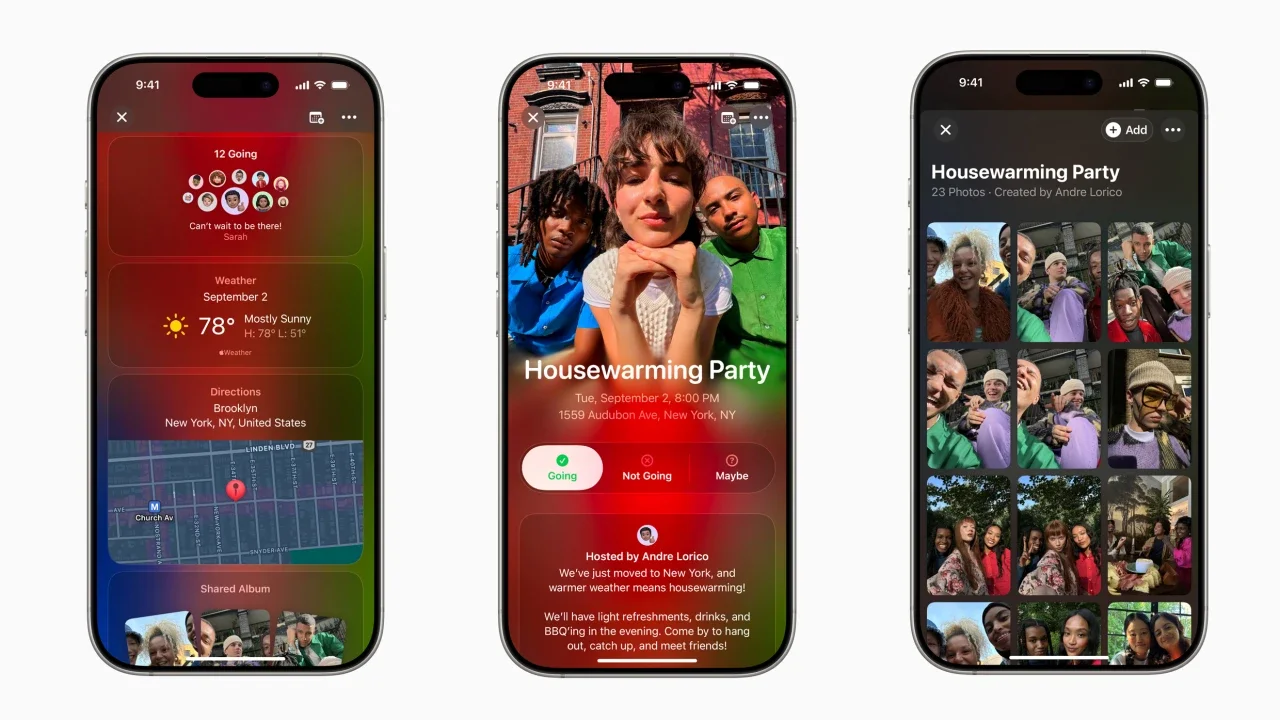
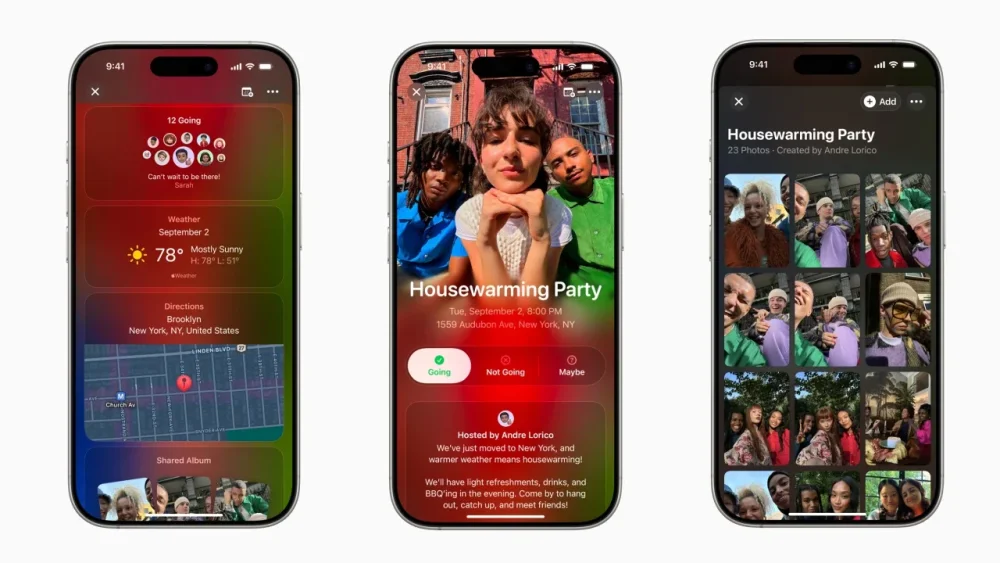
Apple rolled out its newest iPhone app called Invites, which lets iCloud+ subscribers create and share invitations to anyone, regardless of whether they have an Apple account or Apple device. Hosts have control over the events. They can choose what details they want included in the invite preview, like a home address and what image to use as a background. The event page also integrates the Maps and Weather apps so that attendees know how to get there and what the forecast will be. Within an event, attendees can manage RSVPs, contribute to Shared Albums dedicated to specific events, and collaborate on Apple Music playlists. Invites is available on the App Store starting today for iPhone models running iOS 18 or later, and it can also be accessed through the web. Apple’s iCloud+ service starts at 99 cents a month. The launch appears to put the app up against the extremely popular Partiful, a third party event planning event that made Google Play’s Best App of 2024. Partiful, popular among Gen Z, also has simple user interfaces and is free to use. Invites is also competing against other platforms, like Paperless Post and evite. “Apple Invites brings together capabilities our users already know and love across iPhone, iCloud, and Apple Music, making it easy to plan special events,” Apple’s Brent Chiu-Watson said in a press release. View the full article
-
In recent years, pay transparency has grown increasingly common as many states have passed legislation to help arm workers with more data as they enter into salary negotiations. Across 14 states and many more localities, employers are now required to either provide explicit salary ranges in job postings or share that information during the hiring process. That means some of the biggest employers in the country now have to disclose compensation data in states like California and New York. But according to a new report from compensation platform Beqom, despite all this progress, many workers still feel like pay transparency isn’t within reach and that they have little insight into how their compensation is being determined. Of the nearly 2,000 people surveyed, which included workers in both the U.S. and U.K., only 38% said they understood how their compensation was calculated. Over half of respondents also said they believed their performance reviews were subjective, which in turn could impact their compensation. When it comes to pay equity and transparency, many workers said that their employers did not adequately report data on pay disparities: Nearly 60% of U.S. employees said their company did not disclose information on gender-based pay gaps. More than half of workers also believed that their employer was not taking meaningful steps to address those pay gaps. Inflation also continues to be a major concern: Just 40% of respondents in the U.S. said their salaries were adjusted to match inflation in 2024. Wage stagnation was also a source of frustration for all respondents: Almost half of them said their pay had not increased in the last year and cited it as a top concern, alongside a lack of pay transparency. The findings on pay equity also underscore just how halting progress has been on combatting the gender pay gap. While pay transparency laws were intended to help mitigate pay gaps on the basis of race and gender, the data indicates that there has been limited movement on a broader scale: In fact, the gender pay gap actually increased in 2023 for the first time in 20 years, with women earning 83 cents on the dollar compared to men. While wages actually increased overall, men benefitted more than women did. Even as the gap has narrowed over the years, experts have also said it’s unlikely that the gap will disappear altogether due to a combination of factors, from fluctuations in the workforce to the motherhood penalty. But employers do have a role to play in helping women and other underrepresented employees reach parity in the workplace, from conducting pay equity audits to embracing pay transparency whether or not it’s mandated by law—and making sure they demonstrate a commitment to addressing those issues. View the full article

-
“We want grandparents who want to have pizza nights with us, attend baseball and basketball games, have ice cream dates, take bike rides, just genuinely have fun with us and our boys,” reads one post on the Facebook group Surrogate Grandparents USA, a place where grandparent-seeking families can connect with surrogate grandparents. “One lonely grandma here. I would love to share affection and attention with a nearby family,” posted another. Created in 2015 by 68-year-old retired paralegal Donna Skora, Surrogate Grandparents USA now has more than 11,800 members. The page is described as “a place where grandparents who are missing having grandchildren in their lives & families whose children are missing having grandparents in their lives, can find and connect with each other for a possible lifetime of love.” Here, prospective grandparents across the country offer their services for baking cookies and reading books, while parents can seek out the kind of support and comfort only grandparents can provide. In 2024, 21% of adults in the U.S. reported feeling lonely, with many respondents feeling disconnected from friends, family. While a surrogate family might not be the most conventional set up, at the end of the day, doesn’t every family have their unconventionalities? Access to the group is granted by invitation only. Skora reviews each membership request and the group’s moderators encourage people to properly vet prospective surrogates before connecting in real life. Short personal ads are then shared on the page, along with locations. If both the surrogate grandparent and the grandparent-seeking party hit it off, messages are exchanged before eventually progressing to meeting up IRL. The reasons people post on the group are as wide-ranging and complex as biological families. Some members of the group have lost loved ones, others have never had families of their own. The site has also expanded to serve foster children who have aged out of the system and are looking for chosen family, as well as helping grandparents who are raising grandchildren full time find respite care. It is also a safe haven for the estranged. Today, around 27% of American adults have cut off contact with a family member, which translates to 68 million people, one of the highest estrangement rates in the world. Skora’s experienced this first-hand, becoming estranged from her son and daughter-in-law when her grandson was born. “We were totally blacked out of their lives completely,” she told reporter Lexi Pandell in a recent interview with Wired. Deciding to launch Surrogate Grandparents USA the same year, Skora connected with a family nearby. As is the case with flesh-and-blood, it is not always happy families. In the end, Skora cut contact when the parents began requesting gifts and trips from her. This is now expressly forbidden in the group’s rules. For others, however, the arrangement works well and fills a family-shaped hole. “I’m not going to live my life being sad,” one surrogate grandmother told Wired. “There are people out there who want relationships with people like me.” View the full article

-
There's a lot going on right now. And it can sometimes feel a bit overwhelming. Especially when you're (maybe chronically) online. Most of your work life, and personal life, all happens online. And sometimes it's really easy to get carried away doomscrolling and forget that, sometimes, you need to touch some grass. Opera Air is a new browser, hoping, trying, to save you from all of that. Opera Air has built-in features that remind you to take a break every hour or so, and in that break time, suggests that you do some breath work, meditation, or some relaxation exercises. There's also a dedicated background music feature that plays customizable binaural beats to help increase your productivity, or to help calm you down a bit. A light and airy browser Credit: Khamosh Pathak Opera Air is a visually lightweight browser, with transparent UI elements and no interface bloat. It's built on Chromium, so all your extensions will work fine. Plus, default Opera features are still here, including Workspaces, a built-in ad-blocker, and a free VPN. For the main interface, there's just a simple floating pill shaped vertical bar, where you'll find the Boosts button for background music and the Take a Break button for quickly accessing meditations. Other than that, there are shortcuts for Opera's Aria AI assistant, WhatsApp, and Facebook Messenger, which you can all remove. Guided breath work and meditations for breaksOpera Air will remind you to take a break after 60 minutes of use, but you can customize this to instead happen every 45 minutes or every 180 minutes. The Take a Break feature can be accessed anytime from the vertical sidebar in the start page, or using the Command+K keyboard shortcut. Credit: Khamosh Pathak Opera has done an impressive job of curating its breath work exercises, neck stretches, and meditations. There's a male voice and a female voice, and there are multiple recordings of various length, so you can do either a quick three-minute breathing exercise, or a 13-minute body scan. I particularly liked the design of the breath work interface. It has an interactive bubble for breathing in and breathing out, and coveres the most frequently used breathing techniques like Box breathing, 4-7-8, and De-stress breathing. If you're interested, I've written about the benefits of breath work in our detailed guide. Credit: Khamosh Pathak The same goes for meditations too. You can do a quick mindfulness meditation, or something focused on inner calm. There's an option to do a body-scan as well. The Neck Exercise section uses your camera to check how you're moving, and guides you through the movement using a 3D model. Overall, Opera's built-in meditation and breathing exercises do a great job for beginners. Binaural beats are quite fun Credit: Khamosh Pathak What I found the most interesting in my time testing the Opera Air browser was the Boosts feature. It uses binaural beats, which are an auditory illusion that occurs when two slightly different frequencies are played in each ear. Of course, this works best with headphones. But the tracks that Opera Air has curated for focus, and relaxation are quite good and engaging. I'm using the Energized Focus one as I'm writing this. Here, too, you can start a 30-minute or 45-minute session, to serve as a reminder to take a break when the music is done. Built-in features have that extra edgeThere is no lack of breathing exercise tutorials on YouTube (I'm currently partial to the coherence breathing technique). And we have talked about the best meditation apps already. You'll also find extensions that help you focus by blocking out distractions, and again, YouTube is filled with audio tracks that help you focus. All these resources mean you can handle your meditation all on your own, but if you're like me, you won't always remember or prioritize it at the right moment. Having a browser that's purpose-built around this, that gives you a reminder every 45 minutes, has focus music integrated, and can help you breathe and practice mindfulness meditation, can be quite helpful. Even if the browser succeeds in making you check in with yourself once a day, it's still a lot better than the alternative, which is constant panic and no breaks. Not to mention, all these features are free in Opera Air, while meditation apps can sometimes cost $10/month. Opera Air is available in Early Access on Windows and Mac, so you can try it out for yourself in just a few short clicks. View the full article
-
This post was written by Alison Green and published on Ask a Manager. A reader writes: I’ve been applying to new jobs for about six months and finally got an offer for a job that I was genuinely excited about; it’s for a position that would be a step up in both title and responsibility, would let me work on interesting projects, and even would let me use a skill I went to school for but haven’t really been able to use professionally up until now. When they sent me the formal job offer, the salary was a bit more than I’m making now, but I’ve always heard that it’s smart to try to negotiate for more money because this is the easiest time to get it (versus after you’re already working someplace and trying to negotiate for a raise). I successfully negotiated slight salary bumps when accepting my last two positions, and I’ve seen other people do it as well, so it didn’t occur to me that this would be seen as anything other than normal and expected. So I asked if they had room to go up (I asked for about $8,000 more, figuring that they might offer me about half that, which I would have been happy with). There’s a pretty wide range for what jobs like this pay and my request wasn’t outside of what I’ve seen other jobs like this advertised for. I also didn’t say that I wouldn’t accept if they didn’t agree and I don’t think I was pushy about it. What I wrote in response to their emai was: “I’m very excited about the position and wonder if you would you consider increasing the salary to $X.” I would have accepted the job even if their answer was no, but I figured it wouldn’t hurt to see if they would go up. The next day they responded back to me and said they couldn’t match what I was requesting and so they were pulling the offer. I immediately replied and said that I would accept the job at the original salary they offered, but the HR person replied that they were going to offer the position to another candidate instead. I’m devastated by this. I wanted the job badly, and I would have taken it at the original number they named if they had simply told me that was as high as they could go. I don’t understand what I did wrong. You can read my answer to this letter at New York Magazine today. Head over there to read it. View the full article
-
Creating animated videos is a powerful way to engage your audience and communicate complex ideas. Fortunately, there are many animated video maker tools available to help you bring your ideas to life, regardless of your budget or skill level. In this article, we’ll take a look at the best animated video maker tools that can transform your content and help you create professional-quality videos quickly and easily. Let’s dive in! What is an Animated Video Maker? An animated video maker is indeed a software tool designed to help users create animated videos, but it does more than just that. This tool eliminates the need for extensive video editing skills by providing user-friendly functionalities that simplify the process. It offers users the flexibility to create a vast array of video content, ranging from marketing material to educational resources. The Best Animated Video Makers Animated videos are an excellent tool for engaging your audience and promoting your business. Whether you’re considering videography business ideas or seeking a fresh approach to brand promotion, here are 15 of the top animated video makers you can find online: No.Animated Video MakerKey FeaturesLimitationsPricing 1.CanvaUser-friendly interface, vast template library, easy customizationLimited advanced design featuresFree basic version, paid plans available 2.BiteableSimple interface, pre-made templates for explainers and social media videosLimited customization optionsFree trial, paid plans available 3.RenderforestEasy-to-use, used by major media, over 200 templatesLacks device visualization and customization optionsFree version with watermarks, various paid plans 4.AnimakerCloud-based, six video styles, Full and Lite modes, auto lip-syncRequires internet connection to useFree basic version, paid plans available 5.PowtoonCustomizable pre-made templates, royalty-free music, integration with top sites and appsMay be over complicated for beginnersFree basic version, paid plans available 6.Filmora2D and 3D animation, color correction, audio mixerMore complex than some other optionsFree version with watermarks, various paid plans 7.FlexClipAffordable, vast media library, designer-made templatesLimited character customization, lacks advanced animation toolsFree basic version, paid plans available 8.Animatron500K royalty-free clips, voiceover import, keyframingAdvanced features may be difficult for beginnersFree basic version, paid plans available 9.FlipAnimSimple UI, easy online animation creationLimited functionsFree to use 10.VyondUser-friendly, professional templates, customizable featuresHigher pricing than other solutions14 days free trial, paid plans available 11.MoovlyVariety of animation styles, 1 million royalty-free media assetsInterface may be clunkyFree full-featured version, paid plans available 12.WideoVersatile, user-friendly, pre-animated templatesOnly animations up to 30 seconds are freeFree basic version, paid plans available 13.DoodlyWhiteboard animation, custom drawing pathsLimited asset library, no support for voiceovers or lip-syncOne-time purchase available 14.VokiEnhances engagement through animated presentations and virtual discussion forumsMay lack comprehensive features for non-educational useBasic version is free, paid plans available 15.FlipsnackTurns PDFs into interactive online flipping booksLimited to flip book formatFree basic version, paid plans available Canva Canva is a top animated video maker, offering a user-friendly interface, a vast template library, and easy customization. What is Canva? It’s one of the top graphic design apps available online, and it also offers video and animation features. Its drag-and-drop and editing tools make the program easy to use for beginners and experts alike. Biteable Biteable offers a simple, easy-to-use interface and pre-made templates for explainers and social media videos. Users can adjust scenes and add personal touches for customized, professional-looking content. Renderforest Renderforest is a user-friendly animated video maker utilized by leading media organizations, offering a range of pricing plans and more than 200 templates. Nonetheless, Renderforest does not provide device visualization and customization features. Animaker Animaker is a cloud-based platform with six video styles for creating high-quality, studio-like animated videos. Animaker video infographics offer Full and Lite modes, auto lip-sync, extensive facial expressions, and integration with various platforms. Powtoon Powtoon is a web-based animated video maker that offers a vast collection of customizable templates and royalty-free music. The Powtoon for business feature seamlessly integrates with popular sites and applications, making it perfect for content creators, marketers, and corporate professionals. Filmora Filmora is an editing software that allows users to create 2D and 3D animation by adding keyframes to a white plane. It also provides color correction and an audio mixer to enhance video quality. Available for free on Windows and Mac. FlexClip FlexClip is an affordable online animated video maker that offers a vast asset library, designer-made templates, and video tools. However, users cannot fully customize characters and lack advanced animation tools. Animatron Animatron is an online program for creating explainer videos, animations, and HTML5 banners. It offers an asset library of 500K royalty-free clips, voiceover import, keyframing, and a library. While advanced features may be difficult, it saves money on expensive software. FlipAnim FlipAnim has a nice, simple UI and enables easy online animation creation. However, its functions are limited. Users can modify the pen tool, size, and color, add pages, and adjust speed. It also supports transparent animations and zooms in/out. Vyond Vyond is an intuitive animation software designed for producing high-quality animated videos. It provides a wide range of templates and customizable options, though its pricing is higher compared to other online alternatives. A 14-day free trial is available. Moovly Moovly is a cloud-based video animation maker that offers a variety of animation styles, including doodle and cartoon and has over 1 million royalty-free media assets. It offers a full-featured free version and integrates with Shutterstock. Its interface may be clunky at times. Wideo Wideo is a versatile, customizable, and user-friendly content creation platform, allowing for video animations and presentations with pre-animated templates. However, only animations up to 30 seconds are free, requiring a paid license for anything longer. Doodly Doodly is a desktop application designed for producing whiteboard animated videos featuring a distinctive drawing hand. It provides customizable drawing paths, automatic alignment of video duration, and the convenience of offline video creation. However, it has some limitations, including a restricted asset library and a lack of support for voiceovers or lip-syncing. Voki Voki is an educational tool for teachers and students that enhances engagement through animated presentations and virtual discussion forums. Basic Voki is free, while the paid version offers more functionality. Flipsnack Flipsnack is a free flip book maker that turns PDFs into interactive online flipping books. Customize with design and branding features, add interactive content and track performance. This is ideal for marketers, designers, and business owners. Our Methodology to Choose the Best Animated Video Makers Choosing the best animated video makers requires a focus on usability, quality, and versatility, especially for small business owners who may not have extensive experience in animation. Here’s a look at the criteria we used to select the top options, rated on a scale of one to ten, with ten being of utmost importance: Ease of Use (Importance Scale: 9/10) User-friendly interface. Quick learning curve, suitable for beginners. Cost-Effectiveness (Importance Scale: 8/10) Affordable pricing plans. Good value for money, considering the features offered. Quality and Versatility of Animation (Importance Scale: 10/10) High-quality animation outputs. A wide range of styles and templates to choose from. Customization Options (Importance Scale: 9/10) Ability to customize animations to fit brand identity. Flexibility in editing and modifying templates. Asset Library (Importance Scale: 7/10) Extensive library of images, icons, characters, and music. Export Options and Formats (Importance Scale: 8/10) Variety of export formats. High-resolution output options. Integration Capabilities (Importance Scale: 6/10) Ability to integrate with other tools for additional functionality. Support and Resources (Importance Scale: 7/10) Access to customer support. Availability of tutorials and learning resources. Review and Collaboration Features (Importance Scale: 5/10) Tools for team collaboration and feedback. Performance and Speed (Importance Scale: 6/10) Fast rendering times. Smooth performance, even with complex animations. Based on these criteria, we compiled the above selection of animated video makers that balance functionality, ease of use, and cost, making them suitable for small businesses aiming to create engaging content for marketing and brand storytelling. Animated Video Makers: Key Features Key features of animated video makers typically include: Pre-made templates: These are pre-designed video layouts that users can choose from. They significantly cut down the time spent designing a video from scratch and provide a professional look and feel to your content. Custom animations: This feature allows users to create unique animations that align with their branding or message. They can customize characters, backgrounds, and other elements in the video to make it truly their own. Audio editing tools: These tools allow users to add, edit, and mix soundtracks, sound effects, and voiceovers. Good audio can enhance the overall quality of the video and make it more engaging for viewers. Drag-and-drop interface: This intuitive design feature allows users to easily add, remove, or rearrange elements in their video. It’s as simple as clicking on an element, dragging it to the desired location, and dropping it into place. Text-to-speech functionality: Some animated video makers come with text-to-speech features, allowing users to convert written text into spoken words in their videos. Collaboration tools: These tools let teams work together on video projects. Users can share drafts, leave comments, and make edits in real-time. Integration with other platforms: Many animated video makers can integrate with social media platforms and content management systems, enabling users to directly upload their videos to these platforms. Export and sharing options: Users can export their videos in various formats and resolutions. They can also share their videos directly from the platform to their desired destination. Animated video makers are often used for video marketing materials, explainer videos, or other types of content that require visual storytelling to effectively communicate complex ideas. Why Are Animated Videos Useful for a Small Business? Animated videos can be a powerful tool for small businesses looking to improve their marketing and education efforts. Here are some ways animated videos can be useful for a small business: Animated Video Presentations An animation video is great for creating engaging video presentations that can help businesses explain complex topics in a visually appealing way. With animation, businesses can create a unique animated video that captures the essence of their brand and conveys their message effectively. Animation projects can also be cost-effective, as they require fewer resources than live-action videos. Educational Videos Animated educational videos are a great way for businesses to provide valuable information to their audience in an engaging and fun way. Businesses can create educational videos to teach their customers about their products or services, how to use them, or how they can benefit from them. This can help establish the business as an authority in the industry and build trust with its audience. These are also among the most popular types of YouTube videos. Create Explainer Videos Explainer videos are a great way to introduce a new product or service to potential customers. With animation, businesses can create engaging and informative videos that showcase their product or service in action. This can assist potential customers in grasping how the product or service functions and the advantages it offers them. Whiteboard Animations Whiteboard animations are a specific type of animated video that can be useful for businesses looking to create engaging educational content. With whiteboard animation, businesses can create a video that appears to be drawn on a whiteboard, providing a unique and visually appealing way to present information. This type of animation can be particularly effective for explaining complex concepts or processes in a step-by-step manner. Top Features to Look Out For in an Animated Video Maker When it comes to selecting an animated video creator, there are a few key features that can make all the difference. Here are the top features to look out for: Free Stock Videos and Video Clips An animated video maker with a library of free stock videos and clips can help you save both time and money. These resources enable you to incorporate additional visual elements into your video, enhancing its engagement and effectiveness. Animated Video Templates Using pre-made templates can help you create professional-looking videos quickly and easily. Look for an animated video creator that includes a range of templates that you can customize to match your brand and messaging. A Range of Animation Styles Various animation styles can effectively communicate different moods and messages in your videos. Choose an animated video maker that provides a variety of animation styles, ranging from 2D to 3D, so you can select the ideal style for your project. Ability to Use Your Own Images and Media Files An animated video creator that allows you to use your own images and media files can help you create a video that truly reflects your brand and messaging. This feature can also save you time and money, as you won’t need to create or purchase additional assets. Animated Characters Animated characters can help you create a more engaging and relatable video. Look for an animated video creator that includes a library of pre-made characters that you can customize to match your brand and messaging. Sound Effects Sound effects can help bring your video to life and create a more immersive experience for your audience. Look for an animated video creator that includes a library of sound effects that you can use to enhance your video. Voice Over Capabilities A good voiceover can add personality and emotion to your video. Look for an animated video creator that includes voiceover capabilities, allowing you to record your own voiceover or choose from a library of pre-made options. Integrating Animated Videos into Your Marketing Strategy Incorporating animated videos into your marketing strategy can significantly enhance your brand’s visibility, engagement, and conversion rates. Here are steps and tips to effectively integrate animated content into your marketing efforts: Understand Your Audience Before creating animated videos, it’s crucial to understand your target audience’s preferences, problems, and the platforms they frequent. This knowledge helps tailor your content to their interests and needs, ensuring your animated videos resonate and engage effectively. Define Your Goals Clarify what you aim to achieve with your animated videos. Goals can range from increasing brand awareness, explaining complex products or services, and launching new offerings to driving traffic to your website. Setting clear objectives guides the content, style, and call-to-action of your videos. Choose the Right Type of Animated Video Select a style of animated video that aligns with your message and audience. Explainer videos, animated infographics, and storytelling animations are popular formats that cater to different objectives, from educating to entertaining your viewers. Optimize for Each Platform Tailor your animated videos for the platforms they’ll be shared on. Social media videos should be short and captivating within the first few seconds, while videos for your website or presentations can be longer and more detailed. Consider platform-specific constraints like video length, aspect ratio, and autoplay features. Leverage SEO For videos hosted on your website or platforms like YouTube, use SEO best practices to increase visibility. Include relevant keywords in your video titles, descriptions, and tags. Transcripts and closed captions can also improve accessibility and SEO performance. Promote Across Channels Maximize the reach of your animated video by promoting it through all your marketing channels. Embed the videos on your website, share them on social media, incorporate them into email marketing campaigns, and use them in digital advertisements. Encourage your audience to share the videos to tap into their networks for even greater exposure. Measure Performance Track your animated video’s performance against your defined goals. Metrics like views, engagement rates, click-through rates, and conversion metrics can provide insights into what works and what doesn’t, helping you refine your future video marketing strategies. Future Trends in Animated Video Creation The landscape of animated video creation is continuously evolving, with new technologies and trends shaping the future of how we produce and consume animated content. Here are several trends and technological advancements to watch: Artificial Intelligence and Machine Learning AI and ML are revolutionizing animated video production by automating tasks such as character animation, lip-syncing, and even scriptwriting. These technologies allow for more personalized and dynamic content creation, making it easier and faster to produce animated videos tailored to specific audiences or scenarios. Virtual Reality (VR) and Augmented Reality (AR) VR and AR technologies are starting to influence animated video creation by providing immersive and interactive video experiences. Businesses can utilize VR to produce 360-degree animated explainer videos, while AR can integrate animations into the real world, boosting customer engagement through interactive marketing campaigns. Interactive Animated Videos Interactive videos that allow viewers to make choices, interact with the content, or explore different story paths are becoming more popular. This interactivity increases engagement by making viewers active participants in the narrative, providing a personalized video experience. Real-time Animation Advancements in real-time rendering technologies are making it possible to create and broadcast animated content in real time. This opens up opportunities for live animated broadcasts, events, or presentations, where audiences can interact with the content as it’s being created. Emphasis on Inclusivity and Diversity There’s a growing trend towards creating animated content that reflects a wider range of cultures, identities, and experiences. This inclusivity not only broadens the appeal of animated videos but also strengthens brand values by showcasing a commitment to diversity and representation. Eco-conscious Production As sustainability becomes a priority for businesses and audiences alike, the animation industry is exploring eco-friendly production techniques. Digital animation offers a more sustainable alternative to traditional film production, with software and hardware companies working to reduce the environmental impact of their products. Staying abreast of these trends and technologies is essential for marketers, animators, and businesses looking to leverage animated videos. By embracing innovation and anticipating future developments, creators can produce animated content that captivates, engages, and resonates with increasingly sophisticated audiences Is it Hard to Create Professional Animated Videos? Creating professional animated videos requires time, effort, and skill. However, with the right tools and resources, even beginners can create high-quality animated videos that effectively convey their message. What Equipment is Needed to Create Animated Videos? To create animated videos, you’ll need a computer or mobile device, animation software, and a graphics tablet or mouse. A good microphone and camera may also be useful for voiceovers and live-action elements. The Bottom Line With the right animated video maker tool, you can create engaging and professional-looking videos for your business or personal use. Whether you need to make explainer videos, training videos, or any other type of video project, these tools offer a variety of video styles to choose from. With a bit of creativity and practice, you can create impressive animated videos that effectively convey your message. Animated Video Maker FAQs How do I Make an Animated Video for Free? To make an animated video for free, you can use online tools such as Animaker, Powtoon, or Biteable. These free video editing platforms offer a range of templates, graphics, and animation tools to create professional-looking videos without any cost. How do YouTubers Make Animated Videos? YouTubers can make animated videos by using animation software or online tools that allow them to create, edit, and animate different elements. There are many YouTube niches where creators can then use their creativity to make engaging videos for their channels. What is the Easiest Tool to Make Animated Videos? Canva is one of the easiest tools to make animated videos as it offers a user-friendly interface with pre-made templates and drag-and-drop functionality. Users can easily customize their videos with graphics, text, and animations. Is it Important to Create Animated Content for Social Media? Yes, creating animated content for social media is important as it can grab the audience’s attention, increase engagement, and help brands stand out in a crowded feed. Animated content is also shareable, making it an effective way to reach a wider audience. Image: Envato Elements This article, "Animated Video Maker: Top Tools to Transform Content" was first published on Small Business Trends View the full article
-
Creating animated videos is a powerful way to engage your audience and communicate complex ideas. Fortunately, there are many animated video maker tools available to help you bring your ideas to life, regardless of your budget or skill level. In this article, we’ll take a look at the best animated video maker tools that can transform your content and help you create professional-quality videos quickly and easily. Let’s dive in! What is an Animated Video Maker? An animated video maker is indeed a software tool designed to help users create animated videos, but it does more than just that. This tool eliminates the need for extensive video editing skills by providing user-friendly functionalities that simplify the process. It offers users the flexibility to create a vast array of video content, ranging from marketing material to educational resources. The Best Animated Video Makers Animated videos are an excellent tool for engaging your audience and promoting your business. Whether you’re considering videography business ideas or seeking a fresh approach to brand promotion, here are 15 of the top animated video makers you can find online: No.Animated Video MakerKey FeaturesLimitationsPricing 1.CanvaUser-friendly interface, vast template library, easy customizationLimited advanced design featuresFree basic version, paid plans available 2.BiteableSimple interface, pre-made templates for explainers and social media videosLimited customization optionsFree trial, paid plans available 3.RenderforestEasy-to-use, used by major media, over 200 templatesLacks device visualization and customization optionsFree version with watermarks, various paid plans 4.AnimakerCloud-based, six video styles, Full and Lite modes, auto lip-syncRequires internet connection to useFree basic version, paid plans available 5.PowtoonCustomizable pre-made templates, royalty-free music, integration with top sites and appsMay be over complicated for beginnersFree basic version, paid plans available 6.Filmora2D and 3D animation, color correction, audio mixerMore complex than some other optionsFree version with watermarks, various paid plans 7.FlexClipAffordable, vast media library, designer-made templatesLimited character customization, lacks advanced animation toolsFree basic version, paid plans available 8.Animatron500K royalty-free clips, voiceover import, keyframingAdvanced features may be difficult for beginnersFree basic version, paid plans available 9.FlipAnimSimple UI, easy online animation creationLimited functionsFree to use 10.VyondUser-friendly, professional templates, customizable featuresHigher pricing than other solutions14 days free trial, paid plans available 11.MoovlyVariety of animation styles, 1 million royalty-free media assetsInterface may be clunkyFree full-featured version, paid plans available 12.WideoVersatile, user-friendly, pre-animated templatesOnly animations up to 30 seconds are freeFree basic version, paid plans available 13.DoodlyWhiteboard animation, custom drawing pathsLimited asset library, no support for voiceovers or lip-syncOne-time purchase available 14.VokiEnhances engagement through animated presentations and virtual discussion forumsMay lack comprehensive features for non-educational useBasic version is free, paid plans available 15.FlipsnackTurns PDFs into interactive online flipping booksLimited to flip book formatFree basic version, paid plans available Canva Canva is a top animated video maker, offering a user-friendly interface, a vast template library, and easy customization. What is Canva? It’s one of the top graphic design apps available online, and it also offers video and animation features. Its drag-and-drop and editing tools make the program easy to use for beginners and experts alike. Biteable Biteable offers a simple, easy-to-use interface and pre-made templates for explainers and social media videos. Users can adjust scenes and add personal touches for customized, professional-looking content. Renderforest Renderforest is a user-friendly animated video maker utilized by leading media organizations, offering a range of pricing plans and more than 200 templates. Nonetheless, Renderforest does not provide device visualization and customization features. Animaker Animaker is a cloud-based platform with six video styles for creating high-quality, studio-like animated videos. Animaker video infographics offer Full and Lite modes, auto lip-sync, extensive facial expressions, and integration with various platforms. Powtoon Powtoon is a web-based animated video maker that offers a vast collection of customizable templates and royalty-free music. The Powtoon for business feature seamlessly integrates with popular sites and applications, making it perfect for content creators, marketers, and corporate professionals. Filmora Filmora is an editing software that allows users to create 2D and 3D animation by adding keyframes to a white plane. It also provides color correction and an audio mixer to enhance video quality. Available for free on Windows and Mac. FlexClip FlexClip is an affordable online animated video maker that offers a vast asset library, designer-made templates, and video tools. However, users cannot fully customize characters and lack advanced animation tools. Animatron Animatron is an online program for creating explainer videos, animations, and HTML5 banners. It offers an asset library of 500K royalty-free clips, voiceover import, keyframing, and a library. While advanced features may be difficult, it saves money on expensive software. FlipAnim FlipAnim has a nice, simple UI and enables easy online animation creation. However, its functions are limited. Users can modify the pen tool, size, and color, add pages, and adjust speed. It also supports transparent animations and zooms in/out. Vyond Vyond is an intuitive animation software designed for producing high-quality animated videos. It provides a wide range of templates and customizable options, though its pricing is higher compared to other online alternatives. A 14-day free trial is available. Moovly Moovly is a cloud-based video animation maker that offers a variety of animation styles, including doodle and cartoon and has over 1 million royalty-free media assets. It offers a full-featured free version and integrates with Shutterstock. Its interface may be clunky at times. Wideo Wideo is a versatile, customizable, and user-friendly content creation platform, allowing for video animations and presentations with pre-animated templates. However, only animations up to 30 seconds are free, requiring a paid license for anything longer. Doodly Doodly is a desktop application designed for producing whiteboard animated videos featuring a distinctive drawing hand. It provides customizable drawing paths, automatic alignment of video duration, and the convenience of offline video creation. However, it has some limitations, including a restricted asset library and a lack of support for voiceovers or lip-syncing. Voki Voki is an educational tool for teachers and students that enhances engagement through animated presentations and virtual discussion forums. Basic Voki is free, while the paid version offers more functionality. Flipsnack Flipsnack is a free flip book maker that turns PDFs into interactive online flipping books. Customize with design and branding features, add interactive content and track performance. This is ideal for marketers, designers, and business owners. Our Methodology to Choose the Best Animated Video Makers Choosing the best animated video makers requires a focus on usability, quality, and versatility, especially for small business owners who may not have extensive experience in animation. Here’s a look at the criteria we used to select the top options, rated on a scale of one to ten, with ten being of utmost importance: Ease of Use (Importance Scale: 9/10) User-friendly interface. Quick learning curve, suitable for beginners. Cost-Effectiveness (Importance Scale: 8/10) Affordable pricing plans. Good value for money, considering the features offered. Quality and Versatility of Animation (Importance Scale: 10/10) High-quality animation outputs. A wide range of styles and templates to choose from. Customization Options (Importance Scale: 9/10) Ability to customize animations to fit brand identity. Flexibility in editing and modifying templates. Asset Library (Importance Scale: 7/10) Extensive library of images, icons, characters, and music. Export Options and Formats (Importance Scale: 8/10) Variety of export formats. High-resolution output options. Integration Capabilities (Importance Scale: 6/10) Ability to integrate with other tools for additional functionality. Support and Resources (Importance Scale: 7/10) Access to customer support. Availability of tutorials and learning resources. Review and Collaboration Features (Importance Scale: 5/10) Tools for team collaboration and feedback. Performance and Speed (Importance Scale: 6/10) Fast rendering times. Smooth performance, even with complex animations. Based on these criteria, we compiled the above selection of animated video makers that balance functionality, ease of use, and cost, making them suitable for small businesses aiming to create engaging content for marketing and brand storytelling. Animated Video Makers: Key Features Key features of animated video makers typically include: Pre-made templates: These are pre-designed video layouts that users can choose from. They significantly cut down the time spent designing a video from scratch and provide a professional look and feel to your content. Custom animations: This feature allows users to create unique animations that align with their branding or message. They can customize characters, backgrounds, and other elements in the video to make it truly their own. Audio editing tools: These tools allow users to add, edit, and mix soundtracks, sound effects, and voiceovers. Good audio can enhance the overall quality of the video and make it more engaging for viewers. Drag-and-drop interface: This intuitive design feature allows users to easily add, remove, or rearrange elements in their video. It’s as simple as clicking on an element, dragging it to the desired location, and dropping it into place. Text-to-speech functionality: Some animated video makers come with text-to-speech features, allowing users to convert written text into spoken words in their videos. Collaboration tools: These tools let teams work together on video projects. Users can share drafts, leave comments, and make edits in real-time. Integration with other platforms: Many animated video makers can integrate with social media platforms and content management systems, enabling users to directly upload their videos to these platforms. Export and sharing options: Users can export their videos in various formats and resolutions. They can also share their videos directly from the platform to their desired destination. Animated video makers are often used for video marketing materials, explainer videos, or other types of content that require visual storytelling to effectively communicate complex ideas. Why Are Animated Videos Useful for a Small Business? Animated videos can be a powerful tool for small businesses looking to improve their marketing and education efforts. Here are some ways animated videos can be useful for a small business: Animated Video Presentations An animation video is great for creating engaging video presentations that can help businesses explain complex topics in a visually appealing way. With animation, businesses can create a unique animated video that captures the essence of their brand and conveys their message effectively. Animation projects can also be cost-effective, as they require fewer resources than live-action videos. Educational Videos Animated educational videos are a great way for businesses to provide valuable information to their audience in an engaging and fun way. Businesses can create educational videos to teach their customers about their products or services, how to use them, or how they can benefit from them. This can help establish the business as an authority in the industry and build trust with its audience. These are also among the most popular types of YouTube videos. Create Explainer Videos Explainer videos are a great way to introduce a new product or service to potential customers. With animation, businesses can create engaging and informative videos that showcase their product or service in action. This can assist potential customers in grasping how the product or service functions and the advantages it offers them. Whiteboard Animations Whiteboard animations are a specific type of animated video that can be useful for businesses looking to create engaging educational content. With whiteboard animation, businesses can create a video that appears to be drawn on a whiteboard, providing a unique and visually appealing way to present information. This type of animation can be particularly effective for explaining complex concepts or processes in a step-by-step manner. Top Features to Look Out For in an Animated Video Maker When it comes to selecting an animated video creator, there are a few key features that can make all the difference. Here are the top features to look out for: Free Stock Videos and Video Clips An animated video maker with a library of free stock videos and clips can help you save both time and money. These resources enable you to incorporate additional visual elements into your video, enhancing its engagement and effectiveness. Animated Video Templates Using pre-made templates can help you create professional-looking videos quickly and easily. Look for an animated video creator that includes a range of templates that you can customize to match your brand and messaging. A Range of Animation Styles Various animation styles can effectively communicate different moods and messages in your videos. Choose an animated video maker that provides a variety of animation styles, ranging from 2D to 3D, so you can select the ideal style for your project. Ability to Use Your Own Images and Media Files An animated video creator that allows you to use your own images and media files can help you create a video that truly reflects your brand and messaging. This feature can also save you time and money, as you won’t need to create or purchase additional assets. Animated Characters Animated characters can help you create a more engaging and relatable video. Look for an animated video creator that includes a library of pre-made characters that you can customize to match your brand and messaging. Sound Effects Sound effects can help bring your video to life and create a more immersive experience for your audience. Look for an animated video creator that includes a library of sound effects that you can use to enhance your video. Voice Over Capabilities A good voiceover can add personality and emotion to your video. Look for an animated video creator that includes voiceover capabilities, allowing you to record your own voiceover or choose from a library of pre-made options. Integrating Animated Videos into Your Marketing Strategy Incorporating animated videos into your marketing strategy can significantly enhance your brand’s visibility, engagement, and conversion rates. Here are steps and tips to effectively integrate animated content into your marketing efforts: Understand Your Audience Before creating animated videos, it’s crucial to understand your target audience’s preferences, problems, and the platforms they frequent. This knowledge helps tailor your content to their interests and needs, ensuring your animated videos resonate and engage effectively. Define Your Goals Clarify what you aim to achieve with your animated videos. Goals can range from increasing brand awareness, explaining complex products or services, and launching new offerings to driving traffic to your website. Setting clear objectives guides the content, style, and call-to-action of your videos. Choose the Right Type of Animated Video Select a style of animated video that aligns with your message and audience. Explainer videos, animated infographics, and storytelling animations are popular formats that cater to different objectives, from educating to entertaining your viewers. Optimize for Each Platform Tailor your animated videos for the platforms they’ll be shared on. Social media videos should be short and captivating within the first few seconds, while videos for your website or presentations can be longer and more detailed. Consider platform-specific constraints like video length, aspect ratio, and autoplay features. Leverage SEO For videos hosted on your website or platforms like YouTube, use SEO best practices to increase visibility. Include relevant keywords in your video titles, descriptions, and tags. Transcripts and closed captions can also improve accessibility and SEO performance. Promote Across Channels Maximize the reach of your animated video by promoting it through all your marketing channels. Embed the videos on your website, share them on social media, incorporate them into email marketing campaigns, and use them in digital advertisements. Encourage your audience to share the videos to tap into their networks for even greater exposure. Measure Performance Track your animated video’s performance against your defined goals. Metrics like views, engagement rates, click-through rates, and conversion metrics can provide insights into what works and what doesn’t, helping you refine your future video marketing strategies. Future Trends in Animated Video Creation The landscape of animated video creation is continuously evolving, with new technologies and trends shaping the future of how we produce and consume animated content. Here are several trends and technological advancements to watch: Artificial Intelligence and Machine Learning AI and ML are revolutionizing animated video production by automating tasks such as character animation, lip-syncing, and even scriptwriting. These technologies allow for more personalized and dynamic content creation, making it easier and faster to produce animated videos tailored to specific audiences or scenarios. Virtual Reality (VR) and Augmented Reality (AR) VR and AR technologies are starting to influence animated video creation by providing immersive and interactive video experiences. Businesses can utilize VR to produce 360-degree animated explainer videos, while AR can integrate animations into the real world, boosting customer engagement through interactive marketing campaigns. Interactive Animated Videos Interactive videos that allow viewers to make choices, interact with the content, or explore different story paths are becoming more popular. This interactivity increases engagement by making viewers active participants in the narrative, providing a personalized video experience. Real-time Animation Advancements in real-time rendering technologies are making it possible to create and broadcast animated content in real time. This opens up opportunities for live animated broadcasts, events, or presentations, where audiences can interact with the content as it’s being created. Emphasis on Inclusivity and Diversity There’s a growing trend towards creating animated content that reflects a wider range of cultures, identities, and experiences. This inclusivity not only broadens the appeal of animated videos but also strengthens brand values by showcasing a commitment to diversity and representation. Eco-conscious Production As sustainability becomes a priority for businesses and audiences alike, the animation industry is exploring eco-friendly production techniques. Digital animation offers a more sustainable alternative to traditional film production, with software and hardware companies working to reduce the environmental impact of their products. Staying abreast of these trends and technologies is essential for marketers, animators, and businesses looking to leverage animated videos. By embracing innovation and anticipating future developments, creators can produce animated content that captivates, engages, and resonates with increasingly sophisticated audiences Is it Hard to Create Professional Animated Videos? Creating professional animated videos requires time, effort, and skill. However, with the right tools and resources, even beginners can create high-quality animated videos that effectively convey their message. What Equipment is Needed to Create Animated Videos? To create animated videos, you’ll need a computer or mobile device, animation software, and a graphics tablet or mouse. A good microphone and camera may also be useful for voiceovers and live-action elements. The Bottom Line With the right animated video maker tool, you can create engaging and professional-looking videos for your business or personal use. Whether you need to make explainer videos, training videos, or any other type of video project, these tools offer a variety of video styles to choose from. With a bit of creativity and practice, you can create impressive animated videos that effectively convey your message. Animated Video Maker FAQs How do I Make an Animated Video for Free? To make an animated video for free, you can use online tools such as Animaker, Powtoon, or Biteable. These free video editing platforms offer a range of templates, graphics, and animation tools to create professional-looking videos without any cost. How do YouTubers Make Animated Videos? YouTubers can make animated videos by using animation software or online tools that allow them to create, edit, and animate different elements. There are many YouTube niches where creators can then use their creativity to make engaging videos for their channels. What is the Easiest Tool to Make Animated Videos? Canva is one of the easiest tools to make animated videos as it offers a user-friendly interface with pre-made templates and drag-and-drop functionality. Users can easily customize their videos with graphics, text, and animations. Is it Important to Create Animated Content for Social Media? Yes, creating animated content for social media is important as it can grab the audience’s attention, increase engagement, and help brands stand out in a crowded feed. Animated content is also shareable, making it an effective way to reach a wider audience. Image: Envato Elements This article, "Animated Video Maker: Top Tools to Transform Content" was first published on Small Business Trends View the full article
-
Mark Rowan says his firm could create co-branded investment funds with traditional managersView the full article
-
Nominee known as a vaccine sceptic looks set to be confirmed as US health secretary View the full article
-
Before workflow automation became a must-have for any business, employees were spending hours on repetitive and time-sucking tasks. With the introduction of workplace automation software like Zapier, organizations are now able to automate processes like tracking leads or filling out data so their employees can focus on areas of the business that matter most. As a leader in the workflow automation space, Zapier helps organizations build custom solutions to automate countless tasks across any business. With the average Zapier user saving ten hours of work a week, it’s no wonder it’s one of the go-to automation platforms for so many companies. However, like all tools, Zapier might not be the perfect fit for you or your business. Whether you’re looking for something more cost-effective, or simply want to try out a range of other features, we’ve rounded up some of the best Zapier alternatives. Top Zapier alternatives Unito Workato Tray.io Make Dock Health IFTTT Outfunnel Easyflow Jitterbit SnapLogic Boomi Appy Pie Unito: best overall Zapier alternative You had to know this was coming. Unito is the best Zapier alternative for people who need workflows that go deeper than simple one-way automation. Zapier — and most of the tools on this list — stick to trigger-action automations to optimize your workflows. While that’s great in some situations, it can’t really cover all your needs. Say, for instance, you’re looking to connect your contact management platform (like HubSpot or Salesforce) with your project management tool of choice. With a tool like Zapier, you can easily create a contact in one tool whenever a task is created in your PM tool. But after that? Unless you’re willing to spend hours building countless automations, it’s almost impossible to build a lasting relationship between these work items. With Unito, commitment is the default. Here’s why Unito is one of the best Zapier alternatives on the market: True 2-way sync: Unito uses 2-way syncing to keep each work item automatically updated as you work on them. While Zapier is a robust automation platform, allowing you to automate complex business processes with the right mix of technical skills, it can’t imitate Unito’s true 2-way sync. That’s because Unito’s technology creates 2-way relationships between tools and work items, updating everything as you work. Setting this up takes significantly less time than trying to imitate it with Zapier. Less maintenance: Zapier and many of its alternatives allow you to handle complex automation tasks, but they require a lot of maintenance. When something goes wrong, someone will have to spend hours troubleshooting these issues. Since Unito flows are easier to set up, they don’t need constant maintenance. Automated field mappings: Field mappings allow users to get data from a specific place in one tool (e.g. a due date or a task description) to another tool. In most integration platforms, you have to map these manually, which takes up valuable time. Unito can map these for you automatically in most cases. Robust rules: Unito’s rules allow for complete control over which work items get synced between tools, where they’re synced to, and what happens when Unito creates new synced items. Deeper integrations: Many Zapier alternatives only support a few fields and simple actions. Unito’s flows are much deeper, supporting most fields in all tools it integrates, including custom fields. Biggest advantages Unito flows can be set up quickly and simply, standing apart from the majority of Zapier competitors. Most Unito users don’t have advanced technical skills and set up their first flow in 12 minutes or less. Unito integrations are enterprise-grade (including advanced security features) without the associated deployment times. Unito’s integrations support all sorts of tools, from project management platforms to spreadsheets and DevOps tools. Whether you’re bringing marketers and developers together or automating reporting, Unito has an integration for you. Want to see how Unito compares to Zapier and its alternatives? Here are our full breakdowns: Unito vs. Zapier Unito vs. Tray.io Unito vs. IFTTT Unito vs. Exalate Unito vs. Workato Biggest drawback With over 40 integrations, Unito doesn’t have as many as some other options on this list. The library is constantly growing, but you might not find the integration you need right away. Customer rating G2: 4.5/5 Capterra: 4.5/5 Workato: best Zapier alternative for huge workflows Workato is a no-code enterprise-level business process automation tool that’s best for larger businesses looking for a solution to more involved problems and workflows. It works using what it calls “Recipes” (similar to Zapier’s “Zaps”). These recipes are basically the instructions that rely on triggers and determine what actions take place. For example, you could create a recipe that states you automatically will receive a Slack message and notification when there’s a new lead in Salesforce (the trigger). You can build your own custom recipes, or choose from Workato’s existing community library. These community-built recipes are organized by the apps and programs being used, making it easy to find new ways to automate complex workflows you might not have considered before. Each recipe can have multiple steps, meaning you can create quite sophisticated automations. Used for everything from an HR team’s new employee onboarding to the IT help desk, Workato is a powerful tool for all areas of a business. Biggest drawbacks The biggest drawback to Workato is probably the price tag. As it is meant for enterprise-level companies, it isn’t exactly a cheap tool and doesn’t offer a free trial for those wanting to test it out. Pricing Workato does not list the cost of their plans on their site (either a business plan or a product plan), but encourages those interested to contact them for a customized quote. When searching online, a base price of $10,000 per year can be found, but your best bet is contacting them for a direct quote. Not sure if Workato’s the right Zapier alternative for you, but think it’s closer to what you need? Check out our full list of Workato alternatives. Customer rating G2: 4.7/5 Capterra: 4.7/5 Tray.io: best Zapier alternative for ease of use With a drag-and-drop editor, Tray.io offers an intuitive interface for task automation. Using the power of APIs (Tray.io is a low-code rather than no-code platform), it’s great for larger companies who want to make their cloud-based programs work better together. With Tray.io, you can integrate with the hundreds of prebuilt connectors available, as well any tool that has API documentation. Using a trigger-based approach with recipes (much like Workato’s), you can make your everyday workflow much more efficient. Trusted by companies such as Udemy, Cisco, and Eventbrite, Tray.io’s platform can be customized in hundreds of ways to find what works best for your unique business. Biggest drawbacks Some users have said it can be difficult to manage and share content across multiple accounts and credentials with Tray.io, which can cause issues with workflows. In addition to that, Tray.io can be tricky for non-developers or those with a limited understanding of automation and cloud-based systems to navigate. That said, many users praise Tray.io’s support team as exceptional. Tray.io is also not the most affordable program out there, so pricing can be restrictive for smaller businesses. Pricing Tray.io provides a free 14-day trial for anyone interested in getting to know their platform. Their paid plans start at $1,000 per month (billed annually) for their Professional Plan. Their Team Plan is $2,000 per month, which includes unlimited shared workspaces, single sign-on, and log streaming. Their premium Company Plan requires custom pricing and includes everything from the Professional and Team Plans, plus advanced on-premise connectivity, HIPAA compliance, and multi-region support. Customer rating G2: 4.5/5 Capterra: 4.9/5 Make: best Zapier alternative for technical options Make (formerly known as Integromat) is another great no-code option for automating repetitive tasks. The tool’s visual interface lets you build anything from simple automations for routine tasks to advanced workflows — all from one platform. Make offers a drag-and-drop interface that lets you not only create custom workflows with triggers and more than 1100 app integrations, but makes it easy to share across your organization. These shared workspaces can help break down the silos many workers find themselves in, while encouraging more collaboration between different departments. Users can choose from a wide variety of pre-made workflow templates, or create new ones of their own. Trusted by organizations such as Meta, Spotify, and Adidas, Make aims to go beyond linear and non-intuitive automation platforms. Plus, more technically-skilled users can use a number of APIs through HTTP and JSON to customize their Make workflows even further. Biggest drawbacks Using Make can be tricky for first-time users, sometimes requiring a longer onboarding timeline than other Zapier alternatives. That said, users have expressed that this slight learning curve is more than worth it once they’ve seen how much time they can save with the tool. Need to know a bit more before you make your choice? Check out our full comparison of Zapier. Pricing Make’s pricing starts at $0, making it a great free Zapier alternative for those just starting out. This free plan lets you design, build, and automate with Make’s visual drag-and-drop interface, plus 1,000 operations per month. In addition to their free plan, Make offers three paid plans ranging from $9 per month to $29 per month. Customer rating G2: 4.7/5 Capterra: 4.8/5 Dock Health: Best HIPAA-compliant Zapier alternative Dock Health is both a task management and automation platform, specifically designed with healthcare in mind. That’s because this field has some of the strictest security and compliance requirements of any industry, including HIPAA, which charges healthcare providers with protecting patient information. That means doctors, administrative staff, and clinics can’t just use any software tool out there. And since Zapier isn’t HIPAA-compliant, they need an alternative like Dock Health. The user-friendly interface means even less technical users can set up these automations. Biggest drawback As task-management software with built-in automation features — rather than a dedicated automation solution — Dock Health has fewer integrations than Zapier. It can also be a bit clunkier, and there’s definitely a learning curve, but it’s the best platform to ensure you stay compliant with the necessary legal requirements. Pricing Dock Health doesn’t have a free plan, but it does have a free trial. It offers two plans: Basic: This plan will set you back $20 per user, per month. It’ll give you access to Docker’s HIPAA-compliant platform, unlimited task lists, and calendar views. But it won’t give you access to automation. For that, you need the next plan up. Premium: For $30 per user per month, you’ll get access to Docker’s automation, custom task elements and lists. You can also get access to Docker’s API for a custom price, allowing you to customize the platform to your own specific needs. Customer rating G2: 3.8/5 Capterra: 4.3/5 IFTTT: best Zapier alternative for mobile Trusted by companies such as Google, Slack, and Github, IFTTT (short for If This Then That) is the (self-proclaimed) leading no-code automation tool for mobile devices. Not only can IFTTT help automate your digital life and work-related functions, but it’s compatible with your smart home devices such as the Amazon Alexa, GE Appliances, digital temperature controls, iRobot vacuums and mops, automatic blinds, and more. IFTTT uses what they call “Applets” (“automations that connect two or more services to create a new experience”) and triggers, actions, and queries (the building blocks of the Applets). Every service, device, or app available through IFTTT has their own list of possible triggers and actions, all of which you can see when browsing the Explore or Services pages. For example, if you were interested in seeing how you could automate your Gmail experience, you’d find the Gmail integration page. Here, you could see the available services and other apps you can connect your Gmail to, and see available Applets (such as “Send an email to Gmail with the details when you add a new contact”). If there’s a service you want to automate but you can’t find it yet in IFTTT’s library, you can use a Webhook. This lets you use simple web requests to integrate with apps and services not on IFTTT so you can truly customize your automations. Biggest drawbacks While IFTTT offers a wider range of apps you can connect and integrate, Zapier does offer more enterprise and business apps. Something else to keep in mind is that although IFTTT has high security protocols and standards, not all of the apps and services you connect to will always have the same privacy policies and terms. Pricing IFTTT offers a free plan that includes five Applets and free mobile app access, making it a solid free Zapier alternative for startups or solo business owners looking to automate some of their processes. IFTTT’s paid plans range from $6.40 CAD per month to $13 CAD per month, making it a super affordable option even for those seeking more complex functionalities. Want a deeper comparison before making your choice? Check out our full breakdown here. Customer rating G2: 4.6/5 Capterra: 4.6/5 Outfunnel: best Zapier alternative for sales and marketing Outfunnel is a Zapier alternative specifically made for sales and marketing teams. This tool connects and fully syncs with Pipedrive, Copper, Airtable, Salesforce, and HubSpot CRM to help you automate and supercharge your marketing and sales workflows. In addition to these full integrations, Outfunnel can connect your CRM with marketing tools like Mailchimp, ActiveCampaign, HubSpot Marketing Hub, Facebook Lead Ads, and Wix Forms. If there’s an integration you’d like but don’t see on their website, Outfunnel takes requests and confirms they’re working on a number of new integrations for the future. With Outfunnel, you can record all marketing data and engagements (email opens, unsubscribes, clicks, etc.), calculate lead scores, analyze the behaviors of your leads with a web tracking feature, and send automated email drip campaigns in accordance with your CRM. Biggest drawbacks Outfunnel definitely has fewer integration options when compared with other Zapier alternatives. That said, the integrations they do offer are seamless and comprehensive, meaning that if you use one of their five fully-supported integrations, chances are you’ll find Outfunnel to be extremely beneficial to your business. If you’re needing something more complex, Outfunnel might not be the tool for you. Pricing One of the best things about Outfunnel is their pricing. After a 14-day trial, you can choose from plans ranging in price from $6 per month to $49 a month. If you’re looking for an enterprise-level plan, you’ll need to get in touch with their team for custom pricing. Customer rating G2: 4.4/5 Capterra: 4.9/5 Easyflow: best Zapier alternative for efficiency Easyflow is an automation and information visualization tool that lets you connect apps, analyze data, and create smart automated workflows — all from one screen. Easyflow works using what they call “connectors,” which are the apps and tools used in your workflow. They offer more than 1000 pre-built connectors (Asana, Google Suite, Mailchimp, HubSpot, Youtube, to name a few) so you can easily sync the tools you use every day, without any coding or technical experience. While other Zapier alternatives have limits to the number of steps your automations can have, Easyflow lets you combine any number of connectors to create advanced workflows. These workflows can include loops, variables, and functions (like what you’d use in Excel) for a truly custom process. In addition to these processes, Easyflow gives you the tools you need to actually analyze and monitor your automated workflows so you can continually optimize for maximum efficiency. Biggest drawbacks Users share that there is definitely a bit of a learning curve when first getting acquainted with Easyflow, but that their support team went above and beyond to help and clear up any questions immediately. Pricing Easyflow offers plans ranging in price from $9 per month to $459 per month. They also offer an enterprise-level offering that requires custom pricing. Customer rating G2: 4.5/5 Capterra: 4.8/5 Jitterbit Jitterbit is an integration and workflow automation platform aimed at enterprise-sized businesses. If you’ve got an IT team — or can spring for third-party assistance — this might be the Zapier alternative for you. With Jitterbit, you have access to four main products, all with enterprise-level automation: Jitterbit iPaaS: Get a single platform that lets you build integrations with a simple drag-and-drop interface. API Manager: A single place to manage the APIs for all tools you need to integrate throughout your workflows. App Builder: Allow your IT teams to build apps that serve specific business functions organization-wide. EDI: For organizations that manage a significant amount of transactions, this platform can automate and standardize them. Biggest drawbacks Compared to Zapier, Jitterbit is a much more difficult platform to deploy. It’s made for enterprise-sized organizations (and budgets), meaning you likely won’t be building integrations with it yourself unless you have a technical background. Pricing Since Jitterbit is an enterprise solution, you won’t find pricing information on their website. You’ll need to get a quote from their sales team. Customer rating G2: 4.6/5 Capterra: 4.4/5 SnapLogic SnapLogic bills itself as a generative integration solution, and it’s among Zapier alternatives aimed at enterprise-sized organizations. Generative integration uses Generative AI and large language models to automate and optimize integration pipelines, streamlining the creation and deployment of new integrations. If you’ve ever wanted to combine the next-great-leap-forward aspect of AI with your integration solution, then SnapLogic might be the right Zapier alternative for you. Biggest drawbacks Some users have noted that SnapLogic has a limited number of integrations available when compared with some other Zapier alternatives. Pricing You won’t find any pricing information on SnapLogic’s website. You’ll have to reach out to their sales team for a quote. Customer rating G2: 4.3/5 Capterra: 4.5/5 Boomi While the workflow automation market is crowded with newer companies, Boomi is one of the long-standing heavy hitters. With nearly two decades in the industry, it’s no wonder Gartner recently named it a leader in the iPaaS market. As a Zapier alternative, Boomi offers some of the most advanced integrations on the market for all sorts of tools, from Salesforce to ServiceNow and Amazon Web Services to NetSuite. Boomi is used by organizations like LinkedIn, American Express, and Dropbox. Biggest drawbacks While Boomi does over a drag-and-drop interface for less technical users, it has serious limitations and custom scripting is usually required to integrate tools. Pricing You can choose between four pricing options for Boomi: Professional, Pro Plus, Enterprise, and Enterprise Plus. You won’t get an exact price for these plans unless you get in touch with their sales team. Boomi does offer a free trial, however. Customer rating G2: 4.4/5 Capterra: 4.4/5 Appy Pie Part app-builder, part integration platform, Appy Pie is a user-friendly alternative to Zapier with no-code, drag-and-drop builders. This tool lets you build apps, launch websites, design creative assets, and automate tasks across tools. Appy Pie uses the same trigger-and-action structure as Zapier, making it a simple alternative to switch to if you have any experience with this sort of methodology. The platform offers over 300 integrations with tools like Jira, ServiceNow, Zendesk, Freshdesk, WhatsApp, and HubSpot. Biggest drawbacks Some users have noted that features that are pretty standard with other Zapier alternatives, like backups and activity tracking, are missing from Appy Pie. Pricing Appy Pie offers four pricing plans: Standard: Supports 15,000 tasks a month and 40 AI agents, with automations running every five minutes. Professional: Supports 50,000 tasks a month, unlimited AI agents, and two-minute automations. Business: Supports 150,000 tasks a month, unlimited AI agents, and one-minute automations. Enterprise: A custom plan with customized integration, inventory management, and more. Customer rating G2: 4.7/5 Capterra: 4.6/5 Don’t get Zapped With the surge of Zapier alternatives and workflow automation tools out there, it can be tough knowing what the best option is for your business. By providing a range of tools for different budgets and business needs, we hope we’ve helped narrow down your choices and made things a little bit clearer. View the full article
-
Four best practices. By Frank Stitely The Relentless CPA Go PRO for members-only access to more Frank Stitely. View the full article
-
Four best practices. By Frank Stitely The Relentless CPA Go PRO for members-only access to more Frank Stitely. View the full article
-
Well, here we go again. With TikTok’s future in the United States still uncertain, parts of Congress are already moving toward banning DeepSeek, a Chinese ChatGPT competitor that quickly usurped ChatGPT on the App Store last week. A new bill introduced by Republican Senator Josh Hawley of Missouri would “prohibit United States persons from advancing artificial intelligence capabilities within the People’s Republic of China.” In other words, it would effectively ban DeepSeek, despite not mentioning the AI chatbot by name. Under the bill, anyone convicted of “the import from or export to China of artificial intelligence technology” could be sentenced with up to 20 years in prison, plus an up-to-$1 million fine for individuals and an up-to-$10 million fine for businesses. Are you likely to be punished for using DeepSeek as a private citizen? Well, the bill does leave room open for it, so practice caution if it does become law. More realistically, much like with piracy laws, this is probably aimed at distributors and developers, so if it goes through, expect to see DeepSeek and other Chinese AI leave the App Store. The bill is also likely so broadly worded as a result of DeepSeek’s open-source nature, as it’s currently easy for developers to simply download its models and incorporate them into their apps. The legislation would seek to curb such a practice, although it would also put future international collaboration, even the reading of Chinese research papers about AI, in jeopardy. In a statement, Senator Hawley said “Every dollar and gig of data that flows into Chinese AI are dollars and data that will ultimately be used against the United States.” Senator Hawley isn’t the first to express concern about DeepSeek. The AI has already been banned for use in the Navy due to “potential security and ethical concerns,” as well as on Texan government devices. OpenAI also toldTthe Financial Times that it has evidence that DeepSeek might have been built on the back of OpenAI models, which while a common practice in AI development, goes against OpenAI’s terms of service once the resulting models are distributed. There’s also already been a high profile data leak, and DeepSeek’s terms of use involve agreeing to having your keystrokes collected. At the same time, the strict language of the law does have experts worried about the future of AI development and oversight, as it could kneecap collaboration and AI transparency. The Electronic Frontier Foundation’s Director of AI and Access-to-Knowledge Legal Projects, Kit Walsh, told 404 Media that “The bill threatens the development and publishing of AI advancements in the United States…the government has argued that merely publishing information on the internet counts as an export, and interpreting this law in such a way would further solidify the dominance of proprietary AI over open or academic research.” In other words, American tech companies would be incentivized to be even more insular about how their AI works, which could affect far more than Chinese competitors. View the full article
-
You should be a team. But what kind are you? By Martin Bissett Passport to Partnership Go PRO for members-only access to more Martin Bissett. View the full article
-
You should be a team. But what kind are you? By Martin Bissett Passport to Partnership Go PRO for members-only access to more Martin Bissett. View the full article
-
Great optimization tools can identify missing topics and keywords, suggest and refine headers and titles, generate meta-data, and show tons of useful information about your competitors’ articles. If you aren’t using an optimization tool, you probably should. I work at…Read more ›View the full article
-
Screenshots are a core pillar of the smartphone experience. When you come across something you simply must share with friends, family, or followers, taking a screenshot is often the fastest way to do so. But if you recently bought a brand-new Android phone, and especially if you’re coming from an iPhone, you might have no idea how to take screenshots. Unlike iPhones, which are all made by Apple, Android phones come from many different manufacturers. You might be trying to figure out how to take a screenshot on your Google Pixel, Samsung Galaxy, OnePlus, Nokia, or Motorola. All are running Android, but each deals with Android in its own unique way. Luckily, screenshot shortcuts have largely been standardized, and the tips below should work on most moderns Android devices. If these general tips don’t help, or you want to dive deeper, look up the manual for your specific phone to see all the ways you can take screenshots on it. How to take a general screenshot on AndroidFirst, try this: Press and release the Power and Volume down buttons at the same time. If it worked, you’ll see an onscreen flash, and your screenshot minimized as a thumbnail. This gesture should work on most modern Android devices, including those from Google, Samsung, and OnePlus. It’s the evolution of the traditional shortcut where you’d hold down the Home button (remember that?) and the Volume down button. Credit: Jake Peterson The exact timing of these button presses may vary per phone, so experiment with your device. The Pixel I have available, for example, takes a screenshot when you quickly press and release these buttons together, but you may need to hold the buttons together for a second or more for it to work. Another shortcut that works on some versions of Android is to hold down the Power button until you see expanded options appear. If your phone and Android version supports it, you should see a “Screenshot” option here. How to take a screenshot with voice controlIf you’re a voice control person, your phone’s digital assistant will likely take a screenshot if you ask it to. For example, say “Hey Google, take a screenshot,” and the assistant will follow suit. You can also pull up your assistant with a keypress—like long-pressing your Power button—and ask that way. How to take a gesture screenshot on AndroidDepending on your phone, you may have the option to take a screenshot using a gesture. On Pixel, for example, this option appears when you pull up from the bottom of the display as if you were switching apps. When you do, you should see a Screenshot option appear on the bottom of the screen for the app you’re hovering over. You can also do this with three button controllers by pressing the Overview (square) button. You can also use a feature called Quick Tap to take screenshots. Quick Tap assigns a function on your phone to activate after you double-tap the back of your device. To set this up, head to Settings > System > Gestures > Quick Tap, then enable the toggle next to Use Quick Tap. Take screenshot should be the default option, but if not, select it. Going forward, you can use the index finger on your hand that's holding the phone to quickly double-tap the back of your device. When done correctly, this will trigger a screenshot. On Galaxy phones, you can head to Settings > Advanced features > Motions and gestures, then enable Palm swipe to capture. Going forward, you can swipe your palm across the display to take a screenshot. How to take a screenshot with your Galaxy's S PenIf you have a Galaxy phone with an S Pen, you can use your stylus to take a screenshot. To do so, take out the S Pen, tap the Air command menu icon, and then tap Screen write to take a screenshot. Note: With the Galaxy S25 Ultra, Samsung removed Bluetooth functionality with the S Pen, which means Air command features (like screenshots) won't work. How to take a scrolling screenshot on AndroidA scrolling screenshot (or full page screenshot) takes a picture of the entire page you’re visiting, rather than just the portion that appears onscreen. They’re great for saving longer pages, like news articles. If you know how to take a screenshot, you almost know how to take a scrolling screenshot. Start by taking a screenshot as you normally would, then choose the scrolling capture button that appears next to the screenshot thumbnail. On Pixel, that's Capture more; on Galaxy, it's Scroll Capture, and on OnePlus, it's Scroll. Here's how things continue, at least on Pixel: Android will open a new window, showing the entire page in one long image. The original screenshot appears in a crop window: You can resize it to take a screenshot of any section of the page, or, most usefully, drag the bottom of the crop window all the way down to take a screenshot of the full page. Other smartphones may handle the particulars a bit differently, but the general function should be the same. Credit: Jake Peterson How to screen record on AndroidIf you're looking to record your phone's display, none of the above will help. Instead, you'll want to use Quick Settings. To start, swipe down from the top of the screen, then tap Screen record. Choose whether you want to record A single app or your Entire screen, then choose whether to record audio (and its source). If you've chosen Entire screen, choose whether to Show touches on screen or not (helpful if using the screen recording to show someone how to do something). Then, hit Start recording. Your phone will count down from three, then start recording. To stop recording, swipe down from the top of the screen, then hit Stop. If you don't have the option, swipe down from the top of your display, then tap the pencil icon. Here, find Screen record, then tap and drag it to the position where you want it. Where do screenshots go on Android?When you take a screenshot on your Android phone, they'll end up in your photos app. For example, I use Google Photos on my Pixel, so to retrieve my screenshots, I open Photos, choose Collections, then choose Screenshots. If you need to take screenshots on your other devices, check out our guides below: All the Ways to Take Screenshots on Windows How to Take a Screenshot on a Mac How to Take a Screenshot on a Chromebook View the full article
-
When starting a restaurant or renovating your kitchen, a commercial broiler is essential in today’s modern culinary environment. These powerful appliances significantly influence the flavor and presentation of your signature dishes. Their main purpose is to cook food at high temperatures from above, creating a delicious sear or crust. Due to its importance, it is crucial to comprehend the benefits of a high-quality broiler. Definition and primary function Commercial broilers, commonly found in restaurants, operate differently than your typical home oven broiler. While both aim to apply high heat, the commercial version does so more efficiently and over larger food volumes. A commercial broiler’s primary function is to cook or finish dishes with direct, intense heat from above. This technique imparts a distinct texture and flavor, making it a favorite for certain dishes. For instance, many chefs prefer it for achieving that perfectly crispy skin on a roast chicken. Using a commercial broiler goes beyond simply heating food; it is a true art form. This appliance is engineered to deliver a steady, consistent level of heat, which guarantees even cooking. It is particularly beneficial for recipes that require a finishing touch of high heat, such as caramelizing the sugar on a crème brûlée or achieving that perfect char on a steak. Benefits of investing in a quality broiler Investing in a top-notch commercial broiler can yield benefits beyond just cooking food. Firstly, a high-quality broiler ensures even heat distribution, resulting in consistently well-cooked dishes. This consistency can be the difference between a one-time visitor and a loyal customer. Moreover, quality broilers are designed to last, making them cost-effective in the long run. Quality also ties into safety. A well-made broiler reduces the risks of malfunctions or accidents, ensuring a safer kitchen environment. And let’s not forget the energy efficiency factor: modern commercial broilers often come designed to consume less power, making them both eco-friendly and pocket-friendly. In the world of commercial cooking, where margins matter, investing in quality equipment like a broiler is a wise choice. Buying the Right Commercial Broiler Selecting the appropriate commercial broiler is an important decision for small businesses in the culinary industry, such as restaurants, cafés, or catering services. A commercial broiler serves as both a cooking appliance and a key element in the kitchen’s efficiency and the quality of the food prepared. These broilers need to be reliable, capable of withstanding frequent use, and suitable for the specific culinary demands of the business. Here’s our criteria list for evaluating commercial broilers: Heating Efficiency and Temperature Control (Rating: 9/10) Rapid heating capabilities and consistent temperature maintenance. Adjustable controls for different cooking requirements. Size and Capacity (Rating: 8/10) Appropriate size to fit kitchen space and meet food output needs. Sufficient cooking area for simultaneous preparation of multiple items. Ease of Use and Cleaning (Rating: 8/10) User-friendly operation for staff. Simple cleaning process to maintain hygiene standards. Build Quality and Durability (Rating: 9/10) Sturdy construction is suitable for commercial kitchen environments. High-quality materials for long-term use. Type of Broiler (Rating: 7/10) Selection between types (e.g., infrared, ceramic, charbroiler) based on cooking style. Energy Efficiency (Rating: 7/10) Energy consumption considerations for cost-effective operation. Safety Features (Rating: 8/10) Safety mechanisms to prevent accidents and ensure safe operation. Brand Reputation and Warranty (Rating: 7/10) Trusted brands with positive reviews. Warranty and service terms for reliability assurance. Price and Value for Money (Rating: 6/10) Balance between cost and features. Good investment considering performance and longevity. Our approach in selecting commercial broilers focuses on these factors to ensure that the options we recommend meet the practical needs of small business kitchens, contributing effectively to their culinary operations. Remta Makina Professional Salamander The Remta Makina Professional Salamander is the perfect example of how precise cooking can be. The new standard for high-quality cooking tools is this commercial countertop salamander grill. This salamander was made with great care and attention to detail, so it will always give your food the perfect sear. Key Features: Brand: Remta Makina Product Dimensions: 18.9″D x 30.71″W x 22.83″H Color: Silver Fuel Type: Gas Finish Type: Powder Coated Material: High-grade stainless steel Special Feature: Equal heat distribution ensures perfect grilling and a quick cooking time without any smell or smoke. Remta Makina Professional Salamander Buy on Amazon Wolf Range C36IRB Salamander Broiler The Wolf Range C36IRB Salamander Broiler is a professional-grade salamander broiler that aims to provide accurate cooking with each use. With efficiency and longevity that can’t be beaten, the Wolf C36IRB guarantees consistent performance even in tough commercial settings, so you can always grill perfectly. Key Features: Heated by Natural Gas: Ensures consistent and efficient heating. Durable Stainless Steel Construction: Designed to resist bends and scuffs, ensuring longevity. Dual Heat Controls: Allows simultaneous cooking of 2 products. 2 Ceramic Infrared Burners: Provides efficient and even heating. Adjustable Chrome-plated Grid: 6 position adjustments using a cool-touch knob. Integrated Spillage Pan: Collects overflow, simplifying the cleaning process. Overall Dimensions: 36 in. W x 19 in. D x 19½ in. H. Wolf Range C36IRB Salamander Broiler Buy on Amazon IKON 36′ Countertop Gas Salamander Broiler Professional cooks around the globe utilize the IKON 36′ Countertop Gas Salamander Broiler. IKON provides more than just efficiency; it symbolizes power and prestige. By merging unparalleled quality with exceptional value, IKON elevates the ordinary, transforming empty spaces into culinary hubs. Allow your chef to take pride in a tool that enhances their cooking abilities. Key Features: Gas Options: Offered in Natural Gas (NG) or Liquid Propane (LP), along with a conversion kit for added flexibility. Construction: Robust, heavy stainless steel ensures durability and longevity. Infra-red Burner: Powerful 35,000 BTU for effective broiling. Temperature Control: Manual gas control ranging from 300°F to 750°F. Positioning: 3-level broiling positions to suit different needs. Connectivity: 3/4” rear gas connection with an inclusive regulator. Added Conveniences: This includes a full-width broiler pan, an adjustable spring-balanced rack with a comfortable ball grip handle, and compatibility with IKON 36 and 60-inch ranges. IKON 36′ Countertop Gas Salamander Broiler Buy on Amazon Adcraft CHM-1200W Electric Cheesemelter Adcraft’s stainless steel cheese melter isn’t just another kitchen tool—it’s the perfect partner for cooking art. It makes melting cheese fast and easy. Its compact and well-thought-out design guarantees perfect results every time, especially for kitchens with limited room, whether you’re melting cheese or toasting nachos. Key Features: Design & Material: Crafted in a sleek silver shade with a robust stainless steel construction. Compact Size: Designed thoughtfully for kitchens with limited space. Heating Efficiency: Equipped with a metal sheath heating element ensuring quick and perfect warming. Power Specifications: Operates on 120 volts, with a power consumption of 1200 watts. Heat Control: Infinite switch for precise heat adjustments. Additional Features: Comes with an insulated body to retain heat effectively. Package Inclusions: The set includes the cheese melter as the primary component, designed for electric power sources. Adcraft CHM-1200W Electric Cheesemelter Buy on Amazon Axis Equipment Gas Vertical Broiler This modern vertical broiler was made by MVP Group, and it is both durable and efficient. Whether you’re making mouth-watering gyro sandwiches or other tasty treats, the quality of its build and the way it works promise nothing less than perfection. Made of 304 stainless steel, it doesn’t rust and can handle high temperatures, so you can be sure your cooking will be nothing less than amazing. Key Features: Material & Durability: Crafted from 304 stainless steel for optimal corrosion resistance and ability to endure high temperatures. Versatility: Specially designed for broiling meats, ideal for making gyro sandwiches and other delicacies. Heating Capacity: Features four infrared burners that together provide a total heating capacity of 44,382 BTU. Gas Options: Comes with orifices for both propane and natural gas. Size & Capacity: Measures 18″ x 22″ x 45″, with a 30″ spit; can handle up to 176 lb. of meat. Control: Individual temperature adjustments for each burner via knob controls. Safety Features: Includes thermo-elements that cut off the gas flow if the flame is extinguished. Axis Equipment Gas Vertical Broiler Buy on Amazon Moffat Stainless Steel Electric Half Size 2 Deck Oven Moffat’s top-of-the-line electric oven will change the way you bake forever. Moffat is known for making high-quality products that are also stylish, efficient, and durable. This oven is made to fit perfectly into any business. It heats evenly, can be used for many different things, and is easy to use. Key Features: Brand Excellence: Moffat is a name synonymous with quality and precision. Material & Finish: Crafted from robust stainless steel and glass, ensuring longevity and elegance. High Wattage: A powerful oven with 2.9 KW wattage ensures efficient and quick baking. Control: Convenient knob controls for precise temperature and time settings. Capacity: Designed to accommodate (4) 1/2 size sheets or hotel pans. Versatility: Features thermalization and roasting functions, enabling a wide range of culinary tasks. Added Components: Comes with a sheet pan and a stacking kit with casters for added mobility. Moffat Stainless Steel Electric Half Size 2 Deck Oven Buy on Amazon IKON 60″ 6 Burner and 24″ Radiant Broiler Commercial Gas Range The one thing that will change everything in your industrial kitchen. This gas range is made for heavy-duty cooking jobs because it can bake, fry, boil, grill, and do a lot more. Its flexible design, strong burners, and sturdy construction make it an essential part of any professional kitchen. Key Features: High Efficiency: Six 30,000 BTU top burners and two 30,000 BTU ovens. Radiant Broiling: A 24″ radiant broiler to enhance your grilling needs. Durable Construction: Features stainless steel front, back riser, and a lift-off shelf. Versatility: Riser with a removable shelf and a full pull-out crumb tray. Oven Specialties: 3 position oven rack settings with two racks included per oven. Quality Finish: Oven interior elements, including the door and sides, are porcelain coated. Complete Package: Comes with a gas conversion kit ensuring adaptability based on your needs. IKON 60″ 6 Burner and 24″ Radiant Broiler Commercial Gas Range Buy on Amazon Remta Makina Commercial 3 Burner Vertical Broiler A remarkable cooking appliance designed for those who appreciate the culinary arts. This commercial broiler is essential for professionals and is constructed from high-quality stainless steel to ensure optimal performance. Whether you are operating a bustling restaurant or catering for an event, this vertical broiler will enable you to cook with precision, speed, and authentic flavor. Key Features: Brand Excellence: Manufactured by the renowned Remta Makina. Compact Design: Measures 22.05″D x 16.93″W x 41.34″H, fitting seamlessly into various spaces. Portability Perks: Special portable feature ensuring ease of movement and setup. Elegant Finish: Boasts a sleek silver color, elevating the look of any kitchen setup. Fuel Flexibility: Uses Propane Gas (LPG) for effective cooking. Authentic Cooking Experience: Manual spinning by hand, allowing chefs to engage directly with the cooking process. Comprehensive Set: Comes with a serving tray, sheesh, and a meat plate, ensuring you’re equipped for every culinary endeavor. Remta Makina Commercial 3 Burner Vertical Broiler Buy on Amazon Types of Commercial Broilers Different culinary needs necessitate varied broiling equipment. While the end goal is the same – deliciously broiled dishes – the journey varies. The market offers an array of commercial broilers, each with its own set of advantages and suited for distinct purposes. Radiant vs. infrared Radiant broilers employ metal plates to distribute heat, creating a uniform and consistent cooking surface. They are frequently favored for their heat retention capabilities, ensuring reliable results over longer cooking durations. In contrast, infrared broilers use infrared technology to provide fast, high-intensity heat directly to the food. This approach is highly efficient, significantly reducing cooking time and achieving a quick sear. Infrared broiling is an innovation in the culinary scene. By using electromagnetic radiation, these broilers can deliver intense heat in a short amount of time. While radiant broilers might be the traditional choice, the speed and efficiency of infrared technology are hard to match, especially in fast-paced kitchen environments. Salamander broilers and their significance Salamander broilers are a type of overhead broiler, perfect for finishing touches. They excel at tasks like browning the top of a lasagna or melting cheese over a dish. Their design allows for easy access, making them especially handy for busy kitchens. A salamander broiler’s precision is its hallmark: it can apply the perfect amount of heat without overcooking the dish beneath. Restaurants, especially those that prioritize presentation, cherish salamander broilers. Their ability to provide a final touch – like the golden brown on a meringue pie – is invaluable. Furthermore, with adjustable heights, chefs have more control, ensuring that dishes get just the right amount of heat. Differences between charbroilers and griddle broilers Charbroilers and griddle broilers, while similar in function, serve different purposes in a kitchen. Charbroilers typically use grates, exposing food directly to the heat source, perfect for dishes like burgers or steaks that benefit from grill marks and a smoky flavor. Griddle broilers, conversely, offer a flat surface, making them ideal for foods like pancakes or sandwiches. Understanding the nuances between these two can elevate your culinary game. While charbroilers impart that classic grilled texture and taste, griddle broilers give an even, consistent heat, ensuring dishes are cooked uniformly. Depending on your restaurant’s menu, one might be more suitable than the other, but having both can truly diversify your offerings. FAQs What is a commercial broiler? A commercial broiler is a type of oven that uses high heat from above to cook food. It’s especially popular in restaurants for dishes that require a charred or caramelized finish. How does a commercial broiler differ from a regular oven? Unlike conventional ovens that cook from below or all sides, a commercial broiler primarily cooks from above. This direct heat method results in faster cooking times and a distinct texture on the food’s surface. Are there different types of commercial broilers? Yes, there are various types, including infrared broilers and salamander broilers. Each type has its unique features and benefits tailored to specific cooking needs. How do I maintain and clean a commercial broiler? Regular maintenance includes wiping down after use, checking for food particles, and ensuring that gas lines or electrical connections are intact. Periodic deep cleaning and professional check-ups are also recommended. Can commercial broilers be used for all types of dishes? While they are versatile, commercial broilers are best for dishes needing a crisp top layer or a charred finish. It might not be suitable for dishes that require even slow cooking. Is there a notable difference in taste when using a commercial broiler? Employing a commercial broiler can create a caramelized or charred finish that enhances the flavor profile of specific dishes, imparting a unique taste. Are commercial broilers energy-efficient? The efficiency varies by model and type. However, because they cook food faster, they might be more energy efficient than traditional ovens for specific dishes. YOU MIGHT ALSO LIKE: Commercial Food Warmer Commercial Steam Table Office Microwave Commercial Microwave Image: Amazon This article, "Commercial Broiler: Prime Picks for Your Restaurant" was first published on Small Business Trends View the full article
-
When starting a restaurant or renovating your kitchen, a commercial broiler is essential in today’s modern culinary environment. These powerful appliances significantly influence the flavor and presentation of your signature dishes. Their main purpose is to cook food at high temperatures from above, creating a delicious sear or crust. Due to its importance, it is crucial to comprehend the benefits of a high-quality broiler. Definition and primary function Commercial broilers, commonly found in restaurants, operate differently than your typical home oven broiler. While both aim to apply high heat, the commercial version does so more efficiently and over larger food volumes. A commercial broiler’s primary function is to cook or finish dishes with direct, intense heat from above. This technique imparts a distinct texture and flavor, making it a favorite for certain dishes. For instance, many chefs prefer it for achieving that perfectly crispy skin on a roast chicken. Using a commercial broiler goes beyond simply heating food; it is a true art form. This appliance is engineered to deliver a steady, consistent level of heat, which guarantees even cooking. It is particularly beneficial for recipes that require a finishing touch of high heat, such as caramelizing the sugar on a crème brûlée or achieving that perfect char on a steak. Benefits of investing in a quality broiler Investing in a top-notch commercial broiler can yield benefits beyond just cooking food. Firstly, a high-quality broiler ensures even heat distribution, resulting in consistently well-cooked dishes. This consistency can be the difference between a one-time visitor and a loyal customer. Moreover, quality broilers are designed to last, making them cost-effective in the long run. Quality also ties into safety. A well-made broiler reduces the risks of malfunctions or accidents, ensuring a safer kitchen environment. And let’s not forget the energy efficiency factor: modern commercial broilers often come designed to consume less power, making them both eco-friendly and pocket-friendly. In the world of commercial cooking, where margins matter, investing in quality equipment like a broiler is a wise choice. Buying the Right Commercial Broiler Selecting the appropriate commercial broiler is an important decision for small businesses in the culinary industry, such as restaurants, cafés, or catering services. A commercial broiler serves as both a cooking appliance and a key element in the kitchen’s efficiency and the quality of the food prepared. These broilers need to be reliable, capable of withstanding frequent use, and suitable for the specific culinary demands of the business. Here’s our criteria list for evaluating commercial broilers: Heating Efficiency and Temperature Control (Rating: 9/10) Rapid heating capabilities and consistent temperature maintenance. Adjustable controls for different cooking requirements. Size and Capacity (Rating: 8/10) Appropriate size to fit kitchen space and meet food output needs. Sufficient cooking area for simultaneous preparation of multiple items. Ease of Use and Cleaning (Rating: 8/10) User-friendly operation for staff. Simple cleaning process to maintain hygiene standards. Build Quality and Durability (Rating: 9/10) Sturdy construction is suitable for commercial kitchen environments. High-quality materials for long-term use. Type of Broiler (Rating: 7/10) Selection between types (e.g., infrared, ceramic, charbroiler) based on cooking style. Energy Efficiency (Rating: 7/10) Energy consumption considerations for cost-effective operation. Safety Features (Rating: 8/10) Safety mechanisms to prevent accidents and ensure safe operation. Brand Reputation and Warranty (Rating: 7/10) Trusted brands with positive reviews. Warranty and service terms for reliability assurance. Price and Value for Money (Rating: 6/10) Balance between cost and features. Good investment considering performance and longevity. Our approach in selecting commercial broilers focuses on these factors to ensure that the options we recommend meet the practical needs of small business kitchens, contributing effectively to their culinary operations. Remta Makina Professional Salamander The Remta Makina Professional Salamander is the perfect example of how precise cooking can be. The new standard for high-quality cooking tools is this commercial countertop salamander grill. This salamander was made with great care and attention to detail, so it will always give your food the perfect sear. Key Features: Brand: Remta Makina Product Dimensions: 18.9″D x 30.71″W x 22.83″H Color: Silver Fuel Type: Gas Finish Type: Powder Coated Material: High-grade stainless steel Special Feature: Equal heat distribution ensures perfect grilling and a quick cooking time without any smell or smoke. Remta Makina Professional Salamander Buy on Amazon Wolf Range C36IRB Salamander Broiler The Wolf Range C36IRB Salamander Broiler is a professional-grade salamander broiler that aims to provide accurate cooking with each use. With efficiency and longevity that can’t be beaten, the Wolf C36IRB guarantees consistent performance even in tough commercial settings, so you can always grill perfectly. Key Features: Heated by Natural Gas: Ensures consistent and efficient heating. Durable Stainless Steel Construction: Designed to resist bends and scuffs, ensuring longevity. Dual Heat Controls: Allows simultaneous cooking of 2 products. 2 Ceramic Infrared Burners: Provides efficient and even heating. Adjustable Chrome-plated Grid: 6 position adjustments using a cool-touch knob. Integrated Spillage Pan: Collects overflow, simplifying the cleaning process. Overall Dimensions: 36 in. W x 19 in. D x 19½ in. H. Wolf Range C36IRB Salamander Broiler Buy on Amazon IKON 36′ Countertop Gas Salamander Broiler Professional cooks around the globe utilize the IKON 36′ Countertop Gas Salamander Broiler. IKON provides more than just efficiency; it symbolizes power and prestige. By merging unparalleled quality with exceptional value, IKON elevates the ordinary, transforming empty spaces into culinary hubs. Allow your chef to take pride in a tool that enhances their cooking abilities. Key Features: Gas Options: Offered in Natural Gas (NG) or Liquid Propane (LP), along with a conversion kit for added flexibility. Construction: Robust, heavy stainless steel ensures durability and longevity. Infra-red Burner: Powerful 35,000 BTU for effective broiling. Temperature Control: Manual gas control ranging from 300°F to 750°F. Positioning: 3-level broiling positions to suit different needs. Connectivity: 3/4” rear gas connection with an inclusive regulator. Added Conveniences: This includes a full-width broiler pan, an adjustable spring-balanced rack with a comfortable ball grip handle, and compatibility with IKON 36 and 60-inch ranges. IKON 36′ Countertop Gas Salamander Broiler Buy on Amazon Adcraft CHM-1200W Electric Cheesemelter Adcraft’s stainless steel cheese melter isn’t just another kitchen tool—it’s the perfect partner for cooking art. It makes melting cheese fast and easy. Its compact and well-thought-out design guarantees perfect results every time, especially for kitchens with limited room, whether you’re melting cheese or toasting nachos. Key Features: Design & Material: Crafted in a sleek silver shade with a robust stainless steel construction. Compact Size: Designed thoughtfully for kitchens with limited space. Heating Efficiency: Equipped with a metal sheath heating element ensuring quick and perfect warming. Power Specifications: Operates on 120 volts, with a power consumption of 1200 watts. Heat Control: Infinite switch for precise heat adjustments. Additional Features: Comes with an insulated body to retain heat effectively. Package Inclusions: The set includes the cheese melter as the primary component, designed for electric power sources. Adcraft CHM-1200W Electric Cheesemelter Buy on Amazon Axis Equipment Gas Vertical Broiler This modern vertical broiler was made by MVP Group, and it is both durable and efficient. Whether you’re making mouth-watering gyro sandwiches or other tasty treats, the quality of its build and the way it works promise nothing less than perfection. Made of 304 stainless steel, it doesn’t rust and can handle high temperatures, so you can be sure your cooking will be nothing less than amazing. Key Features: Material & Durability: Crafted from 304 stainless steel for optimal corrosion resistance and ability to endure high temperatures. Versatility: Specially designed for broiling meats, ideal for making gyro sandwiches and other delicacies. Heating Capacity: Features four infrared burners that together provide a total heating capacity of 44,382 BTU. Gas Options: Comes with orifices for both propane and natural gas. Size & Capacity: Measures 18″ x 22″ x 45″, with a 30″ spit; can handle up to 176 lb. of meat. Control: Individual temperature adjustments for each burner via knob controls. Safety Features: Includes thermo-elements that cut off the gas flow if the flame is extinguished. Axis Equipment Gas Vertical Broiler Buy on Amazon Moffat Stainless Steel Electric Half Size 2 Deck Oven Moffat’s top-of-the-line electric oven will change the way you bake forever. Moffat is known for making high-quality products that are also stylish, efficient, and durable. This oven is made to fit perfectly into any business. It heats evenly, can be used for many different things, and is easy to use. Key Features: Brand Excellence: Moffat is a name synonymous with quality and precision. Material & Finish: Crafted from robust stainless steel and glass, ensuring longevity and elegance. High Wattage: A powerful oven with 2.9 KW wattage ensures efficient and quick baking. Control: Convenient knob controls for precise temperature and time settings. Capacity: Designed to accommodate (4) 1/2 size sheets or hotel pans. Versatility: Features thermalization and roasting functions, enabling a wide range of culinary tasks. Added Components: Comes with a sheet pan and a stacking kit with casters for added mobility. Moffat Stainless Steel Electric Half Size 2 Deck Oven Buy on Amazon IKON 60″ 6 Burner and 24″ Radiant Broiler Commercial Gas Range The one thing that will change everything in your industrial kitchen. This gas range is made for heavy-duty cooking jobs because it can bake, fry, boil, grill, and do a lot more. Its flexible design, strong burners, and sturdy construction make it an essential part of any professional kitchen. Key Features: High Efficiency: Six 30,000 BTU top burners and two 30,000 BTU ovens. Radiant Broiling: A 24″ radiant broiler to enhance your grilling needs. Durable Construction: Features stainless steel front, back riser, and a lift-off shelf. Versatility: Riser with a removable shelf and a full pull-out crumb tray. Oven Specialties: 3 position oven rack settings with two racks included per oven. Quality Finish: Oven interior elements, including the door and sides, are porcelain coated. Complete Package: Comes with a gas conversion kit ensuring adaptability based on your needs. IKON 60″ 6 Burner and 24″ Radiant Broiler Commercial Gas Range Buy on Amazon Remta Makina Commercial 3 Burner Vertical Broiler A remarkable cooking appliance designed for those who appreciate the culinary arts. This commercial broiler is essential for professionals and is constructed from high-quality stainless steel to ensure optimal performance. Whether you are operating a bustling restaurant or catering for an event, this vertical broiler will enable you to cook with precision, speed, and authentic flavor. Key Features: Brand Excellence: Manufactured by the renowned Remta Makina. Compact Design: Measures 22.05″D x 16.93″W x 41.34″H, fitting seamlessly into various spaces. Portability Perks: Special portable feature ensuring ease of movement and setup. Elegant Finish: Boasts a sleek silver color, elevating the look of any kitchen setup. Fuel Flexibility: Uses Propane Gas (LPG) for effective cooking. Authentic Cooking Experience: Manual spinning by hand, allowing chefs to engage directly with the cooking process. Comprehensive Set: Comes with a serving tray, sheesh, and a meat plate, ensuring you’re equipped for every culinary endeavor. Remta Makina Commercial 3 Burner Vertical Broiler Buy on Amazon Types of Commercial Broilers Different culinary needs necessitate varied broiling equipment. While the end goal is the same – deliciously broiled dishes – the journey varies. The market offers an array of commercial broilers, each with its own set of advantages and suited for distinct purposes. Radiant vs. infrared Radiant broilers employ metal plates to distribute heat, creating a uniform and consistent cooking surface. They are frequently favored for their heat retention capabilities, ensuring reliable results over longer cooking durations. In contrast, infrared broilers use infrared technology to provide fast, high-intensity heat directly to the food. This approach is highly efficient, significantly reducing cooking time and achieving a quick sear. Infrared broiling is an innovation in the culinary scene. By using electromagnetic radiation, these broilers can deliver intense heat in a short amount of time. While radiant broilers might be the traditional choice, the speed and efficiency of infrared technology are hard to match, especially in fast-paced kitchen environments. Salamander broilers and their significance Salamander broilers are a type of overhead broiler, perfect for finishing touches. They excel at tasks like browning the top of a lasagna or melting cheese over a dish. Their design allows for easy access, making them especially handy for busy kitchens. A salamander broiler’s precision is its hallmark: it can apply the perfect amount of heat without overcooking the dish beneath. Restaurants, especially those that prioritize presentation, cherish salamander broilers. Their ability to provide a final touch – like the golden brown on a meringue pie – is invaluable. Furthermore, with adjustable heights, chefs have more control, ensuring that dishes get just the right amount of heat. Differences between charbroilers and griddle broilers Charbroilers and griddle broilers, while similar in function, serve different purposes in a kitchen. Charbroilers typically use grates, exposing food directly to the heat source, perfect for dishes like burgers or steaks that benefit from grill marks and a smoky flavor. Griddle broilers, conversely, offer a flat surface, making them ideal for foods like pancakes or sandwiches. Understanding the nuances between these two can elevate your culinary game. While charbroilers impart that classic grilled texture and taste, griddle broilers give an even, consistent heat, ensuring dishes are cooked uniformly. Depending on your restaurant’s menu, one might be more suitable than the other, but having both can truly diversify your offerings. FAQs What is a commercial broiler? A commercial broiler is a type of oven that uses high heat from above to cook food. It’s especially popular in restaurants for dishes that require a charred or caramelized finish. How does a commercial broiler differ from a regular oven? Unlike conventional ovens that cook from below or all sides, a commercial broiler primarily cooks from above. This direct heat method results in faster cooking times and a distinct texture on the food’s surface. Are there different types of commercial broilers? Yes, there are various types, including infrared broilers and salamander broilers. Each type has its unique features and benefits tailored to specific cooking needs. How do I maintain and clean a commercial broiler? Regular maintenance includes wiping down after use, checking for food particles, and ensuring that gas lines or electrical connections are intact. Periodic deep cleaning and professional check-ups are also recommended. Can commercial broilers be used for all types of dishes? While they are versatile, commercial broilers are best for dishes needing a crisp top layer or a charred finish. It might not be suitable for dishes that require even slow cooking. Is there a notable difference in taste when using a commercial broiler? Employing a commercial broiler can create a caramelized or charred finish that enhances the flavor profile of specific dishes, imparting a unique taste. Are commercial broilers energy-efficient? The efficiency varies by model and type. However, because they cook food faster, they might be more energy efficient than traditional ovens for specific dishes. YOU MIGHT ALSO LIKE: Commercial Food Warmer Commercial Steam Table Office Microwave Commercial Microwave Image: Amazon This article, "Commercial Broiler: Prime Picks for Your Restaurant" was first published on Small Business Trends View the full article
-
PepsiCo said Tuesday that high prices and changing consumer tastes have weakened U.S. demand for its snacks and drinks but it’s confident it can turn that around in the coming year. The Purchase, New York-based company said its revenue fell slightly to $27.78 billion in the fourth quarter. That was short of Wall Street’s forecast of $27.89 billion, according to analysts polled by FactSet. U.S. demand flagged last year after two years of outsized, double-digit price increases. The average price of a 16-ounce bag of potato chips peaked at $6.68 in October 2023, according to government data. PepsiCo hit the brakes on prices, which rose 4% globally in 2024. The company focused on making its snacks more affordable, adding product promotions, more chips per bag and value packs. It also invested more heavily in its Chester’s and Santitas value brands, which saw strong revenue growth last year. In a conference call Tuesday, CEO Ramon Laguarta said those efforts are paying off and consumers have begun buying salty snacks again. Still, North American sales volumes for both Frito-Lay snacks and beverages fell 3% in the October-December period. PepsiCo is also closely watching a longer-term trend toward healthier snacking, Laguarta said. The company isn’t seeing much impact from the growing use of GLP-1 weight loss drugs like Wegovy, he said. But people are looking for smaller, portion-controlled snacks, healthier ingredients like whole grains and lower sodium and fat. “There’s a higher level of awareness in general of American consumers toward health and wellness,” he said. PepsiCo is well-positioned to meet that need with products like Pepsi Zero Sugar, SunChips and its Simply line of chips, which have no artificial colors or flavors, Laguarta said. And more healthy, “permissible” snacks are coming, he said. “We’re very confident that our North American business will accelerate this year,” Laguarta said. PepsiCo is also trying to amp up its away-from-home offerings, like its Doritos Locos Tacos collaboration with Taco Bell and its Tostitos Cantina food trucks. PepsiCo’s snack food and beverage volumes both climbed 1% globally in the fourth quarter, with strong growth in Africa and Asia. Net income rose 17% to $1.5 billion. Adjusted for one-time items, PepsiCo earned $1.96, or two cents better than analysts had forecast. PepsiCo expects organic revenue growth in the low single digits in 2025. Organic revenue is adjusted for foreign currency exchanges and the impact of product acquisitions or divestments. The company reported organic revenue growth of 2% in 2024. The company, which closed four U.S. bottling plants in October, also plans to continue a multi-year push to enhance productivity, including adding more automation in its plants and warehouses. PepsiCo shares fell 2% Tuesday. —Dee-Ann Durbin, AP Business Writer View the full article
-
Living in Los Angeles and paying $1,000 a month for rent seems like a fantasy for many cash-strapped tenants, or a rental figure from decades ago. But a new proposal from architecture and design firm Gensler and the Pew Charitable Trust underscores the idea that more affordable urban living can be found in old, vacant office buildings. The analysis, which was initiated and funded by Pew and nonprofit Arnold Ventures, looks at the potential of a new kind of building conversion in Houston and Los Angeles, two U.S cities where this type of conversion would currently be legal. The aim is to build a better version of single-room occupancy units, or SROs, that have private rooms, shared bathrooms, and partial kitchens. The low-cost, no-frills housing was prevalent during most of the 20th century as a kind of housing-of-last-resort. Once immensely common in cities, their reputation for seediness, deserved or not, led to zoning and policy shifts that made them functionally extinct. An estimated one million such units were closed in the ‘70s and ‘80s. Numerous studies have blamed their demise on the modern rise in homelessness. In recent years, as homelessness and affordability have become crises, there’s been a push to bring this concept back: since 2023, Oregon, Washington, and Hawaii have all passed laws to re-legalize them. Los Angeles floor plan. [Image: Gensler/The Pew Charitable Trusts] “The U.S. is only about 50 years removed from having very little homelessness,” said Alex Horowitz, project director of the housing policy initiatives at Pew Charitable Trust and coauthor of the report. “As recently as the mid-’70s, there was very little homelessness nationally, and most evidence points to SROs as the primary driver.” Gensler’s vision would ring the outer layer of an office floor with small, studio-style rooms with microwaves and fridges, roughly the size of a modest hotel room. The plans call for 190-square-foot units in L.A., and up to 227-square-foot units in Houston, about half the size of a typical studio apartment. The center of each floor would contain shared living rooms, kitchen, and bathrooms. These layouts would be designed with private keycard entry by floor, and what designers call a more concerted focus on safety, privacy, and security. Los Angeles unit sample [Image: Gensler/The Pew Charitable Trusts] It offers a compelling blueprint for expanding the housing stock in a nation where office vacancy is above 20% in most cities—29% in LA and 32% in Houston—and homelessness nationwide just reached a record 770,000 people. Such conversions make sense for dozens of buildings, 88 in downtown Houston and 42 in L.A.’s central business district, according to the report. These upgrades can also be done with relatively little subsidized public funding, and could create low-cost units renting for roughly half the median rent in both cities: $700 in Houston and $1,000 in Los Angeles. The microunits could be built for $240,000 each in L.A., less than half what it costs to build a typical studio apartment. There’s currently a post-pandemic boom in office-to-residential conversations nationwide; new RentCafe research found 70,700 residential units will be created in 2025 alone by transforming offices left partially vacant and undervalued by remote work. Gensler has helped spearhead this push by developing an algorithm that can quickly figure out which offices made good conversion candidates. Houston floor plan [Image: Gensler/The Pew Charitable Trusts] That’s a huge jump in activity, since developers completed just 23,100 in 2022. But despite the boom, these conversions still represent a fraction of the units needed to bridge the housing shortage, and such conversions still remain expensive, complicated, and financially infeasible for many offices. Gensler’s new research found that this SRO-style conversion opens up new opportunities. Traditional office-to-residential conversions, which create individual units with their own kitchens and bathrooms, require extensive plumbing and infrastructure work. This new proposal concentrates new plumbing and piping in the middle of each floor. In addition, standard conversions mean long, stretched out apartments with few windows and natural light. The SRO option contains big windows in each of the small studios (although no natural light in the shared spaces). Research conducted by Gensler and Pew last fall found this type of layout cuts conversion construction costs by up to 35%. Locating the right building, which the authors did using CoStar data, was a challenge, since it needed the right-size floor area and infrastructure, but just a single conversion could add 800-plus units; buildings of 20-plus floors can fit up to 60 units on each level. “Depending on the estimates you look at, just a few percentage points of the office stock could work for traditional office-to-residential conversions,” said Gensler principal and economist Wes Le Blanc. “But there’s a much larger percentage of highly vacant office stock that works in this case, and makes those unlivable floor plates in play in a way they weren’t before.” Horowitz sees this type of housing filling a key gap in the market, giving single, working class renters, such as students, seniors, and immigrants, an option that won’t leave them cost-burdened. Approximately 40% of U.S. renter households consist of a single person, and these units could be perfect for people making $40,000 to $50,000 a year. This housing strategy also offers ancillary benefits for cities. In downtown Los Angeles, for example, an area boasting 280,000 jobs, just 1% to 2% of residents who live downtown also work there. Providing more housing opportunities in that neighborhood could help lessen long commutes. No developer has yet signed on to build such a project. Horowitz said he’s been getting positive responses from real estate groups, and Gensler and Pew presented these proposals to city officials in L.A. and Houston on January 31. They believe they can build momentum for conversions, and cheaper housing, soon. View the full article
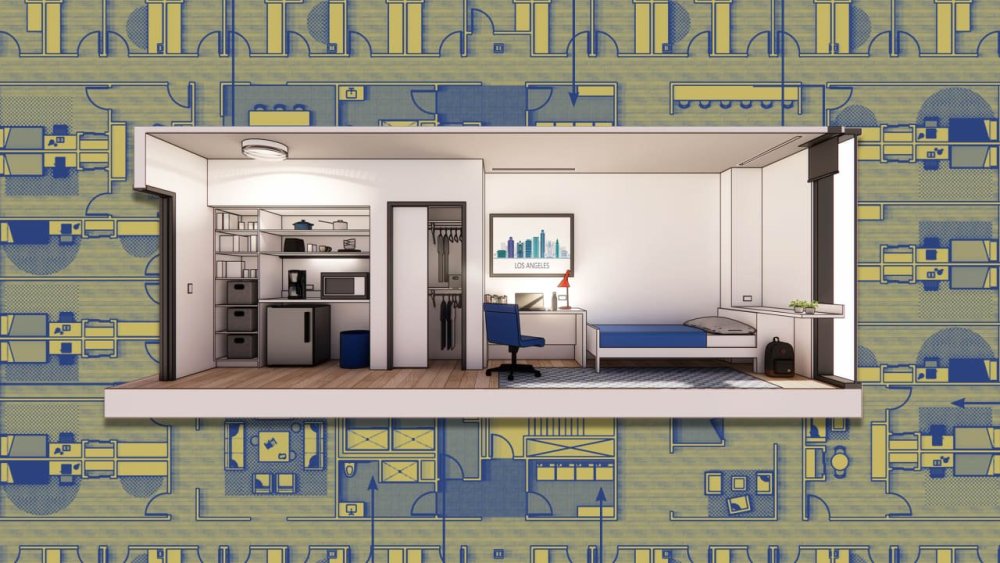
-
In today’s fast-paced, tech-driven world, commanding attention during meetings or presentations is an increasingly complex challenge. Attendees are often preoccupied with emails, notifications, or social media, turning valuable discussions into background noise. To overcome the issue, presenters must intentionally foster engagement that goes beyond just delivering information. The importance of engagement Engagement is the bridge between delivering information and fostering collaboration. When people feel actively involved in a conversation or presentation, they are more likely to pay attention, retain information, and contribute meaningfully. Think about meetings where you’ve been fully invested. What made those moments different? Often, it comes down to feeling connected to the material and the speaker. Engagement is built upon four key ingredients that must play together to bring about the collaborative benefits mentioned above: ● Focus your message ● Relevance ● Empathy ● Be present So, how can we combine these ingredients and infuse engagement into our organizations and teams? The answer lies in fostering interactions that are low stakes, yet purposeful. In other words, play. Purposeful play: A key to engagement One of the most effective ways to break down barriers and foster meaningful, engaged communication is through purposeful play. Playfulness in professional environments might seem counterintuitive, but it can unlock creativity, encourage participation, and lower defenses. When people feel at ease, they are more open to new ideas and solutions, creating an atmosphere of trust and collaboration. Below, we delineate each of the four engagement building blocks and provide a playful activity that helps build the skill. Focus your message Start with clarity. Boiling down complex ideas into digestible key points helps to sustain audience focus. An effective exercise for sharpening your messaging is to condense a pitch or concept into shorter versions repeatedly. Activity: Long Story Short Begin with a one-minute explanation of a project or challenge. Then, condense that explanation to 30 seconds, 15 seconds, and finally a single sentence. This practice not only sharpens clarity but also highlights the essence of your message. Tailor communication for relevance Connecting with your audience involves understanding their needs and perspectives. Personalizing messages to resonate with different stakeholders fosters interest and investment. Activity: Sell a BLANK to a BLANK This playful exercise involves creating pitches for random products to random personas. For example, try selling a plunger to a police officer or a piano to a circus clown. This encourages empathy and creativity, helping you frame messages in a way that resonates with diverse audiences. Build empathy through storytelling Stories humanize communication. Sharing personal anecdotes or inviting participants to share theirs deepens connections and builds mutual understanding. Activity: Memory Lanes Using a random word as a prompt, participants share true, short stories inspired by the word. Each story connects to a new prompt word drawn from the previous narrative, fostering relatability and camaraderie. Be present in the moment Presence is about fully engaging with your surroundings and audience. Practicing mindfulness and tuning into the physical space and its details can ground you and enhance your delivery. Activity: I Love My Spot Explore your surroundings, identify three elements you appreciate, and articulate why you value them. This practice helps center your focus and reinforces your connection to the environment, preparing you to connect with your audience authentically. Harnessing engagement True engagement requires collaboration born out of connection with and comfort around others. Play can catalyze this connection and comfort. By prioritizing concision, relevance, empathy, and attentiveness, you can create interactions that resonate. These are not stand-alone techniques; they are interconnected tools that work together to enhance engagement. When these methods are integrated into communication practices, people will focus and pay attention. Even mundane exchanges are transformed into opportunities for significant impact. Whether you’re leading a team meeting, delivering a keynote, or facilitating a brainstorming session, small adjustments in how you engage can lead to major gains in understanding, remembering, and enjoying. Play is a powerful unlock for engaging communication. View the full article

-
A grassroots effort to track price gouging has emerged in the form of a Google Sheet that’s now circulating on social media. Community members have reported Zillow listings of rental properties with substantial price increases –upwards of thousands of dollars – just as 150,000 California residents found themselves displaced. View the full article

-
Troubled utility tells court hearing for emergency loan that restructuring costs could top £200mnView the full article
-
Desmond will be succeeding Pierre Naudé in leading the bank technology provider. View the full article