ResidentialBusiness
Administrators
-
Joined
-
Last visited
Everything posted by ResidentialBusiness
-
 Bank strategist published note suggesting European investors could sell US assets in response to trade threatsView the full article
 -
A WordPress and WooCommerce plugin vulnerability enables unauthenticated attackers to inject malicious scripts. The post NotificationX WordPress WooCommerce Plugin Vulnerabilities Impact 40k Sites appeared first on Search Engine Journal. View the full article
-
The Consumer Financial Protection Bureau has backed off enforcement and supervision of consumer protection laws, leaving states to fill the void — and potentially creating a "patchwork" of state laws that banks will have to comply with. View the full article

-
Ozempic-maker Novo Nordisk turned to the actors from Apple’s 2000s “Get a Mac” ads to differentiate its GLP-1 medication amid a rising sea of competitors. On January 20, the Danish pharmaceutical company announced its “There’s Only One Ozempic” campaign starring Justin Long and John Hodgman. The actors are reprising their roles from Apple’s Mac vs. PC ads playing the personifications of a name brand and the alternative—but now for weight-loss drugs. Long personified Mac in the original Apple campaign by dressing in a more youthful, casual way than Hodgman, who personified a stuffy, dorky PC by wearing glasses and a suit and tie with a closely cropped haircut. (Think Steve Jobs versus Bill Gates.) In the Apple ads, Mac was always portrayed by Long as more cool and capable. In the new Ozempic ad, Long personifies Ozempic, facing off in a mock game show against Hodgman, who plays all of Ozempic’s competitors wrapped up in one dull brown T-shirt. (His hardworking name is “Other GLP-1s for Type 2 Diabetes.”) Hodgman’s character gets the game show’s single question right after the host asks which GLP-1 is approved by the Food and Drug Administration to lower the risk of worsening chronic kidney disease. The answer is, of course, “Ozempic,” which ultimately makes his win bittersweet. The “Get a Mac” campaign was created by Apple’s ad agency TBWA\Media Arts Lab; 66 total spots aired from 2006 to 2009. In 2010, Adweek named it the best ad campaign of the 2000s for connecting technology to humanity. Now Novo Nordisk is hoping some of that magic can rub off. The new campaign aims to reassert Ozempic’s brand equity in the public sphere as it faces business headwinds. It follows both layoffs and lower sales growth at the company, even as its U.S. competitor Eli Lilly is ascendent. The ad also drops shortly after Novo Nordisk’s other GLP-1, Wegovy, hit the market in pill form. In such a competitive landscape, Novo Nordisk is working to make its brand name the standard. “There’s Only One Ozempic” plays up Ozempic’s unique selling proposition in a practical sense, as a solution to chronic kidney disease. But with a jingle based on the song “Magic” and a pair of actors remembered for selling computers, it’s also positioning its drug as the most desirable GLP-1. View the full article

-
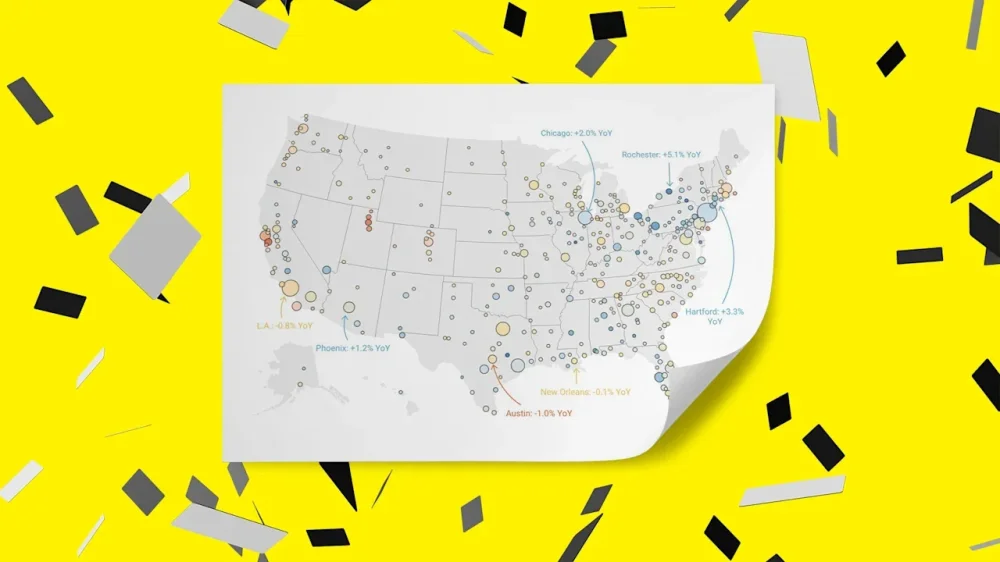
Want more housing market stories from Lance Lambert’s ResiClub in your inbox? Subscribe to the ResiClub newsletter. Among the 24 price forecasts tracked by ResiClub in our final 2026 home price forecast roundup, the average prediction is a +1.43% increase in U.S. home prices in 2026. Keep in mind that roundup mentioned above looks at forecasts for nationally aggregated home prices. On a regional and neighborhood basis, home price swings can vary greatly from the national figure. For example, on a year-over-year basis, U.S. home prices as measured by the Zillow Home Value Index are up +0.1%, while home prices in the Hartford-East Hartford-Middletown, Connecticut metro area are up +4.6% and home prices in the Austin-Round Rock-Georgetown, Texas metro area are down -6.0% during that same timeframe. To better understand how regional home prices may vary in 2026, ResiClub reached out to economists at Zillow—whose forecast of U.S. home prices rising by +2.1% in calendar 2026 is slightly above the average model—and economists at Moody’s Analytics—whose forecast of U.S. home prices rising by +0.8% in 2026 is slightly more bearish than the average model—to gather their metro-level home price forecasts. Let’s take a look at the metro-level forecasts. When we published our final roundup of national home price forecasts for 2026, Zillow was forecasting +1.2% for 2026; however, over the weekend they slightly upgraded that to +2.1%. Zillow economists write the following: “With supply no longer as tight as it was during the pandemic, price gains are likely to stay modest. Buyers should see a bit more time and leverage when they shop, while sellers can still build equity, just at a slower pace than in past boom year(s) . . . Looking ahead, Zillow projects sales will strengthen in 2026 as mortgage rates trend lower and affordability improves. Existing home sales are forecast to reach 4.3 million next year, a 5.2% year‑over‑year gain. After two slow years, the recovery is expected to be led by the Southeast and West, where demand is more rate‑sensitive and is starting to rebound as borrowing costs ease.” The forecast by Moody’s chief economist Mark Zandi has U.S. home prices, as measured by the Moody’s repeat sales index, rising just +0.8% in calendar year 2026, followed by +1.5% uptick in 2027. When I recently reached out to Moody’s Analytics chief economist Mark Zandi for his updated home price forecast, he said his long-term outlook for the U.S. housing market remains largely unchanged: He expects a prolonged period of stagnation as affordability gradually improves. Following the historic run-up in prices during the pandemic housing boom and the subsequent mortgage rate shock, Zandi believes resale activity/existing home sales will likely stay frozen for several more years. “Affordability has to be restored for housing to regain its mojo,” Zandi told ResiClub a few months ago. “Flat home prices [adjusted for inflation] is the healthiest path forward—it’s the only way for incomes to catch up.” Zandi expects nominal national home prices to move sideways over the next 12 to 18 months, with local variation: markets in the South and West, where building has been stronger, seeing some modest declines, while tight-inventory markets in the Northeast and Midwest remain more stable. “The worst of the pain in the housing market might be now and in the next six to nine months. After that, things will begin to feel a little better—but not good,” Zandi told ResiClub in October. “The housing market will heal . . . but it’s going to take time—and a lot of patience.” Over the next decade, Zandi projects U.S. home prices will rise roughly in line with inflation, meaning no “real” [adjusted for inflation] house price gains for around 10 years. “We expect homes for sale to steadily increase as more existing homeowners need to sell for demographic reasons—death, divorce, children, job change—and lower mortgage rates help ease their interest rate lock. The [potentially] lower rates will also support housing demand, but the increase in housing supply will be even more significant, weighing on house price gains,” Zandi tells ResiClub. What is ResiClub’s take? The housing market is still working through a cyclical cooling phase, with many of the nation’s fastest-growing Sun Belt boomtowns undergoing a deeper recalibration after experiencing greater overheating during the pandemic housing boom. This adjustment period won’t last forever, and the long-term growth fundamentals—such as rising population—in many of these Southern markets remain attractive. However, in 2026, ResiClub believes the market is still within that normalization window (but we’re getting closer to exiting it). Broadly speaking, housing markets where inventory (i.e., active listings) has climbed well above pre-pandemic 2019 levels have experienced softer/weaker home price growth (or event outright declines) over the past 42 months since the pandemic housing boom fizzled out. Conversely, housing markets where inventory remains far below 2019 pre-pandemic levels have, generally speaking, experienced more resilient home price growth over the past 42 months. Using active inventory/months of supply as a short-term guide, we expect the greatest pricing resilience in 2026 to be in Midwest and Northeast markets, while the greatest pricing softness is still likely in Gulf markets such as Austin and Punta Gorda, Florida. (I think both Zillow and Moody’s are a little too optimistic about Southwest Florida in particular, which I believe is still in correction mode—although it is starting to create some interesting buying opportunities.) Regardless of how regional inventory (see our latest monthly inventory update here) or regional home prices (see our latest monthly home price update here) perform in 2026, we’ll be closely tracking the trends to keep you informed of any shifts. View the full article
-
Event hosted by Larry Fink descended into uproar after combative remarks from US commerce secretaryView the full article
-
Key Takeaways Crucial Platforms: Understand the unique characteristics of major social media channels like Facebook, Instagram, LinkedIn, Twitter, and TikTok to effectively engage your target audience. Tailored Strategies: Develop customized campaigns for each platform, focusing on visual storytelling, community engagement, and relevant hashtags to maximize your brand’s visibility. Content Consistency: Maintain a regular posting schedule using a content calendar, prioritizing quality content and user-generated posts to boost engagement and foster customer loyalty. Measuring Success: Regularly analyze performance metrics such as engagement rates and reach to assess the effectiveness of your social media strategies and make informed adjustments. Embrace Trends: Stay updated on emerging trends in social media marketing, such as AI integration, influencer partnerships, and video content, to enhance your business’s online presence. Community Focus: Engage with your audience consistently through comments, messages, and tailored content to build strong relationships and encourage loyalty towards your brand. In today’s digital landscape, social media channels are more than just platforms for connecting with friends. They’ve become essential tools for businesses looking to engage audiences and drive sales. With billions of users worldwide, leveraging these channels can significantly boost your marketing strategy and brand visibility. Understanding the nuances of each platform is crucial. Whether you’re targeting potential customers on Instagram, engaging with professionals on LinkedIn, or building community on Facebook, each channel offers unique opportunities. By mastering social media marketing, you can create tailored campaigns that resonate with your audience and turn followers into loyal customers. Get ready to explore the dynamic world of social media marketing and unlock its potential for your business. Overview of Social Media Channels Marketing Social media marketing serves as a cornerstone for your small business, offering diverse platforms like Facebook, Instagram, Twitter, LinkedIn, and TikTok to reach your audience effectively. Each platform features unique characteristics that influence how you engage with customers and promote your brand. You can leverage Facebook to build community through groups, while Instagram excels in visually engaging your audience with stories and video content. Twitter allows for real-time interaction, fostering customer feedback and rapid responses. LinkedIn is essential for B2B connections, enhancing brand awareness and professional networking. TikTok captures younger audiences with creative short-form videos, perfect for storytelling and connecting authentically. To maximize your social media engagement, develop a robust social media strategy that includes content creation tailored to each platform. Prioritize organic reach through engaging posts and user-generated content. Schedule regular social media posts using a content calendar to maintain brand consistency. Utilize hashtags effectively to increase visibility and explore social media trends to stay relevant. Consider incorporating social media ads to boost visibility among targeted audiences. Paid social provides immediate results, while organic growth builds a loyal customer base over time. Monitor your social media analytics to track engagement rates and understand the effectiveness of your campaigns. Influencer partnerships can amplify your reach, tapping into established communities and enhancing brand trust. Engage your audience consistently to ensure strong customer interaction and build lasting relationships. By focusing on social media ROI, you can assess the impact of your strategies and make informed adjustments for continued growth in your online presence. Importance of Social Media Channels Marketing Social media channels serve as essential tools for small businesses, providing an effective platform for marketing efforts. Utilizing these channels enhances your brand’s visibility and fosters meaningful connections with customers. Brand Awareness Brand awareness hinges on your ability to create a recognizable identity. Social media platforms like Facebook and Instagram allow you to showcase your brand’s voice and values. Engaging in consistent content creation helps you establish this identity while building trust with your audience. For example, using Instagram stories or Facebook groups can enhance visibility and strengthen community ties. With over 4.95 billion active users globally, your small business can reach a wide audience, leading to heightened brand awareness. Customer Engagement Customer engagement involves actively interacting with your audience. By incorporating social media engagement strategies, such as responding to comments and sharing user-generated content, you create a sense of community. Utilizing features on platforms like Twitter and TikTok helps facilitate real-time customer interaction. Moreover, social media posts tailored for engagement, such as polls or questions, can drive conversation. Prioritizing organic reach through quality content and consistent posting significantly enhances your engagement rate, ultimately leading to increased customer loyalty and a stronger online presence. Popular Social Media Platforms for Marketing Social media platforms serve as powerful tools for small businesses aiming to connect with audiences and enhance brand visibility. Utilizing these platforms effectively can lead to significant social media growth. Facebook Marketing Strategies Set clear goals for your Facebook marketing, including enhancing brand awareness and increasing customer interaction. Create engaging social media posts that resonate with your audience. Leverage Facebook groups to build community and foster loyalty among your customers. Engage actively by responding to comments and facilitating discussions. Use Facebook ads to target specific demographics, utilizing audience targeting options to reach potential customers effectively. Monitor your social media analytics to refine campaigns for higher engagement rates. Instagram Marketing Strategies Develop a visually appealing Instagram presence through high-quality images and video content. Use Instagram Stories to showcase behind-the-scenes moments and maintain brand voice. Incorporate storytelling in your posts. Share customer feedback or user-generated content to build authenticity and trust. Utilize hashtags to improve your reach and discoverability. Consider Instagram ads to boost posts and enhance your visibility among target audiences. Twitter Marketing Strategies Use Twitter for real-time interaction with your audience. Respond to customer queries promptly to enhance community management. Share relevant content and engage with trending topics to keep your brand voice visible. Utilize Twitter analytics to gauge engagement and optimize your strategy. Collaborate with influencers to expand your reach and credibility. Influencer partnerships can enhance brand awareness and elevate your social media campaigns. Best Practices for Effective Marketing Effective marketing on social media platforms enhances brand awareness and drives customer engagement. These best practices ensure you maximize your efforts for optimal results. Content Creation Tips Creating compelling content is crucial for successful social media marketing. Focus on the following strategies: Utilize Storytelling: Share stories that resonate with your audience. Use visual storytelling on platforms like Instagram and TikTok to engage users effectively. Incorporate User-Generated Content: Encourage your followers to share their experiences with your brand. This builds trust and fosters community engagement. Leverage Hashtags: Use relevant hashtags to broaden your reach on Instagram and Twitter. Ensure they align with your brand voice and social media strategy. Post Consistently: Establish a content calendar to schedule regular posts. Consistent posting maintains audience interest and enhances social media growth. Experiment with Video Content: Use engaging video content to capture attention. Instagram Stories and TikTok videos offer dynamic ways to connect with your followers. Analyzing Performance Metrics Analyzing performance metrics informs your social media strategy. Monitor key metrics to gauge success: Engagement Rate: Track likes, comments, and shares to measure audience interaction. High engagement rates indicate effective content. Reach and Impressions: Measure how many users see your posts. Understanding reach helps in audience targeting and optimizing future content. Social Media Ads Performance: Evaluate the effectiveness of paid ads. Analyzing click-through rates and conversion metrics aids in optimizing your social media campaigns. Customer Feedback and Reviews: Pay attention to comments and reviews. Responding to customer feedback enhances community management and builds brand loyalty. Social Media Analytics Tools: Utilize tools to track performance across platforms like Facebook, Instagram, and LinkedIn. Regular social media monitoring allows for data-driven decisions that improve your online presence. Challenges in Social Media Channels Marketing Marketers face several challenges when utilizing social media channels for marketing. Understanding these challenges can enhance your social media strategy. Keeping Up with Changing Social Trends Social media trends evolve rapidly, creating difficulties for small businesses to identify and respond quickly. Adapting to these trends becomes crucial for maintaining relevance. Consider the following solutions: Make trendspotting a collaborative effort: Involve your team in identifying emerging trends. Use social listening tools: Implement tools that monitor online conversations surrounding your brand and industry. Engage with viral content: Share trending topics in your posts to connect with your audience. Finding and Retaining Social Talent Attracting and retaining skilled social media professionals presents a significant challenge. Enhance your team by: Training existing team members: Invest in developing the skills of your current employees. Ensuring a positive work environment: Foster a culture that values creativity, collaboration, and employee wellness. Proving the ROI of Social Media Demonstrating the return on investment (ROI) from social media efforts can often feel daunting. Focus on relevant metrics, including: Engagement rates: Track likes, comments, and shares on your posts to measure audience interaction. Conversions: Monitor the number of leads generated through social media channels. Customer acquisition costs: Calculate the expenses involved in gaining new customers via your social media campaigns. Small businesses must address these challenges effectively to optimize their online presence and maximize social media engagement. By understanding and tackling these issues, you increase the likelihood of achieving long-term success on platforms like Facebook, Instagram, Twitter, LinkedIn, and TikTok. Future Trends in Social Media Marketing Social media marketing for small businesses continues to evolve rapidly. As you look ahead, several key trends are shaping how brands engage with their audiences. Content Experimentation In 2025, social media teams will prioritize creative experimentation. This trend pushes brands to explore distinct voices and personas across platforms. Expect that what works on Facebook won’t necessarily resonate on Instagram. This “Creative Disruption Trend” empowers you to test diverse approaches, potentially driving better engagement and positive business outcomes. Social Listening Social listening becomes increasingly vital for small businesses. You’ve got the opportunity to utilize this strategy to enhance performance marketing. By monitoring conversations, you can identify emerging trends and refine your social media campaigns. The combination of the “Social Performance Trend” and “Micro-Virality Trend” enables more effective trendjacking, which can boost your brand’s visibility and connections with potential customers. AI Integration Generative AI is set to play a significant role in your social media strategy. It can streamline content creation, allowing for more personalized interactions and efficient management of social media posts. Leveraging AI tools can enhance your content marketing efforts, improving your organic reach and engagement rate. Influencer Partnerships Influencer marketing remains a strong trend. Partnering with influencers in your niche can significantly expand your reach. Influencers can enhance brand awareness and credibility, attracting social media followers who resonate with their content. Make choosing the right influencer a key part of your social media strategy for optimal results. Video Content Video content will dominate in 2025. Utilizing formats like Instagram Stories or TikTok videos can significantly boost engagement rates. Emphasizing storytelling through video is particularly effective for small businesses aiming to connect emotionally with their audience. Content that captures attention in a short timeframe encourages sharing and drives community interaction. Community Management Effective community management is essential. Engaging with customers through comments, direct messages, and user-generated content fosters loyalty. Create a content calendar that outlines your engagement strategies and posting frequency to maintain consistent communication with your audience. Social Media Analytics Monitoring social media analytics is crucial for optimizing your efforts. Tracking performance metrics, like engagement rates and audience feedback, allows you to refine campaigns. Use insights to tailor content and improve social media ads, ensuring they resonate with your target audience. By staying informed on these trends, you position your small business for greater success in social media marketing. Adapting your strategies to include experimentation, listening, AI tools, influencer partnerships, video content, effective community management, and analytics will enhance your online presence and overall brand growth. Conclusion Embracing social media channels is vital for your business’s growth and engagement. By understanding each platform’s unique features and audience, you can tailor your marketing strategies effectively. Focus on creating quality content that resonates with your followers and fosters community interaction. Don’t underestimate the power of analytics in refining your campaigns. Monitoring performance metrics will help you make informed decisions that drive results. As trends evolve, staying adaptable and open to experimentation will keep your brand relevant and engaging. With a solid social media strategy in place, you’ll not only increase brand visibility but also build lasting relationships with your customers. Prioritize your social media efforts and watch your business thrive in the digital landscape. Frequently Asked Questions What is the importance of social media for businesses? Social media is crucial for businesses as it helps engage audiences, drive sales, and enhance brand visibility. With billions of users across various platforms, companies can reach their target markets effectively. Which social media platforms are best for marketing? The best platforms for marketing include Facebook, Instagram, LinkedIn, Twitter, and TikTok. Each platform has unique features ideal for different engagement strategies, such as visual storytelling on Instagram or B2B networking on LinkedIn. How can small businesses benefit from social media marketing? Small businesses can boost brand visibility and build strong customer relationships through social media. Consistent content creation helps establish a recognizable identity and foster community loyalty, ultimately driving sales. What strategies should I use for effective social media marketing? Develop a robust strategy focusing on tailored content creation, organic reach, and brand consistency. Utilize platform-specific tactics, such as targeted ads, community building, and engaging with user-generated content. How do I measure the success of my social media campaigns? To measure success, track key performance metrics like engagement rates, reach, and conversions. Use analytics tools to assess ad performance and customer feedback to refine your strategies and improve ROI. What challenges do marketers face in social media marketing? Marketers often struggle with rapidly changing trends, finding skilled professionals, and demonstrating ROI. Solutions include utilizing social listening tools, training staff, and focusing on relevant performance metrics. What future trends should businesses watch in social media marketing? Businesses should focus on content experimentation, social listening, and AI integration for future success. Video content is expected to dominate, while effective community management and analytics monitoring remain essential. How can I enhance brand trust through social media? Enhance brand trust by engaging authentically with your audience, responding to comments, and leveraging influencer partnerships. Sharing user-generated content also fosters community connection and builds credibility. Image Via Envato This article, "Maximize Your Reach with Effective Social Media Channels Marketing Strategies" was first published on Small Business Trends View the full article
-
Key Takeaways Crucial Platforms: Understand the unique characteristics of major social media channels like Facebook, Instagram, LinkedIn, Twitter, and TikTok to effectively engage your target audience. Tailored Strategies: Develop customized campaigns for each platform, focusing on visual storytelling, community engagement, and relevant hashtags to maximize your brand’s visibility. Content Consistency: Maintain a regular posting schedule using a content calendar, prioritizing quality content and user-generated posts to boost engagement and foster customer loyalty. Measuring Success: Regularly analyze performance metrics such as engagement rates and reach to assess the effectiveness of your social media strategies and make informed adjustments. Embrace Trends: Stay updated on emerging trends in social media marketing, such as AI integration, influencer partnerships, and video content, to enhance your business’s online presence. Community Focus: Engage with your audience consistently through comments, messages, and tailored content to build strong relationships and encourage loyalty towards your brand. In today’s digital landscape, social media channels are more than just platforms for connecting with friends. They’ve become essential tools for businesses looking to engage audiences and drive sales. With billions of users worldwide, leveraging these channels can significantly boost your marketing strategy and brand visibility. Understanding the nuances of each platform is crucial. Whether you’re targeting potential customers on Instagram, engaging with professionals on LinkedIn, or building community on Facebook, each channel offers unique opportunities. By mastering social media marketing, you can create tailored campaigns that resonate with your audience and turn followers into loyal customers. Get ready to explore the dynamic world of social media marketing and unlock its potential for your business. Overview of Social Media Channels Marketing Social media marketing serves as a cornerstone for your small business, offering diverse platforms like Facebook, Instagram, Twitter, LinkedIn, and TikTok to reach your audience effectively. Each platform features unique characteristics that influence how you engage with customers and promote your brand. You can leverage Facebook to build community through groups, while Instagram excels in visually engaging your audience with stories and video content. Twitter allows for real-time interaction, fostering customer feedback and rapid responses. LinkedIn is essential for B2B connections, enhancing brand awareness and professional networking. TikTok captures younger audiences with creative short-form videos, perfect for storytelling and connecting authentically. To maximize your social media engagement, develop a robust social media strategy that includes content creation tailored to each platform. Prioritize organic reach through engaging posts and user-generated content. Schedule regular social media posts using a content calendar to maintain brand consistency. Utilize hashtags effectively to increase visibility and explore social media trends to stay relevant. Consider incorporating social media ads to boost visibility among targeted audiences. Paid social provides immediate results, while organic growth builds a loyal customer base over time. Monitor your social media analytics to track engagement rates and understand the effectiveness of your campaigns. Influencer partnerships can amplify your reach, tapping into established communities and enhancing brand trust. Engage your audience consistently to ensure strong customer interaction and build lasting relationships. By focusing on social media ROI, you can assess the impact of your strategies and make informed adjustments for continued growth in your online presence. Importance of Social Media Channels Marketing Social media channels serve as essential tools for small businesses, providing an effective platform for marketing efforts. Utilizing these channels enhances your brand’s visibility and fosters meaningful connections with customers. Brand Awareness Brand awareness hinges on your ability to create a recognizable identity. Social media platforms like Facebook and Instagram allow you to showcase your brand’s voice and values. Engaging in consistent content creation helps you establish this identity while building trust with your audience. For example, using Instagram stories or Facebook groups can enhance visibility and strengthen community ties. With over 4.95 billion active users globally, your small business can reach a wide audience, leading to heightened brand awareness. Customer Engagement Customer engagement involves actively interacting with your audience. By incorporating social media engagement strategies, such as responding to comments and sharing user-generated content, you create a sense of community. Utilizing features on platforms like Twitter and TikTok helps facilitate real-time customer interaction. Moreover, social media posts tailored for engagement, such as polls or questions, can drive conversation. Prioritizing organic reach through quality content and consistent posting significantly enhances your engagement rate, ultimately leading to increased customer loyalty and a stronger online presence. Popular Social Media Platforms for Marketing Social media platforms serve as powerful tools for small businesses aiming to connect with audiences and enhance brand visibility. Utilizing these platforms effectively can lead to significant social media growth. Facebook Marketing Strategies Set clear goals for your Facebook marketing, including enhancing brand awareness and increasing customer interaction. Create engaging social media posts that resonate with your audience. Leverage Facebook groups to build community and foster loyalty among your customers. Engage actively by responding to comments and facilitating discussions. Use Facebook ads to target specific demographics, utilizing audience targeting options to reach potential customers effectively. Monitor your social media analytics to refine campaigns for higher engagement rates. Instagram Marketing Strategies Develop a visually appealing Instagram presence through high-quality images and video content. Use Instagram Stories to showcase behind-the-scenes moments and maintain brand voice. Incorporate storytelling in your posts. Share customer feedback or user-generated content to build authenticity and trust. Utilize hashtags to improve your reach and discoverability. Consider Instagram ads to boost posts and enhance your visibility among target audiences. Twitter Marketing Strategies Use Twitter for real-time interaction with your audience. Respond to customer queries promptly to enhance community management. Share relevant content and engage with trending topics to keep your brand voice visible. Utilize Twitter analytics to gauge engagement and optimize your strategy. Collaborate with influencers to expand your reach and credibility. Influencer partnerships can enhance brand awareness and elevate your social media campaigns. Best Practices for Effective Marketing Effective marketing on social media platforms enhances brand awareness and drives customer engagement. These best practices ensure you maximize your efforts for optimal results. Content Creation Tips Creating compelling content is crucial for successful social media marketing. Focus on the following strategies: Utilize Storytelling: Share stories that resonate with your audience. Use visual storytelling on platforms like Instagram and TikTok to engage users effectively. Incorporate User-Generated Content: Encourage your followers to share their experiences with your brand. This builds trust and fosters community engagement. Leverage Hashtags: Use relevant hashtags to broaden your reach on Instagram and Twitter. Ensure they align with your brand voice and social media strategy. Post Consistently: Establish a content calendar to schedule regular posts. Consistent posting maintains audience interest and enhances social media growth. Experiment with Video Content: Use engaging video content to capture attention. Instagram Stories and TikTok videos offer dynamic ways to connect with your followers. Analyzing Performance Metrics Analyzing performance metrics informs your social media strategy. Monitor key metrics to gauge success: Engagement Rate: Track likes, comments, and shares to measure audience interaction. High engagement rates indicate effective content. Reach and Impressions: Measure how many users see your posts. Understanding reach helps in audience targeting and optimizing future content. Social Media Ads Performance: Evaluate the effectiveness of paid ads. Analyzing click-through rates and conversion metrics aids in optimizing your social media campaigns. Customer Feedback and Reviews: Pay attention to comments and reviews. Responding to customer feedback enhances community management and builds brand loyalty. Social Media Analytics Tools: Utilize tools to track performance across platforms like Facebook, Instagram, and LinkedIn. Regular social media monitoring allows for data-driven decisions that improve your online presence. Challenges in Social Media Channels Marketing Marketers face several challenges when utilizing social media channels for marketing. Understanding these challenges can enhance your social media strategy. Keeping Up with Changing Social Trends Social media trends evolve rapidly, creating difficulties for small businesses to identify and respond quickly. Adapting to these trends becomes crucial for maintaining relevance. Consider the following solutions: Make trendspotting a collaborative effort: Involve your team in identifying emerging trends. Use social listening tools: Implement tools that monitor online conversations surrounding your brand and industry. Engage with viral content: Share trending topics in your posts to connect with your audience. Finding and Retaining Social Talent Attracting and retaining skilled social media professionals presents a significant challenge. Enhance your team by: Training existing team members: Invest in developing the skills of your current employees. Ensuring a positive work environment: Foster a culture that values creativity, collaboration, and employee wellness. Proving the ROI of Social Media Demonstrating the return on investment (ROI) from social media efforts can often feel daunting. Focus on relevant metrics, including: Engagement rates: Track likes, comments, and shares on your posts to measure audience interaction. Conversions: Monitor the number of leads generated through social media channels. Customer acquisition costs: Calculate the expenses involved in gaining new customers via your social media campaigns. Small businesses must address these challenges effectively to optimize their online presence and maximize social media engagement. By understanding and tackling these issues, you increase the likelihood of achieving long-term success on platforms like Facebook, Instagram, Twitter, LinkedIn, and TikTok. Future Trends in Social Media Marketing Social media marketing for small businesses continues to evolve rapidly. As you look ahead, several key trends are shaping how brands engage with their audiences. Content Experimentation In 2025, social media teams will prioritize creative experimentation. This trend pushes brands to explore distinct voices and personas across platforms. Expect that what works on Facebook won’t necessarily resonate on Instagram. This “Creative Disruption Trend” empowers you to test diverse approaches, potentially driving better engagement and positive business outcomes. Social Listening Social listening becomes increasingly vital for small businesses. You’ve got the opportunity to utilize this strategy to enhance performance marketing. By monitoring conversations, you can identify emerging trends and refine your social media campaigns. The combination of the “Social Performance Trend” and “Micro-Virality Trend” enables more effective trendjacking, which can boost your brand’s visibility and connections with potential customers. AI Integration Generative AI is set to play a significant role in your social media strategy. It can streamline content creation, allowing for more personalized interactions and efficient management of social media posts. Leveraging AI tools can enhance your content marketing efforts, improving your organic reach and engagement rate. Influencer Partnerships Influencer marketing remains a strong trend. Partnering with influencers in your niche can significantly expand your reach. Influencers can enhance brand awareness and credibility, attracting social media followers who resonate with their content. Make choosing the right influencer a key part of your social media strategy for optimal results. Video Content Video content will dominate in 2025. Utilizing formats like Instagram Stories or TikTok videos can significantly boost engagement rates. Emphasizing storytelling through video is particularly effective for small businesses aiming to connect emotionally with their audience. Content that captures attention in a short timeframe encourages sharing and drives community interaction. Community Management Effective community management is essential. Engaging with customers through comments, direct messages, and user-generated content fosters loyalty. Create a content calendar that outlines your engagement strategies and posting frequency to maintain consistent communication with your audience. Social Media Analytics Monitoring social media analytics is crucial for optimizing your efforts. Tracking performance metrics, like engagement rates and audience feedback, allows you to refine campaigns. Use insights to tailor content and improve social media ads, ensuring they resonate with your target audience. By staying informed on these trends, you position your small business for greater success in social media marketing. Adapting your strategies to include experimentation, listening, AI tools, influencer partnerships, video content, effective community management, and analytics will enhance your online presence and overall brand growth. Conclusion Embracing social media channels is vital for your business’s growth and engagement. By understanding each platform’s unique features and audience, you can tailor your marketing strategies effectively. Focus on creating quality content that resonates with your followers and fosters community interaction. Don’t underestimate the power of analytics in refining your campaigns. Monitoring performance metrics will help you make informed decisions that drive results. As trends evolve, staying adaptable and open to experimentation will keep your brand relevant and engaging. With a solid social media strategy in place, you’ll not only increase brand visibility but also build lasting relationships with your customers. Prioritize your social media efforts and watch your business thrive in the digital landscape. Frequently Asked Questions What is the importance of social media for businesses? Social media is crucial for businesses as it helps engage audiences, drive sales, and enhance brand visibility. With billions of users across various platforms, companies can reach their target markets effectively. Which social media platforms are best for marketing? The best platforms for marketing include Facebook, Instagram, LinkedIn, Twitter, and TikTok. Each platform has unique features ideal for different engagement strategies, such as visual storytelling on Instagram or B2B networking on LinkedIn. How can small businesses benefit from social media marketing? Small businesses can boost brand visibility and build strong customer relationships through social media. Consistent content creation helps establish a recognizable identity and foster community loyalty, ultimately driving sales. What strategies should I use for effective social media marketing? Develop a robust strategy focusing on tailored content creation, organic reach, and brand consistency. Utilize platform-specific tactics, such as targeted ads, community building, and engaging with user-generated content. How do I measure the success of my social media campaigns? To measure success, track key performance metrics like engagement rates, reach, and conversions. Use analytics tools to assess ad performance and customer feedback to refine your strategies and improve ROI. What challenges do marketers face in social media marketing? Marketers often struggle with rapidly changing trends, finding skilled professionals, and demonstrating ROI. Solutions include utilizing social listening tools, training staff, and focusing on relevant performance metrics. What future trends should businesses watch in social media marketing? Businesses should focus on content experimentation, social listening, and AI integration for future success. Video content is expected to dominate, while effective community management and analytics monitoring remain essential. How can I enhance brand trust through social media? Enhance brand trust by engaging authentically with your audience, responding to comments, and leveraging influencer partnerships. Sharing user-generated content also fosters community connection and builds credibility. Image Via Envato This article, "Maximize Your Reach with Effective Social Media Channels Marketing Strategies" was first published on Small Business Trends View the full article
-
In the world of business, we tend to believe that success is a direct result of talent, resources, and a “great idea.” We expect that if a company has a track record of dominance, like Google, Amazon, or Apple, they are a sure bet for the next big thing. Yet, the history of innovation is littered with the wreckage of unexpected flops launched by industry giants. From the futuristic promise of the Segway to the early dominance of MySpace, these failures prove that even a massive war chest and a visionary concept cannot guarantee market survival. Here are some of the traps that companies fall into. The ‘Solution in Search of a Problem’ Trap One of the most common reasons for failure is based on “technology push” versus “market pull.” This happens when a company develops a sophisticated piece of technology and then hunts for a problem to solve, rather than starting with a genuine consumer need. Google Glass is a fine example. Technically, it was a marvel, an engineering feat that brought augmented reality to a wearable form. However, Google failed to articulate why the average person needed it. It lacked a defined purpose. The device made people uncomfortable regarding privacy (the “Glasshole” effect), leading to it being banned in bars and theaters before it even hit mass-market shelves. Similarly, the Segway was heralded by Steve Jobs and Jeff Bezos as a revolution in urban transport that would “reshape cities.” But for the consumer, it was an expensive, bulky solution to a problem that didn’t exist. It was too fast for sidewalks and too slow for roads. It was a great idea in theory, but a failure in the real world. The Arrogance of Success Trap When a company is dominant in one field, it can become blind to its limitations. They try to force the approach of their successful core business into a completely different field. Amazon’s Fire Phone failed because Amazon treated hardware like its retail platform. They packed the phone with “Dynamic Perspective” (a 3D effect) and “Firefly”—a button to scan products to buy on Amazon. These were clever technical features, but they served Amazon’s needs more than the user’s. Users wanted a robust ecosystem of apps and a reliable interface; they didn’t want a shopping cart in their pocket. Amazon’s immense success in e-commerce blinded them to the specific needs of the smartphone market. The ‘First Mover’ Trap It is a common precept that being first to market is an advantage. However, Friendster and MySpace prove that being first is a double-edged sword. Friendster had the great idea of social networking long before Facebook. It failed because it couldn’t handle its own success. The servers crashed constantly, and the site became unusable. This technical failure allowed MySpace to take the lead. But MySpace eventually fell into the same trap: It became cluttered with ads and customizable profiles, failing to evolve its user experience as the audience matured. These companies didn’t fail because their ideas were bad. They failed because they couldn’t scale as demand grew. The Timing Trap Bill Gross has studied what makes some start-ups succeed and so many fail. He analyzed the histories of 200 startup companies and compared five factors: the idea, the team, the business model, the funding, and the timing. You can see him relate his findings in his Ted talk, “The single biggest reason why start-ups succeed.” His findings were striking. The most important factor was timing, then the team, and then the idea. Many startup companies with great teams and innovative business ideas fail because the timing of their launch is unfortunate. And this can be down to luck. The timing trap applies to big companies too. If you launch a product too early, you have to educate the market which is expensive. If you launch too late, you’re fighting for scraps. An idea might be great, but the world isn’t ready yet. For example, the online grocery business Webvan failed during the dot-com bubble (Webvan) because high-speed internet and mobile logistics weren’t mature. Twenty years later, the same idea is a multi-billion-dollar industry. Similarly, Google Glass might have succeeded today in an era of TikTok creators and remote assistance, but in 2013, the culture was far more sensitive to “always-on” cameras. Is it Just Luck? In his book The Black Swan, Nassim Taleb argues that we often underestimate the role of randomness in success. A sudden shift in the economy, a competitor’s unexpected move, or even a global pandemic can make a “great idea” look like a disaster, or a “mediocre idea” look like a stroke of genius. Luck plays a role, but “luck” depends on preparation and timing. Successful companies that fail usually have the preparation but miss the timing. They are so focused on their internal roadmap that they lose sight of the external environment. Lessons for Today’s Leaders These failed ventures can teach us some powerful lessons: Solve a Real Problem: You should be able to explain the problem your product solves in one concise sentence. Leave out buzzwords like revolutionary, ground-breaking, or next-generation. Social Context Matters: Technology does not exist in a vacuum. How will people feel when they use it? How will others feel around them? Minimun Viable Product: Build a small cheap prototype or model and show it to discerning customers. Ask, “Does it solve your problem?” “Would you pay money for it?” “What needs to change?” Kill The Losers: Successful companies often suffer from “sunk cost fallacy.” They keep pouring money into a failing venture because they are too proud to admit the “great idea” isn’t working. Agility Over Ego: The ability to pivot is critical. When Slack found that their video games was a flop they switched to producing a communication tool. A great idea is just a hypothesis. The failures of Google Glass, the Fire Phone, and the Segway teach us that the market is a harsh laboratory. Success requires more than just a breakthrough in engineering. It requires an alignment of cultural timing, user-centric design, and the humility to adapt when reality contradicts your vision. Even the giants can fall. It is vital to look at the world through the eyes of the user and stop admiring your own designs—no matter how brilliant they appear. View the full article

-
From Venezuela to Iran and now Greenland, the volatile US president is tearing up global normsView the full article
-
Six years ago, Atari announced ambitious plans to build a gamer-themed hotel in Las Vegas, featuring an e-sports studio and a movie theater. The legacy video game company’s management at the time saw hotels as a way to revitalize the brand’s name, which was largely a nostalgia play. “I love the idea. It’s something I’ve always wanted to do,” said then-CEO Fred Chesnais. “I always wanted to make an amusement park, and hotels could be the first step.” But now the company tells the Las Vegas Sun that the project has been shelved after “the deal didn’t come to fruition.” It’s the latest in a series of disappointments for Atari’s lodging ambitions. Only one of what the company had hoped would be at least eight hotels across the U.S. is still in any stage of development. And construction has yet to begin on that project. Chesnais bought Atari in 2013 for just 400 euros following the company’s Chapter 11 bankruptcy filing (inheriting with it a debt load of 34 million euros). But he was replaced as CEO in 2021 and formalized his exit from the company in 2022. Despite his departure, the hotel plans pushed forward. Atari continued to look for potential land partners through 2024—planning to make announcements in the first half of that year—but was unable to secure a deal. Other planned hotels in Austin, Chicago, Denver, San Francisco, San Jose, and Seattle also are no longer being discussed publicly and have shown no progress since the company first revealed those locations. That leaves Phoenix, where Atari Hotels (now being run by Intersection Development) is still hoping to salvage at least part of the project. Originally expected to open in 2022, that location is now slated for a late-2028 grand opening, although even that date is hardly set in stone. The developer is appealing to Atari fans to help pay for the project. A fundraising page for the Phoenix hotel says the facility has raised $14 million and secured land (for a project with a total development budget of $124 million). Participants can make a minimum investment of $500, for which they will be part of the hotel’s loyalty program. Those who cough up $50,000 will receive a physical brick in the gaming-area walkway of the hotel, the builders say. (A “digital brick” runs $25,000.) Intersection aims to raise between $35 million and $40 million from investors as part of its next phase. Atari never positioned the hotels, even the Las Vegas one, as casinos, though the investment deck does mention a “state-of-the-art sports betting arena with immersive screens and premium gaming experiences.” Instead, it hoped to blend video games, music, and entertainment in an immersive, tech-heavy facility, with a rooftop pool and “sci-fi inspired rooms” being promised for the Phoenix location. In recent years, hotels were just one of the ways Atari considered in its effort to revitalize the brand. In 2018, the company announced plans to launch its own cryptocurrencies: the Atari Token and the Pong Token. The company acquired a minority stake in Infinity Networks, which was developing a decentralized blockchain for digital entertainment platforms, and recruited Anthony Di Iorio, who cofounded Ethereum and Jaxx, to assist with the launch. The Atari Token peaked in 2021 at around 78 cents. Today, it trades for $0.0001935. Founded by Nolan Bushnell and Ted Dabney in 1972, Atari has been bought and sold numerous times through the years, often balancing on the precipice of becoming nothing more than nostalgia. In its fiscal 2025 earnings report released in July, the company reported a 14 million euro loss. Half-year results for fiscal 2026, released in December of last year, showed a net loss of 6.4 million euros. View the full article

-
The Tesla Cybertruck is the new Ford Edsel, taking the crown from one of the biggest flops in American car history. Last year, the Cybertruck spiraled into market irrelevance while the rest of the EV market found its footing, as the pickup experienced the single biggest sales collapse of any electric vehicle in the United States. Elon Musk’s flailing company managed to move only an estimated 20,237 Cybertrucks in 2025. And that’s counting the units that Musk reportedly bought for himself through SpaceX and xAI to avoid further ridicule. “He had his private companies buy hundreds if not thousands of Cybertrucks,” wrote Fred Lambert at EV blog Electrek. That’s an eye-popping 48.1% crash from the 39,000 units sold in 2024. Elon, seriously, stop this embarrassment and kill this polygonal joke already. I laughed at first but now it’s painful to watch. To understand the magnitude of this failure, the all-electric Ford F-150 Lightning—an EV pickup so unsuccessful that Ford officially ended its production in December 2025 to pivot to a new hybrid model—still managed to humiliate Tesla from the grave. Ford sold 27,307 Lightnings in 2025, making it the best-selling EV pickup truck in America. Both companies tried to buy their way out of trouble with heavy discounts and 0% financing offers. But while aggressive incentives helped Ford clear inventory and post growth, the same tactics failed to save the “apocalypse-proof” pickup from becoming a sales armageddon. Think about that for a minute: A discontinued EV truck outsold the Tesla truck by nearly 7,000 units and got canceled. Come the truck on. I already called the Cybertruck a flop, but the final sales tally is even worse than I imagined. It’s officially the “biggest flop in decades,” according to Forbes. This is especially humiliating when Musk overpromised sales of 250,000 Cybertrucks annually by 2025. Tesla reached barely 8% of that target. Plenty of reasons for failure The reason for the Cybertruck’s collapse isn’t a mystery. It’s not the EV slump. It’s the inevitable result of shipping a beta product to customers as a finished vehicle, a design failure since its inception. The truck isn’t just ugly, it’s fundamentally broken. In 2025 alone, Tesla issued recalls covering a combined 115,912 Cybertrucks—more than double the number of recalls in 2024. That averages out to 318 recalls per day. We are not talking about inconsequential software updates. These were dangerous, amateur-hour defects. The largest recall campaign involved 46,096 trucks that risked shedding their stainless-steel exterior trim while driving, turning the vehicle into a shrapnel grenade on the highway. Another 6,000 trucks were recalled because their optional light bars were attached with the wrong primer and could simply fall off. This follows a chronicle of disasters documented since Musk shattered the unshatterable pickup’s glass. We’ve seen the “stuck pedal” trap that locked accelerators at full throttle, critical system failures where owners drove a mere mile off the lot before the truck died with a “red screen of death,” losing steering and braking redundancy, and misaligned doors and uneven surfaces that Musk himself admitted in leaked emails stuck out “like a sore thumb.” That’s just a selection of this disaster on wheels. As Adrian Clarke—a professional car designer who now writes design critiques for the automobile publication The Autopian—told me when it was about to come out the factory line: “The Cybertruck is a low-polygon joke that only exists in the fever dreams of Tesla fans that stands high on the smell of Elon Musk’s flatulences.” Back then, Clarke also called out the terrible design choices that were going to lead to the bevy of manufacturing and quality problems, all part of the design and brand crisis that Tesla has been experiencing since 2023. But there’s a third component that completes the Cybertruck’s failure trifecta: Musk’s former bromance with Donald The President and his DOGE antics. Turns out not all press is good press, as these moves killed the Tesla brand perhaps more than the model stagnation, deadly car accidents, and mechanical failures. Musk’s political radicalization led many of Tesla’s existing customers to regret their purchases and potential clients to avoid them, both in the U.S. and abroad. As dealerships got torched and cars vandalized, the Cybertruck arguably became “America’s most hated car.” The 2025 sales figures just confirm what we have known for more than two years now. The Cybertruck is not the disruptor Musk sold to the world and Tesla shareholders. It is a finger-chopping brick that depreciates faster than used bridal dresses. An ugly failure that is doing nothing but draining resources and further damaging the brand’s reputation (if it still has one). It’s time to bury what’s already dead, Elon. The experiment is over. Sink this polygonal mess deep underground, along with all your failed promises, and call it a day. View the full article

-
Reform UK leader blames ‘complicated and complex’ outside interests for breachesView the full article
-
Join our webinar to discover effective strategies for automating Google Ads and mastering Performance Max Smart Bidding. The post What Profitable Google Ads Look Like in 2026 [Webinar] appeared first on Search Engine Journal. View the full article
-
A vulnerability in an ACF addon plugin installed in 100k websites enables unauthenticated attackers to gain administrator privileges. The post WordPress Advanced Custom Fields Extended Plugin Vulnerability appeared first on Search Engine Journal. View the full article
-
Figure comes as investors await Bank of England’s next decision on interest rates View the full article
-
GIFs are awesome. And they’re everywhere. We use them at Buffer in our posts, threads, emails, and our Slack channels. Anywhere there’s a message, there’s the chance for a GIF. What is a GIF, you ask? For the uninitiated, GIFs are really just animated image files. GIF stands for Graphics Interchange Format. While plenty of people have very strong feelings about how to pronounce the word — ”giff” vs. “jiff” — the original creator of GIFs, Steve Wilhite, once said: “The Oxford English Dictionary accepts both pronunciations. They are wrong. It is a soft ‘G,’ pronounced ‘jif.’ End of story.” Want to know how to create a GIF and when and where to share them? We’ve collected all the best tools, tips, and tricks for an A+ GIF game. Getting started with GIF creationIn this article, we’ll give you all you need on how to start making the most impact with GIFs, including: How to make a GIFWhere to find brilliant pre-made GIFsExamples of how you can use GIFs in your marketingKey takeawaysTop tools: GIPHY, Canva, and Adobe Photoshop are the leading tools for creating GIFs from videos or images.Creation methods: You can create GIFs via web apps, mobile apps (GIPHY), or professional software like Photoshop for more control.Sourcing: Use GIPHY, Tenor, or Google image search (filtered by "GIF") to find high-quality pre-made animations.Marketing use cases: GIFs boost engagement in emails, explain complex "how-to" processes visually, and humanize brand personality on social media.Legal note: Most GIFs are protected by copyright; creating original content is the safest way to avoid legal issues.If you've ever wondered whether you should be using GIFs in your social content (or felt intimidated by the idea of creating them), you're not alone. The good news is that GIFs are easier to make than you might think, and they can be a fun way to add personality to your posts without requiring advanced design skills. Let’s start with a quick guide on some of the best tools available to create your own GIFs. Jump to a section: 8 apps and tools to create your own GIFs in minutes How to make a GIF in Photoshop from images How to turn a video into a GIF in Photoshop How to make GIFs on a phone or tablet 6 websites to find the perfect pre-made GIF 10 ways to use GIFs for your brand Show and tell Frequently asked questions about making GIFs More social media marketing resources 8 apps and tools to create your own GIFs in minutesCreating your own GIFs is fun and gives you more control over your visual content. These GIF creator tools are straightforward to use and will help you create GIFs more easily. 1. GIPHYGIPHY is home to one of the internet’s largest GIF collections (more on that a little later), and it also has some brilliant GIF-making tools. GIPHY’s GIF Maker enables you to make a GIF directly from a video file or YouTube link. With GIF Maker, you simply paste a video URL or upload a video file, and GIPHY’s simple-to-use interface lets you choose the point in the video from which you’d like the GIF to start, choose the duration, and add a caption. Once you’re happy with your GIF, click Create GIF, and it’ll be added to GIPHY, ready to share across any social network. You can also combine your pictures and files in GIPHY to create animated GIF slideshows. Simply choose the still images or GIFs you’d like to use, then choose the order and the length of time for images in your slideshow. 2. ImgflipSpeaking of flipping, Imgflip enables you to create a GIF from multiple images and also turn a short video clip into a GIF. Imgflip allows you to edit your GIF by adding text, changing the speed, and resizing the image. But if you want to export your final GIF without a watermark, you’ll need to become a member of Imgflip Pro ($12.95 per month). 3. Ezgif If you’re a GIF hoarder, you’ll love Ezgif.com. The site lets you upload up to 2,000 image files (max size 100MB) to the GIF maker. That's plenty of room to work with for most projects. Like most other GIF creators, you can customize your GIFs (resize, crop, reverse, add captions, etc.). Ezgif is proactive about making regular updates to the website based on user suggestions. 4. CanvaWe're big fans of Canva, which is why our Buffer Dashboard includes a Canva integration that lets you connect your Canva and Buffer accounts. In just a few clicks, you can quickly create or import your favorite Canva designs and publish them to your social media channel. When creating GIFs on Canva, you can explore the platform’s extensive library for premade GIF templates, animate designs, and export them as GIFs, or design a GIF from scratch in the GIF maker. You also have options to make a GIF from a video, add text to it, play with different fonts, and apply different effects. 5. ZightZight (formerly known as CloudApp) is incredibly useful and amazingly simple for making GIFs directly from your computer screen. It allows you to take screen recordings, annotate images, record webcam videos, and much more. This app is super-useful for creating GIFs for tutorials or walk-throughs because once you have Zight installed on your computer, you can record screencasts, download them as GIFs, and even share them with a unique URL generated for each recording you make. 6. RecorditLike Zight, Recordit is downloadable software (available for Windows and Mac) that allows you to select a section of your screen to record and create a GIF in seconds. You can see from the GIF above how quick and easy it is to use. 7. Make A GIFMake A GIF is a web-based tool that helps you create GIFs from videos or image uploads, with simple trimming and basic edits. 8. Adobe ExpressAdobe Express is a browser-based option for creating and converting GIFs, with templates and quick exports for social. How to make a GIF in Photoshop from imagesCreating GIFs in Adobe Photoshop takes a little more time than the other tools we’ve covered. The trade-off? You get complete creative freedom to craft exactly what you’re looking for. Here’s an example of a GIF we made in Photoshop using the technique we’ll explain below: Step 1. Load images into Photoshop If you already have a sequence of images ready GIFs are made up of a series of images (called frames), and if you already have a bunch of images you’d like to turn into a GIF, open Photoshop, then select File > Scripts > Load Files Into Stack. Then select Browse and choose the files you’d like to include in your GIF. If you don’t have an image set ready If you don’t have an existing group of images you’d like to use, you can create a set of new layers within Photoshop to act as the frames in your GIF. To add new layers to your Photoshop project, choose Layer > New > Layer until all your frames are included. When all your layers are ready, go to Step 2 and create your animation. Step 2. Create your animationTo create a GIF animation, you need to organize your images into a timeline. This will set up the flow of the animation and make your image ready to export as a GIF. To create your Timeline, click Window > Timeline. You’ll then see a Timeline appear at the bottom right of your screen. Next, click Create Frame Animation within your Timeline, and then click the menu in the right-hand corner of your Timeline and choose Make Frames From Layers. Now that your frames are in place, it’s a good idea to preview your animation. Hit the Play button in the bottom left of your Timeline, and check for any frames that are out of place. If they are, simply drag and drop them to a new position in the Timeline. Step 3. Export your GIFOnce you’re happy with the way your GIF looks, export it for use on your website, social media profiles, or anywhere you’d like to share it. To export your GIF, click File > Export > Save for Web (Legacy). To avoid color banding issues, change the Colors setting to 256 (the maximum number for a GIF). To see how it turned out, hit Preview in the bottom left corner. It’ll open your default web browser and play a looping preview of your GIF. Finally, click Save as, name your GIF file, and download your masterpiece to your computer. How to turn a video into a GIF in PhotoshopQuick answer: Import your video as layers. Photoshop can also help you convert a video into a GIF by transforming each frame of the video into a frame within a GIF. To import a video, click File > Import > Video Frames to Layers. You’ll then have the option to choose how much of the video you import and whether you’d like to pull in every frame (for longer GIFs, importing every other frame should be sufficient quality). Once you’ve imported your video, you can add text and captions and make edits within Photoshop, and then follow Step 3 from the previous section to export your GIF. How to make GIFs on a phone or tabletThe easiest and quickest option that works across almost all mobile devices is ... (drum roll) GIPHY. Download the free GIPHY app (iOS, Android ) on your phone or tablet and open the app. Here’s how to make a GIF in the GIPHY app using a video on your device: Step 1: Click Create + in the top-right corner of the screen. Step 2: Use the camera button to record a video clip or click the library icon next to it to select one from your phone’s camera roll. Step 3: Select Share GIF to save your GIF to your device or share it to social media. 6 websites to find the perfect pre-made GIFThere are tons of GIF resources out there; here are just a few of our favorites. 1. CanvaTap into Canva’s vast library of templates to find the perfect GIF for your brand based on the themes, colors, and styles. You can also narrow your quest further by searching based on what you need it for. Do you need a GIF for a presentation or for social media? 2. GIPHYWith tons of GIFs, a great search function, and pre-selected categories, GIPHY is the gold standard of GIF finding. 3. TumblrTumblr is still around and remains a great resource for GIF culture and discovering trending content early. Explore all GIFs here, or search for a specific GIF type using the Tumblr search bar. 4. ImgurYou never quite know what you’re going to find on Imgur — it could be a viral photo, video, or GIF. Browse the site's collection of new and viral GIFs, or search by topic or activity. 5. TenorWith more than 300 million monthly users, Tenor is GIPHY’s biggest competitor, thanks to its simpler interface. So GIFers who want to quickly find what they’re looking for without any extra bells and whistles will appreciate Tenor’s minimalist dashboard. 6. Google image searchPerhaps the best-known place to search for anything — including GIFs — is Google. To include only GIF images in your search, start with image search, then: Click ToolsUnder Type, choose GIFOne thing to keep in mind: most GIFs are protected by copyright law, so creating your own is often the safest bet for your social content. 10 ways to use GIFs for your brandFrom product promotions to email marketing, GIFs help tell your brand story in creative ways. Here are 10 ways to use GIFs in your marketing. 1. To show your brand’s personalityBrands that appear human and share authentically can create a connection with their audience, and funny/weird/endearing GIFs can be a part of that. Who does it best? Google shares incredibly slick GIFs on social that demonstrate the brand's dedication to aesthetics. The example below shows Google’s Dino T-Rex going for the gold ahead of the 2021 Tokyo Olympics. 2. As part of your marketing campaignsGIFs can be a great way to promote your products or services in fun and unconventional ways. Who does it best? Rent the Runway is a subscription service that allows people to rent designer fashion for work and events. As part of its The World is Your Runway campaign, the brand created its own GIF stickers that its followers can upload to their own stories. 3. To explain a process or a how-toSometimes, it’s a lot easier to explain something visually than with words. GIFs can help show actual steps for guides, manuals, tutorials, and how-tos. Who does it best? Netflix uses a GIF to show its members how to remove a title from their Continue Watching category on all devices. 4. For customer serviceIf a picture says a thousand words, then a GIF can tell a billion. And with more than 10 billion GIFs shared daily on GIPHY alone, you’re sure to find something that can help you express a particular sentiment to your customers without using words. Who does it best? Starbucks loves using GIFs on X. They use Starbucks-branded GIFs in their daily interactions with customers. pic.twitter.com/9dUo0SRNjb — Starbucks Coffee (@Starbucks) October 3, 2023 5. To make a big announcementIf you want to stir up excitement for an upcoming sale, tease customers with a sneak peek of a new product, or surprise and delight your fans, GIFs can help you do that. Who does it best? We use GIFs in our own launch announcements because they're a great way to quickly showcase new features. Check out how we shared more about our Beta program in the tweet below. The Open Beta program lets you get your hands on new features before they're made available to all Buffer users. 🤩 That means influencing the future of Buffer is just a switch toggle away on your dashboard. 🪄 pic.twitter.com/CHI91HHWvd — Buffer (@buffer) July 26, 2023 6. As part of your email marketingEmail is one of the most effective marketing channels. And because GIFs come in small files, they’re easy to engage your audience without clogging their emails. Who does it best? Copyhackers provides writing courses and resources for copywriters, startups, and marketers. Even though they’re all about copy, they throw GIFs into their emails to help get their point across. 7. Celebrate special occasionsJust in case you needed an extra excuse to share a GIF, a holiday or special occasion would be it. And if you don’t want to create your own, you’re sure to find a GIF for every occasion online. Who does it best? Yosushi shows you don’t need to overthink or go overboard with your GIF designs. To ring in the New Year, they shared a GIF with plain white “Happy New Year” text over one of their meals. 8. To make data funGIFs can help turn what could otherwise be boring numbers into something visually stimulating and engaging. Pro tip: Check out the templates on Google's Data GIF Maker. 9. To promote contentWhether it’s a blog post, article, or newsletter, you can use GIFs as a way to entice people to read, download, or subscribe. Who does it best? The television show RuPaul’s Drag Race goes all-in with emojis and a GIF to get their followers to “snatch up” and “subscribe” to their newsletter. .@DeJaSkye is dishing on videos games, her confessional lewk, and @Jorgeous_1's ✨spicy✨ ways in this week's #DragRace newsletter! 💓 Snatch up the latest edition & subscribe so you don't miss a thing ➡️ https://t.co/iiDoBMqPfE pic.twitter.com/izxIXhAUtu — RuPaul's Drag Race (@RuPaulsDragRace) February 8, 2022 10. To generate engagementGIFs can be surprisingly versatile for engagement. And you don’t even need to share a GIF to get a GIF ... Who does it best? We found that just asking our followers to share a GIF is a great way to generate a stream of engagement. If the month of September were a GIF, what would it be? — Buffer (@buffer) September 11, 2021 Show and tellIn this article, we’ve shown you several ways to make a GIF and places where you can find pre-made ones. We’ve even shared 10 examples of ways that GIFs are used by brands. Your turn! If you found this guide useful, we’d love to see a GIF of your own or for you to share one of your favorite GIFs with us. Frequently asked questions about making GIFsWhat file size should my GIF be for social media?As a general rule, try to keep GIFs around 5–8 MB (or smaller) so they load quickly on mobile and don’t get heavily compressed when you upload them. How long can a GIF be?Shorter is usually better. If you can, aim for about 6–8 seconds, and trim any extra frames that don’t add to the message. Does Instagram support GIF uploads?Instagram doesn’t always handle GIF uploads consistently, so a common workaround is converting your GIF to an MP4 before posting. You can also use GIF stickers (via GIPHY) in Instagram stories. How do I make a GIF loop smoothly?For a seamless loop, try matching the first and last frames closely, or use a “boomerang” style (forward then reverse) so the ending naturally connects back to the beginning. Can I use any GIF I find online in my marketing?Not always. Many GIFs are copyrighted, so if you’re using GIFs for marketing, creating your own (or using properly licensed content) is often the safest approach. More social media marketing resources 7 Ways to Use Twitter Analytics to Help You Tweet BetterBluesky Isn’t Like Other Social Networks: Here’s How to Get Set UpHow Often to Post on Social Media: A Data-Backed Guide28 Digital Marketing Tools for Small Businesses (+ Budget-Friendly and Free Options)Social Media Automation: 10 Tasks You Can Automate (+ Tools to Help)View the full article
-
A few years ago, I discovered a tomato sauce recipe that was surprisingly simple: just canned tomatoes, butter, salt, and an onion. It inspired me to experiment, adding this and that each time to see how the flavor changed. Today, I’d call myself an amateur sauce expert. I know exactly how long it needs to simmer, what shade of red signals it’s ready, and how to improvise with whatever’s in the fridge. As my kitchen exploits remind me, experimentation is part of learning. It wouldn’t be the same if I’d just asked ChatGPT how to make sauce each time. I’d be outsourcing my culinary creativity and losing the teachable moments that come from trial and error. As New Yorker writer Joshua Rothman observed, “[I]t’s becoming clear that artificial intelligence can relieve us of the burden of trying and trying again. A.I. systems make it trivially easy to take an existing thing and ask for a new iteration.” AI can boost creative thinking—or eliminate it entirely. As the CEO of a company built on automation, I’ve found that the key is to treat AI as a creative collaborator, not a replacement. Here are a few rules of thumb for striking the right balance. 1. Use AI for idea generation—not final decisions When generative AI became widely available, a lot of hype swirled around its implications. Professionals, from knowledge workers to authors and beyond, feared that AI would take their jobs. AI seemed destined to keep improving, outpacing the skills and intelligence of its human counterparts. More recently, the technology’s limits have become more apparent. While AI tools remain powerful workplace tools, their progress is unlikely to be endlessly exponential. As Cal Newport notes, critics argue that “the technology is important but not poised to radically transform our lives;” it may not get dramatically better than it is today. AI won’t write the next great novel or compose symphonies to rival Bach. But it is an excellent brainstorming partner. Wharton professor Christian Terwiesch, who tested ChatGPT’s idea generation against college students’, explained: “It’s cheap. It’s fast. It’s good. What’s not to be liked? Worst case is you reject all of the ideas and run with your own. But our research speaks strongly to the fact that your idea pool will get better.” Let AI tools like ChatGPT help you generate more, better ideas. Start with your own thoughts, and use AI to generate alternatives. Then, apply your own human judgment to refine and select the best path forward. Treat prompts like a conversation, not a command One of the strengths of generative AI tools like ChatGPT is their conversational nature. Think of your first prompt as an icebreaker—it’s just there to get the dialogue started. While I recommend being as specific as possible, that is, giving the tool enough context to generate strong, accurate replies, you can always refine as you go. To offer a visual, imagine your dialogue with AI as a funnel: wide at the top and narrowing as you move toward the bottom. You might start by asking ChatGPT to generate ideas for a marketing campaign. Once it produces a list, ask it to refine those ideas for a specific target audience—say, tech entrepreneurs in their 20s to 40s, or suburban parents. Keep iterating until you land on the output that works best for you. Create space for experimentation Curiosity may have killed the cat, but it certainly won’t kill your company. In fact, a healthy sense of curiosity among employees will strengthen it. Research-backed benefits include boosted innovation, reduced group conflict, fewer decision-making errors, and improved communication. While leaders often claim to value curiosity, they tend to stifle it, preferring that employees stay within the lines. Instead, leaders should give employees the freedom to explore. Build enough slack into their schedules so they can test and tinker with AI tools without the pressure to prove immediate ROI. Lead by example: Share your own experiments—whether it’s trying a new AI feature or recounting an automation gone awry. Getting it wrong can be valuable, too. Ask for employee feedback to uncover what they’re curious about: new systems or tools they’d like to try, or better ways the company could operate. It might feel inefficient, like a misuse of employee time and effort, but in the AI era, staying competitive depends on curiosity and experimentation. Like a chef giving their team full access to the kitchen, leaders must create workplaces where both creativity and experimentation can thrive. View the full article

-
From greater flexibility to a sense of ownership and the hope of financial gain, solopreneurship feels like the new American dream. However, there’s a hidden cost to that dream that has nothing to do with the unending hustle that comes with being both a business owner and that business’s sole employee. It’s the undeniable cost to the planet. In 2025, about 41 million businesses in the U.S. were run by a sole individual who is both its owner and only employee. As AI allows for solopreneurs to automate a growing number of tasks, the technology is enabling small businesses—from gigs like content creation to event planner or even niche work like dog grooming or jewelry making, and more—to absolutely thrive with a team of only one. Therefore, while an individual with an idea may have needed an entire team to turn that idea into real cash flow in the past, it’s now completely feasible (and massively popular) to do so with the help of AI. That’s true for solopreneur Dan Mazei, who was formerly communications and marketing leader for organizations like Reebok, Tinder, Activision Blizzard, and Ford, and a long-time agency leader for major clients like Nintendo and Unilever. Now, Mazei runs his own business as the founder and principal of All Tangled Roots, a marketing consultancy for brands, with the help of AI. Mazei tells Fast Company that AI is crucial to his business model, as it can “level the playing field for a solo service provider against a sea of heavily staffed agencies” that are doing the same kind of work. That same is true for Samantha Levitin, a solopreneur and founder of Levitin Collective, a boutique PR firm working across lifestyle, wellness, hospitality, and consumer brands, in NYC. (She’s also a new mom to a 15-month-old baby.) Levitin says that AI enables her to manage the dreaded mental load that comes with running a business while being a parent. “Starting my own firm meant knowing I’d be doing everything myself, and AI helped fill gaps that would normally require a small team, which I was used to,” Levitin says. The solopreneur adds that she began building her business while on maternity leave, and, ultimately, it’s given her both “flexibility and balance.” She says, “I intentionally designed the firm to be small . . . and AI gives me back time and mental space so I can focus on what matters most in my field: creative thinking, relationship building, and hands-on client work.” Still, we can’t talk about AI’s incredible power to turn dreams into reality without talking about the cost. While there are many challenges that may come from running a business made up of one—such as working around the clock, or the significant financial risks—there are also clear environmental costs which are largely being ignored. According to a 2024 MIT report on the environmental impact of AI, the energy demands that come from both training and using AI are massive and growing all the time. In North America, electricity requirements increased from 2,688 megawatts at the end of 2022 to 5,341 megawatts by the following year, mostly due to the growing demand for generative AI. And experts worry we simply aren’t concerned enough about that stark reality. Noman Bashir, lead author of the environmental impact paper, and a Computing and Climate Impact Fellow at MIT Climate and Sustainability Consortium (MCSC) and a postdoc in the Computer Science and Artificial Intelligence Laboratory (CSAIL), says, per MIT, that the impact is massive but “everyday user doesn’t think too much about that.” According to Bashir, the reason is two-fold. “The ease of use of generative AI interfaces and the lack of information about the environmental impacts of my actions means that, as a user, I don’t have much incentive to cut back on my use of generative AI,” Bashir explains. Jonathan Schaeffer, an AI researcher and CEO of a startup called Kind, agrees. Schaefer tells Fast Company that “not enough attention is being paid to the hidden environmental costs” of the widespread technology. “AI tools can significantly increase the energy consumption involved, particularly from the massive data centers required to support cloud-based AI systems,” the CEO explains. “These data centers, housing thousands of servers running AI models, consume large amounts of electricity, much of which is still sourced from nonrenewable resources, contributing significantly to carbon emissions.” Schaefer adds that the technology also comes with a hidden financial cost that most people don’t realize they may end up paying for themselves. “In many jurisdictions, the capacity to feed these data centers contributes to a significant increase in the price of electricity, a cost that is often passed on to consumers.” Moreover, the CEO says that data centers require more than energy to operate, but “they also need cooling systems to prevent overheating” which would increase their environmental footprint further. According to Bloomberg, which analyzed data from DC Byte, electricity costs in areas located near “significant data center activity” rose 267% over a month when compared to data from five years earlier. Kevin Gast, cofounder and CEO of VVater, a next-generation water treatment company dedicated to using advanced technologies to address global water challenges, is mostly concerned with the pace at which AI is moving. “When you multiply millions of daily AI interactions across businesses worldwide, you’re looking at a significant environmental load that most people simply aren’t aware of,” Gast tells Fast Company. “Data centers are already using billions of gallons (of water) annually, and as AI becomes more embedded in everyday business operations, that demand is only accelerating. We’re seeing increased pressure on freshwater resources in certain regions, especially where facilities overlap with areas already managing water.” According to a 2025 global study from Arizona State University, freshwater resources have been drying up since 2002 at an unprecedented rate. On the bright side, Gast says solutions are being developed almost as quickly. “We’re seeing serious investment in closed-loop water recycling systems, advanced treatment technologies, and strategic facility placement in regions with better water availability and natural cooling climates.” He continues, “The challenge now is accelerating that progress to keep pace with how quickly AI is being adopted across every sector.” While more and more individuals are certainly turning to AI to run their businesses, that doesn’t mean they aren’t all totally in the dark about its impact. Mazei says that, on a human level, he’s cautious of big tech’s “overreach”, such as “potentially integrating someone else’s code into our most personal choices.” Still, the solopreneur credits the technology with helping him “choose a professional path” that he “didn’t believe was viable just a few short years ago.” As the cost of living continues to soar, and even talented and driven professionals struggle to find well-paying jobs, solopreneurship may find that putting aside their concern for the environment is a small price to pay for making good on the American dream that feels otherwise hard to come by. View the full article

-
As we move into 2026, it’s time to examine the subtle behaviors that undermine our professional impact. As someone who works with mid- to senior-level leaders, I see and hear the ways in which communication behaviors and patterns get in their way. Small changes can create influential outcomes! Here are three critical habits to eliminate if you want to project true confidence and gravitas. Breaking these three habits isn’t about becoming someone you’re not—it’s about removing the barriers between your capabilities and how others perceive them. True executive presence combines confident delivery with substantive content, and that starts with eliminating the small behaviors that undermine your authority. 1. Using Passive and Tentative Language The Habit: Softening your statements with phrases like “I think maybe we could consider . . .” or “The report was completed by the team” instead of owning your ideas and actions. Why It Matters: Tentative language signals uncertainty, even when you’re confident in your position. Passive voice distances you from your accomplishments and makes your contributions invisible. Break It: Replace hedging language with direct statements. Say “I recommend this strategy” instead of “I think this could work.” Use active voice: “I led the initiative” rather than “The initiative was led.” This shift isn’t about arrogance—it’s about clarity and ownership. 2. Relying on Verbal Fillers and Rushed Responses The Habit: Punctuating your speech with “uh,” “um,” “like,” and “you know,” or immediately jumping to answer questions without pausing to think. Why It Matters: Verbal fillers make you appear unprepared or nervous, undermining your credibility. Rushing to respond can make you seem reactive rather than thoughtful, and it robs you of the power that silence provides. Break It: Practice embracing pauses. When asked a question, take a breath before responding—this demonstrates that you’re considering the question seriously. During presentations, pause after making an important point. That brief silence creates emphasis and gives your audience time to absorb what you’ve said. The discomfort you feel in silence is temporary; the authority you project is lasting. 3. Neglecting Nonverbal Communication The Habit: Being unaware of how you enter spaces, sit, stand, gesture, or control your facial expressions—essentially letting your body language happen unconsciously. Why It Matters: Your body speaks before you do. How you walk into a room, whether you slouch in your chair, fidget during difficult conversations, or fail to make appropriate eye contact all send powerful messages about your confidence and composure. You can have brilliant ideas, but if your nonverbal cues signal discomfort or uncertainty, your message loses impact. Break It: Become intentional about your physical presence. Notice how you enter meetings—walk with purpose, not hurried but not hesitant. Pay attention to your posture when sitting or standing; it should convey engagement and authority. Use gestures deliberately to reinforce your message rather than as nervous habits. Master your facial expressions so they remain appropriate and controlled even under pressure. Practice using space confidently, whether at a conference table or presenting to a group. The Path Forward Executive presence develops continuously throughout your career. Each email you send, every videoconference you lead, and all the presentations you deliver are opportunities to practice these principles. Focus on crafting messages that are organized, clear, concise, audience-centered, and compelling. Master your vocal delivery—tone, volume, pitch, articulation, and pacing all add meaning to your words. Remember: confidence can be quiet. It’s not about being the loudest voice in the room, but about projecting self-assurance, composure, and poise. Gravitas comes from conveying dignity and substance, not from dominating every conversation. As you break these three habits in 2026, you’ll find that your voice carries more weight, your ideas gain traction more easily, and your leadership presence strengthens naturally. The goal isn’t perfection—it’s progress toward communicating with the clarity and conviction that marks an effective leader. View the full article

-
Take charge of your advertising with Performance Max. Learn to segment products and enhance your campaign performance effectively. The post The Smart Way To Take Back Control Of Google’s Performance Max [A Step-By-Step Guide] appeared first on Search Engine Journal. View the full article
-
In a powerful speech before the Minneapolis City Council, a nurse broke down as she shed light on the fear so many in her profession are feeling as U.S. Immigration and Customs Enforcement agents have stormed the city. “In Minneapolis, I feel like I’m a sitting duck,” the speaker began in a January 15 address. “I don’t feel safe at home. I don’t feel safe at work. Kids aren’t safe at school,” she said through sobs. “I was born in Minneapolis and I am scared out of my mind because I have skin that is not white and that is not fair.” The speaker went on to contend that ICE’s presence and the aggressive tactics agents have increasingly been using has created a “public health emergency” in the city. She said nurses now fear for their own safety and the safety of their patients of color, many of whom may be too afraid to leave home and seek medical help when they need it, regardless of their immigration status. “What happens when ICE comes into our hospitals?” she said. “Where is our moral code?” The speech was delivered a week after Renee Nicole Good, an American citizen and mother of three, was shot and killed by an ICE agent in her own Minneapolis neighborhood. Since Good’s death, ICE’s actions have seemed to grow even more extreme. Just hours after the killing, reports of agents tear-gassing students outside a school began circulating. Following the incident, Minneapolis Public Schools canceled classes for the rest of the week, citing safety concerns. In another recent incident, ICE agents dragged multiple workers out of a Target store. Videos of the incident have been circulating online, prompting outrage. But even as workplaces are being disrupted by violent altercations at the hands of immigration enforcement agents and employees are left feeling unsafe at work (or are too afraid to go to work at all), major companies are remaining silent. Fast Company reached out to Target, General Mills, Best Buy, Carhartt, and others to find out their stance on ICE’s presence, yet not a single business responded. Fear is impacting a number of business sectors, particularly those that employ a large number of undocumented individuals, including restaurants, farming, and construction. On January 19, Minnesota state Senator Aric Putnam was joined by agriculture leaders at a press conference to discuss the growing fears. Putnam said both documented and undocumented people are staying home because they are too terrified to go to work. “People are genuinely experiencing this anxiety and this fear. This is about fear,” Putnam said. “Real cops don’t wear masks. That’s just the way it works.” Gary Wertish, president of the Minnesota Farmers Union, warned that deportation fears are bound to impact food deliveries. “We work with restaurants in the Minneapolis area and other parts of the state,” he said. “They’re closing because their workers, even though they’re legal, they’re afraid to go out of their house. They’re afraid to go to work.” While the economic toll on Minnesota isn’t yet known, when ICE showed up on farms in California, the impact was crushing. A 2025 case study looking at the economic impact of ICE on California’s agricultural industry estimated that it drove a crop loss of anywhere from $3 billion to $7 billion and a 5% to 12% increase in the price of produce. Likewise, according to recent reporting from The Minnesota Star Tribune, roughly 80% of immigrant-owned businesses along main drags in both Minneapolis and St. Paul had closed as of January 13 as employees stayed home in droves. GoFundMe pages are popping up to support employees and their families. “Right before Christmas, a lot of businesses were telling us sales were down 50%, 70%, or 80%,” Allison Sharkey, president of Lake Street Council, told the outlet. “Now this week? For a lot of business, it’s down to zero.” View the full article

-
Spend an hour talking to 37signals CEO Jason Fried, and you’ll find yourself drawn into his fixation on three frustrating facts about productivity tools today: They’re boring. They’re complicated. They’re overpacked with overhyped AI features that fail to do what they promise and end up providing little in the way of practical value. Those same realities are the reason Fried decided to launch Fizzy—a new app that aims to reinvent organization software by undoing everything that’s happened to it over the past several years. Challenging current standards is nothing new to 37signals, of course. Fried and his fellow face-of-the-company David Heinemeier Hansson have made a name for themselves as gadflies who aren’t afraid to take on conventional wisdom and criticize both Big Tech tendencies and general workplace politics across any and all mediums. Their software, too, has often hinted at a decidedly rebellious streak that suggests the way we’ve been trained to do things is ripe for rethinking—something that’s apparent both with the company’s venerable project management product Basecamp and with its more recent email service Hey, which emphasizes privacy and control to give Gmail a run for its money. Take a peek at the Fizzy homepage, and you’ll instantly see a sense of that same sort of us-against-them mentality in this newest project—with pointed jabs at the current states of Trello, Jira, Asana, and even GitHub Issues. On the surface, interestingly enough, Fizzy actually seems a lot like Trello—the kanban-style cards-and-boards app that’s been through pivot after pivot and, in many views beyond just 37signals’ own assertions, gotten so bogged down in superfluous features that it’s lost sight of why people once loved it. Fizzy, then, is “a return to the fundamentals,” Fried says—”with some changes.” And, fitting with the at-times contrarian philosophy of 37signals, the entire project started on a whim. Fizzy’s bubbled-up beginnings Two years ago, Fried and his team were sitting around at a company meetup and talking about bugs—the buzzing, leg-biting variety, not the virtual ones we sometimes see in software. “Someone said something about bugs hitting a windshield,” Fried recalls. “And I said, ‘Wait—that’s interesting.'” Fried had been wanting to create a simple app for tracking software bugs for ages, but he’d never quite landed on the right approach or angle to make it unique. The visual of literal insects splatting onto a windshield struck him as the metaphor he’d been missing. “The [computer] screen would be a windshield, with the splatters all over it—and the splatters would be like bugs,” he explains. “Bigger splats would be like bigger issues, and smaller splats would be smaller issues.” This led to the creation of an internal tool called, fittingly enough, Splat. Eventually, the bugs-on-a-windshield concept evolved into bubbles representing different bugs—bubbles that, notably, looked fizzy—and from there, the interface became a simpler and less cartoony series of boards and cards. And then, another light bulb went off in Fried’s busy brain. Basecamp has had a feature in it called Card Tables for a while now—essentially a form of Trello-like kanban boards for organizing info within the service. The same sort of setup exists as a feature or an optional view in lots of other productivity suites, too, ranging from Notion to ClickUp, Asana, Any.do, and beyond. But Fried suddenly realized that with Trello’s seemingly endless identity crisis, no simple, stand-alone option for easy kanban-style organization existed as a de facto default anymore. And while that sort of interface worked well as one feature within a broader service like Basecamp—as well as an element in Jira, Asana, and the other productivity tools Fizzy’s web marketing calls out as having grown stale and sluggish—there was also a demand for it to be its own isolated entity, without an entire ecosystem of features around it. “I’ve always been fanatically obsessed with ‘what’s the simplest good version of this idea,'” Fried says. “We didn’t build this to compete with anybody. . . . We build things that we want to exist.” And thus, Fizzy was born—a freemium and open source app that’s “Kanban as it should be,” as its homepage declares, and not (ahem) “as it has been.” The Fizzy kanban experience When you first sign into Fizzy and start a new board, you’re greeted with three default columns: “Not Now,” “Maybe,” and “Done.” And, interestingly, only one of those columns is open and fully visible at a time. You can always add more columns beyond those, of course, but that opening trio is intended to serve as a simple starting point and way to remain focused—with an approach that Fried believes will work for a surprising number of organizational needs. That’s the main Fizzy framework. Within any column in any board, then, you can create a card and fill it in with any manner of text, lists, or images. You might create cards to track bugs, for instance, following Fizzy’s original vision. Or you might use cards to represent work tasks, household chores, customer feedback—almost anything imaginable. From there, you can easily move cards between columns or even to different boards to represent their status at any given moment. You can add steps, leave comments, and assign cards to collaborators as well as place tags on cards to group related items together. And you can pin cards, too, to put them in an easily visible stack in the lower-left corner of the screen—a possibility I’ve found myself especially enamored with as I’ve explored Fizzy and figured out how it might work for me. Another particularly fun and helpful touch is Fizzy’s feature for labeling a card as urgent: You just click a ticket icon in the card’s corner, and that turns it into a “Golden Ticket”—which causes the card to both appear golden in color and move to the top of its column. One struggle I’ve absolutely experienced with Trello and other organizational apps is what I think of as “the graveyard problem,” or the tendency to start seeing these systems as dumping grounds for info that you never end up revisiting. Fizzy helps you avoid that dump-and-jump mentality by automatically moving any card you create into the “Not Now” column if there’s no activity on it after 30 days—though you can opt to change that timing on an account-wide basis or specifically for any individual board. “The idea [is] that you cannot just keep adding things that you’re never going to do,” Fried says. “These things are ephemeral. You don’t get to just have something on a list forever.” That’s all well and good, and it helps Fizzy feel like a fresher version of a familiar environment. What’s most striking about using the app, though, is its simplicity—for better or, sometimes, for worse—and, alongside that, its unabashed boldness in what it wants to be. The pros and cons of simplicity More than anything, what I noticed within seconds of trying Fizzy was the absence of overwhelming menus, buried options, and integrations I never asked for. At the same time, I was struck by the presence of a distinctive design and sense of whimsy that’s largely faded from the greater software universe. That feeling is palpable in everything from Fizzy’s large, playful fonts to the splashes of color throughout its interface—all subtle-seeming touches on paper but noticeable contrasts in practice, coming from the largely gray-on-gray world that’s become commonplace in what Fried considers the “Notionization” of software design. “Software’s become boring—corporate,” he says. “It’s lost a lot of personality over the years. We wanted to bring some of that back in.” Design aside, the relatively small number of feature-oriented bells and whistles acts as both an asset and a liability for Fizzy, especially now in its early form. As someone who spends hours a week inside Trello, not having Fizzy feel slow and bloated and larded up with awkwardly tacked-on options really is refreshing. But at the same time, for me, there are certain elements missing that make Fizzy difficult to fully embrace. To wit: At this point, I use Trello primarily for organizing my writing—and that means I’m constantly saving stuff I see on the web for later revisiting. I rely heavily on both an unofficial Trello browser extension and the official Trello mobile app for being able to beam anything I see on any device I’m using into a specific Trello spot with a single swift click on my computer or a couple quick taps on my phone. It’s integral to my workflow. Fizzy, as of this moment, exists only as a progressive web app—something you install from your browser, without any platform-native form. And for the most part, that approach works admirably. But when it comes to a use case like mine, where I need a native presence that makes link-saving easy, it’s a limitation that would keep me from being able to leap to Fizzy today. Weighing out cases like that and deciding what’s worth adding versus when it’s more important to prioritize the product’s purity is high on Fried’s mind, particularly as someone who’s watched so many other apps get weighted down, overly complicated, and increasingly unpleasant to use over time. “Software slides downhill—that’s how it evolves, unfortunately,” he says. “What was once good is now complicated. It’s now harder than it used to be and unnecessarily so, for most cases.” Fried readily concedes that there are always instances where someone needs something more in a piece of software. For what it’s worth, he says his team would like to make mobile apps for Fizzy eventually. (37signals offers a full complement of native versions of Basecamp and Hey.) And he seemed intrigued by my browser extension use case as well. But by failing to maintain a strong vision for what a product should and shouldn’t be—and what specific needs it should and, equally important, shouldn’t serve—an app can try to be everything for everyone and end up being nothing of consequence for anyone. “What ends up happening is . . . almost everyone lose[s] the charm in the beauty of the simple thing,” argues Fried. AI, source code, and beyond One feature I’ve found myself pleased not to find in Fizzy is any manner of AI—as in, the large-language-model-powered generative-AI fiddliness that’s being crammed into every nook and cranny of so many other services and serving as the entire raison d’être for countless new tools. Fried says his team experimented with bringing AI into Fizzy in a few different forms but ultimately determined it wasn’t useful enough—and good enough, for now—to release. “When it exists, people tend to lean on it in a way where it’s considered to be the be-all, end-all truth,” he says. “In our testing, it was not that at all. It was a bit of a mirage.” One early experiment involved a system that’d let you ask your account questions in natural language and receive summarized info about your data. Given how new the product was, though, 37signals found it was often failing to provide any meaningful insights—and decided not to present an opportunity for users to ask questions that the service couldn’t effectively answer. Another AI experiment offered a weekly newsletter-style overview of all the activity across your Fizzy boards, with five headlines of things that happened in the previous week. Fried says it was fine, but he found that reading it didn’t make him feel any more informed—so the feature didn’t really need to exist, unless it was there solely for buzzword bragging. “I don’t want to put software out in the world that’s checking a box if it’s not really doing its job,” he says. To be clear, Fried doesn’t see his present stance on AI within Fizzy to be any sort of dogma. If and when the technology serves a clear and effective goal with genuine practical benefit, he says, he’ll consider it. But until then, he sees no reason to indulge an industry obsession and add to the hype only to leave folks disappointed when they actually experience it. Another area where Fizzy is breaking the productivity app mold is in 37signals’ decision to share the software’s source code, with the option for anyone to host it themselves and use it—heck, even customize and modify it—for free. The only limitation, according to 37signals, is not being able to run it as a hosted commercial service for other users, a right the company reserves for itself. If you use the app in its more standard 37signals-hosted setup, you can create up to 1,000 cards across 1GB of storage without having to pay—a threshold Fried expects will be more than enough for most people to embrace the service for years before having to shell out a dime. Once you cross the 1,000-card threshold, it costs $20 per month for unlimited cards and up to 5GB of storage, with additional space available for an extra fee. Fried says there’s no sweeping strategic vision behind this or any grand plan for Fizzy to act as a gateway toward Basecamp or other 37signals products. It’s just an app he and his team wanted to see exist and so decided to create, as its own stand-alone thing, for anyone else who might benefit from using it. “This is not going to be our breadwinner,” he says. “We’re at the point in our careers . . . [where] we can do stuff we just want to try to do because we think it’s the right thing.” Fried even goes as far as to say that if current 37signals customers find they can accomplish everything they need with Fizzy and no longer require the much more ambitious Basecamp subscription, he considers that a company win. In fact, he says that’s happened numerous times already—and in each instance, he’s done nothing but celebrate it. “If you don’t need [Basecamp], now we have something else for you,” he says. More than anything, Fried’s hope is that Fizzy can not only serve its direct users but also serve the tech industry by setting an example of—and maybe even creating expectations for—how satisfying software can be when it deliberately tries to be different and doesn’t just blindly mimic trends. “Our products don’t look like anybody else’s,” he says. “They don’t work like anybody else’s. And I’d like to see more companies do that versus just follow the established patterns.” View the full article
-
It’s five answers to five questions. Here we go… 1. Coworker keeps suggesting I should babysit his kids I work in an office environment, somewhat causal, but we have absolutely no involvement with anything children-related. So I have no idea why a manager here seems to think that I would be interested in babysitting for him in the office or outside of work. For reference, I’m a mid-20s woman in a mostly male office. The manager in question, Fergus, is above me in the hierarchy but not my boss (I report to two people above him). I’ve known for a while that he has two young children, and the nature of our jobs is either long hours, an odd schedule, or both. He has often made reference to his unhappiness with not being able to see his kids as often. Back when we were peers, he made the occasional comment about getting me to babysit for him, despite the fact I’ve never met his children, have no desire to meet or babysit his children, and we made the exact same pay rate. Since he’s been promoted to his current job, I have seen him less due to schedule mismatches but every few weeks I still hear an occasional somewhat passive-aggressive comment about him bringing his children in and leaving them with me or me watching his kids after work. I haven’t heard ever he make a similar request to any of the other people in my job or to the other woman of similar age in the office. How should I handle this? It’s not super frequent but it is grating when he does mention it. I do get along with my bosses, but I am not sure it is worthwhile to bring up to them. I could speak to Fergus about it but am not comfortable with the idea of engaging with him directly. And I’m not sure if it’s even worth it to bring up since it’s not an everyday occurrence. It’s because you’re one of the few women, and he assumes all women are interested in and available for child care. The next time he says something about having you watch his kids, say this in response: “I know you’re joking, but I’m not available to babysit and would rather you stop joking about it.” If you want to — or if the initial request to stop doesn’t work — feel free to also say, “It’s uncomfortable being one of the few women here and being the one to get babysitting comments. I’m sure you don’t mean it that way, but I’m asking you to stop.” If he ever does bring his kids in and try to leave them with you, be ready to say on the spot (before he can get away), “I’m not able to watch them, don’t leave them here.” 2. My shifts are annoyingly short I work in a call center and it’s casual work. But it’s casual in a really annoying way. I get three- and four-hour shifts, every day. That means three hours of commuting for three hours work, on a bad day. People are leaving just because it’s not worth it. Why not give me seven hours work one day, then a day off? When I mentioned this in a meeting, management just said “there’s an algorithm” and “the business needs you at some times and not others.” But when I finish my three-hour shift, I find myself leaving just as the guy next to me starts his four-hour shift. So there’s clearly seven hours of work to be done, right? Another manager in that meeting said, “Hey, this job is not for everyone” as if it was submarine captain or battlefield medic. But it’s mostly helping elderly people change their passwords. Do you think the company is deliberately giving us crumbs of work to keep us hanging on? I speculate sometimes that if they gave us whole days off, we would find it easier to apply for other jobs. I don’t think they’re scheduling you that way to keep you from applying for other jobs (since you could do that during your half-days off — or at least you could if you didn’t have such a long commute). But I do think they’re scheduling you that way for other reasons that aren’t good — like that they want to avoid you being eligible for health insurance or other benefits, or keeping each person’s hours below a certain threshold means they don’t have to pay into specific state programs (or offer paid sick leave, in some states), or so forth. Have you ever asked how it advantages the company to schedule people like this? Or explicitly asked for longer shifts? This company doesn’t sound particularly forthcoming so nothing useful may result from that, but both are worth asking. 3. Should I say I’m willing to take a salary below the advertised range? This is my first time job-hunting since it became a requirement in many places to post the pay rates with job listings. Many places still have a spot for expected salary on their applications, though. With jobs that I’m confident I’m qualified for, I have no problem naming a figure in that range, but what about the ones that are a stretch? Some I would be happy to take even $10,000 below the lower end of the range, but is that helping my application to offer that or should I stick with the range? For reference, I’m being laid off from a nonprofit for financial reasons, and it’s mostly for profit jobs that I’m feeling this way about. You should stick with the range they listed. Saying that you’ll take less than their range will look like you’re naively undervaluing your own skills, or aren’t qualified for the level the job is at, or didn’t pay enough attention to the ad. They’ve told you what the job is worth to them; assume they mean it and assess where you should fall in that range accordingly. Also, the fact that you’re moving from nonprofit to for-profit is almost certainly playing a role here; you need to assess the value of the work you’d be doing within the market you’d be doing it in. The question isn’t, “How little pay would you accept in a vacuum?” It’s, “Knowing what you know about the market rate for this work within this industry and this geographic area, what salary will seem fair and worthwhile to you?” (And believe me, you would not be happy two years from now to realize that you’re making $10,000 less than coworkers doing the exact same work as you just because you used nonprofit salary scales to negotiate originally.) 4. Using family caregiving leave immediately before vacation Last month, with the holidays approaching, I was planning to work remotely from my parents’ house Monday and Tuesday of one week while visiting them (this is allowed under company policy — up to six remote weeks a year from anywhere in the continental U.S.) and then take off the rest of the year for holidays. However, my mother is seriously ill and dying of cancer so I took off that Monday and Tuesday to care for her (this is also allowed under company policy and comes out of a different balance than vacation, which is why I could do that but not take vacation these two days.) However, I am wondering about whether it is appropriate to use the two back-to-back — caregiving leave immediately prior to a vacation (and potentially immediately after depending on where we are in January). Is it appropriate under these particular circumstances, or is it bad optics since it seems like I’m extending my vacation? And if not, what should I do? You are fine. People cobble together all sorts of arrangements during the holidays, but you’d be fine even if it hadn’t been the holidays. It’s not suspicious for care-giving to fall right before or after a vacation; in fact, it can make a lot of logical sense in situations like yours. The only way this would raise eyebrows in a reasonable company would be if you were someone who had a track record of unreliability and/or using your time off in ways that seemed obviously outside the spirit or letter of the law (like if you were someone who always seemed to need sick days to extend vacations you otherwise wouldn’t have had accrued time to take, or so forth). Assuming you are a reasonably conscientious person without a track record of shady PTO use, no one is likely to think twice about this. I’m sorry about your mom! 5. Should I let someone launch a gas-flame-heated hot air balloon from our parking lot? The company where I work is on the outskirts of town and has a large gravel parking lot and an empty lawn and forest behind that. If I am the only person in the building and someone knocks on the door and asks to launch a gas-flame-heated hot air balloon from our parking lot, should I let them? This is completely hypothetical, of course. Absolutely you should. The real answer is that no, you’re probably not authorized to take on that legal liability (and potential safety risk?) for your company and so you’d need to either say no or consult with whoever is. Whoever is will be delighted to get this question. The post coworker wants me to babysit his kids, my shifts are way too short, and more appeared first on Ask a Manager. View the full article
-
Signature of ‘prosperity plan’ expected at Davos has been postponed amid transatlantic rift View the full article