ResidentialBusiness
Administrators
-
Joined
-
Last visited
Everything posted by ResidentialBusiness
-
 President Donald The President’s administration has introduced a new, inverted food pyramid with fewer food groups. The new three-section food pyramid is part of the administration’s new nutrition policy announced Wednesday, which encourages Americans to eat whole or minimally processed foods, which it calls “real food,” and has been a long time interest of Health and Human Services Secretary Robert F. Kennedy. His policy interests also shine through on the initiative’s new website, realfood.gov, which features copy that reads like a MAHA manifesto. The National Design Studio gave the website a minimalist design that takes cues from consumer companies like Chobani and Sweetgreen, with clean, sans-serif typefaces and playful illustrations. The new pyramid The original pyramid, released by the U.S. Department of Agriculture (USDA) in 1992, featured six sections. The new version is flipped and has three: protein, dairy, and healthy fats; vegetables and fruits; and whole grains. Sweets have been removed. “It’s upside-down, a lot of people would say,” Health Secretary Robert F. Kennedy, Jr., said at a White House press conference. “But it was actually upside-down before and we just righted it.” The new pyramid graphic makes do with fewer groups by combining categories from the original food pyramid. Whole grains, once included in the base of the original pyramid, now make up the smallest portion of the new version, while old categories—fruits and vegetables, and meat and dairy—are combined. The graphic is colorful, with eye-catching, painterly illustrations of example foods that might appear in a ’70s health food magazine. But the infographic is less successful as a piece of communication design. It’s not clear how literally the placement of foods within the graphic is meant to be. And although supporting documents about the new pyramid offer specific guidelines, like suggesting saturated fat consumption shouldn’t exceed 10% of total daily calories, the new pyramid doesn’t communicate specifics itself. Users can hover over each section of the pyramid for additional information, but it doesn’t provide much. The pyramid doesn’t indicate how many servings dairy or healthy fats should you have. And to determine your protein target, realfood.gov asks Americans to take on the additional step of first calculating their weight in kilograms. (Quite frankly, we don’t know what that is.) The federal government’s new guidance, which gets updated every five years, also removes specific recommendations about daily alcohol consumption and only suggests to drink less. It also calls for more protein and full-fat dairy. Government designers have worked to improve upon the food pyramid before. In 2005, an updated graphic made the food segments slice upwards instead of dividing the shape horizontally. In 2011, it ditched the pyramid altogether for MyPlate, a skeuomorphic representation of dietary guidelines that used a circular graphic to represent portions as they’d appear on a plate. The new 2026 pyramid represents the The President administration’s “Make America Healthy Again” priorities under Kennedy’s Health Department and comes two days after the agency cut its number of recommended vaccines for children, worrying medical groups. The new recommendations are not meant to be a strict diet, according to its website, but “a flexible framework meant to guide better choices.” It’s minimalist, for sure, but whether Americans find it a useful guide to healthy living remains to be seen. View the full article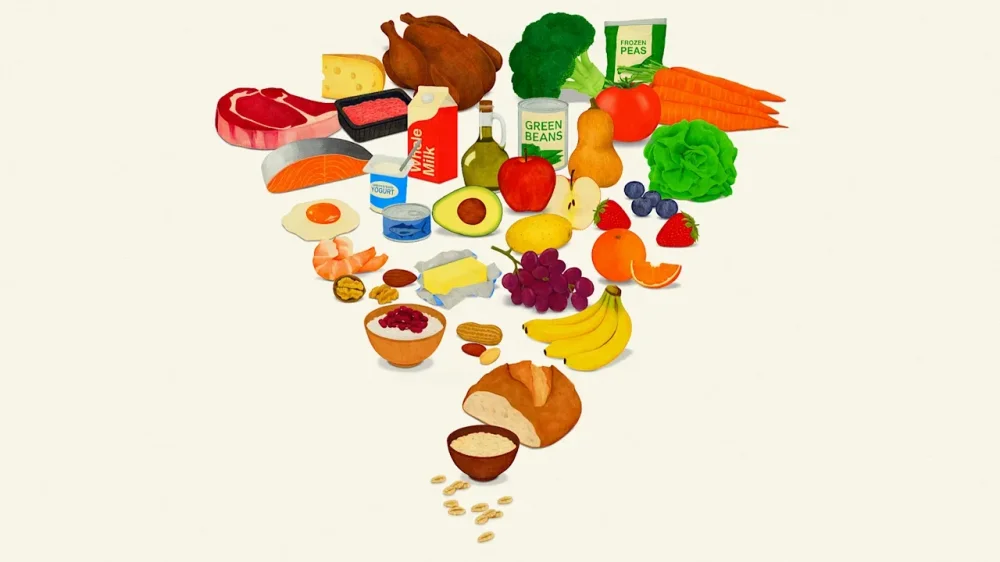
-
A Word of Mouth Marketing (WOMM) strategy focuses on leveraging customer experiences to promote a brand or product. It relies on genuine interactions, encouraging satisfied customers to share their positive feedback. This approach builds trust and cultivates engagement through exceptional service. Comprehending how WOMM works and its key components can improve your marketing efforts. But what specific tactics can you implement to maximize this strategy’s potential? Key Takeaways A Word of Mouth Marketing (WOMM) strategy encourages consumers to share their positive experiences with a brand, enhancing trust and credibility. Effective WOMM focuses on creating memorable customer experiences that inspire sharing through conversations, social media, or reviews. Engaging influencers and leveraging digital channels can amplify WOMM by expanding reach and increasing visibility of consumer recommendations. Implementing referral programs can boost customer acquisition significantly, encouraging satisfied customers to refer friends and family. Monitoring feedback and addressing negative word of mouth promptly is crucial for maintaining a positive brand reputation and recovering dissatisfied customers. Definition of Word of Mouth Marketing Word-of-mouth marketing (WOMM) refers to the process where consumers share their experiences and opinions about a brand or product, resulting in spontaneous recommendations among their friends, family, and social circles. To define word of mouth marketing, it’s essential to understand that it hinges on genuine consumer interactions, often facilitated through social media, online reviews, and user-generated content. This marketing strategy is considered the most trusted form of advertising, as 88% of consumers prefer personal recommendations over other types. WOMM is likewise cost-effective, relying on authentic endorsements rather than paid promotions, which improves brand loyalty and can lead to increased sales. Engaging with customers through exceptional experiences and attentive service can amplify WOMM, encouraging more sharing and positive discussions about your brand. The Importance of Word of Mouth Marketing Utilizing the strength of consumer recommendations can greatly impact purchasing decisions and boost brand visibility. Word of mouth marketing (WOMM) is trusted by 88% of consumers, making it a critical tool for driving sales. It accounts for 36% of brand discovery among U.S. internet users, highlighting its significance. When you employ effective word of mouth marketing techniques, you can cultivate a loyal customer base, as those acquired through referrals tend to purchase more frequently and remain loyal longer. Here’s a quick overview of the benefits of word of mouth marketing: Benefit Description Impact on Business Increases Trust Consumers trust recommendations over advertising Higher conversion rates Amplifies Visibility Genuine discussions boost brand presence Improved brand awareness Drives Loyalty Referrals lead to repeat customers Longer customer retention Cost-Effective Low-cost compared to traditional marketing Better ROI Rapid Spread of Information Positive experiences shared quickly Increased customer reach How Word of Mouth Marketing Works When customers share their positive experiences with a brand, it creates a ripple effect that markedly influences potential buyers’ purchasing decisions. This is the essence of a word of mouth marketing strategy. When you encourage your customers to share their experiences—whether through personal conversations, social media posts, or reviews—you’re leveraging trust, as approximately 88% of consumers trust recommendations from friends and family more than traditional advertising. To initiate effective WOMM, consider implementing referral programs, engaging with your community, and providing exceptional customer service. Digital platforms further amplify this effect, allowing consumers to quickly and broadly share their opinions, with 36% of U.S. internet users citing WOM as their primary source of discovering brands. Key Components of an Effective Strategy To build an effective word-of-mouth marketing strategy, you’ll want to focus on creating memorable experiences and engaging with influencers. Memorable experiences not only delight customers but additionally encourage them to share their stories, increasing your brand’s visibility. Meanwhile, partnering with influencers can amplify your message, as their endorsements often carry significant weight in shaping consumer opinions and driving purchases. Memorable Experiences Creation Creating memorable experiences is essential for nurturing positive word-of-mouth marketing, as exceptional customer service plays a core role in shaping how customers perceive your brand. When you provide engaging, personalized interactions, like handwritten notes or customized recommendations, you improve emotional connections that lead to organic word-of-mouth promotion. In addition, implementing referral programs can greatly boost word-of-mouth marketing, as referred customers are often 30% to 57% more likely to bring in new clients. Encouraging community engagement through events or social media also creates lasting memories and advocacy, with 75% of consumers believing brand communities enrich their overall experience. In the end, comprehending the benefits of word-of-mouth advertising can help you cultivate loyal customers who willingly share their positive experiences. Engaging Influencer Partnerships Engaging influencer partnerships serves as a crucial component in building an effective word-of-mouth marketing strategy, as these influencers can greatly amplify your brand’s reach and credibility. Research shows that 63% of shoppers are more likely to purchase products recommended by trusted social media influencers, making them valuable advocates for your brand. Micro-influencers often achieve higher engagement rates, averaging 10.3%, owing to their closer connection with audiences. Utilizing product seeding without posting requirements can lead to organic promotion, as demonstrated by Graza’s successful strategy. Tools like Modash help you identify suitable influencers aligned with your brand’s niche. Finally, tracking influencer impact through UTM-tagged links allows you to measure effectiveness accurately, enhancing your WOM marketing strategies and minimizing misattribution. Creating Memorable Customer Experiences When businesses prioritize memorable customer experiences, they tap into a potent driver of word-of-mouth marketing. Creating exceptional experiences encourages customers to share positive stories, amplifying your reach. Research shows that 88% of consumers trust recommendations from friends and family more than any advertisement. By exceeding customer expectations, you can cultivate advocacy and increase the likelihood of referrals. Here’s a table illustrating the benefits of memorable experiences: Aspect Impact on WOMM Example Customer Satisfaction 3x more referrals Personal follow-up calls Personalized Interactions Builds loyalty Customized offers for repeat customers Social Currency Encourages sharing Unique packaging Feedback Engagement Increases purchase frequency Incorporating customer suggestions The advantages of word of mouth advertising stem from these efforts, as satisfied customers become enthusiastic advocates, driving organic growth for your brand. Leveraging Digital Channels for WOMM Digital channels have become vital for amplifying word-of-mouth marketing (WOMM), as they greatly expand the reach and visibility of consumer recommendations. With 36% of U.S. internet users identifying WOM as their primary source for brand discovery, it’s clear that leveraging platforms like social media and online reviews is fundamental. Digital word of mouth marketing effectively captures authentic consumer experiences, making it easier for your brand to gain traction. Utilizing micro-influencers can improve trust and engagement, as they often boast higher engagement rates compared to larger influencers. In addition, implementing share-optimized URLs and features like “Send to a friend” on your digital platforms encourages sharing and tracking, tapping into dark social dynamics where product links are frequently circulated. This strategy not merely increases brand visibility but also leads to higher conversion rates, with referred customers purchasing notably more than those acquired through traditional channels. Embrace these digital tools for effective word of mouth advertising. The Role of Influencers in Word of Mouth Marketing Influencers play a pivotal role in amplifying word-of-mouth marketing (WOMM) by leveraging their authority and reach to sway consumer opinions. Their recommendations can notably affect purchasing decisions, making them crucial allies for brands. Here are some key ways influencers improve WOMM: Higher Engagement: Micro and nano influencers often achieve engagement rates of up to 10.3%, surpassing larger influencers. Authenticity: They share user-generated content, nurturing trust and relatability among their followers. Organic Buzz: Sending products for free can lead to genuine mentions, with 4-5 out of 10 influencers likely to post about them. Measurable Impact: Brands can track traffic and engagement from influencer promotions, ensuring accurate attribution. These word of mouth promotion examples highlight how influencers can drive effective WOMM strategies, boosting brand visibility and consumer trust. Measuring the Success of Word of Mouth Marketing To measure the success of your word-of-mouth marketing efforts, you need to track referrals effectively and analyze brand sentiment. By using tools like Google Analytics, you can pinpoint how customers heard about your brand and which channels drive the most traffic. Furthermore, monitoring customer feedback and discussions will help you understand public perception, allowing you to refine your strategies for better engagement and retention. Tracking Referrals Effectively Effective tracking of referrals is crucial for measuring the success of your word-of-mouth marketing efforts, as it allows you to identify which channels are most beneficial for your business. Here are some strategies to improve your tracking: Use UTM parameters to create unique links for each influencer or referral source, aiding in traffic measurement. Employ tools like Bitly or Switchy to generate trackable URLs, making it easy to monitor clicks. Implement loyalty programs with unique promo codes, simplifying referral tracking. Regularly analyze traffic spikes to uncover untracked referrals from private channels. Analyzing Brand Sentiment Analyzing brand sentiment is vital for comprehending how consumers perceive your brand and the effectiveness of your word-of-mouth marketing efforts. You can measure brand sentiment using tools like SparkToro or Talkwalker, which track online conversations and assess consumer feelings based on social media interactions and reviews. Furthermore, collecting qualitative data by asking customers how they heard about your brand offers valuable insights into your word of mouth ads’ effectiveness. Monitoring engagement through email marketing and loyalty programs helps quantify the impact of referrals on sales. Regularly addressing negative word-of-mouth content is critical for maintaining a positive brand reputation. By tracking brand sentiment over time, you can identify trends and adapt your strategies to improve customer experiences effectively. Encouraging User-Generated Content Encouraging user-generated content (UGC) can greatly improve your brand’s visibility and trustworthiness in today’s digital environment. UGC showcases authentic consumer experiences, which are vital for effective WOM advertising. Here are some strategies to boost UGC: Run Contests or Challenges: Motivate customers to share their experiences through engaging contests or challenges, which can increase participation. Highlight UGC on Social Media: Showcase positive UGC on your brand’s platforms to cultivate community and build trust, as 79% of people find such content trustworthy. Offer Incentives: Provide discounts or features to customers who share their content, prompting a 30% increase in engagement. Utilize Short-Form Videos: Encourage customers to create short-form videos, as 73% of consumers prefer these for product research. Implementing these strategies can considerably improve user-generated content, driving engagement and trust in your brand. Addressing Negative Word of Mouth Though negative word of mouth can spread quickly in today’s digital environment, effectively addressing it is vital for maintaining a positive brand perception. You need to respond to complaints without delay, as studies show that brands engaging with dissatisfied customers can recover up to 70% of them. Transparency and authenticity are important; 85% of consumers prefer brands that acknowledge their shortcomings openly. Utilizing monitoring tools like sentiment analysis can help you track negative mentions and engage proactively with customers, minimizing potential fallout. Moreover, cultivating strong customer relationships through exceptional service and regular engagement reduces the chances of negative word of mouth. Satisfied customers are less likely to share adverse experiences. Frequently Asked Questions What Is Word-Of-Mouth in Marketing? Word-of-mouth in marketing refers to the natural sharing of experiences and recommendations among consumers. It occurs when customers discuss products or services, influencing others’ purchasing decisions. This type of marketing is impactful due to the fact that people tend to trust personal recommendations over advertisements. It can manifest through social media posts, reviews, and direct conversations. Companies can encourage word-of-mouth by creating memorable experiences, ensuring quality products, and maintaining positive customer relationships. What Are the 5 T’s of Word-Of-Mouth Marketing? The 5 T’s of word-of-mouth marketing are Talkers, Topics, Tools, Threads, and Time. Talkers are individuals sharing opinions about your brand, whereas Topics encompass the messages they discuss. Tools are the platforms used for sharing, like social media and blogs. Threads represent the networks through which conversations flow, and Time refers to the timing of discussions, which can impact their relevance and effectiveness. Together, these elements help generate and sustain brand conversations. What Are the Four P’s of Word-Of-Mouth Marketing? The Four P’s of word-of-mouth marketing are Product, Price, Place, and Promotion. The Product refers to quality and features that exceed customer expectations, encouraging recommendations. Price involves perceived value; competitive pricing can improve sharing. Place pertains to distribution channels, ensuring easy access for consumers, which facilitates conversations. Finally, Promotion includes strategies like referral programs that stimulate word-of-mouth sharing, effectively generating positive discussions about your brand or product. What Is a Word-Of-Mouth Example? A clear example of word-of-mouth marketing is Ben & Jerry’s. Their unique flavor combinations and social activism encourage customers to share their experiences online and in conversations. Another instance is Glossier, which builds a community of loyal customers who actively promote their products through reviews and social media posts. Both brands effectively leverage satisfied customers to improve visibility, drive engagement, and ultimately increase sales through genuine recommendations and shared experiences. Conclusion In conclusion, a Word of Mouth Marketing strategy is vital for building brand trust and nurturing customer loyalty. By focusing on creating memorable experiences, leveraging influencers, and encouraging user-generated content, you can effectively amplify positive recommendations. Measuring success and addressing negative feedback are fundamental for continuous improvement. Implementing these components will not just improve your brand’s visibility but will additionally drive conversions, making WOMM a significant tool for any marketing strategy. Image via Google Gemini This article, "What Is a Word of Mouth Marketing Strategy?" was first published on Small Business Trends View the full article
-
A Word of Mouth Marketing (WOMM) strategy focuses on leveraging customer experiences to promote a brand or product. It relies on genuine interactions, encouraging satisfied customers to share their positive feedback. This approach builds trust and cultivates engagement through exceptional service. Comprehending how WOMM works and its key components can improve your marketing efforts. But what specific tactics can you implement to maximize this strategy’s potential? Key Takeaways A Word of Mouth Marketing (WOMM) strategy encourages consumers to share their positive experiences with a brand, enhancing trust and credibility. Effective WOMM focuses on creating memorable customer experiences that inspire sharing through conversations, social media, or reviews. Engaging influencers and leveraging digital channels can amplify WOMM by expanding reach and increasing visibility of consumer recommendations. Implementing referral programs can boost customer acquisition significantly, encouraging satisfied customers to refer friends and family. Monitoring feedback and addressing negative word of mouth promptly is crucial for maintaining a positive brand reputation and recovering dissatisfied customers. Definition of Word of Mouth Marketing Word-of-mouth marketing (WOMM) refers to the process where consumers share their experiences and opinions about a brand or product, resulting in spontaneous recommendations among their friends, family, and social circles. To define word of mouth marketing, it’s essential to understand that it hinges on genuine consumer interactions, often facilitated through social media, online reviews, and user-generated content. This marketing strategy is considered the most trusted form of advertising, as 88% of consumers prefer personal recommendations over other types. WOMM is likewise cost-effective, relying on authentic endorsements rather than paid promotions, which improves brand loyalty and can lead to increased sales. Engaging with customers through exceptional experiences and attentive service can amplify WOMM, encouraging more sharing and positive discussions about your brand. The Importance of Word of Mouth Marketing Utilizing the strength of consumer recommendations can greatly impact purchasing decisions and boost brand visibility. Word of mouth marketing (WOMM) is trusted by 88% of consumers, making it a critical tool for driving sales. It accounts for 36% of brand discovery among U.S. internet users, highlighting its significance. When you employ effective word of mouth marketing techniques, you can cultivate a loyal customer base, as those acquired through referrals tend to purchase more frequently and remain loyal longer. Here’s a quick overview of the benefits of word of mouth marketing: Benefit Description Impact on Business Increases Trust Consumers trust recommendations over advertising Higher conversion rates Amplifies Visibility Genuine discussions boost brand presence Improved brand awareness Drives Loyalty Referrals lead to repeat customers Longer customer retention Cost-Effective Low-cost compared to traditional marketing Better ROI Rapid Spread of Information Positive experiences shared quickly Increased customer reach How Word of Mouth Marketing Works When customers share their positive experiences with a brand, it creates a ripple effect that markedly influences potential buyers’ purchasing decisions. This is the essence of a word of mouth marketing strategy. When you encourage your customers to share their experiences—whether through personal conversations, social media posts, or reviews—you’re leveraging trust, as approximately 88% of consumers trust recommendations from friends and family more than traditional advertising. To initiate effective WOMM, consider implementing referral programs, engaging with your community, and providing exceptional customer service. Digital platforms further amplify this effect, allowing consumers to quickly and broadly share their opinions, with 36% of U.S. internet users citing WOM as their primary source of discovering brands. Key Components of an Effective Strategy To build an effective word-of-mouth marketing strategy, you’ll want to focus on creating memorable experiences and engaging with influencers. Memorable experiences not only delight customers but additionally encourage them to share their stories, increasing your brand’s visibility. Meanwhile, partnering with influencers can amplify your message, as their endorsements often carry significant weight in shaping consumer opinions and driving purchases. Memorable Experiences Creation Creating memorable experiences is essential for nurturing positive word-of-mouth marketing, as exceptional customer service plays a core role in shaping how customers perceive your brand. When you provide engaging, personalized interactions, like handwritten notes or customized recommendations, you improve emotional connections that lead to organic word-of-mouth promotion. In addition, implementing referral programs can greatly boost word-of-mouth marketing, as referred customers are often 30% to 57% more likely to bring in new clients. Encouraging community engagement through events or social media also creates lasting memories and advocacy, with 75% of consumers believing brand communities enrich their overall experience. In the end, comprehending the benefits of word-of-mouth advertising can help you cultivate loyal customers who willingly share their positive experiences. Engaging Influencer Partnerships Engaging influencer partnerships serves as a crucial component in building an effective word-of-mouth marketing strategy, as these influencers can greatly amplify your brand’s reach and credibility. Research shows that 63% of shoppers are more likely to purchase products recommended by trusted social media influencers, making them valuable advocates for your brand. Micro-influencers often achieve higher engagement rates, averaging 10.3%, owing to their closer connection with audiences. Utilizing product seeding without posting requirements can lead to organic promotion, as demonstrated by Graza’s successful strategy. Tools like Modash help you identify suitable influencers aligned with your brand’s niche. Finally, tracking influencer impact through UTM-tagged links allows you to measure effectiveness accurately, enhancing your WOM marketing strategies and minimizing misattribution. Creating Memorable Customer Experiences When businesses prioritize memorable customer experiences, they tap into a potent driver of word-of-mouth marketing. Creating exceptional experiences encourages customers to share positive stories, amplifying your reach. Research shows that 88% of consumers trust recommendations from friends and family more than any advertisement. By exceeding customer expectations, you can cultivate advocacy and increase the likelihood of referrals. Here’s a table illustrating the benefits of memorable experiences: Aspect Impact on WOMM Example Customer Satisfaction 3x more referrals Personal follow-up calls Personalized Interactions Builds loyalty Customized offers for repeat customers Social Currency Encourages sharing Unique packaging Feedback Engagement Increases purchase frequency Incorporating customer suggestions The advantages of word of mouth advertising stem from these efforts, as satisfied customers become enthusiastic advocates, driving organic growth for your brand. Leveraging Digital Channels for WOMM Digital channels have become vital for amplifying word-of-mouth marketing (WOMM), as they greatly expand the reach and visibility of consumer recommendations. With 36% of U.S. internet users identifying WOM as their primary source for brand discovery, it’s clear that leveraging platforms like social media and online reviews is fundamental. Digital word of mouth marketing effectively captures authentic consumer experiences, making it easier for your brand to gain traction. Utilizing micro-influencers can improve trust and engagement, as they often boast higher engagement rates compared to larger influencers. In addition, implementing share-optimized URLs and features like “Send to a friend” on your digital platforms encourages sharing and tracking, tapping into dark social dynamics where product links are frequently circulated. This strategy not merely increases brand visibility but also leads to higher conversion rates, with referred customers purchasing notably more than those acquired through traditional channels. Embrace these digital tools for effective word of mouth advertising. The Role of Influencers in Word of Mouth Marketing Influencers play a pivotal role in amplifying word-of-mouth marketing (WOMM) by leveraging their authority and reach to sway consumer opinions. Their recommendations can notably affect purchasing decisions, making them crucial allies for brands. Here are some key ways influencers improve WOMM: Higher Engagement: Micro and nano influencers often achieve engagement rates of up to 10.3%, surpassing larger influencers. Authenticity: They share user-generated content, nurturing trust and relatability among their followers. Organic Buzz: Sending products for free can lead to genuine mentions, with 4-5 out of 10 influencers likely to post about them. Measurable Impact: Brands can track traffic and engagement from influencer promotions, ensuring accurate attribution. These word of mouth promotion examples highlight how influencers can drive effective WOMM strategies, boosting brand visibility and consumer trust. Measuring the Success of Word of Mouth Marketing To measure the success of your word-of-mouth marketing efforts, you need to track referrals effectively and analyze brand sentiment. By using tools like Google Analytics, you can pinpoint how customers heard about your brand and which channels drive the most traffic. Furthermore, monitoring customer feedback and discussions will help you understand public perception, allowing you to refine your strategies for better engagement and retention. Tracking Referrals Effectively Effective tracking of referrals is crucial for measuring the success of your word-of-mouth marketing efforts, as it allows you to identify which channels are most beneficial for your business. Here are some strategies to improve your tracking: Use UTM parameters to create unique links for each influencer or referral source, aiding in traffic measurement. Employ tools like Bitly or Switchy to generate trackable URLs, making it easy to monitor clicks. Implement loyalty programs with unique promo codes, simplifying referral tracking. Regularly analyze traffic spikes to uncover untracked referrals from private channels. Analyzing Brand Sentiment Analyzing brand sentiment is vital for comprehending how consumers perceive your brand and the effectiveness of your word-of-mouth marketing efforts. You can measure brand sentiment using tools like SparkToro or Talkwalker, which track online conversations and assess consumer feelings based on social media interactions and reviews. Furthermore, collecting qualitative data by asking customers how they heard about your brand offers valuable insights into your word of mouth ads’ effectiveness. Monitoring engagement through email marketing and loyalty programs helps quantify the impact of referrals on sales. Regularly addressing negative word-of-mouth content is critical for maintaining a positive brand reputation. By tracking brand sentiment over time, you can identify trends and adapt your strategies to improve customer experiences effectively. Encouraging User-Generated Content Encouraging user-generated content (UGC) can greatly improve your brand’s visibility and trustworthiness in today’s digital environment. UGC showcases authentic consumer experiences, which are vital for effective WOM advertising. Here are some strategies to boost UGC: Run Contests or Challenges: Motivate customers to share their experiences through engaging contests or challenges, which can increase participation. Highlight UGC on Social Media: Showcase positive UGC on your brand’s platforms to cultivate community and build trust, as 79% of people find such content trustworthy. Offer Incentives: Provide discounts or features to customers who share their content, prompting a 30% increase in engagement. Utilize Short-Form Videos: Encourage customers to create short-form videos, as 73% of consumers prefer these for product research. Implementing these strategies can considerably improve user-generated content, driving engagement and trust in your brand. Addressing Negative Word of Mouth Though negative word of mouth can spread quickly in today’s digital environment, effectively addressing it is vital for maintaining a positive brand perception. You need to respond to complaints without delay, as studies show that brands engaging with dissatisfied customers can recover up to 70% of them. Transparency and authenticity are important; 85% of consumers prefer brands that acknowledge their shortcomings openly. Utilizing monitoring tools like sentiment analysis can help you track negative mentions and engage proactively with customers, minimizing potential fallout. Moreover, cultivating strong customer relationships through exceptional service and regular engagement reduces the chances of negative word of mouth. Satisfied customers are less likely to share adverse experiences. Frequently Asked Questions What Is Word-Of-Mouth in Marketing? Word-of-mouth in marketing refers to the natural sharing of experiences and recommendations among consumers. It occurs when customers discuss products or services, influencing others’ purchasing decisions. This type of marketing is impactful due to the fact that people tend to trust personal recommendations over advertisements. It can manifest through social media posts, reviews, and direct conversations. Companies can encourage word-of-mouth by creating memorable experiences, ensuring quality products, and maintaining positive customer relationships. What Are the 5 T’s of Word-Of-Mouth Marketing? The 5 T’s of word-of-mouth marketing are Talkers, Topics, Tools, Threads, and Time. Talkers are individuals sharing opinions about your brand, whereas Topics encompass the messages they discuss. Tools are the platforms used for sharing, like social media and blogs. Threads represent the networks through which conversations flow, and Time refers to the timing of discussions, which can impact their relevance and effectiveness. Together, these elements help generate and sustain brand conversations. What Are the Four P’s of Word-Of-Mouth Marketing? The Four P’s of word-of-mouth marketing are Product, Price, Place, and Promotion. The Product refers to quality and features that exceed customer expectations, encouraging recommendations. Price involves perceived value; competitive pricing can improve sharing. Place pertains to distribution channels, ensuring easy access for consumers, which facilitates conversations. Finally, Promotion includes strategies like referral programs that stimulate word-of-mouth sharing, effectively generating positive discussions about your brand or product. What Is a Word-Of-Mouth Example? A clear example of word-of-mouth marketing is Ben & Jerry’s. Their unique flavor combinations and social activism encourage customers to share their experiences online and in conversations. Another instance is Glossier, which builds a community of loyal customers who actively promote their products through reviews and social media posts. Both brands effectively leverage satisfied customers to improve visibility, drive engagement, and ultimately increase sales through genuine recommendations and shared experiences. Conclusion In conclusion, a Word of Mouth Marketing strategy is vital for building brand trust and nurturing customer loyalty. By focusing on creating memorable experiences, leveraging influencers, and encouraging user-generated content, you can effectively amplify positive recommendations. Measuring success and addressing negative feedback are fundamental for continuous improvement. Implementing these components will not just improve your brand’s visibility but will additionally drive conversions, making WOMM a significant tool for any marketing strategy. Image via Google Gemini This article, "What Is a Word of Mouth Marketing Strategy?" was first published on Small Business Trends View the full article
-
GameStop is providing details on a new compensation package for CEO Ryan Cohen that is dependent on him meeting certain “significant” performance targets. The video game retailer said in a regulatory filing on Wednesday that Cohen would have to grow its market capitalization to $100 billion and it would need to hit $10 billion in cumulative performance EBITDA — or earnings before interest, taxes, depreciation and amortization — for his award to fully vest. GameStop said Cohen won’t receive any guaranteed pay, which it defines as no salary, no cash bonuses, and no stock that simply vests over time. “His compensation is entirely ‘at-risk,’ meaning he will only be paid if the company achieves significant market and operational goals,” GameStop said in the filing. “This structure ensures that Mr. Cohen’s incentives are directly aligned with creating long-term value for GameStop’s stockholders.” The structure is similar to a pay package that Tesla shareholders approved for CEO Elon Musk, in which Musk would receive Tesla stock worth $1 trillion if he hits certain performance targets over the next decade. Cohen’s compensation package with GameStop includes stock options to buy more than 171.5 million common shares for $20.66 each. Shareholders must approve the new pay package at a special meeting in March or April. Shares of GameStop rose 4% to $21.49 in midday trading, giving the company a market cap of roughly $9.26 billion. The company’s shares are down substantially from May 2024 when influential investor Keith Gill, popularly known as “Roaring Kitty,” appeared online for the first time in three years to declare his support for GameStop. Gill helped ignite a “meme” stock craze in early 2021, when GameStop’s stock price soared above $120. —Michelle Chapman, AP business writer View the full article

-
Square has announced a significant enhancement to its offerings for small business owners by expanding its partnership with Thrive, a leading inventory management system. This new integration aims to simplify the way retailers manage their catalogs, inventory, and sales across both physical and online platforms, specifically focusing on e-commerce functionalities with Shopify. As the retail landscape becomes increasingly complex, especially during busy seasons like the holidays, this integration offers a streamlined solution for sellers. The integration allows Square sellers to create and edit product listings directly within their Square dashboard, ensuring that these updates are automatically reflected on their Shopify storefronts. This feature is particularly important as 50% of Square’s retail sellers operate on multiple sales fronts, complicating inventory management. By enabling real-time synchronization between in-store and online inventory, sellers can avoid issues such as overselling and stock discrepancies, significant concerns for any retail operation. Morgan Kuntze, Global Partnerships Lead at Block, states, “Sellers today increasingly operate across channels, but keeping them in sync shouldn’t multiply their workload.” This sentiment reflects a crucial pain point for many small business owners who often struggle with the demands of multitasking across platforms. The core functionalities offered by the Thrive integration include: Unified Catalog Management: Retailers can create and modify product listings in Square, which will automatically sync to Shopify. This ensures that product information is consistent across both platforms. Real-time Inventory Updates: Square and Shopify will adjust stock quantities bi-directionally, thereby minimizing any risk of overselling. Square as the Source of Truth: All catalog updates occur within the Square system, providing accurate reporting and analytics for businesses across all sales channels. Bach Le, CEO of Thrive, emphasizes, “Thrive Inventory eliminates back office guesswork by automating real-time updates between Square and Shopify.” This integration aims to resolve common issues such as stockouts and overselling, particularly crucial during peak shopping seasons when accurate inventory management can make or break a business. However, while the benefits are compelling, small business owners should also consider potential challenges. Setting up the integration may require time and training, particularly for those who may not be familiar with either platform. Additionally, reliance on a single system for key operations might be concerning for some business owners who prefer to keep multiple data backups. This is something to address when deploying the new systems. Small business owners like Daniel Janelle, owner of Puzzled in Albuquerque, already appreciate the benefits of this integration. He stated, “With our business operating across channels, keeping Square and Shopify in sync was one of our highest priorities. Thrive’s integration solved that instantly – now our inventory, catalog, and reporting all stay consistent, which means fewer errors and more time focused on serving our customers.” For businesses that fit specific criteria, the Thrive integration appears to be advantageous. It serves small retail businesses operating both online and in-store through Square, but it is particularly useful for those managing Shopify storefronts alongside one or multiple Square locations. The Thrive integration is currently available to Square sellers in the U.S., Canada, U.K., Australia, and Spain. Small business owners interested in leveraging this new feature can sign up directly through the Thrive website or contact their sales team for a demo to better understand how the integration can fit into their operations. Square continues to enhance its ecosystem by forming valuable partnerships, which ultimately simplify processes for small business owners and allow them to focus on what they do best—servicing their customers. For further information or to learn more about this integration, visit the original press release at Square’s official release. With the holiday shopping season fast approaching, small business owners may find this integration an invaluable tool in maintaining efficient inventory management and ensuring a smooth operation across their channels. Image via Google Gemini This article, "Square Integrates with Thrive to Streamline Inventory Management for Retailers" was first published on Small Business Trends View the full article
-
Square has announced a significant enhancement to its offerings for small business owners by expanding its partnership with Thrive, a leading inventory management system. This new integration aims to simplify the way retailers manage their catalogs, inventory, and sales across both physical and online platforms, specifically focusing on e-commerce functionalities with Shopify. As the retail landscape becomes increasingly complex, especially during busy seasons like the holidays, this integration offers a streamlined solution for sellers. The integration allows Square sellers to create and edit product listings directly within their Square dashboard, ensuring that these updates are automatically reflected on their Shopify storefronts. This feature is particularly important as 50% of Square’s retail sellers operate on multiple sales fronts, complicating inventory management. By enabling real-time synchronization between in-store and online inventory, sellers can avoid issues such as overselling and stock discrepancies, significant concerns for any retail operation. Morgan Kuntze, Global Partnerships Lead at Block, states, “Sellers today increasingly operate across channels, but keeping them in sync shouldn’t multiply their workload.” This sentiment reflects a crucial pain point for many small business owners who often struggle with the demands of multitasking across platforms. The core functionalities offered by the Thrive integration include: Unified Catalog Management: Retailers can create and modify product listings in Square, which will automatically sync to Shopify. This ensures that product information is consistent across both platforms. Real-time Inventory Updates: Square and Shopify will adjust stock quantities bi-directionally, thereby minimizing any risk of overselling. Square as the Source of Truth: All catalog updates occur within the Square system, providing accurate reporting and analytics for businesses across all sales channels. Bach Le, CEO of Thrive, emphasizes, “Thrive Inventory eliminates back office guesswork by automating real-time updates between Square and Shopify.” This integration aims to resolve common issues such as stockouts and overselling, particularly crucial during peak shopping seasons when accurate inventory management can make or break a business. However, while the benefits are compelling, small business owners should also consider potential challenges. Setting up the integration may require time and training, particularly for those who may not be familiar with either platform. Additionally, reliance on a single system for key operations might be concerning for some business owners who prefer to keep multiple data backups. This is something to address when deploying the new systems. Small business owners like Daniel Janelle, owner of Puzzled in Albuquerque, already appreciate the benefits of this integration. He stated, “With our business operating across channels, keeping Square and Shopify in sync was one of our highest priorities. Thrive’s integration solved that instantly – now our inventory, catalog, and reporting all stay consistent, which means fewer errors and more time focused on serving our customers.” For businesses that fit specific criteria, the Thrive integration appears to be advantageous. It serves small retail businesses operating both online and in-store through Square, but it is particularly useful for those managing Shopify storefronts alongside one or multiple Square locations. The Thrive integration is currently available to Square sellers in the U.S., Canada, U.K., Australia, and Spain. Small business owners interested in leveraging this new feature can sign up directly through the Thrive website or contact their sales team for a demo to better understand how the integration can fit into their operations. Square continues to enhance its ecosystem by forming valuable partnerships, which ultimately simplify processes for small business owners and allow them to focus on what they do best—servicing their customers. For further information or to learn more about this integration, visit the original press release at Square’s official release. With the holiday shopping season fast approaching, small business owners may find this integration an invaluable tool in maintaining efficient inventory management and ensuring a smooth operation across their channels. Image via Google Gemini This article, "Square Integrates with Thrive to Streamline Inventory Management for Retailers" was first published on Small Business Trends View the full article
-
Octopuses are brilliant, emotional, and mysterious. Can they ever be farmed humanely? And if they can, should they be? Fast Company contributor Clint Rainey is the first journalist in the world to be let inside a cutting-edge effort to build the first commercial octopus farm. Exclusive documentary. Coming in 2026. Check out the full article: https://www.fastcompany.com/91448602/octopus-could-be-the-next-commercially-farmed-seafood-should-it-be View the full article
-
Blackstone stock fell by as much as 9.3% after The President said he was "immediately taking steps to ban large institutional investors from buying more single-family homes." View the full article

-
We may earn a commission from links on this page. After a decade, Stranger Things is at an end. Well, I mean, except for planned animated and live-action spin-offs...and possibly an unlikely secret extra episode related to the 'Conformity Gate' theory; adherents are convinced that the whole thing we watched was just Vecna messing with our Hawkins crew. But the story that started way back in 2016 is mostly over, almost for sure! Given the pace of life these days, the end of the Obama administration feels, somehow, as distant as the series' nostalgic 1980s setting. The show solidified Netflix as the streamer to beat in terms of original programming, and introduced a new generation of child stars who are all now firmly adults. The show's blend of nostalgia, horror, and small-town weirdness has been wildly influential (and endlessly copied), but its success is based, also, on its synthesis and deft reworking of deeply familiar elements. In that spirit, here are a few shows of the past and present that, in various ways, carry some of those Stranger vibes. From (2022 – ) Travel to The Town (we never get a name for it), a palce from which no one can ever leave. The residents and visitors aren't metaphorically trapped, but literally so, as in the later seasons of Stranger Things, as they are beset by creatures come from the woods that kill anyone found outside after dark. The Matthews family learn all about this firsthand when they roll into the place in their RV and soon find themselves trapped alongside the local sheriff (Harold Perrineau) just as it's getting dark. The monsters here aren't just mindlessly hungry, they're cunning and sadistic, and more than capable of killing residents in gory ways. It's a supernatural spin on the "small towns ain't what they seem" vibe. Stream From on MGM+. From (2022 – ) at MGM+ Learn More Learn More at MGM+ I Am Not Okay With This (2020) Sophia Lillis, straight from playing Beverly Marsh in the It movies, stars as Sydney Novak, a 17-year-old living in a small town with her mother and sister. Her father recently died by suicide; she has a crush on her best friend; and all she and her mother do is argue. In the middle of all of that, she discovers that she had powers triggered by her emotions, both of which she'll need to learn to control if she wants to get her life in order. As the lead, Lillis sells the hell out of this offbeat coming-of-age story which was canceled after one season. Because of course it was. Stream I Am Not Okay With This on Netflix. I Am Not Okay With This (2020) at Netflix Learn More Learn More at Netflix Pluribus (2025 – ) Complete tonal mismatch here aside, there are few stranger shows streaming right now than this weird sci-fi apocalypse from Breaking Bad's Vince Gilligan. Rhea Seehorn plays Carol Sturka, a fantasy romance author and general grouch who becomes one of only 13 people on the planet immune to the "Joining"—the result of an alien virus that transforms the rest of humanity into a peaceful, perky, and perpetually content hive mind. Carol refuses to surrender her miserableness in the face of a loss of identity, fighting instead to restore humanity to its admittedly cruddy ways. Thrilling, heartbreaking, and oddly funny, the show manages to address some big questions about what it means to be human, and what we'd be willing to give up to change. Stream Pluribus on Apple TV+. Pluribus (2025 – ) at Apple TV+ Learn More Learn More at Apple TV+ Haven (2010 – 2015) There are few (if any) teens here, but Haven (based on the Stephen King short story "The Colorado Kid") has got the "weird stuff goes down in a small town" vibe down pat. Emily Rose stars as Audrey Parker, an FBI Special Agent sent to the title town of Haven, Maine on a routine case. Soon, she gets drawn into “the Troubles," a series of harmful supernatural events that have recurred throughout the town’s history—and, by no coincidence, are happening again. A supernatural-case-of-the-week format gives way to a bigger mystery when Audrey comes to learn that this isn’t her first time in Haven, nor the first time she’s encountered the Troubles. Lucas Bryant and Eric Balfour co-star. Stream Haven on Peacock and Prime Video. Haven (2010 – 2015) at Peacock Learn More Learn More at Peacock Dark (2017 – 2020) Dark began as a mystery involving a missing child and evolved, over its three seasons, into a wildly complex narrative: a time travel-driven story that explores dark family secrets over the course of several generations. The German import has a striking look and incredibly atmospheric feel, with an ensemble cast of teens and adults whose narratives are deftly intertwined. Especially given the title, you'd be absolutely right to assume that the tone here is quite a bit more dark than that of Stranger Things, but the shows have plenty in common, including an interest in the '80s. Stream Dark on Netflix. Dark (2017 – 2020) at Netflix Learn More Learn More at Netflix Fear Street (2021 – ) Not a series, precisely, but a series of movies that play out like a miniseries (at least initially), and that play in the retro-nostalgia horror-vibe that Stranger Things does so well. Adapted from the R. L. Stine books, Fear Street Part One: 1994 kicks off the series by introducing the town of Shadyside, which the local kids call “Shittyside,” and has a dark history of multiple murders, most of them covered up. A group of teens upsets the grave of a witch, kicking off the revival of a murderous cult. There are some legit gore and scares (it’s YA, more or less, but definitely not kids’ stuff) as Janiak pays homage to a wide range of horror movies past. The series continues with an impeccable camp slasher homage in Fear Street Part Two: 1978, and then an origin tale that brings the initial trilogy to a conclusion in Fear Street Part Three: 1666. There's a standalone fourth film, as well, and more on the way, but you're fine sticking with the initial trilogy. Stream Fear Street Part One: 1994 on Netflix. Fear Street at Netflix Learn More Learn More at Netflix Paper Girls (2022) This would be the easiest possible recommendation for Stranger Things fans, were it not for the fact that the well-reviewed show was cancelled after one season (though it still ends with a fairly satisfying wrap up). Based on the pretty great comic book series from Brian K. Vaughan and Cliff Chiang, the show follows four young friends—Erin, Tiff, Mac, and KJ—on their paper route the morning after Halloween in 1988. After the skies turn pink and they're accosted by competing groups of weirdos, they head for the safety of Erin's house, only to discover they're suddenly in 2019. Made into targets by their inadvertent time travel, the girls have to stay alive while also deciding whether they want to take the chance to change their own timelines. Stream Paper Girls on Prime Video. Paper Girls (2022) at Prime Video Learn More Learn More at Prime Video Tales From the Loop (2020) A gorgeous-looking anthology (sort of), Tales From the Loop takes place in the small town of Mercer, Ohio—a town that happens to sit upon the titular Loop, a physics lab exploring mysteries for which science has no answers. Each episode offers the story of a person or family in the town impacted by the work of the Loop, in slow-burning stories about the intersection of technology and human existence. It’s based on a conceptual art book by artist Simon Stålenhag, and successfully ports over that book’s striking look and feel. It's far quieter and more meditative than something like Stranger Things, but worth your time if that's your mood. Stream Tales from the Loop on Prime Video. Tales from the Loop (2020) at Prime Video Learn More Learn More at Prime Video The Midnight Club (2022) The least buzzy of Mike Flanagan's Netflix offerings is every bit as good as Midnight Mass, The Fall of the House of Usher, et al. Based on the YA novel by Christopher Pike, it follows a group of eight terminally ill young patients at a bucolic hospice home run by a secretive and mysterious doctor (A Nightmare on Elm Street's Heather Langenkamp). Each night the kids meet secretly to share scary stories, with each also promising to return from beyond the grave when the time comes. Spooky and surprisingly moving, the show was planned as more than a miniseries, and the cancellation left some questions unanswered, but the ending is still pretty satisfying. Stream The Midnight Club on Netflix. The Midnight Club (2022) at Netflix Learn More Learn More at Netflix Twin Peaks (1990 – 1991, 2017) Teens and adults in a deceptively quiet small town (in the '80s, no less) face tragedy accompanied by supernatural threats from outside of our normal space and time. That's a reasonably fair synopsis of both Stranger Things and Twin Peaks, but it also serves to obscure the massive tonal differences between the two shows. Kyle MacLachlan plays FBI Special Agent Dale Cooper, who arrives in the title town to investigate the murder of teenager homecoming queen Laura Palmer (Sheryl Lee). His arrival in town precipitates a (very) long night of the soul as Cooper uncovers secrets and mysteries among the town's delightfully, and often disturbingly, weird residents. Stream Twin Peaks on Paramount+ or buy episodes from Prime Video. Twin Peaks at Paramount+ Learn More Learn More at Paramount+ Alice in Borderland (2020 – ) The Upside Down of Stranger Things is a dark, challenging, chaotic mirror to our own reality—so imagine a similarly sinister parallel space, now with a bit more obvious structure. Video-game obsessed Arisu gets his wish, after a fashion, when he finds himself, along with a couple of friends, transported to an alternate, eerily abandoned version of Tokyo—the title’s Borderland—vividly brought to life via some clever green screen work. The three are directed to an arena and given the instructions for the game, which they’ll be playing whether they want to or not. The first competition involves a locked-room-style puzzle; if they fail, the room goes up in flames with them in it—think Ready Player One, with deadlier stakes. There are games each night, though the rules allow for winners to get time off. There are a lot of rules, actually, but the games are cleverly and sadistically constructed. Stream Alice in Borderland on Netflix. Alice in Borderland at Netflix Learn More Learn More at Netflix School Spirits (2023– ) Peyton List stars as Maddie, a teenager in small-town Wisconsin for whom her death is very much just the beginning. Stuck in a high school in the afterlife (because hell is definitely for children), she goes on a journey to solve her own murder while uncovering secrets and lies in both worlds. It all sounds a bit grim, but the show has a sense of fun about it: While Maddie does develop the ability to communicate with the living, her world is populated by ghost teens from various eras and generations, with customs, mores, and cliques having developed in ghost high school just as in our world. Stream School Spirits on Paramount+ or buy episodes from Prime Video. School Spirits (2023– ) at Paramount+ Learn More Learn More at Paramount+ Goosebumps (2023 – ) Taking a turn off of Fear Street, we return to R.L. Stine—who is, after all, our reigning master of YA horror (his name appearing on well over 300 books). In contrast with earlier adaptations, this series ditches the episodic anthology format of the 1990s series in favor of a more anthologized teen drama, probably in direct response to the popularity of Stranger Things. The first season is set in the present (while involving a mystery from the past), so skips the nostalgic charms (and traps) of the Netflix series, finding a modern group of teens in a weird town encountering the various monsters and scares (many of them legitimately freaky). Each season shifts the focus to a new story, with a new cast of actors in their mid-20s playing teens. Stream Goosebumps on Disney+. Goosebumps (2023 - ) at Disney+ Learn More Learn More at Disney+ Yellowjackets (2021 – ) This time-jumping survival drama is about a group of teenage girls becoming stranded in the wilderness in 1996 and doing terrible things to survive—the extent of which we only learn about via flashbacks from the present, where the events of those 19 months continue to have an impact. There are teases of the supernatural here, much of it ambiguous, but there's plenty of horror in a past that we're still seeing fleshed (ahem) out. Where Stranger Things revels in its '80s setting, Yellowjackets more cynically posits that there's a huge difference between the version of the past we talk about and the one that really happened. Stream Yellowjackets on Paramount+ (the first two seasons are also on Netflix) or you can buy episodes from Prime Video. Yellowjackets (2021 – ) at Paramount+ Learn More Learn More at Paramount+ Gravity Falls (2012 – 2016) The much-loved, if relatively short-lived, animated series follows twin siblings Mabel and Dipper Pines (Kristen Schaal and Jason Ritter) sent to spend the summer with their great-uncle (aka "Grunkle") Stan (voiced by show creator Alex Hirsch). While helping Stan run his mystery-themed tourist shack, the kids run into a series of supernatural mysteries, many related to the show's ultimate antagonist, dream demon Bill Cipher. Like Stranger Things, the series came to a planned conclusion (albeit after four years rather than ten), and it's finale was similarly a ratings blockbuster—the highest rated telecast in the history of Disney XD, as a matter of fact. Stream Gravity Falls on Disney+ and Hulu. Gravity Falls (2012 – 2016) at Disney+ Learn More Learn More at Disney+ View the full article
-
U.S. employers posted far fewer jobs in November than the previous month, a sign that employers aren’t yet ramping up hiring even as growth has picked up. Businesses and government agencies posted 7.1 million open jobs at the end of November, the Labor Department said Wednesday, down from 7.4 million in October. Layoffs also dropped, however, as companies appear to be holding onto workers even as they are reluctant to add staff. The report suggests that the “low-hire, low-fire” job market remains in effect, with workers enjoying some job security but those out of work struggling to find new jobs. The moribund labor market stands in contrast with data showing solid economic growth, which topped 4% at an annual rate in last year’s July-September quarter, the latest data available. Economists forecast growth slowed but remained solid in the final three months of 2025. A key question for this year is whether hiring will pickup to match healthy growth, or whether sluggish job gains will eventually drag down the economy. There is a third possibility: Automation and artificial intelligence could enable steady economic growth without creating many jobs. Further insights into that question will emerge Friday when the monthly jobs report for December will be released. The number of postings in November was the fewest since September 2024. But outside that month, it was the lowest in nearly five years. Open jobs in November fell sharply in shipping and warehousing, restaurants and hotels, and in state and local government. They rose in retail and construction. The number of Americans who quit their jobs ticked higher in November, which is seen as a good sign, because workers typically quit when they are more confident they can find a better job, or already have one. Yet quits remained historically low, at 3.16 million, up from just under 3 million in October. The figures provide some critical measures of the job market after last fall’s government shutdown delayed the release of data on hiring and inflation. Wednesday’s report is known as the job openings and labor turnover survey, or JOLTS, and provides key insights into the state of hiring and firing. Separately, payroll provider ADP said Wednesday that businesses added 41,000 jobs in December, an improvement after they shed 29,000 positions in November. ADP’s report is based on anonymous payroll records the company maintains for 26 million employees. Small firms — with fewer than 50 workers — added 9,000 jobs, an encouraging reversal after they shed jobs in previous months. Smaller firms have been hard-hit by President Donald The President’s tariffs, with less ability to absorb or pass on the costs compared with larger companies, economists say. “It is a slower labor market,” said Nela Richardson, chief economist at ADP. “The labor market isn’t falling off a cliff. We still see some job growth, and we don’t see an uptick in layoffs.” The Bank of America Institute, which tracks changes in the number of paychecks landing in its customers’ accounts, said it saw signs that hiring picked up in December. Job gains rose to 0.6% in December, compared with a year earlier, up from just 0.2% in November. “It does look like, in our data, that the worst of the slowdown could be behind us,” David Tinsley, senior economist at Bank of America Institute, said in a call with reporters. —Christopher Rugaber, AP economics writer View the full article

-
Everybody knows this coworker—the one who spirals about cost-cutting layoffs when snacks vanish from the break room. The one who thinks they’re getting fired because their boss hasn’t been using emojis with them lately. The one who’s the office Chicken Little: anxious, somewhat frantic, often misguided . . . and who can’t stop talking to others about whatever it is they’re anxious about. This person—and it could be you—may be justified, as it makes sense for employees to be nervous right now: layoffs are at an all-time high, and January is a common month for layoffs. But for the office Chicken Little, it’s not the dismal mass termination numbers alone that are scary: It’s the unknown future that’s sending them into sustained panic mode. “Uncertainty is a huge trigger to the stress response” in the body, says physician Esther Sternberg, who’s long studied the effects of stress on humans. Fast Company spoke with several psychology experts who shared what makes someone more prone to anxiety spirals and loops, tips for dealing with their unending office pessimism, and how to escape your own layoff-related worries. What causes anxiety spirals People who quickly turn even minorly negative information into potential catastrophes “tend to be really high in neuroticism,” says clinical psychologist Melanie McNally. Neuroticism, one of psychology’s “Big Five” personality traits, measures one’s disposition in the face of negative emotions. Think of the coworker who just knows they’re getting axed after being left off a group email—when in reality the person who sent it genuinely just forgot. “A minor budget cut isn’t just a cost-saving measure” to these folks, says organizational psychologist Ali Shehab. Instead, the misplaced vigilance takes it as a “sign that the company is failing. ‘I will be fired, and I will never find a job again’.” This is often seen as a protective mechanism that attempts to provide certainty amidst stress-inducing uncertainty. When working with this “glass-half-empty” type in the past, Yvonne Castañeda, a social worker specializing in trauma, says she’s noticed that contentment seems to feel “scary” or “wrong” for some folks, or that safety can’t be trusted. This could come from their upbringing: Parents who were perhaps overly worried and dwelt on potential dangers left this person with a mindset that they’re not going to be okay. The mindset could even manifest after a traumatic event, like a loss, after which the person feels like they don’t deserve or “want to be happy again,” says Castañeda. But McNally says these people might just have “limited social support.” Perhaps they can’t go home at the end of the workday and bounce their concerns off friends or family for a calming ear and alternative perspective, and then coworkers end up becoming their primary outlet for airing worries. For David Rosmarin, associate professor at Harvard Medical School and founder of the Center for Anxiety, the description of this archetype is much simpler. “They’re called ‘Americans’,” he says. Such behavior “doesn’t even come from being pessimistic. It comes from control.” As Americans, he adds, we’re taught to banish feelings of discomfort as soon as they visit us. With the prevailing cultural interest in instant gratification and immediate answers to any query, it’s no surprise that many experience what Rosmarin calls “intolerance of uncertainty,” whether it’s about the weather or our job security. But the irony is that obsessing with certainty just fuels anxiety. Navigating this energy at work While some workers vent fears to others—either out of fear, a desire for control, or simply a need for a sounding board—McNally reminds us that emotions are “contagious.” “Most likely, you’re spreading stress” if you indulge in the anxiety spiral, she says. And for those around the person, “it’s very easy to get sucked into that tornado,” Castañeda adds. “Maybe you attempt to say something to cheer them up, it backfires, and suddenly you’re in conflict.” Still, experts who spoke with Fast Company note that it’s helpful to share anxiety with others. The mental health benefits of having people you can trust at work are real. But when people regularly act on that compulsion to vocalize fears, to the point that it spreads unnecessary stress, it’s best for colleagues to set boundaries. “If the conversation is becoming cyclical and harmful,” says Shehab, the move is to “gently disengage.” You can say that you hear the person is worried, but right now you need to concentrate on an important deadline. “’Let’s focus on the work we can control for the next hour,’” Shehab suggests communicating. Experts generally recommend acknowledging and validating an anxious colleague’s concerns before trying to help them change their outlook. Dismissing someone’s fears or telling them to “calm down,” says McNally, “does not work.” Instead, just listen—if you’re feeling grounded and open enough to hearing them out without spiraling yourself. “Hold the space. Don’t try to make it better,” Castañeda suggests. “You’re not going to do that.” Rosmarin suggests “reflective listening,” a “basic psychotherapy technique” that tends to make people feel at ease and understood. For example, imagine a coworker says, “’I’m freaking out about layoffs. They happened this time last year, and I can tell that they’re going to happen again’.” You can respond with something like, “Yeah, you’re right about last year, and that is totally scary to think about.” Validating the feelings of someone who’s spiraling can help ground them by making them feel heard—so at least they’re not anxious about having unfounded anxieties. Shehab also suggests using facts to pin down the anxiety’s source. “’What concrete evidence do we have that a layoff is happening today?’” Shehab suggests posing to a concerned coworker (or yourself). “’What are the actual company metrics right now?’” This, he says, “engages the prefrontal cortex”: the part of the brain responsible for rational thought that often gets “hijacked by the hyperactive amygdala,” the brain’s fear center, during anxiety loops. Research shows that venting can be helpful, but that’s only true for a few minutes before it becomes counterproductive. McNally suggests setting a timer for three to four minutes. When the timer goes off, transition to a new activity that’s going to totally occupy your attention—like dancing to an all-time favorite song, or cooking dinner with your family. Validate the fear, act with empathy, and then ground the fear in the present with facts and gently challenging reframes. Nipping the spiral in the bud Whether it’s with nervous colleagues, or yourself, look for “what’s at the root of the anxiety,” Rosmarin says. Are you most concerned about rent payments? It could help to work on outlining a new personal budget in case of layoffs. Is thinking about finding a new job the biggest stressor? Update your résumé and start networking. Letting go mentally, and grounding yourself in calm action, can change your physiological reaction to anxiety: “There’s less adrenaline flowing through your system” when you do that, says Rosmarin. In “high-stress, high-control” situations, says Sternberg, “you’re actually energized.” Facing a possible layoff is high-stress, low-control—but facing it while applying for new jobs gives you back some control, and can alleviate some of the negative stress feelings. Otherwise, adds Sternberg, make sure you’re getting enough sleep, eating healthy, and exercising to reduce anxiety. Again, it all comes down to uncertainty . . . and learning to live with it. If you can help your colleague (or yourself) accept it or use it to fuel productivity, the more likely everyone is to avoid anxiety spirals. “The question isn’t whether you can control the outcome,” says Rosmarin. It’s “embracing the fact that we’re not fully in the driver’s seat.” View the full article

-
A reader writes: My job is 99% remote with some on-site event expectations. On-site events are typically mandatory, which is fine with me. I recently asked for events to be either predictable (e.g., first Friday in August) or to have lots of notice, so we can schedule vacations or things like dental cleanings around those events. During the conversation, my manager said that even when we were fully on-site, she sometimes had to move appointments if her boss scheduled a meeting. She gave the example of a short-notice 9 am meeting the next day and thus needing to move her kids’ appointments. That gave me pause. I understand rescheduling things like haircuts or some types of personal commitments, but it’s so hard to schedule physicals, dental cleanings, some medical imaging, etc. that I’d be hard pressed to move those for a work event. Likewise, she said we don’t need to cancel flights for work events, but it was kind of implied that if you have a PTO day planned but aren’t going anywhere (maybe for your birthday or a hobby day) you should plan to attend the work event instead. This won’t come up often, maybe a few times a year, but the emphasis on work taking priority over pre-planned PTO gave me the ick. Am I overreacting? Is this typical? If this isn’t normal, how can I protect my own time away from the office in a professional way? P.S. I don’t know if it matters, but I’m salaried (not hourly) and I have vacation time to draw from. On-site events are generally team-building and networking; my job is desk-work, not anything like patient care or politics where a meeting would be an emergency. No, this is weird! People aren’t normally expected to reschedule appointments that have already been booked and time off approved just because their boss wants to have a short-notice meeting that day or an event comes up afterwards. There are some exceptions to this — a truly crucial meeting that for some reason can’t be put off, or an event that’s a central part of your job to be at. But those would be unusual exceptions, not normal practice. And even then, the conflict would normally be acknowledged and discussed (“I’m so sorry, I know you’re scheduled to be out that day but this is our only shot at saving this account — any chance you’d be able to rearrange things to make it?”); you wouldn’t be expected to just see the conflict and decide on your own to cancel your already-set plans. (An exception might be if you’re in a very senior role and would be expected to know on your own that this was the only shot at saving the account and take the initiative to act accordingly.) But for more routine meetings? The normal response to that is, “I’m out that day; would Thursday or Friday work instead?” However, while your boss is being incredibly weird and her expectations are not in sync with normal professional expectations, if these are her expectations you have to figure out how to navigate them. The easiest thing is to just assert normal professional boundaries, meaning that if you get the sense she’s expecting you to be at something you won’t be available for (again, assuming it’s not a rare high-states exception), you’d simply say, “I have an appointment I can’t move that day,” followed by whatever makes sense next (which could be “I can see if Jane can fill in” or “could we schedule it for Thursday when I’m back?” or so forth). If she pushes back, you’d say, “It’s a medical appointment that can’t be moved” or “it would be really tough for me to change it; are there other options?” or otherwise assert the boundary that no, pre-scheduled things can’t be moved without true and rare need. If she takes issue with that, I’d think about your options for escalating it because, unless you’ve seen direct evidence that this is the culture of your whole office and not just your boss’s idiosyncrasy, it’s likely that your employer doesn’t want her interfering with people’s time off this way. If you have good rapport with her boss, it might be something you could ask their guidance on (“asking their guidance” is a good way of bringing it to their attention without explicitly complaining about it). Or in some offices, HR might be well positioned to step in. But you shouldn’t accept this as a normal thing. The post my boss says you should always move personal appointments for work appeared first on Ask a Manager. View the full article
-
Wheelchairs are available at airports, hotels, resorts, theme parks, and on cruises, but standard wheelchairs require ongoing effort and can struggle through difficult terrain. Standard wheelchairs are simply less capable than electric ones. WheelMove wants to change that. WheelMove is a portable wheelchair attachment that turns any standard wheelchair into an electric one, allowing people to travel more easily wherever they are. It debuted at CES 2026, marking a significant leap in accessibility for wheelchair users who travel. When I found WheelMove at CES "Unveiled," I thought back to a recent family trip just two weeks ago, where two of my older family members often rented wheelchairs. They don't use wheelchairs in their day-to-day lives, but walking through a theme park all day wasn't possible. They needed support navigating the park, and the rest of us gladly took shifts pushing their wheelchairs. With a portable attachment like WheelMove, though, wheelchair users can use less effort and enjoy more independence through the battery-powered, remote-controlled attachment. Credit: Iyaz Akhtar Riders simply attach WheelMove to the front of any standard wheelchair, and the device lifts the wheelchair's smaller front wheels off the ground. Once attached, the rider controls the WheelMove through a basic remote control on their armrest, thigh, or wherever is most comfortable. The attachment weighs under 20 pounds, including its 10-inch wheel, 250W motor, and a battery that goes about 15 miles on a charge. Carrying an additional battery can double its range before needing to recharge, and it can navigate terrains including gravel, grass, and uneven surfaces like cobblestone. WheelMove is an incredibly innovative assistive technology poised to broaden personal mobility for those who need it, and it's also one of the finalists for the official Best of CES 2026 awards for the travel category. Pre-orders are available in France where the start-up is based, but the founders plan to expand internationally later this year. It costs about €5,000 or $6,000. View the full article
-
United Arab Emirates-funded trip underscores growing international interest in Reform UKView the full article
-
Google now adds Call Assets to Vehicle Ads so shoppers can call dealers right from the ad. Why we care. Vehicle Ads already attract high-intent buyers. Click-to-call removes friction at the exact moment they’re ready to speak with a dealer. The big picture. Automotive advertising is shifting toward immediacy. Buyers don’t want more forms. They want answers, availability, and a real person. Call-enabled Vehicle Ads shorten the path from search to conversation. Between the lines. Advertisers now carry more responsibility. When the ad becomes the point of conversion, call handling, staffing, and response quality directly shape performance. Dealers that treat phone calls as a core conversion channel will win. Those who don’t will feel the drop-off. First seen. Google Ads specialist Thomas Eccel spotted the update and shared it on LinkedIn. Bottom line. Vehicle Ads didn’t just gain visibility. They moved closer to the sale. View the full article
-
Changes in the Budget mean landlords are facing higher bills over the next three yearsView the full article
-
Adding music to your video can greatly improve its overall quality and engagement. To get started, you’ll want to choose a video editing platform that supports multitrack editing, which allows for more flexibility. Next, selecting the right music that matches the tone of your video is essential. Once you’ve imported your chosen track, you’ll edit and sync it with your visuals for a cohesive result. Ready to learn how to execute each step effectively? Key Takeaways Choose a video editing platform like Riverside that supports multitrack editing and has a user-friendly interface. Select music that aligns with your video’s tone from royalty-free sources or built-in libraries. Import your chosen music by accessing the video dashboard and adding it to the editing timeline. Edit and sync the audio track by trimming, adjusting volume levels, and applying fade-ins and fade-outs. Export your video with the correct resolution and aspect ratio, ensuring audio is well-balanced before sharing. Choose a Video Editing Platform When you’re ready to add music to your video, the first step is choosing a video editing platform that meets your needs. Select a platform that supports multitrack editing, like Riverside, which makes it easy to integrate and customize audio tracks. Make sure it provides access to a library of royalty-free music or allows you to upload your own tracks to avoid copyright issues. Look for crucial features such as fading in and out, volume adjustments, and the ability to sync music with video clips for a polished result. Furthermore, check the export options, including resolution and aspect ratios suitable for various social media channels. A user-friendly interface with helpful tutorials can greatly improve your editing experience and streamline learning how to add music to a video. Select the Right Music How do you select the right music for your video? Start by choosing tracks that align with your video’s tone. Upbeat music suits promotional content, whereas calm melodies work for tutorials. Consider the emotional impact; the right track can improve storytelling and engage viewers. Pay attention to genre and mood, as these factors greatly shape your audience’s perception. To simplify your search, utilize royalty-free music sources like Bensound, Pixabay, and Soundstripe, ensuring legal use and avoiding copyright issues. Moreover, take advantage of built-in music libraries in editing platforms, like Riverside, to quickly find suitable tracks. Import Music Into Your Video Importing music into your video is a straightforward process that can greatly improve its quality and engagement. To add music to video using Riverside, first access the dashboard and select your video. Click the “Music” icon in the right toolbar to insert audio to video, allowing you to choose from available tracks. Use the “+” button to add audio to MP4 and place it on the editing timeline. Make sure the music track is trimmed and positioned correctly to sync with key moments in your video. Adjust the volume settings for clarity, so dialogue remains audible. Finally, implement fade-ins and fade-outs for smooth changes, enhancing the overall viewing experience of your video. Edit and Sync Your Music Track After you’ve successfully imported your music, the next step focuses on editing and syncing your music track. To effectively add sound to video, follow these steps: Trim the audio in your video editor’s timeline to match the length of your clips. Use the “Zoom” slider to view the audio waveform for precise adjustments that sync with key moments. Adjust the volume levels of your music track, ensuring it complements dialogue, typically setting it lower for clarity. Implement fade-ins and fade-outs on your music track for smooth shifts, enhancing the overall viewing experience. Export Your Video Masterpiece Exporting your video masterpiece is a crucial step in the editing process, and it requires careful attention to detail. Choose dimensions that suit your platform, like 16:9 for YouTube or 9:16 for TikTok. Select a resolution, ranging from 720p to 2160p, for the best quality. Riverside provides options to remove watermarks, normalize audio levels, and reduce background noise during export, ensuring a polished final product. Setting Options Dimensions 16:9 (YouTube), 9:16 (TikTok) Resolution 720p, 1080p, 2160p Watermark Removal Yes Audio Normalization Yes After adjusting your settings, click “Export video.” Always review your work to confirm audio levels and music synchronization before sharing. Frequently Asked Questions How Do I Add Music in a Simple Video? To add music to a simple video, start by choosing a video editing software that allows audio integration. Import your video and the music track, guaranteeing it’s royalty-free. Drag the audio onto the timeline, aligning it with your video clips. Adjust the length as needed, and use volume controls to make certain dialogue remains clear during the music complements the visuals. Finally, export your finished video in the desired format for sharing. What Is the Best Free App to Add Music to a Video? For adding music to your videos, iMovie stands out for Mac and iPhone users, offering a vast library of soundtracks and effects. If you’re on Android, Google Photos simplifies the process with its easy-to-use interface and music options. Windows users can rely on Clipchamp, which includes audio editing features. Furthermore, apps like Add Audio to Video and Add Music to Video Editor provide quick solutions for seamless integration of local music and voiceovers. How to Transition Music in a Video? To shift music in a video effectively, start with fade-in and fade-out effects for smooth audio shifts at track beginnings and ends. Sync music changes with key visuals, enhancing the overall impact. Adjust volume levels to lower background music during dialogue, ensuring clarity. Implement crossfades to blend tracks seamlessly, maintaining rhythm. Regularly preview shifts in your editing software to fine-tune timing, ensuring the music supports the narrative without distracting the audience. How Do I Add Music to My Clips Video? To add music to your clips, start by accessing your video editing software. Look for the music or audio section, where you can upload your chosen track or select from a library. Trim the track as needed, adjust its position, and modify the volume to fit your video. Utilize fade-in and fade-out effects for smooth shifts, and make certain the music is royalty-free to avoid copyright issues before exporting your final product. Conclusion By following these five straightforward steps, you can effectively add music to your video, enhancing its overall appeal. Choosing the right video editing platform, selecting fitting music, and synchronizing the audio will guarantee a polished final product. After editing, exporting your video in the appropriate format allows for easy sharing across various platforms. With careful attention to each step, you’ll create a compelling multimedia experience that resonates with your audience. Image via Google Gemini This article, "How to Add Music to Video: A Step-by-Step Guide for Creators" was first published on Small Business Trends View the full article
-
Adding music to your video can greatly improve its overall quality and engagement. To get started, you’ll want to choose a video editing platform that supports multitrack editing, which allows for more flexibility. Next, selecting the right music that matches the tone of your video is essential. Once you’ve imported your chosen track, you’ll edit and sync it with your visuals for a cohesive result. Ready to learn how to execute each step effectively? Key Takeaways Choose a video editing platform like Riverside that supports multitrack editing and has a user-friendly interface. Select music that aligns with your video’s tone from royalty-free sources or built-in libraries. Import your chosen music by accessing the video dashboard and adding it to the editing timeline. Edit and sync the audio track by trimming, adjusting volume levels, and applying fade-ins and fade-outs. Export your video with the correct resolution and aspect ratio, ensuring audio is well-balanced before sharing. Choose a Video Editing Platform When you’re ready to add music to your video, the first step is choosing a video editing platform that meets your needs. Select a platform that supports multitrack editing, like Riverside, which makes it easy to integrate and customize audio tracks. Make sure it provides access to a library of royalty-free music or allows you to upload your own tracks to avoid copyright issues. Look for crucial features such as fading in and out, volume adjustments, and the ability to sync music with video clips for a polished result. Furthermore, check the export options, including resolution and aspect ratios suitable for various social media channels. A user-friendly interface with helpful tutorials can greatly improve your editing experience and streamline learning how to add music to a video. Select the Right Music How do you select the right music for your video? Start by choosing tracks that align with your video’s tone. Upbeat music suits promotional content, whereas calm melodies work for tutorials. Consider the emotional impact; the right track can improve storytelling and engage viewers. Pay attention to genre and mood, as these factors greatly shape your audience’s perception. To simplify your search, utilize royalty-free music sources like Bensound, Pixabay, and Soundstripe, ensuring legal use and avoiding copyright issues. Moreover, take advantage of built-in music libraries in editing platforms, like Riverside, to quickly find suitable tracks. Import Music Into Your Video Importing music into your video is a straightforward process that can greatly improve its quality and engagement. To add music to video using Riverside, first access the dashboard and select your video. Click the “Music” icon in the right toolbar to insert audio to video, allowing you to choose from available tracks. Use the “+” button to add audio to MP4 and place it on the editing timeline. Make sure the music track is trimmed and positioned correctly to sync with key moments in your video. Adjust the volume settings for clarity, so dialogue remains audible. Finally, implement fade-ins and fade-outs for smooth changes, enhancing the overall viewing experience of your video. Edit and Sync Your Music Track After you’ve successfully imported your music, the next step focuses on editing and syncing your music track. To effectively add sound to video, follow these steps: Trim the audio in your video editor’s timeline to match the length of your clips. Use the “Zoom” slider to view the audio waveform for precise adjustments that sync with key moments. Adjust the volume levels of your music track, ensuring it complements dialogue, typically setting it lower for clarity. Implement fade-ins and fade-outs on your music track for smooth shifts, enhancing the overall viewing experience. Export Your Video Masterpiece Exporting your video masterpiece is a crucial step in the editing process, and it requires careful attention to detail. Choose dimensions that suit your platform, like 16:9 for YouTube or 9:16 for TikTok. Select a resolution, ranging from 720p to 2160p, for the best quality. Riverside provides options to remove watermarks, normalize audio levels, and reduce background noise during export, ensuring a polished final product. Setting Options Dimensions 16:9 (YouTube), 9:16 (TikTok) Resolution 720p, 1080p, 2160p Watermark Removal Yes Audio Normalization Yes After adjusting your settings, click “Export video.” Always review your work to confirm audio levels and music synchronization before sharing. Frequently Asked Questions How Do I Add Music in a Simple Video? To add music to a simple video, start by choosing a video editing software that allows audio integration. Import your video and the music track, guaranteeing it’s royalty-free. Drag the audio onto the timeline, aligning it with your video clips. Adjust the length as needed, and use volume controls to make certain dialogue remains clear during the music complements the visuals. Finally, export your finished video in the desired format for sharing. What Is the Best Free App to Add Music to a Video? For adding music to your videos, iMovie stands out for Mac and iPhone users, offering a vast library of soundtracks and effects. If you’re on Android, Google Photos simplifies the process with its easy-to-use interface and music options. Windows users can rely on Clipchamp, which includes audio editing features. Furthermore, apps like Add Audio to Video and Add Music to Video Editor provide quick solutions for seamless integration of local music and voiceovers. How to Transition Music in a Video? To shift music in a video effectively, start with fade-in and fade-out effects for smooth audio shifts at track beginnings and ends. Sync music changes with key visuals, enhancing the overall impact. Adjust volume levels to lower background music during dialogue, ensuring clarity. Implement crossfades to blend tracks seamlessly, maintaining rhythm. Regularly preview shifts in your editing software to fine-tune timing, ensuring the music supports the narrative without distracting the audience. How Do I Add Music to My Clips Video? To add music to your clips, start by accessing your video editing software. Look for the music or audio section, where you can upload your chosen track or select from a library. Trim the track as needed, adjust its position, and modify the volume to fit your video. Utilize fade-in and fade-out effects for smooth shifts, and make certain the music is royalty-free to avoid copyright issues before exporting your final product. Conclusion By following these five straightforward steps, you can effectively add music to your video, enhancing its overall appeal. Choosing the right video editing platform, selecting fitting music, and synchronizing the audio will guarantee a polished final product. After editing, exporting your video in the appropriate format allows for easy sharing across various platforms. With careful attention to each step, you’ll create a compelling multimedia experience that resonates with your audience. Image via Google Gemini This article, "How to Add Music to Video: A Step-by-Step Guide for Creators" was first published on Small Business Trends View the full article
-
We may earn a commission from links on this page. Living in a comfortable, heated house is something a lot of us take for granted. When the cold weather hits, we just put on thick socks, turn up the thermostat (or take other steps), and go about our business. But most modern homes rely on the electrical grid to keep that heat flowing. Even if your home is heated by natural gas or heating oil, there’s most likely an electric component to your heating system. That means that when the power goes out—say, in the middle of a fierce blizzard—so does your heat. Even recently built homes can lose interior heat pretty quickly, dropping to uncomfortable (and even unsafe) temperatures within a day at most. If you’re not sure when power will be restored, you’ll need to find a way to keep the place as warm as possible if you and your property are going to come out of the experience unscathed. Here are are four ways to keep your house warm if your heat goes out. Pre-heat your home before a stormIf you have some warning that a power loss is possible during the cold months—a winter storm warning, for example—it’s a good idea to “pre-heat” your home. The warmer your house is when the power goes out, the longer it will remain at a safe and/or comfortable temperature. You don’t necessarily want to make it tropical, but a few degrees higher than usual will buy you some time if the power goes out. Combined with sealing the house as tightly as possible—by hanging thermal curtains or blankets over windows, applying plastic insulation kits to windows, and deploying draft stoppers under doorways and anywhere else cold air is getting in—this strategy can be very effective. Isolate your family to a single roomTrying to keep a large house warm without an active heating system is a fool’s errand. Instead, focus on a single room where everyone in the house can gather, because a small room is a lot easier to warm up. A few considerations about which room to choose: Since heat rises, rooms on upper floors will be warmer than rooms on the main floor. A room that gets a lot of sunlight can be warmed during the day by opening up the curtains and letting that solar energy do its thing. Smaller rooms will be easier to heat up, but consider how many people will need to live and sleep in there. Rooms near bathrooms (or with en-suite baths) offer a bit more convenience, especially if you’re going to be hunkering down for a while. Once you’ve selected the room you’ll be using, try to keep it closed up as much as possible (covering windows, stopping up drafts, keeping the door closed). Introducing an indoor-safe heater is a good idea if you have one (or you can make one; see below). If none of the rooms in your house are ideal, you could also consider setting up a tent indoors. Tents are designed to hold in heat, and can create a small, controllable environment that will be easier to keep warm in a pinch. Make your own DIY heater with candles and clay potsIf you’ve planned ahead and have an indoor-safe propane or kerosene heater (or even a solar-powered portable heater), that will obviously help to keep your home warm (just be certain to follow all the instructions for ventilating whatever space you’re heating up). If you haven’t, or you discover that your propane tanks have leaked and you have no fuel, don’t despair. You can still generate heat by building a candle-pot heater, which is an old-school way of generating some quick heat. A candle-pot heater is pretty easy to set up: You’ll need 1-3 clay flower pots (or similar ceramic containers) in different sizes, some non-flammable materials to set up on (bricks or stone tiles will work), and some candles. Then arrange everything: Set up your bricks or other materials to create a raised platform, with plenty of airflow. Place your smallest pot upside down on the bricks and cover the hole in the bottom (if it’s a flowerpot). Place the larger pot on top, and then the largest on top of that if you have three pots. Place your candles underneath and light them. The candles don’t produce much heat, but the clay pots will absorb that heat and slowly start to radiate out. Instead of the candles’ heat just rising up to your ceiling and being cooled by the frigid air already in the room, the pots capture it and intensify it. Will this replace your home’s heating system, or even a portable propane heater? Not by a mile. But it will make a difference, especially in a small space. A few things to keep in mind here: Candles are open flames, so never leave your heater unattended, and always be conscious of fire hazards. You can place a foil-covered panel behind the heater to help reflect the heat in a specific direction (say, toward the chair you’re sitting in). Get a furnace battery backupIf you have a gas furnace, it’s not that hard to keep it running even during a blackout if you have an alternative power source like a generator or even a power bank. The furnace needs electricity to run the ignition, the blower, and communication between the thermostat and the furnace or boiler. A decent generator or robust battery can definitely keep your furnace running for a while—and those extra hours or days could be crucial in an extended cold-weather blackout. If you can see an obvious on/off switch on your furnace, you can pretty easily install a transfer switch like this one (here’s a video demonstrating how it’s done). This allows you to plug in a generator or power bank and keep your furnace running even when the power’s out—all you have to do is plug it in and flip the switch. If you’re not entirely comfortable with electrical wiring, you can hire a licensed electrician to install it as well, of course. Once it’s done, you’ll never have to worry about a cold house again—as long as you pair the switch with a generator or battery solution of sufficient power to keep things running. View the full article
-
Change would hit buyout groups Blackstone and Cerberus that have amassed large residential portfoliosView the full article
-
A shared client base helped lead to introduction of the new integration, with implementation scheduled to come later this year, the companies said. View the full article
-
At CES 2026, Swedish furniture giant Ikea showed off its new Kallsup Bluetooth speaker, which will cost just $10 in the U.S. Normally, I'd be skeptical of any speaker this cheap, but the Kallsup grabbed my attention for a few reasons—chief among them that Ikea says you can chain up to 100 of them together to create the multi-speaker setup of your dreams. That aside, the hardware seems pretty basic: The speaker has a USB-C port at the back, and two buttons up top (play/pause, and pair). Chaining together Bluetooth speakers is nothing new, but this is the first time I'm seeing the ability to pair as many as 100 of them. The only reason this use case is even remotely plausible is the pricing: As reported by The Verge, the Kallsup Bluetooth speaker will be priced at $10 in the U.S. and €5 (roughly $6) in Europe, which means you can buy 10 of them for the same price as one HomePod mini. The Verge also says that once you pair one of them to your phone (the company promises Bluetooth 5.3 support), you can add more to the chain with a two-button sequence. Design-wise, the speakers are cubical and colorful, which I'm a fan of (at the moment, Ikea is showing them off in white, green, and pink). But how do they sound? Well, Gizmodo says that while they are loud, they don't deliver much in the way of bass. I'd love to get a couple to judge for myself before committing to chaining a few dozen of them together, but I definitely admire Ikea's big swing here. That said, while CES is the place to grab attention with out-there ideas, and I am struggling to find a use case for chaining 100 Bluetooth speakers together. Maybe if you're an amusement park owner and you want the cheapest possible audio setup for a haunted house? Likely most people will be content with a more reasonable number of them, spread around the house. View the full article
-
Largely strong credit qualities were offset because by loans on single-family homes in the pool dropping by 0.5%, and that the percentage of loans that received due diligence decreased by 0.4%. View the full article

-
Workflow integration software is no longer an option. It’s a necessity. The average organization used 106 SaaS apps in 2025. That means your workflows go through multiple platforms by default, with essential data scattered across them. But dig a bit beyond that number and you’ll find another story. That average actually went down — from 113 — since 2024. What does that mean? More and more organizations are realizing that just adding tools to their stack doesn’t solve all their collaboration problems. They’re trying to cut down on redundant platforms and streamline the way they work. But removing tools isn’t the only way you can do this. Workflow integration software can help you get more out of your tool stack and unlock new collaboration opportunities. Here’s how leaders at your organization can choose the best workflow integration software and how to deploy it efficiently. The difference between workflow integration and automation At its core, workflow integration is about bridging the gap between tools so data can flow between them without any manual intervention. It turns a sequence of disconnected tools, all essential for your work, into a single environment. No bit of context goes missing in the gaps between tools because there are no gaps. Think of workflow integration like your nervous system, connecting your brain to every single organ, muscle, and bone in your body. That system carries signals to and from your brain near-instantaneously, allowing your body to move, act, and react. Workflow automation performs a similar function, but with some key differences. For one, workflow automation tools (e.g., Zapier, Workato) typically only move data in one direction. Whether they’re updating existing data in one platform or creating a new version to match context in another, these tools don’t look back. You can, through extensive customization, turn a sequence of one way actions into a kind of two-way relationship, but this requires some technical skill. Another difference between workflow automation and workflow integration? Automations can typically only perform the simplest actions, like updating a single field (e.g., a description, a date, or a dropdown) or creating a single work item (e.g., a task, a spreadsheet row, a ticket). Workflow integration platforms naturally chain these simple actions to unify data more deeply, without additional maintenance from the end user. If workflow integration tools are the nervous tissue connecting the platforms you use, workflow automation tools are more like an assembly line in a factory, automatically pushing a task through until it’s done. Still powerful, but more limited. How to choose the right workflow integration software Knowing that workflow integration software is essential for your organization is one thing. Choosing the right one is another. With hundreds of vendors on the market, having a clear idea of your needs is essential to making the right choice—potentially saving you months of work and thousands of dollars in software budget. The following seven characteristics will help you find the right tool. Platform compatibility The first thing you need to know about a potential vendor is whether they support the software platforms your workflow needs. If your ticket escalation workflow requires that your software development team use Jira and your customer success team use ServiceNow, vendors that only support Jira can be eliminated. This goes beyond just ensuring an integration is available. You need to dig a little deeper to ensure the workflow integration software actually supports what you need. Some software, for example, doesn’t support custom fields, while others only integrate with cloud-based platforms. Ease of use Some workflow integration software requires coding knowledge to operate. Other platforms can be used by anyone, regardless of their technical abilities. One might seem inherently better than the other, but that’s not always the case. If you only want your IT teams to control which platforms get integrated, how this is done, and when changes can be made, then you might want workflow integration software with more of a learning curve. Conversely, if you want to democratize access to your integration platform so everyone from junior team members to leadership can build integrations, you’ll want an option that’s easier to use. Technical resources required Workflow integration software often requires technical resources to deploy, use, and customize. That can range from just having your IT teams meet with the vendor to share a list of requirements to regular maintenance for each integration, meaning you need to dedicate IT resources just to keeping everything running smoothly. Increased ownership (and complexity) comes with an added need for resources. Consider the resources you’re willing to commit to managing an integration solution and review the commitments each vendor requires. Enterprise suitability Not every workflow integration software is suited to enterprise organizations. These companies have specific needs ranging from enhanced data security (e.g., SOC 2 Type 2) to massive volumes of data. Workflow integration software not specifically designed for enterprise organizations may be more attractive due to a lower subscription cost or ease of use but may be lacking in other critical areas. Typically, you can discover an integration platform’s enterprise suitability early in your conversations with a vendor. Just make sure you have a list of your requirements on hand. Deployment time Can you wait weeks or months to have your workflow integration needs met? Or do you need a turnaround of just a few days? Some solutions, despite fitting your requirements in other areas, may not come online quickly enough to make an impact. Research your options, consulting customer review sites like G2 and Capterra to get a sense of a platform’s average deployment time. Customizability Not every example of workflow integration software can do exactly what you need as-is, especially if you’re an enterprise organization. For example, you might find a platform that meets the majority of your requirements but doesn’t support a critical integration. Can you meet with that vendor and get custom development done to create that integration? If not, you may want to look elsewhere. When evaluating customizability, ask about room for growing needs you may not be aware of. Price Cost is an important aspect of every purchase, and workflow integration software is no different. If a platform’s price of admission far outweighs the savings you’ll get from productivity gains, then you can safely eliminate it as an option. That said, you should also be wary of platforms with a price that seems too good to be true. Typically, that’s reflective of a tool that might not be quite mature enough to fit your needs. Finally, consider costs beyond an initial subscription or contract. With some platforms, you may need additional (paid) services or third-party experts to get them working just right. How to deploy workflow integration software Once you’ve chosen the right workflow integration platform, you need to actually deploy it (i.e., connect it to your tools and start syncing data). Here’s how that’s done, as well as some challenges you should be aware of. Step-by-step deployment checklist Ready to start? Here’s a checklist for deploying workflow integration software and handling any issues that might emerge as you do. Identify workflows to integrate: Don’t aim to integrate every single workflow, especially not right away. Identify high-priority workflows for integration, workflows that can do without an integration for now, and workflows that don’t need one at all. Gather stakeholders: Every workflow has its stakeholders, and each stakeholder needs to be involved in integrating it. That involvement can vary from providing a list of needs to being involved in every conversation. List the tools to integrate: When you’ve chosen your high-priority workflows, list all the tools involved, ranking them by how important they are. When you first deploy your integration solution, you may not be able to integrate everything, which makes this prioritization exercise important. Find the right vendor: You can source software integration vendors through online searches and conversations with leaders at other companies. From there, use the characteristics above to identify vendors suited to your needs and choose the right workflow integration software. Run a pilot project: Before you deploy an integration platform across all your workflows, you need to see how it performs. Pick a single workflow that, ideally, won’t affect critical projects or high-priority tasks. Deploy your integration throughout this workflow and use it as a test. Run this test for a few weeks or months. Review results: After you’ve run your test, get feedback from the people involved, review productivity metrics, and log any incidents that happened because of your integration. By looking back on the impacts of your test, you can validate that the integration you chose is the right one and make changes as needed. Deploy workflow integration software in waves: Even after reviewing the results of your test, you shouldn’t deploy integrations in every workflow at once. You’ll want to slowly add integrations to your workflow over time, giving you the ability to see how they perform in different circumstances. Evaluate impact: When you’ve had a new integration running for some time, evaluate the results, and carry those learnings to future deployments. Reevaluate integration needs: Just because an integration has run relatively smoothly for some time doesn’t mean it’ll always be the one you need. Every year, spend a bit of time reevaluating the integrations you’re using and how they match your evolving needs. Consider other vendors and compare their offerings to your existing integrations. Deployment challenges to avoid When deploying workflow integration software, especially for the first time, be mindful of the following challenges: Misalignment on needs: Stakeholders involved in purchasing decisions for integration software may not have the same priorities as team leads and individual team members. You can avoid this by clearly defining these priorities before deployment, having the right people sign off on them, and referring to them throughout your deployment. Too much too soon: When you’ve just acquired a new integration platform, it’s tempting to connect everything to it right away and see results ASAP. But this could derail important projects if done incorrectly. Start with a small test to evaluate a platform’s capabilities before a more widespread deployment. Permission and security issues: You regulate access to essential tools strictly to prevent data breaches and other security risks. But integration platforms need at least some access to them. Misalignment or miscommunications can slow down deployment if the right access isn’t available at the right time. Technical issues: Integration platforms are inherently technical, even if they’re easy to use. It’s all too possible to run into technical issues that affect your deployment, making access to an IT team or a vendor’s customer support essential. 3 examples of the best workflow integration software Unito: Best workflow integration software for two-way sync Unito is a no-code workflow integration platform with some of the deepest two-way integrations for the most popular tools on the market, including ServiceNow, Salesforce, Jira, Wrike, Asana, and more. A single Unito flow can connect a block of work (e.g., Asana projects, ServiceNow tables) in one tool with a block of work in another, syncing data back and forth between them seamlessly. That means you’re always up to date, no matter what tool you’re working in. Key features: Two-way sync across 60+ applications 12-minute average setup time Field-level mapping with custom rules SOC 2 Type II certified Historical data migration Want to see what Unito can do? Meet with a product expert for a personalized demo. Talk with sales Dell Boomi Dell Boomi is a cloud-based data integration tool with a visual interface that allows everyone at your organization to build integrations quickly, no code required. Companies like Expedia, AT&T, LinkedIn, and American Express use Dell Boomi to integrate workflows spanning over 300,000 tools. Key features: Visual integration designer 300,000+ app connections Pre-built process templates API management tools Make (formerly Integromat) Make is another example of a no-code workflow integration platform that uses a drag-and-drop interface to empower users of all skill levels to build their first integration. That said, it’s more advanced than other integration platforms and can require additional maintenance to keep integrations working properly in the long run. Key features: Drag-and-drop interface No-code integration and automation AI agent development tools 3,000+ pre-built apps Why enterprise organizations are choosing two-way sync Workflow integration platforms aren’t all created equal, and there’s one feature in particular that separates enterprise-ready integrations from the rest. Two-way sync. A two-way sync creates true data fidelity between tools without relying on long chains of simple automations that can often create more problems than they solve. A true two-way sync tool prevents problems like infinite loops, duplicate work items, and the significant management that comes with these issues. That’s why more and more enterprise organizations are choosing integration platforms that offer a two-way sync. Platforms like Unito. Want to see what Unito can do? Meet with a product expert for a personalized demo. Talk with sales FAQ: Workflow integration software Can workflow integration software work with legacy systems? While this varies depending on the workflow integration software you use, most can support legacy systems up to a certain point. You may need to speak with a vendor to discuss custom development options to get this working right, however. What happens to my integrations if one of my connected apps changes its API? Most workflow integration software vendors anticipate API changes to ensure their platform still supports your integration. If you’ve built your own integrations, however, even a simple API change could break them, requiring some emergency software development work. How do workflow integration platforms handle data transformation between different systems? Most software tools have APIs (Application Programming Interfaces) that turn their data into something fitting some kind of universal language. Workflow integration platforms bridge the gap between the APIs in two tools, transforming data as needed so it becomes compatible with each tool. Can I integrate on-premise software with cloud applications? Not all workflow integration software supports on-premise installations, but many do. These platforms will allow you to integrate on-premise software with cloud applications, though this typically requires some additional configuration. What’s the difference between a real-time sync and a scheduled sync in workflow integrations? A real-time sync identifies and sends updates from tool to tool as they happen. This allows end users to work with context from multiple tools without leaving their own platform. No miscommunication and no misunderstandings. Scheduled syncs only check tools for updates intermittently, with delays ranging from 15 minutes to a month. While platforms offering only scheduled syncs can typically support more integrations, they don’t have the level of data fidelity a real-time sync offers. How do I prevent duplicate records when integrating systems? Many integration platforms have built-in duplicate detection features, preventing the accidental creation of duplicate records. Can workflow integration software handle a multi-step approval process? Absolutely. As long as the workflow integration software you use is compatible with all tools your approval process moves through, it can automatically sync multiple approvals as you work on tasks and deliverables. How does workflow integration software handle sensitive data like financial or health information? If you work with sensitive data like financial or health information, make sure you choose workflow integration software that has security certifications matching your field. In finance, for example, you should look for PCI DSS (Payment Card Industry Data Security Standard) or SOC 2/SOC 1 certifications. In healthcare, you’ll want to look for HIPAA (Health Insurance Portability and Accountability Act) compliance. View the full article
-
With AI tools at everyone’s fingertips, what does “great” content writing mean in 2026? Content writing is about using words and psychology to deliver value, earn trust, and move readers toward action. It includes blog posts, social media content, newsletters, and white papers. Or it can be scripts for video, podcasts, and presentations. Content Type Purpose Key Characteristics Blog posts Educate; build brand awareness and authority In-depth, structured, research-backed Social media posts Engage, entertain, build community Conversational, visual, platform-specific Email newsletters Nurture relationships; drive action Personal tone, value-driven, scannable Video/podcast scripts Entertain; educate through audio/visual Conversational, paced for speech, engaging hooks Presentations/webinars Educate and engage viewers for awareness Educational, crisp content presented visually Unlike copywriting, which persuades the audience to take an action, content writing builds trust through teaching. Thanks to AI tools, filling pages is easier and faster than ever. And as content becomes easier to produce, attention becomes harder to earn — whether readers are scrolling social feeds, skimming search results, or asking AI tools for quick answers. The best content writers bring a full toolkit: deep research, sharp critical thinking, strategic judgment, and the ability to apply those strengths in ways AI can’t replicate. In this guide, you’ll learn eight content writing skills that set top performers apart, shaped by my work with leading brands and insights from my colleagues at Backlinko. Important: Research and editing are learnable skills. But the instinct for what makes content memorable — what makes someone stop scrolling, what creates emotional resonance — that’s the human layer AI can’t recreate. 1. Build and Hone Your Research Skills Strong research is what separates fluff from content people trust. Here’s how to build a hands-on research process. Start with Your Audience Audience research is the easiest way to understand your readers: their pain points, goals, and hesitations. Start your research in a few simple but effective ways: Mine social media platforms to find emotional drivers behind buying decisions Skim product reviews to learn what excites or frustrates your audience Talk directly to your audience through polls, surveys, or 1:1 interviews Browse community forums to see real conversations around your subject For example, if you’re writing about the “best SaaS tools,” don’t rely on generic feature lists to inspire your content. Go where real SaaS buyers are sharing feedback — places like G2 reviews and user-generated forums like Reddit. These insights help you create genuinely helpful content that connects with readers. Rosanna Campbell, a senior writer for Backlinko, shares what she looks for when researching an audience: At a minimum, I like to spend time learning the jargon, current issues, etc., affecting my target reader — usually by lurking on platforms like Reddit, Quora, industry forums, LinkedIn threads, etc. I’ll also find one or two leading voices and read some of their recent content. But you don’t have to do all the heavy lifting yourself. AI can speed up much of this process. Note: AI won’t write great content for you, but it can streamline your research and editing process. Throughout this guide, I’ve included prompts to help you work smarter and faster — not let AI do the thinking for you. For instance, Michael Ofei, our managing editor, uses a strategic prompt to aggregate audience insights from multiple channels. Copy/paste this prompt into any AI tool to jumpstart your research (just update your topic description first). You are a content strategist researching audience pain points for: [TOPIC DESCRIPTION] RESEARCH SOURCES: Analyze discussions from Reddit, Quora, YouTube comments, LinkedIn posts, and People Also Ask sections from the last 12 months. PAIN POINT CRITERIA: Written as first-person “I” statements Specific and actionable (not vague) Include emotional context where relevant Reflect different sophistication levels (beginner to advanced) OUTPUT FORMAT: First, suggest 3-5 pain point categories for this topic’s user journey. Then create a table with: Category (from your suggested categories) Pain Point Statement (first person) User Level (Beginner/Intermediate/Advanced – use one for each pain point) Emotional Intensity (Low/Medium/High) Semantic Queries (related searches) Aim for 8-12 total pain points that help content rank for both traditional search and LLM responses. Provide only the essential table output, minimize explanatory text. After using this prompt for the topic “journalist outreach,” Michael received a helpful list of pain points mapped to user level and emotional intensity. Perform a Search Analysis Next, it’s time to review organic search results to assess what content already exists and where you can add value. Chris Shirlow, our senior editor, stresses the importance of looking closely at who’s ranking and how when studying search results: Analyzing search results gives me a quick pulse on the topic: how people are talking about it, what questions they’re asking, and even what pain points are showing up. From there, I can identify gaps, spot patterns in language and structure, and figure out how to create something that adds value, rather than just echoing what’s already out there. Pay attention to: Content depth: Is the content shallow (short posts) or comprehensive (long guides)? Authority: Who’s ranking — big brands, niche experts, or smaller sites? Visuals: What kind of visuals can make your content stand out? Gaps and missing angles: What’s missing that you could add? Then, repeat the same process with large language models (LLMs) like ChatGPT, Claude, and Perplexity. AI has changed how people discover and consume information. This means it’s no longer enough to rank on Google; your content also needs to surface in AI-generated answers. Notice the type of insights coming up in AI-generated responses, and find gaps in the results. Pay attention to the frequently cited brands and content formats to understand what AI considers “trusted.” Study those articles closely to see how they’re earning citations and mentions. Map Out Key Topics with Content Tools Tools like Semrush’s Topic Research also help you learn more about the topics your audience is interested in. Enter a topic like “lifecycle email marketing” and you’ll get a visual map of related themes like “loyalty program” and “segmenting your audience.” This gives you insight into the subtopics to cover, questions to answer, and angles that resonate with your audience. 2. Find Fresh Angles to Create Standout Content Don’t fall into the trap of rehashing what’s already ranking. Find new angles and content ideas to break through the crowd. Angles come from tension. This can be a surprising insight, a common mistake, a high-stakes story, or a view that challenges the norm. Without tension, you’re just adding to the noise. Here’s how to find them. Find Gaps in Existing Content Study the top-ranking and frequently cited articles for your topic, and see what’s missing. It could be: Shallow sections that need a deeper analysis Topics explained without visuals, examples, or case studies Predictable “safe takes” that ignore alternative perspectives and bold advice Use this framework to document these gaps. Content Gap What to Assess Depth Is the content surface-level? Are key topics rushed, repetitive, or missing nuance? Evidence Are claims backed by credible proof like examples, case studies, data, or visuals? Perspective Does it repeat what everyone else is saying, or bring a fresh angle? Format Is the information structured logically and easy to scan? Consider Opportunities for Information Gain Information gain adds unique value to your content compared to the existing content on the same topic. Think original data, free templates, and new strategies. Basically, it helps your content stand out from the crowd. And creates an “aha” moment for your readers. Use these tips to add information gain to your articles: Find concrete proof: Support your claims with original research, case studies, quotes, or real examples from your own experience or industry experts Expand on throwaway insights: Take loosely discussed ideas and cover them in detail with additional context, data, and actionable takeaways Counter predictable advice: Stand out with contrarian perspectives, exceptions, or overlooked approaches Address unanswered questions: Find what confuses readers and fill those gaps with your content At Backlinko, our writers and editors consider information gain early in outlining to uncover gaps and add value from the start. Here’s how our senior editor, Shannon Willoby, approaches it: I try not to default to common industry sources when gathering research. Everyone pulls from these, which is why you’ll often see industry blogs all quoting the same people, statistics, and insights. Instead, I look for lesser-known sources for information gain, like podcasts with industry experts, webinar transcripts, niche newsletters, and conference presentations. AI tools can also help with this task, but you’ll have to thoroughly vet the recommendations. In my own article on ecommerce SEO audits, I proposed a simplified, goal-based structure for the outline, with an actionable checklist — something missing from existing content. This approach gave readers a clearer roadmap instead of just another generic audit guide. Use AI as a Creativity Multiplier AI content tools make great sparring partners that enhance your thinking. For instance, Shannon shares her process for using AI to refine her research. Once I’ve drafted my main points, I’ll ask ChatGPT or Claude a question like, ‘What’s the next question a reader might have after this?’ This helps me spot gaps and add supporting details that make the article more valuable to the audience. The following prompts can help you find deeper angles and improve your audience alignment: How to use AI to improve content Prompts Find blind spots Here’s my research for an article on [topic]. What questions or objections would readers still have after going through this? List gaps I should address to make it feel more complete. Challenge assumptions I’m arguing that [insert your point]. Play devil’s advocate: what would be the strongest counterarguments against this view, and what evidence could support them? Explore alternative perspectives Rewrite this idea as if you were speaking to: (a) a total beginner, (b) a mid-level practitioner, and (c) a skeptic. Show me how each group would interpret or question it differently. 3. Back Up Your Points with Evidence Evidence-backed content gives weight to your arguments and makes abstract ideas easier to digest. It also helps your content stick in readers’ minds long after they’ve clicked away. This includes firsthand examples, data, case studies, and expert insights. The key is using reputable, industry-leading sources in your content writing. And backing up claims with verifiable proof. Pro tip: LLMs favor evidence-backed content when generating responses — boosting both your authority as a writer and your clients’ visibility. Here’s how different types of evidence can strengthen your content: Recent research data: Backs up trends and industry shifts with hard numbers Case studies: Proves outcomes are achievable with real-world results Expert quotes: Adds credibility when challenging assumptions or introducing new ideas Examples: Makes abstract concepts concrete and relatable 4. Structure Your Ideas in a Detailed Outline An outline organizes your ideas and insights into a clear structure before you start writing. It maps out the key sections you’ll cover, supporting evidence, and the order in which you’ll present your points. For example, here’s the outline I created for my Backlinko article on subdomains vs. subdirectories: I included a working headline, H2s, and main points. I also added my plans for information gain. This shows clients or employers how you’ll deliver unique value — and keeps you focused on differentiating your content from the start. To get started with your outline, think of your core argument: what’s the most important takeaway you want readers to leave with? From there, use the inverted pyramid to create an intuitive structure. Include the most important details at the start of every section, then layer additional context as you go. Pro tip: Save time with Semrush’s SEO Brief Generator. Add your topic and keywords, and it generates a solid outline instantly. From there, you can refine it with your own research and insights. 5. Develop Your Unique Writing Voice Two people can write about the same topic. But the one with a distinct voice is the one people quote, bookmark, and remember. Assess Your Writing Personality To define your writing personality, start by analyzing how you naturally communicate. Look at your emails, Slack messages, and social posts. Notice patterns in tone, humor, pacing, analogies, pop-culture references, or how often you use data and stats. Then, distill these insights into a few adjectives that describe how you want to sound. Like professional, insightful, and authoritative. Use these to guide your writing voice. For example, let’s say your adjectives are conversational, humorous, and authentic. Here’s how that might look in practice: Conversational: Short sentences with casual, relatable language. “Let’s be real — writing your first draft is 90% staring at a blinking cursor.” Humorous: Use wit or funny references to engage readers. Instead of “Most introductions are too long,” you might say, “Most intros drag on longer than a Marvel end-credit scene.” Authentic: Add stories from your lived experiences to make people feel seen. “When I first launched my blog, my mom was my only reader for six months.” Get Inspired by Your Favorite Writers To keep sharpening your voice, study writers you admire. Pay attention to their rhythm, tone, and structure. What terms do they use? How do they hold your attention — whether in a long-form blog post or a quick LinkedIn update? Borrow what works, then put your own spin on it so it still sounds like you. Adapt to Your Clients’ Voices As a content writer, clients and employers will often expect you to adapt your writing to their brand voice. This might mean adjusting your tone, pacing, or word choice to match their brand’s personality. Study a few of their blog posts or emails to understand their style. Note patterns in rhythm and vocabulary, and mirror those in your draft — without losing what makes your writing yours. AI tools can help you check how well your draft matches your client’s voice. Upload both the brand’s voice guidelines and your draft to an LLM and use this prompt: I’ve added the brand voice guidelines and my draft for this brand. Compare my draft against the guidelines and tell me: Where my tone, word choice, or style drifts away from the brand voice Specific sentences I should rewrite to better match the guidelines Suggestions for how to make the overall flow feel more consistent with the brand voice 6. Add Rich Media to Improve Scannability Even the best ideas lose impact when hidden behind walls of text. Plus, research shows that most people skim web pages. Their eyes dart to headlines, opening lines, and anything that stands out visually. That’s why adding visual breaks, such as images, screenshots, and tables, is so important. Visual content works well when you want to illustrate a point. It also simplifies or amplifies ideas that are hard to convey with text alone. As Chris Hanna, our senior editor, puts it: Often, words alone just won’t make full sense in the reader’s mind, or they won’t have the desired impact on their own. Anytime you’d personally prefer to see a visual explanation, it’s worth thinking about how you can convey it through visuals. If you can imagine watching a video on the topic you’re writing about, use that as your guide for how you could illustrate it with graphics. Here are a few places where infographics can supplement your writing: Comparisons: Tables or side-by-side visuals Frameworks and models: Diagrams or matrices Workflows and processes: Flowcharts or timelines Abstract concepts: Layered visuals (like Venn diagrams) At Backlinko, we track visual break density (VBD) — the ratio of visuals to text. Our goal is a visual break density of 12% or higher for every article. That’s about 12 visuals (images, GIFs, callout boxes, or tables) per 1,000 words to keep content easy to scan and engaging. Here’s how this looks in practice: We do this to improve the readability, retention, and engagement of our articles, from start to finish. 7. Understand How to Sell Through Your Content Every piece of content sells something — a product, a signup, a return visit. But good content doesn’t read like a pitch. It gently nudges people to take action by building trust and solving real problems. Lead with Value This is what Klaviyo, an email marketing platform, does through its blog content. They include helpful examples, original data, and actionable tips in their content writing. But they also weave in product mentions that feel helpful, not salesy. There are case studies, screenshots, and examples that show how real clients used their platform to increase revenue. This is smart for a few reasons. It proves their expertise, reinforces how their product solves real problems, and delivers value — even if the reader never becomes a customer. Focus on Outcomes, Not Features People don’t care what a company offers — they care what it helps them achieve. Features talk about what you offer. Outcomes show people how they can benefit. Here’s what this looks like in practice: Feature-driven writing Outcome-driven writing “Redesigned homepage using Figma and custom CSS” “After my redesign, load time dropped to 2 seconds and conversions jumped 40%. Here’s how I planned it.” “Our tool automates monthly reporting.” “One agency cut reporting time from 5 hours to 1 and reinvested those 4 hours into client growth. Let’s break down this workflow to help you achieve similar results.” Show people you understand their frustrations by baking their pain points into your content writing. When readers sense you’ve been in their shoes, they’re more open to your advice. Take this HubSpot CRM product page, for example. It highlights real frustrations — setup hassles, messy migrations, lost data — the exact headaches their audience feels. Then, it shifts to outcomes with copy like “unified data” and higher productivity from “day one.” That’s outcome-driven content writing. It connects with the audience immediately and makes the benefits crystal clear. Share Your Firsthand Struggles Authority matters, but so does humility. Be honest about your wins and failures. It makes your content feel real. Here’s an example from one of my Backlinko articles where I shared my struggles with creating a social media calendar: I relate to the audience with language like “too many tabs” and “overwhelming categorization.” And provide a free calendar template so readers can apply what they learn. Pro tip: Free resources, such as tools, frameworks, and templates, make your content more actionable. Even a simple checklist or worksheet can help readers take the next step, and make your work far more memorable. 8. Finalize Your Work Here’s the truth: your first draft is never your best draft. Editing is where your content truly comes alive. Step Away from Your Draft One of the simplest editing tricks in the book? Give your draft some breathing room. Chris Shirlow, our senior content editor, explains why: Spend too much time in an article and you lose all perspective. Take a walk, sleep on it, or do something totally unrelated. When you come back, you’ll see what’s working — and what’s not — much more clearly. It may take a few rounds of editing and refining before you get everything just right: Round 1 (quick wins): Go through the article. Does it flow logically? Is it easy to understand? Do your examples clearly illustrate the core ideas? Round 2 (structure): Ask AI for editing feedback. What are you missing? Does the structure/writing flow naturally? Is there any room to add more value? Round 3 (polish): Tighten sentences, transitions, audience alignment, and examples Here’s a prompt you can use for Round 2: You are an expert editor specializing in long-form content writing. Please analyze my draft on the topic [ADD TOPIC] for its structure, flow, and reader experience. Specifically, give feedback and suggestions on: Structure: Are the sections ordered logically? Does each section build on the previous one? Depth and focus: Which parts feel under-explained or too detailed? How can I tighten or expand them to improve the flow? Reader journey: Where might readers drop off or lose context? Summarize your feedback into 3–5 actionable editing priorities. Pro tip: AI suggestions feel generic? Train the tool on your style first. Both Claude and ChatGPT let you upload writing samples and guidelines so their suggestions align with your voice. Prioritize Clarity Over Cleverness If your audience has to re-read a sentence to understand it, you’ve lost them. As Yongi Barnard, our senior content writer, says: A clever turn of phrase is nice, but the goal is for readers to understand your point immediately. Edit out any language that makes them pause to figure out what you mean. Take a quick litmus test: Is this sentence/phrase/word here because it helps my audience, or because I like how it sounds? You’ll know a sentence/phrase needs to be cut if it… Slows down the flow Makes the point harder to understand Is redundant Common issues in content writing (and how to fix them) include: Problem Areas Weak Example Strong Example Wordiness “At this point in time, in order to improve your rankings, you need to be focusing on the basics of SEO.” “To improve rankings, focus on SEO basics.” Jargon “We need to leverage synergies across verticals.” “We need different teams to work together.” Abstract Claims “Content quality is important for SEO success.” “Sites that publish in-depth content (2,000+ words) rank higher than thin pages.” Build Your Personal Editing Checklist Every writer has blind spots: repeated grammar errors, overused words, or formatting mistakes. That’s why Yongi suggests creating a personal editing checklist that includes common errors and recurring feedback from editors. Chris Hanna suggests going through the checklist before submitting your draft: Run a cmd+F (Mac) or CTRL+F (Windows) search in the doc each time. It’ll help you catch the most important but easy-to-fix errors. Over time, you’ll naturally make fewer mistakes. Here’s an editing checklist to get you started: The Self-Editing Checklist Big picture Does the piece serve the reader (not me)? Is the main takeaway crystal clear from the start? Does the flow make sense, with each section leading naturally to the next? Clarity and value Is every section genuinely useful, not filler? Did I back up claims with examples, data, or stories? Did I explain the ideas simply enough that my target readers would get it? Language and style Am I prioritizing clarity over cleverness? Are any sentences too long or clunky — could I cut or split them? Did I cut filler words (actually, very, really, in order to, due to the fact that)? Engagement Did I vary sentence lengths? Does the tone feel human — not robotic, not overly formal? Is there at least a touch of personality (humor, storytelling, relatability)? Polish Are transitions smooth between sections? Did I run a spell-check and grammar-check? Did I read it out loud (or edit bottom-up) to catch awkward phrasing? Did I run through my personal “repeat offender” list (words/phrases I overuse)? Final Pass Did I add relevant internal links? Does the article end with a clear, valuable takeaway? Did I include a natural next step (CTA, resource, or link) without sounding pushy? Pro tip: Use a free tool like Hemingway Editor to tighten your writing. It gives you a readability grade and highlights long sentences, passive voice, and other clarity issues. How to Become a Content Writer: A Quick Roadmap If you’re starting from scratch, don’t worry — every great content writer began exactly where you are. Here’s how to build momentum and get noticed. Find a Niche You’re Passionate About The fastest way to level up as a writer? Specialize. Niching down builds authority — and makes clients trust you faster. So, pick a niche (or two) and become an expert. A good niche checks three boxes: Passion: You care enough to keep learning and writing when it gets tough Potential: There’s growing demand for this information Profitability: Businesses invest in content on this topic Pro tip: Validate before you commit. Check job boards, freelance platforms, and brand blogs to see who’s hiring and publishing in that niche. If both interest and demand line up, you’ve found a winner. Build Expertise and Authority in Your Niche Once you pick a niche, become a trusted voice. This gives you multiple advantages: Traditional and AI search engines see your content as authoritative Readers are more likely to trust what you say Your content is more likely to be shared and quoted Start with what you know. Draw from your own experiences to add depth and credibility. For example, the travel writer India Amos built her authority by writing firsthand reviews. Her Business Insider piece about a ferry ride is grounded in real experience, making the content trustworthy and relatable. But don’t limit yourself to content writing for clients. Get your name out there. Contribute guest posts and expert quotes to reputable sites Speak at conferences or webinars Share insights on social media The more you’re cited as an expert, the stronger your credibility. Learn SEO Fundamentals SEO basics remain essential to content writing: keyword research, competitive analysis, and on-page optimization. But you’ll also want to know how to write and structure LLM-friendly content. YouTube videos, blogs, and courses can help you understand these topics quickly. It’s also helpful to familiarize yourself with popular SEO tools. Clients often expect you to know platforms like: Clearscope, Surfer SEO, MarketMuse: Content optimization and readability scoring Semrush, Ahrefs, Moz: Keyword research and competitive analysis Perplexity, ChatGPT, Gemini: AI search insight and prompt-based content discovery Pro tip: Consider pursuing niche-specific certifications to stand out. This is especially helpful in “Your Money or Your Life” (YMYL) fields like finance, health, or law, where expertise and trust matter most. Show Proof of Work with a Portfolio A portfolio showcases what you bring to the table and provides proof of your accomplishments as a writer. But you don’t have to spend weeks (or months) building one. What matters most is what’s inside your portfolio, such as: A short intro about who you are and what you offer Writing samples that showcase your expertise Testimonials or references Contact information Tools like Notion, Contra, Authory, and Bento let you design a portfolio in minutes. For instance, here’s my Authory portfolio: I like this platform because it automatically adds all articles credited to my name. You can also invest in a website for more control and search visibility. I did both — having a portfolio and website helps me improve my online visibility: LinkedIn can also double as your portfolio. Add details about each client and link to your articles in the “Experience” section of your profile. Share your on-the-job insights, feature testimonials, and engage in relevant conversations. And don’t forget to post your favorite work, from blog posts to copywriting. Unlike a static site, LinkedIn keeps you visible in real time. Future-Proof Your Content Writing Skills Use what you’ve learned here to create content that builds your reputation and lands clients. Because great content writing doesn’t just fill pages. It opens doors. And as AI continues to reshape the content world, the best writers don’t resist it — they evolve with it. So, don’t fear artificial intelligence as a writer. Use it to your advantage. Read our guide: How to Use AI to Create Exceptional Content. It’s packed with practical workflows, expert insights, and handy prompts that will help you work smarter and stay ahead. The post Content Writing 101: 8 Skills That Set Top Writers Apart appeared first on Backlinko. View the full article