ResidentialBusiness
Administrators
-
Joined
-
Last visited
Everything posted by ResidentialBusiness
-
 In a cautionary tale for small business owners, Bryan Ochoa Diaz, the proprietor of Casa Colima in Vancouver, Oregon, has pleaded guilty to money laundering related to a COVID-19 relief loan from the U.S. Small Business Administration (SBA). This case underscores the importance of adhering strictly to the terms of such loans and serves as a warning against misuse of federal funds designated for recovery. The case, which was investigated by multiple federal agencies including the SBA Office of Inspector General, involved a loan of $350,000 that was to be used exclusively as working capital to mitigate economic injuries linked to the pandemic. Instead, shortly after receiving the funds, Ochoa Diaz transferred $100,000 into his parents’ personal bank account, which he subsequently funneled toward their mortgage payments. For small business owners, the implications of this case are significant. As businesses strive to recover from the economic impacts of the pandemic, there are various government-backed loans available, but these come with stringent requirements. As noted in the press release, the terms explicitly state that funds should not be used for personal, family, or household purposes, reinforcing the necessity for owners to understand and comply with the stipulations tied to such financial assistance. “The requirements for financial aid are important for the integrity of the program,” said an SBA spokesperson. “Misusing funds can lead to severe repercussions, including criminal charges.” This reinforces the sentiment that small business owners need to approach any financial assistance with care, given the heightened scrutiny that comes with federal funds. Ochoa Diaz’s actions lead to serious legal consequences, including a maximum sentence of 10 years in prison and a $250,000 fine. He is scheduled for sentencing on December 15, 2025, and has already paid full restitution to the SBA—a stark reminder that the consequences of financial misconduct can extend well beyond mere repayments. The case also highlights a critical avenue for reporting fraud. The Justice Department has made it clear that they are actively investigating any potential misuse of COVID-19 relief funds. Small business owners should be aware that allegations can be reported through the National Center for Disaster Fraud hotline (866-720-5721) or the NCDF Web Complaint Form: NCDF Complaint Form. For small business owners navigating the post-pandemic landscape, it is crucial to focus on compliance with loan stipulations to secure the aid that many companies desperately need. Beyond potential criminal penalties, improper use of funds can severely damage a business’s reputation and relationships with lenders and community stakeholders. In navigating financial aid options, owners must ensure that every dollar is utilized according to federal guidelines, preserving the integrity of their business and supporting broader economic recovery. As many small businesses continue to grapple with the impacts of the pandemic, understanding how to ethically and effectively leverage financial support is more critical than ever. For more information on the case and ongoing loan compliance expectations, you can refer to the original press release from the SBA here. This article, "Oregon Restaurant Owner Pleads Guilty to Laundering COVID Relief Funds" was first published on Small Business Trends View the full article
 -
In a cautionary tale for small business owners, Bryan Ochoa Diaz, the proprietor of Casa Colima in Vancouver, Oregon, has pleaded guilty to money laundering related to a COVID-19 relief loan from the U.S. Small Business Administration (SBA). This case underscores the importance of adhering strictly to the terms of such loans and serves as a warning against misuse of federal funds designated for recovery. The case, which was investigated by multiple federal agencies including the SBA Office of Inspector General, involved a loan of $350,000 that was to be used exclusively as working capital to mitigate economic injuries linked to the pandemic. Instead, shortly after receiving the funds, Ochoa Diaz transferred $100,000 into his parents’ personal bank account, which he subsequently funneled toward their mortgage payments. For small business owners, the implications of this case are significant. As businesses strive to recover from the economic impacts of the pandemic, there are various government-backed loans available, but these come with stringent requirements. As noted in the press release, the terms explicitly state that funds should not be used for personal, family, or household purposes, reinforcing the necessity for owners to understand and comply with the stipulations tied to such financial assistance. “The requirements for financial aid are important for the integrity of the program,” said an SBA spokesperson. “Misusing funds can lead to severe repercussions, including criminal charges.” This reinforces the sentiment that small business owners need to approach any financial assistance with care, given the heightened scrutiny that comes with federal funds. Ochoa Diaz’s actions lead to serious legal consequences, including a maximum sentence of 10 years in prison and a $250,000 fine. He is scheduled for sentencing on December 15, 2025, and has already paid full restitution to the SBA—a stark reminder that the consequences of financial misconduct can extend well beyond mere repayments. The case also highlights a critical avenue for reporting fraud. The Justice Department has made it clear that they are actively investigating any potential misuse of COVID-19 relief funds. Small business owners should be aware that allegations can be reported through the National Center for Disaster Fraud hotline (866-720-5721) or the NCDF Web Complaint Form: NCDF Complaint Form. For small business owners navigating the post-pandemic landscape, it is crucial to focus on compliance with loan stipulations to secure the aid that many companies desperately need. Beyond potential criminal penalties, improper use of funds can severely damage a business’s reputation and relationships with lenders and community stakeholders. In navigating financial aid options, owners must ensure that every dollar is utilized according to federal guidelines, preserving the integrity of their business and supporting broader economic recovery. As many small businesses continue to grapple with the impacts of the pandemic, understanding how to ethically and effectively leverage financial support is more critical than ever. For more information on the case and ongoing loan compliance expectations, you can refer to the original press release from the SBA here. This article, "Oregon Restaurant Owner Pleads Guilty to Laundering COVID Relief Funds" was first published on Small Business Trends View the full article
-
The Federal Aviation Administration (FAA) has mandated that, beginning today, flights across America will be reduced at 40 airports due to the ongoing government shutdown. According to the agency, the flight reductions are being implemented due to safety issues stemming from a shortage of air traffic controllers, who are not being paid during the shutdown. The reductions are expected to lead to a wave of flight cancellations, the number of which is set to increase every day between now and November 14. Here’s what you need to know about the flight reductions, including the full list and a map of the 40 airports affected. Why is the FAA mandating flight reductions? The FAA says it has safety concerns stemming from the ongoing government shutdown, which began on October 1 and is the longest US government shutdown in history. Hundreds of thousands of government workers have been furloughed without pay during the shutdown. But some federal employees, including air traffic controllers, are designated as essential workers. Those workers are required to stay on the job during a shutdown, though their pay is paused. The problem is that those essential workers still have bills to pay, so as the shutdown drags on, necessity dictates that some are resigning to take on other paid roles in the private sector, while others are calling in sick. Fewer air traffic controllers and other essential airport staff reporting to work means the risk to flier safety increases. To help mitigate that growing risk, the FAA has now decided to restrict a select number of flights at 40 U.S. airports. What are the specifics of the FAA’s flight reductions? In a notice posted to the FAA’s website yesterday, the agency said that it would initiate a 10% reduction in flights at 40 U.S. airports starting today, Friday, November 7. However, the reductions will be phased in gradually over the next week. The first reduction begins today, with the full 10% taking effect a week later. Here is how the reduction phases will work: Friday, November 7: 4% reduction in flight operations Tuesday, November 11: 6% reduction in flight operations Thursday, November 13: 8% reduction in flight operations Friday, November 14: 10% reduction in flight operations Announcing the reductions, FAA Administrator Bryan Bedford said that the agency was “seeing signs of stress in the system, so we are proactively reducing the number of flights to make sure the American people continue to fly safely.” He also warned that the FAA will not hesitate to take further action if needed. What airports are affected by the FAA reductions? Most of the major airports in the country are impacted by the reductions, including central hubs like John F. Kennedy International Airport in New York, Hartsfield-Jackson Atlanta International Airport, Los Angeles International Airport, and Chicago O’Hare International Airport. The full list of airports affected is as follows: ANC – Ted Stevens Anchorage International Airport ATL – Hartsfield-Jackson Atlanta International Airport BOS – Boston Logan International Airport BWI – Baltimore/Washington International Airport CLT – Charlotte Douglas International Airport CVG – Cincinnati/Northern Kentucky International Airport DAL – Dallas Love Field DCA – Ronald Reagan Washington National Airport DEN – Denver International Airport DFW – Dallas/Fort Worth International Airport DTW – Detroit Metropolitan Wayne County Airport EWR – Newark Liberty International Airport FLL – Fort Lauderdale/Hollywood International Airport HNL – Honolulu International Airport HOU – William P. Hobby Airport IAD – Washington Dulles International Airport IAH – George Bush Houston Intercontinental Airport IND – Indianapolis International Airport JFK – New York John F. Kennedy International Airport LAS – Las Vegas McCarran International Airport LAX – Los Angeles International Airport LGA – New York LaGuardia Airport MCO – Orlando International Airport MDW – Chicago Midway International Airport MEM – Memphis International Airport MIA – Miami International Airport MSP – Minneapolis–St. Paul International Airport OAK – Oakland International Airport ONT – Ontario International Airport ORD – Chicago O’Hare International Airport PDX – Portland International Airport PHL – Philadelphia International Airport PHX – Phoenix Sky Harbor International Airport SAN – San Diego International Airport SDF – Louisville International Airport SEA – Seattle–Tacoma International Airport SFO – San Francisco International Airport SLC – Salt Lake City International Airport TEB – Teterboro Airport TPA – Tampa International Airport What flights will be reduced? If your flight is among the reductions, it will be canceled. But it appears that those cancellations will not be decided by the FAA itself. Instead, it will be left up to the airlines to decide which flights they will cut to meet their reduction requirements. In the memo the FAA posted, the agency states that “The order does not require a reduction in international flights. Carriers may use their own discretion to decide which flights are canceled to reach the order’s goal.” Can I get a refund if my flight is canceled? Yesterday, Fast Company reported that many major U.S. airlines, including United Airlines, American Airlines, and Delta Air Lines, confirmed that they would issue full refunds to passengers whose flights are canceled. However, other airlines remained silent on the matter. But now it appears airlines will not have a choice in the matter. The FAA’s memo states that “Airlines will be required to issue full refunds.” However, the FAA says airlines will not be responsible for covering secondary costs, such as hotel stays. That means if your flight is canceled, you can get a full refund from the airline, but if that cancellation requires you to stay at a local hotel until you can get on another flight, the airline will not be responsible for covering your hotel costs. Will flight cancellations get worse? That remains to be seen and is largely dependent on how long the government shutdown drags on. What’s certain is that cancellations will increase from today until next Friday, when the full 10% reduction order takes effect. But there is no guarantee that reductions will remain capped at 10%. The FAA says that “Decisions to increase or decrease these flight reductions will be informed by safety data.” View the full article

-
Google dropped a number of search features and structured data types. Google is testing a new version of AI Mode. Google AI Mode gained three new agentic capabilities. Google AI Overviews continue to result in a drop in click-through rates...View the full article
-
We may earn a commission from links on this page. Studies have shown that a decluttered workspace can decrease stress and increase focus—and that stress at work can actually result in more clutter. It's important to clean up your environment so the place you work is comfortable, calm, and sanitary. If you want to get more done, you need to be working in a tidy, welcoming space. Borrow the 5S method to get it done most efficiently. What is the 5S method of workspace cleaning?The 5S method, like Kanban and Kaizen, comes from Japan, where organizational processes developed in factories and were so useful that their use expanded well beyond Toyota and other manufacturers. The method refers to the five s-words it relies on: seiri, seiton, seisō, seiketsu, and shitsuke, but if you don’t speak Japanese, don’t worry. They’ve been translated into five s-words in English, too: Sort Set in order Shine Standardize Sustain Occasionally, there’s a sixth “s,” safety, and that makes sense when you consider the uses of the system within factory settings, but it's not quite as relevant if you're putting in your time in a cubicle. The technique has a variety of applications outside of factories and is especially useful in healthcare settings, construction sites, and classrooms. For you, however, it may just be all about your desk, and that’s fine. The 5S system is adaptable. How to make 5S work for youThe five pillars of the technique provide a framework for organizing and cleaning in a way that minimizes waste and increases productivity. Instead of thinking of the five steps in order as a one-and-done operation, consider them a cycle you’re always repeating. When you’re done with the fifth (or, in some cases, sixth) one, you go back to the first. You should start with sorting for the most part, but at any given time, you can employ one of them and start moving through the cycle. Here’s what to do: Sort: Get rid of anything that isn’t necessary in the workspace. If it’s not needed for what you’re doing, put it away. Utilize drawers, storage bins, or under-desk organizers to keep the things that you don’t immediately need out of your sight. When possible, keep the storage bins opaque so you aren’t distracted by the contents. I prefer simple, easy-to-install organizers, like this clip-on drawer system that hides unwanted items under your desk. All you need is something that will obscure what you're not using when you're not using it. The sorting period is also when you should clear out clutter anything you don't use regularly. (If this is unfamiliar territory for you or you just need some ideas, I compiled my 17 favorite decluttering methods here.) Shine: With the space tidied up and freed of anything unnecessary, it’s time to clean. This can be as easy as running a disinfectant wipe over your surfaces or brushing crumbs into the trash, but cleaning for sanitary reasons is different from decluttering, so don’t skip it. Check out this list of gadgets to clean your desk thoroughly—but make sure you have space in those storage bins for them. Set in order: Now, look back at the storage bins. During the sorting period, you can just throw everything that isn’t necessary into those, but when you’re setting in order, you need to make them more efficient. Designate bins for different categories, like office supplies, reference materials, specific job tools, etc. Make sure the things you need most often are in a convenient location, like the under-desk drawer, and things you need less often are still available but more removed. It helps to use labels here for maximum efficiency. Standardize: This step is a little different from the first three, which are all about organizing and cleaning. Standardizing is about creating a protocol to keep everything organized and clean, plus integrating it into your actual workflow. You already started when you began labeling storage containers, but now it's time to get serious about implementing these changes consistently, and making the most of what you did in the first three steps. The easiest way to do this is building time into your schedule for regular 5S maintenance and desk cleaning. It should be part of your regular to-do list. For instance, if you’re using the 1-3-5 method of to-do list creation, 5S maintenance can be one of your five smaller tasks for the day. Make sure to carve out time for it at least once a week, ideally by putting time on your calendar when you’re timeboxing. When going through the 5S cycle going forward, you can always make changes to your standardization if you’re not cleaning enough, if things are piling up, or if your technique is otherwise not working, so don’t just skip the fourth step on your next time through. Sustain: This step is all about keeping with it. Commit to following the standardization protocol you set in the fourth step and working through all of the s-words regularly and in order. The more you do it, the more of a habit it will become and the more efficient your workspace will be. Again, sometimes this framework is expanded to include the sixth "s," safety. A clean, organized environment isn't just efficient and good for your focus; it's safer, too. When you're working through the five steps above, look for anything that could be a hazard, like tangled cords under your desk, items stacked too haphazardly on your shelves, or liquids too close to your electronics. Keep in mind that when sorting, your goals are not only to make more space available to work, but to decrease distracting items and reduce the amount of time you spend looking for what you need when you need it. When you shine, you want to reduce waste and keep the area safe, but also keep it pleasant to work in, which is an important element of productivity. Setting in order is all about making your work easier by making things available to you when you need them and finding them where you expect them to be, which wastes less time. Standardizing and sustaining will help you make sure the procedure is followed and is working for you, so eventually, you’ll even spend less time thinking about all of this stuff, and more time focusing on your work. View the full article
-
As SEO grows more collaborative and data-driven, more teams are operating remotely – sometimes by choice, sometimes by necessity. But managing SEO remotely brings its own challenges. Drawing on eight years of leading fully remote SEO teams, here are 10 key aspects of your workflow, setup, and strategy to get right for long-term success. 1. Culture First, consider if you’re working with just a remote team or a fully remote company. An SEO consulting firm could easily decide to go fully remote. But if you’re leading an in-house SEO team working for a larger company, you may not have that option. Second, consider whether your team culture is remote-first versus remote-friendly. Remote-first means assuming work will happen virtually. Leaders need to trust – or see proof – that people will get things done, even when they can’t see the work happening. Remote-friendly means it’s OK for things to be remote, but some events or decisions may still require in-person interaction. Be deliberate about making that distinction, and you can still create a good culture for remote people. Dig deeper: How to build a better remote team at your digital marketing agency 2. Hiring Discuss your remote work policy upfront in job descriptions and during the interview process. Make it clear where you can work from, where your team is, and what that means for day-to-day work. For example, you might let potential hires know that they may need to be proactive in searching for answers on their own first, but reassure them that you have good documentation and helpful channels to ask for help. Ask questions about how they’ve handled remote work in the past. Don’t just assume they know how to do it. Have you worked remotely / for a fully remote company before? If not, what challenges do you anticipate, and how will you handle them? What does your work office setup look like? What hours do you work best? What’s your internet speed? Do you generally have reliable internet? Are you able to take video calls? 3. Training Training and onboarding should set clear expectations for remote work. The first day can be harder than walking into an office, so make sure new hires have everything they need to log in – and a backup contact in case they can’t access email or Slack/Teams. Create a checklist of tasks and goals for the first week through 90 days, noting who to work with and when to check in. Build the plan together, based on what they already know and what they need to learn, and explain what you expect them to accomplish by the end of the onboarding process. Keep updated training videos and reading materials available so new hires can learn independently without requiring constant oversight. If you have an office, consider inviting new employees onsite for early onboarding, especially when hiring several people at once. Dig deeper: How to set goals for your SEO team 4. Expectations Set expectations early around availability, such as response times for email versus Slack or Teams. For example, you might set a rule that messages should be answered within a day and emails within a workweek. Encourage keeping conversations in group channels or threads, rather than sending one-off direct messages, whenever possible. This keeps discussions organized and ensures everyone stays informed, rather than wasting time relaying information. Each person’s time zone should be visible in email signatures and messaging tools, especially if your team spans multiple regions or countries. Establish standard core working hours with some overlap across time zones. Clarify whether people can work during their most productive hours and step away for personal commitments, such as school pickups or appointments. Equally important are boundaries. Make it clear what isn’t acceptable – like being offline for long stretches without notice. You might set a rule that team members update their status to “Away” if they’ll be gone for more than 30 minutes. Finally, lead by example. Follow the same rules you set for the team. Tell people when you’re taking sick days to normalize rest and transparency. Schedule messages to send the next morning instead of at 7 p.m., after most of the team has logged off. 5. Documentation Good documentation is essential when you can’t just walk up to someone with a question. It should be easy to find and search, with a clear process for keeping it up to date. Make it everyone’s responsibility to maintain documentation. You don’t want people afraid to edit or contribute. Show them how to use version history so they understand mistakes can be undone and collaboration is safe. Reference documentation links and folders in meetings or pin them to channels so they stay top of mind and easy to access. If you’re unsure where to start, begin with a simple list of who is responsible for what and who to contact for specific needs. You can also use tools like ChatGPT to gather frequently asked questions from team channels and turn them into a troubleshooting or FAQ guide. Documentation can take many forms and doesn’t need to be complicated. Record your process the next time you train someone, or copy your personal notes into a shared doc and ask a new hire to add questions or clarifications during onboarding. A few key areas worth documenting include: Logins and access for CMS, VPN, and other tools. Content, drafts, and editorial workflows. Formatting guidelines, shortcodes, and UX standards. Tools and data sources. SEO, design, and development priorities. Team best practices. Industry and client or partner information. Goals, OKRs, and idea tracking. Testing and experimentation processes. Media, graphics, and video guidelines. Dig deeper: Why SOPs are the secret weapon for small SEO teams Get the newsletter search marketers rely on. See terms. 6. Tools Consistency is key when choosing tools. Decide early – Microsoft or Google, Slack or Teams – and stick with one ecosystem for everything. Figma and Slack Canvas are great options for asynchronous feedback. Make sure everyone has at least two browsers for testing. Use Google Analytics to see which browsers your users rely on most, usually Chrome or Safari, and ensure your team can access those at a minimum. Everyone should understand how VPNs and ad blockers can affect tracking, caching, troubleshooting, or geoIP settings. Teach your team the most useful features for each tool. In Slack, for example, “remind me later,” voting, and scheduled sends help people stay focused without losing track of communication. If someone struggles with new tools, address it privately when possible – unless it’s a quick or urgent matter, such as asking someone to mute background noise. You may also need to show them how to use their phone as a mobile hotspot if the internet goes down during work hours. For equipment, two monitors should be standard if the budget allows, plus a docking station if needed. Some companies use either all PCs or all Macs, but it’s often better to let people choose their preferred OS. Having a mix of devices and browsers can help identify issues with your site that you might not catch otherwise. Either way, all devices should have access to the same apps. Work with IT to set a clear technology policy, including: How to set up or switch to two-factor authentication. When to use personal devices. How to ask for help. Dig deeper: The future of SEO teams is human-led and agent-powered 7. Collaboration Sharing ideas should be part of the process. Good ideas can come from anywhere, and everyone should feel encouraged to contribute. Get feedback early and often. Involve people at the start, when you can define acceptance criteria or adjust direction before too much time is spent building. For larger projects, check in as work develops, again at release to coordinate launch details, and once more post-launch to confirm satisfaction or make final adjustments. For meetings, teams should meet at least monthly. Managers should meet with direct reports weekly and with dotted-line reports or key collaborators monthly. Periodically review whether the meeting cadence, agenda, and attendees still make sense. Sprints and agile workflows aren’t just for developers. They can help SEO teams stay flexible as priorities shift. Set quarterly OKRs to review monthly, along with annual goals you revisit throughout the year. This helps everyone understand how their work connects to broader team objectives. 8. Meetings Every meeting invite should include an agenda in advance so attendees can prepare questions, add topics, and know what they’ll be expected to cover. To keep remote meetings engaging, consider rotating who presents or changing the order of updates. You can also assign someone to monitor chat messages or keep time for each agenda item to help the meeting stay on track. Decide whether your default culture will be video on or video off. Participation is often better when cameras are on, but allow flexibility for when people need video off – such as during early meetings across time zones, low-energy days, or less-than-ideal workspaces. Be mindful of time zones when scheduling. Afternoon meetings often work best for teams spread across U.S. coasts, but global teams may need creative overlap. A shared time zone calendar can help identify the best windows for collaboration. Encourage everyone to keep their calendars up to date. Instead of asking when someone’s free, make it standard practice to check their availability and send the invite directly. Finally, maintain a team vacation calendar that’s easy to view and update so everyone stays aware of upcoming time off. Dig deeper: 12 strategies to scale your SEO team without losing your culture 9. Events Occasional in-person events can be valuable even for fully remote teams. When planning, include a mix of structured and unstructured activities, with time for doing, thinking, eating, and playing. A few ideas include: Attend an industry conference as a team. Send small groups to conferences to collaborate, then share takeaways with the full group. Visit headquarters or another company location for an internal summit, and ask local experts to help plan venues and activities. Hold an annual strategy and planning session that includes time to reflect on the previous year. Vote on or randomly select a location for an in-person gathering. 10. Feedback The principle of “catch people doing something right” applies just as much to remote teams. With less in-person interaction, consistent and thoughtful feedback becomes even more important. There are many ways to recognize great work remotely: Regular or one-off feedback. Slack channels for praise and recognition. Messages that copy a person’s manager when they do something well. Rewards such as gift cards or company swag. Non-monetary rewards like a half-day off, summer hours, or a team movie day. Job swaps for a day. Letting someone choose the next training or activity. Virtual team-building activities like trivia or food tastings. Connecting small wins to larger goals. Sharing progress, not just finished work. Acknowledging mistakes and lessons learned, not just successes. Running retrospectives after big projects to celebrate wins and identify improvements. Making remote SEO work in the long run Building a strong remote SEO team takes more than the right tools. It takes clarity, trust, and consistency. When expectations, communication, and documentation all work together, your team can focus on what really matters: driving results no matter where they’re working from. View the full article
-
Google added a new promotion targeting option to Google Merchant Center for audience targeting. The option is labeled "preferred audience" and is available when setting up a promotion.View the full article
-
The 94-year-old doyenne of British abstract art on influences from Seurat to Mondrian, her wartime childhood in Cornwall — and ‘the healing power of looking’View the full article
-
Google announced it has added Waze ads inventory to Performance Max for store goals campaigns and Channel performance reporting is now available in all Performance Max campaigns in Google Ads.View the full article
-
Google has been adding AI features to Google Finance - like what can go wrong? Recently Google's Rose Yao announced Google Finance added live audio, instant transcripts and AI insights.View the full article
-
This week on “The Exit Strategy” we talk about how when you create a business, you have to know when the right time to exit is. This is a talent not too many entrepreneurs have mastered. It’s hard to “go out” on top! Peter Shankman’s first major exit, The Geek Factory, stemmed from a realization that both he and the market had become complacent. He knew it was time to move on when the work started feeling “too easy.” This sense of ease, while comfortable, was actually a warning sign that innovation had stalled. If you find yourself coasting through work without challenge or excitement, it may signal stagnation, either in your own engagement or in the market itself. Complacency often precedes decline, particularly in fast-changing industries. Shankman also paid close attention to market trends, recognizing the early signs of the dot-com bubble’s burst. Staying attuned to these shifts and being honest about your business’s growth potential is essential. When Vocus, HARO’s largest advertiser, made an offer to buy his company, Shankman didn’t wait for a “perfect” deal that might never come. He advises founders not to reject a great offer while holding out for an imaginary better one. Regularly assessing both your business’s trajectory and your own passion ensures you’ll recognize the right moment to make your move. When either begins to wane, it’s time to consider an exit. Navigating the Sale: Due Diligence, Earn-Outs, and Letting Go Selling a business is as much an emotional process as a financial one. Shankman’s experience highlights how critical it is to balance preparation, patience, and perspective. During due diligence, founders often feel personally attacked by the level of scrutiny. But as Shankman points out, the process isn’t about you, it’s about the business. Trust your lawyers and advisors to safeguard your interests rather than micromanaging every detail. When it comes to earn-outs, clarity is key. Shankman’s agreements were based on measurable metrics such as revenue, audience growth, and service continuation, making progress easy to track. Once the sale is completed, remember that control shifts to the buyer. Accepting this new reality, and your new role, if you have one,is vital. Letting go can be one of the hardest parts. Feelings of loss are natural, but once the deal closes, the business is no longer yours. Prepare emotionally for this transition just as carefully as you prepare financially. Have a plan for what comes next, whether that’s a new venture, a sabbatical, or a personal project, to help you move forward with purpose. Balancing Founder Involvement and Business Independence Buyers are drawn to businesses that can thrive without their founders, yet founder involvement often remains crucial for maintaining quality and vision. Shankman advocates for building systems and teams that can operate independently, while still allowing the founder to “nurture and protect” the brand, especially when it carries their name. He suggests finding the balance between oversight and autonomy. Even a few hours a day of involvement can preserve standards and culture. However, knowing when to step back is equally important, if you’re unable to emotionally detach, it may not be the right time to sell. Before your exit, document systems thoroughly, delegate effectively, and gradually reduce your daily role. This transition period not only reassures potential buyers but also helps you adjust to a life beyond day-to-day operations. The Power of Personal Branding Beyond Your Business Many entrepreneurs struggle to let go because their identity is too tightly bound to their business. Shankman avoided this by cultivating a personal brand that extended far beyond any single company. By sharing his interests, such as skydiving, travel, and public speaking, he showed that a founder’s influence doesn’t have to end with a sale. A strong personal brand can open doors to new ventures and make transitions much smoother. Stay visible after an exit by writing, speaking, or consulting to maintain momentum and relevance. The key is to start early, long before you plan to sell, so you’re already known for your broader expertise and passions, not just your company. Neurodiversity as an Entrepreneurial Advantage Shankman’s is very open about his ADHD transformed since what was once seen as a challenge into one of his greatest strengths. His experience underscores that neurodiversity can be a competitive advantage in entrepreneurship. Many groundbreaking innovators, from Steve Jobs to Elon Musk have similar “different wiring,” which drives creativity and out-of-the-box thinking. Leaders should recognize neurodiversity as an asset and build inclusive workplaces that value diverse cognitive styles. Companies like Morgan Stanley, Adobe, and Google have seen clear benefits from hiring neurodiverse talent, as these perspectives foster innovation and stronger problem-solving. Combatting stigma early is crucial, Shankman’s own story of feeling “broken” as a child until reassured otherwise highlights how powerful positive messaging can be. For teams, education and flexibility are key. Offer training on neurodiversity, design adaptable roles, and share stories of successful neurodiverse individuals to normalize different approaches to work and thinking. For neurodiverse founders, the takeaway is simple: embrace your wiring as your superpower. For leaders, make it your mission to identify, support, and champion neurodiverse talent. Actionable Takeaways for Founders Regularly assess your engagement and market position to recognize when it’s time to exit. Don’t hold out for a mythical “perfect” offer, great opportunities rarely come twice. Prepare emotionally and practically for due diligence, earn-outs, and the loss of control post-sale. Systematize your business while maintaining enough involvement to preserve brand integrity. Build and nurture a personal brand that transcends your company. Embrace neurodiversity within yourself and your team, it can spark extraordinary innovation. Support neurodiverse individuals with encouragement, flexibility, and awareness. Listen or watch the entire episode. This article, "Peter Shankman Knows When to Exit" was first published on Small Business Trends View the full article
-
This week on “The Exit Strategy” we talk about how when you create a business, you have to know when the right time to exit is. This is a talent not too many entrepreneurs have mastered. It’s hard to “go out” on top! Peter Shankman’s first major exit, The Geek Factory, stemmed from a realization that both he and the market had become complacent. He knew it was time to move on when the work started feeling “too easy.” This sense of ease, while comfortable, was actually a warning sign that innovation had stalled. If you find yourself coasting through work without challenge or excitement, it may signal stagnation, either in your own engagement or in the market itself. Complacency often precedes decline, particularly in fast-changing industries. Shankman also paid close attention to market trends, recognizing the early signs of the dot-com bubble’s burst. Staying attuned to these shifts and being honest about your business’s growth potential is essential. When Vocus, HARO’s largest advertiser, made an offer to buy his company, Shankman didn’t wait for a “perfect” deal that might never come. He advises founders not to reject a great offer while holding out for an imaginary better one. Regularly assessing both your business’s trajectory and your own passion ensures you’ll recognize the right moment to make your move. When either begins to wane, it’s time to consider an exit. Navigating the Sale: Due Diligence, Earn-Outs, and Letting Go Selling a business is as much an emotional process as a financial one. Shankman’s experience highlights how critical it is to balance preparation, patience, and perspective. During due diligence, founders often feel personally attacked by the level of scrutiny. But as Shankman points out, the process isn’t about you, it’s about the business. Trust your lawyers and advisors to safeguard your interests rather than micromanaging every detail. When it comes to earn-outs, clarity is key. Shankman’s agreements were based on measurable metrics such as revenue, audience growth, and service continuation, making progress easy to track. Once the sale is completed, remember that control shifts to the buyer. Accepting this new reality, and your new role, if you have one,is vital. Letting go can be one of the hardest parts. Feelings of loss are natural, but once the deal closes, the business is no longer yours. Prepare emotionally for this transition just as carefully as you prepare financially. Have a plan for what comes next, whether that’s a new venture, a sabbatical, or a personal project, to help you move forward with purpose. Balancing Founder Involvement and Business Independence Buyers are drawn to businesses that can thrive without their founders, yet founder involvement often remains crucial for maintaining quality and vision. Shankman advocates for building systems and teams that can operate independently, while still allowing the founder to “nurture and protect” the brand, especially when it carries their name. He suggests finding the balance between oversight and autonomy. Even a few hours a day of involvement can preserve standards and culture. However, knowing when to step back is equally important, if you’re unable to emotionally detach, it may not be the right time to sell. Before your exit, document systems thoroughly, delegate effectively, and gradually reduce your daily role. This transition period not only reassures potential buyers but also helps you adjust to a life beyond day-to-day operations. The Power of Personal Branding Beyond Your Business Many entrepreneurs struggle to let go because their identity is too tightly bound to their business. Shankman avoided this by cultivating a personal brand that extended far beyond any single company. By sharing his interests, such as skydiving, travel, and public speaking, he showed that a founder’s influence doesn’t have to end with a sale. A strong personal brand can open doors to new ventures and make transitions much smoother. Stay visible after an exit by writing, speaking, or consulting to maintain momentum and relevance. The key is to start early, long before you plan to sell, so you’re already known for your broader expertise and passions, not just your company. Neurodiversity as an Entrepreneurial Advantage Shankman’s is very open about his ADHD transformed since what was once seen as a challenge into one of his greatest strengths. His experience underscores that neurodiversity can be a competitive advantage in entrepreneurship. Many groundbreaking innovators, from Steve Jobs to Elon Musk have similar “different wiring,” which drives creativity and out-of-the-box thinking. Leaders should recognize neurodiversity as an asset and build inclusive workplaces that value diverse cognitive styles. Companies like Morgan Stanley, Adobe, and Google have seen clear benefits from hiring neurodiverse talent, as these perspectives foster innovation and stronger problem-solving. Combatting stigma early is crucial, Shankman’s own story of feeling “broken” as a child until reassured otherwise highlights how powerful positive messaging can be. For teams, education and flexibility are key. Offer training on neurodiversity, design adaptable roles, and share stories of successful neurodiverse individuals to normalize different approaches to work and thinking. For neurodiverse founders, the takeaway is simple: embrace your wiring as your superpower. For leaders, make it your mission to identify, support, and champion neurodiverse talent. Actionable Takeaways for Founders Regularly assess your engagement and market position to recognize when it’s time to exit. Don’t hold out for a mythical “perfect” offer, great opportunities rarely come twice. Prepare emotionally and practically for due diligence, earn-outs, and the loss of control post-sale. Systematize your business while maintaining enough involvement to preserve brand integrity. Build and nurture a personal brand that transcends your company. Embrace neurodiversity within yourself and your team, it can spark extraordinary innovation. Support neurodiverse individuals with encouragement, flexibility, and awareness. Listen or watch the entire episode. This article, "Peter Shankman Knows When to Exit" was first published on Small Business Trends View the full article
-
Google added a new navigation button to Google Merchant Center labeled "Creative Content." I believe this is where you access Product Studio, and all your videos and assets for your Merchant Center campaigns.View the full article
-
Senior City figures have been reassured that accountancy and law firms will not pay full national insurance rateView the full article
-
As VP of Engineering for Search at Google, Rajan Patel said months ago - "We're experimenting with various approaches to X in Discover." Google has been super busy with testing various approaches to Google Discover. Here are some of the more recent tests I found via Damien (andell) and Gagan Ghotra over the last few weeks.View the full article
-
If you’ve been working on your website for a couple of years, chances are that your website has become a giant collection of posts and pages. When writing a post, you might find out you’ve already written a similar article (maybe even twice), or you might get a feeling that you’ve written something related that you can’t find anymore. This can become even more complex when you’re not the only one writing for this website. Cleaning up your older content can be overwhelming; that’s why regular content maintenance is key. In this post, we’ll give you some tips to create a good content maintenance strategy! Table of contents 1. Reserve time for content maintenance 2. What does the data say? 3. Always keep an eye on your most important content 4. Improve your internal linking 5. Clean up the attic once in a while 6. Check your content per topic/tag Content maintenance: you need time and tools! Key takeaways Regular content maintenance is crucial for managing a vast collection of posts and pages on your website. Reserve dedicated time for content audits and pruning to prevent confusion for site visitors and competition between similar articles. Utilize data from Google Analytics and Search Console to assess content performance and decide what needs updating, merging, or deleting. Focus on monitoring key content that drives conversions or ranks well in search engines, and enhance internal linking to improve visibility. Employ tools like Yoast SEO Premium to streamline the content maintenance process, ensuring your website remains organized and effective. 1. Reserve time for content maintenance It might be tempting, especially if you love writing, to keep on producing new content and never look back. But if you do this, you might be shooting yourself in the foot. Your articles that are very similar to each other can start competing with each other in the search results. Having too much content that isn’t structured can also confuse site visitors; they might not know where to go on your website. And the more content you get, the more overwhelming cleaning up your content becomes. So, don’t wait too long with the implementation of a proper content maintenance strategy. It’s a good idea to plan regular SEO audits and reserve some time for content pruning. How often you should do that depends on a few factors, such as the amount of content you already have, how often you publish new articles, and how many people you have on your editorial team. At Yoast, we try to plan structured sessions with our content team to improve existing content. We create lists or do an audit (more on that later) and start cleaning up. But in addition to these sessions, we also improve and update blog content in our usual publication flow. When we encounter articles that need updates, we add them to our backlog, assign them to a team member, and update or even republish them on our blog. 2. What does the data say? When you sit down to actually go through your content and tidy up, it’s sensible to base your decisions on data. Apart from looking at the content on the page itself, you should answer the following questions: Does the page get any traffic? Does it have value (meaning that the visitor completed one of your goals during the same session on your site)? How is the engagement? How long do people stay on this page? This kind of data can all be found in Google Analytics. If you go to Reports > Engagement > Pages and screens in the left-hand menu, you’ll get a nice overview of the traffic on your pages. You can even export this to a spreadsheet to keep track of what you did or decided to do with a page. If you want to know how your articles perform in the search results, Google Search Console is a great help. Especially the performance tab tells you a lot about how your pages perform in Google. It tells you the average position you hold for a keyword, but also how many impressions and clicks your pages get. Check out our beginner’s guide to Google Search Console. There are a number of tools that make this process easier by providing a list of your content and how it performs. This makes it easier to compare how certain (related) articles rank and get their traffic. One tool we like to use at Yoast is the content audit template by ahrefs. This gives you insights into which content is still of value to your site and which low-quality content is dragging you down. It will give you advice (leave as is/manually review/redirect or update/delete) per URL. Of course, we wouldn’t recommend blindly following such automated advice, but it gives you a lot of insight and is a great starting point to take a critical look at your content. 3. Always keep an eye on your most important content While it’s not harmful if some older posts escape your attention while working on new content, there are posts and pages that you always need to keep an eye on. You’re probably already monitoring pages that convert, whether that’s in terms of sales, newsletter subscriptions, or a contact or reservation page. But you might also have pages that do (or could do) really well in the search engines. For instance, some evergreen, complete, and informative posts or pages about topics you’re really an expert on. This is the content you want to keep fresh and relevant, and regularly link to. These are the posts and pages that should end up high in the search results. In Yoast SEO Premium, you can mark these types of guides as cornerstone content. This will trigger some specific actions in Yoast SEO. For instance, if you haven’t updated a cornerstone post in six months, it gets added to the stale cornerstone content filter. You’ll find that filter in your post overview. It helps you stay on top of your SEO game by telling you whether any important content needs an update. Ideally, your score should be zero there. If you do find some articles in this filter, it’s time to review those. Make sure all the information is still correct, add new insights, and perhaps check competitors’ posts on the same topic to see if you’re not missing anything. 4. Improve your internal linking A content maintenance activity that is often highly underrated is working on your internal linking. Why invest time in internal linking? Well, first and foremost, because the content you link to is of interest to your readers and helps you keep them on your site. But these links help search engines, such as Google, crawl your content and determine its importance. An article that gets a lot of links (internally or externally) is deemed important by Google. It also helps Google understand what content is related to each other. Therefore, internal linking is an important part of a cornerstone content strategy. All your pages, but especially the evergreen guides we discussed above, need attention, regular updates, and lots of links! So it’s good to link to your other posts while writing a new one. The internal linking suggestions tool in Yoast SEO Premium makes this super easy for you. But while it’s quite common to link to existing content from our new articles, don’t forget that those new articles also need links pointing to them. At Yoast, we regularly check whether our new posts have enough links pointing to them, especially if we want them to rank! Implementing a cornerstone strategy But what about the cornerstone content we discussed above? How do you make sure your most valuable content gets enough links? If you want to focus on these articles, Yoast SEO Premium has just the tool for you: the Cornerstone workout. In a few steps, it lets you select your most important articles and mark them as cornerstones. Then, it shows you how many internal links there are pointing to this post. Do you feel this isn’t in line with the number of links it should have? We’ll give you suggestions on which related posts to link from. And in just a few clicks, you can add the link from the right spot in the related post: As you probably (hopefully!) don’t change your cornerstone strategy every month, it’s not necessary to do this workout every month. If you have a vast amount of content that performs quite well, checking this, let’s say, every 3 or 6 months, you should be fine. However, if you’re starting out, publishing a lot of new content, or making big changes to your site, you should probably do this workout more often. As your site grows, your focal point might change, and this workout will help you make sure you stay focused on the content you really want to rank. 5. Clean up the attic once in a while We mostly discussed your best and most important content until now. But on the other side of the spectrum, we have your older (and more lonely) content that you haven’t touched in a while. Announcements of events that took place years ago, new product launches from when you just started, and blog posts that simply aren’t relevant anymore. These posts keep filling up your attic, and at one point, you should clean your attic thoroughly. You don’t want people or Google to find low-quality pages or pages showing outdated or irrelevant information and get lost up there. There are some ways to go about this. You can, of course, go to your blog post archive and clean up while going through your oldest post. Never just delete something, though! Take a closer look at the content and always check whether a post still gets traffic in Google Analytics. In doubt whether you should keep it? Read our blog on updating or deleting old content to help you with that choice. And, if you think a post is irrelevant and you want to delete it, you should either redirect it to a good equivalent URL or have it show a 410 page, indicating that it’s been deleted on purpose. You can read all about properly deleting a post here. Cleaning up orphaned content Yoast SEO Premium also has an SEO workout to help you maintain old and forgotten content: the Orphaned content workout. It lists all of your unlinked content for you. Because you never or hardly linked to these pages, we can assume they’re pages you’ve once created but never looked back at. Or, they don’t fit into your current content strategy anymore. That’s why this is a good place to start cleaning up! With the workout, you can go through the posts and pages one by one and consider: is this post not relevant anymore? Then delete and redirect the URL to a better destination in a few clicks! Is it still relevant but outdated? Then update it and start adding links to it from related posts. Did you just forget to link to this post? Then start adding some links! The workout takes you by the hand through all these steps, so it’s easy to keep track of your progress. How often should you do this workout? It’s hard to make a general statement about this because it very much depends on the amount of old content you have, how good your internal linking is, and how much new content you’re creating. If you have a bigger site, it will probably be quite a time investment when you do it for the first time. But if you maintain it and do this workout regularly, on a monthly basis, for instance, you will get it done faster every time! 6. Check your content per topic/tag When you have a lot of similar articles, they can start competing with each other in the search engines. We call that content or keyword cannibalization. That’s why it’s good to look at all the articles you have on a certain topic from time to time. Do they differ enough? Are they right below each other in Google’s search results on page 2? Then you might have to merge two articles into one to make that one perform better. Depending on the size of your site, you can look at this on a category or tag level or even on smaller subtopics. In the aforementioned post, we describe in detail how to go about this content maintenance process of fixing keyword cannibalization. In short, you’ll have to create an overview of the posts on that topic. Then look at how all of these articles perform with the help of Google Search Console and Google Analytics. This will help you decide what to keep, merge, or delete! Content maintenance: you need time and tools! As you might have already noticed, content maintenance can be quite a task. But if you do it regularly and use the right tools, it gets easier over time. And the easier it gets, the more fun! Who doesn’t want a tidied-up website? It will make you, your site visitors, and Google very happy. So, don’t wait too long to implement a good content maintenance strategy and use the right tools to make your life easier! Read more: Your website needs SEO maintenance! » Unlock our SEO workouts with Yoast SEO PremiumGet Yoast SEO Premium and enjoy access to all our best SEO tools, training and SEO workouts! Get Yoast SEO Premium »Only $118.80 / year (ex VAT) Keep reading: What is site structure and why is it important? » The post Content maintenance strategy: 6 tips for a cleaner website appeared first on Yoast. View the full article
-
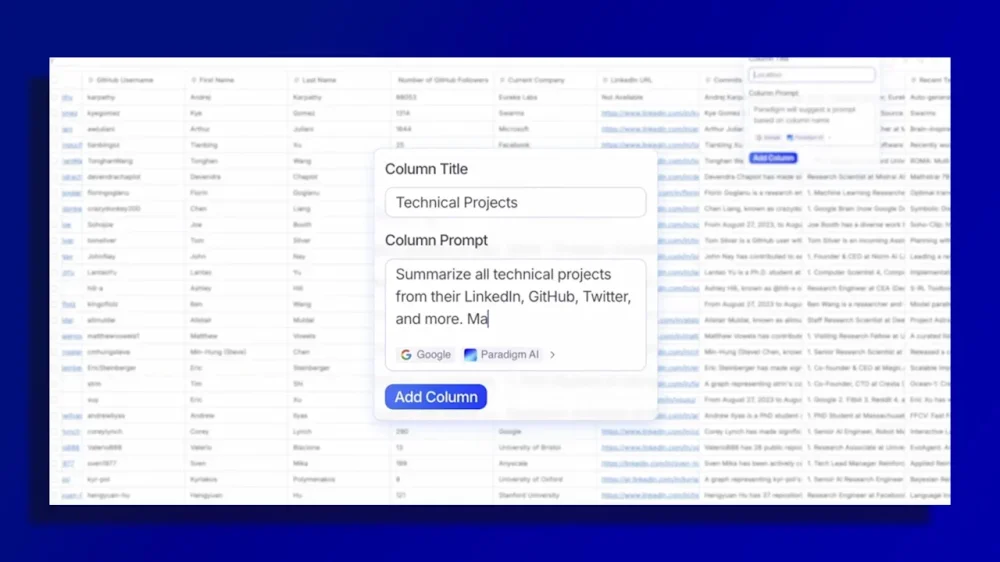
A decade ago, Ben Collins quit his job as a corporate accountant and started teaching other people how to use spreadsheets more effectively. That move, terrifying as it seemed at the time, paid off brilliantly. Today Collins is the proprietor of an online spreadsheet training academy and the author of a weekly newsletter dedicated entirely to Google Sheets tips. Some 50,000 people subscribe. And yet once again Collins is finding himself facing a sense of uncertainty over what’s next—as the very nature of what a spreadsheet even is enters a dizzying spiral of transformation. “We’ve had more innovation in the last two years than in the 20 before that,” Collins says, referencing the explosion of generative AI technology and its effect on the spreadsheet arena. He isn’t exaggerating. Up until recently, figuring out how to use a spreadsheet to its full potential was akin to learning a foreign language: You had complex formulas, mountains of cryptic functions, and a labyrinth of overwhelming options to decipher. If you were trying to do anything beyond just putting a few pieces of basic data into cells, you practically needed a dedicated spreadsheet expert to figure out how to make it happen. But generative AI is currently reshaping the humble and stubbornly complex spreadsheet—which, for the most part, seems to be a good thing. After all, no one wants a massive project (or migraine) every time the need for crunching numbers comes up. And while generative AI has plenty of issues both practical and ethical, working within the confines of a single spreadsheet and the black-and-white world of objective data seems to be where those limitations are least troubling, and where AI’s strengths are primed to shine. Still, there’s no escaping that a whole new era is upon us. The biggest question now is how, exactly, it all plays out from here—and whether the need for a spreadsheet expert, be it an independent consultant like Collins or the go-to problem-solver within any office or organization, is bound to evolve or destined to become a relic from a bygone time. The spreadsheet in the AI era When Collins quit his accounting job in 2014 and embarked on a self-made, spreadsheet-centric career path, Anna Monaco was 11 years old. Today, at the ripe old age of 22, Monaco is the founder and CEO of Paradigm, a next-gen spreadsheet service that makes Excel look like an abacus by comparison. Anna Monaco The idea behind Paradigm is to take all the complexity and manual effort out of spreadsheets and make managing data simple. Instead of worrying about formulas and functions and formatting, you just upload your data—or even tell the service what sort of data you need and let it source it for you. Paradigm creates your spreadsheet, makes it look slick and professional, and suggests next-step actions to work with the data and put it to practical use. “Manual data entry shouldn’t exist,” Monaco says. “We’re not just a spreadsheet. We’re replacing weeks of labor.” Paradigm and its AI-centric spreadsheet startup contemporaries—services such as Sourcetable, Grid, and Julius—aren’t only replacing labor. They’re also replacing an entire way of thinking about spreadsheets and their role in our lives. And while the reigning spreadsheet-service royalty aren’t exactly rushing to rebuild their long-established interfaces, the same basic principle is already appearing in those environments as well, albeit on a much smaller scale and in a more tacked-on sense. To wit: Microsoft’s AI Copilot is now thoroughly integrated into Excel and can be summoned to help you create formulas and analyze data without needing to do all the traditional heavy lifting. And Google is doing something similar with Gemini in Sheets, now making the chatbot available on demand in any cell with a simple (though extremely familiar-feeling to any longtime spreadsheet user) “=AI” command for summoning its assistance. “You don’t need to be an AI or spreadsheet expert to do it,” Google wrote in its announcement of the expansion. Ben Collins Of course, not everyone is ecstatic about the in-your-face AI in those more traditional spreadsheet setups—especially people who aren’t seeking out such features and find their presence can be annoying or even downright dangerous. AI features often insert themselves into situations regardless of whether they’re actively summoned. And while AI-introduced errors within a spreadsheet generally seem at least a little less egregious than generative AI at its most hallucinogenic, Microsoft is warning that Copilot is best suited for “scenarios where deterministic accuracy is not required” and not for “any task requiring accuracy or reproducibility” (ouch). So where, then, does all of this leave the spreadsheet experts—folks like Ben Collins who have spent decades building up deep knowledge in the inner workings of the spreadsheet and all the logic around it? The answer, it turns out (much like the conventional spreadsheet itself) is complicated. Expertise, reinvented Collins sees what’s happening with spreadsheets at Google and Microsoft, and at the more ambitious scrappy spreadsheet startups like Paradigm, as an unambiguous net positive. “All the AI stuff is democratizing spreadsheets in the same way it’s doing for coding,” he says. “It lets more people have access to those insights and that knowledge rather than just the technically savvy crowd.” And yet—like in so many other industries right now—it’s impossible to avoid questions over the effects this shift could have on the future. We’re all living through a transition where some say AI is taking away countless jobs and others insist it’s creating as many as it’s killing, or at the very least just changing what types of roles matter. As with many careers, the only real certainty surrounding spreadsheet-related professions right now is a complete and utter sense of uncertainty. Collins, for his part, remains upbeat. He says he’s seen a shift in the sort of information knowledge workers are seeking around spreadsheets but that he continues to see a strong demand for a deeper understanding of the tools themselves and the data philosophies around them. “There’s still a need to have a foundation of knowledge and an understanding of how these things work,” Collins says, even if only so you can figure out how to ask an AI assistant for what you need and then assess the quality of what you’re given in return. “It’s less emphasis on pure syntax and the mechanics and more [on] how we can use these tools at a higher level and be more effective,” he adds. Collins also notes that for all the buzz around newer AI-centric spreadsheet tools, the vast majority of people—and businesses—are so deeply engrained in the Google or Microsoft ecosystems and so familiar with those environments and the security assurances around them that they won’t be making a major night-and-day change anytime soon. Even if AI does slowly seep its way into their work within those domains. That’s a point Monaco is well aware of. She sees Paradigm as being less of a play at pulling the masses away from Sheets or Excel and more of a forward-looking option for a different generation of businesses. “There’s a new way that companies are being built, where smaller teams are commanding a lot more resources and doing a lot more powerful things with the resources they have,” she says. “Paradigm is building for that future.” One thing she and Collins agree on is that the need for expertise isn’t going anywhere. Monaco says she’s already seeing the emergence of what she calls “Paradigm consultants”—people who specialize specifically in supporting the tool she created and helping users figure out how to get the most out of it. “It’s a different expertise,” Monaco says. “There’s still a huge value in becoming a power user and knowing how to harness these tools. There’s an even bigger value now that these tools are more powerful.” Collins also envisions his role evolving. And he is 100% up to the challenge of adapting right alongside that. “The need for training is as strong as ever,” he says. And that, it seems, is something where a genuine human touch and the type of critical-thinking perspective AI can’t entirely emulate remains—for the current moment, at least—as important as ever. View the full article
-
The debate around AI ROI has gotten loud—and, frankly, a little cyclical. One moment, we’re hearing that AI is the key to exponential growth; the next, that 95% of AI pilots fail. At Addi, we’ve been able to leverage AI to grow 4x faster while operating at ~2x the profitability of BNPL peers. This year alone, we’ve saved more than $500,000 from our AI initiatives. But how have we accomplished such strong AI ROI? The difference between performative AI and AI with returns isn’t in which model or tool you’re using; it’s how your team is using them. Here’s how we’ve driven genuine AI-native team adoption and built a workflow/data pipeline that actually makes sense. 1) Hire and grow for fluency We run nationwide, admissions-style assessments to find talent in unexpected places (from the Amazon to the Ecuador border), then teach AI-native workflows from day one. From our intern program through our senior leadership, we design our interview process for the AI age. We assign a relevant project—something candidates could use AI to help with—but then have a panel interview where they present their project, ensuring that candidates actually know the ins and outs of their work without an AI aid. Our interviews additionally probe into potential candidates’ own familiarity with AI tools, while our intern cohorts get hands-on with agents and graduate into teams already expecting that fluency. The pipeline is designed to recruit for an AI era from the get-go, versus being an afterthought once already employed. 2) Codify AI-native rituals into culture When it comes to cultivating an AI-native work culture, AI-native is a learned behavior. We invested in extensive AI onboarding and habit-building, pairing every knowledge worker with the right agent or copilot, and encouraging AI usage as the company default. Today, more than 90% of our engineers are weekly active copilot users and ~80% of AI-generated code is accepted. This translates into efficiency gains of up to 60% without increasing headcount. We’ve kept our core product engineering team flat for three years while shipping more products. The story here isn’t in the savings; it’s in the deep level of AI adoption we’ve witnessed among our employees by securing their buy-in, setting expectations for an AI-friendly environment, and offering targeted training. Rollouts fail when AI is treated as a “here only if you need it” tool. They work when companies rewire rituals around it—e.g., code reviews with AI diffs, CX stand-ups that inspect agent transcripts, legal postmortems that include our AI’s outputs—to normalize the behavior. You might even consider baking AI proficiency into employee reviews. In other words, don’t over-index on tools; over-index on culture. That cultural shift is why AI usage at Addi is voluntary yet ubiquitous. 3) Design AI as a colleague There’s a reason our in-house agents have regular names like “Addri” and “Aegis.” Every agent at Addi is treated like an employee—one with a clear scope, service-level agreements (SLAs), and metrics. Addri’s job is first-contact resolution with target customer satisfaction (CSAT); the merchant agent owns KYP throughput and reactivation; Aegis owns escalation latency and evidentiary completeness. Human owners review outputs and tune prompts like they would a new hire’s playbook, and we always welcome teamwide feedback on how our fellow “agentic employees” can improve before their next review cycle. Moreover, our AI “employees” have the same depth of contextual knowledge and understanding that a human employee would, to help them function side-by-side with our team and minimize the frustration that comes with false or limited context. Our agents are tailored to specific roles, not catchalls from an outside vendor that shoehorns a base agent into a wide variety of situations. We ensure they’re trained with high-quality, high-volume, company-owned data. We spent four-plus years building a world-leading data platform, ensuring more than 40 terabytes of data was instantly available as it began building AI agents, giving our “digital teammates” the best possible training. 4) Invest in the right foundations “AI-first” isn’t what works; “data-first” is. This is how you ensure your “AI colleagues” have that employee-like context. More than four years ago (pre-LLMs!) we made the decision to invest in a next-generation data engine that would ensure everything that happened on our platform (from a single text message to a full underwriting analysis) would be stored and could be queried by anyone and anything—traditional AI models, human analysts, and, yes, even LLMs via vectorization. With a single monorepo and an event-based system that logs everything, we have nearly perfect context: 50 terabytes of clean, searchable data. If you don’t own your stack (i.e., control your data and event logs) you will rent your advantage to a vendor. Set your AI-native team up for success by logging everything, and reap the benefits of a database that can be read by humans and AI alike. 5) Celebrate adoption Reward employees’ usage of AI by celebrating adoption rates, cycle-time reduction, and defects avoided. This year, our AI initiatives saved upwards of $500,000 in annual operating costs. For lean teams where a startup’s success is their teammates’ success, these metrics (and transparency) matter. That $500K isn’t a bottom-line cut; it’s $500K back into the pockets of our employees in the form of raises, better benefits packages, and profit sharing. Tie budgets to solved tickets, minutes saved, merchants activated—then compound wins into subsequent quarters. That mindset of “AI gains are your gains” is why AI can comfortably power half of our legal and coding throughput, a big chunk of CX, and critical onboarding flows. In Summary Train your people to be AI-native and give them the infrastructure to thrive. The models will change. The muscle you build won’t. This approach is how we’ve been able to launch more products more quickly while maintaining a generally lean team—and it’s why I’m confident the best AI ROI stories are still to come. View the full article

-
For decades now, we have been told that artificial intelligence systems will soon replace human workers. Sixty years ago, for example, Herbert Simon, who received a Nobel Prize in economics and a Turing Award in computing, predicted that “machines will be capable, within 20 years, of doing any work a man can do.” More recently, we have Daniel Susskind’s 2020 award-winning book with the title that says it all: A World Without Work. Are these bleak predictions finally coming true? ChatGPT turns 3 years old this month, and many think large language models will finally deliver on the promise of AI replacing human workers. LLMs can be used to write emails and reports, summarize documents, and otherwise do many of the tasks that managers are supposed to do. Other forms of generative AI can create images and videos for advertising or code for software. From Amazon to General Motors to Booz Allen Hamilton, layoffs are being announced and blamed on AI. Amazon said it would cut 14,000 corporate jobs. United Parcel Service (UPS) said it had reduced its management workforce by about 14,000 positions over the past 22 months. And Target said it would cut 1,800 corporate roles. Some academic economists have also chimed in: The St. Louis Federal Reserve found a (weak) correlation between theoretical AI exposure and actual AI adoption in 12 occupational categories. Yet we remain skeptical of the claim that AI is responsible for these layoffs. A recent MIT Media Lab study found that 95% of generative AI pilot business projects were failing. Another survey by Atlassian concluded that 96% of businesses “have not seen dramatic improvements in organizational efficiency, innovation, or work quality.” Still another study found that 40% of the business people surveyed have received “AI slop” at work in the last month and that it takes nearly two hours, on average, to fix each instance of slop. In addition, they “no longer trust their AI-enabled peers, find them less creative, and find them less intelligent or capable.” If AI isn’t doing much, it’s unlikely to be responsible for the layoffs. Some have pointed to the rapid hiring in the tech sector during and after the pandemic when the U.S. Federal Reserve set interest rates near zero, reports the BBC’s Danielle Kaye. The resulting “hiring set these firms up for eventual workforce reductions, experts said—a dynamic separate from the generative AI boom over the last three years,” Kaye wrote. Others have pointed to fears that an impending recession may be starting due to higher tariffs, fewer foreign-worker visas, the government shutdown, a backlash against DEI and clean energy spending, ballooning federal government debt, and the presence of federal troops in U.S. cities. For layoffs in the tech sector, a likely culprit is the financial stress that companies are experiencing because of their huge spending on AI infrastructure. Companies that are spending a lot with no significant increases in revenue can try to sustain profitability by cutting costs. Amazon increased its total CapEx from $54 billion in 2023 to $84 billion in 2024, and an estimated $118 billion in 2025. Meta is securing a $27 billion credit line to fund its data centers. Oracle plans to borrow $25 billion annually over the next few years to fulfill its AI contracts. “We’re running out of simple ways to secure more funding, so cost-cutting will follow,” Pratik Ratadiya, head of product at AI startup Narravance, wrote on X. “I maintain that companies have overspent on LLMs before establishing a sustainable financial model for these expenses.” We’ve seen this act before. When companies are financially stressed, a relatively easy solution is to lay off workers and ask those who are not laid off to work harder and be thankful that they still have jobs. AI is just a convenient excuse for this cost-cutting. Last week, when Amazon slashed 14,000 corporate jobs and hinted that more cuts could be coming, a top executive noted the current generation of AI is “enabling companies to innovate much faster than ever before.” Shortly thereafter, another Amazon rep anonymously admitted to NBC News that “AI is not the reason behind the vast majority of reductions.” On an investor call, Amazon CEO Andy Jassy admitted that the layoffs were “not even really AI driven.” We have been following the slow growth in revenues for generative AI over the last few years, and the revenues are neither big enough to support the number of layoffs attributed to AI, nor to justify the capital expenditures on AI cloud infrastructure. Those expenditures may be approaching $1 trillion for 2025, while AI revenue—which would be used to pay for the use of AI infrastructure to run the software—will not exceed $30 billion this year. Are we to believe that such a small amount of revenue is driving economy-wide layoffs? Investors can’t decide whether to cheer or fear these investments. The revenue is minuscule for AI-platform companies like OpenAI that are buyers, but is magnificent for companies like Nvidia that are sellers. Nvidia’s market capitalization recently topped $5 trillion, while OpenAI admits that it will have $115 billion in cumulative losses by 2029. (Based on Sam Altman’s history of overly optimistic predictions, we suspect the losses will be even larger.) The lack of transparency doesn’t help. OpenAI, Anthropic, and other AI creators are not public companies that are required to release audited figures each quarter. And most Big Tech companies do not separate AI from other revenues. (Microsoft is the only one.) Thus, we are flying in the dark. Meanwhile, college graduates are having trouble finding jobs, and many young people are convinced by the end-of-work narrative that there is no point in preparing for jobs. Ironically, surrendering to this narrative makes them even less employable. The wild exaggerations from LLM promoters certainly help them raise funds for their quixotic quest for artificial general intelligence. But it brings us no closer to that goal, all while diverting valuable physical, financial, and human resources from more promising pursuits. View the full article

-
Beijing had blocked exports of vital carmaking component after row with Dutch governmentView the full article
-
A trade group for participants in the clean energy loan program argues the upcoming regulations will be too burdensome and costly for participants. View the full article

-
The volume of home equity lines of credit expanded for the 14th consecutive quarter, driven largely by fintechs and other nonbanks that are accounting for more and more of the business. View the full article
-
Dole invented a new fruit. The Dole Colada Royale Pineapple is sweet and tangy with notes of coconut and, as the name suggests, piña colada. Unlike its golden yellow counterpart, the Colada Royale has a cream-colored pulp with a green-to-golden shell. It also took more than 15 years to get it just right. The suggested recipes the company released with the new fruit include snacks like a pineapple and coconut carpaccio and a basil-wrapped pineapple with pine zest. Clearly this is meant to be a luxury pineapple experience. The fruit, which is now available in select grocery stores in the U.S. and Canada, is 100% non-GMO and naturally bred. The company didn’t share its suggested retail price, but the Colada Royale comes amid a wider trend toward “designer” pineapples. Just last year, Fresh Del Monte released a pink pineapple it called the Pinkglow, which it followed up with a $400 Rubyglow. A new growing process Developing new pineapples requires patience since the natural process can stretch out for nine years or more. “You have to go through thousands of pollinations and develop thousands of seeds and then have the capacity to pinpoint that particular plant that combines what you are looking for,” says Roberto Young, director of pineapple breeding at Dole’s farm in La Ceiba, Honduras. He led the team that developed the Colada Royale variety. The new pineapple also had be grown in different seasons, since temperature can affect the taste of the finished product. All in all, that means it takes thousands of attempts that go wrong in hopes of getting one that goes right. Roberto Young “Usually, you have to discard most of the fruit because it could taste very good during the summer, but in the winter you cannot really taste it because it’s too tangy, it’s very acidic,” Young tells Fast Company. Plant breeders consider factors like size, productivity, and color as they’re developing a new product, but taste, of course, is the most important. “It doesn’t help if the fruit is a good size, good productivity, but doesn’t taste like pineapple,” Young says. Dole’s new pineapple had the right taste, but its cream-colored pulp was at first a concern since consumers today are used to yellow pulp in pineapples. At the produce and floral trade show in Anaheim, California, where Dole unveiled the Colada Royale in October, Young says people were hesitant about the fruit—until they tasted it. Then, he says, their reaction was “Wow, this is something different.” Developing a new market The goal from the beginning was to develop a unique flavor and bring something new to the market. Pineapple is genetically very variable, Young says, and the biggest challenge was consistency. Plant breeding doesn’t have a high success rate—“If you are a plant breeder, you might be successful, or you might not,” he concedes—and pineapple is especially tricky since it has a relatively long harvest cycle. The process requires first planting parents, which take about a year to produce flowers that can be pollinated. From there, it’s about five more months until the fruit can be harvested. The seeds from that harvest are then planted to get all new plants, repeating the cycle. The results need to be repeatable to ensure the fruit can be mass-produced, so it takes at least three generations—roughly nine years—to develop a new product. The Colada Royale took longer, and Young, a Honduran native who’s been with Dole for 28 years, has been on the project from the start. He considers it his legacy. “I feel really very, very grateful,” he says. Dole is also looking at the new fruit as a legacy play of its own. The company plans to reinvest a portion of the proceeds of every box of the pineapple sold to create a community center in La Ceiba that will provide healthcare services, language classes, and vocational training. In its most recent earnings report, Dole said its second-quarter 2025 revenue was $2.4 billion, an increase of 14.3% over the same period in 2024. The company is expected to report third-quarter financials on November 10. Designer pineapples may sound like a novelty, but since they can be upsold, fruit growers and grocers alike may find they’re a sweet addition to the produce section. View the full article

-
The value of higher education has been on a steady decline for Americans over the past 15 years. According to a September Gallup poll, only 35% of U.S. adults said a college education is “very important,” compared to 75% in 2010. This is what a marketer would call a brand problem. The University of North Carolina is unveiling a refreshed brand identity and reorganizing its marketing structure to meet these 21st-century challenges. The centuries-old university has a storied history as a top-ranked academic institution and a legendary sports brand (thank you Michael Jordan). Chancellor Lee Roberts says that awareness isn’t UNC’s problem. Everyone in North Carolina knows the school, and applications continue to climb each year. “The truth is, it is a competitive landscape across higher ed. We are in a competition for research dollars, for rankings, and for the best students,” Roberts says. “We thought it was time to do a better job telling our story in a more proactive and effective way. In the contemporary media environment, you can’t just sit back and hope that everyone will recognize what makes you great and unique. You need to be a little bit more aggressive about communicating your story to the world.” “First. And for all.” It’s an obvious observation, but universities are not the same as corporations. The stakeholders involved in a brand refresh are many more than you’d find in a typical boardroom. It’s why marketing at UNC has long been decentralized, spread across its more than 25 schools and units, all telling their own stories in a variety of ways. As a result, even the UNC logo had been spread thin. All told, there were 666 variations of the UNC logo being used. In order to more effectively tell the university’s story, as Roberts wanted, the decision was made to break down these silos and create a centralized marketing department. Adrienne King was hired in February, coming from Indiana University, as UNC’s associate vice chancellor for marketing to lead the effort. Roberts also brought in former Phoenix Suns CMO Dean Stoyer, a veteran of brands like Nike, Under Armour, and ESPN, as vice chancellor for communications. “This is the first time we’ve ever had a centralized marketing team at the university,” King says. “But this isn’t a situation where we needed to come in and start all over.” King and her team partnered with creative agency 2×4 to conduct market research, do a comparative analysis, and develop an updated brand positioning. The research included surveys, focus groups, and one-on-one discussions with alumni, faculty, staff, students, and North Carolina residents. For starters, they found that the school’s interlocking NC logo dates back to the 1870s, and it has remained the symbol alumni and North Carolina residents most identify with. “From a brand perspective, it is internationally recognized. But more importantly, back at home we feel like it represents the people in the state that we serve,” King says. “This is the university for the people. And you can’t create a new logo that would have better equity than that.” The brand refresh utilizes one version of that logo, as well as a standardized version of the iconic “Carolina Blue” color. For a tagline, the school looked back at its history as America’s first public university and landed on “First. And For All.” In terms of the declining opinion about higher ed, Roberts says people tell pollsters they think universities are expensive, elitist, and don’t do a good job preparing students for the workforce. “Well, here at Carolina, our tuition’s been flat for 9 going on 10 years in nominal terms, meaning it’s gone down by about 20% in real terms, and 82% of our undergraduates are from right here in North Carolina,” Roberts says. “We were just No. 3 nationally in the Princeton Review’s ROI survey. So we don’t think any of those concerns really apply to us. But again, that comes back to telling our story as effectively as we can.” Meanwhile, competitors are stepping up, and not just the traditional rivals. Roberts name-checks schools like the University of South Florida, which is now a leader in new patents. “You have an entire crop of new entrants who are gunning for the traditional top tier of public higher ed in the United States, and it requires everyone to continue investing, continue raising the bar,” he says. Demographic cliff vs. Reputation cliff Twenty years ago, King wrote her dissertation on the role of marketing and higher education. “I remember at the time marketing was seen as very much a negative term, and when you thought of marketing and higher ed, it was strictly enrollment focused,” she says. For years, the postsecondary education industry has been bracing for what it calls the demographic cliff, when high school graduation numbers—and consequently potential enrollment numbers—will decline significantly. A Western Interstate Commission for Higher Education report says high school graduates will peak this year at about 3.9 million, and then start falling until there are about 13% fewer graduates by 2041. Kings says that given all the other challenges and narratives around the perceived value of a college education, more people within the industry are recognizing that while they were focused on that demographic cliff, they missed the reputational cliff that it has fallen off of. Now the work to repair and rebuild that reputation includes acting like a world-class brand and telling the story of its value. “I think often we in the public higher-ed sector take for granted that we are uniquely positioned within our states to drive economic development to benefit the people of the state,” King says. “I like to think our greatest investors are the citizens of North Carolina, and we need them to know all the ways that we are positively impacting their lives. That’s a very different position than strictly focusing on enrollment. That really is about reputation, and that’s what the focus is now.” View the full article

-
Amid the mass layoffs in tech and retail in the past month, YouTube’s CEO Neal Mohan sent out a recent internal memo that he’s also looking to lay off employees—who volunteer. Mohan details how YouTube is undergoing a major AI-focused reorganization and introduces a “Voluntary Exit Program” with a severance package to eligible YouTube employees. This voluntary exit deal has been couched as an opportunity for employees, but it’s really just a buyout. Companies have long used this strategy as a way to reduce headcount, usually to avert traditional layoffs. For employees approaching retirement, voluntary severance may be a great opportunity, a wonderful deus ex machina late-career plot twist. But many employees worry that saying “no, thank you” now may mean an involuntary layoff later on. So how do you decide if you should take a voluntary layoff? Here are four questions to consider. What’s happening in your industry? YouTube has offered its employees a buyout because of AI restructuring. Duke University created a voluntary severance program in April 2025 in response to federal funding cuts. UnitedHealthCare invited an undisclosed number of employees to take part in its Voluntary Resignation Separation Program in early 2025 in response to the financially tumultuous fallout of the murder of its CEO, Brian Thompson, and to a 2024 cyberattack that cost the company $3 billion. In all of these cases, the organizations are offering buyouts because of larger technological, political, and economic forces. The decisions are about more than just what’s happening in the organization itself—which may indicate that more changes are coming as the industries adapt. But not all buyouts are prompted by larger industry forces. That’s why it’s important to understand the bigger trends. Then you can better predict whether voluntary layoffs are likely to be the end of your company’s reduction in force—or just the beginning. Typically, voluntary buyout packages are more generous than the kinds of severance packages that come with involuntary layoffs. What are your employment prospects? The best-case scenario for a voluntary layoff is either stepping straight into retirement or having a new job already lined up. Then your severance package becomes an unexpected pot of gold in the path you were already walking. Unfortunately, most of us aren’t that lucky. So if you weren’t planning on leaving before the buyout was announced, what prospects would you have if you took the voluntary severance? One of the upsides of voluntary layoffs is the opt-in window. Typically, employers offer a window of several weeks to several months to opt-in to voluntary severance, giving you some time to put out feelers for other potential job prospects. This can let you see what the job market is like before you make your decision. What’s in the severance package? While the specific severance package will vary from one organization to another, voluntary layoff programs typically make the buyout a tempting carrot in order to avoid more painful involuntary layoffs later on. Often, these severance packages will give volunteers several weeks’ or months’ worth of base pay, depending on the number of years of service. (And depending on which state you live in, you may be eligible for unemployment benefits once the severance pay has run out.) For instance, when Duke University offered voluntary severance earlier this year, it gave volunteers a compensation package equal to one week of severance pay, multiplied by years of service, up to a maximum of 26 weeks. But cash may not be the only benefit in your severance package. Your employer may also offer to pay health insurance benefits for a few months, provide career counseling, or offer financial planning services to help with the transition. What do you want? Learning that your employer is offering voluntary layoffs is stressful, but it doesn’t mean the company has all the cards. The organization wants something—a reduction in force—which means you have leverage. Because you can help give that to them, if they give you what you want. So just like when you were hired, figure out what you want and decide what you’re willing to compromise to get it. Don’t assume the severance package your employer offers is a take-it-or-leave-it proposition. Start with the severance compensation package. Just because the severance pay offered by the voluntary layoff program is capped at a certain amount doesn’t mean you can’t ask for more. The company is willing to pay people to quit, so feel free to ask for more money to give them what they want. Similarly, you could ask to be vested in the company’s retirement plan if you’re not fully there yet or ask to stay on the organization’s health insurance until the next calendar year. The worst they can say is no. Deciding what you want to make leaving feel good can make a voluntary layoff a winning proposition for you, rather than an employment catch-22. Lay off me! If you’re facing a “Voluntary Exit Program” or other euphemistically named quit-or-we’ll-start-laying-people-off process, there are four questions you can ask yourself to help determine whether or not you should opt in. First, think about what’s going on in your industry as a whole. If there are larger technological, political, or economic forces that are causing structural changes in your organization or in your industry, then it may make sense to take the buyout, since there may be bigger shakeups on the horizon. From there, think about your employment prospects. Since buyouts typically have a window of several weeks for you to decide whether or not to opt-in, you have some time to determine if you can quickly find another position. Then consider what’s in the severance package your company is offering, including the full payment amount and any additional perks that are included. What’s offered and how much is it worth to you? Finally, think about what you want. What would the company have to offer you to make walking away worthwhile—and ask for it. Because a voluntary layoff is a negotiation, and you should treat it like one. View the full article