ResidentialBusiness
Administrators
-
Joined
-
Last visited
Everything posted by ResidentialBusiness
-
 Traditional search engines rely on countless ranking signals to deliver the most relevant answers to users. In the age of AI, signals appear to be simpler – at least for now. Court documents from Google’s antitrust case reveal that AI Overviews rely on lighter signals and fewer documents in the index. However, content clarity and topical connections are more important than ever. To be visible in the era of AI search requires content that is: Well-structured, so that relationships between topics are clear. Expertly written, so that the meaning and depth are obvious. Machine-readable, so entities and relationships are easy to interpret. In other words, the same framework that has guided SEO for years – architecture, expert content, and optimization – is just as important today. This article shows how each can reinforce the signals that matter most in AI search. FastSearch and RankEmbed: A quick overview In U.S. v. Google LLC, the court describes how Google’s FastSearch is used in grounding Google’s generative AI answers. In short, the technology retrieves only a subset of search results and relies on lighter ranking signals. From the court documents: “To ground its Gemini models, Google uses a proprietary technology called FastSearch. … FastSearch is based on RankEmbed signals – a set of search ranking signals – and generates abbreviated, ranked web results that a model can use to produce a grounded response. …FastSearch delivers results more quickly than Search because it retrieves fewer documents, but the resulting quality is lower than Search’s fully ranked web results.” This could explain why some AI Overviews have surfaced low-quality content – a point that Ryan Jones made on LinkedIn: The court describes RankEmbed as one of Google’s “top-level” deep-learning signals, capable of “finding and exploiting patterns in vast data sets.” RankEmbed is designed to capture meaning by recognizing semantic relationships between queries and documents. Dig deeper: The ABCs of Google ranking signals: What top search engineers revealed Unlike other signals that measure popularity or count backlinks, RankEmbed focuses on how closely a piece of content aligns with the meaning of what the user asked. And RankEmbed is a key part of FastSearch. This could explain why FastSearch, which grounds AI Overviews, sometimes surfaces results that look different from traditional search rankings. It prioritizes semantic clarity over other authority-type signals. If RankEmbed is central to FastSearch, then the things that matter to AI visibility are those that strengthen semantic connections. And those are the strategies I’m going to talk about next. 1. The foundation: A solid content architecture How you organize the content on a site creates relationships, and those relationships make it easier for both search engines and AI systems to interpret relevance. And at the same time, a clear information architecture allows website visitors to engage more deeply with a website, as it provides complete answers to questions along their search journey. This is not a new concept. SEO siloing is something we’ve been doing at my agency for 25 years. However, in the age of AI, it helps signal that a site is semantically clear and contextually relevant. So what’s it all about? Let’s look quickly at this strategy in action. Analyzing the business The first step seems simple, but it’s surprising how much clarity it can offer when organizing a website’s information. This step consists of analyzing the products, services, and types of information a brand provides. We take this information as a starting point for more research. That research includes looking at what topics the site is currently gaining visibility for in search results and what queries are triggering that. Then, we look at missed opportunities. If the website were a book, what story would it tell? What chapters would naturally fit under that story? And what chapters are missing? At the end of this research, you have: A roadmap for the structure. An understanding of how the content that’s already published fits in. A plan for the topics that need to be created. Implementing the structure A “silo” is the name for the structure. We call it a silo because it keeps topical themes tightly connected without being intermingled with other topics that dilute its relevance. When topics are intermingled, it is confusing to users and engines. But when you begin to organize them, it creates clarity. The structure can be formed in two distinct ways: either through the physical directory (URL structure) or virtual connections (internal linking). Let’s look closer at those two tactics now. Physical silos Physical silos structure URLs that create a hierarchy of topical relevance. If a company’s main focus is CRM software, the overarching theme would be “CRM Technology.” Under that, categories could be based on the major functions or use cases customers care about, such as: Sales automation. Customer support tools. Analytics and reporting. That’s three silos. Then, each category gets its own landing page, and is supported by subpages/subcategories that cover specific features or solutions. For example, the sales automation silo might include: Main landing page: companycrm.com/crm/sales-automation Subcategories: companycrm.com/crm/sales-automation/lead-scoring companycrm.com/crm/sales-automation/email-tracking companycrm.com/crm/sales-automation/opportunity-management For this fictional site, this structure would signal to search engines/LLMs that the site is a good source on CRM software. Virtual silos Virtual silos, on the other hand, connect related pages through internal links, even if they’re not in the same directory. This is a good fit when the physical directory cannot be altered in any way. It’s also an effective hybrid approach that forms relationships between content when the content lives outside of the physical directory, such as in a blog. For instance, on a CRM website, a blog post about improving customer retention could link directly to the main customer support tools landing page, even though the blog lives in a separate /blog/ directory. These contextual links build virtual silos. Even if the blog isn’t physically nested under /crm/, the internal linking ties it back to the main theme and strengthens topical authority. It also allows website visitors more opportunities to follow links and engage more deeply with the site as they continue on their customer journey. The significance of siloing on LLMs AI models are more likely to retrieve content that shows clear topic coverage and surface sites that demonstrate semantic consistency across related pages. However, a bunch of content on a topic spread across the site is not going to build that authority on its own. It has to match intent and be linked properly. The siloing strategy may seem quite simple on the surface. However, there are still many technical considerations. Then there’s the matter of disruption. Siloing a large website is no easy feat. This is where partnering with an expert can be critical. Get the newsletter search marketers rely on. See terms. 2. Authority layer: True expertise We are living in a world where AI content is starting to dominate the search results. Image source: Ahrefs Some speculate that it won’t be long before expertly written, human-generated content will come at a premium. And if that’s the case, it won’t be hard to stand out among the generic, machine-generated content if you put in the effort. When creating content for your silos, each page needs to answer a query expertly, completely, and with additional resources to other areas of the site. Think about how you can elevate your content, not just make it more efficient. In the age of AI, this will once again become a real challenge for many. But we still have guideposts for doing this. So, let’s look at the baseline content strategies that will help a brand remain an expert. Approach writing professionally Hire people who are professional writers, even if they’re working with you to refine AI content. They should inherently have a grasp of how to write well, and will navigate things like: Logical consistencies: Make sure to resolve any contradictions or conflicts in your content by thoroughly researching the topic and reviewing contradictory statements. Persuasive writing: You can always strengthen your arguments and ensure they are well-supported by using solid research and relevant examples. Accuracy: Be sure to verify the accuracy of your information through multiple reliable sources before publishing. Fact-checking is essential to avoid spreading misinformation. Ethical standards: Familiarize yourself with and adhere to ethical standards, including not plagiarizing and following search engine guidelines. Ethics around AI is a developing topic that SEO/GEO professionals should familiarize themselves with. Dig deeper: Mastering content quality: The ultimate guide Create helpful content, per Google By now, most are familiar with Google’s guidance on helpful content, which includes useful self-assessment questions, such as: Does the content provide original information, reporting, research, or analysis? Does the content provide a substantial, complete, or comprehensive description of the topic? Does the content provide insightful analysis or interesting information that is beyond the obvious? If the content draws on other sources, does it avoid simply copying or rewriting those sources and instead provide substantial additional value and originality? Does the content provide substantial value when compared to other pages in search results? Marketing leaders should treat these as foundational guidelines during any editorial review of content produced by an SEO/GEO program. Uphold Google’s E-E-A-T framework E-E-A-T is a holistic, quality framework for content. But E-E-A-T must be earned over time through consistently delivering value and building genuine trust with your audience. And it matters most for “Your Money or Your Life” (YMYL) topics. You can earn E-E-A-T by things like: Offering original insights or analysis: Your content should provide unique, valuable perspectives outside of what everyone else is saying. Demonstrating firsthand experience or expertise: Authentic credentials and real-world knowledge matter. Incorporate anecdotes and professional guidance freely. Aligning with user intent: Focus on solving real people’s problems, not just chasing keywords and mass-producing content. Avoiding superficial templates or generic output: Authentic, thoughtfully crafted content always wins over a formulaic output (like content often coming from machines). The bottom line is simple. Write for people first, and build trust over time. Ultimately, it all comes down to one thing: creating good results for searchers. Significance of quality content on LLMs We know that being a subject matter expert is vital to ranking high in search. And we know that good SEO is needed for good GEO – at least that’s what Google’s Danny Sullivan says. At his keynote at WordCamp U.S. in August 2025, Sullivan reiterated that: “SEO means you understand how people search for content and then you understand how to have your content there.” He added: “Good SEO is really having good content for people.” Remember that while not a direct correlation all the time, studies show there’s often overlap between high-ranking search results and AI Overview inclusions, even though the underlying systems use different signals. In other words, there’s a good chance that if you are trusted in search, you will be trusted for inclusion in Google’s generative AI answers. Some may argue that bad content written by machines is already visible in AI Overviews, so what’s the use of putting in the effort? Well, first, because of ethics. We should uphold ethics in our marketing. This has been my personal belief for decades, dating back to when black hats were gaming the system every day and winning. Secondly, things can turn on a dime. Algorithms can change and content can be wiped from the face of the search results. Let’s not forget the March 2024 updates. And in that moment, if you’ve done everything right, you have just been catapulted to the top, a spot that will not easily be taken back. 3. Signal layer: Structured data/schema Structured data or schema is the layer that can help translate your content into signals that machines can better interpret. This can make it easier for AI systems to connect the dots. That said, some research suggests that it may not play a role in direct AI Overview visibility. Even so, Google advises using structured data to ensure content performs well in Google’s AI experiences, and so it’s one of those practices that require experimentation. Here’s what Google says: “Structured data is useful for sharing information about your content in a machine-readable way that our systems consider and makes pages eligible for certain search features and rich results. If you’re using structured data, be sure to follow our guidelines, such as making sure that all the content in your markup is also visible on your web page and that you validate the structured data markup.” Many in the industry are already implementing or planning to implement schema/structured data as part of their GEO strategies. The SEOFOMO State of AI Search Optimization Survey, 2025 Edition, shows that structured data/schema was most frequently mentioned as a way to optimize for AI search. The challenge will be to implement the schema methodically. For instance, don’t just use schema on your homepage or a few products; add it everywhere it makes sense. However, don’t misuse, abuse, or overdo it. Structured data should accurately represent the page’s main content, so choosing the most relevant type of structured data for the content is key. (Remember that Google states structured data issues can trigger a manual action.) And above all, test and validate. Significance of structured data on LLMs AI Overviews rely on understanding entities like people, places, products, organizations and concepts. Structured data helps define those entities and makes it easier for search engines like Google (and its AI-powered technology) to trust the information. Schema.org has been around for almost 15 years, so while it’s not a new tactic, it’s useful for clarifying content, even if its impact on AI visibility is still being tested. Either way, structured data is resurging as a way to reduce ambiguity in the era of AI search. Build clarity for lasting visibility What does it really take to stand out in AI-powered search? The answer is clarity. Clear structure, expertise, and signals help both your audience and search technologies connect the dots. This is the kind of groundwork that search engines and AI systems depend on. The bottom line is that you don’t need to chase every new GEO trick to succeed. The fundamentals that have guided SEO for decades are still the path forward. Focusing on a site’s information architecture, creating expert content, and using key optimization techniques like schema helps create connections that people, search engines, and AI systems can rely on. Dig deeper: Chunk, cite, clarify, build: A content framework for AI search View the full article
 -
We may earn a commission from links on this page. Did you know you can customize Google to filter out garbage? Take these steps for better search results, including adding Lifehacker as a preferred source for tech news. To make the most out of next week's Prime Big Deal Days, you need to be an Amazon Prime member, which costs for $139 per year or $14.99 per month. Being a Prime member comes with a lot of perks, like faster shipping on many items and access to Prime Video streaming, but a lesser-known feature is that you can share all those membership benefits with your family and only pay one membership fee. You can add one other adult and up to four kids to your Amazon Family, which allows everyone in the group to access all the standard benefits—and you don't have to live together. This feature used to be called the "Amazon Household," but was recently changed with the intention of making it a little less confusing. (A different feature, which allowed Prime members to invite others outside their household to share their free shipping benefits, also officially ended as of Oct. 1.) Here's how the new Amazon Family program works. How to share Amazon Prime benefits with your familyTo get started, you’ll need an Amazon account and a Prime membership (so here’s how to sign up for Amazon Prime if you don’t have it already). After logging in, head over to the Amazon Family page, which you'll find by clicking Your Account, then Your Amazon Family. There, you'll find the option to add one other adult and up to four kids under age 12. (You used to be able to add up to four teens, too, but as of April 2025, Amazon stopped that practice, stating "Amazon accounts and shopping profiles are intended for adult shoppers." Sorry, teens. However, if your teen was added before April 7, they'll retain their status in your Amazon Family.) If you want to add an adult, you’ll be prompted to enter their name and the email associated with their Amazon account. You’ll then have to agree to link your payment wallet and choose which types of content—apps, audiobooks, and/or e-books—you want to share. Amazon does notify you if a Family member moves one of your payment methods to their wallet. From here, they will receive an invitation via email to join your Family. To accept, they’ll click Get Prime Benefits and follow the prompts to agree to wallet sharing (and to cancel their own Prime membership if they have one). Invitations are valid for 14 days. If the person you want to invite doesn’t have an Amazon account, they can create one during sign-up. Children can’t shop on Amazon, but can access Amazon Kids content and features. From the Family landing page, you can access a dashboard to manage the kinds of content and features they have access to. A few limitations: Amazon Families can only contain two adults and up to four children. Families members must have an address in the same country (but do not have to have the same address). If an adult has left an Amazon Family, neither adult on the account can join a different one for 180 days. If you need to remove someone from your Amazon Family, you can do so via the Manage Your Family page. View the full article
-
Google's spam update completed after almost a month rollout, it was pretty wild and got even more wild after the rollout completed. Google AI Mode rolled out to more languages, is more visual, is testing agentic experiences and much more. Google dropped the num parameter causing a huge mess for so many of us.View the full article
-
Google announced new message assets requirements for Google Ads. These new requirements aim "to ensure a good user experience" and go into effect on October 30, 2025.View the full article
-
Google is testing having the citations stick to the top (of the AI Overview section only) as you scroll down past the AI Overview. This keeps those citations more in view, as you scroll over the AI Overview.View the full article
-
Google announced that AI Mode had been updated to handle and respond more visually. So AI Mode responses both understand your queries in a more visual way and respond with more visual responses. Google said the responses aim at sparking inspiration, amongst other things.View the full article
-
Every holiday season feels high stakes, but 2025 may be the most unforgiving yet. Consumer demand remains resilient, but retailers are facing a tangle of economic headwinds, from tariffs and supply chain volatility to rising ad costs and leaner teams. In an uncertain economy, the margin for error shrinks, and the cost of a slow site or a fragile storefront grows even steeper. For years, retailers have measured holiday readiness by promotions, inventory planning, and staffing strategies. But there’s a blind spot: performance readiness. How fast, resilient, and visible your digital storefront is when shoppers show up can determine whether you hit your holiday forecast or miss it by millions. The challenge is that many e-commerce leaders still operate under assumptions that no longer hold true. These assumptions quietly undermine performance and cause retailers to stumble at the moment they most need to shine. Assumption 1: Performance Is a Side Project Retail leaders spend months calibrating promotional calendars, forecasting inventory swings, and allocating marketing budgets. Yet digital performance gets treated like an afterthought, or a box to be checked by IT. In reality, it is a revenue program. What happens in the first few hundred milliseconds of a visit sets the tone for everything that follows and has measurable consequences. A faster, more resilient storefront doesn’t just “feel smoother.” It directly drives higher conversion rates, greater cart completion, and improved ROI on every marketing dollar. Research shows that 63% of shoppers abandon a page that takes longer than four seconds to load, and shaving even one second off load time can lift mobile conversions by 3%. That’s not just a technical win—it’s a financial one. When ad costs are rising, supply chains are fragile, and budgets are tight, squeezing more value out of the traffic you already have is one of the most dependable levers retailers can pull. The companies that win in 2025 will be those that recognize speed and stability not as a side project but as a boardroom priority. Assumption 2: Shoppers Are Only Human This holiday season has a twist: not every shopper will be human. 2025 will be the first year of “Cyborg Monday.” AI agents are already comparing prices, summarizing reviews, and recommending products. They do not get tired, they do not impulse-buy, and they have little patience for heavy pages or unstable components. Just as SEO reshaped how teams built for Google, the rise of AI answers and generative engine optimization (GEO) is pushing a new discipline that favors clean markup, predictable rendering, and fast pages so experiences are easy for humans and machines to understand. Recently, I wanted to find a kid-friendly music player with streaming capabilities. I did not start with a traditional search engine. Instead, I asked an AI. In seconds it produced options, pulled in reviews, and linked to retailers. In that moment, the agent was the primary shopper. Multiply that instinct across millions of households this holiday season, and you can see why 2025 will be different. Retailers aren’t just competing for human clicks anymore. They’re competing for placement in AI-generated answers, shopping summaries, and bot-driven carts. That’s why performance readiness is about more than keeping the lights on. It’s about ensuring your site is fast, resilient, and discoverable, whether the shopper is a person on a smartphone or an AI agent buying on their behalf. Assumption 3: More Traffic Equals More Revenue In uncertain economic times, the reflex is to double down on traffic acquisition. Retailers pour money into ads, believing more visitors will guarantee growth. But the assumption that volume alone drives revenue is increasingly flawed. When load times lag or pages break, additional visitors do not translate into additional sales. Instead, they magnify losses. Every click that doesn’t convert represents wasted spend. Buying more top-of-funnel only works if your experience converts reliably under pressure. Under peak load, third-party tools can stall or fail. Without orchestration, you pay for clicks that never become customers. The smarter bet is to extract more value from the traffic you already have by raising conversion, reducing abandonment, and protecting every paid visit with speed and stability. The Imperative: Build for Speed and Agility Recognizing flawed assumptions is only the beginning. Most teams don’t lose sales because they lack a strategy; they lose them because they’re weighed down by fragility. Modern e-commerce storefronts are like orchestras—dozens of third-party vendors, from ratings and reviews to personalization engines, all playing at once. But under the heavy traffic of peak shopping season, many of those instruments stall, fall out of sync, or fail to load entirely. Performance readiness in 2025 means more than checking a Lighthouse score. It means building agility into the stack itself: Continuous optimization, not one-time fixes. Performance isn’t static. Codebases evolve, vendors push updates, and new scripts pile up. Optimization must be ongoing. Real-time resilience under load. Peak traffic reveals fragility. Stress-testing and load resilience need to be continuous capabilities, not seasonal exercises. Orchestrate third parties and don’t blindly trust them. Every vendor integration affects performance. Leaders must demand visibility and orchestration across the stack. Tie visibility to revenue. Technical scores are helpful, but what matters is the financial translation: how many sales are lost or gained through performance. The Bottom Line Holiday pressure is coming. You can’t control tariffs, shipping costs, or consumer sentiment. You can control what happens when shoppers or their agents hit your site. The first “Cyborg Monday” will not reward those with the loudest promotions or the biggest ad budgets. It will reward those who have built fast, resilient, bot-friendly storefronts. In this new era of e-commerce, milliseconds won’t just decide whether you win or lose a customer. They will decide whether you appear in the consideration set at all. View the full article

-
Google Ads has announced several new features, including segmentation in asset reporting and enhancements to channel performance reporting. Google told me that this continues to provide advertisers with the visibility they are seeking.View the full article
-
It will take buyer’s remorse about Labour and fear of the economic consequences of Nigel FarageView the full article
-
Here is a new interview published yesterday by The Economic Times Podcasts with Elizabeth Reid, VP of Google Search. She spoke about Google's progression of AI in Search, content quality, SEO, blue links, traffic, the ecosystem, agentic features and more. View the full article
-
In June, Google began testing showing a new answer box for emoji related queries. So when you search for a specific type of emoji, Google will give you the emoji options that you can copy directly from the search results page instead of going to a third-party publisher site. Well, that seems fully live as of today.View the full article
-
GA4 was introduced to modernize analytics with event-based tracking and privacy-first measurement, but has the transition lived up to expectations? The post GA4 Five Years Later: The Current State Of Marketing Analytics appeared first on Search Engine Journal. View the full article
-
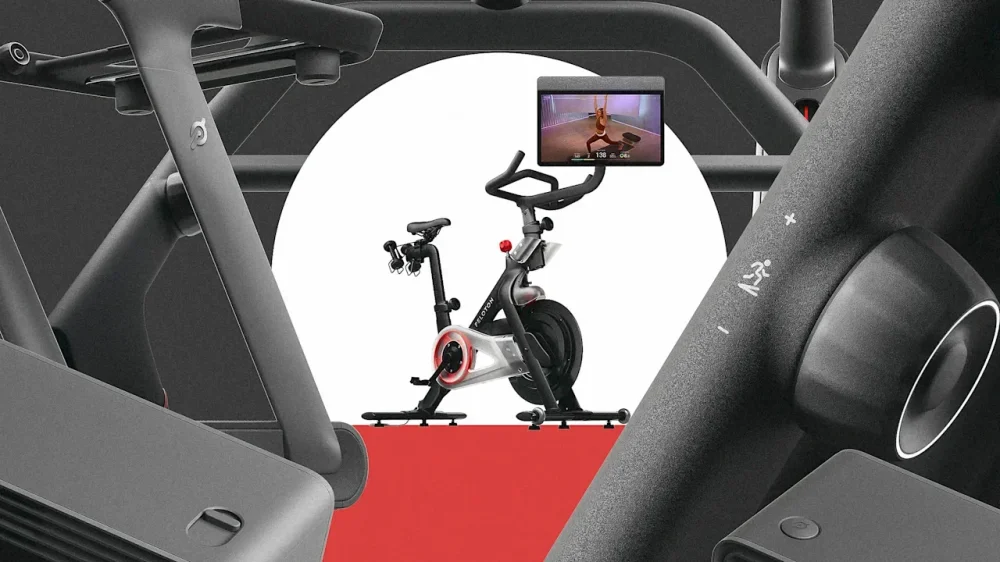
We may earn a commission from links on this page. Did you know you can customize Google to filter out garbage? Take these steps for better search results, including adding Lifehacker as a preferred source for tech news. As of today, a ton of massive changes just hit the Peloton ecosystem. The at-home fitness giant didn't just overhaul one part of the structure 6 million people rely on for quality workouts—it made improvements and tweaks across its hardware, software, content, and partnerships. Everything is available for members to explore now, both in the mobile app and on the brand's proprietary equipment devices, but I don't blame you if you're not even sure what to start looking first. Here's what you need to know. Peloton devices got a makeoverPeloton became most famous for its classic Bike, a stationary bicycle with a touchscreen that, since 2014, has allowed anyone anywhere to take a virtual spin class. Since the introduction of the Bike, the brand has rolled out an upgraded version, plus two kinds of treadmills and one rowing machine. The first big announcement of the day has to do with all those products: The five-part lineup is staying the same, but the Bike, Bike+, Tread, Tread+, and Row all got a significant makeover. Known collectively as the Peloton Cross Training Series, the new lineup is this: The Cross Training Bike The Cross Training Bike+ The Cross Training Tread The Cross Training Tread+ The Cross Training Row+ Each of the devices features a swiveling screen (which users of the old Bike+ will be familiar with) designed to allow users to switch more seamlessly between cardio and Peloton's other class offerings, like strength, yoga, and Pilates. That is where the whole "cross training" thing comes in. They also have enhanced audio, better processors for touchscreen responsiveness, and upgraded wifi and Bluetooth, giving them a distinct edge over their predecessors. Of particular note is what comes with the Plus line, or any device with a "+" after the name. Those all have a built-in, movement-tracking camera that will monitor your form, count your reps, and help the software suggest weights for you to use in your strength workouts. I tested it out yesterday at Peloton Studios in New York and was impressed. (If you recall, a few months ago, Peloton phased out the Guide, a camera that connected to users' TVs and did a much rougher version of what these built-in cameras are now going to do. We should have seen this new integration coming then.) The Plus line also comes with Sonos audio, hands-free control so you can make vocal commands to adjust your weight or pause a workout, and accessories and features based on users' requests. They have a three-speed fan built in to cool you down, for instance, and the Bike+ finally has a tray that can hold your phone. The Bike and Bike+ have cushier seats, though you can also purchase one of these new seats separately for your older Bike and Bike+ models. Peloton IQThe brand also announced the launch of its AI component, Peloton IQ. Remember how I mentioned the Plus line allows for voice commands? You can say, "OK, Peloton, skip this exercise," or "OK, Peloton, pause this workout." That's pretty useful if you're, say, doing a lift or yoga exercise and your touchscreen isn't within reach. But the AI does more than that. Its real purpose is to provide "dynamic coaching." Basically, your Peloton app got a major redesign (which you can see for yourself by opening it on your phone or Peloton device right now). Across the top, you'll see suggested workouts that are based on your goals, your past workouts, and your schedule. Crucially, this works on older models, too. I asked reps at Peloton Studios about this specifically yesterday and everyone was quite clear that they're not trying to force users to give up existing Bikes, Treads, or Rows. Still, the most advanced features of Peloton IQ are only available on the new Plus line, since those devices have the movement-tracking camera that enables the AI to give feedback, correct form, count reps, and suggest weights. The Plus line also allows for self-paced strength workouts similar to the ones you can find on Peloton's Strength+ app. Instead of following along with a class and instructor, you can generate a workout plan that simply walks you through a series of exercises and you can go at your own speed. You can pick your target muscle groups, deny exercises you don't want to do, and change the weight you're using for a totally custom experience. One cool thing I saw during yesterday's demo was that if you nail your form too easily or do more reps than suggested, the AI will automatically tell you when it's time for you to consider using heavier weights. You can accept or deny this suggestion and if you accept, from then on, it will be set so you're always doing that exercise with that weight. You can input any weights you have on hand at home, so even if you only have a set of five-pound dumbbells, the app will tell you when to use them and won't suggest exercises with anything heavier or lighter. Club Peloton, better Teams, and moreOn your Peloton app, you'll also now see something called Club Peloton, which is a recognition program that rewards you for consistency and variety in your workouts. You'll be assigned a level—bronze, silver, gold, or legendary—based on things like workout streaks or trying new types of exercises. Reps told me at the demo event that Club Peloton will eventually evolve to start giving back. For instance, members of a certain level may be eligible for discounts on certain items or to get early access to classes. Peloton says this is part of its "further investment in human connections." Obviously, the company is famous for making it possible to do complete workouts all on your own at home, but a big part of its success comes from the ways it approximates the in-person feeling by offering virtual group classes, personable instructors, and other features like Teams. You can join Teams with your friends and compete together or against one another or even join Teams based on mutual attributes like being a new mother or living in a certain region, but with today's overhaul, you can now also join something called Official Peloton Teams. These are helmed by Peloton instructors and include options like Move for Life, Cross Training, Menopause Health, and more. Peloton pricingPeloton's prices are going up, which isn't exactly a surprise. The company's letter to investors during the last earning period hinted at that and it's to be expected with all these new features rolling out. At least now it finally makes sense why Bikes, Treads, and Rows were being phased out at sporting goods stores a few months ago, and Peloton launched its own resale platform over the summer for people who want to sell their old equipment: We're getting a whole new fleet of devices. So, the new prices for membership are: All-Access Membership goes up from $44 to $49.99 per month App+ Membership goes up from $24 to $28.99 App One Membership goes up from $12.99 to $15.99 The devices are priced like this: The Cross Training Bike is $1,695 (plus $150 for expert assembly if you don't want to do it yourself for free) The Cross Training Bike+ is $2,695 (plus $150 for optional expert assembly) The Cross Training Tread is $3,295 (plus $150 for optional expert assembly) The Cross Training Tread+ is $6,695 and you'll need to pay $299 for assembly The Cross Training Row+ is $3,495 (plus $150 for optional expert assembly Final notes and first impressionsI saw all of this at a press event yesterday and was truly impressed, especially because there wasn't much of a hint about what the event was even about before I got there. The brand kicked off today's big launch by adding 2,000 classes compatible with the new AI features and everyone, even people with the lowest-level, app-only membership, can now access most of the new offerings (besides the motion-tracking features). That's a lot to keep under wraps. From what I saw during demos, these are genuinely solid improvements. Even the swiveling screens, fans, and phone tray are nice touches, since those are the kinds of things Peloton users have been paying extra to third parties to get for years. This is just the broad view of all the changes and it'll take me some time to work through all the new features and options on my app and Bike, but I'll update my old posts and create highlights for the truly noteworthy changes over the next few days. I already know I'm going to be thrilled by the new integration with Apple Health, for instance, even though I haven't gotten to play with it yet. I've been tracking all my non-Peloton workouts through the Peloton app for weeks, since it's easier than tracking some with Apple Health and others with Peloton. Now, any workout I complete on or off the app will be reflected in my Peloton history and will contribute to the AI's suggestions for what I should do on a given day. Over the next month, there will be promotions available so anyone who wants to upgrade to a new piece of equipment can do it more economically. As I find out more about those, I'll keep you updated. Personally, after all of yesterday's demos, I'm already pretty sure it's about time for me to retire my classic Bike and invest in the new Bike+. View the full article
-
Miklu Silvanto, Oura’s chief design officer, says incorporating advanced computing power into a tiny ring is a major challenge. It’s just as challenging to make a ring that people will actually want to wear around the clock. So Silvanto, an industrial design veteran who has worked at Apple and Bang & Olufsen, must also think of himself as a jewelry designer. “A ring is such an intimate object,” he says. “You might wear it alongside your wedding ring. You need to think comfort, and beauty, and fashion.” On October 1, Oura launches a new collection of ceramic rings that are more fashion-forward than its previous ones, which resemble metallic wedding bands. Since ceramic takes well to color, the new rings come in an array of hues, including petal pink, tide green, cloud white, and midnight blue. The company has also developed a new charging system that will allow wearers to switch between rings seamlessly, without losing any data. These new rings cost $499, while the metallic versions are priced between $350 and $500 depending on the finish. Users must also pay $70 annually to use the app that presents their health data, analysis, and advice. Given how expensive this product is, the idea of switching rings based on your outfit of the day may be an affordable reality to only a small, wealthy slice of the population, epitomized by some of the most famous Oura wearers—Mark Zuckerberg, Kim Kardashian, Prince Harry, and Gwyneth Paltrow, to name a few. Still, the rings are resonating with consumers around the world. Oura sold 2.5 million rings last year, making up half of its total sales since 2015. And the company expects to generate $1 billion in sales this year, making it one of the biggest players in the wearable technology industry. After its $825 million Series E round, it’s now valued at $11 billion. The Tiniest Computer For a designer like Silvanto, working on a smart ring involves incorporating as much technology as possible into the tiniest of products. When Oura launched a decade ago as a Kickstarter project, its first ring was much chunkier and could monitor only sleep and daily activity. Since then, the Oura’s designers have managed to make the ring smaller. Both the metal rings and the new ceramic ones are roughly 8 millimeters wide, 2 millimeters thick, and weigh between 5 and 8 grams depending on the size. And the rings are able to track around 50 biometrics. To do this, they use several sensors, including an infrared LED that measures blood oxygen levels, green and infrared PPG (photoplethysmogram) sensors that track heart rate, a digital thermometer that measures body temperature, and a sensitive accelerometer that tracks movement. Oura has benefited from broader changes in the technology industry that has been working toward miniaturization. (This is similar to what has been happening at, say, Dyson, which is incorporating more and more powerful motors into smaller hairdryers and vacuums.) Silvanto says Oura has focused on incorporating this tech into a design that is as comfortable and beautiful as possible. The new rings are made from zirconia ceramic, which is significantly harder and more durable than the ceramic used for vases and dishware. The rings are shaped and then fired in a kiln, which chemically transforms them into the harder material. (In fact, it is so hard that it can scuff softer metals.) Silvanto stresses the appeal of the material’s ability to take on colors. The four hues in the new collection are glossy and vibrant. If Oura’s metallic rings look like simple wedding bands, these ceramic rings evoke the color of gemstones. It’s jewelry that allows users to express their tastes and aesthetic preferences. Oura ring as fashion object Now that Oura is framing its rings as fashion objects, it wanted to ensure users were able to easily swap them on a daily basis to go with their various styles or moods. Silvanto says creating a system that would allow users to change rings while keeping all their data intact wasn’t simple. Data is stored in the ring itself, in the app, and in the cloud. “When a user switches between rings, all of this data needs to be synchronized to ensure that the tracking would be accurate,” he says. (This new data-synching capability is live on iOS apps today and will be available on Android starting October 10.) While the new ceramic designs are a significant launch for Oura, Silvanto says his team is already focused on dreaming up the company’s next-gen rings. As sensor technology continues to shrink, rings will become even thinner. And the team will continue to work on making them as stylish and fashion-forward as possible. “The best ring is one that people actually want to wear,” Silvanto says. “And to do that, you need to think beyond technology and about culture.” View the full article

-
Peloton is pushing off with a new strategy for making workouts personal and more useful. The at-home fitness company today unveiled a turnaround strategy that it says will overhaul and improve its offerings by relying on AI-powered features. The company’s ultimate goal? Leveraging technology to increase personalization and create a more sticky workout experience and prevent churn, create communities between members that will bind them to the program. The new strategy comes after a rocky few years for the company. Peloton went public in 2019 at a price of $27 per share, but is now trading at $9 after incorrectly predicting demand for its products after a COVID-19-fueled surge drove the price to a height of $167.42 in January 2021. In an August earnings call, CEO Peter Stern—an Apple Fitness+ cofounder who joined Peloton in Januaary—announced a 6% workforce reduction. On the same calll, the company posted a fourth-quarter profit and signaled it would adjust prices to offset the impact of extra costs associated with tariffs. Some of those price adjustments were announced today; the company’s All-Access Membership from $44 to $49.99 and App+ Membership from $24 to $28.99, and App One Membership from $12.99 to $15.99 effective this month. With today’s announcement, the company is banking on AI-powered workout advice, personalization, and more community-focused content that will restore its usership (and stock price) back to its pandemic height. AI Integration Peloton’s newest features involve AI integration to personalize users’ experiences. Today, the company launched Peloton IQ, an AI and computer vision system available on its new product models to provide personalized guidance and class recommendations for members, based on movement tracking via built-in cameras, class history, and fitness level. To power Peloton IQ, the company built its own large language model (LLM) using the data it’s collected over time. “We’re not using off the shelf LLMs,” Peloton’s Chief Product Officer Nick Caldwell says. “No else on the planet has the ability to do the sort of movement tracking that you’re going to see in our products. For some aspects of the product the company is using other LLMs like Meta’s Llama. To match the company’s new AI capabilities, Peloton also unveiled new base and premium equipment. Its new bikes, treadmills, and rowing machines have built-in cameras that track users’ movements and offer them real-time feedback on their form during strength workouts. The cameras can also track weight-lifting reps and suggest different weights for each exercise. The new equipment also has swiveling screens to make cross-training in view of the camera easier. Getting Personal The upgraded software also includes a workout generator which comes up with personalized workout plans based on a user’s goals (like getting stronger or losing weight), and a self-paced strength setting that lets members take on-demand classes at their own pace while they receive live feedback from Peloton IQ. The equipment can be integrated with fitness trackers including products from Apple, Fitbit, and Garmin. Once Peloton’s products have registered a user’s goals, workout history, and data, the app can even rate classes for them. For example, a member might see a “harder than your usual” tag next to a class while they are browsing. “At the end of the class we can look at how you performed and we can give you insights,” says Jen Kotter, Peloton’s chief content officer. “Every week we roll that up into a report that is meant to directly affect the actions that you take on our platform.” To prepare for the launch, the company has already banked 2,000 instructor-led classes that can track users—all available on the platform starting today. Custom workouts for more people As Peloton uses AI to expand its personalization capabilities, it’s also unveiling tailored content for different groups of users, including one that has been the target of a growing focus from companies: people in menopause. In 2024 the market for menopause-related products and services was worth approximately $17.79 billion. By 2030, that number is projected to reach around $24.35 billion. Today the company announced a partnership with Respin Health, which provides coaching, community support, and products geared towards women in menopause. The programming, set to launch October 6, will feature curated classes designed to relieve certain menopause symptoms, and will let women join a dedicated digital community on the Peloton app. Kotter says it’s an example of Peloton listening to what its riders—and instructors—want from it. “[Menopause] started to be a big conversation for a lot of members who had been with us for many years,” she says. “They didn’t like the way they were feeling, and they honestly didn’t know what kind of workouts would help them and they didn’t want to lose traction.” The company is also launching other dedicated content collections to help groups including those with runner’s knees or tennis elbows, new moms, and office workers. In tandem, Peloton is doubling down on digital teams in the app, letting users join them based on various affinities or hobbies to encourage each other, all in the hopes of getting them to stay. “Ultimately, we want to be able to have a one-to-one relationship with each one of those 6 million [members],” Caldwell says. View the full article
-
Like any other creator, I am no stranger to getting ideas at random times. But remembering them or actually publishing? That’s a different story. If you’re trying to be consistent and grow your personal brand, you know what it’s like to get an idea while you’re scrolling on LinkedIn or in the middle of a conversation. You think to yourself, “I should write a post on this.” But life gets busy, work gets complicated, and the content takes the back seat (as always). I know how discouraging inconsistency can feel. I’ve been there too. In this article, I’ll share the simple 3-step system that helped me break the cycle, stay consistent, and double my reach in under 2 months. Whether you’re just starting or have been creating on and off, here’s how you can do the same. Step 1: Create because you care (not because you have to) Do you ever rediscover an old idea and think, “These are actually good — why didn’t I ever post them?” I recently had a moment like that while scrolling through my notes app, when I stumbled on some post ideas. As I wondered why I hadn’t turned any of them into content, I noticed that the last edited date was in 2022. I know time flies, but realizing that I’d been collecting ideas for years without acting on them stopped me in my tracks. It made me wonder how many more ideas I’d let slip away if I didn’t do something about it. Some ideas I found in my Notes app with timestampsIn that moment, I decided I wouldn’t let another year pass while my ideas remained drafts. And this time, I wasn’t just creating out of obligation — but with genuine care to share my thoughts with the world. This mindset shift became the core of my consistency system. Step 2: Document every idea the moment it strikes — or it’s gone One of the best things I did for my consistency was building a habit of writing down every single idea the moment it came to me. 💡Learn more about consistency in content creation: 7 Simple Habits to Creating Content More ConsistentlyThe human mind thrives on systems and routines. Irrespective of what you’re doing, pause, and note the idea down like your life depends on it. It doesn’t matter if you’re doing it in a notebook, your Notes app, or even recording a voice memo. For now, your goal is to just build the habit of capturing every idea. You can expand on it, organize better, and create the post later. What my Buffer Ideas tab looks like I love using the Buffer Ideas tab for this because I can move an idea directly into my drafts and schedule across multiple platforms with a single click. How I capture a quick idea and develop the post later Step 3: Stick to the basics: create, edit, post, repeat As creatives, the advice we get online can sometimes be too much. It’s never simple, and we’re often pushed to think about starting a newsletter, coming up with a lead magnet, launching our own digital products, batch-creating 90 days of content, and much more — all at once! Recently, I was talking to my partner about all these big future goals I had for my content journey. (Note: I had barely even begun posting consistently, and was already overwhelmed.) He calmly responded with, “This seems like a lot to focus on. What are you willing to do today to get closer to that goal?” This one question stopped me in my tracks and made me realize that if I want to achieve big things, I need to start small. If I plan to be consistent, my process needs to be simple and repeatable — for a long time. And that, for me, is to write/create, edit, and post. That’s all. Everything else can come in later. Reminder: Your system needs to feel sustainable for you and not overwhelming. A simple, clear system (like this one) can do wonders for your content journey and put you many steps ahead when done over and over again. Show up regularly — the growth compounds fast Consistency is the cheat code for building your personal brand online. You don’t need to show up perfectly — it matters that you keep showing up. Each new post is another chance for your voice, ideas, and expertise to be seen, and over time, that visibility turns into trust, authority, and opportunities. In less than two months of being “somewhat” consistent on LinkedIn and Instagram, I hit milestones and opportunities that I never thought were possible (especially, this early in the journey). On Instagram, a couple of reels I published went viral — one with over 700k views and another with over 90k views. These two posts alone have brought in 350+ new followers and 4 collaboration requests. My top-performing content on Instagram with viewsFollower growth in this periodFor context, I had been stuck at around 850 followers since 2017, and none of my reels had ever crossed 5k views. But within a few weeks of my content taking off, my follower count had grown to over 1,200, and the numbers keep going up by the day. Total views and interactions I gained in this period On LinkedIn, my impressions crossed 4,600, with a 264% increase in engagement, leading to 25 new followers and 2 inbound leads for my freelance work. LinkedIn growth analytics from this period None of this would have happened if I had constantly doubted every single idea and let my drafts collect dust in the archives. Don’t know what to post? Use these 3 sources to spark ideasBefore we go further, let’s address the elephant in the room. So far, we’ve discussed turning drafts into posts and building a simple, sustainable system for consistency. But what if you’re stuck on the initial and crucial question: “What do I even post?” If this sounds familiar, I have some wonderful news (and resources) for you! We live in an era where everything is at our fingertips. From 10-minute grocery deliveries to scheduling an at-home massage in an hour, we can get almost anything instantly … if we know where to look. This applies to content as well. There are multiple goldmine-like resources online to help you get ideas that are relevant to your niche and brand. Here are three that have helped me the most: Buffer Templates: On days when I don’t know what to post, Buffer’s templates are a lifesaver. Having content templates with prompts, hooks, and a usable post structure not only saves time but also helps you get out of the slump. With almost a hundred templates categorized into case studies, how-tos, opinion pieces, and much more, these templates can also be an excellent springboard for brainstorming and sparking similar ideas. Buffer Templates dashboard The helpful prompt, hook, and post structure Peer-curated lists: An underrated way to find ideas online is to follow other creators — especially marketers and social media experts — who share niche-specific content ideas. I’ve found some great ones through Instagram and Pinterest searches. The only limitation is that these ideas can be generic at times, so you’ll need to adapt and customize them for your niche. Search tabs on Instagram and Pinterest for generic “Content Ideas” AI-powered brainstorm sessions: With Generative AI tools like ChatGPT, Claude, and Perplexity, breaking out of a creative block has never been easier. Use them as your in-house content partner to bounce ideas and find gaps in your niche. When combined with your expertise, these tools can help generate dozens of ideas and even build a personal content bank tailored to your goals. Remember, not knowing what to post isn’t the dead end we believe it to be. With the right resources in your toolkit, getting ideas can become the easiest part of your content system. Don’t do it alone — find a community or buddyThe best part about being a creator in 2025 is that you don’t have to do it alone. Whether it’s through online communities or smaller support systems, surrounding yourself with fellow creators makes the journey easier and helps you stay consistent. In fact, I started this two-month consistency spree while participating in Buffer’s Creator Camp — a 30-day program designed to help creators build a habit of consistency through guidance, a Discord community, and daily post prompts. Even though I wasn’t active every day, being part of a supportive group felt validating. Seeing other creators in the same boat, pushing themselves to be consistent every single day, and celebrating their wins, gave me the final push I needed to stop overthinking and start creating. Another way to avoid feeling isolated is to team up with a friend who shares your passion for creating. You can be each other’s accountability partners — share drafts, get feedback, and cheer each other on! Texts with my accountability partner When you do this, content creation and consistency stop feeling like a chore. Instead, they become a fun challenge you actually look forward to. Your drafts deserve better Creating content and building your personal brand doesn’t have to be all-consuming and exhausting. It can be fun and doable. Create because you care. Not because you feel obligated. Capture every idea the moment you think of it. Start with a simple, sustainable system that works best for you. When you do this, consistency becomes easier, and success becomes inevitable. From this short stint in posting, I realized that content creation is mostly about consistency and mindset. It’s important that we do not become our own worst critics and second-guess every idea. Your drafts deserve better. You deserve better. Trust in your ability to create and express. Focus only on the next two steps at any given time — the 10th, 50th, and 100th steps will take care of themselves. Just keep posting. You got this. View the full article
-
We’re excited to announce the beta release of Yoast AI Brand Insights, available as part of the Yoast SEO AI+ package. This new tool helps you understand how your brand appears in AI-powered answers, and where you can improve your visibility. Ideal for bloggers, marketers, and brand managers, Yoast AI Brand Insights gives you an overview of your brand presence across tools like ChatGPT, Perplexity, and Gemini. For years, Yoast has helped you get found in search engines. Recently though, search is changing. People aren’t just using Google anymore, they’re turning to AI tools like ChatGPT for answers. Those answers often mention brand names as recommendations. So here’s the big question: when AI tools answer questions in your niche, does your brand show up? Our new tool, Yoast AI Brand Insights (beta), helps you find out. Yoast AI Brand Insights lets you see when and how your brand appears in AI-generated answers and helps you understand where you need to focus your effort to improve your visibility. Why Yoast AI Brand Insights matters, now AI-powered answers are shaping customer decisions faster than ever. Visitors from AI search are often more likely to convert than those from regular search. It’s no surprise, because asking an AI-powered chatbot can feel like getting a personal recommendation. Afterall, word of mouth remains one of the most powerful ways to build trust and spark interest. Most analytics tools can’t tell you how your brand appears in AI answers, or if it’s mentioned at all. With more people turning to tools like ChatGPT, Perplexity, and Gemini for advice, that’s a big blind spot if you are trying to get your name out there. Yoast AI Brand Insights aims to close that gap. You’ll see when and how your brand appears, what’s being said, and where the information comes from, so you can take action to ensure your brand is part of the conversation. With just a few clicks, you can: Check if your brand is mentioned in AI-generated answers for relevant search queries Benchmark against competitors: see how often your brand comes up Understand the sentiment connected to your brand: positive, neutral, or negative Find the sources AI tools use when they mention you Track your progress over time so you can respond to changes quickly Pricing & getting started Yoast SEO AI+ is priced at $29.90/month, billed annually ($358.80 plus VAT). The plan includes one automated brand analysis per week per brand, so you can track and compare how your brand is showing up in AI-powered search over time. With each purchase of Yoast SEO AI+ you recieve one extra brand. With this package you also get the full value of Yoast WooCommerce SEO, which includes everything from Yoast SEO Premium, News SEO, Local SEO, and Video SEO, in addition to one free seat of the Yoast SEO Google Docs add-on. For marketers, this means you no longer need to patch together separate solutions for on-page SEO, ecommerce optimization, content creation, or LLM visibility. Everything you need to analyze, optimize, and grow your brand presence is included in one complete package. How to get started Login with MyYoast: secure, single sign-on for all your Yoast tools and products. Open Yoast AI Brand Insights: You can find it near the Yoast SEO Academy Set up your brand: add your brand’s name and a short introduction to your business Run your scan: we’ll find relevant AI search queries for you, you can use them or tweak them to your liking. Review your results: see relevant mentions and their sources, your brand sentiment, and the AI Visibility Index in an easy-to-read dashboard Want more details? Check out the full guide to getting started. Launching in beta Yoast AI Brand Insights is now available in beta as part of Yoast SEO AI+. This is your chance to be among the first to explore how your brand shows up in AI-powered search. We’d love your thoughts as we refine the tool, your thoughts here. See how your brand appears in AI search today Get Yoast SEO AI+ today to start your first brand scan. See if and how AI tools are talking about you. The post Introducing a new AI-powered package: Track your brand in AI search appeared first on Yoast. View the full article
-
Andrew Bailey signals softening of stance towards digital tokens View the full article
-
An innovative technology must still answer old central banking questionsView the full article
-
YouTube is cited 200x more than any other video platform in AI search results, according to new data from enterprise SEO platform BrightEdge. YouTube was: Cited 200 times more than any other video platform by ChatGPT, Perplexity, and Google’s AI products. Present across all platforms and essentially the only video source that matters. Competitors barely registered: Vimeo (0.1%), TikTok (0.1%), Dailymotion (0%), Twitch (0%). A top information authority, rivaling Mayo Clinic and Investopedia. By the numbers. YouTube had a 200x advantage over its nearest rival (Vimeo at 0.1%). Even platforms like Perplexity and ChatGPT, which have no incentive to favor Google properties, overwhelmingly cite YouTube. 20% average YouTube citation share across AI platforms. 29.5% of Google AI Overviews cite YouTube – making it the top domain overall, ahead of Mayo Clinic (12.5%). 100% week-over-week growth for ChatGPT (though off a small base). 32.8% recent dip in AI Overviews citations, but YouTube still dominates. By platform. Here’s a breakdown of YouTube’s performance across engines: Google AI Overviews: 29.5% citation share, #1 domain, average rank position 6.3. Google AI Mode: 16.6% share, #1 domain, average position 9.7. Perplexity: 9.7% share, #5 domain, 4.8% weekly growth. ChatGPT: 0.2% share, growing fast, average position 5.2. Where YouTube showed up. Tutorials (finance, software, medical “how-to” content). Pricing, deal hunting, product demos, reviews. Less likely: career advice, strategy, abstract concepts, or pure informational queries. Why it matters. If your brand isn’t creating video content, you may be invisible in AI search. YouTube isn’t just winning – it’s the only video platform that AI platforms appear to trust. About the data. BrightEdge analyzed YouTube citation patterns across Google AI Overviews, Google AI Mode, ChatGPT, and Perplexity from May 2024 to September 2025 using its AI Catalyst platform. The study tracked citation rates, platform competition, query types, and week-over-week changes. BrightEdge’s research. YouTube Optimization Strategies for AI Citations View the full article
-
TikTok has been abuzz with the workplace trend “task-masking”—that is, making yourself look busy so that your boss thinks you’re hard at work. Cue behaviors like pounding hard on the keyboard, always keeping your status to “active,” or walking around the office with your laptop and looking like you have somewhere to be when you don’t. “It’s all show. It’s all performance,” one TikTok user posted. “They could be typing a thousand words a minute, but really be typing nothing,” posted another. Some argue that it’s backlash against return-to-office policies: “Many of these employees, especially Gen Z, feel like their presence doesn’t equal productivity,” a TikTok user said. And crucially, “it’s not just about laziness,” wrote another, arguing the pressure to look busy “could actually be a sign of overwhelm.” The term has come to be associated with Gen Z on social media, but in reality, the act (and art) of looking busy has been around for decades. “Task-masking is the digital equivalent of shuffling papers,” says employee coach and attorney Theresa D’Andrea, known as That Work Girl, who’s also discussed the trend on TikTok. “It’s an employer’s market right now to get a job, so people feel like they have to be busier than usual in order to keep their jobs.” Nearly half (48%) of managers are concerned about employees who fake their productivity on the job—and not without reason. That’s because 37% of managers and 32% of non-managers themselves admit to such “fauxductivity,” or trying to appear busy even when they’re not, according to a 2024 survey of 3,000 full-time employees in the U.S., U.K., and Ireland by Workhuman, an HR software company. That’s not good for employees—or companies. Such pressure to look busy can lead to burnout and inefficiencies, D’Andrea says. Rampant task-masking may be a sign of workflow or cultural issues that management needs to address. And it may be an act of defiance for some, but a scrambling to prove worth for others. If you’re feeling the pressure to look busy to show your boss how important you are, try these tactics instead of pretending to answer emails during the next all-hands meeting. Get clear about what’s important, and prioritize ZipRecruiter career expert Sam DeMase says that in order for employees to truly add value, they need to understand the metrics used for “success” by both their supervisors and the company. “You just need to focus on doing work that actually moves the needle,” she says. DeMase suggests asking your boss questions to get clarity: “How is success defined for this project?” “How does this project serve the company’s goals for 2025?” Know your core strengths and communicate those. D’Andrea agrees. Instead of responding to every text, email, and communication platform notification immediately in an attempt to look busy, focus on what matters. That’s especially true after you’ve gotten a sense of what your boss and the organization value. “Maybe even help your boss put together a KPI [key performance indicators] dashboard to track the performance of the team if your boss doesn’t already have something like that,” says Korn Ferry senior client partner Maria Amato. “I would be delighted if someone on my team did that.” Keep learning Instead of tackling a task just for the sake of crossing it off the to-do list, keep learning where you can, says workplace culture expert Marissa Andrada. Work on understanding more about the company and its culture and values. “If you get the context of how the work that you’re doing fits in [to the team and values]—why it’s important—then you can show, ‘Here’s what I think about it,’” she says. Not only does this give you a better perspective on the work you’re doing, but it can also help frame your work as more essential to your team (and boss). “It’s making your manager be successful by delivering on time and on point,” she adds. It replaces the performative busywork of task-masking with strategic thinking that demonstrates real value. Taking on stretch roles or additional projects can help you keep learning, too. However, Amato cautions that it’s important to understand the culture of your company and the nature of your supervisor: Don’t make it seem like you are trying “to get away or are not interested in what you’re currently doing—not wanting to pay your dues, for example, in your current role.” Document your wins DeMase suggests keeping a weekly log of your progress and wins, such as meaningful contributions to meetings, goal completion, positive feedback, project milestones, and processes you improve along the way. She adds that documenting your successes can also keep you motivated in your job. Amato says what you do with that information depends, again, on the culture of your organization and team. You might tell your supervisor that you’ve collected some data on your performance, and ask whether they would like you to share the information with them. “Your boss may say, ‘Oh, I would love to see that as it comes in. Just send it to me each and every time.’ But if they haven’t actually asked for [the info], it could be sort of like spamming your boss,” she adds. “We need to move away from ‘busyness bringing value,’” D’Andrea says. By getting more clarity about your role, reconnecting with your work’s meaning, and documenting your wins, you can add value and get more satisfaction. Those are payoffs that marching around the office with an open laptop simply can’t deliver. View the full article

-
A few years into the AI boom, it’s clear that designers can rely on AI for some things. It can automate tedious tasks in Photoshop that once took up precious time. It can generate images on command (quality be damned!). It can schedule a meeting, respond to an email, and take notes on a Zoom call. But for all the hype, we know that AI isn’t a silver bullet for the real problems creatives face. Far from it. So we wondered: When it comes to design and creative work, in a blue-sky scenario, what do today’s design leaders wish AI would actually take care of for them? We asked nine great designers that very question, and got back some interesting answers. Their answers, seen below, reveal more than productivity hacks. They are a prism into the pain points of a modern design practice, and a view of how some of the best minds in design are thinking about AI. Pum Lefebure, cofounder and chief creative officer, Design Army 1. Dream Harvester: An AI that records my dreams and subconscious visions while I sleep, then turns them into usable moodboards, storyboards, or campaign concepts the next morning. 2. Taste DNA Engine: AI that learns your creative fingerprint so deeply it can filter endless options, then only show ideas that match your intuition—like your own inner taste amplified. 3. Multidimensional Story Weaver: You give it one idea and AI spins it simultaneously into a film, song, sculpture, VR world, fragrance, and fashion line—all cohesive, all connected. Sara Vienna, chief design officer, Metalab Everyone says they want AI to take away the busywork, and of course I agree. But I want to push it further. I wish AI could act less like a task runner and more like a thought partner—a thought partner that I actually trust with context and nuance. Point out the edge cases, flag accessibility issues without watering everything down, remind me when I’m stretching myself too thin, even help me recognize the milestones that matter in the lives of people around me. Because we’re living in a sea of sameness where anyone can vibe code and ship something, the quality bar is so low. But is it good? Is it new? Does it deserve to exist? That’s the gap I want AI to help close, not just speed up production, but raise the bar on quality and meaning. Jessica Walsh, CEO, founder and creative director, &Walsh Join meetings for me? I know that’s not great to say, but I find that when I’m in meetings all day, it takes a toll on my creativity . . . yet I know how important it is to be present for our clients. The more obvious answer—handling all the financial aspects of the business, like accounting, invoicing, forecasting, etc. For any creative agency owner, it can be a huge creative time suck to constantly think about. I also think there could be a much better system for archiving our work and project learnings so that anyone who touches those projects in the future has access to them in a really easy-to-understand way. After leading an agency for more than 15 years with a ton of repeat clients, we’re always looking to optimize this, and I think AI could integrate here in some really exciting ways Aaron Draplin, owner, Draplin Design Co. I will say it’s already doing exactly what I would have really ever hoped and dreamed that it would ever do, which is just that generative fill thing in Adobe. The idea that if I have a vertical image that’s given to me and I have to make it into a square, I can just do a couple clicks for that generative fill—it’s not crossing an ethical line at that point. It’s just filling in dead space. That’s amazing, because I would have had to do that myself through trickery and fades and gradients and bullshits and things and stuff. Now that thing can go do it that quick. Gui Seiz, director of design, Figma My biggest wish for AI is to hold on to context and intent the same way a good collaborator does. I want to see AI shift from a productivity hack to a genuine thought partner in the creative process. It should track the intent behind decisions, suggest course corrections when I veer off track, and help me stay in flow. The goal isn’t just to work faster, it’s to work with clarity and help designers navigate the messy parts of the process: the ambiguity, the feedback loops, the gap between rough sketch and refined product. Where it gets interesting is when AI really remembers your creative journey across projects, it can start connecting dots you can’t see. Maybe it surfaces a discarded approach from months ago that suddenly fits your current work, or reveals patterns in your decision-making that point toward unexplored directions. Leta Sobierajski, partner, Wade and Leta I’m hyperconscious of how utilizing AI is shortening my thought process. And while it is enjoyable to embrace cut corners and shortcuts of, say, writing an artist statement or summarizing a brief, I’m a bit terrified by its ability to think more succinctly than I do and automate the processes that have led me to become the creative person that I am today, no matter how grueling they have been. A benefit to the way I work is that my interpretations are never black or white—following an artistic practice is about the meandering and the daydreaming, and with the use of AI that magic may be depleted. So, clearly I’m trying to avoid it for any high-level thinking and writing, as this dependence feels like a gradual dulling of a sharp knife. That said, I’d appreciate it more if it served me a sandwich every so often when I forget to eat, or if perhaps it could remove me from my chair when I’ve sat for too long to encourage me to go enjoy the weather instead. Giorgia Lupi, partner, Pentagram My “blue-sky scenario” would be an AI model that reduces the labor of tedious tasks, allows us to test ideas faster, but does not erase the important moments of frustration, collaboration, redirection, and happy accidents in the design process, as that is ultimately what brings the language of design to life. But I think there are important considerations to be made. First of all, when you ask about how AI can be used in the design process, you would likely get different answers from a design director than you would from a hands-on designer who might see a time-saving benefit to AI-powered visual modeling tools. And secondly, although I see value in continuing to explore what AI can do for the field, I still have open questions: Can the shortcuts made possible by AI lead to similarly valuable designs? Do these shortcuts preclude designers from important processes and experiences? Is there a way that AI can be used to eliminate tedium without necessarily informing the visual outcome? Without AI, whether you design alone or with a team, the design’s detours, loose experimentation, happy accidents, and outright mistakes all lead to a unique result. As much as I’ve enjoyed generative AI in the early days, lately my experience has been marked by frustration, as AI agreeably translates my requests into outcomes that feel like the result of a very different process that is neither collaborative nor solely mine, which is what I am reflecting on these days. When I think about why our clients come to us, it is to transform their stories, ideas, and brands into visual languages that people can connect with. For me, that still means finding the human element. No two designers will craft the same solution for a project, and the beauty in this is that a designer’s work so uniquely reflects their own perspective. I do not want the integration of AI, with its specific training and incentive to please, to result in a great flattening of design, where well-worn algorithmic decisions make everything look the same. Forest Young, executive director of design, FundamentalCo In a blue-sky scenario, a designer would never need to wait to be the recipient of a mediocre brief—one that reeks with a desperate hunger for relevance. She could scrape the subreddits for unmet needs, painful experiences, and problems worth solving, for communities that she felt a kinship with, and design a solution—a brand, a product, an experience with an inspired sense of autonomy and empathy. In short, designers should not believe the hype, but instead [they should] believe in themselves. We must endure the torrent of efficiency-laden rhetoric until we reach an equilibrium, and discover a way to harness this technology to capacitize; to imagine beyond new skins of things to new things altogether. As industries furiously build on top of identical infrastructures and de facto research implications, unique expression will become a peerless signature. Self-assured designers empowered by AI will drive world-building, product visions, and MVPs, as well as unforeseen form language. Like any worthwhile growing pains, we must place a wager on who we can become beyond who we once were. Brian Collins, cofounder, Collins Imagine if every deck, doc, and post of yours stays on-brand. Not because you had to police them all to death, but because the brand itself is living and defending its own borders like a benevolent nightclub bouncer. If AI helps the scaffolding hold itself up, we get to spend our energy on the big swings—the ideas, the products, the campaigns no one’s ever seen before—while the system keeps the everyday stuff from collapsing into chaos. The dream, the way I saw it, was never to sit in front of a drafting table for three days adjusting kerning by hand. That wasn’t noble. That was carpal tunnel. The dream for designers was to have a creative system that keeps running when you’re asleep or sulking. To have a collaborator who has ideas faster than you can write them down, and keeps yours intact from the moment they leave your desk to the minute they appear on a screen, in a store, or in someone’s home. Charles Eames warned us, “Never delegate your understanding.” Fine. Don’t. But now you can delegate everything else and watch it go. View the full article

-
Want more housing market stories from Lance Lambert’s ResiClub in your inbox? Subscribe to the ResiClub newsletter. As ResiClub has closely documented, Florida has been the epicenter of U.S. housing market weakness in 2025. However, KB Home executives now believe the worst may be behind them—at least for their business—in the Sunshine State. While giant homebuilder KB Home—which has a $4.3 billion market capitalization—isn’t ready to call it an inflection point for the entire state, it believes its price cuts in Florida were more than sufficient to stabilize demand for its business. In fact, it may have cut too deeply in Florida and could now need to raise prices in some communities. On the company’s September 24 earnings call, chief operating officer Rob McGibney said its business in Florida appears to be stabilizing after the builder moved aggressively to cut prices earlier this year. In fact, KB Home now thinks some of those cuts went too far. “We’ve actually found, in some cases, we’ve gone above what we needed to [and cut home prices too much in Florida]. So, in order to optimize those assets, we’re now increasing [the] price,” McGibney said. The executive added that KB Home’s new home sales in Florida in the third quarter were higher than in the second, a sign that the price adjustments worked to restore demand. He also pointed to a decline in housing starts across the state, which is easing pressure from supply. ”The good news for us is that [price cuts in Florida] worked, and now you’re seeing the orders come back up [in Florida] as a result of that. It’s also, as I mentioned earlier, one of the markets where we’ve seen the biggest decline in [housing] starts. So we’ve had some of our best results in cost reductions there, too. And now, as I’m calling, that is starting to stabilize—we’ve got that combination. I think we found that market [in Florida]. We’ve driven cost [in Florida] down, and now we’re starting to take it back the other way,” McGibney said. McGibney stopped short of declaring a statewide turnaround but said the builder is encouraged by recent trends. “I’m not necessarily calling it an inflection point for the whole state of Florida, but we’ve been encouraged by what we’ve seen recently.” KB Home executives also noted varying conditions across other major markets. California’s Inland Empire, Las Vegas, Houston, and Charlotte, North Carolina, all posted solid demand in Q3, while coastal California, Seattle, and Denver remain more challenged. Still, for Florida—the market that’s defined much of 2025’s housing weakness—the shift from deep price cuts toward selective price increases marks a notable change in tone. ResiClub PRO members can read our full report on KB Home here. View the full article

-
Medical equipment company linked to Michelle Mone breached state contract during pandemic, judge saysView the full article
-
Chief executive’s pay jumps after British team ends 26-year wait for constructors’ championshipView the full article