ResidentialBusiness
Administrators
-
Joined
-
Last visited
Everything posted by ResidentialBusiness
-
 Unlike the other big streamers, Tubi only has a handful of original shows, most of them imports (their original movie selection is much larger). That's not to say it's a wasteland for TV addicts: The streamer might actually have too many shows, a vast and sometimes wild catalog that spans decades. As the likes of Netflix and HBO Max have slimmed down their catalogues, Tubi is growing, offering a mix of established hits, underrated gems, and more obscure offerings. For the sheer breadth of material on offer, it has become the first place I look for anything outside the current zeitgeist—like the following 18 shows, an entirely non-comprehensive sampling of what Tubi has to offer, crossing genres and decades. Gossip Girl (2007 – 2012) Occasionally referred to as the greatest teen drama of all time (certainly this side of 90210), Gossip Girl was a buzzy ratings champ for the CW back in the day, with its juicy, often scandalous storylines that veered so often into intentional satire that it was hard to ever get mad at the ridiculousness of any of it. Set among a group of well-heeled students on Manhattan's Upper East Side, its characters find their private lives being chronicled by the title’s mysterious master of gossip—so think of it as a proto-Bridgerton. You can stream Gossip Girl here. Babylon 5 (1993 – 1998, five seasons) J. Michael Straczynski’s wildly ambitious sci-fi epic was way ahead of its time, with a planned (more or less) five season story arc set on the titular space station. Babylon 5 is a remote outpost that becomes the last best hope for peace in the face of conflicting human and alien agendas—even more so after an ancient threat is awakened. With increasingly complex storylines that expanded over its run, this was a stab at prestige TV before that was a thing, and it still holds up (dated CGI effects notwithstanding. You can stream Babylon 5 here. Empire (2015 – 2020) Hip hop mogul and Empire Entertainment CEO Lucious Lyon (Terrence Howard) is dying, having been diagnosed with ALS at a young age. He wasn't planning to have to hand off his company so early, but nevertheless finds himself preparing his three very different sons (Trai Byers, Jussie Smollett, and Bryshere Y. Gray) to take the keys to the kingdom—by pitting them against one other. Into this already Shakespearean setup steps Lucious' ex-wife Cookie (Taraji P. Henson), just released from prison and harboring her own plans for Lucious's empire. You can stream Empire here. Mr. Robot (2015 – 2019) Social anxiety disorder, clinical depression, and dissociative identity disorder make up the potent blend of neurodivergences challenging Elliot Alderson (Rami Malek), a genius senior cybersecurity engineer at Allsafe Cybersecurity. In season one, he's recruited by an anarchist who goes by the moniker Mr. Robot (Christian Slater) to encrypt all the financial data of a global mega-conglomerate, thereby erasing massive amounts of debt (hey, real-life hackers, maybe take some notes?). The show starts strong and gets better across its increasingly labyrinthian four seasons—utterly preposterous while also feeling realistic in its technical detail. You can stream Mr. Robot here. Boarders (2024 - , two seasons) This British import feels a bit like a latter-day Skins, with a talented cast of young stars-in-waiting (including leads Josh Tedeku and Jodie Campbell) and a scholastic setting. At the (fictional) prestigious boarding school St. Gilbert’s, five Black teens are newly attending, having earned scholarships, but their integration into the existing cliques is less than smooth. The blend of coming-of-age drama with a willingness to take the piss when it comes to the whole rich private school thing makes this Tubi original a good time. You can stream Boarders here. Big Mood (2024 – , renewed for a second season) Another UK import and Tubi original (at least stateside), Big Mood stars Nicola Coughlan (Bridgerton) and Lydia West (It's a Sin) as a couple of besties in East London, living their best millennial thirtysomething lives. Well, kind of: Maggie's dealing with bipolar disorder, and unclear on whether she wants to continue with her medication as she sets out to write a play, while Lydia is doing her very best running a tanking dive bar inherited from her father. It's both a cute dramedy and an impressively frank exploration of the challenges of living with mental illness. You can stream Big Mood here. Vicious (2013 – 2016, two seasons) The old-school sitcom formula has never been executed quite this bitchily, with the inspired pairing of Ian McKellen and Derek Jacobi as Freddie Thornhill and Stuart Bixby, a couple of nearly 50 years who’ve developed a love-hate relationship. This cast, which includes Frances de la Tour and Game of Thrones’ Ian Rheon, is unbeatable, and the one-liners are hilariously nasty. You can stream Vicious here. The Haves and the Have Nots (2013 – 2021, eight seasons) Tyler Perry's old-school primetime soap was the show that practically built OWN; it was the then-new network's first scripted show, and an immediate breakout. It follows three families: The wealthy Harringtons and the Cryers are wealthy movers in Atlanta, Georgia, while the Young family is overseen by single mom Hanna, who's both a maid for the Cryers and confidante to the family matriarch. There's juicy tension galore between the three families, in no small part because of class differences, but also because they're all equally screwed. You can stream The Haves and the Have Nots here. Spartacus (2010 – 2013) Doing Ridley Scott’s Gladiator one better in terms of both narrative complexity and in hot shirtless gay arena action, Spartacus starts off as pure spectacle and grows into a juicy, high-gloss soap opera by series' end. Buoyed by performances from leads Andy Whitfield (who tragically passed away during the series' original run), Manu Bennett, John Hannah, and Lucy Lawless, it’s sword-and-sandals done right. A follow-up series is in development over at Starz, so it's a good time to catch up. You can stream Spartacus here. Broadchurch (2013 – 2017) Creator Chris Chibnall's dark crime drama didn't invent its particular sub-genre (whatever you call the one where two troubled homicide detectives butt heads in a gloomy town), but it did popularize it to the point that we've been inundated with countless imitators of wide-ranging quality. With the great pairing of Olivia Colman and David Tennant (joined by yet another Doctor Who Doctor, Jodie Whittaker), Broadchurch still stands alongside the best of its kind. You can stream Broadchurch here. Doctor Who (1963 – 1989, 26 seasons) Speaking of Doctor Who, even if you're current with the modern incarnation (if I can use "modern" for a show that started airing in 2005), you've got a lot of timey-wimey adventures to enjoy. Tubi has the entirity of the surviving 26-season original run, going all the way back to 1963 and the story of a mysterious old man living in a junkyard with his granddaughter. Seven doctors is enough to keep anyone busy for a while. Tubi has the show broken out by Doctor, but, if you want to start from the beginning you can stream The First Doctor here. Haven (2010 – 2015) Tubi is a haven for small gems like this, a five-season Stephen King adaptation originally produced by SyFy. Emily Rose stars as Audrey Parker, and FBI Special Agent sent to the small town of Haven, Maine on a routine case who gets drawn into “The Troubles," a series of harmful supernatural events that have recurred throughout the town’s history. A supernatural-case-of-the-week format gives way to a bigger mystery when Audrey comes to learn that this isn’t her first time in Haven, nor the first time she’s encountered the Troubles. You can stream Haven here. Scandal (2012 – 2018, seven seasons) Shonda Rhimes was already a powerhouse producer and screenwriter with several successful seasons of Grey's Anatomy under her belt when Scandal debuted, but its blend of political thrills and sexy, soapy drama is what solidified her brand, and her spot atop of the modern TV landscape. Kerry Washington stars as Olivia Pope, head of the DC-based crisis management firm Olivia Pope & Associates (OPA), who is the person to call when you've got a PR disaster to fix. If you want to get a sense of the stakes involved, consider that Tony Goldwyn costars as Fitzgerald Grant III, president of the United States, and also Olivia's lover. You can stream Scandal here. Buffy the Vampire Slayer (1997 – 2003) With word that Sarah Michelle Gellar (and company?) are returning to the wreckage of Sunnydale for a Hulu reboot, it’s probably not a bad time to visit (or revisit, or re-revisit) this seven-season teen vampire hunter saga. While the pacing might feel a little slow, and the effects a little janky, its blend of high school (and then college) angst, kick-ass monster fights, and genuinely laugh-out-loud comedy holds up. You can stream Buffy here. Heartland (2007 – , 18 seasons) If there’s a stereotype that middle-American viewers won’t watch foreign fare, this show puts the lie to it—at least when it comes to imports from Alberta (tariff-free!). Based on a popular book series from Linda Chapman and Beth Chambers (writing under the name Lauren Brooke), the show follows the lives of a family of horse ranchers in western Canada, led by sisters Amy and Lou (Amber Marshall and Michelle Morgan). Tubi currently has only the first 15 seasons of the drama, which has recently been renewed for a 19th. That’s Law & Order-level longevity, people. You can stream Heartland here. Highlander (1992 – 1998, six seasons) An classic of '90s-era syndicated action/adventure, Highlander stars Adrian Paul as the title hero, taking over from Christopher Lambert in the film series. Duncan MacLeod is an immortal warrior living in the modern(-ish) day, hunted by others of his own kind, whose goal is singular: to chop off Duncan's head in order to steal his power. Episodes typically involve some sort of flashback to an earlier era in Duncan's life where we first encounter the threat he'll face in the modern day. There's at least one good sword fight in every episode, and I can't imagine what more you'd want out of a series. Bonus: It carries over the films' kick-ass Queen theme song. You can stream Highlander here. Z Nation (2014 - 2019) The Walking Dead made prestige television out of the zombie apocalypse, but this SyFy channel original is all about zombies as a campy, gory good time. Things kick off with a soldier who’s been tasked with transporting a package across country. The package in question is actually a human being, the survivor of a zombie bite who might be able to help create a vaccine (take note, The Last of Us fans). This one comes from the schlock-masters at The Asylum, purveyors of infamous B-movies like Sharknado, which should tell you all you need to know about the tone. You can stream Z Nation here. Columbo (1968 – 2003, 16 seasons) Peter Falk's sublimely rumpled detective practically invented the style that Peacock's Poker Face has recently revived: a crime (usually a murder) is committed, the viewers know whodunnit, and Columbo has to solve it. Early on in any given episode, we get to watch the crime being committed, though we don't always know the motive. The challenge isn't to figure out the culprit, but to discover exactly how TV's greatest detective is going to solve the case. You can stream Columbo here. View the full article
 -
A reader writes: I recently accepted a new job where I will be managing a newly created team. I have been a manager before, but this new job will be a new challenge. The team I am managing has been tasked with leading a culture change in the company. The company has had many employees leave. In some cases, they left without another job lined up or took a job somewhere else with less pay or a lower title. Most gave little or no notice and left on poor terms. It’s been a problem for a long time, but things have been getting worse recently. Some former employees did agree to exit interviews but all of the ones who left over the problems had the same complaints: * Parents receiving preference when it comes to time off requests over people who aren’t parents, and in some cases people without children having their time off requests denied or rescinded to accommodate their colleagues who have children * Parents being allowed more time off, shorter hours some days, or being allowed to leave early some on Fridays while people who don’t have children are not * Parents being given preference in work assignments, being allowed to do less work, or being held to lower metrics and standards than people without children * Parents being allowed to leave early or to work from home some days to accommodate appointments and other child-related activities, even though almost all job duties can only be done on site, while people without children are not allowed to leave early for any reason, or to work from home at all and are made to pick up the slack for parents who are not in the office * Discrepancies in things like the amount of time off, or other perks and in at least one alleged case pay between those who are parents and those who are not After I accepted the offer I was told that in addition to retention issues and resignations there are legal issues, since where we are it is illegal to discriminate based on family status (including whether someone does or does not have children) and apparently the company has gotten into hot water over this. Upper management and the board of directors have recognized this as a widespread problem which can’t be ignored any longer. My understanding is that there have been some changes at the top that allowed this to happen. The company is large and has hundreds of employees, so change is not as easy as sending a memo and the people at the top want improvement and permanency. I’m a parent so I appreciate a company trying to make things easier for parents. (I am fortunate that my husband is self-employed and can dictate his own schedule, so he is able to take care of anything that comes up with our child while I am at work. I recognize not everyone has the luxury of child related issues and emergencies not affecting them at work the way I do.) However, I also do not agree with doing it on the backs of people who don’t have children. On my team, I am the manager and have three co-leads under me. One is a parent and two are not. (Additionally, two of the co-leads are lawyers.) There will be a diverse group of employees hired for the team. The goal is to create a better culture and create balance between parents and those without children. Do you have any advice on how to change a culture? The imperative here is less about changing the culture and more about changing policy and practice. This is a case where if you change the policies and practices, the culture should follow in time. To start, anyone with management responsibilities in the company needs to hear — clearly, firmly, and immediately — that the company’s policies and practices around family status have changed and that going forward parents and non-parents must be treated without distinction from each other. Then spell out what that means: * Time-off requests need to be considered without regard to family status. Parents don’t get preference over non-parents, and parents’ time off doesn’t bump the time off of non-parents. * If a manager offers flexible schedules, shorter hours on some days, or the ability to work from home, that can’t be a special perk for parents; it needs to be offered to everyone within the same job category. (Define “same job category” as meaning similar roles or similar performance level — i.e., work factors, not parental status.) * Assignments must be given without regard to family status. * Performance must be assessed without regard to family status. * Salary, perks, and other benefits must be allocated fairly and without regard to family status. Explain why, of course: the legal liability, first and foremost, but also the unfairness past policies created for non-parents … unfairness that resulted in your company losing good employees and putting you at a competitive disadvantage with other companies in your field, as well as the human cost to non-parents who have families and non-work lives that were being treated as unworthy of concern or support. Sometimes when benefits are made more equitable, the group that used to get special privilege feels they’re losing something. You should explain that this isn’t about ensuring the company is supporting everyone, whereas before it was only supporting some people. The company also needs to explain to managers that because this is a change in how things were done previously — and because the past practices were illegal — there will be more oversight in these areas for a while. For example, you’ll be monitoring how these practices are getting implemented, soliciting feedback from employees, and generally acting to ensure that the commitment the company is making is being carried out. And then you need a system in place to do that. Depending on the scope of your role and your authority to poke around, that could include anything from meeting with managers to dig into the specifics of how these things are playing out on their teams to interviewing a selection of employees on each team to find out what their recent experience has been. Importantly, though, this message needs to come from the top. Upper management needs to make it clear that they want the change, and it’s not just something by driven by your newly created team. They should explain that they’re personally empowering your team to be their eyes and ears (and voice) on this, but this is coming from them, they’re personally committed to the change, and they will be holding everyone in the company accountable to it. Otherwise it’s going to be a much, much harder battle. (Also, if that happens not to be true about the commitment from the top, run! You can’t do this kind of job if they’re not fully bought in.) The post how to change a company culture that has been treating parents and non-parents differently appeared first on Ask a Manager. View the full article
-
Kristina Smithe was running the California International Marathon in 2019, grabbing cups of water to stay hydrated, when she started to think about how much waste such events produce. On the flight home, she did the math: 9,000 runners, 17 aid stations, and something like 150,000 cups used once and thrown away. “I was just shocked that, even in California, it’s not sustainable,” Smithe said. That sparked her idea for something more durable—a lightweight, pliable silicone cup that could be used again and again. After working out a design, Smithe ordered her first shipment and tested them at a race in 2021. Now her business, Hiccup Earth, has 70,000 cups that Smithe rents out to interested races to replace the typical white paper cups that can pile up like snowdrifts at busy water stops. Billions of disposable cups are used around the world each year. These cups are often made of plastic, but even if they are made of paper, they typically have a plastic lining that makes it difficult for them to biodegrade. And making these cups, and disposing or burning them, generates planet-warming greenhouse gas emissions. “That’s just a small subset of the amount of plastic waste that we produce, but it’s a pretty visible one,” said Sarah Gleeson, solutions research manager and plastics waste expert at climate nonprofit Project Drawdown. “It’s something that generates a lot of waste, and waste—depending on what exactly it’s made of—can really last in landfills for hundreds of years.” As she was getting her business off the ground, Smithe emailed race directors to ask if their event used disposable cups. “The answer was always yes,” she said. Her response: “If you’re looking for a sustainable solution, I have one.” Now, she rents out the cups by the thousand, driving them to events in massive totes and leaving bins with the company logo for collection after use. Smithe picks up the used cups and washes them in a proprietary dishwasher. At the PNC Women Run the Cities race in Minneapolis and St. Paul, Minnesota, in early May, Smithe helped quench the thirst of thousands of runners, dropping off 17-gallon tote bags full of her flexible blue cups. After that race, Smithe, 35, estimated she’s taken her cups to 137 races and spared 902,000 disposable ones from the landfill. She also says her washing process needs only 30 gallons (114 liters) of water per 1,500 cups. An average efficient household dishwasher uses three to five gallons (11 to 19 liters) for far fewer dishes. “It’s just a solution to a problem that’s long overdue,” Smithe said. One trade-off is that the cup rentals cost race directors more than other options. Disposable cups might run just a few cents each, while 10,000 Hiccup cups would rent for about 15 cents each. That price drops if more cups are needed. Gleeson, of Project Drawdown, sees the reusable cups as just one of many ways that innovators are looking to cut down on waste. Such solutions often have to be rooted in convenience and grounded in local or small applications to get more people to adopt them. Some cities, for instance, are experimenting with reusable food takeout containers that customers return to nearby drop-off spots later on. While no one solution can fully tackle the problem, “The scalability is there,” Gleeson said. “I think in general, high adoption of these kinds of solutions is what is able to bring costs down and really maximize environmental benefits that you could get.” Alexa St. John is an Associated Press climate reporter. Follow her on X: @alexa_stjohn. Reach her at ast.john@ap.org. Read more of AP’s climate coverage at http://www.apnews.com/climate-and-environment The Associated Press’ climate and environmental coverage receives financial support from multiple private foundations. AP is solely responsible for all content. Find AP’s standards for working with philanthropies, a list of supporters and funded coverage areas at AP.org. —Alexa St. John, Associated Press View the full article

-
Accenture announced on Wednesday that David Droga, CEO of its technology-focused creative group Accenture Song, will step down from his role in September. Droga will transition from his day-to-day leadership role into a broader strategic role as vice chair of Accenture. As part of the transition, Ndidi Oteh, who currently serves as the Americas lead for Accenture Song, will become the CEO of Accenture Song, the company said. He will also join Accenture’s Global Management Committee. Meanwhile, Nick Law, current creative chairperson for Accenture Song, is set to become the creative strategy and experience lead. ‘Once-in-a-generation creative leader’ An award-winning creative executive, Droga founded his New York-based namesake advertising agency, Droga5, in 2006. Under his leadership, the creative agency won numerous awards for its innovative advertising campaigns. In 2019, Droga sold Droga5 to Accenture Song (formerly Accenture Interactive). The agency has offices in New York City, London, Dublin, Tokyo, and São Paulo. He became CEO of Accenture Song in 2021 after Accenture chair and CEO Julie Sweet asked him to step into the leadership role, as Sweet told Modern CEO in January. She saw the benefit of bringing his creative perspective to the leadership team. Droga’s ideas helped to transform Accenture Song and accelerated the company’s growth. As CEO, he introduced an operating model that merged creativity, design, technology, AI, data, and strategy into one connected platform. Droga spoke about how AI was transforming the advertising industry on Fast Company‘s Brand New World podcast in February. In a news release, Sweet described Droga as a “once-in-a-generation creative leader and business builder” who has “lived our core value of stewardship and has developed the next generation of leaders who will build an even better Song.” ‘I am ready to catch my breath’ In today’s company news release, Droga expressed appreciation and conveyed his optimism for the future of Accenture Song. “With such extraordinary leadership in place, it felt like the right time,” he said. He also discussed his next chapter. “After 30 plus years of leaping, I am ready to catch my breath. And being vice chair will allow me to do that, but also to contribute in new ways.” Shares of Accenture Plc (NYSE: ACN) were flat in early trading on Wednesday. View the full article

-
New study of 25,000 searches shows that top Google rankings still matter for ChatGPT, Perplexity, and AI search results. The post Is SEO Still Relevant In The AI Era? New Research Says Yes appeared first on Search Engine Journal. View the full article
-
We may earn a commission from links on this page. Deal pricing and availability subject to change after time of publication. If you're looking to bring the party with you, this refurbished JBL PartyBox On-The-Go Essential is going for $209.99 on StackSocial with free shipping within the contiguous US right now—that's almost $140 cheaper than buying it new. It’s a Grade “A” refurbished unit, which means it should arrive looking nearly new, with little to no visible wear. You’re still getting the same eye-catching RGB light panel on the front, the same booming sound signature, and even the wireless mic included, just without the brand-new price tag. Sound-wise, it’s big on bass. If you mostly play EDM, hip-hop, or pop, the Bass Boost mode adds a good amount of thump. The mids are decent, so vocals don’t get lost, but the highs can feel a bit flat, and there’s no built-in EQ to fine-tune the sound either. Battery life is officially rated for up to six hours, though in real-world use with lights and volume cranked up, expect closer to four and some change. Still, it’s IPX4-rated, so you don’t have to worry too much about poolside accidents or beach mist. You also get USB playback, Bluetooth support, and physical inputs for mic and guitar. The wireless mic that comes with it has a 10-meter range and does the job well for casual singing or announcements. That said, this isn’t the most portable option at 13.4 pounds, and the sound profile won’t satisfy every listener, especially those who like more balance or richer treble. But if your goal is loud, fun, and karaoke-ready, this refurbished deal is a solid pick. View the full article
-
Between reports of travelers being arrested or hassled at border crossings and boycotts due to President The President’s divisive rhetoric, it’s no surprise that the number of international visitors to the United States has taken a sharp downturn. Now new research from Tourism Economics predicts an 8.5% decline in international tourism to the United States this year. As a result, the country could see an $8.5 billion downtick in international visitor spending, according to Tourism Economics, an Oxford Economics company. Meanwhile, the World Travel & Tourism Council has an even bleaker prediction, estimating a loss of $12.5 billion for 2025. The former’s predictions are an improvement from a report two months ago, which put the decrease in arrivals at 9.4% and spending down to 5%, compared to 4.7%. However, they’re shocking when you consider that the researchers had initially predicted a 9% increase in international travelers and a 16% boost in their spending for 2025. ‘Negative sentiment effects’ The largest decline for a single country is predicted to reach 20.2% from Canada—the independent nation that President The President has posited should go from neighbor to 51st state. Western Europe follows at an expected 5.8% decrease in visitors to the U.S. Canada and Europe already have a significant drop in flights booked for May to July, down 33% and 10.4%, respectively. “Overall, the strained relationship between the U.S. and its key trading allies and tourism source markets will continue to weigh heavily on travel demand,” stated Aran Ryan, the report’s author and the director of industry studies. “These negative sentiment effects referenced in our prior research, explain our view that The President administration rhetoric and policies have contributed to a mix of traveler backlash and concerns about traveling to the U.S.” View the full article

-
The companies have been under government conservatorship since the 2008 financial crisis. Fannie and Freddie have both returned to steady profitability. View the full article

-
Stellantis, the world’s fourth-largest carmaker, named Italian auto executive Antonio Filosa as its new chief executive officer Wednesday, replacing Carlos Tavares, who resigned under pressure last year. Filosa, who is currently Stellantis’ chief operating officer for the Americas and chief quality officer, takes the post effective June 23, when he is expected to announce his leadership team. The move returns the running of Stellantis, created from the 2021 merger of France’s PSA Peugeot with Italian-US carmaker Fiat Chrysler Automobiles, to Italian hands after three years under Tavares, who previously served as Peugeot’s top executive. John Elkann, heir to the Fiat-founding Agnelli family, remains chairman. Elkann praised Filosa’s “deep understanding of our company, including its people, who he views as our core strength, and of our industry.” Robert Peugeot said the board’s choice was unanimous, calling Filosa a “natural choice” due to his leadership track record and knowledge of the business and “the complex dynamics facing our industry.” Filosa joined Fiat in 1999, spending much of his career in Latin America where held positions from plant manager to head of purchasing and later chief operating officer. He was credited with making the Fiat brand the regional market leader and boosting the market share of the Peugeot, Citroen, Ram and Jeep brands. He was promoted to chief operating officer of the Americas in 2024 in an executive shakeup as sales slumped in North America, its main source of profits. Stellantis has been lagging globally in the transition to electric powertrains and facing stiff Chinese competition. Analysts also have said Stellantis, with 14 brands, is yoked by too many under-performers, including Maserati and Chrysler. —Colleen Barry, Associated Press View the full article

-
Even if you don't want to dive in and create AI videos using the latest Veo 3 model released by Google, you can sit back and marvel at (or be petrified by) the work of others: Flow TV is a new lean-back experience that lets you click through a seemingly endless carousel of AI-generated clips. Unlike the Flow video creator that is needed to create these videos, you don't need to pay Google a subscription fee to use Flow TV, and you don't even need to be signed into a Google account. It's a showcase for the best AI clips produced by Veo, though for now, it's limited to the older Veo 2 model rather than Veo 3. Google hasn't said much about the creators behind the videos in Flow TV, but it is described as an "ever-growing showcase" of videos, so presumably there are new clips being added regularly behind the scenes—and eventually we might see Veo 3 clips mixed in, the kind of clips that have already been fooling people online. Ready to take a break from content made by flesh and blood humans and see what AI is currently cooking up? Point your browser towards the Flow TV channel list. Channel hopping Flow TV gives you multiple channels to choose from. Credit: Lifehacker The channel list gives you some idea of what's available on Flow TV: We've got channels like Window Seat (views from train carriages), Unnatural (nature with an AI twist), and Zoo Break (animal adventures). Some of these play to the strengths of AI video, including It's All Yarn (self-explanatory) and Dream Factory (general weirdness). And do expect to be freaked out pretty regularly, by the way: Flow TV is not ideal if you're easily unsettled or unnerved, because these clips move quickly, and feature content that goes way beyond the norm. I didn't come across anything really shocking or disturbing, but this is AI—and Flow TV doesn't particularly focus on realism. There's also a Shuffle All option in addition to the individual channels, and whichever route you pick through the clips, there's a lot to watch—I wasn't able to get to the end of it all. You can also switch to the Short Films tab at the top of the channel list to see three longer pieces of work made by acknowledged creators. Whichever route you take through this content, you get playback controls underneath the current clip: Controls for pausing playback, jumping forwards and backwards between clips, looping videos, and switching to full screen mode. What you can't do, however, is skip forwards or backwards through a clip, YouTube-style. To the right of the control panel you can switch between seeing one video at a time, and seeing a whole grid of options, and further to the right you've got a channel switcher. Click the TV icon to the left of the control panel to see all the available channels again, and the Flow TV button in the top-left corner to jump to something random. There's also a search box up at the top to help you look for something specific. Prompt engineering Expect the unexpected from AI video. Credit: Lifehacker While you're watching the videos, you'll see a Show Prompt toggle switch underneath each clip. Turn this switch on to see the prompt used to make the video you're watching, together with the AI model deployed (which is always Veo 2, at least for now). It's an interesting look behind the scenes at how each clip was made. Here's an example one: "First person view. Follow me into through this secret door into my magic world. Documentary. Soft natural light. 90s." As you can see, Veo just lets you throw in whatever ideas or camera directions or style guidelines come to mind, without worrying too much about formal structure (or grammar). Revealing the prompts lets you see what the AI got right and what it didn't, and how the models interpret different instructions. Of course, it always makes the most generic picks from prompts, based on whatever dominates its training data: Generic swans, generic buses, generic cars, generic people, generic camera angles and movements. If you need something out of the ordinary from AI video, you need to ask for it specifically. Look closer, and the usual telltale signs of AI generation are here, from the way most clips use a similar pacing, scene length, and shot construction, to the weird physics that are constantly confusing (and are sometimes deliberately used for effect). AI video is getting better fast, but it's a much more difficult challenge than text or images represent. For now, Flow TV is a diverting demo gallery of where AI video is at: what it does well and where it still falls short. On this occasion, I'll leave aside the issues of how much energy was used to generate all of these clips, or what kinds of videos the Veo models might have been trained on, but it might be worth bookmarking the Flow TV channel directory if you want to stay up to speed with the state of AI filmmaking. View the full article
-
“I am begging firms: do not let go of your DEI&B initiatives. It is a mistake.” ? This is a preview. The complete 1-hour video episode, with commentary and transcript, is first available exclusively to PRO Members | Go … Continued Go PRO for members-only access to more Bonnie Buol Ruszczyk. View the full article
-
“I am begging firms: do not let go of your DEI&B initiatives. It is a mistake.” ? This is a preview. The complete 1-hour video episode, with commentary and transcript, is first available exclusively to PRO Members | Go … Continued Go PRO for members-only access to more Bonnie Buol Ruszczyk. View the full article
-
If you’re running video ads on YouTube, you know there are a lot of factors to consider. But one of the most crucial elements is often overlooked: where your ads actually show up. This article explores the different kinds of video ad placements in Google Ads, helping you distinguish between them and understand how each one impacts your campaign performance. I’ll cover: What are the 3 main types of YouTube video ad placements? In-Stream Ads: The familiar YouTube pre-Roll Shorts Ads: Vertical video in the feed In-Feed Ads: Discovery-driven placements How to measure success of in-stream, Shorts and in-feed ads How to choose your video ad placements What is a Masthead placement on YouTube? What are Video partners in Demand Gen and Video campaigns? What are the 3 main types of YouTube video ad placements? When you’re running video ads on YouTube, whether through a Demand Gen campaign or a Video campaign, you’ll primarily encounter three types of ad placements: in-stream, Shorts, and in-feed. 1. In-Stream Ads: The familiar YouTube pre-Roll In-stream ads are likely what comes to mind when you think about YouTube advertising. These ads play directly within the video stream, before a video that a user is trying to watch. The most common type of in-stream ad is a “skippable in-stream,” in which a “Skip Ad” button appears after 6 seconds. Accordingly, you only pay for these ads if the user watches at least 30 seconds of your ad, or the entire ad if it’s shorter than 30 seconds. I like to think of it as a “cost per don’t click” scenario, since you pay if the user doesn’t click skip and chooses to watch a lot of your ad. Another type of in-stream ad is a “non-skippable in-stream.” These are shorter ads, typically 15 or 30 seconds, that a user cannot skip. Because of this, you pay on an impression basis, meaning you’re billed each time your ad is shown. Note that you can’t build a YouTube remarketing segment off of users who were served non-skippable ads; you can only remarket to YouTube users who chose to view your ad by not skipping, not those who were forced to view your ad. 2. Shorts Ads: Vertical video in the feed Shorts ads are vertical video ads that appear within the YouTube Shorts feed. This format is designed for quick engagement, and your ad content should reflect that. With Shorts ads, you are billed once a user watches at least 10 seconds of your ad, or the end, whichever comes first. Since Shorts tend to be shorter than in-stream videos, the watch time benchmark is shorter, too. While we think of Shorts as a mobile-first format – and it absolutely is – Google recently shared that Shorts watch time on connected TVs has increased significantly. Go figure! 3. In-Feed Ads: Discovery-driven placements In-feed ads are perhaps the most misunderstood of the three main YouTube ad placements. These ads can be either an image or a video. When it’s a video ad, your ad’s thumbnail is displayed, and the user must click on the thumbnail to watch your video ad. In-feed ads can show up on the YouTube homepage, within YouTube search results, or as suggestions for what to watch next after a user finishes a video. You are billed for an in-feed ad when a user actively clicks on your thumbnail and the video loads. This means the user has expressed a clear interest in watching your content before you incur a cost. How to measure success of in-stream, Shorts and in-feed ads To understand the effectiveness of your video ads, you’ll want to pay close attention to your view-through rates (VTR). These metrics indicate how often your ad is viewed relative to how often it’s shown. It’s like the video version of a click-through rate (CTR). Remember, a “view” in Google Ads has different definitions depending on the ad placement. This is why comparing raw view counts across different ad types can be misleading. You can add columns to your Google Ads dashboard to report your view rate by placement. You can also segment your data to see impressions, clicks, and other metrics broken down by in-feed, in-stream, and Shorts. These are the benchmarks I use to just video ad performance by placement: In-Stream: Aim for a view rate of around 30% to 40%. This measures how often your ad is viewed to completion, or for at least 30 seconds. Shorts: A view rate of 5% to 10% is a good target for Shorts ads. This measures how often your ad is viewed to completion, or for at least 10 seconds. In-Feed: For in-feed ads, a view rate of 1% to 3% is generally what you’d aim for, given that it requires an active click from the user. How to choose your video ad placements When setting up your video campaigns, you usually have control over which placements your ads appear on. If you’re running a Demand Gen campaign, you can choose which placements you want between in-stream, in-feed, and Shorts as part of the campaign setup process. You can also go back to your settings later to edit placements for an existing campaign. Video campaigns have various subtypes, and some allow you to select placements while others don’t. I generally recommend starting with all of the various placements enabled. Then, use the performance data to determine which placements deliver the best results for your specific goals. Remember, image ads can also serve placements on YouTube, so be sure to check your data at the ad level in your Demand Gen campaigns. What is a Masthead placement on YouTube? While in-stream, in-feed and Shorts are the three main video ad placements, there is another option called a Masthead. This allows an advertiser to take over the entire YouTube homepage for a set period, either on a cost-per-day or cost-per-hour basis. However, buying a Masthead ad requires working directly with a Google sales representative, and it’s expensive! Most advertisers don’t need to worry about buying Mastheads. What are Video partners in Demand Gen and Video campaigns? One important setting to be aware of is “Video Partners.” This option allows your video ads to show on websites and apps other than YouTube. You may see this referred to as “outstream” since the ads are “out” of the YouTube stream (as opposed to “in-stream”). In most cases, I recommend turning Video partners off in your campaign settings for both Demand Gen and Video campaigns. Focusing your ad spend directly on YouTube placements usually yields better quality traffic and results. Understanding these different video ad placements and how they function is key to building effective YouTube advertising campaigns. By monitoring your metrics and adjusting your placements based on performance, you can ensure your ads are reaching the right audience in the right places. This article is part of our ongoing weekly Search Engine Land series, Everything you need to know about Google Ads in less than 3 minutes. Every Wednesday, Jyll highlights a different Google Ads feature, and what you need to know to get the best results from it – all in a quick 3-minute read. View the full article
-
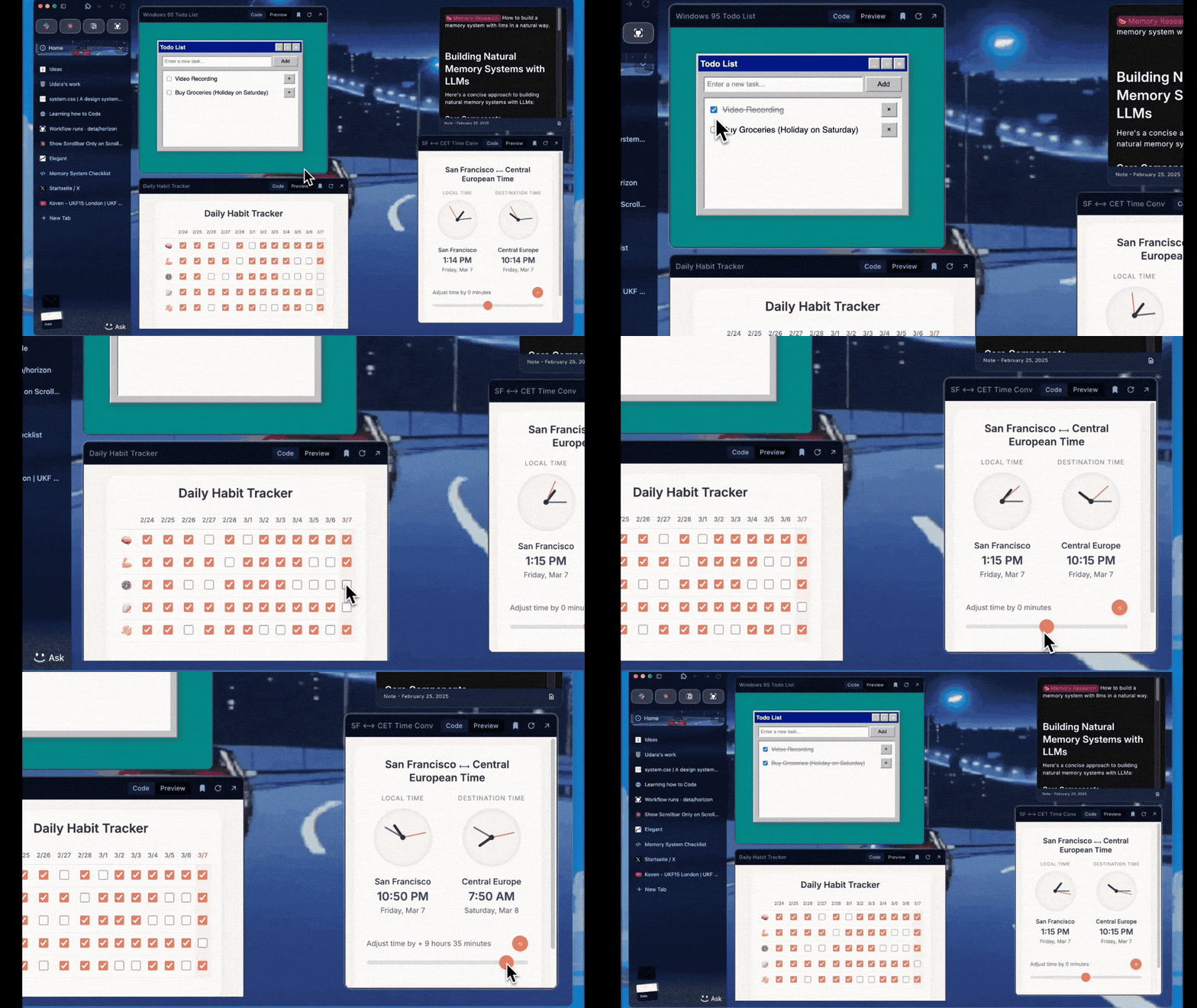
I can tell you the exact moment when a new browser called Deta Surf clicked for me. I was getting a demo from Deta cofounder Max Eusterbrock, and he showed me how Surf can take screenshots of web pages and add them to a digital pinboard. But unlike a standard screenshot, this one contained a link to jump back to the web page it came from, and its content was searchable from Surf’s menu system. Aha, I thought. Too often, I’ll open dozens of tabs on a certain topic, only to forget which page had the quote or chart I was looking for. Surf solves that problem by making it easier to revisit what you’ve researched. It’s as if a browser was built around the idea of bookmarking, instead of the other way around. It’s still early days for Deta Surf, which is launching a public alpha today after months of being invite-only. The software has all kinds of rough edges and can feel like it’s trying to do too much, and there’s also no mobile app and no business model yet. I’d caution against getting too invested in it. But as a tool for short-term research that involves wrangling a lot of web page content, it’s one of the most interest concepts I’ve seen. Beyond basic bookmarksOn the surface, Deta Surf borrows some ideas from other power user browsers such as Vivaldi, Arc, and SigmaOS. It supports both vertical or horizontal tabs, and you can arrange tabs into separate workspaces, which Surf calls “Contexts.” But Surf also lets you save web pages to a “My Stuff” menu, which is a powerful spin on the standard browser bookmarks folder. Every tab has a button for saving the page to My Stuff, but you can also use Surf’s screenshot tool ((nvoked with Ctrl/Cmd+Shift+1) to save snippets of web pages with your own annotations. The My Stuff menu supports more than just web page content. You can also import images and PDF files from your computer, and there’s a built-in notepad for adding freeform thoughts. Everything you save to My Stuff is searchable, and not just by title. Surf also indexes the full content of web pages along with the text of screenshots and PDF files, so you find specific words or phrases. The result is a feeling of finally being able to close inactive browser tabs, because Surf provides an easier way to reference them later. My favorite organizational feature, though, is the “Desktop” view, where you can rearrange and resize any the items you’ve saved to My Stuff alongside any number of sticky text notes. It’s a neat way to visualize all the different things you’ve been researching on a single canvas. Yes, of course there’s also AILike lots of other startups, Deta is finding ways to bring AI into its browser as well. Some AI features are similar to those of other AI-powered browsers. There’s an “Ask this Tab” button that can summarize and answer questions about the current page (including YouTube videos), and you can highlight text on web pages to translate, rephase, or ask follow-up questions. The more interesting use of AI involves interacting with what you’ve saved in My Stuff. By clicking the “Ask Context” button, you can ask Surf to summarize details from across your documents or ask for supplemental information. These AI queries then feed back into Surf’s notepad feature, essentially helping to organize or build upon your research. It’s kind of like what Google is doing with NotebookLM, but built around what you’re already looking up in your browser. Eusterbrock also showed me a more ambitious “Surflets” feature, which can turn data from webpages into interactive visuals. If you were comparing web browsers, for instance, you could open up a bunch of pages that explain various browser features, then ask Surf to create an interactive chart comparing them. Expect things to break—a lotWhile Deta Surf is brimming with smart ideas about what a desktop browser could do, I wouldn’t say it all comes together the way it should. For one thing, it’s just a lot to take in. Between the My Stuff menu, the Desktop, and all your open browser tabs, you’ve essentially got three different organizational surfaces to work with, and they multiply each time you create a new “Context.” My gut feeling is that the Desktop and My Stuff features should be streamlined into a single menu system for organizing and managing your research. Surf’s AI features can be cumbersome to use as well. Deta has stuck AI buttons into seemingly every corner of its interface, but they all flow back to a notepad that opens in a sidebar menu. I’ve continually run into issues clicking the correct button to generate an AI response, and the latest build seems to have hidden the option to switch between large language models. The biggest issue, though, is that a lot of things just don’t work properly. In my time with Surf, I’ve dealt with disappearing bookmarks, information that appears in the wrong Context, and web searches that get truncated after typing them in the address bar. Surf’s AI answers are even less reliable. For instance, I asked the browser to provide links to YouTube backing tracks for a list of sheet music in a Google Drive folder, and none of its generated links worked. I’ve also had responses that don’t accurately reflect what’s in my notes and appear to be hallucinated, and I’ve yet to successfully generate a single “Surflet” on my own. Meanwhile, I can’t bring in my workflow from other browsers, because Surf doesn’t work with most browser extensions (password managers are the exception) and doesn’t support bookmarklets. The lack of a mobile app means I can’t send pages into Surf from my phone, either. Deta is clearly moving fast and breaking things in search of what sticks, and that’s totally understandable for an alpha product, but it makes for rough sailing if you’re trying to use it as an everyday browser. What to expectEusterbrock acknowledges that a lot of what comprises Surf today is subject to change. Eventually the company wants to charge for things like cross-platform sync and collaboration, but it plans to spend the rest of the year nailing down the core product. Deta had already shifted gears a couple of times before developing Surf. The Berlin-based startup began as a free web app deployment platform for indie developers, then tried spinning that product into a wildly ambitious online operating system with its own set of interconnected apps, called Deta Space, which raised around $3 million, according to Pitchbook. It was a neat idea, but its parallel universe of apps lacked immediate appeal to end-users, so Deta pivoted to building a browser instead. The core idea is still that you should be able to search and contextualize across your entire online workflow, but the browser allows Deta to work with existing web apps and sites instead of trying to build its own. (Deta killed off Space and deleted users’ data last year.) The resulting product is more immediately compelling than Deta’s previous efforts, but it comes with the same risk of getting shut down if things don’t work out, and there are few examples of startups turning wildly ambitious browser into thriving businesses. The most notable startup in the space, The Browser Company, gave up on developing its ambitious Arc browser for desktops and is now pivoting to something much simpler. Still, I hope Deta Surf proves the exception to the rule. As a way to actually make sense of your browser tabs and the research you do around them, there’s nothing else like it. View the full article
-
Here is a recap of what happened in the search forums today, through the eyes of the Search Engine Roundtable and other search forums on the web. Google's CEO, Sundar Pichai...View the full article
-
Texas Governor Greg Abbott on Tuesday signed into law a bill requiring Apple and Alphabet’s Google to verify the age of users of their app stores, putting the second-most-populous U.S. state at the center of a debate over whether and how to regulate smartphone use by children and teenagers. The law, effective on January 1, requires parental consent to download apps or make in-app purchases for users aged below 18. Utah was the first U.S. state to pass a similar law earlier this year, and U.S. lawmakers have also introduced a federal bill. Another Texas bill, passed in the state’s House of Representatives and awaiting a Senate vote, would restrict social media apps to users over 18. Age limits and parental consent for social media apps are among the few areas of wide U.S. consensus, with a Pew Research poll in 2023 finding that 81% of Americans support requiring parental consent for children to create social media accounts and 71% support age verification before using social media. The effect of social media on children’s mental health has become a growing global concern, with dozens of U.S. states suing Meta Platforms and the U.S. Surgeon General issuing an advisory on safeguards for children. Australia last year banned social media for children under 16, with other countries such as Norway also considering new rules. How to implement age restrictions has caused a conflict between Meta, the owner of Instagram and Facebook, and Apple and Google, which own the two dominant U.S. app stores. Meta, along with social media companies Snap and X, applauded the passage of the bill. “Parents want a one-stop shop to verify their child’s age and grant permission for them to download apps in a privacy-preserving way. The app store is the best place for it, and more than one-third of US states have introduced bills recognizing the central role app stores play,” the companies said. Kathleen Farley, vice president of litigation for the Chamber of Progress, a group backed by Apple and Alphabet, said the Texas law is likely to face legal challenges on First Amendment grounds. “A big path for challenge is that it burdens adult speech in attempting to regulate children’s speech,” Farley told Reuters in an interview on Tuesday. “I would say there are arguments that this is a content-based regulation singling out digital communication.” Child online safety groups that backed the Texas bill have also long argued for app store age verification, saying it is the only way to give parents effective control over children’s use of technology. “The problem is that self-regulation in the digital marketplace has failed, where app stores have just prioritized the profit over safety and rights of children and families,” Casey Stefanski, executive director for the Digital Childhood Alliance, told Reuters. Apple and Google opposed the Texas bill, saying it imposes blanket requirements to share age data with all apps, even when those apps are uncontroversial. “If enacted, app marketplaces will be required to collect and keep sensitive personal identifying information for every Texan who wants to download an app, even if it’s an app that simply provides weather updates or sports scores,” Apple said in a statement. Google and Apple each has its own proposal that involves sharing age range data only with apps that require it, rather than all apps. “We see a role for legislation here,” said Kareem Ghanem, senior director of government affairs and public policy at Google, told Reuters. “It’s just got to be done in the right way, and it’s got to hold the feet of Zuckerberg and the social media companies to the fire, because it’s the harm to kids and teens on those sites that’s really inspired people to take a closer look here and see how we can all do better.” —Stephen Nellis, Reuters View the full article

-
Move is ‘first step’ towards joint production of weapons able to strike targets in Russian territoryView the full article
-
Key Takeaways Importance of Power Sanders: Power sanders are essential tools for achieving smooth finishes in woodworking projects, saving time and effort while enhancing craftsmanship.Types of Sanding Tools: Familiarize yourself with different types of sanders, including belt, orbital, detail, and finishing sanders, each catering to specific tasks and finishes in woodworking.Key Features to Consider: When selecting a power sander, prioritize characteristics like motor power, weight, dust collection, and variable speed control to ensure efficiency and usability.Top Choices: Invest in reputable brands known for their durability and performance, such as DeWalt for belt sanders, Bosch for orbital sanders, and Black+Decker for detail sanders.Maintenance is Crucial: Regular cleaning, inspection of sandpaper and parts, proper lubrication, and adhering to manufacturer guidelines are vital for extending the life of your power sanders and maintaining performance. If you’re diving into woodworking, having the right tools can make all the difference. Among these, a quality power sander stands out as essential for achieving that smooth, professional finish. Whether you’re shaping a new project or refinishing an old piece, the right sander can save you time and effort, allowing you to focus on your craft. In this guide, you’ll discover the best power sanders tailored for woodworking enthusiasts like you. From orbital sanders to belt sanders, each type offers unique benefits to enhance your woodworking experience. Get ready to elevate your skills and create stunning pieces with the perfect power sander by your side. Overview of Power Sanders Power sanders play a crucial role in woodworking projects, helping you achieve smooth finishes and refine surfaces effectively. Understanding the various types of power sanders can elevate your woodworking skills and enhance your project outcomes. Types of Power Sanders Orbital Sanders Orbital sanders use a circular motion to smooth surfaces. They’re ideal for achieving a fine finish on wood, making them popular among hobbyists and professionals alike. Choose random orbital sanders for versatility, as they minimize swirl marks. Belt Sanders Belt sanders feature a continuous loop of abrasive material, ideal for heavy material removal. You’ll appreciate belt sanders for their efficiency in flattening surfaces and sanding large areas quickly. These tools are particularly useful for leveling thick stock and removing old finishes. Detail Sanders Detail sanders, or corner sanders, excel at reaching tight spaces and intricate designs. These are essential for sanding in corners or on detailed projects, ensuring every inch is smooth. Finishing Sanders Finishing sanders are designed for the final touch, using lighter abrasive sheets for an ultra-smooth finish. These sanders are great for preparing surfaces for staining or painting, giving your projects that professional edge. Key Features to Consider Power Look for sanders with a high power rating. This attribute affects performance and efficiency in sanding. Weight Choose a lightweight sander for ease of handling. A lighter sander reduces fatigue during prolonged use. Dust Collection Integrated dust collection systems keep your workspace clean. Effective dust management improves visibility, safety, and air quality. Variable Speed Control Variable speed settings provide versatility, allowing you to adjust according to the task. Different materials require different sanding speeds, and this feature helps you adapt. By selecting the right power sander tailored to your woodworking needs, you can enhance both your project outcomes and overall efficiency. Knowing the types and key features assists you in making informed purchasing decisions, ultimately contributing to the success of your woodworking endeavors. Types of Power Sanders Power sanders play a vital role in woodworking, and selecting the right type is essential for achieving optimal results. Understanding the various power sanders available can enhance your woodworking projects significantly. Belt Sanders Belt sanders consist of a continuous loop of sandpaper that revolves around two rollers. Driven by an electric motor, these sanders operate at high speeds. Belt sanders excel in heavy-duty tasks, making them ideal for removing large amounts of material, paint, or varnish. Use them on large, flat surfaces like floors and tabletops. Pros: Rapid material removal, powerful operation. Cons: Can be too aggressive for delicate work, larger and heavier compared to other types. Orbital Sanders Orbital sanders use circular sanding pads that move in an elliptical motion. This motion ensures a smooth finish without swirl marks, making them perfect for fine sanding tasks. Ideal for detailed work or finishing projects, orbital sanders work well on wood, metal, and plastic surfaces. Pros: Excellent for fine finishes, versatile for various materials. Cons: Slower than belt sanders for material removal, may require multiple sanding sessions for rough surfaces. Detail Sanders Detail sanders feature a triangular sanding pad designed for intricate work in tight spaces. Their compact size allows you to reach corners and edges effectively. Use detail sanders for projects that require precision, like sanding intricate carvings or furniture edges. Pros: Great for tight spaces and detailed work, lightweight and easy to maneuver. Cons: Limited to small areas, may not handle extensive sanding tasks efficiently. Factors to Consider When Choosing Power Sanders Choosing the right power sander enhances your woodworking projects, leading to a professional finish. Several crucial factors influence your decision. Power and Performance Motor Power: Motor power, measured in amps, significantly affects the sander’s efficiency. Higher power motors, usually 10 amps or more, handle heavy-duty tasks efficiently. Lower power motors suffice for lighter finishing work, making it essential to align the motor’s power with your project demands. Variable Speed Control: Variable speed control enables you to adjust the sanding speed for various materials and finishes. Options from brands like DeWalt, Bosch, and Makita let you customize sanding based on surface types. Selecting a model with this feature can streamline your woodworking process. Dust Collection System Built-In Dust Collection: A solid dust collection system maintains a clean workspace and promotes safety. Look for sanders equipped with built-in dust bags or vacuum attachment ports. This feature minimizes debris and improves air quality, making the sanding experience more pleasant and efficient. Weight and Ergonomics Tool Weight: The weight of the sander impacts ease of use and control. Lighter sanders, typically around 3-5 pounds, offer better maneuverability. Consider your comfort and the project’s duration when selecting a sander. Ergonomic Design: A well-designed handle and body contour improve grip and reduce fatigue. Opt for sanders with ergonomic features that allow for extended use without discomfort, especially during lengthy woodworking sessions. Top Picks for Best Power Sanders for Woodworking Selecting the right power sander is critical for achieving smooth finishes in woodworking projects. A suitable sander enhances efficiency, allowing you to meet your small business goals in crafting quality products. Product Review: Belt Sanders Belt sanders excel for heavy-duty tasks and large flat surfaces. These sanders utilize a continuous loop of sandpaper, making them ideal for initial sanding or shaping projects such as tabletops and doors. Choose a high-quality belt sander that features a robust construction and effective dust collection system. The DeWalt Belt Sanders stand out for their durability and material removal rate, perfect for busy workshops. They also offer variable speed control, allowing you to adjust the settings based on your project requirements. Product Review: Orbital Sanders Orbital sanders provide a smooth finish thanks to their elliptical motion and circular sanding pads. They are versatile tools suitable for both light sanding and finishing work. If you prioritize a swirl-free finish on your projects, an orbital sander will meet those needs effectively. Models like the Bosch Orbital Sander offer excellent performance while remaining lightweight for ease of use, making them an excellent choice for small business owners focused on delivering high-quality woodworking products. Product Review: Detail Sanders For intricate work, detail sanders shine due to their triangular sanding pads, designed for tight and hard-to-reach spaces. These sanders are essential for precision tasks, ensuring that every corner of your project receives attention. They offer great versatility for detailed finish work on small items like furniture legs and cabinetry. Models such as the Black+Decker Detail Sander provide excellent control and maneuverability, making them invaluable in your woodworking toolkit. By integrating these power sanders into your small business, you can streamline your woodworking process, enhance the quality of your finishes, and ultimately satisfy your target audience’s expectations. Maintenance Tips for Power Sanders Maintaining your power sanders ensures optimal performance and longevity. Follow these straightforward tips to keep your tools in top shape. Clean Regularly: Clean the sander’s exterior and dust collection system after each use. Dust and debris can clog components, affecting performance. Inspect Sandpaper: Check sandpaper frequently for wear. Replace it if it starts to show excessive wear or becomes clogged, as this can hinder sanding efficiency. Check Belts and Pads: Inspect belts and pads for signs of damage or wear. Replace them immediately if you notice cracks or fraying, which can lead to poor results. Lubricate Moving Parts: Lubricate any moving parts according to the manufacturer’s guidelines. Proper lubrication reduces friction and helps prevent overheating. Store Properly: Store your power sander in a cool, dry place. Avoid exposure to moisture to prevent rust and other damage. Follow Manufacturer Instructions: Adhere to all maintenance recommendations provided in the user manual. Each model has specific requirements for care. By implementing these maintenance tips, you enhance the life and effectiveness of your power sanders. Keeping your equipment in peak condition ultimately supports your small business goals by ensuring high-quality finishes on your woodworking projects. Conclusion Choosing the right power sander can transform your woodworking projects. Each type of sander offers unique benefits tailored to different tasks. Whether you need the aggressive power of a belt sander or the finesse of a detail sander, the right tool can make all the difference. Remember to consider essential features like power, weight, and dust collection when making your selection. Proper maintenance will also extend the life of your sander and keep it performing at its best. By investing in a quality power sander and caring for it, you’ll achieve smooth finishes and elevate the quality of your work. Embrace the right tools and watch your woodworking skills flourish. Frequently Asked Questions What is the importance of a power sander in woodworking? A power sander is crucial for achieving a smooth, professional finish on wooden surfaces. It saves time and effort, making it easier to remove rough spots and prepare wood for staining or painting. What are the types of power sanders available? The main types of power sanders include belt sanders, orbital sanders, detail sanders, and finishing sanders. Each type has unique advantages tailored to different woodworking tasks, from heavy material removal to precision sanding in tight spaces. How do I choose the right power sander? When selecting a power sander, consider factors like power (higher amps for heavy-duty tasks), weight for ease of use, dust collection features for a cleaner workspace, and variable speed control for versatility depending on the material. What are some top picks for power sanders? Recommended models include the DeWalt belt sander for durability, the Bosch orbital sander for a swirl-free finish, and the Black+Decker detail sander for precision work in small areas. These options cater to various woodworking needs. How can I maintain my power sander? To maintain your power sander, clean its exterior and dust collection system regularly, replace sandpaper frequently, inspect belts and pads for damage, lubricate moving parts, and store it properly to prevent rust. Always follow the manufacturer’s maintenance guidelines. Image Via Envato This article, "Discover the Best Power Sanders for Woodworking to Elevate Your Craftsmanship" was first published on Small Business Trends View the full article
-
Key Takeaways Importance of Power Sanders: Power sanders are essential tools for achieving smooth finishes in woodworking projects, saving time and effort while enhancing craftsmanship.Types of Sanding Tools: Familiarize yourself with different types of sanders, including belt, orbital, detail, and finishing sanders, each catering to specific tasks and finishes in woodworking.Key Features to Consider: When selecting a power sander, prioritize characteristics like motor power, weight, dust collection, and variable speed control to ensure efficiency and usability.Top Choices: Invest in reputable brands known for their durability and performance, such as DeWalt for belt sanders, Bosch for orbital sanders, and Black+Decker for detail sanders.Maintenance is Crucial: Regular cleaning, inspection of sandpaper and parts, proper lubrication, and adhering to manufacturer guidelines are vital for extending the life of your power sanders and maintaining performance. If you’re diving into woodworking, having the right tools can make all the difference. Among these, a quality power sander stands out as essential for achieving that smooth, professional finish. Whether you’re shaping a new project or refinishing an old piece, the right sander can save you time and effort, allowing you to focus on your craft. In this guide, you’ll discover the best power sanders tailored for woodworking enthusiasts like you. From orbital sanders to belt sanders, each type offers unique benefits to enhance your woodworking experience. Get ready to elevate your skills and create stunning pieces with the perfect power sander by your side. Overview of Power Sanders Power sanders play a crucial role in woodworking projects, helping you achieve smooth finishes and refine surfaces effectively. Understanding the various types of power sanders can elevate your woodworking skills and enhance your project outcomes. Types of Power Sanders Orbital Sanders Orbital sanders use a circular motion to smooth surfaces. They’re ideal for achieving a fine finish on wood, making them popular among hobbyists and professionals alike. Choose random orbital sanders for versatility, as they minimize swirl marks. Belt Sanders Belt sanders feature a continuous loop of abrasive material, ideal for heavy material removal. You’ll appreciate belt sanders for their efficiency in flattening surfaces and sanding large areas quickly. These tools are particularly useful for leveling thick stock and removing old finishes. Detail Sanders Detail sanders, or corner sanders, excel at reaching tight spaces and intricate designs. These are essential for sanding in corners or on detailed projects, ensuring every inch is smooth. Finishing Sanders Finishing sanders are designed for the final touch, using lighter abrasive sheets for an ultra-smooth finish. These sanders are great for preparing surfaces for staining or painting, giving your projects that professional edge. Key Features to Consider Power Look for sanders with a high power rating. This attribute affects performance and efficiency in sanding. Weight Choose a lightweight sander for ease of handling. A lighter sander reduces fatigue during prolonged use. Dust Collection Integrated dust collection systems keep your workspace clean. Effective dust management improves visibility, safety, and air quality. Variable Speed Control Variable speed settings provide versatility, allowing you to adjust according to the task. Different materials require different sanding speeds, and this feature helps you adapt. By selecting the right power sander tailored to your woodworking needs, you can enhance both your project outcomes and overall efficiency. Knowing the types and key features assists you in making informed purchasing decisions, ultimately contributing to the success of your woodworking endeavors. Types of Power Sanders Power sanders play a vital role in woodworking, and selecting the right type is essential for achieving optimal results. Understanding the various power sanders available can enhance your woodworking projects significantly. Belt Sanders Belt sanders consist of a continuous loop of sandpaper that revolves around two rollers. Driven by an electric motor, these sanders operate at high speeds. Belt sanders excel in heavy-duty tasks, making them ideal for removing large amounts of material, paint, or varnish. Use them on large, flat surfaces like floors and tabletops. Pros: Rapid material removal, powerful operation. Cons: Can be too aggressive for delicate work, larger and heavier compared to other types. Orbital Sanders Orbital sanders use circular sanding pads that move in an elliptical motion. This motion ensures a smooth finish without swirl marks, making them perfect for fine sanding tasks. Ideal for detailed work or finishing projects, orbital sanders work well on wood, metal, and plastic surfaces. Pros: Excellent for fine finishes, versatile for various materials. Cons: Slower than belt sanders for material removal, may require multiple sanding sessions for rough surfaces. Detail Sanders Detail sanders feature a triangular sanding pad designed for intricate work in tight spaces. Their compact size allows you to reach corners and edges effectively. Use detail sanders for projects that require precision, like sanding intricate carvings or furniture edges. Pros: Great for tight spaces and detailed work, lightweight and easy to maneuver. Cons: Limited to small areas, may not handle extensive sanding tasks efficiently. Factors to Consider When Choosing Power Sanders Choosing the right power sander enhances your woodworking projects, leading to a professional finish. Several crucial factors influence your decision. Power and Performance Motor Power: Motor power, measured in amps, significantly affects the sander’s efficiency. Higher power motors, usually 10 amps or more, handle heavy-duty tasks efficiently. Lower power motors suffice for lighter finishing work, making it essential to align the motor’s power with your project demands. Variable Speed Control: Variable speed control enables you to adjust the sanding speed for various materials and finishes. Options from brands like DeWalt, Bosch, and Makita let you customize sanding based on surface types. Selecting a model with this feature can streamline your woodworking process. Dust Collection System Built-In Dust Collection: A solid dust collection system maintains a clean workspace and promotes safety. Look for sanders equipped with built-in dust bags or vacuum attachment ports. This feature minimizes debris and improves air quality, making the sanding experience more pleasant and efficient. Weight and Ergonomics Tool Weight: The weight of the sander impacts ease of use and control. Lighter sanders, typically around 3-5 pounds, offer better maneuverability. Consider your comfort and the project’s duration when selecting a sander. Ergonomic Design: A well-designed handle and body contour improve grip and reduce fatigue. Opt for sanders with ergonomic features that allow for extended use without discomfort, especially during lengthy woodworking sessions. Top Picks for Best Power Sanders for Woodworking Selecting the right power sander is critical for achieving smooth finishes in woodworking projects. A suitable sander enhances efficiency, allowing you to meet your small business goals in crafting quality products. Product Review: Belt Sanders Belt sanders excel for heavy-duty tasks and large flat surfaces. These sanders utilize a continuous loop of sandpaper, making them ideal for initial sanding or shaping projects such as tabletops and doors. Choose a high-quality belt sander that features a robust construction and effective dust collection system. The DeWalt Belt Sanders stand out for their durability and material removal rate, perfect for busy workshops. They also offer variable speed control, allowing you to adjust the settings based on your project requirements. Product Review: Orbital Sanders Orbital sanders provide a smooth finish thanks to their elliptical motion and circular sanding pads. They are versatile tools suitable for both light sanding and finishing work. If you prioritize a swirl-free finish on your projects, an orbital sander will meet those needs effectively. Models like the Bosch Orbital Sander offer excellent performance while remaining lightweight for ease of use, making them an excellent choice for small business owners focused on delivering high-quality woodworking products. Product Review: Detail Sanders For intricate work, detail sanders shine due to their triangular sanding pads, designed for tight and hard-to-reach spaces. These sanders are essential for precision tasks, ensuring that every corner of your project receives attention. They offer great versatility for detailed finish work on small items like furniture legs and cabinetry. Models such as the Black+Decker Detail Sander provide excellent control and maneuverability, making them invaluable in your woodworking toolkit. By integrating these power sanders into your small business, you can streamline your woodworking process, enhance the quality of your finishes, and ultimately satisfy your target audience’s expectations. Maintenance Tips for Power Sanders Maintaining your power sanders ensures optimal performance and longevity. Follow these straightforward tips to keep your tools in top shape. Clean Regularly: Clean the sander’s exterior and dust collection system after each use. Dust and debris can clog components, affecting performance. Inspect Sandpaper: Check sandpaper frequently for wear. Replace it if it starts to show excessive wear or becomes clogged, as this can hinder sanding efficiency. Check Belts and Pads: Inspect belts and pads for signs of damage or wear. Replace them immediately if you notice cracks or fraying, which can lead to poor results. Lubricate Moving Parts: Lubricate any moving parts according to the manufacturer’s guidelines. Proper lubrication reduces friction and helps prevent overheating. Store Properly: Store your power sander in a cool, dry place. Avoid exposure to moisture to prevent rust and other damage. Follow Manufacturer Instructions: Adhere to all maintenance recommendations provided in the user manual. Each model has specific requirements for care. By implementing these maintenance tips, you enhance the life and effectiveness of your power sanders. Keeping your equipment in peak condition ultimately supports your small business goals by ensuring high-quality finishes on your woodworking projects. Conclusion Choosing the right power sander can transform your woodworking projects. Each type of sander offers unique benefits tailored to different tasks. Whether you need the aggressive power of a belt sander or the finesse of a detail sander, the right tool can make all the difference. Remember to consider essential features like power, weight, and dust collection when making your selection. Proper maintenance will also extend the life of your sander and keep it performing at its best. By investing in a quality power sander and caring for it, you’ll achieve smooth finishes and elevate the quality of your work. Embrace the right tools and watch your woodworking skills flourish. Frequently Asked Questions What is the importance of a power sander in woodworking? A power sander is crucial for achieving a smooth, professional finish on wooden surfaces. It saves time and effort, making it easier to remove rough spots and prepare wood for staining or painting. What are the types of power sanders available? The main types of power sanders include belt sanders, orbital sanders, detail sanders, and finishing sanders. Each type has unique advantages tailored to different woodworking tasks, from heavy material removal to precision sanding in tight spaces. How do I choose the right power sander? When selecting a power sander, consider factors like power (higher amps for heavy-duty tasks), weight for ease of use, dust collection features for a cleaner workspace, and variable speed control for versatility depending on the material. What are some top picks for power sanders? Recommended models include the DeWalt belt sander for durability, the Bosch orbital sander for a swirl-free finish, and the Black+Decker detail sander for precision work in small areas. These options cater to various woodworking needs. How can I maintain my power sander? To maintain your power sander, clean its exterior and dust collection system regularly, replace sandpaper frequently, inspect belts and pads for damage, lubricate moving parts, and store it properly to prevent rust. Always follow the manufacturer’s maintenance guidelines. Image Via Envato This article, "Discover the Best Power Sanders for Woodworking to Elevate Your Craftsmanship" was first published on Small Business Trends View the full article
-
We may earn a commission from links on this page. Deal pricing and availability subject to change after time of publication. If you’ve been considering an Apple Watch but don’t want to drop Ultra-level cash, the Apple Watch Series 9 (GPS + Cellular, 41mm) is currently down to $299.99 on Woot, originally priced at $529. That’s for a brand new unit (not refurbished), and it comes with a one year Apple limited warranty. It’s available in two colors: a silver case with a storm blue band and a pink case with a light pink band. Both fit small to medium wrist sizes and ship free for Prime members (others pay $6 for shipping). The deal is live for three days or until it sells out—whichever comes first. The Series 9 is a bit smaller than the newer Series 10 and lacks some of the extra features designed for outdoor-focused users found in the Ultra 2. But unless you’re into backcountry hikes or obsessed with having the brightest screen possible, the Series 9 gets you nearly everything else for much less. You get the double-tap gesture for hands-free control, a bright always-on display, fast performance, and Siri built into the watch. It also supports sleep tracking, mental health tools, vision tracking, and the usual fitness and cycling features. PCMag named it the best smartwatch of 2023 and gave it an Editor’s Choice award when it launched, noting how much it delivers for its price range. Because this is the GPS + Cellular version, you can stream music, take calls, or use maps without needing to bring your iPhone along. That’s especially useful if you’re running, biking, or just want to stay connected without carrying your phone. Battery life is rated at 18 hours, or up to 36 hours in low power mode, which is more than enough for most users’ daily wear. For those who don’t need the newest version but still want full access to Apple’s ecosystem and features, the Series 9 offers a practical and feature-rich option at a much lower cost than the latest models. View the full article
-
The Mortgage Bankers Association's measure of refinancing dropped 7.1% to 634.1 in the week ended May 23. View the full article

-
President Donald The President said that the US government would retain guarantees and an oversight role over Fannie Mae and Freddie Mac even as he pursues a public offering for the mortgage giants. View the full article

-
Google has introduced a new high-tier AI subscription called Google AI Ultra, offering users access to its most advanced models and premium AI features through the Google One platform. The subscription, launched May 20, is available now in the U.S. for $249.99 per month, with a limited-time 50% discount for the first three months for new users. Google says the plan is designed for professionals like filmmakers, developers, and researchers seeking the “highest usage limits and access to our most capable models.” “If you’re a filmmaker, developer, creative professional or simply demand the absolute best of Google AI with the highest level of access, the Google AI Ultra plan is built for you — think of it as your VIP pass to Google Al,” said Shimrit Ben-Yair, Vice President of Google Photos & Google One. According to Google, AI Ultra includes: Gemini: Highest usage limits across Deep Research, Veo 2 video generation, early access to Veo 3, and upcoming access to Deep Think in 2.5 Pro. Flow: Access to 1080p video generation, advanced camera controls, and Veo 3 within Google’s AI filmmaking tool powered by DeepMind models. Whisk: Highest limits for Whisk Animate, which turns image prompts into eight-second videos. NotebookLM: Elevated model performance and usage caps planned for later in the year. Gemini integration in Gmail, Docs, Vids and Chrome: Including early access in Chrome starting tomorrow. Project Mariner: A multi-tasking agentic research prototype capable of handling up to 10 tasks at once. YouTube Premium: Individual plan included for ad-free and offline video and music. 30 TB of storage: For Photos, Drive, and Gmail. Additionally, the existing AI Premium plan is being rebranded as Google AI Pro and will now include access to AI filmmaking in Flow and early Gemini in Chrome integration at no additional cost. These enhancements are currently available in the U.S., with expansion to other countries expected soon. This article, "Google Launches AI Ultra Plan With Access to Its Most Advanced Tools" was first published on Small Business Trends View the full article
-
Google has introduced a new high-tier AI subscription called Google AI Ultra, offering users access to its most advanced models and premium AI features through the Google One platform. The subscription, launched May 20, is available now in the U.S. for $249.99 per month, with a limited-time 50% discount for the first three months for new users. Google says the plan is designed for professionals like filmmakers, developers, and researchers seeking the “highest usage limits and access to our most capable models.” “If you’re a filmmaker, developer, creative professional or simply demand the absolute best of Google AI with the highest level of access, the Google AI Ultra plan is built for you — think of it as your VIP pass to Google Al,” said Shimrit Ben-Yair, Vice President of Google Photos & Google One. According to Google, AI Ultra includes: Gemini: Highest usage limits across Deep Research, Veo 2 video generation, early access to Veo 3, and upcoming access to Deep Think in 2.5 Pro. Flow: Access to 1080p video generation, advanced camera controls, and Veo 3 within Google’s AI filmmaking tool powered by DeepMind models. Whisk: Highest limits for Whisk Animate, which turns image prompts into eight-second videos. NotebookLM: Elevated model performance and usage caps planned for later in the year. Gemini integration in Gmail, Docs, Vids and Chrome: Including early access in Chrome starting tomorrow. Project Mariner: A multi-tasking agentic research prototype capable of handling up to 10 tasks at once. YouTube Premium: Individual plan included for ad-free and offline video and music. 30 TB of storage: For Photos, Drive, and Gmail. Additionally, the existing AI Premium plan is being rebranded as Google AI Pro and will now include access to AI filmmaking in Flow and early Gemini in Chrome integration at no additional cost. These enhancements are currently available in the U.S., with expansion to other countries expected soon. This article, "Google Launches AI Ultra Plan With Access to Its Most Advanced Tools" was first published on Small Business Trends View the full article
-
Shares in America’s publicly traded movie theater chains surged yesterday, the first day of trading after the Memorial Day holiday. It’s a holiday weekend that saw moviegoers flock to theaters in droves, snapping up tickets and leading to the best Memorial Day weekend box office in history. Here’s what you need to know about the Memorial Day box office and its impact on shares in movie theater companies. Memorial Day box office was the best on record Movies generated a record $326 million at the Memorial Day box office this weekend, a period that ran from Friday, May 23, to Monday, May 26. That four-day haul record was largely fueled by two films. The first was the live-action remake of Disney’s Lilo & Stitch, which took in a staggering $192.7 million domestically during the four-day period, according to The Hollywood Reporter. That’s a historic record—the most any film has ever made over the Memorial Day period. Coming in second place was Tom Cruise’s latest installment of the Mission: Impossible franchise. Paramount’s Mission: Impossible — The Final Reckoning took in $79 million domestically over the four-day period, a record for the franchise. In total, Lilo & Stitch made $361.3 million globally during the four-day period, and Mission: Impossible — The Final Reckoning took in $191 million globally. But while executives at Disney and Paramount are no doubt lauding the record box office haul for the holiday weekend, executives at America’s publicly traded movie theater chains are also celebrating—and so are investors. AMC, Cinemark, and Marcus shares surge Thanks to the record-breaking box office haul over the Memorial Day weekend, shares in movie theater chains in the United States surged on Tuesday, the first trading day after the holiday. Iconic meme stock AMC Entertainment Holdings, Inc. (NYSE: AMC), as well as Cinemark Holdings, Inc. (NYSE: CNK), and The Marcus Corporation (NYSE: MCS) all saw their shares jump yesterday. AMC: up over 23% to $4.01 CNK: up over 3.8% to $33.69 MCS: up over 10% to $18.71 Given how theater attendance has struggled since the pandemic, it’s little wonder that the stellar Memorial Day weekend period at the box office is giving investors cause for celebration. Many in the industry have worried in recent years that the pandemic triggered a shift in audience habits away from movie theaters and toward their large televisions at home, particularly as streaming has become the de facto king of entertainment. Yet, the weekend box office suggests that if you give audiences movies that resonate with them, they will show up with their wallets at the theater instead of waiting to watch the films at home. “This record-setting Memorial Day weekend underscores the long-standing truth that when exceptional films meet unmatched theatrical experiences, audiences respond in a big way,” AMC Adam Aron said in a press release. The release also noted that AMC didn’t just see a record-breaking box office. The chain said it also generated record food and beverage revenue this weekend. Concessions, such as popcorn and soda, are a major driver of profits at theaters. Cinemark CEO Sean Gamble also reported records at the chain, noting in a press release, “Cinemark delivered a remarkable over-performance, breaking numerous records across box office and concession revenues.” And Greg Marcus, CEO of Marcus Corporation, said the company has high hopes for the rest of 2025, too. “Once again, huge audiences came out for the experience of enjoying these films on the big screen in theatres,” Marcus noted. “We expect the momentum to continue throughout the summer with an exciting slate of films ahead.” That slate of films includes the highly anticipated Superman reboot from Warner Bros; the latest Marvel movie, The Fantastic Four: First Steps, from Disney; and Universal’s newest installment of the Jurassic Park franchise, Jurassic World Rebirth. View the full article