ResidentialBusiness
Administrators
-
Joined
-
Last visited
Everything posted by ResidentialBusiness
-
 Measures come as Donald The President offers olive branch to regime in Tehran View the full article
 -
Scheduling is all about getting things done on time and within budget. It’s one of the most important aspects of planning for a project. The most popular tool to schedule projects is the Gantt chart, which lets you create a visual timeline for your project. Finding the critical path on a Gantt chart helps you achieve your project goals faster and more efficiently. But before we learn how to identify the critical path in a Gantt chart, let’s start by defining what’s critical path in project management. What Is the Critical Path? The concept of critical path comes from the critical path method, a project planning and scheduling technique that uses a network diagram to represent project tasks, their expected start and end dates, duration and the order in which they’re meant to be completed. One of the fundamental principles of the critical path method is that all projects consist of multiple, parallel sequences of tasks, known as paths, which are shown in a critical path diagram. The critical path of a project is the longest sequence of dependent tasks or activities and the amount of time it takes to complete them from beginning to end. For example, in the critical path chart below, there are two task sequences (A,C,E) and (B,D,F). The (A,C,E) task sequence is longer in duration as these tasks take 37 days to be completed while tasks (B,D,F) take only 23, so the critical path of this project consists of tasks A, C and E. /wp-content/uploads/2025/01/Critical-path-method-calculating-slack.png This critical path diagram template for Excel also shows the early start (ES), early finish (EF), late start (LS), late finish (LS) and slack values for each project task all of which are needed to calculate the critical path of a project. However, while using a critical path diagram is an accurate method, it can be time consuming and prone to human error, so that’s why most project managers use Gantt chart software like ProjectManager, as it automatically identifies the critical path of a project. ProjectManager is a cloud-based project management software that has multiple project views and allows anyone, anywhere to work how they want. ProjectManager’s online Gantt chart can link task dependencies, set milestones, allocate resources and make interactive project schedules. Get started with ProjectManager for free today. /wp-content/uploads/2024/04/critical-path-light-mode-gantt-construction-CTA.pngLearn more What Is a Gantt Chart? A Gantt chart is a bar chart that visualizes the project schedule from start to finish. The Gantt diagram has been a staple of scheduling and a fundamental feature of project management software. The Gantt chart is divided into two parts. On the left side is a spreadsheet that lists the tasks, start and end dates, priority and more depending on the type being used. On the right side is the bar chart that reflects the information collected on the left side. /wp-content/uploads/2024/05/Critical-path-method-template.jpg Get your free Critical Path Template Use this free Critical Path Template to manage your projects better. Get the template A Gantt chart is used during the planning stage of the project after all the tasks have been identified using a work breakdown structure (WBS). It’s commonplace to create the schedule on the Gantt with an early start time approach, which means each task starts right after the other ends, which helps maximize floating tasks or float time. How to Display the Critical Path on a Gantt Chart The critical path and Gantt charts fit hand-to-glove in project scheduling because the critical path outlines the sequence of tasks that could delay your project. To do so means you need to follow these four steps. Now let’s dive into the process of using ProjectManager’s Gantt chart to show the critical path of a project. 1. List Project Tasks Projec tasks are small sets of work that lead to your final deliverable. All the tasks required to complete your project must be listed in your project schedule. As noted above, this can be done with a WBS, which has the final deliverable on top and the tasks that lead there branching downwards. This provides you with a thorough list of tasks, activities and deliverables needed to complete the project. To make a list of project tasks in ProjectManager, simply open the Gantt chart view and begin adding task names. You can also indent any dependent tasks or subtasks if needed. /wp-content/uploads/2024/10/Gantt-diagram-task-list.png As noted above, a work breakdown structure helps identify project tasks and group them into sequences or work packages. This provides you with a thorough list of tasks, activities and deliverables needed to complete the project. ProjectManager’s Gantt chart has a WBS column, which indicates the hierarchy of tasks and which of them are dependent on each other and belong to the same task sequence. For example, according to the work breakdown structure numerals, the task “Final review” (1.3) is nested under “Design and Planning” (1). /wp-content/uploads/2025/05/Gantt-WBS.png 2. Set Duration and Due Dates for Project Task The duration is the time it takes to complete each of the tasks you collected in step one. Adding these together will give you the full project duration. There are many ways to estimate time. This includes looking up historical data for projects that are similar to the one you are currently managing to meeting with your team, stakeholders and experts to get their opinions. There are many ways to estimate time. This includes looking up historical data for projects that are similar to the one you are currently managing to meeting with your team, stakeholders and experts to get their opinions. /wp-content/uploads/2024/10/Gantt-diagram-task-duration.png ProjectManager’s Gantt chart has columns to enter the duration and planned start and end dates for project tasks. It also has fields to enter the actual duration, start and end dates and of tasks so that users can compare their estimates against the actual performance of their project. 3. Identify and Link Task Dependencies There are four types of task dependencies on a Gantt chart: finish-to-start, finish-to-finish, start-to-start and start-to-finish. Advanced Gantt chart software like ProjectManager makes it easy to link task dependencies together in a few clicks. To do so, simply select a task, right-click it and then select “Link tasks.” A pop up will appear, which will let you choose one of the types of task dependencies and will show the lag or slack of each task. /wp-content/uploads/2024/10/Gantt-diagram-dependencies.png Being able to identify dependencies in your project can help you to avoid bottlenecks as you can plan ahead and allocate resources (people, materials, equipment, etc.) as needed to keep the project on schedule. Once you set task dependencies using ProjectManager’s Gantt chart, the project timeline will use arrows to link dependent tasks as shown in the image below. /wp-content/uploads/2024/10/how-to-make-a-gantt-chart-project-timeline.webp 4. Calculate the Float of Tasks and Identify the Critical Path In project management, the term slack, lag or float refers to the amount of time a task can be delayed without affecting the project’s overall completion date. This happens in projects in which there are longer task sequences that provide “wiggle room” for the completion of shorter task sequences. /wp-content/uploads/2024/10/how-to-make-a-gantt-chart-identifying-the-critical-path.webp Tasks in the critical path don’t have slack or lag, which allows project managers to identify them using a critical path diagram and CPM calculations. However, this is not needed when using ProjectManager, as the software automatically calculates the slack of each task and highlights the critical path tasks. With ProjectManager, all you need to do to find the critical path in a Gantt chart is to simply list project tasks, enter their duration and due dates, link task dependencies together and then filter for critical path tasks with one click. Step 5. Add Project Milestones While they’re not necessary to identify the critical path in a Gantt chart, project milestones help further visualize the elements that make up the critical path of the project. /wp-content/uploads/2024/10/how-to-make-a-gantt-chart-identify-project-milestones.webp Project milestones are important dates that indicate the end of one project phase and the beginning of the next. You can also add the deliverable items to the Gantt chart. Then, find the longest path of sequence tasks or set of links from start to the project completion and that’s your critical path. Benefits of Identifying the Critical Path in a Gantt Chart There are many advantages from using Gantt chart software like ProjectManager instead of manually implementing the critical path method to identify the critical path of projects. Here are some of them. Automatically calculates task durations and dependencies without manual diagramming. Adjusts the critical path instantly when timelines or tasks change. Displays the critical path clearly in a more interactive format than a traditional CPM network diagram. Minimizes human error in sequencing and duration calculations. Easily model “what-if” scenarios to see impact on project timelines by simply adjusting the project scheduling data. Some Gantt chart software like ProjectManager integrates resource allocation, project budgeting, cost tracking and other important features with critical path analysis. Allows teams to view and update the critical path in one shared platform. Free Critical Path Gantt Chart Template If you want to try that on your own, ProjectManager has dozens of free templates that help with every aspect of project management. Try the free Gantt chart template. If you choose to use the free ProjectManager in-app template, you’ll be connected to a powerful project management software that helps you organize your work and execute it more efficiently. /wp-content/uploads/2022/03/Critical-Path-Filter-picture.jpgTry it free More Free Related Project Management Templates for Excel If you’re not ready to start identifying the critical path of your projects in a Gantt chart, you can still use one of our free project management templates for Excel, Word, Google Sheets or Google Docs. Critical Path Template This critical path template is ideal for making a task list, identifying task dependencies, indicating the duration of tasks and calculating their expected start and end dates. Gantt Chart Template While not as robust as Gantt chart software, this Gantt chart template for Excel allows project managers to create a project schedule and visualize it using a bar chart timeline that’s automatically generated in Excel based on project tasks’ due dates and duration. ProjectManager’s Gantt Chart Automatically Calculates the Critical Path Using the IT project plan free in ProjectManager has many advantages to a standalone template that takes time to update and is cut off from the rest of your project management tools. Our interactive Gantt chart does everything a Gantt chart is famous for, from organizing tasks, setting milestones, linking dependencies and viewing your entire project on a visual timeline. Lay Out Your Entire Project on Gantt Charts As mentioned above, once you have your schedule in the Gantt chart, just filter for the critical path. That’s it. There are no complicated equations or calculations necessary. Once you have your schedule and budget completed in the Gantt, you can then set a baseline. This captures your plan and uses it to compare to your actual progress and tracks your progress in real time. Work With Your Team ProjectManager turns your Gantt chart a collaborative platform. You can attach files and documents on individual tasks. Assigned team members can add comments and communicate with others on the team no matter where they are. Even if someone on the project team isn’t assigned to the task, just tag them and they’re brought into the chat. Email notifications and in-app alerts keep you always updated. /wp-content/uploads/2022/03/Notifications_Wide_Zoom-175.jpg Track Progress in Real-Time You can further track the progress of your project on the real-time dashboard, which is fully integrated with the Gantt chart. When tasks are updated, the dashboard captures that data and makes the calculations automatically. Then displays the results in easy-to-read graphs and charts showing time, cost, workload and more. You don’t have to spend your valuable time configuring our live dashboard like with inferior software. It’s up and ready to go when you are. /wp-content/uploads/2022/03/Dashboard_Construction_Wide_Zoom-150.jpg Related Gantt Chart Content We have created dozens of blogs, templates and guides about project management. Here’s some related content related to Gantt charts. Best Gantt Chart Software (Free & Paid) Gantt Chart vs. PERT Chart vs. Network Diagram: What Are the Differences? Gantt Chart Dependencies: Understanding Task Dependency Types How to Make a Gantt Chart In Excel Step-By-Step How to Make a Gantt Chart in PowerPoint (Template Included) How to Make a Gantt Chart in Google Sheets (Template Included) ProjectManager is awarding-winning hybrid work management software. See why over 35,000 professionals are using our tool at organizations as varied as Seimens, NASA and Nestles to connect and succeed no matter if they work in a traditional, agile or hybrid environment. Get started for free with ProjectManager today! The post Displaying the Critical Path on a Gantt Chart (Example & Template Included) appeared first on ProjectManager. View the full article
-
On Tuesday, Microsoft said it is cutting less than 3% of its global workforce, including LinkedIn. The company which an estimated 228,000 employees as of last June, meaning the layoffs will affect approximately 6,000 employees. The tech giant, which makes popular software products Windows and Word, will make cuts across various locations, teams, and roles. “We continue to implement organizational changes necessary to best position the company for success in a dynamic marketplace,” a Microsoft spokesperson told Fast Company. The news comes less than two weeks after the Redmond, Washington-based company beat first quarter earnings expectations, driven by its Azure cloud business. It also issued strong guidance going forward, despite President’s The President’s tariffs and overall economic uncertainty. Microsoft also said it invested heavily in AI infrastructure during the first quarter of 2025. Microsoft said that it regularly adjusts its workforce to meet the strategic demands of the business, and that by reducing layers with fewer managers, the company hopes to increase agility and enhance efficiency by minimizing redundancy and streamlining processes, procedures, and roles. It also said the cuts will let employees spend more time leveraging new technologies and capabilities. On Tuesday, a number of LinkedIn employees posted about the reported layoffs on LinkedIn. The layoffs would be the largest at the company since 2023, when Microsoft eliminated 10,000 jobs, and follows a small round of performance-based layoffs at the beginning of 2025. However, a Microsoft spokesperson told CNBC the upcoming layoffs are not performance based. CEO Satya Nadella previously said Microsoft planned to spend $80 billion on data centers for artificial intelligence workloads in 2025, which could be even more costly with tariffs. Microsoft isn’t the only tech company to make cuts since the beginning of this year. A number of high-profile technology giants have been trimming their ranks, including Amazon, Meta, and Salesforce. Facebook parent company Meta Platforms cut about 5% of its workforce—roughly 3,600 employees—in February, and Amazon announced it was laying off dozens at the end of January. View the full article

-
Is your iPhone, iPad, or Mac a little hard to use? Lucky for you, Apple has announced key accessibility features coming to all its devices later this year. These include Accessibility Reader, which makes small fonts easier to read, and Vehicle Motion Cues, which prevent motion sickness while using Apple devices in vehicles. If some of these sound familiar, it's because they may already be on one or two Apple devices, but are now set to come to others as well. While the company's already tipped its hat as to what's in the works, expect to hear more details during WWDC 2025, scheduled from June 9 to 13. That's where Apple usually unveils all of its annual operating system updates and sometimes, even shows off new hardware. In the meantime, here are all the new accessibility features we currently know are coming to Apple devices later this year: Accessibility Reader makes text easier to read Credit: Apple Lots of people find default text sizes or fonts difficult. Accessibility Reader is a new feature designed to help with that. It allows you to customize text on your Apple device to make it easier to read. You can change the font, color, spacing, and have your Apple device read out the text for you. You can think of it as reader mode for text in any file (or even in the real world, which I'll touch on shortly), or as improved text-to-speech. This is because Accessibility Reader can be launched from any app, according to Apple. It can also be paired with the Magnifier app on your Apple devices, which means that you can zoom into text in the real world and use this feature to read it more easily. This feature will be available on the iPhone, iPad, Mac, and Apple Vision Pro. Magnifier comes to the Mac Credit: Apple Your iPhone ships with a built-in magnifying glass, which is the Magnifier app. This is an important accessibility aid for many people who have low vision, and now Apple says it's coming to the Mac. On the Mac, you'll be able to connect Magnifier to external cameras as well, including your iPhone if you're using it as a webcam via Continuity Camera. You'll be able to tweak brightness, contrast, color filters, and perspective to make it easier to see things with Magnifier for Mac, according to Apple. Accessibility nutrition labels are coming to the App Store Credit: Apple The App Store added 'privacy nutrition labels' to app listings a few years ago, which helps you quickly see if apps are collecting your data. Now, the App Store is adding accessibility nutrition labels to help you check if an app supports the accessibility features you need. Apple says these labels will acknowledge whether an app supports VoiceOver, Voice Control, Larger Text, Sufficient Contrast, Reduced Motion, captions, and more. Still, I really wish Apple would add better search filters to the App Store. I'd love to filter out apps that collect data and lack support for specific accessibility features, and there's currently no real way to do that. Improved Braille support on Apple devices Credit: Apple Apple also says that it's adding Braille Access to your iPhone, iPad, Mac, and Apple Vision Pro. This feature adds a braille note taker to your devices, and can even perform calculations using Nemeth Braille (which is often used in math and science classrooms). Braille Access can also open BRF (Braille Ready Format) files, which will allow people to access books and files created on braille note taking devices. Live Captions are now on the Apple Watch Credit: Apple Live Listen is an Apple feature that makes things easier to hear for people who are deaf or hard of hearing. Apple says Live Listen controls will soon be added to your Apple Watch as well, and the device will be able to show real-time Live Captions. This works by turning your iPhone into a remote mic that streams directly to made-for-iPhone hearing aids, AirPods, or Beats headphones, and when this is active, you'll be able to view captions directly on a paired Apple Watch, according to Apple. The watch can start or end Live Listen sessions, which will allow you to place the iPhone near the person who's speaking and follow the conversation from a short distance away on your Apple Watch. This could be great for learning in a classroom and other similar situations. Vehicle Motion Cues comes to the Mac Credit: Apple Ever since they launched last year on the iPhone, Vehicle Motion Cues have been indispensable for me. The feature works by displaying moving dots on the screen that correspond to the direction of a vehicle's motion, and it's now coming to the Mac, Apple says. I've always suffered from motion sickness, which makes it hard for me to view screens while I'm in moving vehicles. Even if I'm otherwise fine in a car or a bus, I start to feel very nauseous if I look at a screen, read a book, or try anything that requires me to focus on a fixed object. Since Apple launched Vehicle Motion Cues last year, I've finally been able to use my iPhone when I'm a passenger in vehicles. If this feature works as well on the Mac, I'm excited to use it to watch videos when I'm riding in a car. The company also said that it's planning to allow you more control over how these dots are displayed on your screen. Improved accessibility features on the Vision Pro Credit: Apple Apple Vision Pro is set to get a new Enhanced View, which will allow you to magnify everything that's in view via the main camera on the device. Apple says the Live Recognition feature will use on-device machine learning to describe surroundings, find objects, read documents, and more. The company also plans to enable a new API to allow some apps to access the Vision Pro's main camera, which will help developers create apps that make the most of these accessibility features. Other important updatesApple also revealed a bunch of other, smaller accessibility related features. Here are a few of my favorites: Background Sounds, which lets you play nature sounds or dark noise, will get more customization options, a timer to stop playing after a while, and new actions for automation via Shortcuts. Personal Voice, which recreates the voices of people who are losing the ability to speak, will be faster and easier to use, Apple says. The feature will be able to create a more natural sounding voice in under a minute with 10 recorded phrases, according to the company. Share Accessibility Settings lets you temporarily share your accessibility tweaks with other Apple devices, such as when you're using an iPad to place an order or borrowing a friend's device for a bit. You can check out the full list of accessibility updates and content on Apple's website. View the full article
-
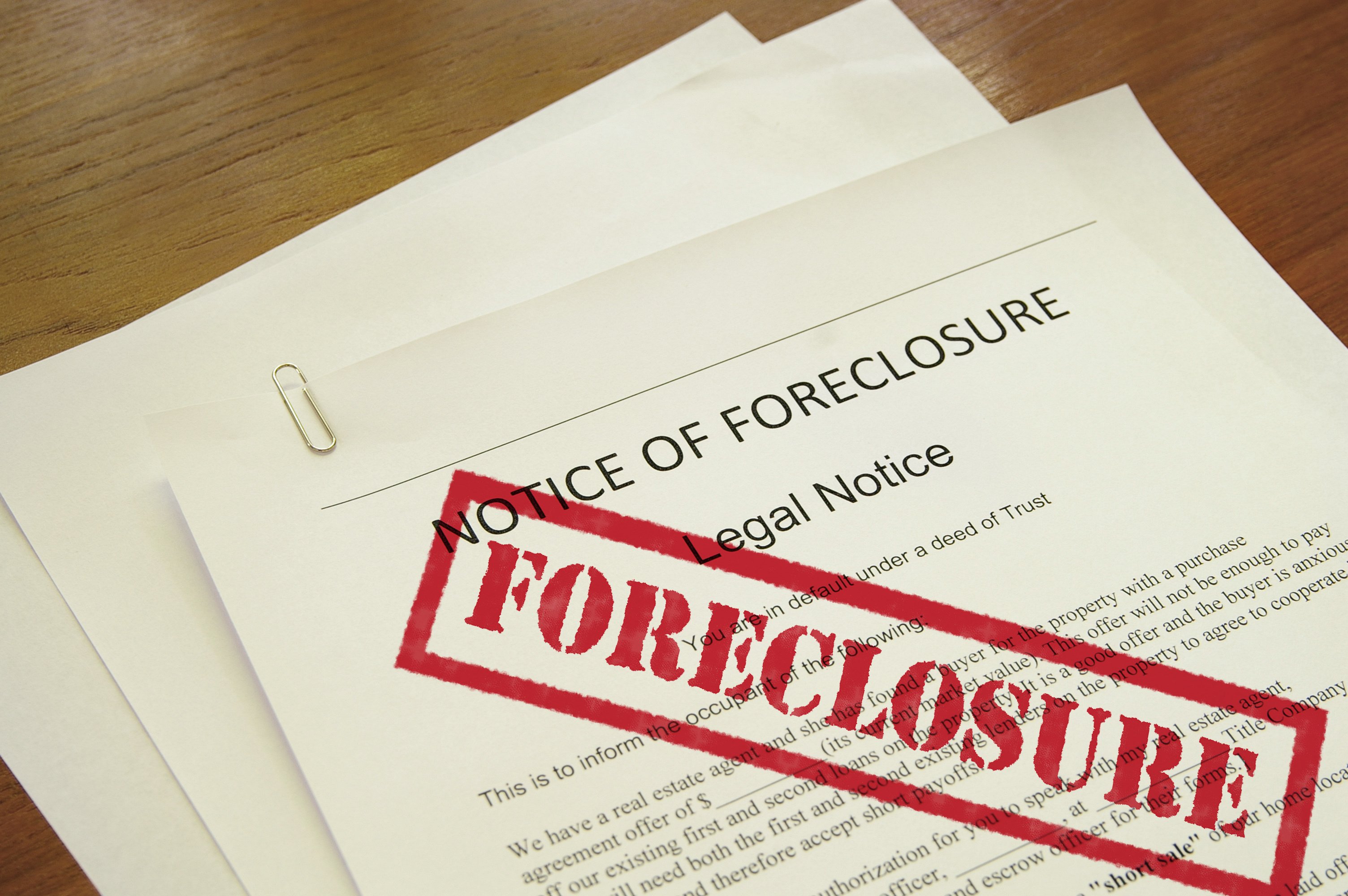
Numbers jumped after the expiration of a moratorium at the end of 2024, but rates of foreclosure rose across all loan types, the Mortgage Bankers Association said. View the full article
-
We may earn a commission from links on this page. Deal pricing and availability subject to change after time of publication. The JBL Xtreme 4 is massive, right at the limit of what I would consider a portable speaker, with a powerful sound that can handle a large backyard barbecue party. Right now, it's $130 off, bringing its price down to $249.95 (originally $379.95). That's a record low price for this particular speaker, according to price tracking tools. JBL Xtreme 4 24 hour battery, IP67 rating, Powerbank, PartyBoost for Multi-Speaker Pairing. $249.95 at Amazon $379.95 Save $130.00 Get Deal Get Deal $249.95 at Amazon $379.95 Save $130.00 I've been using the JBL Xtreme 4 outdoor speaker for months, taking it with me to hang out in my backyard, in my office, and to host soccer games with Street FC. Since I have other JBL speakers, I am able to take full advantage of the Aurocast feature, which lets me connect it to other JBL speakers for a fuller sound. I also found the full EQ customization and presets useful. The speaker is powerful, which makes sense for a speaker of this size. What stands out the most is its powerful bass, which is typical of JBL speakers. Since it is IP67 rated, it can be submerged underwater and resists dust, making it perfect for the beach. It also comes with a detachable carrying strap that makes carrying it much easier. The battery can go up to about 27 hours, depending on your use, but I've managed to stretch it past that point by being conservative with the volume. Speaking of volume, it's a directional speaker, meaning it'll project to wherever it's facing. In my backyard, I try to place it as far back as I can and pump up the volume, which has worked well for my gatherings of about 12 people. View the full article
-
Some policies the industry group is calling for the Office of Management and Budget to definitively rescind have already been pulled back to some degree. View the full article
-
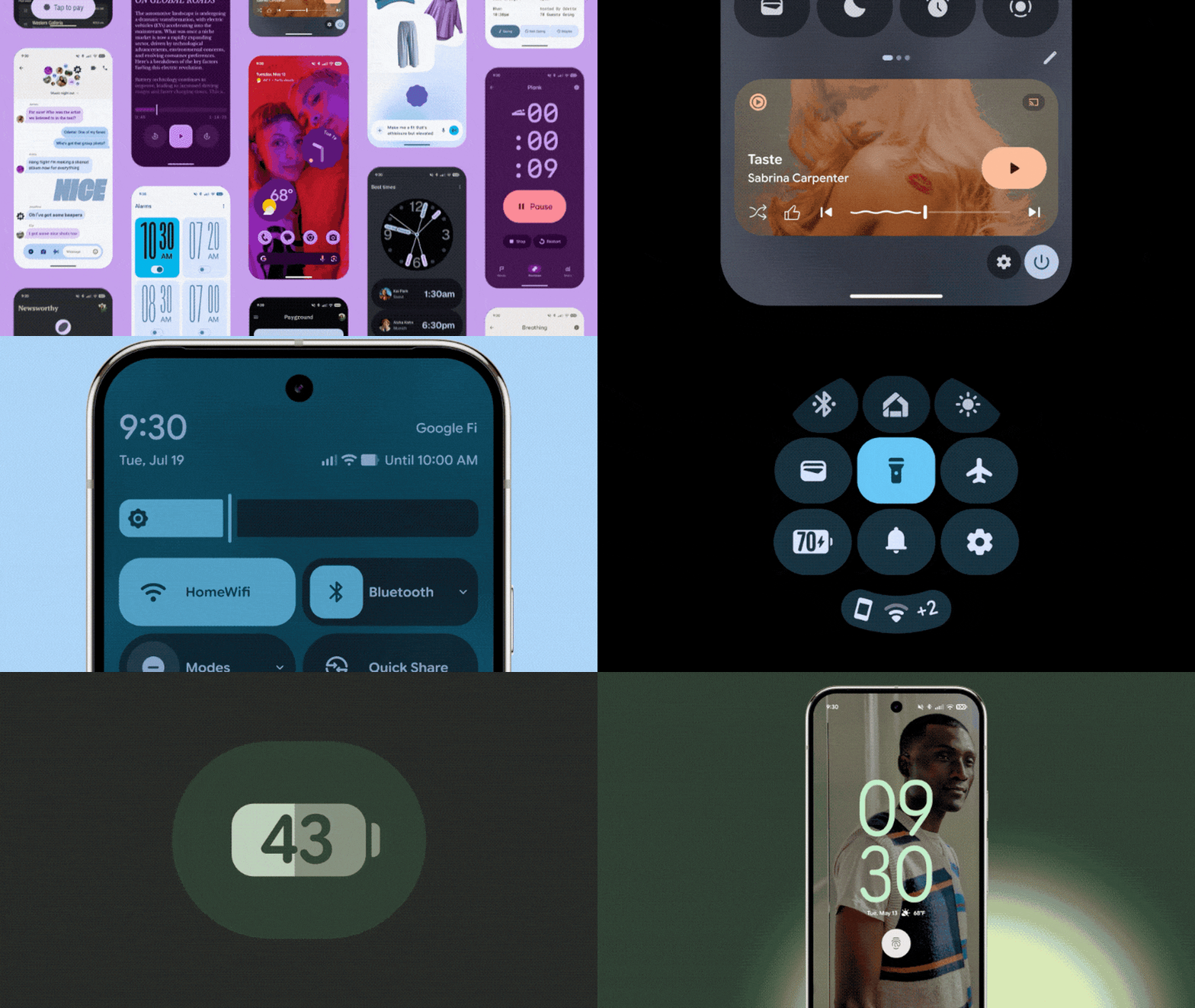
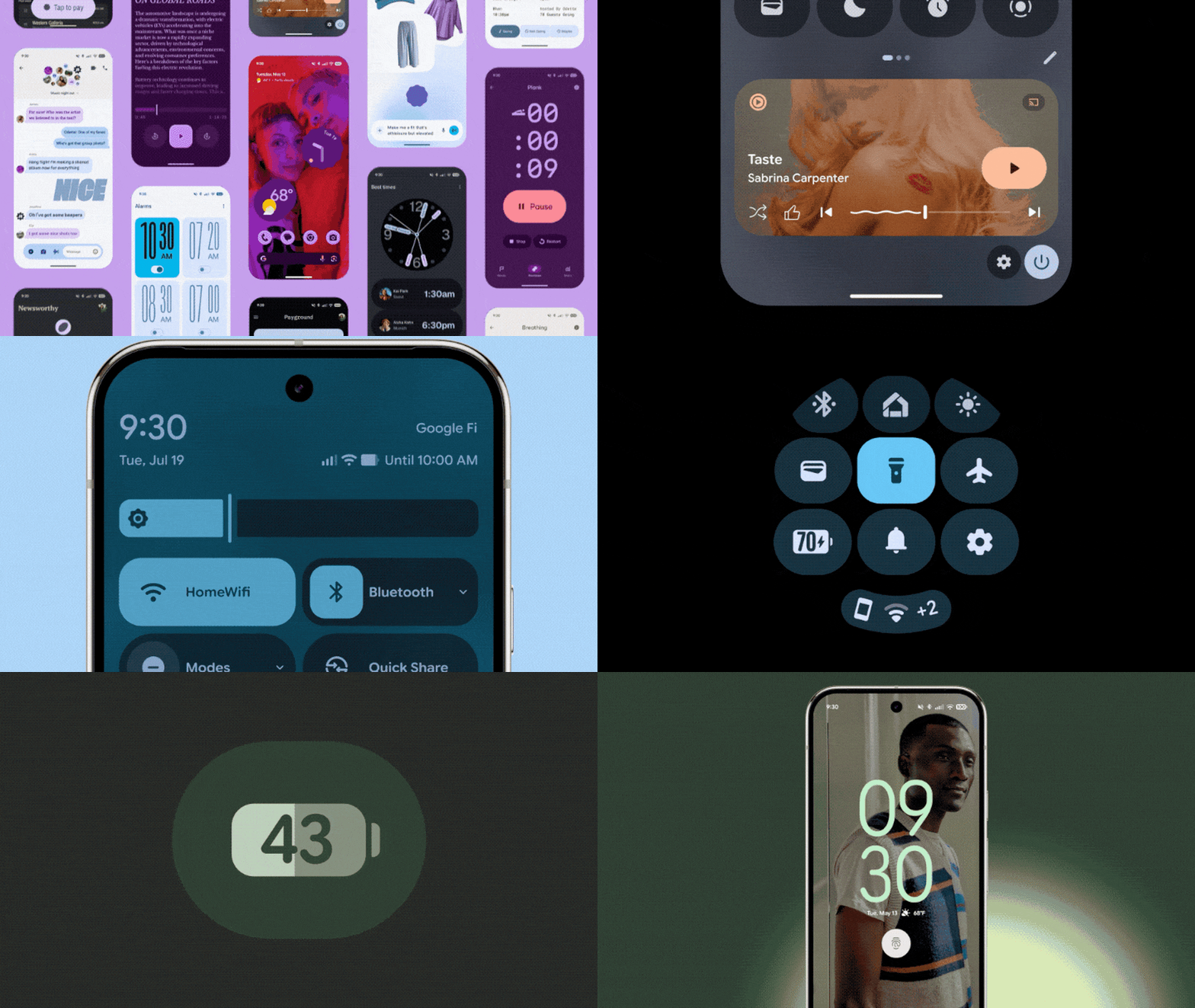
Eleven years after Google first announced its grand unifying theory of design—Material Design—it’s introducing its third major revision to the system. Called Material 3 Expressive, the company will tell you that it’s their most “researched update” ever, promising to help people find what they’re looking for on the screen faster than before. But it’s also the company’s most maximalist design system to date. Still enabling quieter minimalist designs, sure, but embracing bolder colors, more playful animations, and all around more overt approaches to interface. There’s a new roundness to almost every component, right down to the tips of Google’s new default typeface, Google Sans Flex Rounded, which replaces the hard edged terminals on letterforms with smooth tips. But mostly, Google is using more of everything to accentuate contrast, like between headers and bodies. Button shapes can now be anything from giant pills to stars. Perkier animations rekindle tech’s old favorite words, “joy” and “delight,” with a bit more springiness in them across the board. And UI elements on your screen often react to others—dial a phone number, and each digit you press bounces the others out of the way like cartoony bubble tape. “It’s kind of like the next evolution,” says Vanessa Cho, VP, Google Design. “It’s design with the soul. What I mean by that is it’s [still] driven with deep purpose…but it also connects with you on the emotional level.” The history of Material DesignMaterial Design was born over a decade ago, as Google Designers developed a grounding metaphor to codify its otherwise fragmented approach to design. Inspired by light and paper, Material Design was like a stretchy piece of wonder paper that could reshape to do anything, and it brought a sense of tactile physics to Search, Android, and other Google Services. In the years since, Material Design veered from its ambitious roots. It imagined eventually breaking out of screens and becoming the interface for our lives—what would be a better interface for an internet of things than literal matter that would reshape itself in front of you? Material Design was built for a path toward that smart infrastructure that seemed so inevitable in the 2010s. But a decade later, and the world didn’t play out that way. Instead, most things stayed dumb as we got sucked deeper and deeper into our phones. The stoic minimalism that Material Design v 1 celebrated got washed out by the pixel onslaughts of TikTok and other social media platforms. The emoji of 2014 seem quaint by the comparison of just about everything on Instagram, where even AI characters are attempting to be my bff. So in 2021, Material Design pivoted. It became more about personalization—allowing your phone to have a color palette and typefaces more reflective of you. And now? Material Design is trending more maximal, with an overt approach to design that’s willing to call attention to itself as a moment of celebration, rather than disappear into the background. “We’re in an era of expression…thinking about TikTok and whatever you’re on,” says Mindy Brooks, VP, Product & UX, Android Platform. “So this design system allows us to, even as developers and creators of it, to express what we want to in the product.” Testing and manifestingAcross Google’s products, these new design standards play out in different ways. On Android, it means we see apps presented in a greater array of typefaces (pushing expressiveness and information hierarchy at the same time), while apps like Photos trend toward the Canva-create-a-card vibes we get on iOS today. On Wear OS, the colors from your phone can be mirrored on your wrist, and buttons now wrap all the way into the curves of the display through a lovely marriage of device and UI. But what Google’s design team most wants to highlight is that Material 3 Expressive isn’t style over substance. Validated by 46 studies that tested hundreds of designs across more than 18,000 participants, they found that the expressive end of the Material Design system was preferred across all age groups, though especially Gen Z, which preferred the more maximalist screens 87% of the time. The team also found that Material 3 Expressive was faster to navigate. Certain actions were spotted up to 4x faster than before. And while older adults are typically slower at finding certain buttons on the screen, the larger buttons inside Material 3 Expressive proved faster to find for everyone—while eliminating the age gap. Google claims older adults can use this design system with the same rapidity of youth. (And who woulda thunk, a big red “send” button would be easier to spot than that old little paper airplane in the corner?) As a design solution, it’s hard to argue with Google’s own validating data or the joy of bringing in more color and motion into the mix. But I’m more interested in Material 3 Expression for what it reveals about this era of design. For the last decade and a half, minimalism has taken over everything from blanded branding to interface (the world of interior design notwithstanding, which has been waffling on the idea for some time). But celebratory expression used to be in! Animations like Apple’s genie effect—which shrunk apps into your taskbar like a genie into the lamp—embodied playfulness before minimalism conquered tech. They were invented way back in 2004 during a more optimistic time in tech, right beside bondi blue iMacs with handles on them. This was the hope of a world that didn’t end after Y2K. Now, screen time debates have been decimated by the For You Page and AI everything, while your Grazas and Manischewtizs of the world prioritize a bit of funk over subdued Swissness. We’re back in expressive times again. View the full article
-
Construction contracts define how owners pay for work done by contractors on a construction project. One of the most popular contracts is called a fixed-price contract or lump sum contract, where a contract defines what will be done and sets a specific and final price for that work. However, this popular method doesn’t work when the construction project timeline and material requirements are unknown. That’s when a time and materials contract is used. What Is a Time and Materials Contract? A time and materials contract is a legally binding agreement that outlines how an employer will pay a contractor for the time and materials they spent on a project. A time and materials contract is commonly used in construction project management, though it’s also used in product development and other types of projects. This means the contractor tracks the time and materials its crew or subcontractors use. Then they use this data to bill the employer appropriately over the course of the project. To track time and costs, project owners and contractors should use project management software like ProjectManager. With ProjectManager, you can use Gantt charts, project calendars, timesheets and real-time project dashboards to keep track of time and costs for an effective application of a time and materials contract. Get started with ProjectManager today for free. /wp-content/uploads/2024/04/Light-mode-portfolio-dashboard-CTA.pngLearn more What Should Be Included in a Time and Materials Contract? Now that we’ve learned what a time and materials contract is, let’s go over the key elements that should be part of any time and materials contract. 1. Agreement Overview This section outlines the parties involved, the type of contract and basic project details such as the property location and scope. It serves as the formal start of the contract and establishes the identity of the owner and contractor, setting the stage for the terms that follow. 2. Recitals Recitals provide background context for the agreement. They explain why the contract is being entered into, the nature of the project and the rationale behind using a T&M contract rather than a fixed-price model, ensuring both parties are aligned from the start. 3. Scope of Work This section defines what work the contractor will perform. It includes tasks, deliverables and any exclusions or limitations. Having a clear scope reduces misunderstandings and provides a framework for managing expectations, controlling cost and assessing the impact of any future changes. 4. Labor Costs One of the most important steps when creating a time and materials contract is to identify the different tasks that need to be executed so that your project is a success. Then, based on that, you’ll need to estimate the time that will take to execute the work so you can understand what your project timeline looks like. Once you have a clear picture of your project scope, you can begin to estimate costs. In your time and materials contract, you’ll need to define labor categories for each type of tasks, such as plumbing, masonry or electrical work. Then determine an hourly rate for all types of work and include them in the contract. /wp-content/uploads/2024/01/2024-construction-ebook-banner-ad.jpg 5. Material Costs It’s important to understand that there are different types of costs associated with the material requirements of your project. Here are some examples: Direct materials: The term direct materials refers to those raw materials that are directly used in the project. In the case of construction project management, it refers to the concrete, paint, wood and other materials that result in the finished building. Direct and indirect costs: You can also specify other direct and indirect costs related to incidental services, material handling costs and other material-related labor costs that aren’t listed under the labor categories you’ve defined in your time and materials contract. 6. Time and Materials Terms This section breaks down how the contractor will be paid: hourly labor rates, materials markup, equipment charges and subcontractor costs. It includes invoicing procedures, documentation required and optional cost caps. It is the financial heart of the T&M contract and ensures transparent cost tracking. 7. Schedule This section lists key project dates, including estimated start and finish times. It defines the contractor’s work hours and provides a framework for understanding the project’s timeline. While flexible, it helps the owner track progress and stay informed about any delays. 8. Change Orders This outlines the process for handling changes in scope, cost or duration. All changes must be agreed upon in writing. This section ensures that additional work, adjustments or unforeseen requirements are formally documented to avoid disputes and maintain clear communication. 9. Contractor Responsibilities Details what the contractor is expected to provide, including labor, materials, tools and site supervision. It also covers legal and safety responsibilities such as securing permits and maintaining a clean, hazard-free site. This section clarifies the contractor’s obligations throughout the project. 10. Owner Responsibilities Specifies what the owner must do, such as providing access to the property, approving materials, and making timely payments. It helps avoid delays and conflicts by outlining the owner’s role in ensuring smooth execution of the work. 11. Insurance This section requires the contractor to carry appropriate insurance, such as general liability and workers’ compensation. It protects both parties in the event of injury, damage or legal claims, and often requires proof of coverage before work begins. 12. Warranties Outlines the contractor’s warranty on materials and workmanship, including its duration (typically one year). It ensures the owner has recourse if defects appear after completion, promoting accountability and quality workmanship. 13. Termination Explains how either party can end the agreement, with or without cause. It includes required notice periods and payment terms for work completed up to termination. This protects both parties if the project needs to be stopped early. 14. Dispute Resolution Describes how disagreements will be resolved—usually through mediation, arbitration or court—along with the legal jurisdiction. This section helps prevent legal escalation by encouraging negotiated solutions and specifying the process to follow if disputes arise. 15. Miscellaneous Covers general legal provisions, such as the entire agreement clause, amendment process and severability. It ensures that the contract is legally complete and that any changes must be documented in writing and signed by both parties. 16. Signatures The final section includes signature lines for both parties. By signing, each party agrees to the contract’s terms. It also includes printed names and dates, making the contract official and legally binding. /wp-content/uploads/2024/03/RFP-template-featured-image.jpg Get your free RFP Template Use this free RFP Template for Word to manage your projects better. Download Word File Time and Materials Contract Example To better understand how a time and materials contract works, let’s explore a real-life example. Below is a T&M contract between a homeowner and contractor regarding the construction of an in-ground swimming pool and patio area. 1. Agreement Overview This Time and Materials Agreement (“Agreement”) is made on May 12, 2025, between: Owner: Maria Coleman 123 Oakview Drive Austin, TX 78702 Contractor: BlueWave Pools LLC 987 Contractor Lane Austin, TX 78704 Project Description: Construction of an in-ground swimming pool and patio area at the Owner’s residence. 2. Recitals The Owner wishes to hire the Contractor to build a pool area. Both parties agree to a Time and Materials basis due to the potential variability in labor and materials. 3. Scope of Work The Contractor will: Excavate and prepare the site Install a 12×24 ft concrete pool with basic filtration system Pour concrete deck and install pavers Install fencing and lighting around the pool Final cleanup and inspection Excluded: Landscaping, pool heater or permits not specified above 4. Time and Materials Terms Labor: $75/hour per crew member Materials: Charged at cost + 15% markup Equipment Use: Flat $250/day for excavation equipment Subcontractors: Charged at cost + 10% markup Billing: Weekly invoices due within 10 days of receipt Documentation: Invoices will include timesheets and receipts Not-to-Exceed (Optional): $30,000 unless approved in writing by the Owner 5. Schedule Estimated Start Date: May 20, 2025 Estimated Completion: June 30, 2025 Work hours: Mon–Fri, 8 AM to 4 PM 6. Change Orders All changes must be approved in writing using a Change Order Form. Changes may affect cost or schedule. 7. Contractor Responsibilities Provide labor, tools, and equipment Secure permits if specified Maintain a safe and clean worksite 8. Owner Responsibilities Provide access to the site Approve invoices and pay promptly Make timely decisions on finishes or material choices 9. Insurance The Contractor shall maintain general liability and workers’ compensation insurance and provide a certificate upon request. 10. Warranties The Contractor warrants workmanship for 1 year from project completion. 11. Termination Either party may terminate this agreement with 7 days’ written notice. The Owner shall pay for all approved work completed up to the date of termination. 12. Dispute Resolution Disputes will be resolved by mediation in Travis County, Texas. If unresolved, litigation may proceed under Texas law. 13. Miscellaneous This document is the entire agreement. Any changes must be in writing and signed by both parties. 14. Signatures Owner: Signature: ______________________ Name: Maria Gonzalez Date: ______________________ Contractor: Signature: ______________________ Name: David Lee, Manager – BlueWave Pools LLC Date: ______________________ When Should You Use a Time and Materials Contract? Again, a T&M contract is ideal for a project without a clear or accurate estimate of the time and costs involved. There’s no point in using a fixed-price contract unless there is a way to determine the cost. And a cost-reimbursable contract would be impossible to determine without knowing the exact time and materials required to execute the work. /wp-content/uploads/2022/01/Construction-Estimate-Template-600x331.jpgFree download However, a time and materials contract is advisable when the duration of the project is unknown, but there’s a fixed hourly rate for the labor involved. When using a T&M contract, contractors usually add a markup of between 15 and 35 percent. Therefore, a time and materials contract would be an option for the construction bidding process when dealing with unpredictable scenarios. It is only possible to enter into such an agreement when both parties agree on the conditions, though this is true of all contracts. More importantly, a T&M contract is ideal when there’s a need for flexibility, or you’re new to the industry and can’t make accurate estimates of costs and duration. Time and Materials Contract vs. Other Construction Contracts Construction contracts set terms and conditions whenever a project owner hires a contractor to execute construction work. However, construction projects vary in terms of size and complexity, so there are different types of construction contracts to better accommodate the needs of both parties. Let’s see what are the main differences between a time and materials contract and other common construction contracts. Time and Materials Contract vs. Fixed Price Contract As mentioned above, there are two main types of payment plans in contract administration. T&M contracts are used when plans are not precise enough to use a fixed-price contract (because there is no definite price for the work.) Instead, contractors are reimbursed for any materials purchased and given a day or hourly rate for their labor. In contrast, a fixed-price contract is based on a predetermined total cost for the entire project. It works best when the scope is well-defined and unlikely to change. While fixed-price contracts offer predictability for the owner, they may include risk contingencies in pricing. T&M contracts are preferred when unknowns exist, such as during renovation projects, where hidden conditions may emerge. Owners often favor a time and materials basis when flexibility is needed, but both parties should still include cost controls, such as not-to-exceed limits or scheduled check-ins, to ensure accountability. Selecting between these models depends on how well the scope, timeline and resources are understood at the outset. Time and Materials Contract vs. Cost-Reimbursable Contract Beyond T&M and fixed-price contracts, there’s a third type of construction contract called a cost-reimbursable contract. This is when the owner pays the contractor for the actual cost of the work. That includes direct and indirect costs, such as materials, equipment and anything else, including salary, that must be paid to get the job done. Contractors will add a clause, such as a fixed fee or some incentive, to make a profit. Unlike T&M contracts, cost-reimbursable contracts provide a broader allowance for expenses, often including overhead and administrative costs. They’re frequently used in large-scale or public projects where it’s difficult to estimate total costs upfront. While both models offer flexibility, cost-reimbursable contracts typically require more detailed cost accounting and are subject to stricter auditing and reporting requirements. The inclusion of incentives or target-cost mechanisms can help align contractor performance with the owner’s goals. Choosing between the two often depends on the complexity and duration of the project, as well as the owner’s preference for control and risk allocation. Time and Materials Contract vs. Guaranteed Maximum Price (GMP) Contract A guaranteed maximum price contract sets a maximum price to be paid by the employer to the contractor for a project, regardless of the time and costs. Therefore, the contractor assumes responsibility for delays and all extra costs. However, this shouldn’t be the case, as contractors can use construction project management software to make accurate project estimates and have a good understanding of project timelines and budgets. GMP contracts offer a hybrid structure that blends aspects of cost-reimbursable and fixed-price agreements. They provide cost transparency while protecting the owner from budget overruns. Often, any savings under the GMP are shared between the owner and contractor as an incentive. This arrangement encourages efficiency and fosters collaboration. Compared to T&M contracts, GMP contracts involve greater risk for the contractor but offer the owner more financial certainty. They’re commonly used in design-build or fast-track projects where work begins before the full scope is finalized. While more complex to negotiate, GMP contracts can strike a balance between flexibility and cost control when structured correctly. Pros & Cons of Time and Material Contracts Let’s take a moment to look into the benefits and problems with time and material contracts. Depending on the situation, they could be just the kind of contract that works within a construction project. They can just as easily be a detriment and the cons might outweigh the pros, leading an organization to seek one of the other contract options. The Advantages of T&M Contracts It’s easy to respond to changes in the project Delays and roadblocks can be dealt with easily Negotiations are set at the beginning of the job The Disadvantages of T&M Contracts Tracking time and materials can be difficult Contractors have little incentive to work efficiently Contractors have to front their own costs Best Practices When Writing a Time and Materials Contract When entering into any contract, it’s important the agreement is in writing. Both sides need to agree on the terms and sign off on them. This is especially true of the time and materials contract, as it can end up with the employer bleeding money without construction daily reports. As mentioned earlier, having a maximum price is a recommended safeguard. /wp-content/uploads/2021/03/Construction-Daily-Report-600x401.jpgFree download When working with any contractor, ensure that they’re licensed by the Contractors State License Board and that the work they’re doing is within the scope of that license. Working with unlicensed contractors opens up liabilities that can impact the project and even the whole organization. This is also true for business licenses or business tax registration if required in the jurisdiction of the project. One problem with T&M contracts is they can result in more lawsuits than a fixed-price contract. It’s important to know the risks and consequences involved with contracting with third-party workers. There can be issues with back taxes and other IRS penalties, back pay and damage to the organization’s reputation. Request for Proposal (RFP) Template This free RFP template helps you specify all the information that construction contractors will need to include in their construction bids including the scope of work, timeline, budget and other details that will later be used in the time and materials contract. /wp-content/uploads/2024/03/RFP-Template-screenshot-1600x820.png Free Construction Project Management Templates Project management and construction management are complex disciplines. That’s why we’ve created dozens of project management templates to assist project managers while they plan, schedule and track projects. Here are some construction project management templates to help you save time. Construction Estimate Template A very important part of construction project management is time and cost estimates. That’s true for project owners, contractors and subcontractors, whose profitability depends on accurate project estimates. This free construction estimate template is a great tool to start documenting your construction costs. Construction Schedule Template Creating a realistic project schedule is key for success in construction as materials, equipment and labor need to be available at the right time to avoid extra costs or delays. This construction schedule template is a simple tool to get started with construction scheduling. Construction Proposal Template Project owners decide which is the best contractor for their project by analyzing their project proposal. Use this free construction proposal template to create a proposal that will stand out in the construction bidding process. How ProjectManager Helps Keep Track of Time & Materials Contracts Time and material contracts may be right for you. But if you’re going to use one, it’s crucial you closely track the time and materials used by your contractor. This way you’re only paying for work that has actually been done. ProjectManager is award-winning construction project management software that can monitor the time your contractors work on the job and track the materials they use, all in real time. Easy Time Management It’s easy to onboard contractors to our tool, and security settings make sure they’re only able to access those parts of the software you permit them to use. One feature that helps you track their work is our timesheets. When contractors submit their timesheets, they’re sent to the authorized approver and locked to keep the data secure. /wp-content/uploads/2022/03/Timesheet_Wide_Zoom-175_Adjusting-Date.jpg Plan with Gantt Charts Use our Gantt chart view to plan and schedule your project. You can assign and keep track of contractors’ work, as well as track expenses. Once you have a schedule and budget, set the baseline to compare the actual progress and costs to your plan. If you notice contractors spending too much time or money, you can address the issue before it becomes a problem. /wp-content/uploads/2022/03/Gantt_Manufacturing_Wide_Zoom-150_Focus-on-Tasklist_Spreadsheet.jpg Track Data with Live Dashboards There’s also a live dashboard that tracks a high-level view of the project’s progress and performance. It automatically collects real-time data and calculates it into project costs, time, variance and more. Whatever type of contract you use, our tool makes sure your contractors are working efficiently. /wp-content/uploads/2022/03/Dashboard_Construction_Wide_Zoom-150_Cost-Tab-Color-Variation.jpg Related Content Types of Construction Contracts: Pros, Cons & Best Practices Construction Documents: Types of Construction Drawings How to Make a Construction Plan How to Make a Construction Schedule Best Construction Scheduling Software ProjectManager is online software that helps you organize tasks, teams and projects. Plan, monitor and report on your project through every phase of its life cycle while giving your teams the tools they need to collaborate and work more productively. Join the tens of thousands of teams already using our tool and take this free 30-day trial today. The post Time and Materials Contract (T&M): When to Use One & Best Practices appeared first on ProjectManager. View the full article
-
Minnesota farmer Dan Glessing isn’t ready to get too upset over President Donald The President’s trade wars. Farm country voted heavily for The President last November. Now Glessing and many other farmers are taking a wait-and-see attitude toward the Republican president’s disputes with China and other international markets. China normally would buy about one row out of every four of the Minnesota soybean crop and took in nearly $13 billion worth of soybeans from the U.S. as a whole last year. More than half of U.S. soybeans are exported internationally, with roughly half of those going to China, so it’s a critical market. The President last month raised U.S. tariffs on products from China to 145%, and China retaliated with 125%. But Monday’s announcement of a 90-day truce between the two countries backed up the reluctance of many farmers to hit the panic button. More good news came in an updated forecast from the U.S. Department of Agriculture on Monday that projected higher corn exports and only slightly lower corn prices. The report also predicted somewhat lower soybean exports but higher domestic consumption, resulting in higher prices. Soybean futures surged. After he finished planting his soybean crop on Monday, Glessing said he was excited by the news and hopes to see more progress. But he said he wasn’t really surprised. Tariffs, weather and other uncertainty On a bright, sunny day last week, as he began planting soybeans, Glessing said tariffs were only one of the things he’s worried about — and not necessarily the biggest. Farming, after all, is an enterprise built on loose soil, the whims of weather and other uncontrollable factors. “Am I concerned about tariffs? Yeah. I mean, there’s uncertainty that comes with that,” Glessing said. “Is that the number one driving factor in these poor commodity prices the last two years? No.” As he steered his 25-year-old Case IH tractor over a gently rolling field near the town of Waverly, he towed a planter that inserted his seeds through the stubble of last year’s corn crop. As he laid down the long rows, he rumbled past a pond where wild swans paddled about. Riding shotgun was Georgie the Corgi, who alternated between roaming around his cab and half-dozing at his feet. Perhaps more skeptical than Glessing is Matt Griggs, one of many soybean farmers in Tennessee paying close attention to the trade war. On Monday, he said the ripple effects on farmers might still be coming. “We’re only on a 90-day pause,” Griggs said. “Who knows what is going to come after that?” Joe Janzen, an agricultural economist at the University of Illinois, said the commodity markets have largely shaken off the initial shock of the trade war, including The Presidents’ declaration of April 2 as “Liberation Day,” when he announced stiff worldwide tariffs. “Our markets have largely rebounded and are back where we were around April Second,” Janzen said. “Tariffs have not had a major impact on prices yet.” Even something that might seem like good news — ideal planting conditions across much of the Midwest — has its downside. The potential for bigger crops sent prices downward, Glessing noted. High interest rates, seed and fertilizer costs pose additional challenges. “There’s so many other factors besides just tariffs and my market price,” Glessing said. Looking for signs of progress But Glessing said he was encouraged by that morning’s news of a trade deal with the United Kingdom, and said he hopes the current uncertainty in talks with China and other countries ultimately leads to better trade deals going forward. Glessing had finished planting his corn the day before on the other half of a field that he rents from his father’s cousin, split between 45 acres of corn and 45 acres of beans. It’s at the farm where his grandfather grew up, and it’s part of the approximately 700 acres he plants on average. He locked in those planting decisions months earlier as he made deals for seeds, fertilizer and other supplies. Back on his “home farm” closer to Waverly — where his late grandfather’s house, made of local brick, still stands and a cacophony of house sparrow songs filled the air — Glessing was pleased to spot the first signs of corn he had planted there about 10 days earlier poking above the soil. Waverly is about an hour west of Minneapolis. Its most famous resident was Democratic former Vice President Hubert Humphrey. It’s in the congressional district represented by Republican House Majority Whip Tom Emmer. Glessing’s post as president of the Minnesota Farm Bureau puts him in close touch with other influential politicians, too. He and his wife, Seena, were Democratic Sen. Amy Klobuchar’s guests at the Capitol for The President’s inauguration in January. Glessing declined to say who he voted for. The Glessings have three kids, milk about 75 dairy cows, and grow corn, soybeans and alfalfa on a combination of parcels they own or rent. He uses the alfalfa and corn primarily to feed his cows. He sells his soybeans to a processing plant in Mankato, where some of them become soybean meal he adds to his animal feed. The milk from his cows goes to a co-op cheese plant in Litchfield that sells internationally. Because Glessing has local buyers locked in and doesn’t directly export his crops, he’s partially cushioned from the volatility of world markets. But he’s quick to point out that everything in the agricultural economy is interconnected. Lessons learned during The President’s first trade war On his farm near Humboldt, Tennessee, roughly midway between Memphis and Nashville, Griggs weathered the 2018 trade war during The President’s first term and said he feels more prepared this time around. “Back in 2018, prices were about the same as what they are now, and due to the trade war with China, prices dropped around 15%,” he said. “They dropped significantly lower, and they dropped in a hurry, and due to that, we lost a lot of demand from China.” Griggs said exports to China never fully rebounded. But he doesn’t think the impact of the current dispute will be nearly as drastic. Griggs — who raises approximately 1,600 acres of cotton, corn, soybeans and wheat — said tariffs were just one consideration as he planned out this year’s crops. Growing a variety of crops helps him minimize the risk that comes with weather, volatile prices, and now the prospect of a trade war. Griggs said he’s going to be watching for opportunities to sell when market volatility causes upticks in prices. “The main thing I learned in 2018 was that if you do have a price period where prices have risen some, go ahead and take advantage of it instead of waiting for it to go higher,” said Griggs. “Because when it comes to the tariffs and everything, the markets can be very unpredictable. So my lesson learned was, ‘Don’t hold out for a home run, be satisfied with a double.’” He said a temporary subsidy called the Market Facilitation Program helped soybean farmers withstand some of the losses last time could help if something similar is revived this year. But he said no farmer wants to make a living off government subsidies. “We just want fair access to markets,” Griggs said. “And a fair price for the products we produce.” —Steve Karnowski and Kristin M. Hall, Associated Press AP videographer Mark Vancleave also contributed to this report. View the full article

-
Lower is acquiring a top-five ranked real estate portal to create an "end-to-end homeownership platform" to rival Rocket Mortgage. View the full article
-
It feels like a minor problem, I'll admit it. But you know when you check into a hotel and have to spend the next fifteen minutes connecting all your Apple devices to the network? Starting from your iPhone, then moving to your iPad, and then your Mac? Well, it looks like Apple understands your pain. According to a new report from Bloomberg's Mark Gurman, iOS 19 will include a new feature that will automatically connect multiple devices to the same public Wi-Fi network after you log in with just one of them. That's convenient for a couple of reasons. Beyond just keeping you from having to cycle through all your devices, it can also reduce the amount of paperwork you have to fill out. When signing into wifi at a location with public access, like a gym, café, hotel, or the airport, you'll often be asked to fill out a web form. These will usually ask for some information, but can also include captchas, or even unique codes that limit how much data you can access on a per-device basis. This new system means you'll only have to fill out the form once. Once you get through a web form, the wifi login and details will sync automatically between all your connected Apple devices, just like they do right now for a regular wifi network. Of course, this hasn't been 100% confirmed yet, and there are still a few questions to answer. How will this work for wifi networks that limit that amount of devices you can connect to them, for instance? Still, Gurman has a credible track record of leaking software and hardware changes currently on Apple's roadmap, so we'll likely see more on this in due time. iOS 19 is expected to be announced at WWDC in June, and according to the rumors, will come with a pretty big redesign for iPhones, iPads, and Macs. View the full article
-
The U.S. Department of Justice has released several new trial exhibits as part of the ongoing remedies hearing. These exhibits include interviews with two key Google engineers – Pandu Nayak and HJ Kim – which offer insights into Google’s ranking signals and systems, search features, and the future of Google. Key Google search ranking system terminology Nayak defined some key Google terminology and explained Google’s search structure: Document: What Google calls a webpage, or its stored version. Signals: How Google ranks documents that ultimately generate the SERP (search engine results pages). Google talked about using predictive signals from machine learning models as well as “traditional signals,” likely meaning based on user-side data (what Google has previously called user interactions – e.g., clicks, attention on a result, swipes on carousels, entering a new query). Broadly, there are two types of ranking signals: Raw signals. These are individual signals. Google has “over 100 raw signals,” according to Nayak. Top-level signals. This is a combination of multiple raw signals. Other signals discussed by the engineers include: Q* (“Q star”): How Google measures document quality. Navboost: A traditional signal measuring user clicks on a document for a query, segmented by location and device type, using the last 13 months of data. RankEmbed: A primary Google signal, trained with Large Language Models (LLMs). PageRank: An original Google signal, still a factor in page quality. Google also uses “Twiddlers” to re-rank results (which we learned about from last year’s Google’s internal Content API Warehouse leak). An internal “debugging interface” lets engineers see query expansion/decomposition and individual signal scores that determine final search result ranking. Google discontinues poorly performing or outdated signals. Navboost: Not a machine learning system Ex-Googler Eric Lehman was asked whether Navboost trains on 13 months of user data, and testified: “That is my understanding. Now, the word “trains” here might be a little misleading. Navboost is not a machine learning system. It’s just a big table. It says for this document – sorry, for this search query, this document got two clicks. For this query, this document got three clicks, – and so on. And it’s aggregated, and there’s a little bit of extra data. But you can think of it as just a giant table.” Google Search: From tradition to machine learning Google’s search evolved from the traditional “Okapi BM25” ranking function to incorporate machine learning, starting with RankBrain (announced in 2016), then, later, DeepRank and RankEmbed. The documents reveal that Google found that BERT-based DeepRank machine learning signals could be “decomposed into signals that resembled the traditional signals” and that combining both types improved results. This essentially created a hybrid approach of traditional information retrieval and machine learning. Google “avoids simply ‘predicting clicks,'” because they’re easily manipulated and don’t reliably measure user experience. RankEmbed A key signal, RankEmbed, is a “dual encoder model” that embeds queries and documents into an “embedding space.” This space considers semantic properties and other signals. Retrieval and ranking are based on a “dot product” or “distance measure in the embedding space.” RankEmbed is “extremely fast” and excels at common queries, but struggles with less frequent or specific long-tail queries. Google trained it on one month of search data. Topicality, quality, and other signals The documents detail how Google determines a document’s relevance to a query, or “topicality.” Key components include the ABC signals: Anchors (A): Links from a source page to a target page. Body (B): Terms in the document. Clicks (C): How long a user stayed on a linked page before returning to the SERP. These combine into T* (Topicality), which Google uses to judge a document’s relevance to query terms. Beyond topicality, “Q*” (page quality), or “trustworthiness,” is “incredibly important,” especially in addressing “content farms.” HJ Kim notes, “Nowadays, people still complain about the quality and AI makes it worse.” PageRank feeds into the Quality score. Other signals include: eDeepRank: An LLM system using BERT and transformers to decompose LLM-based signals for greater transparency. BR: A “popularity” signal using Chrome data. Hand-crafted signals Although machine learning is growing in importance, many Google signals are still “hand-crafted” by engineers. They analyze data, apply functions like sigmoids, and set thresholds to fine-tune signals. “In the extreme,” this means manually selecting data mid-points. For most signals, Google uses regression analysis on webpage content, user clicks, and human rater labels. The hand-crafted signals are important for transparency and easy troubleshooting. As Kim explained: “The reason why the vast majority of signals are hand-crafted is that if anything breaks Google knows what to fix. Google wants their signals to be fully transparent so they can trouble-shoot them and improve upon them.” Complex machine learning systems are harder to diagnose and repair, Kim explained. This means Google can respond to challenges and modify signals, such as adjusting them for “various media/public attention challenges.” However, engineers note that “finding the correct edges for these adjustments is difficult” and these adjustments “would be easy to reverse engineer and copy from looking at the data.” Search index and user-side data Google’s search index is the crawled content: titles and bodies. Separate indexes exist for content like Twitter feeds and Macy’s data. Query-based signals are generally calculated at query time, not stored in the search index, though some may be for convenience. “User-side data,” to Google search engineers, means user interaction data, not user-generated content like links. Signals affected by user-side data vary in how much they are affected. Search features Google’s search features (e.g., knowledge panels) each have their own ranking algorithm. “Tangram” (formerly Tetris) aimed to apply a unified search principle to all these features. The Knowledge Graph’s use extends beyond SERP panels to enhance traditional search. The documents also cite the “self-help suicide box,” highlighting the critical importance of accurate configuration and the extensive work behind determining the right “curves” and “thresholds.” Google’s development, the documents emphasize, is driven by user needs. Google identifies and debugs issues, and incorporates new information to improve ranking. Examples include: Adjusting signals for link position bias. Developing signals to combat content farms. Innovating to ensure quality results for sensitive queries like “did the Holocaust occur,” while considering nuanced result diversity. LLMs and the future of Google Search Google is “re-thinking their search stack from the ground-up,” with LLMs taking a bigger role. LLMs can enhance “query interpretation” and “summarized presentation of results.” In a separate exhibit, we got a look at Google’s “combined search infrastructure” (although many parts of it were redacted): Google is exploring how LLMs can reimagine ranking, retrieval, and SERP display. A key consideration is the computational cost of using LLMs. While early machine learning models needed much data, Google now uses “less and less,” sometimes only 90 or 60 days’ worth. Google’s rule: use the data that best serves users. Dig deeper. This is not the first time we’ve gotten an inside look at how Google Search ranking works, thanks to the DOJ trial. See more in these articles: 7 must-see Google Search ranking documents in antitrust trial exhibits How Google Search and ranking works, according to Google’s Pandu Nayak The DOJ trial exhibits. U.S. and Plaintiff States v. Google LLC [2020] – Remedies Hearing Exhibits: Jan. 31, 2025 call with Panda Nayak (PDF) Feb. 18, 2025 call with HJ Kim (PDF) View the full article
-
Last week we talked about times people “misused” their power for good. Here are 12 of my favorite stories you shared. 1. The payout I had a colleague, “Carol,” who decided to retire, and went in to tell our site HR person this and get the pension paperwork started. The HR person, “Grace,” was apparently unhelpful and said that she couldn’t do anything until the following week, and Carol should come back and remind her on Monday. Two days later, Grace called Carol and the rest of her team into a meeting to inform them that their entire department was being outsourced, and they were being laid off. This is the UK; there’s legislation around minimum payments in this situation, and typically my company pays at least double the minimum, which meant Carol got something like £30k payout. There is no way Grace wouldn’t have known about the layoffs and if she’d let Carol submit her retirement request Carol wouldn’t have qualified for the payout. 2. The time away Many years ago, I was a supervisor at a company that offered no schedule flexibility, and working from home in my department was absolutely taboo. I had an employee I’ll call John who was really struggling with his mental health and had no support network other than his dog. One morning, he came into my office in tears because his dog needed emergency surgery and was not to be left alone after for something like two weeks. He didn’t have that much PTO, and the company would terminate employees for taking unpaid time off. I told him I’d handle it, just work from home and get his job done. And suddenly John was in a lot of meetings and then attending a free conference hosted at another company’s offices. Finally my boss stopped by and commented he hadn’t seen John in a while. I reiterated he was at a free conference, and my boss said he hadn’t heard of that conference before. I just cheerfully responded that John said it was going well. He looked at me and then just slowly nodded. A couple of days later, I heard him telling someone else that John had been pulled into some project meetings and might be hard to catch for a while. John’s dog recovered and he returned to the office. No one other than my boss ever figured it out. 3. The admitted students party You can decide if this was misusing my power for good, or merely being irresponsible. I was a second year grad student with no professional experience, still basically a kid in terms of responsibility. Every year, admitted grad students for the next academic year would visit, and, among other activities, the current students would host a party for them and all the other students in the department so they could get to know us. Well, every year the department struggled with enrollment. The school was well regarded, but located in a small, cold town. The department was actually shrinking due to poor enrollment. The department was also pretty quiet and nerdy, and people felt a bit isolated and lonely. Enter … very irresponsible me. The department chair just told us to put on a party and said that we’d be reimbursed. So for a party with about 40 students (current and prospective), I bought eight cases of beer. Ten bottles of (local!) wine. And around eight bottles of liquor, including single-malt Scotch. Oh and like two bottles of soda and two bags of chips. The party was very boisterous and went long into the night. Everyone got home safe. And then we got our highest enrollment ever, literally three times the previous year, with a group of people who were not only academically excellent but also close-knit and got along well. My tab from the liquor store was around $500 ($750 in today’s money, with inflation) and I was never invited by the department to host this event again. It all could be coincidence but I choose to believe otherwise. 4. The unflattering photographs There is an appointed board for a public institution in my town that has been taken over by people who do not support the mission of the institution. It’s caused a lot of controversy, community strife, and lawsuits. It’s also spurred lots of local news coverage. A photographer for the local newspaper would take and publish the most unflattering photos of the board members that he could find. He has since moved on but the paper has not bothered to take many new photos and has continued to use many of the absolutely terrible photos he took. They’ve even been used by other outlets when reporting on our community. It’s a small thing but they have caused, and continue to cause, a lot of problems so it’s nice to see them being accurately portrayed. 5. The baked goods I have a part-time job in the bakery of a major retailer that sells more than just food. I have often baked more than I know will sell because I know it will get donated to the food banks (this particular company does allow/encourage donations of food that does not sell by the best before date). The extra amount is not something totally outrageous, just a little bit here and there that will help someone in need. 6. The off switch One of my former libraries was next to one of the town’s middle schools, so kids would come over in droves after school to wait for their parents to come pick them up. It was a constant war between the rowdy middle schoolers and staff/regular library users. The biggest battle was over the bay of computers smack in the middle of the reading area — the kids would either blast YouTube videos at 100% volume or play intense games of Roblox. Asking them to quiet down was a Sisyphean affair; they would stop for about 10 minutes then get right back on the horse. One of the library assistants realized that the circulation desk had an emergency on/off switch for all the computers and ended up using its power for good. If the kids got too loud and refused staff and patrons’ attempts to use the library more respectfully, the switch would be tripped. “The computers are off!” they would say, exasperatedly. “Oh no, how troubling,” the library assistant would respond. “Sometimes they get overloaded. We’ll have to call in IT to take a look, but they can’t get here for a few hours.” The kids would then get bored and leave to the park across the street. This was only used maybe twice in my year-long stint at this library branch, but I appreciated it nonetheless. 7. The shout-outs I have a coworker who is extremely difficult to work with. She is technically a supervisor, but it’s been years since anyone has reported to her. Business needs finally upped her work to the point where she needed help, so she was given her first employee to manage in years. It went horribly. This was a young man’s first “official” job out of college, and he disclosed many health-related issues to her that he shouldn’t have. She hit every point on discrimination, both legally and by our policy. I work in HR, but it’s government, and getting anything done regarding dealing with how she managed him was impossible. As soon as I sent something up, she threatened legal action and it got slapped back down. She was mean, derogatory, and straight-up toxic to the poor guy. She tried to discipline him for clocking in on time (“I TOLD him he needs to be here exactly 15 minutes early!”), for using his ADA accommodations (“He can only use them as long as he isn’t being a burden, and he’s definitely misusing them!”). It’s important to note that she was extremely volatile. Well, she had a vacation coming up and spent the week leading up to the vacation loudly complaining about how she just knew her employee would screw everything up. I saw my opportunity. While she was gone, her employee did amazing. Our facility has adopted a practice of doing “shout-outs” — basically anyone can send a mass email congratulating people for doing a good job. I am a very bubbly person and employees are used to me being very encouraging and optimistic, so when I casually reminded everyone that this employee was doing extremely well, and his boss was concerned about his ability to do the job well in her absence, and she would definitely appreciate it if she had a flood of shout-outs for him, it didn’t come across as odd or suspicious. Also, wouldn’t it be great to tell her how great he did, in person, also in front of him directly to her? When she returned, she looked like she was drinking poison all week having to listen to and read all the compliments. People were streaming in and out of her office for her first several days back singing his praises. (I may have helpfully reminded them to do this. Often.) And it worked beautifully. With all the glowing recommendations, I asked her if she was considering putting him in for a raise. That did it. She flipped out and tried to make a case to fire him (her case was entirely based on his accommodations and how “difficult” his disability was to work with, so … not a good case at all). Then when she got a meeting with the HR director about it, she had a meltdown and the director told her she couldn’t be trusted to supervise this employee and she would be required to undergo extra supervisor training. She is now no longer a supervisor, and her employee has been promoted to equal standing as her and is in line to promote to the head of the department, meaning she will need to report to him. 8. The wheel of cheese At my first entry-level nonprofit job, at the end of a fancy reception, the executive director noticed there was a whole wheel of hard cheese that hadn’t been touched. She wrapped it in a napkin and handed it to me, saying, “Put this in your purse.” She explained that the organization had paid for this food and somebody might as well enjoy it. Some may find this gross, but I was a broke, in debt, and overwhelmed kid and it felt like such a luxury. She made me feel at ease and like we were in cahoots about something! It’s almost 15 years later and I’m an executive director now, and I use a lot of what I learned from her. 9. The raise Never told anyone I did this, but some years back one of my then direct reports (Z) had adopted a pair of cats who developed serious health issues, and she had to take a ton of random PTO for all the emergency vet visits. I knew what the PTO was for and that her vet and medication bills were piling up, and I also knew that the department head had some complicated ideas of what it would take for someone to deserve a raise. Previously, I unsuccessfully tried to get some of my reports’ pay bumped up but was told we’d “be fine keeping everything as is.” Fine, but when my boss asked me what was going on with Z taking all that PTO, I had a burst of inspiration and casually said, “Of course I would not be able to confirm, but I wonder if she’s been interviewing. Z is one of my star performers, and I would not be surprised if she’s getting headhunted.” That set off a rapid-fire series of emails between my boss (department head) and HR, which resulted in a promotion for my report. They even had to create a new tier for her to be able to make it happen, and I didn’t have to do anything myself. 10. The cat medicine My very sick cat was prescribed medication that had to be filled by prescription at a commercial drugstore. It was essentially people medicine that could be used, under a veterinarian’s direction, for pets. When I went to pick it up, my heart sank at how expensive it was. I was working as an underpaid fundraiser for a nonprofit at the time, and the amount of the prescription ($90 at the time) was an absolute budget buster for me. The pharmacist at the independent (non-chain) drugstore saw how distressed I was and asked me how old my cat was. I said she was 12. The pharmacist said, “Well, then, she qualifies for the senior citizen discount,” and took 10% off of the price. And continued to give me the senior citizen discount for the rest of my cat’s life. 11. The class requirements Three weeks shy of graduation, I went to my undergraduate research advisor and told him that I was going to drop out. I was a single parent of a pre-schooler. My dad had just undergone a really complicated surgery and I was caring for him in his recovery. He was my mom’s caregiver, which meant now I was my mom’s caregiver and I couldn’t keep up with the remaining coursework, study for finals, finish my research project, do what I needed to do to support my family, and ever sleep. He asked if just dropping the research component would give me the space I needed to finish (it was five credit hours and I was literally there in the wee hours of the morning most days because it was the only time I could squeeze it in). I told him it would but that I wouldn’t graduate without the hours associated with it. He took my lab keys from me and said, “Oh, you misunderstand. You got an A. You’ve finished. Don’t let me see you here again until after graduation.” I graduated with honors. My dad recovered and lived for another 25 years. My mom is doing fine. My kid is an adult now. I work in the field I trained under him to be in, doing the kind of work he valued, and I’ve been in management for 10 years showing the same kind of grace every chance I get. He waived three weeks of work, a publication, and a presentation and the world got me in a dedicated career in save-the-world type scientific public service. 12. The retirement papers A few years ago, I was working for a (non-U.S.) government organization. The deputy director of the department was a well-liked man in his early fifties, quiet and hard-working. His role had full job security, healthcare, and a solid pension plan. He decided to put in his form for early retirement, in order to change career path completely. Everyone was sad to see him go as they felt he was a valuable asset, but respected his will to change even though many feared he would face age discrimination in his job search. The procedure for retiring could take almost a year, as the services needed to calculate his rights to pension, end-of-career pay, and many more benefits that end up being quite complex. However, once that decision form is sent, there is no turning back, even if the situation changes in the meantime. This also means the decision to retire early had to be a leap of faith, as no recruiter wanted to keep a job open for a full year before you had formally ended your previous contract. The day after he submitted this retirement request, he ended up in a terrible accident. He was hit by a drunk driver and had to be put in an artificial coma for a few days, in the ER. It was touch and go for a while, and even weeks into his year-long recovery process, his doctors did not know if he would be able to speak and walk again. A heart-breaking moment, especially since everyone knew how much of a safe driver he was. (Ultimately, he ended up doing a fine recovery and could walk again, albeit with a cane and sometimes a wheelchair). The morning after the accident, as news reached work, his boss, the head of department, quietly took the retirement form. Without informing HR, he ripped up the form and instructed the department to avoid mentioning the plans for retirement to anyone outside. During the year-long recovery process, the injured deputy director benefited from complete medical coverage plus a medical pay leave, and had his former job waiting for him during all of this time. He ended up returning to work, with full accommodation for his disability. He even had better prospects in the administration that were provided for him, as thanks for his years of service. Had the director not made the retirement form disappear, he would have come out of the hospital disabled, without a job, no pay, no desperately needed health care, in a job market that was sure to eradicate him due to his age and disability. There was also no way for him to job search from his hospital bed, especially when speech was impaired at the beginning of his recovery. Unemployment was a certainty in this case. And, due to the administrative process, the retirement procedure would have gone on regardless. Instead of full unemployment, he ended up staying a few more years in the administration, where everyone took care of him, and was able to keep on rising in the ranks. The director took the risk of delaying his departure and going against his will when he made the paper disappear. But, as everyone recognized, he acted in the injured deputy director’s interests while he was in a coma, and absolutely made the right decision. I have since moved on, but saw during my last days that the former deputy’s condition had improved significantly, and he almost didn’t have to rely on the cane. He was ultimately thrilled to keep on working there. The post the unflattering photographs, the cat medicine, and other times people used their power for good appeared first on Ask a Manager. View the full article
-
Arno Antlitz tells FT car summit of the risks of complacency after reforms deliver ‘the first results’View the full article
-
The company is positioning its Tinman platform as a serious industry competitor and suggests it's eying product costs of around $1,500 per loan. View the full article
-
Destination weddings are out, and virtual weddings are in. Rather than traveling to the Amalfi Coast or Provence, Wired recently interviewed a couple who chose to host their nuptials in the place they first met and fell in love: Minecraft. Sarah Nguyen, 24, from Portland, Oregon, and Jamie Patel, 25, from Leicester, England, met at 13 years old on a Minecraft role-play server. “It’s the closest thing we have to a shared home,” Nguyen told Wired. Most of their relationship was long-distance, lived out in the virtual world (the couple now resides together in Portland). Even Patel’s proposal took place atop a scenic mountain in Minecraft, delivered via in-game dialog. Nguyen and Patel aren’t alone. Wired reported that more couples are choosing digital ceremonies hosted in the virtual spaces where their relationships first blossomed. The pandemic marked a turning point for the wedding-industrial complex. With many weddings postponed or canceled, frustrated couples turned to the only option left—online. Digital ceremonies became a lifeline for those unable to host in-person gatherings due to restrictions. Others fully embraced the virtual, including a 2020 Animal Crossing wedding and metaverse nuptials in 2021. Now, even without restrictions, the demand for digital nuptials hasn’t slowed. In fact, an entire cottage industry has emerged to meet it. Companies like Wedfuly offer virtual wedding services starting at $800, which includes equipment and a remote production team for the day of. Even traditional event planning firms are introducing digital packages. The appeal is clear—especially as the national average cost of a wedding in the U.S. hits $33,000, according to The Knot. The global wedding industry is valued at $899.64 billion, and the average cost for a guest to attend a U.S. wedding is $610, according to Bankrate. Virtual weddings, on the other hand, let friends and family attend from the comfort of their homes. Nguyen and Patel’s celebration cost just $300 (including custom skins, server hosting, and a designer to script NPCs and quests) and welcomed 50 guests from eight different countries. Wired also spoke with Jessica Hu, an ordained officiant and “digital celebrant” based in Chicago. Hu specializes in ceremonies across Twitch, Discord, and VRChat, and has officiated more than 40 weddings in online spaces since launching her services in 2020. “It’s easy to dismiss it as novelty,” Hu says. “But these weddings are deeply sacred. I’ve had couples exchange vows using emoji reactions. I’ve had Discord bots cue the processional music. I’ve seen Twitch chats cry in real time.” Cue the heart-eyes and crying emojis. View the full article

-
We may earn a commission from links on this page. Deal pricing and availability subject to change after time of publication. Samsung announced the new Galaxy S25 Series back in January, and later that same month teased a fourth, thinner phone, the Galaxy S25 Edge. It wasn't until last week that we finally learned more about the new device Samsung is calling the "slimmest Galaxy S Series ever." Intrigued? You can already preorder it, and both Samsung and Amazon offering deals in the lead-up to the S25 Edge's release on May 30. Free 512 GB Upgrade and $50 Amazon Gift Card SAMSUNG Galaxy S25 Edge $1,099.99 at Amazon /images/amazon-prime.svg $1,269.99 Save $170.00 Pre-order Here Pre-order Here $1,099.99 at Amazon /images/amazon-prime.svg $1,269.99 Save $170.00 Free 512GB Storage Upgrade and Up to $630 instant trade-in credit SAMSUNG Galaxy S25 Edge $1,099.99 at Samsung $1,219.99 Save $120.00 Pre-order Here Pre-order Here $1,099.99 at Samsung $1,219.99 Save $120.00 SEE -1 MORE The phone sounds like a winner: It is powered by the Qualcomm Snapdragon 8 Elite for Galaxy chip, comes with 12GB of RAM, and starts with 256GB of storage. It also has a dual camera setup with a 200 MP wide lens and 12 MP ultra-wide and front lenses. And it's super thin at around 5.84mm. It's pretty sweet when retailers offer pre-order deals for flagship products. They don't happen very often, and once the products are released, it's rare to see a similar opportunity for at least a couple of months. Right now, both Samsung and Amazon are offering a free upgrade to 512GB from the basic 256GB option, allowing you to choose the unlocked version from among the same three colors. But that's where the similarities stop. If you have a phone to trade in, go with Samsung's offerSamsung is offering up to $630 in trade-in credits when preordering the Samsung Galaxy S25 Edge. You can trade in more than one phone if you want as well. If you go with Samsung, you'll also get their Samsung Care+ Theft and Loss program free for three months. Finally, if for some reason you want to upgrade again within 12 months, you'll get at least 50% of the MSRP of the new phone. If you don't have a trade-in, Amazon is offering a $50 gift cardIf you don't have a trade-in or want to try your luck selling your older phone yourself, go with Amazon's deal. You'll get the same delivery timing and price, a one-year warranty, and a $50 Amazon gift card that Samsung doesn't offer. View the full article
-
Apple is partnering with brain-computer interface company Synchron to develop technology that lets users control devices using neural signals. Still in the early stages, the technology could significantly expand accessibility for users who are unable to operate devices with their hands, Synchron said in a press release. The partnership was first reported by The Wall Street Journal. “This marks a defining moment for human-device interaction,” Synchron CEO Tom Oxley said in a statement. “Apple is helping to pioneer a new interface paradigm, where brain signals are formally recognized alongside touch, voice and typing.” Historically, users have interacted with tech devices through keyboards, mice, and more recently, touch and voice. But these interfaces remain limiting for people with certain impairments. Apple and Synchron are now working to translate specific brain signals into actions like selecting icons on a screen. Synchron’s implantable device, called the Stentrode, uses electrodes to read brain activity. It integrates with Apple’s “Switch Control” feature, which allows users to operate devices via alternative input methods. “When we ask our clinical trial participants what they want to do, it’s always about communication and creativity,” Synchron chief commercial officer Kurt Haggstrom said in a statement. “And to most people, that means using their Apple devices. For Apple to recognize that need, and respond to it, demonstrates how much they value accessibility for their users.” The technology likely remains years away from FDA approval and widespread use. Synchron said limited trials with patients are expected to begin later this year. View the full article

-
Document workflows help you track who's working on what, what's been approved (& what hasn't), and what needs to be delivered. Here's how to set up a document workflow, tools for automating and managing your workflows, and expert best practices. The post What is a Document Workflow? Examples & Best Practices appeared first on The Digital Project Manager. View the full article
-
DWS plans to vote against Thomas Rabe because of ‘repeated breach of expectations’View the full article
-
LinkedIn owner joins Meta and Amazon in rebalancing workforce as artificial intelligence race heats upView the full article
-
It can be tempting to stick with imperfect but familiar methods, leaving you comfortable but stagnant. Workflow analysis helps you evaluate and improve your processes to maximize results. The post The Ultimate Guide to Workflow Analysis appeared first on The Digital Project Manager. View the full article
-
Google has unveiled a major update to its Material 3 design language, which guides the visual appearance of apps across Android and the web. Called Material 3 Expressive, the new look is intended to make software "more engaging and easier to use," and is quite a departure from what's gone before. It's not easy to sum up what Material 3 Expressive is, but you can see a few of Google's example screenshots included in this article. Google says that expressive design is design that "makes you feel something" when you use it. "Expressive interfaces have an emotional impact, fostering connection by evoking a feeling or mood through visual design and interaction," as per the official announcement blog post. The new update covers colors, fonts, and shapes. Credit: Google What that actually looks like is bolder colors, more creative use of typography, more flexibility in terms of shapes, and animations that are now more natural and fluid. You can expect to see Material 3 Expressive start showing up in Google's own apps, and it's encouraging app developers to adopt the look, too. We should also hear more about the update at Google I/O 2025, which gets underway on May 20. As you can see from the attached pictures, a fresh batch of text styles have been introduced to help add flair to apps and draw your attention to important functions and features—whether that's a recording button or an unread message. There are also dozens of new shapes, and new morphs for switching between them. More Material 3 Expressive examples from Google. Credit: Google Animation effects, meanwhile, are intended to look more realistic and more logical than before. Colors have been updated to be richer and more dynamic, and as with the other improvements, the thinking with the new color schemes is that users are better able to find their way around apps and see where key features are. Google is encouraging app developers to combine these colors, shapes, text styles, and animations to be more creative in their designs. "Makers have more flexibility with M3 than ever before, so we encourage you to play around with these elements and see what works for you," says Google. Backed by user researchThe revamped Material 3 Expressive design covers most aspects of a software interface, including navigation bars, progress indicators, app controls, carousels, and floating action buttons (known as FABs). However, Google has specifically said this isn't a generational leap to Material 4, but rather an evolution of the existing Material 3 aesthetic. The initial spark behind Material 3 Expressive was apparently to "dial up the feeling" and make mobile and web apps less homogeneous. While there are quite a few guidelines to take in here for developers, Google is also keen to see more variety and more experimentation—including "hero moments" that "break from predictable or uniformly applied design ideas." The new look has scored highly in testing, Google says. Credit: Google And there's plenty of research behind the new look. According to Google, Material 3 Expressive is based on 46 different studies covering more than 18,000 participants, who were asked to rate visuals in categories including playfulness, energy, creativity, friendliness, and modernity. A combination of surveys, experiments, and even eye-tracking tests were deployed to get Material 3 Expressive looking the way it does. It's also an update that's been three years in the making, so the shapes, colors, and text you see here have been tweaked and refined over a long period of time—and no doubt will stay in place for several years, before we get the next overarching visual refresh. Expect to see refreshes for your favorite apps soon. Credit: Google The new look has been a hit with users of all ages, according to Google. As per its research, the new design guidelines make interfaces easier to use, and result in apps that users are more likely to switch to as well. Key UI elements are apparently up to four times easier to spot in apps that follow the Material 3 Expressive templates. Whether or not you're a fan of the Material 3 Expressive look, it's on the way to Google's suite of apps across mobile and the web. Google has now released design kits for developers to start playing around with, too, so third-party apps should also start adopting the visual refresh in the near future. View the full article
-
Google's Gemini AI is going beyond Android phones, the company officially announced today, prior to its Google I/O 2025 conference later this month. Specifically, Google says it will bring the AI assistant to smartwatches, cars, TVs, and even mixed reality headsets. This is a significant step forward for its Gemini push, as it'll allow people to use the service on almost all devices in the Google ecosystem. Gemini on Wear OS devices Credit: Google The goal of Gemini on your smartwatch is to ensure you've always got your AI assistant with you, so you can ask questions while you're cooking, biking, or doing the chores as your phone charges. Google says you can use Gemini to set reminders, and it'll be able to use contextual information such as your location to give you correct answers. The company adds that you can ask Gemini to remind you about a restaurant reservation mentioned in your email inbox, or to remember which locker you're using at a gym, right from your Wear OS smartwatch. Gemini for smartwatches is planned to arrive "in the coming months." Gemini in your car Credit: Google Google Assistant for Android Auto has been among the most useful features for drivers who want to stay hands-free, and now the company is upgrading it to Gemini. This will be available to every car that supports Android Auto or has Google built-in. The company says this will help people by letting them use natural language to control their cars, reducing distractions. You won't have to think of the right voice prompt to get the results you need, Google claims. As far as real-world use cases go, Google suggests that you could ask Gemini for a daily news rundown while excluding certain topics, or you could have Gemini summarize your text messages, then reply to them for you— even translating them to another language if you like. As for helping you with your trips, Google suggests you could ask the AI to help you find points of interest along your route, such as a charging station near a park. Gemini is coming to Android Auto "in the coming months," and it'll be available for cars with Google Built-in after that. I'm curious how helpful this will really end up being, because in some use cases, Gemini has been a bit slower for me than non-AI control. Gemini on TV and other devices Credit: Google Gemini is also coming to Google TV, where the company says it will help you find the right kind of content. For instance, you could ask it to find "action movies that are age-appropriate for kids," and it'll serve you up a list of AI-assisted recommendations. Alternatively, the bot could supposedly answer questions by sharing a few words, then linking to relevant YouTube videos. Sounds great, as long as the AI doesn't hallucinate or accidentally send your kid down a misinformation rabbit hole. Gemini is also planned for a few other devices, including eventual Android XR mixed reality headsets. The company said Samsung will launch the first Android XR headset later this year, and that it will ship with Gemini included. Some earbuds from Sony and Samsung will also get Gemini support, but the launch timeline is unclear for those devices. View the full article