ResidentialBusiness
Administrators
-
Joined
-
Last visited
Everything posted by ResidentialBusiness
-
 Google is rolling out a significant update to its Performance Max campaigns, giving advertisers more transparency and control over their ad placements. The big picture: Performance Max search terms are now visible in the standard Search Terms report Advertisers can add negative keywords directly from the report The update integrates with Google’s recent addition of negative keyword capabilities for Performance Max Why we care. This change addresses one of the biggest criticisms of Performance Max campaigns: lack of visibility into which search queries trigger ads. Advertisers now have the same level of insight and control they’re accustomed to with standard Search campaigns. Behind the scenes. The update was first spotted by digital marketer Hana Kobzová, suggesting a gradual rollout that hasn’t reached all Google Ads accounts yet. What’s next? This update represents Google’s ongoing effort to make automated campaign types more transparent while maintaining their AI-driven optimization benefits. The bottom line. For advertisers who have been hesitant to fully embrace Performance Max due to its “black box” nature, this added transparency could make the campaign type significantly more attractive. View the full article
 -
While I’ve known about the aquafaba (chickpea brining liquid) hack for a while, I’ve always thought of it more for folks with food allergies. Why would I, a happy egg eater, ever need to use it to replace eggs? Well, here we are. Egg prices don’t seem to be coming down anytime soon, and if you’re as reliant on the ovum as I am, you may be looking for ways to cut costs. While I’ll still be splurging on the real thing for perfect, jar-scrambled eggs, I’ll be using aquafaba for these other egg-related recipes. Chickpea liquid gets its magical binding properties from the starches that leach out of the bean and into the brine. When cooked, the water evaporates and you’re left with the starches, salt, and traces of other ingredients bound together in a sticky sort of web. I boiled some straight-up chickpea liquid in a pan to see. When the water evaporates, chickpea liquid leaves behind a net of starches and other ingredients. Credit: Allie Chanthorn Reinmann Is it an egg? Decidedly not. While a thin sheet of cooked, slightly browned starch doesn’t look so impressive, it actually shows us what this simple liquid is capable of. Do note, however, that salt varies considerably in cans of chickpea liquid. When using it in baking, taste the aquafaba, and if it’s very salty, reduce the salt in the recipe by a quarter-teaspoon per two “eggs” in the recipe. Use aquafaba in battersBinding is a big part of why eggs go in cookie dough and cake batters, and luckily aquafaba can function in this way. What aquafaba doesn’t do naturally that eggs do, is puff. Even if you don’t whip an egg, it has some body to it after it cooks. Chickpea liquid doesn’t naturally have the same consistency, but this challenge is not impossible to overcome. Aquafaba whips up pretty easily and manages to hold that aeration. (More on that in a moment) For batters where you don’t need to see much puff in your baked goods, like brownies, you can pour aquafaba straight into the batter. For one whole large egg, use three tablespoons of aquafaba. For one egg white, use two tablespoons of aquafaba. For batters and doughs where you’d like to see a little lift, whip the amount of aquafaba you’re using in a small bowl. Just whip it until its soft and foamy; stiff peaks aren’t necessary for this use. Then mix it into the dough as usual during the egg step. This bit of aeration will give your cookies a mounded shape and the average cake batter a smidge of lift. While it might be an annoying extra five to 10 minutes of your time, it’s worth it. Credit: Allie Chanthorn Reinmann Use aquafaba for meringueTypical meringue consists of only two major ingredients: egg whites and sugar. And frankly, it’s only meringue because the egg whites do all the heavy lifting. And yet, aquafaba can make it happen. Again, I’ve never been heavily reliant on this bean syrup, but it’s never let me down when I whip it up. Egg or otherwise, no meringue lasts very long unless you stabilize it in some manner. Always whip aquafaba with a small amount of cream of tartar to give you more time to work with the whipped meringue. For every cup of aquafaba, use a half-teaspoon of cream of tartar to help stabilize the structure. Whip the two together until the mixture becomes foamy on top, about three to five minutes, then add the sugar and whip it until the mixture has stiff peaks. Use this meringue to make meringue cookies, pavlovas, or fold it into other batters for maximum lift. Use aquafaba for egg washEgg wash is one of the most understated baking techniques. Adding an egg wash can help seal together pies and pastries so they don’t explode, and it can add color and shine to the exterior of breads and countless other treats. While sour cream makes a good exterior egg wash, it doesn’t do much for binding. Aquafaba is here to help though. Simply brush the liquid onto the pastry or bread how you would normally do with eggs and get on with the recipe. You won’t taste any off flavors, but you might get a tickle of salt. View the full article
-
The Federal Reserve governor voted against the decision to slow the pace of balance sheet reduction earlier this week, preferring to allow the current pace of reduction. View the full article

-
General Atlantic, Susquehanna, KKR and Coatue discuss acquiring more stakes in viral app’s US operations alongside OracleView the full article
-
This post was written by Alison Green and published on Ask a Manager. It’s the Friday open thread! The comment section on this post is open for discussion with other readers on any work-related questions that you want to talk about (that includes school). If you want an answer from me, emailing me is still your best bet*, but this is a chance to take your questions to other readers. * If you submitted a question to me recently, please do not repost it here, as it may be in my queue to answer. View the full article
-
You might not think about it, but you're probably pretty used to how Gmail's search function works. You type in your query, wait a moment, then scroll through the results, looking for the email in question. These results are always in chronological order, with the most recent results appearing at the top. After years of searching this way, you're likely subconsciously expecting this order, scrolling backwards in time to find the result you have in mind. I imagine it's going to be a bit confusing the next time you search for something in Gmail, and the results are not sorted by recency. That's because Google is changing the way it returns Gmail results for users: Google announced in a blog post Thursday that the company is rolling out a new AI-powered search feature for Gmail on both mobile and the web. (It's 2025: Of course the new feature is powered by AI.) The idea is to use artificial intelligence to return more relevant search results, rather than show results in chronological order. The AI still takes recency into account when returning results, but also considers emails you've clicked most, as well as contacts with whom you are in frequent communication. In theory, the changes should be helpful: In an ideal world, the email you wanted to see would show up right at the top of the list with every search, so the closer Gmail can get to finding specific emails you want, the better. Of course, with every new change comes friction. There's a muscle memory to search: You're used to seeing your emails arrive chronologically, so it might be a bit off-putting to skip over one result only to find a more recent one appear after it. There's also the "AI" of it all: Will artificial intelligence aid in our search for relevant emails, or will it hallucinate, and turn this into another AI Overviews fiasco? Gmail's new AI search could actually be usefulWhile I'm a generative-AI skeptic, I have to be honest: This change might actually be helpful. In particular, I found the new search experience worked well with queries for messages that were definitely not recent. When searching for "graduation," for example, sorting by "Most recent" delivered a series of results from the past few days, and seeing as my latest graduation was many years ago, these were pretty useless. In fact, I had to scroll through a ridiculous number of newsletters and promotions before I even saw any personal emails—whether they were relevant to my search or not. On the flip side, switching to the new "Most relevant" showed me mostly personal emails. Perhaps they weren't always about graduations, and instead included results containing variations on the word "graduation" ("graduated," "graduating," etc.) but aside from the odd promoted message or two, virtual all of the immediate returns were direct messages from friends and family. The same was true with a search for "reservation." The traditional sorting method returned a bunch of nonsense from hotel rewards accounts, cooking blogs, restaurant newsletters, even a number of Samsung emails. (Apparently I can reserve a $100 credit to get up to $1,100 in total savings when pre-ordering a Bespoke AI product. No thanks.) While it's a relief that I didn't miss out on that Samsung offer, the new AI-powered search returned personal results that actually made sense from my query: The top result was a recent dinner reservation made through Google, appropriately, while subsequent results included flight reservations and other restaurant bookings. Even the first hotel result to pop up was for a previous stay I had, not a newsletter. How to disable Gmail's new AI searchThat's not to say this is going to be for everyone. If you have a specific email you're looking for—especially if it came in recently—I could see the old ways of doing things working better for you here. Luckily, Google didn't take away the ability to search by recency—it just made the new search the default, which I can only imagine is going to cause some confusion. It's an easy change to miss, but once you know what to look for, you'll be set. The next time you search on Gmail, take a look just above the top search result, towards the left. You'll see "Most relevant" with a little drop down arrow next to it. Tap this menu, then, on the new "Sort by" pop-up, choose "Most recent." View the full article
-
US president posted Sun news story that referred to a supposed ‘secret offer’ King Charles is due to extendView the full article
-
IN MY early managerial days, I would often ask my bosses and peers how they learned the skill of delivering bad news. Almost always, their answer was: “You will learn it over time,” “There is no compression algorithm for experience,” or some variation of needing to put in the time. Granted, experience is one of the best teachers, but I have discovered there are tactics that can be learned so you don’t have to navigate without help. Spotting Problems at Work Detection is about how to spot problematic situations that might require you to intervene and deliver bad news. This might include an employee who is not pulling their weight, runaway projects, and so on. As a manager, you are responsible for making sure you are getting the most out of your team and for delivering a positive return on investment for your company. You are, by default, supporting all the decisions your team is making, and if you keep backing bad decisions, you will be the one held responsible. So, how do you decide when it’s time to take notice? Employees and their personal work-related issues are the bane of every manager’s existence. There are two broad categories of people-related issues in which a manager needs to intervene: individual performance issues and personnel conflicts. They can cause a lot of damage if left unchecked. I suggest you create tenets that employees can use to resolve conflicts on their own versus solving it for them. Project management, encompassing issues that crop up during planning and issues that show up during execution, is another area that may require your overview and handling. The key to spotting problems is to ask the team to break the project down into milestones, and ensure that the distance between each milestone is less than one month. If they are unable to scope the milestone down, then start cutting scope until you get a milestone that is reasonably timed. If your team is absolutely unable to figure this out after a lot of hand-holding, you probably have the wrong people on your team. Preparing to Deliver the News The focus of preparation is on tailoring the tone and temperature of your bad news to match the situation. For example, your response to an employee slipping on their commitments for the first time must be softer than it is for the third time. Pressure, conflict, or disagreement situations all require a different tone of voice compared to peaceful situations. There might be times when you want to get your frustration across with immediacy and clearly to the other person (or group), but other times, you might not want to go there just yet. In my career, I have always taken the approach of raising the temperature slowly, and I wholeheartedly recommend that approach as you prepare to deliver bad news. Most people are not good at handling disagreements or conflict situations, especially if they end up on the losing side. The stronger and longer the disagreement, the deeper the resentment by the people who are in it, even if the outcome is a compromise that benefits both parties. They will remember the pain and the emotional toll of the conflict rather than the relief of the outcome. They will personalize the conflict. They will remember names and times. Raising the temperature slowly doesn’t get people’s dander up, and hence they are more open to sharing what they are actually feeling. They will be more open to compromises and less inclined to hate you if they end up losing their argument. Raising the Temperature Slowly Raising the temperature slowly means starting off by presenting an alternative hypothesis (after fully understanding the option on the table), instead of downright dismissing the one presented by the other person (or team) and taking care not to elicit a strong emotional reaction. For example, when I disagree with a design decision my team is making, this is what my low-temperature pushback will sound like: I am not sure this is the right way to go about it. I have seen evidence from [insert relevant career anecdote] that this won’t work. Have we considered solving this by doing [insert your option]? The emphasized words are what make this work. You are starting the conversation by not outright shooting down the other person’s idea. This gentle pushback will invite a healthy, thoughtful, and objective debate, as opposed to an unhealthy emotional response. In general, stay away from absolutist statements. Those will almost always elicit a strong emotional response instead of a robust discussion and debate. Start with low-temperature pushback and see if you can get your team to see your side of the equation. If it doesn’t work, you may need to increase the temperature. Here is an example of high-temperature pushback for the same situation I previously discussed: This is a bad idea, and I disagree with this decision. I have seen evidence from [insert relevant career anecdote] that this won’t work. It will affect our company by [some catastrophic outcome]. We should do [insert your option] instead. Be aware that just saying the words “I disagree” will elicit a strong emotional reaction from the other person, but such high-temperature messages will get your point across. Note, too, that there is a fine line between a high-temperature message and rudeness. Don’t cross it. The bottom line: If you want to build trust with your team and create an environment of two-way communication, you have to know how to detect problems and address them using the most suitable communication possible. * * * Mahesh Guruswamy is a seasoned product development executive who has been in the software development space for over twenty years and has managed teams of varying sizes for over a decade. He is currently the chief product and technology officer at Kickstarter. Before that, he ran product development teams at Mosaic, Kajabi, and Smartsheet. Mahesh caught the writing bug from his favorite author, Stephen King. He started out writing short stories and eventually discovered that long-form writing was a great medium to share information with product development teams, resulting in his book How to Deliver Bad News and Get Away with It: A Manager’s Guide (January 14, 2025). Mahesh is passionate about mentoring others, especially folks who are interested in becoming a people manager and newer managers who are just getting going. * * * Follow us on Instagram and X for additional leadership and personal development ideas. * * * View the full article
-
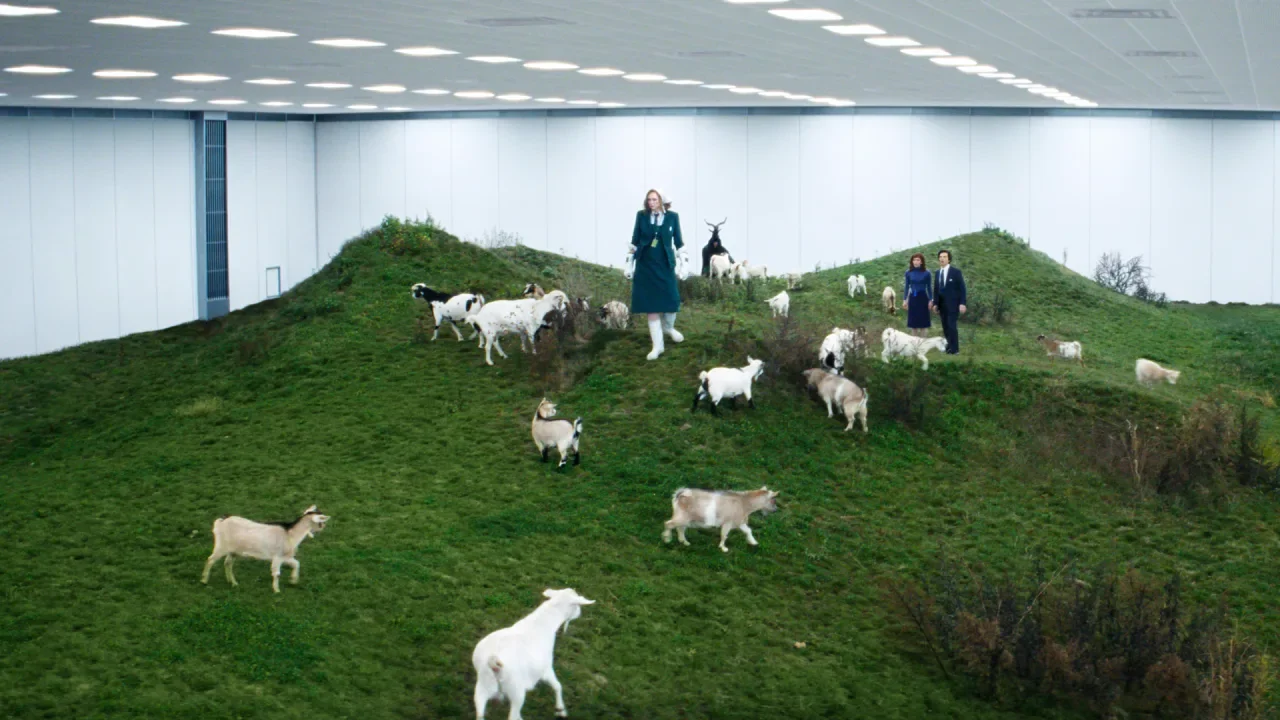
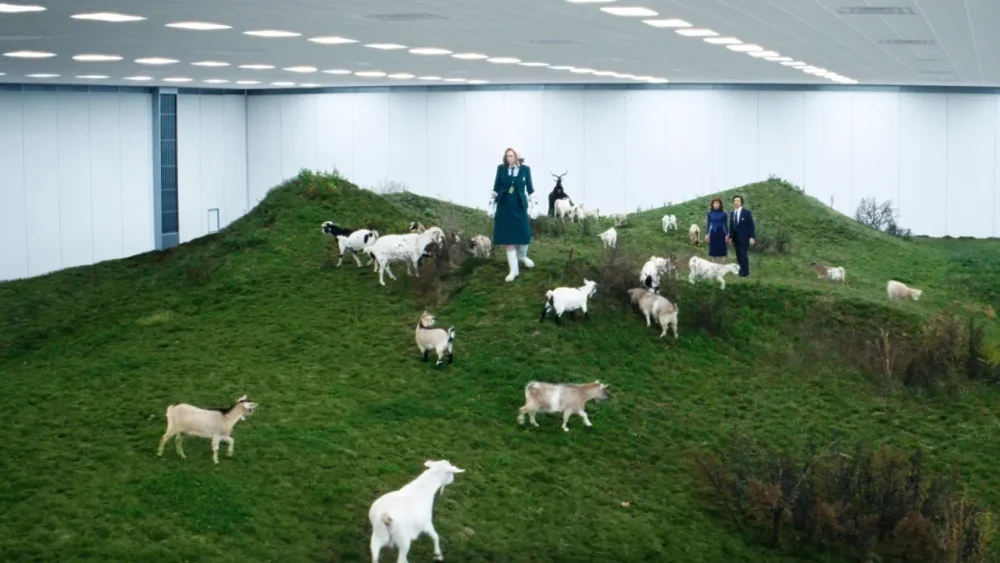
Severance is a set design wonderland. From a massive mirrored corporate monolith in New Jersey to a classical train station in upstate New York, the show’s distinctive visual language—which has captivated audiences and critics alike—relies on actual places that have been carefully chosen to mess with your head. These aren’t just random pretty buildings. They’re psychological weapons that connect the dots in the same way the writers weave the tapestry of the tale. Severance follows a group of humans that go through a procedure to separate their (outie) real lives from their (innie) corporate bees working for a mysterious industrial conglomerate call Lumon, effectively turning four people (Mark, Helly, Irving, and Dylan) into eight, each with distinct personalities and circumstances. In the same way, the show divides its architecture, confronting an inner corporate hellscape to an outside world that, in its own way, is also its own hellscape. In its second season, Severance has expanded way beyond the creepy white corridors in the “severed” underground floor of Lumon Industries’s of the first season. The show ventures into a more diverse architectural playground that deepens its exploration of corporate control and our fractured modern psyche. The show’s filming locations now span from New Jersey to upstate New York to Newfoundland, each chosen not just because they look cool on camera, but because of the subliminal messages their architectural features convey. [Image: Apple TV+] The Lumon headquarters The most iconic location in Severance is Lumon Industries’s headquarters—a massive, imposing structure that looms over the landscape like some corporate Death Star. In reality, this architectural marvel is the Bell Labs Holmdel Complex (now known as Bell Works) in New Jersey, a building whose real-world significance perfectly aligns with its fictional role. [Image: Apple TV+] “All those companies in the ’50s and ’60s, they had so much style, they had the most beautiful spaces, and they were proud of what they were doing,” explains Jeremy Hindle, Severance’s production designer, in an interview with Variety. “These corporate spaces are designed to dominate you and make sure that you know the rules.” No kidding. That’s exactly what makes Severance so viscerally disturbing—and so visually compelling. The architecture isn’t just pretty. It’s predatory. [Photo: Lee Beaumont/Flickr] Designed by renowned architect Eero Saarinen in 1958 and completed in the early 1960s, the Bell Labs complex stands as one of the most significant examples of mid-century corporate modernism in America. Its vast mirrored glass façade earned it the nickname “The World’s Largest Mirror” in architectural circles—a fitting metaphor for a show about reflection and duality. The building spans 2 million square feet with a central open-atrium scheme extending a quarter-mile. ca. 1987 [Photo: Gerard Garcia/Getty Images] When Saarinen designed the complex for Bell Telephone/AT&T researchers, it was conceived as a utopian workplace meant to foster community and collaboration. The central atrium was designed to encourage chance encounters between researchers from different departments—a physical manifestation of the cross-pollination of ideas, a concept that has been reproduced in many other corporate buildings, like Pixar’s and, most recently, Lego’s new HQs. Bell Works, ca. 2022. [Photo: Curlyrnd/Wiki Commons] Yet in Severance, this same architecture becomes oppressive and isolating. The cinematography transforms Saarinen’s idealistic vision into something cold and menacing—a very literal visual metaphor of how corporate utopias often become dystopias in practice. As architectural historian Jon Gertner told Curbed, Bell Labs was an “idea factory” but, in Severance, it became a factory for something far more sinister: the manufacturing of compliant workers through the literal division of consciousness. In Season 2, aerial shots reveal the building’s distinctive shape, which from above resembles a giant goat’s eye—a visual connection to the show’s recurring goat imagery and themes of surveillance. The water tower stands as a sentinel, further emphasizing the company’s technological dominance over the landscape and its employees’ lives. It’s like the Eye of Sauron, but for corporate America. [Image: Apple TV+] While Bell Works provides the exterior shots, the labyrinthine white hallways of Lumon’s severed floor were constructed at York Studios in the Bronx. These stark, minimalist corridors—with their fluorescent lighting, white walls, and complete absence of windows—create a timeless, placeless quality that reinforces the severed employees’ disconnection from the outside world. Season 2’s opening sequence features Mark running through these disorienting corridors, a scene that required weeks of planning and several days to shoot using a high-speed robotic camera called the Bolt. The design deliberately disorients viewers, making it impossible to create a coherent mental map of the space—mirroring the fragmented consciousness of the severed workers themselves. It’s architectural gaslighting at its finest. [Image: Apple TV+] This season we also got to see the surreal Mammalian’s Nurturable Room, where they have the goats. The production team built an enclosed tent on Brooklyn’s Marine Park Golf Course, with Industrial Light & Magic rendering the walls and ceiling in CGI. This hybrid of physical and digital architecture creates a dreamlike space that exists somewhere between reality and fantasy—much like the severed state itself. The blending of real and virtual elements mirrors the show’s exploration of how memory and perception shape our experience of space. The Great Doors factory Season 2 introduces another corporate space: the Great Doors factory. It’s the opposite of Lumon HQs, but no less oppressive. This is where Dylan—one of the four protagonists—looks for a new job after being fired from Lumon. He gets interviewed but not hired because he had the severance procedure to split his brain’s consciousness. Fun fact: Severance’s creator Dan Erickson was actually working in a door factory when he came up with the idea for the TV series. [Image: Apple TV+] The real location is the Red Owl Collective in the Midtown Arts District, in Kingston, a city in upstate New York. This 10,000-square-foot antique, vintage, and design emporium provides a richly textured industrial backdrop that contrasts with Lumon’s sterile environment while still conveying themes of labor and production. [Image: Google Maps] What makes these corporate spaces so effective in Severance is how they embody what architect Rem Koolhaas has called “junkspace”—environments designed not for human comfort but for corporate efficiency, where workers become interchangeable parts in a machine. The architecture doesn’t just house the corporation; it is the corporation made physical—a concrete and glass manifestation of power structures that shape human behavior and identity. [Image: Apple TV+] Brick and mortar split personalities If Lumon’s corporate architecture represents power and control, the residential spaces in Severance show more intimate themes of identity and memory. Mark’s and Irving’s apartments, filmed at the Village Gate Townhouses in Nyack, NY, and in the Waterfront at the Strand in Kingston, NY, respectively, are also featured in this season. Both represent each of their outie’s mental states: barren despair for Mark, and dark despair for Irving. Season 2 expands the show’s exploration of domestic architecture to visually reinforce the psychological state of characters caught between their innie and outie existences, introducing Dylan’s residence. In the real world, his familiar middle-class residence is at Kings Landing Condominium on Oxford Lane in Middletown, New Jersey. What’s fascinating about this location is the vision we get from above in one of the episodes. Some see a uterus, others Lumon’s logo upside down. I see both, perhaps an allegory to one of the show’s underlying themes: human reproduction. [Image: Apple TV+] The other side of this coin is the Eagan’s family residence, the owners of Lumon. It’s a massive glass structure visible in aerial shots near the Lumon headquarters, controlling it from afar. Home of the Helly E(gan)—the outie of innie Helly R—is truly a dream home. The modernist house embodies a cruel irony: the transparency that the Eagans deny their workers, they enjoy for themselves. They can see out while keeping others from seeing in. The architectural juxtaposition between the workers’ homes and the Eagan residence visually reinforces the show’s themes of class division and power imbalance. [Image: Apple TV+] If you are fascinated by this home and want to know where it is, you are not alone. I spent a few hours researching this one and it doesn’t seem to exist in the real world. Like other sets in the show, it appears to have been built as a set and enhanced with digital effects. In the architectural apartheid of Severance, buildings always tell us who has power and who doesn’t. The Eagans live in a house where they can see everything, while their employees live in spaces where they can only see what the company allows them to see. [Image: Apple TV+] Public spaces between worlds Season 2 of Severance ventures beyond the corporate and domestic realms to explore a variety of public spaces that serve as transitional zones between different states of being. These liminal spaces—train stations, parks, gateways—seem to physically embody the show’s central concern with boundaries and thresholds, particularly the boundary between severed and unsevered consciousness. One of Season 2’s most architecturally significant new locations is Utica’s Union Station, featured in Episode 9, titled “The After Hours.” Built in 1914 and designed by Allen Stem and Alfred Fellheimer—the same architects behind Grand Central Terminal—this classical train station with its impressive marble pillars provides the backdrop for an emotionally charged scene between Burt and Irving. It’s a beautiful space, grand architecture that speaks to an era of transition and movement, making it the perfect setting for a pivotal moment for the characters that resonates with the idea of splitting lives like the severing process does. The classical architecture creates a sense of permanence and history that contrasts with the transient nature of the characters’ meeting. The production spent approximately $2 million filming at this location for just two days in May 2023, adding fake snow to maintain the wintry Season 2 aesthetic. This transformation of a historical space into a fictional moment is a good example of how Severance uses real architecture as raw material for its psychological landscape. The location also had another less obvious connotation. When the scene ends, Irving takes the 2400RR line, a historical scenic line in the Adirondack Railroad, which begins in Oneida County and ends in the Genesee Counties. “If you know anything about cults, those two places should certainly ring several bells,” points out one redditor in the Severance subreddit. “Mormonism was founded in the Genesee Counties. […] The Oneida Community was a strange highly Puritanical yet also ‘free love’ (deviant sex encouraging, quasi-communist Christian sect that was founded in Oneida County in the latter half of the 20th century.” This clearly connects with Lumon Industries’s nature, which has an extremely dark background featuring a mythical origin story, a god-like founder, strange sex and corporate rituals, blind obedience, and child abuse, among other niceties. Some of Season 2’s most striking settings were filmed at Minnewaska State Park Preserve in New York’s Shawangunk Mountains. Used for both the Dieter Eagan National Forest in Episode 4 and the haunting Woe’s Hollow scenes, these locations leverage natural architecture—dramatic cliff views and frozen landscapes—to create environments that feel simultaneously beautiful and threatening. The Mohonk Testimonial Gateway in New Paltz, NY, returns in Season 2 as the entrance to the Damona Birthing Retreat. Built in 1908 as the formal entrance to the Mohonk Mountain House resort, this historical gatehouse creates a literal threshold between worlds—a perfect architectural metaphor for the show’s exploration of divided consciousness. In Episode 9, this gateway serves as the access point to Cabin 5, reinforcing its role as a transitional space between different states of being. Downtown Beacon continues to serve as the fictional town of Kier in Season 2, with the Beacon Building on Main Street functioning as the Hall of Records. The repurposing of this real small-town architecture creates a setting that feels simultaneously familiar and slightly off-kilter—a visual strategy that reinforces the show’s themes of distorted reality. [Image: Apple TV+] Other transitional spaces include a set prop phone booth constructed in front of a closed car repair shop near Kingston’s Wurts Street Bridge, and the shed featured in Season 2, Episode 3 “Who Is Alive?” positioned below Kingston’s Rondout Train Trestle. These constructed elements within existing architectural contexts show how the production designs spaces that connect the severed and unsevered worlds. Season 2 also ventures beyond New York state to the Canadian province of Newfoundland and Labrador for the Salt’s Neck sequences. These locations portray a run-down, former factory town wounded by the closure of a Lumon production plant. The remote, snowy landscapes contribute to the show’s atmosphere of isolation while the abandoned industrial architecture serves as a warning about the consequences of corporate abandonment—a ghost town that represents the ultimate symbol of Lumon’s disposable view of human labor. Which brings me to the ultimate point: Severance itself, its physical worlds, embodies the ultimate innie-outie dichotomy. A show that is both depressing with glimmers of hope, but ultimately depressing again. Every episode, I wonder if our protagonists would triumph against this techno-capitalists sect (I’m sorry, but I get Apple vibes all over, and I’m guessing its executives are not into the joke) or disappear into the oblivion of forgetfulness in the innies’ world and the carcass of mortal decay in the outies’ world. The answer will probably be both. View the full article
-
Search engine advertising involves paying platforms like Google, Bing, or Yahoo to display your ads when people search for keywords you pay for. Unlike organic search results (SEO), which take time to build, search ads appear almost instantly at the…Read more ›View the full article
-
Utilize new tech to level up thought leadership and advisory services. Gear Up for Growth With Jean Caragher For CPA Trendlines Go PRO for members-only access to more Jean Marie Caragher. View the full article
-
Utilize new tech to level up thought leadership and advisory services. Gear Up for Growth With Jean Caragher For CPA Trendlines Go PRO for members-only access to more Jean Marie Caragher. View the full article
-
Join us on March 27, 2025, for our in-depth webinar, where we'll explore how SEO professionals and B2B companies can effectively navigate changes. The post Q2 SEO & AI Update: How To Track & Optimize AI Search Performance [Webinar] appeared first on Search Engine Journal. View the full article
-
We may earn a commission from links on this page. Although the practice of making solid blocks of soil for growing seeds isn’t new (it may go back over 2000 years), soil blocking has gained popularity in the last few years. It’s not a complicated process: You form blocks of compressed seedling mix, lay them out on a tray, then plant into them. It works much like growing seeds in a plastic seed tray, without the tray. Using less plastic is only one benefit—the real reason people love soil blocking is that it creates seedlings with incredibly strong root systems, without getting root-bound. The air around the block acts as a pruning mechanism; the roots grow to the edge of the soil and then stop. The roots hold the soil block together, and can be easily up potted to continue growing inside, or transplanted directly into the garden. The drawbacks to soil blockingIn order to make seed blocks, you need soil that will compress well and hold together, and most often, that involves peat. Peat, a byproduct of swamps and bogs, is controversial because the harvesting has a dramatic environmental impact. Some people have had success with other mediums like coconut coir, but those people do not include me. I’ve tried coconut coir a few years in a row and have suffered from lack of germination and blocks falling apart, so I have gone back to seedling mixes with peat. The other major drawback to soil blocking is the actual blocking: It’s a pain in the ass. My first year, I was inspired by one of my gardening mentors, Meg Cowden of Seed to Fork, who speaks of the calm and meditative nature of blocking. Now, I regard blocking as a necessary evil each year that takes a lot of energy and soil. Still, the results speak for themselves. Soil blocks perform exceptionally well in tests against seed trays. Step one: Get a soil blocker Credit: Amanda Blum The first thing you’ll need is a soil blocker. There are all kinds of blockers on the market now, and many are inexpensive. Soil blocking is similar to making a sand castle or snow castle: You pack the soil tightly into a cube; the soil blocker compresses the cube, and helps spit it out. Soil blockers come in different sizes and layouts. There are mini blocks, which are an inch or so large (for flowers), and maxi blocks, which are four by four inches. But most people are going to want to start with two-by-two-inch blocks. A basic blocker will spit out four of these blocks at once. Step two: the right seed mix, at the right moisture level Credit: Amanda Blum Next, you’ll need the soil. Different kinds of plants at different stages all need different soil. When starting seeds, you want seedling mix, which is devoid of nutrients, has a lot of moisture retention, and is made of fine particles, so it can compact into seed trays. This is perfect for seed blocking, as long as that mix also includes peat or coconut coir. Get more soil than you think you’ll need, since by compressing the soil to make the block, you use more soil than you might with seed trays. I was able to make 100 blocks from a 12-quart bag. Empty the bag into a bin or other watertight container, and mix it with water. You want to use roughly three times the amount of water as soil, adding it slowly, and stopping to mix the water in two to three times. Soil can absorb an absurd amount of water; you want the soil wet, but not sopping. Grab a handful of the mix, and squeeze it in your hand. Does it clump together? If so, you’ve got enough water. If not, add more until it does. Step three: Have a tray for the soil blocksThe blocks will live on a tray, and it doesn’t matter much what kind of tray, as long as it can hold an inch or so of water, and is watertight. If you were using seed trays, they'd still need something to sit on like a bottom tray, so you've likely got some around. I’ve seen setups with standard 1020 trays and setups with cafeteria trays. The blocks sit right next to one another, so a 1020 tray can hold 50 blocks. A cafeteria tray, depending on its size, can hold much more. Step four: Set up your dibbles On the left, interchangeable dibbles, and on the right, dibbles installed on the blocker. Credit: Amanda Blum Before we start making blocks, you want to set up your dibbles. When you plant seeds, you have to plant them at the right depth, depending on the kind of seed. Sunflower seeds are buried very deep, for instance, while carrot seeds sit close to the surface of the soil. Your seed blocker has different dibbles you can add to your blocker, and they’ll make corresponding indentations in the soil block, so you can insert a seed more easily. Step five: Start blocking Credit: Amanda Blum Now let’s get down to actual blocking. Again, if you’ve ever made a sand castle, this won’t seem foreign, but the technique requires a little finesse. Holding the blocker upright, push it into the seedling mix over and over, rocking it back and forth, until you hit the bottom of the bin. This pushes soil into the blocker. Swiveling the blocker left and right while pressing against the bottom of the bin compresses the soil. After a few passes, lift the blocker upside down, and check that the four chambers are full. If they're not, keep taking passes, or you can just keep the blocker upside down and pack soil in with your other hand. Step 6: Line up the blocks on the tray Credit: Amanda Blum To dispense the blocks, move to the tray that will hold them. Push the blocker against the tray, while slowly depressing the handle and lifting up. This process should product four perfect blocks, but that doesn’t always happen, and if a block looks like it will fall apart, pick it up and toss it back into the bin. It’s just soil; it will crumble apart. The blocks are delicate at this stage but not immovable, if you’re gentle. Credit: Amanda Blum Now, start all over, and dispense more blocks. Keep going until you have as many as you’d like on that particular tray. At this point, it’s time to plant some seeds. Treat each block like a cell in a seed tray. Plant one or two tomato seeds, or a bunch of carrot seeds, or a single pumpkin seed. Cover the seed up with some extra seed mix. Step 7: Seed the blocksFrom here on it, the process is just like growing in seed trays. The soil needs heat, so place your tray on a heated seed mat. The blocks need water, so you should fill the tray every few days with just enough water to cover the bottom of the tray entirely. The blocks will soak up the water and remain moist, ensuring germination. The seeds need humidity, so covering the blocks with a plastic dome will ensure there’s enough moisture. Finally, the blocks need light, so ensure there’s enough light on the tray, especially after the seeds germinate. Tomatoes grown in seed blocks Credit: Amanda Blum The seeds will grow just as they would in a seed tray scenario, and at some point, will be too big for the blocks. Along the way you’ll want to choose one seedling per block, and cut the other seedling away. You can choose to up-pot the blocks into containers or paper pots, or plant the blocks right in the garden, if it's not too early. Usually I up-pot the seedlings after a few weeks, and they’ll remain in four-by-four-inch pots until it's time for them to go in the ground. Blocks that don’t germinate for some reason can be recycled for next year by simply tossing the block back into the bin of seedling mix. View the full article
-
It finally happened: Threads officially allows you to choose a default feed to see when you open the app, whether that be "Following" or a custom feed you've created yourself. This means that when you open Threads, you'll be able to view posts from the accounts you chose to follow, instead of seeing what the algorithm wants you to. Meta has been testing this feature for a few months, and is now rolling it out to everyone—in addition to a few other new features. How to change Threads' default feed to FollowingThe process of changing your default feed is straightforward. Follow these steps: Open the Threads app on your phone and go to the Home tab. You'll see all your feeds in different tabs at the top of the screen, just below the Threads logo. Tap and hold any of these feeds and select Edit Feeds. This will reveal all your feeds in a list. Hold any feed here and drag it up or down to reorder the list. The first one in the list will automatically become your new default feed. Feel free to set it to Following or any custom feed you've created. Note that this feature is being rolled out slowly, so it may take a while before you see it on your phone. Other updates to ThreadsWith the same update, Threads has added a few more useful features to the app. My personal favorite is the new video player, which finally has basic playback controls and a progress bar that you can easily access. There's a new play/pause button in between the rewind and forward buttons. You can use those buttons to skip back or forward by 10 seconds at a time. The progress bar appears below each video and it's big enough to scrub through videos. It's a great change: Without these features, watching videos on Threads often felt like watching looping gifs. You can also limit replies and quotes of your posts. When you compose a new post in Threads, tap the Anyone can reply & quote button, located to the left of the Post button. This lets you limit replies and quoting to your followers, mentioned accounts, or accounts you follow. Separately, Meta is testing the ability to add up to 10 topics to your Threads profile. Tapping these topics leads you to conversations around those subjects, similar to how hashtags work on other social media platforms. When you compose a new post in Threads, you may see a button that lets you add a trending topic to the post. If you use it, your post could reach a larger audience than usual. View the full article
-
Here is a recap of what happened in the search forums today, through the eyes of the Search Engine Roundtable and other search forums on the web...View the full article
-
The three key IRS tools every pro must learn today. By Eric L. Green, LLM Go PRO for members-only access to more Eric Green. View the full article
-
The three key IRS tools every pro must learn today. By Eric L. Green, LLM Go PRO for members-only access to more Eric Green. View the full article
-
Google Business Profile suspensions are rising, with appeal times now hitting five weeks. Experts say one thing is clear: Don’t make any changes. The post Google Business Profile Suspensions Rise, But Appeals Are Delayed appeared first on Search Engine Journal. View the full article
-
Click here to purchase “Digital Nomad Nation: The Rise of a Borderless Generation” in eBook (PDF + ePub) to read, or upload to your preferred …View the full article
-
Wall Street on course for longest losing streak in nearly three yearsView the full article
-
But what does “quality” even mean? Some people think the Alchemist changed their lives, while others think it’s the worst thing ever written. What’s “quality” to one reader may be complete BS to another. So how do you measure whether…Read more ›View the full article
-
Anthropic's AI assistant Claude now searches the web, providing current information with source citations for paid US users. The post Anthropic’s Claude Can Search The Web, Closing Gap With ChatGPT appeared first on Search Engine Journal. View the full article
-
Mac users take note: A well-known (and relatively sophisticated) phishing scheme previously targeting Windows is now being redirected at macOS and Safari in an attempt to obtain login credentials (your Apple ID). On Windows, this scam worked by displaying fake security alerts on compromised websites claiming that the user's device had been "compromised" or locked" at the same time that malicious code caused the website itself to freeze (making the scam more convincing). The notification prompted users to enter their Windows credentials to regain access—obviously handing them directly to the attackers to take over their accounts. Users were also advised to call a fake hotline, where they were pressured to pay a ransom or allow remote access to their machines. According to a post by LayerX Labs covering the scam, this attack was successful for over a year—in part because the alerts impersonated real Microsoft notifications so well, with sophisticated phishing sites hosted on a legitimate Microsoft domain (windows[.]net) and randomized subdomains that rotated frequently. How this phishing campaign works on MacAs 9to5Mac notes, the campaign quickly pivoted to targeting macOS and Safari after anti-scareware was released for Edge, Chrome, and Firefox in February. It works similarly with pages and text modified for Mac. You can be targeted on Safari if you mistype a URL while trying to access a legitimate website, after which you'll be redirected through a compromised "parking" page to a phishing attack page. As with Windows, you may be prompted to enter your Apple credentials to fix the problem. LayerX Labs states that phishing campaigns targeting Mac "have rarely reached this level of sophistication," though the screenshots of the security pop-ups included in the report contain spelling errors and don't fit Apple's style. As always, bring a critical eye to any communication or alerts that seem urgent or request sensitive information, as you'll usually be able to spot such discrepancies. Otherwise, make sure you type in the correct URL for the sites you want to visit, or search for them on Google and scroll past the ads to the real results before clicking through. And keep an eye out for security updates from Apple so you can download and install patches as soon as they are released. View the full article
-
Heathrow Airport, Europe’s busiest, has shut down today, following a fire last night at a nearby electrical substation that caused a major power outage. The closure has disrupted at least 1,350 flights, according to Flightradar24, with some aircraft diverted to alternate airports like Gatwick, Amsterdam’s Schiphol, and Paris’s Charles de Gaulle. What caused the fire? While the cause of the fire is still under investigation, British officials have stated that there is no evidence of foul play. According to the London Fire Brigade, the fire broke out at an electrical substation around 11:20 p.m. on Thursday, involving a transformer containing 25,000 liters of cooling oil “that was fully alight.” The blaze posed a serious risk due to “live high-voltage equipment and the nature of an oil-fueled fire,” the brigade said. Around 70 firefighters responded to the incident. As of the latest update, about 10% of the fire remains burning. The incident left 67,000 homes without power, with 5,000 still affected. Both Heathrow Terminals 2 and 4 are without power. Additionally, around 150 people were evacuated to a rest center for safety. Firefighters and emergency services are continuing to address the situation. “This was a very visible and significant incident, and our firefighters worked tirelessly in challenging conditions to bring the fire under control as swiftly as possible,” Pat Goulbourne, assistant commissioner of the London Fire Brigade, said in a statement. What should I do if I have a flight from Heathrow Airport today? Heathrow Airport confirmed that it would remain closed until at least 11:59 p.m. on Friday, warning passengers not to attempt to travel. Authorities have warned of continued disruptions and advised travelers to check with their airlines for updates. The U.K.’s Department for Transport travel guide includes a detailed breakdown of passenger rights covered by law when something goes wrong at a U.K. airport. View the full article