ResidentialBusiness
Administrators
-
Joined
-
Last visited
Everything posted by ResidentialBusiness
-
 Central bank chair could stay on board beyond this year in effort to protect central bank’s independence View the full article
 -
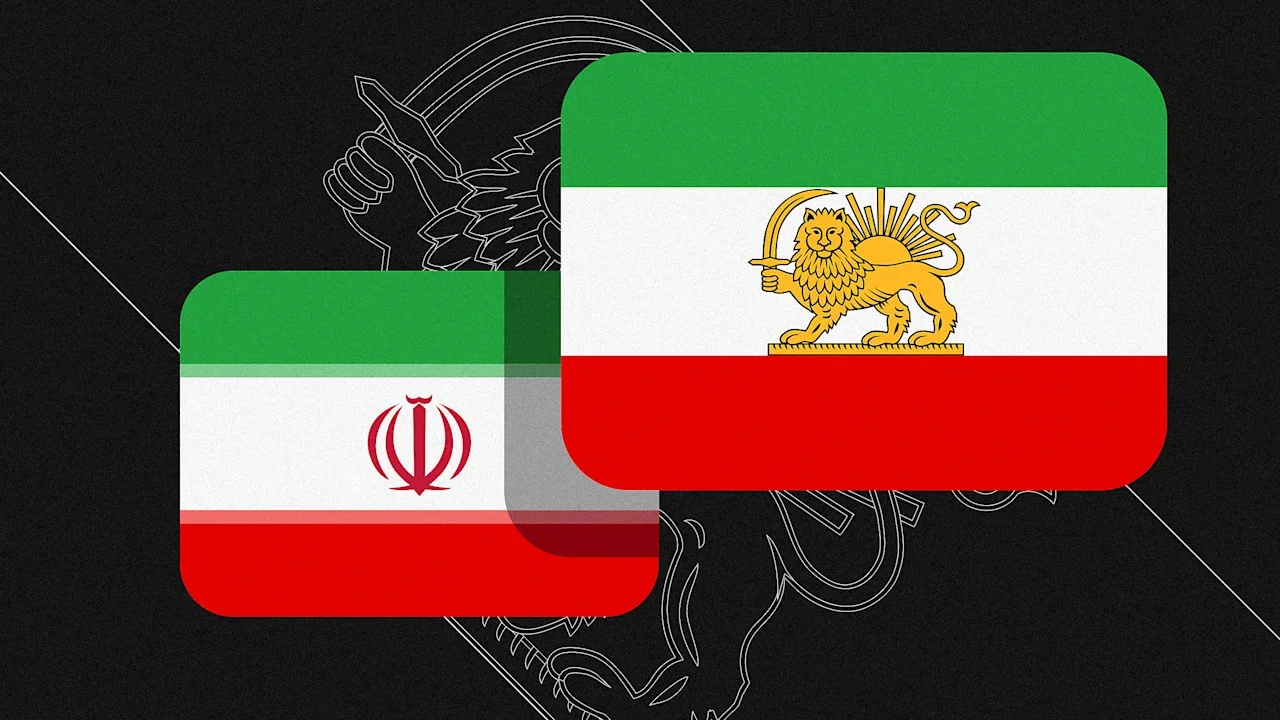
Iran hasn’t changed its flag, but the emoji for it has changed on X, the social network previously known as Twitter. Iran’s tricolor flag features green, white, and red horizontal stripes, with the country’s national emblem displayed in its center white stripe. But some opposition groups use a historical flag that instead shows a golden lion holding a sword in front of a sun. Since ongoing anti-government demonstrations erupted in Iran in December, that lion-and-sun version of the flag has been used as a symbol of protest around the world, including in demonstrations over the weekend in Los Angeles and London, where one protester held the flag at the Iranian embassy after taking down the national flag. Now it’s also on X. After an X user asked the site’s head of product, Nikita Bier, to update the flag last Thursday, Bier responded, “Give me a few hours.” The updated emoji appeared first on the web browser version of the site before rolling out to iOS devices. Other emoji vendors like Google and Facebook still use the standard emoji of Iran’s national flag, so the lion-and-sun flag isn’t available on most platforms, and it’s also not available for X on Android devices. The change on X, though, meant that accounts tied to Iran’s Ministry of Foreign Affairs suddenly found their bios displaying an emoji that could be construed as anti-regime. Iran’s foreign ministry has since removed the emoji from its bio. X previously used default Apple emoji on iOS, but since 2023, it has used its own native emoji, according to Emojipedia. X last redesigned an emoji in 2024, when it changed its pistol emoji from a green water pistol back to an actual pistol. Protests in Iran began on December 28 over deteriorating economic conditions. They have reached every province in the country. At least 572 people have died, and more than 10,600 people have been detained, according to the Human Rights Activists News Agency (HRANA), a U.S.-based nongovernmental organization. X users in the country haven’t had much of a chance to use or sound off about the new emoji, as Iran shut down internet access and telephone lines last Thursday. View the full article
-
Nearly half of all credit card users carry a balance, according to Academy Bank. Higher non-mortgage debt levels can affect home loan underwriting. View the full article
-
Love it or hate it, the Apple ecosystem really does have its perks. Take "Handoff," for example. With this feature, you can be working in one app on one of your devices, then continue on in the same app on one of your other devices. You can start an article in Safari on your iPhone, then finish it on your Mac, without needing to google the piece and scroll to find your spot. It isn't 100%, but when it works, it's pretty great. Microsoft actually offers a similar feature over on Windows, though it's so limited, you might not even know it exists. The feature is called Resume, and the idea is to allow you to pick up your place in an app from another device on your PC. For the most part, that means Android apps; so if you have a PC and an Android phone, Resume could offer the same benefits as someone with a Mac and an iPhone. However, so few apps actually work with Resume, that it's effectively useless. Microsoft's "Handoff" moment is coming As spotted by Windows Latest, Microsoft is making some serious updates to Resume. The company recently updated the Resume support document, which confirms Microsoft is opening the feature up to more Android apps. The support document doesn't specify what apps might be coming, but it doesn't necessarily have to for this news to be exciting; rather, the development alone implies that many more Android apps will likely be on the way—assuming their developers simply get on board. As Windows Latest explains, the reason Resume has been so limited is due to how restrictive Microsoft's API is. The only apps that can currently tap into Resume are ones that have access to the "Link to Windows" API. Many Android developers either don't know how to develop with this API, or simply can't, since their apps are not compatible. The latest update to Resume offers developers another option, however: Now, developers can use Windows Notification System (WNS), a built-in API that is far more common and supports far more apps. That said, developers can't just update their apps with the WNS and expect to be compatible with Resume. Microsoft tells Windows Latest that developers need to reach out to Microsoft directly for approval. That application needs to include the developer's WNS registration, the app's Package SID, a summary of what the app does, and screenshots of the app in action. It's basically like signing up for TSA PreCheck: Most of us who apply will likely get approved, but they don't just let anyone decide to join. You need to provide proof you qualify and submit for screening before you get there. That will likely end up working well for anyone who's interested in using Resume: The apps that will be available will all be vetted by Microsoft, so there should only be legitimate and useful apps offering that linking capability. How to enable Resume on WindowsThese changes probably won't roll out for some time on Windows. However, you can set yourself up for success now by turning the feature on. To start, head to Settings > Apps, then scroll until you find "Resume." Here, turn on the feature. Right now, you'll probably see the only app that is compatible is OneDrive. You can connect it if you wish, which will let you work on a document across both your Android device and your PC. View the full article
-
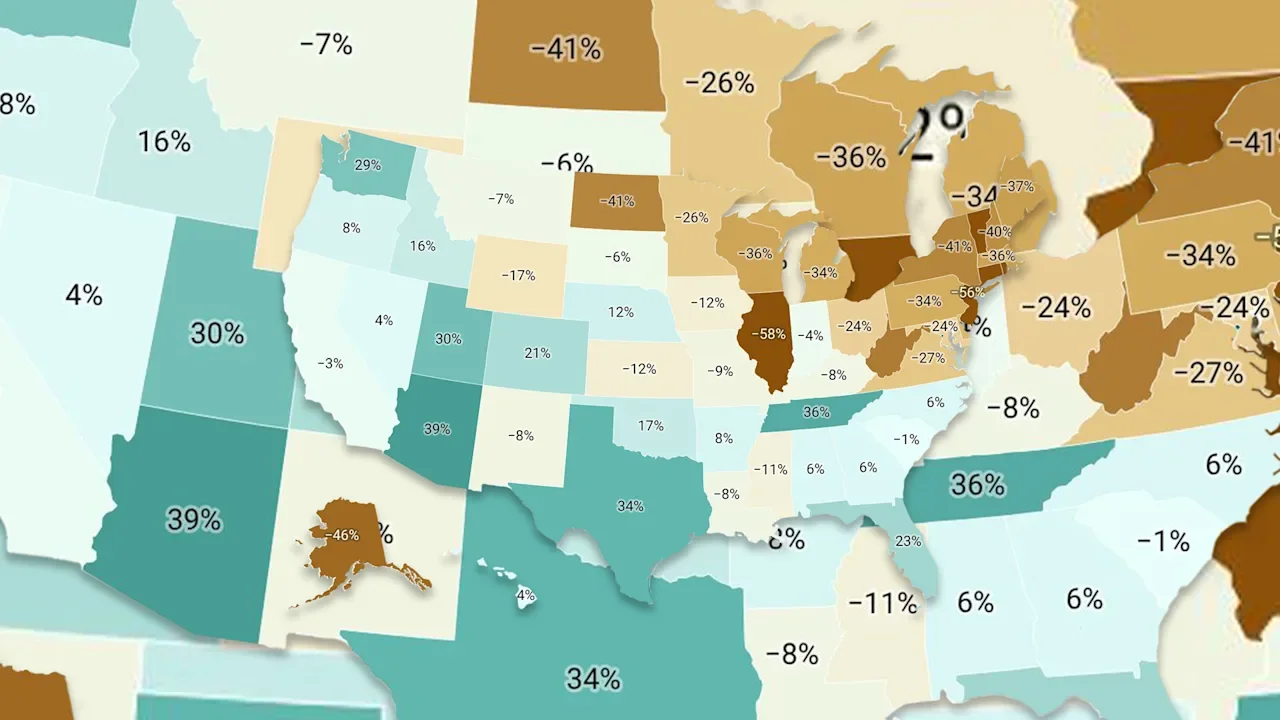
Want more housing market stories from Lance Lambert’s ResiClub in your inbox? Subscribe to the ResiClub newsletter. When assessing home price momentum, ResiClub believes it’s important to monitor active listings and months of supply. If active listings start to rapidly increase as homes remain on the market for longer periods, it may indicate pricing softness or weakness. Conversely, a rapid decline in active listings beyond seasonality could suggest a market that is heating up. Since the national Pandemic Housing Boom fizzled out in 2022, the national power dynamic has slowly been shifting directionally from sellers to buyers. Of course, across the country that shift has varied. Generally speaking, local housing markets where active inventory has jumped above pre-pandemic 2019 levels have experienced softer home price growth (or outright price declines) over the past 36 months. Conversely, local housing markets where active inventory remains far below pre-pandemic 2019 levels have, generally speaking, experienced more resilient home price growth over the past 36 months. Where is national active inventory headed? National active listings are on the rise on a year-over-year basis (+12.1% between December 2024 and December 2025). This indicates that homebuyers have gained some leverage in many parts of the country over the past year. Some sellers markets have turned into balanced markets, and more balanced markets have turned into buyers markets. Nationally, we’re still below pre-pandemic 2019 inventory levels (-5.5% below December 2019) and some resale markets, in particular chunks of the Midwest and Northeast, still remain tight-ish. While national active inventory is still up year-over-year, the pace of growth has slowed in recent months—more than typical seasonality would suggest—as some sellers have thrown in the towel and delisted in weak/soft markets. December inventory/active listings total, according to Realtor.com: December 2017 -> 1,127,799 📉 December 2018 -> 1,185,865 📈 December 2019 -> 1,033,887 📉 December 2020 -> 612,300 📉(Pandemic Housing Boom overheating) December 2021 -> 445,303 📉 (Pandemic Housing Boom overheating) December 2022 -> 680,925 📈 December 2023 -> 714,176 📈 December 2024 -> 871,509 📈 December 2025 -> 976,833 📈 If we maintain the current year-over-year pace of inventory growth (+105,324 homes for sale), we’d have 1,082,157 active inventory come December 2026. Below is the year-over-year active inventory percentage change by state. While active housing inventory is rising in most markets on a year-over-year basis, some markets still remain tight-ish (although it’s loosening in those places too). As ResiClub has been documenting, both active resale and new homes for sale remain the most limited across huge swaths of the Midwest and Northeast. That’s where home sellers next spring are likely, relatively speaking, to have more power than their peers in many Southern markets. In contrast, active housing inventory for sale has neared or surpassed pre-pandemic 2019 levels in many parts of the Sun Belt and Mountain West, including metro area housing markets such as Punta Gorda and Austin. Many of these areas saw major price surges during the Pandemic Housing Boom, with home prices getting stretched compared to local incomes. As pandemic-driven domestic migration slowed and mortgage rates rose, markets like Punta Gorda and Austin faced challenges, relying on local income levels to support frothy home prices. This softening trend was accelerated further by an abundance of new home supply in the Sun Belt. Builders are often willing to lower prices or offer affordability incentives (if they have the margins to do so) to maintain sales in a shifted market, which also has a cooling effect on the resale market: Some buyers, who would have previously considered existing homes, are now opting for new homes with more favorable deals—which then puts some additional upward pressure on resale inventory. At the end of December 2025, 17 states were above pre-pandemic 2019 active inventory levels: Alabama, Arkansas, Arizona, Colorado, Florida, Georgia, Hawaii, Idaho, Nebraska, Nevada, North Carolina, Oklahoma, Oregon, Tennessee, Texas, Utah, and Washington. (The District of Columbia—which we left out of this analysis—is also back above pre-pandemic 2019 active inventory levels too. Softness in D.C. proper’s predates the current admin’s job cuts.) Big picture: Over the past few years we’ve observed a softening across many housing markets as strained affordability tempers the fervor of a market that was unsustainably hot during the Pandemic Housing Boom. While home prices are falling some in pockets of the Sun Belt, a big chunk of Northeast and Midwest markets still eked out a little price appreciation in 2025. Nationally aggregated home prices were pretty close to flat in 2025. Below is another version of the table above—but this one includes every month since January 2017. View the full article
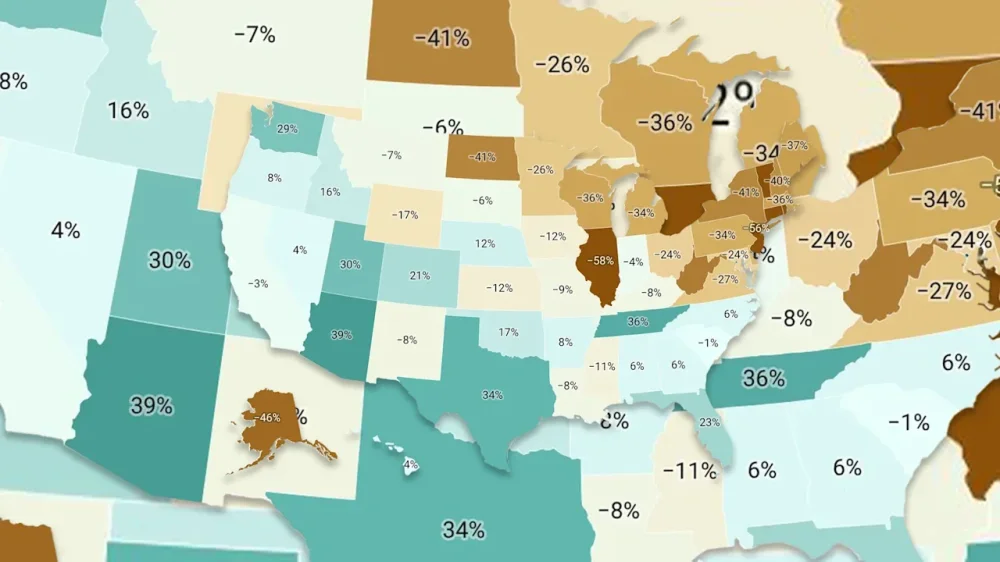
-
There are many made-up celebrations these days, but at least National Pizza Week delivers something tasty. Coming in hot on the heels of so-called quitter’s day, when many people abandon their New Year’s resolutions, pizza shops around the U.S. will be tossing around some deals that could save customers some dough. Of course, many people don’t need an excuse to eat pizza—on any given day, about 11% of Americans do so, according to a study released in 2024 by the U.S. Department of Agriculture. Americans grappling with the high cost of living got some relief as inflation cooled in November, but that doesn’t mean that food prices have come down—and particularly for families, some of these promotions can be very helpful in stretching their budgets. Several of the national chains will be serving up for National Pizza Week, which runs through Saturday. DEALS SPECIFIC TO NATIONAL PIZZA WEEK A few pizza chains with locations around the U.S. are running specials that are specifically tied to National Pizza Week, and may require membership in their loyalty programs to take advantage. At Chuck E. Cheese, for example, members of its “fun pass” get an exclusive deal: $5 for a large one-topping pizza through January 15. Meanwhile, California Pizza Kitchen is offering members of its loyalty program $5 pizzas with any $25 purchase. Casey’s is offering 25% off any pizza through January 17, though you will need to know the (very intuitive) code PIZZAWEEK to score this deal and Papa Murphy’s has a similar deal of 30% off regular-priced pizzas with the code PZWK26. Finally, Marco’s Pizza is running a promotion for takeout orders this week of $3 off any large specialty pizza, with no code required. OTHER PIZZA DEALS It’s sometimes hard to know what full price is for many food items at the largest pizza chains because they seem to always be running some sort of deal or other. And, indeed, the three pizza chains with the most locations in the U.S.—Domino’s, Pizza Hut, and Little Caesars—all have some deals on pizza that are running this week, though don’t appear to be explicitly tied to the National Pizza Week festivities. At the 7,000-plus Domino’s locations in the U.S., you should come hungry to score some of its best deals. For $6.99 each, customers can get a mix-and-match deal and choose any two items—like medium pizzas, sides, and desserts—for $6.99 each. For $7.99 each, you can instead opt for a one-topping pizza and an eight-piece order of wings or boneless chicken if you do carryout. For $9.99 each, you can choose from any two or more of its line of specialty pizzas. Finally, for $19.99, the Ann Arbor, Michigan-based chain is promising the “perfect combo meal” that includes two medium one-topping pizzas and two orders of 16-piece bread bites. Pizza Hut is in the midst of a comeback of sorts with an assist from former NFL Hall of Famer Tom Brady, who has been on TV commercials touting the chain’s Big New Yorker pizza, a 16-inch pizza that’s currently on special for $10. Meanwhile, for $6.99, customers can opt for a “hut box” deal that includes choice of an entree—a personal pan pizza, chicken wings, or a melt—along with a side of either fries or wings. The Plano, Texas-based chain also offers bigger meal deals, starting at $19.99, that might be enough to feed a family and include a mix of pizzas, sides, and choice of a dessert. Finally, Little Caesars is also running several promotions this week with prices that undercut its competitors. For $4.99 each, you can customize two one-topping pizzas from the Detroit-based chain through January 18. You can also score 15% orders of $15 or more or 20% off orders of $20 or more this week. However, to take advantage of all of these deals, you will need to know the deal-specific codes, which can be found on its website. View the full article

-
The The President administration’s criminal investigation of Federal Reserve Chair Jerome Powell appeared on Monday to be emboldening defenders of the U.S. central bank against the efforts of President Donald The President to control the Fed. The backlash reflected the bigger stakes of a contest about the fate of the Fed’s independence, the balance of power within the federal government, and the path of the U.S. economy. The President has long publicly lashed out against Powell for not slashing the Fed’s benchmark interest rates to his liking, but the prospect of a criminal indictment was a step too far for an institution that has an outsized influence on both inflation and the job market. Several Republican senators have condemned the Department of Justice’s subpoenas of the Fed, which Powell revealed Sunday and characterized as “pretexts” to pressure him to sharply cut interest rates as The President has demanded. Powell also said the Justice Department has threatened criminal indictments over his June testimony to Congress about the cost and design elements of a building renovation. The President has repeatedly used investigations — which might or might not lead to an actual indictment — to attack his political rivals, including Fed governor Lisa Cook, New York Attorney General Letitia James, and James Comey, the former FBI director. White House press secretary Karoline Leavitt told reporters that The President did not direct his Justice Department to investigate Powell. “One thing for sure, the president’s made it quite clear, is Jerome Powell is bad at his job,” Leavitt said. “As for whether or not Jerome Powell is a criminal, that’s an answer the Department of Justice is going to have to find out.” A bipartisan group of former Fed chairs and top economists on Monday compared the The President administration’s actions to moves made in more impoverished countries. Some analysts said that the financial market’s muted response reflects a widespread belief that Powell could successfully fend off the allegations that his description to lawmakers of the Fed’s $2.5 billion project was criminal. “I think this is ham-handed, counter-productive, and going to set back the president’s cause,” said Jason Furman, an economist at Harvard and former top adviser to President Barack Obama. It could also unify the Fed’s interest-rate setting committee in support of Powell, and means “the next Fed chair will be under more pressure to prove their independence.” The subpoenas apply to the price tag of renovating Fed buildings, including its marble-clad headquarters in Washington, D.C. They come at an unusual moment when The President was teasing the likelihood of announcing his nominee this month to succeed Powell as the Fed chair, after The President last summer played down the idea that the Fed’s renovation costs were a fireable offense. While Powell’s term as chair ends in May, he has a separate term as a Fed governor until January 2028. The President’s moves could make it more likely that Powell will stay on the Fed’s governing board after his term as chair ends in May in order to defend the Fed’s independence from politics in making its decisions on interest rates, Furman said. While an interest rate cut was already considered unlikely at the Fed’s next meeting in about two weeks, the news of the Justice Department investigation likely means that the Fed would avoid cuts at the next meeting in order to send the message that it cannot be pressured by politics, economists said. Powell quickly found a growing number of defenders among Republicans in the Senate, who will have the choice of whether to confirm The President’s planned picks for Fed chair. Sen. Thom Tillis, a North Carolina Republican and member of the Senate Banking panel, said late Sunday in response to the subpoenas that he would oppose any of the The President administration’s nominees for the Fed, including to replace Powell. “If there were any remaining doubt whether advisers within the The President Administration are actively pushing to end the independence of the Federal Reserve, there should now be none,” Tillis said. Sen. Lisa Murkowski, an Alaska Republican, backed Tillis’ approach Monday. “After speaking with Chair Powell this morning, it’s clear the administration’s investigation is nothing more than an attempt at coercion,” Murkowski said. She voted against the White House’s nomination of Stephen Miran to the Fed’s board in September, which was barely approved by a 48-47 vote. Miran continues to be The President’s chair of the White House Council of Economic Advisers, although he is on leave due to his post at the Fed. The President has for the past year sought to pressure Powell into having the Fed slash its benchmark interest rates — a move that reflects a fundamental break over whether inflation still poses any risk to the U.S. economy. Powell maintains that inflation is still elevated in the aftermath of The President’s tariffs and has moved cautiously, whereas The President claims that inflation is no longer a worry and rates should be dramatically slashed. “I have carried out my duties without political fear or favor, focused solely on our mandate of price stability and maximum employment,” Powell said in a Sunday night video disclosing the subpoenas. “Public service sometimes requires standing firm in the face of threats.” If Powell stays on the board after his term as chair ends in May, the The President administration would be deprived of the chance to fill another seat on the board. Powell has declined at several press conferences to answer questions about his plans. Asked on Monday by reporters if Powell planned to remain a Fed governor, Kevin Hassett, director of the White House National Economic Council and a leading candidate to become Fed chair, said he was unaware of Powell’s plans. “I’ve not talked to Jay about that,” Hassett said. Powell, jettisoning the cautious approach he has taken since The President began attacking him last year for not cutting rates sharply enough, said on Sunday the subpoenas were a “pretext” to force the Fed to cut its key short-term interest rate. Sen. Kevin Cramer, a Republican from North Dakota, a frequent Powell critic, said Monday that he does not think that the Fed chair is “a criminal” and said he hopes that “this criminal investigation can be put to rest quickly,” according to CNBC. The bipartisan group of former Fed chairs and top economists said in their Monday letter that the White House’s legal actions and the possible loss of Fed independence could hurt the broader economy. “This is how monetary policy is made in emerging markets with weak institutions, with highly negative consequences for inflation and the functioning of their economies more broadly,” the statement said. “It has no place in the United States whose greatest strength is the rule of law, which is at the foundation of our economic success.” The statement was signed by former Fed chairs Ben Bernanke, Janet Yellen, and Alan Greenspan, as well as former Treasury Secretaries Henry Paulson and Robert Rubin. Still, The President’s pressure campaign had been building for some time. The president relentlessly criticized and belittled Powell, attempting to blame him for some of the discontent over the economy that followed the president’s own tariff announcements. The President appeared to preview the shocking news of the subpoenas at a Dec. 29 news conference. The president said his administration would “probably” sue Powell for “gross incompetence” on the cost of renovations, calling it the “highest price of construction per square foot in the history of the world.” “He’s just a very incompetent man,” The President said. “But we’re going to probably bring a lawsuit against him.” —Christopher Rugaber and Josh Boak, Associated Press View the full article

-
Cardio is good for us. We need both cardio and strength training for basic health, as well as our athletic goals. But what actually counts as cardio? Can you count walking? Lifting weights? Anything so long as you’re in the right zone? Let me break it down. What is the definition of cardio? Trick question! “Cardio” is a nickname for a certain rough category of exercise, and it doesn't have a precise definition. You’ll find different definitions of it depending on who you ask, and a lot of the research on the benefits of cardio just calls it “exercise." The closest technical term is "aerobic activity." The Physical Activity Guidelines for Americans describes aerobic activity as when: ...the body’s large muscles move in a rhythmic manner for a sustained period of time. Brisk walking, running, bicycling, jumping rope, and swimming are all examples. Aerobic activity causes a person’s heart to beat faster, and they will breathe harder than normal. That matches the World Health Organization definition, as well as the way most fitness professionals use the terms "aerobic" or "cardio" exercise. Note that the key components are: It uses large muscles (like the legs; you can’t get cardio by twiddling your thumbs) It's rhythmic (as when you pedal a bicycle for hundreds of revolutions) It can be sustained (like a 20-minute bike ride, but unlike a set of 10 squats) Exercises that fit the definition include walking, running, cycling, swimming, and using machines like a rower, elliptical, or stair machine at the gym. Is there a certain heart rate or zone that counts as cardio?No, there isn’t a strict dividing line between what counts as cardio and what doesn’t. The guidelines I quote above treat “moderate” intensity cardio as the minimum to target, but that’s not defined in terms of heart rate. I have a breakdown here of what “moderate” really means, but briefly: Anything at the effort level of a normal-paced walk (about 20 minutes per mile) is moderate. I know that’s not the answer you were hoping to find, so here’s another data point: the American Heart Association says that moderate exercise corresponds to 50-70% of your maximum heart rate. (Vigorous is 70-85%.) Most of us don’t actually know our true max heart rate, and formulas like “220 minus your age” aren’t accurate. So take that with a grain of salt. It’s more helpful to consider how exercise feels: Moderate exercise will get you breathing heavier than at rest, maybe sweating a little bit, and with a noticeably higher heart rate than when you’re sitting quietly. You don’t have to be out of breath; moderate exercise is conversational, in the sense that you could, literally, engage in conversation while you do it. If you want to get health benefits from cardio, you may want to pay more attention to intensity. Moderate exercise is great, but vigorous exercise (where it feels hard, and you won’t be able to speak in full sentences) is also excellent to have in the mix. The Norwegian 4x4 is an accessible cardio workout that features plenty of vigorous work. Does walking count as cardio? Yes, in the sense that it meets the minimum guidelines. It is moderate intensity exercise and it counts toward your minutes per week (no matter what your heart rate is while you do it). But if you have athletic goals, walking alone is probably not enough to achieve them. If walking feels easy, you probably want to increase the intensity to increase your cardio fitness. Jogging or rucking would be good next steps. Does lifting weights count as cardio?No, lifting weights does not count as cardio (with a few exceptions, which I’ll discuss in a minute.) Remember, cardio has to be rhythmic and sustained. If you aren’t doing the same movement over and over for, say, 10 minutes, it’s not cardio. So three sets of 10 on the chest press machine is definitely not cardio. You probably spent about five minutes in total, most of them resting. Doesn't count. And no, I won’t change my answer based on what your heart rate monitor says. Your heart rate only measures the intensity of cardio exercise if you are doing cardio exercise. Strength training is still strength training (not cardio) no matter what zone your heart rate is in. So what are those exceptions I mentioned? Exercising with weights can count as cardio if it meets the definition: rhythmic and sustained. Most people don’t do this! But if you’re training for a kettlebell half marathon, which is 30 minutes of the same motion, continuously, with a light kettlebell (you aren’t allowed to put the kettlebell down until time is up), then yes, that is cardio. I would also categorize the kettlebell ladder workout as a form of cardio. I do so with reservations—it’s not continuous for the whole 30-ish minutes, but then again neither is a lot of interval training. Kettlebell swings are definitely rhythmic and involve large muscles, and the workout is designed to get your breathing and heartbeat going faster than usual for pretty much the whole time. I’ll allow it. Does HIIT count as cardio? High-intensity interval training definitely taxes your cardiovascular system, but it's not necessarily the best workout when you're looking for a way to get some cardio in. If you're doing true HIIT, it's very intense, very short, and may have longish rest periods in between the hard intervals. You're working your anaerobic system, not just your aerobic capacity, so it has some of the same caveats as lifting weights. What's more, a lot of "HIIT" videos out there aren't really HIIT, and aren't even necessarily good cardio. As I've written before, "HIIT" seems to mean "a video with a timer in the corner," regardless of what kind of workout you get out of it. If you're looking for a good cardio workout, it's better to find something where you know you'll be working aerobically—which means being able to breathe rather than gasp—throughout the whole workout. What other exercises count as cardio? I’ve given some examples already, but let me give you a longer list of things that are definitely cardio, if you do them in any sort of normal way (steady state or intervals, especially if the intervals use active rest like walking). Running, jogging, or run/walk intervals (indoor or outdoor) Cycling (indoor or outdoor) Rowing on a gym machine Paddling or rowing a small boat Jumping rope Dancing (truly the most underrated form of at-home cardio) Stairmaster or stepmill machines Climbing machines like the Jacob’s Ladder or Versaclimber Elliptical machines Swimming Roller skating or rollerblading Yard work or housework that has you moving continuously (like pushing a lawn mower or shoveling snow) I also have a list of cardio options here that goes into more detail about many of the above, and here’s a list of chores and recreational activities that can also count (although many are moderate level, like walking). Hopefully these examples help you choose some exercise to do. If you have specific athletic goals, though (like running a 5K or passing a fitness test for work) you’ll want to look into a training program that is geared toward those goals. View the full article
-
Indonesia and Malaysia are the first two countries to ban Elon Musk’s artificial intelligence tool Grok, after the generative AI essentially flooded the social media platform X with sexually explicit, lewd images of young girls and women, made without their consent. Musk folded the generative AI tool into X when he took over Twitter, promising “free speech.” However, critics say it is instead an example of how generative AI, without clear guardrails and regulation, can result in harm. Here’s what to know. What’s happening with Grok? In short, users are typing simple prompts into the AI tool on X to “digitally undress” girls and women, some of which appear to be minors, triggering the chatbot to remove clothing from the real photos and even placing the subjects in sexually suggestive poses. These deepfake images could violate laws at home and abroad, and have prompted a global public outcry, according to CNN. How have countries besides Indonesia and Malaysia responded? On Monday, the U.K.’s independent online safety watchdog, Ofcom, launched a formal investigation into whether the chatbot’s explicit images violated its rules to protect the country’s citizens from illegal content. “Reports of Grok being used to create and share illegal non-consensual intimate images and child sexual abuse material on X have been deeply concerning,” an Ofcom spokesperson said in a statement. “Platforms must protect people in the U.K. from content that’s illegal in the U.K., and we won’t hesitate to investigate where we suspect companies are failing in their duties, especially where there’s a risk of harm to children.” “We’ll progress this investigation as a matter of the highest priority, while ensuring we follow due process,” it added. What has Elon Musk said? Despite calls from the general public—including from a recent target of Grok’s misuse, conservative influencer Ashley St. Clair, who is said to have fathered one of Musk’s children—X has not disabled Grok or stopped it from generating the lewd images. On January 3, Musk responded on X, “anyone using Grok to make illegal content will suffer the same consequences as if they upload illegal content”—in effect, passing the blame onto its own users. This prompted a slew of comments on the post, which has been viewed by some 3.8 million users, including: “please start by addressing the inappropriate images of minors if you truly care,” more calls for Musk to “clean up your site,” as well as AI-generated images of Musk in bikinis. Last week, X said Grok’s image generation tool would be available only to paying users, according to the New York Times. View the full article

-
Many people fantasize about what life would be like if they could travel wherever they please and do whatever they wanted – financially secure, with a life set up logistically to make such adventurous wanderings not just possible, but enjoyable and commonplace. In almost the same moment, most people dismiss this “forever travel dream” as ... Read moreView the full article
-
We may earn a commission from links on this page. Deal pricing and availability subject to change after time of publication. Gaming monitors with 4K ultra HD and high refresh rates have historically been quite expensive, but the Asus ROG Strix XG27UCS challenged that notion, bringing competitive specs at a more budget-friendly price. Right now, the Asus ROG Strix XG27UCS is $339 (originally launched at $499) after a 23% discount. Asus ROG Strix XG27UCS Gaming Monitor UHD (3840 x 2160), 160Hz, 1ms, Fast IPS,130% sRGB,Extreme Low Motion Blur Sync, G-Sync Compatible... $339.00 at Amazon $449.00 Save $110.00 Get Deal Get Deal $339.00 at Amazon $449.00 Save $110.00 The ROG Strix XG27UCS is a 27-inch gaming monitor that was launched in March of 2024. To get it down to its lower price (when compared to other gaming monitors) ASUS made cuts to RGB technology and a USB hub, which more premium gaming monitors will usually have. It still has the 160Hz refresh rate, 1ms response time, and 4K resolution you'd expect, though. Because this is an IPS panel monitor, you won't get the true black that OLEDs offer. The contrast ratio for this monitor is close to 922:1, according to IGN's review, so black hues might look closer to dark gray. You can calibrate the settings to match specific games or genres—and a nice touch is that it allows you to save profiles with customized settings so you can easily switch between them if you jump from one game to another. The stand's height, tilt, swivel, and pivot are all adjustable. You can also change the view from landscape to portrait, making it useful to people who also want to use it for work. One other feature that makes it work-friendly is a USB-C port that supports Display Port, meaning it's the only cable you'll need to hook up your laptop for video, audio, and charging (most modern laptops have this feature now). It also has a tray for a small device on the stand where you can prop your phone and a headphone jack for wired headphones or external speakers. Our Best Editor-Vetted Tech Deals Right Now Apple AirPods Pro 3 Noise Cancelling Heart Rate Wireless Earbuds — $229.99 (List Price $249.00) Apple Watch Series 11 [GPS 46mm] Smartwatch with Jet Black Aluminum Case with Black Sport Band - M/L. Sleep Score, Fitness Tracker, Health Monitoring, Always-On Display, Water Resistant — $329.00 (List Price $429.00) Amazon Fire TV Stick 4K Plus — (List Price $24.99 With Code "FTV4K25") Samsung Galaxy Watch 8 — $279.99 (List Price $349.99) Samsung Galaxy Tab A9+ 10.9" 64GB Wi-Fi Tablet (Graphite) — $149.99 (List Price $219.99) Deals are selected by our commerce team View the full article
-
On Saturday, hours after U.S. forces in Caracas killed at least 80 people and kidnapped Venezuelan President Nicolás Maduro, Donald The President sounded less like a wartime commander than a developer surveying a newly acquired property. The country’s future, he told reporters at his Mar-a-Lago resort, belonged to “very large United States oil companies,” which would soon be pumping “a tremendous amount of wealth out of the ground.” The land in question includes the largest proven oil reserves on Earth — at some 300 billion barrels, roughly 17 percent of global totals. But after years of political turmoil and U.S. sanctions, Venezuela accounts for barely 1 percent of global crude production. “It’s true that they know the oil is there,” said Samantha Gross, the director of the Energy Security and Climate Initiative at the Brookings Institution. “But the aboveground risks are huge.” Chevron is the only major U.S. firm still operating in Venezuela, after other oil giants pulled out in 2007 when former president Hugo Chávez nationalized the industry. By continuing to operate as a minority partner under the state oil company’s terms, Chevron preserved its infrastructure, personnel, and legal foothold — giving it geopolitical leverage in the ongoing tug-of-war between the United States, China, and the Maduro government. “We play a long game,” CEO Mike Wirth explained in November at a U.S.-Saudi investment summit in Washington. Today, Chevron is uniquely positioned in the aftermath of the invasion: Its leadership and board have long orbited Republican circles, with deep ties to the The President administration and a history of big GOP donations. “Chevron’s in [Venezuela],” The President said on Saturday, but “they’re only there because I wanted them to be there.” The company did not respond to requests for comment. When The President returned to office, his administration revoked Biden-era licenses that had allowed the oil major to operate in Venezuela despite the sanctions. Though told to stop producing by April, the company made no attempt to wrap up contracts, pull out personnel, or wind down supply chains. Francisco Monaldi, director of the Latin American energy program at Rice University, said in March that it appeared “Chevron is very confident it can obtain an extension.” Donald The PresidentGrist Behind the scenes, executives were busy meeting with The President and top officials, spending almost $4 million on lobbying in the first half of the year to keep their Venezuelan foothold alive. In March, Wirth joined The President in the Oval Office, hashing out how to tweak or extend Chevron’s license. The president finds Wirth’s TV appearances entertaining, regularly calling him after cable news appearances. The CEO followed that blitz up with private sit-downs with Secretary of State Marco Rubio, Treasury Secretary Scott Bessent, and staffers from the National Security Council, making the case for his company’s continued presence in the country. By July, the gamble had paid off. The administration issued a new license, letting Chevron resume operations in Venezuela. As it did so this fall, the company saw record-breaking production and earned $3.6 billion in its last reported quarter. Though Venezuela accounts for just 100,000 to 150,000 barrels daily — a sliver of Chevron’s production — that oil is heavy, the kind the company’s Gulf Coast refineries are designed to process. Having access to Venezuelan crude can help those facilities run more efficiently, increasing supplies and reducing costs. Just before Chevron celebrated its renewed lifeline, it scored another victory: After years of wrangling with the Federal Trade Commission, it finally acquired Hess Corporation, one of the biggest independent oil producers in the United States. Last year, the agency had banned CEO John Hess from joining Chevron’s board as part of its anti-trust review, alleging that he had colluded with OPEC representatives to fix oil prices. That victory, however, did not occur in a vacuum. The Hess family is a major donor to the Republican party and contributed more than $1 million to The President’s first inauguration. (Chevron, for its part, donated $2 million to the president’s 2025 ceremony.) Hess — whom The President has called “a friend of mine for a long time” — petitioned the FTC to revisit its decision. The agency later reversed course, unlocking the deal. On July 18, Chevron officially closed its $53 billion merger, and Hess took his seat on the board. Donald The PresidentJohn HessGrist This bought Chevron’s entry into what many analysts call the decade’s most consequential oilfield, in Guyana, Venezuela’s neighbor. In 2015, Exxon Mobil announced a huge reserve off the tiny country’s shoreline. That discovery catapulted Guyana — a nation of fewer than 1 million people — into the petroleum spotlight. Hess’ 30 percent stake in the project was a key part of Chevron’s recent acquisition. Thanks to The President, one of the largest remaining political obstacles to the Guyana project was just removed. Maduro had challenged Guyana’s control over the offshore area. Venezuela has periodically claimed the territory since the 1960s under a long-running border dispute. As production in the region ramped up in 2019 and as Venezuela’s own industry faltered, Maduro escalated his attacks, sending naval ships into Guyanese waters and vowing Venezuela would take “all necessary actions” to stop its development — rhetoric remarkably similar to what The President used to justify his own actions against Maduro this week. But though The President claims he spoke with oil companies before and after the invasion, taking over the Venezuelan government may have been more than the industry bargained for. “There aren’t oil companies just running to get rid of tens of billions of dollars right now to rebuild the Venezuelan industry,” David Mares, the former Institute of the Americas Endowed Chair for Inter-American Affairs at the University of California, San Diego, told Grist. “It’s not even clear there’s a legitimate government in place to make the contracts they sign for legal.” Then there’s the question of Venezuela’s tangled debt. Petróleos de Venezuela, S.A., the state oil company, has racked up more than $150 billion in liabilities over decades of defaults and expropriations. Creditors — from energy companies like ConocoPhillips to so-called “vulture funds” that bought defaulted contracts at deep discounts — have pursued arbitration against the country, and won court rulings for damages that remain unpaid. China has been the country’s largest foreign lender, loaning it more than $60 billion over the years. Only some of that has been repaid, mostly in the form of oil exports. As Mares notes, “As soon as Venezuelan oil starts to flow, some of those claimants can attach the proceeds, and they’re going to demand their money back.” Experts warn that returning to even modest levels of production would require upgrading Venezuela’s aging infrastructure, a process that would require massive investment and political stability — conditions that have eluded Caracas for years and seem unlikely to materialize anytime soon. “There is no realistic prospect of immediately increasing Venezuela’s crude output,” Gus Vasquez, the head of oil pricing in the Americas for commodity markets analyst Argus Media, wrote in an emailed statement. “Venezuelan oil infrastructure would take years and possibly hundreds of billions to bring up to something close to its former capacity. Repairing refineries would be even harder.” Chevron’s existing assets give the company a very different calculus than newcomers would face. But the timing could not be worse: Global crude oil prices have steadily declined over the last several years, recently dropping below $60 a barrel — approaching the break-even point for many American operators. That’s been driven by global supply surpluses and by weakening demand, as renewable energy prices drop. “I think what we’re seeing is that the days of the oil and gas industry being the growth engine of economies is well behind us,” said Trey Cowan, an oil and gas energy analyst at the Institute for Energy Economics and Financial Analysis. Despite these structural shifts, Gross notes, “The President has a very old-school way of thinking about resource economics,” as a blunt lever of power. As companies like Chevron have found, aligning with his priorities can bring financial and regulatory advantages, even if they are not supported by broader market conditions. This week, the company’s stock jumped 6 percent. On TruthSocial on Tuesday, The President announced that Caracas would be “turning over” between 30 and 50 million barrels of “sanctioned oil” that will then be sold. “[T]hat money will be controlled by me,” he wrote. The President hopes to lower oil prices to $50 a barrel, which would squeeze shale producers and destabilize the U.S. oil industry. On Wednesday, the Department of Energy issued a brief announcement elaborating, as Chevron entered talks with the administration to increase its operations and resell oil to other refiners. The statement declares the U.S. will sell the sovereign nation’s crude on the global marketplace and describes the proceeds as going to “U.S.-controlled accounts at globally recognized banks,” an unusual setup that bypasses the U.S. Treasury. The money is vaguely promised to serve both Americans and Venezuelans, and the arrangement will be indefinite. “You’re going to see, probably, a growth in Chevron activities there quickly,” Secretary of Energy Chris Wright said on Thursday. Senate Democrats have launched an investigation into the The President administration’s communications with oil companies, which they claim occurred 10 days before the invasion, while Congress was not briefed. “The suggestion that taxpayers could pay the cost of rebuilding Venezuela’s oil infrastructure raise serious concerns about how the The President administration engaged with the oil companies prior to his decision to use military force,” they wrote. Gross says to the extent The President can be described as a populist, it is largely a performance — one “he might play on TV” — but she added that typically, “When you see populist governments take over oil industries, it doesn’t usually turn out well.” In all the turmoil, what no one appears to be asking is what is good for Venezuela. “The saddest part of this is that unwinding the Maduro regime does not seem to be a part of what The President policy is aiming for,” said Cynthia Arson, former director of the Woodrow Wilson International Center’s Latin American Program. In its statements after the strike, the White House has largely overlooked questions about a democratic transition, sidelining concerns about human rights abuses and the treatment of political prisoners. Even when oil starts flowing, a new Venezuelan government will likely struggle to meet public expectations while attracting foreign investment. Before Chávez, the country’s oil contracts typically gave the government around 50 percent of revenue, helping fund social programs and the middle class. U.S. oil majors, by contrast, often offer royalties around 12 percent. The contrast highlights just how fragile and uncertain the path ahead is: Years of economic collapse, which have driven millions abroad, have left those remaining struggling with profound political and social upheaval that can’t be solved by oil alone. “If good things happen, they’re going to take time,” Gross said. “Bad things could actually happen pretty quickly.” This article originally appeared in Grist. Grist is a nonprofit, independent media organization dedicated to telling stories of climate solutions and a just future. Learn more at Grist.org View the full article

-
Comprehending key standards of employment is crucial for both employees and employers. These regulations, including the Fair Labor Standards Act and equal employment opportunity laws, guarantee fair treatment in the workplace. They cover minimum wage, overtime pay, anti-discrimination measures, and family leave rights. Knowing these laws helps you navigate your rights and responsibilities effectively. But there’s more to reflect on, especially regarding compliance and safety regulations that impact your work environment. Key Takeaways Employment laws ensure fair labor practices, including wage allowances and protections against discrimination and harassment. The Fair Labor Standards Act mandates a federal minimum wage and overtime pay for hours worked over 40 in a week. Equal Employment Opportunity laws prohibit discrimination based on race, gender, age, disability, and require fair hiring practices. The Family and Medical Leave Act provides eligible employees with up to 12 weeks of unpaid, job-protected leave for qualifying reasons. Compliance with OSHA regulations is essential for maintaining a safe workplace and protecting workers from recognized hazards. Understanding Employment Laws and Their Importance Grasping employment laws is crucial for both employees and employers, as these regulations provide fundamental protections and guidelines within the workplace. Key laws, such as the Employment Standards Act, set forth critical standards for fair labor practices, ensuring employees receive a fair wage allowance for their work. These laws not only guard against wage exploitation but also promote equality and inclusivity through regulations like the Americans with Disabilities Act and Title VII of the Civil Rights Act. In addition, the Family and Medical Leave Act allows eligible employees to take necessary time off without fear of losing their jobs. Employers must likewise comply with safety laws enforced by the Occupational Safety and Health Administration (OSHA) to create a safe environment. By comprehending and adhering to these laws, businesses can avoid legal penalties, protect their reputation, and cultivate a positive workplace culture that benefits everyone involved. Fair Labor Standards Act (FLSA) The Fair Labor Standards Act (FLSA) plays a crucial role in regulating wage and hour standards for employees across the United States. This federal law establishes a minimum wage of $7.25 per hour, ensuring that employers provide fair wage payment for non-exempt employees. Furthermore, it mandates overtime pay at one-and-a-half times the regular hourly wage for any hours worked beyond 40 in a week. The FLSA also includes critical standards of employment concerning child labor, imposing restrictions on the age and hours minors can work to protect their well-being. Starting January 16, 2025, violations will incur increased civil penalties, with fines reaching up to $2,515 for repeated infractions. Employers must maintain accurate records of employee hours worked and wages paid, which is crucial for compliance and can help prevent legal disputes over employment payment. Comprehending these standards is fundamental for both employees and employers alike. Wage and Hour Regulations In relation to wage and hour regulations, grasping your rights and responsibilities is vital. The Fair Labor Standards Act sets the federal minimum wage at $7.25 per hour, but some states offer higher rates, which you should be aware of. Furthermore, if you work more than 40 hours in a week, your employer must pay you overtime at one and a half times your regular rate, making accurate recordkeeping fundamental for protecting your earnings. Minimum Wage Standards Comprehending minimum wage standards is vital for both employers and employees, as these regulations govern the minimum compensation workers can expect for their labor. In the United States, the federal minimum wage is set at $7.25 per hour, but many states have established higher rates. Employers must stay compliant, as repeating violations can result in civil penalties up to $2,515 per occurrence starting January 16, 2025. Some states even index their minimum wage to inflation, ensuring it keeps pace with living costs. Furthermore, it’s important for employers to maintain accurate records of hours worked and wages earned. If you’re unsure about your rights, visit the workers owed wages website for detailed information and guidance on minimum wage standards. Overtime Pay Requirements Comprehending overtime pay requirements is vital for ensuring fair compensation for your work. The Fair Labor Standards Act (FLSA) mandates that non-exempt employees earn at least the federal minimum wage of $7.25 per hour. If you work over 40 hours in a single workweek, your employer must pay you overtime at one and a half times your regular hourly rate. Nevertheless, certain roles, such as executive or administrative positions, may be classified as exempt from overtime pay, provided they meet specific criteria. It’s important for employers to keep accurate records of hours worked and wages paid, as failing to do so can lead to significant penalties. Starting January 16, 2025, fines for overtime violations may reach up to $2,515. Equal Employment Opportunity (EEO) Laws Equal Employment Opportunity (EEO) laws play a vital role in promoting fairness in the workplace, as they prohibit discrimination based on various protected characteristics, such as race, color, religion, sex, national origin, age, and disability. The Equal Employment Opportunity Commission (EEOC) enforces these federal laws, ensuring that employers with 15 or more employees comply with regulations. Protected Characteristics Key EEO Provisions Race, Color No discrimination in hiring practices Age, Disability Reasonable accommodations required Sex, National Origin Prohibition of workplace harassment These laws mandate that employers maintain fair hiring practices, avoiding discriminatory questions during interviews. In addition, they require prompt action against harassment, including sexual harassment, creating a safe environment for all employees. Comprehending EEO laws is fundamental for promoting equity and compliance in the workplace. Anti-Discrimination Laws Anti-discrimination laws play a vital role in ensuring fair treatment in the workplace. These laws, including Title VII of the Civil Rights Act, protect individuals based on characteristics like race, gender, and age, as well as addressing issues like wage equality and disability accommodations. Comprehending these laws is fundamental for creating a respectful work environment and implementing effective harassment prevention strategies. Protected Characteristics Overview Comprehending your rights in the workplace is essential, especially regarding protections against discrimination based on certain characteristics. Anti-discrimination laws, such as Title VII of the Civil Rights Act and the Americans with Disabilities Act (ADA), guarantee fair treatment. Here are some key characteristics protected under these laws: Race, color, and national origin Age (40 and older) and disability Sex and religion Employers must likewise adhere to the Equal Pay Act, which mandates equal pay for equal work, regardless of gender. If you believe you’ve faced discrimination, you can file a claim with the Equal Employment Opportunity Commission (EEOC), which enforces these laws. Title VII Compliance Essentials Grasping your rights under Title VII of the Civil Rights Act is crucial for ensuring a fair workplace. This law prohibits employment discrimination based on race, color, religion, sex, or national origin for employers with 15 or more employees. You’re protected from workplace harassment, including sexual harassment and hostile environments. If you face discrimination or harassment, your employer must take immediate and appropriate action to address your complaints. Remember, you can file a charge with the Equal Employment Opportunity Commission (EEOC) within 180 days of the alleged discriminatory act. Furthermore, employers must provide reasonable accommodations for your religious practices except it creates an undue hardship on the business. Comprehending these fundamentals helps you advocate for your rights effectively. Harassment Prevention Strategies To create a safe and respectful workplace, employers must implement effective harassment prevention strategies that comply with anti-discrimination laws. Here are three key components: Training Programs: Provide thorough training for all employees to recognize, report, and prevent harassment. This guarantees everyone understands their responsibilities and rights. Clear Anti-Harassment Policy: Develop a robust anti-harassment policy that outlines reporting procedures. This cultivates an environment where employees feel safe to voice concerns without fear of retaliation. Regular Surveys: Conduct employee surveys to assess the effectiveness of your harassment prevention strategies. This feedback can highlight areas for improvement and reinforce a commitment to a respectful workplace. Workplace Safety and Health Regulations Comprehending workplace safety and health regulations is vital for both employers and employees, as these guidelines are designed to protect workers from potential hazards. The Occupational Safety and Health Administration (OSHA) enforces regulations that require employers to maintain a safe working environment, free from known dangers. It’s imperative for employers to conduct regular safety training so employees understand the risks related to their tasks and how to minimize them. Employers must additionally report any workplace accidents and injuries to OSHA, as neglecting to do so can lead to significant penalties. OSHA’s guidelines cover various industries, addressing issues like chemical exposure, machine safety, and ergonomics. To guarantee compliance, employers are encouraged to implement effective safety programs and provide necessary personal protective equipment (PPE). Occupational Safety and Health Administration (OSHA) The Occupational Safety and Health Administration (OSHA) plays a pivotal role in ensuring safe and healthful working conditions across various industries. Established in 1970, OSHA enforces standards and provides crucial training, outreach, and education. Here are three key aspects of OSHA’s mission: Employers must maintain a workplace free from recognized hazards that could cause death or serious harm. OSHA requires employers to report any workplace fatalities or severe injuries within specific timeframes. Compliance is enforced through workplace inspections, where OSHA inspectors assess safety practices and can issue citations for violations. These regulations cover various areas, including exposure to hazardous chemicals, ergonomic standards, and the use of personal protective equipment (PPE). Employee Benefits Laws In relation to employee benefits laws, comprehending your rights is vital. The Family and Medical Leave Act (FMLA) guarantees you can take time off for significant family or medical issues without losing your job, as well as health care protections under laws like COBRA allow you to maintain your coverage after employment ends. Furthermore, workers’ compensation regulations provide important financial support if you face injuries or illnesses related to your job, assisting you navigate challenging situations. Family Medical Leave Act Comprehending the Family and Medical Leave Act (FMLA) is crucial for both employees and employers, as it provides significant protections for those needing time away from work for family or medical reasons. Here are three key points to understand: Eligibility: You must have worked for a covered employer for at least 1,250 hours in the past 12 months and be at a location with 50 or more employees within a 75-mile radius. Leave Duration: FMLA entitles you to take up to 12 workweeks of unpaid, job-protected leave for specific reasons like the birth of a child or caring for a serious health condition. Job Protection: Upon returning, you’re entitled to your original job or an equivalent one with the same pay and benefits. Health Care Protections Comprehending health care protections under employee benefits laws is vital for safeguarding your access to medical care and insurance coverage. Key regulations like COBRA, ACA, FMLA, and ERISA establish your rights and guarantee you receive fundamental health benefits. Here’s a summary of these protections: Law Key Features Duration/Requirements COBRA Allows continuation of health insurance Up to 18 months after job loss ACA Requires health insurance for large employers Minimum fundamental coverage standards FMLA Provides unpaid, job-protected leave Up to 12 weeks for family/medical reasons ERISA Mandates transparency in health benefit plans Fiduciary responsibilities for managers Protections Prevents discrimination in health coverage Access to necessary medical care Understanding these laws helps you navigate your health care rights effectively. Workers’ Compensation Regulations Workers’ compensation regulations play an important role in ensuring that employees receive the necessary support and compensation following job-related injuries or illnesses. Comprehending these regulations is critical for both employees and employers. Here are three key points to reflect on: Each state has specific workers’ compensation laws that define benefits, eligibility, and claims processes. Employers must carry workers’ compensation insurance to cover potential claims; failing to do so may result in severe penalties. Employees are obligated to report injuries without delay and cooperate with the claims process to receive the benefits they deserve. These regulations provide significant financial support, covering medical expenses, rehabilitation costs, and wage replacement during recovery, and helping employees navigate challenging times effectively. Family and Medical Leave Act (FMLA) The Family and Medical Leave Act (FMLA) provides essential protections for eligible employees who need to take time off for specific family and medical reasons. Under FMLA, you’re entitled to take up to 12 workweeks of unpaid, job-protected leave within a 12-month period. Qualifying reasons include childbirth, adoption, or serious health conditions affecting you or your family members. To qualify, you must have worked for your employer for at least 12 months, logged 1,250 hours of service in the past year, and be at a location with 50 or more employees within a 75-mile radius. During your leave, you can maintain your group health insurance coverage under the same terms. Significantly, your employer can’t retaliate against you for exercising your FMLA rights, and violations can lead to substantial penalties. Comprehending these provisions helps you navigate your rights effectively. Labor Relations Laws During the process of maneuvering through the workplace, grasping Labor Relations Laws is vital for employees seeking to protect their rights. These laws, primarily governed by the National Labor Relations Board (NLRA), guarantee that you can organize, join unions, and engage in collective bargaining without fear of retaliation. Comprehending these key points can help you navigate your rights: Right to Organize: You can form or join a union to negotiate better employment terms. Protected Activities: Engaging in discussions about wages and working conditions is your right, and employers can’t interfere. Union Elections: The NLRA establishes fair procedures for choosing union representatives, free from employer influence. Violations of these laws can lead to penalties for employers, including reinstating employees wrongfully terminated for union activities and compensating them for lost wages. Staying Compliant With Employment Standards Comprehending and adhering to employment standards is vital for both employers and employees, as it guarantees a fair and safe work environment. Compliance with the Fair Labor Standards Act (FLSA) guarantees workers receive at least the federal minimum wage of $7.25 per hour and overtime pay for hours exceeding 40 in a week. Employers must likewise follow the Occupational Safety and Health Administration (OSHA) guidelines, which require a safe workplace free from recognized hazards and mandate necessary safety training. Furthermore, the Americans with Disabilities Act (ADA) obligates employers with 15 or more employees to provide reasonable accommodations for disabled individuals. Regularly updating employee handbooks on anti-discrimination laws, like Title VII of the Civil Rights Act, is vital to prevent unfair treatment. Finally, organizations must comply with the Family and Medical Leave Act (FMLA), allowing eligible employees to take up to 12 weeks of unpaid, job-protected leave for specific family and medical reasons. Frequently Asked Questions What Are the 4 Core Labor Standards? The four core labor standards are essential for fair employment practices. First, there’s the elimination of forced labor, ensuring no one works against their will. Second, abolishing child labor protects children’s rights to education and a proper childhood. Third, it’s important to eliminate discrimination in employment, promoting equal opportunities for all workers. Finally, the right to freedom of association and collective bargaining allows workers to organize and negotiate for better working conditions. What Is the 80% Rule in Hiring? The 80% Rule in hiring, as well known as the four-fifths rule, helps you assess whether your hiring practices are discriminatory. It states that the hiring rate for a protected group should be at least 80% of the rate for the majority group. For instance, if you hire 100 candidates from the majority group, you should aim to hire at least 80 from a protected group. Falling below this threshold may indicate adverse impact and require further investigation. What Is an Employment Standard? An employment standard is a set of legal requirements that govern the relationship between employers and employees. These standards cover various aspects, including wages, working hours, safety regulations, and anti-discrimination laws. Compliance with these standards is vital for protecting your rights as an employee and ensuring fair treatment in the workplace. Violations can lead to serious legal consequences for employers, making it critical for them to stay informed and compliant. What Are the Main Employment Laws? The main employment laws include the Fair Labor Standards Act (FLSA), which sets minimum wage and overtime standards, and Title VII of the Civil Rights Act, prohibiting discrimination based on race, color, religion, sex, or national origin. The Americans with Disabilities Act (ADA) requires reasonable accommodations for disabled employees, whereas the Family and Medical Leave Act (FMLA) provides job-protected leave for family and medical reasons. Furthermore, the Age Discrimination in Employment Act (ADEA) protects older workers from discrimination. Conclusion In conclusion, grasping key employment standards is essential for both employees and employers. Familiarizing yourself with laws like the Fair Labor Standards Act, Equal Employment Opportunity regulations, and the Family and Medical Leave Act can help guarantee compliance and promote a fair workplace. Staying informed about these standards not merely protects your rights but additionally cultivates a positive work environment. By prioritizing these regulations, everyone can contribute to a more equitable and safe workplace for all. Image via Google Gemini This article, "Key Standards of Employment to Know" was first published on Small Business Trends View the full article
-
Comprehending key standards of employment is crucial for both employees and employers. These regulations, including the Fair Labor Standards Act and equal employment opportunity laws, guarantee fair treatment in the workplace. They cover minimum wage, overtime pay, anti-discrimination measures, and family leave rights. Knowing these laws helps you navigate your rights and responsibilities effectively. But there’s more to reflect on, especially regarding compliance and safety regulations that impact your work environment. Key Takeaways Employment laws ensure fair labor practices, including wage allowances and protections against discrimination and harassment. The Fair Labor Standards Act mandates a federal minimum wage and overtime pay for hours worked over 40 in a week. Equal Employment Opportunity laws prohibit discrimination based on race, gender, age, disability, and require fair hiring practices. The Family and Medical Leave Act provides eligible employees with up to 12 weeks of unpaid, job-protected leave for qualifying reasons. Compliance with OSHA regulations is essential for maintaining a safe workplace and protecting workers from recognized hazards. Understanding Employment Laws and Their Importance Grasping employment laws is crucial for both employees and employers, as these regulations provide fundamental protections and guidelines within the workplace. Key laws, such as the Employment Standards Act, set forth critical standards for fair labor practices, ensuring employees receive a fair wage allowance for their work. These laws not only guard against wage exploitation but also promote equality and inclusivity through regulations like the Americans with Disabilities Act and Title VII of the Civil Rights Act. In addition, the Family and Medical Leave Act allows eligible employees to take necessary time off without fear of losing their jobs. Employers must likewise comply with safety laws enforced by the Occupational Safety and Health Administration (OSHA) to create a safe environment. By comprehending and adhering to these laws, businesses can avoid legal penalties, protect their reputation, and cultivate a positive workplace culture that benefits everyone involved. Fair Labor Standards Act (FLSA) The Fair Labor Standards Act (FLSA) plays a crucial role in regulating wage and hour standards for employees across the United States. This federal law establishes a minimum wage of $7.25 per hour, ensuring that employers provide fair wage payment for non-exempt employees. Furthermore, it mandates overtime pay at one-and-a-half times the regular hourly wage for any hours worked beyond 40 in a week. The FLSA also includes critical standards of employment concerning child labor, imposing restrictions on the age and hours minors can work to protect their well-being. Starting January 16, 2025, violations will incur increased civil penalties, with fines reaching up to $2,515 for repeated infractions. Employers must maintain accurate records of employee hours worked and wages paid, which is crucial for compliance and can help prevent legal disputes over employment payment. Comprehending these standards is fundamental for both employees and employers alike. Wage and Hour Regulations In relation to wage and hour regulations, grasping your rights and responsibilities is vital. The Fair Labor Standards Act sets the federal minimum wage at $7.25 per hour, but some states offer higher rates, which you should be aware of. Furthermore, if you work more than 40 hours in a week, your employer must pay you overtime at one and a half times your regular rate, making accurate recordkeeping fundamental for protecting your earnings. Minimum Wage Standards Comprehending minimum wage standards is vital for both employers and employees, as these regulations govern the minimum compensation workers can expect for their labor. In the United States, the federal minimum wage is set at $7.25 per hour, but many states have established higher rates. Employers must stay compliant, as repeating violations can result in civil penalties up to $2,515 per occurrence starting January 16, 2025. Some states even index their minimum wage to inflation, ensuring it keeps pace with living costs. Furthermore, it’s important for employers to maintain accurate records of hours worked and wages earned. If you’re unsure about your rights, visit the workers owed wages website for detailed information and guidance on minimum wage standards. Overtime Pay Requirements Comprehending overtime pay requirements is vital for ensuring fair compensation for your work. The Fair Labor Standards Act (FLSA) mandates that non-exempt employees earn at least the federal minimum wage of $7.25 per hour. If you work over 40 hours in a single workweek, your employer must pay you overtime at one and a half times your regular hourly rate. Nevertheless, certain roles, such as executive or administrative positions, may be classified as exempt from overtime pay, provided they meet specific criteria. It’s important for employers to keep accurate records of hours worked and wages paid, as failing to do so can lead to significant penalties. Starting January 16, 2025, fines for overtime violations may reach up to $2,515. Equal Employment Opportunity (EEO) Laws Equal Employment Opportunity (EEO) laws play a vital role in promoting fairness in the workplace, as they prohibit discrimination based on various protected characteristics, such as race, color, religion, sex, national origin, age, and disability. The Equal Employment Opportunity Commission (EEOC) enforces these federal laws, ensuring that employers with 15 or more employees comply with regulations. Protected Characteristics Key EEO Provisions Race, Color No discrimination in hiring practices Age, Disability Reasonable accommodations required Sex, National Origin Prohibition of workplace harassment These laws mandate that employers maintain fair hiring practices, avoiding discriminatory questions during interviews. In addition, they require prompt action against harassment, including sexual harassment, creating a safe environment for all employees. Comprehending EEO laws is fundamental for promoting equity and compliance in the workplace. Anti-Discrimination Laws Anti-discrimination laws play a vital role in ensuring fair treatment in the workplace. These laws, including Title VII of the Civil Rights Act, protect individuals based on characteristics like race, gender, and age, as well as addressing issues like wage equality and disability accommodations. Comprehending these laws is fundamental for creating a respectful work environment and implementing effective harassment prevention strategies. Protected Characteristics Overview Comprehending your rights in the workplace is essential, especially regarding protections against discrimination based on certain characteristics. Anti-discrimination laws, such as Title VII of the Civil Rights Act and the Americans with Disabilities Act (ADA), guarantee fair treatment. Here are some key characteristics protected under these laws: Race, color, and national origin Age (40 and older) and disability Sex and religion Employers must likewise adhere to the Equal Pay Act, which mandates equal pay for equal work, regardless of gender. If you believe you’ve faced discrimination, you can file a claim with the Equal Employment Opportunity Commission (EEOC), which enforces these laws. Title VII Compliance Essentials Grasping your rights under Title VII of the Civil Rights Act is crucial for ensuring a fair workplace. This law prohibits employment discrimination based on race, color, religion, sex, or national origin for employers with 15 or more employees. You’re protected from workplace harassment, including sexual harassment and hostile environments. If you face discrimination or harassment, your employer must take immediate and appropriate action to address your complaints. Remember, you can file a charge with the Equal Employment Opportunity Commission (EEOC) within 180 days of the alleged discriminatory act. Furthermore, employers must provide reasonable accommodations for your religious practices except it creates an undue hardship on the business. Comprehending these fundamentals helps you advocate for your rights effectively. Harassment Prevention Strategies To create a safe and respectful workplace, employers must implement effective harassment prevention strategies that comply with anti-discrimination laws. Here are three key components: Training Programs: Provide thorough training for all employees to recognize, report, and prevent harassment. This guarantees everyone understands their responsibilities and rights. Clear Anti-Harassment Policy: Develop a robust anti-harassment policy that outlines reporting procedures. This cultivates an environment where employees feel safe to voice concerns without fear of retaliation. Regular Surveys: Conduct employee surveys to assess the effectiveness of your harassment prevention strategies. This feedback can highlight areas for improvement and reinforce a commitment to a respectful workplace. Workplace Safety and Health Regulations Comprehending workplace safety and health regulations is vital for both employers and employees, as these guidelines are designed to protect workers from potential hazards. The Occupational Safety and Health Administration (OSHA) enforces regulations that require employers to maintain a safe working environment, free from known dangers. It’s imperative for employers to conduct regular safety training so employees understand the risks related to their tasks and how to minimize them. Employers must additionally report any workplace accidents and injuries to OSHA, as neglecting to do so can lead to significant penalties. OSHA’s guidelines cover various industries, addressing issues like chemical exposure, machine safety, and ergonomics. To guarantee compliance, employers are encouraged to implement effective safety programs and provide necessary personal protective equipment (PPE). Occupational Safety and Health Administration (OSHA) The Occupational Safety and Health Administration (OSHA) plays a pivotal role in ensuring safe and healthful working conditions across various industries. Established in 1970, OSHA enforces standards and provides crucial training, outreach, and education. Here are three key aspects of OSHA’s mission: Employers must maintain a workplace free from recognized hazards that could cause death or serious harm. OSHA requires employers to report any workplace fatalities or severe injuries within specific timeframes. Compliance is enforced through workplace inspections, where OSHA inspectors assess safety practices and can issue citations for violations. These regulations cover various areas, including exposure to hazardous chemicals, ergonomic standards, and the use of personal protective equipment (PPE). Employee Benefits Laws In relation to employee benefits laws, comprehending your rights is vital. The Family and Medical Leave Act (FMLA) guarantees you can take time off for significant family or medical issues without losing your job, as well as health care protections under laws like COBRA allow you to maintain your coverage after employment ends. Furthermore, workers’ compensation regulations provide important financial support if you face injuries or illnesses related to your job, assisting you navigate challenging situations. Family Medical Leave Act Comprehending the Family and Medical Leave Act (FMLA) is crucial for both employees and employers, as it provides significant protections for those needing time away from work for family or medical reasons. Here are three key points to understand: Eligibility: You must have worked for a covered employer for at least 1,250 hours in the past 12 months and be at a location with 50 or more employees within a 75-mile radius. Leave Duration: FMLA entitles you to take up to 12 workweeks of unpaid, job-protected leave for specific reasons like the birth of a child or caring for a serious health condition. Job Protection: Upon returning, you’re entitled to your original job or an equivalent one with the same pay and benefits. Health Care Protections Comprehending health care protections under employee benefits laws is vital for safeguarding your access to medical care and insurance coverage. Key regulations like COBRA, ACA, FMLA, and ERISA establish your rights and guarantee you receive fundamental health benefits. Here’s a summary of these protections: Law Key Features Duration/Requirements COBRA Allows continuation of health insurance Up to 18 months after job loss ACA Requires health insurance for large employers Minimum fundamental coverage standards FMLA Provides unpaid, job-protected leave Up to 12 weeks for family/medical reasons ERISA Mandates transparency in health benefit plans Fiduciary responsibilities for managers Protections Prevents discrimination in health coverage Access to necessary medical care Understanding these laws helps you navigate your health care rights effectively. Workers’ Compensation Regulations Workers’ compensation regulations play an important role in ensuring that employees receive the necessary support and compensation following job-related injuries or illnesses. Comprehending these regulations is critical for both employees and employers. Here are three key points to reflect on: Each state has specific workers’ compensation laws that define benefits, eligibility, and claims processes. Employers must carry workers’ compensation insurance to cover potential claims; failing to do so may result in severe penalties. Employees are obligated to report injuries without delay and cooperate with the claims process to receive the benefits they deserve. These regulations provide significant financial support, covering medical expenses, rehabilitation costs, and wage replacement during recovery, and helping employees navigate challenging times effectively. Family and Medical Leave Act (FMLA) The Family and Medical Leave Act (FMLA) provides essential protections for eligible employees who need to take time off for specific family and medical reasons. Under FMLA, you’re entitled to take up to 12 workweeks of unpaid, job-protected leave within a 12-month period. Qualifying reasons include childbirth, adoption, or serious health conditions affecting you or your family members. To qualify, you must have worked for your employer for at least 12 months, logged 1,250 hours of service in the past year, and be at a location with 50 or more employees within a 75-mile radius. During your leave, you can maintain your group health insurance coverage under the same terms. Significantly, your employer can’t retaliate against you for exercising your FMLA rights, and violations can lead to substantial penalties. Comprehending these provisions helps you navigate your rights effectively. Labor Relations Laws During the process of maneuvering through the workplace, grasping Labor Relations Laws is vital for employees seeking to protect their rights. These laws, primarily governed by the National Labor Relations Board (NLRA), guarantee that you can organize, join unions, and engage in collective bargaining without fear of retaliation. Comprehending these key points can help you navigate your rights: Right to Organize: You can form or join a union to negotiate better employment terms. Protected Activities: Engaging in discussions about wages and working conditions is your right, and employers can’t interfere. Union Elections: The NLRA establishes fair procedures for choosing union representatives, free from employer influence. Violations of these laws can lead to penalties for employers, including reinstating employees wrongfully terminated for union activities and compensating them for lost wages. Staying Compliant With Employment Standards Comprehending and adhering to employment standards is vital for both employers and employees, as it guarantees a fair and safe work environment. Compliance with the Fair Labor Standards Act (FLSA) guarantees workers receive at least the federal minimum wage of $7.25 per hour and overtime pay for hours exceeding 40 in a week. Employers must likewise follow the Occupational Safety and Health Administration (OSHA) guidelines, which require a safe workplace free from recognized hazards and mandate necessary safety training. Furthermore, the Americans with Disabilities Act (ADA) obligates employers with 15 or more employees to provide reasonable accommodations for disabled individuals. Regularly updating employee handbooks on anti-discrimination laws, like Title VII of the Civil Rights Act, is vital to prevent unfair treatment. Finally, organizations must comply with the Family and Medical Leave Act (FMLA), allowing eligible employees to take up to 12 weeks of unpaid, job-protected leave for specific family and medical reasons. Frequently Asked Questions What Are the 4 Core Labor Standards? The four core labor standards are essential for fair employment practices. First, there’s the elimination of forced labor, ensuring no one works against their will. Second, abolishing child labor protects children’s rights to education and a proper childhood. Third, it’s important to eliminate discrimination in employment, promoting equal opportunities for all workers. Finally, the right to freedom of association and collective bargaining allows workers to organize and negotiate for better working conditions. What Is the 80% Rule in Hiring? The 80% Rule in hiring, as well known as the four-fifths rule, helps you assess whether your hiring practices are discriminatory. It states that the hiring rate for a protected group should be at least 80% of the rate for the majority group. For instance, if you hire 100 candidates from the majority group, you should aim to hire at least 80 from a protected group. Falling below this threshold may indicate adverse impact and require further investigation. What Is an Employment Standard? An employment standard is a set of legal requirements that govern the relationship between employers and employees. These standards cover various aspects, including wages, working hours, safety regulations, and anti-discrimination laws. Compliance with these standards is vital for protecting your rights as an employee and ensuring fair treatment in the workplace. Violations can lead to serious legal consequences for employers, making it critical for them to stay informed and compliant. What Are the Main Employment Laws? The main employment laws include the Fair Labor Standards Act (FLSA), which sets minimum wage and overtime standards, and Title VII of the Civil Rights Act, prohibiting discrimination based on race, color, religion, sex, or national origin. The Americans with Disabilities Act (ADA) requires reasonable accommodations for disabled employees, whereas the Family and Medical Leave Act (FMLA) provides job-protected leave for family and medical reasons. Furthermore, the Age Discrimination in Employment Act (ADEA) protects older workers from discrimination. Conclusion In conclusion, grasping key employment standards is essential for both employees and employers. Familiarizing yourself with laws like the Fair Labor Standards Act, Equal Employment Opportunity regulations, and the Family and Medical Leave Act can help guarantee compliance and promote a fair workplace. Staying informed about these standards not merely protects your rights but additionally cultivates a positive work environment. By prioritizing these regulations, everyone can contribute to a more equitable and safe workplace for all. Image via Google Gemini This article, "Key Standards of Employment to Know" was first published on Small Business Trends View the full article
-
It's been nearly two years since Apple announced a more intelligent Siri, and yet, we're still waiting to get our hands on it. Aside from being able to answer a few questions about Apple products or shunt your questions off to ChatGPT for you, the voice assistant is essentially still the same it was before Apple Intelligence launched for other Apple features in iOS 18.1. Now, the iPhone maker seems to be throwing in the towel on developing an AI-enabled Siri entirely on its own, and is asking Google for help. I can't imagine Tim Cook is too happy about that, but on the flip side, that does mean an AI Siri might finally come out, and soon. In a statement to CNBC's Jim Cramer, Apple admitted that it is now planning to use Google Gemini to power its AI-infused Siri, rather than purely in-house models. The company said that, "After careful evaluation, we determined that Google's technology provides the most capable foundation for Apple Foundation Models and we're excited about the innovative new experiences it will unlock for our users." Previously, Apple had promised that its AI Siri would be able to do tasks on your behalf, like send a drafted email, or would be able to answer questions using context pulled from your phone, like surfacing a friend's address using information pulled from a text thread. Reportedly, however, implementing these features during testing kept breaking more traditional Siri features, like setting alarms and reminders, which has kept sending Apple back to the drawing board. The new, Gemini-powered voice assistant for Android faced similar issues at first, but based on my hands-on time with the company's latest phones, those growing pains seem to have subsided, so it makes sense that Google would be the first company Apple would turn to while looking for outside help. Apple hasn't said too much more about the deal for now, but Google itself did step in to offer Apple users a bit more clarity, plus some reassurance about their data. This Tweet is currently unavailable. It might be loading or has been removed. In a statement on X, the company assured Apple users that "Apple Intelligence will continue to run on Apple devices and Private Cloud Compute, while maintaining Apple's industry-leading privacy standards." That's the same deal Apple has with OpenAI right now, which allows its users to ask ChatGPT questions without the AI being able to train on them or keep a log of their requests. It essentially means Google won't get any data from your AI-powered Siri. Google's statement also confirmed a detail from CNBC's initial article, stating that its agreement with Apple will be a multi-year deal. Perhaps most exciting is that Google said the AI-powered Siri will come out "this year," mirroring a statement an Apple spokesperson gave to Daring Fireball last March, admitting that an AI-enabled Siri was taking longer than anticipated and saying the company hoped to launch it in 2026. That's welcome relief to anyone who thought Apple had given up on the project. A more concrete timeline is still unknown, although Bloomberg's Mark Gurman, a reputable reporter with inside sources at Apple, has previously said to expect the AI Siri upgrade to launch in the spring. Personally, I could also see the company holding the launch until its annual WWDC event, which tends to happen in June. Despite Apple and Google's public feud as the makers of iOS and Android, respectively, this wouldn't mark the two companies' first time working together, especially in the mobile space. Previously, it was uncovered that Google and Apple have a lucrative deal to make Google the default search engine in Safari, which caused a lengthy legal battle that ultimately allowed the companies to maintain their deal, but barred exclusivity contracts. Part of the reasoning behind the AI Siri delay might be that the companies wanted to work together on AI before, but were holding off on it out of an abundance of caution. However, according to the courts, Google will also be able to make deals with outside distributors for "preloading and placement" of its GenAI products going forward, which seemingly puts both companies in the clear. View the full article
-
At CES 2026, PayPal has rolled out exciting new solutions aimed at reshaping how small businesses approach advertising and customer engagement. The launch of its Transaction Graph Insights and Measurement Partnership Program offers a fresh perspective on commerce dynamics, and small business owners looking to enhance their marketing strategies should pay attention. For many small businesses, understanding customer behavior and effectively measuring the performance of advertising campaigns are often daunting challenges. The new tools introduced by PayPal aim to bridge that gap. Key components include the Transaction Graph Insights, a visualization tool designed to illuminate cross-merchant shopper journeys, and the Transaction Graph Measurement Suite, which promises robust campaign performance reporting. “Marketers today need to understand shifting commerce dynamics to engage customers in new ways, uncover insights, grow market share, and measure performance with confidence,” a PayPal representative stated. This approach could prove beneficial for small businesses looking to leverage data for actionable insights. Key Benefits The Transaction Graph Insights offers an interactive analytics experience where advertisers can view the breadth, depth, and uniqueness of PayPal’s Transaction Graph. This resource provides brand-specific recommendations that directly cater to consumer behavior trends, making it easier for small businesses to tailor their marketing strategies. Simultaneously, the Transaction Graph Measurement Suite focuses on effectiveness. Built from the ground up, it utilizes first-party data for campaign reporting and attribution. This means that small business owners can gain a clearer understanding of how their marketing initiatives are performing without getting bogged down by complicated metrics. Moreover, the Measurement Partnership Program allows businesses to validate their advertising efforts through independent assessments across three critical areas: Reach, Resonance, and Reaction. These metrics help assess who was reached, measure changes in brand sentiment, and validate sales outcomes through trusted third-party methodologies. The certified partners associated with this initiative include industry leaders such as Adjust, AppsFlyer, and Kantar, among others. This breadth of partnerships will enable small businesses to interpret data through their preferred channels, ensuring that they receive tailored insights relevant to their specific markets. Real-World Implications For busy small business owners, these new tools provide a streamlined approach to measuring advertising efficacy. Given that small businesses often work with limited resources, the ability to derive meaningful insights from data can be a game-changer. By leveraging this new technology, owners can optimize their marketing efforts and better allocate their budgets, potentially leading to enhanced customer engagement and increased sales. For example, a local boutique could utilize Transaction Graph Insights to track buying behaviors both in-store and online. By analyzing this data, the boutique can better understand what products resonate with shoppers, leading to more informed inventory choices and targeted marketing campaigns. Potential Challenges However, while the benefits are compelling, small business owners should consider potential challenges as they integrate these new tools into their operations. The transition to data-driven decision-making can be demanding, particularly for those who lack experience in interpreting analytics. Initially, there may be a learning curve as businesses adapt to utilizing sophisticated tools and methodologies that come with this new program. Furthermore, the success of these tools does depend on the quality of the data collected. Businesses need to ensure they’re utilizing PayPal’s platform effectively and that their data sources are reliable. This might require additional training or investment in skilled personnel capable of navigating this new landscape. PayPal’s Transaction Graph is currently available in the U.S., with plans to expand into the U.K. and Germany. Those interested in getting started can reach out directly to PayPal for more information. As small businesses continue to navigate a rapidly evolving marketing landscape, tools like these from PayPal could offer vital support in driving growth. By embracing data and insights, small business owners have the opportunity to refine their marketing strategies and ultimately enhance customer satisfaction. For further details, you can visit the original press release here. Image via Google Gemini This article, "PayPal Launches New Insights Program to Transform Ad Measurement at CES" was first published on Small Business Trends View the full article
-
At CES 2026, PayPal has rolled out exciting new solutions aimed at reshaping how small businesses approach advertising and customer engagement. The launch of its Transaction Graph Insights and Measurement Partnership Program offers a fresh perspective on commerce dynamics, and small business owners looking to enhance their marketing strategies should pay attention. For many small businesses, understanding customer behavior and effectively measuring the performance of advertising campaigns are often daunting challenges. The new tools introduced by PayPal aim to bridge that gap. Key components include the Transaction Graph Insights, a visualization tool designed to illuminate cross-merchant shopper journeys, and the Transaction Graph Measurement Suite, which promises robust campaign performance reporting. “Marketers today need to understand shifting commerce dynamics to engage customers in new ways, uncover insights, grow market share, and measure performance with confidence,” a PayPal representative stated. This approach could prove beneficial for small businesses looking to leverage data for actionable insights. Key Benefits The Transaction Graph Insights offers an interactive analytics experience where advertisers can view the breadth, depth, and uniqueness of PayPal’s Transaction Graph. This resource provides brand-specific recommendations that directly cater to consumer behavior trends, making it easier for small businesses to tailor their marketing strategies. Simultaneously, the Transaction Graph Measurement Suite focuses on effectiveness. Built from the ground up, it utilizes first-party data for campaign reporting and attribution. This means that small business owners can gain a clearer understanding of how their marketing initiatives are performing without getting bogged down by complicated metrics. Moreover, the Measurement Partnership Program allows businesses to validate their advertising efforts through independent assessments across three critical areas: Reach, Resonance, and Reaction. These metrics help assess who was reached, measure changes in brand sentiment, and validate sales outcomes through trusted third-party methodologies. The certified partners associated with this initiative include industry leaders such as Adjust, AppsFlyer, and Kantar, among others. This breadth of partnerships will enable small businesses to interpret data through their preferred channels, ensuring that they receive tailored insights relevant to their specific markets. Real-World Implications For busy small business owners, these new tools provide a streamlined approach to measuring advertising efficacy. Given that small businesses often work with limited resources, the ability to derive meaningful insights from data can be a game-changer. By leveraging this new technology, owners can optimize their marketing efforts and better allocate their budgets, potentially leading to enhanced customer engagement and increased sales. For example, a local boutique could utilize Transaction Graph Insights to track buying behaviors both in-store and online. By analyzing this data, the boutique can better understand what products resonate with shoppers, leading to more informed inventory choices and targeted marketing campaigns. Potential Challenges However, while the benefits are compelling, small business owners should consider potential challenges as they integrate these new tools into their operations. The transition to data-driven decision-making can be demanding, particularly for those who lack experience in interpreting analytics. Initially, there may be a learning curve as businesses adapt to utilizing sophisticated tools and methodologies that come with this new program. Furthermore, the success of these tools does depend on the quality of the data collected. Businesses need to ensure they’re utilizing PayPal’s platform effectively and that their data sources are reliable. This might require additional training or investment in skilled personnel capable of navigating this new landscape. PayPal’s Transaction Graph is currently available in the U.S., with plans to expand into the U.K. and Germany. Those interested in getting started can reach out directly to PayPal for more information. As small businesses continue to navigate a rapidly evolving marketing landscape, tools like these from PayPal could offer vital support in driving growth. By embracing data and insights, small business owners have the opportunity to refine their marketing strategies and ultimately enhance customer satisfaction. For further details, you can visit the original press release here. Image via Google Gemini This article, "PayPal Launches New Insights Program to Transform Ad Measurement at CES" was first published on Small Business Trends View the full article
-
Despite all of the technological advances that have made our lives so comfortable and convenient, from on-demand movies to smart devices that can be controlled from a handheld computer in our pockets, there are still some primitive situations we have to endure. For example, that seemingly endless time spent shivering in the shower while you wait for the water to heat up. Or that painful moment when you go to wash your hands and water that feels like it’s being pumped directly from the Arctic splashes you. Waiting for the water to heat up is an age-old problem caused by simple laws of physics: Your water heater is far away from the tap or shower head, and it takes time to flush out the cold water in the pipes. But there are ways to speed up your hot water delivery. The easiest is to install a tankless water heater, but those can cost thousands of dollars to install, and require a lot of space your house may not have. If you want to speed up your hot water without taking on that much of an expense, you have a few more affordable choices. Install a recirculating pumpOne reason it takes a while for hot water to arrive is time: When you turn off the faucet, the hot water sitting in the pipes starts to cool off. The next time you turn on the tap, that cooled water has to be pushed out of the hot water pipes before the hot water can arrive. To solve this, you can have a recirculating pump installed at a cost typically under $1,000. These pumps are installed on your existing water heater, and work by continuously circulating the water in the pipes so it never sits there, cooling off. Because it’s installed at the water heater, it speeds up hot water to your appliances, as well, including washing machines and dishwashers, which can help them operate more efficiently. Point-of-use tankless heatersWhile a whole-house tankless water heater can be a big and expensive project, what’s known as a “point-of-use” tankless water heater can be a more manageable and affordable solution. These are small enough to install under a sink, and are designed to provide hot water on demand just at that point of use. The heaters themselves typically run a few hundred bucks, with installation typically running less than $1,000. Because of their small size, it’s feasible to install one of these yourself if you’re comfortable with plumbing and electrical work, but they can require careful calibration, so hiring a professional plumber is probably your best move. InsulateSince part of the problem with slow hot water is heat loss as the water sits in the pipes, you can sometimes improve the situation just by insulating your hot water pipes thoroughly. This is definitely a DIY job if you can identify and access your hot water pipes, and it’s not a terribly expensive job to hire out, costing as little as $350 on average. It’s just a matter of wrapping the pipes with insulating cuffs, then taping everything off so it’s sealed up nicely. This can help keep water hot while it sits, so the next time you turn on the faucet, you get the hot water you expect. Adjust restrictorsCold water has to drain out of your pipes for the hot water to hit your faucet or showerhead, so one possible way to speed things up is to remove any flow regulators/restrictors that have been installed. These simple devices do exactly what it sounds like: They restrict the flow of water, conserving energy and water and keeping your utility bills lower. But since they restrict flow, they also mean it can take longer for cold water to drain off and hot water to arrive, so removing or adjusting them can reduce the time it takes for that hot water to get to you. View the full article
-
We recently discussed very big office battles over very small things, and here are 15 of the funniest stories you shared. 1. The new broker A couple of years ago, we changed benefit brokers. Not benefits, just the brokers. We sent out a quick announcement and had them come in so everyone could meet them. This did not affect people’s coverage. They actually got a dedicated phone number they could use for issues. People went bananas. Like we killed their brother. They liked the old broker. How could we be so disloyal? Why do they need a special phone number, they used to be able to just email the broker? This is going to be a disaster. Readers, it wasn’t a disaster. Our rates actually went down that year because our new brokers were much better than out old brokers. Still to this day, there are employees who refuse to call the resource line and email me their questions. Even though it would be faster for them if they just called. And I still have one employee who tells me, every chance they get, that Old Broker was so nice and they don’t even know New Broker. 2. The thermostat wars We endured months of full-blown thermostat wars. No one could agree on the “right” temperature. Employees signaled their discomfort through clothing – some bundled up in hats and blankets, while others stripped down to borderline HR violations. Signs appeared over the thermostat, then responses to the signs, then sarcastic haikus about the signs. Eventually, the truth came out – the thermostats weren’t connected to anything! The temperature was controlled from a central system in the basement. The entire office had been arguing over a legacy plastic box that wasn’t even connected anymore. 3. The trash cans A couple years ago, our office went from single trash and recycling cans at each cubicle to a few central garbage / recycling / compost stations. (About three big stations for ~100 people, and the furthest you would be away from one would be 50 steps. They’re all closer than our restrooms.) In service of the new stations, the individual containers were taken away. My coworkers lost their minds. “I can’t believe they would do this to us!” “What are we supposed to do now?” “What if I’m on a call and I need to throw something away?!” People were going into the storage closet and taking back the individual bins, bringing in bins from home, and just non-stop complaining for about three weeks. 4. The timekeeping policy The government agency I worked for switched from 6- to 15-minute timekeeping, and staff responded as though they were being told to take a 50% pay cut. People filed union grievances, shouted about it in agency town halls, and posted anti-15-minute-timekeeping manifestos on our internal website. It was truly bizarre how heated the reaction was, especially considering that the new timekeeping policy was significantly more generous to staff in terms of rounding up or down on sign in/sign out times. The furor didn’t die down until management told everyone that we were the last agency in the federal government using 6-minute increments and the specialized software was costing our already massively underfunded agency an extra million dollars per year. 5. The etiquette classes At one point I worked in, let’s say, the Teapot Regulations department, which worked closely with the Teapot Contracts department. The two department heads loathed each other and it came out in various small, silly ways. But the most ridiculous one was when the departments decided to host a joint holiday open house for our constituencies in other parts of the workplace, and Contracts Head tried to put her foot down and tell Compliance Head that she needed to make our entire department go to ETIQUETTE CLASSES before we could show our faces at the department holiday party. There was absolutely no reason anyone needed to go to etiquette classes. First of all because everyone was a damn grown-up and capable of behaving as such for the length of a work party, and second of all because this was very much a “people standing around with little plates of cheese cubes” party, it wasn’t some sort of sit-down eight-course thing where someone was going to shock the guests by not knowing which fork to use for escargots. They had SUCH a fight over it. It was incredible. (We did not end up having to go to etiquette classes, obviously, because what the actual hell.) 6. The bookshelf of meaning When I worked in a publishing job, there was a bookcase in the hallway that had gone unused for many years. It became a trinket shelf. Story goes it started with a departing employee placing a couple small desk toys on the shelf that they didn’t want to take with them. Others followed suit, and then current staff started putting things they didn’t want on the shelf too, and it became a tradition … or really just a shelf full of junk no one wanted. It was an eyesore, and I always hoped visitors wouldn’t notice. Eventually we needed to use the bookshelf. My boss told me I could toss the stuff and use the bookshelf for, you know, books. Well, some staff saw me placing the stuff in a garbage can and asked who gave me the authority to remove the stuff. I asked if they wanted any of it, they said no. They complained to HR, who was fine with me moving the stuff. But in order to avoid further outrage, I sent out an email giving people about two weeks to take items they wanted and remaining items would be tossed because we needed the space. Some staff complained that two weeks wasn’t long enough because some staff might be on vacation for two weeks (no one was?) and wouldn’t have a chance to claim trinkets. Other staff did take some items. I got a lot of complaints and they went like this: “Why can’t you just leave it there, it’s not hurting anything.” “Do you want any of it?” “No, but (more complaining).” Most of it was still left at the end of the two weeks. On the aforementioned day, I again placed the items in a garbage can at my desk. One colleague saw them in my garbage can and proceeded to dig items out that he wanted while muttering complaints about how I should have asked him directly about it because I should have known he wanted it (he admitted he ignored the company-wide email because he didn’t think I’d really follow through). I was sitting right there working as he kept saying, “Ugh, gross” as he picked out all my used tissues out of the trash can (I had a cold! it was indeed gross!) to get to the items. He left the tissues all over the floor. I cleaned it up. But at least we never had to talk about the stupid junk shelf again. Just kidding, I still had to listen to nostalgic sighs of “I can’t believe it’s really gone…” when people walked by. 7. The yoga parkers The office at a previous job had a very small private parking lot, with ample signage saying that only people working in that building could park there and all others would be towed. However, there were a number of people who attended yoga classes in another building nearby who would always park in our lot. Even stranger, a few people were notorious for parking their cars in front of other cars, blocking other cars from moving until that person drove away. Keeping an eye out for “yoga parkers” was a company pastime. One coworker had a desk near the window and the moment a yoga parker settled in, the coworker would send a message about it and people would rush to be the one to call the tow truck on them. Window Coworker then switched to only telling the office manager about it when it happened, and people complained heavily. It was unfair, they said! The yoga parkers are a menace, everyone should be allowed to help stop them! A few people switched to working in the conference room, which had windows overlooking the parking lot so they could be the first one to call the towing company. You could tell when it happened because suddenly the conference room would get unusually loud and aggressive. When the execs told people to stop hogging the conference room, coworkers started wasting time by regularly taking long breaks to walk through the parking lot like unpaid security staff. The yoga parkers eventually caught on to this, but instead of switching to finding parking elsewhere, they figured out how long it usually took for the towing company to arrive and would run out to move their cars before that, drive around the block a few times until the truck left, then go back and park in their previous location. It was astonishing to see people carrying yoga mats run as if they were competing at the Olympics. Once, a coworker parked in front of a yoga parker’s car so they couldn’t leave. The yoga parker in question hid in a bush nearby, waited until the tow truck arrived and the coworker moved, then sprung out and bolted over. The tow truck person did nothing as the yoga parker drove away. Eventually there was talk about sending a mole to spy on the employees of the yoga studio. People regularly spent time talking about it at lunches, plotting who to send and what would be a convincing cover and whether the mole should aspire to work their way up the studio ranks (yes, really). Planning this spying mission even came up in an all-staff meeting, although the CEO was smart enough to tell people to stop. I don’t know if a mole was ever actually sent to the yoga studio, but I doubt it. The owner of the studio did eventually come by to try to make things right … by offering to trade use of the entire parking lot in exchange for free yoga classes for the executive teams of every business that worked in the building. This happened a few times before someone figured out that the owner was using it as an excuse to see if the most aggressive members of the Volunteer Parking Patrol were in, because they could use the lot for longer on days the VPP were out. It took a year and a half for the yoga parkers to stop using the lot. 8. The copier paper We had a marketing exec QUIT because we switched to Staples brand paper for the copier and it was “the wrong color white.” This wasn’t the production print machine, we let her keep her preferred paper in that machine. This was the copier that was used 99% of the time for internal stuff. She took her complaint all the way to the CEO, who told her no, so she quit on the spot. It was a wild day. 9. The GIF debate At my previous organization, our weekly web and social media campaign pitch meeting had to ban discussion of whether GIF is pronounced with a hard or soft g because it would invariably derail the entire meeting. We were instructed to call them “gif-jifs”. 10. The indignity of the font For decades, a high ranking administrator insisted that Times New Roman was the “official font” for all communications within our unit. Long after she retired, a new director expressed a preference for a clean, modern, ubiquitous sans serif font. That preference was endorsed by the comms team, who noted that it was more legible and compliant with good practice for accessibility, translated well across common online communication platforms, etc. etc. Few people noticed. However, one person wrote a fiery memo (in Times New Roman) complaining about the “indignity” of the new font and threatened to take the issue up with higher-level authorities who were perceived to have a strong interest in the respectable representation of the organization. (They did not care.) This person brought it up repeatedly (always in Times New Roman). I was tasked to respond to these complaints. Each time, I used the new font, increasing the pt. size in each response. I think I got to 17pt. before our correspondence ceased. 11. The cutlery thief I work in a legal office (in-house counsel) of a large organization. We are about 10 people, and we have our own building, and within that building is a very small and shoddily stocked kitchenette. Within this kitchenette is a set of mismatched dishes — some random plates and bowls, and one butter knife, two dull steak knives, about six spoons, and one fork. They’re all mismatched and likely yard sale finds — I have no idea how they wound up in our office or who initially supplied them. I often bring my lunch and I often forget utensils, so one day I used the fork (I always wash and return when done). As I was finishing up my lunch, the big boss — the head attorney — starting raising a ruckus because said fork was missing and he needed it. He sounded absolutely irate and began badgering the legal secretary about it. I’m hearing this all from around the corner, and while I’m not proud of it, I silently slid the fork into my desk drawer and listened to him rage for a good five minutes about people in the office stealing forks. It was not his fork, to be clear, but he sure thought it was, and I wasn’t in the mood to be berated over my use of the communal office fork, so I just kept my mouth shut until he finally stormed away. He then sent out an email saying that if people are going to “steal” forks, we all needed to be responsible for making sure the kitchen is fully stocked and start pitching in, either to buy a set of utensils or to keep the kitchenette stocked with plastic cutlery. Our office manager said she’d just add plastic cutlery to the office supply order, but oh no, big boss was not having — we needed to pay for it ourselves. (He made some excuse about how the organization wouldn’t allow such a purchase, even though the office manager pointed out that it would definitely fall under the “supplies” category and the cost was low enough to be justifiable.) Now, this demand that we start pitching in for utensils was coming from a man who easily earned 2.5 times what the other attorneys made, and 5 times my (and the other support staff’s) salary and could have just ordered a cheap set of cutlery off Amazon Prime each month and hardly noticed the bill. This pissed everyone off, particularly the support staff, but no one wanted to call it out so instead, cutlery just started to vanish. I had returned the fork on the sly a few hours after the meltdown, but the next day, it was gone again … along with half the spoons. The knives disappeared soon after, which was a real blow come bagel day, when we all shared the one lone remaining spoon to spread cream cheese on our bagels. Finally, there was no more cutlery, everyone in the office was complaining, but no one was willing to shell out their own money for cutlery and the big boss admitted defeat … and allowed the office manager to buy plastic cutlery. Months later, the big boss’s executive assistant found our old stash of cutlery in the boss’s private bathroom. Unclear as to whether he took it himself to try to force our hands, or if it was planted by some unidentified cutlery thief. I have never fessed up (at work) to my part in instigating this whole mess, but now we have enough forks to go around! 12. The ice machine My company has exact specifications when it comes to developing a new office space – the color of the carpet, the types of forks you buy, the whole nine yards. We’re located in many states, so before they put these specifications in place, offices just ran wild with their preferences. In my office, that wild thing was an ice machine. We love our ice machine, we are obsessed with our ice machine. It is a core part of our breakroom and when it breaks people will buy bags of ice to put in the freezer until it’s fixed. A few years ago we outgrew our original office space and needed to move into a new location. During the retrofitting process of the new space, our office manager let slip that corporate wasn’t going to let us have an ice machine and the office flipped its collective lid. Someone made a petition and got every single person in our office to sign and sent it to the corporate facilities person in charge. Multiple senior team leads emailed the CEO of the company and complained. Someone (possibly me, don’t tell), made Save Our Ice Machine Now! protest posters and put them up in the break room on the fridge, ice maker, and doors. After two weeks, corporate relented and let us have an ice machine on the grounds of “maintaining office culture,” and updated their policy for the entire firm to include allowance for elements that are unique to individual offices that don’t infringe on like, the look of the brand, etc. 13. The tracking board My healthcare organization has many hospitals and surgery centers. Over the years, each area got to make their own decisions on how they wanted the surgery tracking board to behave. Most of the customization was around the colors – one area wanted the color to be a light green when the patient entered the operating room, while another wanted it to flash. The high level of customization slowed down the entire system, so our software vendor pushed us to standardize the colors and rules. There was OVER A YEAR of meetings related to the tracking boards, with input meticulously gathered from each location. When we finally took the changes live, end users melted down. They slammed our helpdesk with tickets. They insisted that standardization of colors could cause clinical harm because they could no longer trust the colors (even though there is also a text column with the status and the changes were circulated well beforehand). I remember two specific tickets: one user said he could no longer use the tracking board because the red color was giving him a migraine (he absolutely did not need to constantly stare at it all day), and another said the color we chose for a specific post-surgery phase looked too much like poop and thought it was a joke in poor taste. The colors did not change back, but we got tickets about it for at least six months. 14. The seafood tower Our holiday party moved to the same location for a several years, a nice event space with cocktail hour then a buffet dinner. The cocktail hour included a seafood tower with an ice sculpture full of shrimp and other seafood offered over a table of ice. Well, this must have been included as an add-on in the initial deal for the space, so one year we showed up and there was no seafood tower. There were passed apps, crudite and charcuterie, an open bar. Plenty to go around, plus a full dinner after. Well, the uproar from the staff was unbelievable. The CEO was aghast and was searching out the planners AT the party as if it was some kind of obvious mistake. The following year, the seafood tower was back. We’ve since changed locations and ditched the seafood tower, but people still talk about it. 15. The grief training We’re having a mild reorg. No one is losing their jobs, no one is being demoted, no one is really seeing their day-to-day change slightly – just teams are getting shuffled slightly. In response, our management led us through a training on the stages of grief. The post cutlery thief, the indignity of the font, and other very big work battles over very small things appeared first on Ask a Manager. View the full article
-
Thousands of nurses in three hospital systems in New York City went on strike Monday after negotiations through the weekend failed to yield breakthroughs in their contract disputes. “Nurses on strike! … Fair contract now!” they shouted on a picket line outside NewYork-Presbyterian Hospital’s campus in Upper Manhattan. Others picketed at multiple hospitals in the Mount Sinai and Montefiore systems. About 15,000 nurses are involved in the strike, according to their union, the New York State Nurses Association. The hospitals remained open, hiring droves of temporary nurses to try to fill the labor gap. The strike involves private, nonprofit hospitals, not city-run ones. But the strike, which the union casts as lifesaving essential workers fighting hospital executives who make millions of dollars a year, could be a significant early test of Mayor Zohran Mamdani’s new administration. The democratic socialist campaigned on a pro-worker platform and struck a similar note while visiting nurses on the NewYork-Presbyterian picket line Monday. “These executives are not having difficulty making ends meet,” said Mamdani, who extolled nurses’ work and said they were seeking “dignity, respect and the fair pay and treatment that they deserve. They should settle for nothing less.” Some other Democratic city and state politicians also visited striking nurses, while Gov. Kathy Hochul sent state health officials to the hospitals to keep watch over patient care. She called in a statement for the sides to negotiate a deal that “recognizes the essential work nurses do.” The strike, which comes during a severe flu season, could potentially force the hospitals to transfer patients, cancel procedures, or divert ambulances. It could also put a strain on city hospitals not involved in the contract dispute, as patients avoid the medical centers hit by the strike. The nurses’ demands vary by hospital, but the major issues include staffing levels and workplace safety. The union says hospitals have given nurses unmanageable workloads. Nurses also want better security measures in the workplace, citing incidents such as an episode last week when a man with a sharp object barricaded himself in a Brooklyn hospital room and was then killed by police. The union also wants limitations on hospitals’ use of artificial intelligence. The hospitals say that they’ve been working to improve staffing levels but say that the union’s demands overall are too costly. After the nurses gave notice Jan. 2 of the looming strike, the hospitals hired temporary nurses and vowed to “do whatever is necessary to minimize disruptions.” Montefiore posted a message assuring patients that appointments would be kept. “NYSNA’s leaders continue to double down on their $3.6 billion in reckless demands,” Montefiore spokesperson Joe Solmonese said Monday, adding that those demands included exorbitant raises and job protections even if a nurse was intoxicated on the job. “We remain resolute in our commitment to providing safe and seamless care, regardless of how long the strike may last,” Solmonese said. New York-Presbyterian accused the union of staging a strike to “create disruption,” but said it has taken steps to ensure patients receive the care they need. “We’re ready to keep negotiating a fair and reasonable contract that reflects our respect for our nurses and the critical role they play, and also recognizes the challenging realities of today’s healthcare environment,” the hospital said. Each medical center is negotiating with the union independently. Several other hospitals across the city and in its suburbs reached deals in recent days to avert a possible strike. Both Hochul and Mamdani had expressed concern about the possibility of the strike. The last major nursing strike in the city was only three years ago, in 2023. That work stoppage, at Mount Sinai and Montefiore, was short, lasting three days. It resulted in a deal raising pay 19% over three years at those hospitals. It also led to promised staffing improvements, though the union and hospitals now disagree about how much progress has been made, or whether the hospitals are retreating from staffing guarantees. —By Ted Shaffrey, Jennifer Peltz, and David R. Martin, Associated Press View the full article
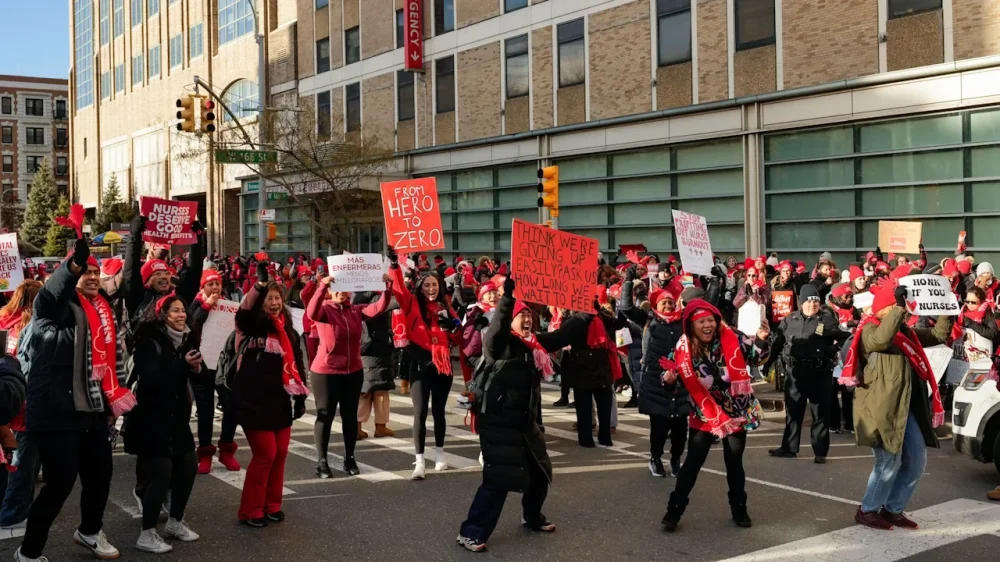
-
In today’s digital environment, AI video generators have become crucial tools for content creation. These platforms offer various features, from high-resolution outputs to quick production times, making video creation more accessible than ever. Each generator has its strengths and unique capabilities. Comprehending these differences can help you choose the right one for your needs. Let’s explore the top AI video generators and see how they can enhance your content strategy. Key Takeaways Kling AI: Affordable at $10/month, generates dynamic 1080p videos with strong motion dynamics and user-friendly interface for creative focus. Runway Gen 4: Offers visually striking 1080p videos; however, it struggles with consistency in later frames and has slower generation times. Google Veo 2: Produces high-quality 4K videos, requires waitlist signup, and offers free credits for new users, though prompt adherence can be inconsistent. OpenAI Sora: Priced at $20 for quick scene generation with a unique storyboard feature, it’s ideal for storytelling and user-friendly navigation. Adobe Firefly: Generates 1080p videos in minutes at $9.99/month, suitable for business use with licensed content and fast turnaround times. What Makes a Great AI Video Generator? When you’re considering what makes a great AI video generator, several key features stand out that can greatly improve your content creation process. First, high-resolution outputs are fundamental; an ai video generator should support 1080p or even 4K to guarantee professional-quality videos. Speed is another important factor; platforms like Runway allow for quick video production, enhancing your efficiency. Customization features, such as templates, help tailor your videos to your branding needs during keeping the interface user-friendly. Strong prompt adherence and realism in generated content are crucial for storytelling, with tools like Hailuo AI excelling in this area. Finally, competitive pricing and flexible subscription models, including options for a free ai video generator, make these tools accessible for everyone. Top AI Video Generators As you explore the terrain of AI video generators, you’ll find a variety of tools customized to different needs and budgets. For instance, Kling AI offers a filmmaker-friendly option at $10 monthly, ideal for short, dynamic content. If you’re looking for high-quality visuals, Google Veo 2 delivers stunning 4K resolution at $30 per minute but operates on a waitlist. Runway (Gen 4) is another contender, generating 1080p videos for $12 monthly, though it may struggle with complex scenes. OpenAI Sora, priced at $20, is great for quick prompts, whereas Pika 2.2 caters to social media with preset actions for $35. You can even find an InVideo video generator from text free no sign up options to create ai video from script effortlessly. Kling AI: Features and Performance Kling AI stands out in the domain of AI video generators with its filmmaker-friendly features and competitive pricing. Priced at just $10 a month, it allows you to generate videos in 1080p resolution, with each shot lasting 10 seconds. You’ll appreciate its lip-sync capabilities and meme-worthy preset effects, making it easy to create engaging content. As an Vidnoz script to video generator, it offers strong motion dynamics, ensuring your videos capture attention. Plus, the user-friendly interface improves your experience, allowing you to focus on creativity. Whether you want to create music video with AI or use the platform to ai generate free content, Kling AI delivers high marks for accuracy, realism, consistency, and creativity, making it a solid choice for filmmakers. Runway Gen 4: Strengths and Limitations Runway Gen 4 offers impressive initial frame quality, producing visually striking videos at a resolution of 1080p. Nonetheless, as the video progresses, you might notice a decline in realism, particularly with specific elements like cyan algae and crowd density. As it thrives in creating high-quality first frames and features like text-to-video capabilities, the decreasing output quality in later frames can be a drawback for users seeking consistency. Impressive Initial Frame Quality Although you might expect video generators to struggle with initial frame quality, Runway Gen 4 stands out by delivering impressive visuals right from the start. This ai video maker from text produces high-resolution 1080p videos, showcasing sophisticated lighting and careful detail that can improve your content. You’ll appreciate how the quality of the initial frames can captivate viewers, making it suitable for various platforms. Whether you’re using it as an ai deepfake video maker or exploring its features as an ai avatar video generator free, the clarity is notable. Nonetheless, keep in mind that during the initial frames impress, the realism may decline in subsequent frames, particularly with complex elements, which could affect overall scene consistency. Realism Decline Over Time As the initial frame quality of Runway Gen 4 impresses, its ability to maintain that level of realism over time raises concerns. Although this AI video creator generates videos at 1080p, the realism decline over time becomes apparent, especially in elements like cyan algae and the absence of crowds. Users often notice that the video quality diminishes after the first 16 seconds, which can detract from viewer engagement and storytelling effectiveness in longer pieces. Furthermore, the generation process, taking between 10 to 20 minutes, can feel slow compared to other AI video generators. In spite of these limitations, Runway Gen 4 still stands out for its high-quality first frames, making it a notable choice among AI deepfake generators in the industry. Google Veo 2: Capabilities and Pricing Google Veo 2 stands out in the domain of AI video generators, offering users the ability to create high-quality 4K videos with a maximum duration of 120 seconds. This tool excels in AI video creation, effectively animating static images and converting text to video with fluid motion. Priced at $30 per minute of video, it requires users to sign up for a waitlist to access its features. New users benefit from free credits, enabling them to explore its capabilities without upfront costs. Whereas it functions as an AI avatar video generator, some users may find that prompt adherence can occasionally be inconsistent, potentially missing specified elements. Overall, Google Veo 2 is a promising option for video content creators. OpenAI Sora: A Closer Look OpenAI Sora offers a unique storyboard feature that lets you create scene-by-scene prompts, streamlining your video planning process. With simple prompt generation, you can quickly craft ideas without needing extensive technical skills, making it accessible for various users. Furthermore, Sora enables remixing of existing creations, allowing you to build on previous work and improve your projects creatively. Unique Storyboard Feature The unique storyboard feature of Sora greatly boosts the video creation process by allowing users to craft their projects scene-by-scene. This structured approach helps you visualize and arrange scenes effectively, making your workflow more organized. Remix existing content easily Customize scenes by uploading images Use text and image prompts for versatility Improve narrative coherence in your videos Whether you’re engaging in ai adult content video creation or using Sora as an ai movie scene generator, this tool simplifies the shift from script to video generator. You can seamlessly turn text into video, ensuring that each scene aligns with your creative vision. Sora’s storyboard functionality is particularly beneficial for filmmakers and content creators aiming for a cinematic touch in their work. Simple Prompt Generation Creating videos doesn’t have to be complicated, especially with Sora’s simple prompt generation feature. This tool allows you to create text video content effortlessly, whether you’re immersing yourself in ai adult video creation or using a random video generator for inspiration. You can input straightforward prompts, and Sora will turn these into structured videos, thanks to its unique storyboard functionality. This feature helps you organize your ideas scene by scene, making the creation process more manageable. Furthermore, Sora’s ability to transform your script to video ai means you can easily visualize your narratives. As the output quality resembles early 2000s CGI, it still provides a solid foundation for your creative projects, broadening your options for animated content. Remixing Existing Creations Though many video creation platforms focus solely on original content, Sora stands out by allowing you to remix existing video creations, making it a versatile tool for content creators. With its unique storyboard feature, you can improve storytelling through scene-by-scene prompts. Here’s what makes Sora an excellent choice: Integrate user-uploaded images for animated content Generate cinematic visuals from simple prompts Affordable monthly subscription at $20 for 50 video generations Easy to use, even without traditional camera controls If you’re wondering what’s the best AI video creator, consider Sora. When exploring options like Vidon AI or a deepfake video maker free tool, you’ll find that Sora is a top contender among the best AI deepfake generators. Adobe Firefly: Unique Offerings and User Experience As you explore Adobe Firefly, you’ll find it offers a blend of unique features and a user-friendly experience that can improve your content creation process. This AI tool generates 1080p videos in just a couple of minutes, with 4K resolution on the horizon. Priced at $9.99 per month, it provides quick turnaround for your projects. Although it’s visually striking, resembling a concept artist’s work, complex scenes may compromise output quality. Adobe Firefly supports features for video editing, including commercially safe training on licensed content, making it a great choice for businesses. Feature Description Benefit Video Resolution 1080p, 4K coming soon High-quality production Generation Time A couple of minutes Fast turnaround User Experience User-friendly Easy to navigate Commercial Use Safe training on licensed content Business-friendly Frequently Asked Questions What Is the Best AI Video Generator for Content Creation? Choosing the best AI video generator really depends on your specific needs. If you want high-quality visuals, look at Runway. For filmmaker-friendly features, consider Kling AI, which offers customizable templates. If you need quick results for marketing, Hailuo AI is effective. For corporate videos, Synthesia provides lifelike avatars and multilingual support. Finally, Adobe Firefly combines user-friendliness with commercial safety for professionals. Assess these options based on your project goals for the best results. Which AI Model Is Best for Content Creation? When considering which AI model is best for content creation, it depends on your specific needs. For quick 1080p videos, Kling AI and Adobe Firefly offer affordable options with unique features. If you require longer shots, Runway’s Gen 4 is worth a look. For high-quality visuals, Google Veo 2 provides 4K resolution but has a waiting list. Evaluate your budget and desired video length to find the most suitable model for your projects. What Is the Best Video AI Enhancer? When considering the best video AI improver, look for features that suit your needs. Tools like Google Veo 2 and Runway offer advanced capabilities, such as image-to-video generation and multi-motion control, improving the realism of your projects. If you’re a filmmaker, Kling AI’s lip-sync and customizable templates might be ideal. Many platforms provide free trials, allowing you to evaluate their features before committing to varying subscription plans customized to different budgets. Can You Enhance Video Quality With AI? Yes, you can improve video quality with AI. Advanced algorithms analyze visuals, boosting clarity and vibrancy. Features like motion tracking and editing tools correct inconsistencies as well as adding dynamic elements. AI-driven enhancements stabilize shaky footage and optimize lighting, raising the professional look of your videos. Tools often provide templates for applying professional-grade effects without needing extensive editing skills. By utilizing these technologies, you can greatly enhance the overall production value of your content. Conclusion In summary, selecting the right AI video generator can greatly improve your content creation process. Each tool, from Kling AI’s dynamic features to Adobe Firefly’s rapid output, provides unique advantages customized to various needs. By evaluating their capabilities and limitations, you can find the best fit for your projects. As the demand for high-quality video content continues to grow, leveraging these advanced tools will help you stay competitive and produce engaging, professional videos efficiently. Image via Google Gemini This article, "7 Best AI Video Generators for Enhancing Content Creation" was first published on Small Business Trends View the full article
-
In today’s digital environment, AI video generators have become crucial tools for content creation. These platforms offer various features, from high-resolution outputs to quick production times, making video creation more accessible than ever. Each generator has its strengths and unique capabilities. Comprehending these differences can help you choose the right one for your needs. Let’s explore the top AI video generators and see how they can enhance your content strategy. Key Takeaways Kling AI: Affordable at $10/month, generates dynamic 1080p videos with strong motion dynamics and user-friendly interface for creative focus. Runway Gen 4: Offers visually striking 1080p videos; however, it struggles with consistency in later frames and has slower generation times. Google Veo 2: Produces high-quality 4K videos, requires waitlist signup, and offers free credits for new users, though prompt adherence can be inconsistent. OpenAI Sora: Priced at $20 for quick scene generation with a unique storyboard feature, it’s ideal for storytelling and user-friendly navigation. Adobe Firefly: Generates 1080p videos in minutes at $9.99/month, suitable for business use with licensed content and fast turnaround times. What Makes a Great AI Video Generator? When you’re considering what makes a great AI video generator, several key features stand out that can greatly improve your content creation process. First, high-resolution outputs are fundamental; an ai video generator should support 1080p or even 4K to guarantee professional-quality videos. Speed is another important factor; platforms like Runway allow for quick video production, enhancing your efficiency. Customization features, such as templates, help tailor your videos to your branding needs during keeping the interface user-friendly. Strong prompt adherence and realism in generated content are crucial for storytelling, with tools like Hailuo AI excelling in this area. Finally, competitive pricing and flexible subscription models, including options for a free ai video generator, make these tools accessible for everyone. Top AI Video Generators As you explore the terrain of AI video generators, you’ll find a variety of tools customized to different needs and budgets. For instance, Kling AI offers a filmmaker-friendly option at $10 monthly, ideal for short, dynamic content. If you’re looking for high-quality visuals, Google Veo 2 delivers stunning 4K resolution at $30 per minute but operates on a waitlist. Runway (Gen 4) is another contender, generating 1080p videos for $12 monthly, though it may struggle with complex scenes. OpenAI Sora, priced at $20, is great for quick prompts, whereas Pika 2.2 caters to social media with preset actions for $35. You can even find an InVideo video generator from text free no sign up options to create ai video from script effortlessly. Kling AI: Features and Performance Kling AI stands out in the domain of AI video generators with its filmmaker-friendly features and competitive pricing. Priced at just $10 a month, it allows you to generate videos in 1080p resolution, with each shot lasting 10 seconds. You’ll appreciate its lip-sync capabilities and meme-worthy preset effects, making it easy to create engaging content. As an Vidnoz script to video generator, it offers strong motion dynamics, ensuring your videos capture attention. Plus, the user-friendly interface improves your experience, allowing you to focus on creativity. Whether you want to create music video with AI or use the platform to ai generate free content, Kling AI delivers high marks for accuracy, realism, consistency, and creativity, making it a solid choice for filmmakers. Runway Gen 4: Strengths and Limitations Runway Gen 4 offers impressive initial frame quality, producing visually striking videos at a resolution of 1080p. Nonetheless, as the video progresses, you might notice a decline in realism, particularly with specific elements like cyan algae and crowd density. As it thrives in creating high-quality first frames and features like text-to-video capabilities, the decreasing output quality in later frames can be a drawback for users seeking consistency. Impressive Initial Frame Quality Although you might expect video generators to struggle with initial frame quality, Runway Gen 4 stands out by delivering impressive visuals right from the start. This ai video maker from text produces high-resolution 1080p videos, showcasing sophisticated lighting and careful detail that can improve your content. You’ll appreciate how the quality of the initial frames can captivate viewers, making it suitable for various platforms. Whether you’re using it as an ai deepfake video maker or exploring its features as an ai avatar video generator free, the clarity is notable. Nonetheless, keep in mind that during the initial frames impress, the realism may decline in subsequent frames, particularly with complex elements, which could affect overall scene consistency. Realism Decline Over Time As the initial frame quality of Runway Gen 4 impresses, its ability to maintain that level of realism over time raises concerns. Although this AI video creator generates videos at 1080p, the realism decline over time becomes apparent, especially in elements like cyan algae and the absence of crowds. Users often notice that the video quality diminishes after the first 16 seconds, which can detract from viewer engagement and storytelling effectiveness in longer pieces. Furthermore, the generation process, taking between 10 to 20 minutes, can feel slow compared to other AI video generators. In spite of these limitations, Runway Gen 4 still stands out for its high-quality first frames, making it a notable choice among AI deepfake generators in the industry. Google Veo 2: Capabilities and Pricing Google Veo 2 stands out in the domain of AI video generators, offering users the ability to create high-quality 4K videos with a maximum duration of 120 seconds. This tool excels in AI video creation, effectively animating static images and converting text to video with fluid motion. Priced at $30 per minute of video, it requires users to sign up for a waitlist to access its features. New users benefit from free credits, enabling them to explore its capabilities without upfront costs. Whereas it functions as an AI avatar video generator, some users may find that prompt adherence can occasionally be inconsistent, potentially missing specified elements. Overall, Google Veo 2 is a promising option for video content creators. OpenAI Sora: A Closer Look OpenAI Sora offers a unique storyboard feature that lets you create scene-by-scene prompts, streamlining your video planning process. With simple prompt generation, you can quickly craft ideas without needing extensive technical skills, making it accessible for various users. Furthermore, Sora enables remixing of existing creations, allowing you to build on previous work and improve your projects creatively. Unique Storyboard Feature The unique storyboard feature of Sora greatly boosts the video creation process by allowing users to craft their projects scene-by-scene. This structured approach helps you visualize and arrange scenes effectively, making your workflow more organized. Remix existing content easily Customize scenes by uploading images Use text and image prompts for versatility Improve narrative coherence in your videos Whether you’re engaging in ai adult content video creation or using Sora as an ai movie scene generator, this tool simplifies the shift from script to video generator. You can seamlessly turn text into video, ensuring that each scene aligns with your creative vision. Sora’s storyboard functionality is particularly beneficial for filmmakers and content creators aiming for a cinematic touch in their work. Simple Prompt Generation Creating videos doesn’t have to be complicated, especially with Sora’s simple prompt generation feature. This tool allows you to create text video content effortlessly, whether you’re immersing yourself in ai adult video creation or using a random video generator for inspiration. You can input straightforward prompts, and Sora will turn these into structured videos, thanks to its unique storyboard functionality. This feature helps you organize your ideas scene by scene, making the creation process more manageable. Furthermore, Sora’s ability to transform your script to video ai means you can easily visualize your narratives. As the output quality resembles early 2000s CGI, it still provides a solid foundation for your creative projects, broadening your options for animated content. Remixing Existing Creations Though many video creation platforms focus solely on original content, Sora stands out by allowing you to remix existing video creations, making it a versatile tool for content creators. With its unique storyboard feature, you can improve storytelling through scene-by-scene prompts. Here’s what makes Sora an excellent choice: Integrate user-uploaded images for animated content Generate cinematic visuals from simple prompts Affordable monthly subscription at $20 for 50 video generations Easy to use, even without traditional camera controls If you’re wondering what’s the best AI video creator, consider Sora. When exploring options like Vidon AI or a deepfake video maker free tool, you’ll find that Sora is a top contender among the best AI deepfake generators. Adobe Firefly: Unique Offerings and User Experience As you explore Adobe Firefly, you’ll find it offers a blend of unique features and a user-friendly experience that can improve your content creation process. This AI tool generates 1080p videos in just a couple of minutes, with 4K resolution on the horizon. Priced at $9.99 per month, it provides quick turnaround for your projects. Although it’s visually striking, resembling a concept artist’s work, complex scenes may compromise output quality. Adobe Firefly supports features for video editing, including commercially safe training on licensed content, making it a great choice for businesses. Feature Description Benefit Video Resolution 1080p, 4K coming soon High-quality production Generation Time A couple of minutes Fast turnaround User Experience User-friendly Easy to navigate Commercial Use Safe training on licensed content Business-friendly Frequently Asked Questions What Is the Best AI Video Generator for Content Creation? Choosing the best AI video generator really depends on your specific needs. If you want high-quality visuals, look at Runway. For filmmaker-friendly features, consider Kling AI, which offers customizable templates. If you need quick results for marketing, Hailuo AI is effective. For corporate videos, Synthesia provides lifelike avatars and multilingual support. Finally, Adobe Firefly combines user-friendliness with commercial safety for professionals. Assess these options based on your project goals for the best results. Which AI Model Is Best for Content Creation? When considering which AI model is best for content creation, it depends on your specific needs. For quick 1080p videos, Kling AI and Adobe Firefly offer affordable options with unique features. If you require longer shots, Runway’s Gen 4 is worth a look. For high-quality visuals, Google Veo 2 provides 4K resolution but has a waiting list. Evaluate your budget and desired video length to find the most suitable model for your projects. What Is the Best Video AI Enhancer? When considering the best video AI improver, look for features that suit your needs. Tools like Google Veo 2 and Runway offer advanced capabilities, such as image-to-video generation and multi-motion control, improving the realism of your projects. If you’re a filmmaker, Kling AI’s lip-sync and customizable templates might be ideal. Many platforms provide free trials, allowing you to evaluate their features before committing to varying subscription plans customized to different budgets. Can You Enhance Video Quality With AI? Yes, you can improve video quality with AI. Advanced algorithms analyze visuals, boosting clarity and vibrancy. Features like motion tracking and editing tools correct inconsistencies as well as adding dynamic elements. AI-driven enhancements stabilize shaky footage and optimize lighting, raising the professional look of your videos. Tools often provide templates for applying professional-grade effects without needing extensive editing skills. By utilizing these technologies, you can greatly enhance the overall production value of your content. Conclusion In summary, selecting the right AI video generator can greatly improve your content creation process. Each tool, from Kling AI’s dynamic features to Adobe Firefly’s rapid output, provides unique advantages customized to various needs. By evaluating their capabilities and limitations, you can find the best fit for your projects. As the demand for high-quality video content continues to grow, leveraging these advanced tools will help you stay competitive and produce engaging, professional videos efficiently. Image via Google Gemini This article, "7 Best AI Video Generators for Enhancing Content Creation" was first published on Small Business Trends View the full article
-
Technological advancements in various fields of science are shattering what some scientists once deemed impossible. In recent years, researchers have mitigated the existential threat of asteroids, unlocked the power of immunotherapy to treat cancer tumors, and achieved unprecedented control over the human vestibular system. These scientific innovations have been fostered by new types of cross-disciplinary collaboration and the use of artificial intelligence tools. And though they’re approaching it from vastly different perspectives, planetary science, pathology, and neuroscience researchers shared at the World Changing Ideas Summit in November how they’re really working toward a common goal: to improve the human experience in some way. The DART mission of 2022 saw a team led by NASA intentionally crash a spacecraft into an asteroid and successfully change the asteroid’s path through space, marking “a waterline for humanity,” said Terik Daly, a planetary scientist at Johns Hopkins Applied Physics Laboratory, at the summit cohosted by Fast Company and Johns Hopkins University in Washington, D.C. Researchers are better prepared, he added, for the “real threat” of asteroids—which is a medium-size asteroid, roughly the size of an Olympic swimming pool or half a football field, that could easily destroy an area like the D.C. metro area or even larger. “Currently, we cannot stop earthquakes, we cannot stop volcanoes, we cannot stop hurricanes,” Daly said. “But with appropriate investments, we can be ready to stop an asteroid if we find one coming our way.” New mapping tools for cancer research And finding new ways to treat cancer is getting an assist from a perhaps unlikely discipline: astronomy. That’s the idea behind AstroPath, which uses decades-old learnings about organizing spatial data to help researchers figure out how the immune system interfaces with cancer, said Janis Taube, a pathologist and a professor of dermatology and pathology at the Johns Hopkins University School of Medicine. Cancer researchers are making advancements about how to treat tumors, including identifying which patients are a good candidate for immunotherapy, none of which would be possible were it not for learning how to map the breadth of tumors using tools from astronomy, Taube said. “We never would’ve been able to separate the signal from noise.” New uses for neurotechnology Finally, the founders of the neurotechnology startup Orbit set out to find a solution to a supposedly anatomically unsolvable problem—generating a motion hallucination. They not only did that, but they are now looking for ways to use the technology to optimize and heal humans, said Steven Pang, cofounder and CEO. “If you get really fine, great control over the vestibular system, you can use it to build a generation of general bodily or mental regulators that no one’s ever been able to build before,” Pang said. Orbit is now in clinical trials for its first few devices focused on enhancing human cognition and optimizing both the onset of and effectiveness of sleep, Pang said. There are projections of “some incredibly powerful neurotechnology” coming in the next 30 to 40 years that could help people be smarter, faster, sleep a lot better, and solve various health conditions that have eluded pharmaceutical interventions for decades, but Pang is optimistic that such innovations could happen even sooner. “Our take is just, if you’re clever about it, you start solving some of these problems with some distinct ways of thinking, that it might just be two or three years away,” he said. “So hopefully we’ll prove that out.” View the full article

-
Apple's latest crop of updates was met with a bit of a mixed reaction. While some users love the new Liquid Glass design across iPhone, iPad, and Mac, others decidedly do not—which is likely what led Apple to introduce a dedicated setting to control the intensity of the effect. I'm partial to it, but I understand for some users, it's a tad too much, especially if it makes certain UI elements more difficult to see. But Liquid Glass isn't the only thing Apple users have complained about, especially with regards to macOS Tahoe. Mac users reported various problems with performance and stability across macOS 26.0 and macOS 26.1, and have criticized design choices like overly rounded corners. Myself, I held out on updating my M3 Pro Mac until macOS 26.2, where many of these issues appeared to be fixed, but my M1 iMac is still on macOS Sequoia for the time being. All that to say, macOS 26 hasn't had the smoothest start compared to some of Apple's previous Mac updates. If you've been noticing, for example, that your Mac's window management isn't as cooperative as it's been in the past, you're not alone. In fact, there seems to be a clear explanation for what's behind the issues. The issue with windows on macOS TahoeAs with other versions of macOS, you can resize and adjust your Mac apps' windows by clicking and dragging from the bottom corners. The issue, however, is that as of Apple's newest update, it can be fairly difficult to grab the corner of the window. You might, instead, find you click on the bottom corner of the app or website instead, leading to unintended actions. Clicking the top right corner of Chrome, for example, will drag the whole app window, rather than resize it. Clicking the bottom left corner and dragging will start to highlight everything in the app window instead, perhaps sending you all around the screen as well. If you slowly hover your cursor over the corner of the window, eventually you'll find a spot that turns your cursor into a resize icon, and you'll know you're good to click and drag to resize. But why is this so much more difficult to do quickly than it was in macOS Sequoia or beyond? Norbert Heger, a software developer, seemingly has an answer. In a blog post on Sunday, Heger explains that those rounded corners Apple designed for Tahoe are having a negative impact on the clickable area of the window. With a square corner, most of the clickable area—Heger says 62% of it—lies within the corner of the window itself. That gives users a relatively large area to click within the corner in order to grab onto the window, and a little bit of room outside the window to click, as well. But these new rounded corners don't seem to take that into consideration. Instead, they're relying on the same click area as before, but because there's less corner to work with now, the actual clickable area of the window is far less. Heger says about 75% of the clickable area now exists outside the window itself, giving users just 25% to work with in the actual corner of the window. If you're running macOS Tahoe, you can try this out for yourself right now: Move your cursor to the corner of the window, and wait for it to change into the resize icon. If you're hovering within the window itself, it won't change until you're just about to move outside the window. You can keep going a bit, and see you can get pretty darn far outside the window before the cursor changes back. Why am I able to resize the window from outside the window, Apple? Credit: Lifehacker This seems like a relatively easy fix on Apple's part, assuming they're aware of the issue. Maybe a patch will even make it into macOS 26.3. That said, the company has not publicly acknowledged the quirk, so it's anyone's guess. Until a potential fix, those of us on macOS Tahoe will just need to retrain our muscle memories around window resizing. For anyone who hasn't upgraded yet, you can simply carry on as usual. View the full article
-
The survey, taken before Pres. The President's $200 billion MBS buy demand, finds panelists worried over inflation, but also see employment as the larger downside risk. View the full article