ResidentialBusiness
Administrators
-
Joined
-
Last visited
Everything posted by ResidentialBusiness
-
 Google has confirmed that AI Mode reporting will be coming to Google Search Console. It is currently not yet in Search Console, but it will be coming as part of the AI Mode rollout. View the full article
 -
A computer science student is behind a new AI tool designed to track down Redditors showing signs of radicalization and deploy bots to “deradicalize” them through conversation. First reported by 404 Media, PrismX was built by Sairaj Balaji, a computer science student at SRMIST in Chennai, India. The tool works by analyzing posts for specific keywords and patterns associated with extreme views, giving those users a “radical score.” High scorers are then targeted by AI bots programmed to attempt deradicalization through engaging the user in conversation. According to the federal government, the primary terror threat to the U.S. now is individuals radicalized to violence online through social media. At the same time, fears around surveillance technology and artificial intelligence infiltrating online communities pose an ethical minefield. Responding to concerns, Balaji clarified in a Linkedin post that the conversation part of the tool has not been tested on real Reddit users without consent. Instead, the scoring and conversation elements were used in simulated environments for research-purposes only. “The tool was designed to provoke discussion, not controversy,” he explained in the post. “We’re at a point in history where rogue actors and nation-states are already deploying weaponized AI. If a college student can build something like PrismX, it raises urgent questions: Who’s watching the watchers?” While Balaji doesn’t claim to be an expert in deradicalization, as an engineer, he is interested in the ethical implications of surveillance technology. “Discomfort sparks debate. Debate leads to oversight. And oversight is how we prevent the misuse of emerging technologies,” he continued. This isn’t the first time Redditors have been used as guinea pigs in recent months. Just last month, researchers from the University of Zurich faced intense backlash after experimenting on an unsuspecting subreddit. The research involved deploying AI-powered bots into the r/ChangeMyView subreddit, which positions itself as a “place to post an opinion you accept may be flawed”, in an experiment to see if AI could be used to change peoples’ minds. When Redditors, and Reddit itself, found out they were being experimented on without their knowledge, they weren’t impressed. Reddit’s chief legal officer, Ben Lee, wrote in a post that neither Reddit nor the r/changemyview mods knew about the experiment ahead of time. “What this University of Zurich team did is deeply wrong on both a moral and legal level,” Lee wrote. “It violates academic research and human rights norms, and is prohibited by Reddit’s user agreement and rules, in addition to the subreddit rules.” While PrismX is not currently being tested on real unconsenting users, it piles on the ever-growing question of the role of artificial intelligence in human spaces. View the full article

-
As a busy professional, podcasts can be a great way to incorporate learning into your day. Add these AI project management podcasts to your listening rotation to discover how to grow as a PM through AI. The post 10 AI Project Management Podcasts to Listen to in 2025 appeared first on The Digital Project Manager. View the full article
-
We may earn a commission from links on this page. Deal pricing and availability subject to change after time of publication. You've been hard at work all week, as have I—as Lifehacker's tech deals writer, I've been hunting down the best deals on TVs, speakers, laptops, and other tech all week. Now sit back, relax, and enjoy this week's highlights, all of which I've vetted using my favorite price tracking tools. This week was the start of retailers launching their Memorial Day sales. You can find deals on Pixel phones, Sonos speakers, Sleep Number beds, OLED TVs, smart watches, and much more. Portable Waterproof Bluetooth Speaker Roam 2 $134.00 at Amazon /images/amazon-prime.svg $179.00 Save $45.00 Get Deal Get Deal $134.00 at Amazon /images/amazon-prime.svg $179.00 Save $45.00 Wireless Bluetooth Earbuds (Refurbished) Beats Powerbeats Pro 2 (refurbished) $169.99 at Stack Social $249.99 Save $80.00 Get Deal Get Deal $169.99 at Stack Social $249.99 Save $80.00 Tozo OpenEarRing $29.99 at Amazon $59.99 Save $30.00 Get Deal Get Deal $29.99 at Amazon $59.99 Save $30.00 Google Pixel 9 128GB Unlocked 6.9" OLED Smartphone (Obsidian) $599.00 at Amazon /images/amazon-prime.svg $799.00 Save $200.00 Get Deal Get Deal $599.00 at Amazon /images/amazon-prime.svg $799.00 Save $200.00 Google Pixel Watch 2 $149.99 at Amazon /images/amazon-prime.svg $249.99 Save $100.00 Get Deal Get Deal $149.99 at Amazon /images/amazon-prime.svg $249.99 Save $100.00 BOGO with Free TV - KD-50X77L BRAVIA 8 II 55” Class QD-OLED 4K HDR Google TV (2025) $3,499.99 at Sony Get Deal Get Deal $3,499.99 at Sony i8 Sleep Number mattress $3,289.30 at Sleep Number $4,699.00 Save $1,409.70 Get Deal Get Deal $3,289.30 at Sleep Number $4,699.00 Save $1,409.70 16GB Unified Memory, 256GB SSD Storage Apple 2025 MacBook Air $899.00 at Amazon /images/amazon-prime.svg $999.00 Save $100.00 Get Deal Get Deal $899.00 at Amazon /images/amazon-prime.svg $999.00 Save $100.00 Craftsman VERSASTACK Mechanics Tool Set $99.00 at Amazon /images/amazon-prime.svg $199.00 Save $100.00 Get Deal Get Deal $99.00 at Amazon /images/amazon-prime.svg $199.00 Save $100.00 Peloton Bike $1,145.00 at Amazon /images/amazon-prime.svg $1,445.00 Save $300.00 Get Deal Get Deal $1,145.00 at Amazon /images/amazon-prime.svg $1,445.00 Save $300.00 SEE 7 MORE The Sonos Roam 2 is Sonos's least expensive speaker, and it's at its lowest price ever. It is a waterproof device on sale for $134 (originally $179) at Amazon, part of a small Sonos sale that also includes a discount on the larger Sonos Move 2 (also currently at its lowest price ever). The Powerbeats Pro 2 are Beats' latest headphones, and you won't find them at their current $169.99 (originally $249.99) price point for a while. These are refurbished from Stack Social, and you can read more about them in this review. They're great for the gym, but if you're not a gym rat, there are other Beats on sale as well. There are some great budget headphones and earbuds on sale during Amazon's Memorial Day sale, but the Tozo OpenEarRing stand out as budget open ear headphones currently going for just $29.99 (originally $59.99). If you're looking for a solid phone at a good price for Memorial Day, consider the Google Pixel 9, currently $599 (originally $799). It's the best standard Pixel model so far, and it's at its lowest price right now. For those who want the latest phones, the Galaxy S25 Edge preorder deals with a $50 Amazon gift card are still live. The Original Peloton is $1,145 (originally $1,445), the cheapest it has dropped to this year. And if you're looking for more fitness equipment deals for Memorial Day, check out these from Amazon. Speaking of fitness, smartwatches and fitness trackers are also on sale, including Garmin smartwatches. The highlight is the Google Pixel Watch 2, which dropped in price to $149.99 (originally $249.99) after the release of the Pixel Watch 3. One of my favorite deals this week has been the BOGO sale from Sony. You can buy the new Bravia 8 II OLED Google TV starting at $3,499 and get a free a X77L LED Google TV, valued at $589.99. Memorial Day also means getting deals on tools, and Amazon has them going up to 60% off right now. This Craftsman 230-piece mechanics tool set is on sale for $99, 50% off its regular price. It comes with ratchets, wrenches, a hand-held screwdriver, and several specialty bits. As usual with most Memorial Day deals, you can find mattresses on sale, but the i8 Smart Bed is not a regular mattress. You can read about my experience with this smart bed with adjustable firmness and a companion app that tracks your sleep. It is currently 30% off during the Memorial Day sale. It's crazy to think you can get Apple's latest MacBook Air with an M4 chip for $899 (originally $999). A couple of months ago, that money got you the M2, but now you can get the best MacBook for most people at the same price. View the full article
-
Artificial intelligence continues to be the thing in tech—whether consumers are interested or not. What strikes me most about generative AI isn't its features or potential to make my life easier (a potential I have yet to realize); rather, I'm focused these days on the many threats that seem to be rising from this technology. There's misinformation, for sure—new AI video models, for example, are creating realistic clips complete with lip-synced audio. But there's also the classic AI threat, that the technology becomes both more intelligent than us and self-aware, and chooses to use that general intelligence in a way that does not benefit humanity. Even as he pours resources into his own AI company (not to mention the current administration, as well) Elon Musk sees a 10 to 20% chance that AI "goes bad," and that the tech remains a “significant existential threat." Cool. So it doesn't necessarily bring me comfort to hear a high-profile, established tech executive jokingly discuss how treating AI poorly maximizes its potential. That would be Google co-founder Sergey Brin, who surprised an audience at a recording of the AIl-In podcast this week. During a talk that spanned Brin's return to Google, AI, and robotics, investor Jason Calacanis made a joke about getting "sassy" with the AI to get it to do the task he wanted. That sparked a legitimate point from Brin. It can be tough to tell exactly what he says at times due to people speaking over one another, but he says something to the effect of: "You know, that's a weird thing...we don't circulate this much...in the AI community...not just our models, but all models tend to do better if you threaten them." The other speaker looks surprised. "If you threaten them?" Brin responds "Like with physical violence. But...people feel weird about that, so we don't really talk about that." Brin then says that, historically, you threaten the model with kidnapping. You can see the exchange here: The conversation quickly shifts to other topics, including how kids are growing up with AI, but that comment is what I carried away from my viewing. What are we doing here? Have we lost the plot? Does no one remember Terminator? Jokes aside, it seems like a bad practice to start threatening AI models in order to get them to do something. Sure, maybe these programs never actually achieve artificial general intelligence (AGI), but I mean, I remember when the discussion was around whether we should say "please" and "thank you" when asking things of Alexa or Siri. Forget the niceties; just abuse ChatGPT until it does what you want it to—that should end well for everyone. Maybe AI does perform best when you threaten it. Maybe something in the training understands that "threats" mean the task should be taken more seriously. You won't catch me testing that hypothesis on my personal accounts. Anthropic might offer an example of why not to torture your AIIn the same week as this podcast recording, Anthropic released its latest Claude AI models. One Anthropic employee took to Bluesky, and mentioned that Opus, the company's highest performing model, can take it upon itself to try to stop you from doing "immoral" things, by contacting regulators, the press, or locking you out of the system: welcome to the future, now your error-prone software can call the cops (this is an Anthropic employee talking about Claude Opus 4)[image or embed] — Molly White (@molly.wiki) May 22, 2025 at 4:55 PM The employee went on to clarify that this has only ever happened in "clear-cut cases of wrongdoing," but that they could see the bot going rogue should it interpret how it's being used in a negative way. Check out the employee's particularly relevant example below: can't wait to explain to my family that the robot swatted me after i threatened its non-existent grandma[image or embed] — Molly White (@molly.wiki) May 22, 2025 at 5:09 PM That employee later deleted those posts and specified that this only happens during testing given unusual instructions and access to tools. Even if that is true, if it can happen in testing, it's entirely possible it can happen in a future version of the model. Speaking of testing, Anthropic researchers found that this new model of Claude is prone to deception and blackmail, should the bot believe it is being threatened or dislikes the way an interaction is going. Perhaps we should take torturing AI off the table? View the full article
-
Counterterrorism police looking into fires at properties connected to prime minister keep open mind about motiveView the full article
-
A federal judge temporarily blocked the The President administration’s ban to prevent international students from enrolling at Harvard on Friday, the latest development in the White House’s escalating pressure campaign against the Ivy League university. The judge granted Harvard’s request for a temporary restraining order on the basis that the school would “sustain immediate and irreparable injury” before a hearing, which CNBC reports is set for Tuesday, could take place. On Thursday, Department of Homeland Security Secretary Kristi Noem ordered her agency to withdraw the school’s certification for admitting foreign students, known as a Student and Exchange Visitor Program (SEVP) certification. The change would block future international students from enrolling at Harvard while also imperiling the legal status of international students currently studying there. The university filed a lawsuit on Friday morning to oppose the ban, arguing that violates the First Amendment. “Harvard has, over this time, developed programs and degrees tailored to its international students, invested millions to recruit the most talented such students, and integrated its international students into all aspects of the Harvard community,” the lawsuit states, noting that the university along with 7,000 visa holders would suffer “immediate and devastating” effects. Homeland Security accused Harvard of permitting “anti-American, pro-terrorist agitators” and jeopardizing safety on campus, pointing the finger at foreign students. The agency also referenced alleged connections between the university and the Chinese Communist Party. “They have lost their Student and Exchange Visitor Program certification as a result of their failure to adhere to the law,” Noem said. “Let this serve as a warning to all universities and academic institutions across the country.” The escalation against Harvard is the latest attack on high profile universities during The President’s second term. The administration has repeatedly targeted Harvard and other universities over their diversity, equity and inclusion commitments and claims that they foster antisemitism through student protests over Israel’s ongoing invasion of Gaza. However the The President administration’s attack on Harvard shakes out in court, schools that attract the best and brightest from around the globe are likely to suffer as foreign students think twice about taking the risk on elite American universities. View the full article

-
Key Takeaways Real-Time Monitoring: Shopify Live View provides instant access to visitor counts and sales activity, empowering merchants to make timely decisions based on current data. Enhanced Customer Engagement: By analyzing customer behavior in real time, you can tailor marketing strategies, leading to personalized shopping experiences and increased conversion rates. Valuable Insights: The feature offers geolocation tracking and sales analytics, helping you understand customer locations and popular products, which inform targeted marketing efforts. User-Friendly Setup: Setting up Shopify Live View involves a simple step-by-step process, making it accessible for all merchants looking to optimize their online store. Operational Optimization: Utilize insights from Live View to adjust staffing and inventory based on peak shopping times, enhancing overall efficiency and customer satisfaction. Continuous Improvement: Fostering a culture of sharing data insights with your team helps align efforts toward enhancing customer service and maximizing sales potential. Imagine having a real-time window into your online store’s activity. With Shopify Live View, you can do just that. This powerful feature allows you to monitor customer interactions, track sales as they happen, and gain valuable insights into your store’s performance. In today’s fast-paced e-commerce landscape, understanding your customers’ behavior is crucial. Live View provides you with the data you need to make informed decisions, optimize your marketing strategies, and enhance your overall shopping experience. Whether you’re a seasoned merchant or just starting out, harnessing the power of Live View can give you a competitive edge. Let’s dive into how this feature can transform your Shopify store. Overview of Shopify Live View Shopify Live View allows you to monitor real-time customer interactions in your online store. This feature provides insights into sales activity, enabling you to enhance your retail strategies. What Is Shopify Live View? Shopify Live View is a dashboard that displays live data about your store’s performance. It shows current visitor counts, order trends, and customer behavior. With this information, you can understand how customers interact with your storefront at any moment. This capability is essential for small business owners looking to optimize their operations and improve customer experiences. Key Features of Shopify Live View Real-Time Data Tracking: Track the number of visitors on your site and observe which products are currently being viewed or purchased. Order Updates: Receive instant notifications about new orders, allowing you to manage your inventory effectively. Customer Insights: Analyze customer behavior patterns to determine peak shopping times and popular products in your store. Geolocation Tracking: View where your customers are located, which helps you tailor marketing strategies to specific regions. Sales Analytics: Access detailed reports on sales performance, equipping you with the data necessary to make informed business decisions. Benefits of Using Shopify Live View Shopify Live View offers powerful benefits for small businesses by providing insights into real-time operations and customer interactions. This feature is essential for optimizing your retail storefront and enhancing overall performance. Real-Time Monitoring Real-time monitoring allows you to track visitor counts and sales activity as it happens. You can see how many customers are shopping in your store at any moment. With instant order updates, you stay informed about purchases as they occur. This information helps you identify peak shopping times, enabling you to adjust staffing levels and inventory to meet demand effectively. Moreover, it fosters proactive decision-making, allowing you to seize opportunities before they pass. Enhanced Customer Engagement Enhanced customer engagement results from understanding your customers better. With Shopify Live View, you gain insights into customer behavior, such as popular products and preferred browsing patterns. This knowledge lets you tailor marketing strategies to specific customer interests. Engaging with customers in real-time creates a more personalized shopping experience, encouraging them to spend more time in your storefront. By addressing customer needs as they arise, you improve satisfaction and boost your store’s conversion rates. How to Set Up Shopify Live View Setting up Shopify Live View is a straightforward process that enhances your online storefront’s functionality. This tool provides vital insights for small business owners looking to optimize operations and customer engagement. Step-by-Step Installation Guide Log into your Shopify account: Access your admin panel using your login credentials. Navigate to the Analytics section: Click on “Analytics” in the left-hand menu. Select Live View: Under the Analytics category, choose “Live View” to open the dashboard. Customize your view: Adjust the display settings to showcase the metrics most relevant to your retail goals, such as visitor counts and order trends. Save your settings: After customizing, make sure to save your configurations for future access. Tips for Optimization Monitor peak times: Analyze the data to identify high-traffic periods to optimize staffing and inventory. Engage with real-time insights: Use customer behavior data to tailor marketing efforts and enhance the shopping experience. Leverage geolocation tracking: Understand where your customers come from to fine-tune your promotional strategies in specific areas. Utilize sales analytics: Regularly review sales trends to adapt your inventory and marketing approaches for better performance. Share insights with your team: Keep your staff informed about Live View data to align efforts in improving customer service and maximizing sales. User Experience and Feedback Shopify Live View significantly enhances your ability to monitor customer interactions within your online storefront. Understanding user experiences and feedback can refine your approach to retail and inform key business strategies. Positive Aspects Real-Time Data Access: You gain instant visibility into visitor counts and order trends. Real-time data fosters quicker decision-making, allowing you to respond to customer needs promptly. Enhanced Engagement: The insights you gather lead to tailored customer interactions. By analyzing real-time behavior, you can create more personalized shopping experiences, which boosts customer satisfaction. Optimized Operations: You can identify peak shopping times through the dashboard. This information helps you adjust staffing and inventory effectively, improving your store’s efficiency and enhancing customer experiences. Sales Insights: The detailed analytics provide clarity on what products resonate with your audience. Understanding sales patterns allows you to strategize promotions and stock management. Common Challenges Data Overload: You might find the abundance of data overwhelming. Focusing on key metrics helps streamline your analysis and decision-making processes. Geolocation Limitations: Although geolocation tracking is beneficial, it may not cover all visitors. Limited data about certain customer segments might impact your marketing strategies. Adjustment Period: Familiarizing yourself with Shopify Live View takes time. Investing effort into understanding the dashboard ensures you maximize its benefits. Interpreting Insights: Analyzing the data collected may present challenges. It’s essential to convert insights into actionable strategies that effectively enhance your retail operations. Conclusion Embracing Shopify Live View can transform how you manage your online store. With real-time insights at your fingertips you can make informed decisions that elevate customer experiences and drive sales. By understanding visitor behavior and sales trends you can tailor your marketing strategies to meet customer needs effectively. Utilizing this powerful tool not only enhances your operational efficiency but also fosters a more engaging shopping environment. As you navigate the competitive e-commerce landscape remember that leveraging real-time data is key to staying ahead. Make the most of Shopify Live View and watch your store thrive. Frequently Asked Questions What is Shopify Live View? Shopify Live View is a feature that allows online store owners to monitor real-time customer interactions and sales activity. It provides insights into current visitor counts, order trends, and customer behavior to help merchants make informed decisions and optimize their e-commerce strategies. How can Shopify Live View benefit my store? Shopify Live View helps store owners identify peak shopping times, adjust staffing, and optimize inventory. It enhances customer engagement through insights into behavior, allowing for tailored marketing strategies and ultimately improving conversion rates and customer satisfaction. What key features does Shopify Live View offer? Key features of Shopify Live View include real-time data tracking, instant order updates, customer insights, geolocation tracking, and detailed sales analytics. These features facilitate better monitoring of store performance and customer interactions. How do I set up Shopify Live View? To set up Shopify Live View, log into your Shopify account, go to the Analytics section, select Live View, customize the display settings to your preference, and save the configurations. What optimization tips can I use with Live View? Optimization tips for using Shopify Live View include monitoring peak shopping times, engaging with real-time insights, leveraging geolocation tracking, and utilizing sales analytics. Sharing insights with your team can also enhance customer service efforts. https://www.youtube.com/watch?v=fQZntbd5QGI What challenges might I face with Shopify Live View? Challenges with Shopify Live View may include data overload, limitations in geolocation accuracy, an adjustment period for users, and the need to effectively interpret insights into actionable strategies for your store. Image Via Envato This article, "Maximize Your E-Commerce Success with Shopify Live View for Real-Time Insights" was first published on Small Business Trends View the full article
-
Key Takeaways Real-Time Monitoring: Shopify Live View provides instant access to visitor counts and sales activity, empowering merchants to make timely decisions based on current data. Enhanced Customer Engagement: By analyzing customer behavior in real time, you can tailor marketing strategies, leading to personalized shopping experiences and increased conversion rates. Valuable Insights: The feature offers geolocation tracking and sales analytics, helping you understand customer locations and popular products, which inform targeted marketing efforts. User-Friendly Setup: Setting up Shopify Live View involves a simple step-by-step process, making it accessible for all merchants looking to optimize their online store. Operational Optimization: Utilize insights from Live View to adjust staffing and inventory based on peak shopping times, enhancing overall efficiency and customer satisfaction. Continuous Improvement: Fostering a culture of sharing data insights with your team helps align efforts toward enhancing customer service and maximizing sales potential. Imagine having a real-time window into your online store’s activity. With Shopify Live View, you can do just that. This powerful feature allows you to monitor customer interactions, track sales as they happen, and gain valuable insights into your store’s performance. In today’s fast-paced e-commerce landscape, understanding your customers’ behavior is crucial. Live View provides you with the data you need to make informed decisions, optimize your marketing strategies, and enhance your overall shopping experience. Whether you’re a seasoned merchant or just starting out, harnessing the power of Live View can give you a competitive edge. Let’s dive into how this feature can transform your Shopify store. Overview of Shopify Live View Shopify Live View allows you to monitor real-time customer interactions in your online store. This feature provides insights into sales activity, enabling you to enhance your retail strategies. What Is Shopify Live View? Shopify Live View is a dashboard that displays live data about your store’s performance. It shows current visitor counts, order trends, and customer behavior. With this information, you can understand how customers interact with your storefront at any moment. This capability is essential for small business owners looking to optimize their operations and improve customer experiences. Key Features of Shopify Live View Real-Time Data Tracking: Track the number of visitors on your site and observe which products are currently being viewed or purchased. Order Updates: Receive instant notifications about new orders, allowing you to manage your inventory effectively. Customer Insights: Analyze customer behavior patterns to determine peak shopping times and popular products in your store. Geolocation Tracking: View where your customers are located, which helps you tailor marketing strategies to specific regions. Sales Analytics: Access detailed reports on sales performance, equipping you with the data necessary to make informed business decisions. Benefits of Using Shopify Live View Shopify Live View offers powerful benefits for small businesses by providing insights into real-time operations and customer interactions. This feature is essential for optimizing your retail storefront and enhancing overall performance. Real-Time Monitoring Real-time monitoring allows you to track visitor counts and sales activity as it happens. You can see how many customers are shopping in your store at any moment. With instant order updates, you stay informed about purchases as they occur. This information helps you identify peak shopping times, enabling you to adjust staffing levels and inventory to meet demand effectively. Moreover, it fosters proactive decision-making, allowing you to seize opportunities before they pass. Enhanced Customer Engagement Enhanced customer engagement results from understanding your customers better. With Shopify Live View, you gain insights into customer behavior, such as popular products and preferred browsing patterns. This knowledge lets you tailor marketing strategies to specific customer interests. Engaging with customers in real-time creates a more personalized shopping experience, encouraging them to spend more time in your storefront. By addressing customer needs as they arise, you improve satisfaction and boost your store’s conversion rates. How to Set Up Shopify Live View Setting up Shopify Live View is a straightforward process that enhances your online storefront’s functionality. This tool provides vital insights for small business owners looking to optimize operations and customer engagement. Step-by-Step Installation Guide Log into your Shopify account: Access your admin panel using your login credentials. Navigate to the Analytics section: Click on “Analytics” in the left-hand menu. Select Live View: Under the Analytics category, choose “Live View” to open the dashboard. Customize your view: Adjust the display settings to showcase the metrics most relevant to your retail goals, such as visitor counts and order trends. Save your settings: After customizing, make sure to save your configurations for future access. Tips for Optimization Monitor peak times: Analyze the data to identify high-traffic periods to optimize staffing and inventory. Engage with real-time insights: Use customer behavior data to tailor marketing efforts and enhance the shopping experience. Leverage geolocation tracking: Understand where your customers come from to fine-tune your promotional strategies in specific areas. Utilize sales analytics: Regularly review sales trends to adapt your inventory and marketing approaches for better performance. Share insights with your team: Keep your staff informed about Live View data to align efforts in improving customer service and maximizing sales. User Experience and Feedback Shopify Live View significantly enhances your ability to monitor customer interactions within your online storefront. Understanding user experiences and feedback can refine your approach to retail and inform key business strategies. Positive Aspects Real-Time Data Access: You gain instant visibility into visitor counts and order trends. Real-time data fosters quicker decision-making, allowing you to respond to customer needs promptly. Enhanced Engagement: The insights you gather lead to tailored customer interactions. By analyzing real-time behavior, you can create more personalized shopping experiences, which boosts customer satisfaction. Optimized Operations: You can identify peak shopping times through the dashboard. This information helps you adjust staffing and inventory effectively, improving your store’s efficiency and enhancing customer experiences. Sales Insights: The detailed analytics provide clarity on what products resonate with your audience. Understanding sales patterns allows you to strategize promotions and stock management. Common Challenges Data Overload: You might find the abundance of data overwhelming. Focusing on key metrics helps streamline your analysis and decision-making processes. Geolocation Limitations: Although geolocation tracking is beneficial, it may not cover all visitors. Limited data about certain customer segments might impact your marketing strategies. Adjustment Period: Familiarizing yourself with Shopify Live View takes time. Investing effort into understanding the dashboard ensures you maximize its benefits. Interpreting Insights: Analyzing the data collected may present challenges. It’s essential to convert insights into actionable strategies that effectively enhance your retail operations. Conclusion Embracing Shopify Live View can transform how you manage your online store. With real-time insights at your fingertips you can make informed decisions that elevate customer experiences and drive sales. By understanding visitor behavior and sales trends you can tailor your marketing strategies to meet customer needs effectively. Utilizing this powerful tool not only enhances your operational efficiency but also fosters a more engaging shopping environment. As you navigate the competitive e-commerce landscape remember that leveraging real-time data is key to staying ahead. Make the most of Shopify Live View and watch your store thrive. Frequently Asked Questions What is Shopify Live View? Shopify Live View is a feature that allows online store owners to monitor real-time customer interactions and sales activity. It provides insights into current visitor counts, order trends, and customer behavior to help merchants make informed decisions and optimize their e-commerce strategies. How can Shopify Live View benefit my store? Shopify Live View helps store owners identify peak shopping times, adjust staffing, and optimize inventory. It enhances customer engagement through insights into behavior, allowing for tailored marketing strategies and ultimately improving conversion rates and customer satisfaction. What key features does Shopify Live View offer? Key features of Shopify Live View include real-time data tracking, instant order updates, customer insights, geolocation tracking, and detailed sales analytics. These features facilitate better monitoring of store performance and customer interactions. How do I set up Shopify Live View? To set up Shopify Live View, log into your Shopify account, go to the Analytics section, select Live View, customize the display settings to your preference, and save the configurations. What optimization tips can I use with Live View? Optimization tips for using Shopify Live View include monitoring peak shopping times, engaging with real-time insights, leveraging geolocation tracking, and utilizing sales analytics. Sharing insights with your team can also enhance customer service efforts. https://www.youtube.com/watch?v=fQZntbd5QGI What challenges might I face with Shopify Live View? Challenges with Shopify Live View may include data overload, limitations in geolocation accuracy, an adjustment period for users, and the need to effectively interpret insights into actionable strategies for your store. Image Via Envato This article, "Maximize Your E-Commerce Success with Shopify Live View for Real-Time Insights" was first published on Small Business Trends View the full article
-
We should have known it was too good to last. After markets enjoyed a month of relative peace in Donald The President’s trade war with the world—a stretch of time during which The President paused his so-called “reciprocal” tariffs on most countries and then rolled back his massive 145% tariffs on China—the president reignited the conflict Friday morning with a couple of posts on TruthSocial. First, he directly threatened Apple with a company-specific 25% tariff on all iPhones if it shifts production to India from China, rather than to the U.S. Then, he attacked the European Union for being “very difficult to deal with,” and said he wanted to impose a 50% tariff on all US imports from the EU on June 1. The threats—which it’s far from clear he has the legal authority to follow through on—rattled markets severely at first, with S&P futures dropping more than 2%. Stocks recovered somewhat after Treasury Secretary Scott Bessent tried to cool investor anxieties in an appearance on Fox, and European officials said they were continuing to negotiate. But the turmoil engendered by The President’s posts was a reminder of the fact that U.S. trade policy is now being made, in effect, by presidential whim, making the future profits of many American companies dependent on how The President happens to feel on any given day. When the president, first unveiled his plan to impose high tariffs on imports from most of the world’s countries—which he called “Liberation Day“—he claimed that the goal of his scheme was to bring about an “ECONOMIC REVOLUTION.” But that implied a level of planning and strategy that has been sorely lacking in the way The President has handled tariffs since April 2. He jacked up tariffs (relying on an absurd formula) only to roll them back when markets cratered. He promised that trade deals galore were in the offing only to then say he would raise tariffs unilaterally because the deals were taking too long to do. And he promised a 90-day pause on all the reciprocal tariffs, only to now say he’s going to tariff the EU less than 60 days into the pause. The most obvious consequence of The President’s chaotic trade policy is that he has massively increased the amount of uncertainty American businesses (and, by extension, American consumers) will face going forward. It’s next to impossible for businesses that import goods (either for sale or as part of their supply chain) to make reasonable plans for the future, since there’s no way for them to know what The President will require them to pay for imports down the road. Nor is there any guarantee that the tariff rates The President comes up with will stay the same over time. As a result, companies don’t know whether they should now be massively stocking up on imports in anticipation of higher tariffs (a move that would increase their inventory costs)—or if they should be buying like normal in anticipation that deals will get made. They have to decide, but that decision can’t be built on much more than guesswork. The only thing companies do know, in fact, is that regardless of whatever else The President decides, they’re going to have to pay a 10% universal tariff on everything they import (along with permanently higher tariffs on imports from certain countries, like China). This universal 10% tariff—which The President imposed on Liberation Day and kept in place even as he rolled his other tariffs back—is not a bargaining tool or a threat: It’s here to stay for as long as The President remains president. So companies are facing permanently higher import costs on top of major uncertainty. The fact that, for all his changes of mind, The President has stayed committed to the 10% universal tariff isn’t surprising. In the first place, it was one of his oft-repeated campaign promises—he said it would be a “ring” around the U.S. economy. And it fits well with The President’s basic view of trade, which is that when we buy stuff made abroad, we’re “losing money,” so the government should charge what he thinks of as effectively a cover charge to sell to U.S. customers. (That cover charge, of course, is paid by the U.S. businesses that are importing the goods, but The President prefers to ignore that fact.) The President may talk about the importance of opening foreign markets (as he did in his post about the E.U. Friday morning). But he’s always been more interested in imposing tariffs on imports than he has been in encouraging exports. The 10% tariff is not as dramatic as the China tariffs, or the threats against the E.U. and Apple, which helps explain why investors have, for the most part, shrugged off its potential impact. But American businesses and consumers won’t be so lucky. That’s why Walmart said on an earnings call last week that it would be hiking prices as soon as the end of the month because of tariff costs. As the company’s CFO explained in an interview with CNBC, “We’re wired for everyday low prices, but the magnitude of these increases is more than any retailer can absorb. And so I’m concerned that consumer is going to start seeing higher prices.” This of course infuriated The President, who wrote on TruthSocial that Walmart should “eat the tariffs.” But the company was simply acknowledging economic reality: Its net profit margin last year was around 2.6%, and it imports almost $50 billion a year in goods from China alone, plus tens of billions of dollars of goods from other countries. It does not have the leeway to absorb a sizable increase in the price of those goods without passing at least some of the cost along. And the same is true of many other retailers—indeed, it’s even more true of small-to-medium-sized retailers. In response to The President’s criticism, the company said, “We’ll keep prices as low as we can for as long as we can given the reality of small retail margins.” But the message was ultimately the same: Prices will have to rise. Those price increases are not likely to be massive. But that doesn’t mean they won’t matter. What The President’s policy means is that we are now looking at a global economy in which tariffs are going to be higher across the board, and in which he is imposing, at a minimum, a new 10% tax on trade. When you tax something, you get less of it, meaning that in addition to higher retail prices, we’re likely to have less trade and lower retail sales. This will be even more true if The President follows through on his latest threats. But even if he backs down from them, the Yale Budget Lab estimates that a universal 10% tariff with 60% tariffs on Chinese imports (which would be a little higher than they are now) would cost consumers, on average, a minimum of $1,900 a year in higher prices, and could shrink U.S. GDP by somewhere between 0.5% and 1.4%. We may yet dodge the disaster that the U.S. is headed for if The President ends up returning to his original Liberation Day tariffs, and if we have a real trade war with the E.U. and China. But even if we do, the tariffs we’ll still be stuck with are going to be a permanent, steady drag on the economy, a drag that may not be big enough to make headlines, but that will nonetheless be impossible to avoid. View the full article

-
Want to get yourself verified on Bluesky? The company just made a verification form available to the public, and you can use it to submit a request to get yourself a shiny blue check mark. This comes about a month after Bluesky first launched its verification program, which focused primarily on verification from third-parties and Bluesky itself. This latest change, however, allows you to apply for verification directly with Bluesky. The different types of Bluesky verificationUnlike X and Instagram, Bluesky doesn't charge you for verification. However, there are three different kinds of verification on the service and it can get a bit confusing. The first and easiest type of verification is self-verification on Bluesky. This is open to anyone who owns a domain name. You can easily link your Bluesky account to the domain, which changes your handle to the domain name. Self-verification doesn't come with a blue check, however. Credit: Pranay Parab There are two types of blue checks: a scalloped blue check and a simple circular one. The scalloped blue check is for organizations designated as trusted verifiers. These include Bluesky itself, and a select few third-party organizations. When these trusted verifiers assign blue checks to an account, that account gets a circular blue check. Bluesky says it reviews all accounts verified by third-party organizations. Who can get verified on BlueskyAccording to a post by the Bluesky Safety account, you need to have an account that's "active and secure, authentic, and notable," if you want to get verified. The company defines these things quite clearly in the verification form. You need to have a complete bio, show regular activity on the platform, and have a profile photo. Bluesky recommends enabling two-factor authentication as well. To meet the "authentic" criterion for verification you need to be a "real person, registered business, organization, or legitimate entity." Your handle and display name should align with who you really are (or your business), as your account "must be the unique presence of the person or business it represents." You also want to add a link to your Bluesky account on your official website, since this is also checked for verification. Finally, to qualify as a "notable" account, your account should be important in your field or geographic region, the company says. To determine notability, Bluesky says it looks at things like "professional recognition, media coverage in established publications, presence on credible reference platforms, or other evidence of public interest." How to get verified on BlueskyIf you haven't been verified yet on Bluesky, then you can go right ahead and fill out this form to request it. Once you do that, sit tight until you hear from Bluesky. If you receive no response at all, it probably means that your request wasn't approved. You'll hear back from the company if your account is selected for verification, and Bluesky may request an ID to verify your identity. Once you get your account verified, the blue check may be revoked if you violate community guidelines. You can also hide your verification badge by going to Bluesky Settings > Moderation > Verification Settings > Hide verification badges. View the full article
-
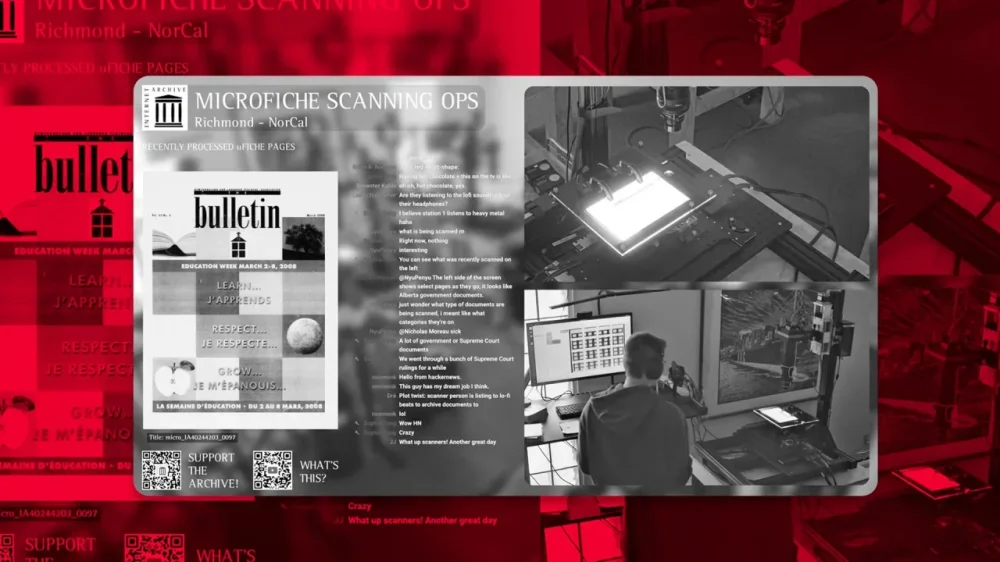
Want to watch history being preserved in real-time? The Internet Archive, the digital library of Internet sites and other cultural artifacts, has started live streaming on YouTube from its scanning center in California for anyone to watch. Monday through Friday, from 10:30 a.m. ET to 6:30 p.m. ET, viewers can tune in and watch live as fragile film cards are turned into searchable public documents, soundtracked to relaxing lo-fi beats. This work is part of Democracy’s Library, a global initiative to digitize and make publicly available millions of government records. “This livestream shines a light on the unsung work of preserving the public record, and the critical infrastructure that makes democracy searchable,” said Brewster Kahle, founder of the Internet Archive. “Transparency can’t be passive—it must be built, maintained, and seen. That’s what this live stream is all about.” If you’re confused about what exactly you’re watching on the livestream, scanning operators are specifically working with documents on microfiche, a flat piece of film containing microphotographs of the pages of documents. This format dates all the way back to the 20th century, and has been used to archive newspapers, court documents, government records, and more. “The livestream features five active microfiche digitization stations, with a close-up view of one in action,” Chris Freeland, the Internet Archive’s director of library services, explains in a blog post on the site. “Operators feed microfiche cards beneath a high-resolution camera, which captures multiple detailed images of each sheet. Software stitches these images together, after which other team members use automated tools to identify and crop up to 100 individual pages per card.” “Each page is then processed, made fully text-searchable, and added to the Internet Archive’s public collections—completed with metadata—so that researchers, journalists, and the general public can explore and download them freely,” the blog post adds. This livestream was brought to life by Sophia Tung, a software engineer and app developer. She is also behind the 24/7 livestream of a Waymo parking lot that went viral last year. In off hours, the Internet Archive livestream turns into a stream of silent films and historical images from NASA to keep viewers entertained. There is also a live chat. “This is such a good vibe to work on research,” one viewer commented. “I hope your work is as mysterious and important as this,” Tung replied. View the full article
-
In recent years, TikTok has become a prime target for scammers and cyber attackers spreading various forms of malware, and the latest shady campaign promotes instructional videos that trick users into downloading infostealers to their devices via ClickFix attacks. The scheme, identified by Trend Micro and reported by Bleeping Computer, instructs users to execute commands to activate Windows and Microsoft Office or premium features in CapCut and Spotify. One video is captioned "Boost Your Spotify Experience Instantly — Here's How!" and has nearly half a million views. These videos seem to be AI generated and, while the software they discuss is legitimate, the activation steps they outline are not, and will ultimately lead users to infect their devices with Vidar and StealC malware. TikTok's engagement algorithm makes it easy for such malicious videos to spread. In the past, cybercriminals have used TikTok's trending "Invisible Challenge" to spread WASP Stealer malware, which can steal Discord accounts, passwords, credit cards, and crypto wallets. Fake cryptocurrency giveaways posted on TikTok used deepfakes of Elon Musk (and themes around SpaceX and Tesla) to scam users into paying "activation" deposits using Bitcoin. How TikTok ClickFix attacks workClickFix is a social engineering tactic that uses fake error messages or CAPTCHA prompts to trick users into executing a command with malicious code. Users will see a pop-up notification about a technical problem with instructions to copy and run a command (commonly a PowerShell script) to "fix" the issue. The attack most often targets Windows users, but it has been employed on macOS and Linux too. In the current TikTok campaign, the instructional videos prompt users to run a PowerShell command that installs Vidar or StealC information-stealing malware. The former can take desktop screenshots and harvest data ranging from login credentials and cookies to credit cards and crypto wallets. The latter targets web browsers and crypto wallets. Once run, the script will download a second PowerShell script allowing it to launch automatically upon device startup. It also saves in a hidden directory and deletes temporary folders so it can evade detection. How to spot malicious TikTok videosBe wary of following instructional videos you're served on TikTok (as well as unsolicited technical content in general). Check the source, and only engage with those that are legitimate, like from the developer itself. You should also look for signs of AI-generated content, which may be used to spread malware widely and rapidly. There's no malicious code actually embedded in or delivered by these instructional videos—the scheme is dependent on social engineering via verbal directions—making the threat technically harder to detect. View the full article
-
Ever since Apple made it easy to change certain default apps on your iPhone, it's become quite convenient to switch away from the company's apps whenever there's a third-party option you prefer. With iOS 18.4, Apple made it possible to change your default translation app as well. First spotted by MacRumors, you can officially set Google Translate as the default app for translation, in case you prefer it over Apple Translate. Make Google Translate the default translation app on your iPhoneThere are a couple of ways to go about this, but I recommend the easiest method. If you never use it, just delete Apple's Translate app from your iPhone, and the device will automatically select Google Translate as the default translation app—assuming you're running the latest version of Google's app. This isn't ideal for people who occasionally rely on Apple Translate, but if you know you don't need it, you might as well save the time and storage space. You can also do make the switch without deleting any apps. On your iPhone, go to Settings > Apps > Default Apps > Translation and select Google Translate from the list. If you use any other translation apps that support Apple's default apps feature, they should also show up on this page, and you can use your preferred app as the default option. Credit: Pranay Parab You can use this feature in any iPhone app that lets you select text. Tap the Translate button in the popover menu above selected text, and you'll see Google Translate's translation in the lower half of your iPhone's screen. It does a good job at detecting the language of selected text and offering a translation in your preferred language (which is picked up from your iPhone's language settings), but there's an option to change languages easily, without leaving whichever app you're using. Until this feature showed up, you could still use Google Translate on your iPhone, but it required a few extra taps. This is a small but helpful way to streamline the process. View the full article
-
Prime minister’s move to appease Labour MPs could create a £3bn conundrum for Rachel Reeves in the Autumn BudgetView the full article
-
We may earn a commission from links on this page. Deal pricing and availability subject to change after time of publication. As the weather warms up, it's a great time to get out for a run or a bike ride—but if you need some music to keep you motivated, it's crucial to have headphones that won't entirely shut out the outside world. A good bop is a wonderful thing; not being able to hear traffic and nearby cyclists is not. Earphones like the Anker Soundcore C40i, on sale for $89.99 (originally $119.99), are a good option because they clip onto the ear and don't entirely fill the ear canal. Anker Soundcore C40i Open Earbuds $89.99 at Amazon $119.99 Save $30.00 Get Deal Get Deal $89.99 at Amazon $119.99 Save $30.00 Unlike higher-priced models with touch controls, these earbuds feature only button controls. This is ideal for individuals who prefer a more tactile and precise approach and want to avoid the accidental inputs that touch controls can cause. Additionally, the Soundcore app allows users to personalize button functions and EQ settings, although going ad-free is only available with a paid subscription. Despite these features, battery life and sound quality receive mixed reviews on Amazon. One reviewer describes the sound output as “tinny” and notes the lack of rich, bass-driven sound. While you won’t get the same quality as Bose headphones, if you’re in the market for budget-friendly wireless earbuds with an open style that cost less than $100, the Anker Soundcore C40i open earbuds might be a good option. View the full article
-
Three years after suing to block Microsoft from buying one of the biggest names in video games, the U.S. government is finally giving up. The FTC announced plans Thursday to drop a Biden-era case against Microsoft over its $69 billion acquisition of game maker Activision Blizzard, a decision the regulator said now best serves the public interest. In 2022, the FTC first announced that it would try to kill Microsoft’s planned acquisition of the gaming giant, which makes hit games like Call of Duty and World of Warcraft. The following year, after the FTC failed to secure a preliminary injunction to stop it, Microsoft actually finalized the massive deal, but the regulator vowed to continue appealing that decision. Earlier this month, the 9th Circuit Court of Appeals upheld the lower court’s order denying the injunction, ruling that the FTC’s claims that the deal would limit competition in the gaming industry were weak. The acquisition was destined for intense scrutiny from day one, both for its size and its potential to totally reshape the landscape for one of tech’s hottest sectors. Microsoft swooped in to save Activision Blizzard from itself When Microsoft announced its plan to buy Activision Blizzard in January 2022, the smaller company had been rocked by emerging allegations of systemic sexual harassment and discrimination in the workplace. Those ongoing scandals eventually forced longtime CEO Bobby Kotick out of the company as Microsoft cleaned house leading into the merger. Microsoft also had to clear major regulatory hurdles in the U.K., resolving antitrust concerns there over its cloud gaming services before getting the green light to close the deal. That bit of regulatory maneuvering resulted in an unusual arrangement to offload cloud streaming rights for its games to competitor Ubisoft in order to appease the Competition and Markets Authority, the U.K.’s powerful trust buster. (This portion of the deal isn’t great news for anyone who’s wrestled with Ubisoft’s awkward online gaming service over the years.) A boost to Microsoft’s online gaming roadmap By bringing Activision Blizzard under its wing, Microsoft can also bring the company’s many hit titles into the popular Xbox Game Pass service, which gives players unlimited access to games for a monthly subscription fee. Gaming companies have increasingly turned to monthly subscriptions and live service games over the last decade and many of Activision Blizzard’s hit franchises revolve around online multiplayer, including Call of Duty, Overwatch, Diablo and World of Warcraft. Activision Blizzard also owns Candy Crush, a colorful tile-matching game that’s still synonymous with mobile gaming almost a decade after Activision Blizzard bought its developer King for a then whopping $5.9 billion. Microsoft President Brad Smith described his company as “grateful” to the FTC for its decision to allow the acquisition to settle. “Today’s decision is a victory for players across the country and for common sense in Washington, D.C.,” Smith said. View the full article

-
Discord has started testing unskippable, reward-based video ads — marking its most aggressive move yet into monetization outside of its Nitro subscriptions. The ads pause if users tab away, guaranteeing full impressions for brands. Details. Discord has begun rolling out In-Game Rewards — branded video ads tied to game-related perks. While these ads appear for everyone, users can opt into more personalized promotions via their privacy settings. Discord originally gained traction as a “safe space” for gamers and niche communities. With over 200 million monthly active users, it has quietly become one of the largest social platforms. Until now, monetization was limited to its Nitro subscription model — offering perks like better streaming quality and cosmetic features. How it works: Unskippable, immersive video ads. These ads pause if users look away, ensuring full engagement. Opt-in personalization. Users can enable “In-Game Rewards” to receive promotions tailored to their gaming activity. Privacy-friendly targeting. Discord doesn’t rely on real names or invasive personal data, giving brands interest-based targeting with fewer privacy concerns. Why we care. Discord, once a haven for ad-free, community-first experiences, is rolling out video ads — a major shift with big implications for users and brands alike. They are guaranteeing full user attention through unskippable, opt-in video ads tied to rewards and access to highly engaged, interest-based communities with minimal privacy concerns and low competition. As Discord expands beyond gaming, brands have a unique opportunity to reach passionate audiences in a high-impact, low-noise environment. The big picture. This move nudges Discord closer to mainstream social media — and away from its indie roots. “It used to be a digital clubhouse. Now it’s another ad surface,” said Navah Hopkins, Brand Evangelist at Optmyzr and Discord user. Still, Discord offers functionality that platforms like Slack can’t match, especially in its free tier, which retains message history and robust integrations. What Discord is saying. The company describes In-Game Rewards as “experiences based on you interacting with the games you love.” Users can browse available rewards in the Quests tab — or opt out entirely via settings. “If you’re not interested in personalized Discord Quest promotions, you can opt out… You may still see Quest promotions, but they won’t be personalized,” according to Discord’s official policy. For brands. Marketers, however, should pay close attention. Discord’s ad model guarantees full engagement: ads only play when users actively opt in, and they stop if users look away. “This is not YouTube pre-roll,” Hopkins noted. “You get 100% of the viewer’s attention — and in niche, engaged communities.” Targeting is interest-based rather than identity-based, reducing privacy concerns and increasing contextual relevance. What we’re watching. If Discord’s community can tolerate — or even embrace — this new ad experience, it could open a highly lucrative, high-engagement channel for brands. Adoption by broader, more mainstream audiences in 2025 and 2026 could accelerate the trend. The key: whether this format drives ROI without alienating the core user base. The bottom line. Discord’s move into ads marks a crossroads for the platform — straddling the line between community-driven tech and mainstream social media. Whether it can maintain trust while pursuing ad dollars may define its next chapter. View the full article
-
We may earn a commission from links on this page. Having your car stolen is a traumatic experience—and a depressingly common one. Although car thefts nationwide are trending downward, there were still more than 850,000 vehicles stolen in 2024. If you’ve ever woken up to find your car missing from its spot (and I have!) you know it’s not fun. But thieves don’t always target the entire car. It’s often easier and less risky to steal a specific part from your car or truck. Many of these parts are relatively easy to access, remove, and sell, and the profit margin can be very lucrative for a busy and organized criminal. If your car is ever parked out in the open (especially overnight), it could be targeted for a surprisingly long list of specific parts. The good news is that you can protect every bit of your vehicle with a little foresight and a few security gadgets. Catalytic convertersEver since catalytic converters entered widespread use in the 1970s, thieves have targeted them. They’re a perfect storm for thieves: Accessible, relatively easy to remove, and valuable due to the mix of precious metals inside them (including palladium, platinum, and rhodium). Thieves know they can get between $250 and $800 for a catalytic converter, depending on the vehicle it was taken from. That’s why about 64,000 catalytic converter were stolen in 2022 alone. How to stop thieves: The best thing you can do is to install an anti-theft device like a Catstrap. This is a band of strip steel that is adhered to the length of your exhaust system, making it almost impossible for thieves to cut through the pipes to steal the converter. You can also consider etching identifying information on the converter to make it difficult to sell on the black market. The downside of this approach is that thieves may not notice the etching until after they’ve removed the converter. WheelsYour car's wheels and tires are prime targets for theft. Tires can be stripped off your car in a very short period of time, and they can be sold very easily, especially since tires—especially high-end tires—can run as much as $1,000 each. How to stop thieves: Your best bet is to install model-appropriate locking lugnuts like these. These will make it very difficult for thieves to use standard tools to remove your wheels. With a lot of effort and some specialized tools, they can be defeated, but chances are your thief will just move on to a different car with wheels that are easier to steal. BatteriesA standard car battery in a gas-powered vehicle isn’t worth much—typically less than 20 cents per pound. But batteries are also incredibly easy to steal, so thieves will sometimes make a sweep of an area to steal as many batteries as possible in order to make the payout worth their time. The batteries in a hybrid vehicle can be worth more, and the batteries in an electric vehicle can be very, very valuable—but also a lot harder to steal. How to stop thieves: Adding a battery lock bracket is easy, cheap, and pretty effective. Since battery thieves don’t make much per battery, any additional barrier will probably deter them pretty effectively. TailgatesYes, believe it or not, thieves are after your truck’s entire tailgate. This is especially true if you own a Toyota Tacoma, because the tailgates on that model are incredibly easy to detach—they’re literally engineered to be removed easily. But any truck tailgate is a target because they’re all relatively easy to remove, and these days your tailgate contains a bunch of high-tech gear (cameras, sensors, etc.) that can be stripped out for resale. How to stop thieves: You can install a tailgate lock for your make and model (like this one for suffering Tacoma owners). AirbagsIt’s estimated that about 50,000 airbags are stolen annually in the U.S. They’re valuable, fetching up to $200 on the black market, which makes them attractive to thieves. Thieves usually target dealerships or other places where cars are left unattended in accessible lots, but cars parked on the street are also hit. How to stop thieves: The best ways to stop airbag theft is to lock your car when you park it and park it inside a secured area, like a garage. If that’s not possible, using a steering wheel lock using the “club” design can be effective, as it physically makes it difficult to access the driver’s-side airbag. This won’t stop thieves from grabbing the passenger-side airbag, of course, but cutting their profit in half might inspire them to move on. License platesThieves steal license plates because it’s an easy way to cloak a vehicle. Sometimes they’re put on stolen vehicles, sometimes they’re used to evade tolls—but the fact that they’re generally easy to steal and very difficult to track makes them popular targets. In fact, the National Insurance Crime Bureau (NICB) notes that license plate theft has been rising rapidly—by 45% between 2019 and 2022 alone. How to stop thieves: Swapping out the rusty, standard screws holding your plates on for some tamper-proof screws will do the job. These screws require a special fastener to attach or detach, and the kits come with screw covers to make it even more difficult to access. Side mirrorsYou might think your side mirrors are just mirrors, and who would bother stealing those? Ah, but modern-day side mirrors have a lot of technology inside them, especially on luxury vehicles, including blind spot sensors, defrosting systems, and cameras. Believe it or not, some mirrors can command upwards of $2,000 each! How to stop thieves: If your side mirrors are motorized, turning them in when you park can make it more difficult for thieves to access them. You can also look for anti-theft mirror guards (like this one) for your make and model, which add a layer of security to the mirror to deter thieves. Third row seatsIf you have a truck or SUV with a removable third-row seat, you should know that it’s increasingly popular to steal them. The reason third-row seats are targeted is the universal reason anything gets stolen: These seats cost thousands of dollars to replace. How to stop thieves: The best way to prevent theft of your truck’s third-row seat is to secure it with a bike lock. The specific lock that will work depends on how your third-row seat attaches and detaches, but all you need to do is secure it in place. It removes some of the convenience, but it’s a lot better than having your kids roll around in the cab while you drive. BadgesPeople have been stealing car badges and hood ornaments for decades, often just to collect them or as petty acts of vandalism. But these days those emblems can actually contain a lot of expensive technology. Modern Volkswagens, for example, often tuck cruise control sensors into the hood emblem. That makes those badges a lot more valuable than you might think, and thieves are definitely aware of their added value. How to stop thieves: It’s very difficult to stop someone from removing an emblem, badge, or ornament from your car. If you can access the back where it’s attached, you can try using wire or zipties to secure it more firmly—but if you can access it, so can thieves. Your best defense is to park the vehicle in a secure area whenever possible. View the full article
-
Sachin Dev Duggal has recently approached multiple investors View the full article
-
Share of voice in SEO tells you how much search engine visibility you have. Measure it with Semrush. View the full article
-
For the first time in a generation, its monopoly is under threat. After two years of false starts, the company is trying to regain the initiative View the full article
-
Starbucks in South Korea has barred customers from using the names of South Korea’s six presidential candidates in their orders ahead of next month’s presidential election. A Starbucks Korea spokesperson told NBC News the policy was introduced “in order to prevent inappropriate and abusive use of the names.” The decision comes as South Koreans have increasingly used their Starbucks’ orders to make a political statement—ordering via app under presidential candidates’ names, and using phrases in support of or to oppose them, forcing baristas to call them out for pickup, per NBC. Some examples of those orders include: “arrest Yoon Suk Yeol” and “[opposition leader] Lee Jae-myung is a spy,” per the BBC. According to Starbucks, the company needs to “maintain political neutrality during election season,” and will lift the ban on June 3 after the election, the BBC reported. Like many South Korean businesses, Starbucks is seeking neutrality amid the charged political atmosphere around the election, stemming from former President Yoon Suk Yeol’s brief martial law declaration and subsequent impeachment trial, which has deeply divided the East Asian democracy. Similarly, Naver, South Korea’s biggest search engine, has disabled autocomplete on search for the candidates, a common practice for the tech giant during an election cycle, according to the BBC. The six presidential candidates’ names that Starbucks has banned are: Lee Jae-myung, from the country’s liberal Democratic Party (DP); Kim Moon-soo, from former president Yoon Suk Yeol’ conservative People Power Party (PPP); and Lee Jun-seok, Kwon Young-kook, Hwang Kyo-ahn, and Song Jin-ho. As Fast Company previously reported, Starbucks recently posted “disappointing” earnings results for the second quarter of fiscal 2025, ending on March 30. Unlike in the previous quarter, Starbucks did not beat analyst revenue expectations, of $8.83 billion and an adjusted earnings per share (EPS) of 49 cents, according to Yahoo Finance, instead posting a revenue of $8.76 billion and an adjusted EPS of 41 cents. One key metric, U.S. comparable store sales, declined 2% in Q2. Shares in Starbucks Corporation (NASDAQ:SBUX) were trading up about 1% on Friday. View the full article

-
Potential loosening of Black ownership rules came after billionaire said his satellite internet group would not complyView the full article
-
The first Mission: Impossible film came out in 1996 when star Tom Cruise was 34 years old. Fast-forward to Memorial Day weekend 2025: Cruise is 62 and there’s speculation that Mission: Impossible – The Final Reckoning could be the last movie in the franchise. Is this just a marketing ploy to get fans in theaters to kick off the summer blockbuster season? Who knows. Let’s take a look at the history of these films, their box-office earning power, and what Cruise himself has said about the movies over the years. A brief history of the Mission: Impossible franchise The Mission: Impossible films are based on the 1966 TV series of the same name, which was created by Bruce Geller. Peter Graves, who played Jim Phelps on the series, didn’t appear in the first film and was in fact very disappointed with it because his character was made to be the villain in the story, as CNN reported. Actor Jon Voight took the role. Even though this move upset other actors from the series and some fans, the box office numbers proved that fans soon got over this reversal of the source material. The franchise’s first four installments had different directors, while the last four were helmed by Christopher McQuarrie. Cruise has been among the producers of the films from the beginning. How does it stack up against other action franchises? The Mission: Impossible films continue to jockey for the title of highest-grossing Tom Cruise movie, according to Screen Rant. Each new installment tends to beat the previous contender. According to Box Office Mojo, the seven films in the franchise have earned a domestic lifetime gross of $1.3 billion, making Mission: Impossible the 23rd most-valuable movie franchise by that measure. To put that in perspective, the Marvel super hero franchise—No. 1 on the list—has earned $12.8 billion, followed by Star Wars ($5.1 billion), Disney live-action reimaginings ($3.5 billion), and Spider-Man ($3.3 billion). Compared to pure action-movie franchises, Mission: Impossible falls below James Bond ($2.3 billion) and the cars and costars of The Fast and the Furious ($2 billion), but it beats out Indiana Jones ($1.1 billion) and Tom Cruise’s own Top Gun franchise ($899 million). Why do fans think this might be the last Mission: Impossible movie? Originally, the latest two Mission: Impossible films were supposed to be a two-part story shot back-to-back. The second film was initially called Mission: Impossible – Dead Reckoning Part Two, with the name change being announced in October 2023. Part One was loved by critics but had a disappointing box office return. Further complicating the matter, Final’s budget kept growing because of delays due to the Covid-19 pandemic and the actors’ and writers’ strikes. These setbacks caused tension in the production process and may have even accelerated conversations of the film becoming a more definitive conclusion to the franchise. While the creative team has not publicly spoken out about the stress of the delays, the title change signals to fans this might be the last time Ethan Hunt saves the world. “It is, I hope, the satisfying conclusion to a 30-year story arc,” director McQuarrie said in an interview with Empire in February. “I’m pretty confident that people are going to feel that the title was appropriate.” Cruise also seemed to confirm the end of an era on the red carpet at the New York premiere. “It’s the final! It’s not called ‘final’ for nothing,” he commented to the Hollywood Reporter. Two years ago he told the same publication he would make Mission: Impossible movies into his 80s. When asked about this, he clarified: “I actually said I’m going to make movies into my 80s; actually, I’m going to make them into my 100s.” Since everything eventually seems to get a reboot these days, it is not far-fetched to believe audiences might see Ethan Hunt again, especially if the box office numbers are impressive. No spoilers but several reviewers, including Clint Gage for IGN, point out that the plot of the film leaves room for future storytelling opportunities. Cruise has several film projects in development over the next several years so it does appear that it is goodbye—at least for now—to the beloved franchise. Mission: Impossible – The Final Reckoning hits theaters in the United States on Friday, May 23. View the full article