ResidentialBusiness
Administrators
-
Joined
-
Last visited
Everything posted by ResidentialBusiness
-
 Jingye makes first comments after ministers seized control of struggling companyView the full article
 -
We may earn a commission from links on this page. Deal pricing and availability subject to change after time of publication. At $1,399 (down from $1,899), this deal on the 14-inch Apple MacBook Pro (2023, M3 Pro chip) brings some high-end specs into a more accessible price range, especially considering it’s still $1,699 on Amazon. Apple MacBook Pro (2023, M3 Pro chip) $1,399.00 at Best Buy $1,899.00 Save $500.00 Get Deal Get Deal $1,399.00 at Best Buy $1,899.00 Save $500.00 This base M3 MacBook Pro configuration gives you an 11-core CPU, a 14-core GPU, 18GB of unified memory, and a 512GB SSD, which is plenty for handling creative workloads like editing 4K video, code compiling, or juggling multiple apps and browser tabs without hitting thermal limits or draining battery in a couple of hours. It runs on macOS Sonoma, has a backlit keyboard, and supports Wi-Fi 6E and Bluetooth, though those were already around in the 2021 model. The display is a 14.2-inch Liquid Retina XDR screen with a 3024 x 1964 resolution and up to 1000 nits of sustained brightness (which makes a difference if you work outdoors or with HDR content). Colors look vibrant, and Apple's ProMotion tech keeps things smooth with a 120Hz refresh rate that adjusts dynamically. This helps during video playback or fast-paced visuals, though it won’t make much of a difference for static office work. And while it’s not a touchscreen (something Windows users might miss), the display clarity more than makes up for it in sharpness and depth. Battery life is solid too, with up to 30 hours unplugged, according to this PCMag review. You’re also getting a more generous port selection than what you’d get on a MacBook Air (speaking of, read why Apple's newest MacBook Air is the one to buy) or most laptops in this class. There are three Thunderbolt 4 ports, an HDMI output, an SDXC card reader, a 3.5mm headphone jack, and MagSafe charging—so dongle life doesn’t have to be your default. If you don’t need a powerhouse for 3D rendering or machine-learning tasks, this M3 Pro version is more than capable. It’s a good fit for creative professionals, developers, gamers trying to get more mileage from the Mac ecosystem, and anyone who doesn’t want to compromise on screen quality or build, but also doesn’t need the fully loaded top-tier models. View the full article
-
Shares in Nvidia Corporation and other chip technology companies are down in premarket trading this morning after Nvidia confirmed that it would take a significant financial hit to cover costs associated with a newly required export license so it can ship some of its latest chips outside of the United States. Here’s what you need to know about the new requirement and its effect on tech stocks. What’s happened? Yesterday, AI chipmaking giant Nvidia revealed that it will record a $5.5 billion charge this year related to its H20 chips, sending the stock down in premarket trading this morning. Nvidia made the revelation about a week after the The President administration added new export license requirements to the H20. Nvidia initially revealed that information in a Form 8-K filing with the U.S. Securities and Exchange Commission (SEC) dated April 9. In that filing, Nvidia revealed that the U.S. government now requires Nvidia to obtain an export license to export its H20 chips to China and select other countries. Due to this, Nvidia expects to incur about $5.5 billion in costs related to “inventory, purchase commitments, and related reserves” of the H20. The H20 chip is a chip Nvidia designed especially for the Chinese marketplace in order to comply with U.S. export restrictions, notes CNBC. In 2024, Nvidia made between $12 billion and $15 billion selling the H20. But now the associated $5.5 billion charge will take a significant chunk out of those revenues. The The President administration’s new export controls are also a sign that Nvidia could face an increasingly challenging environment when exporting its chips to countries that the U.S. believes could use them in ways that could disadvantage America. In Nvidia’s 8-K filing, the company said that the new export license requirement covers “the Company’s H20 integrated circuits and any other circuits achieving the H20’s memory bandwidth, interconnect bandwidth, or combination thereof” and that the United States government “indicated that the license requirement addresses the risk that the covered products may be used in, or diverted to, a supercomputer in China.” But China (including Hong Kong and Macau), isn’t the only country that the new export license requirement applies to. The license is also required for other so-called “D:5 countries.” According to a March 2024 publication by the United States Department of Commerce’s Bureau of Industry and Security, D:5 countries comprise over two dozen nations, including Afghanistan, Cambodia, Iran, Libya, Nicaragua, Russia, and Venezuela. On April 14, the United States government said the license requirement would “be in effect for the indefinite future,” according to Nvidia’s filing. Chip stocks fall The expected $5.5 billion charge related to Nvidia’s H20 chips has sent the stock tumbling nearly 6% in premarket trading this morning as of the time of this writing. Nvidia shares (Nasdaq: NVDA) are currently down around $6.45 to $105.75. However, it’s not just Nvidia shares that are down. The stock prices of chipmakers often move in unison—suggesting that most investors believe that what is good or bad for one company could be good or bad for the chip industry as a whole. The new export license requirement on Nvidia is a sign to many that U.S. chipmakers may see rougher waters ahead when it comes to exporting their products across the globe. Rougher export waters could lead to higher costs, reduced profits, or both. Other chipmakers this morning are currently seeing their stock price down, too, including: Taiwan Semiconductor Manufacturing Company Limited (NYSE: TSM): down 3% Intel Corporation (Nasdaq: INTC): down 2.7% Broadcom Inc. (Nasdaq: AVGO): down 4% Micron Technology, Inc. (Nasdaq: MU): down 3.8% Arm Holdings plc (Nasdaq: ARM): down 4.8% QUALCOMM Incorporated (Nasdaq: QCOM): down 2.2% Advanced Micro Devices, Inc. (Nasdaq: AMD): down 7% ASML warns about weaker orders However, the Nvidia news may not be the only thing dragging down these other chip companies. Currently, shares in the Dutch company ASML Holding N.V. (Nasdaq: ASML) are also down 4.7% in premarket trading as of the time of this writing. ASML isn’t a chip maker itself. It manufactures the critical machines that chipmakers need to produce their chips. As noted by the Wall Street Journal, ASML has now reported that orders for its machines that help make semiconductors totaled $4.45 billion in its first quarter. That was well below the $5.5 billion that analysts were expecting, suggesting a massive slowdown in once-expected production by chipmakers. ASML warned that President The President’s policies were creating uncertainty for the semiconductor industry. Not including today’s premarket falls, companies operating in the semiconductor space have had a rough 2025 so far—not helped by The President’s recent tariff policies and now, tightening export rules. As of market close yesterday, since the beginning of the year, NVDA shares were down 16.4%, TSM shares were down 21.4%, AVGO shares were down 22.8%, MU shares were down 15.5%, AMD shares were down 21.1%, and ARM shares were down 17.5%. Before today’s premarket drop, ASML shares were down 1.8% for the year. View the full article

-
As AI-powered SEO platforms evolve, they’re rewriting the economics of search engine optimization. This transformation threatens to upend the traditional agency model in three ways: Dramatically lower costs. Automate technical capabilities. Provide unbiased, data-driven decisions. Yet, this disruption might lead to industry consolidation and expansion as fewer but larger agencies emerge to serve an expanding market of SEO adopters. This article looks at how to survive the new agency economics. The economics of disruption Today’s SEO agency model typically involves monthly retainers ranging from $2,000 to $20,000, depending on the scope and complexity of services. Even with premium pricing, AI-powered platforms might deliver comparable or superior results for a fraction of the cost – perhaps $500 to $2,000 monthly. This dramatic price differential doesn’t just create competition; it fundamentally challenges the sustainability of traditional agency pricing structures. Consider a mid-sized ecommerce website currently paying $5,000 monthly for SEO services. An AI platform could deliver automated technical audits, content optimization recommendations, and competitive analysis for $750 monthly. Even if the platform doubled or tripled its prices, it would remain significantly more cost-effective than traditional agency services. At the same time, it provides in-house marketers with enough SEO expertise to tackle the job themselves, maximizing in-house budget. For the SEO agency, this threat needs to be taken seriously. When the clients can choose a platform over an agency, the agency model will hit a stumbling block. The automated technical evolution The technical capabilities of AI platforms represent the most immediate threat to traditional agencies. These systems can now: Automatically detect and prioritize technical SEO issues. Generate and implement fixes for common problems. Monitor site health in real time. Adapt to algorithm updates more quickly than human teams. Assess competitor code changes to see impact across sites. This automated approach has a significant impact on those skilled in technical SEO. Even recently, we used AI to identify code-related issues in a client’s site that were not identified by traditional SEO tools. As AI becomes more embedded within web and SEO platforms, we’ll see the value of technical expertise reduce. This isn’t hype. The rise of no-code platforms is proof of this. The benefit that tech SEOs should bring to their clients is knowing what needs doing and when based on experience. But in an AI code era, websites can be made technically perfect and even “self-heal” code issues – essentially making tech SEO irrelevant. The trust factor (No more snake oil) The SEO industry has always had its share of spam. A quick search online, and within seconds, you’ll find someone promising instant rankings for a cheap monthly fee. It’s natural for agencies to prioritize their needs. They will sell a dream that will burn the industry one client at a time. SEO-powered platforms change this. These platforms provide unbiased, data-based advice. They can see links being added, content changed, and technical fixes made, and they can track the results across sectors. This feedback allows these tools to provide unbiased, non-agency advice. And don’t think this is not going to happen. Soon, SEO platforms will be able to look at any website and show all the changes and how they impacted SEO results. It’s just a matter of time. Weeks, months, or maybe a few years. But it’s coming. OK, so that’s all the bad news. What should you do? The agency response SEO agencies cannot sit on the fence right now. The last few years have been mainly carnage for the SEO and content industry, and we have seen the freelancer market boom as agencies struggle to grow. However, we need to understand that agencies suffered an artificial boost after COVID-19, and as such, we saw them grow far faster than they would have usually. And then we’ve seen an overcorrection due to global economic issues. Today, we are entering a lean phase in SEO, one in which AI efficiencies will lead to the greatest and most powerful agencies. The most successful agencies will likely be those that can: Build strong brand recognition and trust. Operate at scale with minimal overhead. Effectively combine AI capabilities with human insight. Provide value beyond what automated platforms can deliver. But this will battle head-on with SEO platforms. The platforms we use to do our jobs will be battling for the customers directly. It’s the natural next step. Think DIY outlets. They sell to the professional and direct to the consumer. This is where it’s heading. Dig deeper: The billion-dollar one-person SEO agency: Fiction or the future? Get the newsletter search marketers rely on. Business email address Sign me up! Processing... See terms. Market evolution The SEO market appears headed for a paradoxical future. As AI platforms make basic SEO more accessible, we’ll likely see: More businesses investing in SEO due to lower entry barriers. Fewer traditional SEO jobs as automation increases. A smaller number of larger, more efficient agencies. Higher overall market value but distributed differently. The winners in this new landscape won’t necessarily be the agencies with the best technical capabilities – AI platforms will largely commoditize those. Instead, success will likely come to those who can build the strongest brands and most efficient operations, potentially leading to a winner-takes-all scenario in the agency space. And here we enter a rather unique battle. AI can make a single freelancer or agency far more profitable while reducing the need for that agency or freelancer. In an industry with less required expertise, lean agencies that acquire customers faster will grow and become stronger brands. These agency brands will be wrappers covering the same ‘behind the scenes’ mechanics all agencies have. Branding, reach, and visibility will be the key differentiators. Whereas most agencies today are similar in branding and appeal, the agency of the future will stand out deliberately. Agency marketing will be the big play. Efficiencies will lead to higher profits, which can be poured into brand and customer experience. Customers will likely choose agencies based on who they want to work with, and experiential factors will influence that decision. While we know remote work is enormous in the SEO sector, having an office that clients want to hop onto a train or plane to visit might be a big factor in this landscape. Your office and brand will be costly signaling factors. As British advertising executive Rory Sutherland famously stated: “All-powerful messages must contain an element of absurdity, illogicality, costliness, disproportion, inefficiency, scarcity, difficulty or extravagance – because rational behavior and talk, for all their strengths, convey no meaning.” Your brand and office are going to become powerful messages in the future. Dig deeper: The SEO career crisis is coming: Are you ready? The future landscape The transformation of the SEO industry won’t happen overnight, but the writing is already on the wall. As AI platforms become more sophisticated, we’re likely to see a four-tiered market emerge: 1. Enterprise level Large, well-branded agencies serving corporations, combining AI efficiency with high-touch service and strategic oversight. These agencies will likely command premium prices but operate with leaner teams than today’s agencies. 2. Mid-market solutions AI platforms serve as the primary SEO solution for mid-sized businesses, with minimal human oversight required. These platforms will offer sophisticated automation at a fraction of traditional agency costs. 3. Small business market Democratized access to SEO tools and AI-driven recommendations, allowing small businesses to manage their SEO with minimal external support. 4. Small agencies and freelancers They will scoop up the market that will be left over with those not interested in doing the SEO themselves and those who don’t have the time. This might sound similar to today, but remember that AI efficiencies help larger agencies to become more profitable. Today’s 60-person agency should probably be a 20-person agency, and it should use its profit to scale, acquire customers, and grow its brands. Adding AI platforms opens a new level of competition against agencies operating in the smaller trenches. Implications for the industry This restructuring will have far-reaching consequences. SEO professionals must evolve from technical practitioners to strategic advisors and AI platform specialists. Agencies must either scale up significantly to compete at the enterprise level or dramatically reduce their overhead to remain viable in the mid-market. The good news for the industry is that the overall SEO market is likely to expand. Lower barriers to entry and more affordable solutions will bring new businesses into the SEO fold. However, this growth will be distributed differently, with AI platforms capturing a larger share of the mid-market revenue while mega-agencies dominate the enterprise space. Why this matters While human expertise will remain valuable, the traditional agency model of high-overhead, technical-focused service delivery will likely become unsustainable for all but the largest, most efficiently operated firms. For agency owners, the message is clear: adapt now or risk obsolescence. This might mean investing heavily in brand building, dramatically reducing operational costs, or pivoting to become specialists in AI platform implementation and optimization. The future belongs not to those with the best technical skills but those who can build the strongest agency brands and most efficient operations. And that’s the brutal reality. The future of SEO is one of extravagant and distinctive agency brands powered by highly efficient and profitable models. How are you ready for this? Dig deeper: 3 ways to use AI for SEO wins in 2025 View the full article
-
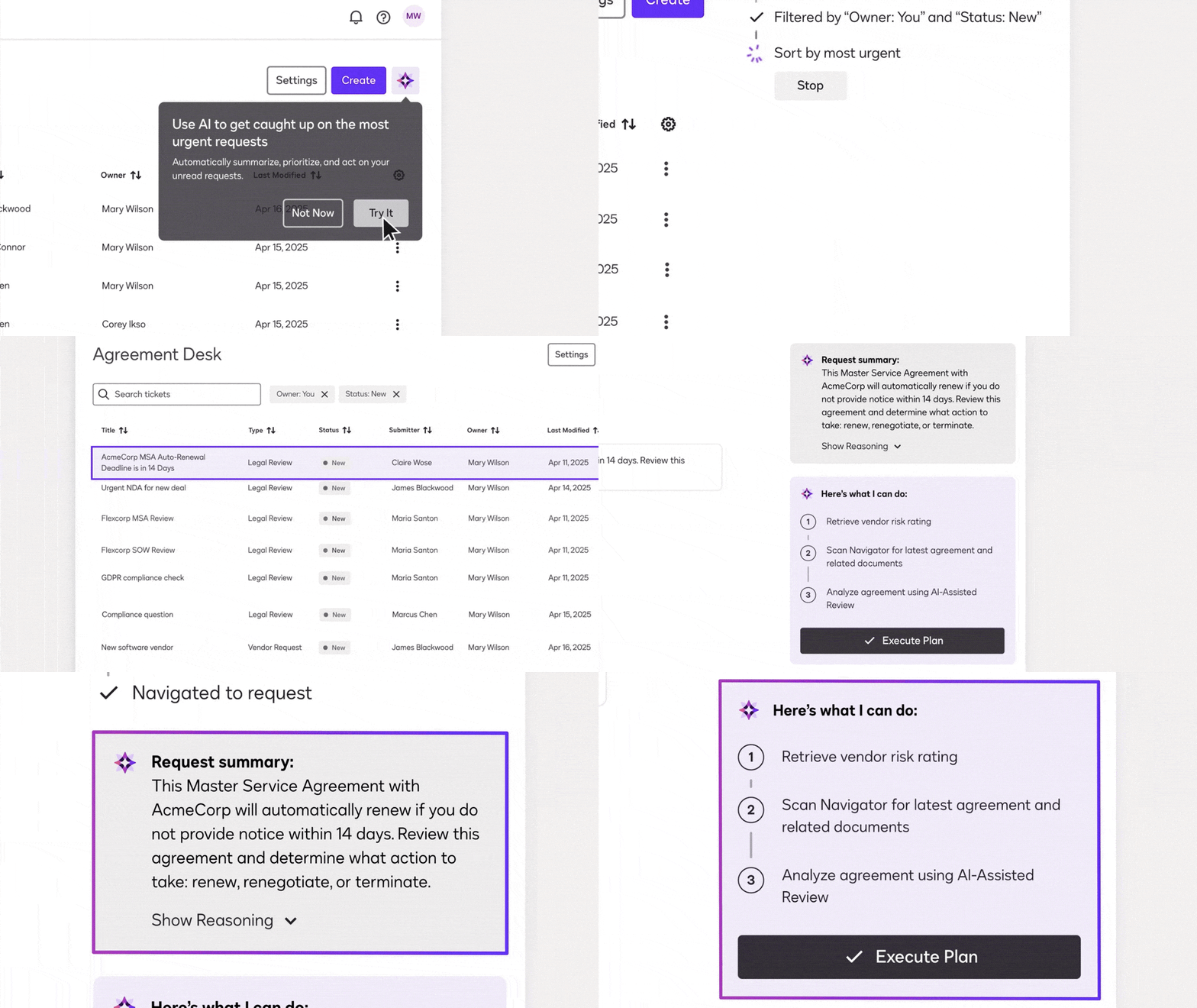
For about 20 years, Docusign has been known as a tool for collecting digital signatures—helping businesses replace paper forms with electronic versions that are just as secure and legally binding. Just over a year ago, the company announced its development of an “intelligent agreement management,” or IAM, platform. This platform uses AI not only to gather signatures but also to assist with creating new agreements and organizing contracts after they’ve been signed. These features contributed to strong earnings in Docusign’s most recent quarter, beating analyst expectations and helping customers transform contracts from hard-to-manage text files and paper printouts into actionable data. “It’s literally a revolution in how agreements are managed inside of companies,” says Allan Thygesen, Docusign’s CEO. Traditionally, even digitally signed documents are still stored as word processing files or PDFs, often scattered across company servers and cloud systems. Although critical to company operations—from hiring to product sales—”Businesses really run on agreements,” says Docusign Chief Revenue Officer Paula Hansen. Yet these documents are often difficult to scan and analyze systematically. That makes it challenging to answer even basic questions, such as which agreements are up for renewal next month, without time-consuming human review. “It really should be structured data that’s managed by software,” says Dmitri Krakovsky, Docusign’s chief product officer. “But in fact, it usually sits in text somewhere—you cannot interrogate the contract.” Docusign’s IAM platform aims to solve that by giving customers a centralized space to store and track contracts—including those housed in other cloud systems—reducing the need to hunt down relevant files. Its AI tools can automatically ingest, analyze, and search contracts. Meanwhile, an automation platform called Maestro helps companies build workflows around agreements, such as collecting customer data via webforms, gathering signatures, and verifying signer identities. Once signed, contracts can be saved automatically, and Maestro can log relevant data to third-party systems like Salesforce. Now, Docusign is unveiling a suite of new features to make it easier for users to collaborate on contracts, track compliance, review them with AI, and verify the identity of signers. Launching at this week’s Docusign Momentum conference, a new AI engine called Docusign Iris will leverage the company’s deep contract experience to apply the most suitable AI models for various tasks. “We get to benefit from our deep understanding of how agreements are structured,” Thygesen says. “There’s sort of an inherent meta-structure to agreements, and therefore an ability to develop better models for extraction.” New virtual workspaces will enable collaboration on complex, multistep agreements. A feature called Obligation Management will automatically extract and highlight what each party is required to deliver and when—ensuring deadlines aren’t missed. This data can also be integrated into other software, like procurement management tools, eliminating the need for manual data entry, Krakovsky explains. By next month, Docusign plans to release a beta version of a new feature called Agreement Desk—a ticketing system that helps companies organize and manage contract-related tasks, similar to developer or help desk systems. It’s designed for use across departments—not just legal—supporting teams like sales, HR, and procurement. Agreement Desk offers visibility into task statuses and required actions. New contract prep tools will also make it easier to populate templates with data from across a company’s systems. Later this year, Docusign expects to roll out more advanced AI agents that can further automate contract processes. These tools will recommend next steps, highlight contracts up for renewal, flag potential issues, and even generate draft communications. Enhanced AI review features will identify contract terms that conflict with company policies, which can be written in natural language. Users can continue editing contracts in familiar tools like Microsoft Word or Google Docs, where AI-suggested redline changes will also appear, says Thygesen. That’s important for a solution meant to enhance—rather than replace—existing workflows. “Trying to get people to move out of the tools that they like to work in—email, Word—has not ended well for anyone,” he says. No matter the tools or workflows, Docusign’s management and AI features are designed to help customers avoid missed opportunities caused by delays or overlooked deadlines. Some customers are already seeing the benefits. Kelly Park Capital, which connects independent financial advisers and their clients with investment opportunities like hedge funds and private equity, uses Docusign’s systems to digitize and manage complex investment subscription documents. “These documents are hundreds of pages long, typically, and they are filled with dense, archaic, legalistic, regulatory-driven language,” says Dean Rubino, managing partner at Kelly Park Capital. “So if you’re not used to that, and you’re trying to do it in mass, it’s almost impossible.” Using Docusign technology, the company collects preliminary data—like client info and investment types—via web forms, which Maestro then automatically adds to the correct digital template. This saves around 70% of the time previously spent manually filling contracts and reduces the risk of transcription errors, Rubino says. Docusign’s upcoming workspace feature will also help Kelly Park Capital collaborate more effectively on documents. Meanwhile, AI tools may soon enable automatic updates to templates—useful for applying regulatory changes across similar agreements. While other tools exist for managing legal documents and using AI to analyze them, Docusign leaders believe their long history with contracts—and the trust of nearly 1.7 million customers—gives them an edge. “It’s still really early days,” says Hansen. “But the results are exceeding our expectations, and we’re fortunate to have a really large customer base and a customer base that trusts us.” View the full article
-
It's been about a week and what would be do without reporting on yet more Google Search ranking volatility... I am seeing signs of a Google Search ranking update and volatility over the past 24 hours, maybe kicking in April 15th through April 16th, today.View the full article
-
Design industry leaders trust artificial intelligence less than they did a year ago, and many see the world as an increasingly uncertain place. These are a few of the most striking takeaways from the 2025 State of Design & Make report from the design and engineering software maker Autodesk. This third annual design industry outlook is based on surveys and interviews with 5,594 industry leaders, futurists, and experts across industries including architecture, engineering, construction, and operations, design and manufacturing, and media and entertainment. Leaders from what Autodesk calls the “design and make” industries were asked to report on a wide range of topics, including adoption of digital technologies, sustainability efforts, supply chain challenges, and the growth of AI. AI is a recurring topic in the report, but one of the most striking results is just how skeptical industry leaders are becoming about AI and its use in their businesses. Only 65% of architecture, engineering, and construction professionals say they trust AI, down from 76% last year. That may not change its impact on the business, however, as 68% of firm leaders believe AI will ultimately enhance their industry, compared with 48% who think it will be a force of destabilization. But while AI is still an open question for many design industry leaders, there are some ways it has been largely embraced. According to the report, 39% of industry leaders say they are using AI to be more sustainable in their business practices, up from 34% in 2024 and 26% in 2023. The global economy is another overarching theme in the report, with many industries expressing concern and uncertainty. The architecture industry stands out, with leaders from the field predicting dark times ahead. Last year, 74% of architecture leaders reported that they were well prepared for unforeseen future changes in the global economy. This year that number has dropped to 46%, the steepest decline among all industries surveyed. The number of architecture leaders who see the global landscape as more uncertain than three years ago has risen from 35% to 57%. Just 55% of leaders in the architecture sector say they will increase investments in the next three years, a 28% decline from 2024. This design industry outlook may feel a bit like a knee-jerk reaction to the tumultuous economic conditions that have emerged in the early months of the The President administration, but industry leaders were seeing these clouds on the horizon long before. The quantitative data that the report is based on was collected between May and August of last year. View the full article

-
CNBC reports Google has been sued in the UK for <<£5 billion ($6.6 billion) in potential damages over allegations that the U.S. tech giant abused its "near-total dominance" in the online search market to drive up prices.View the full article
-
Google.com will soon be the only way to access Google Search. The ccTLD versions of Google will redirect to Google.com. That means if you try to go to Google.ca, Google.fr. Google.co.uk and so on, those will all redirect to Google.com.View the full article
-
Google has released its annual Google Ads Safety report and the big number that stands out to me is that Google has suspended over 200% more advertiser accounts in 2024 than it did in 2023; 39.2 million versus 12.7 million. Google also removed 5.1 billion ads, restricted over 9.1B ads, restricted ads on 1.3 billion publisher pages and took broader site-level enforcement action on over 220,000 publisher sites.View the full article
-
State governor says that duties will lead to job losses and higher pricesView the full article
-
Google is testing a "new" label in the search result snippets. Several people are noticing this "new" label next to search result snippets that have new content. View the full article
-
I was taught that hard work would get me ahead, would ultimately pay off, and would get me promoted. But several years ago, when I was passed up for yet another promotion, I was angry and devastated because I was convinced that I had deserved that promotion. How could I not have been promoted after all the hard work I had been doing? A mentor I reached out to finally confided this to me, “Yes, you are working hard. But you are working on the wrong things. You need to be working on things that get you visibility.” I was doing lots of work, but with little visibility. I didn’t realize that only focusing on working hard was the quickest way to not get promoted. Even if I thought I was performing exceptionally, others didn’t have that perception of me. They didn’t see me in action on the things that mattered to them. It wasn’t clear or evident to them that I was capable and should be promoted. So if you aren’t getting promoted, it’s not that you didn’t deserve a promotion, or that you aren’t capable, or that you haven’t earned it. Here’s what you might not recognize: You aren’t visible to the leaders who are behind closed doors making decisions about your career. So if you want to get promoted, start with focusing on the following three things: Prioritize what’s important to your organization Especially in this current market, companies are having to make hard choices across the board. They are faced with executing layoffs, changing direction in strategy, cancelling initiatives, and more. Companies are prioritizing, reprioritizing, and reprioritizing again, assessing what’s the most important thing for them to achieve at this moment. And you need to make sure you have a clear understanding of what those changing priorities are. Review your project list and your goals for the year. What percentage of items are still relevant to your company’s changing priorities? All of it? Some of it? Or none of it? If you are quietly working on projects that are no longer a priority for the company, or have been put on the back burner, your work has become invisible. All that hard work has been forgotten or is just no longer important at this moment. Check in with your boss on what you are currently working on. They may have forgotten that you are still working on something that’s no longer relevant. When meeting with them, share with them what you have heard the company’s priorities are. Make sure you are raising your hand to take on work that’s important to leadership and helps you get the visibility you need. Every job will include non promotable or administrative work. And if you are working hard on invisible work only, you need to adjust quickly to ensure your work is getting on the radar of those making decisions about your career. Make sure you are visible to other leaders One of the biggest mistakes I made was to tie all my career fortunes to my boss. At one point in my career, I became exceptional at managing up to this one boss. She knew what I was working on; she had me leading a lot of visible work with very little non promotable or administrative tasks. She advocated for me in rooms I wasn’t in. She coached and guided me on what I needed to do to get promoted. Unfortunately for me, she got a great external opportunity and left the company. And then I was left all alone, trying to navigate my career. I had lost my only career champion at the company. Make sure you aren’t just visible to your boss, but also to other leaders. If your company encourages skip level meetings, get a meeting with your boss’s boss and whoever is running your division. And if they don’t, you can certainly schedule this or ask your boss ahead of time, so they don’t think you are going behind their back. It can be a short meeting to ask them questions about their career, but also to give them the highlights of what you are working on. You can send them quick updates once a month on progress, or share articles or books you have been reading that are pertinent to the challenges and opportunities your company is currently facing. Also, build relationships with your boss’s peers. When my boss left, one of her peers took over our team. I wish I had built a relationship with her sooner so she knew what I was working on and how I was adding value. Remember, you want to be visible not just to your boss, but to anyone who has a say in whether or not you get promoted. Be ready to present in big and small moments I thought my hard work would speak for itself. Even if I was working on the right things, I kept my head down and worked hard, and worked some more. I didn’t think I needed to promote what I was doing; that quite frankly seemed like a waste of time. I needed to be focused on the work, and not talk about the work. Now, I think about so many missed opportunities in my career to share what I was working on and be visible. All those missed opportunities cost me a number of key promotions along the way. So be ready to present, share, and be visible in those small and big moments. If they are looking for nominations to present projects at the next town hall, say yes. If they are looking for someone to ask the CEO a question about the shifting priorities, raise your hand. If they want someone to kick off a team meeting with a highlight on their project, volunteer to do it. Any opportunity to be visible and showcase what you are working on, take it. I shifted my mindset to realize this: It wasn’t about me bragging about what I was doing. It was me sharing the value I was adding to the company, and a great opportunity to hear questions and get inputs along the way to make my work stronger. Instead of just working hard heads down, becoming more visible also meant I could get more coaching from other leaders. If you are disappointed that you aren’t getting promoted, all is not lost. Shifting from working really hard under the radar to working on the right things and being visible might just be what you need to get on the path for the promotion you deserve. View the full article

-
We know Google loves to link to its own search results from the AI Overviews, and we have seen those links sometimes go in a loop of sorts. But did you know Google can show the same link to a website in the AI Overviews more than once?View the full article
-
If you’re planning to see the new Minecraft movie and haven’t heard of the viral “chicken jockey” trend wreaking havoc in theaters across the country, read on. The trend gets its name from the block-shaped zombies in the video game Minecraft that occasionally ride chickens—thereby becoming chicken jockeys. In a scene from the new film A Minecraft Movie, based on the popular game, Jack Black’s character Steve at one point screams out, “Chicken jockey!” The phrase has since become a battle cry for teen-filled audiences to yell at the top of their lungs, flash phone lights, and launch popcorn and drinks at the screen. In one video, a moviegoer perched on another’s shoulders holds up a live chicken as chaos erupts around him. they brought a live chicken pic.twitter.com/t2FELBbEZt — 🕐HOURLY🕑 shitpost (@hourly_shitpost) April 9, 2025 According to Entertainment Weekly, some screenings have been so rowdy that police officers were called in to escort audience members out. Other theaters have issued disclaimers at the start of the film, warning against antisocial behavior. The trend is largely harmless fun—teenage boys being teenage boys—unless you’re the minimum-wage cinema staff tasked with cleaning up the mess. “Please don’t ruin our theater and the movie experience for other guests just for imaginary internet points. Real employees have to clean up this nonsense,” a Sandy Springs-based movie theater posted on Instagram last week. “Enjoy Minecraft, but not like this.” In some locations, unaccompanied minors and large groups of teen boys are now banned in an attempt to curb those chasing their five seconds of viral fame. The movie’s director, Jared Hess, has embraced the trend. “It’s been way too fun. People are sending me these really hilarious speeches that a lot of teenagers are giving right before the movie. It’s so hysterical, man. I’m staying up way too late,” Hess told Entertainment Weekly, adding that he finds it funny that “cops are getting called for popcorn.” Others, including Jack Black himself, aren’t so amused. During a surprise appearance at a weekend screening, Black warned: “For today’s presentation of A Minecraft Movie, please no throwing popped corn, and also no Lapis Lazuli, and also absolutely no Chicken Jockeys!” Whether you find it funny or not, the trend has undoubtedly contributed to the film’s impressive box office numbers. After just two weeks in theaters, A Minecraft Movie is already the highest-grossing Hollywood release of 2025, earning $80.6 million during its second weekend. It Ends With Us told fans to wear their florals, while Barbie turned movie theatres pink. Now, A Minecraft Movie fans can expect to leave the theater dressed head to toe in someone else’s soda and popcorn. View the full article

-
Tokyo first in line for negotiations that will be closely watched as test case of Washington’s trade war strategyView the full article
-
Unanimous decision by judges is a blow for transgender rights campaignersView the full article
-
Struggling with a WordPress plugin conflict? Our guide offers solutions to help you restore your website to normal functionality. The post How Do You Resolve A WordPress Plugin Conflict? appeared first on Search Engine Journal. View the full article
-
Welcome to Pressing Questions, Fast Company’s workplace advice column. Every week, deputy editor Kathleen Davis, host of The New Way We Work podcast, will answer the biggest and most pressing workplace questions. Q: How can I get my boss to stop emailing me in the middle of the night? A: This dilemma is closely related to the question of how to say “no” at work without feeling guilty and how to push back if your workload is too much. All are part of setting boundaries, but in an uncertain job market, drawing firm lines between work and personal time can feel more fraught. That doesn’t mean that you shouldn’t set boundaries. In fact, the most valuable, creative, productive, and innovative employees are never the workaholics who respond to messages at all hours. Numerous studies have shown that an “always on” culture not only destroys employee morale but causes stress that negatively impacts job performance. While you can’t control your boss’s behavior or work style, you can set clear expectations for how you work. Here are a few ways to do it: Create office hours for yourself Most of us work in some kind of remote or hybrid capacity, which means we often work with people in different time zones. Even those in the same time zone may have different chronotypes, or times of the day you are most productive. For this reason, many people have found it useful to put a message on their email, Slack, and other communication platforms that says something like “My working hours from 9 a.m. EST to 5 p.m. EST. I will respond to your message within those hours.” You can include that as part of your status or signature or as an auto reply to messages received outside of those hours. If you tend to on a less traditional schedule, you can also signal to those you work with that while you might be emailing them at 9 p.m. or 6 a.m., you don’t expect them to respond. Including a signature line like: “My working hours may not be your working hours. Please do not feel obligated to reply outside of your normal work schedule,” can go a long way in showing that you have reasonable expectations. Both of these approaches can be a good start to let your boss know that you won’t be responding to off-hour messages without being confrontational. You can also just set your status to snooze notifications or better yet, put your devices away in a separate room. Have a direct conversation At least 60% of my workplace advice boils down to “have a direct conversation.” It may feel obvious, but most people avoid uncomfortable workplace discussions. However, once you get over the initial fear and awkwardness of bringing something up, a direct conversation is often the best way to address an issue. In this case, you can bring it up in during another regular check-in when you are already talking about projects you are working on. Try something like “By the way, I think our hours are a little misaligned. I’ve noticed some off-hours messages from you. I snooze my notifications on weekends and after 5 p.m. on weekdays, so that’s why I don’t respond right away.” You can also often advice if you think they’d be open to it: “Did you know you can schedule your messages to send during work hours?” If both of those approaches don’t work, you can just not respond to the messages and if your boss brings it up you can point to overtime laws in many areas that make it illegal for bosses to contact employees outside of work hours. Work often doesn’t fit neatly in a 9–5 box, and you should always first assume good intentions (and have empathy for your boss who might themselves be under a lot of pressure). But you should always protect your work-life balance, because that’s what makes you the best employee—not the your 11 p.m. email response time. Want more advice on setting boundaries at work? Here you go: 5 reasons why answering work emails and texts after hours is backfiring What sending after-hours emails does to your productivity How to get better at setting boundaries How can I push back if my workload is too much? View the full article

-
I run a Facebook group called Freelancers Who Work Smart, Not Hard, but, for ages, I managed it the hard way, not the smart way. The hard way looks like this: trying to remember to post regularly (when I sometimes can’t even remember what day of the week it is), coming up with some of my best ideas at 3 a.m. (before promptly falling asleep and forgetting them), and posting sporadically with neither consistency nor strategy. Days or even weeks (eek) would go by without me posting, and the group would lose momentum. Somewhat ironically, things changed when I went on maternity leave. Before taking three months off work, I scheduled two posts a week to keep the group active while I was dealing with diapers. In doing this, the group ended up becoming more active than it’s ever been! So in the interest of working smarter, not harder — whether you run a Facebook Page or Facebook Group — let me walk you through how you might be able to set up a similar process. In this guide, I’ll cover the main advantages of scheduling Facebook posts and explain exactly how to schedule posts on Facebook to improve your posting consistency and content performance. Jump to a section: 5 benefits of scheduling Facebook posts How to schedule a post on Facebook using Buffer How to schedule a post on Facebook on the app How to schedule a post on Facebook using Meta Business Suite How to edit or delete a scheduled Facebook post 5 quick tips for scheduling Facebook posts More Facebook resources 5 benefits of scheduling Facebook posts Whether you’re trying to increase brand awareness, grow your audience, build community, or generate leads (or all four!), there are many benefits to scheduling your Facebook posts in advance. 1. Maintain consistency Where content is king, consistent content is the trusted advisor the king can’t live without. It’s simple: When you post regularly, your audience knows what to expect and when to expect it. And you stay top of mind so they don’t forget who you are and what you do. The numbers back this up. Buffer’s data scientist, Julian Winterhiemer, analyzed engagement across all platforms Buffer supports — Instagram, Facebook, TikTok, LinkedIn, Bluesky, Threads, X, YouTube, Mastodon, and Pinterest. And, guess what? The most consistent posters received 5 times more engagement per post than users who posted inconsistently. From my own small and less impressive dataset, I can definitively say that scheduling = consistency. Check out my stats below. I was on maternity leave (with scheduled posts) from May 1st to July 31st. There’s clearly a lot more activity happening in the former half of the chart compared to when I relied on my ad-hoc posting (after August 1st). So scientifically and anecdotally, scheduling posts consistently is your secret weapon for building an engaged, loyal audience. 2. Create higher-quality content The beauty of scheduling your posts is that it gives you the gift of time. Instead of scrambling to come up with something on the fly, you can plan ahead and make sure each post is thoughtfully crafted and not just checking the box of, “Oh heck, I need to post something before people think I’ve disappeared.” (Yes, I am speaking from personal experience.) Scheduling forces you to slow down and focus on quality, rather than rushing through a post at the last minute just because you need to get something out there. When you take the time to consider your content carefully, it shows. Your posts will be more intentional, more aligned with your goals, and ultimately more effective at connecting with your audience. Plus, you’ve got a buffer (no pun intended) to refine things before hitting ‘publish.’ 3. Be more efficient and save time I’ve touched on this above, but time is your most valuable resource. And posting on Facebook can take a lot of it, especially if you’re creating your posts one by one on the day you plan to share them. Then there’s the fact that constantly switching between tasks isn’t just inefficient; it’s a brain-drainer too. Did you know multitasking makes you slower, less accurate, and more mentally drained? I certainly don’t need that in my life, and I doubt you do either. When you schedule your posts ahead of time, you can batch your work, reducing the mental load of having to post on the fly and breaking your flow. By setting aside an hour or two to plan your content for the week, you’ll save time, preserve your focus, and ensure that each post is on point. Efficiency for the win! As I mentioned earlier, I created my content in batches before I went on maternity leave, which made the task more manageable. So much so, that it’s the most consistent I’ve ever been, despite being away from my desk. 4. Optimize reach by posting at the best time for your audiencePart of your content strategy involves figuring out the best time to post on Facebook for maximum engagement. Julian was kind enough to dig into the data here on this, too. He pored over the performance of more than 1 million Facebook posts sent via Buffer by businesses, creators, and influencers to pinpoint the best time to post on Facebook, the best day to post on Facebook, plus the best-performing content on Facebook. According to Buffer data, the best time to post on Facebook is 5 a.m. on Monday. Note that this doesn’t necessarily mean this is when audiences are up and consuming your content — it’s likely that posts need some time to gain momentum on the feed. Regardless, it means the best-performing posts were shared at that time. If that isn’t a great reason to schedule your Facebook content, I don’t know what else is! ⏰Learn more about figuring out the best time to post on social media for maximum engagement.Here’s a crucial caveat: There’s no universally optimal time to post, as it will also depend on your business and its circumstances. The best time to post on Facebook — or any social media platform — always depends on your audience. In my group, for example, I’m reaching two primary time zones: SAST and CAT, so I need to find a time that works for both. I aim to hit the South African audience at lunchtime, and the US audience first thing in the morning as they start their day. 5. Better content planning and controlI know that random posting can feel a bit like throwing spaghetti at the wall to see what sticks. But when you schedule posts, you’re in the driver’s seat. You can plan strategically, making sure your content is spaced out in a way that keeps things fresh and engaging. This also allows you to plan for time-sensitive content, ensuring it goes out when it’s most relevant. It’s also much easier to maintain a consistent voice and style when you’re in control of your posting schedule. Instead of lashing out with something spicy and off-brand because you’ve had a bad day, planning and scheduling ahead gets you in the flow of creating thoughtful, on-brand content that reflects your values and resonates with your audience. For me, scheduling Facebook posts provides peace of mind that everything’s taken care of, leaving me with more brain space to a) do my real job, and b) focus on creating even more awesome content. Now that we've covered the ‘why’ of Facebook scheduling, let’s dive into the ‘how:’ How to schedule a post on Facebook using Buffer Let's start with the most feature-rich scheduling route, a social media management tool like Buffer. Here’s how to schedule using Buffer in four simple steps: Go to your Buffer dashboard.Select your Facebook Page or group.Craft your Facebook post.Schedule your post.1. Go to your Buffer dashboardOnce you’ve signed up for Buffer and connected your Facebook account, you’ll see your Buffer dashboard: 2. Select your Facebook Page or group Select the Facebook Page or profile you want to post to, in the left-side column. Click on the '+ New' create post button on the top right-hand side of your screen, then choose 'Post.' 3. Create your Facebook postA popup where you can craft your post will appear. (You can also add any other channels you have connected to crosspost your content elsewhere.) Use an idea you’ve generated or create from scratch. Choose 'Post,' 'Reel, or 'Story,' depending on what content you want to post. Upload your media and add your caption. 💡Never lose a lightbulb-moment content idea again! Here’s a system for capturing your ideas and using them to create content.4. Schedule your postOnce you’ve crafted your post, you have a few scheduling options: Add to Queue (default): Add the post to the next available posting time on your posting schedule.Schedule Posts: Schedule the post for a specific date and time.Share Now: Share the post immediately.Share Next: If you are on one of our paid plans, you can add the post to the top of your queue and have it published next.📌 Quick tips: To auto-publish your post at a specific time, make sure the 'Automatic' option is selected.To schedule Facebook Group posts, you’ll need to choose 'Notify Me’ to get a notification when the time comes to post.📘Learn more about scheduling Facebook Group posts using mobile notifications.Will using scheduling tools affect my engagement?No, using scheduling tools will not negatively impact your engagement. In fact, consistency — something scheduling tools help you maintain — can improve your reach and engagement. Research has shown that posts scheduled via third-party tools may even achieve higher engagement compared to posts published natively. While scheduling posts doesn't guarantee success on its own, it ensures that your content goes out at optimal times and frees up time for you to focus on creating and interacting with your audience. Engagement drops when users neglect to respond to comments or focus on posting frequently without considering content quality. The bottom line is that with good content, proper timing, and active engagement, using scheduling tools can be a great way to enhance your social media presence. How to schedule a post on Facebook on the appIf you have a Facebook Page, a profile in professional mode, or a Facebook Group, you can create, schedule, and manage posts directly on the Facebook app. How to schedule a post on your page or professional profile: At the top of your feed, page, or profile, tap ‘What’s on your mind?’Create your post.Tap ‘Next’ to open post settings and scheduling options. You can then choose a time to publish your post or use the recommended times.⚡️ Pro tip: To see all your scheduled posts, tap ‘Manage Posts’ on your page or profile. How to schedule a Facebook Group post: Tap ‘Write something’ in your group and create your post. Tap the calendar icon to set a date and time, then ‘Schedule’. How to schedule a post on Facebook using Meta Business SuiteMeta Business Suite is a free tool from Meta that lets you manage your Facebook and Instagram content in one place. Compared to Facebook’s native scheduling, Business Suite gives you more control and lets you post to both platforms at once, though it is a bit more complicated to use. Navigate to the business page you manage.Click on ‘Meta Business Suite’ on the left-hand menu or at business.facebook.com.In the Business Suite dashboard, choose ‘Planner’.Click ‘Create post’: Choose where you want to publish (Facebook, Instagram, or both), then write your post, add media, and links.Scroll down to ‘Scheduling options’ and toggle ‘Set date and time’.Pick the date and time you want the post to go live.Click ‘Schedule’ to confirm.📌 Note: Meta Business Suite currently does not allow posting or scheduling to Facebook Groups. Comparing the three scheduling options at a glance Feature Native Buffer Meta Business Suite Supported Platforms Facebook, Instagram Facebook, Instagram, Twitter (X), LinkedIn, TikTok, Pinterest, YouTube, Google Business Profile, Bluesky, Mastodon, Threads Facebook, Instagram Facebook Group post scheduling Yes Yes – with mobile notifications No Content Scheduling Yes – Limited to Facebook & Instagram Yes - Centralized dashboard for multi-platform scheduling Yes – Limited to Facebook & Instagram Scheduling Features Basic scheduling with limited options Advanced scheduling options with features like queue management and optimal timing suggestions Basic scheduling capabilities without advanced queue management Create space No – No central content library or idea board available Yes – Dedicated dashboard to save and organize ideas, photos, GIFs, PDFs, videos, links, or text so you can quickly turn them into posts later No – No central content library or idea board available AI Assistance No Yes – AI Assistant helps write, rephrase, and generate post ideas based on prompts Yes – AI suggestions for captions and post improvements for Facebook/Instagram. Content Repurposing No Yes – Composer allows you to tailor posts for each platform, ensuring your content is optimized for different audiences No Customized Landing Page No Yes – Create a Start Page in minutes No Team Collaboration No Yes – Draft approvals, comments, role assignments No Focused Scheduling No – Must navigate through Facebook Yes – Third-party tool helps avoid distractions from social platforms No – Must navigate through Facebook or Instagram apps Access to Latest Features Yes – Immediate access to platform-specific features Indirect – May not always have immediate access to platform-specific features Yes – Immediate access to Facebook & Instagram updates Ease of Use Simple interface, but can feel limited Simple, clean interface with centralized dashboard Can be complex to navigate, especially for beginners Pricing Free Free plan available with premium features at affordable rates ($5/month) Free ❓Still wondering if you should schedule on Facebook or use Buffer? Here’s why you might pick a tool like Buffer over just using the scheduling features in the apps themselves.How to edit or delete a scheduled Facebook postSpotted a spelling error to fix? Or perhaps circumstances have changed (is TikTok banned or not?!) and you no longer need the post at all? Good news; you can edit or delete a scheduled Facebook post. Here’s how: On Facebook: To change a post after you’ve scheduled it, tap ‘Manage Posts’, then delete the post and recreate it. On Buffer: Tap your profile picture to head over to your page, then tap the 'Settings and activity' menu icon on the top right (the three horizontal lines). Tap 'Scheduled content.'Here, you'll find a list of the Facebook content you have scheduled. Tap on the one you want to edit.Tap on the three dots on the top right-hand side of the post.In this menu, you'll have the option to delete, edit, and reschedule your post, or even post it right away by tapping 'Share now.'On Meta Business Suite: Go to business.facebook.com and select your page. On desktop, from the left-hand menu, click ‘Planner’ or ‘Content’ > ‘Posts & stories’. On mobile, tap the calendar icon or navigate to Scheduled Posts. Use the calendar view or filter options to locate the post you want to edit.Click on the post.Click the three dots to select ‘Edit’ or ‘Delete’. Make your desired changes and save or confirm deletion. 5 quick tips for scheduling Facebook posts 1. How often to postWe recommend posting to Facebook one or two times a day. Action step: Plan out 5–7 high-quality posts per week in your scheduler. 2. Best time to postOur data suggests that early weekday mornings are the best time to post on Facebook. ⚡️ Action step: Use Buffer’s Analyze feature to help you find the best times to post. 3. What can and can’t be scheduledThere are some post types that can’t be scheduled directly through third-party tools like Buffer. Things that can be scheduled Text updatesImages (up to four images with Buffer)VideosLinksStories and reels (with mobile notifications)Things that cannot be scheduled Photo albumsEventsCheck-insGIFsPolls ⚡️ Action step: Double-check each post type before scheduling. 4. Stay consistent with goals and streaksBuffer’s posting goals and streaks features help users stay consistent, which improves reach and builds audience trust over time. ⚡️ Action step: Set a posting goal in Buffer and use the streak tracker to keep yourself accountable. 5. Track analytics and engagementAnalyzing post performance helps you improve future content. ⚡️ Action step: Use Buffer’s analytics dashboard to track engagement, reach, and click-through rates across posts. Repurpose or expand on what worked and ditch what didn’t. Over to you There you have it; scheduling posts on Facebook makes it easier to stay consistent, grow your audience, and smash your social media goals. From my own experience, I highly recommend exploring how a scheduling tool like Buffer can help you work smarter, not harder. More Facebook resources Best Time to Post on Facebook: We Analyzed 1 Million PostsMeta Ad Library 101: 7 Ways to Use the Facebook Ad Library to Improve Your AdsThe Ideal Facebook Cover Photo Size and How To Make Yours Stand Out (+ 11 Ideas and Examples)How to Run Facebook Ads: Beginner's Guide to Advertising on FacebookView the full article
-
Learn how the Semrush Position Tracking tool helps you easily track SERP rankings for keywords and get traffic from specific locations and devices. View the full article
-
Not since the crash of 2008 has free trade held the moral and intellectual high groundView the full article
-
A range of policies, including tariffs, are leading foreign firms to question their dependence on US funding View the full article
-
If you follow much tech news, you’ve probably read about the Reddit theory of search. The Reddit theory is the idea that the best info you can get from Googling anything these days comes from Reddit—and the power of crowdsourced wisdom. You want to find the best portable battery pack? Or uncover the secret to getting Sharpie off your skin? See what scores of Redditors have settled on and save yourself the trouble of trying to dig up a definitive answer from any single source without all that extra perspective. It’s become such a popular tactic, in fact, that Google inked a major deal to feature Reddit info more prominently in its results. But you still never know exactly what you’re gonna get for any given search, and finding anything close to a consensus of opinions is often easier said than done. My friend, I’ve found a better way. Allow me to introduce you to the search-supplementing supertool you never knew you needed. Psst: If you love these types of tools as much as I do, check out my free Cool Tools newsletter from The Intelligence. You’ll be the first to find all sorts of simple tech treasures! Answers, answers, everywhere All right—so here it is: Few mere mortals who aren’t Reddit regulars realize it, but Reddit recently launched its own interactive search system for finding worthwhile info across the site. ➜ It’s called Reddit Answers. And I’ve legitimately been blown away by how useful and effective of a resource it can be. ⌚ You’ll only need about 20 seconds to see what it can do. ✅ Just open up the Reddit Answers website, then type any question or general search query into the box in the center of the screen. The key here is to think about this as a specific sort of supplement for your standard searching. Reddit probably isn’t the place to turn for objective facts, definitions, or any other such info. But it is an unmatched repository of genuine human opinion on a huge range of topics, and Reddit Answers helps you navigate that sea of sentiment better than any other tool I’ve tried. So, for instance, if you’re seeking out a new smart lock for your home, you might find it helpful to see a big-picture view of opinions from relevant Reddit discussions on the subject: Or if you’re planning a trip, you might benefit from browsing through stacks of firsthand opinions on different neighborhoods within a certain city: What makes Reddit Answers especially interesting for me is not only the info it gives you but also the way in which it structures it. Instead of just serving up scattered answers, it shows you smart summaries along with links to specific threads for more detailed reading. It’s like a gateway into a wild and often unapproachable jungle of popular perspectives—a starting point that makes it infinitely easier to explore that info without having to scroll through a zillion different pages and put it all together on your own. Reddit Answers works entirely on the web, in whatever browser you like. It’s free. And you don’t have to sign in or share any sort of personal info to use it. That being said, you will be limited to 10 queries a week if you don’t sign in (and a regular Reddit account is free and easy to create). Ready to rev up your productivity even further? Check out my free Cool Tools newsletter for an instant introduction to an incredible audio app that’ll tune up your days in some truly delightful ways—and another off-the-beaten-path gem in your inbox every Wednesday! View the full article

-
Nearly a decade after Congress passed the Cybersecurity Information Sharing Act of 2015, the law is facing an uncertain future. Not to be confused with the Cybersecurity and Infrastructure Security Agency (which shares the same acronym), the law—often referred to as “CISA 2015” to avoid confusion—was designed to clear the way between private companies and the federal government to more openly share cyber threat data. Supporters argued it would bolster national cybersecurity by speeding up the flow of information about emerging attacks. In ways that most people don’t see, the law has helped financial firms, hospitals, and major retailers spot and respond to threats faster—thwarting ransomware, phishing scams, and other attacks before they spiral. But CISA 2015 came with a built-in expiration date—and that clock is now ticking. Key provisions of the law are scheduled to sunset at the end of September unless Congress acts to renew them. As lawmakers weigh the future of CISA 2015, they’ll have to navigate a tricky set of obstacles—namely skepticism from privacy advocates. Fast Company spoke with Matthew Eggers, vice president for cybersecurity policy at the U.S. Chamber of Commerce, about what’s at stake in the renewal process. The interview has been edited for length and clarity. Broadly speaking, how has the Cybersecurity Information Sharing Act shaped the government’s relationship with the private sector? The law, and the attitude that it’s built up over the years, has really provided government entities with a host of cyber threat data that they can’t get on their own. In a lot of ways, the information-sharing legislation has built a lot of connective tissue between the government and industry. What we’re trying to say to Congress is they need to pass the legislation by September 30, because not only is the law the cornerstone of U.S. cyber security, but it’s also to their benefit. They’ve got the public and private entities in their districts, in their state, that are under attack from cyber criminals and foreign nations—China, Russia, Iran, North Korea. Can you give an example of a tangible impact the law has made? I look at something like the food and ag sector. They’ve got a new Information Sharing and Analysis Center, and I think that is definitely an outgrowth of CISA 2015. There was a very good paper that David Turetsky, a professor at the University of Albany, put out in 2020 that showcases cyber success stories. It basically hits on a small fraction of the incidents that were probably mitigated or prevented. That’s one of the things about cyber information sharing: It’s hard to prove or show situations where you probably stop attacks at the outset or mitigate them. What is at stake, then, if the law lapses? It’s probably the case that information sharing would go down, and that’s in no one’s interest. There was information sharing happening before CISA 2015 passed, but what you’ve seen is an expansion of information-sharing bodies. And we don’t want to undercut that progress that’s been made. The other thing that’s at stake is trust. It takes a long time to build trust among individuals and organizations; at the end of day, it’s individuals within organizations who share information, and they have to know one another. Is a straight reauthorization sufficient? Some folks have pushed to modernize the law to address new cyberthreats like AI-driven attacks. It’s definitely part of the mix, and I can say that many leading organizations that are invested in this law are giving that a lot of thought. The law expires September 30; we definitely don’t want the law to lapse, but it only makes sense that we should be thinking about ways to improve the program, and I think that would likely entail new legislation. That can take time to consider. Do we have time to do that? I think that remains to be seen. Our priority is making sure that the program doesn’t lapse. Groups like the Electronic Frontier Foundation have argued that the law doesn’t have sufficient safeguards for data. What is your response to those concerns? I think those concerns were unfounded when the program was being considered. A Congressional Research Service report that just came out showed that industry and government have a strong record of safeguarding privacy and civil liberties under CISA 2015. And to my knowledge, there have not been any privacy incidents. Plus, sharing privacy information really doesn’t do an organization much good from a cyber standpoint. Typically, what you’re sharing are cyber threat indicators, which are things like domain names, log data, malware, date stamps, stuff like that. Senator Rand Paul was a major opponent of the original bill, and he’s now chairing the Senate’s Homeland Security & Governmental Affairs Committee. Have you engaged with him directly? We have been engaging his staff, and would be more than willing to engage him. I would say it’s just a matter of time before we try to meet with him. We’re always willing to talk. One thing we’re trying to do is more or less impress upon him the importance of the program to his state’s public and private entities. President The President hasn’t said anything on the law’s future, but there have been cuts to similar cyber initiatives. The people he is putting into positions at the Cybersecurity and Infrastructure Security Agency, and likely the Office of the National Cyber Director and the National Security Council—they get the importance of information sharing. Probably between now and September, when you may see a statement of administration policy, I can’t help but think that there would be a thumbs-up in favor of this program. Someone like Sean Plankey, who is expected to head up CISA, I know personally that he believes in the importance of this kind of effort. View the full article