ResidentialBusiness
Administrators
-
Joined
-
Last visited
Everything posted by ResidentialBusiness
-
 Google has released its annual Google Ads Safety report and the big number that stands out to me is that Google has suspended over 200% more advertiser accounts in 2024 than it did in 2023; 39.2 million versus 12.7 million. Google also removed 5.1 billion ads, restricted over 9.1B ads, restricted ads on 1.3 billion publisher pages and took broader site-level enforcement action on over 220,000 publisher sites.View the full article
 -
State governor says that duties will lead to job losses and higher pricesView the full article
-
Google is testing a "new" label in the search result snippets. Several people are noticing this "new" label next to search result snippets that have new content. View the full article
-
I was taught that hard work would get me ahead, would ultimately pay off, and would get me promoted. But several years ago, when I was passed up for yet another promotion, I was angry and devastated because I was convinced that I had deserved that promotion. How could I not have been promoted after all the hard work I had been doing? A mentor I reached out to finally confided this to me, “Yes, you are working hard. But you are working on the wrong things. You need to be working on things that get you visibility.” I was doing lots of work, but with little visibility. I didn’t realize that only focusing on working hard was the quickest way to not get promoted. Even if I thought I was performing exceptionally, others didn’t have that perception of me. They didn’t see me in action on the things that mattered to them. It wasn’t clear or evident to them that I was capable and should be promoted. So if you aren’t getting promoted, it’s not that you didn’t deserve a promotion, or that you aren’t capable, or that you haven’t earned it. Here’s what you might not recognize: You aren’t visible to the leaders who are behind closed doors making decisions about your career. So if you want to get promoted, start with focusing on the following three things: Prioritize what’s important to your organization Especially in this current market, companies are having to make hard choices across the board. They are faced with executing layoffs, changing direction in strategy, cancelling initiatives, and more. Companies are prioritizing, reprioritizing, and reprioritizing again, assessing what’s the most important thing for them to achieve at this moment. And you need to make sure you have a clear understanding of what those changing priorities are. Review your project list and your goals for the year. What percentage of items are still relevant to your company’s changing priorities? All of it? Some of it? Or none of it? If you are quietly working on projects that are no longer a priority for the company, or have been put on the back burner, your work has become invisible. All that hard work has been forgotten or is just no longer important at this moment. Check in with your boss on what you are currently working on. They may have forgotten that you are still working on something that’s no longer relevant. When meeting with them, share with them what you have heard the company’s priorities are. Make sure you are raising your hand to take on work that’s important to leadership and helps you get the visibility you need. Every job will include non promotable or administrative work. And if you are working hard on invisible work only, you need to adjust quickly to ensure your work is getting on the radar of those making decisions about your career. Make sure you are visible to other leaders One of the biggest mistakes I made was to tie all my career fortunes to my boss. At one point in my career, I became exceptional at managing up to this one boss. She knew what I was working on; she had me leading a lot of visible work with very little non promotable or administrative tasks. She advocated for me in rooms I wasn’t in. She coached and guided me on what I needed to do to get promoted. Unfortunately for me, she got a great external opportunity and left the company. And then I was left all alone, trying to navigate my career. I had lost my only career champion at the company. Make sure you aren’t just visible to your boss, but also to other leaders. If your company encourages skip level meetings, get a meeting with your boss’s boss and whoever is running your division. And if they don’t, you can certainly schedule this or ask your boss ahead of time, so they don’t think you are going behind their back. It can be a short meeting to ask them questions about their career, but also to give them the highlights of what you are working on. You can send them quick updates once a month on progress, or share articles or books you have been reading that are pertinent to the challenges and opportunities your company is currently facing. Also, build relationships with your boss’s peers. When my boss left, one of her peers took over our team. I wish I had built a relationship with her sooner so she knew what I was working on and how I was adding value. Remember, you want to be visible not just to your boss, but to anyone who has a say in whether or not you get promoted. Be ready to present in big and small moments I thought my hard work would speak for itself. Even if I was working on the right things, I kept my head down and worked hard, and worked some more. I didn’t think I needed to promote what I was doing; that quite frankly seemed like a waste of time. I needed to be focused on the work, and not talk about the work. Now, I think about so many missed opportunities in my career to share what I was working on and be visible. All those missed opportunities cost me a number of key promotions along the way. So be ready to present, share, and be visible in those small and big moments. If they are looking for nominations to present projects at the next town hall, say yes. If they are looking for someone to ask the CEO a question about the shifting priorities, raise your hand. If they want someone to kick off a team meeting with a highlight on their project, volunteer to do it. Any opportunity to be visible and showcase what you are working on, take it. I shifted my mindset to realize this: It wasn’t about me bragging about what I was doing. It was me sharing the value I was adding to the company, and a great opportunity to hear questions and get inputs along the way to make my work stronger. Instead of just working hard heads down, becoming more visible also meant I could get more coaching from other leaders. If you are disappointed that you aren’t getting promoted, all is not lost. Shifting from working really hard under the radar to working on the right things and being visible might just be what you need to get on the path for the promotion you deserve. View the full article

-
We know Google loves to link to its own search results from the AI Overviews, and we have seen those links sometimes go in a loop of sorts. But did you know Google can show the same link to a website in the AI Overviews more than once?View the full article
-
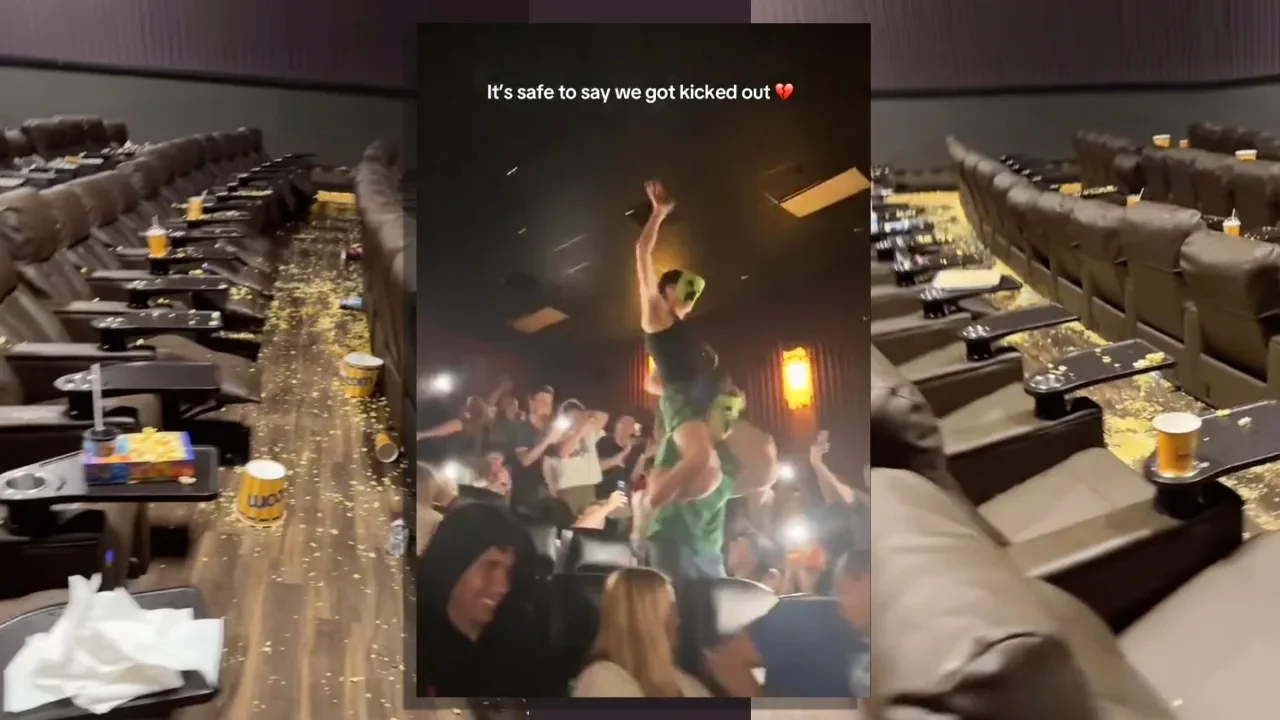
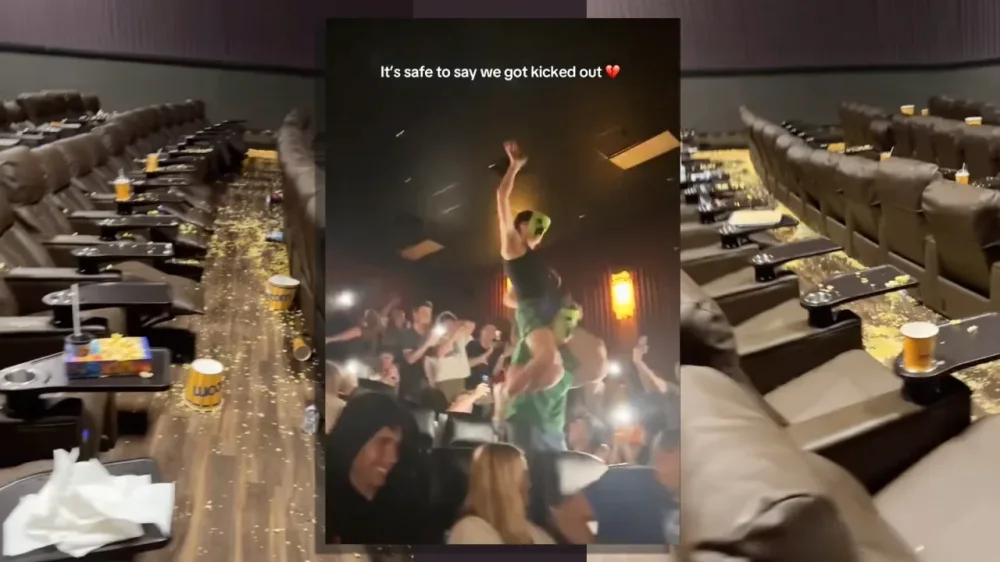
If you’re planning to see the new Minecraft movie and haven’t heard of the viral “chicken jockey” trend wreaking havoc in theaters across the country, read on. The trend gets its name from the block-shaped zombies in the video game Minecraft that occasionally ride chickens—thereby becoming chicken jockeys. In a scene from the new film A Minecraft Movie, based on the popular game, Jack Black’s character Steve at one point screams out, “Chicken jockey!” The phrase has since become a battle cry for teen-filled audiences to yell at the top of their lungs, flash phone lights, and launch popcorn and drinks at the screen. In one video, a moviegoer perched on another’s shoulders holds up a live chicken as chaos erupts around him. they brought a live chicken pic.twitter.com/t2FELBbEZt — 🕐HOURLY🕑 shitpost (@hourly_shitpost) April 9, 2025 According to Entertainment Weekly, some screenings have been so rowdy that police officers were called in to escort audience members out. Other theaters have issued disclaimers at the start of the film, warning against antisocial behavior. The trend is largely harmless fun—teenage boys being teenage boys—unless you’re the minimum-wage cinema staff tasked with cleaning up the mess. “Please don’t ruin our theater and the movie experience for other guests just for imaginary internet points. Real employees have to clean up this nonsense,” a Sandy Springs-based movie theater posted on Instagram last week. “Enjoy Minecraft, but not like this.” In some locations, unaccompanied minors and large groups of teen boys are now banned in an attempt to curb those chasing their five seconds of viral fame. The movie’s director, Jared Hess, has embraced the trend. “It’s been way too fun. People are sending me these really hilarious speeches that a lot of teenagers are giving right before the movie. It’s so hysterical, man. I’m staying up way too late,” Hess told Entertainment Weekly, adding that he finds it funny that “cops are getting called for popcorn.” Others, including Jack Black himself, aren’t so amused. During a surprise appearance at a weekend screening, Black warned: “For today’s presentation of A Minecraft Movie, please no throwing popped corn, and also no Lapis Lazuli, and also absolutely no Chicken Jockeys!” Whether you find it funny or not, the trend has undoubtedly contributed to the film’s impressive box office numbers. After just two weeks in theaters, A Minecraft Movie is already the highest-grossing Hollywood release of 2025, earning $80.6 million during its second weekend. It Ends With Us told fans to wear their florals, while Barbie turned movie theatres pink. Now, A Minecraft Movie fans can expect to leave the theater dressed head to toe in someone else’s soda and popcorn. View the full article
-
Tokyo first in line for negotiations that will be closely watched as test case of Washington’s trade war strategyView the full article
-
Unanimous decision by judges is a blow for transgender rights campaignersView the full article
-
Struggling with a WordPress plugin conflict? Our guide offers solutions to help you restore your website to normal functionality. The post How Do You Resolve A WordPress Plugin Conflict? appeared first on Search Engine Journal. View the full article
-
Welcome to Pressing Questions, Fast Company’s workplace advice column. Every week, deputy editor Kathleen Davis, host of The New Way We Work podcast, will answer the biggest and most pressing workplace questions. Q: How can I get my boss to stop emailing me in the middle of the night? A: This dilemma is closely related to the question of how to say “no” at work without feeling guilty and how to push back if your workload is too much. All are part of setting boundaries, but in an uncertain job market, drawing firm lines between work and personal time can feel more fraught. That doesn’t mean that you shouldn’t set boundaries. In fact, the most valuable, creative, productive, and innovative employees are never the workaholics who respond to messages at all hours. Numerous studies have shown that an “always on” culture not only destroys employee morale but causes stress that negatively impacts job performance. While you can’t control your boss’s behavior or work style, you can set clear expectations for how you work. Here are a few ways to do it: Create office hours for yourself Most of us work in some kind of remote or hybrid capacity, which means we often work with people in different time zones. Even those in the same time zone may have different chronotypes, or times of the day you are most productive. For this reason, many people have found it useful to put a message on their email, Slack, and other communication platforms that says something like “My working hours from 9 a.m. EST to 5 p.m. EST. I will respond to your message within those hours.” You can include that as part of your status or signature or as an auto reply to messages received outside of those hours. If you tend to on a less traditional schedule, you can also signal to those you work with that while you might be emailing them at 9 p.m. or 6 a.m., you don’t expect them to respond. Including a signature line like: “My working hours may not be your working hours. Please do not feel obligated to reply outside of your normal work schedule,” can go a long way in showing that you have reasonable expectations. Both of these approaches can be a good start to let your boss know that you won’t be responding to off-hour messages without being confrontational. You can also just set your status to snooze notifications or better yet, put your devices away in a separate room. Have a direct conversation At least 60% of my workplace advice boils down to “have a direct conversation.” It may feel obvious, but most people avoid uncomfortable workplace discussions. However, once you get over the initial fear and awkwardness of bringing something up, a direct conversation is often the best way to address an issue. In this case, you can bring it up in during another regular check-in when you are already talking about projects you are working on. Try something like “By the way, I think our hours are a little misaligned. I’ve noticed some off-hours messages from you. I snooze my notifications on weekends and after 5 p.m. on weekdays, so that’s why I don’t respond right away.” You can also often advice if you think they’d be open to it: “Did you know you can schedule your messages to send during work hours?” If both of those approaches don’t work, you can just not respond to the messages and if your boss brings it up you can point to overtime laws in many areas that make it illegal for bosses to contact employees outside of work hours. Work often doesn’t fit neatly in a 9–5 box, and you should always first assume good intentions (and have empathy for your boss who might themselves be under a lot of pressure). But you should always protect your work-life balance, because that’s what makes you the best employee—not the your 11 p.m. email response time. Want more advice on setting boundaries at work? Here you go: 5 reasons why answering work emails and texts after hours is backfiring What sending after-hours emails does to your productivity How to get better at setting boundaries How can I push back if my workload is too much? View the full article

-
I run a Facebook group called Freelancers Who Work Smart, Not Hard, but, for ages, I managed it the hard way, not the smart way. The hard way looks like this: trying to remember to post regularly (when I sometimes can’t even remember what day of the week it is), coming up with some of my best ideas at 3 a.m. (before promptly falling asleep and forgetting them), and posting sporadically with neither consistency nor strategy. Days or even weeks (eek) would go by without me posting, and the group would lose momentum. Somewhat ironically, things changed when I went on maternity leave. Before taking three months off work, I scheduled two posts a week to keep the group active while I was dealing with diapers. In doing this, the group ended up becoming more active than it’s ever been! So in the interest of working smarter, not harder — whether you run a Facebook Page or Facebook Group — let me walk you through how you might be able to set up a similar process. In this guide, I’ll cover the main advantages of scheduling Facebook posts and explain exactly how to schedule posts on Facebook to improve your posting consistency and content performance. Jump to a section: 5 benefits of scheduling Facebook posts How to schedule a post on Facebook using Buffer How to schedule a post on Facebook on the app How to schedule a post on Facebook using Meta Business Suite How to edit or delete a scheduled Facebook post 5 quick tips for scheduling Facebook posts More Facebook resources 5 benefits of scheduling Facebook posts Whether you’re trying to increase brand awareness, grow your audience, build community, or generate leads (or all four!), there are many benefits to scheduling your Facebook posts in advance. 1. Maintain consistency Where content is king, consistent content is the trusted advisor the king can’t live without. It’s simple: When you post regularly, your audience knows what to expect and when to expect it. And you stay top of mind so they don’t forget who you are and what you do. The numbers back this up. Buffer’s data scientist, Julian Winterhiemer, analyzed engagement across all platforms Buffer supports — Instagram, Facebook, TikTok, LinkedIn, Bluesky, Threads, X, YouTube, Mastodon, and Pinterest. And, guess what? The most consistent posters received 5 times more engagement per post than users who posted inconsistently. From my own small and less impressive dataset, I can definitively say that scheduling = consistency. Check out my stats below. I was on maternity leave (with scheduled posts) from May 1st to July 31st. There’s clearly a lot more activity happening in the former half of the chart compared to when I relied on my ad-hoc posting (after August 1st). So scientifically and anecdotally, scheduling posts consistently is your secret weapon for building an engaged, loyal audience. 2. Create higher-quality content The beauty of scheduling your posts is that it gives you the gift of time. Instead of scrambling to come up with something on the fly, you can plan ahead and make sure each post is thoughtfully crafted and not just checking the box of, “Oh heck, I need to post something before people think I’ve disappeared.” (Yes, I am speaking from personal experience.) Scheduling forces you to slow down and focus on quality, rather than rushing through a post at the last minute just because you need to get something out there. When you take the time to consider your content carefully, it shows. Your posts will be more intentional, more aligned with your goals, and ultimately more effective at connecting with your audience. Plus, you’ve got a buffer (no pun intended) to refine things before hitting ‘publish.’ 3. Be more efficient and save time I’ve touched on this above, but time is your most valuable resource. And posting on Facebook can take a lot of it, especially if you’re creating your posts one by one on the day you plan to share them. Then there’s the fact that constantly switching between tasks isn’t just inefficient; it’s a brain-drainer too. Did you know multitasking makes you slower, less accurate, and more mentally drained? I certainly don’t need that in my life, and I doubt you do either. When you schedule your posts ahead of time, you can batch your work, reducing the mental load of having to post on the fly and breaking your flow. By setting aside an hour or two to plan your content for the week, you’ll save time, preserve your focus, and ensure that each post is on point. Efficiency for the win! As I mentioned earlier, I created my content in batches before I went on maternity leave, which made the task more manageable. So much so, that it’s the most consistent I’ve ever been, despite being away from my desk. 4. Optimize reach by posting at the best time for your audiencePart of your content strategy involves figuring out the best time to post on Facebook for maximum engagement. Julian was kind enough to dig into the data here on this, too. He pored over the performance of more than 1 million Facebook posts sent via Buffer by businesses, creators, and influencers to pinpoint the best time to post on Facebook, the best day to post on Facebook, plus the best-performing content on Facebook. According to Buffer data, the best time to post on Facebook is 5 a.m. on Monday. Note that this doesn’t necessarily mean this is when audiences are up and consuming your content — it’s likely that posts need some time to gain momentum on the feed. Regardless, it means the best-performing posts were shared at that time. If that isn’t a great reason to schedule your Facebook content, I don’t know what else is! ⏰Learn more about figuring out the best time to post on social media for maximum engagement.Here’s a crucial caveat: There’s no universally optimal time to post, as it will also depend on your business and its circumstances. The best time to post on Facebook — or any social media platform — always depends on your audience. In my group, for example, I’m reaching two primary time zones: SAST and CAT, so I need to find a time that works for both. I aim to hit the South African audience at lunchtime, and the US audience first thing in the morning as they start their day. 5. Better content planning and controlI know that random posting can feel a bit like throwing spaghetti at the wall to see what sticks. But when you schedule posts, you’re in the driver’s seat. You can plan strategically, making sure your content is spaced out in a way that keeps things fresh and engaging. This also allows you to plan for time-sensitive content, ensuring it goes out when it’s most relevant. It’s also much easier to maintain a consistent voice and style when you’re in control of your posting schedule. Instead of lashing out with something spicy and off-brand because you’ve had a bad day, planning and scheduling ahead gets you in the flow of creating thoughtful, on-brand content that reflects your values and resonates with your audience. For me, scheduling Facebook posts provides peace of mind that everything’s taken care of, leaving me with more brain space to a) do my real job, and b) focus on creating even more awesome content. Now that we've covered the ‘why’ of Facebook scheduling, let’s dive into the ‘how:’ How to schedule a post on Facebook using Buffer Let's start with the most feature-rich scheduling route, a social media management tool like Buffer. Here’s how to schedule using Buffer in four simple steps: Go to your Buffer dashboard.Select your Facebook Page or group.Craft your Facebook post.Schedule your post.1. Go to your Buffer dashboardOnce you’ve signed up for Buffer and connected your Facebook account, you’ll see your Buffer dashboard: 2. Select your Facebook Page or group Select the Facebook Page or profile you want to post to, in the left-side column. Click on the '+ New' create post button on the top right-hand side of your screen, then choose 'Post.' 3. Create your Facebook postA popup where you can craft your post will appear. (You can also add any other channels you have connected to crosspost your content elsewhere.) Use an idea you’ve generated or create from scratch. Choose 'Post,' 'Reel, or 'Story,' depending on what content you want to post. Upload your media and add your caption. 💡Never lose a lightbulb-moment content idea again! Here’s a system for capturing your ideas and using them to create content.4. Schedule your postOnce you’ve crafted your post, you have a few scheduling options: Add to Queue (default): Add the post to the next available posting time on your posting schedule.Schedule Posts: Schedule the post for a specific date and time.Share Now: Share the post immediately.Share Next: If you are on one of our paid plans, you can add the post to the top of your queue and have it published next.📌 Quick tips: To auto-publish your post at a specific time, make sure the 'Automatic' option is selected.To schedule Facebook Group posts, you’ll need to choose 'Notify Me’ to get a notification when the time comes to post.📘Learn more about scheduling Facebook Group posts using mobile notifications.Will using scheduling tools affect my engagement?No, using scheduling tools will not negatively impact your engagement. In fact, consistency — something scheduling tools help you maintain — can improve your reach and engagement. Research has shown that posts scheduled via third-party tools may even achieve higher engagement compared to posts published natively. While scheduling posts doesn't guarantee success on its own, it ensures that your content goes out at optimal times and frees up time for you to focus on creating and interacting with your audience. Engagement drops when users neglect to respond to comments or focus on posting frequently without considering content quality. The bottom line is that with good content, proper timing, and active engagement, using scheduling tools can be a great way to enhance your social media presence. How to schedule a post on Facebook on the appIf you have a Facebook Page, a profile in professional mode, or a Facebook Group, you can create, schedule, and manage posts directly on the Facebook app. How to schedule a post on your page or professional profile: At the top of your feed, page, or profile, tap ‘What’s on your mind?’Create your post.Tap ‘Next’ to open post settings and scheduling options. You can then choose a time to publish your post or use the recommended times.⚡️ Pro tip: To see all your scheduled posts, tap ‘Manage Posts’ on your page or profile. How to schedule a Facebook Group post: Tap ‘Write something’ in your group and create your post. Tap the calendar icon to set a date and time, then ‘Schedule’. How to schedule a post on Facebook using Meta Business SuiteMeta Business Suite is a free tool from Meta that lets you manage your Facebook and Instagram content in one place. Compared to Facebook’s native scheduling, Business Suite gives you more control and lets you post to both platforms at once, though it is a bit more complicated to use. Navigate to the business page you manage.Click on ‘Meta Business Suite’ on the left-hand menu or at business.facebook.com.In the Business Suite dashboard, choose ‘Planner’.Click ‘Create post’: Choose where you want to publish (Facebook, Instagram, or both), then write your post, add media, and links.Scroll down to ‘Scheduling options’ and toggle ‘Set date and time’.Pick the date and time you want the post to go live.Click ‘Schedule’ to confirm.📌 Note: Meta Business Suite currently does not allow posting or scheduling to Facebook Groups. Comparing the three scheduling options at a glance Feature Native Buffer Meta Business Suite Supported Platforms Facebook, Instagram Facebook, Instagram, Twitter (X), LinkedIn, TikTok, Pinterest, YouTube, Google Business Profile, Bluesky, Mastodon, Threads Facebook, Instagram Facebook Group post scheduling Yes Yes – with mobile notifications No Content Scheduling Yes – Limited to Facebook & Instagram Yes - Centralized dashboard for multi-platform scheduling Yes – Limited to Facebook & Instagram Scheduling Features Basic scheduling with limited options Advanced scheduling options with features like queue management and optimal timing suggestions Basic scheduling capabilities without advanced queue management Create space No – No central content library or idea board available Yes – Dedicated dashboard to save and organize ideas, photos, GIFs, PDFs, videos, links, or text so you can quickly turn them into posts later No – No central content library or idea board available AI Assistance No Yes – AI Assistant helps write, rephrase, and generate post ideas based on prompts Yes – AI suggestions for captions and post improvements for Facebook/Instagram. Content Repurposing No Yes – Composer allows you to tailor posts for each platform, ensuring your content is optimized for different audiences No Customized Landing Page No Yes – Create a Start Page in minutes No Team Collaboration No Yes – Draft approvals, comments, role assignments No Focused Scheduling No – Must navigate through Facebook Yes – Third-party tool helps avoid distractions from social platforms No – Must navigate through Facebook or Instagram apps Access to Latest Features Yes – Immediate access to platform-specific features Indirect – May not always have immediate access to platform-specific features Yes – Immediate access to Facebook & Instagram updates Ease of Use Simple interface, but can feel limited Simple, clean interface with centralized dashboard Can be complex to navigate, especially for beginners Pricing Free Free plan available with premium features at affordable rates ($5/month) Free ❓Still wondering if you should schedule on Facebook or use Buffer? Here’s why you might pick a tool like Buffer over just using the scheduling features in the apps themselves.How to edit or delete a scheduled Facebook postSpotted a spelling error to fix? Or perhaps circumstances have changed (is TikTok banned or not?!) and you no longer need the post at all? Good news; you can edit or delete a scheduled Facebook post. Here’s how: On Facebook: To change a post after you’ve scheduled it, tap ‘Manage Posts’, then delete the post and recreate it. On Buffer: Tap your profile picture to head over to your page, then tap the 'Settings and activity' menu icon on the top right (the three horizontal lines). Tap 'Scheduled content.'Here, you'll find a list of the Facebook content you have scheduled. Tap on the one you want to edit.Tap on the three dots on the top right-hand side of the post.In this menu, you'll have the option to delete, edit, and reschedule your post, or even post it right away by tapping 'Share now.'On Meta Business Suite: Go to business.facebook.com and select your page. On desktop, from the left-hand menu, click ‘Planner’ or ‘Content’ > ‘Posts & stories’. On mobile, tap the calendar icon or navigate to Scheduled Posts. Use the calendar view or filter options to locate the post you want to edit.Click on the post.Click the three dots to select ‘Edit’ or ‘Delete’. Make your desired changes and save or confirm deletion. 5 quick tips for scheduling Facebook posts 1. How often to postWe recommend posting to Facebook one or two times a day. Action step: Plan out 5–7 high-quality posts per week in your scheduler. 2. Best time to postOur data suggests that early weekday mornings are the best time to post on Facebook. ⚡️ Action step: Use Buffer’s Analyze feature to help you find the best times to post. 3. What can and can’t be scheduledThere are some post types that can’t be scheduled directly through third-party tools like Buffer. Things that can be scheduled Text updatesImages (up to four images with Buffer)VideosLinksStories and reels (with mobile notifications)Things that cannot be scheduled Photo albumsEventsCheck-insGIFsPolls ⚡️ Action step: Double-check each post type before scheduling. 4. Stay consistent with goals and streaksBuffer’s posting goals and streaks features help users stay consistent, which improves reach and builds audience trust over time. ⚡️ Action step: Set a posting goal in Buffer and use the streak tracker to keep yourself accountable. 5. Track analytics and engagementAnalyzing post performance helps you improve future content. ⚡️ Action step: Use Buffer’s analytics dashboard to track engagement, reach, and click-through rates across posts. Repurpose or expand on what worked and ditch what didn’t. Over to you There you have it; scheduling posts on Facebook makes it easier to stay consistent, grow your audience, and smash your social media goals. From my own experience, I highly recommend exploring how a scheduling tool like Buffer can help you work smarter, not harder. More Facebook resources Best Time to Post on Facebook: We Analyzed 1 Million PostsMeta Ad Library 101: 7 Ways to Use the Facebook Ad Library to Improve Your AdsThe Ideal Facebook Cover Photo Size and How To Make Yours Stand Out (+ 11 Ideas and Examples)How to Run Facebook Ads: Beginner's Guide to Advertising on FacebookView the full article
-
Learn how the Semrush Position Tracking tool helps you easily track SERP rankings for keywords and get traffic from specific locations and devices. View the full article
-
Not since the crash of 2008 has free trade held the moral and intellectual high groundView the full article
-
A range of policies, including tariffs, are leading foreign firms to question their dependence on US funding View the full article
-
If you follow much tech news, you’ve probably read about the Reddit theory of search. The Reddit theory is the idea that the best info you can get from Googling anything these days comes from Reddit—and the power of crowdsourced wisdom. You want to find the best portable battery pack? Or uncover the secret to getting Sharpie off your skin? See what scores of Redditors have settled on and save yourself the trouble of trying to dig up a definitive answer from any single source without all that extra perspective. It’s become such a popular tactic, in fact, that Google inked a major deal to feature Reddit info more prominently in its results. But you still never know exactly what you’re gonna get for any given search, and finding anything close to a consensus of opinions is often easier said than done. My friend, I’ve found a better way. Allow me to introduce you to the search-supplementing supertool you never knew you needed. Psst: If you love these types of tools as much as I do, check out my free Cool Tools newsletter from The Intelligence. You’ll be the first to find all sorts of simple tech treasures! Answers, answers, everywhere All right—so here it is: Few mere mortals who aren’t Reddit regulars realize it, but Reddit recently launched its own interactive search system for finding worthwhile info across the site. ➜ It’s called Reddit Answers. And I’ve legitimately been blown away by how useful and effective of a resource it can be. ⌚ You’ll only need about 20 seconds to see what it can do. ✅ Just open up the Reddit Answers website, then type any question or general search query into the box in the center of the screen. The key here is to think about this as a specific sort of supplement for your standard searching. Reddit probably isn’t the place to turn for objective facts, definitions, or any other such info. But it is an unmatched repository of genuine human opinion on a huge range of topics, and Reddit Answers helps you navigate that sea of sentiment better than any other tool I’ve tried. So, for instance, if you’re seeking out a new smart lock for your home, you might find it helpful to see a big-picture view of opinions from relevant Reddit discussions on the subject: Or if you’re planning a trip, you might benefit from browsing through stacks of firsthand opinions on different neighborhoods within a certain city: What makes Reddit Answers especially interesting for me is not only the info it gives you but also the way in which it structures it. Instead of just serving up scattered answers, it shows you smart summaries along with links to specific threads for more detailed reading. It’s like a gateway into a wild and often unapproachable jungle of popular perspectives—a starting point that makes it infinitely easier to explore that info without having to scroll through a zillion different pages and put it all together on your own. Reddit Answers works entirely on the web, in whatever browser you like. It’s free. And you don’t have to sign in or share any sort of personal info to use it. That being said, you will be limited to 10 queries a week if you don’t sign in (and a regular Reddit account is free and easy to create). Ready to rev up your productivity even further? Check out my free Cool Tools newsletter for an instant introduction to an incredible audio app that’ll tune up your days in some truly delightful ways—and another off-the-beaten-path gem in your inbox every Wednesday! View the full article
-
Nearly a decade after Congress passed the Cybersecurity Information Sharing Act of 2015, the law is facing an uncertain future. Not to be confused with the Cybersecurity and Infrastructure Security Agency (which shares the same acronym), the law—often referred to as “CISA 2015” to avoid confusion—was designed to clear the way between private companies and the federal government to more openly share cyber threat data. Supporters argued it would bolster national cybersecurity by speeding up the flow of information about emerging attacks. In ways that most people don’t see, the law has helped financial firms, hospitals, and major retailers spot and respond to threats faster—thwarting ransomware, phishing scams, and other attacks before they spiral. But CISA 2015 came with a built-in expiration date—and that clock is now ticking. Key provisions of the law are scheduled to sunset at the end of September unless Congress acts to renew them. As lawmakers weigh the future of CISA 2015, they’ll have to navigate a tricky set of obstacles—namely skepticism from privacy advocates. Fast Company spoke with Matthew Eggers, vice president for cybersecurity policy at the U.S. Chamber of Commerce, about what’s at stake in the renewal process. The interview has been edited for length and clarity. Broadly speaking, how has the Cybersecurity Information Sharing Act shaped the government’s relationship with the private sector? The law, and the attitude that it’s built up over the years, has really provided government entities with a host of cyber threat data that they can’t get on their own. In a lot of ways, the information-sharing legislation has built a lot of connective tissue between the government and industry. What we’re trying to say to Congress is they need to pass the legislation by September 30, because not only is the law the cornerstone of U.S. cyber security, but it’s also to their benefit. They’ve got the public and private entities in their districts, in their state, that are under attack from cyber criminals and foreign nations—China, Russia, Iran, North Korea. Can you give an example of a tangible impact the law has made? I look at something like the food and ag sector. They’ve got a new Information Sharing and Analysis Center, and I think that is definitely an outgrowth of CISA 2015. There was a very good paper that David Turetsky, a professor at the University of Albany, put out in 2020 that showcases cyber success stories. It basically hits on a small fraction of the incidents that were probably mitigated or prevented. That’s one of the things about cyber information sharing: It’s hard to prove or show situations where you probably stop attacks at the outset or mitigate them. What is at stake, then, if the law lapses? It’s probably the case that information sharing would go down, and that’s in no one’s interest. There was information sharing happening before CISA 2015 passed, but what you’ve seen is an expansion of information-sharing bodies. And we don’t want to undercut that progress that’s been made. The other thing that’s at stake is trust. It takes a long time to build trust among individuals and organizations; at the end of day, it’s individuals within organizations who share information, and they have to know one another. Is a straight reauthorization sufficient? Some folks have pushed to modernize the law to address new cyberthreats like AI-driven attacks. It’s definitely part of the mix, and I can say that many leading organizations that are invested in this law are giving that a lot of thought. The law expires September 30; we definitely don’t want the law to lapse, but it only makes sense that we should be thinking about ways to improve the program, and I think that would likely entail new legislation. That can take time to consider. Do we have time to do that? I think that remains to be seen. Our priority is making sure that the program doesn’t lapse. Groups like the Electronic Frontier Foundation have argued that the law doesn’t have sufficient safeguards for data. What is your response to those concerns? I think those concerns were unfounded when the program was being considered. A Congressional Research Service report that just came out showed that industry and government have a strong record of safeguarding privacy and civil liberties under CISA 2015. And to my knowledge, there have not been any privacy incidents. Plus, sharing privacy information really doesn’t do an organization much good from a cyber standpoint. Typically, what you’re sharing are cyber threat indicators, which are things like domain names, log data, malware, date stamps, stuff like that. Senator Rand Paul was a major opponent of the original bill, and he’s now chairing the Senate’s Homeland Security & Governmental Affairs Committee. Have you engaged with him directly? We have been engaging his staff, and would be more than willing to engage him. I would say it’s just a matter of time before we try to meet with him. We’re always willing to talk. One thing we’re trying to do is more or less impress upon him the importance of the program to his state’s public and private entities. President The President hasn’t said anything on the law’s future, but there have been cuts to similar cyber initiatives. The people he is putting into positions at the Cybersecurity and Infrastructure Security Agency, and likely the Office of the National Cyber Director and the National Security Council—they get the importance of information sharing. Probably between now and September, when you may see a statement of administration policy, I can’t help but think that there would be a thumbs-up in favor of this program. Someone like Sean Plankey, who is expected to head up CISA, I know personally that he believes in the importance of this kind of effort. View the full article

-
A decade ago, streets in Paris were clogged with cars and exhaust. But now, if you ride a bike down a major boulevard at rush hour, you’ll be surrounded by a stream of other cyclists—and much cleaner air. “It’s an incredible feeling to ride your bike—it feels like Copenhagen, basically,” says Vincent Thorne, a postdoctoral researcher in sustainable mobility at the Paris School of Economics, who moved to the city a little over a year ago. Since Paris Mayor Anne Hidalgo took office in 2014, the city’s roads have radically transformed, speeding up a shift away from driving. More than 100 streets have been closed to cars. Tens of thousands of parking spots have disappeared. Hundreds of miles of bike lanes have been added. In response, car traffic keeps dropping. A new report shows what the changes mean for local air quality: pollution levels have dropped roughly by half compared to 2005. Airparif, an organization that tracks the city’s air quality, found that levels of particulate matter (PM 2.5) pollution—tiny pieces of soot, dust, or smoke that can lodge in the lungs—fell by 55% over the last 20 years. Nitrogen dioxide pollution, one of the main ingredients in smog, dropped by 50%. When Hidalgo began fighting to speed up the city’s transition to sustainable transportation, she was motivated both by the need to cut climate emissions and by Paris’s dismal air quality, which regularly exceeded EU health limits. The previous mayor, Bertrand Delanoë, had introduced Paris’s bike-sharing network, along with an electric car-sharing network, and closed traffic on the left bank of the Seine. Hidalgo pedestrianized the right bank, turning a busy highway into a pedestrian path and park. A new low-emission zone blocked the most polluting cars from the city center. The city started getting rid of parking spots, replacing some of them with trees and other green space. Speed limits were lowered. Streets next to schools were closed, making it easier and safer for students to walk. Hidalgo embraced the concept of the 15-minute city, the idea that you should live a short bike ride or walk away from work and errands. (To help, the city is helping redevelop some single-use buildings, turning offices into housing, shops, coworking spaces, preschools, and other uses under one roof.) The city’s network of bike lanes keeps expanding. The way that people get to work has quickly changed. Between 2022 and 2023, alone, the use of bike paths doubled during rush hour. On some roads, bikes started to outnumber cars. Some of the bike commuters might not have switched specifically from a car, says Thorne, the mobility researcher. Many Parisians already took public transportation, for example. But even if some people previously took the subway, if they’ve now switched to biking, that means that there’s now more room on the train. With the train less crowded, some drivers might now be more willing to take it instead of their cars. Thorne has been studying the impact of adding bike lanes on air pollution in New York City, where he found that bike infrastructure helped some people replace short taxi rides. The situation in Paris is likely different, he says. On many streets, entire lanes of traffic were converted to bike lanes. The shrinking road space for cars is convincing people to drive less overall; some of them may be walking or on public transportation rather than riding a bike. As traffic has subsided, the city is also just a better place to live. “Yesterday, I was having dinner [outside] at a restaurant on one of our main boulevards, and it was kind of enjoyable,” Thorne says. “It wasn’t something that was completely overwhelming with gas vehicles and traffic noise.” View the full article

-
To promote its newest shoes, the Swiss athletic apparel brand On filmed a fictional movie trailer with Zendaya. Zone Dreamers stars the actress as an elf-eared astronaut who wears athleisure, trains in space with her flight crew, and—On hopes—sells some merchandise. It’s all an elaborate ad campaign for On’s new low-profile sneaker, Cloudzone, its one-piece Studio Knit Bodysuit, and other offerings from the company’s Spring/Summer 2025 Movement Lifestyle collection, which Zendaya wears throughout. (Consumers hoping to get their hands on the futuristic space suit Zendaya sports in one scene will be disappointed to learn that it’s not part of the collection. Celebrity stylist Law Roach, who styled the shoot, commissioned the white-and-clear suit from creative studio Chrishabana. “Some of my best work!!!” Roach wrote on Instagram.) It’s also a high-production way to sell workout apparel in a market that’s more competitive than ever. Global athleisure sales are expected to grow by more than $173 billion from 2024 to 2028, according to data from Technavio, a market research firm, and lifestyle, yoga, and women’s athleisure are expected to be major drivers. Challengers like On and Lululemon have cut into the market share of legacy brands like Nike since the pandemic, and today apparel companies are jockeying for many of the same consumers. On’s campaign suggests that having a celebrity spokesperson isn’t enough in a product category this competitive. The truth is that celebrity brand ambassadors are everywhere. Athleta and Lululemon have partnered with athletes like Simone Biles and DK Metcalf for years, Fila recently tapped model-influencer Hailey Bieber to promote a tennis-inspired athleisure line, and Nike just teamed up with Kim Kardashian’s Skims for a first-of-its-kind collaboration due out later this year. Skims is also a leader in advertising innovation, often engaging external collaborators who bring artistic vision to tentpole campaigns. On is leaning into that approach. Visual artist Nadia Lee Cohen, whose work has been featured in Interview magazine and the Dolce & Gabanna X Skims campaign, directed the spot. The resulting work allows On to “push the limits of creative storytelling,” as Alex Griffin, the company’s chief marketing officer, put it in a statement. With elevated production and an unconventional concept, Zone Dreamers sets itself apart from traditional fashion photo shoots—and that’s the point. The rise of hi-fi marketing campaigns, from the likes of Skims and now On—featuring magazine-style editorial execution and big-name creative talent both in front of and behind the camera—points to how well-suited narrative storytelling is for today’s biggest distribution channels: social media feeds. They’re attention-grabbing, create conversations, and can draw out launch-related buzz over multiple posts and days in a way that echoes box-office-style marketing for movies. Zendaya’s leading role in the new Zone Dreamers video shows there’s room to take high-production marketing concepts to the movies, outer space, and beyond. View the full article

-
Quiet is out and the “swicy” trend has calmed down. Now our taste buds are screaming for “crunch,” gritty textures, and noisy flavor experiences. Last year, noiseless squishy gummies and sweet-and-spicy, or “swicy” flavoring, were the breakout food innovations that took over the snack aisle. Remember the peelable mango gummy candy that went viral on TikTok? In 2025, food trend watchers, with a little help from TikTokers, have identified our top cravings. They include crispy foods, bold flavor mashups, and edible aquatic plants. The crunchier the better “‘Crunch’ is one of the trends that I’m excited about,” says Alyssa Vescio, Whole Foods Market’s senior vice president of center store merchandising, sourcing, and product development. “An area where we tend to see a lot of innovation is in the snacking category because people are always looking to discover the next ‘taste’ and ‘texture.’ I think crunch connects easily into the trends that we’ve seen in snacking. But now we’re seeing it come out of snacking and go into other spaces,” Vescio says. Whole Foods, which operates more than 500 stores across the U.S., identified crunch as the “texture of the moment” in its annual food trends report, which highlights the grocery chain’s top food predictions for the year. According to Vescio, food shoppers are searching for crunchiness across their meals, from breakfast to lunch to dinner. Food brands are responding by delivering plenty of innovative crispiness, such as crunchier versions of the chili crisp, crunchy dehydrated fruits and vegetables such as mushrooms and okra, crunchy chocolates, fermented nuts, roasted chickpeas, and mushroom chips. The crunch texture is also popping up in beverages and desserts, she says, such as crunchy cinnamon sugar crystal toppings on coffee beverages and the crème brûlée espresso martinis with a hard crunch sugar surface that you crack before you sip. Fast-food chain Subway planted its flag in crunchland, pairing up with Doritos to introduce a quirky limited-time concoction this month called the Doritos Footlong Nachos. Not to be left behind, Taco Bell announced last month that it is adding more crunch, cheese, and sauce to its toasted Cheddar Street Chalupas. It doesn’t end there. “You’re also seeing crunch in spices and seasonings. The number of people that I talk to who say, ‘Every time I make eggs, I put chili crunch on them’ or ‘Every time I have a dinner I put this textured seasoning on it,’ has increased tremendously,” Vescio says. A cultural signal Tastewise, an artificial intelligence-powered consumer research platform, continuously mines tremendous amounts of online data—millions of social media posts, online reviews, online recipes, and restaurant menus—globally to surface emerging food and beverage trends. Using its methodology, Tastewise analyzed the crunchy trend in the U.S. and found that over the past 12 months, social discussions involving the term crunchy have increased by about 13%. “This indicates not only a rising appetite for the sensory experience of crunch but also its resonance in how consumers talk about food online,” says Alon Chen, cofounder and CEO of Tastewise. According to Tastewise, three emergent consumer patterns are defining the crunchy trend. The company analyzes consumer needs at any given moment in time through how various dishes, ingredients, flavors, and textures are framed in menus, recipes, and social posts. It found that the number one reason fueling the need for “crunch,” based on significant growth in discussion on social media, was an association with comfort, such as comfort food. “This insight reframes crunch not just as energetic or exciting, but as comforting. This could be a new lens through which brands can market crispy products,” Chen says. Crunchy is increasingly associated with vegan offerings, showing that consumers are looking for textural satisfaction even in plant-based foods. And Peruvian cuisine has emerged as the fastest-growing culinary context for crunchy dishes with chulpi (or roasted) corn, crispy onions, and fried yucca being the top ingredients fueling the crunch texture in it, according to Tastewise. Among menu items, Tastewise’s analysis showed that 26% of restaurants in the U.S. currently offer items described as “crunchy” on their menus, which Chen says “represents a strong foothold in food service, often a bellwether for broader retail and CPG [consumer packaged goods] trends.” A new kind of crunch Crunch isn’t just for chips. Tastewise says the texture is being paired in several interesting ways—from indulgent to savory—with ingredients such as chocolate and pistachio (Hello Dubai chocolate viral TikTok craze!), cinnamon sugar, blood orange, chicken, and caramel apple. “I consider crunch a texture, not a flavor, and it gives you an experience,” says Sally Lyons Wyatt, global executive vice president and chief industry adviser for market research firm Circana. “Crunch has always been something that consumers have gravitated to when you think about chips and crackers. But there are some innovations that have gone across the texture, like freeze-drying in foods that gives a different texture in the mouth,” she says. Lyons Wyatt believes the big food trends for 2025 will be rooted in experimentation. “When I eat that food or drink that drink, what is that unexpected moment, through crunch, through freeze-dried, through flavors evolving while I eat?” she says. “I do think that crunch is going to be part of that.” The Whole Foods food trend report also highlighted the growing popularity of edible aquatic plants, such as seaweed and sea moss, for snacking or adding to food recipes. Duckweed, or water lentils, for example, is emerging as an alternative high-protein choice to other leafy greens, the report says. “I want to mention international snacking, too, because that’s an extension of crunch,” says Whole Foods’s Vescio. “It’s this idea of taking global flavors or fusion of foods and bringing it into the snacking category. One of my favorites is the Geem Korean seaweed chips. They have a thicker texture and with more substance than in a traditional seaweed snack.” Her other top pick is an artisanal snack brand out of Afghanistan called Ziba. “It’s a trail mix that has some really unique ingredients, like mulberries and apricot kernels. This fusion of flavors and discovery is really exciting and it also has a perfect crunchy texture,” Vescio says. View the full article

-
AI is transforming PPC metrics, shifting from clicks to predictive modeling, automated bidding, and advanced attribution for smarter, more effective ad campaigns. The post How AI Is Changing The Way We Measure Success In Digital Advertising appeared first on Search Engine Journal. View the full article
-
The Chevrolet Corvette has been the icon of U.S. industrial power since 1953. It also symbolizes the great ideal of America—a dream of individual freedom that was ultimately embodied in big roaring cars and endless highways. This gasoline-fueled dream might lose its gasoline smell forever, as General Motors experiments with a fully electric Corvette. GM created this car in its new design studio in Royal Leamington Spa, about 20 miles from Birmingham in the U.K. And, although the company insists that it is not a confirmed production model (concept cars are never production models), it marks the beginning of a path already taken by rivals like the Ford Mustang and the Dodge Charger. “This concept is purely a design exercise involving GM’s existing design studios in Los Angeles, Detroit, and the U.K.,” Chad Lyons, head of Chevrolet PR, tells me via email. The concept “has no production intent,” and is not a signal of future Corvette design language but rather a “futuristic and exploratory design exercise only, intended to push the envelope of design and technology.” In my mind, an all-electric Corvette is all but inevitable. As GM’s president Mark Reuss stated back in 2022, the electrification of this American icon is “a priority.” Reuss didn’t say whether it will be a variant of the gasoline model or a completely new design standing on its own, but it will happen. And this design is the first spark. Symbol of America’s golden age Ford and Dodge already made the transition to fully electric models in 2019 and 2024 respectively. But, while the Mustang and the Charger are icons in their own right, none of them carry the power of the Corvette as a symbol of America’s industrial might. You can easily argue that the Corvette reached peak car status in pop culture like no other car ever created in the U.S. If America was ever “great,” the Corvette represented that greatness like no other. Like most American celebrated inventions, the Corvette was born as an experiment. The genesis of the Chevrolet Corvette lay in the vision of Harley Earl, the head of GM’s Styling Section, who aimed to create an American sports car to rival the growing popularity of the glamorous European models by Ferrari, Jaguar, and Masserati, which appeared after World War II. Dubbed Project Opel, the initial concept debuted at the 1953 GM Motorama fair, showcasing a revolutionary fiberglass body. The material—which was completely new at the time—offered lightness and a unique aesthetic compared to the typical steel bodies. The design was influenced by U.S. fighter jets and the sleek lines of European sports cars like the Jaguar XK120. While the early six-cylinder models didn’t immediately match the performance of their European counterparts, the Corvette’s striking design and “dream car” appeal quickly captured the public’s imagination. It was not until 1955, with the arrival of its rumbling V8 engine, that the Corvette found its literal and figurative voice. Then in 1963, it cemented its place as the most desired car in America with the C2 Stingray. This marked a pivotal moment in its design evolution. While the overall direction was under legendary American car designer Bill Mitchell, the stunning and instantly recognizable design comes from designer Larry Shinoda, a first-generation American whose parents immigrated from Japan. He translated Mitchell’s Stingray racer concept into a new era for the Corvette. Wiki Commons Working within Mitchell’s Studio X special projects group, Shinoda was instrumental in shaping the sleek new appearance of the C2. Its rear split-window coupe, though only produced for a single year, became an instant icon on its own right, symbolizing the bold and innovative spirit of American design during the time NASA took humans to the moon. Compared to other cars of the era, the Stingray offered a unique blend of American muscle and sophisticated futuristic styling that set it apart from both European sports cars and traditional American automobiles. The Corvette became synonymous with the American automotive industry. It represented American industrial prowess, showcasing the country’s ability to produce high-performance machines that could compete on a global stage. It was at this time when the car turned into a towering cultural icon of the Space Age era. It wasn’t only about its sci-fi looks, but also about who was driving it. Starting with Alan Shepard, the first American in space, many Mercury 7 astronauts and those who followed were offered the opportunity to lease Corvettes for a nominal fee. Each crew of the Apollo missions—including Armstrong, Aldrin, and Collins—had matching Corvettes, which they used to get around Houston and on the roads near Cape Canaveral. This association forged an indelible link between the Corvette and the image of American innovation, speed, and pushing the boundaries of what was possible. The Corvette became a symbol of the nation’s technological ambition, mirroring the achievements of the space program. The C3 generation—built from 1968 to 1982—became an even stronger visual icon. Often referred to as the “Shark” due to its curvy design, heavily influenced by the Mako Shark II concept car created by Shinoda under Mitchell’s direction, it continued the Corvette’s dramatic styling. It had a long, low profile, a curvy Coca-Cola bottle shape, bulging fenders, and pop-up headlights. Reinventing an icon All this to say that it is a strange feeling to see a new electric Corvette prototype coming from GM’s U.K. Advanced Design Studio. Even more so when you consider how much closer it was to Mitchell and Shinoda’s sensibilities than the current Corvette. The team took the 1963 Stingray’s split rear window and made it the central element of the design, turning it around and splitting the windshield in a concept they call Apex Vision. The singular vertical central spine is not just for looks; it is a structural element, according to Julian Thomson, who leads the design studio. The British prototype is actually a “hypercar” with 22-inch front and 23-inch rear tires, a car that can run on the road and on the racing track. At 15.1 feet long, 6.9 feet wide, and a height of 3.4 feet—lower, wider, and longer than the current C8—the design has two distinct parts. The upper section presents classic Corvette elements in a futuristic style, like Apex Vision, while the lower half focuses on functional technical design. That includes embedded EV battery technology and aerodynamic elements designed to channel air efficiently without traditional wings or spoilers. Instead, the prototype uses active ducts that redirect airflow depending on the driving mode. On a regular road, they optimize range by channeling air under the chassis; on a race track, they deploy aerodynamic surfaces that increase grip. The bodywork is made using additive manufacturing, its creators say, also known as 3D printing, to reduce weight and assemblies. The concept also incorporates aviation-inspired elements in its sculptural forms and functional aspects, along with full wrap-around side glass and powered gull wing doors. All of that makes the electric Corvette a very attractive design. It feels ready to run the 24 hours of LeMans. There have been positive reactions in the press, but met with mixed reactions from fans. Whether purists will accept a Corvette without the roar of a V8 engine is anyone’s guess. The rise of the all-electric muscle car Its direct competitors have had mixed results in the market. Sales of the Dodge Charger Daytona EV have not been good, with only 2,115 units sold in the first quarter of 2025. On the other hand, the Ford Mustang Mach-e has had a great start of the year, becoming one of the best selling EVs in the first quarter of 2025, reaching 22,550 units (an 11% increase over the previous quarter). GM already markets the Corvette E-Ray, a hybrid variant, which only sold 1,447 units in its first year. It’s not a promising sign. But then again, the E-Ray is not a very attractive car. It feels blah. Michael Simcoe, senior VP of global design at GM, says that the U.K.-designed concept is part of a global initiative where multiple studios were tasked with developing hypercar concepts that pay homage to Corvette’s heritage while showcasing unique creative interpretations. The concepts will appear through 2025, perhaps a strategy to whet the fans for an all-electric model. But it’s likely that, at one point in the very near future, the company is getting ready to drop that roaring combustion engine. While the current Corvette doesn’t have the same design magnetism and pop culture symbolism as the ones from the ’60s and ’70s, it still carries the torch of a time long gone, a heavy heritage that nobody can ignore. The moment the gas roaring turns into a silent buzz of electricity, it will truly be the end of an era for a whole industry and the entire country. That’s not necessarily a bad thing. In fact, perhaps everyone in the U.S. should be hoping that its most iconic car can successfully turn into the icon of a new era for the country. Looking at the electric supercar tsunami coming from China, I’m not so hopeful for its future. But this concept car gives me some hope that they may pull it off. View the full article

-
Recently, after decades of paying high fees for the aging photo-sharing site Flickr, I finally moved all my images to Google Photos. It saved money and offered advanced features, like very accurate search results. But uploading years of pictures triggered the dreaded warning that I was approaching the storage limit of my Google account, which also holds Gmail, documents, spreadsheets, and other files. Cloud storage (be it Google Drive, iCloud, or Dropbox) is just one more in a growing list of subscriptions we all face, such as video and music streaming services, online magazines or newspapers, newsletters, Patreon sponsorship, and often just the right to keep using software. It’s especially frustrating to pay for photo storage when you know that most of those pictures and videos may be less than stellar. Google provides 15GB of free space per account. Beyond that, it charges $1.99/month for 100GB (my current plan), $2.99 for 200GB, then a pricey jump to 2 TB for $9.99. It’s hard to resist capturing pictures and videos, and easy to resist weeding them. But tidying up Google Photos can be a nice money saver. Google offers cleanup tools for Photos, Gmail, and Drive, though how they work—and how helpful they are—isn’t always obvious. Here’s how to make sense of them. Manage storage Start at Manage storage, accessible via the cloud icon labeled “Storage” at the bottom of Google Photos’ left sidebar. You’ll see your current usage, an estimate of when you’ll run out, and an offer to upgrade. If space is tight, look at the Review and Delete tools. Large photos and videos This section can offer considerable savings, especially if you have large videos you can part with. My biggest file was a six-and-a-half-minute, 1.2GB video from a trip to Egypt last year. While viewing each video to decide if it’s worth deleting, also click the “i” icon in the upper-right to see the resolution. This helps when deciding whether to use the Storage Saver feature, which we’ll discuss in a bit. Gmail and Google Drive Return to the Manage storage page, skip the next few sections and jump down to Gmail and Google Drive. All your Google apps share storage space, so clearing out Gmail and Drive makes more room for photos. (Roughly half of my 71GB glut came from Gmail, Drive, and other apps.) Click Review items, then scroll to Clean up by service. Under Gmail, you can delete emails with large attachments. This is where you’ll likely save the most space. Clearing out spam and trash helps, too. Then choose Google Drive and click the List view icon in the top-right to see file sizes. I found huge video and audio files I hadn’t needed for years. Deleting them reduced my Drive usage from 21.2GB to just 760MB. Recover storage Back on the Manage storage page, check out Recover storage: Convert existing photos and videos to Storage saver. This powerful tool lowers the resolution of large videos and photos to save space. Just note: It’s irreversible, and applies to your whole account—with no way to selectively shrink specific files. Storage saver converts videos over 1920 x 1080 down to that resolution. It also slightly reduces quality, even for videos shot at or below 1080p. This helps if you’ve shot a lot in 4K ultra HD. In my test, a 1-minute 4K, 60fps video shrank from 798MB to 30MB—a 96% reduction. I noticed just a slight softening in a reduced iPhone 13 video of a room with ornate furniture and paintings. I viewed it at full screen on my 2000 Macbook Air with Retina Display at the top resolution of 1680 x 1050. (The default is 1440 by 900, and a clip in a web browser would display even smaller.) Storage saver also shrinks photos above 16MP down to that size (and it compresses larger formats, such as TIFF, to JPEG). I used Storage saver to reduce a 40 megapixel, 11MB JPEG photo down to 16MP and 2.3MB. I couldn’t spot differences on screen—even when zooming in. Google says that 16MP photos print well up to 24 x 16 inches. You can toggle Storage saver on or off for future uploads. On the web, click the gear icon in the upper right (next to your profile pic) to open Backup Quality. In the mobile app (in Android or iOS), tap your profile picture, then Backup, then the gear icon, and finally Backup quality. Don’t forget to switch back to Original quality for uploads you want at full resolution. Screenshots Skip the Screenshots section and instead click Documents in the left sidebar. It shows screenshots plus other categories of nontypical photos with potentially short shelf lives, such as event tickets and receipts. Delete them individually, or select a batch by clicking the first, holding Shift, and clicking the last. To automate cleanup, toggle on Archive after 30 days, which moves items to the Archive folder, where you can delete them in bulk anytime. Blurry photos This category may not help much. Google’s “blurry” threshold is pretty low. If you delete all of them, you might lose some cherished soft-focus memories. And since blurry photos probably don’t take much space, combing through them might not be worth the time. After decades of shooting, I had only about 300 “blurry” photos taking up 373MB. Other apps Here’s another section you can probably skip: media taken with or shared through apps like Instagram or WhatsApp. You probably care more about what’s in the pictures or videos than the source. Also, this section doesn’t show file sizes, making it hard to know what to delete. Unsupported videos These are videos that Google Photos can’t play for some reason. They may be in an oddball file format; although Google supports such a large list of video (and photo) formats, that it’s unlikely the upload from your phone or camera won’t be covered. They may also be sub-one-second clips—possibly from accidental button taps: I found several in my account. Unsupported videos may be viewable after downloading. Both macOS and Windows (10 and later) have an app called Photos that can play videos, as well as extract a still image if you’d like to convert that tiny clip to a picture. Empty the Trash Deleted files go to the Trash folder, where they’ll hang around for 60 days unless you clear them manually. To remove them permanently, click Trash in the left sidebar, then Empty trash in the upper right. Limiting Phone Uploads Android phones have a space-saving feature for new photos and videos you shoot. (It doesn’t affect what’s already been uploaded.) In the Photos app, tap your profile pic, go to Photos settings then Backup then Back up device folders, and toggle on or off image types to upload, such as screenshots or WhatsApp shares. iPhone users beware: The Free Up Space option in the Google Photos app doesn’t reduce cloud storage. It simply deletes media from your phone that’s already been uploaded (automatically) to Google Photos. If you also have iCloud Photos enabled, Free Up Space will remove files not only from your phone but also from your iCloud account. View the full article
-
Environmental lawyers say two new White House directives—designed to greatly expand executive power to strike down federal energy and environmental regulations—are not likely to hold up in court and represent an attempt to move far beyond the established boundaries of presidential authority. “I do not think this even comes close to passing the test for legality,” said Andres Restrepo, a senior attorney in the Sierra Club’s Environmental Law Program, of the April 9 executive order, “Zero-Based Regulatory Budgeting to Unleash American Energy.” This executive order directs the Environmental Protection Agency, the Department of Energy, and other key federal agencies to “incorporate a sunset provision into their regulations governing energy production.” Once inserted, the provision would repeal that regulation within one year unless an extension is granted. Among those targeted are rules authorized under the Endangered Species Act. In a press release, the Center for American Progress, a public policy group, warned that enacting this order would “create chaos, uncertainty, and a nightmare of administrative procedures to justify almost every individual regulation relating to energy and environment.” “To just arbitrarily have a cutoff date for all regulations issued, regardless of what the statute says, and regardless of whether there’s an evidentiary basis for it—that is simply unlawful,” Restrepo said. “This is really just not how our laws work.” Restrepo said the order may be inspired by an Idaho law that includes a “sunsetting” provision stating that regulations expire automatically after one year unless they are extended by the state legislature. But the Administrative Procedure Act, which governs how federal agencies write and enforce regulations, contains no such language. Federal agencies create regulations based on laws passed by Congress. “It makes no sense. It is impossible to implement. It reflects a complete lack of understanding of how government works,” said Ari Peskoe, director of the Electricity Law Initiative at the Harvard Law School Environmental and Energy Law Program. Peskoe theorized that the administration is “enshrining a misguided quote” from billionaire The President donor Elon Musk about his support for applying a “zero-based budgeting” framework to the federal government. Zero-based budgeting is a financial strategy Musk employed at Twitter that forces an organization to constantly re-justify its expenses. When reached for comment about the legality of the order, a White House press representative pointed to an administration fact sheet for “Zero-Based Regulatory Budgeting.” That says the order “will unleash American energy innovation, which has been frozen in the 1970s. Regulations from the Carter Administration should not govern energy production today.” From the fracking boom to advances in solar and wind technology, the American energy landscape is very different today than it was 50 years ago. Existing regulations didn’t stop those innovations. A presidential memo also released Wednesday, “Directing the Repeal of Unlawful Regulations,” refers to an earlier executive order, “Ensuring Lawful Governance and Implementing the President’s ‘Department of Government Efficiency’ Deregulatory Initiative.” That order required agencies to “identify certain categories of unlawful and potentially unlawful regulations within 60 days and begin plans to repeal them.” The memo lists several recent Supreme Court decisions and directs agencies to prioritize repealing any regulation “in conflict” with those decisions. “You can’t do that. You can’t just repeal a regulation that’s on the books without holding a notice and public comment process,” Peskoe said. “If they want to do this, they’re going to inevitably lose in court.” Under the Administrative Procedure Act, agencies must follow a specific process in order to repeal a regulation. That process involves writing a proposal based on the administrative record for that regulation, soliciting public comment on the proposal, and then incorporating that feedback. The memo says agencies can use the “good cause” exception in the Administrative Procedure Act to “dispense with notice-and-comment rulemaking.” The “good cause” exception has been narrowly defined by the courts to apply only to emergency or urgent situations “where delay could result in serious harm,” Restrepo said. “What this presidential memorandum does is it just provides the administration with a nuke button to get rid of any rule it doesn’t like,” said Erik Schlenker-Goodrich, an attorney and the executive director at the Western Environmental Law Center. He is concerned about what could happen if legal battles over this memo and the related executive order reach the current Supreme Court, with its conservative majority that has upended precedent before. “The Supreme Court justices have proved very willing to use their own values to determine what the law is, rather than reading the plain language of a law and applying it to the facts of a particular situation,” Schlenker-Goodrich said. “There’s a risk, once it rises to the Supreme Court, that they will interpret what the federal government did as perfectly lawful. It will essentially expand the power of the federal government.” If the sunsetting provision were somehow to be upheld in court, “it would be a complete free-for-all on public health and the environment,” Restrepo said. “A huge amount of the work that has been spent to protect the public health and welfare will be erased.” He thinks that’s unlikely, but he does foresee the federal government wasting time and money to defend these directives “with little likelihood of succeeding.” Restrepo and Schlenker-Goodrich both questioned how the agencies would even be able to carry out the work outlined in these directives, given the drastic staffing cuts the new administration has made across the government. Schlenker-Goodrich said the order and memo were part of the administration’s broader efforts to dismantle the federal government and consolidate power away from federal agencies and into the hands of the president. “I’ve been practicing law for going on 26 years, and no administration in my lifetime has exercised authority in the abusive and wild way like the The President administration is doing now,” he said. The administration’s policies would take the United States back to a world before landmark environmental legislation like the Clean Air Act and Clean Water Act, a world of burning rivers, smog-filled cities, and polluted public lands, he said. “It is truly a five-alarm moment,” Schlenker-Goodrich said. —By Kiley Bense, Inside Climate News This article originally appeared on Inside Climate News, a nonprofit, non-partisan news organization that covers climate, energy and the environment. Sign up for its newsletter here. View the full article
-
Discover quick, high-impact PPC tactics designed to boost ROI without burning out. The post PPC Unlocked: Fast Wins For Smarter Ad Strategies appeared first on Search Engine Journal. View the full article
-
Discover quick, high-impact PPC tactics designed to boost ROI without burning out. The post PPC Unlocked: Fast Wins For Smarter Ad Strategies appeared first on Search Engine Journal. View the full article