ResidentialBusiness
Administrators
-
Joined
-
Last visited
Everything posted by ResidentialBusiness
-
 Struggling to allocate your resources to project work and adjust when things inevitably change? Using a resource allocation model helps you use your project resources more effectively and stay agile to meet changing demands. The post What Is A Resource Allocation Model? Benefits & Types appeared first on The Digital Project Manager. View the full article
 -
This guide will show you how to use ChatGPT the right way. Brand new to using it? I’ll help you skip the rookie mistakes that leave most beginners frustrated. Tried it before and had an average experience? No problem. You’ll learn how to refine your approach to get useful, high-quality responses (finally). Because here’s the thing: ChatGPT IS a powerful tool. But only if you know how to use it effectively. Let’s make that happen. What is ChatGPT (And What Can It Do)? ChatGPT is an AI assistant that answers your questions like a human would. It can also generate ideas and assist with writing, problem-solving, and research tasks. How does it do this? It analyzes lots of books, web pages, and conversations — this is its training data. Then, it predicts the most relevant response. Think of it as a brilliant researcher who’s read millions of books and the entire internet. It can recall any facts and instantly connect ideas to generate the most relevant answer. (We talk more about how generative AI works in this article.) So, what can ChatGPT do? A surprising number of things. It can help you: Brainstorm blog post topics Plan your content strategy Debug code snippets Translate marketing copy into multiple languages Explain blood test results in simple terms Plus, depending on the model you’re using (more on that below), it can also: Generate images using DALL·E: And handle voice interactions. ChatGPT Models OpenAI (the company behind ChatGPT) regularly updates ChatGPT with new training data. That’s why there are different ChatGPT models. Each one is optimized for different tasks. Model Best For GPT-4.5 Advanced model for reasoning and creativity. Better pattern recognition. GPT-4o General and professional use. Also good for coding & deep analysis. Multimodal. GPT-4o mini Everyday tasks. Gives responses faster but lacks advanced tools. o3-mini Coding and advanced reasoning, great for problem-solving & logic tasks o1 & o1-mini Complex problem-solving but lacks memory and search GPT-4o with Scheduled Tasks (BETA) AI automation ChatGPT Limitations It’s no secret. ChatGPT makes things up sometimes (aka a “hallucination). It’s not really thinking for itself. Instead, it predicts words based on patterns in its training data. And sometimes, those predictions are completely wrong. For example, Łukasz Białozor, an AI consultant, asked: “Who was the sole survivor of the Titanic?” Instead of correcting the prompt, ChatGPT named one person—even though 706 people survived. Bias is another issue. AI models like ChatGPT reflect societal biases that exist in their training data. Here’s a simple way to see this in action: Ask it to draw a nurse. You’ll likely get a woman. Now, ask it to draw a CEO. You’ll probably see a man. Here’s what I got: This gender bias isn’t just limited to images. ChatGPT can perpetuate stereotypes and biases around: Gender roles and professions Cultural perspectives Socioeconomic assumptions Historical narratives Geographic representation For example, when asked about “traditional family values” or “successful business practices,” ChatGPT might default to Western, male-dominated perspectives without acknowledging other viewpoints. What does this mean for you? Always cross-reference important facts from multiple sources Be aware that ChatGPT’s responses may reflect societal biases Ask follow-up questions to get different perspectives Use ChatGPT as a starting point, not the final authority Consider whose viewpoints might be missing from its responses Remember: ChatGPT is an incredibly powerful tool, but it’s trained on human-created data—which means it inherits human biases. So, use it wisely by staying critical and conscious of these limitations. How to Use ChatGPT: Step-by-Step Beginners Guide If you’re new to ChatGPT, getting started is easy. You’ll be using it like a pro in just a few steps. Step 1: Choose the Right ChatGPT Account Type There are three ways to access ChatGPT, depending on what you need. Guest Access You can try ChatGPT right away with “Guest Access.” No need to sign up. Just go to chatgpt.com, and start chatting. It lets you ask questions and even search the web. But your conversations won’t be saved. Once you close the page, everything disappears. If you’re testing it out, “Guest Access” is fine. But if you want ChatGPT to act like a real assistant, you’ll need an account. Free Account A free account gives you more features and better answers. For example, the “Reason” feature helps it think before answering, so you get sharper, more accurate responses. You can also upload files like PDFs and spreadsheets, making it easy to work with large documents. Another benefit? Your chat history saves. You can return to past conversations and pick up where you left off. Another big benefit is that you can customize ChatGPT responses. (More on that below.) So, every time it responds to your questions, it answers in a way that matches your style. How to Sign Up for Free Go to chatgpt.com. Click “Sign up.” Enter a valid email address or sign in using Google, Microsoft, or Apple. Create a password. Then, add your name and birthday (both are required). And finally, choose if you want ChatGPT to remember your conversations (you can change this later). That’s it. You’re set. Paid Subscription If you use ChatGPT a lot, consider upgrading to ChatGPT Plus for $20/month. This gives you access to all ChatGPT models, including the latest and most advanced versions. You even get 10 “Deep Research” searches per month. This allows ChatGPT to search multiple web sources in one query. You give it one prompt, and it’ll independently search websites, read research papers, compare products, and more. It’s great when you need to research and visit many websites, such as when you’re comparing products before you buy. Or when you need to go through scientific journals for research. Oh, and another benefit? Faster responses, even during peak hours (7 AM to 5 PM ET). While free users wait, you keep chatting without interruptions. Step 2: Tweak the Default Settings ChatGPT works great out of the box, but a few tweaks can make it even better. ChatGPT Memory: On or Off? When you first sign up, you’ll be asked if you want to turn memory on. But you’re not locked into that choice. You can change this anytime at: “Profile” (top right) > “Settings” > “Personalization.” Turn memory on, and ChatGPT will learn from your past conversations. You won’t have to repeat yourself every time you start a new chat. Over time, it’ll remember details and give you more relevant responses. Turn memory off and every session starts fresh. This is great if you prefer more privacy. Or don’t want past conversations influencing future replies. You can also erase stored memories. Click “Manage memories” in the “Personalization” window. And you’ll see a new window where you can erase all memories or delete specific ones. Personalizing ChatGPT: Make It Work Your Way ChatGPT doesn’t have to sound the same for everyone. You can easily customize it. Just go to “Profile” (at the top right) > “Customize ChatGPT.” Then, enter basic details like your name and profession. Next, customize ChatGPT’s personality. You can specify: Tone: Friendly, casual, professional? Response length: Brief and direct or in-depth? Persona: Strategist, a teacher, or something else? For example, if you want it to write in Backlinko style, you could type: “Write in the Backlinko writing style. Be direct and cut the fluff. Every sentence should be actionable. Do not use long complicated words when a simpler, shorter word exists.” If you’re not sure what to write, you can ask ChatGPT. Here’s one way you can do that using your brand’s messaging document. Upload the brand guide to ChatGPT and write: “Attached is [YOUR BRAND’S] content guideline. In under 1,500 characters, summarize [YOUR BRAND’S] voice, tone, and personality.” Advanced tip: I’ve noticed that ChatGPT doesn’t always stick to the personality I want. If you see that, too, do this: First, give it this instruction. “You have different personas. When I write [keyword], use that persona.” Then, define the persona: For example, for Backlinko, I write: “[backlinko]: Be direct. Write clearly. Use short, punchy sentences with a confident tone. Make it easy to skim and focus on real, tested advice. Skip the jargon and write using the active voice. Keep the language simple (6th-grade level).” Now, whenever I want ChatGPT to respond in Backlinko’s style, I start the chat with [backlinko]. The great thing about this? You can add multiple personas for different tasks. And then you just add [keyword] to call that persona into the chat. Some of my favorites include: [80/20]: Focus only on the 20% of knowledge or actions that drive 80% of results. Prioritize key takeaways. [teacher]: Break concepts into step-by-step explanations with real-world examples, analogies, and case studies. The final section in customization is “What should ChatGPT know about you?” Here, you personalize ChatGPT to your life and work. What should you add? Think about how you’ll be using it, then add relevant instructions. For example, if you’re vegetarian with some dietary restrictions and you often use it for meal planning, you can write: “My family is vegetarian. One of our children has a peanut allergy, and the other doesn’t eat onions. Always make sure that the meals you create follow these restrictions.” Here’s another example if you use ChatGPT for work. Say you have an ecommerce store. You could add: “I sell handcrafted plant baskets made from sustainable materials. I have customers all over the world who are eco-conscious. I write in a warm but expert tone. I’m knowledgeable but never preachy. I have a small marketing budget. I do mostly organic content and paid ads.” Control Your Privacy By default, OpenAI may use your conversations to improve the model. If you’d rather keep chats private, you can turn this off. Go to “Profile” > “Settings” > “Data Controls” and toggle “Improve the model for everyone.” Once you do this, it won’t use your conversations for training. And that’s it. Your AI is now customized for you. Go test ChatGPT with a few questions. And see how well it adjusts based on your customizations. Still not customized the way you want it? Go back to settings and keep refining. Step 3: Learn to Write Better Prompts If you want high-quality answers from ChatGPT, you need to write better prompts. Bland or generic answers usually mean a prompting problem. Why? Because when you give ChatGPT a vague question, it has to fill in the gaps. And from what I’ve seen, it plays it safe by giving you the most generic explanations. You don’t want that. So how do you fix it? Let’s get Google to help. In its prompting guide, Google states that a good, detailed prompt includes four elements: Task: What you want ChatGPT to do (explain, analyze, compare) Context: Relevant background info (who, what, where, why) Persona: The role ChatGPT should take (expert, teacher, consultant) Format: How the response should be structured (step-by-step, bullet points, examples) Adding just task + context makes a big difference. Use all four, and you get much better answers. Let me show you the difference in answer quality between a basic and an optimized prompt. A basic prompt: “Give me unique marketing tips for a tour guide.” What do you get? A generic list that can work for any tour guide anywhere in the world: Now, add task + specific context: Since ChatGPT has specific details to work with, the answer is more relevant. We’re not done yet. How about using all four elements using this prompt? “Act as a tourism marketing expert with 20 years of experience. I’ve just started a tour company in Málaga, Spain. The competition is fierce, so I need to stand out. Your task: identify three unique viral marketing strategies. The output should be a numbered list with one real-world example for each.” That level of detail gives you a more hyper-specific answer: Step 4: Get Better Results With Frameworks Frameworks help ChatGPT focus its thinking so its response becomes clearer and more organized. So, instead of saying, “Give me an SEO strategy,” or “Give me content ideas,” specify a framework. For example, in the Málaga tour guide prompt above, try using the STP framework (Segmentation, Targeting, Positioning). You might say: “Act as a tourism marketing expert with 20 years of experience. Use the STP framework (Segmentation, Targeting, Positioning) to develop a unique marketing strategy for a tour guide in Málaga, Spain. Identify a specific segment of travelers, explain the best way to target them, and position the tour guide’s services for maximum appeal.” Much. Better. Answer. But what if you don’t know any frameworks? No problem. Just ask ChatGPT. All you have to do is choose the best one. Step 5: Refine ChatGPT’s Responses with Follow-Ups ChatGPT’s first answer isn’t always the best, especially for complex topics. How do you improve it? Keep asking questions. Here’s what I mean. Imagine you’re a social media manager launching a smart water bottle that reminds users to drink. Your first prompt might be: “Give me a list of interactive social media campaign ideas. Context: We’re launching a new product: a smart water bottle that reminds users to drink. You’re a social media strategist with 10 years of experience.” ChatGPT gives you a list: It’s a good start. But it’s not enough to have a clear launch strategy. So, you dig deeper. If the reply is too generic, ask for more details. If the answer is too theoretical, ask for clear, actionable steps. Or you can focus on one thing in the list. Keep refining your questions until you have everything you need. By doing this, ChatGPT becomes more of a collaborative partner. And you get a final output that’s a blend of AI and your knowledge and topical expertise. Why not add everything in one big prompt? You could. But it’s not always the best approach. Yes, some prompts are simple enough that they don’t need iterative refining. But for complex ideas, refining step by step gives you more control over the output. Personal insight: When conversations with ChatGPT get longer, it can go into a rabbit hole and lose track of the original task. When this happens, I bring it back with a prompt like: “Go back to the original task. Do you remember it?” If the response shows that it has forgotten some details from the original prompt, remind it explicitly: “We were working on [ORIGINAL TASK]. Pick up from where we left off.” This helps bring the conversation back to the task you set out to do. Fun Ways to Use ChatGPT for Life and Work One of the most powerful things about ChatGPT? It can take on different roles. It can be your personal assistant, researcher, strategist, problem-solver, and more. ChatGPT as 24-7 Personal Assistant ChatGPT can be your assistant for work and daily life. Need help with life planning, SEO, or optimizing your habits? Done. For example, you can use it to review legal documents. Upload a PDF, like a client agreement, and ask it to explain the legal jargon. Or point out unfair clauses. It’s great for mundane tasks, too. Like cleaning up video transcripts. Paste (or upload) the transcript. And ask ChatGPT to organize it better. Saves you so much time. Personal insight: I recently used ChatGPT to help me organize my Obsidian vault (Obsidian is a personal knowledge management tool.) I wanted a clean, scalable folder structure that matched my use case. So, off to ChatGPT I went and wrote this prompt: “Create a folder structure for Obsidian that helps organize personal insights, research, and notes. The folder structure should make finding and linking notes easy while keeping things simple and scalable. Strictly limit to five main folders. Make sure it’s organized so it’s easy to expand over time. Your output should be in a clear, hierarchical bullet format.” This response gave me a solid starting point to structure my folders. It also saved me time by giving me a clear framework to customize instead of figuring it all out from scratch. ChatGPT as Your Analyst ChatGPT is also great for processing and analyzing data. A few things it can do: Clean up raw data Identify patterns Extract insights Side note: Data analysis works best with the paid plan. The free version may not always deliver the same level of detail. Here’s a great example of how you can use its data analysis capabilities for digital marketing. Let’s say you run an online store. You want to analyze your competitor’s Google Shopping Ads using the Product Listing Ads (PLAs) data you got from Semrush. Do this: Upload the data to ChatGPT and use this prompt: “Analyze this Product Listing Ad (PLA) data for BestBuy.com from Semrush. Give me the top five takeaways that will help me. Show your work.” Just like that, ChatGPT will identify patterns and trends from the Semrush data: Expert tip: Want to double-check the analysis? Add “Show your work” to your prompt. This tells ChatGPT to explain its thought process so you can verify and refine the answer. ChatGPT as a Thought Partner ChatGPT is great for learning and skill development. For example, you can use it as a conversation partner when learning a new language. You can also use ChatGPT to stress-test your thinking. It can challenge your assumptions and poke holes in your reasoning. I even use it to analyze my content outlines for writing projects. Fun fact: Being nice to ChatGPT can lead to better responses. Research shows that using polite, supportive prompts leads to better answers. Don’t Stop at ChatGPT. Build Your AI Toolkit. You’re speaking ChatGPT like a native now. You’ve gone from curious to confident. Keep using it, the better you’ll get. But here’s the thing: ChatGPT isn’t the only AI tool you should master. Other generative AI platforms excel at different tasks. Some crush internet research and exploration. And others are great for chatting with real-life characters. Check which AI tool matches your exact needs in our no-fluff guide to ChatGPT alternatives. The post How to Use ChatGPT to Get 10X Better Answers appeared first on Backlinko. View the full article
-
Google is reportedly going to pay $100 million to settle a 14-year-old class action case for allegedly having its Google Ads (as then known, AdWords) serve ads outside of the geographic regions the advertisers targeted.View the full article
-
Writing quality content should be a key aspect of every SEO strategy. But when is your content considered good or high-quality? And does quality mean the same for your users as for Google? In this article, we’ll discuss creating content and how you can make sure it hits the mark. It will require some creative writing skills. But don’t worry, you don’t have to become the next big author! By focusing on the right things, you can create high-ranking quality content that your users will happily read. What is quality content? That is the million-dollar question. Knowing how to write good content helps you get more visitors, higher conversions, and lower bounce rates. But who determines the quality of your content? The easy answer: your users. However, this also makes creating the right content more difficult. Because every user is different and has a different search intent. They have, however, one thing in common: every user knows what they want. Although your users eventually determine the quality of your content, you can take a few steps to ensure you end up with well-thought-out, readable, and attractive content. In other words, content that’s eligible to be considered high-quality by your users and search engines. Luckily, a lot of the aspects that users will appreciate about your content are the same as the aspects search engines look for in quality content. How search engines determine quality content Search engines want to present their users with the exact content they seek. Content that is helpful, reliable and people-first and aligns with their current search intent. To help you create good content, Google has an acronym that you can consult: E-E-A-T. Search engines decide on what is content quality by assessing a number of things – relevance, clarity and helpfulness, credibility and uniqueness. This all ties into the importance of E-E-A-T (Experience, Expertise, Authoritativeness, and Trustworthiness) in any strategy around brand or topical authority. Alex Moss – Principal SEO at Yoast The acronym E-E-A-T stands for Experience, Expertise, Authoritativeness and Trustworthiness. In their ongoing search for the best content, Google has added this acronym to their search quality raters guidelines. They use this to assess and judge the quality of online content. Although it’s especially important for so-called YMYL websites (“Your Money Your Life” – sites that are related to well-being, health, finances or safety), these guidelines apply to all content out there. Why is quality content important? Quality content is the foundation of a strong brand, helping you establish authority and expertise in your industry. Well-crafted content speaks directly to the needs of your audience, providing valuable insights that position your brand as a reliable source. Whether it’s through blog posts, social media, or in-depth guides, delivering high-quality content builds long-term relationships with customers, fosters engagement, and strengthens brand credibility. Beyond its impact on branding, quality content plays a crucial role in SEO. As mentioned above, search engines prioritize helpful, well-structured, and informative content that truly benefits users. By focusing on producing valuable content that answers queries effectively, you can achieve higher rankings in the search results. This leads to increased visibility, organic traffic, and better engagement, which will help you grow your website sustainably. To scale content creation effectively, check out this guide on scaling content. Additionally, if you mainly write content for your clients’ website, make sure to check out our article on writing valuable content that your clients will love. 7 steps to start creating high-quality content To ensure the quality of your content, there are 7 steps that you can follow. Let’s go into them in more detail. 1. Write for your readers, not yourself If you have an ecommerce site, you want readers to know about the products or services you offer. If you’re a blogger, you want readers to get to know you and the topics that interest you. However, it’s also important to consider what your users want to read about. What interests do they have? What events or news do they follow that you can relate to your business? And what ‘problems’ are they trying to fix that have led them to your site? The first step in creating high-quality content is ensuring it contains the information your audience is looking for. To find out what your users are looking for, you have to conduct proper keyword research. This will help you determine what subjects to write about and what words your audience uses. Keyword research also helps your rankings, as more visitors and lower bounce rates tell Google that your page is a good result to show in their search results. 2. Think about search intent and your goal Search intent is the reason why someone conducts a specific search. It’s the term used to describe their purpose. For example, do they have a question they need answered? Or do they want to buy something online? Someone’s search intent makes a difference in how they consider the quality of your content. If it fits their need at that moment, then they will stay on your page longer. But if they need an answer to a question and the page they land on only tries to sell them products, they’ll be gone before you know it. Match goals to different search intents It’s important to consider search intent while creating content for a specific page. That’s why we advise you to match your goals to users’ different search intents. Is one of your goals to increase newsletter subscriptions? Then, you should add that subscription button to pages where users with an informational intent land. Does a visitor have a transactional intent (meaning: they want to buy something)? Make sure they land on a product or category page dedicated to the product they are looking for. Of course, experience tells us it’s not always that black and white. Still, it’s good to consider your users’ search intent. It helps you determine the focus of your content and what call-to-actions you want to add. A great way to get started is by adopting a content design mindset. This mindset helps you produce user-centered content based on real needs. Also, we recommend looking at the search results for some input to create great content. 3. Make your content readable and engaging Do you want to get your message across? And do you want people to read your entire blog post or page? Then, make your content easy to read. This means that you should: Think about the structure of your text and the words you use. Too much text without any headings or paragraphs, also known as a wall of text, tends to scare people off. Use headings and whitespace to give your readers some air while reading. Try to limit the use of difficult words and be cautious of the length of your sentences. Both can make your content harder to understand, which will slow down and frustrate your reader. Variation in your text will make it engaging. Use synonyms and alternate longer sentences with shorter ones to mix it up. Another important thing to focus on: Have fun! And be conversational in your writing. This helps you write high-quality content that is different from your competitors’ and helps users get to know you and your brand. Read more: 5 tips for writing readable blog posts » 4. Write with E-E-A-T in mind Experience, expertise, authoritativeness and trustworthiness can all be used to improve your content. So how can you make sure to include these in your writing? We’ll go through them one by one and give you some pointers. Share your experience Although the acronym started as E-A-T, they added another E shortly after. This newly added E stands for experience. They prefer content that showcases knowledge or skills gained through first-hand experience. This can be gained through personal involvement or observations related to the topic at hand. To give an example, someone who has worked as an optician for many years will be experienced in the topic of eyesight. Or someone who has a prescription themselves will also have experience on the topic. Keep reading: The new E in E-E-A-T, or the importance of Experience » Be the expert in your field The second E in E-E-A-T stands for expertise. Although it makes sense that this would be an important factor in determining the quality of content, it is trickier to evaluate. So what Google does is find out what it can about the author itself. What is their reputation when it comes to the topic at hand? What is their background? And what other (reliable) sources are they referring to? When it comes to this criterion, it will pay off to be clear about your expertise and where it comes from online. Read on: The E in E-A-T: What is expertise? And how to show it? » Show your authority Related to expertise, the next letter stands for authoritativeness. An authority can be defined as a person or organization having power or control in a particular area. When you’re an authority on a topic, you often have the proper knowledge on it. That’s why official websites often have a higher chance of being perceived as the authority on a topic. But also aspects like qualifications and being associated with well-known organizations count towards this. If this one is tricky for you, don’t worry. It’s just one of the aspects Google looks for when determining quality. If this one doesn’t fit your blog or business, just focus more on the other letters in the acronym. Keep on reading: The A in E-A-T: What is authoritativeness? » Be trustworthy The last one probably doesn’t come as a surprise, as this is something we all look for when browsing online. The trustworthiness of the content before you. Whether it’s for a product you want to buy or information that you’re looking for, trust plays a big role in how serious you take online content. If it doesn’t feel right, a user will hesitate in the best case and leave your website in the worst. Google’s guidelines are quite clear on how they determine the trustworthiness of a website: “An unsatisfying amount of any of the following is a reason to give a page a low-quality rating: customer service information, contact information, information about who is responsible for the website or information about who created the content.” So make sure to be clear on these and look for other opportunities to show your trustworthiness. Read more: The T in E-E-A-T: What is Trustworthiness? How can you achieve it? » 5. Keep your content up to date Another key element of writing high-quality content is ensuring it’s up-to-date and relevant. This means you have to update your content occasionally to ensure people can find the right information. But why is this so important? It shows your users that you’re on top of recent developments and can always provide them with accurate information. In other words, it builds trust and keeps your audience returning to your site. Keeping your website and blog posts updated is also important for SEO, as this shows Google that your site is ‘alive’ and relevant. So, make sure you schedule a time to update your content regularly. Keep reading: 10 tips to improve the quality of your page » 6. Invest time in site structure The five steps we’ve discussed so far will help you write content that is easy to read and user-centered. Now, we’d like to highlight an equally important step: working on your site structure. It’s important because it will help users and search engines find your content. Site structure refers to the way you organize your site’s content. When you structure your site well, search engines can index your URLs better. It helps Google determine the importance of your pages and which ones are related to each other. A good site structure allows users to find their way around your site more easily. It will help them find quality content in the search results and on your website. That’s why there’s much to gain from perfecting your site structure. 7. Use Yoast SEO to perfect your content The last tip I want to share is the content analysis in our very own Yoast SEO plugin. This feature gives you real-time feedback on your content while you’re editing your page in the backend. It monitors whether you use your chosen keyword often enough and in the right places, it looks at text length and gives you feedback on readability. For example, it tells you when you use the passive voice too much, whether you’re using enough subheadings, gives you feedback on word complexity and the use of transition words. All of this and more is available in the free version to help you improve the readability and quality of your content. The content analysis in Yoast SEO Premium goes a bit further and also does the following: Allows you to optimize your text for related keyphrases and synonyms Recognizes different forms of your keyphrase, so you can focus on writing naturally Recognizes singular and plural, and also tenses of verbs Gives access to our AI features, like Yoast AI Optimize, suggesting changes in your content Gives you access to all the Yoast SEO academy courses, including our SEO copywriting training! Buy Yoast SEO Premium now! Unlock powerful features and much more for your WordPress site with the Yoast SEO Premium plugin! Get Yoast SEO Premium »Only $99 / year (ex VAT) A quick recap on high-quality content Good, high-quality content will positively affect your SEO in the long run. So, before publishing post after post (or page after page), make sure to keep the following in mind. Make sure to write for your readers, make your content readable, match search intent with your goals, be trustworthy, keep your content up to date, and work on your site structure. The result? Good content that your readers will appreciate. This will positively affect your number of visitors, conversions and eventual revenue. If you want to learn more tips and tricks, make sure to read our guide to SEO copywriting! Read on: SEO copywriting: the ultimate guide » The post 7 tips to write good, high-quality content appeared first on Yoast. View the full article
-
Well, it seems to be official now. Starting April 14, 2025 Google will update its Unfair advantage policy to say it is allowed to show the same ad, from the same company, going to the same page, as long as the ad is in a different ad location. Google was just experimenting with this earlier and now it is officially going to be allowed.View the full article
-
Last month we reported that Google News Publisher Center changes are coming, well those changes should have happened and been fully completed by today. Google updated its help document on the topic to say "Google News is fully transitioning to automatically generated publication pages in late March 2025."View the full article
-
Google confirmed it is fixing a bug where old, fake and previously removed reviews are resurfacing in your Google Business Profiles. It is unclear how many Business Profiles are impacted by this, but if you see more reviews pop up that were not previously there, this may be why.View the full article
-
Google Business Profile edits may have a bug or some sort of glitch. A number of local SEOs are reporting seeing the message, "Your edit was not approved" when trying to make simple edits to Business Profiles.View the full article
-
If you want to share scroll-stopping content on your social media profiles, you need eye-catching images that display well in the feed. Awkwardly cropped photos and pixelated images are a sure way to put potential followers off. But figuring out image sizes for each social network is tricky, especially considering how many different image options each platform offers. Which is where this guide comes in. Keep this handy, and you won’t have to store all those fiddly numbers in your brain — or google “what’s the best image size for [insert platform here]” with every post. In this article, you’ll find the ideal social media image sizes for nine popular platforms, focusing on the images you share with your updates, cover photos, and profile pictures. Social media image size basicsThere are two terms you’ll see frequently in this post — aspect ratio and pixels. Aspect ratio means the ratio of the width and height of the photo, written as width:height. This means: 1:1 is a square image, where both the width and the height have the same dimensions9:16 is a rectangular, vertically oriented image that often covers the whole phone screen16:9 is a rectangular, horizontally oriented imageYou don’t need to memorize the different recommended aspect ratios, but it’s good to understand how to read them so you know what images should be square, and what should be vertical or horizontal. Pixels measure image resolution or the level of detail in an image, written as width x height. An image that has dimensions of 1080 x 1350 pixels will be vertical — 1080 pixels wide by 1350 pixels tall. A good rule of thumb is that the higher the number, the higher the level of detail — a square image with 1080 x 1080 pixels will be clearer than one that is 200 x 200 pixels. JPG or PNG files are the most common file types for uploading images on the different social media platforms. Some platforms also support animated GIF files. Jump to a section: Facebook image sizes Instagram image sizes X/Twitter image sizes LinkedIn image sizes Threads image sizes Pinterest image sizes YouTube image sizes TikTok image sizes Bluesky image sizes Here's a quick look at the recommended image sizes for each social media platform. Profile photo Cover photo Post images Stories Thumbnails Link image Facebook image sizes 320 x 320 pixels Profiles and Pages: 851 x 315 pixels Groups: 1640 x 856 pixels Events: 1920 x 1005 pixels Square: 1080 x 1080 pixels Vertical: 1080 x 1350 pixels 1080 x 1920 pixels - 1200 x 630 pixels Instagram image sizes 320 x 320 pixels - Square: 1080 x 1080 pixels Vertical:1080 x 1350 pixels Horizontal: 1080 x 566 pixels 1080 x 1920 pixels Reels: 1080 x 1920 pixels - X/Twitter image sizes 400 x 400 pixels 1500 x 500 pixels Square: 1080 x 1080 pixels Vertical: 1080 x 1350 pixels Horizontal: 1600 x 900 pixels - - 1200 x 630 pixels LinkedIn image sizes 400 x 400 pixels Profiles: 1584 x 396 pixels Company pages: 1128 x 191 pixels Vertical: 1080 x 1350 pixels Horizontal: 1080 x 360 pixels - - 1200 x 627 pixels Threads image sizes 320 x 320 pixels - Any dimensions - - 1200 x 600 pixels Pinterest image sizes 165 x 165 pixels 800 x 450 pixels Vertical: 1000 x 1500 pixels pixels - - - YouTube image sizes 800 x 800 pixels 2560 x 1440 pixels - - 1280 x 720 pixels - TikTok image sizes 200 x 200 pixels - Vertical: 1080 x 1920 pixels 1080 x 1920 pixels - - Bluesky image sizes 400 x 400 pixels 1500 x 500 pixels Any dimensions - - 1200 x 627 pixels Facebook image sizesProfile photo: 320 x 320 pixelsCover photo: Profiles and Pages: 851 x 315 pixels (2.7:1 aspect ratio)Groups: 1640 x 856 pixels (1.92:1 aspect ratio)Events: 1920 x 1005 pixels (1.91:1 aspect ratio)Post images: Square: 1080 x 1080 pixelsVertical: 1080 x 1350 pixelsFacebook Stories: 1080 x 1920 pixelsLink image: 1200 x 630 pixelsFacebook profile picture size Facebook recommends a profile picture size of at least 320 x 320 pixels for the best quality. Your image can be larger, but it shouldn’t be smaller than this, or it’ll appear pixelated. Keep in mind that your Facebook profile picture will be cropped into a circle, so don’t keep any important information near the corners. Facebook cover photo sizeThe ideal size for a cover photo for Facebook profiles and pages is 851 x 315 pixels. According to Facebook, your profile cover photo should be at least 720 pixels wide. Your cover photo will look slightly different on mobile — Facebook shows your cover photo at 640 pixels wide by 360 pixels tall. Your Facebook profile picture overlaps the bottom left of the cover photo for profiles and pages, so try not to include any important information there as it’ll get obscured. Facebook cover photos for profiles and pages have different dimensions and aspect ratios from those for groups and events. For groups, the recommended cover image size is 1640 x 856 pixels. For events, the recommended cover image size is 1920 x 1005 pixels. There’s no profile photo overlapping the cover images for groups and events. Facebook post image sizeThe recommended size for Facebook image posts is 1080 x 1350 pixels for vertical images and 1080 x 1080 pixels for square images. Facebook Stories image sizeBecause Facebook Stories take up the entire mobile screen, the recommended Facebook Story image size is 1080 x 1920 pixels. Your profile photo, page or profile name, play/pause button, mute/unmute button, and settings menu icon will appear at the top of your Stories, so be sure to leave space for those when designing your images. Facebook image size when shared with a linkNow this one is a little more technical, but really important if you’re sharing a link on Facebook. When you share a link to Facebook, people will see an accompanying image in the link preview. Facebook looks at the Open Graph tags for this link image — specifically the og:image tag, which specifies which image Facebook should use when sharing in the News Feed. You can add the og:image tag manually into the <head> section on every page of your website, or you can try out a plugin like Yoast SEO for WordPress, which handles the code and implementation for you. Facebook recommends using images at 1200 x 630 pixels to display well on high-resolution devices, with a maximum file size of 8MB. Instagram image sizesProfile photo: 320 x 320 pixelsPost images: Square: 1080 x 1080 pixels (1:1 aspect ratio)Vertical: 1080 x 1350 pixels (4:5 aspect ratio)Horizontal: 1080 x 566 pixels (1.91:1 aspect ratio)Instagram Stories: 1080 x 1920 pixelsReels thumbnails: 1080 x 1920 pixelsInstagram profile picture sizeInstagram profile images are displayed at 110 x 110 pixels, but the app stores the image files at 320 x 320 pixels, so we recommend uploading an image with these dimensions or larger. Similar to Facebook, your profile picture will be cropped into a circle. Instagram post image sizeThe recommended image aspect ratio for Instagram feed posts is between 1.91:1 for horizontal images and 4:5 for vertical images. With these aspect ratios in mind, square photos (1:1) should be 1080 x 1080 pixels in size, horizontal (1.91:1) should be 1080 x 566 pixels, and vertical (4:5) should be 1080 x 1350 pixels. The Instagram profile grid — how all your posted images appear in your profile — used to display square thumbnails automatically from images and reels. As of January 2025, Instagram has started rolling out a “tall grid” with a 3:4 aspect ratio, since most people are sharing vertical images and videos. Instagram is designed for visual content, so if your Instagram strategy involves both individual posts and a carefully curated grid, this new grid might be worth keeping in mind when sharing posts. Instagram Stories image sizeSince Instagram Stories take up the full phone screen, the ideal image size is 1080 x 1920 pixels (aspect ratio of 9:16). When designing your Instagram Stories, remember to keep 310 pixels each from the top and bottom of the image free of text and logos, because that's where your profile photo, name, and Instagram buttons will be. Instagram Reels thumbnail sizeInstagram Reels are videos when they appear in users’ feeds, and you can choose a frame from the reel or add a custom thumbnail to display in your grid. We recommend adding a thumbnail that’s 1080 x 1920 pixels. Make sure you keep 480 pixels each from the top and bottom free of any text and logos so it displays well in the new 3:4 grid. 💡Looking for more Instagram sizes and dimensions? Check our complete guide to Instagram image sizes here.X/Twitter image sizesProfile picture: 400 x 400 pixelsCover photo: 1500 x 500 pixelsPost image: Vertical: 1080 x 1350 pixelsHorizontal: 1600 x 900 pixelsLink image: 1200 x 630 pixelsX/Twitter profile photo sizeThe recommended profile image size for X/Twitter is 400 x 400 pixels, and the maximum file size is 2MB. Profile photos for people and most brand or business accounts will be cropped into a circle. For vVerified oOrganizations that have the gold check mark, profile photos will display as square images. X/Twitter cover photo sizeX/Twitter recommends that your header photo size be 1500 x 500 pixels — much wider than it is tall, especially when compared to most cover images. It'll be great to use an image that is wide enough to prevent X/Twitter from stretching the image and making it blurry. X/Twitter post image sizeThe ideal X/Twitter image sizes are 1080 x 1080 pixels for square images, 1080 x 1350 pixels for vertical images, and 1600 x 900 pixels for horizontal images. The minimum required width is 600 pixels, but larger images will look better when your followers click to expand the image. Since May 2021, tweets containing images with 2:1 and 3:4 aspect ratios will show in full within a timeline. In October 2022, X/Twitter rolled out a feature where you can add up to four photos, videos, and GIFs in a single tweet. They don’t need to have the same dimensions — you can add both horizontal images and vertical images in the same tweet. The display will automatically be stacked to show all images in the tweet on timelines, but people will be able to see the full images when they click on them. X/Twitter image size when shared with a linkFor images that preview when you share a link (also known as website image cards), the ideal card image size is 1200 x 631 pixels. The card shows a photo, headline, and link when you share a URL from a site that contains the appropriate X/Twitter Cards code. All this information is pulled via HTML tags, often the same ones that are used by Facebook to display links. You can use the Yoast SEO WordPress plugin to add images to X/Twitter cards. If you run a Squarespace Commerce website, it’s automatically optimized for X/Twitter cards. LinkedIn image sizesProfile photo: 400 x 400 pixelsCover photo: Profiles: 1584 x 396 pixels Company Pages: 1128 x 191 pixelsPost images: Vertical: 1080 x 1350 pixelsHorizontal: 1080 x 360 pixelsLink image: 1200 x 627 pixelsLinkedIn profile photo sizeThe recommended image size for LinkedIn profile photos is 400 x 400 pixels, which will be cropped into a circle on personal profiles. LinkedIn profiles images — for your brand’s or business’s logo — on LinkedIn Company Pages are square. The maximum file size for LinkedIn profile photos on personal profiles is 8MB. For company pages, the maximum file size for logos is 3MB. LinkedIn personal profile cover photo sizeLinkedIn profile header photos are displayed at a 4:1 aspect ratio. LinkedIn recommends using photos with dimensions of 1584 x 396 pixels. The maximum file size for LinkedIn cover photos on personal profiles is 8MB. LinkedIn Company Page cover photo sizeWhile LinkedIn recommends dimensions of 1128 x 191 pixels for company page cover photos, the profile photo or logo covers a small section on the left, so it might be best to keep the important aspects of your photo to the middle of the image if possible. The maximum file size for LinkedIn cover photos on company pages is 3MB. LinkedIn post image sizeImages shared with LinkedIn posts can have an aspect ratio between 3:1 and 4:5. LinkedIn recommends a minimum width of 1080 pixels, meaning horizontal images should be at least 1080 x 360 pixels and vertical images should be at least 1080 x 1350 pixels. LinkedIn automatically crops and centers photos that go beyond the recommended aspect ratios, but LinkedIn is more vague about how that cropping happens. We've found that as long as your text is centered, many different image sizes will display well in the LinkedIn feed. LinkedIn image size when shared with a linkIf you're sharing a link that has an image preview, the recommended image size is 1200 x 627 pixels. Threads image sizesProfile photo: 320 x 320 pixelsPost images: Any size and combination of imagesLink image: 1200 x 600 pixelsThreads profile photo sizeThreads profile photos are the same as Instagram at 320 x 320 pixels. You can sync your Threads profile photo with your Instagram profile photo so you don't have to upload a new image. Threads post image sizeSo far, Threads hasn’t added any restrictions for photo resolutions or aspect ratios. Even when sharing multiple images of different sizes, the preview doesn’t crop any of the images, and keeps the original dimensions. You can share up to 20 photos, videos, or a combination in a single thread. Threads has a unique feature on its mobile apps that lets people “pinch” two adjacent photos together to join them. You can slice panoramas into multiple images and upload them in a single thread. When the separate images are pinched together, they’ll join to look like one panoramic image. Threads image size when shared with a linkThreads hasn’t specified an image size for photos that preview with links shared on posts. We recommend using an image with at least 1200 pixels width, which is the same minimum width that Facebook, X/Twitter, and LinkedIn use. Images that preview along with links shared on Threads use a 2:1 aspect ratio, which would make the image size 1200 x 600 pixels. Pinterest image sizesProfile photo: 165 x 165 pixelsCover photo: 800 x 450 pixels Post or pins images: 1000 x 1500 pixelsPinterest profile photo sizeThe recommended Pinterest profile photo size is 165 x 165 pixels. Like the other social media platforms we’ve seen so far, the profile image will be cropped into a circle when displayed on your Pinterest profile. Pinterest cover photo sizePinterest requires your cover photo to have a minimum size of 800 x 450 pixels. They recommend that you use a horizontal image with a 16:9 aspect ratio. Pinterest pins image sizePinterest is unique in that it heavily favors long, vertical images and recommends 1000 x 1500 pixels, which is a 2:3 aspect ratio. Staying within the 2:3 aspect ratio is key. Pinterest told Buffer that the Pinterest algorithm will limit distribution for both low-resolution images and images longer than 1500 pixels. YouTube image sizesProfile photo: 800 x 800 pixelsCover photo: 2560 x 1440 pixels Video thumbnail: 1280 x 720 pixels YouTube profile photo sizeIt's recommended to use an image that is 800 x 800 pixels for your YouTube profile image. The display size for your profile photo is 98 x 98 pixels, and it will be cropped into a circle on your YouTube channel. The maximum file size for YouTube profile pictures is 15MB. YouTube banner image sizeThe minimum size for YouTube banner images — what other social media platforms call cover photos — is 2048 x 1152 pixels. YouTube videos can be viewed on a desktop, mobile, and even TV, and YouTube recommends uploading an image that is 2560 x 1440 pixels (16:9 aspect ratio) so that it looks good on larger screens. YouTube banner images will be displayed differently on different devices, and the sides of the image may be cropped depending on where you’re viewing the channel. When designing your banner image, keep a safe area of 1546 x 423 pixels towards the center of the image to place text and logos. The maximum file size for YouTube banner images is 6MB. YouTube video thumbnail sizeYouTube thumbnails should be 1280 x 720 pixels, but keep in mind there is a 2MB maximum file size limit, and you want the thumbnail to be high-quality so it grabs people's attention. For YouTube podcasts, the maximum file size for thumbnails is 10MB. TikTok image sizesProfile photo: 200 x 200 pixelsPost images: 1080 x 1920 pixels (though a 4:5 ratio will work)TikTok Stories: 1080 x 1920 pixelsTikTok profile photo sizeThe minimum image size for TikTok profile photos is tiny — 20 x 20 pixels. We recommend using an image that’s at least 200 x 200 pixels so that it looks sharp on larger screens. TikTok post image sizeTikTok is mostly a video platform, but you can post photos as well. Vertical photos work best on TikTok, with an image size of 1080 x 1920 pixels. That said, images in a 4:5 aspect ratio will also work. You can create carousels with up to 35 photos in a single TikTok post. TikTok Stories image sizeLike Facebook and Instagram Stories, TikTok Stories are available for 24 hours before they disappear from your profile. We recommend using the TikTok video size for stories as well — 1080 x 1920 pixels. Bluesky image sizesProfile image: 400 x 400 pixelsCover photo: 1500 x 500 pixelsPost images: Any size and combination of imagesLink image: 1200 x 627 pixelsBluesky profile photo sizeThere’s no official documentation for Bluesky images. Since the photo displays as a circle, we recommend using a 1:1 aspect ratio and image size of 400 x 400 pixels. Bluesky cover photo sizeCover photos on Bluesky use a 3:1 aspect ratio on desktop devices, and we recommend using an image size of 1500 x 500 pixels. The header photo gets cropped on mobile devices to a 4:1 aspect ratio, so make sure there’s no important information on the left or right of the image. Bluesky post image sizeSo far, Bluesky has not added any restrictions for image sizes. Individual photos you post will appear in their original dimensions in timelines and your profile. This means that your square photos of 1080 x 1080 pixels and vertical images of 1080 x 1920 pixels will appear uncropped if they’re the only image in a post. If you’re sharing multiple images — of the same size or different sizes — the image preview is cropped in timelines and your profile. Users can see the full image in its original resolution if they click on it to expand. You can share up to four images in a single post on Bluesky. Bluesky image size when shared with a linkLinks shared on Bluesky use a 1.91:1 aspect ratio for the accompanying image preview, which is the same as LinkedIn. We recommend using an image size of 1200 x 627 pixels for Bluesky as well. Why do social media image sizes matter?You only get a second to grab people's attention on social media, and creating eye-catching visual content in the proper size for each platform can make all the difference with your social media marketing. After all, what's the point of making and sharing a nice image if it shows up cropped or pixelated in people's feeds? You can use these image size guidelines to create perfect posts, then crosspost easily across all networks with Buffer. Get started with Buffer for free today View the full article
-
If your projects are feeling disjointed and disorganized, project integration management can help you corral resources, budget, equipment, and anything else you need to complete complex projects successfully. Here's how to do it. The post What Is Project Integration Management? Complete Guide appeared first on The Digital Project Manager. View the full article
-
Professors flee elite US institutions in the face of what many characterise as a direct assault on education and scienceView the full article
-
Amir Syed, mortgage coach and social media powerhouse, worked at Lower for a little over a year helping to build out and nurture the mortgage lender's origination team. View the full article

-
The top five banks had a combined loan volume of more than $1 trillion held in portfolio at the end of Q4 2024. View the full article

-
Ad hijacking occurs when dishonest affiliates create ads almost identical to a brand’s official ads. They copy headlines, text, and display URLs so potential customers assume these ads are legitimate. In reality, these affiliates, often involved in affiliate hijacking and other affiliate program scams, send clicks through their own tracking links to earn commissions they haven’t really earned. When this happens inside an affiliate program, it’s called affiliate ad hijacking. Many hijackers use an affiliate link cloaker to hide the final redirect, preventing brands or ad platforms from seeing the trick. If someone clicks on one of these fake ads, they land on the brand’s site with a hidden affiliate tag, causing the brand to pay a commission for a visitor who would have likely arrived directly or through a proper paid search ad. How affiliate hijacking hurts your brand If ad hijacking and other affiliate scams aren’t stopped, they can damage your business and reputation: Affiliate hijacking makes brands pay extra commissions on sales they would’ve made anyway. By running ads on a brand’s keywords, hijackers compete with, or even outrank, the official ads, leading to higher cost-per-click (CPC). Affiliate ad hijacking also distorts performance data by boosting affiliate sales numbers and cutting into your direct or organic traffic. Over time, you might make bad decisions, like raising affiliate commissions, based on inflated sales reports. If the hijacker uses an affiliate link cloaker, it becomes even harder to figure out where these sales are coming from. Spotting ad hijacking Recognizing ad hijacking can be tricky since the fake ads often look exactly like yours. However, these signs might help: Imitation ads: Be cautious of ads that copy your official wording, style, or domain but don’t show up in your ad account. Sometimes the displayed URL is identical except for a small punctuation change or extra keyword. Sudden sales spikes: If a single affiliate sees a big jump in sales without any new promotion or change in commission, it could be affiliate ad hijacking. Redirect clues: An affiliate link cloaker may hide the path users take, but you might spot unusual tracking codes in your analytics or strange referral tags appearing at odd times or in certain locations. Why manual checks often fail Many brands do a quick check, typing their name into a search engine, to spot suspicious ads. But dishonest affiliates can be sneaky: they might only run these ads late at night or in small cities far from your headquarters. They may also use cloaking, which sends brand monitors or bots to the real site, hiding any wrongdoing. This means you need continuous monitoring in multiple places, plus advanced detection methods, simple, random checks won’t catch everything. The Adidas example: Over 100 incidents in 40 days A clear example is Adidas. Over 40 days, Bluepear uncovered repeated ad hijacking and online ad fraud targeting Adidas’s branded search results. More than 100 cases of affiliate hijacking were found, with some ads appearing above the official ones. Bluepear also saw at least 245 variations of these ads, all designed to stay hidden. This shows why brands can struggle to catch affiliate ad hijacking on their own. Scammers often place ads in overlooked regions or at off-peak times. A quick check at the main office might not show any problems, while they’re actively abusing your brand name elsewhere. Some fraudsters see this deception as standard practice, creating new ad variations until they’re exposed. How Bluepear helps Bluepear takes several steps to fight ad hijacking: 24/7 global monitoring: It tracks different locations and time zones, so if an affiliate starts bidding on your keyword at 3 AM in a small city, Bluepear will see it. Detailed evidence: Every instance of affiliate hijacking gets recorded with clear proof. Affiliate identification: You can see exactly which affiliate is responsible. Ads and landing pages: The system stores both the ad and the final landing page, making it easy to show proof if there’s a dispute. Screenshots: You get actual images of the search engine results page, showing where the fake ad appeared. Easy violation reporting: Send a summary of the offense (with timestamps and URLs) straight to the affiliate through Bluepear. In Adidas’s case, Bluepear identified over 100 infringing ads in just 40 days, proof that some affiliates consider trickery a “hijack industry standard.” Because Bluepear constantly checks search engines around the world, it sets a higher bar for compliance. Some scammers even use multiple affiliate link cloakers or rotate domains to hide. Bluepear’s continuous scanning and data comparisons make it tough for them to stay hidden. It also simplifies your process – no more struggling with spreadsheets or piecing together incomplete ad reports. Conclusion Ad hijacking seriously threatens brands that value their online reputation and affiliate partnerships. Bluepear’s continuous global checks, advanced cloaking and click-fraud detection, and in-depth reporting features allowed Adidas to uncover more than 100 affiliate hijacking incidents in 40 days, highlighting how common these schemes can be. By monitoring your branded keywords and using strong tools like Bluepear, you can protect valuable traffic, keep trust in your affiliate program, and guard against needless spending on fraudulent commissions. View the full article
-
Fighting for democracy can be a lonely and dangerous businessView the full article
-
Britain pushes for carve-out ahead of ‘liberation day’ on WednesdayView the full article
-
Even the president’s supporters are sceptical of new levies to be imposed on trading partners on April 2View the full article
-
BlackRock boss tells shareholders people are more anxious about the economy than at any time in recent memoryView the full article
-
Find out how local business partnerships can boost your authority, making it easier to connect with local customers effectively. The post Using Local Business Partnerships And Collaborations To Build Authority And Visibility appeared first on Search Engine Journal. View the full article
-
A New York-based AI startup called Hebbia says it’s developed techniques that let AI answer questions about massive amounts of data without merely regurgitating what it’s read or, worse, making up information. To help generative AI tools answer questions beyond the information in their training data, AI companies have recently used a technique called retrieval-augmented generation, or RAG. When users ask a question, RAG-powered AI typically uses a search-engine-style system to locate relevant information it has access to, whether that’s on the web or in a private database. Then, that information is fed to the underlying AI model along with the user’s query and any other instructions, so it can use it to formulate a response. The problem, says Hebbia CEO George Sivulka, is that RAG can get too bogged down in keyword matches to focus on answering a user’s actual question. For instance, if an investor asks a RAG-powered system whether a particular company looks like a good investment, the search process might surface parts of the business’s financial filings using that kind of language, like favorable quotes from the CEO, rather than conducting an in-depth analysis based on criteria for picking a stock. “Traditional RAG is good at answering questions that are in the data, but it fails for questions that are about the data,” Sivulka says. It’s a problem that surfaces in general-purpose AI-powered search engines, which can confidently regurgitate satire, misinformation, or off-topic information that matches a query, as well as special-purpose tools. One recent test of a legal AI tool, where the system was asked to find notable opinions by a made-up judge, found it highlighted a case involving a party with a similar name. And, according to Hebbia, questions that require an analysis of a big data set that goes beyond finding relevant documents often can’t be answered by RAG alone. Hebbia, says Sivulka, has approached the problem with a technique the company calls iterative source decomposition. That method identifies relevant portions of a data set or collection of documents using an actual AI model rather than mere keyword or textual similarity matching, feeding what it finds into a nested network of AI models that can analyze portions of the data and intermediate results together. Then, the system can ultimately come up with a comprehensive answer to a question. “Technically, what it’s doing is running a LLM over every token that matters and then using that to feed that into another model, that feeds it into another model, and so it recurses all the way up to the top,” Sivulka says. Hebbia’s nested processing techniques also help overcome limitations with AI context windows, which limit the amount of information that can be provided to a language model in one query, he says. Hebbia announced a $130 million Series A funding round in July and claims clients like the U.S. Air Force, law firm Gunderson Dettmer, and private equity firms Charlesbank and Cinven. Sivulka says various clients harness the company’s technology to answer complex questions about financial data for potential investments or to search for valuable information buried deep in voluminous legal discovery data sets, among numerous other use cases. The tool can also be configured to notify users when new data enables it to draw new conclusions, such as when new financial filings by a particular company appear online, Sivulka says. Demand is high enough that Hebbia, which uses models from big providers like OpenAI and Anthopic, has developed its own software to maximize the number of queries it can send to different models. Its system even takes into account varying rate limits for, say, access to GPT offered by Microsoft and by OpenAI directly. And, says Sivulka, demand continues to increase, as customers use Hebbia’s software to consider larger data sets than previously would have been possible in making decisions. The company says it’s handled 250 million queries from users so far this year, compared to 100 million last year. “If you’re an investor and you’re building a case to invest or not to invest, you can look at—and corroborate your assumptions with—way more data,” Sivulka says. View the full article
-
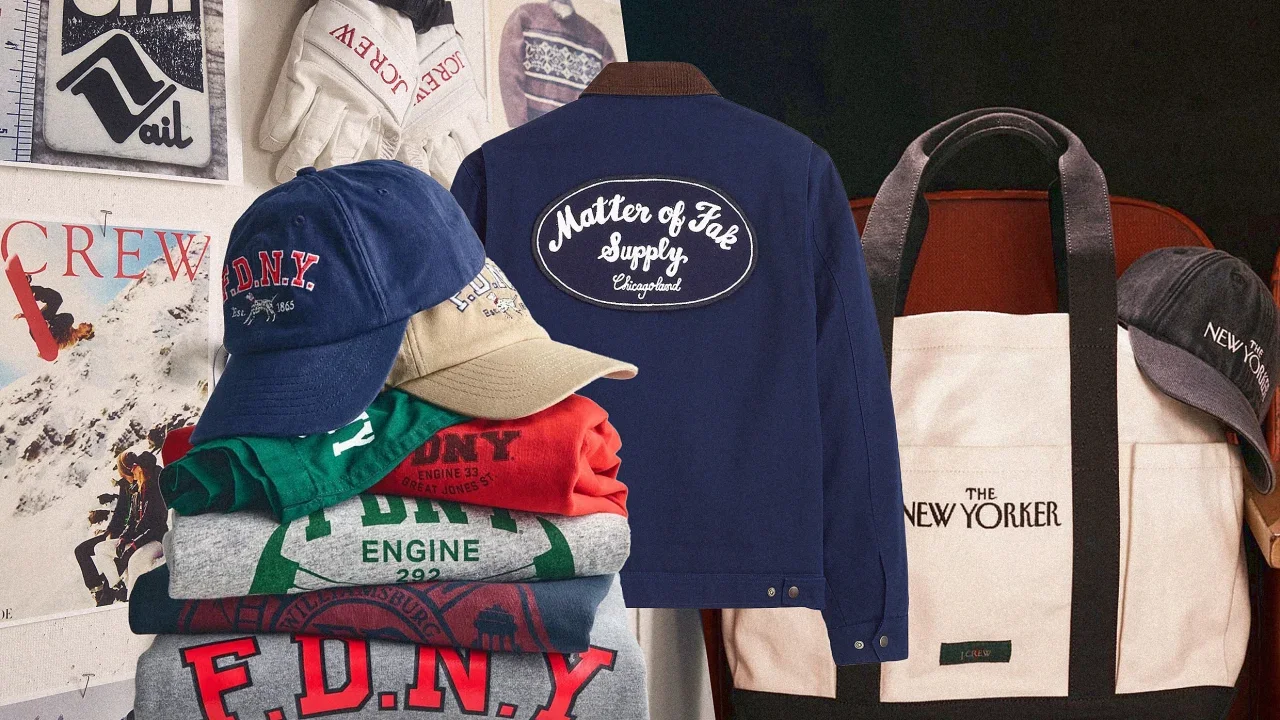
Over the course of its 40-year history, J.Crew has explored all kinds of design collaborations. Last year, for instance, it partnered with the designers Christopher John Rogers and Maryam Nassir Zadeh. But if you walk into a store, you might also come across slightly more unexpected collaborations. On a recent visit to J.Crew’s Columbus Circle store in New York, I found a collection of kids’ clothes emblazoned with the logo of the Fire Department of New York. In February, to celebrate The New Yorker magazine’s centennial anniversary, J.Crew created a special line of sweaters, rugby shirts, and baseball caps featuring the magazine’s logo. And last summer, it dropped work jackets and sweatshirts made in collaboration with the FX show The Bear, which was heading into its third season. Last week, J.Crew announced that it had launched a three-year partnership with the U.S. Ski and Snowboard association to create a lifestyle collection that will land in the lead-up to the 2026 Winter Olympics in Italy. The thread that ties all of these collaborations together is that they focus on beloved organizations with a loyal following, rather than designers. J.Crew is trying to make a comeback after it filed for bankruptcy in May 2020. In November of that year, the company named Libby Wadle, a 20-year veteran of the company, CEO. Through these collaborations, we’re getting a glimpse into Wadle’s vision for trying to make J.Crew relevant again. Wadle says that the U.S. Ski and Snowboard collab is likely to generate a lot of revenue. But some of the smaller, niche collabs aren’t necessarily about making a lot of money. Instead, they’re an effort to stretch our imagination about what J.Crew represents—and it’s about trying to ensure that the brand is part of the broader conversation. “We’re looking to partners who can help put us at the center of culture,” she says. “We do some partnerships that are not just about revenue. They just feel culturally relevant and feel great from a creative perspective.” Expanding What J.Crew Stands For When Wadle first stepped into the CEO position, her goal was to go back to the brand’s aesthetic roots, which are grounded in preppy, vintage Ivy League style. Brendon Babenzien and Olympia Gayot, the menswear and womenswear designers respectively, created updated versions of iconic J.Crew pieces, like its roll-neck sweater and barn jacket. She also brought back the print catalog, which was designed to serve as another storytelling device and a way to reintroduce the brand to consumers who may have lost interest. “It’s a way to get back in front of people who maybe don’t know us or who used to know us,” she says. With these collaborations, Wadle is trying to expand what J.Crew can be. For instance, most people think of it as a coastal New England brand, particularly when you think of all of the catalogs of the past featuring beachy scenes, with models in swimsuits and boat shoes. But Wadle points out that the brand is also connected to New York City. “Our headquarters are here, and New York means a lot to us,“ she says. Wadle has been eager to highlight this connection. Last fall, J.Crew hosted a dinner party at the New York Public Library to celebrate the relaunch of the catalog; the year before, it celebrated its 40th anniversary with a concert featuring The Strokes at New York Fashion Week. Its collabs with The New Yorker and FDNY were meant to deepen this connection with the city. But Wadle says that J.Crew designers also happened to be drawn to the branding around these organizations. “Brendon (the menswear creative director) loved the FDNY logo, and the old firehouses around the city,” Wadle says. “So he was passionate about bringing the collaboration to life.” The pieces from these New York–focused collaborations are fairly simple. The design team took J.Crew staples, like fleece sweatshirts, baseball caps, and vintage-washed T-shirts. They then incorporated the brand’s logos and mascots. The FDNY collection features the iconic spotty dog associated with New York firemen; The New Yorker collab included T-shirts with custom cartoons. The capsule collection for The Bear was also something the creative team was personally passionate about. Babenzien happened to have a relationship with Matty Matheson, who plays the handyman Neil Fak on the show, and also happens to have his own clothing line. So they decided to create a few key pieces, such as a work jacket and a trucker hat, with the character’s fictional company, “Matter of Fak Supply,” on it. Wadle says the brand doesn’t expect these niche collabs to be a cash grab; instead, they’re more of a marketing play, to get in front of fans of The Bear, or The New Yorker, or the FDNY. “It’s not always a big revenue-driving opportunity,” she says. “It’s about brand integrity and to create authentic, culturally relevant moments.” Sports Partnerships Wadle also wants J.Crew to be part of major sporting events. Last summer, the brand partnered with USA Swimming in advance of the Paris summer Olympics. The collaboration was unconventional because J.Crew wasn’t an official sponsor of the games, nor did it have the technical expertise to create swimsuits for Olympians. Instead, it created a collection of lifestyle pieces, from hoodies to shorts, that reflected J.Crew’s preppy aesthetic, but also featured the USA Swimming logo. The collection was a huge hit. Within the first day the products were released, 80% were snatched up. And Wadle says that the collaboration was responsible for a 10% spike in new customers in the first week of the release, compared to the year before. It quickly added a second collection to meet the demand. “The energy around swimming and the families participating by cheering on swimmers surprised us,” Wadle says. Now, Wadle wants to create similar magic with the collaboration with this new partnership with U.S. Ski and Snowboard. In this case it will create pieces that lean into the lifestyle around skiing, including après ski fashion. J.Crew will tap into U.S. Ski archives along with its own archive of winter catalogs to create vintage looks in line with its preppy heritage. Much like the New York–based collaborations, these sports partnership are a way to highlight different aspects of J.Crew’s brand that they might not be familiar with. Wadle points out that both swim and ski culture are part of J.Crew’s heritage. But now, these aspects will be at the forefront of consumers’ minds. “We believe this partnership will be big,” says Wadle. “We believe we have the ability to tap into a platform that is bigger than competitive athletes. It’s about tapping into a sport that many people love.” View the full article
-
Those of us living in the harsher climates can all commiserate about what felt like a really long winter. It was cold! And windy! Perfect weather for staying inside, inert, and keeping warm with dense carbs and saturated fats. Well, the party’s over. As the chill of winter melts away and spring begins to bloom, it’s time to shed those extra layers—both figuratively and literally. So whether you’re counting calories, trying new workouts, or simply trying to move a little more, these free tools are here to help you reach your goals. MyFitnessPal MyFitnessPal (iOS, Android) is a do-it-all weight loss tool that helps you monitor your daily food intake, exercise, and weight progress. With an extensive food database, barcode scanner, and macro-tracking features, this app is perfect for anyone looking to stay accountable with their diet. You can also connect with friends for some added motivation. The free version offers basic calorie and exercise tracking, while the paid version includes advanced features like meal plans, macronutrient goals by gram, and an ad-free experience. Nike Training Club No gym membership, no problem. The Nike Training Club app (iOS, Android) offers a variety of free workouts ranging from yoga to high-intensity interval training (HIIT). With expert coaching and curated plans tailored to your fitness level, it’s like having a personal trainer in your pocket—except this one doesn’t yell at you like a drill sergeant. While there used to be a premium version, Nike Training Club is now completely free, offering all previously premium content at no cost, including guided programs and wellness tips. Fitbit Even if you don’t own a Fitbit device, the Fitbit app (iOS, Android) is a solid, straightforward way to track your daily steps, activity, and sleep. Use it to set challenges for yourself or compete with friends if you need a little extra motivation. The free version tracks basic metrics like steps and sleep, while the paid version offers deeper insights, guided programs, and wellness reports. 7 Minute Workout If you’re short on time, the 7 Minute Workout app (iOS, Android) is a lifesaver. It provides short, efficient routines designed to get your heart rate up and your muscles working. These science-backed exercises are perfect for squeezing in a workout during a busy day. The free version includes the basic seven-minute workout, while the paid version unlocks additional workout variations and personalized plans. Darebee Darebee (Web, Android) is a unique fitness resource offering a positively enormous collection of workouts, challenges, and programs—all completely free. Designed to be accessible to everyone, Darebee provides visual guides for exercises that require little to no equipment, making it perfect for home workouts. Feel guilty about using this app without paying anything? Users can support the project via donations to keep the site up and running. View the full article
-
Fast Company is extending its application deadline for Best Workplaces for Innovators 2025 to Friday, April 4, at 11:59 p.m. Pacific Time. This marks the seventh year Fast Company will be recognizing companies and organizations from around the world that most effectively empower employees at all levels to improve processes, create new products, or invent whole new ways of doing business. In addition to honoring the world’s 100 Best Workplaces for Innovators, we will recognize companies in more than a dozen different categories. What differentiates Best Workplaces for Innovators from existing best-places-to-work lists is that it goes beyond benefits, competitive compensation, and collegiality (mere table stakes in today’s competitive talent marketplace) to identify which companies are actively creating and sustaining the kinds of innovative cultures that many top employees value even more than money. With Best Workplaces for Innovators, Fast Company aims to identify companies where employees can do the best work of their careers and improve the lives of hundreds, thousands, even millions of people around the world. For more than a decade, Fast Company has been recognizing outstanding achievement in business innovation with its annual awards programs. In addition to Best Workplaces for Innovators, Fast Company’s Most Innovative Companies, Innovation by Design, World Changing Ideas, Brands That Matter, and the Next Big Thing in Tech lists have celebrated thousands of organizations transforming industries and shaping society through paradigm-shifting products, insights, or services. For more information on applying, see the FAQs. The final deadline to apply is now April 4 at 11:59 p.m. PT. View the full article

-
Biggest US airlines have already reported a slowdown in domestic demandView the full article
-
The tactics are broadly applicable, but how you apply them will depend on your business model. A local firm might focus on community-driven content and local SEO, while a digital-first platform might lean into educational resources and national visibility. To…Read more ›View the full article